Quick take: Amazon ECS runs containers by holding a service at a desired count of tasks, each task launched from a task definition blueprint. Choose the Fargate launch type and there are no servers to patch, scale, or right-size — you declare CPU and memory per task, AWS runs it, and you pay per second of vCPU and GB. Put an Application Load Balancer in front with an IP target group, give each task its own ENI in a private subnet, and you have a production-shaped, self-healing web service. Get the execution-role-versus-task-role split or the ALB security-group chain wrong and you will watch tasks flap between
PROVISIONINGandSTOPPED, or stare at503targets that never go healthy.
A team I worked with moved a small Node.js API off a single hand-built EC2 box and onto ECS Fargate on a Friday afternoon. The task definition validated. The service created. Then every task marched from PROVISIONING to STOPPED in about forty seconds, over and over, desired count never met. The engineer on point restarted the service (no change), bumped the CPU (no change), and suspected a bad image. The real cause took two minutes to find once someone ran describe-tasks and read the stoppedReason: CannotPullContainerError. They had followed best practice and placed the tasks in private subnets — but with no NAT gateway and no VPC endpoints, the task’s ENI had no route to Amazon ECR to pull the image. Not a code bug. Not a capacity bug. A networking bug, one layer below where they were looking.
This article is the hands-on, production-grade path to your first ECS Fargate service: the whole object model (cluster → service → task → container, with the task definition as the blueprint), the Fargate versus EC2 launch decision and Fargate Spot, every field of a real task definition (image, the valid Fargate CPU/memory combos, portMappings, secrets, the awslogs driver, and the crucial execution role versus task role split), the service and its ALB / target-group wiring, awsvpc networking with an ENI per task, a rolling deploy, and ECS Exec to shell into a running container. You will build the real thing with the aws CLI and Terraform, verify healthy targets, deploy a new image, and tear it all down. Because you will return to this mid-incident, the options, limits, error strings, and the playbook are laid out as scannable tables. Read the prose once; keep the tables open when the pager fires.
By the end you will stop guessing. When a task will not start you will localise it to the exact hop — image pull, secrets init, health check, security group, or the missing route to ECR — and fix it because you understand what each object is for, not by restarting the service and hoping.
What problem this solves
You have a container that runs fine on your laptop. Now it has to run in the cloud: always on, across at least two Availability Zones, replaced automatically when it crashes, reachable behind one stable DNS name, and deployable without dropping traffic. Doing that by hand — provision instances, install a runtime, wire a load balancer, write health checks, script rolling replacement, patch the OS forever — is weeks of undifferentiated work you then own on call.
Amazon Elastic Container Service (ECS) is AWS’s answer: a control plane that runs and maintains containers for you. You describe the desired state — “keep two copies of this task running, behind this load balancer, in these subnets” — and ECS makes reality match, restarting failed tasks, registering healthy ones with the ALB, and rolling out new versions. Pick the Fargate launch type and you do not manage a single server: no AMIs to bake, no cluster of EC2 instances to patch or scale, no bin-packing to worry about. You pay for the vCPU and memory your tasks actually request, per second.
What breaks without it, or with it misconfigured: you run one container on one instance and it is a single point of failure; the box dies at 3 a.m. and so does the service. You deploy a new image by SSHing in and docker pull-ing, and users get connection resets mid-request. You forget which subnet the container is in and it silently cannot reach the internet. You confuse the two IAM roles and the app gets AccessDenied calling DynamoDB even though “the role has permission.” You point the ALB health check at the wrong path and every target goes unhealthy, so the ALB returns 503 while the app is perfectly fine. Every one of these is an ECS/Fargate configuration mistake, three layers down from the symptom — and every one is in this guide.
Who hits this: essentially every team putting a web app, API, or worker into containers on AWS without wanting to run Kubernetes. It bites hardest on teams who treat ECS as a black box — they click through the console wizard, it “works,” and then they have no mental model when a task will not start or a target will not go healthy. The fix is almost never “restart.” It is “find the object that is lying — the task definition, the role, the health check, or the route to ECR — and make it tell the truth.”
To frame the field, here is the ECS object model — the objects you configure, from the outside in. Internalise this hierarchy and every setting later has an obvious home.
| Object | What it is | Belongs to | You configure | Failure it owns |
|---|---|---|---|---|
| Cluster | A logical grouping / namespace for services and tasks | A region + account | Name, capacity providers | Wrong cluster, capacity-provider mismatch |
| Capacity provider | Where tasks run: FARGATE, FARGATE_SPOT, or an EC2 ASG |
A cluster | Strategy (base/weight) | Spot interruption, no capacity |
| Task definition | Immutable, versioned blueprint (family + revision) | A region + account | CPU/mem, containers, roles, network mode | Bad image, invalid CPU/mem combo, wrong role |
| Container definition | One container inside a task def | A task definition | Image, ports, env, secrets, logs, essential |
Pull failure, port mismatch, OOM |
| Service | Keeps N tasks running + ALB registration + deploys | A cluster | Desired count, LB, subnets/SG, deploy config | Stuck deploy, unhealthy targets, flapping |
| Task | One running instance of a task definition (1+ containers) | A service (or standalone) | (launched from the def) | Task won’t start, exits, killed by health check |
| ENI | The elastic network interface Fargate attaches per task | A task (awsvpc) |
Subnets, security groups, public IP | No route to ECR, SG blocks ALB, no egress |
Learning objectives
By the end of this article you can:
- Explain the ECS object model — cluster, capacity provider, service, task, task definition, container definition — and say exactly what each one owns.
- Choose correctly between the Fargate and EC2 launch types and know when Fargate Spot is safe, using a per-dimension decision matrix (patching, scaling, billing, GPU, daemons, density, cost-at-scale).
- Author a real task definition: pick a valid Fargate CPU/memory combination, set
portMappings,essential,environmentandsecrets, and wire theawslogsdriver — and never again confuse the execution role with the task role. - Create a service behind an ALB: an IP target group (
targetType=ipforawsvpc), health-check grace period, a rolling deployment with the deployment circuit breaker, and the right subnets and security group. - Reason about
awsvpcnetworking — one ENI per task,assignPublicIpfor public subnets versus private + NAT / VPC endpoints — and wire the security-group chain so the ALB can reach the task and the task can reach ECR. - Perform a rolling deploy of a new image and use ECS Exec to open an interactive shell in a running Fargate task for debugging.
- Build the whole stack in a hands-on lab with
aws ecs/aws elbv2and Terraform, verify healthy targets, hit the ALB, and tear it down with nothing billable left behind. - Run a symptom → confirm → fix playbook for
CannotPullContainerError, unhealthy targets, no egress, role confusion, missing logs, and stuck deployments.
Prerequisites & where this fits
You should already have a container image that listens on a known port and exposes a health endpoint (this lab uses a tiny public nginx/httpd-style image so you can follow along even before you have your own in ECR). You should understand VPC basics — that a public ALB lives in public subnets while its targets usually sit in private subnets, and how security groups work as stateful allow-lists — covered in VPC, Subnets, Route Tables & Security Groups Explained. You should know how private subnets reach the internet, from NAT Gateway & Private-Subnet Egress Hands-On. You should be comfortable with the aws CLI v2 and a configured profile — see AWS CLI Profiles, SSO & Config Troubleshooting — and able to apply a small Terraform config. A working grasp of IAM roles and policies, from IAM Users, Groups, Roles & Policies Hands-On, is assumed.
This sits in the Containers track. For the decision of which container platform to use at all — ECS versus EKS, Fargate versus EC2 — read ECS vs EKS vs Fargate: Choosing Your Container Path; this article is the hands-on build of the ECS-on-Fargate option that guide often points you to. For where a single service grows into a system of services with per-service data and async workers, see Microservices on ECS Fargate: A Reference Architecture. For the load-balancer layer in depth — listeners, rules, target-group attributes, health-check reason codes — keep Application Load Balancer & Target Groups Hands-On nearby; this article wires an ALB to ECS but that one is the ALB reference. For the broader compute menu, see AWS Compute Compared: EC2, Lambda, ECS & EKS. Autoscaling the service, pushing images to ECR, and a focused “task fails to start” playbook are companion topics in this same wave — referenced by name where they matter below.
Here is where a first ECS Fargate service fits in the build order, so you know what must exist before each step.
| Building block | Must exist first | Provided by | This article |
|---|---|---|---|
| VPC + 2 public + 2 private subnets (2 AZs) | Account, region | Your networking baseline | Assumed; created in lab |
| NAT gateway or VPC endpoints | Private subnets | Egress design | Explained; both shown |
| A container image | A Dockerfile | ECR push (companion) | Uses a public image |
| Execution role + task role | IAM | This + IAM article | Created in lab |
| ALB + IP target group + listener | VPC, subnets, SG | ALB article | Created in lab |
| ECS cluster | Region | This article | Created in lab |
| Task definition | Roles, log group, image | This article | Created in lab |
| Service | All of the above | This article | Created in lab |
Core concepts
ECS has a small vocabulary, but the words are precise and people mix them up constantly. Nail these and everything else clicks.
A cluster is just a namespace — a logical boundary that holds services and tasks. On Fargate the cluster has no servers in it; it is a label plus a set of capacity providers (where tasks may run). A task definition is an immutable, versioned document (family:revision, e.g. kv-web:3) describing one or more containers, the task-level CPU and memory, the network mode, the two IAM roles, and volumes. You never “edit” a task definition — you register a new revision. A task is one running realisation of a task definition: on Fargate that means a micro-VM with an ENI and one or more containers. A service is a controller that keeps a desired count of tasks running, replaces failed ones, registers healthy task IPs with an ALB target group, and orchestrates deployments when you change the task definition.
The single most-confused pair is the two IAM roles. The execution role is assumed by the ECS/Fargate agent — the infrastructure — to do things on your behalf before and around your container: pull the image from ECR, fetch secrets, and write to CloudWatch Logs. The task role is assumed by your application code inside the container to call AWS APIs at runtime — read an S3 object, write to DynamoDB, publish to SNS. Wrong role, wrong failure: an execution-role problem stops the task from starting; a task-role problem shows up as AccessDenied while the app runs.
Here is the core vocabulary in one place.
| Term | One-line definition | Mutable? | Scope | You touch it when |
|---|---|---|---|---|
| Cluster | Namespace for services/tasks + capacity providers | Yes | Region/account | Grouping workloads, setting Spot strategy |
| Task definition | Versioned blueprint (family:revision) |
No (new revision) | Region/account | Changing image, CPU/mem, env, roles |
| Container definition | One container inside a task def | No (via new revision) | Task definition | Ports, image, essential, logs, secrets |
| Task | A running instance of a task def | Runtime | Cluster | Debugging, ECS Exec, reading stoppedReason |
| Service | Keeps desired count + LB + deploys | Yes | Cluster | Scaling, deploys, ALB wiring |
| Desired count | How many tasks the service holds | Yes | Service | Manual scale / autoscaling target |
| Execution role | Agent role: pull image, secrets, logs | Yes | Task def | Pull/secrets/log failures at start |
| Task role | App role: runtime AWS API calls | Yes | Task def | App AccessDenied at runtime |
| Capacity provider | Where tasks run (FARGATE / FARGATE_SPOT / EC2) | Yes | Cluster/service | Spot mix, guaranteed base |
| ENI | Per-task network interface (awsvpc) |
Runtime | Task | Routing, SG, public IP, endpoints |
Fargate supports exactly one network mode — awsvpc — so every Fargate task is a first-class network citizen with its own private IP. The other modes exist only on the EC2 launch type; know them so you recognise them in EC2 task definitions.
networkMode |
What each task gets | Launch types | Notes |
|---|---|---|---|
awsvpc |
Own ENI + private IP + own SGs | Fargate and EC2 | Required on Fargate; target group must be ip |
bridge |
Docker bridge, dynamic host ports | EC2 only | Classic; needs dynamic port mapping to ALB |
host |
Shares the host’s network stack | EC2 only | Fast, but port conflicts; no SG per task |
none |
No external networking | EC2 only | Batch/utility tasks with no inbound/outbound |
And the launch decision that everything else hangs off — where do your tasks actually run?
| Launch option | What you manage | Billing | Best for |
|---|---|---|---|
| Fargate | Nothing below the task | Per-second vCPU + GB | Web/API/workers, small ops teams, spiky load |
| Fargate Spot | Nothing; tolerate interruption | ~70% off, interruptible | Stateless, fault-tolerant, batch, dev/test |
| EC2 | The instances (patch, scale, AMI) | EC2 price (RI/SP/Spot possible) | High density, GPU, daemonsets, cost at scale |
| External (ECS Anywhere) | Your own on-prem/other-cloud hosts | Per managed instance/hour | Hybrid, run ECS control on your hardware |
Fargate vs EC2 launch type (and Fargate Spot)
This is the first real decision, and for a first service the answer is almost always Fargate. The value proposition is that there is no host: nothing to patch, no CVE scramble on the node OS, no Auto Scaling group of instances to size, no bin-packing tasks onto instances. You request cpu and memory at the task level, Fargate finds capacity, and you are billed per second (one-minute minimum) for exactly that vCPU and memory from image-pull start to task stop. The trade is cost-at-scale and control: at steady high utilisation, a well-packed EC2 fleet with Savings Plans is cheaper per vCPU, and only EC2 gives you GPUs, privileged containers, host networking, DaemonSet-style scheduling, and per-instance tuning.
Decide per dimension, not by vibe.
| Dimension | Fargate | EC2 launch type | Who wins |
|---|---|---|---|
| Server patching | AWS patches the runtime | You patch the AMI/OS | Fargate |
| Capacity/scaling | No nodes; task scales directly | Scale ASG and service | Fargate |
| Billing model | Per-second vCPU + GB requested | Per-instance (pay for idle) | Fargate (spiky), EC2 (steady) |
| Cost at high steady load | Pay per task, no packing | Bin-pack many tasks/instance | EC2 |
| GPU / accelerators | Not supported | Supported (g/p families) |
EC2 |
| DaemonSet (one/host) | Not supported (no hosts) | DAEMON scheduling strategy |
EC2 |
| Privileged / host network | Not supported | Supported | EC2 |
| Task density / very small tasks | Min 0.25 vCPU/task | Many tiny tasks per instance | EC2 |
| Ops burden | Lowest | Highest | Fargate |
| Startup granularity | Per task | Per task (+ instance if scaling out) | Fargate |
| Local NVMe / instance store | Ephemeral 20–200 GB only | Full instance store / EBS | EC2 |
Fargate Spot runs the same Fargate task on spare capacity for roughly a 70% discount, with the catch that AWS can reclaim it. On interruption, ECS emits a task state-change event, sends SIGTERM to your containers, waits stopTimeout (default 30s, up to 120s), then SIGKILL. Use it where a task disappearing is a non-event: stateless web tiers with enough replicas, background/batch workers, CI, and non-prod. Do not put your only replica, a stateful singleton, or a latency-critical path solely on Spot.
| Aspect | Fargate (On-Demand) | Fargate Spot |
|---|---|---|
| Price | Full per-second rate | ~70% cheaper (varies) |
| Interruption | None (you stop it) | AWS may reclaim capacity |
| Warning | n/a | SIGTERM → wait stopTimeout → SIGKILL |
| Handle it with | n/a | Graceful shutdown, ≥2 replicas, retries |
| Safe for | Anything | Stateless, fault-tolerant, batch, dev |
| Avoid for | — | Stateful singletons, sole replica, hard-latency |
| Windows containers | Supported | Not supported on Spot |
You blend the two with a capacity provider strategy on the cluster or service: a base guarantees a floor of On-Demand tasks, and weight sets the ratio for everything above the base.
| Field | Meaning | Example | Effect |
|---|---|---|---|
capacityProvider |
FARGATE or FARGATE_SPOT |
FARGATE |
Names the pool |
base |
Minimum tasks placed here first | base=1 on FARGATE |
1 task always On-Demand |
weight |
Relative share above the base | FARGATE=1, FARGATE_SPOT=3 | 3 Spot : 1 On-Demand thereafter |
| (result) | Blended placement | desired=5 | 1 guaranteed + 4 split 3:1 |
Fargate also has a platform version; LATEST currently resolves to 1.4.0, which you want.
| Platform version | Notable capabilities | Use it for |
|---|---|---|
1.4.0 / LATEST |
Configurable ephemeral storage (20–200 GB), ECS Exec (SSM agent), 8/16 vCPU sizes, network metrics | Everything new |
1.3.0 |
Legacy; 20 GB fixed ephemeral, no ECS Exec | Only if pinned by an old service |
The task definition — your container blueprint
The task definition is where most of the real configuration lives. It is a JSON document you register; ECS stores it as family:revision. Get the task-level cpu/memory, the container’s image/portMappings/logConfiguration, and the two role ARNs right, and the rest is refinement.
Task-level fields
| Field | What it sets | Fargate requirement / note |
|---|---|---|
family |
The name; revisions increment under it | Required; e.g. kv-web |
requiresCompatibilities |
Launch types this def supports | ["FARGATE"] |
networkMode |
Network mode | Must be awsvpc |
cpu |
Task-level vCPU (in CPU units) | Required on Fargate; valid combo only |
memory |
Task-level memory (MiB) | Required on Fargate; valid combo only |
executionRoleArn |
Agent role (pull/secrets/logs) | Needed if using ECR private/secrets/awslogs |
taskRoleArn |
App role (runtime AWS calls) | Optional but usually set |
runtimePlatform |
OS + CPU arch (LINUX, X86_64/ARM64) |
Set ARM64 for Graviton savings |
ephemeralStorage.sizeInGiB |
Scratch disk (21–200) | Default 20 GB; 1.4.0+ to raise |
containerDefinitions |
The array of containers | ≥1; exactly one usually essential |
volumes |
EFS / ephemeral volume defs | No host bind mounts on Fargate |
The number that trips up every newcomer: on Fargate, cpu and memory are not free-form — they must be one of a fixed set of valid combinations. Pick the CPU size, then memory must fall in that CPU’s allowed range.
Task cpu |
vCPU | Allowed memory (MiB) |
|---|---|---|
256 |
0.25 | 512, 1024, 2048 |
512 |
0.5 | 1024 – 4096 (1 GB steps) |
1024 |
1 | 2048 – 8192 (1 GB steps) |
2048 |
2 | 4096 – 16384 (1 GB steps) |
4096 |
4 | 8192 – 30720 (1 GB steps) |
8192 |
8 | 16384 – 61440 (4 GB steps) · needs PV 1.4.0 |
16384 |
16 | 32768 – 122880 (8 GB steps) · needs PV 1.4.0 |
Register a memory value outside the range for its CPU and register-task-definition fails with ClientException: No Fargate configuration exists for given values.
Container definition fields
Inside containerDefinitions, each container is its own object. Enumerate the ones you will actually set.
| Field | What it does | Gotcha |
|---|---|---|
name |
Container name (used by LB mapping, Exec) | Must match --load-balancers containerName |
image |
Image URI (ECR or public) | Use an immutable tag/digest, not :latest |
essential |
If true, its exit stops the whole task | Exactly one primary should be essential |
portMappings |
Ports the container exposes | containerPort must match health check + LB |
cpu / memory / memoryReservation |
Optional container-level limits | Sum ≤ task-level; memory is a hard cap (OOM) |
environment |
Plain-text env vars | Never put secrets here (visible in describe) |
secrets |
Env vars pulled from Secrets Mgr / SSM | Needs execution-role perms + endpoint/NAT |
environmentFiles |
Env from an S3 .env file |
Execution role needs s3:GetObject |
logConfiguration |
Log driver + options | awslogs for CloudWatch (below) |
healthCheck |
Container-level health command | Different from ALB health check |
command / entryPoint |
Override image CMD/ENTRYPOINT | Bad value → CannotStartContainerError |
dependsOn |
Ordering vs other containers | For sidecars (START, HEALTHY) |
ulimits / linuxParameters |
nofile, initProcessEnabled, caps |
Limited capability set on Fargate |
readonlyRootFilesystem |
Immutable root FS | Good hardening; needs writable tmpfs volume |
stopTimeout |
Grace before SIGKILL on stop |
Default 30s, max 120s (Fargate) |
portMappings is small but load-bearing — the containerPort has to line up with your health check and your load-balancer mapping or the target will never go healthy.
portMappings field |
Meaning | Fargate note |
|---|---|---|
containerPort |
Port the app listens on | The one the ALB targets (e.g. 8080) |
hostPort |
Host port | On awsvpc, equals containerPort |
protocol |
tcp / udp |
tcp for HTTP apps |
name |
Named port (Service Connect) | Optional; enables service discovery |
appProtocol |
http/http2/grpc |
Hints for Service Connect |
environment vs secrets vs environmentFiles
Configuration comes in three shapes; the difference is who can read the value and where it lives.
| Mechanism | Source | Visible in describe-task-definition? |
Use for |
|---|---|---|---|
environment |
Inline plaintext | Yes (anyone with describe) | Non-secret config: LOG_LEVEL, PORT |
secrets |
Secrets Manager / SSM Parameter Store | No (only ARN shown) | Passwords, API keys, DB creds |
environmentFiles |
S3 .env object |
Bucket/key shown, not values | Bulk non-secret config |
Both secrets and private ECR images are fetched by the execution role before your app runs, so a permission or routing gap there fails the task at start with ResourceInitializationError or CannotPullContainerError, not at runtime.
The awslogs driver
To see your container’s stdout/stderr in CloudWatch, set logConfiguration.logDriver to awslogs. The execution role needs logs:CreateLogStream and logs:PutLogEvents (plus logs:CreateLogGroup if you auto-create).
"logConfiguration": {
  "logDriver": "awslogs",
  "options": {
    "awslogs-group": "/ecs/kv-web",
    "awslogs-region": "ap-south-1",
    "awslogs-stream-prefix": "web",
    "awslogs-create-group": "true"
  }
}
awslogs option |
Purpose | Note |
|---|---|---|
awslogs-group |
Target log group | Create it or set awslogs-create-group |
awslogs-region |
Region of the log group | Usually the task’s region |
awslogs-stream-prefix |
Prefix; stream = prefix/container/taskID |
Omit and streams are unnamed/confusing — always set |
awslogs-create-group |
Auto-create the group | Needs logs:CreateLogGroup on exec role |
mode |
blocking (default) or non-blocking |
non-blocking drops logs under pressure, never blocks app |
max-buffer-size |
Buffer for non-blocking |
Default 1 MB |
Fargate supports a subset of log drivers; know which are available.
| Log driver | On Fargate? | Use for |
|---|---|---|
awslogs |
Yes | CloudWatch Logs (default choice) |
awsfirelens |
Yes | Route to Fluent Bit → Kinesis/OpenSearch/3rd-party |
splunk |
Yes | Direct to Splunk HEC |
json-file / syslog / journald |
No | EC2 launch type only |
Execution role vs task role — the #1 confusion
Two roles, two very different jobs. Memorise this table; it prevents more wasted hours than any other in the article.
| Aspect | Execution role | Task role |
|---|---|---|
| Assumed by | ECS/Fargate agent (infrastructure) | Your application code in the container |
| When | Before/around container start | While the app runs |
| Typical actions | Pull ECR image, fetch secrets, write logs |
s3:GetObject, dynamodb:PutItem, sns:Publish |
| Managed policy | AmazonECSTaskExecutionRolePolicy |
None — you write least-privilege |
| Failure looks like | Task won’t start: pull/secrets/log error | App AccessDenied at runtime |
| Set via | executionRoleArn |
taskRoleArn |
| Needed if | Private ECR, secrets, or awslogs |
App calls any AWS API |
The managed AmazonECSTaskExecutionRolePolicy covers the common execution-role needs; you extend it when you use secrets (add secretsmanager:GetSecretValue and the KMS kms:Decrypt on the key) or environmentFiles (add s3:GetObject).
| Execution-role permission | Why | From |
|---|---|---|
ecr:GetAuthorizationToken |
Auth to ECR | Managed policy |
ecr:BatchGetImage, ecr:GetDownloadUrlForLayer |
Pull image layers | Managed policy |
logs:CreateLogStream, logs:PutLogEvents |
awslogs driver |
Managed policy |
logs:CreateLogGroup |
Auto-create log group | Add if awslogs-create-group=true |
secretsmanager:GetSecretValue |
Fetch secrets |
Add per secret ARN |
ssm:GetParameters |
Fetch SSM secrets |
Add per parameter ARN |
kms:Decrypt |
Decrypt a CMK-encrypted secret | Add for the KMS key |
s3:GetObject |
environmentFiles |
Add per object |
The service — desired state, ALB integration, deployments
A service is the controller that turns “I want two of these” into reality and keeps it that way. It owns the desired count, the network configuration (subnets + security group for the task ENIs), the load-balancer registration, and the deployment behaviour when the task definition changes.
Service parameters
| Parameter | What it controls | Typical value |
|---|---|---|
desiredCount |
How many tasks to keep running | 2 (spread over 2 AZs) |
launchType / capacityProviderStrategy |
Where tasks run | FARGATE or a Spot mix |
platformVersion |
Fargate platform version | LATEST |
networkConfiguration.awsvpcConfiguration |
Subnets, SGs, public IP | 2 private subnets, task SG |
loadBalancers |
Target group + container + port | TG ARN, web, 8080 |
healthCheckGracePeriodSeconds |
Ignore ELB health checks after start | ≥ app cold-start (e.g. 60) |
deploymentConfiguration |
Rolling knobs + circuit breaker | min 100 / max 200 + breaker |
deploymentController |
ECS / CODE_DEPLOY / EXTERNAL |
ECS (rolling) |
enableExecuteCommand |
Turns on ECS Exec | true for debuggable services |
schedulingStrategy |
REPLICA / DAEMON |
REPLICA (DAEMON is EC2-only) |
propagateTags |
Copy tags to tasks | SERVICE or TASK_DEFINITION |
enableECSManagedTags |
AWS-managed cost tags | true |
Rolling deployments: minimum-healthy and maximum-percent
With the default ECS deployment controller, changing the task definition triggers a rolling update governed by two percentages of desiredCount. minimumHealthyPercent is the floor of healthy tasks ECS must keep during the deploy; maximumPercent is the ceiling of total tasks it may run. For a service behind a load balancer the defaults are 100% / 200% — ECS spins up replacements before draining the old ones, so capacity never dips.
| desired | min% | max% | Behaviour during deploy |
|---|---|---|---|
| 4 | 100 | 200 | Up to 8 tasks; never <4 healthy; add-then-drain (zero-downtime) |
| 4 | 50 | 100 | Drain 2 first, then add 2; capacity dips to 50% |
| 2 | 100 | 200 | Up to 4; safest for small services |
| 1 | 0 | 100 | Stop the 1, then start 1 — downtime on a single-task service |
The deployment circuit breaker
Turn this on. Without it, a bad revision whose tasks never go healthy leaves the service stuck deploying forever, quietly retrying while the old tasks keep serving. The deployment circuit breaker watches a new deployment, and after enough consecutive failed tasks it declares the deployment failed — and, if rollback: true, automatically rolls back to the last good revision.
| Setting | Values | Effect |
|---|---|---|
deploymentCircuitBreaker.enable |
true / false |
Detect a failing deployment and stop it |
deploymentCircuitBreaker.rollback |
true / false |
On failure, auto-revert to last good task def |
| Rollout state | IN_PROGRESS → COMPLETED / FAILED |
Read via describe-services |
Deployment controller types
| Controller | How it deploys | Use when |
|---|---|---|
ECS |
Rolling update (min/max %) | Default; simplest |
CODE_DEPLOY |
Blue/green (shift traffic, then cut) | Need instant rollback, canary/linear traffic shift |
EXTERNAL |
You drive deployments via API | Custom tooling / third-party controllers |
Wiring the ALB target group
Because Fargate uses awsvpc, each task has its own IP, so the target group must be ip type — ECS registers and deregisters the task ENIs’ IPs automatically as it launches and drains tasks. An instance-type target group cannot work with Fargate.
| Target-group setting | Value for ECS Fargate | Why |
|---|---|---|
TargetType |
ip |
awsvpc tasks register by IP, not instance |
Protocol / Port |
HTTP / 8080 |
Must match containerPort |
HealthCheckPath |
/healthz (your endpoint) |
Wrong path → all unhealthy |
Matcher |
200 (or your codes) |
404/301 from app fails the check |
HealthCheckIntervalSeconds |
15–30 |
Balance speed vs noise |
HealthyThresholdCount |
2–3 |
Consecutive OKs to mark healthy |
DeregistrationDelay |
30–60s |
Drain in-flight requests on deploy |
awsvpc networking — an ENI per task
On Fargate, every task gets its own ENI with a private IP in one of the subnets you list, and the security groups you attach apply to that task, not to a shared host. This is powerful — per-task IPs and per-task security groups — but it means the task’s connectivity is entirely determined by the subnet’s route table, the assignPublicIp flag, and the security groups. Two things must work: the ALB must be able to reach the task on the container port (inbound), and the task must be able to reach ECR, CloudWatch Logs, and Secrets Manager to start (outbound).
awsvpcConfiguration
| Field | Values | Meaning |
|---|---|---|
subnets |
2+ subnet IDs | Where task ENIs are placed (span 2 AZs) |
securityGroups |
1+ SG IDs | SGs applied to the task ENI |
assignPublicIp |
ENABLED / DISABLED |
Give the ENI a public IP (public subnets only) |
Where does the task get internet? assignPublicIp and egress
The most common first-service failure is a task in a private subnet that cannot pull its image because it has no route out. There are three valid egress designs; pick one deliberately.
| Placement | assignPublicIp |
Egress path to ECR/logs | Notes |
|---|---|---|---|
| Public subnet | ENABLED |
Public IP → Internet Gateway | Simplest; task is publicly addressable (still gate with SG) |
| Public subnet | DISABLED |
None → pull fails | Broken combo: IGW needs a public IP; don’t do this |
| Private subnet | DISABLED |
NAT gateway → IGW | Standard prod; costs NAT + per-GB |
| Private subnet | DISABLED |
VPC endpoints (no NAT) | Cheapest at scale; needs the right endpoints |
If you go private-without-NAT (recommended for cost and isolation), you need these VPC endpoints so AWS-service traffic never touches the internet.
| Endpoint | Type | Why the task needs it |
|---|---|---|
com.amazonaws.<region>.ecr.api |
Interface | ECR auth / API |
com.amazonaws.<region>.ecr.dkr |
Interface | Pull image manifest/config |
com.amazonaws.<region>.s3 |
Gateway | Image layers live in S3 |
com.amazonaws.<region>.logs |
Interface | awslogs → CloudWatch Logs |
com.amazonaws.<region>.secretsmanager |
Interface | secrets (if used) |
com.amazonaws.<region>.ssmmessages |
Interface | ECS Exec control channel |
The security-group chain
Two security groups, one referencing the other. The ALB’s SG allows the world on 80/443; the task’s SG allows only the ALB SG on the container port, and allows egress on 443 for the pull.
| SG | Inbound | Outbound |
|---|---|---|
ALB SG (sg-alb) |
80/443 from 0.0.0.0/0 |
All (to targets) |
Task SG (sg-task) |
8080 from sg-alb (source = SG, not CIDR) |
443 to 0.0.0.0/0 or endpoints |
Referencing sg-alb as the source on the task SG is the correct pattern — it keeps working as ALB nodes move IPs across AZs, and it means only the load balancer can reach your tasks.
| ENI / density fact | Value | Note |
|---|---|---|
| ENIs per Fargate task | 1 | One ENI, one private IP |
| Network mode | awsvpc only |
No bridge/host on Fargate |
| Public IP | Optional per task | assignPublicIp |
| SG scope | Per task | Not shared with a host |
| Cross-AZ spread | Via multiple subnets | List 1 subnet per AZ |
Scaling and ECS Exec
Scaling, in brief
A first service usually runs a fixed desiredCount. When you outgrow that, Application Auto Scaling adjusts desiredCount on a signal — target-tracking on CPU, memory, or (best for web) ALBRequestCountPerTarget. That is a topic in its own right and has a dedicated companion deep-dive on ECS Service Auto Scaling in this wave; the pointer table below is enough to know what exists.
| Scaling signal | Metric | Good for | Watch out |
|---|---|---|---|
| CPU target tracking | ECSServiceAverageCPUUtilization |
CPU-bound apps | Lags spiky traffic |
| Memory target tracking | ECSServiceAverageMemoryUtilization |
Memory-bound apps | Leaks look like load |
| Requests per target | ALBRequestCountPerTarget |
Web/API front ends | Best proxy for user load |
| Scheduled scaling | Cron | Predictable peaks | Not reactive |
| Step scaling on custom | Any CloudWatch metric | Queue depth, custom KPIs | More tuning |
ECS Exec — shell into a running task
ECS Exec lets you open an interactive shell in a running Fargate container without SSH, a bastion, or a public IP — it tunnels through AWS Systems Manager. It is the single best debugging tool for “the task is running but behaving oddly.”
| Requirement | Detail |
|---|---|
| Service/run flag | enableExecuteCommand (service) or --enable-execute-command (run-task) |
| Platform version | 1.4.0+ (SSM agent bundled) |
| Task role perms | ssmmessages:CreateControlChannel, CreateDataChannel, OpenControlChannel, OpenDataChannel |
| Networking (private) | ssmmessages VPC endpoint (or NAT) |
| Local tooling | AWS CLI v2 + Session Manager plugin |
| Container | A shell present (/bin/sh or /bin/bash) |
aws ecs execute-command \
  --cluster kv-demo --task <task-id> \
  --container web --interactive --command "/bin/sh"
Note that ECS Exec permissions live on the task role, not the execution role — one more reason to keep the two straight.
Architecture at a glance
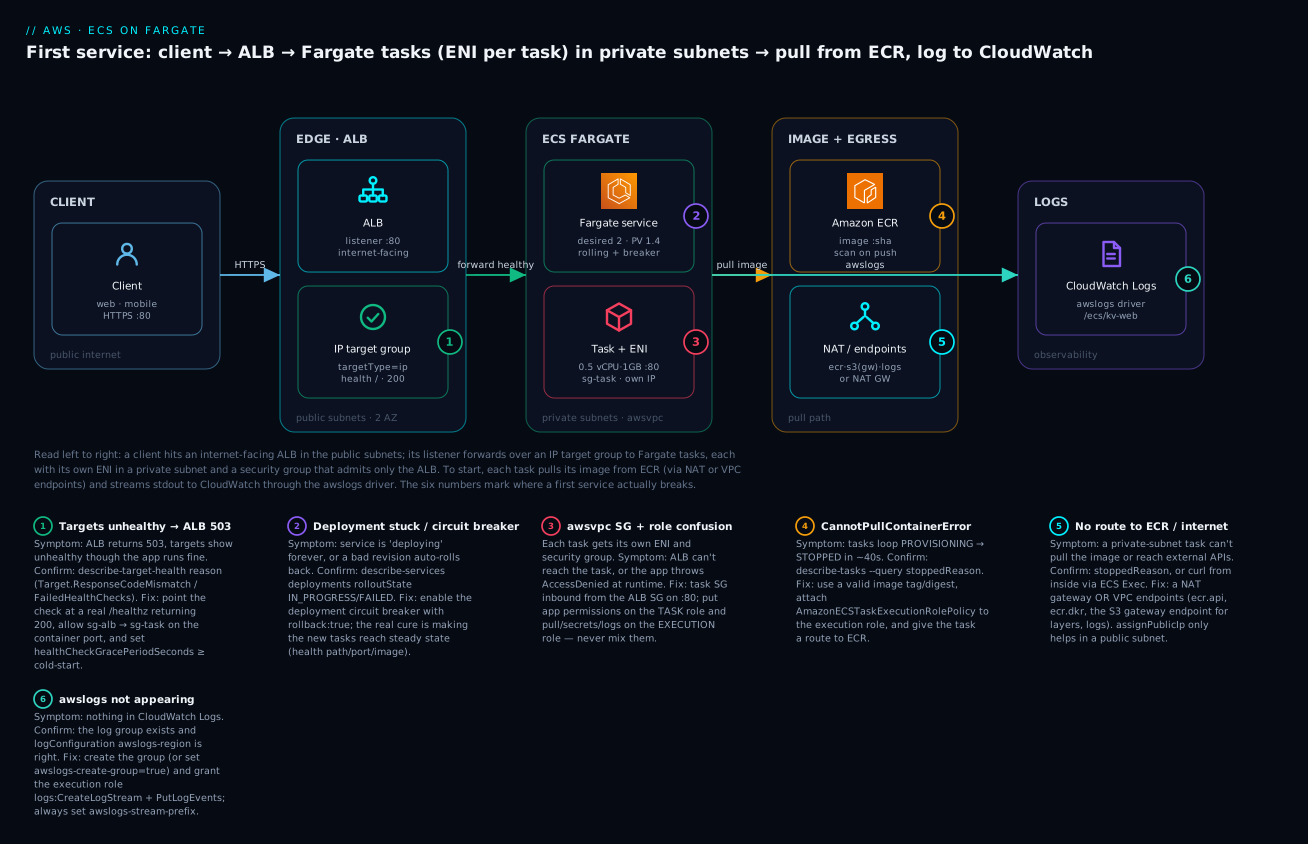
The diagram below is the exact system you build in the lab, read left to right along the request path. A client hits the ALB on :443 in the public subnets; the ALB’s listener forwards to an IP target group whose members are the private IPs of your Fargate tasks. Each task runs in a private subnet with its own ENI and the task security group, which allows inbound only from the ALB’s security group on :8080. To start, each task’s execution role pulls the image from Amazon ECR (via NAT or VPC endpoints) and streams stdout to CloudWatch Logs through the awslogs driver. The numbered badges mark the six hops where a first service most often breaks — image pull, secrets/logs init, the ALB→task security group, the health check, egress, and ECS Exec — each narrated in the legend as symptom · confirm · fix.
Real-world scenario
GroceRun, a Bengaluru grocery-delivery startup, ran its order API as a single hand-managed t3.medium EC2 instance: one docker run, deploys by SSH-and-pull, and a health check that was really just “is the box pingable.” It survived until a Diwali promo. The instance’s disk filled with old images, the container was OOM-killed under load, and because there was exactly one of it, the API went dark for eleven minutes during peak checkout. The post-incident action was blunt: no more single boxes, no more manual deploys.
The platform engineer chose ECS on Fargate for the rebuild — the team was four people and had no appetite to run Kubernetes or patch nodes. The target design was two tasks at 0.5 vCPU / 1 GB across two AZs, behind an internet-facing ALB, tasks in private subnets, images in ECR, logs in CloudWatch. The build went smoothly until the service came up and every task cycled PROVISIONING → STOPPED. describe-tasks showed CannotPullContainerError: the private subnets had no NAT gateway yet and no VPC endpoints, so the task ENIs had no route to ECR. Rather than pay for a NAT gateway for what was almost entirely AWS-internal traffic, they added the four endpoints — ecr.api, ecr.dkr, the S3 gateway endpoint (for the image layers), and logs — and the tasks pulled and started within a minute.
The next wall was 503 from the ALB with all targets “unhealthy.” The app booted in about 25 seconds (JIT warm-up plus a schema check), but the target group started failing it immediately and the service kept killing “unhealthy” tasks before they finished booting. The fix was two settings: healthCheckGracePeriodSeconds = 60 so ECS ignored ELB health checks during boot, and a real /healthz endpoint returning 200 (the default matcher had been hitting /, which returned a 302 redirect). Targets went healthy and stayed.
They turned on the deployment circuit breaker with rollback: true before the first real deploy — and it earned its keep a week later when a config typo shipped an image that crash-looped: ECS detected the failing deployment, stopped it, and rolled back to the previous revision automatically, with the old tasks never having stopped serving. For the promo weekend they added a Fargate Spot capacity provider with base: 2 On-Demand (their steady floor) and Spot for burst, cutting the peak compute bill by roughly 55% while keeping two guaranteed replicas. The eleven-minute outage did not recur; the next promo scaled from 2 to 9 tasks on ALBRequestCountPerTarget and back down, untouched by a human.
Advantages and disadvantages
| Advantages | Disadvantages |
|---|---|
| No servers to patch, scale, or bin-pack | Per-vCPU cost higher than a packed EC2 fleet at steady high load |
| Per-second billing for exactly what you request | No GPU, privileged mode, host networking, or DaemonSet |
| Per-task ENI + per-task security group (strong isolation) | Each task needs a route to ECR/logs (NAT or endpoints) |
| Self-healing: failed tasks replaced automatically | Cold-start of a task is slower than reusing a warm EC2 host |
| Zero-downtime rolling deploys + circuit-breaker rollback | Ephemeral storage only (20–200 GB); no instance store |
| ECS Exec debugging without SSH/bastions | Min task size 0.25 vCPU — many tiny tasks are cheaper on EC2 |
| Simplest managed-container option on AWS (no K8s) | Less low-level control than EC2 or EKS |
Fargate wins decisively for a first service and for most web/API/worker workloads run by small teams: the operational savings dwarf the per-vCPU premium until you are running a large, steadily-utilised fleet. Reach for the EC2 launch type when you need GPUs, run at high steady utilisation where bin-packing and Savings Plans make instances cheaper, or need daemonset-style agents on every host. The disadvantages that bite first-service teams are almost always the networking ones — the route to ECR and the ALB→task security group — which is exactly why the lab and playbook below dwell on them.
Hands-on lab
You will register a task definition, create an ALB with an IP target group, run a Fargate service of two tasks across two private subnets behind the ALB, verify healthy targets and hit the ALB, do a rolling deploy, and shell in with ECS Exec — then tear it all down. Both the aws CLI and Terraform are shown. ⚠️ Cost note: Fargate has no perpetual free tier; two 0.5 vCPU / 1 GB tasks plus an ALB cost a few rupees per hour. A NAT gateway (if you choose it over endpoints) adds ~₹4/hour plus per-GB. Tear down when done.
Lab variables
| Variable | Example | Notes |
|---|---|---|
| Region | ap-south-1 |
Mumbai |
| VPC | vpc-0abc... |
Has 2 public + 2 private subnets |
| Public subnets | subnet-pub-a, subnet-pub-b |
For the ALB |
| Private subnets | subnet-prv-a, subnet-prv-b |
For the tasks |
| Image | public.ecr.aws/nginx/nginx:stable |
Public; no ECR auth needed |
| Container port | 80 |
nginx default |
| Health path | / |
nginx returns 200 at / |
This lab uses a public image and container port 80 so you can run it without first pushing to ECR. A companion hands-on in this wave walks through creating an ECR repository and pushing your own image; when you switch to a private ECR image, the execution role needs the ECR permissions in the table above and the tasks need a route to ECR (NAT or endpoints).
Step 1 — Create the cluster and log group
aws ecs create-cluster --cluster-name kv-demo \
  --capacity-providers FARGATE FARGATE_SPOT \
  --region ap-south-1

aws logs create-log-group --log-group-name /ecs/kv-web --region ap-south-1
Expected: JSON with "status": "ACTIVE" for the cluster.
Step 2 — Create the two IAM roles
# Trust policy so ECS tasks can assume the roles
cat > trust.json <<'EOF'
{ "Version": "2012-10-17", "Statement": [
  { "Effect": "Allow", "Principal": { "Service": "ecs-tasks.amazonaws.com" }, "Action": "sts:AssumeRole" } ] }
EOF

aws iam create-role --role-name kvEcsExecutionRole \
  --assume-role-policy-document file://trust.json
aws iam attach-role-policy --role-name kvEcsExecutionRole \
  --policy-arn arn:aws:iam::aws:policy/service-role/AmazonECSTaskExecutionRolePolicy

aws iam create-role --role-name kvEcsTaskRole \
  --assume-role-policy-document file://trust.json
# Task role: add app permissions + ECS Exec (ssmmessages) as needed
Step 3 — Register the task definition
cat > taskdef.json <<'EOF'
{
  "family": "kv-web",
  "requiresCompatibilities": ["FARGATE"],
  "networkMode": "awsvpc",
  "cpu": "512",
  "memory": "1024",
  "executionRoleArn": "arn:aws:iam::123456789012:role/kvEcsExecutionRole",
  "taskRoleArn": "arn:aws:iam::123456789012:role/kvEcsTaskRole",
  "runtimePlatform": { "operatingSystemFamily": "LINUX", "cpuArchitecture": "X86_64" },
  "containerDefinitions": [
    {
      "name": "web",
      "image": "public.ecr.aws/nginx/nginx:stable",
      "essential": true,
      "portMappings": [ { "containerPort": 80, "protocol": "tcp" } ],
      "environment": [ { "name": "LOG_LEVEL", "value": "info" } ],
      "logConfiguration": {
        "logDriver": "awslogs",
        "options": {
          "awslogs-group": "/ecs/kv-web",
          "awslogs-region": "ap-south-1",
          "awslogs-stream-prefix": "web"
        }
      }
    }
  ]
}
EOF

aws ecs register-task-definition --cli-input-json file://taskdef.json
Expected: "status": "ACTIVE" and a "revision": 1 — your blueprint is now kv-web:1.
Step 4 — Security groups
SG_ALB=$(aws ec2 create-security-group --group-name kv-alb-sg \
  --description "ALB" --vpc-id vpc-0abc --query GroupId --output text)
SG_TASK=$(aws ec2 create-security-group --group-name kv-task-sg \
  --description "ECS tasks" --vpc-id vpc-0abc --query GroupId --output text)

aws ec2 authorize-security-group-ingress --group-id $SG_ALB \
  --protocol tcp --port 80 --cidr 0.0.0.0/0
# Task SG: allow ONLY the ALB SG on the container port
aws ec2 authorize-security-group-ingress --group-id $SG_TASK \
  --protocol tcp --port 80 --source-group $SG_ALB
Step 5 — ALB, IP target group, listener
ALB_ARN=$(aws elbv2 create-load-balancer --name kv-demo-alb --type application \
  --scheme internet-facing --subnets subnet-pub-a subnet-pub-b \
  --security-groups $SG_ALB --query 'LoadBalancers[0].LoadBalancerArn' --output text)

TG_ARN=$(aws elbv2 create-target-group --name kv-demo-tg \
  --protocol HTTP --port 80 --vpc-id vpc-0abc \
  --target-type ip --health-check-path / --matcher HttpCode=200 \
  --query 'TargetGroups[0].TargetGroupArn' --output text)

aws elbv2 create-listener --load-balancer-arn $ALB_ARN \
  --protocol HTTP --port 80 \
  --default-actions Type=forward,TargetGroupArn=$TG_ARN
The --target-type ip is the critical flag — an instance target group cannot register Fargate tasks.
Step 6 — Create the Fargate service
aws ecs create-service \
  --cluster kv-demo \
  --service-name kv-web \
  --task-definition kv-web:1 \
  --desired-count 2 \
  --launch-type FARGATE \
  --platform-version LATEST \
  --network-configuration "awsvpcConfiguration={subnets=[subnet-prv-a,subnet-prv-b],securityGroups=[$SG_TASK],assignPublicIp=DISABLED}" \
  --load-balancers "targetGroupArn=$TG_ARN,containerName=web,containerPort=80" \
  --health-check-grace-period-seconds 60 \
  --deployment-configuration "deploymentCircuitBreaker={enable=true,rollback=true},minimumHealthyPercent=100,maximumPercent=200" \
  --enable-execute-command
assignPublicIp=DISABLEDin private subnets means the tasks need a route to ECR/logs. The public nginx image is pulled from a public ECR registry, so you still need egress — either a NAT gateway on the private subnets or the VPC endpoints listed earlier. If tasks stick atPROVISIONING, that route is missing (see the playbook).
Step 7 — Verify
# Wait until the service reaches steady state
aws ecs wait services-stable --cluster kv-demo --services kv-web

# Targets should be "healthy"
aws elbv2 describe-target-health --target-group-arn $TG_ARN \
  --query 'TargetHealthDescriptions[].TargetHealth.State'

# Hit the ALB
ALB_DNS=$(aws elbv2 describe-load-balancers --load-balancer-arns $ALB_ARN \
  --query 'LoadBalancers[0].DNSName' --output text)
curl -s -o /dev/null -w "%{http_code}\n" http://$ALB_DNS/
Expected: two "healthy" states and 200 from curl.
Step 8 — Rolling deploy of a new image
Register a new revision (e.g. bump to nginx:mainline or your own tag), then force a rolling deployment:
# after editing taskdef.json image → registers kv-web:2
aws ecs register-task-definition --cli-input-json file://taskdef.json

aws ecs update-service --cluster kv-demo --service kv-web \
  --task-definition kv-web:2

# Watch the rollout
aws ecs describe-services --cluster kv-demo --services kv-web \
  --query 'services[0].deployments[].{status:status,rollout:rolloutState,running:runningCount,desired:desiredCount}'
Expected: a PRIMARY deployment moving to rolloutState: COMPLETED, old tasks draining after new ones go healthy — no dip below two healthy targets.
Step 9 — ECS Exec into a task
TASK=$(aws ecs list-tasks --cluster kv-demo --service-name kv-web \
  --query 'taskArns[0]' --output text)

aws ecs execute-command --cluster kv-demo --task $TASK \
  --container web --interactive --command "/bin/sh"
# then, inside the container:  wget -qO- localhost:80 | head
If this errors, the task role lacks ssmmessages:*, enableExecuteCommand was off, or (private subnets) the ssmmessages endpoint is missing.
Step 10 — Teardown
| # | Resource | Command | Billable if left? |
|---|---|---|---|
| 1 | Service (scale to 0 first) | aws ecs update-service --cluster kv-demo --service kv-web --desired-count 0 then delete-service --force |
Yes (Fargate) |
| 2 | Listener + target group | aws elbv2 delete-listener / delete-target-group |
Small |
| 3 | Load balancer | aws elbv2 delete-load-balancer --load-balancer-arn $ALB_ARN |
Yes (hourly + LCU) |
| 4 | NAT gateway (if created) | aws ec2 delete-nat-gateway |
Yes (hourly + per-GB) |
| 5 | VPC endpoints (if created) | aws ec2 delete-vpc-endpoints |
Interface endpoints hourly |
| 6 | Cluster | aws ecs delete-cluster --cluster kv-demo |
No |
| 7 | Log group | aws logs delete-log-group --log-group-name /ecs/kv-web |
Storage only |
| 8 | Security groups / roles | delete-security-group / delete-role |
No |
The same thing in Terraform
resource "aws_ecs_cluster" "demo" {
  name = "kv-demo"
}

resource "aws_cloudwatch_log_group" "web" {
  name              = "/ecs/kv-web"
  retention_in_days = 30
}

resource "aws_iam_role" "exec" {
  name               = "kvEcsExecutionRole"
  assume_role_policy = data.aws_iam_policy_document.ecs_assume.json
}
resource "aws_iam_role_policy_attachment" "exec" {
  role       = aws_iam_role.exec.name
  policy_arn = "arn:aws:iam::aws:policy/service-role/AmazonECSTaskExecutionRolePolicy"
}
resource "aws_iam_role" "task" {
  name               = "kvEcsTaskRole"
  assume_role_policy = data.aws_iam_policy_document.ecs_assume.json
}

data "aws_iam_policy_document" "ecs_assume" {
  statement {
    actions = ["sts:AssumeRole"]
    principals {
      type        = "Service"
      identifiers = ["ecs-tasks.amazonaws.com"]
    }
  }
}

resource "aws_ecs_task_definition" "web" {
  family                   = "kv-web"
  requires_compatibilities = ["FARGATE"]
  network_mode             = "awsvpc"
  cpu                      = "512"
  memory                   = "1024"
  execution_role_arn       = aws_iam_role.exec.arn
  task_role_arn            = aws_iam_role.task.arn

  container_definitions = jsonencode([{
    name      = "web"
    image     = "public.ecr.aws/nginx/nginx:stable"
    essential = true
    portMappings = [{ containerPort = 80, protocol = "tcp" }]
    logConfiguration = {
      logDriver = "awslogs"
      options = {
        "awslogs-group"         = aws_cloudwatch_log_group.web.name
        "awslogs-region"        = "ap-south-1"
        "awslogs-stream-prefix" = "web"
      }
    }
  }])
}

resource "aws_lb" "alb" {
  name               = "kv-demo-alb"
  load_balancer_type = "application"
  subnets            = [var.public_a, var.public_b]
  security_groups    = [aws_security_group.alb.id]
}

resource "aws_lb_target_group" "tg" {
  name        = "kv-demo-tg"
  port        = 80
  protocol    = "HTTP"
  vpc_id      = var.vpc_id
  target_type = "ip"                # REQUIRED for Fargate/awsvpc
  health_check {
    path    = "/"
    matcher = "200"
  }
}

resource "aws_lb_listener" "http" {
  load_balancer_arn = aws_lb.alb.arn
  port              = 80
  protocol          = "HTTP"
  default_action {
    type             = "forward"
    target_group_arn = aws_lb_target_group.tg.arn
  }
}

resource "aws_ecs_service" "web" {
  name                               = "kv-web"
  cluster                            = aws_ecs_cluster.demo.id
  task_definition                    = aws_ecs_task_definition.web.arn
  desired_count                      = 2
  launch_type                        = "FARGATE"
  health_check_grace_period_seconds  = 60
  enable_execute_command             = true

  network_configuration {
    subnets          = [var.private_a, var.private_b]
    security_groups  = [aws_security_group.task.id]
    assign_public_ip = false
  }

  load_balancer {
    target_group_arn = aws_lb_target_group.tg.arn
    container_name   = "web"
    container_port   = 80
  }

  deployment_circuit_breaker {
    enable   = true
    rollback = true
  }

  depends_on = [aws_lb_listener.http]
}
The depends_on the listener matters: ECS registration fails if the listener/target group is not ready. terraform destroy tears everything down in reverse.
Common mistakes & troubleshooting
This is the section you will come back to. The playbook maps each real failure to the exact command that confirms it and the fix. A focused companion in this wave — the “ECS task fails to start” troubleshooting guide — goes deeper on the start-time failures (rows 1–2, 6); this is the first-service-wide view.
| # | Symptom | Root cause | Confirm (exact command) | Fix |
|---|---|---|---|---|
| 1 | Tasks loop PROVISIONING → STOPPED; CannotPullContainerError |
No route to ECR (private subnet, no NAT/endpoints), bad tag, or exec-role missing ECR perms | aws ecs describe-tasks --cluster kv-demo --tasks <arn> --query 'tasks[0].stoppedReason' |
Add NAT or ecr.api+ecr.dkr+s3(gw)+logs endpoints; fix image URI; attach AmazonECSTaskExecutionRolePolicy |
| 2 | Task STOPPED; ResourceInitializationError: unable to pull secrets or registry auth |
Exec role lacks secretsmanager:GetSecretValue/kms:Decrypt, or no secretsmanager endpoint |
Same stoppedReason query |
Grant the secret + KMS key to the execution role; add the endpoint/NAT |
| 3 | ALB returns 503; targets unhealthy |
Health path/matcher wrong, or task SG doesn’t allow the ALB SG on the port | aws elbv2 describe-target-health --target-group-arn $TG --query 'TargetHealthDescriptions[].TargetHealth' |
Point health check at a real 200 path; allow sg-alb → sg-task on containerPort |
| 4 | Targets go unhealthy right after deploy, tasks get killed | Health-check grace shorter than app boot time | describe-services … --query 'services[0].events' shows “unhealthy … health checks” |
Set healthCheckGracePeriodSeconds ≥ cold-start (e.g. 60) |
| 5 | App can’t reach an external API; connections time out | Private subnet with no NAT and no endpoint for that service | ECS Exec in, curl https://api.example.com hangs |
Add a NAT gateway, or a VPC endpoint if it’s an AWS service |
| 6 | Public subnet, assignPublicIp=DISABLED, can’t pull |
IGW needs a public IP; without NAT/endpoints there’s no egress | stoppedReason = CannotPullContainerError |
Set assignPublicIp=ENABLED (public) or move to private + NAT/endpoints |
| 7 | No logs in CloudWatch | Log group missing, exec role lacks logs:*, or wrong awslogs-region |
Check group exists; describe-task-definition … logConfiguration |
Create group (or awslogs-create-group=true + logs:CreateLogGroup); fix region |
| 8 | App gets AccessDenied calling S3/DynamoDB, though “the role has it” |
Permission is on the execution role, not the task role | describe-task-definition --query 'taskDefinition.{exec:executionRoleArn,task:taskRoleArn}' |
Add the app permissions to the task role |
| 9 | Service stuck “deployment in progress” forever | New tasks never go healthy; circuit breaker off | describe-services … 'services[0].deployments[].rolloutState' = IN_PROGRESS |
Enable circuit breaker; fix the health check / image |
| 10 | Deployment auto-rolled back | Circuit breaker fired on a bad revision | Service event: “… circuit breaker …”; failed task stoppedReason |
Debug the new image/config locally, then redeploy |
| 11 | ECS Exec: “execute-command failed” / can’t connect | enableExecuteCommand off, task role lacks ssmmessages, no ssmmessages endpoint, PV <1.4.0 |
describe-tasks --query 'tasks[0].enableExecuteCommand'; run the amazon-ecs-exec-checker |
Enable exec, grant ssmmessages:* on task role, add endpoint, install Session Manager plugin |
| 12 | Task killed; exit code 137, OutOfMemoryError |
Container exceeded its memory hard limit | describe-tasks --query 'tasks[0].containers[].{name:name,reason:reason,exit:exitCode}' |
Raise task/container memory; fix the leak |
| 13 | New version won’t take over; old tasks keep serving | New tasks never pass health checks, so ECS keeps the old ones | describe-target-health shows new IPs unhealthy |
Fix health path/port; only healthy new targets get traffic |
| 14 | create-service fails: target type not supported / registration errors |
Target group is instance type, not ip |
aws elbv2 describe-target-groups --query 'TargetGroups[].TargetType' |
Recreate the target group with --target-type ip |
stoppedReason reference
When a task will not stay up, the truth is in stoppedReason on the task and reason on each container. Know the common strings.
stoppedReason / container reason |
Meaning | Usual fix |
|---|---|---|
CannotPullContainerError |
Image pull failed | Route to ECR + exec-role ECR perms + valid tag |
ResourceInitializationError: unable to pull secrets… |
Secrets/registry init failed | Exec-role GetSecretValue/kms:Decrypt + endpoint |
ResourceInitializationError: failed to configure logging |
Log group/driver init failed | Create group; exec-role logs:*; region |
CannotStartContainerError |
Bad command/entryPoint or missing binary |
Fix the command; verify the image locally |
OutOfMemoryError: Container killed due to memory usage |
Exceeded memory hard limit | Raise memory; fix leak |
Essential container in task exited |
An essential container stopped |
Read its exitCode; fix the app |
Task failed ELB health checks in (target-group …) |
Killed for failing health checks | Grace period + correct health path/SG |
Scaling activity initiated by (deployment …) |
Normal drain during deploy/scale-in | None — expected |
Target-health reason codes
| Reason code | Meaning | Fix |
|---|---|---|
Target.FailedHealthChecks |
Failed the configured check | Wrong path/port/SG or app down |
Target.ResponseCodeMismatch |
Got a code not in the matcher (e.g. 302) |
Fix the path or widen the matcher |
Target.Timeout |
No response within timeout | App slow/blocked, or SG blocks the probe |
Target.NotRegistered |
Not yet registered | Wait; ECS registers on task start |
Target.DeregistrationInProgress |
Draining after deploy/scale-in | Expected during rollout |
Elb.InternalError |
ALB-side error | Retry; check ALB config/limits |
Exit-code cheat sheet
| Exit code | Signal | Typical cause |
|---|---|---|
0 |
— | Clean exit (an essential container exiting 0 still stops the task) |
1 / 2 |
— | App error / config error at startup |
137 |
128+9 SIGKILL |
OOM kill, or stopTimeout exceeded |
139 |
128+11 SIGSEGV |
Native crash / segfault |
143 |
128+15 SIGTERM |
Graceful stop (deploy, scale-in, Spot reclaim) |
The two nastiest real failures for a first service are worth spelling out. The private-subnet pull failure (rows 1, 6) is the most common: everyone rightly puts tasks in private subnets, then forgets those subnets need an explicit route to ECR. The tell is CannotPullContainerError in stoppedReason within ~40 seconds of the task starting; the fix is either a NAT gateway or the endpoint quartet (ecr.api, ecr.dkr, the S3 gateway endpoint for layers, and logs) — people frequently add the two ECR interface endpoints and still fail because they forgot the S3 gateway endpoint where the image layers actually live. The role mix-up (row 8) is the sneakiest because nothing fails at start: the task runs, then throws AccessDenied the first time the app calls DynamoDB, and the engineer swears “the role has that permission” — because they put it on the execution role. The permission your code needs always goes on the task role.
Best practices
- Turn on the deployment circuit breaker with
rollback: truefrom day one — a bad deploy stops and reverts itself instead of hanging. - Run tasks in private subnets and reach AWS services via VPC endpoints (cheaper and more isolated than a NAT gateway for AWS-only egress).
- Reference the ALB security group as the source on the task SG (not a CIDR) — it survives ALB IP changes and admits only the load balancer.
- Use immutable image tags or digests, never
:latest— reproducible deploys and clean rollbacks depend on it. - Keep the execution role and task role separate and least-privilege — infra permissions on one, app permissions on the other, nothing shared for convenience.
- Never put secrets in
environment— they show up indescribe-task-definition; usesecretsfrom Secrets Manager or SSM. - Set
healthCheckGracePeriodSecondsto at least your cold-start time so slow-booting tasks are not killed before they are ready. - Always set
awslogs-stream-prefixso log streams are namedprefix/container/taskIDand are actually findable. - Spread across ≥2 AZs by listing one subnet per AZ and keeping
desiredCount ≥ 2. - Enable ECS Exec on non-prod (and gated in prod) for fast debugging, and log Exec sessions to CloudWatch/S3 for audit.
- Right-size with the valid CPU/memory combos, start small (0.25–0.5 vCPU), and let autoscaling add tasks rather than over-provisioning each one.
- Use a Fargate Spot capacity provider with an On-Demand
basefor burst savings without risking your whole replica set.
Security notes
Container security on Fargate is mostly about identity, network isolation, and image hygiene — the host is AWS’s problem.
| Control | What to do | Why |
|---|---|---|
| Task role least-privilege | Scope to the exact ARNs/actions the app calls | Blast radius if the container is compromised |
| Execution-role scoping | Limit secrets/KMS to the specific secret ARNs |
An over-broad exec role can read every secret |
Secrets via secrets |
Pull from Secrets Manager/SSM, not environment |
Plaintext env is visible in describe/console |
| Private subnets + SG source-by-SG | Only the ALB SG reaches tasks | No direct internet path to containers |
readonlyRootFilesystem |
Set true; mount a writable tmpfs where needed | Blocks tamper/persistence in the container |
| Image scanning | Enable ECR scan-on-push; fail builds on criticals | Catch CVEs before they reach production |
| Non-root user | Run as a non-root UID in the image | Limits container-escape impact |
| ECS Exec auditing | Log sessions to CloudWatch/S3; gate the SSM perms | Shell access is powerful; record it |
| Encryption in transit | Terminate TLS at the ALB (ACM cert) | Protects client↔ALB traffic |
| VPC endpoints with policies | Restrict which principals/repos an endpoint allows | Tightens the AWS-service egress path |
Cost & sizing
You pay for Fargate compute (vCPU-hours + GB-hours, per second, one-minute minimum), plus the ALB, plus NAT/endpoints and data transfer. The ECS control plane itself is free. There is no perpetual free tier for Fargate.
| Cost component | Driver | Approx (ap-south-1 / Mumbai) | Lever |
|---|---|---|---|
| Fargate vCPU | vCPU-hours requested | ~$0.05088 / vCPU-hr | Smaller cpu, Spot, Graviton (ARM64) |
| Fargate memory | GB-hours requested | ~$0.005584 / GB-hr | Smaller memory, right-size |
| Fargate Spot | Same, discounted | ~70% off | Stateless/burst tasks |
| Ephemeral storage >20 GB | GB-hours above 20 | ~$0.000123 / GB-hr | Keep default 20 GB |
| ALB | Hours + LCUs | ~$0.0225/hr + LCU | Share one ALB across services (path rules) |
| NAT gateway | Hours + per-GB | ~$0.056/hr + per-GB | Prefer VPC endpoints for AWS traffic |
| Interface endpoints | Per endpoint-hour + per-GB | ~$0.013/endpoint-hr | Consolidate; still cheaper than NAT at scale |
(Prices are approximate and region-specific; check the Fargate pricing page. us-east-1 runs roughly 20% cheaper — ~$0.04048/vCPU-hr, ~$0.004445/GB-hr.)
Worked example — the lab’s steady service, two 0.5 vCPU / 1 GB tasks running 24×7 (~730 hr/mo) in Mumbai:
| Line | Calculation | Monthly |
|---|---|---|
| vCPU | 1.0 vCPU × 730 hr × $0.05088 | ≈ $37.1 |
| Memory | 2.0 GB × 730 hr × $0.005584 | ≈ $8.2 |
| Fargate subtotal | ≈ $45 (~₹3,750) | |
| ALB | ~$0.0225 × 730 + light LCU | ≈ $18–22 |
| Egress | 2× endpoints or 1 NAT | ~$19 (endpoints) / ~$41+ (NAT) |
| Rough total | small prod-shaped service | ≈ $82–108 / mo |
The biggest levers: run fewer/smaller tasks and autoscale rather than over-provisioning; put burst tasks on Fargate Spot; use ARM64/Graviton for ~20% off compute at equal size; schedule non-prod to desiredCount=0 overnight; and prefer VPC endpoints over a NAT gateway when egress is mostly AWS services. On us-east-1 the same service lands closer to ~$65–90/mo.
Interview & exam questions
Q1. What is the difference between the ECS execution role and the task role? The execution role is assumed by the Fargate agent to pull the image, fetch secrets, and write logs — its failures stop the task from starting. The task role is assumed by your application to call AWS APIs at runtime — its failures show up as AccessDenied while the app runs. (DVA-C02, SAA-C03)
Q2. Why must an ECS Fargate target group be ip type? Fargate requires the awsvpc network mode, so each task has its own ENI and private IP; the target group registers those IPs. An instance-type target group registers EC2 instance IDs and cannot represent a Fargate task. (SAA-C03, SOA-C02)
Q3. A Fargate task in a private subnet loops PROVISIONING → STOPPED with CannotPullContainerError. Why? The task ENI has no route to ECR — no NAT gateway and no VPC endpoints. Add a NAT gateway, or the ecr.api, ecr.dkr, S3 gateway, and logs endpoints. (DVA-C02, SOA-C02)
Q4. What does the deployment circuit breaker do? It watches a new deployment and, after enough tasks fail to reach steady state, marks the deployment FAILED and stops it; with rollback: true it automatically reverts to the last healthy task-definition revision. (DVA-C02)
Q5. What are minimumHealthyPercent and maximumPercent? They bound a rolling deploy relative to desiredCount: the minimum healthy tasks ECS keeps and the maximum total it may run. For a load-balanced service the defaults are 100%/200%, giving zero-downtime add-then-drain. (DVA-C02)
Q6. When would you choose the EC2 launch type over Fargate? For GPUs, privileged containers, host networking, DaemonSet-style agents, very high steady utilisation where bin-packing plus Savings Plans is cheaper, or very small tasks packed densely. (SAA-C03)
Q7. How does healthCheckGracePeriodSeconds help? It tells ECS to ignore ELB/target-group health checks for that many seconds after a task starts, so a slow-booting app is not marked unhealthy and killed before it is ready. (SOA-C02)
Q8. What is Fargate Spot and what must the app tolerate? Fargate on spare capacity at ~70% off; AWS can reclaim it, sending SIGTERM then SIGKILL after stopTimeout. The workload must be stateless/fault-tolerant with graceful shutdown and enough replicas. (SAA-C03)
Q9. Which valid CPU/memory combination would you pick for a small API, and what happens if you pick an invalid one? For example cpu=512 (0.5 vCPU) with memory=1024. An invalid pair fails register-task-definition with “No Fargate configuration exists for given values.” (DVA-C02)
Q10. How do you get a shell in a running Fargate task without SSH? ECS Exec: enable enableExecuteCommand, grant the task role ssmmessages:*, ensure platform ≥1.4.0 and an ssmmessages route, then aws ecs execute-command … --interactive --command "/bin/sh". (DVA-C02, SOA-C02)
Q11. Why put secrets in secrets rather than environment? environment values are plaintext and visible in describe-task-definition/console; secrets shows only the ARN and pulls the value at start via the execution role. (SCS-C02, DVA-C02)
Q12. Your service is “stuck deploying” and old tasks keep serving. What’s happening and how do you fix it? The new tasks never pass health checks, so ECS never shifts traffic; with the circuit breaker off it retries indefinitely. Enable the circuit breaker and fix the health check (path/port/grace) or the image. (DVA-C02)
Quick check
- Which network mode does Fargate require, and what does each task get because of it?
- You need your app to write to DynamoDB. Which role gets the
dynamodb:PutItempermission — execution or task? - Your ALB returns
503with all targets unhealthy, but the app runs fine. Name two likely causes. - What target-group
TargetTypemust you use for a Fargate service, and why? - Tasks in a private subnet fail with
CannotPullContainerError. What are the two egress designs that fix it?
Answers
awsvpc— each task gets its own ENI with a private IP and its own security groups.- The task role — it is assumed by your application code at runtime.
- The health-check path/matcher is wrong (app returns a non-
200at that path), or the task security group does not allow inbound from the ALB security group on the container port. (Also possible: grace period too short.) ip— becauseawsvpctasks register by private IP, not by EC2 instance ID.- A NAT gateway on the private subnets, or VPC endpoints (
ecr.api,ecr.dkr, the S3 gateway endpoint, andlogs).
Glossary
| Term | Definition |
|---|---|
| Cluster | A logical namespace grouping ECS services, tasks, and capacity providers. |
| Task definition | An immutable, versioned (family:revision) blueprint describing containers, CPU/memory, roles, and network mode. |
| Container definition | One container’s config inside a task definition: image, ports, env, secrets, logs, essential. |
| Task | A running instance of a task definition; on Fargate, a micro-VM with an ENI and one or more containers. |
| Service | A controller that maintains a desired count of tasks, registers them with a load balancer, and manages deployments. |
| Fargate | The serverless ECS launch type: no hosts to manage; pay per vCPU-second and GB-second. |
| Fargate Spot | Fargate on spare capacity at a large discount, subject to interruption. |
| Launch type | Where tasks run: FARGATE (serverless) or EC2 (your instances). |
| Execution role | IAM role the Fargate agent assumes to pull images, fetch secrets, and write logs. |
| Task role | IAM role the application inside the container assumes to call AWS APIs. |
| awsvpc | Network mode giving each task its own ENI, private IP, and security groups (required on Fargate). |
| ENI | Elastic Network Interface — the virtual NIC attached per task in awsvpc mode. |
| Target group (ip) | An ALB pool that registers targets by IP address — required for Fargate tasks. |
| Health-check grace period | Seconds ECS ignores ELB health checks after a task starts, so slow boots aren’t killed. |
| Deployment circuit breaker | A service feature that stops (and optionally rolls back) a deployment whose tasks keep failing. |
| Capacity provider | The abstraction for where tasks run (FARGATE, FARGATE_SPOT, or an EC2 ASG), with base/weight strategy. |
| ECS Exec | A feature to open an interactive shell in a running task via Systems Manager, without SSH. |
Next steps
- Push your own image first: a companion hands-on in this wave covers creating an ECR repository, authenticating Docker, and pushing/pulling images — then swap the lab’s public image for
…dkr.ecr.<region>.amazonaws.com/kv-web:<sha>. - Make the service elastic: the dedicated ECS Service Auto Scaling deep-dive (this wave) wires target-tracking on
ALBRequestCountPerTargetso tasks scale with real traffic. - When a task won’t start, work the focused “ECS task fails to start” troubleshooting guide (this wave) alongside the playbook above.
- Grow one service into many: Microservices on ECS Fargate: A Reference Architecture adds path-routing, per-service data, and async workers.
- Go deep on the front door: Application Load Balancer & Target Groups Hands-On and, for 5xx incidents, the ALB 502/503/504 troubleshooting playbook.
- Reconsider the platform if needs change: ECS vs EKS vs Fargate: Choosing Your Container Path and AWS Compute Compared: EC2, Lambda, ECS & EKS.