Quick take: A private subnet is one whose route table has no door to the internet. But the servers in it still need to reach out — to pull OS patches, hit a package repo, call an AWS API, phone a payment gateway. A NAT gateway is the managed component that lets them initiate outbound IPv4 connections while remaining completely unreachable from the internet. It lives in a public subnet, wears an Elastic IP, and the private route table points
0.0.0.0/0at it. It is also one of the most reliably surprising line items on an AWS bill, because it charges both by the hour and per gigabyte it processes — including traffic to S3 that had no business going through it. Learn the mechanism, the limits, and the two cost traps, and NAT stops being either a mystery or a monthly shock.
A team ships a fleet of workers into a private subnet — correctly, no public IPs, nothing reachable from outside. Deploy succeeds. Two hours later the workers are all failing health checks because yum update and pip install time out: the subnet has no path to the internet at all. Someone adds a NAT gateway, egress works, everyone moves on. Three weeks later the finance channel lights up: the NAT gateway processed 8 TB that month — mostly nightly backups and log shipping to S3, in the same region — and the “add a NAT gateway” fix quietly added a few hundred dollars. Nothing here was exotic. It was two ordinary gaps: not knowing that a private subnet needs an explicit egress path, and not knowing that a NAT gateway meters every byte, so the fix for a free problem (S3 is reachable privately for nothing) was routed through a paid one.
This article is the complete, practitioner-grade treatment of private-subnet egress on AWS. We define why a private subnet needs managed outbound at all, then take the NAT gateway apart attribute by attribute — the Elastic IP, the public-subnet placement, the 0.0.0.0/0 route, the per-AZ high-availability pattern versus a single shared NAT and its cross-AZ charge and single-point-of-failure trade-off, the 55,000-connections-per-destination ceiling, and the bandwidth that auto-scales from 5 up to 100 Gbps. We contrast it with the self-managed NAT instance (cheaper at low scale, but you disable its source/destination check, you patch it, and it is a single point of failure) in a full side-by-side. We cover the egress-only internet gateway for IPv6, because IPv6 has no NAT. And we go hard at the cost reality — the hourly-plus-per-GB shape that produces the classic surprise bill — and show exactly how a free S3/DynamoDB gateway endpoint removes that traffic from the NAT entirely.
By the end you can build a correct, highly-available egress topology from scratch with aws CLI and Terraform, get a shell on a truly private instance through SSM Session Manager with no bastion and no open port, prove that S3 traffic bypasses the NAT once a gateway endpoint exists, read the CloudWatch metrics that tell you a NAT is close to port exhaustion, and diagnose the six failure modes that put a private instance offline or a NAT on the front page of your bill. This maps directly to the networking domains of SAA-C03, SOA-C02, and the ANS-C01 advanced-networking specialty.
What problem this solves
Every non-trivial workload needs to reach out even when nothing should be allowed to reach in. An application server pulls security patches. A container host pulls images from a registry. A batch job downloads input from a partner API. A Lambda in a VPC calls Secrets Manager. A monitoring agent ships metrics to a SaaS endpoint. None of these require the instance to be reachable from the internet — they are all outbound-initiated — but all of them fail silently if the private subnet has no egress path. The instinct to “just give it a public IP” is exactly wrong: that makes it reachable, which is the thing you were trying to avoid. What you want is asymmetry — outbound yes, inbound no — and that asymmetry is precisely what a NAT device provides.
What breaks without a correct egress design is a spectrum, from “nothing works” to “everything works but the bill is wrong.” At one end, a private instance with no route to a NAT can’t resolve a yum mirror and every package operation hangs for the full TCP timeout. In the middle, a NAT placed in one AZ becomes a single point of failure whose loss takes down egress for every AZ routed through it, and silently bills cross-AZ data transfer the whole time it’s working. At the other end, everything functions perfectly and you discover months later that terabytes of in-region S3 traffic — backups, logs, data-lake writes — have been flowing through the NAT’s per-GB meter when a free gateway endpoint would have carried them for nothing.
Who hits this: essentially every team that runs private workloads, which is every team doing AWS properly. It bites hardest on three groups. First, people new to VPC design who don’t yet know that “private” is a property of the route table, not the subnet, so they can’t explain why their instance is offline. Second, teams optimizing for availability who put one NAT in one AZ and don’t realize they’ve built both a SPOF and a cross-AZ tax. Third, teams optimizing for nothing in particular whose S3 and DynamoDB traffic quietly runs up the NAT bill. The mechanism is small — one managed box, one route, one Elastic IP — but the failure modes around it are the ones that generate 2 a.m. pages and end-of-month arguments.
Here is the whole field of private-subnet egress options in one table — the thing you’re choosing between before we go deep on the two that matter most:
| Egress option | Reaches | Managed? | HA | Cost shape | Inbound blocked? | Use when |
|---|---|---|---|---|---|---|
| NAT gateway | IPv4 internet (outbound) | Fully (AWS) | Per-AZ (you deploy one each) | Hourly + per-GB processed | Yes | Default for production private egress |
| NAT instance | IPv4 internet (outbound) | No (you patch it) | None native (DIY failover) | EC2 hourly + normal data transfer | Yes (SG-controlled) | Dev/low-scale, tight budget, need SG on egress |
| Egress-only IGW | IPv6 internet (outbound) | Fully (AWS) | Region-wide, no AZ pinning | Free (data transfer only) | Yes | Any IPv6 private egress — there is no IPv6 NAT |
| Gateway endpoint | S3, DynamoDB only | Fully (AWS) | Region-wide | Free | N/A (private) | Cut S3/DynamoDB traffic off the NAT bill |
| Interface endpoint | ~150 AWS service APIs | Fully (AWS, PrivateLink) | Per-AZ ENIs | Hourly per-AZ + per-GB | N/A (private) | Reach AWS APIs privately, no internet at all |
| Internet gateway + public IP | IPv4 internet (both ways) | Fully (AWS) | Region-wide | Free (IGW) + public-IPv4 hourly | No — inbound open | Public-facing tier only (ALB, bastion) — never for “just egress” |
Learning objectives
By the end of this article you can:
- Explain why a private subnet needs a managed egress path, and why giving an instance a public IP is the wrong way to provide it.
- Build a NAT gateway correctly — Elastic IP, public-subnet placement, the private route table’s
0.0.0.0/0 → natentry — with bothawsCLI and Terraform. - Design the per-AZ high-availability pattern and articulate the exact trade-off against a single shared NAT: cross-AZ data-transfer charges plus a multi-AZ single point of failure.
- Enumerate every NAT gateway limit that matters in production — the 5→100 Gbps auto-scaling bandwidth, the 55,000 connections per unique destination ceiling, the 350-second idle timeout — and read the CloudWatch metrics (
ErrorPortAllocation,ActiveConnectionCount) that warn you before they bite. - Stand up and reason about a NAT instance: disable its source/destination check, size it, attach a security group for egress filtering, and understand why it’s a single point of failure you have to babysit.
- Use an egress-only internet gateway for IPv6 egress and explain why NAT doesn’t exist for IPv6.
- Model the cost of a NAT gateway (hourly + per-GB + the public-IPv4 charge + cross-AZ transfer) and cut it hard with S3/DynamoDB gateway endpoints.
- Get a shell on a truly private instance through SSM Session Manager with no bastion, and diagnose the six canonical egress failures from route table to port exhaustion.
Prerequisites & where this fits
You should be comfortable with VPC fundamentals: that a VPC is a region-scoped private network, that subnets are per-AZ slices of its CIDR, that a route table decides where a subnet’s traffic can go, and that an internet gateway (IGW) is the VPC’s only door to the public internet. You should know that a security group is a stateful, allow-only firewall on an instance’s network interface, and that 0.0.0.0/0 means “every address.” You need an AWS account, the AWS CLI v2 installed and configured (aws configure), and enough comfort with JSON to read describe-* output. Terraform is used throughout; you don’t need to be an expert, but you should recognize a resource block. If any of that is shaky, start with the ground-up build in AWS VPC from Scratch: Subnets, Route Tables and Internet Gateway and the firewall model in AWS VPC, Subnets and Security Groups Explained.
Concretely, here is the assumed knowledge, why each piece matters for egress, and where to brush up:
| You should know… | Why it matters here | Brush up |
|---|---|---|
| VPC & CIDR basics | The address space your subnets and NAT live in | VPC-from-scratch guide |
| Public vs private subnet | “Private” = no IGW default route; the whole premise | This article’s Core concepts |
| Route tables & targets | Egress is literally a route-table entry | VPC-from-scratch guide |
| Internet gateway | The NAT reaches the internet only through it | VPC-from-scratch guide |
| Security groups (stateful) | Egress SG rules must allow outbound; NAT has none | Security-groups guide |
| AWS CLI v2 + JSON output | Every step here is a describe-* / create-* call |
aws configure; --query basics |
| Reading a Terraform resource | The IaC half of every operation below | Terraform aws provider docs |
This topic sits one layer above raw VPC construction and one layer below multi-VPC connectivity. Egress is the piece that makes a private subnet actually usable — without it, “private” just means “broken.” Once you’re comfortable here, the natural next moves are reaching AWS services without any internet path at all, covered in AWS PrivateLink and VPC Endpoints: Interface vs Gateway, and centralizing egress across many VPCs through a hub, in AWS Transit Gateway Hub-and-Spoke, Hands-On. The reason those two matter for cost and security is exactly the reason this article exists: a NAT gateway per spoke VPC is expensive and hard to inspect, so mature networks either centralize NAT behind a transit gateway or eliminate the traffic with endpoints.
Core concepts
The whole subject rests on one idea: network address translation (NAT) lets many private addresses share one public address for outbound connections, and because the translation device tracks each flow, only replies to connections the private side started can come back. Nothing outside can initiate. That is the asymmetry a private subnet wants. Everything else — gateway versus instance, one AZ versus per-AZ, the cost, the endpoints — is detail hung on that single mechanism.
Here is the vocabulary you need, defined once, precisely:
| Term | What it means | Why it matters here |
|---|---|---|
| NAT (SNAT) | Rewriting the private source IP/port to a public one on the way out, and reversing it on replies | The core function of both NAT gateway and NAT instance |
| Private subnet | A subnet whose route table has no 0.0.0.0/0 → IGW route |
“Private” is a routing property, not a subnet flag |
| Public subnet | A subnet whose route table does have 0.0.0.0/0 → IGW |
The NAT device must live here to reach the internet |
| NAT gateway | AWS-managed NAT appliance, one per AZ, in a public subnet, with an EIP | The default, no-ops-to-run egress device |
| NAT instance | An EC2 instance you configure to do NAT (iptables MASQUERADE) | The cheap, self-managed, SPOF alternative |
| Elastic IP (EIP) | A static public IPv4 address you allocate and attach | A public NAT gateway requires exactly one |
| Internet gateway (IGW) | The VPC’s single, free, managed door to the IPv4 internet | The NAT’s own route to the internet goes through it |
| Egress-only IGW (EIGW) | A stateful, outbound-only gateway for IPv6 | IPv6 is globally routable — there is no IPv6 NAT |
| Source/destination check | An EC2 feature that drops packets not addressed to/from the instance | Must be disabled for a NAT instance to forward traffic |
| Gateway endpoint | A route-table target giving free, private access to S3/DynamoDB | Removes that traffic from the NAT’s per-GB meter |
| Interface endpoint | A PrivateLink ENI giving private access to most AWS APIs | Reach AWS services with no internet path at all |
| Prefix list | A named set of CIDRs (e.g. all S3 ranges) used as a route destination | How a gateway-endpoint route is expressed |
And here are the route-table targets relevant to egress specifically — the entries you’ll actually add, what direction they carry, and what they cost:
| Route (destination → target) | Purpose | Direction | Cost | Lives in whose route table |
|---|---|---|---|---|
VPC CIDR → local |
Intra-VPC reachability | Both | Free | Every table (implicit) |
0.0.0.0/0 → igw-… |
IPv4 internet, both ways | In + out | Free (IGW) | The public subnet (incl. the NAT’s) |
0.0.0.0/0 → nat-… |
IPv4 outbound only | Out | Hourly + per-GB | The private subnet |
0.0.0.0/0 → eni-… |
Outbound via a NAT instance | Out | EC2 + data transfer | The private subnet |
::/0 → eigw-… |
IPv6 outbound only | Out | Free | The private subnet (IPv6) |
pl-…(S3) → vpce-… |
Private S3/DynamoDB, bypasses NAT | Out | Free | The private subnet |
A NAT gateway is routinely confused with the other boxes that live near the VPC edge. Getting the distinctions straight is half the battle, because the wrong mental model leads to the wrong route:
| Component | Direction | Does address translation? | Blocks inbound? | Costs |
|---|---|---|---|---|
| NAT gateway | Outbound IPv4 only | Yes (SNAT to EIP) | Yes | Hourly + per-GB |
| Internet gateway | Inbound and outbound | Yes (for public-IP hosts) | No | Free |
| Egress-only IGW | Outbound IPv6 only | No (IPv6 already global) | Yes | Free |
| Gateway endpoint | To S3/DynamoDB only | No | N/A (private) | Free |
| NLB / ALB | Inbound to your app | No | It is the inbound path | Hourly + LCU |
| Bastion host | Inbound admin (SSH/RDP) | No | It is an inbound path | EC2 hourly |
The mental model to lock in: a NAT device is a thing in a public subnet that private subnets route to. It straddles the boundary. Its own default route goes to the IGW (that’s how it reaches the internet); the private subnets’ default route goes to it (that’s how they reach the NAT). Get those two routes backwards and nothing works, so we’ll come back to them repeatedly.
Why private subnets need egress at all
It’s worth being concrete about what reaches out, because it explains both why you can’t skip egress and where the per-GB bill comes from. Every item below is an outbound-initiated flow — the instance starts it, the internet only replies — which is exactly what NAT is built to allow and exactly what an inbound-blocking design must still permit.
| Egress use case | Initiated by | Typical destination | Volume shape | Can a VPC endpoint replace it? |
|---|---|---|---|---|
| OS security patches | yum / apt / Windows Update |
Distro mirrors, Windows Update | Periodic, bursty | Sometimes (regional mirror / patch source) |
| Language packages | pip / npm / go get |
PyPI, npm, proxy.golang.org | Bursty at build/deploy | Via a private mirror / CodeArtifact endpoint |
| Container images | Docker / containerd | Registries, Docker Hub | Large at scale-up | Yes — ECR interface + S3 gateway endpoint |
| AWS API calls | SDK / CLI | *.amazonaws.com |
Constant, small | Yes — interface/gateway endpoints |
| Object storage I/O | App / backup agent | S3 (same region) | Can be huge | Yes — S3 gateway endpoint (free) |
| Telemetry / metrics | Agents (Datadog, etc.) | SaaS ingest endpoints | Constant, steady | No (third-party) |
| License / activation | App runtime | Vendor license servers | Small, periodic | No (third-party) |
| Webhooks / partner APIs | App | Partner HTTPS endpoints | Variable | No (third-party) |
| Time sync | NTP / chrony | Amazon Time Sync (169.254.169.123) | Tiny | N/A — link-local, no NAT needed |
| Instance metadata | SDK | 169.254.169.254 (IMDS) | Tiny | N/A — link-local, no NAT needed |
Two rows there are quiet cost lessons. Object storage I/O and AWS API calls are the traffic that most often blows up a NAT bill, and both can be moved onto free or cheap endpoints — the whole reason the cost section later leans so hard on endpoints. And the last two rows are a common red herring: NTP and the instance-metadata service (IMDS) live on link-local addresses (169.254.x.x) that never traverse the NAT or the internet, so “my instance can reach IMDS but not the internet” is a normal, expected state, not a working egress path.
NAT gateway, attribute by attribute
A NAT gateway is a fully-managed, horizontally-scaled, redundant-within-an-AZ NAT appliance. You don’t size it, patch it, or scale it — AWS does. You give it four things and it works. Here is exactly what it needs and why:
| Requirement | Value | Why | What happens if wrong |
|---|---|---|---|
| A public subnet | Subnet with 0.0.0.0/0 → IGW |
The NAT reaches the internet only via the IGW | Created but no egress; traffic dies at the NAT |
| An Elastic IP | Exactly one (public type) | The public address flows use as source | InvalidElasticIpID / create fails without one |
| Connectivity type | public (default) or private |
Public = internet; private = VPC/on-prem only | Private type can’t reach the internet at all |
| A private route | 0.0.0.0/0 → nat-… in each private RT |
How private subnets find the NAT | Instances have no default route → offline |
| (Optional) IPv4 pool | BYOIP or Amazon-provided EIP | The public source address | — |
| (Optional) secondary EIPs | Up to 8 total private IPs / EIPs | More source ports for very high connection counts | Port exhaustion to hot destinations |
| No security group | N/A — NAT GW has none | Control with instance SGs + subnet NACLs | You can’t filter NAT egress by SG (use NACL/firewall) |
The single most important structural fact — the one that trips up almost everyone once — is the two-route rule. The NAT gateway sits in a public subnet so that its default route reaches the IGW, and the private subnets point their default route at the NAT. Two different route tables, two different default routes, pointing in what feels like opposite directions:
# The NAT lives in a PUBLIC subnet — that subnet's route table points 0/0 at the IGW
aws ec2 describe-route-tables --route-table-id rtb-public \
  --query "RouteTables[].Routes[?DestinationCidrBlock=='0.0.0.0/0']"
# → GatewayId: igw-0abc...

# The workloads live in a PRIVATE subnet — that table points 0/0 at the NAT
aws ec2 describe-route-tables --route-table-id rtb-private-a \
  --query "RouteTables[].Routes[?DestinationCidrBlock=='0.0.0.0/0']"
# → NatGatewayId: nat-0def...
Connectivity type: public vs private
A NAT gateway has a connectivity type chosen at creation and immutable afterwards. Most people only ever use public. The private type exists for a specific case: giving overlapping or many VPCs a way to talk to each other or to on-prem through NAT (to avoid IP conflicts) without any internet access.
| Attribute | public NAT gateway |
private NAT gateway |
|---|---|---|
| Elastic IP | Required (one) | None — uses a private IP |
| Reaches the internet | Yes (via IGW) | No — never |
| Reaches other VPCs / on-prem | Via IGW only (public) | Via TGW / VPN / peering |
| Subnet placement | Public subnet | Any subnet |
| Typical use | Standard private egress | Overlapping-CIDR VPC-to-VPC / on-prem NAT |
| Cost shape | Hourly + per-GB + public-IPv4 | Hourly + per-GB (no public-IPv4 charge) |
Bandwidth, connections and timeouts — the real limits
You never configure a NAT gateway’s throughput, but you must know its ceilings because they define when you need a second one or a redesign:
| Limit / behavior | Value | Notes |
|---|---|---|
| Bandwidth | Scales 5 Gbps → 100 Gbps automatically | No config; scales with load within an AZ |
| Connections per unique destination | ~55,000 simultaneous | Destination = dst IP + dst port + protocol |
| Unique destinations | Effectively unlimited | The 55k cap is per destination, not total |
| Source ports per EIP | ~64,512 ephemeral (1024–65535) | More EIPs → more ports for hot destinations |
| TCP idle timeout | 350 seconds | Idle flows dropped; next packet gets a TCP RST |
| Protocols | TCP, UDP, ICMP | No custom-protocol forwarding |
| IP version | IPv4 only | IPv6 uses an egress-only IGW instead |
| Fragmentation | Reassembles inbound; forwards outbound frags | UDP fragments can be dropped |
| Ports per NAT (total) | Up to ~55k × many destinations | Scales with destination diversity |
| Security group | Not supported | Filter with NACLs or a firewall appliance |
The 55,000-connections-per-destination number is the one that surfaces as a real incident. It is per unique destination tuple, so a fleet making millions of connections to many endpoints is fine, but a fleet hammering one endpoint (a single API IP:port) can exhaust source ports to that destination and start failing. The tell is the CloudWatch ErrorPortAllocation metric going non-zero. The fixes: spread across more destination IPs (many APIs sit behind multiple addresses), add secondary EIPs to the NAT for more source ports, or add NAT gateways and split the fleet.
High availability: one NAT per AZ, and why
A NAT gateway is AZ-scoped. It’s redundant inside its AZ (AWS runs it across hardware there), but if the entire AZ has a problem, that NAT is gone. This creates the single most consequential design decision in the whole topic: do you run one NAT per AZ, or one shared NAT for the whole VPC?
| Topology | Availability | Cross-AZ data cost | Monthly hourly cost (3 AZ, us-east-1) | Blast radius |
|---|---|---|---|---|
| One NAT per AZ (recommended) | AZ-independent — one AZ’s loss is contained | None (each AZ routes to its local NAT) | ~$98.55 (3 × $32.85) | One AZ |
| One shared NAT (single AZ) | SPOF — its AZ’s loss kills egress for all AZs | ~$0.01–0.02/GB each way for other AZs | ~$32.85 (1 NAT) | Whole VPC |
The shared-NAT option looks like it saves two-thirds of the hourly cost, and for a dev VPC that’s a fine trade. But in production it’s a trap for two compounding reasons. First, availability: if the NAT’s AZ has an issue, the instances in your other, healthy AZs lose all egress — you’ve coupled three AZs’ fate to one. Second, cost: every byte an instance in AZ-b or AZ-c sends through a NAT in AZ-a crosses an AZ boundary, and AWS bills cross-AZ data transfer (~$0.01/GB each direction) on top of the NAT’s own per-GB processing. At any real volume the cross-AZ charge erases the hourly saving and then some. The correct production pattern is one NAT gateway per AZ, and each AZ’s private route table points at its own NAT — which is exactly what the Terraform below does with a for_each over AZs.
Here’s the whole per-AZ build. Note how each private route table gets a default route to the NAT in its own AZ:
# One NAT gateway per AZ, each in that AZ's public subnet, each with its own EIP.
locals { azs = ["a", "b", "c"] }

resource "aws_eip" "nat" {
  for_each = toset(local.azs)
  domain   = "vpc"
  tags     = { Name = "nat-eip-${each.key}" }
}

resource "aws_nat_gateway" "this" {
  for_each          = toset(local.azs)
  allocation_id     = aws_eip.nat[each.key].id
  subnet_id         = aws_subnet.public[each.key].id   # PUBLIC subnet
  connectivity_type = "public"
  tags              = { Name = "nat-${each.key}" }
  depends_on        = [aws_internet_gateway.this]
}

# Each private subnet's route table -> the NAT in the SAME AZ (no cross-AZ traffic).
resource "aws_route_table" "private" {
  for_each = toset(local.azs)
  vpc_id   = aws_vpc.this.id
  tags     = { Name = "rt-private-${each.key}" }
}

resource "aws_route" "private_default" {
  for_each               = toset(local.azs)
  route_table_id         = aws_route_table.private[each.key].id
  destination_cidr_block = "0.0.0.0/0"
  nat_gateway_id         = aws_nat_gateway.this[each.key].id
}
The NAT instance: cheaper, self-managed, and a SPOF
Before the NAT gateway existed, you ran a NAT instance — a plain EC2 instance that forwards traffic with Linux iptables masquerading. It still has a place: at low, non-critical scale (a dev VPC, a hobby project) it can cost a tenth of a NAT gateway, and unlike the gateway you can attach a security group to it for egress filtering. The catch is that everything the gateway does for you, you now do yourself: sizing, patching, and — the big one — availability.
The mechanics that make a NAT instance work (and the one that most often defeats a first attempt):
| Step | What | aws command / setting |
|---|---|---|
| Launch an instance | In a public subnet, with a public IP/EIP | Any small type (e.g. t4g.nano) |
| Disable source/dest check | The defining step — off by default it drops forwarded packets | modify-instance-attribute --no-source-dest-check |
| Enable IP forwarding | Kernel must route between interfaces | sysctl -w net.ipv4.ip_forward=1 |
| Configure masquerade | Rewrite source IP on egress | iptables -t nat -A POSTROUTING -o eth0 -j MASQUERADE |
| Private route | 0.0.0.0/0 → the instance’s ENI |
create-route --instance-id / --network-interface-id |
| Attach a security group | Optional egress filtering (gateway can’t) | Normal SG on the instance |
| DIY failover | Health check + script to flip the route on failure | Lambda/ASG lifecycle, or use fck-nat |
The source/destination check is the concept to internalize. By default, an EC2 instance drops any packet whose destination isn’t itself (an anti-spoofing safeguard). A NAT instance’s entire job is to handle packets addressed to other hosts, so you must turn that check off or it silently drops every forwarded packet — the classic “my NAT instance does nothing” symptom:
# Disable source/dest check — without this the NAT instance forwards nothing.
aws ec2 modify-instance-attribute --instance-id i-0natinst --no-source-dest-check

# Point the private subnet's default route at the NAT instance's ENI.
aws ec2 create-route --route-table-id rtb-private \
  --destination-cidr-block 0.0.0.0/0 \
  --network-interface-id eni-0natinst
resource "aws_instance" "nat" {
  ami                    = data.aws_ami.al2023_arm.id
  instance_type          = "t4g.nano"
  subnet_id              = aws_subnet.public["a"].id
  source_dest_check      = false            # THE critical line
  vpc_security_group_ids = [aws_security_group.nat.id]
  user_data              = <<-EOF
    #!/bin/bash
    sysctl -w net.ipv4.ip_forward=1
    iptables -t nat -A POSTROUTING -o $(ip route show default | awk '{print $5}') -j MASQUERADE
  EOF
  tags = { Name = "nat-instance" }
}

resource "aws_route" "private_via_nat_instance" {
  route_table_id         = aws_route_table.private["a"].id
  destination_cidr_block = "0.0.0.0/0"
  network_interface_id   = aws_instance.nat.primary_network_interface_id
}
Instance sizing matters because, unlike the gateway, a NAT instance’s throughput is bounded by its instance type’s network performance — and NAT is CPU-bound on packet processing, not just bandwidth:
| Instance type | Baseline network | Rough NAT ceiling | Monthly (on-demand, us-east-1) | Fits |
|---|---|---|---|---|
t4g.nano |
Up to 5 Gbps burst | Low, bursty | ~$3 | Dev, tiny egress |
t4g.micro |
Up to 5 Gbps burst | Low-moderate | ~$6 | Small dev/test |
t3.small |
Up to 5 Gbps burst | Moderate | ~$15 | Modest steady egress |
c6gn.medium |
Up to 25 Gbps | High (network-optimized) | ~$40 | Throughput-sensitive DIY |
c6gn.large |
Up to 25 Gbps | Very high | ~$80 | Heavy DIY NAT (rare) |
NAT gateway vs NAT instance — the full comparison
This is the decision table to keep. Row by row, what you’re actually trading:
| Dimension | NAT gateway | NAT instance |
|---|---|---|
| Management | Fully managed by AWS | You patch, size, monitor the OS |
| Availability | Redundant within an AZ | Single instance = SPOF (DIY failover) |
| High availability pattern | One per AZ | ASG + route-flip script, or fck-nat |
| Bandwidth | 5 → 100 Gbps automatic | Bounded by instance type (and CPU) |
| Connections | ~55,000 per unique destination | Bounded by instance memory/conntrack |
| Cost — fixed | ~$0.045/hr (+ public-IPv4 ~$0.005/hr) | EC2 hourly (from ~$3/mo) |
| Cost — data | ~$0.045/GB processed | None (normal data-transfer only) |
| Security group | Not supported | Supported — filter egress by SG |
| Source/dest check | N/A (managed) | Must be disabled manually |
| Port forwarding (inbound) | Not supported | Possible via iptables (rarely wise) |
| Bastion double-duty | No | Can double as a bastion (not recommended) |
| Maintenance windows | None (AWS handles) | You own patching & reboots |
| Failover time | Seconds (AZ-local redundancy) | Your script’s detection + route-swap time |
| IPv6 | Not supported (use EIGW) | Possible with manual config |
| Setup effort | One resource + route | AMI + iptables + sysctl + check + failover |
| Best for | Production, any real scale | Dev, spiky/low egress, tight budget, SG on egress |
| Worst for | Ultra-low-budget dev with tiny egress | Anything needing hands-off HA |
| The gotcha | The per-GB bill | The disabled source/dest check + SPOF |
The rule of thumb: use a NAT gateway unless you have a specific, budget-driven reason not to. The data-processing charge is the gateway’s only real weakness, and it’s usually cheaper to attack that with endpoints (below) than to take on the operational burden of a self-managed NAT. The NAT instance earns its place in exactly two situations — a genuinely cost-sensitive dev environment with trivial egress, or a case where you need a security group on the egress path (the gateway can’t do that, so some teams run a NAT instance or a proper firewall appliance for outbound filtering).
IPv6 egress: the egress-only internet gateway
There is no such thing as a NAT gateway for IPv6, and the reason is fundamental: IPv6 addresses are globally routable. There’s no address shortage, so there’s no address translation — every IPv6 instance already has a public, internet-routable address. But “publicly addressed” would mean “reachable from the internet,” which breaks the private-subnet promise. To keep IPv6 instances outbound-only, AWS provides the egress-only internet gateway (EIGW): a stateful gateway that allows outbound IPv6 and its return traffic while blocking any inbound-initiated connection. It is the IPv6 analogue of a NAT’s asymmetry, minus the address translation.
| Property | NAT gateway (IPv4) | Egress-only IGW (IPv6) |
|---|---|---|
| Purpose | Outbound-only IPv4 for private subnets | Outbound-only IPv6 for private subnets |
| Address translation | Yes (SNAT to an EIP) | No (addresses already global) |
| Route entry | 0.0.0.0/0 → nat-… |
::/0 → eigw-… |
| Stateful | Yes | Yes |
| AZ-scoped | Yes (one per AZ) | No — VPC-wide, no AZ pinning |
| Elastic IP | Required | None |
| Cost | Hourly + per-GB | Free (data transfer only) |
| Blocks inbound | Yes | Yes |
# IPv6 outbound-only in three commands: EIGW + a ::/0 route.
aws ec2 create-egress-only-internet-gateway --vpc-id vpc-0abc \
  --query 'EgressOnlyInternetGateway.EgressOnlyInternetGatewayId' --output text
# → eigw-0123456789abcdef0
aws ec2 create-route --route-table-id rtb-private \
  --destination-ipv6-cidr-block ::/0 \
  --egress-only-internet-gateway-id eigw-0123456789abcdef0
resource "aws_egress_only_internet_gateway" "this" {
  vpc_id = aws_vpc.this.id
}
resource "aws_route" "v6_egress" {
  route_table_id              = aws_route_table.private["a"].id
  destination_ipv6_cidr_block = "::/0"
  egress_only_gateway_id      = aws_egress_only_internet_gateway.this.id
}
A dual-stack private subnet therefore carries two default routes: 0.0.0.0/0 → nat-… for IPv4 and ::/0 → eigw-… for IPv6. Forget the second and your IPv6 traffic silently has no path even though IPv4 works — a confusing “half the internet is down” symptom on dual-stack hosts.
The cost reality — and how to kill it
The NAT gateway’s pricing shape is what makes it infamous. It’s not one charge, it’s a stack of them, and the per-GB component is the one nobody sees coming because it applies to traffic you didn’t think of as “internet” — like in-region S3.
| Cost component | Rate (us-east-1, approx) | Billed on | Notes |
|---|---|---|---|
| NAT gateway-hours | ~$0.045 / hour | Each NAT, every hour it exists | ~$32.85/mo per NAT; ×AZs for HA |
| Data processing | ~$0.045 / GB | Every GB the NAT processes | Applies regardless of destination |
| Public IPv4 (the EIP) | ~$0.005 / hour | Each in-use public IPv4 | ~$3.60/mo per NAT since Feb 2024 |
| Data transfer out (internet) | ~$0.09 / GB (first 10 TB) | Standard EC2 egress | Separate from NAT processing |
| Cross-AZ data transfer | ~$0.01 / GB each way | If instance and NAT are in different AZs | The single-shared-NAT tax |
Prices vary by region — Mumbai (ap-south-1) runs a touch higher (roughly $0.056/hr and $0.056/GB) — so treat these as the shape, not the exact figure, and confirm on the pricing page. What matters is the shape: a fixed hourly floor per NAT per AZ, plus a variable per-GB that scales with everything your private fleet sends out. Model a few volumes and the surprise becomes obvious:
| Scenario | NATs (AZs) | Data processed / mo | Hourly cost | Processing cost | ~Total / mo |
|---|---|---|---|---|---|
| Dev, tiny egress | 1 | 50 GB | ~$32.85 | ~$2.25 | ~$35 |
| Small prod, HA | 2 | 500 GB | ~$65.70 | ~$22.50 | ~$88 |
| Prod, HA, S3-heavy | 3 | 8 TB | ~$98.55 | ~$360 | ~$459 |
| Same, S3 on a gateway endpoint | 3 | 1 TB (S3 removed) | ~$98.55 | ~$45 | ~$144 |
Look at the last two rows. The only change is attaching a free S3 gateway endpoint so the 7 TB of backup/log traffic stops flowing through the NAT — and the bill drops by ~$315/month. That is the single highest-leverage NAT optimization, and it costs nothing to implement:
| Traffic to move off the NAT | Endpoint type | Endpoint cost | Why it’s a win |
|---|---|---|---|
| S3 (same region) | Gateway endpoint | Free | Removes often-huge object traffic from per-GB |
| DynamoDB (same region) | Gateway endpoint | Free | Same — free private path |
| ECR (image pulls) | Interface + S3 gateway | ~$0.01/hr/AZ + S3 free | Image layers are in S3 — gateway carries them free |
| Secrets Manager / SSM / STS | Interface endpoints | ~$0.01/hr/AZ + ~$0.01/GB | Cheaper than NAT per-GB at volume; also private |
| CloudWatch Logs / Monitoring | Interface endpoints | ~$0.01/hr/AZ + ~$0.01/GB | Agent traffic can be constant — worth removing |
| Kinesis / SQS / SNS | Interface endpoints | ~$0.01/hr/AZ + ~$0.01/GB | Removes steady messaging egress |
The gateway-versus-interface distinction matters for the math: gateway endpoints (S3, DynamoDB only) are free, so they are pure savings with no downside. Interface endpoints cost ~$0.01/hr per AZ plus ~$0.01/GB, so they’re worth it when the traffic they remove from the NAT is large or when you want the AWS API path to be fully private — but at trivial volume a handful of interface endpoints across three AZs can cost more than the NAT traffic they save, so measure first. The deep treatment of that trade-off is in AWS PrivateLink and VPC Endpoints: Interface vs Gateway.
Architecture at a glance
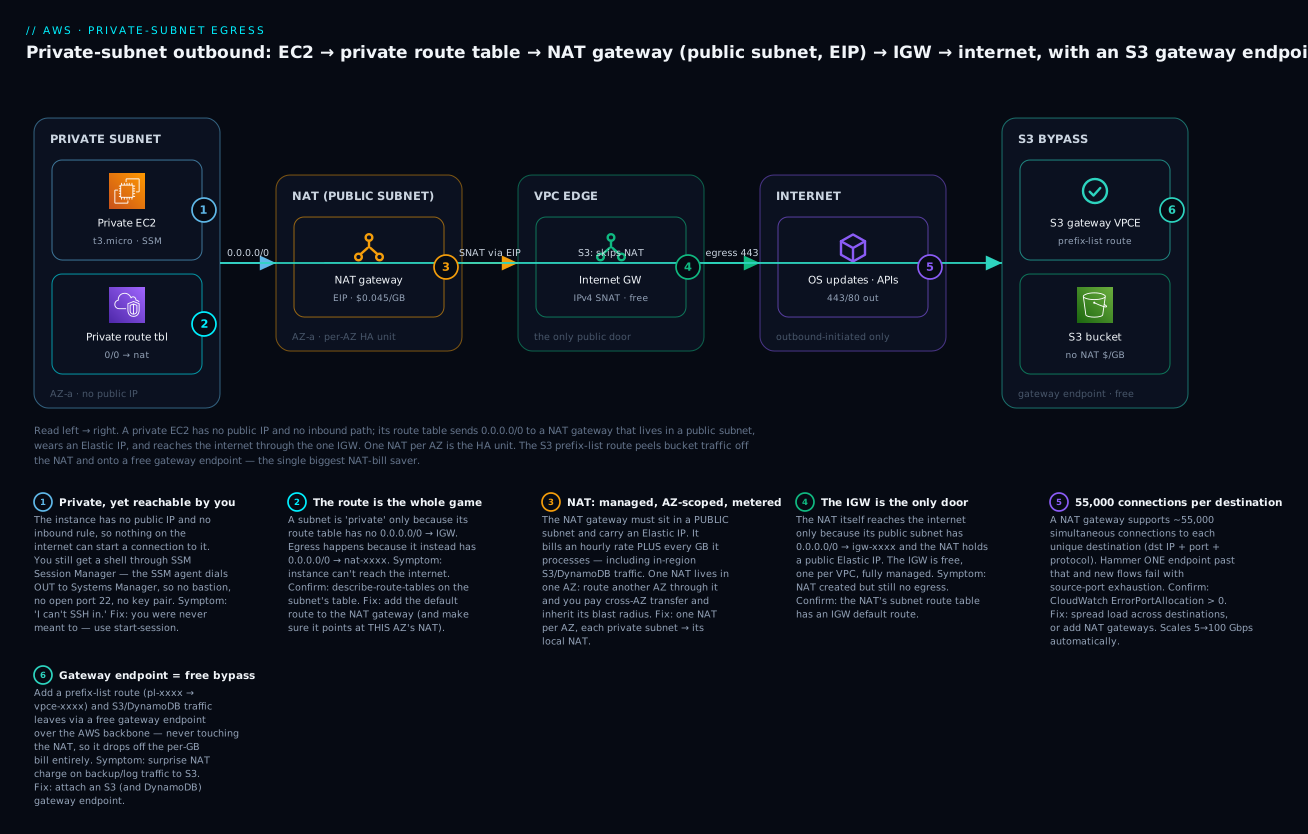
The diagram below is the whole system, read left to right. A private EC2 instance in AZ-a has no public IP and no inbound rule, so nothing on the internet can reach it — yet you still get a shell via SSM (badge 1). Its private route table sends 0.0.0.0/0 to the NAT gateway (badge 2); miss or mispoint that route and the instance is offline. The NAT gateway lives in a public subnet, wears an Elastic IP, and meters every GB it processes (badge 3) — one NAT per AZ is the HA unit. The NAT reaches the internet only because its public subnet routes 0.0.0.0/0 to the internet gateway (badge 4), the VPC’s single free door. Out on the internet, the ~55,000-connections-per-destination ceiling is where a hot endpoint causes port exhaustion (badge 5). And the S3 gateway endpoint (badge 6) is the free bypass: a prefix-list route peels S3 traffic off the NAT entirely, so it never hits the per-GB meter.
The one-line summary of which route lives where — the thing to verify first in any egress incident:
| Route table | Default route | Extra route | Result |
|---|---|---|---|
| Public subnet (holds the NAT) | 0.0.0.0/0 → igw-… |
— | NAT can reach the internet |
| Private subnet (AZ-a) | 0.0.0.0/0 → nat-a |
pl-S3 → vpce, ::/0 → eigw |
Egress via local NAT; S3 free; IPv6 free |
| Private subnet (AZ-b) | 0.0.0.0/0 → nat-b |
pl-S3 → vpce |
Egress via its own NAT (no cross-AZ) |
| Isolated subnet (DB) | local only |
pl-S3 → vpce (optional) |
No egress at all; S3 privately if needed |
Real-world scenario
Meridian Ledger, a fintech running a reconciliation platform in ap-south-1 (Mumbai), moved from a single flat VPC to a proper three-tier design ahead of an audit. The app tier — 40 c6i.large workers — went into private subnets across three AZs. To get them online fast, an engineer created one NAT gateway in AZ-a and pointed all three private route tables at it. Everything worked in testing, the audit passed on the network-isolation criteria, and it shipped.
Two problems surfaced over the next six weeks. First, the bill. The workers wrote reconciliation outputs and gzipped audit logs to S3 continuously — about 9 TB/month — and every byte flowed through the NAT’s per-GB meter plus a cross-AZ charge for the two-thirds of workers not in AZ-a. The NAT line item came to roughly ₹42,000/month, most of it S3 traffic that should have been free and cross-AZ traffic that shouldn’t have existed. Second, the outage. During an AZ-a networking event, the workers in AZ-b and AZ-c — perfectly healthy, in unaffected AZs — all lost egress simultaneously because their only path out ran through the dead AZ’s NAT. Reconciliation stalled for 25 minutes until someone spun up NATs in the other AZs by hand.
The fix was two changes, both from this playbook. They deployed one NAT gateway per AZ and repointed each private route table at its local NAT, which eliminated the cross-AZ transfer entirely and contained any future AZ failure to that one AZ. Then they attached a free S3 gateway endpoint and added the pl-S3 → vpce route to all three private tables, which lifted the entire 9 TB of S3 traffic off the NAT. The before/after told the story:
| Metric | Before (1 shared NAT) | After (per-AZ NAT + S3 endpoint) |
|---|---|---|
| NAT gateways | 1 (AZ-a) | 3 (one per AZ) |
| Hourly cost | ~₹2,900/mo (1 NAT) | ~₹8,700/mo (3 NATs) |
| Data processed by NAT | ~9 TB | ~0.4 TB (S3 removed) |
| Processing + cross-AZ | ~₹39,000/mo | ~₹1,900/mo |
| Total NAT spend | ~₹42,000/mo | ~₹10,600/mo |
| AZ-failure blast radius | Whole VPC | One AZ |
Tripling the NAT count cut the bill by three-quarters, because the per-GB and cross-AZ charges dwarfed the extra hourly cost — and they got real HA as a bonus. The lesson the team wrote into their standards doc: “one NAT per AZ is not more expensive, it’s less; and an S3 gateway endpoint is not optional.”
Advantages and disadvantages
The NAT gateway trade-off in one view:
| Advantages | Disadvantages |
|---|---|
| Zero operational burden — AWS patches, scales, heals it | Per-GB processing charge on all traffic, S3 included |
| Auto-scales 5 → 100 Gbps, no capacity planning | Hourly cost per NAT per AZ adds up in HA topologies |
| AZ-local redundancy out of the box | AZ-scoped — needs one per AZ for true HA |
| Handles ~55,000 connections per destination | No security group — can’t filter egress by SG |
| Simple: one resource + one route | IPv4 only — IPv6 needs a separate egress-only IGW |
| Static source IP (the EIP) for allow-listing | Cross-AZ charges if you share one NAT across AZs |
| Stateful — inbound stays blocked automatically | The per-GB bill is a genuine surprise-cost risk |
| No source/dest-check or iptables to get wrong | Can’t double as a bastion or do inbound port-forward |
When each side matters: the advantages dominate for anything production — the operational simplicity and hands-off HA are worth real money, and the per-GB weakness is fixable with endpoints. The disadvantages dominate only at the extremes: a hobby/dev VPC where $35/month is meaningful (use a NAT instance), or an egress-filtering requirement where you need a security group or deep-packet inspection on outbound (use a NAT instance or a firewall appliance behind a transit gateway, per AWS Transit Gateway Hub-and-Spoke, Hands-On).
Hands-on lab
You’ll build a private subnet with real egress, prove an instance with no public IP and no inbound rule can still reach the internet outbound and be administered by you via SSM Session Manager (no bastion, no SSH key), then attach an S3 gateway endpoint and confirm S3 traffic bypasses the NAT. Everything is aws CLI; a Terraform equivalent follows. Region is us-east-1; adjust as needed.
⚠️ Cost warning: A NAT gateway bills ~$0.045/hour + ~$0.045/GB and the Elastic IP bills ~$0.005/hour the entire time it exists. This lab is not free-tier. Expect a few cents per hour; the EC2 instance and endpoints are cheap or free. Do the teardown at the end — a forgotten NAT gateway + EIP is ~$36/month.
Step 1 — VPC, subnets, IGW
VPC=$(aws ec2 create-vpc --cidr-block 10.20.0.0/16 \
  --query Vpc.VpcId --output text)
aws ec2 create-tags --resources $VPC --tags Key=Name,Value=nat-lab

PUB=$(aws ec2 create-subnet --vpc-id $VPC --cidr-block 10.20.1.0/24 \
  --availability-zone us-east-1a --query Subnet.SubnetId --output text)
PRIV=$(aws ec2 create-subnet --vpc-id $VPC --cidr-block 10.20.11.0/24 \
  --availability-zone us-east-1a --query Subnet.SubnetId --output text)

IGW=$(aws ec2 create-internet-gateway --query InternetGateway.InternetGatewayId --output text)
aws ec2 attach-internet-gateway --vpc-id $VPC --internet-gateway-id $IGW
Step 2 — Public route table (so the NAT can reach the internet)
RT_PUB=$(aws ec2 create-route-table --vpc-id $VPC --query RouteTable.RouteTableId --output text)
aws ec2 create-route --route-table-id $RT_PUB \
  --destination-cidr-block 0.0.0.0/0 --gateway-id $IGW
aws ec2 associate-route-table --route-table-id $RT_PUB --subnet-id $PUB
# Expected: { "AssociationState": { "State": "associated" } }
Step 3 — Allocate an EIP and create the NAT gateway
EIP=$(aws ec2 allocate-address --domain vpc --query AllocationId --output text)
NAT=$(aws ec2 create-nat-gateway --subnet-id $PUB --allocation-id $EIP \
  --query NatGateway.NatGatewayId --output text)

# NAT creation takes ~1-2 minutes. Wait for it:
aws ec2 wait nat-gateway-available --nat-gateway-ids $NAT
echo "NAT $NAT is available"
Step 4 — Private route table pointing at the NAT
RT_PRIV=$(aws ec2 create-route-table --vpc-id $VPC --query RouteTable.RouteTableId --output text)
aws ec2 create-route --route-table-id $RT_PRIV \
  --destination-cidr-block 0.0.0.0/0 --nat-gateway-id $NAT
aws ec2 associate-route-table --route-table-id $RT_PRIV --subnet-id $PRIV
Step 5 — IAM role for SSM (so you can get a shell with no bastion)
cat > trust.json <<'JSON'
{ "Version": "2012-10-17", "Statement": [{ "Effect": "Allow",
  "Principal": { "Service": "ec2.amazonaws.com" }, "Action": "sts:AssumeRole" }] }
JSON
aws iam create-role --role-name nat-lab-ssm --assume-role-policy-document file://trust.json
aws iam attach-role-policy --role-name nat-lab-ssm \
  --policy-arn arn:aws:iam::aws:policy/AmazonSSMManagedInstanceCore
aws iam create-instance-profile --instance-profile-name nat-lab-ssm
aws iam add-role-to-instance-profile --instance-profile-name nat-lab-ssm --role-name nat-lab-ssm
Step 6 — Launch a truly private instance (no public IP, no key pair)
AMI=$(aws ssm get-parameters --names \
  /aws/service/ami-amazon-linux-latest/al2023-ami-kernel-default-x86_64 \
  --query 'Parameters[0].Value' --output text)

INST=$(aws ec2 run-instances --image-id $AMI --instance-type t3.micro \
  --subnet-id $PRIV --no-associate-public-ip-address \
  --iam-instance-profile Name=nat-lab-ssm \
  --tag-specifications 'ResourceType=instance,Tags=[{Key=Name,Value=nat-lab-private}]' \
  --query 'Instances[0].InstanceId' --output text)
aws ec2 wait instance-running --instance-ids $INST
Step 7 — Get a shell via SSM and prove outbound works
Give the SSM agent ~2 minutes to register, then:
aws ssm start-session --target $INST
# Inside the session — NO SSH, NO bastion, NO open port 22:
sh-5.2$ curl -s https://checkip.amazonaws.com     # → your NAT's Elastic IP
sh-5.2$ sudo dnf -y check-update >/dev/null && echo "egress OK"   # → egress OK
sh-5.2$ exit
The public IP curl returns is the NAT’s Elastic IP — proof that outbound is source-NAT’d through the NAT gateway, while nothing outside can start a connection back. That’s the asymmetry working.
Step 8 — Add an S3 gateway endpoint and prove S3 skips the NAT
aws ec2 create-vpc-endpoint --vpc-id $VPC \
  --service-name com.amazonaws.us-east-1.s3 \
  --vpc-endpoint-type Gateway \
  --route-table-ids $RT_PRIV
# This adds a pl-…(S3) → vpce-… route to RT_PRIV automatically.

aws ec2 describe-route-tables --route-table-id $RT_PRIV \
  --query "RouteTables[].Routes[].{Dest:DestinationPrefixListId,Target:GatewayId}"
# → an entry like { "Dest": "pl-63a5400a", "Target": "vpce-0abc..." }
Back in an SSM session, an aws s3 ls now travels the gateway endpoint over the AWS backbone, not the NAT. Confirm it on the NAT’s own meter: pull BytesOutToDestination from CloudWatch before and after an S3 copy and watch it not move for S3 traffic (while a curl to the internet does move it).
aws cloudwatch get-metric-statistics --namespace AWS/NATGateway \
  --metric-name BytesOutToDestination --dimensions Name=NatGatewayId,Value=$NAT \
  --start-time $(date -u -v-15M +%FT%TZ) --end-time $(date -u +%FT%TZ) \
  --period 300 --statistics Sum
Step 9 — Teardown (do this, it’s costing money)
aws ec2 terminate-instances --instance-ids $INST
aws ec2 wait instance-terminated --instance-ids $INST
aws ec2 delete-vpc-endpoints --vpc-endpoint-ids $(aws ec2 describe-vpc-endpoints \
  --filters Name=vpc-id,Values=$VPC --query 'VpcEndpoints[].VpcEndpointId' --output text)
aws ec2 delete-nat-gateway --nat-gateway-id $NAT
aws ec2 wait nat-gateway-deleted --nat-gateway-ids $NAT
aws ec2 release-address --allocation-id $EIP          # ⚠️ the EIP bills until released
# delete routes/subnets/RTs, detach+delete IGW, then delete the VPC, then the IAM role/profile
| Resource | Deletion order | Cost while alive | Easy to forget? |
|---|---|---|---|
| EC2 instance | 1st | ~$0.01/hr | No |
| VPC endpoints | 2nd | Gateway: free | Yes |
| NAT gateway | 3rd (wait for deleted) | ~$0.045/hr + per-GB | Yes — the big one |
| Elastic IP | 4th (release, not just disassociate) | ~$0.005/hr while allocated | Yes — bills even unattached |
| Route tables / subnets | 5th | Free | No |
| Internet gateway | 6th (detach then delete) | Free | No |
| VPC | 7th | Free | No |
| IAM role / profile | last | Free | Yes |
Here is the whole lab as Terraform for a repeatable, one-command build and terraform destroy teardown:
resource "aws_vpc" "lab" { cidr_block = "10.20.0.0/16" }
resource "aws_internet_gateway" "lab" { vpc_id = aws_vpc.lab.id }

resource "aws_subnet" "public" {
  vpc_id = aws_vpc.lab.id
  cidr_block = "10.20.1.0/24"
  availability_zone = "us-east-1a"
}
resource "aws_subnet" "private" {
  vpc_id = aws_vpc.lab.id
  cidr_block = "10.20.11.0/24"
  availability_zone = "us-east-1a"
}

resource "aws_eip" "nat" { domain = "vpc" }
resource "aws_nat_gateway" "lab" {
  allocation_id = aws_eip.nat.id
  subnet_id     = aws_subnet.public.id
  depends_on    = [aws_internet_gateway.lab]
}

resource "aws_route_table" "public" {
  vpc_id = aws_vpc.lab.id
  route { cidr_block = "0.0.0.0/0"  gateway_id = aws_internet_gateway.lab.id }
}
resource "aws_route_table" "private" {
  vpc_id = aws_vpc.lab.id
  route { cidr_block = "0.0.0.0/0"  nat_gateway_id = aws_nat_gateway.lab.id }
}
resource "aws_route_table_association" "public" {
  subnet_id = aws_subnet.public.id  route_table_id = aws_route_table.public.id
}
resource "aws_route_table_association" "private" {
  subnet_id = aws_subnet.private.id  route_table_id = aws_route_table.private.id
}

# Free S3 gateway endpoint — its route makes S3 traffic bypass the NAT.
resource "aws_vpc_endpoint" "s3" {
  vpc_id            = aws_vpc.lab.id
  service_name      = "com.amazonaws.us-east-1.s3"
  vpc_endpoint_type = "Gateway"
  route_table_ids   = [aws_route_table.private.id]
}
Use these checkpoints to confirm each stage did what you expected before moving on — most lab failures are one of these being skipped:
| Checkpoint | Command | Pass looks like |
|---|---|---|
| NAT is ready | aws ec2 describe-nat-gateways --nat-gateway-ids $NAT --query 'NatGateways[0].State' |
"available" |
| Private RT points at NAT | describe-route-tables --route-table-id $RT_PRIV |
0.0.0.0/0 → nat-… |
| Public RT points at IGW | describe-route-tables --route-table-id $RT_PUB |
0.0.0.0/0 → igw-… |
| Instance has no public IP | describe-instances … PublicIpAddress |
null / empty |
| SSM sees the instance | aws ssm describe-instance-information |
Your instance ID listed |
| Egress works, source is the EIP | in-session curl https://checkip.amazonaws.com |
The NAT’s Elastic IP |
| S3 route bypasses NAT | describe-route-tables shows pl-…(S3) → vpce-… |
Prefix-list route present |
Common mistakes & troubleshooting
This is the section you’ll come back to mid-incident. The playbook first — symptom, root cause, the exact command or console path to confirm, and the fix — then an error reference and a decision table.
| # | Symptom | Root cause | Confirm (exact command / console path) | Fix |
|---|---|---|---|---|
| 1 | Private instance can’t reach the internet at all | No 0.0.0.0/0 → nat in the subnet’s route table |
aws ec2 describe-route-tables --filters Name=association.subnet-id,Values=<subnet> |
Add the default route to the NAT gateway |
| 2 | Egress works in AZ-a, dead in AZ-b | AZ-b’s private RT points at AZ-a’s NAT (or has no NAT route) | Check each AZ’s private RT target vs the NAT’s AZ | Give each AZ its own NAT and route to the local one |
| 3 | NAT created but still no egress | The NAT’s public subnet has no 0.0.0.0/0 → IGW |
describe-route-tables on the NAT’s subnet |
Add the IGW default route to the NAT’s subnet |
| 4 | NAT create fails / no internet | NAT placed in a private subnet | Confirm the NAT’s subnet routes to an IGW | Move the NAT to a public subnet (recreate) |
| 5 | Surprise NAT bill (hundreds of $) | S3/DynamoDB/in-region traffic flowing through the NAT | Cost Explorer → filter NatGateway-Bytes; check S3 volume |
Attach S3 + DynamoDB gateway endpoints (free) |
| 6 | One AZ event takes down all AZs’ egress | Single shared NAT is a multi-AZ SPOF | You have 1 NAT; ≥2 AZs route to it | Deploy one NAT per AZ; repoint route tables |
| 7 | Extra ~$0.01/GB on every byte | Cross-AZ transfer to a NAT in another AZ | Instance AZ ≠ NAT AZ on the used route | Route each subnet to its local-AZ NAT |
| 8 | NAT instance forwards nothing | Source/destination check still enabled | describe-instance-attribute --attribute sourceDestCheck (Value:true) |
modify-instance-attribute --no-source-dest-check |
| 9 | New connections fail under load to one endpoint | Source-port exhaustion (>55k conns to one dst) | CloudWatch ErrorPortAllocation > 0 on the NAT |
Spread across destinations; add EIPs / NAT gateways |
| 10 | Long-lived connections drop after ~6 min idle | 350-second NAT idle timeout | IdleTimeoutCount metric climbing |
Enable TCP keepalives < 350s on the app/socket |
| 11 | IPv6 host has no internet, IPv4 fine | No ::/0 → eigw route (used NAT thinking, but NAT is IPv4-only) |
Check the private RT for an IPv6 default route | Create an egress-only IGW + ::/0 route |
| 12 | SSM start-session fails on a private instance |
No egress and no SSM interface endpoints; or missing IAM role | Check IAM role has AmazonSSMManagedInstanceCore; check egress or endpoints |
Attach the role; provide NAT egress or ssm/ssmmessages/ec2messages endpoints |
| 13 | Instance reaches AWS APIs but not the general internet | Interface endpoints exist but no NAT/0.0.0.0/0 route |
describe-route-tables — no default route present |
Add a NAT default route (endpoints only cover their services) |
| 14 | Deleted the NAT but still billed | Elastic IP still allocated (bills even unattached) | aws ec2 describe-addresses shows the EIP |
aws ec2 release-address --allocation-id <id> |
The connection/port-exhaustion failure (rows 9–10) is the nastiest because it’s load-dependent and intermittent — it passes every test and fails in production at peak. The mechanism: a NAT gateway can hold ~55,000 simultaneous connections to each unique destination (destination IP + port + protocol). A fleet that fans out to many destinations never hits it, but a fleet that stampedes one endpoint — a single API IP, a single database proxy — runs out of source ports to that destination and new connections fail while the endpoint itself is healthy. The confirmation is unambiguous: ErrorPortAllocation is zero in normal operation and non-zero the instant you’re exhausting ports.
The CloudWatch metrics that tell you what a NAT is doing — keep these on a dashboard for any production NAT:
| Metric | What it tells you | Watch for |
|---|---|---|
ErrorPortAllocation |
Times the NAT couldn’t allocate a source port | Any non-zero = port exhaustion to a hot destination |
ActiveConnectionCount |
Concurrent active connections | Trend toward ceilings; capacity planning |
PacketsDropCount |
Packets dropped by the NAT | Sustained non-zero = trouble; correlate with errors |
BytesOutToDestination |
Bytes sent to the internet | The per-GB bill driver; spot cost spikes |
BytesInFromDestination |
Bytes received from the internet | Download volume |
BytesOutToSource |
Bytes returned to your instances | — |
IdleTimeoutCount |
Connections closed by the 350s idle timeout | High = long-lived idle flows; add keepalives |
ConnectionAttemptCount |
New connection attempts | Baseline for spikes / retries |
ConnectionEstablishedCount |
Connections successfully established | Gap vs attempts = failures |
And the error/status reference you’ll see around NAT and its routes:
| Error / signal | Where | Meaning | Fix |
|---|---|---|---|
ErrorPortAllocation > 0 |
CloudWatch (NAT) | Source-port exhaustion to a destination | More destinations / EIPs / NAT gateways |
Resource.AlreadyAssociated |
associate-route-table |
Subnet already tied to another RT | Disassociate first, or edit the existing RT |
InvalidElasticIpID.NotFound |
create-nat-gateway |
Bad/missing EIP allocation ID | Allocate an EIP with --domain vpc first |
NatGatewayNotFound |
create-route |
NAT not available yet, or wrong ID |
wait nat-gateway-available before routing |
Blackhole (route state) |
describe-route-tables |
Route target (NAT/ENI) is deleted/invalid | Recreate the target and fix the route |
| Connection timeout (not refused) | App logs | No route out (route/NAT/IGW gap) | Trace the two-route rule; check SG egress |
| Connection refused / RST | App logs | Reached the destination; app/port issue | Not a NAT problem — check the target service |
curl returns instance’s private IP |
In-instance test | You’re on a public IP path, not NAT’d | Expected only if the instance has a public IP |
Finally, the fast decision table — from what you observe to the likely cause:
| If you see… | It’s probably… | Do this |
|---|---|---|
| Timeout on all outbound | No default route out | Add 0.0.0.0/0 → nat to the private RT |
| Egress in one AZ only | Per-AZ routing wrong / single NAT | One NAT per AZ; route locally |
| Huge NAT bill | S3/DynamoDB/API traffic on the NAT | Add gateway/interface endpoints |
| Intermittent connection failures at peak | Port exhaustion to one destination | Check ErrorPortAllocation; spread load |
| IPv6 dead, IPv4 fine | Missing ::/0 → eigw |
Add an egress-only IGW route |
| NAT instance forwards nothing | Source/dest check on | --no-source-dest-check |
| Billed after “deleting” NAT | EIP still allocated | release-address |
Best practices
- One NAT gateway per AZ. It’s cheaper than a shared NAT at real volume (no cross-AZ transfer) and gives you AZ-independent egress. Never let AZ-b route through AZ-a’s NAT.
- Attach S3 and DynamoDB gateway endpoints to every private route table. They’re free and they remove the single biggest source of surprise NAT charges. Do this by default, not after the bill.
- Add interface endpoints for the AWS APIs you call constantly (SSM, STS, Secrets Manager, ECR, CloudWatch) when their NAT-processed volume exceeds the endpoint’s hourly cost — and always when you want a fully private path.
- Alarm on
ErrorPortAllocation ≥ 1. It’s the early-warning for port exhaustion; a non-zero value is never normal. - Alarm on
BytesOutToDestinationwith a monthly budget in mind — it’s the bill driver, and a spike is your first sign of a cost regression or a misrouted flow. - Reserve a subnet as truly isolated (no NAT route) for databases and anything that must never reach the internet; give it only the gateway endpoints it needs.
- Use SSM Session Manager, not a bastion. No inbound port, no key management, full audit trail — administer private instances without ever opening port 22.
- Tag NAT gateways and EIPs so cost allocation can attribute the bill to a team/environment; NAT cost is invisible until it’s tagged.
- For dual-stack, remember the second default route (
::/0 → eigw). IPv6 egress is a separate gateway. - Prefer eliminating egress over cheapening it. The cheapest NAT byte is the one that never leaves — private mirrors, endpoints, and in-region designs beat any NAT tuning.
- For many VPCs, centralize egress behind a transit gateway and a shared NAT/inspection VPC rather than a NAT per spoke — the economics flip once you have more than a handful of VPCs.
Security notes
Egress is a security control, not just plumbing. A NAT gateway gives you outbound-only by construction — inbound stays blocked because the NAT only tracks flows your side started — but it does not filter what you reach, and it has no security group. Treat these as the security posture for private egress:
| Concern | Control | How |
|---|---|---|
| No inbound exposure | Private subnet + NAT asymmetry | No public IP; no 0.0.0.0/0 → IGW on the private RT |
| Egress filtering (what you can reach) | NACL / firewall (NAT GW can’t) | Subnet NACL for coarse rules; AWS Network Firewall or a NAT-instance SG for real control |
| Data exfiltration risk | Restrict egress destinations | Firewall allow-list of domains/CIDRs; endpoints for AWS so you don’t need broad egress |
| Least-privilege admin access | SSM Session Manager + IAM | No SSH keys/bastion; scope ssm:StartSession by tag; log to CloudWatch/S3 |
| Private path to AWS services | Interface/gateway endpoints | Keep AWS API traffic off the internet entirely |
| Static egress identity | The NAT’s Elastic IP | Partners allow-list your EIP; keep it stable, document it |
| Audit of outbound | VPC Flow Logs | Log the private subnet’s ENIs to see accepted/rejected egress |
| IMDS abuse via SSRF | IMDSv2 required | --metadata-options HttpTokens=required — unrelated to NAT but critical on egress-capable hosts |
The subtlety worth stating plainly: a NAT gateway is not an egress firewall. It stops the internet from reaching in, but it happily lets a compromised instance reach out to anywhere. If you need to control where private instances can go — the real defense against exfiltration and malware call-home — you need AWS Network Firewall, a NAT instance with a restrictive security group and iptables rules, or a proxy, typically centralized behind a transit gateway. The deep treatment is in AWS Transit Gateway Hub-and-Spoke, Hands-On.
Cost & sizing
You don’t size a NAT gateway (it auto-scales), so “sizing” here means choosing the topology and killing the per-GB bill. The levers, ranked by impact:
| Lever | Impact | Effort | When |
|---|---|---|---|
| S3/DynamoDB gateway endpoints | Huge — removes big traffic, free | Trivial | Always |
| One NAT per AZ (not shared) | High — kills cross-AZ charge | Low | Any multi-AZ prod |
| Interface endpoints for hot APIs | Medium — removes steady API traffic | Low-med | When API volume > endpoint cost |
| Private package mirror / cache | Medium — removes repeat downloads | Medium | Build-heavy fleets |
| Centralized egress via TGW | High at scale — one NAT for many VPCs | High | Many VPCs / accounts |
| NAT instance instead of gateway | Situational — no per-GB, but SPOF + ops | Med-high | Dev / tiny egress / SG-on-egress |
| Right-size cross-region traffic | Medium — keep S3/data in-region | Design | Avoids region-crossing + NAT |
Rough figures to anchor budgeting (us-east-1; verify current pricing): a single NAT gateway is ~$32.85/month in hourly charges plus ~$3.60/month for its public IPv4, before a byte of data — so a 3-AZ HA setup starts around ~$109/month fixed. On top of that, data processing at ~$0.045/GB means 1 TB/month adds ~$45 and 10 TB adds ~$450. The free-tier gives you nothing on NAT gateways (they’re never free), which is exactly why the endpoints matter: an S3 gateway endpoint is free forever and often the difference between a $150 and a $500 monthly bill. For an INR view at ~₹86/$, a 3-AZ NAT baseline is roughly ₹9,400/month fixed plus data — real money for a small shop, and the reason a dev environment often runs a single t4g.nano NAT instance (~₹260/month) instead.
Interview & exam questions
Q1. Why does a private-subnet instance need a NAT gateway to run yum update, and why not just give it a public IP?
The instance must initiate outbound connections to package mirrors, but you don’t want it reachable from the internet. A NAT gateway provides exactly that asymmetry — outbound allowed, inbound blocked. A public IP plus an IGW route would make it internet-reachable, defeating the purpose of a private subnet. (SAA-C03, ANS-C01)
Q2. Where does a NAT gateway live, and what two routes make it work?
It lives in a public subnet. That public subnet’s route table has 0.0.0.0/0 → IGW (so the NAT reaches the internet), and each private subnet’s route table has 0.0.0.0/0 → NAT (so instances reach the NAT). Two tables, two default routes pointing “opposite” ways. (SAA-C03)
Q3. You have one NAT gateway serving three AZs. What are the two problems? Availability and cost. It’s a single point of failure — if its AZ fails, all three AZs lose egress. And instances in the other two AZs incur cross-AZ data-transfer charges (~$0.01/GB each way) on top of NAT processing. Fix: one NAT per AZ, each private subnet routing to its local NAT. (SAA-C03, ANS-C01)
Q4. Your NAT gateway bill is unexpectedly high. First thing to check? Whether S3/DynamoDB or other in-region AWS traffic is flowing through the NAT’s per-GB meter. Attach free S3/DynamoDB gateway endpoints so that traffic bypasses the NAT entirely — usually the single biggest saving. (SOA-C02)
Q5. Under load, new connections to one API start failing but the API is healthy. What’s happening?
Source-port exhaustion: a NAT gateway supports ~55,000 simultaneous connections to each unique destination, and you’re exceeding it for that one destination. Confirm with the ErrorPortAllocation CloudWatch metric (non-zero). Fix: spread across destinations, add EIPs, or add NAT gateways. (ANS-C01)
Q6. A NAT instance forwards no traffic even though routing looks right. What did you forget?
To disable the source/destination check on the instance (modify-instance-attribute --no-source-dest-check). By default EC2 drops packets not addressed to itself, which kills all forwarded traffic. (SAA-C03)
Q7. How do you give an IPv6-only private instance outbound internet?
An egress-only internet gateway with a ::/0 → eigw route. There is no NAT for IPv6 because IPv6 addresses are globally routable; the EIGW provides the stateful outbound-only behavior instead. It’s free. (ANS-C01)
Q8. NAT gateway vs NAT instance — when do you choose the instance? Choose the instance for cost-sensitive dev/low-scale egress (no per-GB charge, ~$3/month) or when you need a security group on the egress path (the gateway has none). Choose the gateway for anything production — managed, auto-scaling, AZ-redundant. (SAA-C03)
Q9. Can you attach a security group to a NAT gateway to filter outbound? No. A NAT gateway has no security group. Control egress with subnet NACLs, AWS Network Firewall, or a NAT instance (which does take a security group). (SOA-C02)
Q10. How do you administer a private instance with no bastion and no open port 22?
SSM Session Manager: give the instance an IAM role with AmazonSSMManagedInstanceCore and either NAT egress or the three SSM interface endpoints (ssm, ssmmessages, ec2messages). The agent dials out; you aws ssm start-session. No inbound rule needed. (SOA-C02)
Q11. A gateway endpoint vs an interface endpoint — cost and coverage difference? Gateway endpoints (S3, DynamoDB only) are free and route-table based. Interface endpoints (most other AWS APIs) are PrivateLink ENIs costing ~$0.01/hr per AZ plus ~$0.01/GB. Use gateway endpoints always; interface endpoints when the AWS API traffic they remove from the NAT justifies their cost or you need a fully private path. (ANS-C01)
Q12. After deleting a NAT gateway you’re still billed a few dollars. Why?
The Elastic IP is still allocated, and AWS bills unattached (and attached) public IPv4 at ~$0.005/hr. Release it with release-address. (SOA-C02)
Quick check
- What single route-table entry makes a subnet “private” rather than “public”?
- In which subnet type does a NAT gateway itself live, and why?
- Name the two cost components of a NAT gateway besides the Elastic IP charge.
- What CloudWatch metric warns you of NAT source-port exhaustion?
- Which free change removes S3 traffic from the NAT bill, and how is it expressed in the route table?
Answers
- The absence of a
0.0.0.0/0 → IGWroute. “Private” means no direct internet route; egress instead goes0.0.0.0/0 → NAT. - A public subnet — one with
0.0.0.0/0 → IGW— because the NAT reaches the internet through the IGW. It serves private subnets but must itself be public. - The hourly NAT-gateway charge (~$0.045/hr) and the per-GB data-processing charge (~$0.045/GB). (The public-IPv4/EIP charge is the third, separate one.)
ErrorPortAllocation— any non-zero value means the NAT couldn’t allocate a source port to a destination (exhaustion past ~55,000 connections to that destination).- An S3 gateway endpoint. It adds a prefix-list route —
pl-…(S3) → vpce-…— to the private route table, so S3 traffic takes the free endpoint over the AWS backbone instead of the NAT.
Glossary
| Term | Definition |
|---|---|
| NAT | Network address translation — rewriting private source IP/port to a shared public one for outbound flows, reversed on replies. |
| NAT gateway | AWS-managed, AZ-scoped NAT appliance in a public subnet with an Elastic IP; the default private-egress device. |
| NAT instance | A self-managed EC2 instance configured (iptables + disabled source/dest check) to perform NAT; cheaper at low scale, a SPOF. |
| Private subnet | A subnet whose route table has no 0.0.0.0/0 → IGW route; reaches the internet only via a NAT (or not at all). |
| Public subnet | A subnet whose route table has 0.0.0.0/0 → IGW; where NAT gateways and public-facing resources live. |
| Elastic IP (EIP) | A static, allocatable public IPv4 address; a public NAT gateway requires exactly one; billed while allocated. |
| Internet gateway (IGW) | The VPC’s single, free, managed door to the IPv4 internet; the NAT’s own default route targets it. |
| Egress-only IGW (EIGW) | A free, stateful, outbound-only gateway for IPv6; the IPv6 counterpart to a NAT, with no address translation. |
| Source/destination check | An EC2 anti-spoofing feature that drops packets not addressed to the instance; must be disabled on a NAT instance. |
| Gateway endpoint | A free route-table target for private S3/DynamoDB access that bypasses the NAT and the internet. |
| Interface endpoint | A PrivateLink ENI giving private access to most AWS service APIs; hourly-per-AZ plus per-GB. |
| Prefix list | A named, managed set of CIDRs (e.g. all S3 ranges) usable as a route destination; how gateway-endpoint routes are written. |
| ErrorPortAllocation | A NAT gateway CloudWatch metric counting failed source-port allocations — the signal of port exhaustion. |
| Cross-AZ data transfer | The ~$0.01/GB (each way) charge when traffic crosses an Availability Zone boundary — the single-shared-NAT tax. |
| Session Manager | An AWS Systems Manager capability for shell access to instances with no inbound port, bastion, or SSH key. |
Next steps
- Build the underlying network first if it’s not second nature: AWS VPC from Scratch: Subnets, Route Tables and Internet Gateway.
- Eliminate egress entirely for AWS services with AWS PrivateLink and VPC Endpoints: Interface vs Gateway — the natural companion to cutting the NAT bill.
- Centralize NAT and egress inspection across many VPCs in AWS Transit Gateway Hub-and-Spoke, Hands-On.
- Revisit the firewall and subnet fundamentals that decide reachability in AWS VPC, Subnets and Security Groups Explained.