Quick take: a VPC is just an address plan plus a routing decision. Get the CIDR right and understand that one route —
0.0.0.0/0 → igw— is the entire difference between a “public” and a “private” subnet, and every beginner VPC mystery dissolves.
The most common first-week AWS frustration goes like this: you launch an EC2 instance, wait for it to say running, try to SSH in, and the connection just hangs until it times out. Nothing errors. The instance is healthy. And yet it is unreachable, because a VPC (Virtual Private Cloud) is not a magic box that “just has internet” — it is a software-defined network you assemble from a handful of primitive parts, and if any one of them is missing, packets go nowhere silently. There is no error, because from AWS’s point of view nothing is wrong; you simply never told it how traffic should reach the box.
This article builds a real, production-shaped VPC from nothing, in the order you should think about it: first the address plan (how big is the VPC, how do you carve subnets, why the ranges must not overlap), then the VPC resource and its DNS switches, then subnets and why you spread them across Availability Zones, then the two things that actually route packets — the Internet Gateway and route tables — and finally the precise, three-part answer to “what makes a subnet public?” You will see every setting option-by-option with its default, its trade-off, and its gotcha, then build the whole thing twice — once with the aws CLI and once in Terraform — launch an instance you can actually reach, and tear it all down cleanly.
By the end you will never again be confused about why an instance is unreachable, because you will hold the full mental model: an instance is reachable only when its subnet’s route table points a default route at an attached Internet Gateway, the instance carries a public IP, and its security group permits the port — three independent conditions, each of which is a classic place beginners get stuck. We use real numbers throughout: a 10.0.0.0/16 VPC, /24 subnets, the ap-south-1 (Mumbai) region, t3.micro instances, and the exact AWS error strings you will meet.
What problem this solves
Every AWS workload lives inside a VPC — there is no “outside.” The moment you run an EC2 instance, an RDS database, a load balancer, or an EKS node, it gets an elastic network interface with a private IP inside some subnet inside some VPC. So “networking on AWS” is not an advanced topic you can defer; it is the ground floor. The problem a hand-built VPC solves is control and isolation: instead of dumping everything into the shared default VPC where every subnet is public and every instance gets a routable address, you decide exactly what is reachable from the internet and what is not, and you lay out address space that will still make sense when you have twelve accounts and need to peer them.
What breaks without this understanding is depressingly repetitive. A team ships a database into a “public” subnet because that is where the default VPC put things, and now the production Postgres is one leaked security-group rule away from the internet. Someone sizes a subnet as a /28 to “keep it tidy,” then a load balancer refuses to launch because a /28 has only 11 usable addresses and an ALB wants several per AZ. Two accounts both use 172.31.0.0/16 (the default-VPC range) and can never be peered because their address spaces collide. An instance is unreachable and the on-call engineer burns an hour checking the security group when the real problem is that the subnet was never associated with the route table that has the IGW route. Each of these is a five-minute fix if you understand the parts and a multi-hour detour if you are guessing.
Who hits this: everyone, on day one, and then again every time they scale. It bites hardest on people who learned AWS entirely inside the default VPC and never had to wire routing themselves, and on teams whose first “quick” VPC becomes permanent and turns out to overlap with everything they later want to connect. The fix is not memorising clicks; it is understanding the five primitives and the one routing decision that ties them together. Here is the whole toolkit in one frame before we go deep:
| Primitive | What it is | You get how many | The one thing beginners miss |
|---|---|---|---|
| VPC | A private, isolated IP network in one Region | 5 per Region (default quota) | Its CIDR is fixed at creation and must not overlap future peers |
| Subnet | A slice of the VPC CIDR living in exactly one AZ | 200 per VPC | A subnet cannot span AZs; 5 IPs per subnet are reserved |
| Internet Gateway (IGW) | The one door between the VPC and the internet | 1 per VPC | Attaching it does nothing without a route pointing at it |
| Route table | The rules that decide where a packet goes | 200 per VPC | The 0.0.0.0/0 → igw route is what makes a subnet “public” |
| Public IP / EIP | A routable address 1:1-NAT’d to the private IP | — | A public subnet instance with no public IP is still unreachable |
| Security group / NACL | The stateful / stateless packet filters | 2,500 SGs per VPC | Even perfect routing fails if the SG doesn’t allow the port |
Learning objectives
By the end of this article you can:
- Plan a CIDR block for a VPC and its subnets using RFC1918 space, size subnets correctly with the 5-reserved-IP rule, and lay them out so they never overlap a future peer.
- Create a custom VPC and set its DNS attributes (
enableDnsSupport,enableDnsHostnames) so instances resolve names and get public DNS hostnames. - Carve public and private subnets and place them across two Availability Zones for high availability, and explain why a subnet lives in exactly one AZ.
- Attach an Internet Gateway and understand it as the only path to the internet, plus the 1:1 NAT it performs for public IPs.
- Build route tables — the main table versus a custom table, the immutable
localroute, the0.0.0.0/0 → igwdefault route, and subnet associations — and state the routing rule (longest-prefix-match). - Give the precise three-part definition of a public subnet and diagnose the classic gotchas: no IGW route, no public IP, wrong route-table association, DNS off.
- Build the whole 2-AZ VPC and launch a reachable EC2 with both the
awsCLI and Terraform, then tear it down in dependency order. - Run a troubleshooting playbook for “can’t reach my instance,” “subnet is public but no internet,” “can’t delete my VPC,” and overlapping-CIDR peering failures.
Prerequisites & where this fits
You need an AWS account you can log into and an aws CLI (v2) configured with an admin or near-admin profile in ap-south-1 — set that up first with AWS CLI Profiles, SSO, Config & Troubleshooting, and if the account itself is brand-new, harden it first with AWS Account Setup: Root, IAM, Billing and MFA. You should be comfortable running a CLI command and reading JSON output. You do not need any prior networking depth — no subnetting maths beyond what this article teaches, and no prior VPC exposure. If the words “CIDR” and “AZ” are fuzzy, that is fine; we define them from scratch. Knowing what an EC2 instance is helps, since the lab launches one; the compute side is covered in AWS Compute Compared: EC2 vs Lambda vs ECS vs EKS.
This is the networking foundation of everything else on AWS. It sits one level below the broader tour in AWS VPC, Subnets and Security Groups Explained — that article surveys the whole VPC surface including endpoints, peering and security groups in breadth; this one goes deep and hands-on on the specific act of building a public/private VPC and getting an instance reachable. The Region and AZ concepts it leans on are unpacked in AWS Regions and Availability Zones Explained. Once your public subnets host a web tier, the next layer up — putting a load balancer in front — is ALB vs NLB vs API Gateway Compared, and the full pattern this VPC underpins is AWS Three-Tier Web Application Architecture.
A quick map of who owns what when a “why can’t it connect?” question lands on your desk:
| Layer | What lives here | Decides | Failure it causes |
|---|---|---|---|
| VPC | The overall CIDR block, DNS attributes | Whole-network address space | Overlap kills future peering |
| Subnet | A per-AZ CIDR slice, auto-assign-IP setting | Which AZ a resource lands in, whether it gets a public IP | Too-small subnet runs out of IPs |
| Route table | Routes + subnet associations | Where a packet goes next | Wrong association = no internet |
| Internet Gateway | The VPC-to-internet door + 1:1 NAT | Whether internet traffic can enter/leave | Missing route = silent timeout |
| Security group / NACL | Allowed ports and sources | Whether a specific connection is permitted | Blocks the port = timeout |
Core concepts
A VPC is a logically isolated virtual network you own inside one AWS Region. It has one or more CIDR blocks — ranges of private IP addresses — and everything you launch gets an address from those ranges. Think of the VPC as a building and its CIDR as the full range of room numbers; nothing inside can have an address outside that range.
A Region is a geographic location (Mumbai = ap-south-1); an Availability Zone (AZ) is one or more physically separate data centres inside a Region (ap-south-1a, ap-south-1b, ap-south-1c), engineered to fail independently. A subnet is a sub-range of the VPC CIDR that lives in exactly one AZ — this is the single most important structural fact, because it is why you create subnets in pairs (or triples): to survive one AZ going down, you need resources in at least two AZs, and since a subnet cannot span AZs, that means at least two subnets per tier.
Routing is the whole game. Every subnet is associated with exactly one route table, a list of rules of the form “traffic for this destination CIDR goes to this target.” Every route table automatically contains the local route — the VPC’s own CIDR pointing at local — which is what lets any instance talk to any other instance in the VPC. It cannot be deleted. To reach the internet you add one more route: 0.0.0.0/0 (meaning “everything else”) pointing at an Internet Gateway. That single line is the entire difference between public and private. A subnet whose route table has that line is public; a subnet whose route table does not is private.
An Internet Gateway (IGW) is a horizontally scaled, AWS-managed component that does two jobs: it is the target your route points at, and it performs one-to-one NAT between an instance’s private IP and its public IP so return traffic finds its way back. A VPC can have exactly one IGW. Attaching it is necessary but not sufficient — you still need the route.
Here are the parts you will touch, defined once, so the deep sections can move fast:
| Term | One-line definition | Real value in this article |
|---|---|---|
| CIDR block | An IP range written as address/prefix |
10.0.0.0/16 (65,536 addresses) |
| RFC1918 | The private IP ranges reserved for internal networks | 10.0.0.0/8, 172.16/12, 192.168/16 |
| VPC | An isolated virtual network in one Region | 10.0.0.0/16 in ap-south-1 |
| Subnet | A per-AZ slice of the VPC CIDR | 10.0.1.0/24 in ap-south-1a |
| Availability Zone | An isolated data-centre group in a Region | ap-south-1a, ap-south-1b |
| Route table | Rules mapping destination CIDR → target | main (private) + custom (public) |
local route |
The un-deletable intra-VPC route | 10.0.0.0/16 → local |
| Default route | The catch-all for “everything else” | 0.0.0.0/0 → igw-… |
| Internet Gateway | The single VPC-to-internet door + 1:1 NAT | igw-…, one per VPC |
| Auto-assign public IPv4 | Subnet setting granting instances a public IP | ON for public, OFF for private |
| Elastic IP (EIP) | A static public IPv4 you own and can re-map | for stable public addresses |
| Security group | A stateful, allow-only instance firewall | allow tcp/22 from your /32 |
And here is the reachability chain as a sequence — the exact path a packet takes to reach a public instance, which is also the order in which things break:
| Hop | What must be true | If it isn’t | Symptom |
|---|---|---|---|
| 1 | An IGW is attached to the VPC | No door exists | Timeout |
| 2 | The subnet’s route table has 0.0.0.0/0 → igw |
Packet has no way out | Timeout |
| 3 | The subnet is associated with that route table | It’s using the private main table | Timeout |
| 4 | The instance has a public IP or EIP | No return address | Timeout |
| 5 | The security group allows the port/source | Filtered inbound | Timeout |
| 6 | The network ACL allows in + return | Stateless block | Timeout |
Notice every failure produces the same symptom — a timeout — which is exactly why you need the model instead of guessing.
CIDR planning: sizing the VPC and carving subnets
Before you create a single resource, decide the address plan. This is the one decision you cannot easily change later: a VPC’s primary CIDR is fixed at creation (you can add secondary blocks, but you cannot resize or renumber the primary), and if it overlaps another network you want to connect, you are stuck.
RFC1918 — where VPC addresses come from
VPCs use private IPv4 space defined by RFC1918. You may technically use public-range addresses, but you should not; stick to these three ranges:
| RFC1918 range | CIDR | Addresses | Typical use |
|---|---|---|---|
10.0.0.0 – 10.255.255.255 |
10.0.0.0/8 |
16,777,216 | Large orgs; most AWS VPCs carve from here |
172.16.0.0 – 172.31.255.255 |
172.16.0.0/12 |
1,048,576 | Mid-size; note the default VPC uses 172.31/16 |
192.168.0.0 – 192.168.255.255 |
192.168.0.0/16 |
65,536 | Small/home networks; avoid if you VPN to on-prem using it |
The prefix (/16, /24, /28) says how many bits are fixed: a /16 fixes the first 16 bits, leaving 16 bits (65,536 addresses) to vary; a /24 leaves 8 bits (256); a /28 leaves 4 bits (16). Smaller number = bigger network.
How big should the VPC be?
AWS allows a VPC CIDR between /16 (65,536 addresses) and /28 (16 addresses). The standard, boring, correct choice is a /16 — it is free (you pay for resources, not address space), it gives you room for hundreds of subnets, and it means you never have to renumber. Reserve a different /16 for every VPC in your estate so they never collide.
| VPC prefix | Total addresses | Verdict |
|---|---|---|
/16 |
65,536 | Recommended default — plenty of room, no renumber later |
/17–/19 |
32,768 – 8,192 | Fine if you are deliberately packing an address plan |
/20–/23 |
4,096 – 512 | Small VPC; you will feel the walls quickly |
/24 |
256 | Rarely right for a VPC — that’s a single subnet’s worth |
/28 |
16 | Minimum allowed; only for tiny special cases |
The 5 reserved IPs — why a subnet is smaller than it looks
AWS reserves five addresses in every subnet, so usable hosts are always 2^(32−prefix) − 5. For a 10.0.1.0/24:
| Address | Reserved for |
|---|---|
10.0.1.0 |
Network address |
10.0.1.1 |
VPC router (the implied default gateway) |
10.0.1.2 |
Amazon-provided DNS (subnet base + 2) |
10.0.1.3 |
Reserved for future use |
10.0.1.255 |
Network broadcast (AWS doesn’t support broadcast, but reserves it) |
That is why subnet capacity is never a clean power of two:
| Subnet prefix | Total IPs | Usable (−5) | Good for |
|---|---|---|---|
/28 |
16 | 11 | Tiny — a few instances; too small for an ALB |
/27 |
32 | 27 | Small utility subnets |
/26 |
64 | 59 | Bastion / management |
/25 |
128 | 123 | Moderate app subnet |
/24 |
256 | 251 | The sane default for most subnets |
/23 |
512 | 507 | Large app tier |
/22 |
1,024 | 1,019 | Big EKS node subnets (pods eat IPs fast) |
/20 |
4,096 | 4,091 | Default-VPC subnet size |
/16 |
65,536 | 65,531 | The whole VPC as one subnet (don’t) |
The actual plan for this build
A /16 VPC split into /24 subnets gives you 256 possible subnets of 251 usable hosts each — far more than enough. Use a readable convention: put public subnets in a low band, private in a higher band, and leave gaps for tiers you will add later (data, endpoints, ELB). Here is the plan this article builds and grows into:
| Subnet | CIDR | AZ | Tier | Usable | Route table |
|---|---|---|---|---|---|
kloudvin-public-1a |
10.0.1.0/24 |
ap-south-1a |
Public (web/ALB) | 251 | Custom public (→ IGW) |
kloudvin-public-1b |
10.0.2.0/24 |
ap-south-1b |
Public (web/ALB) | 251 | Custom public (→ IGW) |
kloudvin-private-1a |
10.0.11.0/24 |
ap-south-1a |
Private (app) | 251 | Main (local only) |
kloudvin-private-1b |
10.0.12.0/24 |
ap-south-1b |
Private (app) | 251 | Main (local only) |
(reserved) data-1a/1b |
10.0.21.0/24, 10.0.22.0/24 |
1a / 1b | Private (DB) — future | 251 | Main / data RT |
| (reserved) spare | 10.0.100.0/22 … |
— | Future growth | — | — |
Public sits in .1–.10, private in .11–.20, data in .21–.30, and everything from .100 up is spare — so the plan reads at a glance and never boxes you in.
Non-overlap: the rule that saves you later
If you ever want VPC peering, a Transit Gateway, a VPN/Direct Connect to on-prem, or simple account-to-account traffic, the two networks must not have overlapping CIDRs — routing cannot disambiguate 10.0.1.5 if it exists on both sides. Plan the whole estate’s address space up front:
| Environment / account | Suggested VPC CIDR | Why |
|---|---|---|
| Shared services | 10.0.0.0/16 |
First block; hosts DNS, CI, endpoints |
| Production | 10.1.0.0/16 |
Distinct second-octet band |
| Staging | 10.2.0.0/16 |
Distinct again |
| Dev / sandbox | 10.3.0.0/16 |
Distinct again |
| On-prem (reserved) | 10.200.0.0/16+ |
Keep a band clear for the data centre |
The cardinal sins: two VPCs both using 172.31.0.0/16 (the default-VPC range — a classic collision when two accounts each keep their default VPC), or picking 10.0.0.0/16 for everything “because it’s the example.” Give each network its own lane.
The VPC resource and its DNS attributes
Creating the VPC is a single call, but two attributes deserve real attention because they silently control whether names resolve.
enableDnsSupport (default true) controls whether the Amazon-provided DNS server — reachable at the VPC CIDR base + 2, and at the link-local 169.254.169.253 — answers queries for instances in the VPC. Leave it on; turning it off breaks name resolution for nearly everything, including reaching AWS service endpoints by name.
enableDnsHostnames (default false for a custom VPC, true for the default VPC) controls whether instances that receive a public IP also get a public DNS hostname (like ec2-13-234-x-x.ap-south-1.compute.amazonaws.com) and internal DNS names. For a VPC you build yourself, turn this on — otherwise your public instance has a public IP but no friendly name, and Route 53 private hosted zones and some endpoint features misbehave.
| VPC attribute | Values | Default (custom VPC) | When to change | Gotcha |
|---|---|---|---|---|
| Primary IPv4 CIDR | /16–/28 |
set at creation | Never (immutable) | Cannot resize or renumber later |
| Secondary IPv4 CIDRs | up to 4 more (5 total; max 50) | none | When you run low on space | Must not overlap; some ranges restricted |
enableDnsSupport |
true / false | true | Almost never turn off | Off = no AWS DNS, endpoints by name fail |
enableDnsHostnames |
true / false | false | Turn on for public workloads | Off = public IP but no public DNS name |
| Instance tenancy | default / dedicated |
default |
Compliance needs single-tenant HW | dedicated is far pricier; hard to revert |
| IPv6 CIDR | Amazon-assigned /56 |
none | Dual-stack designs | Needs egress-only IGW for private v6 egress |
| DHCP option set | domain name, DNS servers | AWS default | Custom on-prem DNS | Wrong set breaks resolution VPC-wide |
The two DNS switches interact — here is the truth table, because “my instance has no public DNS name” is almost always this:
enableDnsSupport |
enableDnsHostnames |
Result |
|---|---|---|
| true | true | AWS DNS resolves and instances get internal + public DNS hostnames — the setting you want |
| true | false | AWS DNS resolves, but no public/internal hostnames are assigned |
| false | true | Effectively broken — hostnames are requested but the resolver at base+2 is disabled |
| false | false | No Amazon DNS resolution at all inside the VPC |
Create it and set the switches — CLI first, Terraform second (both shown fully in the lab):
VPC_ID=$(aws ec2 create-vpc --cidr-block 10.0.0.0/16 \
  --tag-specifications 'ResourceType=vpc,Tags=[{Key=Name,Value=kloudvin-lab-vpc}]' \
  --query Vpc.VpcId --output text)
aws ec2 modify-vpc-attribute --vpc-id "$VPC_ID" --enable-dns-hostnames Value=true
# enableDnsSupport is already true by default; verify:
aws ec2 describe-vpc-attribute --vpc-id "$VPC_ID" --attribute enableDnsSupport
resource "aws_vpc" "lab" {
  cidr_block           = "10.0.0.0/16"
  enable_dns_support   = true
  enable_dns_hostnames = true
  tags = { Name = "kloudvin-lab-vpc" }
}
Subnets and Availability Zone placement
A subnet is a CIDR slice of the VPC that lives in one AZ. You choose the CIDR (must fit inside the VPC and not overlap another subnet) and the AZ (which physical location it maps to). Two subnet-level settings matter most.
Auto-assign public IPv4 (mapPublicIpOnLaunch) decides whether an instance launched into this subnet automatically gets a public IP. Default is false for custom subnets and true for default-VPC subnets. This is the single subnet setting that most often makes a “public” subnet fail — a subnet with the IGW route but this toggle off produces instances with only private IPs, which are unreachable.
AZ placement for HA: because a subnet is one AZ, high availability requires multiple subnets. Put the same tier in at least two AZs and place instances (or an Auto Scaling group, or an ALB’s target group) across them; if one AZ has an outage, the other keeps serving. Spreading subnets across AZs is covered in depth in AWS Regions and Availability Zones Explained.
| Subnet setting | Values | Default (custom) | When to change | Trade-off / gotcha |
|---|---|---|---|---|
| CIDR block | any range inside the VPC | required | Sizing per tier | Immutable after creation; can’t overlap peers |
| Availability Zone | ap-south-1a/b/c |
you choose | Spread tiers for HA | Immutable; a subnet can’t span AZs |
| Auto-assign public IPv4 | on / off | off | On for public subnets | Off = unreachable instances in a “public” subnet |
| Auto-assign IPv6 | on / off | off | Dual-stack subnets | Needs a VPC IPv6 block first |
| Route table association | main / custom | main (implicit) | Associate publics to the IGW table | Left on main = private, no matter the name |
| Network ACL | default (allow all) / custom | default | Coarse subnet-level deny | Stateless — must allow return traffic too |
Create the four subnets — two public, two private, across two AZs:
PUB_A=$(aws ec2 create-subnet --vpc-id "$VPC_ID" --cidr-block 10.0.1.0/24 \
  --availability-zone ${AWS_REGION}a \
  --tag-specifications 'ResourceType=subnet,Tags=[{Key=Name,Value=kloudvin-public-1a}]' \
  --query Subnet.SubnetId --output text)
PUB_B=$(aws ec2 create-subnet --vpc-id "$VPC_ID" --cidr-block 10.0.2.0/24 \
  --availability-zone ${AWS_REGION}b \
  --tag-specifications 'ResourceType=subnet,Tags=[{Key=Name,Value=kloudvin-public-1b}]' \
  --query Subnet.SubnetId --output text)
PRIV_A=$(aws ec2 create-subnet --vpc-id "$VPC_ID" --cidr-block 10.0.11.0/24 \
  --availability-zone ${AWS_REGION}a \
  --tag-specifications 'ResourceType=subnet,Tags=[{Key=Name,Value=kloudvin-private-1a}]' \
  --query Subnet.SubnetId --output text)
PRIV_B=$(aws ec2 create-subnet --vpc-id "$VPC_ID" --cidr-block 10.0.12.0/24 \
  --availability-zone ${AWS_REGION}b \
  --tag-specifications 'ResourceType=subnet,Tags=[{Key=Name,Value=kloudvin-private-1b}]' \
  --query Subnet.SubnetId --output text)

# Make the two public subnets actually hand out public IPs:
aws ec2 modify-subnet-attribute --subnet-id "$PUB_A" --map-public-ip-on-launch
aws ec2 modify-subnet-attribute --subnet-id "$PUB_B" --map-public-ip-on-launch
The private subnets get no special treatment — leaving them on the main route table with auto-assign-IP off is exactly what makes them private. Here is the AZ layout you just created:
| AZ | Public subnet | Private subnet | Purpose |
|---|---|---|---|
ap-south-1a |
10.0.1.0/24 (auto-IP on) |
10.0.11.0/24 (auto-IP off) |
Primary |
ap-south-1b |
10.0.2.0/24 (auto-IP on) |
10.0.12.0/24 (auto-IP off) |
HA replica |
The Internet Gateway and route tables
This is where “public” is actually made. Two resources do it: the IGW (the door) and a route table (the sign that points at the door).
The Internet Gateway
An Internet Gateway is AWS-managed, horizontally scaled, redundant, and has no bandwidth cap you can hit — you never size it. It does two things: it is a valid target for a route, and it performs 1:1 NAT so an instance’s private IP 10.0.1.20 and its public IP 13.234.x.x map to each other for traffic in and out. Key facts and limits:
| IGW fact | Detail |
|---|---|
| Per VPC | Exactly one IGW may be attached |
| Per Region (quota) | 5 by default (adjustable) |
| Bandwidth | Managed by AWS; no per-IGW limit to tune |
| NAT behaviour | 1:1 between public IP and private IP (not port-overloaded like NAT gateway) |
| Cost | The IGW itself is free; you pay for data transfer out and for public IPv4 |
| Requirement | Attaching it is necessary but not sufficient — you must also add the route |
IGW_ID=$(aws ec2 create-internet-gateway \
  --tag-specifications 'ResourceType=internet-gateway,Tags=[{Key=Name,Value=kloudvin-lab-igw}]' \
  --query InternetGateway.InternetGatewayId --output text)
aws ec2 attach-internet-gateway --vpc-id "$VPC_ID" --internet-gateway-id "$IGW_ID"
Route tables: main vs custom
Every VPC is born with a main route table containing only the local route. Any subnet you do not explicitly associate with another table uses the main table by default. The trick that keeps you safe: leave the main table private (local route only) and create a custom route table for public subnets. That way, if you forget to associate a new subnet, it defaults to private — the safe failure — instead of accidentally becoming internet-facing.
| Property | Main route table | Custom route table |
|---|---|---|
| Created by | AWS, automatically with the VPC | You, explicitly |
| Default association | Every unassociated subnet | Only subnets you associate |
| Best used for | Private subnets (keep it local-only) | Public subnets (add the IGW route) |
| Deletable | No (deleted with the VPC) | Yes |
| Safe-default behaviour | New subnet defaults here → private | Opt-in to internet access |
A route table is an ordered-by-specificity list of destination → target rules. AWS always uses longest-prefix match: the most specific route that matches the destination wins. The routes you will meet:
| Destination | Target | Meaning | Deletable |
|---|---|---|---|
10.0.0.0/16 |
local |
Intra-VPC traffic (the local route) |
No — always present |
0.0.0.0/0 |
igw-… |
Everything else → internet (makes it public) | Yes |
0.0.0.0/0 |
nat-… |
Everything else → NAT gateway (private egress) | Yes |
10.1.0.0/16 |
pcx-… |
Traffic to a peered VPC | Yes |
pl-xxxx (S3) |
vpce-… |
Prefix-list to a gateway endpoint | Yes |
::/0 |
eigw-… |
IPv6 default → egress-only IGW | Yes |
Create the public route table, add the default route, and associate the public subnets:
RT_PUB=$(aws ec2 create-route-table --vpc-id "$VPC_ID" \
  --tag-specifications 'ResourceType=route-table,Tags=[{Key=Name,Value=kloudvin-public-rt}]' \
  --query RouteTable.RouteTableId --output text)

# The one line that creates "public":
aws ec2 create-route --route-table-id "$RT_PUB" \
  --destination-cidr-block 0.0.0.0/0 --gateway-id "$IGW_ID"

aws ec2 associate-route-table --route-table-id "$RT_PUB" --subnet-id "$PUB_A"
aws ec2 associate-route-table --route-table-id "$RT_PUB" --subnet-id "$PUB_B"
The private subnets are deliberately untouched — they keep using the main table, which has only the local route, so they have no internet path. That is the entire private-subnet mechanism. When they later need outbound-only internet (to fetch OS updates or call an API) without being reachable from the internet, you add a NAT gateway in a public subnet and point the private route table’s 0.0.0.0/0 at it — a hands-on for another day; the concept is that a NAT gateway gives egress without ingress.
Subnet-to-route-table association rules
| Rule | Detail |
|---|---|
| Associations per subnet | Exactly one route table at a time |
| Unassociated subnets | Implicitly use the main route table |
| Changing association | Instant; re-point a subnet to a different table anytime |
| A route table with no subnets | Legal — it just routes nothing until associated |
| Making a subnet public | Associate it with a table that has 0.0.0.0/0 → igw |
| Making a subnet private | Associate with a local-only table (or leave on main) |
Public vs private: what actually makes a subnet public
“Public subnet” is a convention, not a checkbox — AWS never marks a subnet “public.” A subnet is functionally public when all three of these are true; miss any one and the instance is unreachable:
| # | Condition | How you set it | If missing |
|---|---|---|---|
| 1 | The subnet’s route table has 0.0.0.0/0 → igw-… |
Custom RT + create-route + association |
No path out — timeout |
| 2 | The instance has a public IP or EIP | Subnet auto-assign-IP on, --associate-public-ip-address, or attach an EIP |
No return address — timeout |
| 3 | The security group + NACL allow the port/source | SG inbound rule; default NACL allows all | Filtered — timeout |
The reason all three matter is that they are independent. Routing gets the packet to the internet; the public IP gives the packet a return address; the security group decides whether the connection is allowed at all. Beginners fix one, see it still fail, and assume the fix was wrong — when in fact a second condition is also unmet. Compare the three subnet “personalities” you will build:
| Subnet type | Route table | Public IP? | Reachable from internet? | Outbound to internet? | Typical tenant |
|---|---|---|---|---|---|
| Public | 0.0.0.0/0 → igw |
Yes (auto-assign or EIP) | Yes | Yes (via IGW) | ALB, bastion, NAT gateway, public web |
| Private (with NAT) | 0.0.0.0/0 → nat |
No | No | Yes (egress only) | App servers, workers, EKS nodes |
| Private (isolated) | local only |
No | No | No | Databases, internal-only services |
The safest default posture: web/edge in public, everything else private. Put only the things that genuinely must accept internet connections (a load balancer, a bastion) in public subnets, and keep app and data tiers private. That is the shape of AWS Three-Tier Web Application Architecture.
Default VPC vs a custom VPC (and VPC quotas)
Every account gets a default VPC per Region so you can launch something instantly. It is convenient and completely wrong for production, because every subnet in it is public. Know what it is so you can recognise — and stop using — it:
| Aspect | Default VPC | Custom VPC (this article) |
|---|---|---|
| CIDR | 172.31.0.0/16 (same in every account — collision risk) |
You choose (e.g. 10.0.0.0/16) |
| Subnets | One /20 public subnet per AZ |
You carve public + private as needed |
| Internet Gateway | Attached, with 0.0.0.0/0 → igw on the main table |
You attach and route explicitly |
| Auto-assign public IPv4 | On for every subnet | Off except where you turn it on |
| DNS hostnames | On | Off by default — you turn it on |
| Every instance | Gets a public IP by default | Private unless you decide otherwise |
| Good for | A five-minute experiment | Anything real |
The reason the default VPC is dangerous is precisely that it is friction-free: launch a database, and it lands in a public subnet with a public IP, one security-group mistake from exposure. Build a custom VPC and nothing is public unless you deliberately made it so.
Finally, the quotas you plan against. These are the default Service Quotas (most adjustable via a request — see AWS Service Quotas: Limits & Increases Hands-On); a few are hard:
| Resource | Default quota | Adjustable? | Note |
|---|---|---|---|
| VPCs per Region | 5 | Yes | Also caps internet gateways (1 IGW per VPC) |
| IPv4 CIDR blocks per VPC | 5 | Yes (to 50) | Primary + secondaries |
| Subnets per VPC | 200 | Yes | Plenty for most designs |
| Route tables per VPC | 200 | Yes | |
| Routes per route table | 50 | Yes (to 1,000) | Static, non-propagated |
| Propagated routes per route table | 100 | No | Hard limit |
| Internet Gateways per Region | 5 | Yes | 1 attached per VPC (hard) |
| Egress-only IGWs per Region | 5 | Yes | IPv6 |
| Elastic IPs per Region | 5 | Yes | Each now billed hourly |
| NAT gateways per AZ | 5 | Yes | |
| Network ACLs per VPC | 200 | Yes | |
| Rules per network ACL | 20 in / 20 out | Yes (to 40) | Stateless |
| Security groups per VPC | 2,500 | Yes | |
| Security groups per network interface | 5 | Yes (to 16) | SGs × rules ≤ 1,000 per ENI |
| Inbound/outbound rules per SG | 60 in / 60 out | Yes | Product-with-SGs cap applies |
| VPC peering connections per VPC | 50 | Yes (to 125) |
Architecture at a glance
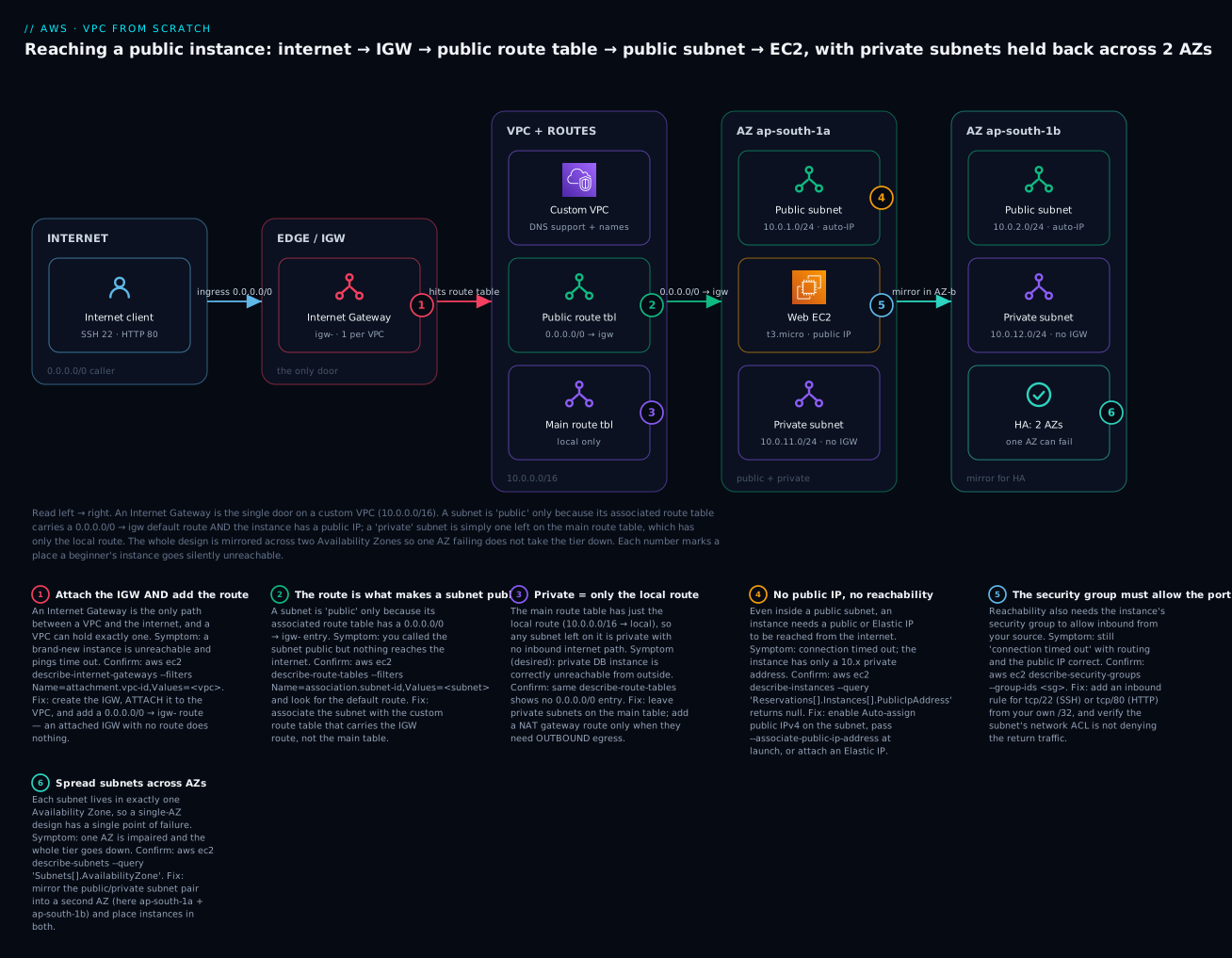
The diagram is the exact reachability path for the instance you build in the lab, read left to right. On the far left, an internet client wants to reach your web server. Its traffic can only enter through the single Internet Gateway attached to the VPC (the red “one door”). Inside the custom VPC (10.0.0.0/16, with DNS support and hostnames on), routing splits the world in two: a custom public route table carrying 0.0.0.0/0 → igw and a main route table with only the local route. In AZ ap-south-1a, the public subnet (10.0.1.0/24, auto-assign public IPv4 on) is associated with the public route table and hosts the t3.micro web EC2 with a public IP; alongside it sits the private subnet (10.0.11.0/24) with no IGW path. The entire design is mirrored into ap-south-1b so one AZ failing does not take the tier down.
Follow the six badges and you have the complete beginner failure map: the IGW must be attached and routed (1); the 0.0.0.0/0 → igw route on the public table is what makes a subnet public (2); the main table’s local-only route is what keeps a subnet private (3); the instance needs an auto-assigned public IP (4); its security group must allow the port from your source (5); and the whole pair is spread across two AZs for HA (6). The legend narrates each as symptom · confirm · fix — the same method as the troubleshooting section below.
Real-world scenario
Meridian Retail, a 60-person e-commerce company in Pune, moved its monolith to AWS in a hurry before a festival sale. An engineer spun everything up in the default VPC because it “just worked” — the web servers, the Redis cache, and, fatefully, the PostgreSQL database, all in the default VPC’s public /20 subnets, each with a public IP because that is the default-VPC behaviour. It ran fine for months. The address plan was 172.31.0.0/16 — whatever the account came with.
Two problems arrived together. First, security: a routine scan flagged that the production database’s public IP was answering on 5432 from the internet; the only thing standing between the customer database and the world was a single security-group rule that a well-meaning contractor had once widened to 0.0.0.0/0 “to test from home.” Second, growth: the company opened a second AWS account for a new brand, and wanted to peer the two so the shared analytics service could read both. Peering was impossible — both accounts used the default VPC’s 172.31.0.0/16, so the CIDRs overlapped and AWS rejected the peering request outright.
The fix was to build the network the way this article teaches, and it doubled as the redesign. They created a custom VPC at 10.10.0.0/16 for the main brand and 10.20.0.0/16 for the new one — distinct, non-overlapping lanes chosen from a one-page estate-wide plan. Each VPC got public subnets (10.10.1.0/24, 10.10.2.0/24) for the load balancer only, and private subnets (10.10.11.0/24, 10.10.12.0/24 for app; 10.10.21.0/24, 10.10.22.0/24 for data) across ap-south-1a and ap-south-1b. The database moved to the isolated private subnets with a route table carrying only the local route — no public IP, no path to or from the internet, reachable solely from the app tier’s security group. The web tier stayed public behind an ALB; the app tier reached the internet for updates through a NAT gateway in the public subnet.
The results were concrete. The database’s public exposure went to zero — not “firewalled off,” but unroutable, because a private subnet has no line to the IGW at all; even a mistaken 0.0.0.0/0 security-group rule cannot expose an instance the routing table can never deliver internet traffic to. The two brands’ VPCs peered cleanly because their CIDRs no longer collided, and the analytics service read both over private IPs. During the next sale the app tier scaled across both AZs, and when ap-south-1a had a brief impairment, the 1b subnets kept the site up. The lead wrote in the runbook: “The default VPC isn’t a network you designed — it’s a demo you inherited. Every address we now use was chosen on purpose, and ‘private’ means the packet physically has nowhere to go, not that we hope the firewall holds.”
The migration as a sequence, because the order is the lesson:
| Step | Action | What it fixed |
|---|---|---|
| 1 | New CIDR plan: 10.10/16, 10.20/16 (non-overlapping) |
Peering now possible; no collisions |
| 2 | Custom VPCs; DNS hostnames on | Named, controlled networks |
| 3 | Public subnets for ALB only; private for app/data | Minimal internet-facing surface |
| 4 | DB → isolated private subnet (local-only RT) | Database physically unroutable from internet |
| 5 | NAT gateway for private egress | App updates without ingress exposure |
| 6 | 2-AZ symmetric layout | Survives a single-AZ outage |
Advantages and disadvantages
Building a custom public/private VPC by hand — versus living in the default VPC — is almost pure upside for anything real, but it is honest to name the cost:
| Advantages | Disadvantages |
|---|---|
| You decide exactly what is internet-reachable | More upfront resources to create and wire correctly |
| Private tiers are unroutable, not just firewalled | A missing route/association means a silent timeout to debug |
| A deliberate CIDR plan keeps future peering possible | You must plan address space before you start |
| 2-AZ layout gives real high availability | Twice the subnets and associations to manage |
| Safe default: unassociated subnets are private | The mental model (routes, NAT, IGW) takes a day to learn |
| Everything is IaC-able and repeatable | Terraform/CLI is more typing than clicking the default VPC |
| Least public IPs = smaller attack surface and lower cost | You have to remember to turn on DNS hostnames, auto-IP |
The custom VPC is right for every environment beyond a throwaway experiment — there is no scale too small, because even a solo project benefits from keeping its database off the internet and its CIDR sane. The disadvantages are all one-time learning or one-time planning, while the advantages compound with every new tier, account, and audit. The teams that regret their network are the ones who never left the default VPC and later had to renumber a running production estate — the single most painful change in cloud networking.
Hands-on lab
You will build the entire 2-AZ public/private VPC from scratch, launch a reachable t3.micro web server in a public subnet, prove the private subnet has no internet path, and tear it all down. Most of this is free (VPC, subnets, route tables, IGW, security groups cost nothing); the only lines that can cost money are the EC2 instance (a t3.micro/t2.micro is free-tier eligible — 750 hrs/month for 12 months) and its public IPv4 address ($0.005/hr, with 750 free hrs/month for 12 months on the free tier). Teardown removes both. Run everything with an admin profile, not root, in ap-south-1.
Set a couple of shell variables first so the commands are copy-paste ready.
export AWS_REGION=ap-south-1
ACCOUNT_ID=$(aws sts get-caller-identity --query Account --output text)
echo "Building in account $ACCOUNT_ID / region $AWS_REGION"
Step 1 — Create the VPC and turn on DNS hostnames.
VPC_ID=$(aws ec2 create-vpc --cidr-block 10.0.0.0/16 \
  --tag-specifications 'ResourceType=vpc,Tags=[{Key=Name,Value=kloudvin-lab-vpc}]' \
  --query Vpc.VpcId --output text)
aws ec2 modify-vpc-attribute --vpc-id "$VPC_ID" --enable-dns-hostnames Value=true
echo "VPC: $VPC_ID"
Expected: a vpc-… id. Verify DNS is on:
aws ec2 describe-vpc-attribute --vpc-id "$VPC_ID" --attribute enableDnsHostnames \
  --query 'EnableDnsHostnames.Value'     # -> true
Step 2 — Create and attach the Internet Gateway.
IGW_ID=$(aws ec2 create-internet-gateway \
  --tag-specifications 'ResourceType=internet-gateway,Tags=[{Key=Name,Value=kloudvin-lab-igw}]' \
  --query InternetGateway.InternetGatewayId --output text)
aws ec2 attach-internet-gateway --vpc-id "$VPC_ID" --internet-gateway-id "$IGW_ID"
echo "IGW: $IGW_ID (attached)"
Step 3 — Create four subnets (2 public, 2 private, across 2 AZs).
PUB_A=$(aws ec2 create-subnet --vpc-id "$VPC_ID" --cidr-block 10.0.1.0/24 \
  --availability-zone ${AWS_REGION}a \
  --tag-specifications 'ResourceType=subnet,Tags=[{Key=Name,Value=kloudvin-public-1a}]' \
  --query Subnet.SubnetId --output text)
PUB_B=$(aws ec2 create-subnet --vpc-id "$VPC_ID" --cidr-block 10.0.2.0/24 \
  --availability-zone ${AWS_REGION}b \
  --tag-specifications 'ResourceType=subnet,Tags=[{Key=Name,Value=kloudvin-public-1b}]' \
  --query Subnet.SubnetId --output text)
PRIV_A=$(aws ec2 create-subnet --vpc-id "$VPC_ID" --cidr-block 10.0.11.0/24 \
  --availability-zone ${AWS_REGION}a \
  --tag-specifications 'ResourceType=subnet,Tags=[{Key=Name,Value=kloudvin-private-1a}]' \
  --query Subnet.SubnetId --output text)
PRIV_B=$(aws ec2 create-subnet --vpc-id "$VPC_ID" --cidr-block 10.0.12.0/24 \
  --availability-zone ${AWS_REGION}b \
  --tag-specifications 'ResourceType=subnet,Tags=[{Key=Name,Value=kloudvin-private-1b}]' \
  --query Subnet.SubnetId --output text)
echo "public:  $PUB_A $PUB_B"
echo "private: $PRIV_A $PRIV_B"
Step 4 — Turn on auto-assign public IPv4 for the public subnets only.
aws ec2 modify-subnet-attribute --subnet-id "$PUB_A" --map-public-ip-on-launch
aws ec2 modify-subnet-attribute --subnet-id "$PUB_B" --map-public-ip-on-launch
Step 5 — Create the public route table, add the IGW route, associate publics.
RT_PUB=$(aws ec2 create-route-table --vpc-id "$VPC_ID" \
  --tag-specifications 'ResourceType=route-table,Tags=[{Key=Name,Value=kloudvin-public-rt}]' \
  --query RouteTable.RouteTableId --output text)

aws ec2 create-route --route-table-id "$RT_PUB" \
  --destination-cidr-block 0.0.0.0/0 --gateway-id "$IGW_ID"      # -> "Return": true

aws ec2 associate-route-table --route-table-id "$RT_PUB" --subnet-id "$PUB_A"
aws ec2 associate-route-table --route-table-id "$RT_PUB" --subnet-id "$PUB_B"
The private subnets stay on the main table (untouched) — that is what makes them private.
Step 6 — Create a security group allowing SSH from your IP and HTTP from anywhere.
MY_IP=$(curl -s https://checkip.amazonaws.com)
SG_ID=$(aws ec2 create-security-group --vpc-id "$VPC_ID" \
  --group-name kloudvin-web-sg --description "SSH from me, HTTP from all" \
  --query GroupId --output text)
aws ec2 authorize-security-group-ingress --group-id "$SG_ID" \
  --protocol tcp --port 22 --cidr ${MY_IP}/32
aws ec2 authorize-security-group-ingress --group-id "$SG_ID" \
  --protocol tcp --port 80 --cidr 0.0.0.0/0
echo "SG: $SG_ID (SSH from ${MY_IP}/32, HTTP from world)"
Step 7 — Launch a t3.micro in the public subnet and reach it. ⚠️ This starts billing an instance + a public IPv4; teardown in Step 10 stops it.
# Latest Amazon Linux 2023 AMI from SSM Parameter Store (no hard-coded AMI id):
AMI_ID=$(aws ssm get-parameters \
  --names /aws/service/ami-amazon-linux-latest/al2023-ami-kernel-default-x86_64 \
  --query 'Parameters[0].Value' --output text)

aws ec2 create-key-pair --key-name kloudvin-lab-key \
  --query KeyMaterial --output text > kloudvin-lab-key.pem
chmod 400 kloudvin-lab-key.pem

INSTANCE_ID=$(aws ec2 run-instances --image-id "$AMI_ID" \
  --instance-type t3.micro --key-name kloudvin-lab-key \
  --subnet-id "$PUB_A" --security-group-ids "$SG_ID" \
  --user-data '#!/bin/bash
dnf install -y httpd && echo "Hello from KloudVin VPC" > /var/www/html/index.html && systemctl enable --now httpd' \
  --tag-specifications 'ResourceType=instance,Tags=[{Key=Name,Value=kloudvin-web}]' \
  --query 'Instances[0].InstanceId' --output text)

aws ec2 wait instance-running --instance-ids "$INSTANCE_ID"
PUBLIC_IP=$(aws ec2 describe-instances --instance-ids "$INSTANCE_ID" \
  --query 'Reservations[0].Instances[0].PublicIpAddress' --output text)
echo "SSH:  ssh -i kloudvin-lab-key.pem ec2-user@${PUBLIC_IP}"
echo "HTTP: curl http://${PUBLIC_IP}/"
Expected: after ~60–90 seconds, curl http://${PUBLIC_IP}/ returns Hello from KloudVin VPC, and SSH connects. If it hangs, jump to the troubleshooting playbook — you have just met one of the six failure hops.
Step 8 — Prove the private subnet has no internet path. Query the main route table (the one the private subnets use) and confirm there is no 0.0.0.0/0 route:
aws ec2 describe-route-tables \
  --filters Name=vpc-id,Values=$VPC_ID Name=association.main,Values=true \
  --query 'RouteTables[0].Routes'
# -> only { "DestinationCidrBlock": "10.0.0.0/16", "GatewayId": "local", ... }
Only the local route appears — so anything in 10.0.11.0/24 or 10.0.12.0/24 can talk within the VPC but has no route to the internet. That is a private subnet, proven.
Step 9 — The same build in Terraform. For real work, author it as code from the start. This is the whole VPC in ~60 lines:
variable "region" { default = "ap-south-1" }
provider "aws" { region = var.region }

locals {
  azs = ["${var.region}a", "${var.region}b"]
  public_cidrs  = { "0" = "10.0.1.0/24",  "1" = "10.0.2.0/24" }
  private_cidrs = { "0" = "10.0.11.0/24", "1" = "10.0.12.0/24" }
}

resource "aws_vpc" "lab" {
  cidr_block           = "10.0.0.0/16"
  enable_dns_support   = true
  enable_dns_hostnames = true
  tags = { Name = "kloudvin-lab-vpc" }
}

resource "aws_internet_gateway" "igw" {
  vpc_id = aws_vpc.lab.id
  tags   = { Name = "kloudvin-lab-igw" }
}

resource "aws_subnet" "public" {
  for_each                = local.public_cidrs
  vpc_id                  = aws_vpc.lab.id
  cidr_block              = each.value
  availability_zone       = local.azs[tonumber(each.key)]
  map_public_ip_on_launch = true
  tags = { Name = "kloudvin-public-${each.key}" }
}

resource "aws_subnet" "private" {
  for_each          = local.private_cidrs
  vpc_id            = aws_vpc.lab.id
  cidr_block        = each.value
  availability_zone = local.azs[tonumber(each.key)]
  tags = { Name = "kloudvin-private-${each.key}" }
}

resource "aws_route_table" "public" {
  vpc_id = aws_vpc.lab.id
  route {
    cidr_block = "0.0.0.0/0"
    gateway_id = aws_internet_gateway.igw.id
  }
  tags = { Name = "kloudvin-public-rt" }
}

resource "aws_route_table_association" "public" {
  for_each       = aws_subnet.public
  subnet_id      = each.value.id
  route_table_id = aws_route_table.public.id
}

resource "aws_security_group" "web" {
  name_prefix = "kloudvin-web-"
  vpc_id      = aws_vpc.lab.id
  ingress { from_port = 80  to_port = 80  protocol = "tcp" cidr_blocks = ["0.0.0.0/0"] }
  ingress { from_port = 22  to_port = 22  protocol = "tcp" cidr_blocks = ["${chomp(data.http.myip.response_body)}/32"] }
  egress  { from_port = 0   to_port = 0   protocol = "-1"  cidr_blocks = ["0.0.0.0/0"] }
  tags = { Name = "kloudvin-web-sg" }
}
data "http" "myip" { url = "https://checkip.amazonaws.com" }
terraform apply builds the identical network; the private subnets, having no association, correctly fall back to the main route table.
Step 10 — Teardown (do this to stop the meter). Delete in dependency order — AWS refuses to delete anything still referenced.
aws ec2 terminate-instances --instance-ids "$INSTANCE_ID"
aws ec2 wait instance-terminated --instance-ids "$INSTANCE_ID"
aws ec2 delete-key-pair --key-name kloudvin-lab-key
rm -f kloudvin-lab-key.pem
aws ec2 delete-security-group --group-id "$SG_ID"

# Disassociate + delete the public route table
for a in $(aws ec2 describe-route-tables --route-table-ids "$RT_PUB" \
  --query 'RouteTables[0].Associations[].RouteTableAssociationId' --output text); do
  aws ec2 disassociate-route-table --association-id "$a"; done
aws ec2 delete-route-table --route-table-id "$RT_PUB"

aws ec2 delete-subnet --subnet-id "$PUB_A"
aws ec2 delete-subnet --subnet-id "$PUB_B"
aws ec2 delete-subnet --subnet-id "$PRIV_A"
aws ec2 delete-subnet --subnet-id "$PRIV_B"

aws ec2 detach-internet-gateway --internet-gateway-id "$IGW_ID" --vpc-id "$VPC_ID"
aws ec2 delete-internet-gateway --internet-gateway-id "$IGW_ID"
aws ec2 delete-vpc --vpc-id "$VPC_ID"
For Terraform the whole teardown is one line: terraform destroy.
A checklist of what you built and how you verified it:
| # | Built | Verified how |
|---|---|---|
| 1 | VPC 10.0.0.0/16, DNS hostnames on |
describe-vpc-attribute → true |
| 2 | IGW attached | attach-internet-gateway succeeded |
| 3 | 4 subnets across 2 AZs | describe-subnets shows 2 AZs |
| 4 | Auto-assign public IP on publics only | Instance got a PublicIpAddress |
| 5 | Public RT with 0.0.0.0/0 → igw |
create-route → Return: true |
| 6 | Public subnets associated | associate-route-table succeeded |
| 7 | Instance reachable | curl returns the page; SSH connects |
| 8 | Private subnets isolated | Main RT has only the local route |
Common mistakes & troubleshooting
Almost every VPC problem is one of a handful of failure modes, and — critically — nearly all of them produce the same symptom: a connection that times out. That is why you diagnose by checking the reachability chain in order, not by guessing. Keep this playbook open when something is unreachable.
| # | Symptom | Root cause | Confirm (command / console) | Fix |
|---|---|---|---|---|
| 1 | Can’t reach instance; SSH/curl times out | No IGW route in the subnet’s route table | aws ec2 describe-route-tables --filters Name=association.subnet-id,Values=<sub> — no 0.0.0.0/0 |
Add 0.0.0.0/0 → igw; associate the subnet with that table |
| 2 | Can’t reach instance; instance has only a 10.x IP |
No public IP (auto-assign off, no EIP) | describe-instances --query '…PublicIpAddress' → null |
Enable auto-assign on subnet, relaunch, or attach an EIP |
| 3 | Can’t reach instance; routing + IP correct | Security group doesn’t allow the port/source | aws ec2 describe-security-groups --group-ids <sg> |
Add inbound tcp/22 from your /32, tcp/80 from 0.0.0.0/0 |
| 4 | Subnet is “public” but no internet | Subnet associated with the main (private) table, not the public one | describe-route-tables --filters Name=association.subnet-id,Values=<sub> |
associate-route-table to the table that has the IGW route |
| 5 | IGW exists but still no connectivity | IGW created but not attached, or attached to another VPC | describe-internet-gateways --filters Name=attachment.vpc-id,Values=<vpc> |
attach-internet-gateway to this VPC |
| 6 | Public DNS name doesn’t resolve / is blank | enableDnsHostnames off on the VPC |
describe-vpc-attribute --attribute enableDnsHostnames → false |
modify-vpc-attribute --enable-dns-hostnames Value=true |
| 7 | Nothing resolves DNS inside the VPC | enableDnsSupport off, or custom DHCP option set |
describe-vpc-attribute --attribute enableDnsSupport |
Re-enable DNS support; fix/replace the DHCP option set |
| 8 | InsufficientFreeAddressesInSubnet on launch |
Subnet ran out of IPs (too-small CIDR, or IPs reserved by ENIs/ELB) | describe-subnets --query '…AvailableIpAddressCount' |
Use a bigger subnet (/24+); add a secondary subnet |
| 9 | Return traffic blocked though SG allows it | Network ACL denies ephemeral return ports | describe-network-acls — check outbound 1024-65535 |
Allow ephemeral ports back; remember NACLs are stateless |
| 10 | DependencyViolation deleting subnet/VPC/IGW |
A resource still lives in it (ENI, instance, endpoint, NAT) | describe-network-interfaces --filters Name=subnet-id,Values=<sub> |
Delete dependents first (see the delete-order note below) |
| 11 | InvalidSubnet.Conflict creating a subnet |
New subnet CIDR overlaps an existing subnet | describe-subnets --query '…CidrBlock' |
Pick a non-overlapping range inside the VPC |
| 12 | InvalidSubnet.Range / InvalidParameterValue |
Subnet CIDR not inside the VPC, or VPC prefix out of /16–/28 |
Compare subnet CIDR to describe-vpcs CIDR |
Choose a CIDR within the VPC and a legal prefix |
| 13 | Can’t peer two VPCs later | Overlapping CIDR blocks (both 172.31/16 or both 10.0/16) |
describe-vpcs --query 'Vpcs[].CidrBlock' on both |
Renumber one VPC to a distinct range; plan CIDRs up front |
| 14 | Instance reachable, then IP changes after stop/start | Auto-assigned public IP is not static | describe-instances shows a new PublicIpAddress |
Attach an Elastic IP for a stable address |
| 15 | SSH Permission denied (publickey) |
Wrong key perms or wrong user | ls -l key.pem (must be 400); user is ec2-user on AL2023 |
chmod 400 key.pem; use the correct default user |
The can't reach my instance decision table
Ninety percent of “unreachable” calls are one of five things. Walk them in order:
| If you see… | It’s probably… | Do this |
|---|---|---|
Timeout + subnet has no 0.0.0.0/0 route |
Missing/mis-associated IGW route | Add the route or fix the association |
| Timeout + instance has no public IP | Auto-assign off / no EIP | Enable auto-assign or attach an EIP |
| Timeout + SG has no rule for your port/IP | Security group filtering | Add the inbound rule for your /32 |
| Timeout + all above OK | NACL blocking (often ephemeral return) | Allow the port in + ephemeral out on the NACL |
Connection refused (not timeout) |
Routing is fine; nothing listening on the port | Start the service / check the port inside the box |
That last row is the key tell: a timeout is a network problem (routing, IP, SG, NACL); a connection refused means the packet arrived and nothing was listening — a server problem, not a VPC problem.
AWS API error reference
The error string names the failure — learn to read it:
| Error code | Meaning | First move |
|---|---|---|
InvalidSubnet.Conflict |
New subnet CIDR overlaps an existing one | Pick a non-overlapping range |
InvalidSubnet.Range |
Subnet CIDR not within the VPC CIDR | Choose a range inside the VPC block |
InvalidVpcRange / InvalidParameterValue |
VPC prefix outside /16–/28 |
Use a legal prefix |
InsufficientFreeAddressesInSubnet |
Subnet out of usable IPs | Use a larger subnet or add another |
Gateway.NotAttached |
IGW route added but IGW not attached | Attach the IGW to the VPC first |
Resource.AlreadyAssociated |
Subnet already tied to a route table | Disassociate first, or re-point it |
RouteAlreadyExists |
Duplicate route for the same destination | Replace the route instead of creating |
DependencyViolation |
Resource still in use | Delete dependents in order first |
VpcLimitExceeded |
Hit the 5-VPCs-per-Region quota | Delete an unused VPC or request an increase |
InvalidGatewayID.NotFound |
Wrong/absent IGW id in the route | Use the real igw-… id |
The three failures that waste the most beginner hours
“My public subnet has no internet” — the association trap. You created a custom route table with the 0.0.0.0/0 → igw route, confirmed the route is there, and the instance still cannot reach the internet. The reason is almost always that the subnet is still associated with the main route table, not your new one — creating a route table does not associate anything. Confirm with describe-route-tables --filters Name=association.subnet-id,Values=<subnet>: if it returns the main table (or a table without the IGW route), your association never happened. Fix it with associate-route-table. This is the number-one “but I added the route!” support question, and the lesson is that a route table only affects the subnets explicitly (or implicitly, via main) associated with it.
“Can’t delete my VPC” — the dependency chain. delete-vpc fails with DependencyViolation because a VPC will not delete while anything still lives in it, and the blockers are often invisible: a leftover elastic network interface from a deleted Lambda or endpoint, a NAT gateway, a VPC endpoint, or a security group other than the default. The delete order that always works: terminate instances → delete NAT gateways and release their EIPs → delete VPC endpoints → delete any remaining ENIs → delete non-default security groups and custom NACLs → disassociate and delete custom route tables → delete subnets → detach and delete the IGW → delete the VPC. Find the specific blocker with aws ec2 describe-network-interfaces --filters Name=vpc-id,Values=<vpc> — a lingering ENI is the usual culprit, and it often belongs to a managed service (RDS, ELB, Lambda) you must delete at its own console first.
“Overlapping CIDR blocks” — the peering wall you hit months later. Everything works fine until the day you try to connect two VPCs — peering, Transit Gateway, or VPN — and AWS rejects it because the two CIDRs overlap. Routing genuinely cannot work across overlapping ranges: if 10.0.5.0/24 exists on both sides, there is no way to say which one a packet is for. The trap is that the default VPC uses 172.31.0.0/16 in every account, so any two accounts that kept their default VPCs already overlap. There is no clean runtime fix — you must renumber one VPC (rebuild its subnets in a new range and migrate resources), which on a running system is the most painful change in cloud networking. The only real cure is prevention: assign every VPC in the whole estate a distinct CIDR from a one-page plan before you create anything, exactly as the CIDR-planning section laid out.
Best practices
| # | Practice | Why it matters |
|---|---|---|
| 1 | Choose a /16 VPC and a non-overlapping CIDR from an estate-wide plan |
Free, roomy, and keeps future peering/VPN possible |
| 2 | Carve /24 subnets with a readable band convention (public low, private high) |
Legible plan; room to add tiers without renumbering |
| 3 | Always deploy across ≥ 2 AZs with symmetric subnets | Survives a single-AZ outage |
| 4 | Keep the main route table private (local-only); use custom tables for public | New subnets default to private — the safe failure |
| 5 | Put only internet-facing things (ALB, bastion, NAT) in public subnets | Minimises attack surface and public-IPv4 cost |
| 6 | Turn on enableDnsHostnames for custom VPCs |
Public/internal DNS names actually work |
| 7 | Use gateway endpoints for S3/DynamoDB so private subnets reach them without NAT | Free, and keeps traffic off the internet |
| 8 | Attach an Elastic IP to anything needing a stable public address | Auto-assigned IPs change on stop/start |
| 9 | Never build production in the default VPC; delete or ignore it | It makes everything public by default |
| 10 | Tag every resource (Name, tier, env) |
Debuggable, cost-allocatable, auditable |
| 11 | Enable VPC Flow Logs from day one | The only record of who talked to whom |
| 12 | Build the whole network as IaC (Terraform), never click-ops | Repeatable, reviewable, disaster-recoverable |
Security notes
The VPC is your first and strongest security boundary, because private means unroutable, not merely firewalled. Put data tiers (databases, caches) in isolated private subnets whose route table has only the local route — an instance there has no path to or from the internet at all, so even a misconfigured 0.0.0.0/0 security-group rule cannot expose it. Keep the public surface as small as possible: a load balancer and perhaps a bastion, nothing more. For administrative access, prefer SSM Session Manager over a public SSH port entirely — it needs no inbound rule, no public IP, and no 0.0.0.0/0:22, which removes the most-scanned door on the internet. Layer the two packet filters correctly: security groups are stateful and allow-only (return traffic is automatic), while network ACLs are stateless (you must allow the return path too) and are best used for coarse subnet-wide denies. Keep traffic to AWS services private with gateway and interface endpoints so S3, DynamoDB and API calls never traverse the internet. Turn on VPC Flow Logs to CloudWatch or S3 so you have a forensic record of accepted and rejected connections. Finally, minimise public IPv4 addresses — every one is both an attack-surface and, since February 2024, an hourly charge — and reserve them for the handful of resources that genuinely must be reachable. The security-group and NACL mechanics are covered in depth in AWS VPC, Subnets and Security Groups Explained.
| Control | What it protects | Note |
|---|---|---|
| Isolated private subnet | Databases, internal services | No IGW/NAT route = physically unreachable |
| Security group (stateful) | Per-instance ports/sources | Allow-only; return traffic automatic |
| Network ACL (stateless) | Subnet-wide coarse deny | Must allow return + ephemeral ports |
| SSM Session Manager | Admin access | No public SSH, no inbound rule needed |
| Gateway/interface endpoints | S3, DynamoDB, service APIs | Keeps traffic off the internet |
| VPC Flow Logs | Visibility / forensics | Records accepted + rejected flows |
| Minimal public IPs | Attack surface + cost | Only ALB/bastion/NAT should have one |
Cost & sizing
The network fabric itself is almost entirely free — you pay for a few specific things layered on top. Sizing a VPC is therefore not about spend on the VPC (there is none) but about not accidentally lighting up the paid pieces:
| Item | Cost (ap-south-1, approx.) | Note |
|---|---|---|
| VPC, subnets, route tables, IGW, SGs, NACLs | Free | The fabric costs nothing |
| Public IPv4 address (in-use or idle) | $0.005/hr ≈ ₹0.42/hr ≈ ₹300/mo each | Since Feb 2024; free tier: 750 hrs/mo for 12 months |
| Elastic IP | Same $0.005/hr whether attached or not | No longer free-when-attached |
| NAT gateway | ~$0.045/hr + $0.045/GB processed ≈ ₹2,700/mo + data | The single biggest VPC-adjacent cost |
| Data transfer out to internet | ~$0.09–0.12/GB (tiered) | First 100 GB/mo free account-wide |
| Cross-AZ traffic | ~$0.01/GB each direction | The tax for HA across AZs |
| Interface VPC endpoint | ~$0.01/hr per AZ + $0.01/GB | Per-endpoint, per-AZ |
| Gateway endpoint (S3/DynamoDB) | Free | Always prefer for S3/DynamoDB |
| VPC Flow Logs | Storage/ingest of the log data | The feature is free; the logs cost to store |
The practical rules: a NAT gateway is the line item that surprises people — running one per AZ for HA is ~₹5,400/month before a byte of data, so for dev or low-traffic private egress consider a single shared NAT (accepting the AZ risk) or gateway endpoints where they suffice. Public IPv4 is now a real, if small, recurring cost, so do not sprinkle public IPs on instances that do not need them. And cross-AZ data transfer is the quiet tax on high availability — real, but almost always worth paying for the resilience.
Interview & exam questions
Q1. What actually makes a subnet “public”? Its associated route table has a 0.0.0.0/0 route pointing at an attached Internet Gateway. AWS does not have a “public” flag; the route is the definition, and the instance additionally needs a public IP and a permissive security group to be reachable. (CLF-C02, SAA-C03)
Q2. How many Internet Gateways can a VPC have? Exactly one. An IGW attaches to a single VPC and a VPC accepts a single IGW. For multiple egress paths you use different constructs (NAT gateways, egress-only IGW for IPv6, Transit Gateway). (SAA-C03, ANS-C01)
Q3. Why does a /28 subnet give only 11 usable addresses? A /28 has 16 addresses, and AWS reserves 5 in every subnet (network, VPC router, DNS, future-use, broadcast), leaving 11. This is why load balancers and other IP-hungry services need larger subnets. (SAA-C03, SOA-C02)
Q4. Main route table versus a custom route table? The main table is created with the VPC and is the default for any unassociated subnet; a custom table is one you create and associate explicitly. Best practice keeps the main table private (local-only) and uses custom tables for public subnets, so new subnets default to private. (SAA-C03, ANS-C01)
Q5. What is the local route and can you remove it? It is the automatically present route mapping the VPC’s own CIDR to local, enabling all intra-VPC communication. It cannot be deleted and always takes precedence for in-VPC destinations via longest-prefix match. (SAA-C03)
Q6. Difference between enableDnsSupport and enableDnsHostnames? enableDnsSupport (default on) enables the Amazon DNS resolver inside the VPC; enableDnsHostnames (default off for custom VPCs) makes instances with public IPs also receive public DNS hostnames. You need both on to get resolvable public names. (SOA-C02, ANS-C01)
Q7. Default VPC — what is its CIDR and why avoid it for production? 172.31.0.0/16, identical in every account, with one public /20 subnet per AZ and auto-assign public IP on. It is fine for experiments but makes everything public by default and collides with other accounts’ default VPCs, blocking peering. (CLF-C02, SAA-C03)
Q8. Can a subnet span two Availability Zones? No — a subnet lives in exactly one AZ. High availability requires at least one subnet per AZ per tier, which is why you create subnets in pairs across AZs. (CLF-C02, SAA-C03)
Q9. Why must VPC CIDRs not overlap? Because routing cannot disambiguate an address that exists in both networks. Overlapping CIDRs make VPC peering, Transit Gateway, and VPN connections impossible, so you plan distinct ranges for every VPC up front. (SAA-C03, ANS-C01)
Q10. An instance in a public subnet is still unreachable — what do you check, in order? Route table has 0.0.0.0/0 → igw and the subnet is associated with it; the instance has a public IP/EIP; the security group allows the port from your source; the network ACL allows inbound and the ephemeral return. All produce a timeout, so check them in sequence. (SOA-C02, SAA-C03)
Q11. How does a private subnet reach the internet for outbound updates without being reachable from it? Through a NAT gateway placed in a public subnet, with the private route table’s 0.0.0.0/0 pointing at the NAT. The NAT allows egress (and its return traffic) but nothing can initiate a connection inbound. (SAA-C03, ANS-C01)
Q12. What is the smallest and largest VPC/subnet CIDR AWS allows? Both VPCs and subnets range from /28 (16 addresses, 11 usable) to /16 (65,536 addresses). A VPC can also carry secondary CIDR blocks (5 by default, up to 50). (SAA-C03, SOA-C02)
Quick check
- State the three independent conditions that must all be true for an instance in a public subnet to be reachable from the internet.
- Your route table has
0.0.0.0/0 → igwbut the subnet still has no internet. What is the single most likely cause? - How many usable IP addresses are in a
/24subnet, and why is it not 256? - Why can two VPCs that both use
172.31.0.0/16never be peered, and where does that CIDR come from? - Which VPC DNS attribute must you turn on (it is off by default in a custom VPC) to get public DNS hostnames?
Answers
- The subnet’s route table has
0.0.0.0/0 → igwand the subnet is associated with that table; the instance has a public IP or Elastic IP; and the security group (and NACL) allow the port from your source. Miss any one and you get a timeout. - The subnet is associated with the wrong route table (usually still the main/private table) — creating a route table does not associate any subnet; you must run
associate-route-table. - 251 usable — a
/24has 256 addresses but AWS reserves 5 in every subnet (network, VPC router, DNS, future-use, broadcast). - Their CIDRs overlap, so routing cannot disambiguate an address present on both sides;
172.31.0.0/16is the default VPC range, identical in every account, so any two accounts keeping their default VPCs collide. enableDnsHostnames— it is off by default for custom VPCs;enableDnsSupport(on by default) must also stay on.
Glossary
| Term | Definition |
|---|---|
| VPC | A logically isolated virtual network you own in one AWS Region. |
| CIDR block | An IP range written address/prefix; smaller prefix = larger network. |
| RFC1918 | The private IPv4 ranges (10/8, 172.16/12, 192.168/16) used inside VPCs. |
| Subnet | A CIDR slice of the VPC that lives in exactly one Availability Zone. |
| Availability Zone (AZ) | One or more isolated data centres in a Region that fail independently. |
| Internet Gateway (IGW) | The single VPC-to-internet door; also does 1:1 NAT for public IPs. |
| Route table | An ordered list of destination → target rules for a subnet’s traffic. |
| Main route table | The default table created with the VPC; used by unassociated subnets. |
local route |
The un-deletable route mapping the VPC CIDR to local (intra-VPC traffic). |
| Default route | The 0.0.0.0/0 catch-all; pointed at an IGW (public) or NAT (private egress). |
| Public subnet | A subnet whose route table sends 0.0.0.0/0 to an IGW. |
| Private subnet | A subnet with no IGW route (local-only, or 0.0.0.0/0 → NAT for egress). |
| Auto-assign public IPv4 | The subnet setting that gives launched instances a public IP. |
| Elastic IP (EIP) | A static public IPv4 you allocate and can re-map between resources. |
enableDnsSupport |
VPC attribute enabling the Amazon DNS resolver (default on). |
enableDnsHostnames |
VPC attribute granting public/internal DNS names (off by default, custom VPC). |
| NAT gateway | A managed device giving private subnets outbound-only internet access. |
| Default VPC | The auto-created 172.31.0.0/16 VPC where every subnet is public. |
Next steps
- Survey the whole VPC surface — endpoints, peering, and security-group mechanics in breadth — in AWS VPC, Subnets and Security Groups Explained.
- Understand the Region/AZ substrate your subnets sit on in AWS Regions and Availability Zones Explained.
- Put a load balancer in front of your public subnets with ALB vs NLB vs API Gateway Compared.
- See the full pattern this VPC underpins in AWS Three-Tier Web Application Architecture.
- Learn what runs in the subnets you built in AWS Compute Compared: EC2 vs Lambda vs ECS vs EKS.