Quick take: A Transit Gateway (TGW) is a regional router-as-a-service. Every VPC, VPN, and Direct Connect gateway attaches to it once, and the hub does transitive routing between them — so you replace an O(N²) mesh of VPC peerings with an O(N) hub. The control you actually reason about lives in TGW route tables: an attachment is associated with exactly one table (that table decides where the attachment may send), and an attachment propagates its CIDRs into one or more tables (that decides which environments learn about it). Segmentation — “prod and dev can both reach shared services but never each other” — is nothing more than a deliberate pattern of associations and propagations. Get that one sentence and TGW stops being intimidating.
You have eight VPCs, spread across four accounts, and a Direct Connect circuit to a data centre. Someone asks the reasonable-sounding question: “can every app VPC reach the shared Active Directory VPC, and can the data centre reach all of them, but keep the PCI VPC isolated from everything except the logging VPC?” With VPC peering you answer that by drawing — and maintaining — a mesh. Peering is not transitive: if A peers with B and B peers with C, A still cannot reach C. To make eight VPCs plus on-prem fully or selectively reachable you would hand-build up to 28 peering connections, edit dozens of route tables, and re-derive the whole graph every time a VPC is added. Nobody keeps that correct for long, and the failure mode is silent: a missing route, not an error.
AWS Transit Gateway collapses that mesh into a star. You create one regional TGW, attach each VPC and each hybrid link to it exactly once, and then express reachability as routing policy on the hub instead of as a combinatorial mess of point-to-point links. Add a ninth VPC and it is one attachment and one association, not eight new peerings. The price of that convenience is real — you pay per attachment-hour and per gigabyte the TGW processes, which for chatty east-west traffic can exceed what free VPC peering would have cost — so part of being good at TGW is knowing when the operational simplicity is worth the bill and when a couple of peerings are the right answer.
This article builds the mental model and then builds the network. You will learn why transitive routing and central control beat a peering mesh at scale; the five attachment types (VPC, VPN, Direct Connect gateway, TGW peering, and Connect/SD-WAN) and what each can and cannot do; the association vs propagation distinction that is the entire game; a worked three-domain segmentation (prod route table, dev route table, shared-services route table) that isolates dev from prod while both share a services VPC; appliance mode for stateful inspection and symmetric routing; blackhole routes; the per-AZ attachment-subnet requirement; sharing a TGW across accounts with AWS RAM; inter-region peering; and the limits and cost that decide whether TGW is the right tool. Then you build all of it hands-on with aws ec2/aws ram and Terraform, verify that dev genuinely cannot reach prod, and tear it down before the attachment meter runs up a bill. This maps directly to the networking domains of SAA-C03 and the Advanced Networking – Specialty (ANS-C01) exam, both of which lean hard on the association/propagation model.
What problem this solves
The core problem is many-to-many connectivity that stays correct as it grows. Two VPCs that need to talk are a peering connection and two route-table edits — trivial. The trouble starts at scale and with hybrid: the number of relationships you must create and maintain in a full mesh grows as N·(N−1)/2, and because peering is non-transitive, you cannot lean on one VPC to relay traffic to another. Every pair that must communicate needs its own connection and its own route in both directions. At ten VPCs that is up to 45 connections and dozens of route entries; at twenty it is 190. Worse, the routes are invisible policy — a forgotten route table is a silent partition, and a too-broad route is a silent security hole. Add on-premises via VPN or Direct Connect and the mesh problem multiplies, because each VPC needs its own path to the edge.
What breaks without a hub is not subtle. Teams hit the hard 50-peering-connections-per-VPC ceiling and the softer human ceiling — nobody can hold a 20-node reachability graph in their head — long before that. They “temporarily” over-share a peering route (10.0.0.0/8 where they meant one VPC), and now a compromised dev box can reach prod. They discover peering will not carry transit to on-prem, so they attach a VPN to every VPC and manage N sets of BGP sessions and customer-gateway configs. They cannot answer, on demand and provably, “can the PCI VPC reach the internet?” — because the answer is scattered across many route tables. And they cannot segment: peering gives you all-or-nothing between two VPCs, with no notion of “this environment is a routing domain.”
Who hits this: any organisation past a handful of VPCs, anyone running a multi-account landing zone (Control Tower vends VPCs per account and they all need shared-services and egress connectivity), anyone doing hub-and-spoke hybrid networking, and any team that needs network segmentation — prod isolated from non-prod, PCI isolated from the rest — enforced in routing rather than hoped for. TGW is the AWS-native answer, and the following table frames the whole field before we go deep.
| Building block | What it is | Scope | You configure | Most common mistake |
|---|---|---|---|---|
| Transit Gateway | A managed regional router (the hub) | One region, up to 5,000 attachments | ASN, default-route-table behaviour, DNS/ECMP | Leaving default association+propagation on = a flat any-to-any network |
| Attachment | A link from a VPC/VPN/DX/peer to the TGW | Per VPC/VPN/DX-gateway/peer/Connect | Which subnets (VPC), options (appliance mode) | Attaching in only one AZ, then that AZ can’t route |
| TGW route table | A routing domain on the hub | Per TGW (up to 20) | Static routes, blackholes | Thinking there’s only one — the default table |
| Association | Binds an attachment to ONE route table | One table per attachment | associate-transit-gateway-route-table |
Confusing it with propagation |
| Propagation | Advertises an attachment’s CIDRs INTO a table | Many tables per attachment | enable-…-propagation |
Propagating prod into the dev table = leak |
| VPC route table | The spoke’s own subnet routes | Per subnet | A route remote-cidr → tgw-id |
Forgetting it — the attachment works but no traffic flows |
| RAM share | Shares the TGW to other accounts | Org or account principals | Resource share + principals | Not accepting the attachment on the owner side |
| Blackhole route | A route that explicitly drops traffic | Per TGW route table | create-…-route --blackhole |
Using a NACL/SG when a blackhole is cleaner |
Learning objectives
By the end of this article you can:
- Explain why a Transit Gateway beats a mesh of VPC peerings at scale — transitive routing, O(N) attachments, central control — and when peering is still the right, cheaper choice.
- Enumerate the five attachment types (VPC, VPN, Direct Connect gateway, TGW peering, Connect) with their bandwidth, MTU, and routing constraints.
- State precisely what an association does versus what a propagation does, and predict reachability from a given set of both.
- Design a segmented network with separate prod, dev, and shared-services route tables that isolates dev from prod while both reach a services VPC — and prove the isolation.
- Enable and justify appliance mode for stateful inspection, use blackhole routes, and place per-AZ attachment subnets correctly.
- Share a TGW across accounts with AWS RAM, accept cross-account attachments, and connect two regions with an inter-region peering attachment (and its static-route requirement).
- Read the limits and quotas (attachments, route tables, routes, bandwidth) and estimate the cost (attachment-hour + per-GB) well enough to justify TGW over peering to a budget owner.
- Build, verify, and tear down the whole thing with
aws ec2/aws ramand Terraform, and diagnose the common failures with a symptom→cause→fix playbook.
Prerequisites & where this fits
You should be solid on core AWS networking: what a VPC, subnet, route table, and CIDR are, and how a subnet’s route table decides where its traffic goes. If any of that is fuzzy, read AWS VPC, Subnets and Security Groups Explained first — Transit Gateway sits directly on top of those concepts and assumes them. You should have the AWS CLI v2 configured (aws configure), permission to create VPC and TGW resources, and — for the cross-account parts — access to at least a second account in the same AWS Organization (an Organizations sandbox OU is ideal). Familiarity with BGP helps for the hybrid attachments but is not required for the VPC-only lab.
Where this fits: TGW is the connectivity backbone of a multi-account landing zone. The accounts and guardrails it lives under come from AWS Organizations and SCPs: Multi-Account Guardrails and AWS Control Tower: Guardrails and the Multi-Account Foundation. Its nearest alternative for a small number of VPCs is covered in AWS VPC Peering: Setup, Routing and Limits — read it to know exactly what you are trading away. For reaching AWS services privately without an internet path you would pair TGW with the endpoints in AWS PrivateLink and VPC Endpoints: Interface vs Gateway, and the hybrid edge of the hub is built in AWS Site-to-Site VPN: A Hands-On Hybrid Network. The workloads that live in the spokes are the compute of AWS Compute Demystified: EC2 vs Lambda vs ECS vs EKS and the databases of Choosing an AWS Database: RDS vs DynamoDB vs Aurora; the regions and AZs your attachments bind to are in AWS Regions and Availability Zones Explained.
Core concepts
A Transit Gateway is a regional, managed, horizontally scaled router. You do not size it, patch it, or run it in a subnet — it is a service endpoint that lives at the region level and to which you connect networks. Everything else is either something that attaches to it or a routing decision made on it.
An attachment is a connection between the TGW and one network. There are five kinds (detailed in the next section), but the one you use most is the VPC attachment: you pick the VPC and one subnet per Availability Zone, and the TGW places an elastic network interface (ENI) in each of those subnets. That ENI is how traffic in that AZ enters and leaves the TGW. This is the origin of the single most common beginner outage: if you attach a VPC using subnets in only two AZs but run instances in a third AZ, the instances in that third AZ have no local TGW ENI and cannot route through the hub. The fix is a dedicated small TGW attachment subnet (a /28 is plenty — the ENI needs one address) in every AZ you run workloads in.
The hub’s brain is its route tables. A TGW can have up to 20 route tables, and each is an independent routing domain. Two operations connect an attachment to these tables, and confusing them is the number-one conceptual error in the whole topic:
- Association — an attachment is associated with exactly one route table. That table is the one consulted for packets arriving from that attachment. Association answers: “when traffic comes in from this VPC, which routing domain decides where it can go?”
- Propagation — an attachment’s routes (a VPC’s CIDRs, or the BGP-learned prefixes from a VPN/DX attachment) can be propagated into one or more route tables. Propagation answers: “which routing domains get to learn that this network exists and how to reach it?”
Reachability from A to B exists only if both halves line up: A’s association table must contain a route to B’s CIDR (put there by B propagating into that table, or by a static route), and B’s association table must contain a route back to A’s CIDR. Isolation, then, is simply the absence of a propagated (or static) route — you isolate dev from prod by never propagating either into the other’s association table. Segmentation is not a firewall; it is a routing choice.
Two more pieces complete the model. A VPC route table — the ordinary subnet route table inside each spoke — must have a route sending the remote CIDRs to the TGW (10.0.0.0/8 → tgw-0abc…). The attachment being “available” does nothing on its own; the spoke’s subnets still need to be told to send traffic to the hub. And a blackhole route is a TGW route whose target is “drop” — an explicit, auditable deny you can add for a CIDR you never want reached.
| Concept | One-sentence definition | The question it answers |
|---|---|---|
| Transit Gateway | A managed regional router you attach networks to | “What is the hub?” |
| Attachment | A link from one network (VPC/VPN/DX/peer/Connect) to the TGW | “What is connected?” |
| VPC attachment ENI | The TGW’s network card placed in one subnet per AZ | “How does an AZ’s traffic enter the hub?” |
| TGW route table | An independent routing domain on the hub (up to 20) | “Which set of routes applies?” |
| Association | Binds an attachment to the ONE table used for its inbound traffic | “Where can this attachment send?” |
| Propagation | Advertises an attachment’s CIDRs INTO one or more tables | “Who learns this attachment exists?” |
| Static route | A manually added TGW route (needed for peering) | “What if I don’t want to rely on propagation?” |
| Blackhole route | A TGW route whose target is drop | “How do I explicitly deny a CIDR?” |
| VPC route table | The spoke subnet’s own route remote-cidr → tgw-id |
“How does the spoke reach the hub?” |
| Default route tables | The single association+propagation table you get if you leave defaults on | “Why is my network flat?” |
Most of the design decisions above are locked in at creation time through the TGW’s --options. Get these right on day one — several cannot be changed later without recreating the hub, and two of them (DefaultRouteTableAssociation and DefaultRouteTablePropagation) are the difference between a segmented network and an accidental flat one:
| Creation option | Values | Default | Set to | Why it matters |
|---|---|---|---|---|
AmazonSideAsn |
64512–65534 (16-bit) or 4200000000–4294967294 (32-bit) | 64512 | A value that doesn’t clash with on-prem | BGP ASN for the AWS side of VPN/DX; cannot change after creation |
DefaultRouteTableAssociation |
enable / disable | enable | disable | Off = you choose each attachment’s association (segmentation) |
DefaultRouteTablePropagation |
enable / disable | enable | disable | Off = you choose each propagation (segmentation) |
AutoAcceptSharedAttachments |
enable / disable | disable | disable (or enable in a trusted org) | Whether cross-account attachments skip the pendingAcceptance gate |
DnsSupport |
enable / disable | enable | enable | Cross-VPC private DNS resolution through the hub |
VpnEcmpSupport |
enable / disable | enable | enable | ECMP across VPN tunnels for aggregate bandwidth |
MulticastSupport |
enable / disable | disable | enable only if you need multicast | Creates multicast domains; set at creation |
TransitGatewayCidrBlocks |
CIDR list | none | a /24 you own | Address space for Connect (GRE) and peering; needed for SD-WAN |
Why a Transit Gateway beats a mesh of peerings
The case for a hub is three things: transitive routing, linear scaling, and central control. Take them in turn.
Transitive routing. VPC peering is deliberately non-transitive: a peering connection carries traffic only between its two VPCs, and it will not forward packets on to a third. If VPC-A peers with a shared-services VPC-S, and VPC-B also peers with VPC-S, A still cannot reach B through S. To make A and B talk you need a third peering directly between them. A TGW is a router, so it forwards transitively by design — attach A, B, and S once each, and any pair that your route tables permit can communicate. That single property is why hub-and-spoke exists.
Linear scaling. A full mesh of N VPCs needs N·(N−1)/2 peering connections, each with routes in both VPCs’ route tables. A TGW needs N attachments and a handful of route tables. The difference is not academic:
| VPCs | Full-mesh peering connections | Route entries to maintain (approx.) | TGW attachments | TGW route tables (typical) |
|---|---|---|---|---|
| 3 | 3 | ~6 | 3 | 1–2 |
| 5 | 10 | ~20 | 5 | 2–3 |
| 8 | 28 | ~56 | 8 | 3 |
| 10 | 45 | ~90 | 10 | 3 |
| 20 | 190 | ~380 | 20 | 3–4 |
| 50 | 1,225 | ~2,450 | 50 | 4–5 |
The per-VPC peering ceiling is 50 active connections, and while the numbers above stay under it, the human ceiling — keeping the graph correct — is reached far sooner. Adding one VPC to a mesh of 20 means creating up to 20 new peerings and editing 40 route tables; adding one to a TGW means one attachment and one association.
Central control and segmentation. With peering, reachability is scattered across every VPC’s route tables; there is no single object that says “prod is a routing domain.” With a TGW, a route table is that domain. You can look at one place to answer “what can prod reach?”, you can enforce isolation by omission, and you can add a blackhole in one spot. Peering also has real feature gaps a hub closes: no transitive on-prem access, and (historically) no security-group referencing across the peer in the transitive case.
But TGW is not free and peering (mostly) is. The honest comparison:
| Dimension | VPC peering | Transit Gateway |
|---|---|---|
| Topology | Point-to-point mesh | Hub-and-spoke star |
| Transitive routing | No | Yes |
| Connections for N VPCs | N·(N−1)/2 |
N attachments |
| Hybrid (VPN/DX) transit | Not transitive | Native — attach once, all spokes reach it |
| Segmentation | All-or-nothing per pair | Per route table (routing domains) |
| Data transfer cost | No per-GB processing charge (cross-AZ/region DTO still applies) | Per-GB processed plus attachment-hour |
| Cross-region | Inter-region peering (no per-GB TGW fee, DTO applies) | Inter-region TGW peering (per-GB + DTO) |
| Latency added | ~None (direct) | One hub hop (single-digit µs, negligible) |
| Best for | 2–a few VPCs, cost-sensitive, high east-west volume | Many VPCs/accounts, hybrid, segmentation, growth |
| Hard limits | 50 peerings/VPC; 125 with quota increase | 5,000 attachments/TGW; 20 route tables |
The decision rule: peering for a small, stable set of VPCs where you care about per-GB cost and don’t need transit or segmentation; Transit Gateway the moment you have many VPCs/accounts, need hybrid transit, or need to segment. Do not use TGW as a two-VPC “just in case” — you will pay attachment-hours and per-GB for a mesh of two that peering does free.
For completeness, TGW is one of several inter-network options, and picking the wrong one is a common architecture mistake — PrivateLink is not a substitute for routing, and VPC sharing is not a substitute for connectivity:
| Option | What it connects | Transitive | Segmentation | Per-GB fee | Best for |
|---|---|---|---|---|---|
| VPC peering | Two VPCs, point-to-point | No | None | No | A few stable VPCs; high east-west volume |
| Transit Gateway | Many VPCs + VPN/DX, regionally | Yes | Per route table | Yes | Many VPCs/accounts, hybrid, segmentation |
| Per-VPC VPN | On-prem ↔ each VPC | No | Per VPC | (VPN) | Tiny hybrid setups with no DX and no hub |
| PrivateLink | One service, one direction | N/A (service, not network) | N/A | Yes (endpoint + GB) | Exposing a single service, not full routing |
| VPC sharing (RAM) | Many accounts into one VPC | Same VPC | Security groups | No | One shared VPC consumed by many accounts |
| AWS Cloud WAN | Global, policy-defined network | Yes | Network segments | Yes | Multi-region global networks at large scale |
Attachments: the five ways things connect to the hub
Everything that talks to a TGW does so through an attachment. There are five types, and knowing their constraints saves you from designs that cannot work.
VPC attachment
The workhorse. You attach a VPC by choosing one subnet per Availability Zone you want reachable; the TGW drops an ENI into each. Bandwidth is high — up to 100 Gbps (burst) per VPC attachment — and it supports jumbo frames (8,500-byte MTU). The critical rules: one attachment per VPC per TGW; the subnets you pick should be tiny dedicated /28s (never your workload subnets); and you get the AZ-affinity behaviour that makes appliance mode matter (covered later). A VPC can have up to 5 attachments (to up to 5 different TGWs).
VPN attachment (Site-to-Site VPN)
An IPsec Site-to-Site VPN terminating on the TGW instead of a virtual private gateway. Each VPN tunnel tops out at about 1.25 Gbps, and a connection has two tunnels for HA. To go faster you enable VPN ECMP on the TGW and add multiple VPN connections/tunnels so BGP load-shares across them. VPN MTU is 1,500 (no jumbo). Routes to on-prem are learned via BGP (dynamic) or configured static. This is the pragmatic hybrid link when you don’t have Direct Connect.
Direct Connect gateway attachment
For private, high-bandwidth hybrid connectivity over AWS Direct Connect, you attach a Direct Connect gateway to the TGW (via a transit virtual interface). This gives you predictable bandwidth (1/10/100 Gbps circuits), 8,500-byte MTU on the transit VIF, and BGP-learned routing between on-prem and every spoke through the hub. A DX gateway can associate to multiple TGWs across regions, which is how you build resilient multi-region hybrid.
Transit Gateway peering attachment
Connects two Transit Gateways — in the same or different regions, same or different accounts — so you can route between regions over the encrypted AWS backbone. The single most important gotcha: route propagation is NOT supported across a peering attachment. You must add static routes in each TGW’s route table pointing the remote region’s CIDRs at the peering attachment. Peering supports 8,500-byte MTU and does not support multicast or security-group referencing across the peer.
Connect attachment (SD-WAN / third-party appliances)
A Connect attachment runs GRE tunnels with BGP on top of an existing VPC or DX attachment, so SD-WAN and third-party routing appliances (Cisco, Aviatrix, Palo Alto, etc.) can peer with the TGW dynamically. Each Connect peer does up to 5 Gbps, and with ECMP you can run up to 4 for ~20 Gbps aggregate. It rides on top of a transport attachment; it is not a separate physical path.
| Attachment type | Connects | Max bandwidth | MTU | Routing | Propagation supported? | Key gotcha |
|---|---|---|---|---|---|---|
| VPC | A VPC (1 subnet/AZ) | ~100 Gbps burst | 8,500 | Static + propagation | Yes | Attach a subnet in every workload AZ |
| VPN | On-prem over IPsec | ~1.25 Gbps/tunnel | 1,500 | BGP or static | Yes | Use ECMP + multiple tunnels to scale |
| Direct Connect gateway | On-prem over DX | Circuit speed (to 100 Gbps) | 8,500 | BGP | Yes | Uses a transit VIF, not private |
| TGW peering | Another TGW (any region/account) | High (backbone) | 8,500 | Static only | No | Must add static routes both sides |
| Connect (GRE/BGP) | SD-WAN / appliances | ~5 Gbps/peer, ~20 with ECMP | 8,500 | BGP | Yes | Rides on a VPC/DX transport attachment |
Attachments move through states you will see in the console and CLI; knowing them speeds up debugging cross-account setups:
| Attachment state | Meaning | What to do |
|---|---|---|
initiating / pending |
Being created | Wait |
pendingAcceptance |
Cross-account attachment awaiting owner approval | Owner runs accept-transit-gateway-vpc-attachment (or enable auto-accept) |
available |
Ready and routing | Verify VPC route tables + associations/propagations |
modifying |
An option/subnet change in flight | Wait |
deleting / deleted |
Being removed | Attachment-hours stop when deleted |
failed / rejected |
Creation failed or owner rejected | Recreate; check CIDR overlap and permissions |
Associations and propagations: the core mental model
This is the section to reread until it is reflex. Everything about TGW reachability reduces to two independent switches per attachment.
Association (exactly one). Every attachment is associated with one TGW route table. When a packet enters the TGW from that attachment, the TGW looks up the destination in the associated table and nowhere else. Change the association and you change which routing domain the attachment lives in. An attachment with no association can send nowhere.
Propagation (zero or more). Independently, you choose which route tables get to learn the attachment’s routes. Turning on propagation from attachment X into table T injects X’s CIDRs (VPC CIDRs, or BGP prefixes for VPN/DX) into T as propagated routes. One attachment can propagate into many tables; a table can receive propagations from many attachments.
Put together: traffic flows from attachment A to attachment B only if A’s associated table has a route to B’s CIDR and B’s associated table has a route back to A’s CIDR. Both directions, independently. This is why a “one-way” mistake — propagating shared-services into prod but forgetting to propagate prod into shared-services — produces the maddening symptom of SYN going out and nothing coming back.
The default route table trap. When you create a TGW with DefaultRouteTableAssociation=enable and DefaultRouteTablePropagation=enable (the console defaults), every attachment auto-associates with, and auto-propagates into, one single table. The result is a flat, any-to-any network — every VPC can reach every other VPC. That is fine for a lab and wrong for anything that needs segmentation. For real designs, disable both defaults at creation and manage associations/propagations explicitly.
| Association | Propagation | |
|---|---|---|
| How many per attachment | Exactly one table | Zero or more tables |
| Controls | Where the attachment may send (its inbound lookup table) | Which tables learn the attachment’s CIDRs |
| CLI to set | associate-transit-gateway-route-table |
enable-transit-gateway-route-table-propagation |
| Direction of effect | Inbound (from this attachment) | Advertises this attachment’s networks outward |
| Route type produced | — | propagated routes (vs static) |
| Isolation lever | Associate isolated attachments to their own table | Don’t propagate into a table = no route = isolated |
| Default-on behaviour | Auto-associate to the default table | Auto-propagate into the default table |
To reason about reachability from a source, you only ever need to look at the source attachment’s associated table:
| If the source’s associated table… | Then the source can reach… | Because… |
|---|---|---|
| Has a propagated route to B’s CIDR | B (if B can route back) | B propagated into this table |
| Has a static route to B’s CIDR → attachment-B | B (if B can route back) | You added it manually |
| Has a static route to B’s CIDR → blackhole | Nothing (B dropped) | Explicit deny |
| Has no route to B’s CIDR | Not B | Isolation by omission |
Has 0.0.0.0/0 → egress attachment |
The internet (via that VPC) | Central egress pattern |
A quick way to build intuition: the association puts the attachment in a room; the propagations decide which doors from that room are unlocked. Two attachments in the same room can talk (if each other’s routes are present); attachments in rooms with no connecting door cannot, no matter how they are propagated elsewhere.
When more than one route could match a destination, the TGW picks one deterministically. Knowing the precedence stops you writing routes that are silently ignored:
| Precedence rule | Winner | Why it matters |
|---|---|---|
| Longest-prefix match | The most specific CIDR | A /32 blackhole overrides a /16 propagated allow for that one host |
| Static vs propagated (equal prefix) | Static wins | A manual static route or blackhole overrides a propagation to the same prefix |
| Direct Connect vs VPN propagated (equal prefix) | Direct Connect preferred | Deterministic hybrid path selection when both advertise the same prefix |
| Blackhole present | Drop | An explicit deny beats any less-specific allow |
| No matching route | Drop | Isolation by omission — the default and your main segmentation tool |
| Overlapping CIDRs across attachments | Unsupported | TGW can’t disambiguate; re-IP with IPAM before attaching |
A worked segmentation: prod, dev and shared-services
Let’s turn the model into the canonical real design: three routing domains where prod and dev are isolated from each other, but both can reach a shared-services VPC (AD, DNS, CI runners, package mirror). Three VPCs, three attachments, three TGW route tables.
The plan is entirely expressed as associations and propagations:
| Attachment (VPC) | Associated with route table | Propagates into route tables | Net effect |
|---|---|---|---|
| Prod (10.0.0.0/16) | prod-rt |
prod-rt, shared-rt |
Prod’s traffic uses prod-rt; prod’s CIDR is learned by prod-rt and shared-rt |
| Dev (10.1.0.0/16) | dev-rt |
dev-rt, shared-rt |
Dev’s traffic uses dev-rt; dev’s CIDR is learned by dev-rt and shared-rt |
| Shared (10.2.0.0/16) | shared-rt |
prod-rt, dev-rt, shared-rt |
Shared is learned by all; shared can route to both |
Now read the resulting routes in each table — this is what search-transit-gateway-routes will show:
| Route table | Routes it contains | So an attachment associated here can reach |
|---|---|---|
prod-rt |
10.0.0.0/16 (prod, self), 10.2.0.0/16 (shared) | Prod ✓, Shared ✓, Dev ✗ (no route) |
dev-rt |
10.1.0.0/16 (dev, self), 10.2.0.0/16 (shared) | Dev ✓, Shared ✓, Prod ✗ (no route) |
shared-rt |
10.0.0.0/16 (prod), 10.1.0.0/16 (dev), 10.2.0.0/16 (self) | Prod ✓, Dev ✓, Shared ✓ |
The isolation between prod and dev is achieved by a non-event: prod never propagates into dev-rt, and dev never propagates into prod-rt, so neither table has a route to the other. There is no deny rule, no firewall — the route simply does not exist. The full reachability matrix that this produces:
| From ↓ / To → | Prod | Dev | Shared |
|---|---|---|---|
| Prod | — (local) | ✗ isolated | ✓ |
| Dev | ✗ isolated | — (local) | ✓ |
| Shared | ✓ | ✓ | — (local) |
Two things people get wrong here. First, they forget the VPC route tables: each spoke’s subnets still need 10.0.0.0/8 → tgw-… (or specific CIDRs) or nothing leaves the VPC at all. Second, they make shared-services reachable but forget it must route back — shared-rt must contain routes to prod and dev (it does, because prod and dev propagate into it), otherwise return traffic blackholes. When you extend this pattern with a central egress or inspection VPC, you add a fourth table (egress-rt) and a 0.0.0.0/0 in the spoke tables pointing at the egress attachment — the same association/propagation logic, one more domain.
Here is the whole segmentation in aws ec2 (assuming attachments already exist):
# Create the three routing domains
PROD_RT=$(aws ec2 create-transit-gateway-route-table --transit-gateway-id "$TGW" \
  --tag-specifications 'ResourceType=transit-gateway-route-table,Tags=[{Key=Name,Value=prod-rt}]' \
  --query 'TransitGatewayRouteTable.TransitGatewayRouteTableId' --output text)
DEV_RT=$(aws ec2 create-transit-gateway-route-table --transit-gateway-id "$TGW" \
  --tag-specifications 'ResourceType=transit-gateway-route-table,Tags=[{Key=Name,Value=dev-rt}]' \
  --query 'TransitGatewayRouteTable.TransitGatewayRouteTableId' --output text)
SHARED_RT=$(aws ec2 create-transit-gateway-route-table --transit-gateway-id "$TGW" \
  --tag-specifications 'ResourceType=transit-gateway-route-table,Tags=[{Key=Name,Value=shared-rt}]' \
  --query 'TransitGatewayRouteTable.TransitGatewayRouteTableId' --output text)

# Associate each attachment to its own table (where its traffic is looked up)
aws ec2 associate-transit-gateway-route-table --transit-gateway-route-table-id "$PROD_RT"   --transit-gateway-attachment-id "$PROD_ATT"
aws ec2 associate-transit-gateway-route-table --transit-gateway-route-table-id "$DEV_RT"    --transit-gateway-attachment-id "$DEV_ATT"
aws ec2 associate-transit-gateway-route-table --transit-gateway-route-table-id "$SHARED_RT" --transit-gateway-attachment-id "$SHARED_ATT"

# Propagations — the reachability policy
# prod learns shared; shared learns prod
aws ec2 enable-transit-gateway-route-table-propagation --transit-gateway-route-table-id "$PROD_RT"   --transit-gateway-attachment-id "$SHARED_ATT"
aws ec2 enable-transit-gateway-route-table-propagation --transit-gateway-route-table-id "$SHARED_RT" --transit-gateway-attachment-id "$PROD_ATT"
# dev learns shared; shared learns dev
aws ec2 enable-transit-gateway-route-table-propagation --transit-gateway-route-table-id "$DEV_RT"    --transit-gateway-attachment-id "$SHARED_ATT"
aws ec2 enable-transit-gateway-route-table-propagation --transit-gateway-route-table-id "$SHARED_RT" --transit-gateway-attachment-id "$DEV_ATT"
# NOTE: prod<->dev intentionally NOT propagated -> isolation
And the identical intent in Terraform, which is where this belongs in production because the association/propagation graph is exactly the kind of thing you must not hand-edit:
resource "aws_ec2_transit_gateway" "hub" {
  description                     = "hub-and-spoke demo"
  amazon_side_asn                 = 64512
  default_route_table_association = "disable"  # segmentation requires this
  default_route_table_propagation = "disable"
  dns_support                     = "enable"
  vpn_ecmp_support                = "enable"
  tags = { Name = "tgw-hub" }
}

resource "aws_ec2_transit_gateway_route_table" "prod"   { transit_gateway_id = aws_ec2_transit_gateway.hub.id  tags = { Name = "prod-rt" } }
resource "aws_ec2_transit_gateway_route_table" "dev"    { transit_gateway_id = aws_ec2_transit_gateway.hub.id  tags = { Name = "dev-rt" } }
resource "aws_ec2_transit_gateway_route_table" "shared" { transit_gateway_id = aws_ec2_transit_gateway.hub.id  tags = { Name = "shared-rt" } }

# Associations
resource "aws_ec2_transit_gateway_route_table_association" "prod" {
  transit_gateway_attachment_id  = aws_ec2_transit_gateway_vpc_attachment.prod.id
  transit_gateway_route_table_id = aws_ec2_transit_gateway_route_table.prod.id
}
resource "aws_ec2_transit_gateway_route_table_association" "dev" {
  transit_gateway_attachment_id  = aws_ec2_transit_gateway_vpc_attachment.dev.id
  transit_gateway_route_table_id = aws_ec2_transit_gateway_route_table.dev.id
}
resource "aws_ec2_transit_gateway_route_table_association" "shared" {
  transit_gateway_attachment_id  = aws_ec2_transit_gateway_vpc_attachment.shared.id
  transit_gateway_route_table_id = aws_ec2_transit_gateway_route_table.shared.id
}

# Propagations (prod<->shared, dev<->shared; NOT prod<->dev)
resource "aws_ec2_transit_gateway_route_table_propagation" "shared_into_prod" {
  transit_gateway_attachment_id  = aws_ec2_transit_gateway_vpc_attachment.shared.id
  transit_gateway_route_table_id = aws_ec2_transit_gateway_route_table.prod.id
}
resource "aws_ec2_transit_gateway_route_table_propagation" "prod_into_shared" {
  transit_gateway_attachment_id  = aws_ec2_transit_gateway_vpc_attachment.prod.id
  transit_gateway_route_table_id = aws_ec2_transit_gateway_route_table.shared.id
}
resource "aws_ec2_transit_gateway_route_table_propagation" "shared_into_dev" {
  transit_gateway_attachment_id  = aws_ec2_transit_gateway_vpc_attachment.shared.id
  transit_gateway_route_table_id = aws_ec2_transit_gateway_route_table.dev.id
}
resource "aws_ec2_transit_gateway_route_table_propagation" "dev_into_shared" {
  transit_gateway_attachment_id  = aws_ec2_transit_gateway_vpc_attachment.dev.id
  transit_gateway_route_table_id = aws_ec2_transit_gateway_route_table.shared.id
}
Appliance mode, blackholes and the AZ requirement
Three details separate a lab TGW from a production one: appliance mode (for firewalls), blackhole routes (for explicit deny), and getting the per-AZ subnet placement right.
Appliance mode — for stateful, symmetric routing
By default, when traffic crosses the TGW, the hub chooses the destination-VPC ENI in the same AZ as the source where possible, and it makes that choice independently for each direction. For ordinary routing that is efficient and fine. But when the destination VPC contains a stateful appliance — a firewall, IDS/IPS, NAT instance — spread across multiple AZs, the two directions of a single flow can land on different appliance instances in different AZs. The return packet arrives at an appliance that never saw the forward packet, the connection is not in its state table, and it is dropped as invalid. This is the classic asymmetric-routing failure, and it is intermittent and infuriating.
Appliance mode fixes it. Enabled per VPC attachment (on the inspection VPC’s attachment), it tells the TGW to keep both directions of a flow pinned to the same AZ for the life of the flow, using a consistent hash. Forward and return hit the same appliance; state matches; the connection works. Rule of thumb: any VPC whose attachment fronts a multi-AZ stateful appliance must have appliance mode on. It costs nothing extra and is invisible unless you need it.
# Enable appliance mode when creating the inspection VPC attachment
aws ec2 create-transit-gateway-vpc-attachment \
  --transit-gateway-id "$TGW" --vpc-id "$INSPECT_VPC" \
  --subnet-ids "$INSPECT_SUBNET_A" "$INSPECT_SUBNET_B" \
  --options ApplianceModeSupport=enable,DnsSupport=enable
# Or modify an existing one:
aws ec2 modify-transit-gateway-vpc-attachment \
  --transit-gateway-attachment-id "$INSPECT_ATT" --options ApplianceModeSupport=enable
resource "aws_ec2_transit_gateway_vpc_attachment" "inspection" {
  transit_gateway_id     = aws_ec2_transit_gateway.hub.id
  vpc_id                 = aws_vpc.inspect.id
  subnet_ids             = [aws_subnet.inspect_a.id, aws_subnet.inspect_b.id]
  appliance_mode_support = "enable"   # symmetric routing for the firewall
  transit_gateway_default_route_table_association = false
  transit_gateway_default_route_table_propagation = false
}
| Setting | Default | Turn it on when | Effect | Gotcha |
|---|---|---|---|---|
ApplianceModeSupport |
disable |
Inspection/firewall/NAT VPC spans >1 AZ | Both flow directions pinned to one AZ | Only on VPC attachments; set on the appliance VPC’s attachment |
DnsSupport |
enable |
Almost always | TGW resolves cross-VPC private DNS | Disabling breaks cross-VPC name resolution |
Ipv6Support |
disable |
You route IPv6 through the hub | Carries IPv6 CIDRs | Add IPv6 routes in VPC tables too |
Blackhole routes — explicit deny in routing
A blackhole route is a static TGW route whose target is “drop.” It is the clean way to say “traffic to this CIDR must never leave the hub,” and unlike an SG/NACL it is visible in the route table and applies to every attachment associated with that table. Common uses: temporarily quarantine a compromised CIDR, hard-stop a decommissioned range, or override a too-broad propagated route for a specific subnet.
# Blackhole a CIDR in the prod route table (drop, don't forward)
aws ec2 create-transit-gateway-route \
  --transit-gateway-route-table-id "$PROD_RT" \
  --destination-cidr-block 10.1.0.0/16 --blackhole
resource "aws_ec2_transit_gateway_route" "block_dev_from_prod" {
  destination_cidr_block         = "10.1.0.0/16"
  blackhole                      = true
  transit_gateway_route_table_id = aws_ec2_transit_gateway_route_table.prod.id
}
Because a more specific route wins, a blackhole /32 overrides a propagated /16 for that one host. And a static route always wins over a propagated route to the same prefix — useful, and a foot-gun if you forget it.
The per-AZ attachment-subnet requirement
When you attach a VPC, the TGW puts an ENI only in the subnets you list — one per AZ. Traffic from an instance uses the TGW ENI in that instance’s AZ. So if you run in three AZs but attached subnets in two, the third AZ has no path to the hub. The fix is a dedicated, tiny TGW attachment subnet (/28) in every AZ, kept separate from workload subnets so you can manage the attachment without touching app networking.
| Rule | Why | Consequence if ignored |
|---|---|---|
| One attachment subnet per AZ you use | TGW ENI is AZ-local | Instances in an un-attached AZ can’t route through TGW |
| Use a dedicated /28 | ENI needs 1 IP; keeps concerns separate | Mixing with app subnets makes changes risky |
| Same AZs on both ends of a flow | AZ-affinity + appliance mode | Cross-AZ hops (latency) or asymmetric drops |
| Don’t put NAT/IGW routes in the attachment subnet | It’s plumbing, not a workload subnet | Accidental internet exposure |
Finally, not every TGW feature works over every attachment type. This matrix saves you from designing something the platform won’t do — the two that catch people are propagation not working over peering and appliance mode being VPC-only:
| Feature | VPC | VPN | Direct Connect gw | TGW peering | Connect |
|---|---|---|---|---|---|
| Route propagation | Yes | Yes | Yes | No — static only | Yes |
| Appliance mode | Yes | — | — | — | — |
| ECMP load-sharing | n/a | Yes (VpnEcmpSupport) | Yes | n/a | Yes |
| Multicast | Yes | No | No | No | No |
| Jumbo frames (8,500 MTU) | Yes | No (1,500) | Yes | Yes | Yes |
| Security-group referencing across it | Same-region only | No | No | No | No |
Sharing across accounts (RAM) and inter-region peering
Real hubs serve many accounts and often many regions. Two AWS features make that work: Resource Access Manager (RAM) for cross-account sharing, and TGW peering for cross-region.
Sharing a TGW with AWS RAM
You do not create a TGW in every account. You create one TGW in a central networking account and share it with the other accounts (or the whole Organization) via AWS RAM. A participant account then creates a VPC attachment to the shared TGW from its own VPC. Crucially, the TGW owner still controls all route tables, associations, and propagations — participants can attach, but they cannot change segmentation. That separation of duties is exactly what you want.
The one operational wrinkle is attachment acceptance. By default the TGW option AutoAcceptSharedAttachments=disable, so when a participant creates an attachment it sits in pendingAcceptance until the owner accepts it. You can flip the option to auto-accept within a trusted Organization, or leave it manual as a control point.
# In the networking (owner) account: share the TGW to an Org OU
aws ram create-resource-share \
  --name tgw-org-share \
  --resource-arns "arn:aws:ec2:ap-south-1:111111111111:transit-gateway/$TGW" \
  --principals "arn:aws:organizations::111111111111:ou/o-abc123/ou-abc1-def45678" \
  --permission-arns "arn:aws:ram::aws:permission/AWSRAMDefaultPermissionTransitGateway"

# In the participant account: create the attachment to the shared TGW
aws ec2 create-transit-gateway-vpc-attachment \
  --transit-gateway-id "$TGW" --vpc-id "$SPOKE_VPC" \
  --subnet-ids "$TGW_SUBNET_A" "$TGW_SUBNET_B"

# Back in the OWNER account: accept it (unless auto-accept is on)
aws ec2 accept-transit-gateway-vpc-attachment --transit-gateway-attachment-id "$ATT"
# Owner account
resource "aws_ram_resource_share" "tgw" {
  name                      = "tgw-org-share"
  allow_external_principals = false
}
resource "aws_ram_resource_association" "tgw" {
  resource_arn       = aws_ec2_transit_gateway.hub.arn
  resource_share_arn = aws_ram_resource_share.tgw.arn
}
resource "aws_ram_principal_association" "org" {
  principal          = "arn:aws:organizations::111111111111:ou/o-abc123/ou-abc1-def45678"
  resource_share_arn = aws_ram_resource_share.tgw.arn
}
| RAM sharing option | Setting | When |
|---|---|---|
| Share to whole Organization | Enable RAM sharing with AWS Organizations, principal = org/OU ARN | Landing zone — every account gets the hub, no invites |
| Share to specific accounts | Principal = account IDs | Selective sharing outside an OU |
| External (outside org) principals | allow_external_principals = true |
Partner/third-party accounts — needs invite acceptance |
| Auto-accept attachments | TGW AutoAcceptSharedAttachments=enable |
Trusted org, reduce toil |
| Manual accept | Default (disable) |
Keep a human/pipeline approval gate |
Inter-region peering
To route between regions, you create a TGW in each region and a peering attachment between them. Traffic crosses the encrypted AWS global backbone (not the public internet). The rule to burn in: propagation does not work over peering — you must add static routes in each region’s route table for the remote region’s CIDRs, pointing at the peering attachment.
# Create the peering (from region A to region B), then accept it in region B
aws ec2 create-transit-gateway-peering-attachment \
  --transit-gateway-id "$TGW_A" \
  --peer-transit-gateway-id "$TGW_B" \
  --peer-account-id 111111111111 --peer-region eu-west-1
aws ec2 accept-transit-gateway-peering-attachment --region eu-west-1 \
  --transit-gateway-attachment-id "$PEER_ATT"

# STATIC routes are mandatory across peering (no propagation)
aws ec2 create-transit-gateway-route --transit-gateway-route-table-id "$RT_A" \
  --destination-cidr-block 10.20.0.0/16 --transit-gateway-attachment-id "$PEER_ATT"
aws ec2 create-transit-gateway-route --region eu-west-1 --transit-gateway-route-table-id "$RT_B" \
  --destination-cidr-block 10.0.0.0/16 --transit-gateway-attachment-id "$PEER_ATT"
| Cross-region concern | Detail |
|---|---|
| Path | Encrypted AWS backbone, not the internet |
| Routing | Static routes only — propagation unsupported over peering |
| MTU | 8,500 bytes |
| Cost | Per-GB TGW data processing plus inter-region data transfer — both meters run |
| Multicast / SG-referencing | Not supported across peering |
| Use case | Multi-region DR/active-active, global segmentation |
Architecture at a glance
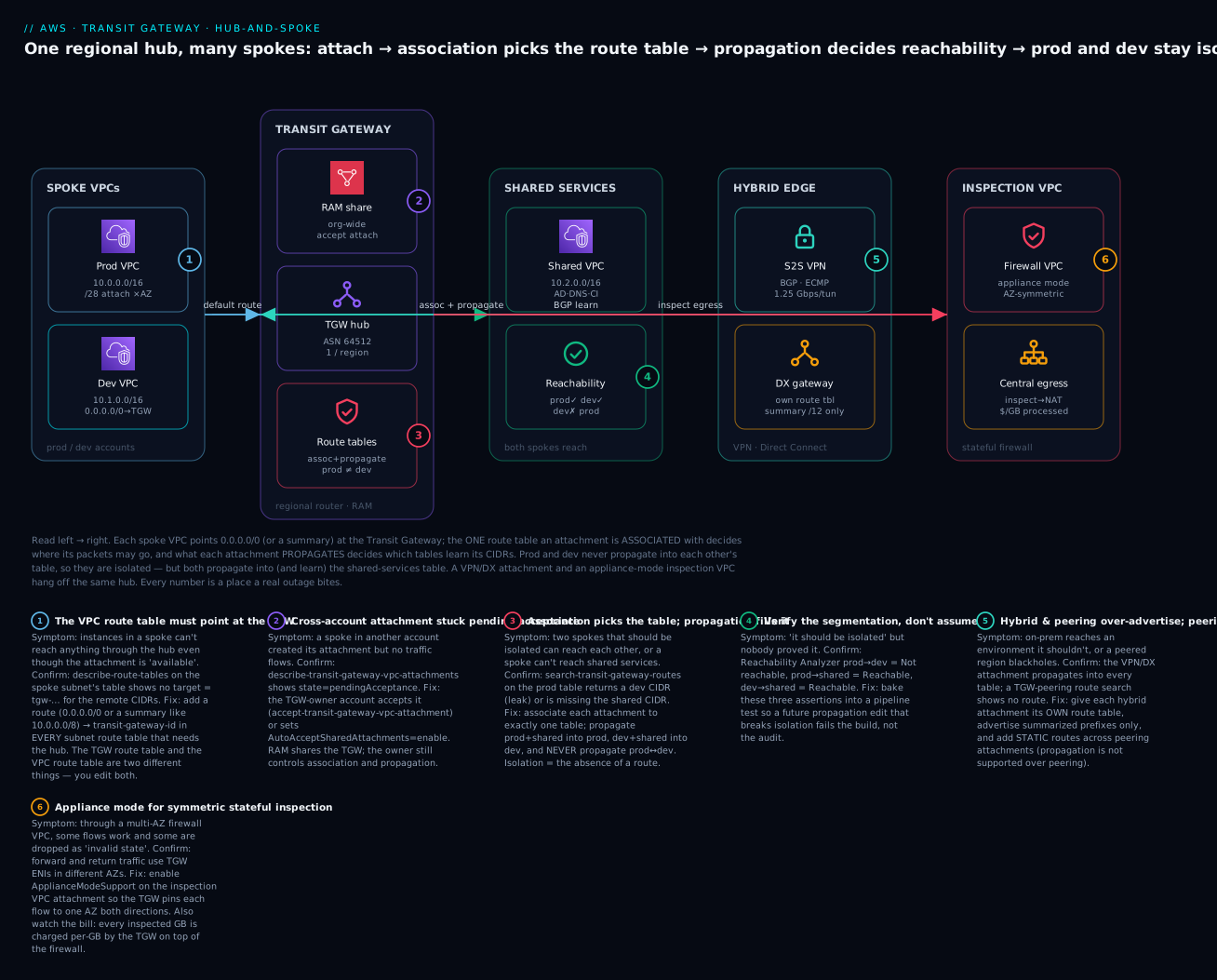
The diagram below is the design you build in this article, drawn as a left-to-right reachability path. On the left, two spoke VPCs (prod 10.0.0.0/16, dev 10.1.0.0/16) each point 0.0.0.0/0 (or a summary) at the Transit Gateway through a /28 attachment subnet in every AZ. In the centre, the hub carries three routing domains; the attachment an environment is associated with decides where its packets may go, and what each attachment propagates decides which tables learn its CIDRs — so prod and dev never learn each other (isolation by omission) while both learn the shared-services VPC (10.2.0.0/16) on the right. Below the hub, a Site-to-Site VPN and a Direct Connect gateway attach on their own route table advertising only summarized prefixes, and an inspection VPC with appliance mode provides symmetric stateful egress. Each numbered badge marks a place a real outage bites; the legend narrates each as symptom · confirm · fix.
Real-world scenario
FinServe Retail, a fictional but representative Indian lending startup, grew from one VPC to fourteen across six accounts in eighteen months — a prod account, a UAT account, two data-science accounts, a shared-services account (Active Directory, Route 53 Resolver, artifact mirror), and a security account. They started, as everyone does, with VPC peering. By the time they had eleven VPCs they were maintaining 41 peering connections, and a routine “please give data-science read access to the feature store in prod” turned into a two-day change touching nine route tables. Then an auditor asked them to prove that the UAT environment could not reach the PCI-scoped cardholder VPC. They could not — the answer was smeared across a dozen route tables, and in fact one stale peering route did leak.
They migrated to a Transit Gateway in the Mumbai (ap-south-1) region, owned by the shared-services (networking) account and shared to the whole Organization via RAM with auto-accept enabled for the trusted OUs. Each VPC got a /28 attachment subnet per AZ and a single attachment. They built five route tables as routing domains: prod-rt, nonprod-rt (UAT + data-science), shared-rt, pci-rt, and egress-rt. The segmentation was pure association/propagation: prod and nonprod propagate into shared-rt and learn shared back, but never into each other; pci-rt propagates only into shared-rt’s logging subset and receives only the security VPC — everything else is isolation by omission, backed by a blackhole for the cardholder CIDR in every non-PCI table as belt-and-braces. Central egress went through an inspection VPC with appliance mode on its attachment (they had been chasing intermittent “connection reset” tickets for months — classic asymmetric-routing drops through their two-AZ firewall, fixed the day appliance mode went on). On-prem reached everything through a single Direct Connect gateway attachment on its own route table advertising a summarized 10.0.0.0/8, instead of the old per-VPC VPN sprawl.
The outcomes were concrete. Adding the fifteenth VPC dropped from a two-day, nine-table change to a fifteen-minute Terraform PR: one attachment, one association, two propagations. The auditor’s question became a one-line Reachability Analyzer assertion — uat → pci = Not reachable — that they baked into CI so any future propagation edit that broke isolation would fail the build. The bill did rise: the TGW added roughly ₹16,000/month in attachment-hours (15 attachments) plus per-GB processing on east-west traffic that peering had carried free, about ₹22,000/month total at their volumes. Their networking lead signed off on it in one sentence to the CFO: the segmentation is now provable, and one leaked route in a lending platform costs more than a year of Transit Gateway. They did, however, move their two highest-volume, same-account VPCs (a chatty app↔cache pair pushing 30 TB/month between them) back to a direct peering to dodge the per-GB TGW fee — the right tool for that one edge, and a reminder that a hub is a default, not a religion.
Advantages and disadvantages
| Advantages | Disadvantages |
|---|---|
| Transitive routing — any attached network can reach any other (if routed) | Per-GB data-processing charge on top of attachment-hours; can exceed free peering |
| O(N) attachments instead of O(N²) peerings | One more hop and one more managed component to reason about |
| Central control — segmentation lives in route tables, one place to audit | Association/propagation model has a real learning curve; easy to misconfigure |
| Native hybrid transit — attach a VPN/DX once, all spokes reach it | Regional resource — cross-region needs peering + static routes |
| Cross-account via RAM with owner-controlled routing | 50 Gbps per-flow / ~100 Gbps per-attachment ceilings for extreme workloads |
| Appliance mode gives symmetric routing for stateful inspection | Some features unsupported over peering (propagation, multicast, SG-referencing) |
| Scales to 5,000 attachments; 20 route tables of segmentation | Blast radius — a bad propagation edit can leak across the whole org |
When the advantages win: many VPCs/accounts, hybrid connectivity, a segmentation or compliance mandate, and a landing zone you expect to grow. When the disadvantages bite hardest: a tiny, stable topology (two or three VPCs) where you’d pay attachment-hours for nothing, or a pair of same-account VPCs exchanging huge east-west volume where the per-GB fee dwarfs the operational savings — there, peering is the disciplined choice.
Hands-on lab
You will build a two-spoke-plus-shared hub-and-spoke in one account and one region, prove that dev cannot reach prod while both reach shared-services, then tear it down. Everything here is small; the only thing that costs money is the TGW attachments and a few t3.micro instances — delete them at the end.
⚠️ Cost warning. TGW attachments bill per attachment-hour (~$0.05/hr in
us-east-1→ ~₹3.6/hr each, ~₹11/hr for three) the moment they areavailable, plus ~$0.02/GB processed. Three attachments for a two-hour lab is a few rupees; forgetting to delete them is ~₹9,400/month. Do the teardown.
Step 0 — variables and three VPCs
export AWS_DEFAULT_REGION=us-east-1
# Create three tiny VPCs (non-overlapping CIDRs are mandatory)
PROD_VPC=$(aws ec2 create-vpc --cidr-block 10.0.0.0/16 --query 'Vpc.VpcId' --output text --tag-specifications 'ResourceType=vpc,Tags=[{Key=Name,Value=prod-vpc}]')
DEV_VPC=$(aws ec2 create-vpc  --cidr-block 10.1.0.0/16 --query 'Vpc.VpcId' --output text --tag-specifications 'ResourceType=vpc,Tags=[{Key=Name,Value=dev-vpc}]')
SHARED_VPC=$(aws ec2 create-vpc --cidr-block 10.2.0.0/16 --query 'Vpc.VpcId' --output text --tag-specifications 'ResourceType=vpc,Tags=[{Key=Name,Value=shared-vpc}]')
echo "prod=$PROD_VPC dev=$DEV_VPC shared=$SHARED_VPC"
Step 1 — a TGW attachment subnet (/28) and a workload subnet in each VPC
# For brevity, one AZ (us-east-1a). In production, one /28 per AZ.
mk_subnets () {  # $1=vpcid $2=base (e.g. 10.0)
  ATT=$(aws ec2 create-subnet --vpc-id "$1" --cidr-block "$2.255.240/28" --availability-zone us-east-1a --query 'Subnet.SubnetId' --output text)
  APP=$(aws ec2 create-subnet --vpc-id "$1" --cidr-block "$2.1.0/24"     --availability-zone us-east-1a --query 'Subnet.SubnetId' --output text)
  echo "$ATT $APP"
}
read PROD_ATT_SUBNET PROD_APP_SUBNET < <(mk_subnets "$PROD_VPC" 10.0)
read DEV_ATT_SUBNET  DEV_APP_SUBNET  < <(mk_subnets "$DEV_VPC" 10.1)
read SHARED_ATT_SUBNET SHARED_APP_SUBNET < <(mk_subnets "$SHARED_VPC" 10.2)
Step 2 — create the Transit Gateway with defaults OFF
TGW=$(aws ec2 create-transit-gateway \
  --description "hub-spoke-lab" \
  --options AmazonSideAsn=64512,AutoAcceptSharedAttachments=disable,DefaultRouteTableAssociation=disable,DefaultRouteTablePropagation=disable,DnsSupport=enable,VpnEcmpSupport=enable \
  --query 'TransitGateway.TransitGatewayId' --output text)
aws ec2 wait transit-gateway-available --transit-gateway-ids "$TGW"   # ~a few minutes
echo "TGW=$TGW"
Expected: after a few minutes the wait returns silently and describe-transit-gateways shows "State": "available".
Step 3 — attach all three VPCs
attach () {  # $1=vpc $2=att-subnet -> prints attachment id
  aws ec2 create-transit-gateway-vpc-attachment --transit-gateway-id "$TGW" \
    --vpc-id "$1" --subnet-ids "$2" \
    --query 'TransitGatewayVpcAttachment.TransitGatewayAttachmentId' --output text
}
PROD_ATT=$(attach "$PROD_VPC" "$PROD_ATT_SUBNET")
DEV_ATT=$(attach "$DEV_VPC"  "$DEV_ATT_SUBNET")
SHARED_ATT=$(attach "$SHARED_VPC" "$SHARED_ATT_SUBNET")
# wait until all three are available
for A in "$PROD_ATT" "$DEV_ATT" "$SHARED_ATT"; do
  aws ec2 wait transit-gateway-attachment-available --transit-gateway-attachment-ids "$A"
done
Step 4 — the three route tables + associations + propagations
Run the association/propagation block from the worked segmentation section above (it uses $PROD_ATT, $DEV_ATT, $SHARED_ATT and creates $PROD_RT, $DEV_RT, $SHARED_RT). That is the whole policy.
Step 5 — point each VPC’s subnets at the TGW
# Add a route in each app subnet's route table: 10.0.0.0/8 -> TGW
add_vpc_route () {  # $1=vpcid
  RT=$(aws ec2 describe-route-tables --filters "Name=vpc-id,Values=$1" "Name=association.main,Values=true" --query 'RouteTables[0].RouteTableId' --output text)
  aws ec2 create-route --route-table-id "$RT" --destination-cidr-block 10.0.0.0/8 --transit-gateway-id "$TGW"
}
add_vpc_route "$PROD_VPC"; add_vpc_route "$DEV_VPC"; add_vpc_route "$SHARED_VPC"
Step 6 — verify the routing (the point of the lab)
# What can PROD reach? Expect 10.0.0.0/16 (self) and 10.2.0.0/16 (shared) — NOT 10.1/16 (dev)
aws ec2 search-transit-gateway-routes --transit-gateway-route-table-id "$PROD_RT" \
  --filters "Name=state,Values=active" \
  --query 'Routes[].{cidr:DestinationCidrBlock,type:Type,state:State}' --output table

# What can DEV reach? Expect 10.1/16 (self) and 10.2/16 (shared) — NOT 10.0/16 (prod)
aws ec2 search-transit-gateway-routes --transit-gateway-route-table-id "$DEV_RT" \
  --filters "Name=state,Values=active" \
  --query 'Routes[].{cidr:DestinationCidrBlock,type:Type,state:State}' --output table

# SHARED reaches both:
aws ec2 search-transit-gateway-routes --transit-gateway-route-table-id "$SHARED_RT" \
  --filters "Name=state,Values=active" --output table
Expected: prod-rt lists 10.0.0.0/16 and 10.2.0.0/16 only; dev-rt lists 10.1.0.0/16 and 10.2.0.0/16 only; shared-rt lists all three. The absence of 10.1.0.0/16 from prod-rt is your proof of isolation. For an end-to-end proof without launching instances, use Reachability Analyzer:
# (Optional) prove dev -> prod is NOT reachable and dev -> shared IS
aws ec2 create-network-insights-path --source "$DEV_APP_SUBNET" --destination "$SHARED_APP_SUBNET" --protocol tcp
# ...start-network-insights-analysis and read NetworkPathFound (true for shared, false for prod)
Step 7 — teardown (do not skip)
# Delete attachments FIRST (this stops the attachment-hour meter), then the TGW, then VPCs
for A in "$PROD_ATT" "$DEV_ATT" "$SHARED_ATT"; do
  aws ec2 delete-transit-gateway-vpc-attachment --transit-gateway-attachment-id "$A"
done
for A in "$PROD_ATT" "$DEV_ATT" "$SHARED_ATT"; do
  aws ec2 wait transit-gateway-attachment-deleted --transit-gateway-attachment-ids "$A"
done
aws ec2 delete-transit-gateway --transit-gateway-id "$TGW"
# then delete subnets and VPCs (prod, dev, shared)
for V in "$PROD_VPC" "$DEV_VPC" "$SHARED_VPC"; do aws ec2 delete-vpc --vpc-id "$V"; done
| Lab resource | Bills? | Rough cost (2 hrs) | Teardown |
|---|---|---|---|
| 3× TGW VPC attachment | Yes (attachment-hour + per-GB) | ~₹22 for 2 hrs | Delete attachments first |
| Transit Gateway itself | No standalone charge | ₹0 | Delete after attachments |
| 3× VPC + subnets | No | ₹0 | Delete VPCs last |
| Reachability Analyzer path | Per-analysis (tiny) | ~₹0 | Delete the insights path |
Command and Terraform reference
The full aws ec2 / aws ram verb set you use to operate a TGW — keep this open when you script:
| Task | CLI command |
|---|---|
| Create the TGW | aws ec2 create-transit-gateway --options ... |
| Attach a VPC | aws ec2 create-transit-gateway-vpc-attachment |
| Accept a shared/cross-account VPC attachment | aws ec2 accept-transit-gateway-vpc-attachment |
| Change subnets / enable appliance mode | aws ec2 modify-transit-gateway-vpc-attachment |
| Create a route table (routing domain) | aws ec2 create-transit-gateway-route-table |
| Associate an attachment to a table | aws ec2 associate-transit-gateway-route-table |
| Enable propagation into a table | aws ec2 enable-transit-gateway-route-table-propagation |
| Disable a propagation | aws ec2 disable-transit-gateway-route-table-propagation |
| Add a static or blackhole route | aws ec2 create-transit-gateway-route [--blackhole] |
| Inspect the routes in a table | aws ec2 search-transit-gateway-routes --filters ... |
| Point a VPC subnet at the TGW | aws ec2 create-route --transit-gateway-id ... |
| Create an inter-region/account peering | aws ec2 create-transit-gateway-peering-attachment |
| Accept a peering | aws ec2 accept-transit-gateway-peering-attachment |
| List attachments (and their state) | aws ec2 describe-transit-gateway-attachments |
| Delete an attachment (stops the meter) | aws ec2 delete-transit-gateway-vpc-attachment |
| Share the TGW to accounts/OUs | aws ram create-resource-share |
| Accept a RAM invite (external principals) | aws ram accept-resource-share-invitation |
And the Terraform aws provider resources — this is where the association/propagation graph belongs in production:
| Terraform resource | Purpose |
|---|---|
aws_ec2_transit_gateway |
The hub itself (ASN, default-table + DNS/ECMP options) |
aws_ec2_transit_gateway_vpc_attachment |
A VPC attachment (subnets, appliance mode) |
aws_ec2_transit_gateway_vpc_attachment_accepter |
Accept a cross-account VPC attachment on the owner side |
aws_ec2_transit_gateway_route_table |
A routing domain |
aws_ec2_transit_gateway_route_table_association |
Bind an attachment to one table |
aws_ec2_transit_gateway_route_table_propagation |
Advertise an attachment’s CIDRs into a table |
aws_ec2_transit_gateway_route |
A static or blackhole = true route |
aws_route (with transit_gateway_id) |
The VPC subnet route to the hub |
aws_ec2_transit_gateway_peering_attachment (+ _accepter) |
Inter-region/account peering |
aws_ram_resource_share / _resource_association / _principal_association |
Share the TGW via RAM |
aws_ec2_transit_gateway_connect / _connect_peer |
SD-WAN Connect (GRE + BGP) |
Common mistakes & troubleshooting
The playbook first — the failures you will actually hit, with the exact command or console path to confirm each and the fix. This is the section to bookmark.
| # | Symptom | Root cause | Confirm (exact command / console path) | Fix |
|---|---|---|---|---|
| 1 | Two spokes can’t reach each other though attachments are available |
Association/propagation not set — the associated table has no route to the other’s CIDR | aws ec2 search-transit-gateway-routes --transit-gateway-route-table-id <src-rt> --filters Name=state,Values=active shows no route to dest CIDR |
Propagate the destination attachment into the source’s associated table (and vice-versa) |
| 2 | Attachment is available but no traffic flows at all |
The VPC route table has no route to the TGW | aws ec2 describe-route-tables --filters Name=vpc-id,Values=<vpc> — no target tgw-… |
aws ec2 create-route --route-table-id <rt> --destination-cidr-block 10.0.0.0/8 --transit-gateway-id <tgw> |
| 3 | Instances in one AZ can’t route through the hub; others work | VPC attachment has no subnet/ENI in that AZ | describe-transit-gateway-vpc-attachments → SubnetIds missing that AZ |
Add a /28 attachment subnet in the missing AZ and modify the attachment’s subnets |
| 4 | Dev can reach prod (should be isolated) | Prod was propagated into dev-rt (or defaults left on) |
search-transit-gateway-routes on dev-rt returns prod’s CIDR |
Disable that propagation; verify defaults are off; consider a blackhole as backstop |
| 5 | Cross-account attachment never comes up | Owner hasn’t accepted it (pendingAcceptance) |
describe-transit-gateway-vpc-attachments → State=pendingAcceptance |
Owner: accept-transit-gateway-vpc-attachment, or set AutoAcceptSharedAttachments=enable |
| 6 | Through a multi-AZ firewall, some flows drop with “invalid state”/resets | Asymmetric routing — appliance mode off | Flow forward/return use TGW ENIs in different AZs; firewall logs “no session” | Enable ApplianceModeSupport=enable on the inspection VPC attachment |
| 7 | Peered region unreachable though peering is available |
No static route — propagation doesn’t work over peering | search-transit-gateway-routes on the local RT has no route to remote CIDR |
Add a static route: dest = remote CIDR, target = peering attachment, both sides |
| 8 | SYN goes out, nothing comes back (one-way) | Return path missing — dest’s associated table has no route back to source | search-transit-gateway-routes on the destination’s RT lacks the source CIDR |
Propagate the source into the destination’s associated table |
| 9 | CreateTransitGatewayVpcAttachment fails / route conflict |
Overlapping CIDRs between attachments | Two attached VPCs share/overlap a CIDR; route search shows one winning | Re-IP with non-overlapping CIDRs (use IPAM); TGW cannot route overlaps |
| 10 | A route shows as blackhole and traffic drops |
A static blackhole (intended or leftover), or the attachment was deleted | search-transit-gateway-routes → Type blackhole / State blackhole |
Remove the blackhole route, or restore/recreate the attachment it pointed to |
| 11 | Everything can reach everything (no segmentation) | TGW created with default association+propagation ON | describe-transit-gateways → DefaultRouteTableAssociation/Propagation = enable |
Recreate/redesign with both disable; move attachments to purpose-built tables |
| 12 | Static route “ignored”; a broader propagated route is used | Longest-prefix match / static-vs-propagated precedence misunderstood | Compare prefixes in search-transit-gateway-routes; more specific wins; static beats propagated on equal prefix |
Add a more specific static route, or remove the conflicting propagation |
| 13 | The bill is far higher than the peering it replaced | Per-GB data processing on high east-west volume + attachment-hours | Cost Explorer → filter TransitGateway; check DataProcessing-Bytes |
Move very chatty same-account pairs back to peering; keep TGW for the rest |
| 14 | On-prem can reach an environment it shouldn’t | Hybrid attachment over-propagated into every table | search-transit-gateway-routes shows the VPN/DX prefixes in a table that should be isolated |
Give the hybrid attachment its own route table; propagate only where intended; summarize prefixes |
| 15 | A new account’s VPC can’t attach to the shared TGW at all | RAM share doesn’t reach that account/OU (or Org sharing disabled) | aws ram get-resource-shares --resource-owner SELF; the account/OU isn’t a principal |
Enable RAM sharing with AWS Organizations; add the account/OU as a principal on the share |
| 16 | Latency between two spokes is higher than expected | Traffic takes a cross-AZ hop through the hub | Compare source/dest AZ vs the attachment-subnet AZs; traceroute shows an extra hop | Place attachment subnets in every AZ and keep each flow AZ-aligned (and appliance mode for firewalls) |
A status/route-type reference you will read constantly in search-transit-gateway-routes output:
| Field value | Meaning | Implication |
|---|---|---|
Type: static |
You added it manually | Wins over propagated at the same prefix; required over peering |
Type: propagated |
Learned from an attachment’s propagation | Disappears if you disable propagation or delete the attachment |
State: active |
Route is installed and forwarding | Good |
State: blackhole |
Target drops traffic (blackhole route, or the attachment is gone) | Traffic to this CIDR is dropped — intended or a bug |
State: deleted |
Route removed | No longer matched |
Attachment pendingAcceptance |
Cross-account attach awaiting owner | Accept it (or enable auto-accept) |
Attachment failed |
Creation failed (often CIDR overlap/permissions) | Recreate after fixing the cause |
Type: propagated, expected static |
You relied on propagation where a static route was needed (peering) | Add the static route; propagation doesn’t cross peering |
Route present but State: blackhole unexpectedly |
The target attachment was deleted, leaving a blackhole | Recreate the attachment or remove the stale route |
And a fast decision table for the “can’t reach” class, which is 80% of TGW tickets:
| If you see… | It’s probably… | Do this |
|---|---|---|
Attachment available, zero connectivity |
Missing VPC route to TGW | Add remote-cidr → tgw-id in the spoke’s subnet route table |
| One-way traffic only | Missing return propagation | Propagate source into destination’s associated table |
| One AZ broken, others fine | Missing attachment subnet in that AZ | Add a /28 + modify attachment subnets |
| Intermittent resets via firewall | Appliance mode off | Enable it on the inspection VPC attachment |
| Remote region unreachable | Missing static route over peering | Add static routes both sides |
| Should-be-isolated pair connected | Bad propagation or defaults on | Remove propagation; disable default tables |
When a symptom is intermittent or you need to quantify a routing gap, the AWS/TransitGateway CloudWatch metrics (dimensioned per-attachment) are the fastest signal — PacketDropCountNoRoute is the metric that lights up on the “can’t reach” class:
Metric (AWS/TransitGateway) |
What it tells you | Use it to |
|---|---|---|
BytesIn / BytesOut |
Data volume per TGW/attachment | Forecast the per-GB bill; spot traffic anomalies |
PacketsIn / PacketsOut |
Packet rate | Baseline throughput per attachment |
PacketDropCountNoRoute |
Packets dropped — no matching route | Diagnose “can’t reach”: a missing route/propagation |
BytesDropCountNoRoute |
Bytes dropped for no route | Quantify the impact of a routing gap |
PacketDropCountBlackhole |
Packets dropped by a blackhole route | Catch an unintended or leftover blackhole |
BytesDropCountBlackhole |
Bytes dropped by a blackhole | Audit deliberate denies |
Any metric + TransitGatewayAttachment dimension |
Per-spoke breakdown | Isolate the one noisy or broken attachment |
| TGW Flow Logs (not a metric) | Per-flow accept/reject records → S3/CloudWatch | Forensic path analysis of a specific dropped flow |
The three nastiest real failures deserve prose. First, the phantom one-way flow. You propagate shared-services into prod, test with a ping from prod, it works, you move on — and a week later prod’s responses to connections initiated by shared fail, because you never propagated prod back into shared-rt. TGW routing is per-direction and per-table; always verify both associated tables have the counterpart route. Second, asymmetric routing through a firewall. Without appliance mode, a two-AZ inspection VPC will pass most traffic and silently drop the flows whose forward and return legs hash to different AZs — it looks like “random” packet loss and eats days. The tell is that it correlates with AZ, and the firewall logs show packets with no matching session. Turn appliance mode on and it vanishes. Third, the default-table flat network. A TGW made in the console with defaults left on quietly gives you an any-to-any fabric; your carefully drawn segmentation diagram is fiction because every attachment auto-associated and auto-propagated into the one default table. Always create with DefaultRouteTableAssociation=disable and DefaultRouteTablePropagation=disable and build your domains deliberately.
Best practices
- Disable both default route tables at creation (
DefaultRouteTableAssociation=disable,DefaultRouteTablePropagation=disable) and build named routing domains — never let a production hub be flat by accident. - One dedicated
/28attachment subnet per AZ, separate from workload subnets, in every AZ you run in. Never attach using app subnets. - Own the whole association/propagation graph in Terraform. It is exactly the kind of policy that must be reviewed in a PR and never hand-edited in the console.
- Isolate by omission, backstop with blackholes. Isolation is the absence of a route; add a blackhole for a must-never-reach CIDR as defence in depth and as an auditable statement of intent.
- Give every hybrid attachment (VPN/DX) its own route table and advertise summarized prefixes only — don’t propagate on-prem into every environment.
- Turn on appliance mode for any VPC attachment fronting a multi-AZ stateful appliance. It is free and prevents a whole class of intermittent drops.
- Centralise the TGW in a networking account and share via RAM to the Org, with the owner controlling all route tables. Participants attach; they don’t get to change segmentation.
- Prove segmentation continuously with Reachability Analyzer assertions in CI (
nonprod → pci = Not reachable). Catch a bad propagation at PR time, not audit time. - Use IPAM and a strict non-overlap CIDR plan. TGW cannot route overlapping CIDRs; plan the address space before the first attachment.
- Enable TGW Flow Logs (to S3/CloudWatch) from day one so an incident is diagnosable; you cannot retro-fit visibility into a flow that already dropped.
- Right-size the topology. Keep TGW as the default for many-VPC/hybrid/segmented networks, but move a small number of ultra-high-volume same-account pairs to peering to dodge the per-GB fee.
- Watch the limits (20 route tables, 5,000 attachments, 10,000 routes/table) and request increases before you approach them, not during an incident.
Security notes
Transit Gateway is a routing control, not a security appliance — but routing is a security boundary, and several TGW choices are directly security-relevant.
| Control | Practice | Why |
|---|---|---|
| Segmentation | Separate route tables per trust zone (prod/nonprod/pci/shared) | Isolation enforced in routing, provable, auditable |
| Least routing | Propagate only what each domain must reach; summarize hybrid prefixes | A missing route is the cheapest, most reliable deny |
| Blackhole quarantine | Blackhole a compromised CIDR at the hub | One place stops it for every attachment in that table |
| Central inspection | Route 0.0.0.0/0 to an appliance-mode inspection VPC |
East-west and egress traffic passes stateful firewall/IDS |
| Cross-account control | Share via RAM; owner keeps route-table control | Participants can attach but cannot change segmentation |
| Encryption in transit | TGW peering rides the encrypted backbone; VPN is IPsec | Cross-region/hybrid traffic is not on the public internet in the clear |
| Visibility | TGW Flow Logs + VPC Flow Logs → S3/Athena | Detect and investigate lateral movement and drops |
| Least privilege (IAM) | Restrict ec2:*TransitGateway* and ram:* to the network team |
A wrong propagation can breach segmentation org-wide |
| Guardrails | SCPs to prevent deleting/altering the TGW or its shares | Protect the connectivity backbone from accidental change |
Two specifics worth stressing. Security groups do not follow traffic across the TGW the way they can across a same-region peering — for cross-VPC micro-segmentation through the hub you rely on route-table domains plus SGs/NACLs at each VPC edge, and (where needed) a central firewall. And because a single bad propagation can leak one environment into another across the entire organisation, the IAM permissions for TGW route-table and RAM operations belong to a small, audited network team, ideally gated by change review and the Reachability Analyzer assertions above.
Cost & sizing
TGW has two meters, and understanding both is the difference between justifying it and being surprised by it.
| Cost component | What drives it | Rough rate (us-east-1, at time of writing) | INR (~₹86/USD) |
|---|---|---|---|
| Attachment-hour | Each attachment (VPC/VPN/DX/peer/Connect), while available |
~$0.05 / attachment / hour | ~₹4.3/hr → ~₹3,140/attachment/month |
| Data processing | Each GB entering the TGW (billed on the sending attachment) | ~$0.02 / GB | ~₹1.72 / GB |
| Inter-region (peering) | Cross-region data transfer on top of TGW processing | Standard inter-region DTO rates | Adds up fast for cross-region east-west |
So a 15-attachment hub is about ₹47,000/month in attachment-hours before a single byte flows, and then per-GB on top. The per-GB is the sneaky one: two VPCs peered directly pay no TGW processing (only normal cross-AZ/region DTO), but the same two on a TGW pay ~₹1.72/GB each way it enters the hub. At 30 TB/month between a chatty pair that is ~₹52,000/month of processing you would not pay with peering — which is exactly why the scenario company moved that one pair back to peering.
| Sizing / cost lever | Guidance |
|---|---|
| Number of attachments | Minimise — one per VPC; don’t attach VPCs that don’t need transit |
| High-volume same-account pairs | Consider peering to avoid per-GB processing |
| S3/DynamoDB traffic | Use gateway VPC endpoints so it never touches the TGW (free, off-hub) |
| Central egress | Consolidate NAT in one egress VPC behind the TGW rather than NAT per VPC |
| Cross-region | Expect two meters (TGW per-GB + inter-region DTO); keep east-west regional where possible |
| Idle attachments | Delete attachments you’re not using — the hour-meter runs regardless of traffic |
| Free tier | None for TGW — there is no free-tier allowance; a lab attachment costs from minute one |
Sizing also means staying inside the limits. Most are generous, but a few (route tables per TGW, routes per table) shape how many segments and prefixes you can carry, and you want the increase requested before an incident, not during one:
| Resource / limit | Default | Adjustable? |
|---|---|---|
| Transit gateways per account per region | 5 | Yes |
| Attachments per Transit Gateway | 5,000 | No (hard) |
| Attachments per VPC | 5 | Yes |
| Route tables per Transit Gateway | 20 | No |
| Routes per TGW route table | 10,000 | No |
| Peering attachments per Transit Gateway | 50 | Varies |
| BGP routes advertised per direction (VPN/DX) | 1,000 | No |
| Bandwidth per VPC attachment | ~100 Gbps (burst) | N/A |
| Bandwidth per single flow (5-tuple) | ~50 Gbps | N/A |
| Bandwidth per VPN tunnel | ~1.25 Gbps | N/A (use ECMP) |
| Bandwidth per Connect peer | ~5 Gbps (~20 with ECMP) | N/A |
| MTU — VPC / DX / peering / Connect | 8,500 bytes | N/A |
| MTU — VPN | 1,500 bytes | N/A |
Sizing for throughput: a VPC attachment bursts to ~100 Gbps and single flows cap around 50 Gbps, which covers almost everything; scale VPN with ECMP across tunnels (each ~1.25 Gbps) and Connect with ECMP across peers (each ~5 Gbps). If you need more than a single attachment’s bandwidth to one VPC, you generally re-architect (multiple VPCs/attachments) rather than expect one attachment to go higher.
| If you need… | Mechanism | Practical ceiling |
|---|---|---|
| More bandwidth to one VPC | Re-architect across VPCs/attachments (you can’t grow one attachment) | ~100 Gbps/attachment, ~50 Gbps/flow |
| Faster VPN | VPN ECMP across multiple tunnels/connections | ~1.25 Gbps × tunnels |
| Faster SD-WAN | Connect ECMP across peers | ~5 Gbps × up to 4 ≈ 20 Gbps |
| Faster hybrid | Larger or multiple Direct Connect circuits | Circuit speed (up to 100 Gbps) |
| Fewer fragmented packets | Jumbo frames (8,500 MTU) on VPC/DX/peering/Connect | VPN stays at 1,500 |
Interview & exam questions
Q1. Why is a Transit Gateway preferable to VPC peering at scale? VPC peering is non-transitive and grows as N·(N−1)/2 connections, so many-VPC and hybrid topologies become unmanageable and cannot relay through a third VPC. TGW is a transitive router: attach each network once (O(N)) and express reachability centrally in route tables, including native hybrid transit. (SAA-C03, ANS-C01)
Q2. Explain the difference between a route-table association and a propagation. An attachment is associated with exactly one route table — the table consulted for traffic coming from that attachment (where it may send). Propagation injects an attachment’s CIDRs into one or more tables (who learns it exists). Reachability needs both directions to line up. (ANS-C01)
Q3. How do you isolate dev from prod but let both reach shared-services on one TGW? Three route tables: associate each VPC’s attachment to its own table; propagate prod↔shared and dev↔shared, but never prod↔dev. Isolation is the absence of a route between the prod and dev tables — no firewall needed. (SAA-C03, ANS-C01)
Q4. What is appliance mode and when do you need it? A per-VPC-attachment option that pins both directions of a flow to the same AZ, giving symmetric routing. You need it when the attachment fronts a multi-AZ stateful appliance (firewall/IDS/NAT); without it, forward and return can hit different appliances and the stateful device drops the return as an unknown session. (ANS-C01)
Q5. Why does propagation not work across a TGW peering attachment, and what do you do instead? Peering does not exchange routes dynamically; you must add static routes in each region’s route table pointing the remote CIDRs at the peering attachment. Both sides need their static route. (ANS-C01)
Q6. How is a TGW shared across accounts, and who controls routing? The owner (networking) account shares the TGW via AWS RAM to accounts/OUs; participants create attachments from their VPCs, but the owner controls all route tables, associations, and propagations. Attachments may need owner acceptance unless AutoAcceptSharedAttachments is enabled. (SAA-C03, ANS-C01)
Q7. An attachment is available but no traffic flows. First thing to check? The VPC route table — the spoke’s subnets need a route remote-cidr → tgw-id. The attachment being available does nothing until the VPC’s own route tables send traffic to the TGW. (SAA-C03)
Q8. What are the per-AZ attachment-subnet requirements? The TGW places an ENI in one subnet per AZ you list; traffic uses the AZ-local ENI. Run in an AZ with no attachment subnet and that AZ can’t route through the hub. Best practice: a dedicated /28 per AZ. (ANS-C01)
Q9. What is a blackhole route and when would you use one? A static route whose target drops traffic — an explicit, auditable deny at the hub, applied to every attachment associated with that table. Use it to quarantine a compromised CIDR or hard-stop a decommissioned range. (ANS-C01)
Q10. When is peering still the right choice over TGW? For a small, stable set of VPCs — especially same-account, high east-west volume pairs — where you want to avoid the TGW per-GB processing charge and don’t need transit or segmentation. Peering has no per-GB fee. (SAA-C03)
Q11. What drives TGW cost and how do you control it? Two meters: attachment-hours (per attachment, always on) and per-GB data processing. Control by minimising attachments, using gateway endpoints for S3/DynamoDB (off-hub, free), consolidating egress, and moving ultra-chatty pairs to peering. (SAA-C03)
Q12. Name the five TGW attachment types and one constraint each. VPC (need a subnet per AZ), VPN (~1.25 Gbps/tunnel, use ECMP), Direct Connect gateway (transit VIF), TGW peering (static routes only), and Connect (GRE/BGP for SD-WAN, rides a transport attachment). (ANS-C01)
Quick check
- An attachment is associated with how many route tables, and what does that table control?
- You want dev isolated from prod but both to reach shared-services. What is the one thing you must not do?
- A spoke’s TGW attachment is
availablebut nothing connects. What is the first thing to check, and why isn’t it a TGW route table? - Through a two-AZ firewall VPC, some connections randomly reset. What setting fixes it and what was going wrong?
- You peered two TGWs across regions and the remote side is unreachable even though the peering is
available. What did you forget?
Answers
- Exactly one table. That associated table is the one the TGW consults for packets arriving from that attachment — it decides where the attachment may send. (Propagation, separately, decides which tables learn the attachment’s CIDRs.)
- Do not propagate prod into the dev route table or dev into the prod route table (and don’t leave the default propagation on). Isolation is achieved by the absence of a route; a single stray propagation breaks it.
- Check the VPC route table — the spoke’s subnets need a route
remote-cidr → tgw-id. The TGW attachment being available doesn’t move any packets until the VPC’s own subnet route tables point traffic at the hub. That’s a VPC route table, distinct from the TGW route table. - Enable appliance mode on the firewall VPC’s attachment. Without it, forward and return traffic can be routed to different AZs, hitting different firewall instances; the stateful device sees a return packet for a session it never opened and drops it — intermittent, AZ-correlated resets.
- Static routes. Propagation is not supported over a peering attachment, so each region’s route table needs a manually added static route for the remote region’s CIDRs pointing at the peering attachment — on both sides.
Glossary
- Transit Gateway (TGW): A managed, regional, horizontally scaled router that networks attach to; provides transitive hub-and-spoke routing between VPCs, VPNs, Direct Connect gateways, and other TGWs.
- Attachment: A connection between the TGW and one network — VPC, VPN, Direct Connect gateway, TGW peering, or Connect.
- VPC attachment: An attachment to a VPC that places a TGW ENI in one subnet per Availability Zone you select.
- Attachment subnet: A small dedicated subnet (ideally a
/28) per AZ used only to host the TGW’s ENI, kept separate from workload subnets. - TGW route table: An independent routing domain on the hub (up to 20 per TGW); decides where traffic from its associated attachments may go.
- Association: The binding of an attachment to exactly one TGW route table — the table used for traffic coming from that attachment.
- Propagation: The advertisement of an attachment’s CIDRs into one or more TGW route tables, producing
propagatedroutes. - Static route: A manually configured TGW route; required across peering attachments and used to override propagated routes.
- Blackhole route: A TGW route whose target drops matching traffic — an explicit deny at the hub.
- Appliance mode: A per-VPC-attachment option that keeps both directions of a flow in the same AZ for symmetric routing through stateful appliances.
- Default route table (association/propagation): The single table an attachment auto-uses if you leave defaults enabled — the cause of accidental flat networks.
- AWS RAM (Resource Access Manager): The service used to share a TGW with other accounts or an Organization; the owner retains route-table control.
- TGW peering attachment: A connection between two Transit Gateways (same or different region/account) over the AWS backbone; requires static routes.
- Connect attachment: A GRE+BGP attachment for SD-WAN/third-party appliances, riding on top of a VPC or DX transport attachment.
- ECMP (Equal-Cost Multi-Path): Load-sharing across multiple equal-cost paths (e.g. multiple VPN tunnels or Connect peers) to aggregate bandwidth.
- Transitive routing: The property (present in TGW, absent in VPC peering) that lets the hub forward traffic between two networks that are not directly connected to each other.
Next steps
- Know exactly what you’re trading away by reading AWS VPC Peering: Setup, Routing and Limits — the O(N²) alternative and when it still wins.
- Build the hybrid edge of the hub in AWS Site-to-Site VPN: A Hands-On Hybrid Network, then attach it to the TGW on its own route table.
- Keep AWS-service traffic off the hub and off the internet with AWS PrivateLink and VPC Endpoints: Interface vs Gateway.
- Revisit the fundamentals every attachment sits on in AWS VPC, Subnets and Security Groups Explained.
- Put the hub under proper multi-account guardrails with AWS Organizations and SCPs: Multi-Account Guardrails and AWS Control Tower: Guardrails and the Multi-Account Foundation.