Quick take: A VPC peering connection stitches two VPCs together so instances talk over private IPs on the AWS backbone — no gateways, no VPN, no public internet. It is point-to-point and non-transitive: if A peers with B and B peers with C, A still cannot reach C. Traffic only flows when you add a route to the peer’s CIDR on both route tables, the two CIDR ranges do not overlap, and security groups allow the peer. Get those three right and peering is nearly free and rock-solid; get any one wrong and the connection sits happily “ACTIVE” while every packet is silently dropped.
A team split their platform into a shared-services VPC and a dozen app VPCs, peered the first app VPC to shared services, watched it work, and rolled the same runbook to the rest. Two weeks later a new app VPC “couldn’t reach the shared Vault cluster” even though its peering connection showed Active in the console. The runbook had added the route on the app side but the shared-services route table was managed by a different Terraform stack that nobody updated — so requests left the app VPC, arrived at the Vault ENI, and the reply had no route home. It looked like a firewall problem for three hours. It was a missing route on one side. That single asymmetry — the reason peering is the AWS feature people most often declare “broken” when it is behaving exactly as designed — is the spine of this article.
We will define the whole model precisely: the requester and accepter, the three flavours (intra-region, inter-region, cross-account), and the connection lifecycle from pending-acceptance to active. Then we go deep on the four things that actually decide whether a packet moves: routes on both sides, non-overlapping CIDRs, security-group referencing (which works same-region but not across regions), and the DNS resolution option that makes a peer’s private hostname resolve to a private IP. We will nail down the two limits that surprise people most — non-transitivity (and why Transit Gateway exists) and edge-to-edge routing (why you can’t borrow the peer’s internet gateway or VPN) — then build the whole thing hands-on with aws CLI and Terraform, prove non-transitivity with a third VPC, and finish with a troubleshooting playbook you can keep open mid-incident.
By the end you will design peering that works the first time, read a route table and say exactly why a “connected” peer can’t be reached, decide in seconds whether a design wants peering, PrivateLink or a Transit Gateway, and answer the peering questions on SAA-C03 and the advanced networking specialty ANS-C01 without hesitation. This builds directly on AWS VPC, Subnets and Security Groups Explained and Build an AWS VPC from Scratch: Subnets, Route Tables and Internet Gateway.
What problem this solves
By default every VPC is an island. AWS gives each one its own isolated private address space, invisible and unreachable from every other VPC — even two VPCs you own in the same account and region cannot send a single private packet to each other. That isolation is the right default (it is why a mistake in one environment can’t leak into another), but real systems are not islands. An application VPC needs the shared-services VPC where your CI runners, Active Directory, secrets store and monitoring live. A newly acquired company’s account needs to reach your central logging. A data-science VPC needs the production data VPC in another region. Something has to join them, privately, without hair-pinning through the public internet.
VPC peering is the simplest answer: a direct, one-to-one networking connection between exactly two VPCs. Once it is active and routed, instances in each VPC address each other by private IP as if they were on the same network, and the traffic rides the AWS backbone — never the internet, no bandwidth bottleneck to provision, no VPN tunnel to babysit, no hourly charge for the connection itself. For a handful of VPCs that need to talk in specific pairs, nothing is cheaper or lower-latency.
What breaks without understanding it is predictable and painful. Teams add the route on one side and spend hours blaming security groups. They pick overlapping 10.0.0.0/16 ranges for two VPCs and then discover the two can never be peered, forcing a re-IP. They assume peering is transitive, wire a hub VPC, and can’t work out why the spokes can’t see each other. They try to route a spoke’s internet traffic through the peer’s NAT gateway and hit the silent wall of edge-to-edge routing. They reference a security group across a cross-region peer and it never matches. And at 30, 50, 80 VPCs the full mesh of peerings becomes an un-auditable spaghetti of pcx- IDs that finally forces a migration to Transit Gateway — the migration they could have started at VPC number five.
Who hits this: every team that grows past a single VPC. It bites platform engineers wiring shared services, security teams centralizing logging across accounts, data teams moving datasets between regions, and anyone who inherited a multi-account estate and now has to make it talk. The mechanism is small — a connection, a pair of routes, non-overlapping CIDRs — but the failure modes are subtle, and almost all of them present as the same misleading symptom: “the peering is Active but nothing works.”
Here is the field before we go deep — every core building block, what it does, and the single most common mistake people make with it:
| Building block | What it does | Scope | Most common mistake |
|---|---|---|---|
| Peering connection (pcx) | A private, point-to-point link between two VPCs | Exactly 2 VPCs | Thinking one connection joins three+ VPCs |
| Requester | The VPC/account that initiates the request | One side | Assuming acceptance auto-configures routes (it doesn’t) |
| Accepter | The VPC/account that accepts (or rejects) | Other side | Cross-account accepter never accepts; request expires |
| Route table entry | peer-CIDR → pcx-id, added per side |
Per route table | Adding it on one side only |
| Non-overlapping CIDR | Hard requirement for a valid peering | Both VPCs | Two VPCs both on 10.0.0.0/16 — can never peer |
| Security-group reference | Allow the peer’s SG by ID (same-region) | Per rule | Referencing an SG across different regions (unsupported) |
| DNS resolution option | Resolve the peer’s private hostnames to private IPs | Per side | Leaving it off; hostname resolves to a public IP |
| Non-transitivity | A↔B and B↔C does NOT give A↔C | The whole model | Building a “hub” VPC and expecting spokes to transit |
Learning objectives
By the end of this article you can:
- Explain the requester/accepter model and the difference between intra-region, inter-region and cross-account peering, including what each flavour supports and doesn’t.
- Configure routing correctly on both sides of a peering connection and diagnose the classic “Active but no connectivity” caused by a one-sided route.
- State and apply the no-overlapping-CIDR rule, recognise the
failedstate it causes, and choose an alternative (PrivateLink, re-IP) when ranges collide. - Decide when security-group referencing across a peer works (same-region, including cross-account) and when you must fall back to CIDR-based rules (inter-region).
- Turn on DNS resolution across a peering so private hostnames resolve to private IPs, and know the VPC attributes it depends on.
- Articulate non-transitivity and edge-to-edge routing limits, and explain precisely why Transit Gateway is the answer at scale.
- Enumerate the limits and quotas (active peerings per VPC, pending-request cap, expiry, routes per table) and the cost model (no hourly charge, data-transfer only).
- Build, verify and tear down a two-VPC peering plus a third VPC that proves non-transitivity, using both
awsCLI and Terraform.
Prerequisites & where this fits
You should be comfortable with VPC fundamentals: what a CIDR block is, how a route table decides where a subnet’s traffic goes, the difference between a stateful security group and a stateless network ACL (NACL), and how an instance gets a private IP. If any of that is fuzzy, read AWS VPC, Subnets and Security Groups Explained first — this article assumes it. You need an AWS account with the AWS CLI installed and configured (aws configure), permission to create VPCs and peering connections, and for the cross-account section, a second account (or an AWS Organizations member account). Basic Terraform familiarity helps for the IaC snippets but the CLI path is self-contained.
Peering sits in the VPC-to-VPC connectivity layer of AWS networking, one rung above single-VPC design and one rung below the hub-and-spoke world. It is the right tool for a small number of VPCs that need to talk in specific pairs. The moment you need many-to-many reachability, centralized egress, or hybrid (on-prem) connectivity shared across VPCs, you graduate to AWS Transit Gateway: Hub-and-Spoke Networking Hands-On. If what you actually need is to expose one service privately (not join whole networks), the better tool is often AWS PrivateLink and VPC Endpoints: Interface vs Gateway. For the cross-account identity plumbing that peering requests ride on, see AWS IAM Cross-Account Roles and AssumeRole Hands-On.
A quick map of who owns and confirms each layer, so during an incident you look in the right place and page the right person:
| Layer | What lives here | Who usually owns it | What it can break |
|---|---|---|---|
| CIDR / IP plan | Non-overlapping address allocation | Cloud platform / network team | Overlapping ranges → peering can never be created |
| Peering connection | The pcx, request + acceptance |
Requester + accepter teams | Stuck pending-acceptance; expired request |
| Route tables (both sides) | peer-CIDR → pcx entries |
Whoever owns each VPC’s routing | “Active but no traffic” — the #1 symptom |
| Security groups | Allow peer CIDR / peer SG | App + platform | One-way connectivity; refused connections |
| NACLs | Subnet-edge stateless rules | Platform / security | Return traffic dropped on ephemeral ports |
| DNS | Private hostname resolution | Platform team | Hostname resolves to public IP or fails |
Core concepts
A VPC peering connection — its resource type is vpc-peering-connection and its ID looks like pcx-0a1b2c3d4e5f67890 — is a networking connection between two VPCs that lets resources in either VPC communicate using private IPv4 (or IPv6) addresses. It is not a gateway and not an appliance: there is nothing running, nothing to patch, no bandwidth to size, and no availability zone to place it in. AWS implements it in the existing physical network of each VPC, so it is neither a single point of failure nor a bandwidth bottleneck — throughput is limited only by the instances at each end, not by the peering.
The connection is created by one side (the requester) and must be accepted by the other (the accepter). Until it is accepted it does nothing; once accepted it becomes active but still moves no traffic until routes and security groups are configured. Hold these three gates in your head — request → accept → route+secure — because almost every peering problem is a gate that looks done but isn’t.
Peering comes in three flavours, defined by where the two VPCs live:
| Flavour | Both VPCs where | Acceptance | Typical use |
|---|---|---|---|
| Intra-region, same account | Same region, same account | Auto-acceptable by you | Dev↔shared-services in one account |
| Intra-region, cross-account | Same region, different accounts | Accepter account must accept | App account ↔ central logging account |
| Inter-region | Different regions (same or diff account) | Accepter must accept | Prod in ap-south-1 ↔ DR in ap-southeast-1 |
The terminology is small but worth pinning down exactly, because the CLI and Terraform use these words as flags and attributes:
| Term | Meaning |
|---|---|
| Requester VPC | The VPC that initiates the peering request (--vpc-id) |
| Accepter VPC | The target VPC being peered with (--peer-vpc-id) |
| Peer owner / peer account | The account ID that owns the accepter (--peer-owner-id) — needed cross-account |
| Peer region | The region of the accepter (--peer-region) — needed inter-region |
| pcx-id | The peering connection’s resource ID, used as a route target |
| Status code | The lifecycle state: pending-acceptance, active, failed, expired, rejected, deleted |
| Peering options | Per-side toggles: DNS resolution, and (legacy/EC2-Classic) ClassicLink flags |
A peering connection walks a defined lifecycle. Knowing the states saves you from “why won’t it accept?” guesswork:
| Status code | Meaning | What you do |
|---|---|---|
initiating-request |
Request is being created | Wait a few seconds |
pending-acceptance |
Waiting for the accepter to accept | Accepter runs accept-vpc-peering-connection (within 7 days) |
provisioning |
Accepted; AWS is wiring it up | Wait |
active |
Live — routes may now be added | Add routes on both sides + fix SGs |
rejected |
Accepter rejected the request | Create a new request if it was a mistake |
failed |
Request failed (e.g. overlapping CIDR) | Read the message; fix CIDR; recreate |
expired |
Not accepted within 7 days | Recreate the request |
deleting / deleted |
Being removed / removed | Recreate if still needed |
And it is worth being explicit about what peering is and is not, because most misconceptions live here:
| Peering IS | Peering is NOT |
|---|---|
| A private, point-to-point link between 2 VPCs | A hub that transitively joins 3+ VPCs |
| Backbone traffic, never the public internet | A VPN or Direct Connect to on-prem |
| Free to run (no hourly/data-processing charge) | Free to use (you pay data transfer) |
| Full-bandwidth, no throughput cap of its own | A bandwidth-provisioned pipe you size |
| Symmetric once routed on both sides | Auto-routed on acceptance (you add routes) |
| Able to reference peer SGs same-region | Able to reference peer SGs across regions |
| A way to reach the peer’s instances/ENIs | A way to reach the peer’s IGW/NAT/VPN (edge-to-edge) |
The peering model: requester, accepter, and the three flavours
The request/accept dance exists so that no one can attach their VPC to yours without your consent — critical across account boundaries. The requester creates the connection pointing at a target VPC; the accepter (which may be a different account, a different region, or both) explicitly accepts. Same-account same-region, you are both parties, so you can accept your own request immediately (Terraform’s auto_accept = true does this in one apply).
The three flavours differ in more than acceptance — they differ in capabilities. This matrix is the one to memorize, because “it worked in the same region but not across regions” is a top-five peering surprise:
| Capability | Intra-region same-acct | Intra-region cross-acct | Inter-region |
|---|---|---|---|
| Explicit acceptance required | No (self-accept) | Yes | Yes |
| Reference peer security group by ID | Yes | Yes | No — use CIDRs |
| DNS resolution to private IP (option) | Yes | Yes | Yes |
| Jumbo frames (9001-byte MTU) | Yes | Yes | No — capped at 1500 |
| IPv4 | Yes | Yes | Yes |
| IPv6 | Yes | Yes | Yes (supported inter-region) |
| Data-transfer cost profile | Free same-AZ / cross-AZ rate | Same | Inter-region rate (higher) |
| Placement group spans the peer | No | No | No |
pcx counts against active-peering quota |
Yes | Yes | Yes |
Two of those rows cause the most grief. Security-group referencing is region-bound: same-region (even across accounts) you can write a rule whose source is the peer’s sg-id; inter-region you cannot, and must fall back to the peer’s CIDR ranges. MTU is region-bound too: intra-region peering carries jumbo frames (9001 bytes) which matters for high-throughput east-west traffic; inter-region peering caps at the standard 1500-byte MTU, so a workload tuned for jumbo frames will fragment or underperform across regions.
Cross-account peering has one extra failure mode worth calling out now: the accepter must accept within 7 days, or the request moves to expired and you start over. In a large org this is a coordination problem, not a technical one — the requester’s automation finishes, hands a pcx-id to a human in another account, and if that human is on holiday the request quietly dies. Automate the accept (an EventBridge rule → Lambda, or a shared Terraform state) and this class of ticket disappears.
Routing: you must add routes on BOTH sides
This is the single most important operational fact about peering, so it gets its own section: an active peering connection moves zero traffic until you add a route on each side. The peering gives the two VPCs permission and a path to talk; the route tables decide whether any subnet actually uses that path. AWS deliberately does not auto-populate routes on acceptance — your routing is yours to control, and auto-routes could clash with existing entries or expose more than you intend.
For VPC A (10.0.0.0/16) to talk to VPC B (10.1.0.0/16) over pcx-AB, you need, at minimum:
| Route table | Destination | Target | Meaning |
|---|---|---|---|
| A’s subnet route table | 10.1.0.0/16 |
pcx-AB |
“Send B-bound traffic to the peering” |
| B’s subnet route table | 10.0.0.0/16 |
pcx-AB |
“Send A-bound traffic (and replies) back” |
Miss the second row and the story from the intro repeats exactly: A’s packets reach B’s instance, but B’s reply has no route to 10.0.0.0/16, so it is dropped. The connection is “Active”; the ping hangs. There is no error anywhere — this is why it eats hours.
A few routing subtleties matter:
| Aspect | Detail |
|---|---|
| Scope of the route | You can route the peer’s whole CIDR or just a specific subnet (10.1.2.0/24 → pcx) to expose less |
| Which route tables | Only the route tables associated with the subnets whose instances must talk — not necessarily every table |
| Longest-prefix match | A more specific route wins; a /24 peering route beats a /16 route elsewhere |
| Overlap with local | The implicit local route always wins for the VPC’s own CIDR; you can’t override it |
| IPv6 | Add a separate route for the peer’s IPv6 CIDR (2600:1f16::/56 → pcx) if you use v6 |
| Blackhole | If the pcx is deleted, its routes show Blackhole — clean them up |
The valid route targets in a VPC route table, for context on where a pcx fits:
| Target | Reaches | Notes |
|---|---|---|
local |
The VPC’s own CIDR | Implicit, always present, highest priority |
pcx-… |
A peered VPC’s CIDR | This article |
igw-… |
Internet gateway | Public egress/ingress |
nat-… |
NAT gateway | Private egress only |
tgw-… |
Transit Gateway | Hub-and-spoke, transitive |
vgw-… |
Virtual private gateway | VPN / Direct Connect to on-prem |
vpce-… (prefix list) |
Gateway endpoint (S3/DynamoDB) | Free private path to those services |
eigw-… |
Egress-only internet gateway | IPv6 outbound-only egress |
eni-… |
An elastic network interface | e.g. a NAT instance or appliance |
Here is what “missing route” looks like at the packet level, so you can recognise it fast:
| Symptom | Route on A? | Route on B? | SGs OK? | Result |
|---|---|---|---|---|
| Ping hangs, no reply | Yes | No | Yes | Request arrives at B; reply blackholed |
| Ping hangs, no reply | No | Yes | Yes | Request never leaves A |
| Connection refused / reset | Yes | Yes | No | Path is fine; SG/NACL drops it |
| Works | Yes | Yes | Yes | Correct |
No overlapping CIDRs (the hard requirement)
You cannot create a VPC peering connection between two VPCs with matching or overlapping IPv4 CIDR blocks. This is not a warning you can override — the request goes straight to failed. The reason is routing arithmetic: if A is 10.0.0.0/16 and B is also 10.0.0.0/16, then when an instance in A sends to 10.0.5.9, the route table can’t tell whether that address is local or across the peer. There is no tiebreak that makes sense, so AWS forbids the connection outright.
Overlap comes in several shapes, and the outcome is the same for all of them:
| Case | A’s CIDR | B’s CIDR | Peering allowed? |
|---|---|---|---|
| Identical | 10.0.0.0/16 |
10.0.0.0/16 |
No — failed |
| Subset | 10.0.0.0/16 |
10.0.1.0/24 |
No — failed (B is inside A) |
| Partial overlap | 10.0.0.0/16 |
10.0.128.0/17 |
No — failed |
| Adjacent, non-overlapping | 10.0.0.0/16 |
10.1.0.0/16 |
Yes |
| Different RFC1918 blocks | 10.0.0.0/16 |
172.16.0.0/16 |
Yes |
| Secondary CIDR overlaps | 10.0.0.0/16 (+10.5.0.0/16) |
10.5.0.0/16 |
No — failed (secondary counts) |
Note the last row: a VPC can have secondary CIDR blocks, and any of them overlapping the peer blocks the peering. When you plan address space, reserve non-overlapping ranges across the whole estate from day one — this is exactly what an IP Address Manager (IPAM) pool is for. The cost of getting it wrong is a re-IP: changing a production VPC’s addressing is one of the most disruptive network operations there is.
There is one important nuance on what you route once peered. Even with non-overlapping VPC CIDRs, if VPC B is peered to two different VPCs (A and C) whose CIDRs overlap each other, B can only add a specific route to one of them for a given destination — the route table needs an unambiguous longest-prefix match. And you cannot add a peering route that is more specific than but within an overlap in a way that creates ambiguity. Keep the whole address plan non-overlapping and these edge cases never bite:
| Rule | Why |
|---|---|
| No two VPCs that will ever peer may overlap | Peering creation fails on overlap |
| Include secondary CIDRs in the no-overlap plan | They count for peering validation |
| Route a specific prefix if you only need part of the peer | Least exposure; avoids future overlap clashes |
| Plan the estate in an IPAM pool | Prevents accidental range reuse across teams |
| Overlap unavoidable (e.g. acquired company)? | Use PrivateLink to expose one service, or NAT/re-IP |
If two networks genuinely must overlap — the classic “we acquired a company that also used 10.0.0.0/16” — peering is off the table entirely. The pragmatic answers are: expose the specific service via PrivateLink (which doesn’t join the networks, so overlap is irrelevant), put a private NAT gateway in the path to translate, or bite the bullet and re-IP one side.
Non-transitivity: the #1 gotcha
Peering is non-transitive. If VPC A is peered with VPC B, and VPC B is peered with VPC C, then A cannot reach C through B. There is no route you can add and no setting you can flip that makes B forward A’s traffic to C over peering. Each peering connection joins exactly two VPCs, full stop.
This trips up everyone who tries to build a “hub” out of peering — a central VPC peered to many spokes — and expects the spokes to reach each other or reach on-prem through the hub. They can’t. To make A talk to C you must create a direct A↔C peering (and route both sides). For three VPCs that’s three peerings; the count explodes as a factorial-ish curve:
| VPCs (n) | Full-mesh peerings = n(n-1)/2 | Route-table entries (rough) |
|---|---|---|
| 2 | 1 | 2 |
| 3 | 3 | 6 |
| 4 | 6 | 12 |
| 5 | 10 | 20 |
| 6 | 15 | 30 |
| 8 | 28 | 56 |
| 10 | 45 | 90 |
| 15 | 105 | 210 |
| 20 | 190 | 380 |
| 50 | 1,225 | 2,450 |
At ten VPCs you are already managing 45 peering connections and about 90 route entries by hand — and every new VPC means peering it to all the others and touching every route table. That is unmanageable and un-auditable, and it is precisely the pain AWS Transit Gateway (TGW) removes. A TGW is a regional router: each VPC attaches once, and the TGW’s route tables provide transitive routing between them. Ten VPCs = ten attachments and one hub, not 45 peerings.
The decision between them is mostly about scale and topology:
| Dimension | VPC Peering | Transit Gateway |
|---|---|---|
| Transitive routing | No | Yes |
| Topology | Point-to-point mesh | Hub-and-spoke |
| Connections for n VPCs | n(n-1)/2 | n attachments |
| Hourly charge | None | Per-attachment-hour + per-GB |
| Data-processing charge | None (transfer only) | Per-GB processed by TGW |
| Latency | Lowest (direct) | One extra hop through the hub |
| Bandwidth per flow | No cap of its own | Up to ~100 Gbps per attachment (burst per-flow limits apply) |
| Centralized egress / inspection | No | Yes (route all spokes → egress VPC) |
| Hybrid (VPN/DX) shared across VPCs | No (edge-to-edge unsupported) | Yes |
| Cross-region | Peering per pair | TGW peering between regional hubs |
| Best for | 2–10 VPCs, specific pairs, cost-sensitive | Many VPCs, shared services, hybrid, inspection |
A useful rule of thumb: peering below roughly five VPCs when they talk in specific pairs and you want zero hourly cost; Transit Gateway once you need any-to-any, centralized egress, or shared hybrid connectivity. Many mature estates run both — TGW for the many-to-many backbone, plus a couple of direct peerings for latency-critical or high-throughput pairs that want jumbo frames and no per-GB TGW processing fee. The full hub-and-spoke build is covered in AWS Transit Gateway: Hub-and-Spoke Networking Hands-On.
Security groups across peering
Once traffic can route to the peer, security groups still have to allow it — routing and security are independent layers. There are two ways to write the allow rule, and which one you can use depends on region.
Same-region (including cross-account): reference the peer’s security group by ID. You can write an inbound rule whose source is the other VPC’s sg-… (for cross-account, you also specify the peer’s account ID). This is the clean, IP-free way — as instances scale in and out, membership updates automatically and you never touch CIDRs. It is the peering equivalent of the single best VPC hygiene habit: source rules from security groups, not IP ranges.
Inter-region: you cannot reference the peer’s security group — the feature is region-scoped. Across regions you must allow the peer’s CIDR ranges instead. This is the row people forget after a smooth same-region rollout.
| Scenario | SG referencing supported? | Write the rule as | Notes |
|---|---|---|---|
| Intra-region, same account | Yes | Source = peer sg-id |
Cleanest option |
| Intra-region, cross-account | Yes | Source = peer sg-id + peer account ID |
Both accounts must allow |
| Inter-region (any account) | No | Source = peer CIDR (e.g. 10.1.0.0/16) |
SG refs can’t cross regions |
| IPv6 | Same rules | Source = peer SG (same-rgn) or IPv6 CIDR | Add v6 rules explicitly |
Don’t forget the NACLs. Security groups are stateful (return traffic is automatic), but if you’ve tightened the subnet’s network ACL, remember it is stateless: you must allow the inbound service port and the outbound ephemeral-port range (typically 1024–65535) for replies. A one-directional NACL rule is a classic cause of “the handshake starts but never completes” across a peer. The full stateful-vs-stateless treatment is in AWS VPC, Subnets and Security Groups Explained.
| Control | Stateful? | What to allow for peer traffic |
|---|---|---|
| Security group (same-region) | Yes | Inbound: service port from peer sg-id |
| Security group (inter-region) | Yes | Inbound: service port from peer CIDR |
| NACL (inbound) | No | Service port from peer CIDR |
| NACL (outbound) | No | Ephemeral ports 1024–65535 back to peer CIDR |
DNS resolution across the peer
By default, if an instance in VPC A resolves the public DNS hostname of an instance in peered VPC B, it gets B’s public IP — which then can’t be reached privately over the peering (and may route out to the internet or nowhere). To make that hostname resolve to the private IP so traffic uses the peering, you turn on the DNS resolution peering option.
Each side sets its own option, AllowDnsResolutionFromRemoteVpc, controlling whether queries originating in the remote VPC resolve to private IPs in this VPC. For A and B to resolve each other’s private hostnames, enable it on both sides. It also depends on the VPCs having DNS enabled:
| Setting | Set on | Default | Effect | How to set |
|---|---|---|---|---|
AllowDnsResolutionFromRemoteVpc (requester) |
Requester side of pcx | false |
Requester’s queries resolve accepter hostnames → private IP | modify-vpc-peering-connection-options --requester-peering-connection-options |
AllowDnsResolutionFromRemoteVpc (accepter) |
Accepter side of pcx | false |
Accepter’s queries resolve requester hostnames → private IP | --accepter-peering-connection-options |
enableDnsSupport (VPC attribute) |
Each VPC | true |
Enables the VPC’s DNS resolver at all | modify-vpc-attribute --enable-dns-support |
enableDnsHostnames (VPC attribute) |
Each VPC | false (custom VPC) |
Assigns public DNS hostnames to instances | modify-vpc-attribute --enable-dns-hostnames |
If DNS “isn’t resolving across the peer,” walk this exact order: (1) both VPCs have enableDnsSupport = true; (2) both have enableDnsHostnames = true if you rely on the AWS-provided hostnames; (3) AllowDnsResolutionFromRemoteVpc = true on the relevant side(s) of the pcx. Miss any one and you get a public IP or an NXDOMAIN. Note this option governs the AWS-provided DNS; if you use Route 53 private hosted zones across VPCs, you associate the zone with the peer VPC instead (a different mechanism, but a common companion to peering).
Edge-to-edge routing limitations
Peering does not support edge-to-edge routing. Plainly: you cannot route through a peered VPC to reach that VPC’s gateways or connections. If VPC B has an internet gateway, a NAT gateway, a VPN, a Direct Connect, or a gateway VPC endpoint, VPC A cannot use any of them by routing through the A↔B peering. This is really non-transitivity wearing a different hat — B will not forward A’s traffic onward to anything but B’s own resources.
| In peer VPC B | Can VPC A use it via the A↔B peering? | Why | Do this instead |
|---|---|---|---|
| Internet gateway (IGW) | No | No edge-to-edge routing | Give A its own IGW; or centralize egress on a TGW |
| NAT gateway / NAT instance | No | No edge-to-edge routing | A’s own NAT; or TGW → central egress VPC |
| VPN / Direct Connect to on-prem | No | No edge-to-edge (transitive) | TGW with the VGW/DXGW attached to the hub |
| Gateway endpoint (S3 / DynamoDB) | No | No edge-to-edge routing | A’s own gateway endpoint (it’s free) |
| Interface endpoint (PrivateLink) | Not through peering (best practice) | Endpoint DNS/policy is VPC-scoped | A’s own interface endpoint, or share via PrivateLink directly |
| B’s EC2 instances / ENIs / RDS | Yes | This is what peering is for | Route peer CIDR → pcx, allow SGs |
The practical upshot: peering connects workloads to workloads, not networks to the wider world. The moment your requirement is “route all my spokes’ internet traffic through one inspected egress VPC” or “let every VPC reach on-prem over the shared Direct Connect,” peering is architecturally the wrong tool and Transit Gateway is the right one. That single realization saves a lot of teams from trying to bolt a hacky NAT-forwarding appliance into a peer VPC.
Limits and quotas
The numbers that shape a peering design (defaults; some are adjustable via Service Quotas):
| Quota / limit | Default | Adjustable to | Notes |
|---|---|---|---|
| Active peering connections per VPC | 50 | 125 | Quota code L-7E9ECCDB (VPC service) |
| Outstanding (pending) peering requests | 25 | 25 (fixed) | Requests awaiting acceptance |
| Request expiry | 168 h (7 days) | Fixed | Unaccepted request → expired |
| Peering connections between the same VPC pair | 1 | 1 | You cannot create a duplicate |
| Routes per route table | 50 | 1,000 | Peering routes count against this |
| VPCs a single VPC can peer with | Bounded by active-peering quota | 125 | It’s the same limit |
| Inter-region peering | Supported | — | Most commercial regions; not across the China boundary |
| IPv6 over inter-region peering | Supported | — | Add v6 routes explicitly |
| Jumbo frames (9001 MTU) | Intra-region only | — | Inter-region caps at 1500 |
| Placement groups spanning peered VPCs | Not supported | — | Even same-region |
| Transitive routing | Not supported | — | Use Transit Gateway |
| Edge-to-edge routing | Not supported | — | Use own gateways or TGW |
Two practical takeaways. First, the 125 active-peering ceiling per VPC is a hard architectural signal: if a shared-services VPC is approaching it, you have already outgrown peering and should be on a TGW. Second, watch routes per route table — the default 50 includes every peering route plus your local, IGW, NAT, endpoint and other entries; a busy shared VPC can bump it, and you raise it (up to 1,000) in Service Quotas. Neither the connection nor its ID costs anything to hold, so idle-but-active peerings are only a hygiene and quota concern, not a billing one.
Architecture at a glance
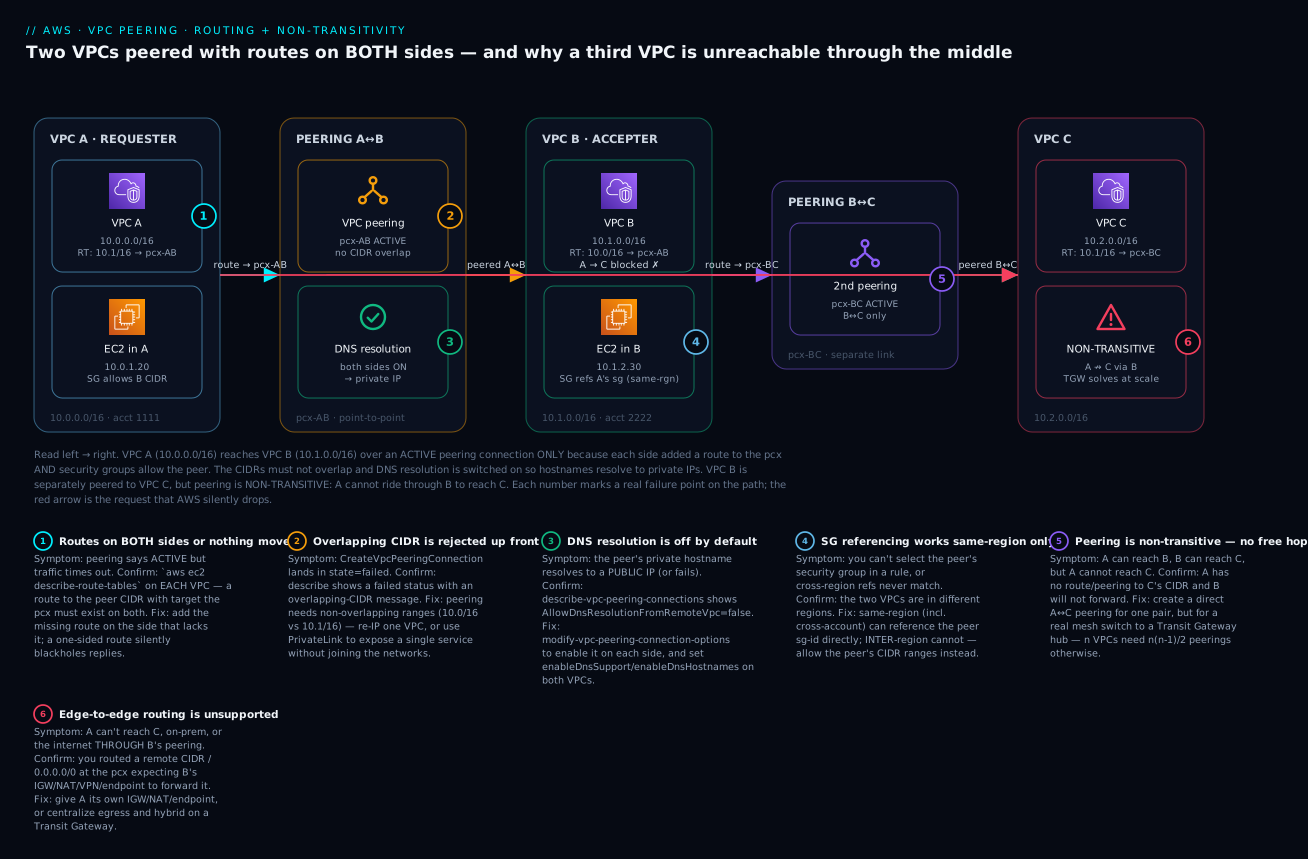
The diagram traces the exact system you build in the lab, left to right. VPC A (10.0.0.0/16, the requester) reaches VPC B (10.1.0.0/16, the accepter) across the pcx-AB peering connection — but only because each VPC’s route table has a route to the other’s CIDR pointing at the pcx, the two ranges don’t overlap, DNS resolution is switched on so B’s hostname resolves to a private IP, and the security groups allow the peer. VPC B is separately peered to VPC C (10.2.0.0/16) over pcx-BC. Follow the red arrow: VPC A tries to reach VPC C through B, and AWS silently drops it — peering is non-transitive, so A↔B plus B↔C does not yield A↔C.
The six numbered badges mark the exact hops where each failure class bites — a one-sided route (1), an overlapping CIDR rejected at creation (2), DNS resolution left off (3), a security-group reference attempted across regions (4), the non-transitive second peering (5), and the unsupported edge-to-edge/route-through attempt (6). The legend narrates each as symptom → how to confirm → fix, so the picture doubles as a diagnostic map.
Real-world scenario
Meridian Health, a fictional but very typical mid-size healthcare SaaS, ran three AWS accounts: a platform account with a shared-services VPC (10.20.0.0/16 — CI runners, HashiCorp Vault, Grafana, an internal package proxy), a prod account with the patient-facing app VPC (10.30.0.0/16), and a data account with a warehouse VPC (10.40.0.0/16). All in ap-south-1 (Mumbai). Early on, two engineers wired the connectivity by hand: prod↔shared-services peering, data↔shared-services peering. It worked, and they moved on.
Six months later three things happened in the same fortnight. First, a new analytics VPC in the data account needed the warehouse and the shared package proxy — so someone peered analytics↔data and assumed analytics could now reach shared-services through data. It couldn’t: non-transitive. The engineer spent a morning convinced the shared-services security group was wrong before a senior architect drew the two peerings on a whiteboard and said “there’s no path — B doesn’t forward.” They added a direct analytics↔shared-services peering and it worked in five minutes.
Second, the platform team stood up a DR copy of shared-services in ap-southeast-1 (Singapore) and peered it inter-region to prod for failover config sync. The prod security groups referenced the shared-services SG by ID — which had always worked intra-region. Across regions it silently didn’t match, and the sync jobs timed out. The fix was to rewrite those specific rules to allow the shared-services CIDR (10.20.0.0/16) instead of the sg-id, because SG referencing doesn’t cross regions. They also discovered their throughput-sensitive replication had been tuned for jumbo frames, which don’t exist inter-region — so they lowered the app’s MTU expectations to 1500.
Third — the one that finally forced change — the estate hit eleven VPCs, and the shared-services VPC now carried a thorny 30-plus peering connections and a route table brushing the 50-entry limit. Every new VPC meant peering it to shared-services and to a couple of others, then editing four or five route tables, in two accounts, by hand. Reachability was impossible to audit (“can analytics reach prod? let me check nine route tables”). They migrated the whole many-to-many backbone to a Transit Gateway shared across the org via RAM: each VPC now had a single attachment, TGW route domains kept prod and non-prod isolated, and on-prem reachability (previously impossible over peering because of edge-to-edge) came for free through the hub’s Direct Connect attachment. They kept exactly two direct peerings — the latency-critical prod↔shared-services pair (jumbo frames, no per-GB TGW fee) — and deleted the rest. The lesson they wrote into their platform runbook: peering is perfect for a few pairs; the day you’re drawing a mesh, you already needed Transit Gateway.
Advantages and disadvantages
| Advantages | Disadvantages |
|---|---|
| No hourly charge — you pay only data transfer | Non-transitive — no hub behaviour, mesh explodes as n(n-1)/2 |
| Lowest latency — direct, no extra hop | Every pair needs its own connection + routes on both sides |
| No bandwidth cap of its own (limited by instances) | No edge-to-edge — can’t share the peer’s IGW/NAT/VPN/endpoints |
| Full backbone privacy — never the public internet | CIDRs must not overlap — can force a painful re-IP |
| Jumbo frames intra-region (9001 MTU) | Jumbo frames unavailable inter-region (1500 cap) |
| SG referencing across the peer (same-region) | SG referencing unsupported inter-region — CIDR rules only |
| Simple mental model for 2–3 VPCs | Un-auditable at 10+ VPCs; route sprawl across accounts |
| Cross-account with explicit, consent-based acceptance | Cross-account request expires in 7 days if not accepted |
When each side matters: peering wins for a small number of VPCs that talk in specific, stable pairs — a prod VPC and its shared-services VPC, or two VPCs that exchange high-throughput east-west traffic and want jumbo frames with no per-GB processing fee. It loses the moment you need any-to-any reachability, centralized inspected egress, or shared hybrid connectivity — all of which are transitive by nature and therefore Transit Gateway’s job. And it is simply the wrong tool when the requirement is “expose one service” (use PrivateLink, which sidesteps overlap and non-transitivity entirely) or “the networks overlap” (peering is impossible).
Hands-on lab
You will create two VPCs, peer them, add routes on both sides, enable DNS resolution, launch an instance in each, and prove connectivity over private IP. Then you’ll add a third VPC, peer it to the second, and prove that the first cannot reach it — non-transitivity, demonstrated. Everything is Free-Tier-friendly if you use t3.micro/t2.micro instances and tear down promptly.
⚠️ Costs: The peering connections themselves are free (no hourly charge). You pay for the EC2 instances (Free Tier covers 750 hrs/month of one micro instance; three micros for an hour is a few rupees at most) and negligible cross-AZ data transfer if your instances land in different AZs. There is no NAT gateway in this lab. Tear down at the end and the running cost is effectively zero.
Lab variables and prerequisites
| Item | Value used here |
|---|---|
| Region | ap-south-1 (change to yours) |
| VPC A CIDR (requester) | 10.0.0.0/16, subnet 10.0.1.0/24 |
| VPC B CIDR (accepter) | 10.1.0.0/16, subnet 10.1.2.0/24 |
| VPC C CIDR (third) | 10.2.0.0/16, subnet 10.2.3.0/24 |
| Instance type | t3.micro (Amazon Linux 2023) |
| Access | SSH via IGW + your IP, or SSM Session Manager (no SSH key needed) |
| Key pair | peering-lab (create in the console or aws ec2 create-key-pair) |
Step 1 — Create the two VPCs and subnets
REGION=ap-south-1

# VPC A (requester)
VPC_A=$(aws ec2 create-vpc --cidr-block 10.0.0.0/16 --region $REGION \
  --tag-specifications 'ResourceType=vpc,Tags=[{Key=Name,Value=peering-vpc-a}]' \
  --query 'Vpc.VpcId' --output text)
aws ec2 modify-vpc-attribute --vpc-id $VPC_A --enable-dns-support   --region $REGION
aws ec2 modify-vpc-attribute --vpc-id $VPC_A --enable-dns-hostnames --region $REGION
SUBNET_A=$(aws ec2 create-subnet --vpc-id $VPC_A --cidr-block 10.0.1.0/24 --region $REGION \
  --query 'Subnet.SubnetId' --output text)

# VPC B (accepter)
VPC_B=$(aws ec2 create-vpc --cidr-block 10.1.0.0/16 --region $REGION \
  --tag-specifications 'ResourceType=vpc,Tags=[{Key=Name,Value=peering-vpc-b}]' \
  --query 'Vpc.VpcId' --output text)
aws ec2 modify-vpc-attribute --vpc-id $VPC_B --enable-dns-support   --region $REGION
aws ec2 modify-vpc-attribute --vpc-id $VPC_B --enable-dns-hostnames --region $REGION
SUBNET_B=$(aws ec2 create-subnet --vpc-id $VPC_B --cidr-block 10.1.2.0/24 --region $REGION \
  --query 'Subnet.SubnetId' --output text)

echo "VPC_A=$VPC_A  SUBNET_A=$SUBNET_A"
echo "VPC_B=$VPC_B  SUBNET_B=$SUBNET_B"
Expected output — two vpc-… IDs and two subnet-… IDs. Both VPCs now have DNS support and hostnames enabled (needed later for DNS resolution).
Step 2 — Create and accept the peering connection
# Requester (VPC A) requests peering with accepter (VPC B), same account/region
PCX_AB=$(aws ec2 create-vpc-peering-connection \
  --vpc-id $VPC_A --peer-vpc-id $VPC_B --region $REGION \
  --tag-specifications 'ResourceType=vpc-peering-connection,Tags=[{Key=Name,Value=pcx-a-b}]' \
  --query 'VpcPeeringConnection.VpcPeeringConnectionId' --output text)
echo "PCX_AB=$PCX_AB"

# Status is pending-acceptance until accepted
aws ec2 describe-vpc-peering-connections --vpc-peering-connection-ids $PCX_AB \
  --region $REGION --query 'VpcPeeringConnections[0].Status'

# Accept it (same account: you are the accepter)
aws ec2 accept-vpc-peering-connection --vpc-peering-connection-id $PCX_AB --region $REGION \
  --query 'VpcPeeringConnection.Status'
Expected output — after create, status { "Code": "pending-acceptance", ... }; after accept, { "Code": "active", ... } (it may briefly show provisioning). Cross-account note: if VPC B were in another account you’d add --peer-owner-id <acct-B> to create, and the accepter account would run accept-vpc-peering-connection. Inter-region: add --peer-region <region-B>.
Step 3 — Add routes on BOTH sides
# Find each VPC's main route table
RTB_A=$(aws ec2 describe-route-tables --region $REGION \
  --filters "Name=vpc-id,Values=$VPC_A" "Name=association.main,Values=true" \
  --query 'RouteTables[0].RouteTableId' --output text)
RTB_B=$(aws ec2 describe-route-tables --region $REGION \
  --filters "Name=vpc-id,Values=$VPC_B" "Name=association.main,Values=true" \
  --query 'RouteTables[0].RouteTableId' --output text)

# A → B: route B's CIDR to the pcx
aws ec2 create-route --route-table-id $RTB_A --region $REGION \
  --destination-cidr-block 10.1.0.0/16 --vpc-peering-connection-id $PCX_AB

# B → A: route A's CIDR to the pcx  (MISS THIS and you get "Active but no connectivity")
aws ec2 create-route --route-table-id $RTB_B --region $REGION \
  --destination-cidr-block 10.0.0.0/16 --vpc-peering-connection-id $PCX_AB
Expected output — each create-route returns { "Return": true }. Verify both:
aws ec2 describe-route-tables --route-table-ids $RTB_A $RTB_B --region $REGION \
  --query 'RouteTables[].Routes[?VpcPeeringConnectionId!=`null`].[DestinationCidrBlock,VpcPeeringConnectionId,State]' \
  --output table
You should see the peering route on both tables with State=active (not blackhole).
Step 4 — Enable DNS resolution across the peer
# Let each side resolve the other's private hostnames to private IPs
aws ec2 modify-vpc-peering-connection-options --vpc-peering-connection-id $PCX_AB --region $REGION \
  --requester-peering-connection-options AllowDnsResolutionFromRemoteVpc=true \
  --accepter-peering-connection-options  AllowDnsResolutionFromRemoteVpc=true

aws ec2 describe-vpc-peering-connections --vpc-peering-connection-ids $PCX_AB --region $REGION \
  --query 'VpcPeeringConnections[0].[RequesterVpcInfo.PeeringOptions,AccepterVpcInfo.PeeringOptions]'
Expected output — both option blocks show "AllowDnsResolutionFromRemoteVpc": true.
Step 5 — Security groups and instances
# SG in A: allow all ICMP + SSH from B's CIDR (same-region: you COULD reference B's sg-id instead)
SG_A=$(aws ec2 create-security-group --group-name peer-a --description "peer A" \
  --vpc-id $VPC_A --region $REGION --query 'GroupId' --output text)
aws ec2 authorize-security-group-ingress --group-id $SG_A --region $REGION \
  --ip-permissions IpProtocol=icmp,FromPort=-1,ToPort=-1,IpRanges='[{CidrIp=10.1.0.0/16}]'

# SG in B: allow ICMP + SSH from A's CIDR
SG_B=$(aws ec2 create-security-group --group-name peer-b --description "peer B" \
  --vpc-id $VPC_B --region $REGION --query 'GroupId' --output text)
aws ec2 authorize-security-group-ingress --group-id $SG_B --region $REGION \
  --ip-permissions IpProtocol=icmp,FromPort=-1,ToPort=-1,IpRanges='[{CidrIp=10.0.0.0/16}]'

# Launch one instance in each subnet (Amazon Linux 2023; use your key or SSM)
AMI=$(aws ssm get-parameters --region $REGION \
  --names /aws/service/ami-amazon-linux-latest/al2023-ami-kernel-default-x86_64 \
  --query 'Parameters[0].Value' --output text)

EC2_A=$(aws ec2 run-instances --image-id $AMI --instance-type t3.micro --region $REGION \
  --subnet-id $SUBNET_A --security-group-ids $SG_A --key-name peering-lab \
  --tag-specifications 'ResourceType=instance,Tags=[{Key=Name,Value=peer-ec2-a}]' \
  --query 'Instances[0].InstanceId' --output text)
EC2_B=$(aws ec2 run-instances --image-id $AMI --instance-type t3.micro --region $REGION \
  --subnet-id $SUBNET_B --security-group-ids $SG_B --key-name peering-lab \
  --tag-specifications 'ResourceType=instance,Tags=[{Key=Name,Value=peer-ec2-b}]' \
  --query 'Instances[0].InstanceId' --output text)

# Private IP of B, to ping from A
IP_B=$(aws ec2 describe-instances --instance-ids $EC2_B --region $REGION \
  --query 'Reservations[0].Instances[0].PrivateIpAddress' --output text)
echo "Ping target IP_B=$IP_B"
To reach the instances without a public IP or SSH key, attach the
AmazonSSMManagedInstanceCorerole and useaws ssm start-session --target $EC2_A. That is the cleanest lab access and needs no IGW.
Step 6 — Prove connectivity over the peering
Connect to the instance in A (SSM Session Manager or SSH), then:
# From EC2_A, ping EC2_B's PRIVATE IP over the peering
ping -c 3 10.1.2.30      # substitute the real IP_B

# And confirm DNS resolution returns a PRIVATE IP (thanks to Step 4)
nslookup ip-10-1-2-30.ap-south-1.compute.internal
Expected output — 3 packets transmitted, 3 received, 0% packet loss, and nslookup resolving the peer hostname to 10.1.2.30 (a private address), not a public one. That is peering working end to end: route both sides ✅, non-overlapping CIDRs ✅, SGs allow ✅, DNS resolves private ✅.
Step 7 — Prove non-transitivity with a third VPC
# VPC C + subnet + instance (same pattern, CIDR 10.2.0.0/16)
VPC_C=$(aws ec2 create-vpc --cidr-block 10.2.0.0/16 --region $REGION \
  --tag-specifications 'ResourceType=vpc,Tags=[{Key=Name,Value=peering-vpc-c}]' \
  --query 'Vpc.VpcId' --output text)
SUBNET_C=$(aws ec2 create-subnet --vpc-id $VPC_C --cidr-block 10.2.3.0/24 --region $REGION \
  --query 'Subnet.SubnetId' --output text)

# Peer B <-> C and route BOTH sides (so B truly can reach C)
PCX_BC=$(aws ec2 create-vpc-peering-connection --vpc-id $VPC_B --peer-vpc-id $VPC_C --region $REGION \
  --query 'VpcPeeringConnection.VpcPeeringConnectionId' --output text)
aws ec2 accept-vpc-peering-connection --vpc-peering-connection-id $PCX_BC --region $REGION >/dev/null
RTB_C=$(aws ec2 describe-route-tables --region $REGION \
  --filters "Name=vpc-id,Values=$VPC_C" "Name=association.main,Values=true" \
  --query 'RouteTables[0].RouteTableId' --output text)
aws ec2 create-route --route-table-id $RTB_B --destination-cidr-block 10.2.0.0/16 \
  --vpc-peering-connection-id $PCX_BC --region $REGION
aws ec2 create-route --route-table-id $RTB_C --destination-cidr-block 10.1.0.0/16 \
  --vpc-peering-connection-id $PCX_BC --region $REGION
Now B↔C is fully wired, and A↔B is fully wired. From EC2_A, try to reach a 10.2.x.x address in C:
# From EC2_A — attempt to reach VPC C (10.2.0.0/16) THROUGH B
ping -c 3 10.2.3.40
Expected output — 100% packet loss / no route. A has no route to 10.2.0.0/16 (and even if you added one at A pointing to pcx-AB, B would not forward it — non-transitive). This is the trap, reproduced on demand. To actually let A reach C you would create a direct pcx-AC peering and route both sides — or, at real scale, put A, B and C on a Transit Gateway.
Step 8 — Teardown (in order)
# Terminate instances first
aws ec2 terminate-instances --instance-ids $EC2_A $EC2_B --region $REGION
aws ec2 wait instance-terminated --instance-ids $EC2_A $EC2_B --region $REGION

# Delete peering connections (routes referencing them go to blackhole; delete them too if you keep the VPCs)
aws ec2 delete-vpc-peering-connection --vpc-peering-connection-id $PCX_AB --region $REGION
aws ec2 delete-vpc-peering-connection --vpc-peering-connection-id $PCX_BC --region $REGION

# Delete SGs, subnets, then VPCs
aws ec2 delete-security-group --group-id $SG_A --region $REGION
aws ec2 delete-security-group --group-id $SG_B --region $REGION
aws ec2 delete-subnet --subnet-id $SUBNET_A --region $REGION
aws ec2 delete-subnet --subnet-id $SUBNET_B --region $REGION
aws ec2 delete-subnet --subnet-id $SUBNET_C --region $REGION
aws ec2 delete-vpc --vpc-id $VPC_A --region $REGION
aws ec2 delete-vpc --vpc-id $VPC_B --region $REGION
aws ec2 delete-vpc --vpc-id $VPC_C --region $REGION
Verification checkpoints for the whole lab:
| Check | Command | Pass condition |
|---|---|---|
| Peering active | describe-vpc-peering-connections |
Status.Code = active |
| Route on both sides | describe-route-tables |
pcx route present in A and B, State=active |
| DNS option on | describe-vpc-peering-connections |
AllowDnsResolutionFromRemoteVpc = true both sides |
| Cross-peer ping works | ping <private IP of B> from A |
0% loss |
| Private DNS resolves | nslookup <peer hostname> |
returns a 10.1.x.x private IP |
| Non-transitivity proven | ping <C's IP> from A |
100% loss / no route |
| Teardown clean | describe-vpc-peering-connections |
no active pcx remains |
The same thing in Terraform
For repeatable infrastructure, define it as code. This provisions VPC A, VPC B, the peering (auto-accepted, same account), routes on both sides, and DNS resolution:
provider "aws" {
  region = "ap-south-1"
}

resource "aws_vpc" "a" {
  cidr_block           = "10.0.0.0/16"
  enable_dns_support   = true
  enable_dns_hostnames = true
  tags                 = { Name = "peering-vpc-a" }
}

resource "aws_vpc" "b" {
  cidr_block           = "10.1.0.0/16"
  enable_dns_support   = true
  enable_dns_hostnames = true
  tags                 = { Name = "peering-vpc-b" }
}

# The peering connection (same account, same region -> auto_accept)
resource "aws_vpc_peering_connection" "a_to_b" {
  vpc_id      = aws_vpc.a.id
  peer_vpc_id = aws_vpc.b.id
  auto_accept = true
  tags        = { Name = "pcx-a-b" }
}

# DNS resolution across the peer, both sides
resource "aws_vpc_peering_connection_options" "opts" {
  vpc_peering_connection_id = aws_vpc_peering_connection.a_to_b.id
  requester { allow_remote_vpc_dns_resolution = true }
  accepter  { allow_remote_vpc_dns_resolution = true }
}

# Routes on BOTH sides -- the whole point
resource "aws_route" "a_to_b" {
  route_table_id            = aws_vpc.a.main_route_table_id
  destination_cidr_block    = aws_vpc.b.cidr_block
  vpc_peering_connection_id = aws_vpc_peering_connection.a_to_b.id
}

resource "aws_route" "b_to_a" {
  route_table_id            = aws_vpc.b.main_route_table_id
  destination_cidr_block    = aws_vpc.a.cidr_block
  vpc_peering_connection_id = aws_vpc_peering_connection.a_to_b.id
}
Cross-account in Terraform splits into two resources: the requester creates aws_vpc_peering_connection with peer_owner_id (and peer_region for inter-region) and auto_accept = false; the accepter account uses a second provider alias and an aws_vpc_peering_connection_accepter resource with auto_accept = true. Each account owns its own aws_route resources — a clean encoding of the “routes on both sides, in both accounts” rule.
| Terraform resource | Purpose |
|---|---|
aws_vpc_peering_connection |
Creates the pcx (requester side) |
aws_vpc_peering_connection_accepter |
Accepts it (accepter side / other account) |
aws_vpc_peering_connection_options |
DNS resolution + (legacy) ClassicLink toggles |
aws_route (×2) |
The route on each side to the peer’s CIDR |
Common mistakes & troubleshooting
Peering has a small number of failure modes, but they overlap in symptom — most present as “Active but nothing works.” This playbook is the fast path from symptom to fix. Read the confirm column literally; it is the exact command or console path that proves the cause before you change anything.
| # | Symptom | Root cause | Confirm (exact command / console path) | Fix |
|---|---|---|---|---|
| 1 | Peering active, traffic times out |
Route missing on one side | aws ec2 describe-route-tables on both VPCs — is there a peer-CIDR → pcx route each? |
Add the missing route on the side that lacks it |
| 2 | active + routes present, still no traffic |
Security group doesn’t allow the peer | VPC Flow Logs show REJECT; check inbound SG rules |
Allow the service port from peer SG (same-region) or peer CIDR |
| 3 | Connectivity one direction only | NACL blocking the stateless return, or return route missing | Check the subnet NACL outbound ephemeral ports 1024–65535; check return route |
Allow ephemeral-port return in NACL; add the return route |
| 4 | CreateVpcPeeringConnection → failed |
Overlapping CIDR blocks | describe-vpc-peering-connections shows failed + overlap message |
Re-IP one VPC to a non-overlapping range, or use PrivateLink |
| 5 | Stuck pending-acceptance |
Cross-account accepter hasn’t accepted | describe-vpc-peering-connections → Status.Code=pending-acceptance |
Accepter account runs accept-vpc-peering-connection (within 7 days) |
| 6 | Request gone / can’t accept | Request expired (7 days) | Status.Code=expired |
Recreate the peering request |
| 7 | SG rule won’t match across regions | SG referencing unsupported inter-region | The two VPCs are in different regions; you can’t select the peer sg-id |
Allow the peer’s CIDR ranges instead of the SG ID |
| 8 | Peer hostname resolves to a public IP | DNS resolution option off | describe-vpc-peering-connections → AllowDnsResolutionFromRemoteVpc=false |
modify-vpc-peering-connection-options to enable; ensure enableDnsHostnames/Support |
| 9 | Can’t reach on-prem/internet through the peer | Edge-to-edge routing unsupported | You routed on-prem CIDR / 0.0.0.0/0 at the pcx expecting the peer’s VPN/IGW/NAT |
Give this VPC its own IGW/NAT/VPN, or use Transit Gateway |
| 10 | Third VPC unreachable through a middle VPC | Non-transitivity | A has no direct route/peering to C; B won’t forward | Create a direct A↔C peering, or migrate to Transit Gateway |
| 11 | Can’t create a new peering | Active-peering quota (50) reached on the VPC | Error on create; Service Quotas → “Active VPC peering connections per VPC” | Request increase to 125, or consolidate onto a Transit Gateway |
| 12 | create-route rejected |
Route conflicts / more-specific overlap / blackhole | describe-route-tables — a conflicting or blackhole route exists |
Remove the conflicting route; peering routes must be unambiguous |
| 13 | Cross-account: accepted but no traffic | Routes added in only one account | Check the route table in each account | Add the peer-CIDR → pcx route in both accounts’ route tables |
| 14 | Duplicate-peering error | A peering between this VPC pair already exists | describe-vpc-peering-connections filtered by the two VPC IDs |
Reuse the existing pcx; you can’t create a second between the same pair |
| 15 | Large packets fail / stall inter-region | Inter-region MTU capped at 1500 (no jumbo) | App tuned for 9001 MTU; test with ping -M do -s 8972 across the peer |
Lower app MTU to 1500 inter-region; keep jumbo intra-region only |
| 16 | IPv6 traffic doesn’t cross the peer | Missing IPv6 route and/or IPv6 SG rule | describe-route-tables for the peer’s IPv6 CIDR; check SG/NACL v6 rules |
Add peer-IPv6-CIDR → pcx route on both sides + allow the v6 range |
Peering status & common API errors reference
| Status / error | Meaning | Typical fix |
|---|---|---|
pending-acceptance |
Waiting for accepter | Accept within 7 days (accepter side/account) |
failed |
Creation failed (usually overlapping CIDR) | Read message; fix CIDR; recreate |
expired |
Not accepted within 7 days | Recreate request |
rejected |
Accepter rejected | Recreate if intended |
Blackhole (on a route) |
The pcx the route points to is deleted/inactive | Delete the stale route |
VpcPeeringConnectionAlreadyExists |
Duplicate pcx for the same VPC pair | Reuse the existing connection |
InvalidVpcPeeringConnectionID.NotFound |
Wrong/typo’d or deleted pcx-id |
Re-list with describe-vpc-peering-connections |
InvalidStateTransition / can’t accept |
Already active/expired/rejected | Check current Status.Code first |
RouteAlreadyExists |
A route for that destination already exists | Replace it (replace-route) or narrow the prefix |
InvalidParameterValue (overlapping) |
CIDR overlaps an existing/local route | Choose a non-overlapping/ more specific prefix |
Fast decision table
| If you see… | It’s probably… | Do this |
|---|---|---|
| Active + ping hangs | Missing route on one side | Check both route tables |
| Active + connection refused | SG/NACL | Allow peer SG/CIDR; check NACL ephemeral ports |
| One-way only | Stateless NACL or return route | Allow ephemeral return; add reverse route |
| Create → failed | Overlapping CIDR | Re-IP or use PrivateLink |
| Hostname → public IP | DNS option off | Enable AllowDnsResolutionFromRemoteVpc |
| Can’t reach C via B | Non-transitive | Direct peering or TGW |
| Can’t reach internet via peer | Edge-to-edge | Own IGW/NAT or TGW |
| Can’t create peering | Quota (50/125) | Raise quota or move to TGW |
The three nastiest real failures, in prose
The one-sided route (by far the most common). Everything says Active, the sending instance’s packets clearly leave, and yet nothing comes back. Ninety percent of the time the return route is missing on the other VPC — often because the two VPCs are owned by different Terraform stacks, teams, or accounts, and only one was updated. The confirming move is boringly reliable: describe-route-tables on both VPCs and eyeball that each has a peer-CIDR → pcx route in active state. VPC Flow Logs on the receiving ENI clinch it — you’ll see the inbound ACCEPT and no corresponding outbound flow, because the reply had nowhere to go. Reachability Analyzer (aws ec2 create-network-insights-path / start-network-insights-analysis) will name the exact missing hop without sending a packet, which is the tool to reach for when you can’t get shell on either instance.
The inter-region security-group reference. A design works flawlessly in one region using SG-to-SG rules, then a DR or multi-region rollout peers two VPCs across regions and the same rule silently never matches — because SG referencing is region-scoped and quietly unsupported across a cross-region peering. There is no error; the rule simply doesn’t apply, and connections are refused or time out. The tell is that your rule’s source is a sg-… and the two VPCs are in different regions. The fix is to rewrite those rules to allow the peer’s CIDR ranges. Bake this into your review checklist: any inter-region peering uses CIDR-based SG rules, never SG references.
The transitive hub that isn’t. A team builds a shared-services VPC and peers many spokes to it, then discovers spokes can’t reach each other and can’t reach on-prem “through” the hub. Both are the same root cause — peering is non-transitive and doesn’t do edge-to-edge — and no amount of route-table editing fixes it, because the middle VPC will not forward. The only real fixes are a direct peering per pair (which is where the n(n-1)/2 mesh becomes unmanageable) or a Transit Gateway, which is transitive and does let every attachment share a central egress and a shared Direct Connect. If you catch yourself adding the third or fourth peering to a “hub” VPC, stop and stand up a TGW — you’ve already outgrown peering.
Best practices
- Plan non-overlapping CIDRs for the entire estate up front — ideally from an IPAM pool — so any two VPCs can be peered later without a re-IP. Include secondary CIDRs in the plan.
- Always verify routes on both sides as the first diagnostic step; a one-sided route is the single most common failure and the fastest to confirm.
- Route the narrowest prefix you need. If VPC A only needs one subnet in B, route
10.1.2.0/24 → pcx, not the whole/16— least exposure and fewer future overlap clashes. - Reference peer security groups (same-region) instead of CIDRs for automatic membership as instances scale — but remember to switch to CIDR rules for inter-region peerings.
- Automate cross-account acceptance (EventBridge → Lambda, or shared Terraform state) so requests never hit the 7-day expiry waiting on a human.
- Turn on DNS resolution deliberately and confirm
enableDnsSupport/enableDnsHostnameson both VPCs, so services address each other by hostname over private IPs. - Tag every peering with owner, purpose and the two VPC names; a bare
pcx-0a1b…in a list of 30 is impossible to audit. - Count your peerings. As a VPC approaches ~10 active peerings, evaluate migrating the many-to-many part to Transit Gateway before you hit the 50/125 ceiling.
- Never try to borrow the peer’s gateways. If you need shared egress, on-prem, or endpoints, that’s a TGW/PrivateLink design, not peering.
- Clean up blackhole routes when you delete a peering; stale routes confuse the next engineer and the next audit.
- Use Reachability Analyzer in CI to assert intended (and forbidden) paths — e.g. “A can reach B on 443” and “A cannot reach C” — so a route change can’t silently break or over-connect.
Security notes
Peering is a powerful connectivity primitive, and “connected” is the opposite of “isolated” — treat each peering as an intentional reduction of a security boundary, not a convenience.
| Concern | Guidance |
|---|---|
| Least privilege on the wire | Route the narrowest prefix and allow only the specific ports you need — don’t peer whole /16s and open 0.0.0.0/0 SGs “to make it work” |
| Prefer SG references (same-region) | Sourcing from a peer sg-id beats a broad CIDR — it scopes access to specific instances, not a whole subnet range |
| IAM control of who can peer | Restrict ec2:CreateVpcPeeringConnection / AcceptVpcPeeringConnection via IAM and SCPs; a rogue peering is a lateral-movement path |
| Cross-account consent | The accept step is a security control — never auto-accept from untrusted accounts; scope auto-accept automation to your own org |
| Encryption in transit | Peering traffic stays on the AWS backbone but is not encrypted by AWS by default — use TLS/mTLS (or app-layer encryption) for sensitive data across the peer |
| Flow Logs on both sides | Enable VPC Flow Logs on the subnets/ENIs each side so cross-peer traffic is auditable and REJECTs are visible during incidents |
| Blast radius | A peering makes the peer reachable — segment with SGs/NACLs so a compromise in one VPC can’t freely traverse into the other |
| No transitive surprise (a feature) | Non-transitivity is also a security property — a spoke can’t accidentally reach another spoke through a shared hub; don’t defeat it with a sloppy TGW route domain |
For the cross-account IAM patterns that gate who may request and accept peerings, see AWS IAM Cross-Account Roles and AssumeRole Hands-On.
Cost & sizing
The peering connection itself is free — no hourly charge, no data-processing charge for the connection, no per-connection fee. You pay only for the data transfer that flows across it, at standard EC2 data-transfer rates, which depend entirely on where the two ends sit. (Rates below are indicative USD list prices for common cases; always confirm current pricing for your region. INR shown at roughly ₹85/USD for budgeting.)
| Traffic pattern over peering | Charge (each direction) | INR approx | Notes |
|---|---|---|---|
| Same AZ, same region (private IPv4/IPv6) | Free | Free | Keep chatty peers in the same AZ to pay nothing |
| Cross-AZ, same region | ~$0.01 / GB | ~₹0.85 / GB | Standard cross-AZ rate; applies to peering too |
| Inter-region (e.g. Mumbai ↔ Singapore) | Inter-region rate (varies, often ~$0.02–0.09/GB) | ~₹1.7–7.6 / GB | Higher; region-pair dependent |
| Data to the internet via a peer | N/A | N/A | Not possible — edge-to-edge unsupported |
Because the connection is free, cost engineering for peering is really traffic-placement engineering:
| Lever | Effect on cost |
|---|---|
| Co-locate chatty instances in the same AZ | Same-AZ peering traffic is free — biggest lever |
| Avoid needless cross-AZ hops | Each GB each way is ~$0.01; adds up on high east-west volume |
| Prefer intra-region over inter-region where possible | Inter-region transfer is materially pricier |
| Use gateway endpoints for S3/DynamoDB in each VPC | Don’t try (and you can’t) route that through a peer; endpoints are free |
| Compare TGW total cost at scale | TGW adds per-attachment-hour + per-GB processing; peering avoids both but doesn’t scale — model both for your volume |
A quick sizing sanity check versus Transit Gateway: TGW charges a per-attachment-hour (roughly $0.05–0.07/hr depending on region, ~₹4–6/hr) plus a per-GB data-processing fee (~$0.02/GB) on top of data transfer. Peering has neither. So for two or three high-volume pairs, peering is strictly cheaper; for a dozen VPCs that mostly need any-to-any, TGW’s operational simplicity usually justifies its fee. Model your real GB/month and attachment count — the crossover is a spreadsheet, not a dogma.
Free-tier note: the lab’s only real cost is EC2 (one t3.micro is Free-Tier eligible for 750 hrs/month for the first 12 months); the peering connections and same-AZ traffic are free. Tear down promptly and the lab is effectively free.
Interview & exam questions
Q1. Why does a peering connection show “Active” but no traffic flows? Almost always a missing route on one side. Active means the connection is established, but each VPC’s route table must have a route to the peer’s CIDR targeting the pcx; miss one and replies are blackholed. (SAA-C03, ANS-C01)
Q2. Is VPC peering transitive? What does that mean for a hub design? No. If A↔B and B↔C exist, A still cannot reach C — B won’t forward. A peering hub doesn’t give spokes mutual reachability; for that you need a Transit Gateway, which is transitive. (SAA-C03)
Q3. Two VPCs both use 10.0.0.0/16. Can you peer them? No — overlapping CIDRs make peering impossible; the request goes to failed. Options: re-IP one VPC, or expose the needed service via PrivateLink, which doesn’t join the networks and so tolerates overlap. (SAA-C03)
Q4. Can you reference the peer’s security group in your rules? Yes for same-region peerings (including cross-account) — source a rule from the peer sg-id. No for inter-region — you must use the peer’s CIDR ranges there. (ANS-C01)
Q5. A peer’s hostname resolves to a public IP. Why, and how do you fix it? The DNS resolution option is off. Enable AllowDnsResolutionFromRemoteVpc on the relevant side(s) with modify-vpc-peering-connection-options, and ensure both VPCs have enableDnsSupport/enableDnsHostnames. Then it resolves to the private IP. (ANS-C01)
Q6. Can VPC A use VPC B’s NAT gateway or VPN over the peering? No — peering does not support edge-to-edge routing. A can’t reach B’s IGW, NAT, VPN, Direct Connect, or gateway endpoints. Give A its own, or use a Transit Gateway for shared egress/hybrid. (SAA-C03, ANS-C01)
Q7. How many peering connections for a full mesh of n VPCs? n(n-1)/2. Ten VPCs = 45 connections. This factorial growth is the core reason to adopt Transit Gateway at scale. (SAA-C03)
Q8. What’s the default and maximum number of active peerings per VPC? Default 50, adjustable to 125 via Service Quotas. Hitting it is a strong signal you’ve outgrown peering. (ANS-C01)
Q9. A cross-account peering request never becomes active. Likely cause? The accepter account hasn’t accepted, or the request expired after 7 days. Confirm the status; automate acceptance to avoid expiry. (SAA-C03)
Q10. Peering vs PrivateLink — when each? Peering joins whole networks (bidirectional, needs non-overlapping CIDRs). PrivateLink exposes one service unidirectionally as an interface endpoint, tolerates overlapping CIDRs, and scopes access tightly — better for SaaS-style service sharing. (ANS-C01)
Q11. Do inter-region peerings support jumbo frames? No — inter-region peering caps MTU at 1500 bytes; jumbo frames (9001) are intra-region only. Tune throughput-sensitive apps accordingly. (ANS-C01)
Q12. Is peering traffic encrypted? It stays on the AWS backbone (never the public internet) but is not encrypted by AWS by default. For sensitive data, add TLS/mTLS at the application layer. (SCS-C02, ANS-C01)
Quick check
- You created a peering, accepted it, and it’s
active, but apingacross it hangs with no reply. What is the first thing to check? - VPC A (
10.1.0.0/16) and VPC B (10.1.0.0/16) need to talk. What must you do before you can peer them? - You have VPCs A, B and C, with A↔B and B↔C peered. Can A reach C? Why or why not?
- Your app resolves a peer instance’s hostname and gets a public IP it can’t reach privately. Which single option fixes this?
- You need every one of 12 VPCs to reach every other, plus shared on-prem access. Peering or Transit Gateway — and why?
Answers
- Check the route tables on both sides. An
activepeering with hanging traffic is almost always a missingpeer-CIDR → pcxroute on one VPC; the request arrives but the reply is blackholed. Confirm withdescribe-route-tableson each VPC. - Re-IP one of them to a non-overlapping range. Identical (or overlapping) CIDRs make peering impossible — the request would go to
failed. If re-IP is impossible, expose the needed service via PrivateLink instead. - No. Peering is non-transitive — B will not forward A’s traffic to C. You’d need a direct A↔C peering, or a Transit Gateway to get transitive routing.
- Enable DNS resolution on the peering (
AllowDnsResolutionFromRemoteVpc = trueon the relevant side), with the VPCs’ DNS attributes on. Then the hostname resolves to the private IP and traffic uses the peering. - Transit Gateway. Twelve VPCs need any-to-any (a 66-connection mesh with peering) plus shared hybrid connectivity — both are transitive requirements peering can’t meet. A TGW gives one attachment per VPC, transitive routing, and a shared Direct Connect/VPN.
Glossary
| Term | Definition |
|---|---|
| VPC peering connection (pcx) | A private, point-to-point networking link between exactly two VPCs, over the AWS backbone |
| Requester | The VPC/account that initiates the peering request |
| Accepter | The VPC/account that accepts (or rejects) the peering request |
| Intra-region peering | Both VPCs in the same region (supports SG references and jumbo frames) |
| Inter-region peering | VPCs in different regions (no SG references, 1500-byte MTU) |
| Cross-account peering | VPCs in different AWS accounts; the accepter account must accept within 7 days |
| Non-transitivity | A↔B and B↔C does not produce A↔C; each peering joins only two VPCs |
| Edge-to-edge routing | Routing through a peer to its gateways/connections (IGW, NAT, VPN, endpoints) — unsupported |
| Overlapping CIDR | Matching or intersecting IP ranges between the two VPCs — makes peering impossible |
| AllowDnsResolutionFromRemoteVpc | Per-side option that resolves the peer’s private hostnames to private IPs |
| Blackhole route | A route whose target (e.g. a deleted pcx) is invalid; traffic is dropped |
| Transit Gateway (TGW) | A regional router providing transitive hub-and-spoke connectivity across many VPCs and on-prem |
| PrivateLink | Exposes a single service privately as an interface endpoint; tolerates overlapping CIDRs |
| Reachability Analyzer | A tool that traces the path between two resources and names the blocking hop without sending packets |
Next steps
- Scale beyond pairs with a real hub: AWS Transit Gateway: Hub-and-Spoke Networking Hands-On — transitive routing, route domains, centralized egress and shared hybrid.
- Solidify the fundamentals underneath peering: Build an AWS VPC from Scratch: Subnets, Route Tables and Internet Gateway and AWS VPC, Subnets and Security Groups Explained.
- Share one service instead of joining networks (and sidestep overlap and non-transitivity): AWS PrivateLink and VPC Endpoints: Interface vs Gateway.
- Gate who can request and accept peerings across accounts: AWS IAM Cross-Account Roles and AssumeRole Hands-On.
- Design for multiple regions where inter-region peering fits: AWS Multi-Region Active-Active Architecture.