Quick take: an Application Load Balancer (ALB) is a layer-7 reverse proxy that terminates HTTP/HTTPS on a listener, evaluates priority-ordered rules to pick a destination, and forwards to a target group whose health checks decide which registered targets are eligible. Get the four objects right — listener, rule, target group, health check — and everything else (stickiness, TLS, redirects, draining) is a knob on one of them. Get the security-group chain or the health-check matcher wrong and you will stare at
503and “unhealthy” targets at 2 a.m. while the app runs perfectly.
A retail team shipped a routine deploy on a Friday and the site started throwing 503 Service Unavailable — intermittently at first, then constantly. The instances were up, the app booted fine, curl localhost/health returned 200 on every box. Yet the ALB insisted it had no healthy targets. The on-call engineer restarted instances (no change), doubled the Auto Scaling group (no change), and finally opened a support case. The actual cause took ninety seconds to find once someone looked in the right place: the deploy had moved the health endpoint from /health to /healthz, but the target group’s health check still probed /health, which now returned 404. The default matcher only accepts 200, so every target failed its check, the target group emptied, and the ALB — correctly — returned 503 because it had nowhere to send traffic. Not a code bug. A health-check configuration bug, three layers down from the symptom.
This article is the hands-on, production-grade guide to ALB and target groups: the whole object model, every listener and rule option, every target-group attribute, health checks and their reason codes, stickiness, cross-zone, deregistration delay and slow start, HTTPS with ACM and SNI, access logs, and the security-group pattern that trips up nearly everyone. You will build the real thing — an ALB with an HTTPS listener, two path-routed target groups behind an Auto Scaling group, health checks and a rolling target replacement — with both the aws elbv2 CLI and Terraform, then tear it down. Because this is a reference you will return to mid-incident, the options, limits, error codes and the playbook are all laid out as scannable tables. Read the prose once; keep the tables open when the pager fires.
By the end you will stop guessing. You will localise an ALB failure to the exact hop — listener, rule, target group, health check, or the security group between the ALB and its targets — and fix it because you understand what each object is for, not by restarting instances and hoping.
What problem this solves
A single server is a single point of failure and a single bottleneck. The moment you run more than one instance of anything — for availability, for scale, for zero-downtime deploys — you need something in front that spreads traffic, hides individual instances behind one stable endpoint, stops sending requests to a box that is broken, and lets you swap instances without dropping connections. That “something” is a load balancer, and on AWS the layer-7 version is the Application Load Balancer.
What breaks without it, or with it misconfigured: you deploy a new version and users get connection resets because old instances were killed mid-request (no deregistration delay). One instance wedges and keeps taking traffic because nothing checks its health (no health check, or the wrong one). You terminate TLS in ten places and rotate certs by hand (no central ACM integration). You cannot route /api to one fleet and the web UI to another without a second load balancer (no listener rules). A cache-warming instance gets hammered the instant it joins and falls over (no slow start). And the single most common failure — targets that are “unhealthy” though the application is fine — comes from a security group that does not allow the ALB to reach the target port, or a health-check matcher that does not accept what the app returns.
Who hits this: essentially every team running a web app, an API, or containers on AWS. It bites hardest on teams that treat the ALB as a black box — they create it in the console, it “works,” and then they have no mental model when it returns 503, serves the wrong certificate, or drops connections on every deploy. The fix is almost never “restart” or “scale up.” It is “find the object that is lying — the rule, the health check, or the SG chain — and make it tell the truth.”
To frame the field, here is the ALB object model — the six objects you will configure, in the order a request traverses them. Internalise this hierarchy and every setting later has an obvious home.
| Object | What it is | Belongs to | You configure | Failure it owns |
|---|---|---|---|---|
| Load balancer | The internet-facing or internal endpoint (DNS name, ENIs per AZ) | A VPC + ≥2 subnets | Scheme, subnets, SGs, attributes | Wrong scheme/subnets, SG, 503 capacity |
| Listener | A protocol+port the ALB accepts (:80 HTTP, :443 HTTPS) |
One load balancer | Protocol, port, TLS policy, certs, default action | Cert/SNI mismatch, redirect loop, TLS errors |
| Rule | A priority-ordered if conditions then actions on a listener |
One listener | Priority, conditions, actions | Wrong routing, shadowed rules, 404 to wrong fleet |
| Action | What a matched rule does (forward/redirect/etc.) | One rule | Type + config | Redirect loop, missing default, auth 561 |
| Target group | A pool of destinations + how to health-check and balance them | Referenced by actions | Target type, protocol, attributes, health check | Unhealthy targets, 502/504, sticky imbalance |
| Target | One registered destination (instance / IP / Lambda) | One or more target groups | Register/deregister, port | Draining resets, slow-start cold hits |
Learning objectives
By the end of this article you can:
- Choose correctly between ALB, NLB, Gateway Load Balancer and the legacy Classic Load Balancer using a layer-and-feature chooser, and explain why forcing one to do another’s job is the most expensive mistake in this area.
- Configure ALB listeners on HTTP and HTTPS, terminate TLS with an ACM certificate, attach multiple certs via SNI, pick a TLS security policy, and redirect HTTP→HTTPS without creating a loop.
- Write priority-ordered listener rules using every condition type (host-header, path-pattern, http-header, http-request-method, query-string, source-IP) and every action type (forward, redirect, fixed-response, authenticate-oidc, authenticate-cognito).
- Create target groups of every target type (instance, IP, Lambda), pick the protocol version (HTTP1/HTTP2/gRPC), and tune every attribute: deregistration delay, slow start, stickiness, load-balancing algorithm and cross-zone.
- Configure health checks — path, port, protocol, matcher codes, interval, timeout, healthy/unhealthy thresholds — and read every health-check reason code to diagnose an unhealthy target in seconds.
- Wire the security-group chain correctly (target SG references the ALB SG), enable access logs to S3, and set desync mitigation and drop-invalid-header defenses.
- Build the whole thing in a hands-on lab with
aws elbv2and Terraform, verify path-based routing, perform a rolling target replacement, and tear it down without leaving billable resources. - Run a symptom → confirm → fix playbook for unhealthy targets,
503no-healthy-targets,502/504, redirect loops, cert/SNI mismatch, sticky imbalance and deregistration cutting connections.
Prerequisites & where this fits
You should already understand VPC basics — that a load balancer needs at least two subnets in two Availability Zones, that public/internet-facing ALBs live in public subnets while their targets usually sit in private subnets, and how security groups work as stateful allow-lists. You should be comfortable running the aws CLI (v2) with a configured profile, reading JSON output, and applying a small Terraform config. Familiarity with HTTP status codes, TLS termination and Auto Scaling groups helps but is not required.
This sits in the Networking track and is the practical companion to three articles you should keep nearby. For the decision of which front door to use, read AWS Load Balancers and API Gateway: ALB, NLB and API Gateway Compared — this article goes deep on the ALB that guide tells you to pick. For where the ALB sits in a full stack, see The Classic AWS Three-Tier Web Application Architecture, which places the ALB between the VPC edge and the Auto Scaling tier. For the DNS layer that resolves your ALB’s name and can fail traffic over between regions, see Amazon Route 53 in Practice: Records, Alias & Routing Policies. When the ALB is throwing 5xx specifically, the deep incident guide is the ALB 502/503/504 troubleshooting playbook.
Before the deep dive, here is the ELB family so you know what ALB is not, and when to reach for a sibling instead. Pick the OSI layer first; the product follows.
| Load balancer | OSI layer | Protocols | Targets | Static IP | Source IP to target | WAF | Choose when |
|---|---|---|---|---|---|---|---|
| Application (ALB) | L7 | HTTP, HTTPS, gRPC | instance, IP, Lambda | No (DNS name) | Via X-Forwarded-For |
Yes | You route by host/path/header, need TLS/auth, containers or Lambda |
| Network (NLB) | L4 | TCP, UDP, TLS | instance, IP, ALB | Yes (EIP per AZ) | Preserved (real IP) | No | Extreme throughput/low latency, static IPs, non-HTTP, source-IP needed |
| Gateway (GWLB) | L3/L4 | IP (GENEVE 6081) | instance, IP | No | Preserved | No | Transparently steering traffic through firewall/IDS appliances |
| Classic (CLB) | L4/L7 (legacy) | TCP, SSL, HTTP(S) | instance | No | X-Forwarded-For |
No | Never for new builds — migrate off it |
Core concepts
An ALB is a managed reverse proxy that AWS runs for you across the AZs you choose. It publishes a stable DNS name; behind that name AWS places elastic network interfaces (ENIs) — at least one per enabled AZ — and scales the underlying capacity up and down invisibly. A client resolves the DNS name to those IPs, opens a connection to a listener, and the ALB terminates the connection (and TLS, for HTTPS). It then makes a new connection to a chosen target. That “two connections, not one” fact explains a lot: the target sees the ALB’s IP as the source (real client IP arrives in X-Forwarded-For), the ALB can pool and reuse backend connections, and the ALB — not your app — decides retries, timeouts and health.
The request path inside the ALB is deterministic and worth memorising: listener → rules (in priority order) → matched action → target group → load-balancing algorithm picks a healthy target → forward. Every request runs this gauntlet. When something misbehaves, you localise it to one stage.
Here is the object model in one dense reference — the settings, defaults and the limit or gotcha that bites on each.
| Concept | What it does | Default | Key values | Limit / gotcha |
|---|---|---|---|---|
| Scheme | Internet-facing vs internal | internet-facing | internet-facing, internal |
Cannot change after creation; recreate to flip |
| Subnets | AZs the ALB lives in | — | ≥2 subnets in ≥2 AZs | Each subnet needs ≥8 free IPs; ALB scaling consumes them |
| Listener | Accepts a protocol+port | — | HTTP/HTTPS, ports 1–65535 | 50 listeners per ALB |
| Rule | Conditional routing on a listener | 1 default rule | priority 1–50000 + default | 100 rules per ALB (default quota, raisable) |
| Target group | Pool + health + balancing | — | instance/IP/Lambda | 1000 targets per ALB; 3000 target groups/region |
| Health check | Marks targets in/out of rotation | HTTP / matcher 200 |
interval 5–300s | Timeout must be less than interval |
| Idle timeout | Kills idle client↔ALB connections | 60s | 1–4000s | Must exceed your slowest backend response |
| Cross-zone | Spread across AZs evenly | On (ALB) | on/off per target group | Free on ALB; costs inter-AZ on NLB |
Two more mental anchors before we go option-by-option. First, the ALB is HTTP-only — it speaks HTTP/1.1, HTTP/2 and gRPC and nothing else; if you need raw TCP/UDP you want an NLB. Second, an ALB and an NLB differ on a handful of axes that decide most designs:
| Axis | ALB (L7) | NLB (L4) |
|---|---|---|
| Routing | Host / path / header / method / query / source-IP | 5-tuple flow hash only |
| TLS termination | Yes (ACM, SNI, mTLS) | Yes (TLS listener) or passthrough |
| Static IP | No — use DNS name (or front with NLB) | Yes — one Elastic IP per AZ |
| Source IP at target | Replaced (real IP in X-Forwarded-For) |
Preserved by default |
| Latency added | Milliseconds (HTTP parsing) | Sub-millisecond |
| Idle timeout | 60s default (configurable) | 350s (fixed for TCP) |
| WAF | Yes | No (put WAF upstream) |
| Price unit | Per ALB-hour + LCU | Per NLB-hour + NLCU |
Listeners: protocols, ports and TLS
A listener is the front door: a protocol and a port the ALB accepts, plus a default action and — for HTTPS — TLS configuration. An ALB almost always has two listeners: :80 (HTTP) whose only job is to redirect to HTTPS, and :443 (HTTPS) that terminates TLS and does the real routing.
Protocols and ports
ALB listeners accept only HTTP and HTTPS, on any port 1–65535. Everything L7-specific — rules, WAF, X-Forwarded-*, sticky cookies — is available on both, but TLS termination, SNI, mTLS and the authenticate actions require HTTPS.
| Listener protocol | Typical port | HTTP/2 | gRPC | TLS termination | Notes |
|---|---|---|---|---|---|
| HTTP | 80 (any 1–65535) | Inbound to clients only over HTTPS | No | No | Use it to redirect to HTTPS, or for internal ALBs |
| HTTPS | 443 (any 1–65535) | Yes (h2 via ALPN) |
Yes (gRPC over HTTP/2) | Yes (ACM/IAM cert) | Required for SNI, mTLS, authenticate actions |
Listener and load-balancer attributes
Several defenses and behaviours live on the listener or the load balancer rather than the target group. Know these — three of them (desync_mitigation_mode, drop_invalid_header_fields, idle_timeout) show up in real incidents.
| Attribute | Scope | Default | Values | When to change |
|---|---|---|---|---|
routing.http2.enabled |
LB | true |
true/false | Rarely; disable only for a broken client |
idle_timeout.timeout_seconds |
LB | 60 |
1–4000 | Raise for long-poll/streaming; keep < backend keep-alive |
routing.http.desync_mitigation_mode |
LB | defensive |
monitor / defensive / strictest | Raise to strictest for security-sensitive apps |
routing.http.drop_invalid_header_fields.enabled |
LB | false |
true/false | Enable to strip malformed headers (request-smuggling defense) |
routing.http.preserve_host_header.enabled |
LB | false |
true/false | Enable when the backend needs the original Host |
routing.http.xff_header_processing.mode |
LB | append |
append/preserve/remove | Control how X-Forwarded-For is handled |
access_logs.s3.enabled |
LB | false |
true/false | Enable for audit/debugging (see below) |
deletion_protection.enabled |
LB | false |
true/false | Enable in prod so nobody deletes the ALB by accident |
waf.fail_open.enabled |
LB | false |
true/false | Fail open if WAF is unreachable (availability vs security) |
SslPolicy |
Listener | ELBSecurityPolicy-TLS13-1-2-2021-06 |
see policy table | Tighten to TLS 1.3-only or FS as compliance requires |
TLS termination, ACM and security policies
For an HTTPS listener you attach a certificate (ideally free and auto-renewing from AWS Certificate Manager, ACM) and choose a security policy — the negotiated set of TLS protocol versions and cipher suites. The default is modern (TLS 1.2 + 1.3); tighten it if you must, but do not loosen it without a reason.
| Security policy | TLS versions | Forward secrecy | Use when |
|---|---|---|---|
ELBSecurityPolicy-TLS13-1-2-2021-06 |
1.2 + 1.3 | Yes | Default — the right choice for almost everyone |
ELBSecurityPolicy-TLS13-1-3-2021-06 |
1.3 only | Yes | Modern clients only; strictest common baseline |
ELBSecurityPolicy-FS-1-2-Res-2020-10 |
1.2 | Yes (FS only) | Compliance requiring forward secrecy |
ELBSecurityPolicy-TLS-1-2-2017-01 |
1.2 only | Mixed | Legacy of “TLS 1.2 minimum” mandates |
ELBSecurityPolicy-2016-08 |
1.0 / 1.1 / 1.2 | Mixed | Legacy clients — avoid; permits TLS 1.0 |
ELBSecurityPolicy-TLS-1-0-2015-04 |
1.0+ | Mixed | Only for ancient clients; a compliance red flag |
Create the HTTPS listener with the CLI, pointing at an ACM cert ARN and the default target group:
aws elbv2 create-listener \
  --load-balancer-arn "$ALB_ARN" \
  --protocol HTTPS --port 443 \
  --ssl-policy ELBSecurityPolicy-TLS13-1-2-2021-06 \
  --certificates CertificateArn="$ACM_CERT_ARN" \
  --default-actions Type=forward,TargetGroupArn="$TG_WEB_ARN"
The Terraform equivalent, with the HTTP→HTTPS redirect listener alongside it:
resource "aws_lb_listener" "https" {
  load_balancer_arn = aws_lb.web.arn
  port              = 443
  protocol          = "HTTPS"
  ssl_policy        = "ELBSecurityPolicy-TLS13-1-2-2021-06"
  certificate_arn   = aws_acm_certificate.web.arn

  default_action {
    type             = "forward"
    target_group_arn = aws_lb_target_group.web.arn
  }
}

resource "aws_lb_listener" "http_redirect" {
  load_balancer_arn = aws_lb.web.arn
  port              = 80
  protocol          = "HTTP"

  default_action {
    type = "redirect"
    redirect {
      protocol    = "HTTPS"
      port        = "443"
      status_code = "HTTP_301"
    }
  }
}
SNI: many certificates on one listener
A single HTTPS listener can serve many hostnames. You attach one default certificate plus additional certificates; the ALB uses Server Name Indication (SNI) to pick the right cert from the client’s TLS handshake. Clients that send no SNI (rare, old) get the default cert.
| Certificate slot | Selected when | How to add | Limit |
|---|---|---|---|
| Default certificate | Client sends no SNI, or SNI matches nothing | create-listener --certificates (first) |
Exactly 1 |
| SNI certificates | Client SNI matches the cert’s domain/SAN | add-listener-certificates |
Up to 25 per ALB (incl. default) |
| Wildcard cert | SNI matches *.example.com |
ACM wildcard cert in a slot | Counts as one cert |
# Add a second hostname's cert to an existing HTTPS listener via SNI
aws elbv2 add-listener-certificates \
  --listener-arn "$HTTPS_LISTENER_ARN" \
  --certificates CertificateArn="$ACM_CERT_API_ARN"
Listener rules: conditions, actions and priority
Rules are where ALB earns “application” in its name. Each HTTPS/HTTP listener has an ordered list of rules plus a mandatory default rule (priority default, always last). For each request the ALB evaluates rules from the lowest priority number up; the first rule whose conditions all match wins, its actions run, and evaluation stops. If nothing matches, the default action runs.
Priority is everything
Priority is a positive integer 1–50000; lower numbers are evaluated first. The classic bug is a broad rule shadowing a specific one — a path-pattern /* at priority 5 will swallow /api/* at priority 10, and /api traffic never reaches the API fleet. Order specific-before-general.
Conditions: the “if”
A rule can combine up to five condition types; all must match (logical AND). Within one condition you can list multiple values (logical OR).
| Condition type | Matches on | Wildcards | Example value | Notes |
|---|---|---|---|---|
| host-header | The Host header |
* and ? |
api.example.com, *.example.com |
Case-insensitive; up to 128 chars |
| path-pattern | URL path (no query string) | * and ? |
/api/*, /img/*.png |
Case-sensitive; does not see query string |
| http-header | Any HTTP header value | * and ? |
X-Tenant: gold |
Custom or standard headers |
| http-request-method | The method | none | GET, POST |
Exact match; useful to split reads/writes |
| query-string | key=value pairs |
* and ? |
version=2 |
Matches on decoded pairs |
| source-ip | Client IP (CIDR) | CIDR only | 203.0.113.0/24 |
Uses the connecting IP, not X-Forwarded-For |
Actions: the “then”
An action is what a matched rule does. Some actions are terminal (forward, redirect, fixed-response); the authenticate actions run first and then fall through to a forward.
| Action type | What it does | Terminal | Requires | Common use |
|---|---|---|---|---|
| forward | Send to one or more target groups (with weights) | Yes | Target group(s) | Normal routing; weighted = blue/green |
| redirect | 301/302 to a new URL (protocol/host/port/path/query) | Yes | — | HTTP→HTTPS, domain moves |
| fixed-response | Return a canned status + small body | Yes | Status code | Maintenance page, block, health ping |
| authenticate-oidc | Enforce an OIDC IdP login before forwarding | No (then forward) | HTTPS + IdP config | SSO in front of an app |
| authenticate-cognito | Enforce Cognito user-pool login | No (then forward) | HTTPS + user pool | Cognito-backed auth |
A weighted forward lists up to five target groups with integer weights and optional target-group stickiness, which is how you do canary and blue/green at the ALB — shift 5% then 50% then 100% by editing weights, no DNS change.
Create the /api/* rule with the CLI:
aws elbv2 create-rule \
  --listener-arn "$HTTPS_LISTENER_ARN" \
  --priority 10 \
  --conditions Field=path-pattern,Values='/api/*' \
  --actions Type=forward,TargetGroupArn="$TG_API_ARN"
The Terraform rule, and a maintenance-mode fixed-response example:
resource "aws_lb_listener_rule" "api" {
  listener_arn = aws_lb_listener.https.arn
  priority     = 10

  condition {
    path_pattern { values = ["/api/*"] }
  }
  action {
    type             = "forward"
    target_group_arn = aws_lb_target_group.api.arn
  }
}

resource "aws_lb_listener_rule" "maintenance" {
  listener_arn = aws_lb_listener.https.arn
  priority     = 5
  condition {
    path_pattern { values = ["/admin/*"] }
  }
  condition {
    source_ip { values = ["203.0.113.0/24"] }   # office egress only
  }
  action {
    type = "fixed-response"
    fixed_response {
      content_type = "text/plain"
      message_body = "Maintenance in progress"
      status_code  = "503"
    }
  }
}
Rule and load-balancer limits
Enumerate the real quotas so you design within them (several are soft and raisable via Service Quotas).
| Limit | Default value | Raisable | Notes |
|---|---|---|---|
| Rules per ALB (excl. default) | 100 | Yes | Combine conditions instead of exploding rule count |
| Conditions per rule | 5 | No | AND across types; OR within a type |
| Values across a rule’s conditions | 5 | No | Wildcards count; keep patterns tight |
| Target groups per forward action | 5 | No | Weighted forward for canary |
| Listeners per ALB | 50 | Yes | Usually just :80 + :443 |
| Certificates per ALB (SNI) | 25 | Yes | Includes the default cert |
| Target groups per region | 3000 | Yes | Shared across all LBs |
| Targets per ALB | 1000 | Yes | Across all its target groups |
Path-pattern matching: the details that bite
Path patterns are case-sensitive, match only the path (not the query string), and support * (any sequence) and ? (any single char). A few worked examples:
| Pattern | Matches | Does NOT match | Note |
|---|---|---|---|
/api/* |
/api/, /api/users/1 |
/api (no trailing slash), /API/x |
Add /api as a second value to catch the bare path |
/img/*.png |
/img/logo.png |
/img/a/b.png? (yes — * spans /) |
* crosses slashes — be careful |
/health |
/health |
/health/, /healthz |
Exact — the retail incident above |
/* |
everything | — | Catch-all; give it the highest priority number |
Target groups: types, protocols and registration
A target group is a named pool of destinations plus the rules for health-checking and load-balancing them. Listener actions point at target groups; targets register into them. One target group can serve many rules, and one target can belong to many target groups.
Target types
The target type is fixed at creation and decides what you register and how the ALB reaches it.
| Target type | You register | Reachability | Source IP the target sees | Use when |
|---|---|---|---|---|
| instance | EC2 instance IDs | Instance’s primary private IP | ALB’s IP (real IP in XFF) | Classic EC2 / Auto Scaling fleets |
| ip | IP addresses (VPC, peered, on-prem via DX/VPN) | The registered IP + port | ALB’s IP | Containers (awsvpc), on-prem, pods, more than one port per host |
| lambda | A Lambda function ARN | Invoke via the ELB service | N/A (event object) | Serverless behind an ALB path |
| alb | An ALB (only for an NLB fronting an ALB) | — | — | Static IPs (NLB) in front of ALB features |
Protocol version: HTTP1, HTTP2, gRPC
The target-group protocol version governs how the ALB talks to targets. Pick GRPC for gRPC services (health checks use gRPC status), HTTP2 for HTTP/2 cleartext backends, else HTTP1.
| Protocol version | ALB→target protocol | Health-check matcher | Use for |
|---|---|---|---|
| HTTP1 | HTTP/1.1 | HTTP codes (e.g. 200) |
Normal web/REST apps (default) |
| HTTP2 | HTTP/2 (prior knowledge) | HTTP codes | HTTP/2 cleartext backends |
| GRPC | gRPC over HTTP/2 | gRPC status (e.g. 0, 0-99) |
gRPC microservices |
Target-group attributes — the tuning surface
This is where deregistration delay, slow start, stickiness, the balancing algorithm and cross-zone live. Learn every row; three of them are in every ALB incident.
| Attribute | Default | Range / values | What it controls |
|---|---|---|---|
deregistration_delay.timeout_seconds |
300 |
0–3600 | How long a deregistering target keeps draining in-flight requests |
slow_start.duration_seconds |
0 (off) |
30–900 | Linear traffic ramp for newly healthy targets |
stickiness.enabled |
false |
true/false | Pin a client to one target |
stickiness.type |
lb_cookie |
lb_cookie / app_cookie |
Duration cookie vs your app’s cookie |
stickiness.lb_cookie.duration_seconds |
86400 |
1–604800 | Lifetime of the AWSALB cookie |
stickiness.app_cookie.cookie_name |
— | your cookie | App cookie the ALB keys stickiness on |
load_balancing.algorithm.type |
round_robin |
round_robin / least_outstanding_requests / weighted_random |
How a target is chosen per request |
load_balancing.cross_zone.enabled |
use_load_balancer_configuration (→ on) |
true/false/use_load_balancer_configuration | Spread across AZs evenly |
target_group_health.unhealthy_state_routing.minimum_healthy_targets.count |
1 |
1–max | Fail-open threshold before routing to unhealthy |
lambda.multi_value_headers.enabled |
false |
true/false | Multi-value headers for Lambda targets |
Load-balancing algorithm
The algorithm decides which healthy target gets the next request. round_robin is even and simple; least_outstanding_requests sends to the target with the fewest in-flight requests (better when request cost varies wildly); weighted_random supports anomaly mitigation.
| Algorithm | Picks | Best for | Caveat |
|---|---|---|---|
round_robin |
Next target in rotation | Uniform request cost (default) | A slow target still gets its turn |
least_outstanding_requests |
Fewest in-flight requests | Mixed/long request durations | Not compatible with slow start on some paths |
weighted_random |
Random by weight | Anomaly mitigation on | Newer; enables auto shedding of bad targets |
Registration lifecycle and target health states
A target moves through states from the moment it registers. Reading the state (and its reason code) is the fastest ALB diagnosis you have.
| State | Meaning | Common cause | ALB sends traffic? |
|---|---|---|---|
| initial | Registering / first checks running | Just registered; Elb.RegistrationInProgress |
No |
| healthy | Passing health checks | Normal | Yes |
| unhealthy | Failing health checks | Wrong path/matcher/SG/app down | No |
| unused | Not registered / no listener / TG unused | Target.NotInUse |
No |
| draining | Deregistering; finishing in-flight | Deploy / scale-in | Existing only, then none |
| unavailable | Health checks disabled or not started | Target.HealthCheckDisabled |
Yes (checks off) |
Create a target group and register instances with the CLI:
aws elbv2 create-target-group \
  --name tg-web --protocol HTTP --protocol-version HTTP1 \
  --port 80 --vpc-id "$VPC_ID" --target-type instance \
  --health-check-protocol HTTP --health-check-path /healthz \
  --matcher HttpCode=200 \
  --health-check-interval-seconds 15 --health-check-timeout-seconds 5 \
  --healthy-threshold-count 3 --unhealthy-threshold-count 2

aws elbv2 modify-target-group-attributes \
  --target-group-arn "$TG_WEB_ARN" \
  --attributes Key=deregistration_delay.timeout_seconds,Value=120 \
               Key=slow_start.duration_seconds,Value=60
Health checks: path, matcher and thresholds
The health check is the ALB’s opinion of whether a target can take traffic. Get it wrong and you either send traffic to broken boxes (checks too lenient) or empty the target group and return 503 (checks too strict, wrong path, or wrong matcher). This one object causes more ALB pages than any other.
Every health-check setting
| Setting | Default (ALB) | Range | Tuning guidance |
|---|---|---|---|
HealthCheckProtocol |
HTTP | HTTP / HTTPS | HTTPS only if the target speaks TLS on the check port |
HealthCheckPort |
traffic-port |
traffic-port or 1–65535 |
Point at the app’s real port; a separate health port is fine |
HealthCheckPath |
/ |
any path | Use a cheap endpoint that does not hit the DB on every ping |
HealthCheckIntervalSeconds |
30 |
5–300 | Lower = faster detection, more probe load |
HealthCheckTimeoutSeconds |
5 |
2–120 | Must be less than the interval |
HealthyThresholdCount |
5 |
2–10 | Consecutive passes before a target returns to rotation |
UnhealthyThresholdCount |
2 |
2–10 | Consecutive fails before eviction |
Matcher (HttpCode) |
200 |
200–499 | Single (200), list (200,301) or range (200-299) |
Matcher (gRPC) |
12 |
0–99 | For GRPC target groups |
Detection-time math
The time to evict a bad target is roughly UnhealthyThreshold × Interval; to restore it, HealthyThreshold × Interval. Defaults (2 × 30 = 60s to evict; 5 × 30 = 150s to restore) are conservative. For fast blue/green, tighten to interval 10, unhealthy 2, healthy 2 → 20s each way. Do not go so aggressive that a single slow GC pause flaps a target.
| Interval | Unhealthy threshold | Time to evict | Trade-off |
|---|---|---|---|
| 30s (default) | 2 | ~60s | Safe; slow to react |
| 15s | 2 | ~30s | Good default for web |
| 10s | 2 | ~20s | Fast; more probe traffic |
| 5s | 2 | ~10s | Very fast; risks flapping on GC/CPU spikes |
Health-check reason codes — the diagnosis table
When a target is unhealthy, describe-target-health returns a reason code that names the cause. This table turns a vague “unhealthy” into a specific fix.
| Reason code | Meaning | Confirm | Fix |
|---|---|---|---|
Elb.RegistrationInProgress |
Still registering / first checks | Wait; state initial |
Normal for ~30–90s after register |
Elb.InitialHealthChecking |
Initial checks running | State initial |
Wait one healthy-threshold cycle |
Target.ResponseCodeMismatch |
App answered, code not in matcher | curl the path; compare to matcher |
Fix the path or widen the matcher |
Target.Timeout |
No response before timeout | curl from a box in the target SG |
Open the SG; speed up the endpoint; raise timeout |
Target.FailedHealthChecks |
Connection failed / refused | nc -vz target port |
App not listening; wrong port; SG blocks |
Target.NotInUse |
TG not referenced by a listener | Check listener/rule actions | Attach the TG to a rule/default action |
Target.HealthCheckDisabled |
Checks turned off | TG attributes | Enable checks (state was unavailable) |
Target.DeregistrationInProgress |
Draining | State draining |
Normal during deploy/scale-in |
Target.IpUnusable |
IP not routable/registerable | Verify IP is in-VPC/peered | Register a reachable IP |
Elb.InternalError |
ALB-side error | Retry; check Health Dashboard | Open a support case if persistent |
Check target health from the CLI — the single most useful ALB command:
aws elbv2 describe-target-health --target-group-arn "$TG_WEB_ARN" \
  --query 'TargetHealthDescriptions[].{Id:Target.Id,State:TargetHealth.State,Reason:TargetHealth.Reason,Desc:TargetHealth.Description}' \
  --output table
Expected output when the SG chain is broken (the classic case):
------------------------------------------------------------------
|                     DescribeTargetHealth                       |
+--------------+-----------+----------------+--------------------+
|      Id      |   State   |     Reason     |        Desc        |
+--------------+-----------+----------------+--------------------+
| i-0abc123... | unhealthy | Target.Timeout | Health checks failed|
+--------------+-----------+----------------+--------------------+
Stickiness, cross-zone, draining and slow start
Four target-group behaviours deserve their own treatment because each has a subtle failure mode.
Stickiness
Stickiness pins a client’s requests to one target — needed for apps that keep server-side session state. ALB supports two flavours.
| Type | Cookie(s) | Duration | When to use | Gotcha |
|---|---|---|---|---|
Duration-based (lb_cookie) |
AWSALB (+AWSALBCORS) |
1s–7 days (default 1 day) | You just need affinity, no app cookie | Skews load; a big cohort can pin one AZ hot |
Application-based (app_cookie) |
AWSALBAPP keyed on your cookie |
Follows your cookie | You already set a session cookie | ALB honours your cookie’s presence, not its value semantics |
Stickiness is the usual cause of AZ imbalance: a long sticky duration pins established users to their first target, so a scale-out adds cold targets that get little traffic while old ones stay hot. Shorten the duration or move session state to Redis/DynamoDB and turn stickiness off.
Cross-zone load balancing
Cross-zone decides whether a node in AZ-a can send to targets in AZ-b. On the ALB it is on by default and free; on the NLB it is off by default and enabling it incurs inter-AZ data transfer charges. Without cross-zone, uneven target counts per AZ cause uneven load.
| Aspect | ALB | NLB |
|---|---|---|
| Default | On | Off |
| Configurable | Per target group | Per target group / LB |
| Inter-AZ data cost | None (free) | Charged when enabled |
| Effect when off | Load skews to AZ with fewer targets | Same, plus static-IP-per-AZ semantics |
Deregistration delay (connection draining)
When a target deregisters (deploy, scale-in), the ALB moves it to draining: it stops sending new requests but lets in-flight ones finish for deregistration_delay.timeout_seconds (default 300). Set this ≥ your longest legitimate request; too short and you cut long uploads/downloads mid-flight, too long and deploys crawl.
Slow start
Slow start ramps traffic to a newly healthy target linearly over slow_start.duration_seconds (30–900, default off) instead of hitting it at full share instantly. Use it for apps with cold caches or JIT warm-up; a cold target thrown to full load can time out and flap. Slow start is incompatible with the least_outstanding_requests algorithm on the ramp.
Here is the full set of timers so you can reason about a deploy end to end:
| Timer | Object | Default | Range | Controls |
|---|---|---|---|---|
| Idle timeout | Load balancer | 60s | 1–4000s | Idle client↔ALB connection lifetime |
| Deregistration delay | Target group | 300s | 0–3600s | Drain window on deregister |
| Slow start | Target group | 0 (off) | 30–900s | Ramp for newly healthy targets |
| Health interval | Target group | 30s | 5–300s | Seconds between probes |
| Health timeout | Target group | 5s | 2–120s | Per-probe wait |
Access logs, security groups and desync mitigation
Three operational concerns finish the ALB picture: how you get request-level logs, the security-group pattern that makes targets reachable, and the request-smuggling defenses.
Access logs to S3
ALB access logs capture every request as a line in a gzip file delivered to S3 every ~5 minutes. They are the ground truth for “what did the ALB actually do” — the client IP, the chosen target, the ALB status vs the target status, and the processing times that separate an ALB problem from an app problem. They are off by default; enable them and grant the ELB log-delivery account (or the regional log-delivery service principal) s3:PutObject on the bucket.
| Field | Meaning | Why it matters |
|---|---|---|
type |
http / https / h2 / grpcs / ws | Confirms the protocol served |
time |
Request end time | Correlate with metrics/incidents |
elb_status_code |
Status the ALB returned to the client | 502/503/504 here = ALB’s verdict |
target_status_code |
Status the target returned to the ALB | Blank on 503 no-target; 200 here but 502 in elb_status = ALB mangled it |
client:port |
Real client IP + port | The true source (not X-Forwarded-For) |
target:port |
Which target served it | Pin a bad instance |
request_processing_time |
ALB→ receive→ send-to-target | Negative/-1 = client gone before dispatch |
target_processing_time |
Target’s own time | High here = slow app, not slow ALB |
response_processing_time |
ALB→ send response to client | High here rare; large bodies/slow client |
request |
Method, URL, HTTP version | The actual request line |
ssl_cipher / ssl_protocol |
Negotiated TLS | Debug SNI/policy mismatches |
The security-group chain
This is the pattern people get wrong, and it produces the “unhealthy though the app is fine” page. There are two security groups and the target’s SG must reference the ALB’s SG as its source, not a CIDR.
| SG | Direction | Rule | Source / dest | Why |
|---|---|---|---|---|
| ALB SG | Inbound | Allow :443 (and :80) |
0.0.0.0/0 (public ALB) |
Let clients reach the listener |
| ALB SG | Outbound | Allow target/health port | Target SG (or VPC CIDR) | Let the ALB reach targets |
| Target SG | Inbound | Allow traffic + health port | ALB SG id (sg-...) |
Only the ALB may reach targets; health checks use this too |
| Target SG | Outbound | Allow as needed (egress) | — | App’s own dependencies |
The health check rides the same path as real traffic, so if the target SG does not allow the ALB SG on the (health) port, health checks time out (Target.Timeout) and the target is evicted — even though the app is perfectly healthy. Reference the SG id, never a CIDR, so it keeps working as the ALB scales and changes IPs.
# Target SG allows the ALB SG on port 80 (traffic + health)
aws ec2 authorize-security-group-ingress \
  --group-id "$TARGET_SG" --protocol tcp --port 80 \
  --source-group "$ALB_SG"
resource "aws_security_group_rule" "target_from_alb" {
  type                     = "ingress"
  security_group_id        = aws_security_group.target.id
  from_port                = 80
  to_port                  = 80
  protocol                 = "tcp"
  source_security_group_id = aws_security_group.alb.id
}
Desync mitigation and header defenses
HTTP request smuggling / desync attacks exploit disagreements about where one request ends and the next begins. ALB’s desync_mitigation_mode classifies requests and can block ambiguous ones.
| Mode | Behaviour | Use when |
|---|---|---|
monitor |
Classifies and logs, forwards everything | You want visibility first, no blocking |
defensive (default) |
Blocks the riskiest, mitigates the rest | Sensible default for most apps |
strictest |
Blocks anything non-RFC-compliant | Security-sensitive apps that control clients |
Pair it with drop_invalid_header_fields.enabled=true to strip malformed headers before they reach the app.
Architecture at a glance
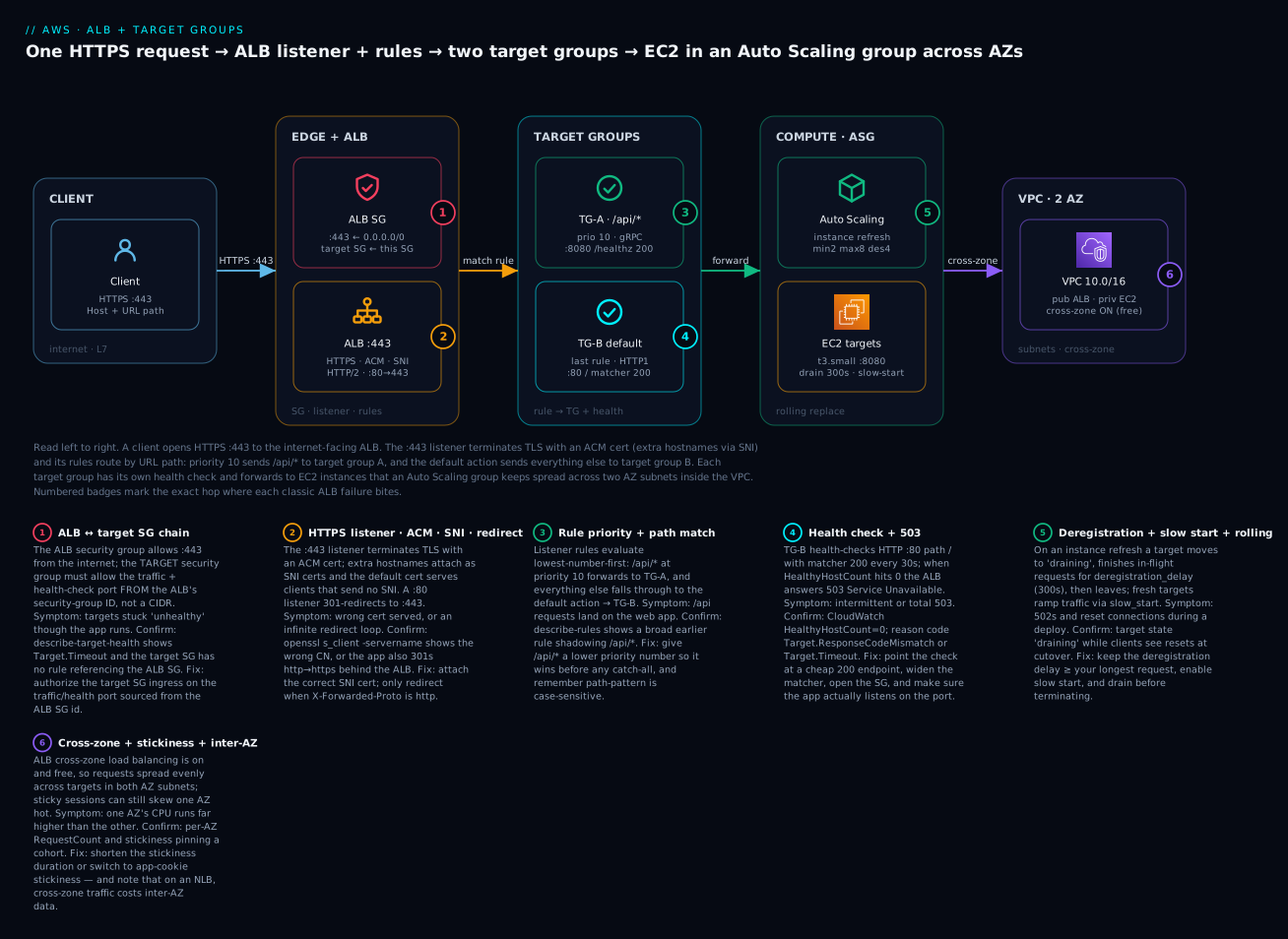
The diagram traces one HTTPS request through the exact system you build in the lab. Read it left to right. A client opens HTTPS :443 to the internet-facing ALB, whose security group admits :443 from the internet and whose :80 listener 301-redirects to :443. The :443 listener terminates TLS with an ACM certificate (additional hostnames attach via SNI) and evaluates its rules in priority order: priority 10, path-pattern /api/*, forwards to target group A; everything else falls through to the default action → target group B. Each target group runs its own health check and forwards to EC2 instances that an Auto Scaling group keeps spread across two AZ subnets inside the VPC, with cross-zone balancing on so both AZs share load evenly. The numbered badges sit on the exact hop where each classic failure bites — the SG chain, the TLS/redirect, rule priority, the health check and 503, deregistration/slow-start during a rolling replace, and cross-zone/stickiness imbalance.
Real-world scenario
Zeplo Retail runs an online store on AWS: a server-rendered web frontend and a separate JSON API, both on EC2 behind one ALB. The web tier is tg-web (default action); the API is tg-api (path-pattern /api/*, priority 10). Both fleets live in an Auto Scaling group across two AZs, targets in private subnets, ALB in public subnets. Traffic is steady at ~1,200 requests/second with predictable Black-Friday spikes.
The incident started with a “harmless” refactor. The API team renamed their health endpoint from /api/health to /api/_healthz and shipped it through an instance refresh on the ASG. Within two minutes, /api/* requests began returning 503. The web store stayed up — only the API was down — which is itself a clue: a total outage points at the ALB or DNS, a per-path outage points at one target group. The on-call engineer ran the one command that matters:
aws elbv2 describe-target-health --target-group-arn "$TG_API_ARN" \
  --query 'TargetHealthDescriptions[].TargetHealth' --output table
Every API target read unhealthy with reason Target.ResponseCodeMismatch. The health check still probed /api/health, which now returned 404, and the matcher only accepted 200. As the instance refresh rolled, each new target failed its check, never entered rotation, and the old ones were already terminated — so tg-api emptied and the ALB returned 503 on /api/*. CloudWatch confirmed it: HealthyHostCount for tg-api had fallen to 0 while tg-web stayed flat.
The fix was one command — repoint the health check — and the target group refilled within one healthy-threshold cycle:
aws elbv2 modify-target-group \
  --target-group-arn "$TG_API_ARN" --health-check-path /api/_healthz
The retro produced three durable changes. First, the health-check path became a variable wired to the same constant the app uses, in both the Terraform and the app config, so they can never drift again. Second, they set the ASG instance refresh to a healthy-percentage minimum of 90% so a batch of failing new targets pauses the rollout instead of draining the old ones first. Third, they added a CloudWatch alarm on HealthyHostCount < 2 per target group wired to the pager — so next time the alert fires before customers see 503, not after. Total customer-facing impact the day of the incident: eleven minutes. With the alarm, the same root cause would now surface in under two.
Advantages and disadvantages
| Advantages | Disadvantages |
|---|---|
| Rich L7 routing: host, path, header, method, query, source-IP | HTTP/HTTPS only — no raw TCP/UDP (use NLB) |
| Native TLS termination with free auto-renewing ACM certs + SNI | Adds milliseconds of latency vs NLB’s sub-ms |
| Native targets: EC2, IP (containers), and Lambda | No static IP — clients must use the DNS name |
| Built-in health checks, draining, slow start, stickiness | Idle timeout (60s default) can cut long-poll if unset |
| WAF, OIDC/Cognito auth, desync defenses at the edge | LCU pricing can surprise on high-connection/rule-eval workloads |
| Weighted target groups for canary/blue-green without DNS | Cross-zone always-on means you can’t cheaply isolate an AZ |
| Access logs + rich CloudWatch metrics for real observability | 100-rule / 5-condition limits force careful rule design at scale |
The advantages matter most for standard web and API workloads — anything HTTP where you want content-based routing, TLS offload and zero-downtime deploys. The disadvantages bite when you have non-HTTP protocols (reach for an NLB), need a hard static IP for a partner allow-list (front the ALB with an NLB, or use Global Accelerator), or run extreme connection churn where LCU costs climb — measure with the LCU dimensions in Cost & sizing before assuming.
Hands-on lab
You will build a working ALB with an HTTPS listener, two path-routed target groups behind an Auto Scaling group, verify routing, perform a rolling target replacement, then tear everything down. Budget ~30 minutes.
⚠️ Cost warning. An ALB bills per hour (~$0.0225/hr ≈ ₹1.9/hr, ~₹1,360/month) plus LCU-hours even at near-zero traffic, and the two
t3.smallinstances bill per second. This is not entirely free-tier. Do the whole lab in one sitting and run the teardown at the end. Total cost for a 30-minute run is well under ₹20, but a forgotten ALB is ~₹1,360/month.
Prerequisites
- AWS CLI v2 configured (
aws sts get-caller-identityworks), a default VPC with two public subnets in two AZs, and permission forelasticloadbalancing:*,ec2:*,autoscaling:*,acm:*. - An ACM certificate for a domain you control (or, for a throwaway lab, import a self-signed cert — the ALB will still serve it; browsers will warn). Set
ACM_CERT_ARNto its ARN.
Step 1 — Environment variables
export AWS_REGION=ap-south-1
VPC_ID=$(aws ec2 describe-vpcs --filters Name=isDefault,Values=true \
  --query 'Vpcs[0].VpcId' --output text)
SUBNETS=$(aws ec2 describe-subnets --filters Name=vpc-id,Values=$VPC_ID \
  --query 'Subnets[0:2].SubnetId' --output text)
SUBNET_A=$(echo $SUBNETS | cut -d' ' -f1); SUBNET_B=$(echo $SUBNETS | cut -d' ' -f2)
AMI=$(aws ssm get-parameters --names \
  /aws/service/ami-amazon-linux-latest/al2023-ami-kernel-default-x86_64 \
  --query 'Parameters[0].Value' --output text)
echo "VPC=$VPC_ID  A=$SUBNET_A  B=$SUBNET_B  AMI=$AMI"
Step 2 — Security groups (the chain)
ALB_SG=$(aws ec2 create-security-group --group-name lab-alb-sg \
  --description "ALB SG" --vpc-id $VPC_ID --query GroupId --output text)
TGT_SG=$(aws ec2 create-security-group --group-name lab-tgt-sg \
  --description "Target SG" --vpc-id $VPC_ID --query GroupId --output text)

# ALB accepts 80/443 from the internet
aws ec2 authorize-security-group-ingress --group-id $ALB_SG \
  --protocol tcp --port 443 --cidr 0.0.0.0/0
aws ec2 authorize-security-group-ingress --group-id $ALB_SG \
  --protocol tcp --port 80 --cidr 0.0.0.0/0
# Targets accept 80 ONLY from the ALB SG (traffic + health checks)
aws ec2 authorize-security-group-ingress --group-id $TGT_SG \
  --protocol tcp --port 80 --source-group $ALB_SG
Step 3 — The ALB
ALB_ARN=$(aws elbv2 create-load-balancer --name lab-alb \
  --type application --scheme internet-facing \
  --subnets $SUBNET_A $SUBNET_B --security-groups $ALB_SG \
  --query 'LoadBalancers[0].LoadBalancerArn' --output text)
ALB_DNS=$(aws elbv2 describe-load-balancers --load-balancer-arns $ALB_ARN \
  --query 'LoadBalancers[0].DNSName' --output text)
echo "ALB DNS: $ALB_DNS"
Step 4 — Two target groups with health checks
TG_WEB_ARN=$(aws elbv2 create-target-group --name lab-tg-web \
  --protocol HTTP --port 80 --vpc-id $VPC_ID --target-type instance \
  --health-check-path / --matcher HttpCode=200 \
  --health-check-interval-seconds 15 --healthy-threshold-count 2 \
  --query 'TargetGroups[0].TargetGroupArn' --output text)

TG_API_ARN=$(aws elbv2 create-target-group --name lab-tg-api \
  --protocol HTTP --port 80 --vpc-id $VPC_ID --target-type instance \
  --health-check-path /api/health --matcher HttpCode=200 \
  --health-check-interval-seconds 15 --healthy-threshold-count 2 \
  --query 'TargetGroups[0].TargetGroupArn' --output text)

# Tune drain + slow start on the web TG
aws elbv2 modify-target-group-attributes --target-group-arn $TG_WEB_ARN \
  --attributes Key=deregistration_delay.timeout_seconds,Value=60 \
               Key=slow_start.duration_seconds,Value=30
Step 5 — Launch template + Auto Scaling group
The user-data serves / and /api/health so both target groups pass:
USERDATA=$(printf '#!/bin/bash\ndnf install -y httpd\nmkdir -p /var/www/html/api\necho "web $(hostname)" > /var/www/html/index.html\necho "ok" > /var/www/html/api/health\nsystemctl enable --now httpd\n' | base64)

LT_ID=$(aws ec2 create-launch-template --launch-template-name lab-lt \
  --launch-template-data "{\"ImageId\":\"$AMI\",\"InstanceType\":\"t3.small\",\"SecurityGroupIds\":[\"$TGT_SG\"],\"UserData\":\"$USERDATA\"}" \
  --query 'LaunchTemplate.LaunchTemplateId' --output text)

aws autoscaling create-auto-scaling-group --auto-scaling-group-name lab-asg \
  --launch-template LaunchTemplateId=$LT_ID --min-size 2 --max-size 4 \
  --desired-capacity 2 --vpc-zone-identifier "$SUBNET_A,$SUBNET_B" \
  --target-group-arns $TG_WEB_ARN $TG_API_ARN \
  --health-check-type ELB --health-check-grace-period 60
Step 6 — Listeners: HTTPS + HTTP→HTTPS redirect
HTTPS_LISTENER=$(aws elbv2 create-listener --load-balancer-arn $ALB_ARN \
  --protocol HTTPS --port 443 \
  --ssl-policy ELBSecurityPolicy-TLS13-1-2-2021-06 \
  --certificates CertificateArn=$ACM_CERT_ARN \
  --default-actions Type=forward,TargetGroupArn=$TG_WEB_ARN \
  --query 'Listeners[0].ListenerArn' --output text)

aws elbv2 create-listener --load-balancer-arn $ALB_ARN \
  --protocol HTTP --port 80 \
  --default-actions 'Type=redirect,RedirectConfig={Protocol=HTTPS,Port=443,StatusCode=HTTP_301}'
Step 7 — The /api/* rule
aws elbv2 create-rule --listener-arn $HTTPS_LISTENER --priority 10 \
  --conditions Field=path-pattern,Values='/api/*' \
  --actions Type=forward,TargetGroupArn=$TG_API_ARN
Step 8 — Verify routing and health
Wait ~90 seconds for instances and health checks, then:
# Both target groups should show healthy targets
aws elbv2 describe-target-health --target-group-arn $TG_WEB_ARN \
  --query 'TargetHealthDescriptions[].TargetHealth.State' --output text
# Expected: healthy healthy

# Default path → web fleet; /api/* → api fleet (self-signed = -k)
curl -sk https://$ALB_DNS/         # -> "web ip-10-...."
curl -sk https://$ALB_DNS/api/health   # -> "ok"
# HTTP redirects to HTTPS (301)
curl -skI http://$ALB_DNS/ | head -1   # -> HTTP/1.1 301 Moved Permanently
| Verification | Command | Expected |
|---|---|---|
| Web TG healthy | describe-target-health $TG_WEB_ARN |
healthy healthy |
| API TG healthy | describe-target-health $TG_API_ARN |
healthy healthy |
| Default route | curl -sk https://$ALB_DNS/ |
web ip-10-... |
| Path route | curl -sk https://$ALB_DNS/api/health |
ok |
| Redirect | curl -skI http://$ALB_DNS/ |
301 to :443 |
Step 9 — Rolling target replacement
Trigger an ASG instance refresh and watch targets drain and re-register — a zero-downtime rolling replacement:
aws autoscaling start-instance-refresh --auto-scaling-group-name lab-asg \
  --preferences MinHealthyPercentage=50,InstanceWarmup=60

# Watch states cycle: healthy -> draining (old) ; initial -> healthy (new)
watch -n5 "aws elbv2 describe-target-health --target-group-arn $TG_WEB_ARN \
  --query 'TargetHealthDescriptions[].TargetHealth.State' --output text"
You will see an old target go draining (finishing in-flight requests for the 60s deregistration delay) while a new one goes initial → healthy and ramps over the 30s slow start. Throughout, curl -sk https://$ALB_DNS/ keeps returning 200 — that is the whole point.
Step 10 — Lab resource summary and teardown
| Resource | Name | Billable | Teardown order |
|---|---|---|---|
| Auto Scaling group | lab-asg |
Instances (per-sec) | 1 (delete with --force-delete) |
| Launch template | lab-lt |
No | 4 |
| Listeners | :443, :80 |
With ALB | (deleted with ALB) |
| Target groups | lab-tg-web, lab-tg-api |
No | 3 |
| Load balancer | lab-alb |
Per hour + LCU | 2 |
| Security groups | lab-alb-sg, lab-tgt-sg |
No | 5 |
aws autoscaling delete-auto-scaling-group --auto-scaling-group-name lab-asg --force-delete
aws elbv2 delete-load-balancer --load-balancer-arn $ALB_ARN
sleep 30   # let ENIs detach before deleting TGs/SGs
aws elbv2 delete-target-group --target-group-arn $TG_WEB_ARN
aws elbv2 delete-target-group --target-group-arn $TG_API_ARN
aws ec2 delete-launch-template --launch-template-id $LT_ID
aws ec2 delete-security-group --group-id $TGT_SG
aws ec2 delete-security-group --group-id $ALB_SG
Terraform equivalent
The whole lab as HCL (assumes vpc_id, subnet_ids, acm_cert_arn, ami variables). Apply with terraform init && terraform apply, destroy with terraform destroy (⚠️ same ALB-hour cost while it exists):
resource "aws_security_group" "alb" {
  name   = "lab-alb-sg"
  vpc_id = var.vpc_id
  ingress { from_port = 443, to_port = 443, protocol = "tcp", cidr_blocks = ["0.0.0.0/0"] }
  ingress { from_port = 80,  to_port = 80,  protocol = "tcp", cidr_blocks = ["0.0.0.0/0"] }
  egress  { from_port = 0,   to_port = 0,   protocol = "-1",  cidr_blocks = ["0.0.0.0/0"] }
}

resource "aws_security_group" "target" {
  name   = "lab-tgt-sg"
  vpc_id = var.vpc_id
  ingress {
    from_port       = 80
    to_port         = 80
    protocol        = "tcp"
    security_groups = [aws_security_group.alb.id]   # reference the ALB SG, not a CIDR
  }
  egress { from_port = 0, to_port = 0, protocol = "-1", cidr_blocks = ["0.0.0.0/0"] }
}

resource "aws_lb" "web" {
  name               = "lab-alb"
  load_balancer_type = "application"
  internal           = false
  security_groups    = [aws_security_group.alb.id]
  subnets            = var.subnet_ids
}

resource "aws_lb_target_group" "web" {
  name       = "lab-tg-web"
  port       = 80
  protocol   = "HTTP"
  vpc_id     = var.vpc_id
  target_type = "instance"
  deregistration_delay = 60
  slow_start           = 30
  health_check {
    path                = "/"
    matcher             = "200"
    interval            = 15
    healthy_threshold   = 2
    unhealthy_threshold = 2
  }
}

resource "aws_lb_target_group" "api" {
  name        = "lab-tg-api"
  port        = 80
  protocol    = "HTTP"
  vpc_id      = var.vpc_id
  target_type = "instance"
  health_check { path = "/api/health", matcher = "200", interval = 15, healthy_threshold = 2 }
}

resource "aws_lb_listener" "https" {
  load_balancer_arn = aws_lb.web.arn
  port              = 443
  protocol          = "HTTPS"
  ssl_policy        = "ELBSecurityPolicy-TLS13-1-2-2021-06"
  certificate_arn   = var.acm_cert_arn
  default_action { type = "forward", target_group_arn = aws_lb_target_group.web.arn }
}

resource "aws_lb_listener" "http" {
  load_balancer_arn = aws_lb.web.arn
  port              = 80
  protocol          = "HTTP"
  default_action {
    type = "redirect"
    redirect { protocol = "HTTPS", port = "443", status_code = "HTTP_301" }
  }
}

resource "aws_lb_listener_rule" "api" {
  listener_arn = aws_lb_listener.https.arn
  priority     = 10
  condition { path_pattern { values = ["/api/*"] } }
  action { type = "forward", target_group_arn = aws_lb_target_group.api.arn }
}
Common mistakes & troubleshooting
This is the section you will return to. Start with the playbook — symptom, root cause, exact confirm, fix — then the two reference tables and the decision table.
| # | Symptom | Root cause | Confirm (exact command / console path) | Fix |
|---|---|---|---|---|
| 1 | Targets unhealthy, app is fine |
Target SG doesn’t allow the ALB SG on the port | describe-target-health → Target.Timeout; check target SG ingress source |
Add ingress on target SG from the ALB SG id on the traffic/health port |
| 2 | Targets unhealthy, reason ResponseCodeMismatch |
Health path returns non-matcher code | curl -i localhost/<path> on the box; compare to matcher |
Repoint --health-check-path, or widen --matcher HttpCode=200-299 |
| 3 | 503 Service Unavailable |
Zero healthy targets in the served TG | CloudWatch HealthyHostCount=0; describe-target-health all unhealthy |
Fix the health check (#1/#2); ensure the TG is attached to a listener/rule |
| 4 | 502 Bad Gateway |
Target closed the connection / malformed response / keep-alive < ALB idle | Access log elb_status=502, target_status=-; app logs |
App keep-alive > ALB idle timeout (60s); fix app 5xx/crash |
| 5 | 504 Gateway Timeout |
Target didn’t respond within idle timeout, or SG/route blocks | Access log target_processing_time=-1; nc -vz target port |
Speed up backend; raise idle timeout; open SG/route |
| 6 | /api requests hit the web app |
A broad rule shadows /api/*, or /api lacks trailing content |
describe-rules priority order; test curl .../api vs .../api/x |
Lower /api/* priority number; add /api as a second path value |
| 7 | Redirect loop (ERR_TOO_MANY_REDIRECTS) |
App also redirects http→https behind the ALB | curl -skIL shows repeated 301s |
App should redirect only when X-Forwarded-Proto != https |
| 8 | Browser cert warning / wrong cert | SNI cert missing; default cert served | openssl s_client -servername host -connect $ALB:443 shows wrong CN |
add-listener-certificates for that hostname |
| 9 | One AZ far hotter than the other | Long stickiness pins a cohort; or cross-zone off | Per-AZ RequestCount; TG stickiness/cross_zone attrs |
Shorten stickiness / use app-cookie; confirm cross-zone on |
| 10 | Connections cut during deploy | Deregistration delay shorter than requests | Clients see resets at cutover; TG deregistration_delay |
Raise deregistration_delay.timeout_seconds ≥ longest request |
| 11 | New instances time out on join | No slow start; cold cache hit at full load | New targets flap healthy→unhealthy post-refresh |
Enable slow_start.duration_seconds; add warm-up/grace |
| 12 | 460 in access logs |
Client closed connection before ALB responded | Access log elb_status=460 |
Usually client-side (mobile/timeouts); investigate slow paths |
| 13 | 464 errors |
Protocol-version mismatch (e.g. gRPC TG, HTTP1 client) | Access log elb_status=464 |
Align listener/target-group protocol-version |
| 14 | 561 on a login path |
OIDC/Cognito IdP returned an error | Access log elb_status=561; IdP logs |
Fix IdP client config / callback URL / scopes |
ALB-generated HTTP status codes
These are codes the ALB itself returns (elb_status_code in the access log). When target_status_code is blank or differs, the ALB — not your app — produced the response.
| Code | Meaning | Likely cause | Fix |
|---|---|---|---|
400 |
Bad Request | Malformed request / invalid headers | Fix client; check drop_invalid_header_fields |
403 |
Forbidden | WAF rule blocked, or access denied | Inspect WAF logs; adjust rule |
460 |
Client closed early | Client gave up before ALB responded | Usually client-side; check slow paths |
463 |
Malformed X-Forwarded-For |
> 30 IPs in the header | Sanitize upstream proxies |
464 |
Incompatible protocol versions | Listener vs target-group protocol mismatch | Align HTTP1/HTTP2/gRPC |
500 |
Internal error | ALB-side error | Retry; check Health Dashboard |
502 |
Bad Gateway | Target closed conn / bad response / cert error | Fix app; keep-alive > idle timeout |
503 |
Service Unavailable | No healthy targets / no capacity | Fix health checks; raise capacity |
504 |
Gateway Timeout | Target didn’t answer in time / blocked | Speed backend; raise idle; open SG |
561 |
Unauthorized (auth action) | IdP returned an error | Fix OIDC/Cognito config |
Decision table — from symptom to first move
| If you see… | It’s probably… | Do this first |
|---|---|---|
503 on all paths |
No healthy targets anywhere / ALB capacity | HealthyHostCount per TG; fix health check |
503 on one path only |
That target group is empty | describe-target-health on that TG |
502 intermittently |
Backend keep-alive < ALB idle timeout | Set app keep-alive > 60s |
504 under load only |
Backend saturation or SG/route gap | Check target_processing_time, scale, SG |
| Wrong content per path | Rule priority / path-pattern | describe-rules; reorder |
| Cert warning | SNI / default cert | openssl s_client -servername |
| Uneven AZ load | Stickiness / cross-zone | Per-AZ RequestCount; TG attrs |
The three nastiest, explained
Unhealthy-but-fine targets (the SG chain). The health check uses the same network path as real traffic and originates from the ALB’s ENIs. If the target security group’s ingress does not list the ALB SG as source on the target/health port, checks time out (Target.Timeout) and every target is evicted — producing 503 while curl localhost on each box returns 200. Always reference the ALB SG id, never a CIDR, so it survives ALB IP changes. This one failure accounts for the majority of “ALB is broken” tickets.
Redirect loops behind the ALB. You terminate TLS at the ALB and forward plain HTTP to the target. The app, seeing an HTTP request, “helpfully” redirects to HTTPS — which comes back through the ALB as HTTP again, forever. The ALB tells the app the truth in X-Forwarded-Proto: https; the app must only redirect when that header is not https. Frameworks (Rails force_ssl, Django SECURE_PROXY_SSL_HEADER, nginx) all have a “trust the forwarded proto” switch — set it.
Deregistration cutting long requests. A deploy or scale-in deregisters a target; the ALB stops new requests but only drains in-flight ones for deregistration_delay (default 300s). If a client is mid-way through a 6-minute report export and the delay is 120s, the ALB force-closes at 120s and the client sees a reset. Set the delay to at least your longest legitimate request, and prefer graceful in-app shutdown (stop accepting, finish in-flight, exit) alongside it.
Best practices
- Two listeners, always:
:80that does nothing but 301→:443, and:443that terminates TLS and routes. Never serve real traffic on plain HTTP. - Reference the ALB SG by id in the target SG’s ingress — never a CIDR. It survives scaling and is the least-privilege source.
- Point health checks at a cheap, dedicated endpoint (
/healthz) that returns fast and does not hammer the database on every probe — but does reflect real readiness. - Wire the health-check path to the same constant the app uses, in IaC and app config, so a rename can’t silently break the check (the Zeplo incident).
- Set deregistration delay ≥ your longest request and enable slow start for apps with cold caches, so deploys don’t cut connections or overwhelm cold targets.
- Keep the app’s keep-alive timeout above the ALB idle timeout (60s default) to avoid
502s from races where the target closes a connection the ALB reuses. - Order rules specific-before-general; give the catch-all the highest priority number. Test both
/apiand/api/x. - Use ACM certs (free, auto-renewing) and the modern default TLS policy; only tighten, never loosen. Attach extra hostnames via SNI.
- Enable access logs to S3 and set CloudWatch alarms on
HealthyHostCount < N,HTTPCode_ELB_5XX_CountandTargetResponseTime— alert before customers do. - Turn on deletion protection in production and manage the ALB in IaC so changes are reviewed.
- Right-size health-check aggressiveness: interval 10–15s, thresholds 2–3 — fast enough to react, slow enough not to flap on a GC pause.
- Use weighted target groups for canary/blue-green instead of DNS changes — instant, reversible traffic shifts.
Security notes
The ALB is your security boundary between the internet and your compute, so treat it as one.
| Control | What to do | Why |
|---|---|---|
| TLS policy | Default TLS 1.2+1.3; tighten to 1.3-only where clients allow | Kill legacy protocol downgrade |
| ACM certs | Free, auto-renewing; never hand-manage keys on instances | No expiry outages, no key sprawl |
| SG least privilege | Targets accept traffic only from the ALB SG id | Instances aren’t reachable directly from the internet |
| WAF | Attach a Web ACL for L7 filtering (SQLi, XSS, rate rules) | Block attacks before they reach app code |
| authenticate-oidc / cognito | Enforce SSO at the ALB before forwarding | Auth without app changes; HTTPS-only |
| Desync mitigation | defensive (default) or strictest + drop invalid headers |
Block request-smuggling / desync |
| Access logs | On, to a locked-down S3 bucket with SSE | Forensics + audit of every request |
| Private targets | Keep targets in private subnets; ALB in public | Reduce blast radius |
| mTLS | For B2B APIs, verify client certs with a trust store | Mutual authentication at the edge |
Least privilege is the theme: the internet reaches only the ALB’s listener ports, the ALB reaches only the target port, and the target reaches only its own dependencies. Put WAF in front for anything public, and terminate TLS at the ALB so certificate management is centralized and auditable.
Cost & sizing
ALB pricing has two parts: a flat per-hour charge for the load balancer, plus Load Balancer Capacity Units (LCU-hours). You pay for the higher of the flat-hour baseline or your LCU consumption — so at low traffic the hourly charge dominates, and at scale the LCUs do. An LCU is the maximum across four dimensions, each normalized so one LCU equals whichever dimension you hit first.
| LCU dimension | 1 LCU equals | Watch out for |
|---|---|---|
| New connections | 25 new connections/second | Chatty clients opening fresh connections |
| Active connections | 3,000 active connections/minute | Long-lived connections (WebSocket, keep-alive) |
| Processed bytes | 1 GB/hour (0.4 GB/hr for Lambda targets) | Large responses / downloads |
| Rule evaluations | 1,000 rule-evals/second (first 10 rules free) | Many rules × high request rate |
Rough figures (us-east-1 / ap-south-1 are close): ALB ~$0.0225/ALB-hour (≈ ₹1.9/hr, ~₹1,360/month) plus ~$0.008/LCU-hour. A small app doing ~1 GB/hr and a few hundred connections/sec sits near 1–3 LCUs — call it ~₹1,360 (hourly) + ~₹1,500 (LCU) ≈ ₹2,900/month. There is a limited free tier (750 ALB-hours + 15 LCUs/month for 12 months on new accounts), but a production ALB is not free.
| Workload | Dominant dimension | Rough monthly (INR) | Lever |
|---|---|---|---|
| Idle/dev ALB | Hourly baseline | ~₹1,360 | Delete when unused; share one ALB across paths |
| Small web app (1 GB/hr) | Hourly + ~1–2 LCU | ~₹2,500–3,000 | Cache at CloudFront to cut processed bytes |
| API with many rules | Rule evaluations | Scales with rules×RPS | Consolidate rules; first 10 are free |
| WebSocket / streaming | Active connections | Scales with concurrency | Right idle timeout; consider NLB for pure L4 |
| Large downloads | Processed bytes | Scales with GB | Serve static from S3/CloudFront, not through the ALB |
Sizing is mostly about not sending avoidable bytes through the ALB (front static content with CloudFront/S3), consolidating rules (you get 10 free rule-evals per request), and not leaving idle ALBs running — the single biggest waste in this service.
Interview & exam questions
Q1. A target is unhealthy but curl localhost/health on the box returns 200. What’s the most likely cause? The target’s security group doesn’t allow the ALB’s security group on the health-check port. Health checks originate from the ALB ENIs; if the target SG’s ingress references a CIDR instead of the ALB SG id (or is missing), checks time out (Target.Timeout). Fix: add ingress from the ALB SG id. (SAA-C03, ANS-C01)
Q2. When does an ALB return 503 vs 502? 503 Service Unavailable means no healthy targets or no capacity — the ALB has nowhere to send the request. 502 Bad Gateway means it reached a target but got a malformed/closed response (often keep-alive shorter than the ALB idle timeout, or an app crash). 503 is a health/capacity problem; 502 is a target-response problem. (SAA-C03, SOA-C02)
Q3. How do you route /api/* to one fleet and everything else to another? One HTTPS listener, a rule at a low priority with condition path-pattern=/api/* forwarding to the API target group, and the listener’s default action forwarding to the web target group. Priority ordering matters — the specific rule must have a lower number than any catch-all. (SAA-C03)
Q4. Difference between duration-based and application-based stickiness? Duration-based uses ALB-generated cookies (AWSALB) with a fixed lifetime; application-based (AWSALBAPP) keys stickiness on your application cookie so affinity follows the app session. Both pin a client to a target; app-based aligns affinity with your session lifecycle. (SAA-C03, DVA-C02)
Q5. Why might one AZ carry far more load than another? Long stickiness durations pin established cohorts to their original targets, so scale-out adds cold targets that get little traffic; or cross-zone load balancing is disabled with uneven target counts per AZ. Fix: shorten stickiness / move state out; confirm cross-zone is on (it’s on and free by default for ALB). (ANS-C01)
Q6. What is deregistration delay and how do you size it? The window (default 300s, 0–3600) during which a deregistering target keeps draining in-flight requests before the ALB closes them. Size it to at least your longest legitimate request so deploys/scale-in don’t cut long operations; pair with graceful in-app shutdown. (SOA-C02)
Q7. How does an ALB serve multiple TLS certificates on one listener? Via SNI: one default certificate plus up to 25 total, and the ALB selects the cert matching the client’s SNI hostname. Clients that send no SNI receive the default cert. Certs come from ACM (free, auto-renewing) or IAM. (SAA-C03, SCS-C02)
Q8. Which target types can an ALB use, and when would you pick IP over instance? Instance (EC2 IDs), IP (any routable VPC/peered/on-prem IP), and Lambda. Pick IP for containers with awsvpc networking, for on-prem targets over Direct Connect/VPN, or when you need multiple ports per host — instance type registers the instance’s primary IP only. (SAA-C03, DVA-C02)
Q9. What causes a redirect loop behind an ALB and how do you fix it? TLS terminates at the ALB, which forwards plain HTTP; the app then redirects HTTP→HTTPS, which loops. Fix: the app must trust X-Forwarded-Proto and only redirect when it isn’t https. (SOA-C02)
Q10. How is ALB priced, and what is an LCU? A flat per-ALB-hour charge plus LCU-hours. An LCU is the maximum of four dimensions — new connections (25/s), active connections (3,000/min), processed bytes (1 GB/hr), rule evaluations (1,000/s, first 10 rules free). You pay for whichever dimension you hit hardest. (SAA-C03)
Q11. What’s the health-check “matcher” and when do you change it? The set of HTTP codes considered healthy (default 200; can be a list 200,301 or range 200-299; gRPC uses 0-99). Change it when your health endpoint legitimately returns something other than 200 (e.g., 301 for a redirecting root), or widen it to reduce false unhealthies. (SOA-C02)
Q12. How do you do a canary/blue-green deploy at the ALB with no DNS change? Use a weighted forward action listing both target groups with integer weights; shift weight from old to new (95/5 → 50/50 → 0/100) and optionally enable target-group stickiness so a session stays on one version. Instant and reversible. (DVA-C02, SAA-C03)
Quick check
- Your ALB returns
503on/api/*but the web store works. Which single command tells you why fastest? - Targets are
unhealthywith reasonTarget.Timeoutthough the app runs. What’s the first thing to check? - You attach a second hostname’s certificate to the HTTPS listener but old browsers get the wrong cert. Why?
- A deploy cuts users’ long file downloads mid-transfer. Which target-group attribute do you change?
- Which is on-by-default and free on an ALB but off-by-default and billable on an NLB?
Answers
aws elbv2 describe-target-health --target-group-arn <api-tg>— a per-path503means that target group is empty; the reason code names the cause.- The target security group’s ingress — it must allow the ALB SG id on the traffic/health port.
Target.Timeouton a healthy app is almost always the SG chain. - Those clients send no SNI, so they receive the listener’s default certificate, not the SNI cert you added. SNI selection needs the client to send the hostname in the handshake.
deregistration_delay.timeout_seconds— raise it to at least the longest legitimate request so draining doesn’t force-close in-flight transfers.- Cross-zone load balancing — on and free on ALB, off and inter-AZ-billable on NLB.
Glossary
| Term | Definition |
|---|---|
| Application Load Balancer (ALB) | A managed L7 reverse proxy that routes HTTP/HTTPS by content and forwards to target groups. |
| Listener | A protocol+port the ALB accepts (:80, :443) with a default action and TLS config. |
| Listener rule | A priority-ordered if conditions then actions on a listener; first match wins. |
| Target group | A pool of destinations plus how to health-check and balance them. |
| Target | One registered destination — an EC2 instance, an IP, or a Lambda function. |
| Health check | The ALB’s probe (path, port, matcher, thresholds) that decides if a target is in rotation. |
| Matcher | The HTTP (or gRPC) codes considered healthy — default 200. |
| Reason code | A short code (Target.Timeout, Target.ResponseCodeMismatch) explaining an unhealthy target. |
| SNI | Server Name Indication — lets one HTTPS listener serve many certs by hostname. |
| ACM | AWS Certificate Manager — free, auto-renewing TLS certificates for ALBs. |
| Stickiness | Pinning a client to one target via AWSALB (duration) or AWSALBAPP (app-cookie). |
| Cross-zone load balancing | Spreading requests across targets in all AZs — on/free for ALB, off/billable for NLB. |
| Deregistration delay | The drain window (default 300s) a deregistering target keeps finishing in-flight requests. |
| Slow start | A linear traffic ramp (30–900s) for newly healthy targets to warm up. |
| LCU | Load Balancer Capacity Unit — the billing unit; max of new/active connections, bytes, rule-evals. |
| Desync mitigation | ALB modes (monitor/defensive/strictest) that block request-smuggling/desync. |
Next steps
- Choose the right front door for each workload with AWS Load Balancers and API Gateway: ALB, NLB and API Gateway Compared — the layer-first decision guide upstream of this deep dive.
- See the ALB in a full stack in The Classic AWS Three-Tier Web Application Architecture, where it sits between the VPC edge and the Auto Scaling tier feeding RDS.
- Put resilient DNS in front of the ALB with Amazon Route 53 in Practice: Records, Alias & Routing Policies — alias records, health checks and failover between ALBs.
- When the ALB is throwing 5xx, work the dedicated incident guide, the ALB 502/503/504 troubleshooting playbook.
- Practice by adding a WAF Web ACL and an
authenticate-oidcaction to the lab’s HTTPS listener, then re-run the routing and health checks to confirm auth and filtering work end to end.