You have a container image — a small web app, an API, a batch worker — and something has to run it: ECS, EKS, App Runner, Lambda, an EC2 box. None of those will pull an image from your laptop. They pull from a registry, and if you are on AWS the default, private, deeply-integrated registry is Amazon Elastic Container Registry (ECR). It is the warehouse between “I built an image” and “AWS is running it”: you docker push a tagged image into an ECR repository, AWS stores the layers in S3 behind the scenes, scans them for vulnerabilities, ages out the old ones, and hands them back — authenticated — to whatever compute pulls them.
ECR looks trivial for about ten minutes (create repo, log in, push, pull) and then quietly hands you a stack of decisions that decide whether your supply chain is safe, cheap and reproducible or a slow leak of money and CVEs. Should tags be mutable (so v1.2 can be overwritten) or immutable (so a tag pins one exact image forever)? Should you even trust tags, or pin by digest? How do you stop a build pipeline pushing 4,000 images and racking up storage — a lifecycle policy? Basic scan-on-push or continuous enhanced scanning with Amazon Inspector? How does an ECS task in another account pull your image without you emailing a password around — a repository policy plus IAM? And why does the same image that pulls fine from your laptop fail with CannotPullContainerError the moment it runs in a private subnet?
This article installs the whole mental model by building it. You will create a repository with immutable tags and scan-on-push, authenticate with the 12-hour token (and understand why it is not a static credential), build a tiny image, tag it with the registry URI and push, read the scan findings, attach a lifecycle policy that expires untagged and old images, add a repository policy that lets another account pull, and then pull — all with aws and docker CLI first, then the identical setup as Terraform, then a clean teardown. After that comes the part you will actually return to: a symptom-to-fix troubleshooting playbook for denied: not authorized, expired logins, immutable-tag conflicts, CannotPullContainerError from ECS, cross-account denials, stuck scans, and Docker Hub rate limits (the case for pull-through cache). Read the prose once; keep the tables open when your own push breaks.
What problem this solves
Without a registry, a container image is stuck wherever you built it. Compute platforms are pull-based: the ECS agent, the EKS kubelet, the Lambda control plane and App Runner all fetch the image from a registry URL at launch, using an identity, over the network. So you need a place that is (a) reachable by that compute, (b) access-controlled by IAM rather than a shared Docker Hub password, © durable and versioned, and (d) fast and cheap in-region. That is the job ECR exists to do, and doing it yourself on Docker Hub or a self-hosted registry means running the registry, paying egress, hitting anonymous pull rate limits, and bolting on your own auth and scanning.
What breaks without ECR done right is rarely “the registry is down” — it is subtler and more expensive. A team pushes myapp:latest on every CI run into a mutable repo, so the tag latest silently means a different image every hour; a rollback pulls “the version that was live” and gets something else, because nobody pinned a digest. Storage creeps to hundreds of gigabytes because no lifecycle policy ever deletes the 3,900 dead images from failed builds. A t3 fleet in a private subnet with no NAT and no VPC endpoints can’t reach ECR at all, so every task dies with CannotPullContainerError and the on-call engineer debugs the application for an hour before realising it never started. A partner account can’t pull the shared base image because the repository policy was set but the partner’s IAM wasn’t (cross-account pull needs both). And a Docker Hub base image throttles the whole cluster during a deploy because there is no pull-through cache.
Who hits this: every developer who containerises anything on AWS, every platform team wiring ECS/EKS pipelines, and every security engineer who has to answer “is this image scanned and is that tag reproducible?” ECR is a CLF-C02 foundational service, a DVA-C02 developer staple (build/push/scan in CI), and a SAA-C03 architecture piece (cross-account/cross-Region image distribution). Here is the whole field on one screen — the pieces you meet and the classic trap on each:
| Piece | What it is | You configure it as | The classic trap |
|---|---|---|---|
| Registry | The per-account, per-Region container store | Implicit: <acct>.dkr.ecr.<region>.amazonaws.com |
Pushing to the wrong Region’s registry |
| Repository | A named bucket of image versions | create-repository |
One giant repo for everything |
| Image / tag | A manifest + layers, labelled by a tag | docker tag … <uri>:<tag> |
latest meaning something different hourly |
| Digest | The immutable sha256: content address |
<uri>@sha256:… |
Trusting a tag instead of a digest for rollbacks |
| Auth token | A 12-hour password from get-login-password |
docker login |
Treating it as permanent; scripting a stale one |
| Tag mutability | Whether a tag can be overwritten | IMMUTABLE / MUTABLE |
Immutable repo + re-push same tag → hard fail |
| Lifecycle policy | Rules that expire old/untagged images | JSON rules[] |
No policy → unbounded storage cost |
| Scanning | CVE scan: basic on-push or enhanced/Inspector | scanOnPush / registry scan config |
Assuming “scanned” without checking findings |
| Repository policy | Resource policy: who may pull/push | JSON on the repo | Cross-account pull without the puller’s IAM |
| Pull-through cache | A cache proxy of Docker Hub/Quay/public ECR | create-pull-through-cache-rule |
Direct Docker Hub pulls hitting rate limits |
Learning objectives
By the end of this article you can:
- Distinguish a private registry (one per account per Region) from ECR Public, and lay out repositories sensibly.
- Authenticate with
aws ecr get-login-password | docker login, explain the 12-hour token and why it is not a static credential, and use the credential helper so you never type it. - Tag an image with the full registry URI
<acct>.dkr.ecr.<region>.amazonaws.com/<repo>:<tag>anddocker push/docker pullit, including pull-by-digest. - Choose between mutable and immutable tags, pin by digest, and articulate why
latestis an anti-pattern. - Write a lifecycle policy that expires untagged and aged images by count or age to control storage cost.
- Turn on basic scan-on-push and enhanced (Inspector) continuous scanning, and read
describe-image-scan-findings. - Configure replication (cross-Region and cross-account) and a repository policy so ECS/EKS/Lambda in another account can pull.
- Wire a pull-through cache for Docker Hub/Quay/public ECR, grant the right execution-role pull permissions for ECS/EKS/Lambda, and run a symptom → confirm → fix troubleshooting playbook.
Prerequisites & where this fits
You need an AWS account with permission to create ECR repositories and IAM roles (a personal or dev/sandbox account — never straight into production), the AWS CLI v2 configured (aws configure or aws sso login), a working Docker (or Finch/nerdctl) engine to build and push images, and for the IaC half Terraform ≥ 1.5. You should be comfortable with basic Docker (build, tag, push) and reading JSON. You do not need prior ECR experience. Everything here is effectively free: private ECR storage is billed per GB-month and this lab stores a few megabytes; the only paise-level line items are storage and (if you enable it) enhanced scanning, both torn down at the end.
Where this sits: ECR is the registry layer beneath every AWS container runtime. Deciding which runtime pulls from it is the upstream question answered in AWS ECS vs EKS vs Fargate: Choose Your Container Path and, one level up, AWS Compute: EC2, Lambda, ECS and EKS — Which One to Choose?. Once you can push an image, the wave sibling AWS ECS on Fargate: Your First Service Hands-On runs one of these images as a service (it references the repo you build here). If you ship functions rather than long-running services, container-image Lambdas pull from ECR too — the zip-vs-layer alternative is covered in AWS Lambda Layers & Packaging: Managing Dependencies the Right Way. A quick map of who owns what, so when a pull fails you look in the right place first:
| Layer | What lives here | Who “owns” it | What it can cause |
|---|---|---|---|
| Authentication | The 12-h token from GetAuthorizationToken |
You (IAM) | denied / no basic auth credentials |
| Repository + tags | The images, tag mutability, scan config | You | Immutable-tag conflict, name unknown |
| Repository policy | Resource policy: who may pull/push | You (per repo) | Cross-account pull denied |
| IAM identity policy | What your principal may do in ECR | You (per principal) | not authorized to perform: ecr:… |
| Network path | Route to ECR API/DKR + S3 for layers | You (VPC) | CannotPullContainerError |
| Consuming runtime | ECS/EKS/Lambda execution/node role pull | You | Task/pod stuck in PENDING |
Core concepts
Six ideas make everything later obvious. Read them once; the deep sections expand each.
A registry holds repositories; a repository holds image versions. Your account has exactly one private registry per Region, addressed as <aws_account_id>.dkr.ecr.<region>.amazonaws.com. Inside it you create repositories (kv-web, kv-api) and each repository holds many images, distinguished by tag (v1.4.2, latest) or by immutable digest (sha256:…). You never “create the registry” — it exists the moment your account does; you create repositories in it.
An image is a manifest plus content-addressed layers. A Docker/OCI image is a small JSON manifest that lists layers (the filesystem diffs) by their sha256 digest, plus a config blob. ECR stores each layer once and deduplicates — if two images share a base layer, it is uploaded and stored a single time. This is why the second push of a similar image is fast: only the changed layers upload. Under the hood ECR keeps layer blobs in an AWS-managed S3 bucket, which is why the network path to pull needs S3 reachability too.
Authentication is a short-lived token, not a stored password. You do not put a permanent secret in docker login. You call aws ecr get-login-password, which uses your existing IAM credentials to mint a token valid for 12 hours, and pipe it into docker login with the fixed username AWS. Docker caches that token; when it expires you re-mint it. This is the single biggest conceptual jump for people coming from Docker Hub: ECR access is your IAM identity, wrapped in a temporary token.
Two IAM directions govern every action. Your IAM identity policy (on your user/role) says what you may do — ecr:GetAuthorizationToken, ecr:BatchGetImage, ecr:PutImage. The repository’s resource-based policy says who else (which principals, often in other accounts) may act on this repo. Same-account access usually needs only the identity policy; cross-account access needs the repository policy on the owning side and IAM on the consuming side. Confusing these is the number-one cross-account failure.
Tags move; digests don’t. A tag is a mutable label unless you make the repository immutable. A digest (sha256:…) is the content hash of the exact manifest and never changes. Production systems that care about reproducibility pull by digest (or use immutable tags), because pulling myapp:latest twice can legally return two different images.
ECR governs the image after you push it. Once an image lands, ECR can scan it for CVEs (basic on-push, or enhanced/continuous via Inspector), expire it on a lifecycle policy schedule, replicate it to other Regions/accounts, and serve it — authenticated — to compute. Push is the start of the image’s life in ECR, not the end. Pin the vocabulary before the deep dive:
| Term | One-line definition | Where you set/see it | Why it matters early |
|---|---|---|---|
| Private registry | Your per-account, per-Region store | <acct>.dkr.ecr.<region>.amazonaws.com |
The URI you tag against |
| ECR Public | The public gallery registry | public.ecr.aws/<alias>/<repo> |
Anonymous, world-readable images |
| Repository | A named set of image versions | create-repository |
Your unit of access + lifecycle |
| Manifest | JSON listing an image’s layers | Stored per tag/digest | The thing a tag/digest points at |
| Layer | A content-addressed filesystem diff | In S3, deduped | Why re-pushes are fast |
| Tag | A mutable (or pinned) label | docker tag/push |
Human-friendly version pointer |
| Digest | The sha256: content address |
describe-images, @sha256: |
Reproducible, immutable pull |
| Auth token | 12-h password from IAM | get-login-password |
Not a stored secret |
| Repository policy | Resource policy on a repo | set-repository-policy |
Cross-account pull/push |
| Lifecycle policy | Rules that expire images | put-lifecycle-policy |
Controls storage cost |
| Scan finding | A CVE detected in an image | describe-image-scan-findings |
Your vulnerability report |
| Pull-through cache | A cache proxy of an upstream | create-pull-through-cache-rule |
Beats Docker Hub rate limits |
Private vs public registries and repositories
ECR comes in two flavours that share a name but differ in almost every property: the private registry you push app images into, and ECR Public, a world-readable gallery like Docker Hub.
Private registry
Every AWS account automatically has one private registry per Region. It is not a resource you create; it is addressed by your account id and Region: 111122223333.dkr.ecr.ap-south-1.amazonaws.com. Images in it are private by default — only principals your IAM/repository policies allow can pull. Repositories are scoped to that registry and Region, so kv-web in ap-south-1 and kv-web in us-east-1 are different repositories in different registries (this is exactly why “it works in Mumbai but not N. Virginia” happens).
ECR Public
ECR Public is a separate service with a single global registry reachable at public.ecr.aws, and a browsable Amazon ECR Public Gallery (gallery.ecr.aws) where AWS, verified vendors and anyone else publish images anyone can pull anonymously (no AWS account needed to pull). You publish to it under an alias: public.ecr.aws/<your-alias>/<repo>:<tag>. Its API lives only in us-east-1 (you authenticate against us-east-1 even when pushing from elsewhere). It exists so you can distribute images publicly without paying Docker Hub or hitting its limits.
| Dimension | Private ECR | ECR Public |
|---|---|---|
| Address | <acct>.dkr.ecr.<region>.amazonaws.com |
public.ecr.aws/<alias>/<repo> |
| Registry scope | One per account per Region | One global registry |
| Who can pull | Only IAM/repo-policy-allowed principals | Anyone, anonymously |
| Auth to pull | docker login with 12-h token |
None needed (anonymous) |
| Auth to push | aws ecr get-login-password |
aws ecr-public get-login-password (us-east-1) |
| Scanning | Basic + enhanced (Inspector) | Not offered |
| Lifecycle policies | Yes | No |
| Replication | Yes (cross-Region/account) | N/A (already global) |
| Typical use | Your app images, private base images | Open-source distribution, public tools |
| Free tier | 500 MB-month storage (12 mo) | 50 GB storage + generous egress always |
Repository settings you choose at creation
A repository is more than a name — several settings are easiest to get right at creation time (some can’t be changed later cheaply):
| Setting | Values | Default | When to change | Gotcha |
|---|---|---|---|---|
repositoryName |
e.g. team/kv-web |
— | Namespacing with / |
Name is permanent; rename = new repo |
imageTagMutability |
MUTABLE / IMMUTABLE |
MUTABLE |
Immutable for reproducible tags | Immutable rejects re-pushing a tag |
imageScanningConfiguration.scanOnPush |
true / false |
false |
On for security gates | Basic scan only; enhanced is registry-level |
encryptionConfiguration |
AES256 / KMS |
AES256 |
KMS for CMK control/audit | KMS choice is set at creation only |
tags |
Key/value | none | Cost allocation, ownership | Repo tags ≠ image tags |
Naming with slashes (platform/base-node, apps/kv-web) is purely organisational — ECR has no real folders, but the / in the name lets you scope IAM and lifecycle by prefix, which is genuinely useful at scale.
Authentication: the 12-hour token, not static creds
The mechanic that trips up newcomers most is that you never store an ECR password. Access to ECR is your IAM identity; docker login just needs a short-lived token derived from it.
The get-login-password flow
The canonical one-liner mints a token and pipes it straight into Docker so it never touches your shell history:
aws ecr get-login-password --region ap-south-1 \
  | docker login --username AWS --password-stdin \
    111122223333.dkr.ecr.ap-south-1.amazonaws.com
# Login Succeeded
Three facts to internalise, because each is a troubleshooting row later:
| Fact | Detail | Consequence |
|---|---|---|
Username is always AWS |
Not your IAM user name | Wrong username → auth fails |
| Token lasts 12 hours | Then Docker’s cached creds are stale | Long CI jobs / next-day pushes must re-login |
It needs ecr:GetAuthorizationToken |
A registry-level action (resource *) |
Missing it → can’t even log in |
| The endpoint is the registry URI | <acct>.dkr.ecr.<region>.amazonaws.com |
Logging into the wrong Region’s registry |
| It uses your current IAM creds | SSO/role/keys behind the scenes | Expired SSO session → token mint fails |
Under the hood, get-login-password is a thin wrapper over aws ecr get-authorization-token, which returns a base64 blob that decodes to AWS:<password>. You rarely call the lower-level API by hand, but knowing it exists explains what the credential helper automates.
The credential helper — never type login again
The Amazon ECR Docker Credential Helper (docker-credential-ecr-login) plugs into Docker’s credential system and fetches (and refreshes) tokens automatically using your ambient AWS credentials. You install the binary and point Docker’s config at it:
// ~/.docker/config.json
{
  "credHelpers": {
    "111122223333.dkr.ecr.ap-south-1.amazonaws.com": "ecr-login",
    "public.ecr.aws": "ecr-login"
  }
}
After that, a plain docker pull 111122223333.dkr.ecr.ap-south-1.amazonaws.com/kv-web:v1 just works — no docker login, no 12-hour expiry to babysit, because the helper mints a fresh token per operation. This is the right setup for developer laptops and CI runners.
| Auth method | How it works | Best for | Downside |
|---|---|---|---|
get-login-password | docker login |
Manual 12-h token | Quick start, scripts | Expires; must re-run |
| Credential helper | Auto-fetch per op | Laptops, long-lived CI | One-time install |
get-authorization-token (raw API) |
Base64 AWS:pwd |
Custom tooling | You handle decoding/expiry |
| Task/instance role (ECS/EKS) | Agent/kubelet pulls with its role | Runtime pulls | Not for interactive docker |
| CI OIDC → assumed role | GitHub/GitLab OIDC → STS → ECR | Keyless CI push | Trust policy setup |
The takeaway: on a developer machine, install the credential helper once and forget authentication exists. In CI, prefer an OIDC-assumed role (no long-lived keys) whose IAM grants ecr:GetAuthorizationToken plus the repo push actions.
Pushing and pulling images
Push and pull are just Docker verbs — the ECR-specific part is that the image name is the registry URI, and the identity behind it is IAM.
The registry URI anatomy
Every push and pull targets a fully-qualified name. Read it left to right:
| Segment | Example | Meaning |
|---|---|---|
| Account id | 111122223333 |
Your AWS account (the registry owner) |
| Service + region | dkr.ecr.ap-south-1 |
ECR Docker endpoint in that Region |
| Domain | amazonaws.com |
Fixed |
| Repository | /kv-web |
The repo (may contain /) |
| Tag or digest | :v1.4.2 or @sha256:9b2c… |
The version |
Full form: 111122223333.dkr.ecr.ap-south-1.amazonaws.com/kv-web:v1.4.2 (by tag) or …/kv-web@sha256:9b2c… (by digest).
Tag, push, pull
You build locally with a short name, then re-tag it with the registry URI before pushing:
# build a local image
docker build -t kv-web:local .

# re-tag with the full ECR URI
docker tag kv-web:local \
  111122223333.dkr.ecr.ap-south-1.amazonaws.com/kv-web:v1.0.0

# push (after docker login) — only changed layers upload
docker push 111122223333.dkr.ecr.ap-south-1.amazonaws.com/kv-web:v1.0.0
Pull is symmetric — by tag or, for reproducibility, by digest:
docker pull 111122223333.dkr.ecr.ap-south-1.amazonaws.com/kv-web:v1.0.0
# or pin the exact bytes:
docker pull 111122223333.dkr.ecr.ap-south-1.amazonaws.com/kv-web@sha256:9b2c…
The IAM/repo-policy actions behind each verb are worth knowing, because a denied message names the exact action that is missing:
| Operation | ECR actions required | Managed policy that grants it |
|---|---|---|
docker login |
ecr:GetAuthorizationToken |
All ECR managed policies |
docker pull |
ecr:BatchGetImage, ecr:GetDownloadUrlForLayer, ecr:BatchCheckLayerAvailability |
AmazonEC2ContainerRegistryReadOnly |
docker push |
pull actions + ecr:PutImage, ecr:InitiateLayerUpload, ecr:UploadLayerPart, ecr:CompleteLayerUpload |
AmazonEC2ContainerRegistryPowerUser |
| Create/delete repo, policies | ecr:CreateRepository, ecr:SetRepositoryPolicy, ecr:DeleteRepository, … |
AmazonEC2ContainerRegistryFullAccess |
The three built-in managed policies map neatly onto roles: ReadOnly for anything that only pulls (ECS tasks, EKS nodes), PowerUser for CI that pushes but shouldn’t delete repos, FullAccess for platform admins.
Image tags: mutable, immutable, and pinning by digest
A tag is a human-friendly pointer to a manifest. Whether that pointer can move is the single most consequential repo setting for reproducibility.
Mutable vs immutable
In a MUTABLE repository (the default), pushing kv-web:v1 again simply re-points the tag v1 at the new image; the old one becomes untagged. In an IMMUTABLE repository, once v1 exists you cannot push another image with tag v1 — the push fails, forcing every build to use a unique tag (a git SHA, a build number, a semantic version).
| Property | Mutable tags | Immutable tags |
|---|---|---|
| Re-push same tag | Overwrites (tag moves) | Rejected — push fails |
| Reproducibility | Weak — v1 can change |
Strong — a tag pins one image forever |
latest workflow |
Works (and is dangerous) | Impossible for a fixed tag |
| Rollback safety | Must pin a digest to be sure | Tag alone is safe |
| CI pattern | Tag by env (staging) |
Tag by git SHA / build id |
| Set via | imageTagMutability=MUTABLE |
imageTagMutability=IMMUTABLE |
| Error on conflict | none (silent overwrite) | ImageTagAlreadyExistsException |
The failure you will see when you re-push a tag into an immutable repo looks like this — recognise it, because it is a good failure telling you your CI is trying to overwrite history:
tag invalid: v1.0.0: The image tag 'v1.0.0' already exists in the
'kv-web' repository and cannot be overwritten because the repository
is configured to be immutable.
The latest anti-pattern and digest pinning
latest is just a tag with no special meaning to ECR — it does not auto-track the newest push; it points at whatever you last tagged latest. In a mutable repo that makes latest a moving target: two docker pull …:latest a minute apart can return different images, so deployments become non-deterministic and rollbacks unreliable. The professional fixes:
| Strategy | How | Reproducible? | Use when |
|---|---|---|---|
| Tag by git SHA | …:git-9f3a1c2 |
Yes (unique per commit) | The default CI tag |
| Tag by build id | …:build-4821 |
Yes | CI without clean SHA |
| Immutable repo | Reject re-pushed tags | Yes (enforced) | Belt-and-braces on the above |
| Pin by digest in deploy | …@sha256:… |
Yes (exact bytes) | ECS task defs, K8s manifests, IaC |
latest for humans only |
Convenience pointer | No | Never for automated deploys |
Find an image’s digest to pin it:
aws ecr describe-images --repository-name kv-web \
  --image-ids imageTag=v1.0.0 \
  --query 'imageDetails[0].imageDigest' --output text --region ap-south-1
# sha256:9b2c8e1f…    ← put THIS in your ECS task definition / K8s manifest
The rule of thumb: tag by SHA, pull by digest for anything a machine deploys, and keep latest only as a convenience for humans. Immutable repos enforce it so a tired engineer can’t overwrite v1.0.0 at 2 a.m.
Lifecycle policies: controlling image sprawl and cost
A CI pipeline that pushes on every commit will, left alone, accumulate thousands of images — most of them untagged intermediate manifests and superseded builds — and you pay storage on all of them. A lifecycle policy is a JSON document of prioritised rules that ECR evaluates to automatically expire (delete) images.
Rule anatomy
Each rule has a priority, a selection (which images it matches), and an action (always expire today):
| Field | Values | Meaning |
|---|---|---|
rulePriority |
1…N (unique, low = first) | Evaluation order |
selection.tagStatus |
tagged / untagged / any |
Which images the rule sees |
selection.tagPrefixList |
e.g. ["prod","v"] |
For tagged: only these prefixes |
selection.countType |
imageCountMoreThan / sinceImagePushed |
Keep-newest-N vs age-based |
selection.countNumber |
integer | The N, or the age quantity |
selection.countUnit |
days (age only) |
Unit for sinceImagePushed |
action.type |
expire |
Delete matched images |
Two selection styles cover almost everything: imageCountMoreThan keeps the newest N and expires the rest; sinceImagePushed expires anything older than N days. A very common, safe policy is “delete untagged images after 1 day, keep only the last 20 tagged production images”:
{
  "rules": [
    {
      "rulePriority": 1,
      "description": "Expire untagged images after 1 day",
      "selection": {
        "tagStatus": "untagged",
        "countType": "sinceImagePushed",
        "countUnit": "days",
        "countNumber": 1
      },
      "action": { "type": "expire" }
    },
    {
      "rulePriority": 2,
      "description": "Keep only the 20 newest prod-tagged images",
      "selection": {
        "tagStatus": "tagged",
        "tagPrefixList": ["prod"],
        "countType": "imageCountMoreThan",
        "countNumber": 20
      },
      "action": { "type": "expire" }
    }
  ]
}
aws ecr put-lifecycle-policy --repository-name kv-web \
  --lifecycle-policy-text file://lifecycle.json --region ap-south-1
Preview before you delete
Lifecycle rules delete real images, so ECR gives you a dry-run preview that shows exactly which images would be expired without touching anything — always run it first:
aws ecr start-lifecycle-policy-preview --repository-name kv-web \
  --lifecycle-policy-text file://lifecycle.json --region ap-south-1
aws ecr get-lifecycle-policy-preview --repository-name kv-web --region ap-south-1
| Behaviour | Detail | Gotcha |
|---|---|---|
| Evaluation order | Ascending rulePriority |
An early broad rule can shadow later ones |
| Untagged handling | tagStatus: untagged ignores tagPrefixList |
Prefixes only apply to tagged |
| Expiry timing | Runs periodically, not instantly | “Deleted image is still there” — wait |
| Deletion is permanent | No recycle bin | Preview first; keep enough countNumber |
| In-use images | ECR does not know an image is running | A too-aggressive rule can delete a live tag |
That last row is the dangerous one: ECR has no idea an image is currently running in ECS/EKS. If a lifecycle rule expires the exact digest a running task was launched from, a task that later needs to re-pull (scale-out, node replacement) fails with CannotPullContainerError: … not found. Keep countNumber comfortably above your rollback window, and prefer pinning deploys by digest so you always know which ones must survive.
Image scanning: basic vs enhanced
ECR can scan images for known vulnerabilities (CVEs) in two distinct modes. They differ in depth, cadence, coverage and cost, and you pick one per registry (basic can also be per-repo scan-on-push).
Basic vs enhanced
| Dimension | Basic scanning | Enhanced scanning (Amazon Inspector) |
|---|---|---|
| Engine | ECR-managed CVE database | Amazon Inspector |
| Trigger | On push and/or manual | On push and continuous re-scan |
| Coverage | OS packages only | OS packages + language/app dependencies |
| Re-scan on new CVE | No | Yes, automatically |
| Cost | Free | Per-image (Inspector pricing) |
| Config level | Per-repo scanOnPush or registry |
Registry scanning configuration |
| Findings surface | ECR describe-image-scan-findings |
ECR + Inspector console/findings |
| Best for | Quick CVE gate, cost-sensitive | Production security posture, compliance |
Basic is the free, on-push CVE check most teams start with: it flags known vulnerabilities in the operating-system packages of your image. Enhanced hands scanning to Amazon Inspector, which additionally inspects application dependencies (your package.json, pip, go.mod, etc.), and — crucially — continuously re-scans stored images when new CVEs are published, so an image that was clean yesterday can raise a finding today without a re-push.
Turning it on
Per-repository basic scan-on-push (set at or after creation):
aws ecr put-image-scanning-configuration \
  --repository-name kv-web \
  --image-scanning-configuration scanOnPush=true --region ap-south-1
Registry-wide (choose the scan type and rules for the whole registry):
# Enhanced (Inspector), continuous, for all repos:
aws ecr put-registry-scanning-configuration \
  --scan-type ENHANCED \
  --rules '[{"scanFrequency":"CONTINUOUS_SCAN","repositoryFilters":[{"filter":"*","filterType":"WILDCARD"}]}]' \
  --region ap-south-1
Reading findings and severities
After a push, poll the scan status and read the findings:
aws ecr describe-image-scan-findings \
  --repository-name kv-web --image-id imageTag=v1.0.0 \
  --region ap-south-1 \
  --query 'imageScanFindingsSummary.findingSeverityCounts'
# { "CRITICAL": 1, "HIGH": 3, "MEDIUM": 12, "LOW": 40 }
| Severity | Meaning | Typical action |
|---|---|---|
CRITICAL |
Remotely exploitable, severe | Block/fix before deploy |
HIGH |
Serious vulnerability | Fix in the next build |
MEDIUM |
Moderate risk | Track and patch |
LOW |
Minor | Batch with base-image updates |
INFORMATIONAL |
Note, no fix | Ignore or record |
UNDEFINED |
Severity not yet rated | Re-check later |
Scan status matters too, because a scan can legitimately not run:
| Scan status | Meaning | What to do |
|---|---|---|
IN_PROGRESS |
Still scanning | Poll again shortly |
COMPLETE |
Findings available | Read findingSeverityCounts |
FAILED |
Scan errored | Re-trigger; check image validity |
UNSUPPORTED_IMAGE |
OS/base not supported by basic scan | Use enhanced, or a supported base (Amazon Linux, Debian, Ubuntu, Alpine via enhanced) |
SCAN_ELIGIBILITY_EXPIRED |
Basic re-scan window passed | Re-push or switch to enhanced |
The most common “scan is stuck” is actually UNSUPPORTED_IMAGE: basic scanning only understands certain OS package databases, so a scratch, distroless or unusual base returns no findings. Enhanced (Inspector) covers far more, including language packages, and is the answer when basic reports nothing useful.
Replication, repository policies and cross-account access
Once an image is in one repo in one Region, real systems need it elsewhere — in another Region for latency/DR, or in another account for a shared platform. Two mechanisms handle this: replication (copy the bits) and repository policies + IAM (authorise access to the bits).
Replication
A registry-level replication configuration automatically copies images (and future pushes) to other Regions and/or accounts. You define destinations and optional repository filters:
aws ecr put-replication-configuration --replication-configuration '{
  "rules": [{
    "destinations": [
      {"region": "us-east-1", "registryId": "111122223333"},
      {"region": "ap-south-1", "registryId": "444455556666"}
    ],
    "repositoryFilters": [{"filter": "prod/", "filterType": "PREFIX_MATCH"}]
  }]
}' --region ap-south-1
| Replication aspect | Detail | Gotcha |
|---|---|---|
| Scope | Cross-Region and/or cross-account | Set at the registry level, not per-repo |
| What replicates | New pushes matching the filter | Existing images may need a re-push/refresh |
| Cross-account target | Needs a repo policy allowing replication | ECR can’t write to another account without permission |
| Filters | PREFIX_MATCH on repo name |
No filter = replicate everything |
| Cost | Storage in each destination + cross-Region transfer | You pay per destination copy |
Repository policy vs IAM — the two-key rule
A repository policy is a resource-based policy attached to a single repository saying which principals may perform which ECR actions on it. For same-account access, an identity policy on your role is usually enough. For cross-account access, you need both keys: the repository policy in the owning account allowing the other account’s principal, and an IAM policy in the consuming account allowing that principal to call ECR (including the registry-level ecr:GetAuthorizationToken).
| Access scenario | Owning-account repo policy | Consuming-account IAM | Both needed? |
|---|---|---|---|
| Same-account pull | Optional | Required (ReadOnly) |
IAM alone |
| Same-account push (CI) | Optional | Required (PowerUser) |
IAM alone |
| Cross-account pull | Required (allow their principal) | Required (allow ECR + GetAuthToken) | Yes — both |
| Cross-account push | Required (allow PutImage) | Required | Yes — both |
| ECS/EKS in another account pulls | Required (allow the exec/node role) | Required in that account | Yes — both |
A minimal cross-account pull repository policy (owning account attaches this to kv-web):
{
  "Version": "2012-10-17",
  "Statement": [{
    "Sid": "AllowCrossAccountPull",
    "Effect": "Allow",
    "Principal": { "AWS": "arn:aws:iam::444455556666:root" },
    "Action": [
      "ecr:GetDownloadUrlForLayer",
      "ecr:BatchGetImage",
      "ecr:BatchCheckLayerAvailability"
    ]
  }]
}
aws ecr set-repository-policy --repository-name kv-web \
  --policy-text file://repo-policy.json --region ap-south-1
The other account (444455556666) also needs an IAM policy granting those same actions plus ecr:GetAuthorizationToken (which is registry-level and can’t live in a repo policy). Omit that IAM half and the pull fails with denied even though the repository policy is perfect — the classic “I set the repo policy, why is it still denied?” trap.
Pull-through cache and image signing
Two features round out a production registry: a pull-through cache so you stop hammering public registries, and image signing so you can prove an image is the one you built.
Pull-through cache
A pull-through cache rule turns your private ECR into a caching proxy for an upstream public registry. The first pull of an upstream image fetches and caches it into a repo under a prefix you choose; subsequent pulls serve from ECR — faster, in-region, and immune to the upstream’s rate limits (the reason this exists: Docker Hub throttles anonymous/free pulls, which can brown out a whole cluster during a deploy).
# Proxy Docker Hub under the prefix "dockerhub"
aws ecr create-pull-through-cache-rule \
  --ecr-repository-prefix dockerhub \
  --upstream-registry-url registry-1.docker.io \
  --region ap-south-1

# Now pull Docker Hub's library/nginx THROUGH your ECR:
docker pull 111122223333.dkr.ecr.ap-south-1.amazonaws.com/dockerhub/library/nginx:latest
| Upstream | Typical upstream-registry-url |
Auth needed? |
|---|---|---|
| Docker Hub | registry-1.docker.io |
Optional (creds in Secrets Manager to raise limits) |
| Amazon ECR Public | public.ecr.aws |
No |
| Quay | quay.io |
Optional |
| GitHub Container Registry | ghcr.io |
For private images |
| Kubernetes registry | registry.k8s.io |
No |
| Microsoft (MCR) | mcr.microsoft.com |
No |
For authenticated upstreams (e.g. a Docker Hub account to lift rate limits), store the credentials in Secrets Manager and reference the secret ARN with --credential-arn. Cached images are ordinary ECR images — they get your lifecycle policies and (with enhanced scanning) get scanned too.
Image signing
ECR itself does not sign images, but it can store signatures as OCI referrer artifacts alongside an image, so you can adopt supply-chain signing:
| Approach | Signs with | Verify at | Note |
|---|---|---|---|
| AWS Signer + Notation | AWS-managed signing profile | Deploy (admission controller) | AWS-native, integrates with IAM |
| cosign (Sigstore) | Keyless (OIDC) or key pair | Deploy (Kyverno/policy) | Popular in the K8s ecosystem |
| No signing | — | — | Trust the registry + IAM only |
Signing lets a deployment gate (an EKS admission controller such as Kyverno, or an ECS deploy check) refuse to run an image that isn’t signed by your pipeline — closing the gap where a valid-but-unauthorised image sits in the repo. It is optional for a first push, but the moment images cross trust boundaries it becomes the mechanism that proves provenance.
Consuming images from ECS, EKS and Lambda
Pushing is half the story; the point is compute pulling the image at launch. Each runtime pulls with a specific identity over a specific network path, and both must be right.
The pull identity per runtime
| Runtime | Who pulls | Identity that needs ECR read | Grant it |
|---|---|---|---|
| ECS (EC2 or Fargate) | The ECS agent / Fargate | Task execution role | AmazonECSTaskExecutionRolePolicy (includes ECR pull) |
| EKS | The kubelet on the node | Node instance role (or IRSA setup) | AmazonEC2ContainerRegistryReadOnly |
| Lambda (container image) | The Lambda service | Same-account: automatic; cross-account: repo policy | Repo policy allowing the Lambda service/account |
| App Runner | App Runner service | Access role for private ECR | ECR read on the access role |
EC2 (docker pull) |
The instance | Instance profile role | AmazonEC2ContainerRegistryReadOnly |
The recurring beginner error is attaching ECR permissions to the task role (your app’s identity) instead of the task execution role (the agent that pulls the image and sets the task up). ECR pull belongs on the execution role; the task role is for what your code calls at runtime.
The network path — why private subnets fail
ECR pulls touch three endpoints: the ECR API (ecr.api), the Docker registry (ecr.dkr), and S3 (layer blobs are downloaded via a pre-signed S3 URL). A task in a private subnet with no route to any of these can’t pull. You have two options:
| Networking option | What it provides | Cost/consideration |
|---|---|---|
| NAT Gateway | Private subnets reach ECR + S3 over the internet | Hourly + per-GB NAT cost |
| VPC endpoints (recommended) | Private, in-VPC path to ECR + S3 | Per-endpoint hourly; no NAT egress |
— com.amazonaws.<region>.ecr.api |
ECR control-plane calls | Interface endpoint |
— com.amazonaws.<region>.ecr.dkr |
Docker pull/push | Interface endpoint |
— com.amazonaws.<region>.s3 |
Layer download (mandatory!) | Gateway endpoint (free) |
— com.amazonaws.<region>.logs |
If tasks log to CloudWatch | Interface endpoint |
The single most-forgotten piece is the S3 gateway endpoint: people add the two ECR interface endpoints, watch the pull still fail, and don’t realise the layers themselves come from S3. Add all three (api, dkr, s3) and a fully private, no-NAT task pulls cleanly — which is both cheaper and more secure than routing image pulls through a NAT Gateway.
Architecture at a glance
The diagram below is the exact lifecycle you build in the lab, drawn left to right. On the left, a build (your laptop or CI) produces an image made of content-addressed layers. To ship it you authenticate — get-login-password mints a 12-hour token that docker login consumes, gated by your IAM ecr:* permissions — and then docker push uploads only the changed layers into an ECR private repository. Inside ECR the image is governed: it is scanned (basic on-push or enhanced/Inspector continuous), aged out by a lifecycle policy, and — if the repo is immutable — protected from tag overwrites. To the right, ECR distributes: a replication config copies it cross-Region/account and a repository policy authorises who may pull. Finally the runtimes — ECS/Fargate, EKS nodes and container-image Lambda — pull the image with their execution/node roles over VPC endpoints.
The six numbered badges mark the six places an ECR workflow fails, and the legend narrates each as symptom · confirm · fix — the same map as the troubleshooting playbook, drawn onto the architecture so you can see where each failure lives.
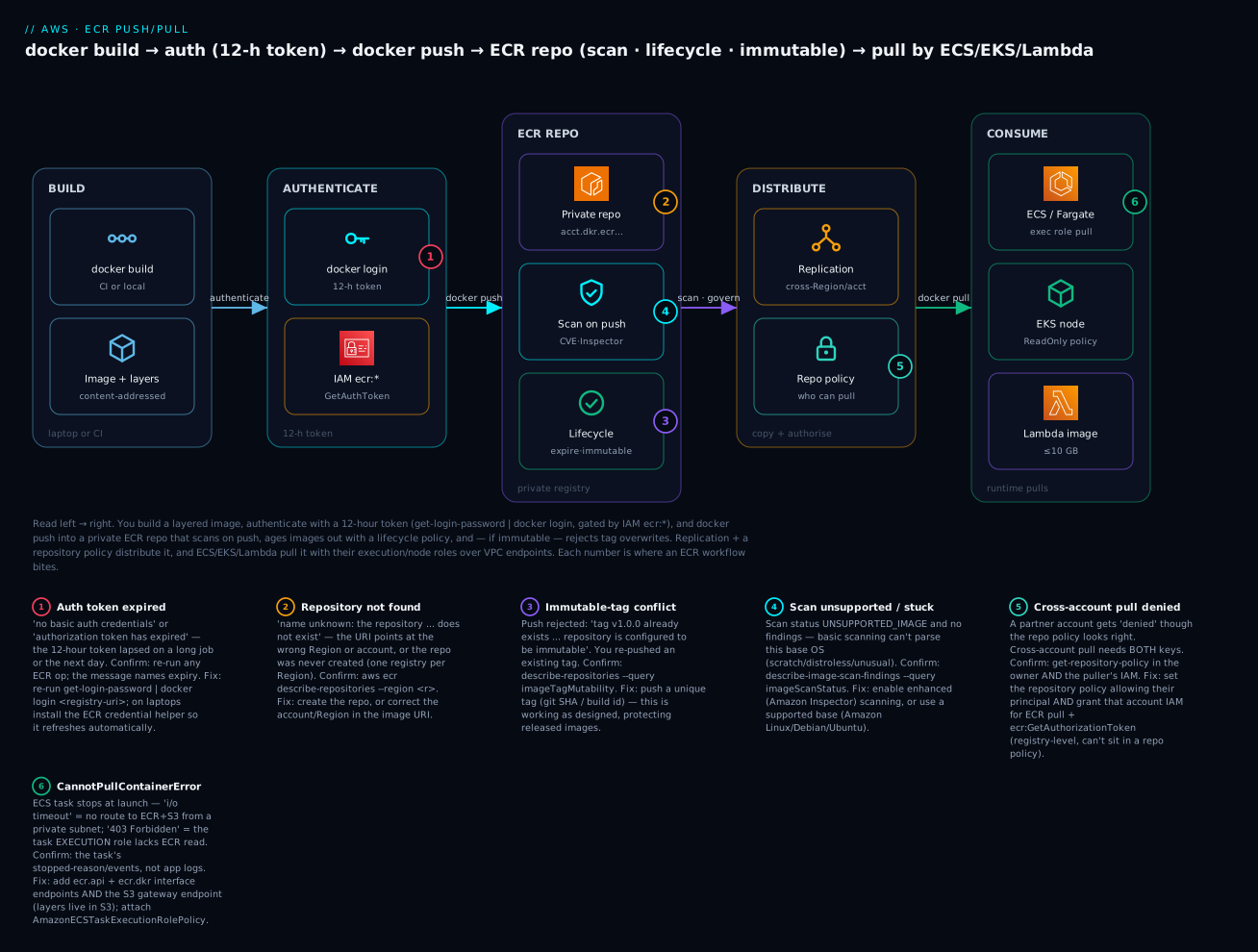
| Badge | Failure class | Lives at | Playbook row |
|---|---|---|---|
| 1 | Auth token expired / no basic auth | The docker login step |
rows 1, 2 |
| 2 | Repository not found (wrong Region/account) | The repo URI | row 5 |
| 3 | Immutable-tag conflict | Push into an immutable repo | row 4 |
| 4 | Scan stuck / UNSUPPORTED_IMAGE |
The scan step | row 9 |
| 5 | Cross-account pull denied | Repo policy + IAM | rows 7, 8 |
| 6 | CannotPullContainerError |
ECS/EKS pull path | rows 10, 11, 12 |
Real-world scenario
Finch Freight, a logistics startup in Pune, ran three microservices on ECS Fargate and shipped them from a single CI pipeline that pushed to ECR on every merge. It worked for months, then three things went wrong in the same quarter — each a lesson from this article.
First, the bill for ECR storage quietly climbed to a noticeable line item. Their pipeline tagged every build latest and a git SHA in a mutable repo with no lifecycle policy, so ~140 images accumulated per service — most of them untagged manifests from latest being repeatedly overwritten. A platform engineer, Rohan, ran a lifecycle-policy preview and saw that 380 images across the three repos were dead. He applied a two-rule policy — expire untagged after 1 day, keep the newest 30 SHA-tagged images — and reclaimed the bulk of the storage in the next eval cycle, with zero risk because the preview showed exactly what would go.
Second, a rollback went wrong. An incident required reverting to “the version that was live yesterday,” but the team had deployed by the latest tag, and latest had been overwritten six times since. They pulled latest expecting yesterday’s image and got today’s broken one. The fix was structural: they switched the repos to immutable tags, changed CI to tag only by git SHA, and rewrote the ECS task definitions to reference the image by digest. Now every deploy pins exact bytes and a rollback is “point the task def at the previous digest” — deterministic.
Third — and most disruptive — they migrated the tasks into private subnets for compliance, removed the public subnets’ route, and every new task deployment died with CannotPullContainerError: … i/o timeout. The app hadn’t changed; the network path to ECR had vanished. Rohan added the two ECR interface endpoints (ecr.api, ecr.dkr) and, after the pull still failed, remembered the missing piece from this very topic — the S3 gateway endpoint, because layers download from S3. With all three endpoints in place, the fully private tasks pulled cleanly, and they saved money by dropping the NAT Gateway they’d been about to add.
Rohan’s write-up for the team wiki was the thesis of this article: “ECR never failed. We paid for storage because we never set a lifecycle policy, we couldn’t roll back because we trusted a moving tag, and pulls broke because we forgot layers live in S3. Immutable tags, a lifecycle policy, digest-pinned deploys, and the three VPC endpoints — that’s the whole game.” Their steady-state ECR bill after the cleanup dropped by more than half, and no deploy has failed to pull since.
Advantages and disadvantages
| Advantages | Disadvantages |
|---|---|
| Deep IAM integration — no shared registry password | Auth token expires every 12 hours (must refresh) |
| Private, in-Region, low-latency pulls | One registry per Region — cross-Region needs replication |
| Layer dedup + S3-backed durability | Pull path needs S3 reachability (surprises private subnets) |
| Built-in scanning (basic free, enhanced continuous) | Enhanced scanning (Inspector) costs per image |
| Lifecycle policies control storage cost automatically | No recycle bin — expired images are gone |
| Immutable tags enforce reproducibility | Cross-account access needs repo policy and IAM |
| Replication cross-Region/account | Replication is registry-level, not per-repo granular |
| Pull-through cache beats Docker Hub rate limits | Public distribution is a separate service (ECR Public) |
When each side matters: ECR is the obvious right choice for any AWS-hosted container workload — the IAM integration, in-region speed, and native scanning/lifecycle remove work you’d otherwise do by hand. The friction shows up at boundaries: cross-Region (you must configure replication), cross-account (two-key IAM + repo policy), private networking (VPC endpoints), and public distribution (a different service). None are blockers; they are just the specific things you must remember, and each maps to a troubleshooting row below.
| Choose ECR when… | Look wider when… |
|---|---|
| Your compute is ECS/EKS/Lambda/App Runner on AWS | You need one registry serving many clouds equally |
| You want IAM-native, password-free access | Your team standardises on a third-party registry (Harbor, Artifactory) |
| You need built-in CVE scanning + lifecycle | You already run a mature registry with its own scanning |
| You distribute private images in-org | You publish widely to anonymous users (→ ECR Public / Docker Hub) |
Hands-on lab
You will build the diagram: create an immutable, scan-on-push repository, authenticate, build a tiny image, tag and push, read the scan findings, attach a lifecycle policy, add a cross-account repository policy, then pull — first with aws/docker CLI, then the identical setup as Terraform, then a clean teardown. This lab uses ap-south-1 (Mumbai); pick one Region and stick to it.
⚠️ Cost note: Private ECR storage is billed per GB-month; this lab stores a few MB (negligible). Basic scanning is free. If you enable enhanced scanning, Amazon Inspector bills per image scanned — the lab keeps it optional and tears everything down at the end.
What you’ll create
| Resource | Purpose | Cost at lab volume |
|---|---|---|
ECR repository kv-web |
Immutable, scan-on-push image store | ~₹0 (few MB storage) |
| A tiny Docker image | Something to push and pull | Free (local build) |
| Lifecycle policy | Expire untagged / old images | Free |
| Repository policy | Cross-account pull grant (example) | Free |
| Basic scan findings | The CVE report on push | Free |
Part A — the CLI + Docker path
Step 1 — Create the repository (immutable + scan-on-push). Get the two most important settings right at creation:
aws ecr create-repository \
  --repository-name kv-web \
  --image-tag-mutability IMMUTABLE \
  --image-scanning-configuration scanOnPush=true \
  --region ap-south-1
Expected: JSON with "repositoryUri": "111122223333.dkr.ecr.ap-south-1.amazonaws.com/kv-web", "imageTagMutability": "IMMUTABLE", and scanOnPush: true. Capture your account id and URI:
ACCOUNT_ID=$(aws sts get-caller-identity --query Account --output text)
REPO_URI=${ACCOUNT_ID}.dkr.ecr.ap-south-1.amazonaws.com/kv-web
Step 2 — Build a tiny image. Create a minimal Dockerfile (a supported base so basic scanning has something to inspect):
FROM public.ecr.aws/docker/library/python:3.12-slim
RUN pip install --no-cache-dir flask==3.0.3
WORKDIR /app
COPY app.py .
CMD ["python", "app.py"]
docker build -t kv-web:local .
# ... successfully built
Step 3 — Authenticate (the 12-hour token). Mint a token and log Docker in to your registry:
aws ecr get-login-password --region ap-south-1 \
  | docker login --username AWS --password-stdin \
    ${ACCOUNT_ID}.dkr.ecr.ap-south-1.amazonaws.com
# Login Succeeded
If this errors with no basic auth credentials later, your token expired — just re-run this one command.
Step 4 — Tag with the registry URI and push. Use a real version tag (immutable repos reject re-pushes of the same tag):
docker tag kv-web:local ${REPO_URI}:v1.0.0
docker push ${REPO_URI}:v1.0.0
# The push refers to repository [111122223333.dkr.ecr.ap-south-1.amazonaws.com/kv-web]
# v1.0.0: digest: sha256:9b2c… size: 1789
Note the digest in the output — that sha256:… is the immutable address you’d pin in a deploy. Verify the image landed:
aws ecr describe-images --repository-name kv-web --region ap-south-1 \
  --query 'imageDetails[].{tag:imageTags[0],pushed:imagePushedAt,size:imageSizeInBytes}'
Step 5 — Read the scan findings. Because scanOnPush=true, a basic scan started automatically. Poll it, then read the summary:
aws ecr wait image-scan-complete \
  --repository-name kv-web --image-id imageTag=v1.0.0 --region ap-south-1

aws ecr describe-image-scan-findings \
  --repository-name kv-web --image-id imageTag=v1.0.0 --region ap-south-1 \
  --query 'imageScanFindingsSummary.findingSeverityCounts'
# { "HIGH": 2, "MEDIUM": 7, "LOW": 15 }   (numbers vary with the base image)
If you see status UNSUPPORTED_IMAGE, the base OS isn’t covered by basic scanning — switch to enhanced (Step 5b) or use a supported base.
Step 5b (optional) — Enhanced scanning. ⚠️ This enables Amazon Inspector (billable per image). Turn it on registry-wide, then off in teardown:
aws ecr put-registry-scanning-configuration --scan-type ENHANCED \
  --rules '[{"scanFrequency":"CONTINUOUS_SCAN","repositoryFilters":[{"filter":"kv-*","filterType":"WILDCARD"}]}]' \
  --region ap-south-1
Step 6 — Attach a lifecycle policy (preview first). Save the two-rule policy from earlier as lifecycle.json, preview it, then apply:
aws ecr start-lifecycle-policy-preview --repository-name kv-web \
  --lifecycle-policy-text file://lifecycle.json --region ap-south-1
aws ecr get-lifecycle-policy-preview --repository-name kv-web --region ap-south-1 \
  --query 'previewResults[].{tag:imageTags[0],action:action.type}'

aws ecr put-lifecycle-policy --repository-name kv-web \
  --lifecycle-policy-text file://lifecycle.json --region ap-south-1
Step 7 — Add a cross-account repository policy. Grant a partner account (444455556666) pull access. Save the pull policy from earlier as repo-policy.json:
aws ecr set-repository-policy --repository-name kv-web \
  --policy-text file://repo-policy.json --region ap-south-1
# Reminder: the OTHER account also needs IAM allowing ecr:GetAuthorizationToken + pull.
Step 8 — Pull it back (verify). Prove the round-trip — remove the local image, then pull from ECR:
docker rmi ${REPO_URI}:v1.0.0 kv-web:local
docker pull ${REPO_URI}:v1.0.0
# v1.0.0: Pulling from kv-web ... Status: Downloaded newer image

# and prove immutability — re-pushing the SAME tag must fail:
docker tag $(docker images -q ${REPO_URI}:v1.0.0) ${REPO_URI}:v1.0.0
docker push ${REPO_URI}:v1.0.0
# tag invalid: 'v1.0.0' already exists ... repository is configured to be immutable.  ✅ expected
Step 9 — Tear down. Delete the repository (--force also deletes the images inside it) and revert enhanced scanning if you enabled it:
aws ecr delete-repository --repository-name kv-web --force --region ap-south-1
# revert to free basic scanning if you enabled enhanced:
aws ecr put-registry-scanning-configuration --scan-type BASIC --rules '[]' --region ap-south-1
| Teardown step | Command | Why it matters |
|---|---|---|
| Delete repo + images | delete-repository --force |
Without --force, a non-empty repo won’t delete |
| Revert scan type | put-registry-scanning-configuration --scan-type BASIC |
Stops Inspector billing |
| Remove local images | docker rmi … |
Frees local disk (no cloud cost) |
| Delete pull-through rules | delete-pull-through-cache-rule |
If you created any |
Part B — the same thing as Terraform
The CLI is great for learning; Terraform is how you keep it. This main.tf reproduces the repository, its scan config, lifecycle policy and repository policy declaratively:
terraform {
  required_providers {
    aws = { source = "hashicorp/aws", version = "~> 5.0" }
  }
}

provider "aws" {
  region = "ap-south-1"
}

# 1. The repository: immutable tags + scan-on-push
resource "aws_ecr_repository" "kv_web" {
  name                 = "kv-web"
  image_tag_mutability = "IMMUTABLE"

  image_scanning_configuration {
    scan_on_push = true
  }

  encryption_configuration {
    encryption_type = "AES256"   # or "KMS" with a kms_key
  }
}

# 2. Lifecycle policy: expire untagged after 1 day; keep newest 20 prod images
resource "aws_ecr_lifecycle_policy" "kv_web" {
  repository = aws_ecr_repository.kv_web.name
  policy = jsonencode({
    rules = [
      {
        rulePriority = 1
        description  = "Expire untagged after 1 day"
        selection = {
          tagStatus   = "untagged"
          countType   = "sinceImagePushed"
          countUnit   = "days"
          countNumber = 1
        }
        action = { type = "expire" }
      },
      {
        rulePriority = 2
        description  = "Keep 20 newest prod images"
        selection = {
          tagStatus     = "tagged"
          tagPrefixList = ["prod"]
          countType     = "imageCountMoreThan"
          countNumber   = 20
        }
        action = { type = "expire" }
      }
    ]
  })
}

# 3. Cross-account pull repository policy
data "aws_iam_policy_document" "cross_account_pull" {
  statement {
    sid    = "AllowCrossAccountPull"
    effect = "Allow"
    principals {
      type        = "AWS"
      identifiers = ["arn:aws:iam::444455556666:root"]
    }
    actions = [
      "ecr:GetDownloadUrlForLayer",
      "ecr:BatchGetImage",
      "ecr:BatchCheckLayerAvailability",
    ]
  }
}

resource "aws_ecr_repository_policy" "kv_web" {
  repository = aws_ecr_repository.kv_web.name
  policy     = data.aws_iam_policy_document.cross_account_pull.json
}

# 4. Registry-wide enhanced scanning (optional; billable)
resource "aws_ecr_registry_scanning_configuration" "this" {
  scan_type = "ENHANCED"
  rule {
    scan_frequency = "CONTINUOUS_SCAN"
    repository_filter {
      filter      = "kv-*"
      filter_type = "WILDCARD"
    }
  }
}

output "repository_url" {
  value = aws_ecr_repository.kv_web.repository_url
}
terraform init
terraform apply     # review the plan, type yes
# push into it exactly as in Part A, then:
terraform destroy   # note: destroy fails if images remain unless force_delete=true
| Terraform detail | Why it’s there | If you omit it |
|---|---|---|
image_tag_mutability = "IMMUTABLE" |
Enforces reproducible tags | Tags can be silently overwritten |
scan_on_push = true |
Free CVE gate on every push | Images land unscanned |
aws_ecr_lifecycle_policy |
Caps storage automatically | Unbounded image sprawl + cost |
aws_ecr_repository_policy |
Cross-account/pull authorisation | Partners/other accounts can’t pull |
force_delete = true (add to repo) |
Lets destroy remove a non-empty repo |
destroy errors on remaining images |
aws_ecr_registry_scanning_configuration |
Enhanced/Inspector, registry-wide | Only basic scanning available |
Common mistakes & troubleshooting
This is the section you’ll return to. Match your symptom, run the confirm command, apply the fix.
| # | Symptom | Root cause | Confirm (exact command / console path) | Fix |
|---|---|---|---|---|
| 1 | no basic auth credentials on push/pull |
Never logged in, or Docker creds cleared | docker system info → no ECR in credentials; try docker login |
Re-run get-login-password | docker login <registry-uri> |
| 2 | denied: Your authorization token has expired |
The 12-h token lapsed (long job / next day) | Re-run any ECR op; the message names expiry | Re-authenticate; on laptops install the credential helper |
| 3 | denied: User: arn:… is not authorized to perform: ecr:InitiateLayerUpload |
IAM lacks push actions (or repo policy blocks) | aws iam simulate-principal-policy / read the exact action in the error |
Attach AmazonEC2ContainerRegistryPowerUser or add the action |
| 4 | Push fails: tag 'v1' already exists … immutable |
Re-pushing an existing tag into an immutable repo | aws ecr describe-repositories --query '…imageTagMutability' |
Push a new unique tag (git SHA/build id); this is working as designed |
| 5 | name unknown: The repository … does not exist |
Wrong Region or account in the URI, or repo not created | aws ecr describe-repositories --region <r> — is it there? |
Create the repo, or fix the Region/account in the URI |
| 6 | denied: requested access to the resource is denied on pull |
IAM/repo policy lacks pull actions | Error names the denied context; check ReadOnly policy |
Grant BatchGetImage/GetDownloadUrlForLayer/BatchCheckLayerAvailability |
| 7 | Cross-account pull denied despite repo policy | Consuming account’s IAM missing (needs both keys) | In the other account: aws ecr get-login-password fails? check IAM |
Add ECR pull + ecr:GetAuthorizationToken to that account’s IAM |
| 8 | Cross-account pull denied despite IAM | Repository policy missing/incomplete in owning account | aws ecr get-repository-policy --repository-name <r> |
set-repository-policy allowing the other account’s principal |
| 9 | Scan “stuck” / no findings ever | Status UNSUPPORTED_IMAGE (base OS not covered by basic) |
aws ecr describe-image-scan-findings … --query imageScanStatus |
Switch to enhanced scanning, or use a supported base image |
| 10 | ECS: CannotPullContainerError: … i/o timeout |
No network route to ECR/S3 (private subnet, no NAT/endpoints) | Task events; check subnet route table + endpoints | Add ecr.api, ecr.dkr and s3 (gateway) VPC endpoints, or a NAT GW |
| 11 | ECS: CannotPullContainerError: … 403 Forbidden |
Task execution role lacks ECR pull perms | Task def → executionRoleArn; check attached policy | Attach AmazonECSTaskExecutionRolePolicy to the execution role |
| 12 | ECS: CannotPullContainerError: … not found |
Tag/digest doesn’t exist (lifecycle deleted it, or typo) | aws ecr describe-images --repository-name <r> |
Re-push the image; loosen lifecycle countNumber; pin surviving digests |
| 13 | Docker Hub base image: toomanyrequests: … rate limit |
Anonymous Docker Hub pull throttled during a deploy | The pull log shows toomanyrequests |
Configure a pull-through cache for Docker Hub; pull via ECR |
| 14 | Lifecycle deleted an image you still needed | Rule countNumber too low / matched a live tag |
get-lifecycle-policy → re-read the rules |
Raise countNumber; scope with tagPrefixList; always preview first |
| 15 | KMS repo: AccessDenied on pull |
Puller can’t kms:Decrypt the CMK the repo uses |
Repo encryptionConfiguration; the CMK key policy |
Grant the pulling principal kms:Decrypt on that key |
| 16 | EKS pod ImagePullBackOff from ECR |
Node role lacks ECR read, or private-subnet path missing | kubectl describe pod → events; node IAM role |
Attach AmazonEC2ContainerRegistryReadOnly; add VPC endpoints |
The error / status reference
The strings ECR and the container runtimes emit, decoded:
| Message / status | Where you see it | Meaning | Fix |
|---|---|---|---|
no basic auth credentials |
docker push/pull |
Not logged in to this registry | docker login with a fresh token |
denied: … token has expired |
Any ECR op | 12-h token lapsed | Re-authenticate / credential helper |
not authorized to perform: ecr:X |
Push/pull | IAM missing action X |
Grant X (or a managed policy) |
tag invalid: … immutable |
Push | Re-pushing a tag into an immutable repo | Use a unique tag |
name unknown: … does not exist |
Push/pull | Repo/Region/account wrong | Create repo / fix URI |
CannotPullContainerError |
ECS task event | Network, auth, or missing image | Rows 10–12 |
ImagePullBackOff / ErrImagePull |
EKS kubectl |
kubelet can’t pull | Row 16 |
UNSUPPORTED_IMAGE |
Scan status | Basic scan can’t parse the base | Enhanced scan / supported base |
toomanyrequests |
Docker Hub pull | Rate-limited upstream | Pull-through cache |
LayersNotFoundException |
API | A referenced layer is gone (lifecycle) | Re-push the image |
The three nastiest, explained
CannotPullContainerError in a private subnet (rows 10–12) burns the most hours, because the application looks broken when the truth is the task never started — it couldn’t fetch the image. The instinct is to read app logs, but there are none; the task died at the pull. Confirm with the task’s Events/stopped-reason, not app logs, and remember the pull touches three things: the ECR API endpoint, the ECR Docker endpoint, and S3 (layers). The most common private-subnet miss is adding the two ECR interface endpoints and forgetting the S3 gateway endpoint — add all three and a no-NAT task pulls. If the network is fine and you get 403, it’s the execution role (not the task role) missing ECR read.
Cross-account pull needs two keys (rows 7–8), and people fix only one. The owning account’s repository policy must name the consuming principal, and the consuming account’s IAM must allow ECR pull plus ecr:GetAuthorizationToken (a registry-level action that can’t live in a repo policy). Set the repo policy but forget the puller’s IAM and you get denied; set the puller’s IAM but forget the repo policy and you also get denied. Confirm both sides — get-repository-policy in the owner, and an IAM check in the consumer — before assuming ECR is broken.
A too-aggressive lifecycle policy deletes a live image (row 14). ECR has no idea an image is currently running; a rule like “keep only the 5 newest” will happily expire the digest a long-running ECS service or an autoscaling EKS node still needs to re-pull, and the next scale-out fails with … not found. Always run start-lifecycle-policy-preview before applying, keep countNumber well above your rollback/retention window, scope rules with tagPrefixList, and pin production deploys by digest so you always know which images must survive.
Best practices
- Make production repos immutable and tag by git SHA. Immutable tags plus SHA tagging give you deterministic deploys and safe rollbacks for free; keep
latestonly as a human convenience, never for automated deploys. - Pin deploys by digest. ECS task definitions and Kubernetes manifests should reference
…@sha256:…, not a moving tag — the only way to be certain which bytes run. - Always attach a lifecycle policy. Expire untagged images after a day and cap tagged images by count; preview before applying and keep the count above your rollback window.
- Turn on scan-on-push, graduate to enhanced for production. Free basic scanning is a no-brainer gate; use enhanced (Inspector) continuous scanning where you need language-package coverage and re-scan on new CVEs.
- Use the credential helper on laptops and OIDC roles in CI. Never store long-lived keys for pushes; the helper refreshes tokens automatically and OIDC gives CI keyless, short-lived credentials.
- Grant least privilege with the built-in managed policies.
ReadOnlyfor pull-only compute,PowerUserfor CI that pushes,FullAccessonly for platform admins — don’t hand every role FullAccess. - Add the three VPC endpoints (ecr.api, ecr.dkr, s3) for private tasks. It’s cheaper and more secure than a NAT Gateway, and the S3 gateway endpoint is the one everyone forgets.
- Use a pull-through cache for public bases. Proxy Docker Hub/Quay/public ECR through your registry to dodge rate limits and get in-region speed; your lifecycle and scanning apply to cached images too.
- Right the two-key cross-account setup once, template it. Repo policy on the owner + IAM (with
GetAuthorizationToken) on the consumer — codify both in Terraform so nobody sets one and forgets the other. - Replicate deliberately, not everything. Cross-Region/account replication is per-registry with filters; replicate the
prod/prefix, not every experimental image, to control cost. - Adopt image signing at trust boundaries. When images cross accounts or teams, sign with AWS Signer/Notation or cosign and verify at deploy so only your pipeline’s images run.
Security notes
ECR’s security surface is small but load-bearing:
| Control | What to do | Why |
|---|---|---|
| Least-privilege IAM | ReadOnly/PowerUser/FullAccess by role; scope by repo ARN/prefix |
A leaked pull role shouldn’t be able to push or delete |
| Repository policies scoped tight | Name exact principals; avoid "AWS":"*" on private repos |
Prevents unintended cross-account access |
| Encryption | AES256 by default; KMS CMK for audit/control |
Control who can decrypt; CloudTrail the key use |
| Immutable tags | Enforce on prod repos | Stops silent overwrite of a released image |
| Scan-on-push + enhanced | Gate CVEs before deploy; continuously re-scan | Catch vulns at push and as new CVEs land |
| Private pulls via VPC endpoints | ecr.api/ecr.dkr/s3 endpoints; no public egress |
Image traffic never leaves the AWS network |
| No credentials in images | Never bake secrets into layers | Layers are pullable by anyone with repo read |
| Image signing | AWS Signer/cosign + verify at deploy | Proves provenance; blocks unauthorised images |
| CloudTrail on ECR | Audit PutImage, SetRepositoryPolicy, BatchGetImage |
Detect tampering and unexpected pullers |
The two people get wrong first: opening a repository policy to "Principal": "*" “just to make the pull work” (that makes a private image world-pullable to any AWS account — scope it to exact ARNs), and baking a secret or API key into an image layer (anyone who can pull the image can extract it — use Secrets Manager/SSM at runtime instead).
Cost & sizing
ECR cost has three drivers, and the free tier covers most learning:
| Cost driver | How it’s charged | Lever to pull |
|---|---|---|
| Storage | ~$0.10 per GB-month (private) | Lifecycle policies; smaller/multi-stage images |
| Data transfer out | Standard AWS egress; in-Region to ECS/EC2 is free | Keep compute in the image’s Region |
| Enhanced scanning | Amazon Inspector: per image scanned + per re-scan | Use basic where enhanced isn’t required |
| Replication | Storage in each destination + cross-Region transfer | Filter to prod/; replicate only what you need |
| Pull-through cache | Storage of cached images | Lifecycle-expire cached images too |
| Free tier | Amount | Note |
|---|---|---|
| Private ECR storage | 500 MB-month for 12 months | Then ~$0.10/GB-month |
| ECR Public storage | 50 GB always free | For public repos |
| ECR Public data transfer | Generous free egress to anonymous/AWS | For public distribution |
| Basic scanning | Free | Any volume |
A worked example to make it concrete:
| Scenario | Images × size | Storage/mo | Est. monthly cost |
|---|---|---|---|
| This lab | 1 × ~150 MB | 0.15 GB | ₹0 (free tier) |
| Small team, no lifecycle | 400 × 200 MB | ~80 GB | ~$8 storage + Inspector if enhanced |
| Same team, with lifecycle | ~40 × 200 MB | ~8 GB | ~$0.80 storage — 10× cheaper |
| Cross-Region replicated | 8 GB × 2 Regions | 16 GB + transfer | ~$1.60 storage + cross-Region egress |
The single biggest lever is a lifecycle policy — the “no lifecycle” vs “with lifecycle” rows above are the same team, an order of magnitude apart on storage. Enhanced scanning is the other conscious spend: it’s worth it for production security posture, but enabling it registry-wide on hundreds of images (each re-scanned continuously) is a line item to size deliberately, not a default to leave on everywhere.
Interview & exam questions
1. What is Amazon ECR and how does it authenticate? ECR is AWS’s managed container registry (private per-account/Region, plus a public gallery). It authenticates via IAM: aws ecr get-login-password mints a 12-hour token from your IAM credentials that docker login consumes with username AWS — not a stored password. (CLF-C02, DVA-C02)
2. Mutable vs immutable tags — why does it matter? In a mutable repo a tag can be overwritten, so v1 (or latest) can silently point at different images over time, breaking reproducibility and rollbacks. Immutable repos reject re-pushing an existing tag, forcing unique tags (git SHA) and guaranteeing a tag pins one image. (DVA-C02)
3. Why pin by digest instead of tag? A digest (sha256:…) is the immutable content address of the exact manifest; a tag is a movable pointer. Machine deploys (ECS task defs, K8s manifests) should pin digests so the deployed bytes are certain and rollbacks are deterministic. (DVA-C02, SAA-C03)
4. What does a lifecycle policy do and what’s the risk? It’s prioritised JSON rules that automatically expire images by count (imageCountMoreThan) or age (sinceImagePushed) to control storage cost. The risk: ECR doesn’t know an image is running, so an over-aggressive rule can delete a live image — always preview first and keep the count above your rollback window. (DVA-C02)
5. Basic vs enhanced scanning? Basic is free, on-push, OS-packages-only. Enhanced uses Amazon Inspector: it also scans application/language dependencies and continuously re-scans stored images as new CVEs are published, at a per-image cost. (SCS, DVA-C02)
6. How does a container in account B pull an image from account A’s ECR? You need both: a repository policy in account A allowing account B’s principal the pull actions, and an IAM policy in account B granting ECR pull plus ecr:GetAuthorizationToken. Missing either yields denied. (SAA-C03, SCS)
7. An ECS task fails with CannotPullContainerError in a private subnet. Diagnose. The task has no network path to ECR. Pulls need the ECR API endpoint, the ECR Docker endpoint, and S3 (layers live in S3). Add ecr.api, ecr.dkr interface endpoints and the S3 gateway endpoint, or a NAT Gateway; if it’s a 403, the task execution role lacks ECR read. (SAA-C03, DVA-C02)
8. What is a pull-through cache and why use it? A rule that makes your private ECR a caching proxy for an upstream public registry (Docker Hub, Quay, public ECR). The first pull caches the image; later pulls serve from ECR — faster, in-region, and immune to Docker Hub’s rate limits. (DVA-C02, SAA-C03)
9. Which IAM identity pulls the image for ECS vs EKS? ECS: the task execution role (AmazonECSTaskExecutionRolePolicy). EKS: the node instance role (AmazonEC2ContainerRegistryReadOnly). ECR pull belongs on the pulling identity, not the app’s task/pod role. (DVA-C02)
10. How does ECR store images, and why does the S3 endpoint matter? ECR stores image layers in an AWS-managed S3 bucket and dedupes them. Because layer downloads are served from S3, a private-subnet pull needs an S3 gateway endpoint in addition to the ECR endpoints. (SAA-C03)
11. How do you distribute an image to anonymous users? Publish to ECR Public (public.ecr.aws/<alias>/<repo>), a separate global registry that anyone can pull without an AWS account — you authenticate to push via aws ecr-public get-login-password in us-east-1. (CLF-C02)
12. What does replication give you and where’s it configured? Cross-Region and cross-account automatic copying of images, configured at the registry level (not per repo) with repository filters. Cross-account destinations require a repository policy permitting the replication. (SAA-C03, ANS)
Quick check
- You run
aws ecr get-login-password | docker login …and it succeeds. Roughly how long until you must re-authenticate, and why isn’t this a stored password? - Your CI pushes
kv-web:v1.0.0to an immutable repo, then re-runs and pushesv1.0.0again. What happens? - Name the three network endpoints a private-subnet ECS task needs to pull an ECR image — and which one people forget.
- A partner account’s ECS task can’t pull your image even though you set the repository policy. What’s the most likely missing piece?
- Your basic scan returns
UNSUPPORTED_IMAGE. What does it mean and what’s the fix?
Answers
- About 12 hours —
get-login-passwordmints a short-lived token from your IAM credentials, so access is your IAM identity wrapped in a temporary token, not a permanent secret. (On laptops, the credential helper refreshes it automatically.) - The second push fails with
tag 'v1.0.0' already exists … cannot be overwritten because the repository is immutable. That’s working as designed — immutable repos force unique tags (tag by git SHA). com.amazonaws.<region>.ecr.api,com.amazonaws.<region>.ecr.dkr, and the S3 gateway endpoint (layers download from S3). The S3 gateway endpoint is the one everyone forgets.- The consuming account’s IAM — cross-account pull needs both the repository policy (owner side) and IAM in the puller’s account granting ECR pull plus
ecr:GetAuthorizationToken. - Basic scanning can’t parse that image’s base OS packages, so it produces no findings. Switch to enhanced (Inspector) scanning, or use a base image basic scanning supports.
Glossary
| Term | Definition |
|---|---|
| ECR | Amazon Elastic Container Registry: AWS’s managed private/public container image registry. |
| Registry | The per-account, per-Region store addressed as <acct>.dkr.ecr.<region>.amazonaws.com; ECR Public is a single global registry. |
| Repository | A named collection of image versions within a registry. |
| Image manifest | The JSON document listing an image’s layers and config by digest. |
| Layer | A content-addressed filesystem diff, stored (deduplicated) in S3. |
| Tag | A human-friendly, mutable-by-default pointer to a manifest. |
| Digest | The immutable sha256: content address of a manifest; reproducible pull target. |
| Immutable tags | A repo setting that rejects re-pushing an existing tag. |
| Authorization token | The 12-hour credential from get-login-password, derived from IAM. |
| Credential helper | docker-credential-ecr-login; auto-fetches/refreshes ECR tokens for Docker. |
| Lifecycle policy | Prioritised JSON rules that expire images by count or age. |
| Basic scanning | Free, on-push CVE scan of OS packages. |
| Enhanced scanning | Amazon Inspector continuous scan of OS + application dependencies (billable). |
| Repository policy | A resource-based policy on a repo controlling who may pull/push (key for cross-account). |
| Replication | Registry-level automatic copying of images cross-Region/cross-account. |
| Pull-through cache | A rule that makes ECR a caching proxy of an upstream public registry. |
| Task execution role | The ECS role that pulls the image and sets up the task (needs ECR read). |
| VPC endpoints (ECR) | Private in-VPC paths (ecr.api, ecr.dkr, plus S3 gateway) for pulls without NAT. |
Next steps
- Run one of these images as a service. Take the
kv-webimage you pushed and stand it up on ECS Fargate in the wave sibling AWS ECS on Fargate: Your First Service Hands-On (it pulls from the repository you built here). - Decide which runtime should pull it. Confirm whether ECS, EKS or Fargate is the right home with AWS ECS vs EKS vs Fargate: Choose Your Container Path.
- Zoom out on the compute choice. Re-check container vs function vs VM for your workload in AWS Compute: EC2, Lambda, ECS and EKS — Which One to Choose?.
- Package functions the other way. If some workloads are functions, compare container-image Lambdas with zip + layers in AWS Lambda Layers & Packaging: Managing Dependencies the Right Way.
- Harden the supply chain. Add image signing (AWS Signer/cosign) and enhanced scanning gates in CI so only scanned, signed images ever reach production.