Your function is 40 lines of Python. It imports pandas, does a groupby, writes a CSV to S3. It runs on your laptop in half a second. You pip install pandas, zip the folder, upload it, hit Test, and Lambda answers with Runtime.ImportModuleError: Unable to import module 'lambda_function': No module named 'pandas._libs.window.aggregations'. Nothing is wrong with your code. Everything is wrong with your deployment package — you built it on a machine that is not the machine your function runs on, and a compiled C extension inside pandas is now the wrong shape for the CPU and the C library Lambda actually has. This single failure, in a dozen disguises, is the reason “just add the dependency” is the hardest easy task in serverless.
This is the reference for packaging Lambda correctly, end to end. You get exactly two ways to ship code and its dependencies to Lambda: a zip deployment package (up to 50 MB uploaded directly, 250 MB unzipped once you include layers, more if you stage it in S3) or a container image (up to 10 GB, stored in Amazon ECR). Around those sit layers — shared zip archives extracted to the magic /opt directory, up to five per function, sharing that same 250 MB unzipped budget, versioned and addressable by ARN, shareable across accounts. And underneath all of it sits the one law that breaks more first deployments than any other: a native binary — a wheel, a .so, a JAR with a JNI stub — must be compiled for the runtime’s operating system (Amazon Linux 2 or Amazon Linux 2023, which differ in glibc version) and its CPU architecture (x86_64 or arm64/Graviton), or the import fails at cold start no matter how correct your code is.
By the end you will never be surprised by a packaging error again. You will know when a layer is the right tool and when a container image is, the precise /opt path each runtime scans, how to build a compiled dependency inside a Lambda-like container so the ELF header matches, the exact aws lambda and aws ecr commands plus the Terraform to wire all of it, and a symptom→cause→confirm→fix playbook for every way packaging fails. Read the prose once; keep the tables open the next time ImportModuleError lights up your logs.
What problem this solves
Lambda gives you no build server. There is no apt-get, no compile step in the cloud, no “it’ll sort the dependencies out on deploy.” Whatever your function needs at runtime, you must assemble into an artifact and hand over — correctly built, correctly laid out, under the size limits. The platform then drops that artifact into a locked-down execution environment and runs your handler. If a library isn’t there, or is there but built wrong, you find out at the first invocation, in production, as a cold-start error.
What breaks without getting this right: the classic is the wrong-architecture / wrong-glibc native dependency — you pip install on macOS or a fresh Ubuntu, the wheel that comes down is a Mach-O binary or references GLIBC_2.34, and Lambda (running Amazon Linux) throws ImportModuleError or invalid ELF header. Next is layout: you put your packages in /opt but under the wrong subdirectory, so the runtime never finds them. Then size: you blow past 250 MB unzipped and the publish fails, or past 50 MB on direct upload and get RequestEntityTooLargeException. Then too many layers, version drift between two layers that both ship numpy, and cold-start bloat from a 200 MB layer that Lambda has to download and unzip before your handler runs.
Who hits this: everyone shipping anything beyond the standard library. It bites hardest on data/ML functions (numpy, pandas, scipy, Pillow, cryptography, psycopg2, lxml — all have compiled parts), on teams moving to arm64/Graviton for the cost saving, and on anyone who develops on a Mac and deploys to Linux. The fix is never “hope” — it is “build the artifact in the same shape as the runtime, lay it out where the runtime looks, and stay under the limits.”
Here is the whole field on one screen — the packaging choices this article covers, when each fits, and the wall you hit if you pick wrong:
| Packaging choice | Max size | Where it lives | Best for | The wall you hit |
|---|---|---|---|---|
| Zip, direct upload | 50 MB zipped | Uploaded via API/Console | Small functions, few pure-Python deps | RequestEntityTooLargeException over 50 MB |
| Zip, via S3 | 250 MB unzipped | S3 object → Lambda | Bigger zips still under 250 MB unzipped | InvalidParameterValueException over 250 MB unzipped |
| Layer | Shares 250 MB unzipped | Own zip, extracted to /opt |
Shared deps across functions, faster deploys | Max 5 layers; shared 250 MB budget |
| Container image | 10 GB | Private ECR repo | Big ML deps, custom system libs, existing Dockerfile | ECR auth, platform match, cold-pull latency |
Runtime /tmp download |
512 MB–10 GB ephemeral | Downloaded at runtime | Last resort only (models, rarely-used blobs) | Cold-start download cost, no caching guarantee |
Learning objectives
By the end of this article you can:
- Choose between a zip package, a layer, and a container image for any function, and justify the choice against the real size limits.
- State the exact size quotas — 50 MB direct, 250 MB unzipped including layers, 10 GB container, 512 MB–10 GB
/tmp— and what to do when you hit each. - Build, publish, version, attach and cross-account-share a layer with both
aws lambdaCLI and Terraform, and lay its contents under the correct runtime-specific/optpath. - Diagnose and fix the
Runtime.ImportModuleError/ invalid ELF / cannot import family caused by wrong CPU architecture or wrong glibc, using--platformwheels, an Amazon Linux 2023 build container, orsam build --use-container. - Package a compiled dependency correctly for
x86_64andarm64/Graviton, and know why mixing them fails. - Build the same function as a container image, push it to ECR, and set the function’s
PackageType=Image. - Recognise when a container image genuinely beats layers, and when a layer is the leaner choice.
- Run a symptom→cause→confirm→fix playbook for every packaging failure, mid-incident.
Prerequisites & where this fits
You should already be able to create a basic Lambda function and invoke it — if not, start with AWS Lambda: Your First Function, Hands-On. You need the aws CLI configured with credentials, docker installed locally for the compiled-dependency and container-image work, and a working knowledge of your language’s package manager (pip, npm, Maven, Bundler). Familiarity with IAM basics (the function’s execution role) and reading CloudWatch Logs helps, because that is where every packaging error surfaces.
This sits in the Serverless track, immediately after “make a function run” and immediately before “make it fast and reliable.” Packaging is upstream of performance: a 200 MB layer is also a slow cold start, so this pairs directly with AWS Lambda: Memory, Timeout & Concurrency Tuning. When a deploy that “worked yesterday” starts throwing import errors, the diagnosis lives in Troubleshooting AWS Lambda: Errors, Timeouts & Cold Starts. The broader compute trade-off — when Lambda itself is the wrong tool versus ECS/EKS/Fargate — is in AWS Compute: EC2 vs Lambda vs ECS vs EKS, and the event wiring that triggers these functions is in AWS Lambda Patterns: Event-Driven Functions.
A quick map of who owns which layer of the packaging problem, so you know where to look when it breaks:
| Concern | Where it’s decided | Who usually owns it | Failure it causes |
|---|---|---|---|
| Which packaging shape | Architecture / repo layout | Dev + architect | Wrong tool → fighting size limits |
| How deps are built | Build step / CI / Dockerfile | Dev + platform | Wrong arch/glibc → ImportModuleError |
Where files land in /opt |
Layer zip structure | Dev | Module not found despite attach |
| Size under quota | Build output + layer split | Dev | Publish/upload rejected |
| ECR repo + auth | Registry + IAM | Platform / DevOps | Image pull denied |
| Function config wiring | Terraform / SAM / Console | Dev + DevOps | Layer not attached, wrong arch set |
Core concepts
Six ideas make every later decision obvious.
A deployment package is the code plus everything it imports, in one shape Lambda understands. That shape is either a zip archive (your handler file at the root, dependencies alongside or in layers) or a container image (an OCI image in ECR that implements the Lambda Runtime API). There is no third option and no in-between. The function’s PackageType is Zip (the default, which needs a Runtime and Handler) or Image (which needs an ImageUri and no runtime/handler — the image provides both).
A layer is a zip archive that Lambda extracts to /opt before your handler runs. It is not magic — it is a second zip whose contents are merged into the /opt directory of the execution environment, on top of your function code which lands in the task root (/var/task). Layers exist so multiple functions can share the same heavy dependency set without each carrying its own copy, and so you can update dependencies without redeploying function code. You can attach up to five layers to one function.
/opt is only useful if you use the path the runtime scans. Each managed runtime adds specific subdirectories of /opt to its module search path. Python searches /opt/python and /opt/python/lib/python3.x/site-packages; Node.js searches /opt/nodejs/node_modules; Java searches /opt/java/lib; Ruby searches /opt/ruby/gems/x.y.0 and /opt/ruby/lib. For all runtimes, /opt/bin is added to PATH and /opt/lib to LD_LIBRARY_PATH. Put your packages one directory too high or too low and the runtime will not find them — the layer attaches fine, the import fails.
Everything unzipped shares one 250 MB budget. The hard quota is not on any single zip — it is 250 MB unzipped for the function code plus all attached layers combined (262,144,000 bytes exactly). Direct upload of the function zip is separately capped at 50 MB compressed; go over that and you must stage the zip in S3 first. The container-image path sidesteps both numbers with its own 10 GB ceiling.
Native code must match the runtime’s OS and CPU. A pure-Python or pure-JavaScript dependency is portable — it runs anywhere. A dependency with compiled parts (a C extension .so, a JNI library, a Rust/Go binary) is an ELF file built for one CPU architecture and linked against one C library version. Lambda runs on Amazon Linux — either Amazon Linux 2 (glibc 2.26) or Amazon Linux 2023 (glibc 2.34) depending on the runtime — on either x86_64 or arm64 (Graviton). Build the binary for the wrong CPU or a newer glibc and you get invalid ELF header, cannot import name, or version GLIBC_2.34 not found at import time.
Layers cost you cold-start time. At a cold start Lambda must download and unzip every layer into /opt before invoking your handler. A 5 MB layer is invisible; a 200 MB layer adds real init latency. Container images are cached and start-optimised (Lambda loads image chunks lazily), so the first pull is slower but steady-state is fast. Packaging is therefore also a performance decision, not just a mechanics one.
Here is the packaging vocabulary in one table — every moving part, defined once:
| Term | What it is | Why it matters |
|---|---|---|
| Deployment package | The zip or image you deploy | The unit Lambda runs; sets PackageType |
Task root (/var/task) |
Where your function code extracts | First on the module search path |
| Layer | Shared zip extracted to /opt |
Reuse deps; up to 5; shares 250 MB |
/opt |
Where all layers merge | Runtime scans specific subdirs of it |
| Layer version | Immutable numbered publish of a layer | You reference :N; publishing bumps it |
| Layer ARN | arn:aws:lambda:region:acct:layer:name:version |
How a function attaches a layer |
| Container image | OCI image in ECR implementing Runtime API | The 10 GB path; needs RIC |
| RIC | Runtime Interface Client | Lets a container talk to the Lambda Runtime API |
| RIE | Runtime Interface Emulator | Test a container image locally |
Ephemeral storage (/tmp) |
512 MB–10 GB scratch disk | Runtime downloads, unpacking, caches |
| manylinux | glibc-compatibility tag on Python wheels | Picks a wheel that runs on Amazon Linux |
| glibc | The GNU C library the binary links against | AL2 = 2.26, AL2023 = 2.34; mismatch = fail |
Size limits and quotas — the numbers you must not hand-wave
Every packaging decision is really a decision about which limit you refuse to hit. Learn these cold; they are the most-quoted numbers in the whole topic and they appear on the DVA-C02 exam.
| Quota | Value | Applies to | If you exceed it |
|---|---|---|---|
| Direct zip upload | 50 MB (compressed) | update-function-code/console upload with inline zip |
RequestEntityTooLargeException → upload via S3 |
| Deployment package unzipped | 250 MB (262,144,000 bytes) | Function code + all layers, uncompressed | InvalidParameterValueException: Unzipped size must be smaller than 262144000 bytes |
| Console inline editor | 3 MB | Editing code in the browser | Editor becomes read-only; deploy another way |
| Layers per function | 5 | Attached layers | at most 5 layers on the 6th |
| Container image | 10 GB | PackageType=Image |
Reduce image; no larger tier |
Ephemeral storage (/tmp) |
512 MB default, up to 10,240 MB | Scratch disk per environment | No space left on device → raise EphemeralStorage |
| Function memory | 128 MB–10,240 MB | Runtime RAM (CPU scales with it) | OOM kill; unrelated to package size |
| Environment variables | 4 KB total | All env vars combined | InvalidParameterValueException |
| S3 object for code | Effectively bounded by 250 MB unzipped | Staged zip | Same 250 MB unzipped rule still binds |
Three subtleties that trip people up. First, the 250 MB is unzipped and shared — a 60 MB compressed layer can unzip to 240 MB and consume nearly the whole budget by itself. Second, the 50 MB direct-upload limit is about the wire, not storage: stage the same zip in S3 and Lambda accepts it, as long as the unzipped total is under 250 MB. Third, /tmp is not part of the package budget — it is runtime scratch space, so downloading a 300 MB model into /tmp at runtime is a legitimate way to dodge the 250 MB package wall (at the cost of cold-start download time).
Zip versus container image — the first fork
Before you touch a dependency, decide the shape. The zip path is the default and the lightest; the container path trades a heavier toolchain for headroom and control.
| Dimension | Zip package (+ layers) | Container image |
|---|---|---|
| Max size | 250 MB unzipped | 10 GB |
| Where stored | Lambda service / S3 | Private ECR repo (same account + region) |
PackageType |
Zip (default) |
Image |
| Needs | Runtime + Handler |
ImageUri (+ optional ImageConfig) |
| Build toolchain | zip / pip / npm / SAM | Docker + ECR |
| Runtime provided by | AWS managed runtime | Your image (AWS base image or custom + RIC) |
| Local testing | SAM local / unit tests | RIE (Runtime Interface Emulator) |
| Cold start | Fast (small) → slow (big layer) | First pull slower; steady-state optimised |
| System libraries | Only what you ship in /opt/lib |
Anything you can dnf install in the image |
| Best when | Small–medium deps, fast iteration | >250 MB deps, custom libs, existing Dockerfile |
| Update deps without code | Yes (bump a layer) | No (rebuild the image) |
The zip + layers path wins for the common case: a handful of dependencies, quick iteration, small cold starts, and the ability to bump a shared layer without redeploying every function. The container image path wins when you are already fighting the 250 MB wall (large ML stacks), when you need system-level libraries that are painful to ship in /opt/lib (a specific libgeos, ImageMagick, a database client), or when you already have a Dockerfile and want one build story across Lambda, ECS and local.
For the zip path, know precisely where each size boundary lives:
| Scenario | Compressed limit | Unzipped limit | How to deploy |
|---|---|---|---|
| Tiny function, no deps | 50 MB | 250 MB | Console / --zip-file fileb:// |
| Function + pure-Python deps | 50 MB | 250 MB | --zip-file if <50 MB |
| Function + deps > 50 MB zipped | n/a (over wire limit) | 250 MB | Stage in S3, use --s3-bucket/--s3-key |
| Deps shared across many functions | per layer | 250 MB total | Publish a layer, attach by ARN |
| Deps unzip to > 250 MB | — | over limit | Switch to container image |
For the container path, the essentials:
| Aspect | Detail |
|---|---|
| Registry | Private ECR in the same account and region as the function |
| Base image | public.ecr.aws/lambda/<runtime> (includes the RIC) or any base + awslambdaric |
| Handler | Set as the image CMD (e.g. lambda_function.handler) |
| Architecture | Image platform (linux/amd64 or linux/arm64) must match function arch |
| Local test | Run with the RIE; curl the local invoke endpoint |
| Auth to push | aws ecr get-login-password | docker login --username AWS --password-stdin |
| Cross-region | ECR replication or push to a repo in each region |
Layers, in depth
A layer is the single most useful and most misunderstood packaging feature. Get four things right — the path, the size, the version, and the sharing — and layers pay for themselves.
The rules of layers
| Rule | Value / behaviour | Consequence |
|---|---|---|
| Layers per function | Up to 5 | Sixth attach fails |
| Size | Counts toward 250 MB unzipped shared budget | A fat layer starves function code |
| Immutability | Each publish creates a new version; versions never change | Pin :N; deleting a version breaks functions still on it |
| Extract location | /opt, merged across all layers |
Later layer in the list wins on file collisions |
| Runtime path | Runtime-specific subdir of /opt |
Wrong dir = module not found |
| Compatible runtimes | Optional metadata list | Advisory; doesn’t enforce, but tooling reads it |
| Compatible architectures | x86_64 and/or arm64 |
A layer built for one arch won’t work on the other |
| Cross-account | Grant lambda:GetLayerVersion via resource policy |
Share without copying |
| Region | Layer must be in the same region as the function | No cross-region attach |
The runtime-specific /opt path — get this exactly right
This table is the one people screenshot. Zip your layer so that these are the top-level directories inside the zip:
| Runtime | Put dependencies under (top of zip) | Extracted path Lambda scans |
|---|---|---|
| Python | python/ or python/lib/python3.11/site-packages/ |
/opt/python, /opt/python/lib/python3.x/site-packages |
| Node.js | nodejs/node_modules/ |
/opt/nodejs/node_modules (+ /opt/nodejs/node18/node_modules) |
| Java | java/lib/ (JARs) |
/opt/java/lib on the classpath |
| Ruby | ruby/gems/3.2.0/ or ruby/lib/ |
/opt/ruby/gems/3.2.0, /opt/ruby/lib |
| .NET | assemblies referenced from code | /opt (add to probing path) |
| Any runtime — executables | bin/ |
/opt/bin added to PATH |
| Any runtime — shared libs | lib/ |
/opt/lib added to LD_LIBRARY_PATH |
The mistake is nearly universal on the first try: you pip install -t . requests at the layer root, zip it, and get No module named 'requests' — because Python only scans /opt/python, not /opt. The fix is one directory: pip install -t python/ requests, then zip so python/ is at the top.
Layer operations — the CLI you actually run
| Operation | Command |
|---|---|
| Publish a version | aws lambda publish-layer-version --layer-name deps --zip-file fileb://layer.zip --compatible-runtimes python3.11 --compatible-architectures arm64 |
| Publish from S3 (big layer) | aws lambda publish-layer-version --layer-name deps --content S3Bucket=b,S3Key=layer.zip ... |
| List versions | aws lambda list-layer-versions --layer-name deps |
| Get one version (ARN, size) | aws lambda get-layer-version --layer-name deps --version-number 3 |
| Attach to a function | aws lambda update-function-configuration --function-name f --layers arn:aws:lambda:...:layer:deps:3 |
| Detach all layers | aws lambda update-function-configuration --function-name f --layers (empty) |
| Share cross-account | aws lambda add-layer-version-permission --layer-name deps --version-number 3 --statement-id acct123 --action lambda:GetLayerVersion --principal 111122223333 |
| Share org-wide | ... --principal '*' --organization-id o-abc123 |
| Revoke sharing | aws lambda remove-layer-version-permission --layer-name deps --version-number 3 --statement-id acct123 |
| Delete a version | aws lambda delete-layer-version --layer-name deps --version-number 3 |
Attaching layers replaces the whole list — update-function-configuration --layers A B sets exactly [A, B], dropping anything not listed. To add one, pass the full desired set. Order matters: on a file collision, the layer later in the list wins.
The layer ARN, dissected
| ARN segment | Example value | Meaning |
|---|---|---|
| Partition | aws |
Standard vs GovCloud/China |
| Service | lambda |
— |
| Region | ap-south-1 |
Layer + function must match |
| Account | 123456789012 |
Owner (or sharer) account |
| Resource type | layer |
— |
| Name | pandas-deps |
Layer name |
| Version | :7 |
Immutable; omit and you reference the layer, not a usable version |
Managed layers you don’t have to build
| Layer / source | Provides | Notes |
|---|---|---|
| AWS Parameters and Secrets | Local cache for SSM/Secrets Manager | AWS-published ARN per region |
| Lambda Insights | Enhanced CloudWatch metrics agent | AWS-published; adds a extension |
| AWS X-Ray SDK (some stacks) | Tracing helpers | Or bundle in your own layer |
AWS Data Wrangler / awswrangler |
pandas + Arrow prebuilt for Lambda | AWS SDK for pandas; correct binaries, saves the ELF fight |
| Third-party (e.g. Klayers) | Community prebuilt Python deps | Public ARNs; verify trust before using |
awswrangler (now the AWS SDK for pandas) deserves a call-out: it is a managed layer that already contains pandas, numpy and pyarrow compiled for Lambda, for both architectures. If your whole problem is “I need pandas and the ELF header is wrong,” attaching that layer solves it without you building anything.
Packaging native and binary dependencies correctly — the ELF/glibc problem
This is the section that saves your afternoon. A native dependency ships compiled machine code, and machine code is specific to a CPU architecture and linked against a C library version. Lambda runs Amazon Linux; your laptop probably does not. When the two disagree, the import fails.
Why “it works on my machine” is exactly the problem
Three axes must all match between where you build and where Lambda runs:
| Axis | Your dev machine (typical) | Lambda runtime | Symptom if mismatched |
|---|---|---|---|
| OS / libc | macOS (Mach-O), or Ubuntu 24 (glibc 2.39) | Amazon Linux 2 (glibc 2.26) or 2023 (glibc 2.34) | invalid ELF header; GLIBC_2.34 not found |
| CPU architecture | Apple Silicon arm64, or Intel x86_64 |
Whatever you set: x86_64 or arm64 |
cannot import, wrong-arch ELF |
| Python/Node version | e.g. Python 3.12 local | e.g. python3.11 runtime |
ABI-tagged wheel won’t load |
A wheel filename encodes all three: numpy-1.26.4-cp311-cp311-manylinux_2_17_x86_64.manylinux2014_x86_64.whl means CPython 3.11, glibc ≥ 2.17 (manylinux2014), x86_64. If pip on your Mac hands you ...macosx_11_0_arm64.whl and you zip that, Lambda cannot load it.
Which runtimes are Amazon Linux 2 versus 2023
The glibc version depends on the runtime’s base OS. This matters because a binary built against glibc 2.34 (AL2023) will not run on an AL2 runtime:
| Runtime family | Amazon Linux 2 (glibc 2.26) | Amazon Linux 2023 (glibc 2.34) |
|---|---|---|
| Python | python3.9, python3.10, python3.11 |
python3.12, python3.13 |
| Node.js | nodejs16.x |
nodejs18.x, nodejs20.x, nodejs22.x |
| Java | java11, java17, java8.al2 |
java21 |
| .NET | dotnet6 |
dotnet8 |
| Ruby | ruby3.2 |
ruby3.3 |
| Custom (OS-only) | provided.al2 |
provided.al2023 |
Read it this way: if you build a compiled dependency against the newer glibc (AL2023 or a recent Ubuntu) and attach it to an older runtime (python3.11 on AL2), you get version 'GLIBC_2.34' not found. Building on AL2 and running on AL2023 is safe (older glibc is forward-compatible); the reverse is not.
The three ways to get correct binaries
| Method | How | Best for | Caveat |
|---|---|---|---|
pip --platform prebuilt wheels |
pip install --platform manylinux2014_x86_64 --target python --implementation cp --python-version 3.11 --only-binary=:all: numpy pandas |
Pure-wheel deps (numpy, pandas, requests) | Fails if a dep has no matching wheel; --only-binary=:all: forces wheels, no local compile |
| Build in a Lambda base / AL2023 container | docker run --rm -v "$PWD":/var/task public.ecr.aws/lambda/python:3.11 pip install -t python/ -r requirements.txt |
Deps that must compile (some C extensions) | Needs Docker; match the image tag to your runtime |
sam build --use-container |
SAM builds each function inside public.ecr.aws/sam/build-<runtime> |
Whole-app builds with SAM | Requires SAM CLI + Docker |
For arm64/Graviton, swap the platform tag and image:
| Target arch | pip platform tag | Docker --platform |
Lambda base image |
|---|---|---|---|
| x86_64 | manylinux2014_x86_64 |
linux/amd64 |
public.ecr.aws/lambda/python:3.11 |
| arm64 (Graviton) | manylinux2014_aarch64 |
linux/arm64 |
public.ecr.aws/lambda/python:3.11 (multi-arch) |
The most robust recipe, and the one I reach for by default, is the Docker build in a Lambda base image — it guarantees the same OS, glibc and CPU the function will run on. On an Apple Silicon Mac targeting arm64, docker builds arm64 natively; targeting x86_64 you add --platform linux/amd64 and Docker emulates.
The classic failures, by library
| Library | Typical error | Root cause | Fix |
|---|---|---|---|
| numpy / pandas | No module named 'numpy.core._multiarray_umath' or invalid ELF header |
macOS/wrong-arch wheel | pip --platform manylinux2014_<arch> --only-binary=:all:, or use the AWS SDK for pandas layer |
| psycopg2 | No module named 'psycopg2._psycopg' |
C extension not built for Linux | Use psycopg2-binary, or build in a Lambda container, or aws-psycopg2 |
| cryptography | version 'GLIBC_2.34' not found |
Built on newer glibc than the runtime | Build in the matching AL container / base image |
| Pillow (PIL) | cannot import name '_imaging' |
Wrong-arch/OS binary | Prebuilt manylinux wheel for the target arch |
| lxml | ImportError: libxml2.so.2: cannot open shared object file |
Missing system lib | Ship libxml2 in /opt/lib, or use a container image |
| grpcio / protobuf | undefined symbol / ELF error |
Compiled for wrong platform | manylinux wheel for the exact arch + Python version |
Ephemeral /tmp as a last resort
When a dependency or asset simply will not fit — a 400 MB ML model, a large font bundle — you can download it into /tmp at runtime instead of packaging it. Raise ephemeral storage (up to 10 GB), fetch on cold start, cache in a module-global so warm invocations reuse it:
import os, boto3
MODEL_PATH = "/tmp/model.bin"
_model = None

def _load():
    global _model
    if _model is None:
        if not os.path.exists(MODEL_PATH):
            boto3.client("s3").download_file("my-models", "v3/model.bin", MODEL_PATH)
        _model = open(MODEL_PATH, "rb").read()
    return _model
The trade-off is explicit: you dodge the 250 MB package wall, but every cold start pays the download, and /tmp is per-environment scratch with no guaranteed persistence. Use it for large blobs, never for code you import.
Per-runtime dependency install and build tooling
The layout differs by language, but the principle is identical: install into the runtime’s /opt subdirectory, built for the target OS + arch.
| Runtime | Install command (into layer root) | Layer top-level dir | Bundler alternative |
|---|---|---|---|
| Python (pip) | pip install -t python/ -r requirements.txt |
python/ |
poetry export -f requirements.txt | pip install -t python/ -r /dev/stdin |
| Node.js (npm) | cd nodejs && npm install --omit=dev |
nodejs/node_modules/ |
esbuild to bundle into the function zip instead |
| Java (Maven) | mvn package then copy JARs |
java/lib/ |
Gradle shadowJar (fat JAR in the function, not a layer) |
| Ruby (Bundler) | bundle install --path ruby |
ruby/gems/x.y.0/ |
— |
| Go | GOOS=linux GOARCH=arm64 go build |
function binary (no layer) | Single static binary, provided.al2023 |
| .NET | dotnet publish -c Release |
assemblies in zip | — |
Two build-strategy notes. For Node.js, many teams skip layers entirely and use esbuild to tree-shake and bundle dependencies straight into the function zip — smaller than a full node_modules, faster cold starts, and no /opt/nodejs path to get wrong; layers still win when several functions share a big SDK. For Python with Poetry or pipenv, export a requirements.txt first, then pip install -t python/ so the layout matches Lambda’s — do not copy your local virtualenv, which contains host-built binaries.
SAM build and Terraform packaging
Manual zip is fine for learning; production wants the artifact built reproducibly and wired declaratively.
| Tool | Builds deps | Handles native/arch | Publishes layer | Best for |
|---|---|---|---|---|
Manual zip + CLI |
You do it | You do it (--platform/Docker) |
publish-layer-version |
Learning, one-offs |
| AWS SAM | sam build (+--use-container) |
Yes, via build image | AWS::Lambda::LayerVersion |
SAM/serverless apps |
| Serverless Framework | Plugins | Plugin-dependent | Yes | Node-heavy teams |
Terraform + archive_file |
External build step | Your build step | aws_lambda_layer_version |
IaC-first teams |
terraform-aws-modules/lambda |
Can build in Docker | Yes (build_in_docker) |
Yes | Terraform + reproducible builds |
| Container image (any) | Dockerfile | Dockerfile --platform |
ECR push | Big/custom deps |
Terraform, the resources you wire
| Resource | Purpose | Key arguments |
|---|---|---|
data "archive_file" |
Zip a dir into an artifact | type="zip", source_dir, output_path |
aws_lambda_layer_version |
Publish a layer | filename/s3_*, compatible_runtimes, compatible_architectures, source_code_hash |
aws_lambda_layer_version_permission |
Cross-account share | action="lambda:GetLayerVersion", principal, organization_id |
aws_lambda_function (zip) |
The function | filename, handler, runtime, architectures, layers, source_code_hash |
aws_lambda_function (image) |
Container function | package_type="Image", image_uri, architectures |
aws_ecr_repository |
Registry for the image | image_scanning_configuration, image_tag_mutability |
null_resource + local-exec |
Run the build (pip/docker) | triggers to rebuild on change |
A minimal Terraform layer-plus-function, arm64, built by a null_resource:
resource "null_resource" "build_layer" {
  triggers = { reqs = filemd5("${path.module}/src/requirements.txt") }
  provisioner "local-exec" {
    command = <<-EOT
      rm -rf build/python && mkdir -p build/python
      docker run --rm --platform linux/arm64 \
        -v ${path.module}/build:/out \
        -v ${path.module}/src:/src \
        public.ecr.aws/lambda/python:3.11 \
        pip install -t /out/python -r /src/requirements.txt
    EOT
  }
}

data "archive_file" "layer" {
  type        = "zip"
  source_dir  = "${path.module}/build"
  output_path = "${path.module}/build/layer.zip"
  depends_on  = [null_resource.build_layer]
}

resource "aws_lambda_layer_version" "deps" {
  layer_name               = "pandas-deps"
  filename                 = data.archive_file.layer.output_path
  source_code_hash         = data.archive_file.layer.output_base64sha256
  compatible_runtimes      = ["python3.11"]
  compatible_architectures = ["arm64"]
}

resource "aws_lambda_function" "app" {
  function_name    = "report-builder"
  role             = aws_iam_role.lambda.arn
  runtime          = "python3.11"
  handler          = "lambda_function.handler"
  architectures    = ["arm64"]
  filename         = data.archive_file.fn.output_path
  source_code_hash = data.archive_file.fn.output_base64sha256
  layers           = [aws_lambda_layer_version.deps.arn]
}
The container-image function is even shorter once the image is in ECR:
resource "aws_ecr_repository" "app" {
  name                 = "report-builder"
  image_tag_mutability = "IMMUTABLE"
  image_scanning_configuration { scan_on_push = true }
}

resource "aws_lambda_function" "app_image" {
  function_name = "report-builder-img"
  role          = aws_iam_role.lambda.arn
  package_type  = "Image"
  image_uri     = "${aws_ecr_repository.app.repository_url}:latest"
  architectures = ["arm64"]
}
When container images beat layers
Layers are the default, but there is a clear line past which a container image is simply the right tool. Use this decision table:
| If you see / need… | It’s probably… | Do this |
|---|---|---|
| Deps unzip to > 250 MB (torch, tensorflow, transformers) | The 250 MB wall | Container image (10 GB) |
A specific system library (libGL, libgeos, ImageMagick, oracle client) |
Missing /opt/lib pain |
Container: dnf install it in the image |
| An existing Dockerfile and one build story | Toolchain duplication | Container image, reuse the Dockerfile |
| Frequent dep changes shared by many functions | Reuse + fast deploys | Layer (bump one version) |
| Small function, few pure-Python deps | Simplicity | Zip (no layer even needed) |
| Need to test the exact prod artifact locally | Parity | Container + RIE |
| Strict image scanning / provenance in CI | Supply-chain control | Container in ECR with scan-on-push |
The container base-image choices:
| Base image | What you get | When |
|---|---|---|
public.ecr.aws/lambda/<runtime> |
AWS base with the RIC built in | Default; least friction |
Distroless / Alpine + awslambdaric |
Minimal image, you add the RIC | Tight image-size control |
| Your existing app image + RIC + RIE | Reuse an existing Dockerfile | Already containerised |
public.ecr.aws/lambda/provided:al2023 |
OS-only, bring your own runtime | Custom/other-language runtimes |
A minimal Lambda Dockerfile for Python, arm64-friendly:
FROM public.ecr.aws/lambda/python:3.11
COPY requirements.txt ./
RUN pip install -r requirements.txt -t "${LAMBDA_TASK_ROOT}"
COPY lambda_function.py "${LAMBDA_TASK_ROOT}"
CMD ["lambda_function.handler"]
Because the build runs inside the Lambda base image, every compiled dependency is automatically built for the right OS, glibc and (with --platform) architecture — the container path makes the ELF problem disappear by construction.
Architecture at a glance
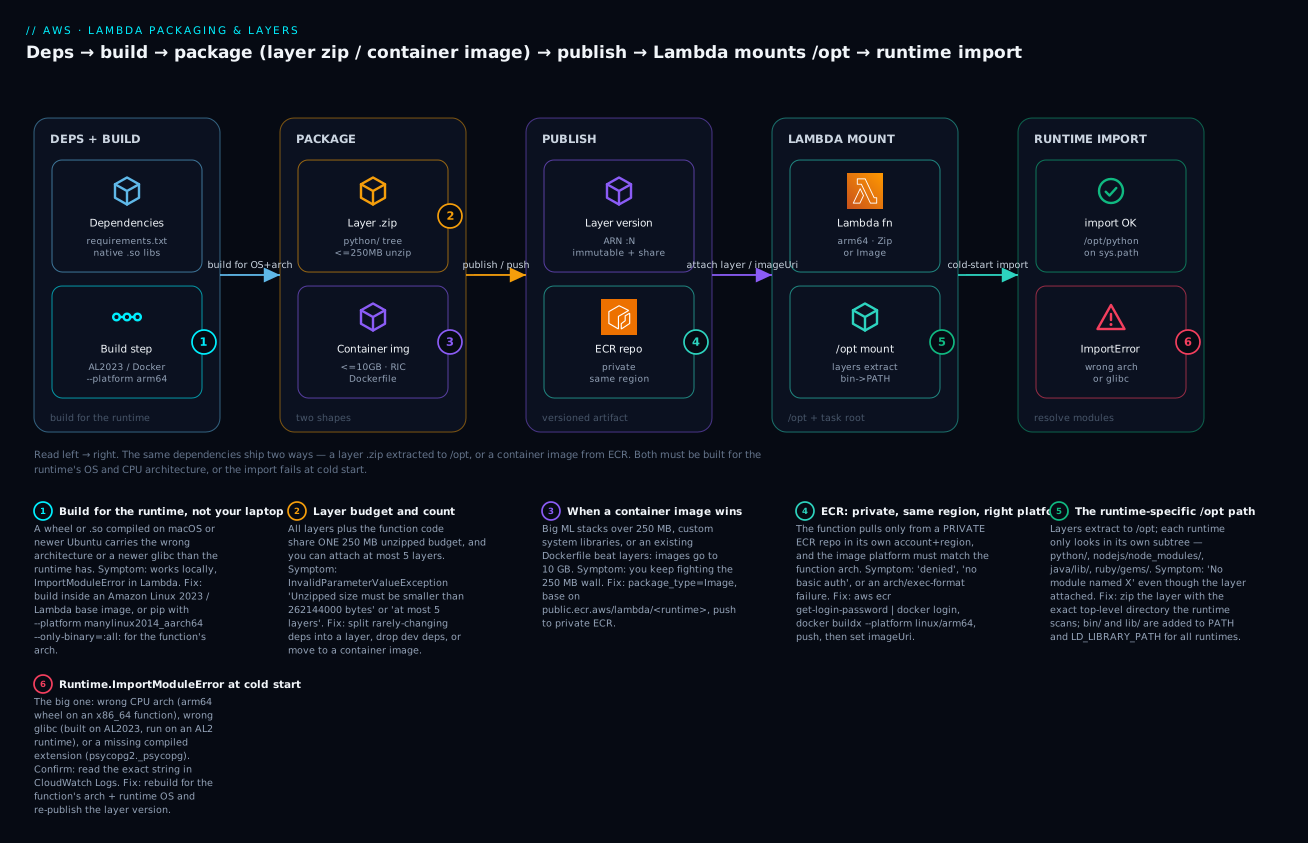
The diagram traces one dependency set from your machine all the way to a successful import, and shows the two shapes it can take on the way. Read it left to right. On the left, in DEPS + BUILD, your requirements.txt and any native .so libraries meet a build step — and this is where the whole article’s central decision is made: you must build for the runtime’s OS (Amazon Linux 2 vs 2023, i.e. glibc 2.26 vs 2.34) and CPU architecture (x86_64 vs arm64), using a Lambda base image or a --platform wheel install, not your laptop’s toolchain. Badge 1 marks this hop because it is where the number-one failure is born.
From there the dependencies take one of two shapes in the PACKAGE zone: a layer .zip laid out with the runtime’s top-level directory (python/, nodejs/node_modules/) and living inside the shared 250 MB unzipped budget (badge 2), or a container image built from a Dockerfile, up to 10 GB, carrying the Runtime Interface Client (badge 3). The layer path flows into PUBLISH as an immutable, ARN-addressable layer version you can share cross-account; the image path flows into a private ECR repository in the same account and region, where authentication and platform-match are the two things that bite (badge 4). Both then converge on the LAMBDA MOUNT zone: at a cold start the function extracts every layer into /opt (badge 5 marks the runtime-specific path that must be exact) and lands your code in the task root. Finally, in RUNTIME IMPORT, the runtime resolves your import — either it finds the module on /opt/python and returns import OK, or the binary is the wrong architecture or glibc and you get Runtime.ImportModuleError (badge 6, the failure this whole article exists to prevent).
Real-world scenario
MedSignalAnalytics, a fictional but very typical health-data startup in Bengaluru, ran a Lambda that ingested wearable-device CSVs from S3, resampled them with pandas, and wrote Parquet back. It worked in dev for months. Then a platform engineer, chasing the ~20% Graviton cost saving, flipped the function’s architecture from x86_64 to arm64 in Terraform and redeployed. Every invocation began failing at cold start: Runtime.ImportModuleError: Unable to import module 'lambda_function': No module named 'pandas._libs.window.aggregations'.
The on-call engineer’s first instinct was wrong — she assumed a bad deploy and rolled back the function code. The code was fine; the code had never been the problem. The pandas layer had been built, once, months earlier, by pip install -t python/ pandas on an x86_64 CI runner. It carried x86_64 ELF binaries. The moment the function became arm64, those binaries were the wrong architecture, and pandas’ compiled _libs could not load. The layer’s compatible_architectures metadata still said x86_64 — advisory only, so nothing had blocked the mismatched attach.
The fix took three commands and a rebuild. They rebuilt the layer inside the arm64 Lambda base image — docker run --rm --platform linux/arm64 -v "$PWD":/lo public.ecr.aws/lambda/python:3.11 pip install -t /lo/python pandas pyarrow — republished it as a new version with --compatible-architectures arm64, and pointed the function at the new ARN. Cold starts went green immediately. Total downtime: 90 minutes, of which 80 was chasing the wrong hypothesis. The retro produced three standing rules: (1) an architecture change is a rebuild, never just a config flip; (2) build every layer inside the Lambda base image for the target arch, in CI, so it can never drift from a developer’s laptop; (3) evaluate the AWS SDK for pandas managed layer, which ships pandas + pyarrow prebuilt for both architectures and would have made the whole incident impossible. Six months later, when they later hit a 300 MB PyTorch requirement for an anomaly-detection model, the same team skipped layers entirely and shipped that function as a container image — 1.9 GB, well under the 10 GB ceiling, impossible to package as a layer at all.
Advantages and disadvantages
Layers:
| Advantages | Disadvantages |
|---|---|
| Share heavy deps across many functions | Count against the 250 MB unzipped budget |
| Update deps without redeploying code | Max 5 per function |
| Smaller, faster function-code deploys | A big layer slows every cold start |
| Immutable, versioned, ARN-addressable | Wrong /opt path = silent module-not-found |
| Cross-account / org sharing | Same-region only; arch/glibc must still match |
Container images:
| Advantages | Disadvantages |
|---|---|
| 10 GB ceiling — fits big ML stacks | Heavier toolchain (Docker + ECR) |
| Install any system library in the image | First-pull cold start is slower |
| Reuse an existing Dockerfile / build story | Must rebuild the image to change a dep |
| Test the exact prod artifact locally with RIE | Private ECR, same region, platform must match |
| Native image scanning + provenance in ECR | ECR storage cost + auth/lifecycle to manage |
When each matters: reach for layers when several functions share the same dependency set and you iterate on it often — one publish-layer-version updates them all. Reach for a container image the moment your unzipped dependencies cross 250 MB, or you need a system package that is painful to hand-carry in /opt/lib. For a small function with a couple of pure-Python deps, do neither — just zip the deps in with the code.
Hands-on lab
You will build a Python layer containing a compiled dependency (cryptography) for arm64, built inside a Lambda-like container so the ELF header is right, publish and attach it, prove the import works, then build the same function as a container image and compare. Everything here is free-tier friendly, but ⚠️ ECR storage and any leftover functions can cost money — do the teardown.
Prerequisites: aws CLI configured, docker running, zip, and a region (ap-south-1 used below).
| Step | You will | Costs money? |
|---|---|---|
| 1–4 | Build + publish a layer, attach, test | No (within free tier) |
| 5–7 | Build + push a container image, deploy | ECR storage (tiny), delete after |
| 8 | Teardown | — |
Step 1 — Create the function and an execution role
REGION=ap-south-1
ACCT=$(aws sts get-caller-identity --query Account --output text)

# Trust policy + role
cat > trust.json <<'EOF'
{"Version":"2012-10-17","Statement":[{"Effect":"Allow","Principal":{"Service":"lambda.amazonaws.com"},"Action":"sts:AssumeRole"}]}
EOF
aws iam create-role --role-name lab-layer-role \
  --assume-role-policy-document file://trust.json
aws iam attach-role-policy --role-name lab-layer-role \
  --policy-arn arn:aws:iam::aws:policy/service-role/AWSLambdaBasicExecutionRole
Write the handler that imports the compiled dependency:
mkdir -p fn && cat > fn/lambda_function.py <<'EOF'
from cryptography.fernet import Fernet
def handler(event, context):
    k = Fernet.generate_key()
    token = Fernet(k).encrypt(b"hello from a compiled dep")
    return {"ok": True, "token_len": len(token)}
EOF
(cd fn && zip -r ../fn.zip .)
Create the function on arm64:
aws lambda create-function --function-name lab-layer-fn \
  --runtime python3.11 --architectures arm64 \
  --handler lambda_function.handler \
  --role arn:aws:iam::$ACCT:role/lab-layer-role \
  --zip-file fileb://fn.zip --region $REGION
Expected: JSON with "State": "Pending" then Active. Invoke it now — it will fail, proving the point:
aws lambda invoke --function-name lab-layer-fn --region $REGION out.json; cat out.json
Expected: Runtime.ImportModuleError: No module named 'cryptography' — the dependency isn’t there yet.
Step 2 — Build the layer inside the arm64 Lambda base image
This is the crux. Build cryptography for arm64, on Amazon Linux, so the ELF matches:
mkdir -p layer
docker run --rm --platform linux/arm64 \
  --entrypoint /bin/bash \
  -v "$PWD/layer":/lo \
  public.ecr.aws/lambda/python:3.11 \
  -c "pip install -t /lo/python cryptography"
Expected: pip installs cryptography and its arm64 .so files under layer/python/. Verify the layout:
ls layer/python/ | head # expect: cryptography cffi ... (packages at top of python/)
Zip it with python/ at the top of the archive:
(cd layer && zip -r ../layer.zip python)
Step 3 — Publish and attach the layer
LAYER_ARN=$(aws lambda publish-layer-version \
  --layer-name lab-crypto-arm64 \
  --zip-file fileb://layer.zip \
  --compatible-runtimes python3.11 \
  --compatible-architectures arm64 \
  --region $REGION --query LayerVersionArn --output text)
echo "$LAYER_ARN"

aws lambda update-function-configuration \
  --function-name lab-layer-fn \
  --layers "$LAYER_ARN" --region $REGION
Expected: an ARN ending :layer:lab-crypto-arm64:1, then the function config shows the layer attached.
Step 4 — Prove the import works
aws lambda invoke --function-name lab-layer-fn --region $REGION out.json; cat out.json
Expected: {"ok": true, "token_len": 140} — the compiled dependency now imports because it was built for the function’s OS and architecture. If you instead built the layer without --platform linux/arm64 on an x86_64 machine, this is exactly where you’d still see ImportModuleError.
Step 5 — Build the same function as a container image
cat > Dockerfile <<'EOF'
FROM public.ecr.aws/lambda/python:3.11
RUN pip install cryptography -t "${LAMBDA_TASK_ROOT}"
COPY fn/lambda_function.py "${LAMBDA_TASK_ROOT}"
CMD ["lambda_function.handler"]
EOF

aws ecr create-repository --repository-name lab-layer-img --region $REGION
aws ecr get-login-password --region $REGION \
  | docker login --username AWS --password-stdin $ACCT.dkr.ecr.$REGION.amazonaws.com

docker buildx build --platform linux/arm64 -t lab-layer-img:latest --load .
docker tag lab-layer-img:latest $ACCT.dkr.ecr.$REGION.amazonaws.com/lab-layer-img:latest
docker push $ACCT.dkr.ecr.$REGION.amazonaws.com/lab-layer-img:latest
Expected: docker login prints Login Succeeded; the push shows layer digests uploaded.
Step 6 — Deploy the container function
aws lambda create-function --function-name lab-img-fn \
  --package-type Image \
  --code ImageUri=$ACCT.dkr.ecr.$REGION.amazonaws.com/lab-layer-img:latest \
  --architectures arm64 \
  --role arn:aws:iam::$ACCT:role/lab-layer-role --region $REGION
Step 7 — Invoke and compare
aws lambda invoke --function-name lab-img-fn --region $REGION outimg.json; cat outimg.json
Expected: the same {"ok": true, "token_len": 140}. You now have the identical behaviour two ways — a 2 MB zip + layer, and a ~250 MB image. For this tiny dependency the layer wins (smaller, faster cold start); the image would only earn its keep if cryptography were instead a multi-hundred-MB ML stack or needed system packages.
Step 8 — Teardown (do this — ECR and functions can cost money)
aws lambda delete-function --function-name lab-layer-fn --region $REGION
aws lambda delete-function --function-name lab-img-fn --region $REGION
aws lambda delete-layer-version --layer-name lab-crypto-arm64 --version-number 1 --region $REGION
aws ecr delete-repository --repository-name lab-layer-img --force --region $REGION
aws iam detach-role-policy --role-name lab-layer-role \
  --policy-arn arn:aws:iam::aws:policy/service-role/AWSLambdaBasicExecutionRole
aws iam delete-role --role-name lab-layer-role
rm -rf fn layer *.zip out*.json trust.json Dockerfile
Expected: each delete returns cleanly; aws ecr describe-repositories no longer lists lab-layer-img.
Common mistakes & troubleshooting
This is the section you keep open during an incident. The playbook first (symptom → root cause → how to confirm → fix), then an error-string reference, then a decision table.
| # | Symptom | Root cause | Confirm (exact command / path) | Fix |
|---|---|---|---|---|
| 1 | Runtime.ImportModuleError: No module named 'X._libs...' / invalid ELF header |
Native dep built for wrong CPU arch (x86_64 wheel on arm64 fn) | CloudWatch Logs error string; aws lambda get-function-configuration --query Architectures vs how the layer was built |
Rebuild for the function arch: --platform linux/arm64 / manylinux2014_aarch64, republish layer |
| 2 | version 'GLIBC_2.34' not found |
Binary built on newer glibc (AL2023/Ubuntu) than the runtime (AL2) | Runtime OS from the runtimes table; check where you built | Build in the matching Lambda base image (public.ecr.aws/lambda/python:3.11 for AL2 runtimes) |
| 3 | No module named 'requests' even though the layer is attached |
Files under wrong /opt path (e.g. at /opt not /opt/python) |
unzip -l layer.zip | head — is python/ at the top? |
Rezip so python/ (or nodejs/node_modules/) is the top-level dir |
| 4 | InvalidParameterValueException: Unzipped size must be smaller than 262144000 bytes |
Function + layers exceed 250 MB unzipped | Sum unzipped sizes of code + all layers | Drop dev deps, split/slim layers, or switch to a container image |
| 5 | RequestEntityTooLargeException on upload |
Zip over 50 MB on direct upload | Zip file size > 50 MB | Upload via S3: --s3-bucket/--s3-key |
| 6 | InvalidParameterValueException adding a 6th layer / at most 5 layers |
More than 5 layers attached | get-function-configuration --query Layers (length) |
Consolidate deps into fewer layers |
| 7 | No module named 'psycopg2._psycopg' |
C extension not compiled for Linux | Logs; check the wheel you shipped | Use psycopg2-binary, aws-psycopg2, or build in a Lambda container |
| 8 | Container deploy: denied / no basic auth credentials on push |
Not logged into ECR | docker push error |
aws ecr get-login-password | docker login --username AWS --password-stdin <acct>.dkr.ecr.<region>.amazonaws.com |
| 9 | Container function fails to start / exec format error |
Image platform ≠ function arch | docker inspect --format '{{.Architecture}}' vs function Architectures |
Rebuild docker buildx --platform linux/arm64 (or amd64) to match |
| 10 | Source image ... is not valid on create |
Image not in private ECR same account/region, or from Docker Hub | ECR repo region + account | Push to a private ECR repo in the function’s region |
| 11 | “Works locally, fails in Lambda” | You bundled host-built binaries (macOS/venv) | file layer/python/*/*.so shows Mach-O or wrong arch |
Rebuild in a Lambda base image / --platform; never copy a local virtualenv |
| 12 | Cold starts suddenly 3–8s slower | A huge layer (100–200 MB) is downloaded+unzipped each cold start | Init Duration in logs; layer size via get-layer-version |
Slim the layer, split rarely-used deps, or move to a container image (cached) |
| 13 | Two layers, ImportError/wrong version of a shared dep |
Version conflict — both layers ship the same package | unzip -l both layers; note which is later in --layers |
Keep one copy; later-listed layer wins on collision — order intentionally |
| 14 | Layer update didn’t take effect | Function still pinned to the old layer version ARN | get-function-configuration --query Layers shows :N-1 |
update-function-configuration --layers <new ARN>; ARNs are version-pinned |
Error / status reference
| Error string | Meaning | Most likely cause | Fix |
|---|---|---|---|
Runtime.ImportModuleError |
Handler’s module/import failed at init | Missing dep or wrong-arch/glibc binary | Fix packaging (arch/glibc/path) |
invalid ELF header |
Binary is not a valid Linux ELF for this CPU | macOS/wrong-arch binary shipped | Rebuild for target arch on Amazon Linux |
version 'GLIBC_2.XX' not found |
Binary needs newer glibc than runtime has | Built on AL2023/newer Ubuntu, run on AL2 | Build in matching base image |
cannot import name '_imaging' / _psycopg |
Compiled C extension missing/wrong | Native dep not built for Lambda | Prebuilt manylinux wheel or container build |
Unzipped size must be smaller than 262144000 bytes |
Over 250 MB unzipped | Fat layers + code | Slim or go container |
RequestEntityTooLargeException |
Over 50 MB on direct upload | Big zip uploaded inline | Use S3 |
at most 5 layers |
Sixth layer attached | Too many layers | Consolidate |
denied: requested access ... is denied |
ECR push/pull auth failed | Not logged in / no IAM perms | docker login via ECR + IAM policy |
exec format error |
Wrong CPU arch for the image | Image platform ≠ function arch | Rebuild with matching --platform |
No space left on device |
/tmp full |
Big downloads into 512 MB /tmp |
Raise EphemeralStorage up to 10240 |
Decision table — localise the failure fast
| If you see… | It’s probably… | Do this first |
|---|---|---|
| Import fails only after an arch flip | Wrong-arch native binary | Rebuild the layer for the new arch |
| Import fails only after a runtime upgrade | glibc/ABI change (AL2→AL2023) | Rebuild in the new base image |
| Import fails immediately, first deploy | Wrong /opt path or missing dep |
unzip -l the layer; check the top dir |
| Publish/update rejected | Size limit (50 MB or 250 MB) | Check zipped vs unzipped totals |
| Container won’t create/start | ECR/region/platform | Verify private ECR, same region, matching arch |
| Works cold sometimes, slow always | Oversized layer | Measure Init Duration; slim the layer |
The two nastiest real failures deserve prose. First, the wrong-architecture native dependency — it is nasty because nothing warns you. The layer’s compatible_architectures is advisory metadata, not an enforced gate, so an x86_64-built layer attaches happily to an arm64 function and only detonates at the first cold-start import. The tell is that the failure appeared right after someone changed architectures, and the fix is always a rebuild for the new arch, never a code change. Second, the glibc mismatch — you upgraded from python3.11 (Amazon Linux 2, glibc 2.26) to python3.12 (Amazon Linux 2023, glibc 2.34), or the reverse, and a compiled dependency that was fine now throws GLIBC_... not found. The mechanism: binaries built against a newer glibc cannot run on an older one. The fix is to rebuild the dependency inside the base image that matches the target runtime, which is precisely why building in public.ecr.aws/lambda/<runtime> — rather than on your laptop — is the habit that prevents both classes at once.
Best practices
- Build dependencies in the Lambda base image for the target arch, in CI — never zip your laptop’s virtualenv. This one habit prevents the entire ELF/glibc failure class.
- Pin the architecture explicitly (
architectures = ["arm64"]) in IaC and build the layer to match; treat any arch change as a rebuild, not a config flip. - Prefer arm64/Graviton for new functions — ~20% cheaper per GB-second and often faster — once your dependencies build cleanly for it.
- Split rarely-changing deps into a layer and keep fast-changing function code in the deployment package, so a code change is a small, fast deploy.
- Slim every layer: exclude tests,
__pycache__,.dist-infoyou don’t need, and dev-only dependencies; the 250 MB budget and cold-start time both thank you. - Use managed layers where they exist — the AWS SDK for pandas layer, AWS Parameters and Secrets, Lambda Insights — instead of hand-building the same thing.
- Version and pin layer ARNs; never rely on “latest” behaviour — publishing bumps the version and functions stay on the ARN you set.
- Reach for a container image at 250 MB, for custom system libraries, or when you already have a Dockerfile — don’t fight the layer budget with heroics.
- Enable ECR scan-on-push and immutable tags for image-based functions; treat the image as a supply-chain artifact.
- Record
source_code_hashin Terraform so a changed zip actually redeploys; a stale hash silently ships old code. - Test container images locally with the RIE before deploying, to catch handler/entrypoint mistakes without a cloud round-trip.
- Cache large runtime downloads in
/tmpbehind a module-global so warm invocations reuse them, and raise ephemeral storage rather than bloating the package.
Security notes
Packaging is a supply-chain surface, so treat artifacts like the sensitive things they are.
| Concern | Practice |
|---|---|
| Least-privilege sharing | Grant lambda:GetLayerVersion only to the specific accounts/org that need a shared layer; avoid --principal '*' without an --organization-id |
| No secrets in the package | Never bake API keys or DB passwords into a layer or image; use Secrets Manager / SSM Parameter Store at runtime |
| Image scanning | Enable ECR scan-on-push and act on CVEs; use immutable tags so a digest can’t be silently swapped |
| Provenance | Prefer AWS-published or your-own-built layers over unverified public ARNs; pin exact versions |
| Dependency integrity | Pin versions (requirements.txt with hashes / lockfiles); a compromised transitive dep runs in your function’s role |
| Execution role | The function’s IAM role is what a malicious dependency would inherit — keep it minimal, no wildcards |
| Private registries | Container images pull from your private ECR; don’t depend on public images at runtime |
| Region/account isolation | Keep prod layers/images in prod accounts; cross-account grants are explicit and auditable |
The subtle risk is transitive trust: a layer you attach runs with your function’s permissions. A popular but compromised PyPI package, shipped in a shared layer used by fifty functions, executes in fifty roles. Pin versions, scan images, prefer first-party or self-built layers, and keep execution roles least-privilege so the blast radius of a bad dependency is small.
Cost & sizing
Packaging choices touch the bill in three places: storage, cold-start compute, and architecture.
| Cost driver | How it’s charged | Guidance |
|---|---|---|
| Layer storage | Counts toward Lambda storage quota (default 75 GB/account of functions+layers) | Delete unused versions; they accumulate silently |
| ECR storage | ~USD 0.10 / GB-month (~₹8.5) | Lifecycle-policy old image tags; a 2 GB image ≈ USD 0.20/mo |
| Cold-start compute | Init Duration is billed as part of duration | Slim layers / cache images to cut it |
| Architecture | arm64 ≈ 20% cheaper per GB-second than x86_64 | Move eligible functions to Graviton |
| Data transfer (pull) | ECR cross-region/out charges apply | Keep the repo in the function’s region |
/tmp runtime downloads |
Adds billed duration on cold start | Cache in module-global; size ephemeral to need |
Rough figures. Lambda storage for functions and layers has a default account quota of 75 GB — plenty, but old layer versions and image tags pile up, so prune them. ECR storage is about USD 0.10/GB-month (~₹8.5): a single 2 GB container image costs roughly USD 0.20/month (~₹17) to store — trivial, but multiply by dozens of tags across environments and a lifecycle policy earns its keep. The real money is compute: a 200 MB layer that adds 3 seconds of Init Duration to every cold start, on a function memory of 1 GB invoked tens of thousands of times a day, is a measurable line item — slimming that layer or moving to a cached container image is a direct saving. And the easy 20% is Graviton: once your dependencies build for arm64, the per-GB-second rate is about a fifth cheaper for the same work.
Free-tier note: Lambda’s perpetual free tier (1M requests + 400,000 GB-seconds/month) covers all the lab work above; ECR’s free tier includes 500 MB-month of private storage for 12 months, so the lab image sits inside it if you delete it promptly.
Interview & exam questions
Q1. What are the Lambda deployment-package size limits? 50 MB for a direct zip upload, 250 MB unzipped for function code plus all layers combined (262,144,000 bytes), and 10 GB for a container image in ECR. To exceed 50 MB on the zip path you stage the artifact in S3; the 250 MB unzipped rule still applies. (DVA-C02, SAA-C03)
Q2. How many layers can a function have, and what do they share? Up to five, and they share the single 250 MB unzipped budget with the function code. Layers extract to /opt and are merged in list order (later wins on file collisions). (DVA-C02)
Q3. A function imports pandas and fails with ImportModuleError after moving to arm64. Why? The pandas layer was built for x86_64; its compiled C extensions are the wrong CPU architecture for the arm64 runtime. The compatible_architectures field is advisory, so the mismatch wasn’t blocked. Rebuild the layer for arm64 (--platform linux/arm64 / manylinux2014_aarch64) and republish. (DVA-C02)
Q4. What is /opt and why does the path inside a layer matter? /opt is where Lambda extracts all attached layers. Each runtime scans a specific subdirectory — /opt/python, /opt/nodejs/node_modules, /opt/java/lib — so files must sit under the right top-level directory in the layer zip or the runtime won’t find them. /opt/bin and /opt/lib are added to PATH and LD_LIBRARY_PATH for all runtimes. (DVA-C02)
Q5. When does a container image beat layers? When unzipped dependencies exceed 250 MB (large ML stacks), when you need system libraries that are painful to ship in /opt/lib, or when you already have a Dockerfile. Images go to 10 GB and let you dnf install system packages. (SAA-C03, DVA-C02)
Q6. What causes version 'GLIBC_2.34' not found? A native binary compiled against a newer glibc (Amazon Linux 2023, glibc 2.34, or a recent Ubuntu) attached to a runtime on Amazon Linux 2 (glibc 2.26). Build the dependency inside the base image that matches the target runtime. (DVA-C02)
Q7. What must a container image provide that a zip package doesn’t? It must implement the Lambda Runtime API, via the Runtime Interface Client (RIC) — AWS base images include it; custom base images must add it. The image also carries the handler as its CMD and needs no separate Runtime/Handler. (DVA-C02)
Q8. How do you share a layer with another account? Grant lambda:GetLayerVersion on the layer version via add-layer-version-permission, specifying the principal account (or * with an --organization-id). The consuming function references the full layer ARN and must be in the same region. (DVA-C02)
Q9. Why prefer arm64/Graviton, and what’s the catch? ~20% cheaper per GB-second and often faster; the catch is that every native dependency must be built for arm64 — pure-Python/JS code is portable, compiled code is not. (SAA-C03)
Q10. Your zip is 70 MB and the CLI rejects it. What now? The 50 MB limit is on direct upload. Upload the zip to S3 and reference it with --s3-bucket/--s3-key (or S3Bucket/S3Key in a layer publish); the 250 MB unzipped rule still binds. (DVA-C02)
Q11. How do you update a shared dependency across many functions at once? Publish a new layer version and repoint each function’s --layers to the new ARN (ARNs are version-pinned; publishing does not auto-upgrade attached functions). This is the main reason to use a layer instead of bundling. (DVA-C02)
Q12. Where does /tmp fit in packaging? It is 512 MB (up to 10 GB) ephemeral runtime scratch, not part of the deployment package. Downloading a large model into /tmp at cold start is a legitimate way to dodge the 250 MB package limit, at the cost of cold-start download time. (DVA-C02)
Quick check
- What is the exact unzipped size limit for function code plus all layers, and how many layers max?
- Where must Python dependencies sit inside a layer zip for the runtime to find them?
- You built a
numpylayer on your Apple-Silicon Mac and the function (x86_64) throwsinvalid ELF header. What’s wrong and how do you fix it? - Name two situations where a container image is the right choice over layers.
- How do you deploy a zip that is 60 MB compressed?
Answers
- 250 MB unzipped (262,144,000 bytes) shared across code and all layers; 5 layers max.
- Under
python/at the top of the zip (extracts to/opt/python, which the runtime scans);python/lib/python3.x/site-packages/also works. - The wheel is arm64 (built on Apple Silicon) but the function is x86_64 — wrong CPU architecture. Rebuild for x86_64:
pip install --platform manylinux2014_x86_64 --only-binary=:all: -t python numpy, or build in the x86_64 Lambda base image, and republish. - Any two: dependencies exceed 250 MB unzipped (large ML stacks); you need custom system libraries; you already have a Dockerfile; you want to test the exact prod artifact locally with RIE.
- It exceeds the 50 MB direct-upload limit — stage it in S3 and deploy with
--s3-bucket/--s3-key(still under 250 MB unzipped).
Glossary
| Term | Definition |
|---|---|
| Deployment package | The artifact you deploy to Lambda: a zip or a container image |
| Layer | A zip archive of shared code/deps extracted to /opt; up to 5 per function |
| Layer version | An immutable, numbered publish of a layer, addressed by ARN |
/opt |
The directory where all attached layers are merged at runtime |
Task root (/var/task) |
Where the function’s own code is extracted |
PackageType |
Zip (runtime + handler) or Image (ECR image URI) |
| Container image | An OCI image in ECR implementing the Lambda Runtime API; up to 10 GB |
| ECR | Elastic Container Registry — private registry Lambda pulls images from |
| RIC | Runtime Interface Client — lets a container talk to the Lambda Runtime API |
| RIE | Runtime Interface Emulator — run/test a Lambda container image locally |
| manylinux | A wheel-compatibility tag encoding the minimum glibc a Python wheel needs |
| glibc | The GNU C library; Amazon Linux 2 has 2.26, Amazon Linux 2023 has 2.34 |
| ELF | Executable and Linkable Format — the Linux binary format; arch- and libc-specific |
| Graviton / arm64 | AWS Arm CPUs; ~20% cheaper per GB-second, requires arm64-built native deps |
Ephemeral storage (/tmp) |
512 MB–10 GB per-environment scratch disk, separate from the package |
Next steps
- Make the packaged function fast and reliable: AWS Lambda: Memory, Timeout & Concurrency Tuning.
- Diagnose runtime failures beyond packaging: Troubleshooting AWS Lambda: Errors, Timeouts & Cold Starts.
- Revisit the fundamentals if any step felt shaky: AWS Lambda: Your First Function, Hands-On.
- See where Lambda fits against other compute: AWS Compute: EC2 vs Lambda vs ECS vs EKS.
- Wire these functions into event-driven pipelines: AWS Lambda Patterns: Event-Driven Functions.