Quick take: AWS CodeDeploy is the traffic-shifting engine that turns a scary “flip everything at once and pray” release into a gradual, watched, automatically-reversible one. It runs on three very different compute platforms — EC2/On-Premises (the CodeDeploy agent,
appspec.yml, in-place or blue/green via a replacement fleet), ECS (blue/green only, a second target group and an ALB listener shift between task sets), and Lambda (alias traffic shifting across two versions). On ECS and Lambda you get canary (Canary10Percent5Minutes) and linear (Linear10PercentEvery1Minute) configs, lifecycle hooks that run pre-traffic and post-traffic validation Lambdas, and automatic rollback the instant a wired CloudWatch alarm goesALARM. Get the target-group pairing, the hook’sPutLifecycleEventHookExecutionStatuscall, or the alarm wiring wrong and you will watch a deployment hang forever at “waiting for traffic,” or worse, a broken revision take 100% of production with no rollback in sight.
A payments team I advised shipped a “one-line config change” to their ECS service at 14:00 on a Tuesday using a plain ECS rolling deploy. The new task passed its container health check — it booted, it answered /healthz with 200 — so ECS happily replaced every old task. What the health check did not catch was that the change pointed the service at the wrong Redis endpoint, so every real checkout returned 500. By the time the pager fired, 100% of tasks were the bad revision and the only way back was another full rolling deploy, another five minutes of downtime, and a very awkward incident review. The fix was not a better health check. It was CodeDeploy blue/green with a canary: shift 10% of production to the new task set, run a pre-traffic Lambda that drives a real checkout, watch a CloudWatch 5xx alarm for five minutes, and if anything smells wrong, reroute the listener back to the old task set in seconds — because the old tasks were never terminated.
This article is the production-grade, exam-grade tour of CodeDeploy done right. You will learn the object model (application → deployment group → deployment → revision, driven by an appspec file); the three compute platforms and their genuinely different mechanics; every deployment configuration (AllAtOnce, Canary, Linear, and custom); the full lifecycle event hook order and how a hook Lambda must report back; the ALB / target-group swap and bake / termination-wait window; automatic rollback on a CloudWatch alarm or a failed hook, and manual rollback; and where CodeDeploy plugs into CodePipeline. Then you will build a real ECS blue/green canary end to end — two target groups behind an ALB, a deployment group with ECSCanary10Percent5Minutes, a pre-traffic validation hook, and an alarm-driven auto-rollback — deploy a new task definition, watch traffic shift, and deliberately trigger a rollback. Everything is aws CLI plus Terraform plus a real appspec.yaml, with a teardown that leaves nothing billable behind.
By the end you will stop treating a deploy as an atomic gamble. You will localise a stuck rollout to the exact hop — an unhealthy green target group, a hook Lambda that forgot to call back, an alarm nobody wired, or an appspec whose container name does not match the task definition — and fix it because you understand what each piece is for.
What problem this solves
You have a new build that passed CI. Now it has to reach production without taking the site down if it is subtly broken. The naive path — replace all running copies at once — has three fatal properties: the blast radius is 100% (a bad revision serves every user), the rollback is slow (you must build and deploy the old version again, minutes of exposure), and the only quality gate is a shallow health check (a process that boots and answers a ping can still be returning 500 to real requests). Teams paper over this with “deploy at 2 a.m.” and “watch the dashboard,” which is not a strategy; it is a hope.
AWS CodeDeploy replaces the gamble with a controlled, observable state machine. Instead of swapping everything, it stands up the new version alongside the old, shifts a slice of live traffic to it, runs your validation code at defined checkpoints, watches your CloudWatch alarms, and only then shifts the rest — or, at the first sign of trouble, reroutes traffic back to the untouched old version in seconds and marks the deployment failed. The unit of exposure drops from “everyone” to “10% for five minutes,” and rollback stops being a redeploy and becomes a listener flip (ECS) or an alias weight change (Lambda).
What breaks without it, or with it misconfigured: a config typo takes all of production because there was no canary; a memory leak that only appears under real load ships fully because the health check was a TCP ping; a rollback “should have fired” but did not because no alarm was ever attached to the deployment group; a green fleet never receives traffic because its target group is unhealthy and the deployment hangs for an hour before failing; a hook Lambda throws and the whole deployment rolls back even though the app is fine, because the function had the wrong IAM permission. Every one of these is a CodeDeploy concept — traffic-shift config, alarm wiring, target-group health, hook contract — and every one is in this guide.
Who hits this: any team past “click deploy and hope” — services with real users where five minutes of a broken revision is a real incident; regulated shops that need an auditable, gated release; and anyone wiring a proper CI/CD pipeline where the deploy stage must be safe by construction. It bites hardest on teams who adopt blue/green because a blog told them to, copy a config, and then have no mental model when the deployment hangs at “waiting for traffic” or the rollback they were promised silently never happens.
Here is the shape of what CodeDeploy gives you across its three worlds — internalise this table and the rest of the article has an obvious home.
| Compute platform | Deploy styles | How new version appears | Traffic shift mechanism | Rollback = |
|---|---|---|---|---|
| EC2/On-Premises | In-place or blue/green | Agent installs revision on instances (in-place) or a replacement fleet (blue/green) | ALB/CLB deregister-register, or all-at-once on the box | Redeploy last-good (in-place); reroute to original fleet (blue/green) |
| ECS | Blue/green only | A new task set with the new task def | ALB/NLB listener shifts from blue TG to green TG | Reroute prod listener back to blue task set (seconds) |
| Lambda | Blue/green only (traffic-shift) | A new function version | Alias weight moves 0→100% across two versions | Move alias weight back to the old version (seconds) |
Learning objectives
By the end of this article you can:
- Explain the CodeDeploy object model — application, deployment group, deployment, deployment configuration, revision, appspec — and say what each owns.
- Describe the three compute platforms and their distinct mechanics: EC2/On-Prem in-place vs blue/green with the agent and
appspec.yml; ECS task-set blue/green with two target groups and a listener shift; Lambda alias shifting across versions. - Choose the right deployment configuration — AllAtOnce, Canary (
Canary10Percent5Minutes), Linear (Linear10PercentEvery1Minute), or a custom config — per platform and per risk appetite. - Author appspec files for all three platforms and wire lifecycle event hooks —
BeforeInstall,AfterInstall,AfterAllowTestTraffic,BeforeAllowTraffic,AfterAllowTraffic,ValidateService— including pre-traffic and post-traffic validation Lambdas that report status viaPutLifecycleEventHookExecutionStatus. - Configure automatic rollback on a CloudWatch alarm or a failed deployment/hook, and perform a manual rollback with
stop-deployment --auto-rollback-enabled. - Reason about the ALB/target-group swap, the bake time / termination-wait window, and when the original version is finally terminated.
- Integrate CodeDeploy into CodePipeline as a gated deploy stage.
- Build a full ECS blue/green canary in a hands-on lab with
aws deploy/ecs/elbv2, Terraform, and a realappspec.yaml; deploy, watch the shift, trigger a rollback, and tear it down. - Run a symptom → confirm → fix playbook for stuck deployments, failed hooks, rollbacks that did not fire, capacity shortfalls, appspec mismatches, and IAM.
Prerequisites & where this fits
You should be comfortable with the aws CLI v2 and a configured profile, and able to apply a small Terraform config. You need a working mental model of an Application Load Balancer — listeners, target groups, and health checks — because ECS blue/green is a controlled listener shift between two target groups; keep Application Load Balancer & Target Groups Hands-On nearby. You should know how an ECS service runs tasks from a task definition behind an ALB, from Amazon ECS on Fargate: Deploy Your First Service Behind an ALB — this article changes how that service deploys by handing the rollout to CodeDeploy. For the Lambda platform you should understand versions, aliases, and concurrency, covered in Lambda: Memory, Timeout & Concurrency Tuning. IAM roles and policies — the CodeDeploy service role and the hook Lambda’s execution role — are assumed from IAM Users, Groups, Roles & Policies Hands-On.
This sits in the DevOps track as the deployment half of a delivery pipeline. The build half — source, CodeBuild, artifacts, and stitching stages together — is the wave sibling CodePipeline & CodeBuild CI/CD Hands-On; that article ends its pipeline at a deploy action, and CodeDeploy is what that action calls. When a green task set will not go healthy, the diagnosis overlaps heavily with ECS: Task Fails to Start Troubleshooting and the ALB 5xx work in the ALB 502/503/504 playbook.
Here is the build order — what must exist before a CodeDeploy ECS blue/green deployment can run.
| Building block | Must exist first | Provided by | This article |
|---|---|---|---|
| VPC + 2 public + 2 private subnets | Account, region | Networking baseline | Assumed |
| ALB + prod listener + test listener | VPC, subnets, SG | ALB article | Created in lab |
Two target groups (blue + green, type=ip) |
ALB | This article | Created in lab |
| ECS cluster + task definition | Region, image | ECS article | Assumed/created |
ECS service with deploymentController = CODE_DEPLOY |
Cluster, TGs | This article | Created in lab |
CodeDeploy service role (AWSCodeDeployRoleForECS) |
IAM | This article | Created in lab |
| CloudWatch alarm on green 5xx/latency | Metrics | This article | Created in lab |
| Pre-traffic hook Lambda + its role | Lambda | This article | Created in lab |
| CodeDeploy application + deployment group | All above | This article | Created in lab |
Core concepts
CodeDeploy has a small, precise vocabulary that people blur together. Nail these and every setting later has an obvious home.
A CodeDeploy application is just a name plus a compute platform (Server for EC2/On-Prem, ECS, or Lambda). It is a container for deployment groups; it does nothing on its own. A deployment group is where all the real configuration lives: which targets (an ASG/tag set, or an ECS cluster+service, or a Lambda function), which deployment configuration, which service role, the load-balancer info, the blue/green settings, the alarms, and the auto-rollback rules. A deployment is one execution — take this revision and roll it out to that deployment group. A revision is the thing being deployed: for EC2 it is an application bundle in S3/GitHub (appspec.yml + files); for ECS and Lambda it is essentially the appspec content itself (which references the new task definition or function version). A deployment configuration is the rules of the shift — all-at-once, canary, linear, or a custom minimum-healthy rule.
The single most important idea is that CodeDeploy does not build anything and, on ECS/Lambda, does not run your containers or code — it orchestrates traffic. On ECS it tells the ALB listener to move from one target group to another; on Lambda it moves an alias’s weight between two versions; on EC2 it drives the agent to lay down files and run your hook scripts, and optionally deregister/register instances at the load balancer. Everything CodeDeploy “validates” is validated by your hook code, and everything it rolls back on is an alarm or failure you wired.
Here is the object model in one place.
| Object | What it is | Scope | You configure |
|---|---|---|---|
| Application | Name + compute platform (Server/ECS/Lambda) |
Region/account | Name, platform |
| Deployment group | All targeting + rollout + rollback config | An application | Targets, config, role, LB info, alarms, rollback |
| Deployment configuration | The traffic-shift rule set | Region/account (predefined or custom) | AllAtOnce / Canary / Linear / custom |
| Deployment | One rollout execution | A deployment group | Revision, config override, description |
| Revision | What is deployed (appspec + artifacts) | A deployment | S3/GitHub bundle (EC2) or appspec content (ECS/Lambda) |
| appspec | The per-revision instruction file | A revision | Files, hooks (EC2); resources + hooks (ECS/Lambda) |
| Lifecycle event | A named checkpoint in the rollout | A deployment | Which hook script/Lambda runs there |
And the three deployment styles, which are easy to confuse with the configs. A style is how the new version appears (in-place vs blue/green); a configuration is how fast traffic moves (all-at-once vs canary vs linear). They compose.
| Term | Meaning | Available on |
|---|---|---|
| In-place | Update the same instances: stop, install, restart | EC2/On-Prem only |
| Blue/green | Stand up a new fleet/task-set/version, shift traffic, retire old | EC2 (replacement ASG), ECS, Lambda |
| AllAtOnce | Shift 100% in one step | All platforms |
| Canary | Shift X% now, wait N minutes, then the rest | ECS, Lambda |
| Linear | Shift X% every N minutes until 100% | ECS, Lambda |
| Custom config | Your own increments or min-healthy rule | All (rule differs by platform) |
The three compute platforms
CodeDeploy’s biggest trap is assuming the platforms work alike. They do not. The application, deployment group, config, and rollback concepts are shared, but what physically happens is different for each.
EC2 / On-Premises: the agent, in-place, and blue/green
On EC2 and on-prem hosts, CodeDeploy works through the CodeDeploy agent — a Ruby process that polls for work, downloads the revision bundle from S3 or GitHub, and runs the lifecycle scripts named in appspec.yml. No agent, no deployment: the number-one EC2 failure is a host with a stopped or missing agent.
In-place deployments update the same instances in the deployment group: for each instance (respecting the deployment config’s batch size), the agent runs ApplicationStop, lays down the new files, runs AfterInstall/ApplicationStart/ValidateService, and — if a load balancer is attached — deregisters the instance before and re-registers it after, so it takes no traffic mid-update. Blue/green on EC2 provisions a new set of instances (usually by copying the Auto Scaling group), installs the revision there, registers the green fleet with the load balancer, shifts traffic, and then (optionally, after a wait) terminates the original blue instances. Blue/green needs spare capacity and a load balancer; in-place is cheaper but exposes the instance during the swap. On-prem hosts support in-place only — there is no ASG to copy.
The appspec.yml (note: YAML, filename must be exactly appspec.yml, at the root of the bundle) drives it all.
appspec.yml section |
Purpose | Example value |
|---|---|---|
version |
Reserved; always 0.0 |
0.0 |
os |
Target OS | linux or windows |
files |
source → destination copy map |
- source: / destination: /var/www/app |
permissions |
Owner/group/mode/ACL on copied files | mode: 755, owner: nginx |
hooks |
Scripts to run at each lifecycle event | AfterInstall: - location: scripts/install_deps.sh |
hooks[].timeout |
Per-script timeout (seconds, default 3600) | timeout: 300 |
hooks[].runas |
User to run the script as | runas: root |
The EC2 lifecycle has a fixed order. Some events are reserved (CodeDeploy owns them; you cannot attach scripts). Learn which are scriptable — this is a classic exam question.
| # | Lifecycle event | Scriptable? | In-place | Blue/green (green) | Blue/green (blue) |
|---|---|---|---|---|---|
| 1 | ApplicationStop |
Yes | ✅ (old revision’s hooks) | — | — |
| 2 | DownloadBundle |
Reserved | ✅ | ✅ | — |
| 3 | BeforeInstall |
Yes | ✅ | ✅ | — |
| 4 | Install |
Reserved | ✅ | ✅ | — |
| 5 | AfterInstall |
Yes | ✅ | ✅ | — |
| 6 | ApplicationStart |
Yes | ✅ | ✅ | — |
| 7 | ValidateService |
Yes | ✅ | ✅ | — |
| 8 | BeforeAllowTraffic |
Yes | (with LB) | ✅ | — |
| 9 | AllowTraffic |
Reserved | (with LB) | ✅ | — |
| 10 | AfterAllowTraffic |
Yes | (with LB) | ✅ | — |
| 11 | BeforeBlockTraffic |
Yes | — | — | ✅ |
| 12 | BlockTraffic |
Reserved | — | — | ✅ |
| 13 | AfterBlockTraffic |
Yes | — | — | ✅ |
The agent itself has a handful of things worth memorising for incidents.
| Agent detail | Value / path |
|---|---|
| Install source | https://aws-codedeploy-<region>.s3.<region>.amazonaws.com/latest/install |
| Service (Amazon Linux) | systemctl status codedeploy-agent |
| Agent log | /var/log/aws/codedeploy-agent/codedeploy-agent.log |
| Deployment/script log | /opt/codedeploy-agent/deployment-root/deployment-logs/codedeploy-agent-deployments.log |
| Config file | /etc/codedeploy-agent/conf/codedeployagent.yml |
| Required instance IAM | S3 read on the bundle bucket (via instance profile) |
ECS: task sets, two target groups, and the listener shift
On ECS, CodeDeploy does blue/green only — there is no in-place CodeDeploy deployment for ECS (rolling updates are done by ECS’s own deployment controller, not CodeDeploy). The magic is task sets: your ECS service (created with deploymentController.type = CODE_DEPLOY) can hold more than one task set. The current one (blue) serves production. When you deploy, CodeDeploy creates a green task set with the new task definition, registers its tasks in a second target group, and then shifts the ALB listener from the blue target group to the green one according to the deployment configuration. Optionally a test listener lets you send synthetic traffic to green before any production traffic moves.
So an ECS blue/green needs, at minimum: an ALB, two target groups (both targetType=ip for awsvpc), a production listener, an optional test listener, and the service wired to CodeDeploy. The appspec.yaml is small — it names the new task definition and the container/port the load balancer targets.
ECS appspec.yaml key |
Purpose |
|---|---|
version |
Always 0.0 |
Resources[].TargetService.Type |
AWS::ECS::Service |
Properties.TaskDefinition |
ARN of the new task definition revision |
Properties.LoadBalancerInfo.ContainerName |
Must match a container name in the task def |
Properties.LoadBalancerInfo.ContainerPort |
The container port the TG health-checks |
Properties.PlatformVersion |
Fargate platform version (e.g. 1.4.0) |
Hooks[] |
Lambda ARNs for BeforeInstall, AfterInstall, AfterAllowTestTraffic, BeforeAllowTraffic, AfterAllowTraffic |
ECS blue/green has its own hook set (all Lambda functions, no shell scripts — there are no instances to run scripts on).
| ECS lifecycle event | When it runs | Typical use |
|---|---|---|
BeforeInstall |
Before the green task set is created | Pre-flight checks, warm a cache |
AfterInstall |
After green task set created, before any traffic | Schema migration guardrails |
AfterAllowTestTraffic |
After test listener points at green | Validate green via the test listener (synthetic requests) |
BeforeAllowTraffic |
Before production traffic shifts to green | Pre-traffic gate (final go/no-go) |
AfterAllowTraffic |
After 100% production traffic on green | Post-traffic smoke tests, notify |
The ECS blue/green components map cleanly onto the load balancer.
| Component | Blue (current) | Green (new) |
|---|---|---|
| Task set | Serving production | Created by CodeDeploy from new task def |
| Target group | tg-blue (registered on prod listener) |
tg-green (registered on test listener, then prod) |
| Listener | Prod listener starts on blue | Shifts to green per config |
| Test listener | (idle) | Points at green immediately for AfterAllowTestTraffic |
| Lifetime after cutover | Kept for termination wait, then deleted | Becomes the new blue |
Lambda: alias traffic shifting across versions
On Lambda, blue/green means alias traffic shifting. A Lambda alias (say live) points at a version; CodeDeploy updates the alias so it points at two versions with weights, then walks the weight from the old version to the new version per the config. Callers keep invoking …:function:kv-api:live and never know two versions are in play. Because it is just an alias weight, rollback is instantaneous — move the weight back to the old version.
Lambda appspec.yaml key |
Purpose |
|---|---|
Resources[].<name>.Type |
AWS::Lambda::Function |
Properties.Name |
Function name |
Properties.Alias |
Alias whose weight is shifted (e.g. live) |
Properties.CurrentVersion |
The old version (blue) |
Properties.TargetVersion |
The new version (green) |
Hooks[] |
BeforeAllowTraffic, AfterAllowTraffic Lambda ARNs |
Lambda has exactly two hook events — there are no install/test-traffic phases, only pre- and post-traffic.
| Lambda lifecycle event | When it runs | Typical use |
|---|---|---|
BeforeAllowTraffic |
Before any weight moves to the new version | Pre-traffic validation (invoke the new version directly, check output) |
AfterAllowTraffic |
After 100% weight on the new version | Post-traffic smoke test, integration check |
| Lambda mechanic | Detail |
|---|---|
| Version | Immutable snapshot of code+config, numbered (1, 2, …); publish with --publish |
| Alias | Mutable pointer with optional weighted routing across two versions |
| Traffic shift | CodeDeploy sets AdditionalVersionWeights on the alias, ramping 0→100% |
| Rollback | Alias weight returns to CurrentVersion — no cold start of a new fleet |
| Provisioned concurrency | Attach to the alias/version so shifted traffic hits warm instances |
Deployment configurations
The deployment configuration is the “how fast and how safe” dial. AWS ships predefined ones; you can also create custom configs. Canary and linear exist only on ECS and Lambda (EC2 uses batch/min-healthy rules instead).
The predefined ECS and Lambda configs — memorise the naming pattern, because the exam and the CLI both use these exact strings.
| Config name | Platform | Behaviour |
|---|---|---|
CodeDeployDefault.ECSAllAtOnce |
ECS | 100% to green in one shift |
CodeDeployDefault.ECSCanary10Percent5Minutes |
ECS | 10% for 5 min, then 90% |
CodeDeployDefault.ECSCanary10Percent15Minutes |
ECS | 10% for 15 min, then 90% |
CodeDeployDefault.ECSLinear10PercentEvery1Minutes |
ECS | +10% every 1 min (10 steps) |
CodeDeployDefault.ECSLinear10PercentEvery3Minutes |
ECS | +10% every 3 min |
CodeDeployDefault.LambdaAllAtOnce |
Lambda | 100% immediately |
CodeDeployDefault.LambdaCanary10Percent5Minutes |
Lambda | 10% for 5 min, then 90% |
CodeDeployDefault.LambdaCanary10Percent30Minutes |
Lambda | 10% for 30 min, then 90% |
CodeDeployDefault.LambdaLinear10PercentEvery1Minute |
Lambda | +10% every 1 min |
CodeDeployDefault.LambdaLinear10PercentEvery10Minutes |
Lambda | +10% every 10 min |
EC2/On-Prem uses minimum healthy hosts instead of percentages-over-time. The three predefined configs and the custom rule:
| Config name | Platform | Behaviour |
|---|---|---|
CodeDeployDefault.AllAtOnce |
EC2/On-Prem | Deploy to all instances simultaneously (min healthy = 0) |
CodeDeployDefault.HalfAtATime |
EC2/On-Prem | Up to half at once (min healthy = 50%) |
CodeDeployDefault.OneAtATime |
EC2/On-Prem | One instance at a time (max availability, slowest) |
| custom | EC2/On-Prem | minimumHealthyHosts as HOST_COUNT (e.g. 3) or FLEET_PERCENT (e.g. 75) |
The trade-off among the strategies, so you can pick per workload:
| Strategy | Blast radius | Speed | Extra capacity needed | Best for |
|---|---|---|---|---|
| AllAtOnce | 100% at once | Fastest | None (in-place) / full (blue/green) | Dev/test, stateless, low-risk |
| Canary | X% then rest | Medium | Full green fleet | Prod services wanting a quick bake then commit |
| Linear | Even steps | Slowest | Full green fleet | High-risk changes, long observation window |
| OneAtATime (EC2) | 1 host | Slow | None | Small fleets, max availability, in-place |
| HalfAtATime (EC2) | 50% | Fast | None | Larger fleets tolerating half-capacity |
A custom Lambda/ECS deployment config lets you set your own single-step canary or linear increment:
| Custom config field | Values | Meaning |
|---|---|---|
computePlatform |
Lambda / ECS / Server |
Platform the config applies to |
trafficRoutingConfig.type |
TimeBasedCanary / TimeBasedLinear / AllAtOnce |
Shape of the shift |
canaryPercentage / linearPercentage |
1–99 | Step size |
canaryInterval / linearInterval |
Minutes | Wait between the canary and the rest / between linear steps |
minimumHealthyHosts (Server) |
HOST_COUNT or FLEET_PERCENT + value |
Min instances kept in service (EC2) |
# A custom ECS canary: 25% for 10 minutes, then the rest
aws deploy create-deployment-config \
  --deployment-config-name ECSCanary25Percent10Minutes \
  --compute-platform ECS \
  --traffic-routing-config '{
    "type": "TimeBasedCanary",
    "timeBasedCanary": { "canaryPercentage": 25, "canaryInterval": 10 }
  }'
Lifecycle event hooks
Hooks are where your judgment enters the rollout. On EC2 a hook is a shell/PowerShell script in the bundle; on ECS and Lambda it is a Lambda function whose ARN you name in the appspec. The two most valuable are the pre-traffic hook (BeforeAllowTraffic) and, for ECS, the test-traffic hook (AfterAllowTestTraffic) — they gate production traffic on real validation, and the post-traffic hook (AfterAllowTraffic) confirms the new version behaves under full load.
The full hook order for an ECS blue/green deployment (Lambda is the last two rows only):
| # | Hook event | Green traffic state | What good validation does here |
|---|---|---|---|
| 1 | BeforeInstall |
Green not created | Pre-checks; confirm dependencies/feature flags |
| 2 | AfterInstall |
Green created, no traffic | Confirm task set healthy in tg-green |
| 3 | AfterAllowTestTraffic |
Test listener → green | Drive synthetic transactions via the test URL |
| 4 | BeforeAllowTraffic |
Prod still on blue | Final go/no-go before real users see green |
| 5 | AfterAllowTraffic |
Prod 100% on green | Smoke test under real load; alert on anomalies |
A hook Lambda has a strict contract. CodeDeploy invokes it with an event carrying a DeploymentId and a LifecycleEventHookExecutionId, and then waits — the hook must call back with a status or the event times out (default 1 hour) and the deployment fails. This callback is the single most common reason a “working” hook still fails a deployment.
| Hook contract element | Detail |
|---|---|
| Event payload | { "DeploymentId": "...", "LifecycleEventHookExecutionId": "..." } |
| Required callback | codedeploy:PutLifecycleEventHookExecutionStatus |
| Valid statuses | Succeeded / Failed |
If Failed |
The deployment stops and rolls back (if auto-rollback on failure is enabled) |
| If no callback | Event times out (default 3600s) → treated as failed |
| Required IAM (hook role) | codedeploy:PutLifecycleEventHookExecutionStatus + whatever the test calls |
# Pre-traffic hook: validate green via the ALB test listener, then report status.
import os, json, urllib.request, boto3

cd = boto3.client("codedeploy")

def handler(event, context):
    exec_id = event["LifecycleEventHookExecutionId"]
    dep_id  = event["DeploymentId"]
    status  = "Succeeded"
    try:
        # Hit the green task set through the TEST listener URL (port 9000)
        req = urllib.request.Request(os.environ["TEST_URL"] + "/checkout/healthz")
        with urllib.request.urlopen(req, timeout=5) as r:
            body = r.read().decode()
        if r.status != 200 or json.loads(body).get("redis") != "ok":
            status = "Failed"   # green is up but its dependency is wrong -> block the shift
    except Exception as e:
        print("validation error:", e)
        status = "Failed"
    # MUST report back or the deployment hangs for an hour then fails
    cd.put_lifecycle_event_hook_execution_status(
        deploymentId=dep_id,
        lifecycleEventHookExecutionId=exec_id,
        status=status,
    )
    return {"status": status}
Per-event timeouts differ by hook and platform; the practical numbers:
| Event | Default timeout | Notes |
|---|---|---|
| EC2 script hook | 3600s (set per-hook in appspec) | Long ApplicationStop on a stuck old app is a classic hang |
| ECS/Lambda hook Lambda | 3600s (the event) | Bounded also by the Lambda function’s own timeout |
AfterAllowTestTraffic |
3600s | Keep validation fast (seconds), not near the limit |
| Whole deployment | Up to the config’s shift duration + waits | Termination wait extends the group’s busy time |
Traffic shifting and the ALB / target-group swap
On ECS, “shifting traffic” is precisely: CodeDeploy calls elbv2:ModifyListener to change the production listener’s default action from forwarding to tg-blue to forwarding to tg-green — in one step (AllAtOnce) or via weighted forwarding across the two target groups (canary/linear). The test listener, if configured, is pointed at green immediately so AfterAllowTestTraffic can validate it in isolation.
The blue/green traffic-shift settings on the deployment group control the swap and the retirement of the old version.
| Setting | Values | Default | Effect |
|---|---|---|---|
deploymentReadyOption.actionOnTimeout |
CONTINUE_DEPLOYMENT / STOP_DEPLOYMENT |
CONTINUE_DEPLOYMENT |
Auto-start the prod shift, or wait for a manual reroute |
deploymentReadyOption.waitTimeInMinutes |
0–3000 | — | With STOP_DEPLOYMENT, how long to wait for manual approval before cancelling |
terminateBlueInstancesOnDeploymentSuccess.action |
TERMINATE / KEEP_ALIVE |
TERMINATE |
Whether the old (blue) task set/fleet is deleted after success |
terminateBlueInstancesOnDeploymentSuccess.terminationWaitTimeInMinutes |
0–2880 (48h) | 60 (console) | Bake window: how long blue is kept after 100% cutover |
greenFleetProvisioningOption.action (EC2) |
DISCOVER_EXISTING / COPY_AUTO_SCALING_GROUP |
— | How the green fleet is created |
The termination wait is your safety net and your bill. While blue is alive, a manual or alarm-driven rollback is a listener flip back — seconds. Once blue is terminated, rollback means a fresh deployment of the old revision — minutes, and it re-provisions capacity. Set it long enough to trust the new version under real traffic (15–60 min is common), short enough not to double your Fargate cost for hours.
| Phase | Blue task set | Green task set | Prod listener | Rollback cost |
|---|---|---|---|---|
| Deploy start | Serving 100% | Being created | → blue | n/a |
| Test traffic | Serving 100% | Healthy in tg-green |
→ blue (test → green) | Cancel deployment |
| Canary 10% | Serving 90% | Serving 10% | weighted 90/10 | Flip → blue (seconds) |
| Cutover 100% | Idle, alive | Serving 100% | → green | Flip → blue (seconds) |
| Termination wait | Idle, alive (bake) | Serving 100% | → green | Flip → blue (seconds) |
| After wait | Deleted | Now “blue” | → green | Redeploy old (minutes) |
Automatic and manual rollback
Rollback is why blue/green is worth the extra capacity. CodeDeploy can roll back automatically on a set of events, or you can trigger it manually. Automatic rollback is configured with two blocks on the deployment group: autoRollbackConfiguration (which events trigger a rollback) and alarmConfiguration (which CloudWatch alarms to watch).
| Auto-rollback event | Fires when |
|---|---|
DEPLOYMENT_FAILURE |
A lifecycle event/hook fails, or the deployment otherwise fails |
DEPLOYMENT_STOP_ON_ALARM |
Any associated CloudWatch alarm enters ALARM during the deployment |
DEPLOYMENT_STOP_ON_REQUEST |
You stop the deployment and request a rollback |
alarmConfiguration field |
Values | Meaning |
|---|---|---|
enabled |
true/false | Turn alarm monitoring on |
alarms[].name |
Alarm name(s) | The CloudWatch alarms to watch (up to 10) |
ignorePollAlarmFailure |
true/false | If CloudWatch is unreachable, proceed (true) or stop (false) |
The rollback itself is not an in-place undo — CodeDeploy creates a new deployment that restores the last known good version. On ECS/Lambda while blue/old is still alive, that “new deployment” is really just rerouting the listener/alias back, so it is near-instant; on EC2 in-place it redeploys the previous revision’s bundle.
| Platform | What rollback does | Speed |
|---|---|---|
| ECS | Reroute prod listener back to blue task set (if not yet terminated) | Seconds |
| Lambda | Move alias weight back to CurrentVersion |
Seconds |
| EC2 blue/green | Reroute LB to original fleet (if kept alive) | Seconds–minutes |
| EC2 in-place | New deployment of the last-good revision bundle | Minutes |
Manual rollback is a stop-with-rollback:
# Stop the in-flight deployment AND roll back to the previous version
aws deploy stop-deployment \
  --deployment-id d-EXAMPLE123 \
  --auto-rollback-enabled
The nastiest rollback failure is the one that does not happen: the deployment group has autoRollbackConfiguration enabled for DEPLOYMENT_STOP_ON_ALARM, but no alarm is attached (or the alarm watches the wrong dimension — the blue target group instead of green, so it never sees the bad traffic). CodeDeploy shifts 100%, everything is “successful,” and the broken revision serves users. Always wire the alarm to a metric that reflects the green version’s health (e.g. HTTPCode_Target_5XX_Count filtered to the green target group, or per-version Lambda Errors), and test it by deploying a deliberately broken revision in staging.
CodePipeline integration
CodeDeploy is the deploy stage of a pipeline. In CodePipeline & CodeBuild CI/CD Hands-On, a source stage pulls code, a build stage produces artifacts (an image pushed to ECR, plus taskdef.json and appspec.yaml), and the deploy stage hands those to CodeDeploy. For ECS the action provider is CodeDeployToECS; for EC2 it is CodeDeploy.
| Pipeline element | ECS (CodeDeployToECS) |
EC2 (CodeDeploy) |
|---|---|---|
| Input artifacts | appspec.yaml, taskdef.json, image detail |
The S3/GitHub bundle |
ApplicationName |
CodeDeploy application | Same |
DeploymentGroupName |
The blue/green group | The in-place/blue-green group |
TaskDefinitionTemplateArtifact |
Artifact holding taskdef.json |
n/a |
AppSpecTemplateArtifact |
Artifact holding appspec.yaml |
n/a |
| Image placeholder | IMAGE1_NAME replaced with the built image URI |
n/a |
| Manual approval | Optional gate action before the deploy | Optional |
The pipeline pattern that pairs best with blue/green is: build → manual approval (optional) → CodeDeploy canary with alarm rollback. The pipeline does not need to know about task sets or listeners — it just points at the deployment group, and the group’s config carries the canary/alarm/rollback behaviour.
Architecture at a glance
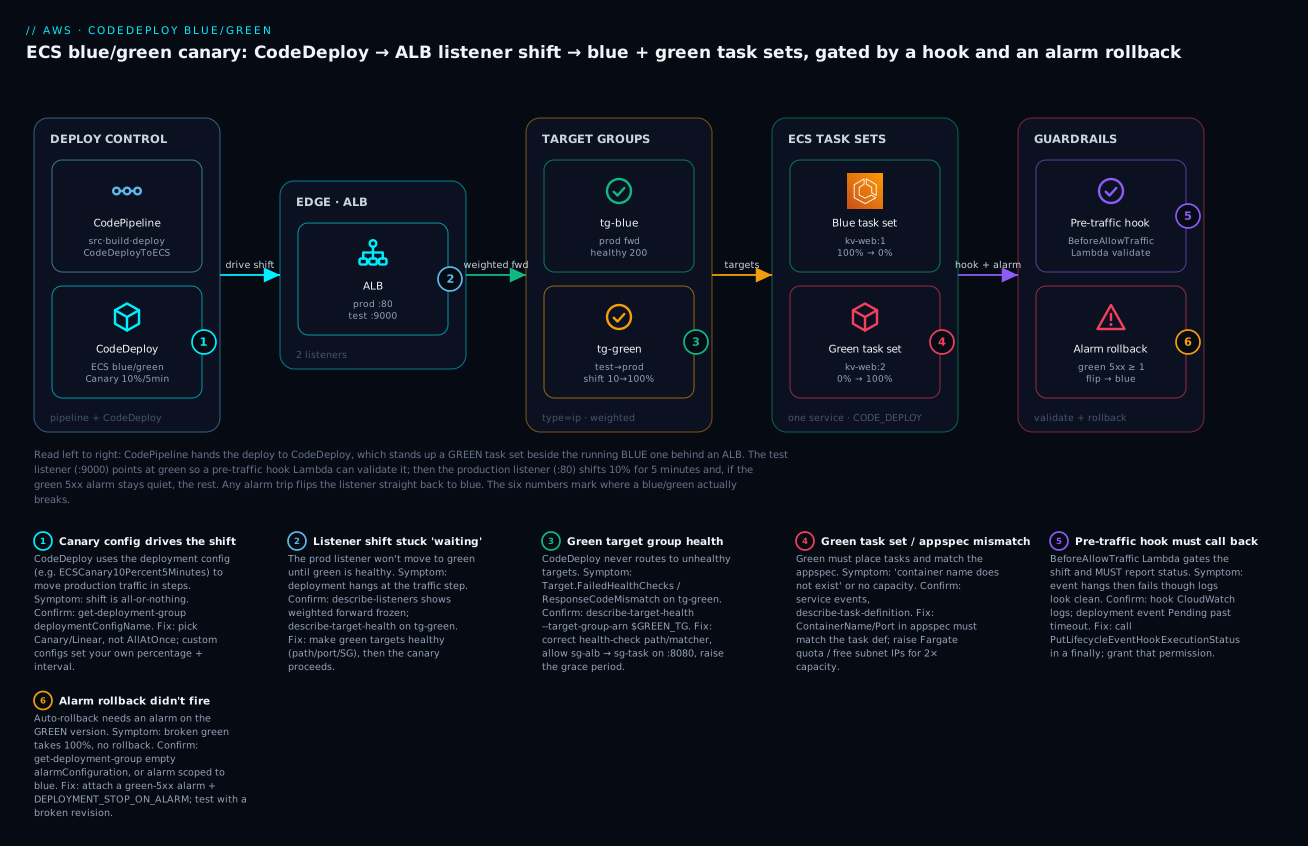
The diagram below is exactly what you build in the lab, read left to right along the traffic path. CodePipeline/CodeDeploy kicks off a deployment; CodeDeploy creates a green task set from the new task definition alongside the running blue one, both fronted by an ALB. The production listener starts forwarding to the blue target group; a test listener points at green so the BeforeAllowTraffic hook Lambda can validate it privately. CodeDeploy then shifts the production listener from blue to green as a canary (10% for five minutes, then the rest) via weighted forwarding. Throughout, a CloudWatch alarm on the green target group’s 5XX count is watched; if it trips, auto-rollback flips the listener straight back to blue in seconds. The numbered badges mark the six places a blue/green most often breaks — the pipeline trigger, the green task set health, the hook callback, the listener shift, the alarm wiring, and the termination-wait window — each narrated in the legend as symptom · confirm · fix.
Real-world scenario
Meridian Rides, a mid-size mobility startup, ran its trip-pricing service on ECS Fargate behind an ALB, deploying with plain ECS rolling updates. Their pricing container booted in ~8 seconds and answered /healthz with 200 as soon as the web server was up — but pricing depended on a downstream surge-multiplier service reached by an endpoint injected at task start. One Friday a refactor moved that endpoint into a new environment variable, and a stale task definition shipped with the variable empty. The container was “healthy” (the web server ran), so ECS rolled every task to the new revision. For four minutes, every trip priced at the fallback base fare with no surge — a five-figure revenue hit and a flood of “why is my ride so cheap?” that ops first read as a good problem. Rollback meant another rolling deploy: four more minutes of chaos in the other direction.
The postmortem action was CodeDeploy blue/green with a canary and a real pre-traffic gate. They converted the ECS service to deploymentController.type = CODE_DEPLOY, added a second target group and a test listener on port 9000, and wrote a BeforeAllowTraffic hook Lambda that did what the health check never could: it called the green task set through the test listener with three canned trips and asserted the returned fare included a non-zero surge component. They chose ECSCanary10Percent5Minutes and wired a CloudWatch alarm on the green target group’s HTTPCode_Target_5XX_Count plus a custom SurgeApplied business metric, with DEPLOYMENT_STOP_ON_ALARM auto-rollback and a 20-minute termination wait.
Six weeks later the same class of bug recurred — a different engineer, a different empty variable. This time the green task set came up healthy, the test listener routed to it, and the pre-traffic hook drove its three trips: all three returned base-fare-only. The hook called PutLifecycleEventHookExecutionStatus with Failed. CodeDeploy never shifted a single real user to green; it marked the deployment failed and deleted the green task set. Production stayed 100% on the known-good blue task set the entire time. Total customer impact: zero. The engineer got a red pipeline and a hook log showing exactly which assertion failed, fixed the variable, and redeployed. The difference between the two incidents was not better code review — it was moving the quality gate from “does the process boot” to “does a real transaction produce a correct result, before anyone sees it.”
The one scar: their first version set the alarm on the blue target group (habit from the old single-TG world), so an early test rollback did not fire. They caught it in staging by deploying a deliberately 500-ing revision and watching the canary sail through. Lesson logged: the alarm must watch green.
Advantages and disadvantages
CodeDeploy blue/green is not free — it trades capacity and complexity for safety. Weigh it explicitly.
| Advantages | Disadvantages |
|---|---|
| Blast radius shrinks from 100% to a canary slice | Needs ~2× capacity during the deploy (blue + green) |
| Rollback is a listener/alias flip — seconds, not a redeploy | More moving parts: two TGs, listeners, hooks, alarms, roles |
| Your own hook code gates real traffic (not just a ping) | Hook Lambdas are code you must write, test, and secure |
| Alarm-driven auto-rollback with no human in the loop | A mis-wired alarm gives false confidence (silent no-rollback) |
| Test listener validates green in isolation before users | Longer end-to-end deploy time (canary + bake windows) |
| Clean CodePipeline integration as a gated deploy stage | ECS blue/green disallows some features mid-deploy; more IAM |
| Auditable, repeatable, config-as-data deployments | Extra ALB/target-group and transient Fargate cost |
When each matters: choose blue/green + canary for any service where a bad revision is a real incident — payments, auth, pricing, anything customer-facing at scale. Choose AllAtOnce/in-place for dev, internal tools, and stateless jobs where a fast redeploy is an acceptable rollback and the extra capacity is not worth it. The decision across the four common strategies:
| If your situation is… | Prefer | Why |
|---|---|---|
| Customer-facing prod, real revenue/SLA | Blue/green + Canary/Linear + alarm rollback | Minimal blast radius, instant rollback, gated |
| High-risk change, want a long watch | Blue/green + Linear (10%/step) | Slow, even ramp with many observation points |
| Small EC2 fleet, no spare capacity | In-place OneAtATime |
No extra hosts; one box down at a time |
| Dev/test, internal tooling | AllAtOnce (in-place or blue/green) | Fastest; redeploy is an acceptable rollback |
| Serverless API behind an alias | Lambda Canary + pre-traffic hook | Cheap, instant weight-based rollback |
Hands-on lab
You will build an ECS Fargate blue/green deployment driven by CodeDeploy: two target groups behind an ALB (a production listener on :80 and a test listener on :9000), an ECS service under the CodeDeploy controller, a Canary10Percent5Minutes deployment group with a pre-traffic validation hook and a CloudWatch-alarm auto-rollback, then you deploy a new task definition, watch the canary shift, and finally trigger a rollback. Set your region and a name prefix first.
⚠️ Cost note: an ALB (~$0.0225/hr + LCU), two Fargate tasks (blue + green briefly ~4 tasks), and a NAT gateway if your tasks are in private subnets accrue charges. CodeDeploy itself is free for ECS/Lambda/EC2 (on-prem is
$0.02/instance update). Budget a few rupees per hour and run the teardown. Nothing here is free-tier for the ALB/NAT; a couple of hours costs well under ₹50.
export AWS_REGION=ap-south-1
export PREFIX=kv-bg
export CLUSTER=$PREFIX-cluster
export SERVICE=$PREFIX-web
export ACCOUNT=$(aws sts get-caller-identity --query Account --output text)
Step 1 — Prerequisites (VPC, ALB, two target groups, two listeners)
Assume a VPC with two public and two private subnets already exists (from your networking baseline). Capture their IDs, then create the ALB and two IP target groups.
export VPC=vpc-0abc...            # your VPC
export SUBNET_PUB="subnet-0aaa subnet-0bbb"   # public, 2 AZ
export SG_ALB=sg-0alb...          # ALB SG: inbound :80 and :9000 from you
export SG_TASK=sg-0task...        # task SG: inbound :8080 from SG_ALB

# ALB
ALB_ARN=$(aws elbv2 create-load-balancer --name $PREFIX-alb \
  --type application --subnets $SUBNET_PUB --security-groups $SG_ALB \
  --query 'LoadBalancers[0].LoadBalancerArn' --output text)

# Blue + Green target groups (targetType=ip for awsvpc)
BLUE_TG=$(aws elbv2 create-target-group --name $PREFIX-blue --protocol HTTP \
  --port 8080 --vpc-id $VPC --target-type ip --health-check-path /healthz \
  --query 'TargetGroups[0].TargetGroupArn' --output text)
GREEN_TG=$(aws elbv2 create-target-group --name $PREFIX-green --protocol HTTP \
  --port 8080 --vpc-id $VPC --target-type ip --health-check-path /healthz \
  --query 'TargetGroups[0].TargetGroupArn' --output text)

# Production listener :80 -> blue ; Test listener :9000 -> green
PROD_LISTENER=$(aws elbv2 create-listener --load-balancer-arn $ALB_ARN \
  --protocol HTTP --port 80 \
  --default-actions Type=forward,TargetGroupArn=$BLUE_TG \
  --query 'Listeners[0].ListenerArn' --output text)
TEST_LISTENER=$(aws elbv2 create-listener --load-balancer-arn $ALB_ARN \
  --protocol HTTP --port 9000 \
  --default-actions Type=forward,TargetGroupArn=$GREEN_TG \
  --query 'Listeners[0].ListenerArn' --output text)
Expected: four ARNs (ALB, two target groups, two listeners). The prod listener forwards to blue; the test listener to green.
Step 2 — IAM: the CodeDeploy service role and the hook Lambda role
CodeDeploy needs a service role it assumes to manipulate ECS and the ALB. For ECS blue/green, attach the managed AWSCodeDeployRoleForECS.
cat > cd-trust.json <<'JSON'
{ "Version": "2012-10-17", "Statement": [{
  "Effect": "Allow", "Principal": {"Service": "codedeploy.amazonaws.com"},
  "Action": "sts:AssumeRole" }] }
JSON

aws iam create-role --role-name $PREFIX-codedeploy \
  --assume-role-policy-document file://cd-trust.json
aws iam attach-role-policy --role-name $PREFIX-codedeploy \
  --policy-arn arn:aws:iam::aws:policy/AWSCodeDeployRoleForECS
CD_ROLE=arn:aws:iam::$ACCOUNT:role/$PREFIX-codedeploy
The hook Lambda needs its own execution role with the crucial codedeploy:PutLifecycleEventHookExecutionStatus permission (plus basic logging).
cat > lambda-trust.json <<'JSON'
{ "Version": "2012-10-17", "Statement": [{
  "Effect": "Allow", "Principal": {"Service": "lambda.amazonaws.com"},
  "Action": "sts:AssumeRole" }] }
JSON
aws iam create-role --role-name $PREFIX-hook --assume-role-policy-document file://lambda-trust.json
aws iam attach-role-policy --role-name $PREFIX-hook \
  --policy-arn arn:aws:iam::aws:policy/service-role/AWSLambdaBasicExecutionRole
aws iam put-role-policy --role-name $PREFIX-hook --policy-name cd-callback \
  --policy-document '{"Version":"2012-10-17","Statement":[{"Effect":"Allow","Action":"codedeploy:PutLifecycleEventHookExecutionStatus","Resource":"*"}]}'
Step 3 — The pre-traffic hook Lambda
Package the validation function from the Core-concepts snippet (it hits the test listener and asserts a real response), then create it. Point TEST_URL at your ALB DNS on :9000.
ALB_DNS=$(aws elbv2 describe-load-balancers --load-balancer-arns $ALB_ARN \
  --query 'LoadBalancers[0].DNSName' --output text)
zip hook.zip hook.py     # hook.py = the handler shown earlier

HOOK_ARN=$(aws lambda create-function --function-name $PREFIX-pretraffic \
  --runtime python3.12 --handler hook.handler --timeout 30 \
  --role arn:aws:iam::$ACCOUNT:role/$PREFIX-hook \
  --environment "Variables={TEST_URL=http://$ALB_DNS:9000}" \
  --zip-file fileb://hook.zip --query FunctionArn --output text)
Step 4 — The CloudWatch alarm on the GREEN target group
Wire the alarm to green — the version about to take traffic. Any 5XX from green during the deploy trips it.
# Extract the ALB + green TG dimension suffixes CloudWatch expects
ALB_DIM=$(aws elbv2 describe-load-balancers --load-balancer-arns $ALB_ARN \
  --query 'LoadBalancers[0].LoadBalancerArn' --output text | sed 's#.*:loadbalancer/##')
GTG_DIM=$(echo $GREEN_TG | sed 's#.*:##')

aws cloudwatch put-metric-alarm --alarm-name $PREFIX-green-5xx \
  --namespace AWS/ApplicationELB --metric-name HTTPCode_Target_5XX_Count \
  --statistic Sum --period 60 --evaluation-periods 1 --threshold 1 \
  --comparison-operator GreaterThanOrEqualToThreshold --treat-missing-data notBreaching \
  --dimensions Name=LoadBalancer,Value=$ALB_DIM Name=TargetGroup,Value=$GTG_DIM
Step 5 — The ECS service under the CodeDeploy controller
The service must be created with deploymentController=CODE_DEPLOY and initially registered against the blue target group. (Assumes cluster and an initial task def kv-web:1 exist — see the ECS Fargate hands-on.)
aws ecs create-service --cluster $CLUSTER --service-name $SERVICE \
  --task-definition kv-web:1 --desired-count 2 --launch-type FARGATE \
  --deployment-controller type=CODE_DEPLOY \
  --load-balancers targetGroupArn=$BLUE_TG,containerName=web,containerPort=8080 \
  --network-configuration "awsvpcConfiguration={subnets=[subnet-0ccc,subnet-0ddd],securityGroups=[$SG_TASK],assignPublicIp=DISABLED}"
Step 6 — CodeDeploy application + deployment group (Canary + alarm + rollback)
Create the application, then a deployment group that ties together the service, both target groups, both listeners, the canary config, the alarm, and auto-rollback. Use a JSON input file — the config is large.
aws deploy create-application --application-name $PREFIX-app --compute-platform ECS

cat > dg.json <<JSON
{
  "applicationName": "$PREFIX-app",
  "deploymentGroupName": "$PREFIX-dg",
  "serviceRoleArn": "$CD_ROLE",
  "deploymentConfigName": "CodeDeployDefault.ECSCanary10Percent5Minutes",
  "deploymentStyle": { "deploymentType": "BLUE_GREEN", "deploymentOption": "WITH_TRAFFIC_CONTROL" },
  "ecsServices": [ { "clusterName": "$CLUSTER", "serviceName": "$SERVICE" } ],
  "blueGreenDeploymentConfiguration": {
    "deploymentReadyOption": { "actionOnTimeout": "CONTINUE_DEPLOYMENT" },
    "terminateBlueInstancesOnDeploymentSuccess": { "action": "TERMINATE", "terminationWaitTimeInMinutes": 15 }
  },
  "loadBalancerInfo": {
    "targetGroupPairInfoList": [ {
      "targetGroups": [ {"name": "$PREFIX-blue"}, {"name": "$PREFIX-green"} ],
      "prodTrafficRoute": { "listenerArns": [ "$PROD_LISTENER" ] },
      "testTrafficRoute": { "listenerArns": [ "$TEST_LISTENER" ] }
    } ]
  },
  "alarmConfiguration": { "enabled": true, "alarms": [ {"name": "$PREFIX-green-5xx"} ] },
  "autoRollbackConfiguration": { "enabled": true, "events": [ "DEPLOYMENT_FAILURE", "DEPLOYMENT_STOP_ON_ALARM" ] }
}
JSON

aws deploy create-deployment-group --cli-input-json file://dg.json
Step 7 — Deploy a new task definition (watch the canary shift)
Register a new task definition revision (kv-web:2, e.g. a new image tag), write the appspec.yaml that names it and the hooks, and create the deployment.
# appspec.yaml
version: 0.0
Resources:
  - TargetService:
      Type: AWS::ECS::Service
      Properties:
        TaskDefinition: "arn:aws:ecs:ap-south-1:ACCOUNT:task-definition/kv-web:2"
        LoadBalancerInfo:
          ContainerName: "web"
          ContainerPort: 8080
        PlatformVersion: "1.4.0"
Hooks:
  - BeforeAllowTraffic: "arn:aws:lambda:ap-south-1:ACCOUNT:function:kv-bg-pretraffic"
# Inline the appspec content into the deployment revision
APPSPEC=$(cat appspec.yaml | python3 -c 'import sys,json;print(json.dumps(sys.stdin.read()))')

DEP_ID=$(aws deploy create-deployment --application-name $PREFIX-app \
  --deployment-group-name $PREFIX-dg \
  --revision "{\"revisionType\":\"AppSpecContent\",\"appSpecContent\":{\"content\":$APPSPEC}}" \
  --query deploymentId --output text)
echo "deployment: $DEP_ID"

# Watch it: green task set comes up, test listener validates, hook runs, then canary 10%->100%
aws deploy get-deployment --deployment-id $DEP_ID \
  --query 'deploymentInfo.{status:status,event:deploymentOverview}'
watch -n 15 "aws deploy get-deployment --deployment-id $DEP_ID --query 'deploymentInfo.status' --output text"
Expected: status walks Created → InProgress (green task set healthy, test traffic, BeforeAllowTraffic hook Succeeded, prod listener shifts 10% for 5 min, then 100%) → Succeeded. Watch the prod listener’s weighted forward change in the console, or:
aws elbv2 describe-listeners --listener-arns $PROD_LISTENER \
  --query 'Listeners[0].DefaultActions[0].ForwardConfig.TargetGroups'
# During canary you'll see BOTH target groups with weights (e.g. blue 90 / green 10)
Step 8 — Trigger a rollback
Two ways to see rollback fire. (a) Manual: while the canary is mid-shift, stop with rollback. (b) Alarm-driven: deploy a revision that 500s and let the green-5xx alarm trip.
# (a) Manual rollback mid-deployment
aws deploy stop-deployment --deployment-id $DEP_ID --auto-rollback-enabled
# CodeDeploy reroutes the prod listener back to blue and marks the deployment Stopped.

# (b) Alarm-driven: deploy kv-web:3 (a deliberately broken image), then generate load to :80.
#     The green tasks return 5xx, the alarm goes ALARM, CodeDeploy auto-rolls back.
aws deploy get-deployment --deployment-id $DEP_ID \
  --query 'deploymentInfo.{status:status,rollbackInfo:rollbackInfo}'
Expected: the deployment ends Stopped with a rollbackInfo block naming the rollback deployment; the prod listener points 100% at blue again; production never served the bad green tasks beyond the canary slice (and with a fast alarm, not even that in practice).
Step 9 — Terraform equivalent
The whole thing as code. Terraform creates the app, deployment group, alarm, and service; you still run aws deploy create-deployment (Terraform does not create deployments).
resource "aws_codedeploy_app" "web" {
  name             = "kv-bg-app"
  compute_platform = "ECS"
}

resource "aws_cloudwatch_metric_alarm" "green_5xx" {
  alarm_name          = "kv-bg-green-5xx"
  namespace           = "AWS/ApplicationELB"
  metric_name         = "HTTPCode_Target_5XX_Count"
  statistic           = "Sum"
  period              = 60
  evaluation_periods  = 1
  threshold           = 1
  comparison_operator = "GreaterThanOrEqualToThreshold"
  treat_missing_data  = "notBreaching"
  dimensions = {
    LoadBalancer = aws_lb.this.arn_suffix
    TargetGroup  = aws_lb_target_group.green.arn_suffix
  }
}

resource "aws_codedeploy_deployment_group" "web" {
  app_name               = aws_codedeploy_app.web.name
  deployment_group_name  = "kv-bg-dg"
  service_role_arn       = aws_iam_role.codedeploy.arn
  deployment_config_name = "CodeDeployDefault.ECSCanary10Percent5Minutes"

  deployment_style {
    deployment_option = "WITH_TRAFFIC_CONTROL"
    deployment_type   = "BLUE_GREEN"
  }

  ecs_service {
    cluster_name = aws_ecs_cluster.main.name
    service_name = aws_ecs_service.web.name
  }

  blue_green_deployment_config {
    deployment_ready_option { action_on_timeout = "CONTINUE_DEPLOYMENT" }
    terminate_blue_instances_on_deployment_success {
      action                           = "TERMINATE"
      termination_wait_time_in_minutes = 15
    }
  }

  load_balancer_info {
    target_group_pair_info {
      prod_traffic_route { listener_arns = [aws_lb_listener.prod.arn] }
      test_traffic_route { listener_arns = [aws_lb_listener.test.arn] }
      target_group { name = aws_lb_target_group.blue.name }
      target_group { name = aws_lb_target_group.green.name }
    }
  }

  alarm_configuration {
    enabled = true
    alarms  = [aws_cloudwatch_metric_alarm.green_5xx.alarm_name]
  }

  auto_rollback_configuration {
    enabled = true
    events  = ["DEPLOYMENT_FAILURE", "DEPLOYMENT_STOP_ON_ALARM"]
  }
}
The ECS service in Terraform must declare the CodeDeploy controller and ignore task-def drift (CodeDeploy manages it):
resource "aws_ecs_service" "web" {
  name            = "kv-bg-web"
  cluster         = aws_ecs_cluster.main.id
  task_definition = aws_ecs_task_definition.web.arn
  desired_count   = 2
  launch_type     = "FARGATE"

  deployment_controller { type = "CODE_DEPLOY" }

  load_balancer {
    target_group_arn = aws_lb_target_group.blue.arn
    container_name   = "web"
    container_port   = 8080
  }
  network_configuration {
    subnets          = var.private_subnets
    security_groups  = [aws_security_group.task.id]
    assign_public_ip = false
  }
  lifecycle { ignore_changes = [task_definition, load_balancer] }
}
Step 10 — Teardown
Remove everything, or the ALB, NAT, and any lingering green tasks keep billing.
aws deploy delete-deployment-group --application-name $PREFIX-app --deployment-group-name $PREFIX-dg
aws deploy delete-application --application-name $PREFIX-app
aws ecs update-service --cluster $CLUSTER --service $SERVICE --desired-count 0
aws ecs delete-service --cluster $CLUSTER --service $SERVICE --force
aws lambda delete-function --function-name $PREFIX-pretraffic
aws cloudwatch delete-alarms --alarm-names $PREFIX-green-5xx
aws elbv2 delete-listener --listener-arn $PROD_LISTENER
aws elbv2 delete-listener --listener-arn $TEST_LISTENER
aws elbv2 delete-target-group --target-group-arn $BLUE_TG
aws elbv2 delete-target-group --target-group-arn $GREEN_TG
aws elbv2 delete-load-balancer --load-balancer-arn $ALB_ARN
aws iam delete-role --role-name $PREFIX-codedeploy   # detach policies first
Common mistakes & troubleshooting
CodeDeploy fails in a small number of very recognisable ways. Work the playbook: read the deployment’s lifecycle event status and error information first (aws deploy get-deployment and, for ECS, the events on the service), then localise to the hop.
| # | Symptom | Root cause | Confirm (exact command / console path) | Fix |
|---|---|---|---|---|
| 1 | Deployment stuck at “waiting for traffic” / green never healthy | Green target group unhealthy (health-check path/port wrong, task SG blocks ALB) | aws elbv2 describe-target-health --target-group-arn $GREEN_TG → unhealthy/Target.FailedHealthChecks |
Fix health-check path/matcher; allow sg-alb → sg-task on container port; raise health-check grace |
| 2 | Hook Lambda fails → rollback | Hook threw, timed out, or never called PutLifecycleEventHookExecutionStatus |
CloudWatch Logs for the hook fn; deployment events show <hook> Failed |
Ensure the function always calls the status API (try/finally); raise its timeout; fix the validation logic |
| 3 | Hook “succeeds” in logs but deployment still fails the event | Hook returned but never called the callback API (returning ≠ reporting) | Deployment event shows the hook event Failed/timeout though logs look clean |
Add the put_lifecycle_event_hook_execution_status call; grant codedeploy:PutLifecycleEventHookExecutionStatus |
| 4 | Rollback didn’t fire on a bad deploy | No alarm attached, or alarm on the wrong target group (blue, not green) | aws deploy get-deployment-group … → empty alarmConfiguration, or alarm dimensions point at blue |
Attach an alarm on green metrics; enable DEPLOYMENT_STOP_ON_ALARM; test with a broken revision |
| 5 | Green/replacement fleet out of capacity | Fargate/ASG can’t place the extra tasks/instances (limits, subnet IPs, no capacity) | ECS service events unable to place tasks; RESOURCE:FARGATE/insufficient IPs |
Raise Fargate service quota; free subnet IPs; for EC2 ensure ASG max ≥ 2× desired |
| 6 | appspec mismatch — deployment fails immediately |
ContainerName/ContainerPort in appspec don’t match the task def |
Deployment error The container name ... does not exist; diff appspec vs describe-task-definition |
Make ContainerName/ContainerPort exactly match a container+port in the new task def |
| 7 | InvalidECSServiceException / service can’t be deployed |
Service not created with deploymentController=CODE_DEPLOY, or has no load balancer |
aws ecs describe-services … --query 'services[0].deploymentController' → ECS not CODE_DEPLOY |
Recreate the service with the CodeDeploy controller and a target group |
| 8 | IAM — deployment can’t touch ECS/ELB/Lambda | Service role missing AWSCodeDeployRoleForECS/…ForLambda, or trust wrong |
aws iam list-attached-role-policies --role-name …; CloudTrail AccessDenied |
Attach the correct managed policy; trust codedeploy.amazonaws.com |
| 9 | Old task set not terminated / cost creeps | Long terminationWaitTimeInMinutes, or manual reroute never approved |
Two task sets in describe-services; deployment “waiting” on termination |
Lower termination wait; use CONTINUE_DEPLOYMENT; approve/stop the deployment |
| 10 | Lambda alias shift failed | Alias points at the wrong CurrentVersion, or version not published |
aws lambda get-alias --name live; deployment error on version mismatch |
Publish the new version (--publish); set CurrentVersion/TargetVersion correctly in appspec |
| 11 | EC2 deployment fails at ApplicationStop / no instances |
CodeDeploy agent stopped/missing, or instances not tagged into the group | systemctl status codedeploy-agent; HEALTH_CONSTRAINTS/NoInstances error |
Start/reinstall the agent; fix the EC2 tag filters / ASG on the deployment group |
| 12 | Deployment fails HEALTH_CONSTRAINTS (EC2 in-place) |
Too few healthy hosts for the min-healthy rule | Deployment error The overall deployment failed because too many … failed |
Fix the failing hook/health; loosen the deployment config or fix the app |
| 13 | Prod listener never shifts (canary stuck at 0%) | Deployment waiting on AfterAllowTestTraffic/BeforeAllowTraffic hook not reporting |
Deployment events show the hook Pending/InProgress past its timeout |
Fix the hook callback; verify the test listener actually reaches green |
| 14 | Deployment Succeeded but users still see old version |
Clients cached the ALB DNS to blue, or you deployed to the wrong group | describe-listeners shows prod → green; check you targeted the right app/group |
Confirm the prod listener target; ensure the service and group match |
An error/status reference for the deployment states and the codes you will actually see:
| Deployment status / code | Meaning | Typical next move |
|---|---|---|
Created |
Deployment accepted, not yet running | Wait; then InProgress |
InProgress |
Rolling out (green up, shifting, hooks) | Watch lifecycle events |
Baking (ECS) |
100% on green, in termination-wait window | Monitor alarms; blue still available for fast rollback |
Succeeded |
Completed; blue terminated after wait | Done |
Failed |
A lifecycle event/hook failed | Read errorInformation; auto-rollback if enabled |
Stopped |
Manually stopped (± rollback) | Check rollbackInfo |
Ready (blue/green STOP_DEPLOYMENT) |
Green up, awaiting manual reroute | Approve the reroute or it times out |
HEALTH_CONSTRAINTS |
Min-healthy-hosts violated (EC2) | Fix hooks/health or loosen config |
Target.FailedHealthChecks (TG) |
Green targets failing health checks | Fix path/port/SG/grace |
IAM_ROLE_PERMISSIONS |
Service role lacks a needed permission | Attach the correct managed policy |
The three failures worth internalising in prose:
The hook that “worked” but failed the deployment. New engineers write a BeforeAllowTraffic Lambda that logs “validation passed” and returns — and the deployment fails an hour later at that event. CodeDeploy does not read your return value or your logs; it waits for an explicit PutLifecycleEventHookExecutionStatus call. If your function is fast and correct but never makes that call, CodeDeploy assumes the worst at timeout. Wrap the callback in a finally so it fires even when your validation throws, and grant the function codedeploy:PutLifecycleEventHookExecutionStatus — without that permission the call itself throws and you get the same hang.
The rollback that never fired. Auto-rollback is two independent switches: the events (autoRollbackConfiguration) and the alarms (alarmConfiguration). Enabling DEPLOYMENT_STOP_ON_ALARM with no alarm attached does nothing — there is nothing to trip. Worse is attaching an alarm scoped to the blue target group (a copy-paste from the single-TG era): blue is healthy, the alarm stays green, and the broken green version takes 100%. The alarm must observe the version under test. Prove it in staging by deploying a deliberately 500-ing revision and confirming CodeDeploy rolls back.
The stuck “waiting for traffic.” A blue/green sits at the traffic step forever because the green target group is unhealthy — usually the health-check path returns non-200, the container port in the appspec doesn’t match the task, or the task security group doesn’t admit the ALB. CodeDeploy will not shift traffic to unhealthy targets; it waits, then fails. describe-target-health on the green TG tells you in one command, and the reason code (Target.ResponseCodeMismatch, Target.Timeout) tells you which layer.
Best practices
- Always attach a CloudWatch alarm on the green version and enable
DEPLOYMENT_STOP_ON_ALARM. A blue/green without alarm rollback is just a slower way to ship a bad revision. - Make the pre-traffic hook test a real transaction, not a health ping — the exact class of bug a health check misses (bad dependency, empty config, wrong downstream) is what you want to catch before users do.
- Always call
PutLifecycleEventHookExecutionStatusin afinallyso a thrown validation still reportsFailedfast instead of hanging to the timeout. - Start conservative, then speed up:
Canary10Percent5Minutesfor new/risky services; move toLinearor faster canaries once you trust the gates and metrics. - Set termination wait to your confidence window (15–60 min): long enough that alarm rollback stays a listener flip, short enough not to double capacity cost for hours.
- Use the test listener to validate green in isolation (
AfterAllowTestTraffic) before any production traffic moves — free insurance. - Scope the CodeDeploy service role tightly to the ECS cluster/service and target groups it manages; do not reuse a broad admin role.
- Version everything as data: deployment group, config, appspec, and alarms in Terraform so the safety behaviour is reviewable and repeatable.
- In Terraform,
ignore_changeson the ECS service’stask_definition— CodeDeploy owns the task-def pointer; otherwise every plan fights the deployment. - Right-size Fargate/ASG for 2× during deploys (blue + green) and check service quotas, or your green fleet will fail to place.
- Test rollback deliberately each time you change the alarm or hook — deploy a known-bad revision in staging and confirm the automatic reroute.
- Keep hooks fast (seconds): a slow hook stretches every deployment and risks the event timeout.
Security notes
- Least-privilege service role. The CodeDeploy service role should carry only
AWSCodeDeployRoleForECS(ECS),AWSCodeDeployRoleForLambda/…Limited(Lambda), orAWSCodeDeployRole(EC2) — and be trusted only bycodedeploy.amazonaws.com. Do not grant it broad ECS/EC2/IAM permissions. - Hook Lambda blast radius. A hook function can fail (or pass) a production deployment, so treat its code and role as production-critical. Grant it exactly
codedeploy:PutLifecycleEventHookExecutionStatusplus whatever its validation calls, nothing more. - EC2 instance profile. Instances need S3 read on the revision bucket only; scope the bucket ARN, and encrypt the bundle bucket with SSE-KMS.
- No secrets in appspec or hooks. Pull config/secrets from SSM Parameter Store or Secrets Manager at runtime; the appspec and hook code are in your repo and pipeline artifacts.
- Isolate the test listener. The
:9000test listener should be reachable only from your validation source (a tight SG / internal ALB), not the public internet — it serves un-validated green code.
| Role | Attach | Trusts | Least-priv note |
|---|---|---|---|
| CodeDeploy service role (ECS) | AWSCodeDeployRoleForECS |
codedeploy.amazonaws.com |
Manages ECS task sets + ELB listeners only |
| CodeDeploy service role (Lambda) | AWSCodeDeployRoleForLambda |
codedeploy.amazonaws.com |
Manages alias weights + version publish |
| Hook Lambda role | AWSLambdaBasicExecutionRole + inline |
lambda.amazonaws.com |
PutLifecycleEventHookExecutionStatus + test calls |
| EC2 instance profile | Inline S3 read | ec2.amazonaws.com |
Read the revision bucket only |
Cost & sizing
CodeDeploy is free for EC2, ECS, and Lambda deployments — you never pay CodeDeploy a charge for those. The only direct CodeDeploy charge is on-premises: $0.02 per on-premises instance update. What actually costs money is the infrastructure the deployment style requires.
| Cost driver | Who pays it | Rough figure | Notes |
|---|---|---|---|
| CodeDeploy (EC2/ECS/Lambda) | — | $0 | No per-deployment charge |
| CodeDeploy (on-prem) | Per instance update | $0.02/instance/deploy |
Only on-prem targets |
| Blue/green extra capacity | Fargate/EC2 | ~2× task/instance cost during deploy | Blue + green run concurrently until termination |
| Termination wait | Fargate/EC2 | Duration × extra tasks | Long bake = longer double-run |
| ALB | Per hour + LCU | ~$0.0225/hr + LCU (~₹1.9/hr) | Required for ECS/EC2 blue/green |
| Second target group | — | $0 | TGs are free; the ALB/LCU is the cost |
| CloudWatch alarm | Per alarm | ~$0.10/alarm/month | Standard alarm pricing |
| Hook Lambda invocations | Per invoke + GB-s | Negligible | A few invokes per deployment |
| NAT gateway (private tasks) | Per hour + GB | ~$0.045/hr + data (~₹3.7/hr) | If tasks pull images via NAT |
To right-size: the dominant blue/green cost is the concurrent double-run of blue and green, so keep the termination wait as short as your confidence allows and scale the service to the minimum that survives a canary. For Lambda, traffic shifting adds essentially nothing (same function, weighted alias) — attach provisioned concurrency to the alias only if cold starts hurt during the shift. There is no free-tier for the ALB or NAT gateway, so a lab left running overnight is the real bill, not CodeDeploy.
Interview & exam questions
Q1. What are the three CodeDeploy compute platforms and how does traffic shifting differ? EC2/On-Premises (agent-driven, in-place or blue/green via a replacement fleet, files+scripts), ECS (blue/green only, an ALB listener shift between two target groups backed by task sets), and Lambda (blue/green via alias weight shifting across two versions). Only ECS and Lambda support canary/linear time-based shifting. (DVA-C02, DOP-C02)
Q2. In-place vs blue/green — the core trade-off? In-place updates the same instances (no extra capacity, but the instance is briefly out of service and rollback is a redeploy); blue/green stands up a new fleet/task-set/version and shifts traffic (needs ~2× capacity, but rollback is a fast reroute and there is no in-service disruption). ECS/Lambda via CodeDeploy are blue/green only. (DOP-C02)
Q3. What does CodeDeployDefault.ECSCanary10Percent5Minutes do? Shift 10% of production traffic to the green task set, hold for 5 minutes, then shift the remaining 90% in one step. Canary = two increments; Linear = equal increments on an interval; AllAtOnce = 100% at once. (DVA-C02)
Q4. Which lifecycle hook is the pre-traffic validation point on ECS, and how does a hook report success? BeforeAllowTraffic runs before production traffic shifts to green (AfterAllowTestTraffic runs after the test listener points at green). A hook Lambda must call codedeploy:PutLifecycleEventHookExecutionStatus with Succeeded or Failed; returning normally is not enough — no callback means a timeout and a failed event. (DVA-C02, DOP-C02)
Q5. How do you make CodeDeploy roll back automatically on errors? Enable autoRollbackConfiguration with DEPLOYMENT_FAILURE and/or DEPLOYMENT_STOP_ON_ALARM, and attach a CloudWatch alarm (via alarmConfiguration) that observes the new/green version’s health. A failed hook or a tripped alarm then reverts to the last good version. (DOP-C02)
Q6. A blue/green deployment is stuck at “waiting for traffic.” First check? The green target group’s health (describe-target-health): CodeDeploy will not shift traffic to unhealthy targets. Usual causes: wrong health-check path/matcher, container port in the appspec mismatched, or the task SG not admitting the ALB. (DOP-C02)
Q7. Why might an auto-rollback not fire even though it’s “enabled”? No alarm is attached, or the alarm watches the wrong target (e.g. the blue target group, which stays healthy). DEPLOYMENT_STOP_ON_ALARM needs an alarm that actually observes the failing green version. (DOP-C02)
Q8. What is the termination wait time and why does it matter? After 100% cutover, CodeDeploy keeps the old (blue) task set/fleet alive for terminationWaitTimeInMinutes (0–2880). During that window a rollback is a fast reroute; after it, the old version is deleted and rollback becomes a full redeploy. It is the bake window and a cost lever. (DVA-C02)
Q9. What must be true of an ECS service to deploy it with CodeDeploy? It must be created with deploymentController.type = CODE_DEPLOY, be behind a load balancer, and the deployment group must reference two target groups and the production (and optional test) listener. (DVA-C02)
Q10. How does Lambda blue/green actually shift traffic? CodeDeploy updates the function alias to route a weighted percentage to the new version (AdditionalVersionWeights), ramping per the config; rollback moves the weight back to the old version. Callers invoke the alias and are unaware. (DVA-C02)
Q11. Which lifecycle events on EC2 are reserved (no scripts)? DownloadBundle, Install, BlockTraffic, and AllowTraffic — CodeDeploy owns these; you can only attach scripts to events like BeforeInstall, AfterInstall, ApplicationStart, ValidateService, BeforeAllowTraffic, AfterAllowTraffic. (DOP-C02)
Q12. How does CodeDeploy fit into CodePipeline for ECS? As a deploy stage using the CodeDeployToECS action, consuming the build’s appspec.yaml, taskdef.json, and image URI; the deployment group carries the canary/alarm/rollback behaviour, so the pipeline just points at it. (DOP-C02)
Quick check
- On which two compute platforms does CodeDeploy support canary and linear traffic shifting, and which platform is in-place-only for on-prem?
- A hook Lambda logs “passed” and returns, but the deployment fails at that event an hour later. What did it forget to do?
- Your
DEPLOYMENT_STOP_ON_ALARMrollback never fires on a genuinely broken green version. Name the two most likely wiring mistakes. - During an ECS canary, what does the production listener’s forward action look like at the 10% step?
- After 100% cutover, what setting keeps the old task set alive so a rollback stays a fast listener flip, and what happens once it elapses?
Answers
- ECS and Lambda support canary/linear (time-based) shifting. EC2/On-Premises uses min-healthy/batch configs, and on-prem is in-place only (no ASG to copy for blue/green).
- It forgot to call
PutLifecycleEventHookExecutionStatus(Succeeded/Failed). CodeDeploy waits for that explicit callback, not a return value or a log line; no call → timeout → failed event. - Either no CloudWatch alarm is attached to the deployment group, or the attached alarm watches the wrong target (the blue target group / old version), which stays healthy while green fails.
- A weighted forward across both target groups — roughly
tg-blueweight 90 andtg-greenweight 10 — which CodeDeploy adjusts as the canary progresses to 0/100. terminationWaitTimeInMinutes(the bake window). While it runs, rollback reroutes the listener back to blue in seconds; once it elapses, the blue task set is terminated and rollback becomes a full redeploy of the old revision.
Glossary
| Term | Definition |
|---|---|
| Application (CodeDeploy) | A named container for deployment groups, bound to one compute platform (Server/ECS/Lambda). |
| Deployment group | Where targeting, deployment config, service role, load-balancer info, alarms, and rollback rules live. |
| Deployment configuration | The traffic-shift rule set: AllAtOnce, Canary, Linear, or a custom min-healthy/increment rule. |
| Revision | What is deployed — an S3/GitHub bundle (EC2) or the appspec content referencing a task def/version (ECS/Lambda). |
| appspec | The per-revision instruction file: files+hooks (EC2 YAML) or resources+hooks (ECS/Lambda). |
| Compute platform | Server (EC2/On-Prem), ECS, or Lambda — determines the deployment mechanics. |
| In-place deployment | Update the same instances (EC2/On-Prem only): stop, install, restart, optionally deregister/register at the LB. |
| Blue/green deployment | Stand up a new fleet/task-set/version, shift traffic, then retire the old — near-instant rollback. |
| Task set (ECS) | A versioned set of tasks within one ECS service; blue and green each are a task set. |
| Canary | Shift a small percentage now, wait an interval, then shift the rest. |
| Linear | Shift equal percentages at a fixed interval until 100%. |
| Lifecycle event hook | A checkpoint (e.g. BeforeAllowTraffic) where a script (EC2) or Lambda (ECS/Lambda) runs. |
| PutLifecycleEventHookExecutionStatus | The API a hook Lambda must call to report Succeeded/Failed back to CodeDeploy. |
| Termination wait | Minutes the old (blue) version is kept alive after cutover — the bake window and rollback fast-path. |
| Auto-rollback | Reverting to the last good version automatically on DEPLOYMENT_FAILURE or a tripped CloudWatch alarm. |
| Production / test listener | ALB listeners: production carries real users; the test listener validates green in isolation. |
| CodeDeploy agent | The Ruby process on EC2/On-Prem hosts that pulls revisions and runs appspec hooks. |
Next steps
- Build the pipeline that calls this deploy stage: CodePipeline & CodeBuild CI/CD Hands-On wires source → build → a gated CodeDeploy action.
- Solidify the ALB layer underneath blue/green: Application Load Balancer & Target Groups Hands-On covers listeners, weighted forwarding, and health-check reason codes.
- Make sure the ECS service you deploy is production-shaped first: Amazon ECS on Fargate: Deploy Your First Service Behind an ALB, then autoscale it with ECS Task Definitions, Services & Autoscaling.
- For the Lambda platform, get versions, aliases, and warm capacity right in Lambda: Memory, Timeout & Concurrency Tuning.
- When a green task set will not go healthy, work ECS: Task Fails to Start Troubleshooting alongside the playbook above.