You can write a flawless container and still get paged, because on ECS the container is the easy part. What actually decides whether the thing runs, stays up, deploys without an outage, and doesn’t quietly cost you triple is three objects most teams treat as boilerplate: the task definition (the versioned blueprint — CPU, memory, secrets, volumes, health checks, log routing), the service (the supervisor that keeps N copies alive and orchestrates deployments), and Service Auto Scaling (the policy that moves the task count as load moves). Get the task definition wrong and tasks OOM-kill or refuse to start; get the service wrong and a bad deploy takes the whole thing down; get autoscaling wrong and you either brown out under load or pay for idle tasks all night.
This is a field-manual walkthrough of all three, option by option. You’ll learn the difference between soft memoryReservation and hard memory and why one throttles while the other kills, the exact Fargate CPU/memory matrix, how secrets get injected and which role needs which permission, how to mount EFS into a Fargate task over TLS, the four deployment behaviours and the deployment circuit breaker that auto-rolls-back a broken release, and how target-tracking autoscaling on ALBRequestCountPerTarget plus a FARGATE / FARGATE_SPOT capacity-provider strategy gives you a base of guaranteed on-demand capacity with the rest running ~70% cheaper on Spot.
Everything is backed by real aws ecs / aws application-autoscaling commands, a complete task-definition JSON, Terraform, and a troubleshooting playbook built from the stoppedReason strings you’ll actually see at 2 a.m. If you want the wider platform picture first, read AWS Microservices on ECS Fargate: A Production Reference Architecture; this article zooms all the way into the three objects that reference architecture assembles.
What problem this solves
A container image is a static artefact. It says nothing about how much memory it may use before the kernel kills it, where its database password comes from, how many copies should run, what happens when one fails a health check, or how a new version replaces the old one without dropping traffic. Those decisions live in the task definition and the service — and when they’re wrong, the failure modes are specific and repetitive.
| Pain in production | What breaks without the right config | Which object fixes it |
|---|---|---|
| Container gets OOM-killed under load | No hard limit, or a hard limit lower than real usage → exit 137 | Task def: right-size memory vs memoryReservation |
| Secrets baked into the image | Credential leak; no rotation; secret in docker history |
Task def: secrets from Secrets Manager/SSM via execution role |
| Task won’t start, cryptic error | Execution-role, image-pull, or EFS-mount failure | Task def + IAM: read stoppedReason, fix the role/network |
| A bad deploy takes the service down | No health gating; new tasks crash-loop and replace healthy ones | Service: min/max healthy % + deployment circuit breaker |
| Traffic doubles at 9 a.m., you find out from users | Fixed desiredCount; no scaling policy |
Service Auto Scaling: target tracking |
| You scaled for peak and pay for it at 3 a.m. | Over-provisioned floor; no scale-in | Autoscaling min/max + scheduled actions |
| Container bill is 100% on-demand Fargate | No Spot; no capacity-provider strategy | Capacity providers: FARGATE_SPOT by weight |
| East-west calls hard-code IPs that change | No service discovery | Service Connect / Cloud Map |
| Two containers in a task race on startup | No ordering; app starts before the sidecar/proxy | Task def: dependsOn + essential |
If you run anything beyond a single always-on task, you will meet every row in that table. This article is the map.
Learning objectives
By the end you can:
- Read and author a task definition field by field — task-level vs container-level CPU/memory,
portMappings,secrets,environment,healthCheck,dependsOn,essential, volumes,ulimits,stopTimeout,linuxParameters, and the log drivers. - Explain soft
memoryReservationvs hardmemory, predict which one throttles and which one OOM-kills, and pick valid Fargate CPU/memory combinations from the matrix. - Inject secrets from Secrets Manager and SSM Parameter Store and grant the execution role exactly the permissions (including
kms:Decrypt) it needs. - Mount an EFS volume into a Fargate task with transit encryption and an access point, and choose between bind mounts, EFS, and ephemeral storage.
- Configure a service: rolling update with
minimumHealthyPercent/maximumPercent, blue/green via CodeDeploy, and the deployment circuit breaker with auto-rollback. - Build Service Auto Scaling — target tracking on CPU, memory, and ALBRequestCountPerTarget; step scaling; scheduled scaling — with correct min/max and cooldowns.
- Design a capacity-provider strategy mixing FARGATE (base) and FARGATE_SPOT (weight), and know when an EC2 ASG capacity provider with managed scaling wins instead.
- Diagnose the twelve most common ECS failures from
stoppedReasonand the service event stream.
Prerequisites & where this fits
You should already be comfortable building and pushing a container image (see the wave sibling ECR Container Registry: Push & Pull Hands-On), and you should have deployed at least one ECS service once — if not, do the wave sibling ECS Fargate: Your First Service Hands-On first, then come back here for the depth. VPC basics (subnets, security groups) and IAM roles-vs-policies are assumed.
Where this sits: the microservices reference architecture shows the whole platform — many services, an ALB, a data tier, messaging. This article owns three of its building blocks at maximum zoom. Service Auto Scaling here is the Application Auto Scaling service, which is a different engine from EC2 Auto Scaling; if you also run an EC2-backed cluster, the ASG behind it uses the launch-template/scaling-policy model covered in EC2 Auto Scaling Hands-On: Launch Templates, Scaling Policies & Instance Refresh. When tasks refuse to start at all, hand off to the wave sibling ECS Task Fails to Start: Troubleshooting.
Core concepts
Four nouns and one engine. A task definition is an immutable, versioned blueprint (family:revision) — every change makes a new revision. A task is a running instantiation of one revision: one or more containers that share a network namespace (one ENI in awsvpc mode) and can share volumes. A service keeps desiredCount tasks running behind a load balancer target group and owns deployments. A cluster is the namespace/capacity boundary the service runs in. And Application Auto Scaling is the external engine that changes desiredCount for you based on CloudWatch metrics.
| Object | What it is | Identity | Mutable? | Owns |
|---|---|---|---|---|
| Task definition | Versioned blueprint of containers | family:revision |
No — new revision each change | Image, CPU/mem, secrets, volumes, roles, logs |
| Container definition | One container inside a task def | name within family |
No | Port names, health check, essential, dependsOn |
| Task | Running copy of a task-def revision | Task ARN | No — replaced, not edited | The ENI, the running processes |
| Service | Supervisor keeping N tasks alive | service/cluster/name |
Yes (update-service) | desiredCount, deployment config, LB wiring |
| Cluster | Namespace + capacity settings | Cluster name/ARN | Yes | Capacity providers, Container Insights |
| Scalable target | The thing autoscaling resizes | service/cluster/name + dimension |
Yes | min/max capacity |
| Scaling policy | Rule that moves the target | Policy name | Yes | Target value, cooldowns, steps |
Two IAM roles matter and people constantly confuse them: the task execution role is assumed by the ECS agent to pull the image, fetch secrets, and write logs before your code runs; the task role is assumed by your application code to call S3, DynamoDB, SQS, and so on. A missing permission on the execution role stops the task from starting; a missing permission on the task role only shows up as an AccessDenied inside your app.
| Role | Assumed by | Used for | Symptom when wrong |
|---|---|---|---|
Execution role (executionRoleArn) |
ECS agent, at task start | ECR pull, secrets fetch, awslogs create/put, EFS auth |
ResourceInitializationError, CannotPullContainerError — task never starts |
Task role (taskRoleArn) |
Your container’s code | AWS SDK calls from the app | AccessDenied in app logs; task runs fine |
The task definition, field by field
The task definition is a JSON document with a handful of top-level fields and an array of containerDefinitions. Here is the shape, then every field that earns its place.
{
  "family": "web",
  "networkMode": "awsvpc",
  "requiresCompatibilities": ["FARGATE"],
  "cpu": "512",
  "memory": "1024",
  "executionRoleArn": "arn:aws:iam::111122223333:role/ecsTaskExecutionRole",
  "taskRoleArn": "arn:aws:iam::111122223333:role/web-task-role",
  "runtimePlatform": { "cpuArchitecture": "ARM64", "operatingSystemFamily": "LINUX" },
  "ephemeralStorage": { "sizeInGiB": 40 },
  "volumes": [ /* EFS/bind/docker — see storage section */ ],
  "containerDefinitions": [ { /* per-container config below */ } ]
}
Top-level task fields
| Field | Purpose | Values / default | Gotcha |
|---|---|---|---|
family |
Name; revisions increment under it | string | Deploys reference family (latest active) or family:rev |
networkMode |
Networking model | awsvpc (Fargate-only), bridge, host, none |
Fargate must be awsvpc; each task gets its own ENI |
requiresCompatibilities |
Launch types allowed | FARGATE, EC2, EXTERNAL |
Validated at register time against the matrix |
cpu / memory |
Task-level size | Fargate: from the matrix; EC2: optional | On Fargate both required and must be a valid pair |
executionRoleArn |
Agent role (pull/secrets/logs) | IAM role ARN | Omit and secrets/private ECR/awslogs fail |
taskRoleArn |
App role | IAM role ARN | Your code’s AWS creds |
runtimePlatform |
CPU arch + OS | X86_64/ARM64, LINUX/WINDOWS_* |
ARM64 (Graviton) ~20% cheaper; image must be multi-arch |
ephemeralStorage.sizeInGiB |
Fargate scratch disk | 20 (default) → 200 | Only Fargate PV 1.4.0+; billed above 20 GB |
pidMode / ipcMode |
Shared PID/IPC namespaces | task/host |
host unsupported on Fargate |
volumes |
Named volumes for mounts | array | Referenced by mountPoints.sourceVolume |
placementConstraints |
Where tasks may run (EC2) | CQL expressions | Ignored on Fargate |
tags / proxyConfiguration |
Metadata / App Mesh Envoy | — | proxyConfiguration for App Mesh only |
Container-definition fields you will actually set
| Field | What it does | Default | Notes |
|---|---|---|---|
name |
Container name in the task | required | Used by dependsOn, logs stream prefix |
image |
Image URI | required | Pin by digest @sha256: in prod, not :latest |
essential |
If it stops, task stops | true |
Init/sidecars often false |
cpu |
Container CPU units (share) | 0 | 1024 = 1 vCPU; optional subdivision of task CPU |
memory |
Hard limit (MiB) | — | Exceed → OOM-kill (exit 137) |
memoryReservation |
Soft limit (MiB) | — | Guaranteed floor; can burst above it |
portMappings |
Ports exposed | — | name enables Service Connect |
environment |
Plain env vars | — | Non-secret config only |
environmentFiles |
Env vars from S3 .env |
— | ≤10 files; execution role needs s3:GetObject |
secrets |
Env vars from Secrets Mgr/SSM | — | Injected at start; not in describe output |
healthCheck |
Container-level health probe | — | Distinct from ALB health check |
dependsOn |
Start ordering | — | START/COMPLETE/SUCCESS/HEALTHY |
mountPoints |
Attach a volume | — | sourceVolume + containerPath |
ulimits |
Per-container rlimits | — | nofile most common |
stopTimeout |
Grace after SIGTERM | 30s | Fargate max 120s |
linuxParameters |
Caps, init, tmpfs, swap | — | Some fields EC2-only |
logConfiguration |
Log driver + options | — | awslogs or awsfirelens on Fargate |
readonlyRootFilesystem |
Immutable root FS | false |
Set true; mount writable paths as volumes |
portMappings and name-based mapping for Service Connect
A port mapping opens a container port. In awsvpc mode the hostPort equals the containerPort (or is omitted); on EC2 bridge mode a hostPort of 0 means “pick a dynamic ephemeral port,” which is what lets you run many copies on one instance behind a dynamic-port target group.
| Field | Meaning | Values | Used by |
|---|---|---|---|
containerPort |
Port the app listens on | 1–65535 | Always |
hostPort |
Port on the host | = containerPort (awsvpc), 0 = dynamic (bridge) |
EC2 bridge, dynamic-port TGs |
protocol |
Transport | tcp (default), udp |
— |
name |
Logical port name | ≤64 chars, unique in task | Service Connect (required) |
appProtocol |
L7 hint | http, http2, grpc |
Service Connect telemetry |
The name field is the switch that turns a plain port into a Service Connect endpoint — without it, Service Connect has nothing to advertise. Example: { "containerPort": 8080, "name": "web", "appProtocol": "http" }.
healthCheck — the container’s own probe
This is the container-level Docker health check, run inside the task, and it is not the same thing as the ALB target-group health check. The ALB decides whether to send traffic; the container health check (plus essential/dependsOn) decides task-internal readiness and ordering.
| Field | Default | Range | Notes |
|---|---|---|---|
command |
required | — | `[“CMD-SHELL”,"curl -f http://localhost:8080/health |
interval |
30s | 5–300 | Seconds between checks |
timeout |
5s | 2–60 | Per-check timeout |
retries |
3 | 1–10 | Consecutive fails → UNHEALTHY |
startPeriod |
disabled | 0–300 | Grace before failures count |
| Health source | Scope | Decides | Failure effect |
|---|---|---|---|
Container healthCheck |
Inside the task | HEALTHY/UNHEALTHY status; dependsOn HEALTHY |
Unhealthy essential container → task replaced |
| ALB target-group health check | From the load balancer | Whether traffic routes to the task IP | Failing → task deregistered, then killed by the service |
| ECS service health-check grace | Service setting | How long after start ALB failures are ignored | Too short → healthy-but-slow tasks flap |
dependsOn and essential — ordering and blast radius
essential controls blast radius: if an essential container exits, the whole task stops (and the service replaces it). Init containers and one-shot migration containers are marked essential: false so they can finish and exit without killing the task. dependsOn sequences startup.
dependsOn condition |
Meaning | Typical use |
|---|---|---|
START |
Dependency has started | App waits for a logging sidecar to start |
COMPLETE |
Dependency ran to exit (any code) | App waits on an init container that finishes |
SUCCESS |
Dependency exited 0 |
App waits on a DB-migration container that must succeed |
HEALTHY |
Dependency passed its health check | App waits for a proxy/Envoy to be healthy |
ulimits, stopTimeout, and linuxParameters
| Field | What it controls | Default / note |
|---|---|---|
ulimits[].nofile |
Max open file descriptors | Fargate default 65535 soft/hard; raise for high-connection apps |
ulimits[].nproc |
Max processes | EC2-relevant; Fargate managed |
stopTimeout |
Seconds after SIGTERM before SIGKILL | 30 default, 120 max on Fargate — key for Spot/graceful drain |
linuxParameters.initProcessEnabled |
Run a tiny init (tini) as PID 1 |
Reaps zombies; set true for apps that spawn children |
linuxParameters.capabilities.drop |
Drop Linux capabilities | Drop ALL, add back only what’s needed |
linuxParameters.sharedMemorySize |
/dev/shm size (MiB) |
EC2 only (Chromium, some ML) |
linuxParameters.tmpfs |
tmpfs mounts | EC2 only |
linuxParameters.maxSwap / swappiness |
Swap behaviour | EC2 only; Fargate has no swap |
linuxParameters.devices |
Expose host devices | EC2 only |
Log drivers: awslogs vs awsfirelens
Fargate supports a subset of Docker log drivers. The two that matter are awslogs (straight to CloudWatch Logs) and awsfirelens (route through a Fluent Bit/Fluentd sidecar to anywhere).
| Driver | Where logs go | Fargate? | When to use |
|---|---|---|---|
awslogs |
CloudWatch Logs | Yes | Default; simplest |
awsfirelens |
Fluent Bit/Fluentd → S3/OpenSearch/Splunk/Datadog | Yes | Multi-destination, parsing, filtering |
splunk |
Splunk HEC | Yes | Direct to Splunk |
fluentd / gelf / journald / syslog / json-file / none |
Various | EC2 only (mostly) | Legacy/self-managed |
awslogs option |
Purpose | Note |
|---|---|---|
awslogs-group |
Log group name | Must exist unless awslogs-create-group=true |
awslogs-region |
Region | Usually the task’s region |
awslogs-stream-prefix |
Stream name prefix | Required on Fargate; stream = prefix/container/taskID |
awslogs-create-group |
Auto-create group | Needs logs:CreateLogGroup on execution role |
mode |
blocking (default) or non-blocking |
non-blocking drops logs under pressure instead of stalling the app |
max-buffer-size |
Buffer for non-blocking |
Default 1 MB |
That is the entire blueprint. The three fields that generate the most incidents — CPU/memory, secrets, and volumes — each get their own section next.
CPU and memory: soft, hard, and the Fargate matrix
This is where “it works on my machine” dies. There are two levels (task and container) and two kinds of memory limit (soft and hard), and they behave differently on Fargate versus EC2.
Task-level CPU/memory sizes the whole task. Container-level cpu/memory/memoryReservation subdivide it. On Fargate, task-level values are mandatory and must be a valid pair; container-level values are optional caps within that envelope. On EC2, task-level is optional and the scheduler uses your reservations to bin-pack tasks onto instances.
| Concept | Soft limit (memoryReservation) |
Hard limit (memory) |
|---|---|---|
| Guarantees | Reserved floor for scheduling | Ceiling the container may use |
| Exceed it | Allowed to burst (if host has room) | Kernel OOM-kills the container (exit 137) |
| Scheduler uses it | Yes, to place tasks (EC2) | Yes, if no reservation set |
| Set both? | Yes — reservation < memory | Container burst range = reservation → memory |
| Fargate | Task-level memory is the hard cap | Container hard cap inside the task |
The rule of thumb: set memoryReservation to your steady-state usage (so the scheduler packs efficiently) and memory to a hard ceiling above your worst spike (so a leak gets killed instead of taking a neighbour down). If you set only memory, every burst risks an OOM; if you set only memoryReservation on EC2, a runaway container can starve its instance.
The Fargate CPU/memory matrix
On Fargate you cannot pick arbitrary numbers — CPU and memory come as fixed pairs. Memory options depend on the vCPU you choose.
| Task CPU | vCPU | Valid memory values |
|---|---|---|
256 |
0.25 | 512 MB, 1 GB, 2 GB |
512 |
0.5 | 1–4 GB (1 GB steps) |
1024 |
1 | 2–8 GB (1 GB steps) |
2048 |
2 | 4–16 GB (1 GB steps) |
4096 |
4 | 8–30 GB (1 GB steps) |
8192 |
8 | 16–60 GB (4 GB steps) — PV 1.4.0+, Linux |
16384 |
16 | 32–120 GB (8 GB steps) — Linux only |
| Symptom | Likely limit | Fix |
|---|---|---|
register-task-definition rejects your pair |
CPU/memory not a valid Fargate combination | Snap to the matrix above |
Container killed, exit 137, OutOfMemoryError |
Hit the hard memory limit |
Raise task/container memory or fix the leak |
| Task pending forever on EC2 | No instance has room for the reservation | Bigger instances or lower memoryReservation |
| CPU-bound app slow but memory fine | Under-provisioned vCPU (CPU is throttled share) | Bump task CPU tier (also raises min memory) |
Note the coupling: raising CPU raises the minimum memory you must buy. Going from 512 (0.5 vCPU, min 1 GB) to 1024 (1 vCPU, min 2 GB) doubles your memory floor whether you need it or not — a real cost lever.
Secrets, environment, and configuration
Never bake a secret into an image and never put it in environment (plaintext, visible in describe-task-definition and the console). Use secrets, which pulls the value from Secrets Manager or SSM Parameter Store at task start and injects it as an environment variable your code reads normally. The value never appears in the task definition — only the reference does.
| Source | valueFrom format |
Best for |
|---|---|---|
| Secrets Manager (whole secret) | arn:aws:secretsmanager:REGION:ACCT:secret:NAME-abc123 |
Rotating credentials, JSON secrets |
| Secrets Manager (one JSON key) | arn:...:secret:NAME-abc123:PASSWORD:: |
Pull just PASSWORD out of a JSON secret |
| Secrets Manager (key + version) | arn:...:secret:NAME-abc123:PASSWORD:AWSCURRENT: |
Pin a stage/version |
| SSM Parameter (String/SecureString) | arn:aws:ssm:REGION:ACCT:parameter/app/db/password |
Cheap config + SecureString secrets |
| SSM Parameter (cross-account) | full ARN | Shared parameters |
"secrets": [
  { "name": "DB_PASSWORD", "valueFrom": "arn:aws:secretsmanager:ap-south-1:111122223333:secret:web/db-AbCdEf:password::" },
  { "name": "API_KEY",     "valueFrom": "arn:aws:ssm:ap-south-1:111122223333:parameter/web/api-key" }
]
The permissions go on the execution role, not the task role, because the agent fetches them before your code runs:
| The task needs to read… | Execution-role permission | Extra |
|---|---|---|
| A Secrets Manager secret | secretsmanager:GetSecretValue on the secret ARN |
— |
| An SSM parameter | ssm:GetParameters on the parameter ARN |
— |
| A SecureString / CMK-encrypted secret | kms:Decrypt on the KMS key |
Most common miss |
An environmentFiles object |
s3:GetObject + s3:GetBucketLocation |
On the bucket/key |
| Config mechanism | Encrypted? | Visible in describe? | Use for |
|---|---|---|---|
environment |
No | Yes (plaintext) | Non-secret flags, ports, feature toggles |
environmentFiles (S3 .env) |
S3-side | No (only the S3 ref) | Bulk non-secret config, ≤10 files |
secrets (Secrets Manager) |
Yes | No (only the ARN) | Passwords, tokens, rotating creds |
secrets (SSM SecureString) |
Yes (KMS) | No | Cheaper secrets, hierarchical config |
The single most common secrets failure is a ResourceInitializationError: unable to pull secrets or registry auth because the execution role can GetSecretValue but the secret is encrypted with a customer-managed KMS key and the role lacks kms:Decrypt. Add the KMS permission and the task starts.
Storage: volumes, mount points, EFS, and ephemeral
A task’s container filesystem is ephemeral — it dies with the task. When containers need to share files, persist data, or you need more than the default scratch space, you attach a volume at the task level and reference it with a mountPoints entry per container.
| Volume type | Backed by | Fargate? | Persists past task? | Use for |
|---|---|---|---|---|
| Ephemeral (Fargate) | Task scratch disk | Yes | No | Default; 20 GB free, up to 200 GB |
| Bind mount (empty) | host: {} scratch |
Yes | No | Share files between containers in a task |
| Bind mount (host path) | host: { sourcePath } |
EC2 only | Host lifetime | Access instance dirs (agents, sockets) |
| EFS | efsVolumeConfiguration |
Yes | Yes — durable, shared | Shared state across tasks/AZs |
| Docker volume | dockerVolumeConfiguration |
EC2 only | Configurable | Named/driver volumes on EC2 |
| FSx for Windows | fsxWindowsFileServerVolumeConfiguration |
EC2 Windows | Yes | Windows SMB shares |
Mounting EFS into a Fargate task
EFS is the only way to get durable, shared, multi-AZ storage into a Fargate task. You reference a file system (ideally through an access point) and mount it, encrypted in transit.
"volumes": [{
  "name": "shared",
  "efsVolumeConfiguration": {
    "fileSystemId": "fs-0abc123",
    "rootDirectory": "/",
    "transitEncryption": "ENABLED",
    "transitEncryptionPort": 2049,
    "authorizationConfig": { "accessPointId": "fsap-0def456", "iam": "ENABLED" }
  }
}],
"containerDefinitions": [{
  "name": "web",
  "mountPoints": [{ "sourceVolume": "shared", "containerPath": "/mnt/shared", "readOnly": false }]
}]
| EFS field | Purpose | Recommended |
|---|---|---|
fileSystemId |
Which EFS file system | fs-… |
rootDirectory |
Subdir to mount as / |
/ (or per-app subdir); ignored if access point set |
transitEncryption |
TLS to the mount target | ENABLED |
transitEncryptionPort |
Port for stunnel | 2049 |
authorizationConfig.accessPointId |
Enforce a path + POSIX user | Use an access point |
authorizationConfig.iam |
Use the task role for EFS auth | ENABLED |
The three things that break an EFS mount: (1) the mount-target security group doesn’t allow NFS 2049 from the task’s security group, (2) transitEncryption isn’t ENABLED so the mount is refused, or (3) the task role lacks elasticfilesystem:ClientMount/ClientWrite when iam=ENABLED. Any of them surfaces as ResourceInitializationError: failed to invoke EFS utils commands to set up EFS volumes.
| Ephemeral storage | Value | Note |
|---|---|---|
| Default size | 20 GB | Free |
| Configurable range | 21–200 GB | ephemeralStorage.sizeInGiB; PV 1.4.0+ |
| Billed | Above 20 GB only | Per GB-hour |
| Persistence | None | Gone when the task stops |
Task placement and capacity: Fargate vs EC2
Where a task physically runs is decided differently per launch type. On Fargate, AWS owns the host — you get no placement strategies; tasks are spread across AZs automatically. On EC2, you control placement with strategies and constraints, and you feed the cluster capacity through an Auto Scaling group.
EC2 placement strategies and constraints
| Strategy | Behaviour | Optimises for |
|---|---|---|
binpack (cpu|memory) |
Pack onto the fullest instance that still fits | Fewest instances → cost |
spread (field) |
Even distribution across a field (attribute:ecs.availability-zone, instanceId) |
Availability |
random |
Random eligible instance | Simplicity |
You can chain them: spread across AZs first, then binpack by memory within each. Constraints filter where a task may go at all:
| Constraint | Expression | Use |
|---|---|---|
distinctInstance |
one task per instance | Anti-affinity (e.g. one DaemonSet-like task per host) |
memberOf |
Cluster Query Language, e.g. attribute:ecs.instance-type =~ t3.* |
Pin GPU/instance-family/AZ |
Fargate ignores both — it has no notion of “your” instances. That simplicity is the whole point of Fargate.
Capacity providers: FARGATE, FARGATE_SPOT, and EC2 ASG
A capacity provider decouples “run these tasks” from “where does the capacity come from.” A service (or run-task) references a capacity-provider strategy: a list of providers each with a base and a weight.
base— the minimum number of tasks to place on that provider before any weighting applies. Only one provider in a strategy may have a non-zero base.weight— the relative share of the remaining tasks. Weights are ratios, not percentages.
| Provider | Capacity source | Interruptible? | Price | Use |
|---|---|---|---|---|
FARGATE |
On-demand Fargate | No | Baseline | Guaranteed base capacity |
FARGATE_SPOT |
Spare Fargate capacity | Yes — 2-min notice | ~70% cheaper | Fault-tolerant bulk |
| EC2 ASG capacity provider | Your Auto Scaling group | Depends (On-Demand/Spot) | You own instances | Custom instances, GPUs, cost at scale |
Worked example strategy — one guaranteed on-demand task, then 4:1 Spot:on-demand for the rest:
"capacityProviderStrategy": [
  { "capacityProvider": "FARGATE",      "base": 1, "weight": 1 },
  { "capacityProvider": "FARGATE_SPOT", "base": 0, "weight": 4 }
]
At desiredCount = 6: 1 goes to FARGATE (base), the remaining 5 split 1:4 → ~1 more on FARGATE and ~4 on FARGATE_SPOT. You always keep at least one on-demand task alive even if all Spot is reclaimed.
| Spot behaviour | Detail |
|---|---|
| Interruption notice | SIGTERM + a 2-minute warning; task then stopped |
stoppedReason |
Your Spot Task was interrupted / TerminationNotice |
| Graceful drain | Handle SIGTERM, finish in-flight work within stopTimeout (≤120s) |
| Not for | Stateful singletons, long non-resumable jobs, anything that can’t lose a task |
EC2 ASG capacity provider with managed scaling
If you run an EC2-backed cluster, an ASG capacity provider lets ECS scale the instances for you via managed scaling, using a target-capacity percentage and the CapacityProviderReservation metric.
| Setting | Purpose | Typical |
|---|---|---|
managedScaling.status |
Turn managed scaling on | ENABLED |
targetCapacity |
Aim to keep the cluster this % full | 100 (pack tight) or 80 (headroom) |
minimumScalingStepSize / maximumScalingStepSize |
Instances added/removed per step | 1 / 10 |
instanceWarmupPeriod |
Ignore new instances in metrics for N s | 300 |
managedTerminationProtection |
Don’t scale-in an instance still running tasks | ENABLED (requires ASG instance protection) |
The ASG behind this provider is an ordinary Auto Scaling group with a launch template — the same object model as EC2 Auto Scaling Hands-On. The difference is ECS drives it, not a CPU alarm you wrote.
The ECS service: deployments and the circuit breaker
The service keeps desiredCount tasks alive and, when you point it at a new task-def revision, runs a deployment. There are three deployment controllers.
| Controller | How it ships | Rollback | When |
|---|---|---|---|
ECS (rolling — default) |
Replaces tasks in place per min/max healthy % | Circuit breaker (optional) | Most services |
CODE_DEPLOY (blue/green) |
Stands up a green fleet, shifts the ALB listener, bakes, then tears down blue | Automatic on CloudWatch alarm during bake | Zero-downtime, canary/linear, need a test listener |
EXTERNAL |
You drive task sets via the API | Yours | Custom/third-party tooling |
Rolling updates: minimumHealthyPercent and maximumPercent
A rolling deploy is bounded by two percentages of desiredCount:
| Setting | Meaning | Default | Effect |
|---|---|---|---|
minimumHealthyPercent |
Floor of healthy tasks during deploy | 100 | How far ECS may drain before adding |
maximumPercent |
Ceiling of total (old+new) tasks | 200 | How many extra tasks it may spin up |
| min / max | Behaviour | Trade-off |
|---|---|---|
| 100 / 200 | Add all new before draining old | Zero capacity dip; needs 2× capacity headroom |
| 50 / 100 | Drain half, replace in place | No extra capacity; runs at reduced capacity mid-deploy |
| 100 / 150 | Rolling with 50% surge | Balance of the two |
| 0 / 100 | Stop all, then start new | Outage window; only for non-critical |
On Fargate the 100/200 default is usually fine (capacity is on tap). On a tight EC2 cluster, 100/200 can wedge a deploy because there’s no room for the surge tasks — drop maximumPercent or add instances.
The deployment circuit breaker + auto-rollback
The deployment circuit breaker watches a new deployment and, if too many of its tasks fail to reach a steady state, it fails the deployment — and with rollback enabled, restores the last known-good revision automatically. This is what stops a crash-looping bad image from grinding forever while it kills and restarts tasks.
"deploymentConfiguration": {
  "deploymentCircuitBreaker": { "enable": true, "rollback": true },
  "minimumHealthyPercent": 100,
  "maximumPercent": 200
}
| Aspect | Behaviour |
|---|---|
| What it counts | Tasks that fail to start / stay healthy in the new deployment |
| Threshold | Scales with desiredCount; a minimum of ~10 failed tasks before it trips |
On trip (rollback:false) |
Deployment marked FAILED; stops launching; leaves you at the mix |
On trip (rollback:true) |
Rolls back to the last completed deployment automatically |
| Where you see it | describe-services → deployments[].rolloutState = IN_PROGRESS/COMPLETED/FAILED, and a service event |
A deployment that never trips the breaker but never completes is usually a health-check problem: the tasks start but never pass the ALB check, so the new deployment sits at IN_PROGRESS. Check the target group’s health, the service’s healthCheckGracePeriodSeconds, and the container’s own healthCheck.
Service Auto Scaling: target tracking, step, and scheduled
ECS itself doesn’t scale services — Application Auto Scaling does. You register the service as a scalable target (dimension ecs:service:DesiredCount), then attach one or more scaling policies. This is a different engine from EC2 Auto Scaling, though the vocabulary rhymes.
Register the scalable target
aws application-autoscaling register-scalable-target \
  --service-namespace ecs \
  --scalable-dimension ecs:service:DesiredCount \
  --resource-id service/prod-cluster/web \
  --min-capacity 2 --max-capacity 20
| Field | Meaning | Gotcha |
|---|---|---|
service-namespace |
ecs |
— |
scalable-dimension |
ecs:service:DesiredCount |
The only ECS dimension |
resource-id |
service/<cluster>/<service> |
Exact names |
min-capacity / max-capacity |
Floor / ceiling of tasks | max too low = the #1 “won’t scale” cause |
Target tracking — the default you should reach for
You pick a metric and a target value; Application Auto Scaling creates two CloudWatch alarms (high and low) for you and holds the metric near the target by moving desiredCount. You never author the alarms.
| Predefined metric | Meaning | Notes |
|---|---|---|
ECSServiceAverageCPUUtilization |
Avg CPU % across tasks | Simplest; good default |
ECSServiceAverageMemoryUtilization |
Avg memory % across tasks | For memory-bound apps |
ALBRequestCountPerTarget |
Requests per healthy target | Best proxy for real load; needs a ResourceLabel |
For ALBRequestCountPerTarget you must supply the ResourceLabel identifying the ALB and target group:
{
  "TargetValue": 1000.0,
  "PredefinedMetricSpecification": {
    "PredefinedMetricType": "ALBRequestCountPerTarget",
    "ResourceLabel": "app/prod-alb/50dc6c495c0c9188/targetgroup/web-tg/73e2d6bc24d8a067"
  },
  "ScaleInCooldown": 300,
  "ScaleOutCooldown": 60
}
| Setting | Purpose | Typical | Effect |
|---|---|---|---|
TargetValue |
Metric value to hold | 1000 req/target, 60% CPU | Lower = more tasks/headroom |
ScaleOutCooldown |
Wait after scale-out | 60s | Short → responsive |
ScaleInCooldown |
Wait after scale-in | 300s | Long → avoid thrash |
DisableScaleIn |
Never scale in via this policy | false |
true to only ever grow |
The math is simple: desired ≈ (current metric ÷ target) × current tasks. Scale-out is aggressive (it wants headroom now); scale-in is deliberately conservative (it removes tasks slowly to avoid a brownout on the next spike). The ResourceLabel is where people slip — point it at the target group the service registers into, in the exact app/.../targetgroup/... form, or the alarm sits at INSUFFICIENT_DATA and nothing scales.
Step scaling — when you want explicit control
Step scaling uses your CloudWatch alarm and adds/removes capacity in defined steps based on how far the metric breached.
| Concept | Meaning |
|---|---|
AdjustmentType |
ChangeInCapacity (±N), PercentChangeInCapacity (±%), ExactCapacity (set to N) |
StepAdjustments |
Bands via MetricIntervalLowerBound/UpperBound + ScalingAdjustment |
Cooldown |
Seconds to wait after a step |
MetricAggregationType |
Average/Minimum/Maximum |
Example: +2 tasks when CPU is 70–90%, +4 tasks above 90%. Reach for step scaling when a single target value can’t express your response curve; otherwise target tracking is less to get wrong.
Scheduled scaling — for known patterns
When load is a clock, not a surprise (business hours, a nightly batch), schedule the floor and ceiling.
aws application-autoscaling put-scheduled-action \
  --service-namespace ecs --scalable-dimension ecs:service:DesiredCount \
  --resource-id service/prod-cluster/web \
  --scheduled-action-name business-hours-up \
  --schedule "cron(0 3 * * ? *)" \
  --scalable-target-action MinCapacity=6,MaxCapacity=20
| Schedule form | Example | Use |
|---|---|---|
at(...) |
one-off | A launch |
rate(...) |
rate(1 hour) |
Periodic |
cron(...) |
cron(0 3 * * ? *) (UTC) |
Daily business-hours ramp |
Combine them: scheduled actions raise/lower the bounds, target tracking handles the wiggle in between. Set the morning floor high enough that you’re not cold when the 9 a.m. wave hits.
| Policy type | Trigger | You author alarms? | Best for |
|---|---|---|---|
| Target tracking | Auto alarms around a target | No | 90% of services |
| Step scaling | Your alarm + steps | Yes | Custom response curves |
| Scheduled | A clock | No | Predictable daily/weekly patterns |
Service Connect and Cloud Map service discovery
Once you have more than one service, they need stable names to call each other — task IPs churn on every deploy. Two mechanisms exist.
| Mechanism | How it works | Gives you | Use when |
|---|---|---|---|
| Service Connect | Envoy sidecar injected; short DNS names; L7 LB + retries + telemetry | http://catalog:8080, per-call metrics in Container Insights |
New builds; want telemetry + client-side LB |
| ECS service discovery (Cloud Map) | Registers task IPs as Cloud Map A/SRV records | catalog.prod.local DNS |
Simpler; DNS-only; no sidecar |
Service Connect is configured on the service and requires named portMappings on the task def:
"serviceConnectConfiguration": {
  "enabled": true,
  "namespace": "prod",
  "services": [{
    "portName": "web",
    "discoveryName": "catalog",
    "clientAliases": [{ "port": 8080, "dnsName": "catalog" }]
  }]
}
| Field | Purpose |
|---|---|
namespace |
Cloud Map namespace the services share |
portName |
Must match a portMappings[].name in the task def |
discoveryName |
The registered name |
clientAliases.dnsName/port |
What callers use (http://catalog:8080) |
The most common Service Connect failure is a task def whose portMappings has no name, so portName resolves to nothing and the endpoint never registers. Add the port name and the Envoy sidecar advertises it.
Architecture at a glance
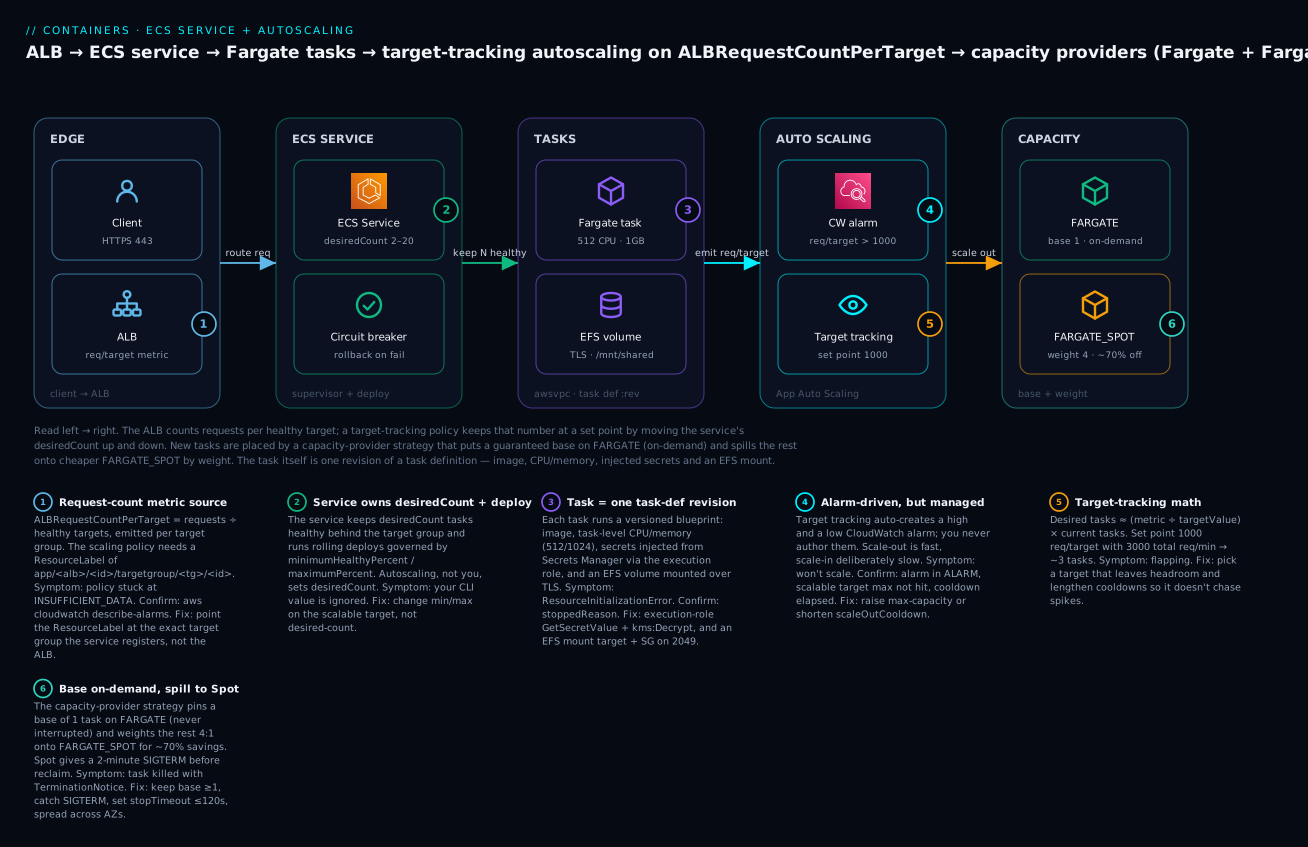
The diagram traces one request all the way to a scaling decision. A client hits the ALB on 443; the ALB emits ALBRequestCountPerTarget (requests divided by healthy targets). The ECS service keeps desiredCount Fargate tasks healthy behind the target group — each task is one revision of the task definition, with secrets injected from Secrets Manager and an EFS volume mounted over TLS. The request-per-target metric feeds a CloudWatch alarm, which a target-tracking policy uses to move desiredCount. New tasks are placed by a capacity-provider strategy: a guaranteed base on FARGATE (on-demand), the rest weighted onto FARGATE_SPOT at ~70% off. The numbered badges mark the six places this path breaks or scales — the metric ResourceLabel, the service’s deploy percentages, secret/EFS init, the auto-created alarm, the target-tracking math, and Spot interruption.
Real-world scenario
Meridian Retail runs a product-catalog API on ECS Fargate — an ap-south-1 (Mumbai) cluster, one service, task size 0.5 vCPU / 1 GB, behind an ALB. For a year they ran a fixed desiredCount of 8, sized for their Diwali-sale peak, and paid for all 8 around the clock. The bill for that service was roughly ₹34,000/month, most of it burned overnight at 5% CPU.
Three problems surfaced in one quarter. First, a Friday deploy shipped an image with a bad config; the new tasks crash-looped, and because they had no deployment circuit breaker, ECS spent 40 minutes killing and restarting tasks while the on-call watched the error rate climb — until someone manually forced the previous revision. Second, a marketing email at 10 a.m. drove a 5× traffic spike that 8 tasks couldn’t absorb; p99 latency went from 120 ms to 3 s and the ALB started returning 503s (no healthy capacity). Third, finance asked why a low-traffic internal API cost as much as it did.
The fix was this article, applied in order. They set the task definition’s memory hard limit to 1 GB with a memoryReservation of 640 MB, moved the DB password from an environment variable to a Secrets Manager secrets entry (adding kms:Decrypt to the execution role after the first ResourceInitializationError), and mounted an EFS volume for a shared image cache. They enabled the deployment circuit breaker with rollback: true — the very next bad deploy auto-reverted in under two minutes with no human involved. They registered a scalable target (min 3, max 20) and a target-tracking policy on ALBRequestCountPerTarget at 1000, with a 60 s scale-out and 300 s scale-in cooldown; the next 10 a.m. spike scaled to 12 tasks in three minutes and back down by 10:40. Finally they switched the service to a capacity-provider strategy of FARGATE base 1 / FARGATE_SPOT weight 4.
The results: the overnight floor dropped from 8 tasks to 3, ~80% of running tasks moved to Fargate Spot, and the monthly bill fell to about ₹12,500 — a 63% cut — while the service now absorbs the spike instead of buckling. The one scar: an early Spot interruption killed a task mid-request because they hadn’t handled SIGTERM; adding a 30 s graceful-drain handler and keeping base: 1 on-demand closed that gap. Net: cheaper, and more resilient than the fixed fleet it replaced.
Advantages and disadvantages
| Advantages | Disadvantages |
|---|---|
| Task def is versioned + immutable → clean rollback | Every change = new revision; drift if you edit by hand |
| Fargate removes node patching/capacity planning | Fixed CPU/memory matrix; less tuning than EC2 |
| Target tracking is nearly foolproof (auto alarms) | Wrong ResourceLabel/max-capacity = silent no-scale |
| Circuit breaker auto-rolls-back bad deploys | Adds deploy latency; threshold not user-set |
| Fargate Spot ~70% cheaper | 2-min interruption; needs graceful drain + on-demand base |
| Secrets injected at runtime, never in the image | Execution-role/KMS misconfig blocks task start |
| EFS gives durable shared storage on Fargate | NFS 2049 SG + transit encryption gotchas |
| Service Connect = stable names + telemetry | Envoy sidecar adds a little CPU/memory per task |
The trade-offs cluster: Fargate buys operational simplicity at the cost of tuning flexibility (choose EC2 capacity providers when you need specific instances, GPUs, or bin-packing economics at scale). Spot buys ~70% off at the cost of interruption tolerance (always keep an on-demand base). Target tracking buys simplicity at the cost of a few knobs you can’t turn (use step scaling when the response curve matters).
Hands-on lab
You’ll register a task definition with a secret and an EFS volume, run it as a service behind an ALB with a target-tracking policy on ALB request count, and a FARGATE / FARGATE_SPOT capacity-provider strategy — then drive load and watch it scale. Assumes an existing VPC with two public subnets, an ALB + target group, and an ECR image. ⚠️ EFS, ALB, NAT, and running Fargate tasks cost money — the teardown at the end removes everything.
Part A — prerequisites (roles, secret, EFS)
Set shell variables and create the execution role, secret, and EFS file system.
export AWS_REGION=ap-south-1
export ACCT=$(aws sts get-caller-identity --query Account --output text)
export CLUSTER=lab-cluster
export VPC=vpc-0abc123 SUBNET_A=subnet-0aaa SUBNET_B=subnet-0bbb
export TG_ARN=arn:aws:elasticloadbalancing:$AWS_REGION:$ACCT:targetgroup/lab-tg/1234567890abcdef
export TASK_SG=sg-0task IMAGE=$ACCT.dkr.ecr.$AWS_REGION.amazonaws.com/lab-web:1.0
- Create the cluster (with Container Insights):
aws ecs create-cluster --cluster-name $CLUSTER \
  --settings name=containerInsights,value=enabled
- Create the execution role (trust + managed policy + secret/KMS access):
aws iam create-role --role-name lab-exec-role \
  --assume-role-policy-document '{"Version":"2012-10-17","Statement":[{"Effect":"Allow","Principal":{"Service":"ecs-tasks.amazonaws.com"},"Action":"sts:AssumeRole"}]}'
aws iam attach-role-policy --role-name lab-exec-role \
  --policy-arn arn:aws:iam::aws:policy/service-role/AmazonECSTaskExecutionRolePolicy
- Create the secret:
aws secretsmanager create-secret --name lab/db \
  --secret-string '{"password":"S3cr3t-Pa55!"}'
export SECRET_ARN=$(aws secretsmanager describe-secret --secret-id lab/db --query ARN --output text)
Grant the execution role read access to the secret (and KMS if you used a CMK):
aws iam put-role-policy --role-name lab-exec-role --policy-name read-secret \
  --policy-document "{\"Version\":\"2012-10-17\",\"Statement\":[{\"Effect\":\"Allow\",\"Action\":[\"secretsmanager:GetSecretValue\"],\"Resource\":\"$SECRET_ARN\"}]}"
- Create the EFS file system, a mount target in each subnet, and an access point. The mount-target SG must allow 2049 from
$TASK_SG:
export FS_ID=$(aws efs create-file-system --performance-mode generalPurpose \
  --encrypted --query FileSystemId --output text)
aws efs create-mount-target --file-system-id $FS_ID --subnet-id $SUBNET_A --security-groups sg-0efs
aws efs create-mount-target --file-system-id $FS_ID --subnet-id $SUBNET_B --security-groups sg-0efs
export AP_ID=$(aws efs create-access-point --file-system-id $FS_ID \
  --posix-user Uid=1000,Gid=1000 \
  --root-directory 'Path=/web,CreationInfo={OwnerUid=1000,OwnerGid=1000,Permissions=0755}' \
  --query AccessPointId --output text)
Part B — the task definition
Register a task def with the secret and the EFS mount. Save as taskdef.json:
{
  "family": "lab-web",
  "networkMode": "awsvpc",
  "requiresCompatibilities": ["FARGATE"],
  "cpu": "512",
  "memory": "1024",
  "executionRoleArn": "arn:aws:iam::ACCT:role/lab-exec-role",
  "volumes": [{
    "name": "shared",
    "efsVolumeConfiguration": {
      "fileSystemId": "FS_ID",
      "transitEncryption": "ENABLED",
      "authorizationConfig": { "accessPointId": "AP_ID", "iam": "ENABLED" }
    }
  }],
  "containerDefinitions": [{
    "name": "web",
    "image": "IMAGE",
    "essential": true,
    "memoryReservation": 640,
    "portMappings": [{ "containerPort": 8080, "name": "web", "appProtocol": "http" }],
    "secrets": [{ "name": "DB_PASSWORD", "valueFrom": "SECRET_ARN:password::" }],
    "mountPoints": [{ "sourceVolume": "shared", "containerPath": "/mnt/shared" }],
    "healthCheck": {
      "command": ["CMD-SHELL", "curl -f http://localhost:8080/health || exit 1"],
      "interval": 30, "timeout": 5, "retries": 3, "startPeriod": 30
    },
    "logConfiguration": {
      "logDriver": "awslogs",
      "options": {
        "awslogs-group": "/ecs/lab-web", "awslogs-region": "ap-south-1",
        "awslogs-stream-prefix": "web", "awslogs-create-group": "true"
      }
    }
  }]
}
- Substitute the real IDs and register:
sed -i '' "s#ACCT#$ACCT#g; s#FS_ID#$FS_ID#g; s#AP_ID#$AP_ID#g; s#SECRET_ARN#$SECRET_ARN#g; s#IMAGE#$IMAGE#g" taskdef.json
aws ecs register-task-definition --cli-input-json file://taskdef.json
Expected: JSON with "status": "ACTIVE" and "revision": 1.
Part C — the service with capacity providers
- Associate the Fargate capacity providers with the cluster and create the service using a base+weight strategy:
aws ecs put-cluster-capacity-providers --cluster $CLUSTER \
  --capacity-providers FARGATE FARGATE_SPOT \
  --default-capacity-provider-strategy capacityProvider=FARGATE,base=1,weight=1

aws ecs create-service --cluster $CLUSTER --service-name web \
  --task-definition lab-web \
  --desired-count 2 \
  --capacity-provider-strategy capacityProvider=FARGATE,base=1,weight=1 capacityProvider=FARGATE_SPOT,base=0,weight=4 \
  --network-configuration "awsvpcConfiguration={subnets=[$SUBNET_A,$SUBNET_B],securityGroups=[$TASK_SG],assignPublicIp=ENABLED}" \
  --load-balancers targetGroupArn=$TG_ARN,containerName=web,containerPort=8080 \
  --health-check-grace-period-seconds 60 \
  --deployment-configuration "deploymentCircuitBreaker={enable=true,rollback=true},minimumHealthyPercent=100,maximumPercent=200"
- Wait for steady state and verify tasks split across capacity providers:
aws ecs wait services-stable --cluster $CLUSTER --services web
aws ecs list-tasks --cluster $CLUSTER --service-name web
aws ecs describe-tasks --cluster $CLUSTER --tasks $(aws ecs list-tasks --cluster $CLUSTER --service-name web --query 'taskArns' --output text) \
  --query 'tasks[].[capacityProviderName,lastStatus]' --output table
Expected: a table showing at least one FARGATE task and the rest FARGATE_SPOT, all RUNNING.
Part D — autoscaling on ALB request count
- Register the scalable target and attach a target-tracking policy. Build the
ResourceLabelfrom your ALB and target group ARNs:
aws application-autoscaling register-scalable-target \
  --service-namespace ecs --scalable-dimension ecs:service:DesiredCount \
  --resource-id service/$CLUSTER/web --min-capacity 2 --max-capacity 10

aws application-autoscaling put-scaling-policy \
  --service-namespace ecs --scalable-dimension ecs:service:DesiredCount \
  --resource-id service/$CLUSTER/web \
  --policy-name rpt-tracking --policy-type TargetTrackingScaling \
  --target-tracking-scaling-policy-configuration '{
    "TargetValue": 50.0,
    "PredefinedMetricSpecification": {
      "PredefinedMetricType": "ALBRequestCountPerTarget",
      "ResourceLabel": "app/lab-alb/50dc6c495c0c9188/targetgroup/lab-tg/73e2d6bc24d8a067"
    },
    "ScaleOutCooldown": 60, "ScaleInCooldown": 180
  }'
(Target value of 50 req/target is deliberately low so a small load test triggers a scale-out.)
- Drive load (from a machine that can reach the ALB) and watch it scale:
ab -n 20000 -c 100 http://lab-alb-xxxx.ap-south-1.elb.amazonaws.com/
watch -n 15 'aws ecs describe-services --cluster '$CLUSTER' --services web \
  --query "services[0].[desiredCount,runningCount]" --output text'
Expected: within a couple of minutes desiredCount climbs above 2 (toward the max of 10) as request-per-target crosses 50; after load stops, it drifts back down after the 180 s scale-in cooldown. Confirm the auto-created alarms:
aws cloudwatch describe-alarms --alarm-name-prefix TargetTracking \
  --query 'MetricAlarms[].[AlarmName,StateValue]' --output table
Part E — the same thing in Terraform
resource "aws_ecs_task_definition" "web" {
  family                   = "lab-web"
  requires_compatibilities = ["FARGATE"]
  network_mode             = "awsvpc"
  cpu                      = "512"
  memory                   = "1024"
  execution_role_arn       = aws_iam_role.exec.arn

  volume {
    name = "shared"
    efs_volume_configuration {
      file_system_id     = aws_efs_file_system.shared.id
      transit_encryption = "ENABLED"
      authorization_config {
        access_point_id = aws_efs_access_point.web.id
        iam             = "ENABLED"
      }
    }
  }

  container_definitions = jsonencode([{
    name              = "web"
    image             = var.image
    essential         = true
    memoryReservation = 640
    portMappings      = [{ containerPort = 8080, name = "web", appProtocol = "http" }]
    secrets           = [{ name = "DB_PASSWORD", valueFrom = "${aws_secretsmanager_secret.db.arn}:password::" }]
    mountPoints       = [{ sourceVolume = "shared", containerPath = "/mnt/shared" }]
    healthCheck = {
      command  = ["CMD-SHELL", "curl -f http://localhost:8080/health || exit 1"]
      interval = 30, timeout = 5, retries = 3, startPeriod = 30
    }
    logConfiguration = {
      logDriver = "awslogs"
      options = {
        "awslogs-group"         = "/ecs/lab-web"
        "awslogs-region"        = "ap-south-1"
        "awslogs-stream-prefix" = "web"
        "awslogs-create-group"  = "true"
      }
    }
  }])
}

resource "aws_ecs_service" "web" {
  name            = "web"
  cluster         = aws_ecs_cluster.lab.id
  task_definition = aws_ecs_task_definition.web.arn
  desired_count   = 2

  capacity_provider_strategy {
    capacity_provider = "FARGATE"
    base              = 1
    weight            = 1
  }
  capacity_provider_strategy {
    capacity_provider = "FARGATE_SPOT"
    weight            = 4
  }

  deployment_circuit_breaker { enable = true, rollback = true }
  deployment_minimum_healthy_percent = 100
  deployment_maximum_percent         = 200
  health_check_grace_period_seconds  = 60

  network_configuration {
    subnets          = [var.subnet_a, var.subnet_b]
    security_groups  = [var.task_sg]
    assign_public_ip = true
  }
  load_balancer {
    target_group_arn = var.tg_arn
    container_name   = "web"
    container_port   = 8080
  }
  lifecycle { ignore_changes = [desired_count] } # autoscaling owns it
}

resource "aws_appautoscaling_target" "web" {
  service_namespace  = "ecs"
  scalable_dimension = "ecs:service:DesiredCount"
  resource_id        = "service/${aws_ecs_cluster.lab.name}/${aws_ecs_service.web.name}"
  min_capacity       = 2
  max_capacity       = 10
}

resource "aws_appautoscaling_policy" "rpt" {
  name               = "rpt-tracking"
  policy_type        = "TargetTrackingScaling"
  service_namespace  = aws_appautoscaling_target.web.service_namespace
  scalable_dimension = aws_appautoscaling_target.web.scalable_dimension
  resource_id        = aws_appautoscaling_target.web.resource_id

  target_tracking_scaling_policy_configuration {
    target_value       = 1000
    scale_in_cooldown  = 300
    scale_out_cooldown = 60
    predefined_metric_specification {
      predefined_metric_type = "ALBRequestCountPerTarget"
      resource_label         = "app/lab-alb/50dc6c495c0c9188/targetgroup/lab-tg/73e2d6bc24d8a067"
    }
  }
}
Note lifecycle { ignore_changes = [desired_count] } — without it, every terraform apply fights the autoscaler and snaps the count back.
Part F — teardown (⚠️ removes billable resources)
aws application-autoscaling deregister-scalable-target --service-namespace ecs \
  --scalable-dimension ecs:service:DesiredCount --resource-id service/$CLUSTER/web
aws ecs update-service --cluster $CLUSTER --service web --desired-count 0
aws ecs delete-service --cluster $CLUSTER --service web --force
aws ecs delete-cluster --cluster $CLUSTER
for mt in $(aws efs describe-mount-targets --file-system-id $FS_ID --query 'MountTargets[].MountTargetId' --output text); do
  aws efs delete-mount-target --mount-target-id $mt; done
sleep 30
aws efs delete-access-point --access-point-id $AP_ID
aws efs delete-file-system --file-system-id $FS_ID
aws secretsmanager delete-secret --secret-id lab/db --force-delete-without-recovery
aws logs delete-log-group --log-group-name /ecs/lab-web
Common mistakes & troubleshooting
The playbook. Every row is a real failure with the exact way to confirm it and the fix.
| # | Symptom | Root cause | Confirm (command / console) | Fix |
|---|---|---|---|---|
| 1 | Service won’t scale out under obvious load | max-capacity reached, or ResourceLabel wrong, or cooldown |
describe-scalable-targets; describe-alarms (state INSUFFICIENT_DATA/OK) |
Raise max-capacity; fix ResourceLabel to the exact target group; wait out ScaleOutCooldown |
| 2 | Scaling alarm stuck at INSUFFICIENT_DATA |
ALBRequestCountPerTarget ResourceLabel points at wrong/absent TG |
aws cloudwatch describe-alarms --alarm-name-prefix TargetTracking |
Set label app/<alb>/<id>/targetgroup/<tg>/<id> for the TG the service registers |
| 3 | Tasks flapping (start → killed → start) | Failing ALB health check + grace period too short | describe-services events: Task failed ELB health checks; check healthCheckGracePeriodSeconds |
Raise grace period; fix /health; align container startPeriod |
| 4 | Task never starts: ResourceInitializationError: unable to pull secrets |
Execution role lacks GetSecretValue/GetParameters or kms:Decrypt |
describe-tasks → stoppedReason |
Add secret + kms:Decrypt to the execution role |
| 5 | CannotPullContainerError |
Bad image tag, no ECR perms, or no network path to ECR | stoppedReason; check subnet route / VPC endpoint |
Fix tag/ECR policy; add NAT or ECR + S3 VPC endpoints |
| 6 | ResourceInitializationError: failed to invoke EFS utils |
SG blocks 2049, no transitEncryption, or missing EFS IAM |
stoppedReason; check mount-target SG, task-role EFS perms |
Allow 2049 from task SG; set transitEncryption=ENABLED; grant ClientMount/Write |
| 7 | Container OOM-killed, exit 137 | Hit hard memory limit |
stoppedReason: OutOfMemoryError: Container killed |
Raise memory (and Fargate CPU tier if needed) or fix the leak |
| 8 | Deployment stuck at IN_PROGRESS, never completes |
New tasks start but never pass ALB health check | describe-services → deployments[].rolloutState |
Fix health check / grace period; the circuit breaker will eventually roll back |
| 9 | Deployment rolled back unexpectedly | Circuit breaker tripped on repeated task failures | Service event: rolling back; rolloutStateReason |
Read the failing task’s stoppedReason; fix the image, redeploy |
| 10 | Spot task interrupted mid-request | FARGATE_SPOT capacity reclaimed |
stoppedReason: Your Spot Task was interrupted |
Handle SIGTERM; keep FARGATE base ≥ 1; set stopTimeout ≤ 120; spread AZs |
| 11 | Request-count metric not scaling | Wrong TG dimension / no traffic through the ALB | CloudWatch RequestCountPerTarget for that TG shows no data |
Ensure the service registers into that TG; verify the ResourceLabel IDs |
| 12 | Deploy wedged on a tight EC2 cluster | maximumPercent 200 needs surge capacity that doesn’t exist |
Service events: unable to place a task because no container instance met requirements |
Lower maximumPercent, or add instances / managed scaling |
| 13 | terraform apply keeps changing desired_count |
TF and autoscaler both own it | Plan shows desired_count drift each run |
Add lifecycle { ignore_changes = [desired_count] } |
| 14 | Service Connect endpoint never resolves | portMappings has no name |
describe-task-definition; missing name on the port |
Add name to the port; match it in portName |
| 15 | Env var empty though secret exists | Wrong valueFrom JSON-key syntax |
Exec into task; echo $VAR empty |
Use arn:...:secret:NAME:jsonkey:: (note the trailing ::) |
The stoppedReason / status reference
When a task dies, aws ecs describe-tasks --tasks <arn> --query 'tasks[].stoppedReason' is the first thing to read.
stoppedReason / signal |
Meaning | Fix |
|---|---|---|
CannotPullContainerError |
Image pull failed | Tag, ECR policy, network path to ECR |
ResourceInitializationError: unable to pull secrets or registry auth |
Execution role/KMS/secret path | Add GetSecretValue+kms:Decrypt |
ResourceInitializationError: failed to invoke EFS utils |
EFS mount failed | SG 2049, transit encryption, EFS IAM |
Essential container in task exited |
An essential container stopped |
Read its exit code below |
OutOfMemoryError: Container killed due to memory usage |
Hard memory limit hit | Raise memory / fix leak |
Task failed ELB health checks in (target-group ...) |
ALB health check failed | Fix /health, grace period |
Your Spot Task was interrupted |
Spot reclaim | Graceful drain, on-demand base |
Scaling activity initiated by (deployment ...) |
Normal deploy/scale replacement | Informational |
Host EC2 instance ... terminated |
Underlying EC2 instance gone | ASG/managed scaling, health |
| Container exit code | Usual meaning |
|---|---|
0 |
Clean exit (fine for non-essential/one-shot) |
1 |
Generic app error — read app logs |
137 |
SIGKILL — OOM or stopTimeout exceeded |
139 |
SIGSEGV — segfault/native crash |
143 |
SIGTERM — stopped by ECS (deploy/scale/Spot) |
The three nastiest, explained
The KMS-decrypt miss. A secret works in dev but the task won’t start in prod with unable to pull secrets. The difference: prod’s secret is encrypted with a customer-managed KMS key. AmazonECSTaskExecutionRolePolicy grants GetSecretValue but not kms:Decrypt on your key. Add a policy statement allowing kms:Decrypt on the key ARN and the task starts immediately. This is the single most common “task won’t start” ticket.
The silent no-scale. Everything looks configured — scalable target registered, policy attached — but the count never moves. The alarm is at INSUFFICIENT_DATA because the ResourceLabel names a target group the service isn’t registered in (copy-paste from another environment, or the ALB/TG IDs are wrong). CloudWatch has no RequestCountPerTarget data for that dimension, so the alarm can’t fire. Rebuild the label from the live ALB and TG ARNs and it starts scaling within a metric period.
The Spot stampede at deploy time. A service on mostly FARGATE_SPOT deploys during a period of tight Spot capacity; the new tasks can’t be placed on Spot, and if you set base: 0 there’s no on-demand fallback in the strategy, so the deployment stalls and the circuit breaker eventually trips. Keeping a FARGATE base ≥ 1 guarantees forward progress, and adding FARGATE with a small weight lets the rest fall back to on-demand when Spot is scarce.
Best practices
- Pin images by digest (
@sha256:...) in the task def, not:latest— deploys become reproducible and rollbacks land on the exact bytes. - Set both
memoryReservation(soft) andmemory(hard) — reservation at steady state for packing, hard ceiling above worst spike so a leak dies instead of a neighbour. - Always enable the deployment circuit breaker with
rollback: trueon production services — it’s free insurance against a crash-looping release. - Prefer target tracking over step scaling; reach for step only when a single target value can’t express your response curve.
- Keep a
FARGATE base ≥ 1in any Spot strategy so you always have interruption-proof capacity, and handle SIGTERM for graceful drain. - Get the
ResourceLabelfrom the live ARNs, never hand-typed — it’s the top cause of silent no-scale. - Set
healthCheckGracePeriodSecondsto comfortably exceed cold-start time so slow-but-healthy tasks aren’t flapped. - Use an execution role scoped to the specific secret/KMS-key ARNs, not
*. - Ignore
desired_countin IaC (lifecycle { ignore_changes }) so Terraform and the autoscaler don’t fight. - Mark init/migration containers
essential: falseand gate the app withdependsOn: SUCCESS/HEALTHY. - Use
readonlyRootFilesystem: trueand mount only the paths that must be writable as volumes. - Right-size before you scale — an over-fat task multiplied by autoscaling multiplies waste.
Security notes
| Control | What to do | Why |
|---|---|---|
| Least-privilege roles | Split execution role (pull/secrets/logs) from task role (app SDK calls); scope both to exact ARNs | Blast-radius containment; a compromised app can’t fetch new secrets |
| Secrets, never env | Use secrets from Secrets Manager/SSM SecureString; never environment for credentials |
Plaintext env is visible in describe-task-definition and the console |
| KMS | Encrypt secrets with a CMK; grant kms:Decrypt narrowly |
Rotation + audit; scoped decrypt |
| Network isolation | awsvpc mode; one security group per service; private subnets + NAT or VPC endpoints |
Per-service micro-segmentation; no lateral sprawl |
| EFS in transit | transitEncryption=ENABLED, access point with POSIX user + iam=ENABLED |
TLS on NFS; path + identity enforcement |
| Read-only root FS | readonlyRootFilesystem: true |
Stops a compromised process writing the image |
| Drop capabilities | linuxParameters.capabilities.drop: ["ALL"], add back only what’s needed |
Minimise kernel attack surface |
| Image provenance | Immutable ECR tags + scan-on-push; pin by digest | No mutable-tag supply-chain surprises |
| No public IPs where avoidable | assignPublicIp=DISABLED + NAT/endpoints for private services |
Reduce exposure |
Cost & sizing
Fargate is billed per vCPU-second and GB-second from image pull to task stop (1-minute minimum), plus ephemeral storage above 20 GB and any EFS/data transfer. The levers, in order of impact:
| Cost driver | How to cut it | Rough effect |
|---|---|---|
| Number of running tasks | Autoscale with a sane floor; scheduled scale-in off-hours | Biggest lever — stop paying for idle |
| On-demand vs Spot | FARGATE_SPOT for the non-base share |
~70% off the Spot portion |
| Task size | Right-size CPU/memory; don’t over-buy the memory floor | Linear in vCPU/GB |
| Architecture | ARM64 (Graviton) task |
~20% cheaper + often faster/W |
| Ephemeral storage | Keep ≤ 20 GB where possible | Avoid the per-GB add-on |
| Log volume | awslogs retention + non-blocking; filter noisy logs |
CloudWatch ingest adds up |
Rough Mumbai (ap-south-1) figures for one 0.5 vCPU / 1 GB task running 24×7: on-demand Fargate is on the order of ₹1,600–1,900/month; the same on Fargate Spot is roughly ₹500–650/month. A service that autoscales between 3 and 12 tasks (mostly Spot) with a nightly floor will cost a fraction of a fixed 8-task on-demand fleet — the Meridian case above went from ~₹34,000 to ~₹12,500/month. There is no free tier for Fargate; the ECS control plane itself is free (you pay for the compute, EFS, ALB, NAT, and logs).
| Resource | Free tier? | Billed on |
|---|---|---|
| ECS control plane | Free | — |
| Fargate compute | No | vCPU-sec + GB-sec (1-min min) |
| EC2 launch type | EC2 free-tier applies to instances | Instance-hours |
| EFS | 5 GB free (12 mo) | Storage + throughput |
| ALB / NAT | No | LCU-hours / GB + hours |
| CloudWatch Logs | 5 GB ingest free | Ingest + storage |
Interview & exam questions
Q1. What’s the difference between memory and memoryReservation? (DVA-C02) memory is a hard limit — exceed it and the kernel OOM-kills the container (exit 137). memoryReservation is a soft limit — a guaranteed floor the scheduler uses for placement, above which the container may burst if the host has room. Set both: reservation at steady state, memory as the hard ceiling.
Q2. Which IAM role fetches a secret, and which permission is most often missing? (DVA-C02/SCS) The task execution role fetches secrets at task start. AmazonECSTaskExecutionRolePolicy covers ECR/logs but not kms:Decrypt on a customer-managed key, so CMK-encrypted secrets fail with ResourceInitializationError: unable to pull secrets until you add kms:Decrypt.
Q3. How does target-tracking autoscaling decide how many tasks to run? (SOA-C02) It holds a metric near a target value using auto-created high/low CloudWatch alarms; desired ≈ (current metric ÷ target) × current tasks. Scale-out is aggressive, scale-in conservative (longer cooldown) to avoid brownouts.
Q4. What does the deployment circuit breaker do? (DVA-C02) It watches a new deployment and fails it if too many tasks can’t reach steady state; with rollback: true it restores the last good revision automatically — preventing a crash-looping image from churning indefinitely.
Q5. Explain a FARGATE base=1, FARGATE_SPOT weight=4 strategy at desiredCount 10. (SAA-C03) One task is pinned on-demand (base); the other nine split by weight 1:4 → ~2 more on-demand and ~7 on Spot. You always keep interruption-proof capacity while running the bulk ~70% cheaper.
Q6. Why won’t my service scale even though CPU is high? (SOA-C02) Common causes: max-capacity already reached, the scaling alarm at INSUFFICIENT_DATA (wrong ResourceLabel), an active cooldown, or DisableScaleIn/no scale-out policy. Confirm with describe-scalable-targets and describe-alarms.
Q7. How do you mount durable shared storage into a Fargate task? (SAA-C03) An EFS volume via efsVolumeConfiguration (with transitEncryption=ENABLED and ideally an access point), mounted with mountPoints. The mount-target SG must allow NFS 2049 from the task’s SG. Ephemeral storage and bind mounts don’t persist.
Q8. Rolling update vs blue/green — when each? (DVA-C02) Rolling (ECS controller) replaces tasks in place bounded by min/max healthy %, simplest and default. Blue/green (CodeDeploy) stands up a parallel fleet, shifts the ALB listener (all-at-once/canary/linear), bakes with alarm-based auto-rollback, and needs a test listener — use it for zero-downtime and pre-shift validation.
Q9. What are essential and dependsOn for? (DVA-C02) essential: false lets a container (init/migration) exit without killing the task; dependsOn orders startup (START/COMPLETE/SUCCESS/HEALTHY) so the app waits for a proxy to be healthy or a migration to succeed.
Q10. What happens to a Fargate Spot task on interruption, and how do you handle it? (SAA-C03) It gets SIGTERM plus a 2-minute warning, then stops with Your Spot Task was interrupted. Catch SIGTERM to drain within stopTimeout (≤120 s), keep a FARGATE base ≥ 1, and spread across AZs.
Q11. Why is ALBRequestCountPerTarget often a better scaling metric than CPU? (SOA-C02) It tracks actual demand (requests per healthy target) rather than a symptom (CPU), so it scales for I/O-bound or memory-bound apps whose CPU stays flat under load. It requires a correct ResourceLabel.
Q12. How do capacity providers differ from launch types? (SAA-C03) A launch type (FARGATE/EC2) is a single choice; a capacity-provider strategy is a weighted mix of providers with base/weight, enabling on-demand+Spot blends and, for EC2, ECS-managed cluster scaling via CapacityProviderReservation.
Quick check
- Your container is killed with exit code 137 — which limit did it hit, and which field fixes it?
- A CMK-encrypted secret works in dev but fails in prod with
unable to pull secrets. What permission is missing, on which role? - In a
FARGATE base=1, FARGATE_SPOT weight=3strategy at desiredCount 5, roughly how do tasks split? - Your target-tracking policy exists but the count never moves and the alarm shows
INSUFFICIENT_DATA. What’s the most likely cause? - Which two settings bound how many tasks are added/removed during a rolling deployment?
Answers
- The hard
memorylimit — the kernel OOM-killed it. Raisememory(and possibly the Fargate CPU tier, which raises the min memory) or fix the leak. kms:Decrypton the customer-managed key, on the task execution role (the managed policy grantsGetSecretValuebut not decrypt on your CMK).- 1 task pinned on
FARGATE(base); the remaining 4 split by weight 1:3 → ~1 more on-demand and ~3 on Spot. - The
ResourceLabelpoints at the wrong/absent target group, so CloudWatch has noRequestCountPerTargetdata — rebuild it from the live ALB/TG ARNs. minimumHealthyPercent(floor of healthy tasks) andmaximumPercent(ceiling of total old+new tasks).
Glossary
- Task definition — Immutable, versioned (
family:revision) blueprint of one or more containers: image, CPU/memory, secrets, volumes, roles, logs. - Task — A running instantiation of a task-def revision; one or more containers sharing an ENI (in
awsvpcmode). - Service — The supervisor that keeps
desiredCounttasks healthy behind a target group and runs deployments. - Execution role — IAM role the ECS agent assumes to pull the image, fetch secrets, and write logs before your code runs.
- Task role — IAM role your application code assumes for AWS SDK calls.
memoryReservation(soft) — Guaranteed memory floor used for scheduling; the container may burst above it.memory(hard) — Ceiling the container may use; exceeding it triggers an OOM-kill (exit 137).- Capacity provider — Abstraction over where tasks run (
FARGATE,FARGATE_SPOT, or an EC2 ASG), combined into abase/weightstrategy. - Fargate Spot — Interruptible Fargate capacity ~70% cheaper, reclaimed with a 2-minute SIGTERM notice.
- Deployment circuit breaker — Service feature that fails (and optionally auto-rolls-back) a deployment whose tasks can’t stabilise.
- Target tracking — Autoscaling that holds a metric near a target value using auto-created alarms.
ALBRequestCountPerTarget— Requests per healthy target, a demand-proportional scaling metric requiring aResourceLabel.- Scalable target — The Application Auto Scaling registration of a service’s
DesiredCountwith min/max bounds. - Service Connect — ECS service discovery with an Envoy sidecar giving stable short DNS names, client-side load balancing, and telemetry.
- Access point (EFS) — An application-specific entry point into an EFS file system enforcing a POSIX user and root path.
Next steps
- Assemble these objects into a full platform in AWS Microservices on ECS Fargate: A Production Reference Architecture.
- Start from zero if the service model is new: ECS Fargate: Your First Service Hands-On.
- When a task won’t start at all, work the ECS Task Fails to Start: Troubleshooting playbook.
- Get images into ECR cleanly first: ECR Container Registry: Push & Pull Hands-On.
- Compare the instance-scaling engine behind an EC2-backed cluster in EC2 Auto Scaling Hands-On: Launch Templates, Scaling Policies & Instance Refresh.