The service says desiredCount: 3, runningCount: 0, and the deployment has been “in progress” for eleven minutes. You open the cluster, the task list flickers — tasks appear in PROVISIONING, vanish, reappear — and the only thing standing between you and a fix is a single field you have not read yet: stoppedReason. Almost every ECS incident is lost or won in the first sixty seconds, on whether you reach for describe-tasks and read the task-level stoppedReason plus each container’s exitCode and reason, or whether you start guessing — bumping memory on a task that was actually starved of a route to ECR, or “fixing” IAM on a task role when the failure was in the execution role during image pull.
Amazon ECS fails to start a task in a small number of very specific ways, and each one writes an exact string. CannotPullContainerError, ResourceInitializationError: unable to pull secrets or registry auth, CannotCreateNetworkInterfaceError, OutOfMemoryError: Container killed due to memory usage, Essential container in task exited, Task failed ELB health checks — these are not vague. They map one-to-one onto a phase of the task lifecycle (provisioning → pull → secrets → start → health check) and onto exactly one fix. The entire skill of operating containers at 2 a.m. is naming the class fast from the reason string and the exit code, not shotgunning changes.
This is the reference you keep open during the incident. It treats an ECS task as what it actually is — a lifecycle that must clear an ENI attach, an image pull, and a secrets fetch (all under the execution role, before your code runs) and then survive a health check — and it walks every failure class that pages you, in both aws CLI and Terraform, with real error strings, real IAM actions, and real limits. The bulk is a scannable master playbook, an exit-code and stoppedReason reference, and a decision table, plus the three nastiest failures in full: a CannotPullContainerError from a private subnet with no route, a ResourceInitializationError on a secret the execution role can’t read, and the health-check loop that replaces a task forever. It maps to the container troubleshooting and operations domains of SAA-C03, DVA-C02 and SOA-C02.
What problem this solves
ECS hides the host, and with it most of the diagnostic surface you are used to. On a plain EC2 box you would docker ps -a, docker logs, docker inspect, and read the daemon journal. On Fargate there is no host to SSH into, no daemon to query, no docker at all — the task either reaches RUNNING or it doesn’t, and everything you can learn is compressed into a stoppedReason, a per-container exitCode, a stream of service events, and whatever your container managed to write to CloudWatch Logs before it died. If you cannot read those four surfaces fluently, a failed task is an opaque wall.
What breaks without this skill is delivery velocity and uptime, quietly. A team pushes a new image, the deploy stalls, and because they never look past “runningCount is 0” they roll back a healthy change over a typo in a health-check path. Another moves workloads into private subnets for compliance, forgets that Fargate has no docker pull cache and no public IP, and every task dies with CannotPullContainerError because there is no NAT gateway and no ECR VPC endpoint — the image was fine. A third wires secrets from Secrets Manager into the task definition, grants the permission to the task role, and watches every task fail with ResourceInitializationError because secret injection runs under the execution role, before the container (and its task role) exist. None of these are exotic bugs. They are the default behaviour of the platform when you don’t know which phase does what.
Who hits this: anyone running ECS past the first tutorial. It bites hardest on teams new to awsvpc networking (one ENI and one IP per task — subnets exhaust), on anyone moving to private subnets (the pull path changes completely), on teams that confuse the two IAM roles, and on anyone who assumed “the container works on my laptop” means it will start on Fargate (architecture, secrets, logging driver, and health checks all differ). The fix is almost never “retry and hope.” It is: read the stoppedReason, read the exitCode, name the phase, and apply the one change that phase needs.
Here is the whole failure field on one screen — the class, the phase it bites in, the exact signal, and the one-line fix — so you can orient before the deep dive:
| Failure class | Phase it bites | The signal you’ll see | The one-line fix |
|---|---|---|---|
| Image pull | Provisioning (pull) | CannotPullContainerError: ... i/o timeout / manifest not found |
Route to ECR (NAT/endpoints), fix assignPublicIp, exec-role ECR perms, real tag |
| Secrets / init | Provisioning (secrets) | ResourceInitializationError: unable to pull secrets or registry auth |
Exec-role GetSecretValue/GetParameters + kms:Decrypt; endpoint route |
| ENI / networking | Provisioning (ENI) | CannotCreateNetworkInterfaceError / RESOURCE:ENI |
Free subnet IPs; reuse SG/subnets; watch ENI limits |
| Essential exited | Start | Essential container in task exited, exitCode: 1/127/132 |
Fix command/entrypoint, arch, boot crash, missing config |
| Out of memory | Start / run | OutOfMemoryError: Container killed due to memory usage, exit 137 |
Raise container memory / task size; fix the leak |
| Health-check loop | Health check | Task failed ELB health checks in (target-group ...) |
Fix path/port/matcher, SG, healthCheckGracePeriodSeconds |
| No capacity | Scheduling | Capacity is unavailable (Fargate) / no container instance met requirements (EC2) |
Capacity providers, spread AZs, scale the ASG |
| Logging driver | Provisioning | ResourceInitializationError: failed to validate logger args |
Pre-create log group or awslogs-create-group=true + logs: perms |
Learning objectives
By the end of this article you can:
- Read the ECS task lifecycle (
PROVISIONING → PENDING → ACTIVATING → RUNNING → DEACTIVATING → STOPPING → DEPROVISIONING → STOPPED) and state exactly which phase a failure died in. - Pull the task-level
stoppedReasonand every container’sexitCodeandreasonfromdescribe-tasks, and read service events for placement failures — the two commands that answer “why won’t it start.” - Decode the full
stoppedReasonand exit-code reference —CannotPullContainerError,ResourceInitializationError,CannotCreateNetworkInterfaceError,OutOfMemoryError,Essential container exited, exit137/139/143/127/132— from the string alone. - Root-cause a
CannotPullContainerErrorto one of its six causes (no route,assignPublicIp, exec-role ECR perms, wrong tag, Docker Hub rate limit, arch/OS mismatch) and fix each. - Separate the execution role (pull + secrets + logs, before the container) from the task role (your app’s AWS calls, after it starts) and stop fixing the wrong one.
- Diagnose the health-check replacement loop — the task that reaches RUNNING and is then killed and relaunched forever — from path, port, matcher, security group, and grace period.
- Run a
stoppedReason→ class → root cause → confirm → fix playbook end to end, and reproduce and fix aCannotPullContainerErrorand aResourceInitializationErrorin a hands-on lab withawsCLI and Terraform.
Prerequisites & where this fits
You should already be comfortable with the ECS basics: a task definition describes one or more containers (image, CPU/memory, ports, environment, secrets, logConfiguration), a service keeps a desiredCount of tasks running and reconciles them, and a task runs on either Fargate (serverless, AWS owns the host) or the EC2 launch type (your container instances registered to the cluster). You should know that awsvpc network mode gives each task its own elastic network interface (ENI) and private IP, that images live in Amazon ECR (or a public registry), and that you can run aws from a shell and read JSON with --query. HTTP status codes, IAM roles and policies, and the idea of a VPC route table should be familiar.
This sits in the Containers track and is the operational companion to the design-side references. The decision that put you on ECS rather than EKS or plain Lambda is made in Choosing Your AWS Container Path: ECS vs EKS vs Fargate. If you have never deployed a service, build one first in Your First ECS on Fargate Service, Hands-On, and learn the task-definition and autoscaling knobs this article treats as fixes in ECS Task Definitions, Services & Autoscaling. The image side — building, tagging, pushing and pulling from a registry, and the exact ECR permissions a pull needs — is covered in Push and Pull with Amazon ECR, Hands-On. And because so many “won’t start” failures are really “can’t reach ECR or Secrets Manager from a private subnet,” the network-path diagnosis lives in The VPC Connectivity Troubleshooting Playbook.
Before the deep dive, fix the mental model of where each failure lives, so you look in the right place first:
| Layer | What lives here | Failure classes it causes | First place to look |
|---|---|---|---|
| Scheduler / placement | Service reconciliation, capacity, constraints | Task never placed; RESOURCE:*; insufficient capacity |
describe-services events |
| Networking (ENI) | awsvpc ENI + IP, security groups | CannotCreateNetworkInterfaceError, ENI/IP exhaustion |
Subnet free IPs; describe-tasks reason |
| Image pull | ECR/registry auth + route + tag | CannotPullContainerError |
stoppedReason suffix; route table; exec role |
| Init / secrets / logs | Execution role fetches secrets + logger | ResourceInitializationError |
stoppedReason; exec-role policy |
| Container start | Entrypoint, command, essential exit, OOM | Essential container exited, exitCode, 137 |
Container exitCode/reason; app logs |
| Health check | ALB/NLB target or container healthCheck | Replacement loop; Task failed ELB health checks |
Target-group health; SG; grace period |
Core concepts
The task lifecycle — every phase can fail differently
An ECS task moves through a fixed set of states, exposed as lastStatus (where it is now) versus desiredStatus (where ECS wants it). When a start fails, desiredStatus flips to STOPPED while lastStatus climbs and then falls back — and the phase it fell from tells you the class. Fargate runs the full set including PROVISIONING/DEPROVISIONING (ENI lifecycle); the EC2 launch type with bridge/host networking skips the ENI states.
| State | What’s happening | Failures that live here |
|---|---|---|
| PROVISIONING | Fargate allocates the ENI (awsvpc) | CannotCreateNetworkInterfaceError, ENI-provision timeout |
| PENDING | Pull image, fetch secrets, create the container | CannotPullContainerError, ResourceInitializationError, CannotCreateContainerError |
| ACTIVATING | Service Connect / App Mesh proxies, ENI attach finalization | Sidecar/proxy bootstrap failures |
| RUNNING | Containers started; steady state | OOM, essential exit after boot, health-check loop |
| DEACTIVATING | Draining connections (LB deregistration) | Slow drain, dropped in-flight requests |
| STOPPING | SIGTERM then SIGKILL after stopTimeout |
SIGKILL (137) if the app ignores SIGTERM |
| DEPROVISIONING | Detach + delete the ENI | Rare; ENI cleanup lag |
| STOPPED | Terminal; read stoppedReason + exitCode |
This is where you do your reading |
There are two levels of failure reporting and you must read both. The task-level stoppedReason is one string describing why the whole task stopped (CannotPullContainerError..., Essential container in task exited, Task failed ELB health checks...). Each container then has its own lastStatus, exitCode and reason. A task-level Essential container in task exited is not the answer — it’s a pointer that says “go read the container’s exitCode.”
| Reporting surface | Command | What it tells you |
|---|---|---|
| Task-level reason | describe-tasks ... stoppedReason |
The class of failure (pull / init / ENI / exit / health) |
| Container-level | describe-tasks ... containers[].{exitCode,reason,lastStatus} |
The exact exit code and per-container message |
| Stop code | describe-tasks ... stopCode |
TaskFailedToStart, EssentialContainerExited, UserInitiated, ServiceSchedulerInitiated |
| Service events | describe-services ... events |
Why the scheduler can’t place a task at all (capacity, subnet, ELB) |
| App logs | CloudWatch Logs /ecs/<task> (awslogs) |
What your code printed before dying |
| Stopped-task console | ECS console → task → “Stopped reason” | The same fields, rendered |
stopCode — the coarse bucket before you read the reason
stopCode is the machine-readable bucket that pairs with the human stoppedReason. Reading it first narrows the search instantly:
stopCode |
Meaning | Where to look next |
|---|---|---|
TaskFailedToStart |
Died in provisioning/pending — never ran your code | stoppedReason (pull / init / ENI) |
EssentialContainerExited |
An essential container ran then exited | Container exitCode + app logs |
ServiceSchedulerInitiated |
The service stopped it (health checks, deploy, scale-in) | Service events; target-group health |
UserInitiated |
A human/API stopped it | Expected; CloudTrail if not |
SpotInterruption |
Fargate Spot / EC2 Spot reclaimed capacity | Add on-demand base; handle interruption |
TerminationNotice |
Container instance is going away | Capacity-provider draining |
The two roles — the single most common mix-up
ECS gives a task two IAM roles, and confusing them causes a large share of “won’t start” tickets. The execution role (executionRoleArn) is assumed by the ECS agent / Fargate infrastructure — not your code — to do the work of starting the task: pull the image from ECR, fetch secrets from Secrets Manager/SSM, decrypt them with KMS, and create the CloudWatch log group/stream. The task role (taskRoleArn) is assumed by your application code at runtime for its own AWS API calls (read S3, write DynamoDB). The tell: execution-role gaps fail the task before it runs (CannotPull, ResourceInitializationError); task-role gaps fail inside a running app (AccessDenied in your logs, task stays RUNNING).
| Aspect | Execution role | Task role |
|---|---|---|
| Assumed by | ECS agent / Fargate infrastructure | Your application code (container) |
| Used for | ECR pull, secrets fetch, KMS decrypt, log group/stream | Any AWS SDK call your app makes |
| When it runs | During PENDING, before the container | After the container is RUNNING |
| Typical policy | AmazonECSTaskExecutionRolePolicy + secrets/KMS |
App-specific (s3:GetObject, dynamodb:PutItem…) |
| Failure symptom | CannotPullContainerError, ResourceInitializationError |
AccessDeniedException in app logs; task keeps running |
| Fix location | executionRoleArn policy |
taskRoleArn policy |
Three consequences fall straight out of these tables and cause most incidents: (1) a task that dies in PENDING with a pull/init error is an execution-role or route problem — never touch the task role; (2) a task that reaches RUNNING and then throws AccessDenied is a task-role problem — the start path was fine; (3) placement failures (the task never even gets a stoppedReason) are read from service events, not describe-tasks.
Fargate vs EC2 launch type — where they fail differently
The same task fails in different places depending on the launch type, because Fargate owns the host and the EC2 launch type makes you own it. Knowing which you’re on rules out half the causes immediately.
| Concern | Fargate | EC2 launch type |
|---|---|---|
| Host | AWS-managed; no access | Your container instances (you patch/scale) |
| Image cache | None — every task pulls fresh | Cached on the instance after first pull |
| Networking | awsvpc only (ENI per task) | awsvpc, bridge, or host |
| Capacity failure | Capacity is unavailable (rare, transient) |
no container instance met all requirements (common) |
| Pull path | No public IP unless assignPublicIp=ENABLED |
Uses the instance’s route (NAT/IGW/endpoints) |
| Triage access | ECS Exec only (no host) | ECS Exec or SSH + docker logs/inspect |
| ENI limit | AWS-managed pool | Instance ENI cap (unless trunking) |
Read the stoppedReason and exit code first
This is the habit that separates a two-minute fix from a two-hour outage. Before any change, run one command and read three things: the task-level stoppedReason, the stopCode, and each container’s exitCode + reason.
# The one command you run first — read the reason, stop code, and per-container exit code
aws ecs describe-tasks --cluster prod --tasks <task-arn> \
  --query 'tasks[0].{last:lastStatus,desired:desiredStatus,stopCode:stopCode,
           reason:stoppedReason,
           containers:containers[].{name:name,status:lastStatus,exit:exitCode,reason:reason}}'
// A representative failure payload — the reason names the class, the exitCode names the death
{
  "last": "STOPPED", "desired": "STOPPED", "stopCode": "EssentialContainerExited",
  "reason": "Essential container in task exited",
  "containers": [
    { "name": "app", "status": "STOPPED", "exit": 137,
      "reason": "OutOfMemoryError: Container killed due to memory usage" }
  ]
}
The stoppedReason reference
Task-level stoppedReason strings map to a phase and a class. Scan this first; the suffix after the colon usually pins the exact cause.
stoppedReason (task-level) |
Phase | Class | Root cause it points to |
|---|---|---|---|
CannotPullContainerError: ... i/o timeout |
Pull | Image pull | No route to ECR (no NAT/endpoint), assignPublicIp=DISABLED |
CannotPullContainerError: ... manifest ... not found |
Pull | Image pull | Wrong image name or :tag / digest |
CannotPullContainerError: ... pull access denied |
Pull | Image pull | Exec-role ECR perms, or private repo / wrong registry |
CannotPullContainerError: ... toomanyrequests |
Pull | Image pull | Docker Hub anonymous rate limit (429) |
CannotPullContainerError: ... no matching manifest for linux/arm64 |
Pull | Image pull | Architecture/OS mismatch (runtimePlatform) |
ResourceInitializationError: unable to pull secrets or registry auth: ... unable to retrieve secret from asm |
Init | Secrets | Exec role lacks secretsmanager:GetSecretValue / KMS |
ResourceInitializationError: ... unable to retrieve ssm parameters |
Init | Secrets | Exec role lacks ssm:GetParameters / KMS |
ResourceInitializationError: ... failed to validate logger args |
Init | Logging | Log group missing + no awslogs-create-group/logs: perms |
ResourceInitializationError: ... unable to retrieve ecr registry auth |
Init | Registry auth | Exec-role ecr:GetAuthorizationToken, or no ECR endpoint |
CannotCreateNetworkInterfaceError |
Provisioning | Networking | Subnet IP exhaustion, ENI limit, deleted SG |
Timeout waiting for network interface provisioning to complete |
Provisioning | Networking | Fargate ENI provisioning stalled (route/endpoint) |
CannotStartContainerError / CannotCreateContainerError |
Start | Container | Bad entrypoint, mount, or Docker options |
Essential container in task exited |
Start/run | App exit | Read the container exitCode (below) |
OutOfMemoryError: Container killed due to memory usage |
Run | OOM | Container hard memory too low, or leak |
Task failed ELB health checks in (target-group ...) |
Health | Health-check loop | Path/port/matcher/SG/grace period |
Task failed container health checks |
Health | Container healthCheck | The task-def healthCheck command failed |
Capacity is unavailable at this time |
Scheduling | Fargate capacity | Transient; retry, spread AZs, capacity providers |
Host EC2 instance terminated / Container instance ... inactive |
Run | EC2 host | The underlying instance died / deregistered |
Scaling activity initiated by (deployment ...) |
Deploy | Expected | Normal rollout/scale-in, not an error |
The exit-code reference
When stoppedReason is Essential container in task exited, the container’s exitCode is the real diagnosis. Linux exit codes above 128 encode the killing signal as 128 + signal.
| Exit code | Meaning | Typical ECS cause | Fix |
|---|---|---|---|
| 0 | Clean exit | An essential container finished (a job image used as a service, or a shell that returned) | Mark non-essential, or keep it long-running (a server, not a script) |
| 1 | General application error | App threw on boot, bad config, missing env/secret, DB unreachable | Read app logs; supply config; fix the startup bug |
| 126 | Command found but not executable | Entrypoint lacks execute bit / wrong file | chmod +x; correct the entrypoint |
| 127 | Command not found | Bad command/entryPoint, missing binary, wrong path |
Fix the command; ensure the binary is in the image |
| 132 | SIGILL / exec format error |
Architecture mismatch — x86 image on arm64 Fargate (or vice-versa) |
Build multi-arch or set runtimePlatform to match |
| 137 | SIGKILL (128+9) |
OOM kill, or app ignored SIGTERM and was force-killed after stopTimeout |
Raise memory; fix leak; handle SIGTERM |
| 139 | SIGSEGV (128+11) |
Segfault — native crash, corrupt binary, bad library | Fix the native bug; check arch/base image |
| 143 | SIGTERM (128+15) |
Graceful stop during deploy/scale-in (usually expected) | Normal on drain; ensure clean shutdown |
| 255 | Exit status out of range / app exit(-1) |
App-specific fatal; often an uncaught top-level error | Read logs; the app defines it |
The two exit codes that fool people: 137 looks like a crash but is usually OOM (confirm with the OutOfMemoryError reason) or a SIGTERM your app ignored until ECS escalated to SIGKILL; and exit 0 on an essential container still stops the task, because ECS treats any essential-container exit — success or not — as “the task is done.” A one-shot job image deployed as a long-running service exits 0 and cycles forever; the fix is to run it as a scheduled task, or make it actually stay up.
The decision table — reason/exit → class → first move
When the clock is running, collapse everything above into one lookup: read the reason (or exit code), name the class, take the first action.
| If the reason / exit says… | It’s probably… | Do this first |
|---|---|---|
CannotPullContainerError + i/o timeout |
No route to the registry | Add NAT/endpoints, or assignPublicIp=ENABLED |
CannotPullContainerError + manifest not found |
Wrong image/tag | Fix the reference; pin a real digest |
CannotPullContainerError + access denied |
ECR/registry auth | Attach exec-role ECR perms; registry creds |
ResourceInitializationError + asm/ssm + AccessDenied |
Exec-role secret gap | Grant GetSecretValue/GetParameters + kms:Decrypt |
ResourceInitializationError + i/o timeout |
No route to Secrets Manager/SSM | Add the secretsmanager/ssm endpoint or NAT |
ResourceInitializationError + logger args |
Log group missing | Pre-create it or awslogs-create-group=true |
CannotCreateNetworkInterfaceError / RESOURCE:ENI |
Subnet IP / ENI exhaustion | Bigger subnets, more AZs; ENI limit raise |
Essential container ... exited + exit 1 |
App crash on boot | Read app logs; supply config/secret |
exit 127 / exec format error (132) |
Bad command / arch mismatch | Fix command; match runtimePlatform |
exit 137 + OutOfMemoryError |
OOM kill | Raise memory/task size; fix leak |
Task failed ELB health checks |
Health-check loop | Path/port/matcher/SG/grace period |
Capacity is unavailable / no container instance met... |
No capacity | Capacity providers; more AZs; scale ASG |
| No task at all (only service events) | Never placed | Read describe-services events, not tasks |
Image pull failures: CannotPullContainerError
CannotPullContainerError is the most common “won’t start” and the one with the most causes, because the pull path has the most moving parts: DNS, a network route, registry authentication, and a valid image reference — any of which can break. The container never starts; the task dies in PENDING. Read the suffix after the error name — it is the actual diagnosis.
| Suffix / symptom | Root cause | Confirm | Fix |
|---|---|---|---|
... dial tcp ... i/o timeout |
No network route to the registry | Task in a private subnet with no NAT and no ECR endpoints; or assignPublicIp=DISABLED in a public subnet |
Add NAT or ECR (api+dkr)+S3+logs endpoints; or assignPublicIp=ENABLED |
... pull access denied / ... 403 |
Registry auth failed | Exec role missing ECR perms; or private Docker Hub without creds | Attach ECR perms; use repositoryCredentials for private registries |
... manifest for <ref> not found |
Wrong image or tag | The :tag/digest doesn’t exist in the repo |
Push the tag, or pin an existing @sha256: digest |
... toomanyrequests: ... rate limit |
Docker Hub anonymous pull cap (429) | Pulling nginx:latest etc. from Docker Hub at scale |
Mirror to ECR, or use public.ecr.aws, or authenticate |
... no matching manifest for linux/arm64 |
Arch/OS mismatch | Image built for a different platform than the task | Build multi-arch; set runtimePlatform to match the image |
... net/http: TLS handshake timeout |
Partial route / DNS but no endpoint | S3 gateway endpoint missing (layers live in S3) | Add the S3 gateway endpoint; ECR layers are S3-backed |
CannotPullImageManifestError |
Manifest fetch failed | Registry unreachable or corrupt/wrong media type | Verify the image + route; re-push if corrupt |
The exact ECR permissions a pull needs
An ECR pull under the execution role needs four actions — three on the repository, one on *. The managed AmazonECSTaskExecutionRolePolicy grants exactly these plus the two logs: actions, which is why attaching it fixes most auth-side pull failures.
| Action | Resource | Why |
|---|---|---|
ecr:GetAuthorizationToken |
* |
Get a registry auth token (account-wide, not per-repo) |
ecr:BatchCheckLayerAvailability |
repo ARN | Check which layers are already present |
ecr:GetDownloadUrlForLayer |
repo ARN | Get the (S3-backed) URL for each layer |
ecr:BatchGetImage |
repo ARN | Fetch the image manifest |
logs:CreateLogStream |
log-group ARN | Open the awslogs stream (via exec role) |
logs:PutLogEvents |
log-group ARN | Write container stdout/stderr |
The private-subnet pull path — what a Fargate task actually needs
This is the single nastiest pull failure, so it gets its own map. A Fargate task has no image cache and no public IP unless you give it one. In a private subnet, it reaches ECR one of two ways, and if you provide neither the pull times out:
| Reachability option | What you must create | Traffic path | Cost note |
|---|---|---|---|
| NAT gateway | NAT GW in a public subnet + 0.0.0.0/0 → nat route |
Task → NAT → internet → ECR | ~₹3–4/hr + data processing |
| VPC endpoints (preferred) | ecr.api + ecr.dkr (interface) + S3 gateway + logs (interface) |
Task → endpoint → AWS backbone | Interface endpoints ~hourly + data; no internet |
| Public subnet + public IP | assignPublicIp=ENABLED + IGW route |
Task → IGW → internet → ECR | IGW is free; task gets an ephemeral public IP |
The most confusing part is how assignPublicIp interacts with subnet type. A “public subnet” (one with an internet-gateway route) does not give a task internet access on its own — the task also needs a public IP. This matrix is the whole truth table:
| Subnet type | assignPublicIp |
NAT / endpoints? | Can pull from ECR? |
|---|---|---|---|
| Public (IGW route) | ENABLED |
none needed | Yes — task → IGW → internet |
| Public (IGW route) | DISABLED |
none | No — no public IP, i/o timeout |
| Private (no IGW) | ENABLED |
none | No — public IP is unroutable without IGW |
| Private (no IGW) | DISABLED |
NAT gateway | Yes — task → NAT → internet |
| Private (no IGW) | DISABLED |
ECR+S3+Logs endpoints | Yes — task → endpoints (no internet) |
| Private (no IGW) | DISABLED |
none | No — the classic CannotPullContainerError |
The trap people fall into: interface endpoints need private DNS enabled and a security group allowing 443 from the task’s security group, and you must include the S3 gateway endpoint because ECR image layers are stored in S3 — with ecr.api+ecr.dkr but no S3 endpoint, auth succeeds and the layer download hangs (TLS handshake timeout).
# Create the four endpoints a private-subnet Fargate pull + logs need
for svc in ecr.api ecr.dkr logs; do
  aws ec2 create-vpc-endpoint --vpc-id "$VPC" --vpc-endpoint-type Interface \
    --service-name com.amazonaws.ap-south-1.$svc \
    --subnet-ids $SUBNETS --security-group-ids "$EP_SG" --private-dns-enabled
done
aws ec2 create-vpc-endpoint --vpc-id "$VPC" --vpc-endpoint-type Gateway \
  --service-name com.amazonaws.ap-south-1.s3 --route-table-ids "$RT"
# Terraform: the same four endpoints, plus the SG that lets tasks reach them on 443
resource "aws_security_group" "endpoints" {
  name = "ecs-vpce"; vpc_id = var.vpc_id
  ingress { from_port = 443; to_port = 443; protocol = "tcp"; security_groups = [aws_security_group.task.id] }
  egress  { from_port = 0; to_port = 0; protocol = "-1"; cidr_blocks = ["0.0.0.0/0"] }
}
resource "aws_vpc_endpoint" "iface" {
  for_each            = toset(["ecr.api", "ecr.dkr", "logs", "secretsmanager"])
  vpc_id              = var.vpc_id
  service_name        = "com.amazonaws.${var.region}.${each.value}"
  vpc_endpoint_type   = "Interface"
  subnet_ids          = var.private_subnet_ids
  security_group_ids  = [aws_security_group.endpoints.id]
  private_dns_enabled = true
}
resource "aws_vpc_endpoint" "s3" {
  vpc_id            = var.vpc_id
  service_name      = "com.amazonaws.${var.region}.s3"
  vpc_endpoint_type = "Gateway"
  route_table_ids   = var.private_route_table_ids
}
The container starts then dies: essential exit and OOM
If the image pulls and secrets resolve, the container starts — and can still stop the task the instant an essential container exits. Every task must have at least one essential container; when any essential container exits, ECS stops the whole task. Non-essential sidecars can come and go.
| Symptom | exitCode / reason |
Root cause | Fix |
|---|---|---|---|
Task cycles immediately, stopCode=EssentialContainerExited |
1 |
App threw on boot (config, DB, missing secret) | Read app logs; supply config; handle startup deps |
Same, exit 127 |
127 |
Bad command/entryPoint or missing binary |
Correct the command; verify the binary path in the image |
Same, exec format error |
132 |
x86 image on arm64 Fargate (or reverse) |
Multi-arch build; set runtimePlatform to match |
Task runs briefly then stops, stopCode=EssentialContainerExited |
0 |
A job/one-shot image used as a service | Run as a scheduled task, or keep the process alive |
| Only under load / after minutes | 137 + OutOfMemoryError |
Container hit its hard memory limit |
Raise memory; fix leak; set memoryReservation |
| Native crash | 139 |
Segfault in the app / a library | Fix the native bug; verify base image + arch |
| On deploy/scale-in only | 143 |
SIGTERM — graceful stop (usually expected) |
Normal; ensure clean shutdown handling |
OutOfMemoryError — hard limit vs reservation
ECS memory has two knobs and OOM depends on which you set. At the task level (required for Fargate) you pick a task size. At the container level, memory is a hard limit (exceed it → OOM kill, exit 137, OutOfMemoryError: Container killed due to memory usage) and memoryReservation is a soft guarantee used for scheduling that the container can burst above. Setting a hard memory too tight is the classic self-inflicted OOM.
| Setting | Level | Behaviour | Gotcha |
|---|---|---|---|
Task memory |
Task | Total for the task; Fargate valid CPU/memory pairs only | Fargate rejects invalid combos (e.g. 256 CPU needs 512–2048 MiB) |
Container memory |
Container | Hard limit — OOM-kill above it | Too low → exit 137 under load; not “the app is buggy” |
Container memoryReservation |
Container | Soft — scheduling floor, can burst | Set below the hard limit; used to pack EC2 instances |
memory only, no reservation |
Container | Hard cap = the number you set | No headroom; spikes get killed |
| Neither (EC2) | Container | Shares the instance freely | One container can starve others |
Confirm an OOM two ways: the container reason literally says OutOfMemoryError: Container killed due to memory usage, and the Container Insights MemoryUtilized metric sits at 100% of the limit just before the stop. The fix is to raise the container memory (and, on Fargate, possibly the task size to a valid pair) or fix a genuine leak — not to “restart and hope.”
ResourceInitializationError: secrets, SSM, KMS
ResourceInitializationError is the failure people fix in the wrong place more than any other, because the work it describes — fetching secrets, getting registry auth, validating the logging driver — is done by the execution role during PENDING, before your container and its task role exist. Grant the secret to the task role and nothing changes; the task keeps failing.
| Reason suffix | Root cause | Exact fix (execution role) |
|---|---|---|
unable to retrieve secret from asm: AccessDeniedException |
No secretsmanager:GetSecretValue |
Grant it on the secret ARN |
unable to retrieve secret from asm: ... KMS ... AccessDenied |
Secret encrypted with a CMK the role can’t use | Grant kms:Decrypt on the CMK |
unable to retrieve ssm parameters: ... AccessDenied |
No ssm:GetParameters |
Grant it on the parameter ARN |
... unable to retrieve secret from asm: ... i/o timeout |
Private subnet can’t reach Secrets Manager | Add the secretsmanager interface endpoint (or NAT) |
unable to retrieve ecr registry auth: ... AccessDenied |
No ecr:GetAuthorizationToken |
Attach AmazonECSTaskExecutionRolePolicy |
failed to validate logger args: ... ResourceNotFoundException |
awslogs group doesn’t exist | Pre-create the group, or awslogs-create-group=true + logs:CreateLogGroup |
failed to fetch secret ... (SSM SecureString) |
KMS + SSM both required | Grant ssm:GetParameters and kms:Decrypt |
The execution-role policy secrets actually need
Wiring a Secrets Manager secret into a task definition requires the execution role to read the secret and decrypt it. Here is the minimal policy, in both tools.
# Grant the execution role the two actions a Secrets Manager secret needs
aws iam put-role-policy --role-name ecsTaskExecutionRole --policy-name read-secret \
  --policy-document '{"Version":"2012-10-17","Statement":[
    {"Effect":"Allow","Action":["secretsmanager:GetSecretValue"],
     "Resource":"arn:aws:secretsmanager:ap-south-1:111122223333:secret:prod/db-*"},
    {"Effect":"Allow","Action":["kms:Decrypt"],
     "Resource":"arn:aws:kms:ap-south-1:111122223333:key/<cmk-id>"}]}'
# Terraform: execution role = managed pull/logs policy + inline secrets policy
resource "aws_iam_role" "exec" {
  name               = "ecsTaskExecutionRole"
  assume_role_policy = data.aws_iam_policy_document.assume.json
}
resource "aws_iam_role_policy_attachment" "exec_managed" {
  role       = aws_iam_role.exec.name
  policy_arn = "arn:aws:iam::aws:policy/service-role/AmazonECSTaskExecutionRolePolicy"
}
resource "aws_iam_role_policy" "exec_secrets" {
  role   = aws_iam_role.exec.id
  policy = jsonencode({ Version = "2012-10-17", Statement = [
    { Effect = "Allow", Action = ["secretsmanager:GetSecretValue"], Resource = aws_secretsmanager_secret.db.arn },
    { Effect = "Allow", Action = ["kms:Decrypt"],                    Resource = aws_kms_key.secrets.arn } ] })
}
// Task-definition secrets block — injected as env vars at start, by the execution role
"secrets": [
  { "name": "DB_PASSWORD", "valueFrom": "arn:aws:secretsmanager:ap-south-1:111122223333:secret:prod/db-AbCdEf" }
]
Networking: CannotCreateNetworkInterfaceError
In awsvpc mode — mandatory on Fargate and common on EC2 — every task claims its own ENI and a private IP from the subnet. Under scale-out and blue/green deploys you briefly need more IPs than steady-state tasks, and when the subnet runs dry the task dies in PROVISIONING.
| Symptom | Root cause | Confirm | Fix |
|---|---|---|---|
CannotCreateNetworkInterfaceError / RESOURCE:ENI in events |
Subnet IP exhaustion | Free IPs in each subnet vs desired × maximumPercent |
Larger subnets (/24+), spread across 2–3 AZs |
| Same, but subnets look empty | ENI service limit per account/AZ | describe-account-attributes; Trusted Advisor |
Request an ENI limit increase; reduce churn |
... security group ... does not exist |
SG referenced by the task was deleted | Task def / service networkConfiguration |
Recreate/point at a valid SG |
Timeout waiting for network interface provisioning |
ENI created but can’t finish (route/DNS) | Route table + enableDnsSupport |
Fix DNS support; endpoints; route table |
EC2 launch type, RESOURCE:ENI |
Instance ENI limit (no trunking) | Instance type ENI cap; awsvpcTrunking off |
Enable ENI trunking; bigger instances; bridge mode |
The IP math that prevents the surge failure
The failure almost always happens during a deploy, not at rest, because a rolling deploy runs old and new tasks together. Size subnets for the peak, not the average.
| Quantity | Formula / value | Example (desired=10, 200%/100%) |
|---|---|---|
| Steady-state IPs | desiredCount |
10 |
| Deploy peak IPs | desiredCount × maximumPercent% |
10 × 200% = 20 |
| Usable IPs in a /24 | 256 − 5 reserved | 251 |
| Usable in a /27 | 32 − 5 | 27 — tight for a surge |
| Headroom rule | Keep peak < 50% of subnet | 20 peak → /25 or bigger, 2+ AZs |
The health-check replacement loop
The cruelest failure, because the task reaches RUNNING and looks healthy for a moment before ECS kills it — forever. Behind a load balancer, ECS registers the task’s ENI IP as a target; the ALB/NLB probes it; if it stays unhealthy past the threshold, ECS deregisters and stops the task with Task failed ELB health checks in (target-group ...), then launches a replacement, which fails the same way. runningCount oscillates and never settles. There is a separate, container-level healthCheck in the task definition (a command run inside the container) whose failure yields Task failed container health checks — don’t confuse the two.
| Root cause | Confirm | Fix |
|---|---|---|
| Wrong health-check path | Target group path (e.g. /) hits a route that 404s |
Point at a real health endpoint (/healthz) that returns 200 |
| Health-check port mismatch | Target group port ≠ container port | Use “traffic port” or the exact container port |
| Security group blocks the probe | Task SG doesn’t allow the ALB SG on the container port | Add ingress: ALB SG → task SG on the app port |
| Grace period too short | App boots slower than the first probes; killed pre-ready | Raise healthCheckGracePeriodSeconds above cold-start time |
| Wrong success matcher | App returns 301/302/403 on the health path | Set the matcher to the real code, or fix the endpoint |
| App genuinely unhealthy | Curl the endpoint from a working task/bastion | Fix the app; check downstream deps at boot |
Container healthCheck command wrong |
curl/wget not in the image; wrong command |
Use a command the image actually has; longer startPeriod |
The load-balancer health-check settings that matter
| Setting | Where | Default | When to change |
|---|---|---|---|
HealthCheckPath |
Target group | / |
Almost always — point at a cheap, dependency-light endpoint |
HealthCheckPort |
Target group | traffic-port |
When health lives on a different port than traffic |
Matcher (success codes) |
Target group | 200 |
App returns another 2xx/3xx on health |
HealthyThresholdCount |
Target group | 5 | Lower for faster registration |
UnhealthyThresholdCount |
Target group | 2 | Raise to tolerate brief blips |
Interval / Timeout |
Target group | 30 s / 5 s | Tighten for fast detect; loosen for slow apps |
healthCheckGracePeriodSeconds |
ECS service | 0 | Raise to cover cold start — the #1 loop fix |
deregistration_delay |
Target group | 300 s | Lower (30 s) to speed safe drains |
Capacity, platform version, and logging edge cases
Three more classes round out the field: no capacity to place the task, a platform-version mismatch, and a logging-driver failure that masquerades as an init error.
Insufficient capacity
| Launch type | Symptom | Root cause | Fix |
|---|---|---|---|
| Fargate | Capacity is unavailable at this time |
Transient Fargate capacity constraint in an AZ | Retry; spread subnets across AZs; capacity providers (FARGATE+FARGATE_SPOT) |
| Fargate quota | You've reached the limit on the number of tasks you can run concurrently |
Service quota on concurrent Fargate tasks/vCPU | Request a quota increase |
| Fargate Spot | SpotInterruption in stopCode |
Spot capacity reclaimed | Add an on-demand base in the capacity-provider strategy |
| EC2 | service X was unable to place a task because no container instance met all of its requirements |
Not enough CPU/memory/ports/ENI on any instance | Scale the ASG / capacity provider; right-size the task |
| EC2 | no container instances were found in your cluster |
ASG at 0, or agent not registered | Scale up; check the ECS agent + instance role |
The EC2-launch-type placement message names the exact constraint — RESOURCE:MEMORY, RESOURCE:CPU, RESOURCE:PORTS, RESOURCE:ENI, or a placement-constraint miss — read it directly from service events. When a task never even gets a stoppedReason (it was never created), service events are the only record of why the scheduler couldn’t place it:
# The scheduler's reasoning for tasks that never start — read this when describe-tasks is empty
aws ecs describe-services --cluster prod --services web \
  --query 'services[0].events[0:8].[createdAt,message]' --output text
| Service-event message (excerpt) | Means | Fix |
|---|---|---|
unable to place a task because no container instance met all of its requirements ... has insufficient memory |
EC2: no instance has room | Scale the ASG/capacity provider; smaller task |
... insufficient CPU / ... available ports |
EC2: CPU or host-port clash | Right-size CPU; use dynamic port mapping |
... encountered error ... RESOURCE:ENI |
awsvpc ENI/IP exhaustion | Bigger subnets; ENI trunking; limit raise |
was unable to place a task. Reason: Capacity is unavailable |
Fargate transient capacity | Retry; spread AZs; add FARGATE_SPOT base |
service ... was unable to consistently start tasks successfully |
Repeated fast failures → back-off | Fix the underlying stoppedReason; ECS throttles retries |
(service X) has reached a steady state |
Healthy — reconciled to desired | None; this is the success message |
... unable to assume the role / access denied |
Service-linked role / IAM issue | Check the ECS service-linked role + task roles |
Fargate platform version and logging
| Item | Detail | Failure if wrong |
|---|---|---|
| Platform version | LATEST → 1.4.0; older 1.3.0/1.0.0 pinned |
Features (EFS, 20 GiB ephemeral, SSM secrets) need 1.4.0 |
| Ephemeral storage | 20 GiB default on 1.4.0, up to 200 GiB | Configurable only on 1.4.0+ |
| awslogs log group | Must exist, or set awslogs-create-group=true |
ResourceInitializationError: failed to validate logger args |
logs:CreateLogGroup |
Needed on exec role if auto-creating | Group not created; init fails |
logConfiguration typo |
Wrong awslogs-region/awslogs-stream-prefix |
Container starts but logs vanish |
Architecture at a glance
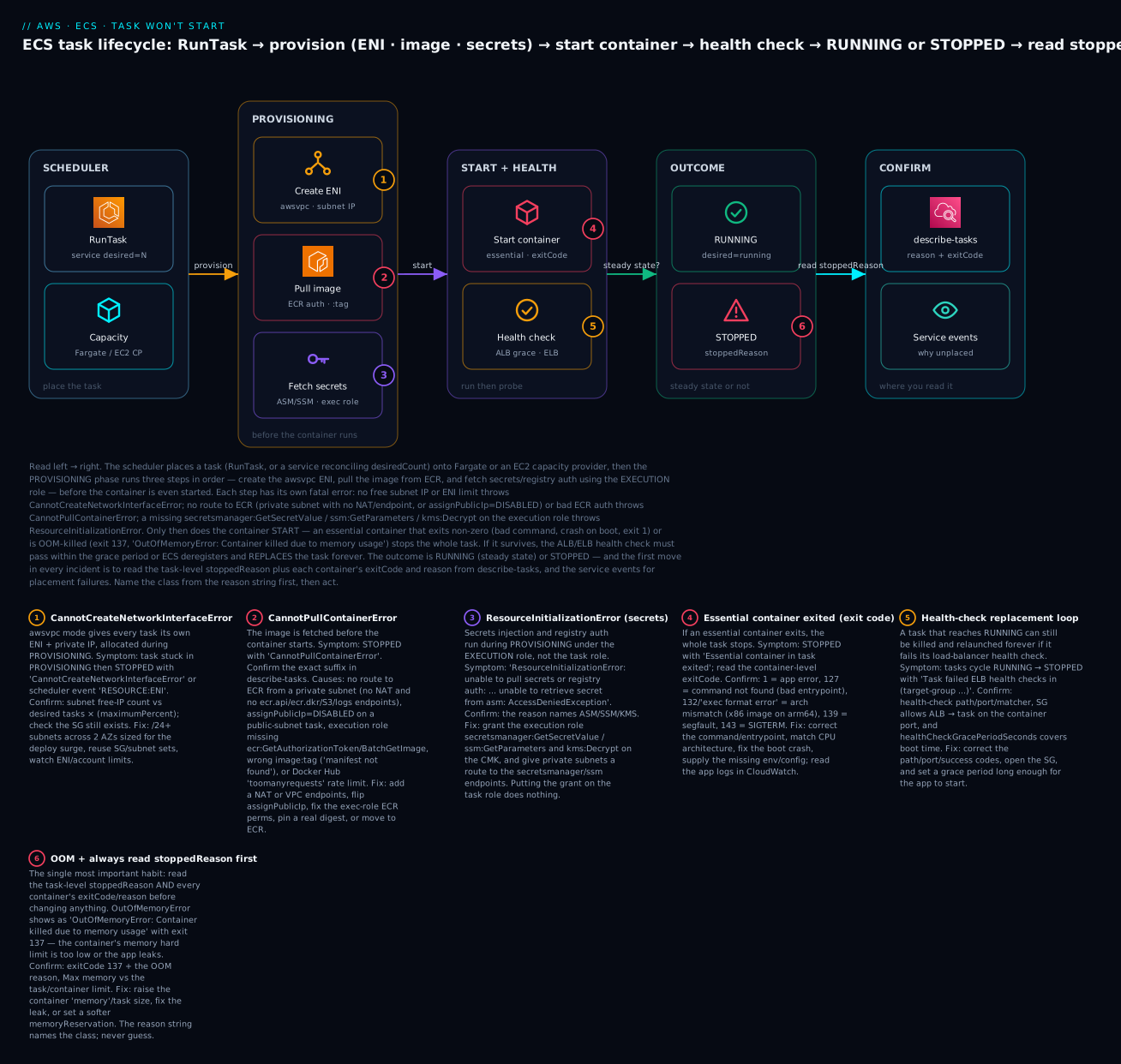
The diagram traces the real lifecycle of a task and pins each failure class to the exact hop where it bites. Read it left to right: the scheduler places a task (a RunTask call, or a service reconciling desiredCount) onto Fargate or an EC2 capacity provider; the provisioning phase then runs three steps in order under the execution role — create the awsvpc ENI, pull the image from ECR, and fetch secrets — before the container is even started; the container starts and must survive an essential-exit or OOM death and then pass a health check; and the outcome is RUNNING or STOPPED. Every one of the six numbered badges is a class you confirm by reading the stoppedReason and per-container exitCode from describe-tasks, plus service events for anything the scheduler couldn’t even place.
Real-world scenario
LedgerLoop, a fintech running its statement-rendering service on ECS Fargate in ap-south-1, moved the workload from public subnets into private subnets to satisfy an auditor. The change was one line in Terraform — assign_public_ip = false and a swap to the private subnet IDs — and it took production down for forty minutes during the next deploy, because three separate failures surfaced in sequence and the on-call engineer fixed them one at a time.
The first failure was CannotPullContainerError: ... dial tcp 52.x.x.x:443: i/o timeout on every task. In the old public-subnet setup, assignPublicIp=ENABLED had given each task a public IP and a route to ECR through the internet gateway; in a private subnet with no NAT and no VPC endpoints, there was simply no path to ECR. The engineer’s first instinct — “the image must be wrong” — cost ten minutes until they read the suffix: i/o timeout is a route problem, not an image problem. They created ecr.api, ecr.dkr, logs, and the S3 gateway endpoint (remembering, after one more failed pull with a TLS handshake timeout, that ECR layers live in S3), plus a security group allowing 443 from the task SG. Pulls succeeded.
The second failure appeared the instant pulls worked: ResourceInitializationError: unable to pull secrets or registry auth: ... unable to retrieve secret from asm: ... i/o timeout. The service reads its database password from Secrets Manager, and Secrets Manager was now equally unreachable from the private subnet. One more interface endpoint — secretsmanager — fixed it. The lesson they wrote down: when you cut off the internet, you cut off every AWS service the task uses — enumerate them (ECR, S3, Logs, Secrets Manager, and any the app calls) and add an endpoint for each.
The third failure was the subtle one. With pulls and secrets working, tasks reached RUNNING, served health checks for about ninety seconds, then cycled with Task failed ELB health checks in (target-group ...). The private subnets were smaller (/26) than the old public ones, and during the rolling deploy — old tasks draining while new tasks registered — the security group on the new endpoints subnet had been scoped to the old task SG, so the new tasks’ health probes from the ALB were fine, but the app itself couldn’t reach the database endpoint to answer a deep health check that queried the DB. They switched the target-group path from /health (which hit the DB) to a shallow /healthz (liveness only), raised healthCheckGracePeriodSeconds from 0 to 90 to cover cold start, and moved the deep dependency check to a separate readiness alarm. runningCount settled at the desired 6 and stayed there. The whole incident was three endpoint gaps and one health-check path — every one of them readable from describe-tasks and service events in the first two minutes, had they started there.
Advantages and disadvantages
ECS’s fail-fast startup model is a feature: a task that can’t pull, can’t decrypt a secret, or can’t pass a health check is stopped loudly with a specific reason, rather than limping along half-broken. But the same properties that make it safe create the specific traps above.
| Advantages (of the ECS start/stop model) | Disadvantages (the traps to manage) |
|---|---|
Every failure writes an exact stoppedReason + exitCode |
You must read them — no host to inspect on Fargate |
| Fail-fast: a bad task never serves traffic | Health-check loop replaces forever if misconfigured |
| Two roles cleanly separate start-time vs run-time IAM | The two roles are the #1 source of confusion |
| awsvpc gives per-task isolation + its own SG/IP | Subnets exhaust; ENI limits bite under surge |
| Secrets injected at start, never baked into the image | Injection runs under the exec role — silent if mis-granted |
Service reconciles to desiredCount automatically |
A crash-looping task cycles quietly until you look |
| Fargate removes host management entirely | No pull cache, no public IP, no docker for triage |
The advantages dominate for stateless web/API and worker services that scale horizontally — the fail-fast reason strings turn a mystery outage into a lookup. The disadvantages dominate when you treat ECS like a VM: assuming a container that runs locally will “just start,” ignoring the private-subnet pull path, or scoping IAM by trial and error. The skill is configuring the guardrails — endpoints, the right role, health-check grace, subnet headroom — before the incident, and knowing that the reason string already contains the answer.
Hands-on lab
You will reproduce and fix the two failures that cause the most container outages — a CannotPullContainerError from a subnet with no route to ECR, and a ResourceInitializationError on a secret the execution role can’t read — reading the diagnosis from describe-tasks each time. Everything is free-tier-friendly except a few paise of Fargate per-second runtime; teardown is at the end, and the lab deliberately avoids a NAT gateway (the one real cost) by demonstrating the diagnosis and fixing with assignPublicIp. Run in CloudShell (Bash), where aws is pre-authenticated, in ap-south-1.
Step 0 — Variables, cluster, and an execution role.
export AWS_DEFAULT_REGION=ap-south-1
ACCT=$(aws sts get-caller-identity --query Account --output text)
aws ecs create-cluster --cluster-name lab-ecs >/dev/null

# Execution role (assumed by Fargate to pull + log) — start WITHOUT secret perms on purpose
EXEC_ARN=$(aws iam create-role --role-name lab-exec-role \
  --assume-role-policy-document '{"Version":"2012-10-17","Statement":[{"Effect":"Allow","Principal":{"Service":"ecs-tasks.amazonaws.com"},"Action":"sts:AssumeRole"}]}' \
  --query Role.Arn --output text)
aws iam attach-role-policy --role-name lab-exec-role \
  --policy-arn arn:aws:iam::aws:policy/service-role/AmazonECSTaskExecutionRolePolicy
aws logs create-log-group --log-group-name /ecs/lab 2>/dev/null || true
sleep 10   # let the role propagate
Step 1 — A task definition using a public image + awslogs. Uses public.ecr.aws to avoid Docker Hub rate limits.
cat > td.json <<JSON
{ "family": "lab-web", "networkMode": "awsvpc", "requiresCompatibilities": ["FARGATE"],
  "cpu": "256", "memory": "512", "executionRoleArn": "$EXEC_ARN",
  "containerDefinitions": [ {
    "name": "web", "image": "public.ecr.aws/nginx/nginx:stable", "essential": true,
    "portMappings": [ { "containerPort": 80 } ],
    "logConfiguration": { "logDriver": "awslogs",
      "options": { "awslogs-group": "/ecs/lab", "awslogs-region": "ap-south-1", "awslogs-stream-prefix": "web" } } } ] }
JSON
aws ecs register-task-definition --cli-input-json file://td.json >/dev/null
Step 2 — Reproduce CannotPullContainerError (no route to ECR). Run the task in a default-VPC subnet with assignPublicIp=DISABLED and no NAT/endpoints, so there is no path to the registry.
VPC=$(aws ec2 describe-vpcs --filters Name=isDefault,Values=true --query 'Vpcs[0].VpcId' --output text)
SUBNET=$(aws ec2 describe-subnets --filters Name=vpc-id,Values=$VPC --query 'Subnets[0].SubnetId' --output text)
SG=$(aws ec2 create-security-group --group-name lab-sg --description lab --vpc-id "$VPC" --query GroupId --output text)

TASK=$(aws ecs run-task --cluster lab-ecs --launch-type FARGATE --task-definition lab-web \
  --network-configuration "awsvpcConfiguration={subnets=[$SUBNET],securityGroups=[$SG],assignPublicIp=DISABLED}" \
  --query 'tasks[0].taskArn' --output text)
echo "waiting for the task to fail..."; sleep 75
aws ecs describe-tasks --cluster lab-ecs --tasks "$TASK" \
  --query 'tasks[0].{last:lastStatus,stopCode:stopCode,reason:stoppedReason}'
Expected: lastStatus: STOPPED, stopCode: TaskFailedToStart, and a stoppedReason like CannotPullContainerError: ... dial tcp ...:443: i/o timeout. The image reference is correct — this is purely a missing route. That is the fingerprint: i/o timeout, not manifest not found.
Step 3 — Fix the pull (flip assignPublicIp). The production-grade fix is VPC endpoints (or a NAT); for the lab, prove the route was the issue by giving the task a public IP in the same subnet (the default VPC’s subnets are public, with an IGW route).
TASK=$(aws ecs run-task --cluster lab-ecs --launch-type FARGATE --task-definition lab-web \
  --network-configuration "awsvpcConfiguration={subnets=[$SUBNET],securityGroups=[$SG],assignPublicIp=ENABLED}" \
  --query 'tasks[0].taskArn' --output text)
sleep 75
aws ecs describe-tasks --cluster lab-ecs --tasks "$TASK" \
  --query 'tasks[0].{last:lastStatus,health:healthStatus}'
Expected: lastStatus: RUNNING. Same image, same subnet, same SG — the only change was a route to the registry. (In production you would instead add ecr.api, ecr.dkr, the S3 gateway, and logs endpoints, per the Terraform in the pull section, and keep assignPublicIp=DISABLED.) Stop this task before the next step: aws ecs stop-task --cluster lab-ecs --task "$TASK" >/dev/null.
Step 4 — Reproduce ResourceInitializationError (missing secret permission). Create a secret, wire it into the task definition, but don’t grant the execution role permission to read it.
SECRET_ARN=$(aws secretsmanager create-secret --name lab/db-pw \
  --secret-string 'super-secret' --query ARN --output text)

cat > td2.json <<JSON
{ "family": "lab-web-sec", "networkMode": "awsvpc", "requiresCompatibilities": ["FARGATE"],
  "cpu": "256", "memory": "512", "executionRoleArn": "$EXEC_ARN",
  "containerDefinitions": [ {
    "name": "web", "image": "public.ecr.aws/nginx/nginx:stable", "essential": true,
    "secrets": [ { "name": "DB_PASSWORD", "valueFrom": "$SECRET_ARN" } ],
    "logConfiguration": { "logDriver": "awslogs",
      "options": { "awslogs-group": "/ecs/lab", "awslogs-region": "ap-south-1", "awslogs-stream-prefix": "web" } } } ] }
JSON
aws ecs register-task-definition --cli-input-json file://td2.json >/dev/null

TASK=$(aws ecs run-task --cluster lab-ecs --launch-type FARGATE --task-definition lab-web-sec \
  --network-configuration "awsvpcConfiguration={subnets=[$SUBNET],securityGroups=[$SG],assignPublicIp=ENABLED}" \
  --query 'tasks[0].taskArn' --output text)
sleep 75
aws ecs describe-tasks --cluster lab-ecs --tasks "$TASK" \
  --query 'tasks[0].{last:lastStatus,stopCode:stopCode,reason:stoppedReason}'
Expected: STOPPED, stopCode: TaskFailedToStart, and stoppedReason containing ResourceInitializationError: unable to pull secrets or registry auth: execution resource retrieval failed: unable to retrieve secret from asm: ... AccessDeniedException. Note the route is fine (public IP) — this is purely an execution-role permission gap, and no amount of task-role tinkering would fix it.
Step 5 — Fix the secret permission (execution role).
aws iam put-role-policy --role-name lab-exec-role --policy-name read-lab-secret \
  --policy-document "{\"Version\":\"2012-10-17\",\"Statement\":[{\"Effect\":\"Allow\",\"Action\":[\"secretsmanager:GetSecretValue\"],\"Resource\":\"$SECRET_ARN\"}]}"
sleep 10
TASK=$(aws ecs run-task --cluster lab-ecs --launch-type FARGATE --task-definition lab-web-sec \
  --network-configuration "awsvpcConfiguration={subnets=[$SUBNET],securityGroups=[$SG],assignPublicIp=ENABLED}" \
  --query 'tasks[0].taskArn' --output text)
sleep 75
aws ecs describe-tasks --cluster lab-ecs --tasks "$TASK" --query 'tasks[0].lastStatus'
Expected: RUNNING. The secret is now injected as the DB_PASSWORD env var by the execution role. (The secret is unencrypted with a customer CMK here, so no kms:Decrypt was needed; with a CMK you would add it.) Stop the task: aws ecs stop-task --cluster lab-ecs --task "$TASK" >/dev/null.
Validation checklist. You reproduced two distinct classes and confirmed each from its own fingerprint:
| Step | Failure reproduced | The fingerprint | The fix you applied |
|---|---|---|---|
| 2–3 | CannotPullContainerError |
... i/o timeout, stopCode=TaskFailedToStart, image is valid |
Route to ECR: assignPublicIp=ENABLED (prod: VPC endpoints/NAT) |
| 4–5 | ResourceInitializationError |
unable to retrieve secret from asm: AccessDeniedException |
Grant secretsmanager:GetSecretValue on the execution role |
Teardown (⚠️ do this — Fargate bills per second while a task runs).
for t in $(aws ecs list-tasks --cluster lab-ecs --query 'taskArns' --output text); do
  aws ecs stop-task --cluster lab-ecs --task "$t" >/dev/null; done
aws ecs deregister-task-definition --task-definition lab-web:1 >/dev/null 2>&1 || true
aws ecs deregister-task-definition --task-definition lab-web-sec:1 >/dev/null 2>&1 || true
aws ecs delete-cluster --cluster lab-ecs >/dev/null
aws secretsmanager delete-secret --secret-id lab/db-pw --force-delete-without-recovery >/dev/null
aws logs delete-log-group --log-group-name /ecs/lab 2>/dev/null || true
aws ec2 delete-security-group --group-id "$SG" 2>/dev/null || true
aws iam delete-role-policy --role-name lab-exec-role --policy-name read-lab-secret 2>/dev/null || true
aws iam detach-role-policy --role-name lab-exec-role \
  --policy-arn arn:aws:iam::aws:policy/service-role/AmazonECSTaskExecutionRolePolicy
aws iam delete-role --role-name lab-exec-role
Cost note. The Fargate tasks ran for seconds each (a 256/512 task is a few paise per run), Secrets Manager is ~$0.40/secret/month prorated to nothing for minutes, and CloudWatch Logs ingest was trivial. The only meaningful charge would have been a NAT gateway (~₹3–4/hour) — the lab avoided it by demonstrating the diagnosis and fixing with assignPublicIp. Teardown above stops any lingering cost.
Common mistakes & troubleshooting
This is the playbook — the part you bookmark. First the scannable master table you can read while runningCount is stuck at 0, then the three nastiest failures in full. Every row is a real failure with the exact symptom, the class, the root cause, the precise command to confirm, and the fix.
| # | stoppedReason / symptom |
Class | Root cause | Confirm (describe-tasks / events / logs) | Fix |
|---|---|---|---|---|---|
| 1 | CannotPullContainerError: ... i/o timeout |
Image pull | No route to ECR from the subnet | describe-tasks reason suffix; route table has no NAT/endpoint |
Add NAT or ecr.api+ecr.dkr+S3+logs endpoints; or assignPublicIp=ENABLED |
| 2 | CannotPullContainerError: ... manifest ... not found |
Image pull | Wrong image name or :tag |
The reason names the ref; check the repo | Push the tag or pin an existing @sha256: digest |
| 3 | CannotPullContainerError: ... pull access denied |
Image pull | Exec-role ECR perms / private registry | get-policy on repo; exec-role policy |
Attach AmazonECSTaskExecutionRolePolicy; repositoryCredentials for private |
| 4 | CannotPullContainerError: ... toomanyrequests |
Image pull | Docker Hub anonymous 429 | Reason string; source registry | Mirror to ECR / use public.ecr.aws / authenticate |
| 5 | ResourceInitializationError: ... unable to retrieve secret from asm |
Secrets | Exec role lacks GetSecretValue/KMS |
Reason names ASM + AccessDeniedException |
Grant secretsmanager:GetSecretValue + kms:Decrypt on the exec role |
| 6 | ResourceInitializationError: ... failed to validate logger args |
Logging | awslogs group missing | Reason; describe-log-groups |
Pre-create group or awslogs-create-group=true + logs:CreateLogGroup |
| 7 | ResourceInitializationError: ... i/o timeout (secrets) |
Secrets route | Private subnet can’t reach Secrets Manager | Reason; no secretsmanager endpoint |
Add the secretsmanager interface endpoint or NAT |
| 8 | CannotCreateNetworkInterfaceError / RESOURCE:ENI |
Networking | Subnet IP exhaustion / ENI limit | Subnet free IPs; service events | Larger subnets, more AZs; request ENI limit raise |
| 9 | Timeout waiting for network interface provisioning |
Networking | ENI can’t finish (DNS/route) | enableDnsSupport; route table |
Enable DNS support; fix route/endpoints |
| 10 | Essential container in task exited, exit 1 |
App exit | App threw on boot | Container exitCode; CloudWatch app logs |
Fix startup bug; supply config/env/secret |
| 11 | Essential container in task exited, exit 127 |
App exit | Bad command/entryPoint |
Container reason; task def |
Correct the command; ensure the binary exists |
| 12 | ... exec format error, exit 132 |
Arch mismatch | x86 image on arm64 Fargate | runtimePlatform vs image arch |
Multi-arch build; set runtimePlatform to match |
| 13 | OutOfMemoryError: Container killed due to memory usage, exit 137 |
OOM | Container hard memory too low / leak |
Reason; Container Insights MemoryUtilized ~100% |
Raise memory/task size; fix leak |
| 14 | Task cycles, exit 0, EssentialContainerExited |
Job-as-service | One-shot image run as a long service | Container exits 0 immediately | Run as a scheduled task, or keep the process alive |
| 15 | Task failed ELB health checks in (target-group ...) |
Health loop | Path/port/matcher/SG/grace wrong | Target-group health; SG; grace period | Fix path/port/matcher; open SG; raise healthCheckGracePeriodSeconds |
| 16 | Task failed container health checks |
Container healthCheck | Task-def healthCheck command fails |
The healthCheck command + startPeriod |
Use a command the image has; longer startPeriod |
| 17 | Capacity is unavailable at this time |
Fargate capacity | Transient AZ capacity constraint | Service events | Retry; more AZs; FARGATE+FARGATE_SPOT providers |
| 18 | no container instance met all of its requirements |
EC2 capacity | Not enough CPU/mem/ports/ENI | Service events name RESOURCE:* |
Scale ASG/capacity provider; right-size the task |
| 19 | no container instances were found in your cluster |
EC2 registration | ASG at 0 or agent not registered | list-container-instances; agent logs |
Scale up; fix instance role + ECS agent |
| 20 | Task stuck in PENDING for minutes then STOPPED |
Provisioning stall | Slow pull/secrets/ENI over a bad route | lastStatus history; the eventual reason |
Trace the reason; usually endpoint/route or perms |
| 21 | Reaches RUNNING then AccessDeniedException in logs |
Task role | App’s own AWS call denied (not start-time) | App logs; task-role policy | Add the action to the task role (not exec) |
| 22 | SpotInterruption in stopCode |
Spot reclaim | Fargate/EC2 Spot capacity taken back | describe-tasks stopCode |
Add on-demand base; handle interruption gracefully |
The three that cause the most damage, expanded:
A. CannotPullContainerError from a private subnet with no route (the “the image is fine, the network isn’t” ghost). A service works in one environment and every task dies in another with CannotPullContainerError, and the reflex — “the image or tag is wrong” — sends you down the wrong path for twenty minutes. The tell is the suffix: dial tcp ...:443: i/o timeout (or TLS handshake timeout) means the registry was never reached, while manifest ... not found means it was reached and the image reference is wrong. Fargate has no image cache and no public IP unless you assign one, so in a private subnet it needs either a NAT gateway (0.0.0.0/0 → nat) or the full set of VPC endpoints: ecr.api and ecr.dkr (interface, private DNS on), the S3 gateway endpoint (ECR image layers are stored in S3 — miss this and auth works but layers hang), and logs (the awslogs driver also runs at start). Confirm: read the exact suffix; check the subnet’s route table for a NAT route; check for the endpoints and that their security group allows 443 from the task SG. Fix: add the endpoints (cheaper and more secure than NAT for AWS-only egress) or a NAT gateway, or — if the task belongs in a public subnet — set assignPublicIp=ENABLED. The assignPublicIp=DISABLED-in-a-public-subnet case is the sneakiest: the subnet is public (IGW route present) but with no public IP the task still has no path out.
B. ResourceInitializationError on a secret the execution role can’t read (the wrong-role trap). A task definition wires a Secrets Manager secret or SSM parameter into a container, and every task fails in PENDING with ResourceInitializationError: unable to pull secrets or registry auth: ... unable to retrieve secret from asm: ... AccessDeniedException. The near-universal mistake is to grant the permission to the task role — but secret injection happens at task start, performed by the execution role, before your container (and therefore before the task role) exists. Confirm: the reason names asm (Secrets Manager) or ssm and an AccessDeniedException; inspect the execution role’s policy, not the task role. Fix: grant the execution role secretsmanager:GetSecretValue (or ssm:GetParameters) on the exact secret/parameter ARN, plus kms:Decrypt on the CMK if the secret is encrypted with a customer-managed key; and if you are in a private subnet, add the secretsmanager/ssm interface endpoint so the fetch has a route. The identical error with an i/o timeout suffix instead of AccessDeniedException is the route variant, not the permission variant — read the suffix.
C. The health-check replacement loop (RUNNING, then killed forever). A task reaches RUNNING, serves traffic for a minute, and is then stopped with Task failed ELB health checks in (target-group ...), replaced, and the replacement dies the same way — runningCount oscillates and the deploy never converges. This is the cruelest failure because the task looks healthy at first glance. The causes cluster around the load-balancer health check: a path that 404s (pointing / at an app with no root route), a port mismatch (target group probing a port the app doesn’t listen on), a security group that doesn’t allow the ALB to reach the task on the container port, a matcher expecting 200 when the app returns 301/403, or — most common — a grace period of 0 so the ALB starts probing (and failing) before the app has finished booting, and ECS kills it during cold start. Confirm: look at the target group’s health-check config and the targets’ health reason in describe-target-health; curl the health path from a task that is up; check the task SG allows the ALB SG on the app port. Fix: point the health check at a real, cheap, dependency-light endpoint (a liveness /healthz, not a deep check that queries the database), match the port and success matcher, open the security group, and set healthCheckGracePeriodSeconds comfortably above your cold-start time. Keep deep dependency checks out of the load-balancer health path — a slow database should not make ECS think your app is dead.
Best practices
- Read
stoppedReasonandexitCodebefore you touch anything. Onedescribe-tasksnames the class; guessing wastes the incident. Make it the first command, every time. - Read the suffix, not just the error name.
CannotPullContainerError: i/o timeout(route) and... manifest not found(image) have completely different fixes. - Know which role you’re fixing. Pull/secrets/logs failures are the execution role; runtime
AccessDeniedin a running app is the task role. Never fix the wrong one. - In private subnets, enumerate every AWS service the task touches — ECR (
api+dkr), S3 (gateway, for layers), CloudWatch Logs, Secrets Manager/SSM — and add an endpoint for each, or a NAT. - Set
healthCheckGracePeriodSecondsabove your cold-start time. A grace period of 0 is the leading cause of the health-check replacement loop. - Keep load-balancer health checks shallow. Liveness (
/healthz), not a deep check that queries the database; move readiness/dependency checks elsewhere. - Size subnets for the deploy surge, not steady state. With
maximumPercent=200, a rolling deploy needs double the IPs; use/24+ across 2–3 AZs. - Pin images by digest (
@sha256:), not:latest. It removes a whole class of “manifest not found” and surprise-pull failures, and makes rollbacks deterministic. - Match the architecture. Building on an Apple-silicon laptop and running on x86 Fargate (or vice-versa) yields exit
132/exec format error; build multi-arch or setruntimePlatform. - Mark truly-optional containers non-essential. An essential container that exits — even with code 0 — stops the whole task; a one-shot job belongs in a scheduled task, not a service.
- Enable Container Insights and alarm on the right signals —
RunningTaskCountbelow desired, OOM/stopCodepatterns, and target health — so a crash loop pages you instead of hiding. - Attach
AmazonECSTaskExecutionRolePolicyas the baseline execution role and add only the specific secret/KMS ARNs on top; it already covers ECR pull and awslogs.
Security notes
- Least-privilege on both roles, separately. The execution role needs only ECR pull, awslogs, and the specific secret/KMS ARNs it injects; the task role needs only the app’s own actions. A wildcard on either turns a bug into a blast radius. Scope secret access to exact ARNs (
secret:prod/db-*), never*. - Prefer VPC endpoints over a NAT gateway for AWS-service egress. Endpoints keep ECR/Secrets Manager/Logs traffic on the AWS backbone, off the public internet — and, as a bonus, remove the most common “silent pull timeout.” Add endpoint policies to restrict which repositories/secrets are reachable.
- Inject secrets, never bake them. Use the task-definition
secretsblock (Secrets Manager/SSM) so credentials arrive as env vars at start and never live in the image or indocker inspect. Encrypt secrets with a customer-managed KMS key and grant the execution rolekms:Decrypton exactly that key. - Lock down the task security group. In awsvpc mode each task has its own SG — allow only the load balancer’s SG on the container port for ingress, and only the egress the app needs. A task SG open to
0.0.0.0/0on the app port defeats the point of the private subnet. - Disable public IPs for anything that doesn’t need them.
assignPublicIp=DISABLEDplus VPC endpoints is the secure default; reserveENABLEDfor genuinely public workloads or as a deliberate, documented exception. - Turn on ECS Exec deliberately, not by default.
execute-commandis invaluable for live triage but is a shell into production; gate it behind IAM, log it to CloudWatch/S3, and disable it when not debugging.
Cost & sizing
ECS itself is free; you pay for what runs the tasks. On Fargate the bill is vCPU-seconds + GB-seconds (per-second, one-minute minimum) plus ephemeral storage above 20 GiB; on the EC2 launch type you pay for the EC2 instances (and the control plane is free). The failure classes above have direct cost consequences: a crash-looping task bills for every start attempt’s runtime, and an over-provisioned task memory to “avoid OOM” pays for headroom it never uses.
| Cost driver | How it’s billed | Right-size by | Rough figure |
|---|---|---|---|
| Fargate vCPU | Per vCPU-second (1-min min) | Match task cpu to real usage; don’t round up “to be safe” |
~$0.04048 / vCPU-hour (ap-south-1, varies) |
| Fargate memory | Per GB-second | Right-size memory; OOM is cheaper to fix than to pad |
~$0.004445 / GB-hour |
| Fargate Spot | Up to ~70% off on-demand | Interruptible workers with an on-demand base | Big savings; handle SpotInterruption |
| EC2 launch type | EC2 instance price | Bin-pack with memoryReservation; capacity-provider managed scaling |
Cheaper at steady high utilization |
| NAT gateway | Hourly + per-GB processed | Replace with VPC endpoints for AWS egress | ~₹3–4/hr + data — often the biggest line item |
| Interface endpoints | Hourly per endpoint per AZ + data | Share across services; only the ones you need | A few ₹/hr each; cheaper than NAT at low egress |
| CloudWatch Logs | Per GB ingested + storage | Set retention; sample chatty logs | Unbounded retention quietly grows |
Sizing rules of thumb: for a web/API service, start from the task’s real CPU/memory under load (use Container Insights), pick the smallest valid Fargate pair that fits with modest headroom, and let target-tracking autoscaling handle peaks rather than a huge always-on task. For private-subnet cost, compare a shared set of VPC endpoints (a few rupees/hour, flat) against a NAT gateway (hourly plus per-GB) — at low-to-moderate AWS-only egress the endpoints win on both cost and security. Set log retention on every group (default is never-expire) or CloudWatch Logs becomes a bigger line item than the compute. In INR terms, a small always-on service (a couple of 0.25 vCPU / 0.5 GB tasks) runs in the low hundreds of rupees per month on Fargate before the NAT/endpoint decision — which is usually where the real money is.
Interview & exam questions
Q1. A task is stuck and you have thirty seconds — what’s the first command and what three fields do you read?
aws ecs describe-tasks (or the stopped-task console), and you read the task-level stoppedReason, the stopCode, and each container’s exitCode/reason. The reason names the class (pull/init/ENI/exit/health) and the exit code names the death; for placement failures you read describe-services events instead. (SAA-C03, SOA-C02)
Q2. CannotPullContainerError: ... i/o timeout vs ... manifest not found — different fixes?
Yes. i/o timeout means the registry was never reached — a routing problem (no NAT/endpoints in a private subnet, or assignPublicIp=DISABLED); fix the network path. manifest not found means the registry was reached and the image/tag is wrong; fix the reference. The suffix is the diagnosis. (DVA-C02)
Q3. Every task fails with ResourceInitializationError on a secret. Where do you grant the permission, and why is it a common mistake?
On the execution role, because secret injection happens at task start, performed by the ECS/Fargate infrastructure before your container exists. The common mistake is granting it to the task role (used by your running app), which has no effect on start-time secret fetch. (DVA-C02, SAA-C03)
Q4. Distinguish the execution role from the task role with a one-line test.
If the failure happens before the container runs (pull, secrets, logs) it’s the execution role; if a running app throws AccessDenied on its own AWS call, it’s the task role. Start-time vs run-time. (DVA-C02)
Q5. A task reaches RUNNING, serves traffic briefly, then cycles with Task failed ELB health checks. Walk the diagnosis.
Check the target-group health-check path/port/matcher, whether the task SG allows the ALB on the container port, and whether healthCheckGracePeriodSeconds covers cold start. Curl the health path from a healthy task. Most often it’s a deep health check or a zero grace period killing the app before it’s ready. (SOA-C02, SAA-C03)
Q6. What does exit code 137 usually mean on ECS, and how do you confirm OOM specifically?
137 is SIGKILL (128+9): usually an OOM kill, or an app that ignored SIGTERM and was force-killed after stopTimeout. Confirm OOM via the container reason OutOfMemoryError: Container killed due to memory usage and Container Insights MemoryUtilized at ~100% of the limit. Fix by raising memory or fixing the leak. (SOA-C02)
Q7. What exact resources must a Fargate task in a private subnet reach to pull an ECR image, with no NAT?
Interface endpoints for ecr.api and ecr.dkr (private DNS on), a gateway endpoint for S3 (image layers are S3-backed), and a logs endpoint for the awslogs driver — plus a security group on the endpoints allowing 443 from the task SG. Missing the S3 endpoint makes auth succeed but layer download hang. (SAA-C03, ANS)
Q8. Why might an essential container with exit code 0 still crash-loop a service? Because ECS stops the whole task when any essential container exits — success or not. A one-shot/job image deployed as a long-running service finishes and exits 0, and the service relaunches it forever. Run it as a scheduled task, or keep the process alive. (DVA-C02)
Q9. A rolling deploy fails with CannotCreateNetworkInterfaceError even though the service runs fine at rest. Why?
awsvpc gives each task an ENI + IP, and a rolling deploy at maximumPercent=200 briefly runs double the tasks, needing double the IPs; a small subnet exhausts during the surge. Size subnets (/24+) across AZs for the peak, not steady state. (SAA-C03)
Q10. exec format error / exit 132 on Fargate — cause and fix?
An architecture mismatch — an x86_64 image running on an arm64 (Graviton) Fargate task, or vice-versa, often from building on an Apple-silicon laptop. Fix by building a multi-arch image or setting the task definition’s runtimePlatform to match the image. (DVA-C02)
Q11. The scheduler never even creates a task (no stoppedReason exists). Where do you look?
describe-services events — the reconciliation log that explains placement failures (unable to place a task because no container instance met all of its requirements, RESOURCE:MEMORY/CPU/PORTS/ENI, Capacity is unavailable). describe-tasks only helps once a task exists. (SOA-C02)
Q12. How do you tell a genuine failure from an expected stop?
Read stopCode: UserInitiated/ServiceSchedulerInitiated with a deployment reason and exit 143 (SIGTERM) is a normal drain; TaskFailedToStart or EssentialContainerExited with a non-zero code is a real failure. SpotInterruption is capacity reclaim, not a bug. (SOA-C02)
Quick check
- What is the very first command you run when a task won’t start, and which three fields do you read from it?
CannotPullContainerErrorends ini/o timeout. Is the image wrong? What’s the actual cause and the two fixes?- A secret injection fails with
ResourceInitializationError ... AccessDeniedException. Which of the two roles do you fix, and why is the other one a trap? - A task reaches RUNNING then is killed and relaunched forever. What class is this, and name three things you check.
- Exit code 137 with
OutOfMemoryError— what happened, and what’s the fix (and the non-fix)?
Answers
aws ecs describe-tasks— read the task-levelstoppedReason, thestopCode, and each container’sexitCode/reason. The reason names the class; the exit code names the death. (For never-placed tasks, readdescribe-servicesevents instead.)- No — the image is fine.
i/o timeoutmeans the registry was never reached: a routing problem. Fixes: add a NAT gateway or the ECR + S3 + Logs VPC endpoints for a private subnet, or setassignPublicIp=ENABLEDin a public subnet. - Fix the execution role (
secretsmanager:GetSecretValue+kms:Decrypton the ARNs). Secret injection runs at task start under the execution role, before your container exists — granting it on the task role does nothing. - The health-check replacement loop. Check: the target-group health-check path/port/matcher, whether the security group lets the ALB reach the task on the container port, and whether
healthCheckGracePeriodSecondscovers cold start (a deep DB health check or a zero grace period is the usual culprit). - The container hit its hard
memorylimit and was OOM-killed (SIGKILL, 128+9). Fix: raise the containermemory(and task size to a valid Fargate pair) or fix the leak. Non-fix: restarting — it will OOM again at the same limit.
Glossary
| Term | Definition |
|---|---|
| Task | A running instance of a task definition — one or more containers scheduled together on Fargate or EC2. |
| Task definition | The blueprint: images, CPU/memory, ports, env, secrets, roles, and logConfiguration. |
| Service | The controller that keeps desiredCount tasks running, reconciles them, and integrates with a load balancer. |
stoppedReason |
The task-level string explaining why a task stopped; the first thing you read in an incident. |
exitCode |
The container process’s exit status; 128 + signal for signal deaths (137 = OOM/SIGKILL, 143 = SIGTERM). |
stopCode |
The coarse bucket for a stop: TaskFailedToStart, EssentialContainerExited, SpotInterruption, etc. |
| Execution role | The IAM role the ECS/Fargate infrastructure assumes to pull images, fetch secrets, and write logs — before the container runs. |
| Task role | The IAM role the application code assumes at runtime for its own AWS API calls. |
| awsvpc mode | Network mode giving each task its own ENI and private IP (mandatory on Fargate). |
CannotPullContainerError |
The image couldn’t be fetched — route, auth, tag, rate limit, or architecture. |
ResourceInitializationError |
A start-time init step failed — secrets, registry auth, or the logging driver — run by the execution role. |
| Essential container | A container whose exit (for any reason) stops the entire task; every task needs at least one. |
| Health-check grace period | healthCheckGracePeriodSeconds — how long ECS ignores load-balancer health after a task starts, covering cold start. |
| Capacity provider | The strategy (FARGATE, FARGATE_SPOT, or an EC2 Auto Scaling group) that supplies compute to place tasks. |
| Platform version | The Fargate runtime version (1.4.0 = LATEST) that gates features like configurable ephemeral storage and EFS. |
Next steps
- If you haven’t built one yet, deploy a service end to end in Your First ECS on Fargate Service, Hands-On.
- Tune the knobs this article treats as fixes — task sizing, health-check grace, deployment percentages and autoscaling — in ECS Task Definitions, Services & Autoscaling.
- Fix the image side of pull failures — building, tagging, and the exact ECR permissions — in Push and Pull with Amazon ECR, Hands-On.
- When the failure is really “can’t reach ECR/Secrets Manager from a private subnet,” work the network path in The VPC Connectivity Troubleshooting Playbook.
- Revisit whether ECS is even the right runtime versus EKS or plain Fargate in Choosing Your AWS Container Path: ECS vs EKS vs Fargate.