Quick take: When “A can’t reach B” in a VPC, do not stare at the security group — walk the packet in order and stop at the first layer that could drop it. A packet from A crosses, in this exact sequence: the route table (is there a route to B at all?), the subnet’s stateless NACL, the ENI’s stateful security group, and finally lands on a target that must actually be listening; if B lives in another VPC or on-prem it also crosses a Transit Gateway, a peering connection, or a VPN/DX, and every hop is filtered again by DNS and MTU. Almost every AWS-network drop is silent — the client just times out — so a timeout tells you nothing about which layer failed. The whole skill is (1) knowing the ordered path, (2) reading the two signals that aren’t silent (RST = “reached the host, app refused”; ICMP unreachable = “no route”), and (3) getting a deterministic answer from Reachability Analyzer and VPC Flow Logs instead of guessing.
A platform team pages you at 2 a.m.: the new order-service instance in ap-south-1 cannot reach the payments API in a peered VPC. The security group “looks right.” The instance is healthy. curl from a bastion in the same subnet works; curl from the order service hangs for 30 seconds and dies with Connection timed out. Three engineers open three consoles and all three open the security group — the single most over-inspected object in AWS networking — and find nothing wrong, because nothing is wrong there. The packet never got far enough to be judged by a security group: the peered VPC’s route table had a route back to the wrong CIDR after a subnet was re-CIDR’d, so the reply was black-holed one layer earlier. Two hours gone on the wrong layer.
That incident is the whole reason this playbook exists. “Traffic won’t flow” is not one problem; it is a dozen different problems that all present as the same symptom — a silent timeout — at a dozen different layers. If you debug them in a random order, or worse always start at the security group, you will burn hours on healthy layers while the broken one sits three hops upstream. The senior move is mechanical: there is exactly one packet path, it has a fixed order, and you check the layers in that order, using tools that give a deterministic answer rather than a hunch. This article is that path. We define every layer a packet crosses — route table, public-IP/EIP, subnet/AZ, security group, NACL, DNS, MTU, Transit Gateway, peering, endpoint, and on-prem VPN/DX — enumerate exactly how each one fails, then hand you a master symptom→layer→confirm→fix table, a Reachability Analyzer explanation-code reference, and a fast decision tree. Every check shows both the aws CLI command and the Terraform that would have prevented it. This is the map you keep open when the pager goes off, and it maps directly to the networking domains of SAA-C03, SOA-C02, and the advanced networking specialty ANS-C01.
If you want the ground-up build first — CIDRs, subnets, route tables, gateways — read AWS VPC From Scratch: Subnets, Route Tables and IGW. This playbook assumes that foundation and goes straight to why the packet stopped.
What problem this solves
In a VPC, a single connection request is judged independently by as many as eleven different controls, evaluated in a fixed order, and any one of them can drop the packet without logging a thing on the instance. The application sees Connection timed out. That is the entire diagnostic problem: the symptom is identical no matter which layer failed, so the symptom carries almost no information. Without a systematic method you are reduced to changing one thing at a time and re-testing — the slowest possible debugging loop, and the one most likely to “fix” the wrong layer (widening a security group that was never the problem) and leave a real hole behind.
What breaks without this discipline is a recognisable pattern of wasted incidents. An engineer spends an afternoon on a security group when the subnet’s route table has no route to the destination. A team “works from AZ-a but not AZ-b” and blames the app, when the AZ-b subnet is simply associated with a route table that has no NAT route. A connection is fine for small requests and dies on large ones, and nobody suspects MTU because the concept never comes up until it bites. A Transit Gateway attachment is associated to a route table but the route was never propagated, so half the mesh is dark. Someone peers two VPCs, adds routes on one side only, and cannot understand why traffic goes out but never comes back. Each of these is a five-minute fix once you know which layer — and a lost day when you don’t.
Who hits this: everyone past a single instance in a single subnet. It bites hardest at the boundaries — where a packet leaves one blast radius and enters another: subnet→subnet across a NACL, VPC→VPC across peering or a TGW, cloud→on-prem across a VPN, and app→AWS-service across a VPC endpoint. Those boundaries are where ownership splits (the platform team owns the TGW and NACLs; the app team owns the security groups and the instance) so no single person can see the whole path, and the packet dies in the seam between two teams. The cure is a shared, ordered mental model of the path — which is exactly what a playbook is.
Here is the whole field on one page: every layer a packet crosses, in order, what it does, its classic failure, and the signal it produces.
| # | Layer | What it enforces | Classic failure | Signal you see |
|---|---|---|---|---|
| 1 | Route table | Is there a path to the destination CIDR? | No route / wrong table associated / more-specific route / blackhole | Silent timeout |
| 2 | Public IP / EIP | Can this instance be reached from / reach the internet? | No public IP or EIP; auto-assign off | Silent timeout (internet only) |
| 3 | Subnet / AZ | Is the resource where you think, in a reachable AZ? | Instance in a private subnet, or an AZ with no NAT/route | Silent timeout, or “one AZ works” |
| 4 | Security group | Allow-only, stateful, per-ENI | Missing ingress port/source; wrong SG referenced; wrong ENI | Silent timeout |
| 5 | Network ACL | Allow+deny, stateless, per-subnet | DENY shadows ALLOW; missing outbound ephemeral range | Silent timeout |
| 6 | DNS | Name → IP; private zones | enableDnsHostnames off; private zone not associated; endpoint private DNS off |
NXDOMAIN / resolves to public IP |
| 7 | MTU / fragmentation | Packet size across the path | Jumbo over IGW/VPN; DF bit + blocked PMTUD | Small requests work, large hang |
| 8 | Transit Gateway | Inter-VPC/on-prem hub routing | Association without propagation; wrong TGW route table; appliance mode | Silent timeout, asymmetric |
| 9 | VPC peering | 1:1 non-transitive VPC link | One-sided routes; non-transitivity; cross-region SG-ref; overlapping CIDR | Timeout; “out but not back” |
| 10 | VPC endpoint | Private path to AWS services | Missing prefix-list route; restrictive policy; private DNS off; endpoint SG | Timeout or AccessDenied |
| 11 | On-prem VPN / DX | Hybrid to your data centre | Tunnel down; BGP not advertising; asymmetric; MSS/MTU | Intermittent; one-tunnel; timeout |
The rest of this article is that table, expanded — one section per layer with exactly how it fails and how to confirm it — followed by the tools that turn a silent timeout into a named component.
Learning objectives
By the end of this article you can:
- Recite the ordered packet path a connection crosses and, given a symptom, name the first layer that could produce it — instead of defaulting to the security group.
- Diagnose a route-table failure — missing route, wrong association, more-specific route, blackhole — and read
describe-route-tablescorrectly. - Distinguish a silent drop (route/SG/NACL — timeout) from a loud refusal (RST — the host answered) from no route (ICMP unreachable) at a glance.
- Run VPC Reachability Analyzer and interpret its explanation codes (
NO_ROUTE_TO_DESTINATION,ENI_SG_RULES_MISMATCH,SUBNET_ACL_RESTRICTION,MORE_SPECIFIC_ROUTE,TGW_*,PCX_*) to get a deterministic blocking component. - Read a VPC Flow Logs
REJECTrecord and pair inbound/outbound rows to separate a security-group block from a NACL block. - Debug TGW (association vs propagation vs appliance mode), peering (non-transitivity, cross-region SG-ref), endpoints (prefix list, policy, private DNS), and on-prem VPN/DX (tunnel, BGP, MSS).
- Recognise the three nastiest failure classes — asymmetric routing through an appliance, “works in one AZ not another,” and intermittent = MTU or one dead tunnel — from their fingerprints.
- Reproduce a route-table break in a lab, localise it with Reachability Analyzer and Flow Logs, and fix it in both
awsCLI and Terraform.
Prerequisites & where this fits
You should be comfortable with VPC fundamentals — CIDR blocks, subnets, route tables, internet and NAT gateways — and able to launch an EC2 instance and run the AWS CLI with credentials. You do not need to be a network specialist; the goal here is to make you the person in the room who can localise any VPC drop in minutes.
This playbook is the hub that the focused deep-dives spoke into. Each layer below has a dedicated article that goes deeper on building that component; this one is about diagnosing the whole path when it breaks.
| Layer | Owned by | Build-it deep-dive | This playbook covers |
|---|---|---|---|
| Route tables, IGW | Platform / networking | VPC From Scratch: Subnets, Route Tables, IGW | How routing fails and how to confirm it |
| SG + NACL | Split (app / platform) | Security Groups vs NACLs Deep Dive | Where they sit in the path, quick failure modes |
| NAT egress | Platform | NAT Gateway: Private-Subnet Egress | “No internet from private subnet” checks |
| VPC peering | Networking | VPC Peering: Setup, Routing, Limits | Non-transitivity, one-sided routes, SG-ref |
| Transit Gateway | Networking | Transit Gateway Hub-and-Spoke | Association vs propagation, appliance mode |
| VPC endpoints | Platform | PrivateLink & VPC Endpoints | Prefix list, policy, private DNS failures |
| Flow Logs | Observability | VPC Flow Logs for Network Troubleshooting | Reading REJECTs to name the layer |
| VPN / DX | Networking | Site-to-Site VPN Hybrid | Tunnel, BGP, asymmetric, MSS |
Core concepts
One packet, one ordered path
The mental model is a pipeline, not a cloud. A request from source A to destination B is inspected by a fixed sequence of controls, and the packet dies at the first one that says no. If you internalise the order, diagnosis becomes “walk the list until a layer could be responsible, confirm it, move on.” Here is the canonical path for an intra-VPC TCP connection, both directions:
| Hop | Control | Direction | What it decides | If it drops, you see |
|---|---|---|---|---|
| 1 | Source route table | out | Is there a route toward B’s IP? | Silent timeout (or ICMP unreachable if no route at all) |
| 2 | Source SG egress | out | Is outbound to B:port allowed? | Silent timeout |
| 3 | Source subnet NACL out | out | Is egress to B allowed by an ordered rule? | Silent timeout |
| 4 | (fabric) | — | VPC router / TGW / peering / VPN carries it | Depends on layer |
| 5 | Dest subnet NACL in | in | Is ingress from A:port allowed? | Silent timeout |
| 6 | Dest SG ingress | in | Is inbound from A (CIDR or SG-ref) on port allowed? | Silent timeout |
| 7 | Dest ENI / instance | in | Is the address the ENI’s, is src/dst check ok, is anything listening? | Timeout (dropped) or RST (nothing listening) |
| 8 | Dest SG (stateful) | out reply | Reply auto-allowed (stateful) | — (automatic) |
| 9 | Dest NACL out | out reply | Reply to A’s ephemeral port must be allowed (stateless) | Silent timeout |
| 10 | Return route table | out reply | Is there a route back to A? | “Out but never back” — the classic asymmetric symptom |
Two facts on this table do most of the work in real incidents. First, the security group is stateful (hop 8 is automatic) but the NACL is stateless (hop 9 must be allowed explicitly), which is why the single most common block is a missing outbound ephemeral-range rule on a custom NACL. Second, the return path is a path too — hop 10 — so “the request left but the reply never came” is almost always a routing asymmetry, not a firewall.
The three signals: silent, loud, and unreachable
Most AWS drops are silent, but not all. The signal narrows the layer before you run a single command.
| What the client reports | What it means | Where the packet is | First thing to check |
|---|---|---|---|
Connection timed out (hangs ~30s) |
Packet dropped by a stateful firewall or routing black hole | Died at route/SG/NACL, or reply lost | Route → SG → NACL, in that order |
Connection refused (instant RST) |
Packet reached the host; nothing is listening on that port, or a host firewall RST | On the target OS | ss -ltnp, host firewall, app health |
No route to host / ICMP net-unreachable |
Local stack has no route, or a device returned unreachable | Source routing | Source route table, subnet association |
| Resets mid-stream after working | Idle timeout, NAT/LB timeout, or MTU black hole on large payloads | Stateful device or path MTU | Idle timeouts, MTU/MSS |
NXDOMAIN / wrong IP |
DNS, not connectivity | Resolver | enableDnsHostnames, private zones, resolver |
| Works small, hangs large | Path MTU / fragmentation | MTU mismatch on a hop | MTU table, DF bit, PMTUD |
| Intermittent / ~50% loss | One dead VPN tunnel, asymmetric ECMP, or one bad target | Multi-path layer | Tunnel state, appliance mode, target health |
Burn this in: timeout = firewall/route (silent); RST = the host answered (not a network drop); unreachable = routing. Half of all mis-diagnoses come from treating a Connection refused as a security-group problem — it is the opposite, proof the packet crossed every firewall and reached a host that has nothing on that port.
Which layers drop silently
You cannot log your way out of a silent drop from the instance; the packet never arrives. That is precisely why Flow Logs (which record the drop at the ENI/subnet) and Reachability Analyzer (which reasons about config) exist.
| Layer | Drop behaviour | Logged where |
|---|---|---|
| Route table (no route) | Silent | Flow Logs may show no matching record; RA explains it |
| Security group | Silent (no reject packet) | Flow Logs REJECT (ingress or egress) |
| Network ACL | Silent | Flow Logs REJECT |
| Host OS firewall | RST (usually) or silent | On the host only |
| No listener on port | RST | On the host (ss), not in Flow Logs as REJECT |
| MTU black hole | Silent (large packets vanish) | Nowhere obvious — inferred from size dependence |
| Blackhole route | Silent | Route shows state: blackhole |
Layer 1 — Route tables: always the first suspect
Before any firewall runs, the VPC router must have a route toward the destination. No route means the packet is dropped at hop 1, and this is the layer engineers skip most because it feels too basic to be wrong. It is wrong constantly — after a re-CIDR, a subnet move, a Terraform apply that replaced a NAT gateway, or a TGW attachment that lost its route.
Every subnet is associated with exactly one route table (explicitly, or the VPC main table by default). The router does longest-prefix match: the most specific matching route wins, and local (the VPC CIDR) always wins within the VPC and cannot be overridden. These failure modes cover essentially every routing incident:
| # | Symptom | Root cause | Confirm | Fix |
|---|---|---|---|---|
| 1 | Instance can’t reach internet | No 0.0.0.0/0 → igw/nat route |
aws ec2 describe-route-tables --filters Name=association.subnet-id,Values=subnet-x |
Add default route to IGW (public) or NAT (private) |
| 2 | Works in AZ-a, times out in AZ-b | AZ-b subnet associated with a table lacking the NAT/route | Compare the two subnets’ associated tables | Associate AZ-b subnet with the right table (or add per-AZ NAT) |
| 3 | Can’t reach peered VPC | No route to the peer CIDR, or one-sided | Check both VPCs’ tables for pcx-… route |
Add the peer CIDR route on both sides |
| 4 | Can’t reach on-prem via TGW | Subnet table missing on-prem CIDR → tgw-… |
describe-route-tables for the on-prem CIDR |
Add on-prem CIDR → TGW route |
| 5 | Traffic to a service ignores the endpoint | No gateway-endpoint prefix-list route | Look for pl-… → vpce-… |
Endpoint route is auto-added to associated tables only; associate them |
| 6 | Some traffic vanishes after a change | Blackhole route (target deleted) | Route State = blackhole |
Delete/repoint the blackhole route |
| 7 | Only part of a CIDR reaches the appliance | A more-specific route steals it | RA MORE_SPECIFIC_ROUTE / read the table |
Adjust prefixes; a /24 beats a /16 |
| 8 | Main-table subnets behave differently | Subnet uses the main table implicitly | associations with Main: true |
Explicitly associate a purpose-built table |
The route target keyword tells you where a packet is being sent — memorise the vocabulary so a route table reads at a glance:
| Target prefix | Sends to | Typical route | Gotcha |
|---|---|---|---|
local |
Within-VPC (every CIDR block) | VPC CIDR → local |
Cannot be deleted or overridden by a more-specific route to another target within the VPC CIDR |
igw- |
Internet gateway | 0.0.0.0/0 → igw-… |
Needs a public IP/EIP on the ENI to actually work |
nat- |
NAT gateway (egress only) | 0.0.0.0/0 → nat-… |
NAT lives in a public subnet; private subnet routes to it |
eigw- |
Egress-only IGW (IPv6) | ::/0 → eigw-… |
IPv6-only; IGW handles IPv4 |
pcx- |
VPC peering connection | peer CIDR → pcx-… |
Non-transitive; needed on both sides |
tgw- |
Transit Gateway | remote CIDR → tgw-… |
Also needs TGW route-table association and propagation |
vgw- |
Virtual private gateway (VPN/DX) | on-prem CIDR → vgw-… |
Or route to a TGW that owns the VPN |
vpce- |
Gateway VPC endpoint (S3/DDB) | pl-… → vpce-… |
Prefix-list target; auto-managed |
eni- |
Network interface (appliance) | 0.0.0.0/0 → eni-… |
Appliance must have src/dst check off |
i- |
Instance (legacy NAT instance) | 0.0.0.0/0 → i-… |
Same src/dst-check rule |
nat-/carrier/lgw |
Wavelength / Outposts local gw | edge routes | Niche; know they exist |
And the precedence rules that decide which route wins when several match:
| Rule | Behaviour | Consequence |
|---|---|---|
| Longest-prefix match | Most specific CIDR wins | A /32 or /24 overrides a /0 |
local supremacy |
The VPC-CIDR local route always wins inside the VPC |
You cannot force in-VPC traffic to an appliance via the main table alone (need ingress routing / more-specific outside local) |
| Static vs propagated | On a subnet table, a static route beats a propagated one for the same prefix | A stale static route shadows a good BGP route |
| Blackhole | A route whose target is gone still matches and drops | Silent loss until you spot state: blackhole |
| One table per subnet | Only the associated table applies | Editing the wrong table changes nothing |
| Main table default | Unassociated subnets use the main table | Surprises when the main table is permissive or empty |
# Which route table actually governs this subnet, and what does it say?
aws ec2 describe-route-tables \
  --filters "Name=association.subnet-id,Values=subnet-0abc123" \
  --query 'RouteTables[].Routes[].{Dest:DestinationCidrBlock,Target:GatewayId||NatGatewayId||TransitGatewayId||VpcPeeringConnectionId,State:State}' \
  --output table
# Terraform: the route that prevents "works in AZ-a not AZ-b" — associate EVERY
# private subnet explicitly, and give each AZ its own NAT to avoid cross-AZ data cost.
resource "aws_route_table" "private" {
  for_each = toset(["a", "b"])
  vpc_id   = aws_vpc.main.id
}
resource "aws_route" "private_default" {
  for_each               = aws_route_table.private
  route_table_id         = each.value.id
  destination_cidr_block = "0.0.0.0/0"
  nat_gateway_id         = aws_nat_gateway.per_az[each.key].id
}
resource "aws_route_table_association" "private" {
  for_each       = aws_subnet.private
  subnet_id      = each.value.id
  route_table_id = aws_route_table.private[each.value.availability_zone_suffix].id
}
Layer 2 — Public reachability: EIP, subnet, and AZ
If B is on the internet (or A is being reached from the internet), routing is necessary but not sufficient — the ENI also needs a public identity. A public subnet is defined as one whose route table points 0.0.0.0/0 at an IGW; an instance in it still cannot be reached from the internet unless it has a public IPv4 address or an Elastic IP. Auto-assign-public-IP is a subnet attribute that is off by default on custom subnets, so instances launched there are private even in a “public” subnet.
| Check | Command / attribute | Pass criteria |
|---|---|---|
| Public IP present | describe-instances … Association.PublicIp |
Non-null public IP or EIP |
| Auto-assign on subnet | describe-subnets … MapPublicIpOnLaunch |
true for public subnets |
| Default route to IGW | route table has 0.0.0.0/0 → igw-… |
Present and not blackhole |
| IGW attached to VPC | describe-internet-gateways |
Attachments[].State = available |
| NACL allows in+out | subnet NACL | 80/443 in, ephemeral out |
| SG allows the port | ENI SG ingress | The exact port from the client CIDR |
| Not blocked by VPC BPA | describe-vpc-block-public-access-* |
Not in block-bidirectional |
The subnet-type vocabulary decides which of these even apply:
| Subnet type | Default route | Public IP? | Reachable from internet | Reaches internet |
|---|---|---|---|---|
| Public | 0.0.0.0/0 → igw |
Yes (or EIP) | Yes | Yes |
| Private (with NAT) | 0.0.0.0/0 → nat |
No | No | Yes (egress via NAT) |
| Isolated | no default route | No | No | No |
| Public route, no public IP | 0.0.0.0/0 → igw |
No | No | No (surprise!) |
For egress-from-private-subnet failures specifically — “the instance can’t yum update” — the full path is: private route table → NAT gateway → NAT’s public subnet route → IGW. Any missing link is a silent timeout. The dedicated walk-through is NAT Gateway: Private-Subnet Egress.
# Prove the instance has (or lacks) a public identity, in one call:
aws ec2 describe-instances --instance-ids i-0abc \
  --query 'Reservations[].Instances[].{PrivIP:PrivateIpAddress,PubIP:PublicIpAddress,Subnet:SubnetId,SrcDstCheck:SourceDestCheck}' \
  --output table
Layer 3 — The two firewalls, in path order
Both firewalls are covered exhaustively in the Security Groups vs NACLs Deep Dive; here they are just two hops on the path. The one fact that matters for the packet order: the NACL is evaluated at the subnet edge (outer gate), the security group at the ENI (inner gate), and they behave oppositely on the return trip.
| Dimension | Security group | Network ACL |
|---|---|---|
| Scope | Per-ENI | Per-subnet |
| State | Stateful — reply auto-allowed | Stateless — reply needs its own rule |
| Rules | Allow-only | Allow and deny |
| Evaluation | Union of all rules (unordered) | Ordered by rule number, first match wins, then * deny |
| Return traffic | Automatic | Must allow outbound ephemeral 1024-65535 |
| Default (custom) | Deny inbound, allow all outbound | Custom NACL denies everything until you add rules |
| Cross-reference | Can reference another SG | CIDR only |
Security-group failure modes, in the order you should check them:
| # | Symptom | Cause | Confirm | Fix |
|---|---|---|---|---|
| 1 | Timeout to a port | No ingress rule for that port/source | describe-security-groups |
authorize-security-group-ingress port + source |
| 2 | SG “looks right,” still blocked | SG not attached to this ENI | describe-instances → Groups[] per ENI |
Attach SG to the correct interface |
| 3 | Referenced SG doesn’t work | Referenced the wrong SG id / same-SG assumption | Read the rule’s ReferencedGroupId |
Reference the source tier’s SG |
| 4 | Egress fails after a change | Default allow-all egress was replaced | Check egress rules | Restore an egress allow for the dest/port |
| 5 | v6 clients fail, v4 works | No ::/0 rule (v4 and v6 are separate) |
Look for IPv6 CIDR rules | Add the IPv6 ingress rule |
| 6 | Cross-region peer SG-ref ignored | SG referencing not supported cross-region | RA UNKNOWN_PEERED_SGS |
Use CIDR rules across regions |
NACL failure modes:
| # | Symptom | Cause | Confirm | Fix |
|---|---|---|---|---|
| 1 | Inbound ACCEPT, reply lost | Outbound ephemeral range missing | Flow Logs pair; describe-network-acls |
Allow outbound tcp 1024-65535 to client CIDR |
| 2 | Rule exists but denied | Lower-numbered DENY shadows it | Read rules in number order | Renumber the ALLOW below the DENY |
| 3 | Everything blocked on a new subnet | Custom NACL default-denies | Check for only the * rule |
Add explicit ALLOWs both directions |
| 4 | UDP/ICMP fails, TCP ok | Protocol-specific rule missing | Check protocol column | Add the protocol’s rule + return range |
| 5 | Return from NAT/ELB dropped | Wrong ephemeral range for the middlebox | Know the client’s range (table below) | Widen to 1024-65535 |
The ephemeral range depends on who is the client sending the reply-bound traffic — get this wrong and a NACL silently eats replies:
| Client initiating | Ephemeral source-port range | Safe NACL outbound rule |
|---|---|---|
| Linux kernel (modern) | 32768–60999 | 1024-65535 |
| Windows Server 2008+ | 49152–65535 | 1024-65535 |
| NAT gateway | 1024–65535 | 1024-65535 |
| Elastic/Network Load Balancer | 1024–65535 | 1024-65535 |
| AWS Lambda (in-VPC ENI) | 1024–65535 | 1024-65535 |
The universal safe answer is 1024-65535 outbound — anything narrower risks dropping some client’s replies.
Layer 4 — DNS: resolves to nothing, or to the wrong IP
A “connectivity” failure is often a name-resolution failure wearing a trench coat. If the name doesn’t resolve, or resolves to a public IP when you wanted the private one, no amount of route/SG/NACL work helps. VPC DNS hinges on two VPC attributes and the .2 Route 53 Resolver.
| Attribute | Default | What it controls | Break it and… |
|---|---|---|---|
enableDnsSupport |
true |
The .2 resolver answers at all |
DNS times out entirely |
enableDnsHostnames |
false on custom VPCs |
Instances get public DNS names; required for interface-endpoint private DNS and private hosted zones to resolve | Private zone / endpoint names silently resolve to public IPs or NXDOMAIN |
| Resolver address | VPC_base + 2 (e.g. 10.0.0.2) and 169.254.169.253 |
Where instances send queries | Custom /etc/resolv.conf bypasses it |
| Private hosted zone | associated to specific VPCs | Which VPCs can resolve the private zone | Unassociated VPC gets public/NXDOMAIN |
| Resolver rules / endpoints | none by default | Hybrid on-prem ↔ VPC resolution | On-prem names unresolvable, or vice-versa |
DNS failure modes:
| # | Symptom | Cause | Confirm | Fix |
|---|---|---|---|---|
| 1 | Name NXDOMAIN inside VPC |
Private hosted zone not associated to the VPC | dig name @10.0.0.2 vs Route 53 zone assoc |
Associate the PHZ with the VPC |
| 2 | Endpoint name resolves to public IP | Interface endpoint private DNS off, or enableDnsHostnames off |
dig service.region.amazonaws.com returns public IP |
Enable private DNS on the endpoint + DNS hostnames |
| 3 | DNS times out completely | enableDnsSupport off, or NACL/SG blocks UDP/TCP 53 to resolver |
dig @10.0.0.2 hangs |
Enable DNS support; allow 53 to .2 |
| 4 | On-prem names fail from VPC | No Route 53 outbound resolver endpoint / rule | Query on-prem name fails | Create resolver endpoint + forwarding rule |
| 5 | VPC names fail from on-prem | No inbound resolver endpoint | On-prem dig to VPC name fails |
Create inbound endpoint; point on-prem at it |
| 6 | Split-horizon returns wrong record | Overlapping public + private zone precedence | Compare public vs private answer | Fix the private zone records |
| 7 | Cross-account private zone dark | PHZ not shared/associated cross-account | Check AssociateVPCWithHostedZone |
Authorise + associate the VPC |
| 8 | Stale record after failover | TTL too long / client caching | dig shows old IP, TTL high |
Lower TTL; flush client cache |
# Resolve against the VPC's own resolver, not your laptop's, to prove the VPC's view:
dig +short myservice.internal @169.254.169.253
dig +short com.amazonaws.ap-south-1.s3 @169.254.169.253   # should be a private 10.x if endpoint private DNS is on
Layer 5 — MTU and fragmentation: works small, hangs large
This is the layer nobody suspects because it produces the weirdest symptom: small requests succeed, large ones hang. An SSH handshake works; scp of a big file stalls at 0%. A health check passes; a real API response times out. That fingerprint is almost always MTU — a hop in the path can’t carry the packet size, and because the DF (Don’t Fragment) bit is set (as it is on virtually all modern TCP), the oversized packet is dropped rather than fragmented, and if the ICMP “fragmentation needed” message that Path MTU Discovery relies on is blocked by a firewall, the sender never learns to shrink. The connection black-holes.
Know the MTU ceiling of every path — this table ends the argument:
| Path | Max MTU | Jumbo (9001)? | Note |
|---|---|---|---|
| Within a VPC, same region | 9001 | Yes | Jumbo frames supported between instances |
| Over an internet gateway | 1500 | No | Anything larger is dropped to the internet |
| VPC peering, same region | 9001 | Yes | Jumbo supported intra-region |
| VPC peering, inter-region | 1500 | No | Jumbo not supported across regions |
| Transit Gateway (VPC/DX/peering attach) | 8500 | No (caps at 8500) | 9001 frames exceed it — historically silently dropped |
| Transit Gateway VPN attachment | 1500 | No | VPN caps the whole path |
| Site-to-Site VPN | 1500 | No | IPsec overhead → effective MSS ≈ 1379; clamp it |
| Direct Connect (private/transit VIF) | 1500 or 9001 | Yes (if configured) | Jumbo must be enabled on the VIF end-to-end |
| Traffic through a NAT gateway | 1500 to internet | No | Same as IGW downstream |
MTU/fragmentation failure modes:
| # | Symptom | Cause | Confirm | Fix |
|---|---|---|---|---|
| 1 | Small works, large hangs (any path) | DF-set oversized packet dropped; PMTUD ICMP blocked | ping -M do -s 1472 dest fails; -s 1400 works |
Lower MTU or clamp MSS to path; allow ICMP type 3 code 4 |
| 2 | Jumbo instances can’t cross IGW/TGW/VPN | 9001 > path max (1500/8500) | ip link shows mtu 9001; large flows stall |
Set instance MTU to 1500 for those paths, or rely on TGW PMTUD |
| 3 | VPN bulk transfer stalls | IPsec overhead + DF, no MSS clamp | Works interactively, dies on bulk | MSS clamp to ~1379 on the tunnel / instance |
| 4 | Intermittent large-response failures | Asymmetric path with different MTUs | Size-dependent, direction-dependent | Normalise MTU; enable PMTUD both ways |
| 5 | ICMP blocked kills PMTUD | NACL/SG/host drops ICMP frag-needed | PMTUD never converges | Allow ICMP type 3 code 4 inbound |
# The definitive PMTUD probe from the instance (Linux): find the largest payload that survives.
ping -M do -s 1472 10.0.2.50    # 1472 + 28 = 1500; if this fails but -s 1400 works, MTU < 1500 on the path
# Clamp TCP MSS on egress so large flows never exceed the path (interface-wide):
sudo iptables -t mangle -A FORWARD -p tcp --tcp-flags SYN,RST SYN -j TCPMSS --clamp-mss-to-pmtu
Layer 6 — Beyond the VPC: TGW, peering, endpoints, and on-prem
When B lives outside the source VPC, the packet crosses one more fabric, each with its own routing plane and its own failure modes.
Transit Gateway
A TGW is a regional router with its own route tables, separate from VPC route tables. The trap is that an attachment needs two independent things: an association (which TGW route table governs traffic from this attachment) and a propagation (which attachments’ CIDRs get advertised into a TGW route table). Association without propagation = the attachment can send but its CIDR is invisible to others. Full walk-through: Transit Gateway Hub-and-Spoke.
| # | Symptom | Cause | Confirm | Fix |
|---|---|---|---|---|
| 1 | Spoke can’t reach another spoke | VPC route table missing remote CIDR → tgw-… |
describe-route-tables |
Add remote CIDR → TGW route in the subnet table |
| 2 | Route in VPC but still dark | TGW attachment not associated to a route table | describe-transit-gateway-route-tables assoc |
Associate the attachment |
| 3 | Association ok, CIDR invisible | Route not propagated into the TGW table | Check propagations | Enable propagation (or add a static TGW route) |
| 4 | Return traffic dropped after appliance | Appliance mode off → AZ asymmetry | RA TGW_ATTACH_VPC_AZ_RESTRICTION |
Enable appliance mode on the inspection VPC attachment |
| 5 | On-prem via TGW fails | TGW→VPN attachment or route missing | Trace TGW route to vpn-… |
Add route; check VPN attachment |
| 6 | Jumbo across TGW drops | 9001 > 8500 TGW cap | Size-dependent loss | Set instance MTU ≤ 8500 (or rely on TGW PMTUD) |
| 7 | Cross-account attachment dark | RAM share not accepted / route missing | Check RAM + TGW routes | Accept share; add routes |
| 8 | SG-ref across TGW ignored | Attachment lacks SG-referencing support | RA SG_REFERENCING_SUPPORT |
Enable SG referencing on the attachment (same region) or use CIDRs |
VPC peering
Peering is a 1:1, non-transitive link. If A peers B and B peers C, A cannot reach C through B — you need a direct A–C peering or a TGW. Every peering also needs routes on both sides and has hard limits worth memorising. Deep-dive: VPC Peering: Setup, Routing, Limits.
| # | Symptom | Cause | Confirm | Fix |
|---|---|---|---|---|
| 1 | Out but never back | Route added on one side only | Check both VPCs’ tables for pcx-… |
Add the reverse route |
| 2 | A can’t reach C “through” B | Peering is non-transitive | Topology review | Direct peering or TGW hub |
| 3 | Peering can’t be created | Overlapping CIDRs | Compare VPC CIDRs | Re-CIDR one VPC; no overlap allowed |
| 4 | Cross-region SG-ref fails | SG referencing not supported inter-region | RA UNKNOWN_PEERED_SGS |
Use CIDR-based rules |
| 5 | Names don’t resolve across peer | DNS resolution for peering not enabled | Peering DNS options | Enable DNS resolution on the peering |
| 6 | Only part of peer CIDR reachable | More-specific route elsewhere | Read the tables | Fix prefixes |
| 7 | Jumbo inter-region drops | Inter-region peering caps at 1500 | Size-dependent | MTU 1500 for inter-region |
| 8 | Edge-to-edge (on-prem) via peer fails | Peering doesn’t carry VGW/endpoint routes | Design review | Don’t route on-prem/endpoints through peering |
VPC endpoints
Endpoints give a private path to AWS services. Gateway endpoints (S3, DynamoDB) inject a prefix-list route into associated route tables; interface endpoints put an ENI (with its own SG) in your subnet and optionally hijack the service DNS name. Deep-dive: PrivateLink & VPC Endpoints.
| # | Symptom | Cause | Confirm | Fix |
|---|---|---|---|---|
| 1 | S3 access times out | Gateway-endpoint prefix-list route missing from the subnet’s table | describe-route-tables for pl-… |
Associate the endpoint with the route table |
| 2 | AccessDenied via endpoint |
Restrictive endpoint policy | Read the endpoint policy | Widen the policy to the needed actions/resources |
| 3 | Interface endpoint name → public IP | Private DNS off or enableDnsHostnames off |
dig service name |
Enable private DNS + DNS hostnames |
| 4 | Interface endpoint times out | Endpoint ENI’s security group blocks 443 | Check the endpoint SG | Allow 443 from the client CIDR/SG |
| 5 | Endpoint works in one subnet only | Interface endpoint not deployed in that AZ/subnet | describe-vpc-endpoints subnets |
Add the endpoint ENI in the needed subnet |
| 6 | Cross-VPC service unreachable | Gateway endpoints don’t traverse peering/TGW | Design review | Use interface endpoint / PrivateLink |
| 7 | Bucket policy blocks endpoint | S3 bucket policy aws:SourceVpce mismatch |
Read bucket policy condition | Add the correct VPCE id |
On-prem via VPN / Direct Connect
Hybrid adds the most moving parts: two IPsec tunnels (for a VPN), BGP sessions, and the customer gateway. The dedicated build is Site-to-Site VPN Hybrid.
| # | Symptom | Cause | Confirm | Fix |
|---|---|---|---|---|
| 1 | Total outage to on-prem | Both tunnels DOWN | describe-vpn-connections tunnel status |
Fix IKE/IPsec params; check CGW public IP |
| 2 | ~50% loss / intermittent | One tunnel down, ECMP hashing to it | Tunnel1 UP, Tunnel2 DOWN | Restore the second tunnel |
| 3 | VPN up, no traffic | BGP not advertising the CIDR (or static route missing) | describe-vpn-connections routes / BGP |
Advertise on-prem CIDR; add VPC CIDR on-prem |
| 4 | Out but never back | On-prem missing the return route to VPC CIDR | On-prem routing table | Add VPC CIDR route on-prem device |
| 5 | Bulk transfer stalls | MSS/MTU over IPsec | Works small, dies large | Clamp MSS ≈1379; MTU 1500 |
| 6 | Asymmetric through firewall | Traffic exits one path, returns another; stateful firewall drops | Compare forward vs return path | Symmetric routing or appliance mode |
| 7 | DX down, VPN didn’t take over | No backup VPN / route priority wrong | Check DX VIF + backup | Configure VPN backup with proper BGP metrics |
| 8 | SG/NACL blocks on-prem CIDR | Firewalls not opened for on-prem ranges | Check SG/NACL for on-prem CIDR | Add rules for the on-prem CIDR |
| 9 | New VPC can’t reach on-prem | TGW route table lacks the new attachment propagation | TGW routes | Propagate + associate the new attachment |
The diagnostic toolkit: from silent timeout to named component
You do not guess your way down the layer list — you use tools that give a deterministic answer. There are four, and knowing which to reach for is half the skill.
| Tool | Answers | Config or live? | Best for | Cost |
|---|---|---|---|---|
| Reachability Analyzer | “Is there a path A→B, and if not, which component blocks it and why?” | Config (static analysis) | Route/SG/NACL/TGW/peering misconfig — the fastest first move | ~$0.10 per analysis |
| Network Access Analyzer | “What network paths exist to/from sensitive resources?” (audit) | Config | Finding unintended reachability at scale | Per-analysis |
| VPC Flow Logs | “Was this specific packet ACCEPTed or REJECTed, in which direction?” | Live (observed traffic) | Confirming a real drop, separating SG from NACL | Ingestion + storage |
Host tools (dig,nc,curl,traceroute,mtr,ss) |
“What does the instance itself see?” | Live | DNS, listener, RST vs timeout, path/MTU | Free |
Reachability Analyzer and its explanation codes
Reachability Analyzer is the first tool to reach for because it reasons about configuration and returns a verdict — Reachable or Not reachable — plus, when blocked, an explanation code naming the exact component and reason. It needs no live traffic, so you can run it before the app is even deployed. These are the codes you will actually see, grouped by layer (verbatim from the AWS reference):
| Explanation code | Layer | Meaning | Your fix |
|---|---|---|---|
NO_ROUTE_TO_DESTINATION |
Route | The route table has no applicable route to the destination | Add the route to the subnet’s associated table |
MORE_SPECIFIC_ROUTE |
Route | A more-specific route matched and diverted the packet | Adjust prefixes / expected intermediate component |
HIGHER_PRIORITY_ROUTE |
Route | A higher-priority route to the same CIDR wins | Resolve the static-vs-propagated conflict |
CANNOT_ROUTE |
Route | The route’s CIDR/prefix-list doesn’t match the dest | Correct the destination CIDR |
BAD_STATE_ROUTE |
Route | The route is in a non-functional (blackhole) state | Repoint or delete the blackhole route |
ENI_SG_RULES_MISMATCH |
SG | The security group has no rule that applies | Add the ingress/egress rule for the port/source |
SG_HAS_NO_RULES |
SG | The security group has no rules at all | Add the required rules |
SG_REFERENCES_NOT_PRESERVED |
SG | Forwarded traffic lost its SG identity, breaking SG-ref rules | Use CIDRs, or a fabric that preserves SG refs |
UNKNOWN_PEERED_SGS |
SG/peering | Cross-account/region peer SG is opaque → treated as deny | Use CIDR-based rules across the peering |
SUBNET_ACL_RESTRICTION |
NACL | The subnet’s network ACL blocks the traffic | Add the ordered ALLOW (+ ephemeral egress) |
TGW_ATTACH_MISSING_TGW_RTB_ASSOCIATION |
TGW | Attachment has no TGW route-table association | Associate the attachment |
TGW_RTB_NO_ROUTE_TO_TGW_ATTACHMENT |
TGW | TGW route table has no route to this attachment | Propagate/add the route in the TGW table |
TGW_ATTACH_VPC_AZ_RESTRICTION |
TGW | AZ asymmetry (appliance mode needed) | Enable appliance mode |
SG_REFERENCING_SUPPORT |
TGW | Attachment doesn’t preserve SG references | Enable SG referencing or use CIDRs |
PCX_REQUIRES_ADDRESS_IN_VPC_CIDR |
Peering | Address outside the peer VPC CIDR | Fix the target address/CIDR |
NGW_REQUIRES_SOURCE_IN_VPC |
NAT | NAT can’t carry peering/VPN/DX-originated traffic | Don’t route non-VPC traffic through NAT |
VPCE_GATEWAY_PROTOCOL_RESTRICTION |
Endpoint | Gateway endpoint only carries TCP/ICMP-echo | Use the right protocol/endpoint type |
NO_PATH / DISCONNECTED_VPCS |
Topology | No path exists (unconnected VPCs, or unsupported feature like IPv6) | Add the connection; note IPv6 is unsupported by RA |
# Create and run a path analysis A → B on port 443, then read the verdict + explanation code.
PID=$(aws ec2 create-network-insights-path \
  --source i-0source --destination i-0dest \
  --protocol tcp --destination-port 443 \
  --query 'NetworkInsightsPath.NetworkInsightsPathId' --output text)

AID=$(aws ec2 start-network-insights-analysis \
  --network-insights-path-id "$PID" \
  --query 'NetworkInsightsAnalysis.NetworkInsightsAnalysisId' --output text)

aws ec2 describe-network-insights-analyses --network-insights-analysis-ids "$AID" \
  --query 'NetworkInsightsAnalyses[0].{Reachable:NetworkPathFound,Why:Explanations[].ExplanationCode}'
# Reachable=false with Why=["NO_ROUTE_TO_DESTINATION"] tells you the layer without touching a firewall.
VPC Flow Logs: proving the drop and naming the direction
When you need to see a real packet’s fate, Flow Logs record every accepted/rejected flow at the ENI or subnet. The trick to separating a security group from a NACL is to look at the direction pairing: a security-group block shows a REJECT with no matching return; a NACL ephemeral block shows an inbound ACCEPT paired with an outbound REJECT. The full field-by-field method is in VPC Flow Logs for Network Troubleshooting.
| Field | Example | What it tells you |
|---|---|---|
action |
ACCEPT / REJECT |
Whether SG/NACL let it through — the headline |
srcaddr / dstaddr |
10.0.1.10 / 10.0.2.50 |
Direction and the two ends |
srcport / dstport |
52344 / 443 |
Ephemeral vs service port (which side initiated) |
protocol |
6 (TCP) / 17 (UDP) / 1 (ICMP) |
Protocol — mismatched rules by protocol are common |
packets / bytes |
1 / 40 |
A single 40-byte SYN with no reply = handshake blocked |
tcp-flags |
2 (SYN) / 18 (SYN-ACK) |
SYN out, no SYN-ACK back = drop on the return or at dest |
log-status |
OK / NODATA / SKIPDATA |
NODATA means no traffic matched — often no route |
flow-direction |
ingress / egress |
Which side of the ENI — key to SG-vs-NACL |
pkt-srcaddr |
original source behind NAT | Real source when NAT/LB rewrote it |
# Hunt REJECTs to a target's port in a Flow Logs CloudWatch group:
aws logs filter-log-events --log-group-name /vpc/flowlogs \
  --filter-pattern '[version,account,eni,src,dst,srcport,dstport="443",proto,pkt,byte,start,end,action="REJECT",status]' \
  --query 'events[].message' --output text
Host-level probes and describe-* commands
From the instance itself you get ground truth — the OS’s view of DNS, routes, and whether anything is listening. Two cheat-sheets you keep in muscle memory:
| Command | Use | Read the result as |
|---|---|---|
nc -vz host 443 |
Is the TCP port open from here? | succeeded = reachable; timed out = drop; refused = RST |
curl -v --max-time 5 https://host/ |
Full HTTP + TLS attempt | Where it stalls (DNS, connect, TLS, response) |
dig +short host @169.254.169.253 |
Resolve via the VPC resolver | Empty/NXDOMAIN = DNS; public IP = private DNS off |
traceroute -n -T -p 443 host |
Path + where it dies | Last responding hop = boundary of reachability |
mtr -T -P 443 host |
Continuous path + loss per hop | Loss starting at hop N localises the break; intermittent = tunnel |
ping -M do -s 1472 host |
PMTUD probe | Fails big, works small = MTU |
ss -ltnp |
Is anything listening locally? | Empty for the port = RST source (not a network drop) |
ip route get 10.0.2.50 |
Which route the OS picks | Wrong egress = host routing, not VPC |
describe-* call |
Confirms |
|---|---|
describe-route-tables --filters …subnet-id |
The governing route table and its routes |
describe-security-groups --group-ids |
The exact ingress/egress rules |
describe-network-acls --filters …subnet-id |
Ordered NACL rules + the * deny |
describe-instances …SourceDestCheck,SubnetId,PublicIp |
Public identity, AZ, appliance readiness |
describe-network-interfaces |
Which SGs are on which ENI |
describe-transit-gateway-route-tables / search-transit-gateway-routes |
TGW associations, propagations, routes |
describe-vpc-peering-connections |
Peering state + accepter/requester CIDRs |
describe-vpc-endpoints |
Endpoint type, subnets, policy, SG |
describe-vpn-connections |
Tunnel status + advertised routes |
describe-internet-gateways / describe-nat-gateways |
Gateway attachment + state |
Architecture at a glance
The diagram below is the playbook rendered as the actual packet path: a request from source A first needs a route (badge 1), crosses the subnet’s stateless NACL (badge 2), then the ENI’s stateful security group (badge 3), and reaches a target that must be listening and answerable (badge 4). If B lives in another VPC or on-prem, the packet also traverses a Transit Gateway, peering, or VPN/DX (badge 5), where DNS and MTU also bite. Because every one of these drops is silent, you localise the real one at the diagnose stage (badge 6) with Reachability Analyzer’s explanation code and a Flow Logs REJECT. Read it left→right and, crucially, top-down through the numbers — that is the order you check the layers.
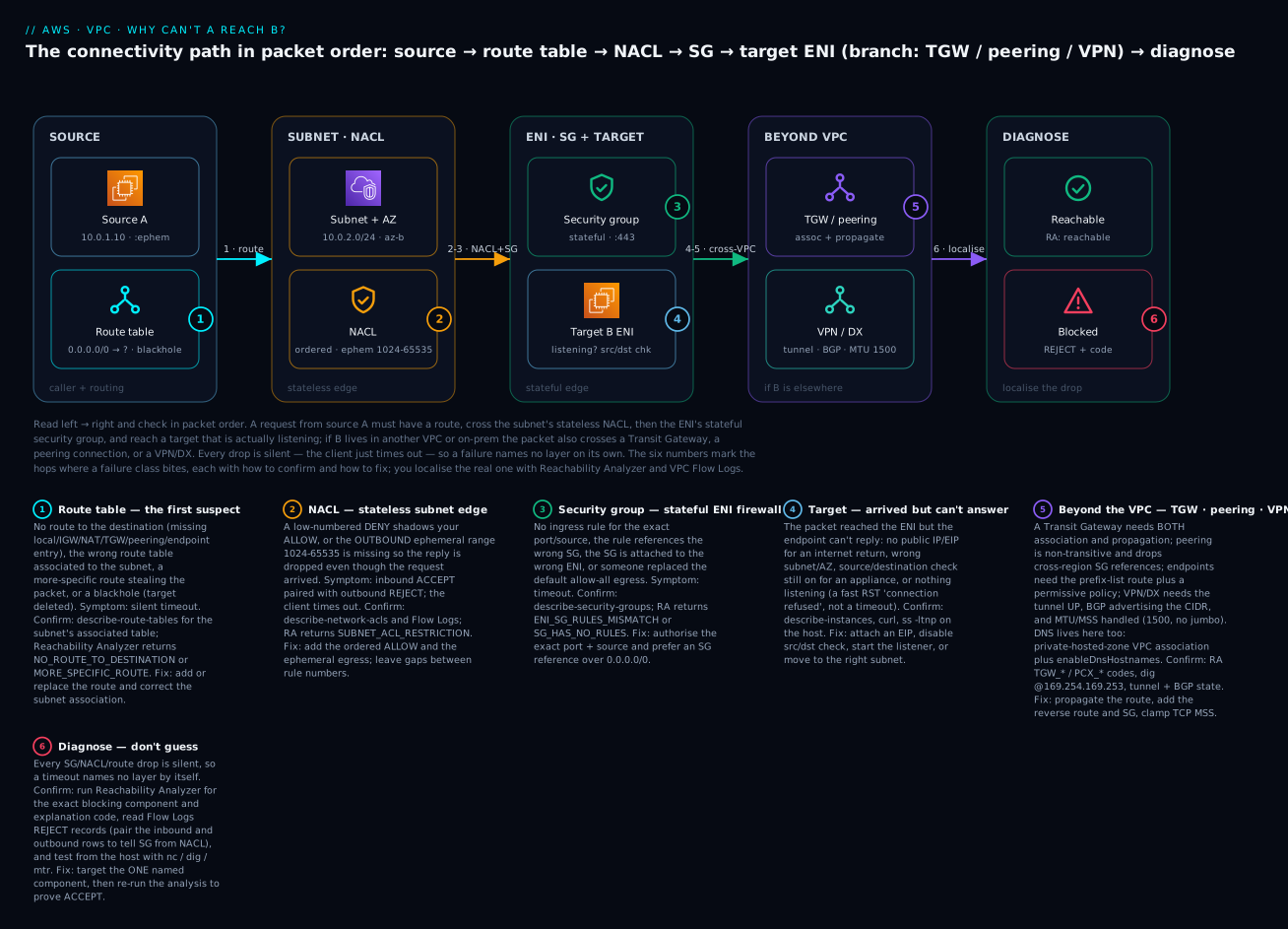
The single most valuable habit the diagram encodes: check in packet order and stop at the first layer that could be responsible. Nine times out of ten the answer is upstream of the security group you were about to open.
Real-world scenario
Company: Nimbus Retail, a mid-size e-commerce platform running a hub-and-spoke network in ap-south-1: a shared-services VPC (10.0.0.0/16), an order-service spoke (10.1.0.0/16), and a payments spoke (10.2.0.0/16), all attached to a Transit Gateway, with a Site-to-Site VPN from the shared VPC to an on-prem fraud-scoring system (192.168.0.0/16).
The incident. After a routine Terraform apply that “just added a subnet” to the order spoke, checkout latency spiked and ~40% of orders failed fraud scoring. The on-call engineer’s first move — the wrong first move — was to open the payments security group. It was untouched. An hour in, they widened it to 0.0.0.0/0 “to rule it out.” Nothing improved (and now there was a security hole to clean up later). The symptom was maddening: orders from some instances scored fine; others timed out. It looked intermittent, which sent everyone hunting a flaky app.
The systematic pass. A senior engineer ran the playbook in order. Reachability Analyzer from a failing order instance to the on-prem fraud endpoint returned Not reachable with NO_ROUTE_TO_DESTINATION. That immediately killed the security-group theory — the packet never reached a firewall. describe-route-tables on the new subnet showed it had been created without an explicit route-table association, so it fell back to the VPC main route table, which had no route for 192.168.0.0/16 → tgw-…. The “some instances work” pattern was simply which subnet an instance landed in: old subnets had the correct table; new-subnet instances used the main table and were dark to on-prem. One propagation was also missing on the TGW side, so even fixing the association only half-worked until they enabled propagation of the VPN attachment’s routes.
The fix and the lesson. Two changes: associate the new subnet with the order spoke’s private route table (which carries 192.168.0.0/16 → tgw), and enable route propagation for the VPN attachment in the TGW route table. Reachability Analyzer re-run: Reachable. Total fix time once they stopped guessing: 12 minutes. The postmortem action items were pure playbook discipline — never start at the security group; make Reachability Analyzer the first command; and in Terraform, always create aws_route_table_association for every subnet so nothing silently inherits the main table. Nimbus added a CI check that fails any plan creating an aws_subnet without a matching association. The security group they had opened to the world was reverted the same day — a reminder that “ruling out” a layer by weakening it creates a second incident.
Advantages and disadvantages
The “advantage” here is the method — systematic, packet-order, tool-first diagnosis — versus the ad-hoc alternative most teams default to.
| Systematic playbook (this approach) | Ad-hoc “change and re-test” |
|---|---|
| Deterministic: Reachability Analyzer names the component | Guesswork: change a layer, wait, repeat |
| Checks in packet order → finds upstream causes first | Anchors on the security group → misses routing |
| Non-destructive (analysis, not mutation) | Often weakens firewalls “to rule out,” leaving holes |
| Minutes to localise | Hours; frequently fixes the wrong layer |
| Repeatable across a team; teachable | Lives in one person’s head |
| Works before deploy (config analysis) | Needs live traffic to reproduce |
The disadvantages are real and worth naming. Reachability Analyzer analyses configuration, not live packets — it will not catch an application bug, a host firewall (iptables), an OS that isn’t listening, or a transient tunnel flap, and it does not support IPv6 or every component type. Flow Logs prove real drops but cost money at scale and have a capture delay. Host tools give ground truth but require access to the instance (often the hardest thing to arrange mid-incident). The mature setup uses all four: RA to localise config, Flow Logs to confirm live behaviour, host tools for DNS/listener/MTU, and describe-* to read the exact rules — and never leans on only one.
Hands-on lab
You will deliberately break connectivity at the route-table layer, watch the silent timeout, localise it with Reachability Analyzer and Flow Logs, then fix it — in both aws CLI and Terraform — and tear it down. Free-tier friendly; the only meterable items are called out. Region: ap-south-1.
1. Build a single-instance internet-reachability target
# One VPC, one public subnet, an IGW, and a client instance with a public IP.
VPC=$(aws ec2 create-vpc --cidr-block 10.20.0.0/16 --query Vpc.VpcId --output text)
aws ec2 modify-vpc-attribute --vpc-id $VPC --enable-dns-hostnames
SUBNET=$(aws ec2 create-subnet --vpc-id $VPC --cidr-block 10.20.1.0/24 \
  --availability-zone ap-south-1a --query Subnet.SubnetId --output text)
aws ec2 modify-subnet-attribute --subnet-id $SUBNET --map-public-ip-on-launch
IGW=$(aws ec2 create-internet-gateway --query InternetGateway.InternetGatewayId --output text)
aws ec2 attach-internet-gateway --internet-gateway-id $IGW --vpc-id $VPC

# A purpose-built route table (never rely on the main table), associated + default route to the IGW.
RTB=$(aws ec2 create-route-table --vpc-id $VPC --query RouteTable.RouteTableId --output text)
aws ec2 associate-route-table --route-table-id $RTB --subnet-id $SUBNET
aws ec2 create-route --route-table-id $RTB --destination-cidr-block 0.0.0.0/0 --gateway-id $IGW
Launch a t3.micro client (CLIENT_ID) into that subnet — any AMI works; an SSM-enabled one is easiest so you need no bastion — then confirm the baseline from inside the instance:
# From the CLIENT instance (SSM Session Manager or SSH):
curl -s --max-time 5 https://checkip.amazonaws.com   # expected: your instance's public IP, e.g. 13.234.x.x
Expected: your public IP prints. The instance reaches the internet, so the security-group egress and the NACL are correct — any break you now introduce at the route layer is unambiguous.
Why the internet and not a second in-VPC server? Inside one VPC the
localroute (10.20.0.0/16) covers every subnet and cannot be removed or overridden — so you literally cannot break same-VPC routing at the route-table layer (that is the local-supremacy rule from Layer 1). Routing only matters, and only breaks, where a packet needs a non-local route: the internet, a peer, a TGW, or on-prem. So we break the one route that governs all of those — the default route.
2. Break it at the route table
# Delete the default route — the single most common route-table outage ("the instance lost the internet").
aws ec2 delete-route --route-table-id $RTB --destination-cidr-block 0.0.0.0/0
# From the CLIENT instance again:
curl -s --max-time 5 https://checkip.amazonaws.com   # expected NOW: hangs 5s, exits non-zero (silent timeout)
Note what you don’t see: no error explaining why, no refused, just a timeout. This is the moment most engineers open the security group. You will not — the SG never changed.
3. Localise with Reachability Analyzer
# Analyse the path from the instance to the internet gateway on 443.
PID=$(aws ec2 create-network-insights-path --source $CLIENT_ID --destination $IGW \
  --protocol tcp --destination-port 443 --query NetworkInsightsPath.NetworkInsightsPathId --output text)
AID=$(aws ec2 start-network-insights-analysis --network-insights-path-id $PID \
  --query NetworkInsightsAnalysis.NetworkInsightsAnalysisId --output text)
sleep 20
aws ec2 describe-network-insights-analyses --network-insights-analysis-ids $AID \
  --query 'NetworkInsightsAnalyses[0].{Reachable:NetworkPathFound,Why:Explanations[].ExplanationCode}'
Expected output:
{ "Reachable": false, "Why": [ "NO_ROUTE_TO_DESTINATION" ] }
There it is — the tool names the route layer, not the firewall, in one call and about ₹8 (US $0.10). You localised the break without touching a single rule.
4. Confirm with Flow Logs (optional, live proof)
Enable Flow Logs on the client ENI to a CloudWatch group, re-run the curl, and read the client ENI’s records:
aws logs filter-log-events --log-group-name /vpc/lab-flow \
  --filter-pattern '[v,acct,eni,src="10.20.1.*",dst,sp,dp="443",pr,pk,by,st,en,action,logst]' \
  --query 'events[].message' --output text
You will see the outbound SYN accepted at the ENI (the security group allowed egress) but no return record — the packet left the interface and was then dropped by the VPC router for lack of a route. That “it left, nothing came back” shape is the routing fingerprint; contrast it with a crisp REJECT, which would name a firewall instead. ⚠️ Flow Logs ingestion to CloudWatch is billable.
5. Fix it — CLI then Terraform
# Restore the default route; the fix is one line.
aws ec2 create-route --route-table-id $RTB --destination-cidr-block 0.0.0.0/0 --gateway-id $IGW
# Re-run Reachability Analyzer, then re-test:
aws ec2 start-network-insights-analysis --network-insights-path-id $PID --query NetworkInsightsAnalysis.State
# From the client:  curl -s --max-time 5 https://checkip.amazonaws.com  → your public IP again
The Terraform that makes this declarative and un-break-able — an explicit table, an explicit default route, and an explicit association so nothing silently inherits the main table:
resource "aws_route_table" "public" {
  vpc_id = aws_vpc.lab.id
}
resource "aws_route" "default" {                     # the route whose absence caused the outage
  route_table_id         = aws_route_table.public.id
  destination_cidr_block = "0.0.0.0/0"
  gateway_id             = aws_internet_gateway.lab.id
}
resource "aws_route_table_association" "public" {    # never rely on the main table
  subnet_id      = aws_subnet.public.id
  route_table_id = aws_route_table.public.id
}
Re-run Reachability Analyzer a final time; expect Reachable: true.
6. Teardown (do this — some resources meter)
aws ec2 delete-network-insights-analysis --network-insights-analysis-id $AID
aws ec2 delete-network-insights-path --network-insights-path-id $PID
aws ec2 terminate-instances --instance-ids $CLIENT_ID
aws ec2 wait instance-terminated --instance-ids $CLIENT_ID
aws logs delete-log-group --log-group-name /vpc/lab-flow          # stop Flow Logs billing
aws ec2 detach-internet-gateway --internet-gateway-id $IGW --vpc-id $VPC
aws ec2 delete-internet-gateway --internet-gateway-id $IGW
aws ec2 delete-subnet --subnet-id $SUBNET
aws ec2 delete-route-table --route-table-id $RTB
aws ec2 delete-vpc --vpc-id $VPC
⚠️ Costs to remember: Flow Logs ingestion and Reachability Analyzer (~₹8 per analysis) are the only meterable items here — you deliberately did not create a NAT gateway. EC2 t3.micro is free-tier eligible; the VPC, subnet, route table, IGW, SG and NACL are free.
Common mistakes & troubleshooting
This is the section you keep open during an incident. Start at the top of the master table, and for any symptom, check the layer it names before the ones below it.
The master symptom → layer → confirm → fix table
| # | Symptom | Most likely layer | Confirm (exact command / console) | Fix |
|---|---|---|---|---|
| 1 | Timeout to a private IP in the same VPC | SG ingress, then NACL | describe-security-groups; describe-network-acls |
Add ingress for port/source; add NACL ALLOW + ephemeral egress |
| 2 | Timeout to another VPC (peered) | Route both sides / non-transitive | describe-route-tables both VPCs for pcx-… |
Add reverse route; direct peering not through a hub |
| 3 | Timeout to another VPC (via TGW) | TGW association or propagation | describe-transit-gateway-route-tables; VPC table for tgw-… |
Associate + propagate; add subnet route |
| 4 | Can’t reach the internet from private subnet | NAT route / NAT AZ | describe-route-tables for 0.0.0.0/0 → nat-… |
Add NAT route; per-AZ NAT |
| 5 | Can’t be reached from the internet | Public IP/EIP absent | describe-instances …PublicIp |
Attach EIP; enable auto-assign |
| 6 | Works in AZ-a, fails AZ-b | Route-table association per AZ | Compare the two subnets’ associated tables | Associate AZ-b with a table that has the route |
| 7 | Inbound works, reply never returns | NACL outbound ephemeral / return route | Flow Logs pair; return route table | Allow tcp 1024-65535 out; add return route |
| 8 | Connection refused (instant) |
Not the network — no listener / host FW | ss -ltnp on the target |
Start the service; open host firewall |
| 9 | NXDOMAIN or wrong (public) IP |
DNS | dig @169.254.169.253; check enableDnsHostnames |
Associate private zone; enable DNS hostnames/private DNS |
| 10 | Small requests work, large hang | MTU / fragmentation | ping -M do -s 1472 |
Lower MTU / clamp MSS; allow ICMP frag-needed |
| 11 | ~50% packet loss to on-prem | One VPN tunnel down (ECMP) | describe-vpn-connections tunnel status |
Restore second tunnel |
| 12 | On-prem totally unreachable | Both tunnels / BGP | Tunnel status + advertised routes | Fix IKE/IPsec; advertise CIDRs |
| 13 | Out to on-prem but never back | On-prem missing VPC return route | On-prem device routing table | Add VPC CIDR route on-prem |
| 14 | Response drops after appliance insertion | Asymmetric routing / appliance mode off | Compare forward vs return path; RA TGW_ATTACH_VPC_AZ_RESTRICTION |
Enable appliance mode; symmetric routing |
| 15 | S3/DynamoDB access times out | Gateway-endpoint route missing | describe-route-tables for pl-… → vpce-… |
Associate endpoint with the route table |
| 16 | S3 via endpoint returns AccessDenied |
Endpoint or bucket policy | Read endpoint policy + bucket aws:SourceVpce |
Fix the policy/condition |
| 17 | Interface-endpoint name → public IP | Private DNS / DNS hostnames off | dig service-name |
Enable private DNS + DNS hostnames |
| 18 | Route exists but traffic vanishes | Blackhole route (target deleted) | Route State = blackhole |
Repoint/delete the route |
| 19 | Only part of a CIDR reaches a target | More-specific route steals it | Read the table; RA MORE_SPECIFIC_ROUTE |
Fix prefixes |
| 20 | Edited SG, “nothing changed” | Connection tracking keeps old flows | Test a new connection | Wait for idle-out; don’t over-widen |
| 21 | Cross-region peer SG-ref denies | SG referencing unsupported inter-region | RA UNKNOWN_PEERED_SGS |
Use CIDR rules |
| 22 | IPv6 client fails, IPv4 works | No ::/0 SG rule / eigw route |
Check v6 rules + routes | Add v6 rules; egress-only IGW route |
| 23 | New instance briefly unreachable | ENI not yet attached / warming | RA UNASSOCIATED_COMPONENT / NO_PATH |
Wait; verify ENI attachment |
| 24 | Traffic ignores the firewall appliance | local route supremacy inside VPC |
Read the table; local always wins | Use ingress routing / more-specific outside local |
Fast decision table
| If you see… | It’s probably… | Do this first |
|---|---|---|
| A silent 30s timeout | Route, SG, or NACL (in that order) | Reachability Analyzer A→B |
Instant connection refused |
The host — no listener / host firewall | ss -ltnp on the target |
No route to host locally |
Source OS routing / subnet association | ip route get; describe-route-tables |
| Works small, hangs large | MTU | ping -M do -s 1472 |
| Intermittent / ~50% | One dead tunnel or asymmetric ECMP | describe-vpn-connections; appliance mode |
| One AZ good, one AZ bad | Per-AZ route-table association / NAT | Compare the subnets’ tables |
| Out but never back | Return route or NACL outbound | Return route table; ephemeral egress |
| Name won’t resolve | DNS | dig @169.254.169.253 |
AccessDenied (not timeout) |
Policy (endpoint/bucket/IAM), not network | Read the policy |
| Reachable in RA but still fails live | Host FW, listener, or app | Host tools + app logs |
The three nastiest, in prose
Asymmetric routing through an appliance. You insert a firewall/IDS appliance (or a GWLB) and traffic mysteriously drops on the return leg. The forward packet goes A→appliance→B, but the reply from B takes a different path back (a different AZ’s appliance ENI, or straight via local), and the stateful appliance never saw the forward flow so it drops the reply. The fingerprint: SYN arrives, SYN-ACK leaves, connection never completes; it often works when A and B happen to land in the same AZ and fails across AZs. On a Transit Gateway the cure is appliance mode (which pins both directions to the same appliance ENI); RA flags it as TGW_ATTACH_VPC_AZ_RESTRICTION. Off the TGW, the cure is symmetric routing — force the return through the same appliance with more-specific routes, because the VPC local route will otherwise steal in-VPC replies straight back.
“Works from one AZ, not another.” Nothing about the app differs, yet instances in AZ-a succeed and AZ-b times out. This is almost always per-AZ routing or NAT: the AZ-b subnet is associated with a route table that lacks the NAT/TGW route the AZ-a subnet has, or there is a single NAT gateway in AZ-a and AZ-b’s route points at a NAT that was deleted (blackhole), or an interface endpoint/appliance exists only in AZ-a’s subnet. Confirm by diffing the two subnets’ associated route tables and the AZ placement of NATs/endpoints. The permanent fix is architectural: one route table and one NAT (and one endpoint ENI) per AZ, every subnet explicitly associated — never rely on the main table.
Intermittent = MTU or one dead tunnel. Two very different causes share the “sometimes works” signature. If failures correlate with payload size (small OK, large stalls), it is MTU: a DF-set jumbo packet meeting a 1500/8500 hop with PMTUD’s ICMP blocked. If failures correlate with which flow/hash rather than size (roughly half of connections fail, retries sometimes succeed), it is one of the two VPN tunnels down while ECMP keeps hashing new flows onto the dead one — or an asymmetric multi-path. Separate them fast: ping -M do -s 1472 proves MTU; describe-vpn-connections showing Tunnel1: UP, Tunnel2: DOWN proves the tunnel. Treating an MTU black hole as “flaky network” (or a dead tunnel as “app instability”) is the classic multi-hour rabbit hole.
Best practices
- Check in packet order, stop at the first plausible layer. Route → public-IP → subnet/AZ → SG → NACL → DNS → MTU → fabric. Do not start at the security group by reflex.
- Make Reachability Analyzer your first command, not your last. It is deterministic, non-destructive, works before deploy, and names the component.
- Never “rule out” a layer by weakening it. Widening an SG to
0.0.0.0/0to test is how a debugging session becomes a security incident. - Associate every subnet with an explicit route table in IaC. The main-table fallback causes silent “works here, not there” outages; enforce it with a CI policy check.
- One route table, one NAT, one endpoint ENI per AZ. It removes an entire class of “one AZ works” incidents and avoids cross-AZ data charges.
- On custom NACLs, always add outbound
tcp 1024-65535. The stateless return-traffic omission is the single most common firewall block. - Prefer security-group references over CIDRs within a region; they survive IP changes. Fall back to CIDRs across regions where SG-ref isn’t supported.
- Turn on VPC Flow Logs (at least at the VPC level) before you need them — you cannot retroactively capture a drop.
- Clamp TCP MSS on VPN/DX paths and standardise instance MTU per path; document which paths are 1500 vs 8500 vs 9001.
- Verify both association and propagation on every TGW attachment; they are two switches, and one without the other is a silent half-outage.
- Add routes on both sides of every peering and remember it is non-transitive — a hub needs a TGW, not chained peerings.
- Keep a
describe-*runbook and test access paths (SSM Session Manager) so you can reach an instance mid-incident without SSH/bastion dependencies.
Security notes
Troubleshooting connectivity and hardening it pull in opposite directions, and the seam is where mistakes happen. First, do not debug by widening: the 0.0.0.0/0 “temporary” rule is the most common way a connectivity ticket turns into a data-exfiltration path — use Reachability Analyzer (which needs no rule changes) instead, and if you must widen, scope to the exact source CIDR and revert in the same session. Second, treat Reachability Analyzer and Network Access Analyzer as security tools too: Network Access Analyzer specifically audits unintended reachability — run it to prove that a database subnet is not reachable from the internet, not just that your app is reachable. Third, least-privilege the diagnostic access itself: the IAM permissions to run ec2:StartNetworkInsightsAnalysis, read Flow Logs, and describe-* should be a scoped read/analyse role, not admin. Fourth, VPC endpoint and bucket policies are a legitimate “deny” — an AccessDenied through an endpoint is often the control working; confirm intent before “fixing” it, and use aws:SourceVpce conditions to keep S3 access private-path-only. Finally, encrypt the transport you are debugging (TLS end-to-end, IPsec on the VPN) so that the packet captures and Flow Logs you generate during an incident never expose payload data — Flow Logs record metadata, but the habit of grabbing tcpdump mid-incident can.
Cost & sizing
The diagnostic tooling is cheap relative to an hour of engineer time, but Flow Logs and NAT data can surprise you at scale. Rough figures (USD list; INR ≈ ×83):
| Item | What drives it | Rough cost | Notes |
|---|---|---|---|
| Reachability Analyzer | Per analysis run | ~$0.10 (₹8) | Trivial; run it freely |
| Network Access Analyzer | Per ENI analysed | Per-analysis | Scheduled audits add up at fleet scale |
| VPC Flow Logs → CloudWatch | GB ingested + stored | ~$0.50/GB ingest + storage | The real cost; sample or send to S3 for cheaper |
| VPC Flow Logs → S3 | GB delivered + stored | Cheaper than CWL | Use for high-volume, query with Athena |
| NAT gateway | Hourly + per-GB processed | ~$0.045/hr + ~$0.045/GB | Per-AZ NAT multiplies the hourly; consolidate carefully |
| Cross-AZ data | GB across AZs | ~$0.01/GB each way | Single-AZ NAT for multi-AZ subnets incurs this |
| Transit Gateway | Attachment/hr + per-GB | ~$0.05/attach/hr + data | Data processing on every inter-VPC GB |
| VPN connection | Connection-hour + data | ~$0.05/hr | Two tunnels, one connection charge |
| Reachability Analyzer + RA in CI | Per PR analysis | ~$0.10 each | Cheap insurance against merge-time breakage |
Sizing guidance: enable Flow Logs at the VPC level with a sampled or aggregated format for always-on visibility, and switch to full capture on a specific ENI only during an incident to control ingest cost. Send high-volume Flow Logs to S3 + Athena rather than CloudWatch Logs; the query experience is nearly as good and the storage is far cheaper. For NAT and TGW, the bill is dominated by data processing, so a connectivity “fix” that accidentally routes bulk traffic through a NAT or across a TGW when a VPC endpoint would do can quietly add real money — another reason to know exactly which path your packet takes.
Interview & exam questions
Q1. A packet from A times out reaching B in the same VPC. In what order do you check the layers, and why? Route table first (no route = dropped before any firewall), then security group ingress, then NACL, then whether the target is listening. You go in packet order because each layer can produce the identical silent timeout, and the earliest one that could be responsible must be cleared first. (ANS-C01/SAA-C03)
Q2. What is the difference between a Connection timed out and a Connection refused, diagnostically? Timed out = a stateful firewall or routing black hole dropped the packet silently; the packet may never have reached the host. Refused = an instant TCP RST, meaning the packet did reach the host but nothing is listening on that port (or a host firewall sent the RST). Refused is proof the network path works. (SOA-C02)
Q3. Why does a custom NACL so often break return traffic? NACLs are stateless, so the reply — which leaves from the server toward the client’s high ephemeral port — must be explicitly allowed by an outbound rule. If the NACL only allows outbound 443, the reply on ports 1024–65535 hits the implicit * deny and is dropped; the client just times out. Fix: outbound tcp 1024-65535 to the client CIDR. (SAA-C03)
Q4. Reachability Analyzer returns NO_ROUTE_TO_DESTINATION. What does that eliminate, and what do you check? It eliminates the security group and NACL as the first cause — the packet has no route, so it dies before any firewall. Check the source subnet’s associated route table for a matching route to the destination CIDR, and confirm the subnet isn’t silently using the main table. (ANS-C01)
Q5. Explain association vs propagation on a Transit Gateway. Association binds an attachment to one TGW route table that governs traffic leaving that attachment. Propagation advertises an attachment’s CIDRs into a TGW route table so others can route to it. You need both: association without propagation means the attachment can send but is invisible as a destination. (ANS-C01)
Q6. Why is VPC peering “non-transitive,” and what breaks because of it? Each peering is a 1:1 link that only routes between the two VPCs’ CIDRs; it does not forward to a third VPC. So a hub-and-spoke built from chained peerings fails spoke-to-spoke. Use a Transit Gateway for any-to-any. (SAA-C03)
Q7. A transfer works for small files and stalls for large ones across a VPN. Diagnose. Path MTU: the VPN caps at 1500 with IPsec overhead, so DF-set large packets are dropped, and if the ICMP fragmentation-needed message is blocked, PMTUD never shrinks the sender. Confirm with ping -M do -s 1472; fix by clamping TCP MSS (~1379) or lowering MTU and allowing ICMP type 3 code 4. (ANS-C01)
Q8. “Works from AZ-a, not AZ-b.” Top hypothesis? The AZ-b subnet is associated with a route table missing a route AZ-a’s has (commonly the NAT or TGW route), or a NAT/endpoint/appliance exists only in AZ-a. Diff the two subnets’ associated route tables and the AZ placement of NAT/endpoints. (SOA-C02)
Q9. What does an interface-endpoint name resolving to a public IP tell you? Private DNS on the endpoint (or enableDnsHostnames on the VPC) is off, so the service name resolves to the public regional endpoint instead of the private ENI. Enable private DNS and DNS hostnames. (ANS-C01)
Q10. How do you use Flow Logs to distinguish a security-group block from a NACL block? Pair the directional records: a security-group drop shows a REJECT with no established return; a NACL ephemeral omission shows an inbound ACCEPT paired with an outbound REJECT to the client’s high port. The flow-direction and action fields together localise the layer. (SOA-C02)
Q11. Why can’t you force in-VPC traffic through an appliance using only the main route table? The local route for the VPC CIDR always wins inside the VPC and cannot be overridden by a route to an ENI for an address within that CIDR. You need gateway/ingress routing or a more-specific route outside the local scope (or place the appliance on the north-south path). (ANS-C01)
Q12. When is AccessDenied (not a timeout) the correct behaviour? When a VPC-endpoint policy, S3 bucket policy aws:SourceVpce condition, or IAM policy is intentionally denying the action — that is an authorization control working, not a connectivity failure. Confirm intent before changing it. (SCS-C02)
Quick check
- A connection returns an instant
Connection refused. Is this a security-group problem? Why or why not? - In what order does a packet cross the route table, security group, and NACL on the way in?
- You get
MORE_SPECIFIC_ROUTEfrom Reachability Analyzer. What is happening? - What single outbound NACL rule prevents the most common firewall block, and why?
- Failures correlate with payload size, not with which flow. What layer, and what one command confirms it?
Answers
- No.
Connection refusedis an instant RST from the host, which means the packet crossed every firewall and reached a listening host that had nothing on that port — the network path works. Checkss -ltnpand the app, not the security group. - NACL (subnet edge) → security group (ENI) → instance. The stateless NACL is the outer gate, the stateful SG is the inner gate; the route table decides whether the packet gets to the subnet at all, before either firewall.
- A route more specific than the one you expected is matching the destination and diverting the packet elsewhere (longest-prefix match). Read the route table and fix the prefixes or add the expected intermediate component.
- Outbound
tcp 1024-65535to the client CIDR. NACLs are stateless, so the reply leaves on the client’s high ephemeral port and must be explicitly allowed, or it hits the implicit*deny and the client times out. - MTU / fragmentation.
ping -M do -s 1472 <dest>— if the 1472 (→1500) probe fails but-s 1400succeeds, a hop on the path can’t carry 1500 bytes and PMTUD is being black-holed.
Glossary
| Term | Definition |
|---|---|
| Silent drop | A packet discarded with no response, producing a client-side timeout — the default behaviour of route/SG/NACL drops |
| RST (reset) | A TCP reset from the host = connection refused; proof the packet reached a host with no listener (not a network drop) |
| Longest-prefix match | Routing rule where the most specific matching CIDR wins; a /24 beats a /0 |
| Blackhole route | A route whose target no longer exists; it still matches and silently drops traffic (State: blackhole) |
| Ephemeral port range | The high source ports (≈1024–65535) a client uses for a connection; NACLs must allow them outbound for replies |
| Stateful vs stateless | SGs remember connections (replies auto-allowed); NACLs don’t (each direction judged independently) |
| Reachability Analyzer | Config-based path analysis that returns reachable/not plus an explanation code naming the blocking component |
| Explanation code | The machine-readable reason RA returns, e.g. NO_ROUTE_TO_DESTINATION, SUBNET_ACL_RESTRICTION, ENI_SG_RULES_MISMATCH |
| Flow Logs | Records of accepted/rejected flows at ENI/subnet/VPC scope, used to prove and localise a real drop |
| Association (TGW) | Binds an attachment to the TGW route table that governs its outbound traffic |
| Propagation (TGW) | Advertises an attachment’s CIDRs into a TGW route table so others can reach it |
| Non-transitive | Property of VPC peering: A–B and B–C do not yield A–C; each pair needs a direct link |
| Appliance mode | A TGW attachment setting that pins both directions of a flow to the same appliance ENI, preventing AZ asymmetry |
| PMTUD | Path MTU Discovery — TCP shrinks packet size using ICMP “fragmentation needed”; blocking that ICMP black-holes large packets |
| MSS clamping | Rewriting the TCP MSS on SYN so payloads never exceed the smallest MTU on the path (used on VPN/DX) |
Next steps
- Master the two firewalls at depth — the stateful/stateless packet path and the ephemeral-port trap — in Security Groups vs NACLs Deep Dive.
- Learn to read a
REJECTfield by field and build the log pipeline in VPC Flow Logs for Network Troubleshooting. - Build the hub that most of these failures live in with Transit Gateway Hub-and-Spoke, and understand its limits via VPC Peering: Setup, Routing, Limits.
- Get private-path access to AWS services right in PrivateLink & VPC Endpoints, and private egress in NAT Gateway: Private-Subnet Egress.
- Extend the playbook to hybrid with Site-to-Site VPN Hybrid, where tunnels, BGP, and MSS join the layer list.