Quick take: An AWS Site-to-Site VPN is one managed VPN connection made of exactly two IPsec tunnels that runs an encrypted link between your data centre and AWS over the public internet. You describe your on-prem device to AWS as a Customer Gateway (CGW) — its public IP and BGP ASN — and AWS terminates the tunnels on either a Virtual Private Gateway (VGW), which serves one VPC, or a Transit Gateway (TGW) attachment, which serves many. Getting a tunnel to say
UPis an IKE/IPsec parameter-matching exercise; getting traffic to flow is a routing exercise — BGP (or static routes) plus route propagation into the VPC route table, plus security groups and NACLs that permit the on-prem CIDR. Those are two different problems, and conflating them is why “the tunnel is up but nothing works” is the single most common hybrid-networking ticket.
You have an application in a VPC and a database — or an Active Directory, or a licence server, or a mainframe — still sitting in a data centre, and the two need to talk privately. Sending that traffic across the open internet in plaintext is a non-starter, and provisioning a Direct Connect circuit takes weeks and a cross-connect order. What you want is an encrypted link you can stand up this afternoon, that survives an AWS maintenance event without dropping the connection, that fails over automatically, and that you can prove is healthy from a dashboard. That is exactly what Site-to-Site VPN is for: IPsec over the internet, two tunnels for high availability, BGP for automatic failover, billed by the hour with no upfront commitment.
The trap is that a Site-to-Site VPN looks simple — the console has a “Create VPN Connection” button and a “Download Configuration” file for your specific device — and then bites you on the details. The tunnel refuses to come up because one Diffie-Hellman group doesn’t match, or a corporate firewall silently drops UDP 4500. The tunnel comes up but no packets cross because you never propagated the routes, or the security group has no inbound rule for the on-prem subnet. Large file transfers hang while pings succeed, because nobody clamped the TCP MSS for the reduced tunnel MTU. BGP won’t establish because the APIPA addresses or the ASN are wrong. Every one of these is a five-minute fix once you know where to look, and a lost afternoon if you don’t.
This article builds the mental model and then builds the connection. You will learn every moving part — CGW, VGW, TGW attachment, the two tunnels and how HA actually works (active/active vs active/standby, different endpoints, different AZs), the full IKEv1/IKEv2 and IPsec phase-1/phase-2 parameter set and every tunnel option (DPD, DH groups, rekey, replay window, startup action), static vs dynamic (BGP) routing and route propagation, accelerated VPN via Global Accelerator, migrating a VGW to a TGW without touching your on-prem device, when to reach for Direct Connect instead (and VPN-over-DX to encrypt it), the separate Client VPN product for remote users, and the CloudWatch TunnelState telemetry that tells you it is all working. Then you build the whole thing hands-on against a simulated on-premises — a second VPC running strongSwan on an EC2 instance as the customer gateway — bring both tunnels UP, establish BGP, ping across, verify the propagated routes, all with aws ec2 CLI and Terraform, and tear it down before the hourly meter runs up a bill. This maps directly to the networking domains of SAA-C03 and the Advanced Networking – Specialty (ANS-C01) exam, both of which lean hard on the tunnel/HA/BGP model.
What problem this solves
The core problem is private, encrypted, resilient connectivity between an on-premises network and a VPC, stood up in hours, not weeks. Plenty of workloads are genuinely hybrid: a lift-and-shift app in AWS that still calls an on-prem Oracle database; a domain-joined fleet that needs a line of sight to on-prem Active Directory and DNS; a batch job in the VPC that pulls from an on-prem SFTP; a monitoring stack in AWS scraping data-centre hosts. All of them need the two networks to route to each other over a private, encrypted path — and none of them can wait a month for a circuit.
What breaks without it is ugly. Teams “temporarily” expose the on-prem service to the internet behind an allow-list of AWS NAT IPs — until the NAT IPs change, or a wider CIDR gets pasted in, and now the database is one misconfiguration from public. Or they try to peer the networks with overlapping RFC 1918 space (10.0.0.0/16 on both sides) and discover routing simply cannot disambiguate. Or they stand up a single tunnel, it works in the demo, and three weeks later an AWS endpoint goes into maintenance and the whole hybrid link drops because nobody configured the second tunnel. The failure modes are exactly the ones the internet and a lack of redundancy hand you: eavesdropping risk, silent partitions, and single points of failure.
Who hits this: any organisation mid-migration (which is most of them), anyone running hybrid Active Directory, anyone with a data-residency reason to keep a system of record on-prem while the front end lives in AWS, any DR design that replicates between a data centre and AWS, and any multi-account landing zone that terminates a data-centre link centrally and fans it out over a Transit Gateway. Site-to-Site VPN is the AWS-native answer, and the table below frames the whole field before we go deep.
| Building block | What it is | Where it lives | You configure | Most common mistake |
|---|---|---|---|---|
| Customer Gateway (CGW) | An AWS resource describing your on-prem device | AWS (a record) | Public IP (or cert) + BGP ASN | Wrong IP when the device is behind NAT |
| Virtual Private Gateway (VGW) | AWS-side VPN concentrator for one VPC | Attached to a VPC | Amazon-side ASN | Expecting >1.25 Gbps or many VPCs from it |
| Transit Gateway attachment | Terminate the VPN on a TGW instead | Regional hub | ECMP, association/propagation | Using it for a single tiny VPC (overkill/cost) |
| VPN connection | The logical link = two IPsec tunnels | AWS | Routing (static/BGP), tunnel options | Configuring only one of the two tunnels |
| Tunnel (×2) | One IPsec tunnel to one AWS endpoint IP | Two endpoints, two AZs | IKE/IPsec params, PSK, inside CIDR | Mismatched phase-1/phase-2 parameters |
| Route propagation | Auto-inject VPN routes into the VPC route table | VPC route table | Enable per route table | Forgetting it — tunnel UP, no traffic |
CloudWatch TunnelState |
Per-tunnel UP/DOWN telemetry | AWS/VPN namespace |
Alarm on < 1 |
No alarm; a silent failover to one tunnel |
Learning objectives
By the end of this article you can:
- Explain the full anatomy of a Site-to-Site VPN — Customer Gateway, VPN connection, two tunnels, and the AWS-side termination on a VGW versus a Transit Gateway — and choose the right termination for a given design.
- State exactly why every connection has two tunnels, how HA works (different endpoints in different AZs, active/active vs active/standby), and how to make failover automatic.
- Enumerate the IKEv1/IKEv2 and IPsec phase-1/phase-2 parameters (DH groups, encryption, integrity, lifetimes, PFS) and every tunnel option (DPD, rekey, replay window, startup action, inside CIDR), and read a device’s IKE log to spot a mismatch.
- Choose between static and dynamic (BGP) routing, wire up route propagation, and get the ASN and APIPA tunnel-inside addresses right so BGP establishes.
- Decide between VPN, Direct Connect, and VPN-over-DX, know when accelerated VPN (Global Accelerator) helps, migrate a VGW to a TGW without re-touching the on-prem device, and place the separate Client VPN product correctly.
- Monitor tunnels with CloudWatch (
TunnelState,TunnelDataIn/Out) anddescribe-vpn-connectionstelemetry, and diagnose failures with a symptom→cause→fix playbook. - Build, verify, and tear down a full VPN against a simulated on-prem (strongSwan on EC2) with
aws ec2CLI and Terraform, including bringing both tunnels UP and establishing BGP.
Prerequisites & where this fits
You should be solid on core AWS networking: what a VPC, subnet, route table, and CIDR are, and how a subnet’s route table decides where its traffic goes. If any of that is fuzzy, read AWS VPC From Scratch: Subnets, Route Tables and the Internet Gateway and AWS VPC, Subnets and Security Groups Explained first — a VPN sits directly on top of those and assumes them. You will also lean on security groups and NACLs to permit the on-prem traffic once it arrives, covered in AWS Security Groups and NACLs: A Deep-Dive Troubleshooting Guide. You need the AWS CLI v2 configured (aws configure), permission to create VPC, VPN, and (for the lab) EC2 resources, and a passing familiarity with IPsec and BGP — this article defines what you need as it goes, so you do not have to be a network engineer.
Concretely, before you start you want the following in place — the on-prem side is the half AWS cannot do for you:
| Prerequisite | On which side | Why it matters |
|---|---|---|
| A public, routable IP on the on-prem device (or its NAT) | On-prem | The tunnels terminate here; a private IP won’t work |
| UDP 500 + 4500 and ESP allowed through the corporate firewall | On-prem | IKE (500), NAT-T (4500), and encrypted ESP payload |
| A BGP-capable device (for dynamic routing) + a chosen ASN | On-prem | Enables auto-failover and route propagation |
| Non-overlapping CIDRs between on-prem and the VPC | Both | Overlapping RFC 1918 space cannot be routed |
| AWS CLI v2 + permissions for VPC/VPN/EC2 | AWS | To create and operate the resources |
| A VPC with a route table you can propagate into | AWS | Where the on-prem routes will land |
Where this fits: a Site-to-Site VPN is the pragmatic hybrid edge. For a single VPC, you terminate it on a Virtual Private Gateway. The moment you have several VPCs or accounts, you terminate it on a Transit Gateway instead and let the hub fan the data-centre link out to every spoke — that hub is built in AWS Transit Gateway: A Hub-and-Spoke Multi-VPC Network, Hands-On, and the VPN is its on-ramp. For connecting VPCs to each other rather than to on-prem you would reach for AWS VPC Peering: Setup, Routing and Limits; for reaching AWS services privately without any routing at all, AWS PrivateLink and VPC Endpoints: Interface vs Gateway. The AZs your two tunnel endpoints land in come from AWS Regions and Availability Zones Explained. When a hybrid path misbehaves in ways that span services, work through a broader VPC connectivity troubleshooting playbook alongside the one in this article.
Core concepts
A Site-to-Site VPN is a managed IPsec service. You do not run or patch a VPN concentrator on the AWS side — you create a VPN connection, and AWS provisions the tunnels and hands you a device-specific configuration file. Everything else is either a resource that describes an endpoint or a routing decision.
The Customer Gateway (CGW) is an AWS resource that represents your on-prem device inside AWS. It is just metadata: the device’s public IP address (the internet-routable address the tunnels terminate on — if the device sits behind NAT, this is the NAT device’s public IP) and a BGP ASN (used for dynamic routing; for static routing you still supply one but it is unused). Since 2019 a CGW can instead reference an ACM Private CA certificate for authentication rather than a static IP, which is how you support devices with dynamic public IPs. The CGW does not configure your router — you still apply the downloaded config to the physical device yourself.
The AWS side of the tunnels terminates on one of two things. A Virtual Private Gateway (VGW) is a managed VPN concentrator attached to exactly one VPC. It has an Amazon-side ASN (default 64512) and is the classic single-VPC termination. Alternatively, you terminate the VPN on a Transit Gateway (TGW) as a VPN attachment — do this when the VPN must reach many VPCs, when you want ECMP across multiple tunnels for aggregate bandwidth beyond one tunnel’s ceiling, or when you want accelerated VPN. One VGW = one VPC; one TGW = a hub that can front dozens.
A VPN connection is the logical link, and it is always two IPsec tunnels. This is not optional and not configurable — you get two, terminating on two different AWS endpoint public IPs in two different Availability Zones, precisely so that an endpoint failure or an AWS maintenance event on one does not take your connectivity down. Your on-prem device should be configured for both. Each tunnel independently negotiates IKE (Internet Key Exchange) to build a secure channel and then IPsec to encrypt data, using a pre-shared key (PSK) or certificate, and each has a tunnel-inside CIDR — a /30 from the 169.254.0.0/16 (APIPA) range — that carries the BGP peering session.
The last piece is routing, and it is where most people trip. A tunnel being UP means IKE/IPsec succeeded; it says nothing about whether packets flow. For packets to flow, the VPC must know to send on-prem-bound traffic to the gateway, and the gateway must know the on-prem prefixes. With static routing you type the on-prem CIDRs onto the VPN connection. With dynamic (BGP) routing, your device and AWS exchange prefixes automatically over the tunnel-inside addresses. Either way, you turn on route propagation on the VPC route table so those routes appear automatically with the gateway as target — otherwise the tunnel is a road with no signposts.
| Concept | One-sentence definition | The question it answers |
|---|---|---|
| Customer Gateway (CGW) | An AWS resource describing your on-prem device (IP + ASN) | “What/where is the on-prem end?” |
| Virtual Private Gateway (VGW) | AWS-side VPN concentrator attached to one VPC | “Where do the tunnels land for a single VPC?” |
| Transit Gateway attachment | Terminate the VPN on a regional hub instead | “How do I reach many VPCs from one VPN?” |
| VPN connection | The logical link = two IPsec tunnels | “What is ‘the VPN’?” |
| Tunnel (×2) | One IPsec tunnel to one AWS endpoint IP in one AZ | “Why are there always two?” |
| IKE (phase 1) | Negotiates the secure channel + authenticates | “How do the peers agree on keys?” |
| IPsec (phase 2) | Negotiates the encryption of actual data | “How is the traffic protected?” |
| Tunnel-inside CIDR | A 169.254.x.x /30 carrying the BGP session | “Where does BGP peer?” |
| Static route | On-prem CIDRs typed onto the connection | “How does AWS learn on-prem without BGP?” |
| BGP (dynamic) | Automatic prefix exchange + failover | “How do routes and failover happen automatically?” |
| Route propagation | Auto-inject VPN routes into the VPC route table | “Why is my tunnel UP but nothing flows?” |
TunnelState |
CloudWatch metric: 1 = UP, 0 = DOWN per tunnel | “Is it actually working right now?” |
The two problems you are always solving are liveness (is the tunnel up?) and reachability (does traffic flow?), and they fail independently:
| Layer | “Working” means | Fails when | You check with |
|---|---|---|---|
| IKE phase 1 | Secure channel + auth established | DH/encryption/PSK/IKE-version mismatch; UDP 500 blocked | On-prem IKE log; describe-vpn-connections telemetry |
| IPsec phase 2 | Data SA up; tunnel shows UP |
PFS/lifetime/proposal mismatch; UDP 4500 (NAT-T) blocked | TunnelState = 1; device show crypto ipsec sa |
| BGP | Neighbours Established, prefixes exchanged |
Wrong ASN, wrong APIPA /30, BGP blocked in tunnel | AcceptedRouteCount; device show ip bgp summary |
| Route table | On-prem CIDR points at the gateway | Propagation off; no static route; wrong table | aws ec2 describe-route-tables |
| SG / NACL | On-prem CIDR is permitted in/out | No inbound SG rule; NACL blocks return | Reachability Analyzer; SG/NACL rules |
The components: Customer Gateway, VGW, and Transit Gateway
Customer Gateway (CGW)
The CGW is the smallest resource in the system and the one people misconfigure first. It carries the on-prem device’s public IP (the address AWS will send tunnel packets to) and its BGP ASN. The single most common error: the device is behind a NAT firewall, and you enter the device’s private or interface IP instead of the NAT device’s public IP. AWS must be able to reach the outside address, and the device must use NAT Traversal (NAT-T) — which is why the tunnel needs UDP 4500 open in addition to UDP 500 for IKE.
| CGW attribute | Values / range | Notes |
|---|---|---|
IpAddress |
A single public IPv4 (or omit for cert-based) | The internet-routable IP; the NAT public IP if behind NAT |
BgpAsn |
1–2,147,483,647 (private: 64512–65534 or 4200000000–4294967294) | Used for dynamic routing; supply any valid value for static |
CertificateArn |
ACM Private CA cert ARN | Alternative to IpAddress; supports dynamic public IPs |
DeviceName |
Free text | Cosmetic; helps the download-config picker |
Type |
ipsec.1 |
The only value |
A CGW is cheap (free — you pay for the VPN connection, not the CGW) and reusable: one CGW record can back multiple VPN connections if the same on-prem device fronts several links.
Virtual Private Gateway (VGW)
The VGW is the AWS-managed VPN (and Direct Connect) concentrator for one VPC. You create it with an Amazon-side ASN (default 64512; you can set your own private ASN, but you cannot change it after creation), attach it to a VPC, and then create VPN connections that terminate on it. Its defining limitations are the reason Transit Gateway exists: it serves a single VPC, and for a VGW a given traffic flow uses one tunnel at a time (so a single flow is capped at roughly one tunnel’s throughput, ~1.25 Gbps), with the second tunnel there for redundancy rather than aggregate bandwidth.
Terminating on a Transit Gateway instead
When you attach the VPN to a Transit Gateway, the same two tunnels land on a regional hub that can route to many VPCs and other attachments transitively. Two concrete wins: ECMP — the TGW can equal-cost-multipath across the tunnels (and across multiple VPN connections) so you scale aggregate bandwidth by adding tunnels instead of being stuck at one tunnel’s ceiling — and accelerated VPN, which is only available on a TGW. The trade is a little more cost and the association/propagation model to reason about. The rule of thumb:
| If you need… | Terminate on | Why |
|---|---|---|
| One VPC, simplest possible | VGW | Purpose-built for a single VPC; nothing extra to reason about |
| Many VPCs / accounts to reach on-prem | TGW | Attach once, every spoke reaches the data centre transitively |
| Aggregate bandwidth beyond ~1.25 Gbps/flow | TGW (ECMP) | Load-share across tunnels/connections; a VGW won’t ECMP |
| Accelerated VPN (Global Accelerator) | TGW | Not supported on a VGW |
| A hybrid landing zone / central egress | TGW | The VPN becomes the hub’s on-ramp, inspected centrally |
And the feature-by-feature comparison you will be asked about in an exam and in a design review:
| Dimension | Virtual Private Gateway (VGW) | Transit Gateway (VPN attachment) |
|---|---|---|
| VPCs served | One | Many (transitive) |
| Per-flow bandwidth | ~1.25 Gbps (one tunnel per flow) | ~1.25 Gbps/tunnel, ECMP across tunnels for aggregate |
| ECMP | No | Yes (with VpnEcmpSupport) |
| Accelerated VPN | No | Yes |
| Multiple VPN connections aggregated | No | Yes (ECMP across connections) |
| Cross-account sharing | No | Yes (via RAM) |
| Cost | VPN connection-hour only | VPN connection-hour + TGW attachment-hour + per-GB |
| Best for | A single VPC, cost-sensitive | Scale, many VPCs, hybrid landing zone |
The two tunnels and high availability
Every Site-to-Site VPN connection is two tunnels, full stop. AWS provisions them on two separate endpoint public IPs, each hosted in a different Availability Zone in the region, and publishes each endpoint’s IP, a unique pre-shared key, and a tunnel-inside /30 in the configuration file. The whole point is that AWS periodically performs maintenance on tunnel endpoints (you get notified), and during that window that tunnel is torn down and rebuilt — so if you only ever configured tunnel 1, your “working” VPN drops the day AWS touches endpoint 1. Configure both.
How the two tunnels behave depends on the AWS side and your routing:
| Aspect | Active/standby (typical VGW, static or unweighted BGP) | Active/active (TGW with ECMP) |
|---|---|---|
| Both tunnels UP | Yes (both negotiated) | Yes |
| Traffic distribution | One tunnel carries a flow; other is backup | Flows load-shared across both (ECMP) |
| Failover | BGP withdraws routes on the dead tunnel; traffic shifts | ECMP drops the dead path; rest keep flowing |
| Aggregate bandwidth | ~1 tunnel (~1.25 Gbps) | ~2 tunnels (add more for more) |
| Requires | BGP recommended for fast failover | TGW + VpnEcmpSupport + BGP |
To make failover automatic and fast you run BGP on both tunnels. When a tunnel dies, BGP withdraws its advertised routes within seconds (tuned by Dead Peer Detection), and traffic moves to the surviving tunnel with no human involved. With static routing there is no such withdrawal signal for the tunnel itself — AWS does monitor tunnel liveness and will steer static traffic to the healthy tunnel, but BGP is cleaner and is what you want in production.
Because both tunnels are usually up, you often want to prefer one deterministically to avoid asymmetric routing (traffic out on tunnel 1, back on tunnel 2), which complicates stateful firewalls on-prem. You steer preference with standard BGP knobs:
| Preference technique | Direction it influences | How |
|---|---|---|
| AS-path prepend | AWS → on-prem (which tunnel AWS prefers inbound to you) | Prepend your ASN on the less-preferred tunnel’s advertisement |
| MED (multi-exit discriminator) | AWS → on-prem | Lower MED on the preferred tunnel |
| Local preference | on-prem → AWS (your outbound choice) | Higher local-pref on the preferred tunnel on your router |
| More-specific routes | Either | Advertise a more-specific prefix on the preferred tunnel |
Note the ceilings that shape HA and scale: each tunnel is roughly 1.25 Gbps and about 140,000 packets per second; a VGW does not aggregate the two; to go faster you move to a TGW with ECMP and add tunnels/connections. And every tunnel’s MTU is 1500 bytes (no jumbo frames over VPN — unlike Direct Connect), which is the root of the MSS-clamping story later.
The hard limits and quotas you design against — memorise the ones in bold, they show up in exams and in capacity conversations:
| Limit | Value | Consequence / workaround |
|---|---|---|
| Tunnels per VPN connection | 2 (fixed) | Not configurable; both exist for HA |
| Bandwidth per tunnel | ~1.25 Gbps | A single flow can’t exceed one tunnel; ECMP on a TGW for aggregate |
| Packets per second per tunnel | ~140,000 pps | Small-packet workloads hit pps before Gbps |
| Routes advertised over BGP (CGW→AWS) | 100 | Summarise on-prem prefixes; don’t advertise a full table |
| Static routes per VPN connection | 100 | Same practical ceiling as BGP prefixes |
| VPN connections per VGW | Effectively 1 concentrator, many connections/region (quota) | Terminate on a TGW to scale sites |
| VPN connections per region | Quota (default 50, raisable) | Request an increase for many-site hubs |
| Tunnel MTU | 1500 bytes (no jumbo) | Clamp TCP MSS to 1379; jumbo needs Direct Connect |
| ECMP | TGW only | A VGW will not load-share the two tunnels |
| Accelerated VPN | TGW only, set at creation | Immutable; recreate to change |
IKE and IPsec: phase-1 and phase-2 parameters
A tunnel comes up in two negotiations. Phase 1 (IKE) builds an authenticated, encrypted control channel between the two peers — they agree on an encryption algorithm, an integrity/hash algorithm, a Diffie-Hellman group (the key-exchange strength), a lifetime, and authenticate each other with the pre-shared key (or certificate). Phase 2 (IPsec) then negotiates the security association that actually encrypts your data packets — its own encryption, integrity, optional Perfect Forward Secrecy (PFS) DH group, and a shorter lifetime. Both peers must offer at least one matching proposal in each phase or the tunnel never comes up; the classic log line is NO_PROPOSAL_CHOSEN.
AWS supports both IKEv1 and IKEv2. Prefer IKEv2 wherever the device supports it — it uses fewer messages, rekeys more gracefully, supports asymmetric authentication, and is required for some newer features. Fall back to IKEv1 only for legacy hardware.
| IKEv1 | IKEv2 | |
|---|---|---|
| Messages to establish | More (main/aggressive mode) | Fewer, cleaner |
| Rekey behaviour | Can drop traffic on rekey | Seamless rekey |
| Asymmetric auth | No | Yes |
| NAT-T | Supported | Supported (better) |
| AWS support | Yes | Yes (preferred) |
| Use when | Old device, IKEv1-only | Everything modern |
The phase-1 (IKE) parameters AWS will negotiate — you can restrict the allowed sets per tunnel to force strong crypto:
| Phase-1 parameter | Allowed values (AWS) | Default set | Notes |
|---|---|---|---|
| Encryption | AES128, AES256, AES128-GCM-16, AES256-GCM-16 | All | GCM combines encryption + integrity |
| Integrity | SHA1, SHA2-256, SHA2-384, SHA2-512 | SHA2 family | SHA1 only for legacy; avoid |
| DH group | 2, 14, 15, 16, 17, 18, 19, 20, 21, 22, 23, 24 | 14–24 | Higher = stronger; group 2 is legacy/weak |
| Lifetime (seconds) | 900–28,800 | 28,800 (8 h) | The IKE SA rekey interval |
The phase-2 (IPsec) parameters — the ones that protect your actual traffic:
| Phase-2 parameter | Allowed values (AWS) | Default set | Notes |
|---|---|---|---|
| Encryption | AES128, AES256, AES128-GCM-16, AES256-GCM-16 | All | Match device capability; GCM preferred |
| Integrity | SHA1, SHA2-256, SHA2-384, SHA2-512 | SHA2 family | GCM has integrity built in |
| PFS (DH) group | 2, 5, 14, 15, 16, 17, 18, 19, 20, 21, 22, 23, 24 | 14–24 | PFS re-keys with fresh DH each phase-2; enable it |
| Lifetime (seconds) | 900–3,600 | 3,600 (1 h) | Shorter than phase-1 by design |
Beyond crypto, each tunnel has a set of tunnel options that govern liveness, rekey, and addressing. These are the knobs in modify-vpn-tunnel-options and the tunnel1_*/tunnel2_* Terraform arguments:
| Tunnel option | Values / range | Default | What it does | Gotcha |
|---|---|---|---|---|
TunnelInsideCidr |
A /30 from 169.254.0.0/16 (minus reserved) |
AWS auto-assigns | The BGP peering /30 | Must not collide across tunnels or with on-prem 169.254.x use |
TunnelInsideIpv6Cidr |
A /126 from fd00::/8 |
— | IPv6 BGP peering | Only for IPv6-enabled TGW VPNs |
PreSharedKey |
8–64 chars, no leading 0, alnum + ._ |
AWS-generated | Phase-1 auth secret | Rotate it; store in Secrets Manager |
IKEVersions |
ikev1, ikev2 |
Both | Which IKE versions to allow | Restrict to ikev2 for modern devices |
Phase1/2*Algorithms |
The lists above | All allowed | Restricts negotiated crypto | Over-restricting → NO_PROPOSAL_CHOSEN |
Phase1/2LifetimeSeconds |
900–28800 / 900–3600 | 28800 / 3600 | SA lifetimes | Mismatch is tolerated (each side uses its own) |
RekeyMarginTimeSeconds |
60 – ½ phase-2 lifetime | 540 | Rekey this long before expiry | Larger margin = earlier, safer rekey |
RekeyFuzzPercentage |
0–100 | 100 | Randomises rekey timing | Prevents synchronised rekeys |
ReplayWindowSize |
64–2048 | 1024 | Anti-replay window (packets) | Too small drops reordered packets |
DPDTimeoutSeconds |
≥ 30 | 30 | Dead Peer Detection timeout | Lower = faster failover, more chatter |
DPDTimeoutAction |
clear, none, restart |
clear |
What to do on a dead peer | restart if AWS should re-initiate |
StartupAction |
add, start |
add |
Who initiates IKE | start = AWS initiates (good behind NAT) |
EnableTunnelLifecycleControl |
true/false | false | Manage endpoint replacements | Enables controlled endpoint maintenance |
Two of these deserve emphasis. Dead Peer Detection (DPD) is how a peer notices the other has gone silent; when it fires, DPDTimeoutAction=clear tears the IKE session down (the default), restart makes AWS re-initiate, and none leaves it. Pair a sensible DPD timeout with BGP and failover is quick and clean. StartupAction matters when your device is behind NAT and cannot be reached to initiate — set it to start (with IKEv2) so AWS initiates the negotiation outbound to your device.
One more consequence of IPsec that you must plan for is MTU overhead. The tunnel MTU is 1500 bytes, but the IPsec (and NAT-T) headers eat into that, so the usable payload for the inner packet is smaller — and a full-size TCP segment with the “don’t fragment” bit set gets silently dropped rather than fragmented. That is why MSS clamping is mandatory over VPN. The rough byte math (why 1379 is the number AWS recommends):
| Component | Approx bytes | Note |
|---|---|---|
| Tunnel MTU | 1500 | No jumbo over VPN (DX supports 9001) |
| IP + ESP + IV/pad/trailer + auth overhead | ~60–120 | Varies by cipher (GCM vs CBC+HMAC) |
| NAT-T (UDP encapsulation) | +8 | When behind NAT (UDP 4500) |
| Usable inner MTU | ~1379–1422 | The safe floor is ~1419; MSS = MTU − 40 |
| Recommended TCP MSS clamp | 1379 | iptables ... TCPMSS --set-mss 1379 on-prem |
| Symptom if unclamped | — | Ping OK, large transfers/TLS hang (MTU black hole) |
Static vs dynamic (BGP) routing
Getting a tunnel UP is necessary but not sufficient — you now have to make each side learn the other’s networks. There are two ways.
Static routing. You type your on-prem CIDR(s) onto the VPN connection (--options StaticRoutesOnly=true and one or more create-vpn-connection-route calls). AWS installs those as static routes toward the VGW/TGW, and on the on-prem device you point the VPC CIDR down the tunnel. Simple, no BGP to debug, and the right choice for devices that do not speak BGP. The cost: no automatic failover awareness at the routing layer (AWS still fails traffic to the healthy tunnel, but there is no route withdrawal to lean on) and manual edits every time a subnet changes.
Dynamic routing (BGP). Your device and AWS run BGP over each tunnel’s inside /30, exchanging prefixes automatically. AWS advertises the VPC CIDR (via the VGW/TGW), and your device advertises the on-prem prefixes. This gives you automatic failover (a dead tunnel withdraws its routes in seconds) and automatic propagation of new subnets. It is the production default whenever the device supports it.
| Dimension | Static routing | Dynamic (BGP) routing |
|---|---|---|
| On-prem device needs BGP | No | Yes |
| Failover at routing layer | Manual / AWS tunnel monitoring | Automatic (route withdrawal) |
| New subnets | Edit routes by hand both sides | Advertised automatically |
| Route limit | Up to 100 static routes/connection | Up to 100 prefixes advertised over BGP |
StaticRoutesOnly |
true |
false |
| Complexity | Low | Moderate (ASN, APIPA, BGP state) |
| Best for | Simple, small, BGP-less devices | Production, HA, growing networks |
Whichever you choose, the routes only help if the VPC route table actually carries them. That is route propagation: on the route table, enable propagation for the VGW (or add routes pointing at the TGW), and the static/BGP routes appear automatically with the gateway as target. Skip this and you get the canonical symptom — tunnel UP, AcceptedRouteCount climbing, and still no connectivity, because the instances’ subnet has no route back to on-prem.
| Route-table task | VGW | TGW |
|---|---|---|
| Get on-prem routes into the table | Enable route propagation for the VGW | Add a route: on-prem-cidr → tgw-id (or propagate at the TGW) |
| Direction of the route | on-prem-cidr → vgw-id |
on-prem-cidr → tgw-id |
| Applies to | Each subnet’s route table you want reachable | Each subnet’s route table + TGW route table |
| Common miss | Propagation left OFF | Editing the TGW table but not the VPC table |
Finally, BGP has two fiddly addressing details that cause most “BGP won’t establish” tickets:
| BGP detail | What it is | Gets wrong when |
|---|---|---|
| CGW ASN | Your on-prem BGP ASN (on the CGW resource) | It doesn’t match what your router actually advertises |
| Amazon-side ASN | The VGW/TGW ASN (default 64512) | You assume 65000 or reuse the CGW ASN |
| Tunnel-inside /30 (APIPA) | 169.254.x.x/30; AWS is .1/.2… peer is the other |
Device configured with the wrong peer address |
| eBGP multihop | BGP peers are directly connected over the tunnel | Not usually needed; some devices require neighbor ... disable-connected-check |
| Advertised prefix count | ≤ 100 to the gateway | You advertise a full table instead of summaries |
Accelerated VPN, migration, and the alternatives
Accelerated Site-to-Site VPN
An accelerated VPN puts your tunnel endpoints behind AWS Global Accelerator anycast IPs, so your on-prem traffic enters the AWS global network at the nearest edge location and rides the AWS backbone to the region, instead of traversing the public internet the whole way. That cuts jitter and latency variance for geographically distant sites. Constraints: you enable it at creation only (--options EnableAcceleration=true), it is TGW-only (not available on a VGW), and it uses two accelerators (one per tunnel). It costs more (Global Accelerator hourly + data-transfer-premium per GB) — worth it for latency-sensitive, distant, or jitter-prone links; unnecessary for a well-connected data centre in the same metro as the region.
| Accelerated VPN aspect | Detail |
|---|---|
| Termination | Transit Gateway only |
| Enable | At creation, EnableAcceleration=true (immutable after) |
| How it helps | Traffic enters AWS at the nearest edge PoP, rides the backbone |
| Best for | Distant on-prem, jitter-sensitive apps, global sites |
| Extra cost | Global Accelerator hourly + per-GB DT-Premium |
| Not for | Same-metro data centres; VGW terminations |
Migrating a VGW to a Transit Gateway
You will outgrow a VGW. The clean migration is modify-vpn-connection to change the connection’s target gateway from the VGW to a TGW: this keeps the same tunnel endpoint IPs and pre-shared keys, so your on-prem device configuration does not change — only the AWS-side termination moves. Do it during a maintenance window; there is a brief re-establishment.
| Migration step | Command / action | Note |
|---|---|---|
| 1. Create the TGW | aws ec2 create-transit-gateway |
Defaults off for segmentation |
| 2. Attach the VPC to the TGW | create-transit-gateway-vpc-attachment |
Small /28 attachment subnet per AZ |
| 3. Move the VPN’s target | aws ec2 modify-vpn-connection --vpn-connection-id … --transit-gateway-id … |
Same tunnel IPs/PSKs — no on-prem change |
| 4. Add TGW + VPC routes | TGW route table + VPC route table entries | Now routing flows via the hub |
| 5. Detach the VGW | Remove old propagation/attachment | After verifying the cutover |
If you would rather not move the connection, the alternative is to build a new VPN attachment on the TGW (new tunnels, new endpoint IPs, new PSKs — your on-prem device does change) and cut over. Prefer modify-vpn-connection precisely because it spares the on-prem side.
VPN vs Direct Connect vs VPN-over-DX
A VPN runs over the public internet; Direct Connect (DX) is a dedicated private circuit into AWS. They solve overlapping problems with very different trade-offs, and the exam loves the combination:
| Dimension | Site-to-Site VPN | Direct Connect (DX) | VPN-over-DX |
|---|---|---|---|
| Path | Public internet | Private dedicated circuit | IPsec over a DX public VIF |
| Encryption | Yes (IPsec) | No by default (add MACsec/VPN) | Yes (IPsec) |
| Bandwidth | ~1.25 Gbps/tunnel (ECMP for more) | 1/10/100 Gbps, consistent | Up to ~1.25 Gbps/tunnel (VPN cap) |
| Latency/jitter | Variable (internet) | Low, consistent | Low path, VPN overhead |
| Provisioning time | Minutes–hours | Weeks (cross-connect) | Weeks (needs DX) + minutes (VPN) |
| Cost | Low, hourly | High (port + DTO) | DX cost + VPN |
| MTU / jumbo | 1500, no jumbo | Up to 9001 (jumbo) | 1500 (VPN caps it) |
| Best for | Fast, cheap, encrypted, DR/backup path | High, steady, private bandwidth | Encryption and private path |
The pattern in mature designs: DX for the primary, high-bandwidth private path, and a Site-to-Site VPN as the encrypted backup (or VPN-over-DX when compliance requires the DX traffic itself be encrypted, since plain DX is not). A VPN stood up in an hour is also the perfect DR pre-stage while a DX circuit is still being provisioned.
Client VPN is a different product
Do not confuse Site-to-Site VPN with AWS Client VPN. Client VPN is an OpenVPN-based, managed remote-access service for individual users (laptops) to reach a VPC — mutual-TLS or SAML/federated auth, a client software endpoint, priced per endpoint-hour and per connection-hour. It connects people, not sites; Site-to-Site connects networks. If the requirement is “our developers need to reach private resources from home,” that is Client VPN; “our data centre needs to reach the VPC,” that is Site-to-Site.
| Aspect | Site-to-Site VPN | Client VPN |
|---|---|---|
| Connects | A network (data centre) to a VPC | Individual users/devices to a VPC |
| Protocol | IPsec (two tunnels) | OpenVPN (TLS) |
| Auth | PSK / certificate | Mutual TLS, AD, SAML/federated |
| Client software | None (router-to-router) | AWS/OpenVPN client on the device |
| Pricing | Per VPN connection-hour | Per endpoint-hour + per connection-hour |
| Use when | Site-to-site hybrid | Remote workforce access |
Monitoring: CloudWatch tunnel metrics
You must be able to answer “is it up right now?” from a dashboard, not by SSH-ing to a router. AWS publishes per-tunnel metrics in the AWS/VPN namespace, dimensioned by VpnId and TunnelIpAddress. The one you alarm on is TunnelState: for a single tunnel it is 1 (UP) or 0 (DOWN); aggregated across a connection it reflects how many tunnels are up. A production alarm fires when TunnelState < 1 for either tunnel, so a silent failover to a single tunnel pages you — before the second one dies and takes the link down.
Metric (AWS/VPN) |
Meaning | Alarm / use |
|---|---|---|
TunnelState |
1 = UP, 0 = DOWN (per tunnel) | Alarm < 1 per tunnel = a tunnel is down |
TunnelDataIn |
Bytes received on the tunnel | Confirm traffic actually flows; baseline volume |
TunnelDataOut |
Bytes sent on the tunnel | Detect a one-way / asymmetric tunnel |
(aggregate TunnelState) |
Tunnels up on the connection | Alarm < 2 = you’ve lost redundancy |
Alongside CloudWatch, describe-vpn-connections returns VgwTelemetry per tunnel — the operational source of truth when debugging:
VgwTelemetry field |
Meaning | What to read |
|---|---|---|
Status |
UP / DOWN |
Tunnel liveness right now |
StatusMessage |
Human-readable reason | e.g. IPSEC IS UP, or an IKE error |
AcceptedRouteCount |
# routes learned over BGP | 0 with BGP = no prefixes (routing broken) |
LastStatusChange |
Timestamp of last flap | Correlate with a maintenance event or DPD flap |
CertificateArn |
Cert used (if cert-auth) | Confirms cert-based tunnels |
OutsideIpAddress |
The AWS endpoint IP | Which of the two endpoints this is |
For deeper forensics, enable Site-to-Site VPN logging (IKE/tunnel activity to CloudWatch Logs) on each tunnel — it captures the phase-1/phase-2 negotiation messages so you can see exactly which proposal was rejected. If you also front the VPN with a Transit Gateway, its Flow Logs give you per-flow accept/reject records.
Architecture at a glance
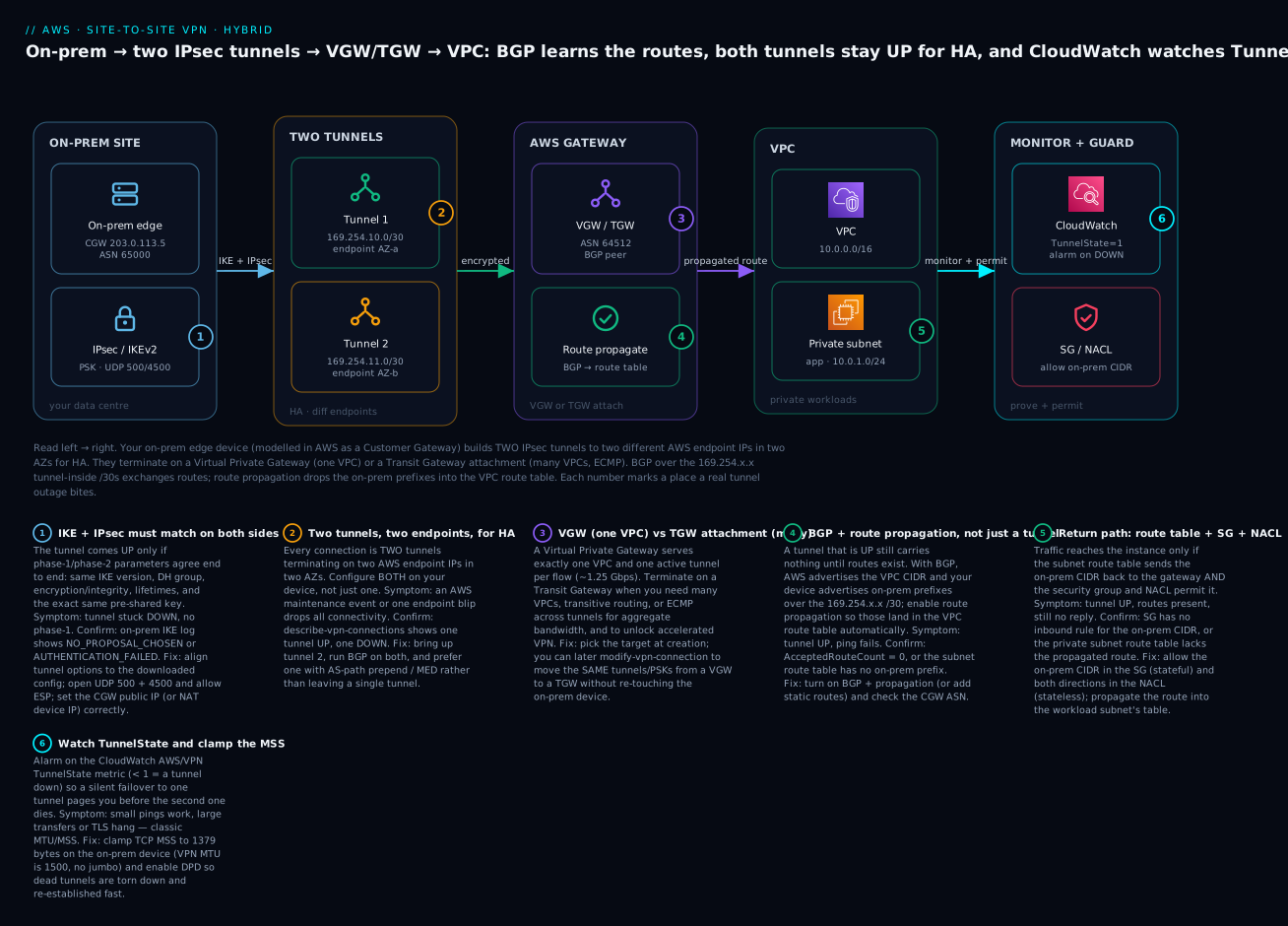
The diagram below is the connection you build in this article, drawn left-to-right as the actual packet path. On the left, your on-prem edge device — represented in AWS as a Customer Gateway (203.0.113.5, ASN 65000) — negotiates IKEv2 + IPsec and opens two tunnels to two different AWS endpoint IPs in two AZs, each with its own 169.254.x.x/30 inside CIDR. The tunnels terminate on a Virtual Private Gateway (or a Transit Gateway attachment) with Amazon-side ASN 64512; BGP over the inside addresses exchanges routes, and route propagation drops the on-prem prefixes into the VPC route table so the private subnet (10.0.1.0/24) can reply. On the right, CloudWatch watches TunnelState and a security group / NACL must permit the on-prem CIDR for traffic to actually reach the instance. Each numbered badge marks a place a real outage bites; the legend narrates each as symptom · confirm · fix.
Real-world scenario
Meridian Logistics, a fictional but representative Indian freight company, ran a 20-year-old transport-management system (TMS) on Oracle in a Chennai data centre and was building a new customer-facing tracking portal in AWS Mumbai (ap-south-1). The portal needed to query the TMS in real time, and the security team was categorical: no database port would ever face the internet. Direct Connect was the eventual plan, but the cross-connect quote was eight weeks out, and the portal launch was in three. They needed private, encrypted connectivity now.
They stood up a Site-to-Site VPN in an afternoon. The Chennai firewall (a Fortinet pair behind a NAT) became the Customer Gateway — and here they hit the first classic wall: they entered the firewall’s LAN interface IP instead of the NAT public IP, and no tunnel came up until they fixed the CGW address and opened UDP 500/4500 and ESP outbound on the corporate firewall. With that corrected, both tunnels negotiated IKEv2 with AES256-GCM and DH group 20. They chose BGP: the firewall advertised the on-prem 172.16.0.0/16 and AWS advertised the VPC 10.20.0.0/16, and they enabled route propagation on the portal’s private-subnet route table. Ping worked — then large API responses from the TMS started hanging. Small queries fine, big result sets dead. Classic MSS/MTU: the 1500-byte tunnel plus IPsec overhead meant full-size segments with DF set were being dropped. They clamped TCP MSS to 1379 on the Fortinet, and the hangs vanished.
The launch went out on the VPN. Two things then proved the design. First, an AWS tunnel-endpoint maintenance notification arrived a month later; because both tunnels were up and BGP was running on both, endpoint 1 going into maintenance shifted all traffic to tunnel 2 in seconds — the on-call engineer only knew because the TunnelState < 1 CloudWatch alarm paged them, exactly as intended. Second, when the Direct Connect circuit was finally delivered, they did not rebuild anything: they used modify-vpn-connection to move nothing (the VPN stayed as the encrypted backup) and instead made DX primary, keeping the Site-to-Site VPN as the encrypted failover path — plain DX being unencrypted, the compliance team liked having the IPsec option in their pocket.
The numbers told the story. The VPN cost roughly ₹3,600/month in connection-hours plus a few hundred rupees of data processing — a rounding error against the portal’s revenue, and a fraction of the DX port they were waiting on. When they later consolidated three more VPCs (analytics, DR, and a partner-integration VPC) that all needed the same TMS, they migrated the VPN termination from the VGW to a Transit Gateway with modify-vpn-connection — same tunnels, same PSKs, zero change on the Fortinet — and let the hub fan the one data-centre link out to all four VPCs. The networking lead’s one-line justification to the CFO: “We shipped a private, encrypted, auto-failover hybrid link in an afternoon for the price of a team lunch, and it scaled to four VPCs without a truck roll to Chennai.”
Advantages and disadvantages
| Advantages | Disadvantages |
|---|---|
| Encrypted (IPsec) private connectivity in minutes–hours, no circuit order | Runs over the public internet — latency/jitter are not guaranteed |
| Two tunnels for HA out of the box, in two AZs | Each tunnel caps ~1.25 Gbps; a VGW won’t aggregate them |
| BGP gives automatic failover and route propagation | BGP + APIPA + ASN details are fiddly to get right the first time |
| Cheap and hourly — no upfront commitment | Per-connection-hour + data; adds up across many sites |
| Terminate on a VGW (1 VPC) or TGW (many) — scales with you | 1500-byte MTU, no jumbo; needs MSS clamping |
| Accelerated VPN rides the AWS backbone for distant sites | Accelerated + ECMP are TGW-only, not on a VGW |
| Perfect DR/backup path and a bridge while DX is provisioned | Not a substitute for DX’s steady, high, private bandwidth |
When the advantages win: you need encrypted hybrid connectivity fast, your bandwidth needs are within a couple of tunnels, and you value HA and low cost — the overwhelming majority of hybrid use cases, plus every DR/backup path. When the disadvantages bite hardest: sustained multi-gigabit, latency-critical, or jitter-sensitive workloads where the public internet’s variability is unacceptable — there, Direct Connect (optionally with VPN-over-DX for encryption) is the right tool, with a Site-to-Site VPN riding shotgun as the encrypted failover.
Hands-on lab
You will build a complete, working Site-to-Site VPN — but instead of a real data centre, you will simulate on-prem with a second VPC running strongSwan on a t3.micro EC2 instance acting as the Customer Gateway. This is the standard AWS test pattern: it exercises the exact same AWS resources (aws_customer_gateway, aws_vpn_gateway, aws_vpn_connection), real IKE/IPsec, and real BGP, without a physical router. You will bring both tunnels UP, establish BGP, ping across, verify propagated routes, and tear it down.
⚠️ Cost warning. A Site-to-Site VPN connection bills per connection-hour (~$0.05/hr in most regions → ~₹4.2/hr) the moment it exists, whether or not a tunnel is up, plus data processing. Two
t3.microinstances are free-tier-eligible or a few rupees. A two-hour lab is ~₹10; forgetting to delete the VPN connection is ~₹3,000/month. Do the teardown.
Step 0 — variables and the two VPCs
You need an AWS VPC (the real cloud side, 10.10.0.0/16) and an “on-prem” VPC (192.168.0.0/16) whose EC2 instance runs strongSwan.
export AWS_DEFAULT_REGION=ap-south-1
# The AWS-side VPC (what we connect TO)
AWS_VPC=$(aws ec2 create-vpc --cidr-block 10.10.0.0/16 --query 'Vpc.VpcId' --output text \
  --tag-specifications 'ResourceType=vpc,Tags=[{Key=Name,Value=aws-vpc}]')
# The "on-prem" VPC (simulated data centre)
ONPREM_VPC=$(aws ec2 create-vpc --cidr-block 192.168.0.0/16 --query 'Vpc.VpcId' --output text \
  --tag-specifications 'ResourceType=vpc,Tags=[{Key=Name,Value=onprem-vpc}]')
echo "aws=$AWS_VPC onprem=$ONPREM_VPC"
Step 1 — subnets, an IGW for the on-prem CGW, and a test instance
The strongSwan box needs a public IP (it is the “internet-facing” on-prem router); the AWS side needs a private subnet with a test instance to ping.
# AWS-side private subnet + test instance subnet
AWS_SUBNET=$(aws ec2 create-subnet --vpc-id "$AWS_VPC" --cidr-block 10.10.1.0/24 \
  --availability-zone ap-south-1a --query 'Subnet.SubnetId' --output text)
# On-prem public subnet for the strongSwan CGW
ONPREM_SUBNET=$(aws ec2 create-subnet --vpc-id "$ONPREM_VPC" --cidr-block 192.168.1.0/24 \
  --availability-zone ap-south-1a --query 'Subnet.SubnetId' --output text)
# IGW so the strongSwan box has a public IP the VPN endpoints can reach
ONPREM_IGW=$(aws ec2 create-internet-gateway --query 'InternetGateway.InternetGatewayId' --output text)
aws ec2 attach-internet-gateway --vpc-id "$ONPREM_VPC" --internet-gateway-id "$ONPREM_IGW"
ONPREM_RT=$(aws ec2 describe-route-tables --filters "Name=vpc-id,Values=$ONPREM_VPC" \
  "Name=association.main,Values=true" --query 'RouteTables[0].RouteTableId' --output text)
aws ec2 create-route --route-table-id "$ONPREM_RT" --destination-cidr-block 0.0.0.0/0 --gateway-id "$ONPREM_IGW"
Launch the strongSwan instance (Amazon Linux 2023). Disable source/dest check — it forwards traffic for the 192.168.0.0/16 “LAN,” so it must not drop packets that aren’t addressed to itself:
SG=$(aws ec2 create-security-group --group-name onprem-cgw --description "strongSwan CGW" \
  --vpc-id "$ONPREM_VPC" --query 'GroupId' --output text)
# Allow IKE/IPsec from anywhere (lab), plus ICMP + SSH
aws ec2 authorize-security-group-ingress --group-id "$SG" --protocol udp --port 500  --cidr 0.0.0.0/0
aws ec2 authorize-security-group-ingress --group-id "$SG" --protocol udp --port 4500 --cidr 0.0.0.0/0
aws ec2 authorize-security-group-ingress --group-id "$SG" --protocol icmp --port -1  --cidr 10.10.0.0/16
CGW_INSTANCE=$(aws ec2 run-instances --image-id resolve:ssm:/aws/service/ami-amazon-linux-latest/al2023-ami-kernel-default-x86_64 \
  --instance-type t3.micro --subnet-id "$ONPREM_SUBNET" --security-group-ids "$SG" \
  --associate-public-ip-address --query 'Instances[0].InstanceId' --output text)
aws ec2 modify-instance-attribute --instance-id "$CGW_INSTANCE" --no-source-dest-check
aws ec2 wait instance-running --instance-ids "$CGW_INSTANCE"
CGW_PUBLIC_IP=$(aws ec2 describe-instances --instance-ids "$CGW_INSTANCE" \
  --query 'Reservations[0].Instances[0].PublicIpAddress' --output text)
echo "strongSwan public IP (this is your CGW address) = $CGW_PUBLIC_IP"
Step 2 — the Customer Gateway and Virtual Private Gateway
# CGW: point it at the strongSwan public IP; ASN 65000 for BGP
CGW=$(aws ec2 create-customer-gateway --type ipsec.1 --public-ip "$CGW_PUBLIC_IP" \
  --bgp-asn 65000 --query 'CustomerGateway.CustomerGatewayId' --output text)
# VGW: Amazon side ASN 64512, attach to the AWS VPC
VGW=$(aws ec2 create-vpn-gateway --type ipsec.1 --amazon-side-asn 64512 \
  --query 'VpnGateway.VpnGatewayId' --output text)
aws ec2 attach-vpn-gateway --vpn-gateway-id "$VGW" --vpc-id "$AWS_VPC"
Step 3 — create the VPN connection (BGP) and read the tunnel details
VPN=$(aws ec2 create-vpn-connection --type ipsec.1 --customer-gateway-id "$CGW" \
  --vpn-gateway-id "$VGW" \
  --options '{"StaticRoutesOnly":false}' \
  --query 'VpnConnection.VpnConnectionId' --output text)
aws ec2 wait vpn-connection-available --vpn-connection-ids "$VPN"
# Pull the two tunnel outside IPs, PSKs and inside CIDRs (you feed these to strongSwan/FRR)
aws ec2 describe-vpn-connections --vpn-connection-ids "$VPN" \
  --query 'VpnConnections[0].Options.TunnelOptions[].{outside:OutsideIpAddress,inside:TunnelInsideCidr,psk:PreSharedKey}' \
  --output table
Expected: two rows, each with an OutsideIpAddress (the AWS endpoint), a TunnelInsideCidr (a 169.254.x.x/30), and a PreSharedKey. The describe-vpn-connections call also returns a full CustomerGatewayConfiguration XML blob — the “download configuration” — with everything strongSwan and the BGP daemon (FRR) need. Configure strongSwan (/etc/swanctl/swanctl.conf) with both tunnels (both outside IPs, both PSKs), IKEv2, and run FRR/bird BGP peering 169.254.x.1 (AWS) from your side 169.254.x.2, advertising 192.168.0.0/16.
Step 4 — enable route propagation on the AWS side
# Enable route propagation so the on-prem prefix (192.168.0.0/16) auto-appears in the AWS route table
AWS_RT=$(aws ec2 describe-route-tables --filters "Name=vpc-id,Values=$AWS_VPC" \
  "Name=association.main,Values=true" --query 'RouteTables[0].RouteTableId' --output text)
aws ec2 enable-vgw-route-propagation --route-table-id "$AWS_RT" --gateway-id "$VGW"
Step 5 — bring both tunnels UP and verify
# Watch the tunnel telemetry — after strongSwan connects, Status flips to UP
aws ec2 describe-vpn-connections --vpn-connection-ids "$VPN" \
  --query 'VpnConnections[0].VgwTelemetry[].{ip:OutsideIpAddress,status:Status,routes:AcceptedRouteCount,msg:StatusMessage}' \
  --output table
Expected once strongSwan + BGP are up on both tunnels:
------------------------------------------------------------------
|                     DescribeVpnConnections                      |
+------------------+----------+----------+-------------------------+
|       ip         | status   | routes   |          msg            |
+------------------+----------+----------+-------------------------+
|  13.234.x.x      |  UP      |  1       |  IPSEC IS UP            |
|  15.206.y.y      |  UP      |  1       |  IPSEC IS UP            |
+------------------+----------+----------+-------------------------+
AcceptedRouteCount = 1 on each tunnel means BGP learned your 192.168.0.0/16. Now confirm the route landed in the AWS route table (propagation) and ping across:
# The propagated on-prem route should appear with the VGW as target
aws ec2 describe-route-tables --route-table-id "$AWS_RT" \
  --query 'RouteTables[0].Routes[?GatewayId==`'"$VGW"'`]' --output table
# From an instance in the AWS subnet, ping the strongSwan private IP (192.168.1.x)
Expected: a route 192.168.0.0/16 → <vgw-id> with Origin: EnableVgwRoutePropagation, and a successful ping from an AWS-side instance to the on-prem 192.168.x.x address. That end-to-end ping is the proof the VPN works.
Step 6 — teardown (do not skip)
# Delete the VPN connection FIRST — this stops the connection-hour meter
aws ec2 delete-vpn-connection --vpn-connection-id "$VPN"
aws ec2 detach-vpn-gateway --vpn-gateway-id "$VGW" --vpc-id "$AWS_VPC"
aws ec2 delete-vpn-gateway --vpn-gateway-id "$VGW"
aws ec2 delete-customer-gateway --customer-gateway-id "$CGW"
aws ec2 terminate-instances --instance-ids "$CGW_INSTANCE"
aws ec2 wait instance-terminated --instance-ids "$CGW_INSTANCE"
# then detach/delete IGW, delete subnets, SGs, and both VPCs
aws ec2 detach-internet-gateway --vpc-id "$ONPREM_VPC" --internet-gateway-id "$ONPREM_IGW"
aws ec2 delete-internet-gateway --internet-gateway-id "$ONPREM_IGW"
| Lab resource | Bills? | Rough cost (2 hrs) | Teardown |
|---|---|---|---|
| Site-to-Site VPN connection | Yes (connection-hour + data) | ~₹9 for 2 hrs | Delete first |
| Virtual Private Gateway | No standalone charge | ₹0 | Detach then delete |
| Customer Gateway | No | ₹0 | Delete |
2× t3.micro (strongSwan + test) |
Free-tier or a few ₹ | ~₹0–5 | Terminate |
| 2× VPC + subnets + IGW | No (IGW free; NAT would cost) | ₹0 | Delete last |
Command and Terraform reference
The aws ec2 verb set you use to operate a Site-to-Site VPN:
| Task | CLI command |
|---|---|
| Describe the on-prem device to AWS | aws ec2 create-customer-gateway |
| Create the AWS-side concentrator | aws ec2 create-vpn-gateway / attach-vpn-gateway |
| Create the VPN (two tunnels) | aws ec2 create-vpn-connection |
| Add a static on-prem route (static mode) | aws ec2 create-vpn-connection-route |
| Tune a tunnel’s IKE/IPsec/DPD options | aws ec2 modify-vpn-tunnel-options |
| Restrict which tunnel options are certified | aws ec2 get-vpn-connection-device-types (device list) |
| Move the VPN from a VGW to a TGW | aws ec2 modify-vpn-connection --transit-gateway-id … |
| Auto-inject routes into the VPC table | aws ec2 enable-vgw-route-propagation |
| Read live tunnel status + routes | aws ec2 describe-vpn-connections (VgwTelemetry) |
| Download the device config | aws ec2 get-vpn-connection-device-sample-configuration |
| Delete the VPN (stop the meter) | aws ec2 delete-vpn-connection |
And the Terraform aws provider resources — where the VPN belongs in production:
| Terraform resource | Purpose |
|---|---|
aws_customer_gateway |
The on-prem device record (IP/cert + bgp_asn) |
aws_vpn_gateway (+ aws_vpn_gateway_attachment) |
The VGW and its VPC attachment |
aws_vpn_connection |
The connection = two tunnels; static_routes_only, tunnel1_*/tunnel2_* options |
aws_vpn_connection_route |
A static on-prem route (static mode) |
aws_vpn_gateway_route_propagation |
Enable propagation into a VPC route table |
aws_ec2_transit_gateway (+ VPN attach via aws_vpn_connection.transit_gateway_id) |
Terminate on a TGW instead of a VGW |
aws_ec2_client_vpn_endpoint |
The separate Client VPN product (remote users) |
A minimal Terraform for the VGW pattern with hardened tunnels and BGP:
resource "aws_customer_gateway" "onprem" {
  bgp_asn    = 65000
  ip_address = "203.0.113.5"   # the on-prem device's PUBLIC (NAT) IP
  type       = "ipsec.1"
  tags       = { Name = "chennai-dc" }
}

resource "aws_vpn_gateway" "vgw" {
  vpc_id          = aws_vpc.aws_side.id
  amazon_side_asn = 64512
  tags            = { Name = "aws-vgw" }
}

resource "aws_vpn_connection" "s2s" {
  customer_gateway_id = aws_customer_gateway.onprem.id
  vpn_gateway_id      = aws_vpn_gateway.vgw.id
  type                = "ipsec.1"
  static_routes_only  = false            # BGP

  # Harden BOTH tunnels: IKEv2 + strong crypto only
  tunnel1_ike_versions                 = ["ikev2"]
  tunnel1_phase1_dh_group_numbers      = [20, 21]
  tunnel1_phase2_dh_group_numbers      = [20, 21]
  tunnel1_phase1_encryption_algorithms = ["AES256-GCM-16"]
  tunnel1_phase2_encryption_algorithms = ["AES256-GCM-16"]
  tunnel1_startup_action               = "start"   # AWS initiates (device behind NAT)
  tunnel2_ike_versions                 = ["ikev2"]
  tunnel2_phase1_dh_group_numbers      = [20, 21]
  tunnel2_phase2_dh_group_numbers      = [20, 21]
  tunnel2_phase1_encryption_algorithms = ["AES256-GCM-16"]
  tunnel2_phase2_encryption_algorithms = ["AES256-GCM-16"]
  tunnel2_startup_action               = "start"
  tags = { Name = "chennai-to-aws" }
}

resource "aws_vpn_gateway_route_propagation" "prop" {
  vpn_gateway_id = aws_vpn_gateway.vgw.id
  route_table_id = aws_route_table.private.id   # the on-prem prefix auto-appears here
}
Common mistakes & troubleshooting
The playbook first — the failures you will actually hit, with the exact command or console path to confirm each and the fix. This is the section to bookmark. Note the split between liveness (tunnel DOWN) and reachability (tunnel UP, no traffic) — they are different problems.
| # | Symptom | Root cause | Confirm (exact command / console path) | Fix |
|---|---|---|---|---|
| 1 | Tunnel stuck DOWN, never reaches phase 1 | UDP 500 / 4500 blocked, or ESP dropped, by a firewall in front of the on-prem device | On-prem: no IKE packets seen; describe-vpn-connections → Status=DOWN, StatusMessage phase-1 timeout |
Open UDP 500 and 4500 inbound/outbound and allow ESP (IP 50) or ensure NAT-T; retest |
| 2 | Tunnel DOWN, log says NO_PROPOSAL_CHOSEN |
Phase-1/2 parameter mismatch (DH group / encryption / integrity / IKE version) | On-prem IKE log shows NO_PROPOSAL_CHOSEN; compare device config to tunnel options |
Align crypto to the downloaded config; don’t over-restrict phase1/2_*_algorithms |
| 3 | Tunnel DOWN, log says AUTHENTICATION_FAILED |
Wrong pre-shared key (or wrong cert) | On-prem IKE log AUTHENTICATION_FAILED; PSK differs from describe-vpn-connections |
Copy the exact PSK per tunnel from the config; keys are per-tunnel, not shared |
| 4 | Tunnel DOWN and the CGW address is wrong | Device is behind NAT; you set the private/interface IP on the CGW | describe-customer-gateways shows a non-public IP; AWS can’t reach it |
Set CGW IpAddress to the NAT device’s public IP; enable NAT-T; consider StartupAction=start |
| 5 | Only one tunnel is UP | You configured a single tunnel on the device | describe-vpn-connections → one Status=UP, one DOWN |
Configure both tunnels (both outside IPs + PSKs); run BGP on both |
| 6 | Tunnel UP but no traffic at all | Route propagation off / no route in the VPC route table | describe-route-tables shows no on-prem-cidr → vgw/tgw |
enable-vgw-route-propagation (VGW) or add the TGW route; check the right subnet’s table |
| 7 | Tunnel UP, AcceptedRouteCount = 0 (BGP) |
BGP not exchanging prefixes — wrong ASN or APIPA peering | VgwTelemetry.AcceptedRouteCount=0; device show ip bgp summary not Established |
Fix CGW ASN; peer to the correct 169.254.x.1/.2; advertise the on-prem prefix |
| 8 | Tunnel UP, routes present, still no reply | Security group / NACL doesn’t permit the on-prem CIDR | Reachability Analyzer stops at SG/NACL; SG has no inbound rule for on-prem CIDR | Allow the on-prem CIDR inbound in the SG; allow both directions in the NACL |
| 9 | Ping works, large transfers/TLS hang | MTU/MSS — full-size segments dropped over the 1500-byte tunnel | Small ICMP OK; ping -M do -s 1400 fails; TCP stalls after handshake |
Clamp TCP MSS to 1379 on the on-prem device (iptables ... TCPMSS --set-mss 1379) |
| 10 | Traffic goes out tunnel 1, returns on tunnel 2 (asymmetric) | Both tunnels up with equal preference; stateful on-prem firewall drops the mismatched return | On-prem firewall logs “out-of-state”; captures show different tunnels each way | Prefer one tunnel via AS-path prepend / MED / local-pref so a flow is symmetric |
| 11 | Tunnels flap every few minutes | DPD misfire or an unstable internet path; MTU black-holing IKE | LastStatusChange cycling; logs show DPD timeouts |
Tune DPDTimeoutSeconds/Action; fix the path MTU; enable tunnel logging to see the cause |
| 12 | On-prem can reach the VPC but not vice-versa (one-way) | Return route missing — the VPC advertises its CIDR but on-prem doesn’t install it (or the on-prem route to VPC is absent) | On-prem routing table lacks the VPC CIDR via the tunnel | Advertise/point the VPC CIDR down the tunnel on-prem; verify both directions |
| 13 | BGP won’t establish though the tunnel is UP | Wrong tunnel-inside /30 or ASN; some devices need disable-connected-check |
Device BGP neighbour stuck Active/Connect; wrong peer IP |
Use the exact 169.254.x.x peer address from the config; match ASNs; allow BGP in the tunnel |
| 14 | Everything worked, then one tunnel dropped on its own | AWS endpoint maintenance replaced that tunnel’s endpoint | LastStatusChange matches an AWS maintenance notice; TunnelState dipped |
Nothing to fix if BGP failed over; ensure both tunnels are always configured so it’s a non-event |
| 15 | create-vpn-connection fails or routing is broken with overlapping CIDRs |
On-prem and VPC use the same RFC 1918 range | Both sides are 10.0.0.0/16; routing can’t disambiguate |
Re-IP one side (or use NAT); overlapping CIDRs cannot be routed |
| 16 | Accelerated VPN can’t be enabled | You tried to enable it after creation or on a VGW | EnableAcceleration immutable; VGW unsupported |
Recreate the connection on a TGW with EnableAcceleration=true at creation |
A status / telemetry reference you will read constantly in describe-vpn-connections and IKE logs:
| Field / message | Meaning | Implication |
|---|---|---|
Status: UP / IPSEC IS UP |
Phase-1 + phase-2 established | Liveness good; now check routing |
Status: DOWN |
Tunnel not established | Liveness problem — crypto/PSK/firewall/CGW IP |
NO_PROPOSAL_CHOSEN |
No matching phase-1/2 proposal | DH/encryption/integrity/IKE-version mismatch |
AUTHENTICATION_FAILED |
Peer auth failed | Wrong PSK or certificate |
INVALID_ID_INFORMATION |
Traffic selector / peer ID mismatch | Wrong local/remote subnets or peer identity |
AcceptedRouteCount: 0 (BGP) |
No prefixes learned | BGP down or nothing advertised — routing broken |
AcceptedRouteCount: N |
N on-prem prefixes learned | BGP healthy; expect them in the route table |
TunnelState metric < 1 |
A tunnel is DOWN | Alarm should have fired; you’re on one tunnel |
| DPD timeout in logs | Peer went silent | Failover/flap; tune DPD and check the path |
And a fast decision table for the two big failure classes, which are 90% of VPN tickets:
| If you see… | It’s probably… | Do this |
|---|---|---|
| Tunnel DOWN, no phase 1 | Firewall (UDP 500/4500) or wrong CGW IP | Open the ports/ESP; set the NAT public IP on the CGW |
Tunnel DOWN, NO_PROPOSAL_CHOSEN |
Crypto mismatch | Align phase-1/2 params to the downloaded config |
Tunnel DOWN, AUTHENTICATION_FAILED |
Wrong PSK | Copy the exact per-tunnel PSK |
| Tunnel UP, zero traffic | No route / propagation off | enable-vgw-route-propagation; check the right table |
Tunnel UP, AcceptedRouteCount=0 |
BGP (ASN / APIPA) | Fix ASN + peer to 169.254.x.x; advertise prefixes |
| Ping OK, big transfers hang | MTU/MSS | Clamp TCP MSS to 1379 on-prem |
| One-way traffic | Return route or SG/NACL | Add return route; permit on-prem CIDR in SG + NACL |
The three nastiest real failures deserve prose. First, “the tunnel is up but nothing works.” This is the defining VPN ticket, and it is almost always routing, not the tunnel: the tunnel says UP, so the network engineer stares at IKE for an hour, when the actual problem is that route propagation is off (or the route is in the wrong subnet’s table, or the security group has no inbound rule for the on-prem CIDR). Train yourself to split the diagnosis: Status=UP means stop looking at crypto and go check the VPC route table, then the SG, then the NACL. Second, the MTU/MSS black hole. Because the tunnel MTU is 1500 and IPsec adds overhead, a full-size TCP segment with the “don’t fragment” bit set gets silently dropped — so the handshake (small packets) succeeds and the data (big packets) vanishes. The tell is “ping works, SSH/TLS/large responses hang.” The fix is MSS clamping to 1379 bytes on the on-prem device; it is not optional over VPN. Third, the single-tunnel time bomb. Everything works in the demo because tunnel 1 is up, so nobody bothers with tunnel 2 — and weeks later an AWS endpoint maintenance event (which you were emailed about) tears tunnel 1 down and the entire hybrid link drops. Always configure both tunnels and alarm on TunnelState < 1 so a failover to one tunnel is a page, not an outage.
Best practices
- Always configure both tunnels and run BGP on both — the second tunnel is your HA, and AWS will perform endpoint maintenance on one of them. Configuring only one is the most common self-inflicted outage.
- Alarm on
TunnelState(< 1per tunnel = a tunnel down;< 2on the connection = redundancy lost). A silent failover to a single tunnel must page you before the second tunnel dies. - Prefer BGP over static routing wherever the device supports it — automatic failover and automatic propagation of new subnets are worth the extra setup.
- Clamp TCP MSS to 1379 on the on-prem device from day one. VPN MTU is 1500 with no jumbo; without clamping, large transfers black-hole.
- Prefer one tunnel deterministically (AS-path prepend / MED / local-pref) to keep flows symmetric and stateful on-prem firewalls happy.
- Restrict crypto to strong, modern algorithms (IKEv2, AES256-GCM, DH group ≥ 19/20, SHA2, PFS on) — but not so narrowly that you cause
NO_PROPOSAL_CHOSEN; match the device’s real capability. - Enable route propagation on every VPC route table that needs on-prem reachability — the number-one cause of “tunnel up, no traffic.”
- Terminate on a Transit Gateway the moment you have more than one VPC to reach, or need ECMP/accelerated VPN — and migrate an existing VGW with
modify-vpn-connectionso the on-prem device is untouched. - Use
StartupAction=start(with IKEv2) when the on-prem device is behind NAT and can’t be the initiator, so AWS brings the tunnel up outbound. - Store PSKs in Secrets Manager, rotate them, and prefer certificate-based CGWs for devices with dynamic public IPs.
- Own the whole thing in Terraform — CGW, VGW/TGW, connection, tunnel options, and propagation — so tunnel crypto is reviewed in a PR, not clicked in the console.
- Enable Site-to-Site VPN logging to CloudWatch Logs on both tunnels so a future
NO_PROPOSAL_CHOSENshows you the exact rejected proposal instead of a guessing game.
Security notes
A Site-to-Site VPN is a security control — it encrypts traffic that would otherwise cross the internet in the clear — but it has its own hardening surface. The transport is IPsec, so choose modern crypto: IKEv2, AES-256-GCM (AEAD, encryption + integrity in one), DH group 19+/20+ for key exchange, SHA2 for integrity, and PFS enabled so a compromised key does not expose past sessions. Do not leave SHA1 or DH group 2 in the allowed set unless a legacy device forces it.
The pre-shared key is a long-lived secret: each tunnel has its own, and anyone who has it plus the endpoint IP can attempt to negotiate. Store PSKs in Secrets Manager or Parameter Store (SecureString), never in git or a wiki, rotate them (modify-vpn-tunnel-options sets a new PSK per tunnel, one at a time so the other stays up), and prefer certificate-based authentication (ACM Private CA on the CGW) for higher assurance and for devices whose public IP changes.
Remember that IPsec gets the traffic to the VPC — it does not authorize what it can reach. That is the job of the security groups and NACLs on the destination subnets: scope inbound rules to the specific on-prem CIDR and ports (never 0.0.0.0/0), and if you terminate on a Transit Gateway, use separate route tables / segmentation so the data-centre link cannot reach environments it has no business touching. Enable VPN logging and, on a TGW, Flow Logs for an audit trail, and record the VPN and route changes in CloudTrail. Finally, treat overlapping RFC 1918 space as a security issue as much as a routing one: NAT or re-IP so you always know exactly which host a packet is going to.
Cost & sizing
Site-to-Site VPN pricing has two parts: a connection-hour charge (~$0.05/hr, ~₹4.2/hr, ~₹3,000/month per connection in most regions — billed whenever the connection exists, tunnel up or not) and data transfer out at standard EC2 egress rates. There is no charge for the VGW or CGW themselves. If you terminate on a Transit Gateway, add the TGW attachment-hour (~$0.05/hr) and per-GB processing (~$0.02/GB). Accelerated VPN adds Global Accelerator hourly plus a data-transfer-premium per GB. Data coming in from on-prem is generally free; data going out to on-prem is the egress line to watch.
| Cost driver | Rough figure | Notes / how to control |
|---|---|---|
| VPN connection-hour | ~$0.05/hr (~₹3,000/mo) | Per connection; delete unused ones — it bills even when DOWN |
| Data transfer OUT (to on-prem) | Standard egress (~$0.09/GB tiered) | The real variable cost; compress, cache, keep chatty data one side |
| Data transfer IN (from on-prem) | Usually free | — |
| VGW / CGW | ₹0 | No standalone charge |
| TGW attachment (if TGW) | ~$0.05/hr + ~$0.02/GB | Only when terminating on a hub |
| Accelerated VPN | GA hourly + DT-premium/GB | Only if you enabled acceleration (TGW) |
| Sizing ceiling | ~1.25 Gbps & ~140k pps per tunnel | Beyond that: TGW + ECMP + more tunnels, or Direct Connect |
Sizing. A single VPN connection (two tunnels, one active per flow on a VGW) suits workloads up to roughly a tunnel’s throughput — plenty for AD/DNS, database queries, admin traffic, and most app integration. When you need more aggregate bandwidth, move to a TGW with ECMP and add tunnels/connections (each ~1.25 Gbps). When you need sustained multi-gigabit or guaranteed latency, that is the signal to provision Direct Connect and keep the VPN as the encrypted backup. Free-tier note: there is no free tier for the VPN connection-hour — an idle VPN connection is a real, recurring charge, which is exactly why the lab teardown deletes it first.
Interview & exam questions
Q1. Why does every Site-to-Site VPN connection have two tunnels? For high availability. AWS provisions two tunnels on two endpoint IPs in two different Availability Zones so that endpoint maintenance or a failure on one does not drop connectivity. You must configure both on your device; with BGP, failover between them is automatic. (SAA-C03, ANS-C01.)
Q2. What is the difference between a Customer Gateway and a Virtual Private Gateway? The CGW is an AWS resource that describes your on-prem device (its public IP and BGP ASN); the VGW is the AWS-managed VPN concentrator attached to your VPC that terminates the AWS side of the tunnels. The tunnels run between the two. (SAA-C03.)
Q3. When do you terminate a VPN on a Transit Gateway instead of a VGW? When the VPN must reach many VPCs (a VGW serves one), when you need ECMP across tunnels for aggregate bandwidth beyond ~1.25 Gbps, or when you want accelerated VPN — all TGW-only. A VGW is the simplest choice for a single VPC. (ANS-C01.)
Q4. Static vs dynamic routing — which and why? Dynamic (BGP) where the device supports it: it gives automatic failover (route withdrawal on a dead tunnel) and automatic propagation of new subnets. Static is for devices without BGP; you type the on-prem CIDRs and lose automatic failover at the routing layer. (SAA-C03, ANS-C01.)
Q5. “The tunnel is UP but no traffic flows.” What do you check? Routing, not the tunnel. Confirm route propagation is enabled (or a static/BGP route exists) so the on-prem CIDR points at the gateway in the right subnet’s route table, then confirm the security group permits the on-prem CIDR inbound and the NACL permits both directions. (SAA-C03.)
Q6. Large transfers hang while pings succeed. Cause and fix? MTU/MSS. The 1500-byte tunnel plus IPsec overhead causes full-size TCP segments with DF set to be dropped; small packets (pings, handshakes) pass. Fix by clamping TCP MSS to ~1379 bytes on the on-prem device. (ANS-C01.)
Q7. How is Site-to-Site VPN different from Client VPN? Site-to-Site connects an entire network (data centre) to a VPC over IPsec (two tunnels, router-to-router). Client VPN is OpenVPN-based remote access for individual users/devices with TLS/AD/SAML auth and a client app. Different products, different use cases. (SAA-C03.)
Q8. VPN vs Direct Connect, and what is VPN-over-DX? VPN is encrypted, over the public internet, minutes to set up, cheap, variable latency. DX is a private dedicated circuit, consistent high bandwidth, weeks to provision, expensive, and not encrypted by default. VPN-over-DX runs IPsec over a DX public VIF to get both a private path and encryption. (ANS-C01.)
Q9. What are phase 1 and phase 2 in IPsec? Phase 1 (IKE) authenticates the peers and builds the secure control channel (agreeing DH group, encryption, integrity, lifetime, PSK/cert). Phase 2 (IPsec) negotiates the SA that encrypts the actual data (its own encryption, integrity, optional PFS, shorter lifetime). Both need a matching proposal or the tunnel fails with NO_PROPOSAL_CHOSEN. (ANS-C01, SCS-C02.)
Q10. Your device is behind NAT. What must you get right? Set the CGW IpAddress to the NAT device’s public IP (not the device’s private IP), ensure NAT-T works by opening UDP 4500 (and 500), and consider StartupAction=start so AWS initiates the tunnel outbound since the device may not be reachable to initiate. (ANS-C01.)
Q11. How do you monitor VPN health, and what do you alarm on? CloudWatch AWS/VPN metrics — primarily TunnelState (1 = UP, 0 = DOWN per tunnel). Alarm on TunnelState < 1 per tunnel so a failover to a single tunnel pages you; use describe-vpn-connections VgwTelemetry (Status, AcceptedRouteCount) for live detail. (SOA-C02, ANS-C01.)
Q12. How do you migrate a VGW-terminated VPN to a Transit Gateway with minimal disruption? Use modify-vpn-connection to change the connection’s target gateway from the VGW to the TGW. It keeps the same tunnel endpoint IPs and pre-shared keys, so the on-prem device configuration does not change — only the AWS-side termination moves, during a brief re-establishment. (ANS-C01.)
Quick check
- How many tunnels does a Site-to-Site VPN connection always have, and why?
- You created the CGW with your firewall’s LAN IP and the tunnel won’t come up. What’s wrong?
- The tunnel is UP but you can’t reach the VPC from on-prem. Name the two most likely causes.
- Pings work but large file transfers hang. What’s the fix?
- Which termination — VGW or TGW — do you need for ECMP and accelerated VPN?
Answers
- Two, terminating on two endpoint IPs in two AZs, for high availability against endpoint maintenance/failure — configure both.
- The CGW must carry the device’s public (NAT) IP, not its private/LAN IP; AWS can’t reach a private address. Fix the CGW address and ensure NAT-T (UDP 4500) is open.
- Route propagation is off / no route to on-prem in the VPC route table, and/or the security group/NACL doesn’t permit the on-prem CIDR. (BGP not exchanging routes —
AcceptedRouteCount=0— is a close third.) - Clamp TCP MSS to ~1379 bytes on the on-prem device — the 1500-byte tunnel plus IPsec overhead is dropping full-size segments (MTU/MSS black hole).
- A Transit Gateway — ECMP across tunnels and accelerated VPN are TGW-only; a VGW serves one VPC with one active tunnel per flow.
Glossary
- Site-to-Site VPN — A managed AWS IPsec VPN connecting an on-prem network to a VPC, made of two tunnels.
- Customer Gateway (CGW) — An AWS resource describing your on-prem device: its public IP (or certificate) and BGP ASN.
- Virtual Private Gateway (VGW) — The AWS-managed VPN/DX concentrator attached to a single VPC; has an Amazon-side ASN (default 64512).
- Transit Gateway (TGW) VPN attachment — Terminating the VPN on a regional hub to reach many VPCs, enable ECMP, or use accelerated VPN.
- Tunnel — One IPsec tunnel to one AWS endpoint IP; every connection has exactly two.
- IKE (phase 1) — Internet Key Exchange; authenticates peers and builds the secure control channel (IKEv1 or IKEv2).
- IPsec (phase 2) — Negotiates the security association that encrypts the actual data packets.
- Diffie-Hellman (DH) group — The key-exchange strength; higher numbers are stronger (AWS supports 2, 14–24).
- PFS (Perfect Forward Secrecy) — Fresh DH key exchange per phase-2 SA so one compromised key doesn’t expose past traffic.
- Pre-shared key (PSK) — The per-tunnel secret used to authenticate phase 1 (alternative: certificate).
- BGP — Border Gateway Protocol; the dynamic routing protocol that exchanges prefixes and enables automatic failover.
- Tunnel-inside CIDR (APIPA) — A
169.254.x.x/30per tunnel carrying the BGP peering session. - ASN — Autonomous System Number; the on-prem side is on the CGW, the AWS side on the VGW/TGW.
- Route propagation — Auto-injecting VPN (static or BGP) routes into a VPC route table with the gateway as target.
- DPD (Dead Peer Detection) — The mechanism a peer uses to notice the other has gone silent and tear down/restart the SA.
- NAT-T — NAT Traversal; encapsulates IPsec in UDP 4500 so tunnels survive a NAT in the path.
- MSS clamping — Reducing the TCP maximum segment size (to ~1379) so segments fit the tunnel MTU without being dropped.
- Accelerated VPN — A TGW-only option that routes tunnel traffic over the AWS backbone via Global Accelerator for lower jitter.
TunnelState— The CloudWatchAWS/VPNmetric: 1 = UP, 0 = DOWN per tunnel; the thing you alarm on.
Next steps
- Scale the hybrid edge to many VPCs by terminating the VPN on a hub — AWS Transit Gateway: A Hub-and-Spoke Multi-VPC Network, Hands-On.
- Connect VPCs to each other (a different problem from on-prem) — AWS VPC Peering: Setup, Routing and Limits.
- Reach AWS services privately without routing at all — AWS PrivateLink and VPC Endpoints: Interface vs Gateway.
- Permit the traffic once it arrives — AWS Security Groups and NACLs: A Deep-Dive Troubleshooting Guide.
- Ground the addressing and AZ placement your tunnels depend on — AWS VPC From Scratch: Subnets, Route Tables and the Internet Gateway and AWS Regions and Availability Zones Explained. For a broader cross-service hybrid connectivity troubleshooting playbook, work through the VPC connectivity troubleshooting guide alongside this article.