Quick take: A security group is a stateful, allow-only firewall on each ENI — if it lets a connection in, the reply goes back automatically, and you can only ever write “allow” rules. A network ACL is a stateless, ordered, allow-and-deny firewall on the subnet edge — it evaluates each packet independently, so the return traffic must be allowed explicitly, which is why you have to open the ephemeral port range (roughly
1024-65535) outbound or the reply is silently dropped and the client just times out. Get the stateful-vs-stateless difference and the packet path straight and 90% of “it worked in dev, times out in prod” incidents solve themselves.
A payments team moved one service from a permissive subnet into a hardened one with a custom NACL, and the health check went red within seconds. The security group was identical. The route table was identical. The instance was listening. curl from the same subnet worked; curl from the load balancer’s subnet hung until it timed out. Three engineers spent an afternoon re-reading the security group — the wrong layer entirely. The custom NACL allowed inbound 443 but its outbound rules only allowed 443, so the instance’s responses — which leave on high ephemeral ports back to the caller — hit the NACL’s implicit * deny and vanished. Nothing logged an error on the instance; the packets were dropped at the subnet edge on the way out. The fix was one line: allow outbound tcp 1024-65535 to the caller’s CIDR.
That failure is not exotic. It is the single most common connectivity bug in AWS networking, and it exists only because security groups and NACLs handle return traffic differently. This article is built around that difference. We define both firewalls exactly — every default, limit, and rule field — trace a single packet through NACL-in → SG-in → EC2 → SG-out → NACL-out so you know which control sits at which hop, then spend the back half on a structured troubleshooting playbook: a symptom-by-symptom table of blocked connections, how to read a Flow Logs REJECT, how to get a deterministic answer from Reachability Analyzer, and a hands-on lab that reproduces the ephemeral-port block and fixes it. Every operation shows both aws CLI and Terraform. This maps directly to the networking domains of SAA-C03, SOA-C02 and the advanced networking specialty ANS-C01, which lean on this pair harder than any other topic.
If you want the ground-up VPC picture first — CIDRs, subnets, route tables, gateways — read AWS VPC, Subnets and Security Groups Explained. This article assumes you have that and goes deep on the two firewalls and how to debug them.
What problem this solves
Every packet that reaches one of your instances crosses two independent firewalls, and they do not work the same way. The security group is attached to the elastic network interface (ENI) and is stateful: it remembers connections, so a reply to an allowed request is allowed automatically. The network ACL is attached to the subnet and is stateless: it has no memory, so it judges the request and the reply as two unrelated packets and you must permit both directions yourself. When a connection silently fails, the entire diagnostic hinges on knowing which of these two layers is dropping it and in which direction — and that is precisely the knowledge most teams lack when the pager goes off.
What breaks without this understanding is a specific, repeating pattern. Someone hardens a subnet with a custom NACL and forgets the outbound ephemeral range, so every response is dropped and every client times out while the instance logs look perfectly healthy. Someone “fixes” a timeout by opening the security group to 0.0.0.0/0:0-65535 and turns a firewall into a welcome mat. Someone edits a security group, sees existing connections keep working, assumes the change did nothing, and opens it wider — not knowing that connection tracking keeps established flows alive until they idle out. Someone allows IPv4 but the client connects over IPv6 and there is no ::/0 rule, so half the traffic fails and the other half works. Each of these is a five-minute concept that costs a weekend when it is not understood.
Who hits this: everyone who runs anything beyond a single instance in the default VPC. It bites hardest on teams migrating from the deliberately permissive default VPC / default NACL (which allows everything) into production subnets with custom NACLs (which deny everything until you write rules) — because the mental model that “just worked” no longer applies. It bites platform teams who own the NACLs but not the security groups, and app teams who own the security groups but not the NACLs, so neither can see the whole packet path. The good news: the model is small and closed. Two firewalls, one stateful and one stateless, evaluated in a fixed order. Learn the order and the return-traffic rule and the fog clears.
To frame the whole field, here is every reason this pair confuses people and what it actually costs:
| Confusion | What people believe | The reality | What it costs in production |
|---|---|---|---|
| Statefulness | “Both firewalls auto-allow replies” | Only the SG is stateful; the NACL needs an explicit return rule | Every response dropped → client timeouts, red health checks |
| Direction of the block | “The block is inbound” | The classic block is outbound (the reply), not inbound | Hours spent on the wrong (inbound) rules |
| Symptom meaning | “Timeout and refused are the same” | SG/NACL drops = silent timeout; RST/refused = app or OS | Debugging the network when the app isn’t listening |
| Rule semantics | “You can deny in a security group” | SGs are allow-only; only NACLs can DENY | Trying to write a Deny rule that doesn’t exist |
| Evaluation | “Security group rules are ordered” | SG rules are unordered (union); only NACLs are ordered | Renumbering SG rules that have no order |
| Ephemeral ports | “Return traffic uses the server port” | Replies go to the client’s high ephemeral port | NACL outbound only opens 443, drops all replies |
| Change propagation | “Editing an SG drops live connections” | Tracked connections persist until idle timeout | “My change didn’t work” → over-widening the rule |
| IP family | “One rule covers v4 and v6” | IPv4 and IPv6 are separate rules and separate quotas | v6 clients silently fail while v4 works |
Learning objectives
By the end of this article you can:
- Explain stateful vs stateless precisely and predict, for any rule set, whether return traffic will flow.
- Recite the exact packet path — inbound
NACL-in → SG-in → instance; returnSG-out → NACL-out— and name which layer drops a packet at each hop. - Configure the ephemeral port range correctly on a NACL for Linux, Windows, NAT, ELB and Lambda clients, and know why
1024-65535is the safe default. - Build a tiered app with security-group referencing (web → app → db) instead of hard-coded CIDRs, in both
awsCLI and Terraform. - Read a VPC Flow Logs
REJECTrecord and disambiguate an SG block from a NACL block using the inbound/outbound pair. - Run Reachability Analyzer to get a deterministic “this component blocks it” answer with the exact rule.
- Work a blocked connection through a 16-row troubleshooting playbook from symptom to confirmed root cause to fix.
- Distinguish a firewall drop (timeout) from an application refusal (RST) at a glance, and avoid the wide-open-security-group anti-pattern.
Prerequisites & where this fits
You should be comfortable with VPCs, subnets, CIDR notation, route tables, and the internet/NAT gateways, and able to launch an EC2 instance and run the AWS CLI with credentials. If any of that is shaky, start with the primer linked above. You do not need to be a networking specialist — the point of this article is to make you one for this specific pair of controls.
Where this sits in the bigger picture:
| Layer | Control | This article? | Related knowledge |
|---|---|---|---|
| Routing | Route tables, IGW, NAT, TGW, peering | Assumed | Gets the packet to the subnet; if there’s no route, no firewall even runs |
| Subnet edge | Network ACL | Core | Stateless, ordered allow/deny at the subnet boundary |
| Interface | Security group | Core | Stateful, allow-only, on the ENI |
| Host | OS firewall (iptables/firewalld/Windows Firewall) | Mentioned | Sends RST/refused; not an AWS control |
| Observability | Flow Logs, Reachability Analyzer, Network Access Analyzer | Core (for debugging) | Proves which layer dropped the packet |
| Identity | IAM, VPC endpoint policies | Out of scope | A different kind of “deny” — see the IAM access-denied guide |
Core concepts
Two firewalls, one packet
Think of every instance as sitting behind two gates in series. The outer gate is the NACL, guarding the whole subnet. The inner gate is the security group, guarding that one interface. A packet arriving from outside must pass the NACL then the security group to reach the instance; the reply must pass the security group then the NACL to get back out. The two gates are governed by different rulebooks, and the entire art of debugging AWS connectivity is knowing which gate, in which direction, dropped your packet.
Here is the rigorous, side-by-side comparison — the table to keep open mid-incident:
| Dimension | Security group (SG) | Network ACL (NACL) |
|---|---|---|
| Attached to | The ENI (per instance/interface) | The subnet (all interfaces in it) |
| Scope of effect | One interface | Every resource in the subnet |
| State | Stateful — return traffic auto-allowed | Stateless — return traffic needs its own rule |
| Rule types | Allow only | Allow and Deny |
| Evaluation order | Unordered — all rules unioned; any allow wins | Ordered — lowest number first, first match wins |
| Default (custom, newly created) | Deny all inbound, allow all outbound | Deny all inbound and outbound (only the * rule) |
| Default (the VPC’s default one) | Allow all from itself; allow all outbound | Allow all inbound and outbound (rule 100 + *) |
| Source/destination can be | CIDR, another SG, or a prefix list | CIDR only (no SG references) |
| Rule fields | Protocol, port range, source/dest | Rule #, protocol, port range, CIDR, allow/deny |
| Return-traffic rule | Automatic (connection tracking) | You must allow the ephemeral range |
| Blocks by | Silent drop (client times out) | Silent drop (client times out) |
| Max per scope | 5 SGs per ENI (default; max 16) | 1 NACL per subnet; 1 NACL → many subnets |
| Rules quota | 60 inbound + 60 outbound (default) | 20 per direction (default; max 40) |
| Logs its own decision? | No — use Flow Logs / Reachability Analyzer | No — same |
| Typical use | Primary control — use this by default | Coarse subnet guardrail / explicit deny-list |
| Can it DENY a specific IP? | No (allow-only) | Yes (an explicit Deny rule) |
| IP-family rules | IPv4 and IPv6 counted separately | IPv4 and IPv6 are separate rules |
Read that table twice. Almost every real bug is a violation of one row: writing a Deny in an SG (row “Rule types”), forgetting the return rule in a NACL (row “Return-traffic rule”), or expecting NACL order semantics from an SG (row “Evaluation order”).
Stateful vs stateless — the difference that causes most bugs
Stateful means the firewall keeps a connection-tracking table (a “conntrack” table) keyed on the flow’s 5-tuple — protocol, source IP, source port, destination IP, destination port. When an inbound packet is allowed, the SG records the flow; the response packet matches an existing entry and is allowed regardless of the outbound rules. You never write a rule for the reply. This is why a security group with only inbound allow 443 and no relevant outbound rule for the reply still serves HTTPS perfectly — the reply is tracked, not rule-matched.
Stateless means no table at all. The NACL sees the inbound request and the outbound reply as two independent events and applies its inbound rules to one and its outbound rules to the other. If your inbound rule allows 443 but your outbound rules do not allow the port the reply is addressed to, the reply dies. And the reply is not addressed to 443 — it is addressed to the client’s ephemeral source port, a high number the client’s OS picked when it opened the socket. That single fact is the root of the most common connectivity failure in AWS.
| Property | Stateful (SG) | Stateless (NACL) |
|---|---|---|
| Keeps a connection table | Yes (5-tuple) | No |
| Reply auto-allowed | Yes | No — needs an explicit outbound rule |
| Rule you write for a reply | None | Allow the destination ephemeral range |
| Port the reply is addressed to | The client’s ephemeral port (SG doesn’t care) | The client’s ephemeral port (NACL must allow it) |
| Effect of editing a rule mid-connection | Existing tracked flows persist until idle-out | Applies to the next packet immediately |
| Cost of the model | Tiny per-ENI conntrack capacity | None (no state) but you write 2× the rules |
| Best mental model | “Allow the connection” | “Allow every packet, both ways” |
Connection tracking, and why “my change did nothing”
Because the SG is stateful, it tracks flows, and tracking has two consequences people trip over. First, editing a security group does not tear down established connections — an existing SSH session survives after you remove the SSH rule, until the flow idles out or is reset. Engineers see this, conclude the edit had no effect, and widen the rule unnecessarily. Second, there is a finite number of tracked connections per ENI; a connection-heavy workload can exhaust it, at which point new connections are dropped and you see the ENA metric conntrack_allowance_exceeded climb. A niche but real optimization: if a rule allows all traffic (all protocols, all ports, 0.0.0.0/0) in a direction and the reverse direction is likewise fully open, some flows become untracked — cheaper, but they lose the “edit doesn’t drop live connections” nuance because there is nothing to track.
| Tracking behavior | What you observe | Why |
|---|---|---|
| Remove a rule, session stays up | SSH/DB connection keeps working | The established flow is already tracked |
| New connections fail under load | Timeouts only at high concurrency | Per-ENI conntrack table full (conntrack_allowance_exceeded) |
| Idle connection eventually drops | Long-lived idle flow resets | Tracking idle timeout reached |
| Fully-open rule both ways | Flow shows as untracked | AWS optimization skips tracking |
Security groups, rule by rule
A security group rule is a small, fixed structure. Enumerate it once and every SG operation makes sense.
| Rule field | Values | Notes / gotcha |
|---|---|---|
| Direction | Inbound (ingress) or Outbound (egress) | Two separate rule lists |
| Type | Preset (SSH, HTTPS…) or Custom | Preset just fills protocol+port |
| Protocol | TCP / UDP / ICMP / -1 (all) |
-1 ignores the port range |
| Port range | Single port, a range, or all | For ICMP it’s type/code, not a port |
| Source (ingress) | CIDR, SG id, or prefix list | The SG reference is the superpower |
| Destination (egress) | CIDR, SG id, or prefix list | Same options as source |
| Description | Free text | Use it — audits and future-you need it |
Security group defaults you must know
| Object | Inbound default | Outbound default | Deletable? |
|---|---|---|---|
| Default SG (created with the VPC) | Allow all from itself (self-reference) | Allow all | No — cannot be deleted |
| New custom SG | Deny all (empty) | Allow all (a 0.0.0.0/0 + ::/0 egress rule is auto-added) |
Yes |
| Instance launched with no SG chosen | Gets the default SG | — | — |
Two traps live here. When you create a security group in the console, AWS adds an allow-all egress rule for you; when you create one via aws ec2 create-security-group or Terraform, egress starts empty in Terraform’s model unless you add it — so a Terraform aws_security_group with no egress block denies all outbound, which surprises people who expect the console default. Always declare egress explicitly.
Security-group referencing — the pattern that scales
Instead of sourcing an ingress rule from an IP range, source it from another security group’s ID. “Allow 5432 from sg-app” means any instance carrying sg-app can reach this database, wherever it is and whatever its IP — the rule follows the workload, not the address. This is how you build tiered apps that stay correct through autoscaling and IP churn.
| Reference pattern | Rule reads | Why it’s better than a CIDR |
|---|---|---|
| Web → App | App SG ingress: allow 8080 from sg-web |
New web nodes work instantly; no CIDR list to maintain |
| App → DB | DB SG ingress: allow 5432 from sg-app |
DB reachable only from app tier, never the internet |
| Same-tier / cluster | SG ingress: allow all from itself | Node-to-node (e.g., etcd, gossip) without listing IPs |
| Bastion → fleet | Fleet SG ingress: allow 22 from sg-bastion |
One jump host; rotate its IP freely |
| Peered VPC | Reference an SG across a VPC peering (same region) | Cross-VPC tiering without CIDR coupling |
# Create a tiered set: web, app, db — then reference SG→SG (no CIDRs between tiers)
VPC=vpc-0a1b2c3d
WEB=$(aws ec2 create-security-group --group-name web-sg --description "web tier"  --vpc-id $VPC --query GroupId --output text)
APP=$(aws ec2 create-security-group --group-name app-sg --description "app tier"  --vpc-id $VPC --query GroupId --output text)
DB=$(aws ec2 create-security-group  --group-name db-sg  --description "db tier"   --vpc-id $VPC --query GroupId --output text)

# Web: 443 from the internet
aws ec2 authorize-security-group-ingress --group-id $WEB \
  --ip-permissions IpProtocol=tcp,FromPort=443,ToPort=443,IpRanges='[{CidrIp=0.0.0.0/0,Description="public https"}]'

# App: 8080 ONLY from the web SG (reference, not a CIDR)
aws ec2 authorize-security-group-ingress --group-id $APP \
  --ip-permissions IpProtocol=tcp,FromPort=8080,ToPort=8080,UserIdGroupPairs="[{GroupId=$WEB,Description='from web tier'}]"

# DB: 5432 ONLY from the app SG
aws ec2 authorize-security-group-ingress --group-id $DB \
  --ip-permissions IpProtocol=tcp,FromPort=5432,ToPort=5432,UserIdGroupPairs="[{GroupId=$APP,Description='from app tier'}]"
# Terraform: the same tiered referencing. Declare egress explicitly (Terraform default = none).
resource "aws_security_group" "web" {
  name   = "web-sg"
  vpc_id = var.vpc_id
  ingress { description = "public https"; from_port = 443; to_port = 443; protocol = "tcp"; cidr_blocks = ["0.0.0.0/0"] }
  egress  { description = "all out";      from_port = 0;   to_port = 0;   protocol = "-1";  cidr_blocks = ["0.0.0.0/0"] }
}
resource "aws_security_group" "app" {
  name   = "app-sg"
  vpc_id = var.vpc_id
  ingress { description = "from web"; from_port = 8080; to_port = 8080; protocol = "tcp"; security_groups = [aws_security_group.web.id] }
  egress  { from_port = 0; to_port = 0; protocol = "-1"; cidr_blocks = ["0.0.0.0/0"] }
}
resource "aws_security_group" "db" {
  name   = "db-sg"
  vpc_id = var.vpc_id
  ingress { description = "from app"; from_port = 5432; to_port = 5432; protocol = "tcp"; security_groups = [aws_security_group.app.id] }
  egress  { from_port = 0; to_port = 0; protocol = "-1"; cidr_blocks = ["0.0.0.0/0"] }
}
Security group quotas and limits
| Quota | Default | Adjustable? | Gotcha |
|---|---|---|---|
| Rules per SG (inbound) | 60 | Yes | Counts IPv4 and IPv6 rules separately |
| Rules per SG (outbound) | 60 | Yes | Same |
| SGs per ENI | 5 | Yes (max 16) | Product rule below |
| Rules × SGs per ENI | ≤ 1000 | — | Raise rules → fewer SGs per ENI |
| SGs per VPC (Region) | 2,500 | Yes | Per Region, per account |
| Prefix-list entries count as | max-entries rules | — | A PL sized 50 costs 50 rule slots even if it holds 3 |
| A rule with both v4 + v6 CIDRs | Counts as 2 | — | Budget the quota accordingly |
Network ACLs, rule by rule
A NACL rule adds two fields the SG rule lacks — a rule number (order) and an explicit allow/deny — and drops the SG-reference option. Enumerate it:
| Rule field | Values | Notes / gotcha |
|---|---|---|
| Rule number | 1–32766 (custom); * reserved |
Lowest evaluated first; leave gaps (10, 100…) |
| Type / protocol | TCP / UDP / ICMP / -1 all |
Protocol number: TCP 6, UDP 17, ICMP 1 |
| Port range | Single, range, or all | Inbound = service port; outbound = ephemeral |
| Source (inbound) / Dest (outbound) | CIDR only | No SG references at the subnet layer |
| Allow / Deny | Explicit | The reason to use a NACL at all |
| Direction | Inbound / Outbound | Two independent numbered lists |
Unlike the console’s friendly names, the NACL API takes numeric protocols. Keep this reference handy — using the wrong number is a silent “no match → * deny”:
| Protocol | Number | Port field meaning | Notes |
|---|---|---|---|
| All | -1 |
Ignored (all ports) | Widest allow/deny |
| ICMP | 1 |
Type/code (not a port) | For IPv4 ping/PMTU |
| TCP | 6 |
Port / range | The common case |
| UDP | 17 |
Port / range | DNS, QUIC, etc. |
| ICMPv6 | 58 |
Type/code | Required for IPv6 ND/PMTU |
| ESP / AH | 50 / 51 |
Ignored | IPsec VPN traffic |
How NACL evaluation actually runs
Rules are processed in ascending number order, and the first match wins — allow or deny — after which no later rule is consulted. If nothing matches, the mandatory * rule denies. This is why a low-numbered broad Deny shadows a higher-numbered Allow, and why you leave gaps between numbers so you can insert rules later.
Worked example — a subnet that allows HTTPS but blocks one abusive IP:
| Rule # | Type | Protocol | Port | Source | Action | What it does |
|---|---|---|---|---|---|---|
| 90 | Custom TCP | TCP | 443 | 198.51.100.7/32 | DENY | Block the bad actor first (lowest number) |
| 100 | HTTPS | TCP | 443 | 0.0.0.0/0 | ALLOW | Everyone else gets HTTPS |
* |
All | All | All | 0.0.0.0/0 | DENY | Implicit catch-all |
Swap 90 and 100 and the Deny never fires — the Allow at 100 matches the bad IP first. Order is everything.
Default NACL vs custom NACL — the migration trap
| Default NACL | Custom NACL | |
|---|---|---|
| Inbound | Allow all (rule 100) then * deny |
Only * deny — blocks everything until you add rules |
| Outbound | Allow all (rule 100) then * deny |
Only * deny |
| Associated subnets | Every subnet not explicitly associated | Only subnets you attach |
| Typical surprise | “It just works” (because it allows all) | “Everything times out” (because it denies all) |
The move that breaks people: you replace the permissive default NACL with a custom one to harden a subnet, and now you own both directions. Allowing inbound 443 is obvious; allowing the outbound ephemeral range for the replies is not — and that omission is the lead cause in the playbook below.
NACL quotas and limits
| Quota | Default | Adjustable? | Gotcha |
|---|---|---|---|
| NACLs per VPC | 200 | Yes | — |
| Rules per NACL (per direction) | 20 | Yes (max 40) | More rules = more per-packet evaluation |
| Subnets per NACL | Many | — | One NACL can guard many subnets |
| NACLs per subnet | Exactly 1 | No | A subnet always has exactly one NACL |
| Rule number range | 1–32766 | No | 32767/* reserved |
Stateful vs stateless return traffic and ephemeral ports
This is the heart of the article. When a client at 203.0.113.10 opens https://your-server, its OS picks a random high source port — say 52344 — and sends SYN to your-server:443. The server replies from :443 to 203.0.113.10:52344. The reply’s destination port is 52344, an ephemeral port, not 443.
- The security group does not care: the reply matches the tracked connection and is allowed. You never wrote an outbound
52344rule and you never will. - The NACL absolutely cares: the outbound reply is a fresh packet to port
52344, and unless an outbound rule allows that port range, the*deny drops it. So the NACL’s outbound rules must allow the ephemeral range.
Which range? It depends on the client’s OS/stack, not the server’s. Allow the superset 1024-65535 unless you have a reason to be tighter.
| Client type | Ephemeral source-port range | Where it comes from |
|---|---|---|
| Linux (modern kernels) | 32768–60999 | net.ipv4.ip_local_port_range |
| Windows Server 2008+ / 10+ | 49152–65535 | IANA dynamic range |
| Windows Server 2003 | 1025–5000 | Legacy range |
| Behind a NAT gateway | 1024–65535 | NAT GW rewrites source ports |
| Elastic Load Balancing | 1024–65535 | ELB nodes’ source ports |
| AWS Lambda (in-VPC) | 1024–65535 | Lambda ENI source ports |
| macOS / BSD clients | 49152–65535 | IANA dynamic range |
| Containers / K8s pods | Inherits the node kernel range | Usually the Linux 32768–60999 |
| Safe default to allow | 1024–65535 | Superset covering all of the above |
The symmetric NACL rule set that actually works
For a public web subnet whose NACL must serve HTTPS to the internet and let the replies out:
| Direction | Rule # | Protocol | Port | CIDR | Action | Purpose |
|---|---|---|---|---|---|---|
| Inbound | 100 | TCP | 443 | 0.0.0.0/0 | ALLOW | Accept HTTPS requests |
| Inbound | 110 | TCP | 1024-65535 | 0.0.0.0/0 | ALLOW | Accept replies to outbound calls this subnet makes |
| Inbound | * |
All | All | 0.0.0.0/0 | DENY | Catch-all |
| Outbound | 100 | TCP | 1024-65535 | 0.0.0.0/0 | ALLOW | Send replies back to clients’ ephemeral ports |
| Outbound | 110 | TCP | 443 | 0.0.0.0/0 | ALLOW | Let the subnet make outbound HTTPS (updates, APIs) |
| Outbound | * |
All | All | 0.0.0.0/0 | DENY | Catch-all |
Note the symmetry: inbound needs the ephemeral range to receive replies to the subnet’s own outbound calls (e.g., an app fetching from an API), and outbound needs the ephemeral range to send replies to inbound requests. Miss either and half your traffic dies. The security-group equivalent of this entire table is: “inbound allow 443” — the rest is automatic. That contrast is the whole point.
The exact packet path through the layers
Here is the ordered journey of a request and its reply, with the control at each hop and what a failure there looks like. Inbound order: NACL-in → SG-in → instance. Return order: instance → SG-out → NACL-out.
| Step | Hop | Control | Must allow | If it blocks |
|---|---|---|---|---|
| 1 | Packet reaches subnet | Route table | A route to the source exists | No route = never arrives (not a firewall drop) |
| 2 | Subnet edge, inbound | NACL inbound | Service port from client CIDR | Silent drop → client timeout |
| 3 | ENI, inbound | SG inbound | Service port from client CIDR/SG | Silent drop → client timeout |
| 4 | Instance | OS firewall / listener | Port open, app listening | RST / “refused” if nothing listens |
| 5 | ENI, outbound (reply) | SG outbound | Automatic (stateful) | Only blocks if you replaced default egress |
| 6 | Subnet edge, outbound (reply) | NACL outbound | Client’s ephemeral port | Silent drop → client timeout (the classic bug) |
| 7 | Return to client | Client’s own SG/NACL | Ephemeral inbound on the client side | Symmetric block if the client is also in a locked-down subnet |
Where each failure class bites — the block matrix
| Failure class | Which hop | Direction | Signature in Flow Logs |
|---|---|---|---|
| Wrong/missing SG ingress | 3 | Inbound | Inbound REJECT, no outbound record |
| NACL inbound deny/missing allow | 2 | Inbound | Inbound REJECT, no outbound record |
| App not listening / OS firewall | 4 | — | Inbound ACCEPT, then RST (host-level; not a REJECT) |
| SG egress removed (edited default) | 5 | Outbound | Outbound REJECT on the new connection |
| NACL outbound ephemeral missing | 6 | Outbound | Inbound ACCEPT + outbound REJECT to a high port |
| Client-side NACL/SG block | 7 | Inbound (client) | Depends on the client subnet’s logs |
| Wrong SG attached to ENI | 3 | Inbound | Inbound REJECT despite a “correct-looking” SG elsewhere |
The single most useful line in that table: inbound ACCEPT paired with an outbound REJECT to a high port is the fingerprint of the NACL ephemeral-port bug. If you learn one Flow Logs pattern, learn that one.
Security group referencing for tiered apps
The tiered example above is worth making concrete as a full ruleset, because it is the reference design examiners and reviewers expect. Three tiers, zero inter-tier CIDRs:
| Tier | SG | Inbound rule | Source | Outbound |
|---|---|---|---|---|
| Web | sg-web |
TCP 443 | 0.0.0.0/0 (or the ALB’s SG) |
All (to app tier and updates) |
| App | sg-app |
TCP 8080 | sg-web |
All (to DB tier and APIs) |
| DB | sg-db |
TCP 5432 | sg-app |
All (or none, if fully locked) |
Because the app tier’s rule references sg-web, adding a hundred web nodes needs zero rule changes; because the DB references sg-app, the database is unreachable from anything not carrying sg-app — including the internet, other services, and a compromised web node that doesn’t also hold sg-app. This is defense in depth expressed as identity, not addresses.
IPv6: the rules you forget
Dual-stack subnets are where “it works for some users” lives. IPv4 and IPv6 are entirely separate rules in both firewalls, with separate quota accounting. A security group allowing 0.0.0.0/0:443 does not allow [::]:443; you need a second rule for ::/0. A NACL with an IPv4 ephemeral allow does not cover IPv6 replies. Enumerate the gotchas:
| Concern | IPv4 | IPv6 | Consequence if you forget v6 |
|---|---|---|---|
| SG ingress | 0.0.0.0/0 rule |
Separate ::/0 rule |
v6 clients time out; v4 works |
| SG quota | Counts as its own rule | Counts separately | Budget both against the 60-rule limit |
| NACL allow | CIDR 0.0.0.0/0 |
CIDR ::/0 |
v6 requests denied at the subnet edge |
| NACL ephemeral | 1024-65535 v4 |
1024-65535 v6 rule |
v6 replies dropped outbound |
| Default NACL (v6-enabled VPC) | Rule 100 allow v4 | Rule 101 allow v6 | Custom NACLs must re-add both |
| ICMP vs ICMPv6 | Protocol 1 | Protocol 58 | v6 path-MTU/ND breaks if ICMPv6 blocked |
# Add the IPv6 twin of an HTTPS ingress rule (v4 alone does NOT cover v6)
aws ec2 authorize-security-group-ingress --group-id $WEB \
  --ip-permissions IpProtocol=tcp,FromPort=443,ToPort=443,Ipv6Ranges='[{CidrIpv6=::/0,Description="public https v6"}]'
Architecture at a glance
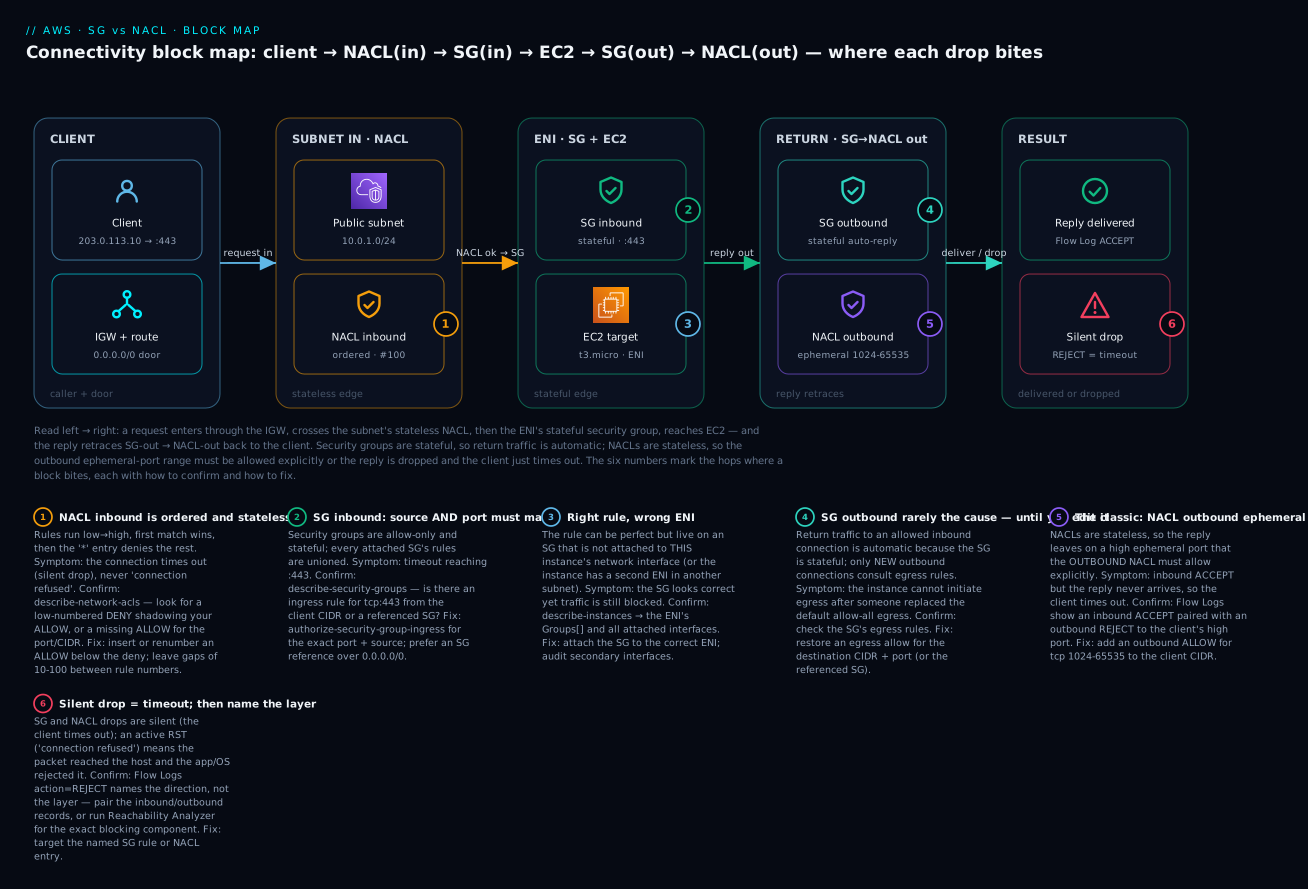
The diagram traces a single HTTPS request and its reply through both firewalls, left to right. A request enters through the internet gateway into the public subnet, crosses the stateless NACL inbound (badge 1), then the stateful SG inbound on the ENI (badge 2), and reaches the EC2 instance (badge 3, the “right rule, wrong ENI” trap). The reply retraces the path — SG outbound is automatic because the SG is stateful (badge 4), but NACL outbound must explicitly allow the client’s ephemeral port or the reply is dropped (badge 5, the classic bug). The result is either a delivered reply logged as ACCEPT or a silent drop logged as REJECT that presents as a client timeout (badge 6). Each badge in the legend narrates the symptom, how to confirm it, and the fix — so the picture doubles as a diagnostic map.
Real-world scenario
Company: Meridian Fintech, a lending platform running a three-tier app in ap-south-1 (Mumbai). Workload: an ALB in two public subnets, an app tier in two private subnets, and Amazon RDS PostgreSQL in two isolated DB subnets. Trigger: the security team mandated custom NACLs on every subnet to replace the allow-all default, as part of a PCI-DSS segmentation control.
The rollout went subnet by subnet. Public and app subnets were fine — the platform team had templated symmetric inbound/outbound ephemeral rules. The DB subnet is where it broke. The engineer wrote a tight, sensible-looking NACL: inbound ALLOW tcp 5432 from 10.0.0.0/16, outbound ALLOW tcp 5432 to 10.0.0.0/16, everything else denied. Within a minute, the app tier’s connection pool started throwing connection timed out and the health checks flapped. The instinct was to blame RDS or the security groups; both were unchanged and correct.
The clue was in the asymmetry between the inbound and outbound behavior. Postgres clients connect to 5432, but the database’s replies leave from 5432 back to the app’s ephemeral port (e.g., 10.0.12.44:41022). The outbound NACL only allowed destination port 5432, so every reply — addressed to 41022 — hit the * deny and was dropped at the DB subnet edge. The app’s SYN reached Postgres, Postgres sent SYN/ACK, and that SYN/ACK died on the way out. From the app’s side: a pure timeout, no error, no log on the database.
They confirmed it in four minutes with Flow Logs: the DB ENI showed a steady stream of inbound ACCEPT on 5432 immediately followed by outbound REJECT to 10.0.12.x:4xxxx — the exact fingerprint. Reachability Analyzer from the app ENI to the DB ENI returned NetworkPathFound: false with an explanation naming the DB subnet’s NACL and the missing outbound entry. The fix was one rule: outbound ALLOW tcp 1024-65535 to 10.0.0.0/16. Health checks went green immediately.
The postmortem produced two durable changes. First, a Terraform module for “hardened subnet NACL” that always emits the symmetric ephemeral rules, so no one hand-writes a one-directional NACL again. Second, a Reachability Analyzer check wired into the deployment pipeline: after any NACL/SG change, it validates the app→DB path and fails the deploy if NetworkPathFound is false. Cost of the incident: 45 minutes of degraded service and one very educational afternoon. Cost of the fix: one rule and a lesson the whole team now recites — NACLs are stateless; always allow the ephemeral range for replies.
Advantages and disadvantages
Security groups:
| Advantages | Disadvantages |
|---|---|
| Stateful — no return rules to reason about | Allow-only — cannot block a single bad IP |
| SG-referencing scales through IP churn | Unordered — no explicit priority for reviewers |
| Per-ENI granularity (true microsegmentation) | Per-ENI only — no subnet-wide guardrail |
| Fewer rules (one direction, mostly inbound) | Conntrack capacity is finite under extreme load |
| The default, primary control AWS steers you to | Can’t express “deny everything except X” cleanly |
Network ACLs:
| Advantages | Disadvantages |
|---|---|
| Can explicitly DENY (block a bad CIDR fast) | Stateless — you must allow the ephemeral return range |
| Subnet-wide — one place to enforce a coarse rule | CIDR-only — no SG references, no identity |
| Ordered — clear first-match precedence | Ordering mistakes silently shadow rules |
| Independent of instance/SG config (belt + braces) | Low rule quota (20/direction default) |
| A useful blast-radius guardrail for a whole tier | Every rule must be written twice (both directions) |
In practice: make the security group your primary control and reach for a NACL when you need something an SG cannot do — an explicit deny (block a scanning CIDR), or a subnet-wide guardrail that holds regardless of how instances configure their SGs (a PCI-style “this DB subnet never talks to the internet” rule). Do not try to replace SGs with NACLs; you will drown in ephemeral-port rules and lose identity-based referencing.
Hands-on lab
We will reproduce the ephemeral-port block deliberately, confirm it with Flow Logs and Reachability Analyzer, then fix it. Free-tier-friendly: one t2.micro/t3.micro, one NAT-free public subnet. ⚠️ Flow Logs to CloudWatch Logs and Reachability Analyzer analyses incur small charges — the teardown removes them.
Step 1 — Set variables and find your VPC/subnet
export AWS_DEFAULT_REGION=ap-south-1
VPC=$(aws ec2 describe-vpcs --filters Name=isDefault,Values=true --query 'Vpcs[0].VpcId' --output text)
SUBNET=$(aws ec2 describe-subnets --filters Name=vpc-id,Values=$VPC --query 'Subnets[0].SubnetId' --output text)
MYIP=$(curl -s https://checkip.amazonaws.com)/32
echo "VPC=$VPC SUBNET=$SUBNET MYIP=$MYIP"
Step 2 — Launch an instance with a web server and an SG that allows HTTP
SG=$(aws ec2 create-security-group --group-name lab-sg --description "SG-NACL lab" --vpc-id $VPC --query GroupId --output text)
aws ec2 authorize-security-group-ingress --group-id $SG \
  --ip-permissions IpProtocol=tcp,FromPort=80,ToPort=80,IpRanges="[{CidrIp=$MYIP}]"

AMI=$(aws ssm get-parameter --name /aws/service/ami-amazon-linux-latest/al2023-ami-kernel-default-x86_64 --query Parameter.Value --output text)
IID=$(aws ec2 run-instances --image-id $AMI --instance-type t3.micro --subnet-id $SUBNET \
  --security-group-ids $SG --associate-public-ip-address \
  --user-data '#!/bin/bash
dnf -y install httpd; systemctl enable --now httpd; echo ok > /var/www/html/index.html' \
  --query 'Instances[0].InstanceId' --output text)
aws ec2 wait instance-running --instance-ids $IID
PUBIP=$(aws ec2 describe-instances --instance-ids $IID --query 'Reservations[0].Instances[0].PublicIpAddress' --output text)
Expected: after ~60s, curl http://$PUBIP returns ok. The SG allows 80 from your IP; the default NACL allows all, so replies flow.
Step 3 — Enable VPC Flow Logs on the subnet
aws logs create-log-group --log-group-name /vpc/lab-flowlogs 2>/dev/null || true
ROLE_ARN=$(aws iam get-role --role-name flowlogsRole --query Role.Arn --output text 2>/dev/null)
# (Create flowlogsRole with vpc-flow-logs trust + logs:PutLogEvents if it doesn't exist.)
aws ec2 create-flow-logs --resource-type Subnet --resource-ids $SUBNET \
  --traffic-type ALL --log-group-name /vpc/lab-flowlogs --deliver-logs-permission-arn $ROLE_ARN
Step 4 — Break it: attach a custom NACL that omits the outbound ephemeral range
NACL=$(aws ec2 create-network-acl --vpc-id $VPC --query NetworkAcl.NetworkAclId --output text)
# Inbound: allow HTTP from your IP
aws ec2 create-network-acl-entry --network-acl-id $NACL --rule-number 100 \
  --protocol 6 --port-range From=80,To=80 --cidr-block $MYIP --rule-action allow --ingress
# Outbound: ONLY allow port 80 back (the bug — replies go to your EPHEMERAL port, not 80)
aws ec2 create-network-acl-entry --network-acl-id $NACL --rule-number 100 \
  --protocol 6 --port-range From=80,To=80 --cidr-block $MYIP --rule-action allow --egress

# Associate the custom NACL with the subnet (replaces the permissive default association)
ASSOC=$(aws ec2 describe-network-acls --filters Name=association.subnet-id,Values=$SUBNET \
  --query 'NetworkAcls[0].Associations[?SubnetId==`'$SUBNET'`].NetworkAclAssociationId' --output text)
aws ec2 replace-network-acl-association --association-id $ASSOC --network-acl-id $NACL
Expected now: curl http://$PUBIP hangs and times out. The request reaches the instance (inbound 80 allowed both layers), Apache replies from :80 to your-ip:<ephemeral>, and the NACL outbound — which only allows destination 80 — drops the reply. The instance’s Apache access log even shows the request arriving; the client sees nothing.
Step 5 — Confirm the layer with Flow Logs
ENI=$(aws ec2 describe-instances --instance-ids $IID \
  --query 'Reservations[0].Instances[0].NetworkInterfaces[0].NetworkInterfaceId' --output text)
sleep 90   # flow logs aggregate on ~1-min windows
aws logs filter-log-events --log-group-name /vpc/lab-flowlogs \
  --filter-pattern "$ENI" --query 'events[*].message' --output text | tail -20
Expected: you see an inbound ACCEPT to :80 immediately followed by an outbound REJECT whose destination is your IP on a high port (e.g., ...:54120 6 ... REJECT ...). That inbound-ACCEPT-plus-outbound-REJECT pair is the ephemeral-port fingerprint.
Step 6 — Confirm deterministically with Reachability Analyzer
PATH_ID=$(aws ec2 create-network-insights-path --source $ENI --destination-port 80 \
  --protocol tcp --destination $ENI --query NetworkInsightsPath.NetworkInsightsPathId --output text)
AN=$(aws ec2 start-network-insights-analysis --network-insights-path-id $PATH_ID \
  --query NetworkInsightsAnalysis.NetworkInsightsAnalysisId --output text)
aws ec2 wait network-insights-analysis-available --network-insights-analysis-ids $AN 2>/dev/null || sleep 20
aws ec2 describe-network-insights-analyses --network-insights-analysis-ids $AN \
  --query 'NetworkInsightsAnalyses[0].{Found:NetworkPathFound,Why:Explanations[0].ExplanationCode}'
Expected: NetworkPathFound: false with an explanation code pointing at the network ACL entry — Reachability Analyzer names the exact blocking component, no guessing.
Step 7 — Fix it: allow the ephemeral range outbound
aws ec2 create-network-acl-entry --network-acl-id $NACL --rule-number 110 \
  --protocol 6 --port-range From=1024,To=65535 --cidr-block $MYIP --rule-action allow --egress
Expected: curl http://$PUBIP returns ok again. One outbound rule for 1024-65535 restored the reply path.
# Terraform equivalent of the CORRECT (symmetric) NACL — the module Meridian standardized on
resource "aws_network_acl" "hardened" {
  vpc_id     = var.vpc_id
  subnet_ids = [var.subnet_id]
  ingress { rule_no = 100; protocol = "tcp"; action = "allow"; cidr_block = var.client_cidr; from_port = 80; to_port = 80 }
  ingress { rule_no = 110; protocol = "tcp"; action = "allow"; cidr_block = var.client_cidr; from_port = 1024; to_port = 65535 } # replies IN
  egress  { rule_no = 100; protocol = "tcp"; action = "allow"; cidr_block = var.client_cidr; from_port = 80; to_port = 80 }
  egress  { rule_no = 110; protocol = "tcp"; action = "allow"; cidr_block = var.client_cidr; from_port = 1024; to_port = 65535 } # replies OUT
}
Step 8 — Teardown (⚠️ stops charges)
aws ec2 terminate-instances --instance-ids $IID; aws ec2 wait instance-terminated --instance-ids $IID
aws ec2 replace-network-acl-association --association-id $ASSOC \
  --network-acl-id $(aws ec2 describe-network-acls --filters Name=vpc-id,Values=$VPC Name=default,Values=true --query 'NetworkAcls[0].NetworkAclId' --output text)
aws ec2 delete-network-acl --network-acl-id $NACL
aws ec2 delete-security-group --group-id $SG
FL=$(aws ec2 describe-flow-logs --filter Name=resource-id,Values=$SUBNET --query 'FlowLogs[0].FlowLogId' --output text)
aws ec2 delete-flow-logs --flow-log-ids $FL
aws logs delete-log-group --log-group-name /vpc/lab-flowlogs
Common mistakes & troubleshooting
This is the core of the article. Work a blocked connection top to bottom: first decide timeout vs refused (that alone eliminates half the tree), then walk the packet path with the playbook, then confirm the exact layer with Flow Logs or Reachability Analyzer.
The master playbook (symptom → layer → confirm → fix)
| # | Symptom | Layer that dropped it | Root cause | Confirm (exact command) | Fix |
|---|---|---|---|---|---|
| 1 | Client hangs then times out reaching a service | SG inbound | No ingress rule for the port/source | aws ec2 describe-security-groups --group-ids $SG --query 'SecurityGroups[0].IpPermissions' |
authorize-security-group-ingress for the exact port + source |
| 2 | Times out; SG looks correct | Wrong SG / wrong ENI | Rule lives on an SG not attached to this ENI | aws ec2 describe-instances --instance-ids $IID --query '...NetworkInterfaces[].Groups' |
Attach the correct SG to the correct ENI |
| 3 | Times out; SG correct, still blocked | NACL inbound | Missing allow, or a lower-numbered DENY shadows it | aws ec2 describe-network-acls --filters Name=association.subnet-id,Values=$SUBNET |
Add/renumber an inbound ALLOW below the deny |
| 4 | Request arrives, reply never does | NACL outbound | Ephemeral range not allowed outbound | Flow Logs: inbound ACCEPT + outbound REJECT to a high port |
Outbound ALLOW tcp 1024-65535 to the client CIDR |
| 5 | Subnet can’t receive replies to its outbound calls | NACL inbound | Ephemeral range not allowed inbound | Flow Logs: outbound ACCEPT + inbound REJECT from a high port |
Inbound ALLOW tcp 1024-65535 from the destination CIDR |
| 6 | “Connection refused” immediately (RST) | Host / app | App not listening or OS firewall RST — not an AWS firewall | ss -tlnp on the box; check firewalld/iptables |
Start the service / open the OS firewall port |
| 7 | Works from same subnet, times out cross-subnet | NACL (either subnet) | A subnet edge in the path denies the flow/reply | Enable Flow Logs on both subnets; compare | Add the missing allow on the offending subnet’s NACL |
| 8 | Egress suddenly blocked after an SG edit | SG outbound | Someone replaced the default allow-all egress | describe-security-groups ... IpPermissionsEgress |
Restore an egress allow (or the referenced SG) |
| 9 | Ping fails but TCP works | SG/NACL ICMP | ICMP (echo) not allowed; NACL needs both directions | Check for ICMP rules on SG and NACL | Allow ICMP type 8 in / type 0 out (NACL both ways) |
| 10 | v6 clients fail, v4 clients fine | SG/NACL IPv6 | Only 0.0.0.0/0 rules exist, no ::/0 |
describe-security-groups → look for Ipv6Ranges |
Add the ::/0 twin rule (and ICMPv6/protocol 58) |
| 11 | RDS/ElastiCache times out from app | SG referencing / NACL | DB SG doesn’t reference the app SG, or NACL blocks return | describe-security-groups on the DB SG |
DB SG ingress: allow port from sg-app; fix NACL ephemeral |
| 12 | New connections fail only under high load | SG conntrack | Per-ENI tracked-connection limit hit | CloudWatch/ENA conntrack_allowance_exceeded > 0 |
Spread load across ENIs/instances; reduce long-lived idle flows |
| 13 | Removed an SG rule but the session persists | SG state | Established flow is tracked; edit doesn’t drop it | ss -tn shows the flow still ESTABLISHED |
Expected — reset the connection or wait for idle timeout |
| 14 | Reply comes from an unexpected port and is dropped | NACL outbound | Server replies from service port to client ephemeral; NACL too tight | Flow Logs: outbound REJECT dst = high port |
Widen outbound to 1024-65535 (the ephemeral range) |
| 15 | Intermittent drops through a NAT gateway | NACL ephemeral (NAT) | NAT GW uses 1024-65535; NACL narrower than that |
Flow Logs on the NAT subnet show REJECT on high ports |
Allow 1024-65535 both directions on the NAT subnet NACL |
| 16 | Load balancer health checks flap | SG/NACL | LB SG can’t reach targets, or NACL drops the health-check reply | Target group health = unhealthy; Flow Logs on targets | Target SG ingress from the LB’s SG; NACL ephemeral out |
First split: timeout vs “connection refused”
The fastest triage you can do. Security groups and NACLs drop packets silently — they never send a rejection — so a firewall block always presents as a timeout. An active RST (“connection refused”) means the packet reached the host and something at the host actively rejected it. This one distinction routes you to the right half of the tree instantly:
| Client symptom | What it means | Where to look | Where NOT to look |
|---|---|---|---|
| Hangs, then timeout | Packet dropped by SG or NACL (or no route) | SG rules, NACL rules, route table, ephemeral range | The app (it never saw the packet) |
| Immediate connection refused (RST) | Reached the host; nothing listening / OS firewall RST | ss -tlnp, service status, OS firewall |
SG/NACL (they don’t send RST) |
| Connection reset mid-stream | Idle timeout, MTU/MSS, or app crash | Conntrack idle timeout, MTU, app logs | Inbound rules (connection already worked) |
No route to host |
Routing, not a firewall | Route table, IGW/NAT presence | SG/NACL |
Reading a Flow Logs record
A default v2 Flow Log line is space-separated fields. The ones that matter for this:
| Field | Position (default v2) | What to read it for |
|---|---|---|
srcaddr / dstaddr |
4 / 5 | Who is talking to whom |
srcport / dstport |
6 / 7 | A high dstport on an outbound record = a reply to a client ephemeral port |
protocol |
8 | 6 = TCP, 17 = UDP, 1 = ICMP |
action |
13 | ACCEPT or REJECT (does not name SG vs NACL) |
log-status |
14 | OK, NODATA, or SKIPDATA (capture health) |
Disambiguation logic, since action alone won’t name the layer:
| Pattern you see | Almost certainly | Because |
|---|---|---|
Inbound REJECT, no outbound record |
Inbound block (SG or NACL) | The reply was never generated — request was dropped |
Inbound ACCEPT, outbound REJECT to high port |
NACL outbound ephemeral missing | SG is stateful, so this REJECT can only be the NACL |
Outbound ACCEPT, inbound REJECT from high port |
NACL inbound ephemeral missing | The reply to your outbound call is being dropped inbound |
Inbound ACCEPT, no reply, but no REJECT either |
App not listening / host firewall | Nothing left the ENI to be logged |
| Nothing at all for the flow | No route, or wrong ENI/subnet | Traffic never reached this interface |
Key inference: because the security group is stateful, it will never be the thing that rejects the return traffic of an allowed inbound connection. Therefore any REJECT on the return path is a NACL (or the host). That single deduction collapses most “which layer?” questions.
Reachability Analyzer explanation codes
When you want certainty instead of inference, Reachability Analyzer walks the actual path and names the blocking component. Common explanation codes:
| Explanation code | Meaning | Fix direction |
|---|---|---|
ACL_RULE / no matching NACL allow |
A network ACL entry blocks (or no allow matches) | Add/reorder the NACL entry (check the ephemeral range) |
SECURITY_GROUP_RULE mismatch |
No SG rule permits the flow | Add the SG ingress/egress rule |
NO_ROUTE_TO_DESTINATION |
Route table has no path | Add the route / gateway |
MISSING_INTERNET_GATEWAY |
Public path lacks an IGW | Attach/route an IGW |
MISSING_NAT_GATEWAY |
Private egress lacks NAT | Add a NAT gateway / route |
ELB_LISTENER_... |
Load balancer listener/target issue | Fix listener or target group |
NetworkPathFound: true |
Path is open at the network layer | Look higher up (app, OS firewall, DNS) |
# Deterministic app-ENI → db-ENI check on port 5432 (wire this into your deploy pipeline)
PID=$(aws ec2 create-network-insights-path --source $APP_ENI --destination $DB_ENI \
  --destination-port 5432 --protocol tcp --query NetworkInsightsPath.NetworkInsightsPathId --output text)
AID=$(aws ec2 start-network-insights-analysis --network-insights-path-id $PID \
  --query NetworkInsightsAnalysis.NetworkInsightsAnalysisId --output text)
aws ec2 describe-network-insights-analyses --network-insights-analysis-ids $AID \
  --query 'NetworkInsightsAnalyses[0].{Found:NetworkPathFound,Explanations:Explanations[].ExplanationCode}'
The three nastiest failures, in prose
1. The ephemeral-port NACL omission (playbook #4). The one this whole article orbits. You harden a subnet with a custom NACL, allow the service port both directions, and every reply dies because replies leave on the client’s ephemeral port, not the service port. The tell is unmistakable once you know it: the server-side app log shows the request arriving and being served, yet the client only ever times out. Flow Logs show inbound ACCEPT + outbound REJECT to a high port. Fix: outbound ALLOW tcp 1024-65535 to the client CIDR. Prevent it forever by templating symmetric NACLs in Terraform — never hand-write one direction.
2. Right rule, wrong ENI (playbook #2). You confirm the security group has exactly the ingress rule you need, and traffic is still blocked, because that SG is attached to a different interface — a second ENI, another instance, or the SG you edited isn’t the one on this instance. Multi-homed instances (a second ENI in a management subnet) make this worse: the packet arrives on ENI-0 but your rule is on the SG for ENI-1. Always confirm the mapping with describe-instances and read the Groups under each NetworkInterfaces entry, not the SG in isolation. Reachability Analyzer, which reasons about the actual ENIs, cuts through this in seconds.
3. Conntrack exhaustion under load (playbook #12). Everything works in testing and fails at peak. The SG’s per-ENI connection-tracking table has a ceiling; a workload that opens huge numbers of concurrent or rapidly-churning connections (a chatty proxy, a load test, a SYN flood) exhausts it, and new connections are dropped while existing ones are fine — an intermittent, load-correlated timeout that looks nothing like a rule problem. Confirm with the ENA metric conntrack_allowance_exceeded (nonzero = you’re hitting it). Mitigate by spreading connections across more ENIs/instances, shortening idle keep-alives, and, where appropriate, using fully-open rule pairs that let flows go untracked. It is the one SG failure that has nothing to do with your rules.
Best practices
- Make the security group your primary control; use NACLs only for an explicit deny or a subnet-wide guardrail. Do not duplicate SG logic in NACLs.
- Reference security groups, never inter-tier CIDRs.
allow 5432 from sg-appbeatsallow 5432 from 10.0.12.0/24every time — it survives IP churn and autoscaling. - Never open
0.0.0.0/0:0-65535to “make it work.” That is not a fix; it is the breach. Open the exact port from the exact source. - Always write NACLs symmetrically — for every inbound service-port allow, add the outbound ephemeral allow, and vice-versa. Template it in IaC.
- Prefer keeping the default (allow-all) NACL and doing your filtering in security groups, unless a compliance control specifically requires a subnet-level deny.
- Declare SG egress explicitly in Terraform — the
aws_security_groupdefault is no egress, which silently blocks all outbound. - Add the IPv6 twin for every IPv4 rule on dual-stack subnets, including ICMPv6 (protocol 58).
- Turn on VPC Flow Logs (subnet or VPC level) before you need them; you cannot debug a past drop that wasn’t logged.
- Wire Reachability Analyzer into deploys for critical paths (app→DB, LB→target) so a bad SG/NACL change fails the pipeline, not production.
- Tag and describe every rule. A rule with no description is a rule no one dares delete; audits stall on them.
- Leave gaps in NACL rule numbers (10, 100, 110…) so you can insert a Deny above an Allow later without renumbering.
- Review with an SG/NACL analyzer (AWS Config rules, Network Access Analyzer) to catch wide-open rules and unintended paths continuously.
Security notes
| Control | Least-privilege practice | Why it matters |
|---|---|---|
| SG ingress source | Reference an SG or a /32, never 0.0.0.0/0 on non-public ports |
The wide-open SG is the top AWS misconfiguration in breach reports |
| Management ports (22/3389) | Never from 0.0.0.0/0; use SSM Session Manager or a bastion SG |
Exposed SSH/RDP are scanned within minutes of opening |
| NACL as a hard guardrail | Add an explicit DENY for the internet on isolated DB subnets | Belt-and-braces: holds even if an SG is misconfigured |
| Egress control | Restrict outbound to known destinations (or a NAT + egress filter) | Limits data exfiltration and C2 callbacks from a compromised host |
| IPv6 | Apply the same tight rules to ::/0 as to 0.0.0.0/0 |
A forgotten open v6 rule is an invisible hole |
| Change safety | Guard SG/NACL changes with IAM + review; alert on 0.0.0.0/0 rule additions |
Most exposure comes from a “temporary” rule that stayed |
| Detection | GuardDuty + Flow Logs on all subnets | REJECT spikes and odd egress are early breach signals |
| Prefix lists | Use AWS-managed prefix lists for service ranges instead of hand-maintained CIDRs | Fewer stale, over-broad rules |
Cost & sizing
Security groups and NACLs themselves are free — you pay nothing for rules, and there is no data-processing charge for either firewall. What costs money is the observability you use to debug them and the surrounding infrastructure.
| Item | Cost driver | Rough figure | Free-tier / notes |
|---|---|---|---|
| Security groups / NACLs | — | Free | No charge for rules or evaluation |
| VPC Flow Logs → CloudWatch Logs | Ingest + storage | ~$0.50/GB ingest + storage (₹40–45/GB) | Send to S3 for cheaper long-term retention |
| VPC Flow Logs → S3 | Storage + requests | ~$0.023/GB-month (₹2/GB) | Much cheaper for archival/Athena queries |
| Reachability Analyzer | Per analysis | ~$0.10 per analysis run | Trivial; run freely in pipelines |
| Network Access Analyzer | Per ENI analyzed | Usage-based | For continuous exposure auditing |
| NAT gateway (in the path) | Hourly + per-GB | ~$0.045/hr + $0.045/GB (₹3.7/hr) | The real networking cost — not the firewalls |
Sizing guidance: you rarely hit SG/NACL limits, but keep the numbers in mind — 60 rules per SG direction, 5 SGs per ENI, 20 NACL rules per direction. If you approach them, it usually signals a design that should use SG referencing or prefix lists instead of long CIDR lists. Flow Logs cost scales with traffic volume; for a busy VPC, ship to S3 + Athena rather than CloudWatch Logs to keep the bill flat, and sample or scope to specific subnets if volume is high.
Interview & exam questions
Q1. Why does a security group not need an outbound rule for return traffic, but a NACL does? A security group is stateful — it tracks the connection’s 5-tuple, so the reply matches the tracked flow and is allowed automatically. A NACL is stateless — it evaluates each packet independently, so the reply (addressed to the client’s ephemeral port) must be permitted by an explicit outbound rule. (SAA-C03, SOA-C02)
Q2. A connection reaches an instance but the client always times out; the server log shows the request arriving. What’s the likely cause?
The reply is being dropped on the way out — almost certainly a NACL whose outbound rules don’t allow the client’s ephemeral port range (1024-65535). Confirm with Flow Logs (inbound ACCEPT + outbound REJECT to a high port) and fix the outbound NACL. (ANS-C01)
Q3. Can a security group block a specific malicious IP address? No — security groups are allow-only. To block a single IP or CIDR you need a NACL with an explicit DENY rule, numbered lower than any allow that would otherwise match it. (SAA-C03)
Q4. In what order are the two firewalls evaluated for an inbound packet, and for the reply? Inbound: NACL inbound → security group inbound → instance. Reply: security group outbound → NACL outbound. The SG-out step is automatic due to statefulness; the NACL-out step is where the ephemeral-port rule matters. (ANS-C01)
Q5. What’s the difference between “connection timed out” and “connection refused” when debugging AWS connectivity? Timed out = the packet was silently dropped by a security group, NACL, or missing route (firewalls never send a rejection). Refused = the packet reached the host and something (no listener, or the OS firewall) actively sent an RST. The first points at AWS network controls; the second at the instance. (SOA-C02)
Q6. How do security-group references improve a tiered architecture?
An ingress rule sourced from another SG (e.g., DB allows 5432 from sg-app) follows the workload, not IP addresses. New nodes work with zero rule changes, and the database is reachable only by instances carrying sg-app — identity-based segmentation that survives autoscaling and IP churn. (SAA-C03)
Q7. Which ephemeral port range should a NACL allow, and why does it depend on the client?
Allow 1024-65535 as a safe superset. The exact range is the client’s OS choice — Linux uses 32768-60999, Windows Server 2008+ uses 49152-65535, and NAT gateways/ELB/Lambda use 1024-65535. Since you often can’t predict the client, the superset is safest. (ANS-C01)
Q8. Why did editing a security group not drop an existing SSH session? Because the SG is stateful and the session is a tracked connection; rule edits don’t tear down established flows — they persist until the connection is reset or idles out. New connections, however, immediately obey the new rules. (SOA-C02)
Q9. What’s the default behavior of a newly created custom NACL versus the default NACL?
A custom NACL denies all inbound and outbound (only the * deny) until you add rules. The default NACL allows all inbound and outbound. Replacing the default with a custom one means you now own both directions — including the ephemeral return rules. (SAA-C03)
Q10. IPv4 clients work but IPv6 clients fail on a dual-stack subnet. Why?
IPv4 and IPv6 are separate rules in both SGs and NACLs. A rule for 0.0.0.0/0 does not cover ::/0; you need the IPv6 twin (and ICMPv6/protocol 58 for path MTU). (ANS-C01)
Q11. How do you get a deterministic answer to “which component is blocking this path”?
Run VPC Reachability Analyzer between the source and destination ENIs; it returns NetworkPathFound and, when false, an explanation naming the exact SG rule, NACL entry, or route that blocks it — no inference from logs required. (ANS-C01)
Q12. When would you deliberately use a NACL over a security group? For something SGs cannot do: an explicit deny (block a scanning CIDR fast) or a subnet-wide guardrail that holds regardless of per-instance SG configuration (e.g., “this DB subnet never reaches the internet” for compliance). (SCS-C02, SAA-C03)
Quick check
- True or false: a security group can contain a Deny rule.
- A request reaches your instance (server log confirms) but the client times out. Which layer and direction do you suspect first?
- What port range must a NACL allow outbound so that replies reach Linux clients, and why
1024-65535as a default? - In what order are NACL rules evaluated, and what happens on the first match?
- Your Terraform
aws_security_grouphas noegressblock. What can the instance send outbound?
Answers
- False. Security groups are allow-only. Explicit denies live only in NACLs.
- The NACL, outbound — the reply is being dropped because the outbound NACL doesn’t allow the client’s ephemeral port. Confirm with Flow Logs (inbound
ACCEPT+ outboundREJECTto a high port). 1024-65535. Replies go to the client’s ephemeral source port;1024-65535is the safe superset covering Linux (32768-60999), Windows (49152-65535), NAT/ELB/Lambda (1024-65535).- Ascending rule-number order, lowest first; first match wins (allow or deny), then the
*rule denies anything unmatched. - Nothing — Terraform’s default is no egress rule, which denies all outbound. You must declare an
egressblock explicitly (the console, by contrast, adds allow-all egress for you).
Glossary
| Term | Definition |
|---|---|
| Security group (SG) | Stateful, allow-only firewall attached to an ENI; the primary AWS network control |
| Network ACL (NACL) | Stateless, ordered allow-and-deny firewall attached to a subnet |
| Stateful | Tracks connections so return traffic is auto-allowed (SG behavior) |
| Stateless | No connection memory; each packet judged alone, so return traffic needs its own rule (NACL behavior) |
| Ephemeral port | The high, client-chosen source port a reply is addressed to (e.g., 1024-65535) |
| Connection tracking (conntrack) | The SG’s per-ENI table of active flows keyed on the 5-tuple |
| ENI | Elastic network interface — where a security group attaches |
| SG referencing | Sourcing an SG rule from another SG’s ID instead of a CIDR |
| Rule number | The order key on a NACL entry; lowest evaluated first, first match wins |
* rule |
The mandatory, non-removable catch-all Deny at the end of every NACL direction |
| Default NACL | The permissive NACL (allows all) attached to subnets you don’t explicitly associate |
| Custom NACL | A NACL you create; denies everything until you add rules |
| VPC Flow Logs | Per-ENI/subnet/VPC records of accepted and rejected flows, used to confirm drops |
| Reachability Analyzer | A tool that walks a path and names the exact component blocking it |
| Silent drop | A firewall discarding a packet with no rejection, seen by the client as a timeout |
| 5-tuple | Protocol, source IP, source port, destination IP, destination port — the flow’s identity |
Next steps
- Ground the fundamentals — AWS VPC, Subnets and Security Groups Explained for CIDRs, route tables and gateways underneath these two firewalls.
- Practice the same symptom→confirm→fix discipline on the identity side — AWS IAM Policy Evaluation and Access-Denied Troubleshooting.
- Build muscle memory: reproduce the ephemeral-port block in your own account, then re-run Reachability Analyzer after each fix to see the explanation change.
- Add continuous detection: enable Flow Logs to S3 with an Athena table, and schedule a Reachability Analyzer check on your critical app→DB path in CI.
- Extend to multi-VPC: apply SG referencing across a peering connection, and learn where NACLs sit relative to Transit Gateway and PrivateLink paths.