Quick take: AWS Systems Manager (SSM) turns “SSH into a box and run a command” into “grant an IAM permission and target a tag.” An instance becomes a managed node when the SSM agent is running and an instance profile carries
AmazonSSMManagedInstanceCore. Once it is, you get an audited shell with no port 22, no bastion, and no public IP (Session Manager), you run scripts across a tag-selected fleet with rate control (Run Command), and you scan and install OS patches against a baseline on a schedule (Patch Manager) — all logged, all IAM-gated, and all workable on a fully-private fleet through three interface endpoints.
For twenty years the unit of server operations was the SSH session: a key pair, an open port 22, a bastion host in a public subnet, and a human typing into a terminal with no record of what they did. That model is a security liability (every open port and every long-lived key is attack surface), an audit nightmare (who ran what, when, on which host?), and it does not scale (you cannot SSH into 400 instances to apply one patch). AWS Systems Manager replaces all of it with an agent-plus-IAM model where the machine reaches out to the SSM control plane and you operate it through APIs that are logged in CloudTrail, scoped by IAM, and indifferent to whether the instance has a public IP at all.
This is the practitioner’s tour of the three capabilities that do the day-to-day work — Session Manager for interactive access, Run Command for fleet-wide execution, and Patch Manager for OS patching — plus the plumbing that makes them possible: the SSM agent, the instance profile, how an EC2 (or on-prem) machine becomes a managed node, and the three interface VPC endpoints (ssm, ssmmessages, ec2messages) that let a fleet with no NAT and no Internet Gateway still be managed. You will also meet the supporting cast — State Manager, Automation, Parameter Store, Fleet Manager, Inventory, and Compliance — because on a real team you use them together.
By the end you will have attached the instance profile, opened a shell with no key, turned on session logging to S3 and CloudWatch, run a command across a tag-targeted fleet, built a patch baseline and a maintenance window and scanned for compliance — with aws CLI and Terraform — and you will have a troubleshooting playbook for every failure these tools throw. This is the material behind the SSM questions on SOA-C02 (SysOps), SAA-C03 (Architect), and SCS-C02 (Security), and it is the single highest-leverage skill for anyone who operates EC2 at scale.
What problem this solves
Think about what “manage a server” actually requires without SSM. You need a way in (SSH, so a key pair and an inbound rule on port 22), a path to that entrance (a public IP or a bastion host in a public subnet, plus a route), an identity system (who holds the key), an audit trail (which you improvise with shell history), and a way to fan out the same action to many hosts (which you improvise with a for-loop over IPs and hope none is down). Every one of those is a place where security, compliance, and scale break.
| The old way (SSH/bastion) | What breaks | The SSM way |
|---|---|---|
| Inbound port 22 open on the instance/SG | Attack surface; scanned and brute-forced constantly | No inbound ports — the agent connects outbound |
| Bastion host in a public subnet | A box to patch, harden, and pay for; a lateral-movement pivot | No bastion — Session Manager tunnels through SSM |
| Public IP or complex routing to reach the host | Private subnets become “unreachable” for ops | No public IP needed — works fully-private via endpoints |
| SSH key pairs distributed to humans | Key sprawl, offboarding gaps, shared keys | IAM identity — ssm:StartSession, revoked centrally |
| Shell history as the “audit log” | No tamper-proof record of who ran what | CloudTrail API events + session logs to S3/CloudWatch |
| A for-loop over IPs to run one command on N hosts | Skips offline hosts; no rate control; no compliance | Run Command by tag with MaxConcurrency/MaxErrors |
Manual yum update per host; patch drift |
No baseline, no compliance report, no schedule | Patch Manager baseline + maintenance window + compliance |
What breaks without SSM is concrete. A regulated shop cannot pass an audit that asks “prove no one has SSH’d into production and prove every host is patched to baseline” when access is a shared .pem file and patching is a cron job someone wrote in 2019. A platform team cannot apply an urgent CVE fix to 400 instances by hand before the exploit window closes. And a security team watching a bastion in a public subnet knows it is the softest target in the account — the one box every attacker probes first.
Who hits this: every SysOps engineer and platform team running more than a handful of EC2 instances; anyone under PCI/HIPAA/RBI/SOC 2 mandates that forbid open SSH and demand patch-compliance evidence; teams running private fleets (no NAT, no IGW) who still need to operate them; and everyone sitting SOA-C02, SAA-C03, or SCS-C02, where Session Manager, Run Command, and Patch Manager are guaranteed exam territory.
Learning objectives
By the end of this guide you can:
- Explain how the SSM agent and an instance profile (
AmazonSSMManagedInstanceCore) combine to make an EC2 instance a managed node, and register on-prem/hybrid servers with activations. - Open an audited shell with Session Manager — no SSH, no port 22, no bastion, no public IP — and turn on session logging to S3/CloudWatch with KMS encryption.
- Use Session Manager port forwarding and remote port forwarding to reach a private database or web UI through a tunnel, with no open ports.
- Run scripts across a fleet with Run Command — pick a document (
AWS-RunShellScript), target by tag, and control blast radius withMaxConcurrencyandMaxErrors. - Build a patch baseline per OS with auto-approval rules and delays, assign instances via patch groups, run scan vs install, schedule with a maintenance window, and read compliance.
- Wire up the three interface VPC endpoints (
ssm,ssmmessages,ec2messages) so a fully-private fleet is manageable with no NAT. - Use State Manager, Automation, Parameter Store (and when to reach for Secrets Manager instead), Fleet Manager, and Inventory.
- Diagnose every common failure: node “not managed”, Session Manager won’t start, Run Command stuck, patches not applying, private-subnet-no-endpoints, and SecureString KMS denials.
Prerequisites & where this fits
This is an intermediate compute/operations topic. You should be comfortable launching an EC2 instance and reasoning about IAM roles and VPC routing; if any row below is shaky, read the linked foundation first.
| You should know | Why it matters here | Where to get it |
|---|---|---|
| Launching EC2 and connecting to it | SSM is the modern alternative to the SSH path you already know | Launch Your First EC2 Instance and Connect |
| IAM roles, policies, instance profiles | The managed node depends entirely on an instance profile; access is IAM | AWS IAM Hands-On: Users, Groups, Roles & Policies |
| VPC subnets, route tables, security groups | Private fleets, endpoints, and the “no NAT” story live here | AWS VPC, Subnets and Security Groups Explained |
| VPC endpoints (interface vs gateway) | The three SSM endpoints are interface endpoints; patch downloads use the S3 gateway | AWS PrivateLink & VPC Endpoints |
| Private-subnet egress (NAT) | The alternative to endpoints, and what they let you drop | Private-Subnet Internet Egress: NAT Gateway vs NAT Instance |
| CloudTrail for auditing API calls | Every SSM action is a CloudTrail event; this is how you audit access | AWS CloudTrail and Config: Audit and Compliance at Scale |
| AWS CLI v2 + Session Manager plugin | You will run aws ssm start-session locally |
AWS CLI v2 + the session-manager-plugin |
Where this fits: Systems Manager is the operational backbone of a well-run AWS estate. In a landing zone you make the instance profile with AmazonSSMManagedInstanceCore (or Default Host Management Configuration) the default for every instance, disable inbound SSH entirely, run patch compliance org-wide from a delegated account, and keep application config and secrets in Parameter Store. Master SSM and the bastion host — and most of your open ports — simply disappear.
Core concepts
Four ideas carry the topic: SSM is a control plane your machines call outward to; an instance becomes a managed node through the agent + instance profile; the capabilities (Session Manager, Run Command, Patch Manager, and friends) are documents executed against targets; and a fully-private fleet reaches the control plane through three interface endpoints.
The mental model: agent out, not SSH in
The defining inversion of SSM is direction. With SSH, you connect in to the instance, so the instance must expose a port and be routable. With SSM, the SSM agent on the instance connects out to the regional SSM service and holds a long-poll channel open; when you issue a command or start a session, the service pushes it down that existing outbound channel. Nothing ever connects to the instance. That is why there is no inbound port, no bastion, and no need for a public IP.
| Term | What it is | Concrete form |
|---|---|---|
| SSM agent | Software on the node that talks to the SSM service | amazon-ssm-agent (systemd unit / Windows service) |
| Managed node | An instance/server registered with SSM and manageable | i-0abc… (EC2) or mi-0abc… (on-prem) |
| Instance profile | The IAM role the agent uses to authenticate to SSM | Role with AmazonSSMManagedInstanceCore |
| Document (SSM document) | A JSON/YAML definition of actions to run | AWS-RunShellScript, SSM-SessionManagerRunShell |
| Association | A document bound to targets + a schedule (State Manager) | Desired-state binding |
| Maintenance window | A recurring time box in which tasks may run | mw-0abc… |
| Parameter | A stored config value (plain or SecureString) |
/kloudvin/db/password |
| PingStatus | The agent’s connectivity health as SSM sees it | Online / ConnectionLost / Inactive |
| Activation | Credentials to register a non-EC2 (hybrid) server | activation code + id |
The capability map
Systems Manager is an umbrella over a dozen capabilities. This guide focuses on the three operational ones (Session Manager, Run Command, Patch Manager) but you should recognize the whole set — the exam and real designs use them together.
| Capability | What it does | Plane |
|---|---|---|
| Session Manager | Interactive shell / port-forward to a node, no SSH | Access |
| Run Command | Execute a document on many nodes, once, now | Operate |
| Patch Manager | Scan/install OS patches against a baseline | Operate |
| State Manager | Continuously enforce a document as desired state | Operate |
| Automation | Multi-step runbooks (patch AMI, restart, remediate) | Operate |
| Maintenance Windows | Schedule when Run Command/Automation may run | Operate |
| Parameter Store | Hierarchical config + SecureString secrets |
Config |
| Fleet Manager | GUI to browse nodes, files, users, RDP/terminal | Manage |
| Inventory | Collect app/patch/network metadata across the fleet | Manage |
| Compliance | Report patch + association compliance | Manage |
| OpsCenter / Explorer | Aggregate operational items and dashboards | Manage |
The control plane vs the data channel
There are two logical channels between the agent and the service, and they map onto the endpoints you will create. The control channel (ssm) carries registration, command results, inventory, and API calls. The messaging channels (ssmmessages, ec2messages) carry the interactive Session Manager data and command dispatch. Miss the messaging endpoints on a private fleet and the node still “registers” but sessions never start — a classic half-broken state.
| Channel | Endpoint service | Carries |
|---|---|---|
| Control | com.amazonaws.<region>.ssm |
Registration, Run Command results, inventory, most APIs |
| Session data | com.amazonaws.<region>.ssmmessages |
Session Manager interactive traffic (and newer command channel) |
| Agent transport | com.amazonaws.<region>.ec2messages |
Legacy/agent message transport for commands |
The SSM agent and the managed node
Everything starts with a node the service can see. Two things must be true: the agent is installed and running, and the node has credentials with the SSM permissions. On EC2 that second part is an instance profile; on a laptop or an on-prem server it is a hybrid activation.
The SSM agent
The SSM agent is a small daemon that maintains the outbound connection, executes documents, reports status, and gathers inventory. It is preinstalled on most modern AWS AMIs, so on a stock Amazon Linux you usually do nothing.
| AMI / OS | Agent preinstalled? | Notes |
|---|---|---|
| Amazon Linux 2, Amazon Linux 2023 | Yes | Running by default; nothing to install |
| Amazon Linux (legacy) | Yes | Preinstalled |
| Ubuntu 16.04+ (AWS AMIs) | Yes (via snap on many) | snap or .deb depending on release |
| Windows Server 2016/2019/2022 (AWS AMIs) | Yes | Windows service AmazonSSMAgent |
| macOS (AWS AMIs) | Yes | For EC2 Mac instances |
| RHEL / CentOS / SUSE / Debian | Often No | Install the .rpm/.deb yourself |
| Custom / golden AMIs | Depends | Bake it in, or install via user data |
Agent facts worth memorizing:
| Fact | Value / behaviour |
|---|---|
| Service name (Linux) | amazon-ssm-agent (systemd); logs in /var/log/amazon/ssm/ |
| Service name (Windows) | AmazonSSMAgent; logs under %PROGRAMDATA%\Amazon\SSM\Logs |
| Update mechanism | Self-update off by default; use the AWS-UpdateSSMAgent document or State Manager |
| Credentials source (EC2) | IMDS → the instance profile role (needs IMDS reachable) |
| Credentials source (hybrid) | The activation-issued managed-instance credentials |
| Outbound requirement | HTTPS 443 to ssm/ssmmessages/ec2messages (via internet, NAT, or endpoints) |
| Clock requirement | Accurate time — SigV4 signing fails on skew |
You can install or update the agent itself with Run Command once a node is reachable, or in user data at first boot — see EC2 Bootstrapping with User Data & cloud-init.
# Install/refresh the agent on Amazon Linux via Run Command (once the node is managed)
aws ssm send-command \
  --document-name "AWS-UpdateSSMAgent" \
  --targets "Key=tag:App,Values=web" \
  --comment "Bring agents to latest"
The instance profile — the one thing people forget
An EC2 instance authenticates to SSM using the IAM role in its instance profile. The AWS managed policy AmazonSSMManagedInstanceCore grants exactly the permissions the agent needs — no more. Attach it and you are 90% of the way to a managed node.
| Policy | Use it for | Scope |
|---|---|---|
AmazonSSMManagedInstanceCore |
The baseline — every managed node | Minimum SSM/messages/inventory permissions |
CloudWatchAgentServerPolicy |
If the node also ships metrics/logs | Add alongside Core |
AmazonSSMPatchAssociation |
Auto-patch associations | Optional, for patch automation |
AmazonEC2RoleforSSM (deprecated) |
— | Do not use — over-broad, superseded by Core |
AmazonSSMManagedInstanceCore grants (abridged): ssm:UpdateInstanceInformation, ssm:ListAssociations, ssm:ListInstanceAssociations, ssm:DescribeAssociation, ssmmessages:CreateControlChannel, ssmmessages:CreateDataChannel, ssmmessages:OpenControlChannel, ssmmessages:OpenDataChannel, ec2messages:*, plus scoped s3:GetObject for AWS-owned SSM buckets. Notice the ssmmessages:* grants — that is why Session Manager works with just this policy, provided the network path exists.
# Create a role + instance profile and attach the managed policy
aws iam create-role --role-name ssm-node \
  --assume-role-policy-document '{"Version":"2012-10-17","Statement":[{"Effect":"Allow","Principal":{"Service":"ec2.amazonaws.com"},"Action":"sts:AssumeRole"}]}'
aws iam attach-role-policy --role-name ssm-node \
  --policy-arn arn:aws:iam::aws:policy/AmazonSSMManagedInstanceCore
aws iam create-instance-profile --instance-profile-name ssm-node
aws iam add-role-to-instance-profile --instance-profile-name ssm-node --role-name ssm-node
# Attach to a running instance:
aws ec2 associate-iam-instance-profile --instance-id i-0abc123 \
  --iam-instance-profile Name=ssm-node
resource "aws_iam_role" "ssm_node" {
  name = "ssm-node"
  assume_role_policy = jsonencode({
    Version = "2012-10-17"
    Statement = [{
      Effect = "Allow", Action = "sts:AssumeRole"
      Principal = { Service = "ec2.amazonaws.com" }
    }]
  })
}
resource "aws_iam_role_policy_attachment" "ssm_core" {
  role       = aws_iam_role.ssm_node.name
  policy_arn = "arn:aws:iam::aws:policy/AmazonSSMManagedInstanceCore"
}
resource "aws_iam_instance_profile" "ssm_node" {
  name = "ssm-node"
  role = aws_iam_role.ssm_node.name
}
Default Host Management Configuration (the modern shortcut)
Since late 2022 you can skip per-instance profiles entirely with Default Host Management Configuration (DHMC): you enable it once per account/Region, and every instance running a recent agent is managed via an account-level IAM role (AWSSystemsManagerDefaultEC2InstanceManagementRole) resolved through IMDSv2 — no instance profile to attach, and it does not interfere with an instance profile you do attach for app permissions.
| Approach | How the node gets SSM creds | When to use |
|---|---|---|
| Instance profile + Core | Role in the instance profile | Classic; also needed when the node needs other app permissions |
| Default Host Management | Account-level role via IMDSv2 | Fleet-wide default, no per-instance profile wiring |
| Hybrid activation | Activation-issued credentials | On-prem / other-cloud / non-EC2 |
When is a node “managed”? The checklist
An instance is a managed node when all of these are true. Miss any one and it silently never appears in Fleet Manager.
| Requirement | Why | How to confirm |
|---|---|---|
| Agent installed and running | It maintains the outbound channel | systemctl status amazon-ssm-agent |
| Instance profile with SSM perms (or DHMC) | The agent must authenticate | Instance’s IAM role / AmazonSSMManagedInstanceCore |
Network path to ssm/ssmmessages/ec2messages |
Outbound 443 to the control plane | NAT, IGW, or the three interface endpoints |
| IMDS reachable (EC2 creds) | Agent reads creds from metadata | IMDS not disabled; hop limit adequate for containers |
| Accurate clock | SigV4 signing | timedatectl / NTP working |
| Region match | Endpoints/agent point at the node’s Region | Agent config Region == instance Region |
PingStatus is how SSM reports the outcome:
| PingStatus | Meaning | Typical cause when wrong |
|---|---|---|
| Online | Agent is talking to SSM normally | — |
| Connection Lost | Was online, stopped checking in | Network path broke, agent stopped, clock skew |
| Inactive | A hybrid activation expired/deregistered | Re-activate the managed instance |
# The single most useful "is it managed?" command
aws ssm describe-instance-information \
  --query "InstanceInformationList[].[InstanceId,PingStatus,PlatformName,AgentVersion]" \
  --output table
Hybrid & on-prem activations
Systems Manager is not EC2-only. A hybrid activation lets you register on-prem servers, VMs, or other-cloud instances as managed nodes; they get an mi- id and can use Session Manager, Run Command, Patch Manager, and Inventory just like EC2.
| Step | Command / action |
|---|---|
| Create the activation | aws ssm create-activation --iam-role <ssm-service-role> --registration-limit 50 |
| Note the output | An activation code + activation id (treat as secrets) |
| Install agent on-prem | Download and run the installer with --register using code+id |
| Verify | Node appears as mi-… in describe-instance-information |
| Dimension | EC2 managed node | Hybrid managed node |
|---|---|---|
| Id prefix | i-… |
mi-… |
| Credentials | Instance profile / DHMC | Activation code + id |
| Registration limit | n/a | Set on the activation |
| Advanced-instances tier | Not required | Required beyond the free tier / for full features (billed per hour) |
| Expiry | n/a | Activation has an expiry date |
Session Manager: shell access without SSH
Session Manager gives you an interactive shell (or a single command, or a port tunnel) on a managed node without any inbound access. No SSH key, no port 22, no bastion, no public IP. Access is authorized by IAM (ssm:StartSession), the session runs as a system-generated user, and every session can be logged to S3 and CloudWatch and encrypted with KMS. This is the feature that lets you delete your bastion.
Why it is safer than SSH
| Property | SSH | Session Manager |
|---|---|---|
| Inbound port | 22 open on SG | None — outbound agent channel |
| Reachability | Public IP or bastion | Works fully-private via endpoints |
| Identity | SSH key pair | IAM principal (ssm:StartSession) |
| Authorization granularity | All-or-nothing per key | Per-instance via tags + IAM conditions |
| Audit of access | Improvised | CloudTrail StartSession events |
| Audit of keystrokes | None | Session logs to S3/CloudWatch |
| MFA / central revoke | Hard | Native to IAM |
| Credential lifetime | Long-lived key | Short-lived session |
Connect — CLI and Console
# From your laptop (needs the session-manager-plugin installed):
aws ssm start-session --target i-0abc123
# Run a single command non-interactively:
aws ssm start-session --target i-0abc123 \
  --document-name AWS-StartInteractiveCommand \
  --parameters command="sudo tail -n 50 /var/log/messages"
Console path: Systems Manager → Session Manager → Start session → pick the instance → Start. The same works from the EC2 console’s Connect → Session Manager tab. Compare this to the SSH path in Launch Your First EC2 Instance and Connect — same shell, none of the exposure.
Session documents
Session Manager is itself driven by documents. You rarely name them directly except the preferences one, but knowing them explains what you can do.
| Session document | Purpose |
|---|---|
SSM-SessionManagerRunShell |
Preferences (logging, KMS, shell profile, idle timeout) — you edit this one |
AWS-StartInteractiveCommand |
Run a specific interactive command |
AWS-StartPortForwardingSession |
Local port forward to a port on the node |
AWS-StartPortForwardingSessionToRemoteHost |
Remote port forward to a host the node can reach |
AWS-StartSSHSession |
Tunnel SSH/SCP over SSM (ProxyCommand in ~/.ssh/config) |
Session preferences — every setting
The account/Region-wide behaviour lives in the SSM-SessionManagerRunShell document (Console: Session Manager → Preferences).
| Setting | Values | Default | When to change | Gotcha |
|---|---|---|---|---|
| S3 logging | bucket + prefix | off | Compliance/audit of keystrokes | Instance role needs s3:PutObject; bucket may need SSE-KMS grant |
| CloudWatch logging | log group | off | Real-time/streamed session logs | Instance role needs logs:PutLogEvents; optional encrypted-only enforcement |
| KMS encryption | KMS key ARN | off | Encrypt the session data channel end-to-end | Both the user and the instance role need kms:GenerateDataKey |
idleSessionTimeout |
1–60 min | 20 | Auto-close abandoned shells | Too low frustrates long tasks |
maxSessionDuration |
1–1440 min | none | Hard cap per session | Kills long-running interactive work |
shellProfile |
shell commands | empty | Force a shell, set env, drop privileges | Linux vs Windows blocks differ |
runAsEnabled / runAsDefaultUser |
on/off + user | off (runs as ssm-user) |
Run sessions as a specific OS user | Requires the OS user to exist |
// SSM-SessionManagerRunShell content — log to S3 + CloudWatch, encrypt with KMS
{
  "schemaVersion": "1.0",
  "description": "Session preferences",
  "sessionType": "Standard_Stream",
  "inputs": {
    "s3BucketName": "kloudvin-session-logs",
    "s3EncryptionEnabled": true,
    "cloudWatchLogGroupName": "/ssm/session",
    "cloudWatchEncryptionEnabled": true,
    "kmsKeyId": "arn:aws:kms:ap-south-1:111111111111:key/abcd-…",
    "idleSessionTimeout": "20",
    "runAsEnabled": false
  }
}
Port forwarding — reach private things through the tunnel
Two flavours, and the difference matters. Local (standard) port forwarding exposes a port on the managed node to your laptop. Remote port forwarding exposes a port on a third host the node can reach (an RDS endpoint, an internal ALB) — so the node becomes a jump host with no open ports.
| Type | Document | Reaches | Example |
|---|---|---|---|
| Local port forward | AWS-StartPortForwardingSession |
A port on the node itself | Node’s localhost:8080 → your localhost:8080 |
| Remote port forward | AWS-StartPortForwardingSessionToRemoteHost |
A host the node can reach | Private RDS :5432 via the node |
# Local: forward the node's 8080 to your machine's 9090
aws ssm start-session --target i-0abc123 \
  --document-name AWS-StartPortForwardingSession \
  --parameters '{"portNumber":["8080"],"localPortNumber":["9090"]}'

# Remote: reach a private RDS through the node, no open DB port to you
aws ssm start-session --target i-0abc123 \
  --document-name AWS-StartPortForwardingSessionToRemoteHost \
  --parameters '{"host":["mydb.abc.ap-south-1.rds.amazonaws.com"],"portNumber":["5432"],"localPortNumber":["5432"]}'
# Now psql -h localhost -p 5432 hits RDS through the tunnel
IAM-scoped access
Because access is IAM, you can scope who may open a session on which instances — the pattern that lets you give developers shell on env=dev boxes but not env=prod.
| IAM action | Purpose |
|---|---|
ssm:StartSession |
Open a session (gate this with a Condition on target tags) |
ssm:TerminateSession / ssm:ResumeSession |
End / resume your own sessions |
ssm:DescribeSessions / GetConnectionStatus |
Visibility into active sessions |
ssm:StartSession on SSM-SessionManagerRunShell |
Required when preferences enforce logging/KMS |
// Allow shell only on instances tagged Env=dev
{
  "Version": "2012-10-17",
  "Statement": [{
    "Effect": "Allow",
    "Action": "ssm:StartSession",
    "Resource": "arn:aws:ec2:*:*:instance/*",
    "Condition": { "StringEquals": { "ssm:resourceTag/Env": "dev" } }
  }, {
    "Effect": "Allow",
    "Action": ["ssm:TerminateSession","ssm:ResumeSession"],
    "Resource": "arn:aws:ssm:*:*:session/${aws:username}-*"
  }]
}
Run Command: operations at fleet scale
Run Command executes an SSM document on one node or ten thousand, once, right now, with output captured and blast radius controlled. It is the “run this everywhere, safely” primitive: pick a document, choose targets (ids, tags, or a resource group), set concurrency and an error threshold, and fire.
The documents you will actually use
| Document | Runs | Platform |
|---|---|---|
AWS-RunShellScript |
Arbitrary shell commands | Linux |
AWS-RunPowerShellScript |
Arbitrary PowerShell | Windows |
AWS-UpdateSSMAgent |
Update the SSM agent itself | All |
AWS-ConfigureAWSPackage |
Install/uninstall AWS packages (e.g. CloudWatch agent) | All |
AWS-RunPatchBaseline |
Scan or install patches (Patch Manager’s workhorse) | All |
AWS-InstallApplication |
Install an MSI | Windows |
AWS-RunAnsiblePlaybook / AWS-ApplyChefRecipe |
Config-management shims | Linux |
AWS-GatherSoftwareInventory |
Collect inventory on demand | All |
Targeting — three ways
| Target method | Syntax | Use when |
|---|---|---|
| Instance ids | --instance-ids i-a i-b |
A handful of known hosts |
| Tags | --targets "Key=tag:App,Values=web" |
Fleets — the normal case |
| Resource group | --targets "Key=resource-groups:Name,Values=web-prod" |
Curated groups |
| All in Region | --targets "Key=InstanceIds,Values=*" |
Careful — everything |
Rate control — do not take down the fleet
The two knobs that stop a bad command from rolling out to every host at once. MaxConcurrency limits how many run at a time; MaxErrors stops the whole rollout after N failures. Set them on every fleet-wide command.
| Setting | Values | Default | Meaning |
|---|---|---|---|
MaxConcurrency |
number or % (e.g. 10, 25%) |
50 |
How many targets execute simultaneously |
MaxErrors |
number or % (e.g. 0, 5%) |
0 |
Stop the command after this many failures |
TimeoutSeconds |
seconds | 600 |
Per-command delivery timeout (agent must pick it up) |
--comment |
free text | — | Shows in history/CloudTrail — always fill it |
# Patch check across the 'web' fleet, 25% at a time, halt after 5% failures
aws ssm send-command \
  --document-name "AWS-RunShellScript" \
  --targets "Key=tag:App,Values=web" \
  --parameters 'commands=["sudo yum -q check-update || true","uptime"]' \
  --max-concurrency "25%" --max-errors "5%" \
  --comment "web fleet health + updates check" \
  --output-s3-bucket-name kloudvin-runcmd-logs \
  --cloud-watch-output-config CloudWatchLogGroupName=/ssm/runcommand,CloudWatchOutputEnabled=true
# A reusable custom document (State Manager can schedule it too)
resource "aws_ssm_document" "healthcheck" {
  name          = "kloudvin-healthcheck"
  document_type = "Command"
  content = jsonencode({
    schemaVersion = "2.2"
    description   = "Fleet health check"
    mainSteps = [{
      action = "aws:runShellScript"
      name   = "health"
      inputs = { runCommand = ["uptime", "df -h /", "systemctl is-active amazon-ssm-agent"] }
    }]
  })
}
Output and status
Command output can go inline (first 2,500 chars), to S3, and/or to CloudWatch Logs. Each target reports a status you poll or watch through EventBridge.
| Status | Meaning |
|---|---|
Pending / InProgress |
Queued / running |
Delayed |
Agent wasn’t ready; will retry within timeout |
Success |
Exit 0 |
Failed |
Non-zero exit or script error |
DeliveryTimedOut |
Agent never picked it up (offline?) within TimeoutSeconds |
ExecutionTimedOut |
Ran too long |
Cancelled / Terminated |
Stopped by you / by MaxErrors |
Undeliverable |
Target not managed / wrong platform |
CMD=$(aws ssm send-command --document-name AWS-RunShellScript \
  --targets "Key=tag:App,Values=web" --parameters 'commands=["hostname"]' \
  --query "Command.CommandId" --output text)
aws ssm list-command-invocations --command-id $CMD --details \
  --query "CommandInvocations[].[InstanceId,Status]" --output table
Patch Manager: baselines, groups & windows
Patch Manager keeps an OS fleet compliant. It defines which patches are acceptable (a patch baseline), maps which instances get which baseline (patch groups), decides scan vs install, runs on a schedule (maintenance window), and reports compliance. Under the hood it is just Run Command executing AWS-RunPatchBaseline, but the baseline/group/window machinery is what makes it a patch program rather than a one-off.
Patch baselines
A patch baseline is the rulebook: which classifications/severities to approve, how long to wait after release, and any explicit approve/reject lists. AWS ships a predefined default baseline per OS; you override it with your own.
| OS | Predefined baseline | Default approval behaviour |
|---|---|---|
| Amazon Linux 2 | AWS-AmazonLinux2DefaultPatchBaseline |
Approves Security (Critical/Important) + Bugfix |
| Amazon Linux 2023 | AWS-AmazonLinux2023DefaultPatchBaseline |
Security + Bugfix |
| Ubuntu | AWS-UbuntuDefaultPatchBaseline |
Approves priorities/sections per rules |
| RHEL | AWS-RedHatDefaultPatchBaseline |
Security + Bugfix |
| Windows | AWS-DefaultPatchBaseline |
Critical + Important security updates |
| Baseline element | What it controls | Notes / gotcha |
|---|---|---|
| Approval rules | Which patches auto-approve, by product/classification/severity | The heart of the baseline |
| Auto-approval delay | Days to wait after a patch is released before approving | Default often 7 days — a scan shows “Missing” until it elapses |
| Approve until date | Approve patches released on/before a date | Alternative to delay |
| Compliance level | Severity stamped on non-compliant instances | Critical/High/… surfaces in Compliance |
| Approved patches (explicit) | Force-approve specific patches | Overrides rules |
| Rejected patches | Block specific patches | For known-bad updates |
| Approved-patches compliance | Treat explicitly approved as compliant | — |
| Sources (Linux) | Alternate repos (e.g. internal mirror) | For air-gapped/controlled fleets |
# A custom Amazon Linux 2 baseline: approve Security patches 3 days after release
aws ssm create-patch-baseline \
  --name "kloudvin-al2" \
  --operating-system AMAZON_LINUX_2 \
  --approval-rules "PatchRules=[{PatchFilterGroup={PatchFilters=[{Key=CLASSIFICATION,Values=[Security]},{Key=SEVERITY,Values=[Critical,Important]}]},ApproveAfterDays=3,ComplianceLevel=CRITICAL}]" \
  --description "Approve critical/important security in 3 days"
resource "aws_ssm_patch_baseline" "al2" {
  name             = "kloudvin-al2"
  operating_system = "AMAZON_LINUX_2"
  approval_rule {
    approve_after_days  = 3
    compliance_level    = "CRITICAL"
    patch_filter { key = "CLASSIFICATION", values = ["Security"] }
    patch_filter { key = "SEVERITY",       values = ["Critical", "Important"] }
  }
}
Patch groups
A patch group maps instances to a baseline via a tag whose key is literally Patch Group (with the space). Register the group with a baseline; every instance carrying that tag value inherits the baseline. An instance can be in only one patch group.
| Fact | Value |
|---|---|
| Tag key | Patch Group (exact, with a space) |
| Membership | An instance belongs to one patch group only |
| Binding | register-patch-baseline-for-patch-group links group → baseline |
| Typical values | web-prod, db-staging, canary (patch canaries first) |
# Tag instances, then bind the group to the baseline
aws ec2 create-tags --resources i-0abc123 --tags Key="Patch Group",Value=web-prod
aws ssm register-patch-baseline-for-patch-group \
  --baseline-id pb-0123456789abcdef0 --patch-group web-prod
Scan vs install
| Operation | What it does | Reboot? | Use for |
|---|---|---|---|
| Scan | Reports compliance; installs nothing | No | Continuous compliance visibility |
| Install | Installs approved-and-missing patches | Often yes (configurable) | The actual patching run |
RebootOption controls reboots: RebootIfNeeded (default) reboots when a patch needs it; NoReboot installs but defers the reboot (you must reboot later for full compliance).
# On-demand scan of the web fleet (no install, no reboot)
aws ssm send-command --document-name "AWS-RunPatchBaseline" \
  --targets "Key=tag:Patch Group,Values=web-prod" \
  --parameters 'Operation=Scan' --max-concurrency "50%" --max-errors "10%"
Maintenance windows
You almost never install patches ad hoc in production — you schedule them inside a maintenance window: a recurring time box with a schedule, a duration, a cutoff, registered targets, and tasks (here, AWS-RunPatchBaseline with Operation=Install).
| Component | What it is | Example |
|---|---|---|
| Schedule | When it opens (cron or rate) | cron(0 2 ? * SUN *) — 02:00 Sundays |
| Duration | How long it stays open (hours) | 4 |
| Cutoff | Stop starting new tasks this many hours before close | 1 |
| Targets | Which nodes (registered by tag/ids) | tag:Patch Group=web-prod |
| Tasks | What runs (Run Command / Automation / Lambda / Step Functions) | AWS-RunPatchBaseline Operation=Install |
| Concurrency / errors | Rate control on the task | MaxConcurrency=25%, MaxErrors=5% |
WIN=$(aws ssm create-maintenance-window --name "patch-web-prod" \
  --schedule "cron(0 2 ? * SUN *)" --duration 4 --cutoff 1 \
  --allow-unassociated-targets --query WindowId --output text)
aws ssm register-target-with-maintenance-window --window-id $WIN \
  --resource-type INSTANCE --targets "Key=tag:Patch Group,Values=web-prod"
aws ssm register-task-with-maintenance-window --window-id $WIN \
  --task-arn "AWS-RunPatchBaseline" --task-type RUN_COMMAND \
  --targets "Key=WindowTargetIds,Values=<target-id>" \
  --max-concurrency "25%" --max-errors "5%" --priority 1 \
  --task-invocation-parameters '{"RunCommand":{"Parameters":{"Operation":["Install"]}}}'
resource "aws_ssm_maintenance_window" "web" {
  name     = "patch-web-prod"
  schedule = "cron(0 2 ? * SUN *)"
  duration = 4
  cutoff   = 1
}
resource "aws_ssm_maintenance_window_target" "web" {
  window_id     = aws_ssm_maintenance_window.web.id
  resource_type = "INSTANCE"
  targets { key = "tag:Patch Group", values = ["web-prod"] }
}
Patch compliance states
After a scan or install, each patch on each node has a state. These are exactly what a compliance report and the exam ask about.
| State | Meaning |
|---|---|
| Installed | Approved patch is installed |
| InstalledOther | Installed but not in the baseline’s approved list |
| InstalledPendingReboot | Installed; reboot needed to be fully effective |
| InstalledRejected | Installed but on the baseline’s reject list |
| Missing | Approved but not installed (install it, or delay hasn’t elapsed) |
| Failed | Patch failed to install |
| NotApplicable | Not relevant to this OS/config |
# Per-instance patch compliance summary
aws ssm describe-instance-patch-states \
  --instance-ids i-0abc123 \
  --query "InstancePatchStates[].[InstanceId,InstalledCount,MissingCount,FailedCount,Operation]" \
  --output table
State Manager, Automation, Parameter Store & the rest
The three headline capabilities lean on the rest of the SSM family. You should know what each is for.
| Capability | One-line role | Reach for it when |
|---|---|---|
| State Manager | Bind a document to targets + schedule = enforced desired state | Keep the CloudWatch agent installed, sshd config fixed, agent updated |
| Automation | Multi-step runbooks with branching, approvals, error handling | Patch-and-bake an AMI, restart across AZs, auto-remediate |
| Parameter Store | Hierarchical config + SecureString secrets |
App config, feature flags, DB endpoints, small secrets |
| Fleet Manager | GUI to browse nodes: files, users, registry, RDP/terminal | Ops without leaving the console |
| Inventory | Collect app/patch/network metadata across the fleet | “Which hosts run OpenSSL < X?” |
| Compliance | Aggregate patch + association compliance | Audit reporting |
State Manager associations
A State Manager association is a document + targets + schedule that SSM continuously enforces — the desired-state counterpart to Run Command’s one-shot. Bind AWS-RunShellScript (or a custom document) to tag:App=web on a 30-minute rate and it re-applies forever.
aws ssm create-association --name "AWS-UpdateSSMAgent" \
  --targets "Key=tag:App,Values=web" \
  --schedule-expression "rate(14 days)" \
  --association-name "keep-agent-current"
Automation runbooks
Automation documents (type Automation) are runbooks: ordered steps with inputs, outputs, branching, and IAM. AWS ships hundreds (AWS-RestartEC2Instance, AWS-UpdateLinuxAmi, AWS-StopEC2Instance); you write your own for remediation.
| Common runbook | Does |
|---|---|
AWS-RestartEC2Instance |
Safe stop/start of instances |
AWS-UpdateLinuxAmi |
Patch a source AMI and produce a new golden AMI |
AWS-StopEC2Instance |
Scheduled stop (cost saving) |
AWS-CreateImage |
Snapshot an instance to an AMI |
Parameter Store vs Secrets Manager
Parameter Store stores configuration hierarchically; a SecureString parameter is KMS-encrypted, giving you a lightweight secret store. But it is not Secrets Manager — knowing when to use which is a frequent exam and design question.
| Dimension | Parameter Store | Secrets Manager |
|---|---|---|
| Primary purpose | Config + light secrets | Secrets with lifecycle |
| Encryption | SecureString via KMS |
Always KMS-encrypted |
| Automatic rotation | No (DIY via Lambda) | Built-in (RDS/Redshift/DocDB + custom) |
| Cross-account sharing | No native | Via resource policy |
| Generate random secret | No | Yes |
| Price | Standard tier free; Advanced + API billed | Per secret/month + API |
| Size limit | 4 KB (Standard) / 8 KB (Advanced) | 64 KB |
| Best for | App config, endpoints, flags, small secrets | DB creds needing rotation, high-value secrets |
| Parameter type | Encrypted? | Use for |
|---|---|---|
String |
No | Plain config (region, endpoint) |
StringList |
No | Comma-separated lists |
SecureString |
Yes (KMS) | Passwords, tokens, keys |
| Tier | Size | Throughput / features | Cost |
|---|---|---|---|
| Standard | 4 KB, ≤10,000 params | Basic | Free storage |
| Advanced | 8 KB, unlimited | Higher throughput, parameter policies (expiration, notify) | Per-parameter-month |
# SecureString secret + a plain config value
aws ssm put-parameter --name /kloudvin/db/password --type SecureString \
  --value 'S3cr3t!' --key-id alias/kloudvin
aws ssm put-parameter --name /kloudvin/db/host --type String \
  --value 'mydb.internal'
# Read (decrypt) on the instance — role needs kms:Decrypt on the key
aws ssm get-parameter --name /kloudvin/db/password --with-decryption \
  --query "Parameter.Value" --output text
The three interface endpoints for private fleets
Here is the piece that trips everyone: on a fleet with no NAT and no Internet Gateway, the agent cannot reach the public SSM endpoints, so nothing is managed. The fix is three interface VPC endpoints. Two of them are non-obvious, and forgetting ssmmessages gives you the maddening half-broken state where the node registers but Session Manager never starts.
| Endpoint (interface) | Required for | Symptom if missing |
|---|---|---|
com.amazonaws.<region>.ssm |
Core API, registration, Run Command results | Node never becomes managed |
com.amazonaws.<region>.ssmmessages |
Session Manager data channel (+ newer commands) | Node managed, but sessions won’t start |
com.amazonaws.<region>.ec2messages |
Agent message transport for commands | Run Command doesn’t dispatch |
com.amazonaws.<region>.s3 (gateway) |
Patch downloads, some agent assets, log uploads | Patch install fails to fetch packages |
com.amazonaws.<region>.logs (interface, optional) |
CloudWatch session/command logs privately | Logs fail if fully-private |
com.amazonaws.<region>.kms (interface, optional) |
SecureString + session KMS privately | KMS calls fail if fully-private |
All three SSM endpoints must have private DNS enabled and a security group that allows inbound 443 from the fleet. This is exactly the pattern from AWS PrivateLink & VPC Endpoints — the SSM lab there and the one below are two sides of the same coin.
resource "aws_security_group" "ssm_endpoints" {
  name   = "ssm-vpce"
  vpc_id = aws_vpc.main.id
  ingress { from_port = 443, to_port = 443, protocol = "tcp", cidr_blocks = [aws_vpc.main.cidr_block] }
  egress  { from_port = 0,   to_port = 0,   protocol = "-1", cidr_blocks = ["0.0.0.0/0"] }
}
locals { ssm_ifaces = ["ssm", "ssmmessages", "ec2messages"] }
resource "aws_vpc_endpoint" "ssm" {
  for_each            = toset(local.ssm_ifaces)
  vpc_id              = aws_vpc.main.id
  service_name        = "com.amazonaws.ap-south-1.${each.key}"
  vpc_endpoint_type   = "Interface"
  subnet_ids          = [aws_subnet.private_a.id, aws_subnet.private_b.id]
  security_group_ids  = [aws_security_group.ssm_endpoints.id]
  private_dns_enabled = true
}
# Patch downloads and agent assets ride the free S3 gateway endpoint:
resource "aws_vpc_endpoint" "s3" {
  vpc_id            = aws_vpc.main.id
  service_name      = "com.amazonaws.ap-south-1.s3"
  vpc_endpoint_type = "Gateway"
  route_table_ids   = [aws_route_table.private.id]
}
Architecture at a glance
The diagram traces the whole system left to right. An admin (or CI runner) with an IAM identity that allows ssm:StartSession talks to the Systems Manager control plane. On the right, a private EC2 fleet — no public IP, no port 22 — runs the SSM agent authenticated by an instance profile carrying AmazonSSMManagedInstanceCore; that combination is what makes each box a managed node with PingStatus Online. Because the fleet is fully private, the agent reaches the control plane only through the three interface endpoints (ssm, ssmmessages, ec2messages), whose ENIs are gated by a security group allowing 443 — no NAT, no IGW, no bastion. Against that managed fleet you run the three capabilities: Session Manager (an audited shell and port-forward), Run Command (AWS-RunShellScript fanned out by tag with rate control), and Patch Manager (AWS-RunPatchBaseline on a maintenance window). Everything is logged to an S3 bucket and CloudWatch Logs under a KMS key. Each numbered badge marks where a specific failure bites; the legend narrates every one as symptom, confirm, and fix.
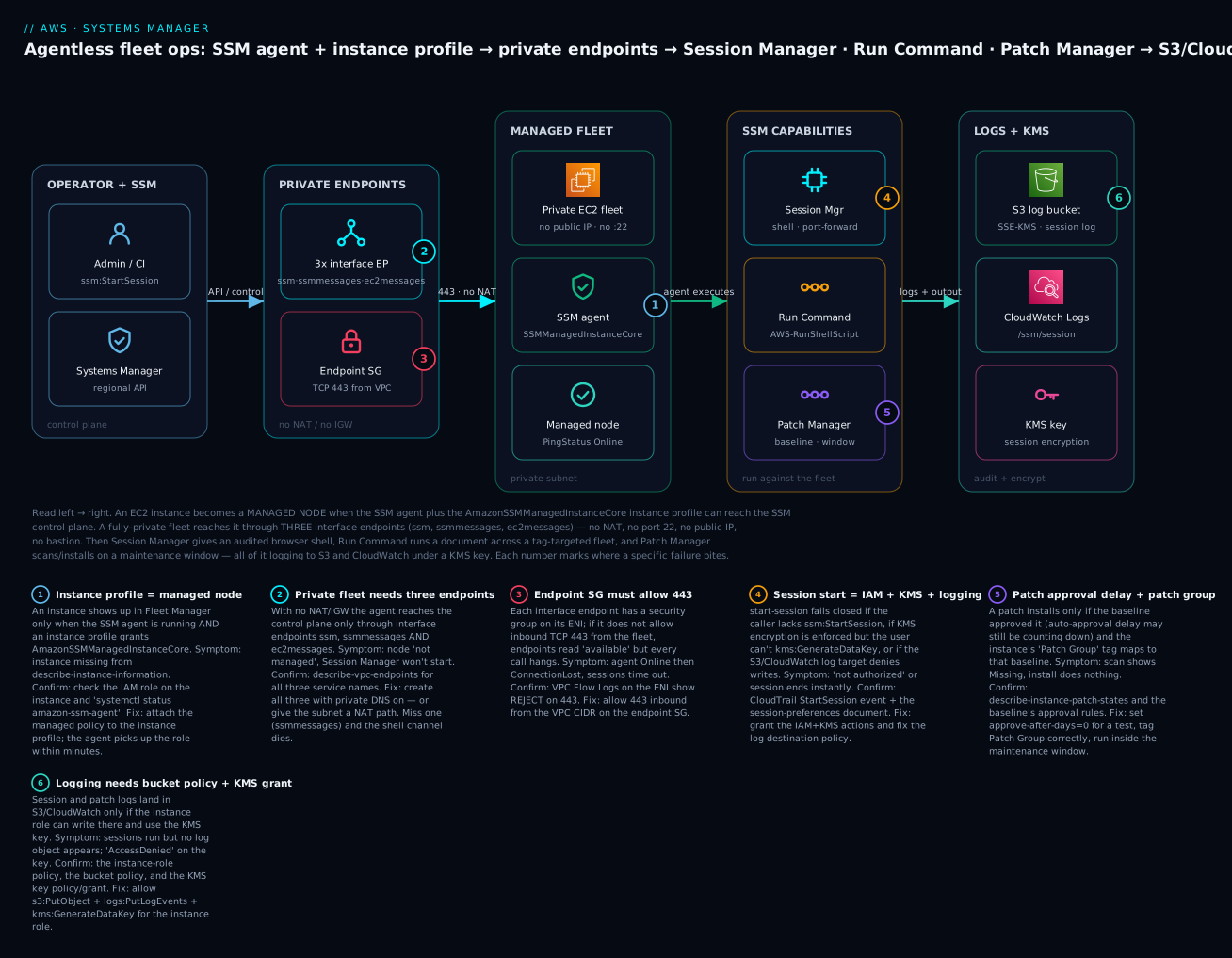
Real-world scenario
KloudVin Logistics, a fictional but realistic freight-tech company in Mumbai (ap-south-1), ran a fleet of 210 EC2 instances across three AZs — a mix of Amazon Linux 2 API servers and Windows dispatch consoles — behind a strict security mandate: no inbound SSH/RDP, no public IPs on app tier, and demonstrable patch compliance for their annual RBI-aligned audit. The reality on the ground was the opposite. Access was a shared ops.pem key and a single bastion host in a public subnet that everyone SSH’d through; RDP to the Windows boxes went through a second jump box. Patching was a yum update cron on Linux and “someone remotes in monthly” on Windows. The auditor’s two questions — prove who accessed production, and prove every host is at patch baseline — had no good answer.
The rebuild was a Systems Manager rollout. First they made every instance a managed node: a launch-template instance profile with AmazonSSMManagedInstanceCore, the agent already present on the AWS AMIs, and — because the app subnets are private with no NAT — the three interface endpoints (ssm, ssmmessages, ec2messages) plus the free S3 gateway endpoint for patch downloads, all sharing one security group that allows 443 from the VPC CIDR. Within an hour describe-instance-information showed 210 nodes Online. They then deleted both bastion hosts and closed ports 22 and 3389 on every security group, replacing them with Session Manager: developers got an IAM policy allowing ssm:StartSession only on Env=dev-tagged instances; the on-call team got prod. Sessions were logged to an S3 bucket and CloudWatch Logs, encrypted with a KMS key — so every keystroke now had an audit trail, and every access was a CloudTrail StartSession event tied to a named IAM principal.
Operations moved to Run Command: a config push that used to be a fragile for-loop over IPs became AWS-RunShellScript targeted at tag:App=api with MaxConcurrency=25% and MaxErrors=5%, so a bad script hit at most a quarter of the fleet and halted after a handful of failures. Patching became a program: a custom Amazon Linux 2 baseline approving Critical/Important security patches after a 3-day soak, a Windows baseline approving Critical/Important security updates after 7 days, instances tagged into patch groups (api-prod, dispatch-prod, plus a small canary group patched a day earlier), and two maintenance windows running AWS-RunPatchBaseline Operation=Install at 02:00 on staggered nights with RebootIfNeeded.
Two things went wrong during rollout, and both are on the diagram. First, the initial endpoint build omitted ssmmessages — nodes showed Online (the ssm control channel worked) but every start-session hung; the fix was creating the missing endpoint, and it is why badge #2 exists. Second, a batch of Windows boxes sat at Missing in compliance for a week after a “critical” patch released; the team assumed a broken baseline until they re-read the auto-approval delay — the 7-day soak simply had not elapsed (badge #5). Six weeks later the audit was uneventful: Session Manager logs proved every production access, and the Patch Manager compliance dashboard showed 100% of the fleet at baseline — from a delegated security account, org-wide. The bastions, the shared key, and the open ports were gone.
Advantages and disadvantages
| Advantages | Disadvantages |
|---|---|
| No inbound ports, no bastion, no public IP for ops | Depends on a running agent + correct instance profile |
| Access is IAM — central grant, revoke, MFA, conditions | Fully-private fleets need three endpoints wired correctly |
| Every access and action is a CloudTrail event | Session/patch logging needs S3/CloudWatch/KMS permissions set |
| Session logs give tamper-evident keystroke audit | KMS on sessions adds kms:GenerateDataKey requirements both sides |
| Run Command scales to thousands with rate control | A careless Values=* target can hit the whole Region |
| Patch Manager gives baselines, groups, windows, compliance | Auto-approval delay surprises people (“why is it Missing?”) |
| Parameter Store is free config + light secrets | Not Secrets Manager — no built-in rotation |
| Works for on-prem/hybrid via activations | Hybrid beyond free tier needs the paid advanced-instances tier |
When each matters: for access, Session Manager is a near-unconditional win — the security and audit gains dwarf the setup cost, and deleting the bastion removes a whole class of risk. For fleet operations, Run Command’s rate control is the difference between a controlled rollout and an outage. For patching, the baseline/group/window model is the only sane way to run compliance at scale — but budget for the learning curve around approval delays and the Patch Group tag. The disadvantages are almost all operational-knowledge items — the endpoint trio, the KMS grants, the approval delay — which is exactly what the troubleshooting section drills.
Hands-on lab
You will make a private instance a managed node, connect with Session Manager (no key, no port 22), turn on session logging, fan a Run Command across a tag-targeted fleet, and build a patch baseline + maintenance window and scan for compliance — with aws CLI and Terraform, then tear it all down.
⚠️ Cost warning. The SSM agent, Session Manager, Run Command, Patch Manager, Parameter Store (Standard), and IAM are free. The interface endpoints you create for a private fleet bill ~$0.01/AZ-hour each while they exist, an S3 log bucket costs pennies, and a
t3.microis free-tier-eligible. This lab runs for minutes — pennies — but do the teardown in Step 8. Use a sandbox account inap-south-1(adjust the Region as needed).
Step 0 — Set variables.
REGION=ap-south-1
VPC=vpc-0abc123
SUB_A=subnet-0priv-a        # private subnet, AZ a
SUB_B=subnet-0priv-b        # private subnet, AZ b
CIDR=$(aws ec2 describe-vpcs --vpc-ids $VPC --query "Vpcs[0].CidrBlock" --output text)
aws ec2 modify-vpc-attribute --vpc-id $VPC --enable-dns-support
aws ec2 modify-vpc-attribute --vpc-id $VPC --enable-dns-hostnames
Step 1 — Create the instance profile with AmazonSSMManagedInstanceCore.
aws iam create-role --role-name ssm-node \
  --assume-role-policy-document '{"Version":"2012-10-17","Statement":[{"Effect":"Allow","Principal":{"Service":"ec2.amazonaws.com"},"Action":"sts:AssumeRole"}]}'
aws iam attach-role-policy --role-name ssm-node \
  --policy-arn arn:aws:iam::aws:policy/AmazonSSMManagedInstanceCore
aws iam create-instance-profile --instance-profile-name ssm-node
aws iam add-role-to-instance-profile --instance-profile-name ssm-node --role-name ssm-node
Step 2 — Create the endpoint SG and the three interface endpoints (private fleet, no NAT).
SG=$(aws ec2 create-security-group --group-name ssm-vpce \
  --description "443 to SSM endpoints" --vpc-id $VPC --query GroupId --output text)
aws ec2 authorize-security-group-ingress --group-id $SG --protocol tcp --port 443 --cidr $CIDR
for SVC in ssm ssmmessages ec2messages; do
  aws ec2 create-vpc-endpoint --vpc-id $VPC \
    --service-name com.amazonaws.$REGION.$SVC --vpc-endpoint-type Interface \
    --subnet-ids $SUB_A $SUB_B --security-group-ids $SG --private-dns-enabled \
    --query "VpcEndpoint.VpcEndpointId" --output text
done
Expected: three vpce-… ids that move from pending to available within a minute or two.
Step 3 — Launch a private instance (no public IP) with the instance profile.
AMI=$(aws ssm get-parameters --names \
  /aws/service/ami-amazon-linux-latest/al2023-ami-kernel-default-x86_64 \
  --query "Parameters[0].Value" --output text)
INST=$(aws ec2 run-instances --image-id $AMI --instance-type t3.micro \
  --subnet-id $SUB_A --no-associate-public-ip-address \
  --iam-instance-profile Name=ssm-node \
  --tag-specifications 'ResourceType=instance,Tags=[{Key=App,Value=web},{Key=Env,Value=dev},{Key=Patch Group,Value=web-dev}]' \
  --query "Instances[0].InstanceId" --output text)
echo "Launched $INST"
Step 4 — Verify it became a managed node.
aws ssm describe-instance-information \
  --query "InstanceInformationList[].[InstanceId,PingStatus,PlatformName]" --output table
Expected: $INST appears with PingStatus = Online (give it 2–5 minutes). If it never appears, jump to troubleshooting rows 1–4.
Step 5 — Connect with Session Manager, then turn on logging. First create the log destinations, then set preferences:
aws s3 mb s3://kloudvin-session-logs-$RANDOM
aws logs create-log-group --log-group-name /ssm/session
# Start a shell — no key, no port 22, no bastion:
aws ssm start-session --target $INST
# (type `whoami` → ssm-user, `exit` to leave)
Then set account-wide session preferences (Console: Session Manager → Preferences → Edit, or update the SSM-SessionManagerRunShell document) to log to the bucket and log group. Expected: after your next session, a log object appears under the bucket and a stream under /ssm/session.
Step 6 — Run Command across the tag-targeted fleet.
CMD=$(aws ssm send-command --document-name "AWS-RunShellScript" \
  --targets "Key=tag:App,Values=web" \
  --parameters 'commands=["hostname","uptime","cat /etc/os-release | head -1"]' \
  --max-concurrency "50%" --max-errors "0" --comment "lab health check" \
  --query "Command.CommandId" --output text)
aws ssm list-command-invocations --command-id $CMD --details \
  --query "CommandInvocations[].[InstanceId,Status]" --output table
Expected: the invocation reports Success. Read output with aws ssm get-command-invocation --command-id $CMD --instance-id $INST --query StandardOutputContent --output text.
Step 7 — Patch baseline, patch group, and a scan.
PB=$(aws ssm create-patch-baseline --name "lab-al2023" \
  --operating-system AMAZON_LINUX_2023 \
  --approval-rules "PatchRules=[{PatchFilterGroup={PatchFilters=[{Key=CLASSIFICATION,Values=[Security]}]},ApproveAfterDays=0,ComplianceLevel=CRITICAL}]" \
  --query "BaselineId" --output text)
aws ssm register-patch-baseline-for-patch-group --baseline-id $PB --patch-group web-dev
# Scan (no install, no reboot):
aws ssm send-command --document-name "AWS-RunPatchBaseline" \
  --targets "Key=tag:Patch Group,Values=web-dev" --parameters 'Operation=Scan'
sleep 60
aws ssm describe-instance-patch-states --instance-ids $INST \
  --query "InstancePatchStates[].[InstalledCount,MissingCount,Operation]" --output table
Expected: a compliance summary with Operation=Scan and installed/missing counts. (ApproveAfterDays=0 avoids the “Missing until the delay elapses” surprise for the lab.)
Step 8 — Teardown (do this — interface endpoints bill hourly).
aws ec2 terminate-instances --instance-ids $INST
aws ssm deregister-patch-baseline-for-patch-group --baseline-id $PB --patch-group web-dev
aws ssm delete-patch-baseline --baseline-id $PB
aws ec2 describe-vpc-endpoints --filters Name=vpc-id,Values=$VPC \
  Name=service-name,Values=com.amazonaws.$REGION.ssm,com.amazonaws.$REGION.ssmmessages,com.amazonaws.$REGION.ec2messages \
  --query "VpcEndpoints[].VpcEndpointId" --output text | tr '\t' '\n' | \
  xargs -I{} aws ec2 delete-vpc-endpoints --vpc-endpoint-ids {}
aws ec2 delete-security-group --group-id $SG   # after the ENIs are gone
aws iam remove-role-from-instance-profile --instance-profile-name ssm-node --role-name ssm-node
aws iam delete-instance-profile --instance-profile-name ssm-node
aws iam detach-role-policy --role-name ssm-node --policy-arn arn:aws:iam::aws:policy/AmazonSSMManagedInstanceCore
aws iam delete-role --role-name ssm-node
⚠️ Confirm no vpce-… interface endpoints remain — those are the only line items that keep billing. Empty and delete the S3 log bucket and the /ssm/session log group too.
Terraform equivalent. The role/policy, the endpoint SG + for_each interface endpoints, the S3 gateway endpoint, the aws_ssm_patch_baseline, and the aws_ssm_maintenance_window snippets above compose into one main.tf; terraform apply then terraform destroy for teardown.
Common mistakes & troubleshooting
This is the section you will return to. Almost every SSM problem is “the node isn’t managed”, “the session won’t start”, “the command didn’t run”, or “the patch didn’t apply” — and each decomposes into the rows below. The golden split: managed-node problems are agent / instance-profile / network; session problems are IAM / KMS / logging; patch problems are baseline-approval / patch-group / window.
| # | Symptom | Root cause | Confirm (exact command / path) | Fix |
|---|---|---|---|---|
| 1 | Instance not in Fleet Manager / describe-instance-information |
No instance profile, or missing AmazonSSMManagedInstanceCore |
aws ec2 describe-instances --instance-ids i-… --query "Reservations[].Instances[].IamInstanceProfile" |
Attach a profile with the Core policy; wait ~5 min |
| 2 | Node “not managed” though profile is attached | Agent stopped, or old agent | Session/console unavailable; on box systemctl status amazon-ssm-agent |
Start/enable/update the agent (AWS-UpdateSSMAgent) |
| 3 | Private instance never becomes managed | No path to ssm/ssmmessages/ec2messages (no NAT, no endpoints) |
aws ec2 describe-vpc-endpoints — are all three present & available? |
Create all three interface endpoints (private DNS on) or add NAT |
| 4 | Managed, but agent can’t fetch creds | IMDS disabled or hop limit too low (containers) | aws ec2 describe-instances --query "…MetadataOptions" |
Enable IMDS (IMDSv2), raise http-put-response-hop-limit |
| 5 | Connection Lost after being Online |
Network path broke, agent died, or clock skew | Agent log /var/log/amazon/ssm/amazon-ssm-agent.log; timedatectl |
Restore endpoint/NAT; fix NTP; restart agent |
| 6 | start-session: not authorized |
Caller lacks ssm:StartSession (or tag condition excludes the target) |
CloudTrail StartSession AccessDenied; read the IAM policy |
Grant ssm:StartSession scoped to the right instance tags |
| 7 | Session ends immediately / won’t open | Missing ssmmessages endpoint (private fleet), or SG blocks 443 |
describe-vpc-endpoints for ssmmessages; Flow Logs REJECT on 443 |
Create ssmmessages; allow 443 inbound on the endpoint SG |
| 8 | Session fails when KMS is enforced | User and/or instance role lacks kms:GenerateDataKey |
Session prefs show a kmsKeyId; check key policy/IAM |
Grant kms:GenerateDataKey to both the user and instance role |
| 9 | Session runs but no log in S3/CloudWatch | Instance role can’t write logs, or bucket/key denies | Bucket policy, logs:PutLogEvents, KMS grant for the role |
Add s3:PutObject/logs:PutLogEvents/kms:GenerateDataKey to the role |
| 10 | Run Command stuck Pending → DeliveryTimedOut |
Agent offline / node not managed / wrong platform | describe-instance-information PingStatus; command invocation status |
Fix managed-node health (rows 1–5); re-send |
| 11 | Run Command: AccessDenied invoking a document |
Caller lacks ssm:SendCommand on the document/instances |
CloudTrail SendCommand; IAM policy on document/* + instance/* |
Grant ssm:SendCommand scoped to the doc + target tags |
| 12 | Run Command hits far more hosts than intended | Over-broad target (Values=*) or wrong tag |
Re-read --targets; dry-run against a canary tag |
Target specific tags; set MaxConcurrency/MaxErrors low |
| 13 | Patch scan says Missing, install does nothing | Auto-approval delay hasn’t elapsed for the patch | Baseline approval rules; describe-instance-patch-states |
Wait out the delay, or set ApproveAfterDays=0 for a test |
| 14 | Patch never applies to a host | Wrong/absent Patch Group tag → default baseline |
aws ssm describe-patch-group-state; check the instance tag key exactly Patch Group |
Fix the tag (key has a space); register group → baseline |
| 15 | Patch install fails to fetch packages (private fleet) | No path to OS repos / S3 for packages | Agent/patch logs show download errors | Add the S3 gateway endpoint (+ repo path); Windows needs an update source/WSUS |
| 16 | SecureString read → AccessDenied on KMS |
Instance role lacks kms:Decrypt on the parameter’s key |
get-parameter --with-decryption fails; read the KMS key policy |
Grant kms:Decrypt (+ ssm:GetParameter) to the instance role |
| 17 | Maintenance window “ran” but patched nothing | No targets/tasks registered, or window too short (cutoff) | describe-maintenance-window-targets/-tasks; execution history |
Register targets + a AWS-RunPatchBaseline task; widen duration |
Error / status reference
| Error / state | Where | Meaning | Fix |
|---|---|---|---|
TargetNotConnected |
start-session / send-command |
Node not managed / agent offline | Fix managed-node health (rows 1–5) |
AccessDeniedException |
StartSession/SendCommand |
IAM (or tag condition) denies the caller | Grant the scoped action |
DeliveryTimedOut |
Command invocation | Agent never picked up the command | Node offline/unmanaged; re-send after fixing |
Undeliverable |
Command invocation | Target unmanaged or wrong platform | Verify platform + managed status |
InvalidInstanceId |
Many SSM APIs | The instance isn’t a managed node | Make it managed (profile + network + agent) |
Connection Lost |
describe-instance-information |
Agent stopped checking in | Network path / agent / clock |
Missing |
Patch compliance | Approved patch not installed | Install, or wait out approval delay |
Failed |
Patch compliance | Patch install failed | Read patch logs; check repo access |
The three nastiest failures, in prose
The missing ssmmessages endpoint. You wire up a private fleet, create the ssm endpoint, and the nodes proudly report Online — so you assume the network is done. Then every start-session hangs and dies. The trap is that the control channel (ssm) and the session data channel (ssmmessages) are different endpoints, and registration only needs the first. The node is “managed” on paper while interactive access is dead. Confirm with describe-vpc-endpoints (there is no ssmmessages) or VPC Flow Logs (nothing on the session path); fix by creating all three interface endpoints — ssm, ssmmessages, ec2messages — with private DNS on and 443 open. This one asymmetry accounts for the majority of “SSM works but Session Manager doesn’t” tickets and is why badge #2 exists.
The auto-approval delay that looks like a bug. A Critical CVE patch drops, you run a scan, and the host reports the patch as Missing — and stays Missing through your install run. Everyone suspects a broken baseline. The real cause is the auto-approval delay: predefined and many custom baselines approve a patch only N days after release (often 7), so during the soak window the patch is genuinely not approved, hence not installed, hence “Missing.” Confirm by reading the baseline’s approval rules (describe-patch-baseline) against the patch’s release date. Fix by understanding the soak is deliberate — or, for a genuine emergency, temporarily set ApproveAfterDays=0 (or explicitly approve the specific patch) and re-run install. This is the single most common “why won’t Patch Manager patch?” confusion.
The KMS grant nobody set. You enforce KMS encryption on Session Manager (good) and enable SecureString parameters (good) — then sessions won’t open and get-parameter --with-decryption returns AccessDenied. The cause is that KMS is a two-sided permission: encrypting/decrypting requires the calling identity to have kms:GenerateDataKey/kms:Decrypt on the key, and for sessions both the human user and the instance role need it. People grant it to the user and forget the instance role (or vice-versa). Confirm with the CloudTrail Decrypt/GenerateDataKey AccessDenied event naming the principal; fix by adding the KMS actions to every principal in the path — the user, the instance role — via the key policy or their IAM policies. See the IAM evaluation walkthrough in Debugging IAM ‘Access Denied’.
Best practices
- Make
AmazonSSMManagedInstanceCorethe default on every launch template / instance profile — or enable Default Host Management Configuration account-wide — so managed-node status is automatic, not a checklist item. - Delete your bastions and close ports 22/3389 once Session Manager is proven; an open management port is attack surface you no longer need.
- Scope
ssm:StartSessionby tag (Env,App) so developers reach dev and only on-call reaches prod — least privilege on access, not just actions. - Turn on session logging to S3 and CloudWatch with KMS, and grant the required S3/CloudWatch/KMS permissions to the instance role up front — logging you set after an incident is logging you didn’t have during it.
- Always set
MaxConcurrencyandMaxErrorson fleet-wide Run Command; a canary tag + 25% concurrency + a low error threshold turns a bad script into a contained blip. - Fill the
--commenton every command — it is your future self’s audit trail in history and CloudTrail. - Patch a
canarygroup a day early, then the rest — catch a bad patch on 3 hosts, not 300. - Use maintenance windows for production patching; never
Operation=Installad hoc against prod during business hours. - Understand the auto-approval delay and set it deliberately (a short soak for security, longer for stability) rather than being surprised by “Missing.”
- Keep the agent current with a State Manager association (
AWS-UpdateSSMAgent), not a manual scramble. - Prefer Parameter Store for config and light secrets; reach for Secrets Manager when you need rotation or cross-account secret sharing.
- On private fleets, create all three interface endpoints + the free S3 gateway endpoint, share one SG that allows 443, and enable private DNS — the whole “no NAT” story depends on it.
Security notes
Systems Manager is a security control, so configure it like one. Access is IAM, so treat it like IAM: scope ssm:StartSession, ssm:SendCommand, and ssm:GetParameter with Condition blocks on instance/resource tags, use permission boundaries for who may grant them, and never hand out ssm:*. Session accountability: enforce session logging to S3/CloudWatch and KMS encryption via the SSM-SessionManagerRunShell preferences, so every keystroke is captured and encrypted; pair it with CloudTrail so every StartSession is tied to a named principal — this is precisely the audit evidence a reviewer wants (see AWS CloudTrail and Config: Audit and Compliance at Scale). Least-privilege on the node: AmazonSSMManagedInstanceCore is deliberately minimal — do not fall back to the deprecated, over-broad AmazonEC2RoleforSSM; add only the extra policies a given node truly needs. Network isolation: the whole point is that you can run fully-private fleets with no inbound ports and no internet path — keep it that way with the three interface endpoints and a tight endpoint SG, and require IMDSv2 so credentials can’t be trivially exfiltrated. Secrets: use SecureString (or Secrets Manager) with a customer-managed KMS key whose key policy grants decrypt only to the roles that need it, and audit Decrypt in CloudTrail. Change control: restrict who can edit documents, patch baselines, and maintenance windows — a malicious AWS-RunShellScript targeted at Values=* is remote code execution across your fleet, so treat document-write and SendCommand as high-privilege and monitor them. Guardrails: consider SCPs that deny disabling the agent’s permissions or deleting session logs, and use Config rules to flag instances that are not managed.
Cost & sizing
SSM’s core is famously cheap — most of what this article covers is free — and it usually removes cost (the bastion you delete, the NAT you may drop for AWS-service traffic). The line items are the endpoints for private fleets, advanced Parameter Store, and hybrid at scale.
| Item | Cost (approx, region-dependent) | Notes |
|---|---|---|
| SSM agent, Session Manager, Run Command | Free | No per-session or per-command charge |
| Patch Manager, State Manager (standard) | Free | The Run Command executions are free |
| Parameter Store Standard | Free | ≤10,000 params, 4 KB, standard throughput |
| Parameter Store Advanced | ~$0.05 per advanced param/month + API | Only if you need 8 KB / higher throughput / policies |
| Parameter Store higher-throughput API | Per 10,000 API interactions | Turn on only when you hit standard limits |
Interface endpoints (ssm,ssmmessages,ec2messages) |
~$0.01/AZ-hour each + ~$0.01/GB | Three endpoints × AZs — the main private-fleet cost |
| S3 gateway endpoint (patch downloads) | Free | Always add it for private fleets |
| Session/command logs | S3 storage + CloudWatch Logs ingest/storage | Small unless you log verbosely at scale |
| Hybrid managed instances | Free tier, then advanced-instances tier ~$0.00695/hr | Only beyond the free on-prem tier / for full features |
| SSM Automation | Free tier of steps, then per-step beyond | Runbook-heavy automation only |
Rough INR figures (Mumbai ap-south-1, approximate): the three SSM interface endpoints across 2 AZs run about ₹2,600–3,200/month in AZ-hours before data — the one real recurring cost of a private fleet, and it replaces a NAT gateway you might otherwise pay far more for. Against that, deleting a t3.small bastion saves its hourly plus the operational cost of patching and hardening it, and Session Manager/Run Command/Patch Manager add zero per-use charge no matter how big the fleet. Sizing guidance: put endpoint ENIs only in the AZs your fleet uses, consolidate endpoints across VPCs behind Transit Gateway at scale (one set, not N×), keep Parameter Store on the free Standard tier unless you truly need Advanced, and log sessions at a sensible verbosity so CloudWatch ingest doesn’t creep. For most teams the SSM bill is “three endpoints” and nothing else.
Interview & exam questions
1. What two things make an EC2 instance a managed node? A running SSM agent and an instance profile granting SSM permissions — the AWS managed policy AmazonSSMManagedInstanceCore — plus a network path to the SSM endpoints. Modern accounts can substitute Default Host Management Configuration for the per-instance profile. (SOA-C02, SAA-C03)
2. How does Session Manager give shell access with no open port 22? The SSM agent holds an outbound connection to the SSM service; when you StartSession, the service pushes the session down that existing channel. Nothing connects inbound, so no port 22, no bastion, and no public IP are needed. (SOA-C02, SCS-C02)
3. A private instance (no NAT, no IGW) never becomes managed. What’s missing? The three interface VPC endpoints — ssm, ssmmessages, and ec2messages — with private DNS enabled and a security group allowing 443. Registration needs ssm; interactive sessions need ssmmessages. (SAA-C03, ANS-C01)
4. The node is Online but Session Manager sessions won’t start on a private fleet. Why? The ssmmessages endpoint (the session data channel) is missing or its SG blocks 443, while the ssm control endpoint (used for registration) is present. Add ssmmessages. (SOA-C02)
5. How do you run one command across a tagged fleet without risking all of it? Run Command with --targets "Key=tag:App,Values=web" and rate control: MaxConcurrency (e.g. 25%) limits simultaneous execution and MaxErrors halts the rollout after N failures. (SOA-C02)
6. What is a patch baseline, and what is the auto-approval delay? A patch baseline is the rulebook of which patches are approved (by classification/severity) for an OS. The auto-approval delay is how many days after release a patch waits before being approved — during that soak a scan shows the patch as Missing even though nothing is broken. (SOA-C02)
7. How does an instance get the right patch baseline? Via a patch group: tag the instance with key Patch Group (with a space) and a value, then register that value to the baseline. An instance belongs to exactly one patch group; untagged instances get the default baseline. (SOA-C02)
8. Scan vs install in Patch Manager? Scan reports compliance and installs nothing; Install installs approved-and-missing patches and (with RebootIfNeeded) reboots. Production installs run inside a maintenance window. (SOA-C02)
9. Parameter Store SecureString vs Secrets Manager — when each? Both encrypt with KMS. Use Parameter Store for config and light secrets (free Standard tier, no rotation). Use Secrets Manager when you need built-in rotation, cross-account sharing, or random-secret generation — at a per-secret cost. (DVA-C02, SAA-C03)
10. Why is AmazonEC2RoleforSSM discouraged? It is the deprecated, over-broad predecessor to AmazonSSMManagedInstanceCore; Core grants the least privilege the agent needs, so use Core. (SCS-C02)
11. How do you manage on-prem servers with SSM? Create a hybrid activation (create-activation), install the agent with the activation code + id; the server registers as an mi-… managed node. Beyond the free tier or for full features you enable the paid advanced-instances tier. (SOA-C02)
12. Your Session Manager KMS-encrypted sessions fail with AccessDenied. What’s the fix? KMS is two-sided: grant kms:GenerateDataKey to both the human user and the instance role on the session key. Missing it on either side breaks the session. (SCS-C02)
Quick check
- Name the two things (besides a network path) that make an EC2 instance a managed node.
- Which single interface endpoint’s absence lets a node register but breaks Session Manager?
- You need to run one script on 300 instances but cap the blast radius. Which two Run Command settings do you set?
- A freshly released critical patch shows as
Missingafter a scan and won’t install. What is the most likely, non-bug cause? - Which tag key (exactly) maps an instance to a patch baseline, and how many patch groups can an instance be in?
Answers
- A running SSM agent and an instance profile with
AmazonSSMManagedInstanceCore(or Default Host Management Configuration). ssmmessages— it carries the Session Manager data channel;ssmalone is enough to register.MaxConcurrency(how many run at once) andMaxErrors(stop after N failures).- The baseline’s auto-approval delay hasn’t elapsed — the patch isn’t approved yet, so it’s genuinely Missing, not broken.
- The key
Patch Group(with a space); an instance can be in exactly one patch group.
Glossary
| Term | Definition |
|---|---|
| Systems Manager (SSM) | The AWS service that manages EC2/on-prem nodes via an agent + IAM, covering access, operations, config, and compliance. |
| SSM agent | The daemon on a node (amazon-ssm-agent) that holds the outbound channel to SSM and executes documents. |
| Managed node | An instance/server registered with SSM (i-… for EC2, mi-… for hybrid) and operable through it. |
| Instance profile | The IAM role attached to an EC2 instance; with AmazonSSMManagedInstanceCore it lets the agent authenticate. |
| AmazonSSMManagedInstanceCore | The AWS managed policy granting the minimum permissions a node needs to be managed. |
| Session Manager | SSM capability giving an IAM-gated, audited shell/port-forward with no SSH, no port 22, no bastion, no public IP. |
| Run Command | SSM capability that executes a document on targeted nodes once, with concurrency and error controls. |
| Document (SSM document) | A JSON/YAML definition of actions (AWS-RunShellScript, AWS-RunPatchBaseline, session prefs). |
| Patch Manager | SSM capability that scans/installs OS patches against a baseline, by patch group, on a maintenance window. |
| Patch baseline | The rules for which patches are approved for an OS, including auto-approval delay and explicit approve/reject lists. |
| Patch group | A Patch Group-tagged set of instances bound to a baseline; an instance belongs to only one. |
| Maintenance window | A recurring, bounded time box (schedule, duration, cutoff) in which tasks like patch installs run. |
| State Manager association | A document + targets + schedule that SSM continuously enforces as desired state. |
| Parameter Store | Hierarchical config store; SecureString parameters are KMS-encrypted for light secret storage. |
| Hybrid activation | An activation code + id that registers a non-EC2 server as an mi-… managed node. |
| PingStatus | The agent’s health as SSM sees it: Online, Connection Lost, or Inactive. |
| ssm / ssmmessages / ec2messages | The three interface VPC endpoints a fully-private fleet needs: control API, session data channel, and agent transport. |
Next steps
- See the network side in depth: AWS PrivateLink & VPC Endpoints: Interface vs Gateway — the three interface endpoints (and the free S3 gateway) that make a private fleet manageable.
- Compare the access model you’re replacing: Launch Your First EC2 Instance and Connect: SSH, Instance Connect & Session Manager — the SSH path Session Manager retires.
- When SSH does break, diagnose it: EC2 SSH ‘Connection Timed Out’ & ‘Permission Denied’ — the failure modes you stop having once you move to Session Manager.
- Prove your access and patch posture: AWS CloudTrail and Config: Audit and Compliance at Scale — where every
StartSessionand patch-compliance record becomes audit evidence. - Get IAM right underneath it all: Debugging IAM ‘Access Denied’: Policy Evaluation, SCPs & Boundaries — the evaluation logic behind every SSM and KMS permission in this guide.