You launch an EC2 instance and, before you can SSH in, it has already installed nginx, written its config, pulled its own Name tag into the landing page and started serving on port 80. Nobody logged in. Nobody ran a script by hand. That is bootstrapping — the automatic, unattended configuration of an instance on its very first boot — and on AWS it runs on two things working together: user data, the blob of text you attach at launch, and cloud-init, the program baked into almost every Linux AMI that reads that blob and acts on it. Get this right and a scaled-out fleet of forty instances configures itself identically, every time, with zero human touch. Get it wrong and you get the single most frustrating class of EC2 bug: the instance that boots perfectly, passes its status checks, and simply does not do the thing you told it to — with no error anywhere you thought to look.
This article is the complete mental model plus the field manual. You will learn exactly what user data is, how cloud-init consumes it, and the two forms it takes: the script form (a #!/bin/bash that runs once, as root, on first boot) and cloud-config (a #cloud-config YAML document of declarative directives — packages, write_files, runcmd, users, bootcmd). You will learn how to combine both with MIME multipart, why there is a 16 KB limit and how to slip past it, where the output actually goes (/var/log/cloud-init-output.log is the file that ends 80% of these incidents), the difference between run-once and every-boot, why your scripts must be idempotent, and how to fetch the instance’s own identity — instance-id, region, tags — from IMDSv2 inside the script, token requirement and all. Then you will wire the whole thing into a launch template and an Auto Scaling group, build a working nginx app in a hands-on lab, deliberately break it, and debug it from the console output and cloud-init logs.
Throughout, the rule is: never put a secret in user data (it is readable by anything on the box), always show both the aws CLI and the Terraform for every step, and keep the reference material — directives, stages, module frequencies, metadata paths, error strings — in scannable tables you can return to at 2 a.m. when a fleet won’t come up. By the end, “the script didn’t run” will be a ninety-second diagnosis, not a two-hour one.
What problem this solves
An AMI gives you a frozen disk image: an operating system, maybe some pre-installed packages. But an instance is never just the image. It needs the last mile of configuration that only makes sense at launch time — this instance’s hostname, this environment’s config file, this deployment’s application version, this fleet’s monitoring agent — and it needs that configuration applied without a human, because the entire point of Auto Scaling is that instances appear and disappear at 3 a.m. based on load, not on someone being awake to run Ansible. Bootstrapping is how the generic image becomes a specific, ready-to-serve member of a fleet.
Without it, you are stuck with one of two bad options. Either you SSH into every new instance and configure it by hand — which does not scale past one instance and is impossible under Auto Scaling — or you bake everything into a golden AMI and rebuild the whole image for every trivial config change, turning a one-line edit into a twenty-minute Packer run and a fleet-wide instance replacement. User data is the pressure-release valve: the small, launch-time layer of “make this instance ready” that sits on top of a stable AMI. It is free, it is built into every mainstream Linux distro via cloud-init, and it runs before your app ever takes traffic.
Who hits the pain when it goes wrong: anyone running EC2 at any scale. First-timers hit the “my script didn’t run and there’s no error” wall (usually a #! vs #cloud-config mistake or Windows line endings). Teams running Auto Scaling hit the “it worked on the instance I tested but the fleet came up misconfigured” wall (usually a non-idempotent script or a race on a package mirror). Security teams hit the “someone put a database password in user data and now it’s readable by every process on the box” wall. Each of these is a solved problem once you understand the machine underneath — and each maps to a specific line in the playbook at the end.
Here is the whole field in one table — every symptom class this article covers, the question it forces, and where you look first:
| Symptom class | What’s really happening | First question | First place to look |
|---|---|---|---|
| Script “didn’t run” | cloud-init never executed your payload | Right first line? Right boot? | cloud-init status --long; /var/log/cloud-init.log |
| Ran but nothing happened | A command failed and the script aborted silently | Where did stdout/stderr go? | /var/log/cloud-init-output.log |
| Worked once, not on relaunch | User scripts run once per instance-id | Is this a rebaked AMI or a reboot? | /var/lib/cloud/instances/; cloud-init status |
| IMDSv2 401 / can’t read metadata | No session token, or hop limit too low | Did you PUT a token first? | curl the token endpoint; metadata options |
| 16 KB launch rejection | User data exceeds the hard cap | How big is the raw payload? | wc -c user-data.txt; API error |
| Package install races/fails | Ran before the mirror/network was ready | bootcmd (early) or runcmd (final)? |
cloud-init-output.log DNS/repo errors |
| Secret leaked | Credentials baked into user data | Is it in /latest/user-data? |
IMDS + describe-instance-attribute |
Learning objectives
By the end of this article you can:
- Explain what user data is, where it is stored, and how cloud-init discovers and consumes it on first boot.
- Choose correctly between the script form (
#!/bin/bash) and cloud-config (#cloud-configYAML), and combine both with MIME multipart. - Read and write the core cloud-config directives —
packages,write_files,runcmd,users,bootcmd,write_filespermissions anddefer— and know which boot stage each runs in. - Distinguish run-once from every-boot execution, force a re-run with
cloud-init clean, and write idempotent scripts that survive reboots and AMI rebakes. - Fetch the instance’s own identity — instance-id, region, and tags — from IMDSv2 inside a bootstrap script, including the token handshake and hop-limit rules.
- Work within the 16 KB user-data limit using gzip,
#include, or a small fetch-from-S3/SSM bootstrap, and encode user data correctly for launch templates. - Wire user data into a launch template and Auto Scaling group, and roll changes with a new version + instance refresh.
- Diagnose any bootstrap failure from
/var/log/cloud-init-output.log,/var/log/cloud-init.log,cloud-init status, andaws ec2 get-console-output— and keep secrets out of user data entirely.
Prerequisites & where this fits
You should be comfortable launching an EC2 instance and know what an AMI, a security group, a subnet and an IAM instance profile are. You should be able to run the aws CLI (configured with credentials and a default region) and read JSON output, and you should recognise basic Linux service management (systemctl) and YAML. Terraform familiarity helps but every step is shown both ways. Nothing here needs anything beyond a free-tier account and a default VPC.
This sits at the base of the Compute track and is the connective tissue between “I can start one instance” and “I run a self-configuring fleet.” It assumes the instance fundamentals from launching and connecting to your first EC2 instance over SSH and the sizing decisions in choosing EC2 instance types and families. It is upstream of Auto Scaling and load balancing, and it is the reason the EC2 box in the broader EC2 vs Lambda vs ECS vs EKS picture can behave like cattle rather than a pet. Where user data ends, configuration management (SSM, Ansible) and golden images (Packer) begin — a trade-off we make explicit later.
Here is who owns what during a bootstrap, so you route an incident to the right place fast:
| Layer | What lives here | Who owns it | Bootstrap failures it causes |
|---|---|---|---|
| Launch template / user data | The payload + metadata options | App / platform team | Wrong format, 16 KB overflow, un-encoded |
| AMI | OS + cloud-init version + baked packages | Platform / image team | Stale state, missing cloud-init, drift |
| cloud-init | Reads user data, runs the stages | The distro (Amazon/Canonical) | Module errors, YAML schema failures |
| IMDSv2 | Instance identity + user-data bytes | AWS + your metadata options | 401 tokens, hop limit, tag not exposed |
| Network (subnet/route/SG) | Egress to repos, S3, SSM | Network team | Package mirror unreachable, no route |
| IAM instance profile | Permissions to fetch secrets/config | Security / platform | AccessDenied pulling SSM/Secrets |
Core concepts
Six ideas make every later diagnosis obvious.
User data is a text blob you attach at launch, and nothing more. When you call run-instances (or bake it into a launch template), you can attach up to 16 KB of arbitrary text. AWS stores it and exposes it to the instance itself at the metadata address http://169.254.169.254/latest/user-data. That is the entire mechanism on the AWS side — AWS does not interpret the bytes. It is stored, it is retrievable from inside the box, and it is capped at 16 KB. Everything else is cloud-init.
cloud-init is the program that reads user data and acts on it. Baked into Amazon Linux, Ubuntu, RHEL, SUSE and most cloud images, cloud-init is a multi-stage boot-time agent. Early in boot it detects the datasource (on EC2, the metadata service), fetches the user data, decides what kind of payload it is from the first line, and runs the appropriate handler. It also does a pile of default work you rarely think about: setting the hostname, creating the default user (ec2-user/ubuntu), installing your SSH key, growing the root partition. Your user data is one input among several that cloud-init processes.
The first line decides everything. cloud-init routes the payload by a magic first line: #! (any shebang) means “a shell script — run it once, as root, on first boot”; #cloud-config means “a YAML document of declarative directives”; other prefixes (#include, #cloud-boothook, MIME headers, gzip magic bytes) select other handlers. Get the first line wrong and cloud-init logs “Unhandled non-multipart userdata” and does nothing — the number-one silent failure.
Scripts are imperative and run once; cloud-config is declarative and idempotent-by-design. The script form is just Bash: powerful, familiar, and entirely your responsibility to make safe and re-runnable. Cloud-config is a set of directives cloud-init applies — install these packages, write_files with these permissions, run these runcmd — many of which are naturally idempotent. Most production bootstraps use cloud-config for the declarative 90% and a small runcmd (or a MIME-attached script) for the imperative last 10%.
Bootstrapping runs at a specific point in a specific order. cloud-init has four boot stages (init-local, init/network, config, final), and each directive runs in a defined stage. write_files and bootcmd run early; packages and runcmd run in the final stage. Knowing the order is how you avoid the classic race — running a command that needs a package before the package is installed, or hitting a repo before the network is up.
The instance can read its own identity — but the door is guarded by IMDSv2. From inside the box, the Instance Metadata Service at 169.254.169.254 answers questions about this instance: its id, type, region, IAM credentials, and (if enabled) its tags. Modern AMIs default to IMDSv2, which is session-oriented: you PUT for a short-lived token, then send that token as a header on every GET. Miss the token and you get 401. This is how a bootstrap script personalises itself — and, dangerously, it is also how any process on the box can read the raw user data, which is why secrets never belong there.
The vocabulary in one table
| Term | One-line definition | Where it lives | Why it matters |
|---|---|---|---|
| User data | Text blob attached at launch (≤16 KB) | IMDS /latest/user-data |
The payload cloud-init runs |
| cloud-init | Boot-time agent that consumes user data | In the AMI | Does the actual work |
| Datasource | Where cloud-init reads metadata/user data | IMDS on EC2 | DataSourceEc2 |
| Script form | #!/bin/bash user data |
User data first line | Imperative, root, once |
| cloud-config | #cloud-config YAML directives |
User data first line | Declarative directives |
| Boot stage | init-local / init / config / final | cloud-init lifecycle | Decides run order |
| Module | A unit of cloud-config work (e.g. runcmd) |
/etc/cloud/cloud.cfg |
Maps directive → stage |
runcmd |
Commands run in the final stage, once | cloud-config | Imperative tail end |
bootcmd |
Commands run early, every boot | cloud-config | Pre-network / per-boot |
| IMDSv2 | Token-based instance metadata service | 169.254.169.254 |
Self-identity, guarded |
| Instance profile | IAM role attached to the instance | Launch template | Fetch secrets/config |
| Launch template | Versioned launch spec incl. user data | EC2 | Fleet source of truth |
cloud-init clean |
Wipe state so next boot re-runs all | On the instance | Re-run / AMI rebake prep |
User data: the two forms
Everything you attach begins with a first line that selects a handler. Enumerate them once and you will never wonder why a payload was ignored:
| First line / signature | Handler | Runs as | Default frequency | Use it for |
|---|---|---|---|---|
#!/bin/bash (any #!) |
Shell script (scripts-user) |
root | Once (per instance) | Imperative setup, quick tasks |
#cloud-config |
cloud-config modules | root | Per directive | Declarative packages/files/users |
#include |
Fetch URLs, run each | root | Once | Pull scripts from S3/HTTP |
#cloud-boothook |
Boothook | root | Every boot (early) | Per-boot work you dedupe yourself |
#cloud-config-archive |
Multiple parts (YAML list) | root | Per part | Bundling in one document |
Content-Type: multipart/... |
MIME multipart | Per part | Per part | Combine script + cloud-config |
Gzip magic bytes (\x1f\x8b) |
Decompress, then re-detect | — | — | Fit more under 16 KB |
#part-handler |
Custom handler code | root | — | Advanced, rare |
The script form
The script form is the fast path: put a shebang on line one and the rest is a normal shell script.
#!/bin/bash
set -euxo pipefail
dnf install -y nginx
echo "<h1>Hello from $(hostname)</h1>" > /usr/share/nginx/html/index.html
systemctl enable --now nginx
Five facts govern every user-data script, and violating any one is a classic bug:
| Fact | Detail | Consequence if ignored |
|---|---|---|
| Runs as root | No sudo needed; $HOME is /root, cwd is / |
Scripts assuming ec2-user’s env break |
| Runs once | Only on first boot (new instance-id) | Reboots/rebakes “don’t run it again” |
First line must be #! |
Or cloud-init won’t treat it as a script | Silent no-op |
| Output → cloud-init-output.log | stdout+stderr captured there | “No error” because you looked elsewhere |
| No implicit error handling | A failing line may not stop the script | Half-configured instance, no signal |
Always start real scripts with set -euxo pipefail: -e aborts on the first error (so a failure is loud, not silent), -u catches unset variables, -x traces every command into the log (priceless for debugging), and -o pipefail makes a failing command in a pipe fail the line. Without -e, a failed dnf install sails on to systemctl enable nginx against a package that was never installed, and you get a “started but broken” instance with no obvious cause.
The cloud-config form
Cloud-config is a YAML document whose first line is exactly #cloud-config. Instead of telling the shell how, you declare what:
#cloud-config
package_update: true
packages:
  - nginx
write_files:
  - path: /usr/share/nginx/html/index.html
    permissions: '0644'
    content: |
      <h1>Hello from cloud-config</h1>
runcmd:
  - systemctl enable --now nginx
This is more robust than the equivalent script for three reasons: cloud-init validates the YAML (cloud-init schema) before running, the directives run in a defined order across stages, and most directives are idempotent by construction. The trade-off is that anything genuinely imperative still lands in runcmd, which is just a shell script under the hood — so cloud-config does not free you from shell entirely; it shrinks the shell to the part that truly needs it.
Which form when
| If you need… | Prefer | Because |
|---|---|---|
| Install packages, write files, add users | cloud-config | Declarative, validated, idempotent |
| A quick one-off command sequence | Script | Zero ceremony |
| Both (declarative + a custom step) | MIME multipart | Combine cleanly |
| Something to run every boot | bootcmd / per-boot MIME |
Scripts default to once |
| To fetch a large script | #include from S3 |
Beats the 16 KB cap |
| Cross-distro portability | cloud-config | Abstracts package manager |
cloud-init: the four boot stages
cloud-init is not one script; it is four systemd services that fire at four points in the boot, each running a configured list of modules. Understanding this order is the difference between a bootstrap that works and one that races.
| Stage | systemd unit | Network up? | What runs here (examples) |
|---|---|---|---|
| init-local | cloud-init-local.service |
No | Detect datasource, early network config |
| init (network) | cloud-init.service |
Yes | bootcmd, write_files, users, groups, set hostname, SSH keys, growpart |
| config | cloud-config.service |
Yes | runcmd module (writes the script), ntp, timezone, set-passwords, ssh-import-id |
| final | cloud-final.service |
Yes | packages install, runcmd execution (scripts-user), phone_home, power_state, final message |
Two subtleties trip people constantly. First, the runcmd module runs in the config stage, but all it does is write your commands to a script file; the commands actually execute in the final stage via the scripts-user module. Second, packages install in the final stage before scripts-user, so a package you list in packages: is available to your runcmd. That ordering is a feature — lean on it instead of installing inside runcmd.
Here is the module-to-stage map for the directives you will actually use:
| Directive / work | Module | Stage | Frequency |
|---|---|---|---|
bootcmd |
bootcmd |
init (network) | Every boot |
write_files (default) |
write-files |
init (network) | Per instance |
write_files (defer: true) |
write-files-deferred |
final | Per instance |
users / groups |
users-groups |
init (network) | Per instance |
| Set hostname | set-hostname |
init (network) | Per instance |
runcmd (write script) |
runcmd |
config | Per instance |
packages install |
package-update-upgrade-install |
final | Per instance |
runcmd (execute) |
scripts-user |
final | Per instance |
#! user-data script |
scripts-user |
final | Per instance |
phone_home |
phone-home |
final | Per instance |
power_state (reboot) |
power-state-change |
final | Per instance |
The cloud-init CLI
You drive and inspect cloud-init with a handful of subcommands. Memorise the first three; they end most incidents.
| Command | What it tells / does | When you reach for it |
|---|---|---|
cloud-init status --long |
Current state + which stage/error | First thing, every time |
cloud-init status --wait |
Blocks until cloud-init finishes | Scripting “wait for boot to configure” |
cloud-init analyze blame |
Time spent per module | Slow boots |
cloud-init analyze show |
Full per-stage timeline | Understanding order |
cloud-init query userdata |
Prints the decoded user data | “Did my payload arrive intact?” |
cloud-init query ds |
The datasource + metadata tree | Confirm IMDS is the source |
cloud-init schema --system |
Validates the applied cloud-config | YAML that “did nothing” |
cloud-init clean [--logs] |
Wipes state so next boot re-runs all | Re-test; prep an AMI rebake |
cloud-init single --name runcmd |
Re-run one module now | Iterating on one directive |
cloud-init status reports one of a small set of states, and its exit code is scriptable:
| State | Exit code | Meaning |
|---|---|---|
not run |
0 | Hasn’t started (very early boot) |
running |
0 | In progress |
done |
0 | Finished, no errors |
error |
1 | A module failed — go read the logs |
degraded done |
2 | Finished but a recoverable error occurred |
disabled |
0 | cloud-init disabled on this image |
The logs and state files
Everything cloud-init does leaves a trace. Know these six paths and you can debug any instance without guessing:
| Path | Contents | Use it for |
|---|---|---|
/var/log/cloud-init-output.log |
stdout+stderr of bootcmd, runcmd, scripts, package installs | The file for “what did my script print/why did it fail” |
/var/log/cloud-init.log |
cloud-init’s own detailed module-by-module log | Which module failed, datasource detection, schema errors |
/var/lib/cloud/instance/ |
Symlink → instances/<instance-id>/ |
Per-instance state root |
/var/lib/cloud/instance/user-data.txt |
The decoded user data as received | Confirm the payload |
/var/lib/cloud/instance/scripts/ |
Extracted scripts (runcmd, per-boot, etc.) | See exactly what ran |
/var/lib/cloud/instance/sem/ |
Semaphore files marking per-instance modules done | Why a module “won’t run again” |
Writing cloud-config: the directives that matter
The cloud-config module set is large; these are the directives that carry real production bootstraps. Enumerate them so nothing is a mystery:
| Directive | What it does | Stage | Notes / gotcha |
|---|---|---|---|
package_update |
apt/dnf metadata refresh |
final | Set true before installing to avoid stale cache |
package_upgrade |
Upgrade all packages | final | Slows boot; can pull surprises — use sparingly |
packages |
Install a list of packages | final | Cross-distro; can pin [name, version] |
write_files |
Create files with content/permissions | init (network) | Runs before runcmd — templates land first |
runcmd |
Shell commands, once, final stage | final | The imperative escape hatch |
bootcmd |
Shell commands, every boot, early | init (network) | Pre-network work; runs before packages |
users |
Create users/groups, keys, sudo | init (network) | Add ec2-user back if you override the list |
groups |
Create groups | init (network) | — |
ssh_authorized_keys |
Add keys to the default user | init (network) | Alternative to key pair injection |
ssh_pwauth |
Enable/disable SSH password auth | config | Leave off; keys only |
hostname / fqdn |
Set the hostname | init (network) | preserve_hostname to keep it stable |
timezone |
Set the system timezone | config | e.g. Asia/Kolkata |
ntp |
Configure time sync | config | Enable + pick servers |
disk_setup / fs_setup / mounts |
Partition, format, mount volumes | init (network) | For extra EBS volumes |
yum_repos / apt |
Add package repositories | config | Add before packages uses them |
ca_certs |
Add trusted CA certificates | init (network) | Private/internal CAs |
power_state |
Reboot/poweroff after config | final | mode: reboot after a kernel change |
phone_home |
POST instance data to a URL | final | Signal “I’m ready” to an orchestrator |
final_message |
Message printed when done | final | Marks the end in the console log |
write_files, in detail
write_files is the workhorse for dropping config onto the box. Every sub-key:
| Key | Purpose | Default | Example |
|---|---|---|---|
path |
Destination file | (required) | /etc/app/config.yaml |
content |
Inline content | empty | content: | then a block |
owner |
user:group |
root:root |
owner: nginx:nginx |
permissions |
Octal mode as a string | '0644' |
permissions: '0600' |
encoding |
b64, gzip, gz+b64 |
plain | Ship binary/large content |
append |
Append instead of overwrite | false |
Add a line to /etc/hosts |
defer |
Write in the final stage | false |
When content depends on earlier steps |
Quote octal permissions ('0644', not 0644) — unquoted, YAML reads it as a number and you get surprising modes. Use encoding: b64 for anything with awkward characters or binary content, and defer: true when a file’s content should be produced after packages install (for example a config a package’s own postinstall would otherwise overwrite).
users, in detail
| Key | Purpose | Example |
|---|---|---|
name |
Username | name: deploy |
groups |
Supplementary groups | groups: [wheel, docker] |
sudo |
Sudoers rule | sudo: ['ALL=(ALL) NOPASSWD:ALL'] |
shell |
Login shell | shell: /bin/bash |
ssh_authorized_keys |
Public keys | a list of key strings |
lock_passwd |
Disable password login | lock_passwd: true (default) |
system |
Create a system account | system: true |
The trap: if you specify a users: list, you replace the default set. To keep ec2-user and add another account, start the list with - default:
#cloud-config
users:
  - default
  - name: deploy
    groups: [wheel]
    sudo: ['ALL=(ALL) NOPASSWD:ALL']
    ssh_authorized_keys:
      - ssh-ed25519 AAAA... deploy@corp
Run-once vs every-boot, idempotency, and re-running
The single most misunderstood behaviour: user-data scripts and runcmd run exactly once — on the first boot of a given instance-id — and never again, not on reboot, not on stop/start. cloud-init tracks “have I run this?” per instance-id using semaphore files under /var/lib/cloud. This is usually what you want (you do not want your bootstrap re-installing nginx on every reboot), but it produces two infamous surprises: a script that “won’t run again” when you reboot to test a fix, and a script that “never runs” on an instance launched from an AMI you baked after the original had already booted (because the baked-in state says “already done”).
Here is every execution frequency and how to get it:
| You want it to run… | Use | Mechanism |
|---|---|---|
| Once per instance (default) | #! script, runcmd |
scripts-user, per-instance semaphore |
| Once ever (even across rebake) | MIME text/x-shellscript-per-once |
scripts-per-once, global semaphore |
| Once per instance-id | MIME text/x-shellscript-per-instance |
scripts-per-instance |
| Every boot | bootcmd, or MIME text/x-shellscript-per-boot |
Runs each boot |
| Every boot, early (pre-network work) | #cloud-boothook |
You dedupe with INSTANCE_ID yourself |
| A single module, on demand | cloud-init single --name <mod> --frequency always |
Manual |
To make a first-boot script run again for testing, wipe the state and re-run:
| Goal | Command |
|---|---|
| Re-run everything on next boot | sudo cloud-init clean then reboot |
| Same, and drop logs | sudo cloud-init clean --logs |
| Clean, then reboot immediately | sudo cloud-init clean --reboot |
| Re-run without reboot | sudo cloud-init init && sudo cloud-init modules --mode config && sudo cloud-init modules --mode final |
| Before baking an AMI | sudo cloud-init clean --logs --seed (so instances from the AMI bootstrap fresh) |
That last row is the fix for the most confusing “my script didn’t run” report: if you create an AMI from an instance that already booted without first running cloud-init clean, every instance launched from that AMI inherits “bootstrap already done” and skips your user data. Cleaning before the rebake resets the slate.
Why idempotency still matters
Even though scripts run once by default, write them as if they might run twice — because sometimes they do (per-boot parts, cloud-init clean re-runs, an AMI rebaked without cleaning and then not skipping). Idempotency means: running the script a second time changes nothing and errors nowhere.
| Non-idempotent | Idempotent replacement |
|---|---|
useradd deploy |
id -u deploy &>/dev/null || useradd deploy |
echo 'x' >> /etc/hosts (dupes) |
grep -q '^x$' /etc/hosts || echo 'x' >> /etc/hosts |
mkdir /opt/app (fails 2nd time) |
mkdir -p /opt/app |
dnf install nginx in a loop |
List it in cloud-config packages: |
ln -s a b (fails if exists) |
ln -sfn a b |
| Imperative shell everywhere | Declarative cloud-config directives |
The cleanest idempotency strategy is to push as much as possible into cloud-config directives, which are idempotent by construction, and reserve runcmd for the genuinely imperative steps — each written with a guard.
Fetching instance context from IMDSv2
A bootstrap script often needs to know which instance it is: its id for logging, its region for an API call, its Name or Environment tag to pick config. All of that lives in the Instance Metadata Service at the link-local address 169.254.169.254. On modern AMIs it defaults to IMDSv2, which refuses anonymous reads — you must first obtain a session token.
The handshake is two steps: PUT to get a token (with a TTL up to 6 hours), then GET with the token as a header.
#!/bin/bash
set -euo pipefail
IMDS=http://169.254.169.254/latest
TOKEN=$(curl -sX PUT "$IMDS/api/token" \
  -H "X-aws-ec2-metadata-token-ttl-seconds: 21600")
hdr=(-H "X-aws-ec2-metadata-token: $TOKEN")

IID=$(curl -s "${hdr[@]}" "$IMDS/meta-data/instance-id")
AZ=$(curl -s "${hdr[@]}" "$IMDS/meta-data/placement/availability-zone")
REGION=$(curl -s "${hdr[@]}" "$IMDS/meta-data/placement/region")
NAME=$(curl -s "${hdr[@]}" "$IMDS/meta-data/tags/instance/Name")

echo "I am $IID (${NAME:-unnamed}) in $AZ / $REGION"
IMDSv1 vs IMDSv2
| Aspect | IMDSv1 | IMDSv2 |
|---|---|---|
| Auth | None — plain GET |
Session token (PUT then GET) |
| SSRF resistance | Weak (a proxied GET leaks creds) | Strong (PUT + header + hop limit) |
| Token TTL | n/a | 1–21600 seconds (max 6 h) |
| Enforcement | HttpTokens: optional |
HttpTokens: required |
| Default on new AMIs | Allowed unless required | Recommended / increasingly default |
| Failure when required + no token | — | 401 Unauthorized |
The metadata paths you actually use
Path (under /latest/meta-data/) |
Returns |
|---|---|
instance-id |
i-0abc123... |
instance-type |
t3.micro |
ami-id |
The AMI it booted from |
placement/availability-zone |
us-east-1a |
placement/region |
us-east-1 |
local-ipv4 / public-ipv4 |
Private / public IP |
mac / network/interfaces/... |
ENI details |
iam/security-credentials/<role> |
Temporary role creds (handle with care) |
tags/instance/<Key> |
A tag value — only if enabled |
/latest/user-data |
The raw user data itself |
/latest/dynamic/instance-identity/document |
Signed JSON: region, account, type |
Metadata options — the launch-template knobs
Whether the script above works depends on the instance’s metadata options, set on the launch template or run-instances:
| Option | Values | Default | Effect |
|---|---|---|---|
HttpEndpoint |
enabled / disabled |
enabled |
Turn IMDS off entirely |
HttpTokens |
optional / required |
varies | required = IMDSv2 only |
HttpPutResponseHopLimit |
1–64 |
1 |
TTL of the token packet; raise to 2 for containers |
InstanceMetadataTags |
enabled / disabled |
disabled |
Exposes tags/instance/* — needed to read the Name tag |
HttpProtocolIpv6 |
enabled / disabled |
disabled |
IMDS over IPv6 |
Two of these bite in the lab below. To read your own tags from IMDS you must set InstanceMetadataTags: enabled and the tag must be applied at launch — otherwise tags/instance/Name returns 404. And if your bootstrap runs inside a container (Docker on the instance), the default HttpPutResponseHopLimit: 1 blocks the extra network hop and the token request times out; raise it to 2.
The 16 KB limit and MIME multipart
User data is capped at 16 KB (16384 bytes) in raw form, before base64 encoding. That is generous for a cloud-config but easy to blow past when you inline a big script, a TLS cert, or a chunky JSON config. Know every way over the wall:
| Technique | How | Trade-off |
|---|---|---|
| gzip the payload | cloud-init auto-detects gzip magic bytes and decompresses | Opaque; harder to eyeball |
#include from S3/HTTP |
User data is a few lines that fetch the real script | Adds a network dependency + IAM |
| Fetch config via SSM/S3 in a small bootstrap | Tiny user data pulls params/objects at boot | Cleanest for large/rotating config |
| Bake into the AMI (Packer) | Move the bulk into the image | Rebuild image to change it |
| Split across cloud-config + a fetched script | Small declarative core + pulled imperative bulk | Two moving parts |
Note the encoding rules, because they differ by tool and cause real launch failures:
| Context | Encoding you provide | Who base64-encodes |
|---|---|---|
aws ec2 run-instances --user-data file://x |
Plain text file | CLI encodes for you |
aws ec2 run-instances --user-data "text" |
Plain string | CLI encodes for you |
Launch template JSON UserData field |
base64 | You must encode |
Terraform aws_instance.user_data |
Plain text | Terraform encodes |
Terraform aws_instance.user_data_base64 |
base64 | You encode |
Terraform aws_launch_template.user_data |
base64 | You: base64encode(...) |
MIME multipart: combining a script and cloud-config
When you need both a #cloud-config and a #! script — say, declarative package installs plus a custom binary download — you combine them in a MIME multipart document. cloud-init reads each part by its Content-Type:
| MIME Content-Type | Equivalent first line | Frequency |
|---|---|---|
text/cloud-config |
#cloud-config |
Per directive |
text/x-shellscript |
#!/bin/bash |
Once (per instance) |
text/x-shellscript-per-boot |
— | Every boot |
text/x-shellscript-per-instance |
— | Per instance-id |
text/x-shellscript-per-once |
— | Once ever |
text/cloud-boothook |
#cloud-boothook |
Every boot (early) |
text/x-include-url |
#include |
Once |
text/jinja2 |
Jinja templating over other parts | — |
You do not hand-assemble the MIME boundaries; use write-mime-multipart (from the cloud-utils package) or a few lines of Python:
write-mime-multipart \
  base.yaml:text/cloud-config \
  extra.sh:text/x-shellscript \
  > combined.mime
# then attach combined.mime as user data (gzip if near 16 KB)
User data vs golden AMI vs configuration management
User data is one of three ways to shape an instance, and mature platforms use all three in layers. Know the trade-off cold, because “we put everything in user data” and “we bake everything into the AMI” are both classic mistakes.
| Dimension | User data + cloud-init | Golden AMI (Packer) | Config mgmt (Ansible/SSM) |
|---|---|---|---|
| When it runs | First boot | Build time (baked) | Any time, repeatedly |
| Boot speed impact | Slower boot (does work at launch) | Fastest (pre-done) | n/a at boot |
| Change speed | Instant (edit template) | Slow (rebuild image) | Fast (push a run) |
| Drift over time | Re-created per instance | Frozen until rebuild | Continuously enforced |
| Size limit | 16 KB | Whole disk | None |
| Secrets | Never (readable) | Avoid (baked in) | Yes (pull at runtime) |
| Auditability | Console log / cloud-init log | Image provenance | Run reports / history |
| Best for | Last-mile config, fleet identity | Stable base + heavy deps | Ongoing state, day-2 |
The production pattern is layered: a golden AMI carries the OS, agents and heavy, slow-changing dependencies (so boots are fast and repeatable); user data does the small, launch-time last mile (fetch this environment’s config, register with the fleet, set identity); and SSM/Ansible handles day-2 (patching, drift correction, ad-hoc changes) on the running fleet. Push everything into user data and boots slow down, the 16 KB wall looms, and you have no drift control. Bake everything into the AMI and a one-line config change means a full rebuild.
Wiring user data into launch templates and Auto Scaling
A single instance’s user data is set at run-instances. A fleet’s user data lives in a launch template — a versioned launch specification that an Auto Scaling group (ASG) references. Every instance the ASG creates inherits the template’s user data, so bootstrapping and scaling become one system.
| Concept | Role in bootstrapping |
|---|---|
| Launch template | Holds user data (base64), instance type, AMI, IAM profile, metadata options, tags |
| Template version | Immutable snapshot; editing = a new version |
$Latest / $Default |
The version the ASG uses; point it at a version |
| Auto Scaling group | Launches N instances from the template; each bootstraps identically |
propagate_at_launch |
Copies ASG tags (e.g. Name) onto instances — needed for tag-in-IMDS |
| Instance refresh | Rolls the fleet onto a new template version safely |
| Warm pools / lifecycle hooks | Pre-boot instances / pause bootstrap for external steps |
The operational rule that saves incidents: changing user data does not touch running instances. You publish a new launch template version with the new user data, point the ASG at it, and trigger an instance refresh to roll the fleet. Instances already running keep their old bootstrap until they are replaced. Forget this and you will “fix” a bug in the template and be baffled that the live fleet still misbehaves.
Architecture at a glance
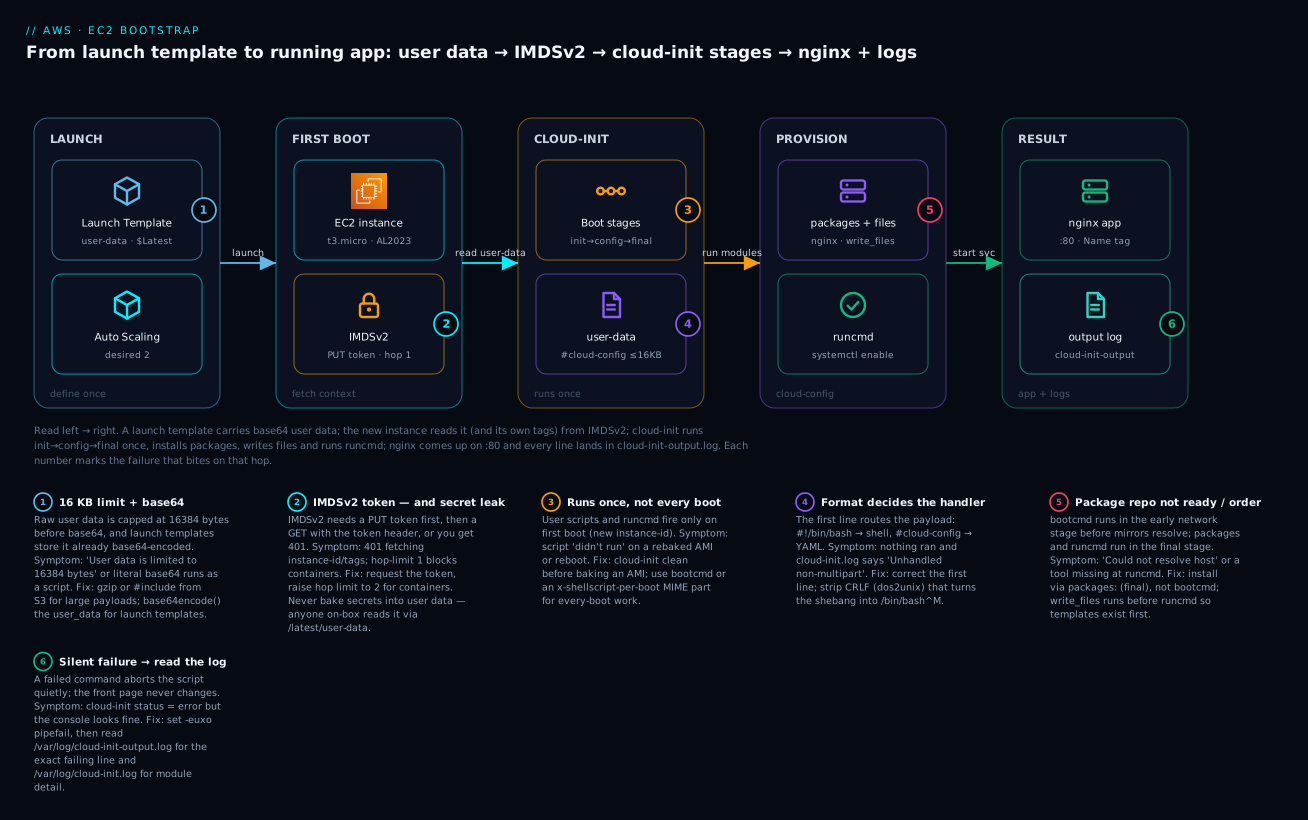
The diagram traces one instance from definition to serving traffic. On the left, a launch template carries base64 user data and an Auto Scaling group asks for two instances. Each new EC2 instance boots and immediately talks to IMDSv2 — first for the user data itself, then for its own Name tag and region. cloud-init then runs its four stages once (init → config → final): it installs nginx via the packages directive, drops the landing page with write_files, and executes runcmd to stamp the instance name into the page and start the service. The result is nginx serving on port 80, with every command’s output captured in /var/log/cloud-init-output.log. The six numbered badges mark the exact hops where bootstrapping fails: the 16 KB/base64 wall at the template, the IMDSv2 token (and the secret-leak risk) at metadata, the run-once semantics and the first-line-format trap in cloud-init, the package-repo race at provisioning, and the silent-failure-read-the-log rule at the output.
Real-world scenario
Lumen Retail runs a seasonal e-commerce site on an EC2 Auto Scaling group behind an ALB — normally six c6i.large instances, spiking to forty during a flash sale. Their bootstrap was a single 11 KB #!/bin/bash user-data script that installed the app runtime, pulled the application tarball from S3, wrote an nginx config, and started everything. It had worked for a year. Then, during the biggest sale of the quarter, the ASG scaled from six to thirty-two instances in four minutes — and roughly a third of the new instances came up serving the ALB’s health-check path but returning 502 for real traffic. The fleet was inconsistently configured, which is the worst kind of broken.
The on-call engineer did the right first move: aws ec2 get-console-output on a bad instance, then SSM into it and cloud-init status --long — which reported error. /var/log/cloud-init-output.log told the whole story in one line: Could not resolve host: repo.internal.lumen.com. The script installed a helper package from an internal mirror in an early step; on a cold, heavily-loaded launch, DNS for the internal mirror was occasionally not ready when that line ran, the package install failed, and because the script lacked set -e, execution continued past the failure, wrote the nginx config, and started nginx — against a broken app. The health check (a static file) passed; the app (which needed the missing helper) did not. On instances where DNS happened to be ready in time, everything worked. It was a race, so it only bit under the load that made it matter.
The fix was three changes, each a lesson from this article. First, they moved package installation out of the raw script and into a cloud-config packages: block, which runs in the final stage after the network is reliably up, and added package_update: true. Second, they added set -euxo pipefail to the remaining runcmd so a failure would be loud — the instance would fail its health check and be replaced, not silently serve broken. Third, they added a retry loop around the S3 tarball fetch and switched the internal-mirror pull to a gateway VPC endpoint so it no longer depended on public DNS timing. They also split the 11 KB script: the stable, heavy dependencies moved into a golden AMI rebuilt weekly (with cloud-init clean before the snapshot), shrinking user data to a 2 KB last-mile that fetched config from SSM Parameter Store. The next sale scaled to forty-four instances with zero misconfigured hosts, and boot time dropped from 90 seconds to 35 because the heavy installs were now baked. The root cause was never “AWS was slow” — it was a non-idempotent, no-error-handling script racing a package mirror, hidden until scale exposed it.
Advantages and disadvantages
| Advantages | Disadvantages |
|---|---|
| Free, built into every mainstream Linux AMI | Runs at boot — slows launch vs a baked AMI |
| Instant to change (edit template, no rebuild) | Hard 16 KB limit on raw user data |
| Declarative cloud-config is validated + idempotent | Runs once by default — surprises on rebake/reboot |
| Personalises each instance from IMDS (tags, id) | No secrets — user data is readable on-box |
| One template configures a whole ASG identically | Failures are quiet unless you add set -e |
| Cross-distro via cloud-config abstractions | Debugging means SSH/SSM + reading logs |
| Cleanly layered with AMI + config management | Imperative runcmd is still your responsibility |
User data shines for the last mile: small, fast-changing, per-environment configuration and fleet identity that you do not want frozen into an image. It struggles as the primary configuration mechanism for anything large, secret, or requiring ongoing enforcement — that is where golden AMIs and config management earn their place. The failure mode to respect is silence: a bootstrap that half-works and reports nothing is worse than one that fails loudly, so the discipline of set -euxo pipefail and a health check that actually exercises the app is what keeps “it configured itself” from becoming “it lied about configuring itself.”
Hands-on lab
You will launch an Auto Scaling group whose instances bootstrap nginx from a #cloud-config, pull their own Name tag from IMDSv2 into the landing page, then deliberately break the bootstrap and debug it from the console output and cloud-init logs. Everything is free-tier-friendly (a single t3.micro); a teardown is at the end.
⚠️ Costs money if left running: a
t3.microbeyond the 750-hour free tier (~$0.0104/hr inus-east-1) and its 8 GB gp3 EBS volume (~$0.64/mo). The lab uses one instance and tears it all down.
Prerequisites: aws CLI configured with a default region (us-east-1 here), a default VPC, and permission to use EC2, Auto Scaling and IAM. We use SSM Session Manager to get onto the box (no SSH port 22 opened).
Step 1 — Create an instance profile for SSM
aws iam create-role --role-name bootstrap-demo-role \
  --assume-role-policy-document '{"Version":"2012-10-17","Statement":[{"Effect":"Allow","Principal":{"Service":"ec2.amazonaws.com"},"Action":"sts:AssumeRole"}]}'

aws iam attach-role-policy --role-name bootstrap-demo-role \
  --policy-arn arn:aws:iam::aws:policy/AmazonSSMManagedInstanceCore

aws iam create-instance-profile --instance-profile-name bootstrap-demo-profile
aws iam add-role-to-instance-profile \
  --instance-profile-name bootstrap-demo-profile --role-name bootstrap-demo-role
Step 2 — Write the cloud-config user data
Create user-data.yaml. The __NAME__ placeholder is replaced at boot by the instance’s Name tag, read from IMDSv2:
#cloud-config
package_update: true
packages:
  - nginx
write_files:
  - path: /usr/share/nginx/html/index.html
    permissions: '0644'
    content: |
      <!doctype html><html><body>
      <h1>Hello from __NAME__</h1>
      <p>Bootstrapped by cloud-init.</p>
      </body></html>
runcmd:
  - |
    IMDS=http://169.254.169.254/latest
    TOKEN=$(curl -sX PUT "$IMDS/api/token" -H "X-aws-ec2-metadata-token-ttl-seconds: 21600")
    NAME=$(curl -s -H "X-aws-ec2-metadata-token: $TOKEN" "$IMDS/meta-data/tags/instance/Name")
    IID=$(curl -s -H "X-aws-ec2-metadata-token: $TOKEN" "$IMDS/meta-data/instance-id")
    sed -i "s/__NAME__/${NAME:-$IID}/" /usr/share/nginx/html/index.html
  - systemctl enable --now nginx
Step 3 — Resolve the AMI and create the launch template
Resolve the latest Amazon Linux 2023 AMI from the public SSM parameter, then base64-encode the user data (launch templates require base64):
AMI=$(aws ssm get-parameter \
  --name /aws/service/ami-amazon-linux-latest/al2023-ami-kernel-default-x86_64 \
  --query 'Parameter.Value' --output text)

# Linux: base64 -w0 ; macOS: base64 -i user-data.yaml | tr -d '\n'
B64=$(base64 -w0 user-data.yaml 2>/dev/null || base64 -i user-data.yaml | tr -d '\n')

aws ec2 create-launch-template \
  --launch-template-name bootstrap-demo-lt \
  --launch-template-data "{
    \"ImageId\":\"$AMI\",
    \"InstanceType\":\"t3.micro\",
    \"IamInstanceProfile\":{\"Name\":\"bootstrap-demo-profile\"},
    \"MetadataOptions\":{\"HttpTokens\":\"required\",\"HttpPutResponseHopLimit\":1,\"InstanceMetadataTags\":\"enabled\"},
    \"UserData\":\"$B64\",
    \"TagSpecifications\":[{\"ResourceType\":\"instance\",\"Tags\":[{\"Key\":\"Name\",\"Value\":\"bootstrap-demo\"}]}]
  }"
Note InstanceMetadataTags:enabled — without it, tags/instance/Name returns 404 and the page would fall back to the instance-id.
Step 4 — Create the Auto Scaling group
SUBNETS=$(aws ec2 describe-subnets \
  --query 'Subnets[?DefaultForAz==`true`].SubnetId' --output text | tr '\t' ',')

aws autoscaling create-auto-scaling-group \
  --auto-scaling-group-name bootstrap-demo-asg \
  --launch-template LaunchTemplateName=bootstrap-demo-lt,Version='$Latest' \
  --min-size 1 --max-size 1 --desired-capacity 1 \
  --vpc-zone-identifier "$SUBNETS"
Expected: within ~30 seconds the ASG launches one instance. Find it:
IID=$(aws autoscaling describe-auto-scaling-groups \
  --auto-scaling-group-names bootstrap-demo-asg \
  --query 'AutoScalingGroups[0].Instances[0].InstanceId' --output text)
echo "$IID"
Step 5 — Verify the bootstrap
Give it two minutes, then read the console output — cloud-init prints its progress and a final message there:
aws ec2 get-console-output --instance-id "$IID" --output text | grep -i cloud-init | tail -20
Then SSM onto the box and check directly:
aws ssm start-session --target "$IID"
# inside the session:
cloud-init status --long          # expect: status: done
curl -s localhost | grep -i hello # expect: <h1>Hello from bootstrap-demo</h1>
sudo tail -30 /var/log/cloud-init-output.log
exit
Expected: status: done, and the page shows Hello from bootstrap-demo (the Name tag pulled from IMDSv2). If it shows the instance-id instead, InstanceMetadataTags was not enabled or the tag did not propagate.
Step 6 — Break it on purpose, then debug
Publish a new launch template version with a deliberately broken runcmd (a typo’d service name) and roll the ASG onto it:
cat > bad-user-data.yaml <<'EOF'
#cloud-config
package_update: true
packages:
  - nginx
runcmd:
  - systemctl enable --now nginxx   # typo — no such unit
EOF

B64BAD=$(base64 -w0 bad-user-data.yaml 2>/dev/null || base64 -i bad-user-data.yaml | tr -d '\n')

aws ec2 create-launch-template-version \
  --launch-template-name bootstrap-demo-lt \
  --source-version 1 \
  --launch-template-data "{\"UserData\":\"$B64BAD\"}"

aws autoscaling start-instance-refresh --auto-scaling-group-name bootstrap-demo-asg
After the refresh replaces the instance, grab the new instance-id (Step 4’s command), SSM in, and diagnose:
cloud-init status --long
#   status: error
#   errors: [ ... runcmd ... ]

sudo grep -i -E 'fail|error' /var/log/cloud-init-output.log | tail
#   Failed to enable unit: Unit nginxx.service does not exist.
That is the whole loop: cloud-init status says error, and cloud-init-output.log names the exact failing command. Fix by publishing a corrected version (change nginxx back to nginx, create another template version, refresh). This mirrors real life — you fix user data by rolling a new version, never by editing a running instance.
Step 7 — Terraform equivalent
The same stack in Terraform (main.tf + user-data.yaml.tftpl):
data "aws_ssm_parameter" "al2023" {
  name = "/aws/service/ami-amazon-linux-latest/al2023-ami-kernel-default-x86_64"
}
data "aws_vpc" "default" { default = true }
data "aws_subnets" "default" {
  filter {
    name   = "vpc-id"
    values = [data.aws_vpc.default.id]
  }
}

resource "aws_iam_role" "boot" {
  name = "bootstrap-demo-role"
  assume_role_policy = jsonencode({
    Version = "2012-10-17"
    Statement = [{
      Effect    = "Allow"
      Principal = { Service = "ec2.amazonaws.com" }
      Action    = "sts:AssumeRole"
    }]
  })
}

resource "aws_iam_role_policy_attachment" "ssm" {
  role       = aws_iam_role.boot.name
  policy_arn = "arn:aws:iam::aws:policy/AmazonSSMManagedInstanceCore"
}

resource "aws_iam_instance_profile" "boot" {
  name = "bootstrap-demo-profile"
  role = aws_iam_role.boot.name
}

resource "aws_launch_template" "boot" {
  name_prefix   = "bootstrap-demo-"
  image_id      = nonsensitive(data.aws_ssm_parameter.al2023.value)
  instance_type = "t3.micro"

  iam_instance_profile { name = aws_iam_instance_profile.boot.name }

  metadata_options {
    http_tokens                 = "required"
    http_put_response_hop_limit = 1
    instance_metadata_tags      = "enabled"
  }

  # Launch templates need base64-encoded user data
  user_data = base64encode(templatefile("${path.module}/user-data.yaml.tftpl", {}))

  tag_specifications {
    resource_type = "instance"
    tags          = { Name = "bootstrap-demo" }
  }
}

resource "aws_autoscaling_group" "boot" {
  name                = "bootstrap-demo-asg"
  min_size            = 1
  max_size            = 1
  desired_capacity    = 1
  vpc_zone_identifier = data.aws_subnets.default.ids

  launch_template {
    id      = aws_launch_template.boot.id
    version = "$Latest"
  }

  tag {
    key                 = "Name"
    value               = "bootstrap-demo"
    propagate_at_launch = true
  }

  instance_refresh { strategy = "Rolling" }
}
terraform apply builds the same fleet; terraform destroy removes it.
Step 8 — Teardown
aws autoscaling delete-auto-scaling-group \
  --auto-scaling-group-name bootstrap-demo-asg --force-delete
aws ec2 delete-launch-template --launch-template-name bootstrap-demo-lt
aws iam remove-role-from-instance-profile \
  --instance-profile-name bootstrap-demo-profile --role-name bootstrap-demo-role
aws iam delete-instance-profile --instance-profile-name bootstrap-demo-profile
aws iam detach-role-policy --role-name bootstrap-demo-role \
  --policy-arn arn:aws:iam::aws:policy/AmazonSSMManagedInstanceCore
aws iam delete-role --role-name bootstrap-demo-role
Verify teardown: aws autoscaling describe-auto-scaling-groups --auto-scaling-group-names bootstrap-demo-asg returns an empty list, and no bootstrap-demo instance remains.
Common mistakes & troubleshooting
This is the section you will come back to. First the playbook — symptom, root cause, the exact command or path to confirm, and the fix. Then a log-string reference and an HTTP-status reference for IMDS.
| # | Symptom | Root cause | Confirm (exact command / path) | Fix |
|---|---|---|---|---|
| 1 | Script “didn’t run” at all | Not first boot — AMI rebaked from a booted instance keeps “done” state | cloud-init status; ls /var/lib/cloud/instances/ |
Run cloud-init clean --logs before baking the AMI |
| 2 | Nothing ran, no error | Wrong first line — not #! or #cloud-config |
cloud-init query userdata; grep -i unhandled /var/log/cloud-init.log |
Fix the first line; it must be exact |
| 3 | /bin/bash^M: bad interpreter |
CRLF line endings (edited on Windows) | file user-data.yaml; cat -A shows ^M |
dos2unix user-data.yaml; save as LF |
| 4 | Ran, but app is broken; no obvious error | A command failed and the script continued | sudo cat /var/log/cloud-init-output.log |
Add set -euxo pipefail; read the log |
| 5 | cloud-config silently ignored | Invalid YAML / schema error | sudo cloud-init schema --system |
Fix indentation/keys; validate before launch |
| 6 | Commands assume ec2-user env |
User scripts run as root, cwd /, $HOME=/root |
Add whoami; pwd to the script; read the log |
Use absolute paths; don’t assume a user env |
| 7 | IMDS 401 Unauthorized |
IMDSv2 required but no session token sent | curl http://169.254.169.254/latest/meta-data/ (no token) → 401 |
PUT a token first, pass it as a header |
| 8 | tags/instance/Name → 404 |
InstanceMetadataTags disabled or tag not set at launch |
curl -H "$hdr" .../tags/instance → 404 |
Enable InstanceMetadataTags; ensure the tag propagates |
| 9 | IMDS token times out in a container | Default HttpPutResponseHopLimit: 1 blocks the extra hop |
Works on host, times out in container | Set HttpPutResponseHopLimit: 2 |
| 10 | Launch fails: 16 KB exceeded | Raw user data > 16384 bytes | wc -c user-data.yaml; API error on run/create |
gzip; #include from S3; bake into AMI |
| 11 | Package install fails / races | Ran too early (bootcmd) or mirror/DNS not ready | cloud-init-output.log: Could not resolve host |
Use packages: (final stage), not bootcmd; add retries/VPC endpoint |
| 12 | apt: command not found (or dnf) |
Wrong package manager for the distro | cat /etc/os-release |
Match the manager/package names to the AMI |
| 13 | runcmd runs before files exist |
Ordering assumption inside runcmd | output.log: No such file or directory |
Put files in write_files (init stage, before runcmd) |
| 14 | Secret leaked | Password/key baked into user data | aws ec2 describe-instance-attribute --instance-id i-… --attribute userData |
Move to SSM/Secrets Manager; rotate the leaked value |
| 15 | Launch template runs literal base64 | User data not base64-encoded for the template | Instance runs garbage; cloud-init query userdata shows base64 |
base64-encode (base64encode() in TF) |
| 16 | Fixed the template, fleet still broken | Running instances keep the old template version | Compare LT versions vs the ASG’s version | New version + instance refresh |
| 17 | Can’t change user data on a running instance | Standalone instances only accept it while stopped | modify-instance-attribute errors while running |
Stop the instance, then --user-data, start |
Log-string reference — read the right line
| Log line (in the file below) | File | Means | Do this |
|---|---|---|---|
Unhandled non-multipart (text/x-not-multipart) userdata |
cloud-init.log | First line wasn’t recognised | Fix #!/#cloud-config |
Failed loading yaml blob / schema error |
cloud-init.log | cloud-config YAML invalid | cloud-init schema --system |
Could not resolve host |
cloud-init-output.log | DNS/network not ready or no route | Move to final stage; check route/DNS |
bad interpreter: No such file or directory |
cloud-init-output.log | CRLF or wrong shebang path | dos2unix; correct the shebang |
Package ... not found |
cloud-init-output.log | Wrong package name/manager | Match distro |
Unit nginxx.service does not exist |
cloud-init-output.log | Typo / service not installed | Fix the name / install first |
WARNING: ... Get metadata ... 401 |
cloud-init.log | IMDSv2 token missing | Provide a token |
datasource not found |
cloud-init.log | IMDS unreachable / disabled | Check HttpEndpoint, network |
IMDS HTTP status reference
| Status | When fetching metadata | Cause | Fix |
|---|---|---|---|
200 OK |
Normal | Token valid, path exists | — |
401 Unauthorized |
IMDSv2 | No/expired token | PUT a fresh token, pass the header |
403 Forbidden |
Rare | Path not permitted | Use a valid metadata path |
404 Not Found |
e.g. tags/instance/* |
Feature off or key absent | Enable tags-in-IMDS; check the key |
| Connection timeout | Any | HttpEndpoint disabled or hop-limit too low |
Enable endpoint; raise hop limit to 2 |
The three nastiest failures, in prose
“It works on the instance I tested but the fleet came up wrong.” Almost always a race made visible by scale (the Lumen story) or a non-idempotent step. Reproduce by launching several instances at once, not one. Fix by moving package installs to the packages: directive (final stage, network guaranteed up), adding set -euxo pipefail so failures replace the instance instead of serving broken, and wrapping any network fetch in a retry with backoff. A bootstrap that fails loudly and gets replaced by the ASG is healthier than one that half-succeeds silently.
“My script didn’t run — and there’s genuinely no error.” Three usual causes, in order of frequency: the first line isn’t a recognised handler (a stray blank line or a comment above #cloud-config breaks detection — it must be line one, byte one); CRLF endings turned #!/bin/bash into #!/bin/bash\r; or the instance was launched from an AMI that already had cloud-init state and skipped bootstrapping. Confirm with cloud-init query userdata (did the payload even arrive?) and grep -i unhandled /var/log/cloud-init.log. The muscle memory is: status → query userdata → output.log, in that order.
“Someone put a password in user data.” This is a security incident, not a bug. User data is readable by any process on the instance via http://169.254.169.254/latest/user-data — no credentials needed — and by anyone with ec2:DescribeInstanceAttribute via describe-instance-attribute --attribute userData. Treat any secret that ever touched user data as compromised: rotate it immediately, then re-architect to fetch it at boot from SSM Parameter Store (SecureString) or Secrets Manager using the instance role. There is no “delete it and we’re fine” — assume it was read.
Best practices
- Always start scripts with
set -euxo pipefail. Loud failure beats silent half-configuration;-xtraces every command into the log. - Prefer cloud-config directives over shell.
packages,write_files,usersare validated and idempotent; keepruncmdfor the genuinely imperative tail. - Install packages via
packages:, not insideruncmd/bootcmd. They run in the final stage with the network reliably up, beforescripts-user. - Write every imperative step idempotently. Guard with
id -u,test -f,mkdir -p,ln -sfn— assume it may run twice. - Run
cloud-init clean --logsbefore baking an AMI from a booted instance, or the image inherits “already bootstrapped.” - Enforce IMDSv2 (
HttpTokens: required) and keepHttpPutResponseHopLimit: 1unless containers need2. - Enable
InstanceMetadataTagswhen your bootstrap reads its own tags, and set tags at launch (propagate_at_launchon the ASG). - Never put secrets in user data. Fetch them at boot from SSM/Secrets Manager with the instance role.
- Keep user data small; layer with a golden AMI. Bake heavy, slow-changing deps; leave the last mile to user data.
- Change fleets by new launch-template version + instance refresh, never by editing a live instance.
- Make your health check exercise the app, not a static file, so a half-bootstrapped instance actually fails and gets replaced.
- Validate before you launch:
cloud-init schema --config-file user-data.yamlcatches YAML errors on your laptop.
Security notes
Bootstrapping touches identity, credentials and network egress, so it is a real security surface. The cardinal rule bears repeating: user data is not a secret store. It is world-readable on the instance and readable via an IAM-guarded API off it. Anything sensitive must be fetched at runtime.
| Concern | Anti-pattern | Do instead |
|---|---|---|
| Database password / API key | Inline in user data | SSM Parameter Store SecureString (KMS) or Secrets Manager, fetched via instance role |
| Fetching those secrets | Long-lived access keys in user data | Instance profile (temporary role creds from IMDS) |
| IMDS access | IMDSv1 (HttpTokens: optional) |
HttpTokens: required (IMDSv2) |
| SSRF via metadata | Default hop limit for a public-facing proxy | Keep hop limit 1; only raise for containers |
| Reading user data off-box | Broad ec2:DescribeInstanceAttribute |
Scope IAM; treat past inline secrets as leaked |
| Least privilege | One fat role for the fleet | Minimal instance-profile policy per app |
| Egress for package/config pulls | Wide-open outbound to the internet | VPC endpoints (S3, SSM) + tight security groups |
For the lab’s secret-fetch pattern, the instance profile gets ssm:GetParameter on a specific parameter ARN, and the bootstrap pulls it in runcmd:
DB_PASS=$(aws ssm get-parameter --name /lumen/prod/db-pass \
  --with-decryption --query 'Parameter.Value' --output text)
The credential to call SSM comes from the instance role via IMDS — never from a key baked into the payload. Encrypt the parameter with a customer-managed KMS key if you need per-key access control and an audit trail in CloudTrail.
Cost & sizing
User data and cloud-init are free — the mechanism costs nothing. What you pay for is the compute they configure and any resources the bootstrap reaches. Rough figures (us-east-1, mid-2026):
| Item | Cost driver | Rough cost | Notes |
|---|---|---|---|
| User data / cloud-init | — | $0 | Built into the AMI |
t3.micro instance |
Hours running | ~$0.0104/hr (~$7.5/mo 24×7 ≈ ₹625) | Free tier: 750 hr/mo, 12 months |
| gp3 root EBS 8 GB | GB-month | ~$0.64/mo (~₹53) | Deleted on teardown |
| SSM Parameter Store (standard) | Params | $0 | Standard tier free |
| SSM Parameter Store (advanced) | Params | $0.05/param/mo | Only if you need >4 KB / >10k |
| Secrets Manager | Secrets + API | $0.40/secret/mo + $0.05/10k calls | Rotation built in |
Data transfer (S3 #include, mirror) |
GB out | Varies | Use VPC endpoints to avoid NAT/egress |
| NAT Gateway (if bootstrap egresses) | Hourly + GB | ~$0.045/hr + data | Prefer S3/SSM gateway endpoints (free) |
Sizing guidance: bootstrap work does not need a big instance — pick the instance for the workload, not the boot. Do keep boot fast on autoscaled fleets, because slow bootstraps lengthen the time-to-serve when you scale out under load; a 90-second user-data install that could have been baked into the AMI is 90 seconds of unserved demand per new instance during a spike. The cheapest optimisation is to move heavy, stable installs into a golden AMI and keep user data to the small, fast last mile — you pay the install cost once at image-build time instead of on every launch.
Interview & exam questions
Q1. What is the difference between user data and cloud-init?
User data is the text blob you attach to an instance at launch (≤16 KB), stored by AWS and exposed to the instance at /latest/user-data. cloud-init is the agent inside the AMI that reads that blob on boot and acts on it. AWS does not interpret user data; cloud-init does. (SAA-C03, SOA-C02)
Q2. How does cloud-init decide whether user data is a script or cloud-config?
By the first line. #! (any shebang) means a shell script run once as root; #cloud-config means a YAML directives document. Other prefixes (#include, #cloud-boothook), MIME headers, or gzip magic bytes select other handlers. A wrong first line means the payload is ignored. (SOA-C02)
Q3. Why did my user-data script run the first time but not after a reboot?
User-data scripts and runcmd run once per instance-id, tracked by semaphores under /var/lib/cloud. Reboots and stop/start do not re-run them. For every-boot behaviour use bootcmd or an x-shellscript-per-boot MIME part; to force a one-off re-run use cloud-init clean. (DVA-C02)
Q4. How do you read the instance’s own tags from inside a bootstrap script?
Enable InstanceMetadataTags in the metadata options, ensure the tag is set at launch, then fetch /latest/meta-data/tags/instance/<Key> from IMDSv2 (PUT for a token, GET with the token header). Without the option enabled, that path returns 404. (SAA-C03)
Q5. Why is putting a database password in user data a bad idea?
User data is readable by any process on the instance via IMDS with no credentials, and off-box via ec2:DescribeInstanceAttribute. Secrets belong in SSM Parameter Store (SecureString) or Secrets Manager, fetched at boot with the instance role. A secret that ever touched user data should be rotated. (SCS, DVA-C02)
Q6. What is the 16 KB limit and how do you work around it?
Raw user data is capped at 16384 bytes before base64 encoding. Work around it by gzip-compressing the payload (cloud-init auto-decompresses), using #include to fetch a larger script from S3/HTTP, fetching config from SSM/S3 in a small bootstrap, or baking the bulk into a golden AMI. (SAA-C03)
Q7. In which cloud-init stage do packages and runcmd execute, and why does the order matter?
packages install in the final stage, and runcmd commands also execute in the final stage via scripts-user, after the package install module — so a package you list in packages: is available to your runcmd. write_files and bootcmd run earlier (init/network stage), so files exist before runcmd. (SOA-C02)
Q8. IMDSv1 vs IMDSv2 — what changed and why?
IMDSv2 is session-oriented: you PUT for a short-lived token, then send it as a header on every GET. This defeats SSRF attacks that could trick a server into proxying a metadata request and leaking role credentials. Enforce it with HttpTokens: required. (SCS)
Q9. How do you change the bootstrap for a running Auto Scaling group? Publish a new launch template version with the new user data, point the ASG at it, and trigger an instance refresh. Running instances keep their old user data until replaced; editing user data does not touch live instances. (SAA-C03)
Q10. Where do you look first when a bootstrap fails?
cloud-init status --long (running/done/error), then /var/log/cloud-init-output.log (stdout/stderr of your commands — where the failing line appears), then /var/log/cloud-init.log (module-level detail, datasource, schema errors). aws ec2 get-console-output gives the same from outside the box. (SOA-C02)
Q11. What does set -euxo pipefail buy you in a user-data script?
-e aborts on the first error (loud failure instead of a half-configured instance), -u catches unset variables, -x traces every command into cloud-init-output.log for debugging, and -o pipefail propagates failures through pipes. It converts silent partial success into a clear, replaceable failure. (DVA-C02)
Q12. How do you combine a cloud-config and a shell script in one user data?
Use a MIME multipart document with a text/cloud-config part and a text/x-shellscript part, built with write-mime-multipart. cloud-init processes each part by its Content-Type. This lets you keep declarative directives and an imperative step in one payload. (SOA-C02)
Quick check
- Your
#cloud-configproduced no effect and no error. What is the single most likely cause, and how do you confirm it? - You need a command to run on every boot, not just the first. Name two mechanisms.
- A bootstrap script in a Docker container can’t reach IMDS, but it works on the host. What setting fixes it?
- You baked an AMI from a running instance; new instances from it skip your user data. Why, and what one command prevents it?
- Which is readable by any process on the instance with no credentials: user data, or a Secrets Manager secret? What follows from that?
Answers
- Invalid YAML (or a first line that isn’t exactly
#cloud-configon line one). Confirm withsudo cloud-init schema --systemandgrep -i -E 'yaml|unhandled' /var/log/cloud-init.log. bootcmd(runs early, every boot) and atext/x-shellscript-per-bootMIME part (runs every boot in the final stage).#cloud-boothookalso runs every boot but you dedupe it yourself.- Raise
HttpPutResponseHopLimitto2in the instance metadata options — the default1drops the token packet before it reaches the container’s extra network hop. - The AMI inherited cloud-init’s per-instance state/semaphores marking bootstrap “done.” Run
cloud-init clean --logson the instance before creating the AMI. - User data is readable by any process via
http://169.254.169.254/latest/user-datawith no credentials; a Secrets Manager secret requires IAM permission and is not on the box. Therefore secrets go in Secrets Manager/SSM and are fetched at boot with the instance role — never in user data.
Glossary
| Term | Definition |
|---|---|
| User data | Up to 16 KB of text attached to an instance at launch, exposed at IMDS /latest/user-data. |
| cloud-init | The multi-stage boot agent, baked into most Linux AMIs, that reads user data and configures the instance. |
| Script form | User data beginning with #!; a shell script run once, as root, on first boot. |
| cloud-config | User data beginning with #cloud-config; a YAML document of declarative directives. |
| Boot stage | One of cloud-init’s four phases — init-local, init (network), config, final — each running a set of modules. |
| Module | A unit of cloud-init work (e.g. runcmd, write-files, packages) mapped to a stage. |
runcmd |
cloud-config directive: shell commands run once, in the final stage, via scripts-user. |
bootcmd |
cloud-config directive: shell commands run early, on every boot. |
write_files |
cloud-config directive that creates files with content, owner and permissions (init stage). |
| Idempotent | Running it again changes nothing and errors nowhere — the property every bootstrap should have. |
| IMDS / IMDSv2 | The Instance Metadata Service at 169.254.169.254; v2 requires a session token per request. |
| Instance profile | An IAM role attached to an instance, giving its processes temporary credentials via IMDS. |
| Launch template | A versioned launch specification (AMI, type, user data, metadata options) an ASG uses. |
| Instance refresh | The ASG operation that rolls a fleet onto a new launch-template version. |
cloud-init clean |
Wipes cloud-init state so the next boot re-runs all modules; run before baking an AMI. |
| Golden AMI | A pre-configured image (built with Packer or similar) carrying stable, heavy dependencies. |
Next steps
- Launch and connect to your first EC2 instance over SSH to ground the fundamentals this article builds on.
- Right-size the instances your bootstrap configures with choosing EC2 instance types and families.
- See where EC2 sits among the alternatives in AWS Compute: EC2, Lambda, ECS and EKS — which one to choose?.
- Move heavy, stable dependencies out of user data and into a golden AMI with a Packer build pipeline.
- Replace any inline secrets with SSM Parameter Store or Secrets Manager fetched via the instance role at boot.