You need to run something on a server in AWS, and the console offers you a dropdown with over 800 EC2 instance types — t3.micro, m7g.2xlarge, c7i.4xlarge, r7iz.8xlarge, i4i.metal, p5.48xlarge. Nobody explains what the letters and numbers mean, so most people pick t2.micro because it’s free, or m5.large because a blog said so, and then either fight CPU throttling for months or burn money on a box that idles at 8% all day. Both mistakes are avoidable once you can read the name and match a workload to a family.
An EC2 instance type is just a fixed recipe of virtual hardware: a number of vCPUs, an amount of memory, a processor (Intel, AMD, or AWS’s own Graviton ARM chips), a network bandwidth ceiling, an EBS bandwidth ceiling, and sometimes local NVMe disks or GPUs. The name encodes most of that in a handful of characters. m7g.2xlarge reads as family m (general purpose) · generation 7 · attribute g (Graviton) · size 2xlarge (8 vCPU / 32 GiB). Learn that grammar and the 800-item dropdown collapses into a short decision: what shape is my workload, which family matches that shape, and how big does it need to be?
This guide teaches the whole grammar. You will decode the name character by character, walk every family with real specs and use-cases, choose between Graviton, Intel and AMD on price and performance, understand the Nitro system that underpins modern instances, and then right-size with Compute Optimizer and CloudWatch so you stop paying for capacity you never use. There’s a copy-pasteable lab that uses aws ec2 describe-instance-types to pick a type, launches it, reads the right-sizing signals, changes the type, and tears everything down — in both the CLI and Terraform. Purchasing models (On-Demand, Spot, Savings Plans, Reserved) are a separate axis from which type — they’re covered in their own article; here we focus entirely on picking the right hardware shape.
What problem this solves
Picking an instance type wrong costs you in two directions at once, and both are silent for weeks.
Over-provisioning is the common one. You size for a peak you imagined, ship an m5.4xlarge (16 vCPU / 64 GiB) for a service that runs at 6% CPU and 20% memory, and it costs the same whether it serves a million requests or zero — roughly $490/month in us-east-1 for a box doing the work of a large. Multiply by a fleet and by every environment (dev, staging, prod) and over-provisioning is usually the single biggest line on an EC2 bill. Nobody notices because the app works; it just costs 6x what it should.
Under-provisioning is nastier because it looks like an application bug. A T burstable instance runs out of CPU credits and gets throttled to a 10-20% baseline, so your API latency triples at 3pm every day and you spend a week blaming the code. A memory-optimized job lands on a compute-optimized box and the kernel OOM-kills it. An EBS-bandwidth-bound database saturates the instance’s storage ceiling — not the volume’s — and no amount of CPU or IOPS on the volume helps. A Graviton binary won’t start on the ARM box because it was compiled for x86. Each of these is a wrong-type problem masquerading as something else, and each has a specific fingerprint you’ll learn to spot.
Everyone who runs EC2 hits this: developers launching a first instance, architects standardising a fleet, SREs chasing a latency regression, and finance asking why compute doubled. Getting the type right the first time — and re-checking it with data every quarter — is the difference between a predictable bill and a mystery. It’s also squarely on the exams: CLF-C02 expects you to know the families and burstable behaviour, and SAA-C03 expects you to right-size and to reason about Graviton, Nitro, and storage-optimized trade-offs.
Learning objectives
By the end of this article you can:
- Decode any instance name — split
r7iz.8xlargeinto family, generation, attributes and size, and know the vCPU/memory it implies. - Name the size ladder from
nanotometaland apply the “each step doubles” rule to predict specs and price. - Match a workload to a family — T, M, C, R/X/z, I/D/Im/Is, P/G/Inf/Trn/DL, and HPC — from its CPU:memory ratio and its special needs.
- Explain burstable T instances — CPU credits, per-size baselines, Standard vs Unlimited mode, and the billing risk of Unlimited.
- Choose a processor — Graviton (ARM64) vs Intel vs AMD — on price/performance, and avoid the porting trap.
- Read the specs that scale with size — vCPU, memory, network bandwidth, EBS bandwidth, and which numbers are burst vs sustained.
- Right-size with data — interpret Compute Optimizer findings and the CloudWatch signals (CPU, memory, network, EBS, credit balance) that drive them.
- Change an instance’s type safely — the stop / modify / start flow, and the compatibility rules that bite (architecture, virtualization, AZ availability).
Prerequisites & where this fits
You should have an AWS account, the AWS CLI v2 configured (aws configure), and permission to launch and describe EC2. Basic comfort with a VPC (a default VPC is fine), a security group, and an SSH key pair is assumed — if you’ve never launched an instance, start with Launch Your First EC2 Instance and SSH In and come back. You don’t need to know Terraform to read the CLI path, but the IaC snippets use the hashicorp/aws provider.
Where this sits: choosing a type is step one of running any server workload. It comes after you’ve decided EC2 is the right service at all — if you’re still weighing EC2 against Lambda, ECS and EKS, read AWS Compute: EC2, Lambda, ECS and EKS — Which One to Choose? first. It comes before you bootstrap the box with startup scripts (EC2 User Data and cloud-init Bootstrapping), put it behind an Auto Scaling group and load balancer, or commit to a purchasing model. Type selection and purchasing model are independent axes: you pick the shape here (this article) and the commitment — On-Demand, Spot, Savings Plans, Reserved — separately. A c7g.xlarge is the same hardware whether you pay On-Demand or under a Savings Plan.
| You are here in the workflow | Covered here? | Where it lives |
|---|---|---|
| Is EC2 even the right service? | No | EC2 vs Lambda vs ECS vs EKS |
| Which instance type / family / size? | Yes | This article |
| Which CPU architecture (Graviton/Intel/AMD)? | Yes | This article |
| Right-size an existing instance | Yes | This article |
| How do I pay for it (On-Demand/Spot/SP/RI)? | No — separate axis | Purchasing models article |
| Bootstrap the OS on boot | No | User data / cloud-init article |
| Scale a fleet automatically | No | Auto Scaling / ALB article |
Core concepts
Before the families, pin down the vocabulary. Every instance type is defined by these dimensions, and the whole art of choosing is matching them to your workload.
| Term | What it means | Why it decides your choice |
|---|---|---|
| vCPU | A virtual CPU — one thread of a physical core (2 vCPUs ≈ 1 hyper-threaded core on x86; on Graviton 1 vCPU = 1 physical core, no SMT) | Compute-bound work needs more vCPUs; the count sets the base price |
| Memory (RAM) | GiB of RAM allocated to the instance | Caches, JVMs, in-memory DBs, analytics need memory; drives the family (C/M/R) |
| CPU:memory ratio | GiB of RAM per vCPU | The single most useful signal for family selection: C≈2, M≈4, R≈8, X≈16-32 |
| Processor | Intel Xeon, AMD EPYC, or AWS Graviton (ARM64) | Sets price/performance and whether your binaries run (arch) |
| Network bandwidth | Gbps the instance can push, often “Up to X” (burst) on small sizes | Chatty services, replication, HPC, data movers care |
| EBS bandwidth | Dedicated Gbps/IOPS to EBS volumes, separate from network | Databases and I/O-heavy apps hit this ceiling before the volume’s |
| Instance store | Local NVMe/SSD physically attached to the host (the d attribute) |
Ultra-fast, but ephemeral — gone on stop/resize/failure |
| Nitro | AWS’s hardware offload + lightweight hypervisor for modern instances | Enables near-bare-metal perf, ENA/EFA, EBS-as-NVMe, bare metal |
| Burstable (T) | Instances that run at a low baseline and spend CPU credits to burst | Cheapest way to run spiky, mostly-idle workloads |
| Generation | The number in the name (5, 6, 7…) — newer silicon | Newer gens are usually faster and cheaper per unit — prefer them |
Two ideas do most of the work. First, the CPU:memory ratio picks the family. Measure how much RAM your workload actually uses per vCPU of CPU it burns, and the family falls out: 2 GiB/vCPU → C (compute), 4 → M (general), 8 → R (memory), 16-32+ → X (extreme memory). Second, the size picks the amount, and sizes double. From large upward, each named step doubles vCPU and memory (and lifts the network/EBS ceilings), so xlarge is 2× large, 2xlarge is 4× large, and price scales roughly linearly with it. Everything else — attributes, processor, Nitro — is refinement on top of those two decisions.
Decode the instance name
Every EC2 name has the same grammar: <family><generation><attributes>.<size>. Read it left to right.
Take m7g.2xlarge:
| Part | Value | Meaning |
|---|---|---|
| Family | m |
General purpose (balanced CPU:memory) |
| Generation | 7 |
7th generation — the silicon vintage (newer = faster/cheaper) |
| Attributes | g |
AWS Graviton processor (ARM64) |
| Separator | . |
Splits the hardware class from the size |
| Size | 2xlarge |
8 vCPU / 32 GiB — four steps up the ladder from large |
A denser example, r7iz.8xlarge: family r (memory-optimized) · gen 7 · attributes iz (i = Intel, z = high frequency / high clock) · size 8xlarge (32 vCPU / 256 GiB). And c6gd.4xlarge: family c (compute) · gen 6 · attributes gd (g = Graviton, d = local NVMe instance store) · size 4xlarge.
The attribute letters
The lowercase letters between the generation and the dot are additional capabilities. Order matters only for readability; each letter is independent. Memorise this table — it’s the part people never learn:
| Letter | Means | Example | Notes |
|---|---|---|---|
g |
AWS Graviton (ARM64) processor | m7g, c7g, r7g |
Best price/performance; needs ARM64 binaries |
i |
Intel processor | m7i, c7i, r7i |
Used when the family’s default isn’t Intel |
a |
AMD EPYC processor | m7a, c7a, r7a |
~10% cheaper than Intel i, x86-compatible |
d |
Local NVMe instance store (disk) | m6gd, c6id, r6gd |
Fast ephemeral storage on the host |
n |
Network- and EBS-optimized (higher bandwidth) | c6in, m5n, r6in |
For network- or EBS-bound workloads |
e |
Extra storage or memory | x1e, x2iedn |
Bumps memory/storage above the base spec |
z |
High frequency (higher all-core clock) | m5zn, r7iz, z1d |
For per-core-licensed or latency-sensitive apps |
b |
Block storage (EBS) optimized to extreme | r5b |
Very high EBS throughput/IOPS |
q |
Qualcomm inference accelerators | dl2q |
Niche ML inference |
flex |
Flex — cheaper, can’t hold 100% forever | m7i-flex, c7i-flex |
~5% cheaper; bursts to full, sustains ~40% |
So c6in = compute · gen 6 · Intel · network-optimized; x2iedn = extreme-memory · gen 2 · Intel · extra-memory · NVMe · network-optimized. When a family has multiple processor variants in the same generation — m7i, m7a, m7g — they’re the same shape (same vCPU:memory) on three different chips, and you choose on price/performance and architecture.
A subtle one: on some older families the absence of a processor letter meant Intel by default (
m5= Intel,m5a= AMD,m5n= Intel+network). Newer families spell it out (m7i/m7a/m7g). When you see a barem6i.largenext tom6a.large, they’re deliberately distinguished; a lonem5.largeis Intel.
The size ladder
After the dot comes the size. Sizes form a ladder, and from large up, each step roughly doubles vCPU and memory (and raises the network and EBS ceilings). The small end (nano–medium) is mostly T-family territory.
| Size | Relative vCPU (M/C/R families) | Typical use | Notes |
|---|---|---|---|
nano |
shared/burst, ~2 vCPU, 0.5 GiB (T only) | Tiny cron, bastion | T family only |
micro |
~2 vCPU, 1 GiB (T only) | Free-tier, tiny apps | Free-tier eligible |
small |
~2 vCPU, 2 GiB (T only) | Small sites | T family only |
medium |
1–2 vCPU, 4 GiB | Small services, c*.medium=1 vCPU |
First non-T size in some families |
large |
2 vCPU | The baseline “1×” step | M=8 GiB, C=4 GiB, R=16 GiB |
xlarge |
4 vCPU (2×) | Small production service | |
2xlarge |
8 vCPU (4×) | Mid service | |
4xlarge |
16 vCPU (8×) | Busy service / small DB | |
8xlarge |
32 vCPU (16×) | Large service / DB | |
12xlarge |
48 vCPU (24×) | Large workload | Not every family has 12xl |
16xlarge |
64 vCPU (32×) | Very large | |
24xlarge |
96 vCPU (48×) | Very large | |
32xlarge |
128 vCPU (64×) | Huge (X/mem families) | |
48xlarge |
192 vCPU (96×) | Largest virtualized | 7th-gen top size |
metal / metal-24xl / metal-48xl |
Whole physical host, no hypervisor | Nested virt, licensing, ultra-low latency | You get the entire server |
The doubling rule is not just about specs — price roughly doubles too, so 2xlarge costs about 4× large. That makes the ladder your cost dial: right-sizing is usually “move down one step,” which cuts the bill ~50% for that box. .metal is special: you get the raw physical server with no hypervisor, for workloads that need hardware features, their own hypervisor (nested virtualization), or licences tied to physical cores.
The instance families, end to end
There are five broad categories — general purpose, compute-optimized, memory-optimized, storage-optimized, accelerated — plus burstable (a special general-purpose sub-type) and HPC. Here’s the whole map first, then each family in depth.
The family cheat-sheet
| Family | Category | CPU:mem (GiB/vCPU) | Best for | Example type | Example spec |
|---|---|---|---|---|---|
| T (t3, t3a, t4g, t2) | Burstable general | ~2–4 (variable) | Spiky, mostly-idle: small web, dev, microservices | t4g.medium |
2 vCPU / 4 GiB |
| M (m7i, m7a, m7g, m5) | General purpose | 4 | Balanced default: app servers, mid DBs, backends | m7g.xlarge |
4 vCPU / 16 GiB |
| C (c7g, c7i, c7a, c5) | Compute-optimized | 2 | CPU-bound: encoding, build farms, game/ad servers, HPC front-ends | c7g.2xlarge |
8 vCPU / 16 GiB |
| R (r7i, r7g, r7a, r5) | Memory-optimized | 8 | RAM-heavy: caches, in-memory DBs, real-time analytics | r7g.2xlarge |
8 vCPU / 64 GiB |
| X (x2idn, x2iedn, x1e) | Extreme memory | 16–32 | Big in-memory DBs, SAP, Spark | x2idn.16xlarge |
64 vCPU / 1024 GiB |
| z (z1d, r7iz) | High-frequency memory | 8 | Per-core-licensed EDA, high-freq trading | z1d.2xlarge |
8 vCPU / 64 GiB @ 4.0 GHz |
| High-mem (u7i, u-*) | Extreme memory | up to ~48 | SAP HANA scale-up | u7i-12tb.224xlarge |
896 vCPU / 12 TiB |
| I (i4i, i3, i4g) | Storage (IOPS) | ~8 | NoSQL, OLTP, search, high random IOPS | i4i.2xlarge |
8 vCPU / 64 GiB + NVMe |
| D / Dn (d3, d3en) | Storage (dense HDD) | ~4–8 | Data lakes, MapReduce, distributed FS | d3.2xlarge |
8 vCPU / 64 GiB + 6 TB HDD |
| Im / Is (im4gn, is4gen) | Storage (dense NVMe) | 4 / 6 | High-density SSD, log/stream stores | im4gn.2xlarge |
8 vCPU / 32 GiB + NVMe |
| P (p5, p4d, p3) | Accelerated (GPU) | varies | ML training, HPC, big simulations | p5.48xlarge |
192 vCPU / 2 TiB / 8× H100 |
| G (g6, g5, g4dn) | Accelerated (GPU) | varies | Inference, graphics, small training | g5.xlarge |
4 vCPU / 16 GiB / 1× A10G |
| Inf (inf2, inf1) | Accelerated (Inferentia) | varies | Cost-efficient ML inference | inf2.xlarge |
4 vCPU / 16 GiB / 1× Inferentia2 |
| Trn (trn1, trn2) | Accelerated (Trainium) | varies | Cost-efficient ML training | trn1.32xlarge |
128 vCPU / 512 GiB / 16× Trainium |
| DL (dl1, dl2q) | Accelerated (Gaudi/Qualcomm) | varies | Deep-learning training/inference | dl1.24xlarge |
96 vCPU / 768 GiB / 8× Gaudi |
| Hpc (hpc7g, hpc6a, hpc7a) | HPC | varies | Tightly-coupled MPI: CFD, weather, genomics | hpc7g.16xlarge |
64 vCPU / 128 GiB + EFA |
T — burstable performance
T instances are the cheapest way to run something that’s busy in bursts and idle the rest of the time — small websites, dev boxes, low-traffic microservices, bastion hosts, cron runners. Instead of paying for a full vCPU you rent a baseline slice of one and earn CPU credits while you’re under baseline; when you burst above it you spend credits. One CPU credit = one vCPU running at 100% for one minute.
Each size has a fixed baseline (as a % of a vCPU) and earns credits at a fixed rate. Run below baseline and your balance grows (capped at 24 hours’ worth); run above and it drains.
| Type | vCPU | Baseline / vCPU | Credits earned / hr | Max credit balance |
|---|---|---|---|---|
t3.nano |
2 | 5% | 6 | 144 |
t3.micro |
2 | 10% | 12 | 288 |
t3.small |
2 | 20% | 24 | 576 |
t3.medium |
2 | 20% | 24 | 576 |
t3.large |
2 | 30% | 36 | 864 |
t3.xlarge |
4 | 40% | 96 | 2304 |
t3.2xlarge |
8 | 40% | 192 | 4608 |
t4g (Graviton) uses the same baseline/credit table at a lower price, which makes it the default choice for new burstable workloads that can run ARM64. t2 is the older generation with lower baselines and no earned-credit carry-over on stop — avoid it for new work.
Standard vs Unlimited mode — and the billing risk
What happens when credits hit zero depends on the mode:
| Mode | When credits run out | Cost behaviour | Default on | Risk |
|---|---|---|---|---|
| Standard | CPU is throttled to baseline | No extra charge — you’re capped | T2 | Latency/throughput collapse under sustained load |
| Unlimited | CPU keeps bursting above baseline | AWS bills surplus credits at a flat rate | T3, T3a, T4g | Silent runaway cost if CPU stays pinned |
Unlimited mode’s surplus rate (Linux) is about $0.05 per vCPU-hour for T3/T3a and $0.04 for T4g. That’s the trap: a T3 default is Unlimited, so if a runaway process pins the CPU at 100% for a week, you don’t get throttled — you get a surplus bill that can quietly exceed the cost of a right-sized M instance. A t3.large pinned at 100% in Unlimited can bill more per month than an m7g.large that would have done the job better. The fix is a CloudWatch alarm on CPUSurplusCreditBalance (and CPUCreditBalance approaching zero), and choosing Standard mode when you want a hard cost ceiling and can tolerate throttling.
| Signal (CloudWatch) | Watch for | Tells you |
|---|---|---|
CPUCreditBalance |
Trending to 0 | You’re about to be throttled (Standard) or start paying surplus (Unlimited) |
CPUCreditUsage |
Consistently > earned rate | Workload exceeds baseline — T is the wrong family |
CPUSurplusCreditBalance |
> 0 and rising | Unlimited mode is billing you extra |
CPUUtilization flat-lined at baseline % |
Pinned at 10/20/40% | Standard-mode throttling in action |
If CPUCreditUsage is chronically above the earned rate, T is simply the wrong family — you have a steady load, not a bursty one, and you should move to M or C.
M — general purpose
M is the balanced default — 4 GiB of RAM per vCPU — and where you should start when you genuinely don’t know the shape. It fits web/app servers, mid-size relational databases, backends, caching fleets, and most microservices that run at a steady, moderate load. m7i (Intel), m7a (AMD) and m7g (Graviton) are the same shape on three chips.
| Type | vCPU | Memory | Network | Notes |
|---|---|---|---|---|
m7g.medium |
1 | 4 GiB | Up to 12.5 Gbps | Smallest steady general box, ARM |
m7g.large |
2 | 8 GiB | Up to 12.5 Gbps | Common app-server size |
m7g.xlarge |
4 | 16 GiB | Up to 12.5 Gbps | |
m7g.2xlarge |
8 | 32 GiB | Up to 15 Gbps | |
m7g.4xlarge |
16 | 64 GiB | Up to 15 Gbps | |
m7g.8xlarge |
32 | 128 GiB | 15 Gbps (sustained) | |
m7g.16xlarge |
64 | 256 GiB | 30 Gbps | |
m7i.48xlarge |
192 | 768 GiB | 50 Gbps | Largest 7th-gen M |
C — compute-optimized
C gives you 2 GiB per vCPU — more CPU, less memory — for genuinely CPU-bound work: video/audio encoding, build and CI farms, batch processing, game servers, ad-serving, scientific modelling, and tight high-throughput web tiers. If your CloudWatch shows high CPU and low memory, this is where an M box should move.
| Type | vCPU | Memory | Best for |
|---|---|---|---|
c7g.medium |
1 | 2 GiB | Small CPU-bound task |
c7g.large |
2 | 4 GiB | Web tier, small encoder |
c7g.2xlarge |
8 | 16 GiB | Build agent, game server |
c7g.4xlarge |
16 | 32 GiB | CI farm node |
c7i.16xlarge |
64 | 128 GiB | Large batch/encode |
c7gn.16xlarge |
64 | 128 GiB | Network-heavy compute (200 Gbps) |
R, X and z — memory-optimized
Memory-optimized families give you the RAM. R is 8 GiB per vCPU for in-memory caches (Redis/Memcached), real-time analytics, mid-large relational and NoSQL databases, and search. X pushes to 16–32+ GiB per vCPU for large in-memory databases, SAP, and big Spark/analytics. High-memory (u7i/u-*) goes to multiple terabytes for SAP HANA scale-up. z1d / r7iz trade some memory ratio for a sustained ~4.0 GHz clock, which matters for per-core-licensed software (EDA, some databases) and latency-sensitive engines.
| Type | vCPU | Memory | GiB/vCPU | Use case |
|---|---|---|---|---|
r7g.large |
2 | 16 GiB | 8 | Cache node, small in-memory DB |
r7g.2xlarge |
8 | 64 GiB | 8 | Redis, analytics |
r7iz.8xlarge |
32 | 256 GiB | 8 | High-freq memory (4.0 GHz) |
x2idn.16xlarge |
64 | 1024 GiB | 16 | Large in-memory DB |
x2iedn.32xlarge |
128 | 4096 GiB | 32 | Extreme in-memory (SAP, HANA) |
u7i-12tb.224xlarge |
896 | 12 TiB | ~13.7 | SAP HANA scale-up |
z1d.2xlarge |
8 | 64 GiB | 8 | Per-core-licensed, 4.0 GHz |
I, D, Im, Is — storage-optimized
Storage-optimized families attach local disks physically on the host for very high, very cheap I/O — but that storage is instance store: ephemeral, lost on stop/resize/host failure. Use it for data you can rebuild (caches, scratch, shard replicas, search indexes), never as your only copy.
| Family | Disk type | Optimised for | Example | Local storage |
|---|---|---|---|---|
| I (i4i, i3) | NVMe SSD | High random IOPS, low latency — NoSQL, OLTP, search | i4i.2xlarge |
1× 1875 GB NVMe |
| Im (im4gn) | NVMe SSD (Graviton) | High-density SSD, better price/GB than I | im4gn.2xlarge |
1× 3.75 TB NVMe |
| Is (is4gen) | NVMe SSD (Graviton) | Highest SSD density, log/stream stores | is4gen.2xlarge |
1× 7.5 TB NVMe |
| D (d3) | HDD | Dense, cheap sequential — data lakes, MapReduce | d3.2xlarge |
up to 6 TB HDD |
| Dn (d3en) | HDD + network | Densest HDD + high network — distributed FS | d3en.2xlarge |
up to ~28 TB HDD |
| H (h1) | HDD | Throughput-oriented big data | h1.4xlarge |
2× 2 TB HDD |
The number to check on these is IOPS and throughput of the local NVMe, not EBS — that’s the whole point of the family. And the number to remember is that the data disappears on a stop.
P, G, Inf, Trn, DL — accelerated computing
Accelerated families add GPUs or purpose-built ML chips. They are the most expensive instances by a wide margin and — critically for beginners — new accounts start with a 0 On-Demand vCPU quota for them, so your first launch fails until you request an increase.
| Family | Accelerator | Best for | Example | Rough On-Demand $/hr |
|---|---|---|---|---|
| P (p5, p4d, p3) | NVIDIA H100 / A100 / V100 | Large-scale ML training, HPC | p5.48xlarge (8× H100) |
~$98/hr |
| G (g6, g5, g4dn) | NVIDIA L4 / A10G / T4 | Inference, graphics, small training | g5.xlarge (1× A10G) |
~$1.01/hr |
| Inf (inf2, inf1) | AWS Inferentia | Cost-efficient ML inference | inf2.xlarge |
~$0.76/hr |
| Trn (trn1, trn2) | AWS Trainium | Cost-efficient ML training | trn1.32xlarge |
~$21.50/hr |
| DL (dl1, dl2q) | Habana Gaudi / Qualcomm | Deep-learning training/inference | dl1.24xlarge |
~$13/hr |
The lesson for the accelerated tier: right-size the accelerator to the model, not just the vCPU. A model that fits one L4 shouldn’t be on eight H100s. Use G/Inf for inference and reserve P/Trn for real training scale, and expect to manage capacity actively (quotas, Spot, Capacity Blocks) because these are supply-constrained.
HPC — tightly-coupled clusters
Hpc families (hpc6a, hpc7a on AMD; hpc7g on Graviton) are built for MPI workloads where hundreds of nodes must talk with low latency — CFD, weather, molecular dynamics, genomics. They pair high core counts with EFA (Elastic Fabric Adapter) for sub-microsecond inter-node networking, and they’re priced and configured (often no extra EBS-heavy design) for scale-out clusters, not single boxes.
Graviton vs Intel vs AMD — the processor choice
Within most families you can pick the same shape on three chips. This is one of the highest-leverage cost decisions on AWS.
Graviton (g) |
Intel (i) |
AMD (a) |
|
|---|---|---|---|
| Architecture | ARM64 (aarch64) | x86-64 | x86-64 |
| Relative price | Lowest (baseline) | Highest (~+20-25% vs g) | Middle (~+10% vs g, ~-10% vs i) |
| Price/performance | Best (AWS claims up to ~40% better) | Good | Good, cheaper than Intel |
| vCPU = | 1 physical core (no SMT) | 1 thread (2 vCPU/core, SMT) | 1 thread (2 vCPU/core, SMT) |
| Binary compatibility | Needs ARM64 builds | Runs any x86 binary | Runs any x86 binary |
| Special features | Nitro, DDR5, best perf/watt | AVX-512, some ISV certs, high clock (z) |
High core counts, x86 at lower cost |
| Pick when | You control the build / use common runtimes | You need x86-only ISV software or AVX-512 | You want x86 compatibility cheaper than Intel |
Graviton is the default recommendation for anything you compile yourself or run on a mainstream runtime (Java, Python, Node.js, Go, .NET, most containers) — it’s typically the cheapest and the best price/performance, and every Graviton instance is Nitro-based. AMD is the easy x86 win: same instruction set as Intel, usually ~10% cheaper, drop-in for anything that runs on Intel. Intel earns its premium only when you need AVX-512, a vendor that certifies only on Intel, or the sustained-high-clock z variants.
The Graviton porting caveat
The catch is architecture. A Graviton instance runs ARM64; an x86 binary or container image simply won’t execute — you’ll get exec format error or a container that crashes on start. Before moving to Graviton:
| Check | How | If it fails |
|---|---|---|
| OS/AMI is ARM64 | Use an arm64 AMI (al2023-arm64, ubuntu/.../arm64) |
Launch will fail or the wrong AMI boots |
| Your runtime has ARM64 build | Most do (JVM, Python, Node, Go, .NET) | Recompile or stay x86 |
| Container images are multi-arch | docker manifest inspect shows arm64 |
Rebuild images with --platform linux/arm64 |
| Third-party agents/drivers exist for ARM | Vendor docs | Some monitoring/security agents lag on ARM |
| Native/compiled deps | pip/npm native modules build on ARM |
May need build toolchain on the box |
Confirm you’re actually on ARM with uname -m → aarch64. If any dependency is x86-only, either stay on i/a, or run a mixed fleet (ARM where it works, x86 where it doesn’t) behind the same load balancer using multi-arch images.
The Nitro system
Modern instances (C5/M5/R5 and everything newer, and all Graviton) run on the Nitro system — AWS’s re-architecture of the hypervisor. Instead of a heavy software hypervisor stealing CPU for networking and storage, Nitro offloads those jobs to dedicated hardware cards, leaving almost all of the host’s compute for your instance.
| Component | What it does | Why you care |
|---|---|---|
| Nitro Cards | Offload VPC networking, EBS, instance storage, and the controller to dedicated silicon | Near bare-metal performance; the hypervisor barely touches your vCPUs |
| Nitro Security Chip | Hardware root of trust; locks down firmware/hardware | Stronger isolation and boot integrity |
| Nitro Hypervisor | A thin, KVM-based hypervisor for memory/CPU allocation only | Minimal overhead vs the old Xen stack |
What Nitro enables is the practical payoff: ENA and ENA Express high-bandwidth networking (up to 100–200 Gbps on the right sizes), EFA for HPC, EBS volumes presented as NVMe devices, bare-metal (.metal) instances, faster instance provisioning, and consistent performance because I/O no longer competes with your workload for CPU. When you’re comparing an old m4 to an m7g, Nitro is a big part of why the newer box is faster and cheaper.
How specs scale across sizes
The name tells you vCPU and memory, but network and EBS bandwidth also scale with size — and on small sizes they’re burst numbers, not sustained. This trips people constantly. Here’s a real family (m7i) laid out:
| Type | vCPU | Memory | Network | EBS bandwidth |
|---|---|---|---|---|
m7i.large |
2 | 8 GiB | Up to 12.5 Gbps | Up to 10 Gbps |
m7i.xlarge |
4 | 16 GiB | Up to 12.5 Gbps | Up to 10 Gbps |
m7i.2xlarge |
8 | 32 GiB | Up to 12.5 Gbps | Up to 10 Gbps |
m7i.4xlarge |
16 | 64 GiB | Up to 12.5 Gbps | Up to 10 Gbps |
m7i.8xlarge |
32 | 128 GiB | 12.5 Gbps (sustained) | 10 Gbps (sustained) |
m7i.16xlarge |
64 | 256 GiB | 25 Gbps | 20 Gbps |
m7i.24xlarge |
96 | 384 GiB | 37.5 Gbps | 30 Gbps |
m7i.48xlarge |
192 | 768 GiB | 50 Gbps | 40 Gbps |
Network baseline vs burst
The word “Up to” is the whole story. Sizes at or below roughly 8xlarge–16xlarge in most families get a baseline bandwidth and can burst to the “Up to” figure for a limited window (governed by network I/O credits, similar in spirit to CPU credits). Larger sizes get the figure as a sustained guarantee.
| If the spec says… | It means | Implication |
|---|---|---|
| “Up to 12.5 Gbps” | Burst ceiling; lower sustained baseline | Fine for spiky traffic; a sustained transfer will settle below 12.5 |
| “12.5 Gbps” (no “Up to”) | Sustained/guaranteed | You can hold it continuously |
| Small size, sustained heavy network | You’ll hit baseline, not the “Up to” | Size up, or pick a n (network-optimized) variant |
So a c6in.large (network-optimized, “Up to 25 Gbps”) is great for bursty chatter but will throttle to its baseline under a continuous firehose; if you need 25 Gbps sustained, you need a bigger size or a family/size where that number isn’t prefixed “Up to”. The same logic applies to EBS bandwidth: a small size’s “Up to 10 Gbps” to EBS is a burst — a database doing continuous large I/O can be EBS-bandwidth-bound at the instance, and the fix is a bigger instance (or an n/b variant), not a faster volume.
Right-sizing with Compute Optimizer and CloudWatch
Choosing well the first time is half the job; the other half is checking with data and correcting. AWS gives you two tools: CloudWatch (the raw metrics) and Compute Optimizer (recommendations built on them).
The signals
CloudWatch exposes these per-instance metrics. Note the big gap: CPU, network and EBS are free by default, but memory and disk-space are NOT — the hypervisor can’t see inside your OS, so you must install the CloudWatch agent to get mem_used_percent. Sizing on CPU alone is the #1 cause of an OOM after a “right-size.”
| Signal | CloudWatch metric | Default? | Tells you |
|---|---|---|---|
| CPU | CPUUtilization |
Yes | Compute pressure; low+steady = over-provisioned |
| Memory | mem_used_percent |
No — needs agent | RAM pressure; the blind spot that causes OOM |
| Network | NetworkIn / NetworkOut / NetworkPacketsIn/Out |
Yes | Bandwidth/packet pressure; near ceiling = size up or n |
| EBS throughput | EBSReadBytes / EBSWriteBytes |
Yes | Storage bandwidth; near instance ceiling = EBS-bound |
| EBS burst | EBSIOBalance% / EBSByteBalance% |
Yes | Burst-balance draining = sustained I/O over baseline |
| T credits | CPUCreditBalance / CPUSurplusCreditBalance |
Yes | Burstable exhaustion / surplus billing |
| Disk space | disk_used_percent |
No — needs agent | Volume filling up |
Compute Optimizer findings
Compute Optimizer analyses ~14 days of these metrics (93 days with enhanced infrastructure metrics) and classifies each instance, then recommends up to three alternative types with projected utilisation and price.
| Finding | Meaning | Typical action |
|---|---|---|
| Under-provisioned | A dimension is constrained (CPU/mem/net/EBS) | Size up, or move to the family that matches the tight dimension |
| Over-provisioned | You’re paying for idle capacity | Size down a step, or move to a cheaper family/architecture |
| Optimized | Well-matched | Leave it (or try Graviton for price) |
| None | Not enough data (< 14 days, or no agent for memory) | Wait / install the agent |
The finding also carries a reason — CPUOverprovisioned, MemoryUnderprovisioned, EBSThroughputOverprovisioned, NetworkBandwidthUnderprovisioned — which tells you which dimension drove it, and therefore whether the fix is a smaller size or a different family. A box flagged CPUOverprovisioned and MemoryUnderprovisioned shouldn’t just shrink — it should move from C or M toward R.
The cost of over-provisioning
Because price tracks the ladder, right-sizing down one step is a ~50% saving on that box. A quick sense of the stakes (approx us-east-1, On-Demand Linux, ~730 hrs/month; ₹ at ~₹85/$):
| Type | vCPU/mem | ~$/hr | ~$/month | ~₹/month |
|---|---|---|---|---|
m7i.4xlarge (over-sized) |
16 / 64 | 0.8064 | ~$589 | ~₹50,000 |
m7i.xlarge (right-sized) |
4 / 16 | 0.2016 | ~$147 | ~₹12,500 |
m7g.xlarge (right + Graviton) |
4 / 16 | 0.1632 | ~$119 | ~₹10,100 |
t4g.medium (bursty, right) |
2 / 4 | 0.0336 | ~$25 | ~₹2,100 |
Moving from an over-sized m7i.4xlarge to a right-sized, Graviton m7g.xlarge is roughly an 80% cut on that instance — same conceptual workload, matched hardware. That’s why right-sizing is the highest-ROI cost lever after just turning idle things off. Purchasing models (Savings Plans, Spot) stack on top of this and are covered separately — but you always right-size first, because committing to the wrong size just locks in the waste.
Architecture at a glance
The diagram frames selection as a left-to-right funnel: you profile the real workload, decide whether it’s small-and-spiky (a burstable T) or steady, pick the family by CPU:memory ratio (M general, C compute, R/X memory) or a specialised need (I/D local NVMe, or a P/G/Inf/Trn accelerator), and finally land on one concrete type and size that you then right-size with data. Each numbered badge marks the decision that most often goes wrong on that hop — the CPU:mem ratio you must actually measure (1), the T-credit billing trap (2), compute-vs-general confusion (3), the ephemeral-storage surprise (4), accelerator cost and quotas (5), and the decode-then-right-size step at the end (6).
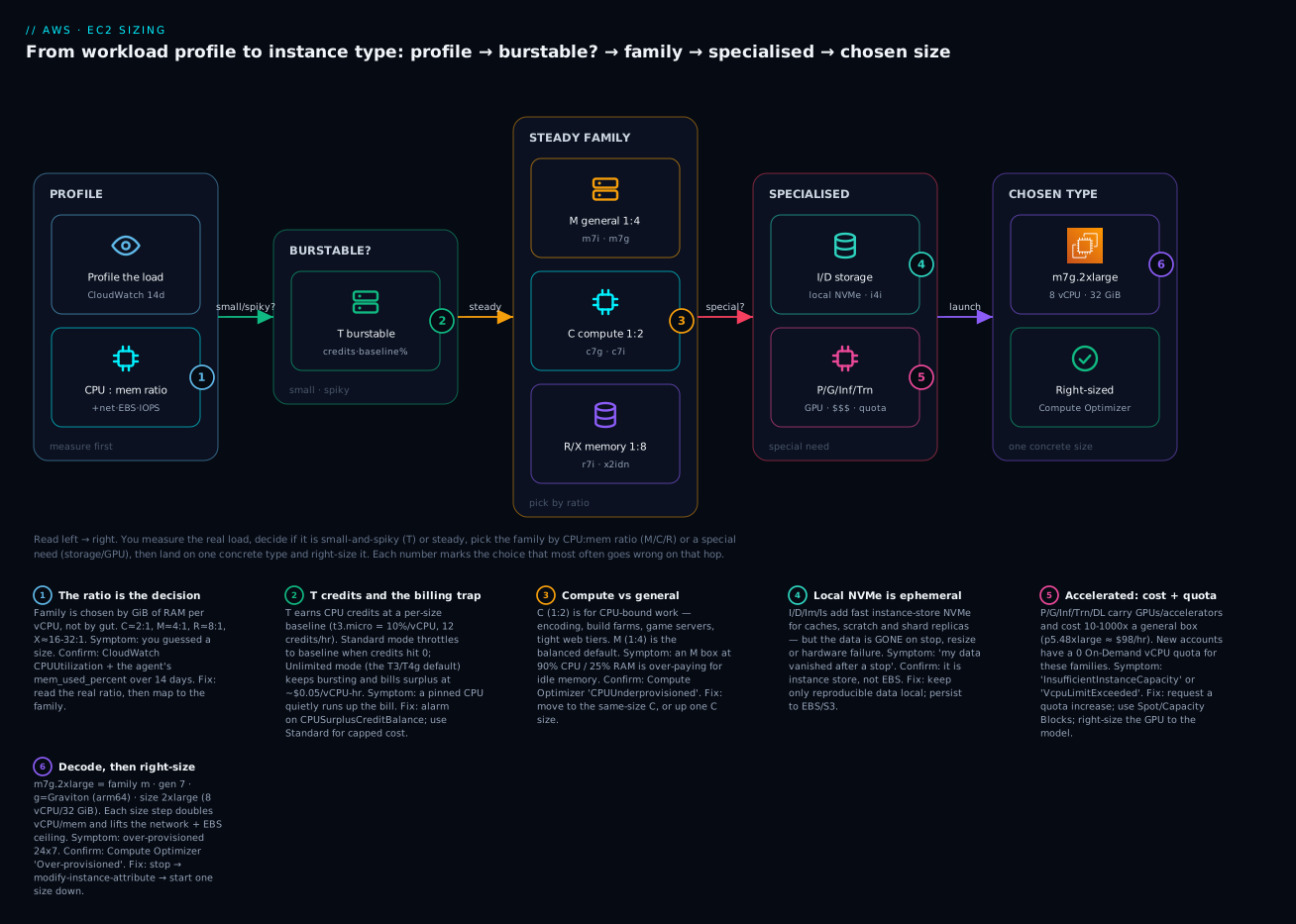
Read it as the exact sequence you’ll follow in the lab below: measure first, branch on shape, choose a type, verify with Compute Optimizer.
Real-world scenario
Streamly, a fictional 40-person video startup in Bengaluru, ran everything on a fleet of m5.2xlarge (8 vCPU / 32 GiB) instances — 30 of them, chosen once during a rushed launch because “general purpose is safe.” The monthly EC2 bill had crept to $11,400 (~₹9.7 lakh), and finance asked the platform team to explain it before renewing a Savings Plan.
The team turned on Compute Optimizer and installed the CloudWatch agent for memory across the fleet, then waited 14 days. The findings were blunt. The web/API tier (12 boxes) was CPUUnderprovisioned and MemoryOverprovisioned — pinned at 85% CPU while using 18% of RAM. That’s a compute-bound workload wearing a general-purpose costume. They moved it to c7g.2xlarge (Graviton, 8 vCPU / 16 GiB): more headroom on the dimension that was tight, half the memory they weren’t using, and the ARM price. Their Java and Node services already had ARM64 builds, so the port was a base-AMI swap and a CI pipeline change.
The transcoding workers (10 boxes) were the opposite of what everyone assumed — not memory-heavy, but EBS-bandwidth-bound: EBSByteBalance% on the m5.2xlarge drained to zero mid-job because the instance’s EBS ceiling (not the volume) capped throughput. They moved these to c7gn.4xlarge (network/EBS-optimized compute) and jobs got ~30% faster with no volume change. The Redis cache tier (5 boxes) was genuinely memory-shaped — 82% RAM, 20% CPU — so it moved up the memory ratio to r7g.xlarge (Graviton, 8 GiB/vCPU), correctly this time. The three admin/back-office boxes averaged 4% CPU with brief spikes; those became t4g.large in Standard mode with a CPUCreditBalance alarm, since a hard cost cap mattered more than never throttling.
Net result before any purchasing commitment: the fleet dropped from 30 m5.2xlarge to a right-shaped mix, and On-Demand spend fell from $11,400 to about $4,900/month — a 57% cut purely from matching hardware to workload and moving suitable tiers to Graviton. Then they bought a Compute Savings Plan on the new, smaller baseline, taking it under $3,400. The lesson the team wrote in their runbook: “General purpose is not a default; it’s a shape. Measure the shape first.”
Advantages and disadvantages
Choosing types deliberately (vs defaulting to one general-purpose SKU everywhere) is a trade-off:
| Advantages of matching type to workload | Disadvantages / costs |
|---|---|
| 30–80% lower cost by ending over-provisioning | Requires 14+ days of data (CloudWatch + agent) before you trust it |
| Better performance on the dimension that’s actually tight | More SKUs to reason about, test, and standardise |
| Graviton/AMD cut price 10–40% for the same shape | Graviton needs ARM64 builds / multi-arch images |
| Right-sizing compounds with Savings Plans/Spot later | Some types aren’t available in every AZ/region |
| Fewer surprise incidents (OOM, credit throttling, EBS caps) | Changing type needs a stop (brief downtime) unless behind an ASG |
| Newer generations are faster and cheaper | Local-NVMe families add an ephemeral-data footgun |
The through-line: the only real cost of doing this well is the discipline to measure before you choose and to re-check periodically. For a single hobby box, defaulting to t3.micro/t4g.micro is fine. For anything with a bill attached, the measure-then-match loop pays for itself in the first month.
Hands-on lab
You’ll use describe-instance-types to pick a type from requirements, launch it, read the right-sizing signals, change its type, and tear it all down. Free-tier-friendly (t3.micro/t4g.micro are eligible; everything else here is metadata queries that cost nothing). Set your region first.
export AWS_REGION=us-east-1
export AWS_DEFAULT_REGION=us-east-1
⚠️ Cost note: a running
t3.micro/t4g.microis free-tier-eligible for the first 12 months (750 hrs/month). Thedescribe-*calls are free. If you launch anything larger thanmicro, you pay by the second while it runs — the teardown at the end stops the meter.
Step 1 — Decode a name before you trust it
Confirm what a type actually is, straight from the API:
aws ec2 describe-instance-types --instance-types m7g.2xlarge \
  --query "InstanceTypes[0].{vCPU:VCpuInfo.DefaultVCpus, MemMiB:MemoryInfo.SizeInMiB, Arch:ProcessorInfo.SupportedArchitectures, Net:NetworkInfo.NetworkPerformance, Burstable:BurstablePerformanceSupported}" \
  --output table
Expected output:
--------------------------------------------------------
|                 DescribeInstanceTypes                |
+-----------+----------+---------+----------+-----------+
|   Arch    | Burstable|  MemMiB |   Net    |   vCPU    |
+-----------+----------+---------+----------+-----------+
|  arm64    |  False   |  32768  | Up to 15 Gbps | 8    |
+-----------+----------+---------+----------+-----------+
That confirms the decode: m7g is arm64 (Graviton), 2xlarge is 8 vCPU / 32768 MiB (32 GiB), not burstable, “Up to 15 Gbps” (burst) network.
Step 2 — Let the API pick a type from requirements
Say the workload needs 4 vCPU, 16 GiB, ARM64, current generation, and it must NOT be burstable (steady load). Filter for exactly that:
aws ec2 describe-instance-types \
  --filters "Name=processor-info.supported-architecture,Values=arm64" \
            "Name=vcpu-info.default-vcpus,Values=4" \
            "Name=memory-info.size-in-mib,Values=16384" \
            "Name=current-generation,Values=true" \
            "Name=burstable-performance-supported,Values=false" \
  --query "sort_by(InstanceTypes, &InstanceType)[].InstanceType" \
  --output text
Expected (an M-family, 4:1 ratio, ARM64 result set):
m6g.xlarge m6gd.xlarge m7g.xlarge m7gd.xlarge
m7g.xlarge is the pick: newest generation, no local disk you don’t need. The useful describe-instance-types filters:
| Filter | Example value | Selects |
|---|---|---|
processor-info.supported-architecture |
arm64 / x86_64 |
CPU architecture |
vcpu-info.default-vcpus |
4 |
Exact vCPU count |
memory-info.size-in-mib |
16384 |
Exact memory (MiB) |
current-generation |
true |
Latest-gen only |
burstable-performance-supported |
false |
Exclude/include T family |
instance-storage-supported |
true |
Has local NVMe (the d types) |
bare-metal |
true |
.metal only |
network-info.network-performance |
25 Gigabit |
By network tier |
instance-type |
m7* |
Name pattern |
Step 3 — Check the type is offered in your AZ
A type can exist in a region but not every AZ. Confirm before you launch:
aws ec2 describe-instance-type-offerings \
  --location-type availability-zone \
  --filters "Name=instance-type,Values=m7g.xlarge" \
  --query "InstanceTypeOfferings[].Location" --output text
Expected: the AZs that offer it, e.g. us-east-1a us-east-1b us-east-1d us-east-1f. If your subnet’s AZ isn’t listed, launching there returns “not supported in your requested Availability Zone.”
Step 4 — Launch a free-tier instance (CLI)
We’ll launch a t3.micro to keep it free, using the latest Amazon Linux 2023 AMI resolved from SSM.
AMI=$(aws ssm get-parameters \
  --names /aws/service/ami-amazon-linux-latest/al2023-ami-kernel-default-x86_64 \
  --query "Parameters[0].Value" --output text)

SG=$(aws ec2 create-security-group \
  --group-name ec2-sizing-lab --description "sizing lab" \
  --query GroupId --output text)

IID=$(aws ec2 run-instances \
  --image-id "$AMI" --instance-type t3.micro \
  --security-group-ids "$SG" \
  --tag-specifications 'ResourceType=instance,Tags=[{Key=Name,Value=sizing-lab}]' \
  --query "Instances[0].InstanceId" --output text)

echo "Launched $IID on the $AMI AMI"
aws ec2 wait instance-running --instance-ids "$IID"
Expected: Launched i-0abc123... on the ami-0abc... AMI, then the wait returns silently when it’s running.
Step 5 — Read the right-sizing signals
Pull recent CPU from CloudWatch (memory would need the agent — that’s the point of the OOM warning later):
aws cloudwatch get-metric-statistics \
  --namespace AWS/EC2 --metric-name CPUUtilization \
  --dimensions Name=InstanceId,Value="$IID" \
  --start-time "$(date -u -v-1H +%Y-%m-%dT%H:%M:%SZ 2>/dev/null || date -u -d '1 hour ago' +%Y-%m-%dT%H:%M:%SZ)" \
  --end-time "$(date -u +%Y-%m-%dT%H:%M:%SZ)" \
  --period 300 --statistics Average Maximum --output table
A brand-new idle box reads near 0–2% average — the textbook over-provisioned signal if this were a real, steady workload. To see Compute Optimizer’s verdict (after you’ve opted in and given it ~14 days on a real instance):
aws compute-optimizer get-ec2-instance-recommendations \
  --instance-arns "arn:aws:ec2:${AWS_REGION}:$(aws sts get-caller-identity --query Account --output text):instance/${IID}" \
  --query "instanceRecommendations[0].{Finding:finding, Current:currentInstanceType, Rec:recommendationOptions[0].instanceType}" \
  --output table
On a fresh instance you’ll get a finding of None (not enough data yet); on a mature one you’d see Over-provisioned with a smaller Rec.
Step 6 — Change the instance type (stop / modify / start)
You can’t change type on a running instance — stop it, modify, start it. (Behind an Auto Scaling group you’d instead change the launch template and roll the fleet, with no downtime.)
aws ec2 stop-instances --instance-ids "$IID"
aws ec2 wait instance-stopped --instance-ids "$IID"

aws ec2 modify-instance-attribute \
  --instance-id "$IID" --instance-type "{\"Value\": \"t3.small\"}"

aws ec2 start-instances --instance-ids "$IID"
aws ec2 wait instance-running --instance-ids "$IID"

aws ec2 describe-instances --instance-ids "$IID" \
  --query "Reservations[0].Instances[0].InstanceType" --output text
Expected final line: t3.small. Note we stayed on x86 (t3 → t3); switching to Graviton (t4g) would also require an ARM64 AMI, so you can’t just modify the type on an x86 AMI and expect it to boot.
Step 7 — The same launch in Terraform
For the IaC path, the type is one attribute — which is exactly why standardising it matters. var.instance_type makes right-sizing a one-line change and terraform apply.
terraform {
  required_providers {
    aws = { source = "hashicorp/aws", version = "~> 5.0" }
  }
}
provider "aws" { region = "us-east-1" }

variable "instance_type" {
  type    = string
  default = "t3.micro" # right-size here; one line, one apply
}

data "aws_ssm_parameter" "al2023" {
  name = "/aws/service/ami-amazon-linux-latest/al2023-ami-kernel-default-x86_64"
}

resource "aws_instance" "sizing_lab" {
  ami           = data.aws_ssm_parameter.al2023.value
  instance_type = var.instance_type
  tags          = { Name = "sizing-lab-tf" }
}

output "chosen_type" { value = aws_instance.sizing_lab.instance_type }
terraform init && terraform apply -auto-approve
# to right-size later, no code edit needed:
terraform apply -auto-approve -var="instance_type=t3.small"
Changing instance_type on an existing aws_instance triggers a stop → modify → start in place (Terraform handles it) — the same flow as the CLI, not a destroy/recreate, as long as the AMI architecture still matches.
Step 8 — Teardown
Stop the meter and remove everything.
# CLI path:
aws ec2 terminate-instances --instance-ids "$IID"
aws ec2 wait instance-terminated --instance-ids "$IID"
aws ec2 delete-security-group --group-id "$SG"

# Terraform path:
terraform destroy -auto-approve
Verify nothing is left running: aws ec2 describe-instances --filters "Name=tag:Name,Values=sizing-lab,sizing-lab-tf" --query "Reservations[].Instances[].State.Name" --output text should show terminated (or nothing).
Common mistakes & troubleshooting
The playbook. Each row is a real failure with the exact way to confirm it and the fix.
| # | Symptom | Root cause | Confirm (command / console) | Fix |
|---|---|---|---|---|
| 1 | Latency spikes daily; CPU flat-lined at 10/20/40% | T-instance credits exhausted, Standard mode throttling to baseline | CloudWatch CPUCreditBalance ≈ 0; CPUUtilization pinned at baseline % |
Move to M/C (steady load ≠ T), or enable Unlimited (accept surplus cost), or size up the T |
| 2 | Surprise EC2 bill with no size change | T in Unlimited mode billing surplus credits on a pinned CPU | CPUSurplusCreditBalance > 0 and rising; Cost Explorer “CPU Credits” line |
Alarm on surplus; switch to Standard for a hard cap; move steady load off T |
| 3 | run-instances fails: “not supported in your requested Availability Zone” |
Type not offered in that AZ | aws ec2 describe-instance-type-offerings --location-type availability-zone --filters Name=instance-type,Values=<type> |
Launch in a listed AZ, or pick a type offered there |
| 4 | App OOM-killed right after a “right-size” down | Sized on CPU only; memory was the tight dimension (no agent) | dmesg | grep -i oom; no mem_used_percent metric exists |
Install CloudWatch agent; re-check memory; move to M/R, not a smaller C |
| 5 | Disk throughput plateaus below the volume’s rated IOPS/MBps | EBS-bandwidth-bound at the instance, not the volume | EBSByteBalance%/EBSIOBalance% draining to 0; instance EBS ceiling < volume rating |
Size up, or use an n/b variant; the volume isn’t the bottleneck |
| 6 | Container/binary won’t start: exec format error |
Graviton (arm64) running an x86 image/binary | uname -m = aarch64; file <binary> shows x86-64 |
Use arm64 AMI + multi-arch image, or stay on i/a |
| 7 | Sustained network transfer settles far below the “Up to” number | Baseline vs burst confusion — small size only bursts | Spec says “Up to X Gbps”; throughput drops after a burst window | Size up (sustained tiers), or a n network-optimized variant |
| 8 | run-instances fails: InsufficientInstanceCapacity |
AWS is out of that type in that AZ right now | The API error; try another AZ | Retry in another AZ, use a slightly different type, or a placement across AZs |
| 9 | GPU launch fails: VcpuLimitExceeded / capacity error |
On-Demand quota = 0 for P/G on new accounts | Service Quotas → “Running On-Demand G/P instances” = 0 | Request a quota increase; use Spot or Capacity Blocks |
| 10 | Data gone after a stop/start | Used a d/I/D instance-store family; store is ephemeral |
Volume is instance store, not EBS (describe-volumes shows none) |
Keep only reproducible data local; persist to EBS/S3 |
| 11 | modify-instance-attribute fails: InvalidInstanceType/incompatible |
Target type incompatible with the AMI (virt/arch/ENA/NVMe) | Error string; AMI is PV or x86 vs an arm64/Nitro target | Use a compatible (Nitro/HVM, matching-arch) AMI; can’t x86→arm by modify |
| 12 | Over-sized fleet at single-digit CPU, huge bill | Over-provisioned default (one big general SKU everywhere) | Compute Optimizer Over-provisioned; CPU/mem both low |
Right-size down a step and/or to Graviton before any Savings Plan |
| 13 | t2.micro unavailable in a region |
Older gen not offered in newer regions | describe-instance-type-offerings lacks t2.micro |
Use t3.micro/t4g.micro (free-tier maps to these there) |
| 14 | Per-core-licensed software costs balloon on many small cores | Wrong shape — licence is per core, not per instance | Licence model vs vCPU count | Use high-frequency z/z1d (fewer, faster cores) to cut core count |
Error/status reference
| Error string | Where | Meaning | Fix |
|---|---|---|---|
InstanceLimitExceeded / VcpuLimitExceeded |
run-instances | You hit the per-family On-Demand vCPU quota | Service Quotas → request increase for that family |
InsufficientInstanceCapacity |
run-instances | AWS lacks capacity for that type/AZ now | Another AZ, another type, or retry later |
Unsupported — “not supported in your requested Availability Zone” |
run-instances | Type not offered in that AZ | describe-instance-type-offerings; change AZ/type |
InvalidInstanceType |
run/modify | Type name wrong or not in this region | Check name and regional availability |
IncompatibleInstanceType / boot failure after modify |
modify-instance-attribute | AMI arch/virtualization ≠ target | Matching-arch Nitro/HVM AMI |
InvalidParameterCombination |
run-instances | e.g. type needs a subnet/placement it didn’t get | Fix the subnet/placement/network config |
exec format error |
inside the OS | x86 binary on arm64 (or vice-versa) | Rebuild for the arch / multi-arch image |
The three that hurt most
T-credit throttling (rows 1–2) is the classic beginner trap because it’s invisible in code and CPU-percent looks fine (it’s just capped). Always chart CPUCreditBalance; if it trends to zero under real load, you have a steady workload on a bursty family — the answer is M or C, not “buy more credits.” Memory-blind right-sizing (row 4) happens because CloudWatch shows no memory by default, so Compute Optimizer returns None or reasons only about CPU; install the agent before you resize down, or you’ll shrink into an OOM. EBS-bandwidth-bound (row 5) fools people into buying faster volumes (io2, more IOPS) that change nothing, because the ceiling is the instance’s EBS bandwidth — chart EBSByteBalance%/EBSIOBalance%, and if they drain, size the instance up or pick an n/b variant.
Best practices
- Measure before you choose. Get 14 days of CloudWatch (with the agent for memory) and read the CPU:memory ratio; let the shape pick the family, not habit.
- Default to the newest generation. A
7-gen box is usually faster and cheaper than the5-gen it replaces — there’s rarely a reason to launch old silicon. - Default to Graviton where you can. For anything you compile or run on a mainstream runtime,
gis the best price/performance; fall back toa(AMD) for cheap x86, andi(Intel) only for a real reason (AVX-512, ISV cert,zclock). - Right-size before you commit. Never buy a Savings Plan or Reserved Instance on an over-sized baseline — shrink first, then commit to the smaller number.
- Alarm on burstable credits. For every T instance, alarm on
CPUCreditBalancenearing zero andCPUSurplusCreditBalancerising — or use Standard mode for a hard cost cap. - Never store your only copy on instance store.
d/I/D/Im/Is local NVMe is ephemeral; persist anything you can’t rebuild to EBS or S3. - Standardise types behind Auto Scaling. Put the type in a launch template/Terraform variable so right-sizing is a one-line change rolled with no downtime.
- Use attribute-based instance selection (in ASGs/Spot) to specify requirements (vCPU/mem/arch) and let AWS pick from many matching types — more capacity, better Spot pricing.
- Check AZ/region availability early. Confirm the type is offered where your subnet lives (
describe-instance-type-offerings) before you hard-code it. - Re-check quarterly. Workloads drift; a box that was right last quarter may be over-provisioned now. Compute Optimizer is free — schedule a look.
- Match memory-tight to R, CPU-tight to C. A box flagged both
CPUOverprovisionedandMemoryUnderprovisionedshould change family, not just size.
Security notes
Instance-type choice is mostly a cost/performance decision, but a few security threads run through it:
| Concern | Guidance |
|---|---|
| Nitro isolation | Modern (Nitro) instances have a hardware root of trust and stronger tenant isolation; prefer current-gen families for the isolation properties alone |
| Bare metal exposure | .metal gives you the whole host and firmware surface — you own more of the stack; only use it when you actually need it (nested virt, licensing) |
| Instance store data | Ephemeral NVMe isn’t wiped by you on stop — but it is cryptographically inaccessible after release; still, never put secrets/only-copies there. Nitro instance-store is encrypted at rest by default |
| EBS encryption | Independent of type, but enable account-level default EBS encryption so every instance’s root/data volumes are encrypted regardless of family |
| IMDSv2 | Enforce IMDSv2 (--metadata-options HttpTokens=required) on every type — it’s a launch attribute, not a family property, but it’s the single most important instance hardening |
| Right-size ≠ under-size | Don’t right-size so aggressively you remove headroom for security agents (EDR/AV) — account for their CPU/memory when sizing |
| GPU/accelerated | Accelerated instances often run privileged drivers; keep NVIDIA/Neuron drivers patched and restrict who can launch these high-cost, high-privilege types via IAM |
Least-privilege the ability to launch expensive families: an IAM policy with a Condition on ec2:InstanceType can stop a developer from accidentally launching a p5.48xlarge.
Cost & sizing
What actually drives an EC2 instance’s bill:
| Driver | Effect on cost | Lever |
|---|---|---|
| Size (ladder step) | ~2× per step up | Right-size down; each step ≈ 50% |
| Family | R > M > C for the same vCPU; accelerated ≫ all | Match family to shape; don’t over-buy memory |
| Processor | Intel > AMD > Graviton for the same shape | Prefer g, then a |
| Generation | Newer often cheaper per unit | Use latest gen |
| Region | us-east-1 cheapest; Mumbai/others higher |
Place where latency allows |
| Hours running | Linear — you pay per second while running | Turn off non-prod off-hours (schedules) |
| Instance store / GPUs | d/accelerated carry a big premium |
Only when needed |
| T Unlimited surplus | Extra $/vCPU-hr when bursting past baseline | Alarm / Standard mode |
Rough On-Demand Linux us-east-1 anchors (approximate — always check the pricing page; ₹ at ~₹85/$):
| Type | vCPU / mem | ~$/hr | ~$/mo (730h) | ~₹/mo |
|---|---|---|---|---|
t4g.micro |
2 / 1 | 0.0084 | ~$6 | ~₹520 (free-tier eligible) |
t3.micro |
2 / 1 | 0.0104 | ~$8 | ~₹645 (free-tier eligible) |
t4g.medium |
2 / 4 | 0.0336 | ~$25 | ~₹2,100 |
m7g.large |
2 / 8 | 0.0816 | ~$60 | ~₹5,100 |
m7i.large |
2 / 8 | 0.1008 | ~$74 | ~₹6,300 |
c7g.large |
2 / 4 | 0.0723 | ~$53 | ~₹4,500 |
r7g.large |
2 / 16 | 0.1071 | ~$78 | ~₹6,650 |
g5.xlarge |
4 / 16 + A10G | 1.006 | ~$734 | ~₹62,400 |
Free tier: 750 hours/month of t3.micro (or t2.micro, or t4g.micro where offered) for the first 12 months — enough to run one small instance 24×7 free. Beyond that, the cheapest real production shapes are the Graviton t4g/m7g/c7g/r7g line. Right-sizing is the biggest lever, then Graviton, then turning off idle non-prod, then (separately) Savings Plans/Spot on the corrected baseline.
Interview & exam questions
Q1. Decode r7iz.4xlarge. (CLF-C02 / SAA-C03)
Memory-optimized (r), 7th generation, Intel (i) with high-frequency clock (z), size 4xlarge = 16 vCPU / ~128 GiB at a sustained ~4.0 GHz. You’d pick it for memory-heavy, per-core-licensed, or latency-sensitive work.
Q2. A t3.large API is fast most of the day but crawls every afternoon. Why, and how do you confirm it?
It’s exhausting CPU credits and (in Standard mode) being throttled to its 30%/vCPU baseline. Confirm with CloudWatch CPUCreditBalance trending to zero while CPUUtilization pins at baseline. If load is steady, move to M/C; T is for bursty, not sustained.
Q3. What’s the billing risk of Unlimited mode?
When credits run out, an Unlimited-mode T instance keeps bursting and bills surplus credits (~$0.05/vCPU-hr for T3 Linux). A pinned CPU can silently exceed a right-sized M instance’s cost. Mitigate with a CPUSurplusCreditBalance alarm or Standard mode.
Q4. When would you choose C over M?
When the workload is CPU-bound — high CPU, low memory (a ~2:1 GiB/vCPU shape). Encoding, build farms, game servers, tight web tiers. Compute Optimizer flagging CPUUnderprovisioned + MemoryOverprovisioned on an M box is the signal.
Q5. Graviton is cheaper — why not use it everywhere?
Graviton is ARM64; x86-only binaries/containers won’t run (exec format error). You need arm64 AMIs and multi-arch images, and some ISV agents lack ARM builds. Use it wherever your stack has ARM64 support (most mainstream runtimes do).
Q6. Your database’s disk throughput is stuck below the volume’s rated MBps. What’s likely wrong?
The instance’s EBS bandwidth ceiling (not the volume) is the bottleneck — the box is EBS-bandwidth-bound. Confirm with EBSByteBalance%/EBSIOBalance% draining to zero. Fix by sizing the instance up or using an n/b variant; a faster volume won’t help.
Q7. What does the Nitro system give you? (SAA-C03) Hardware offload of networking/storage to Nitro Cards, a thin KVM-based hypervisor, and a security chip — yielding near-bare-metal performance, ENA/EFA high-bandwidth networking, EBS-as-NVMe, and bare-metal instances. All modern and all Graviton instances are Nitro-based.
Q8. How do Compute Optimizer findings map to actions?
Under-provisioned → size up or change family toward the tight dimension; Over-provisioned → size down / cheaper family or Graviton; Optimized → leave (maybe try Graviton); None → not enough data (14 days) or no memory agent. The reason code tells you which dimension drove it.
Q9. Why can right-sizing on CPU alone cause an outage?
CloudWatch shows no memory without the agent, so you might shrink a memory-tight box and get OOM-killed. Always install the CloudWatch agent for mem_used_percent before resizing down, and reason about memory, not just CPU.
Q10. What’s the difference between “Up to 12.5 Gbps” and “12.5 Gbps”?
“Up to” is a burst ceiling on smaller sizes with a lower sustained baseline (network I/O credits); the bare number is sustained. A continuous transfer on an “Up to” size settles below the headline — size up or use an n variant for sustained throughput.
Q11. How do you change an instance’s type, and what constrains it?
Stop → modify-instance-attribute --instance-type → start. Constraints: the AMI must match the target’s architecture (can’t x86→Graviton) and virtualization (Nitro/HVM, ENA/NVMe support); the type must be offered in the AZ; instance-store data is lost on stop.
Q12. New account, first GPU launch fails with a vCPU limit. Why? Accelerated families (P/G) have an On-Demand vCPU quota of 0 on new accounts. Request an increase in Service Quotas (“Running On-Demand G/P instances”), or use Spot / Capacity Blocks for GPU capacity.
Quick check
- Split
c6gd.4xlargeinto family, generation, attributes, and size — and say what each attribute means. - Your
t3.mediumshowsCPUCreditBalanceat zero every afternoon and latency triples. What’s happening and what’s the fix? - A workload runs at 90% CPU and 22% memory on an
m7i.2xlarge. Which family should it move to, and why? - Why is “the data disappeared after I stopped the instance” a type-selection bug, and which families cause it?
- You want the cheapest way to run a steady Java service that has an ARM64 build. Which processor attribute, and what must you verify first?
Answers
- Family
c(compute-optimized) · generation6· attributesgd=g(Graviton/ARM64) +d(local NVMe instance store) · size4xlarge(16 vCPU / 32 GiB). It’s an ARM compute box with fast ephemeral local disk. - The T instance has exhausted its CPU credits and, in Standard mode, is being throttled to its 20%/vCPU baseline. The load is steady, not bursty, so the fix is to move to M or C, not to buy more credits or flip to Unlimited (which would just bill surplus).
- C (compute-optimized) — the shape is CPU-bound (~2:1 GiB/vCPU), so it’s paying for idle memory on M (4:1). Move to the same-size
c7g/c7i.2xlarge(or up one C size for headroom); Compute Optimizer would flagCPUUnderprovisioned+MemoryOverprovisioned. - Because you chose a family whose storage is instance store (ephemeral): the
dattribute and the I/D/Im/Is storage families put NVMe physically on the host, and that data is lost on stop/resize/host failure. It’s a type decision, not an app bug. Persist anything you can’t rebuild to EBS/S3. - Use
g(Graviton) — e.g.m7g/c7g. First verify your AMI is arm64 and your runtime/containers have ARM64 builds (multi-arch images); confirm on the box withuname -m=aarch64. Fall back toa(AMD) if any dependency is x86-only.
Glossary
| Term | Definition |
|---|---|
| vCPU | A virtual CPU — one thread of a physical core (2 vCPU ≈ 1 x86 core; 1 vCPU = 1 Graviton core) |
| Instance family | The letter(s) at the start of a type name that set its category/shape (T, M, C, R, I, P…) |
| Generation | The number in the name (5, 6, 7) — the silicon vintage; newer is usually faster and cheaper |
| Attribute letter | Lowercase capability flags after the generation: g Graviton, i Intel, a AMD, d local NVMe, n network-opt, z high-freq |
| Size | The part after the dot (large, 2xlarge, metal) — sets vCPU/memory; doubles per step from large |
| CPU:memory ratio | GiB of RAM per vCPU; the primary signal for picking a family (C≈2, M≈4, R≈8, X≈16-32) |
| Burstable (T) | Instances that run at a low baseline and spend CPU credits to burst above it |
| CPU credit | One vCPU running at 100% for one minute; earned under baseline, spent above it |
| Baseline | The steady % of a vCPU a T size is entitled to without spending credits |
| Unlimited mode | T mode that keeps bursting past exhausted credits and bills surplus (the T3/T4g default) |
| Standard mode | T mode that throttles to baseline when credits run out (no surplus charge) |
| Graviton | AWS’s ARM64 (aarch64) processors — best price/performance; needs ARM64 binaries |
| Nitro | AWS’s hardware-offload + lightweight hypervisor for modern instances; enables ENA/EFA, EBS-as-NVMe, bare metal |
| Instance store | Local NVMe/SSD on the host (the d attribute) — very fast but ephemeral |
| EBS bandwidth | The instance’s dedicated throughput to EBS volumes — a ceiling separate from network and from the volume’s own limits |
| Compute Optimizer | AWS service that reads ~14 days of metrics and recommends right-sized types |
| Right-sizing | Matching instance size/family to measured demand to cut cost without losing performance |
.metal |
A bare-metal instance — the whole physical host, no hypervisor |
Next steps
- Launch Your First EC2 Instance and SSH In — the end-to-end first launch: key pair, security group, connect, and the console-vs-CLI paths for the type you just learned to pick.
- EC2 User Data and cloud-init Bootstrapping — once you’ve chosen the type, bootstrap the OS on boot so instances come up configured.
- AWS Compute: EC2, Lambda, ECS and EKS — Which One to Choose? — the step before this one: confirm EC2 is even the right service versus serverless and containers.
- Purchasing models (On-Demand, Spot, Savings Plans, Reserved) — the independent second axis: once the shape is right, commit to the cheapest way to pay for it.
- Auto Scaling groups & attribute-based instance selection — put the chosen type in a launch template and let AWS pick from many matching types for capacity and Spot savings.