Quick take: “Can’t connect to RDS” is never one bug — it is one of three gates failing, in a fixed order, and each gate speaks a different error. Gate 1, network reachability: can a TCP packet even reach
:5432/:3306? — the DB security group (does it allow the app’s SG?), the NACL, a route / thePubliclyAccessibleflag, and resolving the right endpoint (writer vs reader, not a stale one after failover). Gate 2, capacity: the packet reached a healthy engine but every session slot is taken —max_connectionsexhaustion, leaks, connection storms. Gate 3, auth/TLS: a socket opened but the login or SSL handshake was refused — wrong password / mid-rotation secret, an expired IAM auth token (15-minute life),pg_hba, orrds.force_ssl. The whole skill is reading the error string to jump straight to the right gate: a silent timeout is gate 1,too many connectionsis gate 2,password authentication failed/SSL requiredis gate 3. Never start by “resetting the password” for a timeout — that is gate 3 tooling on a gate 1 problem.
Your service was fine at 09:00. By 09:05 the checkout API is throwing psql: error: connection to server at "orders.abc123.ap-south-1.rds.amazonaws.com" (10.0.20.14), port 5432 failed: Connection timed out, and the on-call engineer does what almost everyone does first: opens the RDS console, sees the instance is Available, and concludes “the database is up, so it must be the app.” Both halves are true and neither helps. The instance is up; the app cannot open a session to it; and the gap between those two facts is a dozen distinct failure modes that all surface as some flavour of “can’t connect.” One of them is a security-group rule that was tightened an hour ago. One is a connection pool that leaked until max_connections filled. One is an IAM auth token that expired 15 minutes into a long-lived worker. They are not the same problem and they do not share a fix.
This article is the map you keep open when that pager fires. The organising idea is simple and it is the entire method: a connection to RDS or Aurora passes three gates in order — reachability, capacity, auth/TLS — and the error string tells you which gate stopped you. A Connection timed out never got past gate 1, so touching the password is wasted motion. FATAL: sorry, too many clients already sailed through gate 1 and hit a full engine — a security-group change will do nothing. FATAL: password authentication failed proves the network path and the engine are both fine and the problem is purely credentials. Read the error, pick the gate, run the two commands that confirm it, apply the one fix. We will enumerate every failure in each gate, hand you a master symptom → category → confirm → fix table you can grep during an incident, an error-string reference for both Postgres and MySQL, and a hands-on lab that deliberately breaks reachability, capacity, and TLS so you have seen each failure with your own eyes. Every check shows the aws/nc/dig command and the Terraform that prevents the regression. It maps to the database and networking objectives of SAA-C03, SOA-C02, and DVA-C02.
If you have not yet stood up the instance this playbook debugs, build one first with Launch RDS for MySQL & PostgreSQL: A Hands-On Guide, and understand the failover behaviour that makes endpoints go stale in RDS Multi-AZ & Read Replicas for High Availability. This playbook assumes the database exists and goes straight to why the client can’t open a session.
What problem this solves
In production, “can’t connect to the database” is the single most common and most mis-diagnosed incident class, because the symptom carries almost no information. The application logs Connection timed out or too many connections or authentication failed, an engineer forms a theory in the first ten seconds (“firewall,” “the DB is down,” “someone changed the password”), and then spends an hour proving or disproving that theory instead of asking the only question that matters: which of the three gates rejected the connection? A timeout and a too many connections error demand completely different responses — one is a network problem you fix with a security-group rule, the other is a capacity problem you fix with a connection pool — yet teams routinely apply the wrong one because they never categorised the failure.
What breaks without this discipline is a recognisable parade of wasted incidents. Someone tightens a security group, forgets the DB SG references the app SG, and every service times out — but the on-call engineer restarts the app three times because “it worked yesterday.” A connection pool is misconfigured or a worker leaks idle in transaction sessions until the engine hits max_connections, and the team scales the application (adding more instances, each with its own pool, making it strictly worse) instead of adding an RDS Proxy. A Secrets Manager rotation fires mid-deploy and half the fleet authenticates with the old password for ninety seconds. An engineer enables rds.force_ssl for compliance and every non-TLS client drops with a cryptic no pg_hba.conf entry ... SSL off. A Multi-AZ failover flips the endpoint, but a JVM with a cached DNS entry keeps dialling the old primary’s IP for minutes. Each is a five-minute fix once you know the gate — and a lost afternoon when you don’t.
Who hits this: every team that runs a managed database, from a first serverless function through a thousand-container fleet. It bites hardest at three moments — a security change (SG tightened, force_ssl turned on, a secret rotated), a scale event (traffic doubles and the pool math finally exceeds max_connections), and a failover (planned or not, where endpoints go stale and every client reconnects at once in a storm). The cure is a shared, ordered model of the connection path plus the reflex to read the error string first. Here is the entire field on one page: every failure class, the gate it lives in, the exact error it produces, and the one thing that confirms it.
| # | Failure class | Gate | Exact error you see | Confirm with |
|---|---|---|---|---|
| 1 | DB security group blocks the app | Reachability | Connection timed out (silent) |
nc -vz endpoint 5432; describe-security-groups |
| 2 | NACL / route / subnet has no path | Reachability | Connection timed out (silent) |
Reachability Analyzer; describe-network-acls |
| 3 | PubliclyAccessible=false from internet |
Reachability | timed out from outside, works inside |
describe-db-instances PubliclyAccessible |
| 4 | Wrong endpoint (reader vs writer) | Reachability | cannot execute … in a read-only transaction |
describe-db-cluster-endpoints |
| 5 | Stale endpoint / DNS after failover | Reachability | timeout to a dead IP after a flip | dig endpoint; driver DNS TTL |
| 6 | max_connections exhausted |
Capacity | FATAL: sorry, too many clients already / ERROR 1040 |
CloudWatch DatabaseConnections |
| 7 | Leaked idle in transaction sessions |
Capacity | slow climb to the cap, then #6 | pg_stat_activity state column |
| 8 | Connection storm on failover | Capacity | mass reconnect spikes to the cap | DatabaseConnections spike at failover |
| 9 | Wrong / rotated master password | Auth | FATAL: password authentication failed |
re-fetch the secret; test manually |
| 10 | IAM auth token expired (>15 min) | Auth | PAM authentication failed / password authentication failed |
token age; rds_iam grant |
| 11 | Missing pg_hba / rds_iam role |
Auth | no pg_hba.conf entry for host … |
\du role; pg_hba line |
| 12 | TLS required but client sent plaintext | Auth/TLS | SSL required / no pg_hba.conf entry … SSL off |
rds.force_ssl; require_secure_transport |
| 13 | Storage full → read-only | State | cannot execute INSERT in a read-only transaction |
FreeStorageSpace=0; status storage-full |
| 14 | Parameter change stuck pending-reboot | State | new setting “does nothing” | describe-db-parameters ApplyMethod |
| 15 | Client connect_timeout too low |
Client | timeout expired before TCP completes |
driver connect_timeout value |
| 16 | DB mid-reboot / maintenance / failover | Availability | brief timeouts, then recovers | DBInstanceStatus; events |
The rest of this article is that table, expanded — one gate at a time, every failure enumerated with how it presents and how to confirm it — followed by the tools and the lab that turn a vague “can’t connect” into a named, fixed root cause.
Learning objectives
By the end of this article you can:
- Categorise any “can’t connect” incident into reachability, capacity, or auth/TLS from the error string alone, and know which fixes are irrelevant for each.
- Diagnose the security-group chain — why the DB SG must reference the app SG, and why an office IP or NAT EIP rule silently fails for in-VPC traffic.
- Enumerate the public-vs-private access requirements (
PubliclyAccessible, subnet route to IGW, SG source) and explain why “works from the bastion, not from home.” - Distinguish the writer, reader, instance, and custom endpoints, recognise
cannot execute … in a read-only transaction, and stop clients from caching a stale endpoint after failover. - Compute
max_connectionsfrom theDBInstanceClassMemoryformula for both engines, spot a leak inpg_stat_activity, and offload pooling to RDS Proxy. - Debug auth: rotated Secrets Manager passwords, IAM database authentication (the 15-minute token, SigV4 signing,
rds_iam/AWSAuthenticationPlugin), andpg_hbabehaviour. - Enforce and troubleshoot TLS:
rds.force_ssl/require_secure_transport, thesslmodeladder, and the RDS CA bundle. - Recognise the storage-full read-only trap and the pending-reboot parameter trap, and reproduce, localise, and fix reachability, capacity, and TLS failures in a lab with
awsCLI and Terraform.
Prerequisites & where this fits
You should be comfortable launching an RDS or Aurora instance, running the AWS CLI with credentials, and connecting with psql or mysql. You do not need to be a DBA — the goal is to make you the person who localises any connection failure in minutes rather than restarting services and hoping. Familiarity with VPC basics (subnets, route tables, security groups) helps; where a failure is purely a VPC-path problem, this playbook hands off to the network playbooks below.
This article is the connection-layer hub. Each gate has a deeper build-it or concept article that this one references when the fix lives there.
| Gate / topic | Owned by | Deeper article | This playbook covers |
|---|---|---|---|
| Build the instance | App / platform | Launch RDS for MySQL & PostgreSQL | Why a healthy instance still refuses connections |
| Failover & endpoints | Platform | RDS Multi-AZ & Read Replicas for HA | Stale endpoints, reader/writer, failover storms |
| Security group & NACL rules | Split | Security Groups & NACLs Deep Dive | The SG chain as gate 1; how to confirm a block |
| Full VPC packet path | Networking | VPC Connectivity Troubleshooting Playbook | When the drop is upstream of the DB entirely |
Core concepts
One connection, three gates, in order
A client connecting to RDS is not doing one thing; it is passing three checkpoints in sequence, and it fails at the first one that says no. Internalise the order and diagnosis becomes mechanical: read the error, map it to a gate, and never debug a downstream gate for an upstream failure.
| Gate | Question it answers | Passes when | Fails with |
|---|---|---|---|
| 1 · Reachability | Can a TCP packet reach the listener on :5432/:3306? |
SG + NACL + route + endpoint DNS all allow the packet | Silent Connection timed out (or refused if wrong port) |
| 2 · Capacity | Is there a free session slot on the engine? | DatabaseConnections < max_connections |
too many clients already / Too many connections |
| 3 · Auth / TLS | Are the credentials valid and is the transport acceptable? | Password/IAM token correct, SSL satisfies pg_hba/force_ssl |
password authentication failed / SSL required |
Two facts on this table do most of the work in real incidents. First, the gates are strictly ordered: you cannot get a too many connections error unless the packet already crossed the security group, and you cannot get password authentication failed unless there was a free slot to attempt the login. So the error string is a position marker — it tells you every earlier gate already passed. Second, each gate has different tooling: gate 1 is nc/dig/Reachability Analyzer/SG rules, gate 2 is CloudWatch/pg_stat_activity/RDS Proxy, gate 3 is secrets/tokens/sslmode. Applying gate-3 tooling (resetting a password) to a gate-1 symptom (a timeout) is the most common wasted hour in this whole domain.
What actually happens when you open a connection
Opening a database session is a sequence of distinct steps, and each step is where a specific gate bites. Knowing the sequence lets you place an error precisely — a failure at the TLS negotiation step is a different world from a failure at the backend-process step.
| Step | What happens | Gate | Fails with |
|---|---|---|---|
| 1 · DNS resolve | endpoint → IP (public or private) | 1 | NXDOMAIN, or a stale/dead IP after failover |
| 2 · TCP handshake | SYN/SYN-ACK to :5432/:3306 |
1 | timed out (dropped) or refused (no listener) |
| 3 · Startup packet | client announces user/db/params | 1/2 | rejected if the engine is unavailable |
| 4 · Slot check | engine allocates a session slot | 2 | too many clients already / 1040 |
| 5 · TLS negotiation | SSL handshake (if required/offered) | 3 | SSL required, cert verify failed |
| 6 · Authentication | password / IAM token / plugin | 3 | password authentication failed, PAM … |
| 7 · Backend ready | process forked, ReadyForQuery |
— | ready — or read-only if you’re on a reader |
The order matters: steps 1–3 are reachability, step 4 is capacity, steps 5–6 are auth/TLS, and step 7 is where the writer/reader and storage-full state traps show up. An error naming a later step proves every earlier step succeeded.
The three signals: timeout, refused, and a named error
Before you run a single AWS command, the shape of the failure narrows the gate.
| What the client reports | What it means | Gate | First thing to check |
|---|---|---|---|
Connection timed out (hangs ~10–75s) |
Packet silently dropped — never reached a listener | 1 | SG → NACL → route → endpoint |
Connection refused (instant) |
Reached a host, nothing listening on that port | 1 (edge) | Right endpoint? right port? instance rebooting? |
Name or service not known / NXDOMAIN |
DNS didn’t resolve the endpoint | 1 | Copy the exact endpoint; VPC DNS; resolver |
too many clients / ERROR 1040 |
Reached the engine, no free slot | 2 | DatabaseConnections vs max_connections |
password authentication failed |
Path + slot fine; bad credentials | 3 | Secret value, IAM token freshness |
no pg_hba.conf entry … SSL off |
Reached auth; TLS required, client sent plaintext | 3 | rds.force_ssl; add sslmode=require |
cannot execute … in a read-only transaction |
Connected to a reader / read-only / storage-full | 1/State | Writer endpoint? storage full? |
Burn this in: timeout = gate 1 (reachability); too many = gate 2 (capacity); a named auth/SSL error = gate 3. Half of all mis-diagnoses come from treating a timeout as an auth problem (“let me reset the password”) — but a timeout proves the packet never reached the login prompt, so credentials are irrelevant.
Which endpoint are you even dialling?
Half of “it connects but writes fail” tickets are simply the wrong endpoint. RDS and Aurora expose several, and they are not interchangeable.
| Endpoint type | DNS shape | Points at | Read/write | Fails with, when misused |
|---|---|---|---|---|
| RDS instance endpoint | name.abc123.rgn.rds.amazonaws.com |
one specific instance | R/W (or RO if a replica) | timeout if that instance is down/replaced |
| Aurora cluster (writer) | name.cluster-abc123.rgn.rds.amazonaws.com |
current writer, follows failover | R/W | — (this is the one you want for writes) |
| Aurora reader | name.cluster-ro-abc123.rgn… |
load-balanced readers | read-only | cannot execute INSERT … read-only transaction |
| Custom endpoint | name.cluster-custom-xyz.rgn… |
a chosen subset of instances | depends | surprising routing if members change |
| RDS Proxy endpoint | proxy.proxy-abc123.rgn… |
the proxy (then the DB) | R/W (read-only proxy optional) | proxy-specific auth/pinning issues |
The two traps: writing to the reader endpoint (or a read replica’s instance endpoint) throws cannot execute … in a read-only transaction, and pinning to an instance endpoint means you do not follow a failover — the cluster writer endpoint does. Always write through the cluster writer (Aurora) or the primary’s endpoint, and let the endpoint — not a cached IP — track the current writer.
Gate 1 — Network reachability: can the packet even arrive?
This is where the largest share of incidents live and where the security group is both the usual culprit and the most misunderstood object. The rule of gate 1: every drop here is silent — the client just times out — so a timeout names no specific layer on its own; you localise it with nc, dig, and Reachability Analyzer.
The security-group chain — the classic
The DB’s inbound security group is deny-by-default. For an in-VPC app to connect, that SG needs an ingress rule allowing the app on the database port. The single most common mistake is what you reference as the source.
| SG source you wrote | What it actually allows | In-VPC app result | Verdict |
|---|---|---|---|
Source = the app’s SG (sg-app) |
any ENI in that SG, by identity | connects | correct — survives IP changes |
Source = app subnet CIDR (10.0.1.0/24) |
anything in that subnet | connects | works, coarser than SG-ref |
| Source = your office/home IP | only that public IP | timeout (app has a private IP) | wrong for in-VPC apps |
| Source = the NAT gateway EIP | the NAT’s public IP | timeout (app→DB stays private) | classic mistake: DB traffic never hits the NAT |
Source = 0.0.0.0/0 |
the whole internet | connects (and exposed) | never do this |
The NAT-EIP trap deserves a sentence because it fools experienced people: an app in a private subnet reaches the internet through the NAT gateway (so its outbound public IP is the NAT EIP), but a connection to an RDS endpoint in the same VPC is routed over the VPC’s local route and keeps the app’s private IP as the source — it never touches the NAT. So a DB SG that allows the NAT EIP allows the wrong address entirely. Reference the app’s SG and the whole problem disappears.
# Confirm which SGs the DB uses, then read their inbound rules:
aws rds describe-db-instances --db-instance-identifier orders \
  --query 'DBInstances[0].VpcSecurityGroups[].VpcSecurityGroupId' --output text
aws ec2 describe-security-groups --group-ids sg-0db... \
  --query 'SecurityGroups[0].IpPermissions'
# The fix: allow the APP security group on the DB port (Postgres 5432 / MySQL 3306).
aws ec2 authorize-security-group-ingress --group-id sg-0db... \
  --protocol tcp --port 5432 --source-group sg-0app...
# Terraform — the correct, IP-agnostic rule: DB SG references the app SG.
resource "aws_security_group" "db" {
  name   = "orders-db"
  vpc_id = aws_vpc.main.id
}
resource "aws_vpc_security_group_ingress_rule" "db_from_app" {
  security_group_id            = aws_security_group.db.id
  referenced_security_group_id = aws_security_group.app.id   # not a CIDR, not an EIP
  from_port                    = 5432
  to_port                      = 5432
  ip_protocol                  = "tcp"
}
There is a second, sneakier SG failure: the app’s egress. Custom security groups on the app side sometimes replace the default allow-all egress with a narrow list that forgets the DB port — so the packet dies leaving the app, not arriving at the DB. Check both directions.
| Direction | Object | Rule needed | Symptom if missing |
|---|---|---|---|
| Egress | App SG | allow TCP 5432/3306 to DB SG/CIDR | timeout (packet never leaves app) |
| Ingress | DB SG | allow TCP 5432/3306 from app SG | timeout (packet dropped at DB) |
| Return | (stateful) | automatic on SGs | — (SGs are stateful) |
Public access: PubliclyAccessible, subnet, route, and DNS
To reach RDS from outside the VPC (your laptop, a partner network), four things must all be true, and missing any one produces the same “works from the bastion, not from home” timeout.
| Requirement | Setting | Confirm | If missing |
|---|---|---|---|
| Instance opts into a public IP | PubliclyAccessible = true |
describe-db-instances … PubliclyAccessible |
endpoint resolves to a private IP only |
| DB sits in a public subnet | subnet route 0.0.0.0/0 → igw-… |
route table of the DB subnet | no internet return path |
| Subnet group spans public subnets | DB subnet group members | describe-db-subnet-groups |
placed in a private subnet |
| SG allows your public IP | ingress from your.ip/32 |
describe-security-groups |
your packet dropped at the SG |
The subtlety is DNS: when PubliclyAccessible=true, the RDS endpoint resolves to the public IP from outside the VPC and to the private IP from inside it — the same hostname, two answers. So dig endpoint from your laptop and from an in-VPC host should differ; if the outside dig returns a 10.x/172.x/private address, public access is off. Flip it and re-check:
# Is it public, and what does the world resolve it to?
aws rds describe-db-instances --db-instance-identifier orders \
  --query 'DBInstances[0].PubliclyAccessible'
dig +short orders.abc123.ap-south-1.rds.amazonaws.com   # from OUTSIDE the VPC

# Turn on public access (⚠️ pair with a tight SG — never 0.0.0.0/0):
aws rds modify-db-instance --db-instance-identifier orders \
  --publicly-accessible --apply-immediately
For most production databases the correct answer is PubliclyAccessible=false and you connect through a bastion, VPN, or SSM port-forward — public access is a lab/edge convenience, not a default.
NACL, subnet group, and AZ
Past the SG, three subnet-level things drop packets silently.
| Layer | Failure | Confirm | Fix |
|---|---|---|---|
| NACL (stateless) | inbound ALLOW but outbound ephemeral 1024-65535 missing → reply dropped | describe-network-acls for the DB subnet |
add outbound tcp 1024-65535 to the client CIDR |
| NACL ordering | a low-numbered DENY shadows your ALLOW | read rules in number order | renumber; leave gaps |
| Subnet group | spans too few AZs; after an AZ event the DB has nowhere to fail to | describe-db-subnet-groups |
span ≥2 (Multi-AZ needs ≥2) subnets in different AZs |
| Route table | DB subnet lacks the route back to the client (cross-VPC) | route table of the DB subnet | add the return route |
RDS security groups are stateful, but if your DB subnet uses a custom NACL (many do, for defence in depth), the stateless return-traffic omission is the classic block: the request arrives, the engine answers on the client’s high ephemeral port, and the NACL — having no outbound rule for 1024-65535 — drops the reply. The client times out with the request having arrived. This is covered end-to-end in the Security Groups & NACLs Deep Dive; the confirming signal is a Flow Logs pair showing inbound ACCEPT, outbound REJECT.
Reachability confirmation toolkit
Do not guess at gate 1 — three commands turn a silent timeout into a named layer.
| Tool | Command | Reads | Tells you |
|---|---|---|---|
| TCP probe | nc -vz endpoint 5432 |
live socket from the app subnet | open (succeeded) vs timed out vs refused |
| DNS | dig +short endpoint |
resolver answer | resolves? public vs private IP; empty = DNS problem |
| Reachability Analyzer | create-network-insights-path src=ENI dst=DB |
config path | NO_ROUTE, ENI_SG_RULES_MISMATCH, SUBNET_ACL_RESTRICTION |
| Flow Logs | filter DB ENI for REJECT |
live drops | which layer dropped it (pair in/out rows) |
nc is the fastest first move from the app host: succeeded means gate 1 is clear (go to gate 2/3), timed out means a firewall/route dropped it, Connection refused means you reached a host with nothing listening on that port — usually the wrong port or an instance mid-reboot, not a security group.
Stale endpoints and DNS caching after a failover
A failover (Multi-AZ or Aurora) does not change the endpoint hostname — it re-points the DNS to the new writer’s IP with a short TTL. Reachability is only preserved if your client actually re-resolves. The classic post-failover incident is a client that cached the old IP and keeps dialling a node that no longer serves writes, producing timeouts against a “healthy” cluster.
| Client / runtime | Default DNS cache TTL | Risk | Fix |
|---|---|---|---|
| RDS/Aurora endpoint | ~5 s (server side) | fine if the client honours it | — |
| JVM (default) | 30 s (or -1/forever with a SecurityManager) |
caches old IP for minutes | networkaddress.cache.ttl=5 |
| Node.js | OS resolver, no cache by default | usually fine | reconnect on error |
Python (psycopg) |
no client cache; per-connect resolve | fine on reconnect | reconnect on error |
| App-level pool | reuses sockets; won’t re-resolve until a new connection | old sockets survive to a dead node | evict + reconnect on failover error |
The fix is two-part: lower the driver/runtime DNS TTL to ~5 seconds so a new connection resolves the new IP promptly, and reconnect on error (don’t reuse a socket to a node that just lost the writer role). Confirm the trap by comparing dig +short endpoint (the current IP) against the IP the failing client is actually connected to — if they differ, you cached a stale endpoint. This is the reachability face of the failover behaviour covered in RDS Multi-AZ & Read Replicas for High Availability.
Gate 2 — Too many connections: capacity, leaks, and RDS Proxy
Once the packet reaches a healthy engine, the next wall is finite: every database has a hard cap on concurrent sessions, and blowing past it is one of the most common production outages because it appears suddenly, under exactly the load you least want to fail under.
max_connections is a formula, not a number
On RDS and Aurora, the default max_connections is a formula of instance memory, not a fixed value — so a smaller instance class silently means fewer sessions, and “we scaled down to save money” can become “the app can’t connect at peak.”
| Engine | Default max_connections formula |
Notes |
|---|---|---|
| RDS PostgreSQL | LEAST({DBInstanceClassMemory/9531392}, 5000) |
hard-capped at 5000 |
| Aurora PostgreSQL | LEAST({DBInstanceClassMemory/9531392}, 5000) |
same formula; scales with ACU on Serverless v2 |
| RDS MySQL | {DBInstanceClassMemory/12582880} |
no hard cap in the formula |
| Aurora MySQL | GREATEST({log(DBInstanceClassMemory/805306368)*45}, …) |
log-scaled; larger classes get proportionally more |
DBInstanceClassMemory is the instance RAM minus what RDS reserves for the OS and engine, expressed in bytes — so the real number is a bit below RAM/divisor. Worked approximate values (Postgres) so you can sanity-check without doing the arithmetic mid-incident:
| Instance class | RAM | Approx max_connections (Postgres) |
Approx (MySQL) |
|---|---|---|---|
| db.t3.micro | 1 GiB | ≈ 112 | ≈ 85 |
| db.t3.small | 2 GiB | ≈ 225 | ≈ 170 |
| db.t3.medium | 4 GiB | ≈ 450 | ≈ 340 |
| db.r6g.large | 16 GiB | ≈ 1,800 | ≈ 1,365 |
| db.r6g.xlarge | 32 GiB | ≈ 3,600 | ≈ 2,730 |
| db.r6g.2xlarge | 64 GiB | ≈ 5,000 (capped) | ≈ 5,460 |
Two reservations shrink what your app actually gets. PostgreSQL keeps superuser_reserved_connections (default 3) for superusers, and RDS itself reserves a few sessions for the rdsadmin monitoring user — so on a db.t3.micro your application realistically has ~106 slots, not 112. Plan against the usable number.
| Bucket | Where it goes | Typical count (t3.micro) |
|---|---|---|
max_connections (formula) |
total ceiling | ≈ 112 |
superuser_reserved_connections |
reserved for superusers | 3 |
rdsadmin / monitoring |
RDS internal sessions | ~2–5 |
| Usable by your app | everything else | ≈ 104–106 |
The lesson: alarm and size against usable, not the raw cap — the last few slots are gone before you think you are full, which is exactly what the remaining connection slots are reserved warning is telling you.
You can raise max_connections in a parameter group, but it is not free memory: each Postgres connection is a backend process costing several MB, so setting max_connections=5000 on a 2 GiB instance invites OOM and swap long before you reach the cap. The right lever above a few hundred connections is not a bigger number — it is a pooler.
# What is the cap, and how close are you?
aws rds describe-db-parameters --db-parameter-group-name orders-pg16 \
  --query "Parameters[?ParameterName=='max_connections'].[ParameterValue]"
aws cloudwatch get-metric-statistics --namespace AWS/RDS \
  --metric-name DatabaseConnections --dimensions Name=DBInstanceIdentifier,Value=orders \
  --start-time 2026-07-14T09:00:00Z --end-time 2026-07-14T09:30:00Z \
  --period 60 --statistics Maximum
The exact errors, and the reserved-slot warning
| Engine | Error at the cap | Meaning |
|---|---|---|
| PostgreSQL | FATAL: sorry, too many clients already |
all max_connections slots in use |
| PostgreSQL | FATAL: remaining connection slots are reserved for non-replication superuser connections |
you hit the pool minus superuser_reserved_connections — the last few are reserved |
| PostgreSQL | FATAL: too many connections for role "app" |
a per-role CONNECTION LIMIT (not the global cap) |
| MySQL | ERROR 1040 (HY000): Too many connections |
max_connections reached (ER_CON_COUNT_ERROR) |
| MySQL | ERROR 1203 … max_user_connections |
a per-user MAX_USER_CONNECTIONS limit |
The “reserved for superuser” message is a useful early warning — it means you are within three of the cap, not at it, so you have seconds, not zero. If you see it, you are about to get the hard too many clients next.
Leaks: the slow climb to the wall
A sudden spike to the cap is a storm; a slow climb over hours is a leak. The usual culprits:
| Leak source | What happens | Confirm | Fix |
|---|---|---|---|
idle in transaction |
app opens a txn, never commits/rolls back; the session holds a slot and locks | SELECT state,count(*) FROM pg_stat_activity GROUP BY 1 |
fix the app; set idle_in_transaction_session_timeout |
| No pooling / pool-per-instance | every app instance opens its own N connections; scale-out multiplies them | client_addr counts in pg_stat_activity |
central pool (RDS Proxy) |
Pool max too high |
pool config × instances > max_connections |
pool config vs cap | size pools to the cap, or use RDS Proxy |
| Lambda without Proxy | each concurrent execution = a new connection; a spike opens thousands | DatabaseConnections tracks concurrency |
RDS Proxy in front of Lambda |
| Zombie sessions after crash | TCP half-open sessions linger until tcp_keepalives reap them |
state + state_change age |
tune keepalives; pg_terminate_backend |
-- Postgres: who is holding slots, and are they idle-in-transaction?
SELECT state, count(*), max(now() - state_change) AS oldest
FROM pg_stat_activity WHERE datname = 'orders' GROUP BY state ORDER BY 2 DESC;
-- Reap a specific leaked session:
SELECT pg_terminate_backend(pid) FROM pg_stat_activity
WHERE state = 'idle in transaction' AND now() - state_change > interval '10 min';
Connection storms on failover
The other way to hit the cap is not a leak but a stampede: at a failover, every client’s connection drops at once, and every client tries to reconnect in the same second. Without a pool absorbing it, the reconnect burst can slam the new writer’s slots the instant it comes up — turning a 30-second failover into a minutes-long outage.
| T (approx) | Event | Connection state |
|---|---|---|
| T+0 s | failover triggered; old writer drops sessions | all app connections error at once |
| T+5–15 s | DNS re-points the endpoint to the new writer | clients that re-resolve find the new IP |
| T+15–30 s | every client reconnects simultaneously | burst toward max_connections |
| T+30 s | new writer accepts; slots fill in a spike | cap hit if pools are large × many instances |
| T+60 s | steady state (if it survived the spike) | connections settle |
The math that decides whether you survive the spike is just multiplication — and it is why “scale the app” backfires:
| Fleet | Pool max / instance | Total attempted | vs db.r6g.large cap (~1,795) |
|---|---|---|---|
| 6 instances | 20 | 120 | fine |
| 20 instances | 20 | 400 | fine |
| 40 instances (autoscaled) | 20 | 800 | fine until a leak eats headroom |
| 40 instances | 50 | 2,000 | over the cap — storm = outage |
Both problems have the same structural answer: an RDS Proxy that holds client connections through the failover and multiplexes them onto a bounded set of real sessions, so the reconnect burst never reaches the engine.
RDS Proxy — the real fix above a few hundred connections
The correct answer to “too many connections” is almost never “raise the cap.” It is to put a managed connection pool between the app and the database so thousands of client connections multiplex onto a small number of real database sessions. RDS Proxy does exactly this, and it also holds connections through a failover so the app doesn’t storm the new writer.
| Approach | Where the pool lives | Handles failover storm | Multiplexing | Best for |
|---|---|---|---|---|
| No pool | nowhere; connection per request | no | no | never, past a toy |
| Client-side pool (HikariCP, pgbouncer sidecar) | in each app instance | no (each reconnects) | within one instance | steady, few app instances |
| RDS Proxy | AWS-managed, between app & DB | yes (holds + queues) | yes (across all clients) | Lambda, spiky, many instances, IAM auth |
The one gotcha that surprises people: pinning. If a session sets state the proxy can’t safely share — a session variable, a prepared statement, a temp table, an advisory lock — the proxy pins that client to its backend connection for the session’s life, and multiplexing stops helping. Watch the DatabaseConnectionsCurrentlySessionPinned CloudWatch metric and the proxy logs; high pinning means you are paying for a proxy that isn’t pooling. Minimise per-session state to keep connections poolable.
# Create a proxy (needs a Secrets Manager secret with the DB creds + an IAM role):
aws rds create-db-proxy --db-proxy-name orders-proxy --engine-family POSTGRESQL \
  --auth '[{"AuthScheme":"SECRETS","SecretArn":"arn:aws:secretsmanager:...:secret:orders-XXXX","IAMAuth":"REQUIRED"}]' \
  --role-arn arn:aws:iam::111122223333:role/rds-proxy-role \
  --vpc-subnet-ids subnet-a subnet-b --require-tls
# Then point the app at the PROXY endpoint instead of the DB endpoint:
aws rds describe-db-proxies --db-proxy-name orders-proxy \
  --query 'DBProxies[0].Endpoint'
resource "aws_db_proxy" "orders" {
  name                   = "orders-proxy"
  engine_family          = "POSTGRESQL"
  role_arn               = aws_iam_role.proxy.arn
  vpc_subnet_ids         = [aws_subnet.a.id, aws_subnet.b.id]
  require_tls            = true
  auth {
    auth_scheme = "SECRETS"
    secret_arn  = aws_secretsmanager_secret.db.arn
    iam_auth    = "REQUIRED"
  }
}
resource "aws_db_proxy_default_target_group" "orders" {
  db_proxy_name = aws_db_proxy.orders.name
  connection_pool_config {
    max_connections_percent      = 100
    max_idle_connections_percent = 50
  }
}
Deep-dive on pooling, IAM auth, and serverless patterns lives in the RDS Proxy material; here the point is the diagnosis: too many connections under scale or from Lambda means “add a pool,” not “add a rule.”
Gate 3 — Auth and TLS: the socket opened, the login didn’t
If the client got a real database error (not a timeout), gates 1 and 2 already passed — the packet reached the engine and there was a free slot. Now it is purely credentials and transport.
Password auth and Secrets Manager rotation
| Failure | Error | Confirm | Fix |
|---|---|---|---|
| Wrong master password | FATAL: password authentication failed for user "app" |
test the exact secret value manually | correct the secret; modify-db-instance --master-user-password if truly lost |
| Rotation mid-flight | intermittent auth failures for ~seconds during rotation | Secrets Manager rotation history; correlate timing | app must re-fetch on failure; use the AWSCURRENT stage; retry once |
| App cached an old secret | persistent failures after a rotation | app’s cached credential vs current secret | fetch per connection or invalidate cache on auth error |
| Wrong username/db | FATAL: database "orders" does not exist |
\l / SHOW DATABASES |
correct the connection string |
The rotation trap is worth understanding: Secrets Manager rotation for RDS sets a new password on the DB and updates the secret’s AWSCURRENT version, but there is a brief window where a client holding the previous password fails. The cure is application discipline — fetch the secret at connect time (or on an auth-failure retry), not once at boot — plus using the managed rotation Lambda, which is designed to keep both the old and new password valid across the switch for exactly this reason.
IAM database authentication — the 15-minute token
IAM auth replaces the password with a short-lived token you generate from your AWS credentials. It is excellent for eliminating stored passwords, and it has one failure mode that catches everyone: the token is valid for only 15 minutes.
| Requirement | Detail | If violated |
|---|---|---|
| Token freshness | valid 15 minutes from generation | long-lived worker reuses a stale token → auth fails |
| Generated per connection | aws rds generate-db-auth-token … (SigV4-signed) |
reusing across a pool past 15 min fails |
| TLS required | IAM auth only works over SSL/TLS | plaintext attempt rejected |
| Postgres role | user must be GRANTed rds_iam |
PAM authentication failed |
| MySQL user | created IDENTIFIED WITH AWSAuthenticationPlugin AS 'RDS' |
access denied |
| IAM policy | rds-db:connect on the dbuser resource ARN |
not authorized |
| Rate limit | new IAM-auth connections are throttled (hundreds/sec, class-dependent) | storms of new connections throttled |
The classic incident: a background worker generates a token at startup, opens a pooled connection, and 20 minutes later the pool tries to open a new connection with the token it cached at boot — which expired 5 minutes ago — and the new connection fails while the old ones keep working, producing a maddening “some connections work, some don’t.” The fix is to generate the token immediately before each new connection, never cache it past a few minutes.
# Generate a fresh token (this is the "password"); it dies in 15 minutes.
TOKEN=$(aws rds generate-db-auth-token \
  --hostname orders.abc123.ap-south-1.rds.amazonaws.com \
  --port 5432 --region ap-south-1 --username app_iam)
# Connect — TLS is mandatory for IAM auth:
PGPASSWORD="$TOKEN" psql "host=orders.abc123.ap-south-1.rds.amazonaws.com \
  port=5432 user=app_iam dbname=orders sslmode=verify-full \
  sslrootcert=global-bundle.pem"
-- Postgres: the DB user must carry the rds_iam role, or auth fails at pg_hba.
CREATE USER app_iam;
GRANT rds_iam TO app_iam;
The four pieces that must all line up for IAM auth to work — miss any one and you get an auth failure that reads like a bad password:
| Piece | What it is | Example |
|---|---|---|
| IAM policy action | permission to connect | rds-db:connect |
| IAM resource ARN | scopes to a DB user | arn:aws:rds-db:ap-south-1:1111…:dbuser:db-ABC123/app_iam |
| Resource ID | the DB’s resource id (not the identifier) | describe-db-instances … DbiResourceId |
| DB-side grant | Postgres role / MySQL plugin | GRANT rds_iam / AWSAuthenticationPlugin |
pg_hba, and the TLS enforcement error
RDS does not let you edit pg_hba.conf directly; it is generated from your users and parameters. The line you feel most is the SSL one: when rds.force_ssl=1, a plaintext client is rejected with a pg_hba error that literally ends in SSL off — which reads like an auth bug but is a transport bug.
| Error | Real cause | Fix |
|---|---|---|
FATAL: no pg_hba.conf entry for host "1.2.3.4", user "app", database "orders", SSL off |
rds.force_ssl=1; client connected without TLS |
add sslmode=require (or better, verify-full) |
FATAL: no pg_hba.conf entry … SSL on (rare) |
a genuine host/user/db mismatch | check user exists, DB name, source |
MySQL ERROR 3159 … --require_secure_transport=ON |
TLS required; client sent plaintext | connect with --ssl-mode=REQUIRED |
PAM authentication failed |
IAM-auth user missing rds_iam / bad token |
grant rds_iam; regenerate token |
TLS: the sslmode ladder and the CA bundle
Two questions govern TLS: is it required (server side), and does the client verify the server (client side)? Getting the first without the second is encryption without authentication — still vulnerable to a man-in-the-middle.
| Server enforcement | Parameter | Engine |
|---|---|---|
| Force TLS on | rds.force_ssl = 1 |
RDS/Aurora PostgreSQL |
| Force TLS on | require_secure_transport = ON |
RDS/Aurora MySQL |
Postgres sslmode |
Encrypts | Verifies cert | Verifies hostname | Use |
|---|---|---|---|---|
disable |
no | no | no | never in prod |
allow / prefer |
maybe | no | no | weak; the driver default |
require |
yes | no | no | encrypted but MITM-able |
verify-ca |
yes | yes | no | verifies the CA chain |
verify-full |
yes | yes | yes | production default |
The client must trust the RDS certificate authority. Download the current global CA bundle and point the client at it; the old per-region rds-ca-2019 bundle expired and the modern bundle (rds-ca-rsa2048-g1 and friends) is packaged in global-bundle.pem:
# One bundle covers all regions and rotations:
curl -o global-bundle.pem https://truststore.pki.rds.amazonaws.com/global/global-bundle.pem
# Verify-full: encrypt + check the chain + check the hostname.
psql "host=orders.abc123.ap-south-1.rds.amazonaws.com dbname=orders user=app \
  sslmode=verify-full sslrootcert=global-bundle.pem"
MySQL uses --ssl-mode (with --ssl-ca=global-bundle.pem for the verify levels):
MySQL --ssl-mode |
Encrypts | Verifies cert | Verifies hostname | Use |
|---|---|---|---|---|
DISABLED |
no | no | no | never in prod |
PREFERRED |
if available | no | no | weak; the client default |
REQUIRED |
yes | no | no | encrypted, MITM-able |
VERIFY_CA |
yes | yes | no | verifies the chain |
VERIFY_IDENTITY |
yes | yes | yes | production default |
A frequent post-force_ssl incident is that clients using require/REQUIRED keep working (they already encrypt) while any client on disable/DISABLED drops instantly — so the enablement looks “half-broken” when it is actually doing exactly what it should.
State traps: storage-full, read-only, and pending-reboot
Two “config that looks fine but isn’t” failures round out the catalogue.
Storage-full → the read-only wall
When an instance runs out of storage it enters status storage-full and can stop accepting writes; PostgreSQL surfaces attempts to write as errors, and in the worst case the instance becomes unavailable until you add space.
| Symptom | Confirm | Fix |
|---|---|---|
Writes fail, reads may work; status storage-full |
describe-db-instances … DBInstanceStatus; FreeStorageSpace metric = 0 |
extend allocated storage (modify-db-instance --allocated-storage) |
| Recurs weekly | growth rate vs headroom | enable storage autoscaling (--max-allocated-storage) |
cannot execute INSERT in a read-only transaction |
check endpoint + SHOW default_transaction_read_only |
you’re on a reader or a read-only session — use the writer |
That last error is a two-headed trap: it fires both when the storage is full and — far more often — when you are simply connected to a read replica / reader endpoint or default_transaction_read_only=on. Same words, different gate. Check which endpoint before you touch storage.
aws rds modify-db-instance --db-instance-identifier orders \
  --allocated-storage 100 --max-allocated-storage 500 --apply-immediately  # + autoscale ceiling
aws cloudwatch get-metric-statistics --namespace AWS/RDS --metric-name FreeStorageSpace \
  --dimensions Name=DBInstanceIdentifier,Value=orders --start-time 2026-07-14T00:00:00Z \
  --end-time 2026-07-14T12:00:00Z --period 3600 --statistics Minimum
Parameter changes that sit pending-reboot
Not every parameter applies live. Static parameters (like max_connections, shared_buffers, rds.force_ssl) have ApplyMethod = pending-reboot and take effect only after a reboot; dynamic ones apply immediately. The trap: you “raised max_connections,” nothing changed, and you assume the change failed — it is simply waiting for a reboot.
| Check | Command | Reads |
|---|---|---|
| Is the param static or dynamic? | describe-db-parameters … ApplyType |
static vs dynamic |
| Did it apply or is it pending? | describe-db-parameters … ApplyMethod |
pending-reboot vs immediate |
| Is a reboot pending on the instance? | describe-db-instances … PendingModifiedValues |
shows queued changes |
aws rds describe-db-parameters --db-parameter-group-name orders-pg16 \
  --query "Parameters[?ParameterName=='max_connections'].{v:ParameterValue,type:ApplyType,apply:ApplyMethod}"
# Apply a pending-reboot change:
aws rds reboot-db-instance --db-instance-identifier orders
Client-side timeout knobs
Not every “timeout” is the network. The client driver has its own set of timeouts, and a too-low connect_timeout can fail a connection that the network would have completed a second later — masking (or mimicking) a gate-1 problem. Know the knobs so you can tell “the driver gave up early” from “the packet was truly dropped.”
| Knob | Layer | What it bounds | Default (typical) | When it bites |
|---|---|---|---|---|
connect_timeout |
client | time to complete the TCP + startup | 0 (OS, ~75s) / driver-set | too low → timeout expired on a slow path |
statement_timeout |
server/session | max runtime of one query | 0 (off) | long query killed mid-flight |
idle_in_transaction_session_timeout |
server | max idle-in-transaction before kill | 0 (off) | set it to reap leaks |
tcp_keepalives_idle |
OS/session | when keepalives start on an idle socket | OS default | half-open sessions linger without it |
lock_timeout |
server/session | max wait for a lock | 0 (off) | a blocked query waits forever |
JDBC socketTimeout |
client | max wait on a socket read | 0 (infinite) | a hung read blocks a pool thread forever |
JDBC loginTimeout |
client | max for the whole login | 0 | slow gate-1/gate-3 path fails fast |
The diagnostic value: if raising connect_timeout makes the failure go away, your real problem is a slow gate-1 path (a marginal route, DNS latency), not a hard block — fix the path, don’t just widen the timeout. And always set socketTimeout/statement_timeout so a single stuck query can’t pin a pool connection forever and march you toward gate 2.
Architecture at a glance
The diagram renders the whole playbook as the actual connection path: a client and its pool open a socket that must cross the security group (badge 1) and the NACL / route / public-access layer (badge 2), resolve and reach the right RDS endpoint — writer, not a stale or reader one (badge 3) — then land on the engine, where it either finds a free slot or hits max_connections (badge 4) and must satisfy auth + TLS (badge 5); anything that looks connected-but-broken (storage-full, read-only, pending-reboot) is the state box (badge 6). Read it left→right and top-down through the numbers — that is the order the gates reject you, and the order you check them.
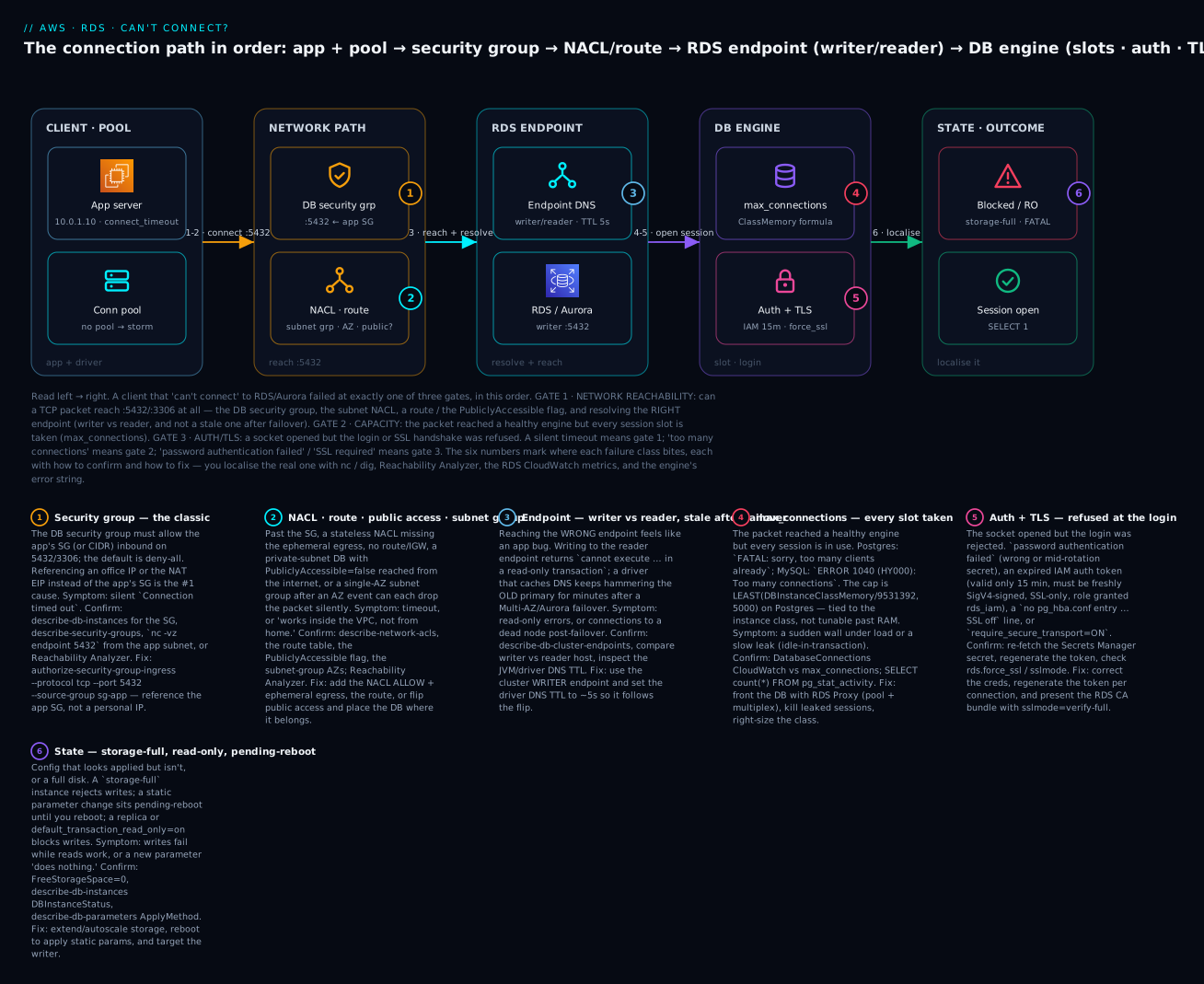
The single habit the diagram encodes: let the error string pick the gate. A timeout stops you at badges 1–3, too many connections at badge 4, an auth/SSL error at badge 5, a read-only/write error at badge 6 — and you never debug a gate the error already told you it sailed through.
Real-world scenario
Company: Zenmart, a mid-size retailer in ap-south-1 running a Django checkout on ECS Fargate against an Aurora PostgreSQL cluster (db.r6g.large writer + one reader), fronted by no pool, connecting straight to the cluster writer endpoint.
The incident. During a flash sale, checkout latency exploded and logs filled with FATAL: sorry, too many clients already. The on-call engineer’s first instinct — the wrong one — was gate 1: “the network must be flapping,” and they opened the security group and the NACL. Both were fine (of course they were; the error was a database error, which means the packet had already crossed the SG). Twenty minutes gone. Someone else guessed gate 3 and rotated the master password “to be safe,” which did nothing but risk a second outage. The real problem was gate 2 and it was arithmetic: Fargate had autoscaled from 6 tasks to 40 under the sale load, each task’s Django pool opened up to 20 connections, and 40 × 20 = 800 attempted sessions against a db.r6g.large whose usable cap was ~1,795 — except a batch of idle in transaction sessions from a slow analytics query had already parked 600 slots, so the effective ceiling arrived far sooner.
The systematic pass. A senior engineer ignored the network entirely — the error was too many clients, which is gate 2 by definition — and pulled the two gate-2 signals: CloudWatch DatabaseConnections was pinned flat at the cap, and SELECT state,count(*) FROM pg_stat_activity GROUP BY 1 showed 612 idle in transaction. That immediately split the problem in two: a leak (the idle-in-transaction sessions) and a fan-out (pool-per-task × 40 tasks). They terminated the leaked sessions with pg_terminate_backend, which bought immediate headroom, and set idle_in_transaction_session_timeout = '5min' so the leak could never park slots indefinitely again.
The fix and the lesson. The permanent fix was an RDS Proxy in front of the cluster: 800 client connections now multiplex onto ~200 real sessions, and — the bonus nobody had asked for — the next planned failover no longer produced a reconnect storm, because the proxy held the client connections and drained them onto the new writer. Total time once they stopped debugging the wrong gate: the leak was cleared in 6 minutes; the proxy shipped the next day. The postmortem action items were pure playbook discipline: read the error string and pick the gate before opening a console; put a pool in front of any database an autoscaling fleet talks to; and alarm on DatabaseConnections > 80% of max_connections so capacity is a warning, not an outage. The password they had rotated in a panic was noted as a near-miss — “ruling out” gate 3 by changing credentials during a gate-2 incident is how one outage becomes two.
Advantages and disadvantages
The “advantage” here is the method — categorise by error string, confirm with the gate’s own tooling, fix once — versus the ad-hoc alternative most teams default to.
| Systematic gate method (this approach) | Ad-hoc “try things” |
|---|---|
| Error string → gate → two confirming commands | Guess a cause, change a thing, wait, repeat |
| Never debugs a gate the error already passed | Opens the security group for an auth error |
Non-destructive confirmation (nc, dig, CloudWatch) |
“Rules out” gate 3 by rotating a live password |
| Capacity fix is structural (RDS Proxy), not a bigger cap | Raises max_connections until the instance OOMs |
| Minutes to localise; teachable across the team | Hours; frequently fixes the wrong gate |
| Prevents regressions with Terraform + alarms | Lives in one engineer’s memory |
The disadvantages are real. nc and Reachability Analyzer prove config reachability but not that the engine is healthy — a paused instance or a storage-full DB can pass gate 1 and still refuse work. CloudWatch DatabaseConnections has a one-minute granularity, so a sub-minute storm can hit the cap between data points; pg_stat_activity is ground truth but needs a working connection (during a full max_connections outage you may need the reserved superuser slot to even look). RDS Proxy adds a hop, a cost, and the pinning gotcha, so it is not a free win for a low-connection workload. The mature setup uses all the signals — error string first, then nc/dig for reachability, CloudWatch + pg_stat_activity for capacity, and secret/token/sslmode checks for auth — and never leans on only one.
Hands-on lab
You will stand up a small Postgres RDS instance, then deliberately break each gate: remove the security-group ingress and watch gate 1 time out (confirm with nc and Reachability Analyzer), exhaust the connection pool to trigger gate 2’s too many clients, and enforce TLS to see gate 3 reject a plaintext client — fixing each in aws CLI and Terraform, then tearing it all down. Free-tier-friendly on db.t3.micro; meterable items are flagged. Region: ap-south-1.
1. Stand up the instance and a client
# Assume an existing VPC with a private app subnet and an app instance in sg-app.
DBSG=$(aws ec2 create-security-group --group-name lab-db --description "lab db" \
  --vpc-id vpc-0abc --query GroupId --output text)
aws ec2 authorize-security-group-ingress --group-id $DBSG \
  --protocol tcp --port 5432 --source-group sg-app       # allow the APP sg on 5432
aws rds create-db-subnet-group --db-subnet-group-name lab-subnets \
  --db-subnet-group-description lab --subnet-ids subnet-a subnet-b
aws rds create-db-instance --db-instance-identifier lab-pg \
  --engine postgres --engine-version 16.3 --db-instance-class db.t3.micro \
  --allocated-storage 20 --master-username app --manage-master-user-password \
  --db-subnet-group-name lab-subnets --vpc-security-group-ids $DBSG \
  --no-publicly-accessible --backup-retention-period 0
aws rds wait db-instance-available --db-instance-identifier lab-pg
EP=$(aws rds describe-db-instances --db-instance-identifier lab-pg \
  --query 'DBInstances[0].Endpoint.Address' --output text)
--manage-master-user-password lets RDS store the master password in Secrets Manager for you — no plaintext password in your shell history. From the app instance, confirm the baseline:
nc -vz $EP 5432 # expected: "Connection to <ep> 5432 port [tcp/postgresql] succeeded!"
Expected: succeeded. Gate 1 is open. Any break you now introduce is unambiguous.
2. Break gate 1 — remove the SG ingress
aws ec2 revoke-security-group-ingress --group-id $DBSG \
  --protocol tcp --port 5432 --source-group sg-app     # the packet now has nowhere to land
# From the app instance:
nc -vz $EP 5432        # expected NOW: hangs, then "Connection timed out"
Note what you don’t see: no error explaining why, just a timeout. This is the moment engineers reset passwords. You will not — a timeout is gate 1, and credentials are downstream of a packet that never arrived.
3. Localise gate 1 with Reachability Analyzer
ENI=$(aws rds describe-db-instances --db-instance-identifier lab-pg \
  --query 'DBInstances[0].Endpoint.Address' --output text)   # resolve to the DB ENI via dig if needed
PID=$(aws ec2 create-network-insights-path --source i-app --destination i-dbeni \
  --protocol tcp --destination-port 5432 \
  --query NetworkInsightsPath.NetworkInsightsPathId --output text)
AID=$(aws ec2 start-network-insights-analysis --network-insights-path-id $PID \
  --query NetworkInsightsAnalysis.NetworkInsightsAnalysisId --output text)
sleep 20
aws ec2 describe-network-insights-analyses --network-insights-analysis-ids $AID \
  --query 'NetworkInsightsAnalyses[0].{Reachable:NetworkPathFound,Why:Explanations[].ExplanationCode}'
Expected:
{ "Reachable": false, "Why": [ "ENI_SG_RULES_MISMATCH" ] }
The tool names the security group, not the password, in one call (~₹8 / US $0.10). Fix it and re-confirm:
aws ec2 authorize-security-group-ingress --group-id $DBSG \
  --protocol tcp --port 5432 --source-group sg-app
nc -vz $EP 5432        # succeeded again
4. Break gate 2 — exhaust the connection pool
From the app host, open more sessions than the tiny instance allows (a db.t3.micro gives ~112, minus reserved). This loop grabs and holds connections:
for i in $(seq 1 130); do
  PGPASSWORD=$(aws secretsmanager get-secret-value --secret-id rds!db-... \
    --query SecretString --output text | python3 -c 'import sys,json;print(json.load(sys.stdin)["password"])')
  psql "host=$EP dbname=postgres user=app sslmode=require" \
    -c 'SELECT pg_sleep(120)' >/dev/null 2>&1 &
done
psql "host=$EP dbname=postgres user=app sslmode=require" -c 'SELECT 1'
# expected once the cap is hit:  FATAL:  sorry, too many clients already
Confirm it is genuinely capacity (gate 2) and not anything upstream — the engine answered, so gates 1 and 3 are fine:
aws cloudwatch get-metric-statistics --namespace AWS/RDS --metric-name DatabaseConnections \
  --dimensions Name=DBInstanceIdentifier,Value=lab-pg --start-time $(date -u -v-10M +%FT%TZ) \
  --end-time $(date -u +%FT%TZ) --period 60 --statistics Maximum
DatabaseConnections sits pinned at the cap. Kill the loop (kill $(jobs -p)) to release the slots — the real fix in production is RDS Proxy so thousands of clients multiplex onto a few sessions rather than each holding one:
resource "aws_db_proxy" "lab" {
  name           = "lab-proxy"
  engine_family  = "POSTGRESQL"
  role_arn       = aws_iam_role.proxy.arn
  vpc_subnet_ids = [aws_subnet.a.id, aws_subnet.b.id]
  require_tls    = true
  auth { auth_scheme = "SECRETS"; secret_arn = aws_secretsmanager_secret.db.arn }
}
5. Break and fix gate 3 — enforce TLS
Create a parameter group with rds.force_ssl=1, attach it, reboot to apply the static parameter, then watch a plaintext client fail:
aws rds create-db-parameter-group --db-parameter-group-name lab-force-ssl \
  --db-parameter-group-family postgres16 --description "force ssl"
aws rds modify-db-parameter-group --db-parameter-group-name lab-force-ssl \
  --parameters "ParameterName=rds.force_ssl,ParameterValue=1,ApplyMethod=pending-reboot"
aws rds modify-db-instance --db-instance-identifier lab-pg \
  --db-parameter-group-name lab-force-ssl --apply-immediately
aws rds reboot-db-instance --db-instance-identifier lab-pg     # static param needs a reboot
aws rds wait db-instance-available --db-instance-identifier lab-pg
psql "host=$EP dbname=postgres user=app sslmode=disable" -c 'SELECT 1'
# expected: FATAL: no pg_hba.conf entry for host "10.0.1.10", user "app", database "postgres", SSL off
curl -so global-bundle.pem https://truststore.pki.rds.amazonaws.com/global/global-bundle.pem
psql "host=$EP dbname=postgres user=app sslmode=verify-full sslrootcert=global-bundle.pem" -c 'SELECT 1'
# expected:  ?column? = 1   (encrypted, cert + hostname verified)
6. Teardown (do this — RDS meters by the hour)
aws rds delete-db-instance --db-instance-identifier lab-pg --skip-final-snapshot \
  --delete-automated-backups
aws rds wait db-instance-deleted --db-instance-identifier lab-pg
aws rds delete-db-parameter-group --db-parameter-group-name lab-force-ssl
aws rds delete-db-subnet-group --db-subnet-group-name lab-subnets
aws ec2 delete-security-group --group-id $DBSG
aws ec2 delete-network-insights-analysis --network-insights-analysis-id $AID
aws ec2 delete-network-insights-path --network-insights-path-id $PID
⚠️ Costs: the db.t3.micro instance meters per hour (free-tier eligible for the first 750 hours/month on a new account); Reachability Analyzer is ~₹8 per analysis; Secrets Manager stores the managed master password at ~₹33/secret/month. Delete promptly.
Common mistakes & troubleshooting
This is the section you keep open during an incident. Read the error, find its row, note the gate, run the confirm, apply the fix — and skip every gate the error already passed.
The master symptom → category → confirm → fix table
| # | Symptom (exact error) | Category | Root cause | Confirm | Fix |
|---|---|---|---|---|---|
| 1 | psql: … Connection timed out |
Reachability | DB SG doesn’t allow the app SG | nc -vz ep 5432; describe-security-groups |
authorize ingress from the app SG on 5432/3306 |
| 2 | Connection timed out from home, works in VPC |
Reachability | PubliclyAccessible=false or private subnet |
describe-db-instances PubliclyAccessible; dig outside |
enable public access + IGW route, or use a bastion |
| 3 | Connection timed out, SG looks right |
Reachability | NACL missing outbound ephemeral; custom NACL | describe-network-acls; Flow Logs pair |
add outbound tcp 1024-65535; fix rule order |
| 4 | Connection timed out after a network change |
Reachability | app SG egress dropped the DB port | describe-security-groups on the app SG | allow egress TCP 5432/3306 to the DB |
| 5 | could not translate host name / NXDOMAIN |
Reachability | wrong/typo’d endpoint; VPC DNS off | dig ep; enableDnsSupport |
copy the exact endpoint; enable VPC DNS |
| 6 | Connection refused (instant) |
Reachability | wrong port, or instance rebooting/replaced | describe-db-instances Endpoint.Port, status |
use the right port; wait for available |
| 7 | cannot execute INSERT … read-only transaction |
Endpoint/State | writing to the reader endpoint or a replica | describe-db-cluster-endpoints; SHOW transaction_read_only |
use the cluster writer endpoint |
| 8 | timeouts to a dead IP right after failover | Reachability | driver cached DNS past the endpoint flip | dig ep vs the IP the driver uses |
set driver DNS TTL ~5s; reconnect on error |
| 9 | FATAL: sorry, too many clients already |
Capacity | max_connections exhausted |
CloudWatch DatabaseConnections vs cap |
RDS Proxy; kill leaks; right-size class |
| 10 | remaining connection slots are reserved … |
Capacity | within superuser_reserved_connections of cap |
DatabaseConnections near cap |
free slots now; add a pool |
| 11 | ERROR 1040 (HY000): Too many connections |
Capacity | MySQL max_connections hit |
SHOW STATUS LIKE 'Threads_connected' |
RDS Proxy; tune pool; larger class |
| 12 | slow climb to the cap over hours | Capacity | idle in transaction leak |
pg_stat_activity state column |
fix app; idle_in_transaction_session_timeout |
| 13 | mass connection spike at every failover | Capacity | reconnect storm, no pooling | DatabaseConnections spike at events |
RDS Proxy (holds through failover) |
| 14 | FATAL: password authentication failed |
Auth | wrong / mid-rotation / cached secret | test the secret value manually | re-fetch secret per connect; fix rotation |
| 15 | IAM auth: “some connections fail” | Auth | token older than 15 minutes | token age; rds_iam grant |
regenerate token per new connection |
| 16 | PAM authentication failed |
Auth | IAM user lacks rds_iam role |
\du for the role |
GRANT rds_iam TO user; + rds-db:connect IAM |
| 17 | no pg_hba.conf entry … SSL off |
Auth/TLS | rds.force_ssl=1, client sent plaintext |
describe-db-parameters rds.force_ssl |
connect with sslmode=require/verify-full |
| 18 | ERROR 3159 … require_secure_transport=ON |
Auth/TLS | MySQL TLS enforced; plaintext client | SHOW VARIABLES LIKE 'require_secure_transport' |
--ssl-mode=REQUIRED + CA bundle |
| 19 | SSL error: certificate verify failed |
TLS | missing/old CA bundle; wrong sslmode |
check sslrootcert; bundle date |
use global-bundle.pem; verify-full |
| 20 | new max_connections “does nothing” |
State | static param stuck pending-reboot |
describe-db-parameters ApplyMethod |
reboot the instance to apply |
| 21 | writes fail, status storage-full |
State | disk full | FreeStorageSpace=0; DBInstanceStatus |
extend storage; enable autoscaling |
| 22 | timeout expired fast, before TCP done |
Client | connect_timeout too low for the path |
driver connect_timeout value |
raise connect_timeout; fix the real gate-1 cause |
The reachability vs capacity vs auth decode table
| If you see… | It’s this gate | Do this first | Do NOT |
|---|---|---|---|
A silent Connection timed out |
Reachability | nc -vz ep port; then SG → NACL → route |
reset the password |
Instant Connection refused |
Reachability (edge) | check the port and instance status | assume it’s the security group |
| Name won’t resolve | Reachability (DNS) | dig ep; copy the exact endpoint |
retype from memory |
too many clients / Too many connections |
Capacity | DatabaseConnections vs max_connections |
change any SG/NACL rule |
| Slow climb then the cap | Capacity (leak) | pg_stat_activity for idle in transaction |
just raise max_connections |
password authentication failed |
Auth | re-fetch the secret; test manually | touch the network |
| IAM auth intermittent | Auth (token) | check token age vs 15 min | cache the token in a pool |
SSL off / require_secure_transport |
Auth/TLS | add sslmode/--ssl-mode + CA bundle |
disable force_ssl in a panic |
read-only transaction |
Endpoint/State | check writer vs reader; storage | assume the DB is down |
| Param change ignored | State | ApplyMethod; reboot if static |
re-apply repeatedly |
Error-string reference (Postgres & MySQL)
| Error string | Engine | Gate | One-line meaning & fix |
|---|---|---|---|
could not connect to server: Connection timed out |
PG | Reachability | packet dropped — SG/NACL/route; nc -vz, then fix the rule |
connection to server … failed: timeout expired |
PG | Reachability/Client | connect_timeout fired — real cause is usually gate 1 |
Connection refused |
PG/MySQL | Reachability | reached a host, nothing on that port — wrong port/rebooting |
could not translate host name … Name or service not known |
PG | Reachability | DNS — wrong endpoint or VPC DNS off |
FATAL: sorry, too many clients already |
PG | Capacity | max_connections full — pool/RDS Proxy |
FATAL: remaining connection slots are reserved … |
PG | Capacity | within reserved slots of the cap — free/pool now |
ERROR 1040 (HY000): Too many connections |
MySQL | Capacity | max_connections full — pool/RDS Proxy |
FATAL: password authentication failed for user "x" |
PG | Auth | bad/rotated password — re-fetch secret |
ERROR 1045 (28000): Access denied for user 'x' |
MySQL | Auth | bad password/host grant — check user + secret |
FATAL: no pg_hba.conf entry for host "…", … SSL off |
PG | Auth/TLS | force_ssl on, client plaintext — add sslmode |
ERROR 3159 (HY000): … require_secure_transport=ON |
MySQL | Auth/TLS | TLS enforced — --ssl-mode=REQUIRED |
SSL error: certificate verify failed |
PG | TLS | CA bundle missing/old — use global-bundle.pem |
PAM authentication failed |
PG | Auth | IAM auth — grant rds_iam, fresh token |
cannot execute INSERT in a read-only transaction |
PG | Endpoint/State | reader endpoint or storage-full — use writer |
Reachability Analyzer explanation codes for an RDS path
| Explanation code | Means | Fix |
|---|---|---|
ENI_SG_RULES_MISMATCH |
DB SG has no matching ingress for the source/port | authorize the app SG on the DB port |
NO_ROUTE_TO_DESTINATION |
no route from the source subnet to the DB subnet | add/repair the route; check the association |
SUBNET_ACL_RESTRICTION |
a NACL rule blocks the path | fix the NACL ALLOW + ephemeral egress |
SECURITY_GROUP_EGRESS_MISMATCH |
app SG has no egress to the DB | allow egress on 5432/3306 |
NO_PATH / UNASSOCIATED_COMPONENT |
ENI not attached / DB not yet ready | wait for available; verify the target |
The three nastiest, in prose
The security-group chain. The most common RDS outage and the most mis-debugged, because the DB security group’s source looks superficially reasonable while being exactly wrong. The reflex is to allow “the app,” so someone adds the app’s public-facing IP, or the NAT gateway’s EIP, or the office CIDR — and every one of those fails for the same reason: an app in the VPC connecting to an RDS endpoint in the same VPC keeps its private source IP over the local route and never presents the NAT EIP or any public address. So the SG that “allows the app” allows an address the app never uses, and the connection times out silently. The only robust rule is a security-group reference: DB SG allows sg-app, by identity, so it survives IP changes, scale-out, and instance replacement. Confirm the block deterministically with nc -vz endpoint 5432 (times out) and Reachability Analyzer (ENI_SG_RULES_MISMATCH) rather than eyeballing rules — and remember to check the app’s egress too, since a locked-down app SG can drop the DB port on the way out, producing the identical timeout one layer earlier.
max_connections exhaustion and RDS Proxy. This one is nasty because the instinctive fixes make it worse. When FATAL: sorry, too many clients already appears under load, the tempting moves are to scale the app (more instances, each with its own pool, multiplying total connections), raise max_connections (each Postgres backend costs several MB of RAM, so a big number OOMs a small instance), or restart the database (a mass reconnect storm refills the cap instantly). The correct diagnosis is arithmetic and a leak check: DatabaseConnections pinned at the formula-derived cap is capacity, and SELECT state,count(*) FROM pg_stat_activity reveals whether a chunk of those slots are idle in transaction (a leak) versus genuinely busy (true demand). The structural fix is a pool that multiplexes — RDS Proxy turns thousands of client connections into a few hundred real sessions and, as a bonus, holds connections through a failover so you don’t storm the new writer. Set idle_in_transaction_session_timeout so a leak can never park slots forever, and alarm at 80% of the cap so capacity is a warning, not a 2 a.m. page.
IAM-auth token expiry. IAM database authentication is a security win — no stored passwords — with one failure mode that produces a genuinely confusing symptom: partial failure. The auth token from generate-db-auth-token is valid for exactly 15 minutes, must be freshly SigV4-signed for the specific host/port/user, and only works over TLS with the DB user granted rds_iam (Postgres) or the AWSAuthenticationPlugin (MySQL). The trap is caching: a worker generates a token at startup, opens a pool, and everything works — until the pool needs to open a new connection 20 minutes later using the token it cached at boot, which expired 5 minutes ago. Now some connections (the old ones) work and new ones fail, which looks like a flaky database rather than an expired credential. The cure is to generate the token immediately before each new connection and never treat it like a long-lived password; if you also see throttling under a connection spike, remember IAM-auth caps the rate of new connections, which is another reason to pool with RDS Proxy (which can do the IAM auth for you).
Best practices
- Read the error string first and pick the gate. Timeout = reachability,
too many= capacity, auth/SSL error = auth/TLS. Never debug a gate the error already passed. - Reference the app SG, never an IP, in the DB SG. It survives scale-out and instance replacement and eliminates the NAT-EIP trap.
- Put a pool in front of any database an autoscaling fleet or Lambda talks to. RDS Proxy multiplexes and absorbs failover storms; it is the answer to
too many connections, not a bigger cap. - Alarm on
DatabaseConnections > 80%ofmax_connections. Capacity should page as a warning long before it becomes an outage. - Set
idle_in_transaction_session_timeout(a few minutes) so a leaked transaction can never park a slot indefinitely. - Always connect the writer through the cluster writer endpoint, not an instance endpoint or a cached IP — so a failover moves you automatically and never yields
read-only transaction. - Set the driver DNS TTL to ~5 seconds (e.g. JVM
networkaddress.cache.ttl=5) so clients follow an endpoint flip within seconds instead of caching a dead IP. - Generate IAM auth tokens per connection, never cache them past a few minutes, and always over TLS with
rds_iamgranted. - Enforce TLS with
rds.force_ssl/require_secure_transportand verify it client-side withsslmode=verify-fulland theglobal-bundle.pemCA — encryption without verification is still MITM-able. - Enable storage autoscaling (
--max-allocated-storage) so a growth spike never drives the DB intostorage-fullread-only. - Know which parameters are static: changing
max_connections,shared_buffers, orrds.force_sslneeds a reboot — checkApplyMethodbefore assuming a change failed. - Keep a two-command confirm per gate memorised (
nc/dig·DatabaseConnections/pg_stat_activity· secret/token/sslmode) so you never guess.
Security notes
Troubleshooting connectivity and hardening it pull in opposite directions, and the seam is where mistakes happen. First, do not debug by widening: opening the DB security group to 0.0.0.0/0 or setting PubliclyAccessible=true “to rule out the network” turns a connectivity ticket into an internet-exposed database — use nc and Reachability Analyzer, which change nothing, and if you must widen, scope to a /32 and revert in the same session. Second, prefer IAM database authentication or Secrets Manager over static passwords: IAM auth eliminates stored credentials entirely (short-lived tokens, TLS-only), and managed rotation keeps a plaintext password out of your config — just handle the 15-minute token lifetime and the rotation window in the app. Third, make TLS verify-full, not merely require: require encrypts but does not authenticate the server, leaving you open to a man-in-the-middle; verify-full with the RDS CA bundle proves you are talking to the real endpoint. Fourth, least-privilege the diagnostic and proxy access: the RDS Proxy IAM role should read only its specific Secrets Manager secret, and the human role that runs describe-*, Reachability Analyzer, and reads Flow Logs should be a scoped read/analyse role, not admin. Fifth, treat a genuine AccessDenied/password authentication failed as a control working — confirm intent before “fixing” it, because the fix for a real auth failure is correct credentials, not a weaker policy. Finally, keep the database private (PubliclyAccessible=false, private subnets, SG-referenced access) as the default and reach it through a bastion, VPN, or SSM port-forward; public accessibility is a lab convenience, not a posture.
Cost & sizing
The diagnostic tooling is cheap relative to an hour of downtime, but the fixes have real, recurring costs worth sizing. Rough figures (USD list; INR ≈ ×83):
| Item | What drives it | Rough cost | Notes |
|---|---|---|---|
| RDS instance | class × hours | db.t3.micro ~$0.017/hr (₹1.4) |
free-tier: 750 hrs/mo new accounts |
| RDS Proxy | vCPU of the target × hours | ~$0.015 per vCPU-hour | e.g. ~$0.03/hr for a 2-vCPU target |
| Secrets Manager | per secret + API calls | ~$0.40/secret/mo (₹33) + calls | managed master password uses one |
| Reachability Analyzer | per analysis | ~$0.10 (₹8) | run freely during an incident |
| VPC Flow Logs → CloudWatch | GB ingested + stored | ~$0.50/GB | sample or send to S3 for high volume |
| Storage (gp3) | GB-month + IOPS/throughput above baseline | ~$0.115/GB-mo | autoscaling grows it; it doesn’t shrink |
| Multi-AZ | doubles instance + storage | ~2× the single-AZ instance | the price of automatic failover |
| Cross-AZ data (reader in another AZ) | GB across AZs | ~$0.01/GB each way | reader endpoint traffic can add up |
Sizing guidance: max_connections follows the instance class, so size the class to your usable connection need (RAM ÷ ~9.5 MB on Postgres, minus reserved) rather than raising the parameter — a bigger number on a small instance buys OOM, not throughput. Above a few hundred concurrent connections, an RDS Proxy is almost always cheaper than the larger instance you would otherwise need, because it lets a small database serve a large, spiky client fleet. Turn on storage autoscaling with a sane ceiling so you never pay for a storage-full outage, and remember gp3 storage only ever grows — plan the ceiling, since shrinking means a dump-and-reload.
Interview & exam questions
Q1. A client reports Connection timed out to RDS. What is your first move, and what do you explicitly NOT do? First move: confirm gate 1 with nc -vz endpoint 5432 from the app subnet and, if it times out, check the DB security group (does it allow the app SG?), then NACL/route. What you do not do is reset the password or check credentials — a timeout means the packet never reached the login, so auth is irrelevant. (SAA-C03/SOA-C02)
Q2. Why must the DB security group reference the app’s security group rather than the NAT gateway’s EIP? An app in the VPC connecting to an RDS endpoint in the same VPC routes over the local route and keeps its private source IP; it never presents the NAT EIP (that only applies to internet-bound traffic). So an SG allowing the NAT EIP allows an address the app never uses, and the connection times out. An SG reference matches the app by identity regardless of IP. (SAA-C03)
Q3. How is max_connections determined on RDS PostgreSQL, and why can’t you just set it to 5000 on a small instance? It defaults to LEAST(DBInstanceClassMemory/9531392, 5000) — a function of instance memory. Each Postgres connection is a backend process costing several MB, so raising the cap on a small instance exhausts RAM and triggers OOM/swap well before you reach the number. The scalable fix is RDS Proxy, not a bigger cap. (SOA-C02/DVA-C02)
Q4. FATAL: sorry, too many clients already under load. Walk the diagnosis and the fix. It is gate 2 (capacity), so ignore the network. Confirm with CloudWatch DatabaseConnections pinned at the cap and pg_stat_activity to check for idle in transaction leaks. Fix: terminate leaked sessions and set idle_in_transaction_session_timeout; structurally, front the DB with RDS Proxy so clients multiplex onto fewer real sessions. (DVA-C02)
Q5. Explain the IAM database authentication token lifetime and its classic failure. The token from generate-db-auth-token is valid 15 minutes, must be SigV4-signed per host/port/user, works only over TLS, and needs the rds_iam role (Postgres). The classic failure: a worker caches the token at startup, then opens a new pooled connection 20 minutes later with the expired token — old connections work, new ones fail, looking like a flaky DB. Fix: generate the token per new connection. (SCS-C02/DVA-C02)
Q6. A client gets no pg_hba.conf entry for host "…", user "app", database "orders", SSL off. What changed and how do you fix it? Someone set rds.force_ssl=1 (a static parameter, applied on reboot), so plaintext connections are rejected by the generated pg_hba. The client is sending no TLS. Fix: connect with sslmode=require (encryption) or verify-full (encryption + cert + hostname) using the RDS CA bundle. (SCS-C02)
Q7. What is the difference between sslmode=require and sslmode=verify-full? require encrypts the connection but does not verify the server certificate, so it is vulnerable to a man-in-the-middle. verify-full encrypts and verifies both the certificate chain (against the CA bundle) and that the hostname matches — the production default. (SCS-C02)
Q8. cannot execute INSERT in a read-only transaction — give two distinct causes. Most often you connected to a reader endpoint or a read replica’s instance endpoint (read-only by design); use the cluster writer endpoint. Less often, the instance is in storage-full state (or default_transaction_read_only=on), blocking writes until you add storage. Same error, different gate — check the endpoint first. (SAA-C03/SOA-C02)
Q9. After a Multi-AZ failover, some clients keep timing out against a dead IP. Why, and what is the fix? The RDS endpoint DNS flipped to the standby, but the client (often a JVM) cached the old IP past the endpoint’s short TTL and keeps dialling the former primary. Fix: lower the driver DNS TTL (e.g. networkaddress.cache.ttl=5) and reconnect on error so clients follow the flip within seconds. (ANS-C01/SOA-C02)
Q10. Why does RDS Proxy help with failovers, not just connection counts? Beyond multiplexing many client connections onto few database sessions, the proxy holds and queues client connections during a failover and drains them onto the new writer, preventing the reconnect storm that would otherwise slam the cap the instant the new writer comes up. (DVA-C02)
Q11. You raised max_connections in the parameter group but the cap is unchanged. Why? max_connections is a static parameter with ApplyMethod=pending-reboot; it takes effect only after you reboot the instance. Confirm with describe-db-parameters (ApplyType=static, ApplyMethod=pending-reboot) and reboot to apply. (SOA-C02)
Q12. A connection fails intermittently right after a Secrets Manager rotation. Diagnose. Rotation set a new password and advanced AWSCURRENT; clients holding the previous password fail in the brief switch window, or an app that cached the secret at boot keeps using the old value. Fix: fetch the secret at connect time (or re-fetch on an auth-failure retry) and rely on the managed rotation Lambda that keeps both passwords valid across the switch. (SCS-C02/DVA-C02)
Quick check
- A service logs
Connection timed outto RDS. Should you check the password? Why or why not? - Your DB security group allows the NAT gateway’s EIP, yet the in-VPC app times out. Why?
FATAL: sorry, too many clients already— which gate, and what are the two confirming signals?- Your app caches an IAM auth token at startup; 20 minutes in, new connections fail while old ones work. What happened?
- You set
rds.force_ssl=1but nothing changed for existing plaintext clients until later. What did you forget?
Answers
- No. A timeout is gate 1 (reachability) — the packet never reached the login prompt, so credentials are irrelevant. Confirm with
nc -vz endpoint 5432and check the DB security group and NACL/route, not the password. - Because an in-VPC app reaching an RDS endpoint in the same VPC routes over the
localroute and keeps its private source IP — it never presents the NAT EIP (that only applies to internet-bound traffic). Reference the app’s security group instead. - Gate 2 (capacity). Confirm with CloudWatch
DatabaseConnectionspinned atmax_connections, andSELECT state,count(*) FROM pg_stat_activityto see whether the slots are genuinely busy or leakedidle in transaction. - The IAM auth token expired — it is valid only 15 minutes. Old connections opened with a then-valid token keep working; new connections use the cached, now-expired token and fail. Generate the token per new connection.
rds.force_sslis a static parameter — it applies only after a reboot (ApplyMethod=pending-reboot). Until you reboot, the running instance keeps the old behaviour.
Glossary
| Term | Definition |
|---|---|
| Gate (1/2/3) | The three ordered checkpoints a connection passes: reachability, capacity, auth/TLS — the error string tells you which one stopped you |
| Security-group reference | An SG rule whose source is another SG (by identity) rather than a CIDR/IP; survives IP changes and is the correct DB-SG pattern |
PubliclyAccessible |
The RDS flag that (with a public subnet + IGW route + SG) lets the endpoint resolve to a public IP from outside the VPC |
| Writer / reader endpoint | Aurora cluster DNS names: the writer follows failover and accepts writes; the reader is load-balanced and read-only |
max_connections |
The hard cap on concurrent sessions, defaulting to a formula of DBInstanceClassMemory — tied to the instance class |
DBInstanceClassMemory |
Instance RAM minus RDS-reserved memory, in bytes, used in engine parameter formulas |
| RDS Proxy | A managed connection pool that multiplexes many client connections onto few DB sessions and holds them through failover |
| Connection pinning | When RDS Proxy ties a client to one backend connection (due to session state) and can no longer multiplex it |
idle in transaction |
A Postgres session that opened a transaction and neither committed nor rolled back, holding a slot (and locks) — a common leak |
| IAM database authentication | Auth using a short-lived (15-minute) SigV4 token instead of a password; TLS-only; needs rds_iam / AWSAuthenticationPlugin |
rds.force_ssl / require_secure_transport |
The Postgres / MySQL parameters that reject non-TLS connections at the server |
sslmode ladder |
Postgres TLS levels from disable → require (encrypt) → verify-full (encrypt + verify cert + hostname) |
CA bundle (global-bundle.pem) |
The Amazon RDS certificate authority chain a client uses to verify the server certificate |
| Storage-full | An instance status where the disk is exhausted; writes fail until storage is extended |
| Pending-reboot | A parameter change (static) that is queued and applies only after the instance reboots |
Next steps
- Build the database this playbook debugs, end to end, in Launch RDS for MySQL & PostgreSQL: A Hands-On Guide.
- Understand the failover behaviour behind stale endpoints and reconnect storms in RDS Multi-AZ & Read Replicas for High Availability.
- Master the security group vs NACL packet path that gate 1 lives in with the Security Groups & NACLs Deep Dive.
- When the drop is upstream of the database entirely, escalate to the full VPC Connectivity Troubleshooting Playbook.