Two RDS features get confused more than any other pair on AWS, and the confusion costs real outages: Multi-AZ and read replicas. They both make a second copy of your database in another place, so at a glance they look like the same idea with two names. They are not. Multi-AZ is for high availability — a synchronous standby that exists only to take over when the primary dies. Read replicas are for read scaling — asynchronous copies that serve read traffic and can lag the primary by seconds. One protects you from failure; the other spreads load. Reach for the wrong one and you either build “HA” that silently serves stale data during a failover, or you scale reads onto a standby that refuses every connection.
The trap is that the words replica and standby both mean “another copy,” and marketing slides show both as a box with an arrow. But the arrow is the whole story: a synchronous arrow (commit isn’t done until the standby has it) buys you zero-data-loss failover and nothing else — you can’t read from that standby. An asynchronous arrow (commit returns immediately, the copy catches up later) buys you extra readable capacity and a migration/DR landing pad — but it lags, and it will never fail over on its own. If you remember only one sentence from this article, make it this: Multi-AZ answers “what happens when the primary fails”; read replicas answer “where do my extra reads go” — and neither answers the other’s question.
By the end you will place each mechanism precisely: the classic Multi-AZ instance (one hidden synchronous standby, 60–120 s failover by flipping the endpoint’s DNS record) versus the newer Multi-AZ DB cluster (one writer plus two readable standbys, semi-synchronous, ~35 s failover, more write throughput); read replicas (asynchronous, up to 15, cross-Region, cascading, with replica lag you must watch and a one-way promotion to standalone); what a client actually experiences during a failover and why connection-pool and retry logic decide whether users notice; the reader endpoint concept; and where Aurora changes the rules with shared storage. Because you will return to this mid-design and mid-incident, every dimension — settings, triggers, limits, metrics, failure modes — is laid out as a scannable table, with aws CLI and Terraform for every operation, a force-failover lab, and a symptom→confirm→fix playbook.
What problem this solves
Databases fail in two directions, and teams routinely defend against one while calling it the other. The first direction is availability: the primary instance’s host dies, its Availability Zone loses power, or a patch reboots it — and every write path in your application stops. The second direction is read capacity: the primary is healthy but drowning, because reporting queries, dashboards, search, and read-heavy API traffic all pile onto the one instance that also has to take writes. These are different failures with different fixes, and the single most expensive mistake in RDS operations is treating them as one.
What breaks without the distinction is subtle and usually discovered during an incident. A team enables Multi-AZ, sees “we have a replica now,” and points their reporting service at the standby — except the Multi-AZ standby accepts no connections, so reporting either fails outright or (worse) they build read scaling on a read replica and then assume that replica will fail over automatically when the primary dies. It won’t. During the real outage the primary is gone, the “backup” replica keeps happily serving reads (stale, and now the only writable path is down), and nobody promoted anything because nobody wired promotion. The reverse failure is just as common: a team adds five read replicas to fix a write bottleneck, discovers replicas do nothing for writes, and burns weeks and rupees before someone says the quiet part — replicas scale reads, not writes.
Who hits this: every team standing up their first production RDS database; every application that succeeds (success is exactly when read traffic outgrows one instance); every architect drafting a DR plan who has to answer “what is our RTO and RPO for the database, precisely?” The fix is not a feature — it is a clear mental model of which mechanism answers which question, applied before the incident. Here is that model in one glance, the table you scan first:
| Question you’re actually asking | Wrong tool people reach for | Right tool | Why |
|---|---|---|---|
| “What happens when the primary instance/AZ dies?” | A read replica (“we’ll fail over to it”) | Multi-AZ (instance or cluster) | Automatic failover; synchronous, zero data loss |
| “Where do my extra read/report queries go?” | The Multi-AZ standby (“it’s just sitting there”) | Read replicas (or Multi-AZ cluster readers) | Readable capacity; the classic standby is not readable |
| “How do I not lose committed data on failure?” | Async read replica | Multi-AZ (synchronous) | Sync commit means the standby has every write |
| “How do I scale writes?” | More read replicas | Neither — bigger instance / Aurora / sharding | Replicas and standbys don’t add write capacity |
| “How do I serve users in another Region?” | Multi-AZ (it’s same-Region only) | Cross-Region read replica | Multi-AZ never spans Regions; replicas can |
| “How do I cut over to a new database / migrate?” | Multi-AZ failover | Promote a read replica | Promotion makes a replica an independent primary |
| “How do I take backups without hurting the primary?” | Run backups off-hours and hope | Multi-AZ (backups come from the standby) | Standby absorbs the backup I/O, primary doesn’t stall |
| “How do I get sub-30 s failover and read scaling together?” | Multi-AZ instance + separate replicas | Multi-AZ DB cluster or Aurora | Readable standbys + faster failover in one topology |
Read that table top to bottom and the two mechanisms stop blurring. The rest of this article is the depth behind each row.
Learning objectives
By the end of this article you can:
- State the Multi-AZ vs read replica distinction precisely — synchronous HA versus asynchronous read scaling — and defend which one a given requirement needs.
- Configure a Multi-AZ instance deployment, explain its synchronous standby, its 60–120 s CNAME-flip failover, and why the standby serves no reads.
- Choose between a Multi-AZ instance and a Multi-AZ DB cluster (1 writer + 2 readable standbys, semi-sync, ~35 s failover, higher write throughput) from engine support, cost and requirements.
- Create and operate read replicas — asynchronous, up to 15, cross-Region, cascading — watch
ReplicaLag, and promote one to a standalone database for a cutover or DR. - Predict exactly what a client experiences during a failover (endpoint stays the same, connections drop, DNS caching bites) and configure connection pools, DNS TTL and retry logic so users don’t notice.
- Pick the right endpoint (instance vs cluster writer vs reader) so reads don’t accidentally land on the writer.
- Contrast RDS HA with Aurora (shared storage, faster failover, replica auto-scaling) and know when to graduate.
- Diagnose the classic failures — app doesn’t recover after failover, runaway replica lag, reads hitting the writer, slow failover, surprise promotion, cross-Region cost — with the exact command and fix for each.
Prerequisites & where this fits
You should be comfortable creating an RDS instance and connecting to it — if not, start with Launch RDS for MySQL and PostgreSQL, Hands-On, which stands up the single-AZ instance this article makes highly available. You need working knowledge of a VPC with private subnets across at least two Availability Zones (Multi-AZ needs a DB subnet group spanning AZs), security groups, and the difference between the Console, the aws CLI and Terraform. Basic SQL and the idea of a connection pool help, because half of “why didn’t failover work” turns out to be client-side.
This sits in the Databases / reliability track. It is the availability-and-scale layer directly on top of the store-selection decision in AWS Databases: RDS, DynamoDB and Aurora — Choose the Right Store, and it pairs tightly with connection handling from RDS Connection Timeouts: A Troubleshooting Playbook (failover is a connection event) and with the multi-Region patterns in AWS Multi-Region Active-Active Architecture (where cross-Region replicas and promotion become the cutover mechanism). When RDS HA stops being enough, Aurora Serverless v2: Setup and Scaling is the graduation path.
A quick map of who owns each layer, so during an incident you pull in the right person instead of blaming “the database”:
| Layer | What lives here | Usually owned by | What it decides / can break |
|---|---|---|---|
| Application / client | Connection pool, retry logic, DNS caching, endpoint config | App / dev team | Whether failover is invisible or a 5-minute outage |
| RDS control plane | Multi-AZ toggle, replica creation, promotion, failover | DBA / platform team | RTO/RPO; read routing; who is primary |
| Replication | Sync (Multi-AZ) vs async (replicas), lag | AWS (managed) + you | Data loss on failover; read staleness |
| Storage | EBS gp3/io2 per instance; local NVMe (Multi-AZ cluster) | AWS (managed) | Failover speed; write throughput; IOPS |
| Network | VPC, DB subnet group (multi-AZ), security groups, DNS | Network team | Reachability; whether the standby’s AZ is usable |
| Observability | CloudWatch metrics, RDS events, SNS subscriptions | Platform / SRE | Whether you know a failover happened |
| Cost / FinOps | 2× (Multi-AZ), per-replica, cross-Region transfer | FinOps + owners | The bill; over-replication; egress surprises |
Core concepts
Six ideas make every later decision obvious. Internalise these and the option tables read themselves.
Availability and durability are not scalability. Availability is the probability the database is reachable and writable right now; durability is the guarantee a committed write survives a failure; scalability is how much load it can carry. Multi-AZ raises availability and durability (a synchronous standby with automatic failover). Read replicas raise read scalability (extra readable copies). Confusing these three is the root of every mistake in this topic — you cannot buy scalability with an HA feature or availability with a scaling feature.
Synchronous vs asynchronous replication decides everything downstream. In synchronous replication (Multi-AZ instance), the primary does not acknowledge a commit until the standby has durably written it — so the standby is always current (zero data loss, RPO ≈ 0), but the standby can’t also be serving reads without risking consistency, and there’s a small write-latency tax. In asynchronous replication (read replicas), the primary commits immediately and ships the change to replicas afterward — so replicas are readable and cheap to add, but they lag and a failure can lose the un-shipped tail (nonzero RPO). Sync = safety; async = scale. That single axis explains why one is HA and the other is read scaling.
A standby is not a replica, and a replica is not a standby. The Multi-AZ standby is invisible: no endpoint, no reads, no separate identity — it’s a shadow that becomes the primary on failover. A read replica is a first-class DB instance with its own endpoint, its own metrics, and its own life — you can read from it, give it its own replicas, put it in another Region, and promote it. They are different objects with different jobs that happen to both involve “a second copy.”
RTO and RPO are the numbers HA is measured in. RTO (Recovery Time Objective) is how long you can be down; RPO (Recovery Point Objective) is how much data you can lose. Multi-AZ gives RPO ≈ 0 (sync) and RTO of ~60–120 s (instance) or ~35 s (cluster). A promoted read replica gives RPO = “however far it had lagged” and RTO = “however long promotion + repointing takes.” When someone asks “are we HA?”, they are really asking “what are our RTO and RPO?” — answer in those terms.
Failover is a DNS event, not a data-copy event. When a Multi-AZ primary fails, RDS promotes the standby and updates the DNS record behind your unchanged endpoint to point at the new primary. Your connection string never changes; the IP it resolves to does. This is why failover is fast (no data to move — the standby already had it) and why the client side matters so much (if your client cached the old IP, it keeps talking to a dead host).
Read scaling has a routing problem the standby doesn’t. A Multi-AZ standby needs no routing — you never talk to it until it is the primary. Read replicas need you to decide which traffic goes where: writes and read-your-own-write to the primary, bulk reads to replicas. Classic RDS read replicas each have their own endpoint and no managed load balancer, so you route in the app, via a proxy, or (in a Multi-AZ cluster / Aurora) via a reader endpoint. Getting routing wrong is how “we have replicas” still overloads the writer.
The vocabulary in one table
Pin down every moving part before the deep sections. The glossary repeats these for lookup; this is the side-by-side mental model:
| Term | One-line definition | Which mechanism | Why it matters |
|---|---|---|---|
| Multi-AZ instance | One primary + one hidden synchronous standby in another AZ | HA | Automatic failover; standby not readable |
| Multi-AZ DB cluster | One writer + two readable standbys across 3 AZs, semi-sync | HA + some read | Faster failover; adds read capacity |
| Standby | The passive copy that becomes primary on failover | HA | No endpoint, no reads until promoted |
| Read replica | An asynchronous, readable copy that is its own instance | Read scaling | Lags; never auto-fails-over |
| Synchronous replication | Commit waits for the standby to have the write | Multi-AZ | RPO ≈ 0; small write-latency tax |
| Asynchronous replication | Commit returns immediately; copy catches up later | Read replica | Readable but lagging; nonzero RPO |
| Failover | Promoting the standby and repointing the endpoint DNS | Multi-AZ | The availability event; ~35–120 s |
| Promotion | Turning a read replica into an independent primary | Read replica | One-way; used for cutover/DR |
| ReplicaLag | Seconds a replica is behind the source | Read replica | The staleness metric to alarm on |
| Endpoint (instance) | DNS name for one instance; CNAME flips on failover | Both | What your app connects to |
| Reader endpoint | Load-balanced DNS across readable standbys/replicas | Multi-AZ cluster / Aurora | Where bulk reads should go |
| RTO / RPO | Recovery time / recovery point objectives | HA planning | How HA is actually measured |
| DB subnet group | The set of subnets (across AZs) RDS can place instances in | Both | Multi-AZ needs ≥2 AZs here |
The distinction, made concrete
Because this is the point, here it is enumerated across every dimension that differs. Scan the column that matches what you’re trying to achieve:
| Dimension | Multi-AZ (HA) | Read replica (read scaling) |
|---|---|---|
| Primary purpose | Availability + durability | Read throughput / offload |
| Replication | Synchronous (instance) / semi-sync (cluster) | Asynchronous |
| Data loss on failure (RPO) | ≈ 0 (committed writes are safe) | Whatever hadn’t shipped yet (> 0) |
| Standby/replica readable? | Instance: no; Cluster: yes (2 readers) | Yes (that’s the point) |
| Automatic failover? | Yes (RDS promotes + repoints DNS) | No (you must manually promote) |
| Recovery time (RTO) | ~60–120 s (instance) / ~35 s (cluster) | Minutes (promote + repoint app) |
| Same or cross-Region? | Same Region only | Same or cross-Region |
| How many? | 1 standby (instance) / 2 (cluster) | Up to 15 per source |
| Endpoint behaviour | One endpoint; CNAME flips on failover | Each replica has its own endpoint |
| Adds write capacity? | No | No |
| Cost shape | ~2× (instance) / ~3× (cluster) | Per-replica instance (+ egress if cross-Region) |
| You often want… | This on every production DB | This in addition, when reads outgrow one box |
The clarifying myth-buster — what each explicitly does not do, because these assumptions cause outages:
| The tempting assumption | Reality | Consequence if believed |
|---|---|---|
| “Multi-AZ gives me a second instance to read from” | The instance standby is not readable | Reporting service fails to connect; you’re surprised at 2 a.m. |
| “My read replica will fail over automatically” | Replicas never auto-fail-over | The primary dies and nobody promotes; write path is down |
| “Read replicas fix my write bottleneck” | Replicas add read capacity only | Weeks wasted; writes still bottlenecked |
| “Multi-AZ protects another Region” | Multi-AZ is same-Region only | A Region event takes you fully down |
| “Failover changes my connection string” | The endpoint name is stable; only the IP flips | Ops scrambles to update configs that didn’t need changing |
| “Promotion is reversible” | Promotion is one-way | You can’t re-attach; you rebuilt the wrong way |
| “A replica has zero lag because it’s on AWS” | Async replication lags, sometimes a lot | Users see stale data; read-your-own-write breaks |
Multi-AZ instance deployment, option by option
The classic Multi-AZ deployment is one primary DB instance with one synchronous standby in a different Availability Zone of the same Region. AWS provisions, patches and monitors both; you interact only with the primary’s endpoint. The standby is a true shadow: it has no endpoint, accepts no connections, and its only job is to be ready to become the primary.
What Multi-AZ actually gives you
Enumerate the guarantees so you know exactly what you bought (and didn’t):
| Property | Multi-AZ instance behaviour | What it does not give |
|---|---|---|
| Standby location | Different AZ, same Region | No cross-Region protection |
| Replication | Synchronous, block-level (physical) | Not logical/engine replication |
| Data loss (RPO) | ≈ 0 — committed writes are on both | — |
| Readability of standby | None — zero reads | No read offload |
| Failover | Automatic, ~60–120 s, DNS CNAME flip | Not instant; not sub-second |
| Backups | Taken from the standby (no primary I/O stall) | — |
| Patching | Standby patched first, then failover, then old primary | Brief failover blip during patching |
| Endpoint | One; unchanged across failover | You still need client reconnect logic |
| Write latency | Slightly higher (waits for standby ack) | Not free — sync has a tax |
| Cost | ~2× a single-AZ instance | The standby is billed but idle |
Enabling and configuring it
Turning on Multi-AZ is a single flag, but it’s an online modification that itself provisions the standby and syncs it (which takes time and, briefly, adds load). The knobs worth knowing:
| Setting | Values | Default | When to change | Trade-off / gotcha |
|---|---|---|---|---|
multi_az / --multi-az |
true / false | false | Every production DB → true | Enabling syncs a full copy first (takes minutes–hours) |
| DB subnet group | ≥ 2 subnets in ≥ 2 AZs | required | Must span AZs for Multi-AZ | Single-AZ subnet group blocks Multi-AZ |
apply_immediately |
true / false | false | Convert now vs in maintenance window | false defers the change to the window |
| Backup retention | 1–35 days (0 = off) | 7 | Enable PITR; needed for replicas too | 0 disables automated backups and replicas |
| Maintenance window | Weekly time slot | AWS-assigned | Align patch-driven failovers to low traffic | Patches can trigger a failover blip |
| Instance class | Both nodes same class | — | Size for peak write load | Standby matches primary (2× cost) |
| Storage type | gp3 / io2 | gp3 | IOPS-heavy → provision more | Both nodes get the same storage |
Convert an existing single-AZ instance to Multi-AZ with one modify call:
# Convert a running single-AZ instance to Multi-AZ (online; standby syncs first)
aws rds modify-db-instance \
  --db-instance-identifier orders-prod \
  --multi-az \
  --apply-immediately
# Watch it go from single-AZ to multi-az:
aws rds describe-db-instances --db-instance-identifier orders-prod \
  --query "DBInstances[0].{MultiAZ:MultiAZ,Status:DBInstanceStatus,AZ:AvailabilityZone,Standby:SecondaryAvailabilityZone}"
# Terraform: a Multi-AZ instance from the start
resource "aws_db_instance" "orders" {
  identifier             = "orders-prod"
  engine                 = "postgres"
  engine_version         = "16.4"
  instance_class         = "db.r6g.large"
  allocated_storage      = 100
  max_allocated_storage  = 500
  storage_type           = "gp3"
  multi_az               = true            # <-- the HA switch
  db_subnet_group_name   = aws_db_subnet_group.private.name  # must span AZs
  vpc_security_group_ids = [aws_security_group.db.id]
  backup_retention_period = 14             # >0 also required for read replicas
  storage_encrypted      = true
  deletion_protection    = true
  publicly_accessible    = false
}
What happens during a failover, second by second
Understanding the sequence tells you exactly where client logic has to catch the fall:
| Phase | Roughly when | What AWS does | What the client sees |
|---|---|---|---|
| Detection | 0–30 s | Health checks confirm the primary is unreachable | Queries hang / error; connections stall |
| Promotion | ~starts immediately after | Standby is promoted to primary (it already has all data) | Still no writable DB |
| DNS update | ~mid-failover | Endpoint’s DNS record repointed to the new primary | Old connections are dead; new lookups get new IP |
| Recovery | until ~60–120 s | New primary finishes crash recovery, opens for connections | App that re-resolves + reconnects succeeds |
| New standby | minutes after | A fresh standby is built in another AZ | Transparent; HA restored |
The lesson embedded in that table: AWS gets you a writable primary in ~60–120 s, but the client only recovers when it re-resolves DNS and reconnects. If your client caches the dead IP or your pool never retries, AWS’s fast failover is invisible to you and the “outage” lasts as long as your DNS cache or timeout — which can be far longer than the failover itself.
Failover triggers
A failover is not only the dramatic AZ outage — several routine events cause one, which is exactly why your app must always be failover-ready:
| Trigger | Category | Automatic? | Notes |
|---|---|---|---|
| Availability Zone outage / power loss | Unplanned | Yes | The canonical case Multi-AZ defends |
| Primary host / hardware failure | Unplanned | Yes | AWS detects and promotes |
| Storage (EBS) failure on primary | Unplanned | Yes | Standby has its own storage copy |
| Loss of network to the primary | Unplanned | Yes | Health check driven |
| OS / engine patching | Planned | Yes (blip) | Standby patched first, then failover |
| Instance-class modification | Planned | Yes (blip) | Resize applies via failover on Multi-AZ |
Manual reboot --force-failover |
Planned | Yes | The way you test failover (see the lab) |
DB instance reboot (no force) |
Planned | No | Reboots in place; no AZ flip |
Multi-AZ DB cluster — the newer, faster, readable topology
The classic Multi-AZ instance has two limitations: the standby is wasted (no reads) and failover is ~60–120 s. The Multi-AZ DB cluster deployment addresses both. It runs one writer and two readable standby replicas across three AZs, replicates semi-synchronously (the writer acknowledges a commit once at least one of the two readers confirms it — it doesn’t wait for both), and fails over in ~35 seconds. Because two nodes are readable, you also get a reader endpoint for read offload, and the write path is faster (local NVMe storage plus the one-of-two ack).
Instance vs cluster, side by side
The decision table — most teams should know both exist and pick deliberately:
| Dimension | Multi-AZ instance | Multi-AZ DB cluster |
|---|---|---|
| Topology | 1 primary + 1 standby | 1 writer + 2 readable standbys |
| AZs spanned | 2 | 3 |
| Replication | Synchronous (1 standby) | Semi-synchronous (ack from 1 of 2 readers) |
| Standbys readable? | No | Yes (2 readers, via reader endpoint) |
| Failover time | ~60–120 s | ~35 s |
| Write throughput | Baseline | Higher (local NVMe + 1-of-2 ack) |
| Read offload | None | Two reader nodes |
| Endpoints | One instance endpoint | Cluster (writer) + reader endpoint |
| Storage | EBS gp3/io2 | Local NVMe SSD (specific classes) |
| Engines | All RDS engines | MySQL 8.0.28+, PostgreSQL 13.4+ (Provisioned) |
| Instance classes | Broad | NVMe classes (e.g. db.m6gd, db.r6gd, db.m5d, db.r5d) |
| Cost | ~2× | ~3× (three nodes) |
| Pick it when | Any production DB needing HA | HA plus faster failover / some read scaling |
Endpoints and support caveats
The cluster’s readable standbys come with a managed reader endpoint — the thing classic replicas lack — but there are real support boundaries to check before you commit:
| Aspect | Multi-AZ DB cluster detail | Gotcha |
|---|---|---|
| Writer endpoint | ...cluster-xxxx... — all writes + read-your-own-write |
Sending reads here wastes writer capacity |
| Reader endpoint | ...cluster-ro-xxxx... — load-balances the 2 readers |
Reads may be slightly behind the writer |
| Reader consistency | Semi-sync; can lag under heavy write | Not for strict read-after-write |
| Engine | MySQL 8.0.28+, PostgreSQL 13.4+/14+/15+/16+ | MariaDB / Oracle / SQL Server: not supported |
| Mode | Provisioned only | No Serverless; no burstable t classes |
| Read replicas from a cluster | Limited/engine-dependent | Don’t assume classic replica features apply |
| Converting instance ↔ cluster | Not a simple toggle | Plan a proper migration path |
# Create a Multi-AZ DB cluster (PostgreSQL) — 1 writer + 2 readable standbys
aws rds create-db-cluster \
  --db-cluster-identifier orders-mazc \
  --engine postgres --engine-version 16.4 \
  --db-cluster-instance-class db.r6gd.large \
  --allocated-storage 100 --storage-type io1 --iops 3000 \
  --master-username appadmin --manage-master-user-password \
  --db-subnet-group-name db-private --vpc-security-group-ids sg-0abc123
# Two endpoints appear: the cluster (writer) endpoint and the -ro reader endpoint
aws rds describe-db-clusters --db-cluster-identifier orders-mazc \
  --query "DBClusters[0].{Writer:Endpoint,Reader:ReaderEndpoint,Status:Status}"
# Terraform: Multi-AZ DB cluster (note aws_rds_cluster with db_cluster_instance_class)
resource "aws_rds_cluster" "orders_mazc" {
  cluster_identifier        = "orders-mazc"
  engine                    = "postgres"
  engine_version            = "16.4"
  db_cluster_instance_class = "db.r6gd.large"   # NVMe class → Multi-AZ cluster
  allocated_storage         = 100
  storage_type              = "io1"
  iops                      = 3000
  master_username           = "appadmin"
  manage_master_user_password = true
  db_subnet_group_name      = aws_db_subnet_group.private.name
  vpc_security_group_ids    = [aws_security_group.db.id]
  storage_encrypted         = true
  deletion_protection       = true
}
Read replicas — asynchronous copies for read scaling
A read replica is a separate, readable DB instance kept up to date from a source database via the engine’s native asynchronous replication (MySQL/MariaDB binlog, PostgreSQL streaming replication, Oracle/SQL Server equivalents). Because replication is asynchronous, the replica can serve reads immediately — but it lags the source, and it is never an automatic failover target. It is the tool for read scaling, reporting isolation, near-Region reads, and (via promotion) migrations and DR.
What read replicas give you
| Property | Read replica behaviour | Limit / caveat |
|---|---|---|
| Replication | Asynchronous (engine-native) | Lag is inherent; watch ReplicaLag |
| Readable | Yes — full read traffic | Read-only until promoted |
| Count | Up to 15 per source (MySQL/MariaDB/PostgreSQL/Oracle) | SQL Server: up to 5, edition-dependent |
| Region | Same or cross-Region | Cross-Region adds transfer cost + lag |
| Cascading | Replica of a replica (MySQL/MariaDB/PostgreSQL) | Spreads replication load off the source |
| Own Multi-AZ | A replica can itself be Multi-AZ | Good for a replica you’ll promote for DR |
| Own endpoint | Each replica has its own DNS endpoint | No managed reader endpoint (unlike Aurora) |
| Promotion | Become a standalone read/write primary | One-way; breaks replication |
| Backups | Can have their own backup retention | Needed if you’ll promote it |
| Prereq | Source must have backup_retention_period > 0 |
0 blocks replica creation |
Where read replicas earn their place
Four distinct jobs, each a legitimate reason to add a replica:
| Use case | How the replica helps | Watch-out |
|---|---|---|
| Read scaling | Offload read-heavy API traffic from the writer | Route only lag-tolerant reads there |
| Reporting / analytics isolation | Heavy BI queries don’t hurt the OLTP primary | Long queries can increase lag |
| Near-Region reads | Cross-Region replica serves local users fast | Egress cost; higher lag |
| Migration / cutover | Promote to a new independent primary | One-way; plan the switch carefully |
| Disaster recovery (warm) | Cross-Region replica you can promote on a Region event | RPO = the lag at promotion time |
| Engine/version testing | Point test workloads at a replica | Still read-only pre-promotion |
Per-engine limits and topology
The numbers differ by engine — don’t assume “15 everywhere”:
| Engine | Max read replicas | Cross-Region? | Cascading? | Notes |
|---|---|---|---|---|
| MySQL | 15 | Yes | Yes | Binlog-based; cascading spreads load |
| MariaDB | 15 | Yes | Yes | Similar to MySQL |
| PostgreSQL | 15 | Yes | Yes (cascading) | Streaming replication; slots to watch |
| Oracle | Up to 5 (edition/feature-dependent) | Yes (with options) | Limited | Active Data Guard concepts |
| SQL Server | Up to 5 | Limited | No | Edition-dependent; more restrictions |
# Create an in-Region read replica (source must have backups enabled)
aws rds create-db-instance-read-replica \
  --db-instance-identifier orders-replica-1 \
  --source-db-instance-identifier orders-prod \
  --db-instance-class db.r6g.large

# Create a CROSS-REGION read replica (note the full source ARN + target region)
aws rds create-db-instance-read-replica \
  --db-instance-identifier orders-replica-blr \
  --source-db-instance-identifier arn:aws:rds:ap-south-1:111122223333:db:orders-prod \
  --region ap-south-2 \
  --db-instance-class db.r6g.large
# Terraform: an in-Region read replica is just replicate_source_db
resource "aws_db_instance" "orders_replica_1" {
  identifier          = "orders-replica-1"
  replicate_source_db = aws_db_instance.orders.identifier  # <-- makes it a replica
  instance_class      = "db.r6g.large"
  # No engine/username/storage here — inherited from the source
  publicly_accessible = false
  skip_final_snapshot = true
}
Replica lag — the metric that defines a replica’s health
Because replication is asynchronous, ReplicaLag (seconds behind the source) is the single most important replica metric. Zero is ideal; a steadily climbing value means the replica can’t keep up. The causes, ranked by how often they bite:
| Cause of lag | Why it happens | How to confirm | Fix |
|---|---|---|---|
| Write burst on the source | Replica applies changes serially; can’t keep up with a spike | ReplicaLag spikes with WriteIOPS on source |
Size replica up; smooth writes; accept transient lag |
| Undersized replica | Replica weaker than source, can’t apply fast enough | Replica CPU/IO pinned while source is fine | Match/exceed source class on the replica |
| Long-running transaction / lock | A big transaction blocks apply on the replica | PG: pg_stat_activity; MySQL: SHOW PROCESSLIST |
Break up transactions; avoid huge single commits |
| Heavy read query on the replica | Reporting query blocks replication apply | Lag rises during report runs | Isolate reporting; tune queries; separate replica |
| Bulk DDL / index build | Schema change replays slowly on the replica | Lag jumps at deploy time | Schedule DDL off-peak; expect a lag window |
| Single-threaded apply | Engine applies changes on limited threads | Lag under high concurrent write | Parallel replication settings where supported |
| Network (cross-Region) | Distance + transfer for cross-Region replicas | Cross-Region replica lags more than in-Region | Expect it; size for it; keep DR reads tolerant |
# Watch ReplicaLag on a replica (should trend toward 0)
aws cloudwatch get-metric-statistics --namespace AWS/RDS \
  --metric-name ReplicaLag \
  --dimensions Name=DBInstanceIdentifier,Value=orders-replica-1 \
  --start-time $(date -u -d '1 hour ago' +%FT%TZ 2>/dev/null || date -u -v-1H +%FT%TZ) \
  --end-time $(date -u +%FT%TZ) --period 60 --statistics Maximum Average
Promotion — the one-way door
Promoting a read replica detaches it from its source and makes it a standalone, writable primary. Replication stops permanently; there is no “demote” to re-attach. Promotion is how you cut over a migration, break off a shard, or activate a DR replica after a Region failure. What actually changes:
| Aspect | Before promotion | After promotion | Irreversible? |
|---|---|---|---|
| Role | Read-only replica of a source | Independent read/write primary | Yes — can’t re-attach |
| Replication | Applying changes from source | Stopped forever | Yes |
| Writes | Rejected | Accepted | — |
| Endpoint | Its own replica endpoint | Same endpoint, now writable | App must repoint here |
| Backups | Optional | Its own automated backups begin | — |
| Multi-AZ | Optional on the replica | Carries over if it was set | — |
| Data currency | As current as its lag allowed | Frozen at promotion instant (+ its lag) | RPO = lag at promote |
# Promote a read replica to a standalone primary (ONE-WAY — no going back)
aws rds promote-read-replica \
  --db-instance-identifier orders-replica-1 \
  --backup-retention-period 7
# It briefly reboots, then accepts writes. Repoint the app to its endpoint.
The critical operational point: because promotion captures whatever lag existed at that instant, a DR promotion after a source failure has an RPO equal to the un-replicated tail. If the replica lagged 12 seconds when the source vanished, you lost ~12 seconds of writes. This is the fundamental difference from Multi-AZ (RPO ≈ 0) — and the reason read replicas are DR, not HA.
Failover and the client experience
The most-skipped truth in RDS HA is that failover is only half done by AWS. AWS promotes the standby and repoints DNS; your application has to notice the connection died, re-resolve the endpoint, and reconnect. If it doesn’t, the ~60–120 s failover becomes a multi-minute outage on your side. Map the triggers to what the client actually experiences:
| Trigger | What AWS does | What the client experiences | What the client must do |
|---|---|---|---|
| AZ outage | Promote standby, repoint DNS | In-flight queries error; connections drop | Reconnect + retry |
| Host failure | Same | Same | Same |
| Patching (planned) | Failover during window | Brief connection drop | Reconnect (ideally off-peak) |
| Instance resize | Applies via failover | Brief drop | Reconnect |
reboot --force-failover |
Immediate failover | Connections drop within seconds | Reconnect (this is your test) |
| Replica promotion | Replica becomes primary | Old writes were going nowhere (writer gone) | Repoint to the promoted endpoint |
Why the client side decides your real RTO
Enumerate the client-side settings that turn a fast AWS failover into an invisible event — or a long one:
| Client concern | Bad default that bites | What to set | Why |
|---|---|---|---|
| DNS caching (JVM) | Java can cache DNS forever (with a SecurityManager) or 30 s | networkaddress.cache.ttl=5 (or lower) |
So it re-resolves to the new primary fast |
| DNS caching (OS/app) | Long TTL caches / no re-resolve | Honour RDS’s ~5 s TTL; don’t pin IPs | Same reason |
| Connection pool validation | Hands out dead connections after failover | Test-on-borrow / validation query | Detects the severed connection |
| Pool max age / idle reap | Keeps stale connections indefinitely | Bound connection lifetime | Forces periodic re-resolve/reconnect |
| Connect/socket timeout | 30–60 s+ makes failover feel like an outage | Short connect timeout + retry | Fail fast, then reconnect |
| Retry logic | No retry → first errors surface to users | Retry transient errors with backoff | Rides over the ~1–2 min window |
| Statement idempotency | Blind retries double-apply writes | Idempotent writes / transactional retries | Safe to retry |
The single highest-value change for JVM apps is capping DNS TTL — the classic “database failed over in 90 seconds but our app was down for 15 minutes” incident is almost always a JVM caching the dead primary’s IP. For the deeper connection-recovery playbook (pools, timeouts, FATAL: the database system is starting up), see RDS Connection Timeouts: A Troubleshooting Playbook.
Failover/recovery time, three topologies compared
| Topology | Typical recovery | Data loss (RPO) | Automatic? | Read scaling included? |
|---|---|---|---|---|
| Multi-AZ instance | ~60–120 s | ≈ 0 | Yes | No |
| Multi-AZ DB cluster | ~35 s | ≈ 0 (semi-sync) | Yes | Yes (2 readers) |
| Read replica promotion | Minutes (manual) | = lag at promote | No | (It was the read layer) |
| Aurora | Often < 30 s (frequently ~15 s) | ≈ 0 (shared storage) | Yes | Yes (up to 15 readers) |
Endpoints — connect to the right one
Half of “our replicas don’t help” is traffic hitting the wrong endpoint. Know exactly what each endpoint routes to:
| Endpoint | Exists on | Routes to | Use for | On failover |
|---|---|---|---|---|
| DB instance endpoint | Single-AZ & Multi-AZ instance | The primary instance | All traffic (writes + reads) | Same name; DNS flips to new primary |
| Cluster (writer) endpoint | Multi-AZ DB cluster / Aurora | Current writer | Writes + read-your-own-write | Auto-points to new writer |
| Reader endpoint | Multi-AZ DB cluster / Aurora | Load-balanced readers | Bulk / lag-tolerant reads | Drops failed readers, balances rest |
| Replica endpoint | Each RDS read replica | That one replica | Reads directed at that replica | Doesn’t move (it’s not a failover target) |
| Custom endpoint | Aurora only | A chosen subset | Isolate workloads (e.g. analytics) | You define membership |
The takeaways: on a classic Multi-AZ instance you have exactly one endpoint and it always points at the primary — simple. With classic read replicas, there is no managed reader endpoint; each replica has its own DNS name and you distribute reads (in app config, via a proxy like RDS Proxy, or a Route 53 weighted record). Only the Multi-AZ cluster and Aurora give you a managed reader endpoint. Assuming an “RDS reader endpoint” exists for classic replicas is a common and costly design error.
Monitoring HA — watch the signals that predict trouble
You cannot manage what you don’t watch, and HA failures announce themselves in metrics before users notice. The CloudWatch metrics that matter for Multi-AZ and replicas:
| Metric | Namespace | What it tells you | Alarm starting point |
|---|---|---|---|
ReplicaLag |
AWS/RDS | Seconds a replica is behind the source | > 30 s sustained |
DatabaseConnections |
AWS/RDS | Connection count vs max_connections |
> 80% of max |
CPUUtilization |
AWS/RDS | Instance saturation (primary or replica) | > 80% sustained |
FreeableMemory |
AWS/RDS | Memory pressure | < 10% of RAM |
ReadIOPS / WriteIOPS |
AWS/RDS | I/O demand; write bursts drive lag | Trend vs provisioned |
DiskQueueDepth |
AWS/RDS | I/O saturation | > 5 sustained |
FreeStorageSpace |
AWS/RDS | Storage exhaustion → read-only | < 10% free |
SwapUsage |
AWS/RDS | Memory over-commit | Rising from 0 |
OldestReplicationSlotLag (PG) |
AWS/RDS | Replication slot backlog | Rising |
TransactionLogsDiskUsage (PG) |
AWS/RDS | WAL piling up (a stuck replica) | Rising |
ReplicationSlotDiskUsage (PG) |
AWS/RDS | Slot retaining WAL for a lagging replica | Rising |
MaximumUsedTransactionIDs (PG) |
AWS/RDS | Wraparound risk (vacuum/replica health) | Approaching threshold |
Metrics tell you a state; RDS events tell you a transition — and a failover is a transition. Subscribe an SNS topic to the RDS event categories so a failover pages you rather than being discovered in the metrics later:
| Event category | Example message | Meaning | Act on it |
|---|---|---|---|
| failover | “Multi-AZ instance failover started” | Failover is underway | Expect connection drops; confirm app reconnected |
| failover | “Multi-AZ instance failover completed” | New primary is serving | Verify write path healthy |
| availability | “DB instance restarted” | Reboot/recovery occurred | Correlate with a trigger |
| failure | “DB instance failed / recovery” | Instance-level failure | Investigate root cause |
| maintenance | “Patch applied (may cause failover)” | Planned patch/failover | Schedule for low traffic |
| read replica | “Replica has fallen behind the source” | Lag threshold exceeded | Investigate lag causes |
# Subscribe to RDS failover/availability events for a specific instance
aws rds create-event-subscription \
  --subscription-name rds-ha-events \
  --sns-topic-arn arn:aws:sns:ap-south-1:111122223333:rds-alerts \
  --source-type db-instance \
  --event-categories '["failover","availability","failure","maintenance"]' \
  --source-ids orders-prod
Backups from the standby — a quiet Multi-AZ win
One benefit of Multi-AZ that has nothing to do with failover: automated backups and snapshots are taken from the standby, not the primary. On a single-AZ instance, the backup can briefly suspend I/O or elevate latency on the one instance serving your app. On Multi-AZ, that I/O hits the idle standby instead, so the primary keeps serving without a backup-window hiccup. It’s a performance and durability bonus that rides along with the availability you were buying anyway:
| Aspect | Single-AZ | Multi-AZ |
|---|---|---|
| Backup source | The primary (your live instance) | The standby |
| I/O impact of backup | Possible brief suspension / latency | None on the primary |
| Snapshot impact | Same instance under load | Offloaded to standby |
| Durability | One AZ | Two AZs (sync) |
| PITR | Yes (retention > 0) | Yes (retention > 0) |
| Recommended retention | 7–35 days | 7–35 days |
When RDS HA isn’t enough — the Aurora contrast
RDS Multi-AZ and read replicas are the right answer for most relational workloads. But their architecture — instance-attached storage, physical/async replication — sets ceilings that Amazon Aurora removes by decoupling compute from a shared, distributed storage layer (six copies across three AZs). Because every Aurora replica reads the same storage as the writer, replicas double as read scaling and failover targets, failover is faster (no data to copy), reader lag is sub-100 ms, and you can auto-scale readers. The trade is Aurora’s compatibility envelope and cost model. Side by side:
| Dimension | RDS Multi-AZ + read replicas | Aurora |
|---|---|---|
| Storage | Per-instance EBS (or local NVMe for cluster) | Shared distributed volume, 6 copies / 3 AZs |
| Replica = failover target? | No (replicas) / standby only (Multi-AZ) | Yes — up to 15 replicas are both |
| Failover time | ~60–120 s (instance) / ~35 s (cluster) | Often < 30 s (frequently ~15 s) |
| Reader lag | Seconds (async replicas) | Typically < 100 ms (shared storage) |
| Managed reader endpoint | Cluster/Aurora only (not classic replicas) | Yes |
| Replica auto-scaling | No | Yes (add/remove readers on load) |
| Max readers | 15 read replicas | 15 Aurora Replicas |
| Storage ceiling | 64 TiB (engine-dependent) | 128 TiB, auto-grow |
| Cross-Region | Cross-Region read replica | Aurora Global Database (< 1 s) |
| Engine parity | 100% vanilla engine | MySQL/PostgreSQL-compatible (most, not all) |
| Cost model | Per-instance | Per-instance or ACU (Serverless v2) + I/O |
| Pick it when | Standard relational HA + read scaling | Faster failover, low-lag reads, auto-scaling readers |
If your requirements are “sub-30 s failover, near-zero reader lag, readers that also fail over, and auto-scaling read capacity,” you have described Aurora — see AWS Databases: RDS, DynamoDB and Aurora — Choose the Right Store for the full decision and Aurora Serverless v2: Setup and Scaling for the auto-scaling compute path.
Architecture at a glance
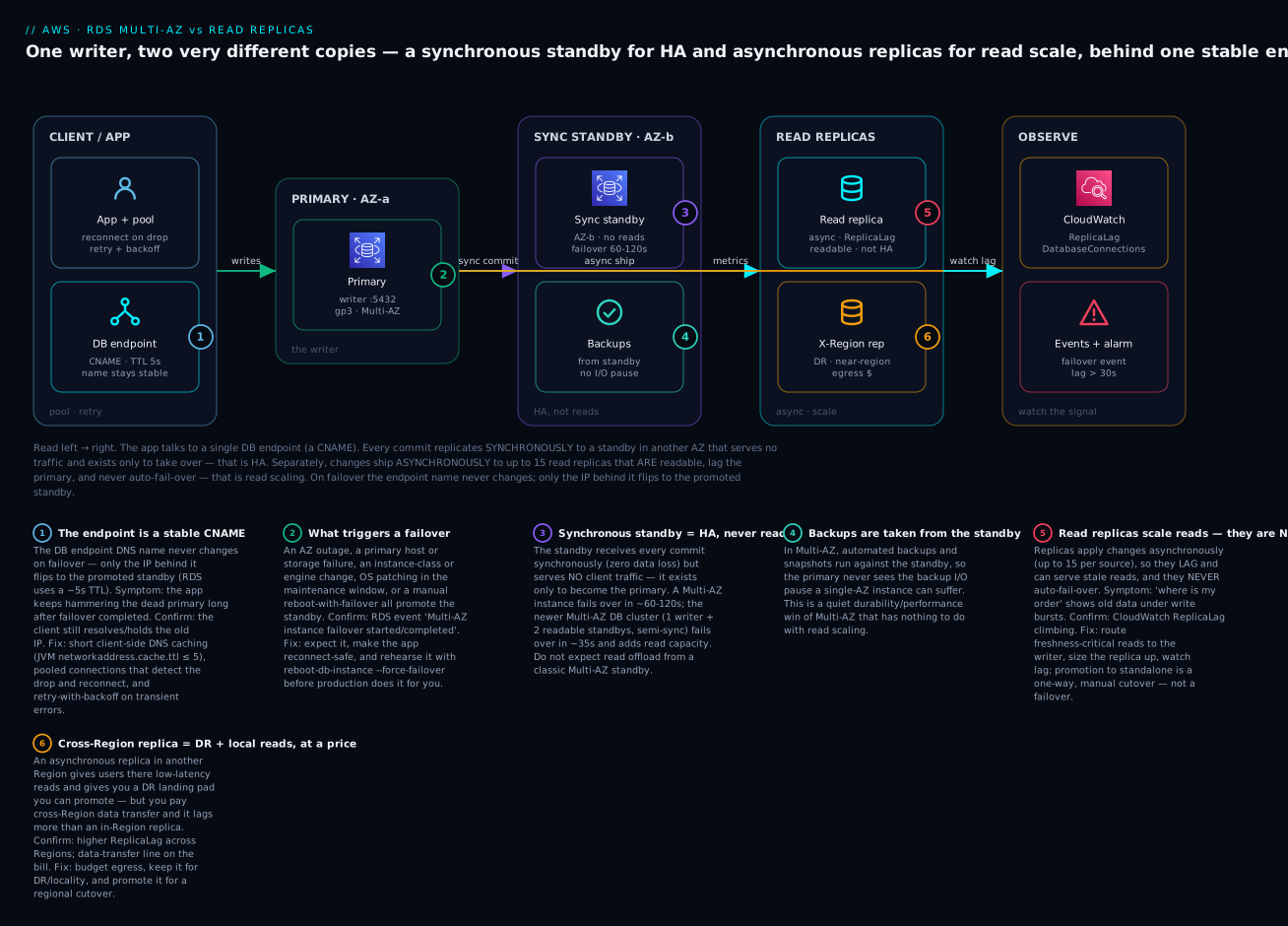
The diagram traces one database’s reliability topology left to right and marks where each mechanism helps and where each one bites. Start at the left: the application connects through a single DB endpoint — a DNS CNAME whose name never changes. That endpoint points at the primary in AZ-a, which takes all writes. Two very different copies branch from the primary. Upward, a synchronous standby in AZ-b receives every commit before it’s acknowledged (badge 3) — it is the HA path: zero data loss, no reads, and the target the endpoint’s DNS flips to on failover (badge 1). Alongside it, backups are taken from that standby (badge 4), sparing the primary the backup I/O stall. Downward and to the right, read replicas receive changes asynchronously (badge 5) — they are readable and scale reads, but they lag and never fail over automatically; a cross-Region replica (badge 6) adds local reads and a promotable DR landing pad at the cost of egress and more lag. The primary node carries badge 2, the failover triggers that flip it — AZ outage, host failure, patching, or a manual reboot --force-failover.
Notice the two arrows leaving the primary are the whole lesson: the synchronous arrow (purple) buys availability and durability and gives you nothing to read; the asynchronous arrow (cyan) buys read capacity and gives you something that lags. Everything reports into CloudWatch, where ReplicaLag, DatabaseConnections and the RDS failover events are the signals you alarm on. The badges map the six things that actually page you — stale-serving after a failover, the triggers, the sync/HA boundary, backups, replica lag, and cross-Region cost — onto the exact node where each bites, and the legend narrates each as symptom · confirm · fix.
Real-world scenario
Finlytics, a Bengaluru fintech, ran its transaction ledger on a single RDS for PostgreSQL db.r6g.xlarge in ap-south-1. The team of eight had shipped fast and skipped the reliability homework: single-AZ, one instance, no replicas, backups at 7-day retention. It worked — until a Tuesday afternoon when the instance’s underlying host failed. RDS auto-recovered the instance on new hardware, but that took roughly nine minutes, during which every payment failed. The post-mortem action item was blunt: “make the database survive an AZ.” Someone enabled Multi-AZ, and the box on the reliability checklist got ticked.
Two weeks later the second incident arrived from the opposite direction. The finance team’s month-end reporting job — a set of heavy analytical queries — ran against the production primary and pinned its CPU at 100% for twenty minutes, and live payments slowed to a crawl because the reporting queries were starving the OLTP workload. An engineer’s fix was to “read from the Multi-AZ standby we set up.” It didn’t work: the standby refused connections. Confusion followed — “we have a replica, why can’t we read it?” — until the architect explained the distinction on a whiteboard. The Multi-AZ standby is not readable. They had bought availability and mistaken it for scalability.
The correct design separated the two concerns explicitly. Multi-AZ stayed on for HA (RPO ≈ 0, ~90 s failover, and — a bonus nobody had noticed — backups now came off the standby, ending the nightly latency blip). For read scaling, they added two read replicas: db.r6g.large each, one dedicated to the reporting/BI workload and one for read-heavy API traffic. The reporting job repointed to its replica; the primary’s CPU during month-end dropped from 100% to about 35%. They watched ReplicaLag and alarmed at 30 seconds — and immediately learned lesson three: during the month-end write burst plus the heavy report queries, the reporting replica’s lag climbed to 40 seconds, so a freshly-posted transaction sometimes didn’t appear in a report run seconds later. The fix was to size that replica up to db.r6g.xlarge and schedule the heaviest reports slightly off the write peak; lag settled under 5 seconds.
Then came the failover test that mattered. Before trusting Multi-AZ, they ran reboot-db-instance --force-failover in a staging clone during business hours — and their Java payment service went dark for eleven minutes even though RDS reported the failover complete in 80 seconds. Root cause: the JVM had cached the old primary’s IP (a networkaddress.cache.ttl of -1 under a SecurityManager), so it kept dialing the dead host. Setting the DNS TTL to 5 seconds, adding connection-pool validation, and wrapping transient errors in retry-with-backoff turned the next force-failover into a 12-second blip users never reported. Finally, for regulatory DR, they added a cross-Region read replica in ap-south-2 they could promote — accepting the cross-Region transfer cost and a documented RPO equal to its lag.
The migration as a timeline, because the order of realisations is the lesson:
| Phase | Symptom | Action taken | Result | What it should have been |
|---|---|---|---|---|
| Baseline | Single-AZ; host failure = 9 min outage | (original design) | Fragile | Multi-AZ from day one |
| Fix 1 | “Make it survive an AZ” | Enable Multi-AZ | HA achieved (RPO ≈ 0) | Correct — but only half the story |
| Incident 2 | Reporting starves the primary | “Read from the standby” | Fails — standby not readable | Add read replicas, not read the standby |
| Fix 2 | Need read offload | Two read replicas (report + API) | Primary CPU 100% → 35% | The right tool for read scaling |
| Incident 3 | Reports show stale data | Found replica lag 40 s | Size replica up; reschedule reports | Watch ReplicaLag; size replicas |
| Incident 4 | Failover test = 11 min app outage | JVM cached dead IP | Set DNS TTL 5 s, pool validation, retry | Client must be failover-ready |
| DR | Regional compliance | Cross-Region replica (promotable) | Documented RPO = lag | Warm DR, promotion-based |
The lesson on the wall: “Multi-AZ is for staying up; read replicas are for scaling out; and neither works until the client is built to reconnect.”
Advantages and disadvantages
Each mechanism earns its place by answering one question well — and disappoints when asked the other. Weigh them honestly:
| Mechanism | Advantages | Disadvantages |
|---|---|---|
| Multi-AZ instance | Automatic failover; RPO ≈ 0 (synchronous); no app-visible endpoint change; backups off the standby; one flag to enable; protects against AZ/host/storage failure | Standby not readable (idle spend); ~60–120 s failover; ~2× cost; same-Region only; small sync write-latency tax |
| Multi-AZ DB cluster | Faster failover (~35 s); two readable standbys (read offload + reader endpoint); higher write throughput; 3-AZ durability | ~3× cost; limited engines (MySQL 8.0.28+/PostgreSQL 13.4+); NVMe classes only; Provisioned only; not a simple toggle from an instance |
| Read replicas | Scale reads horizontally (up to 15); reporting isolation; cross-Region + near-Region reads; promotable for cutover/DR; each can be Multi-AZ | Asynchronous → lag & stale reads; no auto-failover; no managed reader endpoint (classic); promotion is one-way; per-replica + egress cost; do nothing for writes |
When each matters: put Multi-AZ on every production database — availability is table stakes, and the standby-backups bonus is free durability. Reach for the Multi-AZ DB cluster when you also want faster failover and modest read offload in one topology and your engine is supported. Add read replicas when reads genuinely outgrow one instance, when reporting must not touch the OLTP primary, when users in another Region need local reads, or when you need a promotable migration/DR target. The recurring mistake is using availability and scalability interchangeably — that’s how a team “scales” onto a standby that won’t answer and “fails over” to a replica that never promotes.
Hands-on lab
Convert a single-AZ instance to Multi-AZ, add a read replica, watch ReplicaLag, force a failover and confirm the endpoint name stays stable while connections reset, then promote the replica. Uses a small class; ⚠️ RDS bills per hour and Multi-AZ doubles compute — run the teardown at the end. Run in CloudShell (Bash) with a DB subnet group that spans at least two AZs.
Step 1 — Variables and a single-AZ starting instance.
export AWS_PAGER=""
ID=ha-lab
SG=$(aws ec2 describe-security-groups --filters Name=group-name,Values=default \
  --query "SecurityGroups[0].GroupId" --output text)

aws rds create-db-instance \
  --db-instance-identifier ${ID}-src \
  --engine postgres --db-instance-class db.t4g.small \
  --allocated-storage 20 --storage-type gp3 \
  --master-username labadmin --manage-master-user-password \
  --backup-retention-period 1 \
  --no-multi-az --no-publicly-accessible --vpc-security-group-ids $SG
aws rds wait db-instance-available --db-instance-identifier ${ID}-src
Expected: after a few minutes the instance is available, MultiAZ: false. Note --backup-retention-period 1 — a value > 0 is required before you can create a read replica.
Step 2 — Convert it to Multi-AZ and watch the transition.
aws rds modify-db-instance --db-instance-identifier ${ID}-src \
  --multi-az --apply-immediately
# Poll until MultiAZ becomes true (the standby is syncing in the background)
aws rds describe-db-instances --db-instance-identifier ${ID}-src \
  --query "DBInstances[0].{MultiAZ:MultiAZ,Status:DBInstanceStatus,PrimaryAZ:AvailabilityZone,StandbyAZ:SecondaryAvailabilityZone}"
Expected: status goes modifying → available, and MultiAZ becomes true with a SecondaryAvailabilityZone populated — that’s your synchronous standby (which you can’t connect to).
Step 3 — Create a read replica.
aws rds create-db-instance-read-replica \
  --db-instance-identifier ${ID}-rep \
  --source-db-instance-identifier ${ID}-src \
  --db-instance-class db.t4g.small
aws rds wait db-instance-available --db-instance-identifier ${ID}-rep
Expected: a second instance appears whose ReadReplicaSourceDBInstanceIdentifier is ${ID}-src. It has its own endpoint — there is no managed reader endpoint for classic replicas.
Step 4 — Note the endpoints (the names you’ll prove stay stable).
aws rds describe-db-instances \
  --query "DBInstances[?starts_with(DBInstanceIdentifier,'${ID}')].{Id:DBInstanceIdentifier,Endpoint:Endpoint.Address,MultiAZ:MultiAZ,Role:ReadReplicaSourceDBInstanceIdentifier}" \
  --output table
Record the ${ID}-src endpoint address. Keep this — you’ll compare it after failover.
Step 5 — Watch ReplicaLag.
aws cloudwatch get-metric-statistics --namespace AWS/RDS \
  --metric-name ReplicaLag --dimensions Name=DBInstanceIdentifier,Value=${ID}-rep \
  --start-time $(date -u -d '30 min ago' +%FT%TZ 2>/dev/null || date -u -v-30M +%FT%TZ) \
  --end-time $(date -u +%FT%TZ) --period 60 --statistics Maximum
Expected: values at or near 0 on an idle lab. Under real write load this is the number that climbs — the replica’s health signal.
Step 6 — Force a failover and confirm the endpoint is stable.
# This deliberately fails the primary over to the standby (your failover test)
aws rds reboot-db-instance --db-instance-identifier ${ID}-src --force-failover
# Watch for the failover events
aws rds describe-events --source-identifier ${ID}-src --source-type db-instance \
  --duration 20 --query "Events[].Message"
# Re-check the endpoint address — the NAME is identical; only the IP behind it changed
aws rds describe-db-instances --db-instance-identifier ${ID}-src \
  --query "DBInstances[0].{Endpoint:Endpoint.Address,AZ:AvailabilityZone,Status:DBInstanceStatus}"
Expected: events include a Multi-AZ failover message; the endpoint address string is unchanged, but AvailabilityZone has flipped from AZ-a to AZ-b — proof that failover repoints DNS rather than renaming the endpoint. Any open connection was dropped; a client with reconnect logic recovers in ~60–120 s.
Step 7 — Promote the read replica (one-way).
aws rds promote-read-replica --db-instance-identifier ${ID}-rep --backup-retention-period 1
aws rds wait db-instance-available --db-instance-identifier ${ID}-rep
# It's now an independent primary — no longer replicating from the source
aws rds describe-db-instances --db-instance-identifier ${ID}-rep \
  --query "DBInstances[0].{Id:DBInstanceIdentifier,Role:ReadReplicaSourceDBInstanceIdentifier,Status:DBInstanceStatus}"
Expected: Role (the source identifier) is now null — the replica is a standalone, writable database. There is no command to re-attach it; promotion is permanent.
Validation checklist. You converted single-AZ → Multi-AZ (a standby you can’t read), added a readable replica (its own endpoint, lag you watch), forced a failover (endpoint name stable, AZ flipped), and promoted the replica (one-way). That sequence is the whole article. What each step proved:
| Step | What you did | What it proves |
|---|---|---|
| 2 | Enable Multi-AZ | HA via a hidden synchronous standby; not readable |
| 3 | Create a read replica | Read scaling is a separate, readable instance |
| 5 | Watch ReplicaLag |
Async replication lags; it’s the health metric |
| 6 | reboot --force-failover |
Failover flips DNS; the endpoint name is stable |
| 7 | promote-read-replica |
Promotion is a one-way cutover, not a failover |
Teardown (do this — Multi-AZ + a replica is three billed instances).
aws rds delete-db-instance --db-instance-identifier ${ID}-rep --skip-final-snapshot
aws rds delete-db-instance --db-instance-identifier ${ID}-src --skip-final-snapshot
Cost note. Two db.t4g.small instances (one of them Multi-AZ = effectively two nodes) for an hour are a few rupees; the risk is forgetting to delete — RDS bills per hour whether idle or not, and Multi-AZ doubles the compute line. Run the teardown.
Common mistakes & troubleshooting
This is the playbook — bookmark it. First the scannable table you read mid-incident, then the entries that cost the most time with full confirm-and-fix detail.
| # | Symptom | Root cause | Confirm (exact path / command) | Fix |
|---|---|---|---|---|
| 1 | App down for minutes after failover, though RDS says it completed in ~90 s | Client cached the dead primary’s IP (JVM DNS TTL) | App logs show connects to old IP; networkaddress.cache.ttl is -1/high |
Set DNS TTL ≤ 5 s; pool validation; retry-with-backoff |
| 2 | App never recovers after failover | No reconnect/retry; pool hands out dead connections | Pool has no test-on-borrow; no retry logic | Add connection validation + retry; bound connection lifetime |
| 3 | Reporting can’t connect to “the standby” | Multi-AZ instance standby is not readable | Trying to connect to a standby that has no endpoint | Use a read replica (or Multi-AZ cluster reader endpoint) for reads |
| 4 | “We failed over to the replica” — but writes are down | Read replicas don’t auto-fail-over | Primary is dead; replica still read-only | For HA use Multi-AZ; to activate a replica you must promote-read-replica |
| 5 | ReplicaLag climbing to tens of seconds |
Write burst / undersized replica / long txn / DDL | CloudWatch ReplicaLag; source WriteIOPS; long queries |
Size replica up; smooth writes; isolate reporting; schedule DDL |
| 6 | Reads still overload the writer | App uses the instance/writer endpoint for reads | Connection string points at the primary endpoint | Route reads to replica endpoints / reader endpoint (cluster/Aurora) |
| 7 | Adding replicas didn’t help write performance | Replicas scale reads, not writes | Writes still bottlenecked; WriteIOPS pinned |
Scale up the writer / Aurora / shard — not more replicas |
| 8 | Failover took ~2 minutes; users errored | Multi-AZ instance failover is 60–120 s + no retry | Failover event timestamps; no app retry | Multi-AZ cluster (~35 s) or Aurora; add retry/backoff |
| 9 | Promoted a replica, now can’t undo it | Promotion is one-way | Replica’s source is now null |
Rebuild replication from the new primary if needed; plan promotions |
| 10 | Can’t create a read replica | Source has backup_retention_period = 0 |
describe-db-instances shows retention 0 |
Set retention > 0 on the source first |
| 11 | Enabling Multi-AZ blocked / errored | DB subnet group has only one AZ | Subnet group spans a single AZ | Add subnets in a second AZ to the DB subnet group |
| 12 | Cross-Region replica bill is unexpectedly high | Cross-Region data transfer (egress) | Cost Explorer shows inter-Region transfer | Budget egress; keep cross-Region replicas for DR/locality only |
| 13 | Stale reads right after a write | Read-your-own-write hit a lagging replica | Read from replica while source just wrote | Route read-after-write to the primary/writer |
| 14 | Storage-full on the primary during a write burst | allocated_storage exhausted, autoscaling off |
FreeStorageSpace near 0; storage-full |
Enable storage autoscaling with a ceiling; grow now |
| 15 | PostgreSQL WAL/disk filling up | A stuck/lagging replica retains WAL via its slot | TransactionLogsDiskUsage / slot lag rising |
Fix or drop the lagging replica; watch slot metrics |
The expanded form for the entries that bite hardest:
1 & 2. The app doesn’t recover after a failover even though RDS did.
Root cause: AWS promoted the standby and repointed DNS in ~60–120 s, but your client kept talking to the dead primary — either because it cached the old IP (the JVM classic: networkaddress.cache.ttl = -1 under a SecurityManager caches DNS forever) or because the connection pool handed out already-severed connections and nothing retried.
Confirm: App logs show repeated connection attempts to the old primary’s IP long after the failover event; check the JVM DNS TTL setting; check the pool for test-on-borrow and any retry wrapper.
Fix: Cap DNS caching (java.security networkaddress.cache.ttl=5, or set it programmatically); enable connection validation (test-on-borrow / a validation query) so dead connections are discarded; bound connection max lifetime so the pool periodically re-resolves; and wrap database calls in retry-with-backoff on transient errors. This is what turns AWS’s 90-second failover into a blip users never see.
3 & 4. Confusing the standby with a readable/failover-able replica.
Root cause: Two opposite errors from the same confusion — trying to read the non-readable Multi-AZ standby, or expecting a read replica to fail over automatically.
Confirm: For (3), you’re pointing a reporting connection at “the standby” (which has no endpoint) and getting connection failures. For (4), the primary is down, the replica is fine but read-only, and no write path exists because nobody promoted anything.
Fix: For reads, add a read replica (or use a Multi-AZ cluster / Aurora reader endpoint). For availability, use Multi-AZ (automatic). If you intend a replica to be a failover target, you must explicitly promote-read-replica — and even then it’s manual DR, not HA.
5. Runaway ReplicaLag.
Root cause: Asynchronous replication can’t keep up — a write burst on the source, an undersized replica, a long-running transaction or heavy read query blocking apply, or a bulk DDL / index build replaying slowly.
Confirm: CloudWatch ReplicaLag climbing; correlate with source WriteIOPS (burst), replica CPU/IO (undersized), or long queries (PG pg_stat_activity, MySQL SHOW PROCESSLIST); check deploy timing for DDL.
Fix: Size the replica at least as large as the source; smooth or batch write bursts; isolate reporting to its own replica and tune the queries; schedule DDL off-peak and expect a lag window; for PostgreSQL, watch replication-slot metrics so a stuck replica doesn’t fill the source’s WAL disk.
6 & 7. Reads overload the writer / replicas didn’t help.
Root cause: Either your app routes reads to the writer/instance endpoint (so replicas sit idle), or you added replicas hoping to fix a write bottleneck.
Confirm: Inspect connection strings — are reads pointed at the primary endpoint? Check whether the bottleneck is WriteIOPS/write CPU (replicas won’t help) versus read load (replicas will).
Fix: Explicitly route lag-tolerant reads to replica endpoints (or a reader endpoint on a cluster/Aurora, or via RDS Proxy / a Route 53 record). For a write bottleneck, scale the writer up, move to Aurora’s higher write ceiling, or shard — never more replicas.
8. Failover was too slow for the SLA. Root cause: A Multi-AZ instance takes ~60–120 s, and without client retry that whole window is a user-visible outage. Confirm: Compare the failover event timestamps to your SLA; check for app retry logic. Fix: Move to a Multi-AZ DB cluster (~35 s) or Aurora (often < 30 s) if the topology fits your engine; always add retry/backoff so the client rides over the window regardless.
9. Promotion surprise — no going back.
Root cause: promote-read-replica permanently detaches the replica; there is no demote/re-attach.
Confirm: The former replica’s source identifier is now null; it accepts writes.
Fix: Treat promotion as a deliberate cutover. If you need the old topology, you rebuild replication from the new primary. Plan promotions (migrations, DR) with a runbook; never promote to “test.”
An error/status reference for the connection failures you’ll actually see during a failover or lag event:
| Error (engine) | When it appears | Meaning | Action |
|---|---|---|---|
FATAL: the database system is starting up (PG) |
Right after failover | New primary still in crash recovery | Retry with backoff; it clears in seconds |
FATAL: the database system is in recovery mode (PG) |
During failover | Node not yet accepting connections | Retry; ensure client reconnect logic |
could not connect to server: Connection timed out |
Failover / dead IP | Client hitting the old primary IP | Fix DNS TTL; reconnect to re-resolved endpoint |
server closed the connection unexpectedly |
Failover moment | Existing connection severed | Pool validation + retry |
ERROR 2003 / 2013 (HY000) (MySQL) |
Failover | Can’t connect / lost connection | Reconnect; retry-with-backoff |
read-only / cannot execute ... in a read-only transaction |
Read hit a replica | Writing to a read-only replica | Route writes to the primary/writer endpoint |
remaining connection slots are reserved |
Post-failover reconnect storm | Every client reconnecting at once | Pool + jittered backoff; RDS Proxy |
terminating connection due to conflict with recovery (PG) |
On a replica | A replica query conflicted with apply | Tune max_standby_*_delay; retry the read |
Best practices
- Enable Multi-AZ on every production database. It’s one flag, it gives RPO ≈ 0 with automatic failover, and it moves backup I/O off the primary. There is no good reason to run production single-AZ.
- Never confuse the standby with a replica. The Multi-AZ instance standby is not readable and read replicas don’t auto-fail-over. Say out loud which problem you’re solving — availability or read scaling — before you pick.
- Build the client to survive failover. Short DNS TTL (JVM
networkaddress.cache.ttl ≤ 5), connection-pool validation, bounded connection lifetime, and retry-with-backoff. AWS’s fast failover is invisible only if the client reconnects. - Test failover on purpose. Run
reboot-db-instance --force-failoverin staging (and, once trusted, in a controlled prod window) so you discover DNS/retry gaps before a real AZ outage does. - Watch
ReplicaLagand alarm on it. Route only lag-tolerant reads to replicas; send read-after-write to the primary; size replicas at least as large as the source. - Route reads deliberately. Classic replicas have no managed reader endpoint — distribute reads in the app, via RDS Proxy, or a Route 53 record; on a Multi-AZ cluster or Aurora use the reader endpoint.
- Prefer the Multi-AZ DB cluster (or Aurora) when you need faster failover and read offload and your engine is supported — one topology beats an instance-plus-replicas patchwork.
- Keep
backup_retention_period > 0. It’s required to create replicas and to have PITR; 0 disables both. - Span AZs in the DB subnet group. Multi-AZ requires it; a single-AZ subnet group silently blocks HA.
- Use cross-Region replicas for DR/locality, with eyes open on cost and RPO. Budget the egress; document that a promoted cross-Region replica’s RPO equals its lag.
- Alarm on leading indicators, not just “database down”:
ReplicaLag,DatabaseConnections,FreeStorageSpace,DiskQueueDepth, and subscribe to RDS failover events via SNS.
The alarms worth wiring before the next incident:
| Alert on | Metric / signal | Threshold (starting point) | Why it’s leading |
|---|---|---|---|
| Replica falling behind | ReplicaLag |
> 30 s sustained | Stale reads before users notice |
| Connection pressure | DatabaseConnections |
> 80% of max_connections |
Predicts post-failover reconnect storms |
| Storage exhaustion | FreeStorageSpace |
< 10% free | Prevents read-only/outage |
| I/O saturation | DiskQueueDepth |
> 5 sustained | Write bursts that drive lag |
| A failover happened | RDS event (failover category) | Any occurrence | You must know it happened |
| PG WAL/slot buildup | TransactionLogsDiskUsage / slot lag |
Rising trend | A stuck replica can fill the source disk |
| CPU saturation | CPUUtilization |
> 80% sustained | Undersized replica or overloaded primary |
Security notes
- Encryption at rest with KMS. Enable storage encryption when you create the instance — the standby, snapshots, and replicas inherit it. A cross-Region encrypted replica needs a KMS key in the destination Region. You cannot add encryption in place later without a snapshot-copy-and-restore, so do it from the start.
- Encryption in transit (TLS). Require SSL/TLS to the primary and every replica (e.g. PostgreSQL
rds.force_ssl, MySQLrequire_secure_transport); failover doesn’t change this — the same TLS config applies to the promoted standby because the endpoint is the same. - Least-privilege network access. Databases (and their replicas) live in private subnets, reachable only from the application’s security group on the DB port. The standby needs no separate rule (it’s the same instance identity); replicas each need the same private, SG-scoped access.
- IAM database authentication. Use
rds-db:connectIAM tokens instead of long-lived passwords where it fits; store any master credentials in Secrets Manager with rotation (--manage-master-user-password). Replicas honour the source’s auth configuration. - Deletion protection + backups. Turn on deletion protection for the primary (and any replica you intend to promote for DR) and keep PITR enabled so an accidental drop or bad deploy is recoverable.
- Audit the control plane. Failovers, promotions, Multi-AZ toggles and replica creation are CloudTrail events — monitor them so an unexpected promotion or a disabled Multi-AZ is caught. See AWS CloudTrail, Config & Audit Compliance style auditing for the pattern.
The security controls mapped to what each defends and how to set it:
| Control | Mechanism | Defends against | How to enable |
|---|---|---|---|
| Encryption at rest | KMS on instance + replicas | Disk/snapshot exposure | --storage-encrypted at create; per-Region key for X-Region replica |
| Encryption in transit | Force SSL/TLS | Network sniffing / MITM | rds.force_ssl (PG) / require_secure_transport (MySQL) |
| Network isolation | Private subnets + SG | Direct internet access | SG inbound from app SG on DB port; no public access |
| Least-privilege auth | IAM DB auth / scoped users | Over-broad or static credentials | rds-db:connect; Secrets Manager rotation |
| Deletion protection | deletion_protection = true |
Accidental drop of primary/DR replica | Flag on the instance; keep PITR on |
| Control-plane audit | CloudTrail on RDS APIs | Unexpected promotion / Multi-AZ disabled | Enable trails; alarm on PromoteReadReplica, ModifyDBInstance |
Cost & sizing
What drives the bill for HA and read scaling, and how to right-size:
- Multi-AZ instance ≈ 2× the single-AZ compute — you pay for the standby even though it serves nothing (the durability and auto-failover are what you’re buying). Storage and I/O are also mirrored.
- Multi-AZ DB cluster ≈ 3× — three nodes — but two of them are readable, so some of that cost offsets read replicas you’d otherwise add separately.
- Each read replica is another full instance at its own hourly rate; size it to the read load, not reflexively to match the source (though under-sizing causes lag). Cross-Region replicas add inter-Region data-transfer charges that surprise teams — that egress is the usual “why is the DR replica so expensive” answer.
- Right-size by watching utilisation. Don’t run an oversized
r-class “to be safe”; watch CPU/RAM/IOPS andReplicaLag. A replica that sits at 10% CPU with zero lag can often be a smaller class. - Free tier: RDS gives 750 hours/month of a
db.t2/t3/t4g.microsingle-AZ instance + 20 GB for 12 months — note Multi-AZ and replicas are not free-tier, so a Multi-AZ lab or a replica bills immediately.
A rough monthly picture (ap-south-1, illustrative — always price for your Region/usage):
| Configuration | What you pay for | Rough INR / month | Fits | Watch-out |
|---|---|---|---|---|
Single-AZ db.t4g.micro (free tier) |
One burstable instance + 20 GB | ~₹0 (12 mo) then ~₹1,200 | Dev / tiny apps | No HA at all |
Single-AZ db.r6g.large |
One memory-opt instance + gp3 | ~₹18,000–22,000 | Small prod without HA | One AZ failure = outage |
Multi-AZ db.r6g.large |
2 nodes (standby idle) + gp3 | ~₹36,000–45,000 | Standard production HA | ~2×; standby not readable |
Multi-AZ DB cluster db.r6gd.large |
3 NVMe nodes (2 readable) | ~₹55,000–70,000 | HA + faster failover + read offload | ~3×; limited engines |
| Multi-AZ + 1 read replica | 2 HA nodes + 1 replica instance | ~₹54,000–67,000 | HA plus read scaling | Replica lag to manage |
| Multi-AZ + 2 read replicas | 2 HA nodes + 2 replicas | ~₹72,000–90,000 | Read-heavy production | Cost scales per replica |
| Cross-Region read replica (add-on) | 1 replica instance + inter-Region transfer | ~₹18,000 + egress | DR / near-Region reads | Transfer cost + higher lag |
Reserved Instances cut steady-state RDS cost substantially (1- or 3-year commit) once your topology is stable — apply them to the primary, the Multi-AZ standby, and long-lived replicas. The sizing lesson from Finlytics: Multi-AZ doubled the compute line but ended nine-minute outages, and the read replicas that fixed reporting cost less than the lost revenue of a starved payment path — the cheapest HA is the incident you don’t have.
Interview & exam questions
1. What is the difference between Multi-AZ and a read replica? Multi-AZ is a synchronous standby in another AZ for high availability — automatic failover, RPO ≈ 0, and the standby (in the classic instance deployment) is not readable. A read replica is an asynchronous, readable copy for read scaling — it lags, has its own endpoint, and never fails over automatically. Different jobs; you usually want both.
2. During a Multi-AZ failover, does the endpoint change? No. The DB endpoint’s DNS name stays the same; RDS repoints the record to the promoted standby, so only the IP behind it changes. This is why failover is fast (no data to move) and why client-side DNS caching and reconnect logic determine whether the app actually recovers.
3. Why won’t adding read replicas fix a write bottleneck? Read replicas replicate asynchronously and serve reads only — they add no write capacity. A write bottleneck needs a bigger writer (scale up), Aurora’s higher write ceiling, a Multi-AZ cluster’s optimised write path, or sharding.
4. What’s the difference between a Multi-AZ instance and a Multi-AZ DB cluster? The instance deployment has one non-readable synchronous standby and fails over in ~60–120 s. The cluster deployment has one writer + two readable standbys across three AZs, replicates semi-synchronously (ack from one of two readers), fails over in ~35 s, and offers a reader endpoint and higher write throughput — but only on supported engines (MySQL 8.0.28+, PostgreSQL 13.4+) and NVMe instance classes.
5. Your database failed over in 90 seconds but the app was down for 10 minutes. Why? The client didn’t recover — almost always a cached DNS entry (JVM networkaddress.cache.ttl too high) pointing at the dead primary, or a connection pool with no validation/retry. Fix DNS TTL (≤ 5 s), add pool validation, bound connection lifetime, and retry transient errors with backoff.
6. What is ReplicaLag and why does it matter? It’s the number of seconds a read replica is behind its source, a consequence of asynchronous replication. High lag means stale reads and, for a DR replica, a larger RPO if you promote it. Watch it in CloudWatch, alarm around 30 s, and route freshness-critical reads to the primary.
7. What happens when you promote a read replica? It becomes an independent, writable primary; replication from the source stops permanently and cannot be re-attached. It’s used for migration cutovers, sharding, and DR activation. The promoted database’s RPO equals whatever lag it had at the promotion instant.
8. Can a Multi-AZ standby serve read traffic? In the classic Multi-AZ instance deployment, no — the standby is passive and accepts no connections. Only a Multi-AZ DB cluster (two readable standbys) or Aurora exposes readable standbys via a reader endpoint. For read scaling on an instance deployment, add read replicas.
9. How do read replicas fit a disaster-recovery plan? A cross-Region read replica is a warm DR target: it receives changes asynchronously, and on a Region failure you promote it to become the primary in the surviving Region. RTO is the promotion + repoint time; RPO is the replication lag at failure. It’s DR, not HA — there’s no automatic failover.
10. What does Multi-AZ do for backups? In Multi-AZ, automated backups and snapshots are taken from the standby, so the primary avoids the I/O suspension/latency a single-AZ backup can cause. It’s a performance/durability bonus alongside the availability you enable it for.
11. When would you choose Aurora over RDS Multi-AZ + replicas? When you need faster failover (often < 30 s), near-zero reader lag (shared storage, < 100 ms), replicas that double as failover targets, a managed reader endpoint, or replica auto-scaling — Aurora’s decoupled compute/storage delivers all of these, at the cost of engine-compatibility limits and its pricing model.
12. What’s required on the source before you can create a read replica? Automated backups must be enabled — backup_retention_period > 0. With retention at 0 the create-replica call fails. (The DB subnet group must also span AZs for Multi-AZ, and cross-Region replicas need a destination-Region KMS key if encrypted.)
These map to AWS Certified Solutions Architect – Associate (SAA-C03) — design resilient, high-performing architectures, including HA and read scaling — and to SysOps Administrator – Associate (SOA-C02) for the operational side (failover behaviour, monitoring, events). A compact cert-mapping for revision:
| Question theme | Primary cert | Objective area |
|---|---|---|
| Multi-AZ vs read replica selection | SAA-C03 | Design resilient architectures (HA) |
| Failover behaviour & client recovery | SOA-C02 | Reliability & business continuity |
| Multi-AZ instance vs cluster | SAA-C03 / DBS | High availability & performance |
| Replica lag, promotion, DR | SOA-C02 / DBS | Monitoring; disaster recovery |
| Read routing & endpoints | SAA-C03 | High-performing architectures |
| Cross-Region replicas & cost | SAA-C03 | Cost-optimised, multi-Region design |
| Encryption, IAM, network isolation | SCS / SAA-C03 | Secure architectures |
Quick check
- Your reporting team wants to run heavy queries without touching the OLTP primary, and separately you need the database to survive an AZ failure. Which mechanism solves each, and can one do both?
- A Multi-AZ instance fails over. Does your application’s connection string need to change? What determines how fast the app actually recovers?
- True or false: a read replica will automatically become the primary if the source database fails.
- Your read replica’s
ReplicaLagclimbs to 45 seconds during a nightly batch load, and a report run right after shows stale data. What’s happening and what are two fixes? - You promoted a read replica to run a migration cutover, then realised you needed the old replication topology back. Can you re-attach it? What does this tell you about promotion?
Answers
- Read replicas solve read scaling (a readable copy for reporting); Multi-AZ solves availability (a synchronous standby with automatic failover). The classic Multi-AZ instance standby cannot do both because it isn’t readable — you’d add read replicas alongside Multi-AZ. A Multi-AZ DB cluster (readable standbys) or Aurora can combine faster failover with read offload in one topology.
- No — the endpoint name is stable; RDS repoints the DNS record to the promoted standby. How fast the app recovers is determined by the client: DNS caching (keep TTL ≤ 5 s), connection-pool validation, and retry-with-backoff. AWS gets a writable primary back in ~60–120 s, but the client only recovers when it re-resolves and reconnects.
- False. Read replicas never fail over automatically. To activate one you must manually
promote-read-replica, which is a one-way cutover, not an HA failover. For automatic failover use Multi-AZ. - Asynchronous replication can’t keep up with the write burst, so the replica lags and serves stale reads (read-after-write against a lagging replica). Fixes: size the replica up (at least as large as the source), smooth/schedule the batch load off the read peak, isolate reporting to its own replica, and route freshness-critical reads to the primary. Alarm on
ReplicaLag. - No — promotion is permanent; there is no demote/re-attach. To restore a topology you rebuild replication from the new primary. The lesson: treat promotion as a deliberate, planned cutover (migration or DR), never as a test or a reversible step.
Glossary
- Multi-AZ deployment — an RDS configuration with a synchronous standby in a second Availability Zone for automatic failover and high availability; the classic instance form has one non-readable standby.
- Multi-AZ DB cluster — a deployment with one writer and two readable standby replicas across three AZs, semi-synchronous replication, ~35 s failover, and a reader endpoint.
- Standby — the passive copy in a Multi-AZ instance deployment that receives writes synchronously and becomes the primary on failover; it serves no client traffic.
- Read replica — an asynchronous, readable copy of a source database used to scale reads; it’s a full DB instance with its own endpoint, can be cross-Region, and can be promoted.
- Synchronous replication — the primary acknowledges a commit only after the standby has durably stored it; gives RPO ≈ 0 with a small write-latency cost (Multi-AZ instance).
- Semi-synchronous replication — the writer acknowledges once at least one of the readable standbys confirms the write (Multi-AZ DB cluster).
- Asynchronous replication — the primary commits immediately and ships changes to replicas afterward; replicas are readable but lag (read replicas).
- Failover — the automatic process of promoting the standby to primary and repointing the endpoint’s DNS record; RTO ~35–120 s depending on deployment.
- Promotion — turning a read replica into an independent, writable primary; permanent (no re-attach), used for cutovers and DR.
- ReplicaLag — the CloudWatch metric measuring how many seconds a read replica is behind its source; the key replica-health signal.
- Reader endpoint — a managed, load-balanced DNS endpoint across readable standbys/replicas; exists on Multi-AZ DB clusters and Aurora, not on classic RDS read replicas.
- Instance endpoint — the DNS name for a single DB instance; on a Multi-AZ instance it stays constant while its underlying IP flips on failover.
- RTO (Recovery Time Objective) — the maximum acceptable time to restore service after a failure.
- RPO (Recovery Point Objective) — the maximum acceptable amount of data loss, measured in time; Multi-AZ ≈ 0, a promoted replica = its lag.
- DB subnet group — the set of subnets (which must span multiple AZs for Multi-AZ) in which RDS can place a database and its standby/replicas.
- Cross-Region read replica — a read replica in a different AWS Region, providing local reads and a promotable disaster-recovery target at the cost of inter-Region data transfer and higher lag.
- CNAME flip — the mechanism by which failover redirects the stable endpoint name to the new primary’s address via a DNS record update.
Next steps
You can now place Multi-AZ and read replicas precisely and build a database that both stays up and scales its reads. Build outward:
- Prerequisite / pair: Launch RDS for MySQL and PostgreSQL, Hands-On — stand up the instance you just made highly available.
- Pair: RDS Connection Timeouts: A Troubleshooting Playbook — the client-side connection and retry logic that makes failover invisible.
- Decide: AWS Databases: RDS, DynamoDB and Aurora — Choose the Right Store — the store-selection decision this HA design sits on top of.
- Graduate: Aurora Serverless v2: Setup and Scaling — shared storage, faster failover, and auto-scaling readers when RDS HA hits its ceiling.
- Scale out: AWS Multi-Region Active-Active Architecture — where cross-Region replicas and promotion become a full multi-Region strategy.