Quick take: Amazon RDS (Relational Database Service) is a managed MySQL / PostgreSQL / MariaDB / SQL Server / Oracle engine where AWS runs the operating system, the patches, the backups and the replication, and you own the schema, the queries and the data. Launching one looks like a five-minute wizard, but the wizard quietly asks you a dozen one-way questions — which engine, which instance class (and whether the cheap burstable one will throttle you), gp3 or Provisioned IOPS storage and whether to turn on storage autoscaling, which VPC and DB subnet group, whether the endpoint is publicly accessible (the answer is almost always no), how the master password is stored, how many days of automated backups, and whether the volume is encrypted at rest — and that last one you can never change after creation. Get the defaults right and RDS is the most boring, reliable component you own. Accept the wizard’s public-by-default suggestion, skip encryption, leave backups at one day, and you have shipped a database that is on the internet, unrecoverable and failing its next audit. This article takes every one of those decisions apart with real numbers, then launches a private, encrypted, Secrets-Manager-authenticated PostgreSQL instance hands-on and connects to it through SSM port forwarding without ever putting it on the internet — in both
awsCLI and Terraform.
Almost every application you will ever build needs a relational database, and almost nobody wants to be the person who runs one by hand — patching Postgres at 2 a.m., testing that last night’s pg_dump actually restores, wiring up a standby and praying failover works. Amazon RDS exists so you do not have to. You choose an engine and a size, click launch, and AWS gives you an endpoint that speaks the exact wire protocol your app already knows — psql, mysql, JDBC, whatever — while it handles the undifferentiated heavy lifting underneath. The catch is that “managed” does not mean “safe by default.” RDS will happily let you build something insecure, unrecoverable and expensive if you accept every default without knowing what it means.
This guide is the complete, decision-by-decision treatment of launching an RDS instance for someone who wants to operate it in production, not just pass a lab. We define the managed-database mental model and where RDS sits between running your own database on EC2 and going fully serverless with Aurora or DynamoDB. We go choice by choice through the launch: engine (MySQL vs PostgreSQL vs MariaDB, and a clear pointer to where Aurora fits), instance class (the db.t / db.m / db.r families and the burstable-credit trap), storage (gp3 vs io1/io2, allocated size, and the storage-autoscaling toggle that stops a full disk from taking you down), the network (VPC, the DB subnet group across at least two Availability Zones, the security group, and the PubliclyAccessible = false default that keeps your data off the internet), parameter and option groups, the master user and the Secrets Manager-managed master password with rotation, automated backups, snapshots, the maintenance window and minor-version auto-upgrade, deletion protection and the final snapshot, and encryption at rest (KMS, create-time only) plus TLS in transit. Then we connect — the endpoint, from a private app and through SSM port forwarding so nothing is ever exposed.
By the end you can look at the RDS launch screen and make every choice on purpose, launch a private PostgreSQL instance that is encrypted, backed up, deletion-protected and authenticated out of Secrets Manager, reach it securely without a public IP or an open bastion, tune a parameter group and reboot into it, and take a manual snapshot you can restore — every step as both an aws CLI command and Terraform. This maps to the database domains of CLF-C02 (Cloud Practitioner), SAA-C03 (Solutions Architect Associate) and SOA-C02 (SysOps Administrator).
What problem this solves
The problem RDS solves is running a relational database is a full-time job you do not want. A production database needs the OS patched, the engine upgraded, backups taken and — crucially — tested, a standby kept in sync for failover, storage grown before it fills, monitoring wired up, and the whole thing kept off the public internet. Do all of that yourself on an EC2 instance and you own an operational burden that scales with every database you add. RDS takes the operational half — provisioning, patching, backups, replication, failover, storage scaling — and runs it for you behind an endpoint, leaving you the half that is actually your business: the schema and the queries.
What breaks without understanding it is almost never the creation — the console makes a database appear in ten minutes. It is everything the ten-minute path silently decided for you. You accept Public access: Yes because it was offered and now your database answers on the internet, one weak password away from a breach. You leave storage at 20 GiB with autoscaling off, the disk fills during a traffic spike, and RDS drops the instance into storage-full where it rejects every write until you manually resize it. You pick db.t3.micro for a steady production workload, exhaust its CPU credits, and watch every query slow to a crawl at exactly the worst time. You skip encryption at rest to “add it later” and discover there is no later — encryption is a create-time-only property, and turning it on means snapshot, copy, restore, cut over. You set backup retention to 0 to save a few rupees and delete the only path back from a bad DELETE. You hard-code the master password into Terraform, and now it lives in plaintext in state, in your CI logs and in three engineers’ shell histories. Each is a specific, avoidable trap baked into the launch, and each is in this article.
Who hits this: every developer and platform engineer who has ever needed “just a database.” It bites hardest on people shipping their first production RDS (the public-access and encryption traps), on teams migrating from a self-run database (the instance-class and IOPS sizing questions), on anyone under compliance pressure (encryption, TLS, private networking, rotation), and on cost-optimizers who do not realize a stopped RDS instance still bills for its storage and that Multi-AZ doubles the instance cost. Here is the whole field in one frame — the launch questions every RDS instance forces you to answer, whether or not you noticed answering them:
| The launch question | The default if you don’t decide | What it costs to get wrong | Where in this article |
|---|---|---|---|
| Which engine? | Whatever you clicked first | Feature gaps, a painful migration later, wrong licensing | Choosing the engine |
| Which instance class? | db.t3.micro (free-tier bait) | Credit throttling under steady load, or overpay for idle | Sizing the instance class |
| Which storage + autoscaling? | 20 GiB gp3, autoscaling off | storage-full read-only outage; or throttled IOPS |
Storage: gp3, io1/io2 & autoscaling |
| Public or private? | Public access Yes on default VPC | Database on the internet, brute-force target | Networking: VPC, subnet group, SG |
| How is the password stored? | You type one in plaintext | Password in Terraform state, logs, shell history | Identity & the master password |
| How many days of backups? | 1 day (CLI) / 7 (console) | Can’t recover from yesterday’s bad migration | Backups, snapshots & maintenance |
| Encrypted at rest? | No unless you tick it — and it’s create-time only | Failed audit; costly snapshot-copy re-key to fix | Deletion protection, encryption & TLS |
| Deletion protection + final snapshot? | Off / prompted | One delete command wipes the only copy |
Deletion protection, encryption & TLS |
Learning objectives
By the end of this article you can:
- Explain what Amazon RDS manages versus what you still own, and place it correctly on the spectrum from self-managed database on EC2 through RDS to Aurora and DynamoDB.
- Choose deliberately among the RDS engines — MySQL, PostgreSQL, MariaDB (with SQL Server and Oracle as licensed options) — and know exactly where Aurora fits and when to reach for it instead.
- Pick an instance class from the
db.t,db.manddb.rfamilies using real vCPU/memory ratios, and articulate the burstable CPU-credit trap that makesdb.twrong for steady load. - Size storage with intent — gp3 vs io1/io2 Block Express vs magnetic — set allocated storage and turn on storage autoscaling with a max cap so a filling disk grows instead of going read-only.
- Build the network correctly: a VPC, a DB subnet group spanning at least two private subnets in different AZs, a security group that admits the engine port only from the app, and
PubliclyAccessible = false. - Understand parameter groups (static vs dynamic, and the pending-reboot trap) and option groups, and change a parameter safely.
- Store the master password in Secrets Manager with managed rotation instead of plaintext, and compare it to IAM database authentication.
- Configure automated backups (retention, backup window, point-in-time recovery), manual snapshots, the maintenance window with minor-version auto-upgrade, deletion protection, the final snapshot, KMS encryption at rest (create-time only) and TLS in transit.
- Run the whole launch hands-on — subnet group, SG, a private encrypted PostgreSQL instance, Secrets Manager auth, storage autoscaling, deletion protection — then connect through SSM port forwarding with no public exposure, tune a parameter group and reboot, take a manual snapshot, and tear it all down — in both
awsCLI and Terraform.
Prerequisites & where this fits
You need an AWS account, the AWS CLI v2 configured with a non-root IAM identity, and a VPC with at least two private subnets in different Availability Zones. If your networking is fuzzy, build the substrate first with Building an AWS VPC from Scratch: Subnets, Route Tables, IGW & a Public/Private Design; the private-subnet, no-inbound-from-internet design there is exactly what a database wants. You should be comfortable at a shell running psql or mysql and reading a Terraform resource block — you do not need fluency, only recognition.
This sits in the Databases track and is the natural next step after you have decided you need a relational store at all. That decision — RDS vs DynamoDB vs Aurora — is its own topic, covered in AWS Databases: RDS, DynamoDB and Aurora — Choose the Right Store; this article assumes you have already chosen RDS and now need to launch one well. The security group and private-subnet reasoning leans on Security Groups vs NACLs: A Deep Dive and a Connectivity-Blocking Troubleshooting Guide, and the “connect without a public IP” trick uses AWS Systems Manager Hands-On: Session Manager, Run Command & Patch Manager. Two wave siblings pick up where this one stops: RDS Multi-AZ and Read Replicas: High Availability and Read Scaling for making it survive an AZ failure and scale reads, and RDS Connection Timeouts: A Troubleshooting Playbook for when it will not connect at all.
Here is the assumed knowledge, why each piece matters specifically for launching RDS, and where to shore it up:
| You should know… | Why it matters here | Brush up |
|---|---|---|
| What a VPC, subnet and AZ are | The DB needs a subnet group across ≥2 private AZs | Building an AWS VPC from Scratch |
| How a security group works (stateful, allow-only) | The SG is the DB’s real firewall — port + source | Security Groups vs NACLs Deep Dive |
Basic SQL client use (psql, mysql) |
You connect over the standard wire protocol | Any SQL primer |
| What KMS and a CMK are | Encryption at rest is backed by a KMS key | Deletion protection, encryption & TLS, below |
| That RDS vs DynamoDB vs Aurora is a real choice | You should have already chosen relational, managed | RDS, DynamoDB and Aurora Compared |
| How SSM Session Manager reaches a private host | It’s how you connect with no public IP or bastion | Systems Manager Hands-On |
Core concepts
Seven mental models make every later launch decision obvious.
RDS is a shared-responsibility split, not a whole-hog handover. AWS operates the host OS, the database engine binaries, patching, the underlying storage, automated backups, replication and failover. You still own the schema, the indexes, the queries, the connection management, the database-level users and grants, and every choice on the launch screen. RDS will not stop you from writing a slow query, running out of connections, or leaving the door open — it manages the plumbing, not your decisions. The whole point of this article is the decisions.
An RDS “instance” is a managed EC2-plus-EBS you never SSH into. Under the covers a DB instance is a VM with attached block storage, but you get no shell and no root — you interact only through the API, the endpoint, and parameter/option groups. This is why some things you would do on a normal server (install an extension binary, edit postgresql.conf directly, apt upgrade the engine) are instead done through RDS-specific abstractions: a parameter group replaces editing the config file, an option group replaces installing add-ons, and a maintenance window replaces you running the patch.
The endpoint is a DNS name, not an IP — and it moves. You connect to something like mydb.abcd1234.us-east-1.rds.amazonaws.com, a CNAME that RDS controls. On a failover or a storage change the IP behind the name changes while the name stays stable — which is exactly why you must always connect by the endpoint and never cache the resolved IP. Whether that name resolves to a public or private address is the single most important security decision on the launch screen: PubliclyAccessible = false means it only ever resolves to a private VPC address.
A DB instance lives in one Availability Zone; a DB subnet group tells RDS which AZs it may live in. You do not place the instance in a subnet directly. You create a DB subnet group — a named set of subnets spanning at least two AZs — and RDS picks a subnet from it. Two AZs are required even for a single-AZ instance, because RDS needs somewhere to put the standby if you ever enable Multi-AZ. Give it only private subnets and the database can never get a public IP even if you later fat-finger PubliclyAccessible.
The security group is the database’s firewall. RDS has no inbound rules of its own — reachability is entirely the attached security group. The correct rule is “allow the engine port (5432 for PostgreSQL, 3306 for MySQL/MariaDB) from the application’s security group id,” which is both tighter and more durable than any CIDR. 0.0.0.0/0 on a database port is the single most common serious misconfiguration in the wild.
Backups come in two flavors that behave very differently. Automated backups are taken daily in a window plus continuous transaction logs, they enable point-in-time recovery (PITR) to any second within the retention period (1–35 days), and they are deleted when the instance is deleted unless you retain them. Manual snapshots are point-in-time copies you trigger, they live until you delete them, they survive the instance, and they are how you keep something forever or copy across Regions and accounts. Confusing the two is how people lose data on a delete.
Encryption at rest is a one-way, create-time-only door. You choose StorageEncrypted and a KMS key when the instance is created. You cannot turn encryption on for an existing unencrypted instance, and you cannot turn it off. To encrypt an existing database you snapshot it, copy the snapshot with a KMS key (the copy is where encryption is applied), and restore the encrypted copy into a new instance. Knowing this at launch — and just ticking the box — saves a painful migration later.
Here is every moving part of an RDS launch in one table, with who sets it and the gotcha that bites:
| Building block | What it is | You set it… | Gotcha |
|---|---|---|---|
| Engine + version | MySQL / PostgreSQL / MariaDB / SQL Server / Oracle | At create; major upgrade later | Minor auto-upgrades in the window; majors are manual |
| Instance class | The VM size (db.t3.micro … db.r6g.16xlarge) |
At create; modifiable later | db.t burstable throttles on credits |
| Storage type + size | gp3 / io1 / io2 / magnetic, allocated GiB | At create; growable later | Can’t shrink; magnetic is legacy |
| Storage autoscaling | Auto-grow up to a max cap | At create or later | Off by default → storage-full outage |
| VPC + DB subnet group | Which subnets/AZs RDS may use | At create; hard to change later | Needs ≥2 AZs, all-private for a private DB |
| Security group | The inbound firewall | At create; editable anytime | 0.0.0.0/0 = database on the internet |
| PubliclyAccessible | Public vs private endpoint | At create; modifiable later | Default Yes in the default VPC wizard |
| Parameter group | Engine config (postgresql.conf) |
Attach at create; edit anytime | Static params need a reboot |
| Option group | Engine add-ons (e.g. SQL Server audit) | Attach at create; edit anytime | Empty for basic MySQL/Postgres |
| Master user + password | The bootstrap superuser | At create | Store in Secrets Manager, not plaintext |
| Backup retention | Days of PITR (0–35) | At create; changeable | 0 disables PITR entirely |
| Encryption at rest | KMS-encrypted volume | At create only | No in-place toggle, ever |
| Deletion protection | Blocks delete |
At create; toggle anytime | Off by default |
Choosing the engine (and where Aurora fits)
RDS runs five engines. For new open-source workloads it comes down to PostgreSQL vs MySQL vs MariaDB; SQL Server and Oracle are for when you are bound to those ecosystems and are billed with commercial licensing (Oracle can be License Included or Bring-Your-Own-License). Pick the engine first, because it constrains everything after it — parameter names, options, replica behavior, and the migration cost of ever changing your mind.
The open-source three, compared
| Dimension | PostgreSQL | MySQL | MariaDB |
|---|---|---|---|
| Default port | 5432 | 3306 | 3306 |
| RDS major versions (typical) | 12–17 | 8.0, 8.4 | 10.6, 10.11, 11.4 |
| Best at | Complex queries, JSON/JSONB, GIS (PostGIS), extensions | Simple high-throughput OLTP, huge ecosystem | MySQL-compatible, community-driven |
| Extensibility | Very high (CREATE EXTENSION, hundreds supported) |
Moderate | Moderate |
| Replication | Logical + physical, read replicas | Read replicas, binlog | Read replicas |
| Licensing | Open source (PostgreSQL license) | Open source (GPL, Oracle-owned) | Open source (GPL) |
| Reach for it when | You want the most capable open-source RDBMS | You want maximum compatibility with existing MySQL apps | You want a MySQL drop-in outside Oracle’s stewardship |
Where Aurora fits (a pointer, not a detour)
Amazon Aurora is a separate AWS-built engine that is wire-compatible with MySQL and PostgreSQL but re-architects the storage layer into a distributed, self-healing, auto-scaling volume shared across up to 15 low-latency read replicas. It is not an RDS “engine option” in the same sense — it is its own service family (Aurora Standard, Aurora I/O-Optimized, Aurora Serverless v2). You reach for Aurora, not RDS, when you need its specific superpowers; otherwise plain RDS is simpler and cheaper to start.
| If you need… | Choose | Why |
|---|---|---|
| A standard MySQL/PostgreSQL, lowest starting cost, full control of the engine | RDS (this article) | Simple, cheap, predictable, familiar |
| Storage that auto-grows to 128 TiB with 6-way replication across 3 AZs | Aurora | Distributed storage layer, no storage-full |
| Up to 15 read replicas sharing one volume, ~sub-second replica lag | Aurora | Shared-storage replicas, not per-replica copies |
| Scale-to-near-zero / bursty dev + prod on the same engine | Aurora Serverless v2 | Capacity in ACUs, fine-grained autoscale |
| A specific PostgreSQL extension or exact engine version RDS has and Aurora lags | RDS | Aurora tracks community versions on its own cadence |
| Cheapest possible small always-on database | RDS db.t4g.micro |
Aurora’s minimum footprint costs more |
The full decision is in AWS Databases: RDS, DynamoDB and Aurora — Choose the Right Store. For the rest of this article we launch RDS PostgreSQL, and every command has a MySQL equivalent noted where it differs.
Sizing the instance class
The instance class is the VM behind your database: its vCPU count, memory, network bandwidth and EBS throughput. RDS classes mirror EC2 families with a db. prefix. The three families you will actually choose between for open-source engines are db.t (burstable), db.m (balanced) and db.r (memory-optimized). Databases are memory-hungry — they want to cache the working set in RAM — so the general rule is balanced for general apps, memory-optimized for real databases, burstable only for dev or genuinely bursty low-traffic work.
The families, side by side
| Family | Profile | vCPU : memory (approx) | Reach for it when | The caveat |
|---|---|---|---|---|
| db.t3 / db.t4g | Burstable | 1 : 2–4 GiB | Dev/test, low steady traffic, spiky toy workloads | Runs on CPU credits — sustained load throttles it |
| db.m5 / db.m6i / db.m6g / db.m7g | Balanced (general purpose) | 1 : 4 GiB | Most steady general-purpose production apps | No burst caveat; higher floor cost than db.t |
| db.r5 / db.r6i / db.r6g / db.r7g | Memory-optimized | 1 : 8 GiB | Real databases, large working sets, heavy caching/joins | Costs more per vCPU; you’re paying for RAM |
| db.x2g / db.z1d | High-memory / high-freq | 1 : 16+ GiB | In-memory-heavy or single-thread-bound engines | Niche; expensive |
g-suffixed classes (t4g, m6g, r6g, m7g, r7g) are AWS Graviton (ARM) — typically ~10–20% cheaper for similar or better performance on open-source engines. Prefer Graviton unless you have a specific x86 dependency.
The burstable-credit trap (why db.t is not “small production”)
A db.t3/db.t4g instance is allotted a baseline CPU percentage and earns CPU credits while below it; when it bursts above baseline it spends credits, and when the bucket empties on standard mode it is throttled to baseline. RDS launches burstable instances in Unlimited mode by default, which means instead of throttling it will spend beyond the bucket and bill you for the surplus vCPU-hours — so a mis-sized db.t under steady load does not just get slow, it silently runs up a bill. For anything with a steady CPU floor, db.m is both faster and more predictable.
| Burstable concept | What it means | Consequence |
|---|---|---|
| Baseline % | The CPU level you can sustain forever on credits | Below it you bank credits |
| CPU credit | 1 credit = 1 vCPU held at 100% for 1 minute | The currency of bursting |
| Standard mode | Empty bucket → throttled to baseline | Queries crawl under sustained load |
| Unlimited mode (RDS default) | Empty bucket → keep bursting, get billed | Surprise cost instead of a slowdown |
CPUCreditBalance metric |
CloudWatch gauge of remaining credits | Watch it trend to zero = you’ve outgrown db.t |
CPUSurplusCreditsCharged metric |
Credits spent beyond the bucket in Unlimited mode | Non-zero = you are being billed for the burst |
Some concrete sizes
| Class | vCPU | Memory | Typical use | Free tier? |
|---|---|---|---|---|
| db.t4g.micro | 2 | 1 GiB | Free-tier learning, tiny dev DB | Yes (750 hrs/mo, 12 mo) |
| db.t4g.small | 2 | 2 GiB | Small dev/test on Graviton | No |
| db.t3.small | 2 | 2 GiB | Small dev/test | No |
| db.m6g.large | 2 | 8 GiB | Small steady production | No |
| db.r6g.large | 2 | 16 GiB | Cache-heavy production DB | No |
| db.m6g.2xlarge | 8 | 32 GiB | Mid-size production OLTP | No |
| db.r6g.4xlarge | 16 | 128 GiB | Large working-set database | No |
You set the class at create and can change it later with a modify (a brief outage on single-AZ, near-zero on Multi-AZ):
# Change instance class (applies in the maintenance window unless --apply-immediately)
aws rds modify-db-instance \
  --db-instance-identifier kv-lab-pg \
  --db-instance-class db.m6g.large \
  --apply-immediately
resource "aws_db_instance" "pg" {
  # ...
  instance_class = "db.t4g.micro" # start here; bump to db.m6g.large for steady load
}
Storage: gp3, io1/io2 and autoscaling
RDS storage is EBS underneath, and the choice is the same shape as EBS: General Purpose (gp3, gp2) for almost everything, Provisioned IOPS (io1, io2 Block Express) for latency-critical databases that need guaranteed IOPS, and magnetic only for legacy compatibility. Modern default: gp3. It decouples IOPS and throughput from capacity, so you no longer over-buy terabytes just to earn IOPS the way gp2 forced.
Storage types compared
| Type | Baseline / range | IOPS | Throughput | Reach for it when | Gotcha |
|---|---|---|---|---|---|
| gp3 (default) | 20 GiB – 64 TiB | 3,000 baseline, up to 64,000 (≥400 GiB) | 125 MiBps baseline, up to 4,000 MiBps | Almost every workload | Below 400 GiB you can’t provision extra IOPS/throughput |
| gp2 (legacy) | 20 GiB – 64 TiB | 3 IOPS/GiB (burst to 3,000) | Scales with size | Only for compatibility | IOPS tied to size; burst-bucket surprises |
| io1 | 100 GiB – 64 TiB | Up to 256,000 (class-dependent) | High | Consistent high IOPS, older classes | Pay per provisioned IOPS |
| io2 Block Express | 100 GiB – 64 TiB | Up to 256,000, sub-ms latency, 99.999% durability | Very high | Latency-critical, mission-critical DBs | Only on supported instance classes |
| magnetic (deprecated) | 5 GiB – 3 TiB | ~100–1,000 | Low | Never for new work | Legacy only; hard caps |
Allocated storage and the autoscaling toggle
You set allocated storage (the starting size) at create. You can grow it later — but never shrink it (to go smaller you migrate to a new instance via dump/restore). The setting that saves you from a 2 a.m. page is storage autoscaling: give RDS a maximum allocated storage cap and it grows the volume automatically when free space runs low, so a filling disk expands instead of dropping the instance into the read-only storage-full state.
| Storage setting | Values | Default | When to change | Trade-off / gotcha |
|---|---|---|---|---|
| AllocatedStorage | 20 GiB – 64 TiB (engine min ~20) | 20 GiB | Size to your real data + headroom | Can grow, never shrink |
| MaxAllocatedStorage (autoscaling) | ≥ AllocatedStorage, up to 64 TiB | Off (unset) | Always set this in prod | Off = storage-full outage risk |
| StorageType | gp3 / gp2 / io1 / io2 / standard | gp3 | Latency-critical → io2 | Changing type may trigger optimization window |
| Iops (gp3 ≥400 GiB, io1/io2) | Provisioned IOPS | baseline | IOPS-bound workload | Costs per IOPS on io1/io2 |
| StorageThroughput (gp3 ≥400 GiB) | 125–4,000 MiBps | 125 | Throughput-bound | Only tunable ≥400 GiB |
Storage autoscaling has rules worth knowing so you are not surprised by when it fires:
| Autoscaling behavior | Rule |
|---|---|
| Trigger | Free space < 10% of allocated for ≥ 5 minutes |
| Cooldown | At least 6 hours since the last autoscale event |
| Increment | The larger of 10 GiB, 10% of current allocated, or forecast for 7 hours of growth |
| Ceiling | Never exceeds your MaxAllocatedStorage cap |
| Direction | Grows only — it never shrinks the volume |
# Turn on autoscaling by setting a max cap (here: start 20 GiB, autoscale to 100 GiB)
aws rds modify-db-instance \
  --db-instance-identifier kv-lab-pg \
  --max-allocated-storage 100 \
  --apply-immediately
resource "aws_db_instance" "pg" {
  allocated_storage     = 20
  max_allocated_storage = 100      # <-- autoscaling ON, cap at 100 GiB
  storage_type          = "gp3"
  # iops / storage_throughput only settable at >= 400 GiB for gp3
}
Networking: VPC, DB subnet group, security group, PubliclyAccessible
This is the section that keeps your database off the internet. There are four pieces and they interlock.
The DB subnet group (≥2 AZs, private)
A DB subnet group is a named collection of subnets that tells RDS which subnets — and therefore which AZs — the instance may occupy. The rules are strict:
| Requirement | Rule | Why |
|---|---|---|
| AZ span | Must cover at least two AZs | RDS needs a home for a Multi-AZ standby, even on single-AZ |
| Subnet count | ≥ 2 subnets, one per AZ minimum | Same reason |
| Subnet type | Use private subnets for a private DB | No route to an IGW = never internet-reachable |
| VPC scope | All subnets in the same VPC | A subnet group can’t span VPCs |
| Overlap | Reuse across instances is fine | It’s just a placement pool |
aws rds create-db-subnet-group \
  --db-subnet-group-name kv-lab-db-subnets \
  --db-subnet-group-description "Private subnets for the lab DB" \
  --subnet-ids subnet-0aaa11112222 subnet-0bbb33334444
resource "aws_db_subnet_group" "db" {
  name       = "kv-lab-db-subnets"
  subnet_ids = [aws_subnet.private_a.id, aws_subnet.private_b.id] # two AZs
  tags       = { Project = "kv-rds-lab" }
}
The security group (the real firewall)
RDS reachability is entirely the attached security group. The correct pattern is source = the application’s security group id, not a CIDR — it survives IP changes and scales with your fleet. Reference-by-SG means “any instance wearing the app SG may reach the DB on 5432,” full stop.
| Direction | Port | Protocol | Source / dest | Purpose |
|---|---|---|---|---|
| Inbound | 5432 (PG) / 3306 (MySQL) | TCP | App SG id (e.g. sg-app) |
App → DB only |
| Inbound | 5432 / 3306 | TCP | Bastion/SSM host SG (lab only) | Admin connect |
| Outbound | all | all | default (SG is stateful) | Return traffic |
| NEVER | 5432 / 3306 | TCP | 0.0.0.0/0 |
Database on the internet |
# Create the DB SG and allow 5432 only from the app SG
DB_SG=$(aws ec2 create-security-group --group-name kv-lab-db-sg \
  --description "RDS lab DB SG" --vpc-id vpc-0abc123 --query GroupId --output text)

aws ec2 authorize-security-group-ingress \
  --group-id "$DB_SG" --protocol tcp --port 5432 \
  --source-group sg-app0000appsg
resource "aws_security_group" "db" {
  name   = "kv-lab-db-sg"
  vpc_id = var.vpc_id
}

resource "aws_vpc_security_group_ingress_rule" "db_from_app" {
  security_group_id            = aws_security_group.db.id
  from_port                    = 5432
  to_port                      = 5432
  ip_protocol                  = "tcp"
  referenced_security_group_id = var.app_sg_id   # <-- source is an SG, not a CIDR
}
PubliclyAccessible = false (the single most important toggle)
PubliclyAccessible controls whether the endpoint’s DNS name resolves to a public or private address. Set it to false (the safe default) and the endpoint only ever resolves to a private VPC IP — nothing outside the VPC can even route to it, regardless of the security group.
| PubliclyAccessible | Endpoint resolves to | Reachable from | Use when |
|---|---|---|---|
| false (recommended) | Private VPC IP only | Inside the VPC / peered / VPN / SSM tunnel | Almost always — the safe default |
| true | Public IP (needs public subnet + IGW route) | The internet (still gated by the SG) | Rare — a genuinely public DB, tightly SG-scoped |
Even with false, you reach the DB from your laptop without a public IP or an open bastion by tunnelling through SSM Session Manager port forwarding — the hands-on lab does exactly this.
aws rds create-db-instance --publicly-accessible false ...   # false is also the API default
# To fix one created public by mistake:
aws rds modify-db-instance --db-instance-identifier kv-lab-pg --no-publicly-accessible --apply-immediately
resource "aws_db_instance" "pg" {
  publicly_accessible    = false            # keep it private
  db_subnet_group_name   = aws_db_subnet_group.db.name
  vpc_security_group_ids  = [aws_security_group.db.id]
}
Parameter groups and option groups
Because you have no shell on an RDS host, engine configuration happens through a DB parameter group (the managed stand-in for postgresql.conf / my.cnf) and add-ons happen through an option group.
Parameter groups: static vs dynamic (the reboot trap)
Every instance uses a parameter group; the built-in default.postgres16 (or default.mysql8.0) is read-only, so to change anything you create a custom parameter group, edit it, and attach it. The trap: parameters are either dynamic (apply immediately) or static (apply only after a reboot). Change a static parameter and it sits in pending-reboot — silently not in effect — until you reboot the instance.
| Apply type | When it takes effect | Examples (PostgreSQL) | The gotcha |
|---|---|---|---|
| dynamic | Immediately (immediate) |
work_mem, log_min_duration_statement |
None — live |
| static | Only after a reboot | shared_buffers, max_connections, rds.force_ssl |
Shows pending-reboot; not active until reboot |
| Parameter-group task | Note |
|---|---|
| default group | Read-only; you can’t edit it |
| custom group | Create per engine family (e.g. postgres16) |
| Attach | Set at create or via modify-db-instance |
| Attaching a new group | Itself requires a reboot to associate |
ApplyMethod |
immediate (dynamic) or pending-reboot (static) |
Some parameters worth knowing on a PostgreSQL launch:
| Parameter | Default (RDS) | Tune toward | Effect |
|---|---|---|---|
max_connections |
LEAST({DBInstanceClassMemory/9531392},5000) |
Match app pool + headroom | Too low → “too many clients already”; too high → memory pressure |
shared_buffers |
~25% of instance memory | Leave near default | Postgres page cache; static |
work_mem |
4 MB | Raise for big sorts/joins | Per-operation; multiplies by concurrency |
rds.force_ssl |
0 (Postgres) | 1 | Forces TLS on every connection; static |
log_min_duration_statement |
-1 (off) | e.g. 1000 (ms) | Logs slow queries; dynamic |
rds.logical_replication |
0 | 1 for CDC/logical replicas | Enables logical decoding; static |
effective_cache_size |
~50% of instance memory | Leave near default | Planner hint for OS+DB cache; dynamic |
random_page_cost |
4 (HDD-era) | ~1.1 on SSD/gp3 | Makes the planner favor index scans; dynamic |
# Create a custom parameter group, force SSL, and set a slow-query log threshold
aws rds create-db-parameter-group \
  --db-parameter-group-name kv-pg16 \
  --db-parameter-group-family postgres16 \
  --description "KloudVin lab PG16 params"

aws rds modify-db-parameter-group --db-parameter-group-name kv-pg16 \
  --parameters "ParameterName=rds.force_ssl,ParameterValue=1,ApplyMethod=pending-reboot" \
               "ParameterName=log_min_duration_statement,ParameterValue=1000,ApplyMethod=immediate"
resource "aws_db_parameter_group" "pg16" {
  name   = "kv-pg16"
  family = "postgres16"

  parameter {
    name         = "rds.force_ssl"
    value        = "1"
    apply_method = "pending-reboot"   # static — needs a reboot
  }
  parameter {
    name         = "log_min_duration_statement"
    value        = "1000"
    apply_method = "immediate"        # dynamic
  }
}
Option groups
An option group enables engine features that ship as add-ons. For basic MySQL/PostgreSQL you often need none; they matter more for SQL Server (native audit, TDE) and Oracle (APEX, OEM). MySQL uses them for things like MARIADB_AUDIT_PLUGIN and memcached.
| Engine | Common options | You need one when… |
|---|---|---|
| PostgreSQL | (Most features are extensions via CREATE EXTENSION, not options) |
Rarely — extensions cover most needs |
| MySQL / MariaDB | MARIADB_AUDIT_PLUGIN, MEMCACHED |
You want the audit plugin or memcached |
| SQL Server | SQLSERVER_AUDIT, TDE, native backup/restore |
Compliance/audit/TDE required |
| Oracle | APEX, OEM, Timezone, S3_INTEGRATION |
Those features are required |
Identity: the master user & the Secrets Manager-managed password
At create you name a master user — the bootstrap account with broad (but, on RDS, not full OS-level superuser) privileges you use to create your real application roles. The question is how its password is stored. Three approaches, in ascending order of safety:
| Approach | How it works | Rotation | Reach for it when |
|---|---|---|---|
| Plaintext at create | You pass --master-user-password 'hunter2' |
You, manually | Never in prod — it lands in state, logs, history |
| Secrets Manager managed | --manage-master-user-password — RDS creates & rotates a KMS-encrypted secret |
Automatic (default 7 days) | The default choice — no plaintext anywhere |
| IAM database authentication | App gets a 15-min IAM auth token instead of a password | Token expiry (15 min) | App-tier auth via IAM roles, no stored password |
Secrets Manager managed master password
Passing --manage-master-user-password (Terraform manage_master_user_password = true) tells RDS to generate the master password, store it in an AWS-managed Secrets Manager secret encrypted with a KMS key, and rotate it on a schedule — so the password exists in exactly one controlled place and never in your Terraform state or shell history. Your application reads the secret at connect time.
| Secrets Manager managed-password setting | Value / behavior |
|---|---|
| Who creates the password | RDS, at instance creation |
| Where it’s stored | A Secrets Manager secret RDS owns |
| Encryption | KMS — aws/secretsmanager default, or your CMK via --master-user-secret-kms-key-id |
| Default rotation | Every 7 days, managed by RDS |
| Secret ARN | On describe-db-instances → MasterUserSecret.SecretArn |
| App reads it | secretsmanager get-secret-value at runtime |
| Gotcha | Cache the password and you’ll auth-fail after a rotation — read it fresh |
# Read the managed master password (JSON with username/password)
SECRET_ARN=$(aws rds describe-db-instances --db-instance-identifier kv-lab-pg \
  --query 'DBInstances[0].MasterUserSecret.SecretArn' --output text)

aws secretsmanager get-secret-value --secret-id "$SECRET_ARN" \
  --query SecretString --output text | jq -r '.password'
resource "aws_db_instance" "pg" {
  username                     = "kvadmin"
  manage_master_user_password  = true          # RDS creates + rotates the secret
  master_user_secret_kms_key_id = aws_kms_key.db.arn  # optional: your CMK
  # DO NOT set `password` — that's the whole point
}
Backups, snapshots & the maintenance window
Recoverability is not optional, and RDS gives you two independent mechanisms plus a patch window.
Automated backups vs manual snapshots
| Attribute | Automated backups | Manual snapshots |
|---|---|---|
| Trigger | Daily in the backup window + continuous logs | You, on demand (or IaC) |
| Enables PITR | Yes — any second in the retention window | No — restores to that snapshot’s instant |
| Retention | 1–35 days (0 = disabled) | Until you delete it |
| Deleted with instance? | Yes (unless you retain automated backups) | No — survives the instance |
| Cross-Region / cross-account | Copy to create a manual copy | Yes, directly copyable/shareable |
| Cost | Free up to DB size; overage billed | Billed per GiB stored |
| Use it for | Operational recovery (bad migration, oops-DELETE) | Long-term keep, pre-change safety net, DR copies |
Backup and PITR settings
| Setting | Values | Default | Notes |
|---|---|---|---|
| BackupRetentionPeriod | 0–35 days | 1 (CLI) / 7 (console) | 0 disables PITR and automated backups |
| PreferredBackupWindow | 30-min UTC block | AWS-assigned | Pick low-traffic hours; must not overlap maintenance |
| Latest restorable time | ~5 minutes behind now | — | PITR granularity is to the second within the window |
| CopyTagsToSnapshot | true/false | false | Propagate tags for cost allocation |
| DeleteAutomatedBackups | true/false | true | Set false to retain backups after instance delete |
# Set retention to 7 days and a backup window
aws rds modify-db-instance --db-instance-identifier kv-lab-pg \
  --backup-retention-period 7 --preferred-backup-window "17:00-17:30" --apply-immediately

# Take a manual snapshot
aws rds create-db-snapshot \
  --db-instance-identifier kv-lab-pg \
  --db-snapshot-identifier kv-lab-pg-manual-2026-07-14
resource "aws_db_instance" "pg" {
  backup_retention_period = 7
  backup_window           = "17:00-17:30"
  copy_tags_to_snapshot   = true
}

resource "aws_db_snapshot" "manual" {
  db_instance_identifier = aws_db_instance.pg.identifier
  db_snapshot_identifier = "kv-lab-pg-manual-2026-07-14"
}
Maintenance window & minor-version auto-upgrade
RDS applies OS and engine patches in a weekly maintenance window. Minor version upgrades can be applied automatically (AutoMinorVersionUpgrade); major version upgrades are always manual and are a deliberate, tested operation.
| Setting | Values | Default | Notes |
|---|---|---|---|
| PreferredMaintenanceWindow | Weekly 30-min block (e.g. sun:04:00-sun:04:30) |
AWS-assigned | Pick a low-traffic hour; don’t overlap the backup window |
| AutoMinorVersionUpgrade | true/false | true | Auto-applies minor patches (e.g. 16.3 → 16.4) in the window |
| Major version upgrade | Manual modify with new EngineVersion |
— | Test first; can be irreversible; may need a new param group |
| Apply pending immediately | --apply-immediately |
Off | Otherwise changes wait for the window |
Deletion protection, final snapshot, encryption & TLS
The last cluster of launch decisions is about not losing the data and keeping it secret.
Deletion protection and the final snapshot
Deletion protection blocks the DeleteDBInstance call entirely until you turn it off — the guardrail against a fat-fingered terraform destroy or console click. Separately, when you do delete, RDS offers to take a final snapshot; skip it (SkipFinalSnapshot=true) and the data is gone the instant the delete completes.
| Setting | Default | Effect | Gotcha |
|---|---|---|---|
| DeletionProtection | false | true blocks delete until toggled off |
Terraform destroy fails until you set it false first |
| SkipFinalSnapshot | false (a snapshot is required unless you skip) | true = delete with no backup copy |
The classic “I lost the DB on delete” — always take the final snapshot in prod |
| FinalDBSnapshotIdentifier | — | Name of the snapshot taken on delete | Required unless SkipFinalSnapshot=true |
| DeleteAutomatedBackups | true | Also purges automated backups | Set false to keep PITR history post-delete |
Encryption at rest (KMS) — create-time only
Encryption at rest encrypts the storage volume, all automated backups, snapshots and read replicas transparently, using a KMS key (aws/rds default or your own CMK). The hard rule: it is a create-time-only property. You cannot enable it on an existing unencrypted instance and cannot disable it on an encrypted one. To encrypt an existing database: snapshot → copy the snapshot with --kms-key-id (the copy applies encryption) → restore the encrypted copy → cut over.
| Aspect | Rule |
|---|---|
| When set | At create only — no in-place enable/disable |
| KMS key | aws/rds managed key, or your CMK for key-policy control + cross-account |
| Covers | Volume, automated backups, manual snapshots, read replicas |
| Performance | Transparent; no measurable overhead |
| Encrypted → unencrypted | Impossible; snapshots of an encrypted DB are always encrypted |
| Fix an unencrypted DB | Snapshot → copy-db-snapshot --kms-key-id → restore-db-instance-from-db-snapshot |
What you can (and cannot) change after create
| Property | Changeable after create? | How |
|---|---|---|
| Instance class | ✅ | modify-db-instance |
| Allocated storage (grow) | ✅ | modify-db-instance (never shrink) |
| Storage type (gp3↔io2) | ✅ | modify-db-instance (optimization window) |
| Backup retention / windows | ✅ | modify-db-instance |
| Security groups / parameter group | ✅ | modify-db-instance |
| PubliclyAccessible | ✅ | modify-db-instance |
| Multi-AZ | ✅ | modify-db-instance |
| Encryption at rest | ❌ | Snapshot → copy w/ KMS → restore |
| KMS key of an encrypted DB | ❌ | Copy snapshot to a new key → restore |
| DB subnet group | ⚠️ Limited | Often needs recreate; plan the VPC first |
| Master username | ❌ | Fixed at create |
TLS in transit
Encryption at rest protects stored bytes; TLS protects bytes on the wire. RDS presents a certificate from an AWS CA; your client verifies it against the RDS CA bundle (global-bundle.pem). Force it on with a parameter so no client can accidentally connect in cleartext.
| Engine | Force-TLS mechanism | Client flag |
|---|---|---|
| PostgreSQL | rds.force_ssl = 1 (parameter, static) |
sslmode=verify-full sslrootcert=global-bundle.pem |
| MySQL / MariaDB | require_secure_transport = ON |
--ssl-ca=global-bundle.pem --ssl-mode=VERIFY_IDENTITY |
# Download the global RDS CA bundle (verify the endpoint's certificate against it)
curl -sO https://truststore.pki.rds.amazonaws.com/global/global-bundle.pem
psql "host=$ENDPOINT port=5432 dbname=appdb user=kvadmin sslmode=verify-full \
      sslrootcert=global-bundle.pem"
Architecture at a glance
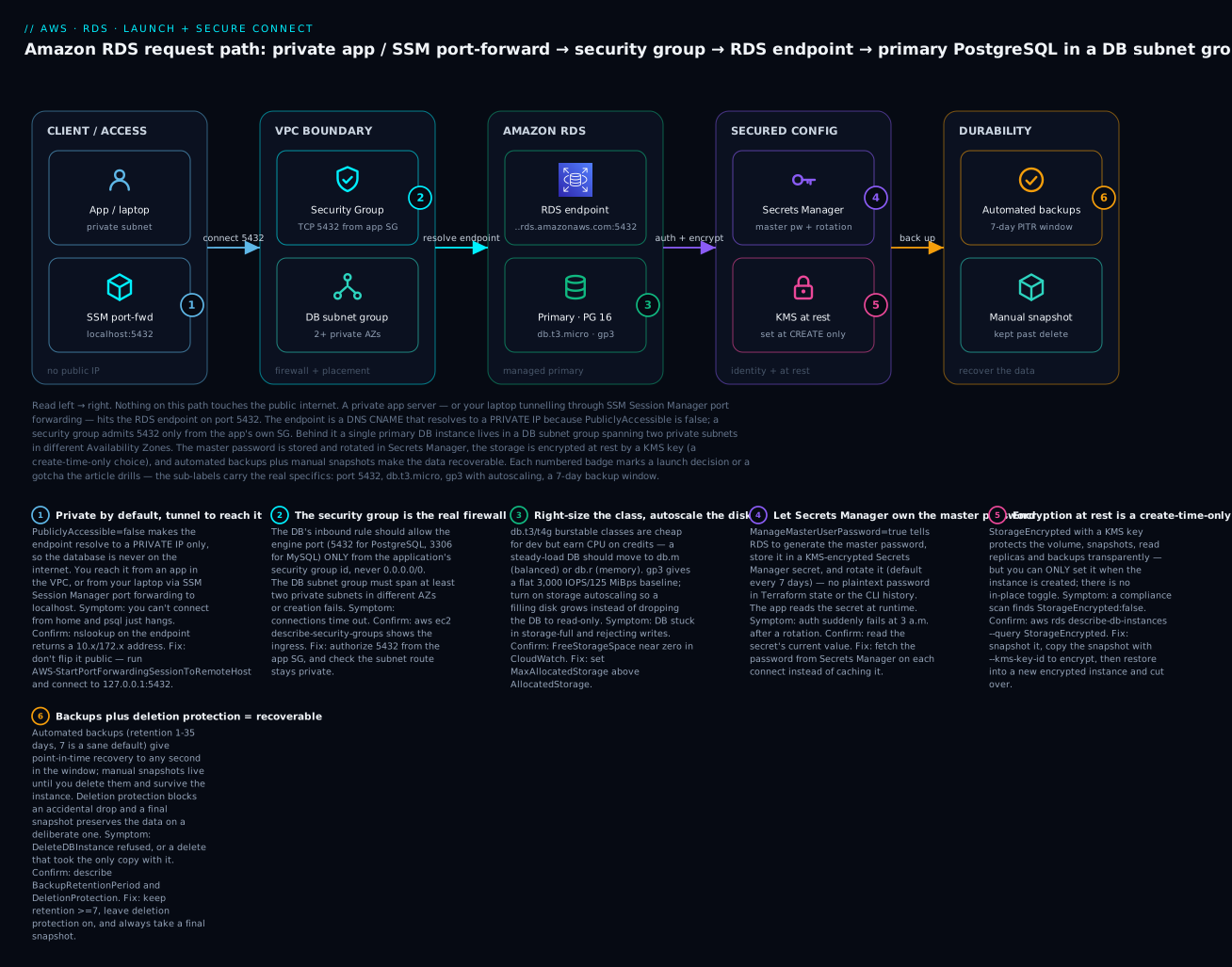
Read the diagram left to right as the real, private request path you are about to build. A client — an application server in a private subnet, or your own laptop tunnelling in through SSM Session Manager port forwarding to localhost:5432 — opens a connection to the RDS endpoint, a DNS name that resolves to a private VPC address because PubliclyAccessible is false. The security group admits port 5432 only from the application’s own SG. Behind the endpoint, a single primary PostgreSQL instance lives in a DB subnet group spanning two private subnets in different Availability Zones. The master password is generated and rotated in Secrets Manager; the storage is encrypted at rest by a KMS key (a decision locked in at create time); and automated backups plus a manual snapshot make the data recoverable. Each numbered badge marks a launch decision or gotcha, and the legend narrates each as symptom, how to confirm, and the fix.
Real-world scenario
Northwind Learning is a fictional ed-tech startup running a Django app on ECS Fargate. For their first year they ran PostgreSQL on a single db.t3.micro that the founding engineer launched through the console wizard, accepting every default: Public access: Yes, encryption off, backup retention 1 day, a plaintext master password pasted into a .env file, storage 20 GiB with autoscaling off. It worked — until it did not, three times in one quarter.
Incident one — the internet found it. GuardDuty flagged thousands of failed Postgres auth attempts from a botnet. Because the wizard had set PubliclyAccessible = true and the security group had a 0.0.0.0/0 rule someone added “just to test from home,” the database was answering the world on 5432. Nobody had breached it, but they were one weak password away. The fix was a scramble: flip --no-publicly-accessible, replace the CIDR rule with --source-group referencing the Fargate service’s SG, and move connectivity for admins to SSM port forwarding.
Incident two — the disk filled. A viral course dumped 40 GiB of submission data overnight. With autoscaling off, the 20 GiB volume filled and RDS dropped the instance to storage-full: every write failed, the app returned 500s, and students could not submit. Recovery meant a manual modify-db-instance --allocated-storage 100, which triggered a storage-optimization window during which performance was degraded. The lasting fix was one line — --max-allocated-storage 200 — that would have grown the disk silently.
Incident three — the credit cliff. Enrollment season pushed steady CPU on the db.t3.micro past baseline; because RDS defaults burstable instances to Unlimited mode, it did not throttle — it kept bursting and quietly tripled the instance’s CPU bill while p95 query latency still climbed because 1 GiB of RAM could not cache the working set. The bill, not a slowdown, is what got noticed.
The rebuild took an afternoon and is exactly the article’s lab: a db.m6g.large (2 vCPU, 8 GiB — memory for the cache, no credit cliff), gp3 storage starting at 50 GiB with autoscaling to 500 GiB, a DB subnet group across two private AZs, PubliclyAccessible = false, a security group sourced from the Fargate SG, the master password managed and rotated in Secrets Manager (the app now reads it at boot), encryption at rest with a customer CMK, 7-day backups, deletion protection on, and Multi-AZ added later (the RDS Multi-AZ and Read Replicas sibling). Cost went up about $90/month for the bigger instance and Multi-AZ — and their outage count went to zero. The lesson the founder repeats to every new hire: the RDS wizard’s defaults optimize for a database appearing, not for a database you can safely run.
Advantages and disadvantages
| Advantages | Disadvantages |
|---|---|
| AWS runs OS/engine patching, backups, replication, failover | You give up OS/root access — no custom binaries or postgresql.conf edits |
| Point-in-time recovery and one-click snapshots | Encryption at rest is create-time only — retrofitting means snapshot-copy-restore |
| Multi-AZ failover and read replicas are toggles, not projects | Managed convenience costs more than raw EC2+self-managed |
| Secrets Manager-managed, auto-rotating master password | Major version upgrades and some changes still need planned downtime |
Storage autoscaling prevents storage-full outages |
A stopped instance still bills for storage; RDS auto-starts it after 7 days |
Private-by-default networking (PubliclyAccessible=false) |
Instance-class and IOPS mis-sizing is easy and can be expensive |
| Familiar wire protocol — apps connect with no code change | Not as elastic as Aurora Serverless / DynamoDB for spiky or huge scale |
RDS wins whenever you want a standard relational database without owning its operations — which is most of the time. It loses when you need OS-level control (run it on EC2), extreme elasticity or 15 read replicas on shared storage (Aurora), or a non-relational access pattern at massive scale (DynamoDB). The managed premium is real but almost always cheaper than an engineer’s on-call time.
Hands-on lab
You will launch a private, encrypted, Secrets-Manager-authenticated PostgreSQL 16 instance in two private subnets, connect to it through SSM port forwarding with no public exposure, tune a parameter group and reboot into it, and take a manual snapshot — then tear it all down. Everything is aws CLI first, with a complete Terraform stack after. This is free-tier-friendly if you use db.t4g.micro and 20 GiB, but ⚠️ RDS, Secrets Manager, KMS and the NAT/SSM path can incur charges — do the teardown.
Assumptions: AWS CLI v2 configured, a VPC (vpc-...) with two private subnets in different AZs, and an EC2 instance in that VPC with the SSM agent running and an instance profile granting AmazonSSMManagedInstanceCore (your SSM tunnel host — see Systems Manager Hands-On). Export a few variables:
export AWS_REGION=us-east-1
export VPC_ID=vpc-0abc123def456
export SUBNET_A=subnet-0aaa11112222   # private, AZ a
export SUBNET_B=subnet-0bbb33334444   # private, AZ b
export SSM_HOST_SG=sg-0ssm00hostsg    # SG of your SSM tunnel EC2 host
Step 1 — DB subnet group (≥2 private AZs)
aws rds create-db-subnet-group \
  --db-subnet-group-name kv-lab-db-subnets \
  --db-subnet-group-description "Private subnets for lab DB" \
  --subnet-ids "$SUBNET_A" "$SUBNET_B"
Expected: JSON with "SubnetGroupStatus": "Complete" and two SubnetAvailabilityZone entries in different AZs.
Step 2 — DB security group, 5432 from the SSM host only
DB_SG=$(aws ec2 create-security-group --group-name kv-lab-db-sg \
  --description "RDS lab DB SG" --vpc-id "$VPC_ID" --query GroupId --output text)

aws ec2 authorize-security-group-ingress \
  --group-id "$DB_SG" --protocol tcp --port 5432 \
  --source-group "$SSM_HOST_SG"
echo "DB_SG=$DB_SG"
Expected: a sg-... id and an ingress rule allowing TCP 5432 from the SSM host SG only. No 0.0.0.0/0 anywhere.
Step 3 — a custom parameter group that forces TLS
aws rds create-db-parameter-group \
  --db-parameter-group-name kv-pg16 \
  --db-parameter-group-family postgres16 \
  --description "KloudVin lab PG16 params"

aws rds modify-db-parameter-group --db-parameter-group-name kv-pg16 \
  --parameters "ParameterName=rds.force_ssl,ParameterValue=1,ApplyMethod=pending-reboot" \
               "ParameterName=log_min_duration_statement,ParameterValue=1000,ApplyMethod=immediate"
Expected: the group is created and the two parameters are set (rds.force_ssl will show pending-reboot).
Step 4 — launch a private, encrypted PostgreSQL instance with Secrets Manager auth
aws rds create-db-instance \
  --db-instance-identifier kv-lab-pg \
  --engine postgres --engine-version 16 \
  --db-instance-class db.t4g.micro \
  --allocated-storage 20 --max-allocated-storage 100 \
  --storage-type gp3 \
  --storage-encrypted \
  --master-username kvadmin \
  --manage-master-user-password \
  --db-subnet-group-name kv-lab-db-subnets \
  --vpc-security-group-ids "$DB_SG" \
  --no-publicly-accessible \
  --db-parameter-group-name kv-pg16 \
  --backup-retention-period 7 \
  --preferred-backup-window "17:00-17:30" \
  --preferred-maintenance-window "sun:04:00-sun:04:30" \
  --auto-minor-version-upgrade \
  --deletion-protection \
  --db-name appdb
Expected: JSON with "DBInstanceStatus": "creating". Note the flags doing the real work: --storage-encrypted (create-time only), --manage-master-user-password (no plaintext), --no-publicly-accessible (private), --max-allocated-storage (autoscaling), --deletion-protection.
Wait for it to come up (5–10 minutes) and grab the endpoint + secret ARN:
aws rds wait db-instance-available --db-instance-identifier kv-lab-pg

ENDPOINT=$(aws rds describe-db-instances --db-instance-identifier kv-lab-pg \
  --query 'DBInstances[0].Endpoint.Address' --output text)
SECRET_ARN=$(aws rds describe-db-instances --db-instance-identifier kv-lab-pg \
  --query 'DBInstances[0].MasterUserSecret.SecretArn' --output text)
echo "ENDPOINT=$ENDPOINT"; echo "SECRET_ARN=$SECRET_ARN"
Step 5 — connect through SSM port forwarding (no public IP)
Start a port-forwarding session from the SSM host to the RDS endpoint, mapping the DB’s 5432 to your local 5432. Replace i-0ssmhost... with your SSM tunnel instance id:
aws ssm start-session \
  --target i-0ssmhost0000000 \
  --document-name AWS-StartPortForwardingSessionToRemoteHost \
  --parameters "{\"host\":[\"$ENDPOINT\"],\"portNumber\":[\"5432\"],\"localPortNumber\":[\"5432\"]}"
Expected: Starting session ... Port 5432 opened for sessionId .... Leave it running. In a second terminal, fetch the password from Secrets Manager and connect to localhost:
PGPASSWORD=$(aws secretsmanager get-secret-value --secret-id "$SECRET_ARN" \
  --query SecretString --output text | jq -r '.password')

curl -sO https://truststore.pki.rds.amazonaws.com/global/global-bundle.pem

PGPASSWORD="$PGPASSWORD" psql \
  "host=127.0.0.1 port=5432 dbname=appdb user=kvadmin sslmode=verify-full sslrootcert=global-bundle.pem" \
  -c "select version();"
Expected: the PostgreSQL 16 version string. You are connected to a database that has no public endpoint, over TLS, with a password you never typed. (MySQL equivalent: mysql -h 127.0.0.1 -P 3306 -u kvadmin -p"$PW" --ssl-ca=global-bundle.pem --ssl-mode=VERIFY_IDENTITY.)
Step 6 — change a parameter and reboot into it
rds.force_ssl is static, so it sits in pending-reboot. Reboot to activate it:
aws rds reboot-db-instance --db-instance-identifier kv-lab-pg
aws rds wait db-instance-available --db-instance-identifier kv-lab-pg
# Confirm the parameter is now in effect:
PGPASSWORD="$PGPASSWORD" psql "host=127.0.0.1 port=5432 dbname=appdb user=kvadmin \
  sslmode=verify-full sslrootcert=global-bundle.pem" -c "show rds.force_ssl;"
Expected: rds.force_ssl returns on. (Restart the SSM session from Step 5 first if the reboot dropped it.)
Step 7 — take a manual snapshot
aws rds create-db-snapshot \
  --db-instance-identifier kv-lab-pg \
  --db-snapshot-identifier kv-lab-pg-manual-01
aws rds wait db-snapshot-available --db-snapshot-identifier kv-lab-pg-manual-01
Expected: a snapshot in available state. This copy survives even if you delete the instance.
Step 8 — teardown (⚠️ removes everything)
Deletion protection is on, so you must turn it off first, then delete (taking a final snapshot):
aws rds modify-db-instance --db-instance-identifier kv-lab-pg \
  --no-deletion-protection --apply-immediately
aws rds wait db-instance-available --db-instance-identifier kv-lab-pg

aws rds delete-db-instance --db-instance-identifier kv-lab-pg \
  --final-db-snapshot-identifier kv-lab-pg-final-01
aws rds wait db-instance-deleted --db-instance-identifier kv-lab-pg

# Clean up the leftovers (snapshots persist and bill until deleted)
aws rds delete-db-snapshot --db-snapshot-identifier kv-lab-pg-manual-01
aws rds delete-db-snapshot --db-snapshot-identifier kv-lab-pg-final-01
aws rds delete-db-parameter-group --db-parameter-group-name kv-pg16
aws rds delete-db-subnet-group --db-subnet-group-name kv-lab-db-subnets
aws ec2 delete-security-group --group-id "$DB_SG"
Expected: each resource deletes. Manual and final snapshots are NOT deleted with the instance — you must delete them explicitly or they bill forever.
The whole thing as Terraform
terraform {
  required_providers { aws = { source = "hashicorp/aws", version = "~> 5.0" } }
}
provider "aws" { region = "us-east-1" }

variable "vpc_id"        { type = string }
variable "private_subnet_ids" { type = list(string) } # two, different AZs
variable "ssm_host_sg_id"     { type = string }

resource "aws_db_subnet_group" "db" {
  name       = "kv-lab-db-subnets"
  subnet_ids = var.private_subnet_ids
}

resource "aws_security_group" "db" {
  name   = "kv-lab-db-sg"
  vpc_id = var.vpc_id
}
resource "aws_vpc_security_group_ingress_rule" "db_from_ssm" {
  security_group_id            = aws_security_group.db.id
  from_port                    = 5432
  to_port                      = 5432
  ip_protocol                  = "tcp"
  referenced_security_group_id = var.ssm_host_sg_id
}

resource "aws_db_parameter_group" "pg16" {
  name   = "kv-pg16"
  family = "postgres16"
  parameter {
    name         = "rds.force_ssl"
    value        = "1"
    apply_method = "pending-reboot"
  }
  parameter {
    name         = "log_min_duration_statement"
    value        = "1000"
    apply_method = "immediate"
  }
}

resource "aws_db_instance" "pg" {
  identifier     = "kv-lab-pg"
  engine         = "postgres"
  engine_version = "16"
  instance_class = "db.t4g.micro"

  allocated_storage     = 20
  max_allocated_storage = 100          # storage autoscaling
  storage_type          = "gp3"
  storage_encrypted     = true         # create-time only

  db_name                     = "appdb"
  username                    = "kvadmin"
  manage_master_user_password = true   # Secrets Manager, no plaintext

  db_subnet_group_name   = aws_db_subnet_group.db.name
  vpc_security_group_ids = [aws_security_group.db.id]
  publicly_accessible    = false
  parameter_group_name   = aws_db_parameter_group.pg16.name

  backup_retention_period    = 7
  backup_window              = "17:00-17:30"
  maintenance_window         = "sun:04:00-sun:04:30"
  auto_minor_version_upgrade = true

  deletion_protection       = true
  final_snapshot_identifier = "kv-lab-pg-final-01"
  # skip_final_snapshot     = false   # keep a final snapshot (default)
}

output "endpoint"   { value = aws_db_instance.pg.endpoint }
output "secret_arn" { value = aws_db_instance.pg.master_user_secret[0].secret_arn }
terraform apply builds the identical stack; terraform destroy will fail until you set deletion_protection = false and apply once — that failure is the guardrail working.
Common mistakes & troubleshooting
The launch playbook. Symptom → root cause → the exact command or console path to confirm → the fix. Connection timeouts specifically are a deep topic of their own — the sibling RDS Connection Timeouts Troubleshooting Playbook drills them — but the launch-time causes are all here.
| # | Symptom | Root cause | Confirm (exact command / path) | Fix |
|---|---|---|---|---|
| 1 | psql hangs then times out from your laptop |
DB is private (PubliclyAccessible=false) — correct! You just can’t route to it directly |
nslookup $ENDPOINT returns a 10.x/172.x private IP |
Don’t make it public — tunnel via SSM AWS-StartPortForwardingSessionToRemoteHost, connect to 127.0.0.1 |
| 2 | Connection refused / timeout from the app |
Security group doesn’t allow the app on the engine port | aws ec2 describe-security-groups --group-ids $DB_SG shows no 5432 ingress |
authorize-security-group-ingress --port 5432 --source-group <app-sg> |
| 3 | FATAL: password authentication failed after it worked |
Secrets Manager rotated the master password; app cached the old one | aws secretsmanager get-secret-value --secret-id $SECRET_ARN → compare |
Read the secret on each connect, don’t cache; or widen your pool’s re-auth |
| 4 | DB is in storage-full, all writes fail |
Disk filled; storage autoscaling was off | aws rds describe-db-instances --query '..DBInstanceStatus' = storage-full; FreeStorageSpace≈0 in CloudWatch |
modify-db-instance --allocated-storage <bigger>; then set --max-allocated-storage so it never recurs |
| 5 | “I need to encrypt this DB” but there’s no toggle | Encryption at rest is create-time only | describe-db-instances --query '..StorageEncrypted' = false |
Snapshot → copy-db-snapshot --kms-key-id → restore-db-instance-from-db-snapshot → cut over |
| 6 | A parameter change had no effect | It’s a static parameter sitting in pending-reboot |
describe-db-parameters shows ApplyMethod=pending-reboot; describe-db-instances → DBParameterGroups[].ParameterApplyStatus |
reboot-db-instance to apply static parameters |
| 7 | create-db-subnet-group fails |
Subnets don’t span ≥2 AZs, or aren’t in the VPC | aws ec2 describe-subnets --subnet-ids ... → check AvailabilityZone |
Provide ≥2 subnets in different AZs in the same VPC |
| 8 | terraform destroy / delete refused |
Deletion protection is on (working as intended) | describe-db-instances --query '..DeletionProtection' = true |
modify-db-instance --no-deletion-protection first, then delete |
| 9 | Deleted the DB and the data is gone | SkipFinalSnapshot=true (or no final snapshot named) |
Check CloudTrail DeleteDBInstance event params |
Restore from an automated backup/PITR if within retention; else it’s lost — always take a final snapshot |
| 10 | Bill spiked on a tiny db.t3 DB |
Burstable Unlimited mode kept bursting past credits and billed the surplus | CPUCreditBalance→0 and CPUSurplusCreditsCharged>0 in CloudWatch |
Move to db.m/db.r, or set the instance to standard credit mode |
| 11 | Endpoint stopped resolving to the old IP after a failover | You cached the resolved IP instead of using the DNS name | App logs show a hard-coded IP; nslookup now returns a different one |
Always connect by the endpoint DNS name; lower client DNS TTL caching |
| 12 | too many clients already / remaining connection slots reserved |
max_connections exceeded (scales with instance memory) |
describe-db-parameters for max_connections; DB error log |
Add a pooler (PgBouncer/RDS Proxy), or raise max_connections (bigger class or param) |
| 13 | Instance stuck in incompatible-parameters |
A parameter value is invalid for the class (e.g. max_connections too high for the RAM) |
describe-db-instances → DBInstanceStatus; check events |
Fix the parameter value in the group, reboot |
| 14 | DBInstanceAlreadyExists on create |
The identifier is reused (or a recently-deleted one lingers) | aws rds describe-db-instances for the id |
Use a unique --db-instance-identifier |
| 15 | Restore/replica fails with KMS AccessDenied |
Restoring principal lacks kms:Decrypt/CreateGrant on the CMK |
Check the CMK key policy and the caller’s IAM | Grant kms:Decrypt, kms:CreateGrant on the key to the restoring role |
| 16 | “Where’s my standby endpoint?” / expected zero-downtime but got a blip | Multi-AZ vs single confusion — the standby is not a readable/second endpoint (that’s a read replica) | describe-db-instances --query '..MultiAZ' and ..SecondaryAvailabilityZone |
Multi-AZ = one endpoint, automatic failover only; for readable copies add read replicas (see the HA sibling) |
RDS instance states you’ll see
| State | Meaning | Can you connect? |
|---|---|---|
creating |
Being provisioned | No |
available |
Healthy and serving | Yes |
modifying |
Applying a change (class, storage, etc.) | Usually yes |
backing-up |
Taking an automated backup | Yes |
rebooting |
Restarting (e.g. to apply static params) | Briefly no |
storage-full |
Disk exhausted | Read-only / writes fail |
storage-optimization |
Post-resize background optimization | Yes (may be slower) |
incompatible-parameters |
A parameter value is invalid for the class | No |
incompatible-network |
Subnet/AZ/networking problem | No |
stopped |
Manually stopped (still billing storage) | No |
starting |
Coming back from stopped | No |
upgrading |
Applying an engine version upgrade | Briefly no |
renaming |
Identifier change in progress | No |
maintenance |
Applying a maintenance action | Usually briefly |
deleting |
Being torn down | No |
failed |
Provisioning/health failure | No |
The nastiest three, in prose
The public-by-default trap. The single-page “Easy create” console flow, in a default VPC, can land you with PubliclyAccessible = true and a database answering on the internet. Always verify after create: aws rds describe-db-instances --db-instance-identifier <id> --query 'DBInstances[0].PubliclyAccessible' must return false. If it says true, modify-db-instance --no-publicly-accessible --apply-immediately and audit the security group for any 0.0.0.0/0 rule on 5432/3306. Private networking is defense in depth: even a leaked password is useless if the endpoint has no route from the internet.
The encryption one-way door. Teams routinely launch unencrypted “to move fast” and plan to “add encryption later.” There is no later. The only path is snapshot → copy-db-snapshot --kms-key-id <cmk> (this copy is where the data becomes encrypted) → restore-db-instance-from-db-snapshot into a new instance → repoint the app → delete the old one. That is a cutover with downtime and risk. Ticking --storage-encrypted at create costs nothing and avoids all of it. Decide encryption on day zero, every time.
The snapshot-on-delete gotcha. delete-db-instance with --skip-final-snapshot (or a terraform destroy where skip_final_snapshot = true) deletes the data and its automated backups immediately and irreversibly. People do this in “cleanup” scripts and destroy production. Guardrails: keep deletion_protection = true on anything real, never default skip_final_snapshot to true in modules, and set delete_automated_backups = false if you want the PITR history to survive the instance for a grace period.
Best practices
- Private by default.
PubliclyAccessible = false, DB in private subnets, security group sourced from the app’s SG (never0.0.0.0/0). Reach it from your laptop via SSM port forwarding, not a public endpoint. - Encrypt at create, always. Tick
--storage-encryptedon every instance — it is free, transparent, and impossible to add later without a migration. Use a customer CMK when you need key-policy control or cross-account sharing. - Never store the master password in plaintext. Use
--manage-master-user-passwordso Secrets Manager owns and rotates it; have the app read the secret at runtime. - Turn on storage autoscaling. Set
MaxAllocatedStorageon every instance so a filling disk grows instead of goingstorage-full. - Backups ≥ 7 days, and test a restore. Retention 0 or 1 is not a backup strategy. Periodically restore a snapshot into a throwaway instance to prove it works.
- Deletion protection on, final snapshot always. Both guardrails on anything you would miss. Never default
skip_final_snapshot = truein reusable modules. - Right-size deliberately.
db.m/db.rfor steady load; reservedb.tfor dev or genuinely bursty low-traffic. WatchCPUCreditBalanceandFreeableMemory. - Force TLS.
rds.force_ssl = 1(Postgres) /require_secure_transport = ON(MySQL), and verify the server cert against the RDS CA bundle withsslmode=verify-full. - Use a connection pooler. RDS Proxy or PgBouncer in front of the DB protects
max_connectionsfrom bursty app tiers and speeds failover. - Separate windows. Keep the backup window and maintenance window in different low-traffic slots that don’t overlap.
- Tag everything and propagate to snapshots.
copy_tags_to_snapshot = trueso cost allocation and lifecycle rules follow the data. - Plan the VPC/subnet group before launch. The DB subnet group is painful to change later — get ≥2 private AZs right the first time.
Security notes
RDS security is layered, and the launch is where most of it is decided:
- Network isolation. Private subnets +
PubliclyAccessible=falsemean no internet route to the DB. The security group is a stateful allow-list; scope inbound to the app SG and the engine port only. NACLs can add a coarse subnet-level backstop. - Encryption at rest. KMS-backed, create-time only, covering the volume, snapshots, backups and replicas. Prefer a customer-managed CMK over
aws/rdswhen you need key-usage auditing (CloudTrail on the key), key rotation policy, or cross-account snapshot sharing. - Encryption in transit. Force TLS with the engine parameter and verify with
sslmode=verify-fullagainstglobal-bundle.pem. Never let a client fall back to cleartext. - Identity. Prefer the Secrets Manager-managed master password (rotated automatically) or IAM database authentication (15-minute tokens, no stored password) over a static password. Create least-privilege application roles inside the database; never let the app connect as the master user.
- Least-privilege IAM for operators. Scope who can call
DeleteDBInstance,ModifyDBInstance,RestoreDBInstanceFromDBSnapshot, andkms:Decrypt/CreateGranton the CMK. Deletion protection is a control, but IAM is the primary one. - Auditing. CloudTrail logs every RDS control-plane call; enable the database engine’s own audit/log exports (Postgres
log_*, MySQL audit plugin) to CloudWatch Logs, and enable Enhanced Monitoring and Performance Insights for the data plane. - Guard the snapshots. A snapshot is a full copy of your data. Encrypt them (automatic if the DB is encrypted), restrict
share/copypermissions, and never make a snapshot public.
Cost & sizing
RDS billing has more moving parts than a single instance-hour. Know the drivers so nothing surprises you:
| Cost driver | How it’s billed | Notes / how to control |
|---|---|---|
| Instance hours | Per second, by class, running or available |
Biggest lever; right-size; Graviton is cheaper; Reserved Instances save up to ~60% |
| Multi-AZ | ~2× the instance cost (standby) | Only enable where you need HA; a toggle, so add it when ready |
| Storage (GiB-month) | gp3/gp2/io per GiB allocated | You pay for allocated, not used; autoscaling grows the bill |
| Provisioned IOPS | io1/io2 per IOPS-month | Only pay this on io1/io2, or gp3 above baseline |
| Backup storage | Free up to total DB size; overage per GiB | Long retention + many snapshots add up |
| Snapshots | Per GiB of snapshot storage | Manual snapshots persist until deleted — including after instance delete |
| Data transfer | Cross-AZ and egress charges | Keep app and DB in the same AZ where sensible; cross-AZ replication has a cost |
| Secrets Manager | Per secret-month + per 10k API calls | The managed master password is one secret |
| KMS | Per key-month + per request | aws/rds is cheaper; CMK adds key-month cost |
| A stopped instance | Still bills storage + backups; auto-starts after 7 days | Stopping saves only compute, and not for long |
Rough sizing to anchor expectations (on-demand, us-east-1, order-of-magnitude — confirm in the calculator):
| Workload | Class | Storage | Multi-AZ | Rough USD/mo | Rough INR/mo |
|---|---|---|---|---|---|
| Free-tier learning | db.t4g.micro | 20 GiB gp3 | No | ~$0 (12 mo) | ~₹0 |
| Small dev DB | db.t4g.micro | 20 GiB gp3 | No | ~$15 | ~₹1,300 |
| Small steady prod | db.m6g.large | 50 GiB gp3 | No | ~$130 | ~₹11,000 |
| Small steady prod, HA | db.m6g.large | 50 GiB gp3 | Yes | ~$260 | ~₹22,000 |
| Cache-heavy prod | db.r6g.large | 100 GiB gp3 | Yes | ~$400 | ~₹34,000 |
Free-tier (first 12 months): 750 hours/month of db.t2/t3/t4g.micro (single-AZ), 20 GiB of gp2/gp3 storage, and 20 GiB of backup storage. Stay in those bounds and the lab costs nothing — but delete snapshots, which are not covered indefinitely.
Interview & exam questions
1. Why must a DB subnet group span at least two Availability Zones even for a single-AZ instance? So RDS has a place to put a standby if Multi-AZ is ever enabled, and to allow failover/placement flexibility. Creation fails without ≥2 AZs. (SAA-C03)
2. You need to encrypt an existing unencrypted RDS instance. What’s the procedure? Encryption at rest is create-time only. Take a snapshot, copy-db-snapshot with a --kms-key-id (the copy applies encryption), then restore-db-instance-from-db-snapshot into a new encrypted instance and cut the app over. (SAA-C03, SCS)
3. What does PubliclyAccessible=false actually change? It makes the endpoint’s DNS name resolve only to a private VPC IP, so nothing outside the VPC can route to it — independent of the security group, which is a second layer. (SAA-C03)
4. Why is db.t3.micro a poor choice for a steady-load production database? Burstable classes run on CPU credits; under sustained load they exhaust credits and either throttle (standard mode) or, in RDS’s default Unlimited mode, keep bursting and bill the surplus. Use db.m/db.r for steady load. (SAA-C03)
5. Automated backups vs manual snapshots — key difference? Automated backups enable point-in-time recovery within a 1–35 day retention and are deleted with the instance; manual snapshots restore only to their instant, live until you delete them, and survive the instance (and can be copied cross-Region/account). (CLF-C02, SAA-C03)
6. How does the Secrets Manager-managed master password improve security? RDS generates the password, stores it in a KMS-encrypted secret, and rotates it automatically — so it never appears in plaintext in Terraform state, CLI history or logs, and the app reads it at runtime. (DVA-C02, SCS)
7. A parameter change isn’t taking effect. Why? It’s a static parameter and is sitting in pending-reboot; static parameters only apply after a reboot-db-instance. (SOA-C02)
8. What is storage autoscaling and why turn it on? Setting MaxAllocatedStorage lets RDS grow the volume automatically (free < 10% for 5 min, 6-hour cooldown, grows only) so a filling disk expands instead of dropping the instance to read-only storage-full. (SOA-C02)
9. When would you choose Aurora over RDS? When you need the distributed auto-growing storage layer (to 128 TiB), up to 15 shared-storage read replicas with minimal lag, faster failover, or Serverless v2 autoscaling — otherwise RDS is simpler and cheaper. (SAA-C03, SAP)
10. How do you connect to a private RDS instance from your laptop without exposing it? Use SSM Session Manager port forwarding (AWS-StartPortForwardingSessionToRemoteHost) through an SSM-managed host to map the DB’s port to localhost — no public IP, no open bastion port. (SOA-C02, SCS)
11. What prevents an accidental terraform destroy from wiping the DB? Deletion protection blocks the delete until it’s toggled off, and a final snapshot (unless skip_final_snapshot=true) preserves the data on a deliberate delete. (SOA-C02)
12. Why connect by the endpoint DNS name and never a cached IP? On failover or storage changes the IP behind the endpoint changes while the DNS name stays stable; caching the IP breaks reconnection after any such event. (SAA-C03)
Quick check
- True/false: you can enable encryption at rest on an existing unencrypted RDS instance with a
modifycall. - What one setting turns on storage autoscaling, and what does it prevent?
- Which instance family should a steady-load production database avoid, and why?
- You changed
rds.force_sslto 1 but connections still work without SSL. What did you forget? - Name the two things that keep an RDS instance from being reachable on the internet.
Answers
- False. Encryption at rest is create-time only; you must snapshot, copy the snapshot with a KMS key, and restore.
- Setting
MaxAllocatedStorage(a cap above allocated storage) turns on autoscaling; it prevents the read-onlystorage-fulloutage by growing the disk automatically. db.t(burstable) — under sustained load it exhausts CPU credits and either throttles or (RDS default Unlimited mode) bills the surplus. Usedb.m/db.r.- You forgot to reboot —
rds.force_sslis a static parameter and stays inpending-rebootuntil a reboot applies it. PubliclyAccessible=false(endpoint resolves to a private IP only) and the security group (allow the engine port only from the app SG, never0.0.0.0/0); place the DB in private subnets as well.
Glossary
| Term | Definition |
|---|---|
| RDS instance | A managed database server (VM + storage) you access only via its endpoint and API, never a shell. |
| Endpoint | The stable DNS name (…rds.amazonaws.com) you connect to; resolves to a private or public IP per PubliclyAccessible. |
| DB subnet group | A named set of subnets across ≥2 AZs that tells RDS where the instance (and any standby) may live. |
| Instance class | The compute size (db.t/db.m/db.r families) — vCPU, memory, network and EBS bandwidth. |
| Burstable (db.t) | A class that runs on CPU credits; fine for spiky/dev load, wrong for steady load. |
| gp3 / io2 | General-purpose SSD (default) vs Provisioned IOPS SSD for latency-critical, high-IOPS databases. |
| Storage autoscaling | Auto-grows the volume up to MaxAllocatedStorage so it never hits storage-full. |
| PubliclyAccessible | Whether the endpoint resolves to a public IP; false keeps the DB private. |
| Security group | The stateful firewall attached to the DB; the real control over who can reach the port. |
| Parameter group | The managed replacement for postgresql.conf/my.cnf; parameters are dynamic or static (reboot). |
| Option group | Enables engine add-ons (audit plugins, TDE, etc.); often empty for basic MySQL/Postgres. |
| Master user | The bootstrap admin account created with the instance; use it only to create app roles. |
| Managed master password | A Secrets Manager secret RDS creates and rotates so the password is never in plaintext. |
| Automated backup / PITR | Daily backups + transaction logs enabling point-in-time recovery within the retention (1–35 days). |
| Snapshot | A manual point-in-time copy that survives the instance and can be copied across Regions/accounts. |
| Encryption at rest | KMS-backed volume/backup/replica encryption, set at create only and never toggled after. |
| Multi-AZ | A synchronous standby (or readable standbys) in another AZ for automatic failover — a create/modify toggle. |
| Deletion protection | A flag that blocks DeleteDBInstance until it’s turned off. |
Next steps
- Make it survive an AZ failure and scale reads: RDS Multi-AZ and Read Replicas: High Availability and Read Scaling.
- When it won’t connect at all, work the dedicated playbook: RDS Connection Timeouts: A Troubleshooting Playbook.
- Re-confirm RDS was the right store versus DynamoDB and Aurora: AWS Databases: RDS, DynamoDB and Aurora — Choose the Right Store.
- Get the private-network substrate right underneath it: Building an AWS VPC from Scratch: Subnets, Route Tables, IGW & a Public/Private Design.
- Master the no-public-IP admin path used here: AWS Systems Manager Hands-On: Session Manager, Run Command & Patch Manager.