The bill lands and someone asks the question that outs every over-provisioned fleet: “Why are we paying for a db.r6g.4xlarge at 3 a.m. when nobody’s awake?” Or the opposite — a marketing drop hits, connections spike 20×, and the single writer you sized for the average day melts at the peak. Both problems have the same root: with a classic provisioned database you buy a fixed box, and a fixed box is wrong almost all the time — too big at night, too small at the spike. Amazon Aurora exists to break that trade-off, and Aurora Serverless v2 takes it furthest: capacity that follows demand in fine-grained steps, in place, without a failover.
But Aurora is not “RDS with a serverless button.” It is a fundamentally different database engine. Aurora keeps the MySQL and PostgreSQL wire protocols you already speak, then throws away the storage engine underneath and replaces it with a purpose-built, distributed, log-structured storage service that separates compute from data, keeps six copies of every block across three Availability Zones, auto-heals, and auto-grows. That one architectural decision is why Aurora failover is ~30 seconds instead of minutes, why you can attach fifteen read replicas that share one volume, why a cross-Region Global Database replicates in under a second, and why Serverless v2 can resize a running instance without moving your data. Understand the storage layer and every other Aurora feature stops being magic and starts being obvious.
By the end of this article you will understand that architecture cold: the shared-storage volume and its quorum, the three cluster endpoints and when each one saves or sinks you, how replicas fail over, exactly what an Aurora Capacity Unit (ACU) is and how Serverless v2 scales in 0.5-ACU steps, when Serverless v2 beats a provisioned instance and when it quietly costs more, how Global Database gives you seconds of RPO across Regions, and when Aurora I/O-Optimized flips the economics. Then you will build it — a real Aurora PostgreSQL cluster with a Serverless v2 writer and an auto-scaled reader — drive load, watch the ACUs climb in CloudWatch, and tear it all down. Every operation is shown as both an aws CLI command and Terraform, and the article closes with a scaling troubleshooting playbook drawn from real incidents. This is a reference; read the prose once and keep the tables open when the design or the incident is live.
What problem this solves
A relational database is the hardest tier to scale because it is stateful and, for writes, single-master. You cannot just add boxes behind a load balancer the way you do with stateless web servers — every writer needs a consistent view of the data, and traditional replication copies that data around, which is slow, lossy on failover, and expensive to keep warm. So teams do the only thing a fixed box allows: they over-provision for the peak and pay for that peak twenty-four hours a day. A workload that needs 32 vCPUs for two hours at month-end and 2 vCPUs the rest of the time still rents 32 vCPUs continuously, because resizing a provisioned instance means a maintenance window and a failover.
The failures cluster into a few painful shapes. Development and test databases run overnight and over weekends doing nothing, burning money. Multi-tenant SaaS platforms carry hundreds of small tenant databases, each sized for its own peak, summing to a fleet that is mostly idle. Spiky consumer apps get sized for Black Friday and pay Black-Friday prices in February. And when the spike does come and the box was sized for the average, the writer saturates — connections queue, max_connections is hit, p99 latency blows out, and the only lever is a disruptive scale-up that itself causes a failover blip. Meanwhile the storage layer of a classic engine ties data durability to the instance: lose the instance and you rely on replication that may be seconds or minutes behind, so Multi-AZ means running a whole standby you also pay for.
Who hits this: every team running a relational database with a variable load curve (which is almost all of them), every platform that multiplies small databases, every business with seasonal or event-driven traffic, and every architect asked to give a cross-Region disaster-recovery story with a Recovery Point Objective measured in seconds rather than the fifteen minutes a snapshot copy gives you. Aurora’s decoupled storage answers the durability and failover half; Serverless v2 answers the “stop paying for the peak at 3 a.m.” half. The table below frames what breaks without each capability.
| Pain in production | Classic provisioned RDS | Aurora (provisioned) | Aurora Serverless v2 |
|---|---|---|---|
| Idle capacity overnight / weekends | Paid in full, 24×7 | Paid in full | Scales down to min ACU (or 0) automatically |
| Sudden traffic spike | Saturates; scale-up needs failover window | Add replicas fast; writer still fixed | Writer grows in-place in 0.5-ACU steps, no failover |
| Failover time on instance loss | 60–120s (Multi-AZ DNS + recovery) | ~30s (promote replica on shared volume) | ~30s (same shared volume) |
| Cross-Region DR, RPO seconds | Snapshot copy: RPO minutes–hours | Global Database: RPO ~1s | Global Database: RPO ~1s |
| Storage grows past instance disk | Manual resize, IOPS provisioning | Auto-grows 10 GB increments to 128 TiB | Auto-grows 10 GB increments to 128 TiB |
| Many small idle databases (multi-tenant) | Each sized for its peak | Each sized for its peak | Each floats to actual demand |
Learning objectives
By the end of this article you can:
- Explain Aurora’s decoupled compute/storage architecture — why the storage volume is shared, distributed, six-way replicated across three AZs, and how that produces fast failover, cheap replicas, and auto-grow.
- Choose and use the right cluster endpoint — writer, reader, or custom — and explain exactly how the reader endpoint load-balances and how each endpoint behaves during failover.
- Reason about Aurora replicas: how up to fifteen share the same volume, how failover promotion tiers work, replica lag, and how replica auto-scaling adds and removes readers.
- Define an Aurora Capacity Unit, configure Serverless v2 min/max capacity, and explain why v2’s in-place, fine-grained scaling beats v1’s pause-and-jump — and when v2 beats a provisioned instance.
- Mix Serverless v2 and provisioned instances in one cluster, and design the writer/reader capacity split for spiky, dev, and multi-tenant workloads.
- Design an Aurora Global Database: storage-level cross-Region replication, RPO/RTO, managed planned and unplanned failover, write forwarding, and headless secondaries.
- Decide between Aurora Standard and I/O-Optimized, and know the break-even where the I/O bill flips the choice.
- Use Aurora’s differentiating features correctly — Backtrack, fast cloning, parallel query, Babelfish, and the RDS Data API — and know each one’s engine and limits.
- Build, load-test, observe (
ServerlessDatabaseCapacity/ACUUtilization), and tear down a Serverless v2 cluster with theawsCLI and Terraform, and diagnose why it won’t scale up or down.
Prerequisites & where this fits
You should be comfortable with core AWS building blocks: a VPC with private subnets and a DB subnet group, security groups, IAM roles and policies, and the difference between the Console, the aws CLI, and infrastructure-as-code. Basic SQL and the idea of a read replica help, and knowing what a maintenance window and a parameter group are will make the operational sections land faster. You do not need prior Aurora experience — this builds it from the storage layer up.
This sits in the Databases track and is the natural next step after the store-selection decision in AWS Databases: RDS, DynamoDB and Aurora — Choose the Right Store. It assumes the networking foundation from Amazon VPC: Subnets, Route Tables & Security Groups — Aurora instances live in private subnets, reachable only through a security group — and it pairs with the high-availability patterns in AWS RDS Multi-AZ & Read Replicas for High Availability and the provisioning walkthrough in Launch MySQL & PostgreSQL on Amazon RDS — Hands-On. For the cross-Region story it feeds directly into AWS Multi-Region Active-Active Architecture: Route 53, Global Tables and Aurora Global Database, and you protect all of it with AWS Backup & Disaster-Recovery Strategies. The compute that connects to Aurora is chosen in AWS Compute: EC2 vs Lambda vs ECS vs EKS.
Here is who tends to own each layer during a design review or an incident, so you pull in the right person fast.
| Layer | What lives here | Who usually owns it | What it decides / can break |
|---|---|---|---|
| Connection routing | Endpoints, RDS Proxy, connection pool | App / platform team | Reads hitting the writer; connection storms |
| Compute (instances) | Writer + reader, provisioned or Serverless v2 | DBA / platform | Capacity, ACU min/max, failover priority |
| Storage volume | Shared 6-way volume, quorum, auto-grow | AWS-managed | Durability, IOPS, I/O-Optimized vs Standard cost |
| Cross-Region | Global Database, secondary Regions | Architecture / DR owner | RPO/RTO, failover runbook |
| Observability | CloudWatch metrics, Performance Insights | SRE / platform | Whether you see a scale ceiling before users do |
| Cost | ACU-hours, I/O, storage, backup, data transfer | FinOps / owner | The bill, and whether serverless actually saved money |
Core concepts
Start with the mental model, because every Aurora feature is a consequence of it. In a classic database (including standard RDS), one process owns both the compute and the local disk that holds the data; durability and replicas are built by copying that disk’s bytes to other machines. Aurora splits those two responsibilities. The compute layer is one or more database instances that parse SQL, manage the buffer pool, and run transactions — but hold no durable data locally. The storage layer is a separate, purpose-built, distributed service that owns the actual data as a single logical cluster volume, shared by every instance in the cluster.
The instances don’t write data pages to disk and then ship them around. Instead, Aurora instances only send redo log records to the storage layer; the storage nodes materialise data pages from the log on their own. “The log is the database” — this is the single most important sentence about Aurora. Because the instances push a thin stream of log records instead of full pages, the network is not the bottleneck, the storage is shared rather than copied, and adding a reader is nearly free (it attaches to the same volume; there is nothing to replicate to it).
Get the vocabulary straight, because Aurora reuses RDS words with new meanings.
| Term | What it means in Aurora | Why it matters |
|---|---|---|
| DB cluster | The whole thing: one volume + 1–16 instances + endpoints | The unit you create, back up, and make global |
| Cluster (writer) endpoint | DNS that always points to the current primary | Where writes go; follows failover automatically |
| Reader endpoint | DNS that load-balances across replicas | Where read-only traffic should go |
| Custom endpoint | DNS for a named subset of instances | Route analytics/reporting to bigger readers |
| Instance endpoint | DNS for one specific instance | Debugging; pin a session to a node |
| Cluster volume | The single shared, distributed storage volume | Holds all data; 6 copies / 3 AZs; auto-grows |
| Aurora replica | A read-only instance on the same volume | Up to 15; failover target; read scaling |
| ACU | Aurora Capacity Unit ≈ 2 GiB RAM + CPU + network | The Serverless v2 unit of capacity and billing |
| Protection group | A 10 GB slice of the volume, replicated 6 ways | The unit of durability, quorum, and repair |
| Writer / primary | The single read-write instance | Only one per cluster (unless multi-master, rare) |
And the durability model — the six-copy quorum — is worth internalising, because it is why Aurora survives an AZ loss without losing writes.
| Quorum fact | Value | Consequence |
|---|---|---|
| Copies of every 10 GB segment | 6 | Data survives multiple simultaneous failures |
| Copies spread across | 3 AZs (2 per AZ) | An entire AZ can go down and 4 copies remain |
| Write quorum | 4 of 6 | Writes succeed while ≥4 copies are reachable — survives AZ + 1 |
| Read quorum | 3 of 6 | Reads succeed while ≥3 copies are reachable |
| Failure tolerated for writes | Loss of one AZ (2 copies) with no write loss | Keeps accepting writes through an AZ outage |
| Failure tolerated for reads | Loss of one AZ plus one more copy | Read availability with AZ+1 failures |
| Self-healing | Continuous background repair from peers | Lost/corrupt segments rebuilt without you |
| Segment size | 10 GB | Small segments = fast parallel repair |
Aurora storage: the shared, distributed volume
The storage volume is the heart of Aurora, so spend real time here. It is not an EBS volume attached to an instance. It is a distributed, multi-tenant, SSD-backed service that presents one logical volume per cluster. The volume is carved into 10 GB protection groups; each protection group is independently replicated into six copies (two in each of three AZs). The volume starts at 10 GB and grows automatically in 10 GB increments as you write data, up to a hard ceiling — you never pre-provision storage, and you never run out mid-transaction because a new segment couldn’t be allocated.
Because the log is shipped rather than pages, and because storage nodes are peers that gossip and repair, the volume gives you three properties a classic engine cannot: auto-grow (no capacity planning), auto-heal (lost segments rebuilt from surviving copies continuously), and near-instant replica attach (a new reader reads the shared volume; there is no seeding). It also means you never pay for provisioned IOPS the way you do with RDS io1/io2 — Aurora’s I/O is metered differently, which is the whole point of the Standard vs I/O-Optimized decision below.
| Storage property | Value / behaviour | Gotcha |
|---|---|---|
| Minimum volume size | 10 GB | You are billed for used space, not the ceiling |
| Growth increment | 10 GB, automatic | Volume grows; it does not auto-shrink after deletes on older engines |
| Maximum cluster volume | 128 TiB | Hard limit; beyond it, shard at the app layer |
| Replication | 6 copies across 3 AZs | Requires a Region with ≥3 AZs |
| Segment (protection group) | 10 GB | Unit of quorum + parallel repair |
| Backups | Continuous to Amazon S3, no performance hit | Backup does not stall the DB (unlike some engines) |
| Backtrack storage | Change records kept for the window (MySQL) | Extra cost; not a backup replacement |
| Shrink reclaim | Dynamic resizing on newer engines reclaims freed space | Older versions never shrank — plan capacity if on them |
Aurora Standard vs Aurora I/O-Optimized
Every Aurora cluster runs one of two storage configurations, and picking wrong can swing the bill 20–40%. Aurora Standard charges you for compute + storage + a per-million-request I/O charge; it’s cheapest when I/O is a modest fraction of your bill. Aurora I/O-Optimized removes per-request I/O charges entirely but raises compute (and ACU) and storage rates by roughly 20–30%; it wins when I/O is a large fraction of your spend — typically I/O-heavy, high-throughput OLTP.
| Dimension | Aurora Standard | Aurora I/O-Optimized |
|---|---|---|
| Per-request I/O charge | Yes (~per million read/write I/Os) | None |
| Compute / ACU rate | Baseline | ~30% higher |
| Storage rate | Baseline | ~25% higher |
| Best for | I/O is a small share of the bill | I/O is a large share (I/O-heavy OLTP) |
| Predictability | Bill varies with I/O | Flat, predictable |
| Switch frequency | — | Standard→I/O-Optimized any time; I/O-Optimized→Standard once per 30 days |
| Applies to | Provisioned + Serverless v2 | Provisioned + Serverless v2 |
The break-even rule of thumb: if I/O charges are more than ~25% of your combined Aurora (compute + storage + I/O) bill, I/O-Optimized is usually cheaper. Use Cost Explorer to read the actual “Aurora I/O” line, then compare.
| If your monthly Aurora bill looks like… | I/O share | Choose |
|---|---|---|
| Compute ₹40k, storage ₹8k, I/O ₹4k | ~8% | Standard |
| Compute ₹40k, storage ₹8k, I/O ₹16k | ~25% | Break-even — model both |
| Compute ₹40k, storage ₹8k, I/O ₹40k | ~45% | I/O-Optimized |
| Bursty analytics scanning huge tables | High | I/O-Optimized |
| Low-traffic internal app | Low | Standard |
Cluster endpoints: writer, reader, custom
Aurora hands you a set of DNS endpoints, and choosing the right one is the difference between smooth read scaling and a writer that falls over under read load. There are four kinds, and you should reach for the first two constantly, the third occasionally, and the fourth only for debugging.
The writer (cluster) endpoint always resolves to the current primary. When a failover promotes a replica, this DNS record is updated to point at the new primary within seconds, so a well-behaved client that re-resolves DNS reconnects to the right node without config changes. The reader endpoint resolves to one of the available Aurora replicas, round-robining per new connection — critically, it load-balances connections, not queries, so a client that opens one long-lived connection and reuses it will stick to a single replica. The custom endpoint resolves across a named subset of instances you define — the classic use is routing heavy analytics to two large readers while OLTP uses the rest. The instance endpoint points at exactly one node, for pinning or debugging.
| Endpoint | Resolves to | Load-balances? | Follows failover? | Use it for |
|---|---|---|---|---|
| Writer (cluster) | Current primary | No (single target) | Yes — updates in seconds | All writes; read-after-write |
| Reader | Any available replica | Yes — per new connection | Yes — drops promoted/failed nodes | Read-only, scale-out reads |
| Custom | Your chosen subset | Yes — within the subset | Reconfigurable | Analytics/reporting isolation, mixed instance sizes |
| Instance | One specific instance | No | No | Debugging, pinning a session |
The reader endpoint’s per-connection round-robin is the single most common Aurora footgun, so pin these behaviours down.
| Reader-endpoint behaviour | Detail | Implication |
|---|---|---|
| Balancing granularity | Per new connection, via DNS | A pooled long-lived connection sticks to one replica |
| DNS TTL | ~1 second on Aurora endpoints | Clients must honour TTL to spread load / follow failover |
| Single-replica cluster | Reader endpoint points at the writer | Reads hit the writer until you add a replica |
| Newly added replica | Enters rotation once available | Auto-scaled readers join the reader endpoint |
| Failed/promoted replica | Removed from rotation | No manual endpoint edits needed |
| Connection pinning | App pools + long connections defeat balancing | Recycle connections, or use RDS Proxy, to rebalance |
Connection management and RDS Proxy
Serverless v2 changes capacity underneath live connections, and a flood of new connections during a scale event can itself be the problem. Amazon RDS Proxy sits between the app and Aurora, pools and multiplexes connections, and holds them steady across failovers and scaling — cutting failover-perceived downtime and protecting a small instance from a connection storm.
| Concern | Without RDS Proxy | With RDS Proxy |
|---|---|---|
| Failover reconnect | App must re-resolve DNS and reconnect (~30s felt) | Proxy holds the connection; reconnect is faster |
| Connection storms | Each Lambda/container opens its own connection | Proxy multiplexes; far fewer DB connections |
| IAM auth | App manages tokens | Proxy can enforce IAM auth centrally |
| Cost | None | ~₹0.90/hr per vCPU-equivalent of the DB (region-dependent) |
| When to use | Steady, pooled app tier | Lambda, spiky, many-client, or failover-sensitive apps |
Aurora replicas and failover
Because replicas share the writer’s storage volume, an Aurora replica is cheap to add, close to real-time on reads (single-digit-millisecond replica lag typical, since it’s log apply not row replication), and — crucially — a fast failover target: promoting a replica does not require copying any data, so it is a metadata flip plus a brief recovery, usually around 30 seconds. You can attach up to 15 Aurora replicas to one cluster.
| Replica fact | Value | Note |
|---|---|---|
| Max Aurora replicas per cluster | 15 | All share one volume |
| Replica lag | Typically < 100 ms, often single-digit ms | It’s redo-log apply, not statement replay |
| Failover time | ~30 seconds (often less; up to ~120s worst case) | Faster behind RDS Proxy |
| Data loss on failover | None (shared volume; committed = durable) | RPO ≈ 0 within a Region |
| Cross-AZ placement | Spread replicas across AZs | For AZ-failure survivability |
| Cost of a replica | One instance / ACU set; no storage duplication | Cheaper than classic read replicas |
Failover picks the promotion target by tier (also called failover priority), 0 to 15, lowest number wins; ties break by the replica largest in size (closest to the writer’s capacity). Set your best-sized replica to tier 0.
| Failover element | Behaviour | You control |
|---|---|---|
| Promotion tier | 0 (highest priority) → 15 (lowest) | Set per replica |
| Tie-break | Largest instance / most ACUs wins | Size the tier-0 replica to match the writer |
| No replicas | Aurora recreates the primary from the volume | Slower (~minutes); always keep ≥1 replica |
| Reader endpoint during failover | Drops promoted node from read rotation | Automatic |
| Writer endpoint during failover | Repoints to new primary in seconds | Automatic; client must re-resolve DNS |
| Zero-downtime patching | Aurora tries to patch without failover | Best-effort; long transactions can block it |
A realistic failover timeline, so you can set client timeouts correctly:
| Phase | Duration (typical) | What happens |
|---|---|---|
| Fault detection | 1–5 s | Aurora detects the writer is unhealthy |
| Promote replica | 5–15 s | Tier-0 replica becomes primary (no data copy) |
| DNS update | 1–5 s | Writer endpoint repoints; TTL ~1s |
| Client re-resolve + reconnect | Depends on client | App must not cache DNS; pool must reconnect |
| Recovery / warm-up | Seconds | Buffer pool warms; brief latency bump |
Replica auto-scaling
You can put Aurora replica auto-scaling on the reader tier with Application Auto Scaling: define a target metric (average reader CPU or average connections), a min/max replica count, and cooldowns; Aurora adds or removes replicas to hold the target. Each auto-added Serverless v2 reader then scales its own ACUs, giving you two dimensions of elasticity — more readers, and bigger readers.
| Auto-scaling setting | Options | Default / typical | Note |
|---|---|---|---|
| Target metric | RDSReaderAverageCPUUtilization or RDSReaderAverageDatabaseConnections |
CPU 70% | Pick connections for connection-bound reads |
| Min capacity (readers) | ≥ 0 | 1 | Keep ≥1 for a warm failover target |
| Max capacity (readers) | ≤ 15 | Set to your read ceiling | Guardrail against runaway cost |
| Scale-out cooldown | Seconds | 300 s | Prevents flapping on brief spikes |
| Scale-in cooldown | Seconds | 300 s | Longer scale-in avoids thrash |
| New reader instance class | db.serverless or a provisioned class |
Match the cluster | Serverless readers float their own ACUs |
Aurora Serverless v2: ACUs and in-place scaling
Now the headline. Aurora Serverless v2 replaces the fixed instance class with on-demand capacity measured in Aurora Capacity Units. One ACU is approximately 2 GiB of memory with a matching amount of CPU and networking. You set a minimum and maximum capacity for each Serverless v2 instance, and Aurora scales the instance’s capacity in place, in 0.5-ACU increments, continuously, based on real-time load — no failover, no connection drop, no instance swap. The buffer pool, connections, and caches survive the resize.
This is a generational leap over Aurora Serverless v1, which scaled by pausing and switching to a different-sized host at coarse power-of-two steps, dropping connections and causing a stall — usable for dev, painful for production. Serverless v2 is production-grade: it scales fast enough (fractions of a second to add capacity) to ride real OLTP spikes, and it can mix with provisioned instances in the same cluster — for example, a provisioned writer with Serverless v2 readers, or the reverse.
| ACU / capacity fact | Value | Note |
|---|---|---|
| 1 ACU ≈ | ~2 GiB RAM + proportional vCPU + network | The unit of both capacity and billing |
| Scaling increment | 0.5 ACU | Fine-grained (v1 jumped in powers of two) |
| Minimum capacity | 0.5 ACU (or 0 with auto-pause, newer engines) | Min 0 lets an idle cluster cost ~nothing |
| Maximum capacity | Up to 256 ACU (~512 GiB) | Your cost ceiling; sized per instance |
| Scaling style | In place, no failover, no reconnect | Buffer pool + connections preserved |
| Scaling speed | Adds capacity in a fraction of a second | Rides real spikes |
| Billing granularity | Per ACU-second (min 1s) | Pay for what you use, not the peak |
| Mixed clusters | Serverless v2 + provisioned in one cluster | Migrate gradually; specialise roles |
Serverless v1 vs v2 vs provisioned
| Dimension | Serverless v1 | Serverless v2 | Provisioned |
|---|---|---|---|
| Scaling unit | Power-of-two capacity jumps | 0.5-ACU fine-grained | Manual resize (failover) |
| Scaling disruption | Pause + connection drop | In place, none | Failover window |
| Scale speed | Seconds–minutes, coarse | Sub-second, continuous | Human-initiated |
| Min capacity | Can pause to 0 | 0.5 ACU (or 0, newer) | Fixed instance |
| Read replicas | Not supported | Up to 15 | Up to 15 |
| Multi-AZ / global | Limited | Full (replicas, Global DB) | Full |
| Reader endpoint | Limited | Yes | Yes |
| Data API | Yes | Yes | Yes |
| Best for | Dev/test, intermittent | Prod spiky, multi-tenant, dev | Steady, predictable high load |
When Serverless v2 beats provisioned (and when it doesn’t)
| Workload shape | Serverless v2 or provisioned? | Why |
|---|---|---|
| Spiky, unpredictable OLTP | Serverless v2 | Rides peaks in-place; pay for peaks only when they happen |
| Dev / test / staging | Serverless v2 (min 0) | Scales to near-zero when idle; no overnight bill |
| Multi-tenant SaaS (many small DBs) | Serverless v2 | Each floats to real demand instead of peak |
| Variable/seasonal (month-end, events) | Serverless v2 | No pre-scaling ritual before the spike |
| New app, unknown load | Serverless v2 | Discover the shape without guessing an instance class |
| Steady 24×7 high utilisation | Provisioned (maybe Reserved) | Flat load; Reserved Instances beat per-ACU pricing |
| Very large, constant working set | Provisioned | Cheaper per GiB-hour at constant full utilisation |
| Latency-critical with cold-start sensitivity | Provisioned or high min ACU | Avoid the small scale-up lag from a low floor |
The capacity range and its consequences
The min/max ACU you choose is the most consequential Serverless v2 setting. Set the minimum high enough that your working set stays in the buffer pool — memory scales with ACUs, so too low a floor evicts hot pages and tanks performance on the next query. Set the maximum high enough to absorb the spike but low enough to cap cost; a too-low max is a silent throttle you’ll only see as pegged ACUUtilization.
| Setting | Range | Set it by | Trade-off |
|---|---|---|---|
| MinCapacity | 0 or 0.5 → below max | Working-set size / warm-start latency | Higher min = faster response, more idle cost |
| MaxCapacity | 0.5 → 256 | Peak load headroom + cost ceiling | Too low = throttled at peak; too high = runaway cost risk |
| Min/Max ratio | Up to ~512:1 (0.5→256) | Spikiness of the load | Wide range = maximum elasticity |
| Per-instance | Each instance has its own min/max | Role (writer vs reader) | Size writer for writes, readers for reads |
Serverless v2 scaling behaviour — what actually happens
| Behaviour | Detail | Consequence |
|---|---|---|
| Scale-up trigger | CPU, memory, and connection pressure | Adds ACUs before you saturate |
| Scale-up shape | Faster from a higher current capacity | Very low min → slightly slower first jump |
| Scale-down | Gradual; only when load genuinely drops | Won’t yank memory out from under active work |
| Buffer pool on scale | Preserved across resize | No cold cache after scaling |
| Connections on scale | Preserved | No reconnect storm |
| Max-cap behaviour | Runs at MaxCapacity, queues beyond | Looks like a slow DB — it’s a capped one |
| Min-cap behaviour | Floors at MinCapacity even when idle | Your baseline cost |
Aurora Global Database
For cross-Region disaster recovery and low-latency global reads, an Aurora Global Database links a primary cluster in one Region to up to five secondary Regions, replicating at the storage layer using dedicated infrastructure rather than the database engine. Typical cross-Region replication lag is under one second, giving you RPO measured in seconds (~1s) and, on a managed planned failover, RTO typically under a minute. Secondaries are read-only (with optional write forwarding) and can be run headless — no reader instance, just the replicated volume — to minimise cost until you need to promote.
| Global Database fact | Value | Note |
|---|---|---|
| Secondary Regions | Up to 5 | Read scaling + DR in each |
| Replication layer | Storage (purpose-built), not engine | Doesn’t consume writer CPU |
| Typical lag | < 1 second | Watch AuroraGlobalDBReplicationLag |
| RPO | ~1 second | Seconds of data at risk on hard failure |
| RTO (managed planned failover) | < 1 minute | Coordinated, no data loss |
| RTO (unplanned detach-and-promote) | Minutes | Manual runbook; possible seconds of loss |
| Readers per secondary | Up to 16 instances | Local low-latency reads |
| Headless secondary | Volume only, no instance | Cheapest DR posture |
| Write forwarding | Secondary forwards writes to primary | Simplifies global apps; adds cross-Region latency to writes |
Distinguish the two failover flavours — this is a favourite exam trap and a real 2 a.m. decision.
Managed planned failover (switchover) |
Unplanned failover (detach + promote) | |
|---|---|---|
| When | Primary Region healthy (drills, maintenance) | Primary Region is down |
| Data loss | None — waits for replication to catch up | Possible (up to the replication lag, ~seconds) |
| RTO | < 1 minute | Minutes (manual) |
| Command | aws rds switchover-global-cluster |
aws rds failover-global-cluster / detach + promote |
| Global topology | Preserved (roles swap) | Rebuild the global cluster afterward |
| Use for | DR drills, Region maintenance | Real regional outage |
And how Global Database compares to the intra-Region options it’s often confused with:
| Capability | Multi-AZ (replicas) | Aurora Global Database | Snapshot copy to Region |
|---|---|---|---|
| Scope | Within one Region, 3 AZs | Across Regions | Across Regions |
| Replication | Shared volume | Storage-layer, async | Point-in-time copy |
| RPO | ~0 | ~1 second | Minutes–hours |
| RTO | ~30 s | < 1 min (planned) | Hours (restore) |
| Read scaling in remote Region | N/A | Yes | No (until restored) |
| Cost | Replicas | Secondary cluster (can be headless) | Cheapest (storage only) |
Aurora’s differentiating features
Beyond scaling and geography, Aurora ships features no classic RDS engine has. Know each one’s engine and its limits — the engine restriction is a common gotcha.
| Feature | Engine(s) | What it does | Key limit / gotcha |
|---|---|---|---|
| Backtrack | Aurora MySQL only | Rewinds the whole cluster to a past second, in place, no restore | Up to 72h window; costs storage; not a backup |
| Fast cloning | MySQL + PostgreSQL | Copy-on-write clone of a cluster in minutes | Same Region/account (cross-account via RAM); diverges as you write |
| Parallel Query | Aurora MySQL | Pushes query processing into the storage layer | Analytic scans on large tables; specific query shapes |
| Babelfish | Aurora PostgreSQL | Understands SQL Server’s TDS protocol + T-SQL | Lets SQL Server apps talk to Aurora; not 100% T-SQL coverage |
| RDS Data API | Aurora PostgreSQL + MySQL | HTTPS/SQL-over-API, no persistent connection | Great for Lambda; per-request overhead; result-size limits |
| Zero-ETL to Redshift | Aurora MySQL + PostgreSQL | Near-real-time replication into Redshift for analytics | Removes custom pipelines; eventual consistency to Redshift |
| Blue/Green deployments | MySQL + PostgreSQL | Staging clone for near-zero-downtime major changes | Managed cutover; test before switch |
| Database cloning + Backtrack combo | MySQL | Clone then backtrack the clone for safe testing | Only MySQL for the backtrack half |
Two of these deserve a closer look because they change how you operate.
Backtrack (Aurora MySQL) lets you “rewind” the entire cluster to any second within a configured window (up to 72 hours) without restoring from a snapshot. Ran a bad DELETE? Backtrack 10 minutes and it’s gone — in seconds, in place. It is not a substitute for backups (it can’t recover past its window and shares the cluster’s fate), but for “oops” recovery it’s unmatched.
| Backtrack detail | Value |
|---|---|
| Engine | Aurora MySQL only |
| Max window | 72 hours |
| Speed | Seconds to minutes (no restore) |
| Cost | Charged for change records stored in the window |
| Scope | Whole cluster (not a single table) |
| Not a replacement for | Snapshots / PITR / cross-Region backups |
Fast cloning creates a new cluster that shares the source’s storage via copy-on-write — instant, and you pay only for pages that diverge as you write to the clone. It’s the right tool for spinning a production-sized dataset into a test cluster in minutes without duplicating terabytes.
Aurora vs standard RDS — the decision table
When is Aurora the right call over plain RDS? Use this.
| Factor | Standard RDS | Aurora | Pick Aurora when… |
|---|---|---|---|
| Engines | PostgreSQL, MySQL, MariaDB, Oracle, SQL Server | Aurora MySQL, Aurora PostgreSQL | You’re on MySQL/PG and want more |
| Storage | EBS attached to instance | Distributed shared volume, 6×/3AZ | You want auto-grow + fast failover |
| Failover | 60–120s (Multi-AZ) | ~30s (shared volume) | Tighter RTO matters |
| Read replicas | Async, own storage, lag varies | Up to 15, shared volume, ~ms lag | Heavy read scaling |
| Cross-Region | Read replicas / snapshot copy | Global Database, RPO ~1s | Seconds-RPO DR |
| Serverless | No (RDS is always provisioned) | Serverless v2 | Spiky/idle/multi-tenant |
| Cost floor | Cheaper for tiny steady DBs (t4g.micro) |
Higher floor | Small, steady, cost-sensitive → RDS |
| Oracle / SQL Server | Supported | Not the engine (Babelfish emulates SQL Server) | You need those engines → RDS |
| Unique features | — | Backtrack, clone, parallel query, Data API | You want those |
Architecture at a glance
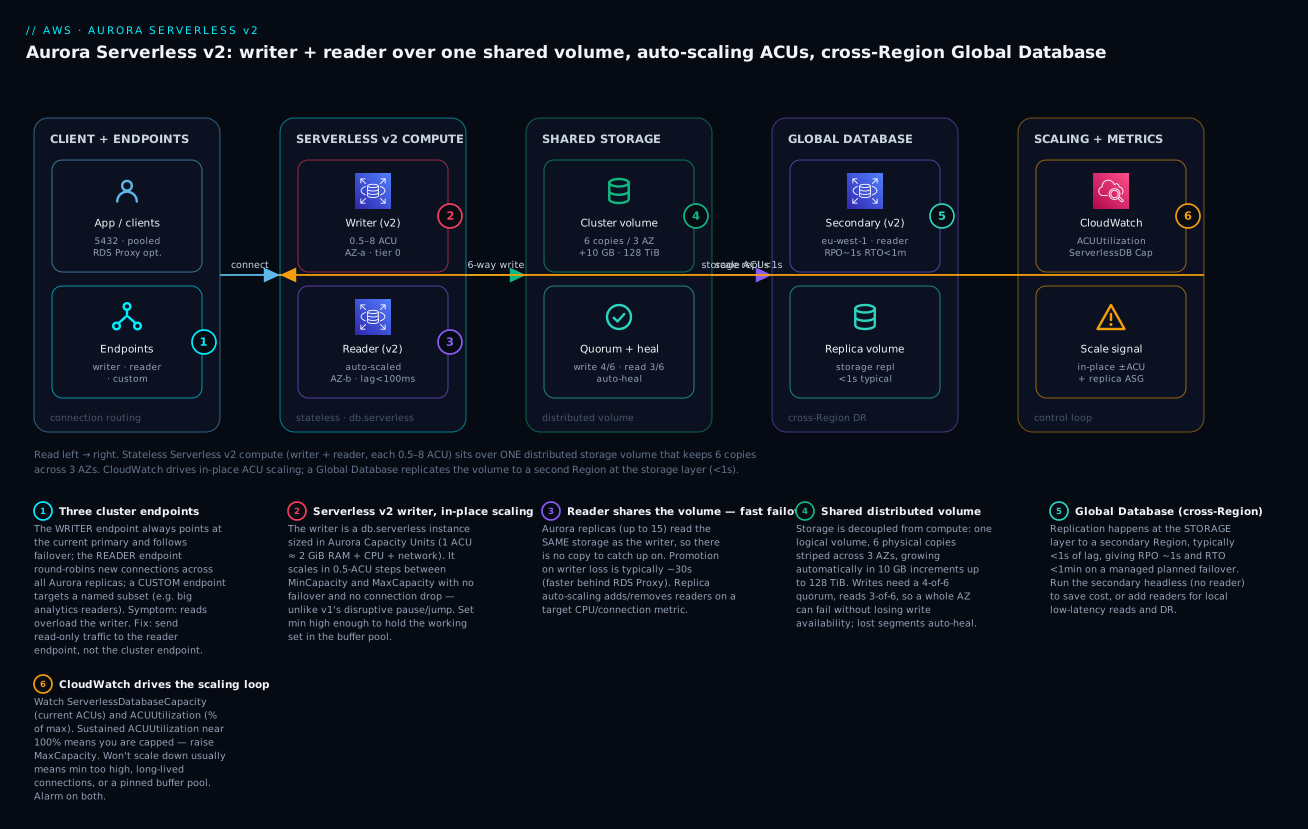
The diagram traces the real path left to right. On the left, your application connects through Aurora’s DNS endpoints — writes to the writer endpoint, reads to the reader endpoint (optionally through RDS Proxy for pooling). Those resolve to the Serverless v2 compute tier: a writer instance and a reader instance, each a db.serverless node floating between 0.5 and 8 ACUs. Both instances sit over the single shared storage volume, which keeps six copies of every 10 GB segment across three AZs and satisfies writes at a 4-of-6 quorum and reads at 3-of-6, auto-healing and auto-growing underneath. To the right, an Aurora Global Database replicates that volume at the storage layer into a second Region (here eu-west-1) in under a second for DR and local reads. Above it all, CloudWatch watches ServerlessDatabaseCapacity and ACUUtilization and closes the loop by driving in-place ACU scaling on the compute tier and reader auto-scaling on the read fleet.
Real-world scenario
Vaidya Health, a fictional but representative Indian tele-consult platform, ran a single provisioned Aurora PostgreSQL writer, db.r6g.2xlarge (8 vCPU, 64 GiB), plus one same-size replica. Their load curve was brutally uneven: near-idle overnight, a steady daytime baseline, and three sharp spikes a day when appointment slots opened at 9 a.m., 1 p.m., and 6 p.m., during which booking traffic jumped roughly 15× for ten minutes. Sized for the spike, the pair cost about ₹1.9 lakh/month and sat under 10% CPU most of the day. Sized for the average, the 9 a.m. rush saturated the writer, max_connections was exceeded, and bookings failed — exactly when the business needed them.
The team migrated to Serverless v2. They converted the writer to db.serverless with MinCapacity 4 ACU (chosen so the daytime working set stayed resident in the buffer pool) and MaxCapacity 32 ACU (headroom for the 15× spike), and made the reader a Serverless v2 node with min 2 / max 16 under replica auto-scaling (target reader CPU 65%, min 1 / max 3 readers). They kept Aurora Standard initially, then read Cost Explorer.
The results over the first full month were decisive. Overnight, the writer floored at 4 ACUs instead of renting 8 vCPUs of idle compute. During each 10-minute rush, ServerlessDatabaseCapacity climbed from ~6 ACUs to ~26 ACUs in under a second per step, held through the peak, and drifted back down within minutes — no failover, no dropped connections, no max_connections errors. Replica auto-scaling briefly added a second reader at the 1 p.m. peak and removed it after the cooldown. The month’s Aurora compute bill came in around ₹1.15 lakh, a ~40% cut, and the booking-failure incidents stopped.
Two lessons bit them first, though — and they’re the lessons everyone learns. Initially they set MinCapacity to 0.5 to save more overnight; the first morning query after idle was slow because the buffer pool had shrunk with the ACUs and had to re-warm. Raising the floor to 4 ACUs fixed it — the classic “min too low starves the cache” trap. Second, they later flipped to I/O-Optimized after Cost Explorer showed the Aurora I/O line was ~30% of the bill during the read-heavy afternoon; that trimmed another few percent and made the bill predictable. Net: same architecture, elastic capacity, lower cost, and the spikes stopped being incidents.
Advantages and disadvantages
| Advantages | Disadvantages |
|---|---|
| Compute/storage split → fast ~30s failover, cheap replicas | Higher cost floor than a tiny t4g.micro RDS instance |
| Serverless v2 scales in-place, 0.5-ACU steps, no failover | Only Aurora MySQL / PostgreSQL — no Oracle, SQL Server, MariaDB |
| Storage auto-grows (10 GB) to 128 TiB; auto-heals | Serverless v2 can cost more than provisioned at steady full load |
| Up to 15 replicas sharing one volume; ~ms lag | Reader endpoint balances connections, not queries (pooling pins) |
| Global Database: cross-Region RPO ~1s, RTO < 1 min | Global writes forwarded → extra cross-Region write latency |
| Backtrack, fast clone, parallel query, Data API, zero-ETL | Backtrack/parallel query are MySQL-only; Babelfish is PG-only |
| Mix serverless + provisioned in one cluster | Too-low min ACU starves the buffer pool (cold-ish reads) |
| Continuous S3 backup with no DB performance hit | I/O-Optimized ↔ Standard switch to Standard limited to once/30 days |
Where each matters: the fast failover and shared storage justify Aurora for any HA-sensitive relational workload; Serverless v2 pays off for spiky, idle-prone, or multi-tenant loads and quietly loses to provisioned (especially Reserved) for flat 24×7 high utilisation; Global Database is the reason to choose Aurora when your DR requirement is seconds of RPO rather than the minutes a snapshot copy gives you. The engine restriction is the hard stop: if you must run Oracle or native SQL Server, Aurora is out (Babelfish emulates but does not become SQL Server).
Hands-on lab
You will create an Aurora PostgreSQL cluster with a Serverless v2 writer (min 0.5 / max 8 ACU) and a Serverless v2 reader, drive load, watch the ACUs scale in CloudWatch, add replica auto-scaling, use the reader endpoint, and tear it all down. Everything here costs money — Aurora Serverless v2 is not free-tier — so do the teardown. Expect roughly ₹40–120 if you finish within an hour or two at low ACUs.
⚠️ Cost note: Serverless v2 bills per ACU-second (min 0.5 ACU while running), plus storage, I/O, and backups. A running cluster left overnight can cost a few hundred rupees. Tear down when done.
Lab parameters
| Parameter | Value used | Change if… |
|---|---|---|
| Region | ap-south-1 (Mumbai) |
You prefer another; keep it consistent |
| Engine | aurora-postgresql (v15+) |
You want MySQL instead |
| Cluster id | lab-aurora-sv2 |
Naming collides |
| Min / Max ACU | 0.5 / 8 | You want a lower cost ceiling |
| Instance class | db.serverless |
You want provisioned |
| Subnets | 3 private subnets, 3 AZs | Your VPC differs |
Step 1 — Set variables and networking
Aurora needs a DB subnet group spanning at least two (ideally three) AZs and a security group allowing PostgreSQL (5432) from your app tier only.
export AWS_REGION=ap-south-1
export VPC_ID=vpc-0abc123456789def0            # your VPC
export SUBNETS="subnet-0aaa subnet-0bbb subnet-0ccc"  # 3 AZs
export SG_APP=sg-0app0000000000000             # your app-tier SG

# DB subnet group across 3 AZs
aws rds create-db-subnet-group \
  --db-subnet-group-name lab-aurora-sng \
  --db-subnet-group-description "Aurora Sv2 lab" \
  --subnet-ids $SUBNETS

# Security group for the DB, allow 5432 from the app SG only
export SG_DB=$(aws ec2 create-security-group \
  --group-name lab-aurora-sg --description "Aurora lab" \
  --vpc-id $VPC_ID --query GroupId --output text)

aws ec2 authorize-security-group-ingress \
  --group-id $SG_DB --protocol tcp --port 5432 \
  --source-group $SG_APP
Expected: the subnet group and a sg-... id echo back. Never open 5432 to 0.0.0.0/0.
Step 2 — Create the cluster with a Serverless v2 scaling range
The cluster carries the serverless-v2-scaling-configuration; the instances you add with class db.serverless inherit that range.
aws rds create-db-cluster \
  --db-cluster-identifier lab-aurora-sv2 \
  --engine aurora-postgresql \
  --engine-version 15.4 \
  --master-username labadmin \
  --manage-master-user-password \
  --db-subnet-group-name lab-aurora-sng \
  --vpc-security-group-ids $SG_DB \
  --serverless-v2-scaling-configuration MinCapacity=0.5,MaxCapacity=8 \
  --storage-type aurora \
  --backup-retention-period 1
Expected: JSON with "Status": "creating" and an empty Endpoint that populates shortly. --manage-master-user-password stores the password in Secrets Manager — never hard-code it.
Step 3 — Add the Serverless v2 writer and a reader
# Writer
aws rds create-db-instance \
  --db-instance-identifier lab-aurora-sv2-writer \
  --db-cluster-identifier lab-aurora-sv2 \
  --engine aurora-postgresql \
  --db-instance-class db.serverless \
  --promotion-tier 0

# Reader (different AZ chosen automatically), higher promotion tier
aws rds create-db-instance \
  --db-instance-identifier lab-aurora-sv2-reader \
  --db-cluster-identifier lab-aurora-sv2 \
  --engine aurora-postgresql \
  --db-instance-class db.serverless \
  --promotion-tier 1

# Wait until both are available (~5-10 min)
aws rds wait db-instance-available --db-instance-identifier lab-aurora-sv2-writer
aws rds wait db-instance-available --db-instance-identifier lab-aurora-sv2-reader
Expected: both instances reach available. The writer is tier 0, so it’s the preferred survivor logic; the reader (tier 1) is the failover target.
Step 4 — Grab the endpoints
aws rds describe-db-clusters --db-cluster-identifier lab-aurora-sv2 \
  --query 'DBClusters[0].{Writer:Endpoint,Reader:ReaderEndpoint,Port:Port}' \
  --output table
Expected output (shape):
------------------------------------------------------------------
|                        DescribeDBClusters                       |
+--------+--------------------------------------------------+-----+
|  Port  |  Writer                                          | ... |
+--------+--------------------------------------------------+-----+
|  5432  |  lab-aurora-sv2.cluster-xxxx.ap-south-1.rds...   | ... |
+--------+--------------------------------------------------+-----+
The cluster- host is the writer endpoint; the cluster-ro- host is the reader endpoint.
Step 5 — Connect, seed, and drive load
From a bastion or app instance in the VPC (fetch the password from Secrets Manager), connect and generate work. pgbench is the simplest way to push CPU and I/O.
# Retrieve the managed password
export SECRET_ARN=$(aws rds describe-db-clusters --db-cluster-identifier lab-aurora-sv2 \
  --query 'DBClusters[0].MasterUserSecret.SecretArn' --output text)
export PGPASSWORD=$(aws secretsmanager get-secret-value --secret-id $SECRET_ARN \
  --query SecretString --output text | python3 -c "import sys,json;print(json.load(sys.stdin)['password'])")
export WRITER=$(aws rds describe-db-clusters --db-cluster-identifier lab-aurora-sv2 \
  --query 'DBClusters[0].Endpoint' --output text)

# Initialise pgbench (scale 50 ~ 750 MB) then run 4 clients for 5 minutes
pgbench -h $WRITER -U labadmin -i -s 50 postgres
pgbench -h $WRITER -U labadmin -c 8 -j 4 -T 300 postgres
Expected: pgbench prints TPS climbing as ACUs rise. Watch CPU pressure translate into capacity in the next step.
Step 6 — Watch it scale in CloudWatch
The two metrics that tell the story are ServerlessDatabaseCapacity (current ACUs) and ACUUtilization (% of MaxCapacity in use).
aws cloudwatch get-metric-statistics \
  --namespace AWS/RDS \
  --metric-name ServerlessDatabaseCapacity \
  --dimensions Name=DBInstanceIdentifier,Value=lab-aurora-sv2-writer \
  --start-time $(date -u -v-15M +%Y-%m-%dT%H:%M:%SZ 2>/dev/null || date -u -d '15 min ago' +%Y-%m-%dT%H:%M:%SZ) \
  --end-time  $(date -u +%Y-%m-%dT%H:%M:%SZ) \
  --period 60 --statistics Average Maximum
Expected: Average climbs from ~0.5 toward 8 as load ramps, then falls after pgbench ends. Do the same for ACUUtilization; if it pegs near 100, your MaxCapacity is the ceiling.
Step 7 — Add replica auto-scaling
Register the cluster’s reader count as a scalable target and put a target-tracking policy on reader CPU.
aws application-autoscaling register-scalable-target \
  --service-namespace rds \
  --resource-id cluster:lab-aurora-sv2 \
  --scalable-dimension rds:cluster:ReadReplicaCount \
  --min-capacity 1 --max-capacity 3

aws application-autoscaling put-scaling-policy \
  --service-namespace rds \
  --resource-id cluster:lab-aurora-sv2 \
  --scalable-dimension rds:cluster:ReadReplicaCount \
  --policy-name lab-reader-cpu-70 \
  --policy-type TargetTrackingScaling \
  --target-tracking-scaling-policy-configuration '{
    "TargetValue": 70.0,
    "PredefinedMetricSpecification": {"PredefinedMetricType": "RDSReaderAverageCPUUtilization"},
    "ScaleInCooldown": 300, "ScaleOutCooldown": 300 }'
Expected: the policy is created. Under sustained reader load, Aurora adds a reader (up to 3) and removes it after the cooldown.
Step 8 — Use the reader endpoint
Point read-only traffic at the cluster-ro- host so it never touches the writer.
export READER=$(aws rds describe-db-clusters --db-cluster-identifier lab-aurora-sv2 \
  --query 'DBClusters[0].ReaderEndpoint' --output text)
pgbench -h $READER -U labadmin -c 8 -j 4 -T 120 -S postgres   # -S = SELECT-only
Expected: read load lands on replicas; the writer’s DatabaseConnections stays low while the reader’s ACUs rise.
The same cluster in Terraform
resource "aws_rds_cluster" "sv2" {
  cluster_identifier      = "lab-aurora-sv2"
  engine                  = "aurora-postgresql"
  engine_version          = "15.4"
  engine_mode             = "provisioned"          # required for Serverless v2
  master_username         = "labadmin"
  manage_master_user_password = true
  db_subnet_group_name    = aws_db_subnet_group.sng.name
  vpc_security_group_ids  = [aws_security_group.db.id]
  storage_type            = "aurora"               # or "aurora-iopt1" for I/O-Optimized
  backup_retention_period = 1
  skip_final_snapshot     = true

  serverlessv2_scaling_configuration {
    min_capacity = 0.5
    max_capacity = 8
  }
}

resource "aws_rds_cluster_instance" "writer" {
  identifier         = "lab-aurora-sv2-writer"
  cluster_identifier = aws_rds_cluster.sv2.id
  engine             = aws_rds_cluster.sv2.engine
  instance_class     = "db.serverless"
  promotion_tier     = 0
}

resource "aws_rds_cluster_instance" "reader" {
  identifier         = "lab-aurora-sv2-reader"
  cluster_identifier = aws_rds_cluster.sv2.id
  engine             = aws_rds_cluster.sv2.engine
  instance_class     = "db.serverless"
  promotion_tier     = 1
}

# Replica auto-scaling on reader CPU
resource "aws_appautoscaling_target" "readers" {
  service_namespace  = "rds"
  resource_id        = "cluster:${aws_rds_cluster.sv2.cluster_identifier}"
  scalable_dimension = "rds:cluster:ReadReplicaCount"
  min_capacity       = 1
  max_capacity       = 3
}

resource "aws_appautoscaling_policy" "readers_cpu" {
  name               = "lab-reader-cpu-70"
  service_namespace  = aws_appautoscaling_target.readers.service_namespace
  resource_id        = aws_appautoscaling_target.readers.resource_id
  scalable_dimension = aws_appautoscaling_target.readers.scalable_dimension
  policy_type        = "TargetTrackingScaling"

  target_tracking_scaling_policy_configuration {
    target_value       = 70
    scale_in_cooldown  = 300
    scale_out_cooldown = 300
    predefined_metric_specification {
      predefined_metric_type = "RDSReaderAverageCPUUtilization"
    }
  }
}
A CloudWatch alarm to catch a capped cluster (ACUUtilization pegged) before users feel it:
resource "aws_cloudwatch_metric_alarm" "acu_capped" {
  alarm_name          = "lab-aurora-acu-capped"
  namespace           = "AWS/RDS"
  metric_name         = "ACUUtilization"
  dimensions          = { DBClusterIdentifier = aws_rds_cluster.sv2.cluster_identifier }
  statistic           = "Average"
  period              = 60
  evaluation_periods  = 5
  threshold           = 90
  comparison_operator = "GreaterThanThreshold"
  alarm_description   = "Serverless v2 near MaxCapacity for 5 min — raise max"
}
Step 9 — Teardown (do this)
# Remove auto-scaling first
aws application-autoscaling deregister-scalable-target \
  --service-namespace rds --resource-id cluster:lab-aurora-sv2 \
  --scalable-dimension rds:cluster:ReadReplicaCount

# Delete instances, then the cluster
aws rds delete-db-instance --db-instance-identifier lab-aurora-sv2-reader --skip-final-snapshot
aws rds delete-db-instance --db-instance-identifier lab-aurora-sv2-writer --skip-final-snapshot
aws rds wait db-instance-deleted --db-instance-identifier lab-aurora-sv2-reader
aws rds wait db-instance-deleted --db-instance-identifier lab-aurora-sv2-writer
aws rds delete-db-cluster --db-cluster-identifier lab-aurora-sv2 --skip-final-snapshot

# Then the subnet group + SG
aws rds delete-db-subnet-group --db-subnet-group-name lab-aurora-sng
aws ec2 delete-security-group --group-id $SG_DB
Or terraform destroy. Verify in the Console that the cluster is gone — a lingering Serverless v2 cluster keeps billing.
Common mistakes & troubleshooting
The heart of running Serverless v2 well is understanding why it won’t scale the way you expect. Almost every “it’s slow / it costs too much” report resolves to one of a dozen root causes below. Confirm with the exact metric or command before you change anything.
| # | Symptom | Root cause | Confirm (exact command / console path) | Fix |
|---|---|---|---|---|
| 1 | ACUs never drop overnight | MinCapacity set too high | ServerlessDatabaseCapacity floors at your min; check cluster serverless-v2-scaling-configuration |
Lower MinCapacity (or to 0 for dev), keeping working-set in mind |
| 2 | Won’t scale down despite low load | Long-lived / idle-in-transaction connections pin capacity | SELECT state,count(*) FROM pg_stat_activity GROUP BY state; — look for idle in transaction |
Fix the app to close/commit; set idle_in_transaction_session_timeout |
| 3 | Won’t scale down; memory pinned | Large buffer pool / big temp objects hold memory | Watch FreeableMemory staying low with low CPU |
Reduce working set; let idle drain; lower min once safe |
| 4 | Won’t scale up fast enough | MaxCapacity is the ceiling | ACUUtilization pegged near 100 for minutes |
Raise MaxCapacity; add headroom above peak |
| 5 | Scale-up feels laggy from idle | MinCapacity too low → small first step | First query after idle slow; ServerlessDatabaseCapacity was at 0.5 |
Raise MinCapacity so buffer pool stays warm |
| 6 | Reads overloading the writer | App uses the cluster (writer) endpoint for reads | DatabaseConnections high on writer, ~0 on readers |
Send read-only traffic to the reader endpoint |
| 7 | Reader endpoint not balancing | Pooled long-lived connections pin to one replica | One reader hot, others idle in per-instance metrics | Recycle connections; use RDS Proxy; shorten pool lifetime |
| 8 | Failover slower than ~30s | No replica to promote / client caches DNS | Only a writer exists; app DNS TTL too long | Keep ≥1 replica; honour the ~1s DNS TTL; use RDS Proxy |
| 9 | Connection storm on scale/failover | Every client opens its own connection | Spike in DatabaseConnections at the event |
Put RDS Proxy in front; pool + multiplex |
| 10 | Global DB replication lag high | Write burst / distant Region / under-sized secondary | AuroraGlobalDBReplicationLag climbing |
Throttle writes; add secondary capacity; check Region distance |
| 11 | Global failover lost data | Used unplanned failover during a burst | Compared last write vs secondary after promote | For drills use managed switchover (zero loss), not unplanned |
| 12 | I/O bill surprise | On Standard with heavy I/O | Cost Explorer “Aurora I/O” line > ~25% of Aurora bill | Switch to I/O-Optimized |
| 13 | max_connections hit at low ACU |
Connection cap scales with ACUs; min too low | SHOW max_connections; vs current ACU |
Raise MinCapacity or use RDS Proxy to multiplex |
| 14 | Serverless v2 costs more than before | Steady high load doesn’t suit serverless | ACUs near max most of the day | Move to provisioned + Reserved Instances |
| 15 | Backtrack option missing | It’s Aurora MySQL only | You’re on Aurora PostgreSQL | Use PITR / snapshots; Backtrack won’t appear |
Error and status reference
| Signal / error | Meaning | Likely cause | Fix |
|---|---|---|---|
ACUUtilization ≈ 100% sustained |
At MaxCapacity | Undersized max | Raise MaxCapacity |
ServerlessDatabaseCapacity stuck at min |
Not scaling down further | That’s the floor | Lower MinCapacity if safe |
FATAL: remaining connection slots are reserved |
Out of connections | Cap tied to current ACU; connection storm | RDS Proxy / raise min / pool |
AuroraReplicaLag spiking |
Reader behind writer | Write burst / undersized reader | Scale reader ACUs; add readers |
AuroraGlobalDBReplicationLag high |
Cross-Region behind | Write burst / Region distance | Throttle; size secondary |
PS-6501 / storage-full-ish errors |
Rare — volume ceiling (128 TiB) | Genuinely huge dataset | Shard at app layer |
Instance storage-optimization status |
Applying storage-config change | You switched Standard↔I/O-Optimized | Wait; it’s online |
InvalidDBInstanceState on modify |
Instance busy (scaling/backup) | Concurrent operation | Retry after it settles |
Decision table — read the metric, act
| If you see… | It’s probably… | Do this |
|---|---|---|
| High ACUUtilization + high CPU | Genuine load at the cap | Raise MaxCapacity |
| Low CPU but ACUs won’t drop | Pinned connections/memory | Fix idle-in-transaction; drain |
| Writer busy, readers idle | Wrong endpoint | Use the reader endpoint |
| One reader hot, rest cold | Connection pinning | Recycle connections / RDS Proxy |
| I/O line dominates the bill | Standard on I/O-heavy load | Switch to I/O-Optimized |
| ACUs at max all day | Serverless mismatch | Provisioned + Reserved |
| Slow first query after idle | Min too low, cold cache | Raise MinCapacity |
The three failures that cause the most 2 a.m. pages: (1) reads on the writer endpoint — the app was never pointed at cluster-ro-, so every read competes with writes and the writer scales (and bills) far higher than it should; fix the connection string, not the capacity. (2) Connections pinning capacity — an ORM or a leaked transaction leaves sessions idle in transaction, Serverless v2 refuses to scale down because it can’t safely evict them, and your overnight bill never drops; hunt them in pg_stat_activity and set an idle-transaction timeout. (3) Unplanned Global failover as a “drill” — someone runs failover-global-cluster to test DR during business hours, and because it detaches rather than waiting for replication to drain, a few seconds of writes vanish; drills must use the managed switchover path, which is zero-loss.
Best practices
- Point reads at the reader endpoint and writes at the writer endpoint — never send read-only traffic to the cluster endpoint, or the writer scales (and bills) for reads it shouldn’t handle.
- Set MinCapacity so the working set stays in the buffer pool. Memory scales with ACUs; too low a floor evicts hot pages and slows the first post-idle query. For prod, don’t reflexively pick 0.5.
- Set MaxCapacity above your real peak and alarm on
ACUUtilizationnear 90–100% so a silent throttle surfaces before users do. - Keep at least one replica in a second AZ as a warm failover target; a writer-only cluster fails over slowly.
- Set failover promotion tiers deliberately — tier 0 for your best-sized replica.
- Put RDS Proxy in front of Lambda and spiky/many-client apps to pool connections and smooth failover.
- Fix idle-in-transaction connections and set
idle_in_transaction_session_timeout; they pin capacity and defeat scale-down. - Read Cost Explorer’s Aurora I/O line monthly; flip to I/O-Optimized when I/O exceeds ~25% of the Aurora bill.
- Run dev/test on Serverless v2 with a low (or 0) min to kill the overnight bill; run steady 24×7 prod on provisioned + Reserved when it’s cheaper.
- Use managed switchover for DR drills (zero data loss); reserve unplanned failover for real Region outages.
- Enable Performance Insights and deletion protection on production clusters.
- Right-size readers independently of the writer — the writer sizes for writes, readers for read fan-out.
Security notes
Aurora inherits the RDS security model; apply it fully. Keep every instance in private subnets with no public accessibility, and let the security group admit 5432/3306 only from your app tier’s SG — never a CIDR like 0.0.0.0/0. Encrypt at rest with KMS (enable at creation; you cannot add encryption to an existing unencrypted cluster without a snapshot-restore), and require TLS in transit with the RDS CA bundle. Prefer IAM database authentication or Secrets Manager-managed credentials (as the lab does with --manage-master-user-password) over static passwords, and rotate them.
| Control | How | Why it matters |
|---|---|---|
| Network isolation | Private subnets, PubliclyAccessible=false |
No internet-reachable database |
| Security group | Allow 5432/3306 from app SG only | Least-privilege network path |
| Encryption at rest | KMS CMK at creation | Data + backups + replicas encrypted; Global DB requires it |
| Encryption in transit | Enforce TLS, verify RDS CA | Stops on-path credential/data theft |
| Auth | IAM DB auth / Secrets Manager | No long-lived static passwords |
| RDS Proxy + IAM | Central token enforcement | Removes DB creds from app code |
| Audit | Database Activity Streams, CloudTrail, PG audit logs | Who did what, tamper-evident |
| Least privilege (DB) | App role ≠ master; scoped grants | Blast-radius control |
| Deletion protection | --deletion-protection |
Prevents accidental cluster drop |
| Backup encryption | Inherits cluster KMS key | Restores stay encrypted |
Global Database note: encryption must be enabled, and each Region needs its own KMS key (keys are Regional) — plan the key policy per Region before you add a secondary.
Cost & sizing
Serverless v2 bills primarily by ACU-seconds, then storage-GB-months, I/O (Standard only), backup storage, and cross-Region data transfer (Global Database). The two levers you actually pull are min/max ACU (compute) and Standard vs I/O-Optimized (I/O). Serverless is not automatically cheaper — it wins on variable/idle load and can lose on flat 24×7 load where Reserved provisioned instances are cheaper per hour.
| Cost driver | Billed as | Reduce it by |
|---|---|---|
| Serverless v2 compute | Per ACU-second | Lower min for idle; cap max; provisioned+Reserved for steady load |
| Storage | Per GB-month of used volume | Delete unused data; note older engines don’t shrink |
| I/O (Standard) | Per million requests | Switch to I/O-Optimized when I/O > ~25% of bill |
| Backup storage | GB-month beyond cluster size | Trim retention; prune manual snapshots |
| Backtrack (MySQL) | Change records in window | Shorten the window |
| Global Database | Replicated I/O + cross-Region transfer | Run secondary headless until needed |
| RDS Proxy | Per vCPU-hour of the DB | Use only where pooling pays off |
Rough figures (Mumbai ap-south-1, indicative, region- and time-variable):
| Item | Approx USD | Approx INR | Note |
|---|---|---|---|
| 1 ACU-hour (Standard) | ~$0.12 | ~₹10 | 1 ACU ≈ 2 GiB RAM |
| 1 ACU-hour (I/O-Optimized) | ~$0.16 | ~₹13 | No per-I/O charge |
| Serverless v2 @ 4 ACU, 24×7 | ~$345/mo | ~₹29k/mo | Compute only |
| Serverless v2 dev @ 0.5 min, mostly idle | ~$45/mo | ~₹3.7k/mo | Floats up on use |
| Storage | ~$0.10/GB-mo | ~₹8/GB-mo | Used, not provisioned |
| Backups beyond cluster size | ~$0.021/GB-mo | ~₹1.7/GB-mo | Retention-driven |
| Global DB replicated write I/O | per million | — | Plus cross-Region transfer |
Free tier: Aurora Serverless v2 is not in the AWS Free Tier (the RDS free tier covers only certain single-AZ db.t* provisioned instances). Budget real money for any Aurora lab, and tear it down.
Interview & exam questions
Q1. Why does Aurora fail over in ~30 seconds when Multi-AZ RDS takes 60–120? Aurora replicas share the same distributed storage volume as the writer, so promoting a replica requires no data copy — it’s a metadata change plus brief recovery. Classic Multi-AZ maintains a separate standby via replication and must redirect and recover. (SAA-C03)
Q2. What exactly is an ACU? An Aurora Capacity Unit ≈ 2 GiB of memory plus proportional CPU and networking. Serverless v2 scales an instance in 0.5-ACU increments between your configured min and max. (SAA-C03 / DBS)
Q3. How does Serverless v2 differ from v1? v2 scales in place, in fine 0.5-ACU steps, sub-second, without dropping connections, and supports read replicas, Multi-AZ and Global Database. v1 paused and switched hosts at coarse power-of-two steps, dropping connections — dev-grade only. (DBS)
Q4. A reader endpoint isn’t balancing load across replicas — why? The reader endpoint round-robins per new connection via DNS. An app with a long-lived pooled connection sticks to one replica. Recycle connections or use RDS Proxy to spread load. (SAA-C03)
Q5. What RPO and RTO does Aurora Global Database give you? Storage-layer cross-Region replication is typically under a second, so RPO is ~1 second; a managed planned failover gives RTO under a minute with no data loss. Unplanned detach-and-promote is minutes with possible seconds of loss. (SAP / ANS)
Q6. When is Aurora I/O-Optimized cheaper than Standard? When per-request I/O charges exceed roughly 25% of your combined Aurora bill. I/O-Optimized removes per-I/O charges but raises compute and storage rates ~25–30%. Read Cost Explorer’s Aurora I/O line to decide. (DBS)
Q7. Your Serverless v2 cluster won’t scale down overnight. Diagnose. Likely MinCapacity is too high, or long-lived/idle-in-transaction connections or a pinned buffer pool prevent safe scale-down. Check pg_stat_activity for idle in transaction, review the scaling config, and set an idle-transaction timeout. (SOA-C02)
Q8. How many read replicas does Aurora support and why are they cheap? Up to 15 per cluster. They read the same shared storage volume as the writer, so there’s no separate copy to seed or maintain — you pay for compute/ACUs, not duplicated storage. (SAA-C03)
Q9. Can you mix Serverless v2 and provisioned instances in one cluster? Yes. A cluster can hold both — e.g. a provisioned writer with Serverless v2 readers or vice versa — which is ideal for gradual migration and for right-sizing each role. (DBS)
Q10. Which Aurora features are engine-restricted? Backtrack and Parallel Query are Aurora MySQL only; Babelfish (SQL Server/T-SQL compatibility) is Aurora PostgreSQL only. Fast cloning, RDS Data API, Global Database and zero-ETL work on both. (DBS)
Q11. What’s the difference between managed switchover and failover for a Global Database? Switchover (managed planned failover) coordinates roles with zero data loss for drills/maintenance while the primary is healthy. Failover (unplanned) detaches and promotes a secondary during a real Region outage, with possible seconds of data loss. (SAP)
Q12. Why might Serverless v2 cost more than provisioned? For steady, high, 24×7 utilisation the per-ACU rate exceeds a provisioned instance — especially a Reserved one. Serverless pays off on variable, spiky, or idle-prone loads, not flat full ones. (DBS / Cost)
Quick check
- How many copies of each data segment does Aurora keep, and across how many AZs?
- What is the write quorum and the read quorum for Aurora storage?
- In 0.5-ACU steps between min and max — which Serverless version scales in place without dropping connections?
- Which cluster endpoint load-balances read-only connections, and at what granularity?
- For an Aurora Global Database DR drill with zero data loss, which failover do you use?
Answers
- Six copies across three AZs (two per AZ).
- Write quorum 4 of 6; read quorum 3 of 6 — so a whole AZ can fail without losing writes.
- Serverless v2 (v1 paused and switched hosts, dropping connections).
- The reader endpoint, balancing per new connection (via DNS) — not per query.
- Managed switchover (managed planned failover) — it waits for replication to drain, so zero data loss.
Glossary
- Aurora — AWS cloud-native relational engine, MySQL/PostgreSQL-compatible, with a distributed shared-storage layer.
- Cluster volume — the single logical, distributed storage volume shared by all instances in a cluster; 6 copies across 3 AZs.
- Protection group — a 10 GB slice of the volume, independently 6-way replicated; the unit of quorum and repair.
- ACU (Aurora Capacity Unit) — ~2 GiB RAM plus proportional CPU/network; the Serverless v2 unit of capacity and billing.
- Serverless v2 — Aurora capacity mode that scales an instance in place, in 0.5-ACU steps, between a min and max.
- Writer (cluster) endpoint — DNS that always resolves to the current primary; follows failover.
- Reader endpoint — DNS that round-robins new connections across available replicas.
- Custom endpoint — DNS resolving across a named subset of instances (e.g. analytics readers).
- Aurora replica — a read-only instance on the shared volume; up to 15; a fast failover target.
- Promotion tier — 0–15 priority deciding which replica is promoted on failover (0 wins).
- Global Database — cross-Region topology replicating the volume at the storage layer; RPO ~1s.
- Managed switchover — zero-data-loss planned Global Database failover for drills/maintenance.
- Backtrack — Aurora MySQL feature to rewind the cluster to a past second in place (≤72h).
- Fast cloning — copy-on-write clone of a cluster; instant, pay only for diverged pages.
- I/O-Optimized — Aurora storage config with no per-request I/O charge but higher compute/storage rates.
Next steps
- Deepen the store-selection reasoning behind this choice in AWS Databases: RDS, DynamoDB and Aurora — Choose the Right Store.
- Compare the intra-Region HA mechanics with AWS RDS Multi-AZ & Read Replicas for High Availability to see where classic RDS still fits.
- Walk the provisioning basics in Launch MySQL & PostgreSQL on Amazon RDS — Hands-On if you want the non-Aurora baseline.
- Take the Global Database into a full topology in AWS Multi-Region Active-Active Architecture: Route 53, Global Tables and Aurora Global Database.
- Protect and restore all of it with AWS Backup & Disaster-Recovery Strategies.