You can host a whole website — a marketing site, a docs portal, a React or Vue single-page app — for a few rupees a month on AWS, with global HTTPS, a green padlock on your own domain, and no server to patch. The catch is that there are two ways to do it, they look almost identical in a tutorial screenshot, and one of them is a trap. The old way — flip on S3 static website hosting, make the bucket public, hand out the *.s3-website-*.amazonaws.com URL — is HTTP-only, cannot present a certificate for your domain, and forces you to punch a hole in Block Public Access. The modern way keeps the bucket completely private, puts Amazon CloudFront in front of it with Origin Access Control (OAC), terminates TLS with a free AWS Certificate Manager (ACM) certificate, and points Route 53 alias records at the distribution. Same static files; a categorically better result.
This article builds the modern stack end to end and explains every knob that bites people. You will see why the ACM certificate must live in us-east-1 no matter where your bucket is, why the bucket policy trusts a distribution ARN instead of an IP range, why a React deep-link 404s until you add two custom error responses, and why your “I just deployed” change is invisible for 24 hours until you invalidate the cache. By the end you will have a private-S3 + OAC + CloudFront + ACM + Route 53 site serving HTTPS on your apex and www, with a repeatable aws s3 sync --delete + create-invalidation deploy — in both the AWS CLI and Terraform — plus a troubleshooting playbook for the dozen ways it breaks.
This is the pattern the exams reward too: the “S3 website is not accessible over HTTPS on a custom domain — what do you add?” question on SAA-C03, the OAC/OAI and invalidation questions on DVA-C02, and the ACM-region and Route 53 alias questions on SOA-C02 all resolve to the architecture below.
What problem this solves
A static site is just files — HTML, CSS, JS, images, a few JSON blobs. You do not need a web server, an autoscaling group, or a database to serve them, and you should not pay for one. Amazon S3 stores the files with eleven-nines durability; the problem is that S3 by itself gives you an ugly regional URL, no CDN, weak cache control, and — if you use the website endpoint — no HTTPS on your own domain. Here is the pain in production terms:
- No HTTPS on a custom domain. The S3 website endpoint (
bucket.s3-website-us-east-1.amazonaws.com) speaks HTTP only, port 80. You cannot attach an ACM certificate to it. Modern browsers flag it “Not secure,” and you cannot even load it in anhttps://iframe. Every serious site needs TLS on its own name. - Public bucket = attack surface. The website endpoint requires the objects to be world-readable, so you must disable Block Public Access and add a
"Principal": "*"bucket policy. That is exactly the misconfiguration that leaks data — and it triggers AWS Config, Security Hub, and Trusted Advisor findings. See S3 Bucket Policies & Block Public Access for why this matters. - No edge cache, slow far from the bucket. S3 lives in one Region. A user in Sydney hitting a bucket in Mumbai pays the full round-trip on every request. There is no CDN, no HTTP/2 or HTTP/3, and no automatic Brotli/gzip.
- SPA routing breaks. A React/Vue/Angular router owns paths like
/orders/42, but that object does not exist in the bucket, so a hard refresh or a shared deep link returns an S3404/403instead of your app. - Deploys go stale or over-cache. Without a cache strategy you either serve day-old HTML from the edge or set TTLs so low you lose the CDN’s whole benefit.
The modern private-S3 + CloudFront + OAC + ACM + Route 53 stack fixes all six: private bucket, global HTTPS on your domain, edge caching + compression, SPA fallback, and a clean invalidate-on-deploy flow. It is the reference architecture AWS itself recommends and the one this article builds.
Learning objectives
By the end of this article you can:
- Contrast the legacy S3 website endpoint with the private-S3 + CloudFront + OAC pattern and justify the modern choice on security, HTTPS, and performance.
- Create a private S3 origin bucket with Block Public Access fully on and an OAC-generated bucket policy that trusts only your distribution.
- Request and validate a public ACM certificate in us-east-1 for your apex and
wwwusing DNS validation, and explain why the Region is non-negotiable. - Configure a CloudFront distribution: default root object, cache/origin-request/response-headers policies, price class, compression, and TLS security policy.
- Implement SPA client-side routing with custom error responses (403/404 →
/index.html, HTTP 200) and subfolder index rewrites with a CloudFront Function. - Wire Route 53 alias A and AAAA records at the apex and
www, and set up a canonicalwww→apex(or apex→www) redirect. - Deploy content with
aws s3 sync --deleteplus targeted cache invalidations, and reproduce the whole stack in Terraform. - Diagnose the dozen classic failures — 403 through CloudFront, cert “pending validation,” deep-link 404, stale content,
wwwnot resolving,AccessDeniedXML — from symptom to fix.
Prerequisites & where this fits
You should be comfortable with the building blocks this article assembles. If any are shaky, read these first:
- S3 Buckets: Fundamentals, Hands-On — buckets, keys, regions, the REST vs website endpoint.
- S3 Bucket Policies & Block Public Access — BPA, resource policies,
Principal/Condition. - CloudFront: CDN Setup, Caching & Origins — distributions, behaviors, cache policies, OAC.
- Route 53: Records & Routing Policies — hosted zones, alias vs CNAME, apex records.
You will also need: an AWS account with the AWS CLI v2 configured, permission to create S3/CloudFront/ACM/Route 53 resources, and a domain whose DNS you control (ideally in a Route 53 public hosted zone). Terraform ≥ 1.5 with the hashicorp/aws provider ≥ 5.x is used for the IaC path.
Where it fits: this is the storage-and-delivery front end of countless architectures. The same distribution can front an API on /api/* (a second origin), and the pattern is the “S” in JAMstack. It pairs naturally with a CI pipeline that builds the site and runs the deploy recipe at the end of this article.
Core concepts
Before the knobs, the mental model. Nine moving parts collaborate; get their roles straight and every later decision is obvious.
| Component | Role in the stack | Lives where | You configure |
|---|---|---|---|
| S3 origin bucket | Stores the built site files (the origin of truth) | Any one Region (e.g. ap-south-1) |
Private, BPA on, SSE, versioning |
| Block Public Access (BPA) | Guardrail that keeps the bucket private | Bucket + account level | All four settings ON |
| CloudFront distribution | Global CDN, TLS termination, caching, routing | Edge (600+ POPs) | Origin, behaviors, cert, root object |
| Origin Access Control (OAC) | Lets only CloudFront read the private bucket (SigV4) | Attached to the origin | Signing behavior, per-origin |
| Bucket policy | Grants the distribution s3:GetObject via SourceArn |
On the bucket | OAC-generated statement |
| ACM certificate | The TLS cert for your domain(s) | us-east-1 only for CloudFront | DNS-validated, apex + www |
| Route 53 hosted zone | Authoritative DNS for your domain | Global | Alias A/AAAA at apex + www |
| Cache / response-headers policies | Cache key + TTLs; HSTS/CSP/security headers | On the behavior | Managed or custom |
| CloudFront Function | Tiny JS at the edge (redirects, URI rewrites) | Viewer request/response | Optional, sub-ms |
Three ideas underpin everything:
- The bucket is private; CloudFront is the only reader. With OAC, CloudFront signs each origin request with SigV4 and the bucket policy allows exactly that distribution (matched on
aws:SourceArn). Nobody can reach the bucket directly — BPA stays fully on. This is the opposite of the website-endpoint model. - CloudFront is where “the website” actually happens. TLS, the custom domain, the default root object, caching, compression, security headers, SPA fallback, and redirects are all CloudFront concerns. S3 just returns bytes for a key.
- The certificate Region is fixed. CloudFront is a global service whose control plane is anchored in us-east-1 (N. Virginia), so it will only attach an ACM cert issued or imported there — even if your bucket is in Mumbai and your users are in Europe. Regional services (ALB, API Gateway) use a cert in their Region; CloudFront always uses us-east-1.
The two approaches: S3 website endpoint vs private S3 + CloudFront
This is the decision the whole article hinges on, so enumerate it fully. There are two ways to serve files from S3, and they differ in almost every property that matters.
The legacy S3 website endpoint
Turning on S3 static website hosting exposes a second, different endpoint for the bucket that behaves like a tiny web server: it resolves an index document (so / and /blog/ return index.html), serves a custom error document, and supports S3-native redirection rules. But it is HTTP-only and requires public objects.
| Property | S3 website endpoint | S3 REST endpoint (used with CloudFront/OAC) |
|---|---|---|
| Hostname shape | bucket.s3-website-<region>.amazonaws.com |
bucket.s3.<region>.amazonaws.com |
| Protocol | HTTP only (port 80) | HTTPS (SigV4) |
| Access model | Public objects required | Private; SigV4 request required |
Index document (/, /dir/) |
Yes, native resolution | Only the root default object via CloudFront; subfolders need a function |
| Custom error document | Yes (native) | Via CloudFront custom error responses |
| Redirect rules | Yes (native routing rules) | Via CloudFront Function / Lambda@Edge |
| Custom domain + TLS cert | No | Yes (ACM on CloudFront) |
| Works behind CloudFront | Yes, but as a custom origin (still public) | Yes, as the recommended private origin |
The modern private-origin stack, feature by feature
Now the head-to-head that decides it. “Website endpoint direct” is column 1; “website endpoint behind CloudFront” is a half-measure some tutorials show; “private S3 + CloudFront + OAC” is what you should build.
| Capability | Website endpoint (direct) | Website endpoint + CloudFront | Private S3 + CloudFront + OAC |
|---|---|---|---|
| HTTPS on your domain | ❌ | ✅ | ✅ |
| Bucket can stay private (BPA on) | ❌ | ❌ (must be public) | ✅ |
| Global edge cache / low latency | ❌ | ✅ | ✅ |
| HTTP/2 + HTTP/3 | ❌ | ✅ | ✅ |
| Automatic Brotli/gzip | ❌ | ✅ | ✅ |
| Free ACM certificate | ❌ | ✅ | ✅ |
| Security response headers (HSTS/CSP) | ❌ | ✅ | ✅ |
Native subfolder index (/blog/) |
✅ | ✅ | ➖ needs a CloudFront Function |
| SPA fallback (403/404 → index) | ➖ error doc | ✅ | ✅ |
| S3 native redirect rules | ✅ | ✅ | ➖ needs a function |
| Attack surface | High (public) | High (public) | Low (private) |
| AWS-recommended for new sites | ❌ | ❌ | ✅ |
The only two things the website endpoint gives you “for free” are subfolder index resolution and native redirect rules. In the private model you recreate both with a ~10-line CloudFront Function — a small price for a bucket that is never public. Note the middle column: putting CloudFront in front of a website endpoint still leaves the bucket public and the origin HTTP-only, so it keeps the worst property of the legacy design. Do not do it for a new site.
When is the website endpoint ever the right call?
| Scenario | Use website endpoint? | Why |
|---|---|---|
| Public internal doc dump, no domain, throwaway | Maybe | Fastest to stand up; nobody cares about TLS |
A redirect-only bucket (www→apex) |
Yes, common | Its native redirect rules are the simplest way to 301 |
| Production site on a custom domain | No | No HTTPS on your domain; public bucket |
| SPA / React / Vue app | No | You want edge cache + SPA fallback + private origin |
| Anything a security team reviews | No | Public bucket + BPA off fails the review |
The one enduring use for the website endpoint is a redirect bucket: an empty bucket with a redirect rule that 301s www.example.com to example.com. Even then, a CloudFront Function is usually cleaner. Everything else is the private stack.
The private origin: S3 bucket, Block Public Access, and OAC
The origin bucket
Create one bucket to hold the built site. It never goes public. Key settings:
| Setting | Recommended value | Why |
|---|---|---|
| Bucket name | Any (need not match the domain) | With CloudFront the name is invisible; matching the domain is only required for the website endpoint |
| Region | Closest to your build/CI or users | Origin fetches are cache misses only; edge cache hides Region latency |
| Block Public Access | All four ON | Bucket is read only by CloudFront via OAC |
| Object Ownership | Bucket owner enforced (ACLs disabled) | ACLs are legacy; policy-only access is cleaner |
| Default encryption | SSE-S3 (or SSE-KMS) | Encrypt at rest; SSE-S3 is free and needs no key grant |
| Versioning | Enabled | Roll back a bad deploy; protects against overwrite |
| Default root object | (set on CloudFront, not the bucket) | index.html |
The four Block Public Access settings — enumerate them so you know none of them need to be off:
| BPA setting | What it blocks | Keep ON here? |
|---|---|---|
BlockPublicAcls |
New public ACLs on PUT | ✅ Yes |
IgnorePublicAcls |
Honors no existing public ACL | ✅ Yes |
BlockPublicPolicy |
Rejects a bucket policy that grants public access | ✅ Yes |
RestrictPublicBuckets |
Restricts a bucket already made public by policy | ✅ Yes |
Because the OAC bucket policy grants access to a service principal with a SourceArn condition — not to "*" — it is not a “public” policy, so BlockPublicPolicy does not reject it. That is the whole point: private bucket, all guardrails on, and CloudFront still reads it.
OAC vs the legacy OAI
Origin Access Control (OAC) is the current mechanism; Origin Access Identity (OAI) is its deprecated predecessor. New builds use OAC.
| Aspect | OAI (legacy) | OAC (use this) |
|---|---|---|
| Signing | Special CloudFront user, no SigV4 on all requests | SigV4 on every request |
| SSE-KMS buckets | Not supported | Supported (grant the OAC on the key) |
| Dynamic requests (POST/PUT) | Limited | Supported |
| S3 in opt-in Regions | Spotty | Supported |
| Bucket policy principal | CloudFront Origin Access Identity <id> |
cloudfront.amazonaws.com + aws:SourceArn |
| AWS guidance | Deprecated | Recommended |
OAC signing behavior
An OAC has three signing modes. For a static site you want signing always.
| Signing behavior | Meaning | Use when |
|---|---|---|
| Sign requests (recommended) | CloudFront always SigV4-signs origin requests | Standard private bucket — pick this |
| Do not sign requests | OAC exists but never signs | You need the OAC object but the bucket is public (rare) |
| Do not override | Sign unless the viewer already sent an Authorization header |
Passing through viewer auth to origin |
The bucket policy that OAC generates looks like this — note it trusts the CloudFront service principal and pins your exact distribution ARN:
{
  "Version": "2008-10-17",
  "Statement": [{
    "Sid": "AllowCloudFrontServicePrincipalReadOnly",
    "Effect": "Allow",
    "Principal": { "Service": "cloudfront.amazonaws.com" },
    "Action": "s3:GetObject",
    "Resource": "arn:aws:s3:::my-site-origin-bucket/*",
    "Condition": {
      "StringEquals": {
        "AWS:SourceArn": "arn:aws:cloudfront::111122223333:distribution/E1AB2C3D4E5F6G"
      }
    }
  }]
}
If you later add SSE-KMS, the OAC must also be allowed kms:Decrypt on the CMK, or every fetch 403s at the KMS layer even though the bucket policy is correct.
ACM certificates: the us-east-1 rule and DNS validation
Where the certificate must live
This is the single most-missed fact in the whole build. Say it plainly:
| Fronting service | Cert must be issued/imported in | Notes |
|---|---|---|
| CloudFront | us-east-1 (N. Virginia) — always | Global service anchored in us-east-1 |
| Application Load Balancer | The ALB’s Region | e.g. ap-south-1 |
| API Gateway (edge-optimized) | us-east-1 | Also edge-anchored |
| API Gateway (regional) | The API’s Region | Regional endpoint |
| Regional services in general | Their own Region | Not us-east-1 |
If you request the cert in ap-south-1 (because that is where your bucket is), it will simply not appear in the CloudFront distribution’s certificate dropdown, and the CLI/Terraform will error that the cert must be in us-east-1. Every CLI and Terraform snippet in this article requests ACM against --region us-east-1 / a us_east_1 provider alias.
DNS vs email validation
ACM proves you control the domain before issuing. Use DNS validation — it is automatable and auto-renews.
| Validation method | How it works | Auto-renew | Use when |
|---|---|---|---|
| DNS validation | Add a CNAME ACM gives you | ✅ Yes (as long as the CNAME stays) | Always, if you control DNS |
| Email validation | Approve a link mailed to admin@domain etc. |
❌ Manual every renewal | Only if you cannot edit DNS |
With the domain in Route 53, the validation CNAME is one record and (in Terraform) can be created for you. The cert stays PENDING_VALIDATION until the CNAME resolves, then flips to ISSUED.
Certificate status values and what they mean
| Status | Meaning | Action |
|---|---|---|
PENDING_VALIDATION |
Waiting for you to prove domain control | Add the DNS CNAME; wait minutes |
ISSUED |
Valid and attachable | Attach to CloudFront |
VALIDATION_TIMED_OUT |
72 h passed with no validation record | Delete, re-request, add CNAME promptly |
FAILED |
CAA record blocks Amazon, or invalid domain | Fix CAA to allow amazon.com; re-request |
INACTIVE / EXPIRED |
Not in use / lapsed | Renew (DNS-validated certs auto-renew) |
REVOKED |
Revoked by the CA | Request a new certificate |
What to put on the certificate
Cover both the apex and www so either host is valid. Options:
| Cert SAN strategy | Covers | Trade-off |
|---|---|---|
example.com + www.example.com (two SANs) |
Exactly those two hosts | Explicit, minimal; add SANs as you grow |
example.com + *.example.com (wildcard) |
Apex + any single-level subdomain | One cert for many subdomains; wildcard does not cover the apex, so include it explicitly |
Wildcard only *.example.com |
Subdomains only, not the apex | Common mistake — apex won’t be covered |
Whatever hosts the cert covers must also be listed as Alternate Domain Names (CNAMEs / aliases) on the CloudFront distribution, or CloudFront returns SSL_ERROR / a 403 with The distribution does not match the certificate. Cert SANs and distribution aliases must agree.
The CloudFront distribution: the settings that matter
A distribution has dozens of settings. Enumerate the ones that decide whether a static site works.
| Setting | What it does | Recommended for a static site |
|---|---|---|
| Origin domain | The S3 REST hostname | bucket.s3.<region>.amazonaws.com (pick from list) |
| Origin access | How CloudFront reaches S3 | Origin Access Control (OAC), signing = always |
| Alternate domain names (CNAMEs) | The custom hostnames it answers | example.com, www.example.com |
| Custom SSL certificate | The ACM cert (us-east-1) | Your issued cert |
| Default root object | Object served for / |
index.html |
| Viewer protocol policy | HTTP → HTTPS behavior | Redirect HTTP to HTTPS |
| Allowed HTTP methods | Which verbs pass to origin | GET, HEAD (add OPTIONS for CORS) |
| Cache policy | Cache key + TTLs | CachingOptimized (managed) |
| Origin request policy | What’s forwarded to origin | Usually none for pure S3 |
| Response headers policy | Security/CORS headers added | SecurityHeadersPolicy or custom |
| Compress objects automatically | Brotli/gzip at the edge | Yes |
| Price class | Which edge locations | Match your audience (see below) |
| HTTP versions | HTTP/2, HTTP/3 | Enable both |
| SSL support method | SNI vs dedicated IP | sni-only (free); dedicated IP is ~$600/mo |
| Minimum TLS version | TLS floor | TLSv1.2_2021 |
| Default TTL / Min / Max | Fallback caching if no Cache-Control |
Managed policy handles it |
| Origin Shield | Extra mid-tier cache in the origin Region | Optional; helps at high miss volume |
| Custom error responses | Map 403/404 for SPA | 403→/index.html 200, 404→/index.html 200 |
| Logging | Standard/real-time access logs | On (to a separate log bucket) |
| IPv6 | Serve AAAA at the edge | Enabled (pair with alias AAAA records) |
| WAF web ACL | Edge firewall | Optional; attach for rate limiting |
Price classes — pay only for the edges you need
| Price class | Edge locations included | Relative cost | Use when |
|---|---|---|---|
| PriceClass_All | All, incl. South America, Australia, India, ME | Highest | Truly global audience, lowest latency everywhere |
| PriceClass_200 | All except the most expensive (SA, AU, NZ) | Middle | Broad audience, some cost control |
| PriceClass_100 | US, Canada, Europe, Israel | Lowest | Audience mostly in NA/EU, or a budget site |
Price class only affects which edges serve your users; the cert, OAC, and origin are unchanged. A change takes effect on the next deploy of the distribution config.
Viewer protocol policy
| Policy | Behavior | Use |
|---|---|---|
| HTTP and HTTPS | Serves both | Rarely — allows insecure |
| Redirect HTTP to HTTPS | 301/302 to HTTPS | Recommended |
| HTTPS only | Rejects HTTP with 403 | Strictest; may confuse first-time HTTP visitors |
TLS security policy (minimum protocol version)
The security policy sets the floor TLS version and cipher suite CloudFront will negotiate with viewers. Newer floors are safer but drop very old clients.
| Minimum protocol version | Floor TLS | Notes |
|---|---|---|
TLSv1.2_2021 |
TLS 1.2 | Recommended — modern ciphers, broad support |
TLSv1.2_2019 |
TLS 1.2 | Older cipher set; use only for legacy client needs |
TLSv1.1_2016 |
TLS 1.1 | Deprecated protocol; avoid |
TLSv1_2016 / TLSv1 |
TLS 1.0 | Only for ancient clients; fails modern security scans |
SSLv3 |
SSL 3.0 | Only with a dedicated-IP cert; never use |
sni-only (Server Name Indication) is free and works in every current browser; a dedicated IP SSL cert costs about $600/month and is only needed for clients too old to support SNI — practically never.
Allowed HTTP methods — the three sets
| Method set | Includes | Use for a static site |
|---|---|---|
GET, HEAD |
Read + headers | Default; enough for pure static files |
GET, HEAD, OPTIONS |
+ CORS preflight | If assets are fetched cross-origin |
GET, HEAD, OPTIONS, PUT, POST, PATCH, DELETE |
All | Only if the same distribution fronts an API origin |
Managed cache policies you will actually use
| Managed cache policy | Cache key | Use for |
|---|---|---|
CachingOptimized (658327ea-…) |
No cookies/headers/query; forwards Accept-Encoding for compression |
Static assets — the default choice |
CachingDisabled (4135ea2d-…) |
Nothing cached | An API path or truly dynamic route |
| CachingOptimizedForUncompressedObjects | Like optimized, no compression key | Already-compressed media |
| Amplify | SPA-tuned | Amplify-style apps |
Managed policy IDs are constant across accounts, which is handy in Terraform (data "aws_cloudfront_cache_policy").
Compression
| Requirement for edge compression | Detail |
|---|---|
Compress: true on the behavior |
Enables Brotli + gzip |
Viewer sends Accept-Encoding |
Cache policy must forward it (CachingOptimized does) |
| Object is a compressible type | text/html, css, js, json, svg, xml, etc. |
| Size between 1,000 and 10,000,000 bytes | Files outside this range are not compressed |
| Origin didn’t already compress | Don’t double-compress; serve uncompressed from S3 |
SPA routing, custom error responses, and redirects
The SPA deep-link problem
A single-page app serves one index.html and lets a client-side router interpret /orders/42. But when a user hard-refreshes or opens a shared link to /orders/42, CloudFront asks S3 for the key orders/42, which does not exist. S3 returns 403 (with OAC and no s3:ListBucket, S3 says AccessDenied rather than 404 to avoid leaking key existence). Without help, the user sees an error, not your app.
The fix is two custom error responses that catch the origin error and serve your app shell with a success code so the router boots and takes over:
| HTTP error code (from origin) | Customize response? | Response page path | Response code | Error caching min TTL |
|---|---|---|---|---|
| 403 | Yes | /index.html |
200 | 0 (don’t cache the error) |
| 404 | Yes | /index.html |
200 | 0 |
Map both 403 and 404 because whether S3 says 403 or 404 depends on your ListBucket grant. Setting the response code to 200 is essential — return 404 and search engines and fetch() treat the app shell as an error. Set error caching minimum TTL to 0 so a genuinely missing asset isn’t pinned as “missing” at the edge for the default 10 seconds (or longer) while you fix it.
The subfolder-index gotcha (/blog/ → /blog/index.html)
The REST/OAC origin does not resolve directory index documents the way the website endpoint does. / works because of the default root object, but /blog/ returns AccessDenied because the key blog/ has no object. For content sites (not SPAs) that rely on folder/index.html, add a tiny CloudFront Function on the viewer request that rewrites the URI:
function handler(event) {
  var request = event.request;
  var uri = request.uri;
  // Append index.html to any "directory" request
  if (uri.endsWith('/')) {
    request.uri += 'index.html';
  } else if (!uri.includes('.')) {
    // Extensionless path -> treat as a directory
    request.uri += '/index.html';
  }
  return request;
}
CloudFront Functions vs Lambda@Edge for this class of work:
| Feature | CloudFront Functions | Lambda@Edge |
|---|---|---|
| Runtime | Lightweight JS (edge) | Node.js/Python |
| Triggers | viewer request/response | viewer + origin request/response (4) |
| Max exec time | < 1 ms | 5 s (viewer) / 30 s (origin) |
| Use for | URI rewrite, header tweak, redirect | Auth, fetch, heavy logic |
| Cost | ~$0.10 per million | ~$0.60 per million + duration |
For URI rewrites and www→apex redirects, a CloudFront Function is the right, cheap tool.
www ↔ apex redirect strategies
Pick one canonical host and permanently redirect the other so links, cookies, and SEO don’t fragment.
| Strategy | How | Pros | Cons |
|---|---|---|---|
| CloudFront Function (viewer request) | Return a 301 to the apex when Host is www |
Same distribution, no extra bucket, cheap | A few lines of JS |
| Redirect-only S3 bucket (website endpoint) | Empty bucket with a redirect rule; second CloudFront distro | AWS-native, no code | Extra bucket + distro + cert alias |
| Two distributions | www distro 301s to apex distro |
Clean separation | More to manage/pay for |
| Route 53 only | ❌ Not possible | — | DNS can’t do HTTP redirects |
A CloudFront Function is the modern default:
function handler(event) {
  var request = event.request;
  var host = request.headers.host.value;
  if (host === 'www.example.com') {
    return {
      statusCode: 301,
      statusDescription: 'Moved Permanently',
      headers: { 'location': { value: 'https://example.com' + request.uri } }
    };
  }
  return request;
}
Security & response headers
CloudFront can inject security headers at the edge with a response headers policy, so your static files carry HSTS, CSP, and anti-sniffing headers without any origin work.
| Header | Purpose | Typical value |
|---|---|---|
Strict-Transport-Security (HSTS) |
Force HTTPS in browsers | max-age=63072000; includeSubDomains; preload |
Content-Security-Policy (CSP) |
Restrict script/style/img sources | default-src 'self'; ... (tune to your app) |
X-Content-Type-Options |
Stop MIME sniffing | nosniff |
X-Frame-Options |
Clickjacking defense | DENY or SAMEORIGIN |
Referrer-Policy |
Control Referer leakage |
strict-origin-when-cross-origin |
Permissions-Policy |
Gate browser features | camera=(), microphone=(), geolocation=() |
Managed vs custom response headers policies:
| Option | What you get | Use when |
|---|---|---|
Managed SecurityHeadersPolicy (67f7725c-…) |
HSTS, X-Content-Type-Options, X-Frame-Options, Referrer-Policy, CSP scaffold | Fast, sensible defaults |
| Custom policy | You set every header + CORS + Server-Timing |
You need a specific CSP/CORS |
CORS lives here too — if your SPA at example.com fetches fonts or JSON from the same distribution you rarely need CORS, but if you split assets across origins, set Access-Control-Allow-Origin in a custom policy rather than in S3 object metadata.
Route 53: alias records at the apex and www
DNS is the last mile. The rule that trips people: you cannot put a CNAME at the zone apex (example.com) — the DNS spec forbids a CNAME coexisting with the SOA/NS records there. Route 53’s answer is the alias record, an AWS extension that acts like a CNAME but is a real A/AAAA answer and is legal at the apex.
| Record | Type | Target | Why |
|---|---|---|---|
example.com |
Alias A | The CloudFront distribution | Apex needs alias, not CNAME |
example.com |
Alias AAAA | The CloudFront distribution | IPv6 clients |
www.example.com |
Alias A | Same distribution (or 301 to apex) | Serve or redirect www |
www.example.com |
Alias AAAA | Same distribution | IPv6 for www |
| ACM validation | CNAME | Value ACM provides | Proves domain control |
Alias vs CNAME, side by side:
| Property | Alias (Route 53) | CNAME |
|---|---|---|
| Legal at zone apex | ✅ Yes | ❌ No |
| Query cost | Free (to AWS targets like CloudFront) | Charged per query |
| Resolves to | A/AAAA (real addresses) | Another name (extra lookup) |
| Target | AWS resources (CloudFront, ALB, S3 website, etc.) | Any hostname |
| TTL | Managed by the target | You set it |
For an alias to CloudFront, the hosted-zone target ID is a fixed, well-known constant you’ll see in every Terraform example:
| Alias target | Hosted zone ID (constant) |
|---|---|
| CloudFront distribution | Z2FDTNDATAQYW2 |
| S3 website endpoint (per Region) | Region-specific (e.g. us-east-1 Z3AQBSTGFYJSTF) |
| Application Load Balancer | Per-Region/ELB (looked up) |
Both AAAA and A alias records matter — omit AAAA and IPv6-only clients (increasingly common on mobile) fail to resolve you.
Deploying content: sync, invalidations, and versioned filenames
aws s3 sync — the deploy verb
You push the built site to the origin bucket with aws s3 sync, which uploads only changed files.
s3 sync flag |
Effect | When to use |
|---|---|---|
--delete |
Remove bucket objects no longer in the source | Always, so old files don’t linger |
--cache-control "..." |
Set Cache-Control on uploaded objects |
Per-asset TTL strategy |
--exclude / --include |
Filter which files sync | Different headers per file type |
--content-type |
Force a MIME type | When S3’s guess is wrong |
--size-only |
Compare by size, not timestamp | CI where mtimes always change |
--dryrun |
Show what would happen | Verify before a real deploy |
--acl |
(avoid) sets object ACL | Don’t — ACLs are disabled/ignored |
The caching strategy that makes deploys painless
The professional pattern is long-cache the fingerprinted assets, never-cache the HTML:
| Asset type | Filename pattern | Cache-Control |
Why |
|---|---|---|---|
| Hashed JS/CSS | app.9f2a1c.js |
public, max-age=31536000, immutable |
Content-hashed → cache forever |
| Images/fonts (hashed) | logo.4b7.png |
public, max-age=31536000, immutable |
Immutable, long cache |
index.html |
index.html |
public, max-age=0, must-revalidate (or no-cache) |
Always re-checked → new deploys appear instantly |
| Non-hashed assets | favicon.ico |
public, max-age=86400 |
Short-ish cache |
robots.txt, manifests |
— | public, max-age=3600 |
Small, changes rarely |
With hashed filenames you often need no invalidation at all: a new build produces new filenames, and the always-revalidated index.html points at them. That is the cheapest, most reliable deploy.
Cache-Control directives that matter at the edge
CloudFront honors the object’s Cache-Control (set on the S3 object) to decide edge TTL, unless a cache policy overrides it. Know these directives:
| Directive | Effect at CloudFront | Use on |
|---|---|---|
max-age=<s> |
Edge caches this many seconds | Everything (long for assets, 0 for HTML) |
s-maxage=<s> |
Shared-cache (CDN) TTL; overrides max-age at the edge |
Fine-tune CDN vs browser separately |
immutable |
Browser won’t revalidate until max-age expires |
Fingerprinted assets |
no-cache |
Cache but revalidate every time before serving | index.html, service workers |
no-store |
Never cache anywhere | Truly sensitive/dynamic responses |
public |
Any cache may store it | Static assets |
private |
Only the browser, not the CDN | Rare on a static site |
| (none set) | Falls back to the cache policy’s Default TTL | Avoid — be explicit |
Invalidations — the escape hatch
When you don’t fingerprint (or must force a refresh), you invalidate the edge cache.
| Aspect | Detail |
|---|---|
| Free tier | First 1,000 invalidation paths per month free |
| Cost after | $0.005 per path beyond 1,000 |
| Wildcards | /* counts as one path (invalidates everything) |
| Propagation | Usually completes in seconds to a few minutes |
| Best practice | Prefer versioned filenames; reserve /* for HTML-only or emergencies |
Invalidate narrowly when you can (/index.html, /service-worker.js) and use /* when you truly must nuke everything.
The full CI/CD deploy recipe
The deploy job needs a least-privilege identity. Grant exactly these:
| Permission | On resource | Why |
|---|---|---|
s3:ListBucket |
The origin bucket | sync compares source vs bucket |
s3:PutObject, s3:DeleteObject |
bucket/* |
Upload new, remove stale (--delete) |
s3:GetObject |
bucket/* |
sync reads existing metadata |
cloudfront:CreateInvalidation |
The distribution | Bust the cache post-deploy |
A pipeline step that separates long-cache assets from the always-fresh HTML:
# 1) Long-cache the fingerprinted assets (everything except HTML)
aws s3 sync ./dist s3://my-site-origin-bucket \
  --delete \
  --exclude "*.html" \
  --cache-control "public, max-age=31536000, immutable"

# 2) Upload HTML with no-cache so new deploys are seen immediately
aws s3 sync ./dist s3://my-site-origin-bucket \
  --exclude "*" --include "*.html" \
  --cache-control "public, max-age=0, must-revalidate" \
  --content-type "text/html; charset=utf-8"

# 3) Invalidate only the HTML (assets are content-hashed)
aws cloudfront create-invalidation \
  --distribution-id E1AB2C3D4E5F6G \
  --paths "/index.html" "/"
Architecture at a glance
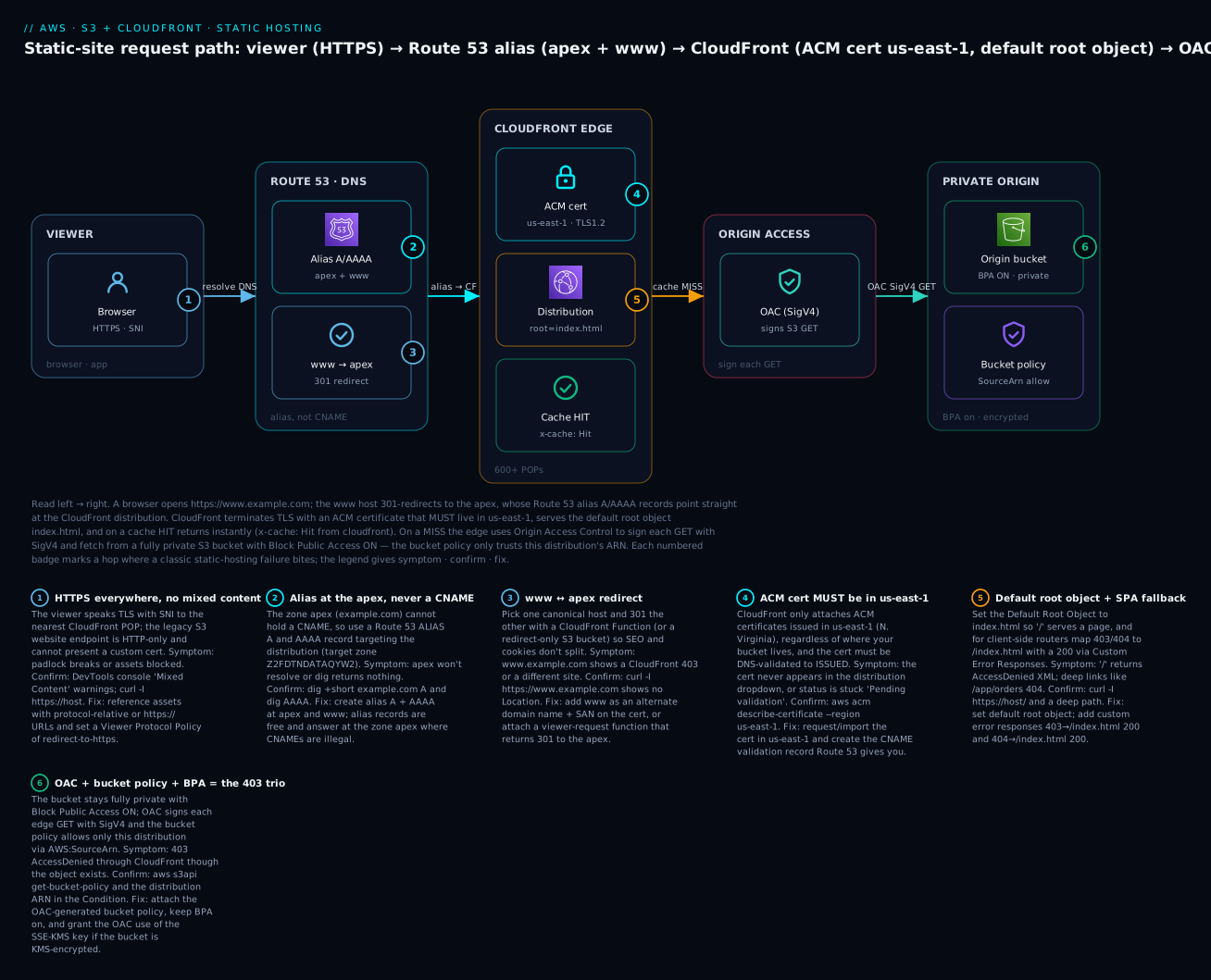
The diagram traces one HTTPS request end to end. A browser opens https://www.example.com; a CloudFront Function 301-redirects www to the apex, and the Route 53 alias A/AAAA records at the apex resolve straight to the CloudFront distribution (alias, because the apex cannot hold a CNAME). CloudFront terminates TLS with an ACM certificate that must live in us-east-1, serves the default root object index.html, and on a cache HIT returns instantly with x-cache: Hit from cloudfront. On a miss the edge uses Origin Access Control to sign the request with SigV4 and fetch from a fully private S3 bucket with Block Public Access ON, whose bucket policy trusts only this distribution’s ARN. The six numbered badges mark exactly where the classic failures bite — HTTPS/mixed-content, apex alias, www redirect, the us-east-1 cert rule, default-root-object/SPA fallback, and the OAC + bucket-policy + BPA 403 trio.
Real-world scenario
Nimbus Learning, a fictional ed-tech startup in Bengaluru, ships a React learning portal at nimbuslearn.io. Their first version used the S3 website endpoint: a public bucket, the s3-website-ap-south-1 URL behind a CNAME, and a “we’ll add HTTPS later” note in the backlog. It bit them three ways in the first month. First, a partner refused to embed their widget because the page was HTTP-only and browsers blocked the mixed-content iframe. Second, a security audit for an enterprise deal flagged the public bucket and the "Principal": "*" policy as a critical finding, stalling the contract. Third, every marketing tweak took hours to appear because they’d set aggressive CDN-less caching and had no invalidation path.
The rebuild took an afternoon and followed exactly this article. They created a new private origin bucket in ap-south-1 with all four Block Public Access settings on and versioning enabled, then requested an ACM certificate — and hit the classic wall: they requested it in ap-south-1, and it never showed in the CloudFront dropdown. Re-requesting in us-east-1 with DNS validation, and letting Route 53 auto-create the CNAME, moved the cert to ISSUED in about four minutes. They stood up a CloudFront distribution with OAC (signing always), the auto-generated bucket policy, index.html as the default root object, and the managed SecurityHeadersPolicy for HSTS and nosniff.
The SPA deep-link problem surfaced during QA: sharing a link to /course/algebra-1 returned AccessDenied. Adding two custom error responses (403→/index.html 200 and 404→/index.html 200, error-caching TTL 0) fixed every deep link. For SEO they chose the apex as canonical and added a CloudFront Function to 301 www.nimbuslearn.io to nimbuslearn.io, plus alias A and AAAA records at both names. Their deploy became a three-line CI step: aws s3 sync --delete for hashed assets with immutable, a second sync for index.html with no-cache, and a one-path invalidation of /index.html. Result: HTTPS on their domain with an A on SSL Labs, a private bucket that passed the enterprise audit, sub-100 ms edge latency across India and the Gulf via PriceClass_200, and deploys visible in seconds. Monthly bill for the delivery layer: under ₹200, most of it the Route 53 hosted zone.
Advantages and disadvantages
| Advantages | Disadvantages / costs |
|---|---|
| Bucket stays fully private (BPA on) — small attack surface | More moving parts than “flip on website hosting” |
| Free ACM certificate, HTTPS on your own domain | ACM cert must be in us-east-1 (a footgun) |
| Global edge cache, HTTP/2 + HTTP/3, auto Brotli/gzip | Subfolder index + redirects need a CloudFront Function |
| Cheap — pennies to a few rupees a month for most sites | Cache invalidation adds a step (or use versioned files) |
| SPA fallback via custom error responses | Deep-link 404 until you configure it — non-obvious |
| Security headers injected at the edge (HSTS/CSP) | Distribution config changes take a minute to deploy |
| Scales to spikes automatically; no servers | More concepts to learn than a single public bucket |
| Reproducible in Terraform end to end | First setup is ~8 resources, not one |
When does the simpler public-bucket route ever win? Only for a throwaway internal page nobody will audit and that never needs a custom-domain cert. For anything real — a product site, docs, a SPA, anything a customer or auditor sees — the private stack’s advantages dominate, and the disadvantages are one-time setup costs you pay in an afternoon.
Hands-on lab
Build the whole private-S3 + OAC + CloudFront + ACM + Route 53 site, deploy content, verify HTTPS + the SPA fallback + a cache invalidation, then tear it down. This assumes your domain is in a Route 53 public hosted zone. Replace example.com and account IDs with your own. ⚠️ CloudFront, Route 53 (hosted zone), and data transfer cost real money — small, but non-zero; the teardown removes everything.
Step 0 — Variables
export DOMAIN="example.com"
export WWW="www.example.com"
export BUCKET="my-site-origin-$(date +%s)"     # globally unique
export REGION="ap-south-1"                       # bucket Region
export HOSTED_ZONE_ID="Z0123456789ABCDEFGHIJ"    # your Route 53 zone
aws sts get-caller-identity                       # confirm the right account
Expected: your account ID, user/role ARN. If this errors, fix your CLI profile first (CLI profiles & SSO if you have SSO).
Step 1 — Create the private origin bucket
aws s3api create-bucket --bucket "$BUCKET" --region "$REGION" \
  --create-bucket-configuration LocationConstraint="$REGION"

# Block Public Access — all four ON
aws s3api put-public-access-block --bucket "$BUCKET" \
  --public-access-block-configuration \
  BlockPublicAcls=true,IgnorePublicAcls=true,BlockPublicPolicy=true,RestrictPublicBuckets=true

# Disable ACLs (bucket owner enforced) + default encryption + versioning
aws s3api put-bucket-ownership-controls --bucket "$BUCKET" \
  --ownership-controls 'Rules=[{ObjectOwnership=BucketOwnerEnforced}]'
aws s3api put-bucket-encryption --bucket "$BUCKET" \
  --server-side-encryption-configuration \
  '{"Rules":[{"ApplyServerSideEncryptionByDefault":{"SSEAlgorithm":"AES256"}}]}'
aws s3api put-bucket-versioning --bucket "$BUCKET" \
  --versioning-configuration Status=Enabled
Expected: no errors. aws s3api get-public-access-block --bucket "$BUCKET" should echo all four true.
Step 2 — Upload site content
printf '<!doctype html><title>Nimbus</title><h1>Home — it works over HTTPS</h1>' > index.html
printf '<!doctype html><title>404</title><h1>Custom 404</h1>' > error.html
aws s3 cp index.html "s3://$BUCKET/index.html" --content-type "text/html; charset=utf-8"
aws s3 cp error.html "s3://$BUCKET/error.html" --content-type "text/html; charset=utf-8"
Step 3 — Request the ACM certificate in us-east-1
CERT_ARN=$(aws acm request-certificate --region us-east-1 \
  --domain-name "$DOMAIN" \
  --subject-alternative-names "$WWW" \
  --validation-method DNS \
  --query CertificateArn --output text)
echo "$CERT_ARN"

# Read the DNS validation record ACM wants
aws acm describe-certificate --region us-east-1 --certificate-arn "$CERT_ARN" \
  --query "Certificate.DomainValidationOptions[0].ResourceRecord"
Expected: a {Name, Type: CNAME, Value} object. Create it in Route 53:
cat > /tmp/val.json <<'EOF'
{"Changes":[{"Action":"UPSERT","ResourceRecordSet":{
  "Name":"<Name from above>","Type":"CNAME","TTL":300,
  "ResourceRecords":[{"Value":"<Value from above>"}]}}]}
EOF
aws route53 change-resource-record-sets --hosted-zone-id "$HOSTED_ZONE_ID" \
  --change-batch file:///tmp/val.json

# Wait until ISSUED (polls; usually a few minutes)
aws acm wait certificate-validated --region us-east-1 --certificate-arn "$CERT_ARN"
echo "Certificate ISSUED"
⚠️ If you request in any Region other than us-east-1, the cert cannot attach to CloudFront. If wait hangs, the CNAME is wrong or missing — recheck the record name/value exactly.
Step 4 — Create the Origin Access Control
OAC_ID=$(aws cloudfront create-origin-access-control \
  --origin-access-control-config \
  Name="oac-$BUCKET",SigningProtocol=sigv4,SigningBehavior=always,OriginAccessControlOriginType=s3 \
  --query "OriginAccessControl.Id" --output text)
echo "$OAC_ID"
Step 5 — Create the distribution
Build the config JSON (origin = the S3 REST domain, OAC attached, index.html root, SPA error responses, both aliases, the ACM cert):
ACCOUNT_ID=$(aws sts get-caller-identity --query Account --output text)
cat > /tmp/dist.json <<EOF
{
  "CallerReference": "$BUCKET-$(date +%s)",
  "Aliases": { "Quantity": 2, "Items": ["$DOMAIN", "$WWW"] },
  "DefaultRootObject": "index.html",
  "Origins": { "Quantity": 1, "Items": [{
    "Id": "s3origin",
    "DomainName": "$BUCKET.s3.$REGION.amazonaws.com",
    "OriginAccessControlId": "$OAC_ID",
    "S3OriginConfig": { "OriginAccessIdentity": "" }
  }]},
  "DefaultCacheBehavior": {
    "TargetOriginId": "s3origin",
    "ViewerProtocolPolicy": "redirect-to-https",
    "Compress": true,
    "AllowedMethods": { "Quantity": 2, "Items": ["GET","HEAD"] },
    "CachePolicyId": "658327ea-f89d-4fab-a63d-7e88639e58f6"
  },
  "CustomErrorResponses": { "Quantity": 2, "Items": [
    { "ErrorCode": 403, "ResponsePagePath": "/index.html", "ResponseCode": "200", "ErrorCachingMinTTL": 0 },
    { "ErrorCode": 404, "ResponsePagePath": "/index.html", "ResponseCode": "200", "ErrorCachingMinTTL": 0 }
  ]},
  "ViewerCertificate": {
    "ACMCertificateArn": "$CERT_ARN",
    "SSLSupportMethod": "sni-only",
    "MinimumProtocolVersion": "TLSv1.2_2021"
  },
  "PriceClass": "PriceClass_200",
  "Comment": "static site $DOMAIN",
  "Enabled": true
}
EOF

DIST=$(aws cloudfront create-distribution --distribution-config file:///tmp/dist.json)
DIST_ID=$(echo "$DIST" | python3 -c 'import sys,json;print(json.load(sys.stdin)["Distribution"]["Id"])')
DIST_DOMAIN=$(echo "$DIST" | python3 -c 'import sys,json;print(json.load(sys.stdin)["Distribution"]["DomainName"])')
echo "Distribution $DIST_ID at $DIST_DOMAIN"
Expected: a distribution ID (E...) and a d1234abcd.cloudfront.net domain. Status is InProgress for a few minutes.
Step 6 — Attach the OAC bucket policy
cat > /tmp/bucket-policy.json <<EOF
{ "Version":"2012-10-17","Statement":[{
  "Sid":"AllowCloudFrontOAC","Effect":"Allow",
  "Principal":{"Service":"cloudfront.amazonaws.com"},
  "Action":"s3:GetObject","Resource":"arn:aws:s3:::$BUCKET/*",
  "Condition":{"StringEquals":{"AWS:SourceArn":"arn:aws:cloudfront::$ACCOUNT_ID:distribution/$DIST_ID"}}
}]}
EOF
aws s3api put-bucket-policy --bucket "$BUCKET" --policy file:///tmp/bucket-policy.json
Expected: no error. The bucket is still private — this policy is not “public” because of the SourceArn condition, so BlockPublicPolicy allows it.
Step 7 — Point Route 53 at the distribution (alias A + AAAA, apex + www)
cat > /tmp/dns.json <<EOF
{"Changes":[
 {"Action":"UPSERT","ResourceRecordSet":{"Name":"$DOMAIN","Type":"A",
   "AliasTarget":{"HostedZoneId":"Z2FDTNDATAQYW2","DNSName":"$DIST_DOMAIN","EvaluateTargetHealth":false}}},
 {"Action":"UPSERT","ResourceRecordSet":{"Name":"$DOMAIN","Type":"AAAA",
   "AliasTarget":{"HostedZoneId":"Z2FDTNDATAQYW2","DNSName":"$DIST_DOMAIN","EvaluateTargetHealth":false}}},
 {"Action":"UPSERT","ResourceRecordSet":{"Name":"$WWW","Type":"A",
   "AliasTarget":{"HostedZoneId":"Z2FDTNDATAQYW2","DNSName":"$DIST_DOMAIN","EvaluateTargetHealth":false}}},
 {"Action":"UPSERT","ResourceRecordSet":{"Name":"$WWW","Type":"AAAA",
   "AliasTarget":{"HostedZoneId":"Z2FDTNDATAQYW2","DNSName":"$DIST_DOMAIN","EvaluateTargetHealth":false}}}
]}
EOF
aws route53 change-resource-record-sets --hosted-zone-id "$HOSTED_ZONE_ID" \
  --change-batch file:///tmp/dns.json
Z2FDTNDATAQYW2 is the fixed CloudFront alias hosted-zone ID — the same for every distribution.
Step 8 — Verify
# Wait for the distribution to finish deploying
aws cloudfront wait distribution-deployed --id "$DIST_ID"

# HTTPS on your domain
curl -I "https://$DOMAIN/"           # expect: HTTP/2 200, x-cache: Hit/Miss from cloudfront
# SPA fallback: a path that has no object should still return 200 + your index
curl -s -o /dev/null -w "%{http_code}\n" "https://$DOMAIN/orders/42"   # expect: 200
# HTTP redirects to HTTPS
curl -sI "http://$DOMAIN/" | grep -i location   # expect: Location: https://...
Expected: 200 on the root and on the non-existent deep path (proving the SPA fallback), and an HTTP→HTTPS redirect. dig +short $DOMAIN A returns CloudFront IPs.
Step 9 — Deploy an update and invalidate
printf '<!doctype html><title>Nimbus</title><h1>v2 — deployed + invalidated</h1>' > index.html
aws s3 cp index.html "s3://$BUCKET/index.html" \
  --content-type "text/html; charset=utf-8" --cache-control "public, max-age=0, must-revalidate"
aws cloudfront create-invalidation --distribution-id "$DIST_ID" --paths "/index.html" "/"
curl -s "https://$DOMAIN/" | grep v2     # expect: the v2 line
Expected: after the invalidation completes (seconds), the page shows v2. Without the invalidation you’d keep seeing the cached v1 until its TTL expired.
Step 10 — Teardown
aws cloudfront get-distribution-config --id "$DIST_ID" > /tmp/cfg.json
ETAG=$(python3 -c 'import json;print(json.load(open("/tmp/cfg.json"))["ETag"])')
# Disable, then delete (a distribution must be disabled before deletion)
python3 - <<PY
import json
c=json.load(open("/tmp/cfg.json"))["DistributionConfig"]; c["Enabled"]=False
json.dump(c, open("/tmp/dis.json","w"))
PY
aws cloudfront update-distribution --id "$DIST_ID" --distribution-config file:///tmp/dis.json --if-match "$ETAG"
aws cloudfront wait distribution-deployed --id "$DIST_ID"
NEWTAG=$(aws cloudfront get-distribution-config --id "$DIST_ID" --query ETag --output text)
aws cloudfront delete-distribution --id "$DIST_ID" --if-match "$NEWTAG"

aws cloudfront delete-origin-access-control --id "$OAC_ID" \
  --if-match "$(aws cloudfront get-origin-access-control --id "$OAC_ID" --query ETag --output text)"
aws acm delete-certificate --region us-east-1 --certificate-arn "$CERT_ARN"
aws s3 rm "s3://$BUCKET" --recursive
aws s3api delete-bucket --bucket "$BUCKET" --region "$REGION"
# Remove the Route 53 alias + validation records with change-resource-record-sets (Action DELETE)
Disabling a distribution and waiting for it to deploy is the slow part (up to ~15 minutes). The Route 53 records must be deleted with a DELETE change batch mirroring what you created.
The same stack in Terraform
terraform {
  required_providers { aws = { source = "hashicorp/aws", version = "~> 5.0" } }
}
provider "aws" { region = "ap-south-1" }           # bucket Region
provider "aws" { alias  = "us_east_1", region = "us-east-1" }   # for ACM (CloudFront)

variable "domain" { default = "example.com" }
locals { www = "www.${var.domain}" }

# ---------- Private origin bucket ----------
resource "aws_s3_bucket" "site" { bucket = "my-site-origin-tf-demo" }

resource "aws_s3_bucket_public_access_block" "site" {
  bucket                  = aws_s3_bucket.site.id
  block_public_acls       = true
  ignore_public_acls      = true
  block_public_policy     = true
  restrict_public_buckets = true
}
resource "aws_s3_bucket_ownership_controls" "site" {
  bucket = aws_s3_bucket.site.id
  rule { object_ownership = "BucketOwnerEnforced" }
}
resource "aws_s3_bucket_server_side_encryption_configuration" "site" {
  bucket = aws_s3_bucket.site.id
  rule { apply_server_side_encryption_by_default { sse_algorithm = "AES256" } }
}

# ---------- ACM cert in us-east-1 (DNS validated) ----------
data "aws_route53_zone" "z" { name = var.domain }

resource "aws_acm_certificate" "cert" {
  provider                  = aws.us_east_1
  domain_name               = var.domain
  subject_alternative_names = [local.www]
  validation_method         = "DNS"
  lifecycle { create_before_destroy = true }
}
resource "aws_route53_record" "cert_validation" {
  for_each = { for o in aws_acm_certificate.cert.domain_validation_options : o.domain_name => o }
  zone_id  = data.aws_route53_zone.z.zone_id
  name     = each.value.resource_record_name
  type     = each.value.resource_record_type
  records  = [each.value.resource_record_value]
  ttl      = 300
}
resource "aws_acm_certificate_validation" "cert" {
  provider                = aws.us_east_1
  certificate_arn         = aws_acm_certificate.cert.arn
  validation_record_fqdns = [for r in aws_route53_record.cert_validation : r.fqdn]
}

# ---------- OAC + CloudFront ----------
resource "aws_cloudfront_origin_access_control" "oac" {
  name                              = "oac-site"
  origin_access_control_origin_type = "s3"
  signing_behavior                  = "always"
  signing_protocol                  = "sigv4"
}
data "aws_cloudfront_cache_policy" "optimized" { name = "Managed-CachingOptimized" }
data "aws_cloudfront_response_headers_policy" "sec" { name = "Managed-SecurityHeadersPolicy" }

resource "aws_cloudfront_distribution" "cdn" {
  enabled             = true
  is_ipv6_enabled     = true
  default_root_object = "index.html"
  aliases             = [var.domain, local.www]
  price_class         = "PriceClass_200"

  origin {
    domain_name              = aws_s3_bucket.site.bucket_regional_domain_name
    origin_id                = "s3origin"
    origin_access_control_id = aws_cloudfront_origin_access_control.oac.id
  }
  default_cache_behavior {
    target_origin_id           = "s3origin"
    viewer_protocol_policy     = "redirect-to-https"
    allowed_methods            = ["GET", "HEAD"]
    cached_methods             = ["GET", "HEAD"]
    compress                   = true
    cache_policy_id            = data.aws_cloudfront_cache_policy.optimized.id
    response_headers_policy_id = data.aws_cloudfront_response_headers_policy.sec.id
  }
  custom_error_response {
    error_code = 403, response_code = 200, response_page_path = "/index.html", error_caching_min_ttl = 0
  }
  custom_error_response {
    error_code = 404, response_code = 200, response_page_path = "/index.html", error_caching_min_ttl = 0
  }
  restrictions { geo_restriction { restriction_type = "none" } }
  viewer_certificate {
    acm_certificate_arn      = aws_acm_certificate_validation.cert.certificate_arn
    ssl_support_method       = "sni-only"
    minimum_protocol_version = "TLSv1.2_2021"
  }
}

# ---------- OAC bucket policy ----------
data "aws_iam_policy_document" "oac" {
  statement {
    actions   = ["s3:GetObject"]
    resources = ["${aws_s3_bucket.site.arn}/*"]
    principals { type = "Service", identifiers = ["cloudfront.amazonaws.com"] }
    condition {
      test     = "StringEquals"
      variable = "AWS:SourceArn"
      values   = [aws_cloudfront_distribution.cdn.arn]
    }
  }
}
resource "aws_s3_bucket_policy" "oac" {
  bucket = aws_s3_bucket.site.id
  policy = data.aws_iam_policy_document.oac.json
}

# ---------- Route 53 alias A + AAAA at apex and www ----------
resource "aws_route53_record" "a" {
  for_each = toset([var.domain, local.www])
  zone_id  = data.aws_route53_zone.z.zone_id
  name     = each.value
  type     = "A"
  alias {
    name                   = aws_cloudfront_distribution.cdn.domain_name
    zone_id                = "Z2FDTNDATAQYW2"           # CloudFront's fixed alias zone
    evaluate_target_health = false
  }
}
resource "aws_route53_record" "aaaa" {
  for_each = toset([var.domain, local.www])
  zone_id  = data.aws_route53_zone.z.zone_id
  name     = each.value
  type     = "AAAA"
  alias {
    name                   = aws_cloudfront_distribution.cdn.domain_name
    zone_id                = "Z2FDTNDATAQYW2"
    evaluate_target_health = false
  }
}
terraform apply builds the identical stack. Note bucket_regional_domain_name (the REST endpoint) — not the website endpoint — and the us_east_1 provider alias for ACM.
Common mistakes & troubleshooting
This is the section you’ll return to. The playbook first, then a status-code reference, then the three nastiest in prose.
| # | Symptom | Root cause | Confirm (exact command / console path) | Fix |
|---|---|---|---|---|
| 1 | 403 AccessDenied through CloudFront, object exists | OAC bucket policy missing/wrong SourceArn, or OAC not attached to the origin |
aws s3api get-bucket-policy --bucket B; check the distribution ARN in the Condition; CloudFront → origin → Origin access |
Attach the OAC-generated policy with the exact distribution ARN; set origin access = OAC (signing always) |
| 2 | 403 on / (root), deep pages work |
Default root object not set | curl -I https://host/ returns 403/AccessDenied |
Set Default Root Object = index.html on the distribution |
| 3 | Certificate never appears in the CloudFront dropdown | Cert requested in the wrong Region | aws acm list-certificates --region us-east-1 (is it there?) |
Request/import the cert in us-east-1; re-select it |
| 4 | Cert stuck PENDING_VALIDATION |
DNS validation CNAME missing/incorrect | aws acm describe-certificate → DomainValidationOptions; dig CNAME <name> |
Create the exact CNAME ACM specifies in the hosted zone |
| 5 | SPA deep link 404s (e.g. /orders/42) |
No custom error responses mapping to the app shell | curl -I https://host/orders/42 → 403/404 |
Add 403→/index.html 200 and 404→/index.html 200, error TTL 0 |
| 6 | www doesn’t resolve or shows CloudFront 403 |
Missing alias/redirect for www, or www not on the cert/aliases |
dig +short www.host A; check distribution Alternate domain names |
Add www alias A+AAAA and as a cert SAN + distribution alias, or 301 it to apex |
| 7 | Deploy not visible (stale content) | Edge still serving cached copy; no invalidation | curl -I shows x-cache: Hit, age: high |
aws cloudfront create-invalidation --paths "/index.html", or use versioned filenames |
| 8 | Apex example.com won’t resolve |
Used a CNAME at the apex (illegal) or no alias | dig example.com A returns nothing |
Replace with a Route 53 alias A (+AAAA) to the distribution |
| 9 | Browser shows AccessDenied XML as the page |
Requesting a “directory” key with no object (subfolder index not resolved) | Open https://host/blog/ → S3 XML error |
Add a CloudFront Function to append index.html, or serve the file directly |
| 10 | Cert domain mismatch / SSL_ERROR |
Distribution alias not on the cert (SAN), or wildcard doesn’t cover apex | Browser cert error; CloudFront alias vs cert SANs | Reissue cert covering every alias (apex explicitly, not just *) |
| 11 | Mixed-content warnings, some assets blocked | Page references http:// assets |
DevTools console “Mixed Content” | Use https:///protocol-relative URLs; set viewer policy redirect-to-https |
| 12 | HTTP works but HTTPS fails (or vice-versa) | Viewer protocol policy or TLS min version misconfigured | curl -I http:// vs https:// |
Set redirect-to-https; min TLS TLSv1.2_2021 |
| 13 | 403 only for SSE-KMS objects | OAC not granted kms:Decrypt on the CMK |
KMS key policy lacks the CloudFront service principal | Add kms:Decrypt for cloudfront.amazonaws.com with the SourceArn condition |
| 14 | New distribution changes not taking effect | Distribution still InProgress |
aws cloudfront get-distribution --id ID --query 'Distribution.Status' |
Wait for Deployed; changes propagate in a few minutes |
| 15 | CORS errors on fonts/JSON | Missing Access-Control-Allow-Origin at the edge/origin |
DevTools network → response headers | Add a response headers policy with CORS, allow OPTIONS |
Status / error-code reference
| Code | Where | Meaning | Likely cause | Fix |
|---|---|---|---|---|
| 403 AccessDenied (S3 XML) | CloudFront → S3 | S3 refused the signed GET | Bucket policy/SourceArn wrong, or key missing + no ListBucket |
Fix OAC policy; set default root object; SPA error responses |
| 403 (CloudFront) | Edge | CloudFront refused | Alias not on cert, WAF block, or geo restriction | Match cert SANs; check WAF/geo |
| 404 NoSuchKey | S3 | Object doesn’t exist | Wrong path or not deployed | Deploy the file; add SPA fallback |
| 404 (CloudFront) | Edge | No matching behavior/object | Path/behavior mismatch | Fix path pattern; SPA fallback |
200 from /index.html |
Edge | SPA fallback served the shell | Custom error response mapped 403/404→index | Working as intended |
| 301/302 | Edge | Redirect | Viewer protocol redirect or www→apex function |
Expected |
| 502 / 504 | Edge → origin | Bad gateway / timeout | Origin unreachable/slow (rare for S3) | Check origin domain; for custom origins, timeouts |
x-cache: Hit from cloudfront |
Edge | Served from cache | — | Normal; invalidate to bust |
x-cache: Miss from cloudfront |
Edge | Fetched from origin | Cold/expired object | Normal on first hit |
| SSL/cert error | Browser | TLS handshake failed | Cert not in us-east-1 / alias mismatch | Reissue in us-east-1; align SANs |
The three nastiest, in prose
1) The 403 that looks like a permissions bug but is a routing bug. You attach OAC, add the bucket policy, and https://host/ still returns AccessDenied. Nine times out of ten the bucket policy is fine — you simply never set the default root object, so CloudFront asks S3 for the key "" (empty) and S3 says AccessDenied. The tell: deep paths like /index.html work, but / doesn’t. Set the default root object and it clears instantly. The other 403 flavor is a genuinely missing SourceArn or the wrong distribution ARN in the Condition — confirm with get-bucket-policy and compare the ARN character for character.
2) The certificate that “won’t attach.” You did everything right but the cert isn’t in the dropdown and create-distribution throws InvalidViewerCertificate. It is almost always the Region: ACM certs for CloudFront must be in us-east-1, full stop, no matter where your bucket or your users are. People request the cert in their bucket’s Region out of habit. The second cause is a cert still PENDING_VALIDATION because the DNS CNAME is missing or has a trailing-dot/name mismatch — CloudFront only attaches an ISSUED cert. Fix the Region and the validation record and it appears.
3) The deep-link 404 that only QA finds. The homepage works, clicking around works (the router handles it in the browser), so it ships. Then a customer shares https://host/pricing/enterprise, hits refresh, and gets AccessDenied — because that key isn’t in the bucket. The fix is the two custom error responses mapping 403 and 404 to /index.html with HTTP 200. Map both codes (S3 returns 403 without ListBucket, 404 with it), and set error caching min TTL to 0 so a transient miss isn’t pinned at the edge. Return 200, not 404, or crawlers and fetch() treat your app shell as an error page.
Best practices
- Keep the bucket private with all four BPA settings on. OAC + a
SourceArn-scoped bucket policy needs nothing public. If a step tells you to disable BPA, you’re on the legacy path — stop. - Request the ACM cert in us-east-1 and use DNS validation. DNS-validated certs auto-renew; email validation doesn’t. Cover the apex and
www(and don’t assume a wildcard covers the apex). - Set the default root object to
index.htmland add SPA custom error responses (403/404 →/index.html, 200, TTL 0) for any client-side-routed app. - Fingerprint your assets and long-cache them (
immutable, max-age=31536000); serveindex.htmlwithno-cache. This makes most deploys need zero invalidation. - Invalidate narrowly. Prefer versioned filenames; when you must invalidate, target
/index.htmlnot/*. Stay under 1,000 paths/month to stay free. - Attach a response headers policy for HSTS,
X-Content-Type-Options: nosniff, a real CSP, andReferrer-Policy— security headers for free at the edge. - Redirect HTTP→HTTPS (viewer protocol policy) and set the minimum TLS to
TLSv1.2_2021. - Choose a canonical host and 301 the other (
www→apexor apex→www) with a CloudFront Function; add alias A and AAAA for both names. - Right-size the price class to your audience;
PriceClass_100for NA/EU-only,PriceClass_200for broad,Allonly if you truly serve everywhere. - Enable versioning on the origin bucket so a bad deploy is one
syncaway from rollback, and enable access logging to a separate log bucket. - Codify it in Terraform. The stack is ~8 resources; drift and “who changed the cert?” disappear when it’s in IaC.
- Use OAC, never OAI, for new work, and grant the OAC
kms:Decryptif the bucket is SSE-KMS.
Security notes
- Least privilege for the deploy identity. The CI role needs only
s3:ListBucket,s3:GetObject,s3:PutObject,s3:DeleteObjecton the one bucket andcloudfront:CreateInvalidationon the one distribution — nothing else. Prefer an OIDC-federated role (GitHub Actions → IAM) over long-lived keys. - The bucket policy trusts an ARN, not the world.
Principal: cloudfront.amazonaws.com+aws:SourceArn = <distribution ARN>means only this distribution reads the bucket. Never widen it to"*". - Encrypt at rest. SSE-S3 is free and default-on; use SSE-KMS for compliance, remembering to grant the OAC
kms:Decrypt. - Force TLS in transit.
redirect-to-https,TLSv1.2_2021minimum, and HSTS withincludeSubDomains; preloadonce you’re confident every subdomain is HTTPS. - Set a real CSP. The managed SecurityHeadersPolicy scaffolds one; tighten
script-src/style-srcto your actual sources to blunt XSS. - Add WAF for rate limiting if the site is a target — a
CLOUDFRONT-scope web ACL with AWS managed rule groups and a rate rule evaluates at the edge before the origin. - Don’t leak object existence. Keeping
s3:ListBucketoff the OAC principal means S3 returns 403 (not 404) for missing keys — the SPA fallback handles both, and enumeration is blocked. - Separate the log bucket. Send CloudFront/S3 access logs to a different, equally private bucket so a logging misconfig can’t expose the site bucket.
Cost & sizing
For most sites this stack costs pennies to a few hundred rupees a month. The drivers:
| Cost driver | How it’s billed | Rough figure | Notes |
|---|---|---|---|
| CloudFront data transfer out | Per GB, by Region tier | ~$0.085/GB (US/EU) to ~$0.17/GB (India) | The main variable cost |
| CloudFront requests | Per 10,000 HTTPS requests | ~$0.01 per 10k | Tiny for static sites |
| S3 storage | Per GB-month | ~$0.023/GB (Standard) | A site is usually MBs |
| S3 GET requests (origin) | Per 1,000 | ~$0.0004/1k | Only cache misses hit S3 |
| Route 53 hosted zone | Per zone-month | $0.50/zone | Often the biggest line item |
| Route 53 queries | Per million | Free for alias→CloudFront | Alias to AWS targets isn’t charged |
| ACM public certificate | — | Free | Public certs cost nothing |
| Invalidations | Per path over 1,000/mo | $0.005/path | Free if you use versioned files |
| CloudFront Functions | Per million invocations | ~$0.10/million | 2M/month free |
Free-tier and always-free allowances:
| Allowance | Amount | Window |
|---|---|---|
| CloudFront data transfer out | 1 TB/month | Always free |
| CloudFront requests | 10,000,000/month | Always free |
| CloudFront Functions invocations | 2,000,000/month | Always free |
| S3 storage | 5 GB | First 12 months |
| S3 GET requests | 20,000/month | First 12 months |
A small marketing site or SPA — a few hundred MB of transfer and well under a million requests — typically lands inside the always-free CloudFront tier, so the real bill is the $0.50 Route 53 hosted zone plus a few cents of S3. Even a busy site serving 500 GB/month is a few dollars. Compare that to an EC2/ALB stack ($15–30+/month minimum) and the static pattern’s cost advantage is obvious.
Interview & exam questions
Q1. Why must the ACM certificate for a CloudFront distribution be in us-east-1? CloudFront is a global service whose control plane is anchored in us-east-1, so it only attaches certificates issued or imported there — regardless of the origin’s Region. Regional services (ALB, regional API Gateway) use a cert in their own Region. (SAA-C03, SOA-C02)
Q2. How does CloudFront read a private S3 bucket without making it public? Origin Access Control signs each origin request with SigV4, and the bucket policy allows the cloudfront.amazonaws.com service principal scoped to the distribution’s ARN via aws:SourceArn. Block Public Access stays fully on. (DVA-C02, SAA-C03)
Q3. A React app 404s on a hard refresh of /dashboard. What do you configure? Two CloudFront custom error responses mapping 403 and 404 to /index.html with response code 200 (error-caching TTL 0), so the app shell loads and the client-side router takes over. (DVA-C02)
Q4. Why can’t you use a CNAME at example.com, and what do you use instead? The DNS spec forbids a CNAME coexisting with the apex’s SOA/NS records. Use a Route 53 alias A (and AAAA) record, an AWS extension that’s legal at the apex and free to query against AWS targets. (SOA-C02, SAA-C03)
Q5. You deployed new HTML but users see the old page. Why, and two fixes? The edge is serving a cached copy. Either create an invalidation (create-invalidation --paths "/index.html") or, better, use content-hashed filenames with long TTLs and serve index.html as no-cache. (DVA-C02)
Q6. OAC vs OAI — which and why? OAC is current: SigV4 on all requests, SSE-KMS support, works in all Regions. OAI is deprecated. Use OAC for new builds. (DVA-C02, SAA-C03)
Q7. What’s the difference between the S3 website endpoint and the REST endpoint as a CloudFront origin? The website endpoint is HTTP-only, requires public objects, and does native index/redirect resolution; the REST endpoint supports HTTPS + SigV4 (so it stays private with OAC) but doesn’t resolve subfolder index documents — you add a CloudFront Function. (SAA-C03)
Q8. How do you serve both example.com and www.example.com over HTTPS? Put both on the ACM cert (SANs), list both as distribution alternate domain names, and create alias A+AAAA for both; typically 301 one to the other with a CloudFront Function for a single canonical host. (SOA-C02)
Q9. Where do you add HSTS and CSP for a static site, and why there? In a CloudFront response headers policy, so headers are injected at the edge without touching S3 objects or an origin server — consistent across every file. (SCS-C02, DVA-C02)
Q10. A user sees raw AccessDenied XML instead of your page. Two common causes? Either the default root object isn’t set (request for /), or a subfolder path like /blog/ has no object and the REST origin doesn’t resolve directory indexes. Fix with a default root object and a CloudFront Function to append index.html. (SAA-C03)
Q11. How do you keep costs near zero for a small site? Stay within CloudFront’s always-free tier (1 TB out, 10M requests), use versioned filenames to avoid invalidation charges, SSE-S3 (free), a free ACM cert, and accept the ~$0.50/month Route 53 hosted zone. (CLF-C02)
Q12. Why set the SPA fallback response code to 200 rather than 404? So browsers, fetch(), and search-engine crawlers treat the returned app shell as a valid page, not an error — otherwise deep links look broken to bots and SPAs mis-handle the response. (DVA-C02)
Quick check
- In which Region must an ACM certificate live to attach to a CloudFront distribution?
- Which four Block Public Access settings stay ON in the modern private-origin pattern?
- What two custom error responses make a single-page app’s deep links work?
- Why must the apex record be a Route 53 alias and not a CNAME?
- Name one way to avoid paying for cache invalidations on every deploy.
Answers
- us-east-1 (N. Virginia) — always, regardless of the bucket’s Region.
- All four:
BlockPublicAcls,IgnorePublicAcls,BlockPublicPolicy,RestrictPublicBuckets— the OAC policy is not “public,” so it isn’t rejected. - 403 →
/index.html(200) and 404 →/index.html(200), with error-caching min TTL 0. - The DNS spec forbids a CNAME at the zone apex (it can’t coexist with the SOA/NS records); a Route 53 alias returns real A/AAAA answers and is legal there (and free to query against CloudFront).
- Content-hash (fingerprint) your assets and long-cache them while serving
index.htmlasno-cache— new builds get new filenames, so no invalidation is needed. (Or simply invalidate only/index.html.)
Glossary
- Static website hosting (S3): An S3 feature exposing a website endpoint with index/error-document and redirect handling. HTTP-only and requires public objects — the legacy approach.
- S3 website endpoint:
bucket.s3-website-<region>.amazonaws.com— HTTP port 80, public, resolves directory indexes natively. - S3 REST endpoint:
bucket.s3.<region>.amazonaws.com— HTTPS, SigV4; the private origin used with CloudFront + OAC. - CloudFront distribution: The CDN configuration — origins, behaviors, cert, cache, and routing served from 600+ edge locations.
- Origin Access Control (OAC): The current mechanism letting only CloudFront read a private S3 bucket by SigV4-signing each origin request. Replaces OAI.
- Origin Access Identity (OAI): The deprecated predecessor to OAC.
- Block Public Access (BPA): Four account/bucket guardrails that keep a bucket private; all stay on here.
- ACM (AWS Certificate Manager): Issues/renews free public TLS certificates; for CloudFront the cert must be in us-east-1.
- DNS validation: Proving domain control by adding a CNAME ACM specifies; enables automatic renewal.
- Default root object: The object CloudFront serves for
/(e.g.index.html). - Custom error response: A CloudFront rule mapping an origin error code to a page and response code — used for SPA fallback (403/404 →
/index.html, 200). - Alias record (Route 53): An A/AAAA record pointing at an AWS resource; legal at the zone apex where CNAMEs are not, and free for AWS targets.
- Response headers policy: A CloudFront policy that injects security/CORS headers (HSTS, CSP,
nosniff) at the edge. - Invalidation: A request to purge cached objects from CloudFront edges; first 1,000 paths/month free.
- Price class: Which set of edge locations a distribution uses (
_100,_200,_All) — a cost/latency trade-off. - CloudFront Function: Sub-millisecond edge JavaScript for URI rewrites, redirects, and header tweaks.
- SigV4: AWS Signature Version 4, the request-signing scheme OAC uses to authenticate CloudFront to S3.
Next steps
- Deepen the CDN layer with CloudFront: CDN Setup, Caching & Origins — origin groups, cache-key design, Origin Shield, signed URLs, and Lambda@Edge.
- Lock down the origin with S3 Bucket Policies & Block Public Access — the policy language, BPA precedence, and Access Analyzer.
- Solidify DNS with Route 53: Records & Routing Policies — alias vs CNAME, weighted/latency/failover routing, and health checks.
- Revisit storage foundations in S3 Buckets: Fundamentals, Hands-On — endpoints, encryption, versioning, and lifecycle.
- Extend the site into an app: add an
/api/*behavior to the same distribution fronting API Gateway or an ALB, and put a WAF web ACL on the distribution for edge rate limiting.