In a nutshell
Imagine a company that gives every employee a corporate credit card. Two numbers control each card. One is the budget your manager loads onto it — that is what you are allowed to spend. The other is a hard spending limit embossed on the card itself that no manager can override — the card physically declines anything above it. What you can actually spend is the smaller of the two. In AWS the budget is an identity policy (it grants) and the embossed limit is a permission boundary (it caps). A boundary never gives anyone a single permission; it only sets a ceiling. Your real, effective permissions are the overlap of the two — the intersection.
That one idea unlocks the whole lesson. Least privilege just means giving each person or workload the smallest budget that still lets them do their job — and then proving, not hoping, that it stays small. The hard part is not writing one tight policy; it is doing this across dozens of teams and hundreds of accounts without a central team becoming the bottleneck that rubber-stamps Action: * to clear its ticket queue.
The pattern in this article solves that in three moves. Delegate safely: let each team print its own cards, but wire the card machine so it cannot print one without the embossed limit attached — teams create their own roles, but never an unbounded one. Tag instead of copy: instead of a separate policy per team, one rule says “you may touch resources tagged with your project” (that is ABAC). Let machines audit: IAM Access Analyzer reads the receipts — your CloudTrail history — tells you which permissions a role was granted but never used so you can cut them, and proves in a pull request that a change grants nothing new.
If you remember only one sentence: a boundary caps, an identity policy grants, and your effective access is the intersection — everything else here is how to operate that safely at scale.
Level: Expert · Time: ~60 min · You’ll need first: IAM fundamentals (principals, policies, the evaluation chain), comfort reading policy JSON, and the idea of an AWS Organization with multiple accounts. This lesson builds directly on those and never re-teaches them.
Least privilege is easy to say and brutal to operate. The failure mode is always the same: a central team owns IAM, becomes a bottleneck, and ships Action: * policies to stop the ticket queue from exploding. Six months later nobody can answer “what can this role actually do?” — and an auditor, or an attacker, is about to find out for you. This guide shows the opposite pattern. You delegate IAM to product teams safely, bound what they are physically able to grant with a permission boundary they cannot escape, and let machines — not over-worked reviewers — find the over-permissioning with IAM Access Analyzer. Everything here assumes a multi-account org with AWS IAM Identity Center for human access and IAM roles for workloads, because at scale that is the only model that survives.
The reason this is hard is that IAM is not one policy type but six, evaluated together in a fixed order, and every control in this article plugs into one specific slot of that evaluation. A service control policy (SCP) caps an account; a permission boundary caps a principal; an identity policy grants; a resource policy grants across accounts; a session policy narrows a session; and an explicit Deny in any of them wins outright. Confuse “grant” with “cap” — the single most common IAM mistake among experienced engineers — and you will either lock yourself out or, far worse, believe you are bounded when you are wide open. This article makes that evaluation chain concrete, then walks the delegation pattern, ABAC, policy generation, unused-access detection, external-access proofs, and CI policy checks, each as a buildable step with the exact aws CLI, the Terraform, the condition keys, and a reference table you keep open while you work.
By the end you will stop hand-writing * and hoping. You will know how to hand a product team the keys to create their own roles while guaranteeing those roles can never exceed a ceiling or tamper with the ceiling itself; how to replace a folder of per-team policies with one ABAC policy driven by tags; how to generate a tight policy from real CloudTrail activity and right-size it against unused-permission findings; and how to prove, mechanically in a pull request, that a policy change grants no new access. The difference between a least-privilege estate and a fragile one is not effort — it is knowing which lever caps, which grants, and which one tells you the truth.
What problem this solves
Centralised IAM does not scale, and the way it fails is predictable. A platform team that owns every policy becomes the constraint on every other team’s velocity. To clear the backlog they grant broadly — s3:*, dynamodb:*, eventually * on * “just for staging” — and the broad grants never get tightened because nobody is paid to revisit them and nothing flags them. The result is an estate where the theoretical blast radius of any single compromised role is the whole account. When the incident comes, the post-mortem line is always the same: “the role had far more permission than it ever used.”
What breaks without the pattern in this article: teams wait days for an IAM change (velocity tax); the central team ships over-broad policies to cope (security debt); a leaked role key gives an attacker s3:* across every bucket because that’s what the role carried (blast radius); an auditor asks you to demonstrate least privilege and you have prose, not proof (compliance gap); and a “tighten the policy” project never finishes because doing it by hand from API docs is interminable and you can’t tell which permissions are actually unused.
Who hits this: every organisation past a handful of accounts. It bites hardest on platform/landing-zone teams trying to delegate without losing control, on security teams asked to prove least privilege rather than assert it, and on any team that has accumulated a sprawl of near-identical policies (one per project, per environment, per team) that ABAC could collapse into one. The fix is never “review harder” — it’s to bound delegation with a boundary teams cannot escape, drive resource access with tags, and let Access Analyzer’s automated reasoning do the finding.
To frame the whole field before the deep dive, here is every control this article covers, the slot it occupies in the evaluation chain, whether it grants or caps, and the one question it answers:
| Control | Scope it acts on | Grants or caps? | The question it answers | Where it plugs in |
|---|---|---|---|---|
| Service control policy (SCP) | Account / OU | Caps (filter) | “What is this whole account forbidden to do?” | Org guardrail gate |
| Resource control policy (RCP) | Resource (org-wide) | Caps (filter) | “What may any principal do to this resource type?” | Data-perimeter gate |
| Permission boundary | One principal | Caps (filter) | “What is the ceiling on this role, no matter its identity policy?” | Delegation guardrail |
| Identity policy | One principal | Grants | “What is this role allowed to attempt?” | The actual grant |
| Resource policy | One resource | Grants (cross-acct) | “Who outside this account may touch this resource?” | Cross-account gate |
| Session policy | One session | Caps (filter) | “How is this assumed session further narrowed?” | Per-session shrink |
| Access Analyzer | Org / account | Neither — feedback | “Is the grant wider than reality / proven-safe?” | The feedback loop |
Learning objectives
By the end of this article you can:
- Recite the IAM evaluation chain for both same-account and cross-account requests, and place every policy type (SCP, RCP, boundary, identity, resource, session) and the
Deny-wins rule into the correct slot. - Explain why a permission boundary grants nothing and compute effective permissions as the intersection of an identity policy and its boundary.
- Build an inescapable delegation pattern: let a team create and manage their own roles while guaranteeing every role wears a boundary they cannot detach, weaken, or sidestep via path.
- Replace per-team policy sprawl with ABAC, matching
aws:PrincipalTagagainstaws:ResourceTag, and enforce the tagging that makes it safe. - Generate a least-privilege policy from real CloudTrail activity with Access Analyzer, and right-size it using unused-permission and unused-access findings.
- Use the external-access analyzer to prove whether a resource grants access outside your zone of trust, and triage findings with archive rules.
- Wire
check-no-new-access,validate-policy,check-access-not-grantedandcheck-no-public-accessinto CI so a policy PR fails before merge. - Run a credential-exposure runbook that revokes live sessions by
aws:TokenIssueTime, not just rotates keys.
Prerequisites & where this fits
You should already understand IAM fundamentals: that a principal (user, role, federated identity) makes a request, that an identity-based policy grants permission to attempt an action, that a resource-based policy (a bucket policy, a role trust policy, a KMS key policy) grants across account boundaries, and that policies are JSON documents of Effect/Action/Resource/Condition statements. You should be comfortable with the aws CLI, reading and writing policy JSON, and the idea of an AWS Organization with multiple accounts. If any of that is shaky, read IAM Fundamentals: Users, Roles, Policies & the Evaluation Chain first — this article assumes it.
This sits in the Identity & Governance track, one layer above the fundamentals and tightly coupled to org-wide guardrails. The account-level cap you’ll reference constantly is the SCP, covered in Organizations, SCPs & Delegated Administration; its newer sibling for resource-side caps is in Resource Control Policies & the Data Perimeter. Human access enters through IAM Identity Center: Permission Sets & ABAC, which is where your session tags originate. The Access Analyzer capabilities here are explored end-to-end in Access Analyzer: Unused Access, Policy Generation & Custom Checks, and the cross-account trust mechanics in Cross-Account Roles, External ID & the Confused Deputy.
A quick map of who owns which control during a design review, so you pull the right person into the room:
| Layer | What lives here | Who usually owns it | What it can do to a request |
|---|---|---|---|
| Organization root | SCPs, RCPs, delegated-admin wiring | Cloud platform / security | Cap or deny an entire account/OU |
| Account baseline | Boundary policies, break-glass roles | Platform / landing zone | Provide the ceiling teams build under |
| Team admin role | Delegation policy, role lifecycle | Platform → delegated to team | Create roles only with the boundary |
| Workload role | Identity policy, trust policy | Product / app team | Grant the app’s actual permissions |
| Resource owner | Bucket/KMS/queue resource policy | Resource owner (often app team) | Open or close cross-account access |
| Continuous control | Access Analyzer, CI policy checks | Security + platform | Find/prove over-permissioning |
Core concepts
Five mental models make every later step obvious. Hold them the whole way through.
The status of a request is decided by a chain, and you must hold the whole chain. For a request inside a single account, AWS evaluates the policy types together in a fixed precedence. An explicit Deny anywhere ends it. Otherwise every required gate must be open: the SCP (and RCP where applicable) must allow, the identity policy must allow, and if a boundary is attached it must also allow. Cross-account adds a requirement: the resource policy must allow and the identity in the calling account must allow. The chain, in the order AWS applies it:
Request -> explicit Deny anywhere?           -> DENY (stop)
        -> SCP (org) allows the action?       -> if not, DENY
        -> RCP allows (where applicable)?     -> if not, DENY
        -> identity policy allows?            -> needed for IAM principals
        -> permission boundary allows?        -> if attached, must also allow (intersection)
        -> (cross-account) resource policy?   -> must allow too
        -> session policy narrows the result  -> intersection again
        => ALLOW only if every required gate is open and nothing denies
A permission boundary grants nothing — it is a ceiling. This is the concept experienced people get wrong. Effective permissions are the intersection of the identity policy and the boundary. If the identity policy allows s3:* and the boundary allows only s3:GetObject, the principal gets exactly s3:GetObject. If the boundary allows s3:* but the identity policy allows nothing, the principal gets nothing — a boundary with no identity policy grants zero. Boundaries and SCPs are both filters applied at different layers: an SCP caps a whole account/OU, a boundary caps one principal. Neither hands out access.
Delegation is made safe by a condition key, not by trust. The pattern that lets a team create their own roles safely hinges on the iam:PermissionsBoundary condition key: you grant iam:CreateRole only if the request attaches your exact boundary ARN. A CreateRole call without that boundary is denied, so the team literally cannot mint an unbounded role. Pair it with path scoping (role/team-app/*) so they can only touch their own namespace, and explicit denies on the boundary policy’s own lifecycle so they cannot edit the ceiling. All three are required; drop one and the pattern leaks.
Tags can replace policies — if tagging is enforced, not requested. Attribute-based access control (ABAC) grants access when a tag on the principal equals a tag on the resource (aws:ResourceTag/Project == aws:PrincipalTag/Project). One policy then serves every team, project and environment, because the data (the tags) varies, not the policy. But an ABAC policy over an untagged estate silently grants nothing — and a fat-fingered condition can grant everything. ABAC only works when an SCP forces the required tags on creation and protects governance tags from Untag.
Right-sizing is a feedback loop, not a one-time write. You do not hand-write least privilege from API docs. You start broad-but-bounded, let the role run, then generate a policy from its real CloudTrail activity and tighten against unused-permission findings. Access Analyzer’s two analyzer types do the finding: external-access uses automated reasoning to prove a resource is reachable from outside your zone of trust; unused-access flags roles, users and permissions that haven’t been exercised. The same reasoning engine powers check-no-new-access, which proves in CI that a change grants nothing beyond a reference — the only way to enforce “this PR may not broaden access” mechanically.
The vocabulary in one table
Before the deep sections, pin every moving part side by side. The glossary at the end repeats these for lookup:
| Term | One-line definition | Grants / caps / neither | Why it matters here |
|---|---|---|---|
| Identity policy | Permissions attached to a principal | Grants | The actual allow; bounded by everything else |
| Permission boundary | A ceiling on a principal’s identity policy | Caps | Effective = identity ∩ boundary |
| SCP | Account/OU-wide allow-filter | Caps | Can’t be exceeded by any principal in the account |
| RCP | Org-wide resource-side filter | Caps | Caps what any principal may do to a resource type |
| Resource policy | Policy on a resource (bucket, key) | Grants (cross-acct) | Required gate for cross-account access |
| Session policy | Inline policy passed at AssumeRole | Caps | Shrinks one session further |
iam:PermissionsBoundary |
Condition key: which boundary is attached | — | Makes delegation inescapable |
| ABAC | Tag-on-principal == tag-on-resource | Grants (conditionally) | Collapses per-team policy sprawl |
| Session tag | Tag set at AssumeRole / federation | — | Carries Project etc. onto the principal |
| Access Analyzer (external) | Proves access from outside zone of trust | Neither | Catches public/cross-account exposure |
| Access Analyzer (unused) | Flags unused roles/users/permissions | Neither | Input to tightening policies |
check-no-new-access |
Proves a policy grants nothing new vs a reference | Neither | CI gate against broadening |
| Zone of trust | The account or the whole org | — | Defines what “external” means |
Because the intersection rule trips up even senior engineers, here is the truth table that settles it — identity policy and boundary going in, effective permission coming out:
| Identity policy allows | Boundary allows | Effective permission | Why |
|---|---|---|---|
s3:* |
s3:GetObject |
s3:GetObject only |
Intersection caps the broad grant |
s3:GetObject |
s3:* |
s3:GetObject only |
Boundary is wider; identity policy is the limit |
s3:* |
(no boundary) | s3:* |
No boundary → no cap; full identity policy |
| (no identity policy) | s3:* |
nothing | Boundary grants nothing; ∩ ∅ = ∅ |
s3:GetObject |
dynamodb:* |
nothing | No overlap; intersection is empty |
s3:* + explicit Deny s3:DeleteObject |
s3:* |
s3:* except DeleteObject |
Explicit deny wins inside the intersection |
s3:* |
s3:* but SCP denies s3:* |
nothing | SCP cap sits above both; deny wins |
The IAM policy evaluation chain in depth
Everything downstream is an application of this chain, so it earns its own section. The non-obvious behaviour is in how the gates combine: required gates are ANDed (all must allow), grant gates within a layer are ORed (any allow suffices), and a single Deny short-circuits the whole thing. Here is each gate, what it does when present versus absent, and the trap that bites:
| Gate (in order) | When it ALLOWS | When it’s absent / silent | When it DENIES | The classic trap |
|---|---|---|---|---|
Explicit Deny (any policy) |
n/a | No effect | Action ends immediately, always wins | A forgotten deny in an SCP blocks a legit role org-wide |
| SCP | Action is in the allowed set | Default SCP (FullAWSAccess) allows all |
Action not allowed by any attached SCP | SCPs are allow-lists per-OU; one restrictive SCP caps everything |
| RCP | Resource access in allowed set | No RCP → no extra cap | Resource action outside RCP allow | Applies to supported services only; silent elsewhere |
| Identity policy | An attached/inline statement allows | No statement → implicit deny | Only via explicit deny | Implicit deny by absence is the default for principals |
| Permission boundary | Boundary statement allows the action | No boundary → no cap (full identity policy) | Action outside the boundary | Treating it as a grant; it only ever intersects |
| Resource policy (cross-acct) | Resource policy names the principal | Same-account: not required | Explicit deny in resource policy | Cross-account needs BOTH sides to allow |
| Session policy | Inline session policy allows | No session policy → no extra cap | Action outside session policy | Passed at AssumeRole; only narrows, never widens |
Two truths that resolve most “why is this denied / allowed?” arguments. First, same-account vs cross-account differ in one requirement: same-account, either the identity policy or the resource policy allowing is enough for many services (and for IAM-principal-to-resource, the identity policy is the one that counts); cross-account, both the identity policy in the calling account and the resource policy in the target account must allow. Second, Deny is absolute — there is no “but the identity policy allowed it” override. Memorise this evaluation summary:
| Scenario | What must ALLOW | What can DENY | Net result rule |
|---|---|---|---|
| Same-account, IAM principal → service | SCP + identity (+ boundary if present) | Any explicit deny | All required allows AND no deny |
| Cross-account, principal → resource | Calling-acct identity AND target resource policy | Either side’s deny | Both sides allow AND no deny |
| AssumeRole into a role | Trust policy (resource policy on the role) | Trust-policy deny / SCP deny | Trust allows the principal AND no deny |
| Session after AssumeRole | Role’s identity (+ boundary) ∩ session policy | Any deny | Intersection of all of them |
| Public/anonymous → resource | Resource policy alone (Principal: *) | Resource deny / SCP-via-RCP | Resource policy is the only grant gate |
You can stop guessing and ask AWS with the policy simulator, which evaluates the full chain including the boundary:
# Evaluate specific actions against a principal, honouring identity policy + boundary
aws iam simulate-principal-policy \
  --policy-source-arn arn:aws:iam::ACCOUNT_ID:role/team-app/orders-service \
  --action-names s3:GetObject s3:DeleteBucket dynamodb:GetItem \
  --query 'EvaluationResults[].{action:EvalActionName, decision:EvalDecision}' -o table
# DeleteBucket -> implicitDeny (outside boundary); GetObject/GetItem -> allowed
IAM limits that shape how you write policies
Least-privilege policies tend to be longer and more numerous than * policies, so you hit IAM’s size and count limits sooner. Know them before a LimitExceeded blocks a deploy — the figures that bite, and the workaround:
| Limit | Default value | What hits it | Workaround |
|---|---|---|---|
| Managed policy document size | 6,144 characters | Verbose least-privilege policies | Split into multiple managed policies |
| Inline policy size (role) | 10,240 characters aggregate | Many inline statements | Move to managed policies |
| Managed policies attached per role | 10 (default; raisable to 20) | Lots of small scoped policies | Request increase; consolidate |
| Policy versions per managed policy | 5 | Frequent edits | Delete old versions before adding |
| Roles per account | 1,000 (raisable) | Per-workload role sprawl | Request increase; use ABAC to cut roles |
| Permission boundary | One per principal | — | A principal has at most one boundary |
Condition keys per statement |
No hard cap, practical limits | Heavy ABAC conditions | Keep conditions lean; split statements |
| Trusted entities in a trust policy | Document size bound | Many cross-account principals | Use aws:PrincipalOrgID not ARN lists |
Step 1 — Safe delegation: roles inside an inescapable boundary
The goal: let a product team create and manage their own IAM roles, but guarantee that nothing they create can exceed a boundary, and that they cannot detach or weaken that boundary. This is the single highest-leverage IAM pattern in a large org — it removes the central team as a bottleneck without removing the central team’s guarantee.
It works in two halves. First, the boundary policy itself — the ceiling every team-created role must wear. It allows the union of services the team may ever use, and explicitly denies the tampering actions that would let them escalate:
{
  "Version": "2012-10-17",
  "Statement": [
    {
      "Sid": "AllowedServices",
      "Effect": "Allow",
      "Action": ["s3:*", "dynamodb:*", "logs:*", "sqs:*", "lambda:*"],
      "Resource": "*"
    },
    {
      "Sid": "DenyBoundaryAndOrgTampering",
      "Effect": "Deny",
      "Action": [
        "iam:CreateUser",
        "iam:DeleteUserPermissionsBoundary",
        "iam:DeleteRolePermissionsBoundary",
        "organizations:*",
        "account:*"
      ],
      "Resource": "*"
    }
  ]
}
Second, the delegation policy attached to the team’s own admin role. This is where the real enforcement lives: the team may call iam:CreateRole and iam:PutRolePolicy only if the boundary is attached, using the iam:PermissionsBoundary condition key.
{
  "Version": "2012-10-17",
  "Statement": [
    {
      "Sid": "CreateRolesWithBoundary",
      "Effect": "Allow",
      "Action": [
        "iam:CreateRole", "iam:PutRolePolicy", "iam:AttachRolePolicy",
        "iam:DeleteRolePolicy", "iam:DetachRolePolicy"
      ],
      "Resource": "arn:aws:iam::*:role/team-app/*",
      "Condition": {
        "StringEquals": {
          "iam:PermissionsBoundary": "arn:aws:iam::ACCOUNT_ID:policy/team-boundary"
        }
      }
    },
    {
      "Sid": "ProtectTheBoundaryItself",
      "Effect": "Deny",
      "Action": [
        "iam:DeleteRolePermissionsBoundary", "iam:DeletePolicy",
        "iam:DeletePolicyVersion", "iam:CreatePolicyVersion", "iam:SetDefaultPolicyVersion"
      ],
      "Resource": "arn:aws:iam::ACCOUNT_ID:policy/team-boundary"
    },
    {
      "Sid": "ScopeAndProtectByPath",
      "Effect": "Deny",
      "Action": "iam:*",
      "NotResource": "arn:aws:iam::*:role/team-app/*"
    }
  ]
}
Three things make this airtight, and all three are required:
- The
iam:PermissionsBoundarycondition means aCreateRolecall without the exact boundary ARN is denied. Teams literally cannot make an unbounded role. - The path scoping (
role/team-app/*plus theNotResourcedeny) confines them to their own namespace, so they can’t touch platform or break-glass roles. - The explicit denies on the boundary policy’s own lifecycle stop the classic privilege-escalation move of editing the ceiling.
Without the
NotResourcedeny, a team could create a new role with the boundary, then use that role to act on roles outside their path. Boundary + path scoping must travel together.
Provision exactly this with Terraform so it ships from your landing zone, not from a console click:
resource "aws_iam_policy" "team_boundary" {
  name   = "team-boundary"
  policy = file("${path.module}/policies/team-boundary.json")
}

resource "aws_iam_role" "team_admin" {
  name                 = "team-app-admin"
  assume_role_policy   = data.aws_iam_policy_document.team_admin_trust.json
  permissions_boundary = aws_iam_policy.team_boundary.arn # the admin role is itself bounded
}

resource "aws_iam_role_policy" "delegation" {
  name   = "delegation"
  role   = aws_iam_role.team_admin.id
  policy = templatefile("${path.module}/policies/delegation.json.tpl",
    { boundary_arn = aws_iam_policy.team_boundary.arn, account_id = data.aws_caller_identity.current.account_id })
}
The condition keys that make delegation safe
The whole pattern is condition keys. Get these wrong and the boundary leaks; get them right and it holds. The ones you reach for, what they compare, and the gotcha:
| Condition key | Compares | Use in delegation | Gotcha if misused |
|---|---|---|---|
iam:PermissionsBoundary |
The boundary ARN on a CreateRole/PutUserPermissionsBoundary |
Require the exact boundary on every role create | Omit it and teams create unbounded roles |
iam:PolicyARN |
The managed-policy ARN being attached | Restrict which managed policies may be attached | A broad attach (e.g. AdministratorAccess) slips in |
aws:PrincipalTag/<k> |
A tag on the calling principal | Gate who may delegate, by team tag | Untagged callers match nothing (or a typo matches all) |
aws:RequestTag/<k> |
A tag in the create request | Force team/Project tags on new roles |
Without it, created roles are untaggable by policy |
aws:ResourceTag/<k> |
A tag on the target resource | ABAC and scoping by resource owner | Resource must actually carry the tag |
iam:ResourceTag/<k> |
A tag on the IAM resource being acted on | Confine actions to same-team roles | IAM-specific; distinct from aws:ResourceTag |
aws:PrincipalOrgID |
The org ID of the caller | Lock trust to your own org | A wide trust without it is cross-org exposure |
What the boundary must deny — the escalation moves to close
A boundary that allows services but forgets the escalation actions is a boundary in name only. These are the privilege-escalation primitives a bounded principal will reach for; deny them in the boundary (or ensure they fall outside it):
| Escalation move | The action(s) | Why it escapes | Close it by |
|---|---|---|---|
| Detach my own ceiling | iam:DeleteRolePermissionsBoundary |
Removes the cap entirely | Deny in the boundary itself |
| Edit the ceiling | iam:CreatePolicyVersion / SetDefaultPolicyVersion on the boundary |
Rewrites the cap to * |
Deny on the boundary policy ARN |
| Mint a user (boundaries differ) | iam:CreateUser |
Users + access keys sidestep role controls | Deny iam:CreateUser org-wide |
PassRole to a privileged role |
iam:PassRole (unscoped) |
Hands a service a more-powerful role | Scope PassRole by path/tag; deny broad |
Attach AdministratorAccess |
iam:AttachRolePolicy with any ARN |
Grants admin via a managed policy | Condition on iam:PolicyARN allow-list |
| Modify SCPs/org | organizations:* |
Removes the account-level cap | Deny in boundary; SCP also denies |
| Update trust to a stranger | iam:UpdateAssumeRolePolicy out-of-path |
Lets another account assume the role | Path-scope + aws:PrincipalOrgID |
The IAM actions a delegated admin needs — allow, condition, or deny
When you write the delegation policy, every iam:* action falls into one of three buckets: allow it (scoped to the team path), allow it only under a condition, or deny it outright. This is the reference for getting that split right:
| IAM action | Delegated admin needs it? | Treatment in the delegation policy | Reason |
|---|---|---|---|
iam:CreateRole |
Yes | Allow on role/team-app/* + condition iam:PermissionsBoundary |
Self-service, but only bounded roles |
iam:PutRolePolicy / DeleteRolePolicy |
Yes | Allow on path | Manage their own inline policies |
iam:AttachRolePolicy |
Yes (carefully) | Allow on path + condition iam:PolicyARN allow-list |
Stop attaching AdministratorAccess |
iam:PassRole |
Sometimes | Allow scoped by path/tag only | Wide PassRole is an escalation vector |
iam:UpdateAssumeRolePolicy |
Yes | Allow on path; require aws:PrincipalOrgID in trust |
Trust edits must stay in-org |
iam:DeleteRole / TagRole |
Yes | Allow on path | Lifecycle within their namespace |
iam:CreateUser / CreateAccessKey |
No | Deny | Humans use SSO; no static keys |
iam:DeleteRolePermissionsBoundary |
No | Deny (in boundary and delegation) | Can’t remove their own ceiling |
iam:CreatePolicyVersion (on boundary) |
No | Deny on the boundary ARN | Can’t rewrite the ceiling |
iam:* outside role/team-app/* |
No | Deny via NotResource |
Confine to their own path |
Step 2 — ABAC with tags to replace policy sprawl
Boundaries cap what actions are possible. ABAC controls which resources by matching tags on the principal against tags on the resource, so you stop writing a new policy per team/project/environment. One policy serves everyone.
The pattern: principals carry a Project tag (a session tag from Identity Center, or a tag on the role), and resources carry a matching Project tag. Access is granted only when they’re equal.
{
  "Version": "2012-10-17",
  "Statement": [
    {
      "Sid": "ABACSameProject",
      "Effect": "Allow",
      "Action": ["s3:GetObject", "s3:PutObject"],
      "Resource": "arn:aws:s3:::shared-data/*",
      "Condition": {
        "StringEquals": { "aws:ResourceTag/Project": "${aws:PrincipalTag/Project}" }
      }
    },
    {
      "Sid": "RequireProjectTagOnCreate",
      "Effect": "Allow",
      "Action": "ec2:CreateTags",
      "Resource": "*",
      "Condition": {
        "StringEquals": { "aws:RequestTag/Project": "${aws:PrincipalTag/Project}" }
      }
    }
  ]
}
${aws:PrincipalTag/Project} is resolved at request time from the caller’s tags. For federated users, set these as session tags in the Identity Center permission set or the SAML/OIDC assertion so the value follows the human, not a static role.
ABAC only works if tagging is enforced, not requested. Pair it with an SCP that denies resource creation unless the required tags are present (a
Nullcondition onaws:RequestTag/Project), and deny*:Untag*on governance tags. An ABAC policy over untagged resources silently grants nothing — or, worse, grants everything if you fat-finger the condition.
The SCP that makes ABAC safe by forcing the tag at creation time:
{
  "Version": "2012-10-17",
  "Statement": [{
    "Sid": "DenyCreateWithoutProjectTag",
    "Effect": "Deny",
    "Action": ["ec2:RunInstances", "s3:CreateBucket", "dynamodb:CreateTable"],
    "Resource": "*",
    "Condition": { "Null": { "aws:RequestTag/Project": "true" } }
  }]
}
RBAC vs ABAC — when each wins
ABAC is not always the answer; some controls are inherently role-shaped. Choose deliberately:
| Dimension | RBAC (a policy per role) | ABAC (tag-matched) | Pick by |
|---|---|---|---|
| Policy count | Grows with teams × envs | One policy, many tags | ABAC when sprawl is the pain |
| New team onboarding | Write/attach a new policy | Tag the principal + resources | ABAC for self-service scale |
| Auditability | “Which role has X” is explicit | “Which tag grants X” is indirect | RBAC when auditors want explicit |
| Coarse, stable grants | Natural fit | Overkill | RBAC for admin/break-glass |
| Resource-scoped, dynamic | Painful (per-resource ARNs) | Natural fit | ABAC for per-project data |
| Risk if tagging is weak | Low (explicit ARNs) | High (matches nothing or all) | RBAC until tagging is enforced |
| Identity Center fit | Permission set per role | Session tags + one set | ABAC to cut permission-set count |
The tag-condition keys and what they govern
ABAC lives or dies on using the right tag-condition key in the right place. They are not interchangeable:
| Key | Reads the tag from | Correct use | Wrong use (silent failure) |
|---|---|---|---|
aws:PrincipalTag/<k> |
The caller (role/session/user) | The left side of the match (who am I) | As a resource filter — resources don’t have principal tags |
aws:ResourceTag/<k> |
The target resource | Gate access to a tagged resource | On actions where the resource isn’t tag-aware |
aws:RequestTag/<k> |
Tags in the create/tag request | Force tags at creation | On read actions (no request tags) |
aws:TagKeys |
The set of tag keys in the request | Restrict which keys may be set | Confusing keys with values |
${aws:PrincipalTag/<k>} (policy var) |
Resolved at eval time | Inside Resource/Condition values |
Forgetting the ${} makes it a literal string |
Step 3 — Generating least-privilege policies from access activity
Stop hand-writing policies from API docs. IAM Access Analyzer reads CloudTrail history for a role and generates a policy containing only the actions it actually used. This is how you replace an over-broad starter policy with a tight one after a few weeks of real traffic.
# Kick off policy generation from ~90 days of CloudTrail for one role.
aws accessanalyzer start-policy-generation \
  --policy-generation-details '{"principalArn":"arn:aws:iam::ACCOUNT_ID:role/team-app/orders-service"}' \
  --cloud-trail-details '{
    "trails":[{"cloudTrailArn":"arn:aws:cloudtrail:us-east-1:ACCOUNT_ID:trail/org-trail","allRegions":true}],
    "accessRole":"arn:aws:iam::ACCOUNT_ID:role/AccessAnalyzerCloudTrailRole",
    "startTime":"2026-03-01T00:00:00Z",
    "endTime":"2026-06-01T00:00:00Z"
  }'

# Poll, then fetch the generated policy once status is SUCCEEDED.
aws accessanalyzer get-generated-policy --job-id JOB_ID --include-resource-placeholders
--include-resource-placeholders is the flag worth knowing: where Access Analyzer can infer resource-level scoping, it emits placeholders like ${S3Bucket} instead of *, so you finish the resource scoping by hand instead of starting from scratch.
Treat the output as a strong first draft, never a final answer. It only knows what the role did during the window, so seasonal or rarely-used permissions (a quarterly batch job, a disaster-recovery path) won’t appear. Diff it against the current policy, keep what’s justified, and document any additions the data didn’t capture.
What policy generation captures — and misses
Knowing the blind spots is what stops you shipping a policy that breaks a quarterly job. The capability boundaries:
| Aspect | Generation captures it | Generation misses it | What you do about the miss |
|---|---|---|---|
| Actions called in-window | Yes — every action in CloudTrail | Actions only used outside the window | Extend window; add seasonal actions by hand |
| Resource-level scoping | Partial — placeholders for some services | Full ARNs for unsupported services | Replace * / placeholders manually |
| Conditions | No — generated policies are unconditioned | All Condition blocks |
Add ABAC / aws:SourceIp etc. yourself |
| Cross-account / resource policies | No — identity policy only | Trust + resource policies | Author those separately |
| Management vs data events | Management events always; data events if logged | Data events if the trail doesn’t log them | Enable S3/Lambda data events on the trail |
| Rarely-used paths (DR, batch) | Only if they fired in-window | The once-a-quarter job | Reconcile against runbooks deliberately |
Sources of permission truth — pick the right one
Generated policies are one of several signals. They answer different questions and you combine them:
| Source | Answers | Latency | Best for |
|---|---|---|---|
| Access Analyzer policy generation | “What did this role actually call?” | Reads up to ~90 days of trail | Drafting a tight policy from scratch |
Last-accessed data (get-service-last-accessed-details) |
“Which services has this principal touched, and when?” | Tracking window | Coarse pruning of whole services |
| Unused-access findings (Step 4) | “Which permissions/roles are stale?” | Continuous, per unusedAccessAge |
Ongoing right-sizing |
| Policy simulator | “Would this action be allowed right now?” | Synchronous | Asserting effective permission in tests |
| CloudTrail Lake / Athena query | “Show me every call of action X” | Query-time | Forensics, bespoke questions |
Step 4 — Finding unused access and over-permissive roles
The other half of right-sizing is deleting access nobody uses. Create an unused-access analyzer (a distinct analyzer type from external-access) and it continuously flags unused roles, unused IAM users, and — most valuably — unused permissions and unused service access on roles that are active.
aws accessanalyzer create-analyzer \
  --analyzer-name org-unused-access \
  --type ORGANIZATION_UNUSED_ACCESS \
  --configuration '{"unusedAccess":{"unusedAccessAge":90}}'

# List the actionable findings.
aws accessanalyzer list-findings-v2 \
  --analyzer-arn arn:aws:access-analyzer:us-east-1:ACCOUNT_ID:analyzer/org-unused-access \
  --filter '{"status":{"eq":["ACTIVE"]}}'
unusedAccessAge: 90 means “consider access unused if it hasn’t been exercised in 90 days.” Run this at the organization level from a delegated administrator account so one analyzer covers every member account. The unused-permission findings are the gold: they tell you a role is allowed dynamodb:* but has only ever called GetItem and Query, which is exactly the input for tightening the policy you generated in Step 3.
Unused-access analyzers are priced per IAM role and user monitored, billed monthly. At org scale that is a real line item — scope it deliberately and account for it, rather than discovering the bill later.
Unused-access finding types and the action each implies
Each finding type maps to a specific tightening move. Triage by type:
| Finding type | What it means | Confirm with | Action |
|---|---|---|---|
UnusedIAMRole |
Role not assumed in unusedAccessAge days |
aws iam get-role last-used; CloudTrail |
Delete the role (after owner sign-off) |
UnusedIAMUserAccessKey |
Access key unused for the window | get-access-key-last-used |
Deactivate then delete the key |
UnusedIAMUserPassword |
Console password unused | Credential report | Disable console access |
UnusedPermission |
Allowed action(s) never called | Generated policy / last-accessed | Remove the action(s) from the policy |
UnusedServiceAccess |
Whole service allowed, never used | get-service-last-accessed-details |
Drop the service from the policy |
Analyzer types compared
The two analyzer types answer opposite questions; most orgs run both. Side by side:
| Attribute | External-access analyzer | Unused-access analyzer |
|---|---|---|
| Question answered | “Is this resource reachable from outside?” | “Is this access stale / never used?” |
| Engine | Automated reasoning (provable) | Activity analysis (CloudTrail) |
| Type value | ORGANIZATION / ACCOUNT |
ORGANIZATION_UNUSED_ACCESS / ACCOUNT_UNUSED_ACCESS |
| Pricing model | Per analyzed resource | Per IAM role + user monitored |
| Covers | S3, KMS, IAM roles, Lambda, SQS, Secrets, more | Roles, users, permissions, service access |
| Triage tools | Archive rules, fix resource policy | Remove permission, delete role/user/key |
| Run from | Delegated admin, org scope | Delegated admin, org scope |
Step 5 — External and unused findings: catching unintended exposure
The original Access Analyzer capability — the external-access analyzer — uses automated reasoning to prove whether a resource policy grants access to a principal outside your zone of trust (the account, or the whole org). It covers S3 buckets, IAM roles’ trust policies, KMS keys, Lambda functions, SQS queues, Secrets Manager secrets, and more. This is your net for the bucket someone made public or the role anyone can assume.
aws accessanalyzer create-analyzer --analyzer-name org-external-access --type ORGANIZATION

aws accessanalyzer list-findings-v2 \
  --analyzer-arn arn:aws:access-analyzer:us-east-1:ACCOUNT_ID:analyzer/org-external-access \
  --filter '{"status":{"eq":["ACTIVE"]},"resourceType":{"eq":["AWS::S3::Bucket"]}}'
With org-level scope, a trust relationship to another account inside your org is not flagged (it’s in the zone of trust), but a trust to a stranger account or a Principal: * is. Triage every finding to one of three states: archive it with a rule if it’s intended (a known partner integration), fix the policy if it’s a mistake, or escalate. Archive rules keep the dashboard signal honest:
aws accessanalyzer create-archive-rule \
  --analyzer-name org-external-access \
  --rule-name known-partner-bucket \
  --filter '{"resource":{"eq":["arn:aws:s3:::partner-dropzone"]}}'
What external access means per resource type
“External” looks different on a bucket than on a KMS key. What triggers a finding, and the usual real cause:
| Resource type | “External access” means | Typical real cause | Fix |
|---|---|---|---|
AWS::S3::Bucket |
Bucket/ACL grants outside the org | Principal: *, public ACL, wrong account |
Block Public Access; scope the policy |
AWS::IAM::Role (trust) |
A stranger account/* can assume |
Wide Principal in trust policy |
Pin aws:PrincipalOrgID / exact ARN |
AWS::KMS::Key |
Key usable from outside | Broad key policy Principal |
Scope key policy to org/accounts |
AWS::Lambda::Function |
Invoke permission to outside | add-permission with wide principal |
Restrict --principal / --source-arn |
AWS::SQS::Queue |
Send/receive from outside | Open queue policy | Condition on aws:SourceArn/org |
AWS::SecretsManager::Secret |
Secret readable outside | Resource policy too broad | Scope to in-org principals |
AWS::EFS::FileSystem |
Mount/access outside | Open FS policy | Restrict to VPC/org principals |
Triage states for a finding
Every finding resolves to exactly one of three states. Knowing which keeps the dashboard meaningful:
| State | When to use it | How | Risk if you get it wrong |
|---|---|---|---|
| Fix | The exposure is a mistake | Edit the resource policy, re-scan | Leave a real hole open |
| Archive (rule) | The exposure is intended & known | create-archive-rule on the resource |
Auto-archiving hides a future real one |
| Active (escalate) | Unsure / needs owner | Leave active, assign owner | Alert fatigue if it lingers |
Access Analyzer API quick reference
The CLI surface spans setup, findings, generation and the synchronous checks. The operations you’ll actually run, what they do, and whether they cost anything:
| Operation | What it does | Async / sync | Billable? |
|---|---|---|---|
create-analyzer |
Stand up an external- or unused-access analyzer | n/a | Yes (per resource / per principal) |
list-findings-v2 |
List findings for an analyzer | sync | No (the analyzer is what’s billed) |
create-archive-rule |
Auto-archive known-good findings | n/a | No |
start-policy-generation / get-generated-policy |
Generate a policy from CloudTrail | async | No (CloudTrail data events may be) |
validate-policy |
Lint + security findings on a policy | sync | No |
check-no-new-access |
Prove no access beyond a reference | sync | No |
check-access-not-granted |
Prove an action is never permitted | sync | No |
check-no-public-access |
Prove a resource policy isn’t public | sync | No |
Step 6 — Validating policies in CI with policy checks
Shift all of the above left. Access Analyzer exposes policy validation and custom policy checks as synchronous APIs, so a pull request that changes a policy fails before merge instead of being caught by a finding days later.
validate-policy runs the same lint/security checks the console shows (overly permissive grants, syntax issues, deprecated globals):
aws accessanalyzer validate-policy \
  --policy-type IDENTITY_POLICY \
  --policy-document file://policy.json \
  --query 'findings[?findingType==`ERROR` || findingType==`SECURITY_WARNING`]'
The more powerful check is check-no-new-access: it uses automated reasoning to prove a proposed policy grants no access beyond a reference policy. This is how you enforce “this PR may not broaden permissions” mechanically, and how you prove a policy stays within a permission boundary.
aws accessanalyzer check-no-new-access \
  --policy-document file://proposed.json \
  --existing-policy-document file://baseline.json \
  --policy-type IDENTITY_POLICY
# Returns PASS or FAIL with the specific reasons that grant new access.
There is also check-access-not-granted (assert a specific sensitive action like iam:PassRole is never permitted) and check-no-public-access (assert a resource policy grants no public access). Wire the relevant ones into the pipeline as required status checks:
# .github/workflows/iam-policy-check.yml (excerpt)
- name: Block any new access vs the boundary
  run: |
    RESULT=$(aws accessanalyzer check-no-new-access \
      --policy-document file://proposed.json \
      --existing-policy-document file://team-boundary.json \
      --policy-type IDENTITY_POLICY \
      --query 'result' --output text)
    echo "Result: $RESULT"
    [ "$RESULT" = "PASS" ] || { echo "Policy escapes the boundary; failing."; exit 1; }
The four policy checks — what each proves and when to use it
These are not interchangeable. Each answers a different yes/no question; wire the ones that match the invariant you care about:
| Check | Proves | Inputs | Use as a gate when |
|---|---|---|---|
validate-policy |
“Is this policy well-formed and not obviously over-broad?” | One policy | Always — baseline lint on every PR |
check-no-new-access |
“Does proposed grant nothing beyond reference?” | Proposed + reference | Enforcing no-broadening / within-boundary |
check-access-not-granted |
“Is action X never permitted?” | Policy + action list | Forbidding iam:PassRole, *:Delete*, etc. |
check-no-public-access |
“Does this resource policy grant zero public access?” | Resource policy | Gating bucket/key/queue policies |
validate-policy finding types and CI severity
validate-policy returns four finding categories. Map each to a CI action so the gate is meaningful, not noisy:
| Finding type | What it flags | Example | CI action |
|---|---|---|---|
ERROR |
Invalid policy that won’t work | Bad JSON, invalid ARN, unknown action | Fail the build |
SECURITY_WARNING |
Grants that widen risk | Principal: *, iam:PassRole with * |
Fail (or require sign-off) |
WARNING |
Likely-unintended constructs | Deprecated global condition key | Warn; review |
SUGGESTION |
Style / tightening hints | Redundant statement, * could be scoped |
Surface as a comment |
Going deeper
The six steps get you a working least-privilege estate. This section is the set of edge cases and mechanisms that decide whether it holds under pressure — the things that quietly void a boundary, the wildcard shapes that look tight and grant everything, and the condition keys that shrink a policy without rewriting it. None of it re-teaches the steps; it is the layer underneath them.
The edge case that voids a boundary: resource-based policies
The intersection rule — effective = identity ∩ boundary — has one documented exception that catches even senior engineers: a permission boundary does not cap what a resource-based policy grants directly to the principal. Boundaries constrain identity-based policies only. If a bucket policy, KMS key policy, or SQS queue policy names your role’s ARN directly and allows an action, that grant is effective even when the action lies outside the role’s boundary.
Concretely: a role’s boundary allows only s3:GetObject, but the reports bucket’s policy contains "Principal": {"AWS": "arn:aws:iam::123456789012:role/team-app/orders-service"}, "Action": "s3:*". That role can now s3:DeleteObject on that bucket — the boundary did not subtract it, because a boundary never sees resource-based grants. The mental model to fix: a boundary bounds what a principal’s own policies can do, not what someone else’s resource policy chooses to hand it. To keep the boundary meaningful as a containment control, pair it with an RCP (the org-wide resource-side cap) or with resource policies that scope by aws:PrincipalOrgID/tag instead of naming broad principals. This is exactly why the security notes word it as “the boundary bounds theoretical blast radius” — a resource owner can still widen one specific principal past its ceiling.
| Policy on the request | Capped by the permission boundary? | Consequence |
|---|---|---|
| Identity policy (attached/inline to the principal) | Yes — effective = identity ∩ boundary | The core rule |
| Resource-based policy naming the principal directly | No — the grant is effective beyond the boundary | The trapdoor; cap it with an RCP |
Session policy at AssumeRole |
Yes — intersects further | Only ever narrows |
| SCP / RCP | Sit above the boundary | An explicit deny here wins regardless |
The wildcard traps — NotAction, NotResource, and deny-list “least privilege”
Three policy shapes look restrictive and are the opposite. Allow + NotAction grants every action except the ones listed: {"Effect":"Allow","NotAction":"iam:*","Resource":"*"} is Action: * with a hole cut in it — the widest grant in the file, not a restriction. NotAction is only safe inside a Deny (deny everything except a known-safe set, the way SCPs and boundaries use it). Allow + NotResource is the identical footgun on the resource axis. And the everyday version: “least privilege” written as Allow: * plus a Deny list of the scary actions. That is a blocklist, and a blocklist is never least privilege — the day AWS ships a new dangerous action your policy already allows it, because you only denied the ones you thought of. Least privilege is an allow-list: name what the workload actually does and everything else is implicitly denied for free. Keep NotAction/NotResource for Deny statements and guardrails, never as the grant.
Closing the last delegation gaps — boundary swap, re-attach, and PassRole
Step 1’s delegation policy requires iam:PermissionsBoundary on CreateRole. Three moves can still leak if you stop there. First, the iam:PermissionsBoundary condition key is only present on the requests that actually set a boundary — CreateRole, CreateUser, PutRolePermissionsBoundary, PutUserPermissionsBoundary — so the same StringEquals guard must also sit on PutRolePermissionsBoundary, or a delegated admin swaps a role’s ceiling for a weaker one after creation. Second, if a delegated admin can iam:PutRolePolicy/AttachRolePolicy on a role outside their path they escalate laterally, which is why the NotResource path-deny is not optional. Third, iam:PassRole is the quiet one: a team that can pass an over-privileged role to a service (Lambda, EC2, Glue) borrows that role’s power. Scope PassRole by path and by the iam:PassedToService condition so a role can only be handed to the service it was built for.
| Escalation still open after Step 1 | The gap | Close it with |
|---|---|---|
| Swap the ceiling | No condition on PutRolePermissionsBoundary |
StringEquals iam:PermissionsBoundary on that action too |
| Weaken via a new version | Edit the boundary policy’s default version | Deny CreatePolicyVersion/SetDefaultPolicyVersion on the boundary ARN (Step 1 does this) |
| Act outside the path | iam:* on roles beyond role/team-app/* |
NotResource deny (Step 1 does this) |
Borrow power via PassRole |
Unscoped iam:PassRole |
Scope by path + iam:PassedToService |
Confused-deputy prevention with aws:SourceArn / aws:SourceAccount
When an AWS service assumes a role on your behalf (S3 → your replication role, CloudWatch → your delivery role, CloudTrail → your SNS topic), the trust policy names a service principal such as cloudtrail.amazonaws.com. Without more, any customer’s resource that talks to that service could nudge the service into using your role — the confused-deputy problem. The fix is two condition keys in the trust (or resource) policy: aws:SourceAccount pins your account ID and aws:SourceArn pins the exact calling resource. Together they mean “only my resource in my account may cause this service to assume this role.”
{
  "Version": "2012-10-17",
  "Statement": [{
    "Effect": "Allow",
    "Principal": { "Service": "cloudtrail.amazonaws.com" },
    "Action": "sts:AssumeRole",
    "Condition": {
      "StringEquals": { "aws:SourceAccount": "123456789012" },
      "ArnLike": { "aws:SourceArn": "arn:aws:cloudtrail:us-east-1:123456789012:trail/org-trail" }
    }
  }]
}
Use ArnLike on aws:SourceArn when the ARN has a variable suffix, StringEquals when it is exact. Relying on aws:SourceArn alone is weaker because some service ARNs omit the account ID — pin both keys.
The tightening toolbox — conditions that shrink a policy without rewriting it
Once a policy names the right actions and resources, condition keys shrink it further along orthogonal axes — region, network, MFA, call-path. Reach for these, and know the gotcha that makes each one silently misbehave:
| Condition key | Tightens by | Typical use | Gotcha |
|---|---|---|---|
aws:RequestedRegion |
Where the API call lands | Deny outside approved regions | Global services (IAM, CloudFront, Route 53, Organizations) resolve to us-east-1/are region-less — exempt them or you self-lock |
aws:MultiFactorAuthPresent |
Whether MFA was used | Require MFA for sensitive actions | Use BoolIfExists in a Deny; role/service sessions lack the key and a plain Bool blocks them |
aws:SourceIp |
The caller’s IP | Restrict console/API to corp CIDRs | Breaks for a call an AWS service makes for you (the IP is the service’s) — combine with aws:ViaAWSService |
aws:SourceVpc / aws:SourceVpce |
Which VPC / endpoint | Data-perimeter: only via your VPC endpoints | Only populated for requests that go through a VPC endpoint |
aws:CalledVia |
The service chain behind the call | Allow only when invoked via Athena/CloudFormation | Multi-valued — use ForAnyValue or the First/Last variants |
aws:PrincipalOrgID |
The caller’s org | Lock trust/resource policies to your org | A wildcard Principal without it is cross-org exposure |
These compose: a production data policy might allow the actions, then Deny unless aws:RequestedRegion is in your set, Deny unless aws:SourceVpc is your VPC, and require aws:MultiFactorAuthPresent for deletes — four independent tighteners layered on one grant.
Managed vs customer-managed vs inline at the least-privilege layer
Where a policy lives matters as much as what it says. The trap is leaning on AWS-managed policies (AmazonS3FullAccess, PowerUserAccess, ReadOnlyAccess) because they are one attach away — they are deliberately broad, and AWS updates them for you, so a policy you audited last quarter can silently gain actions when a service ships new APIs. Least privilege lives in customer-managed policies that you version and review:
| Type | Reusable? | Who versions it | Least-privilege fit | Watch-out |
|---|---|---|---|---|
| AWS-managed | Yes (AWS owns it) | AWS — auto-updates | Poor — broad by design | Silently broadens; *FullAccess/PowerUserAccess are not least privilege |
| Customer-managed | Yes (you own it) | You (5 versions kept) | Best — scoped, versioned, auditable | Mind the 6,144-char size limit; split when it bites |
| Inline | No (1:1 with a principal) | You (no versions) | Good for “this exactly, nowhere else” | Not reusable; invisible to a “who has this policy?” audit; dies with the principal |
Use an AWS-managed policy as a reference for which actions exist, then copy the subset you need into a customer-managed policy. The one place inline shines is a guarantee of non-reuse — a break-glass or single-purpose role where you never want the policy attached to anything else.
ABAC’s sharp edges — set operators and transitive tags
ABAC’s StringEquals on aws:PrincipalTag/Project == aws:ResourceTag/Project assumes single-valued tags. Two things break that. First, multi-valued context keys (a request that sets several tags, or aws:TagKeys) need the set operators ForAllValues:StringEquals or ForAnyValue:StringEquals — and the classic trap is that ForAllValues is vacuously true for an empty set, so a request that sets no tags sails through a ForAllValues guard you meant to be restrictive. Use ForAnyValue (or add a Null check that the key is present) when you mean “at least one, and all approved.” Second, transitive session tags: when a session carrying a Project tag assumes a second role, that tag only propagates if it was listed in TransitiveTagKeys at the first AssumeRole — forget it and ABAC silently grants nothing two hops down the role chain. Always test an ABAC policy with the simulator using a foreign tag value, not just a matching one, so you catch a condition that accidentally matches everything.
Architecture at a glance
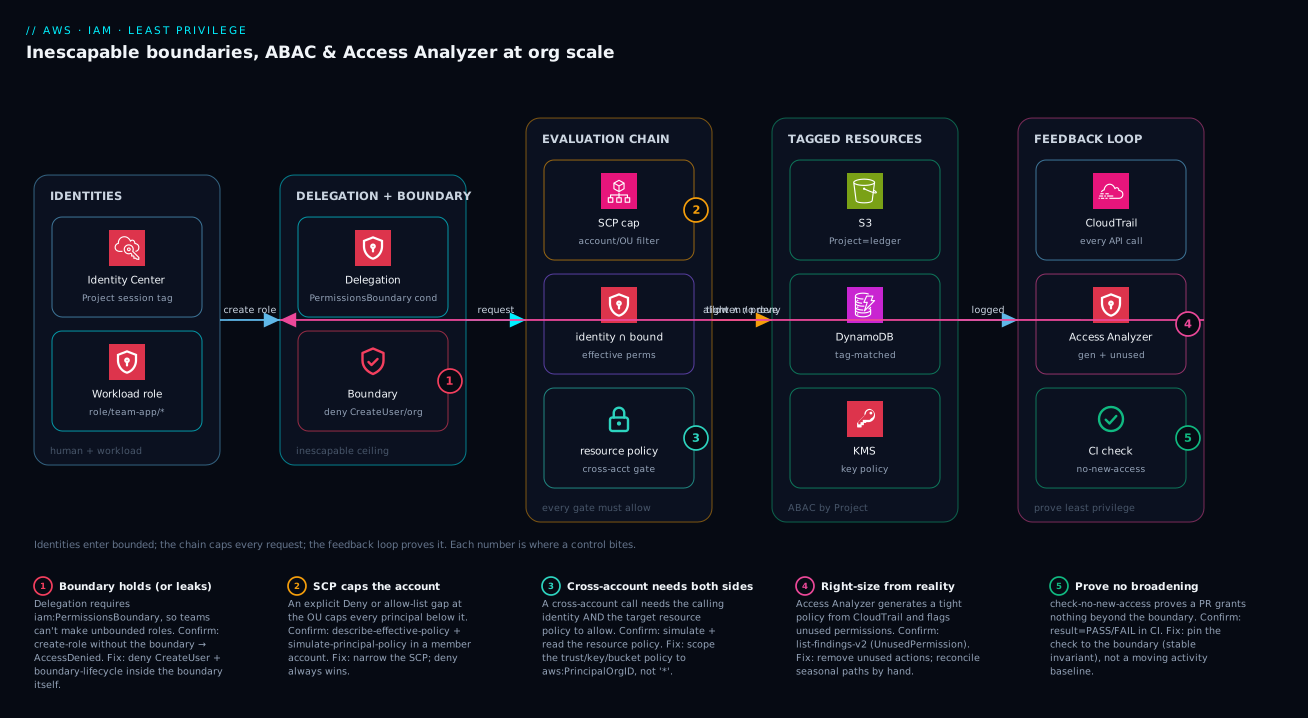
The diagram below is the whole control plane on one canvas, read left to right as a request travels and as policy changes travel. On the left, identities enter from two doors: humans through IAM Identity Center (carrying a Project session tag), and workloads as IAM roles created by the team’s own admin role — but only ever inside the permission boundary, because the delegation policy’s iam:PermissionsBoundary condition refuses any unbounded CreateRole. That boundary is badge ① — the single node where the entire delegation guarantee either holds or leaks. In the middle, the evaluation chain stacks the gates a request must clear: the SCP caps the whole account (badge ②), the identity policy ∩ boundary intersection decides the principal’s effective permissions, and for cross-account calls the target’s resource policy (badge ③) is a second required gate. On the right sit the resources those permissions reach — S3, DynamoDB, KMS — each tagged so ABAC grants only same-Project access.
Underneath the request path runs the feedback loop that keeps the grant honest: CloudTrail captures every call; Access Analyzer reads it to generate a tight policy and to flag unused permissions (badge ④); the external-access analyzer proves nothing is reachable from outside the zone of trust (badge ⑤); and check-no-new-access in CI proves a policy PR grants nothing beyond the boundary before it ever reaches production. Follow the numbered badges and the legend to see exactly where each control bites and how you confirm it.
Real-world scenario
Northwind Payments, a fintech running 140 AWS accounts under Control Tower, hit the classic wall. A four-person platform team owned every IAM change. The orders, ledger and fraud teams each waited 2–4 days for a role tweak, so the platform team — drowning — had quietly standardised on attaching PowerUserAccess to “unblock” people. An external pen-test put a number on it: 87% of roles carried permissions they had never used, and three S3 buckets holding tokenised card data had bucket policies with Principal: * behind a “temporary” CloudFront experiment nobody removed. The board asked a question the team couldn’t answer with a straight face: can you prove any of this is least privilege?
They rebuilt around the six steps. First, a team-boundary per OU allowing only the services that OU’s workloads use, with organizations:*, iam:CreateUser and the boundary-lifecycle actions explicitly denied. Each team got a team-app-admin role whose delegation policy required iam:PermissionsBoundary on every CreateRole and path-scoped them to role/team-app/* with a NotResource deny. Overnight the platform team stopped being a bottleneck: the orders team created their own orders-service role in minutes, and could not make it unbounded if they tried. They proved it in the pipeline — aws iam create-role without the boundary returned AccessDenied, exactly as designed.
Next they collapsed policy sprawl. The ledger team alone had 41 near-identical policies (one per environment per micro-service). ABAC replaced them with two: a Project-matched data policy and a RequireProjectTagOnCreate grant, with an SCP denying resource creation when aws:RequestTag/Project was null and denying *:Untag* on the Project and DataClass keys. Identity Center permission sets dropped from 60-odd to 9, each emitting a Project session tag.
Then the feedback loop. They generated policies for the 30 highest-risk roles from 90 days of CloudTrail with --include-resource-placeholders, finished the ARN scoping by hand, and stood up an org-level unused-access analyzer (unusedAccessAge: 90) from the delegated-admin account. It surfaced 1,900 unused-permission findings; over a quarter they drove the “never used” rate from 87% to 11%. An org-level external-access analyzer found the three public buckets in the first scan — they fixed two and archived one (a genuinely public marketing asset) with a rule. Finally, check-no-new-access against each team’s boundary became a required status check, so a PR fails the instant it escapes the ceiling.
The payoff that mattered to the board: when a contractor’s laptop was later compromised and an orders-service session token leaked, the blast radius was the orders project’s tagged data for the token’s lifetime — not every bucket in the org. They revoked the session by aws:TokenIssueTime within four minutes, and the incident review showed, with Access Analyzer output as evidence, that the boundary had held. Least privilege had gone from a sentence in a policy document to a property they could prove.
The before/after, with the lever that moved each number:
| Metric | Before | After (one quarter) | Lever |
|---|---|---|---|
| Roles carrying never-used permissions | 87% | 11% | Unused-access analyzer → remove permissions |
| IAM change lead time (team-blocking) | 2–4 days | minutes (self-service) | Inescapable-boundary delegation |
| Ledger team policy count | 41 | 2 | ABAC (Project-matched) |
| Identity Center permission sets | ~60 | 9 | Session tags + ABAC |
| Publicly-exposed buckets (card data) | 3 | 0 (2 fixed, 1 archived) | External-access analyzer |
| Unbounded roles possible to create | yes | no (denied by condition) | iam:PermissionsBoundary gate |
| Leaked-session containment time | (untested) | ~4 minutes | aws:TokenIssueTime revoke runbook |
Advantages and disadvantages
Delegated, bounded, machine-verified IAM is the right model at scale — but it has real costs and sharp edges. Weigh it honestly before you commit a landing zone to it:
| Advantages (why this model wins) | Disadvantages (why it bites) |
|---|---|
| Teams self-serve role creation; the central team stops being a bottleneck | Up-front design of boundaries + delegation is non-trivial and easy to get subtly wrong |
| The boundary is an inescapable ceiling — blast radius is bounded by construction | A boundary that forgets an escalation action (e.g. iam:CreateUser) is a false sense of safety |
| ABAC collapses dozens of policies into one driven by tags | ABAC over a weakly-tagged estate grants nothing — or, with a typo, everything |
| Access Analyzer proves exposure and finds unused access — evidence, not opinion | Unused-access analyzers are priced per role+user monitored — a real bill at org scale |
check-no-new-access enforces no-broadening mechanically in CI |
Pinning a check to a stale activity baseline bakes in seasonal blind spots |
| Generated policies turn weeks of hand-authoring into a tight first draft | Generation misses out-of-window, conditional and cross-account permissions |
| The whole estate becomes auditable and demonstrably least-privilege | More moving parts (boundaries, tags, analyzers, CI) to operate and reason about |
The model is right when you have more than a handful of accounts, multiple product teams that need velocity, and a compliance or security mandate to demonstrate least privilege. It is overkill for a single-account hobby project. The disadvantages are all manageable — but only if you know they exist, which is the entire point of this article: the boundary must deny the escalation moves, ABAC must sit on enforced tags, the CI check must pin to the boundary (a stable invariant) rather than a moving activity log, and the analyzer cost must be a budgeted line item.
Hands-on lab
Build the inescapable-boundary pattern end to end, prove it holds, then tear it down. Free-tier-friendly (IAM, Access Analyzer policy checks and the simulator have no per-call charge; only an org-level analyzer is billed, which we don’t create here). Run in CloudShell in a sandbox account.
Step 1 — Variables and the boundary policy.
ACC=$(aws sts get-caller-identity --query Account --output text)
cat > boundary.json <<JSON
{ "Version": "2012-10-17", "Statement": [
  { "Sid":"Allowed","Effect":"Allow","Action":["s3:*","dynamodb:*","logs:*"],"Resource":"*" },
  { "Sid":"DenyTamper","Effect":"Deny","Action":["iam:CreateUser","iam:DeleteRolePermissionsBoundary","organizations:*"],"Resource":"*" }
] }
JSON
aws iam create-policy --policy-name lab-boundary --policy-document file://boundary.json \
  --query 'Policy.Arn' --output text
Expected: a policy ARN like arn:aws:iam::<acct>:policy/lab-boundary.
Step 2 — Create a delegation role that can only make bounded roles.
cat > deleg.json <<JSON
{ "Version":"2012-10-17","Statement":[
  { "Sid":"CreateBounded","Effect":"Allow","Action":["iam:CreateRole","iam:PutRolePolicy"],
    "Resource":"arn:aws:iam::*:role/team-app/*",
    "Condition":{"StringEquals":{"iam:PermissionsBoundary":"arn:aws:iam::${ACC}:policy/lab-boundary"}} },
  { "Sid":"ScopeByPath","Effect":"Deny","Action":"iam:*","NotResource":"arn:aws:iam::*:role/team-app/*" }
]}
JSON
# (Attach deleg.json to a test admin role / your user for the lab.)
aws iam validate-policy --policy-type IDENTITY_POLICY --policy-document file://deleg.json \
  --query 'findings[].findingType' --output text || true
Expected: validate-policy returns no ERROR findings (possibly a SUGGESTION).
Step 3 — Prove the boundary check works with check-no-new-access. Write a “proposed” policy that tries to grant iam:* and check it against the boundary:
cat > proposed.json <<JSON
{ "Version":"2012-10-17","Statement":[{"Effect":"Allow","Action":"iam:*","Resource":"*"}] }
JSON
aws accessanalyzer check-no-new-access \
  --policy-document file://proposed.json \
  --existing-policy-document file://boundary.json \
  --policy-type IDENTITY_POLICY \
  --query '{result:result, reasons:reasons[].description}'
Expected: result: FAIL — the proposed policy grants iam:*, which the boundary does not. This is the CI gate doing its job.
Step 4 — Prove an in-bounds policy passes.
cat > inbounds.json <<JSON
{ "Version":"2012-10-17","Statement":[{"Effect":"Allow","Action":["s3:GetObject"],"Resource":"*"}] }
JSON
aws accessanalyzer check-no-new-access \
  --policy-document file://inbounds.json --existing-policy-document file://boundary.json \
  --policy-type IDENTITY_POLICY --query 'result'
Expected: PASS — s3:GetObject is within the boundary’s s3:*.
Step 5 — Assert a forbidden action is never granted.
aws accessanalyzer check-access-not-granted \
  --policy-document file://boundary.json \
  --access '[{"actions":["iam:CreateUser"]}]' \
  --policy-type IDENTITY_POLICY --query 'result'
Expected: PASS — the boundary’s explicit Deny means iam:CreateUser is never granted.
Validation checklist. You built a boundary, a delegation policy that requires it, and proved — without deploying anything billable — that an over-broad policy FAILs the no-new-access gate, an in-bounds one PASSes, and a forbidden action is provably never granted. That is the entire Step 1 + Step 6 loop in five commands. Mapped to what each step proves:
| Step | What you did | What it proves | Real-world analogue |
|---|---|---|---|
| 1 | Boundary with allow + deny-tamper | The ceiling is expressible as JSON | Every account’s baseline boundary |
| 2 | Delegation requires iam:PermissionsBoundary |
Teams can’t make unbounded roles | Safe self-service role creation |
| 3 | check-no-new-access FAILs on iam:* |
The CI gate blocks broadening | A policy PR that escapes the boundary |
| 4 | In-bounds policy PASSes | The gate doesn’t block legit change | A normal, bounded policy PR |
| 5 | check-access-not-granted on iam:CreateUser |
Escalation actions are provably denied | Forbidding PassRole/CreateUser org-wide |
Cleanup.
aws iam delete-policy --policy-arn arn:aws:iam::${ACC}:policy/lab-boundary
rm -f boundary.json deleg.json proposed.json inbounds.json
Cost note. Nothing in this lab is billable: IAM policies, the policy simulator, and the Access Analyzer policy-check APIs (validate-policy, check-no-new-access, check-access-not-granted, check-no-public-access) are free. Only standing up an analyzer (external or unused-access) incurs charges, and we didn’t.
Practice challenges
The Hands-on lab walked you through the pattern; these are the do-it-yourself reps that make it stick, escalating from arithmetic to a CI gate. Try each on paper (or in a sandbox with the free policy-check APIs) before opening the solution. Account IDs are placeholders throughout.
1 — Effective permissions (beginner). A role’s identity policy allows ["s3:*", "dynamodb:GetItem"]. Its permission boundary allows ["s3:GetObject", "s3:PutObject", "sns:*"]. Exactly which actions can the role perform, and why?
<details> <summary>Solution</summary>
Only s3:GetObject and s3:PutObject. Effective = identity ∩ boundary: s3:* on the identity side intersected with the boundary’s two S3 actions leaves those two; dynamodb:GetItem is not in the boundary and sns:* is not in the identity policy, so both drop out.
Why: the boundary caps, never grants — an action must appear on both sides to survive. </details>
2 — The inescapable-create condition (beginner-intermediate). Write the Condition block that forces every delegated iam:CreateRole to attach the boundary arn:aws:iam::123456789012:policy/team-boundary and nothing else.
<details> <summary>Solution</summary>
"Condition": {
  "StringEquals": {
    "iam:PermissionsBoundary": "arn:aws:iam::123456789012:policy/team-boundary"
  }
}
Why: a CreateRole request that omits the boundary — or names a different one — fails StringEquals, so the statement does not match and the create is denied; teams cannot mint an unbounded role.
</details>
3 — One ABAC statement for every project (intermediate). Write an Allow for s3:GetObject/s3:PutObject on arn:aws:s3:::proj-data/* that grants access only when the caller’s Project tag equals the object’s Project tag.
<details> <summary>Solution</summary>
{
  "Effect": "Allow",
  "Action": ["s3:GetObject", "s3:PutObject"],
  "Resource": "arn:aws:s3:::proj-data/*",
  "Condition": {
    "StringEquals": { "aws:ResourceTag/Project": "${aws:PrincipalTag/Project}" }
  }
}
Why: the ${aws:PrincipalTag/Project} variable resolves at request time, so one policy serves every project — the data (tags) varies, not the policy.
</details>
4 — Two orthogonal tighteners (intermediate-advanced). Take a working data policy and add guardrails so its actions only work in ap-south-1 or us-east-1, and so s3:DeleteObject additionally requires MFA. Write the two Deny statements.
<details> <summary>Solution</summary>
{
  "Effect": "Deny",
  "Action": "*",
  "Resource": "*",
  "Condition": { "StringNotEquals": { "aws:RequestedRegion": ["ap-south-1", "us-east-1"] } }
},
{
  "Effect": "Deny",
  "Action": "s3:DeleteObject",
  "Resource": "*",
  "Condition": { "BoolIfExists": { "aws:MultiFactorAuthPresent": "false" } }
}
Why: region and MFA are independent axes, so they stack as separate denies; BoolIfExists lets non-MFA service/role sessions through on other actions instead of blanket-blocking them.
</details>
5 — Spot and fix the wildcard trap (advanced). A teammate submits {"Effect":"Allow","NotAction":"s3:DeleteObject","Resource":"*"} as a “least-privilege” policy. What does it actually grant, and how do you fix it?
<details> <summary>Solution</summary>
It grants every action in AWS except s3:DeleteObject — effectively administrator access. Allow + NotAction is a blocklist, not an allow-list. Fix it by naming what the workload does ({"Effect":"Allow","Action":["s3:GetObject","s3:PutObject",...],"Resource":"arn:aws:s3:::proj-data/*"}), or, if a deny-list is genuinely intended, move NotAction into a Deny statement.
Why: least privilege is an allow-list — everything unnamed is implicitly denied for free; a blocklist silently allows every future action AWS ever adds. </details>
6 — Prove no-broadening and close the confused deputy (advanced). (a) Write the check-no-new-access call that proves proposed.json grants nothing beyond team-boundary.json. (b) Add the trust-policy condition that stops another account’s bucket from triggering an S3-service assume of your replication role.
<details> <summary>Solution</summary>
# (a) CI gate — proves the proposal grants nothing beyond the boundary
aws accessanalyzer check-no-new-access \
  --policy-document file://proposed.json \
  --existing-policy-document file://team-boundary.json \
  --policy-type IDENTITY_POLICY \
  --query 'result'          # PASS or FAIL
// (b) trust-policy condition on the S3 service principal
"Condition": {
  "StringEquals": { "aws:SourceAccount": "123456789012" },
  "ArnLike": { "aws:SourceArn": "arn:aws:s3:::my-replication-source" }
}
Why: check-no-new-access mechanically fails a PR that escapes the boundary before merge, and pinning aws:SourceAccount/aws:SourceArn means only your bucket in your account can make S3 assume the role.
</details>
Common beginner mistakes
These are conceptual traps — the wrong mental model a newcomer brings in — as opposed to the symptom-to-fix table in the troubleshooting section above. Fix the model and the operational bugs stop happening.
-
“A permission boundary gives a role its permissions.” No — a boundary grants nothing. It is the embossed spending limit, not the budget. The identity policy grants; the boundary only caps. Right model: effective permission is the intersection of the two, and a boundary with no identity policy behind it grants zero.
-
“Attaching a boundary (or widening it) makes a role more powerful.” A boundary can only ever subtract. Widening a boundary never adds a permission the identity policy does not already grant. Right model: to grant more, edit the identity policy; the boundary just decides how much of that grant survives.
-
“An SCP and a permission boundary are basically the same thing.” Both are caps, but at different layers: an SCP caps a whole account/OU, a boundary caps a single principal. You often run both, and a request must clear each cap it is subject to. Confusing “cap” with “grant” — or the two caps with each other — is the single most common senior-engineer IAM error.
-
“The role has a boundary, so it is safe.” Not automatically. A resource-based policy that names the role directly can hand it access past the boundary (see Going deeper), and a boundary that forgets the escalation actions (
iam:CreateUser, unscopediam:PassRole, its own lifecycle) is a ceiling with a trapdoor. Right model: a boundary bounds the principal’s own policies — pair it with RCPs and lifecycle denies for real containment. -
“
Allow: *with aDenylist of the dangerous actions is least privilege.” That is a blocklist, and the next dangerous action AWS ships is allowed by default because you never listed it. Right model: least privilege is an allow-list — name what the workload does; everything unnamed is denied for free. -
“I wrote the ABAC policy, so it works now.” Not until tagging is enforced. Over an untagged estate ABAC grants nothing; with a fat-fingered condition it grants everything. Right model: an SCP forces the
Projecttag at creation and denies*:Untag*on governance keys first, then the ABAC policy is safe to rely on. -
“Access Analyzer generated the policy, so it is the finished least-privilege policy.” It is a strong first draft from one activity window — it misses seasonal/DR paths, all
Conditionblocks, and cross-account/resource-based grants. Right model: generate, then reconcile against runbooks and add back what the window did not see, by hand and documented. -
“I rotated the leaked key, so the attacker is locked out.” Temporary session credentials outlive a key rotation — they stay valid until they expire. Right model: revoke live sessions by denying actions where
aws:TokenIssueTimeis before now (theAWSRevokeOlderSessionspattern), then deactivate and delete the key.
Common mistakes & troubleshooting
This is the part you bookmark. First as a scannable playbook table, then the entries that bite hardest expanded with the exact confirm command and fix.
| # | Symptom | Root cause | Confirm (exact cmd / console path) | Fix |
|---|---|---|---|---|
| 1 | Team’s CreateRole returns AccessDenied even with the boundary |
Wrong boundary ARN (typo / different account) in the request vs the delegation condition | Compare --permissions-boundary value to the iam:PermissionsBoundary condition ARN |
Use the exact, same-account boundary ARN |
| 2 | A bounded role can do more than the boundary seems to allow | Confusing grant with cap — the identity policy is what’s broad; boundary only intersects | aws iam simulate-principal-policy on the action |
Tighten the identity policy; boundary can’t add |
| 3 | A bounded role can do nothing | Boundary present but no identity policy (intersection with ∅) | aws iam list-role-policies / list-attached-role-policies empty |
Attach an identity policy; effective = both |
| 4 | ABAC policy grants nothing to a valid user | Resource untagged, or principal missing the session tag | aws s3api get-bucket-tagging; decode the session for PrincipalTag |
Tag the resource; emit the session tag |
| 5 | ABAC suddenly grants far too much | Typo’d condition (e.g. ForAllValues misuse, wrong key) matches everything |
validate-policy SECURITY_WARNING; simulate with a foreign tag |
Fix the condition; add Null/StringEquals guard |
| 6 | Generated policy breaks a quarterly job | Job didn’t fire in the CloudTrail window | Diff generated vs prior policy; check the runbook | Add the seasonal actions by hand; widen window |
| 7 | check-no-new-access starts FAILing with no policy change |
The baseline moved (activity grew), not the proposed policy | Diff baselines; check what new action appears | Pin the check to the boundary, not an activity baseline |
| 8 | External-access finding for an in-org trust | Account-scoped analyzer treats sibling accounts as external | get-analyzer shows type = ACCOUNT not ORGANIZATION |
Recreate as ORGANIZATION scope |
| 9 | Unused-access analyzer bill is surprisingly high | Priced per role+user; org has tens of thousands | Cost Explorer → Access Analyzer; count principals | Scope analyzer; exclude low-risk accounts |
| 10 | Leaked role key still works after you “rotated” it | Temporary session credentials outlive a key rotation | CloudTrail shows calls after rotation time | Revoke by aws:TokenIssueTime, not just rotate |
| 11 | OIDC deploy role assumable by another repo | Trust policy sub condition too wide / wildcarded |
Inspect trust policy token.actions.githubusercontent.com:sub |
Pin the exact repo:org/name:ref subject |
| 12 | SCP change silently breaks every role in an OU | An explicit Deny (or an allow-list omission) at the OU caps all |
describe-effective-policy; simulate in a member account |
Narrow the SCP; test with the simulator first |
| 13 | PassRole lets a service grab a more-powerful role |
iam:PassRole granted with Resource: * |
simulate-principal-policy on iam:PassRole |
Scope PassRole by path/tag; deny broad |
| 14 | Policy “looks” within boundary but is denied | An explicit Deny upstream (SCP/RCP/boundary) wins |
Simulate; read MatchedStatements for the deny |
Remove/scope the deny; deny always wins |
The expanded form for the entries that cause the most lost hours:
2. A bounded role appears to do more than the boundary allows.
Root cause: You’re reading the boundary as the grant. The boundary is a ceiling; effective permission is identity policy ∩ boundary. If the role can do something, its identity policy allowed it and the boundary didn’t subtract it.
Confirm: aws iam simulate-principal-policy --policy-source-arn <role> --action-names <action> — the result shows allowed and which statements matched.
Fix: Tighten the identity policy; a boundary can never add permission, only intersect, so widening the boundary won’t grant and narrowing the identity policy is the lever.
7. check-no-new-access starts FAILing with no apparent policy change.
Root cause: You pinned the check to an activity-generated baseline. A rare-but-legitimate path (a quarter-end job) finally fired, so its action now appears in activity but not in the older baseline — the check correctly flags “new access vs the frozen baseline,” even though the grant didn’t move.
Confirm: Diff the two baselines; the new action is in the current one, absent from the pinned snapshot.
Fix: Stop diffing against a stale activity snapshot. Assert the invariant that actually matters — nothing exceeds the boundary — by passing the boundary as --existing-policy-document. Keep the activity diff as an advisory comment, make the boundary check blocking.
10. A leaked role key still works after rotation.
Root cause: Rotating a key (or “deleting” a role’s access) does not invalidate already-issued temporary session credentials. They live until they expire, so an attacker holding a session keeps their foothold.
Confirm: CloudTrail shows the principal making calls after your rotation timestamp.
Fix: Attach a deny on all actions where aws:TokenIssueTime is before now (the AWSRevokeOlderSessions pattern) to instantly kill issued sessions; then deactivate-then-delete any leaked IAM user key and audit iam:CreateAccessKey for keys the attacker minted.
Best practices
- Treat the boundary as an inescapable ceiling, and make it actually inescapable. Deny
iam:DeleteRolePermissionsBoundary, the boundary policy’s own version lifecycle,iam:CreateUser, andorganizations:*in the boundary itself — otherwise it’s a ceiling with a trapdoor. - Require
iam:PermissionsBoundaryon every delegatedCreateRole/PutUserPermissionsBoundary. This single condition is what makes self-service role creation safe; without it teams can mint unbounded roles. - Path-scope delegated admins and pair it with a
NotResourcedeny.role/team-app/*plus the deny confines a team to its own namespace so it can’t act on platform or break-glass roles. - Never grant
iam:PassRolewithResource: *. Scope it by path or tag; a widePassRolelets a service assume a more-powerful role and is a top escalation vector. - Enforce tags before you rely on ABAC. An SCP that denies creation when the required tag is null, plus a deny on
*:Untag*for governance keys, is the foundation ABAC stands on. - Generate policies from activity, then reconcile against runbooks. Use Access Analyzer generation with
--include-resource-placeholdersas a first draft; add back seasonal/DR paths the window missed, by hand and documented. - Run org-level analyzers from the delegated-admin account. One external-access and one unused-access analyzer cover every member account; per-account analyzers miss in-org context and multiply cost.
- Pin CI policy checks to a stable invariant, not a moving baseline. Make
check-no-new-accessagainst the boundary the blocking gate; keep the activity-baseline diff advisory. - Forbid sensitive actions explicitly with
check-access-not-granted. Assertiam:PassRolewith*,*:Delete*on prod, oriam:CreateUserare never permitted, as required status checks. - Lock OIDC trust policies to the exact subject. Pin
repo:org/name:ref(or branch) in thesubcondition and addaws:PrincipalOrgID; a widesubis a silent cross-tenant hole. - Use session naming and session tags. A meaningful
RoleSessionNameandProjectsession tag make CloudTrail attribute actions to a human/pipeline, which is what makes unused-access analysis and incident triage actually traceable. - No long-lived IAM users for humans. Humans authenticate through Identity Center; workloads on AWS use roles; CI/CD outside AWS uses OIDC federation — no static keys to leak.
A compact alert/guardrail matrix worth wiring before the next incident — the leading indicators, not the lagging “we got breached”:
| Guardrail | Mechanism | Trigger / threshold | Why it’s leading |
|---|---|---|---|
| New unbounded role created | EventBridge on CreateRole without boundary |
Any occurrence | Catches a delegation gap immediately |
| External-access finding (S3/KMS) | Access Analyzer → EventBridge → SNS | New ACTIVE finding | Exposure caught before an attacker finds it |
| Unused permission grew stale | Unused-access analyzer | unusedAccessAge exceeded |
Drives continuous right-sizing |
PassRole with * merged |
check-access-not-granted in CI |
FAIL | Blocks an escalation vector pre-merge |
| Root / break-glass used | CloudTrail + EventBridge | Any console/root sign-in | Highest-privilege use must be rare + reviewed |
| Policy broadened vs boundary | check-no-new-access in CI |
FAIL | Stops scope creep at the PR |
Security notes
- Least privilege is the property, not the aspiration. The boundary bounds theoretical blast radius; Access Analyzer’s unused-access findings shrink the actual grant toward what’s used. Run both — one caps, one prunes.
- Bound the identity, then prove it. A permission boundary caps what a principal can do;
simulate-principal-policyandcheck-no-new-accessprove the cap holds. Assertion plus proof, not assertion alone. - Constrain trust policies, not just grants. For cross-account and OIDC roles, the trust policy’s
Principalandsub/aws:PrincipalOrgIDconditions are what stop a stranger from assuming the role. A wide grant behind a wide trust is double exposure. - Protect governance tags. ABAC’s safety depends on tags being un-forgeable by the principals they govern — deny
*:Untag*and tag-overwrite onProject/DataClasskeys via SCP. - Encrypt and perimeter the data the roles reach. Pair least-privilege identity with KMS key policies and resource control policies / a data perimeter so even an over-broad identity can’t move data out of the org.
- Make actions attributable. Session tags +
RoleSessionNamemean CloudTrail names a human or pipeline, not just a role ARN — essential for both unused-access analysis and incident forensics. - Revoke sessions, don’t just rotate keys. On exposure, deny by
aws:TokenIssueTimeto kill live temporary credentials; rotation alone leaves an attacker’s session valid until expiry. - Keep break-glass minimal, separate, and monitored. Break-glass roles live outside team paths, are excluded from delegation, and every use fires an alert.
The security controls that also keep the estate least-privilege — they pull in the same direction:
| Control | Mechanism | Secures against | Also enforces |
|---|---|---|---|
| Inescapable boundary | iam:PermissionsBoundary + lifecycle denies |
Self-escalation by a delegated team | Bounded blast radius |
| ABAC on enforced tags | SCP tag-on-create + Untag deny |
Cross-project data access | Collapsed policy sprawl |
| OIDC trust pinning | sub + aws:PrincipalOrgID conditions |
Cross-tenant role assumption | No static CI keys |
check-no-new-access (boundary) |
Synchronous automated-reasoning check in CI | Scope creep over time | Provable least privilege |
| Unused-access analyzer | Per-principal continuous analysis | Standing over-permission | Continuous right-sizing |
| Session revocation runbook | aws:TokenIssueTime deny |
Live leaked sessions | Fast, complete containment |
Cost & sizing
IAM itself is free — users, roles, policies, the policy simulator, and the Access Analyzer policy-check APIs cost nothing per call. The bill comes from two places, and both are easy to under-anticipate:
- Access Analyzer analyzers are priced per resource / per principal monitored, billed monthly. The external-access analyzer charges per analyzed resource; the unused-access analyzer charges per IAM role and user monitored. At 140 accounts with tens of thousands of roles, the unused-access analyzer is a genuine line item — scope it (exclude low-risk sandbox OUs), run one org-level analyzer from the delegated-admin account rather than per-account duplicates, and put it in the budget rather than discovering it on the bill.
- CloudTrail underpins everything here — generation reads it, attribution depends on it. The org trail’s management events to its first copy are included; data events (S3 object-level, Lambda invoke) are billed per event and are often the larger cost. You need them for fine-grained generation and forensics, so enable them deliberately on the resources that matter, not blanket across every bucket.
A rough monthly picture for a mid-size org (~140 accounts) and what each spend buys:
| Cost driver | What you pay for | Rough monthly figure | What it buys | Watch-out |
|---|---|---|---|---|
| External-access analyzer | Per analyzed resource | Low — scales with resource count | Provable exposure detection org-wide | One org analyzer, not per-account |
| Unused-access analyzer | Per IAM role + user monitored | The largest IAM-governance line at scale | Continuous right-sizing evidence | Scope OUs; exclude sandboxes |
| Policy-check APIs (CI) | Nothing (free) | ₹0 | Pre-merge proof gates | Pure win — wire them everywhere |
| Policy simulator | Nothing (free) | ₹0 | Effective-permission assertions in tests | Use liberally |
| CloudTrail management events | First copy included | Effectively included | The activity history everything reads | Don’t create redundant trails |
| CloudTrail data events | Per event logged | Can dominate if blanket-enabled | Fine-grained generation + forensics | Enable per-resource, not org-wide blanket |
The sizing principle: the controls are nearly free; the analysis (analyzers + data-event ingestion) is where you spend, and you right-size that the same way you right-size permissions — scope it to what’s risky, run it once at org level, and treat it as a budgeted line, not a surprise.
Interview & exam questions
1. Does a permission boundary grant permissions? Explain effective permissions. No — a boundary grants nothing; it is a ceiling. Effective permissions are the intersection of the identity policy and the boundary. If the identity policy allows s3:* and the boundary allows only s3:GetObject, the principal gets s3:GetObject; with a boundary but no identity policy, the principal gets nothing.
2. How do you let a team create their own roles without letting them create unbounded ones? Grant iam:CreateRole with a Condition on iam:PermissionsBoundary equal to your exact boundary ARN, so any CreateRole without that boundary is denied. Add path scoping (role/team-app/*) and a NotResource deny to confine them to their namespace, and deny the boundary’s lifecycle actions so they can’t edit the ceiling.
3. SCP vs permission boundary — what’s the difference? Both are filters (caps), not grants, applied at different layers. An SCP caps an entire account/OU; a permission boundary caps a single principal. A request must be allowed by the SCP and the identity policy and (if attached) the boundary, with any explicit Deny winning.
4. In cross-account access, what must allow the request? Both sides: the identity policy in the calling account must allow the action, and the resource policy in the target account (bucket policy, role trust policy, KMS key policy) must allow the calling principal. Same-account differs — the resource policy isn’t a required second gate the same way.
5. What is ABAC and what makes it safe? ABAC grants access when a tag on the principal equals a tag on the resource (aws:PrincipalTag/Project == aws:ResourceTag/Project), so one policy serves every team. It’s only safe if tagging is enforced — an SCP denies resource creation without the required tag, and *:Untag* is denied on governance keys — otherwise it grants nothing or, with a typo, everything.
6. How does Access Analyzer generate a least-privilege policy, and what does it miss? It reads CloudTrail history for a principal and emits a policy of only the actions actually used, with resource placeholders where it can infer scoping. It misses anything outside the window (seasonal/DR jobs), all conditions, and cross-account/resource policies — so treat it as a first draft and reconcile against runbooks.
7. What’s the difference between the two Access Analyzer analyzer types? The external-access analyzer uses automated reasoning to prove whether a resource is reachable from outside your zone of trust (catches public buckets, wide trust policies). The unused-access analyzer uses activity to flag unused roles, users, and — most usefully — unused permissions on active roles. They answer opposite questions and are priced differently (per resource vs per role+user).
8. How do you mechanically prevent a policy PR from broadening access? Use check-no-new-access, which uses automated reasoning to prove the proposed policy grants nothing beyond a reference, as a required CI status check. Pin the reference to the boundary (a stable invariant), not an activity-generated baseline, or a rare-but-legitimate path will spuriously fail the gate.
9. A leaked role session key still works after you rotated the key. Why, and what’s the correct response? Rotating a key does not invalidate already-issued temporary session credentials — they live until expiry. Revoke them immediately by attaching a deny on all actions where aws:TokenIssueTime is before now (the AWSRevokeOlderSessions pattern), then deactivate/delete any leaked user key and audit iam:CreateAccessKey.
10. How do you stop another GitHub repo from assuming your OIDC deploy role? Pin the trust policy’s token.actions.githubusercontent.com:sub condition to the exact repo:org/name:ref (or branch) and add aws:PrincipalOrgID where relevant. A wildcarded or overly-broad sub lets a different repo assume the role — a silent cross-tenant hole.
11. Why run analyzers at the organization level from a delegated-admin account? One org-level analyzer covers every member account, treats in-org cross-account trust as inside the zone of trust (so it isn’t false-flagged), and avoids the cost and blind spots of per-account analyzers. The delegated-admin pattern keeps this out of the management account.
12. What does check-access-not-granted prove, and give a use. It proves a policy never permits a specified action — e.g. assert that iam:PassRole with *, or iam:CreateUser, is never granted. Wire it as a required status check to forbid escalation primitives mechanically, regardless of how the rest of the policy is written.
These map to AWS Certified Security – Specialty (SCS-C02) — identity and access management, permission boundaries, Access Analyzer, cross-account and federation — and to Solutions Architect Professional (SAP-C02) for the multi-account delegation and org-guardrail design. A compact cert mapping for revision:
| Question theme | Primary cert | Exam domain |
|---|---|---|
| Boundaries, intersection, evaluation chain | SCS-C02 | Identity & access management |
Delegation, iam:PermissionsBoundary, path scoping |
SCS-C02 / SAP-C02 | IAM design; multi-account governance |
| ABAC, session tags, tag enforcement | SCS-C02 | Access control at scale |
| Access Analyzer (generation/unused/external) | SCS-C02 | Detection & response; least privilege |
check-no-new-access / CI policy checks |
SCS-C02 / DOP-C02 | Policy-as-code; secure delivery |
| Cross-account, OIDC trust, confused deputy | SCS-C02 / SAP-C02 | Cross-account access; federation |
Quick check
- The identity policy on a role allows
s3:*; its permission boundary allows onlys3:GetObjectands3:PutObject. What can the role do, and why? - You want a team to create roles but never an unbounded role. What single condition key enforces this, and on which action?
- True or false: widening a permission boundary grants a bounded role more permission.
- Your
check-no-new-accessgate suddenly FAILs although the proposed policy is unchanged. What most likely happened, and how do you make the gate robust? - A leaked role’s access key has been rotated, yet CloudTrail shows the principal still making calls. Why, and what’s the fix?
Answers
- Only
s3:GetObjectands3:PutObject. Effective permissions are the intersection of the identity policy and the boundary; the boundary caps the broads3:*down to the two actions it allows. The boundary doesn’t grant — it subtracts. - The
iam:PermissionsBoundarycondition key, oniam:CreateRole(andiam:PutUserPermissionsBoundary/CreateUserfor users). GrantingCreateRoleonlyStringEqualsyour exact boundary ARN means any create without that boundary is denied. - False. A boundary only ever intersects with the identity policy. Widening the boundary cannot add permission the identity policy doesn’t already grant; to grant more you must widen the identity policy (and the boundary must not subtract it).
- The baseline moved, not the proposed policy — you pinned the check to an activity-generated baseline and a rare path finally fired, so its action now counts as “new access vs the frozen snapshot.” Make the gate robust by pinning
--existing-policy-documentto the boundary (a stable invariant) and keeping the activity diff advisory. - Rotating a key does not invalidate already-issued temporary session credentials, which live until they expire. Revoke them immediately by denying all actions where
aws:TokenIssueTimeis before now (theAWSRevokeOlderSessionspattern); then deactivate/delete the leaked user key and audit for keys the attacker minted.
Glossary
- Identity-based policy — a policy attached to a principal (user/role/group) that grants permission to attempt actions; bounded by SCP, boundary and session policy.
- Resource-based policy — a policy on a resource (bucket, role trust, KMS key, queue, secret) that grants access, and is the required gate for cross-account requests.
- Permission boundary — a managed policy that sets the ceiling on a principal; effective permission is the intersection of the identity policy and the boundary. It grants nothing.
- Service control policy (SCP) — an Organizations policy that caps the permissions of an entire account/OU; an allow-filter that no principal in the account can exceed.
- Resource control policy (RCP) — an org-wide policy that caps what any principal may do to supported resource types; the resource-side counterpart to an SCP.
- Session policy — an inline policy passed at
AssumeRole/GetFederationTokenthat further narrows a single session (another intersection, never an expansion). iam:PermissionsBoundary— the condition key naming which boundary aCreateRole/PutUserPermissionsBoundaryrequest attaches; the lever that makes delegation inescapable.- Effective permissions — the actions a principal can actually perform after all gates: identity ∩ boundary ∩ session, capped by SCP/RCP, with any explicit
Denyremoving the action. - ABAC (attribute-based access control) — granting access by matching a tag on the principal (
aws:PrincipalTag) against a tag on the resource (aws:ResourceTag), so one policy serves many. - Session tag — a tag set at
AssumeRole/federation time (e.g. from an Identity Center permission set) that travels with the principal, powering ABAC and CloudTrail attribution. - IAM Access Analyzer (external-access) — uses automated reasoning to prove whether a resource grants access to a principal outside your zone of trust.
- IAM Access Analyzer (unused-access) — continuously flags unused roles, users, access keys, and unused permissions on active principals, priced per role+user.
- Policy generation — Access Analyzer reading CloudTrail to emit a least-privilege policy of only the actions a principal actually used (with resource placeholders).
check-no-new-access— a synchronous Access Analyzer API that proves a proposed policy grants nothing beyond a reference policy; the CI gate against broadening.check-access-not-granted/check-no-public-access— checks that assert a specific action is never permitted, or that a resource policy grants zero public access.- Zone of trust — the boundary (a single account, or the whole org) outside which access is considered “external” by the external-access analyzer.
aws:TokenIssueTime— the condition key on when a session’s credentials were issued; denying actions before “now” revokes already-issued temporary credentials (theAWSRevokeOlderSessionspattern).- OIDC federation — trusting an external identity provider (e.g. GitHub Actions) via a role trust policy whose
subcondition pins the exact repo/subject, replacing static CI keys. NotAction/NotResource— inverse policy elements matching everything except what’s listed; safe inside aDeny(deny all but a set), dangerous inside anAllow, where they become a near-wildcard grant.- Customer-managed vs AWS-managed policy — a policy you own, version and audit (customer-managed, the least-privilege vehicle) versus one AWS owns and auto-updates (AWS-managed, convenient but broad and prone to silent broadening).
iam:PassRole/iam:PassedToService— the permission to hand a role to a service, and the condition key that restricts which service may receive it; unscopedPassRoleis a top escalation vector.- Confused deputy — tricking a trusted service into using its privileges on an attacker’s behalf; prevented on service-assumed roles with
aws:SourceAccountandaws:SourceArnconditions pinning your account and resource. aws:RequestedRegion— condition key for the region an API call targets; used to deny actions outside approved regions (exempt global services that resolve tous-east-1).aws:MultiFactorAuthPresent— condition key indicating MFA was used for the session; guard sensitive actions with it viaBoolIfExistsso non-MFA service/role sessions aren’t blanket-blocked.aws:CalledVia— the chain of AWS services that made a request on the principal’s behalf; multi-valued, used to allow an action only when invoked via a specific service (e.g. Athena, CloudFormation).ForAllValues/ForAnyValue— set operators for multi-valued condition keys;ForAllValuesis vacuously true for an empty set (a common over-grant), so preferForAnyValueplus aNull/presence check when you mean “at least one, and all approved.”- Transitive session tag — a session tag listed in
TransitiveTagKeysatAssumeRoleso it propagates to the next role in a chain; omit it and ABAC silently grants nothing two hops down.
Next steps
You can now delegate IAM safely, bound it inescapably, drive resource access with tags, and prove least privilege rather than assert it. Build outward:
- Foundation: IAM Fundamentals: Users, Roles, Policies & the Evaluation Chain — the request/principal/policy basics this article assumes.
- The account-level cap: Organizations, SCPs & Delegated Administration — the org guardrail that sits above every boundary here.
- The resource-side cap: Resource Control Policies & the Data Perimeter — cap what any principal can do to a resource, org-wide.
- Go deep on the tooling: Access Analyzer: Unused Access, Policy Generation & Custom Checks — the full capability set behind Steps 3–6.
- Human access & ABAC source: IAM Identity Center: Permission Sets & ABAC — where your session tags and human entry point come from.
- Cross-account trust done right: Cross-Account Roles, External ID & the Confused Deputy — pin trust policies so only the right principal can assume.
- Tie it together: Zero-to-Hero Capstone: A Well-Architected Landing Zone — ship the boundary, analyzers and delegation role with every new account.