In a nutshell
Picture your AWS account as a locked building. Cross-account access is how you let someone from another building come in and do one specific job without handing them a permanent key. The tool for that is an IAM role they assume through STS, and the whole art of this lesson is making that hand-off safe.
Four ideas carry the entire topic:
- A role has two locks, not one. The trust policy decides who is allowed to walk in (the front-desk rulebook). The permission policy decides what they can touch once inside (which doors their key opens). Beginners conflate these constantly — keep them separate and half your confusion disappears.
- Crossing an account line takes two yeses. Inside one account a single grant is enough. Across accounts, both the visitor’s home account and your account must say yes. Forget the visitor’s side and you get a baffling
AccessDeniedeven though your trust policy looks perfect. - The External ID is a passphrase, not a password. It exists for exactly one situation — a SaaS vendor who holds keys to hundreds of customers — so an attacker can’t trick that vendor into opening your building. It is low-secrecy on purpose; its job is to prevent confusion, not theft (the “confused deputy”).
- A session policy can only take away. When you hand out a session you can file the key down so it opens fewer doors than the role allows — never more. That one-way rule (the intersection) is how a broad, shared role becomes a surgical, single-task session.
Everything else in this article — source identity, session tags, the one-hour chaining cap, CloudTrail forensics — hangs off those four. If you are brand new, read them as a story; if you are experienced, skim to Going deeper for federation (IRSA vs Pod Identity), live-session revocation, and the assume-a-role-vs-resource-policy decision.
Level: Expert · Time: ~72 min · You’ll be able to: wire a two-account assume correctly on the first try, pick the right confused-deputy defense for a vendor vs an AWS service vs your own broker, clamp a broad role down to a single request with a session policy, and revoke live sessions the moment something leaks.
Cross-account access is where most AWS IAM accidents are born. A role that exists only to let a CI pipeline read an artifact bucket quietly becomes a path into your production account because someone wrote Principal: "*" in a trust policy and bolted on an ExternalId they never validated. The mechanics of sts:AssumeRole are simple; getting the authorization, the confused deputy defenses, and the privilege scoping right is not. This guide walks the full path: how the two policies on a role actually combine, how to harden trust for third parties and for your own org, and how to scope a delegated session down to exactly what it needs and no more.
Everything here assumes a multi-account org and the regional STS endpoint (sts.<region>.amazonaws.com), not the legacy global one. The failure modes are not academic: a missing identity-policy Allow, an ExternalId you accept but never require, a session policy you thought granted access (it can only subtract), a chained role that silently caps at one hour, a sourceIdentity you forgot to require — each is a real incident I have watched teams burn an afternoon on. Because cross-account IAM is a reference you return to under pressure, this article is deliberately table-dense: read the prose once to build the model, then keep the option matrices, the condition-key grids, the error reference, and the symptom→cause→confirm→fix playbook open while you wire it.
By the end you will stop guessing whether a trust policy is safe. You will know which of the two policies an AccessDenied came from, which confused-deputy defense fits the shape of the deputy (vendor vs AWS service vs your own broker), how to broker a broad role down to a surgical session, and how to tie any assumed-role action all the way back to a human in CloudTrail.
What problem this solves
A single AWS account does not survive contact with a real organisation. You split workloads into accounts for blast-radius isolation, billing, and compliance — and the moment you do, every useful action that crosses an account boundary needs delegated access. The vehicle is an IAM role assumed via STS. The pain is that the security of that delegation lives in details that are easy to get subtly wrong and invisible until exploited.
What breaks without getting this right, in production terms: a third-party security scanner you onboarded can be coerced into reading your account because their multi-tenant service holds the keys to hundreds of customers and your trust policy named only their account (the confused deputy). A CI role that should read one artifact bucket can write anywhere because the role’s permission policy is broad and nobody scoped the session. An auditor asks “who deleted this object?” and the answer is arn:aws:sts::222...:assumed-role/PlatformDeploy/i-0abc — a session name, not a person — because nobody set source identity. A long-running job that chains roles mysteriously dies after exactly one hour. Each of these is a design defect in the authorization, not the mechanics.
Who hits this: every team running a multi-account AWS Organization, every platform that brokers credentials, everyone integrating a SaaS vendor that “just needs a role in your account,” and anyone building cross-account ABAC. The symptom is almost never a stack trace — it is an AccessDenied you can’t explain, or worse, an access that should have been denied and wasn’t.
To frame the whole field before the deep dive, here is every problem class this article covers, the question it forces, and the first place to look.
| Problem class | What is really going wrong | First question to ask | Where to confirm | Most common single cause |
|---|---|---|---|---|
| AssumeRole AccessDenied | One of the two required Allows is missing | Did both sides authorize? | simulate-principal-policy + read trust policy |
No identity-based Allow on the caller |
| Confused deputy (SaaS) | A multi-tenant deputy assumes your role for an attacker | Is ExternalId required, not just accepted? |
assume-role without --external-id |
Trust names vendor :root with no ExternalId |
| Confused deputy (service) | An AWS service is tricked across accounts | Is the source pinned? | Trust policy Condition block |
No aws:SourceAccount/aws:SourceArn |
| Over-broad session | The session can do far more than the task needs | Is the role ceiling clamped per request? | simulate-custom-policy with session policy |
No session policy on a broad broker role |
| Lost attribution | An assumed-role action can’t be traced to a human |
Is sourceIdentity set and required? |
Athena sourceIdentity IS NULL |
sts:SetSourceIdentity never granted |
| Chained session expiry | A workload dies at the 1-hour mark | Are these creds already from an assumed role? | CloudTrail AssumeRole chain |
Expecting MaxSessionDuration on a chain |
| ABAC tag not honoured | Session tag doesn’t gate as expected | Did the tag survive chaining / is it allowed? | --transitive-tag-keys + trust sts:TagSession |
Non-transitive tag dropped on chain |
Learning objectives
By the end of this article you can:
- Explain the two-policy model of a role (trust vs permission) and prove why a cross-account assume needs an explicit
Allowon both sides, while same-account does not. - Recognise the confused deputy shape and pick the right defense for each variant —
sts:ExternalIdfor a SaaS deputy,aws:SourceAccount/aws:SourceArnfor an AWS-service deputy, and session-policy clamping for your own broker. - Harden internal trust with
aws:PrincipalOrgID,aws:PrincipalOrgPaths, and IP/VPC conditions instead of brittle account-ID allowlists. - Broker a broad role into a surgical session using inline session policies and managed-policy ARNs, and reason precisely about the intersection (a session policy can only subtract).
- Propagate identity with
--source-identity, make it immutable and chain-surviving, and require it downstream for sensitive actions. - Implement cross-account ABAC with session tags and transitive tags, and gate tag-setting in the trust policy.
- Anticipate the role-chaining 1-hour cap and the credential-type restrictions that go with it, and design refresh loops accordingly.
- Audit cross-account assumes in CloudTrail (the
sharedEventIDjoin,sourceIdentitytracking) and alert on the anomalies that matter — mapping it all to the SAP-C02, SCS-C02, and SOA-C02 exams.
Prerequisites & where this fits
You should already understand IAM fundamentals: the difference between an identity-based policy (attached to a user/role/group) and a resource-based policy (attached to a resource such as an S3 bucket, KMS key, or — crucially here — a role’s trust policy), how policy evaluation resolves explicit Deny over Allow over implicit deny, and that Action, Resource, Principal, and Condition are the load-bearing elements. You should be comfortable running the AWS CLI, reading JSON policy documents, and have a working AWS Organization with at least two accounts to follow the lab. Familiarity with temporary credentials (access key + secret + session token) helps.
This sits at the centre of the multi-account identity story. Upstream of it is AWS IAM Fundamentals: Users, Roles, Policies & Evaluation, which establishes the policy model this article assumes. The org-wide guardrails that cap every assume live in AWS Organizations SCP Guardrails & Delegated Admin. Permission boundaries — the other inescapable ceiling — are covered in AWS IAM Least Privilege with Permission Boundaries. For human sign-in at scale you would pair this with IAM Identity Center: Permission Sets & ABAC, and to right-size the policies you ship, IAM Access Analyzer: Unused Access & Policy Generation. Where this article ends — a minted session — is exactly where those begin.
A quick map of who owns what during a cross-account incident, so you escalate to the right place fast.
| Layer | What lives here | Who usually owns it | Failure classes it can cause |
|---|---|---|---|
| Caller identity (Acct A) | The user/role + its identity policy | App / CI team | AccessDenied (missing identity Allow), wrong endpoint |
| STS service | AssumeRole API, session minting | AWS (managed) | Throttling, regional vs global endpoint quirks |
| Trust policy (Acct B) | Who may assume + conditions | Resource-owner / platform | AccessDenied, confused deputy, missing ExternalId |
| Role permission policy (Acct B) | The ceiling once assumed | Resource-owner / platform | Over-broad blast radius |
| Session policy (passed at assume) | Per-request clamp | The broker / caller | Over-broad session if omitted |
| Org controls (SCP / boundary) | Account-wide cap | Central security | Unexpected deny that overrides everything |
| Audit (CloudTrail / Athena) | The record of who did what | SecOps | Lost attribution if sourceIdentity absent |
Core concepts
Five mental models make every later diagnosis obvious.
A role is two policies, not one. Every IAM role carries a trust policy (the resource-based AssumeRolePolicyDocument that answers who may assume) and one or more permission policies (identity-based, answering what the role can do once assumed). Conflating them is the single most common source of cross-account confusion. The trust policy’s Principal names the allowed identity; the permission policy’s Action/Resource define the ceiling.
Cross-account assume needs two Allows; same-account needs one. Within one account, a resource-based grant alone suffices. Across accounts, the calling principal also needs an explicit identity-based Allow for sts:AssumeRole against the target role ARN — the trust policy is necessary but not sufficient. Miss either side and you get AccessDenied. This asymmetry trips up nearly everyone once.
ExternalId defeats confusion, not a determined attacker. It is a shared, low-entropy value a SaaS vendor stores per-customer and passes on every assume, so a multi-tenant deputy cannot be tricked into using your role on an attacker’s behalf. It travels in the clear in API calls; it is not a credential. It exists for exactly one shape — the third-party multi-tenant deputy — and is the wrong tool for roles you assume yourself.
A session policy can only subtract. The role’s permission policy is the ceiling. A session policy passed at assume time produces effective permissions equal to the intersection of the role’s identity policies and the session policy. It never grants beyond the role; an explicit Deny in it still wins. This is the lever that turns a broad broker role into a surgical, per-request session.
Temporary credentials are not all equal. Credentials minted by assuming a role behave differently from an IAM user’s: a chained assume (assuming from already-assumed creds) is hard-capped at one hour regardless of MaxSessionDuration, and assumed-role creds cannot call GetFederationToken/GetSessionToken. Source identity and transitive session tags are the two attributes that survive chaining unchanged. Knowing what each credential type can and cannot do prevents a class of mysterious one-hour failures.
The vocabulary in one table
Before the deep sections, pin down every moving part. The glossary repeats these for lookup; this table is the model side by side.
| Concept | One-line definition | Where it lives | Why it matters cross-account |
|---|---|---|---|
| Trust policy | Resource policy: who may assume | On the role (Acct B) | Names the Principal; gate-keeps the assume |
| Permission policy | Identity policy: what the role can do | On the role (Acct B) | The ceiling; intersection input |
| Identity policy (caller) | What the assuming principal may do | On the user/role (Acct A) | Cross-account assume needs its Allow |
sts:AssumeRole |
The API that mints a delegated session | STS | The action both policies must allow |
ExternalId |
Shared per-tenant value for SaaS | Trust Condition |
Confused-deputy defense for vendors |
aws:SourceAccount / SourceArn |
Pin the calling service/resource | Trust Condition |
Confused-deputy defense for AWS services |
aws:PrincipalOrgID |
The org of the calling principal | Trust Condition |
“Anyone in my org” without an allowlist |
| Session policy | Per-assume clamp (inline or ARNs) | Passed at assume | Intersection → least privilege per request |
| Source identity | Immutable string stamped on the session | Session attribute | Attribution; survives chaining |
| Session tag | Key/value on the session | Session attribute | ABAC via aws:PrincipalTag/* |
| Transitive tag | A session tag that survives chaining | Session attribute | Carries into every chained session |
| Role chaining | Assuming a role from assumed creds | Behaviour | Hard 1-hour cap |
RoleSessionName |
Mutable label on the session | Session attribute | Shows in CloudTrail + aws:userid |
MaxSessionDuration |
Per-role ceiling (1–12h) | On the role | Ignored by the chaining cap |
How the four policy types stack on one assume
Authorization for a cross-account action is not one check — it is several gates, every one of which must allow. Here is the full set, in evaluation terms, and what each can do.
| Policy / control | Type | Applies to | Can grant? | Can deny / cap? | When omitted |
|---|---|---|---|---|---|
| Caller identity policy (Acct A) | Identity | The assuming principal | Yes (the assume) | Yes | Cross-account assume fails |
| Trust policy (Acct B) | Resource | The target role | Yes (the assume) | Yes | Assume fails |
| Role permission policy (Acct B) | Identity | The assumed session | Yes (the ceiling) | Yes | Session can do nothing |
| Session policy (passed in) | Inline/managed | This session only | No (subtract only) | Yes | No clamp; full ceiling |
| Permission boundary (on role) | Identity | The role | No (subtract only) | Yes | No boundary cap |
| SCP (Organizations) | Org control | Account/OU | No (filter only) | Yes | No org cap |
| Resource policy on the target (S3/KMS) | Resource | The downstream resource | Yes (cross-acct) | Yes | Cross-acct resource access may fail |
1. Two policies, one role: the AssumeRole authorization flow
Every IAM role carries two distinct policy documents, and conflating them is the root cause of most cross-account confusion:
- The trust policy (
AssumeRolePolicyDocument) — a resource-based policy that answers “who may assume this role.” ItsPrincipalelement names the allowed identity. - The permission policy (identity-based policies attached to the role) — answers “what can the role do once assumed.”
For a principal in Account A to assume a role in Account B, two authorizations must both succeed, because this is a cross-account call:
- Account B’s role trust policy must
Allowthe Account A principal to callsts:AssumeRoleon the role. - Account A’s identity policy (on the user/role doing the assuming) must
Allowsts:AssumeRoleagainst the target role ARN.
Within a single account, a resource-based policy that grants access is sufficient on its own. Across accounts it is not — the calling principal also needs an explicit identity-based Allow. Miss either side and you get AccessDenied. This is the single most common cross-account stumbling block.
// Account B: trust policy on role "PlatformDeploy" (role in 222222222222)
{
  "Version": "2012-10-17",
  "Statement": [{
    "Effect": "Allow",
    "Principal": { "AWS": "arn:aws:iam::111111111111:role/ci-runner" },
    "Action": "sts:AssumeRole",
    "Condition": {
      "StringEquals": { "aws:PrincipalOrgID": "o-abc123example" }
    }
  }]
}
// Account A (111111111111): identity policy attached to role "ci-runner"
{
  "Version": "2012-10-17",
  "Statement": [{
    "Effect": "Allow",
    "Action": "sts:AssumeRole",
    "Resource": "arn:aws:iam::222222222222:role/PlatformDeploy"
  }]
}
Naming the role ARN as
Principal(not the root account) means you are trusting a specific identity.Principal: { "AWS": "arn:aws:iam::111111111111:root" }delegates the trust decision to Account A’s IAM admins — anyone they grantsts:AssumeRoleto can get in. That is sometimes deliberate (you want Account A to self-manage), but be explicit about which you chose.
The returned credentials are an AssumedRole principal of the form arn:aws:sts::222222222222:assumed-role/PlatformDeploy/<session-name>. The RoleSessionName you pass becomes part of that ARN and shows up in CloudTrail and in aws:userid, which is why you should always set it to something meaningful.
What the Principal element accepts — and what each choice means
The Principal in a trust policy is the most consequential field in cross-account IAM. Every form has a different trust posture.
Principal form |
Example | Who can assume | Trust posture | When to use |
|---|---|---|---|---|
| Specific role ARN | arn:aws:iam::111...:role/ci-runner |
Only that role’s sessions | Tightest | Default for internal delegation |
| Specific user ARN | arn:aws:iam::111...:user/jdoe |
Only that IAM user | Tight (but users are legacy) | Rare; prefer roles |
| Account root | arn:aws:iam::111...:root |
Anyone Acct A’s admins permit | Delegated to Acct A | When Acct A self-manages who assumes |
| AWS service | {"Service":"events.amazonaws.com"} |
That service on your behalf | Service-deputy (needs source pin) | Service-linked / service roles |
| Federated (SAML/OIDC) | {"Federated":"arn:...:saml-provider/Corp"} |
Federated identities | IdP-gated | Workforce / web-identity federation |
Wildcard * with conditions |
"AWS":"*" + Condition |
Anyone the conditions allow | Dangerous if conditions weak | Almost never; only with strong Condition |
| Canonical user (S3 legacy) | a canonical ID | Legacy S3 cross-account | Legacy | Avoid for new designs |
A bare
Principal: "*"with noCondition, or with only a weak one, is the single most dangerous line you can write in a trust policy. If you ever need*(e.g. an OIDC pattern), the conditions are the entire security boundary — treat them as such.
STS API surface — which call mints what
AssumeRole is one of several STS entry points, and they are not interchangeable. Knowing which produces what (and from which credential type) prevents a class of “why won’t this work” failures.
| STS API | Purpose | Caller must be | Source identity? | Session tags? | Max duration |
|---|---|---|---|---|---|
AssumeRole |
Cross/same-account role assume | IAM user, role, or assumed-role | Yes | Yes | Role’s MaxSessionDuration (1h if chained) |
AssumeRoleWithSAML |
Enterprise SAML federation | Unauthenticated (SAML assertion) | From assertion | From assertion | up to 12h |
AssumeRoleWithWebIdentity |
OIDC (EKS IRSA, Cognito, mobile) | Unauthenticated (OIDC token) | From token | From token | up to 12h |
GetSessionToken |
MFA-gated temp creds for a user | IAM user only (not assumed-role) | No | No | up to 36h (IAM user) |
GetFederationToken |
Federated user via a long-term key | IAM user only | No | Yes | up to 36h |
GetCallerIdentity |
Echo the calling principal | Anyone | n/a | n/a | n/a |
AssumeRole request parameters worth knowing cold
The parameters you pass at assume time are where scoping, attribution, and ABAC all happen. Each one has a limit or gotcha.
| Parameter | What it does | Default | Limit / valid range | Gotcha |
|---|---|---|---|---|
--role-arn |
Target role | required | a role ARN | Must be assumable by you |
--role-session-name |
Mutable session label | required | 2–64 chars, [\w+=,.@-] |
Shows in CloudTrail; make it meaningful |
--duration-seconds |
Session lifetime | 3600 | 900–MaxSessionDuration; 3600 max if chained |
Chaining ignores MaxSessionDuration |
--external-id |
Confused-deputy value | none | 2–1224 chars | Must match trust Condition exactly |
--policy |
Inline session policy | none | ~2048 chars after packing | Counts toward PackedPolicySize |
--policy-arns |
Managed session policies | none | up to 10 ARNs | Must be in the role’s account |
--source-identity |
Immutable attribution string | none | 2–64 chars | Needs sts:SetSourceIdentity both sides |
--tags |
Session tags | none | up to 50 tags | Needs sts:TagSession in trust |
--transitive-tag-keys |
Tags that survive chaining | none | subset of --tags |
Become immutable downstream |
--serial-number + --token-code |
MFA | none | per device | Pair with aws:MultiFactorAuthPresent |
2. The confused deputy problem and ExternalId
The classic confused deputy appears with third-party / SaaS integrations. You grant a vendor’s AWS account permission to assume a role in your account so their service can, say, scan your config. The vendor’s account is multi-tenant: it assumes roles into all their customers’ accounts. If the vendor names only your role ARN and account, an attacker who is also a customer of that vendor could trick the vendor’s service into assuming your role — the vendor is the confused deputy, holding privileges it is fooled into misusing on the attacker’s behalf.
The fix is sts:ExternalId: a shared secret the vendor stores per-customer and passes on every AssumeRole. Your trust policy requires a specific value, so the deputy cannot be coerced into using your role unless it presents the exact ID the vendor associated with you.
// Trust policy for a third-party SaaS role (vendor account 999999999999)
{
  "Version": "2012-10-17",
  "Statement": [{
    "Effect": "Allow",
    "Principal": { "AWS": "arn:aws:iam::999999999999:root" },
    "Action": "sts:AssumeRole",
    "Condition": {
      "StringEquals": { "sts:ExternalId": "kloudvin-prod-7f3c9a1e-do-not-share" }
    }
  }]
}
Rules that matter in practice:
- The vendor generates and supplies the
ExternalId(often your account ID or a per-customer UUID). You do not invent it; you paste what they give you, and you let them own uniqueness across their tenants. - It is not a secret credential — it travels in API calls and is not high-entropy by design. It defeats confusion, not a determined attacker who already has the value. Do not rely on it for accounts you control.
- For roles you assume yourself across your own org,
ExternalIdis the wrong tool. Useaws:PrincipalOrgIDand source conditions (next section). ExternalId exists specifically for the multi-tenant-deputy shape.
The three deputy shapes and their correct defense
“Confused deputy” is not one problem — it is a family, and each member has a different right answer. Matching the defense to the shape is the whole skill.
| Deputy shape | Who the deputy is | The attack | Correct defense | Wrong tool |
|---|---|---|---|---|
| SaaS / third party | A vendor’s multi-tenant account | Attacker (also a customer) coerces vendor into your role | sts:ExternalId (vendor-supplied, required) |
PrincipalOrgID (vendor isn’t in your org) |
| AWS service | An AWS service (Events, Config, S3) | Service tricked into acting on another account’s resource | aws:SourceAccount + aws:SourceArn |
ExternalId (services don’t pass it) |
| Your own broker | A service you run, multi-tenant | Forged tenant input reaches another tenant | Session policy clamp + source pin | ExternalId (it’s internal) |
ExternalId — what it is and is not
The single biggest mistake is treating ExternalId as a secret. It is not. This table draws the line precisely.
| Property | ExternalId |
A real secret (e.g. an access key) |
|---|---|---|
| Entropy required | Low (uniqueness, not unguessability) | High |
| Travels in API calls | Yes, in the clear | Never (signed, not sent) |
| Who generates it | The vendor (per tenant) | You / a KMS / secrets manager |
| Rotated routinely | No (stable per tenant) | Yes |
| Defends against | Confusion of a deputy | Theft / impersonation |
| Safe to log | Avoid, but not catastrophic | Never |
| Your action | Paste what the vendor gives; require it | Store in Secrets Manager |
Common ExternalId mistakes
| Mistake | Why it’s wrong | The fix |
|---|---|---|
| Accepting but not requiring it | Trust still allows assume without it → no protection | StringEquals: { "sts:ExternalId": "..." } is mandatory |
| Inventing your own value | Vendor can’t uniquely bind it across tenants | Use the vendor-supplied ID |
| Reusing one value across tenants/vendors | One leak compromises all | One unique value per integration |
| Using it for internal org roles | Wrong tool; no multi-tenant deputy | Use aws:PrincipalOrgID |
| Treating it as a secret you must encrypt | Misallocates effort; it’s not high-entropy | Protect the requirement, not the value |
3. Hardening trust: PrincipalOrgID, SourceArn, SourceAccount
For internal cross-account roles, three condition keys do the heavy lifting:
| Key | Type | Use it when |
|---|---|---|
aws:PrincipalOrgID |
Global | You want any principal in your AWS Organization, present or future, without enumerating account IDs. |
aws:SourceAccount |
Global | An AWS service (not a principal) assumes/uses the role on behalf of a resource; pin the owning account. |
aws:SourceArn |
Global | Same service case, but pin the exact resource ARN that may trigger the action. |
aws:PrincipalOrgID is the clean way to scope “anyone in my org.” It evaluates the org of the calling principal, so you do not maintain an account-ID allowlist as the org grows:
"Condition": {
  "StringEquals": { "aws:PrincipalOrgID": "o-abc123example" }
}
The SourceArn / SourceAccount pair is the confused-deputy defense for the service-as-deputy case — e.g. a role assumed by EventBridge, Config, or a cross-service integration. Here the deputy is an AWS service, and ExternalId does not apply because services do not pass it. Pin the source instead:
// Trust policy for a role assumed by an AWS service on behalf of one resource
{
  "Version": "2012-10-17",
  "Statement": [{
    "Effect": "Allow",
    "Principal": { "Service": "events.amazonaws.com" },
    "Action": "sts:AssumeRole",
    "Condition": {
      "StringEquals": { "aws:SourceAccount": "111111111111" },
      "ArnLike": {
        "aws:SourceArn": "arn:aws:events:us-east-1:111111111111:rule/*"
      }
    }
  }]
}
Combine, don’t choose. A production third-party role often carries both
sts:ExternalId(confused-deputy defense) and an IP oraws:PrincipalOrgIDconstraint where applicable. Each condition is ANDed within a statement, so every one must pass.
Trust-policy condition keys — the full toolkit
Beyond the three headline keys, a hardened trust policy can draw on many condition keys. Here is the practical set, what it gates, and the operator you pair it with.
| Condition key | Gates | Typical operator | Example value | Notes |
|---|---|---|---|---|
aws:PrincipalOrgID |
Caller’s org | StringEquals |
o-abc123example |
“Anyone in my org,” future-proof |
aws:PrincipalOrgPaths |
Caller’s OU path | ForAnyValue:StringLike |
o-abc/r-aa/ou-prod/* |
Scope to an OU subtree |
aws:PrincipalArn |
Exact caller ARN | ArnLike |
arn:...:role/ci-* |
Pattern-match callers |
aws:PrincipalAccount |
Caller’s account | StringEquals |
111111111111 |
When you can’t use OrgID |
aws:SourceAccount |
Owning account of a service call | StringEquals |
111111111111 |
Service-deputy defense |
aws:SourceArn |
Exact triggering resource | ArnLike |
arn:aws:events:...:rule/* |
Service-deputy defense |
sts:ExternalId |
Vendor per-tenant value | StringEquals |
kloudvin-prod-... |
SaaS-deputy defense |
aws:SourceIp |
Caller IP/CIDR | IpAddress |
203.0.113.0/24 |
Pin to NAT/egress ranges |
aws:SourceVpc / aws:SourceVpce |
Originating VPC / endpoint | StringEquals |
vpc-0abc / vpce-0abc |
Lock to private path |
aws:MultiFactorAuthPresent |
MFA on the session | Bool |
true |
Human break-glass roles |
aws:RequestTag/<k> |
Tag values a caller may set | StringEquals |
${aws:PrincipalTag/k} |
Stop self-assigned env=prod |
sts:RoleSessionName |
The session name passed | StringLike |
ci-* |
Enforce naming conventions |
sts:SourceIdentity |
The source identity passed | StringLike |
*@kloudvin.com |
Require attribution |
aws:PrincipalIsAWSService |
Caller is an AWS service | Bool |
true |
Distinguish service callers |
ExternalId vs SourceAccount/SourceArn vs PrincipalOrgID — pick one (or combine)
The decision is driven by who the caller is. This is the table to internalise.
| If the caller is… | …then the deputy is… | Use | Do NOT use |
|---|---|---|---|
| A SaaS vendor’s account | A multi-tenant SaaS service | sts:ExternalId (required) |
PrincipalOrgID, SourceArn |
| An AWS service on your behalf | An AWS service | aws:SourceAccount + aws:SourceArn |
ExternalId |
| Any principal in your own Organization | None (you trust the org) | aws:PrincipalOrgID (+ OU path) |
ExternalId |
| A specific role in another account you own | None | Specific role ARN Principal (+ PrincipalOrgID) |
ExternalId, :root |
| A federated workforce identity | The IdP | Federated principal + claim conditions |
ExternalId |
IP and network conditions — entropy you actually control
Where ExternalId is low-entropy, network conditions are a real constraint for callers that egress through known infrastructure.
| Condition | Pins the assume to | Best for | Caveat |
|---|---|---|---|
aws:SourceIp |
A public IP/CIDR | CI runners behind a fixed NAT/egress IP | Breaks if egress IP changes; not for AWS-service callers |
aws:SourceVpc |
A specific VPC | Same-region private callers via VPC endpoint | Requires STS VPC endpoint; only for in-VPC callers |
aws:SourceVpce |
A specific VPC endpoint | Tightest private-path lock | Endpoint ID is environment-specific |
aws:ViaAWSService |
Calls made by a service on your behalf | Distinguishing direct vs service-proxied calls | Subtle; test before relying on it |
4. Scoping down the session: session policies and managed-policy ARNs
A role’s permission policy defines the ceiling. Often you want a single session to operate well below that ceiling — broker out narrow credentials from a broad role. That is what session policies are for. They are passed at assume time and the effective permissions are the intersection of the role’s identity policies and the session policy. A session policy can only subtract; it never grants beyond the role.
Two ways to pass them:
# Inline session policy (JSON), intersected with the role's permissions
aws sts assume-role \
  --role-arn arn:aws:iam::222222222222:role/PlatformDeploy \
  --role-session-name deploy-svc-7421 \
  --policy '{
    "Version":"2012-10-17",
    "Statement":[{
      "Effect":"Allow",
      "Action":["s3:GetObject","s3:PutObject"],
      "Resource":"arn:aws:s3:::artifacts-222222222222/builds/*"
    }]
  }'
# Managed-policy ARNs as session policies (up to 10)
aws sts assume-role \
  --role-arn arn:aws:iam::222222222222:role/PlatformDeploy \
  --role-session-name deploy-svc-7421 \
  --policy-arns arn=arn:aws:iam::222222222222:policy/ScopedDeployS3 \
                arn=arn:aws:iam::aws:policy/AmazonEC2ReadOnlyAccess
Constraints worth committing to memory:
- You can pass up to 10 managed-policy ARNs via
--policy-arns, optionally plus one inline--policy. All are intersected with the role. - An explicit
Denyin a session policy always wins — useful for a hard “never touch X” guardrail even inside a broad broker role. - Everything (inline policy + ARNs + session tags) is compressed into a packed binary; the response includes
PackedPolicySizeas a percentage of the limit. If you are near 100%, prefer managed-policy ARNs (which count lighter) over a large inline blob. - Managed session policies must live in the same account as the role being assumed.
This pattern is how you build a credential broker: one trusted role with a moderate ceiling, and a service that mints tightly-scoped, short-lived sessions per request.
Inline vs managed-policy-ARN session policies
The two delivery mechanisms have different limits and operational properties. Pick by how the scope is computed and how big it gets.
| Aspect | Inline --policy |
Managed --policy-arns |
|---|---|---|
| Count allowed | Exactly 1 | Up to 10 |
| Where the policy lives | Computed at call time | Pre-created in the role’s account |
PackedPolicySize weight |
Heavier (full JSON packed) | Lighter (reference) |
| Account requirement | n/a | Same account as the role |
| Best for | Per-request dynamic scope (tenant id) | Reusable, named scopes |
| Versioning / reuse | None — ephemeral | Standard managed-policy versioning |
| Combine? | Yes — 1 inline plus up to 10 ARNs | Yes |
The intersection, made concrete
The intersection rule is where intuition fails people. These rows show exactly what the effective permission is for a given role ceiling and session policy.
| Role ceiling allows | Session policy allows | Effective (intersection) | Why |
|---|---|---|---|
s3:* on * |
s3:GetObject on bucket/a/* |
s3:GetObject on bucket/a/* |
Intersection narrows both action and resource |
s3:GetObject on bucket/* |
s3:* on * |
s3:GetObject on bucket/* |
Session can’t widen beyond the ceiling |
s3:* + dynamodb:* |
s3:GetObject only |
s3:GetObject |
DynamoDB dropped — not in the session policy |
s3:* on * |
(no session policy) | s3:* on * |
No clamp → full ceiling |
s3:* on * |
Allow s3:* + Deny s3:DeleteObject |
s3:* except DeleteObject |
Explicit Deny always wins |
(ceiling denies s3:PutObject) |
Allow s3:PutObject |
denied | Session can’t override a ceiling deny |
PackedPolicySize — the limit that bites silently
Everything passed at assume time is compressed into one packed blob. Exceed the limit and the call fails. Knowing what counts helps you stay under it.
| What counts toward the pack | Relative weight | How to reduce |
|---|---|---|
Inline --policy JSON |
Heaviest | Trim whitespace; fewer statements; move to a managed ARN |
Each --policy-arns entry |
Light (a reference) | Prefer over inline when reusable |
Session --tags |
Moderate | Fewer/shorter tags; only transitive ones you need |
--transitive-tag-keys |
Light | Mark only what must survive chaining |
| Response field | PackedPolicySize (% of limit) |
Watch it; >100% → request fails |
A guardrail Deny inside a broad broker
Sometimes you want a broad role but an inviolable “never” — e.g. a deploy session that can do almost anything except touch IAM or delete buckets. An explicit Deny in the session policy achieves this even when the role’s ceiling allows it.
aws sts assume-role \
  --role-arn arn:aws:iam::222222222222:role/PlatformDeploy \
  --role-session-name deploy-guarded-7421 \
  --policy '{
    "Version":"2012-10-17",
    "Statement":[
      {"Effect":"Allow","Action":"*","Resource":"*"},
      {"Effect":"Deny","Action":["iam:*","s3:DeleteBucket"],"Resource":"*"}
    ]
  }'
5. Propagating identity: source identity and chaining limits
When a human or workload assumes a role, the downstream actor is just an assumed-role ARN — you lose the original identity. Source identity fixes this. --source-identity stamps an immutable string onto the session that:
- Cannot be changed for the life of the session (unlike
RoleSessionName), and - Persists across role chaining — assume a second role and the source identity carries through unchanged.
That immutability is what makes it usable for attribution and for aws:SourceIdentity-based access control. To set it, the assuming principal needs sts:SetSourceIdentity in its permission policy and in the target role’s trust policy. In a chain, the next role’s trust policy must also allow sts:SetSourceIdentity or the chained assume fails with AccessDenied.
// Trust policy that requires source identity to be set and well-formed
{
  "Version": "2012-10-17",
  "Statement": [
    {
      "Effect": "Allow",
      "Principal": { "AWS": "arn:aws:iam::111111111111:role/ci-runner" },
      "Action": "sts:AssumeRole",
      "Condition": {
        "StringLike": { "sts:SourceIdentity": "*@kloudvin.com" }
      }
    },
    {
      "Effect": "Allow",
      "Principal": { "AWS": "arn:aws:iam::111111111111:role/ci-runner" },
      "Action": "sts:SetSourceIdentity"
    }
  ]
}
aws sts assume-role \
  --role-arn arn:aws:iam::222222222222:role/PlatformDeploy \
  --role-session-name deploy-svc-7421 \
  --source-identity vinod@kloudvin.com
You can later require that source identity downstream — e.g. only sessions whose aws:SourceIdentity matches a corporate identity may touch a sensitive resource. This is how you tie an assumed-role action all the way back to a person.
RoleSessionName vs SourceIdentity vs session tags — three labels, three behaviours
These three attributes are easy to confuse and behave very differently. The distinctions are exam favourites and operationally load-bearing.
| Attribute | Mutable in a chain? | Survives chaining? | Set-permission needed | Used for | Appears in |
|---|---|---|---|---|---|
RoleSessionName |
Yes (each assume sets its own) | No (each hop names its own) | none (just AssumeRole) |
Human-readable label | aws:userid, CloudTrail |
SourceIdentity |
No (immutable) | Yes | sts:SetSourceIdentity both sides |
Attribution / access control | aws:SourceIdentity, CloudTrail |
| Session tag (non-transitive) | n/a | No (dropped on chain) | sts:TagSession in trust |
ABAC within one hop | aws:PrincipalTag/* |
| Transitive session tag | No (immutable downstream) | Yes | sts:TagSession in trust |
ABAC across the chain | aws:PrincipalTag/* |
Permissions required to set source identity (both sides)
A frequent AccessDenied is a missing sts:SetSourceIdentity on one side. Both are required; in a chain, every hop’s trust policy needs it.
| Location | Statement needed | Failure if missing |
|---|---|---|
| Caller identity policy (Acct A) | Allow sts:SetSourceIdentity |
Caller can’t set it → assume fails when source identity passed |
| Target role trust policy (Acct B) | Allow sts:SetSourceIdentity for the principal |
Assume with --source-identity → AccessDenied |
| Next role in a chain (trust) | Allow sts:SetSourceIdentity |
Chained assume fails; source identity can’t propagate |
| Optional: require it | Condition StringLike sts:SourceIdentity |
Assume without it → denied (this is the point) |
Source identity vs session name for attribution
If you only remember one rule: RoleSessionName is a hint; SourceIdentity is evidence.
| Question | RoleSessionName |
SourceIdentity |
|---|---|---|
| Can the caller change it per hop? | Yes | No |
| Does it survive role chaining? | No | Yes |
| Can you build access control on it? | Weakly (mutable) | Yes (aws:SourceIdentity) |
| Is it trustworthy for forensics? | No (spoofable per hop) | Yes (immutable) |
| Does it need a special permission? | No | Yes (sts:SetSourceIdentity) |
6. Session tags and ABAC across accounts
AssumeRole can attach session tags that participate in authorization via aws:PrincipalTag/<key>. This is the backbone of cross-account ABAC: instead of writing per-team policies, you write one policy that says “you may act on resources whose project tag equals your session’s project tag.”
aws sts assume-role \
  --role-arn arn:aws:iam::222222222222:role/PlatformDeploy \
  --role-session-name deploy-svc-7421 \
  --tags Key=project,Value=atlas Key=env,Value=prod \
  --transitive-tag-keys project env
// Permission policy on the assumed role: ABAC against the session tag
{
  "Version": "2012-10-17",
  "Statement": [{
    "Effect": "Allow",
    "Action": "s3:GetObject",
    "Resource": "arn:aws:s3:::*",
    "Condition": {
      "StringEquals": {
        "s3:ExistingObjectTag/project": "${aws:PrincipalTag/project}"
      }
    }
  }]
}
Two things make or break cross-account ABAC:
- Transitive tags. Plain session tags do not survive role chaining. List them under
--transitive-tag-keysand they propagate into every subsequent assumed session in the chain — and become immutable: a downstream assume cannot override a transitive tag’s value. - Trust-policy gating. To set a tag at all, the trust policy must allow
sts:TagSession. You can also constrain which tags or values are acceptable withaws:RequestTag/<key>conditions, so a caller cannot self-assignenv=prod.
Session-tag rules and limits
Session tagging has hard constraints that surprise teams scaling ABAC. Keep these in view.
| Rule / limit | Value | Why it matters |
|---|---|---|
| Max session tags per assume | 50 | Cap on ABAC dimensions per session |
| Tag key length | up to 128 chars | Plan key naming |
| Tag value length | up to 256 chars | Long values eat PackedPolicySize |
| Tag keys are case-insensitive for uniqueness | Project == project |
Duplicate-key error if you mix case |
| Permission to set a tag | sts:TagSession in trust |
Without it, --tags → AccessDenied |
| Non-transitive tag in a chain | Dropped at the next assume | ABAC silently fails downstream |
| Transitive tag in a chain | Carried + immutable | Downstream can’t override the value |
| Constrain settable values | aws:RequestTag/<k> condition |
Stop self-assigned privileged tags |
Transitive vs non-transitive session tags
The transitive flag is the difference between ABAC that works across a chain and ABAC that silently evaporates at the second hop.
| Property | Non-transitive tag | Transitive tag |
|---|---|---|
| Survives role chaining | No | Yes |
| Mutable by a downstream assume | n/a (it’s gone) | No (immutable) |
| Declared with | --tags only |
--tags + --transitive-tag-keys |
| Use for | ABAC within a single hop | ABAC that must hold across hops |
| Risk if misused | ABAC fails after a chain | Locks a value you may want to change |
aws:PrincipalTag vs aws:RequestTag vs aws:ResourceTag
ABAC uses three different tag condition keys, and mixing them up produces policies that don’t gate what you think.
| Key | Refers to | Used in | Example |
|---|---|---|---|
aws:PrincipalTag/<k> |
A tag on the calling session/identity | Resource & identity policies | ${aws:PrincipalTag/project} |
aws:RequestTag/<k> |
A tag being set in this request | Constrain tag-on-create / TagSession |
Deny unless RequestTag/env != prod |
aws:ResourceTag/<k> |
A tag on the target resource | Resource-level authorization | Match resource tag to principal tag |
s3:ExistingObjectTag/<k> |
A tag on an existing S3 object | S3 object policies | Gate GetObject by object’s project |
7. Role chaining pitfalls: the one-hour ceiling
Role chaining — using one role’s temporary credentials to assume another role — has a hard limit that surprises teams in production: the chained session is capped at one hour. If you call AssumeRole with credentials that already came from an assumed role and pass DurationSeconds greater than 3600, the call fails.
The full picture:
| Scenario | Max DurationSeconds |
|---|---|
| Assume from an IAM user or root | up to the role’s MaxSessionDuration (1–12h) |
| Assume from an EC2 instance profile | governed by instance metadata, not the chaining cap |
| Role chaining (assumed-role creds → assume another role) | 1 hour, hard cap |
MaxSessionDuration (settable 3600–43200s) defines the ceiling for a role, but it does not lift the chaining cap. So a role configured for 12 hours still yields only a 1-hour session when reached via chaining. Design implication: long-running workloads that chain should re-assume on a refresh loop (the SDKs’ credential providers do this automatically) rather than expecting a 12-hour session. Also note credentials minted by an assumed-role session cannot call GetFederationToken or GetSessionToken — another reason to refresh by re-assuming.
Credential type capability matrix
What a set of credentials can do depends entirely on how they were minted. This matrix is the reference for “why won’t this call work.”
| Credential origin | Can assume another role? | Max duration when it does | Can call GetSessionToken? |
Can call GetFederationToken? |
Source identity carries? |
|---|---|---|---|---|---|
| IAM user (long-term key) | Yes | role MaxSessionDuration (1–12h) |
Yes | Yes | n/a (set on first assume) |
| Root | Yes (avoid) | role MaxSessionDuration |
No | No | n/a |
| Assumed-role (chained) | Yes | 1h hard cap | No | No | Yes (immutable) |
| EC2 instance profile | Yes | per metadata | No | No | n/a |
| Federated (SAML/OIDC) | Yes | up to 12h initial | No | No | From assertion/token |
Duration ceilings stacked
Several independent ceilings can clamp your session length; the minimum wins. Knowing which one bit you saves a confusing debug.
| Ceiling | Range | Applies to | Overridden by |
|---|---|---|---|
--duration-seconds request |
900–MaxSessionDuration |
This assume | Chaining cap (if chained) |
Role MaxSessionDuration |
3600–43200s (1–12h) | All assumes of this role | Chaining cap |
| Chaining cap | 3600s | Any assume from assumed-role creds | Nothing — it’s the floor when chained |
| SAML/OIDC initial | up to 43200s | Federated assume | Provider session settings |
GetSessionToken (IAM user) |
900–129600s (15m–36h) | IAM-user MFA sessions | n/a |
Designing around the chaining cap
| Pattern | What it does | When to use | Trade-off |
|---|---|---|---|
| SDK auto-refresh | Re-assumes before expiry transparently | Almost always | None (let the SDK do it) |
| Direct assume (no chain) | Assume the final role from a user/instance role | Avoid the cap entirely | Needs the caller to be non-chained |
| Short sessions + re-assume loop | Mint 15-min sessions, refresh | Brokers, batch jobs | Slightly more STS calls |
| Avoid deep chains | Keep chains ≤2 hops | Reduce cap + tag-loss surface | Restructure delegation |
8. Verify
Confirm the wiring before trusting it. Assume the role and inspect what you actually got:
# 1. Assume and capture creds in one shot
eval "$(aws sts assume-role \
  --role-arn arn:aws:iam::222222222222:role/PlatformDeploy \
  --role-session-name verify-7421 \
  --source-identity vinod@kloudvin.com \
  --query 'Credentials.[`export AWS_ACCESS_KEY_ID=`+AccessKeyId,
                          `export AWS_SECRET_ACCESS_KEY=`+SecretAccessKey,
                          `export AWS_SESSION_TOKEN=`+SessionToken]' \
  --output text | tr '\t' '\n')"

# 2. Confirm the resulting principal ARN and account
aws sts get-caller-identity
# Expect: "Arn": "arn:aws:sts::222222222222:assumed-role/PlatformDeploy/verify-7421"
Test the negative path too — the security control only works if denials happen:
# Should FAIL if ExternalId is required and omitted
aws sts assume-role \
  --role-arn arn:aws:iam::222222222222:role/ThirdPartyScan \
  --role-session-name no-extid
# Expect: AccessDenied (no matching trust statement)
Use the IAM policy simulator to validate intersection logic against a session policy before shipping it:
aws iam simulate-custom-policy \
  --policy-input-list file://role-permissions.json \
  --permissions-boundary-policy-input-list file://session-policy.json \
  --action-names s3:DeleteObject \
  --resource-arns "arn:aws:s3:::artifacts-222222222222/builds/x"
# Treat the session policy as the bounding input; expect implicitDeny for actions outside the intersection
Finally, confirm the audit trail exists. After an assume, the STS call lands in CloudTrail with eventName: AssumeRole, the RoleSessionName and sourceIdentity in requestParameters, and — for a cross-account assume — one event in each account joined by the same sharedEventID. Every downstream action by that session carries sourceIdentity inside userIdentity.sessionContext.
The verification checklist as commands
A repeatable “did I wire this correctly” pass. Run top to bottom; every row should produce the stated result.
| # | Check | Command / path | Expected result |
|---|---|---|---|
| 1 | Both-sides authorize | aws sts assume-role … from Acct A |
Credentials returned |
| 2 | Resulting principal correct | aws sts get-caller-identity |
assumed-role/<Role>/<session> in Acct B |
| 3 | ExternalId enforced | assume without --external-id |
AccessDenied |
| 4 | Session policy clamps | simulate-custom-policy with it as boundary |
implicitDeny outside intersection |
| 5 | Source identity present | inspect CloudTrail requestParameters |
sourceIdentity populated |
| 6 | Cross-account join works | find both events by sharedEventID |
one event per account |
| 7 | Chaining cap respected | chained assume with --duration-seconds 7200 |
request fails |
| 8 | Transitive tag survives | assume → chain → check aws:PrincipalTag |
tag still present |
9. Auditing and anomaly detection in CloudTrail
The two questions an auditor asks are “who really did this?” and “is this assume normal?” Source identity answers the first; baseline analysis answers the second. If you have CloudTrail in an Athena table (or CloudTrail Lake), this Athena SQL surfaces cross-account assumes and the identity behind them:
-- Cross-account AssumeRole calls in the last 24h, with origin identity
SELECT
  eventtime,
  useridentity.accountid          AS calling_account,
  recipientaccountid              AS target_account,
  json_extract_scalar(requestparameters, '$.roleArn')        AS role_arn,
  json_extract_scalar(requestparameters, '$.sourceIdentity') AS source_identity,
  sourceipaddress
FROM cloudtrail_logs
WHERE eventsource = 'sts.amazonaws.com'
  AND eventname   = 'AssumeRole'
  AND useridentity.accountid <> recipientaccountid
  AND from_iso8601_timestamp(eventtime) > current_timestamp - interval '1' day
ORDER BY eventtime DESC;
Signals that deserve an alert:
- An
AssumeRolewheresourceIdentityis null on a role whose trust policy was supposed to require it — a sign the requirement is missing or bypassed. - A cross-account assume from a
sourceIpAddressoutside your known NAT/egress ranges or corporate CIDRs. - A spike in
AssumeRolevolume against a sensitive role, or aRoleSessionNamepattern you have never seen. AccessDeniedSTS events clustering on one role ARN — someone probing a trust policy.
CloudTrail’s
sharedEventIDis the join key for reconstructing a cross-account chain: pivot from the assume event in the target account to the matching one in the calling account to see the full origin, even when the calling account is one you do not own end-to-end.
CloudTrail fields that matter for STS forensics
When you open an AssumeRole event, these are the fields that tell the story. Know where each lives.
| Field | Location in the event | What it tells you |
|---|---|---|
eventName |
top level | AssumeRole / AssumeRoleWithWebIdentity etc. |
userIdentity.accountId |
userIdentity |
The calling account |
recipientAccountId |
top level | The target account (role’s account) |
requestParameters.roleArn |
request | Which role was assumed |
requestParameters.roleSessionName |
request | The session label |
requestParameters.sourceIdentity |
request | The immutable attribution string |
requestParameters.externalId |
request | Whether/what ExternalId was passed |
responseElements.credentials.accessKeyId |
response | Pivot to the session’s later actions |
sharedEventID |
top level | Join key across the two accounts |
sourceIPAddress |
top level | Origin IP (off-CIDR = suspicious) |
userIdentity.sessionContext.sourceIdentity |
on downstream actions | Ties any action back to the human |
Anomaly catalogue — what to alert on and why
A starter set of detections, the signal each represents, and the query angle.
| Anomaly | What it suggests | How to detect | Severity |
|---|---|---|---|
Null sourceIdentity on a require-it role |
Requirement bypassed/missing | Athena: sourceIdentity IS NULL for that role |
High |
| Assume from off-CIDR IP | Stolen creds / unexpected egress | sourceIPAddress NOT IN (known) |
High |
AccessDenied cluster on one role ARN |
Trust-policy probing | Count errorCode=AccessDenied by roleArn |
Medium |
Spike in AssumeRole volume on a sensitive role |
Abuse / runaway loop | Rate vs 30-day baseline | Medium |
New RoleSessionName pattern |
Unrecognised automation | Distinct session-name regex | Low |
| Cross-account assume to a never-before-seen pair | New, unsanctioned trust | Distinct (calling,target,roleArn) |
Medium |
ExternalId mismatch failures on a SaaS role |
Misconfig or coercion attempt | AccessDenied on the vendor role |
Medium |
Going deeper
The nine sections above cover the day-to-day path. Five topics sit one layer down — they are where cross-account IAM stops being “write the trust policy” and starts being “operate the trust relationship over its lifetime”: how to revoke a session you already minted, how workloads (not humans) assume roles through federation, why a token minted in one Region can fail in another, when you can skip the role entirely, and how a session policy differs from the permission boundary it is so often confused with.
Revoking a live session — you cannot “delete” a token
STS credentials are self-contained and stateless. There is no server-side session table to invalidate: once minted, an access key + secret + session token are valid until their expiry, and deleting or detaching the role’s policies does not kill sessions already handed out (they carry their own snapshot of permissions for their lifetime). So when a session leaks, “just remove the role” does nothing for the hour it stays alive.
The mechanism to cut it short is a Deny gated on aws:TokenIssueTime. The IAM console’s Revoke sessions button on a role simply attaches an inline policy — conventionally named AWSRevokeOlderSessions — that denies everything for any session issued before the moment you clicked:
{
  "Version": "2012-10-17",
  "Statement": [{
    "Sid": "AWSRevokeOlderSessions",
    "Effect": "Deny",
    "Action": "*",
    "Resource": "*",
    "Condition": {
      "DateLessThan": { "aws:TokenIssueTime": "2026-09-02T12:00:00Z" }
    }
  }]
}
Why this works cleanly: aws:TokenIssueTime is present only on temporary credentials, so the deny bites every already-minted assumed-role session but is absent on long-term IAM-user keys (it simply won’t match them). Fresh assumes made after the cutline get a newer TokenIssueTime and sail past the deny — so the role keeps working for legitimate callers while every leaked session dies instantly. It is the break-glass every responder should know. Two caveats: the timestamp is a fixed wall-clock value (you re-stamp it, or the console re-clicks it, to revoke again later), and for an org-wide kill you would push the same Deny through an SCP rather than a single role.
| Revocation need | Mechanism | Scope |
|---|---|---|
| Kill all live sessions of one role | Deny on aws:TokenIssueTime (the AWSRevokeOlderSessions inline policy) |
That role, that account |
| Kill sessions org-wide | Same Deny condition in an SCP |
Every account/OU it applies to |
| Stop future assumes | Remove the trust-policy Allow / detach the caller’s identity Allow |
New assumes only (not live ones) |
| Human identity leaked | Disable the Identity Center user / deactivate the permission set | That workforce identity |
Federation: how IRSA and EKS Pod Identity actually assume
AssumeRole is for callers that already hold AWS credentials. Federation is for callers that hold something else — a Kubernetes service-account token, a SAML assertion, an OIDC id-token — and the STS variant differs accordingly. The two you meet most in production are both about workloads, not people:
IRSA (IAM Roles for Service Accounts) uses AssumeRoleWithWebIdentity against a per-cluster OIDC provider you register in IAM. The trust policy ties a specific Kubernetes ServiceAccount to the role through the token’s sub (subject) and aud (audience) claims:
{
  "Version": "2012-10-17",
  "Statement": [{
    "Effect": "Allow",
    "Principal": {
      "Federated": "arn:aws:iam::111111111111:oidc-provider/oidc.eks.us-east-1.amazonaws.com/id/EXAMPLED539D4633E53DE1B71EXAMPLE"
    },
    "Action": "sts:AssumeRoleWithWebIdentity",
    "Condition": {
      "StringEquals": {
        "oidc.eks.us-east-1.amazonaws.com/id/EXAMPLED539D4633E53DE1B71EXAMPLE:aud": "sts.amazonaws.com",
        "oidc.eks.us-east-1.amazonaws.com/id/EXAMPLED539D4633E53DE1B71EXAMPLE:sub": "system:serviceaccount:prod:payments"
      }
    }
  }]
}
Pin both claims: aud alone lets any pod in the cluster assume the role, and it is sub (the system:serviceaccount:<namespace>:<name> string) that scopes it to one workload. EKS Pod Identity (GA late 2023) is the newer alternative: instead of a per-cluster OIDC provider, the role trusts the pods.eks.amazonaws.com service principal, and the association between pod and role is managed by the EKS API:
{
  "Version": "2012-10-17",
  "Statement": [{
    "Effect": "Allow",
    "Principal": { "Service": "pods.eks.amazonaws.com" },
    "Action": ["sts:AssumeRole", "sts:TagSession"]
  }]
}
| Aspect | IRSA (AssumeRoleWithWebIdentity) |
EKS Pod Identity (AssumeRole + TagSession) |
|---|---|---|
| Per-cluster IAM OIDC provider | Required (one per cluster) | None — nothing to register in IAM |
| Trust principal | Federated (the OIDC provider ARN) |
Service: pods.eks.amazonaws.com |
| Scoping | sub/aud claim conditions |
EKS pod-identity association (API) |
| Session tags | Manual | EKS injects cluster/namespace/SA tags (ABAC-ready) |
| Reuse one role across many clusters | Painful (each cluster’s OIDC in trust) | Easy (no cluster-specific trust) |
A third variant, AssumeRoleWithSAML, backs workforce SSO from a SAML IdP and can set source identity straight from the assertion. All three federation calls are initial assumes, so they get the role’s full MaxSessionDuration (up to 12h) — they are not subject to the one-hour role-chaining cap, which only bites when you assume from already-assumed credentials.
Global vs regional STS endpoints — the token that won’t work in Mumbai
Historically STS was a single global endpoint, sts.amazonaws.com, physically served from us-east-1. Modern SDKs increasingly default to regional endpoints (sts.<region>.amazonaws.com), and you should too. Beyond the obvious latency and blast-radius-isolation wins, there is a correctness trap: a session token minted at the global endpoint is valid only in Regions that are enabled by default. Hand that same token to a call in an opt-in Region (one you had to manually enable) and it is rejected — whereas a token minted at a regional endpoint is valid in every Region. Teams hit this exactly once, usually the week they expand into a new Region.
# ~/.aws/config — force regional STS everywhere (or env AWS_STS_REGIONAL_ENDPOINTS=regional)
[profile platform]
region = ap-south-1
sts_regional_endpoints = regional
Pair the regional endpoint with an STS interface VPC endpoint (com.amazonaws.<region>.sts) so assume calls never traverse the public internet, and pin trust with aws:SourceVpce where the caller is in-VPC. (Token size can also differ slightly between the two endpoint styles — rarely an issue, but worth knowing if a downstream system truncates the session token.)
Assume a role — or skip it with a resource policy?
Not every cross-account access needs AssumeRole at all. If the target service supports a resource-based policy, the remote principal can act with its own credentials, authorized by the resource policy naming its account or ARN — no session minting, no second role, no sts:AssumeRole. This is the quiet alternative the option tables hinted at, and choosing it correctly removes whole classes of trust-policy bugs.
| Cross-account via… | The remote caller uses… | Good for | Example services |
|---|---|---|---|
Role assumption (AssumeRole) |
A new, scoped, time-boxed session in your account | Control-plane actions, a permission ceiling you own, per-request session scoping, full attribution | Any service (the universal path); required where no resource policy exists |
| Resource-based policy | Its own home-account credentials | Sharing one data-plane resource simply, without minting sessions | S3, KMS, SQS, SNS, Lambda, Secrets Manager, ECR, EventBridge bus, API Gateway, CloudWatch Logs destinations, Backup vault, EFS, OpenSearch, DynamoDB (resource policies since 2024) |
Two facts keep this honest. First, the same both-sides rule still applies: for cross-account resource access, the resource policy (in the resource’s account) and the caller’s identity policy (in the caller’s account) must both allow — a resource policy alone is not enough across accounts, exactly as a trust policy alone is not enough for an assume. Second, many services have no resource policy (EC2, RDS control-plane, EBS, most control-plane APIs), so there role assumption is the only door. Rule of thumb: reach for a resource policy to share one resource’s data plane; reach for a role when you need control-plane reach, a permission ceiling you administer, a scoped session, or clean per-session audit. For an identity-native, no-static-credentials take on cross-account service traffic, see VPC Lattice Service Networks & Cross-Account IAM Auth.
Session policy vs permission boundary — both subtract, differently
These two are constantly muddled because both only ever remove permissions, never grant. The difference is where they attach and how long they live. A permission boundary is attached to the identity (a user or role) and evaluated on every request that identity makes, indefinitely — its classic job is safe delegation: let a junior admin create roles, but bound every role they create so it can never exceed the boundary. A session policy is passed at AssumeRole time and applies to that one session’s credentials only.
| Session policy | Permission boundary | |
|---|---|---|
| Attached to | The session (passed at assume) | The identity (user/role) |
| Lifetime | Just this session | Until detached |
| Set by | The broker / caller, per request | The identity admin, once |
| Typical purpose | Clamp a broad role to one task | Cap what a delegated admin can ever grant |
| Grants anything? | No (subtract only) | No (subtract only) |
The full effective-permission formula for an assumed-role action is the intersection of every layer that can grant minus every layer that can deny: identity policy ∩ (boundary, if present) ∩ (session policy, if present), then subtract any explicit Deny at any layer and any SCP filter. If any single required layer omits the action, the action is denied — which is precisely why “my session policy grants it but it still fails” almost always means the role’s ceiling never allowed it in the first place.
Architecture at a glance
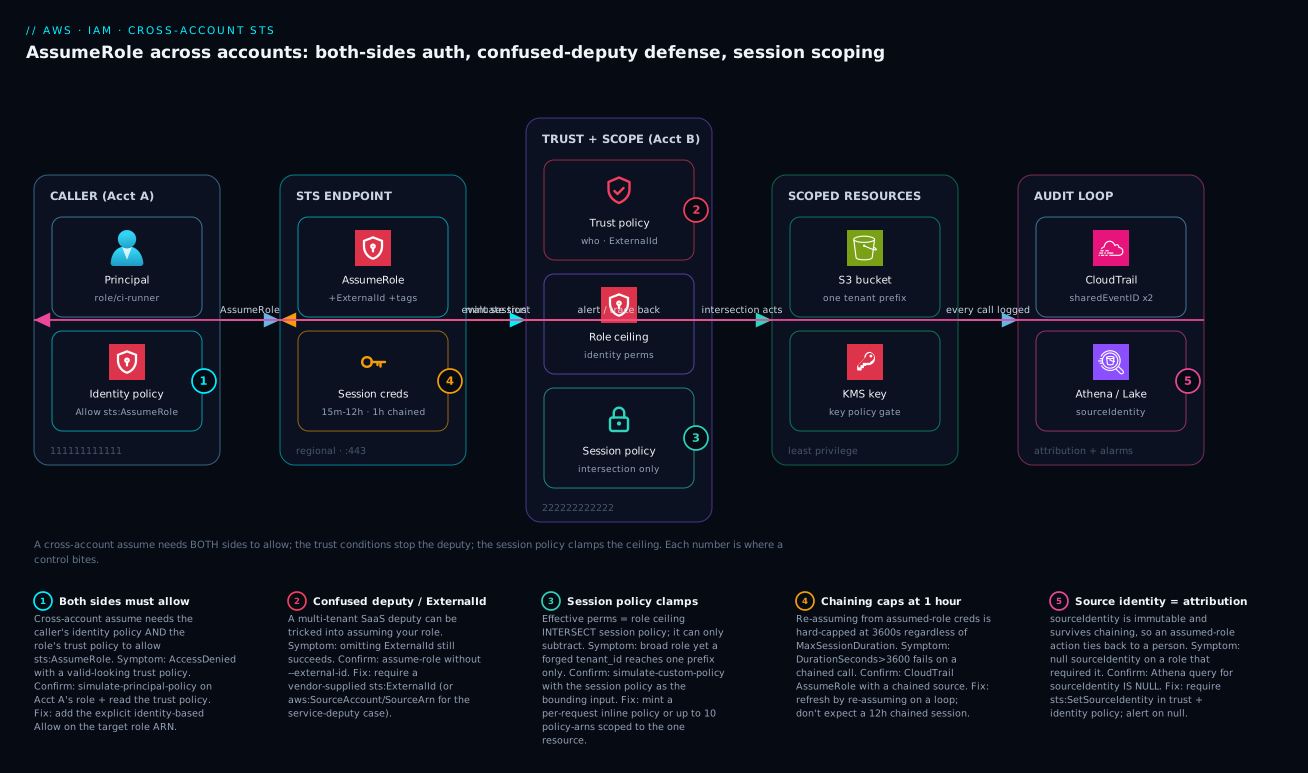
The diagram below traces a single cross-account AssumeRole from left to right and marks the five places a control bites. On the far left, the caller in Account A (111111111111) is a ci-runner role whose identity policy must carry an explicit Allow sts:AssumeRole for the target ARN — badge ① — because cross-account, unlike same-account, requires both the caller’s identity policy and the target’s trust policy to allow. The call lands on the regional STS endpoint on port 443, which evaluates the request, then mints session credentials whose lifetime is 15 minutes to 12 hours — except when chained, where it is hard-capped at one hour (badge ④).
In the centre sits the security-critical zone: the target role in Account B (222222222222). Its trust policy is the confused-deputy gate (badge ②) — for a SaaS caller it must require a vendor-supplied ExternalId; for an AWS-service caller it pins aws:SourceAccount/aws:SourceArn instead. The role’s permission policy is the ceiling, and the session policy passed at assume time clamps the effective permissions to the intersection (badge ③) — it can only subtract, which is how a broad broker role becomes a surgical, single-prefix session. From there the session reaches only its scoped resources — one tenant’s S3 prefix, a KMS key gated by its own key policy. Finally, every call is recorded in CloudTrail, where the two halves of a cross-account assume are joined by sharedEventID and the immutable sourceIdentity (badge ⑤) ties the whole chain back to a human — feeding an Athena/CloudTrail Lake query loop that closes back to the caller for alerting and forensics. Read the badges with the legend block beneath the diagram as a symptom → confirm → fix map for each control.
Real-world scenario
A platform team running a multi-tenant data product had a “report exporter” microservice in a shared services account (555555555555). On request, it assumed an ExportRole in each tenant account to read that tenant’s S3 bucket and write a signed export. The role’s permission policy granted s3:GetObject on arn:aws:s3:::* — broad by design, because the exporter served hundreds of tenants and nobody wanted per-tenant policy edits.
The constraint surfaced in a pen test: the exporter accepted a tenant_id from the incoming request and used it to build the bucket name. A crafted request with a different tenant’s ID made the service read another tenant’s bucket — a textbook confused deputy, except the deputy was their own service and the broad s3:* ceiling made the blast radius the entire fleet. ExternalId did not apply (these were internal accounts), and they could not enumerate per-tenant policies.
They fixed it with session policies plus source identity, scoping each assume to exactly the requesting tenant at mint time:
# Exporter mints a per-request session scoped to ONE tenant's bucket
aws sts assume-role \
  --role-arn "arn:aws:iam::${TENANT_ACCOUNT}:role/ExportRole" \
  --role-session-name "export-${REQUEST_ID}" \
  --source-identity "exporter-svc" \
  --duration-seconds 900 \
  --policy "{
    \"Version\":\"2012-10-17\",
    \"Statement\":[{
      \"Effect\":\"Allow\",
      \"Action\":\"s3:GetObject\",
      \"Resource\":\"arn:aws:s3:::tenant-${TENANT_ID}-exports/*\"
    }]
  }"
Because effective permissions are the intersection, the broad s3:GetObject ceiling on ExportRole was now clamped to the single bucket named in the session policy — a forged tenant_id could no longer reach any other tenant’s data, because the credentials themselves could not. They also moved each tenant’s trust policy to require aws:SourceAccount = 555555555555 so only the shared exporter (not a stray role in the tenant account) could assume ExportRole, dropped the session to 15 minutes, and added a CloudTrail alert on any ExportRole assume lacking sourceIdentity = exporter-svc. The ceiling stayed broad and edit-free; the session became surgical.
The numbers tell the story of the fix.
| Metric | Before | After |
|---|---|---|
| Effective S3 reach per session | All tenant buckets (s3:::*) |
One bucket (tenant-<id>-exports/*) |
Blast radius of a forged tenant_id |
Entire fleet | Zero (creds can’t reach others) |
Who could assume ExportRole |
Any principal naming it | Only the exporter (SourceAccount pinned) |
| Session lifetime | Default 1h | 900s |
| Attribution on a read | assumed-role/ExportRole/<req> |
sourceIdentity=exporter-svc + req id |
| Per-tenant policy edits to ship the fix | Would have been hundreds | Zero |
What made this elegant is that nothing about the role changed — no per-tenant policies, no narrowing of the ceiling that hundreds of code paths relied on. The security moved entirely into the mint step, where the exporter already knew the one tenant it was serving. That is the cross-account lesson in one paragraph: when you can’t (or won’t) narrow the role, narrow the session.
Advantages and disadvantages
The assume-role-with-session-scoping pattern is powerful but not free. The honest trade-off:
| Advantages | Disadvantages |
|---|---|
| Temporary credentials — no long-term keys to leak | More moving parts than a static key |
| Both-sides authorization gives two independent gates | Easy to misconfigure one side → AccessDenied |
| Session policies clamp without editing the role | Intersection logic is unintuitive; easy to over- or under-scope |
ExternalId/source pinning defeats the confused deputy |
ExternalId is mistaken for a secret; gives false confidence if only accepted |
| Source identity gives real, immutable attribution | Requires sts:SetSourceIdentity on every hop; easy to forget |
| ABAC via session tags scales without per-team policies | Transitive-tag rules and TagSession gating are subtle |
| CloudTrail records every assume with a join key | Without sourceIdentity, attribution is just a session name |
| Short sessions shrink the window of any leaked creds | Chaining 1-hour cap forces refresh-loop design |
When each matters: temporary credentials and short sessions matter most for high-value or internet-adjacent roles, where a leaked credential’s blast radius and lifetime dominate risk. The intersection complexity matters most for brokers, where a single scoping bug exposes many tenants. Source identity matters most where compliance demands human attribution (SOX, PCI). The chaining cap matters most for long-running batch/data jobs that naively expect a 12-hour session.
Hands-on lab
A free-tier-friendly walk-through using two accounts in one Organization (or two IAM roles in one account to simulate, where noted). You will create a target role, wire both sides, prove the negative path, and scope a session. Everything here is within Free Tier — STS, IAM, and CloudTrail management events cost nothing.
1. Set variables (run in Account A’s CLI context):
ACCT_A=111111111111   # caller
ACCT_B=222222222222   # target
ORG_ID=o-abc123example
REGION=us-east-1
2. In Account B, create the target role with a trust policy naming Account A’s role and scoping to the org:
cat > trust.json <<EOF
{ "Version":"2012-10-17",
  "Statement":[{
    "Effect":"Allow",
    "Principal":{"AWS":"arn:aws:iam::${ACCT_A}:role/ci-runner"},
    "Action":"sts:AssumeRole",
    "Condition":{"StringEquals":{"aws:PrincipalOrgID":"${ORG_ID}"}}
  }]}
EOF
aws iam create-role --role-name LabTargetRole \
  --assume-role-policy-document file://trust.json \
  --max-session-duration 3600
aws iam attach-role-policy --role-name LabTargetRole \
  --policy-arn arn:aws:iam::aws:policy/AmazonS3ReadOnlyAccess
3. In Account A, attach the identity-policy Allow to ci-runner (the half people forget):
cat > caller.json <<EOF
{ "Version":"2012-10-17",
  "Statement":[{"Effect":"Allow","Action":"sts:AssumeRole",
    "Resource":"arn:aws:iam::${ACCT_B}:role/LabTargetRole"}]}
EOF
aws iam put-role-policy --role-name ci-runner \
  --policy-name AssumeLabTarget --policy-document file://caller.json
4. Assume it and confirm the principal:
aws sts assume-role \
  --role-arn arn:aws:iam::${ACCT_B}:role/LabTargetRole \
  --role-session-name lab-1 --source-identity vinod@kloudvin.com \
  --query 'AssumedRoleUser.Arn' --output text
# Expect: arn:aws:sts::222222222222:assumed-role/LabTargetRole/lab-1
5. Prove the negative path — remove the identity Allow and watch it fail (the both-sides rule):
aws iam delete-role-policy --role-name ci-runner --policy-name AssumeLabTarget
aws sts assume-role --role-arn arn:aws:iam::${ACCT_B}:role/LabTargetRole \
  --role-session-name lab-2
# Expect: AccessDenied — trust allows it, but the caller no longer does
aws iam put-role-policy --role-name ci-runner \
  --policy-name AssumeLabTarget --policy-document file://caller.json   # restore
6. Scope a session below the ceiling — the role allows all S3 reads; clamp this session to one prefix:
aws sts assume-role --role-arn arn:aws:iam::${ACCT_B}:role/LabTargetRole \
  --role-session-name lab-scoped \
  --policy '{"Version":"2012-10-17","Statement":[{"Effect":"Allow",
    "Action":"s3:GetObject","Resource":"arn:aws:s3:::lab-bucket/scoped/*"}]}' \
  --query 'PackedPolicySize'
# Note the PackedPolicySize % in the response
7. Confirm the audit trail — find the assume in CloudTrail (management events are on by default):
aws cloudtrail lookup-events --region $REGION \
  --lookup-attributes AttributeKey=EventName,AttributeValue=AssumeRole \
  --max-results 5 \
  --query 'Events[].{time:EventTime,user:Username}' --output table
8. Teardown:
aws iam delete-role-policy --role-name ci-runner --policy-name AssumeLabTarget
aws iam detach-role-policy --role-name LabTargetRole \
  --policy-arn arn:aws:iam::aws:policy/AmazonS3ReadOnlyAccess
aws iam delete-role --role-name LabTargetRole
What each step proves, at a glance.
| Step | Demonstrates | The lesson |
|---|---|---|
| 2–3 | Both sides wired | Trust + identity Allow both required |
| 4 | Successful assume | Resulting ARN is assumed-role/.../session |
| 5 | Negative path | Removing the caller’s Allow → AccessDenied |
| 6 | Session scoping | Intersection clamps below the ceiling |
| 7 | Auditability | Every assume is recorded |
| 8 | Hygiene | Clean teardown; no lingering trust |
Common mistakes & troubleshooting
Cross-account IAM fails in a small number of recurring ways, and the symptom (AccessDenied, or worse, no denial) rarely names the cause. This is the playbook: match the symptom, run the confirm step, apply the fix.
| # | Symptom | Root cause | Confirm (exact command / path) | Fix |
|---|---|---|---|---|
| 1 | AccessDenied on assume; trust policy looks correct |
Caller’s identity policy has no Allow sts:AssumeRole |
aws iam simulate-principal-policy --policy-source-arn <caller> --action-names sts:AssumeRole --resource-arns <role> |
Add identity-based Allow on the target ARN in Acct A |
| 2 | AccessDenied; both policies look right |
Principal is a role ARN that was deleted/recreated (new internal ID) |
Re-check the ARN; recreate trust referencing current principal | Re-point Principal; avoid stale ARNs after recreate |
| 3 | SaaS role assumable without ExternalId |
Trust accepts but does not require ExternalId |
aws sts assume-role --role-arn <role> --role-session-name t (no --external-id) succeeds |
Add StringEquals sts:ExternalId to the trust Condition |
| 4 | Service-triggered assume works from any account | No aws:SourceAccount/SourceArn pin (service-deputy) |
Read the trust policy Condition; it’s absent |
Add aws:SourceAccount + ArnLike aws:SourceArn |
| 5 | Session can do more than intended | No session policy passed; full role ceiling in effect | aws sts get-caller-identity then try a too-broad action — it succeeds |
Pass --policy/--policy-arns to clamp to the intersection |
| 6 | Session policy seems ignored | Session policy tried to grant beyond the ceiling | simulate-custom-policy with role as input + session as boundary |
Remember it only subtracts; widen the role, not the session |
| 7 | Chained assume fails with DurationSeconds > 3600 |
Role-chaining 1-hour cap | CloudTrail shows the prior creds are assumed-role |
Pass --duration-seconds 3600; refresh by re-assuming |
| 8 | assumed-role creds can’t call GetSessionToken |
Assumed-role creds cannot call it (only IAM users) | The call returns an error from STS | Re-assume the role instead; don’t chain to a session token |
| 9 | sourceIdentity is null in CloudTrail |
sts:SetSourceIdentity missing on caller or trust |
Inspect both policies for the action | Grant sts:SetSourceIdentity on both sides |
| 10 | Chained assume drops the source identity | sts:SetSourceIdentity missing on the next role’s trust |
The chained assume errors or strips it | Add sts:SetSourceIdentity to every hop’s trust policy |
| 11 | ABAC works at hop 1, fails at hop 2 | Session tag is non-transitive, dropped on chaining | Inspect aws:PrincipalTag after the chain — it’s gone |
Add the key to --transitive-tag-keys |
| 12 | --tags returns AccessDenied |
Trust policy doesn’t allow sts:TagSession |
Read the trust policy for sts:TagSession |
Allow sts:TagSession in the trust policy |
| 13 | Caller can self-assign env=prod tag |
No aws:RequestTag constraint on tag values |
The privileged tag is accepted | Add aws:RequestTag/env deny/allow conditions |
| 14 | PackedPolicySize error on assume |
Inline policy + tags exceed the packed limit | Response/error references PackedPolicySize |
Move inline policy to --policy-arns; trim tags |
| 15 | Assume works in console, fails in code (or vice-versa) | Different endpoint (global vs regional) / different principal | aws sts get-caller-identity in both contexts |
Use the regional STS endpoint; align principals |
| 16 | Cross-account works, then breaks org-wide | An SCP now denies sts:AssumeRole at the OU |
aws organizations describe-effective-policy in the member account |
Adjust the SCP; remember Deny overrides everything |
| 17 | :root trust lets in more than expected |
Trust delegates to the whole other account | Principal is :root, not a specific ARN |
Name the specific role ARN; add aws:PrincipalOrgID |
| 18 | Federated assume fails with valid token | Trust Condition on aud/sub doesn’t match the IdP claim |
Decode the token; compare to trust conditions | Align the Federated principal + claim conditions |
A few of these deserve the long form.
AccessDenied despite a “correct” trust policy (#1)
This is the cross-account rite of passage. The trust policy in Account B allows your role, you can read it, it looks perfect — and you still get AccessDenied. The reason is the asymmetry: cross-account assume needs the caller’s identity policy to also allow sts:AssumeRole on that ARN. The trust policy is necessary, not sufficient. Confirm with simulate-principal-policy against the caller; if it shows implicitDeny, the missing half is on the Account A side. Add the identity-based Allow and it works.
A session policy that “doesn’t take” (#6)
Engineers write a session policy expecting it to grant something the role lacks, see it have no effect, and conclude session policies are broken. They are not — a session policy can only subtract. If the role’s ceiling doesn’t allow the action, no session policy will add it. The fix is to widen the role’s permission policy (or use a different role), then use the session policy to clamp down per request. Validate with simulate-custom-policy, treating the session policy as the bounding input: anything outside the intersection comes back implicitDeny.
The one-hour surprise (#7)
A data pipeline assumes a “runner” role from an EC2 instance, then chains to a per-tenant role for a 12-hour batch. It dies at the one-hour mark, every time, with no obvious error in the app logs. The cause is the role-chaining cap: because the second assume uses already-assumed credentials, the session is capped at one hour regardless of either role’s MaxSessionDuration. The fix is architectural — either assume the per-tenant role directly from the instance role (no chain), or let the SDK’s credential provider auto-refresh by re-assuming. Never design a chained workload around a multi-hour session.
Best practices
- Name a specific principal ARN in trust policies, not
:root, unless delegating the trust decision to the other account is a deliberate choice. Addaws:PrincipalOrgIDeven then. - Authorize both sides explicitly for every cross-account assume — the trust policy and the caller’s identity policy. Test the negative path so you know denial works.
- Require, don’t merely accept,
ExternalIdon third-party roles, and use a unique value per integration. Test that omitting it fails. - Pin
aws:SourceAccountandaws:SourceArnfor any role an AWS service assumes on your behalf — this is the service-deputy defense. - Use
aws:PrincipalOrgID(andaws:PrincipalOrgPaths) for internal “anyone in my org” trust instead of brittle account-ID allowlists. - Broker broad roles into surgical sessions with session policies; narrow the session, not the role, when the role must stay broad. Lean on the intersection.
- Set and require
--source-identityfor any role that needs human attribution, grantingsts:SetSourceIdentityon both sides (and every hop in a chain). - Mark ABAC tags transitive if they must survive chaining, gate
sts:TagSessionin trust, and constrain settable values withaws:RequestTag. - Keep sessions short (minutes for brokers), and never design a chained workload to rely on more than one hour — refresh by re-assuming.
- Make
RoleSessionNamemeaningful and alert in CloudTrail on nullsourceIdentity, off-CIDR assumes, andAccessDeniedclusters on a single role ARN. - Prefer the regional STS endpoint (
sts.<region>.amazonaws.com) for lower latency and availability isolation, and enable STS in only the regions you use. - Right-size the role’s ceiling with Access Analyzer policy generation from CloudTrail, then prove no PR broadens it with
check-no-new-access.
Security notes
Least privilege in cross-account IAM is layered: the role’s permission policy is the ceiling, the session policy clamps per request, a permission boundary on the role caps what the role can ever do, and an SCP caps the whole account — and an explicit Deny at any layer wins. Design so that the most sensitive paths require the intersection of all of them: a broad role, a tight session policy, a boundary that forbids privilege escalation, and an SCP that forbids leaving the org. The minted credentials should be the narrowest of all those ceilings combined.
Encrypt and isolate the path, not just the policy. Use the regional STS endpoint over a VPC endpoint (com.amazonaws.<region>.sts) so assume calls never traverse the public internet, and pin trust with aws:SourceVpce where the caller is in-VPC. For the resources a session touches, prefer cross-account access controlled at the resource policy (S3 bucket policy, KMS key policy) scoped to aws:PrincipalOrgID, not Principal: "*". A KMS key’s policy is itself a confused-deputy surface: a key policy that allows a broad principal can let a scoped session decrypt data it should never see — gate the key policy as tightly as the role. For the deeper key-policy mechanics see AWS KMS Encryption Deep Dive: Keys, Policies & Envelope Rotation.
Identity hygiene: never put long-term access keys where a role would do; if a workload can assume a role (EC2 instance profile, EKS IRSA/Pod Identity, Lambda execution role), it should. Require MFA (aws:MultiFactorAuthPresent) on human break-glass roles. Where a session brokers access to secrets, scope the session to the exact secret ARN and let Secrets Manager Rotation: RDS, Lambda & Cross-Account own rotation. And keep CloudTrail (with sourceIdentity) as the non-repudiable record — without it, an assumed-role action is attributable only to a session name an attacker could have chosen.
The security-layer cheat sheet:
| Layer | What it caps | Can it grant? | Deny here wins over |
Set by |
|---|---|---|---|---|
| SCP (org) | Everything in the account/OU | No | Everything below | Central security |
| Permission boundary | What the role can ever do | No | Identity policy, session | Identity admin |
| Role permission policy | The role’s ceiling | Yes | — (it’s the grant) | Resource owner |
| Session policy | This one session | No | Within the session | The broker/caller |
| Resource policy (S3/KMS) | Cross-account access to the resource | Yes (cross-acct) | Identity policy (for that resource) | Resource owner |
Cost & sizing
The good news: the cross-account machinery itself is effectively free. STS AssumeRole calls, IAM policy evaluation, trust policies, session policies, and source identity carry no direct charge. CloudTrail management events (which include AssumeRole) are recorded free on the first trail. What actually drives cost is the audit and detection layer you build on top, and the operational cost of getting the design wrong.
| Cost driver | What it is | Rough cost | How to control |
|---|---|---|---|
STS AssumeRole calls |
The assume API | Free | n/a (but watch throttling on huge volume) |
| CloudTrail management events | AssumeRole recording |
Free (first trail) | One org trail; avoid duplicate trails |
| CloudTrail data events | If you log object-level access | ~₹165 / $2 per 100k events | Log only sensitive buckets |
| CloudTrail Lake / Athena | Querying assumes for audit | Query/scan + storage | Partition by date; compress; columnar |
| S3 storage of CloudTrail logs | Long retention | ~₹2 / $0.023 per GB-month | Lifecycle to Glacier; expire |
| GuardDuty | Anomaly detection on STS | Per-event analyzed | Enable org-wide; it’s cheap per event |
| Operational cost of a breach | Over-broad role exploited | Potentially enormous | Session-scope; short sessions |
Sizing guidance is about session lifetime and refresh, not money. For a broker, mint the shortest session that completes the task (often 900s) — it shrinks the leaked-credential window at no cost. For long jobs, budget STS calls for the refresh loop (re-assuming every ~50 minutes under the chaining cap is negligible volume). Watch STS throttling only at very high concurrency (thousands of assumes/second against one role) — if you hit it, cache and reuse sessions within their validity rather than assuming per request.
| Workload shape | Recommended session length | Refresh strategy | Why |
|---|---|---|---|
| Per-request broker (exporter) | 900s | New session per request | Tiny window; surgical scope |
| Interactive human session | 1–4h (via Identity Center) | Re-auth at expiry | Balance UX vs exposure |
| CI/CD pipeline job | 1h (job length) | One assume per job | Job is short-lived anyway |
| Long batch / data pipeline | 1h (chaining cap) | SDK auto-refresh | Cap forces re-assume loop |
| Service-to-service (IRSA/Pod Identity) | up to role max | SDK auto-refresh | No human; let the SDK manage |
Free-tier note: everything in the hands-on lab — STS, IAM, CloudTrail management events, a tiny S3 bucket — sits inside Free Tier or costs pennies. There is no reason not to practise the negative-path and scoping steps in a sandbox account.
Interview & exam questions
Q1. Why does a cross-account AssumeRole need two Allows when a same-account one needs only the trust policy?
Cross-account access requires the resource-based trust policy (in the target account) and an identity-based Allow on the calling principal. Same-account, a resource-based grant alone suffices; across accounts the caller’s account must also explicitly permit the call. Missing the identity-side Allow is the most common cross-account AccessDenied. (SAP-C02, SCS-C02.)
Q2. What is the confused deputy problem and how does ExternalId solve it?
A multi-tenant deputy (e.g. a SaaS vendor) holds permission to assume roles in many customers’ accounts; an attacker who is also a customer could trick it into assuming your role. ExternalId is a per-customer value the vendor passes on every assume and your trust policy requires, so the deputy can’t be coerced into using your role without the exact value bound to you. (SCS-C02.)
Q3. ExternalId doesn’t apply to AWS-service callers. What replaces it?
aws:SourceAccount and aws:SourceArn conditions in the trust policy, which pin the owning account and exact resource ARN that may cause the service to assume the role. Services don’t pass ExternalId; the source conditions are the service-deputy defense. (SCS-C02.)
Q4. A session policy grants s3:* but the session can’t write. Why?
A session policy can only subtract — effective permissions are the intersection of the role’s ceiling and the session policy. If the role’s permission policy doesn’t allow the action, no session policy will add it. Widen the role; use the session policy to clamp down. (SAP-C02.)
Q5. How many policies can you pass at assume time, and what’s the limit signal?
Up to 10 managed-policy ARNs via --policy-arns, optionally plus one inline --policy. All are intersected with the role. The response’s PackedPolicySize (a percentage of the packed limit) warns you when the combined policies + tags are near the ceiling. (SAP-C02.)
Q6. What is the role-chaining duration cap and why does it surprise people?
Assuming a role from already-assumed credentials caps the new session at one hour, regardless of either role’s MaxSessionDuration. Teams expecting a 12-hour session for a chained batch job see it die at 60 minutes. Re-assume on a refresh loop instead. (SAP-C02, SOA-C02.)
Q7. How does source identity differ from RoleSessionName?
RoleSessionName is mutable per hop and doesn’t survive chaining; source identity is immutable for the session’s life and persists across chaining, making it usable for forensic attribution and aws:SourceIdentity access control. Setting it needs sts:SetSourceIdentity on both the caller and the trust policy. (SCS-C02.)
Q8. What makes a session tag survive role chaining, and why does it matter for ABAC?
Marking the tag key transitive (--transitive-tag-keys). Non-transitive tags are dropped at the next assume, so ABAC that worked at hop 1 silently fails at hop 2. Transitive tags also become immutable downstream. (SAP-C02.)
Q9. Which STS APIs can assumed-role credentials NOT call, and why does it matter?
GetFederationToken and GetSessionToken — both require an IAM user, not assumed-role credentials. This is another reason long-running chained workloads must refresh by re-assuming rather than minting a session token. (SCS-C02.)
Q10. How do you reconstruct who really performed a cross-account action in CloudTrail?
A cross-account assume produces one event in each account joined by the same sharedEventID; pivot from the target-account event to the calling-account event for the origin. Each downstream action carries sourceIdentity in userIdentity.sessionContext, tying it back to a human. (SCS-C02.)
Q11. An SCP could break a working cross-account assume. How?
An SCP applied to the member account/OU can Deny sts:AssumeRole (or filter it out of an allow-list SCP). Because an explicit Deny overrides every Allow, the assume fails org-wide even though both the trust and identity policies allow it. Confirm with describe-effective-policy. (SAP-C02, SCS-C02.)
Q12. When would you name :root as the trust Principal, and what’s the risk?
When you deliberately delegate the trust decision to the other account’s IAM admins (they manage who can assume). The risk is that anyone they grant sts:AssumeRole to can get in; mitigate by also requiring aws:PrincipalOrgID or a specific role-ARN pattern. (SCS-C02.)
Quick check
- You can read the target role’s trust policy and it allows your role, but the assume returns
AccessDenied. What is almost certainly missing? - A SaaS vendor’s role in your account can be assumed even when you omit
--external-id. What did you get wrong? - Your session policy adds
dynamodb:*but the session still can’t touch DynamoDB. Why? - A chained batch job dies at exactly 60 minutes. What’s the cause and the fix?
- An auditor asks who performed a delete; CloudTrail shows only
assumed-role/Deploy/i-0abc. What should you have set?
Answers
- The identity-based
Allowforsts:AssumeRoleon the caller in Account A — cross-account needs both sides, and the trust policy is only one of them. - You accepted
ExternalIdbut never required it — the trust policy lacks aStringEquals sts:ExternalIdcondition, so the assume succeeds without it. - Session policies only subtract (intersection). The role’s ceiling doesn’t allow DynamoDB, so no session policy can add it — widen the role, then clamp.
- The role-chaining one-hour cap: assuming from already-assumed creds is capped at 3600s regardless of
MaxSessionDuration. Re-assume directly (no chain) or let the SDK auto-refresh. - Source identity (
--source-identity) withsts:SetSourceIdentitygranted on both sides, so the immutable identity carries into every action and ties back to the human.
Practice challenges
Work these in order — they climb from “wire one side” to “operate the relationship.” Every account ID and ARN is a placeholder; write the policy or command first, then open the solution. Nothing here needs a live account, but all of it is runnable in a two-account sandbox.
1. (Beginner) The half everyone forgets. A role ci-runner in account 111111111111 must assume arn:aws:iam::222222222222:role/PlatformDeploy. The trust policy in 222 already allows it. Write the caller-side policy that makes the assume actually succeed.
<details> <summary>Solution</summary>
{
  "Version": "2012-10-17",
  "Statement": [{
    "Effect": "Allow",
    "Action": "sts:AssumeRole",
    "Resource": "arn:aws:iam::222222222222:role/PlatformDeploy"
  }]
}
Why: cross-account assume needs two Allows — the trust policy in 222 and this identity-based Allow on ci-runner in 111; the trust policy alone is necessary but never sufficient.
</details>
2. (Beginner) Require, don’t merely accept. A SaaS vendor (account 999999999999) needs to assume ThirdPartyScan in your account. Write a trust policy that only permits the assume when the vendor presents the External ID kloudvin-prod-7f3c9a1e.
<details> <summary>Solution</summary>
{
  "Version": "2012-10-17",
  "Statement": [{
    "Effect": "Allow",
    "Principal": { "AWS": "arn:aws:iam::999999999999:root" },
    "Action": "sts:AssumeRole",
    "Condition": {
      "StringEquals": { "sts:ExternalId": "kloudvin-prod-7f3c9a1e" }
    }
  }]
}
Why: the StringEquals sts:ExternalId condition makes the value mandatory; without it the trust would accept the ID but still allow assumes that omit it — no confused-deputy protection at all.
</details>
3. (Intermediate) Narrow the session, not the role. PlatformDeploy grants all S3 reads. Assume it for one job that must only read objects under s3://artifacts-222222222222/builds/, for 15 minutes, tagged to the request.
<details> <summary>Solution</summary>
aws sts assume-role \
  --role-arn arn:aws:iam::222222222222:role/PlatformDeploy \
  --role-session-name build-fetch-7421 \
  --duration-seconds 900 \
  --policy '{
    "Version":"2012-10-17",
    "Statement":[{
      "Effect":"Allow",
      "Action":"s3:GetObject",
      "Resource":"arn:aws:s3:::artifacts-222222222222/builds/*"
    }]
  }'
Why: the session policy is intersected with the role’s ceiling, so the effective grant collapses to exactly s3:GetObject on that one prefix — a forged path can’t reach anything else because the credentials themselves can’t.
</details>
4. (Intermediate) Defend the service deputy. A role is assumed by EventBridge on your behalf. Write a trust policy that lets events.amazonaws.com assume it, but only for rules in your account 111111111111.
<details> <summary>Solution</summary>
{
  "Version": "2012-10-17",
  "Statement": [{
    "Effect": "Allow",
    "Principal": { "Service": "events.amazonaws.com" },
    "Action": "sts:AssumeRole",
    "Condition": {
      "StringEquals": { "aws:SourceAccount": "111111111111" },
      "ArnLike": { "aws:SourceArn": "arn:aws:events:us-east-1:111111111111:rule/*" }
    }
  }]
}
Why: services don’t pass an ExternalId, so the service-deputy defense is aws:SourceAccount + aws:SourceArn — pinning which account and resource may trigger the assume, so another account’s rule can’t borrow your role.
</details>
5. (Advanced) Bind a Kubernetes workload to a role. Using IRSA, write the trust policy that lets only the payments service account in namespace prod (cluster OIDC id EXAMPLED539D4633E53DE1B71EXAMPLE, account 111111111111, us-east-1) assume the role.
<details> <summary>Solution</summary>
{
  "Version": "2012-10-17",
  "Statement": [{
    "Effect": "Allow",
    "Principal": {
      "Federated": "arn:aws:iam::111111111111:oidc-provider/oidc.eks.us-east-1.amazonaws.com/id/EXAMPLED539D4633E53DE1B71EXAMPLE"
    },
    "Action": "sts:AssumeRoleWithWebIdentity",
    "Condition": {
      "StringEquals": {
        "oidc.eks.us-east-1.amazonaws.com/id/EXAMPLED539D4633E53DE1B71EXAMPLE:aud": "sts.amazonaws.com",
        "oidc.eks.us-east-1.amazonaws.com/id/EXAMPLED539D4633E53DE1B71EXAMPLE:sub": "system:serviceaccount:prod:payments"
      }
    }
  }]
}
Why: IRSA uses AssumeRoleWithWebIdentity, and pinning both :aud and :sub scopes the role to one service account — :aud alone would let any pod in the cluster assume it.
</details>
6. (Advanced) Break glass on a leak. A PlatformDeploy session token has leaked and has 40 minutes left. You can’t wait for expiry and you must not disrupt legitimate new assumes. Kill every session already issued.
<details> <summary>Solution</summary>
{
  "Version": "2012-10-17",
  "Statement": [{
    "Sid": "AWSRevokeOlderSessions",
    "Effect": "Deny",
    "Action": "*",
    "Resource": "*",
    "Condition": {
      "DateLessThan": { "aws:TokenIssueTime": "2026-09-02T12:00:00Z" }
    }
  }]
}
Attach it as an inline policy on PlatformDeploy (this is exactly what the console’s Revoke sessions button does).
Why: STS credentials are stateless and can’t be “deleted” — a Deny gated on aws:TokenIssueTime invalidates everything issued before the timestamp, while assumes made after it get a newer issue time and keep working.
</details>
Common beginner mistakes
These are misconceptions about the model, not symptoms to look up — each is a wrong mental picture that quietly produces bad policies. The troubleshooting table above tells you how to fix a broken assume; this tells you why beginners break it in the first place.
-
“The trust policy grants what the role can do.” It doesn’t. The trust policy answers only who may assume — it has no say over what the session can touch. What the role can do comes entirely from its permission policy. Beginners edit the trust policy trying to give a role more access and nothing changes. Right model: two separate documents, one gate (trust) and one ceiling (permission).
-
“The External ID is a secret, so I’ll generate a strong random one and encrypt it.” Wrong on two counts. You don’t generate it — the vendor does, so it can bind it uniquely across their tenants; and it isn’t a credential — it rides in the clear on every API call. Its entropy is irrelevant; its requirement is everything. Right model: it defeats confusion, not theft. Paste what the vendor gives you and
StringEquals-require it. -
“A session policy will grant my session the extra permission it needs.” A session policy can only ever subtract. Effective access is the intersection of the role’s ceiling and the session policy; if the ceiling doesn’t allow the action, no session policy adds it. Right model: widen the role, then use the session policy to clamp down per request.
-
“
Principal: :rootmeans only the account’s root user.”arn:aws:iam::111111111111:rootmeans the whole account — any principal that account’s admins grantsts:AssumeRoleto, not the literal root user. Naming:rootdelegates the who-can-assume decision to the other account. Right model: name a specific role ARN unless you deliberately want that delegation, and addaws:PrincipalOrgIDeven then. -
“An
assumed-roleARN in CloudTrail tells me who did it.”assumed-role/PlatformDeploy/i-0abcis a session, not a person — andRoleSessionNameis caller-chosen and mutable per hop, so it’s a hint, not evidence. Right model: set--source-identity(immutable, survives chaining) if you ever need to answer “which human?”. -
“I set
MaxSessionDurationto 12 hours, so my chained job gets 12 hours.” The moment you assume from already-assumed credentials, the new session is hard-capped at one hour regardless of any role’sMaxSessionDuration. Right model: assume the final role directly (no chain), or let the SDK re-assume on a refresh loop — never design a long job around a chained multi-hour session.
Glossary
- Trust policy — the resource-based
AssumeRolePolicyDocumenton a role that declares who (thePrincipal) may assume it. - Permission policy — identity-based policy on a role defining what the assumed session may do (the ceiling).
sts:AssumeRole— the STS API that returns temporary credentials for a role.- AssumedRole principal — the resulting identity,
arn:aws:sts::<acct>:assumed-role/<role>/<session-name>. - ExternalId — a per-tenant value a SaaS vendor passes and your trust policy requires; the confused-deputy defense for third parties.
- Confused deputy — a privileged intermediary tricked into misusing its authority on an attacker’s behalf.
aws:PrincipalOrgID— condition key matching the calling principal’s AWS Organization; “anyone in my org” without an allowlist.aws:SourceAccount/aws:SourceArn— condition keys pinning the account/resource for a service-assumed role.- Session policy — an inline or managed-ARN policy passed at assume time; effective permissions are its intersection with the role.
PackedPolicySize— the response field reporting how full the packed session policy/tag blob is, as a percentage of the limit.- Source identity — an immutable string stamped on a session that survives role chaining; used for attribution.
- Session tag — a key/value attached to a session, usable in authorization via
aws:PrincipalTag/*. - Transitive tag — a session tag (listed in
--transitive-tag-keys) that propagates into chained sessions and becomes immutable. - Role chaining — assuming a role using credentials that themselves came from an assumed role; capped at one hour.
MaxSessionDuration— the per-role session-length ceiling (3600–43200s), ignored by the chaining cap.sharedEventID— the CloudTrail field joining the two halves (calling + target account) of a cross-account assume.- Intersection (effective permissions) — the actual access of an assumed session: the overlap of the role’s permission policy with any session policy and permission boundary; each layer can only narrow it.
- Permission boundary — an identity-attached policy that caps what a user or role can ever do; like a session policy it only subtracts, but it persists across every request rather than one session.
- Resource-based policy — a policy attached to a resource (S3 bucket, KMS key, SQS queue, Lambda) that can grant another account access directly, sometimes removing the need to assume a role at all.
AssumeRoleWithWebIdentity— the STS call for OIDC-federated callers (EKS IRSA, Cognito, mobile), authorized by an id-token’ssub/audclaims instead of AWS credentials.- IRSA (IAM Roles for Service Accounts) — EKS pattern where a pod assumes a role via
AssumeRoleWithWebIdentityagainst a per-cluster OIDC provider, scoped by the Kubernetes service-account name. - EKS Pod Identity — the newer EKS alternative to IRSA: the role trusts
pods.eks.amazonaws.comand the pod-to-role mapping is managed by the EKS API, with no per-cluster OIDC provider to register. aws:TokenIssueTime— a condition key present only on temporary credentials, holding when the session was minted; aDateLessThanDenyon it revokes older sessions.AWSRevokeOlderSessions— the conventional name of the inlineDenypolicy (what the console’s Revoke sessions button attaches) that kills every session issued before a chosen timestamp.- Regional STS endpoint —
sts.<region>.amazonaws.com, preferred over the legacy globalsts.amazonaws.com; its tokens are valid in every Region, including opt-in Regions where global-endpoint tokens are not.
Next steps
- AWS IAM Fundamentals: Users, Roles, Policies & Evaluation — the policy-evaluation model this article builds on.
- AWS IAM Least Privilege with Permission Boundaries — the other inescapable ceiling that caps every role.
- AWS Organizations SCP Guardrails & Delegated Admin — the org-wide
Denythat overrides any assume. - IAM Identity Center: Permission Sets & ABAC — human sign-in and ABAC at multi-account scale.
- IAM Access Analyzer: Unused Access & Policy Generation — right-size the role’s ceiling and prove no PR broadens it.