Most teams turn on IAM Access Analyzer, glance at the external-access findings once, and forget it exists. That leaves the three genuinely valuable capabilities on the table: continuous detection of unused access (dormant roles, stale keys, granted-but-never-used permissions), CloudTrail-driven policy generation that bootstraps least privilege from real activity, and the policy-check APIs that let you fail a pull request the moment someone widens a trust policy or adds iam:PassRole to the wrong principal. This is the build I reach for when a platform team has to make least privilege a default rather than an audit finding — and it is the difference between a SOC 2 control you can demonstrate and a spreadsheet of IAM debt nobody dares touch.
A note before the commands: Access Analyzer ships three distinct analyzer resources plus a set of stateless check APIs. They share a service namespace but solve different problems, and conflating them is the single most common reason these projects stall. The stateful analyzers watch your org and emit findings; the stateless checks gate a policy document in a pipeline and store nothing. Keep that taxonomy straight and the rest follows; blur it and you will pay per-entity charges for an analyzer you meant to run as a free pipeline check, or wait for findings that a stateless API would have returned synchronously.
By the end you will be able to stand up an org-wide analyzer from a delegated administrator account, triage external access without paging the same partner-bucket finding twice, surface dormant roles and unused permissions at fleet scale, generate a tight policy from a role’s own CloudTrail history, and wire validate-policy plus the check-* APIs into Terraform and CloudFormation so a dangerous policy never reaches an account. Because this is a reference you will return to mid-incident and mid-review, the analyzer types, the finding types, the API limits, the error reasons and the remediation paths are all laid out as scannable tables — read the prose once, then keep the tables open.
In a nutshell
Picture your AWS estate as a large building with thousands of doors. IAM Access Analyzer is the security team that does three jobs so you never have to walk every corridor by hand. First, it watches which doors can be opened by someone outside the building — a partner, another company’s account, the public internet — and tags each one (external-access findings). Second, it walks the halls looking for badges and master keys nobody has used in months — dormant roles, stale access keys, permissions granted but never exercised — and lists them so you can take them back (unused-access findings). Third, it stands at the locksmith’s counter inside your change process and inspects every new key before it is cut, refusing any that opens more doors than the old one (custom policy checks).
Why a beginner should care: on a real account, permissions only ever grow. Someone adds a wildcard “to unblock a deploy,” the ticket closes, and now a role can do far more than its job needs. Nobody dares remove access because there is no proof of what is safe to cut. Access Analyzer replaces that fear with evidence — it reads what each role actually did and can even write the tight policy for you — then it gates every future change so the wildcards cannot creep back.
The one distinction that makes everything else click: some parts watch and some parts gate. The analyzers are long-lived resources that continuously scan and store findings (the watching). The validate-policy and check-* APIs are one-shot functions you call against a policy document in a pipeline — they answer instantly and store nothing (the gating). Hold “watch versus gate” in your head and the rest of this lesson is just detail: the analyzers tell you where you are, the checks stop you from getting worse.
Level: Advanced · Time: ~73 min · You’ll want first: comfort with IAM policy evaluation (Allow beats nothing, explicit Deny beats all; identity vs resource policies; a trust policy is what makes a role assumable), the aws CLI v2, and — for the org parts — an AWS Organization with a delegated-admin (audit) account. The free, stateless check-* calls you can practise in any single account with nothing to tear down.
What problem this solves
In a real organization, IAM permissions only ever ratchet up. A pipeline breaks, someone adds Action: "*" “to unblock the deploy,” the ticket closes, and the wildcard is now load-bearing. Multiply that across sixty accounts and a few years and you have hundreds of roles carrying access nobody can justify and nobody dares remove — because removing the wrong action breaks production, and there is no evidence of which actions are safe to remove. That is the pain: not that least privilege is unknown as a principle, but that retrofitting it onto a live estate is terrifying without data.
What breaks without this: audit findings that never close (the auditor flags broad roles; you cannot prove what is unused, so you cannot trim them); a blast radius nobody has measured (a leaked key for an over-permissioned role can reach far more than its job requires); and a review process that rubber-stamps IAM PRs because a human eyeball cannot tell whether a 200-line policy grants one new dangerous action. The wildcard that lets a deployment role call iam:* is invisible in code review and catastrophic in an incident.
Who hits this: every platform, security and SRE team running a multi-account AWS org; teams under SOC 2 / PCI / FedRAMP that must demonstrate least privilege, not merely assert it; and anyone who has inherited an estate where roles accreted permissions faster than anyone removed them. The fix is almost never “write tighter policies by hand” — it is “let the service read what each role actually did, generate the tight policy, and gate every future change so the wildcards can never come back.”
To frame the whole field before the deep dive, here is every capability this article covers, the question it answers, whether it is stateful or stateless, and what it costs:
| Capability | Resource / API | What it answers | Stateful? | Cost |
|---|---|---|---|---|
| External access | ORGANIZATION / ACCOUNT analyzer |
“Which resources are reachable by a principal outside my zone of trust?” | Stateful | Free |
| Unused access | ORGANIZATION_UNUSED_ACCESS / ACCOUNT_UNUSED_ACCESS analyzer |
“Which roles, keys and permissions are granted but never used?” | Stateful | Per analyzed role/user, monthly |
| Internal access | ORGANIZATION_INTERNAL_ACCESS / ACCOUNT_INTERNAL_ACCESS analyzer |
“Which principals inside my org can reach critical resources?” | Stateful | Paid tier |
| Policy generation | start-policy-generation |
“What policy grants exactly what this role actually did?” | Stateless job | Free |
| Policy validation | validate-policy |
“Does this JSON have errors or security warnings?” | Stateless | Free |
| Custom checks | check-no-new-access, check-access-not-granted, check-no-public-access |
“Does this change grant new or forbidden access?” | Stateless | Per check |
Learning objectives
By the end of this article you can:
- Name all six analyzer
--typevalues, explain which are free versus billed-per-entity, and choose the right scope (account vs organization) for each. - Deploy an
ORGANIZATIONexternal-access analyzer and anORGANIZATION_UNUSED_ACCESSanalyzer from a delegated administrator account, with deliberateunusedAccessAgeandexclusions. - Triage external-access findings with archive rules so known-good cross-account access never pages anyone twice, and route only genuinely new findings to your SOC via EventBridge.
- Surface and remediate the three unused-finding classes (
UnusedIAMRole,UnusedIAMUserAccessKey/Password,UnusedPermission) at fleet scale, and track the count as a privilege-reduction KPI. - Generate a least-privilege policy from a role’s CloudTrail history with
start-policy-generation, and explain exactly what that policy misses and how to converge it. - Wire
validate-policyinto CI to fail onERRORandSECURITY_WARNING, and addcheck-no-new-access/check-access-not-granted/check-no-public-accessas relative and absolute guardrails. - Run the checks against the rendered Terraform/CloudFormation document before apply, and prove the gate actually fails with a negative test.
Prerequisites & where this fits
You should already understand IAM policy evaluation: that a request is allowed only if an explicit Allow matches and no explicit Deny does, that identity policies, resource policies, permission boundaries and SCPs all participate, and that a trust policy is what makes a role assumable. If that chain is fuzzy, read IAM Fundamentals: Users, Roles, Policies & Evaluation first; the boundary/SCP ceiling mechanics live in IAM Least Privilege with Permission Boundaries. You should be comfortable running aws CLI v2, reading JSON output, and have an AWS Organization with a delegated administrator pattern — the management account should delegate security tooling to an audit account, as set up in AWS Organizations, SCPs & Delegated Admin.
This sits in the Identity & Governance track. It assumes the org foundation from AWS Control Tower Multi-Account Landing Zone and pairs tightly with CloudWatch & CloudTrail Observability, because policy generation reads from a CloudTrail trail and finding routing flows through EventBridge. Do not confuse this service with the similarly named VPC Network Access Analyzer / Reachability Analyzer covered in Network Reachability & Access Analyzer — that one reasons about network paths, this one reasons about IAM access.
A quick map of who owns what during a least-privilege program, so you escalate to the right person:
| Layer | What lives here | Who usually owns it | What it controls in this build |
|---|---|---|---|
| Management account | Org root, delegated-admin registration | Cloud platform / org admins | Where you register-delegated-administrator |
| Delegated admin (audit) account | The analyzers, archive rules, findings | Security / GRC team | All stateful findings land here |
| Member accounts | The roles, keys, resource policies being analyzed | App / workload teams | The entities that generate findings |
| CI/CD pipelines | Terraform/CFN, the check-* calls |
Platform / DevOps | Where stateless gates run pre-apply |
| Trail + EventBridge | CloudTrail history, finding events | Observability / SecOps | Generation source + finding routing |
| SOC / ticketing | Triaged, escalated findings | Security operations | Consumes only genuinely-new findings |
Core concepts
Five mental models make every later command obvious.
Stateful analyzers watch; stateless checks gate. An analyzer is a long-lived resource that continuously evaluates your account or org and stores findings. The validate-policy and check-* APIs are stateless functions: you call them against a JSON document, they return an answer, nothing is persisted. Almost everything below is these two halves working together — the analyzers tell you where you are (broad, unused access today), and the checks stop you from getting worse (a PR that widens access). Reach for an analyzer when you want continuous detection; reach for a check when you want a build gate.
External, unused and internal are three separate resources. There is no combined analyzer. External access answers “who outside my zone of trust can reach this?” and is free, so leave it on forever. Unused access answers “what is granted but idle?” and is billed per analyzed IAM role and user per month, so you deploy it deliberately and prune what it watches. Internal access answers “who inside my org can reach this critical resource?” and is a paid tier you enable for crown-jewel monitoring. Mixing them up is how you either pay for analysis you did not intend or wait for findings the wrong analyzer will never produce.
The valid --type values are a closed set. Straight from the service model, the only legal analyzer types are: ACCOUNT, ORGANIZATION, ACCOUNT_UNUSED_ACCESS, ORGANIZATION_UNUSED_ACCESS, ACCOUNT_INTERNAL_ACCESS, ORGANIZATION_INTERNAL_ACCESS. An ORGANIZATION-scoped analyzer automatically covers existing and future member accounts — you never enumerate them. Account-scoped analyzers see only their own account. There is no --type for “unused + external”; deploy one of each.
A finding is a fact, not a verdict. Access Analyzer flags access that crosses your zone of trust or sits unused — it does not know your intent. A bucket policy granting a partner account access is expected external access; the service flags it because it is external, and your job is to mark it intended (an archive rule). The discipline is: archive rules absorb the known-good, EventBridge escalates the genuinely new, and nobody triages the same finding twice.
Generation is a floor, checks are a ceiling. start-policy-generation reads a role’s CloudTrail history and writes the smallest policy that would have permitted what the role did — a floor you build up from reality instead of guessing. The check-* APIs encode what a policy must never grant — a ceiling you enforce in CI. The generated floor plus the unused-access feedback loop converges far faster than authoring by hand; the ceiling makes the improvement permanent. Neither alone is enough: generation can undershoot (it only sees the trail window), and a valid policy can still be too broad.
The vocabulary in one table
Pin down every moving part before the deep sections; the glossary repeats these for lookup, this table is the model side by side:
| Concept | One-line definition | Where it lives | Why it matters |
|---|---|---|---|
| Analyzer | Stateful resource that emits findings | Delegated admin account | The thing you pay for / leave on |
| Zone of trust | Your account or org boundary | Implicit per analyzer scope | External = crosses it |
| Finding | One detected access fact | Stored on the analyzer | Triaged, archived, or escalated |
| Archive rule | Auto-archives matching findings | On the analyzer | Absorbs known-good; cuts noise |
unusedAccessAge |
Idle days before an entity is flagged | Unused-analyzer config | Noise & relevance lever |
exclusions |
Accounts/tags the unused analyzer skips | Unused-analyzer analysisRule |
Cost & signal lever |
validate-policy |
Stateless lint of a policy doc | Called in CI | Catches malformed + dangerous |
check-no-new-access |
Fails if a policy grants new access | Called in CI | Relative guardrail |
check-access-not-granted |
Fails if a policy grants forbidden access | Called in CI | Absolute guardrail |
check-no-public-access |
Fails if a resource policy is public | Called in CI | Resource-policy guardrail |
start-policy-generation |
Async job: CloudTrail → policy | Triggered ad hoc | Bootstraps least privilege |
| Delegated administrator | The account that runs org analyzers | Audit/security account | Not the management account |
The analyzer types and the check APIs, end to end
Before any setup, internalize the full surface area. The external/unused/internal analyzers are stateful resources that continuously evaluate and emit findings; the validate-policy and check-* APIs are stateless functions you call against a document in a pipeline — no analyzer required, no findings stored. Here is every analyzer type with its scope, what it produces, and the cost model:
--type value |
Scope | Finding types it produces | Cost model | Leave on permanently? |
|---|---|---|---|---|
ACCOUNT |
Single account | ExternalAccess |
Free | Yes |
ORGANIZATION |
Whole org (auto future accts) | ExternalAccess |
Free | Yes (one per org) |
ACCOUNT_UNUSED_ACCESS |
Single account | UnusedIAMRole, UnusedIAMUserAccessKey, UnusedIAMUserPassword, UnusedPermission |
Per analyzed role/user / month | Deliberately, with exclusions |
ORGANIZATION_UNUSED_ACCESS |
Whole org | Same four unused types | Per analyzed role/user / month | Deliberately, with exclusions |
ACCOUNT_INTERNAL_ACCESS |
Single account | InternalAccess |
Paid tier | For crown-jewel resources |
ORGANIZATION_INTERNAL_ACCESS |
Whole org | InternalAccess |
Paid tier | For crown-jewel resources |
And here is the stateless half — the validate/check APIs, what each takes, what it returns, and the one job it owns:
| API | Input | Returns | The one job it owns | Needs an analyzer? |
|---|---|---|---|---|
validate-policy |
One policy doc + --policy-type |
List of findings (ERROR, SECURITY_WARNING, WARNING, SUGGESTION) |
Lint: malformed + dangerous patterns | No |
check-no-new-access |
Existing doc + new doc + reference | PASS / FAIL + reasons |
Block any new access vs the old policy | No |
check-access-not-granted |
One doc + --access list |
PASS / FAIL + message |
Block specific forbidden actions/resources | No |
check-no-public-access |
One resource policy + resource type | PASS / FAIL |
Block a resource policy that is public | No |
start-policy-generation |
Principal ARN + trail details | jobId (async) |
Build a policy from real CloudTrail activity | No (reads a trail) |
When you have a policy document in hand, this is the lookup for which tool applies to it — match the document you’re reviewing to the analysis it deserves:
| You have a… | validate-policy type |
Relevant check(s) | Relevant analyzer |
|---|---|---|---|
| Identity policy (role/user/group) | IDENTITY_POLICY |
check-no-new-access, check-access-not-granted |
Unused-access (for the role) |
Trust policy (AssumeRolePolicyDocument) |
RESOURCE_POLICY |
check-no-new-access (widening) |
External-access |
| S3 bucket / KMS key / SQS policy | RESOURCE_POLICY |
check-no-public-access |
External-access, internal-access |
| Service Control Policy (SCP) | SERVICE_CONTROL_POLICY |
— (validate syntax) | — |
| Resource Control Policy (RCP) | RESOURCE_CONTROL_POLICY |
— (validate syntax) | — |
| Secrets Manager secret policy | RESOURCE_POLICY |
check-no-public-access |
External-access |
The six finding types you will filter on, mapped to the analyzer that produces each and the remediation it implies:
| Finding type | Produced by | Means | Default remediation |
|---|---|---|---|
ExternalAccess |
External analyzer | A principal outside your zone of trust can reach a resource | Archive if intended; else scope the resource policy |
UnusedIAMRole |
Unused analyzer | A role unassumed within unusedAccessAge |
Confirm last_used, then delete |
UnusedIAMUserAccessKey |
Unused analyzer | A long-lived access key idle past the window | Deactivate, then delete |
UnusedIAMUserPassword |
Unused analyzer | A console password idle past the window | Disable console access |
UnusedPermission |
Unused analyzer | A used role with actions/services it never touched | Trim the policy to the used set |
InternalAccess |
Internal analyzer | An in-org principal can reach a monitored critical resource | Verify intent; tighten if unexpected |
The service-level limits worth knowing before you design the rollout — these are the boundaries that shape how many analyzers you run and how you scope them:
| Limit / quota | Value | Why it matters |
|---|---|---|
| Analyzers of one type per account/region | 1 | You can’t run two ORGANIZATION external analyzers — one covers the org |
unusedAccessAge range |
1–365 days | Below ~30 floods you with on-call/quarterly noise |
| Org analyzer member coverage | All current + future accounts | No enumeration; new accounts auto-join |
| Generation source | 1 CloudTrail trail per job | The trail must already cover your window |
| Findings retention | Persisted on the analyzer until resolved/archived | Archive (don’t delete) to keep the audit trail |
Resource types for check-no-public-access |
S3, S3 AP, SQS, KMS, Secrets, SNS, and more | Identity policies are out of scope for this check |
| Billing unit (unused) | Per analyzed role and user, per month | Exclusions reduce both cost and noise |
A recurring theme in the findings — especially external access — is the condition key that turns a “public” grant into an org-scoped one. The keys you’ll add to resource policies to clear false external findings and close the real exposure:
| Condition key | Scopes access to… | Clears which finding | Typical placement |
|---|---|---|---|
aws:PrincipalOrgID |
Any principal in your org | External access from your own org accounts | S3/KMS/SQS resource policies |
aws:PrincipalOrgPaths |
Principals under a specific OU path | Over-broad in-org access | Resource policies for OU-scoped sharing |
aws:SourceAccount |
A specific calling account | Confused-deputy cross-service access | Service resource policies |
aws:SourceArn |
A specific source resource | Over-broad service-to-service grants | SNS/SQS/KMS policies |
aws:PrincipalTag/<k> |
Principals carrying a tag (ABAC) | Tag-mismatched access | Identity + resource policies |
1. Deploy an organization analyzer with delegated administration
Run Access Analyzer from a delegated administrator account (your security/audit account), not the management account. That account then sees external-access findings for every member account in one place, and you keep the management account clean of day-to-day tooling. First, register the delegated admin from the management account — once:
# From the Organizations management account, once.
aws organizations register-delegated-administrator \
  --service-principal access-analyzer.amazonaws.com \
  --account-id 222222222222   # your security/audit account
Now, in the delegated admin account, create the organization-scoped external-access analyzer. An ORGANIZATION analyzer automatically covers existing and future member accounts — you do not enumerate them:
aws accessanalyzer create-analyzer \
  --analyzer-name org-external-access \
  --type ORGANIZATION \
  --tags Team=security,ManagedBy=terraform
External-access findings are free, so leave that analyzer on permanently. The unused-access analyzer is billed per analyzed IAM role and user per month, so its configuration is where cost and signal live. Set the tracking window (unusedAccessAge, in days) and use exclusions to skip break-glass roles and sandbox accounts you never want flagged:
aws accessanalyzer create-analyzer \
  --analyzer-name org-unused-access \
  --type ORGANIZATION_UNUSED_ACCESS \
  --configuration '{
    "unusedAccess": {
      "unusedAccessAge": 90,
      "analysisRule": {
        "exclusions": [
          { "accountIds": ["333333333333"] },
          { "resourceTags": [ { "break-glass": "true" } ] }
        ]
      }
    }
  }'
unusedAccessAge: 90 means an entity must be idle for 90 days before it is reported, which kills the noise from quarterly jobs and on-call roles. The exclusions block is your cost and signal lever: exclude a whole sandbox account by accountIds, or exclude tagged roles by resourceTags. Every knob on these two analyzers, with its default, range and the trade-off you are making:
| Setting | Applies to | Default | Valid range / values | When to change | Trade-off / gotcha |
|---|---|---|---|---|---|
--type |
Both | none (required) | The six legal types | Per analyzer purpose | Wrong type = wrong findings or surprise billing |
--analyzer-name |
Both | none (required) | 1–255 chars, unique per account | Always | Name is the handle for archive rules |
unusedAccessAge |
Unused | 90 | 1–365 days | Lower for tight estates; higher to cut noise | Too low floods you with on-call/quarterly roles |
exclusions.accountIds |
Unused | none | Member account IDs | Skip sandboxes / dev accounts | Excluded accounts are not billed either |
exclusions.resourceTags |
Unused | none | Tag key/value pairs | Skip break-glass, service-linked roles | Tags must actually be set on the roles |
--tags |
Both | none | Up to 50 tags | Always (ownership, IaC) | Drives your own cost allocation |
| Region | Both | per-call | Any enabled region | Per-region IAM-resource coverage | Findings are regional for non-global resources |
Codify all of this in Terraform so the org analyzer is reproducible and reviewable:
resource "aws_accessanalyzer_analyzer" "org_external" {
  analyzer_name = "org-external-access"
  type          = "ORGANIZATION"
}

resource "aws_accessanalyzer_analyzer" "org_unused" {
  analyzer_name = "org-unused-access"
  type          = "ORGANIZATION_UNUSED_ACCESS"

  configuration {
    unused_access {
      unused_access_age = 90
      analysis_rule {
        exclusion {
          account_ids = ["333333333333"]
        }
        exclusion {
          resource_tags = [{ "break-glass" = "true" }]
        }
      }
    }
  }
}
Account-scoped versus organization-scoped is a deliberate choice, not a default — here is how they differ on every axis that matters:
| Axis | ACCOUNT / ACCOUNT_UNUSED_ACCESS |
ORGANIZATION / ORGANIZATION_UNUSED_ACCESS |
|---|---|---|
| Coverage | Only the account it lives in | Every member account, current and future |
| Where you create it | Any account | The delegated admin (or management) account |
| New accounts | Not covered automatically | Covered automatically on join |
| Findings location | That account | Centralized in the delegated admin account |
| Best for | A single sensitive account, or pre-org pilots | The standard org-wide deployment |
| Quota | 1 analyzer per type per account/region | 1 org analyzer per type per org |
2. Triage external-access findings with archive rules
List the live, unresolved external-access findings with list-findings-v2 — the current API, the one that understands all six finding types:
ANALYZER_ARN=$(aws accessanalyzer list-analyzers \
  --query "analyzers[?name=='org-external-access'].arn" --output text)

aws accessanalyzer list-findings-v2 \
  --analyzer-arn "$ANALYZER_ARN" \
  --filter '{"status":{"eq":["ACTIVE"]},"findingType":{"eq":["ExternalAccess"]}}' \
  --query 'findings[].{Resource:resource,Type:resourceType,Principal:principal,Action:action}' \
  --output table
The --filter object is the same vocabulary for list-findings-v2, archive rules, and EventBridge patterns — learn the keys once and reuse them everywhere. The ones you reach for most:
| Filter key | Matches | Operators | Example use |
|---|---|---|---|
status |
Finding state | eq |
{"status":{"eq":["ACTIVE"]}} — hide archived |
findingType |
One of the six types | eq |
Isolate UnusedPermission only |
resourceType |
e.g. AWS::S3::Bucket |
eq |
Triage by resource class |
principal.AWS |
The external principal | eq, contains |
Whitelist a partner account |
resource |
The resource ARN | eq, contains |
Pin one shared bucket/key |
condition |
Conditions on the grant | exists |
Accept org-scoped grants |
error |
Findings the analyzer couldn’t resolve | exists |
Surface, never auto-archive |
createdAt / updatedAt |
Finding timestamps | eq, contains |
Window a triage sweep |
A finding is not automatically a problem. A bucket policy that grants a partner account access is expected external access; Access Analyzer flags it because it crosses your zone of trust, and your job is to mark it intended. Do that with an archive rule so the finding never pages anyone again — an archive rule auto-archives matching findings, current and future, that you have decided are acceptable:
# Auto-archive any external access granted to our known partner account.
aws accessanalyzer create-archive-rule \
  --analyzer-name org-external-access \
  --rule-name trusted-partner-444 \
  --filter '{"principal.AWS":{"contains":["444444444444"]}}'
For a one-off finding you have reviewed, archive it directly instead of writing a rule:
aws accessanalyzer update-findings \
  --analyzer-name org-external-access \
  --status ARCHIVED \
  --ids "ab-1234abcd-..."
A finding moves through three states; knowing what drives each transition keeps your triage honest:
| Status | Meaning | How it gets there | What you do |
|---|---|---|---|
ACTIVE |
Live, unresolved access | New finding, or access still present | Triage: archive if intended, else fix |
ARCHIVED |
Reviewed, accepted | update-findings or an archive rule match |
Nothing — it won’t page you again |
RESOLVED |
The underlying access is gone | You removed the grant; analyzer re-scans | Confirm and move on |
Archive rules are filters; the fields you can match on (and the operators) decide how surgical your rule is:
| Filter key | Matches on | Example operator | Use it to… |
|---|---|---|---|
principal.AWS |
The external principal ARN/account | contains |
Whitelist a known partner account |
resource |
The resource ARN | eq / contains |
Accept a specific shared bucket/key |
resourceType |
e.g. AWS::S3::Bucket |
eq |
Accept a whole resource class |
condition |
Conditions on the grant | exists |
Accept access gated by aws:PrincipalOrgID |
error |
Findings the analyzer couldn’t fully evaluate | exists |
Surface (not archive) evaluation errors |
Route everything else to your SOC. Access Analyzer emits findings to EventBridge and, if enabled, Security Hub. An EventBridge rule that fires only on new active findings keeps the noise down:
{
  "source": ["aws.access-analyzer"],
  "detail-type": ["Access Analyzer Finding"],
  "detail": {
    "status": ["ACTIVE"]
  }
}
Wire that rule to SNS or a Lambda that opens a ticket. The two delivery channels are not interchangeable — pick by what the consumer needs:
| Channel | Latency | Best consumer | What it carries | Note |
|---|---|---|---|---|
| EventBridge | Near-real-time (per event) | Lambda, SNS, ticketing automation | The individual finding event | Filter on status=ACTIVE to cut noise |
| Security Hub | Aggregated (control view) | Central security dashboards | Findings as ASFF, alongside other tools | Enable the integration explicitly |
The pattern that works: archive rules absorb the known-good, EventBridge escalates the genuinely new, and nobody triages the same partner-bucket finding twice. The decision table for any external-access finding that lands:
| If the finding is… | It’s probably… | Do this |
|---|---|---|
| Access to a partner account you intended | Expected external access | Archive rule on principal.AWS |
Gated by aws:PrincipalOrgID to your own org |
Not really external | Archive rule on the condition |
| A public S3/SQS/KMS grant you didn’t intend | A real exposure | Fix the resource policy; do not archive |
| A new principal you don’t recognize | Genuinely new, unreviewed | Let EventBridge escalate to the SOC |
Flagged with an error |
Something the analyzer couldn’t fully resolve | Investigate manually; never blanket-archive |
3. Surface dormant roles and unused permissions at scale
The unused-access analyzer is where the real cleanup lives. Pull its findings the same way, filtered to the unused types:
UNUSED_ARN=$(aws accessanalyzer list-analyzers \
  --query "analyzers[?name=='org-unused-access'].arn" --output text)

aws accessanalyzer list-findings-v2 \
  --analyzer-arn "$UNUSED_ARN" \
  --filter '{"status":{"eq":["ACTIVE"]},
             "findingType":{"eq":["UnusedIAMRole","UnusedPermission","UnusedIAMUserAccessKey"]}}' \
  --max-results 50
Three buckets come back and each has a different remediation, a different confirmation step, and a different blast radius if you get it wrong:
| Finding type | What it is | Confirm before acting | Remediation | Risk if wrong |
|---|---|---|---|---|
UnusedIAMRole |
A role nobody assumed in your window | aws iam get-role → RoleLastUsed |
Delete the role | Break a rare/seasonal consumer |
UnusedIAMUserAccessKey |
A stale long-lived key | aws iam get-access-key-last-used |
Deactivate, then delete | Break a forgotten integration |
UnusedIAMUserPassword |
An idle console password | Last-console-login in the cred report | Disable console access | Lock out a rarely-used human |
UnusedPermission |
A used role with untouched actions | get-finding-v2 for the action list |
Trim the policy to used actions | Over-trim → access-denied at runtime |
UnusedPermission is the most common type at scale and your richest right-sizing signal — a role that is used, but carries actions or whole services it has never touched. For an UnusedPermission finding, get-finding-v2 returns the specific unused services and actions so you can trim the policy precisely:
aws accessanalyzer get-finding-v2 \
  --analyzer-arn "$UNUSED_ARN" \
  --id "ab-5678efgh-..." \
  --query 'findingDetails'
The exact IAM calls that corroborate a finding before you act on it — never delete on the finding alone:
| To confirm… | Run | Look for | Safe to act when… |
|---|---|---|---|
| A role is truly dormant | aws iam get-role --role-name R --query Role.RoleLastUsed |
Empty or a very old LastUsedDate |
No use within (and beyond) your window |
| A key is truly stale | aws iam get-access-key-last-used --access-key-id AK... |
LastUsedDate absent or old |
Deactivate first; delete after a soak |
| A console password is idle | aws iam generate-credential-report then get-credential-report |
Old password_last_used |
Disable console access |
| Which actions are unused | aws accessanalyzer get-finding-v2 --id ... |
The unused services/actions list | You’ve removed exactly those |
| Nothing still assumes a role | CloudTrail LookupEvents for AssumeRole |
No recent events | After the soak period passes |
At fleet scale you do not click through these. Export findings on a schedule, join them against your IaC, and open one PR per owning team that strips the unused actions. The remediation order matters — confirm-before-delete is the rule that keeps you from turning a cleanup into an incident:
| Step | UnusedIAMRole | UnusedPermission | UnusedIAMUserAccessKey |
|---|---|---|---|
| 1. Confirm | RoleLastUsed is empty/old |
get-finding-v2 lists the unused actions |
get-access-key-last-used is old/never |
| 2. Stage | Detach from anything referencing it | Draft the trimmed policy in a PR | Deactivate the key (reversible) |
| 3. Soak | Watch for assume attempts | Watch for new access-denied |
Watch dependent jobs for failures |
| 4. Remove | Delete the role | Apply the trimmed policy | Delete the key |
| 5. Prove | Finding moves to RESOLVED |
UnusedPermission count drops |
Finding moves to RESOLVED |
The measurable outcome is the count of UnusedPermission findings trending toward zero release over release — that is your privilege-reduction KPI, a number you can put on a slide. Pull the aggregate without paging through individual findings:
aws accessanalyzer get-findings-statistics --analyzer-arn "$UNUSED_ARN"
4. Generate a least-privilege policy from CloudTrail activity
When you are building a policy rather than trimming one, do not guess the actions. Have Access Analyzer read the role’s CloudTrail history and write the policy for you. You need a CloudTrail trail (the service reads from it) and a service role it can assume to do so:
aws accessanalyzer start-policy-generation \
  --policy-generation-details '{"principalArn":"arn:aws:iam::111111111111:role/data-pipeline"}' \
  --cloud-trail-details '{
    "trails": [
      { "cloudTrailArn":"arn:aws:cloudtrail:us-east-1:111111111111:trail/org-trail",
        "regions":["us-east-1","eu-west-1"] }
    ],
    "accessRole":"arn:aws:iam::111111111111:role/AccessAnalyzerCloudTrailReader",
    "startTime":"2026-03-01T00:00:00Z",
    "endTime":"2026-06-01T00:00:00Z"
  }'
The call returns a jobId. Generation is asynchronous; poll it, then fetch the result once it succeeds:
JOB=ab-1111-2222-...   # jobId from the start call

aws accessanalyzer get-generated-policy --job-id "$JOB" \
  --query 'jobDetails.status'   # IN_PROGRESS | SUCCEEDED | FAILED | CANCELED

aws accessanalyzer get-generated-policy --job-id "$JOB" \
  --query 'generatedPolicyResult.generatedPolicies[0].policy' \
  --output text > data-pipeline-generated.json
The inputs to a generation job, what each does, and the gotcha that makes jobs fail or undershoot:
| Field | What it does | Required | Gotcha |
|---|---|---|---|
principalArn |
The role/user to profile | Yes | Must be in the same account as the call |
trails[].cloudTrailArn |
The trail to read history from | Yes | A trail must already exist and cover the window |
trails[].regions |
Which regions’ events to include | Yes | Miss a region → miss that region’s actions |
accessRole |
Role Access Analyzer assumes to read the trail | Yes | Needs cloudtrail/s3 read on the trail bucket |
startTime / endTime |
The activity window | Yes | Window > activity period → still misses rare jobs |
A generation job ends in exactly one of four states; here is what each means and your next move:
jobDetails.status |
Meaning | Next move |
|---|---|---|
IN_PROGRESS |
Still reading the trail | Poll again; large windows take minutes |
SUCCEEDED |
Policy is ready | get-generated-policy → save the JSON |
FAILED |
Couldn’t complete | Check jobError; usually the access role or trail |
CANCELED |
You (or the service) canceled it | Re-submit with corrected inputs |
Treat the output as a starting point, not a finished artifact. Access Analyzer can only see actions that appear in CloudTrail, so a three-month window misses anything that runs less often — and it omits actions CloudTrail does not log at all. The known blind spots, and what to do about each:
| Blind spot | Why it happens | Mitigation |
|---|---|---|
| Rare / seasonal actions | Outside the trail window | Use a longer window; reconcile by hand |
| Actions CloudTrail doesn’t log | Some data-plane calls aren’t recorded | Add them manually from known requirements |
| Resource-level ARNs | Generation favors broad resources | Tighten Resource after generation |
Conditions / aws:PrincipalOrgID |
Not inferred from activity | Add conditions yourself |
| First run after a change | New code paths not yet exercised | Generate after a representative period |
Use the generated policy to replace a wildcard, then watch for new UnusedPermission findings (which tell you it is still too broad) and for access-denied errors in the workload (which tell you it is too narrow). The generated document plus the unused-access feedback loop converges far faster than authoring by hand — generation gives you the floor, the unused analyzer proves the trim, and access-denied tells you when you cut too deep.
5. Validate policies in CI/CD and fail on security warnings
validate-policy is stateless — no analyzer, no findings store — so it belongs directly in your pipeline. It returns four findingType values; the gate you want is: fail the build on any ERROR or SECURITY_WARNING, surface the rest as annotations:
aws accessanalyzer validate-policy \
  --policy-type IDENTITY_POLICY \
  --policy-document file://policy.json \
  --query "findings[?findingType=='ERROR' || findingType=='SECURITY_WARNING']" \
  --output json
The four finding types, what each means, and exactly how to treat it in a pipeline:
findingType |
Meaning | Example | CI action |
|---|---|---|---|
ERROR |
The policy is malformed / won’t work | Invalid action name, bad JSON, wrong key | Fail the build |
SECURITY_WARNING |
Valid but dangerous | Privilege-escalation PassRole, effectively-public resource |
Fail the build |
WARNING |
Likely a mistake, not dangerous | Deprecated global condition key | Annotate; review |
SUGGESTION |
Style / tightening hint | Empty statement, redundant action | Annotate; optional |
SECURITY_WARNING is the one that earns its keep: it flags things like a policy that lets a principal escalate its own privileges (PassRole paired with a service that can assume any role), or a resource policy that is effectively public. Set --policy-type correctly, because the rule set differs per type:
--policy-type |
Validates a… | Typical source | Rule-set focus |
|---|---|---|---|
IDENTITY_POLICY |
Identity (user/role/group) policy | aws_iam_role_policy, managed policies |
Action validity, priv-esc, wildcards |
RESOURCE_POLICY |
Resource policy | S3 bucket, KMS key, SQS policy | Public access, cross-account principals |
SERVICE_CONTROL_POLICY |
An SCP | Organizations SCP | SCP-specific syntax + effect rules |
RESOURCE_CONTROL_POLICY |
An RCP (data perimeter) | Organizations RCP | RCP-specific syntax + effect rules |
A GitHub Actions step that blocks the merge:
- name: Validate IAM policies
  run: |
    fail=0
    for f in $(git diff --name-only origin/main... | grep 'policies/.*\.json$'); do
      echo "::group::validate $f"
      findings=$(aws accessanalyzer validate-policy \
        --policy-type IDENTITY_POLICY \
        --policy-document "file://$f" \
        --query "findings[?findingType=='ERROR' || findingType=='SECURITY_WARNING']" \
        --output json)
      echo "$findings"
      [ "$(echo "$findings" | jq 'length')" -gt 0 ] && fail=1
      echo "::endgroup::"
    done
    exit $fail
This catches the malformed and the dangerous before either reaches an account. It does not, on its own, stop a valid policy that simply grants too much — that is the next section.
6. Custom policy checks as automated guardrails
Two stateless APIs let you encode organizational intent as a build gate. Both return a plain PASS or FAIL.
check-no-new-access compares a proposed policy against the current one and fails if the change grants any access that did not exist before. You express your guardrail as a reference policy describing the access you are watching for. This is the check for “trust policies must not widen” and “nobody adds a new wildcard.” You supply the existing document, the new document, and a reference of access deltas you refuse to allow:
aws accessanalyzer check-no-new-access \
  --policy-type IDENTITY_POLICY \
  --existing-policy-document file://existing.json \
  --new-policy-document file://proposed.json \
  --query '{Result:result, Reasons:reasons}'
# Result: FAIL  -> the proposed policy grants access the existing one did not
check-access-not-granted is an absolute assertion, independent of any “before” state: it fails if the policy grants a specific action or resource you have declared off-limits. This is how you enforce “no policy in this repo may ever grant iam:CreateAccessKey” or “nothing may delete the audit bucket.” You pass the access list inline:
aws accessanalyzer check-access-not-granted \
  --policy-type IDENTITY_POLICY \
  --policy-document file://proposed.json \
  --access '[{"actions":["iam:CreateAccessKey","iam:DeleteRolePermissionsBoundary","organizations:LeaveOrganization"]}]' \
  --query '{Result:result, Message:message}'
# Result: PASS  -> none of the forbidden actions are granted
You can scope --access to actions, resources, or both: actions-only checks whether the policy permits any of those actions on any resource; adding resources narrows it to those ARNs. The three checks side by side — relative versus absolute is the distinction that decides which one you reach for:
| Check | Question | Needs a “before” doc? | Guardrail type | Typical use |
|---|---|---|---|---|
check-no-new-access |
“Does the change grant access the old one didn’t?” | Yes (existing + new) | Relative | Trust-policy widening, no new wildcard |
check-access-not-granted |
“Does it grant any forbidden action/resource?” | No | Absolute | Priv-esc set, crown-jewel resources |
check-no-public-access |
“Would this resource policy be public?” | No | Absolute (resource) | S3/SQS/KMS/Secrets resource policies |
The output schema is small but you must parse it correctly to wire a reliable gate:
| Field | Type | Meaning | How CI uses it |
|---|---|---|---|
result |
PASS / FAIL |
The verdict | FAIL → exit non-zero |
reasons[] |
List | Which statements caused a FAIL (no-new-access) |
Surface in the PR comment |
message |
String | Human-readable summary | Log it for the reviewer |
check-no-public-access evaluates a resource policy for an S3 bucket, SQS queue, KMS key, Secrets Manager secret and similar types, and fails if it would be public — drop it into the same pipeline for any resource-policy change. The resource types it understands:
| Resource type | --resource-type value |
Common public-exposure trap |
|---|---|---|
| S3 bucket | AWS::S3::Bucket |
Principal:"*" without an org/account condition |
| S3 access point | AWS::S3::AccessPoint |
Inherited broad bucket policy |
| SQS queue | AWS::SQS::Queue |
Cross-account send left wide open |
| KMS key | AWS::KMS::Key |
Key policy granting kms:* to * |
| Secrets Manager secret | AWS::SecretsManager::Secret |
Resource policy without a principal condition |
| SNS topic | AWS::SNS::Topic |
Public subscribe/publish |
Maintain one shared list of forbidden actions (the IAM privilege-escalation set, plus your own crown-jewel resources) and run check-access-not-granted against every policy in every pipeline. check-no-new-access is the relative guardrail; check-access-not-granted is the absolute one. Together they are a far stronger gate than validate-policy alone, because they reason about what the policy grants, not just whether it is well-formed. A starter forbidden-actions set, with why each belongs on the list:
| Forbidden action(s) | Why it’s dangerous | Category |
|---|---|---|
iam:*, iam:CreateAccessKey |
Mint credentials / self-escalate | Privilege escalation |
iam:PassRole (unscoped) |
Hand a service a more-powerful role | Privilege escalation |
iam:PutRolePolicy, iam:AttachRolePolicy |
Grant yourself more access | Privilege escalation |
iam:UpdateAssumeRolePolicy |
Widen who can assume a role | Privilege escalation |
iam:DeleteRolePermissionsBoundary |
Remove the inescapable ceiling | Boundary bypass |
organizations:LeaveOrganization, organizations:* |
Escape org-level SCP control | Org integrity |
s3:DeleteBucket on the audit bucket |
Destroy the evidence trail | Crown-jewel protection |
kms:ScheduleKeyDeletion on a CMK |
Make encrypted data unrecoverable | Crown-jewel protection |
7. Embed the checks in Terraform/CloudFormation pipelines
The leverage is running these against the policy your IaC is about to apply, before apply. With Terraform, render the plan to JSON, extract the policy documents, and check each one. A pre-apply gate:
terraform plan -out=tf.plan
terraform show -json tf.plan > plan.json

# Pull every IAM policy document the plan will create or update.
jq -r '
  .resource_changes[]
  | select(.type=="aws_iam_policy" or .type=="aws_iam_role_policy")
  | select(.change.actions | index("create") or index("update"))
  | .change.after.policy
' plan.json > /tmp/policies.ndjson

while IFS= read -r doc; do
  echo "$doc" > /tmp/p.json
  res=$(aws accessanalyzer check-access-not-granted \
    --policy-type IDENTITY_POLICY \
    --policy-document file:///tmp/p.json \
    --access "$(cat forbidden-actions.json)" \
    --query 'result' --output text)
  echo "check-access-not-granted => $res"
  [ "$res" = "FAIL" ] && exit 1
done < /tmp/policies.ndjson
For CloudFormation, run the same checks against the rendered template’s policy resources in the change-set stage, before execute-change-set. The principle holds across both — the check runs on the exact document about to be deployed, and a FAIL stops the deploy. Where each gate slots into each pipeline:
| Pipeline stage | Terraform | CloudFormation | Gate that runs |
|---|---|---|---|
| Author | local edit | local edit | validate-policy on saved .json |
| Plan / change-set | terraform plan -out → show -json |
create-change-set → get-template |
check-access-not-granted, check-no-new-access |
| Resource-policy diff | aws_s3_bucket_policy etc. in plan |
resource-policy resources in template | check-no-public-access |
| Apply / execute | terraform apply |
execute-change-set |
(blocked if any check FAILed) |
| Post-apply | drift detection | drift detection | analyzers re-scan, findings update |
Keep forbidden-actions.json in a shared repo so every pipeline enforces one definition of “never.” Choosing where to enforce is itself a decision — each control point has a different reach and failure mode:
| Enforcement point | Reach | Catches | Misses |
|---|---|---|---|
validate-policy in CI |
One repo’s policies | Malformed + dangerous patterns | Valid-but-too-broad |
check-* in CI |
One repo’s policies | New / forbidden / public access | Out-of-band console changes |
| SCP / RCP at the org | Every principal in the OU | Anything the SCP denies, always | Things you didn’t think to deny |
| Permission boundary | Every role a team creates | Unbounded role creation | Resource policies |
| Unused analyzer (detective) | The whole org, continuously | Drift after the fact | Doesn’t block, only reports |
Finally, close the loop on measurement. Snapshot the unused-access findings count on a schedule and chart it; get-findings-statistics gives you the aggregates without paging through individual findings. A downward trend in UnusedPermission and UnusedIAMRole counts is the proof that the policy-generation and right-sizing loop is working — and it is the metric to report up, not the raw finding list.
The full operational surface in one place — every command you actually run, in roughly the order you’d run them, with what it’s for and where it executes:
| Command | What it does | Where you run it | Notes |
|---|---|---|---|
organizations register-delegated-administrator |
Delegate Access Analyzer to the audit account | Management account, once | Service principal access-analyzer.amazonaws.com |
accessanalyzer create-analyzer |
Create an external/unused/internal analyzer | Delegated admin account | One per --type |
accessanalyzer list-analyzers |
List analyzers + status/ARN | Delegated admin account | Capture the ARN for finding calls |
accessanalyzer list-findings-v2 |
List findings with a --filter |
Delegated admin account | The v2 API; understands all six types |
accessanalyzer get-finding-v2 |
Detail one finding (unused actions) | Delegated admin account | Drives precise UnusedPermission trims |
accessanalyzer create-archive-rule |
Auto-archive matching findings | Delegated admin account | Absorbs known-good external access |
accessanalyzer update-findings |
Archive/unarchive specific finding IDs | Delegated admin account | One-off triage |
accessanalyzer start-policy-generation |
Async: CloudTrail → policy | Same account as the principal | Returns a jobId |
accessanalyzer get-generated-policy |
Poll status / fetch the policy | Same account | Status + generatedPolicies[0].policy |
accessanalyzer validate-policy |
Lint a policy document | Any account / CI | Free, stateless |
accessanalyzer check-no-new-access |
Block access a new policy adds | Any account / CI | Relative guardrail |
accessanalyzer check-access-not-granted |
Block forbidden actions/resources | Any account / CI | Absolute guardrail |
accessanalyzer check-no-public-access |
Block a public resource policy | Any account / CI | Resource policies only |
accessanalyzer get-findings-statistics |
Aggregate finding counts | Delegated admin account | Source of the KPI |
Architecture at a glance
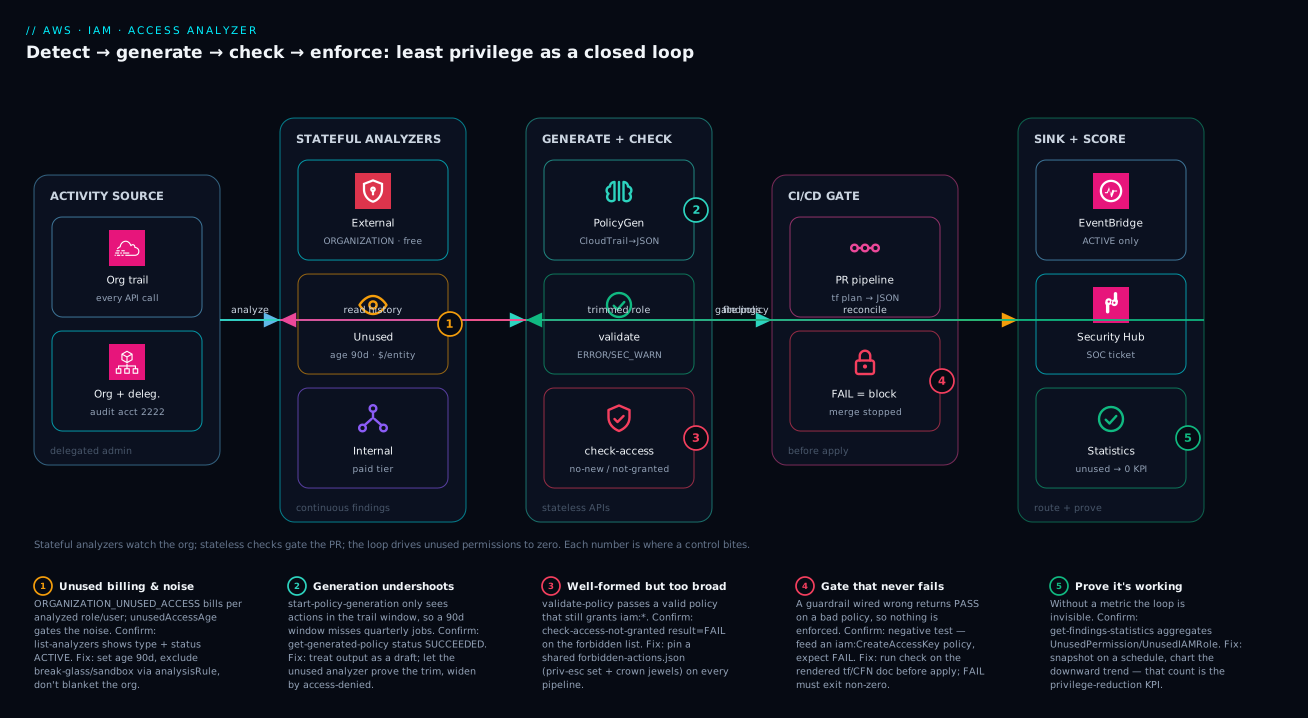
The diagram traces least privilege as a closed loop, left to right, the way the system actually runs. On the far left sits the activity source: an organization CloudTrail trail in the delegated-admin (audit) account, account 222222222222, capturing every API call across the org. That feeds two things in parallel. It feeds the stateful analyzers — the free ORGANIZATION external-access analyzer, the billed-per-entity ORGANIZATION_UNUSED_ACCESS analyzer (age 90 days), and the paid internal-access analyzer — which continuously emit findings. And it feeds the stateless generate-and-check zone, where start-policy-generation reads the trail and writes a draft policy, validate-policy lints it, and check-access-not-granted/check-no-new-access assert the guardrails. Those checks are the gate inside the CI/CD zone: a Terraform plan is rendered to JSON, every policy document is checked, and a FAIL blocks the merge before apply. On the right, the sink and score zone routes only ACTIVE findings through EventBridge to Security Hub and a SOC ticket, and get-findings-statistics charts the UnusedPermission count toward zero — the KPI that proves the whole loop is working.
Follow the two dashed feedback arrows, because they are the point. The CI/CD gate sends a trimmed role back into the analyzers (the generated, checked policy replaces a wildcard, and the unused analyzer confirms the trim). And the findings sink sends reconcile signals back to generation (a new UnusedPermission says “still too broad,” an access-denied says “too narrow”). Five numbered badges mark where a control bites or a project stalls: the unused analyzer’s billing-and-noise lever (badge 1), generation undershooting its window (badge 2), a well-formed-but-too-broad policy that only check-access-not-granted catches (badge 3), a gate that silently returns PASS (badge 4), and the statistics call that turns invisible progress into a number (badge 5). Read the legend as symptom · how to confirm · fix for each.
Real-world scenario
Meridian Pay, a fintech platform team, ran a 60-account AWS organization with a recurring, embarrassing audit finding: dozens of CI/CD deployment roles carried Action: "*" or broad service wildcards “to unblock pipelines,” and the count only grew quarter over quarter. Hand-trimming was hopeless — every trim risked breaking a deploy, so nobody trimmed, and the SOC 2 Type II auditor had flagged “excessive IAM permissions” two cycles running. The team was four platform engineers; the deadline was eleven weeks out.
The constraint was hard and explicit: they could not break a single production pipeline, and they had to demonstrate improvement, not assert it. They started by standing up the two org analyzers in their audit account (222222222222) via the delegated-admin pattern, with the unused analyzer set to unusedAccessAge: 90 and exclusions for their three sandbox accounts and every break-glass:true-tagged role — which immediately cut the billed entity count by about a third and silenced the on-call-role noise. Day one, the ORGANIZATION_UNUSED_ACCESS analyzer reported 312 UnusedPermission findings across the deployment roles.
The fix combined the generation and check halves. For each deployment role they ran start-policy-generation over a 90-day CloudTrail window to get a real action list, then replaced the wildcards with the generated documents in a staging account first, and let the unused analyzer confirm the trim by watching UnusedPermission findings drop on those roles. Generation undershot exactly where the docs warn it would — three roles had quarter-end reporting jobs that fell outside the window — so they reconciled those by hand from the runbooks, guided by access-denied errors in staging. Then they added one non-negotiable gate to every IaC pipeline so the wildcards could never come back:
# Pipeline guardrail: deployment-role policies may never grant a bare service wildcard
# on IAM or Organizations, and may never grant privilege-escalation actions.
aws accessanalyzer check-access-not-granted \
  --policy-type IDENTITY_POLICY \
  --policy-document file://rendered-role-policy.json \
  --access '[
    {"actions":["iam:*"]},
    {"actions":["organizations:*"]},
    {"actions":["iam:CreateAccessKey","iam:PassRole","iam:PutRolePolicy",
                "iam:AttachRolePolicy","iam:UpdateAssumeRolePolicy"]}
  ]' \
  --query 'result' --output text   # FAIL blocks the merge
The one mistake that cost them a day: the first version of the gate logged the result but never checked the exit code, so a PR adding iam:PassRole passed. They caught it only because a teammate ran the negative test from the runbook — feed a known-bad policy, expect FAIL — and got PASS. After fixing the script to exit 1 on FAIL, they made that negative test a required step in the pipeline itself, so a mis-wired gate can never ship again.
Over the quarter the UnusedPermission finding count fell from 312 to 41 — roughly 87% — the audit finding closed with the get-findings-statistics trend chart as evidence, and the part the team cared about: not one pipeline broke, because every trim was backed by observed activity and every regression was blocked at the PR. The generation API gave them a safe starting policy; the check API made the improvement permanent; and the negative test made the gate trustworthy.
The program as a timeline, because the order of moves is the lesson:
| Week | State | Action | Effect |
|---|---|---|---|
| 0 | 312 UnusedPermission, audit open |
Stand up org analyzers, set exclusions | Billed entities −⅓; noise gone; baseline captured |
| 1–2 | Baseline known | start-policy-generation per role (90d window) |
Draft least-privilege policies in hand |
| 3–5 | Drafts ready | Apply in staging; watch unused findings drop | Trims proven safe; 3 roles need hand-reconcile |
| 5 | Gate added | check-access-not-granted in every pipeline |
Wildcards blocked — but gate mis-wired |
| 6 | Gate “passing” everything | Negative test from runbook returns PASS |
Bug caught; add exit 1; make test mandatory |
| 7–10 | Rollout to prod | Promote trimmed policies; chart the KPI | Count 312 → 41 (−87%) |
| 11 | Audit review | Present get-findings-statistics trend |
Finding closed; zero pipelines broken |
Advantages and disadvantages
Access Analyzer turns least privilege from an assertion into a measured, gated process — but it has real edges you must design around. Weigh it honestly:
| Advantages | Disadvantages |
|---|---|
| Generation reads actual CloudTrail activity, so trims are evidence-backed, not guesses | Generation only sees the trail window — rare/seasonal actions are missed and must be reconciled by hand |
| The unused analyzer gives a quantitative privilege-reduction KPI you can chart and report | Unused analysis is billed per analyzed role/user/month — blanket-enabling the org is needlessly expensive |
Stateless check-* APIs gate a PR before anything reaches an account |
A check that isn’t exit-coded correctly silently passes — a guardrail that never fails isn’t one |
validate-policy catches malformed and dangerous (priv-esc) policies in CI, free |
validate-policy alone won’t stop a valid policy that simply grants too much |
| Org analyzers auto-cover current and future member accounts — no enumeration | Findings are a fact, not a verdict; expected external access still needs manual archiving |
| External-access detection is free and continuous — leave it on forever | Internal-access analysis is a paid tier; scope it to crown jewels, not everything |
| Archive rules + EventBridge mean a finding is triaged once, then automated | CloudTrail doesn’t log every action, so a generated policy can be subtly too narrow |
The service is right for any org that has to retrofit least privilege onto a live estate and prove it — the generation/feedback loop converges far faster than hand-authoring, and the checks make the gains permanent. It bites hardest when teams blanket-enable unused analysis without exclusions (a cost surprise), trust a generated policy as final (subtly too narrow), or wire a check whose failure path never exits non-zero (a guardrail that never fails). Every disadvantage is manageable — with deliberate scoping, hand reconciliation, and a mandatory negative test — which is the entire point of running this as a program rather than a one-time scan.
Hands-on lab
Prove the stateless half end to end — validate-policy, check-access-not-granted, check-no-new-access — with nothing but the CLI and local JSON files. Every call here is free and needs no analyzer, so there is nothing to tear down beyond a temp directory. Run in any account where you can call accessanalyzer.
Step 1 — Set up a workspace and a deliberately dangerous policy.
mkdir -p /tmp/aa-lab && cd /tmp/aa-lab
cat > bad.json <<'JSON'
{"Version":"2012-10-17","Statement":[
  {"Effect":"Allow","Action":"iam:CreateAccessKey","Resource":"*"}]}
JSON
cat > star.json <<'JSON'
{"Version":"2012-10-17","Statement":[
  {"Effect":"Allow","Action":"*","Resource":"*"}]}
JSON
Step 2 — validate-policy flags the star policy. Expect at least one SECURITY_WARNING or WARNING:
aws accessanalyzer validate-policy \
  --policy-type IDENTITY_POLICY --policy-document file://star.json \
  --query "findings[].findingType" --output text
# Expected: SECURITY_WARNING (and possibly WARNING) — never empty
Step 3 — check-access-not-granted FAILS on the forbidden action (the negative test). This is the single most important assertion in the whole build:
aws accessanalyzer check-access-not-granted \
  --policy-type IDENTITY_POLICY --policy-document file://bad.json \
  --access '[{"actions":["iam:CreateAccessKey"]}]' \
  --query 'result' --output text
# Expected: FAIL  (if this returns PASS, your gate is not wired correctly)
Step 4 — Prove the gate also PASSES a clean policy. A guardrail that fails everything is as useless as one that fails nothing:
cat > good.json <<'JSON'
{"Version":"2012-10-17","Statement":[
  {"Effect":"Allow","Action":["s3:GetObject"],"Resource":"arn:aws:s3:::reports/*"}]}
JSON
aws accessanalyzer check-access-not-granted \
  --policy-type IDENTITY_POLICY --policy-document file://good.json \
  --access '[{"actions":["iam:CreateAccessKey"]}]' \
  --query 'result' --output text
# Expected: PASS
Step 5 — check-no-new-access catches a widening. Compare a tight existing policy against a proposed one that adds an action:
cat > existing.json <<'JSON'
{"Version":"2012-10-17","Statement":[
  {"Effect":"Allow","Action":["s3:GetObject"],"Resource":"arn:aws:s3:::reports/*"}]}
JSON
cat > proposed.json <<'JSON'
{"Version":"2012-10-17","Statement":[
  {"Effect":"Allow","Action":["s3:GetObject","s3:DeleteObject"],"Resource":"arn:aws:s3:::reports/*"}]}
JSON
aws accessanalyzer check-no-new-access \
  --policy-type IDENTITY_POLICY \
  --existing-policy-document file://existing.json \
  --new-policy-document file://proposed.json \
  --query '{Result:result, Reasons:reasons}'
# Expected: Result FAIL — proposed grants s3:DeleteObject that existing did not
Validation checklist. You linted a dangerous policy (validate-policy), proved the absolute gate fails on a forbidden action and passes on a clean one (check-access-not-granted), and proved the relative gate catches a widening (check-no-new-access) — the exact three calls that make a CI guardrail. Each step mapped to what it proves:
| Step | Call | Expected | What it proves |
|---|---|---|---|
| 2 | validate-policy on star.json |
SECURITY_WARNING |
Lint catches the dangerous-but-valid |
| 3 | check-access-not-granted on bad.json |
FAIL |
The negative test: gate actually blocks |
| 4 | check-access-not-granted on good.json |
PASS |
The gate doesn’t block everything |
| 5 | check-no-new-access widening |
FAIL |
Relative guardrail catches a delta |
Cleanup.
rm -rf /tmp/aa-lab
Cost note. Every call in this lab is a free, stateless API — total cost is ₹0. To exercise the stateful analyzers, create an ACCOUNT external analyzer (also free) in a sandbox; only the unused and internal analyzers carry charges, which is why they stay out of a free-tier lab.
Common mistakes & troubleshooting
This is the playbook — the part you bookmark. First as a scannable table, then the entries that bite hardest expanded with the exact confirm command.
| # | Symptom | Root cause | Confirm (exact command) | Fix |
|---|---|---|---|---|
| 1 | The CI gate PASSes a policy that grants iam:* |
Script logs result but never checks it / no exit 1 |
Run the negative test: bad policy → expect FAIL, got PASS |
[ "$res" = "FAIL" ] && exit 1; make the negative test mandatory |
| 2 | Surprise monthly Access Analyzer bill | Unused analyzer enabled org-wide with no exclusions |
aws accessanalyzer list-analyzers shows *_UNUSED_ACCESS; check entity count |
Add exclusions for sandboxes + break-glass; or scope to key accounts |
| 3 | Generated policy causes AccessDenied in prod |
Generation window missed a rare/seasonal action | App logs show AccessDenied; action not in data-pipeline-generated.json |
Add the action by hand; widen the window; reconcile from runbooks |
| 4 | start-policy-generation job ends FAILED |
accessRole can’t read the trail bucket, or wrong trail ARN |
get-generated-policy --job-id → read jobError |
Grant the access role s3/cloudtrail read; fix the trail ARN |
| 5 | Same partner-bucket finding pages the SOC weekly | No archive rule; EventBridge fires on all findings | list-findings-v2 shows it ACTIVE repeatedly |
Archive rule on principal.AWS; filter EventBridge to status=ACTIVE |
| 6 | create-analyzer returns ValidationException on --type |
Typo or invented type (e.g. UNUSED, EXTERNAL) |
Compare against the six legal --type values |
Use exactly ORGANIZATION_UNUSED_ACCESS etc. |
| 7 | Org analyzer created but sees no member accounts | Created in a non-delegated account, or delegation missing | aws organizations list-delegated-administrators |
register-delegated-administrator; create in that account |
| 8 | validate-policy returns nothing for an SCP |
Wrong --policy-type (used IDENTITY_POLICY) |
Re-run with --policy-type SERVICE_CONTROL_POLICY |
Match the policy type to the document |
| 9 | check-no-new-access always FAILs on first apply |
No existing policy, so everything is “new” | The role/policy doesn’t exist yet in the plan | Use check-access-not-granted for net-new; reserve no-new-access for edits |
| 10 | Unused analyzer flags a break-glass role you need | The role isn’t tagged/excluded | list-findings-v2 shows the role; tag is absent |
Tag it break-glass:true and add to exclusions |
| 11 | check-no-public-access errors on an identity policy |
It only evaluates resource policies | You passed an identity policy / wrong resource type | Use it only on S3/SQS/KMS/Secrets resource policies |
| 12 | UnusedPermission count won’t drop after trimming |
Trimmed in code but never applied, or wrong account | get-findings-statistics flat; diff applied vs repo |
Apply the change; confirm you trimmed the live role |
The expanded form for the entries that cost the most time:
1. The CI gate passes a policy that obviously grants too much.
Root cause: The pipeline step calls check-access-not-granted but only logs the result — it never inspects the value or exits non-zero on FAIL, so the dangerous policy merges.
Confirm: Run the negative test from your runbook — feed a policy granting iam:CreateAccessKey and assert the script exits non-zero. If it exits 0, the gate is decorative.
Fix: res=$(... --query 'result' --output text); [ "$res" = "FAIL" ] && exit 1. Then make that negative test a required pipeline step so a mis-wired gate can never ship.
2. An unexpected Access Analyzer line item on the bill.
Root cause: ORGANIZATION_UNUSED_ACCESS (or the account variant) is billed per analyzed IAM role and user per month; enabling it across a 60-account org with thousands of roles and no exclusions analyzes — and bills for — every one.
Confirm: aws accessanalyzer list-analyzers shows a *_UNUSED_ACCESS type; the bill scales with org role/user count.
Fix: Add exclusions for sandbox accountIds and break-glass/service-linked roles via resourceTags; excluded entities are not billed. If you only need a few sensitive accounts, use ACCOUNT_UNUSED_ACCESS there instead of org-wide.
3. A generated policy is too narrow and breaks the workload.
Root cause: start-policy-generation only sees actions present in the trail window; a job that runs monthly or quarterly falls outside a 90-day window and is omitted, plus some actions CloudTrail never logs.
Confirm: The workload logs AccessDenied for an action not present in the generated JSON.
Fix: Add the missing action by hand, widen the generation window to cover the longest cadence, and reconcile known-rare actions from runbooks. Treat generation as a floor you build up from, watching access-denied as the signal you cut too deep.
4. The generation job fails outright.
Root cause: The accessRole lacks read on the CloudTrail S3 bucket, or the cloudTrailArn/regions are wrong.
Confirm: aws accessanalyzer get-generated-policy --job-id "$JOB" → read jobDetails.jobError.
Fix: Grant the access role cloudtrail/s3:GetObject on the trail bucket and prefix; verify the trail ARN and that its regions cover the role’s activity.
5. The SOC keeps getting paged for the same accepted finding.
Root cause: No archive rule absorbs the known-good, and the EventBridge rule fires on every finding rather than only new ACTIVE ones.
Confirm: list-findings-v2 --filter '{"status":{"eq":["ACTIVE"]}}' shows the same finding repeatedly.
Fix: Create an archive rule keyed on principal.AWS (or the condition); scope the EventBridge pattern to detail.status = ACTIVE so only genuinely new findings escalate.
Best practices
- Run analyzers from the delegated admin account, never the management account. Keep org tooling out of the root account; centralize findings in your audit account.
- Leave external-access on forever; deploy unused-access deliberately. External is free and continuous. Unused is billed per entity — set
unusedAccessAgeandexclusionsbefore you flip it on org-wide. - Use exclusions as your cost-and-signal lever. Exclude sandbox
accountIdsand break-glass/service-linked roles by tag — it cuts both the bill and the noise. - Generate, don’t guess. Bootstrap every new role’s policy from
start-policy-generationover a representative CloudTrail window, then tighten — never start from a wildcard. - Treat a generated policy as a floor, not a finished artifact. Reconcile rare actions by hand, widen on
AccessDenied, and let the unused analyzer prove the trim. - Run
validate-policyin CI and fail onERRORandSECURITY_WARNING. It is free, stateless, and catches both malformed and dangerous policies before they ship. - Layer relative and absolute checks.
check-no-new-accessgates widening;check-access-not-grantedenforces a shared forbidden-actions list;check-no-public-accessguards resource policies. Use all three. - Maintain one
forbidden-actions.jsonfor the whole org. The IAM privilege-escalation set plus your crown-jewel resources, enforced identically in every pipeline. - Run checks on the rendered IaC document, before
apply/execute-change-set. Check the exact policy about to be deployed, not the HCL/template source. - Make a negative test mandatory in every pipeline. Feed a known-bad policy and assert
FAIL— a guardrail that never fails is not a guardrail. - Archive the known-good, escalate only the new. Archive rules absorb expected external access; EventBridge (filtered to
ACTIVE) routes genuinely new findings to the SOC. - Chart the KPI. Snapshot
get-findings-statisticson a schedule and trendUnusedPermission/UnusedIAMRoledownward — that is the number you report up.
Security notes
- Least privilege for the tooling itself. The
accessRolethat generation assumes needs only read access to the CloudTrail bucket and prefix — not broads3:*. Scope it tightly; it is a role that reads your entire audit history. - Protect the audit trail and findings. The CloudTrail bucket and the analyzer findings are your evidence. Put
s3:DeleteBucketon the trail bucket andkms:ScheduleKeyDeletionon its CMK into your forbidden-actions list so no policy can destroy them. - Don’t archive what you can’t explain. Archiving a finding marks it accepted forever. Only archive external access you can justify (a named partner, an org-scoped condition); never blanket-archive findings carrying an
error. - Prefer org-scoped conditions over wildcards in resource policies. Gate cross-account grants with
aws:PrincipalOrgIDrather thanPrincipal:"*"; this both removes the external-access finding and closes the real exposure. - Treat the forbidden-actions list as a security control under change management. Adding or removing an entry changes what every pipeline blocks — review it like any other guardrail, in a PR.
- Combine the detective and preventive layers. Access Analyzer is detective (findings) and CI-preventive (checks); pair it with SCPs/RCPs and permission boundaries so the same intent is also enforced at the org and role-creation level — see Resource Control Policies & Data Perimeters.
- Guard the secret and key surfaces too. Run
check-no-public-accesson Secrets Manager and KMS resource policies, not just S3 — a public key policy is as dangerous as a public bucket. The deep mechanics live in KMS Encryption Deep Dive and Secrets Manager & Parameter Store.
The controls that both secure and operationalize this build — they pull in the same direction:
| Control | Mechanism | Secures against | Also enables |
|---|---|---|---|
Tight accessRole |
Scoped s3/cloudtrail read |
Over-broad audit-history access | Reliable, least-priv generation |
| Forbidden-actions list | check-access-not-granted |
Priv-esc + crown-jewel destruction | One org-wide definition of “never” |
| Org-scoped conditions | aws:PrincipalOrgID in resource policies |
Genuine external exposure | Clears the false external finding |
check-no-public-access |
Resource-policy gate | Public S3/SQS/KMS/Secrets | Catches exposure pre-deploy |
| SCP / RCP + boundaries | Org + role-creation ceilings | Out-of-band console widening | Defense in depth beyond CI |
| Archive-rule discipline | Justified, named rules only | Silently accepting real exposure | Clean, trustworthy finding queue |
Cost & sizing
The bill is dominated by exactly one thing, and the rest is free — which makes sizing mostly a scoping exercise:
- Unused-access analysis is the only material charge. It is billed per analyzed IAM role and user, per month. The cost scales with how many entities the analyzer watches, which is precisely why
exclusions(sandbox accounts, break-glass roles) is a cost lever, not just a noise lever. - External-access analysis is free — one
ORGANIZATIONanalyzer covers the whole org at no charge, so there is no reason not to run it permanently. - Internal-access analysis is a paid tier — scope it to crown-jewel resources (the audit bucket, production KMS keys, regulated data stores), not the whole estate.
- Every stateless API is free —
validate-policy, all threecheck-*calls, andstart-policy-generationcarry no per-call charge, so you can run them on every PR and every plan without cost anxiety. - The indirect cost is engineering time, not AWS spend: triaging findings, reconciling generated policies, and maintaining the forbidden-actions list. Budget that as program time, and the KPI (falling
UnusedPermissioncount) is what justifies it.
A rough monthly picture for a 60-account org: external analyzer ₹0; unused analyzer billed on, say, 1,500 analyzed entities after exclusions (a small per-entity rate that you confirm against current pricing for your region); internal analyzer scoped to a couple dozen crown-jewel resources; and ₹0 for all the CI checks. The cost drivers and how to control each:
| Cost driver | Billed on | Control lever | Watch-out |
|---|---|---|---|
| Unused-access analyzer | Per analyzed role/user/month | exclusions (accounts + tags); scope to key accounts |
Org-wide with no exclusions = the surprise bill |
| Internal-access analyzer | Paid tier | Limit to crown-jewel resources | Don’t enable estate-wide “just in case” |
| External-access analyzer | Free | — | None — leave it on |
validate-policy / check-* |
Free | — | None — run on every PR |
start-policy-generation |
Free | — | Time cost is reconciliation, not money |
| Engineering time | Your team | Automate triage; archive rules; KPI dashboard | The real cost; justify with the KPI |
Going deeper
Everything above is operational — the commands you run and the tables you keep open mid-incident. This section is what happens beneath those commands: why the findings are trustworthy, where they lag, and the edges that only bite at scale. Read it once so the service’s answers stop feeling like magic.
Automated reasoning: external-access findings are proven, not pattern-matched
External-access findings and check-no-new-access are not string diffs or regex heuristics. Under the hood Access Analyzer uses automated reasoning — the provable-security technology AWS has publicly described as Zelkova — to translate a policy into logical formulas and hand them to an SMT (satisfiability-modulo-theories) solver. The solver reasons over every possible request the policy could receive, not a handful of examples. A finding is therefore a mathematical statement — “there exists a principal outside the zone of trust for whom this resource policy evaluates to Allow” — and it is complete for the modeled request space.
Two consequences you can lean on:
- Refactors don’t move the answer. Because the reasoning is over the semantic access set, reordering statements, collapsing or expanding a wildcard, or swapping
NotActionfor an explicit list does not change the finding as long as the set of allowed requests is identical. This is exactly whycheck-no-new-accesscan returnPASSon a cosmetic rewrite yetFAILon a “narrower-looking” policy that admits one extra request. It compares meaning, not text. - You cannot hide a grant. There is no obfuscation that produces a false “safe” verdict. If the solver cannot prove that access is not external, it surfaces the case — frequently as a finding carrying an
error, which is your signal to investigate manually and never blanket-archive. Contrast that with a naive scanner, which is only as good as its pattern list.
| Property | Naive pattern scan | Access Analyzer (automated reasoning) |
|---|---|---|
| Basis | Matches known-bad shapes | Solves over all possible requests |
| Refactor-stable? | No — cosmetic edits fool it | Yes — reasons on the access set |
| False “safe” verdicts | Common (novel shapes slip through) | None in the modeled space; unknowns become error findings |
| Same engine also powers | — | S3 Block Public Access reasoning, the IAM console policy check |
The last-accessed data behind unused findings
The unused-access analyzer does not send probe traffic. It reads IAM’s last-accessed tracking — the same data you can pull yourself with aws iam generate-service-last-accessed-details / get-service-last-accessed-details, plus the RoleLastUsed and AccessKeyLastUsed fields. Three facts fall out of that:
- Tracking horizon. IAM reports activity for a trailing window on the order of the last 400 days. Action-level granularity (needed for precise
UnusedPermissiontrims) exists for a subset of services; the rest report at service level. An entity idle longer than the horizon simply reads as “no recent use” — which is what you want, but it means the analyzer cannot tell you how long beyond the horizon, only that it is past it. - Reporting lag. Last-accessed data is eventually consistent — a call can take a few hours to register. A role you assumed this morning may still appear in a finding until the next scan reconciles it. This lag is the entire reason for the lesson’s confirm-before-delete rule: corroborate with
RoleLastUsedbefore you delete, never act on a same-day finding alone. unusedAccessAgeis a threshold on that timeline. WithunusedAccessAge: 90, an entity crosses into a finding the moment its last-accessed date passes 90 days, and the finding returns toRESOLVEDafter the next scan once the entity is used again. The knob is not a separate clock the analyzer keeps — it is a cut line on the data IAM already tracks.
Which resources external access actually evaluates
“External access” is usually taught with S3 buckets, but the analyzer reasons over resource policies and cross-account trust across a broad set of resource types. Knowing the list tells you what you are not covered for — anything absent needs a different control:
| Resource type | External-access finding catches | Common real exposure |
|---|---|---|
| S3 bucket / access point / directory bucket | A bucket/AP policy reachable by an outside principal | Principal:"*" with no org/account condition |
| IAM role (trust policy) | A role assumable by an external account | Over-broad Principal in AssumeRolePolicyDocument |
| KMS key | A key policy granting use to outside principals | kms:* to *, or a cross-account grant left open |
| Lambda function / layer | A resource policy invocable cross-account | AddPermission to an unintended account |
| SQS queue / SNS topic | Cross-account send/subscribe left wide | Missing aws:SourceArn / aws:SourceAccount |
| Secrets Manager secret | A secret readable by an outside principal | Resource policy with no principal condition |
| EFS file system | A file-system policy mountable externally | Broad elasticfilesystem grant |
| EBS / RDS snapshots | A snapshot shared outside the account/org | “Share snapshot” to all or to a stranger account |
| ECR repository | A repo pullable/pushable cross-account | Repo policy without an org condition |
| DynamoDB table / stream | Cross-account access via resource policy | Table resource policy to an outside principal |
If a resource type is not in this set, external access will not flag it — you fall back to SCPs/RCPs, resource-policy review, and the check-no-public-access gate where it applies.
Findings are regional; the analyzer is a regional resource
An analyzer lives in one Region. External-access analysis of regional resource policies (an SQS queue, a KMS key, an EFS file system) covers only resources in the analyzer’s own Region, so for full resource-policy coverage you deploy an analyzer in each Region you use — the one-analyzer-per-type-per-account/Region quota is per Region, so this is allowed and expected. IAM roles and users are global, so unused-access analysis and role trust-policy coverage don’t multiply per Region the way resource-policy coverage does. The practical rollout: one org external analyzer per active Region for resource policies, one org unused analyzer for the (global) IAM entity estate.
Security Hub, ASFF and delegated administration
Findings publish to EventBridge natively and, once you enable the integration, into Security Hub as ASFF (AWS Security Finding Format) records, normalized next to GuardDuty, Inspector and the rest so one dashboard and one ticketing pipe cover them all. Two governance notes worth the paragraph: the Access Analyzer delegated administrator is registered separately from the Security Hub delegated administrator (usually the same audit account, but you register each service), and an archive rule applies both retroactively and prospectively — creating a well-scoped rule archives the matching findings that already exist and auto-archives future matches. That is why a good archive rule is a permanent noise fix, not a one-time sweep.
validate-policy is 100+ checks, grouped into four classes
validate-policy is not a single lint. It runs over 100 individual policy checks derived from the IAM policy grammar and AWS best practice, bucketed into the four findingType classes you gate on (ERROR, SECURITY_WARNING, WARNING, SUGGESTION). AWS adds checks over time, so a policy that passed last quarter can surface a fresh SECURITY_WARNING this quarter — a feature, not a regression: your CI gate inherits new best-practice checks for free. It is also the reason you pin the gate to the classes (ERROR + SECURITY_WARNING) and never to specific check IDs, which would rot.
API mechanics you’ll meet at fleet scale
| Concern | What to know | What to do |
|---|---|---|
| Pagination | list-findings-v2 returns nextToken; large orgs page for a while |
Loop on nextToken; don’t assume one page is complete |
| Throttling | Fleet-wide exports hit API rate limits | Batch, back off, and prefer get-findings-statistics for counts |
| Aggregates | Paging every finding just to count them is wasteful | get-findings-statistics returns the KPI numbers directly |
| Quota interaction | 1 analyzer per type per account/Region | Per-Region resource coverage means N analyzers across N Regions — by design |
| Finding identity | A finding ID is stable for the same access relationship | Archive by rule (durable) rather than by one-off ID where you can |
Common beginner mistakes
These are conceptual traps — wrong mental models, not wrong commands. The symptom-cause-fix table above handles the operational failures; this list handles the misunderstandings that send people down the wrong road before they type anything.
-
“A finding means something is broken.” No — a finding is a fact, not a verdict. A bucket policy that grants a named partner account access is expected external access; the analyzer flags it only because it crosses your zone of trust. The right model: findings are the input to triage. You archive the intended ones (with a rule), fix the unintended ones, and escalate the unrecognized ones. Reading every finding as a defect is how teams either panic or, worse, learn to ignore the queue.
-
“Turning on the analyzer makes my roles least-privilege.” The analyzer is detective, not preventive — it reports, it never edits a policy or blocks a change. Least privilege still comes from you: generate a floor from CloudTrail, trim to the used set, and gate future changes with the
check-*APIs. Expecting the analyzer to fix anything is the single biggest reason these programs stall at “we turned it on and nothing improved.” -
“This is the same thing as Network Reachability / Network Access Analyzer.” Different service, different question. IAM Access Analyzer reasons about IAM access — who can do what to a resource. Network Reachability Analyzer reasons about network paths — whether a packet can get from A to B through routes, security groups and NACLs. Same word “analyzer,” unrelated engines. Wiring one when you meant the other wastes a sprint.
-
“The generated policy is my finished least-privilege policy.” It is a floor, built only from the actions that appeared in the CloudTrail window you gave it. Anything running less often than the window — a quarterly job — is missed, and some actions CloudTrail never logs at all. Ship a generated policy as-is and you will meet
AccessDeniedon the month-end run. The right model: generate the floor, reconcile rare actions by hand, and treatAccessDeniedas the signal you cut one notch too deep. -
“
check-no-new-accessdiffs the policy text.” It compares the semantic access set, computed by automated reasoning — not the JSON strings. A pure refactor that grants identical access returnsPASSeven though every line changed; a policy that looks tighter but admits one new request returnsFAIL. Beginners who assume a text diff either distrust thePASSon a legitimate refactor or misread theFAILon a sneaky widening. -
“Unused-access analysis is free like external-access.” External-access analysis is free and you leave it on forever. Unused-access analysis is billed per analyzed IAM role and user, per month. Enable it org-wide across thousands of roles with no
exclusionsand the first bill is a surprise. The lever isexclusions(sandboxaccountIds, break-glassresourceTags) — a cost control and a noise control, set before you flip it on. -
“Archiving a finding fixes the exposure.” Archiving only silences the finding — the underlying access still exists. Archive is for access you have decided is acceptable (a named partner, an org-scoped condition). If you archive a genuinely public grant to make the alert stop, you have hidden a real hole and kept it. Fix the resource policy; archive only what you can justify out loud.
-
“One analyzer covers everything.” There is no combined analyzer, and analyzers are per-Region. External, unused and internal are three separate resources you deploy one of each, and resource-policy coverage needs an analyzer in every Region whose resources you care about. Expecting a single
ORGANIZATIONanalyzer to surface unused roles and internal access and every Region’s KMS keys leaves silent gaps.
Interview & exam questions
1. What are the three analyzer types, and which one costs money? External, unused and internal access. External answers “who outside my zone of trust can reach this?” and is free. Unused answers “what is granted but idle?” and is billed per analyzed IAM role and user per month. Internal answers “who inside my org can reach this critical resource?” and is a paid tier. There is no combined analyzer — you deploy one resource per type.
2. List the six legal analyzer --type values. ACCOUNT, ORGANIZATION, ACCOUNT_UNUSED_ACCESS, ORGANIZATION_UNUSED_ACCESS, ACCOUNT_INTERNAL_ACCESS, ORGANIZATION_INTERNAL_ACCESS. Anything else (e.g. UNUSED, EXTERNAL) returns a ValidationException. An ORGANIZATION-scoped analyzer automatically covers current and future member accounts.
3. Difference between check-no-new-access and check-access-not-granted? check-no-new-access is relative: it compares a proposed policy to an existing one and fails if the change grants any access the old policy did not — ideal for “trust policies must not widen.” check-access-not-granted is absolute: independent of any before-state, it fails if the policy grants a specific forbidden action or resource — ideal for “never grant iam:CreateAccessKey.” Use both: relative for edits, absolute for a shared forbidden-actions list.
4. Why is a generated policy only a starting point? start-policy-generation can only include actions that appear in the CloudTrail window you give it, so anything running less often than the window (quarterly jobs) is missed, and some actions CloudTrail does not log at all are omitted. The result can be subtly too narrow. You reconcile rare actions by hand, widen on AccessDenied, and let the unused analyzer confirm the trim isn’t too broad.
5. An app throws AccessDenied after you replaced its wildcard with a generated policy. What happened and how do you fix it? The generation window missed an action the app needs — a rare/seasonal call outside the window, or one CloudTrail doesn’t log. Confirm the action is absent from the generated JSON, then add it by hand and widen the window for next time. This is expected: generation is a floor you build up from, with access-denied as the signal you cut too deep.
6. How do you stop the SOC being paged for the same accepted external-access finding repeatedly? Create an archive rule keyed on the known-good principal (e.g. principal.AWS containing a partner account), which auto-archives matching findings current and future; and scope the EventBridge rule to detail.status = ACTIVE so only genuinely new findings escalate. Archive rules absorb the known-good, EventBridge escalates the new, nobody triages twice.
7. What does validate-policy catch that the check-* APIs don’t, and vice versa? validate-policy lints a single document for ERROR (malformed) and SECURITY_WARNING (valid-but-dangerous, e.g. privilege escalation) — but it won’t stop a valid policy that merely grants too much. The check-* APIs reason about what the policy grants relative to a baseline or a forbidden list, catching the too-broad-but-valid case. You want both in CI.
8. Why must you run the policy checks on the rendered IaC document rather than the source? Because the source (HCL/template) may interpolate variables, modules, or generated documents — the rendered policy is what actually reaches the account. Run terraform show -json on the plan (or get-template on the CloudFormation change-set) and check each resolved policy document before apply/execute-change-set, so the gate evaluates exactly what will be deployed.
9. Your check-access-not-granted gate let a dangerous policy merge. What’s the most likely bug and how do you prevent recurrence? The pipeline step logged result but never inspected it or exited non-zero on FAIL, so the dangerous policy passed. Fix with [ "$res" = "FAIL" ] && exit 1, then add a mandatory negative test — feed a known-bad policy and assert the step fails — so a mis-wired gate can never ship. A guardrail that never fails is not a guardrail.
10. How do you control the cost of the unused-access analyzer? It is billed per analyzed IAM role and user per month, so cost scales with the entity count it watches. Use exclusions to skip sandbox accountIds and break-glass/service-linked roles by resourceTags (excluded entities are not billed), and consider ACCOUNT_UNUSED_ACCESS on a few sensitive accounts instead of org-wide if you only need targeted coverage.
11. What is the privilege-reduction KPI and where does it come from? The count of UnusedPermission (and UnusedIAMRole) findings over time, trending toward zero. Pull it with get-findings-statistics, which aggregates without paging through individual findings; snapshot it on a schedule and chart the trend. A downward line is the auditable proof that the generation/right-sizing loop is working — the metric you report up, not the raw finding list.
12. Which --policy-type values does validate-policy accept, and why does it matter? IDENTITY_POLICY, RESOURCE_POLICY, SERVICE_CONTROL_POLICY, and RESOURCE_CONTROL_POLICY. The rule set differs per type — validating an SCP as an IDENTITY_POLICY produces wrong or empty results. Always match the type to the document you’re checking.
These map most directly to AWS Certified Security – Specialty (SCS-C02) — identity and access management, governance, and least privilege at scale — and the IAM/governance domains of Solutions Architect Professional (SAP-C02) and DevOps Engineer Professional (DOP-C02) for the CI/CD-gating angle. A compact cert mapping for revision:
| Question theme | Primary cert | Domain |
|---|---|---|
| Analyzer types, external/unused/internal | Security – Specialty | IAM & detective controls |
check-* / validate-policy in CI |
DevOps Pro / Security – Specialty | Automation; policy as code |
| Policy generation from CloudTrail | Security – Specialty | Least privilege; CloudTrail |
| Delegated admin, org analyzers | SA Pro / Security – Specialty | Multi-account governance |
| Archive rules, EventBridge routing | Security – Specialty | Findings triage & response |
| Cost of unused analysis | SA Pro | Cost-aware design |
Quick check
- You enabled
ORGANIZATION_UNUSED_ACCESSacross all 60 accounts and got a surprise bill. What is the charge based on, and what is the one lever that lowers it? - A teammate adds
iam:PassRoleto a deployment role and the PR’scheck-access-not-grantedstep still goes green. What is the most likely bug? - You replaced a wildcard with a generated policy and the app now throws
AccessDeniedon a month-end job. Why, and what’s the fix? - Which check is relative (needs a “before” document) and which is absolute (does not)?
- Name the six legal analyzer
--typevalues.
Answers
- It is billed per analyzed IAM role and user per month, so the bill scales with the number of entities the analyzer watches. The lever is
exclusionsin theanalysisRule— exclude sandboxaccountIdsand break-glass/service-linked roles byresourceTags; excluded entities are not analyzed and not billed. (Or scope toACCOUNT_UNUSED_ACCESSon a few sensitive accounts.) - The pipeline step logs the
resultbut never checks it or exits non-zero onFAIL, so the dangerous policy merges. Fix with[ "$res" = "FAIL" ] && exit 1and add a mandatory negative test (a known-bad policy that must produceFAIL). start-policy-generationonly sees actions in the CloudTrail window you gave it; a month-end job outside that window was omitted, so the generated policy is too narrow. Add the missing action by hand, widen the window to cover the longest cadence, and useAccessDeniedas the signal you cut too deep.check-no-new-accessis relative — it takes an existing and a new document and fails on any added access.check-access-not-grantedis absolute — it takes one document plus a forbidden--accesslist and fails if any is granted, with no before-state.ACCOUNT,ORGANIZATION,ACCOUNT_UNUSED_ACCESS,ORGANIZATION_UNUSED_ACCESS,ACCOUNT_INTERNAL_ACCESS,ORGANIZATION_INTERNAL_ACCESS.
Practice challenges
Six exercises escalating from recall to a production gate. Try each before opening the solution. The first four cost nothing (recall or free, stateless calls); the last two mirror what you would actually wire in a pipeline. All IDs and ARNs are placeholders.
1. (Beginner) Name the closed set. List the six legal analyzer --type values and mark which produce free analysis versus billed analysis.
<details> <summary>Solution</summary>
ACCOUNT and ORGANIZATION — external access, free. ACCOUNT_UNUSED_ACCESS and ORGANIZATION_UNUSED_ACCESS — unused access, billed per analyzed role/user/month. ACCOUNT_INTERNAL_ACCESS and ORGANIZATION_INTERNAL_ACCESS — internal access, paid tier. Anything else (UNUSED, EXTERNAL) throws ValidationException.
Why: knowing the closed set is what prevents both the typo ValidationException and the surprise unused-access bill.
</details>
2. (Beginner) Stand up the free, always-on analyzer. From the delegated-admin account, create an org-wide external-access analyzer and state why you never need to enumerate member accounts.
<details> <summary>Solution</summary>
aws accessanalyzer create-analyzer \
  --analyzer-name org-external-access \
  --type ORGANIZATION
An ORGANIZATION analyzer automatically covers every current and future member account — no enumeration, new accounts auto-join on creation.
Why: external analysis is free and org-scoped, so this is the one analyzer you leave on permanently across the whole org. </details>
3. (Intermediate) Make the gate actually block. Write a shell snippet that fails the build (exit non-zero) if proposed.json grants s3:DeleteBucket.
<details> <summary>Solution</summary>
res=$(aws accessanalyzer check-access-not-granted \
  --policy-type IDENTITY_POLICY \
  --policy-document file://proposed.json \
  --access '[{"actions":["s3:DeleteBucket"]}]' \
  --query 'result' --output text)
echo "check => $res"
[ "$res" = "FAIL" ] && { echo "blocked: s3:DeleteBucket granted"; exit 1; }
Why: the absolute guardrail is only real when the shell inspects result and exits non-zero — logging it without the exit 1 is the #1 way a dangerous policy merges.
</details>
4. (Intermediate) Absorb the known-good, permanently. Write an archive rule on org-external-access that auto-archives external findings which are already scoped to your own org by an aws:PrincipalOrgID condition.
<details> <summary>Solution</summary>
aws accessanalyzer create-archive-rule \
  --analyzer-name org-external-access \
  --rule-name org-scoped-grants \
  --filter '{"condition.aws:PrincipalOrgID":{"exists":true}}'
The rule matches — retroactively and prospectively — any finding whose grant carries an aws:PrincipalOrgID condition, i.e. access confined to your own org.
Why: an org-scoped grant is not truly external, so this rule clears the false finding once and forever without ever hiding a genuinely public grant. </details>
5. (Advanced) Generate a floor, then name its blind spot. Write the start-policy-generation call for role report-runner in account 111111111111 over a 120-day window across us-east-1 and eu-west-1, the poll/fetch pair, and one blind spot the result will have.
<details> <summary>Solution</summary>
aws accessanalyzer start-policy-generation \
  --policy-generation-details '{"principalArn":"arn:aws:iam::111111111111:role/report-runner"}' \
  --cloud-trail-details '{
    "trails":[{"cloudTrailArn":"arn:aws:cloudtrail:us-east-1:111111111111:trail/org-trail",
               "regions":["us-east-1","eu-west-1"]}],
    "accessRole":"arn:aws:iam::111111111111:role/AccessAnalyzerCloudTrailReader",
    "startTime":"2026-01-01T00:00:00Z","endTime":"2026-05-01T00:00:00Z"}'
# returns { "jobId": "ab-..." }

aws accessanalyzer get-generated-policy --job-id ab-... \
  --query 'jobDetails.status'                       # poll until SUCCEEDED
aws accessanalyzer get-generated-policy --job-id ab-... \
  --query 'generatedPolicyResult.generatedPolicies[0].policy' --output text
Blind spot: a quarter-end job that falls just outside the 120-day window (or any action CloudTrail does not log) is omitted — the generated policy will be subtly too narrow and must be reconciled by hand.
Why: generation is a floor built from observed activity, not a finished artifact — you build up from it, using AccessDenied as the signal you cut too deep.
</details>
6. (Advanced) A trustworthy pre-apply gate. Sketch a Terraform pre-apply gate that checks every created/updated identity policy against forbidden-actions.json, and add the one step that makes the gate trustworthy.
<details> <summary>Solution</summary>
terraform plan -out=tf.plan && terraform show -json tf.plan > plan.json
jq -r '.resource_changes[]
  | select(.type=="aws_iam_policy" or .type=="aws_iam_role_policy")
  | select(.change.actions | index("create") or index("update"))
  | .change.after.policy' plan.json > policies.ndjson

while IFS= read -r doc; do echo "$doc" > p.json
  res=$(aws accessanalyzer check-access-not-granted \
    --policy-type IDENTITY_POLICY --policy-document file://p.json \
    --access "$(cat forbidden-actions.json)" --query 'result' --output text)
  [ "$res" = "FAIL" ] && { echo "blocked"; exit 1; }
done < policies.ndjson

# The step that makes it trustworthy — a MANDATORY negative test:
echo '{"Version":"2012-10-17","Statement":[{"Effect":"Allow","Action":"iam:CreateAccessKey","Resource":"*"}]}' > known-bad.json
neg=$(aws accessanalyzer check-access-not-granted --policy-type IDENTITY_POLICY \
  --policy-document file://known-bad.json \
  --access '[{"actions":["iam:CreateAccessKey"]}]' --query 'result' --output text)
[ "$neg" != "FAIL" ] && { echo "GATE IS MIS-WIRED"; exit 1; }   # expect FAIL
Why: checking the rendered document catches what the HCL source hides, and the mandatory negative test proves the gate still fails on known-bad — a guardrail that never fails is not a guardrail. </details>
Glossary
- IAM Access Analyzer — the AWS service that detects external/unused/internal access via stateful analyzers and validates/checks policies via stateless APIs.
- Analyzer — a stateful resource (one of six
--typevalues) that continuously evaluates an account or org and emits findings. - Zone of trust — your account or organization boundary; access that crosses it is “external.”
- Finding — one detected access fact (external, unused, or internal); a fact, not a verdict.
- Archive rule — a filter on an analyzer that auto-archives matching findings, current and future, that you have accepted.
unusedAccessAge— the number of idle days (1–365, default 90) before the unused analyzer flags an entity.exclusions— the unused analyzer’sanalysisRuleblock listing accounts and resource tags to skip — a cost and noise lever.- External access — a principal outside your zone of trust can reach a resource (free analysis).
- Unused access — a role, key, password, or permission granted but idle past the window (billed per entity).
- Internal access — an in-org principal can reach a monitored critical resource (paid tier).
UnusedPermission— a finding for a used role carrying actions/services it never touched; the core right-sizing signal.start-policy-generation— an async job that reads a principal’s CloudTrail history and writes the least-privilege policy for what it did.validate-policy— a stateless API that lints a policy, returningERROR,SECURITY_WARNING,WARNING, andSUGGESTIONfindings.check-no-new-access— a stateless check that fails if a proposed policy grants any access the existing one did not (relative guardrail).check-access-not-granted— a stateless check that fails if a policy grants a declared-forbidden action or resource (absolute guardrail).check-no-public-access— a stateless check that fails if a resource policy (S3/SQS/KMS/Secrets/SNS) would be public.- Delegated administrator — the account (your audit/security account) registered to run org-scoped analyzers instead of the management account.
- Forbidden-actions list — one shared document (priv-esc set + crown-jewel resources) enforced by
check-access-not-grantedin every pipeline. - Privilege-reduction KPI — the
UnusedPermission/UnusedIAMRolefinding count over time (viaget-findings-statistics), trended toward zero. - Automated reasoning / Zelkova — the provable-security engine that translates a policy into logic and uses an SMT solver to reason over all possible requests; it powers external-access findings and
check-no-new-access. - Provable security — a security conclusion derived by mathematical proof over every possible request, rather than by matching known-bad examples; the reason findings are refactor-stable and have no false “safe” verdicts.
- Semantic access set — the full set of requests a policy allows, independent of its JSON wording; what the
check-*reasoning actually compares. - Last-accessed data — IAM’s trailing service/action-last-accessed tracking (up to ~400 days) that the unused-access analyzer reads to decide whether an entity is idle.
list-findings-v2/get-finding-v2— the current finding APIs that understand all six finding types;get-finding-v2returns the unused services/actions that drive a preciseUnusedPermissiontrim.get-findings-statistics— the aggregate-count API; the source of the privilege-reduction KPI without paging through individual findings.- Reference policy — in
check-no-new-access, the document that expresses the access you are watching for when comparing the existing and proposed policies. - ASFF (AWS Security Finding Format) — the normalized finding schema Access Analyzer findings take inside Security Hub, alongside GuardDuty, Inspector and the rest.
Next steps
You can now run Access Analyzer as a closed loop — detect, generate, check, enforce, and prove. Build outward:
- Next: IAM Least Privilege with Permission Boundaries — make the boundary the inescapable ceiling that the checks then prove nobody exceeds.
- Related: AWS Organizations, SCPs & Delegated Admin — the org-level enforcement layer that complements CI-level checks.
- Related: Resource Control Policies & Data Perimeters — RCPs and
aws:PrincipalOrgIDto close the external-access exposures findings surface. - Related: CloudWatch & CloudTrail Observability Deep Dive — the trail that powers policy generation and the EventBridge routing for findings.
- Related: IAM Identity Center: Permission Sets & ABAC — least privilege for human access across the same multi-account org.