In a nutshell
Picture a company that owns dozens of office buildings (your AWS accounts). The old way to let people in was to cut a physical key for every person, for every building, and hope you collected them all when someone quit. That is IAM users and per-account access keys — and it is exactly how a leaver keeps working credentials for weeks and a copied key ends up in a public repo. IAM Identity Center replaces the locksmith with a front desk and a badge system: you show the badge your company already issued you (your corporate login — Okta, Entra ID), the desk checks which buildings and floors your role allows, and hands you a temporary keycard that opens only those doors and expires the same day. No permanent keys exist to lose.
Here is the jargon, in plain words:
- Identity source = where the list of people comes from. For any real company it is your existing corporate login, not a second directory you build inside AWS.
- Permission set = a reusable job description (“read-only”, “platform admin”). AWS stamps it out as a real IAM role in each account you point it at — so it is a template, not a single role.
- Assignment = one sentence — “this group gets this permission set in this account.” That triple is the only unit of access you manage.
- ABAC = letting a label on the person (their team, from the corporate directory) decide what they can touch, so one job description quietly serves every team instead of one-per-team.
- Access portal /
aws sso login= the front desk. You sign in once and get a short-lived keycard for the terminal; there is never a permanent key on disk. - Provisioned role = the actual
AWSReservedSSO_*“card reader” AWS installs in each building for you and keeps in sync — you never wire it by hand.
If you remember only one idea, remember this: access stops being stuff clicked separately in every account and becomes data — a short, readable list of “who gets what, where” that you can review, diff in Git, expire on a timer, and recertify. That single shift is the whole point; single sign-on is just the most visible side effect.
Level: Advanced · Time: ~70 min · You’ll be able to: federate a corporate IdP over SAML + SCIM, design permission sets with a boundary and a blast-radius-tuned session, collapse N per-team roles into one with ABAC, wire the keyless aws sso login workflow, propagate a user’s identity all the way into Redshift/QuickSight for per-user audit, and prove who-did-what from CloudTrail.
IAM users do not scale. The moment you run more than a handful of accounts, long-lived access keys and per-account logins become a breach waiting to happen and an audit you will fail. IAM Identity Center — the service formerly called AWS SSO — is the fix: one place to map workforce identities to accounts, short-lived credentials only, and access expressed as reusable permission sets instead of thousands of hand-rolled IAM roles. The strategic win is not “single sign-on.” It is that access becomes data — a small set of permission sets and group-to-account assignments you can review, diff in Git, and recertify on a cadence. That is the thing you simply cannot do with sprawling per-account IAM.
This guide builds that system end to end: external IdP federation over SAML and SCIM, permission-set design with managed and customer-managed policies, attribute-based access control (ABAC) that collapses N per-team permission sets into one, the Terraform that makes the model reviewable, the aws sso login workflow your engineers actually live in, and the CloudTrail/recertification audit trail your security team will ask for. Because this is a reference you will return to mid-rollout and mid-incident, every moving part is laid out as a scannable table — the prose explains the mechanism, the tables enumerate every option, default, limit and failure mode.
By the end you will stop thinking in roles and start thinking in assignments. When a new team onboards, the answer is “add them to a group in your IdP” — zero AWS changes. When an auditor asks “who used the admin role in the payments account last week,” the answer is one Athena query. And when access drifts, the answer is a Terraform plan, not a multi-day spelunk through forty near-identical policies.
What problem this solves
Plain IAM works beautifully in one account and falls apart across many. With twenty accounts and fifty engineers you face a combinatorial mess: per-account IAM users (or per-account roles assumed from a hub), long-lived keys that must be rotated and inevitably leak, and access that lives in console clicks nobody remembers making. There is no single place to answer “what can this person reach,” no short-lived-by-default credential, and no way to recertify access without reading policies by hand.
What breaks without this: a leaver keeps working credentials for weeks because off-boarding touched the IdP but not AWS. A copy-pasted iam:* statement hides in one of forty permission templates and nobody can prove the others are clean. An engineer hoards an access key in a dotfile because “the tool needs keys,” and that key ends up in a public repo. An audit asks for the access model and the team produces a spreadsheet that was stale the day it was written. Each of these is a direct consequence of access being configuration scattered per account rather than data managed centrally.
Who hits this: any organization past a single account — which is every organization that took the AWS multi-account guidance seriously. It bites hardest on platform teams running a landing zone (dozens of accounts, every team needing scoped access), regulated shops that must recertify access quarterly, and anyone who already runs a workforce IdP (Entra ID, Okta, Ping) and is duplicating its joiner/mover/leaver process inside AWS. The fix is to make the IdP the authority for who, Identity Center the authority for what-where, and to express the whole thing as code.
To frame the whole field before the deep dive, here is every concern this article covers, the question it forces, and the one place you act:
| Concern | What goes wrong without it | First question to ask | Where you act | The core move |
|---|---|---|---|---|
| Identity source | Duplicated joiner/leaver process; access drift | Do you run a workforce IdP? | Identity Center → Settings | Federate an external IdP, don’t manage users in AWS |
| Authentication (SAML) | Users can’t sign in / wrong user matched | Does NameID match SCIM userName? | IdP enterprise app | Standardize both on UPN or email |
| Provisioning (SCIM) | Groups absent; can’t pre-assign | Are groups visible before login? | IdP provisioning config | Push only assigned groups; store the token |
| Permission sets | Inline-policy sprawl; over-broad roles | Reference or embed the policy? | create-permission-set |
Prefer customer-managed references + a boundary |
| ABAC | N near-identical sets diverge | Can one set serve many teams? | Attribute config + policy | Map IdP attrs to session tags |
| Assignments | Orphaned access nobody granted | Group or user? Console or code? | Terraform | Assign to groups, express as IaC |
| Credential workflow | Static keys on disk | How do engineers get creds? | ~/.aws/config |
aws sso login with a shared sso-session |
| Audit & recert | Stale, unprovable access model | Who used what, and is it still needed? | CloudTrail + IaC diff | Query CloudTrail; recert against code |
Learning objectives
By the end of this article you can:
- Explain the assignment = (principal) × (permission set) × (target account) model and why a permission set is a role template, not a role.
- Choose an identity source (Identity Center directory, external IdP, or AWS Managed Microsoft AD) and justify the choice for a real org.
- Federate an external IdP over both SAML (authentication) and SCIM (provisioning), and diagnose the NameID-vs-userName mismatch that silently breaks sign-in.
- Design permission sets with managed policies, customer-managed policy references, an inline policy, a permissions boundary, and a session duration mapped to blast radius.
- Implement ABAC by mapping IdP attributes to session tags and writing one tag-conditioned policy that self-segments many teams.
- Scale assignments to groups (never users) and express them as reviewable, idempotent Terraform.
- Drive the CLI credential workflow (
aws configure sso, sharedsso-session,aws sso login,export-credentials) with zero static keys. - Audit access via CloudTrail (
AssumeRoleWithSAML, theAWSReservedSSO_*role inuserIdentity), last-accessed reports, and recertify as a Git diff.
Prerequisites & where this fits
You should already understand IAM fundamentals: the difference between an IAM user, an IAM role, an identity-based policy and a resource-based policy, how a trust policy lets a principal assume a role, and how policy evaluation resolves an explicit Deny over any Allow. If that is shaky, read AWS IAM Fundamentals: Users, Roles, Policies & Evaluation and AWS IAM Least Privilege & Permission Boundaries first — boundaries in particular are load-bearing here. You should also know what an AWS Organization, an OU and an account are, and have a landing zone or at least multiple accounts to assign across.
This sits at the identity layer of a multi-account landing zone. It assumes the org and OU structure from AWS Control Tower: Multi-Account Landing Zone, and it pairs with the preventive-guardrail layer in AWS Organizations: SCPs, Guardrails & Delegated Admin — SCPs cap the account, the permission-set boundary caps the role, and the policies grant; the same layered model. For workload (non-human) identity it complements IAM Cross-Account Roles: External ID, Confused Deputy & Session Policies; Identity Center is for humans, those roles are for services.
A quick map of who owns and confirms each layer, so you escalate to the right team fast:
| Layer | What lives here | Who usually owns it | What it can break |
|---|---|---|---|
| Workforce IdP | Users, groups, MFA, SAML/SCIM config | Identity / IT team | Sign-in (NameID), provisioning (SCIM scope) |
| Identity Center instance | Identity source, ABAC config, home Region | Platform / security | Org-wide access; home-Region is permanent |
| Permission sets | Policies, boundary, session duration | Platform / security | Over-broad access; provisioning failures |
| Assignment model | (group, set, account) tuples in IaC | Platform team | Orphaned or missing access |
| Member accounts | Provisioned AWSReservedSSO_* roles, baseline policies |
Account owners | Missing named policies → provisioning fails |
| Audit pipeline | CloudTrail, Athena/Lake, last-accessed | Security / SOC | Inability to prove who-did-what |
Core concepts
Everything in Identity Center reduces to a single relationship. Hold this and the rest follows.
The assignment is the atom. An assignment is the triple (principal) × (permission set) × (target account), where the principal is a user or group from the identity source, the permission set is a template, and the target is any member account in the Organization. When you create an assignment, Identity Center provisions an IAM role named AWSReservedSSO_<PermissionSetName>_<hash> into the target account and keeps it in sync. Your users never touch that role directly — they authenticate once at the access portal, pick an account-plus-role tile, and Identity Center hands back short-lived STS credentials for the provisioned role.
A permission set is a role template, not a role. One permission set assigned to 40 accounts creates 40 IAM roles, each kept consistent by the service. Edit the permission set and you must re-provision for the change to land everywhere. This is the single biggest mental shift for people fluent in plain IAM: you are authoring a template the service stamps out, not a live object.
Credentials are always short-lived. Session duration is capped by the permission set (PT1H to PT12H) and the portal/CLI handles refresh. There is no IAM user, no access key, nothing to rotate anywhere in this model — the entire point.
Identity Center is Organizations-wide and singular. You enable it once from the management account, in a single home Region, and you should immediately delegate day-to-day administration to a dedicated account so you stop living in the management account. The home Region cannot be changed without deleting and recreating the instance, which destroys every assignment.
ABAC turns the IdP into the authority for what, not just who. By mapping IdP attributes (department, cost center) to session tags, one permission set can serve many teams: a tag-conditioned policy lets each engineer touch only the resources tagged for their own team. This collapses N near-identical permission sets into one.
The vocabulary in one table
Pin down every moving part before the deep sections. The glossary repeats these for lookup; this is the mental model side by side:
| Term | One-line definition | Where it lives | Why it matters |
|---|---|---|---|
| Instance | The single Identity Center deployment | One home Region | Org-wide; home Region is permanent |
| Identity source | Where users/groups come from | Built-in / IdP / AD | External IdP is the enterprise answer |
| Identity store | The directory Identity Center reads | Inside the instance | SCIM populates it; you query it by ID |
| Permission set | A role template | The instance | Becomes an AWSReservedSSO_* role per account |
| Assignment | (principal) × (set) × (account) | The instance | The unit of access; your model |
| Provisioned role | AWSReservedSSO_<set>_<hash> |
Each target account | What the user actually assumes |
| Session tag | IdP attribute on the STS session | The token | aws:PrincipalTag/* for ABAC |
| Permissions boundary | A ceiling on the provisioned role | The permission set | Caps what the role can ever do |
| SAML | Authentication / sign-in assertion | IdP ↔ Identity Center | Proves who at sign-in |
| SCIM | Provisioning of users/groups | IdP → Identity Center | Makes groups exist before login |
| Access portal | The user’s tile picker | *.awsapps.com/start |
Where humans choose account + role |
| Delegated admin | A non-mgmt account that administers IC | A dedicated account | Keeps you out of the mgmt account |
How this differs from plain IAM — the table that resets your instincts
If you know IAM cold, these are the assumptions you must drop:
| You’re used to (plain IAM) | In Identity Center | The trap if you forget |
|---|---|---|
| Creating a role you then edit live | Creating a template you re-provision | Editing the set doesn’t update existing roles until you re-provision |
| Long-lived access keys | Short-lived STS only | Looking for “where are the keys” — there are none |
| Per-account roles you wire by hand | One set fanned across accounts by assignment | Hand-building roles the service would build for you |
| Trust policy you author | Trust policy the service manages | Trying to edit the AWSReservedSSO_* trust policy |
| One account’s blast radius | Org-wide blast radius from one set | An over-broad set is over-broad in every assigned account |
| Tags you set on roles | Session tags from the IdP at sign-in | Hard-coding team in the policy instead of using PrincipalTag |
aws configure with keys |
aws configure sso with a session |
Pasting AWS_ACCESS_KEY_ID exports into a dotfile |
Limits, quotas, and the errors you will actually hit
The real numbers that constrain the design (treat these as the shape of the limits, not guaranteed exact values — confirm in Service Quotas):
| Limit / quota | Approximate value | Why it matters |
|---|---|---|
| Session duration | PT1H–PT12H |
The hard cap on a permission set’s session |
| Managed policies per permission set | up to ~20 | Caps how many AWS managed policies you attach |
| Permissions boundary per set | 1 | Exactly one boundary, managed or customer-managed |
| Inline policy size | size-capped (KB) | Why large policies should be customer-managed |
| Permission sets per instance | a few hundred | The reason ABAC’s collapse-to-one matters at scale |
| Accounts per assignment call | 1 | Why you loop / for_each over accounts |
| SCIM bearer token lifetime | ~1 year | Expiry silently stops provisioning |
| Home Region | exactly 1, permanent | Can’t change without recreating the instance |
| Provisioning model | asynchronous | Assignments return IN_PROGRESS, not instant |
The API errors you meet running aws sso-admin / aws identitystore, what each means, and the fix:
| Error | Where it appears | Likely cause | Fix |
|---|---|---|---|
ResourceNotFoundException |
create-account-assignment |
Wrong instance ARN / store ID | Re-capture from list-instances |
ConflictException |
create-permission-set |
Name already exists | Reuse or rename the set |
AccessDeniedException |
any sso-admin call |
Not in mgmt/delegated-admin acct | Run from the delegated admin |
ValidationException (session) |
create-permission-set |
Bad SessionDuration format |
Use ISO-8601 PT#H |
Provisioning FAILED |
assignment status | Named policy/boundary missing in acct | Bake policy into baseline; re-provision |
ThrottlingException |
bulk loops | Too many calls too fast | Back off; batch via Terraform |
| Sign-in “user not found” | Access portal | NameID ≠ SCIM userName |
Standardize the attribute |
Empty list-groups |
identitystore |
SCIM not pushing groups | Fix SCIM scope/token |
The identity source: directory vs external IdP vs AD
Before federation, decide the identity source. Identity Center supports three, and the choice is close to irreversible in practice (migrating sources re-maps every principal). For any real org the answer is external IdP — your joiner/mover/leaver process already runs there, and duplicating it in AWS is exactly how access drifts.
| Identity source | Who manages users/groups | Auth mechanism | Best for | Hard limit / gotcha |
|---|---|---|---|---|
| Identity Center directory | Identity Center (built-in store) | Identity Center sign-in (+ optional MFA) | No corporate IdP; small org or lab | You now run a second user store; no enterprise SSO |
| External identity provider | Entra ID, Okta, Ping, etc. | SAML 2.0 + SCIM 2.0 | The common enterprise case | NameID must match SCIM userName exactly |
| AWS Managed Microsoft AD | AWS Managed AD or on-prem via AD Connector | Kerberos/LDAP via the directory | AD is your source of truth, not moving to a cloud IdP | Operational overhead of running a directory |
Enable the service and confirm your home Region and delegation up front. Run this once from the management account, in your chosen home Region:
# List the instance (creates implicitly on first console enable).
aws sso-admin list-instances --region us-east-1

# Delegate administration to a dedicated account so you stop using the mgmt account.
aws organizations register-delegated-administrator \
  --account-id 222222222222 \
  --service-principal sso.amazonaws.com
list-instances returns the Instance ARN and the Identity Store ID — you pass these to almost every command below, so capture them:
export SSO_INSTANCE_ARN=$(aws sso-admin list-instances \
  --query 'Instances[0].InstanceArn' --output text)
export IDENTITY_STORE_ID=$(aws sso-admin list-instances \
  --query 'Instances[0].IdentityStoreId' --output text)
The instance-level settings you decide once, and how permanent each is:
| Setting | What it controls | Changeable later? | Consequence of getting it wrong |
|---|---|---|---|
| Home Region | Where the instance lives | No (delete + recreate) | Recreating destroys every assignment |
| Identity source | Directory / IdP / AD | Yes, but disruptive | Switching re-maps every principal |
| Delegated admin account | Who can administer day-to-day | Yes | Living in the mgmt account = larger blast radius |
| Instance type | Org instance vs account instance | No (org is the default) | Account instances can’t span the Organization |
| MFA policy (directory source) | When/how MFA is enforced | Yes | Weak MFA on a privileged front door |
One home Region, full stop. Pick the Region close to your IdP and your admins, enable it from the management account, and treat it as permanent. Then register a delegated admin and never administer Identity Center from the management account again.
Federating an external IdP over SAML + SCIM
Two protocols do two distinct jobs, and conflating them is the most common mistake new teams make:
- SAML 2.0 handles authentication — the browser redirect, the login, and the assertion that proves who the user is at sign-in time.
- SCIM 2.0 handles provisioning — pushing the directory of users and groups from the IdP into Identity Center so you can write assignments against them before anyone logs in.
You need both. SAML without SCIM means groups never appear in Identity Center and just-in-time-created users cannot be pre-assigned to accounts.
| Dimension | SAML 2.0 | SCIM 2.0 |
|---|---|---|
| Job | Authentication (sign-in) | Provisioning (directory sync) |
| Direction | Browser → IdP → Identity Center | IdP → Identity Center (push) |
| When it runs | Every sign-in | On a schedule / on change in the IdP |
| Carries | Identity assertion (NameID + attributes) | User and group objects |
| Without it | Nobody can sign in | Groups/users absent; can’t pre-assign |
| Key artifact | IdP metadata, ACS URL, NameID | SCIM endpoint URL, bearer token |
| Failure smell | “user not found” at login | Empty list-groups |
The metadata swap
The exchange is a metadata swap. In the Identity Center console under Settings → Identity source → Change to External identity provider, you download the Identity Center SAML metadata and ACS URL, and upload your IdP’s metadata. In your IdP you create an enterprise application (Entra ID has a gallery app literally named “AWS IAM Identity Center”; Okta has the equivalent) and paste the Identity Center values in.
The assertion contract that matters: Identity Center expects the user’s identifier in the SAML Subject (NameID), and it must match the SCIM-provisioned userName exactly. If SAML sends UPN but SCIM provisions mail, logins fail with a “user not found” style error even though the directory looks correct. Standardize both on the same attribute — UPN or email is the usual choice.
The three common IdPs and where each maps to the Identity Center contract — the screen names differ but the job is identical:
| Step | Entra ID | Okta | Ping (PingOne / PingFederate) |
|---|---|---|---|
| Enterprise app | Gallery app “AWS IAM Identity Center” | OIN app “AWS IAM Identity Center” | Connection / SP config |
| NameID source | Unique User Identifier claim | Application username format | Subject mapping |
| Attribute mapping | Enterprise app → Attributes & Claims | App → Sign On → attribute statements | Attribute contract |
| SCIM scope | Provisioning → Sync assigned only | Provisioning → To App + push groups | Provisioning channel |
| Group sync | Add groups to the app | Group push rules | Group provisioning |
| MFA / Conditional Access | Conditional Access policy | Okta sign-on policy / MFA | Authentication policy |
The artifacts you exchange, where each comes from, and where it goes:
| Artifact | Produced by | Pasted into | Purpose |
|---|---|---|---|
| Identity Center SAML metadata XML | Identity Center | IdP enterprise app | Tells the IdP how to talk SAML to IC |
| ACS (Assertion Consumer Service) URL | Identity Center | IdP enterprise app | Where the IdP posts the assertion |
| Issuer / Audience URI | Identity Center | IdP enterprise app | Identifies the IC relying party |
| IdP SAML metadata XML | IdP | Identity Center | Tells IC how to validate the IdP’s assertions |
| NameID claim mapping | IdP | (IdP config) | Must equal SCIM userName |
| SCIM endpoint URL | Identity Center | IdP provisioning config | Where the IdP pushes the directory |
| SCIM bearer token | Identity Center (shown once) | IdP provisioning config | Authenticates the SCIM push |
SCIM provisioning and scoping
For SCIM, Identity Center generates a SCIM endpoint URL and a bearer access token; you paste both into the IdP’s provisioning configuration:
SCIM endpoint : https://scim.<region>.amazonaws.com/<tenant-id>/scim/v2/
Bearer token  : <one-time secret shown once; store in your secrets manager>
Then scope provisioning to only the groups that need AWS — never sync the entire directory. In Entra ID that is the application’s Users and groups assignment combined with provisioning Scope = Sync only assigned users and groups; in Okta it is the app’s group-push rules.
Verify provisioning landed before going further:
# Groups pushed by SCIM should appear here.
aws identitystore list-groups \
  --identity-store-id "$IDENTITY_STORE_ID" \
  --query 'Groups[].[DisplayName,GroupId]' --output table

# And users.
aws identitystore list-users \
  --identity-store-id "$IDENTITY_STORE_ID" \
  --query 'Users[].[UserName,UserId]' --output table
The SCIM settings that bite if you get them wrong:
| SCIM setting | Recommended | Why | Failure if wrong |
|---|---|---|---|
| Provisioning scope | Sync only assigned groups | Avoid syncing 10,000 irrelevant users | Identity store bloat; privacy/exposure |
userName attribute |
Same as SAML NameID | Sign-in matches the provisioned user | “User not found” at login |
| Group push | Only AWS-relevant groups | Assignments target only real groups | Phantom groups; confusing assignments |
| Bearer-token storage | Secrets Manager, day one | Token is shown exactly once | Lost token → regenerate, re-enter |
| Token expiry tracking | Calendar reminder ~1 month out | Tokens expire (~1 year) | New hires silently stop appearing |
| Deprovisioning | Enable (disable on unassign) | Leavers lose access automatically | Orphaned access after off-boarding |
The SCIM bearer token expires (around one year) and is shown exactly once. Put a calendar reminder a month out and store the token in Secrets Manager the moment it is generated. A silently expired SCIM token means new hires stop appearing in AWS and nobody notices until a ticket lands.
Designing permission sets: managed vs inline policies and session duration
A permission set carries up to four things, each becoming part of the provisioned role:
- AWS managed and/or customer-managed policies — attached by reference.
- An inline policy — embedded directly in the permission set.
- A permissions boundary — a ceiling on the role (highly recommended for any non-admin set).
- Session settings —
SessionDuration(ISO-8601,PT1HtoPT12H) and relay state.
Design principle: reference, do not embed. Prefer attaching a customer-managed policy by name over pasting a large inline policy. An inline policy is duplicated into every provisioned role and only updates when you re-provision; a customer-managed policy is maintained once (as a single named object you control via IaC) and the role references it. AWS managed policies are fine for coarse, well-known roles (read-only, billing) but too broad for anything privileged.
The four policy attachment styles, and when each is right:
| Attachment style | How it’s stored | Update mechanism | When to use | Limit / gotcha |
|---|---|---|---|---|
| AWS managed policy | Reference to an AWS-owned ARN | AWS maintains it | Coarse, well-known roles (ReadOnlyAccess, billing) |
Too broad for privileged sets |
| Customer-managed policy reference | Reference by name | You maintain it in each account (via IaC) | The preferred path for bespoke grants | Named policy must exist in every target account |
| Inline policy | Embedded in the permission set | Re-provision the set | The few bespoke statements not worth a managed policy | Duplicated into every role; size-capped |
| Permissions boundary | A reference (managed or customer-managed) | Re-provision the set | Every non-admin set | Caps the role; does not grant |
Create a clean, minimal permission set with a customer-managed policy, an inline policy for the few bespoke statements, a boundary, and a one-hour session:
# 1. Create the permission set with a short session.
aws sso-admin create-permission-set \
  --instance-arn "$SSO_INSTANCE_ARN" \
  --name "PlatformReadOnly" \
  --description "Read-only platform access, 1h sessions" \
  --session-duration "PT1H"

export PS_ARN=$(aws sso-admin list-permission-sets \
  --instance-arn "$SSO_INSTANCE_ARN" \
  --query 'PermissionSets[?contains(@, `ps-`)]' --output text | head -n1)

# 2. Attach an AWS managed policy by ARN (coarse baseline).
aws sso-admin attach-managed-policy-to-permission-set \
  --instance-arn "$SSO_INSTANCE_ARN" \
  --permission-set-arn "$PS_ARN" \
  --managed-policy-arn "arn:aws:iam::aws:policy/ReadOnlyAccess"

# 3. Reference a CUSTOMER managed policy (must exist by this name in every target account).
aws sso-admin attach-customer-managed-policy-reference-to-permission-set \
  --instance-arn "$SSO_INSTANCE_ARN" \
  --permission-set-arn "$PS_ARN" \
  --customer-managed-policy-reference Name=platform-readonly-extra,Path=/

# 4. Add a permissions boundary so the role can never exceed this ceiling.
aws sso-admin put-permissions-boundary \
  --instance-arn "$SSO_INSTANCE_ARN" \
  --permission-set-arn "$PS_ARN" \
  --permissions-boundary CustomerManagedPolicyReference={Name=platform-boundary,Path=/}
The same thing in Terraform, which is how you should actually manage it:
resource "aws_ssoadmin_permission_set" "platform_readonly" {
  name             = "PlatformReadOnly"
  description      = "Read-only platform access, 1h sessions"
  instance_arn     = tolist(data.aws_ssoadmin_instances.this.arns)[0]
  session_duration = "PT1H"
}

resource "aws_ssoadmin_managed_policy_attachment" "ro" {
  instance_arn       = aws_ssoadmin_permission_set.platform_readonly.instance_arn
  managed_policy_arn = "arn:aws:iam::aws:policy/ReadOnlyAccess"
  permission_set_arn = aws_ssoadmin_permission_set.platform_readonly.arn
}

resource "aws_ssoadmin_permissions_boundary_attachment" "boundary" {
  instance_arn       = aws_ssoadmin_permission_set.platform_readonly.instance_arn
  permission_set_arn = aws_ssoadmin_permission_set.platform_readonly.arn
  permissions_boundary {
    customer_managed_policy_reference {
      name = "platform-boundary"
      path = "/"
    }
  }
}
A customer-managed policy reference is by name. The policy named
platform-readonly-extramust already exist in every account you assign this permission set to, or provisioning fails for that account. This is exactly why landing-zone teams bake these named policies into account baselines (Control Tower customizations, StackSets, or Terraform) before assigning permission sets.
Session duration is a security control
Session duration is a security control, not a convenience knob. Map duration to blast radius — the more an identity can do, the shorter the window a stolen session is useful:
| Permission set | Suggested SessionDuration |
Rationale |
|---|---|---|
| Break-glass / org admin | PT1H |
Minimize the window a stolen session is useful |
| Platform / infra engineer | PT2H to PT4H |
Balance interruptions against exposure |
| Read-only / auditor | PT8H |
Low blast radius, long analysis sessions |
| CI-bound human approver | PT1H |
Privileged action, tight window |
| Data analyst (query only) | PT4H to PT8H |
Long sessions, narrow surface |
| Contractor / third party | PT1H |
Tighten exposure for non-employees |
The permission-set fields, their valid ranges, and the limit on each:
| Field | Values / format | Default | When to change | Limit / note |
|---|---|---|---|---|
--name |
String, ≤32 chars | — | Always | Becomes part of the role name |
--session-duration |
PT1H–PT12H (ISO-8601) |
PT1H |
Match blast radius | Hard cap is 12 hours |
--relay-state |
A URL | none | Land users on a console page | Console deep-link only |
| Managed policies | ARNs | none | Coarse baselines | Up to ~20 managed policies per set |
| Customer-managed refs | Name + path | none | Bespoke grants | Must exist in every target account |
| Inline policy | JSON document | none | Few bespoke statements | Size-capped; re-provision to update |
| Permissions boundary | One managed or CM reference | none | Every non-admin set | One boundary per set |
A starter catalog of permission sets most orgs end up with — name, what it grants, its boundary, and its session — so you design the set of sets, not one at a time:
| Permission set | Grants (policy) | Boundary | Session | Assign to |
|---|---|---|---|---|
OrgAdmin (break-glass) |
AdministratorAccess |
none (by design) | PT1H |
A tiny break-glass group |
PlatformAdmin |
Infra services, no iam:* write |
Deny iam:*/organizations:* |
PT2H |
Platform engineers |
PlatformReadOnly |
ReadOnlyAccess + extras |
read-only ceiling | PT8H |
Platform + on-call |
EngineerStandard (ABAC) |
Tag-conditioned compute/storage | allowed-services ceiling | PT4H |
All engineers (one group) |
DataAnalyst |
Athena/Glue/S3 read, query only | no-write ceiling | PT8H |
Analytics group |
Billing |
Billing + Cost Explorer |
billing-only ceiling | PT4H |
Finance group |
SecurityAudit |
SecurityAudit + read |
read-only ceiling | PT8H |
Security/SOC |
ABAC: IdP attributes as session tags, and tag-conditioned policies
This is where Identity Center stops being “SSO with extra steps” and becomes a force multiplier. Attribute-based access control lets one permission set serve many teams by passing IdP attributes as session tags, then writing policies whose conditions reference those tags. Instead of PlatformAccess-TeamA, PlatformAccess-TeamB, … you have one PlatformAccess set and the attribute decides what it can touch.
First, turn on attributes for access control on the instance and map IdP attributes to session-tag keys:
aws sso-admin create-instance-access-control-attribute-configuration \
  --instance-arn "$SSO_INSTANCE_ARN" \
  --instance-access-control-attribute-configuration \
  'AccessControlAttributes=[{Key=team,Value={Source=["${path:enterprise.department}"]}},{Key=project,Value={Source=["${path:enterprise.costCenter}"]}}]'
The ${path:...} values pull from the SAML assertion / SCIM attributes your IdP sends (you also choose which attributes flow in the IdP’s attribute-mapping screen). After this, every session carries aws:PrincipalTag/team and aws:PrincipalTag/project.
The IdP attributes worth mapping to session tags, and what each enables once it’s a PrincipalTag:
| Session-tag key | Typical ${path:...} source |
Enables a policy that… | Watch-out |
|---|---|---|---|
team |
enterprise.department |
Scopes resources to the owning team | Empty if dept unset → denies |
project |
enterprise.costCenter |
Scopes to a project / cost code | Standardize the cost-center format |
env |
a custom IdP attribute | Restricts to dev/stage/prod | Often better done with account-level SCPs |
region |
a custom IdP attribute | Restricts API calls to a Region | Pair with aws:RequestedRegion |
email |
name.familyName / mail |
Owner-tags resources at create | PII in tags — keep minimal |
costCenter |
enterprise.costCenter |
Drives showback/chargeback tags | Must match finance’s taxonomy |
The two ABAC condition keys you will live in, and what each means:
| Condition key | Resolves to | Use it to |
|---|---|---|
aws:PrincipalTag/<key> |
The session tag from the IdP attribute | Identify who the caller is (their team) |
aws:ResourceTag/<key> |
The tag on the resource being touched | Identify what the resource belongs to |
aws:RequestTag/<key> |
A tag supplied in the create request | Enforce tagging at create time |
aws:TagKeys |
The set of tag keys in the request | Require/forbid specific tag keys |
Now write one policy that is parameterized by the tag. The classic pattern: engineers may manage only resources tagged with their own team, and must tag what they create.
{
  "Version": "2012-10-17",
  "Statement": [
    {
      "Sid": "ManageOwnTeamInstances",
      "Effect": "Allow",
      "Action": [
        "ec2:StartInstances",
        "ec2:StopInstances",
        "ec2:RebootInstances"
      ],
      "Resource": "arn:aws:ec2:*:*:instance/*",
      "Condition": {
        "StringEquals": {
          "aws:ResourceTag/team": "${aws:PrincipalTag/team}"
        }
      }
    },
    {
      "Sid": "EnforceTagOnCreate",
      "Effect": "Allow",
      "Action": "ec2:RunInstances",
      "Resource": "arn:aws:ec2:*:*:instance/*",
      "Condition": {
        "StringEquals": {
          "aws:RequestTag/team": "${aws:PrincipalTag/team}"
        }
      }
    }
  ]
}
The same PlatformAccess permission set, assigned to a group spanning every team, now self-segments: a user whose IdP department is payments can only touch team=payments resources, with zero per-team policy authoring. This is the single highest-leverage move in the whole system — it collapses N permission sets into one and makes the IdP the authority for what as well as who.
ABAC versus the RBAC-style (one-set-per-team) approach, head to head:
| Dimension | RBAC (one set per team) | ABAC (one set + session tags) |
|---|---|---|
| Permission-set count | N (grows with teams) | 1 |
| Onboarding a new team | New set + assignments | Add to a group in the IdP |
| Drift risk | High (sets diverge) | Low (one policy) |
| Source of “what” | Each policy, hand-authored | IdP attribute |
| Audit surface | N policies to read | 1 policy + tag hygiene |
| Failure mode | Copy-paste over-grants | Untagged resources deny access |
| Best for | A few stable roles | Many similar teams |
ABAC is only as trustworthy as your tagging discipline. If resources are not tagged, the condition denies (correctly) and engineers are locked out. Pair ABAC with an SCP or a
RunInstances-time tag-enforcement policy so resources cannot be created without theteamtag. Untagged resources are the failure mode, not malicious users.
Scaling assignments with groups, automation, and boundaries
Two non-negotiable rules at scale:
- Assign permission sets to groups, never to individual users. A user’s AWS access then changes the instant they join or leave a group in your IdP — no AWS ticket, no human in the loop. User-level assignments are how you end up with orphaned access nobody remembers granting.
- Express assignments as code. The set of
(group, permission set, account)tuples is your access model; it belongs in version control with review, not in console clicks.
Creating an assignment by hand looks like this (note it provisions asynchronously):
# Resolve the group's principal id from the identity store.
GROUP_ID=$(aws identitystore get-group-id \
  --identity-store-id "$IDENTITY_STORE_ID" \
  --alternate-identifier 'UniqueAttribute={AttributePath=DisplayName,AttributeValue=platform-engineers}' \
  --query 'GroupId' --output text)

aws sso-admin create-account-assignment \
  --instance-arn "$SSO_INSTANCE_ARN" \
  --permission-set-arn "$PS_ARN" \
  --principal-type GROUP \
  --principal-id "$GROUP_ID" \
  --target-type AWS_ACCOUNT \
  --target-id 333333333333
For real fleets, drive this from Terraform so the model is reviewable and idempotent. The pattern below fans one permission set across many accounts for one group:
locals {
  platform_accounts = ["333333333333", "444444444444", "555555555555"]
}

data "aws_ssoadmin_instances" "this" {}

resource "aws_ssoadmin_account_assignment" "platform" {
  for_each = toset(local.platform_accounts)

  instance_arn       = tolist(data.aws_ssoadmin_instances.this.arns)[0]
  permission_set_arn = aws_ssoadmin_permission_set.platform_readonly.arn

  principal_id   = data.aws_identitystore_group.platform.group_id
  principal_type = "GROUP"

  target_id   = each.value
  target_type = "AWS_ACCOUNT"
}
The Terraform resources that express the whole model, so you know which block does what:
| Terraform resource / data source | Represents | Key arguments |
|---|---|---|
data.aws_ssoadmin_instances |
The instance (ARN + store ID) | (none) |
aws_ssoadmin_permission_set |
A permission set | name, session_duration |
aws_ssoadmin_managed_policy_attachment |
An AWS managed policy on a set | managed_policy_arn |
aws_ssoadmin_customer_managed_policy_attachment |
A customer-managed reference | name, path |
aws_ssoadmin_permission_set_inline_policy |
The inline policy on a set | inline_policy (JSON) |
aws_ssoadmin_permissions_boundary_attachment |
The boundary on a set | customer_managed_policy_reference |
aws_ssoadmin_account_assignment |
One (principal, set, account) |
principal_id, target_id |
data.aws_identitystore_group |
A group’s principal ID | alternate_identifier |
The assignment-management choices and their trade-offs:
| Choice | Console click | aws sso-admin CLI |
Terraform / IaC |
|---|---|---|---|
| Reviewable | No | Scriptable, but not reviewed | Yes (PRs) |
| Idempotent | Manual | You handle it | Yes |
| Drift detection | None | None | terraform plan |
| Scales to 100s of accounts | Painful | Looped, fragile | for_each |
| Recertification | Manual read | Export script | Diff against code |
| Recommended for | One-off / lab | Bootstrapping | Production |
Combine this with the permissions boundary from the design section on every non-admin permission set. The boundary guarantees that even if a referenced policy is later widened by mistake, the provisioned role cannot exceed the ceiling. SCPs cap the account, the boundary caps the role, the policies grant — the same layered model as the rest of your org:
| Control plane | Scope | What it does | Who owns it |
|---|---|---|---|
| SCP / RCP | The whole account / OU | Caps the maximum permissions in the account | Org / security |
| Permissions boundary | The provisioned role | Caps what this role can ever do | Permission-set author |
| Identity policy (in the set) | The provisioned role | Grants permissions | Permission-set author |
| Resource policy / tag condition | The specific resource | Allows/denies per resource or tag | Resource owner |
| Session policy | A single session | Further narrows at assume time | Rare for IC; common for assume-role |
CLI and credential workflows: aws sso login, profiles, sessions
Engineers do not live in the portal; they live in a terminal. The modern flow uses SSO token provider profiles in ~/.aws/config, which share one cached login across every account/role you use.
Bootstrap it once interactively:
aws configure sso
# Prompts for the SSO start URL, SSO Region, then lets you pick account + role.
# It writes an [sso-session] block plus a [profile ...] block.
The resulting config — note the sso-session block is shared, so a single aws sso login covers all profiles that reference it:
[sso-session kloudvin]
sso_start_url = https://kloudvin.awsapps.com/start
sso_region = us-east-1
sso_registration_scopes = sso:account:access

[profile platform-prod]
sso_session = kloudvin
sso_account_id = 333333333333
sso_role_name = PlatformReadOnly
region = us-east-1

[profile platform-admin]
sso_session = kloudvin
sso_account_id = 333333333333
sso_role_name = PlatformAdmin
region = us-east-1
Daily use:
# Authenticate once (opens a browser, device-code flow). Token is cached.
aws sso login --sso-session kloudvin

# Now every profile sharing that session just works, with short-lived creds.
aws sts get-caller-identity --profile platform-prod
aws s3 ls --profile platform-admin

# When done, drop the cached token.
aws sso logout
The credentials minted here are temporary STS credentials capped by the permission set’s session duration and refreshed transparently from the cached SSO token — there is nothing long-lived on disk to leak. For tools that cannot speak SSO natively, aws configure export-credentials --profile platform-prod emits temporary creds (still short-lived) you can feed to a subprocess, rather than baking keys.
The ~/.aws/config keys for an SSO profile, and what each does:
| Config key | Belongs in | Meaning | Note |
|---|---|---|---|
sso_start_url |
[sso-session] |
The access-portal URL | One per Identity Center instance |
sso_region |
[sso-session] |
The instance’s home Region | Not your workload Region |
sso_registration_scopes |
[sso-session] |
OIDC scopes for the token | sso:account:access |
sso_session |
[profile] |
Which sso-session to use | Lets many profiles share one login |
sso_account_id |
[profile] |
Target account | The account behind the tile |
sso_role_name |
[profile] |
The permission-set name | Resolves to AWSReservedSSO_* |
region |
[profile] |
Default Region for API calls | Your workload Region |
The credential commands and when to reach for each:
| Command | What it does | When to use |
|---|---|---|
aws configure sso |
Interactive bootstrap of session + profile | First-time setup on a machine |
aws sso login --sso-session <s> |
Opens browser, caches the SSO token | Start of day / when the token expires |
aws sso logout |
Clears the cached SSO token | End of session on a shared machine |
aws sts get-caller-identity |
Shows the assumed-role ARN | Verify who you currently are |
aws configure export-credentials |
Emits temporary creds (env/JSON) | Feeding a tool that can’t speak SSO |
aws configure list-profiles |
Lists configured profiles | Discover what’s wired up |
Never paste
export AWS_ACCESS_KEY_ID=...from a permission set into a dotfile. The entire point of Identity Center is that there is no static key. If a tool “needs keys,” reach forexport-credentials(ephemeral) or a workload role — not an IAM user.
Auditing access: CloudTrail, access reports, and recertification
Access you cannot audit is access you do not control. Three layers stack here.
1. CloudTrail. Sign-ins and role assumption surface as events. The federated role assumption shows up as AssumeRoleWithSAML (or the Identity Center-issued session), and the actual API calls in the member account carry the AWSReservedSSO_... role in userIdentity. Query it in Athena / CloudTrail Lake to answer “who used PlatformAdmin in account 333 last week”:
SELECT eventtime, useridentity.arn, eventname, sourceipaddress
FROM cloudtrail_logs
WHERE useridentity.arn LIKE '%AWSReservedSSO_PlatformAdmin%'
  AND eventtime > '2026-06-01T00:00:00Z'
ORDER BY eventtime DESC;
2. Identity Center access reports / last-accessed. Use the per-account-assignment and per-user views to find dormant access. The single most valuable signal is last-accessed: a group assigned a privileged permission set to an account that nobody has used in 90 days is access you should revoke.
3. Recertification. Because access is data, recertification is a diff, not an investigation. Export the current assignments and review them on a cadence:
# Enumerate every permission set provisioned into an account, then who is assigned.
for PS in $(aws sso-admin list-permission-sets-provisioned-to-account \
      --instance-arn "$SSO_INSTANCE_ARN" --account-id 333333333333 \
      --query 'PermissionSets[]' --output text); do
  echo "== $PS =="
  aws sso-admin list-account-assignments \
    --instance-arn "$SSO_INSTANCE_ARN" \
    --account-id 333333333333 \
    --permission-set-arn "$PS" \
    --query 'AccountAssignments[].[PrincipalType,PrincipalId]' --output text
done
Where each audit signal lives and what it answers:
| Audit source | Answers | How to reach it | Cadence |
|---|---|---|---|
| CloudTrail (org trail) | “Who did what in which account?” | Athena / CloudTrail Lake on AWSReservedSSO_* |
On demand / continuous |
| Sign-in logs | “Who signed in, from where?” | CloudTrail AssumeRoleWithSAML + IdP logs |
On demand |
| Last-accessed report | “Is this access still used?” | IC console / iam last-accessed |
Monthly |
| Assignment export | “Who is granted what?” | list-account-assignments loop |
Quarterly |
| Terraform state / plan | “Does live match intended?” | terraform plan |
Per change + quarterly |
| IdP group membership | “Who is in the group?” | IdP admin / SCIM | Continuous (it’s the source) |
The key userIdentity fields in an Identity Center CloudTrail event:
| Field | Example | What it tells you |
|---|---|---|
userIdentity.type |
AssumedRole |
The call used an assumed (SSO) role |
userIdentity.arn |
.../AWSReservedSSO_PlatformAdmin_abc/jane@corp |
Which permission set and which human |
userIdentity.sessionContext |
attributes.creationDate |
When the session began |
eventName |
RunInstances |
The actual API action |
sourceIPAddress |
203.0.113.4 |
Where the call came from |
recipientAccountId |
333333333333 |
Which member account |
Feed that into the same Git-reviewed Terraform as your source of truth: anything in the live export that is not in code is drift to investigate; anything in code that a recertifier rejects is a PR to remove. Quarterly for privileged sets, semi-annually for read-only is a defensible baseline for most compliance regimes.
Architecture at a glance
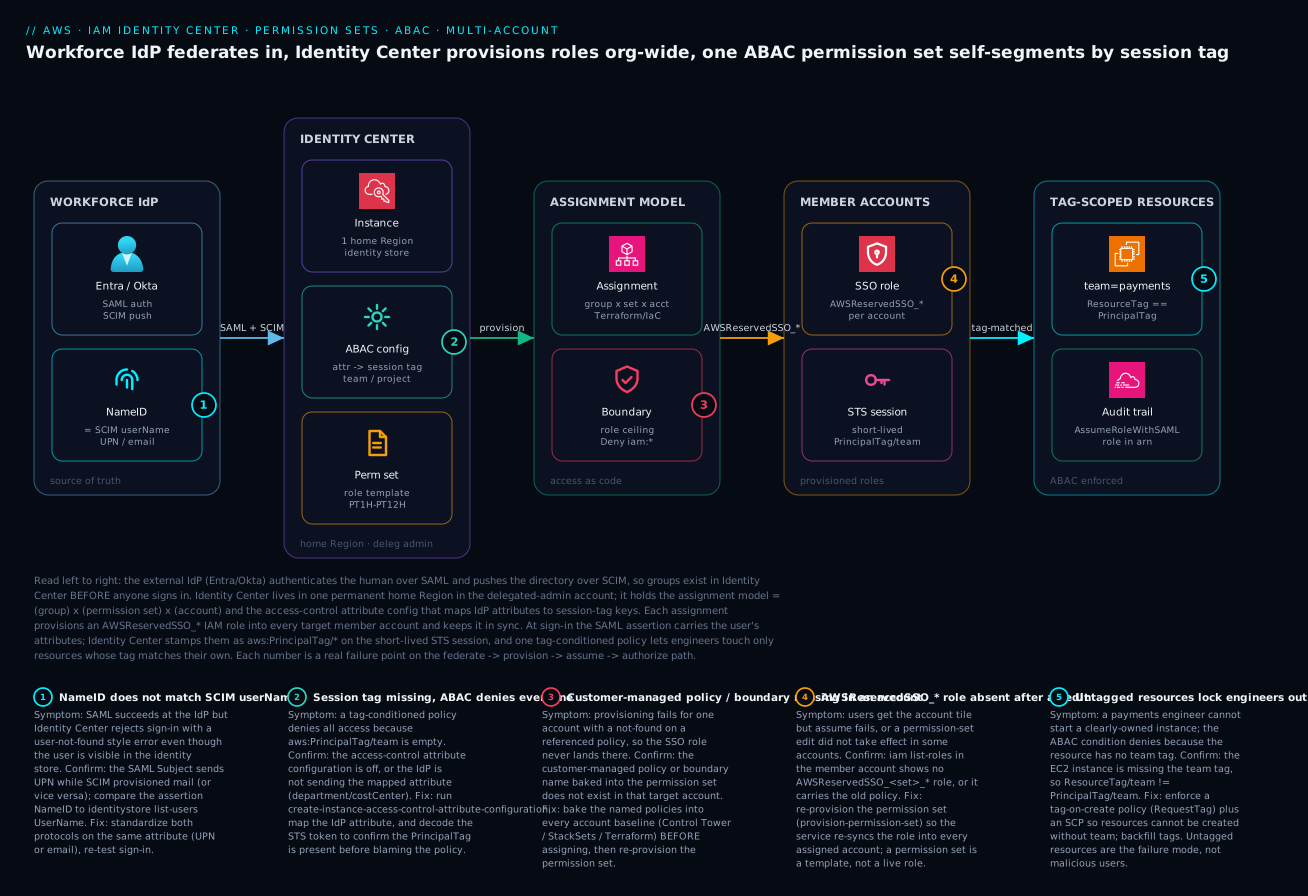
The diagram traces the path a human’s access actually takes, left to right, and pins the five failure points that bite. Start at the workforce IdP (Entra ID or Okta): it authenticates the human over SAML and pushes the directory over SCIM, so groups exist in Identity Center before anyone signs in — and the NameID it asserts must equal the SCIM-provisioned userName (badge 1, the silent sign-in killer). Next, Identity Center itself, living in one permanent home Region in the delegated-admin account: it holds the ABAC config that maps IdP attributes to session-tag keys (badge 2 — if that’s off, every tag-conditioned policy denies) and the permission set that is a role template, not a role. The assignment model — (group) × (permission set) × (account), expressed as Terraform — provisions an AWSReservedSSO_* role into every target member account, each capped by a permissions boundary (badge 3 — a missing named policy or boundary in one account fails provisioning there).
Follow the path right and the role lands in each member account (badge 4 — if you edited the set but didn’t re-provision, the role is stale or absent), the user assumes it, and Identity Center stamps the IdP attributes as aws:PrincipalTag/* on the short-lived STS session. Finally, one tag-conditioned policy lets the engineer touch only resources whose team tag matches their own PrincipalTag (badge 5 — an untagged resource denies access, which feels like a bug but is the system working). The whole flow is auditable because every API call in the member account carries the AWSReservedSSO_* role in CloudTrail’s userIdentity. Read the badges as the diagnostic map: federate → provision → assume → authorize, with the exact symptom, confirm step and fix for each hop.
Going deeper
Everything above is enough to design, ship and audit a real multi-account access model. This section is for the reader who wants the machinery underneath — what the service actually writes into your accounts, the reconciliation model behind “re-provision,” and the newer capability that carries a human’s identity past the SSO role and into the data lake. These are the parts that surface in a security review, a staff-engineer interview, and the day an audit asks a question the tables above do not answer.
What the service actually writes into each target account
“An assignment provisions a role” undersells it. When an assignment lands, Identity Center creates two objects in the target account, not one, and manages a trust policy you must never touch:
- An IAM SAML identity provider, named like
AWSSSO_<hash>_DO_NOT_DELETE. This is the account-local anchor that the reserved role trusts. Delete it by hand and sign-in to that account breaks until the service repairs it — which is why the name shouts at you. - The reserved role
AWSReservedSSO_<PermissionSetName>_<hash>, created under the path/aws-reserved/sso.amazonaws.com/<home-region>/. The<hash>is a service-generated suffix that is different in every account, so the role’s ARN differs per account for the same permission set. That is precisely why every audit query in this article matches on theAWSReservedSSO_<SetName>prefix and never on a fixed ARN.
The 32-character cap on a permission-set name is not arbitrary: IAM caps a role name at 64 characters, and the AWSReservedSSO_ prefix (15 chars) plus the _<hash> suffix eat the rest of the budget. Name a set too cleverly and you lose room for the hash.
The trust policy the service writes allows sts:AssumeRoleWithSAML from that account-local SAML provider, with a condition pinning the SAML audience to the AWS sign-in endpoint — and, when ABAC is enabled, it also allows sts:TagSession so the IdP attributes can ride onto the session as tags. You do not author this trust policy and you cannot usefully edit it: re-provisioning overwrites it back to the service’s version. This is the concrete reason the “how this differs from plain IAM” table warns you off editing the AWSReservedSSO_* trust relationship — it is a managed object, not yours.
Re-provisioning is a reconciliation, and it does not cover everything
provision-permission-set is not a redeploy; it is an idempotent reconciliation that walks every assigned account and makes the reserved role match the template again. --target-type ALL_PROVISIONED_ACCOUNTS fans that reconciliation across the whole footprint; it returns immediately and the per-account work is asynchronous.
The nuance that trips up even experienced teams is what actually needs re-provisioning:
| You changed… | Stored as | Re-provision needed? | Why |
|---|---|---|---|
| Inline policy on the set | Copied into every role | Yes | Each role holds its own copy; the copy is stale until reconciled |
| Managed / customer-managed attachment (added or removed) | A reference on the role | Yes | The role’s list of attached policies must be rewritten |
Boundary or SessionDuration |
Role config | Yes | Lives on the role object itself |
| The contents of a referenced customer-managed policy | A named policy in the account | No | The role references it by name — the new policy body takes effect immediately |
That last row is the useful one: because a customer-managed reference is by name, editing the policy’s JSON in the account (via your baseline IaC) changes the effective permissions everywhere it is referenced without touching Identity Center at all. Reserve re-provisioning for changes to the set; changes to the referenced policy body are already live. In Terraform, a change to aws_ssoadmin_permission_set or its attachment resources triggers re-provisioning through the provider, but a change to the aws_iam_policy those references point at does not — and does not need to.
Trusted identity propagation: the user’s identity flows past the role
By default, the moment a human assumes AWSReservedSSO_DataAnalyst_…, every downstream service sees the role, not the person. Redshift, S3 and Lake Formation logs show a shared role ARN; you authorize at the role granularity; and “which analyst ran this query” is unanswerable from the data plane. For analytics and BI that is a real gap — you want per-user grants and per-user audit without minting a role per user.
Trusted identity propagation (TIP) closes it. The user authenticates once through Identity Center, and their IdC identity — user plus directory groups — is carried as a signed identity context into the connected application’s session, producing an identity-enhanced IAM role session. Services that understand this context then authorize and audit against the actual user and group:
| Service | What TIP unlocks |
|---|---|
| Amazon Redshift | Grants and query history keyed to the IdC user/group, not a shared role |
| Amazon QuickSight | Reader/author identity flows from the IdP; no per-user QuickSight users to sync by hand |
| AWS Lake Formation + Athena / EMR | Table/column/row grants to IdC users and groups; the query engine enforces them per user |
| Amazon S3 Access Grants | Prefix-level grants resolved to the IdC identity, mapped into the session |
| Amazon Q (Business / Developer) | Answers scoped to what that person is allowed to see |
Two mechanics make it work. First, the downstream service must be an Identity Center-enabled application (registered so IdC can vend it identity). Second, for an external IdP you configure a trusted token issuer so the IdP’s OIDC tokens are exchangeable for IdC identity context — the workforce case this whole article assumes. The observable proof is in CloudTrail: an identity-enhanced session records an onBehalfOf block in userIdentity carrying the IdC user id and identity-store ARN, so the log finally names the human and the role. TIP does not replace permission sets — the human still assumes the reserved role to reach the console/CLI — it layers per-user identity on top for the services that can consume it, which is the current direction for data-lake and BI access.
Organization instance vs account instance
This entire article assumes an organization instance: enabled once from the management account, spanning every account in the Organization, the front door for your workforce. AWS also supports an account instance of Identity Center — a single-account deployment you can stand up without Organizations. It exists mainly to trial Identity Center-enabled applications, or to give one member account its own app identities, and it comes with sharp limits worth knowing before someone creates one by accident:
- An account instance cannot assign permission sets across the Organization — no multi-account workforce access. That is the org instance’s job alone.
- You get at most one organization instance, optionally alongside account instances; the org instance is the singular, permanent workforce control plane.
- The management account can block member accounts from creating account instances entirely — a governance setting worth turning on so nobody fragments identity.
Rule of thumb: organization instance for people, account instance never for workforce access. If a team asks for “their own Identity Center,” they almost always want a group and a permission set in the org instance, not a second instance.
ABAC edge cases that fail closed
ABAC is powerful precisely because it fails closed — but that means a handful of quiet edge cases lock people out, and they are not in the happy-path tables:
- Values are compared case-sensitively.
StringEqualstreatsPaymentsandpaymentsas different, so a resource tagged one way and adepartmentattribute cased the other way silently denies. Normalize casing in the IdP attribute mapping, not in forty policies. - A missing attribute is an absent tag, not an empty string. If the IdP does not send
departmentfor a user,aws:PrincipalTag/teamis not present at all and everyStringEqualson it denies. If you want a softer failure for a specific case, test with aNullcondition explicitly — but for most access, failing closed is the correct behaviour, not a bug. - Two sources can define the same tag. Attributes can arrive both from the instance’s access-control attribute configuration (
${path:…}) and from attribute mappings in the identity source. Do not define the same session-tag key in both places — pick one path per key so you always know which value wins. - Session tags stay at the SSO-role layer. If a user chains from the reserved role into a further role, the
PrincipalTags do not automatically ride along unless deliberately propagated. Keep ABAC authorization decisions on the Identity Center session itself rather than assuming they survive an extraAssumeRolehop. - There is a ceiling on attributes and tag size. The number of access-control attributes and the size of each session tag are capped (treat these as limits to confirm in the docs, in the same spirit as the quota table earlier) — one more reason ABAC’s collapse-to-one design beats piling attributes on to simulate many roles.
Real-world scenario
A platform team at Northwind Logistics, running ~120 accounts behind a Control Tower landing zone, had drifted into per-team permission sets: DataEng-Prod, DataEng-Dev, Payments-Prod, and so on — 14 teams × 3 environments, north of 40 permission sets, each a near-copy of its neighbors. Every new team meant a fresh batch of sets and dozens of assignments, and the sets diverged over time because nobody edited all 40 consistently. The breaking constraint arrived as an audit finding: three of those sets still granted iam:* from a long-forgotten copy-paste, and the team could not prove the others were clean without reading 40 policies by hand. The recertification reviewers, faced with 40 documents, were rubber-stamping.
They collapsed it to one EngineerStandard permission set plus ABAC. The IdP department attribute became a session tag, the per-team resource permissions became a single tag-conditioned policy, and the environment split moved to account-level SCPs instead of separate sets (prod accounts in a Prod OU, dev in a Dev OU, each with its own SCP). The decisive control was a permissions boundary on the consolidated set that made iam:* structurally impossible to grant, so the audit finding could never recur regardless of future policy edits:
{
  "Version": "2012-10-17",
  "Statement": [
    {
      "Sid": "BoundaryAllowedServices",
      "Effect": "Allow",
      "Action": ["ec2:*", "s3:*", "dynamodb:*", "logs:*", "cloudwatch:*"],
      "Resource": "*"
    },
    {
      "Sid": "NeverIam",
      "Effect": "Deny",
      "Action": ["iam:*", "organizations:*", "account:*"],
      "Resource": "*"
    }
  ]
}
The migration was not free. Two problems surfaced in week one. First, a wave of engineers were suddenly denied on resources they clearly owned — because those resources had never carried a team tag, and the ABAC condition (correctly) denied. The team backfilled tags with a one-off script and added a RunInstances-time RequestTag enforcement plus an SCP so nothing untagged could be created going forward. Second, the consolidated set referenced a customer-managed policy that existed in only 90 of the 120 accounts, so provisioning failed in 30; the fix was to bake the named policy into the account baseline (a Control Tower customization) and re-provision.
The decisive control was a permissions boundary on the consolidated set that made iam:* structurally impossible to grant. Outcome: 40-plus permission sets became 1, onboarding a new team became adding them to a group in the IdP (zero AWS changes), and the explicit Deny on iam:* in the boundary meant the audit finding was provably unrepeatable across all 120 accounts at once. Recertification dropped from a multi-day, 40-policy read to a single Terraform plan against the assignment model — and the reviewers actually engaged with it, because there was one policy and a list of group-to-account tuples, not a wall of near-duplicates.
The before/after, because the shape of the win is the lesson:
| Dimension | Before (per-team RBAC) | After (one set + ABAC) |
|---|---|---|
| Permission sets | 40+ | 1 |
| Onboarding a team | New set + ~3 assignments | Add to an IdP group |
iam:* risk |
Hidden in copy-paste | Boundary Deny, structurally impossible |
| Recertification effort | Multi-day, read 40 policies | One terraform plan |
| Environment split | Separate sets | Account-level SCPs |
| Failure mode introduced | — | Untagged resources deny (fixed by enforcement) |
| Audit finding recurrence | Likely | Provably impossible org-wide |
Advantages and disadvantages
The centralized, template-and-assignment model both solves the multi-account access problem and introduces a few sharp edges you must respect. Weigh it honestly:
| Advantages (why this model helps) | Disadvantages (why it bites) |
|---|---|
| Short-lived STS only — no access keys to rotate or leak | A permission set is a template; edits don’t land until you re-provision |
| Access becomes data — review, diff, and recertify in Git | The model lives in two systems (IdP for who, IC for what) you must keep in sync |
| One ABAC set replaces N per-team sets | ABAC fails closed on untagged resources — looks like a bug, locks engineers out |
| The IdP is the single joiner/mover/leaver authority | A SCIM-token expiry or scope mistake silently stops provisioning |
| Org-wide reach from one place; assignments fan across accounts | Org-wide blast radius too — an over-broad set is over-broad everywhere |
| Provisioned roles and trust policies are service-managed | Customer-managed references must pre-exist in every target account |
CloudTrail carries the human in AWSReservedSSO_* for clean audit |
Home Region is permanent; getting it wrong means recreate + lose assignments |
The model is right for any organization past a single account that runs (or will run) a workforce IdP and wants to ship access as code rather than operate per-account IAM. It bites hardest on teams that treat permission sets like live roles (forgetting to re-provision), adopt ABAC without tag enforcement (untagged-resource lockouts), or let the SCIM pipeline rot (silent off-boarding gaps). Every disadvantage is manageable — but only if you know it exists, which is the point of the tables in this article.
Hands-on lab
Stand up a permission set, create an ABAC attribute configuration, assign to a group, and verify the provisioned role and short-lived login — all driveable from a single admin shell. This assumes Identity Center is already enabled with an identity source and you have admin in the management or delegated-admin account. We tear everything down at the end; the only cost is negligible (Identity Center has no per-assignment charge).
Step 1 — Capture the instance identifiers.
export SSO_INSTANCE_ARN=$(aws sso-admin list-instances \
  --query 'Instances[0].InstanceArn' --output text)
export IDENTITY_STORE_ID=$(aws sso-admin list-instances \
  --query 'Instances[0].IdentityStoreId' --output text)
echo "Instance: $SSO_INSTANCE_ARN"
echo "Store:    $IDENTITY_STORE_ID"
Expected: both variables non-empty (an ssoins-... ARN and a d-... store ID).
Step 2 — Create a read-only permission set with a 1-hour session.
aws sso-admin create-permission-set \
  --instance-arn "$SSO_INSTANCE_ARN" \
  --name "LabReadOnly" \
  --description "Lab read-only, 1h" \
  --session-duration "PT1H"

export PS_ARN=$(aws sso-admin list-permission-sets \
  --instance-arn "$SSO_INSTANCE_ARN" --output text \
  --query 'PermissionSets' | tr '\t' '\n' | tail -n1)
echo "Permission set: $PS_ARN"
Step 3 — Attach a coarse AWS managed policy.
aws sso-admin attach-managed-policy-to-permission-set \
  --instance-arn "$SSO_INSTANCE_ARN" \
  --permission-set-arn "$PS_ARN" \
  --managed-policy-arn "arn:aws:iam::aws:policy/ReadOnlyAccess"
Step 4 — Turn on ABAC and map an attribute to a session tag.
aws sso-admin create-instance-access-control-attribute-configuration \
  --instance-arn "$SSO_INSTANCE_ARN" \
  --instance-access-control-attribute-configuration \
  'AccessControlAttributes=[{Key=team,Value={Source=["${path:enterprise.department}"]}}]'
Expected: no error. Confirm it stuck:
aws sso-admin describe-instance-access-control-attribute-configuration \
  --instance-arn "$SSO_INSTANCE_ARN" --output json
Step 5 — Resolve a group and assign the set to one account. Use a group your SCIM sync (or directory) already created:
GROUP_ID=$(aws identitystore get-group-id \
  --identity-store-id "$IDENTITY_STORE_ID" \
  --alternate-identifier 'UniqueAttribute={AttributePath=DisplayName,AttributeValue=lab-engineers}' \
  --query 'GroupId' --output text)

aws sso-admin create-account-assignment \
  --instance-arn "$SSO_INSTANCE_ARN" \
  --permission-set-arn "$PS_ARN" \
  --principal-type GROUP --principal-id "$GROUP_ID" \
  --target-type AWS_ACCOUNT --target-id 333333333333
The call returns an assignment with Status: IN_PROGRESS — provisioning is async.
Step 6 — Verify the provisioned role exists in the target account. Sign in to that account (or use a profile for it) and look for the reserved role:
aws sso login --sso-session lab
aws iam list-roles \
  --query "Roles[?starts_with(RoleName,'AWSReservedSSO_LabReadOnly')].RoleName" \
  --profile lab-target
aws sts get-caller-identity --profile lab-target
Expected: a single AWSReservedSSO_LabReadOnly_<hash> role name, and get-caller-identity returns an assumed-role ARN containing it.
Validation checklist. The lab steps mapped to what each proves:
| Step | What you did | What it proves |
|---|---|---|
| 1 | Captured instance + store IDs | The instance exists and you can address it |
| 2–3 | Created a set + attached a managed policy | A permission set is a template you compose |
| 4 | Enabled ABAC, mapped team |
Session tags come from an IdP attribute |
| 5 | Assigned the set to a group + account | The assignment is the unit of access |
| 6 | Found AWSReservedSSO_* and assumed it |
The set provisions a real role; creds are short-lived |
Teardown (remove everything you created).
# Delete the assignment (also async).
aws sso-admin delete-account-assignment \
  --instance-arn "$SSO_INSTANCE_ARN" \
  --permission-set-arn "$PS_ARN" \
  --principal-type GROUP --principal-id "$GROUP_ID" \
  --target-type AWS_ACCOUNT --target-id 333333333333

# Then delete the permission set, and (optionally) the ABAC config.
aws sso-admin delete-permission-set \
  --instance-arn "$SSO_INSTANCE_ARN" --permission-set-arn "$PS_ARN"
aws sso-admin delete-instance-access-control-attribute-configuration \
  --instance-arn "$SSO_INSTANCE_ARN"
Cost note. Identity Center has no per-user or per-assignment charge; this lab costs effectively nothing. Delete the assignment before the permission set, since you cannot delete a set with live assignments.
Practice challenges
Work these in order — they climb from “explain the model” to “give a data analyst per-user audit.” Commands are illustrative (account IDs, ARNs and group names are placeholders) and nothing here needs a live account to reason through; try each before you open the solution.
1 (Beginner) — Count the roles. You create one PlatformReadOnly permission set and assign it to 40 accounts. How many IAM roles now exist, and if you add a policy to the set tomorrow, what changes in those 40 accounts before you do anything else?
<details><summary>Solution</summary>
40 roles — one AWSReservedSSO_PlatformReadOnly_<hash> per account, each with a different hash. Adding a policy to the set changes nothing in the 40 accounts until you re-provision: a permission set is a template, and existing roles keep their old policies until the service reconciles them.
Why: the single biggest mental shift from plain IAM — you author a template the service stamps out, so an edit is inert until provision-permission-set pushes it, and a stale role is the number-one “my change didn’t take” surprise.
</details>
2 (Beginner) — Name the silent sign-in killer. A user authenticates fine at Okta but Identity Center rejects them with a “user not found” style error. Name the exact mismatch, and give the one command that confirms it.
<details><summary>Solution</summary>
The SAML NameID does not match the SCIM-provisioned userName (e.g. SAML asserts UPN, SCIM provisioned email). Confirm by comparing the assertion’s NameID to the provisioned users:
aws identitystore list-users \
  --identity-store-id "$IDENTITY_STORE_ID" \
  --query 'Users[].UserName' --output text
Why: the directory can look perfectly correct while sign-in still fails — authentication (SAML) and provisioning (SCIM) are two protocols, and they must agree on the identifier exactly, so standardize both on UPN or email. </details>
3 (Intermediate) — Build a customer-managed set the right way. Attach a customer-managed policy reference platform-extra and a boundary platform-boundary to an existing permission set from the CLI, and state the one precondition that makes provisioning fail if you skip it.
<details><summary>Solution</summary>
aws sso-admin attach-customer-managed-policy-reference-to-permission-set \
  --instance-arn "$SSO_INSTANCE_ARN" --permission-set-arn "$PS_ARN" \
  --customer-managed-policy-reference Name=platform-extra,Path=/

aws sso-admin put-permissions-boundary \
  --instance-arn "$SSO_INSTANCE_ARN" --permission-set-arn "$PS_ARN" \
  --permissions-boundary CustomerManagedPolicyReference={Name=platform-boundary,Path=/}
Precondition: an IAM policy named platform-extra and one named platform-boundary must already exist in every target account, or provisioning fails there — references are by name, not by content.
Why: this is why landing-zone teams bake these named policies into account baselines (Control Tower customizations / StackSets / Terraform) before assigning the set — the reference resolves per account, so a missing name breaks exactly the accounts that lack it. </details>
4 (Intermediate) — Make one set serve every team. Turn on ABAC so the IdP department becomes a team session tag, then write the one statement that lets an engineer manage only S3 buckets tagged with their own team.
<details><summary>Solution</summary>
aws sso-admin create-instance-access-control-attribute-configuration \
  --instance-arn "$SSO_INSTANCE_ARN" \
  --instance-access-control-attribute-configuration \
  'AccessControlAttributes=[{Key=team,Value={Source=["${path:enterprise.department}"]}}]'
{
  "Effect": "Allow",
  "Action": ["s3:GetObject", "s3:PutObject", "s3:ListBucket"],
  "Resource": "*",
  "Condition": {
    "StringEquals": { "aws:ResourceTag/team": "${aws:PrincipalTag/team}" }
  }
}
Why: the attribute config stamps department onto the session as aws:PrincipalTag/team, and the tag-matched condition self-segments a single EngineerStandard set across every team — collapsing N per-team sets into one and making the IdP the authority for what, not just who.
</details>
5 (Advanced) — Rescue sign-in from a Region-lock SCP. A DenyOutsideApprovedRegions SCP has just severed Identity Center sign-in org-wide. Give the NotAction carve-out that fixes it and the Region you must keep allowed.
<details><summary>Solution</summary>
Exempt the global-ish control-plane services and keep us-east-1 allowed:
"NotAction": [
  "iam:*", "sts:*", "sso:*", "sso-directory:*", "organizations:*",
  "route53:*", "cloudfront:*", "support:*", "waf:*"
],
"Condition": { "StringNotEquals": { "aws:RequestedRegion": "us-east-1" } }
Why: authentication and role assumption flow through global endpoints often anchored in us-east-1, so a naive Region deny takes out sts/iam/sso and locks everyone out — carving those services (and keeping us-east-1) restores the front door without loosening your Region strategy for workloads.
</details>
6 (Advanced) — Give a data analyst per-user audit. Analysts share the DataAnalyst permission set, but security needs Redshift query history attributed to the individual, not the shared role. What capability do you enable, and what proves it is working in CloudTrail?
<details><summary>Solution</summary>
Enable trusted identity propagation: register Redshift as an Identity Center-enabled application and (for an external IdP) configure a trusted token issuer, so the analyst’s IdC identity flows into an identity-enhanced session. Grant in Lake Formation / Redshift to the IdC user or group, not the role. Proof: the CloudTrail event’s userIdentity carries an onBehalfOf block with the analyst’s IdC user id and identity-store ARN — the log now names the human and the role.
Why: by default everything downstream sees only the shared AWSReservedSSO_DataAnalyst_* role, so per-user grants and per-user audit are impossible; TIP carries the identity past the role, which is the modern answer for data-lake and BI access without minting a role per analyst.
</details>
Common mistakes & troubleshooting
This is the playbook — the part you bookmark. First as a scannable table you can read mid-rollout, then the expanded reasoning for the entries that bite hardest.
| # | Symptom | Root cause | Confirm (exact cmd / path) | Fix |
|---|---|---|---|---|
| 1 | SAML succeeds but sign-in fails “user not found” | NameID ≠ SCIM userName |
Compare assertion NameID to identitystore list-users UserName |
Standardize both on UPN/email; re-test |
| 2 | Groups never appear in Identity Center | SCIM not configured / scoped out | aws identitystore list-groups is empty |
Enable SCIM; scope to assigned groups; check token |
| 3 | New hires stop appearing weeks later | SCIM bearer token expired | IdP provisioning shows auth errors | Regenerate token; store in Secrets Manager; reminder |
| 4 | Tag-conditioned policy denies everyone | Session tag empty | describe-instance-access-control-attribute-configuration; decode STS token |
Enable ABAC config; map the IdP attribute |
| 5 | A clearly-owned resource is denied | Resource has no team tag |
aws ec2 describe-tags shows no team |
Backfill tags; enforce RequestTag + SCP |
| 6 | Provisioning fails for some accounts | Customer-managed policy/boundary missing there | aws iam get-policy in the account 404s |
Bake named policy into baseline; re-provision |
| 7 | Edited a set, change didn’t take effect | Forgot to re-provision the template | Role in account still has old policy | provision-permission-set to re-sync |
| 8 | Account tile appears but assume fails | Role not yet provisioned / wrong session duration | iam list-roles shows no AWSReservedSSO_* |
Wait for async provision; re-provision if stuck |
| 9 | Leaver still has working access | User-level assignment, or SCIM deprovision off | list-account-assignments shows the user |
Assign to groups; enable SCIM deprovisioning |
| 10 | Region-lock SCP severed sign-in/assume | SCP denies sts/iam outside one Region |
CloudTrail explicit Deny from a member acct |
Carve out iam/sts/sso in NotAction; keep us-east-1 |
| 11 | Break-glass admin itself denied | Protective Deny with no carve-out |
iam simulate-principal-policy returns Deny |
Exempt the break-glass role via ArnNotLike |
| 12 | aws sso login opens browser but creds fail |
Wrong sso_region / stale token |
aws configure list-profiles; check sso_region |
Set home Region; aws sso logout then re-login |
| 13 | Console session times out too fast/slow | SessionDuration wrong for the role |
describe-permission-set session duration |
Set PT1H–PT12H to match blast radius |
| 14 | Can’t change the home Region | Home Region is permanent | Console shows it greyed | Plan a new instance + re-create assignments |
The expanded form, for the entries that cost the most time:
1. SAML succeeds at the IdP but Identity Center rejects sign-in.
Root cause: the SAML Subject (NameID) does not match the SCIM-provisioned userName — e.g. SAML sends UPN, SCIM provisioned mail.
Confirm: read the assertion’s NameID (browser SAML trace or IdP test-sign-in), then aws identitystore list-users --identity-store-id "$IDENTITY_STORE_ID" --query 'Users[].UserName' and compare exactly.
Fix: standardize both protocols on the same attribute (UPN or email), update the IdP NameID mapping and SCIM attribute mapping, and re-test sign-in.
4. A tag-conditioned policy denies every user, not just the wrong team.
Root cause: aws:PrincipalTag/team is empty because the access-control attribute configuration is off, or the IdP isn’t sending the mapped attribute (department/cost center).
Confirm: aws sso-admin describe-instance-access-control-attribute-configuration --instance-arn "$SSO_INSTANCE_ARN"; then decode the STS session token (or check CloudTrail requestParameters) to see whether the PrincipalTag is present.
Fix: run create-instance-access-control-attribute-configuration, map the IdP attribute in the IdP’s attribute screen, and confirm the tag is present before blaming the policy.
6. Provisioning fails for a subset of accounts.
Root cause: a customer-managed policy or boundary referenced by the permission set does not exist (by that name) in those accounts, so the role can’t be built there.
Confirm: in the failing account, aws iam get-policy --policy-arn arn:aws:iam::<acct>:policy/<name> returns NoSuchEntity; the assignment status shows the failure reason.
Fix: bake the named policy into every account baseline (Control Tower customization / StackSet / Terraform) before assigning, then provision-permission-set to retry.
7. You edited a permission set and the change didn’t take effect.
Root cause: a permission set is a template — editing it does not update already-provisioned roles until you re-provision.
Confirm: in a target account, inspect the AWSReservedSSO_* role’s attached policies and see the old version.
Fix: aws sso-admin provision-permission-set --instance-arn "$SSO_INSTANCE_ARN" --permission-set-arn "$PS_ARN" --target-type ALL_PROVISIONED_ACCOUNTS to re-sync everywhere.
10. A Region-lock SCP severs Identity Center sign-in or assume.
Root cause: a DenyOutsideApprovedRegions-style SCP denies sts:*/iam:*/sso:* org-wide because the Region you authenticate through (often us-east-1) isn’t allowed.
Confirm: from inside a member account, the call returns an explicit Deny; CloudTrail shows the SCP as the cause.
Fix: add iam, sts, sso, organizations, route53, cloudfront, support to the SCP’s NotAction, and keep us-east-1 allowed even for a single-Region org. (This is the same global-services carve-out covered in AWS Organizations: SCPs, Guardrails & Delegated Admin.)
Common beginner mistakes
These are misconceptions, not error messages — the wrong mental model that walks a beginner straight into the symptoms the troubleshooting table above then has to fix. Correct the model and the symptom never appears.
-
“Identity Center is just single sign-on — a nicer login.” Sign-on is the least interesting thing it does. Its real job is turning access into data: a small, reviewable set of permission sets and
(group, set, account)assignments you can diff in Git and recertify. Right model: you are building an access model, not installing a login page — treat the assignments as source code. -
“A permission set is a role I edit and it updates live.” It is a role template. One set assigned to 40 accounts is 40 separate roles, each a copy that only changes when you re-provision. Right model: author the template, then push it — an edit is inert until
provision-permission-setreconciles the roles. -
“I’ll make a permission set per team so each team’s access is clear.” That is how you end up with 40 near-identical sets that drift, hide a stray
iam:*, and make every new team a fresh batch of objects. Right model: one ABAC set plus a session tag serves every team; the attribute decides what it can touch, so onboarding a team is adding them to a group in the IdP. -
“I’ll assign the set straight to the person who needs it.” User-level assignments are orphaned access nobody remembers granting, and they survive off-boarding. Right model: assign to groups, always — access then changes the instant someone joins or leaves a group in the IdP, with no AWS ticket in the loop.
-
“Turning on ABAC is enough; the policy will sort out who sees what.” ABAC fails closed: an untagged resource matches nobody’s
PrincipalTagand is denied, so day one is a wave of engineers locked out of resources they clearly own. Right model: ABAC is a two-part deal — the tag-conditioned policy and enforced tagging (RequestTagat create time plus an SCP), or the condition has nothing to match. -
“Identity Center replaces IAM.” It sits on top of IAM — it provisions IAM roles, SCPs and permission boundaries still bound them, and workloads (services, CI, apps) still use ordinary IAM roles. Right model: Identity Center is for humans; machine identities and the account-level guardrails are unchanged and still matter.
-
“Once someone is in the SSO role, everything downstream knows who they are.” Not by default — Redshift, S3 and Lake Formation see the shared
AWSReservedSSO_*role, not the person, so per-user audit is impossible until you turn on trusted identity propagation. Right model: the reserved role is the boundary of identity unless you deliberately propagate it further. -
“The SCIM token is set-and-forget.” It is shown exactly once and expires (~1 year); when it lapses, new hires silently stop appearing in AWS and nobody notices until a ticket lands. Right model: store it in Secrets Manager the moment it is generated and put a calendar reminder a month before expiry — a silent provisioning pipeline is an off-boarding gap too.
Best practices
- Federate an external IdP; don’t manage users in AWS. Your joiner/mover/leaver process already runs in the IdP — make it the single authority for who.
- Standardize NameID and SCIM
userNameon the same attribute. UPN or email, both protocols, so sign-in never fails the silent “user not found.” - Scope SCIM to assigned groups and protect the token. Never sync the whole directory; store the bearer token in Secrets Manager with an expiry reminder a month out.
- Reference, don’t embed. Prefer customer-managed policy references over large inline policies, and bake the named policies into every account baseline before assigning.
- Put a permissions boundary on every non-admin set. It caps the role even if a referenced policy is later widened by mistake.
- Map
SessionDurationto blast radius.PT1Hfor break-glass/admin, longer for read-only — duration is a security control, not a convenience knob. - Prefer ABAC over per-team sets. One tag-conditioned set replaces N near-duplicates and makes the IdP the authority for what, not just who.
- Enforce tagging wherever you use ABAC. A
RequestTag-time policy plus an SCP so nothing untagged can be created — untagged resources are the ABAC failure mode. - Assign to groups, never users. Access then changes the instant someone joins/leaves a group, with no AWS ticket and no orphaned grants.
- Express the assignment model as code.
(group, set, account)tuples in Terraform, reviewed in PRs — recertification becomes aplan, not an investigation. - Re-provision after every permission-set edit. The set is a template; the change only lands in existing roles when you re-provision.
- Recertify on a cadence against the IaC. Quarterly for privileged sets, semi-annually for read-only; drift is anything live that isn’t in code.
Security notes
- No long-lived credentials anywhere. The entire model is short-lived STS; if a tool “needs keys,” use
aws configure export-credentials(ephemeral) or a workload role, never an IAM user with an access key. - Least privilege via boundaries, not trust. Cap every non-admin permission set with a permissions boundary; an explicit
Deny iam:*/organizations:*in the boundary makes privilege escalation structurally impossible regardless of future policy edits. - Enforce MFA at the IdP. Identity Center delegates authentication to your IdP — that’s where you require phishing-resistant MFA (FIDO2/WebAuthn). For the directory source, enable IC’s own MFA policy.
- Protect the management and delegated-admin accounts. Administer Identity Center from a delegated admin account, keep the management account workload-free, and guard break-glass with an
ArnNotLikecarve-out plus offline credentials. - Keep the audit pipeline tamper-evident. Org CloudTrail to an immutable Log Archive (Object Lock WORM) so a member account cannot erase the record of how its
AWSReservedSSO_*role was used. - Treat the SCIM token as a secret. It can write your directory of users and groups; store it in Secrets Manager, rotate before expiry, and never paste it into a ticket or repo.
- Pair ABAC with tag enforcement. Without
RequestTagenforcement an attacker (or a careless user) could create an untagged resource to dodge the condition — close that with an SCP.
The security controls that also prevent the operational failures above — secure and resilient pull the same direction:
| Control | Mechanism | Secures against | Also prevents |
|---|---|---|---|
| Permissions boundary | Deny iam:* in the boundary |
Privilege escalation | Audit iam:* findings recurring |
| Short-lived STS only | No access keys in the model | Leaked long-lived keys | Rotation breakage |
| MFA at the IdP | FIDO2/WebAuthn enforced | Credential phishing | — |
| SCIM scoping + token in vault | Assigned-groups-only sync | Directory over-exposure | Silent off-boarding gaps |
| Immutable org CloudTrail | Object Lock WORM | Audit tampering | Lost who-did-what evidence |
Break-glass ArnNotLike carve-out |
Exempt the emergency role | Self-lockout | Inability to recover after a bad guardrail |
| Tag-on-create enforcement | RequestTag + SCP |
ABAC tag-dodging | Untagged-resource lockouts (with backfill) |
Cost & sizing
The good news on cost: IAM Identity Center has no per-user, per-permission-set, or per-assignment charge. The service itself is free. What you pay for is the surrounding machinery — the audit trail, the IdP licensing, and any directory you run — not the access model.
- CloudTrail is the main spend driver. The first copy of management events is free, but a data-events trail and especially CloudTrail Lake ingestion are billed per GB; an org trail across 120 accounts can produce real volume. Budget for storage in the Log Archive account (S3 with Object Lock) and for Athena query scanning.
- Your IdP carries its own licensing (Entra ID P1/P2, Okta per-user). That cost exists regardless of AWS, but Identity Center makes it the front door for AWS too — a reason to right-size IdP tiers, not over-buy.
- AWS Managed Microsoft AD (if you chose the AD source) is billed hourly per directory — a genuine line item; the external-IdP path avoids it.
- No infrastructure to size for the access path itself: there are no instances, no NAT, no gateways in this model. Sizing is about governance throughput — how many permission sets, accounts and assignments your team can keep clean — not compute.
A rough monthly picture for a mid-size org (120 accounts, ~300 engineers):
| Cost driver | What you pay for | Rough INR / month | Note |
|---|---|---|---|
| IAM Identity Center | The access model itself | ₹0 | No per-user/assignment charge |
| Org CloudTrail (mgmt events) | First copy of management events | ₹0 | Free tier for one copy |
| CloudTrail Lake / data events | Per-GB ingestion + retention | ~₹8,000–40,000 | Scales with account count + verbosity |
| S3 Log Archive (Object Lock) | WORM storage of trails | ~₹2,000–10,000 | Cheap per-GB; grows over time |
| Athena queries | Per-TB scanned on audit | ~₹1,000–5,000 | Partition + compress to cut scanning |
| AWS Managed Microsoft AD (if used) | Per-directory hourly | ~₹25,000–35,000 | Avoided entirely with an external IdP |
| IdP licensing (Entra P2 / Okta) | Per-user workforce identity | Varies by seat | Exists with or without AWS |
The sizing lesson Northwind learned: the expensive part of multi-account access is never the access mechanism (it’s free) — it’s the audit retention and the human cost of keeping the model clean. ABAC pays off precisely because it shrinks the model a human has to govern from 40 sets to one.
Interview & exam questions
1. What is the core data model of IAM Identity Center? An assignment = (principal) × (permission set) × (target account). The principal is a user or group from the identity source, the permission set is a template, and creating the assignment provisions an AWSReservedSSO_<set>_<hash> IAM role into the target account that the user assumes for short-lived STS credentials.
2. Why is a permission set “not a role”? It is a role template. One set assigned to 40 accounts produces 40 IAM roles, each kept in sync by the service. Editing the set does not change existing roles until you re-provision — the most common operational surprise for people fluent in plain IAM.
3. SAML vs SCIM — what does each do and why do you need both? SAML 2.0 handles authentication (the sign-in assertion proving who the user is). SCIM 2.0 handles provisioning (pushing users/groups from the IdP so they exist in Identity Center before anyone logs in). Without SCIM, groups never appear and you can’t pre-assign access; without SAML, nobody can sign in.
4. A user authenticates successfully at the IdP but Identity Center says “user not found.” What’s wrong? The SAML NameID does not match the SCIM-provisioned userName (e.g. UPN vs email). Standardize both protocols on the same attribute and re-test. The directory can look perfectly correct while sign-in still fails.
5. How does ABAC let one permission set serve many teams? You map IdP attributes (e.g. department) to session tags via the instance’s access-control attribute configuration. Each session then carries aws:PrincipalTag/team, and a single tag-conditioned policy (aws:ResourceTag/team == aws:PrincipalTag/team) lets each engineer touch only their own team’s resources — collapsing N per-team sets into one.
6. Your ABAC policy denies everyone, not just the wrong team. Most likely cause? aws:PrincipalTag/team is empty — the access-control attribute configuration is disabled or the IdP isn’t sending the mapped attribute. Confirm with describe-instance-access-control-attribute-configuration and by decoding the STS token; fix the config/mapping before blaming the policy. ABAC fails closed.
7. Why prefer customer-managed policy references over inline policies in a permission set? An inline policy is duplicated into every provisioned role and only updates on re-provision; a customer-managed policy is maintained once as a named object (via IaC) and referenced. The catch: the named policy must exist in every target account, or provisioning fails there.
8. What does a permissions boundary on a permission set guarantee? It caps what the provisioned role can ever do, independent of the granting policies. An explicit Deny iam:* in the boundary makes privilege escalation structurally impossible even if a referenced policy is later widened — which is how you make an audit finding provably unrepeatable.
9. Why assign permission sets to groups rather than users? Group assignments mean access changes the instant someone joins or leaves a group in the IdP — no AWS ticket, no human in the loop. User-level assignments produce orphaned access nobody remembers granting and survive off-boarding.
10. How do you audit “who used the admin role in account 333 last week”? Query CloudTrail (Athena / CloudTrail Lake) where userIdentity.arn LIKE '%AWSReservedSSO_PlatformAdmin%' and recipientAccountId = 333... over the window. The reserved role in userIdentity carries both the permission set and the human, so attribution is clean.
11. Can you change the home Region after the fact? No — the home Region is permanent. Changing it means deleting and recreating the instance, which destroys every assignment. Pick the Region near your IdP and admins up front and treat it as final.
12. A Region-lock SCP broke Identity Center sign-in. Why, and what’s the fix? The SCP denied sts/iam/sso outside one approved Region, but those are global-ish and authentication often flows through us-east-1. Add iam, sts, sso, organizations, route53, cloudfront, support to the SCP’s NotAction and keep us-east-1 allowed.
These map to AWS Certified Security – Specialty (SCS-C02) — identity and access management, federation, and ABAC — and to Solutions Architect Professional (SAP-C02) — design for organizational complexity, multi-account access. The audit angle touches SysOps (SOA-C02). A compact cert mapping for revision:
| Question theme | Primary cert | Objective area |
|---|---|---|
| Assignment model, permission sets | SCS-C02 | Identity & access management |
| SAML/SCIM federation | SCS-C02 / SAP-C02 | Federated access; org complexity |
| ABAC + session tags | SCS-C02 | Fine-grained authorization |
| Permissions boundaries | SCS-C02 | Least privilege at scale |
| Multi-account assignment design | SAP-C02 | Design for organizational complexity |
| CloudTrail audit of access | SOA-C02 / SCS-C02 | Monitoring; incident response |
Quick check
- What three things make up an Identity Center assignment, and what gets provisioned when you create one?
- A user signs in fine at Okta but Identity Center rejects them as “user not found.” What single mismatch causes this and how do you confirm it?
- You map
departmentto ateamsession tag and write a tag-conditioned policy, but every engineer is denied. What did you most likely forget? - You edit a permission set’s policy in the console but the change doesn’t reach the roles in your accounts. Why, and what’s the fix?
- Why assign permission sets to groups rather than individual users, and where does that access actually change when someone leaves a team?
Answers
- An assignment is
(principal) × (permission set) × (target account)— a user or group, a template, and a member account. Creating it provisions anAWSReservedSSO_<set>_<hash>IAM role into that account, which the user assumes for short-lived STS credentials. - The SAML NameID does not match the SCIM-provisioned
userName(e.g. SAML sends UPN, SCIM provisioned email). Confirm by reading the assertion’s NameID and comparing it exactly toaws identitystore list-usersUserName; fix by standardizing both protocols on the same attribute. - You forgot to enable the access-control attribute configuration (or the IdP isn’t sending the attribute), so
aws:PrincipalTag/teamis empty and the condition denies everyone. Runcreate-instance-access-control-attribute-configuration, map the attribute, and verify the tag is present before blaming the policy. ABAC fails closed. - A permission set is a template, not a live role; edits don’t propagate until you re-provision. Run
aws sso-admin provision-permission-set ... --target-type ALL_PROVISIONED_ACCOUNTSto re-sync the role into every assigned account. - Group assignments mean access changes the moment someone joins or leaves a group in the IdP — no AWS ticket, no orphaned grants. The change happens in your IdP (the source of truth); SCIM/group membership flows it to AWS automatically.
Glossary
-
IAM Identity Center — the AWS service (formerly AWS SSO) that maps workforce identities to accounts with short-lived credentials and reusable permission sets, Organizations-wide.
-
Assignment — the unit of access:
(principal) × (permission set) × (target account); creating one provisions a role. -
Permission set — a role template that becomes an
AWSReservedSSO_<name>_<hash>IAM role in each assigned account; carries policies, a boundary, and a session duration. -
Provisioned role — the
AWSReservedSSO_*IAM role the service creates and keeps in sync in a target account; what users actually assume. -
Identity source — where users and groups come from: the Identity Center directory, an external IdP, or AWS Managed Microsoft AD.
-
Identity store — the directory inside the instance that SCIM populates and you query by Identity Store ID.
-
SAML 2.0 — the authentication protocol carrying the sign-in assertion (NameID + attributes) from the IdP.
-
SCIM 2.0 — the provisioning protocol that pushes users and groups from the IdP into Identity Center before sign-in.
-
NameID — the user identifier in the SAML
Subject; must equal the SCIM-provisioneduserNameexactly. -
Session tag — an IdP attribute stamped onto the STS session as
aws:PrincipalTag/<key>, the basis of ABAC. -
ABAC (attribute-based access control) — authorizing by tags:
aws:ResourceTag/<k> == aws:PrincipalTag/<k>lets one set serve many teams. -
Permissions boundary — a managed/customer-managed policy that caps what the provisioned role can ever do, regardless of granting policies.
-
Customer-managed policy reference — a permission-set attachment by name; the named policy must exist in every target account.
-
Home Region — the single, permanent Region the instance lives in; changing it requires recreating the instance.
-
Delegated administrator — a dedicated, non-management account registered to administer Identity Center day-to-day.
-
Access portal — the user-facing tile picker at
*.awsapps.com/startwhere humans choose an account-plus-role. -
sso-session— the shared block in~/.aws/configthat lets oneaws sso logincover many profiles. -
Access-control attribute configuration — the instance setting that maps IdP/directory attributes (
${path:…}) to session-tag keys; enabling it is what turns ABAC on. -
Re-provisioning — the idempotent reconciliation (
provision-permission-set) that pushes a permission-set edit into the already-provisionedAWSReservedSSO_*roles across every assigned account. -
Per-account SAML provider — the
AWSSSO_…_DO_NOT_DELETEIAM SAML identity provider Identity Center creates in each assigned account for the reserved role to trust; deleting it by hand breaks sign-in for that account. -
Trusted identity propagation (TIP) — carrying a human’s Identity Center identity (user + groups) into a connected app’s session so services like Redshift, QuickSight, Athena/Lake Formation, EMR, S3 Access Grants and Amazon Q authorize and audit per-user, not per shared role.
-
Identity-enhanced session / identity context — the signed identity added to an IAM role session under TIP; surfaces in CloudTrail as an
onBehalfOfblock naming the IdC user. -
Trusted token issuer — the configuration that lets an external OIDC IdP’s tokens be exchanged for Identity Center identity context, enabling TIP with a third-party IdP.
-
Organization instance vs account instance — the org-wide Identity Center deployment that is the workforce front door across the Organization, versus a single-account instance (for app identities or trials) that cannot assign access across the org.
Next steps
You can now centralize human access org-wide, federate an IdP, drive least privilege with ABAC, and audit it as data. Build outward:
- Next: AWS Organizations: SCPs, Guardrails & Delegated Admin — the account-level ceiling that pairs with the permission-set boundary; SCPs cap the account, boundaries cap the role.
- Related: AWS Control Tower: Multi-Account Landing Zone — the org/OU structure and account baselines where your customer-managed policies must pre-exist.
- Related: AWS IAM Least Privilege & Permission Boundaries — go deep on boundaries, the load-bearing control in this article.
- Related: IAM Cross-Account Roles: External ID, Confused Deputy & Session Policies — the workload (non-human) counterpart to Identity Center’s human access.
- Related: IAM Access Analyzer: Unused Access, Policy Generation & Custom Checks — find the dormant access your recertification should revoke.