In a nutshell
Imagine a bank vault with one master key bolted permanently inside the vault door — it can never be taken out. When you want to lock a box, you press a button and a robot arm inside the vault mints a brand-new padlock key, hands you a working copy, and hands you a second copy already sealed shut inside a tamper-proof capsule that only the master key can open. You snap the padlock on your box (any size box — a shoebox or a shipping container), you shred your working copy, and you tape the sealed capsule to the outside of the box. Later, to reopen it, you hand the capsule back through the slot; if your name is on the approved list, the robot opens the capsule inside the vault with the master key and hands the padlock key back to you. The master key never once leaves the vault.
That is AWS KMS. The master key is a KMS key (locked inside AWS hardware). The disposable padlock key is a data key. Sealing your working copy in the capsule is envelope encryption. The approved-names list is the key policy. And the reason the whole scheme exists is that the vault robot is slow and only accepts tiny things through its slot (KMS caps direct encryption at 4 KB) — so you never push your actual data through it. You push the key that protects the data.
Why should a beginner care? Because nearly every “encrypt at rest” checkbox in AWS — S3, EBS, RDS, DynamoDB, Secrets Manager, EFS — is quietly running this exact dance for you. Understanding it turns encryption from a mysterious checkbox into something you can prove: exactly one role, in exactly one account, under exactly these conditions, can ever read the data. Get KMS right and you can answer an auditor with a straight face.
Level: Intermediate · Time: ~49 min read · You’ll need: an AWS account and comfort with IAM (principals, identity vs resource policies, explicit-deny-wins). By the end you can pick the right key type, wire up envelope encryption by hand, write a key policy that separates who administers a key from who uses it, and reason precisely about why a kms:Decrypt still returns AccessDenied.
AWS Key Management Service (KMS) is the encryption backbone of AWS. Almost every “encrypt at rest” checkbox you have ever ticked — S3 buckets, EBS volumes, RDS databases, Secrets Manager secrets, DynamoDB tables, EFS file systems, CloudWatch Logs — quietly calls KMS underneath. It is a managed service that creates, stores and controls the cryptographic keys that protect your data, and it does so using hardware security modules (HSMs) that are FIPS 140-3 Security Level 3 validated (the validated HSM fleet that backs KMS), so the raw key material is generated inside tamper-resistant hardware and can never be exported in plaintext.
That last sentence is the whole game. KMS is not really a “place you send data to be encrypted” — it is an authorisation system wrapped around key material that never leaves the HSM. Once you internalise that, every other behaviour in this lesson — why there is a 4 KB limit on direct encryption, why “envelope encryption” exists, why there are three different ways to grant access to a key, why rotation is almost invisible — falls out as a logical consequence. Getting KMS right is the difference between encryption that is a compliance checkbox and encryption that actually proves only this one role, in this one account, under these one conditions could ever read the data.
This lesson is the exhaustive tour: the mental model and key types, envelope encryption byte by byte, the access-control trio (key policies, IAM and grants), rotation, encryption context, aliases, multi-Region keys, CloudHSM and the service (SSE) integrations — each in full, with the what · choices · default · when · trade-off · gotcha treatment and real aws kms commands throughout. By the end you will know every option KMS offers and when to reach for each. For the principal-level architecture view — multi-Region keys for DR, cross-account data sharing at scale and request-quota tuning — this lesson pairs with AWS KMS in Depth: Multi-Region Keys, Envelope Encryption, Key Policies, and Grants.
Learning objectives
By the end of this lesson you will be able to:
- Distinguish every KMS key type — AWS-managed vs customer-managed vs AWS-owned; symmetric vs asymmetric vs HMAC — and choose the right one.
- Explain envelope encryption end to end: data keys,
GenerateDataKey, and the encrypt/decrypt flow that lets KMS protect terabytes while only ever wrapping a tiny key. - Apply the access-control trio correctly — key policies (the root of trust), IAM policies and grants — and explain how they combine.
- Configure key rotation (automatic annual, on-demand, and the imported-material case) and know what rotation does and does not change.
- Use encryption context for additional authenticated data and tighter, auditable authorisation.
- Use aliases for indirection, and design multi-Region keys for cross-Region ciphertext portability.
- Decide between KMS, KMS Custom Key Store and AWS CloudHSM, and wire up SSE encryption for S3, EBS and RDS.
Prerequisites & where this fits
You need an AWS account and a working grasp of IAM — principals, identity policies vs resource policies, and the explicit-deny-beats-everything evaluation logic — because KMS access is decided by exactly that machinery plus a resource policy of its own (the key policy). If IAM is hazy, read AWS IAM Fundamentals first. This is the foundational Security lesson of the AWS Zero-to-Hero course, the one the secrets-management, data-protection and multi-Region lessons build on. After this, the course continues into AWS Secrets Manager vs SSM Parameter Store, which itself relies on KMS to encrypt every secret.
Core concepts: the one mental model
The single most important fact about KMS: your plaintext almost never travels to KMS, and KMS keys never leave KMS. A KMS key (the formal name; older docs and the console still say Customer Master Key / CMK, and the AWS CLI/SDK call the identifier a KeyId) is a logical container for key material that lives inside the HSM fleet. The KMS key has an ARN, an alias, a policy, metadata and rotation settings — but the actual bytes of the key are sealed in hardware and are non-exportable.
So what can you do with a key you cannot see? You can ask KMS to perform operations with it:
Encrypt/Decrypt— send up to 4 KB (4096 bytes) of plaintext or ciphertext and KMS does the crypto for you, in the HSM. Perfect for small secrets (a password, an API token); the wrong tool for a 5 GB object.GenerateDataKey— ask KMS to mint a brand-new symmetric data key and return it to you twice: once in plaintext (use it immediately, in memory, then discard) and once encrypted under your KMS key (store this ciphertext blob next to your data). This is the primitive behind envelope encryption.Sign/Verify,GenerateMac/VerifyMac— for asymmetric and HMAC keys respectively.
A few terms used throughout:
| Term | Meaning |
|---|---|
| KMS key (CMK) | The logical key resource in KMS; holds the key material reference, policy, aliases, rotation config. Identified by a key ID (UUID), key ARN, or alias. |
| Key material | The actual cryptographic bytes inside the HSM. Non-exportable for AWS-generated symmetric keys. |
| Data key (DEK) | A key generated by KMS but used outside KMS (by you, in your application or by an AWS service) to encrypt actual data. Also called a data encryption key. |
| Key Encryption Key (KEK) | A key whose only job is to encrypt other keys. A KMS symmetric key acts as the KEK that wraps your data keys. |
| Envelope encryption | Encrypting data with a data key, then encrypting that data key with a KMS key, and storing the wrapped data key alongside the data. |
| Grant | A temporary, programmatic permission to use a key, scoped to specific operations and (optionally) an encryption context. |
| Encryption context | A set of non-secret key/value pairs cryptographically bound to the ciphertext as Additional Authenticated Data (AAD). |
| Alias | A friendly, mutable pointer (alias/my-app-key) to a key ID, so applications need not hard-code the UUID. |
Internalise this one line and the rest is detail: KMS is a wrapping-and-authorisation service, not a bulk cipher. Quotas, caching, multi-Region portability and the 4 KB limit are all consequences of “KMS protects the key that protects the data.”
Key types: every option
KMS keys are not interchangeable. Two properties — the key spec (the algorithm/size, set with --key-spec) and the key usage (ENCRYPT_DECRYPT, SIGN_VERIFY or GENERATE_VERIFY_MAC, set with --key-usage) — are immutable once the key is created. Choosing them is a one-way door, so this section matters.
By who manages the key
This is the axis most people mean when they say “key type”. It controls who can see the key, who pays, where it appears, and whether you can set a policy or rotation.
| Key category | Who creates/manages it | Visible in your account? | Set key policy? | Rotation control | Cost (storage) | Use when |
|---|---|---|---|---|---|---|
| Customer-managed key (CMK) | You | Yes, full control | Yes — you own the policy | You choose: off, annual, custom 90–2560 days, or on-demand | $1/month per key + API calls | You need control: audit, your own policy, rotation, cross-account, disable/delete, grants. The default choice for anything serious. |
| AWS-managed key | AWS (one per service per account, e.g. aws/s3, aws/rds) |
Yes (read-only) — you can view it and see its CloudTrail usage | No — AWS owns the policy | Automatic, every year, not configurable | Free to store; you pay only for API calls | You want “encrypted” with zero management and no cross-account/custom-policy needs. |
| AWS-owned key | AWS, shared across many accounts | No — invisible to you, no ARN, no CloudTrail in your account | No | AWS-controlled | Free, no API charges | The service default when you pick “encryption” without choosing a key; lowest effort, least control/visibility. |
The trade-off ladder is: AWS-owned (least control, free, invisible) → AWS-managed (some visibility, free storage, fixed annual rotation) → customer-managed (full control, $1/month, everything configurable). The big gotcha: you cannot attach your own key policy to, disable, schedule deletion of, or share an AWS-managed or AWS-owned key. The moment a requirement says “prove only role X can decrypt”, “rotate every 90 days”, or “share with account Y”, you need a customer-managed key.
AWS-managed vs AWS-owned, the exam trap: AWS-managed keys show up in your account (named
aws/<service>), generate CloudTrail events, and rotate yearly. AWS-owned keys are pooled across many AWS customers, never appear in your account, and generate no CloudTrail in your account. Both are free to store; only customer-managed keys cost $1/month.
By key spec (algorithm)
Orthogonal to who manages it is what kind of cryptography it does. Only customer-managed keys can be asymmetric or HMAC; AWS-managed keys are always symmetric ENCRYPT_DECRYPT.
Key spec (--key-spec) |
Type | Usage | Operations | Can generate data keys? | Use it for |
|---|---|---|---|---|---|
SYMMETRIC_DEFAULT |
Symmetric (AES-256-GCM) | ENCRYPT_DECRYPT |
Encrypt, Decrypt, GenerateDataKey* |
Yes | The default and the workhorse — envelope encryption, all SSE integrations (S3/EBS/RDS/etc.). |
RSA_2048, RSA_3072, RSA_4096 |
Asymmetric | ENCRYPT_DECRYPT or SIGN_VERIFY |
Encrypt/Decrypt (with RSAES_OAEP_*) or Sign/Verify (with RSASSA_*) |
No | Encrypting where the encryptor has no AWS credentials (you hand out the public key); RSA signing/verification. |
ECC_NIST_P256, ECC_NIST_P384, ECC_NIST_P521, ECC_SECG_P256K1 |
Asymmetric (ECC) | SIGN_VERIFY |
Sign, Verify |
No | Digital signatures (smaller, faster than RSA); P256K1 for blockchain use cases. |
SM2 (China Regions only) |
Asymmetric | ENCRYPT_DECRYPT or SIGN_VERIFY |
Encrypt/Decrypt or Sign/Verify |
No | Chinese national cryptographic standard, China Regions. |
HMAC_224, HMAC_256, HMAC_384, HMAC_512 |
HMAC (symmetric) | GENERATE_VERIFY_MAC |
GenerateMac, VerifyMac |
No | Message authentication codes — signed tokens, deterministic integrity checks, validating data has not been tampered with, without a separate signing infra. |
Three things to nail for interviews and exams:
- Only symmetric
SYMMETRIC_DEFAULTkeys supportGenerateDataKeyand envelope encryption. Asymmetric and HMAC keys cannot mint data keys, and the SSE service integrations (S3, EBS, RDS…) only accept symmetric keys. - Asymmetric keys let you publish the public key. Anyone — even someone with no AWS account — can download your public key and encrypt or verify offline; only KMS (with the private key it never releases) can decrypt or sign. That is the entire reason asymmetric KMS keys exist: to bridge to parties outside AWS.
- Key usage is fixed at creation. An RSA key created for
ENCRYPT_DECRYPTcan never sign, and vice versa. Pick deliberately.
Data keys vs data key pairs
When you call GenerateDataKey against a symmetric KMS key you get a symmetric data key (e.g. 256-bit, for AES-GCM). KMS also offers:
GenerateDataKeyWithoutPlaintext— returns only the encrypted data key (no plaintext copy). Useful when you want to prepare an encrypted key now and only decrypt it later, at the moment of use — minimising how long plaintext key material exists.GenerateDataKeyPair/GenerateDataKeyPairWithoutPlaintext— returns an asymmetric data key pair (RSA or ECC), with the private key wrapped under your symmetric KMS key. Handy for client-side asymmetric schemes where you want a fresh keypair per message/record but still anchor trust in one KMS key.
The plaintext data key you receive is your responsibility to destroy — zero it from memory as soon as you have used it. The encrypted copy is what you persist.
Envelope encryption: the flow, byte by byte
Direct Encrypt/Decrypt is capped at 4 KB because every call is a network round-trip into the HSM, and KMS is not built to stream gigabytes through hardware crypto modules. Envelope encryption solves this elegantly: encrypt your data locally with a fast, local data key, and only ask KMS to encrypt the tiny data key.
Here is the full flow.
Encrypting:
- Your application calls
GenerateDataKey(KeyId='alias/my-key', KeySpec='AES_256'). - KMS, inside the HSM, generates a random 256-bit data key. It returns two things:
Plaintext— the raw data key bytes.CiphertextBlob— that same data key, encrypted under your KMS key (the KEK).
- Your app uses the plaintext data key with a local cipher (AES-256-GCM) to encrypt the actual payload — be it 4 KB or 4 TB. This happens at local CPU speed, no per-byte KMS calls.
- Your app immediately discards the plaintext data key (overwrite the variable), and stores the
CiphertextBlob(the encrypted data key) alongside the encrypted data — e.g. as object metadata, a file header, or a column.
Now the encrypted data and the encrypted data key sit together. Anyone who steals the storage gets ciphertext and a wrapped key they cannot unwrap without calling KMS — and KMS will only unwrap it for an authorised principal.
Decrypting:
- Your app reads the stored
CiphertextBlob(encrypted data key) and callsDecrypt(CiphertextBlob). - KMS checks authorisation, then unwraps the data key inside the HSM and returns the plaintext data key. (You do not even have to tell
Decryptwhich KMS key to use for a symmetric key — KMS reads the key ID from the ciphertext blob’s metadata. You should still passKeyIdto pin it and prevent a confused-deputy style attack on an attacker-supplied blob.) - Your app uses the plaintext data key locally to decrypt the payload, then discards the plaintext key again.
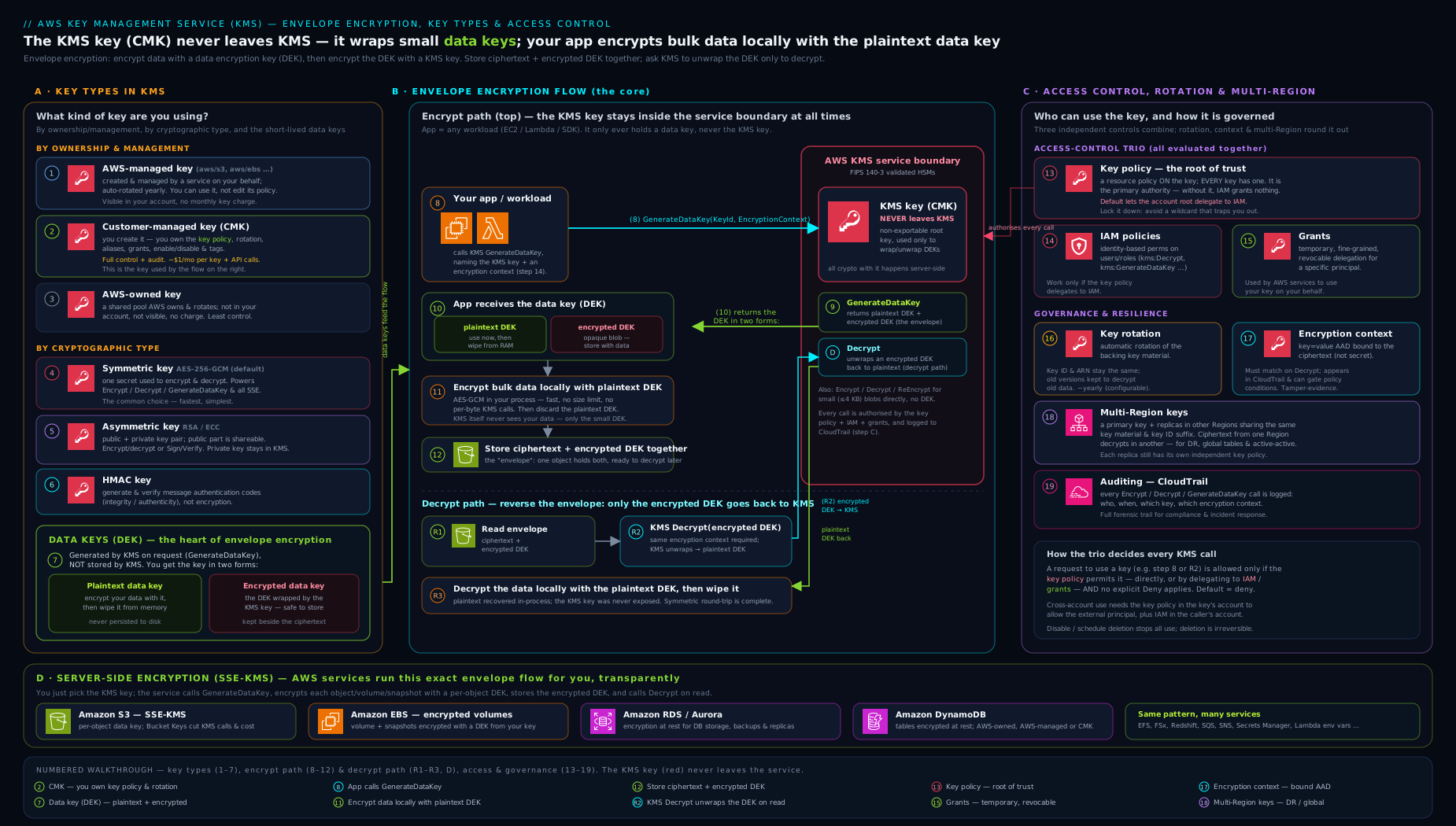
The diagram traces the whole envelope flow — GenerateDataKey returns the plaintext and wrapped data key, your app encrypts the payload locally, stores the wrapped key beside the data, and later Decrypt unwraps it — alongside the three-layer access-control model that decides whether any of those calls are allowed.
Two performance levers fall directly out of this model:
- Reuse data keys (carefully). Generating one data key per object is fine for large objects; for millions of tiny writes, one
GenerateDataKeycall per write becomes the bottleneck and burns your KMS request quota. Caching a data key for a bounded number of uses/time (the AWS Encryption SDK has built-in data key caching) trades a little blast-radius for a lot of throughput. - S3 Bucket Keys apply exactly this idea for SSE-KMS at the service level: S3 generates a short-lived bucket-level data key and uses it to protect many objects, collapsing thousands of per-object KMS calls into a few — cutting KMS costs by up to ~99% on write-heavy buckets. Always enable Bucket Keys for SSE-KMS.
The KMS request-quota gotcha: cryptographic operations share a per-Region, per-account quota (e.g. tens of thousands of requests/second for symmetric
Decrypt/GenerateDataKey, varying by Region and request type). Hot paths that callDecrypton every request will hitThrottlingExceptionlong before your app’s own limits. Envelope encryption + data-key caching + S3 Bucket Keys are the three standard fixes.
The access-control trio: key policies vs IAM vs grants
This is the most-tested KMS topic and the one people get most wrong. Access to a KMS key is governed by three mechanisms that work together: the key policy, IAM policies, and grants. (A fourth, VPC endpoint policies / global condition keys, can further restrict via the network.)
Rule 1 — the key policy is the root of trust
Every KMS key has exactly one resource policy, called the key policy, and it is mandatory — a key cannot exist without one. This is the foundational rule:
Nothing can use a KMS key unless the key policy allows it. Unlike S3 buckets or IAM roles, an IAM policy alone is never sufficient for KMS. The key policy must first open the door (directly, or by delegating to IAM), and only then can an IAM policy or grant grant the specific permission.
When you create a key without specifying a policy, KMS attaches a default key policy. The critical statement in it is:
{
  "Sid": "Enable IAM User Permissions",
  "Effect": "Allow",
  "Principal": { "AWS": "arn:aws:iam::111122223333:root" },
  "Action": "kms:*",
  "Resource": "*"
}
That Principal: ...:root does not mean “the root user”. It means “the account 111122223333” — and it is what delegates authorisation to IAM. With this statement present, the effective permission a principal has is decided by IAM as usual (identity policies, permission boundaries, SCPs). Remove this statement and IAM policies stop working for the key entirely — only principals named directly in the key policy can use it. (This is also the classic way people lock themselves out of a key — see Troubleshooting.)
So there are two governance styles:
| Style | Key policy says | Access actually controlled by | Best for |
|---|---|---|---|
| Delegate to IAM (default) | Allow root: kms:* |
IAM identity policies (plus SCP/boundaries) | Most accounts — manage key access the same way you manage everything else. |
| Key-policy-centric (no broad root delegation) | Names specific principals/roles explicitly | The key policy only | High-assurance keys where you want the key’s own document to be the single auditable source of “who can use this”. |
Rule 2 — IAM policies grant, but only within what the key policy delegated
An IAM identity policy can Allow kms:Decrypt on a key ARN, but it only takes effect if the key policy delegates to IAM (the root statement above) or otherwise allows that principal. IAM is how you scale access across many keys and many principals without editing every key policy. Standard pattern:
{
  "Effect": "Allow",
  "Action": ["kms:Encrypt", "kms:Decrypt", "kms:GenerateDataKey", "kms:DescribeKey"],
  "Resource": "arn:aws:kms:eu-west-1:111122223333:key/<key-id>"
}
Use kms:ViaService and other condition keys to tighten it (e.g. only allow the key to be used through S3, not directly).
Rule 3 — grants are temporary, programmatic, fine-grained permissions
A grant is a way to give a principal specific operations on a key, often temporarily, without editing the key policy or an IAM policy. Grants are the right tool when an AWS service or another principal needs just-in-time, narrowly-scoped access — for example, EBS needs to use your key to encrypt a volume, or Lambda needs to decrypt under one specific encryption context.
| Property | Grant |
|---|---|
| Granted operations | A subset: Encrypt, Decrypt, GenerateDataKey*, CreateGrant, RetireGrant, DescribeKey, etc. |
| Scope-down | Can be constrained by encryption context (GrantConstraints) and to a single grantee principal. |
| Lifetime | Until retired (RetireGrant) or revoked (RevokeGrant); can also carry constraints that limit use. |
| Consistency | Eventually consistent — a brand-new grant may take a moment to take effect; pass the returned grant token on the next call to use it immediately. |
| Who uses them | AWS services (EBS, RDS, Redshift, etc.) create grants on your behalf when you attach your CMK; you can also create them directly. |
The three combine with this evaluation logic: a request is allowed if it is permitted by the key policy and (IAM policy or a grant) — and is never allowed if any applicable policy has an explicit Deny. Explicit deny always wins, exactly as in core IAM.
The interview one-liner: “For KMS, the key policy is the root of trust — it must allow access before an IAM policy or grant can. IAM scales access across keys; grants give temporary, narrowly-scoped, often service-driven access; and explicit deny beats everything.”
A complete key policy: administrators vs users
The three rules above are abstract until you see the document they produce. When you create a customer-managed key in the console and pick separate key administrators and key users, this is the (abbreviated) key policy KMS generates. It is the single most useful KMS artifact to be able to read on sight — notice that administrators get management actions but no Decrypt, and users get cryptographic actions but no ability to change the policy:
{
  "Version": "2012-10-17",
  "Id": "key-consolepolicy-3",
  "Statement": [
    {
      "Sid": "Enable IAM User Permissions",
      "Effect": "Allow",
      "Principal": { "AWS": "arn:aws:iam::111122223333:root" },
      "Action": "kms:*",
      "Resource": "*"
    },
    {
      "Sid": "Allow access for Key Administrators",
      "Effect": "Allow",
      "Principal": { "AWS": "arn:aws:iam::111122223333:role/kms-admins" },
      "Action": [
        "kms:Create*", "kms:Describe*", "kms:Enable*", "kms:List*",
        "kms:Put*", "kms:Update*", "kms:Revoke*", "kms:Disable*",
        "kms:Get*", "kms:Delete*", "kms:TagResource", "kms:UntagResource",
        "kms:ScheduleKeyDeletion", "kms:CancelKeyDeletion"
      ],
      "Resource": "*"
    },
    {
      "Sid": "Allow use of the key",
      "Effect": "Allow",
      "Principal": { "AWS": "arn:aws:iam::111122223333:role/app-runtime" },
      "Action": [
        "kms:Encrypt", "kms:Decrypt", "kms:ReEncrypt*",
        "kms:GenerateDataKey*", "kms:DescribeKey"
      ],
      "Resource": "*"
    },
    {
      "Sid": "Allow attachment of persistent resources",
      "Effect": "Allow",
      "Principal": { "AWS": "arn:aws:iam::111122223333:role/app-runtime" },
      "Action": ["kms:CreateGrant", "kms:ListGrants", "kms:RevokeGrant"],
      "Resource": "*",
      "Condition": { "Bool": { "kms:GrantIsForAWSResource": "true" } }
    }
  ]
}
"Resource": "*" looks alarmingly broad but is correct: a key policy is attached to one key, so * means “this key,” nothing more. The fourth statement is the subtle one — it lets the app role create grants, but the kms:GrantIsForAWSResource condition restricts that to grants an integrated AWS service (EBS, RDS…) makes on the role’s behalf, so the role cannot hand your key to an arbitrary third principal. This is the exact policy the Exercise at the end asks you to build, and reading it fluently is the fastest way to pass the KMS questions on the Security specialty exam.
Encryption context: authenticated, auditable, free
Encryption context is a set of non-secret key/value string pairs you pass to Encrypt/GenerateDataKey and must pass identically to Decrypt. KMS binds it to the ciphertext as Additional Authenticated Data (AAD) in AES-GCM, so:
- If the encryption context on
Decryptdoes not byte-for-byte match the one used onEncrypt, decryption fails. This cryptographically ties a ciphertext to its intended context (e.g.{"app":"billing","tenant":"acme"}) — a ciphertext encrypted for tenantacmecannot be decrypted as tenantglobex. - It is logged in CloudTrail (it is non-secret), so you get rich, queryable audit detail of what each decrypt was for.
- You can require specific context values in key policies, IAM policies and grants via the
kms:EncryptionContext:<key>andkms:EncryptionContextKeyscondition keys — e.g. “this role may only decrypt wheretenantequals its own tenant id.”
It costs nothing and adds both a safety interlock and an authorisation dimension. Many AWS services set encryption context for you automatically (e.g. S3 uses the object ARN; Secrets Manager uses the secret ARN). Never put secrets in the encryption context — it is plaintext in logs.
Aliases: indirection you should always use
An alias is a friendly, mutable display name and pointer to a key, in the form alias/my-app-key. Applications reference alias/my-app-key instead of the raw key UUID, so you can re-point the alias to a different key (for example after creating a new key) without changing application code.
| Property | Detail |
|---|---|
| Format | alias/<name>; the aws/<service> prefix is reserved for AWS-managed keys. |
| Scope | Region-specific; an alias maps to one key in that Region. |
| Mutability | You can update which key an alias points to, and delete aliases, freely. |
| Permissions | You can scope IAM with kms:RequestAlias / kms:ResourceAliases conditions. |
| Gotcha | An alias is not a security boundary — permissions are evaluated against the underlying key ARN, not the alias. Re-pointing an alias does not re-encrypt existing data; old ciphertext still references the old key ID embedded in its blob. |
Use aliases everywhere in application config; they make key rotation-by-replacement and environment promotion (dev/stage/prod) painless.
Key rotation: what it does and does not change
Rotation replaces the cryptographic key material, while the key ID, ARN, aliases, policies and grants stay the same. Crucially, KMS keeps all old versions of the key material so that data encrypted under a previous version can still be decrypted transparently — rotation never re-encrypts your existing data, and you never have to track which version encrypted what.
| Rotation mode | How it works | Applies to | Notes |
|---|---|---|---|
| Automatic rotation | KMS generates new material on a schedule; old material retained for decrypt | Customer-managed symmetric keys (and AWS-managed keys do this automatically) | Configurable period: default 365 days, settable 90–2560 days. Enable with enable-key-rotation --rotation-period-in-days. |
| On-demand rotation | You trigger a rotation immediately with rotate-key-on-demand |
Customer-managed symmetric keys | Up to a limited number of on-demand rotations per key; great for “rotate now” after an incident. |
| AWS-managed key rotation | Automatic, every year, not configurable | AWS-managed keys (aws/<service>) |
You cannot change or disable it. |
| Manual rotation (rotate by replacement) | You create a new key, then re-point the alias to it | Any key, including asymmetric, HMAC and imported-material keys (which cannot auto-rotate) | Old key must be kept enabled to decrypt old data. This is the only rotation option for asymmetric/HMAC/imported keys. |
Key facts that trip people up:
- Automatic rotation only works for symmetric KMS keys with AWS-generated material. Asymmetric keys, HMAC keys, multi-Region keys with imported material, and keys with imported key material (BYOK) cannot be automatically rotated — you rotate them manually by replacement.
- Rotation is transparent: applications keep using the same key ARN/alias; no code change, no re-encryption.
- Rotation is a defence-in-depth / compliance measure (limits how much data any single key version protects), not a fix for a compromised key — if material is compromised you must re-encrypt under a new key and revoke access to the old one.
- Each rotation of a customer-managed key adds a small monthly storage cost for the additional key-material version retained.
Imported key material (BYOK): you can create a key with no AWS-generated material and import your own 256-bit material (wrapped for transport). You then control the material and can set an expiration; you must re-import to “rotate”. Trade-off: you own the material lifecycle (and the risk of losing it) and lose automatic rotation. Use only when a regulation demands you generate keys outside AWS.
Multi-Region keys: ciphertext that travels
A normal KMS key is Regional — its material never leaves its Region, and ciphertext produced in eu-west-1 can only be decrypted by calling KMS in eu-west-1. That breaks cross-Region DR and global datastores.
Multi-Region keys solve this: you create a primary key in one Region and replicate it to others. The replicas share the same key material and the same key ID suffix (the ARN differs only by Region), so ciphertext encrypted in one Region can be decrypted by the replica in another Region without a cross-Region call.
| Aspect | Multi-Region key behaviour |
|---|---|
| Key material | Shared across all replica Regions (the only KMS keys for which material crosses a Region boundary, securely). |
| Key ID | Shared suffix (mrk-...); ARNs differ only by Region. |
| Policies/grants/aliases | Independent per Region — you manage each replica’s policy separately. |
| Rotation | Managed on the primary and propagated; replicas stay in sync. |
| Primary | Exactly one primary at a time; you can update which Region is primary. |
| When to use | Cross-Region DR, DynamoDB global tables, S3 Cross-Region Replication with KMS, active-active multi-Region apps. |
| When not to | If you do not need cross-Region ciphertext portability — regional keys have a tighter blast radius and are simpler. |
The deeper architecture — replication mechanics, failover and cross-account multi-Region sharing — is covered in AWS KMS in Depth: Multi-Region Keys, Envelope Encryption, Key Policies, and Grants.
CloudHSM vs KMS (and the Custom Key Store)
KMS uses HSMs under the hood but presents a fully managed, multi-tenant, API-first service. AWS CloudHSM gives you single-tenant, dedicated HSMs that you administer, in your VPC, with FIPS 140-3 Level 3 validation and sole control of the keys (AWS cannot access them).
| Dimension | AWS KMS | AWS CloudHSM |
|---|---|---|
| Tenancy | Multi-tenant managed service | Single-tenant dedicated HSM cluster (in your VPC) |
| Who controls keys | AWS operates the HSMs; you control via policy | You fully control; AWS has no access |
| Integration with AWS services | Native (S3/EBS/RDS/etc. integrate directly) | Not native — you integrate via PKCS#11/JCE/KSP, or via a KMS Custom Key Store |
| Management effort | Minimal | You manage cluster, users, backups, HA |
| Compliance | FIPS 140-3 Level 3 (validated HSM fleet) | FIPS 140-3 Level 3, dedicated |
| Cost model | $1/key/month + API calls | Per-HSM-hour (substantially more expensive) |
| Use when | Default for nearly all AWS encryption | Regulatory mandate for sole custody / dedicated HSM, or you need HSM features KMS does not expose |
The KMS Custom Key Store is the bridge: a KMS key store backed by your CloudHSM cluster (or by an external key store, XKS, backed by an HSM you run outside AWS). You get the KMS API and native service integrations (so S3/EBS just work) while the key material lives in your dedicated CloudHSM / external HSM. It is the way to satisfy “keys must live in our own HSM” and “we still want SSE-KMS for S3” at the same time — at higher cost and operational burden.
Interview answer: “KMS is the managed, multi-tenant, natively-integrated default. CloudHSM is single-tenant, customer-controlled, dedicated hardware for sole-custody regulatory needs. When you need both — your own HSM and native AWS integration — use a KMS Custom Key Store backed by CloudHSM (or XKS for an external HSM).”
SSE integrations: how S3, EBS and RDS use KMS
“Server-Side Encryption (SSE)” means an AWS service encrypts your data at rest for you, calling KMS via envelope encryption behind the scenes. The patterns are consistent across services.
Amazon S3 — four options:
| S3 option | Key used | KMS calls | Notes |
|---|---|---|---|
SSE-S3 (AES256) |
AWS-owned key managed by S3 | None you pay for | The default; zero config, free. |
SSE-KMS (aws:kms) |
AWS-managed aws/s3 or your CMK |
Yes (one per object unless Bucket Keys on) | Audit in CloudTrail, key policy control. Enable S3 Bucket Keys to slash KMS calls/cost. |
DSSE-KMS (aws:kms:dsse) |
Your CMK | Yes | Dual-layer KMS encryption for stringent compliance (two independent layers). |
| SSE-C | A key you supply on each request | None (you hold the key) | You manage the key entirely; AWS never stores it. |
All new S3 objects are encrypted by default (SSE-S3 at minimum); set a bucket default encryption to force SSE-KMS, and deny unencrypted/PutObject-without-aws:kms via a bucket policy.
Amazon EBS — encryption is a volume property chosen at creation; you pick SSE-S3-style platform default or your CMK. Behind the scenes EBS calls GenerateDataKey (via a grant on your key) to get a volume data key, and every snapshot and volume created from an encrypted volume is also encrypted. You can set EBS encryption by default per-Region so every new volume is encrypted. You cannot encrypt an existing unencrypted volume in place — you snapshot, copy the snapshot with encryption, and restore.
Amazon RDS / Aurora — encryption is enabled at instance/cluster creation with an AWS-managed key or your CMK, and it covers the underlying storage, automated backups, read replicas and snapshots. The key fact: you cannot enable or disable encryption on an existing unencrypted RDS instance — you must snapshot → copy snapshot with encryption → restore. A read replica must use a key in its own Region (multi-Region keys help cross-Region replicas).
The common thread: every one of these is envelope encryption — the service asks KMS for a data key (often via a grant), encrypts your bytes locally with it, stores the wrapped key, and decrypts on read. You control which key and who can use it; the service does the plumbing.
Going deeper
Everything above is enough to use KMS correctly. This section is for the reader who has to operate it at scale, defend it in a design review, or explain the awkward edge cases in an interview.
The key lifecycle: key states
A KMS key is a small state machine, and several operations are legal only in specific states. Knowing the states explains a lot of “why did this fail” moments.
| Key state | What it means | Can you use it cryptographically? |
|---|---|---|
Creating |
Key is being created (brief) | No |
Enabled |
Normal, usable | Yes |
Disabled |
You (or an admin) turned it off; still exists, still billed | No — every crypto call returns DisabledException |
PendingImport |
An imported-material key created but material not yet imported | No |
PendingDeletion |
Deletion scheduled; in the 7–30 day window | No — but recoverable with cancel-key-deletion |
PendingReplicaDeletion |
A multi-Region replica whose deletion is pending | No |
Unavailable |
A custom-key-store key whose CloudHSM/external HSM is disconnected | No — reconnect the store to restore |
Updating |
Primary/replica update in flight | Briefly restricted |
The practical takeaway: disable before you delete. Flipping a key to Disabled is instantly reversible and lets you prove nothing breaks (watch for DisabledException in application logs and CloudTrail) before you commit to the irreversible schedule-key-deletion. If something screams, re-enable; nothing is lost.
ReEncrypt: changing keys without ever seeing plaintext
ReEncrypt is the operation people forget exists. It takes a ciphertext encrypted under key A and re-wraps it under key B (or under the same key with a new encryption context) — and the decrypt-then-encrypt happens entirely inside the KMS/HSM boundary. The plaintext never crosses the network or touches your process. That is what makes it the correct tool for:
- Rotate-by-replacement of asymmetric, HMAC or imported keys (which cannot auto-rotate): create the new key,
ReEncryptthe stored wrapped data keys from the old to the new key, re-point the alias. - Changing the encryption context on existing ciphertext.
- Cross-account key migration — as long as the caller has the right permissions on both keys.
The permission subtlety: ReEncrypt needs two grants of authority — kms:ReEncryptFrom on the source key and kms:ReEncryptTo on the destination key. A common failure is granting only one side. Remember it re-wraps the wrapped data key (a few hundred bytes), not your terabytes of data — for envelope-encrypted objects you ReEncrypt the stored CiphertextBlob, and the bulk ciphertext on disk is never touched.
Grants, in detail: tokens, retire vs revoke
Grants are eventually consistent because they propagate across the KMS fleet. Two mechanisms tame that:
- Grant tokens.
CreateGrantreturns both aGrantIdand aGrantToken. If you must use the new permission on the very next call — before propagation completes — pass theGrantTokento that call (Decrypt,GenerateDataKey, etc.). KMS honours the token immediately. - Retire vs revoke.
RetireGrantis the graceful teardown — done by the grantee or a principal named in the grant’sRetiringPrincipalwhen the work is finished (it needs no special key-policy permission).RevokeGrantis the forceful cancel — done by a key administrator to yank a grant regardless of who holds it. Interview shorthand: you retire your own grant; an admin revokes someone else’s.
Grants are additive-only (a grant can never deny), are limited to a few thousand per key, and never appear in the key policy — inspect them with aws kms list-grants --key-id <id>. Constrain them with EncryptionContextEquals (exact match) or EncryptionContextSubset (must contain these pairs).
Request quotas and throttling, precisely
KMS cryptographic operations draw on a shared, per-Region, per-account request-rate quota — Encrypt, Decrypt, GenerateDataKey, ReEncrypt and friends all spend from the same bucket. Two facts matter in production:
- Symmetric operations get a high quota (on the order of tens of thousands of requests/second, varying by Region and adjustable via Service Quotas), but asymmetric operations — RSA
Sign/Verify/Decrypt, and especiallyGenerateDataKeyPair— get a far lower quota (hundreds to low thousands/second). A design that signs every API request with an RSA KMS key will throttle at a fraction of the symmetric rate. - Throttling surfaces as
ThrottlingException; the SDK retries with exponential backoff, but a sustained hot path needs a structural fix, not retries.
The three structural fixes, in order of leverage: S3 Bucket Keys (collapse per-object calls at the service layer), data key caching (reuse one data key for a bounded number of operations/time), and GenerateDataKeyWithoutPlaintext to pre-provision wrapped keys off the hot path. Only after those should you file a Service Quotas increase.
What KMS actually costs — a worked example
The pricing model is two line items: $1 per customer-managed key per month (prorated; AWS-managed and AWS-owned keys are free to store) and $0.03 per 10,000 requests for symmetric operations (the first 20,000 requests/month are free; asymmetric and GenerateDataKeyPair cost more per request). Put numbers on it:
- A service issuing 100 million
Decryptcalls/month: 100,000,000 ÷ 10,000 = 10,000 units × $0.03 = $300/month in request charges alone. - Move that same workload behind data-key caching so it makes ~1 KMS call per 10,000 operations, and request charges fall to roughly $0.03–$0.30/month. On S3, enabling Bucket Keys on a write-heavy bucket routinely cuts SSE-KMS request cost by ~99%.
The lesson: the $1/key is trivial; the request charges are where a naive per-request Decrypt design quietly bills hundreds of dollars. Envelope encryption plus caching is a cost control, not just a throughput one.
Crypto-shredding: deletion as a data-erasure primitive
Because data encrypted under a key is unrecoverable once the key is gone, key deletion becomes a cryptographic erasure (“crypto-shredding”) tool. Encrypt each tenant’s (or each user’s) data under a distinct KMS key — or under a per-tenant data key wrapped by a per-tenant KMS key — and honouring a GDPR “right to erasure” request becomes a single schedule-key-deletion: the tenant’s ciphertext bytes may physically remain in backups, but they are permanently undecryptable. Caveats to state in the design review: the mandatory 7–30 day window means erasure is scheduled, not instant; any cached plaintext data keys must also be expired; and you now have a per-tenant key sprawl and $1/key/month to manage.
Deleting keys safely — and the multi-Region ordering rule
schedule-key-deletion enforces a 7–30 day waiting period (default 30) precisely because deletion is the one truly irreversible KMS action. During the window the key is PendingDeletion, unusable, and recoverable with cancel-key-deletion. For multi-Region keys there is an ordering rule that catches people: you cannot delete a primary while any replica still exists. Delete (or promote) every replica first, or the primary deletion is blocked. Alarm on ScheduleKeyDeletion, DisableKey, PutKeyPolicy and DeleteImportedKeyMaterial in CloudTrail/EventBridge — these are the “someone is about to make data unrecoverable” signals.
Condition keys that lock a key down
Beyond kms:ViaService, a few condition keys turn a key policy into a tight perimeter:
kms:CallerAccount— the AWS account of the caller; AWS-managed key policies use it to keep a key usable only within its owning account.aws:SourceArn/aws:SourceAccount— confused-deputy protection when a service principal (e.g. SNS, S3, CloudTrail) calls KMS on your behalf: pin exactly which resource may trigger the use so a different customer’s topic/bucket can’t borrow your key.kms:EncryptionContext:<key>/kms:EncryptionContextKeys— require specific encryption-context pairs, turning context into an enforceable authorisation dimension (e.g. a role may only decrypt wheretenantequals its own tenant id).kms:RecipientAttestation:ImageSha384(advanced) — for AWS Nitro Enclaves: KMS will only return plaintext to a cryptographically attested enclave image, so even the parent EC2 instance’s OS cannot read the decrypted value. This is the strongest “the host can’t see the plaintext” guarantee AWS offers.
The AWS Encryption SDK and keyrings
For client-side encryption you rarely call GenerateDataKey by hand — you use the AWS Encryption SDK (Java, Python, JS, Rust/C, .NET), which implements envelope encryption with a standard, portable message format (the wrapped data keys travel inside the ciphertext, so you don’t manage them separately). It adds three things worth knowing: keyrings/master-key providers (compose multiple wrapping keys, including multi-Region and multi-account, for high-availability decrypt), data key caching via a LocalCryptoMaterialsCache bounded by max age, max messages and max bytes, and key commitment (algorithm suites that prevent a single ciphertext from decrypting to two different plaintexts under two different keys). If a lesson ever tells you to “roll your own AES-GCM around GenerateDataKey,” reach for the Encryption SDK instead — it gets the IV handling, key commitment and message format right for you.
Hands-on lab: envelope encryption from the CLI
This lab creates a customer-managed key, exercises direct and envelope encryption, sets an alias, enables rotation, then cleans up. It stays within the AWS Free Tier in spirit but note the cost caveat below. Requires the AWS CLI v2 configured with credentials that can manage KMS.
1. Create a customer-managed symmetric key and capture its ID:
KEY_ID=$(aws kms create-key \
  --description "kv-lab envelope encryption demo" \
  --key-usage ENCRYPT_DECRYPT \
  --key-spec SYMMETRIC_DEFAULT \
  --query 'KeyMetadata.KeyId' --output text)
echo "Key: $KEY_ID"
2. Give it a friendly alias:
aws kms create-alias --alias-name alias/kv-lab --target-key-id "$KEY_ID"
3. Direct encryption (small data, under 4 KB):
aws kms encrypt --key-id alias/kv-lab \
  --plaintext fileb://<(echo -n "top secret string") \
  --query CiphertextBlob --output text > secret.b64

# Decrypt it back
aws kms decrypt --ciphertext-blob fileb://<(base64 --decode secret.b64) \
  --key-id alias/kv-lab \
  --query Plaintext --output text | base64 --decode; echo
# Expected output: top secret string
4. Envelope encryption (generate a data key, encrypt a large file locally):
# Make a "large" file
head -c 1M /dev/urandom > bigfile.bin

# Ask KMS for a data key: plaintext + wrapped copy
aws kms generate-data-key --key-id alias/kv-lab --key-spec AES_256 \
  --query '[Plaintext,CiphertextBlob]' --output text > dk.txt
PLAIN_DK=$(cut -f1 dk.txt); WRAPPED_DK=$(cut -f2 dk.txt)

# Encrypt the big file locally with the plaintext data key (OpenSSL)
echo "$PLAIN_DK" | base64 --decode > dk.bin
openssl enc -aes-256-cbc -pbkdf2 -in bigfile.bin -out bigfile.enc -pass file:dk.bin
# Store ONLY the wrapped data key alongside the ciphertext; discard plaintext key
shred -u dk.bin 2>/dev/null || rm -f dk.bin
echo "$WRAPPED_DK" > bigfile.key
5. Decrypt the envelope (unwrap the data key, then decrypt locally):
aws kms decrypt --ciphertext-blob fileb://<(base64 --decode bigfile.key) \
  --key-id alias/kv-lab --query Plaintext --output text | base64 --decode > dk.bin
openssl enc -d -aes-256-cbc -pbkdf2 -in bigfile.enc -out bigfile.dec -pass file:dk.bin
cmp bigfile.bin bigfile.dec && echo "MATCH: envelope round-trip works"
rm -f dk.bin
# Expected output: MATCH: envelope round-trip works
6. Encryption context (must match on decrypt):
aws kms encrypt --key-id alias/kv-lab \
  --plaintext fileb://<(echo -n "tenant data") \
  --encryption-context tenant=acme,app=billing \
  --query CiphertextBlob --output text > ctx.b64

# Wrong context FAILS:
aws kms decrypt --ciphertext-blob fileb://<(base64 --decode ctx.b64) \
  --encryption-context tenant=globex 2>&1 | grep -i invalid || echo "(expected an InvalidCiphertext error)"

# Correct context SUCCEEDS:
aws kms decrypt --ciphertext-blob fileb://<(base64 --decode ctx.b64) \
  --encryption-context tenant=acme,app=billing \
  --query Plaintext --output text | base64 --decode; echo
# Expected output: tenant data
7. Enable automatic rotation (90 days):
aws kms enable-key-rotation --key-id "$KEY_ID" --rotation-period-in-days 90
aws kms get-key-rotation-status --key-id "$KEY_ID"
# Expected: "KeyRotationEnabled": true, "RotationPeriodInDays": 90
Validation: confirm the key, alias and rotation:
aws kms describe-key --key-id alias/kv-lab --query 'KeyMetadata.[KeyId,KeyState,KeySpec,KeyUsage]' --output text
aws kms list-aliases --key-id "$KEY_ID" --query 'Aliases[].AliasName' --output text
Cleanup: you cannot delete a KMS key instantly — you schedule deletion with a mandatory waiting period of 7 to 30 days (default 30), during which the key is PendingDeletion and unusable but recoverable with cancel-key-deletion. Delete the alias immediately; schedule the key for the minimum 7-day window:
aws kms delete-alias --alias-name alias/kv-lab
aws kms schedule-key-deletion --key-id "$KEY_ID" --pending-window-in-days 7
rm -f secret.b64 bigfile.bin bigfile.enc bigfile.dec bigfile.key dk.txt ctx.b64
Cost note: a customer-managed key costs $1/month (prorated — even pending-deletion keys incur the charge until actually deleted, so schedule deletion promptly). API calls are billed per 10,000 requests (the first 20,000/month are free in many Regions); this lab’s handful of calls is effectively free. The $1/month is the line item to remember.
Practice challenges
Six exercises, escalating from beginner to advanced. Each has a worked solution — try it first, then expand. Commands use the AWS CLI v2; account IDs and key IDs are placeholders. All of these fit inside a single $1/month key.
1. (Beginner) Create a key, alias it, and read back its immutable properties. Create a customer-managed symmetric key, give it the alias alias/kv-practice, and print its key spec and key usage.
<details> <summary>Solution</summary>
KEY_ID=$(aws kms create-key --description "kv practice" \
  --query 'KeyMetadata.KeyId' --output text)
aws kms create-alias --alias-name alias/kv-practice --target-key-id "$KEY_ID"
aws kms describe-key --key-id alias/kv-practice \
  --query 'KeyMetadata.[KeySpec,KeyUsage,KeyState]' --output text
# Representative: SYMMETRIC_DEFAULT   ENCRYPT_DECRYPT   Enabled
Why: KeySpec and KeyUsage are fixed at creation — this proves the default is a symmetric ENCRYPT_DECRYPT key, the only kind that can do envelope encryption and SSE.
</details>
2. (Beginner) Direct-encrypt a short string and decrypt it back. Encrypt the string hello kms under the key and recover it.
<details> <summary>Solution</summary>
aws kms encrypt --key-id alias/kv-practice \
  --plaintext fileb://<(echo -n "hello kms") \
  --query CiphertextBlob --output text > c.b64
aws kms decrypt --ciphertext-blob fileb://<(base64 --decode c.b64) \
  --key-id alias/kv-practice --query Plaintext --output text | base64 --decode; echo
# Representative output: hello kms
Why: direct Encrypt/Decrypt is the right tool only for payloads under 4 KB — anything bigger must use envelope encryption (challenge 3).
</details>
3. (Intermediate) Envelope-encrypt a 10 MB file. Use GenerateDataKey, encrypt the file locally, store only the wrapped data key, and prove a clean round-trip.
<details> <summary>Solution</summary>
head -c 10M /dev/urandom > big.bin
aws kms generate-data-key --key-id alias/kv-practice --key-spec AES_256 \
  --query '[Plaintext,CiphertextBlob]' --output text > dk.txt
cut -f1 dk.txt | base64 --decode > dk.bin        # plaintext DEK (ephemeral)
cut -f2 dk.txt > big.key                          # wrapped DEK (persist this)
openssl enc -aes-256-cbc -pbkdf2 -in big.bin -out big.enc -pass file:dk.bin
rm -f dk.bin dk.txt                               # discard the plaintext DEK

# ...later, decrypt:
aws kms decrypt --ciphertext-blob fileb://<(base64 --decode big.key) \
  --key-id alias/kv-practice --query Plaintext --output text | base64 --decode > dk.bin
openssl enc -d -aes-256-cbc -pbkdf2 -in big.enc -out big.dec -pass file:dk.bin
cmp big.bin big.dec && echo "MATCH"; rm -f dk.bin
# Representative output: MATCH
Why: KMS only ever wraps the tiny DEK; your CPU does the bulk crypto — the pattern that lets one $1 key protect terabytes without hitting the 4 KB limit. </details>
4. (Intermediate) Separate administrators from users in the key policy. Write and apply a key policy where role kms-admins can manage the key but not decrypt, and role app-runtime can Encrypt/Decrypt but not change the policy. Reason about why an admin’s decrypt is denied.
<details> <summary>Solution</summary>
Apply the four-statement policy shown in “A complete key policy” above with put-key-policy:
aws kms put-key-policy --key-id "$KEY_ID" --policy-name default \
  --policy file://key-policy.json
An admin calling aws kms decrypt gets AccessDeniedException: the “Allow use of the key” statement names only role/app-runtime, and the admins’ statement grants management verbs (Create*, Put*, ScheduleKeyDeletion…) but not kms:Decrypt. Nothing in the policy allows an admin to decrypt, and with no Allow there is no access.
Why: separation of duties — an admin who can rewrite the policy but can’t read data, plus a user who can read data but can’t rewrite the policy, contains the blast radius of either stolen credential. </details>
5. (Advanced) Enforce per-tenant isolation with a constrained grant. Give role/tenant-worker permission to decrypt only ciphertext whose encryption context is tenant=acme, using a grant constraint — not an IAM policy. Then show a tenant=globex decrypt fails.
<details> <summary>Solution</summary>
aws kms create-grant --key-id "$KEY_ID" \
  --grantee-principal arn:aws:iam::111122223333:role/tenant-worker \
  --operations Decrypt \
  --constraints EncryptionContextEquals={tenant=acme}
# Ciphertext made with --encryption-context tenant=acme  -> decrypt SUCCEEDS
# Ciphertext made with --encryption-context tenant=globex -> AccessDeniedException
Why: the EncryptionContextEquals constraint binds the authorisation to the context, so a leaked tenant-worker credential still cannot read another tenant’s data — cryptographic multi-tenant isolation with no policy edit.
</details>
6. (Advanced) Migrate ciphertext to a new key without exposing plaintext, then crypto-shred the old key. Re-wrap a stored data key from the old key to a freshly created key using ReEncrypt, re-point the alias, then schedule the old key for deletion.
<details> <summary>Solution</summary>
NEW_ID=$(aws kms create-key --description "kv practice v2" \
  --query 'KeyMetadata.KeyId' --output text)

# Re-wrap the stored wrapped DEK from old key -> new key, plaintext never leaves KMS:
aws kms re-encrypt \
  --ciphertext-blob fileb://<(base64 --decode big.key) \
  --source-key-id "$KEY_ID" \
  --destination-key-id "$NEW_ID" \
  --query CiphertextBlob --output text > big.key.v2

aws kms update-alias --alias-name alias/kv-practice --target-key-id "$NEW_ID"
aws kms schedule-key-deletion --key-id "$KEY_ID" --pending-window-in-days 7
Why: ReEncrypt swaps the wrapping key inside the HSM boundary (no plaintext on the wire), and once the old key finishes its 7-day window its ciphertext is unrecoverable — rotation-by-replacement and crypto-shredding in one flow. Needs kms:ReEncryptFrom on the old key and kms:ReEncryptTo on the new.
</details>
Common mistakes & troubleshooting
| Symptom | Likely cause | Fix |
|---|---|---|
AccessDeniedException on kms:Decrypt despite a permissive IAM policy |
The key policy does not delegate to IAM (no Allow root: kms:* statement) |
Add the IAM-delegation statement to the key policy, or name the principal directly in the key policy. IAM alone is never enough for KMS. |
| You removed the root statement and now no one can manage the key | Locked yourself out — IAM no longer applies and no principal is named | Open a support case to recover, or prevent it: always keep at least one admin principal in the key policy. (This is why the console warns you.) |
InvalidCiphertextException on decrypt |
Encryption context mismatch, or you passed a ciphertext from a different key, or the blob is corrupted | Pass the exact same encryption context used at encrypt; verify the KeyId. |
ThrottlingException / KMSThrottlingException on a hot path |
Exceeded the per-Region request quota with per-request Decrypt/GenerateDataKey |
Use envelope encryption + data-key caching, enable S3 Bucket Keys, or request a quota increase. |
| EBS volume creation fails with KMS permission error | The service lacks a grant on your CMK, or the role can’t CreateGrant |
Ensure the key policy/IAM allows kms:CreateGrant; let the service create its grant. |
| Cannot enable automatic rotation on a key | The key is asymmetric, HMAC, multi-Region with imported material, or has imported material | These cannot auto-rotate — rotate manually by creating a new key and re-pointing the alias. |
| Re-pointed an alias but old data still decrypts with the old key | Ciphertext blobs embed the original key ID | Expected — aliases don’t re-encrypt. To fully migrate, re-encrypt the data under the new key (ReEncrypt). |
| Cross-account principal can’t use your key | Cross-account needs both sides: your key policy must allow the external account/role and that account’s IAM must allow it | Allow the external principal in the key policy and have their admin grant the IAM permission; consider a grant for narrow, temporary access. |
Common beginner mistakes
These are misconceptions — wrong mental models — as opposed to the symptom-driven failures in the troubleshooting table above. Fixing the model prevents a whole family of bugs.
-
“KMS encrypts my files.” It does not, except for scraps under 4 KB. KMS wraps a data key; your application or the AWS service encrypts the actual bytes with that data key, locally. Right model: KMS is a wrapping-and-authorisation service, not a bulk cipher. If you ever find yourself streaming a large object through
Encrypt, you have the model backwards. -
“An IAM policy that allows
kms:Decryptis enough.” For every other resource type it would be — for KMS it never is. Right model: the key policy is the root of trust and is evaluated first. IAM only takes effect if the key policy delegates to it (theAllow root: kms:*statement) or names the principal directly. This one misconception is behind the majority ofAccessDenied-despite-IAM tickets. -
“After rotation I must re-encrypt my old data.” No. KMS keeps every old backing-key version and picks the right one automatically at decrypt time. Right model: rotation changes the material going forward and is completely transparent — same key ID, same ARN, same alias, no re-encryption, no code change. (Rotation is also not a remedy for a compromised key — that needs a brand-new key and re-encryption.)
-
“Re-pointing or deleting an alias changes which key decrypts my existing data.” It changes nothing about existing ciphertext. Right model: a ciphertext blob embeds the key ARN it was made with; the alias is just a mutable pointer used at encrypt time. Old data keeps decrypting under the old key until you deliberately
ReEncryptit. -
“AWS-managed and AWS-owned keys are basically the same, and ‘free’ means I still have control.” They differ in visibility and you have essentially no control over either. Right model: AWS-managed keys (
aws/<service>) appear in your account read-only and log to CloudTrail; AWS-owned keys are pooled across customers and invisible. You cannot set a policy on, rotate on your schedule, disable, or delete either — the moment you need any of those, you need a customer-managed key. -
“I’ll just turn on automatic rotation for all my keys.” Automatic rotation works only for symmetric, AWS-generated keys. Right model: asymmetric keys, HMAC keys, and imported-material (BYOK) keys cannot auto-rotate — you rotate them by replacement (new key, re-point alias,
ReEncrypt). Trying to enable rotation on them errors. -
“Encryption context is optional metadata / a handy place for a secret.” It is neither optional-to-match nor secret. Right model: encryption context is Additional Authenticated Data — it must match byte-for-byte on decrypt or decryption fails, and it is written in plaintext to CloudTrail. Use it to bind ciphertext to its purpose and to enforce authorisation; never put a password or token in it.
-
“I’ll just enable encryption on this existing RDS instance / EBS volume.” You cannot toggle encryption on an existing unencrypted resource. Right model: snapshot it, copy the snapshot with encryption (specifying the KMS key), then restore/create from the encrypted snapshot. Plan encryption at creation time.
-
“One KMS key can absorb any request rate.” Cryptographic calls share a per-Region, per-account quota, and asymmetric operations get a much smaller one. Right model: a per-request
Decrypton a hot path throttles (ThrottlingException) long before your app’s own ceiling — reach for S3 Bucket Keys, data-key caching, orGenerateDataKeyWithoutPlaintextbefore a quota increase.
Best practices
- Default to customer-managed keys for anything with audit, cross-account, custom-policy or rotation requirements; use AWS-managed keys only for low-stakes “just encrypt it”.
- Always reference keys by alias, never by raw UUID, so you can rotate-by-replacement and promote across environments.
- Use envelope encryption (the Encryption SDK or service SSE) for anything over 4 KB; never try to push large payloads through
Encrypt. - Enable S3 Bucket Keys on every SSE-KMS bucket and use data-key caching on hot paths to control cost and avoid throttling.
- Enable automatic rotation on symmetric CMKs (annual is the compliance baseline; tighten the period if required); rotate manually for asymmetric/HMAC/imported keys.
- Use encryption context to bind ciphertext to its purpose and to add an auditable, policy-enforceable authorisation dimension — never put secrets in it.
- Apply least privilege in the key policy: separate key administrators (can manage the key, not use it) from key users (can
Encrypt/Decrypt, not administer) — KMS’s default policy and console split these roles for a reason. - Scope with condition keys:
kms:ViaService(only via S3/EBS/etc.),aws:SourceArn,kms:CallerAccount, and encryption-context conditions. - Set a long-enough deletion window (you cannot undo a real delete) and consider disabling a key first to test that nothing breaks before scheduling deletion.
Security notes
- Separate duties: key administrators should not also be key users. An admin who can change the policy but cannot decrypt, plus a user who can decrypt but cannot change the policy, contains the blast radius of either credential.
- Audit everything via CloudTrail: every KMS API call (including which key, which principal, and the encryption context) is logged. Alert on
ScheduleKeyDeletion,DisableKey,PutKeyPolicy, and unusualDecryptvolumes. - Cross-account is two-sided by design: sharing a key requires the key policy and the consumer’s IAM to allow it — neither side alone is enough. Prefer grants for narrow, time-bounded cross-account use, and constrain them with encryption context.
- Lock keys to a network or service with
kms:ViaServiceand VPC endpoint policies so a leaked credential cannot use the key from anywhere/anyhow. Decryptshould pin theKeyIdto avoid being tricked into decrypting an attacker-supplied blob under an unexpected key.- The HSM boundary is your strongest guarantee: symmetric key material is non-exportable and FIPS-validated; for sole-custody requirements, escalate to CloudHSM / a KMS Custom Key Store.
Interview & exam questions
-
What is envelope encryption and why does KMS use it? KMS generates a data key, returns it in plaintext and encrypted-under-the-KMS-key. You encrypt your data locally with the plaintext data key, discard it, and store the encrypted data key beside the data. KMS only ever wraps the small data key, so you can encrypt unlimited data without pushing it (or exceeding the 4 KB limit) through KMS.
-
Key policy vs IAM policy vs grant — how do they interact? The key policy is the mandatory root of trust and must allow access first. IAM policies grant access at scale but only work if the key policy delegates to IAM (the
Allow root: kms:*statement). Grants give temporary, narrowly-scoped, often service-driven permissions. A request is allowed if the key policy and (IAM or grant) allow it, and explicit deny always wins. -
AWS-managed vs AWS-owned vs customer-managed keys? AWS-owned are pooled across customers, invisible in your account, free, no CloudTrail. AWS-managed (
aws/<service>) are in your account (read-only), free to store, auto-rotate yearly, generate CloudTrail. Customer-managed cost $1/month and give full control: your policy, rotation schedule, disable/delete, grants, cross-account. -
What does key rotation actually change, and what stays the same? It replaces the key material while keeping the key ID, ARN, aliases, policies and grants unchanged, and retains old material so existing ciphertext still decrypts. It does not re-encrypt your data. Only symmetric, AWS-generated keys can auto-rotate; asymmetric/HMAC/imported keys must be rotated by replacement.
-
Why is there a 4 KB limit on
Encrypt, and how do you encrypt a 5 GB file? DirectEncryptround-trips into the HSM and is capped at 4 KB. For large data, callGenerateDataKey, encrypt locally with the data key (envelope encryption), and store the wrapped key with the file. -
What is encryption context and why use it? Non-secret key/value pairs bound to the ciphertext as AAD. They must match exactly on decrypt (else it fails), are logged in CloudTrail for audit, and can be required in policies/grants as an extra authorisation dimension. Never put secrets in it.
-
When would you choose CloudHSM over KMS? When you need single-tenant, dedicated, customer-controlled HSMs (sole custody, AWS has no access) for a regulatory mandate, or HSM features KMS doesn’t expose. To keep native AWS integrations while material lives in CloudHSM, use a KMS Custom Key Store.
-
How do multi-Region keys work and when do you need them? A primary key replicated to other Regions, sharing key material and key-ID suffix, so ciphertext from one Region decrypts in another without a cross-Region call. Policies/grants/aliases are per-Region. Use for cross-Region DR, DynamoDB global tables, and active-active apps.
-
How do you enable encryption on an existing unencrypted EBS volume or RDS instance? You cannot encrypt in place. Snapshot → copy the snapshot with encryption (specifying the KMS key) → create the new encrypted volume/restore the instance from the encrypted snapshot.
-
What’s the difference between
GenerateDataKeyandGenerateDataKeyWithoutPlaintext?GenerateDataKeyreturns the data key both in plaintext (use now) and encrypted (store).GenerateDataKeyWithoutPlaintextreturns only the encrypted copy — you decrypt it later, at point of use, to minimise how long plaintext key material exists in memory. -
A role has
kms:Decryptin its IAM policy but gets AccessDenied. Why? The key policy doesn’t allow that principal — either it lacks theAllow root: kms:*IAM-delegation statement, or there’s an explicit deny, or akms:ViaService/encryption-context condition isn’t met. IAM alone is never sufficient for KMS. -
What happens when you delete a KMS key, and how is data protected from accidental loss? You schedule deletion with a 7–30 day waiting period (default 30); the key becomes
PendingDeletionand unusable but recoverable viacancel-key-deletion. After the window, the key and all data encrypted under it become permanently unrecoverable — hence the mandatory wait and the advice to disable first to test.
Quick check
- True or false: an IAM policy alone is sufficient to allow a principal to use a KMS key.
- Which single API call gives you a key you can use locally to encrypt a large file, plus a wrapped copy to store?
- Which key types cannot be rotated automatically?
- What does the
Principal: ...:rootstatement in the default key policy actually authorise? - Which S3 setting collapses thousands of per-object KMS calls into a few to cut cost?
Answers
- False. The key policy must allow access first (directly or by delegating to IAM); IAM alone is never enough for KMS.
GenerateDataKey— it returns the data key in plaintext (encrypt locally, then discard) and encrypted under your KMS key (store alongside the data).- Asymmetric keys, HMAC keys, and keys with imported material (BYOK) — these must be rotated manually by creating a new key and re-pointing the alias. Only symmetric, AWS-generated keys auto-rotate.
- It delegates authorisation to the account’s IAM — it means “account
111122223333”, enabling IAM identity policies to govern the key. It does not mean only the root user. - S3 Bucket Keys — S3 uses a short-lived bucket-level data key to protect many objects, cutting SSE-KMS calls (and cost) dramatically.
Exercise
Create a customer-managed symmetric key with separate administrator and user roles baked into the key policy (administrators may manage the key but not Decrypt; users may Encrypt/Decrypt but not change the policy). Then:
- Enable automatic rotation with a 180-day period and confirm with
get-key-rotation-status. - Encrypt a string with an encryption context of
project=kv-exercise, and prove that decryption fails with a different context and succeeds with the matching one. - Add an IAM policy to a test role that allows
kms:Encrypt/kms:Decrypton the key only via S3 using thekms:ViaServicecondition, and reason about why a direct CLIdecryptfrom that role would be denied. - Finally, disable the key, confirm encryption operations fail with the key disabled, re-enable it, then schedule deletion with the minimum 7-day window and delete the alias.
Write down, in your own words, why the key policy had to grant access before the IAM policy could take effect.
Certification mapping
- AWS Certified Security – Specialty (SCS-C02): the heaviest user of this lesson — key types, the key-policy/IAM/grant trio, the “key policy is the root of trust” rule, rotation, encryption context, cross-account sharing, CloudHSM vs KMS, and SSE integrations are core domain content.
- AWS Certified Developer – Associate (DVA-C02): envelope encryption,
GenerateDataKeyvsEncrypt, data-key caching, encryption context, and using SSE-KMS from the SDK appear regularly. - AWS Certified Solutions Architect – Associate (SAA-C03): at-rest encryption choices (SSE-S3 vs SSE-KMS vs SSE-C), customer-managed vs AWS-managed keys, multi-Region keys for DR, and Bucket Keys for cost.
- AWS Certified Solutions Architect – Professional (SAP-C02): cross-account/cross-Region encryption design, custom key stores, and large-scale key governance.
Glossary
-
KMS key (CMK / Customer Master Key): the logical key resource in KMS holding non-exportable material, a policy, aliases and rotation config.
-
Data key (DEK): a key generated by KMS but used outside KMS to encrypt actual data; the heart of envelope encryption.
-
KEK (Key Encryption Key): a key whose job is to encrypt other keys — a KMS symmetric key wrapping your data keys.
-
Envelope encryption: encrypt data with a data key, encrypt that data key with a KMS key, store the wrapped data key with the data.
-
Key policy: the mandatory resource policy on every KMS key; the root of trust for all access.
-
Grant: a temporary, programmatic, narrowly-scoped permission to use a key, optionally constrained by encryption context.
-
Encryption context: non-secret key/value pairs bound to ciphertext as Additional Authenticated Data; must match on decrypt; logged and policy-enforceable.
-
Alias: a mutable friendly pointer (
alias/...) to a key ID; not a security boundary. -
Multi-Region key: a primary key replicated to other Regions sharing material and key-ID suffix, enabling cross-Region ciphertext portability.
-
SSE (Server-Side Encryption): an AWS service encrypting data at rest for you via KMS envelope encryption (SSE-S3, SSE-KMS, DSSE-KMS, SSE-C).
-
CloudHSM: single-tenant, customer-controlled dedicated HSMs; pair with a KMS Custom Key Store for native integration.
-
BYOK / imported key material: key material you generate and import; you control its lifecycle and lose automatic rotation.
-
Key spec: the algorithm and size of a key (
SYMMETRIC_DEFAULT,RSA_2048,ECC_NIST_P256,HMAC_256, …), fixed at creation. -
Key usage: what a key may do (
ENCRYPT_DECRYPT,SIGN_VERIFY,GENERATE_VERIFY_MAC), fixed at creation. -
Data key pair: an asymmetric (RSA/ECC) keypair minted by
GenerateDataKeyPair, with the private key wrapped under a symmetric KMS key. -
ReEncrypt: a KMS operation that re-wraps a ciphertext from one key to another (or a new encryption context) entirely inside the HSM boundary — plaintext never leaves KMS. Needs
kms:ReEncryptFrom+kms:ReEncryptTo. -
Grant token: a token returned by
CreateGrantthat you pass on the next call to use a brand-new (eventually-consistent) grant immediately. -
Key state: a key’s lifecycle status (
Enabled,Disabled,PendingImport,PendingDeletion,PendingReplicaDeletion,Unavailable, …); some operations are legal only in specific states. -
AAD (Additional Authenticated Data): data authenticated but not encrypted by AES-GCM; KMS uses the encryption context as AAD, binding it to the ciphertext.
-
S3 Bucket Key: a short-lived, bucket-level data key S3 uses to protect many objects, collapsing thousands of per-object KMS calls into a few and cutting SSE-KMS cost ~99%.
-
DSSE-KMS / SSE-C: dual-layer KMS server-side encryption (two independent KMS layers) / server-side encryption with a customer-supplied key AWS never stores.
-
KMS Custom Key Store / XKS: a KMS key store backed by your own CloudHSM cluster, or by an External Key Store (HSM you run outside AWS) — KMS API and native integrations, but key material in your hardware.
-
HSM / FIPS 140-3: Hardware Security Module — tamper-resistant hardware that generates and holds key material; the KMS fleet is validated to FIPS 140-3 Security Level 3.
-
Crypto-shredding: rendering data unrecoverable by deleting the KMS key that protects it — a cryptographic-erasure primitive for right-to-erasure requests.
Next steps
- Continue to AWS Secrets Manager vs SSM Parameter Store, In Depth — both encrypt every secret with KMS, so this lesson is the foundation.
- Go deeper on architecture with AWS KMS in Depth: Multi-Region Keys, Envelope Encryption, Key Policies, and Grants.
- See KMS-backed rotation in action in Secrets Manager Automatic Rotation with RDS, Lambda & Cross-Account.
- Revisit the access-control machinery KMS depends on in AWS IAM Fundamentals.