In a nutshell
Think of your app’s sensitive values like the keys and the settings for a building. Secrets are the keys — the database password, the API key, the TLS private key — anything that lets someone in and causes real harm if it leaks. Configuration is the settings — which floor you’re on, the opening hours, the thermostat target — values that shape behaviour but aren’t dangerous on their own. You never tape a key to the front door (never hard-code a secret in source), and you never rebuild the whole building to change the thermostat (never bake config into an image). You keep both in a locked, audited cabinet and fetch them when needed.
AWS gives you two such cabinets. Secrets Manager is the high-security safe: it encrypts everything, and — its headline trick — it can rotate a secret automatically (swap the password for a fresh one on a schedule, with no downtime), share a secret across accounts, and copy it across Regions. It charges rent: about $0.40 per secret per month. SSM Parameter Store is the big filing cabinet: it holds plain settings for free and also holds encrypted secrets (a SecureString), organised in neat folders like /myapp/prod/db/host — but it does not rotate anything for you.
The whole lesson comes down to one decision you’ll make over and over: does this value need automatic rotation, or cross-account / cross-Region sharing? If yes, it goes in Secrets Manager. If it’s ordinary config, or a secret you’ll rotate yourself and you’d rather not pay per secret, it goes in Parameter Store. Most real apps use both — the config tree and static keys in Parameter Store, the auto-rotating database password in Secrets Manager. Remember only that sentence and you already have the answer to the most common question on this topic.
Level: Intermediate · Time: ~50 min · You’ll need: an AWS account, basic AWS CLI comfort, and a working mental model of IAM and KMS envelope encryption — both stores encrypt with KMS and gate access with IAM.
Every application needs two things it must not hard-code: secrets (database passwords, API keys, TLS private keys, OAuth client secrets) and configuration (feature flags, endpoint URLs, log levels, queue names). Put either in source code and you have a problem — a credential in a git history is a credential in every fork, every laptop, and every build log forever; a config value baked into an image means a rebuild for every environment. AWS gives you two managed services for this, and the single most common interview question on the topic is which one do I use? — because they overlap, they are priced very differently, and choosing wrong costs either money or capability. AWS Secrets Manager is a purpose-built secrets store with automatic rotation, versioning, and cross-account sharing — it costs per secret per month. AWS Systems Manager Parameter Store is a general-purpose configuration store that also stores encrypted secrets (SecureString), and its standard tier is free.
This lesson is the exhaustive tour of both. We will go through every Secrets Manager feature — the secret types, the four-step automatic rotation model with Lambda, staging labels (AWSCURRENT, AWSPENDING, AWSPREVIOUS), resource policies and cross-account access, multi-Region replication, and the real cost — and every Parameter Store feature — String, StringList, and KMS-backed SecureString; standard vs advanced tiers; hierarchies and recursive lookups; versions; and parameter policies (expiration and change notification). Then comes the part that matters most in practice: a clear when-to-use-which comparison table, every retrieval pattern (SDK, CLI, the Lambda extension and caching, the ECS/EKS integrations), how to lock both down with IAM, and how to audit every read and write with CloudTrail. By the end you will never again hard-code a secret, and you will pick the right store every time.
Learning objectives
By the end of this lesson you will be able to:
- Explain what Secrets Manager and SSM Parameter Store are, how they overlap, and the precise reasons to pick one over the other.
- Create and manage secrets in Secrets Manager — every secret type, versioning, and the staging-label model.
- Describe automatic rotation end to end: the four-step Lambda contract, single vs alternating-users strategies, and the rotation schedule.
- Use resource policies and replication to share secrets cross-account and across Regions.
- Create parameters in Parameter Store — String, StringList, SecureString — and choose between standard and advanced tiers.
- Organise configuration with hierarchies, retrieve subtrees recursively (
get-parameters-by-path), and use parameter policies. - Retrieve secrets and parameters safely from applications, the CLI, Lambda (extension + caching), ECS, and EKS, and grant least-privilege IAM access.
- Audit all access with CloudTrail and harden both services with KMS, resource policies, and VPC endpoints.
Prerequisites & where this fits
You need an AWS account, basic comfort with the AWS CLI (aws configure), and a working mental model of IAM (identities, policies, the difference between an identity policy and a resource policy) and AWS KMS (keys and envelope encryption) — both services encrypt with KMS, and access to both is governed by IAM, so the earlier IAM and KMS lessons are the foundation this one builds on. No prior secrets-management background is assumed; every term is defined as it appears. This is a lesson in the Security module of the AWS Zero-to-Hero course, following AWS KMS & Encryption, In Depth (which explains the envelope encryption both services rely on). After this, the course moves on to messaging with AWS Messaging Fundamentals: SQS, SNS & EventBridge. Once you have the fundamentals here, the advanced companion Secrets Manager Rotation at Scale: Custom Rotation Lambdas, RDS Credentials, and Cross-Account Sharing takes rotation and cross-account sharing to production depth.
Core concepts: secrets vs configuration, and the two stores
Before the options, fix two distinctions that the whole lesson hangs on.
Secret vs configuration. A secret is a value whose disclosure causes harm: a password, an API key, a private key, a connection string with a password in it. Configuration is a value that shapes behaviour but is not itself sensitive: a feature flag, a region name, a bucket name, a timeout. The line blurs (a database hostname is config; the password is a secret), and the right answer is often to store the password as a secret and the rest as config. The reason the distinction matters: secrets need rotation, tight auditing, and short blast radius; configuration mostly needs versioning and easy retrieval.
The two stores. AWS gives you two managed key-value stores for these values, both encrypted, both reached by IAM-controlled API calls — never a file on disk, never an environment variable baked into an image.
| AWS Secrets Manager | SSM Parameter Store | |
|---|---|---|
| Built for | Secrets | Configuration (and secrets, via SecureString) |
| Encryption | Always KMS-encrypted | Plaintext (String/StringList) or KMS-encrypted (SecureString) |
| Automatic rotation | Yes (native, with Lambda) | No (you build it yourself) |
| Versioning | Yes, with staging labels | Yes, numeric versions (+ labels on advanced) |
| Cross-account sharing | Yes (resource policy) | No native resource policy (share via other means) |
| Multi-Region | Replica secrets | Per-Region (no built-in replication) |
| Cost | ~$0.40 per secret/month + $0.05 per 10k API calls | Standard tier: free; advanced ~$0.05/param/month |
| Size limit | 64 KB per secret | 4 KB (standard) / 8 KB (advanced) |
| API | secretsmanager:* |
ssm:*Parameter* |
The decisive question, in one line: does the value need automatic rotation or cross-account sharing? If yes → Secrets Manager. If it is plain configuration, or a secret you will rotate yourself and you want it free → Parameter Store (SecureString for secrets). We will sharpen this into a full decision table later; keep this mental model as you read the details.
One crucial bridge between them: Parameter Store can reference a Secrets Manager secret. If you read the parameter name /aws/reference/secretsmanager/<secret-name> through the SSM API, Parameter Store fetches the value from Secrets Manager for you. This lets tools that only speak “Parameter Store” (some older integrations, certain IaC patterns) consume Secrets Manager secrets without code changes.
AWS Secrets Manager, in depth
AWS Secrets Manager stores, encrypts, rotates, and serves secrets through an API. Every secret is always encrypted with a KMS key — either the AWS-managed key aws/secretsmanager (free, zero setup) or a customer managed key (CMK) you control (required for cross-account sharing and key separation). You never store a secret in plaintext here; that is the whole point.
What a secret looks like
A secret has a name (often a path-like string such as prod/payments/db), an optional description, a KMS key, optional tags, an optional resource policy, an optional rotation configuration, and one or more versions, each holding a secret value. The secret value is up to 64 KB and is stored as either:
SecretString— a UTF-8 string. By convention this is JSON ({"username":"app","password":"…","host":"…","port":5432}), which is what the RDS rotation Lambdas and most SDK helpers expect. It can also be a single opaque string (e.g. an API key).SecretBinary— arbitrary binary (a certificate bundle, a keystore). Mutually exclusive withSecretStringin a given version.
Secret types (what the console offers)
The API stores any string or blob, but the console offers typed wizards that pre-fill the JSON shape and wire up the right rotation Lambda:
| Secret type | What it stores | Rotation support |
|---|---|---|
| Amazon RDS credentials | username/password (+ host, port, engine, dbname) for an RDS DB |
Native — AWS provides the rotation Lambda |
| Amazon Redshift credentials | Same shape for a Redshift cluster | Native rotation Lambda |
| Amazon DocumentDB credentials | Same shape for DocumentDB | Native rotation Lambda |
| Other database | Generic DB credentials (MySQL/PostgreSQL/etc. not on RDS) | Native templates for some engines |
| Credentials for other service | Any username/password pair |
Custom rotation Lambda (you write it) |
| Other type of secret | Free-form key/value or plaintext (API keys, tokens) | Custom rotation Lambda (you write it) |
The type is essentially a convenience: it determines the JSON template and which rotation Lambda template AWS offers. Under the hood every secret is just a name plus versions of SecretString/SecretBinary.
Versioning and staging labels — the heart of Secrets Manager
This is the concept interviewers probe and the one beginners get wrong, so go slowly. Secrets Manager never overwrites a secret value in place. Every change creates a new version, identified by a VersionId (a UUID). To track which version is the live one, Secrets Manager attaches staging labels — named pointers that move between versions:
| Staging label | Meaning |
|---|---|
AWSCURRENT |
The current, live version. This is what GetSecretValue returns when you don’t specify a version. Your applications use this. |
AWSPENDING |
A new version being created/tested during rotation, not yet promoted. Only present mid-rotation. |
AWSPREVIOUS |
The immediately prior version (the one AWSCURRENT used to point at). Your rollback safety net. |
A label points to exactly one version, and a version can carry multiple labels. Rotation is, mechanically, the act of creating a new version labelled AWSPENDING and then moving AWSCURRENT to it (which automatically demotes the old current to AWSPREVIOUS). Understanding that “rotation = moving the AWSCURRENT label” demystifies the whole rotation flow below.
You can also create your own custom staging labels (e.g. to pin a version), but AWSCURRENT/AWSPENDING/AWSPREVIOUS are reserved and managed by rotation.
Key version facts:
GetSecretValuewith no version returnsAWSCURRENT. You can request a specificVersionIdor aVersionStage(e.g.AWSPREVIOUSto roll back).PutSecretValuecreates a new version; you choose which labels (defaultAWSCURRENT) to move onto it.- Old versions without any staging label are eventually deleted by Secrets Manager (it keeps a limited history of unlabelled versions).
Automatic rotation — the four-step model
Rotation means periodically replacing a secret’s value with a new one and updating the system that uses it, without downtime. Secrets Manager orchestrates this by invoking a rotation Lambda that implements a four-step contract. The Lambda is called once per step, with an event telling it the SecretId, the Token (the VersionId of the AWSPENDING version), and the Step:
| Step | Name | What the Lambda must do |
|---|---|---|
| 1 | createSecret | Generate a new secret value (e.g. GetRandomPassword) and store it as a new version labelled AWSPENDING. Idempotent — if AWSPENDING already exists, do nothing. |
| 2 | setSecret | Apply the pending value to the target service (e.g. ALTER USER … PASSWORD on the database) so the new credential actually works. |
| 3 | testSecret | Verify the pending value works — connect to the DB with it and run a trivial query. If this fails, rotation aborts and AWSCURRENT is untouched. |
| 4 | finishSecret | Move the AWSCURRENT label onto the AWSPENDING version (demoting the old one to AWSPREVIOUS). Rotation complete. |
The brilliance of this design: until step 4, AWSCURRENT still points at the old, working credential, so applications keep running. Only when the new credential has been proven (step 3) does it become current. If any step throws, the secret stays on the old value and CloudWatch logs the failure.
Single-user vs alternating-users rotation (the classic RDS choice):
- Single user — one database user;
setSecretchanges its password. Simplest, but there is a brief window where the old password is invalidated before every client has refreshed — fine for most apps, risky for high-throughput ones. - Alternating users — two users (e.g.
app_a/app_b); each rotation creates/updates the inactive user and flips to it. Zero-downtime because the old user’s password stays valid until clients move. Requires a “superuser/master” secret to manage the two users. Use this for databases where you cannot tolerate even a momentary auth failure.
Rotation schedule — you set it as a rotation interval in days (e.g. every 30 days) or a cron/rate schedule (e.g. cron(0 8 1 * ? *) for the 1st of each month at 08:00 UTC). You can also choose to rotate immediately on save (runs once now to validate the Lambda) or defer the first rotation to the next window. A rotation window duration bounds how long a rotation may take.
The deep mechanics of writing custom rotators, the master-secret pattern, and alternating-users in full are covered in the advanced companion lesson linked at the end — here you need to know the four-step contract and the two strategies cold, because that is what gets asked.
Managed rotation vs Lambda-based rotation
The four-step model above always runs — but who owns the rotation function has changed, and this trips up people who learned Secrets Manager a few years ago. There are now two ways rotation happens:
- Lambda-based rotation (the classic model). Secrets Manager invokes a rotation Lambda that lives in your account — either an AWS-provided template (for RDS/Redshift/DocumentDB and a few generic engines) or a custom function you write. You own it: you patch its runtime, put it in the right VPC/subnets, give it a security group path to reach the database, and grant it
secretsmanager:*on the secret plus (for alternating-users) the master secret. You must use this for any non-managed target — a third-party API, an on-prem database, a SaaS token. - Managed rotation (the newer model). For Amazon RDS, Aurora, Redshift, and DocumentDB, Secrets Manager can now run the rotation function itself, with no Lambda in your account to deploy, patch, or fit into a VPC. You turn rotation on and set the schedule; AWS operates the rotator. Fewer moving parts, nothing for you to maintain — at the cost of the customisation a Lambda gives you.
Closely related: RDS and Aurora can manage the master user password directly in Secrets Manager for you (the “Manage master credentials in AWS Secrets Manager” option). RDS creates the secret, owns it, and rotates it on a schedule — you never see or set the master password, you just read the secret. That is the lowest-effort way to get a rotating database credential, and it’s the pattern to reach for on greenfield RDS.
Rule of thumb: managed target (RDS / Aurora / Redshift / DocumentDB) → prefer managed rotation (or RDS-managed master credentials); anything else → a rotation Lambda. Either way the AWSCURRENT / AWSPENDING / AWSPREVIOUS dance and the four steps are identical underneath — only the ownership of the rotator differs.
Resource policies and cross-account access
A resource policy (a JSON policy attached to the secret itself) controls who can access it, complementing the IAM identity policies attached to principals. The headline use is cross-account sharing: to let account B read a secret owned by account A, you need both:
- A resource policy on the secret (account A) that
Allows the account-B principalsecretsmanager:GetSecretValue. - A key policy / grant on the KMS key (account A) that lets the account-B principal
kms:Decrypt— and the secret must use a CMK, not the AWS-managedaws/secretsmanagerkey, because the managed key cannot be shared cross-account. This is the single most common cross-account “why is it AccessDenied?” cause.
You can also use a resource policy within one account to deny everything except a specific role (a belt-and-braces guardrail), or to block access (an explicit Deny). Use aws secretsmanager validate-resource-policy to catch broad/public policies before applying them.
Replication (multi-Region secrets)
Secrets Manager can replicate a secret to other Regions. You designate a primary secret and add replica Regions; Secrets Manager keeps the replicas in sync (value and metadata) and re-encrypts each replica with a KMS key in that Region (you choose which). Why it matters:
- Multi-Region applications read the secret from their local Region (lower latency, no cross-Region dependency).
- Disaster recovery — if the primary Region is impaired, you can promote a replica to a standalone secret and continue.
- Rotation happens on the primary and propagates to replicas — you don’t rotate each Region separately.
Replicas are billed as separate secrets. You cannot replicate into a Region that already has a secret of the same name (resolve the conflict first).
Other Secrets Manager features
- Deletion with a recovery window. You cannot hard-delete instantly by default.
delete-secretschedules deletion after a recovery window of 7–30 days (default 30), during whichrestore-secretundoes it. To delete now (rare, dangerous), pass--force-delete-without-recovery. GetRandomPassword— a helper that generates a strong random password with configurable length, character classes, and exclusions (used by rotation Lambdas).- Tagging and ABAC — tag secrets (
Environment=prod) and write IAM policies that grant access by tag (attribute-based access control), avoiding per-secret ARNs. - Batch retrieval —
batch-get-secret-valuefetches multiple secrets in one call (by ID list or by tag filter), reducing API calls. - VPC endpoints (PrivateLink) — reach Secrets Manager privately from a VPC without traversing the internet (covered in Security notes).
Secrets Manager cost
The pricing model is the reason people reach for Parameter Store instead: ~$0.40 per secret per month (prorated) plus $0.05 per 10,000 API calls. A replica counts as another secret. Ten thousand secrets is ~$4,000/month before API calls — so don’t store configuration here, and cache reads (the Lambda extension does this for you) so you aren’t billed per request in a hot loop.
AWS Systems Manager Parameter Store, in depth
Parameter Store (part of AWS Systems Manager) is a hierarchical key-value store for configuration data and secrets. Its standard tier is free, which makes it the default home for the dozens of non-rotating config values and many secrets a typical application needs. A parameter has a name (a path like /myapp/prod/db/host), a type, a value, a tier, an optional description, a KMS key (for SecureString), optional policies, and numeric versions.
Parameter types
| Type | What it stores | Encryption | Notes |
|---|---|---|---|
String |
A single plaintext string | None | For non-sensitive config: hostnames, flags, URLs, ARNs. |
StringList |
A comma-separated list | None | Returned as a comma-separated string; split client-side. For lists of subnets, AZs, etc. |
SecureString |
A single string encrypted with KMS | KMS | For secrets: passwords, API keys. Choose the AWS-managed aws/ssm key or a CMK. |
A few important subtleties:
SecureStringuses KMS envelope encryption. For values ≤ 4 KB Parameter Store uses standard KMS encryption directly; for larger values (advanced tier) it uses envelope encryption (a data key from KMS). Either way, reading aSecureStringrequireskms:Decrypton the key and you must pass--with-decryptionon the API call, or you get back ciphertext.- There is no
SecretString/JSON convention enforced as in Secrets Manager — aSecureStringis just one encrypted string. To store structured secrets you either use multiple parameters under a path or store a JSON blob as oneSecureString(then parse it yourself). - A native AWS data type can be attached to a
String(e.g.aws:ec2:imagevalidates that the value is a real AMI ID, andaws:ssm:integrationfor automation) — useful for catching typos in IaC.
Standard vs advanced tier
Each parameter is standard or advanced, and the tier changes limits, cost, and capabilities:
| Standard | Advanced | |
|---|---|---|
| Value size | up to 4 KB | up to 8 KB |
| Parameters per account/Region | 10,000 | 100,000 |
| Parameter policies (expire, notify) | No | Yes |
| Higher-throughput limit option | No | Yes (with throughput setting) |
| Cost | Free | ~$0.05 per parameter/month + per-API charges for higher throughput |
You set the tier explicitly, or use --tier Intelligent-Tiering, which automatically promotes a parameter to advanced only if it needs to (value > 4 KB or a policy is attached) — so you pay for advanced only when required. Default to standard; let intelligent tiering handle the exceptions.
Hierarchies and paths
Parameter names are paths separated by /, which lets you organise configuration as a tree and fetch whole subtrees in one call:
/myapp/prod/db/host
/myapp/prod/db/port
/myapp/prod/db/password      (SecureString)
/myapp/staging/db/host
The power move is get-parameters-by-path with --recursive, which returns every parameter under a prefix — so one call fetches all of /myapp/prod/ for an environment. This is the idiomatic way to load configuration: name parameters by /<app>/<env>/<group>/<key> and pull the env subtree at startup. Paths also make IAM scoping clean — grant ssm:GetParametersByPath on arn:aws:ssm:…:parameter/myapp/prod/* and a role can read exactly its environment and nothing else.
Versions, labels, and history
- Every write to a parameter creates a new numeric version (1, 2, 3 …); the latest is returned by default, or request
name:version(e.g./myapp/prod/db/password:3). - Parameter labels (advanced and standard) are named aliases for a version (e.g.
release-2026-06), letting you pin and roll back by label:name:label. get-parameter-historyreturns all past versions with who/when — useful for audit and rollback.- Overwrite must be explicit.
put-parameterfails if the name exists unless you pass--overwrite; this prevents accidental clobbering.
Parameter policies (advanced tier only)
Advanced parameters support policies — JSON rules that automate lifecycle, attached at creation or update:
- Expiration — delete the parameter at a given timestamp (
ExpirationDate). Good for short-lived credentials you want auto-cleaned. - ExpirationNotification — emit a CloudWatch Events/EventBridge event N days/hours before expiry, so you can act.
- NoChangeNotification — emit an event if the parameter has not changed within a period (e.g. 20 days) — a built-in nudge to rotate a secret that Parameter Store can’t rotate for you. This is how teams bolt a “rotation reminder” onto Parameter Store secrets.
These policies are the closest Parameter Store gets to Secrets Manager’s lifecycle automation — they notify, but they do not rotate; you still build the rotation yourself (e.g. an EventBridge rule triggering a Lambda).
Parameter Store cost
Standard tier is free for storage and standard-throughput API calls — which is the whole appeal. Advanced parameters are ~$0.05 per parameter per month, and high-throughput API interactions are billed per call when you opt into the higher-throughput setting. For the vast majority of configuration, Parameter Store costs nothing.
When to use which: the decision table
This is the question, so here is the clear answer. Both can store a secret; the differences decide it.
| Need | Use Secrets Manager | Use Parameter Store |
|---|---|---|
| Automatic rotation (RDS, Redshift, custom) | ✅ Native, built-in | ❌ Build it yourself (EventBridge + Lambda) |
| Cross-account sharing of the value | ✅ Resource policy + CMK | ❌ No native resource policy |
| Multi-Region replication of the value | ✅ Replica secrets | ❌ Per-Region only |
| Plain configuration (flags, URLs, ARNs) | ⚠️ Works but wasteful ($/secret) | ✅ Free String/StringList |
| Secrets, but free and you’ll rotate yourself | ⚠️ Costs $0.40/secret/mo | ✅ SecureString (free, standard tier) |
| Large value (up to 64 KB) | ✅ 64 KB | ❌ 4 KB / 8 KB only |
| Built-in random-password generation | ✅ GetRandomPassword + rotation |
❌ Generate it yourself |
| Hierarchical config, fetch a subtree at once | ⚠️ No path-tree fetch | ✅ get-parameters-by-path --recursive |
| Tightest cost at thousands of values | ❌ $0.40 each adds up fast | ✅ Standard tier free |
The rules I actually apply:
- Database/Redshift/DocumentDB credentials, or anything that must rotate automatically → Secrets Manager. Rotation is its reason to exist and re-implementing the four-step model on Parameter Store is rarely worth it.
- Cross-account or multi-Region secret sharing → Secrets Manager. Resource policies and replicas exist precisely for this.
- Everything else — configuration, and secrets you’ll rotate yourself or that don’t rotate (a third-party API key) → Parameter Store,
SecureStringfor the sensitive ones. It’s free, hierarchical, and the standard config home. - Mixed app: very common to use both — Parameter Store for the config tree and the static API keys, Secrets Manager for the auto-rotating DB password — and have the app read the DB password via the
/aws/reference/secretsmanager/…bridge so there’s one retrieval code path.
Retrieval patterns: getting secrets into your app safely
Storing a secret is half the job; reading it without leaking it (into logs, env vars, or images) is the other half. Here is every common pattern.
AWS CLI
# Secrets Manager — returns the JSON value of AWSCURRENT
aws secretsmanager get-secret-value --secret-id prod/payments/db \
  --query SecretString --output text

# A specific stage (e.g. roll back to previous)
aws secretsmanager get-secret-value --secret-id prod/payments/db \
  --version-stage AWSPREVIOUS --query SecretString --output text

# Parameter Store — a SecureString MUST pass --with-decryption
aws ssm get-parameter --name /myapp/prod/db/password \
  --with-decryption --query Parameter.Value --output text

# Fetch a whole environment subtree in one call
aws ssm get-parameters-by-path --path /myapp/prod/ --recursive \
  --with-decryption --query 'Parameters[].[Name,Value]' --output text
SDK (application code)
In application code you call the same APIs through the SDK and hold the value in memory only — never write it to disk or an env var. Pseudocode (any language SDK):
client = SecretsManager()
resp   = client.get_secret_value(SecretId="prod/payments/db")
creds  = json.parse(resp.SecretString)   # {username, password, host, port}
db.connect(creds.host, creds.username, creds.password)
# cache `creds` in memory; refresh on a timer or on auth failure
The single most important rule: cache the value in memory and reuse it, refreshing periodically (or when a DB connection fails auth, which signals a rotation). Calling GetSecretValue on every request is both slow and, on Secrets Manager, billed per call.
The Lambda extension (caching) — the recommended Lambda pattern
For AWS Lambda, AWS publishes the AWS Parameters and Secrets Lambda Extension (a layer). It runs a tiny local HTTP cache alongside your function; your code fetches from http://localhost:2773/… instead of calling the AWS API directly. Benefits:
- In-memory caching across warm invocations — dramatically fewer API calls (and far lower Secrets Manager bill) and lower latency.
- One mechanism for both services — it serves Secrets Manager secrets and SSM parameters.
- Configurable TTL so cached values refresh after rotation.
# Inside a Lambda with the extension layer attached:
# Secrets Manager
curl "http://localhost:2773/secretsmanager/get?secretId=prod/payments/db" \
  -H "X-Aws-Parameters-Secrets-Token: $AWS_SESSION_TOKEN"
# Parameter Store (SecureString decrypted)
curl "http://localhost:2773/systemsmanager/parameters/get?name=/myapp/prod/db/password&withDecryption=true" \
  -H "X-Aws-Parameters-Secrets-Token: $AWS_SESSION_TOKEN"
This is the default I recommend for Lambda — it removes both the cost and the cold-start latency of naïve per-invocation fetches. (For non-Lambda apps, AWS also ships language-specific caching libraries, e.g. the AWS Secrets Manager caching client.)
ECS and EKS integration (inject at startup, no code change)
- Amazon ECS can inject secrets directly into a container as environment variables via the task definition’s
secretsblock — pointvalueFromat a Secrets Manager ARN or an SSM parameter ARN, and ECS resolves and injects it at task start using the task execution role (which needssecretsmanager:GetSecretValue/ssm:GetParametersandkms:Decrypt). No SDK call in your code. You can even inject a single JSON key with thesecret-arn:json-key::syntax. - Amazon EKS uses the AWS Secrets and Configuration Provider (ASCP) for the Secrets Store CSI Driver: secrets/parameters are mounted as files into the pod (and optionally synced to Kubernetes Secrets), with access governed by IAM Roles for Service Accounts (IRSA) or EKS Pod Identity. The pod reads a file; nothing is baked into the image.
A note on the env-var pattern: injecting a secret as an environment variable is convenient but the value is then visible to anything that can read the process environment (and may surface in crash dumps). Mounting as a file (EKS CSI) or fetching via the extension is tighter; choose based on your threat model.
CloudFormation / IaC dynamic references
Infrastructure-as-code can pull a secret at deploy time without putting it in the template, using dynamic references:
'{{resolve:secretsmanager:prod/payments/db:SecretString:password}}'
'{{resolve:ssm-secure:/myapp/prod/db/password}}'
'{{resolve:ssm:/myapp/prod/db/host}}'
Use these so the value never lands in the template, parameters file, or state — only the reference does.
IAM access control
Access to both services is IAM-governed — by default no principal can read a secret or parameter; you grant least privilege explicitly.
Secrets Manager — scope to specific secret ARNs (or by tag), and remember the KMS half:
{
  "Version": "2012-10-17",
  "Statement": [
    {
      "Sid": "ReadPaymentsDbSecret",
      "Effect": "Allow",
      "Action": ["secretsmanager:GetSecretValue", "secretsmanager:DescribeSecret"],
      "Resource": "arn:aws:secretsmanager:eu-west-2:111122223333:secret:prod/payments/db-*"
    },
    {
      "Sid": "DecryptWithCmk",
      "Effect": "Allow",
      "Action": "kms:Decrypt",
      "Resource": "arn:aws:kms:eu-west-2:111122223333:key/<cmk-id>"
    }
  ]
}
Two gotchas: secret ARNs end in a random 6-character suffix, so use a trailing -* (or -??????) when you write the ARN by name; and if the secret uses a CMK, the principal needs kms:Decrypt on that key (the AWS-managed key grants this implicitly within the account).
Parameter Store — scope by path prefix, and include KMS for SecureString:
{
  "Version": "2012-10-17",
  "Statement": [
    {
      "Effect": "Allow",
      "Action": ["ssm:GetParameter", "ssm:GetParameters", "ssm:GetParametersByPath"],
      "Resource": "arn:aws:ssm:eu-west-2:111122223333:parameter/myapp/prod/*"
    },
    {
      "Effect": "Allow",
      "Action": "kms:Decrypt",
      "Resource": "arn:aws:kms:eu-west-2:111122223333:key/<cmk-id>"
    }
  ]
}
Path-based scoping is the big win for Parameter Store: one statement on /myapp/prod/* grants exactly the prod environment. For both services, prefer tag-based (ABAC) policies at scale so you don’t maintain ARN lists, and grant write actions (PutSecretValue, PutParameter) only to deployment roles, never to running apps.
ABAC: granting by tag instead of by ARN
At scale, listing every secret ARN in every policy becomes unmanageable. The fix is attribute-based access control (ABAC) — grant access based on a tag on the secret rather than its name. Secrets Manager exposes the condition key secretsmanager:ResourceTag/<tag-key> for exactly this; Parameter Store has the equivalent ssm:resourceTag/<tag-key>. A single policy then covers every present and future secret that carries the right tag:
{
  "Version": "2012-10-17",
  "Statement": [{
    "Sid": "ReadProdSecretsByTag",
    "Effect": "Allow",
    "Action": ["secretsmanager:GetSecretValue", "secretsmanager:DescribeSecret"],
    "Resource": "*",
    "Condition": {
      "StringEquals": {
        "secretsmanager:ResourceTag/Environment": "prod",
        "aws:PrincipalTag/Environment": "prod"
      }
    }
  }]
}
This says “a principal tagged Environment=prod may read any secret tagged Environment=prod” — no ARNs to maintain, and it self-extends as teams add secrets. The trade-off is that your tagging discipline becomes a security control: a mistagged secret is a hole, so restrict who can call TagResource / UntagResource (a secretsmanager:TagResource grant on an untrusted role is effectively a path to any secret). Pair ABAC with a guardrail that denies changing the Environment tag except from your deployment role. The IAM least-privilege lesson covers the tag-governance side in depth.
Auditing with CloudTrail
Every API call to both services is recorded by AWS CloudTrail — this is how you answer “who read this secret, and when?” in an audit or incident.
- Management events (always on in CloudTrail) capture
CreateSecret,PutSecretValue,RotateSecret,DeleteSecret,PutResourcePolicy,PutParameter,DeleteParameter, and cruciallyGetSecretValueandGetParameter/GetParameters— the reads. Each event records the principal, time, source IP, and the secret/parameter ARN. - The decrypt is logged too. Because both use KMS, a read also produces a KMS
DecryptCloudTrail event against the key — a second, independent trail of who decrypted the secret. This is why a CMK with its own key policy plus CloudTrail gives security teams the tightest audit story. - Alerting. Send CloudTrail to CloudWatch Logs and alarm on anomalies — e.g.
GetSecretValuefrom an unexpected role or Region, aDeleteSecret, or a spike in reads. EventBridge rules can fire on Secrets Manager events (including rotation success/failure) to notify or remediate. - Rotation visibility.
RotateSecretevents plus the rotation Lambda’s CloudWatch Logs tell you whether each cycle succeeded; pair with Parameter Store’sExpirationNotification/NoChangeNotificationevents for the values you rotate yourself.
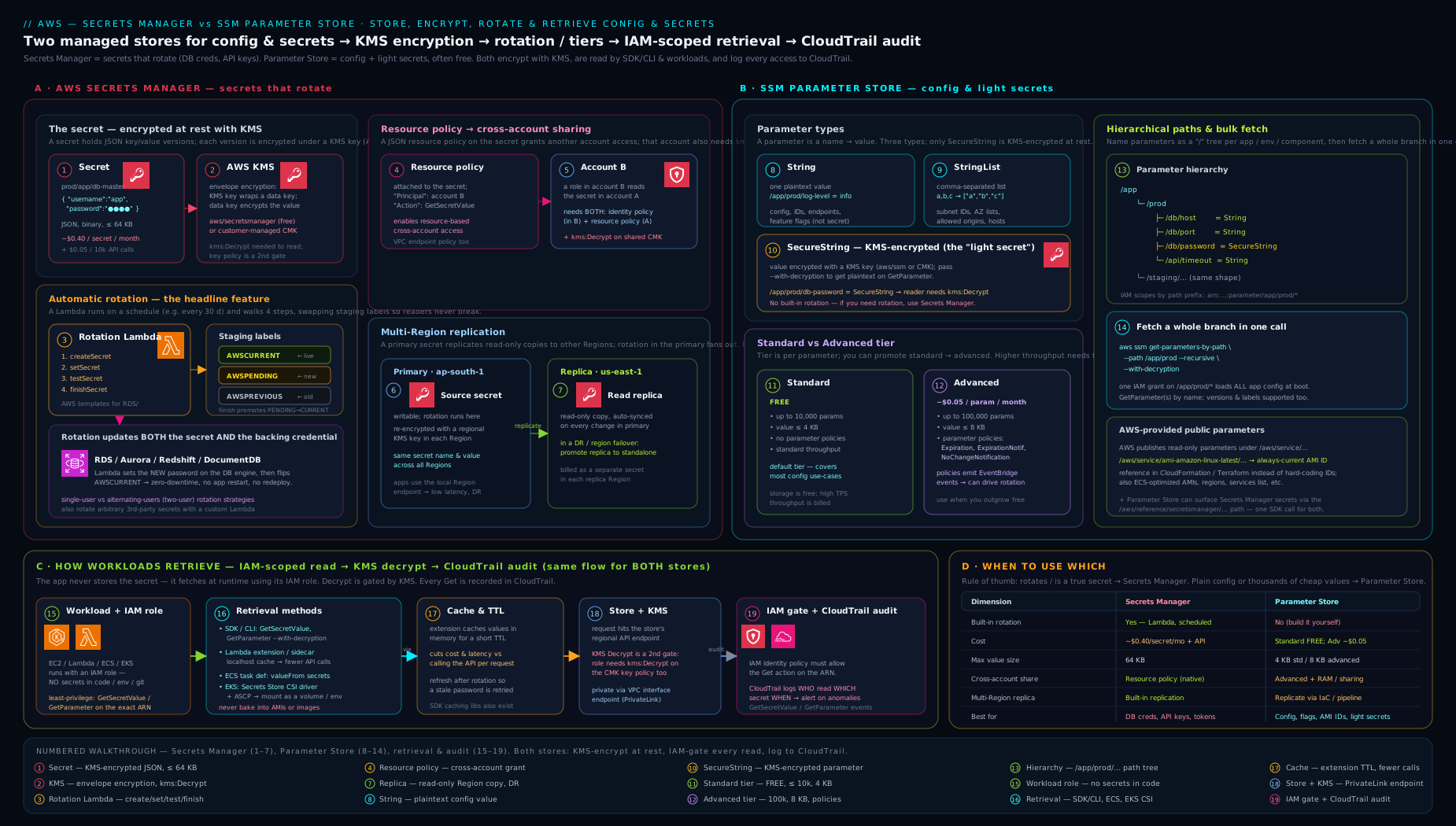
The diagram contrasts the two stores side by side — Secrets Manager with its staging-label versioning and four-step rotation Lambda on the left, SSM Parameter Store with its String/SecureString hierarchy and tiers on the right — and shows the shared retrieval paths (SDK, CLI, the Lambda extension cache, ECS/EKS injection) and the KMS-plus-CloudTrail layer that both rely on for encryption and auditing.
Hands-on lab: store, retrieve, and rotate a secret
This lab uses the AWS CLI and is effectively free: Parameter Store standard tier is free, and you will create a single Secrets Manager secret and delete it immediately (cost is prorated to fractions of a cent). You will store config in Parameter Store, store a secret in Secrets Manager, retrieve both correctly, enable rotation, and clean up. Use a non-production account/Region (examples use eu-west-2).
Prerequisites: the CLI configured (aws configure) with permissions for ssm:*Parameter*, secretsmanager:*, and kms:* on the AWS-managed keys.
Part A — configuration in Parameter Store
# Plain String config (free, not encrypted)
aws ssm put-parameter --name /lab/app/db/host \
  --type String --value "db.internal.example.com"
aws ssm put-parameter --name /lab/app/db/port \
  --type String --value "5432"

# A SecureString secret (KMS-encrypted with the aws/ssm managed key)
aws ssm put-parameter --name /lab/app/db/password \
  --type SecureString --value "S3cr3t-do-not-commit"

# Read the whole environment subtree in ONE call, decrypting secrets
aws ssm get-parameters-by-path --path /lab/app/ --recursive \
  --with-decryption \
  --query 'Parameters[].[Name,Value]' --output table
# validation: shows host, port, and the DECRYPTED password

# Prove --with-decryption is required: omit it and the password is ciphertext
aws ssm get-parameter --name /lab/app/db/password \
  --query Parameter.Value --output text
# -> AQICAHh... (ciphertext, because we did NOT pass --with-decryption)
Part B — a secret in Secrets Manager
# Create a JSON secret (the shape rotation Lambdas expect)
aws secretsmanager create-secret --name lab/app/api \
  --description "Lab third-party API credentials" \
  --secret-string '{"api_key":"AKIA-EXAMPLE","api_secret":"shhh"}'
# note the returned ARN (ends in a random 6-char suffix)

# Retrieve the current value (AWSCURRENT)
aws secretsmanager get-secret-value --secret-id lab/app/api \
  --query SecretString --output text
# -> {"api_key":"AKIA-EXAMPLE","api_secret":"shhh"}

# Update it -> creates a NEW version, moves AWSCURRENT, old -> AWSPREVIOUS
aws secretsmanager put-secret-value --secret-id lab/app/api \
  --secret-string '{"api_key":"AKIA-EXAMPLE-2","api_secret":"shhh2"}'

# Roll back by reading the PREVIOUS stage
aws secretsmanager get-secret-value --secret-id lab/app/api \
  --version-stage AWSPREVIOUS --query SecretString --output text
# -> the original value (validation that staging labels moved)

# Inspect the version-to-label mapping
aws secretsmanager describe-secret --secret-id lab/app/api \
  --query VersionIdsToStages
# -> shows which VersionId carries AWSCURRENT vs AWSPREVIOUS
Part C — generate a strong password (the rotation helper)
aws secretsmanager get-random-password \
  --password-length 24 --exclude-punctuation \
  --query RandomPassword --output text
# validation: a 24-char random password (what rotation step 1 uses)
Part D — the cross-service bridge
# Read the Secrets Manager secret THROUGH the Parameter Store API
aws ssm get-parameter \
  --name /aws/reference/secretsmanager/lab/app/api \
  --with-decryption --query Parameter.Value --output text
# -> the same JSON value, fetched via the SSM API (no Secrets Manager call in your code)
Cleanup (avoid charges)
# Parameter Store (free, but tidy up)
aws ssm delete-parameters --names \
  /lab/app/db/host /lab/app/db/port /lab/app/db/password

# Secrets Manager — force-delete now (skip the recovery window) since this is a lab
aws secretsmanager delete-secret --secret-id lab/app/api \
  --force-delete-without-recovery
Cost note: Parameter Store standard tier is free. The one Secrets Manager secret is billed at ~$0.40/month prorated — held for a few minutes it is a fraction of a cent, and --force-delete-without-recovery stops billing immediately. In production you would omit --force-delete-without-recovery and let the 7–30 day recovery window protect you. The real-world cost levers are: number of secrets in Secrets Manager (store config in Parameter Store instead), API call volume (cache aggressively — use the Lambda extension), replica secrets (each replica is billed), and advanced-tier parameters (use Intelligent-Tiering so you only pay when a parameter actually needs advanced).
Going deeper
The core above is enough to pass the exam and ship safely. This section is for the production nuances and failure modes that separate “it worked in the demo” from “it survived the incident.”
Rotation failure modes and the stuck AWSPENDING
Rotation is a small distributed state machine, and its failure modes all trace back to the staging labels. The one you will eventually hit: a rotation that fails after createSecret but before finishSecret leaves an AWSPENDING version attached with a value that was never promoted. Secrets Manager will not start a second rotation while one is “in progress,” and because createSecret is required to be idempotent (“if AWSPENDING already exists, do nothing”), a buggy Lambda that isn’t idempotent can wedge itself — it keeps finding the old pending version and never converges. The fixes: make createSecret genuinely idempotent (check for an existing AWSPENDING first), and if a rotation is truly stuck, remove the AWSPENDING staging label from the orphaned version with update-secret-version-stage so the next run starts clean. Crucially, AWSCURRENT is never touched until finishSecret, so a failed rotation never breaks running apps — it just needs a human to unstick the pending version.
Two more real-world snags: the rotation Lambda must be able to reach the target (in-VPC databases need the Lambda in the same VPC/subnets with a security-group path, or rotation fails at setSecret / testSecret), and alternating-users rotation needs a master/superuser secret with privileges to manage the two users — omit it and rotation can create a user it cannot later alter. Alarm on the rotation-failure event via an EventBridge rule; a silent rotation failure is a credential quietly ageing past your compliance window.
Throughput, quotas, and why caching is non-negotiable
Both services are API-metered and both throttle. Parameter Store standard throughput defaults to roughly 40 transactions per second (shared across the Get* operations in a Region); you can raise it to thousands with the higher-throughput setting, but that is billed per call and is a deliberate opt-in. Secrets Manager GetSecretValue has its own high-but-finite request quota. The practical consequence is identical for both: do not fetch on every request. A hot Lambda that calls GetSecretValue per invocation will, at scale, both blow your Secrets Manager bill ($0.05 per 10k calls adds up in a busy service) and eventually throttle. The Parameters and Secrets Lambda Extension (or a caching client outside Lambda) is not a nicety — it is how you stay under quota and control cost, with a TTL short enough that a rotated value is picked up within minutes, not hours. batch-get-secret-value further collapses “read ten secrets at boot” into a single call.
Detecting and containing leaked secrets
The store keeps secrets safe; the leak is almost always your own code, logs, or git history. Defence in depth here:
- Pre-commit scanning. AWS Labs’
git-secretsinstalls a git hook that blocks commits containing AWS access keys or patterns you register;detect-secretsandtrufflehogare broader alternatives. This stops the leak before it enters history — far cheaper than scrubbing it afterwards. - Push protection. GitHub secret scanning (and its push-protection mode) rejects a push that contains a recognised AWS key. Treat it as a backstop, not the primary control.
- AWS auto-quarantine. When AWS detects an exposed access key in a public repo, it automatically attaches the
AWSCompromisedKeyQuarantineV3managed policy to that principal, blocking high-risk actions — a last-ditch containment you never want to rely on but should know exists. - Find over-broad and external access. Run IAM Access Analyzer: its external-access findings flag any secret whose resource policy grants access outside your account (a cross-account share you forgot), and its unused-access findings surface principals holding
secretsmanager:GetSecretValuethey never actually use — exactly the over-privilege you want to prune. A permission never used is a permission to remove.
And the rule that underpins all of it: rotate on the assumption you will leak. Rotation shrinks the window in which a leaked credential is useful; if a key was exposed, rotation (or deletion) is the remediation, and testSecret guarantees you never promote a broken replacement.
AppConfig: when Parameter Store isn’t enough for config
Parameter Store is a store — it hands you a value. When you need to change configuration safely in a running fleet — feature flags, kill switches, tunables — reach for AWS AppConfig (also part of Systems Manager). AppConfig adds what a plain parameter lacks: validators (JSON Schema, or a Lambda that vets the new config before it ships), deployment strategies (roll the change out gradually — canary, then linear, then everyone), a bake time with CloudWatch-alarm rollback (if an alarm fires mid-deploy, AppConfig automatically reverts), and first-class feature flags. It can source config from its own hosted store, S3, or Parameter Store. The mental split: Parameter Store / Secrets Manager = where a value lives; AppConfig = how a value change is safely delivered. Feature flags in a raw SecureString with no rollout control is the anti-pattern AppConfig exists to fix.
Injection gotchas: ECS, EKS, and dynamic references
The zero-code injection paths each hide an edge you must know:
- ECS
secrets/valueFromresolves once, at task start. If the secret rotates, already-running tasks keep the old value — they only pick up the new one on the next task launch or deployment. For a rotating DB password consumed by long-lived ECS tasks, either fetch via the SDK/extension at runtime (so a refresh is possible) or use an alternating-users strategy that keeps the old credential valid until tasks cycle. - EKS Secrets Store CSI driver mounts files, and the optional rotation reconciler can refresh the mounted file on an interval — but your app must re-read the file, not cache the value at startup, to benefit. Mounting is tighter than env-vars (a file isn’t in every child process’s environment), which is why it’s preferred for the most sensitive secrets.
- CloudFormation dynamic references resolve at deploy time, not runtime —
{{resolve:secretsmanager:...}}bakes the fetch into the deploy, so a later rotation does not update an already-deployed resource; andssm-securedynamic references are permitted only in specific resource properties. Use them to keep the value out of templates and state, not as a runtime fetch mechanism.
Cross-Region replication and the DR runbook
Replication is easy to enable and easy to misunderstand operationally. Three facts change how you design with it. First, rotation happens only on the primary — replicas receive the rotated value automatically, so you never configure rotation per Region; a replica with its own rotation is a mistake. Second, to actually fail over you promote a replica to a standalone secret (stop-replicating-to-replica-regions / promote), at which point it detaches from the primary and becomes independently writable and rotatable — that is the deliberate, one-way DR action, not something that happens on its own. Third, each replica is re-encrypted with a KMS key in its own Region (you pick it), so the reader in us-east-1 decrypts with a us-east-1 key and never makes a cross-Region KMS call. The gotcha that bites teams: you cannot create a replica in a Region that already holds a secret of the same name — resolve the name collision first. Monitor replica status (a replica can show Failed if its Region’s KMS key is missing or its permissions are wrong), and remember every replica is billed as a full secret — so replicate the handful of secrets your DR plan actually needs, not the entire vault.
AWS-managed key vs CMK: when the extra key is worth it
Both stores default to a free AWS-managed key (aws/secretsmanager, aws/ssm), and for single-account, low-ceremony workloads that is the right choice — zero setup, no monthly key charge, and kms:Decrypt is granted implicitly to principals in the account. You must step up to a customer managed key (CMK) when you need any of: cross-account sharing (the managed key cannot be shared, so a CMK is mandatory), an independent, auditable key policy (a second gate you can tighten or Deny separately from the secret’s own policy), separation of duties (a security team owns the key while app teams own the secret), or control over key rotation and provenance. The costs of a CMK are real but small: ~$1/month per key plus per-request KMS charges, and — the operational catch — a CMK does not grant decrypt implicitly, so every reader now needs an explicit kms:Decrypt statement (the single most common “why is this AccessDenied?” after adding a CMK). Rule of thumb: default to the managed key; reach for a CMK the moment you need cross-account, an independent audit boundary, or separated ownership.
Cost math at scale
The pricing asymmetry drives real architecture. Ten thousand secrets in Secrets Manager is ~$4,000/month before a single API call; the same ten thousand values as standard Parameter Store parameters is $0. So the discipline is: secrets that must rotate or be shared → Secrets Manager; everything else → Parameter Store, and within Parameter Store default to standard, letting Intelligent-Tiering promote only the handful of parameters that genuinely need advanced (a policy, or a value >4 KB). Every replica secret is billed as a full secret, so multi-Region DR doubles (or triples) per-secret cost — replicate the secrets that need it, not the whole vault. And cache reads: the API-call line item is invisible until a hot path makes it enormous.
Common mistakes & troubleshooting
| Symptom | Likely cause | Fix |
|---|---|---|
get-parameter returns ciphertext (AQICAH…) not the value |
Forgot --with-decryption on a SecureString |
Pass --with-decryption (and ensure the role has kms:Decrypt) |
AccessDeniedException reading a secret despite a Secrets Manager Allow |
The secret uses a CMK and the principal lacks kms:Decrypt on it |
Add kms:Decrypt for the key (or use the AWS-managed key, which grants it in-account) |
Cross-account read is AccessDenied |
Only the IAM policy was set, not the resource policy, or the secret uses the managed KMS key | Add a resource policy on the secret and use a CMK with cross-account kms:Decrypt |
| ARN-scoped IAM policy never matches the secret | Secret ARNs end in a random 6-char suffix; the policy used the bare name | End the resource with -* (e.g. …:secret:prod/db-*) |
| App breaks right after a rotation | App cached the old password forever / no retry on auth failure | Cache with a TTL and refresh on auth failure; prefer the Lambda extension’s caching |
Rotation Lambda fails at setSecret/testSecret |
Lambda can’t reach the DB (no VPC config, SG, or it lacks the master/superuser secret) | Put the Lambda in the DB’s VPC/subnets, open the SG, grant it the master secret |
put-parameter fails with “already exists” |
Overwrite is not implicit | Add --overwrite (only deployment roles should have PutParameter) |
| Secrets Manager bill is unexpectedly high | Per-call billing from fetching on every request, or many config values stored as secrets | Cache reads (Lambda extension), move plain config to Parameter Store |
| Parameter rejected: value too large | String/standard exceeds 4 KB |
Use the advanced tier (8 KB) via --tier Advanced/Intelligent-Tiering, or split the value |
Common beginner mistakes
These are misconceptions rather than error messages — the wrong mental model that leads you to build the wrong thing. (For symptom → cause → fix of concrete errors, see the troubleshooting table above.)
-
“Secrets Manager and Parameter Store are basically the same, so I’ll put everything in one.” They overlap but bill and behave very differently. Putting hundreds of config values in Secrets Manager costs ~$0.40 each per month for nothing; putting an auto-rotating DB password in Parameter Store means re-implementing rotation yourself. Right model: rotation/sharing → Secrets Manager; free config and self-rotated secrets → Parameter Store. Most apps use both.
-
“A
SecureStringis encrypted, so just reading it gives me the value.” Read aSecureStringwithout--with-decryptionand you get ciphertext back, not the value — and even with the flag, the caller needskms:Decrypton the key. Right model: encrypted-at-rest means decryption is a separate, permissioned step; the store won’t hand you plaintext by default. -
“I gave my role
secretsmanager:GetSecretValue, so it can read the secret.” Not if the secret is encrypted with a customer managed KMS key — reading also needskms:Decrypton that key. Right model: every secret read is two permissions (the service action and the KMS decrypt); the AWS-managed key hides this by granting decrypt in-account, a CMK does not. -
“Rotation means I might read the secret mid-swap and get a broken password.” The staging-label design prevents exactly this:
AWSCURRENTkeeps pointing at the old, working credential untilfinishSecret, and the new one is only promoted aftertestSecretproves it works. Right model: rotation is atomic from the reader’s view — you always get a working credential, provided you re-read on auth failure instead of caching forever. -
“I’ll inject the secret as an environment variable — it’s simplest.” Env-vars are visible to every child process, can surface in crash dumps,
/proc, and logs, and (for ECS) are frozen at task start, so a rotated value never reaches a running task. Right model: for sensitive secrets prefer file mounts (EKS CSI) or a runtime fetch with caching (the Lambda extension); reserve env-var injection for low-sensitivity values. -
“An ARN by name is enough for the IAM policy.” Secret ARNs end in a random 6-character suffix (
…:secret:prod/db-AbCdEf), so a policy that names the bareprod/dbmatches nothing. Right model: end the resource with-*(or-??????) — or, better at scale, grant by tag (ABAC) and stop hand-writing ARNs. -
“Parameter Store standard is free, so I’ll blast it with reads.” Standard throughput caps around 40 TPS shared per Region; a hot loop throttles. Right model: cache reads and fetch a whole subtree once at boot with
get-parameters-by-path --recursive— “free” applies to storage and normal throughput, not to an un-cached firehose. -
“I deleted the secret, so it’s gone.” By default
delete-secretonly schedules deletion after a 7–30 day recovery window; the secret (and its bill) persists until then, andrestore-secretcan bring it back. Right model: deletion is deliberately reversible — use the recovery window in production, and only--force-delete-without-recoveryin throwaway environments.
Best practices
- Pick the right store: auto-rotation or cross-account/multi-Region sharing → Secrets Manager; plain config and self-rotated/static secrets → Parameter Store (
SecureString). Don’t store config in Secrets Manager — it costs per secret. - Encrypt with a CMK where you need cross-account sharing, key-policy auditing, or separation of duties; the AWS-managed keys are fine for single-account, low-ceremony use.
- Never hard-code or env-bake secrets. Fetch at runtime (SDK/extension) or inject at start (ECS
secrets, EKS CSI), and keep values in memory only. - Cache reads (the Parameters and Secrets Lambda Extension, or a caching client) with a sensible TTL — it cuts cost and latency, and refresh-on-auth-failure handles rotation gracefully.
- Turn on rotation for database credentials (single-user for simple apps, alternating-users for zero-downtime), and alarm on rotation failures via EventBridge.
- Scope IAM tightly — by path prefix (Parameter Store) or tag/ABAC (both), and give
Put*/Delete*only to deployment/admin roles, never to running workloads. - Use dynamic references (
{{resolve:…}}) in IaC so the value never lands in templates or state — only the reference. - Organise Parameter Store as a tree (
/<app>/<env>/<group>/<key>) and load an environment withget-parameters-by-path --recursive. - Keep the deletion safety net — leave the 7–30 day Secrets Manager recovery window on in production; only force-delete in throwaway environments.
Security notes
- Least privilege, including KMS. Reading a secret needs both the service permission and
kms:Decrypton the key — audit both. Use a CMK when you need an independent, auditable key policy. - Audit every read.
GetSecretValue/GetParameterare CloudTrail management events, and the KMSDecryptis logged too — alarm on reads from unexpected principals, IPs, or Regions, and on anyDeleteSecret/PutResourcePolicy. - Reach the services privately. Create interface VPC endpoints (PrivateLink) for
secretsmanagerandssmso retrieval never traverses the public internet, and combine with endpoint policies andaws:sourceVpceconditions to pin access to your VPC. - Guard cross-account access. Use resource policies plus a CMK; run
validate-resource-policyto catch overly broad or public policies; never grant*principals. - Prefer file-mount over env-var injection for the most sensitive secrets (EKS Secrets Store CSI) — environment variables are visible to the whole process and can surface in dumps and logs.
- Rotate, and prove it. Automatic rotation shrinks the window a leaked credential is useful; the four-step model’s
testSecretensures you never promote a broken credential. For Parameter Store secrets you rotate yourself, useNoChangeNotificationas a staleness alarm. - Never log secret values, and scrub them from exception traces and CI output. The store keeps them safe; your own logging is usually the leak.
Interview & exam questions
-
When do you use Secrets Manager vs SSM Parameter Store? Secrets Manager when you need automatic rotation, cross-account sharing, multi-Region replication, large (≤64 KB) values, or built-in password generation. Parameter Store for plain configuration and for secrets you’ll rotate yourself or that don’t rotate — because its standard tier is free and it has hierarchical paths. Both can store secrets; rotation and sharing are what tip the choice to Secrets Manager.
-
Explain Secrets Manager staging labels.
AWSCURRENTpoints to the live version (whatGetSecretValuereturns by default);AWSPENDINGis a new version created during rotation but not yet promoted;AWSPREVIOUSis the prior version (rollback). Rotation is literally movingAWSCURRENTonto the testedAWSPENDINGversion. -
Walk through the four-step rotation model.
createSecret(generate a new value, store asAWSPENDING),setSecret(apply it to the target service),testSecret(verify it works),finishSecret(moveAWSCURRENTto the pending version). Until step 4,AWSCURRENTstill points to the working credential, so there’s no downtime. -
Single-user vs alternating-users rotation — when each? Single-user changes the one user’s password (simplest, brief reconnection window). Alternating-users keeps two users and flips between them so the old credential stays valid until clients move (zero-downtime, needs a master secret). Use alternating-users for databases that can’t tolerate any auth blip.
-
How do you share a secret with another AWS account? Attach a resource policy on the secret allowing the other account’s principal
GetSecretValue, and use a customer managed KMS key with a key policy/grant allowing that principalkms:Decrypt(the AWS-managedaws/secretsmanagerkey can’t be shared cross-account). -
What’s the difference between
String,StringList, andSecureString?Stringis one plaintext value;StringListis a comma-separated list (plaintext);SecureStringis a single value encrypted with KMS. Reading aSecureStringrequires--with-decryptionandkms:Decrypt. -
Standard vs advanced Parameter Store tier? Standard: up to 4 KB, 10,000 params/Region, free, no policies. Advanced: up to 8 KB, 100,000 params, ~$0.05/param/month, supports parameter policies and a higher-throughput option.
Intelligent-Tieringauto-promotes only when needed. -
How do you fetch all of an environment’s configuration in one call? Name parameters under a path (
/app/prod/...) and callget-parameters-by-path --recursive --with-decryptionon the prefix — one call returns the whole subtree. -
What’s the recommended way to read secrets in a Lambda? The AWS Parameters and Secrets Lambda Extension — a layer running a local HTTP cache that serves both Secrets Manager and Parameter Store, caching across warm invocations to cut API cost and latency, with a configurable TTL so values refresh after rotation.
-
How do ECS and EKS get secrets without code changes? ECS injects them as environment variables via the task definition
secrets/valueFrom(resolved by the task execution role at start). EKS uses the Secrets Store CSI Driver with the AWS provider (ASCP) to mount secrets as files, governed by IRSA/Pod Identity. -
You’re getting
AccessDeniedreading a secret even though the IAM policy allowsGetSecretValue. Why? The secret is encrypted with a CMK and the principal lackskms:Decrypton that key — both permissions are required. (Also check the ARN’s random suffix and, for cross-account, the resource policy.) -
How do you audit who read a secret? CloudTrail records
GetSecretValue/GetParameteras management events (principal, time, IP, ARN), and the KMSDecryptcall is logged separately — two independent trails. Send CloudTrail to CloudWatch and alarm on unexpected reads or deletes. -
What happens when you delete a secret? By default deletion is scheduled after a 7–30 day recovery window (default 30), during which
restore-secretundoes it;--force-delete-without-recoverydeletes immediately (and stops billing). Parameter Store deletes are immediate (no recovery window). -
How can Parameter Store consume a Secrets Manager secret? Read the parameter name
/aws/reference/secretsmanager/<secret-name>through the SSM API — Parameter Store fetches the value from Secrets Manager — so tools that only speak Parameter Store can use Secrets Manager secrets unchanged.
Quick check
- Which staging label does
GetSecretValuereturn when you don’t specify a version? - Name the four rotation steps in order.
- What must you pass to
get-parameterto read aSecureStringvalue (not ciphertext)? - Which Parameter Store tier is free, and what is its per-parameter size limit?
- What two permissions does a principal need to read a CMK-encrypted secret?
Answers
AWSCURRENT— the current, live version.- createSecret → setSecret → testSecret → finishSecret.
--with-decryption(and the role needskms:Decrypton the key).- The standard tier is free, with a 4 KB per-parameter value limit (advanced is 8 KB and billed per parameter).
secretsmanager:GetSecretValueon the secret andkms:Decrypton the customer managed key.
Practice challenges
Six graded exercises, easy to hard. Each is runnable in a non-prod account/Region (Parameter Store standard is free; the one secret costs a fraction of a cent). Try each before opening the solution.
1 (Beginner) — Store and read a config value and a secret. Put /train/app/log_level as a plain String with value info, and /train/app/db_password as a SecureString. Read both back so the password comes out as plaintext, not ciphertext.
<details> <summary>Solution</summary>
aws ssm put-parameter --name /train/app/log_level --type String --value info
aws ssm put-parameter --name /train/app/db_password --type SecureString --value "S3cr3t-demo"
aws ssm get-parameter --name /train/app/log_level --query Parameter.Value --output text
aws ssm get-parameter --name /train/app/db_password --with-decryption --query Parameter.Value --output text
Why: a SecureString returns ciphertext unless you pass --with-decryption (and hold kms:Decrypt) — proving the “encrypted means a separate decrypt step” model.
</details>
2 (Beginner) — Fetch a whole environment in one call. Add /train/app/region = eu-west-2, then retrieve every parameter under /train/app/ with a single command, decrypting the secure one.
<details> <summary>Solution</summary>
aws ssm put-parameter --name /train/app/region --type String --value eu-west-2
aws ssm get-parameters-by-path --path /train/app/ --recursive \
  --with-decryption --query 'Parameters[].[Name,Value]' --output table
Why: get-parameters-by-path --recursive is the idiomatic “load my whole config at boot in one call” pattern, and it keeps IAM scoping to a single path prefix.
</details>
3 (Intermediate) — Version and roll back a secret. Create a Secrets Manager secret train/api with {"key":"v1"}, update it to {"key":"v2"}, then read the value that AWSCURRENT used to point at — without knowing its VersionId.
<details> <summary>Solution</summary>
aws secretsmanager create-secret --name train/api --secret-string '{"key":"v1"}'
aws secretsmanager put-secret-value --secret-id train/api --secret-string '{"key":"v2"}'
aws secretsmanager get-secret-value --secret-id train/api \
  --version-stage AWSPREVIOUS --query SecretString --output text
Why: updating moves AWSCURRENT and demotes the old version to AWSPREVIOUS, so --version-stage AWSPREVIOUS is a label-based rollback with no VersionId bookkeeping.
</details>
4 (Intermediate) — Read a Secrets Manager secret through the Parameter Store API. Using only an aws ssm command, fetch the value of the train/api secret you created above.
<details> <summary>Solution</summary>
aws ssm get-parameter \
  --name /aws/reference/secretsmanager/train/api \
  --with-decryption --query Parameter.Value --output text
Why: the /aws/reference/secretsmanager/<name> bridge lets tools and code that only speak Parameter Store consume Secrets Manager secrets with no code change — one retrieval path for both stores.
</details>
5 (Advanced) — Write a least-privilege, tag-based read policy. Draft an IAM policy that lets a principal read any secret tagged Environment=train (and decrypt it with CMK arn:aws:kms:eu-west-2:123456789012:key/EXAMPLE), without naming a single secret ARN.
<details> <summary>Solution</summary>
{
  "Version": "2012-10-17",
  "Statement": [
    { "Effect": "Allow",
      "Action": ["secretsmanager:GetSecretValue", "secretsmanager:DescribeSecret"],
      "Resource": "*",
      "Condition": { "StringEquals": { "secretsmanager:ResourceTag/Environment": "train" } } },
    { "Effect": "Allow", "Action": "kms:Decrypt",
      "Resource": "arn:aws:kms:eu-west-2:123456789012:key/EXAMPLE" }
  ]
}
Why: the secretsmanager:ResourceTag/Environment condition is ABAC — it self-extends to future secrets carrying the tag, and it still needs the second kms:Decrypt statement because a CMK read is always two permissions.
</details>
6 (Advanced) — Design a zero-downtime rotating credential and clean up. For a high-throughput RDS database that cannot tolerate an auth blip, state which rotation strategy you’d choose and why, whether you’d use a rotation Lambda or managed rotation, and the one command that deletes the train/api secret immediately while leaving no lingering bill.
<details> <summary>Solution</summary>
- Strategy — alternating-users: two DB users are kept, each rotation updates the inactive one and flips to it, so the old credential stays valid until every client has moved (no auth blip). Single-user has a brief window where the old password is invalidated before all clients refresh.
- Rotator — managed rotation: for RDS specifically, prefer managed rotation (or RDS-managed master credentials) so there’s no Lambda to patch or place in a VPC; drop to a custom Lambda only for non-managed targets.
- Cleanup:
aws secretsmanager delete-secret --secret-id train/api --force-delete-without-recovery
aws ssm delete-parameters --names /train/app/log_level /train/app/db_password /train/app/region
Why: alternating-users is the standard answer for “no downtime,” managed rotation removes the operational burden for supported engines, and --force-delete-without-recovery stops billing at once — acceptable only in throwaway environments (production keeps the 7–30 day window).
</details>
Exercise
Take an application you know that currently keeps a database password and a few config values in environment variables or a checked-in .env file. Produce a one-page secrets-and-config design that: (a) puts the non-sensitive config (host, port, flags) in Parameter Store under a /<app>/<env>/... hierarchy and lists the single get-parameters-by-path call the app makes at startup; (b) decides where the database password lives — Secrets Manager with automatic rotation (state single- or alternating-users and the schedule) or Parameter Store SecureString if it won’t auto-rotate — with a one-line justification; © writes the least-privilege IAM policy the running app needs (path/ARN scope plus the KMS Decrypt); (d) chooses the retrieval mechanism (Lambda extension, ECS secrets injection, or EKS CSI) for the app’s runtime; and (e) names the CloudTrail alarm you’d set to detect an unexpected read. Keep it to choices and one-line justifications — the goal is to practise the decision framework end to end.
Certification mapping
This lesson maps to the security and developer domains of the AWS certification path. For AWS Certified Security – Specialty (SCS-C02), expect questions on choosing Secrets Manager vs Parameter Store, the rotation model and staging labels, cross-account secret sharing (resource policy plus CMK kms:Decrypt), and auditing reads via CloudTrail and KMS — the “both permissions are required” and “managed key can’t be shared cross-account” points are near-guaranteed. For AWS Certified Developer – Associate (DVA-C02), the emphasis is on retrieving secrets/parameters in code, the Lambda extension caching, ECS secrets/valueFrom injection, dynamic references in CloudFormation, and SecureString with --with-decryption. For Solutions Architect – Associate (SAA-C03), expect the high-level “which service” decision and the multi-Region replica concept. Across all of them, the cost contrast (Parameter Store standard free vs Secrets Manager per-secret) is a recurring distractor-buster.
Glossary
- Secret — a value whose disclosure causes harm (password, API key, private key); needs rotation, tight auditing, and small blast radius.
- Configuration — a non-sensitive value shaping behaviour (flag, URL, ARN); needs versioning and easy retrieval.
- Secrets Manager — AWS service for storing, encrypting, rotating, and serving secrets; billed per secret/month plus API calls.
- Parameter Store — Systems Manager’s hierarchical key-value store for config and secrets; standard tier free.
SecretString/SecretBinary— the string (usually JSON) or binary payload of a Secrets Manager secret version (≤64 KB).- Staging label — a named pointer (
AWSCURRENT,AWSPENDING,AWSPREVIOUS) to a specific secret version; rotation movesAWSCURRENT. - Rotation (four-step model) —
createSecret,setSecret,testSecret,finishSecret, executed by a Lambda to replace a secret without downtime. - Single-user / alternating-users rotation — rotating one DB user’s password vs flipping between two users for zero-downtime.
- Resource policy — a JSON policy attached to a secret controlling access; required (with a CMK) for cross-account sharing.
- Replica secret — a copy of a secret kept in sync in another Region (low-latency reads and DR); billed separately.
String/StringList/SecureString— Parameter Store types: plaintext value, plaintext comma-separated list, KMS-encrypted value.- Standard / advanced tier — Parameter Store tiers: 4 KB/free/no-policies vs 8 KB/paid/parameter-policies;
Intelligent-Tieringauto-selects. - Hierarchy / path —
/-separated parameter names enabling subtree fetch (get-parameters-by-path --recursive) and path-scoped IAM. - Parameter policy — advanced-tier rule for expiration, expiration notification, or no-change notification (a rotation-staleness nudge).
- Parameters and Secrets Lambda Extension — a layer providing a local HTTP cache for both services, cutting API cost and latency in Lambda.
- Dynamic reference —
{{resolve:secretsmanager:…}}/{{resolve:ssm-secure:…}}syntax to pull a value at deploy time without storing it in IaC. - CMK (customer managed key) — a KMS key you own and control; required for cross-account secret sharing and auditable key policies.
- Recovery window — the 7–30 day delay before a deleted secret is permanently removed (Secrets Manager); reversible with
restore-secret. - Managed rotation — Secrets Manager runs the rotation function itself for RDS/Aurora/Redshift/DocumentDB, so there is no rotation Lambda in your account to deploy, patch, or place in a VPC.
- RDS-managed master credentials — the RDS/Aurora option to have RDS create, own, and rotate the master-user secret in Secrets Manager for you; the lowest-effort rotating DB credential.
- ABAC (attribute-based access control) — granting access by tag via
secretsmanager:ResourceTag/…(orssm:resourceTag/…) instead of by ARN, so one policy self-extends to future tagged resources. - Envelope encryption — the KMS pattern where a data key encrypts the value and the CMK encrypts the data key; Parameter Store uses it for larger (advanced-tier)
SecureStringvalues. - Intelligent-Tiering — a Parameter Store tier setting that auto-promotes a parameter to advanced only when it actually needs to (value >4 KB or a policy attached), so you pay for advanced only when required.
- AppConfig — the Systems Manager service for delivering configuration and feature-flag changes safely: validators, gradual deployment strategies, a bake time, and automatic CloudWatch-alarm rollback (distinct from Parameter Store, which merely stores a value).
- git-secrets — an AWS Labs pre-commit git hook that blocks commits containing AWS access keys or registered secret patterns, stopping a leak before it enters history.
- IAM Access Analyzer — the service whose external-access findings flag secrets shared outside your account (via a resource policy) and whose unused-access findings surface principals holding secret permissions they never use.
batch-get-secret-value— a Secrets Manager API that retrieves multiple secrets in one call (by ID list or tag filter), cutting request count and cost versus one call per secret.
Next steps
You now know both stores end to end — what each is for, every option they expose, how to retrieve values safely, and how to lock them down and audit them. The natural next move is to take rotation and cross-account sharing to production depth: read Secrets Manager Rotation at Scale: Custom Rotation Lambdas, RDS Credentials, and Cross-Account Sharing, which implements the four-step rotation Lambda in full, contrasts single- and alternating-user RDS strategies, shows how to write a custom rotator for third-party credentials, and covers cross-account sharing via resource policies and KMS grants. After that, the course continues with decoupling and messaging in AWS Messaging Fundamentals: SQS, SNS & EventBridge — When to Use Which, where the IAM and resource-policy patterns you learned here reappear on queues and topics.