In a nutshell
Imagine an office where every time one team wants to talk to another, the call has to route through the building’s main switchboard — even for the team in the next room. The switchboard (an internal load balancer) works, but you pay for a switchboard per team, every call takes a detour through it, and if someone at the far desk is quietly broken — picking up the phone but giving useless answers — the switchboard keeps sending calls their way, because the person still answers when it checks.
ECS Service Connect replaces those internal switchboards with a smart assistant sitting on every desk. When your app says “connect me to payments,” the assistant already knows every healthy payments desk right now, dials one directly, retries if the line drops, and stops dialing a desk that keeps giving broken answers. No switchboard in the middle, no per-team switchboard bill, and no detour. AWS runs that assistant for you — it is a managed Envoy proxy that rides along inside every container.
This lesson is about east-west traffic: service-to-service calls that never leave your network. It is not about your front door — the public load balancer that greets browsers stays exactly where it is. The whole skill is knowing which of three tools fits a given call: Service Connect for internal calls that want discovery plus resilience, a load balancer when you genuinely need URL-path routing or a public entry point, and plain Cloud Map DNS when something that can’t carry the assistant (a Lambda, an EC2 box) needs to find your tasks.
If most of that already makes sense, treat the deep sections as a reference. If it’s new, re-read the analogy before the config tables — every knob later maps back to “the assistant on the desk.”
Level: Advanced · Time: ~69 min · You’ll leave able to pick the right east-west tool per call path, wire a client-and-server Service Connect config, tune its resilience knobs, and migrate off internal ALBs one reversible step at a time.
Most ECS estates accumulate internal ALBs the way attics accumulate boxes. Service A needs to call service B, so someone stands up an internal Application Load Balancer, a target group, a listener, a Route 53 alias, and a security-group rule — for a call path that never leaves the VPC and never sees a browser. Multiply by fifty services and you are paying for fifty load balancers, fifty health-check configurations, and an extra network hop on every east-west request, all to do something an ALB was never designed for: client-side service discovery with retries.
ECS Service Connect collapses that. It runs a managed Envoy sidecar in every task, registers a logical name in an AWS Cloud Map namespace, and lets http://payments resolve and load-balance directly to healthy payments tasks — with connection pooling, retries, timeouts, and outlier detection handled by the proxy. No internal ALB, no per-call DNS lookup, no extra hop. This is how it actually works, where it beats and loses to the alternatives, every setting and limit that bites in production, and how to migrate without a flag day.
By the end you will stop reflexively standing up an internal ALB for every service-to-service edge. You will know when Service Connect is the right tool (intra-namespace east-west with resilience), when an ALB still earns its keep (L7 path/host routing, public ingress, WAF), and when Cloud Map DNS is the only option (a non-ECS consumer that cannot carry a sidecar). And you will be able to read the proxy’s CloudWatch metrics well enough to debug a migration step at 02:00 instead of rolling it back blind.
What problem this solves
The internal-ALB-per-service pattern has three costs that compound silently. Money: each internal ALB has an hourly charge plus LCU (Load Balancer Capacity Unit) consumption; at fifty internal ALBs that is a material line on the bill for traffic that never touches the internet. Latency: every east-west call takes an extra hop through the ALB — the client connects to the ALB, the ALB connects to a target — adding a round-trip and a second TLS handshake to a call that could have gone task-to-task. Resilience gaps: an ALB ejects a target only when its health check fails on a fixed interval. A replica that passes a shallow /healthz while returning 503s to real traffic keeps taking requests — the ALB never notices, and callers eat a steady error rate that pages on-call weekly.
The DNS-based alternative — Cloud Map service discovery with serviceRegistries — removes the ALB hop but introduces its own pain: the client resolves a name against a Route 53 private hosted zone, caches the A records for the TTL, and load-balances with whatever its HTTP library happens to do. A task that died ten seconds ago can still be in the resolver cache, so you get the “connection refused to a dead IP” tail. There are no retries, no outlier detection, and no per-call observability — the client picks an IP blind and logs nothing about the upstream’s health.
Who hits this: any team running more than a handful of ECS services that call each other. It bites hardest on microservice estates on Fargate (where you cannot install a node-level mesh agent), teams that adopted internal ALBs early and now drown in them, and anyone debugging an intermittent east-west 5xx that a health check sails past. Service Connect is the AWS-native answer that gives you mesh-grade resilience without running a service mesh — but only inside one namespace, in one account, and only for workloads that can carry the sidecar.
To frame the whole field before the deep dive, here is every east-west discovery option, the cost it removes, the cost it adds, and the one situation it is right for:
| Option | Removes | Adds | Right when |
|---|---|---|---|
| Internal ALB | nothing (the baseline) | hourly + LCU cost, extra hop, no per-request ejection | you genuinely need L7 path/host routing or WAF on the edge |
| Cloud Map DNS | ALB cost + hop | DNS TTL staleness, no retries, no per-call telemetry | a non-ECS consumer (Lambda/EC2) must resolve ECS tasks |
| Service Connect | ALB cost + hop, TTL staleness, blind client LB | one sidecar per task, namespace/account scoping | intra-namespace east-west needing discovery + resilience |
| VPC Lattice | cross-account/VPC plumbing | a different abstraction, IAM auth policies, cost model | service-to-service across accounts/VPCs with IAM auth |
Learning objectives
By the end of this article you can:
- Explain the three moving parts of Service Connect — the namespace, the managed Envoy agent, and client vs server roles — and why the role split decides whether a service’s outbound calls resolve.
- Wire a
client-and-serverserviceConnectConfiguration, matchportNameto a namedportMappingsentry, and setappProtocolso you get L7 retries instead of L4 pass-through. - Distinguish Service Connect from Cloud Map DNS discovery and internal ALBs on discovery mechanism, load balancing, staleness, retries, outlier detection, cost, and L7 routing — and pick correctly.
- Configure the resilience knobs — connection pooling, per-request and idle timeouts, retries, and outlier detection — and know which to disable for streaming endpoints.
- Migrate a multi-service estate off internal ALBs incrementally, behind a config flag, with every step independently reversible.
- Reason about the namespace and account boundaries — why discovery is single-namespace, single-account, and where PrivateLink or VPC Lattice takes over.
- Read the
ECS/ServiceConnectCloudWatch metrics and proxy access logs to debug a bad migration step and prove a call is carried by the proxy, not an ALB. - Right-size the cost and overhead — the per-task sidecar CPU/memory tax versus the deleted ALB bill — and quantify the trade.
Prerequisites & where this fits
You should already be comfortable with ECS fundamentals: a task definition declares containers, ports, and IAM roles; a service keeps a desired count of tasks running and (optionally) registers them with a load balancer; Fargate vs EC2 launch types; and the awsvpc network mode where every task gets its own ENI and private IP. You should know how to read JSON output from the AWS CLI, run aws ecs execute-command (ECS Exec) into a task, and the basics of an internal ALB — listener, target group, target-type ip. If those are shaky, start with AWS ECS & ECR Fundamentals: Task Definitions, Services, Fargate and Production ECS on Fargate: Task Networking, Autoscaling, Deployments.
This sits in the container networking and resilience track. It assumes the load-balancer mechanics from Elastic Load Balancing: ALB, NLB, GWLB Deep Dive (because Service Connect replaces internal ALBs, not your ingress one), the VPC/subnet/SG model from VPC Deep Dive: Subnets, Routing, IGW, NAT, Endpoints, and Route 53 fundamentals from Route 53: DNS Records, Routing Policies, Health Checks. For cross-account east-west it pairs with PrivateLink: Service Provider & Consumer, Cross-Account and VPC Lattice: Service Networks, IAM Auth, Cross-Account.
A quick map of who owns what when an east-west call fails, so you page the right person fast:
| Layer | What lives here | Who usually owns it | Failure classes it can cause |
|---|---|---|---|
| Caller app | The dependency URL/config | App / dev team | Wrong URL (ALB vs SC alias), no retry on its own client |
| Service Connect agent (client) | Endpoint discovery, LB, retries | Platform (managed by ECS) | 503 (no endpoints — role/namespace misconfig), retry storms |
| Namespace (Cloud Map) | Logical name boundary | Platform | Cross-namespace call fails (scoping) |
| Callee task + agent (server) | Serves requests, advertises endpoint | App + platform | 5xx from the app, outlier ejection |
portMappings / appProtocol |
Port name + L7 protocol | App / dev team | L4 pass-through (no retries), port-name mismatch |
| Account / VPC boundary | PrivateLink / Lattice seam | Network team | Cross-account call has no namespace path |
Core concepts
Four mental models make every later decision obvious.
Service Connect is a client-side proxy mesh, not a load balancer. There is no central appliance traffic flows through. Instead, every participating task carries a managed Envoy sidecar, and the caller’s proxy holds a live view of every healthy endpoint for the names it consumes. When your app calls http://payments:8080, the call goes to the local proxy on localhost, and the proxy picks a healthy payments task and connects to it directly. The “load balancing” happens at the client, per request, with no hop through a shared device.
The role split decides whether outbound calls resolve. A service is client, server, or client-and-server. A server advertises endpoints into the namespace (other services can find it) but its proxy is not in client mode, so its own outbound calls do not resolve through Service Connect. A client consumes endpoints (it can call others) but advertises nothing. A payments service that both serves peers and calls ledger must be client-and-server. The single most common “why does my outbound call 503?” is a service set to server only.
Discovery is DNS-free and push-based. Unlike Cloud Map DNS discovery, a Service Connect namespace does not require a private hosted zone or a runtime DNS query. The clientAliases.dnsName (e.g. payments) is a logical name the proxy intercepts locally; it is not a record resolved over the wire. The ECS control plane pushes endpoint changes to every client proxy in the namespace within seconds, so there is no DNS-TTL staleness window and no “connection refused to a dead IP” tail.
Resilience is in the proxy, not your code or a health check. The Envoy sidecar does connection pooling, per-request load balancing, configurable timeouts, retries on idempotent failures, and outlier detection — ejecting a task that returns real 5xx to real traffic, not one that merely fails a probe. This is the headline reason to adopt Service Connect even if you were happy with discovery: you get mesh-grade resilience on every call path without writing or operating a mesh.
What Service Connect replaces, keeps, and does not touch — the mental model for “what changes when I turn this on”:
| Thing | Before Service Connect | After Service Connect | Verdict |
|---|---|---|---|
| Internal east-west ALB | One per service edge | Deleted (after migration) | Replaced |
| Public ingress ALB | Internet-facing | Unchanged | Kept |
| L7 path/host routing | At the ALB | Still at the ALB | Kept |
| Client-side load balancing | Library / DNS, blind | Proxy, per-request | Replaced |
| Service discovery | DNS or static ALB DNS | Push-based, namespace | Replaced |
| Retries / outlier detection | App code or none | In the proxy | Added |
| Task IAM roles / secrets | Your design | Unchanged | Untouched |
| Security groups | Your design | Unchanged (task-to-task) | Untouched |
The vocabulary in one table
Pin down every moving part before the deep sections. The glossary at the end repeats these for lookup; this table is the mental model side by side:
| Concept | One-line definition | Where it lives | Why it matters |
|---|---|---|---|
| Namespace | The logical boundary services discover each other in | Cloud Map (HTTP type) | Discovery is scoped to it; one per environment |
| Service Connect agent | Managed Envoy sidecar ECS injects per task | Inside every participating task | Does discovery, LB, retries, outlier detection |
portName |
Name linking SC config to a port mapping | Task def portMappings[].name |
Must match the SC portName exactly |
discoveryName |
The short name a callee advertises | SC config (server side) | What the proxy registers in the namespace |
clientAlias |
The DNS name + port callers use | SC config | http://<dnsName>:<port> the app calls |
appProtocol |
L7 protocol declaration | portMappings[].appProtocol |
http/http2/grpc unlock L7 retries |
| Client role | Consumes endpoints, advertises nothing | SC config services empty/no advertise |
Needed for outbound calls to resolve |
| Server role | Advertises endpoints into the namespace | SC config with services |
Lets peers find this service |
| Outlier detection | Ejecting a task on real 5xx | Envoy in the agent | Catches failures a health check misses |
| Per-request timeout | Cap on a single request | SC timeout.perRequestTimeoutSeconds |
Stops a slow upstream pinning a connection |
| Idle timeout | How long idle connections live | SC timeout.idleTimeoutSeconds |
Too low → reconnect churn under chatty traffic |
| LCU | The metered cost unit of an ALB | Per internal ALB | Deleting ALBs removes this charge |
| Ingress ALB | The public internet-facing LB | In front of the edge service | Service Connect does not replace it |
| PrivateLink / Lattice | Cross-account/VPC connectivity seam | At the account boundary | Where Service Connect’s single-account scope ends |
The Service Connect architecture: agent, namespace, client and server modes
Service Connect has three moving parts, and understanding the split is the whole game.
The namespace is an AWS Cloud Map HTTP namespace. It is the logical boundary inside which services discover each other by short name. You create it once per environment (think one namespace per prod, staging) and point every service in that environment at it. Unlike Cloud Map’s older DNS-based service discovery, a Service Connect namespace does not require a private hosted zone or DNS queries at runtime — discovery happens in the proxy’s control plane.
The Service Connect agent is a managed Envoy proxy that ECS injects as a sidecar container into every participating task. You do not write an Envoy config and you do not manage the container image — ECS owns its lifecycle, pushes endpoint updates to it, and ships its metrics. Your application talks to localhost-style endpoints the proxy exposes; the proxy handles the actual connection to a healthy backend task.
Client vs server roles are set per service in its serviceConnectConfiguration:
- A server (or
client-and-server) advertises one or more endpoints into the namespace. It declares aportNamefrom its task definition and adiscoveryName(the short name peers will call) plus aclientAliasesentry giving the DNS name and port other services use. - A client only consumes. It joins the namespace so its proxy learns every advertised endpoint, but it publishes nothing.
A frontend that calls APIs but exposes nothing internally is a pure client. A payments service that both serves peers and calls ledger is client-and-server. The distinction matters: a service must be client or client-and-server for its outbound calls to resolve through Service Connect. I have watched teams set a service to server only, then wonder why its outbound call to a dependency 503s — the proxy is not in client mode, so it has no endpoints to route to.
The three roles, what each does, and the failure if you pick wrong:
| Role | Advertises endpoints? | Resolves outbound? | Use for | Failure if mis-set |
|---|---|---|---|---|
client |
No | Yes | A frontend/edge service that only calls others | None for outbound; peers can’t find it (intended) |
server |
Yes | No | (Rare) a pure sink that never calls peers | Its own outbound calls 503 — no client mode |
client-and-server |
Yes | Yes | Any service that both serves and calls peers | None — the safe default for most services |
Here is a minimal client-and-server block in a task/service definition (JSON for the CreateService call):
{
  "serviceConnectConfiguration": {
    "enabled": true,
    "namespace": "prod",
    "services": [
      {
        "portName": "http",
        "discoveryName": "payments",
        "clientAliases": [
          { "dnsName": "payments", "port": 8080 }
        ]
      }
    ]
  }
}
The portName (http) must match a name on a portMappings entry in the task definition. That linkage is mandatory and is the single most common misconfiguration.
{
  "name": "app",
  "portMappings": [
    { "name": "http", "containerPort": 8080, "protocol": "tcp", "appProtocol": "http" }
  ]
}
Set
appProtocoldeliberately.http(orhttp2/grpc) is what unlocks L7 features — retries on status codes, per-request stats. Leave it as raw TCP and the proxy degrades to L4 pass-through: you keep discovery and connection pooling but lose HTTP-aware retries and outlier detection.
Every field in the serviceConnectConfiguration, what it does, its default, and the gotcha:
| Field | What it does | Default | Valid values | Gotcha |
|---|---|---|---|---|
enabled |
Turns Service Connect on for the service | false |
true / false |
Must be true even when inheriting a cluster default namespace |
namespace |
The Cloud Map namespace to join | cluster default if set | namespace name or ARN | Must be HTTP type; cross-namespace is invisible |
services |
Endpoints this service advertises | none | array of advertise blocks | Omit/empty → pure client (advertises nothing) |
services[].portName |
Links to a named portMappings entry |
— | must match a portMappings[].name |
Mismatch → service won’t register; #1 misconfig |
services[].discoveryName |
Name registered in the namespace | the portName |
short string | Defaults to portName if omitted — be explicit |
services[].clientAliases |
DNS name + port callers use | — | array of {dnsName, port} |
The port here is what callers connect to, not the container port |
services[].timeout |
Per-service idle/per-request caps | proxy defaults | seconds | Set per discoveryName; 0 disables a cap |
services[].tls |
TLS for the advertised endpoint | off | ACM PCA config | Optional; pairs with a PCA-issued cert |
logConfiguration |
Where the agent ships its logs | none | awslogs / other drivers | Without it you fly blind on proxy access logs |
The port linkage tripping people up, stated as a mapping table:
| In the task definition | In the Service Connect config | Must match? |
|---|---|---|
portMappings[].name = "http" |
services[].portName = "http" |
Yes, exactly |
portMappings[].containerPort = 8080 |
(not referenced directly) | No |
portMappings[].appProtocol = "http" |
(enables L7 features) | Drives retry/outlier capability |
| (none) | clientAliases[].dnsName = "payments" |
Logical name, not a port |
| (none) | clientAliases[].port = 8080 |
The port callers dial, can differ from containerPort |
Namespaces and Cloud Map: logical names, DNS-free discovery
The namespace is a Cloud Map HTTP namespace. Create it before any service references it:
aws servicediscovery create-http-namespace \
  --name prod \
  --description "Service Connect namespace for prod ECS services"
You can also let ECS create one implicitly when you set a default namespace on the cluster:
aws ecs put-cluster-capacity-providers \
  --cluster prod \
  --capacity-providers FARGATE FARGATE_SPOT \
  --default-capacity-provider-strategy capacityProvider=FARGATE,weight=1

aws ecs update-cluster \
  --cluster prod \
  --service-connect-defaults namespace=prod
With a cluster default set, new services inherit the namespace and you only specify enabled: true plus the per-service services block. The same in Terraform, so the namespace and default are reviewed as code:
resource "aws_service_discovery_http_namespace" "prod" {
  name        = "prod"
  description = "Service Connect namespace for prod ECS services"
}

resource "aws_ecs_cluster" "prod" {
  name = "prod"
  service_connect_defaults {
    namespace = aws_service_discovery_http_namespace.prod.arn
  }
}
The DNS-free part is the important nuance. With Cloud Map DNS-based discovery (the older serviceRegistries model), a client resolves payments.prod.local against a Route 53 private hosted zone, gets back a set of A records, and picks one. The client does its own load balancing with whatever its HTTP library happens to do, DNS TTLs cache stale records, and a task that died ten seconds ago can still be in the resolver cache.
Service Connect inverts this. The agent maintains a live view of healthy endpoints pushed from the ECS control plane — no periodic DNS query, no TTL staleness window. When a payments task is stopped, ECS withdraws its endpoint from every client proxy in the namespace within seconds. clientAliases.dnsName is a logical name the proxy intercepts locally; it is not a record you have to resolve over the wire to a hosted zone. That is why Service Connect reacts to topology change far faster than DNS-based discovery, and why you stop seeing the “connection refused to a dead IP” tail that plagues DNS-TTL discovery.
The two namespace types Cloud Map offers and what each supports — pick HTTP for Service Connect:
| Namespace type | Created by | Supports Service Connect? | Supports DNS discovery? | When to use |
|---|---|---|---|---|
| HTTP | create-http-namespace |
Yes | No (no hosted zone) | Service Connect; API-based discovery |
| DNS private | create-private-dns-namespace |
Yes (also usable) | Yes (private hosted zone) | When you also need DNS resolution for non-SC consumers |
| DNS public | create-public-dns-namespace |
No | Yes (public) | Public service discovery — not east-west |
The discovery-mechanism contrast in one place, because it is the crux of why people migrate:
| Property | Cloud Map DNS discovery | Service Connect |
|---|---|---|
| Resolution path | Client → Route 53 PHZ → A records | App → local proxy (no wire DNS) |
| Who load-balances | The client’s HTTP library | The client proxy, per request |
| Staleness on task death | DNS TTL window (seconds–minutes) | Push-based withdrawal, ~seconds |
| Dead-IP “connection refused” tail | Common | Eliminated |
| Requires a private hosted zone | Yes | No |
| Health awareness | Cloud Map health checks (coarse) | Real per-request outlier detection |
| Telemetry on the upstream chosen | None | Proxy access logs + metrics |
Built-in resilience: pooling, retries, timeouts, outlier detection
This is the reason to adopt Service Connect even if you were happy with discovery. The Envoy sidecar gives every call path mesh-grade resilience without a service mesh.
Connection pooling is automatic. The proxy keeps warm upstream connections to backend tasks and multiplexes requests, so you are not paying TCP and TLS handshake cost per request. For HTTP/2 and gRPC (appProtocol: http2 / grpc) it multiplexes streams over a single connection.
Per-request load balancing. Because the client proxy holds the full healthy-endpoint set, it load-balances per request across tasks, not per DNS resolution. A new task that scales in starts taking traffic immediately; a task scaling out is drained.
Timeouts are configurable per service via timeout in the Service Connect config. idleTimeoutSeconds bounds idle connections; perRequestTimeoutSeconds caps a single request — critical for HTTP/1.1 where a slow upstream otherwise pins a connection:
{
  "portName": "http",
  "discoveryName": "ledger",
  "clientAliases": [{ "dnsName": "ledger", "port": 8080 }],
  "timeout": {
    "idleTimeoutSeconds": 60,
    "perRequestTimeoutSeconds": 15
  }
}
For long-poll or streaming endpoints, set
perRequestTimeoutSeconds: 0to disable the per-request cap on that service — otherwise the proxy will sever your stream at the timeout. Do this surgically, perdiscoveryName, never globally.
Retries and outlier detection are the headline. The proxy retries idempotent failures and ejects consistently-failing tasks from the load-balancing pool (Envoy outlier detection) so a single bad replica stops poisoning the call path. These are tuned through the Service Connect agent’s behavior rather than hand-written Envoy YAML; you express intent at the service level and ECS renders the proxy config. The practical effect: a task that starts returning 5xx — bad deploy, wedged thread pool, exhausted connections — is detected and pulled out of rotation for a cool-down window, then probed back in. With an internal ALB you would get this only if your health check happened to catch the failure mode, and never at per-request granularity.
The behavioral difference from an ALB is worth stating plainly: an ALB ejects a target when its health check fails on a fixed interval. Service Connect’s outlier detection ejects a target based on the actual request stream — real 5xx responses to real traffic — which catches partial and intermittent failure that a /healthz probe sails right past.
The resilience knobs, what each does, the default, and when to change it:
| Knob | What it controls | Default behaviour | When to change | Trade-off / gotcha |
|---|---|---|---|---|
| Connection pooling | Reuse of warm upstream connections | On, automatic | (not tuned directly) | HTTP/2+gRPC multiplex on one connection |
| Per-request LB | Endpoint chosen per request | On | (not tuned directly) | New tasks take traffic immediately |
idleTimeoutSeconds |
How long an idle conn is kept | proxy default | Tune for chatty vs bursty callers | Too low → reconnect churn |
perRequestTimeoutSeconds |
Max time for one request | proxy default | Cap slow upstreams; 0 for streams |
0 globally = no protection; do it per service |
| Retries | Re-attempt idempotent failures | On for idempotent | (managed by the agent) | Non-idempotent calls are not retried |
| Outlier detection | Eject tasks failing real requests | On | (managed by the agent) | Catches partial failure a probe misses |
TLS (tls block) |
Encrypt the advertised endpoint | Off | Compliance / zero-trust east-west | Needs an ACM PCA-issued cert |
How outlier detection beats a health check, mapped failure-mode by failure-mode:
| Backend failure mode | ALB health check (/healthz) |
Service Connect outlier detection |
|---|---|---|
| Process down / port closed | Caught (probe fails) | Caught (connection fails) |
Returns 200 on /healthz but 503 on real traffic |
Missed — keeps routing | Caught — ejects on real 5xx |
| Wedged thread pool, slow but alive | Often missed | Caught via timeouts + ejection |
| One bad replica out of ten | Caught only if probe hits it | Caught per request, ejected fast |
| Intermittent 5xx (1 in 20) | Usually missed | Caught when the failure rate crosses the threshold |
| Connection-pool exhaustion under load | Missed | Caught (timeouts → ejection) |
Retry behaviour by HTTP method, because “the proxy retries” is not unconditional — only safe (idempotent) operations are re-attempted:
| Method | Idempotent? | Retried by the proxy? | Why |
|---|---|---|---|
| GET | Yes | Yes | Safe to repeat; no side effect |
| HEAD | Yes | Yes | Safe metadata fetch |
| PUT | Yes | Yes | Same result if repeated |
| DELETE | Yes | Yes | Deleting twice is the same end state |
| OPTIONS | Yes | Yes | No side effect |
| POST | No | No | May create/charge twice; never auto-retried |
| PATCH | No (generally) | No | Partial update may not be idempotent |
The proxy-surfaced failure conditions you will see in access logs, what each means, and where to look next:
| Condition (in proxy logs) | Meaning | Likely cause | Next look |
|---|---|---|---|
no_healthy_upstream |
Proxy has no healthy endpoint | Role/namespace misconfig, all replicas down | describe-services role; callee health |
upstream_reset_before_response |
Backend reset the connection | App crash/restart mid-request | Callee task logs; recent deploy |
upstream_response_timeout |
Per-request timeout hit | Slow backend or timeout too tight (or a stream) | perRequestTimeoutSeconds; backend p99 |
upstream_connection_failure |
Could not connect to the task | SG blocks the port; task not on the ENI port | Task SG ingress; portMappings |
5xx (passed through) |
Backend returned a real 5xx | Application error | Callee app exceptions |
outlier_eject event |
Task removed from rotation | Replica failing real requests | ECS/ServiceConnect ejection metric |
A symptom→cause→confirm→fix view of the resilience layer, because these are the things that page you mid-migration:
| Symptom | Likely cause | Confirm | Fix |
|---|---|---|---|
| Outbound call 503s immediately | Caller is server-only, no client mode |
describe-services → role has no client |
Set client-and-server and redeploy |
| Stream cut at ~15s | Per-request timeout applied to a stream | Check timeout.perRequestTimeoutSeconds |
Set 0 on that discoveryName only |
| No retries despite 5xx | appProtocol is raw TCP (L4) |
portMappings[].appProtocol missing |
Set http/http2/grpc, redeploy |
| Tasks constantly ejected | A replica failing real requests | ECS/ServiceConnect ejection metric |
Fix/replace the bad replica; check its logs |
| p99 climbs after cutover | Idle timeout too low → reconnect churn | Compare latency pre/post on the alias | Raise idleTimeoutSeconds for chatty paths |
Service Connect vs internal ALB vs Cloud Map discovery
Pick by the problem, not the habit.
| Capability | Internal ALB | Cloud Map DNS discovery | Service Connect |
|---|---|---|---|
| Discovery mechanism | Static DNS to the ALB | Route 53 A records, client-resolved | Proxy control plane, no runtime DNS |
| Load balancing | At the ALB (extra hop) | Client-side, library-dependent | Client-side proxy, per request |
| Staleness on task death | ALB dereg delay | DNS TTL window | Seconds, push-based |
| Retries | No (client must) | No | Yes, in proxy |
| Outlier detection | Health-check based | None | Per-request, real traffic |
| L7 routing (paths/hosts) | Yes | No | No (name-to-service only) |
| Extra network hop | Yes | No | No |
| Per-hour cost | Per ALB + LCU | Namespace + queries | No LB charge; pay task/proxy |
| TLS termination | Yes, at ALB | N/A | Optional pass/terminate (ACM PCA) |
| Cross-account | Via PrivateLink | Via shared PHZ tricks | No (single account) |
| Per-call telemetry | ALB access logs (coarse) | None | Proxy access logs + per-call metrics |
The decision rule I give teams:
- Keep an ALB when you genuinely need L7 routing — path/host rules, weighted target groups for canaries at the LB, WAF, or you are terminating public traffic. Service Connect is name-to-service, not a router. It does not do
/v2/*→ green,/*→ blue. - Use Service Connect for east-west service-to-service traffic inside a namespace where you want discovery plus resilience and want to delete the internal ALB hop and bill.
- Use Cloud Map DNS discovery only when a non-ECS consumer (a Lambda, an EC2 process, something that cannot get a Service Connect sidecar) needs to resolve ECS tasks. The sidecar is the gate: no sidecar, no Service Connect.
A point that bites people: Service Connect does not replace your ingress ALB. Public traffic still lands on an internet-facing ALB in front of the edge service. Service Connect replaces the internal ALBs between services. Keep the front door; demolish the interior hallways.
The decision as a lookup table — match the requirement to the tool:
| If you need… | Then use… | Because… |
|---|---|---|
Path/host L7 routing (/v2/* → green) |
Internal ALB | SC is name-to-service, not a router |
| WAF on east-west traffic | Internal ALB (+ WAF) | SC has no WAF integration |
| Public internet ingress | Internet-facing ALB | SC is intra-namespace only |
| East-west discovery + retries + ejection | Service Connect | Mesh-grade resilience, no ALB hop |
| To delete a pile of internal ALBs | Service Connect | Removes the cost and the hop |
| A Lambda/EC2 to find ECS tasks | Cloud Map DNS | The consumer can’t carry a sidecar |
| Cross-account service calls with IAM auth | VPC Lattice / PrivateLink | SC does not cross the account line |
| Weighted canary at the LB layer | Internal ALB (weighted TGs) | SC LB is even per-request, not weighted |
The cost dimensions side by side, so the migration’s financial case is explicit:
| Cost dimension | Internal ALB (per service) | Service Connect |
|---|---|---|
| Hourly LB charge | Yes, per ALB | None |
| LCU consumption | Yes, scales with traffic/conns | None |
| Compute tax | None (managed) | One sidecar’s CPU/memory per task |
| Cross-AZ data | Standard inter-AZ rates | Standard inter-AZ rates (same) |
| Health-check overhead | Per-target probes | None (control-plane push) |
| Operational overhead | TG + listener + Route 53 alias per edge | One namespace + per-service config |
Incremental migration: dual-running endpoints, then cut over
You do not flip a 60-service estate at once. The migration is safe because Service Connect and your existing internal ALB can coexist on the same service.
Step 1 — turn on Service Connect as server, keep the ALB. Add serviceConnectConfiguration to the callee (payments) and redeploy. It now advertises payments into the namespace and stays behind its internal ALB. Nothing calls the new endpoint yet. Cost is one extra sidecar per task and zero risk to existing callers.
Step 2 — make callers clients. Add Service Connect (client or client-and-server) to one caller and redeploy. Its proxy now learns the payments endpoint. The application still points at the old ALB URL.
Step 3 — flip the URL for one caller. Change that caller’s dependency URL from the ALB hostname to the Service Connect alias, e.g. http://payments:8080. Roll it out, ideally behind a config flag so rollback is a flag, not a deploy. Watch the proxy metrics (next section). If error rate or p99 moves the wrong way, flip the flag back to the ALB URL — both paths are live.
# Caller task definition env — flip per service, behind a flag
environment = [
  { name = "PAYMENTS_URL", value = var.use_service_connect ? "http://payments:8080" : "http://payments.internal.example.com" }
]
Step 4 — drain and delete the ALB. Once every caller of payments resolves through Service Connect and has soaked, remove the ALB target group registration, delete the listener, the ALB, and the Route 53 alias. That is the moment the cost and the hop actually disappear — not when you enabled Service Connect, but when the last caller stops using the ALB.
The property that makes this safe: enabling Service Connect on a service does not change how its existing ALB traffic flows. The two discovery paths are independent. You migrate caller by caller, and each step is independently reversible.
The migration as a phased table — what changes, the risk, and how to roll back at each step:
| Step | What you change | Who is affected | Cost delta | Rollback |
|---|---|---|---|---|
| 1. Callee as server | Add SC server to payments, redeploy |
Nobody (no caller uses it yet) | +1 sidecar/task on payments |
Remove SC config, redeploy |
| 2. Caller as client | Add SC client+ to one caller, redeploy |
That caller’s proxy learns endpoints | +1 sidecar/task on caller | Remove SC config, redeploy |
| 3. Flip the URL | Caller dependency URL → SC alias (behind flag) | That one call path | None | Toggle the flag back to ALB URL |
| 4. Delete the ALB | Remove TG reg, listener, ALB, R53 alias | Removes the internal ALB | −1 ALB hourly + LCU | Recreate ALB (slow) — only after full soak |
A readiness checklist before each payments ALB deletion — every box must be ticked:
| Check | How to confirm | Must be true |
|---|---|---|
| Every caller flipped | Audit each caller’s dependency URL/flag | All on http://payments:8080 |
| Soak time elapsed | ≥ 48h on the flipped path | No error/p99 regression |
| SC metrics show all traffic | ECS/ServiceConnect request count per caller |
Matches expected call volume |
| ALB target group traffic dropped | ALB RequestCount on that TG |
Near zero |
| No non-ECS consumer of the ALB | grep configs / DNS for the ALB host | None remaining |
| Rollback path documented | Flag flips caller back to ALB URL | ALB still live until deletion |
Cross-namespace and cross-account considerations
Service Connect discovery is scoped to a single namespace. A service in namespace prod cannot resolve a discoveryName advertised in namespace payments-prod. This is a deliberate isolation boundary, and it has consequences.
- One namespace per environment is usually right. Putting every
prodservice in one namespace lets them all discover each other. Splittingprodintoteam-aandteam-bnamespaces means cross-team calls cannot use Service Connect directly — they fall back to an internal ALB or a VPC endpoint at the boundary. Use that split intentionally when you want a hard boundary between domains, not by accident. - Cross-account is not a Service Connect feature. The namespace and its services live in one account. To call a service in another account, you publish it the account-boundary way — an internal ALB exposed via PrivateLink (endpoint service + interface endpoint), or a shared ingress, or VPC Lattice with IAM auth — and the consumer treats it as an external dependency, not a namespace member. Service Connect handles intra-account east-west; PrivateLink/Lattice handles the trust boundary.
- Shared VPC via RAM does not change this. Even if two accounts share subnets, the Cloud Map namespace is owned by one account and Service Connect endpoints are not discoverable across the account line. Plan the seam: Service Connect inside the account, PrivateLink/Lattice or an internal ALB at the edge.
The architecture I land on for multi-account: each account runs its own namespace for internal traffic; anything that must cross an account boundary goes through a deliberate, observable PrivateLink or Lattice seam. Do not try to stretch a namespace across accounts — it is not a supported topology and you will fight it.
The boundaries Service Connect can and cannot cross, and what takes over at each seam:
| Boundary | Service Connect crosses it? | What you use instead | Notes |
|---|---|---|---|
| Service → service, same namespace | Yes | — | The intended use |
| Across namespaces, same account | No | Internal ALB / VPC endpoint at the seam | Split namespaces only for hard domain boundaries |
| Across accounts, same region | No | PrivateLink, VPC Lattice, shared ingress | Lattice adds IAM auth policies |
| Across regions | No | Cross-region ALB / Global Accelerator / Lattice | Latency + data-transfer cost apply |
| Shared VPC (RAM) subnets | No (namespace is single-owner) | PrivateLink / Lattice | Shared subnets ≠ shared namespace |
| To a non-ECS consumer (Lambda/EC2) | No (no sidecar) | Cloud Map DNS discovery | The sidecar is the gate |
When to split a namespace versus keep one, as a decision table:
| Situation | One namespace | Split namespaces |
|---|---|---|
All services trust each other in prod |
✓ | |
| Hard domain/security boundary between teams | ✓ (intentional) | |
| You want zero cross-team east-west discovery | ✓ | |
| Frequent cross-team calls | ✓ (keep discoverable) | |
Separate prod/staging/dev |
✓ one per environment | |
| Accidental split “for tidiness” | ✓ (avoid the split) | ✗ |
Telemetry: proxy metrics, per-call stats, debugging failures
The Service Connect agent emits metrics you do not get from DNS discovery, and they are how you debug a bad migration step.
Metrics. Enable proxy metrics by setting a logConfiguration on the Service Connect config so the agent ships logs, and the proxy emits CloudWatch metrics under the ECS/ServiceConnect namespace, including request counts, HTTP response codes, and request latency per DiscoveryName and TargetDiscoveryName. Watch these per dimension:
RequestCountPerTarget/ response-code splits — your 5xx rate on the new path.- Latency percentiles — confirm the proxy hop did not add tail latency (it should not; you removed the ALB hop).
- Outlier ejections — if tasks are being ejected, a backend replica is failing real requests.
aws cloudwatch get-metric-statistics \
  --namespace ECS/ServiceConnect \
  --metric-name HTTPCode_Target_5XX_Count \
  --dimensions Name=DiscoveryName,Value=payments Name=ServiceName,Value=checkout \
  --start-time "$(date -u -v-1H '+%Y-%m-%dT%H:%M:%SZ')" \
  --end-time   "$(date -u '+%Y-%m-%dT%H:%M:%SZ')" \
  --period 60 --statistics Sum
Proxy logs. Route the agent’s logs to CloudWatch by adding a log config to the Service Connect block:
{
  "serviceConnectConfiguration": {
    "enabled": true,
    "namespace": "prod",
    "logConfiguration": {
      "logDriver": "awslogs",
      "options": {
        "awslogs-group": "/ecs/serviceconnect/checkout",
        "awslogs-region": "us-east-1",
        "awslogs-stream-prefix": "sc"
      }
    },
    "services": [ /* ... */ ]
  }
}
When a call fails after you flip the URL, the proxy access logs are the source of truth. They show the upstream the proxy chose, the response code it got, and whether the request was retried — distinguishing “the proxy could not find a healthy payments” (namespace/role misconfig) from “payments returned 503” (backend problem). That distinction is exactly what DNS discovery cannot tell you, because with DNS the client picks blind and logs nothing about the upstream’s health.
The key metrics in the ECS/ServiceConnect namespace, the dimensions that matter, and what each tells you:
| Metric | Dimensions | What it tells you | Alarm on |
|---|---|---|---|
| Request count (per target) | DiscoveryName, ServiceName |
Is the new path actually carrying traffic? | Unexpected zero after a flip |
| HTTP 5xx count | DiscoveryName, TargetDiscoveryName |
Backend error rate on the call path | Sustained non-zero post-cutover |
| HTTP 4xx count | DiscoveryName |
Client-side errors (auth, bad request) | Spike correlated with a deploy |
| Request latency (p50/p99) | DiscoveryName |
Did removing the ALB hop change tail latency? | p99 regression vs ALB baseline |
| Outlier ejections | DiscoveryName, target |
A replica failing real requests | Any sustained ejections |
| Connection count | DiscoveryName |
Pool size / churn | Churn spikes (idle timeout too low) |
The logConfiguration options for the agent, what each does, and the gotcha:
| Option | What it sets | Example | Gotcha |
|---|---|---|---|
logDriver |
Where logs go | awslogs |
Must be a driver the platform supports for the agent |
awslogs-group |
The CloudWatch Logs group | /ecs/serviceconnect/checkout |
Create it (or let ECS) and set retention |
awslogs-region |
Region for the log group | us-east-1 |
Must match the task’s region |
awslogs-stream-prefix |
Stream name prefix | sc |
Helps separate agent logs from app logs |
| (retention) | How long logs are kept | 14–30 days | Set it or logs accumulate cost forever |
The alarms worth wiring before you cut over a path, with a starting threshold:
| Alarm | Metric + dimension | Starting threshold | Why |
|---|---|---|---|
| Backend 5xx on the new path | 5xx count by DiscoveryName |
> 0 sustained 5 min | Catches a bad backend right after the flip |
| p99 regression | Latency p99 by DiscoveryName |
> ALB baseline + 20% | Confirms the removed hop didn’t add tail latency |
| Outlier ejections | Ejection count by target | > 0 sustained | A replica is failing real traffic |
| Traffic dropped to zero | Request count by DiscoveryName |
== 0 when expected | A flip silently broke the path |
| Connection churn | Connection count spikes | step-change | Idle timeout too low → reconnect storm |
What the proxy access log distinguishes that DNS discovery cannot:
| You observe | DNS discovery says | Service Connect access log says |
|---|---|---|
| A failed call | (nothing — client picked blind) | The exact upstream IP it chose |
| 503 to the caller | Could be anything | Whether it was “no healthy endpoint” or “backend 503” |
| Slow request | (no upstream record) | Upstream latency + whether it was retried |
| Intermittent errors | Invisible | Per-request response codes per target |
| A task being ejected | (no concept of ejection) | Ejection events + the failing target |
Architecture at a glance
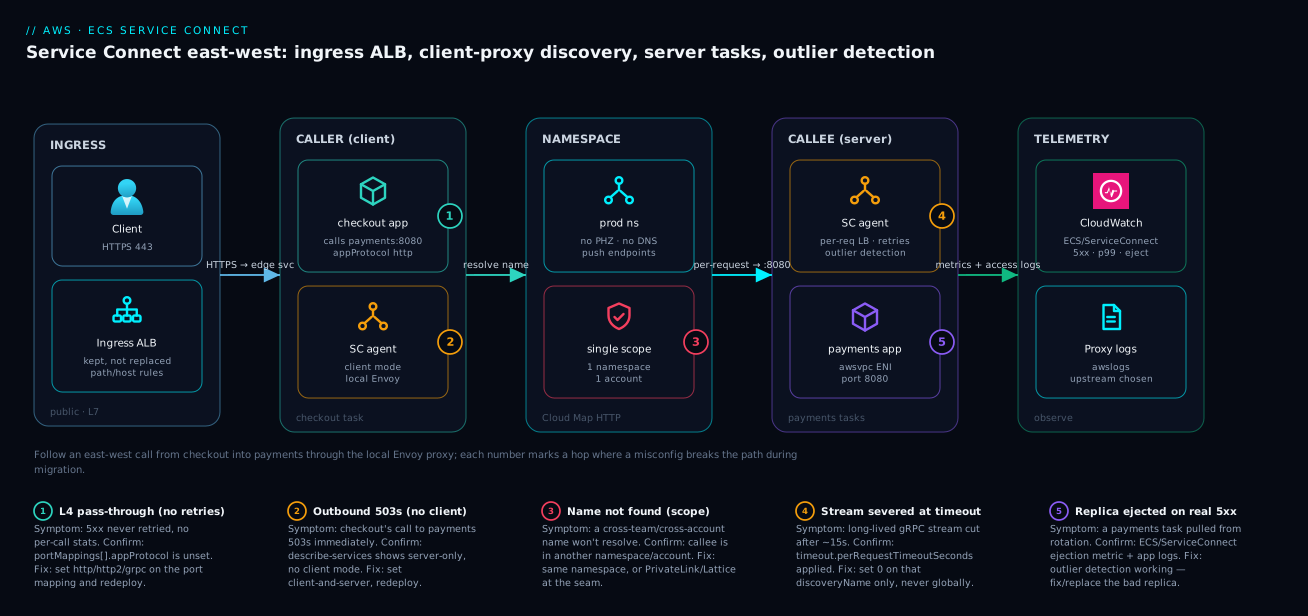
The diagram traces an east-west call the way it actually flows under Service Connect, then marks the hops where a misconfiguration bites. Read it left to right. A public request lands on the ingress ALB (which Service Connect does not replace) and is routed to the checkout task. Inside that task, the application does not call a load balancer — it calls http://payments:8080, which its local Service Connect agent (client mode) intercepts. The agent holds a live, push-updated view of every healthy payments endpoint in the prod namespace (a Cloud Map HTTP namespace, no private hosted zone, no runtime DNS), picks one per request, and connects directly to a payments task’s agent (server mode) over the task ENI on port 8080 — no extra ALB hop. The same agent does the retries, the per-request timeout, and the outlier detection that ejects a payments replica returning real 5xx. Telemetry — proxy access logs and the ECS/ServiceConnect metrics — flows out to CloudWatch, which is how you prove the call is carried by the proxy and not the old internal ALB.
The numbered badges mark the five places this breaks during a migration. Badge 1 sits on the appProtocol/portName linkage — get it wrong and you either fail to register or silently drop to L4 pass-through with no retries. Badge 2 is the client role: a server-only caller has no endpoints to route to and 503s on its own outbound calls. Badge 3 is the namespace boundary — a name in another namespace or account is simply invisible. Badge 4 is the per-request timeout severing a stream. Badge 5 is outlier detection ejecting a bad replica, which is the system working but worth watching. Follow the path, find the badge on the hop you are debugging, and read the legend for the symptom, the confirm command, and the fix.
Real-world scenario
A fintech platform team — call it Larkspur Pay — ran ~70 ECS-on-Fargate services in a single prod account, each fronted by its own internal ALB for east-west calls. Two problems compounded. The internal-ALB bill was material: 70 ALBs plus LCU consumption, for traffic that never left the VPC. And they had a recurring incident class where one wedged replica of a downstream service kept passing its shallow /healthz check while returning 503s to real traffic — the ALB never ejected it, and callers saw a steady 0.5% error rate that paged on-call weekly. Monthly east-west ALB spend was roughly ₹140,000, and the wedged-replica page had fired nine times in the prior quarter.
The constraint: they could not take a maintenance window across 70 services, and a hard org rule required every change to be reversible by config flag, not redeploy. The platform team was six engineers, and any plan that needed a synchronized cutover was dead on arrival.
They adopted Service Connect incrementally. One prod namespace, every service enabled as client-and-server over two sprints. Each caller’s downstream URL moved behind a flag (USE_SERVICE_CONNECT), defaulting to the ALB. They flipped one high-traffic path — checkout → payments — first, soaked 48 hours, and the wedged-replica incident class disappeared on that path: outlier detection ejected the bad task on real 5xx responses within the cool-down window instead of waiting for a health check that never failed. The proxy access logs were decisive during the soak — when one call failed, the log showed whether the proxy could not find a healthy payments (which would have meant a role/namespace misconfig) or payments itself returned 503 (a backend problem). With the old DNS-free-but-blind setup they had been guessing.
The one genuinely tricky service was a market-data feed with a long-lived gRPC stream. The first cutover attempt severed the stream at the default per-request timeout. The fix was to disable the per-request cap on exactly that discoveryName, never globally:
{
  "portName": "grpc-stream",
  "discoveryName": "marketdata",
  "clientAliases": [{ "dnsName": "marketdata", "port": 9000 }],
  "timeout": { "perRequestTimeoutSeconds": 0 }
}
After every caller of a given service was flipped and soaked, they deleted that service’s internal ALB — target group registration, listener, ALB, Route 53 alias. That was the moment the cost actually dropped, not when Service Connect was enabled.
Outcome after full cutover: 60-plus internal ALBs deleted, one extra sidecar per task in their place, the weekly wedged-replica page gone, and east-west p99 down slightly because they removed the ALB hop. East-west ALB spend fell from ~₹140,000/month to ~₹18,000 (the remaining ALBs were the public ingress and two services doing genuine L7 path routing), against a small rise in Fargate cost for the sidecars — a net monthly saving in the six figures of rupees. The lesson on the wall: “An internal ALB for an east-west call is a load balancer doing a service-mesh’s job badly. Delete it after the last caller moves — not before.”
The migration as a timeline, because the order of moves is the lesson:
| Phase | Action | Effect | What it should have been (if different) |
|---|---|---|---|
| Sprint 1 | Enable SC client-and-server on all services |
Endpoints advertised; nothing routes yet | Correct — server-first is zero-risk |
| Sprint 1 | Flip checkout → payments behind a flag |
Wedged-replica incident class gone on that path | The decisive proof point |
| Sprint 1 | First marketdata cutover |
gRPC stream severed at ~15s | Set perRequestTimeoutSeconds: 0 first |
| Sprint 2 | Flip remaining callers, path by path | Each independently reversible by flag | Correct — never a synchronized cutover |
| Sprint 2 | Soak 48h per path, watch proxy logs/metrics | Confirmed traffic on the new path | The soak is non-negotiable |
| Sprint 2 | Delete each ALB after its last caller moved | Cost actually drops here | Not at enable-time — a common mistake |
Advantages and disadvantages
Service Connect trades a pile of managed-but-costly internal ALBs for a managed sidecar in every task. Weigh it honestly:
| Advantages (why this helps you) | Disadvantages (why it bites) |
|---|---|
| Deletes internal ALBs — removes hourly + LCU cost and an extra hop per east-west call | Adds one Envoy sidecar per task — a CPU/memory tax that scales with task count |
| Mesh-grade resilience (retries, per-request timeouts, outlier detection) with no mesh to operate | Outlier detection and retries are managed, not deeply tunable — you express intent, not raw Envoy config |
| DNS-free, push-based discovery — no TTL staleness, no “connection refused to a dead IP” tail | Discovery is scoped to one namespace in one account — no cross-account, no cross-namespace |
Per-call telemetry (proxy access logs + ECS/ServiceConnect metrics) DNS discovery can’t give you |
Requires logConfiguration to be set or you fly blind on the access logs |
Name-to-service simplicity — http://payments:8080 just works |
Not an L7 router — no path/host rules, no WAF, no weighted canaries at the LB |
| Migration is incremental and reversible — coexists with the ALB per service | The sidecar is the gate — any non-ECS consumer can’t use it; you keep a fallback |
| Reacts to topology change in seconds, per request | TLS east-west needs ACM PCA setup; it’s not on by default |
Service Connect is right for east-west service-to-service traffic inside a single namespace and account where you want discovery plus resilience and want to delete internal ALBs. It is the wrong tool when you need real L7 routing (keep the ALB), when callers cross an account or namespace boundary (use PrivateLink or Lattice), or when a non-ECS consumer must resolve the service (use Cloud Map DNS). The sidecar tax is real but usually small next to the deleted ALB bill — quantify it for your task count before assuming.
Hands-on lab
Stand up two Fargate services in one namespace, prove checkout reaches payments through the Service Connect proxy (not an ALB), then tear it all down. Free-tier-friendly within Fargate’s pricing; delete at the end. Run in a shell with the AWS CLI configured and an existing VPC with two private subnets and a security group allowing intra-SG traffic on 8080.
Step 1 — Variables and the HTTP namespace.
export AWS_REGION=us-east-1
CLUSTER=sc-lab
NS=sc-lab-ns
SUBNETS=subnet-aaa,subnet-bbb        # two private subnets
SG=sg-ccc                            # allows TCP 8080 within the SG

aws servicediscovery create-http-namespace --name $NS
Step 2 — Create the cluster with the namespace as default.
aws ecs create-cluster --cluster-name $CLUSTER \
  --capacity-providers FARGATE \
  --service-connect-defaults namespace=$NS
Expected: a cluster JSON with status: ACTIVE and the serviceConnectDefaults.namespace set.
Step 3 — Register a payments task definition that binds 8080 with a named port. The key fields are the portMappings[].name and appProtocol.
{
  "family": "payments",
  "networkMode": "awsvpc",
  "requiresCompatibilities": ["FARGATE"],
  "cpu": "256", "memory": "512",
  "executionRoleArn": "arn:aws:iam::<acct>:role/ecsTaskExecutionRole",
  "containerDefinitions": [
    {
      "name": "app",
      "image": "public.ecr.aws/docker/library/httpd:2.4",
      "portMappings": [
        { "name": "http", "containerPort": 8080, "protocol": "tcp", "appProtocol": "http" }
      ]
    }
  ]
}
Register it: aws ecs register-task-definition --cli-input-json file://payments-td.json.
Step 4 — Create the payments service as a Service Connect server.
aws ecs create-service --cluster $CLUSTER --service-name payments \
  --task-definition payments --desired-count 2 --launch-type FARGATE \
  --network-configuration "awsvpcConfiguration={subnets=[$SUBNETS],securityGroups=[$SG],assignPublicIp=DISABLED}" \
  --service-connect-configuration '{
    "enabled": true,
    "namespace": "'"$NS"'",
    "services": [
      { "portName": "http", "discoveryName": "payments",
        "clientAliases": [ { "dnsName": "payments", "port": 8080 } ] }
    ]
  }'
Step 5 — Create a checkout service as a client (same task def family for the lab; it just needs the agent and ECS Exec enabled).
aws ecs create-service --cluster $CLUSTER --service-name checkout \
  --task-definition payments --desired-count 1 --launch-type FARGATE \
  --enable-execute-command \
  --network-configuration "awsvpcConfiguration={subnets=[$SUBNETS],securityGroups=[$SG],assignPublicIp=DISABLED}" \
  --service-connect-configuration '{ "enabled": true, "namespace": "'"$NS"'" }'
Step 6 — Verify the namespace, the registered endpoint, and the agent sidecar.
# Namespace is HTTP type
aws servicediscovery list-namespaces \
  --query "Namespaces[?Name=='$NS'].[Name,Type,Id]" --output table

# payments registered a Service Connect endpoint
aws ecs describe-services --cluster $CLUSTER --services payments \
  --query "services[0].serviceConnectConfiguration" --output json

# Tasks run the managed SC agent sidecar
TASK=$(aws ecs list-tasks --cluster $CLUSTER --service-name payments --query 'taskArns[0]' --output text)
aws ecs describe-tasks --cluster $CLUSTER --tasks $TASK \
  --query "tasks[0].containers[].name" --output json
Step 7 — Prove the call is carried by the proxy, not an ALB. Exec into the checkout task and curl the logical name; a 200 from a private task IP (not an ALB IP) is the proof.
CHECKOUT=$(aws ecs list-tasks --cluster $CLUSTER --service-name checkout --query 'taskArns[0]' --output text)
aws ecs execute-command --cluster $CLUSTER --task $CHECKOUT --container app --interactive \
  --command "curl -s -o /dev/null -w '%{http_code} %{remote_ip}\n' http://payments:8080/"
Step 8 — Teardown. Delete services, cluster, and namespace.
aws ecs update-service --cluster $CLUSTER --service checkout --desired-count 0
aws ecs update-service --cluster $CLUSTER --service payments --desired-count 0
aws ecs delete-service --cluster $CLUSTER --service checkout --force
aws ecs delete-service --cluster $CLUSTER --service payments --force
aws ecs delete-cluster --cluster $CLUSTER
NSID=$(aws servicediscovery list-namespaces --query "Namespaces[?Name=='$NS'].Id" --output text)
aws servicediscovery delete-namespace --id $NSID
The lab’s expected results at a glance:
| Step | Command | Expected result |
|---|---|---|
| 2 | create-cluster |
status: ACTIVE, default namespace set |
| 4 | create-service payments |
Service ACTIVE, 2 tasks RUNNING |
| 6 | describe-services SC query |
serviceConnectConfiguration.enabled = true, discoveryName: payments |
| 6 | describe-tasks containers |
Two containers: your app plus the managed SC agent |
| 7 | exec curl |
200 <private-task-IP> (a 10.x/100.64.x IP, never an ALB IP) |
| 8 | teardown | Services drained, cluster + namespace deleted |
Common beginner mistakes
These are misconceptions, not symptoms — the wrong mental model that produces the failure. (The symptom→cause→fix table lives in Common mistakes & troubleshooting below.)
“Service Connect is a load balancer I send traffic to.” There is no appliance in the middle. Service Connect is a client-side proxy mesh: the load balancing happens in the caller’s own sidecar, per request, and the connection goes task-to-task. Picture an assistant on every desk, not a switchboard in the basement. Once that clicks, “what endpoint do I point a DNS record at?” answers itself — there isn’t one, and that’s the point.
“Turning it on will replace my public ALB.” Service Connect is east-west only — service to service, inside the namespace. Your north-south front door, the internet-facing ALB that terminates TLS and greets browsers, stays exactly where it is. Service Connect demolishes the interior hallways, not the front door.
“Enabling Service Connect deletes my internal ALB and drops the bill.” Enabling is purely additive — the ALB path keeps flowing untouched. The cost drops at the moment you delete the now-unused ALB, which is only safe after the last caller has flipped to the alias and soaked. Teams enable Service Connect, see no savings, and conclude it doesn’t work; they simply haven’t finished the migration.
“server mode lets a service call its dependencies.” A server only advertises — it publishes endpoints so peers can find it. It does not resolve outbound calls. A service that both serves peers and calls others must be client-and-server. The single most common “why does my outbound call 503?” is a service left on server only.
“It’s DNS, so I need a private hosted zone and TTL tuning.” A Service Connect (HTTP) namespace is DNS-free. http://payments:8080 is a logical name the local proxy intercepts — no wire DNS query, no A record, no TTL to tune. Endpoint changes are pushed to every client proxy in seconds. If you’re reaching for dig to debug a Service Connect path, you’re at the wrong layer — read the proxy access logs instead.
“Retries make every call safe.” The proxy retries only idempotent methods (GET, HEAD, PUT, DELETE, OPTIONS). A POST is never auto-retried, because repeating it might charge a card or create a duplicate order. Don’t design a non-idempotent endpoint assuming the mesh will paper over a failed write.
“A green health check means the endpoint is fine.” That’s ALB thinking. Outlier detection watches the real request stream: a task that passes /healthz while returning 503s to actual traffic gets ejected anyway. Conversely, “the task is ejected” doesn’t mean the proxy is broken — it means a replica is failing real requests, and the fix is in that replica, not the mesh.
“One namespace per team keeps things tidy.” Splitting a namespace is a hard discovery boundary: services in different namespaces cannot find each other through Service Connect at all. Use one namespace per environment so everything stays discoverable, and split only when you deliberately want to block cross-team east-west — never for tidiness.
Common mistakes & troubleshooting
These are the real failure modes, with the symptom, the root cause, the exact confirm command, and the fix.
| # | Symptom | Root cause | Confirm | Fix |
|---|---|---|---|---|
| 1 | Service won’t register an endpoint | portName doesn’t match a portMappings[].name |
describe-task-definition → compare names |
Make services[].portName equal the port mapping name |
| 2 | Outbound call to a dependency 503s | Caller is server-only (no client mode) |
describe-services → role advertises but no client |
Set the caller client-and-server, redeploy |
| 3 | No retries despite 5xx; raw bytes only | appProtocol unset → L4 pass-through |
describe-task-definition → appProtocol missing |
Set http/http2/grpc on the port mapping |
| 4 | Long-lived stream cut at ~15s | Per-request timeout applied to a stream | Inspect timeout.perRequestTimeoutSeconds |
Set 0 on that discoveryName only |
| 5 | http://payments doesn’t resolve from a Lambda |
No sidecar — SC needs the agent | The caller is not an ECS task | Use Cloud Map DNS discovery for non-ECS consumers |
| 6 | Cross-team call fails to resolve | Callee is in a different namespace | list-namespaces; compare both services |
Same namespace, or use ALB/PrivateLink at the seam |
| 7 | Cross-account call has no path | SC is single-account | Accounts differ | PrivateLink or VPC Lattice at the boundary |
| 8 | No proxy access logs to debug with | logConfiguration not set |
Check SC config for logConfiguration |
Add an awslogs log config, redeploy |
| 9 | Tasks constantly ejected, errors persist | A replica failing real requests | ECS/ServiceConnect ejection metric + app logs |
Fix/replace the bad replica; check its 5xx source |
| 10 | Deleted the ALB, callers broke | Deleted before the last caller flipped | Audit caller URLs/flags | Recreate ALB; only delete after full soak |
| 11 | Connection refused to a dead IP (still) | Caller still on Cloud Map DNS, not SC | Caller URL is *.local, not the SC alias |
Flip the URL to the SC alias; SC is push-based |
| 12 | App can’t reach localhost proxy endpoint |
App binds/ calls wrong interface or port | Exec + curl http://<dnsName>:<port> |
Call the clientAlias dnsName:port, not the container’s own IP |
| 13 | Security group blocks the task-to-task call | SG doesn’t allow intra-SG 8080 | describe-security-groups; check ingress |
Allow the port within the SG (or from the caller SG) |
| 14 | Enabled SC but the bill didn’t drop | ALBs still present (not deleted) | List ALBs / target groups | Delete the now-unused internal ALBs |
| 15 | Endpoint registered under the wrong name | discoveryName defaulted to portName |
describe-services SC config |
Set discoveryName explicitly to the intended name |
| 16 | Caller dials the container’s own IP | App uses task metadata IP, not the alias | Exec + inspect the URL the app builds | Call http://<dnsName>:<port> (the clientAlias) |
| 17 | New tasks not taking traffic | Stale view (very brief) or task unhealthy | ECS/ServiceConnect per-target request count |
Usually resolves in seconds; check task health |
| 18 | gRPC works but no retries | appProtocol is http not grpc |
portMappings[].appProtocol |
Set grpc for proper HTTP/2 framing + retries |
| 19 | TLS east-west not encrypting | tls block not configured |
SC config has no tls |
Add ACM PCA cert config to the advertised service |
| 20 | Two services collide on a name | Same discoveryName in one namespace |
List advertised names in the namespace | Give each service a unique discoveryName |
The three highest-frequency mistakes, in detail
Port-name mismatch (row 1). The serviceConnectConfiguration.services[].portName must exactly equal a portMappings[].name in the task definition. If they differ — even a casing slip — the service silently fails to register a Service Connect endpoint and peers can’t find it.
# Confirm the names line up
aws ecs describe-task-definition --task-definition payments \
  --query "taskDefinition.containerDefinitions[].portMappings[].name" --output json
server-only caller (row 2). A service set to advertise endpoints but not consume has no client proxy, so its own outbound calls have no endpoint set to route to and 503 immediately. The fix is client-and-server.
aws ecs describe-services --cluster prod --services checkout \
  --query "services[0].serviceConnectConfiguration" --output json
L4 pass-through (row 3). Omit appProtocol and the proxy treats the traffic as raw TCP — you keep discovery and pooling but lose HTTP-aware retries and outlier detection. Declare the protocol on the port mapping and the L7 features switch on.
Best practices
- One namespace per environment, not per team. Put every service in an environment in one namespace so they can discover each other; split only for a deliberate hard boundary, never for tidiness.
- Always set
appProtocol. Declarehttp/http2/grpcon the port mapping so you get retries and outlier detection, not silent L4 pass-through. - Match
portNameto a named port mapping, exactly. This is the #1 misconfig; treat the linkage as a unit when you author task defs. - Default services to
client-and-server. Unless a service genuinely never calls a peer, this avoids theserver-only outbound-503 trap. - Set
logConfigurationfrom day one. The proxy access logs are how you debug a bad cutover; don’t enable Service Connect blind. - Disable the per-request timeout per stream, never globally. Set
perRequestTimeoutSeconds: 0only on streaming/long-polldiscoveryNames. - Migrate caller-by-caller behind a config flag. Keep the internal ALB live until every caller is flipped and soaked; each step must be independently reversible.
- Delete the ALB only after the last caller cuts over. That is when the cost and the hop actually drop — not at enable-time.
- Keep the ingress ALB and any real L7 router. Service Connect replaces internal east-west ALBs, not your front door or path/host routing.
- Plan account/namespace seams with PrivateLink or Lattice. Service Connect does not cross those boundaries; design the seam deliberately.
- Alarm on
ECS/ServiceConnect5xx and outlier ejections. A bad replica shows up here before it shows up in a customer complaint. - Quantify the sidecar tax before assuming. One Envoy per task is small but real; size it against the ALB bill you’re deleting.
Security notes
The security posture of Service Connect is mostly inherited from the task and network model, with a few topic-specific points.
- Task-to-task traffic rides the awsvpc ENIs and your security groups. The proxy connects directly to a backend task’s IP, so the security group on the tasks must allow the relevant port (e.g. 8080) from the caller — typically by allowing intra-SG traffic or from the caller’s SG. There is no public exposure; everything stays on private subnets.
- East-west TLS is opt-in via the
tlsblock. By default the proxy traffic is not encrypted at the Service Connect layer. For zero-trust east-west or compliance, configure TLS with a certificate from ACM Private CA (PCA) so task-to-task traffic is encrypted and authenticated. This is a deliberate add, not a default. - Least-privilege IAM stays the same. Service Connect does not change your task role or execution role model — the app’s permissions, ECR pull, and secrets access are unchanged. The agent is managed by ECS; you do not grant it extra app permissions.
- No new public attack surface. Deleting internal ALBs reduces surface — fewer listeners and target groups to misconfigure. Discovery is control-plane, not a resolvable public name.
- Audit via the proxy access logs. The
logConfigurationaccess logs give you a per-call record of which upstream was chosen and the response, which is a useful audit trail DNS discovery cannot provide.
The security-relevant settings and how to reason about each:
| Control | Default | Hardened setting | Why |
|---|---|---|---|
| Task SG ingress | Your design | Allow port only from caller SG (not 0.0.0.0/0) | Least-network; SC needs only task-to-task |
East-west TLS (tls) |
Off | ACM PCA-issued cert per advertised endpoint | Encrypt + authenticate east-west |
assignPublicIp |
varies | DISABLED on private subnets |
No public IP on tasks |
| Task vs execution role | Separate | Scope each to least privilege | SC doesn’t change this; keep it tight |
| Proxy access logs | Off (no logConfiguration) |
awslogs group with retention |
Auditability + debugging |
| Cross-account exposure | None (SC is single-account) | PrivateLink/Lattice with IAM auth | Controlled, authenticated boundary |
| ACM PCA root trust | n/a | Private CA scoped to the estate | Issues the east-west TLS certs |
| Namespace ownership | Single account | Keep it in the workload account | No cross-account discovery to abuse |
| Internal ALB surface | Many listeners/TGs | Deleted | Fewer misconfigurable edges |
| ECS Exec (debugging) | Off | On only when needed, audited | execute-command is powerful; scope it |
Cost & sizing
The economics of Service Connect are a trade: you delete internal ALBs and add one sidecar per task. Whether you come out ahead depends on how many ALBs you delete versus how many tasks carry the sidecar.
What drives the Service Connect cost: the managed Envoy agent consumes a slice of each task’s CPU and memory. There is no separate per-hour Service Connect charge — you pay for the extra compute the sidecar uses, multiplied by your task count. Inter-AZ data transfer is the same as before (it is task-to-task either way).
What you delete: each internal ALB you retire removes its hourly charge plus LCU consumption (new connections, active connections, processed bytes, rule evaluations). At fifty internal ALBs this is the dominant term and almost always swamps the sidecar tax.
# Roughly size the sidecar tax: tasks × per-task overhead.
# Count running tasks across the cluster you're migrating:
aws ecs list-tasks --cluster prod --desired-status RUNNING \
  --query "length(taskArns)" --output text
The cost trade as a table — the levers and their direction:
| Lever | Direction | Magnitude | Notes |
|---|---|---|---|
| Internal ALBs deleted | Saves | Largest term | Hourly + LCU per ALB removed |
| Sidecar CPU/memory per task | Costs | Small per task | Scales with task count, not traffic |
| Inter-AZ data transfer | Neutral | — | Same task-to-task either way |
| Extra network hop removed | Saves (latency) | p99 improvement | Not a billed line, but real |
| Health-check overhead removed | Saves (minor) | Negligible | No per-target probes |
| ACM PCA (if you enable TLS) | Costs | Per CA + per cert | Only if you turn on east-west TLS |
| CloudWatch Logs (proxy access logs) | Costs | Per GB ingested + stored | Set retention; cheap vs ALB savings |
| CloudWatch metrics | Costs | Per custom metric / dimension | ECS/ServiceConnect dimensions add up at scale |
| Route 53 alias records removed | Saves (tiny) | Negligible | One fewer record per deleted ALB |
Rough sizing intuition — when Service Connect wins on cost:
| Estate shape | Internal ALBs | Tasks | Service Connect verdict |
|---|---|---|---|
| Many services, modest task counts | 50+ | a few hundred | Strong win — ALB savings dominate |
| Few services, huge task counts | 3–5 | thousands | Marginal — sidecar tax grows; measure |
| Mostly L7-routed public traffic | (ingress only) | any | Little to delete — keep the ALBs |
| Classic microservices, 1 ALB per edge | one per edge | moderate | The canonical win |
A worked example: retiring 60 internal ALBs removes their hourly + LCU charges (in the Larkspur Pay case, ~₹140,000/month down to ~₹18,000 for the surviving ingress and L7 ALBs). The added Fargate cost for ~600 task sidecars was a fraction of that, netting a six-figure-rupee monthly saving — and a small p99 improvement from the deleted hop. Always compute your own task count against your own ALB count before assuming the direction.
Going deeper
Everything above is enough to run Service Connect well. This section is for the reader who wants to know why the proxy behaves the way it does, where the sharp edges hide, and which facts shift with the platform underneath you.
How outlier detection actually decides to eject
The agent runs Envoy, and Envoy’s outlier detector — not an ALB-style health check — is what pulls a bad task out of rotation. The metric you watch (outlier ejections) only makes sense once you know what triggers it. Envoy counts consecutive server errors (5xx / gateway failures) per upstream endpoint. When an endpoint crosses the threshold it is ejected for a base ejection time; each repeat ejection multiplies that duration, so a flapping replica is held out progressively longer instead of being probed back every few seconds. A guardrail — a maximum ejection percentage — stops the detector from ejecting so much of the pool that it takes the service down: past that fraction, ejection halts even if more endpoints misbehave.
Two consequences for operators. First, ejection is per client proxy: each caller’s sidecar decides independently from its own request stream, so a replica poisoning one caller’s traffic can be ejected there while still serving another caller that never hits the bad path. Second, Service Connect is opinionated — it renders these Envoy settings for you and does not currently expose the thresholds (consecutive-error count, base ejection time, max ejection percent) as public tunables. You express intent at the service level; if you find yourself needing to hand-tune outlier detection, that is a signal you may have outgrown Service Connect and want a full mesh or VPC Lattice. Read the ejection metric as “a replica is failing real requests,” go to that task’s logs, and fix or replace it — do not hunt for a threshold knob that isn’t there.
Endpoints are advertised on health, and provisioned on a short delay
A task does not advertise its Service Connect endpoint the instant the scheduler places it. The managed agent has to start, learn the namespace, and register — and if the app container declares a container-level healthCheck, ECS waits for HEALTHY before the endpoint is advertised to client proxies. Define that health check: without one, an endpoint can be advertised the moment the container is merely RUNNING, before your app is actually ready to serve, and early callers eat connection resets.
{
  "name": "app",
  "healthCheck": {
    "command": ["CMD-SHELL", "curl -f http://localhost:8080/healthz || exit 1"],
    "interval": 10, "timeout": 5, "retries": 3, "startPeriod": 30
  },
  "portMappings": [
    { "name": "http", "containerPort": 8080, "protocol": "tcp", "appProtocol": "http" }
  ]
}
The flip side is a brief provisioning window on every deploy: newly started tasks take a few seconds to appear in every caller’s endpoint set. This is normal and far shorter than a DNS TTL, but it is why you soak after a cutover rather than judging a path in its first thirty seconds.
Connection draining and the rolling-deploy handshake
When a rolling deployment stops an old task, the order matters. ECS withdraws that task’s endpoint from every client proxy first — pushed within seconds — so new requests stop selecting it almost immediately, well before the container gets SIGTERM. In-flight requests drain during the task’s stopTimeout window. The upshot: with Service Connect you get near-zero-drop deploys largely for free, provided your stopTimeout is long enough for in-flight requests to finish and your app handles SIGTERM by draining rather than dying instantly.
This interlocks with the ordinary ECS deployment controls. minimumHealthyPercent / maximumPercent govern how many tasks turn over at once; the deployment circuit breaker rolls the service back if new tasks never reach a steady healthy state. Service Connect does not replace any of that — it rides on top. A common trap is a stopTimeout shorter than a slow request’s tail: the endpoint is withdrawn cleanly, but the container is killed before the request finishes, and the caller sees a reset that looks like a Service Connect fault when it is really a drain-timeout mismatch.
There is no locality-aware routing — cross-AZ is even by design
The client proxy load-balances across all healthy endpoints regardless of Availability Zone. There is no zonal-affinity or same-AZ-preference knob in Service Connect today, which means an east-west call is as likely to cross an AZ as to stay local — and cross-AZ data transfer is billed. This is the same cost profile you had with an internal ALB (which also spreads across AZs), so it is neutral on migration; but do not adopt Service Connect expecting it to cut cross-AZ transfer by pinning same-AZ traffic. If AZ-local routing to shave transfer cost is a hard requirement, that is a reason to look at VPC Lattice or a full mesh, which expose locality policies.
One service, many ports — and an ALB at the same time
A service is not limited to one advertised endpoint. A task with several named port mappings can advertise several services[] entries — an HTTP API on one port and a gRPC stream on another, each with its own discoveryName, alias, and timeout policy. Conversely, a caller can reach the same backend by more than one clientAlias.
More important for migration: a service can carry a loadBalancers block (an ALB target group) and a serviceConnectConfiguration at the same time. That is the whole reason the migration is reversible — the edge service keeps serving north-south traffic through its ingress ALB while advertising the same port east-west through Service Connect. The two paths are independent all the way down; nothing forces a per-service choice until you delete the ALB.
| You want | Config on the service | Result |
|---|---|---|
| East-west discovery only | serviceConnectConfiguration (server) |
Peers reach it by alias; no LB |
| Public ingress only | loadBalancers (ALB target group) |
Browser traffic via the ALB |
| Both at once (the migration state) | Both blocks together | Ingress via ALB, east-west via SC |
| Multiple protocols east-west | Several named ports → several services[] |
One discoveryName per port |
App Mesh is going away — Service Connect and VPC Lattice are the path
If you are weighing Service Connect against AWS App Mesh, the decision is largely made for you: AWS has announced App Mesh reaches end of support on September 30, 2026, with no new-customer onboarding. For ECS east-west the successors are exactly the two tools in this lesson — Service Connect for the in-namespace, in-account common case, and VPC Lattice for cross-account / cross-VPC service networking with IAM auth policies. New estates should not build on App Mesh; existing App Mesh users on ECS should plan a move to Service Connect (simple east-west) or Lattice (where the mesh spanned accounts or needed fine-grained auth). This is the biggest reason “should we run a mesh?” now usually answers itself: the managed, opinionated option covers the common case, and the heavyweight mesh you would have reached for is being retired.
Quotas, versions, and smaller caveats
- The agent is managed and auto-updated. You do not pin or patch the Envoy image; ECS ships and rolls it. New Service Connect capabilities (added steadily since GA in 2022) arrive without you upgrading a chart — but that also means behavior can shift under you, so keep the release notes in view.
- Cloud Map limits still apply. Endpoints register as Cloud Map instances, and the per-namespace / per-service instance quotas bound how large a single namespace scales; raise them via Service Quotas before a very large estate lands on one namespace.
- Timeout precedence. The proxy’s
perRequestTimeoutSecondsshould be ≥ your app’s own client timeout for that dependency, or the app gives up first and you never benefit from a proxy retry. Line the two up deliberately rather than leaving both at defaults. - awsvpc addressing follows the ENI. Service Connect endpoints are the task’s ENI addresses; in a dual-stack subnet they follow the task’s IPv6/IPv4 assignment. There is nothing Service Connect-specific to configure, but the security-group rule that allows the port must match the address family the tasks actually use.
Practice challenges
Six exercises, roughly easy to hard. Try each before opening the solution. They assume the lab’s sc-lab cluster and namespace, but the configs stand alone.
1. (Beginner) Name a service so peers call it at http://orders:8080. A task definition has portMappings: [{ "name": "web", "containerPort": 8080, "protocol": "tcp", "appProtocol": "http" }]. Write the serviceConnectConfiguration.services[] entry that advertises it as orders on port 8080.
<details><summary>Solution</summary>
{ "portName": "web", "discoveryName": "orders",
  "clientAliases": [ { "dnsName": "orders", "port": 8080 } ] }
Why: portName must equal the port mapping’s name (web, not http); discoveryName + the alias set the name and port callers dial.
</details>
2. (Beginner) A pure frontend. A web-bff service calls other services but exposes nothing internally. What role is it, and what does its Service Connect config look like?
<details><summary>Solution</summary>
{ "enabled": true, "namespace": "prod" }
Role: client — enabled + namespace, no services array. Why: a client advertises nothing but still needs client mode so its outbound calls resolve; omit services and it publishes no endpoints.
</details>
3. (Intermediate) Two different timeout policies. Give the advertised ledger service a 10s per-request cap and a 60s idle timeout, while a marketdata gRPC stream must never be cut. Write both services[] entries.
<details><summary>Solution</summary>
{ "portName": "http", "discoveryName": "ledger",
  "clientAliases": [{ "dnsName": "ledger", "port": 8080 }],
  "timeout": { "idleTimeoutSeconds": 60, "perRequestTimeoutSeconds": 10 } }
{ "portName": "grpc", "discoveryName": "marketdata",
  "clientAliases": [{ "dnsName": "marketdata", "port": 9000 }],
  "timeout": { "perRequestTimeoutSeconds": 0 } }
Why: caps protect request/response paths; 0 disables the per-request cap so a long-lived stream isn’t severed — set per discoveryName, never globally.
</details>
4. (Intermediate) No retries after a clean cutover. You flipped checkout to http://payments:8080, but 500s aren’t retried. The port mapping is { "name": "http", "containerPort": 8080, "protocol": "tcp" }. What’s missing, and does the fix make a POST retryable?
<details><summary>Solution</summary>
Add "appProtocol": "http" to the port mapping. Without it the proxy is L4 pass-through — discovery and pooling only, no HTTP-aware retries or outlier detection. It does not make POST retryable: only idempotent methods (GET/HEAD/PUT/DELETE/OPTIONS) are auto-retried.
Why: appProtocol is the L4-vs-L7 switch; retries are still gated on idempotency.
</details>
5. (Advanced) Alarm the new path. Write the CloudWatch CLI to pull the last hour of backend 5xx on the checkout → payments path, and state the alarm threshold you’d wire before cutover.
<details><summary>Solution</summary>
aws cloudwatch get-metric-statistics \
  --namespace ECS/ServiceConnect \
  --metric-name HTTPCode_Target_5XX_Count \
  --dimensions Name=DiscoveryName,Value=payments Name=ServiceName,Value=checkout \
  --start-time "$(date -u -v-1H '+%Y-%m-%dT%H:%M:%SZ')" \
  --end-time   "$(date -u '+%Y-%m-%dT%H:%M:%SZ')" \
  --period 60 --statistics Sum
Alarm: 5xx > 0 sustained for 5 minutes on that DiscoveryName. Why: it catches a bad backend in the minutes right after the flip, while you still have the ALB URL to fall back to.
</details>
6. (Advanced) Design the reversible cutover. checkout → payments currently runs through an internal ALB. Write the ordered migration steps and the single condition that must hold before you delete the ALB.
<details><summary>Solution</summary>
- Enable Service Connect server on
payments, redeploy (advertises; nobody routes yet). - Enable client (or
client-and-server) oncheckout, redeploy (its proxy learnspayments). - Flip
checkout’s dependency URL tohttp://payments:8080behind a config flag, roll out, soak, watchECS/ServiceConnectmetrics. - Delete the ALB (target-group registration, listener, ALB, Route 53 alias) only after every caller of
paymentshas flipped and soaked.
Condition before deletion: every caller resolves through Service Connect and has soaked with no error/p99 regression — the ALB stays live and the flag stays flippable until then. Why: each step is independently reversible; ALB deletion is the one move you can’t quickly undo, so it’s gated on full soak, not on enable-time. </details>
Interview & exam questions
Q1. What are the three components of ECS Service Connect, and what does each do? A Cloud Map HTTP namespace (the logical discovery boundary), a managed Envoy agent sidecar injected per task (it does discovery, load balancing, retries, and outlier detection), and client/server roles per service that decide whether a service advertises endpoints, consumes them, or both. (Maps to the AWS DevOps Pro and SA Pro container topics.)
Q2. Why might a service’s outbound call 503 even though the target is healthy? Because the calling service is configured as server only — it advertises endpoints but has no client proxy, so its outbound calls have no endpoint set to route to. The fix is client-and-server.
Q3. How does Service Connect differ from Cloud Map DNS discovery on staleness? DNS discovery resolves A records against a private hosted zone and caches them for the TTL, so a dead task can linger in the resolver cache. Service Connect is push-based — the control plane withdraws an endpoint from every client proxy within seconds — so there is no TTL staleness and no dead-IP tail.
Q4. What does appProtocol control, and what breaks if you omit it? It declares the L7 protocol (http/http2/grpc) on a port mapping, which unlocks HTTP-aware retries, per-request stats, and outlier detection. Omit it and the proxy degrades to L4 pass-through: you keep discovery and pooling but lose the L7 resilience features.
Q5. How does outlier detection differ from an ALB health check? An ALB ejects a target when a periodic health check fails. Outlier detection ejects a task based on the actual request stream — real 5xx to real traffic — so it catches a replica that passes /healthz but returns 503s, which an ALB never notices.
Q6. Can Service Connect span accounts or namespaces? No. Discovery is scoped to one namespace in one account. Cross-namespace or cross-account calls need an internal ALB, PrivateLink, or VPC Lattice at the seam; Service Connect handles intra-namespace, intra-account east-west.
Q7. What is the correct, reversible way to migrate one call path off an internal ALB? Enable Service Connect as server on the callee, make the caller a client, then flip the caller’s dependency URL to the Service Connect alias behind a config flag. Soak, and only delete the ALB after every caller of that service has flipped — each step is independently reversible.
Q8. When should you set perRequestTimeoutSeconds: 0? Only on streaming or long-poll endpoints, set per discoveryName, never globally — otherwise the proxy severs long-lived connections at the per-request cap.
Q9. How do you prove a call is carried by the proxy and not an ALB? Exec into the caller and curl the logical name; a 200 from a private task IP (not the ALB’s IP) confirms it, cross-checked against ECS/ServiceConnect request-count metrics on the target’s DiscoveryName.
Q10. What does enabling Service Connect cost, and what does it save? It adds one Envoy sidecar’s CPU/memory per task (cost scales with task count). It saves the hourly + LCU charges of every internal ALB you delete, plus an extra network hop per call. The net is a win when you delete many ALBs relative to your task count.
Q11. Does Service Connect replace your public ingress ALB? No. It replaces internal east-west ALBs between services. Public traffic still lands on an internet-facing ALB, and any service doing real L7 path/host routing keeps its ALB.
Q12. What’s the single most common Service Connect misconfiguration? A mismatch between services[].portName in the Service Connect config and a portMappings[].name in the task definition — the service silently fails to register an endpoint.
Quick check
- A
checkoutservice is set toserveronly and its calls topaymentsreturn 503. What’s the fix, in one change? - You flip a caller to
http://payments:8080and its long-lived gRPC stream gets cut after a few seconds. What setting, on which scope, fixes it? - True or false: enabling Service Connect on a service immediately stops its existing internal-ALB traffic.
- A Lambda needs to resolve ECS
paymentstasks. Can it use Service Connect? If not, what does it use? - After full migration the internal-ALB bill hasn’t dropped. What did you forget to do?
Answers
- Change
checkouttoclient-and-serverand redeploy — aserver-only service has no client proxy, so its outbound calls have no endpoints to route to. - Set
perRequestTimeoutSeconds: 0on themarketdata(gRPC)discoveryNameonly — never globally — so the proxy stops severing the stream at the per-request cap. - False. Enabling Service Connect is additive; the existing ALB path is independent and keeps flowing until you flip callers and delete the ALB.
- No — Service Connect requires the Envoy sidecar, which a Lambda can’t carry. The Lambda uses Cloud Map DNS discovery against a private hosted zone instead.
- Delete the now-unused internal ALBs (target group registration, listener, ALB, Route 53 alias). The cost drops when the ALB is deleted, not when Service Connect is enabled.
Glossary
- Service Connect — An ECS feature that injects a managed Envoy sidecar per task for in-namespace service discovery, load balancing, retries, and outlier detection, replacing internal ALBs for east-west traffic.
- Namespace — A Cloud Map HTTP namespace that bounds which services can discover each other; discovery is scoped to a single namespace in a single account.
- Cloud Map — AWS service-discovery service; Service Connect uses its HTTP namespace type (no private hosted zone required).
- Service Connect agent — The managed Envoy proxy sidecar ECS injects into each participating task; you don’t write or run its config.
- Client / server / client-and-server — Per-service roles: a server advertises endpoints, a client consumes them, and
client-and-serverdoes both. Outbound calls only resolve in client or client-and-server mode. portName— The name on aportMappingsentry that the Service Connect config references; the two must match exactly.discoveryName— The short name a service advertises into the namespace (defaults to theportName).clientAlias— The DNS name and port callers use (http://<dnsName>:<port>); a logical name the proxy intercepts locally.appProtocol— The L7 protocol (http/http2/grpc) declared on a port mapping; enables retries, per-request stats, and outlier detection.- Outlier detection — Envoy’s mechanism for ejecting a task that returns real 5xx to real traffic, catching failures a health check misses.
- Per-request timeout — A cap on a single request (
perRequestTimeoutSeconds); set0for streams to avoid severing them. - LCU — Load Balancer Capacity Unit, the metered cost dimension of an ALB; deleting internal ALBs removes their LCU charge.
- PrivateLink — The AWS mechanism for exposing a service across accounts via an endpoint service and interface endpoint; takes over where Service Connect’s account boundary ends.
- VPC Lattice — An application-networking service for service-to-service connectivity across accounts/VPCs with IAM auth, an alternative seam beyond a namespace.
- Sidecar tax — The CPU/memory overhead of the Envoy agent per task, the cost you trade for deleting internal ALBs.
- Envoy — The open-source L7 proxy AWS runs as the managed Service Connect agent; you never write or operate its config.
- Sidecar — A helper container (here, the agent) that runs in the same task as your app and shares its network namespace.
- East-west vs north-south — East-west is service-to-service traffic inside your network; north-south is traffic entering or leaving through the front door (ingress). Service Connect is for east-west.
- Connection draining — Letting in-flight requests finish on a task being stopped before it is killed; Service Connect withdraws the endpoint first, then drains within
stopTimeout. - Base ejection time — How long outlier detection keeps an ejected task out of rotation before probing it back; it grows on repeated ejections so a flapping replica is held out longer.
- App Mesh — AWS’s older Envoy-based service mesh, announced end-of-support on September 30, 2026; for ECS east-west its successors are Service Connect and VPC Lattice.
- ACM Private CA (PCA) — The private certificate authority that issues the certs for optional east-west TLS on an advertised endpoint.
Next steps
- Production ECS on Fargate: Task Networking, Autoscaling, Deployments — the task ENI, deployment, and autoscaling foundations Service Connect rides on.
- Elastic Load Balancing: ALB, NLB, GWLB Deep Dive — when an ALB still earns its keep for L7 routing and public ingress.
- PrivateLink: Service Provider & Consumer, Cross-Account — the cross-account seam where Service Connect stops.
- VPC Lattice: Service Networks, IAM Auth, Cross-Account — the IAM-authenticated alternative for cross-account east-west.
- CloudWatch & CloudTrail Observability Deep Dive — alarm on the
ECS/ServiceConnectmetrics and wire up the proxy access logs.