In a nutshell
Level: Intermediate · Time: ~44 min · You’ll need: a basic grasp of what a VPC, subnet, and EC2 instance are (the VPC deep dive linked under Prerequisites below covers it).
Every server you run in AWS sits behind two firewalls at once, and knowing which one is blocking you is half of all cloud-networking troubleshooting. Picture a gated apartment complex. At the street there is a perimeter gate with a guard who checks a printed list — that is the network ACL (NACL), and it guards a whole subnet (a block of servers). At each apartment’s own front door stands a smart doorman — that is the security group (SG), and it guards one server (technically its network card, the ENI). To reach a server, a visitor has to get past both.
The one difference behind almost every mistake is memory. The apartment doorman (SG) is stateful: he remembers whom he let in, so when your reply walks back out he waves it through automatically — you only ever tell him about traffic in the direction it starts. The perimeter guard (NACL) is stateless: he has no memory at all, so you must put both the visitor and their reply on his list, separately. Forget the “reply” half and the connection simply hangs — the request gets in, but the answer can never get back out. That single asymmetry is the “everything looks right but it still hangs” bug you will meet again and again.
Two sentences carry the whole lesson: security groups are stateful and allow-only (they can say yes, never no, and they remember connections), while network ACLs are stateless and can allow or deny (no memory, and they read a numbered list top-to-bottom, first match wins). Master those two lines and everything below — ephemeral ports, evaluation order, defence in depth — falls straight out of them. Beginners should care because this layer decides both whether your app is reachable and whether it is safe; it is free, it is everywhere, and it is the first thing every VPC problem comes back to.
Inside an Amazon VPC you have two firewalls, not one, and almost every networking outage a new engineer creates comes from misunderstanding the difference between them. A security group (SG) wraps each network interface — think of it as a firewall bolted directly to the instance. A network ACL (NACL) wraps each subnet — a firewall at the front door of a whole neighbourhood of resources. They look superficially similar (both are lists of allow rules with protocols, ports and CIDR ranges) but they behave in fundamentally different ways, and the single most important difference — stateful versus stateless — is also the one that trips people up in production and in interviews.
This lesson teaches both firewalls from the ground up and then puts them side by side. We will name every field in a rule, walk through exactly how each is evaluated, follow a single web request packet-by-packet so you can see why a security group needs no return rule but a NACL does, reproduce the infamous “everything is configured correctly but the connection still hangs” NACL gotcha, and finish with the layered-defence patterns that real architectures use. By the end you will be able to look at any connectivity problem in a VPC and reason precisely about which layer is dropping the traffic — a skill that separates people who guess at networking from people who know.
Both features are free; you pay nothing extra for security groups or NACLs themselves, only for the resources they protect and the data those resources move.
Learning objectives
By the end of this lesson you will be able to:
- Explain what a security group is, what it attaches to, and every field in an SG rule.
- Explain what a network ACL is, what it attaches to, and every field in a NACL rule including the rule number and evaluation order.
- State the stateful vs stateless difference precisely and prove it by tracing a request and its response through both layers.
- Define ephemeral ports and explain why stateless NACLs force you to open them on the return path.
- Reproduce and fix the classic “NACL blocks the return traffic” failure.
- Use security-group referencing (one SG as the source of another) and understand the default SG and default NACL behaviour.
- Know the quotas, defaults and limits for both, and when each is the right tool.
- Combine SGs and NACLs for defence in depth without locking yourself out.
Prerequisites & where this fits
You need an AWS account and a working mental model of a VPC: that a VPC is your private network in a Region, that it is carved into subnets (each living in one Availability Zone), that an instance reaches the network through an elastic network interface (ENI), and that traffic to the internet flows through an internet gateway or NAT gateway via a route table. If those terms are hazy, read Amazon VPC, In Depth: Subnets, Route Tables, IGW, NAT, Endpoints & Every Component first. This is a Networking lesson in the AWS Zero-to-Hero course and follows directly from the VPC deep dive — routing decides where a packet may go, while the two firewalls in this lesson decide whether it is allowed through. After this we move on to AWS Elastic Load Balancing, In Depth.
Core concepts: two firewalls, two layers
A packet entering or leaving an instance in a VPC passes through two independent checkpoints, and it must be permitted by both to get through:
- The network ACL on the subnet boundary (the outer perimeter).
- The security group on the instance’s ENI (the inner perimeter, right at the resource).
The order depends on direction. For traffic arriving at an instance, the packet first crosses the subnet’s inbound NACL, then hits the instance’s inbound SG. For traffic leaving an instance, it first passes the instance’s outbound SG, then the subnet’s outbound NACL. Picture concentric rings: the NACL is the neighbourhood wall, the SG is the lock on the individual front door. Either one can drop a packet, and when traffic mysteriously fails this two-layer model is the first thing to reason about.
The table below is the whole lesson in miniature; everything that follows expands on it.
| Property | Security group (SG) | Network ACL (NACL) |
|---|---|---|
| Attaches to | One or more ENIs (effectively, instances) | One or more subnets |
| Scope | Instance level (inner ring) | Subnet level (outer ring) |
| State | Stateful — return traffic auto-allowed | Stateless — return traffic must be explicitly allowed |
| Rule actions | Allow only (no deny) | Allow and Deny |
| Default posture (custom) | Deny all inbound, allow all outbound | Custom NACL: deny all in and out until you add rules |
| Evaluation | All rules evaluated; if any allows, traffic passes | Rules processed in number order; first match wins; then stop |
| Rule numbers / order | No order — rules are a set | Numbered; lowest number evaluated first |
| Can reference another SG/PL | Yes — source/destination can be an SG or prefix list | No — only CIDR blocks (plus a small set of fields) |
| Applies to | Only ENIs it is associated with | Every resource in the subnet automatically |
| Cost | Free | Free |
Keep two phrases in your head from here on: “security groups are stateful, NACLs are stateless,” and “security groups allow-only, NACLs allow-and-deny.” Almost every behaviour below falls out of those two facts.
Security groups, in depth
A security group is a named set of allow rules that you attach to one or more elastic network interfaces. Because the rule set is attached to the ENI, it travels with the instance: every packet in and out of that interface is checked against the group’s rules. An ENI can have multiple security groups, and a single security group can be attached to many ENIs — the relationship is many-to-many. When an ENI has several SGs, their rules are simply combined (unioned): if any rule in any attached group allows the traffic, it is allowed. There is no concept of one group overriding another, because there are no deny rules to override with.
Anatomy of a security-group rule — every field
Each rule, whether inbound or outbound, is made of the following fields. Understanding each one removes most of the mystery.
| Field | What it specifies | Choices / format | Notes & gotchas |
|---|---|---|---|
| Type | A friendly shortcut that pre-fills protocol and port (e.g. SSH, HTTPS, HTTP, Custom TCP) | Named presets or Custom TCP/UDP/ICMP | A console convenience only; under the hood it just sets protocol + port. |
| Protocol | The IP protocol | TCP (6), UDP (17), ICMP (1), ICMPv6 (58), or a protocol number, or All (-1) | Choosing All ignores the port field entirely. |
| Port range | The destination port(s) the rule covers | A single port (443) or a range (1024–65535) | Ignored for ICMP (which uses type/code instead) and for protocol All. |
| Source (inbound) / Destination (outbound) | Where the traffic may come from / go to | An IPv4 CIDR, an IPv6 CIDR, another security group’s ID, a prefix list ID, or 0.0.0.0/0 (anywhere) |
Referencing an SG as the source is the SG superpower — see below. |
| Description | Free-text note per rule | Up to 255 chars | Strongly recommended — future-you will thank present-you (“ALB to app tier 8080”). |
That is the entire rule. There is no action field because the action is always allow — a security group cannot express “deny.” If traffic is not matched by any allow rule, it is simply dropped (an implicit deny). This is why you cannot use a security group to block a single misbehaving IP while allowing everyone else: subtractive logic requires a deny rule, which only NACLs have.
Inbound vs outbound and the stateful default
Security groups have a separate inbound list and outbound list. A brand-new custom security group starts with:
- Inbound: empty — nothing can initiate a connection to the instance until you add a rule.
- Outbound: one rule allowing all traffic to
0.0.0.0/0(and::/0) — the instance can reach anything.
That outbound-allow-all default is deliberate and, combined with statefulness, is why a freshly launched EC2 instance with an inbound SSH rule “just works”: you add inbound TCP 22 from your IP, and the SSH reply packets are allowed back automatically without you touching the outbound list at all. We will trace exactly why in the worked example.
Security-group referencing — the superpower
The Source of an inbound rule (or Destination of an outbound rule) can be another security group’s ID rather than a CIDR range. This is the single most useful security-group feature and the one that makes tiered architectures clean.
Suppose you have a load-balancer security group sg-alb and an application security group sg-app. Instead of writing the application tier’s inbound rule as “allow TCP 8080 from 10.0.1.0/24” (which breaks the moment the load balancer’s IPs change, and which lets anything in that subnet through), you write:
Inbound rule on
sg-app: allow TCP 8080 from sourcesg-alb.
This means “allow port 8080 from any ENI that has the sg-alb security group attached.” It is identity-based rather than address-based: it follows the load balancer wherever its IPs land, and nothing else in the subnet can reach 8080. You can even reference a security group in another account or a peered VPC (within the same Region), and a group can reference itself — a self-referencing rule is the standard way to let members of a cluster (e.g. database nodes, or a Redis ring) talk to each other on a port without enumerating their IPs.
A subtle point: referencing a security group references the private IPs / ENIs that carry that group, not a copy of its rules. The referenced group’s own rules are irrelevant to the reference — you are pointing at who (the ENIs), not what they allow.
Prefix lists
The source/destination can also be a prefix list — a named, reusable collection of CIDR blocks. AWS publishes AWS-managed prefix lists (for example, the set of CIDRs used by Amazon S3 or DynamoDB in a Region, handy for gateway-endpoint routing and rules), and you can create customer-managed prefix lists (e.g. “office-ranges” containing your three branch-office CIDRs). Reference the prefix list once in a rule and maintain the CIDRs in one place; every rule that points at it updates automatically. Note that each entry in a referenced prefix list counts against your rules-per-SG quota (weighted by the list’s max entries setting), which matters for the limits discussion below.
The default security group
Every VPC ships with a default security group that you cannot delete (you can, and usually should, stop using it). Its out-of-the-box rules are unusual and worth memorising because they catch people out:
- Inbound: one rule allowing all traffic whose source is the default security group itself (a self-reference). So any instance using the default SG can freely talk to any other instance also using the default SG, on all ports.
- Outbound: allow all traffic to
0.0.0.0/0.
This means the default SG is permissive between its own members and is a poor choice for anything you care about. Best practice is to leave the default SG unused (or strip its rules) and create purpose-built groups per tier.
Quotas and limits (security groups)
These are the adjustable-but-real limits you must design within (per Region, current 2026 defaults):
| Limit | Default | Notes |
|---|---|---|
| Security groups per VPC | 2,500 | Adjustable via quota increase. |
| Inbound or outbound rules per security group | 60 each (120 total) | Counted separately for IPv4 and IPv6; a referenced prefix list consumes entries equal to its max size. |
| Security groups per network interface | 5 | Adjustable up to 16; raising it lowers the rules-per-SG ceiling proportionally (the product of the two is capped). |
| Rules referencing other security groups | Counts toward the rules limit | Each cross-referenced SG is one rule. |
The practical takeaway: rules and group memberships interact through a combined cap, so very wide rule sets and many groups per ENI cannot both be maximised. Keep rules tight and grouped by tier.
Network ACLs, in depth
A network ACL is an ordered, numbered list of allow/deny rules attached to one or more subnets. Every packet entering or leaving the subnet is checked against the NACL — automatically, for every resource in that subnet, with no per-instance association needed. A subnet has exactly one NACL at a time (if you do not associate one, it uses the VPC’s default NACL), but one NACL can be associated with many subnets.
The two defining differences from a security group are: NACLs are stateless, and NACL rules can be Deny as well as Allow and are evaluated in number order.
Anatomy of a network-ACL rule — every field
| Field | What it specifies | Choices / format | Notes & gotchas |
|---|---|---|---|
| Rule number | The evaluation priority | 1–32766 (you choose) | Lowest number wins. Convention: leave gaps (100, 200, 300) so you can insert rules later. |
| Type / Protocol | The protocol (and a friendly type) | TCP, UDP, ICMP, a protocol number, or All Traffic (-1) | As with SGs, All ignores ports. |
| Port range | Destination port(s) | A single port or range | This is where ephemeral ports bite on the return path — see below. |
| Source (inbound) / Destination (outbound) | The CIDR the rule matches | An IPv4 or IPv6 CIDR only | NACLs cannot reference security groups or (with narrow exceptions) prefix lists — CIDRs only. |
| Allow / Deny | The action | ALLOW or DENY | The feature SGs lack; lets you block a specific bad CIDR while allowing the rest. |
Each NACL has a separate inbound rule list and outbound rule list, each ending in an immovable * rule that denies everything not matched by a numbered rule above it. You cannot edit or remove the * rule.
Evaluation order — first match wins
This is the behaviour that most distinguishes a NACL from a security group. AWS evaluates NACL rules in ascending rule-number order and stops at the first rule that matches the packet’s protocol, port and CIDR. Whatever that first matching rule says — ALLOW or DENY — is the verdict; no later rule is consulted.
Two consequences follow:
- Order matters enormously. If rule 100 says “ALLOW TCP 443 from 0.0.0.0/0” and rule 200 says “DENY TCP 443 from 203.0.113.5/32,” the deny never fires, because the broad allow at 100 matches first. To block that one IP you must give the DENY a lower number than the ALLOW (e.g. DENY at 90, ALLOW at 100).
- Leave numbering gaps. Numbering rules 100, 200, 300 (not 1, 2, 3) leaves room to slot a higher-priority rule between them later without renumbering everything.
Contrast this with security groups, where there is no order at all: every SG rule is considered and if any of them allows the packet, it passes. NACLs are an ordered first-match firewall; SGs are an unordered allow-union.
The default network ACL vs a custom one
The starting posture differs sharply depending on how the NACL came to exist — another classic exam point:
| Default NACL (created with the VPC) | Custom NACL (you create) | |
|---|---|---|
| Inbound | ALLOW all (rule 100), then * deny |
DENY all (only the * rule) |
| Outbound | ALLOW all (rule 100), then * deny |
DENY all (only the * rule) |
| Net effect | Wide open — relies on security groups for protection | Blocks everything until you add rules |
So the default NACL allows all traffic (it is intentionally transparent, leaving security groups to do the work), whereas a brand-new custom NACL denies everything until you populate it. A frequent self-inflicted outage is creating a custom NACL, associating it with a subnet, and forgetting that it now blocks all traffic — including the return traffic of connections the security groups happily allowed.
Quotas and limits (network ACLs)
| Limit | Default | Notes |
|---|---|---|
| Network ACLs per VPC | 200 | Adjustable. |
| Rules per network ACL | 20 inbound + 20 outbound | Hard-ish ceiling (raisable to ~40 each via quota); the * rule counts. Keep NACLs coarse. |
| Subnets per NACL | Many | But each subnet maps to exactly one NACL. |
The low rule ceiling is a deliberate hint: NACLs are meant to be coarse-grained subnet guardrails (broad allows, a handful of explicit denies), not fine-grained per-app firewalls. Fine granularity belongs in security groups.
Stateful vs stateless: the difference that matters most
Here is the heart of the lesson. Stateful means the firewall remembers connections it has already allowed and automatically permits the matching return traffic. Stateless means it has no memory: every packet is judged purely on the rules, in both directions, independently.
- A security group is stateful. If an inbound rule allows a request in, the response is allowed out automatically — regardless of the outbound rules. If an outbound rule allows a request out, the response is allowed back in automatically — regardless of the inbound rules. You only ever write the rule for the direction the connection is initiated, and the reply is handled for you.
- A network ACL is stateless. Allowing a request in does nothing for the response going out; you must add an explicit outbound rule for the return traffic, and vice versa. Because the reply leaves from a different port than the request arrived on (the ephemeral port — covered next), this is where people get caught.
Ephemeral ports — why the return path uses a different port
When a client opens a TCP/UDP connection to a server, it connects to the server’s well-known port (443 for HTTPS, 22 for SSH) but from a temporary, randomly chosen high-numbered port on its own side called an ephemeral port. The server sends its reply back to that ephemeral port. So a single HTTPS request involves two different port numbers:
- Request: client:ephemeral → server:443
- Response: server:443 → client:ephemeral
The exact ephemeral range depends on the client’s operating system, and your NACL return rules must cover the whole span clients might use:
| Client / source | Typical ephemeral port range |
|---|---|
| Modern Linux kernels | 32768–60999 |
| Windows (Server 2008+/10+) | 49152–65535 |
| Many NAT gateways / Elastic Load Balancing | 1024–65535 |
| Safe superset to allow on NACL return path | 1024–65535 |
Because you rarely control every client OS, the standard NACL practice is to allow TCP 1024–65535 on the return direction. A security group never needs this, because statefulness means the reply to an allowed request is permitted automatically no matter which ephemeral port it lands on.
Worked example: one HTTPS request, both firewalls
Let us follow a single browser request to a web server (10.0.1.50) sitting in a public subnet. The client is out on the internet at 203.0.113.9, using ephemeral port 51000. The web server’s security group has inbound TCP 443 from 0.0.0.0/0; its outbound list is the default allow-all. The subnet’s NACL we will examine in two versions.
Step 1 — request arrives at the subnet (inbound NACL). Packet: 203.0.113.9:51000 → 10.0.1.50:443. The inbound NACL is checked. We need an inbound ALLOW for TCP 443 from 0.0.0.0/0. ✔ (if present).
Step 2 — request reaches the ENI (inbound SG). Same packet now hits the security group. Inbound rule “TCP 443 from 0.0.0.0/0” matches. ✔ The SG records this connection (this is statefulness).
Step 3 — server replies (outbound SG). The server answers: 10.0.1.50:443 → 203.0.113.9:51000. The outbound SG is checked — but because the SG is stateful and already saw the inbound connection, the reply is allowed automatically. You did not need any outbound SG rule for port 51000. ✔
Step 4 — reply crosses the subnet boundary (outbound NACL). The same reply now hits the outbound NACL. The NACL is stateless — it has no memory of step 1. It judges this packet on its own: destination 203.0.113.9, destination port 51000 (the client’s ephemeral port). For the reply to leave, the outbound NACL needs an ALLOW for TCP 1024–65535 to 0.0.0.0/0.
This is the crux. The security group needed only one rule (inbound 443) and the reply flowed automatically. The NACL needed two rules — inbound 443 and outbound 1024–65535 — because it cannot remember the connection and the reply leaves on a different port than the request arrived on.
A complete, working NACL for a public web subnet therefore looks like this:
| Direction | Rule # | Protocol | Port range | Source/Dest | Action | Why | | — | — | — | — | — | — | | Inbound | 100 | TCP | 443 | 0.0.0.0/0 | ALLOW | Incoming HTTPS requests | | Inbound | 110 | TCP | 80 | 0.0.0.0/0 | ALLOW | Incoming HTTP (to redirect) | | Inbound | 120 | TCP | 1024–65535 | 0.0.0.0/0 | ALLOW | Return traffic for outbound connections the server itself makes | | Inbound | * | all | all | 0.0.0.0/0 | DENY | Implicit | | Outbound | 100 | TCP | 1024–65535 | 0.0.0.0/0 | ALLOW | Replies to clients (their ephemeral ports) | | Outbound | 110 | TCP | 443 | 0.0.0.0/0 | ALLOW | Server-initiated HTTPS (package updates, API calls) | | Outbound | * | all | all | 0.0.0.0/0 | DENY | Implicit |
Notice the symmetry: every connection direction needs two NACL rules — one for the request, one for the response. Inbound 443 (client→server request) pairs with outbound 1024–65535 (server→client reply); outbound 443 (server-initiated request, e.g. yum update) pairs with inbound 1024–65535 (the reply coming back). Forget either half and that connection hangs.
The classic gotcha: “everything looks right but it hangs”
This is the single most common NACL mistake and a perennial interview question. The symptom: a connection establishes (or appears to) but then hangs and times out, even though the security groups are obviously correct and the route table is fine.
Scenario. You launched an EC2 instance, set the security group to allow inbound SSH (TCP 22) from your IP and left the outbound SG at allow-all. SSH works. Later, you (or a security team) attach a custom NACL to the subnet and add only:
- Inbound: ALLOW TCP 22 from your-office/32 (rule 100).
You test SSH again and it hangs at “connecting.” You double-check: the SG allows 22, the inbound NACL allows 22, the route table has the internet gateway. Everything looks right. What broke?
The cause. The custom NACL is stateless. Your SSH request (you → server:22) sails through the inbound NACL rule 100. The server’s reply (server:22 → you:ephemeral) is allowed out of the security group (stateful), but then hits the outbound NACL, which has no rule allowing the ephemeral return ports — only the implicit * DENY. So every reply packet is silently dropped at the subnet boundary. The TCP handshake cannot complete, and the client just sits there until it times out.
The fix. Add the outbound return rule the stateless NACL needs:
- Outbound: ALLOW TCP 1024–65535 to 0.0.0.0/0 (rule 100).
The instant that rule exists, the replies flow and SSH connects. The lesson burned into every networking engineer: whenever you touch a NACL, you must think in pairs — one rule for the request, one for the response — because, unlike a security group, the NACL will not do it for you. If you ever see “SG is correct, route is correct, but it still hangs,” suspect a stateless NACL missing its ephemeral return rule first.
A close cousin of this gotcha: a NACL whose * rule is silently denying traffic you forgot to allow (because a custom NACL denies everything by default). And a third: putting a DENY rule at a higher number than a broad ALLOW, so the deny never fires (first-match-wins). All three trace back to the same two NACL facts — stateless, and first-match-in-number-order.
Layered defence: using both together
You do not choose between security groups and NACLs — you use both, each for what it is good at. This is defence in depth: two independent layers, so a mistake or compromise in one is caught by the other.
- Security groups do the day-to-day, fine-grained work. They are stateful (easy to reason about), support SG-to-SG referencing (clean tiering), and live right on the resource. Almost all of your real access control belongs here: “the app tier accepts 8080 only from the load-balancer SG,” “the database accepts 5432 only from the app SG.”
- Network ACLs do the coarse, subnet-wide guardrails. They are the right place for a small number of broad, blunt rules that should hold no matter what any instance’s SG says: “block this known-bad CIDR range across the entire subnet,” “this database subnet may never send traffic to the internet,” “deny SMB/445 everywhere as a belt-and-braces measure.” Because NACLs can deny and apply to the whole subnet automatically, they enforce things SGs structurally cannot.
A common production pattern:
| Layer | Public (web) subnet | Private (app) subnet | Data (DB) subnet |
|---|---|---|---|
| NACL (coarse) | Allow 80/443 in + ephemeral out; deny any known-bad CIDRs | Allow from VPC CIDR + ephemeral; deny direct internet | Allow only the DB port from the app subnet CIDR + ephemeral return; deny internet entirely |
| SG (fine) | ALB SG: 80/443 from internet | App SG: 8080 from ALB SG only | DB SG: 5432 from App SG only |
Notice the division of labour: the SG expresses precise identity-based intent (“from the ALB SG”), while the NACL expresses blunt territorial rules (“this whole DB subnet never talks to the internet, full stop”). The NACL also acts as a blast-radius limiter: even if someone misconfigures a database instance’s SG to allow 0.0.0.0/0, the data-subnet NACL that denies all internet egress stops the leak.
Do not over-engineer NACLs. Their rule limit is low and their statelessness makes them easy to break. Most teams keep NACLs close to the permissive default (or a couple of explicit denies) and do their real work in security groups. Reach for restrictive NACLs when compliance demands a subnet-level guarantee that does not depend on every instance owner getting their SG right.
Hands-on lab
You will create a security group and a network ACL, observe the stateful-vs-stateless difference for yourself by breaking SSH with a NACL and then fixing it, and clean everything up. This uses only Free-Tier-eligible resources (one t2.micro/t3.micro for an hour costs effectively nothing within the Free Tier).
Set a couple of shell variables first. Replace the VPC and subnet IDs with a VPC/public subnet you own, and
MYIPwith your own public address.
VPC_ID=vpc-0123456789abcdef0
SUBNET_ID=subnet-0123456789abcdef0
MYIP="$(curl -s https://checkip.amazonaws.com)/32"
echo "Locking down to $MYIP"
1. Create a security group and allow SSH from your IP.
SG_ID=$(aws ec2 create-security-group \
  --group-name lab-sg-sshtest \
  --description "Lab: SSH from my IP" \
  --vpc-id "$VPC_ID" \
  --query 'GroupId' --output text)

aws ec2 authorize-security-group-ingress \
  --group-id "$SG_ID" \
  --protocol tcp --port 22 --cidr "$MYIP"

echo "SG: $SG_ID"
The outbound rule is allow-all by default, so we leave it. Note that we wrote only an inbound rule — statefulness will handle SSH replies.
2. Launch a tiny instance into the subnet with that SG. (Use a current Amazon Linux AMI ID for your Region and a key pair you own.)
AMI_ID=$(aws ssm get-parameters \
  --names /aws/service/ami-amazon-linux-latest/al2023-ami-kernel-default-x86_64 \
  --query 'Parameters[0].Value' --output text)

INSTANCE_ID=$(aws ec2 run-instances \
  --image-id "$AMI_ID" --instance-type t3.micro \
  --key-name YOUR_KEYPAIR \
  --subnet-id "$SUBNET_ID" \
  --security-group-ids "$SG_ID" \
  --associate-public-ip-address \
  --query 'Instances[0].InstanceId' --output text)

aws ec2 wait instance-running --instance-ids "$INSTANCE_ID"
PUBIP=$(aws ec2 describe-instances --instance-ids "$INSTANCE_ID" \
  --query 'Reservations[0].Instances[0].PublicIpAddress' --output text)
echo "Instance $INSTANCE_ID at $PUBIP"
3. Confirm SSH works (the subnet is still on the default, allow-all NACL):
ssh -o ConnectTimeout=10 ec2-user@"$PUBIP" 'echo CONNECTED_OK'
# Expected: CONNECTED_OK
It connects. Only one SG rule, and the reply flowed automatically — that is statefulness.
4. Create a custom NACL, allow only inbound SSH, and associate it with the subnet. We deliberately omit the outbound return rule.
NACL_ID=$(aws ec2 create-network-acl --vpc-id "$VPC_ID" \
  --query 'NetworkAcl.NetworkAclId' --output text)

# Inbound: allow SSH from my IP only
aws ec2 create-network-acl-entry --network-acl-id "$NACL_ID" \
  --rule-number 100 --protocol tcp --port-range From=22,To=22 \
  --cidr-block "$MYIP" --rule-action allow --ingress

# Find this subnet's current NACL association id, then swap it to ours
ASSOC_ID=$(aws ec2 describe-network-acls \
  --filters "Name=association.subnet-id,Values=$SUBNET_ID" \
  --query 'NetworkAcls[0].Associations[?SubnetId==`'"$SUBNET_ID"'`].NetworkAclAssociationId' \
  --output text)

aws ec2 replace-network-acl-association \
  --association-id "$ASSOC_ID" --network-acl-id "$NACL_ID"
5. Try SSH again — and watch it hang.
ssh -o ConnectTimeout=10 ec2-user@"$PUBIP" 'echo CONNECTED_OK'
# Expected: Operation timed out — the connection hangs.
The request gets in (inbound rule 100), but the reply leaving on your ephemeral port hits the custom NACL’s implicit * DENY on the outbound side and is dropped. This is the gotcha, reproduced.
6. Fix it by adding the stateless return rule.
aws ec2 create-network-acl-entry --network-acl-id "$NACL_ID" \
  --rule-number 100 --protocol tcp --port-range From=1024,To=65535 \
  --cidr-block 0.0.0.0/0 --rule-action allow --egress

ssh -o ConnectTimeout=10 ec2-user@"$PUBIP" 'echo CONNECTED_OK'
# Expected: CONNECTED_OK  — the return traffic is now allowed.
SSH works again. You have now seen statefulness (SG needed one rule) versus statelessness (NACL needed the explicit ephemeral return rule).
Validation checklist.
- Step 3 prints
CONNECTED_OKon the default NACL. - Step 5 times out after you attach the bare custom NACL.
- Step 6 prints
CONNECTED_OKonce the outbound 1024–65535 rule exists.
Cleanup (do this to avoid any charges and to remove the lab artefacts):
# Put the subnet back on the VPC default NACL before deleting the custom one
DEFAULT_NACL=$(aws ec2 describe-network-acls \
  --filters "Name=vpc-id,Values=$VPC_ID" "Name=default,Values=true" \
  --query 'NetworkAcls[0].NetworkAclId' --output text)
NEW_ASSOC=$(aws ec2 describe-network-acls \
  --filters "Name=association.subnet-id,Values=$SUBNET_ID" \
  --query 'NetworkAcls[0].Associations[?SubnetId==`'"$SUBNET_ID"'`].NetworkAclAssociationId' \
  --output text)
aws ec2 replace-network-acl-association \
  --association-id "$NEW_ASSOC" --network-acl-id "$DEFAULT_NACL"

aws ec2 terminate-instances --instance-ids "$INSTANCE_ID"
aws ec2 wait instance-terminated --instance-ids "$INSTANCE_ID"
aws ec2 delete-network-acl --network-acl-id "$NACL_ID"
aws ec2 delete-security-group --group-id "$SG_ID"
echo "Cleanup complete."
Cost note. Security groups and NACLs are free. The only charge is the t3.micro instance for the ~10 minutes the lab runs (covered by the Free Tier for the first 750 hours/month in your first year; otherwise a few cents) and a negligible amount of data transfer. Terminating the instance stops all charges.
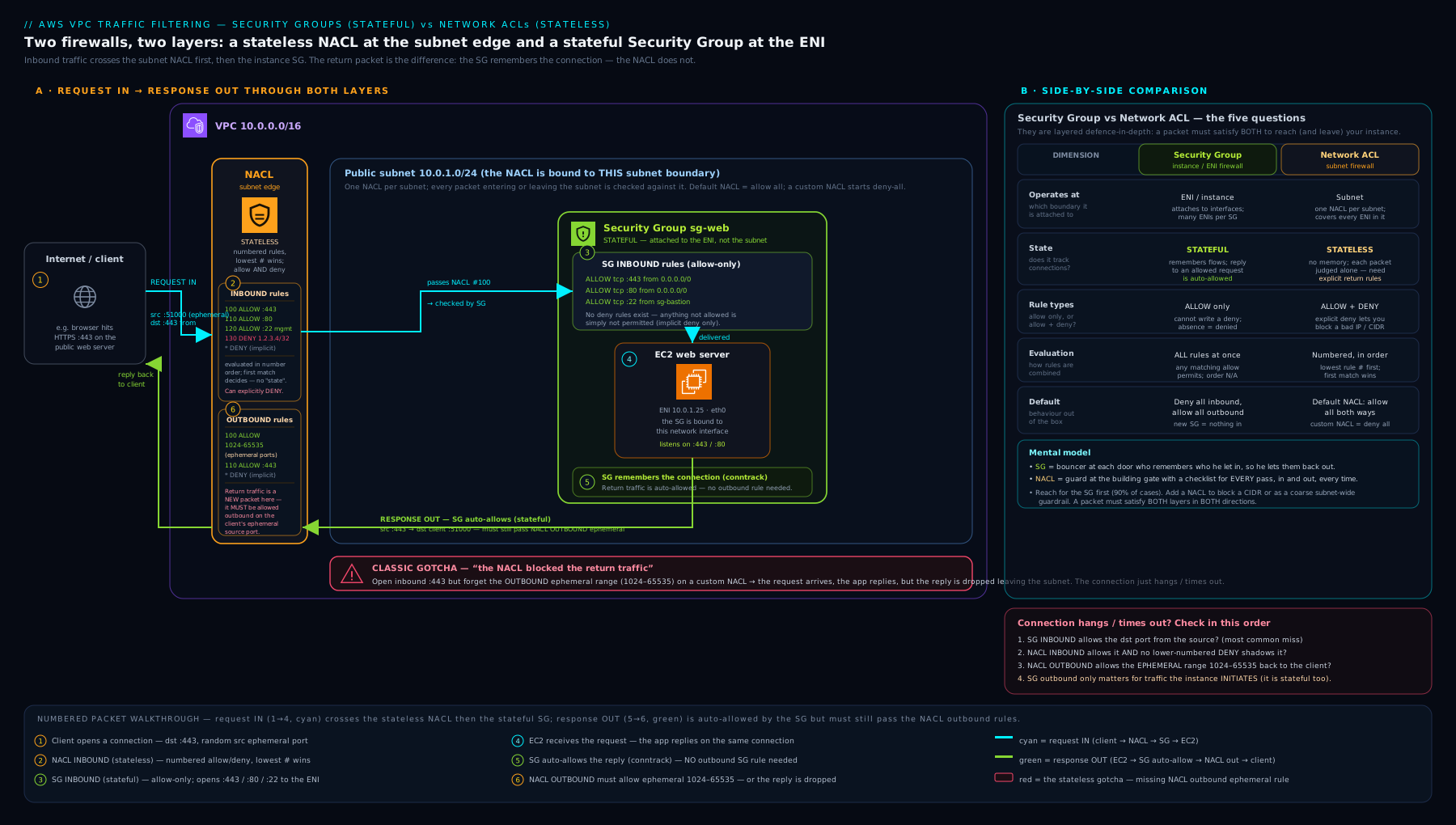
The diagram shows the two concentric rings — the NACL on the subnet boundary and the security group on the instance ENI — with a request entering through inbound NACL then inbound SG, and the response leaving through (stateful) outbound SG then (stateless) outbound NACL, highlighting where the ephemeral return rule is required.
Common mistakes & troubleshooting
| Symptom | Likely cause | Fix |
|---|---|---|
| Connection hangs / times out despite correct SG and route | Custom (stateless) NACL is missing the outbound ephemeral return rule (TCP 1024–65535) | Add the outbound allow for 1024–65535; remember NACL rules come in request/response pairs. |
| A DENY rule in a NACL has no effect | A broader ALLOW sits at a lower rule number and matches first | Give the DENY a lower number than the ALLOW (first match wins). |
| Brand-new custom NACL blocks everything | Custom NACLs default to deny all (only the * rule) |
Add explicit ALLOW rules for both directions, including ephemeral return. |
| “Access denied at network level” but SG looks fine | The subnet NACL is dropping it (outer ring), not the SG | Check the NACL’s inbound and outbound rules; use VPC Flow Logs (REJECT entries). |
| Tried to block one IP with a security group | SGs are allow-only — they cannot express deny | Block the IP at the NACL (which supports DENY) or upstream (WAF/firewall). |
| Instances in the same subnet can talk on all ports unexpectedly | They share the default security group with its self-referencing allow-all | Move them onto purpose-built SGs; stop using the default SG. |
| Rule referencing another SG “doesn’t work” across networks | SG referencing requires same Region and an active VPC peering/Transit Gateway (and is per-Region) | Verify the peering is active and both VPCs are in the same Region; otherwise use CIDRs. |
| Cannot add more rules to a security group | Hit the rules-per-SG quota (a prefix list consumes many entries) | Consolidate rules, use prefix lists deliberately, or request a quota increase. |
A reliable triage order when traffic fails in a VPC: route table → NACL (both directions) → security group (correct direction) → the OS firewall on the instance. Because NACLs are stateless and SGs are stateful, “it half-works / hangs” almost always points at the NACL’s return path.
Best practices
- Do your real access control in security groups. They are stateful and support SG referencing — cleaner and harder to get wrong than NACLs.
- Reference security groups, not CIDRs, between tiers. “App SG allows 8080 from ALB SG” survives IP changes and scopes access to identity, not address range.
- Keep NACLs coarse and few. Use them for broad subnet guardrails and explicit denies; resist replicating SG logic in them.
- Stay close to the default NACL unless you have a reason. If you must use a custom NACL, write rules in request/response pairs and always include the ephemeral return range.
- Leave numbering gaps in NACLs (100, 200, 300) so you can insert higher-priority rules later.
- Stop using the default security group for real workloads; build per-tier groups and give every rule a description.
- Least privilege both layers: open the narrowest port range to the narrowest source that works; never
0.0.0.0/0on management ports (22/3389). - Use prefix lists for sets of CIDRs you reuse (office ranges, partner ranges) so you maintain them in one place.
- Turn on VPC Flow Logs so you can see
ACCEPT/REJECTdecisions when debugging which layer dropped a packet. - Tag and name everything consistently so an SG’s purpose is obvious months later.
Security notes
- Never expose SSH (22) or RDP (3389) to
0.0.0.0/0. Restrict to known office CIDRs, or — better — eliminate inbound management ports entirely with AWS Systems Manager Session Manager (no inbound rule needed) or a bastion behind tight rules. - Defence in depth is the point. A misconfigured SG is caught by a NACL guardrail and vice versa; a data subnet whose NACL denies all internet egress contains a leak even if an instance’s SG is wrong.
- Egress matters. The allow-all-outbound SG default is convenient but means a compromised instance can exfiltrate freely; lock outbound to the destinations a workload actually needs, and use NACLs to forbid internet egress from subnets that should never have it.
- Prefer SG referencing over wide CIDRs to shrink the blast radius — only the specific peer tier can reach the port, not the whole subnet.
- NACLs are the place to block known-bad IP ranges at the subnet edge, because only they support explicit DENY.
- Security groups protect the ENI, not the OS — keep the in-guest firewall and patching current too; the SG is one layer, not the only one.
- Audit drift. Use AWS Config rules (e.g. restricted-common-ports, restricted-ssh) to flag SGs/NACLs that open dangerous ports to the world.
Going deeper
Everything above is the model you use daily. This section is for when you want to know why the stateful magic works, where it stops, and which tools and adjacent services take over when security groups and NACLs run out of room. None of it is required to pass the exam, but it is exactly what separates someone who can configure the two firewalls from someone who can debug them at 3 a.m.
Connection tracking: what “stateful” actually is
A security group’s statefulness is not magic — it is a connection-tracking table (often shortened to conntrack) that AWS maintains for every ENI. When a packet is allowed by a rule, AWS records that flow’s 5-tuple — protocol, source IP, source port, destination IP, destination port — in the table. Return packets are matched against the table before the rules: if a packet belongs to a tracked flow, it is allowed regardless of the rules in its direction. That is the whole mechanism behind “write only the inbound rule and the reply flows out for free” — the reply matches a remembered connection, not an outbound rule.
This also explains a behaviour that confuses people the first time they see it: you tighten a security group while an SSH session is open, and the session keeps working. The established flow is already in the tracking table, so it rides on remembered state, not on the rule you just changed. New connections obey the new rule; the in-flight one continues until it closes or its idle timer expires.
Untracked flows — the exception that bites
Not every flow is tracked, and the exception changes behaviour in visible ways. If a security group allows a flow in one direction for all traffic from anywhere (0.0.0.0/0, every port) and a corresponding rule allows all response traffic (0.0.0.0/0, ports 0–65535) in the other direction, AWS does not track that flow. It does not need to: both directions are already wide open, so tracking would only waste capacity. These are untracked flows, and their return traffic is permitted purely by the matching rule — there is no remembered state at all.
Two consequences surprise people:
- Rule removal behaves differently. For a tracked flow, an established connection survives the deletion of the rule that allowed it (state keeps it alive until it closes or times out). For an untracked flow, there is no table entry to preserve it, so deleting the enabling rule can cut existing connections immediately. A team that runs a wide-open load-test target (
all traffic, 0.0.0.0/0in and out) and expects graceful draining when they tighten the rule gets a nasty surprise: the connections drop on the spot. - It is a performance feature, not a switch. You do not toggle tracking; AWS decides based on your rules. The lesson is simply to know it exists so its side effects do not mystify you. AWS also always tracks some flows (certain ICMP and specific service traffic) even when the wide-open condition is met — treat untracked flows as an optimisation you benefit from, not a mode you manage.
Tracking capacity and idle timeouts
Because tracking consumes memory on the interface, each ENI has a finite connection-tracking capacity. Ordinary workloads never approach it, but very high-connection roles — a busy self-managed NAT instance, a load generator, a reverse proxy fronting millions of short-lived connections — can exhaust it, at which point new connections are dropped. The Elastic Network Adapter (ENA) driver surfaces this as the conntrack_allowance_exceeded metric (and, on newer instance types, conntrack_allowance_available); if that counter climbs, spread the load across more ENIs/instances or move to a larger instance that tracks more flows.
Idle tracked flows also expire on a timer. The default idle timeout for an established TCP flow is long — 432,000 seconds (five days) — while half-open TCP and UDP flows expire far sooner. Since 2023 you can tune these idle timeouts per security group (the connection-tracking configuration), which lets churn-heavy fleets reclaim tracking capacity faster instead of holding dead flows for days.
Debugging with VPC Flow Logs: read the ACCEPT/REJECT pattern
When traffic fails and you cannot tell whether an SG or a NACL is at fault, VPC Flow Logs turn guessing into evidence. A flow log captures metadata (never payload) for accepted and rejected flows on an ENI, a subnet, or a whole VPC, and publishes to CloudWatch Logs, S3, or Kinesis Data Firehose. The default version-2 record ends in two fields you live by: action (ACCEPT or REJECT) and log-status (OK, NODATA, or SKIPDATA).
The subtle, powerful part: a flow log does not name the security group or NACL that made the decision — but the pattern of records across the request and the response reveals which layer failed, and it does so by exploiting the exact stateful/stateless split this lesson is about.
Consider a client at 203.0.113.12 reaching an instance whose ENI is eni-1235b8ca123456789. Two records appear (fields trimmed for readability):
2 123456789012 eni-1235b8ca123456789 203.0.113.12 172.31.16.139 0 0 1 4 336 ... ACCEPT OK
2 123456789012 eni-1235b8ca123456789 172.31.16.139 203.0.113.12 0 0 1 4 336 ... REJECT OK
Read them as a pair. The first record (client → instance) is ACCEPT: the request reached the ENI, so the inbound NACL and the inbound SG both allowed it. The second record (instance → client) is REJECT: the response was blocked. But the security group is stateful — it would allow that response automatically — so the only thing that can reject an outbound response the SG already permits is the stateless NACL missing its ephemeral return rule. That ACCEPT-then-REJECT signature is the classic gotcha, diagnosed from logs alone, before you touch a single rule.
| What the flow logs show | What it means | Where to look |
|---|---|---|
Inbound REJECT, no accept |
request blocked on the way in | inbound NACL rule / inbound SG rule for that port + source |
Inbound ACCEPT, outbound REJECT |
request got in, reply blocked | stateless NACL missing the outbound ephemeral return rule (the gotcha) |
Inbound ACCEPT, outbound ACCEPT, still failing |
packets flow both ways | not a firewall problem — routing, DNS, or the app/OS itself |
No records / NODATA |
nothing reached the ENI | route table / IGW / traffic simply not arriving |
A few caveats keep flow logs honest. They omit some traffic by design — to and from the Amazon-provided DNS at the VPC base+2 address, DHCP, the instance metadata service at 169.254.169.254, and a handful of others — so “no record” for those is expected, not a fault. Records are also aggregated over an interval (default about 10 minutes, or ~1 minute if you opt in), so give them a moment. And the action reflects the combined SG + NACL verdict only — never the OS firewall (iptables, firewalld, Windows Firewall) inside the guest, which is a fifth layer you check last.
Where AWS Network Firewall fits
Security groups and NACLs are free and built in, but they have hard ceilings: an SG cannot deny, a NACL is stateless and CIDR-only, and neither understands anything above Layer 4 — they see ports and IP addresses, never domain names or HTTP paths. When you need a firewall that is stateful like an SG, can deny like a NACL, and inspects Layer 7, you reach for AWS Network Firewall: a managed, horizontally scaling firewall and intrusion-prevention service you deploy inside your VPC.
It runs as firewall endpoints placed in a dedicated inspection subnet per Availability Zone; you steer traffic through it with route tables (subnet and gateway routes point at the endpoint), so it inspects north-south or east-west flows without ever living on an instance’s ENI. Its engine is Suricata-compatible, giving you stateful 5-tuple rules, AWS-managed IPS signature rule groups, and — the capability SGs and NACLs simply lack — domain-name allow/deny lists for egress (e.g. “this subnet may reach only *.amazonaws.com and updates.example.com”). A common production shape is a centralised inspection VPC fronted by Transit Gateway, so every account’s egress passes one managed firewall.
The trade-off is cost and moving parts: Network Firewall bills per firewall-endpoint-hour and per gigabyte processed, whereas SGs and NACLs are free. So the layering reads: SGs for identity-based, fine-grained, stateful allow-listing on every resource; NACLs for a few coarse, subnet-wide denies; Network Firewall when compliance or threat prevention demands stateful deep inspection, domain filtering, or IPS that the first two cannot express. The AWS Network Firewall lesson covers its rule groups and deployment models in depth.
Network Load Balancers can carry security groups now
A stale belief worth correcting. For years, Application Load Balancers had security groups but Network Load Balancers did not, so teams protected NLB targets with NACLs or the targets’ own SGs. Since August 2023, NLBs support security groups — with one sharp gotcha: you can only associate security groups with an NLB at creation time. An NLB created without one can never have security groups attached later (you can edit the rules of an already-attached group, but not add the first group). Decide up front. This also unlocks NLB-to-target SG referencing and a cleaner egress story, and it changes the old advice: you no longer need a NACL merely because an NLB sits in the path.
Expressing both in Terraform (provider v5)
In infrastructure-as-code, how you model a rule matters more than it looks. In the AWS Terraform provider v5, the preferred way to manage rules is the single-rule resources aws_vpc_security_group_ingress_rule and aws_vpc_security_group_egress_rule — each manages exactly one rule and carries a stable ID, giving far cleaner plans and drift detection than the older aws_security_group_rule. NACL entries are aws_network_acl_rule, one per rule number and direction.
resource "aws_vpc_security_group_ingress_rule" "app_from_alb" {
  security_group_id            = aws_security_group.app.id
  referenced_security_group_id = aws_security_group.alb.id   # SG referencing, not a CIDR
  ip_protocol                  = "tcp"
  from_port                    = 8080
  to_port                      = 8080
}

resource "aws_network_acl_rule" "web_return" {
  network_acl_id = aws_network_acl.web.id
  rule_number    = 100
  egress         = true
  protocol       = "tcp"
  from_port      = 1024
  to_port        = 65535
  cidr_block     = "0.0.0.0/0"
  rule_action    = "allow"
}
The perennial IaC trap: never mix inline ingress/egress blocks inside an aws_security_group with standalone rule resources for the same group. Terraform treats the inline blocks as the complete rule set and will fight the standalone resources on every apply, adding and removing rules forever. Pick one style per group — for anything nontrivial, the standalone aws_vpc_security_group_*_rule resources.
Which layer for which job
When you can name the job, the right layer is usually obvious. Keep this synthesis handy — it is the whole lesson compressed into a lookup:
| Your need | Reach for | Why |
|---|---|---|
| Let a tier reach another tier by identity | Security group referencing | stateful, identity-based, survives IP changes |
| Let cluster members talk among themselves | Self-referencing SG | no IP enumeration, scales with the group |
| Block one bad CIDR across a whole subnet | NACL deny (low rule number) | only NACLs deny, and they cover the subnet automatically |
| Guarantee a subnet never egresses to the internet | NACL deny-all egress | holds regardless of any instance’s SG (blast-radius limit) |
| Filter egress by domain, inspect L7, run IPS | AWS Network Firewall | SGs and NACLs are Layer-4 only |
| Block SQL-injection / bad HTTP at the app edge | AWS WAF (on ALB, CloudFront, API Gateway) | a Layer-7 application firewall |
| Prove a path is open or closed without sending a packet | Reachability Analyzer | static analysis of the whole path |
The pattern across every row: security groups do the fine-grained, stateful, identity-based work; NACLs do the coarse, subnet-wide denies; and when you need deny + statefulness + Layer-7 together, you step up to Network Firewall or WAF.
Three nuances that catch experienced people
- Two subnets, two NACLs — mind asymmetric paths. A NACL guards a subnet, so a flow crossing subnet boundaries is judged by a different NACL at each hop, each needing its own request/response pair. If a reply returns through a different subnet’s NACL because of asymmetric routing, a rule present on one and missing on the other reproduces the same maddening hang. Keep NACL rules symmetric across every subnet a flow traverses.
- ICMP is not TCP/UDP. ICMP has no ports; its NACL and SG rules match on type and code. To allow ping through a locked-down NACL you must permit echo request inbound and echo reply outbound (statelessly, as always) — a frequent reason “ping fails but SSH works” on a hardened subnet.
- SG referencing has limits at scale. A referenced security group counts as one rule, but a single SG can be referenced by only so many others, and references resolve only within a Region and across an active peering or Transit Gateway attachment. In very large meshes this pushes teams toward prefix lists or shared security groups (via AWS RAM / VPC sharing) rather than deep chains of references.
- IPv6 needs its own rules. A rule for
0.0.0.0/0does not cover::/0; IPv4 and IPv6 rules count separately toward the per-SG quota, and a dual-stack subnet’s NACL needs the ephemeral return range allowed for::/0as well. Forgetting the IPv6 half is a quiet cause of “works over IPv4, hangs over IPv6.”
Common beginner mistakes
These are misconceptions rather than symptoms — the wrong mental model that produces the bug. (For a symptom → cause → fix table, see Common mistakes & troubleshooting above.)
-
“I added an outbound rule so my security group could send replies back.” No — a security group is stateful, so the reply to any allowed inbound request leaves automatically. Outbound SG rules govern connections the instance itself starts (a
yum update, an API call), never the responses to inbound requests. Right model: write the rule for the direction the connection is initiated; the reply is free. -
“NACLs and security groups do the same job, so I only need one.” They live at different layers (subnet vs ENI) and behave differently (stateless + deny-capable vs stateful + allow-only). You do not choose between them — they compose, and both must allow a packet. Right model: SG = the lock on your door; NACL = the gate on the street; a visitor passes both.
-
“I’ll block that abusive IP with a security-group deny rule.” Security groups are allow-only — there is no deny. Block the IP at a NACL (with a rule number lower than any broad allow), or upstream at WAF / AWS Network Firewall. Right model: subtractive “block just this one” logic needs a deny, and only NACLs and the L7 firewalls have it.
-
“My NACL deny at rule 200 will stop it.” If a broad
ALLOW 0.0.0.0/0sits at rule 100, it matches first and the deny at 200 is never even read. NACLs are first-match-by-number. Right model: a deny only fires if its number is lower than every allow that would otherwise match it. -
“A custom NACL starts open, like the default one.” The default NACL (born with the VPC) allows everything; a brand-new custom NACL denies everything until you add rules. Attaching a fresh custom NACL to a live subnet is an instant, self-inflicted outage. Right model: default NACL = transparent; custom NACL = deny-all until populated (both directions, including the ephemeral return).
-
“Security-group referencing copies the other group’s rules.” It does not. Referencing
sg-albas a source means “any ENI that carriessg-alb” — it points at who (the interfaces/identity), never at what they allow. The referenced group’s own rules are irrelevant to your reference. Right model: SG references are identity pointers, not rule imports. -
“They’re in the same subnet, so they can talk to each other.” Sharing a subnet means sharing one NACL and needing no routing between them — but the security group on each ENI still gates every packet. Two instances in one subnet cannot reach each other unless their SGs allow it (commonly a self-referencing rule). Right model: same subnet is necessary for local adjacency, never sufficient for access — the SG still decides.
Interview & exam questions
1. What is the single most important difference between a security group and a network ACL? Security groups are stateful (return traffic for an allowed connection is permitted automatically), while network ACLs are stateless (you must explicitly allow the return traffic, typically on the ephemeral port range).
2. A security group is allow-only. How do you block a single malicious IP while permitting everyone else? You cannot do it with a security group (no deny rules). Use a network ACL DENY rule for that CIDR with a lower rule number than any broad allow, or block it upstream (WAF/Network Firewall).
3. What does a brand-new custom NACL allow by default, and how does that differ from the default NACL?
A custom NACL denies all traffic (only the * rule) until you add rules. The default NACL created with the VPC allows all traffic in and out.
4. SSH works, then you attach a custom NACL with only an inbound TCP 22 allow, and SSH starts hanging. Why, and what is the fix?
The NACL is stateless and has no outbound rule for the reply’s ephemeral port, so return packets are dropped by the * deny. Add an outbound ALLOW for TCP 1024–65535.
5. What are ephemeral ports and why do they matter for NACLs but not for security groups? They are the temporary high-numbered source ports a client uses; the server replies to them. A stateless NACL must explicitly allow that range on the return direction; a stateful SG allows the reply automatically regardless of port.
6. Explain security-group referencing and why it is preferred over CIDR-based rules between tiers. You set the source/destination of a rule to another SG’s ID, meaning “any ENI carrying that group.” It is identity-based, survives IP changes, and scopes access to exactly the peer tier rather than a whole subnet.
7. If an ENI has three security groups, how are their rules combined? If a subnet’s NACL has overlapping rules, how are those resolved? SG rules across all attached groups are unioned — if any rule allows the traffic, it passes (no order, no deny). NACL rules are processed in ascending number order, first match wins, and that match (ALLOW or DENY) is final.
8. Where do security groups and NACLs sit relative to each other for inbound traffic? Inbound: the packet crosses the subnet NACL first, then the instance security group. Outbound: the SG first, then the NACL. Both must allow the packet.
9. Can a NACL reference a security group, or a prefix list, as its source? No — NACLs match on CIDR blocks only. SG referencing and prefix-list sources are security-group features.
10. What are the default inbound and outbound rules of a freshly created custom security group?
Inbound is empty (deny all until you add a rule); outbound is a single allow-all to 0.0.0.0/0 and ::/0.
11. Why is the default security group a poor choice for workloads? Its default inbound rule self-references the group, so every instance using it can reach every other such instance on all ports — far too permissive. Build purpose-built groups instead.
12. A connection fails. Give the order you would troubleshoot the VPC layers. Route table → NACL (both directions, watch ephemeral return) → security group (correct direction) → OS firewall. Hanging/half-working strongly implies a stateless NACL missing its return rule; VPC Flow Logs confirm which layer rejected.
Quick check
- True or false: a security group can contain a deny rule.
- A custom NACL with only
inbound ALLOW TCP 443is attached to a web subnet. Will clients be able to load the website? Why? - Which firewall is evaluated first for inbound traffic — the SG or the NACL?
- You add a NACL rule “DENY 1.2.3.4/32” at number 200, but a rule “ALLOW 0.0.0.0/0” exists at number 100. Is
1.2.3.4blocked? - Name the port range you would typically allow on a NACL’s return direction and explain why.
Answers
- False. Security groups are allow-only; only NACLs support DENY.
- No. The NACL is stateless and has no outbound rule for the clients’ ephemeral return ports, so the server’s replies are dropped by the implicit
*deny. You also need outbound ALLOW TCP 1024–65535. - The NACL (subnet boundary) is evaluated first for inbound; the SG (on the ENI) second. Outbound is the reverse.
- No, it is not blocked. First-match-wins by number means rule 100’s broad ALLOW matches first and the DENY at 200 is never reached. Give the DENY a number below 100.
- TCP 1024–65535 — this superset covers the ephemeral source ports used by Linux, Windows, NAT gateways and load balancers, so a stateless NACL permits the return half of allowed connections.
Exercise
Design and then build the SGs and NACLs for a classic three-tier web app in one VPC with a public subnet (ALB), a private app subnet, and a private data subnet:
- Security groups (fine-grained, SG-referencing):
alb-sgallows 80/443 from0.0.0.0/0;app-sgallows 8080 fromalb-sgonly;db-sgallows 5432 fromapp-sgonly. Write each rule out, then create them withaws ec2 authorize-security-group-ingressusing--source-group. - NACLs (coarse guardrails, in request/response pairs): the data subnet NACL must allow only the DB port inbound from the app-subnet CIDR plus the ephemeral return outbound, and must DENY all internet egress (prove that even if
db-sgwere opened to the world, the NACL stops it). The public subnet NACL allows 80/443 in + ephemeral out. - Break-and-fix drill: temporarily remove the ephemeral outbound rule from the public NACL and confirm the site hangs; restore it and confirm it recovers — internalising the stateless return-traffic rule.
- Bonus: add a NACL DENY for one test CIDR at a lower number than your broad allow and verify (e.g. from that source) that it is blocked, proving you understand first-match ordering.
Practice challenges
Work these top to bottom — they escalate from beginner to advanced. Try each before opening the solution.
1. (Beginner) The minimum SSH rule. You have a fresh custom security group and want to SSH in from your own IP only. What is the single rule you add, and why do you leave the outbound list completely untouched?
<details><summary>Solution</summary>
Add inbound TCP 22 from YOUR.IP/32. Leave outbound alone because a custom SG already has the default allow-all outbound, and the SG is stateful — the SSH reply is permitted automatically as return traffic.
aws ec2 authorize-security-group-ingress \
  --group-id sg-0abc123 --protocol tcp --port 22 --cidr 203.0.113.9/32
Why: statefulness means you only ever write the rule for the direction the connection starts. </details>
2. (Beginner) The custom-NACL blackout. You attach a brand-new custom NACL to a working HTTPS web subnet and the site immediately dies. State the cause in one sentence, then give the two NACL rules (one inbound, one outbound) that restore HTTPS.
<details><summary>Solution</summary>
Cause: a custom NACL denies all traffic by default (only the * deny rule exists) until you add rules. Restore with a request/response pair:
- Inbound
100: ALLOW TCP 443 from0.0.0.0/0 - Outbound
100: ALLOW TCP 1024–65535 to0.0.0.0/0(the clients’ ephemeral return ports)
Why: the NACL is stateless, so the reply needs its own explicit outbound rule on the ephemeral range. </details>
3. (Intermediate) Tier the app with SG referencing. Write the three inbound rules for a classic ALB → app → database design using security-group references, not CIDRs. Give the CLI for the app-tier rule.
<details><summary>Solution</summary>
alb-sginbound: TCP 443 from0.0.0.0/0app-sginbound: TCP 8080 from sourcealb-sgdb-sginbound: TCP 5432 from sourceapp-sg
aws ec2 authorize-security-group-ingress \
  --group-id sg-app --protocol tcp --port 8080 --source-group sg-alb
Why: identity-based rules follow the tier wherever its IPs land and let nothing else in the subnet through. </details>
4. (Intermediate) Block one bad actor, subnet-wide. You must stop 198.51.100.7 from reaching an entire subnet while every other client keeps working. Which firewall, which action, and where in the rule order does the rule go?
<details><summary>Solution</summary>
Use a NACL (a security group cannot deny). Add an inbound DENY for 198.51.100.7/32 at a rule number lower than your broad allow — e.g. DENY at 90, broad ALLOW at 100.
aws ec2 create-network-acl-entry --network-acl-id acl-0abc \
  --rule-number 90 --protocol -1 --cidr-block 198.51.100.7/32 \
  --rule-action deny --ingress
Why: NACLs are first-match-by-number; a deny only fires if it is evaluated before the allow that would otherwise match. </details>
5. (Advanced) Why did the connections drop? A load-test box has all traffic, 0.0.0.0/0 inbound and outbound. A teammate tightens its inbound rule and existing connections drop instantly — yet on a normal web server the same kind of tightening leaves active connections alive. Explain the difference.
<details><summary>Solution</summary>
The load-test box’s wide-open, both-directions config makes its flows untracked (AWS keeps no connection-tracking entry when both directions already allow everything), so removing the rule cuts them immediately. The web server’s flows are tracked, so established connections ride on remembered state and persist until they close or the idle timer expires.
Why: the untracked-flow exception — no state to preserve means no graceful survival of a rule change. </details>
6. (Advanced) Diagnose from the logs alone. VPC Flow Logs for one client show an inbound ACCEPT record and, for the same conversation, an outbound REJECT record. Without logging into the instance, name the failing layer and the exact rule to add.
<details><summary>Solution</summary>
The request reached the ENI (both inbound layers allowed it), but the response was rejected. Because the security group is stateful it would allow the reply — so the block must be the stateless NACL missing its outbound ephemeral return rule. Add outbound ALLOW TCP 1024–65535 to 0.0.0.0/0.
Why: an ACCEPT-in / REJECT-out pair is the fingerprint of a NACL return-path gap, not an SG problem.
</details>
Certification mapping
| Exam | Objective area this supports |
|---|---|
| SAA-C03 (Solutions Architect – Associate) | Design secure architectures — choosing security groups vs NACLs, stateful vs stateless behaviour, SG referencing for tiered designs, and layering both for defence in depth. |
| SCS-C02 (Security – Specialty) | Infrastructure security — subnet- vs instance-level controls, explicit-deny with NACLs, ephemeral-port return rules, blast-radius limiting, and egress control. |
Glossary
- Security group (SG) — a stateful, allow-only firewall attached to one or more ENIs (instance level).
- Network ACL (NACL) — a stateless, allow-and-deny, number-ordered firewall attached to subnets (subnet level).
- Stateful — the firewall remembers allowed connections and permits their return traffic automatically (security groups).
- Stateless — the firewall has no connection memory; each packet is judged independently and return traffic must be explicitly allowed (NACLs).
- ENI (elastic network interface) — the virtual NIC an instance uses; security groups attach here.
- Ephemeral port — the temporary high-numbered source port a client uses; the server replies to it (commonly 1024–65535 across OSes).
- Rule number — a NACL rule’s priority; rules are evaluated lowest-first and the first match wins.
*rule — the immovable final NACL rule that denies anything not matched by a numbered rule.- Security-group referencing — setting a rule’s source/destination to another SG’s ID, scoping access to the ENIs that carry that group.
- Prefix list — a named, reusable set of CIDR blocks (AWS-managed or customer-managed) usable as an SG rule source/destination.
- Default security group — the undeletable SG in every VPC; permissive between its own members via a self-reference (avoid for workloads).
- Default NACL — the NACL created with the VPC; allows all traffic both directions (unlike a custom NACL, which denies all).
- Defence in depth — layering independent controls (SG + NACL) so a failure in one is caught by the other.
- VPC Flow Logs — records of accepted/rejected traffic, used to see which layer dropped a packet.
- Connection tracking (conntrack) — the per-ENI table AWS keeps of allowed flows (by 5-tuple); it is the mechanism that makes a security group stateful.
- 5-tuple — the five values that identify a flow: protocol, source IP, source port, destination IP, destination port.
- Untracked flow — a flow AWS deliberately does not track because both directions already allow all traffic (
0.0.0.0/0, all ports); its return is permitted by rule, not by remembered state, and it drops immediately if that rule is removed. conntrack_allowance_exceeded— the ENA driver metric that increments when an ENI reaches its connection-tracking capacity and begins dropping new connections.- AWS Network Firewall — a managed, stateful, Layer-3-to-7 firewall/IPS deployed inside the VPC; adds deny, domain-name filtering, and deep inspection beyond what security groups and NACLs can express.
Next steps
Continue the course with AWS Elastic Load Balancing, In Depth: ALB, NLB, GWLB & Target Groups — once you control which traffic reaches your instances, you decide how to spread it across them. Then deepen your VPC and network-security knowledge with:
- Amazon VPC, In Depth: Subnets, Route Tables, IGW, NAT, Endpoints & Every Component — the network these firewalls protect.
- AWS Network Firewall: Egress Filtering & Centralised Inspection — the next firewall layer beyond SGs and NACLs.
- Network Reachability Analyzer & Access Analyzer: Connectivity Validation — prove a path is open (or closed) without sending a packet.