In a nutshell
Picture a busy restaurant. The kitchen is your database — it has a fixed, fairly small number of cooks, and no matter how big the dining room gets, only so many meals can be in progress at once. The dining room is your application fleet: Lambda functions, containers, servers — and at peak it can seat thousands of guests. If every guest walks straight into the kitchen and grabs a cook, the kitchen jams instantly and turns everyone away, even though most guests at any given second are just reading the menu, not actually being served. That is exactly what happens when serverless fan-out opens thousands of direct database connections: the database hits max_connections and starts refusing traffic while its CPU sits nearly idle.
RDS Proxy is the maître d’. Guests talk to the maître d’, never the kitchen. Because only the handful of guests who are ordering right now need a cook, the maître d’ can serve a packed room with a small pool of cooks — hand a cook to whoever is mid-order, then free that cook for the next table the instant the order is placed. That is connection pooling with multiplexing: many cheap client connections sharing a few precious database connections. The whole art of this lesson is keeping the sharing working — because if a guest says “reserve this cook for my entire visit” (sets session state — a SET, a temp table, a session lock), the maître d’ has to pin that cook to that one table, and if enough guests do that, you are back to a jammed kitchen while paying extra for a maître d’ who can no longer help.
The maître d’ earns its keep two more ways. When a cook collapses (a failover), it quietly reroutes your in-flight order to a freshly promoted cook — you feel a short pause, not the stampede of a thousand guests all rushing the kitchen at once. And instead of every guest carrying a permanent key to the kitchen, the maître d’ checks a photo-ID pass that expires in 15 minutes (an IAM token) — so there is no long-lived database password sitting in your application to leak.
Level: Advanced · Time: ~74 min · After this you can: explain why serverless fan-out exhausts a database and how transaction-level multiplexing fixes it; provision an RDS Proxy end to end with Secrets Manager and an IAM role; find and eliminate the connection pinning that silently turns pooling back into passthrough; make a failover felt as a stall instead of a reconnect storm; and delete the last long-lived database password using IAM authentication over verified TLS. New to the engine basics underneath this? Skim RDS and Aurora Deep Dive first, then come back for the connection layer.
A relational database has a hard ceiling on concurrent connections, and that ceiling is far lower than the concurrency your serverless and container fleets can generate. A db.r6g.large PostgreSQL instance defaults to roughly 850 max_connections; a single Lambda burst can ask for thousands of fresh TCP sessions in seconds, each one a forked backend process with real memory cost. The database does not gracefully shed that load. It runs out of connection slots, new sessions get FATAL: remaining connection slots are reserved, and your healthy application starts throwing 500s because it cannot open a socket — not because the query was slow.
RDS Proxy sits between the application and the database, maintains a warm pool of database connections, and multiplexes a large number of short-lived client connections onto a small number of long-lived database connections. It also holds client sockets open during a failover and routes them to the new writer, which shrinks application-observed failover time dramatically. This article is the production build: provisioning, the connection pinning trap that silently destroys multiplexing, tuning the pool under load, IAM authentication, Lambda and VPC wiring, and the CloudWatch signals that tell you whether the proxy is actually helping.
By the end you will stop treating “the database ran out of connections” as a sizing problem to be solved by a bigger instance. You will know how to put a managed pooler in the path, how to keep multiplexing actually multiplexing, how to make a failover invisible to in-flight transactions, and how to delete the last long-lived database password from your application entirely. The metric that predicts your next outage on this stack is not CPU — it is DatabaseConnectionsCurrentlySessionPinned, and knowing why is the whole point.
What problem this solves
The pain is specific and it shows up under load, never in a unit test. Your application scales horizontally — Lambda fans out, ECS tasks multiply, an autoscaling group adds instances — and each new compute unit opens its own connection pool to the database. The database has no idea these pools are mostly idle. It allocates a backend process per connection (Postgres) or a thread (MySQL), each one holding memory and a process-table slot, and when the count crosses max_connections it rejects everything new with FATAL: remaining connection slots are reserved for non-replication superuser connections. A perfectly healthy database, with CPU at 20%, starts refusing your traffic.
What breaks without a pooler: engineers raise max_connections (which raises memory pressure and eventually the instance OOMs), or scale the database vertically (expensive, and the next traffic doubling brings it back), or — the worst outcome — cap application concurrency to protect the database, throttling the very elasticity they paid for. The real fix is to stop demanding one backend per client. A connection pooler lets a thousand clients share fifty backends because at any instant only the clients mid-transaction need one.
Who hits this hardest: Lambda-backed APIs (each cold-start environment opens a connection, and a scale-out is a connection storm), Fargate/ECS microservices with per-task pools, anything with spiky traffic (flash sales, batch windows, cron fan-outs), and teams running Aurora Serverless v2 or Multi-AZ who also want failover to be a one-second stall instead of a fleet-wide reconnect flood. RDS Proxy answers all three needs — pooling, failover acceleration, and modern IAM/Secrets-Manager authentication — in one managed, VPC-native service. The catch, and the reason this is an advanced topic, is that the pooling silently degrades to passthrough the moment a client touches session state, and you pay for the proxy while getting none of its benefit. Most of this article is about not letting that happen.
Learning objectives
By the end of this article you can:
- Explain transaction-level multiplexing and compute the client-to-backend connection ratio a proxy buys you for a given workload.
- Provision an RDS Proxy end to end — Secrets Manager secret, IAM role, target group, and endpoints — in both
awsCLI and Terraform, and verify the target reachesAVAILABLE. - Identify every common connection pinning trigger for PostgreSQL and MySQL, detect pinning from CloudWatch and proxy logs, and engineer query patterns that do not pin.
- Tune
max_connections_percent,max_idle_connections_percent, andconnection_borrow_timeoutfor serverless vs steady workloads, and reason about the headroom math against the target’smax_connections. - Replace long-lived database passwords with IAM database authentication (SigV4 tokens), enforce TLS with
sslmode=verify-full, and scoperds-db:connectto exactly the right principal and user. - Wire RDS Proxy to Lambda and a VPC correctly — security-group chain, init-scope connection reuse, reconnect-on-failover — so cold-start storms never reach the database.
- Read the proxy’s CloudWatch signals (
DatabaseConnectionsBorrowLatency,ClientConnections,DatabaseConnectionsCurrentlySessionPinned) and run a controlled failover drill to prove the proxy is helping.
Prerequisites & where this fits
You should already understand RDS/Aurora fundamentals: that a DB instance class (db.r6g.large, db.r6g.2xlarge) sets memory and therefore the default max_connections; that Aurora separates a cluster into a writer and zero-or-more readers with a cluster (writer) and reader endpoint; and that a Multi-AZ deployment fails over by promoting a standby/reader and flipping DNS. You should be comfortable with aws CLI, reading JSON output, IAM roles and policies, Secrets Manager, basic VPC concepts (subnets, security groups), and either PostgreSQL or MySQL client tooling. Familiarity with Lambda’s execution-environment lifecycle (init vs handler scope) helps for the integration section.
This sits in the Databases track and is downstream of the core RDS/Aurora knowledge in RDS and Aurora Deep Dive: Engines, Multi-AZ, Replicas, Backups. It pairs tightly with Aurora High Availability and Global Database for Zero-Downtime, because the proxy is the front door that makes that HA design felt by the application, and with Lambda Performance: Cold Starts, Provisioned Concurrency and SnapStart, since Lambda concurrency is the load that creates the connection storm in the first place. The IAM-auth section assumes the policy-evaluation model from IAM Fundamentals: Users, Roles, Policies and Evaluation, and the secret handling builds on Secrets Manager and Parameter Store Deep Dive.
A quick map of who owns each layer, so you escalate to the right team during an incident:
| Layer | What lives here | Who usually owns it | Failure classes it can cause |
|---|---|---|---|
| Application / driver | Connection lifecycle, prepared statements, SET usage |
App / dev team | Pinning, per-request connect storms |
| IAM / Secrets Manager | rds-db:connect, proxy role, backend secret |
Security / platform | AUTH_FAILURE, token rejection, secret rotation breakage |
| RDS Proxy | Pool config, endpoints, TLS, target group | Platform / DBRE | Borrow-timeout saturation, pinning amplification |
| Aurora / RDS cluster | max_connections, writer/reader, failover |
DBRE / platform | Slot exhaustion (if bypassed), replica lag |
| VPC / security groups | Subnets, SG chain on 5432/3306 | Network team | Connectivity timeouts, blocked path |
| CloudWatch | Proxy + DB metrics, alarms | SRE / platform | Blind spots if unmonitored |
Core concepts
Five mental models make every later decision obvious.
The proxy is a multiplexer, not a passthrough. Without a proxy, every application connection maps 1:1 to a database backend for the life of the connection — even while idle. With transaction-level multiplexing, a database connection is borrowed from the pool when a client begins a transaction and returned when it commits or rolls back. Between transactions the client holds no backend. So a thousand clients that each spend 2% of their time inside a transaction can be served by roughly fifty backends. This is the same idea as PgBouncer in transaction mode, but managed, autoscaling, VPC-native, and integrated with IAM and Secrets Manager.
Pinning is multiplexing’s off switch, and it is correctness, not a bug. A backend connection can only be returned to the pool and handed to a different client if it carries no leftover session state. The moment a client does something that mutates session state the next client would inherit — SET search_path, a temp table, a session-level advisory lock, a session-scoped prepared statement — the proxy pins that backend to that client until the client disconnects, refusing to leak state across tenants. Enough pinning and your “pooled” proxy is a 1:1 passthrough you are paying extra for.
Two authentication layers are independent. The proxy authenticates to the database using credentials from Secrets Manager (always — never inline). Clients authenticate to the proxy using either a database password or, better, an IAM token minted via SigV4 that expires in 15 minutes. iam_auth = REQUIRED controls the client→proxy layer; secret_arn controls the proxy→database layer. Conflating these two is the single most common provisioning mistake.
Failover is a held connection, not a reconnect storm. During an Aurora/Multi-AZ failover the writer’s DNS flips to a promoted instance. Applications connecting directly must notice the broken socket, re-resolve DNS (subject to TTL and resolver caches), and reconnect — and a fleet doing this at once is a thundering herd that can knock over the freshly promoted writer. The proxy instead holds the client socket open, absorbs the reconnect internally, and re-routes the held connection to the new writer. The application sees a brief stall on in-flight work, not a flood of connection refused.
The pool is finite and shared, so headroom is math. max_connections_percent caps the proxy’s backends as a percentage of the target’s max_connections. At 75% of an 850-slot instance the proxy can open ~637 backends; the remaining slots are for admin tools, replication, and any direct connections. If you front one database with multiple proxies or also allow direct app traffic, their percentages must sum to under 100 with margin, or something gets remaining connection slots are reserved.
The vocabulary in one table
Pin down every moving part before the deep sections; the glossary repeats these for lookup.
| Concept | One-line definition | Where it lives | Why it matters |
|---|---|---|---|
| RDS Proxy | Managed connection pooler in your VPC | In front of RDS/Aurora | The whole subject; pools + failover + auth |
| Multiplexing | Many clients share few backends per transaction | Inside the proxy | The benefit you are buying |
| Backend connection | A real database connection in the pool | Proxy ↔ database | The scarce resource being shared |
| Client connection | A connection from app/Lambda to the proxy | App ↔ proxy | Cheap; can vastly outnumber backends |
| Pinning | Dedicating a backend 1:1 to one client | Inside the proxy | Multiplexing’s off switch; the #1 trap |
| Target group | Pool config + the target it fronts | On the proxy | Where you tune max_connections_percent |
| Proxy endpoint | A DNS name clients connect to | On the proxy | Default (RW) and extra RO endpoints |
iam_auth |
Whether clients use IAM tokens to the proxy | Auth config | REQUIRED deletes the app password |
secret_arn |
Secrets Manager creds the proxy uses to the DB | Auth config | How the proxy logs into the database |
require_tls |
Force TLS on client connections | Proxy config | Pairs with sslmode=verify-full |
rds_iam |
DB role that authenticates only via IAM | Database (Postgres role) | Grants a user IAM-only login |
| Borrow timeout | How long a client waits for a free backend | Pool config | Backpressure valve under saturation |
1. The connection-exhaustion problem and what multiplexing buys you
The math is unforgiving. Postgres allocates a backend process per connection; even idle, each one consumes work_mem-adjacent memory and a proc slot. MySQL allocates a thread per connection with its own per-thread buffers. The relationship between application concurrency and database connections is the whole game:
- Without a proxy: every application instance opens its own pool. 200 Lambda containers × a pool of 5 = 1000 database connections demanded, most of them idle most of the time.
- With a proxy: 1000 client connections borrow from a shared pool. At any instant only the connections actively running a query need a backend; the rest return to the pool. The proxy can serve those 1000 clients from 50–100 database connections.
The proxy does this through transaction-level multiplexing: a database connection is borrowed when a client begins a transaction and returned when the transaction commits or rolls back. Between transactions the client holds no backend.
Default connection ceilings scale with instance memory, so the slot you are protecting is small relative to serverless fan-out. Approximate PostgreSQL defaults (the formula is memory-derived; treat these as ballpark, not contractual):
| Instance class | vCPU / RAM | Approx default max_connections |
One Lambda burst can demand | Verdict without a proxy |
|---|---|---|---|---|
db.t4g.medium |
2 / 4 GB | ~410 | 1000s | Exhausts in seconds under fan-out |
db.r6g.large |
2 / 16 GB | ~850 | 1000s | Exhausts under a moderate burst |
db.r6g.xlarge |
4 / 32 GB | ~1700 | 1000s | Survives small bursts, not flash sales |
db.r6g.2xlarge |
8 / 64 GB | ~3400 | 1000s | Large headroom, but still finite + costly |
db.r6g.4xlarge |
16 / 128 GB | ~5000 (capped) | 1000s | Memory-bound; raising it risks OOM |
The multiplexing ratio you can expect depends almost entirely on how long clients hold a transaction — the lower the in-transaction duty cycle, the more clients one backend serves:
| Workload shape | Avg txn duration | In-transaction duty cycle | Clients per backend (approx) | Notes |
|---|---|---|---|---|
| Short OLTP point reads | 2–5 ms | ~1% | 50–100:1 | Ideal for the proxy |
| Mixed CRUD API | 10–30 ms | ~3–5% | 20–40:1 | Typical web API |
| Reporting / aggregates | 200 ms–2 s | 20–60% | 2–5:1 | Pooling helps little; isolate these |
| Long transactions / locks | seconds+ | ~100% | ~1:1 | Effectively pinned; anti-pattern |
| Batch import (COPY) | minutes | ~100% | ~1:1 | Run direct, not through the proxy |
The caveat that defines everything downstream: multiplexing only works when the database connection is safe to hand to a different client after each transaction. Section 3 is about not tripping the pinning that turns the table above into a uniform 1:1.
The CloudWatch metrics that tell you whether the proxy is helping — keep this open while tuning, because the ratio between them is the proof of multiplexing:
| Metric | What it measures | Healthy reading | Unhealthy reading | What it tells you |
|---|---|---|---|---|
ClientConnections |
Open client→proxy connections | High (your fan-out) | — | The demand side |
DatabaseConnectionsCurrentlyBorrowed |
Backends in active use now | Far below ClientConnections |
≈ ClientConnections |
Multiplexing ratio |
DatabaseConnectionsCurrentlySessionPinned |
Backends pinned 1:1 | Near zero | ≈ ClientConnections |
Pinning has degraded the pool |
DatabaseConnectionsBorrowLatency |
Wait to borrow a backend | Single-digit ms | Hundreds of ms / seconds | Pool saturation / pinning |
DatabaseConnections |
Total backends open | ≤ max_connections_percent cap |
At the cap | Headroom remaining |
QueryDatabaseResponseLatency |
DB-side query time | Your SLO | Rising | Backend slow vs proxy slow |
MaxDatabaseConnectionsAllowed |
The current backend cap | Stable | — | What max_connections_percent resolves to |
The hard limits and quotas to design against — a few are adjustable, most are mechanism facts:
| Limit / quota | Value | Adjustable? | Consequence of hitting it |
|---|---|---|---|
| IAM auth token lifetime | 15 minutes | No | Mint a fresh token per connection |
connection_borrow_timeout range |
0–3600 s | Yes | Clients error past this when pool is full |
idle_client_timeout range |
1–28800 s | Yes | Idle clients reaped at this value |
max_connections_percent |
1–100% of target | Yes | >100% summed → DB slot exhaustion |
| Proxies per region | Service quota (raisable) | Yes (support) | Can’t create more proxies |
| Subnets required | ≥2 in ≥2 AZs | No | Create fails without AZ spread |
| Engines supported | PostgreSQL, MySQL, SQL Server | No | Other engines unsupported |
| Secret keys required | username, password (+host/port/engine) | No | Missing keys → AUTH_FAILURE |
RDS Proxy supports MySQL and PostgreSQL on both Aurora and RDS. It is a managed, autoscaling fleet inside your VPC; you pay per vCPU-hour of the underlying database instance class it fronts, which is why the cost trade-off in the Cost & sizing section is real and not an afterthought.
2. Provisioning the proxy: secrets, IAM, and target groups
The proxy needs three things wired correctly: a Secrets Manager secret holding the database credentials it uses to open backend connections, an IAM role granting it read access to that secret, and a target pointing at your cluster or instance.
First, the secret. RDS Proxy authenticates to the database with credentials from Secrets Manager — never inline. The secret JSON must use these keys:
{
  "username": "app_proxy_user",
  "password": "REDACTED",
  "host": "prod-aurora.cluster-abc123.us-east-1.rds.amazonaws.com",
  "port": 5432,
  "engine": "postgres",
  "dbname": "appdb"
}
Store it:
aws secretsmanager create-secret \
  --name prod/aurora/proxy-user \
  --secret-string file://proxy-secret.json
The proxy’s IAM role needs to read that secret and decrypt it with the KMS key:
{
  "Version": "2012-10-17",
  "Statement": [
    {
      "Sid": "ReadProxySecret",
      "Effect": "Allow",
      "Action": ["secretsmanager:GetSecretValue"],
      "Resource": "arn:aws:secretsmanager:us-east-1:111122223333:secret:prod/aurora/proxy-user-*"
    },
    {
      "Sid": "DecryptSecret",
      "Effect": "Allow",
      "Action": ["kms:Decrypt"],
      "Resource": "arn:aws:kms:us-east-1:111122223333:key/KMS-KEY-ID",
      "Condition": {
        "StringEquals": { "kms:ViaService": "secretsmanager.us-east-1.amazonaws.com" }
      }
    }
  ]
}
The role’s trust policy must allow rds.amazonaws.com to assume it. Now create the proxy. Terraform is the durable way to express this:
resource "aws_db_proxy" "aurora" {
  name                   = "prod-aurora-proxy"
  engine_family          = "POSTGRESQL"
  role_arn               = aws_iam_role.proxy.arn
  vpc_subnet_ids         = var.private_subnet_ids
  vpc_security_group_ids = [aws_security_group.proxy.id]

  require_tls            = true
  idle_client_timeout    = 1800   # seconds; reap idle clients
  debug_logging          = false  # enable temporarily to capture SQL in pinning logs

  auth {
    auth_scheme = "SECRETS"
    secret_arn  = aws_secretsmanager_secret.proxy_user.arn
    iam_auth    = "REQUIRED"   # force IAM token auth from clients
    description = "app proxy user"
  }
}

resource "aws_db_proxy_default_target_group" "aurora" {
  db_proxy_name = aws_db_proxy.aurora.name

  connection_pool_config {
    max_connections_percent      = 75
    max_idle_connections_percent = 50
    connection_borrow_timeout    = 120
  }
}

resource "aws_db_proxy_target" "aurora" {
  db_proxy_name         = aws_db_proxy.aurora.name
  target_group_name     = aws_db_proxy_default_target_group.aurora.name
  db_cluster_identifier = aws_rds_cluster.aurora.id   # Aurora cluster (use db_instance_identifier for RDS)
}
The same shape via CLI, for a one-off or to script around Terraform:
aws rds create-db-proxy \
  --db-proxy-name prod-aurora-proxy \
  --engine-family POSTGRESQL \
  --role-arn arn:aws:iam::111122223333:role/rds-proxy-role \
  --vpc-subnet-ids subnet-aaa subnet-bbb \
  --vpc-security-group-ids sg-proxy \
  --require-tls \
  --auth '[{"AuthScheme":"SECRETS","SecretArn":"arn:aws:secretsmanager:us-east-1:111122223333:secret:prod/aurora/proxy-user","IAMAuth":"REQUIRED"}]'
Every top-level proxy setting, its values, default, and the trade-off — set these deliberately:
| Setting | Values | Default | When to change | Trade-off / gotcha |
|---|---|---|---|---|
engine_family |
POSTGRESQL / MYSQL / SQLSERVER |
none (required) | Match the engine | Cannot change after create; recreate to switch |
require_tls |
true / false | false | Always true in prod | Clients must support TLS; pair with verify-full |
idle_client_timeout |
1–28800 s | 1800 s | Lower to reap idle Lambda clients | Too low drops legit idle keep-alives |
debug_logging |
true / false | false | Temporarily, to read pinning reasons | Logs SQL text → cost + sensitive data; turn off |
auth.auth_scheme |
SECRETS |
SECRETS |
n/a | Backend creds always come from Secrets Manager |
auth.iam_auth |
DISABLED / REQUIRED | DISABLED | REQUIRED to delete app passwords |
REQUIRED forces SigV4 tokens from every client |
auth.secret_arn |
a secret ARN | none | Per backend user | Role must GetSecretValue + kms:Decrypt |
vpc_security_group_ids |
SG ids | none (required) | Per environment | This SG is the DB’s trust boundary |
vpc_subnet_ids |
≥2 subnets in ≥2 AZs | none (required) | Per environment | Use private subnets only |
Two distinctions that bite people:
iam_auth = REQUIREDcontrols how clients authenticate to the proxy (IAM tokens). Thesecret_arnis how the proxy authenticates to the database. These are independent layers — the proxy always uses the secret for backend connections regardless of how clients authenticate.- For an Aurora cluster target, the proxy automatically exposes a writer endpoint and supports adding read-only endpoints (section 5). For a single RDS instance, point at
db_instance_identifier.
Target health tells you whether provisioning actually worked. The states and what each reason means:
TargetHealth.State |
Reason |
What it means | Fix |
|---|---|---|---|
AVAILABLE |
— | Proxy can reach and authenticate to the target | Nothing; route traffic |
UNAVAILABLE |
AUTH_FAILURE |
Secret creds wrong, or role can’t read the secret | Fix secret value; grant GetSecretValue/kms:Decrypt |
UNAVAILABLE |
CONNECTION_FAILURE |
SG/subnet/routing blocks proxy → DB on the port | Open DB SG to proxy SG on 5432/3306 |
UNAVAILABLE |
PENDING_PROXY_CAPACITY |
Proxy still provisioning capacity | Wait; transient after create |
UNAVAILABLE |
INVALID_REPLICATION_STATE |
Reader endpoint with no eligible reader | Add a reader to the Aurora cluster |
REGISTERING |
— | Target just added, health-checking | Wait a minute |
3. Connection pinning: the silent killer of multiplexing
Pinning is the single most important RDS Proxy concept to internalize. When a client does something that makes a backend connection unsafe to share, the proxy stops multiplexing that connection and dedicates it to the client until the client disconnects. Enough pinning and your “pooled” proxy degrades into a 1:1 passthrough — you pay for the proxy and get none of the multiplexing.
For PostgreSQL, common pinning triggers include:
- Using
SETstatements that change session-level parameters (e.g.SET search_path,SET TIME ZONE,SET application_name) — these mutate session state the next client would inherit. - Creating temporary tables (session-scoped objects).
- Holding session-level advisory locks (
pg_advisory_lock), which outlive a transaction. - Using prepared statements at the session protocol level (PostgreSQL
PREPARE/ unnamed-statement reuse via the extended query protocol), andLISTEN/NOTIFY. - Any open transaction that spans the borrow window in a way the proxy cannot reset.
The pinning trigger reference
This is the table to keep open while you audit an ORM. Each trigger, why it pins, and the non-pinning alternative:
| Trigger | Engine | Why it pins | Confirm it | Non-pinning alternative |
|---|---|---|---|---|
SET search_path |
PG | Session state next client inherits | Pinning log “SET” reason | ALTER ROLE u SET search_path=... |
SET TIME ZONE / SET any GUC |
PG | Mutates session GUC | Pinning log | Set on role/parameter group |
Temp table (CREATE TEMP TABLE) |
PG/MySQL | Session-scoped object | Pinning log “temporary” | CTE, or ON COMMIT DROP (still pins) |
Session advisory lock (pg_advisory_lock) |
PG | Outlives the transaction | Pinning log “lock” | pg_advisory_xact_lock (txn-scoped) |
| Server-side prepared statements | PG/MySQL | Named statement bound to session | Pinning log “prepared” | prepareThreshold=0 / simple query mode |
LISTEN / NOTIFY |
PG | Session subscription state | Pinning log | App-level pub/sub (SNS/SQS/EventBridge) |
SET application_name |
PG | Session variable | Pinning log | Pass via connection string once, accept pin |
User-defined session variables (@var) |
MySQL | Session-scoped state | Pinning log | Rework to per-statement values |
GET_LOCK() |
MySQL | Session-level named lock | Pinning log | Application-level locking |
| Multi-statement / unclosed transaction | both | Borrow can’t be returned safely | BorrowLatency + Pinned rise | Keep transactions short; commit promptly |
You detect pinning two ways. The DatabaseConnectionsCurrentlySessionPinned CloudWatch metric shows how many connections are pinned right now; if it tracks close to your client connection count, multiplexing is effectively off. For root cause, enable proxy logging and read the pinning reason in the logs:
fields @timestamp, @message
| filter @message like /pinned/
| sort @timestamp desc
| limit 50
A pinning log line names the cause, for example a session variable being set, so you can map it back to a query pattern.
Practical fixes:
- Move static session config into the database role or
postgresparameter group instead of per-sessionSET. Forsearch_path, set it on the role withALTER ROLE app_user SET search_path = ...so the proxy does not see a runtimeSET. - Prefer server-side functions or schema-qualified names over
SET search_pathat runtime. - For drivers/ORMs, disable server-side prepared statements when you need maximum multiplexing. With the PostgreSQL JDBC driver set
prepareThreshold=0; with libraries built on the extended protocol, force simple query mode. This is a genuine trade-off — you lose plan caching — so measure before disabling. - Keep transactions short and avoid session-scoped temp tables in hot paths; use CTEs or
ON COMMIT DROPtemp tables only where unavoidable, knowing they pin.
Driver-specific knobs that turn off the prepared-statement pin, with the cost of each:
| Driver / ORM | Setting | Value to avoid pinning | Cost of disabling |
|---|---|---|---|
| PostgreSQL JDBC | prepareThreshold |
0 |
No server-side plan cache |
| psycopg2 (Python) | use simple cursor.execute |
avoid prepare=True |
Re-parse per statement |
| psycopg3 (Python) | prepare_threshold |
None / high |
Loses prepared reuse |
node-postgres (pg) |
named queries | avoid name: on queries |
Re-parse per statement |
| Npgsql (.NET) | Max Auto Prepare |
0 |
No auto-prepared cache |
| SQLAlchemy (PG) | use_native_hstore etc. |
avoid server-side SET in events |
Move config to role |
| Hibernate | hibernate.jdbc.use_get_generated_keys etc. |
avoid session SETs |
Minor; move config to role |
| Sequelize / Prisma | disable prepared statements flag | per-adapter | Re-parse per statement |
How the two main engines differ where it matters for the proxy — the auth role name, the lock primitives, and the prepared-statement story are all engine-specific:
| Aspect | PostgreSQL | MySQL |
|---|---|---|
| IAM-auth grant | GRANT rds_iam TO user |
IDENTIFIED WITH AWSAuthenticationPlugin |
| Default port | 5432 | 3306 |
| Connection model | Process per backend | Thread per backend |
| Session-lock primitive that pins | pg_advisory_lock |
GET_LOCK() |
| Non-pinning lock alternative | pg_advisory_xact_lock |
App-level locking |
search_path equivalent pin |
SET search_path |
USE db / session vars |
| Prepared-statement pin fix | prepareThreshold=0 |
disable client prepared cache |
engine_family value |
POSTGRESQL |
MYSQL |
SET-pinning opt-out filter |
EXCLUDE_VARIABLE_SETS |
(varies) |
Pinning is not a bug, it is correctness. The proxy refuses to leak one client’s session state into another’s. The job is to write query patterns that do not require session state to survive across transactions.
4. Tuning the pool: MaxConnectionsPercent, idle, and borrow timeout
Three knobs in connection_pool_config govern behavior under load.
max_connections_percent caps the proxy’s database connections as a percentage of the target’s max_connections. At 75% against an 850-slot instance, the proxy will open up to ~637 backends. Leave headroom: administrative tools, replication, and direct connections also consume slots. If you front one database with multiple proxies or also allow direct app connections, their percentages must sum to under 100 with margin.
max_idle_connections_percent sets how many backends the proxy keeps warm when demand drops. Higher means faster response to the next burst (no cold connect) at the cost of holding idle backends. For spiky serverless traffic, keeping this meaningfully above zero (e.g. 50%) avoids re-establishing connections on every burst; for steady traffic you can run it lower to free slots. It must be less than or equal to max_connections_percent.
connection_borrow_timeout is how long a client waits for a backend when the pool is saturated before the proxy returns an error. This is your backpressure valve. Under a connection storm with the pool maxed, clients queue here. A short timeout fails fast and sheds load (good for Lambda, where a hung invocation burns billed duration and concurrency); a longer timeout absorbs brief spikes without errors. Tune it against your client’s own timeout so the proxy errors before the client gives up, giving you a clean signal.
The full pool-config matrix — every knob, its range, default, and the trade-off:
| Setting | Range | Default | When to change | Trade-off / limit |
|---|---|---|---|---|
max_connections_percent |
1–100 | 100 | Lower to leave DB headroom | Too low → borrow-timeout errors |
max_idle_connections_percent |
0–max_connections_percent |
50 | Higher for spiky, lower for steady | High = idle backends held; low = cold connects |
connection_borrow_timeout |
0–3600 s | 120 s | Short for Lambda (fail fast) | Too short fails under brief spikes |
session_pinning_filters |
e.g. EXCLUDE_VARIABLE_SETS |
none | Opt out of pinning on SET (PG) |
Only safe if state is harmless to share |
init_query |
a SQL string | none | Run a safe SET on each new backend | Adds latency per new backend |
A starting point for a Lambda-heavy workload:
connection_pool_config {
  max_connections_percent      = 75
  max_idle_connections_percent = 50
  connection_borrow_timeout    = 30   # fail fast; let Lambda retry rather than hang
}
The headroom math, worked for an 850-slot instance, so multiple consumers never sum past the ceiling:
| Consumer | Allocation | Backends (of 850) | Running total | Slots left |
|---|---|---|---|---|
RDS Proxy (max_connections_percent 75) |
75% | ~637 | 637 | 213 |
Replication / rds_superuser reserve |
fixed | ~10 | 647 | 203 |
| Admin / migration tooling (direct) | ad hoc | ~20 | 667 | 183 |
| A second proxy (e.g. analytics, 15%) | 15% | ~127 | 794 | 56 |
| Safety margin | — | — | 794 | 56 |
The signal to watch while tuning is DatabaseConnectionsBorrowLatency. If it climbs, clients are queuing for backends and you are either pinning too aggressively or max_connections_percent is too low for the offered load. How the knobs differ between a spiky serverless workload and a steady one:
| Knob | Spiky serverless (Lambda) | Steady (always-on services) | Why |
|---|---|---|---|
max_idle_connections_percent |
High (50–60) | Low (10–25) | Spiky needs a warm pool ready for the next burst |
connection_borrow_timeout |
Short (10–30 s) | Longer (60–120 s) | Lambda should fail fast and retry; services can wait |
max_connections_percent |
Moderate (60–80) | Higher (80–90) | Serverless leaves room for re-warming bursts |
idle_client_timeout |
Lower (300–900 s) | Higher (1800+ s) | Reap dead Lambda clients quickly |
5. Failover acceleration and reader endpoints
The second reason to run RDS Proxy — independent of pooling — is failover behavior. During an Aurora or RDS Multi-AZ failover, the writer’s DNS flips to a new instance. Applications connecting directly must detect the broken connection, re-resolve DNS (subject to TTL and cached resolvers), and reconnect — and a fleet doing this simultaneously is a reconnect storm that can knock over the freshly promoted writer.
RDS Proxy changes the failure mode. It holds the client’s connection open, absorbs the reconnect against the database internally, and routes the held client connection to the new writer once promotion completes. The application sees a brief pause on in-flight transactions rather than a flood of connection errors. This is the single biggest lever for shrinking application-observed failover time, and it is why the related Aurora HA build puts the proxy in front of the writer as a baseline.
Direct-connect failover vs through-the-proxy failover, hop by hop:
| Failover phase | Direct connection | Through RDS Proxy |
|---|---|---|
| Writer goes down | Sockets break; app sees errors | Proxy detects internally; holds client socket |
| DNS re-resolution | App waits on TTL + resolver cache (seconds) | Proxy re-resolves internally; client unaware |
| Reconnect | Whole fleet reconnects at once (thundering herd) | Proxy reconnects from the warm pool |
| Promoted writer load | Hit by simultaneous reconnect storm | Sees a bounded, paced reconnection |
| App-observed impact | Burst of connection refused, 5xx |
Brief stall on in-flight transactions |
| Typical felt duration | Tens of seconds (fleet-dependent) | A few seconds, mostly the promotion itself |
For Aurora clusters, create a read-only proxy endpoint so read traffic uses the proxy too and benefits from the same pooling and failover handling:
aws rds create-db-proxy-endpoint \
  --db-proxy-name prod-aurora-proxy \
  --db-proxy-endpoint-name prod-aurora-proxy-ro \
  --target-role READ_ONLY \
  --vpc-subnet-ids subnet-aaa subnet-bbb
Route writes at the default (read-write) endpoint and reads at the READ_ONLY endpoint. The endpoint types and what they target:
| Endpoint | TargetRole |
Routes to | Use for | Requirement |
|---|---|---|---|---|
| Default (created with proxy) | READ_WRITE | Current writer | Writes + read-after-write | Always present |
| Read-only endpoint | READ_ONLY | Readers (load-balanced) | Scale-out reads | ≥1 reader in the cluster |
| Additional RW endpoint | READ_WRITE | Writer | Per-VPC or extra SG scoping | Aurora cluster target |
Two operational notes:
- Read-only proxy endpoints require the Aurora cluster to have at least one reader; with no reader, the read-only endpoint has no targets (you will see
INVALID_REPLICATION_STATE). - The proxy does not magically make stale reads consistent — reader endpoints still serve from replicas with replica lag. Pooling does not change replication semantics.
6. Enforcing TLS and IAM database authentication
Long-lived database passwords sitting in application config or environment variables are the credential you most want to eliminate. RDS Proxy lets you replace them with IAM authentication: the application calls AWS to mint a short-lived (15-minute) token and uses it as the database password. No static secret in the app; access is governed by IAM and fully logged.
With iam_auth = REQUIRED and require_tls = true on the proxy, the path is:
- The application’s IAM principal must hold
rds-db:connectfor the specific database user it logs in as:
{
  "Version": "2012-10-17",
  "Statement": [{
    "Effect": "Allow",
    "Action": "rds-db:connect",
    "Resource": "arn:aws:rds-db:us-east-1:111122223333:dbuser:prx-0abc123def456/app_user"
  }]
}
The resource ARN uses the proxy resource ID (prx-..., from describe-db-proxies), not the database instance ID, and the trailing segment is the database username. Scope it to exactly the user(s) the principal may assume.
- The application generates a token at connect time and uses it as the password:
export PGPASSWORD="$(aws rds generate-db-auth-token \
  --hostname prod-aurora-proxy.proxy-abc123.us-east-1.rds.amazonaws.com \
  --port 5432 \
  --username app_user \
  --region us-east-1)"

psql "host=prod-aurora-proxy.proxy-abc123.us-east-1.rds.amazonaws.com \
      port=5432 user=app_user dbname=appdb sslmode=verify-full \
      sslrootcert=/etc/ssl/certs/rds-combined-ca-bundle.pem"
- The database user must be allowed to authenticate via IAM. For PostgreSQL, grant the
rds_iamrole; once a role hasrds_iam, it authenticates only via IAM tokens:
CREATE USER app_user;
GRANT rds_iam TO app_user;
GRANT CONNECT ON DATABASE appdb TO app_user;
Use sslmode=verify-full (not require) with the RDS CA bundle so the client verifies the proxy’s certificate and hostname, defeating man-in-the-middle. The token is generated with SigV4 — possession of it requires valid IAM credentials at that moment, and it expires in 15 minutes, so a leaked token is short-lived. The result: the app holds no database password, only an IAM identity.
The two auth layers side by side, so you never conflate them again:
| Dimension | Client → Proxy | Proxy → Database |
|---|---|---|
| Mechanism | IAM SigV4 token (or DB password) | Secrets Manager credentials |
| Controlled by | iam_auth (DISABLED/REQUIRED) |
secret_arn |
| Credential lifetime | 15 minutes (token) | Until rotated |
| IAM permission needed | rds-db:connect on prx-*/user |
GetSecretValue + kms:Decrypt |
| DB-side requirement | Role granted rds_iam (PG) |
User/password exist in the DB |
| What a leak exposes | A 15-min token, IAM-scoped | The backend secret (rotate it) |
PostgreSQL sslmode values and why only verify-full is acceptable in production:
sslmode |
Encrypts? | Verifies CA? | Verifies hostname? | MITM-safe? | Verdict |
|---|---|---|---|---|---|
disable |
No | No | No | No | Never |
allow / prefer |
Maybe | No | No | No | Never for prod |
require |
Yes | No | No | No | Encryption only; still spoofable |
verify-ca |
Yes | Yes | No | Partial | Better, but hostname unchecked |
verify-full |
Yes | Yes | Yes | Yes | The production setting |
The client connection parameters that matter for a proxy + IAM-auth setup, and the value to use:
| Parameter | Value for RDS Proxy + IAM | Why |
|---|---|---|
host |
The proxy endpoint (not the DB endpoint) | Connect to the pool, not the database |
port |
5432 (PG) / 3306 (MySQL) | Engine default |
user |
The DB user granted rds_iam |
Must match the rds-db:connect ARN |
password |
Output of generate-db-auth-token |
Short-lived SigV4 token, not a static secret |
sslmode |
verify-full |
Encrypt + verify cert and hostname |
sslrootcert |
rds-combined-ca-bundle.pem |
The RDS CA chain to verify against |
dbname |
Your database | — |
| connection scope (Lambda) | init/module scope | Reuse across warm invocations |
| reconnect trigger | on OperationalError |
Survive failover gracefully |
The IAM rds-db:connect resource ARN, decoded segment by segment (a frequent source of “access denied”):
| ARN segment | Example value | Meaning | Common mistake |
|---|---|---|---|
| service | rds-db |
RDS IAM-auth service (not rds) |
Using rds: instead of rds-db: |
| region | us-east-1 |
Region of the proxy | Mismatched region |
| account | 111122223333 |
Your account | — |
| resource type | dbuser |
An IAM-auth DB user grant | — |
| resource id | prx-0abc123def456 |
Proxy resource id, not DB id | Using the cluster/instance id |
| db user | app_user |
The exact DB username | Wildcarding too broadly |
7. Lambda integration, VPC networking, and cold-start storms
RDS Proxy and Lambda are made for each other, but the wiring has sharp edges.
VPC and security groups. The proxy lives in private subnets. The chain of security groups must allow: Lambda SG → proxy SG on 5432, and proxy SG → database SG on 5432. The proxy’s own SG is the trust boundary for the database; the database should accept connections from the proxy SG, not from the Lambda SG directly, so that the proxy is the only path in.
The exact security-group chain — three rules, no more:
| # | Rule on | Direction | Source / dest | Port | Purpose |
|---|---|---|---|---|---|
| 1 | Lambda SG | Egress | Proxy SG | 5432/3306 | Lambda can reach the proxy |
| 2 | Proxy SG | Ingress | Lambda SG | 5432/3306 | Proxy accepts Lambda clients |
| 3 | Proxy SG | Egress | DB SG | 5432/3306 | Proxy can reach the database |
| 4 | DB SG | Ingress | Proxy SG only | 5432/3306 | DB trusts only the proxy (not Lambda) |
Get the connection lifecycle right. The classic Lambda mistake is opening a connection inside the handler and never reusing it. Open the connection (and fetch the IAM token) in the module/init scope so it is reused across warm invocations on the same execution environment:
import os, boto3, psycopg2

rds = boto3.client("rds")
HOST = os.environ["PROXY_HOST"]
USER = os.environ["DB_USER"]

def _connect():
    token = rds.generate_db_auth_token(
        DBHostname=HOST, Port=5432, DBUsername=USER, Region=os.environ["AWS_REGION"]
    )
    return psycopg2.connect(
        host=HOST, port=5432, user=USER, dbname=os.environ["DB_NAME"],
        password=token, sslmode="verify-full",
        sslrootcert="/var/task/rds-combined-ca-bundle.pem",
    )

conn = _connect()   # module scope: reused across warm invocations

def handler(event, context):
    global conn
    try:
        with conn.cursor() as cur:
            cur.execute("SELECT 1")
            return cur.fetchone()[0]
    except psycopg2.OperationalError:
        conn = _connect()   # reconnect on a dropped backend (e.g. after failover)
        with conn.cursor() as cur:
            cur.execute("SELECT 1")
            return cur.fetchone()[0]
The Lambda connection-handling rules and what each prevents:
| Practice | Do | Don’t | What it prevents |
|---|---|---|---|
| Connection scope | Open in init/module scope | Open inside the handler each call | Per-invocation connect storms |
| Token minting | Mint in init; refresh on reconnect | Mint on every query | Wasted SigV4 calls; latency |
| Reconnect | Catch OperationalError, reconnect |
Assume the socket survives failover | Stuck connections post-failover |
| Idle reaping | Set idle_client_timeout on proxy |
Leave dead clients forever | Pool slots held by dead Lambdas |
| Reserved concurrency | Cap to protect the backend | Let unbounded concurrency fan out | Borrow-timeout saturation |
| Transactions | Keep short; commit promptly | Hold a transaction across awaits | Pinning / backend hogging |
Why the proxy specifically helps cold starts. When Lambda scales out hard, hundreds of new execution environments each open a connection in init. Without the proxy that is a direct connection storm against the database. The proxy absorbs it: client connections land on the proxy and borrow from the warm pool, so the database sees a bounded number of backends no matter how wide Lambda fans out. Keep max_idle_connections_percent high enough that the warm pool is ready for the next burst rather than cold-connecting under the spike.
Token, not password, in the environment. Note there is no PGPASSWORD env var holding a secret — only the IAM token minted per connection. The Lambda execution role carries the rds-db:connect permission from section 6.
Architecture at a glance
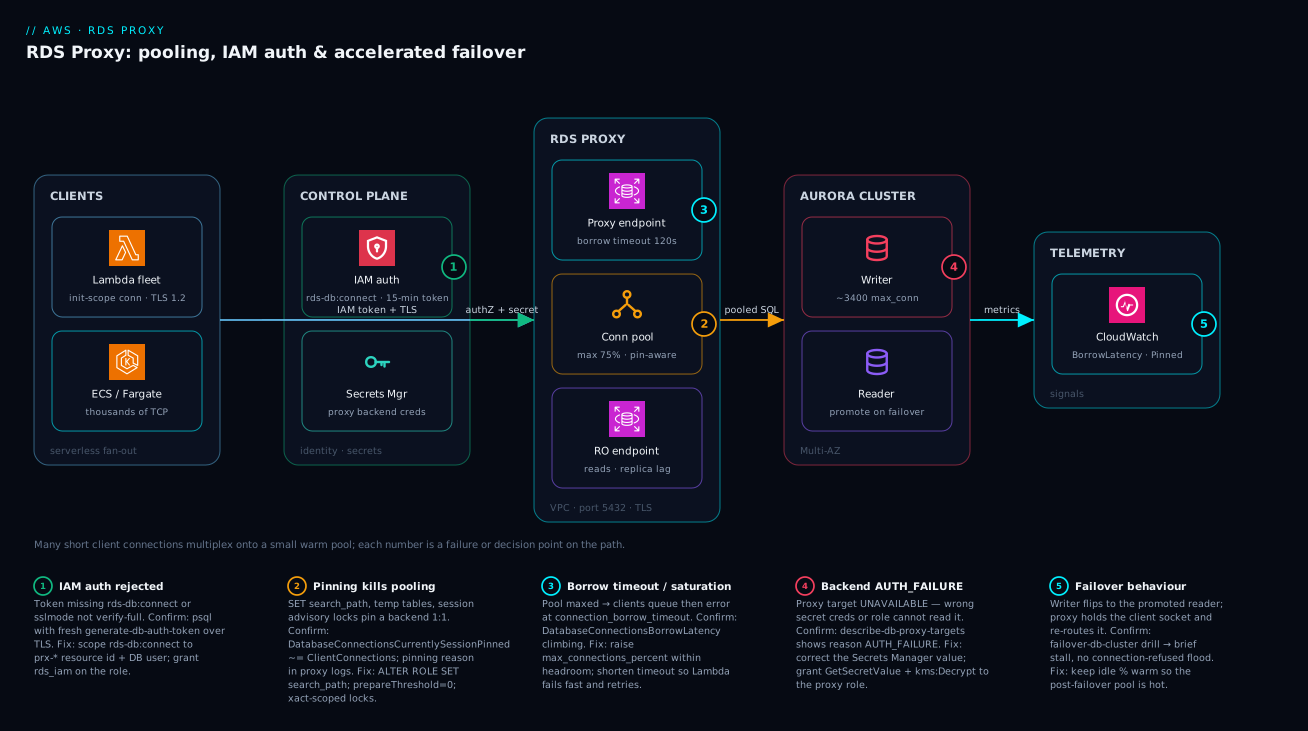
Read the diagram left to right and you are reading a single client request as it actually travels. On the far left a serverless tier — a Lambda fleet and ECS/Fargate tasks — opens many short-lived TCP connections, each over TLS 1.2 and each carrying a freshly minted IAM token instead of a password (badge 1). Those connections do not land on the database; they land on the RDS Proxy in your private subnets on port 5432. Before the proxy lets a client in, it consults the control plane: IAM checks the principal holds rds-db:connect for that proxy resource id and user, and the proxy itself uses a Secrets Manager secret to authenticate its own backend connections to Aurora — two independent layers in one hop. Inside the proxy, the connection pool (badge 2) is where multiplexing lives or dies: it hands a warm backend to whichever client is mid-transaction and returns it on commit, unless a SET, temp table, or session lock forces it to pin that backend 1:1. When demand outruns the pool, clients queue at the proxy endpoint and then error at the borrow timeout (badge 3) — the backpressure valve.
From the proxy, pooled SQL flows to the Aurora cluster: writes to the writer (badge 4, where an AUTH_FAILURE on the backend secret surfaces as an UNAVAILABLE target), reads to the read-only endpoint and its readers. When the writer dies, the reader is promoted and the proxy holds the client socket and re-routes it (badge 5) — the application feels a stall, not a reconnect storm. Every hop emits to CloudWatch, and the two numbers that matter — DatabaseConnectionsBorrowLatency and DatabaseConnectionsCurrentlySessionPinned — are what tell you, before users do, whether the pool is healthy or has quietly degraded to passthrough. The whole method is in the legend: localise the symptom to a badge, read the confirm command, apply the fix.
Real-world scenario
A retail platform team — call them Karthik’s group at NimbusCart — ran order-processing on Lambda against a provisioned Aurora PostgreSQL cluster (db.r6g.2xlarge, ~3400 max_connections). They had already put RDS Proxy in front of the writer and considered the connection problem solved. During a Diwali flash sale, throughput tripled, and they watched DatabaseConnectionsBorrowLatency spike into the seconds while the database’s own connection count sat far below capacity — the pool was saturated even though the database was not. Clients were timing out on connection_borrow_timeout and Lambda was retrying, amplifying the load. Monthly spend on the cluster was about ₹95,000 and climbing because someone had already started a vertical-scale change ticket.
The constraint: they could not simply raise max_connections_percent, because the backends were not idle and available — they were pinned. DatabaseConnectionsCurrentlySessionPinned was tracking nearly 1:1 with client connections, so the proxy had silently degraded to passthrough and every Lambda invocation was effectively holding a dedicated backend for its whole lifetime. The proxy they were paying for was doing nothing the database couldn’t have done by being directly connected.
Enabling debug logging surfaced the cause in the pinning logs: the ORM issued SET search_path on every connection, and an audit path used a session-level advisory lock. Both pin. The fix was three moves, none of them “buy a bigger database”:
-- 1. Move search_path off the runtime SET and onto the role so the proxy never sees it
ALTER ROLE app_user SET search_path = orders, public;
# 2. Restore headroom now that connections multiplex again
connection_pool_config {
  max_connections_percent      = 80
  max_idle_connections_percent = 60
  connection_borrow_timeout    = 20   # fail fast, let Lambda retry, shed load cleanly
}
They also replaced the session advisory lock with a transaction-scoped pg_advisory_xact_lock, which releases at commit and does not pin. After the change, DatabaseConnectionsCurrentlySessionPinned dropped to near zero, borrow latency fell back into single-digit milliseconds, and the same cluster absorbed the next sale at double the concurrency without touching the instance class. They closed the vertical-scale ticket and the bill stayed flat. The lesson the team took away: with RDS Proxy, the metric that predicts an outage is pinning, not CPU.
The incident as a timeline, because the order of moves is the lesson:
| Time | Symptom | Action taken | Effect | What it should have been |
|---|---|---|---|---|
| T+0 | BorrowLatency spiking, DB conns low | (alert fires) | — | Ask: are backends pinned? |
| T+5m | Lambda timeouts climbing | Considered raising max_connections_percent |
Would not help — backends pinned | Check ...SessionPinned first |
| T+12m | Vertical-scale ticket opened | Proposed db.r6g.4xlarge |
Cost spike, wouldn’t fix pinning | Don’t scale to mask |
| T+20m | Root cause found | Enabled debug_logging, read pinning reasons |
SET search_path + session lock named |
The breakthrough |
| T+30m | Mitigated | ALTER ROLE ... SET search_path; restore pool headroom |
Pinned → near zero | Correct fix |
| T+45m | Verified | Replace lock with pg_advisory_xact_lock |
BorrowLatency back to single-digit ms | The actual fix is query patterns |
| +1 sale | Fixed | Same cluster, 2× concurrency | Zero pinning, flat bill | Closed the scale ticket |
Going deeper
The sections above are the operating manual. This one is for the reader who already runs a proxy and wants the internals, the escape hatches, and the boundaries — the things that decide whether the proxy is the right tool at all, and how it behaves at the edges of its envelope.
The proxy is itself a fleet — treat it as a dependency, not a wire
It is easy to picture RDS Proxy as a thin passive wire between the app and the database. It is not: it is a managed, multi-AZ, autoscaling fleet of compute that AWS runs inside your VPC, spread across the AZs of the subnets you gave it. That has three consequences the wire mental model hides.
First, it adds a hop and a small latency tax — typically single-digit milliseconds to borrow a backend, more if the pool is cold or saturated. For a 2 ms point-read that tax is a meaningful percentage, which is exactly why the “when NOT to use it” guidance matters: a latency-sensitive, low-concurrency service that never storms connections pays the tax for a benefit it does not need.
Second, the fleet scales its own capacity with load, and the scaling is not instantaneous. A vertical, near-vertical traffic spike can outrun proxy scale-up for a few seconds, showing up as transient borrow latency even when the database has slots free. Keeping max_idle_connections_percent warm mitigates the database side of this, but the proxy-compute side is AWS-managed and not a knob you turn.
Third, and most important operationally: the proxy is now in your critical path as a dependency. If the proxy tier is impaired, and the database security group trusts only the proxy SG (as it should), you have no path to the database. Mature teams keep a break-glass direct route — a narrowly scoped SG rule and a direct connection string, disabled by default — so an operator can reach the database during a proxy-layer incident, accepting the connection-storm risk for the duration. The proxy endpoint itself is a stable DNS name, so failovers and proxy scaling do not change what clients connect to.
Engine and version support, precisely
The lesson’s tables say “PostgreSQL, MySQL, SQL Server”, which is right but coarse. The precise picture, because it changes what engine_family you set and which features you get:
| Engine | Aurora? | RDS? | engine_family |
Notes |
|---|---|---|---|---|
| PostgreSQL | Yes | Yes | POSTGRESQL |
Full feature set incl. IAM auth |
| MySQL | Yes | Yes | MYSQL |
Full feature set incl. IAM auth |
| MariaDB | — (no Aurora MariaDB) | Yes | MYSQL |
Uses the MySQL engine family |
| SQL Server | — (no Aurora SQL Server) | Yes | SQLSERVER |
Confirm the current IAM-auth / pinning matrix; it differs from the MySQL/PG families |
Two traps hide in that table. MariaDB does not get its own engine_family — you set MYSQL, because MariaDB speaks the MySQL wire protocol. And there is no Aurora SQL Server at all (Aurora is only MySQL- and PostgreSQL-compatible), so SQLSERVER always fronts an RDS instance, never an Aurora cluster. Beyond the engine, the proxy also requires the database to be on a supported minor version — AWS floors the minimum minor version the proxy will front, and a database too far behind simply cannot be registered as a target until you patch it. TLS to the proxy is 1.2 or higher; older clients that only negotiate TLS 1.0/1.1 will fail once require_tls is on. Treat “which engine/version” as a preflight check, not an afterthought — an unsupported minor version is a silent blocker at register-db-proxy-targets time.
The two escape hatches for pinning: session_pinning_filters and init_query
Section 3 tells you to avoid the operations that pin. Two knobs let you keep pooling even when you cannot fully avoid them — both used deliberately, both with sharp edges.
session_pinning_filters currently accepts one value, EXCLUDE_VARIABLE_SETS. It tells the proxy: do not pin the backend just because a client issued a SET. This is only safe when the session variables being set are harmless to share across clients or are reset on the next borrow — for example a purely cosmetic SET application_name used for logging. If the SET changes anything a later borrower’s correctness depends on (search_path, TIME ZONE, statement_timeout), excluding it from pinning is a state-leak bug waiting to happen: client B inherits client A’s session config. Use it as a scalpel for one known-harmless SET, never as a blanket “stop pinning” switch.
init_query is the opposite move. Instead of letting each client mutate session state at runtime (which pins), you give the proxy a SQL string it runs once on every new backend connection at creation time. Every backend in the pool then already carries that state, so no client needs a runtime SET, nothing pins, and every client sees identical, correct session config. The cost is a little extra latency each time the proxy opens a new backend, and it only fits state that should be uniform for all clients — it is the right home for “every connection in this pool must have search_path = orders, public”, and the wrong home for anything per-request. Support for init_query is engine-dependent, so confirm it for your engine before relying on it. Between the two, the decision tree is simple: state that should be the same for everyone → init_query or ALTER ROLE; a stray harmless SET you cannot remove → EXCLUDE_VARIABLE_SETS; anything genuinely per-client → accept the pin and keep that path off the hot line.
RDS Proxy versus the RDS Data API — two different answers to the storm
RDS Proxy is not the only AWS answer to “serverless fan-out versus a connection ceiling”. The RDS Data API attacks the same problem from the other end: it removes persistent connections entirely. Instead of opening a socket, your code makes an HTTPS request to a regional AWS endpoint (rds-data), authenticated with IAM, passing the SQL and a reference to a Secrets Manager secret; AWS runs it and returns rows as JSON. There is no connection to pool because there is no connection.
That makes the Data API superb for the exact Lambda case that motivates the proxy — no VPC plumbing, no connection lifecycle, no cold-start storm, nothing to pin — but it comes with real limits, and choosing between the two is an architecture decision:
| Dimension | RDS Proxy | RDS Data API |
|---|---|---|
| Model | Pooled persistent connections | Stateless HTTPS calls, no connections |
| Engines | Aurora + RDS (MySQL/PG/MariaDB/SQL Server) | Aurora only (Aurora PostgreSQL / MySQL) |
| VPC required | Yes (lives in your subnets) | No (regional API endpoint) |
| Auth | IAM token or DB password | IAM on the API call + Secrets Manager |
| Session state | Supported (but pins) | Effectively none across calls |
| Result size | Full streaming result sets | Capped per call (paginate large results) |
| Latency profile | Low once warm; borrow tax | Per-call HTTP overhead |
| Best for | High-throughput, any engine, existing drivers | Spiky/low-throughput Lambda, no VPC wiring |
The rule of thumb: reach for the Data API when the workload is spiky, Aurora-based, tolerant of per-call overhead, and you would rather write zero connection code (and skip VPC-attaching your Lambdas); reach for RDS Proxy when you need a real SQL connection with sessions and streaming results, when the engine is RDS (not Aurora), or when throughput is high enough that per-call HTTP overhead would dominate. They are not mutually exclusive — a fleet can use the Data API for thin, spiky control-plane functions and the proxy for the high-throughput data plane against the same cluster.
Multi-region, and the transaction edge cases that quietly hold a backend
RDS Proxy is a regional resource: it fronts the writer/readers in its own Region and knows nothing about other Regions. In an Aurora Global Database, you therefore run a proxy per Region, each in front of that Region’s cluster endpoints. Cross-region failover is a cluster operation — you promote the secondary Region’s cluster — and the proxy in that Region then fronts the newly promoted writer; the proxy does not route or forward across Regions, and Aurora’s write-forwarding (secondaries forwarding writes to the primary) is a separate cluster feature that operates beneath the proxy, not through it.
Finally, the subtlety that catches teams who “eliminated pinning” and still see a low multiplexing ratio: an idle-in-transaction client holds its backend for the whole time it is idle. Transaction-level multiplexing returns a backend on commit or rollback — so a client that runs BEGIN, does one query, then sits waiting on an await, a slow upstream call, or user input, is holding a scarce backend the entire time even though it is doing nothing. This is not pinning (the connection is still shareable after the transaction ends), but the symptom — backends tied up, borrow latency rising — looks identical. The defenses are on the client (never open a transaction across an external call or an await; commit promptly) and on the database (idle_in_transaction_session_timeout in PostgreSQL will terminate the offender). When DatabaseConnectionsCurrentlyBorrowed stays high but DatabaseConnectionsCurrentlySessionPinned is near zero, suspect long or idle-in-transaction sessions, not pinning.
Advantages and disadvantages
RDS Proxy is the right tool for serverless and high-fan-out workloads, but it is not free and not transparent. Weigh it honestly:
| Advantages | Disadvantages |
|---|---|
| Absorbs connection storms — bounded backends regardless of client fan-out | You pay per vCPU-hour of the fronted instance class, always-on |
| Accelerates failover by holding client sockets (no reconnect herd) | Adds a network hop and a small latency tax per borrow |
| IAM auth deletes long-lived DB passwords; tokens expire in 15 min | Misconfigured rds-db:connect/rds_iam causes opaque auth failures |
| Managed, autoscaling, VPC-native — no PgBouncer fleet to operate | Less tunable than self-managed PgBouncer (fewer pool modes) |
| Integrated with Secrets Manager rotation | Pinning silently degrades it to passthrough — easy to miss |
| Multiplexing lets a tiny pool serve thousands of clients | Only helps short transactions; long/reporting queries pin or hog |
| Read-only endpoints extend pooling + failover to reads | Reader endpoints still serve stale reads (replica lag unchanged) |
The model is right when you have spiky or serverless traffic, want failover felt as a stall, and want to retire database passwords. It is a poor fit — or a waste of money — for steady, low-concurrency workloads with a single always-on app server (a direct connection or an in-process pool is cheaper), for batch/reporting workloads dominated by long transactions (which pin), and for cases where the team won’t audit and eliminate pinning (you pay for a pooler that passes through). When to reach for RDS Proxy versus the alternatives:
| If your workload is… | Best choice | Why |
|---|---|---|
| Lambda / serverless, spiky | RDS Proxy | Absorbs storms; IAM auth; managed |
| Fargate/ECS microservices, many tasks | RDS Proxy | Shared pool across tasks |
| One always-on app server, steady | In-process pool (HikariCP/pgbouncer-local) | Cheaper; no extra hop |
| Need exotic pool modes / per-tenant pools | Self-managed PgBouncer | More control than the proxy offers |
| Batch / ETL with long transactions | Direct connection | Pooling adds nothing; would pin |
| Want failover felt as a stall, any tier | RDS Proxy | Held sockets beat reconnect herds |
Hands-on lab
Provision a proxy in front of an Aurora PostgreSQL cluster, connect through it with an IAM token over TLS, prove multiplexing, and tear down. This uses small instance classes but is not free-tier — Aurora and the proxy bill per hour; budget a few rupees and delete at the end. Run in CloudShell (which already has credentials and the RDS CA bundle reachable).
Step 1 — Variables.
export AWS_REGION=us-east-1
RG_PREFIX=rdsproxy-lab
VPC=$(aws ec2 describe-vpcs --filters Name=isDefault,Values=true --query "Vpcs[0].VpcId" --output text)
SUBNETS=$(aws ec2 describe-subnets --filters Name=vpc-id,Values=$VPC --query "Subnets[0:2].SubnetId" --output text)
echo "VPC=$VPC SUBNETS=$SUBNETS"
Step 2 — Create the backend secret. (Use a real cluster you already have, or create a tiny Aurora cluster first; here we assume prod-aurora exists.)
cat > /tmp/secret.json <<'JSON'
{ "username": "app_proxy_user", "password": "ChangeMe-Strong-1", "engine": "postgres" }
JSON
SECRET_ARN=$(aws secretsmanager create-secret --name $RG_PREFIX/proxy-user \
  --secret-string file:///tmp/secret.json --query ARN --output text)
echo "SECRET_ARN=$SECRET_ARN"
Expected: an ARN ending in random suffix characters.
Step 3 — Create the proxy IAM role (trust rds.amazonaws.com, allow read of the secret). Create the trust + permission policy, then the role, then attach. Confirm with:
aws iam get-role --role-name $RG_PREFIX-role --query "Role.Arn" --output text
Step 4 — Create the proxy and target group.
PROXY_ARN=$(aws rds create-db-proxy \
  --db-proxy-name $RG_PREFIX-proxy --engine-family POSTGRESQL \
  --role-arn $(aws iam get-role --role-name $RG_PREFIX-role --query Role.Arn --output text) \
  --vpc-subnet-ids $SUBNETS --require-tls \
  --auth "[{\"AuthScheme\":\"SECRETS\",\"SecretArn\":\"$SECRET_ARN\",\"IAMAuth\":\"REQUIRED\"}]" \
  --query "DBProxy.DBProxyArn" --output text)
echo "PROXY_ARN=$PROXY_ARN"
Then register the cluster as a target:
aws rds register-db-proxy-targets --db-proxy-name $RG_PREFIX-proxy \
  --db-cluster-identifier prod-aurora
Step 5 — Wait for the target to go AVAILABLE.
aws rds describe-db-proxy-targets --db-proxy-name $RG_PREFIX-proxy \
  --query "Targets[].{Target:RdsResourceId,State:TargetHealth.State,Reason:TargetHealth.Reason}" --output table
Expected: State = AVAILABLE. If AUTH_FAILURE, the secret password is wrong or the role can’t read it — fix and re-check.
Step 6 — Grant the DB user IAM auth (run once, connected as an admin):
CREATE USER app_user;
GRANT rds_iam TO app_user;
GRANT CONNECT ON DATABASE appdb TO app_user;
Step 7 — Connect through the proxy with an IAM token over TLS.
PROXY_HOST=$(aws rds describe-db-proxies --db-proxy-name $RG_PREFIX-proxy \
  --query "DBProxies[0].Endpoint" --output text)
export PGPASSWORD="$(aws rds generate-db-auth-token --hostname $PROXY_HOST --port 5432 \
  --username app_user --region $AWS_REGION)"
psql "host=$PROXY_HOST port=5432 user=app_user dbname=appdb sslmode=verify-full \
      sslrootcert=/etc/ssl/certs/rds-combined-ca-bundle.pem" -c "select current_user, now();"
Expected: a row with app_user and a timestamp — proof the IAM-token + TLS path works.
Step 8 — Prove multiplexing. Open a quick load loop in another shell (a handful of concurrent psql sessions running SELECT pg_sleep(0.05) in a loop), then read the proxy metrics in CloudWatch and compare ClientConnections against DatabaseConnectionsCurrentlyBorrowed — the former should exceed the latter.
The lab steps mapped to what each proves:
| Step | What you did | What it proves | Real-world analogue |
|---|---|---|---|
| 4 | Create proxy with IAMAuth=REQUIRED |
Two-layer auth is configured | The production provisioning |
| 5 | Wait for AVAILABLE |
The proxy can authenticate to the DB | The first health gate |
| 6 | GRANT rds_iam |
The DB user is IAM-only | Deleting the password |
| 7 | Connect with a token + verify-full |
The passwordless TLS path works | Every app connection |
| 8 | Compare client vs borrowed | Multiplexing is real | The whole point of the proxy |
Cleanup (avoid lingering hourly charges).
aws rds delete-db-proxy --db-proxy-name $RG_PREFIX-proxy
aws secretsmanager delete-secret --secret-id $RG_PREFIX/proxy-user --force-delete-without-recovery
aws iam delete-role --role-name $RG_PREFIX-role   # detach/delete inline policies first
Cost note. The proxy bills per vCPU-hour of the fronted instance class plus a small per-hour charge; an hour of this lab is a few rupees. Aurora itself is the bigger line item — delete any cluster you spun up just for the lab.
Practice challenges
Work these in order; each builds on the last. Try it before opening the solution — the one-line why under each is the point to carry away, not just the answer.
1. (Beginner) Compute the multiplexing ratio. A mixed-CRUD API runs transactions averaging 20 ms, and each client fires roughly one transaction per second. What fraction of the time is a client actually inside a transaction, and roughly how many clients can one backend serve? Then say which CloudWatch metric proves the ratio in production.
<details><summary>Solution</summary>
Duty cycle = 20 ms of work per 1000 ms = ~2%, so in principle ~50 clients per backend (1 ÷ 0.02), landing in the “20–40:1 typical web API” band once you leave headroom. The proof in production is the ratio of ClientConnections to DatabaseConnectionsCurrentlyBorrowed — the first should sit far above the second.
Why: multiplexing gain is set by the in-transaction duty cycle, and the client-vs-borrowed ratio is where you verify it is real. </details>
2. (Beginner) Read the symptom. DatabaseConnectionsBorrowLatency is climbing into hundreds of milliseconds, but the database’s own connection count is nowhere near max_connections. Name the single most likely cause and the one metric that confirms it in ten seconds.
<details><summary>Solution</summary>
Most likely connection pinning — backends are dedicated 1:1 so the pool cannot multiplex, and clients queue for a free backend that never returns. Confirm with DatabaseConnectionsCurrentlySessionPinned: if it tracks near ClientConnections, multiplexing is effectively off. (If pinned is near zero but borrowed is high, suspect long or idle-in-transaction sessions instead.)
Why: high borrow latency with a nearly-empty database is the fingerprint of pinning, not of a database that is too small. </details>
3. (Intermediate) Write the IAM resource ARN. Your proxy’s resource id is prx-0abc123def456 in us-east-1, account 123456789012, and the app logs in as the database user orders_svc. Write the exact Resource ARN for the rds-db:connect permission, and name the two segments people most often get wrong.
<details><summary>Solution</summary>
arn:aws:rds-db:us-east-1:123456789012:dbuser:prx-0abc123def456/orders_svc
The two classic mistakes: using the service rds instead of rds-db, and putting the cluster/instance id in place of the proxy resource id (prx-…). The trailing segment is the exact DB username, not a wildcard.
Why: IAM auth to a proxy is scoped to the proxy resource id plus the specific DB user — a wrong service prefix or the DB id instead of the prx- id is the usual “access denied”.
</details>
4. (Intermediate) De-pin an ORM. Your framework issues SET search_path = orders, public on every connection, and DatabaseConnectionsCurrentlySessionPinned is tracking client connections 1:1. Give two different ways to stop that SET from pinning, and say which you would ship first.
<details><summary>Solution</summary>
(a) Move it off the runtime entirely: ALTER ROLE orders_svc SET search_path = orders, public; so the proxy never sees a runtime SET. (b) Put it in the proxy’s init_query so every backend is created with that search_path already set. Ship (a) first — it is a one-line, engine-native change with no proxy-config churn and no per-connection latency. Reserve session_pinning_filters = EXCLUDE_VARIABLE_SETS only if a harmless stray SET remains that you cannot remove.
Why: the cheapest de-pin is to relocate static session config onto the role so it is never a runtime statement the proxy must pin on. </details>
5. (Advanced) Headroom math. An Aurora writer has ~850 max_connections. You want the app proxy at 75%, plus a second analytics proxy at 15%, plus ~10 slots reserved for replication/superuser and ~20 for ad-hoc admin tooling. Does it fit, and how much margin is left? What single change to the app proxy would blow the budget?
<details><summary>Solution</summary>
App proxy 75% ≈ 637, analytics 15% ≈ 127, +10 replication +20 admin = ~794 of 850, leaving ~56 slots of margin. It fits, but tightly. Pushing the app proxy to 90% (~765) alone would take the total to ~922 — over the ceiling — and something would start getting remaining connection slots are reserved. The percentages of every consumer, plus fixed reserves, must sum under 100% with margin.
Why: max_connections_percent is a share of a fixed pie, so every proxy and every direct consumer competes for the same slots — headroom is arithmetic, not a suggestion.
</details>
6. (Advanced) Pick the right tool per workload. For each, choose RDS Proxy, the RDS Data API, or a direct connection, and justify in one line: (a) a thin, spiky Lambda control-plane function against Aurora PostgreSQL with no VPC wiring desired; (b) a high-throughput ECS service against RDS (non-Aurora) MySQL with existing drivers; © a nightly batch COPY importer that holds a single multi-minute transaction.
<details><summary>Solution</summary>
(a) RDS Data API — spiky, Aurora, and you skip VPC-attaching the function and all connection code; per-call overhead is fine at low throughput. (b) RDS Proxy — the Data API is Aurora-only, and a high-throughput service wants a real pooled SQL connection with its existing driver. © Direct connection — one long transaction pins/hogs a backend for its whole life, so pooling buys nothing; run it straight at the writer, off the proxy.
Why: the storm has more than one cure — no-connection (Data API), pooled-connection (Proxy), and no-pooling (direct) each win a different shape of workload. </details>
Common beginner mistakes
These are conceptual traps — wrong mental models that lead you to the wrong fix. They are distinct from the symptom→cause→fix table in “Common mistakes & troubleshooting” above: that table is for when something is already broken; this list is for the beliefs that break it in the first place.
-
“Adding the proxy automatically fixed my connection problem.” The misconception is that pooling is a switch you flip. In reality the proxy only helps if it can multiplex, and a single
SET search_path, temp table, or session lock in your hot path pins it back to 1:1 passthrough — you keep paying for the proxy and get none of the benefit. Right model: provisioning the proxy is step one; the real work is auditing your queries so connections stay shareable after each transaction. WatchDatabaseConnectionsCurrentlySessionPinned, not just “is the proxy created”. -
“Borrow latency is high, so I need a bigger database / a higher
max_connections_percent.” The instinct to scale up is almost always wrong here. If the backends are pinned, they are not idle-and-available — a bigger instance gives you more slots for connections that are already being hogged 1:1. Right model: when borrow latency climbs while the database’s own connection count is low, the pool is starved by pinning (or by idle-in-transaction sessions), and the fix is a code change, not a bigger SKU. Scale only after...SessionPinnedis near zero. -
“
iam_auth = REQUIREDmeans the proxy uses IAM to reach the database.” Beginners conflate the two auth layers.iam_authgoverns only how clients authenticate to the proxy. The proxy always authenticates to the database with the Secrets Manager credentials insecret_arn, regardless of the client setting. Right model: two independent doors — client→proxy (IAM token or DB password) and proxy→database (the secret) — and anAUTH_FAILUREon the target is always the second door, never the first. -
“
sslmode=requiremeans my connection is secure.”requireencrypts the channel but verifies nothing about who is on the other end, so a man-in-the-middle can present its own certificate and read everything. Right model: encryption is not authentication. Onlyverify-full(with the RDS CA bundle) checks the proxy’s certificate and hostname, which is what actually defeats interception. In production,requireis a false sense of safety. -
“I’ll open the database connection inside my Lambda handler.” It feels natural to connect where you query, but the handler runs on every invocation, so this manufactures the exact connection storm the proxy exists to absorb — and re-mints a SigV4 token every call. Right model: open the connection (and mint the token) in module/init scope so warm invocations reuse it, and reconnect only on
OperationalError. The handler should use a connection, not create one. -
“The read-only endpoint gives me consistent reads.” The proxy pools and load-balances reads across Aurora replicas, but it changes nothing about replication — replicas still lag the writer by milliseconds to seconds. Right model: the RO endpoint scales read throughput and shares the proxy’s failover handling; it does not make a just-written row appear instantly. Read-after-write goes to the read-write endpoint; the RO endpoint is for reads that tolerate lag.
-
“The proxy is basically free / invisible plumbing.” Two costs get overlooked: money (you pay per vCPU-hour of the fronted instance, always-on, traffic or not) and latency (an extra hop and a borrow tax per request). Right model: the proxy is justified by spiky or serverless traffic that genuinely needs pooling, failover acceleration, or IAM auth. For a steady, low-concurrency, single-server workload, an in-process pool is cheaper and adds no hop — the proxy would be paying rent for a benefit you are not using.
Common mistakes & troubleshooting
This is the playbook — the part you bookmark. Start with the fast decision table to land on the right row, then the full playbook, then the entries that bite hardest with confirm-command detail.
| If you see… | It’s probably… | Do this first |
|---|---|---|
| BorrowLatency high, DB conns low | Pinning | Check ...SessionPinned; kill the pin |
Target UNAVAILABLE |
Backend auth/connectivity | describe-db-proxy-targets → read the reason |
PAM authentication failed |
IAM not wired end to end | Check rds-db:connect ARN + rds_iam grant |
| Cert / TLS error on connect | sslmode or CA bundle wrong |
Use verify-full + RDS CA bundle |
remaining connection slots reserved |
Something bypasses the proxy | Lock DB SG to proxy SG only |
| Reconnect flood at failover | Direct connect / no reconnect | Route via proxy; reconnect on error |
| RO endpoint has no targets | No reader in the cluster | Add a reader, or drop the endpoint |
| Stale reads via RO endpoint | Replica lag (not the proxy) | Read-after-write at the RW endpoint |
The full playbook table you read mid-incident:
| # | Symptom | Root cause | Confirm (exact cmd / console path) | Fix |
|---|---|---|---|---|
| 1 | BorrowLatency spikes, DB connection count is low | Pinning — backends dedicated 1:1, pool starved | CloudWatch DatabaseConnectionsCurrentlySessionPinned ≈ ClientConnections; proxy logs pinned |
Eliminate SET/temp/locks; ALTER ROLE for search_path |
| 2 | Target UNAVAILABLE, reason AUTH_FAILURE |
Wrong secret creds, or role can’t read the secret | aws rds describe-db-proxy-targets --query "Targets[].TargetHealth" |
Fix secret value; grant GetSecretValue + kms:Decrypt |
| 3 | Clients error timed out waiting for a connection |
Pool saturated; connection_borrow_timeout hit |
DatabaseConnectionsBorrowLatency rising; pool maxed |
Raise max_connections_percent (within headroom); cut pinning |
| 4 | IAM login fails PAM authentication failed |
Principal lacks rds-db:connect, or user not rds_iam |
aws iam simulate-principal-policy for rds-db:connect; check \du for rds_iam |
Add rds-db:connect on prx-*/user; GRANT rds_iam |
| 5 | TLS connection refused / cert error | sslmode wrong or missing RDS CA bundle |
psql ... sslmode=verify-full sslrootcert=... errors |
Use verify-full + rds-combined-ca-bundle.pem |
| 6 | DB still hits remaining connection slots reserved |
App bypasses the proxy and connects direct | Audit SGs; DB ingress allows Lambda SG directly | DB SG ingress = proxy SG only; route all via proxy |
| 7 | Read-only endpoint has no targets | No reader in the Aurora cluster | Target reason INVALID_REPLICATION_STATE |
Add ≥1 reader; or drop the RO endpoint |
| 8 | Failover still causes a reconnect flood | App connects direct, or doesn’t reconnect | App logs show connection refused burst at failover |
Route through proxy; catch OperationalError, reconnect |
| 9 | Lambda opens a connection per invocation | Connection created in handler, not init scope | Code review; ClientConnections spikes with invokes |
Move connect to module/init scope; reuse |
| 10 | Secret rotation breaks the proxy | Rotated secret out of sync, or extra-grace not set | Targets flip to AUTH_FAILURE right after rotation |
Use Secrets Manager rotation that keeps both valid during window |
| 11 | Multiplexing ratio ~1:1 despite no obvious SET |
Server-side prepared statements pinning | Proxy logs pinned reason “prepared statement” |
prepareThreshold=0 / simple query mode |
| 12 | kms:Decrypt denied on the secret |
KMS key policy / ViaService condition wrong |
CloudTrail Decrypt AccessDenied for the proxy role |
Allow kms:Decrypt with kms:ViaService for Secrets Manager |
| 13 | Intermittent connection drops under steady load | idle_client_timeout too low reaping live clients |
Drops align with the idle timeout value | Raise idle_client_timeout to match keep-alive |
| 14 | Reads return stale data through RO endpoint | Replica lag, not a proxy problem | aws rds describe-db-clusters replica lag metric |
Read-after-write at RW endpoint; accept lag for RO |
The expanded form, with the full reasoning for the entries that cause the most wasted hours:
1. BorrowLatency spikes while the database’s own connection count is low.
Root cause: Connection pinning — backends are dedicated 1:1 to clients, so the pool can’t multiplex and clients queue for a free backend that never comes.
Confirm: DatabaseConnectionsCurrentlySessionPinned tracking near ClientConnections in CloudWatch; enable debug_logging and grep the proxy log for pinned to get the exact reason.
Fix: Move SET search_path to ALTER ROLE; replace session advisory locks with pg_advisory_xact_lock; disable server-side prepared statements; avoid session temp tables in hot paths.
2. The proxy target sits UNAVAILABLE with reason AUTH_FAILURE.
Root cause: The proxy cannot log into the database with the Secrets Manager credentials — wrong password in the secret, wrong username, or the proxy role can’t read/decrypt the secret.
Confirm: aws rds describe-db-proxy-targets --db-proxy-name <p> --query "Targets[].{State:TargetHealth.State,Reason:TargetHealth.Reason}".
Fix: Correct the secret value; ensure the role allows secretsmanager:GetSecretValue and kms:Decrypt (with the kms:ViaService condition); verify the DB user/password actually exist.
3. Clients error “timed out waiting for a connection.”
Root cause: The pool is saturated and clients waited past connection_borrow_timeout. Either offered load exceeds max_connections_percent, or pinning has shrunk the effective pool.
Confirm: DatabaseConnectionsBorrowLatency climbing toward the timeout; pinned-connections high.
Fix: First eliminate pinning (it’s usually the real cause); then raise max_connections_percent within the headroom budget; for Lambda, keep the timeout short so it fails fast and retries rather than hanging.
4. IAM login fails with PAM authentication failed for user.
Root cause: The calling principal lacks rds-db:connect for the proxy resource id + user, or the database user wasn’t granted rds_iam.
Confirm: aws iam simulate-principal-policy --policy-source-arn <principal> --action-names rds-db:connect --resource-arns arn:aws:rds-db:...:dbuser:prx-.../app_user; in psql, \du shows whether the role has rds_iam.
Fix: Add rds-db:connect scoped to prx-*/app_user; GRANT rds_iam TO app_user; confirm the ARN uses the proxy resource id, not the cluster id.
6. The database still hits remaining connection slots are reserved.
Root cause: Something is bypassing the proxy and connecting directly — a forgotten cron box, an admin tool, or the app’s old direct connection string still in config.
Confirm: Audit the DB security group; if its ingress allows the Lambda/app SG directly (not just the proxy SG), direct connections are possible. Check pg_stat_activity for client addresses that aren’t the proxy.
Fix: Set the DB SG ingress to allow the proxy SG only; remove direct connection strings; route all traffic through the proxy so the pool is the single chokepoint.
10. Secret rotation suddenly flips targets to AUTH_FAILURE.
Root cause: The rotation changed the password in Secrets Manager but the proxy/DB briefly disagree, or the rotation strategy doesn’t keep the old credential valid during the cutover window.
Confirm: Targets go AUTH_FAILURE exactly at the rotation timestamp; CloudTrail shows the rotation Lambda invocation.
Fix: Use a rotation strategy that keeps both the old and new credential valid during the window (alternating-users or a grace period), and ensure the proxy role can read the rotated version.
Best practices
- Treat pinning as the primary health signal. Alarm on
DatabaseConnectionsCurrentlySessionPinnedand keep it near zero. On this stack, pinning predicts the outage; CPU does not. - Move session config off the runtime.
ALTER ROLE ... SET search_pathand parameter-group settings instead of per-connectionSET. This single discipline prevents the most common pin. - Disable server-side prepared statements where you need maximum multiplexing (
prepareThreshold=0/ simple query mode), measuring the plan-cache trade-off first. - Leave headroom below
max_connections. Sum every consumer’s percentage (proxies, admin, replication, direct) under 100 with margin so nothing hitsremaining connection slots reserved. - Force IAM auth and delete the password.
iam_auth = REQUIRED,GRANT rds_iam, andrds-db:connectscoped toprx-*/user. No long-lived database password in any config, env var, or image layer. - Always
require_tls+verify-full. Encryption alone (require) is spoofable; verify the proxy’s cert and hostname with the RDS CA bundle. - Make the DB SG trust the proxy SG only. The proxy is the single path in; the database should never accept the Lambda/app SG directly.
- Open connections in Lambda init scope and reconnect on
OperationalError. This kills per-invocation storms and survives failover. - Keep idle percent warm for spiky traffic. A meaningful
max_idle_connections_percent(≈50–60) means the next burst borrows from a warm pool instead of cold-connecting under the spike. - Set borrow timeout to fail fast for serverless. Short enough that Lambda errors and retries cleanly, and shorter than the client’s own timeout so the proxy gives you the signal first.
- Create a read-only endpoint for read traffic (with ≥1 reader) so reads get pooling and failover handling too.
- Drill failover. Run
failover-db-clusterdeliberately and confirm a brief stall, not a reconnect flood — before production proves it for you.
The alarms worth wiring before the next incident — leading indicators, not “database down”:
| Alert on | Metric | Threshold (starting point) | Why it’s leading |
|---|---|---|---|
| Pinning | DatabaseConnectionsCurrentlySessionPinned |
> 20% of ClientConnections for 5 min |
Multiplexing degrading to passthrough |
| Borrow latency | DatabaseConnectionsBorrowLatency |
p95 > 50 ms sustained | Clients queuing for backends |
| Pool saturation | DatabaseConnectionsCurrentlyBorrowed |
> 90% of cap | About to hit borrow-timeout errors |
| Client growth | ClientConnections |
Sudden 2× jump | Fan-out / storm forming |
| Backend health | Target State |
not AVAILABLE for 2 min |
Auth or connectivity failure |
| Query latency | QueryDatabaseResponseLatency |
> your SLO | Backend slow vs proxy slow disambiguation |
The pre-production ship gate — verify each before routing real traffic, with the exact check:
| Gate | Verify with | Pass condition |
|---|---|---|
| Target healthy | describe-db-proxy-targets |
State = AVAILABLE |
| IAM auth works | psql with generate-db-auth-token + verify-full |
Returns current_user |
| Backend secret + KMS | proxy role policy review | GetSecretValue + kms:Decrypt present |
| Multiplexing real | CloudWatch under load | ClientConnections ≫ ...Borrowed |
| Pinning near zero | CloudWatch under load | ...SessionPinned ≈ 0 |
| Failover behaves | failover-db-cluster drill |
Brief stall, no refusal flood |
| DB SG locked down | SG ingress audit | Allows proxy SG only |
| No direct password | config / env / image scan | No PGPASSWORD static value |
Security notes
- No long-lived database password anywhere. With IAM auth required, the application holds only an IAM identity; tokens are minted per connection and expire in 15 minutes, so a leaked token is short-lived. This is the headline security win of the proxy.
- Least-privilege
rds-db:connect. Scope it to the exact proxy resource id and database user — never a wildcard user. A principal should be able to assume only the database identities it actually needs. - The proxy role reads one secret, decrypts with one key. Grant
secretsmanager:GetSecretValueon the specific secret ARN andkms:Decryptgated bykms:ViaService = secretsmanager.<region>.amazonaws.com— not blanket KMS access. - TLS verified end to end.
require_tlson the proxy andsslmode=verify-fullon clients with the RDS CA bundle, so the channel is encrypted and authenticated against MITM. - Network isolation. The proxy lives in private subnets; the database SG trusts the proxy SG only; Lambda reaches the proxy, never the database directly. The proxy is the single audited chokepoint.
- Rotate the backend secret safely. Use Secrets Manager rotation that keeps a valid credential through the cutover so targets don’t flap to
AUTH_FAILUREmid-rotation. - Audit the path. IAM-auth connections are logged via CloudTrail (the token mint) and database auth logs;
pg_stat_activityshould show only the proxy as the client address.
The security controls that also improve resilience — they pull in the same direction:
| Control | Mechanism | Secures against | Also prevents |
|---|---|---|---|
| IAM auth required | iam_auth=REQUIRED + rds_iam |
Leaked/stolen DB passwords | Stale-password outages |
Least-privilege rds-db:connect |
Scoped resource ARN | Lateral movement to other DB users | Accidental cross-user access |
| Scoped secret + KMS read | GetSecretValue + kms:ViaService |
Secret exfiltration | Over-broad role blast radius |
require_tls + verify-full |
Proxy TLS + client verify | MITM / downgrade | “Temporary” plaintext mistakes |
| DB SG = proxy SG only | Security-group chain | Direct DB exposure | Bypass storms hitting max_connections |
| Safe secret rotation | Alternating/grace rotation | Stale credential window | AUTH_FAILURE flapping at rotation |
Cost & sizing
The bill drivers and how they interact with the design:
- Proxy pricing is per vCPU-hour of the fronted instance class, charged whether or not traffic flows, plus the underlying RDS/Aurora cost. So the proxy is “always on” money — justify it with spiky/serverless traffic that genuinely needs pooling, not a steady single-server workload where an in-process pool is free.
- Fixing pinning is the cheapest performance win available. NimbusCart absorbed 2× concurrency on the same
db.r6g.2xlargeby eliminating pinning — a code change, not a bigger SKU. The instinct to scale the database vertically under connection pressure is usually wrong and expensive. - Scaling the database to raise
max_connectionsis the costly path.max_connectionsscales with memory, so more connections means a bigger (pricier) instance and more OOM risk. The proxy lets you keep a smaller instance and a smaller real pool. - Read-only endpoints add no extra proxy charge but require readers (each a billed instance) — size readers for read load, not just for the proxy.
- CloudWatch metrics for the proxy are standard-rate — cheap relative to the outage a pinning alarm prevents;
debug_loggingis the one to watch, since it logs SQL and can spike log ingestion, so turn it off after diagnosis.
A rough monthly picture for a small-to-mid serverless API on Aurora PostgreSQL: the cluster (db.r6g.large writer + one reader) dominates at roughly ₹70,000–90,000/month; the RDS Proxy in front adds on the order of ₹6,000–10,000/month depending on the fronted class and hours; CloudWatch is a few hundred rupees. The proxy line is small next to the cluster and trivial next to the cost of a connection-exhaustion outage during a sale. The cost levers and what each buys:
| Cost driver | What you pay for | Rough INR / month | What it fixes | Watch-out |
|---|---|---|---|---|
| RDS Proxy | Per vCPU-hour of fronted class + per-hour | ~₹6,000–10,000 | Pooling, failover, IAM auth | Always-on; needs spiky load to justify |
Aurora writer (db.r6g.large) |
One writer instance-hour | ~₹40,000–55,000 | The database itself | max_connections scales with size |
| Aurora reader (1×) | One reader instance-hour | ~₹30,000–40,000 | Read scale + RO endpoint target | Each reader is a full instance |
Vertical scale to raise max_connections |
Bigger instance class | +50–100% of cluster | (avoid — pooling is cheaper) | OOM risk; masks pinning |
| CloudWatch metrics | Standard metric/alarm rate | ~₹300–800 | Visibility (pinning, latency) | debug_logging spikes log ingestion |
| NAT/VPC endpoints (if used) | Per-hour + per-GB | ~₹1,500–3,000 | Private path for token mint/secrets | Only if Lambda has no internet route |
Interview & exam questions
1. What problem does RDS Proxy solve that a bigger database instance does not? A bigger instance raises max_connections, but that scales with memory and is expensive and bounded; it doesn’t change the fact that serverless fan-out demands one backend per client. RDS Proxy multiplexes many short-lived client connections onto a small warm pool, so a smaller instance serves far more clients. It also accelerates failover and enables IAM auth — neither of which a bigger instance provides.
2. Explain transaction-level multiplexing and when it stops working. A backend connection is borrowed from the pool when a client begins a transaction and returned when it commits/rolls back, so between transactions the client holds no backend and one backend serves many clients. It stops working when the client mutates session state (e.g. SET search_path, temp tables, session locks, server-side prepared statements), which forces the proxy to pin the backend 1:1.
3. What is connection pinning and how do you detect it? Pinning is the proxy dedicating a backend to one client for the life of its session because the connection carries session state unsafe to share. Detect it via the DatabaseConnectionsCurrentlySessionPinned CloudWatch metric (high relative to ClientConnections) and by enabling debug_logging and reading the pinned reason in the proxy logs.
4. Distinguish the two authentication layers in an IAM-auth RDS Proxy setup. Clients authenticate to the proxy using a 15-minute SigV4 IAM token (controlled by iam_auth = REQUIRED and the principal’s rds-db:connect permission). The proxy authenticates to the database using credentials from Secrets Manager (secret_arn). They are independent — the proxy always uses the secret for backend connections regardless of how clients authenticate.
5. Why does RDS Proxy make failover faster from the application’s point of view? It holds the client’s connection open during failover, absorbs the reconnect internally, and re-routes the held connection to the newly promoted writer once DNS flips. The application sees a brief stall on in-flight transactions instead of a fleet-wide reconnect storm of connection refused errors.
6. How do you size max_connections_percent, and what breaks if you get it wrong? Set it so that all consumers’ percentages (the proxy, other proxies, admin tools, replication, direct connections) sum to under 100 of the target’s max_connections with margin. Too low and clients hit connection_borrow_timeout; too high (or summing past 100) and the database hits remaining connection slots are reserved.
7. A target is UNAVAILABLE with reason AUTH_FAILURE. What’s wrong and how do you fix it? The proxy can’t authenticate to the database with the Secrets Manager credentials — wrong password/username in the secret, or the proxy role can’t GetSecretValue/kms:Decrypt. Fix the secret value and grant the role read+decrypt (with the kms:ViaService condition). It is a proxy→database problem, not a client→proxy one.
8. How do you delete the long-lived database password from a Lambda function? Set iam_auth = REQUIRED on the proxy, grant the database user rds_iam, and give the Lambda execution role rds-db:connect scoped to the proxy resource id and that user. The function mints a SigV4 token at connect time and uses it as the password; no static password is stored. Use sslmode=verify-full with the RDS CA bundle.
9. Why must clients use sslmode=verify-full rather than require? require encrypts the channel but does not verify the server’s certificate or hostname, so a man-in-the-middle can present its own cert and intercept traffic. verify-full validates the proxy’s certificate against the RDS CA bundle and checks the hostname, defeating MITM. Encryption without verification is not authentication.
10. Your Lambda opens a new connection on every invocation. What’s the impact and the fix? Each cold-start environment opening (and worse, each invocation opening) a connection creates a connection storm and wastes SigV4 token mints and latency. Open the connection (and mint the token) in module/init scope so it’s reused across warm invocations, and reconnect on OperationalError to survive failover.
11. When is RDS Proxy the wrong choice? For a steady, low-concurrency workload with a single always-on app server, an in-process pool is cheaper and adds no hop. For batch/reporting workloads dominated by long transactions, pooling adds nothing (those pin). And if the team won’t audit and eliminate pinning, you pay per vCPU-hour for a pooler that has degraded to passthrough.
12. How does a read-only proxy endpoint behave, and what does it require? It routes read traffic to the cluster’s readers (load-balanced) with the same pooling and failover handling, created with --target-role READ_ONLY. It requires at least one reader in the Aurora cluster (otherwise the target is INVALID_REPLICATION_STATE), and it does not change replication semantics — reads can still be stale by the replica lag.
These map primarily to AWS Certified Database – Specialty (connection management, RDS/Aurora HA, security) and Solutions Architect – Professional (resilient, secure data tiers for serverless). The IAM-auth and least-privilege angle touches Security – Specialty. A compact cert-mapping for revision:
| Question theme | Primary cert | Objective area |
|---|---|---|
| Pooling, multiplexing, pinning | Database – Specialty | Connection management & performance |
| Failover acceleration, RO endpoints | Database – Specialty / SAP | HA & resilience for data stores |
IAM auth, rds-db:connect, rds_iam |
Security – Specialty | Identity & access for data services |
| Secrets Manager + KMS for the proxy | Security – Specialty | Data protection & secrets |
| Lambda/VPC wiring, SG chain | SAP / Database – Specialty | Serverless data access patterns |
Sizing max_connections_percent |
Database – Specialty | Capacity & quotas |
Quick check
- Your
DatabaseConnectionsBorrowLatencyis spiking but the database’s own connection count is well belowmax_connections. What’s the most likely cause, and which single metric confirms it? - True or false: scaling the database vertically to raise
max_connectionsis the correct fix when a proxy’s clients are timing out on borrow. - In an IAM-auth setup, which credential does the proxy use to connect to the database, and which does the client use to connect to the proxy?
- Your proxy target is
UNAVAILABLEwith reasonAUTH_FAILURE. Name two things to check. - Why is
sslmode=requireinsufficient and what should you use instead?
Answers
- Connection pinning — backends are dedicated 1:1, so the pool can’t multiplex and clients queue for a free backend. Confirm with
DatabaseConnectionsCurrentlySessionPinned; if it tracks nearClientConnections, multiplexing is effectively off. - False. If clients are timing out because of pinning, a bigger instance doesn’t help — the backends aren’t idle, they’re pinned. Eliminate pinning first (move
SETto the role, use transaction-scoped locks, disable server-side prepared statements); only then considermax_connections_percentheadroom. - The proxy authenticates to the database with credentials from Secrets Manager (
secret_arn). The client authenticates to the proxy with a short-lived IAM SigV4 token (iam_auth = REQUIRED, principal holdsrds-db:connect). Independent layers. - Check (a) the secret value is correct (right username/password for a user that exists in the DB) and (b) the proxy role can
secretsmanager:GetSecretValueandkms:Decryptthe secret (with thekms:ViaServicecondition). Verify withdescribe-db-proxy-targets. requireencrypts but does not verify the server certificate or hostname, so it’s vulnerable to MITM. Useverify-fullwith the RDS CA bundle so the client validates the proxy’s cert and hostname.
Glossary
-
RDS Proxy — a managed, autoscaling connection pooler that runs in your VPC in front of RDS/Aurora, providing pooling, accelerated failover, and IAM/Secrets-Manager authentication.
-
Transaction-level multiplexing — borrowing a backend connection at the start of a transaction and returning it at commit/rollback, so many clients share few backends.
-
Connection pinning — the proxy dedicating a backend connection 1:1 to one client because the connection carries session state unsafe to share; multiplexing’s off switch.
-
Backend connection — a real database connection in the proxy’s pool (proxy ↔ database).
-
Client connection — a connection from the application/Lambda to the proxy; cheap and can vastly outnumber backends.
-
Target group — the proxy construct holding
connection_pool_configand the target (cluster/instance) it fronts. -
Proxy endpoint — a DNS name clients connect to; the default endpoint is read-write, and you can add
READ_ONLYendpoints. -
iam_auth(REQUIRED/DISABLED) — whether clients must authenticate to the proxy with an IAM SigV4 token instead of a password. -
rds-db:connect— the IAM action permitting a principal to obtain an auth token for a specific proxy resource id and database user. -
rds_iam— a PostgreSQL role that, once granted, makes a database user authenticate only via IAM tokens. -
secret_arn— the Secrets Manager secret holding the credentials the proxy uses to authenticate to the database. -
max_connections_percent— caps the proxy’s backends as a percentage of the target’smax_connections. -
max_idle_connections_percent— how many backends the proxy keeps warm when demand drops; must be ≤max_connections_percent. -
connection_borrow_timeout— how long a client waits for a free backend before the proxy returns an error; the backpressure valve. -
DatabaseConnectionsCurrentlySessionPinned— the CloudWatch metric counting pinned backends; the leading indicator of degraded multiplexing. -
DatabaseConnectionsBorrowLatency— the CloudWatch metric for how long clients wait to borrow a backend; rises under saturation or pinning. -
sslmode=verify-full— the PostgreSQL TLS mode that encrypts and verifies the server certificate and hostname, defeating MITM. -
engine_family— the proxy setting that fixes the wire protocol:POSTGRESQL,MYSQL, orSQLSERVER. MariaDB usesMYSQL; there is no Aurora SQL Server, soSQLSERVERalways fronts an RDS instance. Cannot be changed after creation. -
session_pinning_filters— a target-group setting whose one value,EXCLUDE_VARIABLE_SETS, tells the proxy not to pin on aSETstatement; safe only when the session variable is harmless to share across clients. -
init_query— SQL the proxy runs once on each new backend connection at creation, so uniform session state (e.g. a fixedsearch_path) is present on every backend without any client issuing a runtimeSETthat would pin. -
RDS Data API — a connectionless alternative to the proxy: an IAM-authenticated HTTPS endpoint (
rds-data) that runs SQL against Aurora without a persistent connection or VPC wiring, at the cost of per-call overhead and capped result size. -
Idle-in-transaction — a client that has begun a transaction but is doing nothing; it holds its borrowed backend until commit/rollback, starving the pool exactly like pinning but without the connection being pinned (guard with
idle_in_transaction_session_timeout). -
Break-glass direct path — a narrowly scoped, normally-disabled security-group rule and direct connection string kept for operators to reach the database if the proxy tier itself is impaired.
Next steps
You can now put a managed pooler in the path, keep it multiplexing, make failover a stall, and delete the database password. Build outward:
- Next: Aurora High Availability and Global Database for Zero-Downtime — the HA design the proxy makes felt by the application.
- Related: RDS and Aurora Deep Dive: Engines, Multi-AZ, Replicas, Backups — the database fundamentals beneath every knob here.
- Related: Lambda Performance: Cold Starts, Provisioned Concurrency and SnapStart — manage the concurrency that creates the connection storm.
- Related: Secrets Manager and Parameter Store Deep Dive — rotate the backend secret without flapping the proxy.
- Related: RDS/Aurora Blue-Green Deployments: Major-Version Upgrades, Zero-Downtime — change the database under the proxy safely.