In a nutshell
Think of an ordinary database server as a shopkeeper who owns the only copy of the ledger. If the shop burns down, the ledger burns with it, and the backup shop across the street has to be handed a photocopy and told “you’re in charge now” — a slow, nervous handover. Aurora splits that job in two. The ledger itself lives in a shared, fireproof vault that automatically keeps six copies spread across three buildings; the shopkeepers (the database instances) are interchangeable clerks who all read and write the same vaulted ledger. When the clerk at the counter collapses, another clerk who is already standing at that same vault simply steps up — there is nothing to copy, so the handover takes seconds.
That one design choice — separate the compute from the storage — is what this whole lesson is about, and it cascades into everything: failover is a promotion, not a copy (seconds, not minutes); you scale reads by hiring more clerks cheaply; a whole city going dark is survived by keeping a second vault in another Region (Aurora Global Database); and you can re-fit the shop — engine upgrades, schema changes — behind a curtain and flip to the new room in under a minute (Blue/Green and Zero-Downtime Patching).
Here is the twist a beginner must internalise early: Aurora makes the database side of failure almost invisible, which means the remaining slow parts are all on your side of the fence — your app caching a stale address, your connection pool handing out a dead socket, your assumption that a region failover loses no data. Master those and your users never notice the failure happened at all.
Level: Advanced · Time: ~72 min · After this you can: reason about Aurora’s shared-storage failover from first principles, tune the client side so observed downtime is seconds, design a cross-region Global Database with an honest RPO, and ship engine and schema changes without an outage. New to the engine basics this assumes? Skim Amazon RDS & Aurora Deep Dive first, then come back here for the production HA story.
A single db.r6g.2xlarge with Multi-AZ is not a resilient database; it is a single point of failure with a warm standby and a reconnect storm waiting to happen. Amazon Aurora changes the physics of high availability by decoupling stateless compute from a distributed, self-healing storage layer that replicates six ways across three Availability Zones. The architect’s job is to design the cluster topology, the connection path, the promotion order, the cross-region story, and the change runbooks so that the failures Aurora handles for you stay invisible to your application. The database side of failover is fast — measured in seconds. Your reconnection logic, your DNS TTL, and your parameter-group hygiene are the long poles, and they are entirely on you.
This guide is the production playbook I run on every Aurora cluster I design. We treat HA not as one feature but as five intertwined decisions: how clients reach the cluster (endpoints and RDS Proxy), how reads scale (provisioned replicas with Auto Scaling versus Serverless v2), how failover chooses and reaches the new writer (promotion tiers and client-side tuning), how a whole region failing is survived (Aurora Global Database), and how risky engine upgrades and schema changes ship without an outage (RDS Blue/Green Deployments). Every decision comes with the exact aws CLI command and the Terraform to encode it, the limit that bites, and the gotcha a senior engineer learns the hard way.
Because this is a reference you will return to mid-incident, the option matrices, the endpoint behaviours, the error and limit tables, and the failure-mode playbook are all laid out as scannable tables — read the prose once, then keep the tables open during your next failover game day. By the end you will know whether your three-second observed failover is Aurora being slow (it is not) or your JVM caching DNS for the process lifetime (it is), and you will have the runbook to prove it.
What problem this solves
Standard RDS gives you a primary instance that owns its storage and a Multi-AZ standby that is a second full physical copy kept current by block-level replication. Failover means promoting that standby and repointing DNS, and because the standby has to be caught up and then promoted, you measure that in a minute-plus. Worse, the standby is passive — you pay for a whole instance that serves no read traffic. Scale reads and you are bolting on read replicas with their own async lag and their own endpoints to juggle. A regional outage takes the whole thing down, and a major-version upgrade is an in-place, fingers-crossed maintenance window.
What breaks without Aurora’s model: teams over-provision a giant writer because it is the only thing serving traffic; failover during an incident takes long enough that customers notice; a botched pg_upgrade corrupts a window’s worth of writes; a region event becomes a multi-hour outage because there was no cross-region copy and no rehearsed promotion runbook. The pain is acute for anyone running a transactional system where downtime is revenue: payments, ordering, ledgers, SaaS control planes.
Who hits this hardest: high-concurrency and serverless workloads (connection storms during failover knock the new writer over before it stabilises), read-heavy applications (one giant writer when the work is 90% reads), regulated or financial systems with hard RTO/RPO targets, and any team that has never actually executed the failover they wrote on a slide. To frame the whole field before the deep dive, here is every resilience layer Aurora gives you, the failure class it covers, and the one knob that makes or breaks it:
| Resilience layer | Failure class it covers | The decision that drives it | The knob that breaks it if wrong | Typical observed RTO |
|---|---|---|---|---|
| Shared 6-way storage | Disk / AZ-storage failure | Nothing to configure — it’s the architecture | N/A (managed) | Transparent (segment repair) |
| In-cluster replica failover | Writer instance / AZ failure | Promotion tiers + replica sizing | DNS TTL + connection pool validation | Seconds (10–35s) |
| RDS Proxy | Reconnect storm during failover | Pool sizing + IAM auth | Pinning, borrow timeout too short | Cuts app-observed failover sharply |
| Read scaling | Read overload (not a failure) | Provisioned + Auto Scaling vs Serverless v2 | Scale cooldowns, ACU min/max | N/A (capacity) |
| Global Database | Whole-region outage | Planned vs unplanned failover mode | Assuming unplanned is zero-RPO | Minutes (DNS + promote) |
| Blue/Green | Risky upgrade / DDL outage | Backward-compatible change discipline | Param-group drift, non-additive DDL | Switchover <1 min |
| PITR + cloning | Bad migration / errant DELETE | Backup retention window | Forgetting PITR makes a new cluster | New cluster in minutes–hours |
Learning objectives
By the end of this article you can:
- Explain how Aurora’s shared-storage architecture changes failover, replica lag, and durability versus standard RDS Multi-AZ, and what that implies for every topology decision.
- Design the cluster connection path correctly — cluster, reader, custom, and instance endpoints — and put RDS Proxy in front of the writer with TLS and IAM authentication.
- Choose between provisioned replicas with Application Auto Scaling and Aurora Serverless v2 (and the common hybrid), and size ACUs, min/max counts, and target metrics.
- Tune failover so application-observed downtime is seconds, not minutes — setting promotion tiers, DNS TTL, and pool validation, and using RDS Proxy to absorb the reconnect storm.
- Build cross-region DR with Aurora Global Database, and distinguish managed planned failover (zero-RPO) from unplanned detach-and-promote (RPO = replication lag) with a rehearsed runbook.
- Ship engine upgrades and schema changes with zero downtime using RDS Blue/Green Deployments, knowing exactly which changes are switchover-safe.
- Recover from data-level disasters with point-in-time recovery and near-instant copy-on-write clones, and verify the whole posture with a CloudWatch-driven game day.
Prerequisites & where this fits
You should already understand RDS basics: an instance class (an SKU like db.r6g.large), parameter groups, subnet groups, security groups, and how a VPC isolates the database tier. You should know how to run the aws CLI with a configured profile, read JSON output, and ideally apply Terraform. Familiarity with PostgreSQL or MySQL operational concepts (connections, replication, WAL/binlog) helps, because the sharpest failure modes live there.
This sits in the Databases track of the AWS Zero-to-Hero program and assumes the foundational Amazon RDS & Aurora Deep Dive: Engines, Multi-AZ, Replicas, Backups as upstream context. It pairs tightly with RDS Proxy: Connection Pooling, Failover & IAM Auth for Serverless (the connection path) and RDS & Aurora Blue/Green Deployments: Major-Version Upgrades with Zero Downtime (the change story) — this article is the architecture that ties them together. For the DR framing, High Availability vs Disaster Recovery: RTO & RPO sets the vocabulary, and Enterprise Architecture on AWS: Multi-Region Patterns is the larger picture the Global Database lives inside.
A quick map of who owns what during an Aurora incident, so you escalate to the right person fast:
| Layer | What lives here | Who usually owns it | Failure classes it can cause |
|---|---|---|---|
| App / connection string | Endpoint choice, pool, retry, DNS cache | App / dev team | Writes after failover hit a reader; reconnect storm |
| RDS Proxy | Pool, IAM auth, pinning, borrow timeout | Platform / DBRE | Borrow timeout errors; pinning kills pooling |
| Cluster compute | Writer + readers, instance class, tiers | DBRE / platform | Wrong-sized writer promoted; reader overload |
| Shared storage | 6-way volume, quorum, backups | AWS (managed) | Transparent — you rarely see it |
| Parameter / cluster param groups | Engine config, logical replication | DBRE | Param drift breaks Blue/Green & global lag |
| Global cluster | Cross-region replication, promote | DBRE / SRE | RPO loss on unplanned failover; lag detach |
| Route 53 / app config | Where traffic points post-failover | SRE / network | RTO dominated by repointing, not the DB |
Core concepts
Five mental models make every later decision obvious.
Stateless compute over one shared volume. In standard RDS the instance owns its disk; a Multi-AZ standby is a second full copy. In Aurora, the writer and every reader attach to the same distributed storage volume, replicated six ways across three AZs. The instances are stateless compute. Failover therefore never copies or catches up data — Aurora promotes an existing replica that already sees the same storage. This single fact is why Aurora failover is seconds, not minutes.
The endpoint, not the instance, is the contract. Aurora exposes managed DNS endpoints. The cluster (writer) endpoint always resolves to the current writer and is repointed for you on failover. The reader endpoint round-robins across available replicas. Custom endpoints target a named subset (e.g. two big analytics replicas). Instance endpoints point at one instance and are for diagnostics only. Hard-code an instance endpoint in application config and the next failover turns it into a reader — your writes start failing while the database is perfectly healthy.
Durability is a quorum, not a mirror. Each 10 GB storage segment is written to six copies across three AZs. A write acknowledges on a 4-of-6 quorum; a read needs 3-of-6. The system tolerates losing an entire AZ plus one more copy and still serves writes, and it self-heals failed segments in the background by re-replicating from healthy peers. You configure none of this — but it is why “the storage failed” is almost never your incident.
Promotion is ordered and reachable. When the writer fails, Aurora promotes a replica chosen by promotion tier (promotion_tier, 0–15, lowest wins; ties broken by largest instance) and repoints the cluster CNAME. The database part of this is fast. The slow part is the client: a JVM caching DNS forever keeps hammering the old IP; a connection pool that hands out a half-open socket to the demoted instance fails requests; thousands of clients reconnecting at once can overwhelm the fresh writer. RDS Proxy is the lever that flattens all three.
Local HA and regional DR are different problems. Multi-AZ (in-cluster replica failover) protects you from instance and AZ failure inside one Region. It does nothing for a Region-wide outage or control-plane event. That is what Aurora Global Database is for: dedicated storage-layer replication to up to five secondary Regions with typical lag around one second. Critically, only a managed planned failover is zero-RPO; an unplanned “detach and promote” costs you the in-flight replication lag. Conflating the two is the most expensive misconception in this whole space.
The vocabulary in one table
Before the deep sections, pin down every moving part. The glossary at the end repeats these for lookup; this table is the mental model side by side:
| Concept | One-line definition | Where it lives | Why it matters to HA/DR |
|---|---|---|---|
| Cluster endpoint | DNS that always points at the writer | Cluster | Survives failover; never hard-code instances |
| Reader endpoint | DNS round-robin over replicas | Cluster | Read scaling; can serve stale data under lag |
| Custom endpoint | Named subset of instances | Cluster | Isolate reporting from OLTP readers |
| Promotion tier | 0–15 order Aurora promotes in | Per instance | Wrong tier promotes a tiny node to writer |
| Shared volume | 6-way, 3-AZ distributed storage | Cluster storage | Why failover is a promote, not a copy |
| RDS Proxy | Connection pool + failover broker | In the VPC | Absorbs reconnect storm; holds the socket |
| ACU | Aurora Capacity Unit (~2 GiB) | Serverless v2 instance | Granular vertical scaling without disconnects |
| Global Database | Cross-region storage replication | Global cluster | Survives a Region loss; ~1s lag |
| Blue/Green | Synced copy for safe change | Separate cluster | Zero-downtime upgrades & DDL |
| PITR | Restore to any second in window | Creates a new cluster | Recover from bad migration / DELETE |
| Clone | Copy-on-write fork of storage | New cluster, near-instant | Test against real data cheaply |
| AuroraReplicaLag | ms a reader trails the writer | CloudWatch | The single most useful HA metric |
HA-feature parity across the two Aurora engines
Most of this article is engine-agnostic, but a few HA features behave differently on Aurora PostgreSQL versus Aurora MySQL. Know your row before you design, so you don’t promise a capability your engine handles differently:
| Capability | Aurora PostgreSQL | Aurora MySQL | Notes |
|---|---|---|---|
| In-cluster replica failover | Yes | Yes | Same shared-storage promote model |
| Max Aurora replicas | 15 | 15 | Per cluster |
| Global Database | Yes | Yes | Up to 5 secondary Regions each |
| Serverless v2 | Yes | Yes | Class db.serverless |
| RDS Proxy | Yes | Yes | IAM auth + pooling both |
| Blue/Green Deployments | Yes | Yes | Backward-compatible DDL rule applies to both |
| Write-forwarding from secondary | Yes (global) | Yes (global) | Lets a secondary forward writes to the primary |
| Backtrack (rewind in place) | No | Yes (Aurora MySQL only) | Rewind without a restore — MySQL-only |
| Fast clone (copy-on-write) | Yes | Yes | Near-instant, same Region |
| Logical replication pinning risk | rds.logical_replication slots |
binlog-based | The param to watch differs by engine |
The one to internalise: Backtrack (rewinding a cluster to a prior second in place, without creating a new cluster) exists only on Aurora MySQL. On Aurora PostgreSQL your equivalent for “undo the last hour” is PITR into a new cluster or a clone — there is no in-place rewind.
What Aurora’s storage architecture changes about HA
Because readers share storage with the writer, failover does not require copying or catching up data — Aurora just promotes an existing replica. That reframes every comparison with standard RDS. Lay the two models side by side and the design consequences fall out:
| Property | Standard RDS Multi-AZ | Aurora |
|---|---|---|
| Storage copies | 2 (primary + standby) | 6, across 3 AZs |
| Standby serves reads? | No (passive standby) | Yes — every replica is queryable |
| Replica lag | Async, seconds to minutes | Typically <100 ms (redo, not data copy) |
| Failover mechanism | Promote standby, repoint DNS | Promote an existing replica, repoint CNAME |
| Failover target | The one standby | Any replica, chosen by tier |
| Typical failover time | 60–120 s+ | ~10–35 s (database side) |
| Add read capacity | Bolt on async read replicas | Add cluster replicas (shared storage) |
| Storage durability quorum | N/A | 4-of-6 writes, 3-of-6 reads |
| Backup performance hit | Snapshot I/O on the instance | Continuous to S3, no instance penalty |
| Max replicas | 5 read replicas | 15 Aurora replicas |
The replica count and the lag numbers are the load-bearing differences. Fifteen replicas over shared storage means you scale reads by adding cheap compute, not by managing fifteen async copies. Sub-100ms lag means a reader is usually good enough for read-after-write — but “usually” is the trap: under heavy write bursts, lag climbs, and a read routed to a lagging replica returns stale data. The architecture buys you cheap, fast failover and cheap read scaling; it does not absolve you of routing consistency-critical reads to the writer.
What stays your job, made explicit, because Aurora’s marketing makes it sound like there is nothing left to do:
| Aurora handles for you | You still own |
|---|---|
| 6-way storage replication & segment repair | The cluster topology (how many replicas, which AZs) |
| Promoting a replica on writer failure | Promotion tiers (who gets promoted) |
| Repointing the cluster CNAME | Your app’s DNS cache + pool validation |
| Continuous backup to S3 | Backup retention window & PITR rehearsal |
| Cross-region storage replication | Choosing planned vs unplanned failover, and the runbook |
| Building the green environment for Blue/Green | Keeping schema changes backward-compatible |
Cluster topology and connection management
An Aurora cluster exposes managed endpoints; you almost never connect to an instance endpoint directly in application code. Get the endpoint semantics wrong and a healthy failover becomes an outage. Here is exactly what each endpoint does, when to use it, and the trap:
| Endpoint type | Resolves to | Read/write | Survives failover | Use it for | Trap if misused |
|---|---|---|---|---|---|
| Cluster (writer) | Current writer | Read-write | Yes (CNAME repointed) | All writes | Don’t point reads here (wastes writer) |
| Reader | Round-robin replicas | Read-only | Yes (drops failed replicas) | Scaled reads | Can serve stale data under lag |
| Custom | Named instance subset | Per its config | Yes (within subset) | Isolate reporting/analytics | Forgetting to add new replicas to it |
| Instance | One specific instance | Per role | No | Diagnostics only | Hard-coded → writes fail post-failover |
Provision the cluster and a couple of replicas with Terraform. The replicas live in different AZs so a single zone failure cannot take out every reader at once:
resource "aws_rds_cluster" "main" {
  cluster_identifier      = "prod-app"
  engine                  = "aurora-postgresql"
  engine_version          = "16.4"
  database_name           = "app"
  master_username         = "app_admin"
  manage_master_user_password = true # store + rotate the secret in Secrets Manager
  db_subnet_group_name    = aws_db_subnet_group.aurora.name
  vpc_security_group_ids  = [aws_security_group.aurora.id]
  storage_encrypted       = true
  kms_key_id              = aws_kms_key.aurora.arn
  backup_retention_period = 14
  preferred_backup_window = "03:00-04:00"
  deletion_protection     = true
  enabled_cloudwatch_logs_exports = ["postgresql"]
}

resource "aws_rds_cluster_instance" "writer" {
  identifier         = "prod-app-0"
  cluster_identifier = aws_rds_cluster.main.id
  instance_class     = "db.r6g.xlarge"
  engine             = aws_rds_cluster.main.engine
  promotion_tier     = 0
}

resource "aws_rds_cluster_instance" "reader" {
  count              = 2
  identifier         = "prod-app-${count.index + 1}"
  cluster_identifier = aws_rds_cluster.main.id
  instance_class     = "db.r6g.xlarge"
  engine             = aws_rds_cluster.main.engine
  promotion_tier     = 1
}
Use
manage_master_user_passwordso the credential is generated and rotated in AWS Secrets Manager rather than living in Terraform state. Never put a real password inmaster_password. See Secrets Manager & Parameter Store Deep Dive for the rotation mechanics.
The cluster-creation settings that materially affect HA, with the value I default to and why:
| Setting | Default | What I set in prod | Why | Gotcha |
|---|---|---|---|---|
backup_retention_period |
1 day | 14 days | Longer PITR window | Max 35; longer = more S3 cost |
deletion_protection |
false | true | Stop accidental delete-db-cluster |
Must disable before intentional delete |
storage_encrypted + kms_key_id |
false | true + CMK | Encryption at rest, key control | Can’t encrypt an unencrypted cluster in place |
manage_master_user_password |
false | true | Secret in Secrets Manager, rotated | Replaces master_password |
enabled_cloudwatch_logs_exports |
none | ["postgresql"] |
Errors/slow-query visible in CW Logs | Log ingestion cost |
preferred_backup_window |
random | off-peak | Avoid backup I/O during peak | Continuous backup is low-impact anyway |
copy_tags_to_snapshot |
false | true | Snapshots carry cost-allocation tags | Easy to forget; breaks chargeback |
iam_database_authentication_enabled |
false | true | Token auth, no static DB password | Token TTL 15 min; app must refresh |
Put RDS Proxy in front of the writer
Serverless and high-concurrency workloads churn connections aggressively. Every PostgreSQL backend is a forked process with real memory cost, and a connection storm during failover can knock the new writer over before it stabilises. RDS Proxy maintains a warm pool, multiplexes client connections onto fewer database connections, and — critically — holds client connections open and routes them to the new writer during failover, cutting failover time as the application sees it.
resource "aws_db_proxy" "main" {
  name                   = "prod-app-proxy"
  engine_family          = "POSTGRESQL"
  role_arn               = aws_iam_role.proxy.arn
  vpc_subnet_ids         = aws_db_subnet_group.aurora.subnet_ids
  vpc_security_group_ids = [aws_security_group.proxy.id]
  require_tls            = true

  auth {
    auth_scheme = "SECRETS"
    iam_auth    = "REQUIRED"
    secret_arn  = aws_rds_cluster.main.master_user_secret[0].secret_arn
  }
}

resource "aws_db_proxy_default_target_group" "main" {
  db_proxy_name = aws_db_proxy.main.name
  connection_pool_config {
    max_connections_percent      = 90
    max_idle_connections_percent = 50
    connection_borrow_timeout    = 120
  }
}

resource "aws_db_proxy_target" "main" {
  db_proxy_name         = aws_db_proxy.main.name
  target_group_name     = aws_db_proxy_default_target_group.main.name
  db_cluster_identifier = aws_rds_cluster.main.id
}
Point your application’s write traffic at the proxy’s writer endpoint and its read traffic at the proxy’s read-only endpoint (RDS Proxy exposes both for Aurora clusters). With iam_auth = REQUIRED the app fetches a short-lived token instead of a static password:
TOKEN=$(aws rds generate-db-auth-token \
  --hostname prod-app-proxy.proxy-xxxx.us-east-1.rds.amazonaws.com \
  --port 5432 --username app_admin --region us-east-1)
The proxy pool knobs and how to reason about each — the defaults are conservative and the borrow timeout is the one people misjudge:
| Proxy setting | Default | Range | When to change | Trade-off / gotcha |
|---|---|---|---|---|
max_connections_percent |
100 | 1–100 | Share a cluster across proxies | Too high starves the DB’s own headroom |
max_idle_connections_percent |
50 | 0–max |
Bursty traffic wants warm idle conns | Higher = more warm (costlier) idle conns |
connection_borrow_timeout |
120 s | 0–3600 | Shorten so callers fail fast & retry | Too long = clients hang under saturation |
idle_client_timeout |
1800 s | seconds | Reap abandoned client sockets sooner | Too low cuts legitimately idle clients |
require_tls |
false | bool | Always true in prod | Clients must use TLS or are rejected |
iam_auth |
DISABLED | REQUIRED/DISABLED | Token auth instead of static password | App must generate-db-auth-token + refresh |
session_pinning_filters |
none | filter list | Reduce pinning from SET statements |
Pinning collapses pooling to 1:1 |
The single most damaging RDS Proxy failure mode is pinning: certain session state (a SET search_path, a temp table, a session-level advisory lock, some prepared-statement patterns) forces the proxy to dedicate one backend connection to one client 1:1, which silently destroys the pooling you deployed it for. Confirm with the DatabaseConnectionsCurrentlySessionPinned metric trending toward ClientConnections, and fix it by moving SET statements into the role default (ALTER ROLE … SET search_path = …) or disabling client-side prepared-statement caching.
Scaling reads: auto scaling replicas vs. Serverless v2
You have two ways to add read capacity, and they are not mutually exclusive. The right answer depends on whether your load is predictable or spiky and on how tightly you want to control cost.
| Dimension | Provisioned replicas + Auto Scaling | Aurora Serverless v2 |
|---|---|---|
| Scaling axis | Horizontal (add/remove instances) | Vertical (resize ACUs in place) |
| Granularity | Whole instances | 0.5-ACU steps (~1 GiB) |
| Reaction speed | Minutes (launch + warm) | Seconds, no disconnect |
| Cost shape | Per-instance, predictable floor | Per-ACU-second, scales toward zero |
| Best for | Steady / diurnal load, known cost | Spiky, unpredictable, dev/test |
| Disconnects on scale? | New instances added (no disconnect of existing) | None — capacity changes live |
| Scale-to-near-zero | No (min instance count) | Yes (seconds_until_auto_pause) |
| Min/max control | min_capacity / max_capacity instances |
min_capacity / max_capacity ACUs |
| Can be the writer | Yes | Yes (can mix in one cluster) |
| Failover speed contribution | New instance must warm | Already warm at current ACU |
| Idle cost | Full instance-hours | Down to min_capacity ACU-seconds |
Provisioned replicas with Auto Scaling keep a fixed floor of instances and add more when a target metric (CPU or connections) is breached. Use this when load is steady or predictably diurnal and you want a known cost. Define a scaling target against the cluster’s reader role:
resource "aws_appautoscaling_target" "replicas" {
  service_namespace  = "rds"
  resource_id        = "cluster:${aws_rds_cluster.main.cluster_identifier}"
  scalable_dimension = "rds:cluster:ReadReplicaCount"
  min_capacity       = 2
  max_capacity       = 8
}

resource "aws_appautoscaling_policy" "replicas_cpu" {
  name               = "aurora-reader-cpu"
  service_namespace  = aws_appautoscaling_target.replicas.service_namespace
  resource_id        = aws_appautoscaling_target.replicas.resource_id
  scalable_dimension = aws_appautoscaling_target.replicas.scalable_dimension
  policy_type        = "TargetTrackingScaling"

  target_tracking_scaling_policy_configuration {
    predefined_metric_specification {
      predefined_metric_type = "RDSReaderAverageCPUUtilization"
    }
    target_value       = 60
    scale_in_cooldown  = 300
    scale_out_cooldown = 60
  }
}
The Auto Scaling parameters that decide whether you scale gracefully or thrash:
| Parameter | Typical value | What it controls | If too low | If too high |
|---|---|---|---|---|
min_capacity |
2 | Floor of replicas (HA baseline) | <2 risks no failover target | Pays for idle readers |
max_capacity |
8 | Ceiling of replicas | Demand outruns supply → overload | Cost surprise on a spike |
target_value (CPU) |
60% | Set-point Auto Scaling holds | Adds replicas too eagerly | Readers saturate before scaling |
scale_out_cooldown |
60 s | Wait before scaling out again | Thrash on noisy metrics | Slow to react to a real spike |
scale_in_cooldown |
300 s | Wait before removing a replica | Flaps, kills warm readers | Pays for unneeded readers longer |
| Predefined metric | Reader CPU | What triggers scaling | Wrong signal (e.g. connections) | — |
Aurora Serverless v2 scales an instance’s capacity vertically in fine-grained Aurora Capacity Units (ACUs, each ~2 GiB of memory) without disconnecting clients. Set a serverlessv2_scaling_configuration on the cluster and create instances with class db.serverless. It shines for spiky or unpredictable load and for non-prod environments that should scale toward zero overnight:
resource "aws_rds_cluster" "main" {
  # ...as above...
  serverlessv2_scaling_configuration {
    min_capacity             = 0.5
    max_capacity             = 16
    seconds_until_auto_pause = 3600 # v2 can pause near-idle clusters
  }
}

resource "aws_rds_cluster_instance" "serverless_reader" {
  identifier         = "prod-app-sv2-1"
  cluster_identifier = aws_rds_cluster.main.id
  instance_class     = "db.serverless"
  engine             = aws_rds_cluster.main.engine
  promotion_tier     = 1
}
The Serverless v2 sizing knobs, with the ACU-to-resource mapping that lets you size min/max honestly:
| Knob | Default / value | Meaning | Sizing guidance | Gotcha |
|---|---|---|---|---|
min_capacity |
0.5 ACU | Floor capacity | Set to your warm baseline working set | Too low → cold-ish under sudden spike |
max_capacity |
16 ACU | Ceiling capacity | Cap at the largest provisioned class you’d allow | Hitting max throttles, not errors |
| 1 ACU | ~2 GiB RAM + matched CPU/IO | The billing unit | 8 ACU ≈ 16 GiB working set | Billed per-second of ACU used |
seconds_until_auto_pause |
none | Idle pause delay | Dev/test only; never prod-critical | First post-pause query pays resume |
| Scale step | 0.5 ACU | Granularity | Fine enough for smooth ramps | — |
A common, pragmatic pattern: a provisioned writer for predictable baseline write throughput, plus Serverless v2 readers that absorb read spikes. You can mix db.serverless and provisioned instances in the same cluster, and even mix promotion tiers so a provisioned reader (not a serverless one) is next in line for the writer role.
Failover behavior and tuning reconnection
When the writer fails (or you reboot it with failover), Aurora promotes a replica and repoints the cluster endpoint CNAME. Promotion tier (promotion_tier, 0–15) decides who wins: Aurora prefers the lowest-numbered tier, breaking ties by the replica largest in size so the new writer can handle the load. Pin your beefy replicas to tier 0 or 1 and keep tiny analytics nodes at tier 15 so they are never promoted into the writer role.
How tiers resolve a failover, made concrete:
| Scenario | Tier layout (instance: tier) | Aurora promotes | Why |
|---|---|---|---|
| Standard prod | writer:0, big-reader:1, big-reader:1 | A tier-1 big reader | Lowest tier among healthy replicas |
| Tie on tier | r6g.2xl:1, r6g.large:1 | The r6g.2xl | Tie broken by largest size |
| Analytics node present | writer:0, reader:1, analytics:15 | The tier-1 reader | Tiny analytics node never wins |
| All readers tier 15 (misconfig) | writer:0, reader:15, reader:15 | A tier-15 reader | Works, but you lost ordering control |
| Single instance (no replica) | writer:0 only | Nothing to promote | Aurora rebuilds a new instance — slow |
The database side of failover is fast. The slow part is almost always the client. The exact failure modes and their fixes:
| Client-side failover problem | Symptom | How to confirm | Fix |
|---|---|---|---|
| DNS cached forever (JVM) | Requests keep hitting the old writer (now a reader) | networkaddress.cache.ttl = -1; writes fail post-failover |
Set TTL low (30–60s); or use RDS Proxy |
| Pool hands out dead socket | First N requests error after failover | Pool has no test-on-borrow | Enable validation/test-on-borrow; short keepalive |
| Reconnect storm | New writer CPU spikes, connections flatline then flood | DatabaseConnections graph during drill |
RDS Proxy absorbs and paces reconnects |
| Long-running transaction killed | In-flight txn aborts on failover | Expected — writer changed | App must retry idempotently |
| Reader endpoint includes promoted writer briefly | A read momentarily hits the new writer | Transient; resolves as topology settles | Tolerate; don’t pin reads to instances |
| Prepared statements invalidated | First post-failover statement errors | New backend connection | Re-prepare on reconnect; pool handles it |
| Health checks lag behind promotion | LB sends traffic to old writer briefly | Probe interval > failover time | Shorten health-check interval / TTL |
The three levers that move application-observed failover time the most:
- DNS TTL. The cluster endpoint CNAME has a short TTL (around 5 seconds). JVMs that cache DNS forever are the classic offender — set
networkaddress.cache.ttlto a low value or you will keep hammering the old IP. - Connection pool validation. Configure your pool (HikariCP, pgbouncer, etc.) to test connections on borrow and evict dead ones quickly, instead of handing the app a half-open socket to the demoted instance.
- Use RDS Proxy. It absorbs the reconnect storm and pins clients to the new writer, which is the single biggest lever for shrinking application-observed failover time.
Trigger a controlled failover to a specific target during a game day:
aws rds failover-db-cluster \
  --db-cluster-identifier prod-app \
  --target-db-instance-identifier prod-app-1
Cross-region DR with Aurora Global Database
Multi-AZ protects you from instance and zone failure. It does nothing for a regional outage or a region-wide control-plane event. Aurora Global Database replicates from a primary Region to up to five secondary Regions using the storage layer’s dedicated replication infrastructure, with typical cross-region lag around one second and negligible impact on primary write performance.
resource "aws_rds_global_cluster" "global" {
  global_cluster_identifier = "prod-app-global"
  engine                    = "aurora-postgresql"
  engine_version            = "16.4"
}

# Primary regional cluster joins the global cluster
resource "aws_rds_cluster" "primary" {
  provider                  = aws.us_east_1
  cluster_identifier        = "prod-app-use1"
  global_cluster_identifier = aws_rds_global_cluster.global.id
  engine                    = aws_rds_global_cluster.global.engine
  engine_version            = aws_rds_global_cluster.global.engine_version
  # ...storage, subnets, security groups...
}

# Secondary read-only cluster in another region
resource "aws_rds_cluster" "secondary" {
  provider                  = aws.eu_west_1
  cluster_identifier        = "prod-app-euw1"
  global_cluster_identifier = aws_rds_global_cluster.global.id
  engine                    = aws_rds_global_cluster.global.engine
  engine_version            = aws_rds_global_cluster.global.engine_version
  source_region             = "us-east-1"
  # ...storage, subnets, security groups...
}
The secondary Region serves low-latency reads to local users. For DR you have two recovery modes, and the entire cost of getting this wrong is the difference between them:
| Managed planned failover | Unplanned (detach & promote) | |
|---|---|---|
| When to use | Healthy primary (drill, region evacuation) | Primary Region is gone |
| RPO | Zero (coordinated, no data loss) | = replication lag at failure (~1 s typical) |
| RTO | Minutes (coordinated switch) | Minutes, dominated by DNS + app repoint |
| Old primary becomes | A secondary (topology preserved) | Detached; you rebuild global later |
| Command | failover-global-cluster |
remove-from-global-cluster + promote |
| Data loss risk | None | The in-flight lag |
| Reversible cleanly | Yes | Requires rebuilding the global cluster |
The numbers that define your DR posture, with the lever that controls each:
| DR metric | Multi-AZ (in-region) | Global Database (cross-region) | Lever you control |
|---|---|---|---|
| RPO (planned) | Zero | Zero | Use managed failover, not detach |
| RPO (unplanned) | Zero (storage shared) | Replication lag (~1 s) | Lower write burst; watch lag |
| RTO (database) | Seconds | Seconds–minutes to promote | Promotion tiers; pre-provisioned secondary |
| RTO (end-to-end) | Seconds | Minutes | Route 53 TTL; automated repoint |
| Cross-region lag | N/A | ~1 s typical | Write volume; instance sizing |
| Max secondary Regions | N/A | 5 | Topology design |
| Cost of standby | Replica instances | Full secondary cluster + transfer | Right-size secondary; headless option |
# Planned, zero-RPO switchover to the secondary region
aws rds failover-global-cluster \
  --global-cluster-identifier prod-app-global \
  --target-db-cluster-identifier arn:aws:rds:eu-west-1:111122223333:cluster:prod-app-euw1
Set explicit targets and write them in the runbook. A realistic posture for Global Database: RPO ~1 second, RTO of a few minutes for unplanned promotion, gated mostly by DNS/Route 53 repointing and application config, not the database promotion itself. The Route 53 repointing is itself a design decision — see Route 53: DNS Records, Routing Policies & Health Checks for failover-routing records that automate the cutover.
Zero-downtime schema and engine changes with blue/green
In-place major version upgrades and risky schema migrations are where teams take outages. RDS Blue/Green Deployments create a full, synchronized copy of the cluster (the green environment) replicating from production (blue). You apply your engine upgrade or schema change to green, validate it against real replicated data, and then switch over — Aurora redirects the endpoints to green, typically within a minute, with built-in guardrails that abort if replication is unhealthy or lag is too high.
aws rds create-blue-green-deployment \
  --blue-green-deployment-name prod-app-pg17-upgrade \
  --source arn:aws:rds:us-east-1:111122223333:cluster:prod-app \
  --target-engine-version 17.2 \
  --target-db-cluster-parameter-group-name prod-app-pg17
Workflow:
- Create the deployment; green spins up and begins replicating from blue.
- Apply schema DDL to green if needed. Keep changes backward compatible (additive columns, new tables) so blue and the application keep working during the window — replication from blue to green stops working if you make changes on green that conflict with incoming changes.
- Run your test suite and compare query plans against green’s endpoints.
- Switch over. Endpoints repoint to green; the old blue cluster is kept (renamed) so you can investigate or roll back by redeploying.
aws rds switchover-blue-green-deployment \
  --blue-green-deployment-identifier bgd-xxxxxxxxxxxx \
  --switchover-timeout 300
Exactly which changes are switchover-safe — the table that prevents a broken deployment:
| Change | Safe on green during replication? | Why | Do instead if unsafe |
|---|---|---|---|
| Engine major version upgrade | Yes | The headline use case | — |
| Add a nullable column | Yes (additive) | Blue’s writes still apply | — |
| Add a new table | Yes (additive) | No conflict with incoming changes | — |
| Add an index (concurrently) | Yes (cautiously) | Doesn’t change row shape | Watch build load on green |
DROP COLUMN / rename |
No | Breaks replication from blue | Expand/contract after switchover |
| Change a column type | No | Conflicts with incoming writes | Add new col, backfill, swap later |
| Change cluster parameter group | Yes (intended) | That’s part of the green config | Diff it vs baseline first |
Enable rds.logical_replication |
Dangerous | Pins WAL → poisons global lag | Leave off unless truly needed |
The Blue/Green switchover guardrails and timeouts, so you know what aborts the cutover:
| Guardrail / setting | Default | Behaviour | Tune when |
|---|---|---|---|
switchover-timeout |
300 s | Aborts if cutover exceeds it | Large clusters need more headroom |
| Replication health check | on | Aborts if blue→green replication is unhealthy | Always leave on |
| Replica lag threshold | low | Aborts if green is too far behind | Don’t bypass; fix the lag |
| Active writes during switch | briefly blocked | Writes pause for the cutover window | Expect a sub-minute write stall |
| Old blue retention | kept (renamed) | Roll back by redeploying | Delete only after you’ve validated green |
Blue/green is the right tool for engine upgrades and infra-level parameter changes. For purely additive application schema changes, the expand/contract pattern (deploy schema, deploy code that tolerates both shapes, backfill, then remove the old shape) is still your friend and needs no green environment. The deep mechanics live in RDS & Aurora Blue/Green Deployments: Major-Version Upgrades with Zero Downtime.
Backups, point-in-time recovery, and cloning
Aurora continuously backs up to S3 with no performance penalty. With backup_retention_period set, you can restore the cluster to any second within the window. Point-in-time recovery always creates a new cluster — it never overwrites the running one — which is exactly what you want when recovering from a bad migration or an errant DELETE:
aws rds restore-db-cluster-to-point-in-time \
  --db-cluster-identifier prod-app-recovered \
  --source-db-cluster-identifier prod-app \
  --restore-to-time 2026-04-22T09:15:00Z
For safe testing against production-sized data, use database cloning. Aurora clones use copy-on-write at the storage layer: the clone is near-instant and initially consumes almost no extra storage, diverging only as pages are written. Spin one up to test a migration or load test against real data, then throw it away:
aws rds restore-db-cluster-to-point-in-time \
  --db-cluster-identifier prod-app-clone-test \
  --source-db-cluster-identifier prod-app \
  --restore-type copy-on-write \
  --use-latest-restorable-time
The recovery and copy mechanisms compared — picking the wrong one wastes hours or money:
| Mechanism | Speed | Storage cost | Creates | Use for | Key limit |
|---|---|---|---|---|---|
| PITR | Minutes–hours | Full new cluster | New cluster | Bad migration, errant DELETE | Only within retention window |
| Snapshot restore | Minutes–hours | Full new cluster | New cluster | Restore from a manual/auto snapshot | Snapshot must exist |
| Clone (copy-on-write) | Near-instant | ~0 initially, grows on write | New cluster | Test/load against real data | Same Region; diverges as written |
| Cross-region snapshot copy | Slow (transfer) | Full + transfer | Snapshot in 2nd Region | Cheap-ish cross-region backup | Not continuous (point-in-time) |
| Global Database | Continuous | Full secondary cluster | Live RO cluster | Cross-region DR + local reads | RPO = lag on unplanned |
The error and limit reference you scan when an HA/DR operation fails — these are the real numbers and messages, not invented ones:
| Code / message | Where it shows | Likely cause | How to confirm | Fix |
|---|---|---|---|---|
InvalidDBClusterStateFault |
failover / modify | Cluster mid-operation (backing up, modifying) | describe-db-clusters Status != available |
Wait for available; serialise ops |
connection_borrow_timeout exceeded |
App via RDS Proxy | Pool saturated, all backends busy | DatabaseConnectionsBorrowLatency climbing |
Raise max_connections_percent; shorten timeout to fail fast |
PAM authentication failed |
App connect | IAM token expired / missing rds-db:connect |
Fresh generate-db-auth-token test |
Scope IAM, grant rds_iam, refresh token (15-min TTL) |
FATAL: remaining connection slots are reserved |
DB connect | max_connections exhausted on writer |
DatabaseConnections near max_connections |
RDS Proxy; raise max_connections param; fix leak |
replica lag exceeds threshold (BG abort) |
Blue/Green switchover | Green too far behind | switchover event status |
Resolve lag source; retry |
Cannot promote / detach refused |
Global failover | Global cluster mid-replication or unhealthy | describe-global-clusters member status |
Wait/heal; use correct planned-vs-unplanned cmd |
| Storage replication detached | Global secondary | WAL pinned by logical slot | OldestReplicationSlotLag rising |
Drop orphaned slots; rebuild secondary |
DBClusterQuotaExceeded |
create cluster | Account cluster limit hit | Service Quotas console | Request a quota increase |
The CloudWatch metrics that actually tell you the truth
Before you can alert on the right thing you have to know which metric maps to which question. These are the Aurora metrics worth a dashboard and an alarm, what each answers, and where it lives — they back every badge in the diagram below. The deeper observability story is in CloudWatch & CloudTrail Observability Deep Dive.
| Metric (AWS/RDS) | Dimension level | Question it answers | Watch-out |
|---|---|---|---|
AuroraReplicaLag |
Per replica | Are readers serving stale data / ready to promote? | Spikes under write bursts |
AuroraReplicaLagMaximum |
Cluster | Worst-case reader lag right now | Use for the read-consistency decision |
AuroraGlobalDBReplicationLag |
Global cluster | How far behind is the secondary Region? | This is your unplanned-failover RPO |
OldestReplicationSlotLag |
Per writer | Is a logical slot pinning WAL? | Rising → global-secondary detach risk |
DatabaseConnections |
Per instance | Am I near max_connections? |
Near the cap → slots reserved errors |
DatabaseConnectionsBorrowLatency |
RDS Proxy | Is the proxy pool saturated? | Climbing → borrow timeouts next |
DatabaseConnectionsCurrentlySessionPinned |
RDS Proxy | Is pinning defeating pooling? | ≈ ClientConnections is the smoking gun |
CPUUtilization |
Per instance | Is the writer/reader overloaded? | Writer-bound → scale up, not out |
FreeableMemory |
Per instance | Memory pressure / OOM risk? | Low + swapping → bigger class |
VolumeBytesUsed |
Cluster | Storage growth / cost trend | Bloat inflates this silently |
Deadlocks |
Per instance | App contention spiking? | Often precedes connection pile-ups |
BufferCacheHitRatio |
Per instance | Working set fits in memory? | Dropping → undersized class or bad query |
Enable Performance Insights on every instance (performance_insights_enabled = true, with performance_insights_kms_key_id) — its Average Active Sessions view, broken down by wait event and top SQL, is how you find the query melting a reader long before these counters page you.
Architecture at a glance
Read the diagram left to right and you are reading a request’s life and a failure’s blast radius at the same time. On the far left, the connection path: your app (or a Lambda fleet) resolves the cluster endpoint — DNS TTL around five seconds — and talks to RDS Proxy on 5432 over TLS with IAM auth, so a reconnect storm during failover hits the proxy, not your fresh writer. Badge ① marks the classic trap here: a JVM caching DNS forever keeps hammering the demoted writer’s IP, turning a twenty-second failover into a multi-minute outage. Next, the primary cluster in us-east-1: a tier-0 writer and tier-1 readers, all stateless compute over a single six-way, three-AZ shared storage volume that acknowledges writes on a 4-of-6 quorum. Badge ② is writer loss — Aurora promotes the lowest-tier healthy replica and repoints the CNAME; badge ③ is the subtler one, a reader serving stale data when AuroraReplicaLag spikes under write load.
The third zone is the Global Database: dedicated storage-layer replication carries the volume to a read-only secondary cluster in eu-west-1 at roughly one second of lag, with Route 53 failover records standing ready to repoint traffic. Badge ④ is the most expensive misconception in the diagram — an unplanned region loss costs you the in-flight replication lag, because only a managed planned failover is zero-RPO. The fourth zone is zero-downtime change: Blue/Green builds a synchronized green cluster you upgrade and validate before a sub-minute switchover, and continuous backups stream to S3 with copy-on-write clones for cheap testing — badge ⑤ flags the real-world poison where a green parameter group with logical replication left on pins WAL and detaches your global secondary. Everything feeds the fifth zone, observability: CloudWatch and Performance Insights surfacing AuroraReplicaLag, slot lag, and Average Active Sessions, which is how every one of those five badges is detected before it pages you.
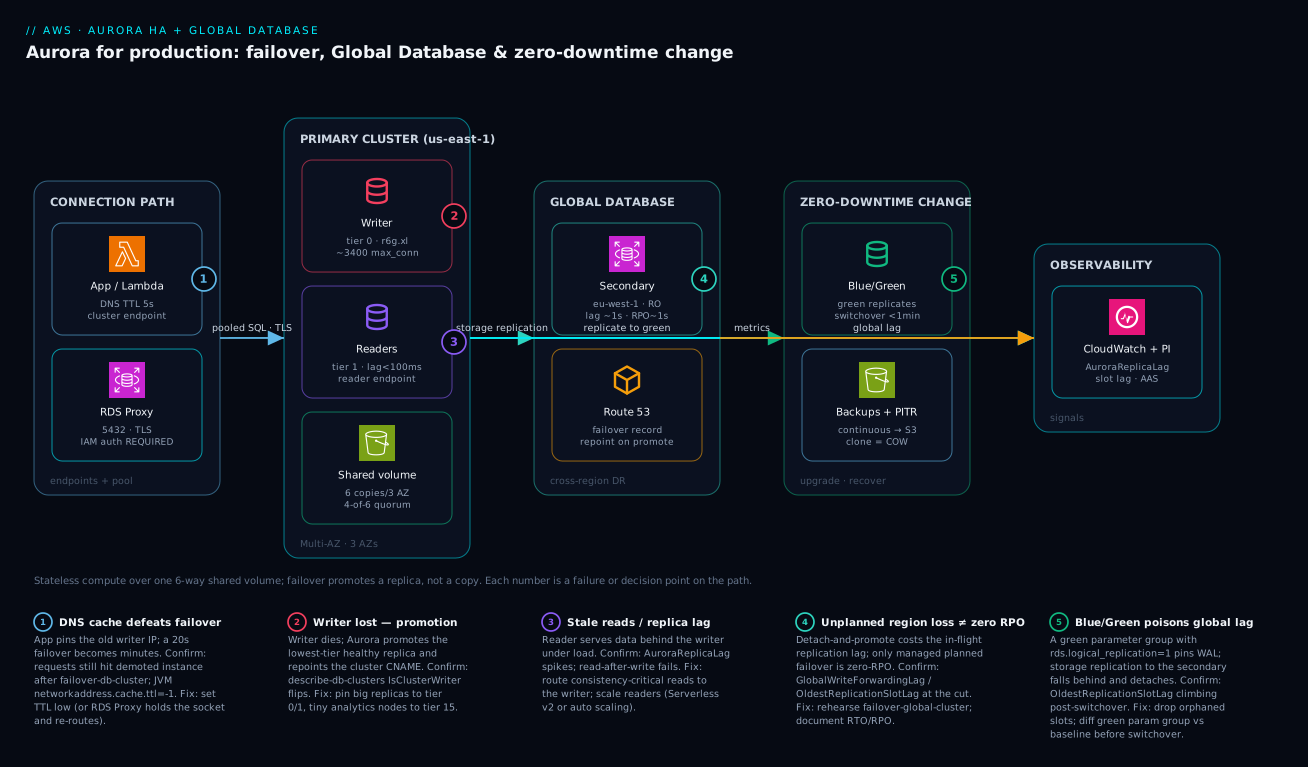
Going deeper
The sections above are the operator’s view. This one is the architect’s view — the internals that explain why Aurora behaves the way it does, and the sharp edges that only surface at scale. None of it is required to run a cluster; all of it is required to design one you can defend in an incident review. (For the engine-level RDS and replica mechanics beneath this, the RDS & Aurora deep dive is the companion — here we stay strictly on HA, Global Database, and zero-downtime.)
The log is the database
The single sentence that explains Aurora’s HA numbers: Aurora ships redo-log records to the storage layer, not modified data pages. A commit is durable once enough storage nodes acknowledge the log; the storage fleet then materialises data pages from that log lazily, in the background. Two consequences fall straight out. First, replicas are cheap and fast — a reader does not replay a full logical stream and rebuild rows; it reads the same shared pages and applies the incoming redo stream to whatever it already has cached, which is why AuroraReplicaLag sits in low milliseconds instead of the seconds-to-minutes of an async RDS read replica. Second, crash recovery is nearly instant: because redo is continuously applied at the storage layer, a restarting instance does not grind through a long recovery log the way a self-managed engine does — recovery is parallel, asynchronous, and mostly already done. Aurora further keeps the buffer pool in a process separate from the database engine (a “survivable page cache”), so an engine restart returns with a warm cache instead of a cold one. Net effect: the instance-restart path that dominates classic failover time barely exists here.
Quorum arithmetic: why 4-of-6 and 3-of-6
Each 10 GB slice of your volume is a protection group stored as six copies — two in each of three AZs. Writes need a 4-of-6 quorum to acknowledge; reads need 3-of-6. Plug in the failure cases and the design intent appears. Lose a whole AZ (two copies gone): four remain, so writes still meet 4/6 — you keep write availability through an AZ failure. Lose an AZ plus one more copy (three gone): three remain, short of the write quorum but still meeting the 3/6 read quorum — you keep read availability through AZ-plus-one. Meanwhile any copy that dies or falls behind is re-created in the background from its healthy peers (segment repair), so the system trends back toward full six-way health with no operator action. This is why “the storage failed” is almost never your incident — and it is also why you cannot tune it: there are no storage knobs, by design.
The reader endpoint only load-balances at connect time
The reader endpoint is a DNS record that hands out a different replica on each resolution — round-robin at connection establishment, not per query. Connection pools break this quietly. A pool opens N long-lived connections, resolves the reader endpoint once (or a handful of times), and then pins those sockets to whichever replicas it happened to land on for the life of the pool. Add a replica via auto scaling and existing pooled clients send it zero traffic, because they never re-resolve. The symptoms are one reader at 90% CPU while a fresh one sits idle, and new capacity that “does not help.” Fixes, in order of robustness: set a maximum connection lifetime on the pool (for example HikariCP maxLifetime, a few minutes) so sockets recycle and re-resolve; use custom endpoints to steer workloads deliberately; or front reads with the RDS Proxy read-only endpoint, which balances at the transaction level rather than at DNS time. This is the reader-side twin of the writer-side DNS-cache trap from the failover section.
Global Database internals: dedicated replication, write forwarding, headless secondaries
Aurora Global Database does not use binlog or logical replication. A purpose-built replication path at the storage layer streams redo to the secondary Region’s storage fleet, offloaded from the database engine — which is why lag stays around a second and the primary barely feels it. Three internals matter for design:
- Write forwarding. A secondary Region is read-only, but you can enable write forwarding so an app connected to a secondary sends its occasional writes up to the primary writer transparently, instead of maintaining a second cross-region connection. You pick a read-consistency level —
eventual,session, orglobal— trading latency for how much of your own (and others’) in-flight writes a subsequent read is guaranteed to see.sessionis the usual sweet spot: you read your own writes without paying for global ordering. - Headless secondary. You can create a secondary cluster with zero instances — just the storage-layer replication target. It costs storage and replication but no compute, and you launch instances only at promotion. The trade is RTO: a headless secondary is cheaper to run but slower to take over, because compute has to spin up before it can serve traffic.
- Planned vs unplanned, from the internals. A managed planned failover coordinates — it confirms the secondary is caught up before flipping roles, hence RPO 0. An unplanned promotion cannot coordinate with a dead Region, so whatever redo was still in flight at the storage layer is simply gone — RPO equals that in-flight lag.
Zero-Downtime Patching (ZDP) for minor versions
Blue/Green is for major upgrades and schema change. For minor engine patches, Aurora attempts Zero-Downtime Patching: it waits for a quiescent moment, holds your client connections and session state for a few seconds, swaps the engine binary underneath them, and resumes — no failover, no reconnect. ZDP is best-effort, and knowing what defeats it is the point: long-running transactions, open cursors, temporary tables, table locks, pending parameter-group changes, and (on Aurora MySQL) in-use binary logging can all block the quiescent window. When ZDP cannot find one within its timeout, it falls back to an ordinary — disruptive — restart. Practical implication: schedule minor patches when long transactions are rare, and never assume ZDP. Treat a clean ZDP as a bonus and design the client to survive a reconnect anyway.
Fast and instant DDL — and when it still rewrites the table
Not every schema change needs Blue/Green. Some DDL is metadata-only: Aurora MySQL’s fast/instant DDL can add a nullable column at the end of a table almost instantly, and PostgreSQL adds a column (with a constant or no default, PG 11+) as a catalog change rather than a full rewrite. Metadata-only DDL is effectively zero-downtime because it neither copies the table nor holds a long lock. The trap is assuming all DDL is cheap: changing a column type, adding a column in the middle of the row (MySQL), or a default that forces a backfill still triggers a full table rebuild that locks and copies — precisely the outage you were trying to avoid. The discipline is expand/contract: add the new shape cheaply, backfill in batches, switch reads and writes, then drop the old shape later — and reach for Blue/Green only when the change genuinely cannot be made additive.
Prove it with fault-injection queries
You do not have to wait for a real failure to test your HA posture. Aurora ships fault-injection SQL that simulates failures at the engine and storage level without harming data, so you can watch how your app, pool, and alarms actually react. On Aurora PostgreSQL:
-- Crash this instance to force a failover (tests promotion + client reconnection)
SELECT aurora_inject_crash('instance');

-- Simulate a read-replica failure for 60s (tests reader-endpoint + app read path)
SELECT aurora_inject_replica_failure(100, 60, 'prod-app-1');
There are companion functions for disk failure and disk congestion (aurora_inject_disk_failure, aurora_inject_disk_congestion), and the Aurora MySQL equivalents are the ALTER SYSTEM CRASH … and ALTER SYSTEM SIMULATE … { DISK FAILURE | READ REPLICA FAILURE | DISK CONGESTION } … FOR INTERVAL … statements. Wire these into a scheduled game day against a clone (never production) and measure the one number that matters: how long real application requests actually fail. If that number is bigger than Aurora’s own failover, the culprit is on your side of the fence — DNS, pool, or retry logic — exactly as the rest of this lesson predicts.
Real-world scenario
A fintech payments platform — call it Northwind Pay — ran a provisioned Aurora PostgreSQL 15 cluster (db.r6g.2xlarge writer, two db.r6g.xlarge readers) behind RDS Proxy in us-east-1, with an Aurora Global Database secondary in eu-west-1 serving European read traffic and standing by for DR. They processed roughly 4,500 transactions per second at peak. Failover game days passed in under eight seconds — RDS Proxy held client sockets through the promotion and the app barely noticed — so the team signed off on the HA posture and moved on.
Then a routine PostgreSQL 15-to-16 Blue/Green upgrade switched over cleanly. The switchover guardrails were green, the test suite passed against the green endpoints, and the cutover took 41 seconds. An hour later, on-call got paged: OldestReplicationSlotLag on the new writer was climbing, and the Global Database secondary’s storage-level replication was falling behind. Within ninety minutes it breached the lag budget and Aurora detached the secondary from the global cluster — wiping out their cross-region DR while the primary was perfectly healthy.
Root cause: the green environment had been created from a cluster parameter group where rds.logical_replication = 1 had been left on from an old Debezium CDC experiment months earlier. Logical replication slots on the new writer pinned WAL; restart_lsn stopped advancing; and physical storage-level replication to the global secondary fell behind because WAL could not be recycled. The Blue/Green health checks never caught it — they validate replication into green (blue→green), not downstream global lag. The team had tested the upgrade thoroughly and still shipped a latent DR outage, because the parameter group was treated as background config rather than part of the change surface.
The fix was to find and drop the orphaned slots, then rebuild the global secondary:
-- Find slots pinning WAL on the writer
SELECT slot_name, active, restart_lsn,
       pg_size_pretty(pg_wal_lsn_diff(pg_current_wal_lsn(), restart_lsn)) AS retained
FROM pg_replication_slots WHERE slot_type = 'logical';

SELECT pg_drop_replication_slot('debezium_orders');
They then wired a CloudWatch alarm on OldestReplicationSlotLag, added a CI check that diffs the green cluster parameter group against an approved baseline before any switchover-blue-green-deployment, and added “verify Global Database lag for 2 hours post-switchover” to the upgrade runbook. What it cost them, and what each fix bought back:
| Phase | Time | Action | Result |
|---|---|---|---|
| T+0 | 14:00 | Blue/Green switchover to PG 16 | Clean cutover, 41 s, guardrails green |
| T+1h | 15:02 | OldestReplicationSlotLag alarm (newly added? no — added after) fires from manual check |
Global secondary lag climbing |
| T+90m | 15:30 | Secondary detaches from global cluster | Cross-region DR lost; primary healthy |
| T+2h | 16:05 | Find + drop orphaned logical slots | WAL recycles; lag drains |
| T+6h | 20:00 | Rebuild global secondary from primary | DR restored |
| +1 week | — | CI param-group diff + slot-lag alarm + runbook step | This class of failure can’t ship again |
Lesson: a Blue/Green that passes its own guardrails can still poison a downstream global cluster. The parameter group is part of your change surface, not background config — diff it, and watch global lag for hours after every switchover.
Advantages and disadvantages
Aurora’s decoupled-storage model both enables cheap, fast HA and introduces failure modes that don’t exist in standard RDS. Weigh it honestly:
| Advantages (why this model helps you) | Disadvantages (why it bites) |
|---|---|
| Failover is a promote, not a copy → seconds, not minutes | The slow part moves to the client (DNS cache, pool) — your problem now |
| Six-way, three-AZ storage with self-healing segments → durability you don’t manage | You can’t tune or see the storage layer; it’s a black box (usually fine) |
| Up to 15 readers over shared storage → cheap horizontal read scaling | Readers can serve stale data under lag; consistency routing is on you |
| Global Database gives ~1 s cross-region replication with low primary impact | Unplanned region failover is not zero-RPO — you lose the in-flight lag |
| Blue/Green ships major upgrades with sub-minute switchover | Param-group drift or non-additive DDL silently breaks it |
| Continuous backup to S3 with no instance penalty; near-instant clones | PITR/clones create new clusters — extra cost and cleanup discipline |
| RDS Proxy flattens reconnect storms and holds sockets through failover | Pinning silently destroys pooling; another component to operate |
| Serverless v2 scales ACUs live with no disconnects | Per-ACU billing can surprise; auto-pause isn’t for prod-critical paths |
The model is right for transactional systems that need fast failover and cheap read scaling without operating replication by hand — payments, ordering, SaaS control planes, regulated workloads with RTO/RPO targets. It bites hardest on teams that hard-code instance endpoints, cache DNS forever, treat parameter groups as background config, or write “fail over to the other region” on a slide and never execute it. Every disadvantage is manageable — but only if you know it exists, which is the entire point of this article.
Hands-on lab
Stand up a minimal Aurora PostgreSQL cluster, observe writer/reader roles, trigger a failover, watch replica lag in CloudWatch, then tear it all down. This uses the smallest sensible classes and deletes everything at the end; run it in a non-production account.
Cost note:
db.t4g.mediumAurora instances are a few rupees per hour each; two of them plus an hour of this lab is well under ₹200, and deleting the cluster stops all charges. There is no free tier for Aurora —db.t4g.mediumis the cheapest sensible class for a lab.
Step 1 — Variables and a subnet group. Assumes you already have a VPC with two private subnets in different AZs and a security group allowing 5432 from your test host.
REGION=us-east-1
CLUSTER=lab-aurora-$RANDOM
SG=sg-xxxxxxxx        # allows 5432 from your bastion/test host
SUBNETS="subnet-aaaa subnet-bbbb"  # two AZs
aws rds create-db-subnet-group --db-subnet-group-name $CLUSTER-sng \
  --db-subnet-group-description "lab" --subnet-ids $SUBNETS --region $REGION
Step 2 — Create the cluster with a Secrets Manager-managed password.
aws rds create-db-cluster --db-cluster-identifier $CLUSTER \
  --engine aurora-postgresql --engine-version 16.4 \
  --master-username labadmin --manage-master-user-password \
  --db-subnet-group-name $CLUSTER-sng --vpc-security-group-ids $SG \
  --backup-retention-period 1 --region $REGION
Expected: a JSON blob with "Status": "creating" and a MasterUserSecret ARN.
Step 3 — Add a writer and a reader in different AZs.
aws rds create-db-instance --db-instance-identifier $CLUSTER-0 \
  --db-cluster-identifier $CLUSTER --engine aurora-postgresql \
  --db-instance-class db.t4g.medium --promotion-tier 0 --region $REGION
aws rds create-db-instance --db-instance-identifier $CLUSTER-1 \
  --db-cluster-identifier $CLUSTER --engine aurora-postgresql \
  --db-instance-class db.t4g.medium --promotion-tier 1 --region $REGION
aws rds wait db-instance-available --db-instance-identifier $CLUSTER-1 --region $REGION
Step 4 — Confirm the topology: who is writer, who is reader.
aws rds describe-db-clusters --db-cluster-identifier $CLUSTER --region $REGION \
  --query 'DBClusters[0].DBClusterMembers[].{id:DBInstanceIdentifier,writer:IsClusterWriter}' \
  --output table
Expected: $CLUSTER-0 shows writer: True, $CLUSTER-1 shows writer: False.
Step 5 — Trigger a failover and time it. In one terminal, start watching the members; in another, fail over.
aws rds failover-db-cluster --db-cluster-identifier $CLUSTER \
  --target-db-instance-identifier $CLUSTER-1 --region $REGION
# Re-run the Step 4 describe a few times; within ~20-35s the writer flips to -1
Expected: after a short window, $CLUSTER-1 becomes writer: True. That flip — with no data copy — is the whole point of Aurora.
Step 6 — Watch replica lag in CloudWatch.
aws cloudwatch get-metric-statistics --namespace AWS/RDS \
  --metric-name AuroraReplicaLag --statistics Maximum --period 60 \
  --start-time $(date -u -d '15 min ago' +%Y-%m-%dT%H:%M:%SZ) \
  --end-time $(date -u +%Y-%m-%dT%H:%M:%SZ) \
  --dimensions Name=DBClusterIdentifier,Value=$CLUSTER --region $REGION
Expected: lag values in the low milliseconds — proof that readers track the writer over shared storage rather than a slow async copy.
Validation checklist. You created a real Aurora cluster, saw the writer/reader split, performed a failover that promoted a replica in seconds with no data copy, and confirmed sub-second replica lag in CloudWatch. What each step proves:
| Step | What you did | What it proves | Real-world analogue |
|---|---|---|---|
| 2–3 | Create cluster + writer + reader in 2 AZs | The compute/storage split is real | Any prod cluster baseline |
| 4 | Inspect IsClusterWriter |
Endpoints map to roles, not instances | Never hard-code instance endpoints |
| 5 | failover-db-cluster |
Promotion is fast (no copy) | The game-day drill |
| 6 | AuroraReplicaLag in CloudWatch |
Readers track over shared storage | Routing consistency-critical reads |
Cleanup (avoid lingering charges).
aws rds delete-db-instance --db-instance-identifier $CLUSTER-1 --skip-final-snapshot --region $REGION
aws rds delete-db-instance --db-instance-identifier $CLUSTER-0 --skip-final-snapshot --region $REGION
aws rds wait db-instance-deleted --db-instance-identifier $CLUSTER-0 --region $REGION
aws rds delete-db-cluster --db-cluster-identifier $CLUSTER --skip-final-snapshot --region $REGION
aws rds delete-db-subnet-group --db-subnet-group-name $CLUSTER-sng --region $REGION
Practice challenges
Work these in order; each builds on the last. Where a command mutates state, run it against a throwaway lab cluster or a clone, never production. Every solution ends with the one-line reason it is the right answer.
1. Beginner — tell the writer from the readers. You inherit a cluster prod-app and have no idea which instance is the writer. Without opening the console, print each member and its role.
<details><summary>Solution</summary>
aws rds describe-db-clusters --db-cluster-identifier prod-app \
  --query 'DBClusters[0].DBClusterMembers[].{id:DBInstanceIdentifier,writer:IsClusterWriter}' \
  --output table
The instance with writer: True is the current writer; everything else is a reader over the same shared storage.
Why: the writer is a role, not a fixed instance — after any failover it moves, so you always read it from the cluster rather than assume it. </details>
2. Beginner–intermediate — stop a tiny node winning the writer role. A reporting replica prod-app-rpt (db.r6g.large) sits at promotion_tier = 1 alongside your db.r6g.2xlarge readers. Reconfigure so it can never be promoted ahead of a production-sized replica.
<details><summary>Solution</summary>
aws rds modify-db-instance --db-instance-identifier prod-app-rpt \
  --promotion-tier 15 --apply-immediately
Keep production-sized readers at tier 0/1; the reporting node at tier 15 is last in line.
Why: Aurora promotes the lowest tier (ties broken by the largest instance), so tier 15 guarantees the small node is only ever a last resort. </details>
3. Intermediate — measure real failover, not the brochure number. Trigger a controlled failover and decide whether your application-observed downtime is Aurora’s fault or your client’s.
<details><summary>Solution</summary>
# Terminal A: issue a trivial write every 0.2s and log failures with timestamps.
# Terminal B: force the failover to the named target.
aws rds failover-db-cluster --db-cluster-identifier prod-app \
  --target-db-instance-identifier prod-app-1
Time the gap in successful writes. Database-side promotion is ~10–35 s; if the app is dark for minutes, the cause is client-side — a JVM with networkaddress.cache.ttl = -1, or a pool with no test-on-borrow.
Why: the only downtime number that matters is the one your users feel, and Aurora has already made the DB side the fast part. </details>
4. Intermediate–advanced — fix a lopsided reader. After enabling auto scaling you notice one reader pinned near 90% CPU while a newly added reader sits idle, though both are healthy. Explain and fix it without touching any query.
<details><summary>Solution</summary>
The reader endpoint load-balances only at DNS resolution / connect time. Your pool opened long-lived connections, resolved once, and stuck to the original readers; the new one gets no traffic. Force sockets to recycle so they re-resolve:
# HikariCP: recycle every 5 min so the reader endpoint is re-resolved
maxLifetime=300000
Or steer traffic with a custom endpoint, or use the RDS Proxy read-only endpoint (which balances per transaction, not per DNS lookup).
Why: round-robin at connect time is invisible to a pool that never reconnects — the cure is to make it reconnect, or to balance at a higher layer. </details>
5. Advanced — a zero-RPO region switch, honestly. Your Global Database prod-app-global (primary us-east-1, secondary eu-west-1) needs a planned region evacuation with no data loss. Perform it, then state the RPO you would get if instead the primary Region had simply vanished.
<details><summary>Solution</summary>
aws rds failover-global-cluster \
  --global-cluster-identifier prod-app-global \
  --target-db-cluster-identifier arn:aws:rds:eu-west-1:123456789012:cluster:prod-app-euw1
This coordinates the switch, so RPO = 0 and the old primary becomes a secondary. Had the Region been gone, you would instead detach-and-promote, and RPO would equal the in-flight replication lag (~1 s typical), not zero.
Why: only a managed planned failover is zero-RPO — conflating it with unplanned promotion is the single most expensive Global Database misconception. </details>
6. Advanced — catch the silent DR killer, then rehearse it. An hour after a clean Blue/Green upgrade, your global secondary is drifting toward detachment. Find the cause, fix it, and set up a fault-injection drill so this class of failure is caught before it ships next time.
<details><summary>Solution</summary>
-- On the new writer: find logical slots pinning WAL (rds.logical_replication left on)
SELECT slot_name, active, restart_lsn,
       pg_size_pretty(pg_wal_lsn_diff(pg_current_wal_lsn(), restart_lsn)) AS retained
FROM pg_replication_slots WHERE slot_type = 'logical';
SELECT pg_drop_replication_slot('debezium_orders');   -- drop the orphan
Then rehearse failure safely on a clone with fault injection:
SELECT aurora_inject_crash('instance'); -- force a failover on demand
Finally add a CI diff of the green cluster parameter group against an approved baseline, plus an alarm on OldestReplicationSlotLag.
Why: Blue/Green validates blue→green replication, not downstream global lag — a pinned WAL slot poisons DR while every guardrail stays green. </details>
Common beginner mistakes
These are misconceptions, not symptoms — the wrong mental models that lead beginners to build fragile Aurora clusters. The troubleshooting table further down catches the symptoms; this section fixes the thinking so you never generate them.
-
“Aurora is highly available, so I don’t need to do anything.” Aurora makes the database side of failure fast and invisible — but that just relocates the slow part to your client. DNS caching, connection-pool validation, and idempotent retries are now your HA surface. Right model: Aurora hands you a seconds-fast failover; whether your users experience seconds or minutes is decided entirely by your connection code.
-
“Multi-AZ and Global Database are two settings for the same thing.” They solve different failures. Multi-AZ (in-cluster replica failover) survives an instance or AZ loss inside one Region and is zero-RPO because storage is shared. Global Database survives a whole Region loss and is only zero-RPO for a managed planned failover. Treating one as a substitute for the other is how teams discover, mid-incident, that they had no cross-region plan — or that “we tested DR” quietly lost data.
-
“More read replicas will fix my slow writes.” Replicas serve reads; they cannot take a single write off the writer. A write-bound cluster scales up (a bigger class or more ACUs) or gets its data model reworked — never out. Adding readers to a write problem just adds cost and more instances to fail over.
-
“The reader endpoint spreads my read load evenly.” It round-robins at connection time only. A pooled app that opens connections once and keeps them will happily peg one replica while another idles. Even read distribution is a property of reconnecting (short connection lifetimes, custom endpoints, or RDS Proxy), not of the reader endpoint by itself.
-
“PITR will roll my cluster back.” Point-in-time recovery always creates a new cluster; it never rewinds the running one. If your runbook does not include repointing the application at the freshly restored cluster, your “recovery” restored data nobody is connected to. (Aurora MySQL’s Backtrack is the only true in-place rewind, and it does not exist on Aurora PostgreSQL.)
-
“The parameter group is just background config.” It is part of your change surface. A green environment created from a parameter group with
rds.logical_replicationleft on will pin WAL and detach your global secondary hours after a “clean” upgrade — with every Blue/Green guardrail green. Diff parameter groups against an approved baseline before every switchover. -
“An instance endpoint is fine, it’s the same database.” Hard-code an instance endpoint and the next failover turns that instance into a reader — your reads keep working while your writes fail against a perfectly healthy cluster. Always talk to the cluster endpoint (or RDS Proxy) for writes; instance endpoints are for diagnostics only.
Common mistakes & troubleshooting
This is the playbook — the part you bookmark. First as a scannable table you can read mid-incident, then the entries that bite hardest with the full confirm-command detail underneath.
| # | Symptom | Root cause | Confirm (exact cmd / console path) | Fix |
|---|---|---|---|---|
| 1 | Writes fail right after a failover; reads fine | App hard-codes an instance endpoint (now a reader) | App config review; describe-db-clusters IsClusterWriter |
Use cluster/proxy endpoint, never instance endpoints |
| 2 | A 20 s failover becomes a multi-minute outage | JVM/app caches DNS for process lifetime | JVM networkaddress.cache.ttl = -1; old IP in connections |
Set DNS TTL low (30–60 s); prefer RDS Proxy |
| 3 | New writer CPU spikes and falls over post-failover | Reconnect storm — thousands reconnect at once | DatabaseConnections flatline then flood during drill |
Put RDS Proxy in front; it paces reconnects |
| 4 | After failover a db.r6g.large analytics node is the writer |
Tiny reader left at tier 0/1 | describe-db-instances PromotionTier + class |
Pin big replicas tier 0/1; analytics tier 15 |
| 5 | Reads return stale data under load | Reader endpoint hit a lagging replica | AuroraReplicaLag spiking; read-after-write fails |
Route consistency-critical reads to writer; scale readers |
| 6 | Region-loss DR “lost data” though it was tested | Assumed unplanned failover is zero-RPO | It never was — only planned is | Use failover-global-cluster for drills; document RPO |
| 7 | Global secondary detaches hours after an upgrade | Green param group had rds.logical_replication=1 |
OldestReplicationSlotLag rising; orphaned slots |
Drop slots; diff green param group vs baseline pre-switch |
| 8 | Blue/Green switchover aborts | Replication unhealthy or green lag too high | switchover event status; replica lag |
Resolve lag; don’t bypass guardrails; retry |
| 9 | RDS Proxy errors connection_borrow_timeout |
Pool saturated; all backends busy | DatabaseConnectionsBorrowLatency climbing |
Raise max_connections_percent; shorten timeout to fail fast |
| 10 | RDS Proxy gives no pooling benefit | Session pinning (1:1 backend per client) | DatabaseConnectionsCurrentlySessionPinned ≈ ClientConnections |
ALTER ROLE SET search_path; disable client prepared-stmt cache |
| 11 | IAM auth rejected on connect | Token expired or missing rds-db:connect |
Fresh generate-db-auth-token test over TLS |
Scope IAM to resource id + DB user; GRANT rds_iam; refresh (15-min TTL) |
| 12 | PITR “didn’t restore my cluster” — original unchanged | PITR always makes a new cluster | describe-db-clusters shows a new -recovered cluster |
Repoint app to the new cluster; that’s by design |
| 13 | Single-instance cluster has a long outage on failure | No replica to promote → Aurora rebuilds | Only one member in describe-db-clusters |
Always run ≥1 replica in another AZ |
| 14 | max_connections exhausted (remaining connection slots reserved) |
Connection leak / no pooling | DatabaseConnections near max_connections |
RDS Proxy; pooled drivers; raise param within headroom |
The expanded form, with the full reasoning for the entries that bite hardest:
1. Writes fail immediately after a failover; reads still work.
Root cause: The application connects to an instance endpoint that was the writer before failover and is now a reader. Reads succeed, writes hit a read-only node and error.
Confirm: Review the connection string for an …-0.xxxx.us-east-1.rds.amazonaws.com instance host; aws rds describe-db-clusters --query 'DBClusters[0].DBClusterMembers[].{id:DBInstanceIdentifier,writer:IsClusterWriter}' shows that instance is no longer the writer.
Fix: Point writes at the cluster endpoint (or RDS Proxy writer endpoint), reads at the reader endpoint. Instance endpoints are for diagnostics only.
2. A failover that the database completes in 20 seconds turns into a multi-minute application outage.
Root cause: DNS caching — most often a JVM with networkaddress.cache.ttl = -1 caching the resolved IP for the process lifetime, so the app keeps connecting to the demoted instance’s IP.
Confirm: Check the JVM security property; observe the app still opening connections to the old writer’s IP after the CNAME has moved.
Fix: Set networkaddress.cache.ttl to a low value (30–60 s). Better, front the cluster with RDS Proxy, which holds the client socket and re-routes it through the failover so the app never re-resolves DNS at all.
4. After a failover, a tiny analytics node is now the writer and is falling over under production write load.
Root cause: A small replica (e.g. db.r6g.large used for reporting) was left at promotion tier 0 or 1, so Aurora promoted it.
Confirm: aws rds describe-db-instances --query 'DBInstances[?DBClusterIdentifier==\prod-app`].{id:DBInstanceIdentifier,tier:PromotionTier,class:DBInstanceClass}’ --output table`.
Fix: Set promotion tiers deliberately — production-sized replicas at tier 0/1, small/analytics nodes at tier 15 so they are never first in line.
6. A region-loss DR exercise “lost a few seconds of data” even though Global Database was configured and tested.
Root cause: The team assumed Aurora Global Database is zero-RPO for all failovers. It is zero-RPO only for managed planned failover; an unplanned detach-and-promote loses whatever replication lag existed at the moment of failure.
Confirm: The DR runbook used detach-and-promote; cross-region lag at the cut was non-zero (OldestReplicationSlotLag / replication-lag metric).
Fix: For drills and region evacuations use failover-global-cluster (zero-RPO, preserves topology). Document that an unexpected region loss has RPO equal to the in-flight lag, and design the application to tolerate it (idempotency, reconciliation).
7. The Global Database secondary detaches an hour or two after a clean Blue/Green upgrade.
Root cause: The green cluster parameter group had rds.logical_replication = 1 left on; logical slots on the new writer pinned WAL, restart_lsn stalled, and storage-level replication to the secondary fell behind until it breached the lag budget and detached.
Confirm: OldestReplicationSlotLag climbing on the new writer; SELECT slot_name, restart_lsn FROM pg_replication_slots WHERE slot_type='logical'; shows orphaned slots.
Fix: SELECT pg_drop_replication_slot('<name>'); for the orphans, rebuild the global secondary, and add a CI check that diffs the green parameter group against an approved baseline before any switchover.
10. RDS Proxy is deployed but you see no pooling benefit and connection counts on the DB match client counts.
Root cause: Session pinning — a SET statement (commonly SET search_path), a temp table, a session advisory lock, or a prepared-statement pattern forces the proxy to dedicate one backend to one client 1:1.
Confirm: DatabaseConnectionsCurrentlySessionPinned trends toward ClientConnections; the proxy logs name the pinning reason.
Fix: Move SET search_path into the role default (ALTER ROLE app SET search_path = …), avoid session-scoped temp objects where possible, and set prepareThreshold=0 (or disable client-side prepared-statement caching) so statements don’t pin a backend.
Best practices
- Talk to endpoints, never instances. Writes to the cluster (or RDS Proxy writer) endpoint, reads to the reader endpoint. An instance endpoint in app config is a post-failover outage waiting to happen.
- Run at least one replica in another AZ. A single-instance cluster has no promotion target — a writer failure forces Aurora to rebuild an instance, which is the slow path you bought Aurora to avoid.
- Set promotion tiers deliberately. Production-sized replicas at tier 0/1; tiny analytics nodes at tier 15. Never let a reporting node get promoted into the writer role.
- Put RDS Proxy in front of the writer for high-concurrency and serverless workloads, with TLS and IAM auth. It is the single biggest lever on application-observed failover time.
- Tame the client side of failover. Low DNS TTL, connection-pool validation (test-on-borrow), and idempotent retries. The database fails over in seconds; your client should too.
- Encrypt with a customer-managed KMS key and enable deletion protection. You cannot encrypt an unencrypted cluster in place later — get it right at creation. See KMS Encryption Deep Dive.
- Keep backup retention ≥ 7 days and rehearse PITR by restoring to a throwaway cluster — PITR always makes a new cluster, so the runbook must include repointing the app.
- Treat the parameter group as part of your change surface. Diff the green cluster parameter group against an approved baseline before any Blue/Green switchover; param drift poisons downstream replication.
- Keep schema changes backward-compatible until switchover. Additive only (new columns, new tables) on a Blue/Green green; do destructive DDL with expand/contract after the cutover.
- Configure Global Database only when you have a real cross-region RTO/RPO requirement, and write the planned-vs-unplanned distinction into the runbook explicitly.
- Alert on leading indicators, not “DB down.”
AuroraReplicaLag,OldestReplicationSlotLag, writerCPUUtilization,DatabaseConnections, and RDS Proxy borrow latency catch problems before customers do. - Run an actual failover game day every quarter. A DR plan you have never executed is a hypothesis, not a plan — and the number it produces (app-observed downtime) is the only one that matters.
The alarms worth wiring before the next incident — leading indicators, with starting thresholds:
| Alert on | Metric | Threshold (starting point) | Why it’s leading |
|---|---|---|---|
| Replica lag | AuroraReplicaLag |
> 1 s for 5 min | Stale reads / failover-readiness risk before users feel it |
| Slot lag (WAL pinned) | OldestReplicationSlotLag |
> 1 GB rising | Predicts global-secondary detach |
| Writer saturation | CPUUtilization (writer) |
> 80% for 10 min | Overload before throttling/timeouts |
| Connection pressure | DatabaseConnections |
> 80% of max_connections |
Predicts remaining slots reserved errors |
| Proxy borrow latency | DatabaseConnectionsBorrowLatency |
climbing / > 100 ms | Pool saturation before borrow timeouts |
| Proxy pinning | DatabaseConnectionsCurrentlySessionPinned |
≈ ClientConnections |
Pooling silently defeated |
| Free storage / local | FreeLocalStorage |
< 10% | Temp/sort spill exhaustion on an instance |
Security notes
- IAM database authentication over static passwords. Enable
iam_database_authentication_enabledand have the app fetch a 15-minute token viagenerate-db-auth-token. Scope therds-db:connectIAM action to the specific resource id and DB user, andGRANT rds_iamto the role. See IAM Least Privilege & Permission Boundaries. - Manage the master credential in Secrets Manager.
manage_master_user_passwordgenerates and rotates it; it never lands in Terraform state. Pair with automatic rotation — Secrets Manager Automatic Rotation for RDS. - Encrypt at rest with a customer-managed KMS key. Decide on the CMK at creation — you cannot encrypt an existing unencrypted cluster in place. The same key (or a multi-region key) must exist in every Global Database Region.
- Force TLS in transit.
require_tlson RDS Proxy andrds.force_ssl/require_secure_transportin the parameter group; useverify-fullso clients validate the server certificate, not just encrypt. - Isolate the database tier in private subnets. No public accessibility; security groups allow 5432/3306 only from the app/proxy tier. Reach it via a bastion or SSM, never a public endpoint. Background in VPC Deep Dive.
- Least-privilege for the proxy and for cross-region. The RDS Proxy role needs only
GetSecretValue+kms:Decrypton its secret/key; cross-region replication needs the CMK usable in the secondary Region. - Audit and protect against deletion. Enable
deletion_protection, export the engine logs to CloudWatch (audit/pgaudit), and keep snapshots immutable where compliance requires it — see Cross-Account RDS/EBS Snapshot Copy with AWS Backup.
The security controls mapped to what they defend and what else they prevent:
| Control | Mechanism | Secures against | Also prevents |
|---|---|---|---|
| IAM DB auth | rds-db:connect + rds_iam |
Static-password leakage | Long-lived creds in app config |
| Secrets Manager managed password | manage_master_user_password |
Passwords in Terraform state | Manual rotation breaking the app |
| KMS CMK at rest | storage_encrypted + kms_key_id |
Disk/snapshot data theft | Unencrypted cross-region copies |
TLS verify-full |
require_tls + cert validation |
MITM / downgrade | Connecting to a spoofed endpoint |
| Private subnets + SG | No public access, 5432 from app only | Direct internet exposure | Lateral movement to the DB |
| Deletion protection | deletion_protection |
Accidental cluster delete | Malicious destroy in one call |
| Least-priv proxy role | Scoped GetSecretValue/kms:Decrypt |
Over-broad secret access | Secret exfiltration via the proxy role |
Cost & sizing
The bill drivers and how they interact with the HA/DR design:
- Instances dominate. You pay per instance-hour for the writer and every replica, regardless of read load. A two-reader HA setup is three instances; right-size the class to measured CPU/memory, then add the minimum replicas that meet your failover and read-scaling needs.
- Storage and I/O. Aurora bills storage per GB-month and (on the standard configuration) I/O per million requests; the I/O-Optimized configuration trades a higher instance/storage rate for no per-I/O charge and is cheaper above roughly 25% of spend going to I/O.
- Global Database doubles your footprint. A secondary Region is a full cluster plus cross-region data-transfer charges. If it only serves DR (not local reads), consider a smaller secondary and accept a slightly slower RTO while it scales up on promotion.
- Backups and snapshots. Backup storage up to the cluster size is free; beyond retention or for manual snapshots you pay per GB-month. Clones are near-free until they diverge.
- Serverless v2 is billed per ACU-second — excellent for spiky/dev workloads that scale toward zero, but a steady high-ACU workload can cost more than an equivalent provisioned class. Measure before defaulting to it for prod baselines.
A rough monthly picture for a small production cluster in Mumbai (ap-south-1, figures indicative): a db.r6g.xlarge writer plus one db.r6g.xlarge reader runs on the order of ₹70,000–95,000/month before storage and I/O; adding a Global Database secondary in another Region roughly doubles the instance line plus transfer. The cost drivers and what each buys:
| Cost driver | What you pay for | Rough relative cost | What it buys | Watch-out |
|---|---|---|---|---|
| Writer instance | 1× provisioned class, 24×7 | Baseline | Write throughput + failover anchor | Over-sizing “just in case” |
| Each replica | Per-instance-hour | + per reader | Read scale + failover target | Idle readers at low traffic |
| Storage | Per GB-month | Usually small vs compute | Durable 6-way volume | Grows with data + bloat |
| I/O (standard config) | Per million requests | Variable | Pay-per-use I/O | Spiky I/O → bill spikes (consider I/O-Optimized) |
| Global Database secondary | Full secondary cluster + transfer | ~2× instances + transfer | Cross-region DR + local reads | DR-only? size it smaller |
| Serverless v2 | Per ACU-second | Scales with load | Spiky/dev scale-to-near-zero | Steady high ACU can exceed provisioned |
| Backups beyond retention / snapshots | Per GB-month | Small | Long-term recovery | Forgotten manual snapshots accrue |
| RDS Proxy | Per vCPU-hour of the DB it fronts | Small add-on | Pooling + failover broker | Worth it for serverless/high-concurrency |
| Performance Insights (long retention) | Free 7 days, paid beyond | Small | Wait-event + top-SQL history | Long-retention tier is per-vCPU |
| Blue/Green green environment | Full duplicate while it runs | ~2× briefly | Zero-downtime upgrade | Delete green after validating switchover |
Interview & exam questions
1. Why is Aurora failover faster than standard RDS Multi-AZ failover? In standard RDS the Multi-AZ standby is a second full physical copy; failover promotes it and repoints DNS, taking a minute-plus. In Aurora, the writer and readers are stateless compute over the same six-way shared storage volume, so failover just promotes an existing replica that already sees the data — no copy or catch-up — completing in seconds.
2. A user reports writes failing right after a failover while reads still work. What happened? The application is connecting to an instance endpoint that was the writer and is now a reader after the failover; reads succeed but writes hit a read-only node. Fix: always use the cluster endpoint (or RDS Proxy writer endpoint) for writes — instance endpoints are diagnostics-only.
3. What does promotion_tier do and how do you set it? It’s a 0–15 priority (lowest wins, ties broken by largest instance) that decides which replica Aurora promotes on writer failure. Pin production-sized replicas to tier 0/1 and tiny analytics nodes to tier 15 so a small node is never promoted into the writer role.
4. How does RDS Proxy reduce application-observed failover time? It maintains a warm connection pool and, during failover, holds the client sockets open and routes them to the newly promoted writer, so the application doesn’t re-resolve DNS or re-establish connections and doesn’t create a reconnect storm against the fresh writer. It’s the single biggest lever on observed failover time for high-concurrency workloads.
5. Is Aurora Global Database zero-RPO? Only for a managed planned failover (failover-global-cluster), which coordinates so no data is lost and demotes the old primary to a secondary. An unplanned detach-and-promote (when the primary Region is gone) has RPO equal to the in-flight replication lag at the moment of failure — typically around one second, but not zero.
6. When do you choose Serverless v2 over provisioned replicas with Auto Scaling? Serverless v2 scales an instance vertically in fine-grained ACUs with no disconnects — ideal for spiky/unpredictable load and dev/test that should scale toward zero. Provisioned + Auto Scaling adds whole instances on a target metric — better for steady/diurnal load where you want predictable cost. They mix: a provisioned writer with Serverless v2 readers is common.
7. What is RDS Proxy session pinning and why does it matter? Certain session state — SET statements, temp tables, session advisory locks, some prepared-statement patterns — forces the proxy to dedicate one backend connection to one client 1:1, silently defeating the pooling you deployed it for. Confirm via DatabaseConnectionsCurrentlySessionPinned; fix by moving SET search_path to the role default and disabling client-side prepared-statement caching.
8. How does Blue/Green achieve a zero-downtime major version upgrade? It creates a full green cluster replicating from blue, you upgrade and validate green against real data, then switch over — endpoints repoint to green in under a minute with guardrails that abort if replication is unhealthy or lag is high. The old blue is kept (renamed) for rollback by redeploying.
9. Why must Blue/Green schema changes stay backward-compatible until switchover? Blue continues to take writes that replicate into green during the window. A non-additive change on green (drop/rename a column, change a type) conflicts with incoming changes and breaks replication from blue. Keep changes additive (new columns/tables) and do destructive DDL with expand/contract after the cutover.
10. Does scaling out (adding replicas) help an overloaded writer? No — replicas serve reads; they don’t offload writes. For write overload you scale the writer up (bigger class or more ACUs) or shard/redesign. Adding replicas helps only the read path (and provides failover targets).
11. What does point-in-time recovery produce, and why does that matter operationally? PITR always creates a new cluster restored to the chosen second — it never overwrites the running one. Operationally, your recovery runbook must include repointing the application to the new cluster; people are surprised their original cluster is unchanged.
12. How would you verify your HA posture is real, not theoretical? Run a game day: in staging, failover-db-cluster, watch AuroraReplicaLag and DatabaseConnections in CloudWatch, and time how long application requests actually fail. If that number is more than a few seconds, the problem is the client (DNS caching or pool config), not Aurora.
These map primarily to AWS Certified Solutions Architect – Professional (SAP-C02) (resilient, multi-region architectures; RTO/RPO) and AWS Certified Database – Specialty (DBS-C01) (Aurora internals, failover, Global Database, Blue/Green). A compact cert mapping for revision:
| Question theme | Primary cert | Objective area |
|---|---|---|
| Storage architecture, failover speed | DBS-C01 | Aurora design & resiliency |
| Endpoints, promotion tiers | DBS-C01 | Operations & failover |
| Global Database planned vs unplanned | SAP-C02 / DBS-C01 | Multi-region DR; RTO/RPO |
| RDS Proxy pooling & failover | DBS-C01 | Connection management |
| Blue/Green upgrades & DDL safety | DBS-C01 | Migration & change |
| Serverless v2 vs provisioned scaling | DBS-C01 | Capacity & cost |
| Verifying DR with game days | SAP-C02 | Operational excellence |
Quick check
- After a failover, your application’s writes fail but reads succeed. What’s the most likely misconfiguration, and how do you confirm it?
- True or false: an unplanned Aurora Global Database region failover is zero-RPO.
- You deployed RDS Proxy but see no pooling benefit — DB connection count matches client count. What’s happening and how do you fix it?
- A small reporting replica was promoted to writer and is falling over. What setting controls this, and what value should the reporting node have?
- Your PITR “didn’t work” — the original cluster is unchanged. What actually happened?
Answers
- The app is connecting to an instance endpoint that was the writer and is now a reader after failover (reads work, writes hit a read-only node). Confirm with
aws rds describe-db-clusters --query 'DBClusters[0].DBClusterMembers[].{id:DBInstanceIdentifier,writer:IsClusterWriter}'. Fix: use the cluster endpoint (or RDS Proxy writer endpoint) for writes. - False. Only a managed planned failover (
failover-global-cluster) is zero-RPO. An unplanned detach-and-promote loses the in-flight replication lag (~1 s typical), because the primary Region is gone and that lag was never replicated. - Session pinning — a
SETstatement, temp table, session lock, or prepared-statement pattern dedicates one backend per client 1:1. Confirm viaDatabaseConnectionsCurrentlySessionPinned≈ClientConnections. Fix: moveSET search_pathto the role default (ALTER ROLE … SET search_path) and disable client-side prepared-statement caching. promotion_tiercontrols it (0–15, lowest wins). The reporting node should be at tier 15 so it’s never promoted; pin production-sized replicas at tier 0/1.- PITR always creates a new cluster restored to the chosen time — it never overwrites the running one. The restore succeeded into a new
-recoveredcluster; you must repoint the application to it. That behaviour is by design and is exactly what you want when recovering from a bad migration.
Glossary
- Cluster (writer) endpoint — the DNS name that always resolves to the current writer; repointed automatically on failover. Use it for all writes.
- Reader endpoint — DNS that round-robins read-only connections across available replicas; can serve slightly stale data under replica lag.
- Custom endpoint — a named endpoint targeting a chosen subset of instances (e.g. analytics replicas), separating reporting from OLTP reads.
- Instance endpoint — the DNS for one specific instance; for diagnostics only — hard-coding it in app config causes post-failover write failures.
- Promotion tier — a per-instance value 0–15 (lowest wins, ties broken by largest size) deciding which replica Aurora promotes on writer failure.
- Shared storage volume — Aurora’s distributed storage replicated six ways across three AZs; writes acknowledge on a 4-of-6 quorum, reads on 3-of-6, with self-healing segment repair.
- AuroraReplicaLag — the CloudWatch metric (milliseconds) showing how far a reader trails the writer; the single most useful HA health signal.
- RDS Proxy — a managed connection pool and failover broker that multiplexes client connections, enforces IAM auth/TLS, and holds sockets through failover.
- Session pinning — when session state forces RDS Proxy to dedicate one backend to one client 1:1, defeating pooling.
- Aurora Capacity Unit (ACU) — the Serverless v2 capacity unit (~2 GiB memory plus matched CPU/IO); capacity scales in 0.5-ACU steps without disconnecting clients.
- Aurora Serverless v2 — instances (class
db.serverless) that scale capacity vertically and live across an ACU range; can pause near-idle clusters. - Aurora Global Database — cross-region replication (up to 5 secondaries) over the storage layer, ~1 s lag, with managed planned (zero-RPO) and unplanned (RPO = lag) failover modes.
- Managed planned failover —
failover-global-cluster; a coordinated, zero-RPO switch to a secondary Region that demotes the old primary to a secondary. - Unplanned failover (detach & promote) — removing a secondary from the global cluster and promoting it when the primary Region is gone; RPO equals the replication lag at failure.
- RDS Blue/Green Deployment — a synchronized green copy of the cluster for safe engine upgrades and DDL; switchover repoints endpoints in under a minute with guardrails.
- Point-in-time recovery (PITR) — restoring to any second within the backup window; always creates a new cluster, never overwriting the running one.
- Clone (copy-on-write) — a near-instant fork of the storage volume that initially consumes no extra storage, diverging only as pages are written; for cheap testing against real data.
OldestReplicationSlotLag— the metric showing the most-behind replication slot; rising values warn that pinned WAL may detach a global secondary.- Zero-Downtime Patching (ZDP) — Aurora’s best-effort mechanism for applying minor engine patches without dropping connections: it holds sessions through a brief pause, swaps the binary, and resumes; long transactions, open cursors, temp tables, or table locks make it fall back to a disruptive restart.
- Protection group (storage segment) — a 10 GB slice of the Aurora volume, stored as six copies (two per AZ across three AZs) and repaired independently in the background.
- Write / read quorum — Aurora acknowledges a write on 4 of 6 copies and a read on 3 of 6, which keeps writes available through an AZ loss and reads available through AZ-plus-one.
- Write forwarding — a Global Database feature letting an app on a read-only secondary Region forward its writes to the primary writer, with a chosen read-consistency level (
eventual,session, orglobal). - Headless secondary — a Global Database secondary cluster with no instances (storage replication only); cheaper to run, slower to promote because compute must launch first.
- Fast / instant DDL — schema changes Aurora applies as a metadata-only catalog change (for example adding a nullable column) with no full-table rewrite or long lock; contrast with type changes that still rebuild the table.
- Fault-injection query — Aurora SQL (
aurora_inject_crash,aurora_inject_replica_failure, and the Aurora MySQLALTER SYSTEM SIMULATE …forms) that simulates instance, replica, or disk failures to rehearse HA without damaging data. - Backtrack — an Aurora MySQL-only feature that rewinds a cluster in place to a prior second without creating a new cluster; Aurora PostgreSQL has no in-place equivalent (use PITR or a clone).
- Survivable page cache — Aurora keeps the buffer pool in a process separate from the database engine, so an engine restart returns with a warm cache, contributing to near-instant recovery.
Next steps
You can now design an Aurora cluster whose failures stay invisible to users — the right endpoints, promotion tiers, cross-region story, and change runbooks. Build outward:
- Next: RDS Proxy: Connection Pooling, Failover & IAM Auth for Serverless — go deep on the connection path that flattens reconnect storms.
- Related: RDS & Aurora Blue/Green Deployments: Major-Version Upgrades with Zero Downtime — the full change-management mechanics behind the upgrade section here.
- Related: Amazon RDS & Aurora Deep Dive: Engines, Multi-AZ, Replicas, Backups — the foundational engine-and-replica concepts this builds on.
- Related: Route 53: DNS Records, Routing Policies & Health Checks — the failover-routing records that automate the cross-region cutover.
- Related: Enterprise Architecture on AWS: Multi-Region Patterns — where Aurora Global Database fits in a full active-active or pilot-light design.
- Related: High Availability vs Disaster Recovery: RTO & RPO — the vocabulary and targets that justify every choice above.