In a nutshell
Level: Intermediate · Time: ~45 min
Think of Amazon RDS as renting a fully serviced apartment instead of owning a house. You still decorate inside — your tables, queries, indexes, and users are entirely yours — but the landlord handles the plumbing, the roof, and the fire alarms: AWS provisions the server, patches it, backs it up, and swaps in a spare if the building’s power fails. Amazon Aurora is the same idea taken further: a purpose-built “smart building” where the basement is a shared, self-repairing vault that every apartment plugs into, so adding another apartment (a read replica) copies nothing and takes seconds. That is the whole lesson in one sentence — RDS gives you a managed database engine; Aurora re-engineers the storage underneath it.
Two beginner traps are worth naming before any of the detail, because almost everyone gets them backwards. Multi-AZ is a standby generator: it kicks in automatically the instant your primary fails and loses no data, but it gives you no extra capacity on a normal day. Read replicas are extra checkout lanes: they let you serve far more read traffic, but they will not save you if the primary collapses (a replica does not promote itself, and promoting it by hand can lose the last few seconds of writes). One is for availability; the other is for scale; they are different tools, and the classic outage is reaching for the wrong one. Keep the generator-vs-lanes picture in your head and the rest of this lesson clicks into place.
If you are brand new, read the sections top to bottom — every term is defined as it appears. If you already run RDS in production, skim to Going deeper, where the connection-pooling, storage-internals, global-write, and analytics pieces live that the rest of the lesson deliberately keeps out of the beginner path.
Almost every serious outage, surprise bill, and “the database is slow” ticket I have chased on AWS eventually lands on a managed-database decision someone made without quite understanding it. A team turns on a read replica expecting high availability and is shocked when a writer failure takes the application down anyway. A finance review uncovers a db.r6g.4xlarge Multi-AZ instance serving a workload a quarter that size. A “harmless” engine upgrade locks the writer for twenty minutes because nobody knew about Blue/Green. A restored snapshot comes up with the wrong parameter group and the application silently misbehaves for a week. Relational Database Service (RDS) and Aurora hide an enormous amount of operational machinery behind a friendly Create database button — and the gap between clicking that button and actually understanding it is exactly where these failures live.
This is the deep dive that closes that gap. Amazon RDS is AWS’s managed relational database service: you choose an engine (MySQL, PostgreSQL, MariaDB, Oracle, or SQL Server), an instance class, and storage, and AWS runs the undifferentiated heavy lifting — provisioning, patching, backups, failover, and monitoring — while you keep full SQL-level control of your data. Amazon Aurora is AWS’s cloud-native reimplementation of MySQL and PostgreSQL that keeps the same wire protocol and tools but replaces the storage and replication engine with a distributed, self-healing, six-way-replicated cluster volume that delivers much higher performance and availability. By the end of this lesson you will know every engine and instance family, exactly how storage and storage autoscaling work, the difference between Multi-AZ for high availability and read replicas for read scaling (the single most-misunderstood pair in the service), how automated backups, point-in-time recovery and snapshots actually behave, what parameter and option groups do, the full security surface, and the Aurora-specific concepts — cluster volume, the writer/reader/custom endpoints, Aurora replicas, Serverless v2, and Global Database. Every concept comes with the real aws CLI to drive it.
Learning objectives
By the end of this lesson you will be able to:
- Choose the right RDS engine and instance class (Standard, Memory-optimised, Burstable; Intel vs Graviton) for a workload, and configure gp3/io1/io2/magnetic storage with storage autoscaling.
- Explain — precisely, the way an interviewer probes — the difference between Multi-AZ deployments (high availability via a standby) and read replicas (read scaling), including Multi-AZ instance vs Multi-AZ cluster, and when each fails over.
- Configure automated backups (retention, backup window), perform point-in-time recovery (PITR), take and copy/share manual snapshots, and reason about RTO/RPO.
- Use DB parameter groups and option groups correctly, including static vs dynamic parameters and the reboot rule.
- Apply RDS’s full security surface: encryption at rest (KMS) and in transit (TLS), IAM database authentication, Secrets Manager integration, security groups, and DB subnet groups.
- Describe the Aurora architecture end to end — the shared cluster volume, writer/reader/custom endpoints, Aurora replicas, Serverless v2, and Aurora Global Database — and choose Aurora over RDS when it pays off.
Prerequisites & where this fits
You should be comfortable with core networking — a VPC, subnets, and security groups — because every production database lives in private subnets behind a DB subnet group and a security group; if those terms are fuzzy, read the VPC deep dive first. Basic SQL familiarity and a sense of what KMS and IAM do will help, but every term is defined as we go. This lesson sits in the Databases module of the AWS Zero-to-Hero course, immediately after the storage deep dives — RDS and Aurora are, ultimately, a very opinionated way to put storage and compute together for relational data. It is the foundation for the two advanced database lessons it links at the end: zero-downtime upgrades with Blue/Green Deployments and Aurora high availability and Global Database.
Core concepts
Managed vs self-managed (what RDS actually buys you). You could run MySQL on an EC2 instance yourself: you would patch the OS and the engine, script your own backups, build your own replication and failover, and wear the pager when any of it breaks. RDS takes all of that operational surface and makes it AWS’s problem. You still own the data tier — your schema, queries, indexes, users, and the engine-level configuration — but AWS owns the operational tier: the host, the storage, automated backups, patching, monitoring hooks, and the failover machinery. The mental model to carry: RDS is a managed engine on managed infrastructure; you keep SQL-level control and give up host-level control. That trade is almost always worth it, and the few cases where it is not (a feature RDS does not expose, an OS-level extension, a need for superuser) are the cases that push people to EC2-hosted databases or to specialised services.
Instance + storage + network = a DB instance. An RDS DB instance is the unit you create and pay for. It is the bundle of a compute instance class (vCPU and memory), an attached storage volume (type, size, and provisioned performance), and a network placement (a VPC, a DB subnet group spanning at least two Availability Zones, and a security group). On RDS the instance and its storage are coupled — the instance reads and writes its own EBS-style volume. (Aurora breaks this coupling, as we will see — that is the whole point of Aurora.)
Availability Zones, and why two is the magic number. A Region (e.g. ap-south-1, Mumbai) is a geographic area; an Availability Zone (AZ) is one or more physically separate data centres within that region, with independent power, cooling, and networking. AZs are close enough for synchronous replication but far enough that one failing does not take its neighbours down. Almost everything in RDS high availability is built on placing copies of your data in different AZs, which is why a DB subnet group must contain subnets in at least two AZs before you can even create a Multi-AZ deployment.
The two axes everyone confuses: availability vs scale. This is the load-bearing idea of the whole lesson, so internalise it now. High availability answers “if the primary dies, how fast do I get a working writer back, with no data loss?” — and the RDS answer is Multi-AZ. Read scaling answers “I have more read traffic than one instance can serve; how do I add read capacity?” — and the answer is read replicas. They are different features for different problems, they can be combined, and confusing them is the classic interview trap and the classic production mistake. A read replica is not an HA solution (its promotion is manual and lossy); a Multi-AZ standby is not a read-scaling solution (on RDS the standby serves no traffic). We will hammer this distinction in its own section.
RTO and RPO (the vocabulary of recovery). RTO (Recovery Time Objective) is how long you can tolerate being down; RPO (Recovery Point Objective) is how much data you can tolerate losing, measured in time. Every backup and HA choice in this lesson is really a point on the RTO/RPO plane: Multi-AZ gives a low-RTO, zero-RPO failover; PITR gives a higher RTO but lets you rewind to any second; a cross-region snapshot copy gives disaster-recovery coverage at a higher RTO/RPO. Keep these two letters in mind whenever a feature claims to protect you.
RDS engines: the five (well, six) you can run
RDS runs five database engines. Aurora is offered as a sixth choice in the same console flow but is architecturally its own thing (covered in depth later).
| Engine | What it is | Licensing | Notable on RDS | Typical use |
|---|---|---|---|---|
| MySQL | Open-source RDBMS | Open source (free) | Versions 8.0+; broad ecosystem | General-purpose web/OLTP, LAMP apps |
| PostgreSQL | Open-source RDBMS | Open source (free) | Rich extensions (PostGIS, pg_stat_statements); strong SQL standard |
OLTP, geospatial, analytics-adjacent, anything needing advanced SQL |
| MariaDB | MySQL fork | Open source (free) | MySQL-compatible; some extra storage engines | MySQL workloads preferring the MariaDB lineage |
| Oracle | Commercial RDBMS | BYOL or License Included | SE2 and EE; option groups for OEM, TDE, etc. | Lift-and-shift of existing Oracle estates |
| SQL Server | Commercial RDBMS (Microsoft) | License Included (or BYOL via some paths) | Express/Web/Standard/Enterprise editions | .NET shops, lift-and-shift of SQL Server |
| Aurora (MySQL / PostgreSQL-compatible) | AWS cloud-native engine | Open source-compatible pricing | Distributed cluster volume; covered below | New cloud-native workloads wanting more performance/HA |
A few decisions the table implies:
- Open source vs commercial licensing. MySQL, PostgreSQL, and MariaDB carry no licence cost — you pay only for the instance, storage, and I/O. Oracle and SQL Server carry a licence: License Included (LI) rolls the licence into the hourly price (simplest), while Bring Your Own License (BYOL) lets you apply licences you already own (cheaper if you have them, more paperwork). Oracle on RDS supports both; SQL Server is predominantly LI.
- PostgreSQL vs MySQL is the most common green-field choice. Reach for PostgreSQL when you want richer SQL, extensions (PostGIS for geo,
pg_partman,pg_stat_statements), strict standards compliance, and strong concurrency under mixed workloads; reach for MySQL/MariaDB for the broadest hosting ecosystem and the largest pool of familiar operators. - RDS vs Aurora for MySQL/PostgreSQL. If you have chosen MySQL or PostgreSQL, you then choose the implementation: classic RDS (single attached volume) or Aurora (distributed cluster volume). Aurora costs a bit more per hour and per I/O but delivers higher throughput, faster and more numerous replicas, sub-10-second failover, and storage that grows automatically. The later Aurora sections make this call concrete.
Engine versions and the version lifecycle. Each engine offers multiple major and minor versions. AWS marks versions as available, then eventually deprecated, then forces an upgrade at end of standard support (you can pay for Extended Support to stay on an old major version longer). You pick the version at creation; you change it later via a maintenance operation (minor versions can auto-apply if you allow it; major versions are deliberate and are best done with Blue/Green — linked at the end).
Instance classes: sizing the compute
The instance class sets vCPU, memory, network, and EBS bandwidth. RDS classes mirror EC2 families, prefixed db.:
| Family | Class prefix | Optimised for | Examples | When to use |
|---|---|---|---|---|
| Standard (general purpose) | db.m (m5, m6i, m6g/m7g) |
Balanced CPU:memory | db.m6i.large, db.m7g.xlarge |
Most general OLTP workloads |
| Memory-optimised | db.r (r5, r6i, r6g/r7g), db.x (x2g) |
High memory per vCPU | db.r6g.2xlarge, db.x2g.large |
Large working sets, in-memory-heavy, big buffer pools, analytics |
| Burstable | db.t (t3, t4g) |
Low/spiky baseline with CPU credits | db.t4g.micro, db.t3.medium |
Dev/test, small/intermittent prod, the Free Tier |
The key sizing levers and gotchas:
- Graviton (ARM) classes (
gsuffix: m6g, r7g, t4g) are the default recommendation. They typically deliver better price/performance than the equivalent Intel (i) class for the same workload, at a lower hourly price. The engine and version must support Graviton (modern MySQL/PostgreSQL/MariaDB and Aurora all do); switching architecture is a modify-and-reboot, so plan it like a small upgrade. - Burstable (
t) classes run on CPU credits. They have a low baseline CPU allocation and earn credits when idle, spending them to burst. Run a steady, CPU-heavy production workload on atclass and you will exhaust credits and throttle hard. Usetfor dev/test and genuinely small or spiky workloads (and for the Free Tier’sdb.t3.micro/db.t4g.micro); usem/rfor steady production. - Memory-optimised (
r/x) for database-shaped memory pressure. Databases love RAM (buffer pools, caches, sort space). If your working set does not fit in anmclass’s memory and you are seeing cache churn, anrclass with far more memory per vCPU is usually the right move before you reach for more vCPU. - The class also caps EBS bandwidth and network. A tiny instance throttles I/O regardless of how fast the underlying storage is provisioned — your effective storage performance is the minimum of the volume’s provisioned numbers and the instance class’s I/O ceiling. Right-size both together.
- Resizing is online-ish but disruptive. Changing the instance class is a modify operation that reboots the instance (and on Multi-AZ does it via a failover, keeping the outage to the failover time — typically under a minute or two). Plan resizes into a window or rely on Multi-AZ to soften them.
Storage: types, autoscaling, and the I/O model
RDS storage is the volume your DB instance reads and writes. You choose a type, an allocated size, and (for provisioned types) a performance level, and you can let RDS grow it automatically.
| Storage type | Media | Performance model | Max size (engine-dependent) | Best for | Gotcha |
|---|---|---|---|---|---|
| General Purpose gp3 | SSD | Baseline IOPS + throughput, scalable independently of size | 64 TiB (most engines) | The new default for most workloads | Provision extra IOPS/throughput separately above the included baseline |
| General Purpose gp2 | SSD | IOPS scale with size (3 IOPS/GiB), burst credits | 64 TiB | Legacy default; smaller dbs | To get more IOPS you had to grow the disk — gp3 fixes this |
| Provisioned IOPS io1 | SSD | You provision IOPS explicitly (older) | 64 TiB | Latency-sensitive, consistent high IOPS | Largely superseded by io2 |
| Provisioned IOPS io2 (Block Express) | SSD | High provisioned IOPS, higher durability, sub-ms | 64 TiB | Mission-critical, highest and most consistent IOPS | Highest cost; for the demanding tail |
| Magnetic (standard) | HDD | Legacy, low/variable | Small | Backwards compatibility only | Deprecated — do not pick for new databases |
The storage facts that matter in practice:
- gp3 is the default you want. Unlike gp2 (where IOPS were tied to size, so you over-provisioned capacity just to buy IOPS), gp3 lets you set IOPS and throughput independently of allocated size above an included baseline (commonly 3,000 IOPS and 125 MB/s). You provision capacity for capacity and performance for performance. Migrate gp2 → gp3 for cost and flexibility.
- Provisioned IOPS (io1/io2) is for the demanding tail. When you need consistent high IOPS at low latency (heavy OLTP, latency-SLA workloads), provision them explicitly. io2 Block Express is the modern choice — higher durability, sub-millisecond latency, and very high IOPS. It costs more; reserve it for databases that genuinely need it.
- Storage autoscaling prevents the 2 a.m. “disk full” page. Enable Storage autoscaling with a Maximum storage threshold, and RDS automatically grows the volume (without downtime) when free space runs low. It only ever grows — it never shrinks — and it respects your maximum so a runaway workload cannot grow the bill without bound. Always enable it for production; always set a sane maximum.
- You can grow storage but never shrink it. Like EBS, RDS storage can only be increased. To reduce allocated storage you must dump and reload into a new, smaller instance. There is also a cooldown (you cannot resize storage again for several hours after a modification), so size with a little headroom.
- The storage layer is also where backups and snapshots live conceptually — they are I/O against this volume’s blocks, which is why a huge, busy database has correspondingly large backups and longer snapshot/restore times.
The big one: Multi-AZ vs read replicas (the difference)
This is the section interviewers wait for and the one production teams get wrong. Multi-AZ is for availability. Read replicas are for read scaling. They are different mechanisms solving different problems. Read this section slowly.
Multi-AZ deployments — high availability, not scaling
A Multi-AZ deployment keeps a standby copy of your database in a different Availability Zone, kept in sync with the primary, ready to take over automatically if the primary fails. There are two flavours:
Multi-AZ instance deployment (one standby). RDS provisions a primary in one AZ and a single standby in another AZ, and replicates synchronously (the primary does not acknowledge a commit until the standby has it too — hence zero data loss / RPO ≈ 0). The standby is passive: it serves no read or write traffic; it exists purely to be promoted. If the primary fails (host failure, AZ impairment, storage failure) or you do certain maintenance (patching, instance resize), RDS performs an automatic failover: it flips the database’s DNS endpoint to point at the standby, which becomes the new primary, typically in 60–120 seconds. Your application keeps using the same endpoint name and reconnects. You pay for two instances but only ever use one for traffic.
Multi-AZ cluster deployment (two readable standbys). A newer option (MySQL and PostgreSQL) that provisions a writer plus two reader instances across three AZs. Replication is semi-synchronous (the writer waits for at least one reader to acknowledge), failover is typically faster (~35 seconds), and crucially the two standbys are readable — so you get HA and a little read offload from the same deployment. It costs more (three instances) and has engine/version constraints, but it narrows the gap between “HA” and “read scaling”.
| Property | Multi-AZ instance | Multi-AZ cluster |
|---|---|---|
| Topology | 1 primary + 1 standby, 2 AZs | 1 writer + 2 readers, 3 AZs |
| Replication | Synchronous | Semi-synchronous (≥1 reader) |
| Standby serves reads? | No | Yes (both readers) |
| Typical failover time | ~60–120 s | ~35 s |
| Data loss on failover | None (RPO ≈ 0) | None (RPO ≈ 0) |
| Cost | 2× instance | 3× instance |
| Engines | All RDS engines | MySQL, PostgreSQL (specific versions) |
The unifying point: Multi-AZ failover is automatic and lossless, and it does not add read capacity (the instance variant adds none; the cluster variant adds some via its readable standbys, but that is a side benefit, not its purpose).
Read replicas — read scaling, not (automatic) availability
A read replica is a separate instance that receives an asynchronous copy of the primary’s changes and serves read-only queries. You create one (or several — engines allow up to 5–15) to offload read traffic from the primary: reporting queries, search, read-heavy API endpoints. Each replica has its own endpoint; your application sends writes to the primary endpoint and spreads reads across replica endpoints.
The defining characteristics — and the traps:
- Replication is asynchronous, so a replica can lag the primary by seconds (watch the
ReplicaLagmetric). Reads from a replica are therefore eventually consistent — a row you just wrote on the primary may not be on the replica yet. Never read-after-write from a replica when you need the latest value. - A read replica does not fail over automatically. If the primary dies, replicas keep serving stale reads but no new writer appears on its own. You can manually promote a read replica to a standalone read/write instance, but promotion is a deliberate operation, takes minutes, and any not-yet-replicated changes are lost (lossy — RPO > 0). This is precisely why a read replica is not a high-availability solution.
- Replicas can be cross-AZ and cross-Region. A cross-Region read replica is a legitimate, if coarse, disaster-recovery building block: it keeps a readable copy in another region that you can promote if the primary region is lost (accepting the async lag as your RPO). It also serves low-latency reads to users in that region.
- Replicas can have different instance classes and their own read-only parameter groups, so you can size a reporting replica differently from the OLTP primary.
The comparison that settles it
| Question | Multi-AZ | Read replica |
|---|---|---|
| Primary purpose | High availability (survive an AZ/instance failure) | Read scaling (offload read traffic) |
| Replication | Synchronous (instance) / semi-sync (cluster) | Asynchronous |
| Failover on primary loss | Automatic, ~60–120 s (instance) / ~35 s (cluster) | Manual promotion, minutes |
| Data loss | None (RPO ≈ 0) | Possible (RPO > 0, lossy promotion) |
| Serves read traffic? | No (instance) / yes (cluster readers) | Yes (that is the point) |
| Cross-Region? | No (single-region HA) | Yes (DR + local reads) |
| You’d reach for it when… | “I cannot afford downtime if an AZ fails.” | “My reads exceed one instance’s capacity.” |
And the answer that wins the interview: you can and often should use both together — a Multi-AZ primary for availability plus one or more read replicas for scale. They are orthogonal. (Aurora, as we will see, partly collapses this distinction: an Aurora replica is both a fast failover target and a read endpoint, because they all share one cluster volume.)
Backups: automated backups, PITR, and snapshots
RDS gives you two backup mechanisms that are easy to conflate: automated backups (which power point-in-time recovery) and manual snapshots (point-in-time images you control).
Automated backups + point-in-time recovery (PITR). When enabled (retention period 1–35 days; set retention to 0 to disable, which you should not do in production), RDS takes a daily full backup during your backup window and continuously ships the database’s transaction logs to S3. Together these let you restore to any second within the retention window — that is point-in-time recovery. A PITR does not overwrite your running database; it creates a brand-new instance restored to the chosen timestamp (you then repoint your application). The two parameters you control are the retention period (how far back you can rewind) and the backup window (a daily time slot, ideally during low traffic; it can cause a brief I/O dip, and on single-AZ a momentary pause). Automated backups are deleted when you delete the instance (unless you retain them explicitly) — a fact that surprises people, which is why long-term retention uses snapshots or AWS Backup.
Manual (DB) snapshots. A snapshot is a user-initiated, full, point-in-time image of the database that persists until you explicitly delete it — it does not expire with the backup-retention window and is not deleted when you delete the instance. Snapshots are incremental under the hood (only changed blocks are stored after the first), so they are cheaper than the name implies, but each restore reconstructs a full new instance. You take them before risky changes, for long-term archival, and to clone environments. You can copy a snapshot (including cross-Region and cross-account, optionally re-encrypting with a different KMS key) and share it with other accounts — the standard pattern for DR and for handing a copy of production to a sandbox account.
| Mechanism | Created by | Retention | Granularity | Survives instance delete? | Cross-Region / account |
|---|---|---|---|---|---|
| Automated backup (PITR) | RDS (daily + tx logs) | 1–35 days (your retention) | Any second in window | No (unless explicitly retained) | Via copy of the automated backup / snapshots |
| Manual snapshot | You | Until you delete it | The instant you took it | Yes | Yes (copy & share, re-encrypt) |
| AWS Backup | AWS Backup service (policy) | Per backup plan (years) | Per plan schedule | Yes (independent vault) | Yes (vaults, vault lock) |
Two restore facts to keep straight: restoring (PITR or from a snapshot) always produces a new instance — there is no in-place rewind — and the restored instance comes up with default parameter and option groups and security settings unless you specify yours, which is the source of the classic “restored DB behaves subtly wrong” incident. Always restore with your intended parameter group, option group, security group, and subnet group.
DB parameter groups and option groups
These two “groups” are how you configure the engine, and they trip people up because they look similar and do different things.
DB parameter groups — engine configuration knobs. A parameter group is a named set of engine configuration parameters — the equivalent of my.cnf/postgresql.conf settings (max_connections, work_mem, innodb_buffer_pool_size, timeouts, logging flags, and so on). The default parameter group is read-only (you cannot edit it), so to change anything you create a custom parameter group, edit it, and attach it to the instance. Parameters come in two kinds:
- Dynamic parameters apply immediately (or on the next connection) — no reboot needed.
- Static parameters require a reboot of the instance to take effect; after you change a static parameter the instance shows pending-reboot until you reboot it.
That reboot rule is a frequent gotcha: you change max_connections (static on some engines), nothing happens, and the value only takes effect after you reboot. Cluster engines (Aurora) additionally split these into a cluster parameter group (cluster-wide settings, e.g. logical replication flags) and a DB parameter group (per-instance settings) — get the level right or your change lands in the wrong place.
Option groups — engine add-on features. An option group enables and configures optional features of an engine that are not plain configuration parameters — bundled add-ons. The clearest examples are Oracle (options like Oracle Enterprise Manager, native network encryption, Time Zone, TDE) and SQL Server (SQLServer Audit, Transparent Data Encryption, SSAS/SSRS integration). MySQL historically used an option group for MariaDB Audit Plugin and MEMCACHED. PostgreSQL largely uses extensions (CREATE EXTENSION) rather than option-group options. Like parameter groups, the default option group is fixed; you create a custom one to add options. The interview-friendly distinction: parameter group = tune the engine’s settings; option group = switch on extra engine features/plugins.
Security: encryption, IAM auth, secrets, and the network
RDS security is layered; a production database should have every layer on.
Encryption at rest (KMS). Turn on storage encryption at creation and RDS encrypts the underlying storage, automated backups, snapshots, and read replicas, transparently, using a KMS key (AWS-managed aws/rds or, better, a customer-managed key for control and auditability). The critical limitation: encryption must be enabled at creation — you cannot encrypt an existing unencrypted instance in place. To encrypt an unencrypted database you take a snapshot, copy the snapshot with encryption enabled, and restore from the encrypted copy. Also, an encrypted snapshot can only be shared cross-account if it uses a customer-managed key you then grant the other account.
Encryption in transit (TLS/SSL). RDS provides a CA bundle and certificates so clients can connect over TLS. You can require TLS via a parameter (e.g. rds.force_ssl=1 on Postgres, require_secure_transport on MySQL) so plaintext connections are refused. Always require TLS for production and bundle the RDS root CA into your application’s trust store; rotate the CA before it expires (RDS notifies you).
IAM database authentication. Instead of a database password, applications and users can authenticate with an IAM-generated, short-lived auth token (15-minute lifetime), mapped to a database user. This removes long-lived DB passwords from your app config, centralises access in IAM, and is auditable — at the cost of a token-generation step and a connection-rate ceiling. Available for MySQL, PostgreSQL, and MariaDB.
Secrets Manager integration. RDS can integrate with AWS Secrets Manager to store the master credentials and rotate them automatically on a schedule, with the rotation Lambda managed for you (you can even have RDS manage the master password in Secrets Manager from the create flow). This is the recommended way to handle the master password and any application DB users — no plaintext passwords in code or config. (See the dedicated lesson on Secrets Manager rotation for RDS.)
Network: security groups and DB subnet groups. A database lives in a VPC, in private subnets, fronted by a VPC security group whose inbound rule should allow only the database port (3306/5432/1521/1433) from the application’s security group — reference the app SG, do not open a CIDR, and never expose the database publicly. A DB subnet group is the named set of subnets (spanning ≥2 AZs) in which RDS may place the primary, standby, and replicas — it is what makes Multi-AZ possible and is required for any VPC deployment. Set Public access = No for every real database. For least-privilege, combine this with IAM auth and Secrets Manager so that network reachability, authentication, and authorisation are all locked down independently.
Maintenance and upgrades
- Maintenance window. A weekly time slot in which RDS applies OS and engine patches and certain modifications. Minor-version upgrades can be set to auto-apply within this window; you choose a low-traffic slot. On Multi-AZ, patching happens on the standby first, then a failover, minimising downtime.
- Minor vs major version upgrades. Minor upgrades are routine and low-risk (and can auto-apply). Major version upgrades change behaviour and are effectively one-way and disruptive in place — which is exactly why you should use Blue/Green Deployments for them (stand up an upgraded green copy, validate, switch over in well under a minute). See the linked Blue/Green lesson.
- Modifications: apply immediately vs next window. Most
modify-db-instancechanges offer Apply immediately (now, possibly with a reboot) or defer to the maintenance window. Some changes always force a reboot (static parameters, certain class/storage changes). Plan accordingly.
Aurora: the cloud-native engine
Everything above describes classic RDS, where an instance owns its volume. Aurora keeps the MySQL/PostgreSQL wire protocol and tooling but replaces the storage and replication layer entirely with a purpose-built, distributed system. This is the part interviewers love and the reason teams pay the premium.
The cluster volume — Aurora’s defining idea
In Aurora, the database instances do not each own a disk. Instead, all instances in a cluster share a single cluster volume: a distributed, auto-expanding storage layer that replicates your data six ways across three Availability Zones (two copies per AZ). The consequences are large:
- Storage is decoupled from compute. Compute instances are stateless front-ends to the shared volume. Adding a replica does not copy data — the new instance just attaches to the same volume — which is why Aurora replicas spin up fast and add read capacity cheaply.
- The volume self-heals and auto-grows. It grows automatically in 10 GiB increments up to 128 TiB, with no pre-provisioning and no “disk full” page, and it continuously repairs failed segments from the other copies.
- Durability and availability are very high. With six copies across three AZs, Aurora can tolerate the loss of an entire AZ plus one additional copy without losing data, and an AZ failure without losing write availability. Writes need an acknowledgement from a quorum (4 of 6) of copies; reads need 3 of 6.
- Backups are continuous and effectively free of performance impact, streamed to S3 from the storage layer rather than from the instance, with PITR to any second in the retention window.
Aurora replicas and failover
An Aurora cluster has one writer (primary) and up to 15 Aurora replicas, all reading the same cluster volume. Because there is no per-instance copy to fall behind, replica lag is typically single-digit milliseconds, and — crucially — an Aurora replica is simultaneously a read endpoint and a failover target. If the writer fails, Aurora promotes a replica in ~10–30 seconds (you set a failover priority/tier per replica to control which is chosen). This is where Aurora collapses the RDS distinction: the same replicas that scale your reads also provide your high availability. (For the full HA and Global Database treatment, see the linked Aurora high availability and Global Database lesson.)
Aurora endpoints — connect to the right thing
Because a cluster has many instances with changing roles, Aurora gives you managed DNS endpoints rather than asking you to track instances:
| Endpoint | Points to | Use for | Notes |
|---|---|---|---|
| Cluster (writer) endpoint | The current writer | All writes (and reads needing latest data) | Automatically follows failover to the new writer — your app’s write connection string never changes |
| Reader endpoint | The set of Aurora replicas (load-balanced) | Read-only traffic | Round-robins connections across replicas; add replicas and reads spread automatically |
| Custom endpoint | A chosen subset of instances | Routing (e.g. reporting replicas vs OLTP readers) | You define membership; great for isolating analytics on bigger replicas |
| Instance endpoint | One specific instance | Targeted diagnostics/admin | Avoid hard-coding in apps — it does not follow failover |
The mental model: write to the cluster endpoint, read from the reader endpoint, and never hard-code instance endpoints — the cluster endpoint chases the writer through failovers so your application stays connected without a config change.
Aurora Serverless v2 — autoscaling capacity
Aurora Serverless v2 lets the database scale compute up and down automatically in fine-grained increments, measured in Aurora Capacity Units (ACUs) (each ACU ≈ 2 GiB RAM with proportional CPU). You set a minimum and maximum ACU range, and Aurora adjusts capacity in seconds in response to load — without dropping connections. It mixes with provisioned instances in the same cluster (e.g. a provisioned writer and Serverless v2 readers, or fully serverless), supports Multi-AZ and Global Database, and is ideal for variable, spiky, or unpredictable workloads and dev/test environments where a fixed instance would be over- or under-sized. (v2 replaced the older v1, which paused to zero but scaled coarsely and had more limitations.) The trade-off: at sustained high utilisation a right-sized provisioned instance can be cheaper, so use Serverless v2 where the variability is the point.
Aurora Global Database — cross-Region at scale
Aurora Global Database spans one primary Region (read/write) and up to five secondary Regions (read-only), with replication performed by the storage layer at typically sub-second lag and minimal impact on the primary. It provides low-latency local reads worldwide and disaster recovery: you can promote a secondary Region to be the new primary, with an RTO typically under a minute and an RPO usually measured in seconds (and managed planned failover for zero-data-loss region switches). This is the heavyweight answer to “what if an entire AWS Region is unavailable” — far beyond a single cross-Region read replica. The linked Aurora HA lesson covers the failover mechanics in depth.
RDS vs Aurora — the decision
| Dimension | Classic RDS | Aurora |
|---|---|---|
| Storage | One attached volume per instance | Shared cluster volume, 6× across 3 AZs, auto-grows to 128 TiB |
| Replicas | Async read replicas (lag seconds); separate from HA | Up to 15 replicas, ~ms lag, also failover targets |
| Failover | Multi-AZ standby, ~60–120 s | Replica promotion, ~10–30 s |
| Read scaling | Read replicas (own endpoints) | Reader endpoint load-balances replicas |
| Cross-Region | Cross-Region read replica | Global Database (sub-second, ≤5 regions) |
| Autoscaling compute | No (fixed class) | Serverless v2 (ACUs) |
| Cost | Lower hourly/I-O | Higher hourly + per-I/O, but more capability |
| Choose when | Need Oracle/SQL Server; modest scale; lowest cost on MySQL/Postgres | MySQL/Postgres needing high throughput, fast/many replicas, fast failover, or global reach |
The RDS & Aurora landscape at a glance
The diagram below ties the pieces together: a DB instance with its engine, class, and storage; the Multi-AZ standby in a second AZ versus read replicas for scale; where automated backups, PITR and snapshots attach; and, on the Aurora side, the shared cluster volume with the writer/reader endpoints and Global Database.
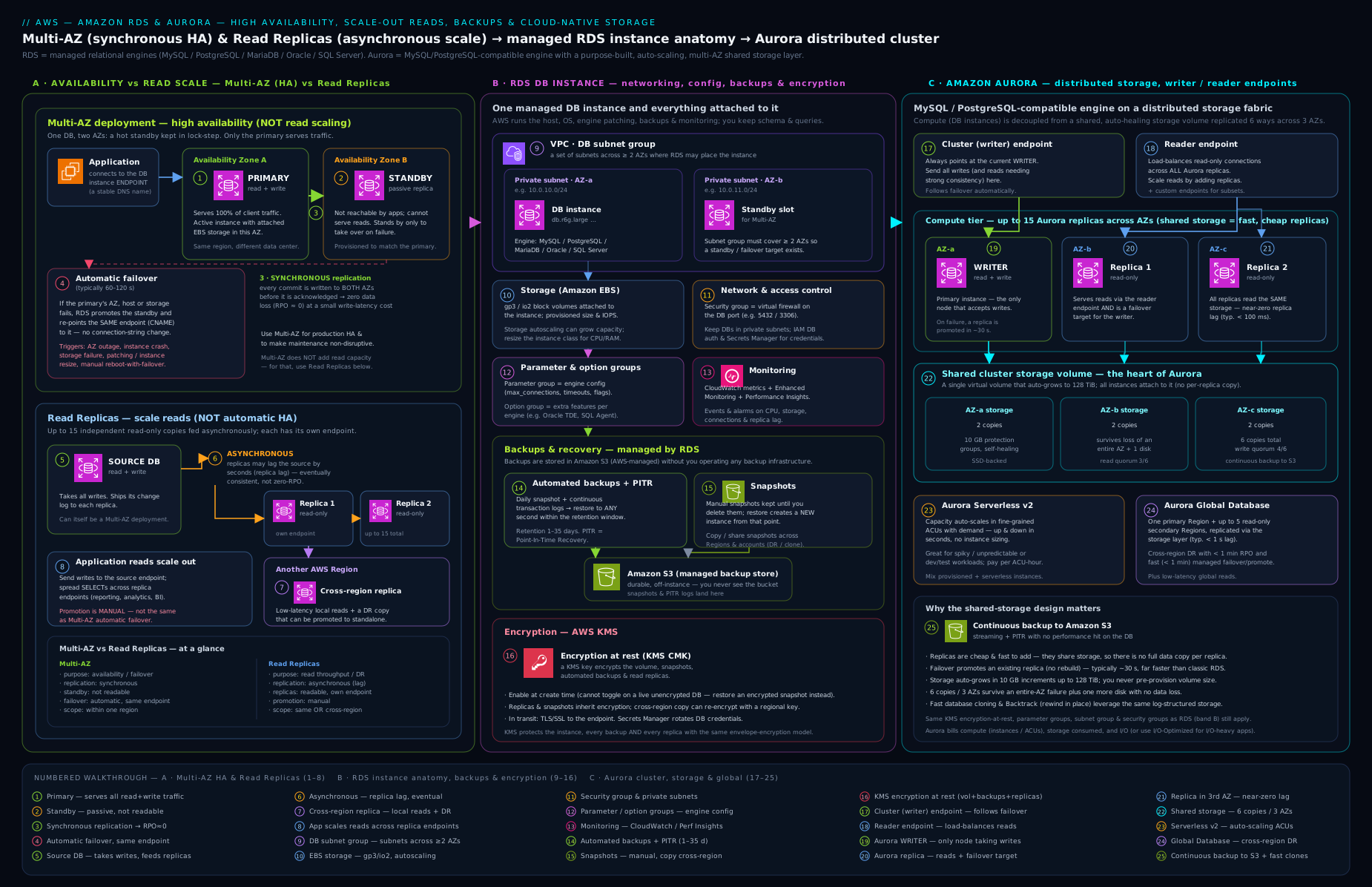
Use it as the map for the rest of this lesson — every box (instance class, storage type, Multi-AZ standby, read replica, snapshot, Aurora cluster volume, endpoints) corresponds to a section above explaining its choices, defaults, and trade-offs.
Creating a DB instance: every setting
When you click Create database (or run aws rds create-db-instance), these are the fields, with the what/choices/default/when/trade-off/gotcha treatment:
| Setting | Choices | Default | When / trade-off / gotcha |
|---|---|---|---|
| Creation method | Standard create / Easy create | Standard | Easy create hides options behind best-practice defaults; use Standard to control everything. |
| Engine | MySQL / PostgreSQL / MariaDB / Oracle / SQL Server / Aurora | — | Drives every later option; Aurora switches to the cluster model. |
| Edition / version | Engine-specific; major + minor | Latest recommended | Avoid deprecated versions; pick a current major you can support. |
| Templates | Production / Dev-Test / Free Tier | — | “Production” pre-selects Multi-AZ + provisioned storage; “Free Tier” caps you to db.t3/t4g.micro, 20 GiB, single-AZ. |
| DB instance identifier | Name (unique per Region/account) | — | Cannot be changed without rename + endpoint change; choose deliberately. |
| Master username / password | String / password or Secrets Manager | admin/postgres |
Prefer manage in Secrets Manager so no plaintext password; rotate later. |
| Instance class | db.t/m/r/x families |
db.m/db.t |
Graviton (g) for price/perf; t only for small/dev (see classes section). |
| Storage type | gp3 / gp2 / io1 / io2 / magnetic | gp3 | gp3 default; io2 for demanding IOPS; never magnetic for new dbs. |
| Allocated storage | GiB (engine min/max) | 20–100 GiB | Can grow, never shrink; cooldown between resizes. |
| Storage autoscaling | On (+ max threshold) / Off | On | Always on for prod with a sane max; only grows. |
| Provisioned IOPS / throughput | Number (gp3 above baseline, io1/io2) | Baseline | Provision performance independently of size on gp3/io. |
| Multi-AZ deployment | Single / Multi-AZ instance / Multi-AZ cluster | Single (Prod template: Multi-AZ) | HA, not scaling; cluster variant adds readable standbys; costs 2×/3×. |
| VPC / DB subnet group | A VPC + subnet group (≥2 AZs) | Default VPC | Required; must span ≥2 AZs for Multi-AZ; pick private subnets. |
| Public access | Yes / No | No | Keep No for every real database. |
| VPC security group(s) | New / existing | New | Allow only the DB port from the app’s SG; never a wide CIDR. |
| Availability Zone | Pick / no preference | No preference | Usually leave to RDS unless co-locating with an app tier. |
| Database port | Number | 3306/5432/1521/1433 | Change only if you must; security-group rule must match. |
| DB parameter group | Default / custom | Default | Attach a custom group to tune the engine (default is read-only). |
| Option group | Default / custom | Default | For engine add-ons (Oracle/SQL Server features). |
| Authentication | Password / IAM / Kerberos | Password | Add IAM auth to drop long-lived DB passwords (MySQL/Postgres/MariaDB). |
| Encryption at rest | On (KMS key) / Off | On | Must be set at creation — cannot encrypt in place later. |
| Backup retention | 0–35 days | 7 (1 for some) | Never 0 in prod; sets the PITR window. |
| Backup window | Pick / no preference | No preference | Low-traffic slot; brief I/O dip. |
| Maintenance window | Pick / no preference | No preference | Low-traffic slot for patching. |
| Auto minor version upgrade | On / Off | On | Convenient; turn off if you gate upgrades manually. |
| Deletion protection | On / Off | Off (Prod template: On) | Turn on for prod — blocks accidental deletes. |
| Monitoring | Enhanced Monitoring / Performance Insights | Off | Turn on Performance Insights (free tier of it) to diagnose load. |
| Log exports | Per-engine logs to CloudWatch | Off | Export error/slow/audit logs to CloudWatch for retention and alerting. |
aws CLI — the core operations
# Variables
REGION=ap-south-1
SUBNET_GROUP=db-subnet-group-lab
SG_ID=sg-0123456789abcdef0

# Create a DB subnet group spanning two AZs (private subnets)
aws rds create-db-subnet-group \
  --db-subnet-group-name $SUBNET_GROUP \
  --db-subnet-group-description "Lab private subnets" \
  --subnet-ids subnet-aaa111 subnet-bbb222 \
  --region $REGION

# Create a Multi-AZ PostgreSQL instance, encrypted, gp3, autoscaling, master password in Secrets Manager
aws rds create-db-instance \
  --db-instance-identifier pg-prod \
  --engine postgres --engine-version 16 \
  --db-instance-class db.m6g.large \
  --storage-type gp3 --allocated-storage 100 --max-allocated-storage 500 \
  --multi-az \
  --master-username appadmin --manage-master-user-password \
  --db-subnet-group-name $SUBNET_GROUP \
  --vpc-security-group-ids $SG_ID \
  --no-publicly-accessible \
  --storage-encrypted \
  --backup-retention-period 7 \
  --deletion-protection \
  --enable-performance-insights \
  --region $REGION

# Add a read replica (read scaling) — its own endpoint, async replication
aws rds create-db-instance-read-replica \
  --db-instance-identifier pg-prod-replica-1 \
  --source-db-instance-identifier pg-prod \
  --db-instance-class db.m6g.large \
  --region $REGION

# Create a custom parameter group and set a dynamic parameter
aws rds create-db-parameter-group \
  --db-parameter-group-name pg16-custom \
  --db-parameter-group-family postgres16 \
  --description "Custom PG16 params"
aws rds modify-db-parameter-group \
  --db-parameter-group-name pg16-custom \
  --parameters "ParameterName=log_min_duration_statement,ParameterValue=500,ApplyMethod=immediate"
aws rds modify-db-instance \
  --db-instance-identifier pg-prod \
  --db-parameter-group-name pg16-custom --apply-immediately

# Take a manual snapshot, then copy it to another Region (DR), re-encrypting
aws rds create-db-snapshot \
  --db-instance-identifier pg-prod --db-snapshot-identifier pg-prod-pre-change
aws rds copy-db-snapshot \
  --source-db-snapshot-identifier arn:aws:rds:ap-south-1:111122223333:snapshot:pg-prod-pre-change \
  --target-db-snapshot-identifier pg-prod-dr-copy \
  --kms-key-id alias/dr-key --source-region ap-south-1 --region ap-southeast-1

# Point-in-time recovery — creates a NEW instance restored to a timestamp
aws rds restore-db-instance-to-point-in-time \
  --source-db-instance-identifier pg-prod \
  --target-db-instance-identifier pg-prod-pitr \
  --restore-time 2026-06-14T03:30:00Z \
  --db-subnet-group-name $SUBNET_GROUP
aws CLI — an Aurora cluster
# Create the Aurora PostgreSQL CLUSTER (the cluster owns the storage volume)
aws rds create-db-cluster \
  --db-cluster-identifier aurora-pg \
  --engine aurora-postgresql --engine-version 16 \
  --master-username appadmin --manage-master-user-password \
  --db-subnet-group-name $SUBNET_GROUP \
  --vpc-security-group-ids $SG_ID \
  --storage-encrypted --backup-retention-period 7 \
  --region $REGION

# Add the writer instance, then a reader (both attach to the same cluster volume)
aws rds create-db-instance \
  --db-cluster-identifier aurora-pg --db-instance-identifier aurora-pg-1 \
  --engine aurora-postgresql --db-instance-class db.r6g.large
aws rds create-db-instance \
  --db-cluster-identifier aurora-pg --db-instance-identifier aurora-pg-2 \
  --engine aurora-postgresql --db-instance-class db.r6g.large

# A Serverless v2 reader in the same cluster (set the ACU range on the cluster)
aws rds modify-db-cluster --db-cluster-identifier aurora-pg \
  --serverless-v2-scaling-configuration MinCapacity=0.5,MaxCapacity=16
aws rds create-db-instance \
  --db-cluster-identifier aurora-pg --db-instance-identifier aurora-pg-sv2 \
  --engine aurora-postgresql --db-instance-class db.serverless

# Inspect the cluster endpoints (writer + reader)
aws rds describe-db-clusters --db-cluster-identifier aurora-pg \
  --query "DBClusters[0].{writer:Endpoint, reader:ReaderEndpoint, status:Status}" --output table
After creation: what you can (and can’t) change
| Operation | Possible after creation? | Notes |
|---|---|---|
| Resize instance class | Yes | Reboot (Multi-AZ: via failover, ~brief). Change to/from Graviton supported. |
| Grow storage | Yes | Never shrink; cooldown between resizes; online for gp3/io. |
| Shrink storage | No | Dump/reload into a smaller instance. |
| Change storage type (e.g. gp2→gp3) | Yes | Online conversion; do it for cost/flexibility. |
| Enable/disable Multi-AZ | Yes | Add a standby (sync seeding) or remove one — no data loss. |
| Convert single → Multi-AZ cluster | Limited | Often needs restore/Blue-Green, not a simple toggle. |
| Add/remove read replicas | Yes | Replicas are independent instances; create/delete freely. |
| Promote a read replica | Yes | Makes it standalone read/write; lossy for unreplicated changes. |
| Change backup retention / window | Yes | Increasing retention is immediate; decreasing drops old recovery points. |
| Attach a different parameter group | Yes | Static-parameter changes need a reboot; watch pending-reboot. |
| Attach a different option group | Yes | Some options need a reboot; some can’t be removed once data uses them. |
| Encrypt an unencrypted DB | No (in place) | Snapshot → copy with encryption → restore from the encrypted copy. |
| Change KMS key | No (in place) | Copy snapshot with the new key → restore. |
| Rename the instance | Yes | Changes the endpoint DNS name — update your app. |
| Major version upgrade | Yes | Disruptive in place — prefer Blue/Green (linked). |
| Enable IAM auth / Performance Insights | Yes | Modify operation; IAM auth needs the DB user mapping too. |
The hard "no"s to memorise: you cannot shrink storage in place, and you cannot encrypt (or re-key) an existing database in place — both require the snapshot-copy-restore dance.
Hands-on lab
In this lab you create a tiny Free Tier PostgreSQL instance, connect, take a snapshot, observe a parameter change, then clean everything up. Uses the aws CLI (CloudShell or local). Stay within Free Tier limits and delete promptly to keep the cost at essentially zero.
0. Variables and a DB subnet group. (Assumes you have a VPC with two private subnets in different AZs and a security group allowing port 5432 from your client/app.)
REGION=ap-south-1
SG_ID=sg-0123456789abcdef0   # allows 5432 inbound from your app/client
aws rds create-db-subnet-group \
  --db-subnet-group-name lab-subnets \
  --db-subnet-group-description "lab" \
  --subnet-ids subnet-aaa111 subnet-bbb222 --region $REGION
1. Create a Free-Tier PostgreSQL instance (single-AZ, db.t3.micro, 20 GiB, encrypted).
aws rds create-db-instance \
  --db-instance-identifier lab-pg \
  --engine postgres --engine-version 16 \
  --db-instance-class db.t3.micro \
  --storage-type gp3 --allocated-storage 20 --max-allocated-storage 50 \
  --master-username labadmin --manage-master-user-password \
  --db-subnet-group-name lab-subnets \
  --vpc-security-group-ids $SG_ID \
  --no-publicly-accessible --storage-encrypted \
  --backup-retention-period 1 \
  --region $REGION
aws rds wait db-instance-available --db-instance-identifier lab-pg --region $REGION
Expected: after a few minutes the wait returns and the instance is available.
2. Inspect the instance and find its endpoint.
aws rds describe-db-instances --db-instance-identifier lab-pg \
  --query "DBInstances[0].{status:DBInstanceStatus, az:AvailabilityZone, multiAZ:MultiAZ, endpoint:Endpoint.Address, encrypted:StorageEncrypted}" \
  --output table --region $REGION
Expected output (abridged):
-----------------------------------------------------------
|                  DescribeDBInstances                    |
+-----------+-------------+----------+----------+----------+
| status    | az          | multiAZ  | encrypted| endpoint |
+-----------+-------------+----------+----------+----------+
| available | ap-south-1a | False    | True     | lab-pg…  |
+-----------+-------------+----------+----------+----------+
Note multiAZ: False (Free Tier is single-AZ) and encrypted: True.
3. Retrieve the managed master password from Secrets Manager and connect.
SECRET_ARN=$(aws rds describe-db-instances --db-instance-identifier lab-pg \
  --query "DBInstances[0].MasterUserSecret.SecretArn" --output text --region $REGION)
aws secretsmanager get-secret-value --secret-id "$SECRET_ARN" \
  --query SecretString --output text --region $REGION
# Then (from a host in the VPC with psql installed):
# psql "host=<endpoint> port=5432 dbname=postgres user=labadmin sslmode=require"
Expected: a JSON blob containing the password. The sslmode=require proves TLS works.
4. Take a manual snapshot (persists independently of the instance).
aws rds create-db-snapshot --db-instance-identifier lab-pg \
  --db-snapshot-identifier lab-pg-snap --region $REGION
aws rds wait db-snapshot-available --db-snapshot-identifier lab-pg-snap --region $REGION
aws rds describe-db-snapshots --db-snapshot-identifier lab-pg-snap \
  --query "DBSnapshots[0].{id:DBSnapshotIdentifier, type:SnapshotType, status:Status}" \
  --output table --region $REGION
Expected: type: manual, status: available.
5. Change a dynamic parameter via a custom parameter group (no reboot).
aws rds create-db-parameter-group --db-parameter-group-name lab-pg16 \
  --db-parameter-group-family postgres16 --description "lab" --region $REGION
aws rds modify-db-parameter-group --db-parameter-group-name lab-pg16 \
  --parameters "ParameterName=log_min_duration_statement,ParameterValue=200,ApplyMethod=immediate" \
  --region $REGION
aws rds modify-db-instance --db-instance-identifier lab-pg \
  --db-parameter-group-name lab-pg16 --apply-immediately --region $REGION
Expected: the modify is accepted; because log_min_duration_statement is dynamic, it applies without a reboot (a static parameter would have left the instance in pending-reboot).
6. Cleanup — delete the instance (skip the final snapshot) and the artefacts.
aws rds delete-db-instance --db-instance-identifier lab-pg \
  --skip-final-snapshot --delete-automated-backups --region $REGION
aws rds wait db-instance-deleted --db-instance-identifier lab-pg --region $REGION
aws rds delete-db-snapshot --db-snapshot-identifier lab-pg-snap --region $REGION
aws rds delete-db-parameter-group --db-parameter-group-name lab-pg16 --region $REGION
aws rds delete-db-subnet-group --db-subnet-group-name lab-subnets --region $REGION
Validation: aws rds describe-db-instances --db-instance-identifier lab-pg eventually returns DBInstanceNotFound. (If deletion is blocked, you left deletion protection on — modify-db-instance --no-deletion-protection first.)
Cost note (INR-aware): a db.t3.micro with 20 GiB gp3 is covered by the RDS Free Tier for the first 12 months (750 instance-hours/month, 20 GiB storage, 20 GiB backups). Outside Free Tier it is only a few hundred rupees per month if left running. The things that quietly cost money: the manual snapshot (cheap — only changed blocks — but it persists until you delete it, which is why step 6 deletes it explicitly), a forgotten read replica (a full extra instance’s worth of cost), and Multi-AZ (doubles instance cost). Deleting the instance with --skip-final-snapshot --delete-automated-backups and then removing the manual snapshot leaves nothing billing.
Going deeper
The sections above cover everything you need to run RDS and Aurora well. This one is for the reader who wants to know what happens under the hood — the connection layer, Aurora’s storage internals, the global-write path, and how the same database feeds analytics without an ETL pipeline. None of it is required to pass the beginner sections; all of it turns up in senior design reviews and the harder exams.
The connection problem, and RDS Proxy
Nothing in the lesson so far addresses a failure mode that ambushes serverless teams specifically: connection exhaustion. A PostgreSQL or MySQL connection is not free — each one is a backend process (Postgres) or thread (MySQL) with its own memory. A db.m6g.large might comfortably hold a few hundred connections; a fleet of Lambda functions scaling out to 1,000 concurrent executions, each opening its own connection, will blow straight past that ceiling and the database starts refusing connections (FATAL: too many connections). Traditional app servers solve this with an in-process connection pool, but Lambda has no long-lived process to pool in — every cold start is a fresh connection.
Amazon RDS Proxy is the managed answer. It sits between your application and the database, inside your VPC, and maintains a warm pool of database connections that it multiplexes across many client connections — thousands of Lambda invocations share a small pool of real backend connections. It also shortens failover: because clients stay connected to the proxy (not the database), the proxy can hold their connections open while it repoints to the new writer, cutting observed failover time by up to ~66% on Aurora and RDS. It authenticates callers with IAM and pulls the database credentials from Secrets Manager, so no password lives in the function. The one nuance to know is pinning: certain session-level state (setting a session variable, using a temporary table, some prepared-statement patterns) forces the proxy to pin a client to a specific backend connection for the rest of the session, which quietly erodes the multiplexing benefit — keep sessions stateless to keep the pool efficient. This is the single most useful add-on for Lambda-plus-RDS architectures; the dedicated RDS Proxy lesson goes through the setup end to end.
Inside the Aurora cluster volume: the log is the database
The core lesson said Aurora replicates data “six ways across three AZs.” The deeper truth — and the reason Aurora is fast — is what it replicates. A classic database writes full, modified data pages to disk (and a Multi-AZ standby receives a full copy of every change). Aurora’s writer does neither: it ships only the redo-log records — the tiny descriptions of what changed — to the six storage nodes. The storage nodes are not dumb disks; they are smart, and they replay the log to materialise data pages themselves, asynchronously, in the background. The mantra AWS uses is “the log is the database”: there is no separate step where the engine flushes pages across the network, because the log-structured storage layer reconstructs pages from the log on demand.
Two consequences fall out of this. First, Aurora pushes far less data over the network per commit than a mirrored classic database — often cited as roughly an eighth — which is a big part of its write throughput advantage. Second, a write is acknowledged as soon as a quorum of 4 of the 6 copies has the log record (reads need 3 of 6), so a single slow or failed storage node never stalls a commit; the volume is carved into 10 GiB protection groups, each independently six-replicated and self-healing, which is how it repairs a lost segment by copying from its peers without you noticing. And because every replica reads from that same materialised volume rather than replaying a serial replication stream, replica lag stays in the low-millisecond range no matter how many replicas you add.
Aurora Standard vs I/O-Optimized: the pricing lever
Classic RDS storage was priced on provisioned gp3/io2. Aurora is different: it has no provisioned storage size (it just grows), and it offers two cluster storage configurations that change how you pay:
| Configuration | You pay for | Best when | Caveat |
|---|---|---|---|
| Aurora Standard | Instances + storage + per-request I/O | I/O is a small share of the bill (light or bursty read/write) | An I/O-heavy workload can see I/O become 40–60% of the total |
| Aurora I/O-Optimized | Instances + storage only (no per-I/O charge), at a higher storage/compute rate | I/O is a large share of the bill; write-heavy or read-heavy at scale | Predictable, but you pay the premium even in quiet months |
The rule of thumb AWS publishes: if I/O charges exceed roughly 25% of your total Aurora bill, I/O-Optimized is usually cheaper and gives more consistent performance for write-intensive workloads. You switch a cluster with modify-db-cluster --storage-type aurora-iopt1 (Standard is aurora), but note the constraint: you can move to I/O-Optimized at any time, yet once on it you can only switch back to Standard once every 30 days — so treat the change as a monthly decision, not a knob to flip during an incident.
Aurora Serverless v2, precisely
The core section introduced ACUs. The exact envelope worth memorising: Aurora Capacity Units run from 0.5 to 256, each ACU ≈ 2 GiB of RAM with proportional CPU and network, and v2 adjusts capacity in ~0.5-ACU steps within seconds, without dropping connections, by scaling the instance in place. A newer capability lets a v2 instance scale all the way to 0 ACUs (an automatic pause when idle, resuming on the next connection) — useful for dev/test and spiky APIs where v1’s coarse auto-pause used to be the only option. You can mix capacity types in one cluster (a provisioned writer with Serverless v2 readers, or fully serverless), and v2 works with Multi-AZ and Global Database. The economic caveat is unchanged: at sustained high utilisation a right-sized provisioned instance is still cheaper — Serverless v2 earns its keep where the variability, not the peak, is the point.
Aurora Global Database: write forwarding and managed failover
The core lesson covered Global Database’s reach (one primary Region, up to five read-only secondaries, storage-layer replication at typically sub-second lag). Two production mechanics deserve their own note. Write forwarding lets an application in a secondary Region send its writes to the local secondary endpoint and have Aurora transparently forward them to the primary writer — so a globally deployed app can use one connection string per Region for both reads and (forwarded) writes, instead of special-casing which Region owns the write path. You choose a consistency level per session (eventual, session, or global) that trades latency against how strictly a forwarded write is visible to subsequent reads. Separately, managed planned failover promotes a secondary to primary with zero data loss (RPO 0) for controlled events like a Region migration or DR drill, whereas an unplanned failover after a real Region outage accepts the replication lag as its RPO (typically single-digit seconds). That pairing — RPO 0 when you choose to fail over, seconds of RPO when the Region is taken from you — is the exam-grade distinction.
The Data API and zero-ETL: talking to Aurora without a driver or a pipeline
Two features change how other services reach an Aurora database. The Data API exposes the cluster over an HTTPS endpoint: you run SQL with an AWS SDK call, authenticated by IAM with credentials from Secrets Manager, and hold no persistent connection and no database driver at all. That makes it a natural fit for Lambda and AppSync, which otherwise fight the connection-exhaustion problem above — though it carries request- and result-size limits, so it suits transactional and moderate-result workloads rather than bulk export. Originally limited to Aurora Serverless v1, it now covers Aurora Serverless v2 and provisioned Aurora PostgreSQL and MySQL.
Zero-ETL attacks a different chore: getting operational data into an analytics warehouse. Historically you built and babysat a CDC pipeline (Debezium, DMS, Kinesis, Glue jobs) to stream changes from Aurora into Amazon Redshift. Aurora zero-ETL to Amazon Redshift replaces that with a managed, near-real-time replication that lands your Aurora tables in Redshift within seconds of a commit, with no pipeline to write, scale, or repair — you run analytical SQL in Redshift against fresh operational data. The same zero-ETL pattern now extends to other targets (notably Amazon OpenSearch for search over live data, and RDS for MySQL as a source), but Redshift is the flagship and the one to name in an interview. The mental shift: analytics stops being a batch job you own and becomes a managed integration you configure.
Three monitoring lenses, not one
Finally, sharpen a distinction the create-form flattened into one “Monitoring” row, because they answer different questions. CloudWatch metrics are hypervisor-level instance gauges (CPUUtilization, DatabaseConnections, FreeStorageSpace, ReplicaLag) at one-minute granularity — your alarms live here. Enhanced Monitoring installs an agent for operating-system-level metrics — per-process and per-thread CPU and memory, at granularity down to one second — for when you need to see which process is eating the box. Performance Insights is the database-engine lens: it plots DB Load as Average Active Sessions against the vCPU line and breaks it down by wait events, top SQL, users, and hosts, so “the database is slow” becomes “these three queries are blocked on this lock.” Reach for CloudWatch to alarm, Enhanced Monitoring to see the OS, and Performance Insights to find the query — they complement rather than replace each other.
Common mistakes & troubleshooting
| Symptom | Likely cause | Fix |
|---|---|---|
| Added a read replica but a writer failure still caused an outage | Confused read replica (scaling) with Multi-AZ (HA) — replicas don’t auto-fail-over | Enable Multi-AZ for HA; keep replicas for read scale; they are orthogonal. |
| Reads return stale data right after a write | Reading from an async read replica (replica lag) | Read-after-write from the primary/cluster endpoint; only send lag-tolerant reads to replicas. |
| Restored database “behaves wrong” / wrong settings | Restore came up with default parameter/option/security groups | Always restore specifying your parameter group, option group, SG, and subnet group. |
| Changed a parameter, nothing happened | It’s a static parameter (pending-reboot) | Reboot the instance to apply static parameters; check the parameter’s “Apply type”. |
| “Can’t encrypt my existing database” | Encryption must be set at creation | Snapshot → copy with --storage-encrypted/KMS key → restore from the encrypted copy. |
db.t instance throttling under steady load |
Burstable class exhausted CPU credits | Move to db.m/db.r; reserve t for dev/spiky workloads. |
Storage filled up and the DB went into storage-full |
Storage autoscaling disabled or max threshold hit | Enable storage autoscaling with a sane max; grow storage (cannot shrink later). |
| Can’t connect to the database from the app | Public access on/wrong SG; DB in a subnet the app can’t reach | Keep public access off; allow the DB port from the app’s SG; check the DB subnet group and routing. |
| Snapshot won’t share to another account | Snapshot encrypted with the default aws/rds key |
Re-encrypt the snapshot copy with a customer-managed KMS key, then share the key + snapshot. |
Common beginner mistakes
These are misconceptions rather than error messages — the wrong mental model that leads people to build the wrong thing. (The symptom → cause → fix table above handles the operational failures; this is about the thinking that precedes them.)
-
“A read replica is my backup / my failover.” It is neither. A replica is an asynchronous, read-only copy for scale; it can be seconds behind, it does not promote itself, and promoting it by hand loses the un-replicated tail. Right model: Multi-AZ = availability, snapshots + PITR = backup, read replica = read scale. Three different tools; do not let one masquerade as another.
-
“Multi-AZ will give me more read throughput.” On the Multi-AZ instance deployment the standby serves zero traffic — it is a passive spare. You are paying for a second instance purely to survive a failure, not to add capacity. Right model: Multi-AZ buys uptime; if you need read capacity, add read replicas (or use the Multi-AZ cluster variant, whose two standbys happen to be readable — a side benefit, not the reason it exists).
-
“I’ll turn on encryption once we’re live.” You cannot encrypt an existing unencrypted instance in place, ever. Retrofitting encryption means snapshot → copy-with-KMS-key → restore, i.e. a migration with downtime. Right model: encryption is a creation-time decision. If there is any chance you will want it, enable it on day zero.
-
“A snapshot is a live copy I can query or roll back into.” A snapshot is an inert image. There is no in-place rewind in RDS — every restore (snapshot or PITR) spins up a brand-new instance with new endpoint DNS, and the snapshot is not queryable until you restore it. Right model: “restore” always means “create a new database and repoint the app,” so plan the cutover, not just the restore.
-
“Aurora is just RDS with a MySQL badge.” Same wire protocol, completely different storage engine. In classic RDS a replica is a separate copy that lags and cannot fail over automatically; an Aurora replica shares the one cluster volume, lags by milliseconds, and is a failover target. Right model: choosing Aurora is choosing a different storage and replication architecture, not just a bigger RDS.
-
“Serverless means no servers and the cheapest option.” Aurora Serverless v2 is autoscaling compute measured in ACUs — very much on servers, just resized for you. At steady high load a right-sized provisioned instance is usually cheaper. Right model: Serverless v2 pays off when the load is variable or spiky; for a flat 24×7 workload, provision it.
-
“Deleting the instance cleans everything up.” Deleting the instance leaves manual snapshots (which persist and keep billing), can leave retained automated backups, and — unless you pass
--skip-final-snapshot— creates a final snapshot you also pay for. Right model: teardown is a checklist (instance, final/manual snapshots, automated backups, subnet/parameter groups), not a single delete. -
“The database is slow, so give it more vCPU.” Databases are usually starved of memory (buffer pool) or I/O, or are missing an index — not CPU. Upsizing vCPU on an
mclass when the real problem is a cold cache wastes money. Right model: open Performance Insights first, find the wait event and the top SQL, then decide between a memory-optimised (r) class, an index, or more I/O.
Best practices
- Default to Multi-AZ for any database you care about, and add read replicas only when reads actually exceed one instance’s capacity — never substitute one for the other.
- Use gp3 storage with autoscaling on and a sensible maximum; reach for io2 only when you have measured a need for consistent high IOPS.
- Prefer Graviton (
g) instance classes for price/performance; reservet(burstable) for dev/test and genuinely small workloads. - Manage the master password in Secrets Manager with rotation; never hard-code DB credentials; add IAM database authentication for applications where it fits.
- Always attach a custom parameter group (the default is read-only) and know which parameters are static (reboot) vs dynamic.
- Turn on Performance Insights and export engine logs to CloudWatch; alarm on
CPUUtilization,FreeStorageSpace,ReplicaLag,DatabaseConnections, andFreeableMemory. - Set deletion protection and a non-zero backup retention on every production database; take a manual snapshot before risky changes and copy a snapshot cross-Region for DR.
- Use Blue/Green Deployments for major version upgrades (linked) instead of in-place upgrades.
- For new MySQL/PostgreSQL workloads needing scale or fast failover, evaluate Aurora; for variable load, evaluate Serverless v2; for global reach/DR, Aurora Global Database.
Security notes
- Encrypt at rest at creation with a customer-managed KMS key (not the default) so you control rotation and can share snapshots cross-account; remember you cannot encrypt in place afterwards.
- Require TLS in transit (
rds.force_ssl/require_secure_transport), bundle the RDS CA, and rotate it before expiry. - Keep every database private (public access off), in private subnets, with a security group that allows only the DB port from the application’s security group — reference SGs, not CIDRs.
- Drop long-lived DB passwords where possible: IAM database authentication for apps, Secrets Manager rotation for the master and service users.
- Apply least privilege inside the database too — distinct DB users per app/role, no app using the master user.
- Enable audit logging (PostgreSQL
pgaudit, MySQL/MariaDB audit plugin via option group, SQL Server Audit) and ship logs to CloudWatch; enable CloudTrail for the RDS control-plane (who created/modified/deleted instances). - Lock down snapshots — they contain all your data; control who can copy/share them and re-encrypt with a CMK before cross-account sharing.
Interview & exam questions
-
What is the difference between Multi-AZ and a read replica? Multi-AZ is for high availability: a synchronous standby in another AZ that fails over automatically (~60–120 s, no data loss) and on classic RDS serves no traffic. A read replica is for read scaling: an asynchronous, read-only copy with its own endpoint that does not fail over automatically (promotion is manual and lossy). They solve different problems and are often used together.
-
Does a Multi-AZ standby serve read traffic? For a Multi-AZ instance deployment, no — the standby is passive. For a Multi-AZ cluster deployment, yes — its two standbys are readable. That distinction is a favourite exam trap.
-
How does point-in-time recovery work, and does it overwrite my database? RDS keeps daily backups plus continuous transaction logs (within the retention period, 1–35 days), letting you restore to any second. It does not overwrite the running instance — it creates a new instance at the chosen timestamp; you then repoint your app.
-
Can you encrypt an existing unencrypted RDS instance? Not in place. You take a snapshot, copy it with encryption enabled (choosing a KMS key), and restore from the encrypted copy. Encryption (and the KMS key) is fixed at creation.
-
What’s the difference between a DB parameter group and an option group? A parameter group tunes engine configuration (
max_connections,work_mem, etc.); static parameters need a reboot, dynamic ones don’t. An option group enables engine add-on features (Oracle TDE/OEM, SQL Server Audit/TDE, MariaDB audit plugin). One configures, the other switches features on. -
What is the Aurora cluster volume and why does it matter? A distributed storage layer shared by all instances in the cluster, replicated six ways across three AZs, auto-growing to 128 TiB and self-healing. It decouples storage from compute, so adding a replica copies no data (fast, cheap replicas), failover is fast (~10–30 s), and durability/availability are very high (survives an AZ + one copy).
-
What are the Aurora endpoints and when do you use each? The cluster (writer) endpoint for writes (it follows failover to the new writer); the reader endpoint to load-balance reads across replicas; custom endpoints to target a chosen subset (e.g. reporting); instance endpoints only for diagnostics (they don’t follow failover).
-
When would you choose Aurora over classic RDS? For MySQL/PostgreSQL workloads needing high throughput, many/fast replicas, sub-30-second failover, autoscaling compute (Serverless v2), or global reach (Global Database). Stay on classic RDS for Oracle/SQL Server, for the lowest cost on modest MySQL/Postgres, or where Aurora’s per-I/O pricing is unfavourable.
-
What does Aurora Serverless v2 scale, and how is it measured? It scales compute (CPU/memory) automatically and in fine increments, measured in Aurora Capacity Units (ACUs) between a min and max you set, without dropping connections — ideal for variable/spiky workloads.
-
How is Aurora Global Database different from a cross-Region read replica? Global Database replicates at the storage layer with typically sub-second lag across up to five secondary Regions, with fast (sub-minute) managed region failover for DR — far more capable and lower-impact than a single async cross-Region read replica.
-
Your reporting query load is crushing the primary’s CPU but availability is fine — what do you do? Add one or more read replicas (or, on Aurora, point reporting at the reader endpoint or a custom endpoint), and route read-only reporting traffic there. Do not reach for Multi-AZ — that doesn’t add read capacity (on the instance variant).
-
What happens to automated backups when you delete an RDS instance? They are deleted with the instance (unless you explicitly retain them), whereas manual snapshots persist until you delete them. For long-term retention, use manual snapshots or AWS Backup.
Practice challenges
Six exercises escalating from beginner to advanced. Try each before opening the solution; the one-line why is the part worth remembering.
1. (Beginner) Survive an AZ failure automatically. Your single-AZ db.m6g.large PostgreSQL instance must survive the loss of its Availability Zone with no data loss and no manual step. Which feature, and what is the exact create-db-instance flag?
<details> <summary>Solution</summary>
Enable a Multi-AZ instance deployment — add --multi-az at creation (or modify-db-instance --multi-az --apply-immediately on an existing one).
Why: the synchronous standby in a second AZ makes commits zero-RPO and RDS fails the DNS endpoint over automatically (~60–120 s) with no operator action. </details>
2. (Beginner) Offload a nightly report without touching the primary. A heavy reporting query runs at 2 a.m. and starves your OLTP traffic. Add read capacity and say which endpoint the report should target.
<details> <summary>Solution</summary>
aws rds create-db-instance-read-replica \
  --db-instance-identifier pg-prod-report \
  --source-db-instance-identifier pg-prod \
  --db-instance-class db.r6g.large
Point the report at the replica’s own endpoint (never the primary).
Why: a read replica takes read-only load off the primary via async replication; report queries tolerate the small lag, so the OLTP writer is left alone. </details>
3. (Intermediate) Encrypt a database that was created unencrypted. Compliance now requires encryption at rest on a running, unencrypted instance. Give the sequence — there is no in-place option.
<details> <summary>Solution</summary>
aws rds create-db-snapshot --db-instance-identifier pg-prod \
  --db-snapshot-identifier pg-prod-preenc
aws rds copy-db-snapshot \
  --source-db-snapshot-identifier pg-prod-preenc \
  --target-db-snapshot-identifier pg-prod-enc \
  --kms-key-id alias/prod-rds        # encryption applied on the COPY
aws rds restore-db-instance-from-db-snapshot \
  --db-instance-identifier pg-prod-2 \
  --db-snapshot-identifier pg-prod-enc
Then cut the app over to pg-prod-2.
Why: encryption (and the KMS key) is fixed at creation; the only path is snapshot → copy with a key → restore from the encrypted copy → repoint. </details>
4. (Intermediate) Tame Lambda connection storms. A Lambda function scales to 1,200 concurrent executions and the PostgreSQL instance starts returning too many connections. What managed service fixes this, and why does upsizing the instance not really solve it?
<details> <summary>Solution</summary>
Put RDS Proxy in front and have the function connect to the proxy endpoint (IAM auth, credentials from Secrets Manager). Upsizing raises max_connections a little but the ceiling is fundamentally low relative to Lambda fan-out.
Why: the proxy multiplexes thousands of short-lived client connections onto a small warm pool of real backend connections — and it also shortens failover because clients stay attached to the proxy. </details>
5. (Advanced) Cut an Aurora I/O bill. Your Aurora PostgreSQL cluster’s monthly bill is roughly 40% I/O charges. What configuration change reduces it, what is the break-even guideline, and what constraint must you plan around?
<details> <summary>Solution</summary>
Switch the cluster to Aurora I/O-Optimized: aws rds modify-db-cluster --db-cluster-identifier aurora-pg --storage-type aurora-iopt1. Guideline: it usually wins once I/O exceeds ~25% of the total Aurora bill. Constraint: you can move to I/O-Optimized anytime, but can switch back to Standard only once every 30 days.
Why: I/O-Optimized removes per-request I/O charges (higher flat storage/compute rate instead), so a heavily-I/O workload pays a predictable, lower total. </details>
6. (Advanced) A globally-writable, Region-fault-tolerant database. Users in ap-south-1 and us-east-1 must both write, each using one local connection string, with near-real-time global reads and RPO 0 for planned Region switches. Design it.
<details> <summary>Solution</summary>
Use an Aurora Global Database: primary cluster in one Region, a secondary in the other. Enable write forwarding on the secondary so its local endpoint accepts writes and Aurora forwards them to the primary writer (pick a session/global consistency level to taste). Use managed planned failover for controlled Region switches (RPO 0); accept an unplanned failover’s few-seconds RPO for a real outage.
Why: storage-layer replication gives sub-second global reads, write forwarding gives every Region one endpoint for reads and writes, and managed planned failover is the only path to zero-data-loss Region promotion. </details>
Quick check
- Which RDS feature provides automatic failover with no data loss, and does the standby serve traffic on the instance variant?
- True or false: a read replica automatically becomes the new writer if the primary fails.
- You need to restore your database to 03:30 this morning. Which feature, and does it overwrite the current instance?
- You changed
max_connections(a static parameter) but it hasn’t taken effect — why? - Which Aurora endpoint should an application use for its write connection, and why is hard-coding an instance endpoint a bad idea?
Answers
- Multi-AZ. On the instance variant the standby serves no traffic; on the cluster variant the two standbys are readable.
- False. Read replicas do not fail over automatically; you must manually promote one (and unreplicated changes are lost).
- Point-in-time recovery (PITR). It does not overwrite the current instance — it creates a new instance restored to that timestamp.
- It’s a static parameter, so it only takes effect after a reboot; the instance is in pending-reboot until then.
- The cluster (writer) endpoint — it always points at the current writer and follows failover, so the app’s write connection survives a failover; an instance endpoint is pinned to one instance and won’t move after a failover.
Exercise
Design and (optionally) build the database tier for a moderately busy web application that must (a) survive the loss of an Availability Zone with no data loss, (b) offload a heavy nightly reporting job from the primary, © keep a disaster-recovery copy in a second AWS Region, and (d) hold no plaintext database credentials anywhere. Specify: the engine and instance class (justify Graviton vs Intel and the family), storage type and whether autoscaling is on, the Multi-AZ choice (instance vs cluster) for requirement (a), how you satisfy (b) without compromising (a), how you satisfy © (cross-Region read replica vs Aurora Global Database — and why), and how you satisfy (d). Then write the aws rds commands to create the primary, the read replica, and a cross-Region snapshot copy. Finally, state your RTO and RPO for an AZ failure and for a full-Region failure, and explain which feature delivers each.
Certification mapping
- AWS Certified Solutions Architect – Associate (SAA-C03): core territory — choosing RDS vs Aurora, Multi-AZ vs read replicas (heavily tested), backup/restore and PITR, encryption, read scaling, and Aurora Global Database for multi-Region DR.
- AWS Certified Developer – Associate (DVA-C02): RDS/Aurora connectivity, IAM database authentication, Secrets Manager integration, parameter groups, read replicas for read scaling, and Aurora endpoints from an application’s perspective.
- AWS Certified SysOps Administrator – Associate (SOA-C02): operating RDS — maintenance/backup windows, automated backups and PITR, monitoring (
ReplicaLag,FreeStorageSpace), parameter/option groups and the reboot rule, storage autoscaling. - AWS Certified Database – Specialty / Solutions Architect – Professional: deeper Aurora (cluster volume internals, Serverless v2, Global Database failover, Blue/Green upgrades), migration strategies, and advanced HA/DR design.
Glossary
- DB instance — a single RDS database compute+storage unit (engine + instance class + volume + network placement).
- DB cluster (Aurora) — an Aurora writer plus readers sharing one distributed cluster volume.
- Multi-AZ deployment — a standby copy in another AZ for automatic, lossless failover (HA). Instance = 1 passive standby; cluster = 2 readable standbys.
- Read replica — an asynchronous, read-only copy for read scaling; promotion is manual and lossy (not HA).
- Cluster volume — Aurora’s distributed storage layer, replicated 6× across 3 AZs, auto-growing and self-healing.
- Writer / Reader / Custom / Instance endpoint — Aurora managed DNS endpoints for the writer, the load-balanced replicas, a chosen subset, and a single instance respectively.
- Automated backup — RDS daily backup + transaction logs enabling PITR within the retention window (1–35 days).
- Point-in-time recovery (PITR) — restoring to any second in the retention window by creating a new instance.
- DB snapshot — a user-initiated, persistent, point-in-time image (incremental storage), copyable/shareable cross-Region/account.
- DB parameter group — engine configuration settings; static parameters need a reboot, dynamic apply immediately.
- Option group — enables engine add-on features (e.g. Oracle TDE, SQL Server Audit).
- DB subnet group — the set of subnets (≥2 AZs) RDS may place instances in; required in a VPC and for Multi-AZ.
- Aurora Capacity Unit (ACU) — the unit Aurora Serverless v2 scales in (~2 GiB RAM + proportional CPU).
- Aurora Global Database — one primary Region + up to 5 read-only secondary Regions with sub-second storage replication and fast region failover.
- RTO / RPO — Recovery Time Objective (how long down) / Recovery Point Objective (how much data lost).
- RDS Proxy — a managed connection pool that multiplexes many client connections onto a small warm pool of backend connections, shortens failover, and authenticates via IAM + Secrets Manager; the standard fix for Lambda/serverless connection storms.
- Log-structured storage (Aurora) — Aurora’s writer ships only redo-log records to the storage layer, which materialises data pages from the log; “the log is the database,” which is why it moves far less data over the network.
- Quorum (Aurora) — a write is acknowledged once 4 of the 6 copies have the log record; a read needs 3 of 6 — so one slow/failed storage node never stalls a commit.
- Aurora I/O-Optimized — a cluster storage configuration with no per-request I/O charge (higher flat storage/compute rate instead); usually cheaper once I/O exceeds ~25% of the Aurora bill. Standard = pay-per-I/O.
- Write forwarding (Global Database) — lets a secondary-Region endpoint accept writes and forward them to the primary writer, with a per-session consistency level, so a global app uses one local connection string for reads and writes.
- Aurora Data API — an HTTPS/SDK interface to run SQL against Aurora with no persistent connection or driver, authenticated by IAM; well suited to Lambda and AppSync.
- Zero-ETL — managed, near-real-time replication of Aurora/RDS tables into an analytics target (flagship: Amazon Redshift; also OpenSearch) with no CDC pipeline to build or operate.
- Performance Insights vs Enhanced Monitoring — Performance Insights shows database load by wait event and top SQL (Average Active Sessions); Enhanced Monitoring shows OS-level per-process metrics down to 1-second granularity. Different lenses, both distinct from CloudWatch instance metrics.
- Blue/Green Deployment — a staging technique that clones the database into a synchronised “green” environment for upgrades/changes, then switches over in well under a minute; the safe way to do major-version upgrades.
Next steps
You now know RDS and Aurora end to end — every engine and class, the storage model, the all-important Multi-AZ-vs-read-replica distinction, backups and PITR, parameter and option groups, security, and the Aurora cluster volume, endpoints, Serverless v2, and Global Database. From here:
- Learn to upgrade major versions and run risky changes with near-zero downtime in Zero-Downtime RDS and Aurora Upgrades with Blue/Green Deployments.
- Go deep on Aurora’s resilience and multi-Region story in Aurora High Availability and Global Database.
- Next in the course we move from databases to the network that everything sits in: Amazon VPC, In Depth: Subnets, Route Tables, IGW, NAT, Endpoints & Every Component.