In a nutshell
Think of an S3 bucket as a self-storage warehouse that hands out copies of anything inside to whoever presents the right slip of paper. The warehouse never asks why — it just checks the slip against the rules posted on the door and, if they match, opens the unit. Almost every S3 “leak” in the news is not a broken lock; it is a door whose posted rules accidentally said “anyone may enter.” Data protection and governance at scale is the discipline of making sure the dangerous rules can never be posted in the first place — across not one warehouse but hundreds, in dozens of accounts, edited by many people over many years.
The trick is layering independent controls so no single mistake becomes an exposure. A company-wide guardrail (Block Public Access, pinned by an Organizations policy) makes “anyone may enter” physically un-postable. A data perimeter in the bucket policy confines entry to your own people, on your own network, over an encrypted channel. Encryption with your own KMS key adds a second, separate lock that even an allowed visitor must have the key for. Object Lock welds the filing cabinets shut so ransomware cannot shred them. Replication keeps a copy in another building. And Access Analyzer, Macie, Storage Lens and CloudTrail are the cameras that tell you the instant a rule drifts. Miss one layer and the next one still catches the mistake — which is the entire point.
This lesson is a working reference: every control comes with the policy JSON, the exact aws CLI to apply and verify it, and the specific way it bites when you get it subtly wrong. Read the prose once to build the mental model; keep the tables open when you are mid-incident or mid-design-review.
Level: Advanced · Time: ~77 min · You’ll be able to: read the S3 access-decision model without guessing, install org-wide guardrails an admin cannot regress, write a three-legged data perimeter, run an encryption strategy that survives service writers, make data immutable safely, and audit and remediate governance across hundreds of buckets at once.
New to S3 basics? Skim the S3 deep dive: storage classes, versioning, lifecycle and encryption first — this lesson assumes you already know what a bucket, an object version and a lifecycle rule are, and spends its time on governing them at scale.
Almost every public S3 “leak” you read about is a misconfiguration, not a vulnerability — a permissive policy, a forgotten ACL, an over-broad principal, a * where an account ID should be. The data was never “hacked”; it was served, exactly as configured, to whoever asked. That is the uncomfortable truth of Amazon S3 at scale: the platform faithfully does what your policy says, and across hundreds of buckets in dozens of accounts the policy says many things, written by many people, over many years. Hardening S3 is therefore not about one clever setting — it is about layering independent controls so that no single mistake becomes an exposure.
This guide hardens S3 the way it’s actually done across a real organization: a clear access-decision model so you stop misreading the evaluation order, account-wide Block Public Access guardrails that an admin cannot regress, a bucket-policy data perimeter that confines access to your identities and your networks, a deliberate KMS encryption strategy that turns the key policy into a second authorization plane, Object Lock immutability against ransomware, replication for DR and residency, and continuous detection with Access Analyzer, Macie and CloudTrail. Every control comes with the policy JSON, the exact aws CLI to apply and verify it, and the failure mode that bites when you get it subtly wrong.
Because this is a reference you will return to mid-incident and mid-design-review, the controls, the conditions, the KMS modes, the Object Lock semantics and the most common guardrail failures are all laid out as scannable tables — read the prose once to build the mental model, then keep the tables open. By the end you will be able to design an S3 posture where an accidental exposure is something your guardrails reject, not something your customers discover for you.
What problem this solves
S3 is the default home for the most sensitive data an organization holds: customer PII, financial records, database backups, application secrets that should never have been there, model training sets, log archives that are themselves evidence. The blast radius of a single misconfigured bucket is therefore total — one wrong Principal and a regulator, a competitor, or a ransomware crew has a copy. And the failure is silent: S3 does not page you when a policy goes public; it just answers the next anonymous GetObject with a 200.
What breaks without a layered posture is depressingly consistent. An engineer adds a cross-account grant for a partner and fat-fingers the account ID, exposing a bucket to a stranger. A “temporary” public bucket for a static asset never gets locked back down. A legacy ACL grants AllUsers read on a handful of objects that policy audits never see. A backup bucket has versioning but no Object Lock, so stolen credentials overwrite every version and the “backup” is gone. A consumer account is allowed by the bucket policy but cannot decrypt because nobody updated the KMS key policy, and the failure surfaces as a cryptic AccessDenied three teams away. Each of these is a one-line mistake; each is preventable by a control that sits above the mistake.
Who hits this: every team past a single account. It bites hardest on platform/security teams responsible for hundreds of buckets across an AWS Organization, on regulated workloads (PCI, HIPAA, SEC 17a-4) that must prove immutability and encryption, on data-lake teams sharing buckets cross-account, and on anyone who has ever run aws s3 mb with default settings and walked away. The fix is never “audit harder forever” — it is to install guardrails (BPA, SCPs, perimeter conditions, KMS key policies, Object Lock) that make the dangerous states unreachable, then watch the remainder with Access Analyzer and Macie.
To frame the whole field before the deep dive, here is every control layer this guide covers, the exposure it removes, and where it lives:
| Control layer | The exposure it removes | Where it’s configured | Scope | Can a bucket owner bypass it? |
|---|---|---|---|---|
| Block Public Access (account) | Any public ACL or policy grant | s3control put-public-access-block |
Whole account | No — overrides bucket settings |
| SCP: deny BPA off | An admin re-enabling public access | Organizations SCP | OU / account | No — denies the API itself |
| Bucket-policy data perimeter | Wrong-account, off-network, cleartext access | Bucket policy Deny statements |
Per bucket | Only by editing the policy |
| SSE-KMS + key policy | Decryption by an otherwise-allowed principal | Default encryption + CMK key policy | Per bucket + per key | No — key policy is independent |
| Object Lock (Compliance) | Overwrite/delete of objects (ransomware) | Bucket (at creation) + retention | Per object version | No — not even root |
| Replication (CRR/SRR) | Loss of a region / malicious delete | Replication config + IAM role | Per bucket / prefix | N/A — resilience, not access |
| Access Analyzer / Macie / CloudTrail | Undetected drift and unknown contents | Org analyzer, Macie jobs, data events | Org-wide | N/A — detection |
Learning objectives
By the end of this article you can:
- Read the S3 access-decision model correctly — IAM vs bucket policy vs BPA vs ACL, same-account vs cross-account, and why an explicit
Denyalways wins. - Enforce account-wide Block Public Access and pin it with an SCP so no account admin can regress it.
- Build a bucket-policy data perimeter with three deny statements — confine to your org (
aws:PrincipalOrgID), to your networks (aws:SourceVpce/aws:SourceIp), and to TLS (aws:SecureTransport) — without breaking AWS service principals. - Choose between SSE-S3 and SSE-KMS, use S3 Bucket Keys to cut KMS request cost ~99%, and enforce the encryption mode at write time.
- Make data immutable with S3 Object Lock, and choose correctly between Governance and Compliance retention (and when to add a legal hold).
- Configure cross-region (CRR) and same-region (SRR) replication with the right IAM role, KMS grants and a deliberate delete-marker decision for ransomware resilience.
- Stand up continuous detection with IAM Access Analyzer for S3, Amazon Macie, and CloudTrail S3 data events shipped to a locked logging account — and run the exposed-bucket runbook when an alert fires.
Prerequisites & where this fits
You should be comfortable with S3 fundamentals — buckets, objects, prefixes, versioning, storage classes — and with reading IAM policy JSON (Effect, Principal, Action, Resource, Condition). You should know what an AWS Organization is, have run aws from CloudShell or a configured CLI, and understand at a high level that KMS uses customer-managed keys (CMKs) with key policies. Familiarity with VPC endpoints helps for the network-perimeter section.
This sits at the intersection of the storage and security tracks. It assumes the storage mechanics from the S3 deep dive on storage classes, versioning, lifecycle and encryption and the key-management depth from the KMS encryption deep dive: keys, policies, envelope encryption and rotation. The org-wide guardrail pattern builds directly on Organizations SCPs, guardrails and delegated admin and the newer resource control policies and declarative policies for a data perimeter. The least-privilege identity model underneath every grant is covered in IAM least privilege and permission boundaries, and the detection loop pairs with IAM Access Analyzer: unused access, policy generation and custom checks.
A quick map of who owns what during an S3 governance review, so you route a question to the right team fast:
| Control plane | What lives here | Who usually owns it | Failure it causes if wrong |
|---|---|---|---|
| Organization / SCP | BPA-off deny, region/service guardrails | Platform / security | Public bucket reopened by an admin |
| Account BPA | The four public-access flags | Platform (set once, org-wide) | Public ACL/policy grant takes effect |
| Bucket policy | Org/network/TLS perimeter, encryption enforcement | App + security | Wrong-account or cleartext access |
| KMS key policy | Who may encrypt/decrypt with the CMK | Security / key admins | Consumer or replica AccessDenied |
| Object Lock | WORM retention mode + period | Compliance + app | Mutable backups, or immutable-forever mistakes |
| Replication | DR/residency copies + role | App + DR | No second copy, or malicious deletes propagate |
| Detection | Analyzer findings, Macie, CloudTrail | Security / SOC | Drift goes unnoticed until breach |
Core concepts
Five mental models make every later decision obvious.
Layering, not a silver bullet. No single S3 control is sufficient; safety comes from independent layers where a failure in one is caught by another. Block Public Access is the seatbelt that stops the catastrophic public-exposure outcome; the bucket policy is the steering where you do the precise work of confining access; KMS is a second, independent authorization plane on decryption; Object Lock and replication sit beneath the data; Access Analyzer and Macie watch the whole stack. Never rely on one alone.
The access-decision model has a strict evaluation order. For a request, S3 layers four mechanisms — IAM identity policies (what a principal in your account may do), bucket policies (what the bucket allows, including cross-account and anonymous), Block Public Access (a hard override stripping public grants), and ACLs (the legacy per-object grant model, now disabled by default). An explicit Deny anywhere always wins. Absent a deny, access needs an Allow from the relevant policy set: for same-account calls an Allow in either the IAM policy or the bucket policy suffices; for cross-account calls you need an Allow on both sides. BPA sits above all of it.
Disabled ACLs are the modern default. Since April 2023, new buckets are created with Bucket owner enforced object ownership, which disables ACLs entirely — the bucket owner automatically owns every object and access is governed purely by policies. This is the configuration you want everywhere: ACLs are a per-object side channel that is almost impossible to audit at scale. The rest of this guide assumes ACLs are off.
Encryption is always on; the choice is key management. Since January 2023, S3 applies default encryption to every new object — there is no unencrypted object at rest anymore. The real decision is which key model — SSE-S3 (AWS-managed, transparent, free) versus SSE-KMS (your CMK, audited, a second auth layer, but with request cost) — and the trade-off is governance versus cost, which S3 Bucket Keys then soften.
Immutability requires versioning and foresight. Object Lock is write-once-read-many (WORM): it requires versioning and must be enabled at bucket creation — you cannot retrofit it via the API. Its two modes differ in who can override: Governance (privileged principals can bypass) versus Compliance (no one, not even root, until retention expires). That irreversibility is the whole point — and the whole danger.
The vocabulary in one table
Before the deep sections, pin down every moving part. The glossary at the end repeats these for lookup; this table is the mental model side by side:
| Concept | One-line definition | Where it lives | Why it matters to S3 security |
|---|---|---|---|
| Block Public Access (BPA) | Hard override that strips public grants | Account + bucket | The seatbelt; stops public exposure outright |
| Bucket policy | Resource policy on the bucket | On the bucket | Where the data perimeter is expressed |
| Data perimeter | Guardrails: trusted identity, network, resource | Deny statements in policy | Confines access to your org and networks |
aws:PrincipalOrgID |
Condition matching your Organization ID | Bucket policy condition | Stops wrong-account / confused-deputy access |
| SSE-S3 / SSE-KMS | AES-256 with AWS key / your CMK | Default-encryption config | KMS adds an audited second auth plane |
| S3 Bucket Key | Bucket-level data key reducing KMS calls | Encryption config | Cuts KMS request cost ~99% |
| KMS key policy | Who may use the CMK | On the CMK | Source of truth for decrypt rights |
| Object Lock | WORM retention on object versions | Bucket (at creation) | Ransomware / regulatory immutability |
| Governance vs Compliance | Bypassable vs absolute retention | Object Lock config | One is reversible, one never is |
| Replication (CRR/SRR) | Auto-copy to another region / same region | Replication config + role | DR, residency, log aggregation |
| Access Analyzer for S3 | Flags external/public buckets | Org analyzer | Detects perimeter drift |
| Macie | Discovers PII/secrets in buckets | Macie jobs | Tells you what is exposed |
The S3 access-decision model
Before touching policy, get the evaluation order straight, because most mistakes come from misreading it. For a given request, S3 evaluates four mechanisms together, and the order of precedence is fixed. This is the single table to internalize:
| Mechanism | What it governs | Precedence | Default on new buckets | Audit difficulty |
|---|---|---|---|---|
Explicit Deny (any source) |
Overrides everything | Highest — always wins | n/a | Low (read the deny) |
| Block Public Access | Strips public grants | Above all Allows |
All four flags on (account if you set it) | Low |
| IAM identity policy | What your principals may do | Needs an Allow (or bucket policy) |
None | Medium |
| Bucket policy | Cross-account + anonymous + your principals | Needs an Allow for cross-account |
None | Medium |
| ACL (legacy) | Per-object grants | Lowest; ignored when disabled | Disabled (Bucket owner enforced) | High — avoid |
The same/cross-account rule is where engineers trip. Spell it out as a matrix:
| Caller | Allow needed in IAM policy? | Allow needed in bucket policy? | Any explicit Deny? | Result |
|---|---|---|---|---|
| Same account, IAM allows | Yes (sufficient alone) | Not required | None | Allowed |
| Same account, bucket policy allows | Not required | Yes (sufficient alone) | None | Allowed |
| Cross-account | Yes (caller side) | Yes (resource side) | None | Allowed |
| Cross-account, only one side allows | One side only | One side only | None | Denied (need both) |
Anything, with a matching explicit Deny |
— | — | Yes | Denied (deny wins) |
| Public grant present, BPA on | — | — | BPA strips it | Denied (BPA) |
Mental model: BPA is your seatbelt, the bucket policy is your steering. BPA stops the catastrophic public-exposure outcome; the bucket policy is where you do the precise work of confining access to your org. Never rely on one alone.
The S3 / KMS error reference
Governance failures almost always surface as one of a small set of errors — usually a flavour of AccessDenied, occasionally an HTTP status from a denied request. This is the lookup table to scan first: what the error means on this platform, the likely governance cause, where to confirm, and the fix. The non-obvious ones are the KMS AccessDenied (a key-policy gap, not an S3 problem) and the difference between a BPA-stripped grant and a policy-denied one.
| Error / code | What it means | Likely governance cause | How to confirm | First fix |
|---|---|---|---|---|
AccessDenied (S3, your principal) |
IAM/bucket policy didn’t allow, or a Deny matched |
Perimeter deny fired, or no Allow |
CloudTrail eventSource: s3, read the request context |
Adjust the matching deny/allow; check IfExists guards |
AccessDenied (S3, service principal) |
A service write was denied | Strict encryption-header deny vs log delivery | CloudTrail shows invokedBy/service principal |
Add aws:PrincipalIsAWSService=false guard |
AccessDenied (KMS Decrypt) |
S3 allowed, but key use denied | Missing kms:Decrypt in the key policy |
CloudTrail eventSource: kms, eventName: Decrypt |
Grant decrypt in the CMK key policy |
KMS.DisabledException |
The CMK is disabled | Key disabled/scheduled for deletion | aws kms describe-key → KeyState |
Re-enable the key or cancel deletion |
AccessControlListNotSupported |
An ACL op on an ACL-disabled bucket | BucketOwnerEnforced + legacy ACL call |
Ownership controls; CloudTrail PutObjectAcl |
Remove ACL use; rely on policies |
409 OperationAborted / InvalidBucketState |
Conflicting config op | Object Lock/versioning state conflict | get-object-lock-configuration; get-bucket-versioning |
Resolve the conflicting state first |
403 to anonymous/public caller |
A public grant was blocked | BPA stripped the grant (working as intended) | get-public-access-block (flags true) |
None — this is correct; serve via CloudFront/OAC |
400 InvalidRequest (SSE header) |
Wrong/missing encryption header | Strict DenyWrongEncryption mismatch |
CloudTrail request params (SSE headers) | Send the correct SSE/key-ID header |
ReplicationConfigurationNotFoundError |
No replication on the bucket | Replication never configured | get-bucket-replication returns nothing |
Add the replication config + role |
AccessDenied on PutBucketPolicy |
Couldn’t set a policy | SCP/permission boundary blocks it | CloudTrail on the call; check SCPs | Use an allowed principal; adjust the SCP |
Three reading notes that save the most time:
| Distinction | The trap | How to tell them apart |
|---|---|---|
S3 AccessDenied vs KMS AccessDenied |
Hours lost in the wrong policy | eventSource in CloudTrail — s3.amazonaws.com (policy) vs kms.amazonaws.com (key policy) |
| BPA-stripped vs policy-denied | “But my policy allows it!” | If get-public-access-block flags are on and the grant was public, BPA stripped it regardless of policy |
| Human deny vs service deny | Blaming app code for log gaps | Check userIdentity/invokedBy — a service principal means your guardrail needs the service guard |
Disabled ACLs are the modern default
Since April 2023, new buckets default to Bucket owner enforced object ownership, which disables ACLs entirely. The bucket owner automatically owns every object, and access is governed purely by policies. The three object-ownership settings, and why only one is acceptable today:
| Object Ownership setting | ACLs active? | Who owns uploaded objects | Use it when |
|---|---|---|---|
| Bucket owner enforced | No (disabled) | Bucket owner, always | Always — the modern default; policies only |
| Bucket owner preferred | Yes | Bucket owner if bucket-owner-full-control ACL sent |
Migrating off ACLs; transitional only |
| Object writer | Yes | The writing account | Legacy cross-account upload patterns; avoid |
Pitfall: flipping to
BucketOwnerEnforcedbreaks any workflow that depends on ACLs (some legacy log-delivery and cross-account upload patterns historically usedbucket-owner-full-control). Check CloudTrail forPutObjectAclcalls before you switch.
The hardened-bucket baseline, setting by setting
Before the step-by-step, here is the complete baseline every production bucket should carry — every protective setting end to end, its safe value, the API that sets it, and the gotcha. This is the checklist a review runs against:
| Setting | Safe value | API / config | Default on new bucket | Gotcha if wrong |
|---|---|---|---|---|
| Account Block Public Access | All four flags true |
s3control put-public-access-block |
On (if account-level set) | Per-bucket only ≠ account-wide |
| Bucket Block Public Access | All four flags true |
put-public-access-block |
On | Redundant if account-level on |
| Object Ownership | BucketOwnerEnforced |
put-bucket-ownership-controls |
BucketOwnerEnforced |
Legacy ACL workflows break |
| Versioning | Enabled |
put-bucket-versioning |
Suspended | Required for Lock/replication |
| Default encryption | aws:kms + CMK |
put-bucket-encryption |
AES256 (SSE-S3) |
SSE-S3 has no key-policy gate |
| Bucket Key | true |
put-bucket-encryption |
Off | KMS bill spikes on hot buckets |
| TLS-only policy | aws:SecureTransport=false deny |
put-bucket-policy |
None | Cleartext requests allowed |
| Org perimeter | aws:PrincipalOrgID deny |
put-bucket-policy |
None | Wrong-account access possible |
| Network perimeter | aws:SourceVpce deny (IfExists) |
put-bucket-policy |
None | Off-network credential use |
| Object Lock | Enabled (regulated data) |
At create only | Off | Cannot retrofit via API |
| Lifecycle: noncurrent expiry | Expire after retention window | put-bucket-lifecycle-configuration |
None | Versions accumulate, bill grows |
| Lifecycle: abort MPU | Abort after a few days | put-bucket-lifecycle-configuration |
None | Orphaned parts accrue cost |
| Access logging / data events | On → locked log account | CloudTrail / put-bucket-logging |
Off | No audit trail of object access |
Step 1 — Enforce account-wide Block Public Access and lock ownership
Set BPA at the account level first. This is the single highest-leverage control: it applies to every existing and future bucket in the account and supersedes any per-bucket setting.
ACCOUNT_ID=$(aws sts get-caller-identity --query Account --output text)

aws s3control put-public-access-block \
  --account-id "$ACCOUNT_ID" \
  --public-access-block-configuration \
    BlockPublicAcls=true,IgnorePublicAcls=true,BlockPublicPolicy=true,RestrictPublicBuckets=true
The four flags do distinct jobs, and knowing which does what is the difference between “I think it’s safe” and proof. Read the matrix, then the prose:
| Flag | What it blocks | Acts on new grants? | Acts on existing grants? | Leave it as |
|---|---|---|---|---|
BlockPublicAcls |
New public ACLs (PUT) | Yes | No (rejects new) | true |
IgnorePublicAcls |
Effect of public ACLs already present | n/a | Yes (ignores them) | true |
BlockPublicPolicy |
New bucket policies granting public access | Yes | No (rejects new) | true |
RestrictPublicBuckets |
Public + cross-account use of already-public policies | n/a | Yes (restricts) | true |
BlockPublicAcls and IgnorePublicAcls neutralize public ACLs (both new grants and existing ones); BlockPublicPolicy rejects any new bucket policy that grants public access; RestrictPublicBuckets then ignores public and cross-account access from any policy that is already public-scoped. Turn on all four.
In a multi-account org, do not click this 500 times. Attach a Service Control Policy that denies turning BPA off, so even an account admin can’t regress it:
{
  "Version": "2012-10-17",
  "Statement": [
    {
      "Sid": "DenyDisablingAccountBPA",
      "Effect": "Deny",
      "Action": "s3:PutAccountPublicAccessBlock",
      "Resource": "*"
    }
  ]
}
Where you place each control matters as much as the control itself. The account-vs-bucket-vs-SCP layering:
| Layer | Granularity | Wins over | Set it | Effort to regress |
|---|---|---|---|---|
SCP Deny s3:PutAccountPublicAccessBlock |
OU / account | The API call itself | Once, org root | Impossible from inside the account |
| Account BPA | Whole account | All buckets in the account | Once per account | Blocked by the SCP above |
| Bucket BPA | One bucket | That bucket only | Per bucket (rare if account is set) | Easy — why you set account-level |
Bucket policy Deny |
One bucket | Allow statements | Per bucket | Edit the policy |
For ownership, confirm new buckets use BucketOwnerEnforced. On any older bucket still allowing ACLs, migrate after auditing existing object ownership:
aws s3api put-bucket-ownership-controls \
  --bucket my-bucket \
  --ownership-controls 'Rules=[{ObjectOwnership=BucketOwnerEnforced}]'
Terraform expresses both the account guardrail and per-bucket settings declaratively, which is how you keep 400 buckets honest:
resource "aws_s3_account_public_access_block" "this" {
  block_public_acls       = true
  ignore_public_acls      = true
  block_public_policy      = true
  restrict_public_buckets = true
}

resource "aws_s3_bucket_ownership_controls" "this" {
  bucket = aws_s3_bucket.app.id
  rule { object_ownership = "BucketOwnerEnforced" }
}
Step 2 — Build a bucket-policy data perimeter
A data perimeter is a set of guardrails ensuring only trusted identities access your resources from trusted networks, and only trusted resources are reachable. For S3 you express it as deny statements in the bucket policy. The three perimeter dimensions, the condition key that enforces each, and the guard you must not forget:
| Perimeter dimension | Goal | Primary condition key | Critical guard to avoid breakage |
|---|---|---|---|
| Identity | Only principals in your org | aws:PrincipalOrgID |
aws:PrincipalIsAWSService = false (don’t block service principals) |
| Network | Only your VPCs / egress IPs | aws:SourceVpce, aws:SourceIp |
IfExists + aws:ViaAWSService = false |
| Transport | Only TLS | aws:SecureTransport |
None — apply universally |
| Resource (advanced) | Only your buckets reachable | RCPs / VPC endpoint policy | Use RCPs for org-wide resource perimeter |
Confine to your organization. Deny any principal whose AWS Organizations ID isn’t yours. This single statement stops the classic “wrong account ID in the policy” and confused-deputy exposures:
{
  "Sid": "DenyOutsideMyOrg",
  "Effect": "Deny",
  "Principal": "*",
  "Action": "s3:*",
  "Resource": [
    "arn:aws:s3:::my-bucket",
    "arn:aws:s3:::my-bucket/*"
  ],
  "Condition": {
    "StringNotEquals": { "aws:PrincipalOrgID": "o-exampleorgid" },
    "Bool": { "aws:PrincipalIsAWSService": "false" }
  }
}
The aws:PrincipalIsAWSService guard is important: without it you can accidentally block legitimate AWS service principals (logging, replication) that act on your behalf and don’t carry an org ID.
Confine to your networks. Deny requests that don’t arrive over your VPC endpoints or known egress IPs. This prevents credentials that leak outside your environment from being usable against your buckets:
{
  "Sid": "DenyOffNetwork",
  "Effect": "Deny",
  "Principal": "*",
  "Action": "s3:*",
  "Resource": ["arn:aws:s3:::my-bucket", "arn:aws:s3:::my-bucket/*"],
  "Condition": {
    "StringNotEqualsIfExists": { "aws:SourceVpce": ["vpce-0abc123", "vpce-0def456"] },
    "NotIpAddressIfExists": { "aws:SourceIp": ["203.0.113.0/24"] },
    "BoolIfExists": { "aws:PrincipalIsAWSService": "false" },
    "Bool": { "aws:ViaAWSService": "false" }
  }
}
Use the IfExists variants and the aws:ViaAWSService guard so you don’t break service-to-service calls (e.g., CloudFront via OAC, Athena) that legitimately originate off your VPCs.
Require TLS in transit. A short, universal statement every bucket should carry:
{
  "Sid": "DenyInsecureTransport",
  "Effect": "Deny",
  "Principal": "*",
  "Action": "s3:*",
  "Resource": ["arn:aws:s3:::my-bucket", "arn:aws:s3:::my-bucket/*"],
  "Condition": { "Bool": { "aws:SecureTransport": "false" } }
}
The condition keys that power a perimeter, what each matches, and the exact gotcha that turns a “secure” policy into either a hole or an outage:
| Condition key | Matches | IfExists needed? |
Gotcha if misused |
|---|---|---|---|
aws:PrincipalOrgID |
Caller’s Organization ID | No | Without service guard, blocks AWS log delivery |
aws:PrincipalIsAWSService |
True when an AWS service is the principal | n/a | Forgetting it breaks replication/logging |
aws:SourceVpce |
The VPC endpoint ID used | Yes | Without IfExists, blocks all non-VPCE callers incl. console |
aws:SourceIp |
Caller public IP | Yes | Catches NAT/egress IP; rotate when IPs change |
aws:ViaAWSService |
Request made by a service on your behalf | n/a | Without it, breaks Athena/CloudFront-OAC paths |
aws:SecureTransport |
TLS used (true/false) | No | Safe to apply everywhere |
s3:x-amz-server-side-encryption |
SSE header on a PUT | n/a | Strict match traps service writers (see Step 3) |
Note: scope the
Resourceto both the bucket ARN and the/*object ARN. Bucket-level actions (ListBucket) act on the bucket ARN; object actions act on the object ARN. Omitting one silently leaves a gap.
Beyond the three core keys, S3 exposes a wider set of s3: and global condition keys you reach for when tightening a policy. The catalog you pick from:
| Condition key | Constrains | Typical use in a perimeter |
|---|---|---|
s3:x-amz-acl |
The canned ACL on a PUT | Deny public-read/public-read-write ACLs |
s3:x-amz-server-side-encryption |
SSE algorithm on PUT | Enforce aws:kms at write time |
s3:x-amz-server-side-encryption-aws-kms-key-id |
The exact CMK on PUT | Pin objects to one key (guard service writers) |
s3:DataAccessPointArn |
Access via a specific Access Point | Force traffic through an Access Point |
s3:ResourceAccount |
The account owning the resource | Resource-perimeter: only your buckets reachable |
s3:prefix / s3:delimiter |
ListBucket scope |
Confine listing to a prefix |
aws:ResourceOrgID |
The org owning the resource | Resource perimeter (with RCPs) |
aws:SourceArn / aws:SourceAccount |
The calling resource/account | Prevent confused-deputy from a service |
s3:authType |
REST-QUERY-STRING vs header auth | Deny presigned-URL patterns where unwanted |
s3:signatureversion |
SigV2 vs SigV4 | Deny legacy SigV2 requests |
A perimeter is only as good as its testing. The decision table for a denied request — which deny fired, and how to tell:
| If a legitimate call is denied… | It’s probably… | Confirm with | Fix |
|---|---|---|---|
| Console browsing breaks | aws:SourceVpce without IfExists |
CloudTrail errorCode: AccessDenied, no vpce in request |
Add IfExists; add the console egress IP |
| Athena/QuickSight query fails | aws:ViaAWSService guard missing |
CloudTrail shows invokedBy a service |
Add aws:ViaAWSService = false to the deny |
| Cross-region replication stalls | aws:PrincipalOrgID blocks the service role |
Replication metrics; CloudTrail on the role | Add aws:PrincipalIsAWSService guard |
| Partner (in your org) blocked | Org ID typo or wrong condition operator | aws:PrincipalOrgID value mismatch |
Correct the o-xxxx value |
Step 3 — Encryption strategy: SSE-S3 vs. SSE-KMS
Since January 2023, S3 applies default encryption to every new object — there is no such thing as an unencrypted object at rest anymore. The real decision is which key management model, and the trade-off is governance versus cost.
| Aspect | SSE-S3 (AES256) |
SSE-KMS (aws:kms) |
DSSE-KMS (dual-layer) |
|---|---|---|---|
| Key management | AWS-managed, transparent | Your CMK; you control the key policy | Your CMK; two independent layers |
| Audit trail | No per-object KMS event | Each decrypt is a CloudTrail KMS event | Each decrypt logged (×2 layers) |
| Access control | Bucket/IAM policy only | Bucket/IAM and KMS key policy | Same as KMS, doubled crypto |
| Cost | No KMS request charges | KMS request charges per object op | ~2× KMS request charges |
| Cross-account/region | Simple | Must grant key usage; CMK per replica region | Same; for top-secret/regulated |
| When to use | Low-sensitivity, high-volume | Most sensitive data (default) | Mandated dual-layer (e.g. CNSA) |
For anything sensitive, use SSE-KMS with a customer-managed key. The KMS key policy becomes a second, independent authorization layer: even a principal allowed by the bucket policy still needs kms:Decrypt on the CMK. That separation is what lets a security team gate decryption centrally.
The KMS key-type choice underneath SSE-KMS also matters for cost and blast radius:
| Key type | Who manages policy | Rotation | Per-month cost | Use for |
|---|---|---|---|---|
AWS managed key (aws/s3) |
AWS | Automatic | None (key) | Convenience only; no custom policy |
| Customer managed key (CMK) | You | Optional auto (yearly) | ~$1/key/month + requests | Sensitive data; central gating |
| Multi-Region key | You | Per-replica | Per replica region | CRR where replica must decrypt locally |
| Imported key material (BYOK) | You (material) | Manual re-import | CMK + ops overhead | Strict key-provenance mandates |
Control the KMS request bill with S3 Bucket Keys. Naively, every GetObject/PutObject on an SSE-KMS bucket is a KMS API call, which gets expensive on hot buckets. An S3 Bucket Key generates a short-lived bucket-level data key so S3 stops calling KMS per object — typically cutting KMS request costs by up to ~99% on high-throughput buckets. Always enable it with SSE-KMS:
aws s3api put-bucket-encryption \
  --bucket my-bucket \
  --server-side-encryption-configuration '{
    "Rules": [{
      "ApplyServerSideEncryptionByDefault": {
        "SSEAlgorithm": "aws:kms",
        "KMSMasterKeyID": "arn:aws:kms:us-east-1:111122223333:key/abcd-1234"
      },
      "BucketKeyEnabled": true
    }]
  }'
Then enforce it so nobody uploads with a weaker mode. Add a bucket-policy statement that denies writes lacking the correct encryption header:
{
  "Sid": "DenyWrongEncryption",
  "Effect": "Deny",
  "Principal": "*",
  "Action": "s3:PutObject",
  "Resource": "arn:aws:s3:::my-bucket/*",
  "Condition": {
    "StringNotEquals": {
      "s3:x-amz-server-side-encryption": "aws:kms",
      "s3:x-amz-server-side-encryption-aws-kms-key-id":
        "arn:aws:kms:us-east-1:111122223333:key/abcd-1234"
    }
  }
}
The encryption-enforcement headers, what each pins, and the failure mode when a service writer doesn’t send it:
| PUT header / condition | Pins | Sent by SDK by default? | Failure if you hard-require it |
|---|---|---|---|
s3:x-amz-server-side-encryption |
The algorithm (aws:kms) |
Often, on KMS buckets | AccessDenied on plain AES256 PUTs |
s3:x-amz-server-side-encryption-aws-kms-key-id |
The exact CMK | No — many writers omit | Service log-delivery PUTs silently dropped |
s3:x-amz-server-side-encryption-customer-algorithm |
SSE-C (customer key) | Only if you use SSE-C | N/A for SSE-KMS |
BucketKeyEnabled (config, not header) |
Bucket-level data key | Set on the bucket | None — pure cost reduction |
Pitfall: the KMS key policy, not just IAM, is the source of truth for a CMK. If replication or a consumer account “can’t decrypt,” the missing grant is almost always in the key policy. And remember every CMK accrues a monthly charge plus request costs — consolidate to a sensible number of keys per data domain rather than one per bucket.
A right-sized key strategy avoids both over- and under-segmentation. The trade-off as a grid:
| Key granularity | Blast radius of key compromise | Cost | Audit clarity | Verdict |
|---|---|---|---|---|
| One CMK per bucket | Tiny | High ($1 × buckets) | Excellent | Over-segmented; usually wasteful |
| One CMK per data domain | Domain-sized | Moderate | Good | Recommended default |
| One CMK per account | Account-sized | Low | Coarse | Acceptable for low-sensitivity |
| Single org-wide CMK | Organization-sized | Lowest | Poor | Avoid — single point of failure |
Step 4 — Immutability and ransomware resilience with Object Lock
Ransomware against S3 looks like mass overwrite or delete using stolen credentials. The defense is S3 Object Lock, a write-once-read-many (WORM) control. Object Lock requires versioning and must be enabled at bucket creation — you cannot retrofit it onto an existing bucket via the API.
aws s3api create-bucket \
  --bucket my-immutable-bucket \
  --region us-east-1 \
  --object-lock-enabled-for-bucket

# Versioning is implied/required; confirm it
aws s3api put-bucket-versioning \
  --bucket my-immutable-bucket \
  --versioning-configuration Status=Enabled
Object Lock has two retention modes plus an independent legal hold, and the differences are the whole point:
| Protection | Who can shorten/delete early | Needs a date? | Use for |
|---|---|---|---|
| Governance mode | Principals with s3:BypassGovernanceRetention |
Yes (until date / days) | General accident-prevention; pilots |
| Compliance mode | No one — not even root | Yes (until date / days) | Regulatory WORM (SEC 17a-4-style) |
| Legal hold | Anyone with s3:PutObjectLegalHold (toggles off) |
No (indefinite) | Litigation / investigation holds |
Set a default retention rule so every new object inherits protection, and optionally add a legal hold for indefinite retention independent of any date:
aws s3api put-object-lock-configuration \
  --bucket my-immutable-bucket \
  --object-lock-configuration '{
    "ObjectLockEnabled": "Enabled",
    "Rule": { "DefaultRetention": { "Mode": "COMPLIANCE", "Days": 30 } }
  }'
The Object Lock requirements and constraints that trip people, stated as hard facts:
| Requirement / constraint | Value | Consequence if ignored |
|---|---|---|
| Versioning | Required, must stay enabled | Can’t suspend versioning while Lock is on |
| Enable timing | At bucket creation only (API) | Cannot retrofit; recreate + copy to adopt |
| Retention granularity | Per object version | New versions can be written; old ones locked |
| Compliance reversibility | None until expiry | A 7-year typo costs 7 years of storage |
| Governance bypass | Needs s3:BypassGovernanceRetention + header |
Privileged delete still possible (by design) |
| Legal hold vs retention | Independent; either blocks delete | Removing retention doesn’t lift a legal hold |
Pitfall: Compliance mode is genuinely irreversible. If you set a 7-year retention by mistake, you (and AWS Support) cannot delete those objects early, and you keep paying for that storage. Pilot with Governance mode first, and reserve Compliance for data you are legally required to retain.
The complete anti-ransomware posture is more than Object Lock — it’s a layered set. How each layer contributes:
| Layer | Stops | Notes |
|---|---|---|
| Versioning | In-place overwrite hides the original | Prerequisite for Lock; bill grows without expiry |
| Object Lock (Compliance) | Delete/overwrite of locked versions | The core WORM control |
| MFA Delete | Version deletes without MFA | Root-only to configure; operationally heavy |
| Delete-marker replication off | A source delete reaching the DR copy | Keep off so DR survives a malicious delete |
| Separate backup account | Attacker with data-account creds deleting backups | Cross-account isolation |
| CloudTrail to locked log account | Tampering with the audit trail | Evidence survives the incident |
Step 5 — Cross-region and same-region replication
Replication serves two needs: DR (cross-region, CRR) and compliance/data-residency or log aggregation (same-region, SRR). Both need versioning on source and destination. Configure it with an explicit IAM role S3 assumes to copy objects:
aws s3api put-bucket-replication \
  --bucket source-bucket \
  --replication-configuration '{
    "Role": "arn:aws:iam::111122223333:role/s3-replication-role",
    "Rules": [{
      "ID": "ReplicateAllToDR",
      "Status": "Enabled",
      "Priority": 1,
      "Filter": {},
      "DeleteMarkerReplication": { "Status": "Disabled" },
      "Destination": {
        "Bucket": "arn:aws:s3:::dr-bucket",
        "StorageClass": "STANDARD_IA",
        "EncryptionConfiguration": {
          "ReplicaKmsKeyID": "arn:aws:kms:us-west-2:111122223333:key/dr-key"
        }
      },
      "SourceSelectionCriteria": {
        "SseKmsEncryptedObjects": { "Status": "Enabled" }
      }
    }]
  }'
CRR and SRR solve different problems; pick by intent, not habit:
| Dimension | CRR (cross-region) | SRR (same-region) |
|---|---|---|
| Primary purpose | DR, lower-latency reads in another region | Data residency, log aggregation, account isolation |
| Destination region | Different | Same |
| KMS keys | Replica CMK must exist in the dest region | Can share or use a separate key |
| Egress cost | Inter-region data transfer applies | None (same region) |
| RPO option | RTC: 15-min SLA + metrics | RTC available too |
| Typical use | Backups to a paired region | Compliance copy in a logging account |
Two details matter for a real deployment. First, KMS-encrypted objects need SseKmsEncryptedObjects enabled and the replication role must hold kms:Decrypt on the source key and kms:Encrypt/GenerateDataKey on the destination key — the destination CMK must exist in the destination region. The exact role permissions, because a missing one fails silently:
| Permission | On which resource | Why |
|---|---|---|
s3:GetReplicationConfiguration, s3:ListBucket |
Source bucket | Read the rules and list objects |
s3:GetObjectVersionForReplication, s3:GetObjectVersionAcl |
Source objects | Read versions to copy |
s3:ReplicateObject, s3:ReplicateDelete, s3:ReplicateTags |
Destination bucket | Write the replica |
kms:Decrypt |
Source CMK | Decrypt source objects |
kms:Encrypt, kms:GenerateDataKey |
Destination CMK | Re-encrypt at the destination |
Second, decide deliberately on delete-marker replication: leaving it disabled (as above) means a delete in the source does not propagate, which is exactly what you want for ransomware resilience — the DR copy survives a malicious delete. The delete-marker decision matrix:
DeleteMarkerReplication |
A source delete… | Good for | Risk |
|---|---|---|---|
| Disabled (recommended) | Does NOT reach the replica | Ransomware resilience; immutable DR | Replica diverges from source (intended) |
| Enabled | Propagates as a delete marker | Mirror semantics, strict parity | A malicious delete also wipes DR |
A subtlety that surprises teams: replication copies most but not all object state, and what it skips matters for governance. What does and doesn’t replicate:
| Object aspect | Replicated? | Note |
|---|---|---|
| Object data + most metadata | Yes | The bytes and user metadata copy |
| Object tags | Yes (with s3:ReplicateTags) |
Needed for tag-based downstream policy |
| ACLs / ownership | Per config | With BucketOwnerEnforced, owner is the dest account |
| Existing objects (pre-rule) | No (use Batch Replication) | Only new writes replicate by default |
| Delete markers | Only if enabled | Keep off for ransomware resilience |
| Objects already replicated (chains) | No by default | Replicas don’t re-replicate onward |
| SSE-KMS objects | Only with SseKmsEncryptedObjects + dest grant |
Needs the dest-region CMK |
| Object Lock retention | Yes (to a Lock-enabled dest) | Destination must also have Lock enabled |
If you need a hard RPO, layer on S3 Replication Time Control (RTC), which provides a 15-minute SLA and replication metrics. The replication-tuning knobs:
| Feature | What it gives | Cost impact | When to use |
|---|---|---|---|
| RTC (Replication Time Control) | 15-min replication SLA + CloudWatch metrics | Per-GB RTC fee | Regulated RPO; SLA on DR freshness |
| Replica modifications sync | Two-way metadata/tag sync | Minor | Bi-directional / active-active patterns |
| Batch Replication | Backfill existing objects | One-time job cost | Adopting replication on a full bucket |
| Storage class on replica | Cheaper class at destination | Saves storage | DR copy that’s rarely read (STANDARD_IA) |
Step 6 — Continuous monitoring
Guardrails drift. Three services keep you honest, and they answer three different questions — who can reach it, what’s in it, and who actually touched it:
| Service | Question it answers | Scope to run at | Output destination |
|---|---|---|---|
| IAM Access Analyzer for S3 | Is any bucket shared external/public? | Organization | Findings → Security Hub |
| Amazon Macie | Does a bucket contain PII/secrets? | Sensitive-data accounts | Findings → Security Hub / EventBridge |
| CloudTrail data events | Who did GetObject/DeleteObject? |
All accounts → log account | S3 (locked) → Athena |
| S3 server access logs | Every request, incl. some CloudTrail misses | Per bucket | Target log bucket |
IAM Access Analyzer for S3 continuously evaluates bucket policies and flags any bucket shared outside your account or org, and any that’s public. Stand up an org-level analyzer once:
aws accessanalyzer create-analyzer \
  --analyzer-name org-s3-analyzer \
  --type ORGANIZATION
Findings land in Security Hub; wire them to an alert. A finding that a bucket is “shared with an external account” is your tripwire for an unintended cross-account grant.
Amazon Macie discovers what’s actually in your buckets — it uses managed and custom data identifiers to find PII, secrets, and credentials, and flags buckets that are public or unencrypted. Run it on a schedule against your sensitive-data accounts; it’s how you catch the developer who dropped a database dump into a logs bucket.
Server access logging or CloudTrail data events give you the request-level audit trail. Prefer CloudTrail data events for object-level operations (GetObject, DeleteObject) you can query in Athena and alert on; use S3 server access logs when you need every request including ones CloudTrail doesn’t capture. The two audit paths compared:
| Aspect | CloudTrail data events | S3 server access logs |
|---|---|---|
| Granularity | Per object API call, with identity | Per request, best-effort |
| Latency | Minutes | Hours (delivered in batches) |
| Identity detail | Full IAM principal + conditions | Limited (canonical IDs) |
| Query | Athena / CloudWatch Logs Insights | Athena over delivered files |
| Cost | Per event recorded | Storage of log objects only |
| Best for | Alerting, forensics, compliance | Completeness, request-level debugging |
Send the logs to a separate, locked logging account so an attacker who owns the data account can’t erase their tracks. See CloudWatch and CloudTrail observability for the org-wide trail and detection wiring.
Architecture at a glance
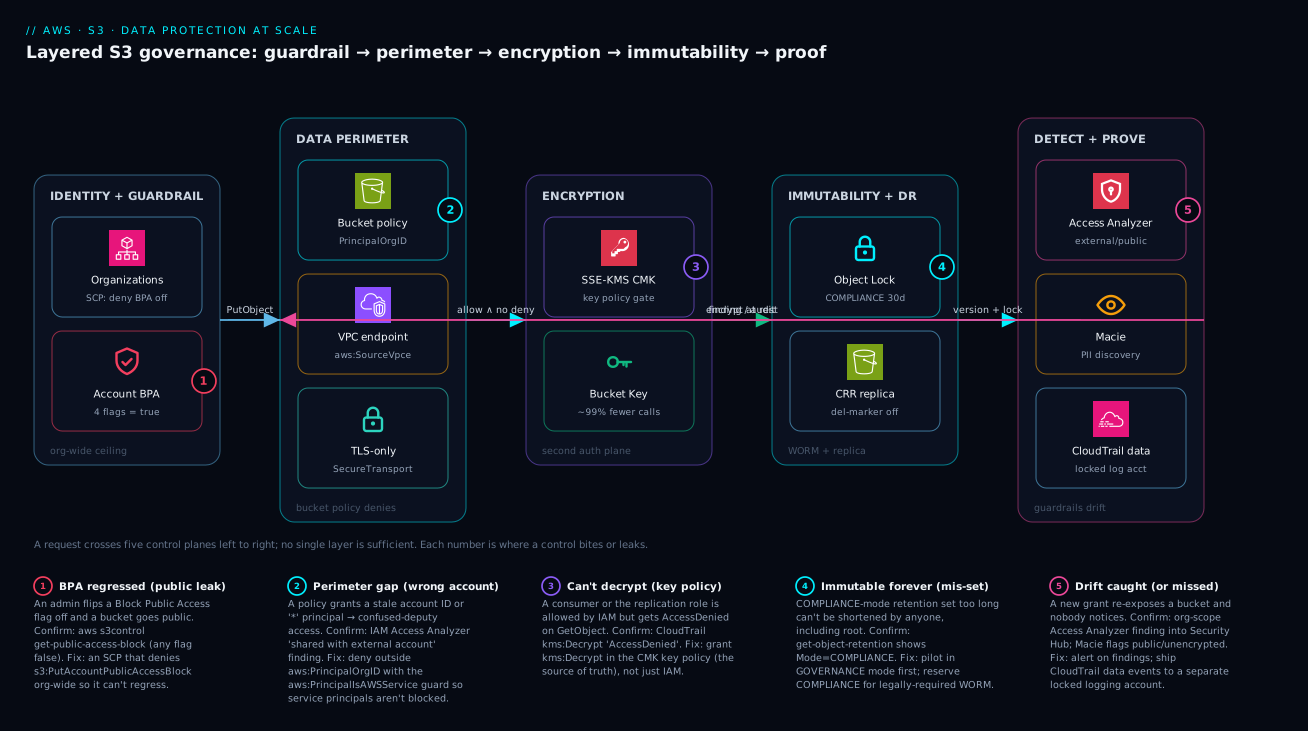
The diagram traces a single PutObject (and the request that later reads it) as it crosses five control planes left to right, then shows the failure that bites at each. Read it that way. The request first meets the Identity + Guardrail plane: an Organizations SCP that denies turning Block Public Access off, sitting above an account-level BPA with all four flags true — the seatbelt that makes a public grant impossible regardless of what any bucket policy says. It then crosses the Data Perimeter plane, where the bucket policy denies anything outside aws:PrincipalOrgID, off your VPC endpoints, or over cleartext (aws:SecureTransport). Surviving that, it reaches the Encryption plane: SSE-KMS with a customer-managed key, where the KMS key policy is a second, independent gate on decryption, and an S3 Bucket Key collapses ~99% of the KMS calls. The object then lands in the Immutability + DR plane — Object Lock in Compliance mode makes the version WORM, and cross-region replication (with delete-marker replication off) keeps a copy that survives a malicious delete. Finally a dashed feedback arrow closes the loop into the Detect + Prove plane, where Access Analyzer flags any external/public drift, Macie discovers PII, and CloudTrail data events flow to a locked logging account.
The numbered badges mark exactly where each layer leaks if you get it subtly wrong: a BPA flag flipped off (1), a perimeter gap from a stale account ID (2), a consumer that’s allowed by IAM but denied by the key policy (3), a Compliance retention set immutably-too-long (4), and drift that nobody alerts on (5). The legend narrates each as symptom · confirm · fix. The throughline the picture teaches: a request must satisfy every plane, and a mistake in one is meant to be caught by the next — which is the entire reason to layer rather than trust a single control.
Real-world scenario
Meridian Pay, a fintech platform team of six engineers, ran ~400 buckets across 14 accounts in an AWS Organization: customer KYC documents, transaction archives, database snapshots, and a pile of CloudTrail/ELB/Config log buckets. Their monthly S3 + KMS spend was about ₹2,40,000. After a near-miss where a contractor’s bucket policy briefly granted a wrong account ID read access (caught by luck during a code review, not by tooling), the security lead mandated a uniform posture: account BPA everywhere, the three-statement data perimeter, SSE-KMS pinned to one per-domain CMK, and write-time encryption enforcement — all via a single Terraform module rolled across every bucket.
The rollout went sideways within an hour, and the way it failed is the lesson. The DenyWrongEncryption statement pinned every PutObject to a single CMK and required the exact s3:x-amz-server-side-encryption-aws-kms-key-id header. But AWS service principals that deliver logs — CloudTrail, ELB, Config — write with their own encryption context and several do not send that key-ID header. The service-side PutObject got AccessDenied, and crucially the delivery was just dropped: no objects, no errors surfaced to the app team. Their CloudTrail-to-S3 pipeline and an ALB access-log bucket went quiet, and nobody noticed until a routine “why are there no new access logs?” question two days later. A guardrail meant to increase security had silently created an audit-logging gap — arguably a worse exposure than the one it fixed.
Diagnosis was textbook once they looked in the right place. CloudTrail (in a different, still-working log bucket) showed the service principals getting AccessDenied on s3:PutObject against the affected buckets, with the request context missing the key-ID condition the deny demanded. The detector confirmed it: the strict header match, not the algorithm match, was the culprit.
The fix was twofold. First, scope the deny to human/role principals by excluding service calls, so AWS-managed log delivery isn’t caught by the strict key-ID check:
{
  "Sid": "DenyWrongEncryption",
  "Effect": "Deny",
  "Principal": "*",
  "Action": "s3:PutObject",
  "Resource": "arn:aws:s3:::my-bucket/*",
  "Condition": {
    "StringNotEqualsIfExists": {
      "s3:x-amz-server-side-encryption-aws-kms-key-id":
        "arn:aws:kms:us-east-1:111122223333:key/abcd-1234"
    },
    "Null": { "s3:x-amz-server-side-encryption": "false" },
    "Bool": { "aws:PrincipalIsAWSService": "false" }
  }
}
Second, they added the log-delivery service principals to the CMK key policy so the services could actually generate data keys against it. The next rollout was staged: apply to a canary OU first, watch CloudTrail for service-principal AccessDenied for 48 hours, then promote. The incident timeline, because the order of moves is the lesson:
| Time | State | Action taken | Effect | What it should have been |
|---|---|---|---|---|
| T+0 | Rollout to all 400 buckets | Apply strict DenyWrongEncryption org-wide |
Looks clean; app traffic fine | Canary one OU first |
| T+1h | Log buckets silent | (no alert — deliveries dropped silently) | Audit gap forming, unnoticed | Alert on log-delivery freshness |
| T+2d | “No new access logs?” | Check the working log bucket’s CloudTrail | Service-principal AccessDenied found |
— |
| T+2d | Root cause | Strict key-ID header vs service writers | Two coupled bugs identified | — |
| T+2d | Mitigated | aws:PrincipalIsAWSService guard + Null check |
Deliveries resume | The correct policy shape |
| T+1wk | Hardened | Service principals added to CMK key policy; staged rollout | Zero gaps; posture uniform | Stage everything by default |
The lesson on the wall: "Encryption-enforcement guardrails must be tested against your service writers, not just your developers — and the failure mode is a dropped object, not a loud error." They kept the posture; they just learned to roll it out the way you defuse a bomb — one wire at a time, watching.
Advantages and disadvantages
The layered-guardrail model both prevents this class of exposure and adds operational weight. Weigh it honestly:
| Advantages (why this model protects you) | Disadvantages (why it bites) |
|---|---|
| BPA + SCP make public exposure unreachable, not merely discouraged | Strict guardrails can break legitimate service writers (log delivery) with a silent AccessDenied |
| The data perimeter stops wrong-account and confused-deputy access in one statement | Perimeter conditions (SourceVpce, ViaAWSService) are subtle; a missing IfExists locks out the console |
| KMS key policy is a second auth plane independent of bucket/IAM | KMS request cost and key-policy drift add operational overhead; “can’t decrypt” debugging is common |
| Object Lock gives true WORM that survives stolen credentials | Compliance mode is irreversible — a retention typo is permanent and keeps billing |
| Replication delivers DR/residency with a clear delete-marker control | Replication adds egress cost and a role/KMS-grant chain that fails silently if incomplete |
| Access Analyzer + Macie turn drift into a finding before it’s a breach | Detection is only as good as the alerting you wire; findings ignored = no protection |
| Terraform makes 400 buckets uniform and reviewable in PRs | A bad module change applies the same mistake to 400 buckets at once |
The model is right for any organization past a single account, and mandatory for regulated data. It bites hardest on teams that roll guardrails out big-bang instead of canarying, that forget service principals exist, and that treat detection findings as noise. Every disadvantage is manageable — guard service principals, canary rollouts, pilot Object Lock in Governance mode, wire the alerts — but only if you know the failure modes exist, which is the point of this article.
Hands-on lab
Stand up a hardened bucket end to end, then prove the controls fail closed — all in your own account (S3/KMS request costs are a few rupees; delete at the end). Run in CloudShell.
Step 1 — Variables and an org-aware account ID.
ACCOUNT_ID=$(aws sts get-caller-identity --query Account --output text)
REGION=us-east-1
BUCKET=kv-lab-$ACCOUNT_ID-$RANDOM
echo "Bucket: $BUCKET"
Step 2 — Account-level BPA on (all four flags).
aws s3control put-public-access-block --account-id "$ACCOUNT_ID" \
  --public-access-block-configuration \
    BlockPublicAcls=true,IgnorePublicAcls=true,BlockPublicPolicy=true,RestrictPublicBuckets=true
aws s3control get-public-access-block --account-id "$ACCOUNT_ID"
Expected: all four flags report true.
Step 3 — Create the bucket with versioning and Bucket-owner-enforced ownership.
aws s3api create-bucket --bucket "$BUCKET" --region "$REGION"
aws s3api put-bucket-versioning --bucket "$BUCKET" \
  --versioning-configuration Status=Enabled
aws s3api put-bucket-ownership-controls --bucket "$BUCKET" \
  --ownership-controls 'Rules=[{ObjectOwnership=BucketOwnerEnforced}]'
Step 4 — Create a CMK and turn on SSE-KMS with a Bucket Key.
KEY_ARN=$(aws kms create-key --description "kv-lab S3 CMK" \
  --query KeyMetadata.Arn --output text)
aws s3api put-bucket-encryption --bucket "$BUCKET" \
  --server-side-encryption-configuration "{
    \"Rules\": [{
      \"ApplyServerSideEncryptionByDefault\": {
        \"SSEAlgorithm\": \"aws:kms\", \"KMSMasterKeyID\": \"$KEY_ARN\" },
      \"BucketKeyEnabled\": true }] }"
Expected: get-bucket-encryption shows aws:kms and BucketKeyEnabled: true.
Step 5 — Apply the TLS-only perimeter statement (the universally-safe one).
aws s3api put-bucket-policy --bucket "$BUCKET" --policy "{
  \"Version\": \"2012-10-17\",
  \"Statement\": [{
    \"Sid\": \"DenyInsecureTransport\", \"Effect\": \"Deny\", \"Principal\": \"*\",
    \"Action\": \"s3:*\",
    \"Resource\": [\"arn:aws:s3:::$BUCKET\", \"arn:aws:s3:::$BUCKET/*\"],
    \"Condition\": { \"Bool\": { \"aws:SecureTransport\": \"false\" } } }] }"
Step 6 — Prove the controls work. Each command should produce the stated result.
# (a) A normal HTTPS upload succeeds (encrypted with your CMK)
echo "hello" > t.txt
aws s3 cp t.txt "s3://$BUCKET/t.txt"   # expect: upload succeeds

# (b) A cleartext (HTTP) request is refused — expect AccessDenied
aws s3api get-object --bucket "$BUCKET" --key t.txt out.txt \
  --endpoint-url "http://s3.$REGION.amazonaws.com" ; echo "exit=$?"

# (c) The object reports SSE-KMS with your key
aws s3api head-object --bucket "$BUCKET" --key t.txt \
  --query "{sse:ServerSideEncryption, key:SSEKMSKeyId, bk:BucketKeyEnabled}"
Validation checklist. A passing posture: BPA is fully on (step 2), the bucket is versioned + owner-enforced + SSE-KMS with a Bucket Key (steps 3-4), the cleartext request fails closed with AccessDenied (6b), and the object is encrypted with your CMK (6c). What each step proves:
| Step | What you did | What it proves | Real-world analogue |
|---|---|---|---|
| 2 | Account BPA on | Public exposure is unreachable | The org-wide seatbelt |
| 3 | Versioning + owner-enforced | No ACL side channel; recoverable versions | Every prod bucket’s baseline |
| 4 | SSE-KMS + Bucket Key | Second auth plane, cheap KMS | Sensitive-data encryption |
| 5-6b | TLS-only deny, then HTTP call fails | The perimeter denies fail closed | A leaked credential off-network is useless |
| 6c | head-object shows the CMK | Encryption is actually applied | Auditable encryption posture |
Cleanup (avoid lingering charges).
aws s3 rm "s3://$BUCKET" --recursive
aws s3api delete-bucket --bucket "$BUCKET"
aws kms schedule-key-deletion --key-id "$KEY_ARN" --pending-window-in-days 7
Cost note. The lab is a handful of S3 and KMS requests — well under ₹20. The CMK is scheduled for deletion (minimum 7-day window) so it stops the ~$1/month charge; you can cancel deletion within the window if you want to keep experimenting.
Going deeper
The six steps above harden a bucket. Governance at scale is a different problem: proving the posture holds across hundreds of buckets you did not personally configure, remediating the ones that don’t, and doing it without trusting that every bucket policy was written correctly. This section covers the org-scale layer — resource-side guardrails, fleet-wide observability, and retroactive automation — plus the encryption and immutability edges the steps only named in passing.
Resource Control Policies — the perimeter that doesn’t depend on the bucket policy
Every perimeter in Step 2 lives inside the bucket policy. That is exactly the weakness at scale: a bucket with an empty, deleted, or fat-fingered policy has no perimeter at all, and nothing above it notices. Resource Control Policies (RCPs), GA since November 2024, close that gap. An RCP is to resources what an SCP is to principals: an Organizations guardrail that sets the maximum access any resource in the attached accounts will grant, evaluated independently of and in addition to the resource’s own policy. Attach one at the org root and every S3 bucket in every account — including ones created tomorrow with a blank policy — inherits the deny.
RCPs currently support S3, STS, SQS, Secrets Manager and KMS. Because they are resource policies, their statements carry a Principal element (SCPs do not). The canonical S3 data-perimeter RCP enforces the identity-and-TLS legs org-wide, so the per-bucket statements become defence-in-depth rather than the only line:
{
  "Version": "2012-10-17",
  "Statement": [
    {
      "Sid": "EnforceOrgIdentityPerimeter",
      "Effect": "Deny",
      "Principal": "*",
      "Action": "s3:*",
      "Resource": "*",
      "Condition": {
        "StringNotEqualsIfExists": { "aws:PrincipalOrgID": "o-exampleorgid" },
        "BoolIfExists": { "aws:PrincipalIsAWSService": "false" }
      }
    },
    {
      "Sid": "EnforceTLSEverywhere",
      "Effect": "Deny",
      "Principal": "*",
      "Action": "s3:*",
      "Resource": "*",
      "Condition": { "Bool": { "aws:SecureTransport": "false" } }
    }
  ]
}
That single attachment means no bucket in the org can be reached by a principal outside your org or over cleartext, regardless of what its bucket policy says. The two data-perimeter legs and where each is best enforced:
| Perimeter leg | Enforced from the principal side by | Enforced from the resource side by | Why the resource side scales better |
|---|---|---|---|
Trusted identity (aws:PrincipalOrgID) |
Bucket policy Deny (per bucket) |
RCP at org root | Covers empty/wrong bucket policies too |
Trusted resource (aws:ResourceOrgID) |
SCP on your principals | VPC endpoint policy | Stops your creds writing to a stranger’s bucket |
Transport (aws:SecureTransport) |
Bucket policy Deny (per bucket) |
RCP at org root | One statement instead of 400 |
The mirror leg — aws:ResourceOrgID in an SCP on your identities — stops the other direction: your principals exfiltrating to a bucket outside your org (a data-perimeter “resource” control). RCP + SCP together give you a perimeter that holds even when a bucket policy is missing and even when a principal is confused. See Resource control policies and declarative policies for a data perimeter for the full RCP/SCP interplay and the newer declarative policies that enforce BPA as a service-level default.
Caveat: RCPs, like SCPs, do not apply to the management account and never grant access — they only cap it. Test in a canary OU exactly as you would an SCP; a too-broad
aws:PrincipalOrgIDdeny that forgets theaws:PrincipalIsAWSServiceguard will break replication and log delivery org-wide, not just in one bucket.
S3 Inventory — the flat catalogue that lets you audit state at scale
CloudTrail tells you who touched an object; Macie tells you what’s inside one. Neither answers “which of my 40 million objects are still SSE-S3 instead of SSE-KMS?” or “which versions have no Object Lock retention?” That is S3 Inventory: a scheduled (daily or weekly) flat-file report — CSV, ORC or Parquet — listing objects and the metadata fields you select, delivered to a destination bucket you own. It is the only native way to audit object state across a whole bucket without paying to HeadObject every key.
The fields that matter for governance, and the question each one closes:
| Inventory field | Governance question it answers |
|---|---|
EncryptionStatus |
Which objects are unencrypted / SSE-S3 vs SSE-KMS? |
ObjectLockMode / ObjectLockRetainUntilDate / ObjectLockLegalHoldStatus |
Which versions are actually WORM-protected? |
ReplicationStatus |
Which objects failed to replicate to DR? |
StorageClass |
What is sitting in Standard that should be in IA/Glacier? |
IsMultipartUploaded / Size |
Where is orphaned or oversized data hiding? |
ETag, LastModifiedDate, VersionId |
The join keys for a Batch Operations manifest |
Point Athena at the report and a compliance question becomes a SELECT. Better still, the Inventory report is a valid manifest input to S3 Batch Operations — so “find the non-compliant objects” and “fix them” become two halves of one pipeline.
S3 Batch Operations — retroactive remediation across billions of objects
Guardrails stop new mistakes; they do nothing for the objects already sitting wrong. S3 Batch Operations is how you remediate the back-catalogue: you hand it a manifest (an S3 Inventory report or a CSV of keys) and one operation, and it runs that operation across every listed object — millions or billions — with retries, throttling, IAM under a job role, and a completion report. The operations that matter for governance:
| Batch operation | Retroactive fix it performs |
|---|---|
| Copy (in place, new encryption config) | Re-encrypt legacy SSE-S3 objects under a new SSE-KMS CMK; change storage class |
| Put Object Tagging | Apply cost-allocation / data-classification tags to existing objects |
| Put Object Lock Retention / Legal Hold | Apply WORM retention to objects already in a Lock-enabled bucket |
| Restore | Bulk-restore Glacier / Deep Archive objects for eDiscovery or a legal hold |
| Invoke Lambda | Any custom remediation (redact, re-tag by content, notify) |
| Replicate existing objects (Batch Replication) | Backfill DR for objects written before the replication rule existed |
A worked pattern ties the last three sections together. Say an acquired team’s bucket is full of SSE-S3 objects and you need them under your domain CMK with proof: (1) run S3 Inventory with EncryptionStatus to produce the manifest of non-aws:kms objects; (2) run a Batch Operations Copy job that rewrites each object in place with --s3-canned-acl-free, SSE-KMS + your CMK + Bucket Key; (3) read the completion report for failures; (4) re-run Inventory to confirm 100% SSEKMS. That is the entire “encrypt the past” loop, auditable end to end.
Object Lock nuance: the create-time rule from Step 4 still holds for enabling Object Lock cleanly, but once a bucket has Lock enabled, Batch Operations is how you push retention onto the versions that were written before you set a default rule — the default rule only applies to new objects.
Fleet observability — S3 Storage Lens
Access Analyzer, Macie and CloudTrail each answer a security question about individual buckets. S3 Storage Lens answers the fleet question: across the whole organization, what fraction of my buckets and bytes are actually protected — and where is money leaking? Enable trusted access in Organizations and a single org-level dashboard aggregates every account.
Storage Lens ships in two tiers, and the free one is not enough for governance:
| Tier | Metrics | Retention | Governance value |
|---|---|---|---|
| Free (default) | 28 usage metrics, account-scoped | 14 days | Basic size / object-count trends |
| Advanced (paid, per object monitored) | 35+ incl. activity, cost-optimization and data-protection metrics, prefix-level | 15 months, CloudWatch-published | Fleet compliance + spend recommendations |
The data-protection metrics are the governance win: % of buckets with versioning enabled, ...with BPA, ...with default encryption, ...with Object Lock, ...with replication, ...with MFA Delete. One dashboard tells you which of 400 buckets is missing a control. The cost-optimization recommendations are the money win: it flags % noncurrent version bytes (versioning with no lifecycle expiry — the single biggest avoidable S3 cost), incomplete multipart upload bytes older than 7 days, and buckets that would benefit from Bucket Keys or a cheaper storage class.
Tagging, ABAC and Cost Categories — governing by attribute, not by ARN
At three buckets you name principals and ARNs; at four hundred you govern by attribute. S3 supports object and bucket tags (up to 10 per object) that drive three things at once: attribute-based access control (ABAC), tag-based lifecycle, and cost allocation. The condition keys that make tags a control surface:
| Condition key | Applies to | Use |
|---|---|---|
s3:RequestObjectTag/<key> , s3:RequestObjectTagKeys |
PutObject |
Require a classification tag at write time |
s3:ExistingObjectTag/<key> |
Get/Delete |
Only let a role read objects tagged for its domain |
aws:PrincipalTag/<key> vs aws:ResourceTag/<key> |
Any | ABAC: a principal tagged team=payments reaches only team=payments data |
ABAC collapses hundreds of per-team policies into one policy that says “principal-tag must equal resource-tag,” which is how you keep a large estate’s grants reviewable. For the finance side, activate the tags as cost allocation tags in Billing, then define Cost Categories — rules that group linked accounts and tag values into named buckets (e.g. Environment=prod, DataClass=regulated) so Cost Explorer and the CUR report S3 + KMS spend by team and by data sensitivity, not just by account. Governance you cannot cost is governance you cannot defend at budget time.
Encryption and immutability edges the steps only named
Three edges worth pinning down:
DSSE-KMS (dual-layer). For workloads under mandates that require two independent layers of encryption at rest (US DoD IL5, CNSA-adjacent regimes), S3 offers dual-layer server-side encryption with KMS keys — set SSEAlgorithm to aws:kms:dsse. Each object gets two independent KMS-based encryption operations, so the KMS request cost is roughly doubled versus SSE-KMS. It is only for an explicit dual-layer requirement; for everything else, SSE-KMS with a Bucket Key is the right tool.
MFA Delete — why it is rarely the answer. MFA Delete requires versioning and, uniquely, can be configured only by the bucket-owning account’s root user presenting a physical/virtual MFA device, only via the CLI/API (never the console): aws s3api put-bucket-versioning --bucket B --versioning-configuration Status=Enabled,MFADelete=Enabled --mfa "arn:aws:iam::123456789012:mfa/root-account-mfa-device 123456". Once on, every version delete and any change to the versioning state needs a fresh MFA code. That root-only, human-in-the-loop requirement is precisely why it does not fit automation or large fleets — Object Lock is the modern, IAM-governable immutability control and should be your default; reserve MFA Delete for a handful of crown-jewel buckets where a human gate on deletes is genuinely wanted.
Access Points instead of a 20 KB monster policy. A bucket policy is capped at 20 KB. Stack an org perimeter, a network perimeter, TLS, encryption enforcement and a dozen per-team Allows and you will hit that ceiling on a shared data-lake bucket. S3 Access Points are the scale answer: each application gets its own named endpoint with its own access-point policy, and the bucket policy delegates to them once — turning one unmaintainable policy into many small, owned ones. That belongs to its own lesson; see S3 Access Points, Object Lambda and Multi-Region Access Points rather than duplicating it here.
Scale numbers worth knowing
| Limit | Value | Why it bites governance |
|---|---|---|
| Bucket policy size | 20 KB | Perimeter + team grants overflow it → use Access Points / RCPs |
| General-purpose buckets / account | 10,000 default (raisable to 1,000,000) | Fleet audit tooling (Inventory, Storage Lens) becomes mandatory |
| Access Points / region / account | 10,000 | Enough to give every workload its own delegated policy |
| Object tags | 10 per object | ABAC/classification schemes must stay compact |
| Default encryption | On for every new object since Jan 2023 | There is no “unencrypted at rest” default to worry about — only which key |
Practice challenges
Six exercises that escalate from reading the model to remediating a fleet. They deliberately go beyond the hands-on lab — the model, the perimeter, the KMS plane, and the at-scale tooling from Going deeper. Try each before opening the solution.
1 (Beginner) — Predict the access decision. A principal in account B (part of your org) is granted s3:GetObject by its own IAM policy on a bucket in account A. Account A’s bucket policy says nothing about account B. There are no Deny statements anywhere. Does the GetObject succeed? Why?
<details><summary>Solution</summary>
Denied. This is a cross-account call, which requires an Allow on both sides — the caller’s IAM policy and the resource’s bucket policy. Only account B’s side allows it, so S3 denies. (Add a bucket-policy Allow for B’s principal in account A.)
Why: same-account needs an Allow on either side; cross-account needs both — the single most-tested rule in the S3 access-decision model. </details>
2 (Beginner) — Author the org-identity perimeter. Write the bucket-policy Deny statement that confines my-bucket to principals in Organization o-exampleorgid, without accidentally blocking AWS service principals (replication, log delivery).
<details><summary>Solution</summary>
{
  "Sid": "DenyOutsideMyOrg",
  "Effect": "Deny",
  "Principal": "*",
  "Action": "s3:*",
  "Resource": ["arn:aws:s3:::my-bucket", "arn:aws:s3:::my-bucket/*"],
  "Condition": {
    "StringNotEquals": { "aws:PrincipalOrgID": "o-exampleorgid" },
    "Bool": { "aws:PrincipalIsAWSService": "false" }
  }
}
Why: one statement kills wrong-account and confused-deputy access; the aws:PrincipalIsAWSService=false guard is what stops it also blocking the service principals that carry no org ID.
</details>
3 (Intermediate) — Enforce SSE-KMS at write time without trapping log delivery. Require every PutObject to use your CMK, but do not break CloudTrail/ELB/Config log delivery (whose service writers often omit the key-ID header). Give the deny statement.
<details><summary>Solution</summary>
{
  "Sid": "DenyWrongEncryption",
  "Effect": "Deny",
  "Principal": "*",
  "Action": "s3:PutObject",
  "Resource": "arn:aws:s3:::my-bucket/*",
  "Condition": {
    "StringNotEqualsIfExists": {
      "s3:x-amz-server-side-encryption-aws-kms-key-id":
        "arn:aws:kms:us-east-1:111122223333:key/abcd-1234"
    },
    "Null": { "s3:x-amz-server-side-encryption": "false" },
    "Bool": { "aws:PrincipalIsAWSService": "false" }
  }
}
Then add the log-delivery service principals to the CMK key policy so they can GenerateDataKey.
Why: the strict key-ID match is what silently drops service writes; the IfExists + Null + PrincipalIsAWSService guards scope the deny to human/role writers, and the key-policy grant lets the services actually encrypt.
</details>
4 (Intermediate) — Diagnose the impossible AccessDenied. A consumer in another account is allowed by both its IAM policy and the bucket policy, yet GetObject returns AccessDenied. Name the missing grant, where it lives, and the one CloudTrail field that proves it.
<details><summary>Solution</summary>
The object is SSE-KMS and the consumer is missing kms:Decrypt in the CMK key policy — an authorization plane independent of S3/IAM. Prove it with CloudTrail: eventSource: kms.amazonaws.com, eventName: Decrypt, errorCode: AccessDenied for that principal. Fix by granting kms:Decrypt in the key policy (for cross-account, on the key policy and the consumer’s IAM).
Why: IAM + bucket policy authorize the S3 action; decryption is gated separately by the key policy — reading eventSource sends you to the right file instead of the wrong one.
</details>
5 (Advanced) — Make the perimeter independent of the bucket policy. A new team keeps creating buckets with blank policies, so your per-bucket perimeter never gets applied. Write an org-wide guardrail that denies any S3 access from outside your org or over cleartext regardless of the bucket policy, and say why it beats a bucket-policy standard.
<details><summary>Solution</summary>
Attach a Resource Control Policy (RCP) at the org root:
{
  "Version": "2012-10-17",
  "Statement": [
    { "Sid": "OrgIdentityPerimeter", "Effect": "Deny", "Principal": "*",
      "Action": "s3:*", "Resource": "*",
      "Condition": {
        "StringNotEqualsIfExists": { "aws:PrincipalOrgID": "o-exampleorgid" },
        "BoolIfExists": { "aws:PrincipalIsAWSService": "false" } } },
    { "Sid": "TLSEverywhere", "Effect": "Deny", "Principal": "*",
      "Action": "s3:*", "Resource": "*",
      "Condition": { "Bool": { "aws:SecureTransport": "false" } } }
  ]
}
Why: an RCP is evaluated independently of each bucket’s own policy, so a bucket with an empty or fat-fingered policy is still confined — the perimeter no longer depends on every bucket being configured correctly. </details>
6 (Advanced) — Encrypt the past and prove it. You inherit a bucket of ~40 million legacy SSE-S3 objects that must all move to your domain CMK, with an audit trail proving completion. Design the pipeline using only native S3 tooling.
<details><summary>Solution</summary>
- S3 Inventory — schedule a report including
EncryptionStatus; filter to objects notSSE-KMSto build the manifest. - S3 Batch Operations — Copy job over that manifest, rewriting each object in place with
SSEAlgorithm: aws:kms, your CMK, andBucketKeyEnabled: true; run under a job IAM role withkms:GenerateDataKey/Encrypton the CMK. - Read the completion report for any failed keys and re-run the job on just those.
- Re-run S3 Inventory and confirm 100%
SSEKMS— that report is your audit artefact.
Why: Inventory finds the non-compliant objects and Batch Operations remediates them at fleet scale — the same manifest drives both halves, and the second Inventory closes the loop with proof. </details>
Common beginner mistakes
These are conceptual traps — wrong mental models that make people build the wrong control — as opposed to the symptom-to-fix playbook in the troubleshooting section below. Fix the model and the specific bugs stop recurring.
-
“I made the bucket private, so it’s safe.” Toggling a single bucket’s Block Public Access is a per-bucket setting that the next new bucket, or a later admin, silently won’t inherit. The guarantee comes from account-level BPA pinned by an SCP (and, at org scale, an RCP): the dangerous state becomes unreachable everywhere, not merely un-set on the one bucket you remembered.
-
“Encryption at rest protects my data from someone who has access.” Encryption is not access control. With SSE-S3, S3 transparently decrypts for anyone the policy allows — the encryption stops a thief who steals the physical disk, not an over-permissioned principal. Only SSE-KMS with a restrictive key policy turns encryption into a second authorization plane, because now the allowed principal also needs
kms:Decrypt. If your threat model is a bad grant, the key policy is the control, not the fact that bytes are encrypted. -
“Versioning is my backup.” Versioning protects against accidental overwrite by keeping old versions — but stolen credentials can delete every version, and versioning with no lifecycle rule quietly bills you forever. A real backup is Object Lock (so versions can’t be deleted) + a separate account (so the attacker’s creds can’t reach it) + lifecycle expiry (so it doesn’t cost infinity). Versioning is one ingredient, not the dish.
-
“Compliance mode is the safest choice because it’s the strongest.” Compliance-mode Object Lock cannot be shortened or deleted by anyone — including you, root, and AWS Support — until it expires. A seven-year retention set by a typo is seven years of forced storage cost with no remedy. The right model: pilot in Governance mode, and graduate to Compliance only for data you are legally required to retain as WORM. Strongest is not safest when it’s irreversible.
-
“A bucket-policy
Allowgrants access.” AnAllowis necessary, never sufficient. An explicitDenyanywhere — your perimeter, an SCP, an RCP, BPA stripping a public grant — overrides everyAllow. And a cross-account caller needs anAllowon both sides (its IAM and your bucket policy); one side alone is a denial. Read access as “deny-wins, and cross-account needs both,” not “I added an Allow, so it works.” -
“Turning on all the guardrails at once is the safe, thorough thing to do.” The strict encryption-enforcement deny is the classic footgun: AWS service writers (CloudTrail, ELB, Config log delivery) often omit the exact key-ID header, so their
PutObjectis denied and the delivery is silently dropped — you create an audit gap while thinking you increased security. Roll guardrails out canary-first: one OU, watch CloudTrail for service-principalAccessDeniedfor 48 hours, then promote. -
“ACLs are how you share S3 objects.” ACLs are the legacy per-object grant model, disabled by default since April 2023 under
BucketOwnerEnforced, and nearly impossible to audit at scale. Modern sharing is expressed in policies (bucket policy, IAM, Access Point policy) — the bucket owner owns every object and there is no per-object side channel to forget about. If a design reaches for an ACL, the design is wrong. -
“A KMS
AccessDeniedmeans my S3 policy is broken.” Two independent authorization planes can each say no, and they look identical from the client. The tell is CloudTrail’seventSource:s3.amazonaws.commeans fix the bucket/IAM policy;kms.amazonaws.commeans fix the key policy — a different file, often owned by a different team. Hours are lost editing the wrong one.
Common mistakes & troubleshooting
This is the playbook — the part you bookmark. S3 governance fails in a small set of recognizable ways, almost always as a silent AccessDenied or a quiet exposure rather than a loud error. First the scannable table, then the highest-impact entries expanded with exact confirm commands.
| # | Symptom | Root cause | Confirm (exact cmd / path) | Fix |
|---|---|---|---|---|
| 1 | Bucket went public despite “we set BPA” | Account BPA not set; only some buckets covered | aws s3control get-public-access-block --account-id $ID (a flag false) |
Set all four account-level; SCP-deny PutAccountPublicAccessBlock |
| 2 | Public access reopened by an admin later | No SCP guarding BPA | CloudTrail PutAccountPublicAccessBlock event by a user |
Attach SCP denying that action org-wide |
| 3 | Service log delivery silently stopped after enforcing encryption | Strict key-ID header deny catches service writers | CloudTrail: service principal AccessDenied on s3:PutObject |
Add aws:PrincipalIsAWSService=false; add service to CMK key policy |
| 4 | Console browsing breaks after adding network perimeter | aws:SourceVpce without IfExists |
CloudTrail AccessDenied, no vpce in request context |
Use StringNotEqualsIfExists; add console egress IP |
| 5 | Athena/CloudFront-OAC reads denied | Missing aws:ViaAWSService guard |
CloudTrail shows invokedBy a service |
Add aws:ViaAWSService=false to the perimeter deny |
| 6 | Cross-account consumer: AccessDenied on GetObject, IAM looks fine |
Missing kms:Decrypt in the CMK key policy |
CloudTrail kms:Decrypt AccessDenied for the principal |
Grant decrypt in the key policy (not just IAM) |
| 7 | Cross-account access blocked even within the org | Bucket policy lacks an Allow for the other account |
aws iam simulate-custom-policy; read bucket policy |
Add cross-account Allow (both sides required) |
| 8 | Replication stalled / objects not copied | Role missing a permission or KMS grant | Replication metrics; CloudTrail on the role | Add s3:Replicate*, kms:Decrypt/Encrypt per table in Step 5 |
| 9 | KMS-encrypted objects never replicate | SseKmsEncryptedObjects not enabled |
get-bucket-replication shows it Disabled |
Enable it + grant dest-CMK encrypt |
| 10 | Backup “gone” after a ransomware delete | Versioning/Object Lock absent, or delete-markers replicated | get-object-lock-configuration; get-bucket-replication |
Object Lock (Compliance); delete-marker replication off |
| 11 | Objects can never be deleted, billing forever | Compliance retention set too long by mistake | get-object-retention shows Mode=COMPLIANCE |
Wait out retention; pilot in Governance next time |
| 12 | Public/external bucket never alerted | No org Access Analyzer or no alert on findings | accessanalyzer list-findings-v2 empty/no route |
Org analyzer → Security Hub → alert |
| 13 | PII found in a “logs” bucket only after a breach | Macie not run on the account | Macie console: no jobs on that account | Schedule Macie on sensitive-data accounts |
| 14 | Audit trail tampered with after compromise | CloudTrail logs in the same (compromised) account | Trail destination = data account | Ship data events to a separate locked log account |
| 15 | KMS bill spiked on a hot bucket | Bucket Key not enabled | get-bucket-encryption BucketKeyEnabled:false |
Set BucketKeyEnabled:true |
The expanded form, with the full reasoning for the entries that bite hardest:
3. Service log delivery (CloudTrail/ELB/Config) silently stops after you enforce encryption.
Root cause: a DenyWrongEncryption statement that requires the exact s3:x-amz-server-side-encryption-aws-kms-key-id header; AWS service writers often omit it and their PutObject is denied — the delivery is dropped, not surfaced as an app error.
Confirm: in a still-working log destination, aws cloudtrail lookup-events --lookup-attributes AttributeKey=EventName,AttributeValue=PutObject shows the service principal with errorCode: AccessDenied.
Fix: add "Bool": { "aws:PrincipalIsAWSService": "false" } and a Null check on the algorithm so service writers aren’t trapped, and add the service principals to the CMK key policy.
4. Console (or some app) browsing breaks after you add the network perimeter.
Root cause: aws:SourceVpce used with StringNotEquals (not ...IfExists), so any request without a VPC-endpoint context — including the console — is denied.
Confirm: CloudTrail shows AccessDenied with no vpce- in vpcEndpointId/request context.
Fix: switch to StringNotEqualsIfExists, and add your console/egress IP to the aws:SourceIp allow-list (also IfExists).
6. A cross-account consumer gets AccessDenied on GetObject even though its IAM policy clearly allows it.
Root cause: the object is SSE-KMS and the consumer lacks kms:Decrypt in the CMK key policy — IAM allowing S3 is necessary but not sufficient; the key policy is the independent source of truth.
Confirm: CloudTrail eventSource: kms.amazonaws.com, eventName: Decrypt, errorCode: AccessDenied for that principal.
Fix: add the consumer principal (or its account, via kms:ViaService) to the key policy with kms:Decrypt; for cross-account, grant on both the key policy and the consumer’s IAM.
10. A “backup” bucket turns out to be unrecoverable after an attacker deletes objects.
Root cause: versioning was off (so overwrite hid the original) or Object Lock was never enabled, or replication had delete-marker replication on so the malicious delete propagated to the DR copy too.
Confirm: aws s3api get-object-lock-configuration --bucket <b> returns no config; get-bucket-replication shows DeleteMarkerReplication: Enabled.
Fix: create with --object-lock-enabled-for-bucket + Compliance retention; keep delete-marker replication disabled; isolate the backup in a separate account.
11. Objects in a Compliance-locked bucket can never be deleted and you’re billed indefinitely.
Root cause: a Compliance-mode retention period set far too long (a Days/RetainUntilDate typo). No principal — not even root, not AWS Support — can shorten or delete it.
Confirm: aws s3api get-object-retention --bucket <b> --key <k> shows Mode: COMPLIANCE and a distant RetainUntilDate.
Fix: there is no early-delete fix — you wait out the retention and keep paying. Prevention: pilot every Object Lock rollout in Governance mode and only graduate to Compliance for legally-mandated data.
Best practices
- Set account-level Block Public Access on every account, all four flags
true. It’s the highest-leverage control and supersedes per-bucket settings. Verify withget-public-access-block. - Pin BPA with an SCP that denies
s3:PutAccountPublicAccessBlockorg-wide, so no account admin can regress it. - Use
BucketOwnerEnforcedeverywhere to disable ACLs. AuditPutObjectAclin CloudTrail before flipping legacy buckets. - Carry the three perimeter statements on every bucket: deny outside
aws:PrincipalOrgID, deny off-network (aws:SourceVpce/aws:SourceIpwithIfExists), deny non-TLS (aws:SecureTransport). Always include theaws:PrincipalIsAWSService/aws:ViaAWSServiceguards. - Default to SSE-KMS with a per-domain CMK for sensitive data, and always enable S3 Bucket Keys to cut KMS request cost ~99%.
- Treat the KMS key policy as the source of truth for decrypt rights. When a consumer “can’t decrypt,” check the key policy first, not IAM.
- Enable Object Lock at creation for anything regulated, pilot in Governance mode, and reserve Compliance for data you are legally required to retain.
- Replicate critical buckets (CRR for DR, SRR for residency/logs), keep delete-marker replication off for ransomware resilience, and add RTC where you need a 15-minute RPO.
- Stand up an org-scope Access Analyzer feeding Security Hub, and run Macie on sensitive-data accounts on a schedule.
- Ship CloudTrail S3 data events to a separate, locked logging account so an attacker who owns the data account can’t erase their tracks.
- Roll guardrails out canary-first — one OU, watch CloudTrail for service-principal
AccessDeniedfor 48 hours, then promote. Never big-bang a deny across 400 buckets. - Manage all of it as code (Terraform) reviewed in PRs, so the posture is uniform and a change is auditable.
The leading indicators worth alerting on — drift and silent denials, not just “bucket down”:
| Alert on | Signal | Threshold (starting point) | Why it’s leading |
|---|---|---|---|
| Public/external finding | Access Analyzer finding | Any ACTIVE finding | The earliest sign of a perimeter breach |
| BPA changed | CloudTrail PutAccountPublicAccessBlock |
Any occurrence | Someone tried to weaken the seatbelt |
Service-principal AccessDenied on PutObject |
CloudTrail | > 0 over 5 min | A guardrail is silently dropping log delivery |
kms:Decrypt AccessDenied |
CloudTrail (kms) | Spike | A consumer/replica lost key-policy access |
| Sensitive data found | Macie finding | Any HIGH severity | PII/secrets in the wrong bucket |
| Replication latency | ReplicationLatency (RTC) |
> 15 min | DR copy falling behind its RPO |
Security notes
- Layer, and assume each layer can fail. BPA above policy, the data perimeter inside policy, KMS as a second authorization plane, Object Lock and replication beneath the data, Access Analyzer and Macie watching the stack. No single control is sufficient.
- Least privilege on every grant. Scope bucket-policy
Allows and IAM to specific prefixes and actions, nevers3:*on*. Pair with IAM least privilege and permission boundaries so the principals themselves are bounded. - The KMS key policy is a security control, not a formality. Grant
kms:Decrypt/Encryptto the precise principals (consumers, replication role, allowed services) and nothing broader. Usekms:ViaServiceto confine key use to S3. - Keep secrets out of S3. Macie exists because they end up there anyway — but config, tokens and credentials belong in Secrets Manager / Parameter Store, not an object.
- Isolate logs and backups in separate accounts. An attacker who owns the data account must not be able to delete the audit trail or the DR copy. Cross-account isolation is the control.
- Private access by default. Reach buckets over VPC endpoints (VPC deep dive: endpoints and routing) and gate the perimeter on
aws:SourceVpce; expose objects to the internet only through CloudFront with OAC, never a public bucket. - Make immutability real. Object Lock in Compliance mode for records that legally require WORM; MFA Delete where deletes must be human-gated; delete-marker replication off so DR survives a malicious delete.
- TLS everywhere, always. The
aws:SecureTransport=falsedeny is free and universal — every bucket carries it.
The controls that secure and prevent operational incidents — they pull the same direction here:
| Control | Mechanism | Secures against | Also prevents |
|---|---|---|---|
| Account BPA + SCP | put-public-access-block + SCP deny |
Public exposure | Admin re-opening access by accident |
| Org/network/TLS perimeter | Bucket-policy denies | Wrong-account, off-network, cleartext | Confused-deputy and leaked-credential use |
| SSE-KMS + key policy | Default encryption + CMK policy | Decryption by an allowed-but-untrusted principal | Central, revocable decrypt gating |
| Object Lock (Compliance) | WORM retention | Ransomware overwrite/delete | Accidental deletes of records |
| Separate log/backup account | Cross-account isolation | Trail/backup tampering | Single-account blast radius |
| Access Analyzer + Macie | Org analyzer + data discovery | Undetected external share / unknown PII | Drift becoming a breach |
Cost & sizing
The bill drivers for an S3 governance posture, and how each interacts with the controls:
- Storage and requests dominate the base S3 bill; governance adds little to storage but encryption and replication add request/transfer cost. The single biggest avoidable cost is versioning without lifecycle expiry — noncurrent versions accumulate forever. Always expire noncurrent versions and abort incomplete multipart uploads.
- KMS charges per CMK (~$1/month each) plus per-request fees on encrypt/decrypt. Naively, SSE-KMS calls KMS on every object op; S3 Bucket Keys cut that ~99% and are free to enable — always on. Consolidate to a sensible number of per-domain CMKs rather than one per bucket.
- Object Lock adds no charge itself but guarantees you pay for storage until retention expires — a Compliance-mode mistake is a long-term cost commitment.
- Replication adds inter-region data transfer (CRR) and a small per-GB RTC fee if you enable the 15-minute SLA. SRR has no transfer cost. Use a cheaper destination storage class (
STANDARD_IA) for rarely-read DR copies. - Detection has modest cost: Access Analyzer for S3 is free; Macie is priced per GB scanned and per object inventoried (schedule it, don’t run continuously on petabytes); CloudTrail data events are billed per event recorded — scope them to sensitive buckets if volume is huge.
A rough monthly picture for a ~400-bucket org with moderate sensitive data:
| Cost driver | What you pay for | Rough INR / month | What it buys | Watch-out |
|---|---|---|---|---|
| Per-domain CMKs (≈10) | ~$1/key + requests | ~₹2,000–4,000 | Central, audited encryption gating | One-key-per-bucket explodes this |
| S3 Bucket Keys | Free to enable | ₹0 (saves money) | ~99% fewer KMS requests | Forgetting it spikes KMS cost |
| CRR to a paired region | Inter-region transfer + replica storage | ₹varies with data | DR / lower-latency reads | Egress on large buckets adds up |
| RTC (15-min SLA) | Per-GB RTC fee | small premium | A measurable RPO | Only where you need the SLA |
| Macie (sensitive accounts) | Per-GB scanned + per-object | ₹scheduled-job cost | Knowing what’s exposed | Don’t scan everything continuously |
| CloudTrail data events | Per event recorded | ₹scales with object ops | Forensics + alerting | Scope to sensitive buckets if huge |
| Access Analyzer (S3) | Free | ₹0 | External/public drift detection | No reason not to enable |
The throughline: governance is cheap relative to a breach. Bucket Keys and lifecycle expiry actively save money; the rest (CMKs, replication, Macie, CloudTrail) is a small, predictable premium for making an accidental exposure something your guardrails reject. Right-size by scoping Macie and CloudTrail data events to where the sensitive data actually is, and consolidating CMKs per domain.
Interview & exam questions
1. Walk through the S3 access-decision model. When does same-account differ from cross-account? S3 layers IAM identity policies, bucket policies, BPA and ACLs. An explicit Deny anywhere always wins; absent a deny you need an Allow. For same-account calls, an Allow in either the IAM policy or the bucket policy is sufficient. For cross-account, you need an Allow on both the caller’s IAM policy and the bucket policy. BPA overrides all of it for public grants.
2. What does account-level Block Public Access do that bucket-level doesn’t, and how do you stop an admin disabling it? Account-level BPA applies to every existing and future bucket and supersedes per-bucket settings — one switch, whole account. To prevent regression, attach an SCP that denies s3:PutAccountPublicAccessBlock org-wide, so even an account admin cannot turn it off.
3. Describe a bucket-policy data perimeter. Which condition keys, and what guard prevents breaking AWS services? Three deny statements: outside aws:PrincipalOrgID (trusted identity), off your aws:SourceVpce/aws:SourceIp (trusted network), and aws:SecureTransport=false (TLS). Add aws:PrincipalIsAWSService=false and aws:ViaAWSService=false (with IfExists on network keys) so legitimate service principals — log delivery, replication, Athena, CloudFront OAC — aren’t blocked.
4. SSE-S3 vs SSE-KMS — when and why? SSE-S3 (AES256) is AWS-managed, transparent and free, with no per-object audit. SSE-KMS uses your CMK, logs every decrypt to CloudTrail, and adds a second authorization plane (the key policy) on top of bucket/IAM — even an allowed principal still needs kms:Decrypt. Use SSE-KMS for anything sensitive; the trade-off is KMS request cost, softened by Bucket Keys.
5. What is an S3 Bucket Key and what problem does it solve? Without it, every GetObject/PutObject on an SSE-KMS bucket is a KMS API call, which is expensive on hot buckets. A Bucket Key generates a short-lived bucket-level data key so S3 stops calling KMS per object, cutting KMS request cost by up to ~99%. It’s free to enable and should always be on with SSE-KMS.
6. A cross-account consumer is allowed by IAM and the bucket policy but still gets AccessDenied on GetObject. Why? The objects are SSE-KMS and the consumer lacks kms:Decrypt in the CMK key policy. IAM and the bucket policy authorize the S3 action, but decryption is a separate, independent authorization governed by the key policy. Confirm via a kms:Decrypt AccessDenied in CloudTrail; fix by granting decrypt in the key policy.
7. Governance vs Compliance mode in Object Lock — what’s the difference and why does it matter? Both are WORM retention requiring versioning, set at bucket creation. Governance mode can be overridden by principals with s3:BypassGovernanceRetention; Compliance mode cannot be shortened or deleted by anyone, including root, until it expires. Compliance is for true regulatory WORM (SEC 17a-4-style) — and is irreversible, so pilot in Governance first.
8. How do you make S3 resilient to a ransomware mass-delete using stolen credentials? Versioning (so overwrite doesn’t destroy the original) + Object Lock in Compliance mode (so locked versions can’t be deleted) + replication with delete-marker replication off (so a source delete doesn’t propagate to the DR copy) + the backup in a separate account so the attacker’s data-account creds can’t reach it. Layered, not one control.
9. You enforce write-time encryption and your CloudTrail/ELB log delivery silently stops. What happened and how do you fix it? Your DenyWrongEncryption statement requires the exact s3:x-amz-server-side-encryption-aws-kms-key-id header, but AWS service writers often omit it, so their PutObject is denied and the delivery is dropped with no app-visible error. Add aws:PrincipalIsAWSService=false (and a Null check on the algorithm) and add the service principals to the CMK key policy.
10. Which AWS services give you continuous S3 governance, and what does each answer? IAM Access Analyzer for S3 (org-scope) answers “is any bucket shared external/public?” → Security Hub. Amazon Macie answers “what sensitive data is in the bucket?” (PII/secrets). CloudTrail data events answer “who did GetObject/DeleteObject?” for forensics and alerting — shipped to a separate locked logging account.
11. CRR vs SRR — when do you choose each? CRR (cross-region) is for DR and lower-latency reads in another region; the replica CMK must exist in the destination region and inter-region transfer applies. SRR (same-region) is for data residency, log aggregation, or account isolation with no transfer cost. Both require versioning on source and destination and an IAM role S3 assumes.
12. Why ship S3 audit logs to a separate account, and what’s the difference between CloudTrail data events and server access logs? A separate, locked logging account means an attacker who compromises the data account can’t erase their tracks. CloudTrail data events give per-object API calls with full identity, minutes of latency, Athena-queryable — best for alerting/forensics. S3 server access logs capture every request best-effort with hours of latency — best for completeness. Prefer CloudTrail data events; add access logs when you need every request.
These map primarily to AWS Certified Security – Specialty (SCS-C02) — data protection, KMS, S3 access control, detection — and Solutions Architect Associate (SAA-C03) — secure storage, encryption, replication. The org-guardrail and perimeter angle touches SAP-C02 (Pro). A compact cert-mapping for revision:
| Question theme | Primary cert | Objective area |
|---|---|---|
| Access-decision model, perimeter | SCS-C02 / SAA-C03 | S3 access control, data perimeter |
| BPA + SCP guardrails | SCS-C02 / SAP-C02 | Org-wide preventative controls |
| SSE-KMS, Bucket Keys, key policy | SCS-C02 | Data protection / KMS |
| Object Lock, ransomware resilience | SCS-C02 / SAA-C03 | Data protection, durability |
| CRR/SRR, RTC | SAA-C03 / SAP-C02 | Resilience, DR, residency |
| Access Analyzer, Macie, CloudTrail | SCS-C02 | Detection & incident response |
Quick check
- A cross-account principal is allowed by both the IAM policy and the bucket policy, yet
GetObjectreturnsAccessDenied. What’s the most likely missing grant, and where does it live? - You “set BPA” but a bucket still went public. Name the most likely reason and the one control that makes it impossible for an admin to reopen public access.
- True or false: scaling up your KMS key count (one CMK per bucket) is the recommended way to reduce blast radius. Explain.
- After adding a network-perimeter deny, the AWS console can’t browse the bucket. What’s the bug in the policy and the fix?
- You enabled Object Lock in Compliance mode with a 7-year retention by mistake. Can you delete the objects early? What should you have done first?
Answers
- The objects are SSE-KMS and the consumer is missing
kms:Decryptin the CMK key policy — an independent authorization plane from S3/IAM. Confirm via akms:DecryptAccessDeniedin CloudTrail; fix by granting decrypt in the key policy (the source of truth), not just IAM. - Account-level BPA probably wasn’t set (only some buckets were), so a public ACL/policy grant took effect. The control that makes reopening impossible is an SCP denying
s3:PutAccountPublicAccessBlockorg-wide — even an account admin can’t turn BPA off. - False (mostly). One CMK per bucket minimizes blast radius but is usually wasteful (~$1/key/month × hundreds) and over-segmented. The recommended default is one CMK per data domain — a sensible balance of blast radius, cost and audit clarity.
- The deny used
aws:SourceVpcewithStringNotEqualsinstead ofStringNotEqualsIfExists, so any request without a VPC-endpoint context (including the console) is denied. Fix: use theIfExistsvariant and add the console/egress IP to anaws:SourceIp(IfExists) allow-list. - No — Compliance-mode retention cannot be shortened or deleted by anyone, including root and AWS Support, until it expires; you pay for the storage for 7 years. You should have piloted in Governance mode first and reserved Compliance for legally-mandated WORM data.
Glossary
-
Block Public Access (BPA) — a hard override (four flags) that strips public ACL/policy grants; set at the account level it supersedes every bucket. The seatbelt of S3 security.
-
Service Control Policy (SCP) — an Organizations guardrail that denies an action org-wide; used here to deny
s3:PutAccountPublicAccessBlockso BPA can’t be regressed. -
Bucket owner enforced — the object-ownership setting that disables ACLs entirely; the modern default and the only acceptable one at scale.
-
Data perimeter — guardrails ensuring only trusted identities, from trusted networks, reach your resources; for S3, expressed as bucket-policy deny statements.
-
aws:PrincipalOrgID— condition key matching the caller’s AWS Organization ID; denies wrong-account and confused-deputy access in one statement. -
aws:SecureTransport— condition key true when TLS is used; the=falsedeny enforces TLS-in-transit on every bucket. -
SSE-S3 (
AES256) — server-side encryption with an AWS-managed key; transparent, free, no per-object audit. -
SSE-KMS (
aws:kms) — server-side encryption with your customer-managed key (CMK); adds a second authorization plane (the key policy) and a CloudTrail decrypt audit. -
S3 Bucket Key — a bucket-level data key that lets S3 avoid per-object KMS calls, cutting KMS request cost by up to ~99%.
-
KMS key policy — the resource policy on a CMK governing who may encrypt/decrypt; the independent source of truth for decrypt rights.
-
Object Lock — write-once-read-many (WORM) retention on object versions; requires versioning and must be enabled at bucket creation.
-
Governance mode — Object Lock retention that privileged principals (
s3:BypassGovernanceRetention) can override; for accident-prevention. -
Compliance mode — Object Lock retention that no one, not even root, can shorten or delete until expiry; for regulatory WORM. Irreversible.
-
Legal hold — an indefinite Object Lock protection independent of any retention date, toggled by
s3:PutObjectLegalHold. -
CRR / SRR — Cross-Region / Same-Region Replication; auto-copy of objects for DR (CRR) or residency/log-aggregation (SRR), both requiring versioning.
-
Delete-marker replication — whether a source delete propagates to the replica; kept off for ransomware resilience so the DR copy survives a malicious delete.
-
Replication Time Control (RTC) — a 15-minute replication SLA plus CloudWatch metrics for a measurable RPO.
-
IAM Access Analyzer for S3 — continuously flags buckets shared external/public; run at organization scope into Security Hub.
-
Amazon Macie — discovers PII, secrets and credentials inside buckets and flags public/unencrypted ones; tells you what is exposed.
-
CloudTrail data events — per-object API-call records (
GetObject,DeleteObject) with full identity, Athena-queryable; ship to a separate locked logging account. -
Resource Control Policy (RCP) — an Organizations guardrail on resources (GA Nov 2024; S3, STS, SQS, Secrets Manager, KMS), evaluated independently of a resource’s own policy; enforces the identity/TLS perimeter even on buckets with a blank bucket policy.
-
aws:ResourceOrgID— condition key matching the org that owns the resource; used in an SCP on your principals to stop them writing to a bucket outside your org (the resource leg of a data perimeter). -
S3 Inventory — a scheduled CSV/ORC/Parquet report of objects and their state (encryption, Object Lock, replication, storage class); the native way to audit object state at scale and a valid Batch Operations manifest.
-
S3 Batch Operations — runs one operation (Copy/re-encrypt, tag, Object Lock retention, restore, Invoke Lambda, Batch Replication) across millions/billions of objects from a manifest, with a completion report; the tool for retroactive remediation.
-
S3 Storage Lens — org-wide storage analytics; the Advanced tier adds data-protection metrics (% of buckets with BPA/versioning/encryption/Lock) and cost-optimization recommendations for fleet governance.
-
ABAC (attribute-based access control) — granting access by matching
aws:PrincipalTagtoaws:ResourceTag(or object tags) instead of naming ARNs; collapses hundreds of per-team policies into one reviewable rule. -
Cost Categories / cost allocation tags — Billing constructs that group accounts and tag values into named buckets so S3 + KMS spend is reported by team and data-classification, not just by account.
-
DSSE-KMS (
aws:kms:dsse) — dual-layer server-side encryption applying two independent KMS encryption layers per object (~2× KMS cost); only for explicit dual-layer mandates (e.g. DoD IL5). -
MFA Delete — root-only, CLI-only protection requiring a fresh MFA code to delete a version or change versioning state; operationally heavy, so Object Lock is the modern default for immutability.
-
S3 Access Points — named per-application endpoints each with their own access-point policy, used to delegate the bucket-policy-at-scale problem and stay under the 20 KB bucket-policy limit.
Next steps
You can now design an S3 posture where an accidental exposure is rejected by a guardrail, not discovered by a customer. Build outward:
- Next: S3 deep dive: storage classes, versioning, lifecycle and encryption — the storage mechanics (lifecycle expiry of noncurrent versions, Intelligent-Tiering) that pair with this governance layer.
- Related: KMS encryption deep dive: keys, policies, envelope encryption and rotation — go deep on the key policies and envelope encryption underneath SSE-KMS.
- Related: Multi-Region KMS keys and envelope encryption — the keys that let a CRR replica decrypt locally in its region.
- Related: Organizations SCPs, guardrails and delegated admin — the org-wide preventative controls that pin BPA and the perimeter.
- Related: Resource control policies and declarative policies for a data perimeter — extend the perimeter to a resource-side, org-wide control.
- Related: IAM Access Analyzer: unused access, policy generation and custom checks — the detection-and-prove loop that catches perimeter drift.
- Related: AWS Backup with Organizations and Vault Lock: cross-account, cross-region recovery — extend immutability and DR beyond S3 to a governed backup plane.