In a nutshell
Think of AWS Lambda as hiring a specialist by the second instead of keeping one on payroll. You do not rent a server that runs day and night waiting for work (that is EC2). Instead you register a single function — a small piece of code plus a few settings — and it materialises the instant something calls it, does its one job, and vanishes. If ten requests arrive at the same moment, ten copies of your function run in parallel; when it goes quiet, nobody is on the clock and that part of your bill drops to zero. You are billed for the milliseconds your code actually runs and for the number of times it runs — nothing in between.
That model is a superb fit for event-driven work: a file is uploaded to S3, a message lands on a queue, an HTTP request arrives, a schedule fires — and your function wakes up to handle exactly that one thing. AWS owns the operating system, the patching, and the scaling. You own the code, the permissions it runs with, and a dozen settings that quietly decide how fast, how cheap, and how reliable it is.
The reason this lesson is long is that “no server to manage” is not “nothing to understand”. The memory slider secretly sets your CPU. There are three ways a function can be invoked and they fail in three completely different ways. Two kinds of “concurrency” get confused in every interview. And attaching a function to your private network can silently cut off its internet access. Learn those handful of ideas and Lambda becomes the highest-leverage service in AWS; skip them and you will pay for cold starts you could have avoided and lose events you assumed were safe.
Level: Intermediate · Time: ~45 min. You’ll need: an AWS account, the AWS CLI v2 (aws configure), and a working grasp of IAM roles and policies — a Lambda function is an IAM identity. No prior Lambda experience is assumed; the Prerequisites & where this fits section below places it in the course.
AWS Lambda runs your code without a server you can see. You hand AWS a function — a zip of code or a container image, plus a handful of settings — and AWS runs it on demand, scaling from zero to thousands of concurrent executions and back to zero, charging you only for the milliseconds your code actually runs. There is no instance to patch, no fleet to size, no operating system to harden. That is the promise, and for event-driven workloads — an object lands in S3, a message arrives on a queue, an HTTP request hits an API — it is one of the highest-leverage services in all of AWS.
The catch is that “no server to manage” does not mean “nothing to understand”. Lambda has a precise execution model, a memory slider that secretly controls your CPU, three distinct invocation paths that behave very differently when things fail, two kinds of concurrency that are constantly confused in interviews, and a VPC story that has tripped up engineers for a decade. Get these wrong and you will pay for cold starts you could have priced away, lose messages you assumed were retried, or wonder why your function can reach the public internet but not your own database.
This lesson is the exhaustive version. We will walk every function setting as the console presents it, then the invocation models, then every common event source, then layers and extensions, then concurrency in full, then the execution role, resource policy, VPC access, versions and aliases, and failure handling. Cold starts get a short treatment here and a dedicated companion lesson for the deep performance work. By the end you will be able to configure a production Lambda function with confidence and answer the questions every certification exam and interviewer asks about it.
Learning objectives
By the end of this lesson you will be able to:
- Configure every core function setting — runtime, handler, memory (and the CPU it buys), timeout, ephemeral
/tmp, environment variables, and CPU architecture (x86 vs Arm64). - Distinguish the three invocation models — synchronous, asynchronous, and event source mapping (poll-based) — and predict their retry and error behaviour.
- Wire up the major event sources: API Gateway, Function URLs, S3, EventBridge, SQS, Kinesis, and DynamoDB Streams, and explain batching, filtering, and partial failures.
- Use layers and Lambda extensions to share dependencies and run sidecar logic.
- Manage concurrency correctly — burst, account limits, reserved vs provisioned concurrency, throttling, and scaling — and explain the difference an interviewer will probe.
- Attach the right execution role, write a resource-based policy, and configure VPC access without breaking internet egress.
- Publish versions, point aliases at them, and shift traffic for safe deploys.
- Handle failures with dead-letter queues, on-failure/on-success destinations, and the maximum retry and event age controls.
Prerequisites & where this fits
You need an AWS account, the AWS CLI configured (aws configure), and a working grasp of IAM — Lambda’s execution role is an IAM role, and every event source you connect is gated by IAM permissions. Familiarity with at least one of the supported languages (Python or Node.js are easiest to start with) helps but is not required to follow the configuration. This is a Compute lesson in the AWS Zero-to-Hero course, sitting alongside the EC2 and Auto Scaling deep dives: where EC2 gives you servers you size and run, Lambda gives you functions AWS runs for you. After this, the course moves on to storage with the Amazon S3 deep dive (aws-s3-deep-dive-storage-classes-versioning-lifecycle-encryption) — fittingly, since S3 is one of Lambda’s most common triggers.
Core concepts: the Lambda execution model
Before the settings, fix the mental model. A few terms recur throughout and are worth defining once, properly.
- Function — the unit you create and manage: your code plus its configuration (runtime, memory, role, triggers, and so on). It has an ARN (Amazon Resource Name) and a name.
- Handler — the specific method in your code that Lambda calls for each invocation. You name it in the form
file.method(e.g.app.handlermeans thehandlerfunction inapp.py). - Execution environment — the isolated, microVM-backed sandbox (built on AWS Firecracker) in which your function runs. It has your chosen memory, a CPU allocation proportional to that memory, a writable
/tmp, and a network identity. AWS creates these on demand. - Invocation — one call of your handler. The first call on a fresh environment pays a cold start (set-up time); subsequent calls on the same environment are warm and skip that cost.
- Init phase — the work done once when an environment is created: downloading your package, starting the runtime, and running everything in your code outside the handler (imports, SDK clients, static config). This is billed and is the largest lever on cold-start time.
- Invoke phase — running the handler body itself, once per invocation.
- Concurrency — the number of execution environments running your code at the same instant. Lambda scales concurrency up and down automatically; one environment serves one request at a time.
The two parameters every handler receives are the event and the context. The event is a JSON object describing what triggered the invocation — its shape depends entirely on the source (an S3 event looks nothing like an API Gateway event). The context is an object with runtime information: the request ID, the function name and version, the CloudWatch log group, and crucially getRemainingTimeInMillis() — how long you have before the timeout fires. A robust handler reads the event, does its work, watches the remaining time, and returns (or throws) cleanly.
The other concept to internalise now is that Lambda is stateless across invocations you cannot rely on. The same environment may be reused — and you should exploit that for connection reuse and caching by putting expensive set-up outside the handler — but AWS may also create a new environment at any time and recycle old ones. Never assume /tmp contents, in-memory state, or even the same environment will survive between two invocations. Treat reuse as an optimisation, not a guarantee.
Creating a function: every core setting
When you create a Lambda function (console: Lambda → Create function, or aws lambda create-function), you choose an authoring path and then configure the function. The settings below are the ones you will touch on essentially every function.
Authoring path: zip, container, or blueprint
| Path | What it is | When to pick it | Gotcha |
|---|---|---|---|
| Author from scratch | An empty function with a runtime you choose; deploy code as a .zip (up to 50 MB zipped direct upload, 250 MB unzipped, or larger via S3) | Most functions; fastest path; smallest cold starts | The 250 MB unzipped limit includes layers — large dependency trees hit it |
| Container image | Package code and dependencies as an OCI image (up to 10 GB) pushed to Amazon ECR | Heavy dependencies (ML libraries), custom system packages, or teams standardised on Docker | Larger images can mean slower cold starts; you own the base image’s patching |
| Use a blueprint | A pre-written sample for a common pattern | Learning, or scaffolding a known integration | Sample code is a starting point, not production-ready |
The zip path and the container path are functionally equivalent at runtime; the choice is about how you package and how big your artefact is. Container images do not make Lambda “just run any container” — your image must implement the Lambda runtime API (AWS base images do this for you).
Runtime and handler
The runtime is the language and version Lambda provides to execute your code.
| Setting | What it does | Choices (2026) | Default | When to change | Gotcha |
|---|---|---|---|---|---|
| Runtime | The managed language environment | Node.js, Python, Java, .NET, Ruby, and the OS-only runtime (provided.al2023) for Go, Rust, C++, or custom |
The latest LTS of your chosen language | Pin to a supported version; migrate before a runtime is deprecated | Deprecated runtimes lose security patches and eventually cannot be updated or invoked — track the deprecation schedule |
| Handler | The entry-point method | file.method (e.g. index.handler, app.lambda_handler) |
Set by the blueprint/template | Must match your code’s actual file and exported function name | A mismatch yields the dreaded Unable to import module / handler not found at invoke time |
Go and Rust ship as a self-contained executable named bootstrap on the provided.al2023 OS-only runtime — there is no language-specific managed runtime for them, and they typically deliver the fastest cold starts because there is no interpreter or JVM to warm.
Memory — and the CPU it secretly buys
This is the single most important performance setting and the most misunderstood.
| Setting | What it does | Range | Default | When to change | Gotcha |
|---|---|---|---|---|---|
| Memory | Allocates RAM and a proportional share of vCPU | 128 MB – 10,240 MB (10 GB), in 1 MB steps | 128 MB | Raise it whenever the function is CPU-bound or latency-sensitive | At 128 MB you get a fraction of one vCPU; you cross roughly one full vCPU at ~1,769 MB and reach the 6-vCPU ceiling at 10,240 MB |
The coupling is the whole point: memory is CPU. You cannot set CPU directly — you buy more CPU by raising the memory slider. A function doing real computation at 128 MB is throttled to a sliver of a core and runs slowly; bumping it to 1,769 MB gives it a whole vCPU and often runs faster and cheaper because it finishes in a fraction of the time (you pay GB-seconds, and halving the duration can more than offset doubling the memory). Multi-threaded code sees no parallelism until you allocate enough memory to cross multiple vCPUs — below ~1,769 MB there is effectively one core to share. Right-sizing this with a tool such as Lambda Power Tuning is covered in the performance companion lesson.
Timeout
| Setting | What it does | Range | Default | When to change | Gotcha |
|---|---|---|---|---|---|
| Timeout | Maximum wall-clock time for one invocation before Lambda kills it | 1 second – 900 seconds (15 minutes) | 3 seconds | Set it to a realistic ceiling for the work, with margin | Too low truncates legitimate work; too high lets a hung call burn cost and hold concurrency. The hard cap is 15 minutes — longer jobs belong in Step Functions, Fargate, or batch |
Set the timeout to a little above your expected worst-case duration, not to 900 by default. A generous timeout combined with a downstream that hangs means each stuck invocation occupies a concurrency slot for the full 15 minutes, which can quietly exhaust your account limit.
Ephemeral storage (/tmp)
| Setting | What it does | Range | Default | When to change | Gotcha |
|---|---|---|---|---|---|
| Ephemeral storage | Size of the writable /tmp directory in the environment |
512 MB – 10,240 MB (10 GB) | 512 MB | Raise it when you download, unzip, or process large files on disk | It is ephemeral and per-environment — contents may persist across warm invocations on the same environment but are never guaranteed; never use it for durable state |
/tmp is the only writable part of the function’s filesystem (the deployment package itself is read-only). It is local scratch space — handy for buffering a large object you pulled from S3 — but it is not shared between concurrent environments and not durable. For shared file state, mount Amazon EFS (below).
Environment variables
| Setting | What it does | Limit | Default | When to change | Gotcha |
|---|---|---|---|---|---|
| Environment variables | Key/value config injected into the runtime | Up to 4 KB total for all keys+values | None | Externalise config (table names, endpoints, feature flags) so code is environment-agnostic | They are visible in the console and CLI to anyone with read access — do not put secrets here in plain text |
Lambda can encrypt environment variables at rest with a KMS key (a default AWS-managed key by default, or your own customer-managed key). For genuine secrets, store them in AWS Secrets Manager or SSM Parameter Store and fetch them at init time (cached for the life of the environment), or use the Parameters and Secrets Lambda Extension which adds a local caching layer. Several reserved variables (e.g. AWS_REGION, AWS_LAMBDA_FUNCTION_NAME, _HANDLER) are populated by the platform automatically.
CPU architecture: x86_64 vs arm64
| Setting | What it does | Choices | Default | When to change | Gotcha |
|---|---|---|---|---|---|
| Architecture | The instruction set the function runs on | x86_64 or arm64 (AWS Graviton) | x86_64 | Switch to arm64 for ~20% lower price and often better performance per watt | Your code and all native dependencies/layers must have Arm builds; pure-interpreted code usually “just works”, compiled extensions may not |
Arm64/Graviton is the cheaper default choice for new functions when your dependencies support it: AWS prices arm64 invocations roughly 20% lower than x86 and many workloads run as fast or faster. The migration risk is entirely in native code — a Python wheel or Node native addon compiled only for x86 will fail on Arm. Test before switching production traffic.
A complete create command
The CLI ties the core settings together:
# Package
zip function.zip app.py

# Create the function with explicit core settings
aws lambda create-function \
  --function-name order-processor \
  --runtime python3.13 \
  --handler app.lambda_handler \
  --architectures arm64 \
  --memory-size 512 \
  --timeout 30 \
  --ephemeral-storage Size=512 \
  --environment "Variables={TABLE_NAME=orders,LOG_LEVEL=INFO}" \
  --role arn:aws:iam::111122223333:role/order-processor-role \
  --zip-file fileb://function.zip
Every flag here maps directly to a setting above; the --role is the execution role, covered in its own section below.
The three invocation models
How a function is invoked determines how it retries, where errors go, and whether the caller waits. There are exactly three models, and confusing them is the source of most “my events disappeared” incidents.
| Model | Who waits | Retries on error | Where failures can go | Typical sources |
|---|---|---|---|---|
| Synchronous (request/response) | The caller blocks for the result | None by Lambda — the error is returned to the caller, who decides | The caller (e.g. API Gateway returns 5xx) | API Gateway, Function URLs, ALB, aws lambda invoke, Step Functions (Lambda task) |
| Asynchronous (event) | Caller gets an immediate 202 Accepted; result is discarded |
Lambda retries twice (3 attempts total) with backoff | Dead-letter queue or on-failure destination | S3, SNS, EventBridge, SES |
| Event source mapping (poll-based) | Nothing — Lambda polls the source | Depends on source; stream sources retry until success or record expiry by default | On-failure destination, or messages return to the queue/stream | SQS, Kinesis Data Streams, DynamoDB Streams, Amazon MQ, self-managed/MSK Kafka |
A few consequences worth stating plainly:
- Synchronous invocations do not retry inside Lambda. If your API call fails, Lambda hands the error straight back; retry logic lives in the client or the integration. A throttle (429) here is visible to the caller.
- Asynchronous invocations are placed on an internal queue, so the caller never waits. Lambda owns the retries — two automatic retries — and if all attempts fail the event is dropped unless you configured a dead-letter queue (DLQ) or, better, a destination (covered later). This is the classic “events vanished” trap: no DLQ/destination means failed async events are gone.
- Event source mappings are a Lambda-managed poller that reads from a queue or stream and invokes your function with batches. You do not push to Lambda; Lambda pulls. Behaviour (batch size, retries, partial-failure handling) is configured on the mapping, not the function.
You can tell which model an integration uses by asking “does Lambda poll the source, or does the source call Lambda?” SQS/Kinesis/DynamoDB Streams are polled (event source mappings); S3/SNS/EventBridge push asynchronously; API Gateway/Function URLs call synchronously.
Triggers and event sources, one by one
A trigger is the configuration that connects an event source to your function. Here are the common ones with the settings that matter.
API Gateway (synchronous HTTP)
Fronts your function with a managed HTTP API. HTTP APIs are the cheaper, lower-latency, simpler option for most cases; REST APIs add request validation, API keys/usage plans, WAF integration, and edge-optimised endpoints. The function receives an event containing the HTTP method, path, headers, query string, and body, and must return a response object (status code, headers, body) — for HTTP APIs you can use the simplified payload format v2.0. Lambda grants API Gateway permission to invoke via a resource-based policy statement (added automatically when you create the trigger in the console).
Function URLs (synchronous HTTP, no API Gateway)
A built-in, dedicated HTTPS endpoint for a single function — no API Gateway in front. Configuration is minimal:
| Setting | Choices | Notes |
|---|---|---|
| Auth type | AWS_IAM or NONE |
NONE is public — anyone with the URL can invoke; use only deliberately |
| CORS | Origins, methods, headers | Configure here rather than in code for browser callers |
| Invoke mode | BUFFERED (default) or RESPONSE_STREAM |
Streaming returns large/early responses progressively |
Function URLs are ideal for webhooks and simple endpoints where you do not need API Gateway’s routing, throttling, or validation. The trade-off: no usage plans, no request validation, no path-based routing — one URL, one function.
Amazon S3 (asynchronous)
Invoke a function when objects are created, removed, restored, or replicated. You configure an event notification on the bucket filtered by event type (e.g. s3:ObjectCreated:*) and optionally by prefix and suffix (e.g. only uploads/ keys ending in .jpg). The event delivers bucket and object metadata — name, key, size, ETag — not the object body; your function fetches the object itself if needed. Because it is asynchronous, configure a DLQ or destination for failures. A long-standing gotcha: a function that writes to the same bucket and prefix that triggers it creates an infinite loop — always scope the trigger filter and write outputs elsewhere.
Amazon EventBridge (asynchronous)
The event bus for AWS. A rule matches events — either by event pattern (e.g. every RunInstances API call from CloudTrail, or any custom event with detail-type: OrderPlaced) or on a schedule (cron/rate, the modern replacement for “CloudWatch Events” scheduled invokes) — and targets your function. EventBridge is the right choice for decoupled, fan-out event-driven architectures and for scheduled functions. Like S3 it is asynchronous, so the same retry/DLQ rules apply, and EventBridge itself can be given a DLQ for events it fails to deliver.
Amazon SQS (event source mapping)
Lambda polls a standard or FIFO queue and invokes your function with a batch of messages.
| Setting | What it does | Range / choices | Gotcha |
|---|---|---|---|
| Batch size | Max messages per invocation | 1–10,000 (standard) / up to 10 effective per group considerations for FIFO | Larger batches amortise overhead but one poison message can fail the whole batch |
| Batch window | Max seconds to gather a batch before invoking | 0–300 s | Trades latency for fewer, fuller invocations |
| Maximum concurrency | Cap on concurrent pollers for this queue | 2–1,000 | Protects downstreams from a flood |
| Report batch item failures | Return only the failed message IDs | on/off | Turn this on so successful messages in a batch are not reprocessed |
| Filter criteria | Drop non-matching messages before invoking | JSON pattern | Saves invocations and cost |
The two critical points: set the queue’s visibility timeout to at least 6× the function timeout (so a message is not redelivered while still being processed), and enable partial batch responses (ReportBatchItemFailures) so that one bad message does not force the entire batch to be retried. Failed messages return to the queue and, after maxReceiveCount, move to the queue’s DLQ (configured on the queue, not the mapping).
Amazon Kinesis Data Streams and DynamoDB Streams (event source mapping)
Both are ordered, sharded streams polled by Lambda, and they share configuration. Lambda invokes one concurrent execution per shard (raise this with parallelisation factor, up to 10, to fan out within a shard while preserving per-partition-key order).
| Setting | What it does | Notes |
|---|---|---|
| Batch size | Records per invocation | Up to 10,000 (Kinesis) / 10,000 (DynamoDB Streams) |
| Starting position | Where to begin | LATEST, TRIM_HORIZON, or AT_TIMESTAMP |
| Parallelisation factor | Concurrent invocations per shard | 1–10; preserves order within a partition key |
| Maximum retry attempts | Retries for a failing batch | Default ∞ until record expiry; set a finite number to avoid blocking |
| Maximum record age | Skip records older than this | Prevents a poison record blocking the shard forever |
| Bisect batch on function error | Split a failing batch to isolate the bad record | Pinpoints poison records |
| On-failure destination | SQS/SNS for discarded batches | Where to send records you give up on |
The defining trait of stream sources is strict ordering per shard/partition key and the head-of-line blocking failure mode: by default a failing batch is retried until it succeeds or the records expire, which stalls that shard in the meantime. Always set a maximum retry attempts and/or maximum record age, enable bisect on error, and route give-ups to an on-failure destination so one bad record cannot freeze a partition indefinitely. As with SQS, enable partial batch responses to checkpoint past the records that did succeed.
Other notable sources (briefly)
- Amazon SNS — asynchronous fan-out; a topic delivers each message to the function.
- Application Load Balancer — synchronous, like API Gateway but as an ALB target group; good when you already run an ALB.
- Amazon MQ / self-managed Kafka / Amazon MSK — event source mappings for message brokers.
- AWS Step Functions — invokes Lambda synchronously as a task in a state machine, the right home for multi-step workflows that exceed Lambda’s 15-minute limit.
Layers and extensions
Lambda layers
A layer is a .zip of libraries, a custom runtime, or other content that you attach to a function so it is extracted alongside your code (into /opt). Layers let you share dependencies across many functions and keep each function’s own package small.
| Aspect | Detail |
|---|---|
| Limit | Up to 5 layers per function |
| Size | The 250 MB unzipped package limit includes the function code plus all layers combined |
| Versioning | Layers are immutable, versioned artefacts; functions pin a specific version ARN |
| Sharing | Layers can be shared across accounts via resource policies; AWS and third parties publish public layers |
| Mount point | Contents appear under /opt (e.g. /opt/python is on the Python path automatically) |
Layers are excellent for common SDKs, shared utility code, or pulling a binary (like a media-processing tool) out of every function. They are not a packaging silver bullet — they count against the same 250 MB ceiling, and overusing them can make dependency versions hard to track. For very large or system-level dependencies, a container image is often cleaner.
Lambda extensions
Extensions run as separate processes inside the execution environment, in parallel with your function, hooking into the lifecycle (init, invoke, shutdown). They come as internal extensions (running in the runtime process) or external extensions (separate processes, often delivered as a layer). Typical uses: shipping logs/metrics to an observability vendor, fetching and caching secrets/parameters, or pre-fetching configuration. The Parameters and Secrets Lambda Extension is a first-party example that caches Secrets Manager and SSM lookups locally so you are not calling those APIs on every invocation. Extensions add capability but also share the environment’s CPU and memory, so a heavy extension can affect function latency.
Concurrency in full
This is the section interviewers love, because the two kinds of concurrency are constantly confused. Get the vocabulary exact.
Concurrency is the number of in-flight executions at a single moment. If each request takes 200 ms and you receive 100 requests per second, your steady-state concurrency is about 20 (100 × 0.2). Lambda scales concurrency automatically.
Account limits and burst
| Limit | Default | Notes |
|---|---|---|
| Account concurrency limit | 1,000 concurrent executions per Region (soft; raise via a quota request) | Shared across all functions in the account/Region |
| Burst concurrency | Now up to 1,000 per 10 seconds per function | Each function can scale by up to 1,000 every 10 seconds, independently, until the account limit is reached |
When demand exceeds available concurrency, Lambda throttles — returning a 429 TooManyRequestsException to synchronous callers, and (for async/stream sources) retrying per that source’s rules. The account limit is a shared pool: one runaway function can starve every other function in the Region, which is exactly why reserved concurrency exists.
Reserved concurrency
Reserved concurrency carves out a guaranteed slice of the account pool for one function and simultaneously caps that function at the reserved number.
| Property | Effect |
|---|---|
| Guarantees | The function can always reach up to its reserved value |
| Caps | The function can never exceed its reserved value (set it to 0 to disable a function entirely) |
| Subtracts | The reserved amount is removed from the unreserved pool available to all other functions |
| Cost | Free to configure |
Use reserved concurrency to (a) protect a function from being starved by noisy neighbours, (b) throttle a function so it cannot overwhelm a fragile downstream (a relational database that allows only N connections, for example), or © hard-stop a misbehaving function by setting it to 0. The trade-off is that reserving capacity reduces what is left for everything else — reserve too aggressively across functions and you can throttle the rest of the account.
Provisioned concurrency
Provisioned concurrency keeps a set number of execution environments initialised and warm so they respond with no cold start.
| Property | Effect |
|---|---|
| Eliminates | Cold starts for the provisioned number of concurrent executions |
| Applies to | A specific version or alias (not $LATEST) |
| Cost | You pay for it whether or not it is used — for the kept-warm capacity, plus normal invocation charges |
| Autoscaling | Can be scaled on a schedule or via Application Auto Scaling target tracking |
This is the lever for latency-sensitive workloads (user-facing APIs, anything with a strict p99) where cold-start jitter is unacceptable. Because it bills for idle warm capacity, you provision it where it pays for itself and often schedule it to match traffic (warm during business hours, scaled down overnight). Beyond the provisioned number, additional demand still cold-starts normally. The deeper question of when provisioned concurrency beats other cold-start tactics — and where SnapStart fits — is the subject of the companion lesson, Optimizing AWS Lambda Performance: Cold Starts, Provisioned Concurrency, SnapStart, and Memory Tuning.
The reserved vs provisioned distinction (the interview answer)
Reserved concurrency is a limit — it guarantees and caps how many environments a function may have, and it is free. Provisioned concurrency is pre-warmed capacity — it keeps a number of environments initialised so they skip the cold start, and you pay for it. They are orthogonal: you can set reserved concurrency to bound a function and provisioned concurrency to pre-warm part of that bound.
Cold starts (the short version)
A cold start is the latency added when Lambda must create a fresh execution environment: provision the microVM, download your package or image, start the runtime, and run your init code (imports, client construction, static config). Warm invocations reuse an existing environment and skip all of that. The init phase is where you have the most leverage — trim package size, do expensive set-up once outside the handler so it is reused, and prefer lighter runtimes (Go/Rust/Node over a cold JVM). For the full performance treatment — measuring init duration, Lambda Power Tuning for memory, provisioned concurrency economics, SnapStart for Java/Python/.NET, and connection reuse at scale — see the companion lesson linked above; here it is enough to know what a cold start is and that init code is the lever.
The execution role
Every function runs as an IAM role — its execution role — and that role’s policies decide what AWS APIs the function may call. This is not the same as the resource policy (next section): the execution role is outbound (what your code can do), the resource policy is inbound (who may invoke the function).
At minimum the execution role needs permission to write logs:
{
  "Version": "2012-10-17",
  "Statement": [{
    "Effect": "Allow",
    "Action": [
      "logs:CreateLogGroup",
      "logs:CreateLogStream",
      "logs:PutLogEvents"
    ],
    "Resource": "arn:aws:logs:*:*:*"
  }]
}
The managed policy AWSLambdaBasicExecutionRole grants exactly these CloudWatch Logs permissions and is the right starting point. Add only what the function actually uses — dynamodb:PutItem on one table, s3:GetObject on one bucket — following least privilege. For VPC functions you also need AWSLambdaVPCAccessExecutionRole (network-interface permissions). The role’s trust policy must allow lambda.amazonaws.com to assume it; the console wires this up automatically when it creates a role for you.
The resource-based policy (who may invoke)
The resource-based policy is attached to the function and names the principals and services allowed to invoke it. When you add a trigger in the console, AWS adds a statement here for you — for example, granting s3.amazonaws.com permission to invoke the function from a specific bucket, or apigateway.amazonaws.com from a specific API. You manage it explicitly with aws lambda add-permission:
aws lambda add-permission \
  --function-name order-processor \
  --statement-id s3invoke \
  --action lambda:InvokeFunction \
  --principal s3.amazonaws.com \
  --source-arn arn:aws:s3:::my-upload-bucket \
  --source-account 111122223333
This is also how cross-account invocation is granted: a statement that allows another account’s principal to call lambda:InvokeFunction. The mental split worth keeping: execution role = what the function can do; resource policy = who can run the function.
VPC access (the Hyperplane story)
By default a Lambda function runs in an AWS-managed network with internet access but no route into your VPC — it cannot reach a private RDS database or an internal service. Attaching the function to a VPC (choosing subnets and security groups) places it on your private network so it can reach those resources.
How this works has changed for the better. Lambda uses Hyperplane ENIs — shared, network-interface infrastructure — so that creating the network plumbing is fast and ENIs are shared across invocations rather than created per concurrent execution. The old pain (slow per-invocation ENI creation, ENI exhaustion under scale) is gone; VPC attachment no longer meaningfully worsens cold starts.
The settings and the classic gotcha:
| Setting | What it does | Gotcha |
|---|---|---|
| Subnets | Which private subnets the function’s ENIs live in | Choose subnets in multiple AZs for resilience |
| Security groups | Firewall rules for the function’s ENIs | The function’s SG must be allowed by the target’s SG (e.g. the database’s inbound rule) |
| Internet egress | A VPC-attached function loses default internet access | To reach the public internet and your VPC, route the subnets’ traffic through a NAT gateway (or use VPC endpoints for AWS services like S3/DynamoDB to avoid NAT entirely) |
The single most common VPC-Lambda mistake: attaching a function to a VPC and then being surprised it can no longer reach the internet or call an AWS API. A VPC-attached Lambda has only the routes its subnets provide — give those subnets a NAT gateway for outbound internet, and use gateway/interface VPC endpoints to reach AWS services privately (cheaper and more secure than routing AWS API traffic through NAT). Only attach to a VPC when you genuinely need to reach private resources; if you do not, leave the function out of the VPC and keep the default internet egress.
Versions and aliases
A function is mutable while you work on it, but production wants immutable, named points you can roll back to. That is what versions and aliases provide.
$LATESTis the mutable, current version — what you edit and what unqualified invokes hit.- Publishing a version (
aws lambda publish-version) takes an immutable snapshot of the code and configuration, numbered (1, 2, 3…). You cannot change a published version’s code — only$LATESTis editable. - An alias is a movable named pointer to a version (e.g.
prod → 7,staging → 8). Triggers and callers reference the alias, so promoting a release is just repointing the alias — and rolling back is repointing it again.
Aliases also support weighted routing for safe, gradual deploys:
# Publish the new code as a version
aws lambda publish-version --function-name order-processor

# Send 10% of traffic to version 8, 90% still on version 7
aws lambda update-alias \
  --function-name order-processor \
  --name prod \
  --function-version 7 \
  --routing-config AdditionalVersionWeights={"8"=0.1}
This is the foundation of canary / linear deployments (often orchestrated by AWS CodeDeploy or SAM): shift a small percentage to the new version, watch the alarms, then ramp to 100% — or roll back instantly by zeroing the weight. Provisioned concurrency is also configured per version/alias, so point it at the alias your production traffic uses.
Failure handling: DLQs, destinations, and retries
What happens to an event your function cannot process depends on the invocation model, and you must configure the safety net deliberately.
| Mechanism | Applies to | What it does |
|---|---|---|
| Maximum retry attempts (async) | Asynchronous invokes | 0–2 automatic retries (default 2) before the event is failed |
| Maximum event age (async) | Asynchronous invokes | Discard events older than 60 s–6 h still waiting in the internal queue |
| Dead-letter queue (DLQ) | Asynchronous invokes | An SQS queue or SNS topic that receives the event after all retries fail |
| On-failure destination | Async and stream/poll | A richer target (SQS, SNS, EventBridge, or another Lambda) receiving the event plus context (error, response, request ID) |
| On-success destination | Asynchronous invokes | A target that receives successful results — useful for chaining |
Destinations are the modern, preferred mechanism over the older DLQ: they carry more context (the request/response and error details, not just the raw event), support success as well as failure, and offer more target types. For stream sources (Kinesis/DynamoDB Streams) an on-failure destination receives metadata about batches you gave up on after the retry/age limits. The non-negotiable takeaway: asynchronous invocations silently drop failed events unless you configure a DLQ or destination — wire one up for any async function whose events matter.
Lambda anatomy & event sources
The diagram below ties the pieces together: the event sources on the left, the three invocation models, the execution environment with its memory/CPU//tmp/role, and the failure paths to DLQs and destinations on the right.
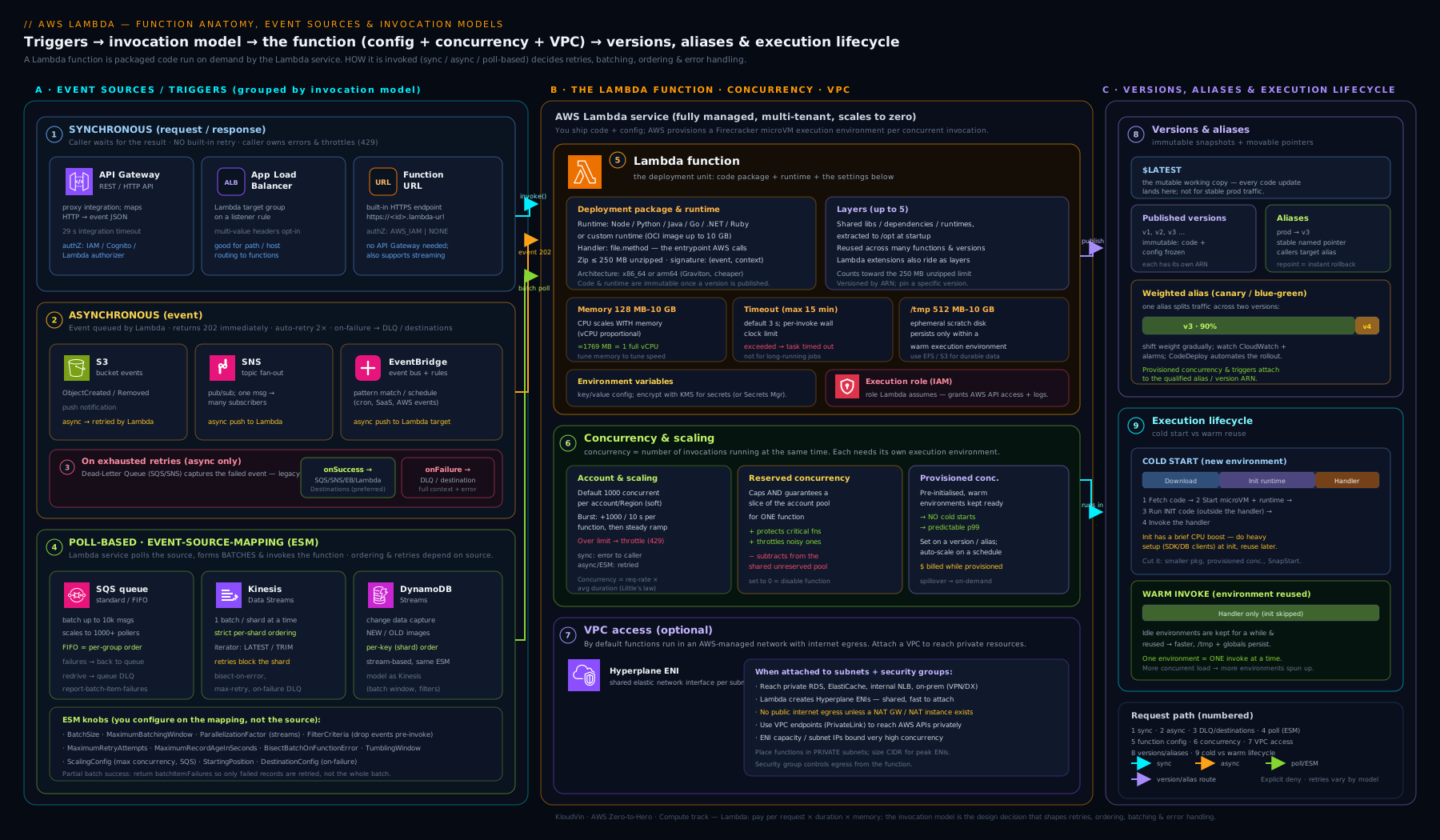
Trace one path through it. An object lands in S3; S3 invokes the function asynchronously; Lambda creates (or reuses) an execution environment running as the execution role; the handler processes the event; on repeated failure the event flows to the on-failure destination. Now contrast that with API Gateway calling synchronously — no Lambda retries, the error returns to the caller — and SQS being polled by an event source mapping in batches. The same function, three very different control flows.
Going deeper
Everything above is enough to run Lambda in production. This section is for when you want to know why it behaves as it does — the microVM underneath, the lifecycle that makes warm reuse possible, the newer levers (SnapStart, response streaming, Powertools), and the two pieces of arithmetic that decide your bill and your capacity.
Inside the execution environment: Firecracker and the INIT → INVOKE → SHUTDOWN lifecycle
Each execution environment is a genuine virtual machine, not a container — a Firecracker microVM. Firecracker is AWS’s open-source virtual machine monitor built on Linux KVM; it boots a stripped-down guest with a minimal device model in around a hundred milliseconds, which is what lets Lambda create isolation boundaries cheaply enough to spin one up per concurrent execution. The hard security boundary between two tenants’ code is the microVM, not a namespace — that is why Lambda can safely pack many customers’ functions onto shared hardware.
An environment moves through three lifecycle phases:
- Init — happens once, when the environment is created. Internally it is three steps in order: start any external extensions, bootstrap the runtime, then run your function init code (everything at module scope: imports, SDK client construction, reading config). For on-demand (non-provisioned) functions this runs as part of the first invocation and is billed; it is the single biggest cold-start lever. If your init code throws, Lambda reports an init error and retries initialisation on the next invoke.
- Invoke — your handler runs, once per event, billed by duration in 1 ms increments. Between invokes the environment is frozen: the microVM is paused, its CPU throttled to essentially zero, and no background threads make progress. The next invoke thaws it. This freeze/thaw cycle is exactly why warm reuse works — your
/tmpfiles, in-memory caches, and open database connections survive because the VM was paused, not destroyed. It is also a classic trap: any asynchronous work you start but do notawait(a fire-and-forget metric flush, an unresolved promise) may be frozen mid-flight and only resume — if ever — on a later invoke, long after the request it belonged to has returned. - Shutdown — when Lambda decides to reclaim an idle environment (or during a scale-down), it sends a SHUTDOWN event to registered extensions and gives them a short window (about 2 seconds) to flush telemetry and clean up. Your handler is not called again; there is no reliable “on shutdown” hook for the function code itself, so never rely on a shutdown to flush application state — flush before you return from the handler.
The practical upshot: do expensive, reusable set-up in init so it is paid once and shared by every warm invoke, and never leave important work running between invokes, because the freeze will pause it.
SnapStart: restore from a snapshot instead of re-initialising
For runtimes with heavy start-up — the JVM especially — the init phase dominates cold starts. SnapStart attacks this differently from provisioned concurrency. When you enable it on a published version, Lambda runs your init once, takes an encrypted Firecracker snapshot of the fully-initialised memory and disk, caches it, and then restores from that snapshot on future cold starts instead of re-running init. Restores are far faster than a fresh JVM boot, and — unlike provisioned concurrency — there is no always-on warm capacity to pay for (Java SnapStart carries no additional charge; the newer Python and .NET SnapStart do bill for snapshot caching and restore). SnapStart covers Java, Python, and .NET; it applies to versions/aliases and is mutually exclusive with provisioned concurrency on the same version.
The one correctness trap that catches everyone: because many environments restore from one snapshot, anything captured during init that must be unique or fresh per environment is now identical across all of them — a seeded random number generator, a generated UUID, a fetched credential or token with an expiry baked in at init. The fix is a runtime hook that runs after restore: Java implements the CRaC Resource interface (beforeCheckpoint / afterRestore), and Python and .NET expose equivalent before-snapshot / after-restore hooks. Reseed randomness and refresh time-sensitive state in the after-restore hook. Getting this wrong produces duplicate IDs and expired-token errors that only appear under SnapStart. The full economics — when SnapStart beats provisioned concurrency — are in the Lambda performance companion lesson.
Response streaming: past the 6 MB buffered wall
By default a synchronous invocation buffers the entire response in memory and returns it in one shot, capped at 6 MB. Response streaming (Node.js managed runtimes, or other runtimes via a wrapper) lets the handler write bytes progressively with awslambda.streamifyResponse, so the caller starts receiving data before the function has finished — lowering time-to-first-byte for a chatbot token stream or a large report — and raising the payload ceiling well beyond 6 MB (into the tens of MB, higher with a quota increase). It is exposed on Function URLs by setting invoke mode to RESPONSE_STREAM, and via the SDK’s InvokeWithResponseStream. Note that API Gateway buffers, so putting it in front re-imposes the buffered limit — stream through a Function URL (or a CloudFront/ALB origin) instead.
The custom-runtime contract: what “implements the Runtime API” means
The “OS-only” runtime (provided.al2023) and container images work because Lambda exposes a small HTTP Runtime API inside the environment. Your bootstrap executable loops: it GETs http://$AWS_LAMBDA_RUNTIME_API/2018-06-01/runtime/invocation/next to receive the next event (blocking until one arrives), runs your logic, then POSTs the result to .../invocation/<requestId>/response (or /error). That is the entire contract — implement that loop in any language and you have a runtime, which is how Go and Rust ship as a single self-contained bootstrap binary with no interpreter to warm, and how container images built on AWS base images “just work” (the base image ships a runtime interface client that runs the loop for you).
What Lambda actually costs: the GB-second, worked
Two dimensions: requests and compute. Compute is measured in GB-seconds = memory allocated (in GB) × duration (in seconds), billed per millisecond. Representative on-demand pricing (us-east-1, x86 — always verify current AWS rates): about $0.20 per 1M requests and $0.0000166667 per GB-second; arm64/Graviton runs roughly 20% cheaper per GB-second. Work a concrete case: a 512 MB function averaging 200 ms, invoked 10 million times in a month.
- Compute: 0.5 GB × 0.2 s = 0.1 GB-s per invoke → ×10,000,000 = 1,000,000 GB-s → ×$0.0000166667 ≈ $16.67.
- Requests: 10,000,000 × ($0.20 / 1,000,000) = $2.00.
- Gross ≈ $18.67/month, before the always-free tier (1M requests + 400,000 GB-s) trims the first slice off.
This is why the memory dial is a cost lever, not just a speed lever: if doubling memory to 1,024 MB halves the duration to 100 ms, GB-seconds are unchanged but you finished twice as fast — and if it more than halves the duration (common for CPU-bound work below one vCPU), the bill actually drops. Provisioned concurrency adds a third dimension — you pay a per-GB-second rate for the kept-warm time plus a lower duration rate for invokes — so it only pays off when steady traffic keeps those warm environments busy.
Capacity planning: concurrency = arrival rate × duration
The concurrency your function needs is not a mystery; it is Little’s Law: concurrency = arrival rate × average duration. Two hundred requests per second at 250 ms average is 200 × 0.25 = 50 concurrent environments in steady state. This single formula sizes everything downstream:
- Reserved concurrency should be set at or a little above expected peak concurrency (rate × peak-duration) so the function is guaranteed its slice — but never higher than what its downstream can absorb.
- That downstream cap is the usual real constraint. A relational database that allows 100 connections cannot survive 400 concurrent Lambdas each opening a connection; set reserved concurrency below the connection limit (or front the database with RDS Proxy) so a traffic spike throttles at Lambda instead of exhausting the database.
- Remember scaling is not instant: a function bursts to its first tranche of concurrency immediately and then grows by up to 1,000 every 10 seconds until it hits the account limit. A sudden spike beyond the burst causes throttling (429) on the overflow — which synchronous callers see immediately and async/stream sources absorb through their own retries.
Idempotency and Powertools: because delivery is at-least-once
Almost every Lambda event path is at-least-once, not exactly-once. Async retries, SQS redelivery after a visibility timeout, and stream reprocessing all mean your handler can run twice for the same logical event. If the handler has side effects — charge a card, insert a row, send an email — duplicates cause real damage. Design for idempotency: make repeated execution safe. Concretely, derive an idempotency key from the event (an order ID, or a hash of the payload) and guard the side effect — a DynamoDB PutItem with a attribute_not_exists(pk) condition, or an upsert keyed on that ID, so the second attempt is a no-op.
Powertools for AWS Lambda (available for Python, TypeScript/Node, Java, and .NET) packages this and more as a library — not a runtime — of production utilities: structured JSON logging with request context, custom metrics via CloudWatch Embedded Metric Format, tracing helpers for X-Ray, a batch-processing utility that wires up partial batch responses for you, a parameters utility that caches Secrets Manager/SSM lookups, and an idempotency utility that persists the idempotency key and stored result in DynamoDB with a TTL so a repeat invocation returns the first result instead of re-running. Reaching for Powertools early is the single fastest way to make a function observable and safe under retries.
Extensions and the Telemetry API, under the freeze
Extensions register through the Extensions API and then sit in a next-event loop, receiving INVOKE and SHUTDOWN events alongside your function. To collect data, an external extension subscribes to the Telemetry API (the successor to the older Logs API): Lambda streams platform events (init start/done, invoke start/finish), function logs, and metrics to a local endpoint the extension listens on, so an observability agent can ship logs and traces straight to a vendor without routing them through CloudWatch Logs. The freeze/thaw cycle constrains extensions just as it constrains your code: an extension that batches telemetry must flush before the environment freezes (that is, before the invoke completes) or on the SHUTDOWN event — anything left buffered is paused by the freeze and may arrive much later or be lost when the environment is reclaimed. And because extensions share the environment’s CPU and memory, a heavy agent competes with your handler for the vCPU your memory setting bought.
Hands-on lab
You will create a small function from scratch, invoke it synchronously, change its memory and timeout, publish a version behind an alias, and clean up. Everything here is within the AWS Free Tier — Lambda’s free tier includes 1 million requests and 400,000 GB-seconds per month.
Run these as an administrator (not the root user). Replace the account ID
111122223333with your own. The lab assumes the AWS CLI v2 is configured.
Step 1 — Create an execution role Lambda can assume.
cat > trust.json <<'EOF'
{ "Version": "2012-10-17",
  "Statement": [{ "Effect": "Allow",
    "Principal": { "Service": "lambda.amazonaws.com" },
    "Action": "sts:AssumeRole" }] }
EOF

aws iam create-role \
  --role-name lab-lambda-role \
  --assume-role-policy-document file://trust.json

aws iam attach-role-policy \
  --role-name lab-lambda-role \
  --policy-arn arn:aws:iam::aws:policy/service-role/AWSLambdaBasicExecutionRole
Step 2 — Write and package a trivial handler.
cat > app.py <<'EOF'
import json, os
def lambda_handler(event, context):
    name = event.get("name", "world")
    return {"message": f"hello, {name}",
            "memory_mb": context.memory_limit_in_mb,
            "remaining_ms": context.get_remaining_time_in_millis()}
EOF

zip function.zip app.py
Step 3 — Create the function.
aws lambda create-function \
  --function-name lab-hello \
  --runtime python3.13 \
  --handler app.lambda_handler \
  --architectures arm64 \
  --memory-size 128 \
  --timeout 5 \
  --role arn:aws:iam::111122223333:role/lab-lambda-role \
  --zip-file fileb://function.zip
Step 4 — Invoke it synchronously and read the result.
aws lambda invoke \
  --function-name lab-hello \
  --payload '{"name":"Vinod"}' \
  --cli-binary-format raw-in-base64-out \
  response.json

cat response.json
Expected output: response.json contains {"message": "hello, Vinod", "memory_mb": 128, "remaining_ms": <~4900>} and the invoke command returns "StatusCode": 200. Note memory_mb reflects your setting and remaining_ms is just under the 5,000 ms timeout — the context object in action.
Step 5 — Change memory and timeout (a post-creation config update).
aws lambda update-function-configuration \
  --function-name lab-hello \
  --memory-size 512 \
  --timeout 10

# Wait for the update to finish, then re-invoke to confirm memory_mb is now 512
aws lambda wait function-updated --function-name lab-hello
Step 6 — Publish a version and point a prod alias at it.
VER=$(aws lambda publish-version --function-name lab-hello \
        --query Version --output text)

aws lambda create-alias \
  --function-name lab-hello \
  --name prod \
  --function-version "$VER"
Step 7 — Validation checklist.
aws lambda get-function-configuration --function-name lab-helloshowsMemorySize: 512,Timeout: 10,Architectures: ["arm64"].aws lambda get-alias --function-name lab-hello --name prodshows the alias pointing at the published version number.- Invoking
lab-hello:prodreturns the same payload as the unqualified function.
Cleanup (so nothing lingers):
aws lambda delete-alias --function-name lab-hello --name prod
aws lambda delete-function --function-name lab-hello
aws iam detach-role-policy --role-name lab-lambda-role \
  --policy-arn arn:aws:iam::aws:policy/service-role/AWSLambdaBasicExecutionRole
aws iam delete-role --role-name lab-lambda-role
rm -f app.py function.zip response.json trust.json
Cost note: at this scale the lab is effectively free — a handful of invocations at 128–512 MB is a rounding error against the 1M-request / 400,000 GB-second monthly free tier. The only ways this could cost money are forgetting provisioned concurrency turned on (it bills for idle warm capacity) or leaving a function attached to a VPC with a NAT gateway running — neither of which this lab creates. Deleting the function and role removes any residual footprint.
Practice challenges
Six exercises, escalating from beginner to advanced. Try each before opening the solution. They assume the AWS CLI v2 and a function you can throw away (the Hands-on lab above builds a suitable lab-hello); all account IDs and ARNs are placeholders.
1. Beginner — turn the CPU dial. Raise lab-hello’s memory to 1024 MB and confirm the change from the CLI without opening the console. In one sentence, say what else changed besides RAM.
<details> <summary>Solution</summary>
aws lambda update-function-configuration --function-name lab-hello --memory-size 1024
aws lambda wait function-updated --function-name lab-hello
aws lambda get-function-configuration --function-name lab-hello --query MemorySize
Besides RAM, the function’s vCPU share rose proportionally — at 1,024 MB it is past half a vCPU and closing on one.
Why: memory is the only CPU control Lambda gives you; raising it buys proportional compute. </details>
2. Beginner — size the concurrency. A function receives a steady 500 requests/second and averages 120 ms per invocation. Roughly how many concurrent execution environments will Lambda run in steady state, and which account limit does that eat into?
<details> <summary>Solution</summary>
concurrency = arrival rate × duration = 500 × 0.120 = 60 concurrent environments. That draws from the Region’s account concurrency limit (default 1,000, shared across every function).
Why: Little’s Law sizes concurrency directly; 60 is comfortably under the default pool, but ten such functions would not be. </details>
3. Intermediate — let a bucket invoke the function. Grant an S3 bucket my-upload-bucket in account 111122223333 permission to invoke lab-hello, scoped so no other bucket or account can. Which policy does this touch — the execution role or the resource policy?
<details> <summary>Solution</summary>
aws lambda add-permission \
  --function-name lab-hello \
  --statement-id s3invoke \
  --action lambda:InvokeFunction \
  --principal s3.amazonaws.com \
  --source-arn arn:aws:s3:::my-upload-bucket \
  --source-account 111122223333
It edits the resource-based policy (inbound — who may invoke), not the execution role (outbound — what the code may do).
Why: --source-arn and --source-account scope the grant to exactly one bucket/account, closing the confused-deputy gap.
</details>
4. Intermediate — estimate the bill. A 256 MB function averaging 300 ms is invoked 5 million times a month on x86. Estimate the monthly compute cost using representative pricing ($0.0000166667 per GB-second), then the request cost ($0.20 per 1M), before free tier.
<details> <summary>Solution</summary>
- GB-seconds: 0.25 GB × 0.3 s = 0.075 GB-s/invoke → × 5,000,000 = 375,000 GB-s → × $0.0000166667 ≈ $6.25.
- Requests: 5,000,000 × ($0.20 / 1,000,000) = $1.00.
- Gross ≈ $7.25/month — and 375,000 GB-s sits under the 400,000 GB-s free tier, so compute is effectively $0; you pay only the request slice above 1M.
Why: GB-seconds = memory(GB) × duration(s) × invocations; internalising it makes the memory-vs-duration trade-off visible in money. </details>
5. Advanced — stop one poison message from reprocessing a batch. Wire an SQS queue to a function with an event source mapping (batch size 10), enable partial batch responses, and set the queue’s visibility timeout correctly relative to a 30 s function timeout. Sketch what the handler must return.
<details> <summary>Solution</summary>
# Visibility timeout >= 6x the function timeout (30s) -> 180s, set on the QUEUE
aws sqs set-queue-attributes --queue-url "$QURL" \
  --attributes VisibilityTimeout=180

aws lambda create-event-source-mapping \
  --function-name order-processor \
  --event-source-arn arn:aws:sqs:us-east-1:111122223333:orders \
  --batch-size 10 \
  --function-response-types ReportBatchItemFailures
The handler returns only the IDs it failed on:
{ "batchItemFailures": [ { "itemIdentifier": "<failed-message-id>" } ] }
Why: ReportBatchItemFailures + returning batchItemFailures makes SQS redeliver only the failures; the 6× visibility timeout stops a still-processing message being redelivered underneath you.
</details>
6. Advanced — SnapStart without the uniqueness bug. Enable SnapStart on a Java function, publish a version, and explain the one line of code you must add so that a per-environment UUID generated at init does not end up identical across every restored environment.
<details> <summary>Solution</summary>
aws lambda update-function-configuration \
  --function-name payments \
  --snap-start ApplyOn=PublishedVersions
aws lambda publish-version --function-name payments   # snapshot is taken here
In code, regenerate the UUID after restore rather than trusting the value baked into the snapshot — implement CRaC’s Resource and reseed in afterRestore() (Python/.NET expose equivalent after-restore hooks):
public void afterRestore(Context ctx) { this.instanceId = UUID.randomUUID().toString(); }
Why: every environment restores from one snapshot, so anything init-time and unique (UUIDs, RNG seeds, tokens with an expiry) is cloned — the after-restore hook is where you make it fresh again. </details>
Common beginner mistakes
These are misconceptions — wrong mental models that lead you astray before you ever see an error message. (For symptom → cause → fix of concrete failures, use the troubleshooting table below.)
-
“Serverless means there is nothing to manage.” AWS manages the host, the OS, and the scaling — not your responsibilities. You still own the IAM permissions, the memory/timeout sizing, the concurrency limits, the dependency tree, cold-start behaviour, and idempotency. Right model: Lambda removes the undifferentiated heavy lifting (patching, capacity), and hands you a smaller but sharper set of things to get right.
-
“More memory always costs more.” The bill is GB-seconds = memory × duration, so if raising memory shortens the duration proportionally, cost is flat — and for CPU-bound work stuck below one vCPU, more memory can finish so much faster that the bill falls. Right model: optimise cost-per-request, not the memory number; the smallest memory is rarely the cheapest.
-
“Lambda is stateless, so I can’t cache or reuse anything.” Statelessness is a guarantee you can’t rely on reuse — not a promise it never happens. Warm environments are reused constantly (freeze/thaw), and init-scope objects — SDK clients, DB connections, cached config — survive across warm invokes. Right model: put expensive set-up outside the handler to exploit reuse as an optimisation, while never treating
/tmpor memory as durable storage. -
“Global init code runs on every request.” It runs once per environment, at cold start — not per invocation. Beginners sometimes put per-request logic (incrementing a counter, reading the current event) at module scope and are baffled when it “sticks”. Right model: module scope = once per environment; the handler body = once per event.
-
“My async events are safe — Lambda will keep retrying.” Asynchronous invokes retry exactly twice and are then dropped unless you configured a DLQ or on-failure destination. There is no infinite retry and no default safety net. Right model: for any async function whose events matter, wiring a destination is not optional.
-
“One batch, one invocation — a failure just retries the batch, no harm done.” For SQS and streams, a failure with no partial-batch reporting reprocesses the whole batch, re-running the messages that already succeeded — and for streams it can block the shard until the records expire. Right model: enable
ReportBatchItemFailuresand design handlers to be idempotent, because at-least-once delivery means duplicates are normal, not exceptional. -
“Attaching to a VPC gives my function more access.” It gives access to private resources but removes the default internet egress; a VPC-attached function with no NAT gateway or VPC endpoints can suddenly no longer reach the public internet or even AWS service APIs. Right model: attach to a VPC only when you must reach private resources, and then deliberately provision NAT and/or VPC endpoints for everything else it calls.
-
“Reserved and provisioned concurrency are two names for the same thing.” Reserved is a limit (free; guarantees and caps how many environments), provisioned is pre-warmed capacity (paid; keeps environments initialised to skip cold starts). Right model: reserved answers “how many at most?”, provisioned answers “how many already warm?” — orthogonal, and often used together.
Common mistakes & troubleshooting
| Symptom | Likely cause | Fix |
|---|---|---|
Unable to import module / handler not found |
The handler string doesn’t match the file/function, or a dependency isn’t packaged | Set handler to file.method matching your code; bundle all deps (or use a layer/container) |
| Async events seem to “disappear” on failure | No DLQ or destination — failed async events drop after 2 retries | Configure an on-failure destination (or a DLQ) for the function |
| Function is slow at “only” 128 MB | Memory is CPU — 128 MB is a fraction of a vCPU | Raise memory (often cheaper because duration drops); right-size with Power Tuning |
Task timed out after N seconds |
Timeout too low, or a downstream is hanging | Raise the timeout to a realistic value; add client-side timeouts on downstream calls; check getRemainingTime |
| VPC function can’t reach the internet / an AWS API | VPC attachment removed default egress | Route the subnets through a NAT gateway; use VPC endpoints for AWS services |
Throttling (429) under load |
Hit account or reserved concurrency limit | Raise the account quota; review reserved settings; add reserved concurrency to protect the function |
| One bad SQS/stream message blocks the batch | Partial failures not reported | Enable ReportBatchItemFailures (partial batch responses); set max retries / record age; bisect on error |
| S3-triggered function loops forever | The function writes to the same bucket/prefix that triggers it | Scope the trigger’s prefix/suffix; write outputs to a different prefix or bucket |
Access Denied calling another AWS service |
Execution role lacks the permission | Add the least-privilege action/resource to the execution role |
Best practices
- Right-size memory deliberately. Treat the memory slider as a CPU dial; test a few sizes and pick the cheapest per-request point, not the smallest memory.
- Do expensive set-up once, outside the handler. Construct SDK clients and database connections at init scope so warm invocations reuse them.
- Always wire a DLQ or destination for async functions whose events matter, and enable partial batch responses for SQS/stream sources.
- Keep functions small and single-purpose. A function should do one thing; orchestrate multi-step work with Step Functions, not a 15-minute monolith.
- Externalise configuration to environment variables, and secrets to Secrets Manager/SSM (never plain env vars).
- Prefer arm64/Graviton for new functions when dependencies support it — ~20% cheaper and often faster.
- Use versions and aliases for every production function and deploy with weighted (canary) shifts so rollback is instant.
- Set a realistic timeout, not 900 by default, so hung calls don’t burn cost and hold concurrency.
- Only attach to a VPC when you must, and give those subnets a NAT gateway and/or VPC endpoints.
Security notes
- Least-privilege execution role. Start from
AWSLambdaBasicExecutionRoleand add only the exact actions and resources the function uses; never attach broad*policies. - Never invoke with
AuthType: NONEcasually. A public Function URL is open to the world — gate webhooks withAWS_IAMor signature verification in the handler. - Encrypt environment variables with a customer-managed KMS key when they hold anything sensitive, and prefer Secrets Manager/SSM for true secrets.
- Scope the resource-based policy tightly — use
--source-arnand--source-accountso only the intended bucket/API/account can invoke, closing the confused-deputy gap. - Run in a VPC with private subnets for functions that touch private data, and reach AWS services over VPC endpoints so traffic never traverses the public internet.
- Log and trace everything — CloudWatch Logs plus AWS X-Ray give you the audit trail and latency breakdown you need when something misbehaves.
Interview & exam questions
-
How does memory relate to CPU in Lambda? They are coupled — you cannot set CPU directly; allocating more memory grants a proportional share of vCPU. You cross roughly one full vCPU near 1,769 MB and reach 6 vCPUs at the 10,240 MB ceiling. More memory often runs cheaper because the function finishes faster.
-
What is the difference between reserved and provisioned concurrency? Reserved is a limit — it guarantees and caps how many environments a function may have, and it is free. Provisioned is pre-warmed capacity — it keeps environments initialised so they skip the cold start, and you pay for it. They are orthogonal and can be combined.
-
Name the three invocation models and how each handles errors. Synchronous (caller waits; Lambda does not retry; error returns to caller). Asynchronous (immediate 202; Lambda retries twice; failures go to a DLQ/destination if configured, else are dropped). Event source mapping / poll-based (Lambda polls; stream sources retry until success or record expiry by default; failures go to an on-failure destination or back to the queue).
-
Why might events sent to a Lambda “disappear”? They were asynchronous invocations that failed all retries with no DLQ or destination configured, so Lambda dropped them. The fix is to attach an on-failure destination (or DLQ).
-
A function in a VPC can’t reach the internet. Why, and how do you fix it? Attaching to a VPC removes the default managed-network internet egress; the function now only has the routes its subnets provide. Route those subnets through a NAT gateway for internet, and use VPC endpoints to reach AWS services privately.
-
What is the maximum timeout, and what do you do for longer work? 15 minutes (900 seconds). For longer or multi-step work, use Step Functions, Fargate, or AWS Batch instead of one long Lambda.
-
What is the difference between the execution role and the resource-based policy? The execution role is what the function can do (its outbound IAM permissions). The resource-based policy is who may invoke the function (inbound), including cross-account principals and AWS services.
-
How do versions and aliases enable safe deployment? Publishing a version creates an immutable snapshot of code and config. An alias is a movable pointer to a version; production references the alias. Deploy by repointing the alias (with weighted routing for canaries) and roll back by repointing it again.
-
How do you stop one bad message from blocking an SQS or stream batch? Enable partial batch responses (
ReportBatchItemFailures) so only failed records are retried; for streams also set maximum retry attempts and maximum record age and enable bisect batch on function error to isolate the poison record. -
What is a cold start, and where is the biggest lever to reduce it? The latency to create a fresh execution environment and run init code. The biggest lever is the init phase: trim package size and move expensive set-up (clients, connections) outside the handler so warm invocations reuse it. Provisioned concurrency or SnapStart address what remains.
-
What are layers, and what limit do they share with your code? Reusable, immutable, versioned zips of dependencies/runtime mounted at
/opt(up to 5 per function). They count against the same 250 MB unzipped package limit as the function code. -
How do you set up cross-account invocation of a Lambda function? Add a statement to the function’s resource-based policy (
aws lambda add-permission) allowing the other account’s principal to calllambda:InvokeFunction, scoped with--source-arn/--source-accountwhere applicable.
Quick check
- At roughly what memory setting does a function get one full vCPU?
- Which invocation model retries automatically twice before failing?
- True or false: provisioned concurrency is free to configure.
- What single thing must you configure so failed asynchronous events are not silently dropped?
- Why can a VPC-attached function lose access to the public internet, and what restores it?
Answers
- About 1,769 MB — below that you share less than a full vCPU.
- Asynchronous invocation (3 attempts total: the original plus two retries).
- False. Reserved concurrency is free; provisioned concurrency bills for the kept-warm capacity whether used or not.
- A dead-letter queue or on-failure destination on the function.
- VPC attachment removes the default managed-network egress, leaving only the subnets’ routes; a NAT gateway (and/or VPC endpoints for AWS services) restores outbound access.
Exercise
Build a small event-driven image-thumbnail pipeline and exercise the failure paths:
- Create a function (arm64, 512 MB, 30 s timeout) triggered by S3
ObjectCreatedevents filtered touploads/and suffix.jpg. Have it read the object and (conceptually) write a thumbnail to a different prefix — explaining why writing back touploads/would loop. - Give the execution role least-privilege
s3:GetObjecton the source prefix ands3:PutObjecton the destination prefix only. - Configure an on-failure destination (an SQS queue) and prove it works by uploading a deliberately corrupt file and observing the failed event land in the queue with error context.
- Publish a version, create a
prodalias, and configure provisioned concurrency = 1 on the alias; confirm a freshly invoked alias has no cold start, then remove provisioned concurrency so you stop paying. - Bonus: enable AWS X-Ray active tracing and read the init-vs-invoke breakdown for a cold versus warm invocation.
Certification mapping
| Exam | Objective area this supports |
|---|---|
| DVA-C02 (Developer – Associate) | Development with AWS services — authoring Lambda functions, runtimes/handlers, environment variables, layers, versions/aliases, event source mappings, and concurrency; deployment with canary/linear traffic shifting. |
| SAA-C03 (Solutions Architect – Associate) | Design cost-optimised and resilient architectures — choosing Lambda for event-driven workloads, the three invocation models, concurrency limits and throttling, VPC integration, and failure handling with DLQs/destinations. |
| SOA-C02 (SysOps Administrator – Associate) | Monitoring and reliability — CloudWatch metrics/logs for Lambda, concurrency and throttling alarms, and the operational settings (timeout, memory, retries). |
Glossary
- Lambda function — a unit of code plus configuration that AWS runs on demand, identified by an ARN.
- Handler — the
file.methodentry point Lambda calls for each invocation. - Execution environment — the Firecracker microVM sandbox a function runs in, with its memory, CPU,
/tmp, and network identity. - Cold start — the latency to create a fresh environment and run init code; warm invocations reuse an existing environment.
- Init phase — set-up run once per environment (imports, client creation, static config); billed and the main cold-start lever.
- Event / context — the JSON describing the trigger / the runtime-info object (request ID, remaining time, function metadata) passed to the handler.
- Invocation model — synchronous, asynchronous, or event source mapping (poll-based); determines retry and error behaviour.
- Event source mapping — a Lambda-managed poller that reads batches from SQS/Kinesis/DynamoDB Streams/Kafka and invokes the function.
- Concurrency — the number of execution environments running at one instant; scales automatically.
- Reserved concurrency — a free setting that both guarantees and caps a function’s concurrency (0 disables it).
- Provisioned concurrency — pre-initialised, kept-warm environments that skip cold starts; billed for the warm capacity.
- Burst concurrency — how fast a function can scale up (up to 1,000 per 10 s per function) until the account limit is reached.
- Throttling — Lambda rejecting invocations (HTTP 429) when concurrency limits are exceeded.
- Layer — an immutable, versioned zip of shared dependencies/runtime mounted at
/opt; up to 5 per function, sharing the 250 MB limit. - Extension — a process running inside the environment alongside the function for observability, secrets caching, etc.
- Execution role — the IAM role the function runs as; defines what AWS APIs it can call.
- Resource-based policy — the policy on the function defining who/what may invoke it (incl. cross-account).
- Hyperplane ENI — shared network-interface infrastructure that makes VPC-attached Lambda fast and ENI-efficient.
- Version — an immutable, numbered snapshot of code and configuration;
$LATESTis the mutable working version. - Alias — a movable named pointer to a version, supporting weighted (canary) traffic routing.
- Dead-letter queue (DLQ) / destination — the safety net receiving failed events; destinations carry more context and support success as well as failure.
- Firecracker — AWS’s open-source KVM-based virtual machine monitor that boots the lightweight microVM behind every execution environment; the isolation boundary between tenants.
- Freeze / thaw — the pause and resume of a warm environment between invocations; the reason
/tmp, caches, and connections survive, and the reason un-awaited background work stalls. - SHUTDOWN phase — the lifecycle step where Lambda reclaims an idle environment and gives extensions a brief window (~2 s) to flush and clean up; the function handler is not called.
- SnapStart — restores a cached, encrypted snapshot of the initialised environment instead of re-running init, cutting cold starts for Java, Python, and .NET; requires after-restore hooks to refresh anything unique per environment.
- GB-second — the compute billing unit: memory allocated (GB) × duration (seconds), metered per millisecond; combines with a per-request charge for the total bill.
- Idempotency — the property that running the handler more than once for the same event causes no additional effect; essential because Lambda delivery is at-least-once.
- Response streaming — returning a payload progressively (past the 6 MB buffered limit) via
awslambda.streamifyResponse, exposed on Function URLs withRESPONSE_STREAMinvoke mode. - Powertools for AWS Lambda — a first-party developer library (Python, TypeScript, Java, .NET) of production utilities: structured logging, metrics, tracing, batch processing, parameter caching, and idempotency.
- Telemetry API — the interface an external extension subscribes to for a stream of platform events, logs, and metrics delivered inside the environment; successor to the Logs API.
- Parallelisation factor — for stream sources, the number of concurrent invocations per shard (1–10) that fans out throughput while preserving order within each partition key.
- Partial batch response — returning only the failed record IDs (
ReportBatchItemFailures→batchItemFailures) so a queue/stream retries just the failures instead of the whole batch.
Next steps
Continue the course with Amazon S3, In Depth: Storage Classes, Versioning, Lifecycle, Encryption & Access Control — fitting, since an object landing in S3 is one of the most common ways a Lambda function gets invoked. Then go deeper on Lambda itself with:
- Optimizing AWS Lambda Performance: Cold Starts, Provisioned Concurrency, SnapStart, and Memory Tuning — measuring init duration, right-sizing memory with Power Tuning, the economics of provisioned concurrency, and SnapStart for Java/Python/.NET.
- AWS Step Functions: Distributed Orchestration & Error-Handling Patterns — for multi-step workflows that outgrow a single 15-minute function.
- SQS & SNS: Fan-out, FIFO Ordering, DLQs & Poison-Message Handling — the messaging backbone behind Lambda’s most resilient event-driven designs.