In a nutshell
Think of Amazon S3 as an infinitely large self-storage company. You rent labelled boxes (objects) that live inside warehouses (buckets). You never see the shelves, the forklifts or the building — you just hand S3 a box with a label and it keeps it safe, then hands it back over the internet whenever you ask, from anywhere, as long as you hold the right key. There is no “how many shelves do I need?” to answer up front: the warehouse grows to fit whatever you put in it, and you pay only for the space you use, the times you put things in or take them out, and the shipping when data leaves.
The reason S3 has so many knobs is that not every box is the same. Some you open every day (keep them on the front shelf — S3 Standard); some you might need once a year (a cheaper back shelf — Standard-IA); some you almost never touch but must keep for a decade (a sealed deep vault that takes hours to open — Glacier Deep Archive). You can tell S3 to move boxes to cheaper shelves automatically as they age (lifecycle), keep every past copy of a box in case you make a mistake (versioning), lock a box so no one — not even you — can shred it early (Object Lock), scramble the contents so only key-holders can read them (encryption), and decide precisely who may open which boxes (access control). Get that last one wrong and strangers can read your boxes — which is how companies end up in the news.
This lesson is the full tour of every knob, in plain language first and then in real depth. A total beginner will leave able to create a safe, cheap, recoverable bucket; an experienced engineer will leave with the cost maths, the request-rate limits, the encryption economics and the newer S3 directions (Express One Zone, S3 Tables, S3 Vectors) that come up in design reviews and exams.
Level: Intermediate · Time: ~55 min · Prerequisites: an AWS account and comfort with IAM (identity vs resource policies, explicit-deny-wins). After this you can: pick the right storage class from cost/latency trade-offs, design lifecycle + versioning that is both recoverable and cheap, choose and enforce the right encryption, lock a bucket down with Block Public Access and least-privilege policies, and reason about S3 performance and bill drivers at scale.
Amazon Simple Storage Service (S3) is the object store that the rest of AWS is quietly built on. It holds your application uploads, your data-lake parquet files, your CloudTrail logs, your Terraform state, your static website, your backups and your machine-learning training sets — all as objects in flat containers called buckets, reachable over HTTPS from anywhere with the right permissions. It is designed for eleven nines of durability (99.999999999% — lose one object in ten million every ten thousand years), scales to effectively unlimited capacity with no provisioning, and you pay only for what you store, request and transfer. There are no disks to size, no RAID to configure and no filesystem to grow.
That simplicity hides a surprising amount of depth, and the depth is exactly what interviews and the certification exams probe. The same object can live in any of eight storage classes trading retrieval speed for price; it can be versioned so deletes and overwrites are recoverable; it can be encrypted four different ways; it can be locked so even the account root cannot delete it; it can be replicated to another Region automatically; and access to it is governed by a layered model of Block Public Access, bucket policies, IAM and access points. Getting these wrong is how buckets end up on the news.
This lesson is the exhaustive tour. We start with the object model, walk every storage class with a comparison table, then take versioning, lifecycle, encryption, access control, replication, Object Lock, static hosting and event notifications each in full — with the what · choices · default · when · trade-off · gotcha treatment and real aws s3api commands throughout. By the end you will know every option S3 offers and when to reach for each. For the governance posture that ties the security pieces into a defended estate, this lesson pairs with S3 Data Protection & Governance at Scale.
Learning objectives
By the end of this lesson you will be able to:
- Explain the S3 object model — buckets, keys, prefixes, the flat namespace, object metadata, ETags and multipart upload.
- Choose the right storage class for any access pattern, and read the cost/retrieval trade-offs from a comparison table.
- Design lifecycle rules that transition and expire objects (and noncurrent versions) automatically.
- Turn on versioning and MFA delete, and explain how delete markers and noncurrent versions behave.
- Pick and enforce the right encryption: SSE-S3, SSE-KMS (with Bucket Keys), SSE-C and DSSE-KMS, set a bucket default, and require it via policy.
- Apply the access-control model correctly: Block Public Access, bucket policies, IAM, Object Ownership (ACLs disabled), access points and presigned URLs.
- Configure replication (CRR/SRR), Object Lock retention and legal holds, static website hosting and event notifications.
Prerequisites & where this fits
You need an AWS account and a working grasp of IAM — principals, identity vs resource policies and the explicit-deny-beats-allow evaluation logic — because S3 access is decided by exactly that machinery. If IAM is hazy, read AWS IAM Fundamentals first. This is the Storage module of the AWS Zero-to-Hero course, the foundational S3 lesson that the data-protection, access-points and analytics lessons build on. After this, the course continues into block and file storage with EBS, EFS and FSx.
Core concepts: buckets, objects, keys and the flat namespace
S3 has only two kinds of thing: buckets and objects.
A bucket is a container for objects. The bucket name is globally unique across all of AWS (not just your account), DNS-compatible (3–63 lowercase characters, no underscores, no IP-address-looking names), and chosen at creation — you cannot rename a bucket. A bucket lives in exactly one Region; the data never leaves that Region unless you copy or replicate it. You can have up to 1,000,000 buckets per account by default (a soft quota raised from the old 100/1,000 limits), though best practice is fewer, larger buckets partitioned by prefix rather than thousands of tiny ones.
An object is a file plus its metadata. Every object has:
- A key — the full name, e.g.
images/2026/06/cat.png. The key is a single string up to 1,024 bytes of UTF-8; the slashes are just characters. - Value — the bytes, from 0 bytes up to 5 TB per object.
- Version ID —
nullunless versioning is on. - Metadata — system metadata (size, last-modified,
Content-Type, storage class, encryption) and optional user-defined metadata (headers prefixedx-amz-meta-, up to 2 KB total). - ETag — an entity tag; for a single-part PUT it is the MD5 of the object, but for multipart uploads it is not a simple MD5, so never rely on the ETag being an MD5 checksum.
- Tags — up to 10 key/value object tags, used by lifecycle rules, replication filters and IAM conditions.
The single most important conceptual point: S3 is a flat key/value store, not a filesystem. There are no real folders. The key images/2026/cat.png is one flat string; the console renders a folder tree by splitting on / purely for display. A prefix is just the leading portion of a key (images/2026/), and “listing a folder” is really “list keys starting with this prefix”. This matters because performance and many features (lifecycle scope, replication scope, access-point routing) are expressed in terms of prefixes, not directories.
S3 is strongly read-after-write consistent for all operations — including overwrite PUTs and DELETEs — at no extra cost. After a successful write, any subsequent read returns the latest data; after a delete, a read returns not found. The old caveat about eventual consistency for overwrites was retired in December 2020 and is a common stale exam trap.
Multipart upload splits a large object into parts (5 MB–5 GB each, up to 10,000 parts) uploaded in parallel and then assembled server-side. AWS requires multipart for objects over 5 GB and recommends it above ~100 MB for throughput and resumability. The catch — and a real bill — is that incomplete multipart uploads keep their already-uploaded parts in the bucket and you are charged for them until you abort the upload or, much better, add a lifecycle rule that aborts incomplete uploads after N days.
Storage classes: every option
A storage class is the durability/availability/retrieval/price profile of an object. Durability is eleven nines for every class (One Zone classes excepted in the sense of resilience, not the durability figure); what changes is how many Availability Zones the data spans, the availability SLA, the per-GB price, the retrieval price and latency, and minimum charges. You set a class per object at PUT time and change it later via copy or lifecycle.
| Storage class | AZs | Designed for | Retrieval latency | Min storage duration | Min billable object size | Relative storage cost | When to use it |
|---|---|---|---|---|---|---|---|
| S3 Standard | ≥3 | Frequently accessed, general purpose | Milliseconds | None | None | Baseline (highest) | Active data, websites, default for unknown patterns |
| S3 Intelligent-Tiering | ≥3 | Unknown / changing access | Milliseconds (Frequent/Infrequent tiers) | None | None | Standard-ish + small monitoring fee per object | Data lakes and any workload whose access you cannot predict |
| S3 Standard-IA | ≥3 | Long-lived, infrequently accessed | Milliseconds | 30 days | 128 KB | Lower storage, per-GB retrieval fee | Backups, older data you still read occasionally |
| S3 One Zone-IA | 1 | Infrequent, re-creatable | Milliseconds | 30 days | 128 KB | ~20% below Standard-IA | Secondary copies, thumbnails — data you can regenerate |
| S3 Glacier Instant Retrieval | ≥3 | Archive, occasional instant access | Milliseconds | 90 days | 128 KB | Much lower storage, higher retrieval | Medical images, news media — archived but needs millisecond reads |
| S3 Glacier Flexible Retrieval | ≥3 | Archive, rare access | Minutes to hours | 90 days | 40 KB | Very low storage | Backups and DR you can wait minutes/hours to restore |
| S3 Glacier Deep Archive | ≥3 | Cold archive, very rare | Hours (≈12) | 180 days | 40 KB | Lowest of all | Compliance/retention you may never read; tape replacement |
| S3 Express One Zone | 1 (single AZ, you choose) | Ultra-low-latency, high-RPS | Single-digit ms (faster than Standard) | None | None | High storage price, very low request price | Latency-sensitive, request-heavy workloads (ML, analytics) co-located with compute |
A few load-bearing details that the table compresses:
- Minimum storage duration means you are billed for the object as if it lived that long even if you delete it sooner. Put a 1 KB file in Glacier Deep Archive and delete it the next day and you still pay ~180 days of storage for it. This is why you never lifecycle tiny, short-lived objects into cold classes.
- Minimum billable object size (128 KB for the IA/Glacier-Instant family) means a 10 KB object in Standard-IA is billed as 128 KB. Small objects belong in Standard or Intelligent-Tiering.
- Glacier Flexible Retrieval offers three retrieval speeds — Expedited (1–5 min), Standard (3–5 h) and Bulk (5–12 h, cheapest); Deep Archive offers Standard (~12 h) and Bulk (~48 h). Retrievals from Glacier classes are requests you pay for and wait on, not instant reads — except Glacier Instant Retrieval, whose whole point is millisecond access.
- S3 Intelligent-Tiering moves objects automatically between a Frequent and an Infrequent tier (and optional Archive Instant, Archive and Deep Archive tiers you opt into) based on access, charging a small per-object monitoring fee but no retrieval fees. It is the safe default when you genuinely cannot predict access — but the per-object fee makes it wasteful for millions of tiny objects.
- One Zone classes (One Zone-IA and Express One Zone) store data in a single AZ, so an AZ loss can lose the data. Use them only for data you can reconstruct or that has a copy elsewhere. They are not a place for your only copy of anything important.
- S3 Express One Zone is the newest class and behaves differently: it lives in a special directory bucket (not a general-purpose bucket), uses a different naming and request model, and is optimised for requests per second and latency rather than storage price. Reach for it when request cost and single-digit-millisecond latency dominate, and your compute sits in the same AZ.
There is also the legacy S3 Glacier service (vaults), distinct from the S3 storage classes above. New designs should use the S3 Glacier storage classes inside normal buckets, not the standalone vault API.
Worked example — reading the table as a decision. The comparison table only earns its keep if you can turn a workload into a class. Walk three:
- User profile avatars, ~40 KB each, read constantly. Tiny and hot → S3 Standard. They are below the 128 KB minimum billable size, so IA/Glacier would bill them as 128 KB and add retrieval fees; Intelligent-Tiering would not even monitor them (under 128 KB), so it saves nothing. Standard is both simplest and cheapest.
- Nightly database backups, 200 GB each, kept 35 days, read only in a disaster. Large, long-lived, rarely read, but must restore fast → Standard-IA (Glacier Instant’s 90-day minimum loses against a 35-day retention). The per-GB retrieval fee is irrelevant because you almost never read them, and IA’s lower storage price wins on 200 GB.
- Regulatory records kept 7 years, effectively never read. Enormous retention, latency irrelevant → Glacier Deep Archive, ideally with Object Lock compliance retention. The ~12-hour restore is fine, Deep Archive’s ~$0.001/GB is ~20× cheaper than Standard, and the 180-day minimum is trivial against 7 years.
The reasoning is always the same four questions — how often is it read, how big is each object, how fast must a read return, and how long will it live — checked against retrieval latency, the 128 KB minimum size and the minimum-duration charge before you commit.
Lifecycle: transition and expiration on autopilot
A lifecycle configuration is a set of rules on a bucket that automatically transition objects to cheaper classes and expire (delete) them on a schedule. It is how you control cost without writing cron jobs.
Each rule has a filter (apply to the whole bucket, a prefix, object tags, or an object-size range) and one or more actions:
| Action | What it does | Notes & gotchas |
|---|---|---|
| Transition (current version) | Move objects to another class after N days from creation | Cannot transition up (e.g. Glacier → Standard) via lifecycle; transitions go colder. Respect minimum-duration charges. |
| Transition (noncurrent version) | Move old versions to a cheaper class after they become noncurrent | Only meaningful with versioning on. |
| Expiration (current version) | Delete the current object after N days | On a versioned bucket this writes a delete marker rather than truly deleting. |
| Noncurrent version expiration | Permanently delete old versions N days after they become noncurrent | The real space-reclaimer on versioned buckets; can keep “newest N noncurrent versions”. |
| Expire delete markers | Remove expired object delete markers (markers with no versions beneath) | Stops orphaned delete markers accumulating. |
| Abort incomplete multipart uploads | Delete parts of uploads not completed within N days | Add this to every bucket — it stops you paying for abandoned upload parts. |
Worked example: keep logs hot for 30 days, then Standard-IA, then Glacier Flexible Retrieval at 90 days, delete at one year, and clean up failed uploads after 7 days.
cat > lifecycle.json <<'JSON'
{
  "Rules": [
    {
      "ID": "logs-tiering",
      "Filter": { "Prefix": "logs/" },
      "Status": "Enabled",
      "Transitions": [
        { "Days": 30, "StorageClass": "STANDARD_IA" },
        { "Days": 90, "StorageClass": "GLACIER" }
      ],
      "Expiration": { "Days": 365 }
    },
    {
      "ID": "abort-bad-uploads",
      "Filter": {},
      "Status": "Enabled",
      "AbortIncompleteMultipartUpload": { "DaysAfterInitiation": 7 }
    }
  ]
}
JSON

aws s3api put-bucket-lifecycle-configuration \
  --bucket my-bucket --lifecycle-configuration file://lifecycle.json
Two things people get wrong. First, lifecycle days are measured from object creation, and transitions are evaluated once per day in the background — an object does not move at the exact millisecond it ages, and a transition can lag up to ~24–48 hours. Second, transitioning small objects to IA/Glacier can cost more, not less, because of the per-object minimum-size billing and per-request transition charges — lifecycle is a tool for large, long-lived data, not a blanket “send everything to Glacier” switch.
Versioning and MFA delete
Versioning keeps every version of every object in a bucket, so overwrites and deletes are recoverable. It is off by default; you turn it on per bucket, and once enabled it can only be suspended, never fully switched back to “never versioned”.
With versioning on:
- A PUT to an existing key does not overwrite — it creates a new version with a new version ID and makes it current; the old version becomes noncurrent but still exists (and is still billed).
- A DELETE without a version ID does not erase anything — it adds a delete marker as the new current version, so a GET returns 404 but the data is still there beneath the marker. Remove the marker (delete that specific version) and the object reappears.
- A DELETE with a specific version ID permanently removes that one version. This is the only way to actually free space, and it is what noncurrent-version-expiration lifecycle rules do for you.
Because every version and every delete marker is stored and billed, versioning without lifecycle is a slow cost leak — always pair it with a noncurrent-version-expiration rule. Versioning is also a prerequisite for replication and a strong ransomware defence (an attacker who overwrites or deletes objects only adds versions/markers; the originals remain).
Worked example — the cost leak in numbers. Take a 100 GB dataset of 10 MB objects that is fully overwritten once a day on a versioned bucket with no lifecycle. Each daily overwrite turns the previous current objects into noncurrent versions that are still billed. After 30 days you are storing ~31 copies — roughly 3.1 TB — to hold 100 GB of live data, and the bill is ~31× what you expected and climbing forever. Add one rule — NoncurrentVersionExpiration at, say, 14 days (with NewerNoncurrentVersions to keep a safety margin of recent copies) — and steady-state storage collapses to ~1.5 TB and stops growing. Versioning’s protection is real, but on churny data its cost is unbounded until a noncurrent-expiration rule caps it.
MFA delete is an extra layer on a versioned bucket: when enabled, permanently deleting a version or changing the versioning state requires a one-time MFA code from the bucket owner’s root account. It cannot be enabled from the console — only via the API/CLI by the root user with an MFA device:
aws s3api put-bucket-versioning \
  --bucket my-bucket \
  --versioning-configuration Status=Enabled,MFADelete=Enabled \
  --mfa "arn:aws:iam::111122223333:mfa/root-account-mfa-device 123456"
The gotcha: because MFA delete is root-only and console-incompatible, it is operationally heavy. Most production estates instead rely on Object Lock (below) plus least-privilege deny policies for the same protection without the root-MFA friction.
Encryption: SSE-S3, SSE-KMS, SSE-C and DSSE
S3 encrypts every new object at rest by default — since January 2023 the floor is SSE-S3, so “is my data encrypted at rest?” is always yes. The real decision is which mechanism and who controls the keys. There are four server-side options (and you may also encrypt client-side before upload).
| Method | Who holds/manages keys | Audit & access control | Cost | When to use |
|---|---|---|---|---|
SSE-S3 (AES256) |
AWS, fully managed | None per-object; opaque | Free | Default; fine when you don’t need per-key control or CloudTrail on key use |
SSE-KMS (aws:kms) |
AWS KMS — AWS-managed or customer-managed key (CMK) | Key policy + IAM + CloudTrail on every decrypt | KMS request + key charges | When you need access control, rotation policy and an audit trail on the key (compliance) |
DSSE-KMS (aws:kms:dsse) |
KMS, two independent layers of encryption | Same as SSE-KMS, twice | Higher (two KMS operations) | Strict regulatory regimes mandating double encryption |
| SSE-C (customer-provided) | You — supply the key on every request | You manage everything; AWS stores no key | Free (no KMS) | When you must hold the key material and accept the operational burden |
How to think about each:
- SSE-S3 is the zero-effort baseline. AWS manages a rotating key; you cannot see it, restrict it or audit its use. Perfect for data where encryption-at-rest is a checkbox, not a controlled boundary.
- SSE-KMS is the production default for anything sensitive. Every object is encrypted under a KMS key; access to decrypt requires permission on the key policy as well as on S3, giving you a true second lock and a CloudTrail record of every decrypt. The cost trap: a workload reading millions of objects makes millions of KMS
Decryptcalls. Enable an S3 Bucket Key (--bucket-key-enabled) to have S3 use a short-lived bucket-level data key, slashing KMS request volume and cost by up to 99% — turn it on for any KMS-encrypted bucket. - DSSE-KMS applies two layers of server-side KMS encryption for the rare compliance mandate (e.g. certain government workloads) that requires defence-in-depth at the cryptography level. It costs roughly twice the KMS operations; only use it when a control framework demands it.
- SSE-C means you send the encryption key with every PUT and GET over HTTPS; AWS uses it to encrypt/decrypt and then discards it — lose the key and the data is unrecoverable. It exists for organisations that cannot let AWS hold key material at all, and it shifts all key management onto you.
Set a bucket default so objects are encrypted with your chosen method even if the uploader forgets to ask:
aws s3api put-bucket-encryption \
  --bucket my-bucket \
  --server-side-encryption-configuration '{
    "Rules": [{
      "ApplyServerSideEncryptionByDefault": {
        "SSEAlgorithm": "aws:kms",
        "KMSMasterKeyID": "arn:aws:kms:eu-west-2:111122223333:key/abcd-1234"
      },
      "BucketKeyEnabled": true
    }]
  }'
A default is necessary but not sufficient if a client explicitly asks for a weaker method — to truly enforce SSE-KMS, add a bucket policy that denies any PUT whose s3:x-amz-server-side-encryption header is not aws:kms (and optionally pin a specific key with s3:x-amz-server-side-encryption-aws-kms-key-id). For the full enforce-via-policy patterns and the SSE-S3-vs-KMS decision in a governance context, see S3 Data Protection & Governance at Scale.
Finally, encryption in transit is separate from encryption at rest: S3 supports HTTPS/TLS for every request, and the standard hardening move is a bucket policy denying any request where aws:SecureTransport is false.
Access control: Block Public Access, policies, IAM, ownership and access points
Access to an S3 object is the result of every applicable policy evaluated together, with one override sitting on top of all of them. From outermost guardrail inwards:
1. Block Public Access (BPA) is the master switch and should be on at the account level and every bucket. It is four independent settings that override any policy or ACL that would otherwise grant public access:
| BPA setting | Blocks |
|---|---|
BlockPublicAcls |
New public ACLs being applied |
IgnorePublicAcls |
Existing public ACLs (ignores them entirely) |
BlockPublicPolicy |
New bucket policies that grant public access |
RestrictPublicBuckets |
Public/cross-account access via policy, restricting to AWS-service principals and the bucket owner |
With all four on, no combination of ACL or policy can make the bucket public — this is the single most effective defence against the classic “exposed S3 bucket” breach, and it is on by default for new buckets since 2023.
aws s3api put-public-access-block \
  --bucket my-bucket \
  --public-access-block-configuration \
  BlockPublicAcls=true,IgnorePublicAcls=true,BlockPublicPolicy=true,RestrictPublicBuckets=true
2. Bucket policies are resource-based JSON policies attached to the bucket. They are the primary tool for cross-account access, conditions (TLS-only, source-VPC, encryption enforcement) and grants to AWS services. Remember the IAM rule from the fundamentals lesson: you usually need both the bucket ARN (arn:aws:s3:::bucket, for s3:ListBucket) and the object ARN (arn:aws:s3:::bucket/*, for s3:GetObject) because they are different resources.
3. IAM identity policies grant your own principals access to S3. Within one account either the bucket policy or an IAM policy can grant; across accounts you typically need an allow on both sides.
4. Object Ownership / ACLs. Access Control Lists are the original, pre-IAM mechanism and are now discouraged. The modern setting is Object Ownership = “Bucket owner enforced”, which disables ACLs entirely so the bucket owner owns every object and access is governed purely by policies. This is the default for new buckets and what AWS recommends for essentially everyone — only fall back to ACL-enabled modes for legacy cross-account upload patterns you cannot yet refactor.
5. Access points are named network endpoints with their own policies attached to a bucket, each with a unique hostname and DNS name. Instead of one sprawling bucket policy serving every team, you give each application its own access point with a least-privilege policy (and optionally lock it to a VPC). They scale access management for shared buckets and data lakes. S3 Object Lambda access points go further, running a Lambda to transform data as it is read (redaction, format conversion). For the full access-point, Object Lambda and Multi-Region Access Point story, see S3 Access Points, Object Lambda & Multi-Region Access Points.
6. Presigned URLs grant temporary, time-limited access to a single object without giving the requester any AWS credentials. The holder of a presigned URL acts with the signer’s permissions for the duration (up to 7 days for SigV4), so a backend can let a browser upload or download one object directly. The gotcha: a presigned URL is a bearer token — anyone who obtains it has that access until it expires, so keep expiries short and never log them.
# Generate a 15-minute download link for one object
aws s3 presign s3://my-bucket/reports/q2.pdf --expires-in 900
The override to remember above everything else: explicit Deny always wins, and Block Public Access wins over all grants. A bucket policy that “allows public read” does nothing if BPA is on — which is exactly what you want.
Worked example — how one GetObject is actually decided. Layered policies stay abstract until you trace a single request. A principal in account 123456789012 calls GetObject on arn:aws:s3:::shared-bucket/reports/q2.pdf, which is SSE-KMS encrypted. S3 decides, in effect:
- Block Public Access / ownership — an anonymous request with BPA on is refused here regardless of any policy. Our caller is authenticated, so continue.
- Any explicit
Deny— in the bucket policy, an applicable SCP/RCP, a VPC endpoint policy, or the caller’s IAM. One matching Deny (e.g.aws:SecureTransport=false, or a wrongaws:SourceVpce) ends it immediately. Explicit Deny always wins. - An
Allowwhere needed — within one account, either the bucket policy or the caller’s IAM allowings3:GetObjecton the object ARN (…/reports/q2.pdf, not just the bucket ARN) is enough; across accounts you need an Allow on both the resource policy and the identity policy. - KMS decrypt — because the object is SSE-KMS, the caller also needs
kms:Decrypton the key via the key policy or a grant. A perfect S3 Allow still returnsAccess Deniedwithout it — the single most common “but I have GetObject!” surprise. - Result — allowed only if it survived every step; if nothing allows and nothing denies, the default is deny.
Debug tickets in exactly that order — anonymous/BPA → explicit Deny (including SCP/RCP and endpoint policies) → resource + identity Allow → KMS. Most “Access Denied” cases are a missing object-ARN Allow, a stray Deny condition, or the KMS permission at step 4.
Replication: CRR and SRR
Replication automatically and asynchronously copies objects from a source bucket to one or more destination buckets. Cross-Region Replication (CRR) copies to a bucket in a different Region (for DR, latency or compliance/data-residency); Same-Region Replication (SRR) copies within a Region (for log aggregation, separating prod/test accounts, or sovereignty between accounts).
Requirements and behaviour:
- Versioning must be enabled on both source and destination.
- You attach a replication configuration with rules (filter by prefix/tag) and a destination, plus an IAM role S3 assumes to do the copying.
- Replication is asynchronous — objects appear in the destination shortly after upload, not instantly. For a tight SLA, add S3 Replication Time Control (RTC), which replicates 99.99% of objects within 15 minutes with metrics, at extra cost.
- By default replication copies new objects only. To copy objects that already existed, use S3 Batch Replication.
- It can replicate to a different account (and change object ownership to the destination owner — important so the destination account fully controls the copies), to a different storage class, and delete markers can optionally be replicated (but version deletes are never replicated, by design, so a malicious permanent delete on the source cannot propagate).
- Replication chaining is not transitive: if A→B and B→C, objects from A are not automatically sent on to C unless configured.
aws s3api put-bucket-replication \
  --bucket source-bucket \
  --replication-configuration '{
    "Role": "arn:aws:iam::111122223333:role/s3-replication-role",
    "Rules": [{
      "ID": "to-dr-region",
      "Status": "Enabled",
      "Filter": { "Prefix": "" },
      "Destination": {
        "Bucket": "arn:aws:s3:::dest-bucket-eu-central",
        "StorageClass": "STANDARD_IA"
      }
    }]
  }'
Object Lock: write-once-read-many immutability
Object Lock enforces a write-once-read-many (WORM) model: an object version cannot be deleted or overwritten until a retention period elapses or a legal hold is removed. It is how you meet financial/regulatory retention rules and how you build ransomware-proof backups.
Key facts:
- Object Lock requires versioning and is typically enabled at bucket creation (
--object-lock-enabled-for-bucket); enabling it on an existing bucket requires an AWS support request. - It protects specific object versions, not the logical object — a new version can still be written; the locked version simply cannot be deleted/altered.
- Two retention modes:
- Governance mode — protected, but users with the special
s3:BypassGovernanceRetentionpermission can override (shorten/remove) the lock. Use for internal policy you may need to adjust. - Compliance mode — nobody, not even the account root, can delete or shorten the retention until it expires. This is true immutability for hard regulatory mandates — set it carefully, because it is unrecoverable.
- Governance mode — protected, but users with the special
- A legal hold is an independent, flag-style lock with no expiry — it keeps a version immutable until explicitly removed, regardless of any retention period. Useful for litigation holds.
- A default retention on the bucket applies a mode and duration to every new object automatically.
For Object Lock as part of a ransomware-resilience and governance strategy (including the vault-lock-style patterns), see S3 Data Protection & Governance at Scale.
Static website hosting
S3 can serve a static website — HTML, CSS, JS and images — directly from a bucket, with no servers. You enable website hosting, set an index document (e.g. index.html) and an error document (e.g. error.html), and S3 exposes a website endpoint (http://bucket.s3-website-<region>.amazonaws.com).
Two crucial limitations and the production pattern:
- The S3 website endpoint is HTTP only and does not support HTTPS. For TLS, a custom domain and global caching, you front the bucket with Amazon CloudFront (which adds HTTPS via ACM, edge caching and WAF) and keep the bucket private, granting CloudFront access via Origin Access Control (OAC). This is the standard, recommended way to host a static site or SPA.
- Note the difference between the REST endpoint (
bucket.s3.<region>.amazonaws.com, supports HTTPS, returns XML, used by SDKs) and the website endpoint (HTTP, returns your index/error documents, supports redirects). Website features (index/error docs, redirect rules) work only via the website endpoint.
aws s3api put-bucket-website \
  --bucket my-site-bucket \
  --website-configuration '{
    "IndexDocument": { "Suffix": "index.html" },
    "ErrorDocument": { "Key": "error.html" }
  }'
Event notifications, requester pays and other options
Event notifications fire when objects are created, removed, restored from Glacier, replicated, etc. You route events to Lambda, SQS or SNS (filtered by prefix/suffix, e.g. only .jpg under uploads/) — the backbone of serverless pipelines like “thumbnail on upload” or “ingest on PUT”. For higher-fidelity, near-real-time delivery to many targets, Amazon EventBridge can be enabled on the bucket as an alternative.
Requester Pays flips who pays for request and data-transfer costs onto the requester rather than the bucket owner (the owner still pays for storage). It is used for large shared datasets where you publish data but do not want to fund everyone’s downloads; requesters must include x-amz-request-payer to acknowledge the charge.
Other options worth knowing exist on the bucket: Transfer Acceleration (uploads routed over the CloudFront edge network for faster long-distance transfers, for a fee), S3 Storage Lens (account-wide storage analytics and recommendations), storage class analysis (recommends when to move data to IA), inventory (a scheduled CSV/Parquet report of your objects and their metadata — far cheaper than LIST for auditing billions of objects), and access logs (server access logging and/or CloudTrail data events for request-level audit).
Performance at scale: prefixes, request rates, multipart and byte ranges
S3’s throughput is not a number you provision — it scales with how you lay out and address your keys. The four levers below are the difference between a bucket that quietly serves millions of requests a second and one that returns 503 Slow Down under load.
Request rate is per prefix, and prefixes are unlimited. A single S3 prefix sustains at least 3,500 PUT/COPY/POST/DELETE and 5,500 GET/HEAD requests per second. There is no cap on the number of prefixes in a bucket, and the per-prefix limits are independent, so aggregate throughput is effectively unlimited if you spread keys across prefixes: two prefixes → ~7,000 writes/s, ten well-distributed prefixes → ~35,000 writes/s. A prefix here is just the leading portion of the key that S3 uses to partition. Behind the scenes S3 automatically repartitions hot prefixes, but repartitioning takes time, which is why a sudden burst against one prefix can briefly throw 503 Slow Down before it settles.
| Key layout | Effective parallelism | Verdict |
|---|---|---|
Sequential timestamps all under one date prefix (logs/2026-06-14/…) |
one hot prefix | throttles under burst |
High-cardinality leading segment (a3f/…, b91/…) |
many prefixes | scales |
Natural partitions (tenant=42/date=2026-06-14/…) |
many prefixes | scales and query-friendly |
The old advice to hash-prefix everything is mostly obsolete — S3’s auto-partitioning handles ordered keys far better than it used to — but for extreme, bursty write rates, distributing the leading characters still helps S3 pre-split faster. Treat 503 Slow Down and 500 as retryable: the AWS SDKs already retry with exponential backoff and jitter, so the fix is to keep those retries enabled and, for sustained load, spread keys and ramp traffic rather than spike it.
Multipart upload — the throughput and resumability workhorse. For large objects, split the upload into parts and send them in parallel:
- Parts are 5 MB to 5 GB (the last part may be smaller), up to 10,000 parts, so the ceiling is a 5 TB object.
- A single, non-multipart
PUTis capped at 5 GB; AWS requires multipart above that and recommends it above ~100 MB. - Parts upload independently, giving parallel bandwidth and resumability — a failed part is re-sent, not the whole file.
- The trap (from the core section) bears repeating: abandoned parts are billed until you
AbortMultipartUploador a lifecycle rule cleans them.
The CLI does multipart automatically; tune the thresholds when you move a lot of large files:
aws configure set default.s3.multipart_threshold 100MB
aws configure set default.s3.multipart_chunksize 64MB
aws configure set default.s3.max_concurrent_requests 16
aws s3 cp bigfile.bin s3://my-bucket/bigfile.bin   # split into parts, uploaded in parallel
Byte-range fetches — parallel and partial reads. A GET with a Range header returns just part of an object. Two wins: parallel downloads (fetch a 5 GB object as N ranges at once to saturate bandwidth) and partial reads (grab the first few KB of a file’s header without downloading the whole thing).
aws s3api get-object --bucket my-bucket --key bigfile.bin \
  --range bytes=0-1048575 first_1MiB.part      # only the first 1 MiB
Transfer Acceleration — for long-distance uploads. This routes traffic to the nearest CloudFront edge and then over the AWS backbone to the bucket, via a distinct endpoint (bucket.s3-accelerate.amazonaws.com). It helps when clients are far from the bucket’s Region and moving large amounts over the public internet; it costs extra and does little when the client is already near the Region. AWS publishes a speed-comparison tool so you can check before paying. For downloads to a global audience, front the bucket with CloudFront instead — see CloudFront Deep Dive.
S3 Express One Zone — when latency itself is the bottleneck. For request-heavy, latency-sensitive workloads (ML training loops, interactive analytics) co-located with compute in one AZ, S3 Express One Zone delivers consistent single-digit-millisecond latency — up to ~10× faster than Standard — with much cheaper requests, from a special directory bucket that uses a session-based auth model (call CreateSession once and reuse a token instead of signing every request). You trade multi-AZ resilience and a higher storage price for speed; it is a performance tool, not a general-purpose default.
The S3 estate at a glance
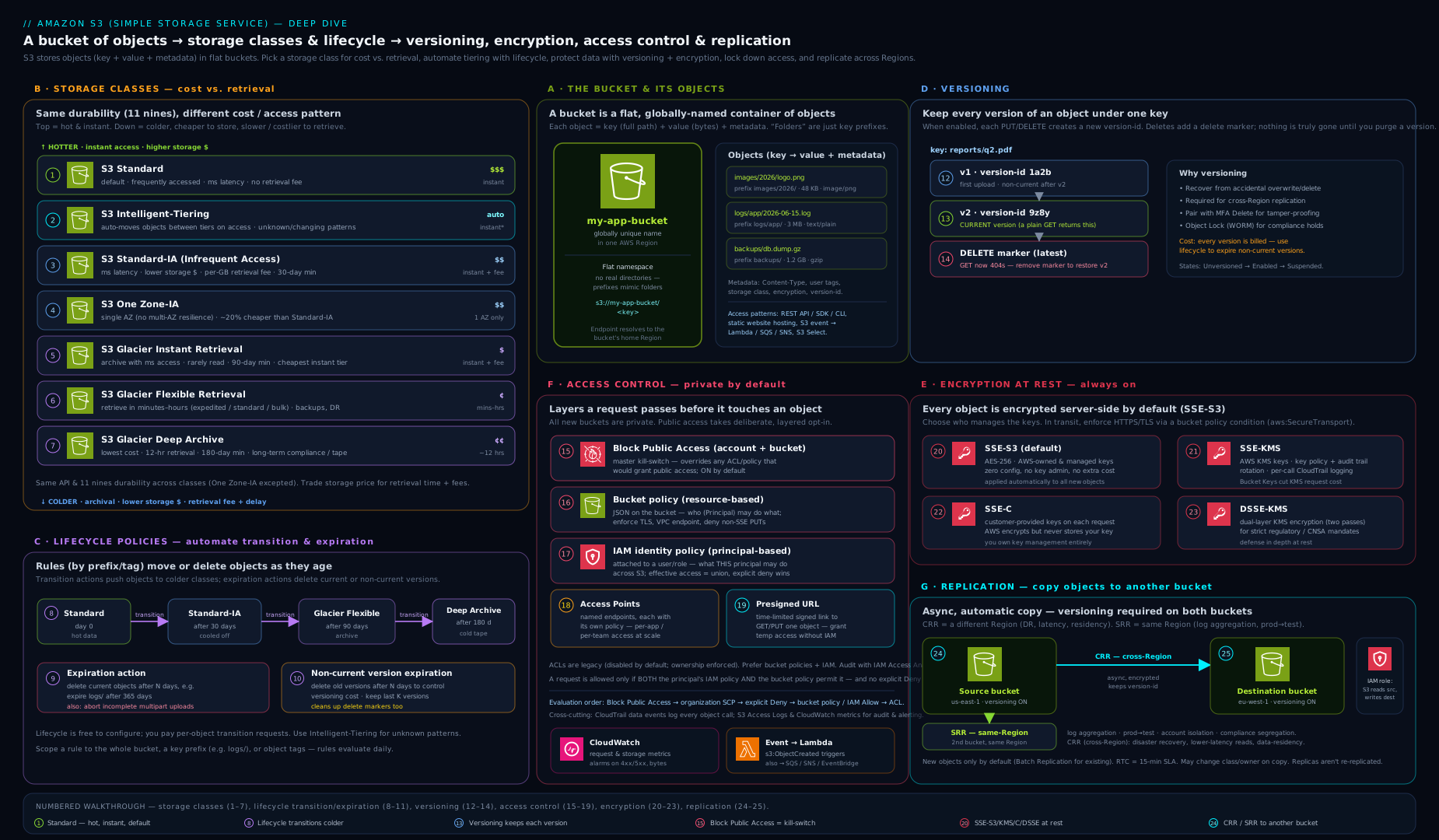
The diagram brings the pieces together: a bucket holding objects across the storage-class spectrum (Standard through Deep Archive), with lifecycle arrows transitioning data colder over time, versioning stacking versions and delete markers, encryption wrapping objects at rest, Block Public Access and the bucket policy/access-point layer guarding the front door, and replication mirroring objects to a second Region — the whole object lifecycle from hot upload to cold archive on one canvas.
Hands-on lab
You will create a bucket, confirm it is private and encrypted, turn on versioning, prove that a delete is recoverable, add a lifecycle rule, generate a presigned URL, then clean up. Everything fits within the AWS Free Tier (5 GB of Standard storage and modest request volumes for the first 12 months); this lab uses kilobytes.
The
$(date +%s)suffix is used to get a globally unique bucket name. Run as an administrator, not the root user.
Step 1 — Create a uniquely named bucket (outside us-east-1 needs a location constraint).
BUCKET="kloudvin-lab-$(date +%s)"
aws s3api create-bucket \
  --bucket "$BUCKET" \
  --region eu-west-2 \
  --create-bucket-configuration LocationConstraint=eu-west-2
echo "Created $BUCKET"
Step 2 — Confirm the secure defaults (BPA on, ownership enforced, encrypted).
aws s3api get-public-access-block --bucket "$BUCKET"        # all four = true
aws s3api get-bucket-encryption --bucket "$BUCKET"          # AES256 (SSE-S3) by default
Expected: the public-access-block shows all four settings true, and encryption shows SSEAlgorithm: AES256 — new buckets are private and encrypted out of the box.
Step 3 — Turn on versioning and upload an object twice.
aws s3api put-bucket-versioning --bucket "$BUCKET" \
  --versioning-configuration Status=Enabled

echo "v1 contents" > file.txt
aws s3 cp file.txt "s3://$BUCKET/file.txt"
echo "v2 contents" > file.txt
aws s3 cp file.txt "s3://$BUCKET/file.txt"

aws s3api list-object-versions --bucket "$BUCKET" --prefix file.txt \
  --query 'Versions[].{Key:Key,Version:VersionId,Latest:IsLatest}'
Expected: two versions, the newer one IsLatest: true. The first PUT was not overwritten — it became a noncurrent version.
Step 4 — Delete, then recover (prove delete markers work).
aws s3 rm "s3://$BUCKET/file.txt"                # adds a delete marker
aws s3 ls "s3://$BUCKET/"                          # file.txt no longer listed
# Find and delete the delete marker to restore the object:
MARKER=$(aws s3api list-object-versions --bucket "$BUCKET" --prefix file.txt \
  --query 'DeleteMarkers[?IsLatest].VersionId' --output text)
aws s3api delete-object --bucket "$BUCKET" --key file.txt --version-id "$MARKER"
aws s3 cp "s3://$BUCKET/file.txt" -               # prints "v2 contents" again
Expected: after removing the delete marker the object reappears and prints v2 contents — nothing was ever truly lost. That is versioning as a recovery and anti-ransomware control.
Step 5 — Add a lifecycle rule (abort bad uploads + expire old versions).
aws s3api put-bucket-lifecycle-configuration --bucket "$BUCKET" \
  --lifecycle-configuration '{"Rules":[
    {"ID":"tidy","Filter":{},"Status":"Enabled",
     "AbortIncompleteMultipartUpload":{"DaysAfterInitiation":7},
     "NoncurrentVersionExpiration":{"NoncurrentDays":30}}]}'
aws s3api get-bucket-lifecycle-configuration --bucket "$BUCKET"
Step 6 — Generate a 5-minute presigned download URL.
aws s3 presign "s3://$BUCKET/file.txt" --expires-in 300
# Paste the URL into a browser within 5 minutes — it downloads with no credentials.
Step 7 — Validation checklist.
get-public-access-blockshows all fourtrue.list-object-versionsshows multiple versions after the second upload.- After deleting the delete marker,
aws s3 cp s3://$BUCKET/file.txt -prints the object again. - The presigned URL downloads the file in a browser, then fails after it expires.
Cleanup — a versioned bucket must be fully emptied (all versions and delete markers) before it can be deleted:
aws s3api delete-objects --bucket "$BUCKET" --delete "$(aws s3api list-object-versions \
  --bucket "$BUCKET" \
  --query '{Objects: Versions[].{Key:Key,VersionId:VersionId}}' --output json)" 2>/dev/null
aws s3api delete-objects --bucket "$BUCKET" --delete "$(aws s3api list-object-versions \
  --bucket "$BUCKET" \
  --query '{Objects: DeleteMarkers[].{Key:Key,VersionId:VersionId}}' --output json)" 2>/dev/null
aws s3 rb "s3://$BUCKET"
rm -f file.txt
Cost note: a few kilobytes of Standard storage, a handful of requests and one tiny data transfer fall well within the Free Tier and cost effectively nothing. The only ways this lab could ever cost money are leaving large objects behind (storage), abandoning incomplete multipart uploads (the lifecycle rule above prevents that), or KMS request charges (we used free SSE-S3). The cleanup removes the bucket entirely, so nothing lingers.
Going deeper
The core sections tell you what each feature does. This section is the depth an experienced engineer needs to design and defend an S3 estate: what the bill is really made of, the encryption economics, the concurrency primitives, the data perimeter, replication internals, and where S3 is heading. Prices below are representative us-east-1 list prices to show the shape of the maths — always verify current, per-Region pricing.
What an S3 bill is actually made of
Five things drive cost, and they interact:
- Storage — per GB-month, set by the storage class (representative: Standard ≈ $0.023, Standard-IA ≈ $0.0125, Glacier Instant ≈ $0.004, Glacier Flexible ≈ $0.0036, Deep Archive ≈ $0.00099).
- Requests — writes cost ~10× reads (representative: PUT/COPY/POST ≈ $0.005 per 1,000, GET ≈ $0.0004 per 1,000). LIST is a write-class request, which is why listing billions of objects is ruinous and S3 Inventory exists.
- Retrieval — IA and Glacier charge per GB retrieved, and Glacier Flexible/Deep add a per-request restore fee. Standard and Intelligent-Tiering have no retrieval fee.
- Data transfer OUT — to the internet is charged per GB; transfer IN is free, and traffic to services in the same Region is generally free. Cross-Region replication and transfer are charged.
- Penalties and management — the minimum-duration (30/90/180-day) and 128 KB minimum billable size become real “early-delete” charges; Storage Lens advanced tier, Inventory, Analytics and Intelligent-Tiering’s per-object monitoring fee are their own line items.
Worked example (representative — verify prices). Store 50 TB of logs. Naïve “all Standard”: 50,000 GB × $0.023 ≈ $1,150/mo. Lifecycle it — hot 30 days in Standard, Standard-IA to day 90, then Glacier Flexible — and in steady state most of the 50 TB sits at ~$0.0036: 50,000 × $0.0036 ≈ $180/mo, a ~6× cut. But if those were 5 KB objects, the 128 KB minimum billable size would bill each as 128 KB (25× the real bytes) and per-request transition charges could exceed the savings — which is exactly why lifecycle is for large, long-lived data.
KMS, Bucket Keys and envelope encryption — the real math
Under SSE-KMS without a Bucket Key, every object write makes a KMS GenerateDataKey call and every read a KMS Decrypt call (representative KMS ≈ $0.03 per 10,000 requests). A workload reading 100M objects/month → 100M Decrypt calls → ~$300/mo in KMS requests alone, plus throttling against the KMS request-per-second quota. An S3 Bucket Key makes S3 derive a short-lived, bucket-level data key and reuse it across many objects, collapsing those millions of KMS calls by up to 99% — that $300 can fall to a few dollars. This is envelope encryption: the KMS customer key (CMK) encrypts a data key; the data key encrypts objects; the Bucket Key sits in between so the CMK is touched rarely. Turn Bucket Keys on for every SSE-KMS bucket — it is pure upside. For the key policies, grants and rotation behind this, see AWS KMS Encryption Deep Dive.
Conditional writes: stop overwrites and lost updates
S3 is strongly consistent, but two writers can still clobber each other. Since 2024 S3 supports conditional writes. Send If-None-Match: * to make a PUT succeed only if the key does not already exist (it returns 412 Precondition Failed otherwise) — an atomic create-if-absent that stops two processes overwriting each other’s first write. If-Match: <etag> does compare-and-swap: overwrite only if the object still carries the ETag you last read, giving optimistic concurrency with no external lock table. Together they remove a whole class of “last writer wins” data-loss bugs in distributed pipelines.
aws s3api put-object --bucket my-bucket --key state/lock \
  --if-none-match '*' --body lock.json      # 412 if the key already exists
(Conditional-write flags require a recent CLI/SDK version.)
Intelligent-Tiering economics — and when it loses
Intelligent-Tiering (IT) charges a small per-object monitoring fee (representative ≈ $0.0025 per 1,000 objects/month) and no retrieval fees, auto-moving each object between Frequent, Infrequent and (opt-in) Archive tiers by access. The nuances that decide whether IT actually saves:
- Objects smaller than 128 KB are not monitored and never tier down — they stay at Frequent-tier price. Millions of tiny objects gain nothing from IT.
- IT wins when access is genuinely unpredictable and objects are ≥128 KB and long-lived. If you already know the access pattern, explicit lifecycle transitions are cheaper (no monitoring fee).
- The monitoring fee is per object: 1 billion 200 KB objects is ~$2,500/mo in monitoring alone — model it before defaulting a data lake to IT.
The data perimeter: VPC endpoints, org conditions and Access Analyzer
S3 access can be constrained by where the request comes from, not only who makes it:
- A VPC gateway endpoint for S3 (free, route-table-based) keeps traffic on the AWS network — no NAT, no IGW — and lets a bucket policy scope access with
aws:SourceVpceoraws:SourceVpcso the bucket is reachable only from your VPC. aws:PrincipalOrgIDlimits access to identities in your AWS Organization;aws:ResourceOrgID(in identity policies/SCPs) stops your principals writing to foreign buckets — the two halves of a data perimeter.- For AWS service principals writing to your bucket (logs, config), add
aws:SourceArn/aws:SourceAccountconditions to prevent the confused-deputy problem. - IAM Access Analyzer continuously flags any bucket reachable from outside your account/org and can generate least-privilege policies from CloudTrail — run it as a standing control, not a one-off audit.
Replication internals: RTC, batch, two-way, and what never replicates
- Replication Time Control (RTC) adds a 15-minute replication SLA (99.99% of objects) plus CloudWatch metrics —
ReplicationLatency,BytesPendingReplication,OperationsPendingReplication— so you can alarm on lag; it costs extra per GB. - Plain replication copies new objects only; use S3 Batch Replication to backfill objects that predate the rule or previously failed.
- Two-way (bidirectional) replication with replica modification sync keeps two buckets in step for active-active designs.
- What never replicates: existing objects (without Batch), SSE-C objects, and deletes by version ID — only delete markers can optionally replicate, by design, so a malicious hard delete cannot propagate. SSE-KMS objects replicate only if the replication role is granted KMS permissions on both keys. Objects created by lifecycle transitions are not replicated.
- Set the destination to change ownership to the destination account so a compromised source account cannot also control the DR copies.
The newer direction: Express One Zone, S3 Tables and S3 Vectors
S3 is no longer just “buckets of objects.” Three newer bucket types matter in design reviews:
- S3 Express One Zone / directory buckets (GA) — the single-AZ, session-authenticated, single-digit-millisecond class from the performance section; a genuinely different bucket type and API surface for latency-critical, co-located compute.
- S3 Tables (GA, launched re:Invent 2024) — purpose-built table buckets that store tabular data as Apache Iceberg tables with automatic compaction, snapshot expiry and unreferenced-file cleanup managed for you, plus native integration with Athena, EMR, Spark and Glue. It turns “roll your own Iceberg on S3” into a managed service; compare it with the hand-built pattern in Apache Iceberg on S3 with Glue.
- S3 Vectors (preview — verify GA status before production use) — vector buckets that store and query embeddings natively, aimed at cutting the cost of vector storage for AI/RAG workloads and integrating with Bedrock Knowledge Bases and OpenSearch. Treat it as forward-looking.
Limits and quotas worth memorising
| Limit | Value |
|---|---|
| Max object size | 5 TB |
| Max single (non-multipart) PUT | 5 GB |
| Multipart parts · part size | up to 10,000 parts · 5 MB–5 GB each |
| Object key length | up to 1,024 bytes UTF-8 |
| Buckets per account (default, soft) | 1,000,000 |
| Bucket policy size | 20 KB |
| Object tags · user metadata | 10 tags · 2 KB metadata |
| Consistency | strong read-after-write for PUT/DELETE, every Region |
Common mistakes & troubleshooting
| Symptom | Likely cause | Fix |
|---|---|---|
Access Denied on GetObject despite an Allow |
Missing the object ARN (bucket/*) or an explicit Deny/BPA override; or the object is KMS-encrypted and the caller lacks kms:Decrypt |
List both bucket and object ARNs; check for Deny/BPA; grant kms:Decrypt on the key |
Bucket creation fails with BucketAlreadyExists |
Names are globally unique across all AWS accounts | Choose a different, more specific name |
MalformedXML/IllegalLocationConstraint on create |
Used LocationConstraint for us-east-1 (which must omit it) or mismatched --region |
In us-east-1 omit the constraint; elsewhere set both region and constraint |
| Versioned bucket “won’t delete” | Bucket still contains object versions and delete markers | Delete all versions and delete markers first (see cleanup), then rb |
| Storage bill rising despite “deleting” files | Versioning on without lifecycle — old versions and markers accumulate | Add a noncurrent-version-expiration rule and abort incomplete uploads rule |
| Object in Glacier “won’t download” | Glacier Flexible/Deep classes need a restore request first | restore-object then read once the temporary copy is available, or use Glacier Instant for millisecond reads |
Website endpoint returns 403/no HTTPS |
Bucket private with no policy, or expecting HTTPS on the website endpoint | For a public site grant read (or front with CloudFront+OAC for HTTPS — the recommended path) |
| KMS throttling / surprise KMS bill | Millions of Decrypt calls on a KMS-encrypted bucket |
Enable an S3 Bucket Key to cut KMS requests dramatically |
Common beginner mistakes
These are conceptual traps — the misconception and the right mental model — distinct from the symptom → cause → fix table above.
- “S3 has folders, so I’ll nest data in directories.” There are no folders; the key is one flat string and the console fakes a tree by splitting on
/. Right model: design prefixes deliberately — they are your unit of throughput, lifecycle scope, replication filter and access-point routing, not cosmetic folders. - “One bucket per team/app gives better isolation.” Buckets are a coarse, globally-namespaced boundary; thousands of tiny buckets become an operational mess. Right model: prefer fewer, larger buckets partitioned by prefix, and give each app its own least-privilege access point into a shared bucket.
- “Send everything to Glacier to save money.” Cold classes carry minimum durations (90/180 days), a 128 KB minimum billable size, retrieval fees and per-request restores; tiny or short-lived objects cost more there. Right model: lifecycle only large, long-lived data; keep small/hot objects in Standard or Intelligent-Tiering.
- “Versioning is my backup.” Versions live in the same bucket and Region; a bucket-level disaster, or an attacker deleting by version ID, still takes them. Right model: versioning recovers overwrites and accidental deletes — pair it with replication (different account/Region) and Object Lock for real backup and ransomware resistance, and with lifecycle so it doesn’t leak cost.
- “The bucket is private, so my data is safe.” Private ≠ appropriately encrypted ≠ audited. A caller with
s3:GetObjectreads plaintext unless a KMS key policy also gates them, and “private” says nothing about TLS or logging. Right model: layer Block Public Access + least-privilege policy + SSE-KMS + a TLS-only deny + CloudTrail data events. - “I set default encryption to SSE-KMS, so it’s enforced.” A default only applies when the client doesn’t ask for something else — a client can still
PUTwithAES256or a different key. Right model: add a bucket policy that denies any PUT whoses3:x-amz-server-side-encryptionheader isn’taws:kms(and pin the key id). - “I deleted the files, so my bill will drop.” On a versioned bucket,
aws s3 rmwrites a delete marker and keeps every noncurrent version — all still billed. Right model: reclaim space with noncurrent-version-expiration and expired-delete-marker lifecycle rules; only a delete by version ID frees bytes. - “A presigned URL is safe because it expires.” It is a bearer token carrying the signer’s permissions — anyone who obtains the link has that access until it expires. Right model: short expiries, never log or forward them casually, and sign with a least-privilege role, never an admin identity.
Best practices
- Turn on Block Public Access at the account level and every bucket, and keep Object Ownership = bucket owner enforced (ACLs disabled) unless a legacy pattern truly needs ACLs.
- Encrypt with SSE-KMS for sensitive data and always enable an S3 Bucket Key; use SSE-S3 for low-sensitivity data where free, opaque encryption is enough.
- Enable versioning on important buckets and always pair it with lifecycle (noncurrent-version-expiration + abort-incomplete-uploads) so it protects you without leaking cost.
- Use Intelligent-Tiering when access is unpredictable; use explicit lifecycle transitions when you know the access pattern — and never tier tiny, short-lived objects into IA/Glacier.
- Prefer access points and presigned URLs over one giant bucket policy and over handing out long-lived credentials.
- Enforce TLS with an
aws:SecureTransport=falseDeny, and enforce encryption with ans3:x-amz-server-side-encryptionDeny. - Front static sites with CloudFront + OAC for HTTPS, caching and WAF; keep the origin bucket private.
- Use S3 Inventory and Storage Lens to audit and optimise at scale instead of expensive
LISToperations.
Security notes
- The exposed-bucket breach is almost always preventable with BPA on — make account-level Block Public Access a non-negotiable guardrail (an SCP can enforce it org-wide).
- SSE-KMS gives you a second lock and an audit trail: even a principal with
s3:GetObjectcannot read an object withoutkms:Decrypton the key, and every decrypt is logged in CloudTrail. - Object Lock in compliance mode is genuinely immutable — not even root can delete the version until retention expires; it is the strongest ransomware/regulatory control S3 offers, and equally the easiest to misconfigure into “we can never delete this”, so set durations deliberately.
- Presigned URLs are bearer tokens — short expiries, never log them, and remember they carry the signer’s permissions.
- Log request activity with CloudTrail data events (and/or server access logs) so every object access is auditable; pair with versioning so tampering is recoverable.
- Replicate to a separate account/Region for DR and blast-radius isolation, and consider replicating to an account where deletes are tightly restricted.
Interview & exam questions
-
What durability and availability does S3 Standard offer, and how does One Zone-IA differ? Standard is designed for eleven nines (99.999999999%) durability across ≥3 AZs with a 99.99% availability SLA. One Zone-IA stores data in a single AZ — same durability design figure but no resilience to an AZ loss, so it is only for re-creatable or secondary data, at ~20% lower storage cost.
-
A team needs archived medical images they must occasionally read in milliseconds. Which class? S3 Glacier Instant Retrieval — archive-level storage price with millisecond retrieval. Glacier Flexible/Deep Archive would force minute-to-hour restores, which fails the latency requirement.
-
What actually happens when you delete an object in a versioning-enabled bucket? S3 adds a delete marker as the new current version; the object’s data is retained beneath it (a GET returns 404). Deleting the marker restores the object. Only a DELETE with a specific version ID permanently removes data.
-
Difference between SSE-S3, SSE-KMS, SSE-C and DSSE-KMS? SSE-S3: AWS-managed keys, free, no per-key control. SSE-KMS: KMS keys with key-policy access control and CloudTrail auditing (use a Bucket Key to control cost). DSSE-KMS: two layers of KMS encryption for strict mandates. SSE-C: you supply the key on every request and AWS stores none.
-
What does Block Public Access do, and how does it relate to a bucket policy granting public read? BPA is four overriding settings that block public ACLs and public bucket policies. With BPA on, a policy granting public access has no effect — BPA wins. It is the primary defence against exposed-bucket breaches and is on by default for new buckets.
-
Versioning is on and the storage bill keeps climbing despite deletes. Why, and the fix? Every overwrite keeps the old noncurrent version and every delete adds a delete marker, all billed. Add a noncurrent-version-expiration lifecycle rule (and an abort-incomplete-multipart-uploads rule) to reclaim space.
-
Cross-Region vs Same-Region Replication — requirements and one use case each? Both require versioning on source and destination and an IAM role. CRR copies to another Region (DR, latency, data residency); SRR copies within a Region (log aggregation, prod/test or cross-account separation). Replication is asynchronous; add RTC for a 15-minute SLA.
-
What is an S3 Bucket Key and why does it matter? A bucket-level data key that S3 uses to reduce calls to KMS for SSE-KMS objects, cutting KMS request volume and cost by up to ~99%. Enable it on any KMS-encrypted bucket to avoid throttling and a large KMS bill.
-
Governance vs Compliance mode in Object Lock? Governance mode can be bypassed by a principal with
s3:BypassGovernanceRetention. Compliance mode cannot be overridden by anyone, including the account root, until retention expires — true WORM immutability for regulatory mandates. -
How do you serve a static website over HTTPS from S3? The S3 website endpoint is HTTP only, so you keep the bucket private and put CloudFront in front with Origin Access Control and an ACM certificate for HTTPS (plus edge caching and WAF). The website endpoint alone cannot do TLS.
-
Why might moving small objects to Standard-IA via lifecycle increase cost? IA/Glacier-Instant classes have a 128 KB minimum billable size and a 30/90-day minimum duration, plus per-request transition charges. Small or short-lived objects get billed as 128 KB for the minimum period — sometimes more than leaving them in Standard.
-
What is a presigned URL and what are its security properties? A time-limited URL that grants access to one object using the signer’s permissions, with no credentials handed to the requester. It is a bearer token valid up to 7 days (SigV4) — keep expiries short and never log it.
Quick check
- Is an S3 key a real folder path, and how does the console show “folders”?
- Which two storage classes store data in a single Availability Zone?
- What must be enabled on both buckets before you can configure replication?
- Which encryption option lets you audit every decrypt in CloudTrail, and what cuts its request cost?
- With Block Public Access fully on, what happens to a bucket policy that grants
s3:GetObjectto*?
Answers
- No — the key is one flat UTF-8 string; the console renders a tree by splitting on
/purely for display. S3 is a flat key/value store. - One Zone-IA and S3 Express One Zone (the latter in a directory bucket).
- Versioning must be enabled on both the source and the destination bucket.
- SSE-KMS logs every
Decryptin CloudTrail; enabling an S3 Bucket Key cuts the KMS request cost dramatically. - Nothing — Block Public Access overrides it, so the bucket stays private. BPA wins over any grant.
Exercise
Design and prove out a cost-and-protection configuration for an “uploads” bucket that receives user files of unknown access pattern and must be both recoverable and cheap over time:
- Create a bucket with versioning on, confirm BPA and SSE are on by default, and set the default encryption to SSE-KMS with a Bucket Key.
- Add a lifecycle configuration that: transitions current objects to Intelligent-Tiering at day 0 (or Standard-IA at 30 days), expires noncurrent versions after 60 days, and aborts incomplete multipart uploads after 7 days.
- Add a bucket policy that denies any request where
aws:SecureTransportisfalseand any PUT whose server-side encryption header is notaws:kms. - Upload an object, overwrite it, delete it, and restore it by removing the delete marker — confirming the whole protection chain works.
- Bonus: create an access point restricted to a specific VPC and a least-privilege policy, and read the object through the access-point hostname instead of the bucket.
Practice challenges
Six exercises, beginner → advanced. Try each before opening the solution. Everything fits the Free Tier; account IDs are placeholders (123456789012) — never use real ones.
1 (Beginner) — Prove a new bucket is secure by default. Create a bucket and, without changing anything, confirm Block Public Access is fully on, encryption is on, and ACLs are disabled.
<details> <summary>Solution</summary>
B="kloudvin-lab-$(date +%s)"
aws s3api create-bucket --bucket "$B" --region eu-west-2 \
  --create-bucket-configuration LocationConstraint=eu-west-2
aws s3api get-public-access-block --bucket "$B"          # all four true
aws s3api get-bucket-encryption --bucket "$B"            # AES256 (SSE-S3)
aws s3api get-bucket-ownership-controls --bucket "$B"    # BucketOwnerEnforced
Why: since 2023 new buckets ship private, encrypted (SSE-S3) and ACL-disabled — the secure baseline you should verify, not assume. </details>
2 (Beginner) — Make deletes recoverable and stop the cost leak. Turn on versioning and add a lifecycle rule that aborts incomplete uploads after 7 days and expires noncurrent versions after 30.
<details> <summary>Solution</summary>
aws s3api put-bucket-versioning --bucket "$B" \
  --versioning-configuration Status=Enabled
aws s3api put-bucket-lifecycle-configuration --bucket "$B" \
  --lifecycle-configuration '{"Rules":[{"ID":"tidy","Filter":{},"Status":"Enabled",
    "AbortIncompleteMultipartUpload":{"DaysAfterInitiation":7},
    "NoncurrentVersionExpiration":{"NoncurrentDays":30}}]}'
Why: versioning without a noncurrent-expiration + abort-incomplete-uploads rule is a slow, silent cost leak. </details>
3 (Intermediate) — Enforce TLS and SSE-KMS with a bucket policy. A default encryption setting is not enforcement — write a policy that denies non-TLS requests and denies any PUT that isn’t aws:kms.
<details> <summary>Solution</summary>
{
  "Version": "2012-10-17",
  "Statement": [
    {"Sid":"DenyInsecureTransport","Effect":"Deny","Principal":"*",
     "Action":"s3:*",
     "Resource":["arn:aws:s3:::my-bucket","arn:aws:s3:::my-bucket/*"],
     "Condition":{"Bool":{"aws:SecureTransport":"false"}}},
    {"Sid":"DenyWrongSSE","Effect":"Deny","Principal":"*",
     "Action":"s3:PutObject","Resource":"arn:aws:s3:::my-bucket/*",
     "Condition":{"StringNotEquals":{"s3:x-amz-server-side-encryption":"aws:kms"}}}
  ]
}
Why: an explicit Deny beats any Allow, so these two statements make TLS and KMS non-optional regardless of the caller or the default. </details>
4 (Intermediate) — Tier logs correctly, and know what not to tier. Write a lifecycle rule for logs/ that goes Standard → Standard-IA at 30 days → Glacier Flexible at 90 → expire at 365, and state why you’d exclude 4 KB objects.
<details> <summary>Solution</summary>
{"Rules":[{"ID":"logs","Filter":{"Prefix":"logs/"},"Status":"Enabled",
  "Transitions":[{"Days":30,"StorageClass":"STANDARD_IA"},
                 {"Days":90,"StorageClass":"GLACIER"}],
  "Expiration":{"Days":365}}]}
Why: IA/Glacier bill a 128 KB minimum size plus minimum durations, so 4 KB objects would be billed as 128 KB (32× their bytes) — leave small objects in Standard. </details>
5 (Advanced) — Cross-Region Replication with a 15-minute SLA. With versioning on both buckets, replicate everything (including delete markers) to a DR Region with RTC and a replication role.
<details> <summary>Solution</summary>
# Versioning must be ENABLED on BOTH source and destination first, then:
aws s3api put-bucket-replication --bucket source-bucket \
  --replication-configuration '{
    "Role":"arn:aws:iam::123456789012:role/s3-replication-role",
    "Rules":[{"ID":"dr","Status":"Enabled","Priority":1,
      "Filter":{"Prefix":""},
      "DeleteMarkerReplication":{"Status":"Enabled"},
      "Destination":{"Bucket":"arn:aws:s3:::dest-bucket-eu-central",
        "ReplicationTime":{"Status":"Enabled","Time":{"Minutes":15}},
        "Metrics":{"Status":"Enabled"}}}]}'
Why: RTC targets 99.99% of objects replicated within 15 minutes and emits ReplicationLatency metrics; versioning on both sides is mandatory, delete markers replicate but version-ID deletes never do (so a hard delete can’t propagate).
</details>
6 (Advanced) — Atomic “create if absent” with conditional writes. Two workers must never overwrite a shared state/lock object. Make the write fail if the key already exists, and show the compare-and-swap variant for updates.
<details> <summary>Solution</summary>
# Create only if absent — 412 PreconditionFailed if it already exists:
aws s3api put-object --bucket my-bucket --key state/lock \
  --if-none-match '*' --body lock.json
# Update only if unchanged since you last read it (optimistic concurrency):
aws s3api put-object --bucket my-bucket --key state/lock \
  --if-match "$PREV_ETAG" --body lock.json
Why: If-None-Match: * is an atomic create-if-absent and If-Match: <etag> is compare-and-swap, removing “last writer wins” data loss without an external lock table (needs a recent CLI/SDK).
</details>
Certification mapping
| Exam | Objective area this supports |
|---|---|
| SAA-C03 (Solutions Architect – Associate) | Design cost-optimised and resilient storage — choosing storage classes, lifecycle transitions, versioning, replication for DR, and the encryption/access-control model for secure designs. |
| DVA-C02 (Developer – Associate) | Develop with AWS services — interacting with S3 from SDKs/CLI, multipart upload, presigned URLs, event notifications, encryption headers and bucket policies. |
Glossary
- Bucket — a globally uniquely named, single-Region container for objects.
- Object — a file plus metadata, identified by a key; 0 bytes to 5 TB.
- Key — the full object name; a flat UTF-8 string (slashes are just characters).
- Prefix — the leading portion of a key, used to scope listings, lifecycle and replication.
- Storage class — the durability/availability/retrieval/price profile of an object (Standard, IA, One Zone-IA, Intelligent-Tiering, Glacier Instant/Flexible/Deep Archive, Express One Zone).
- Intelligent-Tiering — a class that auto-moves objects between access tiers for a small monitoring fee and no retrieval fees.
- Lifecycle rule — automated transition/expiration of objects (and noncurrent versions) on a schedule.
- Versioning — keeping every version of every object so overwrites and deletes are recoverable.
- Delete marker — the placeholder a delete creates on a versioned bucket; removing it restores the object.
- SSE-S3 / SSE-KMS / SSE-C / DSSE-KMS — server-side encryption with AWS-managed keys / KMS keys / customer-provided keys / two KMS layers.
- S3 Bucket Key — a bucket-level data key that slashes KMS request cost for SSE-KMS objects.
- Block Public Access (BPA) — four overriding settings that prevent public access regardless of policy/ACL.
- Bucket policy — a resource-based JSON policy on a bucket; the main tool for cross-account and conditional access.
- Object Ownership / ACL — the legacy access mechanism; modern buckets disable ACLs (“bucket owner enforced”).
- Access point — a named endpoint with its own policy (optionally VPC-locked) for scaling access to a shared bucket.
- Presigned URL — a time-limited URL granting access to one object using the signer’s permissions.
- Replication (CRR/SRR) — asynchronous copying of objects to another Region or within a Region; requires versioning.
- Object Lock — WORM immutability via retention (governance/compliance modes) and legal holds.
- Multipart upload — splitting a large object into parts uploaded in parallel; abandoned parts are billed until aborted.
- ETag — an object’s entity tag; the MD5 for a single-part PUT, but not a plain MD5 for multipart uploads, so never treat it as a guaranteed content hash.
- MFA delete — a versioned-bucket option requiring a root MFA code to permanently delete a version or change the versioning state.
- Byte-range fetch — a
GETwith aRangeheader that returns part of an object, used for parallel or partial downloads. - Prefix request rate — the per-prefix ceiling S3 sustains (≥3,500 write and ≥5,500 read requests/second), scaled by spreading keys across prefixes.
- Transfer Acceleration — routing transfers via CloudFront edges and the AWS backbone to speed long-distance uploads, for a fee.
- Directory bucket — the single-AZ, session-authenticated bucket type used by S3 Express One Zone.
- S3 Express One Zone — a single-AZ storage class/bucket type for single-digit-millisecond latency and cheap requests.
- S3 Tables — managed table buckets storing Apache Iceberg tables with automatic compaction and maintenance.
- S3 Vectors — (preview) vector buckets for storing and querying embeddings natively for AI/RAG workloads.
- S3 Storage Lens — account-wide storage analytics, metrics and cost-optimisation recommendations.
- S3 Inventory — a scheduled CSV/Parquet report of objects and their metadata, far cheaper than
LISTat scale. - Requester Pays — a bucket setting that shifts request and data-transfer costs onto the requester.
- Replication Time Control (RTC) — a replication add-on with a 15-minute SLA and CloudWatch replication metrics.
- Conditional write — a
PUTguarded byIf-None-Match/If-Matchfor atomic create-if-absent or compare-and-swap. - Data perimeter — policy conditions (
aws:PrincipalOrgID,aws:SourceVpce,aws:ResourceOrgID) that restrict who and where can access buckets.
Next steps
Now that you know S3 end to end, move from the building blocks to the defended estate:
- S3 Data Protection & Governance at Scale — the access-decision model, data-perimeter bucket policies, encryption strategy, Object Lock and continuous monitoring as one governance posture.
- S3 Access Points, Object Lambda & Multi-Region Access Points — scaling access management, transforming data on read, and global routing across Regions.
Then continue the Storage module with AWS Block & File Storage (EBS, EFS, FSx & Instance Store) to round out how AWS stores data beyond objects.