In a nutshell
Level: Advanced · Time: ~66 min · You’ll leave able to design, delegate, share, monitor, and audit an org-wide IP address plan — and bring your own public space onto AWS.
Every VPC needs a range of IP addresses — a CIDR block like 10.0.0.0/16 — to hand out to its subnets and machines. In one account with one VPC you pick a range once and forget it. Across a whole company, with dozens of accounts and several Regions, “everyone picks their own range” quietly turns into two teams choosing the same range. The moment those two networks need to talk (through a shared router, a VPN, or a link to your data centre), they can’t: a router cannot point the same address at two different places. Fixing it means renumbering a live network, which is slow, risky, and sometimes impossible.
Amazon VPC IP Address Manager (IPAM) is the service that prevents that. Think of it as the front desk of a hotel handing out room numbers. If guests wrote their own room number on a whiteboard, two would eventually both claim “Room 204” and collide at check-in. The front desk instead owns the room list, assigns the next free room on request, and never double-books. IPAM does exactly this for IP ranges: teams stop declaring a CIDR and start drawing one from a central authority that refuses to issue a clash and keeps the master map of who has what.
The shape is simple once you see it: one IPAM at the top → split into a private map and a public map (called scopes) → carved into pools → pools split into smaller pools per Region or team → each VPC draws one block. You design that tree once, delegate it to your networking team, share the leaf pools so app teams can self-serve, put alarms on pools that are filling up, and — the day-one surprise — let IPAM discover the overlaps your spreadsheet never could.
If you remember one sentence: a spreadsheet records address usage after the fact and can never stop a clash; IPAM issues addresses and refuses to issue a clash. Everything below is how to run that authority at scale. The lesson is dense on purpose — read the prose once, then keep the tables open while you build.
The most expensive mistake in multi-account networking is not a misconfigured route table; it is two VPCs that both own 10.0.0.0/16. You cannot renumber a live VPC, you cannot route overlapping prefixes through a Transit Gateway, and by the time the overlap surfaces you have a spreadsheet, a Slack channel, and a quarterly meeting where humans manually hand out CIDR blocks. Amazon VPC IP Address Manager (IPAM) replaces all of that with a hierarchy of pools, automated allocation, and continuous overlap detection across every account in the organization. This is how to design the hierarchy, delegate it, automate allocation, monitor exhaustion, and bring your own public IP space — the way a platform team should, before anyone provisions a VPC.
Address allocation by spreadsheet fails for the same reason manual IAM fails: it does not scale and it cannot be enforced. A team picks 10.20.0.0/16 because it “looked free,” and six months later a Transit Gateway attachment is rejected or a Direct Connect route is black-holed because someone else picked the same block in another account. The longest-prefix-match router underneath TGW and VPC peering simply cannot represent two identical prefixes pointing at different destinations. IPAM is the single source of truth that issues address space rather than recording it after the fact, refuses to issue a conflict, and watches every CIDR it can see for overlap and exhaustion.
By the end of this article you will be able to design a top-down pool tree, delegate IPAM to a networking account, bolt allocation guardrails onto leaf pools, share them through AWS RAM so workload accounts self-serve, alarm on utilization before a prod VPC create fails, and bring your own public IPv4 space and ASN onto AWS without ever announcing the same prefix from two origins. Because IPAM is a system you operate, not a feature you toggle, the failure modes, limits, settings and the diagnostic playbook are all laid out as scannable tables — read the prose once, then keep the tables open when you are mid-migration.
What problem this solves
In a single account with one VPC, you can pick a CIDR by hand and never think about it again. The pain begins at organizational scale: dozens or hundreds of accounts, multiple Regions, mergers that drag in pre-existing 10.x estates, and a Transit Gateway or Direct Connect that demands every routable prefix be globally unique. The spreadsheet that “tracks” allocations is always slightly wrong, always behind, and can never prevent the next collision — it only records it after someone has already shipped a colliding VPC.
What breaks without address governance is concrete and expensive. A Transit Gateway route table cannot hold the same prefix twice, so the second VPC advertising 10.10.0.0/16 is silently unreachable across the shared backbone. A Direct Connect or Site-to-Site VPN route to on-prem 10.0.0.0/8 black-holes any AWS VPC that overlaps it. VPC peering between two 10.0.0.0/16 VPCs is simply rejected. And the cruelest part: you usually cannot renumber the offending VPC, because it is live, regulated, or load-bearing, so the fix is a multi-sprint migration rather than a config change.
Who hits this: any platform or network team running more than a handful of accounts, anyone standing up a hub-and-spoke Transit Gateway, anyone integrating an acquired company’s address space, and anyone who must advertise their own public IP range (for IP allow-lists, reputation, or a lift-and-shift that hard-codes IPs). IPAM’s first-day value is rarely the allocation — it is the discovery of the overlap nobody could previously see, then the guarantee that no new overlap can ever be created. To frame the whole field before the deep dive, here is every problem class IPAM addresses, what fails without it, and the IPAM mechanism that fixes it:
| Problem class | What breaks without IPAM | The IPAM mechanism | First place to look |
|---|---|---|---|
| Duplicate CIDRs across accounts | TGW attachment rejected; peering refused | Pools issue unique CIDRs within a scope | get-ipam-resource-cidrs overlap-status |
| On-prem route collision | Direct Connect / VPN route black-holes a VPC | Import on-prem space as a manual allocation | Overlap report in the private scope |
| “Looked free” manual picks | Sprawl, no audit trail | ipv4_ipam_pool_id forces a drawn CIDR |
Pool allocation list |
| Prod/non-prod address bleed | Test space routed into prod | allocation_resource_tags hard filter |
Pool allocation rules |
| Silent exhaustion | VPC create fails in prod with no warning | AWS/IPAM utilization metric + alarm |
CloudWatch alarm history |
| Public IP advertisement | BYOIP done by ticket, error-prone | Public-scope pool + ROA + advertise | get-ipam-pool-cidrs state |
| No central visibility | Nobody knows who owns what | Org-wide monitored resource inventory | get-ipam-resource-cidrs |
Learning objectives
By the end of this article you can:
- Explain the IPAM → scope → pool → allocation hierarchy and why a child pool’s
source_ipam_pool_idandlocaletogether decide what it can allocate to. - Choose between the Free Tier and Advanced Tier and state exactly which capabilities (cross-account/cross-Region pools, org-wide monitoring, BYOIP/BYOASN, public IP insights) require Advanced.
- Design a top-down pool tree — locale-free top pool, locale-pinned Regional pools, per-environment/OU leaf pools — and provision CIDRs into each layer with the right netmask.
- Attach allocation guardrails (
allocation_default/min/max_netmask_length,allocation_resource_tags) so a pool refuses non-compliant requests, and prove the rejection. - Delegate IPAM to a networking account and share leaf pools to accounts or OUs via AWS RAM (the pool, not the IPAM).
- Automate VPC CIDR allocation from a shared pool, reserve space with explicit allocations, and reclaim addresses bottom-up respecting deletion-protection semantics.
- Monitor utilization, overlap and compliance via
AWS/IPAMCloudWatch metrics and the resource-CIDR inventory, and alarm before exhaustion. - Bring your own public IPv4 space (BYOIP) and ASN (BYOASN) onto AWS with a valid ROA, and control advertisement so a prefix is never announced from two origins.
Prerequisites & where this fits
You should already understand VPC fundamentals — that a VPC owns one or more CIDR blocks, that subnets carve host space out of those blocks, and that a route table forwards by longest-prefix match so two identical prefixes cannot coexist in one table. Comfort with aws CLI in CloudShell, reading JSON output, and Terraform/CloudFormation basics is assumed; every operation below ships both an aws snippet and an IaC snippet. Familiarity with AWS Organizations, delegated administrator accounts, and AWS RAM (Resource Access Manager) sharing makes the delegation section land faster.
This sits at the foundation of multi-account networking, upstream of almost everything else you build. If VPC networking fundamentals and the VPC deep dive on subnets, routing, IGW, NAT and endpoints are the “what is a VPC” layer, IPAM is the “who is allowed to own which addresses” layer that must exist before you connect anything. It is the prerequisite for a clean Transit Gateway multi-account architecture and for resilient Direct Connect + Transit Gateway, both of which break the instant two prefixes collide. It depends on the account structure from Control Tower landing zones and is governed by Organizations SCPs and delegated admin.
A quick map of who owns what during an IPAM rollout, so you call the right person fast:
| Layer | What lives here | Who usually owns it | What it can block |
|---|---|---|---|
| Management account | Org, trusted access, delegation | Cloud platform / org admin | Delegation; org-wide monitoring |
| IPAM delegated (networking) account | IPAM, scopes, pool tree, alarms | Network / platform team | Allocation, guardrails, BYOIP |
| AWS RAM | Resource shares of leaf pools | Network team | Whether members can self-serve |
| Member / workload accounts | VPCs that draw CIDRs | App / product teams | Tag compliance, netmask bounds |
| RIR / RPKI (external) | ROA, ASN ownership | NetOps / external registry | BYOIP advertisement validation |
| CloudWatch / SNS | Utilization alarms, routing | Observability / NetOps | Early warning before exhaustion |
Core concepts
Five mental models make every later operation obvious.
A spreadsheet records; IPAM issues. This is the entire shift. A spreadsheet records allocations after the fact and can never refuse a conflict; IPAM issues them and refuses to issue a conflict within a scope. Every VPC stops declaring a CIDR and starts drawing one from a pool, so uniqueness is guaranteed at creation, ownership is recorded centrally, and overlap is continuously detected. The difference between “record after” and “issue and refuse” is the whole problem.
The hierarchy has four levels, and each level has a job. An IPAM is the top-level resource, pinned to a home Region but aware of multiple operating_regions. A scope is a routing domain — every IPAM ships a private default scope and a public default scope, and prefixes inside one private scope must not overlap. A pool is a collection of CIDRs that nests: a child pool’s source_ipam_pool_id points at its parent and provisions space out of it. An allocation is a CIDR handed out of a pool to a resource (a VPC) or reserved manually. Get these four nouns straight and the rest is detail.
Locale decides who a pool can serve. A locale is the AWS Region (or Local Zone) a pool is tied to. Only a pool whose locale matches a VPC’s Region can allocate to that VPC. The standard pattern is a locale-free top pool (so it can feed every Region) with locale-pinned Regional pools beneath it. A pool with the wrong locale — or a top pool accidentally pinned to one Region — is the most common reason an allocation silently fails.
Guardrails are hard filters, not suggestions. A pool can carry allocation_default_netmask_length (the size handed out if the caller omits one), allocation_min_netmask_length / allocation_max_netmask_length (inclusive bounds on the prefix length, not host count), and allocation_resource_tags (a map every allocation must match or the request is rejected). These let you make prod and non-prod address space provably separate and prevent a team from grabbing a /12 when they should take a /20.
Two tiers, and only one is for an organization. The Free Tier gives pools, allocation, and basic monitoring within a single account/Region. The Advanced Tier adds cross-account and cross-Region pools shared via RAM, organization-wide overlap and utilization monitoring, BYOIP/BYOASN management, and public IP insights. Advanced is billed per active IP it manages. Everything below assumes Advanced Tier.
Before the deep sections, pin the vocabulary down side by side:
| Term | One-line definition | Where it lives | Why it matters |
|---|---|---|---|
| IPAM | Top-level resource; home Region + operating Regions | Delegated networking account | The root of the whole tree |
| Scope | A routing domain; prefixes within must not overlap | Inside an IPAM (private + public default) | Overlap is detected per scope |
| Pool | A collection of CIDRs; nests via source_ipam_pool_id |
Inside a scope | Where you carve and delegate |
| Allocation | A CIDR drawn out of a pool | Pool → VPC or manual reservation | The unit you create/release |
| Locale | The Region/Local Zone a pool serves | Pool attribute | Wrong locale → allocation fails |
| Provisioned CIDR | A block added into a pool | Pool ↔ parent or RIR space | The pool’s supply of addresses |
| Operating Region | A Region the IPAM monitors/operates in | IPAM attribute | Pools can only exist in these |
| Free / Advanced Tier | Capability + billing tier | IPAM attribute | Advanced = cross-account + BYOIP |
| BYOIP / BYOASN | Bring your own public prefix / ASN | Public scope | Advertise your space from AWS |
| ROA | Route Origin Authorization in RPKI | Your RIR | Required to advertise BYOIP |
Free Tier vs Advanced Tier — the capability split
The tier choice is not cosmetic; almost every organizational capability lives behind Advanced. Pick Free only for a single-account experiment. The exact split:
| Capability | Free Tier | Advanced Tier |
|---|---|---|
| Pools and allocation in one account/Region | Yes | Yes |
| Manual + auto allocation, basic util | Yes | Yes |
| Cross-account pools (RAM sharing) | No | Yes |
| Cross-Region pools | No | Yes |
| Org-wide resource monitoring | No | Yes |
| Overlap & compliance reporting org-wide | No | Yes |
AWS/IPAM CloudWatch metrics |
Limited | Full (per-pool utilization) |
| BYOIP (public IPv4/IPv6) management | No | Yes |
| BYOASN | No | Yes |
| Public IP Insights | No | Yes |
| Billing model | No per-IP charge | Per active managed IP / hour |
Why IPAM over the alternatives
Teams reach IPAM after a manual scheme has already hurt them. Seeing the alternatives side by side makes the trade explicit — what each approach can and cannot do:
| Capability | Spreadsheet / wiki | Naming-convention discipline | Custom DB + automation | VPC IPAM |
|---|---|---|---|---|
| Records who owns a CIDR | Yes (if updated) | Implicitly | Yes | Yes |
| Prevents a conflicting allocation | No | No | If you build it | Yes (refuses) |
| Detects existing overlap automatically | No | No | If you build it | Yes (per scope) |
| Enforces size/tag guardrails at create | No | No | If you build it | Yes (native) |
| Cross-account self-service | No | No | Heavy to build | Yes (via RAM) |
| Org-wide utilization monitoring | No | No | If you build it | Yes (AWS/IPAM) |
| BYOIP / advertisement control | No | No | No (manual tickets) | Yes |
| Ongoing maintenance burden | High (human) | High (human) | Very high (you own code) | Low (managed) |
The pattern is clear: every alternative either records without preventing, or forces you to build (and forever maintain) the prevention/monitoring that IPAM gives natively. The only scenario where a manual scheme wins is a single account with one or two VPCs that will never connect to anything.
Designing the pool hierarchy
IPAM lives in your networking/IPAM delegated account, not the management account. Reserve a dedicated account for it. A sound top-down design for an org is: one global top-level pool covering the whole supernet you control, a Regional pool per operating Region (locale-pinned), then per-environment or per-OU pools beneath each Region. The top pool stays locale-free so it can feed every Region; the layer below is pinned.
# In the IPAM delegated account
resource "aws_vpc_ipam" "org" {
  description = "Org-wide IPAM"
  tier        = "advanced"

  operating_regions { region_name = "eu-west-1" }
  operating_regions { region_name = "us-east-1" }
}

# Top-level pool: the whole RFC1918 supernet you control, locale-agnostic
resource "aws_vpc_ipam_pool" "top" {
  address_family = "ipv4"
  ipam_scope_id  = aws_vpc_ipam.org.private_default_scope_id
  description    = "Top-level - all private space"
}

resource "aws_vpc_ipam_pool_cidr" "top" {
  ipam_pool_id = aws_vpc_ipam_pool.top.id
  cidr         = "10.0.0.0/8"
}

# Regional pool, locale-pinned so VPCs in this Region draw from it
resource "aws_vpc_ipam_pool" "euw1" {
  address_family      = "ipv4"
  ipam_scope_id       = aws_vpc_ipam.org.private_default_scope_id
  locale              = "eu-west-1"
  source_ipam_pool_id = aws_vpc_ipam_pool.top.id
  description         = "eu-west-1 regional pool"
}

resource "aws_vpc_ipam_pool_cidr" "euw1" {
  ipam_pool_id   = aws_vpc_ipam_pool.euw1.id
  netmask_length = 12          # IPAM carves a free /12 from the /8
}
The CloudFormation equivalent uses AWS::EC2::IPAM, AWS::EC2::IPAMScope, AWS::EC2::IPAMPool and AWS::EC2::IPAMPoolCidr, so estates split across both tools share one allocation authority. The three structural layers, what each does, and the rule for its locale:
| Layer | Resource | Locale | Provisioned with | Rule of thumb |
|---|---|---|---|---|
| IPAM | aws_vpc_ipam |
Home Region + operating_regions |
n/a | One per org, in the networking account |
| Scope | default private / public |
n/a | n/a | Add scopes only for disconnected routing domains |
| Top pool | aws_vpc_ipam_pool |
None (locale-free) | Explicit cidr (e.g. 10.0.0.0/8) |
Feeds every Region; never locale-pin it |
| Regional pool | child of top | The Region (eu-west-1) |
netmask_length from parent |
One per operating Region |
| Env / OU pool | child of regional | Same Region | netmask_length from regional |
Where guardrails + RAM shares attach |
A concrete sizing of a 10.0.0.0/8 tree shows how the layers divide and how much room each leaves — size generously so you rarely re-cut (pool size doesn’t drive cost, only active IPs do):
| Tier in the tree | Example block | Children it yields | Per-child capacity | Headroom |
|---|---|---|---|---|
| Top pool | 10.0.0.0/8 |
up to 16× /12 |
one /12 per Region |
16 Regions |
| Regional pool | 10.0.0.0/12 |
up to 16× /16 |
one /16 per environment |
16 envs/Region |
| Environment pool | 10.0.0.0/16 |
up to 16× /20 |
one /20 per VPC |
16 prod VPCs/env |
| Standard VPC | 10.0.0.0/20 |
~16× /24 subnets |
one /24 per AZ/tier |
ample subnetting |
| Small VPC | 10.0.0.0/22 |
~4× /24 subnets |
one /24 per AZ |
tight but workable |
Pool attribute reference
Every meaningful pool attribute, its values, default, when to change it, and the gotcha:
| Attribute | Values | Default | When to set | Gotcha / limit |
|---|---|---|---|---|
address_family |
ipv4 / ipv6 |
none (required) | Always | One family per pool; IPv6 pools differ in BYOIP rules |
ipam_scope_id |
a scope ID | private default | Always | Overlap is enforced only within this scope |
source_ipam_pool_id |
a parent pool ID | none (top pool) | Every non-top pool | Omitting it makes a top-level pool needing explicit CIDR |
locale |
a Region / Local Zone | none | Every pool that allocates to VPCs | No-locale pool cannot allocate to a regional VPC |
auto_import |
true / false |
false |
Discovery of existing CIDRs | true can auto-pull overlapping space — review first |
publicly_advertisable |
true / false |
n/a (public pools) | Public-scope BYOIP pools | Only valid in the public scope |
aws_service |
ec2 |
none | Public pools for EC2/EIP | Required for some public allocations |
allocation_default_netmask_length |
a prefix length | none | Leaf pools | Used only when caller omits a size |
allocation_min_netmask_length |
a prefix length | none | Leaf pools | Inclusive lower bound on prefix |
allocation_max_netmask_length |
a prefix length | none | Leaf pools | Inclusive upper bound on prefix |
allocation_resource_tags |
tag map | none | Leaf pools | Hard filter; missing tag → request rejected |
Scopes — when you need more than the defaults
Most organizations need exactly the two default scopes. You add a private scope only when you genuinely run disconnected routing domains — address space that will never route to the rest of the estate, where deliberate overlap is acceptable (think isolated lab or a fully air-gapped environment). Adding scopes to “organize” pools is a mistake: it disables the very overlap detection you came for, because overlap is computed within a scope, never across.
| Scope decision | Use a single private scope when… | Use additional private scopes when… |
|---|---|---|
| Routing | Everything may eventually route together (TGW/peering/VPN) | Domains are permanently isolated, no shared routing |
| Overlap detection | You want one collision-free address plan | You intend to reuse the same CIDRs in isolation |
| Operational cost | You want one place to reason about space | You can justify managing parallel plans |
| Typical count | 1 private + 1 public (the defaults) | Rare; only for true air-gaps or disjoint tenants |
Operating Regions and cross-Region behaviour
The IPAM has a home Region (where the IPAM resource lives) and a set of operating Regions (where it can create pools and monitor resources). Getting this wrong is a quiet trap: you cannot create a locale-pinned pool for a Region the IPAM doesn’t operate in, and resources in non-operating Regions simply aren’t monitored. The behaviours to know:
| Aspect | Behaviour | Implication |
|---|---|---|
| Home Region | Where the aws_vpc_ipam resource is created |
Pick a stable primary Region; it anchors the IPAM |
| Operating Regions | Regions the IPAM operates/monitors in | Must include every Region you’ll allocate into |
| Adding an operating Region | Modify the IPAM’s operating_regions |
Do it before creating that Region’s pools |
| Locale-pinned pool in a non-operating Region | Not allowed | Add the operating Region first |
| Resource in a non-operating Region | Not monitored | Overlap/util reports miss it — blind spot |
| Cross-Region pool sharing | Advanced Tier only | Free Tier is single-Region |
| Removing an operating Region | Blocked while pools/resources exist there | Reclaim that Region’s space first |
Allocation guardrails on leaf pools
Beneath each Regional pool, create one pool per environment (or per OU). This is where you bake in allocation rules so the pool refuses non-compliant requests: a default netmask, inclusive bounds on prefix sizes, and required tags on every allocation.
resource "aws_vpc_ipam_pool" "euw1_prod" {
  address_family      = "ipv4"
  ipam_scope_id       = aws_vpc_ipam.org.private_default_scope_id
  locale              = "eu-west-1"
  source_ipam_pool_id = aws_vpc_ipam_pool.euw1.id
  description         = "eu-west-1 prod"

  # Allocation guardrails
  allocation_default_netmask_length = 20   # default VPC size if caller omits one
  allocation_min_netmask_length     = 16   # nobody may grab bigger than /16
  allocation_max_netmask_length     = 24   # nor smaller than /24

  # Every allocation MUST carry these tags or the request is rejected
  allocation_resource_tags = {
    Environment = "prod"
  }
}

resource "aws_vpc_ipam_pool_cidr" "euw1_prod" {
  ipam_pool_id   = aws_vpc_ipam_pool.euw1_prod.id
  netmask_length = 16
}
allocation_min_netmask_length and allocation_max_netmask_length are inclusive bounds on the prefix length, not the host count, so “min 16 / max 24” means allocations between a /16 and a /24. Because larger prefix length = smaller network, min is the biggest block someone may take and max is the smallest — the inversion trips everyone the first time. The allocation_resource_tags map is a hard filter: a VPC create that does not carry Environment=prod will not draw from this pool.
The guardrail-to-effect mapping, with the exact failure when violated:
| Guardrail | Controls | Example | What a violation does | How it manifests |
|---|---|---|---|---|
allocation_default_netmask_length |
Size when caller omits one | 20 |
n/a (it’s a default) | Caller gets a /20 silently |
allocation_min_netmask_length |
Largest block allowed | 16 |
Request for /15 rejected |
CreateVpc/allocate fails |
allocation_max_netmask_length |
Smallest block allowed | 24 |
Request for /25 rejected |
CreateVpc/allocate fails |
allocation_resource_tags |
Mandatory tags | Environment=prod |
Untagged request rejected | CreateVpc fails with tag error |
| Pool free space | Available addresses | /16 supply |
Request larger than free space | “insufficient space” error |
| Scope uniqueness | No overlap in scope | n/a | Manual CIDR that collides | Allocation refused / flagged |
A prefix-length cheat sheet so nobody guesses how big a block actually is:
| Prefix | Total addresses | Usable VPC hosts (minus 5 AWS-reserved/subnet) | Typical use |
|---|---|---|---|
/16 |
65,536 | up to ~65,000 | A large region/env supernet |
/18 |
16,384 | ~16,000 | A big environment pool |
/20 |
4,096 | ~4,090 | A standard production VPC |
/22 |
1,024 | ~1,019 | A medium VPC / EKS cluster |
/24 |
256 | ~251 | A small VPC / single workload |
/28 |
16 | ~11 | Smallest practical subnet block |
Delegating administration and sharing pools via AWS RAM
Two things must be wired before member accounts can self-serve. First, delegate IPAM to your networking account so it (not the org management account) administers IPAM. Run this once from the management account:
aws ec2 enable-ipam-organization-admin-account \
  --delegated-admin-account-id 222233334444
This also enables the trusted access between IPAM and Organizations that powers org-wide monitoring. Second, share the leaf pools to the accounts or OUs that should allocate from them, using AWS RAM. You share the pool, not the IPAM, and RAM sharing with your organization must be enabled first.
resource "aws_ram_resource_share" "ipam_prod" {
  name                      = "ipam-euw1-prod"
  allow_external_principals = false
}

resource "aws_ram_resource_association" "ipam_prod" {
  resource_arn       = aws_vpc_ipam_pool.euw1_prod.arn
  resource_share_arn = aws_ram_resource_share.ipam_prod.arn
}

# Share to an entire OU (principal = OU ARN) or to specific account IDs
resource "aws_ram_principal_association" "ipam_prod_ou" {
  principal          = "arn:aws:organizations::111122223333:ou/o-exampleorgid/ou-prod-abcd1234"
  resource_share_arn = aws_ram_resource_share.ipam_prod.arn
}
Once shared, a workload account can reference the pool ID directly in its own VPC definition. It cannot see other pools, cannot widen the netmask bounds, and every CIDR it pulls is registered centrally in the IPAM account. The sharing model, what each piece does, and the failure if you skip it:
| Step / setting | What it does | Owned by | Failure if skipped | Confirm with |
|---|---|---|---|---|
enable-ipam-organization-admin-account |
Delegates IPAM to net account | Management account | Net team can’t admin IPAM | describe-ipam-organization-admin-account |
| RAM “sharing with Organizations” | Allows org-internal shares | Management account | Shares to OUs/accounts fail | RAM settings page |
aws_ram_resource_share |
The share container | Net account | Nothing to attach pools to | get-resource-shares |
resource_association (pool ARN) |
Puts the pool in the share | Net account | Members can’t see the pool | list-resources on the share |
principal_association (OU/acct) |
Grants the principal access | Net account | Member account sees nothing | get-resource-share-associations |
allow_external_principals=false |
Blocks outside-org shares | Net account | Risk of sharing externally | Share config |
What a member account can and cannot do once a pool is shared to it — the trust boundary:
| Action in a member account | Allowed? | Why |
|---|---|---|
| Reference the shared pool ID in a VPC | Yes | That is the point of the share |
| Draw a CIDR within the netmask bounds | Yes | Within the pool’s guardrails |
| See other pools in the IPAM | No | Only shared pools are visible |
Widen allocation_min/max_netmask_length |
No | Guardrails are pool-owned |
Skip the required allocation_resource_tags |
No | Hard filter rejects it |
| Delete or modify the pool | No | Pool lives in the delegated account |
| View org-wide overlap reports | No | Monitoring is centralized |
Automating VPC CIDR allocation
This is the payoff. A spoke VPC no longer hard-codes a block; it names a pool and a size, and IPAM hands back a free, non-overlapping CIDR. Run this from the member account that received the RAM share:
resource "aws_vpc" "spoke" {
  ipv4_ipam_pool_id   = "ipam-pool-0prodshared0euw1"  # the shared pool ID
  ipv4_netmask_length = 20                            # ask for a /20

  tags = {
    Environment = "prod"   # required by the pool's allocation_resource_tags
    Name        = "payments-prod"
  }
}
CloudFormation expresses the same contract through Ipv4IpamPoolId and Ipv4NetmaskLength on AWS::EC2::VPC. You can also reserve space outside of a VPC — for a future EKS secondary CIDR, an on-prem block you are reconciling, or a peer’s range — with an explicit allocation that carves the space so IPAM will never re-issue it:
aws ec2 allocate-ipam-pool-cidr \
  --ipam-pool-id ipam-pool-0prodshared0euw1 \
  --netmask-length 22 \
  --description "reserved for eks-prod secondary CIDR"
The CLI returns an IpamPoolAllocationId; hold onto it, because that is what you use to release the reservation later. The allocation methods, when to use each, and how IPAM treats it:
| Allocation method | How you invoke it | When to use | Released when… |
|---|---|---|---|
| Auto, by netmask | ipv4_netmask_length on the VPC |
The normal case — let IPAM pick | The VPC is deleted |
| Auto, specific CIDR | --cidr on allocate-ipam-pool-cidr |
You need a particular block | You release the allocation |
| Manual reservation | allocate-ipam-pool-cidr --netmask-length |
Hold space for future use | release-ipam-pool-cidr by alloc ID |
| Import existing VPC | bring a live VPC under management | Adopt without renumbering | The VPC is deleted / re-imported |
| Secondary VPC CIDR | second --ipv4-netmask-length association |
Grow a VPC (e.g. EKS) | The association is removed |
The most useful allocation-state CLI calls, and what each one answers:
| Question | Command | Key fields |
|---|---|---|
| What did this pool hand out? | get-ipam-pool-allocations --ipam-pool-id … |
Cidr, ResourceType, ResourceOwner |
| Which resources/CIDRs exist org-wide? | get-ipam-resource-cidrs --ipam-scope-id … |
ResourceId, OverlapStatus, ComplianceStatus |
| What CIDRs are in a pool (supply)? | get-ipam-pool-cidrs --ipam-pool-id … |
Cidr, State |
| What is the pool tree depth/source? | describe-ipam-pools |
PoolDepth, SourceResource, Locale |
| Is delegation in place? | describe-ipam-organization-admin-account |
DelegatedAdminAccountId |
Declarative provisioning end to end
The whole point is that network teams stop touching the console. The pool hierarchy, RAM shares, and alarms live in the IPAM account’s Terraform state; member-account modules reference shared pool IDs as variables. A reusable VPC module never needs a CIDR input again:
variable "ipam_pool_id" { type = string }
variable "vpc_netmask"  { type = number, default = 22 }
variable "environment"  { type = string }

resource "aws_vpc" "this" {
  ipv4_ipam_pool_id   = var.ipam_pool_id
  ipv4_netmask_length = var.vpc_netmask
  tags                = { Environment = var.environment }
}
The division of state, who owns each file, and what not to put where:
| Lives in IPAM account state | Lives in member account / VPC module | Never hard-code anywhere |
|---|---|---|
aws_vpc_ipam, scopes |
aws_vpc with ipv4_ipam_pool_id |
A literal CIDR in a VPC |
| Top / Regional / leaf pools | Subnets carved from the drawn CIDR | A pool ID copy-pasted (use a var/output) |
allocation_* guardrails |
Workload resources | The netmask bounds (pool owns them) |
| RAM shares + principal assoc | Required tags (Environment=…) |
Manual reservations done by hand long-term |
AWS/IPAM CloudWatch alarms |
App-specific routing/SGs | — |
Monitoring utilization, overlap, and exhaustion
IPAM continuously computes utilization for every pool and every monitored resource. Query it on demand to find pools that are filling up, and resources that overlap:
# Resource-level view across the whole IPAM: which VPCs/EIPs, and their util %
aws ec2 get-ipam-resource-cidrs \
  --ipam-scope-id ipam-scope-0abc123 \
  --filters Name=management-state,Values=managed

# Overlapping + non-compliant resources, surfaced directly
aws ec2 get-ipam-resource-cidrs \
  --ipam-scope-id ipam-scope-0abc123 \
  --filters Name=overlap-status,Values=overlapping \
            Name=compliance-status,Values=noncompliant
The richer signal is the metrics IPAM publishes. With Advanced Tier and state monitoring enabled, IPAM emits per-pool metrics — allocation counts, available address counts, and the all-important utilization ratio — to CloudWatch under the AWS/IPAM namespace. Alarm on the pool before it exhausts, not after a VPC create fails in prod:
resource "aws_cloudwatch_metric_alarm" "prod_pool_exhaustion" {
  alarm_name          = "ipam-euw1-prod-utilization-high"
  namespace           = "AWS/IPAM"
  metric_name         = "IPAMPoolAllocationUtilizationPercentage"
  dimensions = {
    IpamId       = aws_vpc_ipam.org.id
    IpamPoolId   = aws_vpc_ipam_pool.euw1_prod.id
    IpamScopeId  = aws_vpc_ipam.org.private_default_scope_id
  }
  statistic           = "Maximum"
  period              = 3600
  evaluation_periods  = 1
  threshold           = 80
  comparison_operator = "GreaterThanOrEqualToThreshold"
  alarm_actions       = [aws_sns_topic.netops.arn]
}
A pre-existing VPC that overlaps shows up in the overlap report the moment IPAM starts monitoring its account — which is exactly how you find the landmines the spreadsheet missed. The IPAM resource statuses, what each means, and the action it demands:
| Status field | Value | Meaning | Action |
|---|---|---|---|
ManagementState |
managed |
IPAM tracks this CIDR | Normal — appears in reports |
ManagementState |
unmanaged |
Seen but not under a pool | Import if it should be governed |
ManagementState |
ignored |
Explicitly excluded | None (you chose to skip it) |
OverlapStatus |
nonoverlapping |
Unique in scope | Healthy |
OverlapStatus |
overlapping |
Collides with another CIDR | Plan a renumber / isolate |
ComplianceStatus |
compliant |
Within the pool’s rules | Healthy |
ComplianceStatus |
noncompliant |
Violates guardrails | Fix tags/size or move pool |
ComplianceStatus |
unmanaged |
No governing pool | Import to govern |
The AWS/IPAM metrics worth alarming on, and the threshold to start with:
Metric (namespace AWS/IPAM) |
What it tells you | Starting threshold | Why it’s leading |
|---|---|---|---|
IPAMPoolAllocationUtilizationPercentage |
How full a pool is | ≥ 80% | Warns before a prod VPC create fails |
| Available address count | Raw free space left | pool-specific floor | Absolute headroom, not just % |
| Allocation count | Number of CIDRs handed out | trend, not threshold | Sudden spikes = misuse or sprawl |
| Compliance/overlap (via resource report) | Bad/colliding CIDRs | any > 0 | Catches imports that collide |
Bring your own public IP space (BYOIP) and BYOASN
Public space lives in the IPAM public scope. To advertise your own range from AWS, you provision it into a public-scope pool, prove ownership, then advertise it. Two ownership requirements matter: the prefix must be at least a /24 for IPv4 (the smallest globally routable block), and you need a valid ROA (Route Origin Authorization) in your RIR’s RPKI naming AWS’s ASN (16509) as an authorized origin so the advertisement passes RPKI validation.
# Provision your CIDR into a public-scope pool (publicly-advertisable)
aws ec2 provision-ipam-pool-cidr \
  --ipam-pool-id ipam-pool-0publicpoolexample \
  --cidr 203.0.113.0/24 \
  --cidr-authorization-context \
      Message="$MSG",Signature="$SIG"
The authorization context is a signed message proving you control the block; you sign a message string with the private key whose public half is published in your RDAP/whois record. Provisioning runs an asynchronous verification — poll get-ipam-pool-cidrs until state is provisioned. Only then advertise it:
aws ec2 advertise-byoip-cidr --cidr 203.0.113.0/24

# and to withdraw it (e.g., before migrating advertisement back on-prem)
aws ec2 withdraw-byoip-cidr --cidr 203.0.113.0/24
You can also bring your own ASN (BYOASN) so EC2 and Global Accelerator advertise your prefixes from your ASN rather than Amazon’s. Provision the ASN, associate it with the IPAM, and tie it to the public pool:
aws ec2 provision-ipam-byoasn \
  --ipam-id ipam-0abc123example \
  --asn 64512 \
  --asn-authorization-context \
      Message="$MSG",Signature="$SIG"
Keep advertisement under your control: provision and verify with advertisement off, cut over DNS, then advertise-byoip-cidr; withdraw before you ever move the announcement back to on-prem so you never have the same prefix announced from two origins. The BYOIP requirements, why each exists, and the failure if you miss it:
| Requirement | Value / rule | Why | Failure if missing |
|---|---|---|---|
| Minimum IPv4 prefix | /24 |
Smallest globally routable block | Provision/advertise rejected |
| Minimum IPv6 prefix (public adv.) | /48 |
Smallest routable IPv6 advertisement | Advertise rejected |
| ROA in RPKI | Origin ASN 16509 (AWS) |
Advertisement must pass RPKI validation | Advertise fails validation |
| Authorization context | Signed message + signature | Proves you control the prefix | Provision fails ownership check |
| Public-scope pool | publicly_advertisable=true |
Public space is a separate scope | Wrong scope → cannot advertise |
| Verification complete | State = provisioned |
Async ownership check must finish | Advertise too early fails |
| BYOASN ROA (if used) | ROA authorizes your ASN | So your ASN may originate the prefix | Advertisement from your ASN fails |
The BYOIP lifecycle states and what each one means operationally:
State (get-ipam-pool-cidrs) |
Meaning | Can you advertise? | Next step |
|---|---|---|---|
pending-provision |
Ownership verification running | No | Wait; poll the state |
provisioned |
Verified and in the pool | Yes (after cutover) | advertise-byoip-cidr |
failed-provision |
Ownership check failed | No | Fix ROA / auth context, retry |
advertised |
Announced from AWS | (already) | Monitor reachability |
withdrawing / deprovisioning |
Being removed | No | Wait for completion |
pending-deprovision |
Removal in progress | No | Ensure no resources still use it |
IPv4 vs IPv6 BYOIP differ in important ways — do not assume the IPv4 rules transfer:
| Aspect | IPv4 BYOIP | IPv6 BYOIP |
|---|---|---|
| Smallest advertisable | /24 |
/48 |
| Default visibility | Publicly advertisable | Can be private (not advertised) or public |
| Use as EIPs | Yes (from the pool) | N/A (IPv6 not EIP-based) |
| ROA origin ASN | 16509 (or your BYOASN) |
16509 (or your BYOASN) |
| Typical motivation | IP allow-lists, reputation, lift-and-shift | Bring an owned IPv6 block onto AWS |
Architecture at a glance
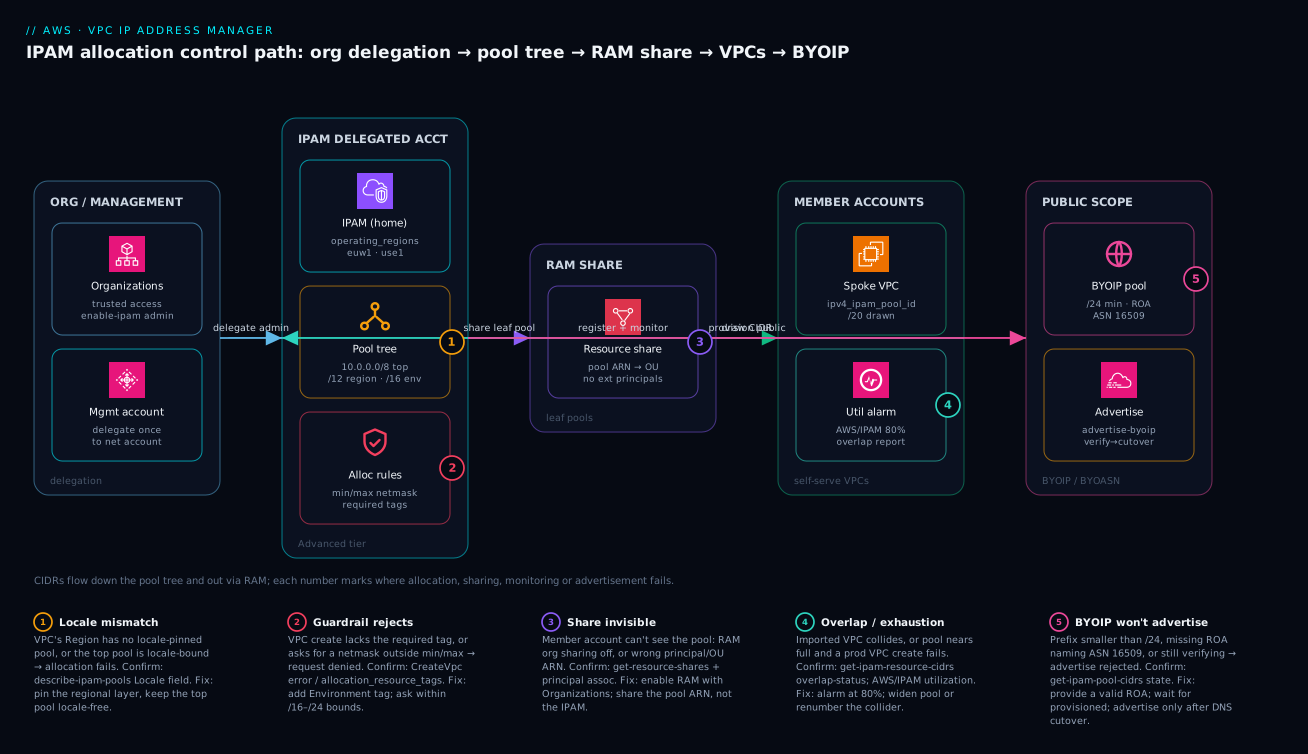
Follow the control path left to right. It begins in the management account, where you enable trusted access with AWS Organizations and run enable-ipam-organization-admin-account exactly once to delegate IPAM to a dedicated networking account — the management account never administers IPAM day to day. In the IPAM delegated account sits the IPAM itself (home Region plus operating_regions), the pool tree (a locale-free 10.0.0.0/8 top pool, locale-pinned /12 Regional pools, /16 per-environment leaf pools), and the allocation guardrails (min/max netmask, required tags) that make a pool refuse a bad request. From there a leaf pool is published through an AWS RAM resource share — the pool ARN, scoped to an OU and blocking external principals — so that member accounts can reference the pool ID and have a /20 drawn for each spoke VPC without ever picking a CIDR. Every drawn CIDR is registered back in the IPAM account, where utilization and overlap are computed and a CloudWatch alarm on AWS/IPAM fires at 80%. A separate branch into the public scope provisions BYOIP space (/24 minimum, a ROA naming ASN 16509) and advertises it only after DNS cutover.
The five numbered badges mark exactly where this path fails in practice: a locale mismatch stalls allocation, a guardrail rejects an untagged or wrong-sized request, a RAM share done wrong leaves the member account seeing nothing, an overlap or exhaustion condition surfaces in the monitoring branch, and a BYOIP advertisement is refused for a missing ROA or premature announcement. Read the diagram once to internalise the flow, then use the legend as the first triage table when an allocation or advertisement does not behave.
Real-world scenario
A fintech platform team I worked with ran 60+ accounts that had grown organically before any address governance existed. Three separate teams had independently landed VPCs on 10.10.0.0/16. The pain surfaced when they stood up a central Transit Gateway for shared services: the second and third attachments advertising 10.10.0.0/16 were silently unusable, because a TGW route table cannot hold the same prefix twice. Renumbering a live, regulated payments VPC mid-quarter was not on the table.
The constraint was hard: they could not renumber the offending VPCs quickly, but they had to know the full blast radius before the TGW migration, and prevent any new overlap from that day forward. They stood up Advanced-Tier IPAM in a dedicated networking account, defined a 10.0.0.0/8 top-level pool with Regional (/12) and per-environment (/16) children, and imported every existing VPC’s CIDR rather than recreating anything. The import immediately populated the overlap report:
aws ec2 get-ipam-resource-cidrs \
  --ipam-scope-id ipam-scope-0abc123 \
  --filters Name=overlap-status,Values=overlapping \
  --query 'IpamResourceCidrs[].{Vpc:ResourceId,Cidr:ResourceCidr,Acct:ResourceOwnerId}'
That single command turned “we think three VPCs collide” into an exact list of resource IDs, CIDRs, and owning accounts — the precise scope they needed to plan migrations. From that point, every new VPC was forced through RAM-shared pools with allocation_resource_tags enforcing environment separation, so the overlap set could only shrink. They renumbered the two least-critical colliding VPCs over the following two sprints, left the regulated one isolated behind PrivateLink until its planned window, and never created a fresh overlap again.
The numbers tell the story of the migration arc, week by week:
| Week | State | What changed | Overlap count | Outcome |
|---|---|---|---|---|
| 0 | Discovery | Stood up IPAM, imported all VPC CIDRs | 3 colliding VPCs | Exact blast radius known |
| 1 | Enforced | RAM-shared pools + tag guardrails live | 3 (frozen) | No new overlap possible |
| 2–3 | Renumber A | Migrated test-tier collider to a drawn /20 |
2 | One collision cleared |
| 4–5 | Renumber B | Migrated staging collider | 1 | Down to the regulated VPC |
| 6 | Isolate C | Regulated VPC behind PrivateLink | 1 (isolated) | TGW migration unblocked |
| 10 | Window | Renumbered the regulated VPC in its window | 0 | Estate fully collision-free |
The lesson: IPAM’s real first-day value was not allocation, it was discovery of the overlap nobody could previously see — and then making it structurally impossible to add another.
Advantages and disadvantages
IPAM trades a one-time design-and-delegate cost for permanent, enforced address governance. Weigh it honestly before you commit a team to operating it:
| Advantages | Disadvantages |
|---|---|
| Allocations are guaranteed unique within a scope — overlap becomes structurally impossible | You must design the pool tree up front; a bad tree is painful to re-cut later |
| Overlap discovery on import surfaces landmines the spreadsheet never could | Importing existing estates can reveal a large, awkward backlog of collisions |
Guardrails (min/max netmask, required tags) reject bad requests automatically |
Mis-set bounds (the min/max inversion) silently block legitimate VPC creates |
| RAM sharing lets workload accounts self-serve without seeing other pools | Sharing requires Organizations + RAM correctly wired; easy to half-configure |
AWS/IPAM metrics alarm on exhaustion before a prod create fails |
State monitoring + alarms are something you must set up, not a default |
| BYOIP/BYOASN brings your public space onto AWS with controlled advertisement | BYOIP depends on external RIR/RPKI (ROA) you don’t fully control |
| One declarative source of truth in Terraform/CloudFormation | Advanced Tier bills per active managed IP — a real (if modest) line item |
IPAM is the right call for any organization with more than a handful of accounts, a hub-and-spoke Transit Gateway, hybrid connectivity to on-prem, or a need to advertise owned public space. It is overkill for a single account with one or two VPCs that will never peer or connect to anything — there, a documented manual CIDR is fine. The disadvantages are all manageable: the pool tree is the only decision you must get roughly right up front, and even that can be extended (new Regional/leaf pools) far more easily than it can be fundamentally re-shaped.
Hands-on lab
Stand up a minimal IPAM, build a two-level pool tree with guardrails, draw a VPC CIDR, and prove the guardrails reject a bad request — then tear it all down. This is single-account and Free-Tier-friendly for the basic pool/allocation steps (no cross-account RAM, no BYOIP). Run in CloudShell.
Step 1 — Variables.
REGION=eu-west-1
export AWS_DEFAULT_REGION=$REGION
Step 2 — Create the IPAM (Free Tier, one operating Region).
IPAM=$(aws ec2 create-ipam \
  --operating-regions RegionName=$REGION \
  --query 'Ipam.IpamId' --output text)
SCOPE=$(aws ec2 describe-ipams --ipam-ids $IPAM \
  --query 'Ipams[0].PrivateDefaultScopeId' --output text)
echo "IPAM=$IPAM SCOPE=$SCOPE"
Expected: an ipam-… ID and an ipam-scope-… ID.
Step 3 — Top pool, provision 10.0.0.0/16 into it.
TOP=$(aws ec2 create-ipam-pool --ipam-scope-id $SCOPE \
  --address-family ipv4 --query 'IpamPool.IpamPoolId' --output text)
aws ec2 provision-ipam-pool-cidr --ipam-pool-id $TOP --cidr 10.0.0.0/16
Step 4 — Leaf pool with guardrails (locale-pinned, required tag, netmask bounds).
LEAF=$(aws ec2 create-ipam-pool --ipam-scope-id $SCOPE \
  --address-family ipv4 --source-ipam-pool-id $TOP --locale $REGION \
  --allocation-default-netmask-length 24 \
  --allocation-min-netmask-length 20 \
  --allocation-max-netmask-length 26 \
  --allocation-resource-tags Key=Environment,Value=lab \
  --query 'IpamPool.IpamPoolId' --output text)
aws ec2 provision-ipam-pool-cidr --ipam-pool-id $LEAF --netmask-length 20
Wait until the leaf pool’s provisioned CIDR shows state=provisioned:
aws ec2 get-ipam-pool-cidrs --ipam-pool-id $LEAF \
  --query 'IpamPoolCidrs[].State' --output text
Step 5 — Create a compliant VPC (drawn /24, correct tag). Expected: it succeeds.
aws ec2 create-vpc --ipv4-ipam-pool-id $LEAF --ipv4-netmask-length 24 \
  --tag-specifications 'ResourceType=vpc,Tags=[{Key=Environment,Value=lab}]' \
  --query 'Vpc.{Id:VpcId,Cidr:CidrBlock}'
Step 6 — Prove the guardrails (the whole point). Each of these MUST fail:
# (a) Missing the required Environment=lab tag -> rejected
aws ec2 create-vpc --ipv4-ipam-pool-id $LEAF --ipv4-netmask-length 24 || echo "REJECTED: tag rule"

# (b) Too big: /19 is below allocation-min-netmask-length 20 -> rejected
aws ec2 create-vpc --ipv4-ipam-pool-id $LEAF --ipv4-netmask-length 19 \
  --tag-specifications 'ResourceType=vpc,Tags=[{Key=Environment,Value=lab}]' || echo "REJECTED: min netmask"

# (c) Too small: /27 is above allocation-max-netmask-length 26 -> rejected
aws ec2 create-vpc --ipv4-ipam-pool-id $LEAF --ipv4-netmask-length 27 \
  --tag-specifications 'ResourceType=vpc,Tags=[{Key=Environment,Value=lab}]' || echo "REJECTED: max netmask"
If any of (a)–© succeeds, your guardrail is not doing what you think — a guardrail you have not seen reject something is a guardrail you do not have.
Step 7 — Confirm the allocation registered.
aws ec2 get-ipam-pool-allocations --ipam-pool-id $LEAF \
  --query 'IpamPoolAllocations[].{Cidr:Cidr,Type:ResourceType,Owner:ResourceOwner}'
Validation checklist — what each step proved:
| Step | What you did | What it proves |
|---|---|---|
| 2–3 | IPAM + top pool + 10.0.0.0/16 |
The hierarchy and supply exist |
| 4 | Leaf pool with bounds + required tag | Guardrails are configurable |
| 5 | Compliant VPC drew a /24 |
Allocation works end to end |
| 6a | Untagged create rejected | The tag filter is enforced |
| 6b | /19 rejected |
min = the biggest allowed block |
| 6c | /27 rejected |
max = the smallest allowed block |
| 7 | Allocation listed | The draw registered centrally |
Teardown (bottom-up — deletion protection blocks any other order):
# Delete the VPC(s) first (releases their auto allocations), then:
aws ec2 deprovision-ipam-pool-cidr --ipam-pool-id $LEAF --cidr <leaf-cidr>
aws ec2 delete-ipam-pool --ipam-pool-id $LEAF
aws ec2 deprovision-ipam-pool-cidr --ipam-pool-id $TOP --cidr 10.0.0.0/16
aws ec2 delete-ipam-pool --ipam-pool-id $TOP
aws ec2 delete-ipam --ipam-id $IPAM
Cost note. Free-Tier IPAM with a couple of pools and one VPC for an hour is effectively free; Advanced Tier would bill per active managed IP. Deleting the IPAM bottom-up stops everything.
Practice challenges
Work these in order — they escalate from reading a pool tree to a zero-downtime BYOIP cutover. Each has a hidden solution with a one-line why. Try before you peek; these are all things you will do for real.
1. Beginner — spot the locale bug. A VPC in us-east-1 cannot draw a CIDR from your tree. describe-ipam-pools shows the top pool with Locale: eu-west-1, and there is no us-east-1 Regional pool. What is wrong, and what are the two fixes?
<details> <summary>Solution</summary>
The top pool is locale-pinned to eu-west-1, so it can only feed that Region. Recreate the top pool locale-free (no locale), then add a locale-pinned us-east-1 Regional pool sourced from it — and make sure us-east-1 is in the IPAM’s operating_regions first.
resource "aws_vpc_ipam_pool" "use1" {
  address_family      = "ipv4"
  ipam_scope_id       = aws_vpc_ipam.org.private_default_scope_id
  locale              = "us-east-1"                 # pin the REGIONAL layer
  source_ipam_pool_id = aws_vpc_ipam_pool.top.id    # top pool stays locale-free
}
Why: only a locale-free top pool can feed every Region, and only a locale-matched pool can allocate to a VPC in that Region. </details>
2. Beginner — predict the guardrail verdicts. A leaf pool has allocation_min_netmask_length = 20 and allocation_max_netmask_length = 26. For requests of /19, /24, and /28, which succeed and which are rejected?
<details> <summary>Solution</summary>
/19→ rejected (bigger than the/20min —minis the largest block allowed)./24→ accepted (inside/20–/26)./28→ rejected (smaller than the/26max —maxis the smallest block allowed).
Why: the bounds are on prefix length, and a larger prefix number is a smaller network, so min caps the big end and max caps the small end.
</details>
3. Intermediate — write the compliant VPC create. Pool ipam-pool-0leafexample requires Environment=prod and you want a /22. Write the aws ec2 create-vpc that will be accepted.
<details> <summary>Solution</summary>
aws ec2 create-vpc \
  --ipv4-ipam-pool-id ipam-pool-0leafexample \
  --ipv4-netmask-length 22 \
  --tag-specifications 'ResourceType=vpc,Tags=[{Key=Environment,Value=prod}]'
Why: the required tag must be on the VPC create itself — allocation_resource_tags is a hard filter, so an untagged request is refused before a CIDR is ever drawn.
</details>
4. Intermediate — share a leaf pool to an OU. A member account “can’t see” a pool. Write the RAM wiring (in the IPAM account) that shares pool ARN POOL_ARN to OU ARN OU_ARN, with external principals blocked — and name the one org-level setting that must also be on.
<details> <summary>Solution</summary>
resource "aws_ram_resource_share" "leaf" {
  name                      = "ipam-leaf-share"
  allow_external_principals = false
}
resource "aws_ram_resource_association" "leaf" {
  resource_arn       = "POOL_ARN"          # the POOL ARN, never the IPAM
  resource_share_arn = aws_ram_resource_share.leaf.arn
}
resource "aws_ram_principal_association" "leaf" {
  principal          = "OU_ARN"
  resource_share_arn = aws_ram_resource_share.leaf.arn
}
Plus: “RAM sharing with AWS Organizations” must be enabled in the management account, or shares to OUs/accounts silently fail.
Why: you share the pool (not the IPAM), and org-internal sharing has to be switched on before any principal association resolves. </details>
5. Advanced — reserve, then reclaim. Reserve a /24 in ipam-pool-0leafexample for a future EKS secondary CIDR, then release it later. Give both commands and say which value you must capture between them.
<details> <summary>Solution</summary>
# Reserve — capture the IpamPoolAllocationId it returns
aws ec2 allocate-ipam-pool-cidr \
  --ipam-pool-id ipam-pool-0leafexample \
  --netmask-length 24 \
  --description "reserved: eks-prod secondary CIDR"

# Release later, by ALLOCATION ID (not by CIDR)
aws ec2 release-ipam-pool-cidr \
  --ipam-pool-id ipam-pool-0leafexample \
  --ipam-pool-allocation-id ipam-pool-alloc-0abc123example
Why: a manual reservation is released by its IpamPoolAllocationId, so you must record that ID at reservation time — the CIDR alone won’t release it.
</details>
6. Advanced — a zero-double-origination BYOIP cutover. You are moving 198.51.100.0/24 from your data centre onto AWS. List the ordered steps so the prefix is never announced from two origins at once, and name the command that comes last.
<details> <summary>Solution</summary>
provision-ipam-pool-cidrinto a public-scope pool with the signed authorization context, with a valid ROA naming ASN16509— advertisement off.- Poll
get-ipam-pool-cidrsuntilstate = provisioned. - Cut over DNS so the new path is ready.
- Withdraw the on-prem announcement (take the old origin down first).
aws ec2 advertise-byoip-cidr --cidr 198.51.100.0/24— last.
Why: the invariant is one origin at a time — withdraw the old announcement before AWS originates the prefix, so it is never advertised from two ASNs simultaneously. </details>
Common beginner mistakes
These are misconceptions, not error messages — the wrong mental model that leads you to the errors in the troubleshooting table below. Fix the model and the symptoms stop.
-
“IPAM assigns IP addresses to my instances.” It does not. IPAM manages CIDR blocks — the ranges a VPC or subnet owns — not the individual host addresses inside them. Your instances still get their addresses from the subnet the normal way. Right model: IPAM is the wholesaler of ranges; the subnet is the retailer of host IPs.
-
“A bigger pool means a bigger bill.” Pool size is free. Advanced Tier bills per active managed IP, not per reserved range, so a
10.0.0.0/8top pool costs nothing extra over a/16. Right model: size pools generously so you rarely re-cut the tree — cost tracks addresses in use, never the size of the plan. -
“
min_netmask_lengthis the smallest block.” The inversion that catches everyone. Because a larger prefix number is a smaller network,minis the biggest block a pool will hand out andmaxis the smallest.min 16 / max 24means “between a/16and a/24.” Right model: read the bounds as prefix lengths, not sizes. -
“I’ll add a few scopes to keep each team’s pools tidy.” Extra private scopes disable overlap detection between them, because overlap is computed within a scope, never across. You would be switching off the very thing you came for. Right model: one private scope for everything that might ever route together; add a scope only for a true air-gap where you intend to reuse CIDRs in isolation.
-
“Share the IPAM with the workload account.” You share the pool, never the IPAM. Sharing (or trying to share) the IPAM itself is a common dead-end that leaves the member account seeing nothing. Right model: the leaf pool is the unit of self-service; the IPAM stays private to the networking account.
-
“IPAM will renumber my overlapping VPCs for me.” It will not touch a live VPC’s addresses. IPAM discovers overlap and prevents new overlap; the renumber or isolation is a project you plan. Right model: import surfaces the exact blast radius, then humans do the migration in a window.
-
“I set a guardrail, so it’s working.” A guardrail you have not watched reject something is unproven. It is one typo (a missing tag, an inverted bound) away from silently allowing everything. Right model: test a deliberately bad request until you have seen the rejection — that is the only proof the filter is live.
Common mistakes & troubleshooting
This is the playbook — the part you bookmark. First a scannable table you can read mid-migration, then the full reasoning for the entries that bite hardest. The recurring theme: IPAM rarely errors loudly; it refuses quietly, and the skill is knowing which refusal you are looking at.
| # | Symptom | Root cause | Confirm (exact cmd) | Fix |
|---|---|---|---|---|
| 1 | VPC create from pool fails, “no locale” / no allocation | Pool has no locale, or top pool is locale-pinned to the wrong Region |
describe-ipam-pools --query 'IpamPools[].{Id:IpamPoolId,Locale:Locale}' |
Pin the regional layer to the VPC’s Region; keep the top pool locale-free |
| 2 | CreateVpc rejected with a tag error |
allocation_resource_tags not satisfied |
describe-ipam-pools shows the required tags |
Add the exact tag (e.g. Environment=prod) to the VPC create |
| 3 | Request for a /15 rejected |
Below allocation_min_netmask_length |
Check pool AllocationMinNetmaskLength |
Ask within bounds; min = biggest block allowed |
| 4 | Request for a /27 rejected |
Above allocation_max_netmask_length |
Check pool AllocationMaxNetmaskLength |
Ask within bounds; max = smallest block allowed |
| 5 | “insufficient space” on a create | Pool’s provisioned CIDRs are exhausted | get-ipam-pool-cidrs + get-ipam-pool-allocations |
Provision more space into the pool from its parent |
| 6 | Member account “can’t see the pool” | RAM share missing/wrong principal, or RAM org-sharing off | get-resource-shares; get-resource-share-associations |
Enable RAM with Organizations; associate pool ARN + correct OU/account |
| 7 | Imported VPC shows overlapping |
Pre-existing duplicate CIDR | get-ipam-resource-cidrs --filters Name=overlap-status,Values=overlapping |
Renumber the collider or isolate it (PrivateLink) until a window |
| 8 | Prod VPC create fails unexpectedly at peak | Pool silently exhausted, no alarm | get-ipam-pool-allocations; CloudWatch AWS/IPAM util |
Alarm at 80%; provision more space ahead of time |
| 9 | advertise-byoip-cidr rejected |
Prefix < /24, missing ROA, or still verifying |
get-ipam-pool-cidrs --query 'IpamPoolCidrs[].State' |
Provide a /24+ with a valid ROA (ASN 16509); wait for provisioned |
| 10 | Same prefix announced from two origins | Advertised on AWS without withdrawing on-prem | Check BGP/looking-glass; describe-byoip-cidrs |
Withdraw one origin; advertise only after the other is down |
| 11 | Can’t deprovision a CIDR / delete a pool | Allocations still exist under it (deletion protection) | get-ipam-pool-allocations (non-empty) |
Reclaim bottom-up: delete VPCs / release reservations first |
| 12 | Manual reservation won’t release | Wrong/expired IpamPoolAllocationId |
get-ipam-pool-allocations --query '[].IpamPoolAllocationId' |
Release with the exact allocation ID |
| 13 | Compliance shows unmanaged for live VPCs |
Their CIDRs were never imported | get-ipam-resource-cidrs --filters Name=compliance-status,Values=unmanaged |
Import the CIDRs (don’t recreate the VPCs) |
| 14 | Delegation commands fail from net account | IPAM not delegated; running from wrong account | describe-ipam-organization-admin-account |
Run enable-ipam-organization-admin-account from the management account |
The expanded form for the entries that cost the most time:
1. VPC create from a pool fails with no allocation / a “locale” complaint.
Root cause: The pool the VPC references has no locale, or the top-level pool was accidentally locale-pinned so it can’t feed the VPC’s Region.
Confirm: aws ec2 describe-ipam-pools --query 'IpamPools[].{Id:IpamPoolId,Locale:Locale,Depth:PoolDepth}' — the leaf pool must carry the VPC’s Region, the top pool should show null.
Fix: Pin the Regional layer to each Region; keep the top pool locale-free. Only a locale-matched pool can allocate to a VPC in that Region.
2. CreateVpc is rejected with a tag error.
Root cause: The leaf pool’s allocation_resource_tags is a hard filter and the VPC create didn’t carry the required tag.
Confirm: describe-ipam-pools shows AllocationResourceTags; compare to your --tag-specifications.
Fix: Add the exact key/value (e.g. Environment=prod). This is the mechanism that keeps prod and non-prod space provably separate — it is working as designed.
3–4. A request for a /15 (or a /27) is rejected.
Root cause: The size is outside the pool’s inclusive prefix bounds. min_netmask_length is the biggest block allowed (smallest prefix number), max_netmask_length the smallest block.
Confirm: Check AllocationMinNetmaskLength / AllocationMaxNetmaskLength on the pool.
Fix: Ask within bounds. If the bounds are genuinely wrong, change them on the pool (in the IPAM account) — a member account cannot.
6. A member account reports it “can’t see the pool.”
Root cause: The RAM share is missing, points at the wrong principal/OU ARN, or RAM “sharing with Organizations” was never enabled. A common variant: someone shared the IPAM instead of the pool.
Confirm: aws ram get-resource-shares --resource-owner SELF; aws ram get-resource-share-associations --association-type PRINCIPAL.
Fix: Enable RAM sharing with Organizations (management account), then associate the pool ARN and the correct OU/account principal to the share.
7. An imported VPC shows overlapping.
Root cause: A pre-existing duplicate CIDR that the spreadsheet missed — exactly what import is meant to surface.
Confirm: get-ipam-resource-cidrs --filters Name=overlap-status,Values=overlapping returns the resource IDs, CIDRs and owning accounts.
Fix: You cannot renumber a live VPC instantly; isolate the collider (PrivateLink) and renumber it in a planned window. The overlap set can only shrink once new VPCs are forced through guardrailed pools.
9–10. BYOIP won’t advertise, or a prefix ends up announced twice.
Root cause (9): The prefix is smaller than /24, lacks a valid ROA naming ASN 16509, or is still in pending-provision. (10): You advertised on AWS without first withdrawing the on-prem announcement.
Confirm: get-ipam-pool-cidrs --query 'IpamPoolCidrs[].State' (must be provisioned); for double-announcement, check a looking-glass / your BGP.
Fix: Provide a /24+ with a correct ROA, wait for provisioned, advertise only after DNS cutover, and withdraw the other origin before announcing — never originate the same prefix from two ASNs at once.
11. You can’t deprovision a CIDR or delete a pool.
Root cause: Deletion-protection semantics — a pool with live allocations under it can’t be emptied or deleted.
Confirm: get-ipam-pool-allocations returns a non-empty list.
Fix: Reclaim bottom-up: delete the VPCs (which releases their auto allocations) and release manual reservations by IpamPoolAllocationId first, then deprovision and delete the pool.
Best practices
- One IPAM, in a dedicated networking account, delegated from management. Never run IPAM out of the org management account; delegate it once with
enable-ipam-organization-admin-accountand keep the blast radius small. - Top pool locale-free, Regional pools locale-pinned, leaf pools per environment/OU. This is the only tree shape that lets one supernet feed every Region while keeping allocations Region-correct.
- Put guardrails on every leaf pool and prove they reject.
allocation_min/max_netmask_lengthplusallocation_resource_tags, and test a bad request until you have seen the rejection. A guardrail you haven’t watched fire is not a guardrail. - Share the pool, not the IPAM, and block external principals. RAM-share leaf pools to OUs with
allow_external_principals = false; members self-serve without seeing anything else. - Force every VPC to draw a CIDR — zero hard-coded blocks.
ipv4_ipam_pool_idin every VPC module; a literal CIDR anywhere is a future collision. - Alarm on
AWS/IPAMutilization at 80%, routed to NetOps. Catch exhaustion before a prod VPC create fails, not after the pager. - Import existing VPCs, never recreate them. Import surfaces overlap and brings live VPCs under monitoring without renumbering; recreating a live VPC is how you cause the outage you were trying to prevent.
- Reclaim bottom-up and respect deletion protection. Release manual reservations and delete VPCs before deprovisioning/deleting pools.
- For BYOIP, verify with advertisement off, then cut over, then advertise. And always withdraw the old origin first — never two announcements of one prefix.
- Keep everything declarative. Pool tree, RAM shares, alarms in the IPAM account’s IaC; member modules reference shared pool IDs as variables/outputs.
- Review the overlap and compliance report on a cadence. New imports, mergers and manual reservations can introduce
noncompliant/overlappingresources; make the report a recurring check, not a one-off.
Security notes
- Least-privilege IAM for IPAM operations. Allocation and pool-management actions (
ec2:AllocateIpamPoolCidr,ec2:ProvisionIpamPoolCidr,ec2:CreateIpamPool,ec2:ModifyIpamPool) should be tightly scoped — the networking team manages pools; workload accounts get only what RAM grants. Use SCPs to deny pool creation/deletion outside the delegated account. - Delegation is a privilege boundary. The delegated IPAM account effectively governs the org’s address plan; treat it like any other security-sensitive delegated admin and restrict who can assume into it.
allocation_resource_tagsas a guardrail, not a secret. Tags enforce environment separation but are not a security control on their own — pair them with SCPs/RCPs so a non-prod principal cannot create resources in prod address space at all.- BYOIP authorization keys. The private key you use to sign the BYOIP authorization context proves ownership of public space — store and rotate it like any high-value secret; a leak lets someone attempt to hijack your prefix authorization.
- RAM external sharing off. Set
allow_external_principals = falseon IPAM pool shares so address authority never leaks outside the organization. - Audit with CloudTrail. IPAM allocate/provision/advertise calls are CloudTrail events; alert on
provision-ipam-pool-cidr,advertise-byoip-cidr, andmodify-ipam-poolfrom unexpected principals. - Public scope is internet-facing intent. Anything in the public scope is or can be advertised to the internet — review public-pool changes with the same care as a security group opening 0.0.0.0/0.
The control-to-threat mapping for the IPAM control plane:
| Control | Mechanism | Protects against |
|---|---|---|
| Scoped IAM for pool ops | Least-privilege policies on ec2:*Ipam* |
Unauthorized pool/CIDR changes |
| SCP/RCP on address space | Org policies tied to tags/accounts | Non-prod principals using prod space |
| Delegated-admin restriction | Limit who assumes into the net account | Hijacking the org address plan |
| BYOIP key hygiene | Rotate/store the signing key securely | Forged ownership / prefix hijack attempts |
| RAM external-principals off | allow_external_principals=false |
Address authority leaking outside the org |
| CloudTrail alerting | Alert on sensitive IPAM API calls | Stealthy advertisement or pool changes |
Cost & sizing
The bill driver for IPAM is simple: Advanced Tier charges per active IP it manages, billed hourly. The Free Tier (single account/Region, no cross-account sharing, no BYOIP) has no per-IP charge. So cost scales with the number of monitored, allocated addresses across the estate — not with the number of pools or VPCs. There is no per-pool or per-allocation fee; you are paying for the continuous monitoring/inventory of active IPs.
Right-sizing IPAM is therefore about not over-monitoring: import the address space you actually need governed, mark genuinely-irrelevant CIDRs as ignored rather than managed, and don’t stand up Advanced Tier in tiny single-account setups that the Free Tier covers. The cost is almost always trivial relative to the value — a single TGW outage from an undetected overlap, or one emergency renumber of a regulated VPC, dwarfs a year of IPAM’s per-IP charge. The cost/sizing levers:
| Driver | What you pay for | Rough scale | Lever to reduce | When it’s worth it |
|---|---|---|---|---|
| Advanced Tier active IPs | Per managed IP / hour | Grows with monitored addresses | ignored for irrelevant CIDRs |
Any multi-account / TGW estate |
| Free Tier | Nothing (per-IP) | Single account/Region only | Use it for tiny setups | One or two VPCs, no sharing |
| BYOIP advertised space | The IPs themselves (EIP rules apply) | Per address in use | Only advertise what you use | Owned-IP allow-lists, reputation |
| CloudWatch alarms | Standard CW metric/alarm pricing | A few alarms per pool | Alarm on key pools only | Always — exhaustion is expensive |
| SNS notifications | Standard SNS pricing | Negligible | n/a | Always |
A rough picture: for an org with a few thousand actively-managed addresses across 60 accounts, Advanced-Tier IPAM is a low-tens-of-dollars-per-month line item — comfortably inside a platform budget and immaterial next to the cost of a single address-collision incident. Size the pools generously (a /8 top pool, /12 regions) so you rarely re-cut the tree; pool size does not drive cost, only active IPs do.
Going deeper
The sections above are enough to run IPAM well. These are the parts that separate someone who configured IPAM from someone who operates it at organizational scale — the discovery engine underneath the reports, the public-IPv4 cost angle, IPv6 planning, the audit trail auditors actually ask for, and the sharp edges that only appear once the estate is large.
Resource discovery — the engine under the reports
IPAM does not magically see your VPCs. It uses a resource discovery — a first-class resource (ipam-resource-discovery) that continuously scans the operating Regions and reports every VPC, subnet, public IPv4 pool, and Elastic IP it finds, in every account it can reach through Organizations trusted access. When you create an IPAM, AWS creates a default resource discovery and associates it automatically, so most teams never touch it directly. It matters the moment you ask “what can IPAM actually see?” — because a resource in a Region (or account) the discovery does not cover is a genuine blind spot: no overlap check, no utilization, no compliance flag.
Discovery answers “what exists?” independently of “what have I allocated?”, which is why you can inspect the estate before anything is under a pool:
# What CIDRs has discovery found (managed or not) in a Region?
aws ec2 get-ipam-discovered-resource-cidrs \
  --ipam-resource-discovery-id ipam-res-disco-0abc123example \
  --resource-region eu-west-1

# Which accounts in the org has discovery seen (and their status)?
aws ec2 get-ipam-discovered-accounts \
  --ipam-resource-discovery-id ipam-res-disco-0abc123example \
  --discovery-region eu-west-1
Because discovery is decoupled from the IPAM, one IPAM can associate additional resource discoveries (aws_vpc_ipam_resource_discovery_association) to monitor resources owned by a different AWS Organization — the mechanism behind watching more than one org from a single pane of glass, useful after an acquisition when two orgs coexist for a while. What each discovered type gives you:
| Discovered resource | What IPAM learns from it | Why it matters |
|---|---|---|
| VPCs & their CIDRs | Every VPC CIDR across the org | The source of truth for overlap + utilization |
| Subnets | Per-subnet usage inside each VPC | Fine-grained exhaustion signal, not just VPC-level |
| Elastic IPs | Public IPv4 you hold | Feeds Public IP Insights and the IPv4 hourly charge |
| Public IPv4 pools | Amazon-owned / BYO public ranges | Tracks advertisable and service-owned space |
| Accounts (via Organizations) | Which accounts exist to scan | A missed account is an invisible blind spot |
Public IP Insights and the public-IPv4 charge
Since 1 February 2024, every public IPv4 address AWS assigns costs $0.005 per hour — roughly $3.60 a month each — whether or not it is attached to a running instance. An idle, forgotten Elastic IP now bills the same as one carrying traffic. At org scale a few thousand stray public IPv4 addresses is a real, recurring line item, and almost nobody has an accurate list of them.
IPAM’s Public IP Insights is that list. Built on resource discovery, it enumerates every public IPv4 address across your accounts and Regions, what kind each is (EC2 auto-assigned, an Elastic IP, or service-managed by an ALB / NAT gateway / etc.), and whether it is associated with anything:
# Enumerate public IPv4 addresses discovery has found (the Public IP Insights data)
aws ec2 get-ipam-discovered-public-addresses \
  --ipam-resource-discovery-id ipam-res-disco-0abc123example \
  --address-region eu-west-1
The optimization loop is straightforward once you can see the data: list every public IPv4 → find the disassociated Elastic IPs and the auto-assigned addresses on instances that could sit behind a shared NAT gateway or load balancer → release or re-architect them → watch the charge fall. The point is that an unattributed public IPv4 address is both a cost and a security surface; IPAM turns “we probably have some idle EIPs somewhere” into an exact, per-account inventory. (Which capabilities are Free versus Advanced Tier is spelled out in the tier table earlier — treat that table as the authority for your account.)
Planning IPv6 with IPAM — GUA, ULA, and the /56
IPv6 removes the scarcity that makes IPv4 planning tense — a single /56 per VPC yields 256 /64 subnets and you will never exhaust it — but it replaces that worry with a design choice: which kind of IPv6. IPAM manages all three sources, and picking the wrong one is a quiet mistake.
- Amazon-provided GUA (Global Unicast Address, from
2000::/3) — globally routable space that Amazon owns and lends you. You do not advertise it yourself; AWS routes it. A VPC draws a/56, subnets are/64. This is the default for internet-facing IPv6. - BYOIP IPv6 GUA — your own globally routable block (minimum
/48to advertise) provisioned into a public-scope pool with a ROA, then advertised exactly like BYOIP IPv4. Use it when you must originate your own space for reputation or portability. - ULA (Unique Local Address,
fc00::/7, in practicefd00::/8) — the IPv6 equivalent of RFC1918 private space: not internet-routable, for internal-only VPCs. Put a ULA range in a private-scope IPv6 pool when you want IPv6 that never touches the internet.
| IPv6 source | Routable on internet | You advertise it? | IPAM scope | Typical use |
|---|---|---|---|---|
| Amazon-provided GUA | Yes (AWS routes it) | No — Amazon owns it | Public | Default internet-facing IPv6 |
BYOIP GUA (/48+) |
Yes | Yes (your ROA) | Public | Own reputation / portability |
ULA (fd00::/8) |
No | No | Private | Internal-only, isolated IPv6 |
The mental model that keeps IPv6 sane: govern it exactly as rigorously as IPv4. Pick a ULA prefix (a random /48 under fd00::/8) for private space and provision that into a private-scope IPv6 pool, so your internal IPv6 plan is overlap-checked and guardrailed like the rest. The common failure is a team that governs IPv4 to the bit and then lets IPv6 sprawl freely — which simply recreates the original problem one address family over.
The CIDR audit trail — allocation history for compliance
Compliance reviews and incident post-mortems ask the same question: who held this address on this date? IPAM keeps a time-indexed history of every CIDR it has seen, independent of whether the resource still exists:
aws ec2 get-ipam-address-history \
  --cidr 10.20.4.0/24 \
  --ipam-scope-id ipam-scope-0abc123example \
  --start-time 2026-01-01T00:00:00Z \
  --end-time   2026-06-30T23:59:59Z
Each record ties a CIDR to the resource that used it, its type, the owning account, Region and VPC, and the window it was allocated. That turns “which team had 10.20.4.0/24 when the auditor flagged it in March?” from unanswerable spreadsheet-archaeology into a single API call — the forensic counterpart to the live overlap report. It exists whether or not anyone remembered to write the allocation down, which is exactly why auditors trust it and a wiki page.
auto_import — convenient, and dangerous on a live estate
auto_import = true tells a pool to swallow any discovered CIDR that falls inside its range as an allocation, automatically. On a genuinely greenfield pool that is a fine convenience. On an existing estate it is a footgun: it will happily import overlapping CIDRs — importing them first, then flagging the overlap after the fact — and it dissolves the deliberate issue-and-refuse control that is the whole reason you adopted IPAM. The safe pattern on a brownfield migration is to import explicitly (bring known CIDRs under management by hand or via the reservation API) so you see each collision as a decision rather than discover it later in a report. Reserve auto_import for pools you know start empty.
Scale, quotas, and Terraform-provider caveats
A handful of operational edges only surface once the estate is large or the Terraform run is real:
| Edge | The reality | What to do |
|---|---|---|
| Pool nesting depth | Pools nest several levels deep, but a depth limit applies | Keep the tree shallow — 3–4 levels (top → Region → env → VPC) is plenty |
| Provisioning is async | provision-ipam-pool-cidr returns before the CIDR is provisioned |
Poll get-ipam-pool-cidrs for state=provisioned before you build on it |
| Soft quotas | Pools-per-IPAM, CIDRs-per-pool, resource CIDRs are quotas | Raise them via Service Quotas ahead of a large import |
| Terraform destroy order | Deletion protection blocks tearing down a pool with live allocations | Destroy VPCs first; aws_vpc_ipam supports cascade = true to force-delete the whole tree — powerful, and easy to regret |
| Discovery lag | Discovery samples periodically, not instantly | A brand-new VPC can take minutes to appear in reports — don’t treat “not shown yet” as “not overlapping” |
| Region coverage | Only operating + discovered Regions are seen | Add the operating Region before you allocate into it, or the space is unmonitored |
On the Terraform aws provider (v5+): the IPAM resources — aws_vpc_ipam, aws_vpc_ipam_scope, aws_vpc_ipam_pool, aws_vpc_ipam_pool_cidr, and the RAM associations — are stable, but two behaviours trip people. First, aws_vpc_ipam_pool_cidr waits on the asynchronous provisioning, so a plan can sit “still creating” for a minute; that is normal, not a hang. Second, because a VPC’s CIDR is drawn at create time, terraform destroy must remove the VPC (releasing its allocation) before it can deprovision and delete the pool — order your modules so the workload layer tears down first, or a destroy will fail on deletion protection.
Interview & exam questions
1. Why can’t two VPCs both use 10.0.0.0/16 if they need to connect? Routing is by longest-prefix match, and a Transit Gateway or VPC route table cannot hold two identical prefixes pointing at different destinations. The second attachment/peering is rejected or silently unreachable. IPAM prevents this by issuing only unique CIDRs within a scope and detecting any existing overlap.
2. Walk through the IPAM hierarchy. An IPAM (home Region + operating Regions) contains scopes (a private and public default; prefixes within a scope must not overlap), which contain pools that nest via source_ipam_pool_id, which hand out allocations (CIDRs) to VPCs or as manual reservations. Overlap is enforced per scope.
3. What does locale do, and what’s the standard pattern? A locale ties a pool to a Region (or Local Zone); only a locale-matched pool can allocate to a VPC in that Region. The pattern is a locale-free top pool feeding locale-pinned Regional pools, with per-environment leaf pools beneath. A wrong/missing locale is the classic reason an allocation silently fails.
4. Free Tier vs Advanced Tier — what needs Advanced? Cross-account pools (RAM sharing), cross-Region pools, org-wide overlap/utilization monitoring, BYOIP/BYOASN, and public IP insights all require Advanced. Free Tier is single-account/Region with basic monitoring. Advanced bills per active managed IP.
5. How do allocation_min_netmask_length and allocation_max_netmask_length work — and what’s the trap? They are inclusive bounds on the prefix length, not host count. Because a larger prefix number is a smaller network, min is the biggest block allowed and max is the smallest. “min 16 / max 24” permits /16 through /24. The inversion trips people constantly.
6. How do you let a workload account self-serve CIDRs without exposing the whole address plan? Share the leaf pool (not the IPAM) via AWS RAM to the account or OU, with allow_external_principals=false. The member references the pool ID, draws within the guardrails, and cannot see other pools, widen bounds, or skip required tags.
7. You import an existing estate and three VPCs show overlapping. What now? You generally can’t renumber a live VPC instantly. Isolate the collider (e.g. behind PrivateLink) and renumber it in a planned window, while forcing all new VPCs through guardrailed pools so the overlap set can only shrink. Import’s value here is discovery — turning a guess into an exact list of resource IDs and accounts.
8. What are the hard requirements to advertise a BYOIP IPv4 prefix from AWS? The prefix must be at least a /24, you need a valid ROA in your RIR’s RPKI naming ASN 16509 (or your BYOASN), and the provisioning ownership check (signed authorization context) must complete to provisioned. Advertise only after, ideally post-DNS-cutover.
9. How do you avoid announcing the same prefix from two origins during a migration? Provision and verify on AWS with advertisement off, cut over DNS, then advertise-byoip-cidr; and withdraw the on-prem (or other) announcement before AWS originates it. Never originate one prefix from two ASNs simultaneously.
10. How do you get warned before a pool exhausts? Enable Advanced-Tier state monitoring and alarm on the AWS/IPAM CloudWatch metric IPAMPoolAllocationUtilizationPercentage at, say, 80%, routed to a NetOps SNS topic — so you provision more space before a prod VPC create fails, rather than after.
11. Why can’t you immediately delete a pool, and how do you reclaim space? Deletion-protection semantics block deprovisioning a CIDR or deleting a pool while allocations exist under it. Reclaim bottom-up: delete VPCs (releasing their auto allocations) and release manual reservations by IpamPoolAllocationId, then deprovision and delete the pool.
12. How do you bring an existing VPC under IPAM without renumbering it? Import its current CIDR into the appropriate pool. This registers the space as a manual allocation, flips the resource to managed, and makes it appear in utilization and overlap reports — the VPC keeps its address while finally becoming visible. Do not recreate the VPC.
These map primarily to the AWS Certified Advanced Networking – Specialty (ANS-C01) — network design and management at scale, hybrid connectivity, IP addressing — and touch the Solutions Architect Professional (SAP-C02) multi-account networking domain. The cert-mapping for revision:
| Question theme | Primary cert | Domain |
|---|---|---|
| Overlap, TGW routing, longest-prefix | ANS-C01 | Network design / connectivity |
| IPAM hierarchy, locale, tiers | ANS-C01 | IP address management |
| RAM sharing, delegation | SAP-C02 / ANS-C01 | Multi-account networking |
| Guardrails, tag-based separation | SAP-C02 | Governance at scale |
| BYOIP / BYOASN / ROA | ANS-C01 | Hybrid & public connectivity |
| Utilization monitoring / alarms | ANS-C01 | Network management & ops |
Quick check
- Two VPCs in different accounts both own
10.10.0.0/16and you attach both to one Transit Gateway. What happens, and why? - Your top-level pool was created with
locale = "eu-west-1". A VPC inus-east-1can’t draw from the tree. What’s wrong? - A leaf pool has
allocation_min_netmask_length = 16andallocation_max_netmask_length = 24. Will a request for a/26succeed? Will a/16? Will a/12? - A member account says it “can’t see” the pool you shared. Name two things to check.
- You’re migrating a public prefix onto AWS. In what order do you provision, advertise, withdraw on-prem, and cut over DNS — and why?
Answers
- The TGW route table cannot hold the same prefix (
10.10.0.0/16) twice, so only the first attachment is routable; the second is silently unreachable. Routing is longest-prefix-match and can’t represent two identical prefixes to different destinations. IPAM would have prevented the duplicate at allocation time. - The top-level pool is locale-pinned to
eu-west-1, so it can only feed that Region. Keep the top pool locale-free and pin the Regional layer; only a locale-matched pool can allocate to a VPC in a given Region. - A
/26is rejected (smaller than the/24max). A/16succeeds (it’s the largest allowed). A/12is rejected (bigger than the/16min). Remember:min= biggest block allowed,max= smallest. - Check (a) the RAM resource share has the pool ARN associated (not the IPAM) and the correct OU/account principal —
get-resource-share-associations; and (b) that RAM sharing with Organizations is enabled in the management account. A frequent mistake is sharing the IPAM instead of the pool. - Provision and verify on AWS with advertisement off → cut over DNS →
advertise-byoip-cidron AWS → withdraw the on-prem announcement. This guarantees the prefix is never announced from two origins at once and that DNS already points at the new path before AWS originates the route.
Glossary
- IPAM (IP Address Manager) — the top-level AWS resource that plans, allocates and monitors IP address space across accounts and Regions; pinned to a home Region with multiple operating Regions.
- Scope — a routing domain inside an IPAM; every IPAM has a
privateand apublicdefault scope, and prefixes within a scope must not overlap. - Pool — a collection of CIDRs that nests via
source_ipam_pool_id; the unit you carve, guardrail, and RAM-share. - Allocation — a CIDR drawn out of a pool, either automatically (a VPC) or as a manual reservation; identified by an
IpamPoolAllocationId. - Locale — the Region (or Local Zone) a pool is tied to; only a locale-matched pool can allocate to a VPC in that Region.
- Operating Region — a Region the IPAM operates/monitors in; pools can only exist in operating Regions.
- Provisioned CIDR — a block added into a pool (its supply), either carved from a parent pool by
netmask_lengthor an explicitcidr. - Allocation guardrails —
allocation_default/min/max_netmask_lengthandallocation_resource_tagson a pool that constrain and filter what it will hand out. - Free Tier / Advanced Tier — IPAM’s two capability/billing tiers; Advanced adds cross-account/Region pools, org-wide monitoring, and BYOIP/BYOASN, billed per active managed IP.
- AWS RAM (Resource Access Manager) — the service used to share IPAM pools (not the IPAM) to accounts or OUs so they can self-serve allocations.
- Delegated administrator — the dedicated networking account to which IPAM administration is delegated via
enable-ipam-organization-admin-account. - BYOIP (Bring Your Own IP) — provisioning your own public IPv4/IPv6 prefix into a public-scope pool and advertising it from AWS.
- BYOASN (Bring Your Own ASN) — bringing your own Autonomous System Number so AWS advertises your prefixes from your ASN rather than Amazon’s (
16509). - ROA (Route Origin Authorization) — a signed object in your RIR’s RPKI authorizing a given ASN to originate a prefix; required for BYOIP advertisement to pass RPKI validation.
- Overlap / compliance status — IPAM’s per-resource flags (
overlapping/nonoverlapping,compliant/noncompliant/unmanaged) that surface collisions and guardrail violations. - Deletion protection (semantics) — you cannot deprovision a CIDR or delete a pool while allocations exist under it; reclamation is bottom-up.
- Resource discovery — the IPAM sub-resource (
ipam-resource-discovery) that continuously scans operating Regions for VPCs, subnets, Elastic IPs and public IPv4 pools and reports them; a default one is created and associated with every IPAM, and extra ones can be associated to monitor other AWS Organizations. - Public IP Insights — the IPAM view, built on resource discovery, of every public IPv4 address across your accounts and Regions, its type, and whether it is associated — used to find and release idle addresses that carry the per-hour public-IPv4 charge.
- GUA (Global Unicast Address) — globally routable IPv6 space (
2000::/3); either Amazon-provided (AWS routes it for you) or brought via BYOIP (you advertise it). - ULA (Unique Local Address) — private, non-routable IPv6 space (
fc00::/7, in practicefd00::/8); the IPv6 analogue of RFC1918, for internal-only VPCs in a private scope. - Address history — IPAM’s time-indexed record (
get-ipam-address-history) of which resource held a given CIDR and when, independent of whether the resource still exists — the audit and forensic trail. - Longest-prefix match — the routing rule that forwards using the most specific matching prefix; the reason two identical prefixes cannot coexist in one route table, and the root cause of every overlap failure.
- Supernet — a large parent block (e.g.
10.0.0.0/8) that child pools carve smaller CIDRs out of; the top of the pool tree. - Elastic IP (EIP) — a static public IPv4 address you allocate and can attach to resources; each carries the per-hour public-IPv4 charge whether attached or idle, which is why IPAM tracks them.
Next steps
You can now design an IPAM hierarchy, delegate and share it, automate allocation with guardrails, monitor for exhaustion and overlap, and bring your own public space onto AWS. Build outward:
- Next: AWS Transit Gateway multi-account VPC architecture — the hub-and-spoke that depends on collision-free CIDRs from IPAM.
- Related: VPC deep dive: subnets, routing, IGW, NAT and endpoints — how the CIDRs IPAM hands out get carved into a working VPC.
- Related: Resilient Direct Connect + Transit Gateway — hybrid routing where on-prem overlap with your VPCs black-holes traffic.
- Related: AWS PrivateLink for service provider/consumer access — the isolation pattern used to keep an overlapping VPC reachable without renumbering.
- Related: AWS Organizations: SCP guardrails & delegated admin — the policy layer that pairs with IPAM tag guardrails to enforce address governance.
- Related: Network Reachability Analyzer & Access Analyzer for connectivity validation — prove a path works after you’ve untangled the CIDRs.