In a nutshell
Level: Advanced (with a beginner on-ramp) · Time: ~73 min
Think of a fire drill. You do not wait for a real fire to discover that a stairwell is locked, an exit sign is dead, or nobody knows the muster point – you stage a controlled, announced, safe-to-fail fire and watch what people actually do. Azure Chaos Studio is a fire drill for your cloud system. It lets you inject a small, bounded, time-limited fault – shut down a couple of machines, add 200 ms of network delay, kill half the pods in one zone – on purpose, in daylight, with the whole team watching, so you find the locked exits before a real outage does.
Another way to hold it: chaos engineering is a vaccine. A vaccine is a tiny, controlled dose of the thing you fear, given deliberately so the body proves it can cope. Chaos Studio injects a tiny, controlled dose of failure so the system proves it can cope – and if it cannot, you learn that on a Tuesday afternoon in staging, not at 2 a.m. during a flash sale.
The method underneath is five words, and it is the spine of this whole article: steady state → hypothesis → inject → measure → learn. First write down what “healthy” looks like in numbers (“errors under 1%, p99 under 400 ms”). Then state a hypothesis (“healthy holds even if one zone dies”). Then inject the fault – bounded, so it cannot escape. Then measure whether healthy held. Then either you have proof, or you have found a bug worth more than any dashboard. A fault without that written hypothesis is not an experiment; it is just vandalism.
Why a beginner should care: every “we’re highly available” claim in every architecture doc is a guess until a fault tests it. Chaos Studio is how the guess becomes a green check in CI. And it is safe to learn because Microsoft built four independent guardrails into it – what is reachable, how long a fault runs, who the run acts as, and how much it can touch – so a first experiment physically cannot become a self-inflicted outage.
New to the reliability track? Skim Azure VM Availability & Resilience Deep Dive and the Azure Well-Architected Framework Deep Dive first – Chaos Studio is how you prove the design choices they describe actually work. The full prerequisites and the seven concrete skills you’ll walk away with are in the two sections just below; everything after that is the reference you keep open while you design a game-day.
Every resilience claim I have ever reviewed was theoretical until someone broke the system on purpose. Zone-redundant SKUs, three replicas, retry policies, multi-AZ node pools – all of it is a hypothesis until a real fault hits and you watch what actually happens. Azure Chaos Studio is Microsoft’s managed fault-injection service, and the value is not “it can kill VMs.” Anyone can kill a VM. The value is that it forces you to write down a steady-state hypothesis (“p99 latency stays under 400 ms and error rate under 1% while one zone is down”), inject a controlled, time-boxed, blast-radius-limited fault, and either validate the hypothesis or find the gap before a customer does.
This is the playbook I use: how the two fault classes actually work, how to wire least-privilege RBAC so a runaway experiment physically cannot touch what you did not grant, how to author experiments with steps, branches and parallelism, the exact fault libraries for networking, VMSS and AKS, how to encode safety with hypotheses and abort criteria, how to gate releases on experiment results, and how to correlate the blast with Azure Monitor. Every command and JSON snippet here is real and current against the 2023-11-01 Chaos API. Because this is a reference you return to while designing a game-day, the fault libraries, the RBAC map, the parameters, the failure modes and the costs are all laid out as scannable tables – read the prose once, then keep the tables open while you author.
By the end you will stop shipping resilience as a slide. When someone asserts “we survive a zone failure,” you will know how to model the symptom of that failure from the application’s perspective, bound its blast radius four ways, gate it in the release pipeline, watch the recovery curve in Azure Monitor, and turn the assertion into a green check in CI – or find the PodDisruptionBudget bug that turns a transient blip into a 40-second outage, before a customer finds it for you.
What problem this solves
Resilience is the one architectural property you cannot verify by reading the design. A storage account is either ZRS or it is not – you can confirm that from the portal. But “the system stays up when a zone goes dark” is an emergent property of dozens of interacting components: the load balancer’s health-probe timing, the node pool’s zone spread, the deployment’s PodDisruptionBudget, the client’s retry policy, the connection-draining configuration, the DNS TTLs. Any one of them, misconfigured, silently breaks the property – and steady-state dashboards stay green every single day, because nothing is testing the failure path.
What breaks without controlled fault injection: teams discover their resilience gaps in production, during the real incident, which is the most expensive possible place to learn them. The classic pattern is a “game day” run by hand – an engineer SSHes in and cordons nodes, or stops VMs – which is both unrepeatable and dangerous (one fat-fingered kubectl cordon across all three zones is a self-inflicted outage). After one such incident, leadership bans ad-hoc chaos, and resilience testing dies. Chaos Studio exists to make fault injection bounded, repeatable, and safe enough to run on every deploy – the opposite of a heroic manual game-day.
Who hits this: any team with an availability SLO they cannot currently prove. It bites hardest on teams running stateful or latency-sensitive workloads on AKS or VMSS behind a load balancer, where the resilience claims are strongest and the failure modes (eviction storms, probe misconfiguration, connection draining) are subtlest. If you have ever written “zone-redundant” in an architecture doc and never actually failed a zone to check, this is for you. The discipline reframes resilience from an annual ritual into a per-release regression check – the same shift that test-driven development brought to correctness.
To frame the whole field before the deep dive, here is every moving part this article covers, what it controls, and the section that goes deep on it:
| Building block | What it is | What it controls | Deep section |
|---|---|---|---|
| Fault class | Service-direct vs agent-based | Setup, RBAC, what kind of fault is even possible | Core concepts / §1 |
| Target | A resource onboarded to Chaos Studio | Whether a resource is reachable at all | §2 Onboarding |
| Capability | A specific fault enabled on a target | Which faults can run against that target | §2 Onboarding |
| Experiment | The ARM resource that runs faults | Steps, branches, parallelism, duration | §3 Authoring |
| Selector | A named group of target resources | Scope – which instances/pods are hit | §3 / §6 Blast radius |
| Experiment identity | System-assigned MI that executes faults | What the run can touch (least privilege) | §2 RBAC |
| Steady-state hypothesis | A written metric threshold | The pass/fail bar of the experiment | §5 Safety |
| Abort criteria | Alert → automation → cancel | The emergency stop | §5 Safety |
| Resilience gate | Experiment as a pipeline stage | Promotion blocked on a resilience regression | §7 CI/CD |
| Monitor correlation | Azure Monitor / KQL overlay | Whether you can see the blast | §8 Observability |
Learning objectives
By the end of this article you can:
- Distinguish service-direct from agent-based faults and choose the right class for a given failure you want to model – and explain why each needs a different setup and RBAC.
- Onboard a resource as a Chaos Studio target and enable exactly the capabilities you need, scriptably via
az rest, for both VMSS and AKS. - Wire least-privilege RBAC on the experiment’s system-assigned identity –
Readerfor agent-based, resource-specific roles for service-direct – scoped to the resource and never to the resource group or subscription. - Author a multi-step experiment with sequential steps, parallel branches,
continuousanddiscretefaults, and correctly escaped stringparameters. - Reach for the right fault from the networking, VMSS and AKS Chaos Mesh libraries by exact URN and required parameters, including zone-loss simulation and pod/network chaos.
- Encode safety with a written steady-state hypothesis, a pre-flight gate, and an automated abort path (alert → action group →
cancelAPI) – and know the one failure mode where the abort signal cannot reach the agent. - Bound blast radius on all four axes (scope, time, identity, targeting) and integrate the experiment as a resilience gate in a release pipeline, correlating the blast with Azure Monitor.
Prerequisites & where this fits
You should be comfortable with ARM/az rest against management APIs, reading and writing JSON request bodies, and the basics of Azure RBAC (role assignments, scopes, managed identities). For the AKS path you need working kubectl/helm and a grasp of Chaos Mesh CRDs; for the VMSS path, familiarity with scale sets and VM extensions. You should know your observability stack – which Azure Monitor metric, Log Analytics table, or Application Insights signal represents “healthy” for your workload – because the entire discipline hinges on defining steady state in numbers.
This sits at the top of the reliability track. It assumes the design-time fundamentals: regions and zones from Azure Regions & Availability Zones Explained and Azure Global Infrastructure: Regions, Zones, Fault & Update Domains, the SKU-level choices in Azure VM Availability & Resilience Deep Dive, and the patterns in Resiliency Patterns: Retry, Circuit Breaker & Bulkhead. Chaos Studio is how you test that those design choices actually deliver – it is the empirical counterpart to The Well-Architected Reliability Pillar. It pairs with Azure Site Recovery: Zone-to-Zone & Region Failover Runbooks (failover runbooks are what your experiments validate) and with Azure Monitor & Application Insights for Observability, because you cannot grade an experiment you cannot see.
A quick map of who owns what during a chaos program, so accountability is clear before the first run:
| Concern | Who usually owns it | What they decide | Risk if unowned |
|---|---|---|---|
| Steady-state definition | Service team / SRE | The metric thresholds that mean “healthy” | Experiments with no pass/fail bar – vandalism |
| Target onboarding | Platform team | Which resources are reachable | Shadow targets; uncontrolled scope |
| Experiment RBAC | Platform + security | The role and scope of the exp identity | Over-privileged runs; blast beyond intent |
| Abort path | SRE / on-call | The alert → cancel automation | A breach runs to full duration |
| Pipeline gate | Release engineering | Where the gate sits, pass criteria | Resilience regressions ship silently |
| Game-day cadence | Engineering leadership | Staging vs prod, frequency | Either never run, or run recklessly |
Core concepts
Six mental models make every later decision obvious.
There are exactly two fault classes, and the split drives everything. Service-direct faults are things Chaos Studio does by calling the Azure resource provider directly through the ARM control plane – shut down a VMSS instance, flip an NSG rule, fail over Cosmos DB, drive Chaos Mesh on AKS. Agent-based faults are things that must happen inside the guest OS – burn CPU, exhaust memory, fill a disk, drop packets at the host network stack – and so they require a chaos agent (a VM extension) running in the box. The mental shortcut: if you could do it from the portal control plane, it is service-direct; if it has to happen inside the machine, it is agent-based. This single distinction determines setup cost, RBAC, and even which “network block” fault you get (agent-based NetworkDisconnect programs the in-guest firewall; the only service-direct equivalent is coarse NSG manipulation).
Nothing is reachable until it is explicitly onboarded. A resource must be registered as a Chaos Studio target, and each specific fault must be enabled as a capability on that target. An un-onboarded resource is invisible to every experiment – this is the first and hardest safety rail. The intersection of “onboarded as a target with capability X enabled” and “the experiment identity has RBAC to do X” is the absolute ceiling on what any run can touch.
The experiment is an ARM resource with a hierarchy. Selectors are named, reusable groups of targets. Steps run sequentially – step 2 starts only when step 1 finishes. Branches inside a step run in parallel – this is how you model “a zone fails and a dependency goes slow simultaneously.” Actions are the leaves: a fault (either continuous with an ISO-8601 duration, or discrete like a one-shot shutdown) or a delay. Every continuous fault self-terminates at its duration; there is no infinite chaos.
The experiment runs as its own identity, not yours. When you create an experiment, Chaos Studio mints a system-assigned managed identity for it. That identity executes the faults, and it needs the minimum role on each target. Your user permissions are irrelevant at run time – which is exactly why least-privilege on the experiment identity is the RBAC blast-radius control.
A fault without a hypothesis is vandalism. Chaos Studio has no native assertion engine. The discipline lives in how you structure the run: you define steady state in your observability stack, gate the experiment on it before you inject (never inject chaos into an already-sick system), and wire an automated abort. The fault is the easy part; the hypothesis and the abort are the engineering.
Blast radius is controlled on four independent axes. Scope (selectors – which instances/pods), time (every continuous fault’s duration), identity (the experiment’s least-privilege role), and targeting (only onboarded capabilities are reachable). Enforce all four; any one alone is insufficient. A five-minute fault scoped to two instances, run by a Reader-only identity, against an explicitly-onboarded target, is a controlled experiment. Drop any axis and it becomes a risk.
The vocabulary in one table
Before the deep sections, pin down every term side by side; the glossary repeats these for lookup.
| Concept | One-line definition | Where it lives | Why it matters |
|---|---|---|---|
| Service-direct fault | Fault via the ARM control plane | Microsoft-<ResourceProvider> target |
No agent; resource-specific RBAC |
| Agent-based fault | Fault from inside the guest OS | Microsoft-Agent target + VM extension |
Needs agent + UAMI; Reader RBAC |
| Target | A resource onboarded to Chaos Studio | providers/Microsoft.Chaos/targets/... |
Un-onboarded = invisible |
| Capability | A specific fault enabled on a target | Under the target | Gates which faults can run |
| Experiment | The ARM resource that runs faults | RG-scoped | Holds steps/branches/selectors |
| Selector | Named group of target resources | Inside the experiment | The scope axis of blast radius |
| Step | A sequential phase of the run | Inside the experiment | Ordering (“warm, then inject”) |
| Branch | Parallel actions inside a step | Inside a step | Simultaneous faults |
| Action | A fault or a delay | Inside a branch | continuous / discrete / delay |
| Experiment identity | System-assigned MI that executes | On the experiment | Least-privilege blast control |
| Steady-state hypothesis | A written metric threshold | Your runbook + observability | The pass/fail bar |
| Abort criteria | Alert → automation → cancel |
Azure Monitor + Function/Logic App | The emergency stop |
| agentProfileId | Handle returned on agent target create | In the Microsoft-Agent target |
Wires the VM extension to Chaos |
1. Architecture: agent-based vs service-direct faults
Chaos Studio injects two fundamentally different classes of fault, and the distinction drives setup, RBAC, and blast radius. Here they are side by side:
| Dimension | Service-direct | Agent-based |
|---|---|---|
| Mechanism | Chaos Studio calls the Azure resource provider (ARM control plane) | A VM extension (the chaos agent) runs inside the guest OS and injects locally |
| Target type | Microsoft-{ResourceProvider} (e.g. Microsoft-VirtualMachineScaleSet, Microsoft-AzureKubernetesServiceChaosMesh) |
Microsoft-Agent |
| Example faults | VMSS shutdown, AKS Chaos Mesh, NSG rule, Cosmos DB failover, Key Vault deny | CPU/memory/disk pressure, kill process, network latency, network disconnect via firewall |
| Setup cost | Enable target + capability only | Enable target + capability, assign a UAMI, install the agent VM extension |
| RBAC needed | Resource-specific (e.g. Virtual Machine Contributor, AKS Cluster Admin) |
Reader on the target VM/VMSS |
| Where the fault runs | Azure backbone / control plane | Inside the VM’s OS |
| Fails if… | The exp identity lacks the resource role | The agent isn’t installed or the UAMI is wrong |
| Blast on misconfig | Coarser (control-plane action) | Local to the box, but can sever its own control path |
The mental model is worth repeating because it is the whole chapter: service-direct faults are things you could do from the control plane (shut down an instance, flip a firewall rule, fail over a database). Agent-based faults are things that have to happen inside the box (burn CPU, drop packets at the host network stack). Network disconnect via firewall is agent-based because it programs the in-guest firewall; a service-direct “block traffic” exists only via NSG manipulation, which is coarser and slower to take effect.
A decision table for picking the class, given the failure you want to model:
| You want to model… | Class | Fault to use |
|---|---|---|
| A hard power loss of an instance | service-direct | VMSS Shutdown-2.0 (abruptShutdown: true) |
| A graceful instance drain | service-direct | VMSS Shutdown-2.0 (abruptShutdown: false) |
| A CPU-bound noisy neighbour | agent-based | CPUPressure-1.0 |
| Memory pressure / OOM behaviour | agent-based | MemoryPressure-1.0 |
| A slow dependency (added latency) | agent-based | NetworkLatency-1.2 |
| A partitioned dependency (blackhole) | agent-based | NetworkDisconnectViaFirewall-1.1 |
| A crashing process | agent-based | KillProcess-1.0 |
| Pod failures in a microservice | service-direct (AKS) | Chaos Mesh PodChaos-2.2 |
| A network partition between pods | service-direct (AKS) | Chaos Mesh NetworkChaos-2.2 |
| Resource stress inside pods | service-direct (AKS) | Chaos Mesh StressChaos-2.2 |
| A database regional failover | service-direct | Cosmos DB / SQL failover fault |
| A disk filling up / slow I/O | agent-based | DiskIOPressure-1.1 |
| Secrets becoming unreachable | service-direct | Key Vault deny-access fault |
Before any of this works, the resource must be onboarded as a target and the specific faults enabled as capabilities. The faults exist as versioned URNs – and getting the version right matters, because parameters change between versions. Reference table for the libraries you reach for most:
| Fault | URN | Class | Key parameters |
|---|---|---|---|
| VMSS Shutdown | urn:csci:microsoft:virtualMachineScaleSet:shutdown/2.0 |
service-direct | abruptShutdown (bool, optional) |
| VM Shutdown | urn:csci:microsoft:virtualMachine:shutdown/2.0 |
service-direct | abruptShutdown (bool, optional) |
| Network Disconnect via Firewall | urn:csci:microsoft:agent:networkDisconnectViaFirewall/1.1 |
agent-based | destinationFilters (array) |
| Network Latency | urn:csci:microsoft:agent:networkLatency/1.2 |
agent-based | latencyInMilliseconds, destinationFilters / inboundDestinationFilters |
| CPU Pressure | urn:csci:microsoft:agent:cpuPressure/1.0 |
agent-based | pressureLevel (1-99) |
| Memory Pressure | urn:csci:microsoft:agent:memoryPressure/1.0 |
agent-based | pressureLevel (1-99) |
| Disk I/O Pressure | urn:csci:microsoft:agent:diskIOPressure/1.1 |
agent-based | pressureMode, targets |
| Kill Process | urn:csci:microsoft:agent:killProcess/1.0 |
agent-based | processName, killIntervalInMilliseconds |
| AKS Chaos Mesh Pod | urn:csci:microsoft:azureKubernetesServiceChaosMesh:podChaos/2.2 |
service-direct | jsonSpec |
| AKS Chaos Mesh Network | urn:csci:microsoft:azureKubernetesServiceChaosMesh:networkChaos/2.2 |
service-direct | jsonSpec |
| AKS Chaos Mesh Stress | urn:csci:microsoft:azureKubernetesServiceChaosMesh:stressChaos/2.2 |
service-direct | jsonSpec |
| Time Delay (no fault) | urn:csci:microsoft:chaosStudio:timedDelay/1.0 |
n/a | duration |
2. Enable targets and capabilities with least-privilege RBAC
Onboarding is a small number of REST calls per resource: create the target, then enable each capability. Use az rest so the whole thing is scriptable and reviewable in a pull request – onboarding is infrastructure, and it belongs in code.
Service-direct: VMSS shutdown
SUBSCRIPTION_ID="<sub-guid>"
RG="rg-resilience-prod"
VMSS_ID="/subscriptions/$SUBSCRIPTION_ID/resourceGroups/$RG/providers/Microsoft.Compute/virtualMachineScaleSets/vmss-web"

# 1. Create the service-direct target on the VMSS
az rest --method put \
  --uri "https://management.azure.com${VMSS_ID}/providers/Microsoft.Chaos/targets/Microsoft-VirtualMachineScaleSet?api-version=2023-11-01" \
  --body '{"properties":{}}'

# 2. Enable the Shutdown capability (version 2.0)
az rest --method put \
  --uri "https://management.azure.com${VMSS_ID}/providers/Microsoft.Chaos/targets/Microsoft-VirtualMachineScaleSet/capabilities/Shutdown-2.0?api-version=2023-11-01" \
  --body '{"properties":{}}'
The same in Terraform, if you manage onboarding alongside the resource (see Terraform Module: Azure Chaos Studio for a reusable module):
resource "azurerm_chaos_studio_target" "vmss" {
  location           = azurerm_linux_virtual_machine_scale_set.web.location
  target_resource_id = azurerm_linux_virtual_machine_scale_set.web.id
  target_type        = "Microsoft-VirtualMachineScaleSet"
}

resource "azurerm_chaos_studio_capability" "vmss_shutdown" {
  chaos_studio_target_id = azurerm_chaos_studio_target.vmss.id
  capability_type        = "Shutdown-2.0"
}
Agent-based: CPU/network faults on the same VMSS
Agent-based onboarding requires a user-assigned managed identity bound to the scale set, a Microsoft-Agent target, and the chaos agent extension. The agent authenticates to Chaos Studio using that identity.
UAMI_ID="/subscriptions/$SUBSCRIPTION_ID/resourceGroups/$RG/providers/Microsoft.ManagedIdentity/userAssignedIdentities/id-chaos-agent"
UAMI_CLIENT_ID="<client-id-of-uami>"
TENANT_ID="<tenant-guid>"

# 1. Bind the user-assigned identity to the VMSS
az vmss identity assign --ids "$VMSS_ID" --identities "$UAMI_ID"

# 2. Create the Microsoft-Agent target referencing that identity
cat > agent-target.json <<EOF
{
  "properties": {
    "identities": [
      { "clientId": "$UAMI_CLIENT_ID", "tenantId": "$TENANT_ID", "type": "AzureManagedIdentity" }
    ]
  }
}
EOF

AGENT_PROFILE_ID=$(az rest --method put \
  --uri "https://management.azure.com${VMSS_ID}/providers/Microsoft.Chaos/targets/Microsoft-Agent?api-version=2023-11-01" \
  --body @agent-target.json --query properties.agentProfileId -o tsv)

# 3. Enable the capabilities you need
for CAP in CPUPressure-1.0 NetworkDisconnectViaFirewall-1.1 NetworkLatency-1.2; do
  az rest --method put \
    --uri "https://management.azure.com${VMSS_ID}/providers/Microsoft.Chaos/targets/Microsoft-Agent/capabilities/${CAP}?api-version=2023-11-01" \
    --body '{"properties":{}}'
done

# 4. Install the chaos agent extension (Linux), wiring agentProfileId + identity
az vmss extension set \
  --resource-group "$RG" --vmss-name "vmss-web" \
  --name ChaosLinuxAgent --publisher Microsoft.Azure.Chaos --version 1.0 \
  --settings "{\"profile\":\"$AGENT_PROFILE_ID\",\"auth.msi.clientid\":\"$UAMI_CLIENT_ID\"}"

# 5. Roll the new model to all instances
az vmss update-instances -g "$RG" -n "vmss-web" --instance-ids "*"
The Windows agent is
ChaosWindowsAgent(currently--version 1.1). Add"appinsightskey":"<key>"to the settings to stream agent diagnostics into Application Insights – invaluable when an experiment “did nothing” and you need to know whether the fault even fired.
The onboarding checklist differs sharply by class – this is the table that prevents a half-onboarded target:
| Step | Service-direct | Agent-based | Skipping it causes |
|---|---|---|---|
| Create target | Required (Microsoft-<RP>) |
Required (Microsoft-Agent) |
Target invisible to experiments |
| Enable capability | Required (per fault) | Required (per fault) | Fault “not found” at run |
| Bind UAMI | Not needed | Required | Agent can’t authenticate |
| Install agent extension | Not needed | Required (ChaosLinuxAgent/Windows) |
Agent absent; fault never fires |
| Roll model to instances | Not needed | Required (update-instances) |
Only new instances get the agent |
| Grant exp identity RBAC | Resource role | Reader |
Failed with “permission” detail |
Least-privilege for the experiment identity
When you create an experiment, Chaos Studio mints a system-assigned managed identity for it. That identity – not your user – executes faults, and it needs the minimum role on each target. This is the RBAC rail that bounds what a runaway experiment can touch. Always look up the exact role a capability requires before assigning anything:
# Discover exactly which role a capability requires
az rest --method get \
  --uri "https://management.azure.com/subscriptions/$SUBSCRIPTION_ID/providers/Microsoft.Chaos/locations/eastus/targetTypes/Microsoft-VirtualMachineScaleSet/capabilityTypes/Shutdown-2.0?api-version=2024-01-01" \
  --query "properties.requiredAzureRoleDefinitionIds"
Then assign that role, scoped to the resource:
EXP_PRINCIPAL_ID=$(az rest --method get \
  --uri "https://management.azure.com/subscriptions/$SUBSCRIPTION_ID/resourceGroups/$RG/providers/Microsoft.Chaos/experiments/exp-vmss-pressure?api-version=2023-11-01" \
  --query identity.principalId -o tsv)

az role assignment create --assignee-object-id "$EXP_PRINCIPAL_ID" \
  --assignee-principal-type ServicePrincipal \
  --role "Virtual Machine Contributor" --scope "$VMSS_ID"
The practical role map – memorise the counter-intuitive first row:
| Fault category | Required role | Scope | Why this role |
|---|---|---|---|
| Agent-based (CPU, memory, network, kill) | Reader |
The VM / VMSS | The agent does the work locally; control plane only needs */read |
| VMSS / VM Shutdown | Virtual Machine Contributor |
The scale set / VM | Control-plane power action on the instance |
| AKS Chaos Mesh (pod/network/stress) | Azure Kubernetes Service Cluster Admin Role |
The cluster | Drives Chaos Mesh via the AKS control plane |
| VM Shutdown (single VM) | Virtual Machine Contributor |
The VM | Control-plane power action |
| Cosmos DB failover | Cosmos DB Operator (or equivalent) |
The account | Control-plane failover trigger |
| Key Vault deny | Role granting the deny action | The vault | Control-plane access change |
| NSG security rule | Network Contributor |
The NSG | Control-plane rule mutation |
| Load balancer fault | Network Contributor |
The LB | Control-plane config change |
Two non-obvious traps that cost the most time:
| Trap | The mistake | What you see | Fix |
|---|---|---|---|
| Agent fault with a “Contributor-style” role | Assigning Virtual Machine Contributor to an agent fault, assuming more is fine |
Experiment Failed – the role lacks */read the agent path needs |
Use Reader for agent-based faults; it is the correct minimum, not a downgrade |
| Scope creep | Assigning at RG or subscription scope “to be safe” | Experiment can touch every resource in scope | Scope every assignment to the individual resource |
Scope every assignment to the resource, never the resource group or subscription. A chaos experiment holding subscription-level Contributor is a self-inflicted incident waiting to happen – it inverts the entire safety model.
3. Designing experiments: steps, branches, and parallel faults
An experiment is itself an ARM resource. Its anatomy, from the outside in:
| Element | Runs… | Holds | Analogy |
|---|---|---|---|
| Selector | – | A named list of targets | A variable you reference |
| Step | Sequentially | One or more branches | A phase of the run |
| Branch | In parallel (within a step) | One or more actions | A lane running alongside others |
| Action | – | A fault or a delay | The actual thing that happens |
The action type field has three meaningful values, and choosing wrong is a common authoring bug:
Action type |
Behaviour | Carries duration? |
Use for |
|---|---|---|---|
continuous |
Fault runs for the whole duration, then self-terminates | Yes (ISO-8601) | CPU pressure, latency, partition |
discrete |
One-shot action, returns immediately | No | A single shutdown, a one-off failover |
delay |
No fault – just waits | Yes | Steady-state observation windows |
Here is a two-step experiment. Step 1 warms a steady-state observation window with a delay; Step 2 runs CPU pressure and network latency in parallel against the same scale-set instances.
{
  "identity": { "type": "SystemAssigned" },
  "location": "eastus",
  "properties": {
    "selectors": [
      {
        "id": "vmssAgentSelector",
        "type": "List",
        "targets": [
          {
            "id": "/subscriptions/<sub>/resourceGroups/rg-resilience-prod/providers/Microsoft.Compute/virtualMachineScaleSets/vmss-web/providers/Microsoft.Chaos/targets/Microsoft-Agent",
            "type": "ChaosTarget"
          }
        ]
      }
    ],
    "steps": [
      {
        "name": "Step 1 - establish steady state",
        "branches": [
          { "name": "warmup", "actions": [ { "type": "delay", "name": "urn:csci:microsoft:chaosStudio:timedDelay/1.0", "duration": "PT3M" } ] }
        ]
      },
      {
        "name": "Step 2 - parallel pressure + latency",
        "branches": [
          {
            "name": "cpu",
            "actions": [
              {
                "type": "continuous",
                "name": "urn:csci:microsoft:agent:cpuPressure/1.0",
                "duration": "PT10M",
                "selectorId": "vmssAgentSelector",
                "parameters": [
                  { "key": "pressureLevel", "value": "90" },
                  { "key": "virtualMachineScaleSetInstances", "value": "[0,1]" }
                ]
              }
            ]
          },
          {
            "name": "latency",
            "actions": [
              {
                "type": "continuous",
                "name": "urn:csci:microsoft:agent:networkLatency/1.2",
                "duration": "PT10M",
                "selectorId": "vmssAgentSelector",
                "parameters": [
                  { "key": "latencyInMilliseconds", "value": "200" },
                  { "key": "destinationFilters", "value": "[{\"address\":\"10.0.2.0\",\"subnetMask\":\"24\",\"portLow\":1433,\"portHigh\":1433}]" },
                  { "key": "virtualMachineScaleSetInstances", "value": "[0,1]" }
                ]
              }
            ]
          }
        ]
      }
    ]
  }
}
Note the fault names are versioned URNs (urn:csci:microsoft:agent:cpuPressure/1.0). parameters values are always strings, even when they encode JSON arrays – that escaping trips people up constantly. Create the experiment with:
az rest --method put \
  --uri "https://management.azure.com/subscriptions/$SUBSCRIPTION_ID/resourceGroups/$RG/providers/Microsoft.Chaos/experiments/exp-vmss-pressure?api-version=2023-11-01" \
  --body @experiment.json
The authoring mistakes that fail an experiment at create or run time – this is the table to scan before every put:
| Mistake | Symptom | Fix |
|---|---|---|
Numeric/array parameter not stringified |
BadRequest on create |
Wrap every value in quotes; escape inner JSON |
Wrong URN version (e.g. /1.0 vs /1.2) |
“capability not found” | Match the URN to the enabled capability version |
continuous action with no duration |
Validation error | Add an ISO-8601 duration |
discrete action with a duration |
Ignored or rejected | Drop duration for one-shot actions |
selectorId not matching a defined selector |
Run fails to resolve targets | Reference an id that exists in selectors |
| Branch faults meant to be sequential | They run in parallel | Put them in separate steps, not branches |
| Target not onboarded for the fault | Failed at run |
Onboard target + enable the capability first |
The full lifecycle operations on an experiment, by API verb:
| Operation | Method + path (suffix on the experiment URI) | Returns / effect |
|---|---|---|
| Create / update | PUT (no suffix) |
The experiment resource |
| Start | POST /start |
A run id; status goes to Running |
| Cancel | POST /cancel |
Stops the run; status → Cancelled |
| Status | GET /statuses |
Running / Success / Failed / Cancelled |
| List executions | GET /executions |
Past run records |
| Execution detail | GET /executions/{id} |
Per-action results, error details |
| Delete | DELETE (no suffix) |
Removes the experiment + its identity |
4. Network, VMSS shutdown, and AKS fault libraries
The faults I reach for most are tabulated in §1; this section goes deep on the three highest-value ones with their exact parameters.
Network faults: latency vs disconnect
The two network faults model different failures. Latency keeps the path up but adds delay – the right model for a slow dependency or a congested link. Disconnect via firewall blackholes the path entirely – the right model for a partitioned dependency or a dead AZ from the box’s perspective. Both take a destinationFilters array that scopes which traffic is affected by address, mask, and port range.
| Parameter | Applies to | Type | Example | Meaning |
|---|---|---|---|---|
latencyInMilliseconds |
NetworkLatency | string(int) | "200" |
Added one-way delay |
destinationFilters |
both | string(JSON array) | [{"address":"10.0.2.0","subnetMask":"24","portLow":1433,"portHigh":1433}] |
Outbound traffic to match |
inboundDestinationFilters |
both (optional) | string(JSON array) | same shape | Inbound traffic to match |
address |
filter | string (CIDR base) | "10.0.2.0" |
Network address |
subnetMask |
filter | string(int) | "24" |
CIDR mask |
portLow / portHigh |
filter | int | 1433 |
Port range bounds |
virtualMachineScaleSetInstances |
both (VMSS) | string(JSON array) | "[0,1]" |
Which instances are hit |
A NetworkLatency fault that adds 200 ms only to SQL traffic (port 1433) on instances 0 and 1 – exactly the scoping shown in the §3 experiment – models “the database got slow for some of the fleet,” which is a far more realistic failure than “everything everywhere got slow.”
Zone-loss simulation with VMSS shutdown
To validate zone-redundancy, shut down the instances in a single zone and confirm the app stays up on the survivors. Combine a List selector pinned to zone-1 instances with Shutdown-2.0, and leave abruptShutdown true to model a hard power loss rather than a graceful drain – that is the failure you actually fear.
{
  "type": "discrete",
  "name": "urn:csci:microsoft:virtualMachineScaleSet:shutdown/2.0",
  "selectorId": "vmssZone1Selector",
  "parameters": [
    { "key": "abruptShutdown", "value": "true" }
  ]
}
The abruptShutdown choice is itself a fidelity decision:
abruptShutdown |
Models | Use when | Recovery you’re testing |
|---|---|---|---|
true |
Hard power loss (no drain) | Validating against the worst case (AZ outage) | Survivors absorb load with zero graceful handoff |
false |
Graceful stop (OS shutdown) | Validating planned maintenance behaviour | Connection draining + clean deregistration |
AKS pod and network faults via Chaos Mesh
AKS faults are service-direct but delegate to Chaos Mesh, which must be installed on the cluster first. Chaos Studio drives it through the AKS control plane – so the cluster needs Chaos Mesh running and the Chaos Studio target onboarded.
# One-time: install Chaos Mesh on a Linux node pool
az aks get-credentials --admin -g rg-aks -n aks-prod
helm repo add chaos-mesh https://charts.chaos-mesh.org
helm repo update
kubectl create ns chaos-testing
helm install chaos-mesh chaos-mesh/chaos-mesh --namespace=chaos-testing \
  --set chaosDaemon.runtime=containerd \
  --set chaosDaemon.socketPath=/run/containerd/containerd.sock

# Onboard the cluster as a service-direct Chaos Studio target + capability
AKS_ID="/subscriptions/$SUBSCRIPTION_ID/resourceGroups/rg-aks/providers/Microsoft.ContainerService/managedClusters/aks-prod"
az rest --method put \
  --uri "https://management.azure.com${AKS_ID}/providers/Microsoft.Chaos/targets/Microsoft-AzureKubernetesServiceChaosMesh?api-version=2023-11-01" \
  --body '{"properties":{}}'
az rest --method put \
  --uri "https://management.azure.com${AKS_ID}/providers/Microsoft.Chaos/targets/Microsoft-AzureKubernetesServiceChaosMesh/capabilities/PodChaos-2.2?api-version=2023-11-01" \
  --body '{"properties":{}}'
The jsonSpec parameter is the spec block of a Chaos Mesh CRD, flattened and minified to JSON. Take a PodChaos YAML, strip everything outside spec, drop duration (Chaos Studio supplies it), and convert. This kills pods carrying app: checkout in the payments namespace:
{
  "type": "continuous",
  "name": "urn:csci:microsoft:azureKubernetesServiceChaosMesh:podChaos/2.2",
  "duration": "PT5M",
  "selectorId": "aksSelector",
  "parameters": [
    { "key": "jsonSpec", "value": "{\"action\":\"pod-failure\",\"mode\":\"fixed-percent\",\"value\":\"50\",\"selector\":{\"namespaces\":[\"payments\"],\"labelSelectors\":{\"app\":\"checkout\"}}}" }
  ]
}
The Chaos Mesh fields that double as blast-radius controls – mode and value are the most important knobs in the whole spec:
jsonSpec field |
Values | Effect | Blast-radius role |
|---|---|---|---|
action |
pod-failure, pod-kill, container-kill (PodChaos) |
What happens to matched pods | Severity |
mode |
one, fixed, fixed-percent, random-max-percent, all |
How many matched pods are hit | The primary scope control |
value |
int / percent (with fixed/fixed-percent) |
The count or percentage | Caps the blast |
selector.namespaces |
list | Namespace scope | Bounds the search |
selector.labelSelectors |
map | Label scope (e.g. zone, app) | Narrows to a subset |
direction (NetworkChaos) |
to, from, both |
Partition direction | Models one-way vs full partition |
For a NetworkChaos fault (partition, delay, loss), swap the URN to .../networkChaos/2.2 and supply the corresponding Chaos Mesh NetworkChaos spec. The mode: fixed-percent with value: 50 is itself a blast-radius control – you take down half the matched pods, not all of them. Never use mode: all in production.
5. Steady-state hypotheses and abort criteria for safety
A fault without a hypothesis is just vandalism. Chaos Studio does not have a native “assertion engine,” so the discipline lives in how you structure the run: define the steady state in your observability stack, gate the experiment on it before you inject, and wire an automated abort.
A good steady-state hypothesis is concrete and measured against a signal you already trust. Examples across workload types:
| Workload | Steady-state hypothesis | Signal | Source |
|---|---|---|---|
| Checkout API | Error rate < 1% AND p99 < 400 ms | requests/FailedRequests |
App Insights / App Gateway |
| Stateful service | Quorum maintained; no failed writes | Custom metric / app logs | Log Analytics |
| AKS microservice | Ready pod count recovers within fault window | KubePodInventory |
Container Insights |
| Zone-redundant LB backend | Healthy backend count ≥ N | LB health-probe count | Azure Monitor metrics |
| Message pipeline | Queue depth bounded; no DLQ growth | Service Bus metrics | Azure Monitor |
The pattern I enforce has two halves:
- Pre-flight gate. Before Step 1’s fault, the pipeline queries Azure Monitor for the steady-state metric. If the system is already unhealthy, abort – never inject chaos into a sick system.
- Abort criteria as an alert + automation. Create a metric alert (e.g. availability < 99.5% over 1 minute) whose action group invokes an Azure Function / Logic App that calls the experiment cancel API.
# Emergency stop -- the single most important command to have wired and tested
az rest --method post \
  --uri "https://management.azure.com/subscriptions/$SUBSCRIPTION_ID/resourceGroups/$RG/providers/Microsoft.Chaos/experiments/exp-vmss-pressure/cancel?api-version=2023-11-01"
The abort path must exist in three forms – a hotkey, a runbook entry, and an automated alert wire – because each fails differently:
| Abort mechanism | Latency | Fails when… | Mitigation |
|---|---|---|---|
Manual cancel (operator) |
Seconds (if watching) | Nobody is watching the run | Pair with the automated alert |
Automated alert → Function → cancel |
~1-2 min (alert eval) | Alert threshold mis-tuned | Test the wire on non-prod first |
| Service-direct cancel + roll model | Minutes | Network fault severed the agent path | The only recourse for self-severing faults |
Have the cancel on a hotkey, in the runbook, and wired to an alert. The critical failure mode: when a NetworkDisconnect fault accidentally severs the path the agent itself uses to receive the “stop” signal, your only recourse is the service-direct cancel plus rolling the VMSS model – so test your abort path on a non-prod target before you ever touch prod. This is non-negotiable; an untested abort is the same as no abort.
The safety rails, ranked by how much they bound risk:
| Rail | What it bounds | Enforced by | If you skip it |
|---|---|---|---|
| Onboarding (targets/capabilities) | What is reachable at all | Explicit PUT per target/capability |
Any resource could be a target |
| RBAC scope on exp identity | What the run can touch | Reader/resource role, resource-scoped |
Over-broad blast |
| Duration on every continuous fault | How long the fault lasts | ISO-8601 duration |
Unbounded chaos |
| Selector scope | How many instances/pods | List selector / mode+value |
Whole-fleet blast |
| Steady-state hypothesis | The pass/fail bar | Your runbook + metric query | No way to grade the run |
| Pre-flight gate | Not injecting into a sick system | Pipeline metric query | Chaos on top of a real incident |
| Automated abort | Runaway breach | Alert → action group → cancel |
Breach runs to full duration |
6. Blast-radius control with selectors and time-boxing
Blast radius is controlled on four axes – enforce all of them, because any single one is insufficient:
| Axis | Control | Example | What it bounds |
|---|---|---|---|
| Scope | Selectors / Chaos Mesh mode |
virtualMachineScaleSetInstances: [0,1]; mode: fixed-percent, value: 50 |
Which / how many resources |
| Time | duration on continuous faults |
PT10M |
How long the fault lasts |
| Identity | Least-privilege exp identity | Reader, resource-scoped |
What the run can touch |
| Targeting | Onboarded targets + capabilities | Only Shutdown-2.0 enabled |
Which faults are possible |
In detail:
- Scope (selectors).
virtualMachineScaleSetInstances: [0,1]hits two instances, not the fleet. For AKS,mode: fixed-percent/value: 50and a tightlabelSelectorbound the pod set. Never usemode: allin production. - Time (duration). Every continuous fault carries an ISO-8601
duration(PT10M). The fault self-terminates – there is no “infinite” chaos. Keep prod runs short; you are sampling, not load-testing. - Identity (RBAC). From §2: the experiment identity holds the minimum role, scoped to the resource. It physically cannot touch anything you did not grant.
- Targeting (onboarding). Only explicitly-onboarded targets with explicitly-enabled capabilities are reachable. The intersection of “onboarded” and “RBAC-granted” is your hard ceiling.
A graduated rollout convention keeps the blast of an authoring mistake confined. Separate Chaos Studio resource groups per environment with distinct RBAC, and graduate experiments only after a clean pass:
| Stage | Resource group | Blast tolerance | Promotion criterion |
|---|---|---|---|
| Dev | rg-chaos-dev |
Anything (throwaway) | Author compiles; fault fires |
| Staging | rg-chaos-staging |
Bounded; no customer impact | Steady state holds; abort path tested |
| Prod (canary) | rg-chaos-prod |
Tightly bounded; short | Clean staging pass + leadership sign-off |
| Prod (full) | rg-chaos-prod |
Tightest; gated in CI | Repeated clean canary runs |
The blast radius of a mistake in authoring is then confined to the lowest environment where it surfaces – you find the mode: all typo in dev, not prod.
7. Integrating experiments into release pipelines as gates
The highest-value use of Chaos Studio is a resilience gate in the deployment pipeline: after deploying to a pre-prod / canary slice, run the experiment, assert steady state held, and only then promote. This converts resilience from an annual game-day into a per-release regression check. Here is the gate as an Azure DevOps stage (see Azure DevOps YAML: Multi-Stage Pipelines, Environments & Approvals for the surrounding pipeline patterns):
- stage: ResilienceGate
  dependsOn: DeployCanary
  jobs:
    - job: ChaosExperiment
      steps:
        - task: AzureCLI@2
          displayName: "Run chaos experiment and gate on steady state"
          inputs:
            azureSubscription: "sc-resilience-prod"
            scriptType: bash
            scriptLocation: inlineScript
            inlineScript: |
              set -euo pipefail
              EXP="exp-vmss-pressure"
              BASE="https://management.azure.com/subscriptions/$(SUB)/resourceGroups/$(RG)/providers/Microsoft.Chaos/experiments/$EXP"

              # Pre-flight: refuse to inject into an already-unhealthy system
              PRE=$(az monitor metrics list --resource "$(APPGW_ID)" --metric "FailedRequests" \
                --aggregation Total --interval PT1M \
                --start-time "$(date -u -d '5 minutes ago' '+%Y-%m-%dT%H:%M:%SZ')" \
                --query "max(value[0].timeseries[0].data[].total)" -o tsv)
              if (( $(printf '%.0f' "${PRE:-0}") > 10 )); then
                echo "##vso[task.logissue type=error]System already unhealthy -- refusing to inject"; exit 1
              fi

              # Start
              az rest --method post --uri "$BASE/start?api-version=2023-11-01"

              # Poll until terminal
              for i in $(seq 1 60); do
                STATUS=$(az rest --method get --uri "$BASE/statuses?api-version=2023-11-01" \
                  --query "value[0].properties.status" -o tsv)
                echo "Experiment status: $STATUS"
                [[ "$STATUS" =~ ^(Success|Failed|Cancelled)$ ]] && break
                sleep 15
              done

              # Assert steady state held DURING the run via Azure Monitor (see §8)
              FAILED=$(az monitor metrics list \
                --resource "$(APPGW_ID)" --metric "FailedRequests" \
                --aggregation Total --interval PT1M \
                --start-time "$(date -u -d '15 minutes ago' '+%Y-%m-%dT%H:%M:%SZ')" \
                --query "max(value[0].timeseries[0].data[].total)" -o tsv)

              echo "Peak failed requests during experiment: ${FAILED:-0}"
              if (( $(printf '%.0f' "${FAILED:-0}") > 50 )); then
                echo "##vso[task.logissue type=error]Steady-state breach -- failing the gate"
                exit 1
              fi
              [[ "$STATUS" == "Success" ]] || { echo "Experiment did not succeed"; exit 1; }
A red gate means the canary is less resilient than your bar, and promotion stops. What each gate outcome means and what to do:
| Gate result | Meaning | Action |
|---|---|---|
Experiment Success + steady state held |
The canary is resilient to this fault | Promote |
Experiment Success + steady-state breach |
Fault fired; the system did not cope | Fail gate; this is a real resilience regression |
Experiment Failed |
The fault couldn’t run (RBAC / onboarding) | Fail gate; fix the harness, not the app |
Experiment Cancelled |
Abort fired mid-run | Fail gate; investigate the breach that triggered abort |
| Pre-flight refused | System already unhealthy before injection | Don’t promote; the canary is sick independent of chaos |
The pipeline placement decisions, by environment and risk appetite:
| Placement | Pros | Cons | Best for |
|---|---|---|---|
| Staging gate (every PR) | Catches regressions earliest; zero customer risk | Staging may not match prod scale | Default for all services |
| Canary gate (pre-promote) | Tests on prod-like infra | Small real-traffic exposure | Latency/zone-sensitive workloads |
| Scheduled prod game-day | Tests true prod behaviour | Needs the full safety apparatus | Periodic deep validation |
| Manual on-demand | Full control | Not a regression check | Incident reproduction |
8. Observability correlation with Azure Monitor during runs
An experiment is only as good as your ability to see the blast. Chaos Studio emits experiment lifecycle events, but the signal you correlate against lives in Azure Monitor metrics, Log Analytics, and Application Insights. The signals to watch, by fault:
| Fault | Primary signal | Table / metric | What “healthy” looks like |
|---|---|---|---|
| VMSS shutdown (zone loss) | LB healthy-backend count | LB health-probe metric | Count drops by the zone’s share, survivors carry load |
| CPU pressure | VM CPU % | Percentage CPU |
Spikes to the pressure level; app latency flat |
| Network latency | Dependency duration | dependencies (App Insights) |
Latency rises; error rate flat |
| Network disconnect | Dependency failures | dependencies success=false |
Spike, then failover; recovers within window |
| AKS pod-failure | Ready pod count | KubePodInventory |
Dips, then recovers within the fault window |
| Any | App error rate / p99 | requests / App Gateway FailedRequests |
Stays within the steady-state bound |
Two correlation techniques carry most of the value:
Time-window overlay. Every experiment run has a precise start/stop timestamp. Pull the run window and overlay it on your golden-signal dashboards. In a Log Analytics workbook, this KQL surfaces error-rate and latency for the App Gateway behind the workload, bucketed so you can line it up against the fault window (the KQL fundamentals are in KQL for Azure Monitor & Log Analytics Mastery):
AzureDiagnostics
| where ResourceType == "APPLICATIONGATEWAYS"
| where TimeGenerated between (datetime(2026-06-08T10:00:00Z) .. datetime(2026-06-08T10:20:00Z))
| summarize
    p99_latency_ms = percentile(timeTaken_d * 1000, 99),
    error_rate = 100.0 * countif(httpStatus_d >= 500) / count()
  by bin(TimeGenerated, 30s)
| order by TimeGenerated asc
AKS active pod count. For pod-failure experiments, the cleanest live signal is the container-insights pod count – you should watch it drop and recover within the fault window, then return to baseline:
KubePodInventory
| where ClusterName == "aks-prod" and Namespace == "payments"
| where TimeGenerated between (datetime(2026-06-08T10:05:00Z) .. datetime(2026-06-08T10:15:00Z))
| summarize ReadyPods = dcountif(Name, PodStatus == "Running") by bin(TimeGenerated, 1m)
| render timechart
The recovery curve is the resilience evidence. Reading it correctly is the whole point:
| Recovery curve shape | What it means | Verdict |
|---|---|---|
| Dips during fault, error rate flat, recovers at fault end | Survivors absorbed the load cleanly | Hypothesis holds – resilient |
| Dips, error rate spikes, recovers after fault ends | Late recovery – a draining / probe bug | Finding: fix probe timing / draining |
| Dips, error rate stays elevated post-fault | Recovery bug – the system didn’t heal | Serious finding: the dangerous class |
| No dip at all | The fault never fired | Harness bug – verify onboarding/agent |
If pods drop and the survivors absorb the load with error rate flat, the hypothesis holds. If error rate spikes and stays elevated after the fault ends, you have found a recovery bug – exactly the class of defect that turns a transient blip into a multi-hour outage in production. Wire these queries and the run-window overlay using the patterns in Azure Monitor: Data Collection Rules, Workbooks, Alerting & Action Groups.
Going deeper
The eight numbered sections cover the experiment model most teams will ever need. This section is for the reader already running experiments who wants the newer targeting primitives, the native load-test coupling, the cleanup semantics that decide whether a “fault” leaves a mess behind, and the version/GA facts that keep an experiment authored today valid next year.
Dynamic targeting: Query selectors and the zone filter
Everything in §3 used a List selector – an explicit, frozen array of target resource IDs. That is perfect when the fleet is fixed, but it rots the moment autoscaling adds an instance or a new cluster is onboarded: the new resource is invisible to a List you wrote last quarter. Chaos Studio closes that gap two independent ways.
Query selectors (dynamic targeting). Instead of a fixed list, a selector of type: "Query" carries an Azure Resource Graph (ARG) KQL query plus the subscriptions to search. The target set is resolved at experiment execution time, so any resource onboarded to Chaos Studio that matches the query is automatically in scope – including ones created after you authored the experiment.
{
  "id": "dynamicVmssSelector",
  "type": "Query",
  "queryString": "Resources | where type =~ 'microsoft.compute/virtualmachinescalesets' | where tags['chaos'] == 'optin' | where location == 'centralindia'",
  "subscriptionIds": [ "<sub-guid>" ]
}
This is powerful and sharp-edged: the query runs against live inventory, so a too-broad predicate widens the blast radius silently. Treat the queryString as a blast-radius control in its own right – pin it with an explicit opt-in tag (tags['chaos'] == 'optin') so a resource is eligible only when its owner deliberately labelled it, and preview the result set before you run.
The zone filter for VMSS shutdown. The zone-loss experiment in §4 pinned instances by hand (virtualMachineScaleSetInstances: [0,1]). There is a cleaner, native way: attach a filter to a List selector and let Chaos Studio target every instance in a given availability zone automatically.
{
  "id": "zone1Selector",
  "type": "List",
  "targets": [ { "id": "<vmss>/providers/Microsoft.Chaos/targets/Microsoft-VirtualMachineScaleSet", "type": "ChaosTarget" } ],
  "filter": { "type": "Simple", "parameters": { "zones": [ "1" ] } }
}
One precise caveat to memorise, because it is a common “why didn’t the filter work”: this zone filter is currently supported only for the Virtual Machine Scale Set Shutdown 2.0 fault, and it can filter only on availability zones. For every other fault you still scope with selectors and fault-specific parameters. If a filter resolves to zero targets the experiment fails rather than silently doing nothing – which is the safe default.
| Selector approach | How targets are chosen | Best for | Watch out for |
|---|---|---|---|
List (static) |
Frozen array of resource IDs | Fixed, well-known targets | Rots as the fleet scales |
List + Simple zone filter |
All instances in named zones | VMSS zone-loss (Shutdown 2.0 only) | Zone-only; that one fault only |
Query (dynamic) |
ARG KQL, resolved at run time | Autoscaling / growing fleets | A loose query widens the blast |
Coupling chaos with Azure Load Testing
§8 covered watching the blast in Azure Monitor. The missing half of a real reliability test is generating load while the fault is live – a zone that fails at 3 a.m. with no traffic proves nothing. Chaos Studio couples to Azure Load Testing natively: it can start (and stop) an Azure Load Test as an experiment orchestration action, so a single experiment drives both the traffic and the fault. Onboard the load test as a Microsoft-AzureLoadTest target, then run the load in one branch and the fault in a parallel branch of the same step:
{
  "name": "Step 1 - load + fault together",
  "branches": [
    { "name": "generate-load", "actions": [
      { "type": "discrete", "name": "urn:csci:microsoft:azureLoadTest:start/1.0",
        "selectorId": "loadTestSelector",
        "parameters": [ { "key": "testID", "value": "<load-test-guid>" } ] } ] },
    { "name": "inject-fault", "actions": [
      { "type": "continuous", "name": "urn:csci:microsoft:virtualMachineScaleSet:shutdown/2.0",
        "duration": "PT10M", "selectorId": "zone1Selector",
        "parameters": [ { "key": "abruptShutdown", "value": "true" } ] } ] }
  ]
}
The reliability nuance the Well-Architected mission-critical guidance calls out: hold two baselines, not one. Your normal steady-state bar (errors < 1%, p99 < 400 ms) is measured with no chaos. Running a fault during a load test will legitimately raise latency and error rate until a scale-out or failover completes – so the pass/fail bar for the chaos run is a separate, looser chaos baseline that tolerates the expected transient spike but still bounds it. Grade a chaos-under-load run against the no-chaos baseline and you get false failures; grade it against no bar at all and you get false confidence. Wire both, and correlate the run window against the golden signals exactly as in §8 (the metric plumbing is in Azure Monitor Deep Dive).
Fault cleanup: what a fault leaves behind
A quiet source of production incidents is a fault that doesn’t clean up after itself. The rule: most continuous faults are self-reverting – Chaos Studio removes the temporary change when the duration elapses or the experiment is cancelled. An NSG-rule fault deletes the rules it added; the VMSS/VM Shutdown 2.0 fault is itself a continuous fault that restarts the instances it stopped at the end of the run (or on cancel). That auto-restart is the feature that makes a zone-loss experiment safe to run unattended – the survivors carry load for the window, then the downed instances come back on their own.
Two things to internalise before you trust that:
- Verify per fault, never assume. Cleanup is a property of each specific fault, documented in the fault library. Anything that is not self-reverting (a one-shot state change, a database failover you must fail back) needs an explicit restore step in the runbook. Treat “confirm end state is healthy” as a mandatory post-run check, not an optional one.
- The self-severing fault is the exception that proves the rule. As §5 warned, a
NetworkDisconnectViaFirewallfault can blackhole the very path the agent uses to hear “cancel” – so its self-revert cannot fire. That is why the service-direct cancel plus a VMSS model roll is the only recourse, and why you test the abort path on non-prod first.
Scenarios, Workspaces, and the GA/version facts that age well
Chaos Studio is generally available – a managed, first-party service, not a preview. Three operational facts keep an experiment authored today working tomorrow:
- Register the provider. Chaos Studio lives behind the
Microsoft.Chaosresource provider; a fresh subscription needsaz provider register --namespace Microsoft.Chaosbefore any onboarding call succeeds. Both the experiment resource and every target must sit in a region where Chaos Studio is available. - Mind the API version. The examples here pin
2023-11-01, a stable version that still works. The control plane has since advanced –Queryselectors and the zonefilterare exposed on newer stable versions (for example2025-01-01). Pin a version deliberately and bump it consciously; do not float, because parameter shapes and available features differ across versions. - Preview vs GA is per-fault. The service is GA, but individual faults in the library carry their own status, and some newer faults are still preview. Check the status of a fault before you depend on it in a production gate, and flag preview faults in code review so nobody builds a release gate on an unsupported action.
Finally, if authoring raw experiment JSON is a barrier for a team just starting out, Chaos Studio also offers preconfigured Scenarios – ready-made experiment templates for common failure patterns – organised inside a Workspace. They are a faster on-ramp than hand-writing selectors and steps for the first few game-days; graduate to custom experiments once the team is fluent and needs the fine-grained control this article describes.
Architecture at a glance
The diagram traces the control and blast path of a single experiment, left to right, and maps each real failure or safety point onto the exact hop where it bites. Start at the TRIGGER zone: an operator or a CI release gate calls start (and, in emergencies, cancel). The gate does a pre-flight steady-state check first, so chaos is never injected into an already-sick system. That call enters the CONTROL PLANE (Microsoft.Chaos, 2023-11-01), where the experiment – with its steps, branches and PT10M duration – runs under its own system-assigned identity. Badge 1 sits on the RBAC scope: if that identity holds more than Reader/Virtual Machine Contributor scoped to the resource, the blast can reach things you never intended.
From there the experiment drives faults into the TARGETS zone – agent-based CPU and latency on the VMSS, service-direct pod chaos on AKS (via Chaos Mesh, badge 3, which fails if Chaos Mesh isn’t installed), and a network disconnect that programs the in-guest firewall (badge 2, the self-severing fault where the cancel signal can’t reach the agent). The fault degrades the BLAST RADIUS zone – the system under test, where the Standard Load Balancer’s health probe can over-evict survivors and emit 502s (badge 4) – and that degradation is emitted as metrics to the OBSERVE + ABORT zone. Azure Monitor and Log Analytics overlay the run window on the golden signals; an abort alert on availability < 99.5% calls the cancel API (badge 5 – the run must be automatically abortable, not just manually). Notice the feedback arrow from OBSERVE back to TRIGGER: the abort path closes the loop, which is what makes the whole thing safe to run on every deploy.
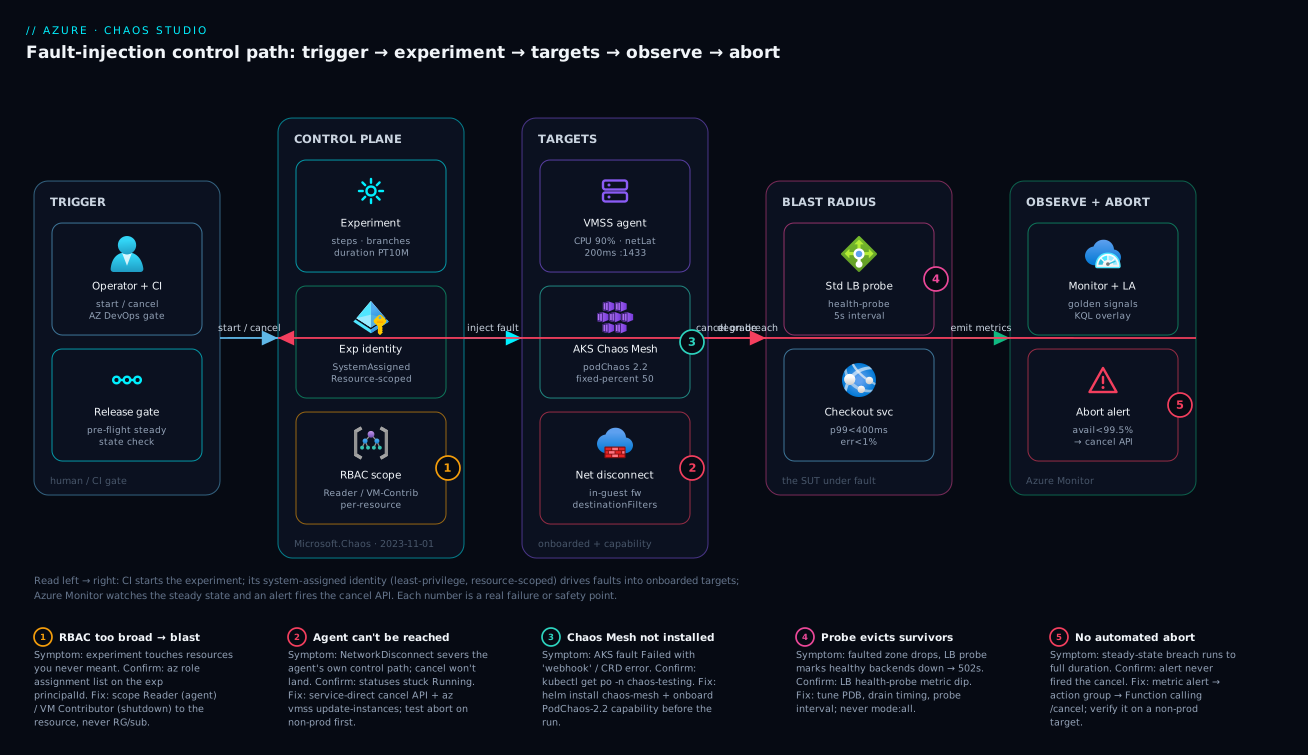
The method the diagram encodes: scope the fault to a zone of the path, run it under a least-privilege identity, watch the blast radius in Azure Monitor, and keep an automated finger on the cancel button. Localise any failure to a zone, read the badge, and you know both the symptom and the fix.
Real-world scenario
Northwind Pay runs its checkout service on a zone-redundant AKS cluster in Central India, fronted by an internal Standard Load Balancer, with the payment ledger on a zone-redundant database. Every architecture review for two years asserted “we survive a zone failure.” The platform team is six engineers; the cluster spans three availability zones with a three-replica checkout deployment. Their constraint was sharp: they could not actually fail a production zone to prove the claim, and a prior manual game-day had been called off when an engineer accidentally cordoned nodes across all three zones at once and triggered a real partial outage. Leadership banned ad-hoc chaos. They needed proof without the risk.
We rebuilt it as a tightly-bounded Chaos Studio experiment. Rather than a brute zone shutdown, we modeled the symptom of a zone going dark from the pods’ perspective: a NetworkChaos partition isolating exactly the checkout pods scheduled in one zone, scoped by topology label and capped at the matched subset – never mode: all. The blast radius was fixed by selector, the duration time-boxed to five minutes, and a metric alert on the load balancer’s health-probe count wired to a Logic App that called the experiment cancel endpoint if availability dropped below 99.5%.
{
  "type": "continuous",
  "name": "urn:csci:microsoft:azureKubernetesServiceChaosMesh:networkChaos/2.2",
  "duration": "PT5M",
  "selectorId": "aksSelector",
  "parameters": [
    { "key": "jsonSpec", "value": "{\"action\":\"partition\",\"mode\":\"all\",\"selector\":{\"namespaces\":[\"payments\"],\"labelSelectors\":{\"app\":\"checkout\",\"topology.kubernetes.io/zone\":\"centralindia-1\"}},\"direction\":\"both\"}" }
  ]
}
The first run found the gap immediately. The pre-flight gate passed (the system was healthy), the partition fired, and within seconds the survivors should have absorbed the traffic. Instead, in-flight checkout requests to the partitioned zone returned 502s for roughly 40 seconds before failing over cleanly. Two coupled bugs: their PodDisruptionBudget allowed too many concurrent evictions, and connection-draining on the load balancer was misconfigured, so the probe took ~30 s to deregister the isolated pods while the client kept routing to them. None of this was visible in steady state – the dashboards were green every single day, because nothing exercised the partition path.
The numbers told the story. Here is what the run surfaced, and what each finding mapped to:
| Observation during run | Steady-state bar | Actual | Root cause | Fix |
|---|---|---|---|---|
| Checkout error rate (first 40s) | < 1% | ~14% | Probe slow to deregister isolated pods | Tighten probe interval + draining |
| p99 latency (during fault) | < 400 ms | 2.1 s | Clients retried to dead pods | Lower PDB max-unavailable; faster failover |
| Recovery time after fault end | immediate | clean | (recovery itself was fine) | – |
| Healthy backend count | ≥ 4 | dipped to 2 then recovered | Expected – the zone was partitioned | No change (this was correct) |
They fixed the PDB and the probe/draining timing, re-ran the experiment in the release pipeline as a gate, and the second run held steady state flat – error rate stayed under 1%, p99 under 400 ms, through the whole five-minute partition. The experiment now runs on every deploy to the checkout service. The cost was trivial (Chaos Studio bills per action-minute; a five-minute run is a few rupees) against the avoided cost of discovering the same 40-second outage during a real AZ failure on a flash-sale evening. Zone-resilience stopped being a slide and became a green check in CI. The lesson on the wall: “Green dashboards prove the happy path works. Only a fault proves the failure path does.”
Advantages and disadvantages
Controlled fault injection is powerful but not free – it demands observability maturity and operational discipline. Weigh it honestly:
| Advantages | Disadvantages |
|---|---|
| Turns resilience from a claim into measured evidence – you know, not hope | Only as good as your steady-state definition; vague metrics give vague answers |
| Managed service – no chaos tooling to build or maintain (vs. raw Chaos Mesh / Gremlin) | Agent-based faults need agent install + UAMI + model roll – real setup overhead |
| Four-axis blast-radius control makes it safe enough to run in CI | A misconfigured experiment (mode: all, broad RBAC) can still cause a real outage |
| Least-privilege experiment identity bounds what a runaway run can touch | The self-severing network fault can cut its own abort signal – needs the service-direct recourse |
| Catches the subtle failure-path bugs (PDB, probe timing, draining) invisible in steady state | Requires Azure Monitor maturity to see the blast; blind chaos is useless |
| Repeatable – the same experiment runs identically every time, unlike manual game-days | No native assertion engine; you wire pass/fail yourself in the pipeline |
| Per-release regression check – resilience can’t silently rot between deploys | Cultural shift – teams must accept deliberately breaking things |
The discipline is right for any team with a real availability SLO and the observability to measure it. It is premature for a team that hasn’t yet defined steady state in numbers or instrumented golden signals – for them, the prerequisite is observability, not chaos. It bites hardest when treated as “just break things” rather than “test a written hypothesis under bounded conditions.” The disadvantages are all about discipline and prerequisites, not the tool – which is the point: Chaos Studio gives you the safety rails, but you still have to use them.
Hands-on lab
Run a complete, bounded experiment against a throwaway VMSS – onboard it, inject CPU pressure, watch the blast in metrics, and tear it down. Free-tier-friendly if you use a small SKU and delete promptly. Run in Cloud Shell (Bash).
Step 1 – Variables and a throwaway resource group.
RG=rg-chaos-lab
LOC=centralindia
VMSS=vmss-chaoslab
SUB=$(az account show --query id -o tsv)
az group create -n $RG -l $LOC -o table
Step 2 – Create a tiny 2-instance VMSS.
az vmss create -g $RG -n $VMSS --image Ubuntu2204 --instance-count 2 \
  --vm-sku Standard_B1s --admin-username azureuser --generate-ssh-keys -o table
VMSS_ID=$(az vmss show -g $RG -n $VMSS --query id -o tsv)
Expected: a VMSS with 2 Standard_B1s instances.
Step 3 – Bind a user-assigned identity and onboard the agent target.
az identity create -g $RG -n id-chaos-lab -o table
UAMI_ID=$(az identity show -g $RG -n id-chaos-lab --query id -o tsv)
UAMI_CLIENT=$(az identity show -g $RG -n id-chaos-lab --query clientId -o tsv)
TENANT=$(az account show --query tenantId -o tsv)
az vmss identity assign --ids "$VMSS_ID" --identities "$UAMI_ID"

cat > target.json <<EOF
{ "properties": { "identities": [ { "clientId":"$UAMI_CLIENT","tenantId":"$TENANT","type":"AzureManagedIdentity" } ] } }
EOF
PROFILE=$(az rest --method put \
  --uri "https://management.azure.com${VMSS_ID}/providers/Microsoft.Chaos/targets/Microsoft-Agent?api-version=2023-11-01" \
  --body @target.json --query properties.agentProfileId -o tsv)
echo "agentProfileId = $PROFILE"   # non-empty = target onboarded
Step 4 – Enable the CPU capability and install the agent.
az rest --method put \
  --uri "https://management.azure.com${VMSS_ID}/providers/Microsoft.Chaos/targets/Microsoft-Agent/capabilities/CPUPressure-1.0?api-version=2023-11-01" \
  --body '{"properties":{}}'

az vmss extension set -g $RG --vmss-name $VMSS \
  --name ChaosLinuxAgent --publisher Microsoft.Azure.Chaos --version 1.0 \
  --settings "{\"profile\":\"$PROFILE\",\"auth.msi.clientid\":\"$UAMI_CLIENT\"}"
az vmss update-instances -g $RG -n $VMSS --instance-ids "*"
Step 5 – Create the experiment (3-min CPU pressure on instance 0).
cat > exp.json <<EOF
{ "identity":{"type":"SystemAssigned"}, "location":"$LOC", "properties":{
  "selectors":[{"id":"sel","type":"List","targets":[
    {"id":"${VMSS_ID}/providers/Microsoft.Chaos/targets/Microsoft-Agent","type":"ChaosTarget"}]}],
  "steps":[{"name":"cpu","branches":[{"name":"b","actions":[
    {"type":"continuous","name":"urn:csci:microsoft:agent:cpuPressure/1.0","duration":"PT3M",
     "selectorId":"sel","parameters":[{"key":"pressureLevel","value":"95"},
       {"key":"virtualMachineScaleSetInstances","value":"[0]"}]}]}]}]}}
EOF
az rest --method put \
  --uri "https://management.azure.com/subscriptions/$SUB/resourceGroups/$RG/providers/Microsoft.Chaos/experiments/exp-cpu?api-version=2023-11-01" \
  --body @exp.json
Step 6 – Grant the experiment identity Reader (agent-based RBAC).
PRIN=$(az rest --method get \
  --uri "https://management.azure.com/subscriptions/$SUB/resourceGroups/$RG/providers/Microsoft.Chaos/experiments/exp-cpu?api-version=2023-11-01" \
  --query identity.principalId -o tsv)
az role assignment create --assignee-object-id "$PRIN" --assignee-principal-type ServicePrincipal \
  --role "Reader" --scope "$VMSS_ID"
Step 7 – Start it and confirm the fault fired.
BASE="https://management.azure.com/subscriptions/$SUB/resourceGroups/$RG/providers/Microsoft.Chaos/experiments/exp-cpu"
az rest --method post --uri "$BASE/start?api-version=2023-11-01"
# Poll status
az rest --method get --uri "$BASE/statuses?api-version=2023-11-01" --query "value[0].properties.status" -o tsv
# After ~1 min, confirm the CPU spike on instance 0
az monitor metrics list --resource "$VMSS_ID" --metric "Percentage CPU" \
  --aggregation Maximum --interval PT1M -o table
Expected: status Running then Success; Percentage CPU climbs toward 95% on the targeted instance during the window. No CPU movement means the agent didn’t install – recheck Step 4.
Validation checklist. You onboarded an agent target (non-empty agentProfileId), enabled exactly one capability, granted the experiment identity Reader (the correct agent-based minimum), ran a 3-minute time-boxed fault scoped to one instance, and confirmed it fired via the CPU metric. Every blast-radius axis was enforced. The lab steps mapped to what each proves:
| Step | What you did | What it proves |
|---|---|---|
| 3 | Onboard Microsoft-Agent target + UAMI |
A resource is invisible until onboarded |
| 4 | Enable capability + install agent | The agent is what makes agent-based faults fire |
| 5 | Scope to instance [0], PT3M |
Blast radius via selector + duration |
| 6 | Grant Reader only |
Least-privilege agent RBAC is Reader, not Contributor |
| 7 | Confirm CPU spike | The fault actually landed – not a no-op |
Cleanup (avoid lingering VMSS charges).
az group delete -n $RG --yes --no-wait
Cost note. Two Standard_B1s instances for an hour is a few rupees; Chaos Studio bills per action-minute (a 3-minute run is negligible). Deleting the resource group stops everything.
Practice challenges
Work these top to bottom – they escalate from “read the model” to “wire a load-driven resilience gate.” Every solution is real and schema-correct; all IDs are placeholders. Nothing here runs live, so read the snippet, predict the result, then open the solution.
1. (Beginner) Classify the fault class and its RBAC. For each fault, say whether it is service-direct or agent-based, and the minimum role the experiment identity needs on the target: (a) burn CPU to 90% inside a VMSS instance; (b) shut down a VMSS instance; © fail over a Cosmos DB account; (d) add 200 ms of network latency inside a VM.
<details> <summary>Solution</summary>
(a) Agent-based, role Reader – the agent burns CPU locally; the control plane only needs */read. (b) Service-direct, role Virtual Machine Contributor – a control-plane power action. © Service-direct, role Cosmos DB Operator (or equivalent) on the account. (d) Agent-based, role Reader.
</details>
Why: the class decides setup and RBAC – and Reader (not Contributor) is the correct minimum for every agent-based fault.
2. (Beginner) Onboard a single VM as a service-direct target. Write the two az rest calls that (a) create the Microsoft-VirtualMachine target on a VM and (b) enable the Shutdown-2.0 capability, against API 2023-11-01.
<details> <summary>Solution</summary>
VM_ID="/subscriptions/<sub>/resourceGroups/<rg>/providers/Microsoft.Compute/virtualMachines/<vm>"
az rest --method put \
  --uri "https://management.azure.com${VM_ID}/providers/Microsoft.Chaos/targets/Microsoft-VirtualMachine?api-version=2023-11-01" \
  --body '{"properties":{}}'
az rest --method put \
  --uri "https://management.azure.com${VM_ID}/providers/Microsoft.Chaos/targets/Microsoft-VirtualMachine/capabilities/Shutdown-2.0?api-version=2023-11-01" \
  --body '{"properties":{}}'
</details>
Why: a resource is invisible to every experiment until it is a target and the specific capability is enabled – two calls, not one.
3. (Intermediate) Write a steady-state hypothesis and its pre-flight check. For a checkout API fronted by Application Gateway, state a concrete steady-state hypothesis, then sketch the pre-flight gate that refuses to inject if the system is already breaching it.
<details> <summary>Solution</summary>
Hypothesis: “error rate < 1% AND p99 latency < 400 ms holds while one zone’s compute is down.” Pre-flight: before Step 1, read the last 5 minutes of FailedRequests on the App Gateway; if it already exceeds the bar, exit non-zero and never start the experiment.
PRE=$(az monitor metrics list --resource "<appgw-id>" --metric "FailedRequests" \
  --aggregation Total --interval PT1M --query "max(value[0].timeseries[0].data[].total)" -o tsv)
(( $(printf '%.0f' "${PRE:-0}") > 10 )) && { echo "already unhealthy -- refusing to inject"; exit 1; }
</details>
Why: injecting chaos into an already-sick system compounds a real incident and poisons the result – steady state must be true before you break anything.
4. (Intermediate) Author a parallel two-branch step. In one step, run CPU pressure at 85% and network latency of 150 ms simultaneously against instances [0,1] of a VMSS agent target, each for PT5M. Show the two branches.
<details> <summary>Solution</summary>
{ "name": "Step 1 - pressure + latency", "branches": [
  { "name": "cpu", "actions": [ { "type": "continuous", "name": "urn:csci:microsoft:agent:cpuPressure/1.0",
      "duration": "PT5M", "selectorId": "vmssAgentSelector",
      "parameters": [ { "key": "pressureLevel", "value": "85" }, { "key": "virtualMachineScaleSetInstances", "value": "[0,1]" } ] } ] },
  { "name": "latency", "actions": [ { "type": "continuous", "name": "urn:csci:microsoft:agent:networkLatency/1.2",
      "duration": "PT5M", "selectorId": "vmssAgentSelector",
      "parameters": [ { "key": "latencyInMilliseconds", "value": "150" }, { "key": "virtualMachineScaleSetInstances", "value": "[0,1]" } ] } ] }
] }
</details>
Why: parallel faults go in branches of one step, and every parameters value is a string – even the [0,1] array; forget either and it fails at create or runs in the wrong order.
5. (Advanced) Convert manual zone-pinning to dynamic targeting. Rewrite a zone-1 VMSS shutdown so it targets every instance in availability zone 1 automatically, without listing instance numbers. Which fault does this work for, and what happens if zone 1 has no instances?
<details> <summary>Solution</summary>
Attach a Simple zone filter to the List selector:
{ "id": "zone1Selector", "type": "List",
  "targets": [ { "id": "<vmss>/providers/Microsoft.Chaos/targets/Microsoft-VirtualMachineScaleSet", "type": "ChaosTarget" } ],
  "filter": { "type": "Simple", "parameters": { "zones": [ "1" ] } } }
It works only for the VMSS Shutdown 2.0 fault and filters only on availability zones. If the filter resolves to zero targets the experiment fails (a safe default) rather than silently no-op’ing.
</details>
Why: the native zone filter tracks the fleet as it scales, where a hand-listed [0,1] goes stale – but it is scoped to exactly one fault, so know its limits.
6. (Advanced) Build a load-driven resilience gate. Design an experiment that generates real traffic while a fault is injected, and explain the pass/fail bar you grade it against.
<details> <summary>Solution</summary>
Run two parallel branches in one step – a Microsoft-AzureLoadTest Start Load Test action and the fault:
{ "name": "Step 1 - load + fault", "branches": [
  { "name": "load", "actions": [ { "type": "discrete", "name": "urn:csci:microsoft:azureLoadTest:start/1.0",
      "selectorId": "loadTestSelector", "parameters": [ { "key": "testID", "value": "<load-test-guid>" } ] } ] },
  { "name": "fault", "actions": [ { "type": "continuous", "name": "urn:csci:microsoft:azureKubernetesServiceChaosMesh:podChaos/2.2",
      "duration": "PT5M", "selectorId": "aksSelector",
      "parameters": [ { "key": "jsonSpec", "value": "{\"action\":\"pod-failure\",\"mode\":\"fixed-percent\",\"value\":\"50\",\"selector\":{\"namespaces\":[\"payments\"]}}" } ] } ] }
] }
Grade it against a separate chaos baseline – a looser bar that tolerates the transient latency/error spike while scale-out or failover completes, but still bounds it. Grading against the no-chaos baseline yields false failures; grading against nothing yields false confidence.
</details>
Why: a fault with no traffic proves nothing, and a fault under load graded on the wrong baseline lies to you – real resilience gates drive load and grade against a chaos-state bar.
Common beginner mistakes
These are misconceptions about the model, not operational symptoms – the symptom-cause-fix table lives in “Common mistakes & troubleshooting” below. Each here is a wrong mental model and the right one to replace it with.
“Chaos engineering means randomly breaking things to see what happens.” The opposite. An experiment starts from a written steady-state hypothesis and changes exactly one thing to test it, bounded four ways. Random breakage with no hypothesis is unfalsifiable – you cannot pass or fail it – which is why the article calls it vandalism. Right model: one variable, one hypothesis, a bounded blast, a measured verdict.
“To be safe, give the experiment identity plenty of permissions.” Backwards, and doubly so for agent faults. The experiment’s identity is the blast-radius boundary; more privilege means a runaway run can touch more. And an agent-based fault assigned Virtual Machine Contributor will actually fail, because that role lacks the */read the agent path needs. Right model: Reader for agent-based, the minimum resource-specific role for service-direct, always scoped to the resource – least privilege is the safety control, not a nuisance.
“The experiment runs with my permissions.” It does not. Chaos Studio mints a system-assigned managed identity per experiment, and that identity executes the faults. Your user rights are irrelevant at run time. Right model: grant the experiment identity its own least-privilege roles; your access governs authoring, not execution.
“The experiment reported Success, so the system is resilient.” Success only means the run completed without a harness error – it says nothing about whether steady state held, and nothing about whether the fault even fired. A no-op fault (agent never installed) also reports Success. Right model: a real pass needs two independent confirmations – the fault fired (a CPU spike, a pod dip) and steady state held through it.
“Onboarding a resource is dangerous – it might get hit.” Onboarding only makes a resource reachable; nothing happens until an experiment that references it runs and the identity has RBAC to act. The genuine danger is the inverse: an un-onboarded resource is invisible, so the safest resource is the one you never onboarded. Right model: onboard explicitly and minimally; a fault fires only at the intersection of “onboarded” and “RBAC-granted.”
“I’ll run it in production first – that’s where the real signal is.” That is how a chaos program gets banned after one self-inflicted outage. Blast-radius mistakes (mode: all, a too-broad Query, a wide role) should surface where they cost nothing. Right model: graduate dev → staging → canary → prod, with distinct RBAC per environment and an abort path you tested on non-prod first.
“duration is how long my outage will last.” A continuous fault’s duration is how long the injected stimulus runs before it self-terminates – there is no infinite chaos, and a self-reverting fault returns the system to normal at the end. The outage (if any) is what your system does in response, which is exactly what you are measuring. Right model: duration bounds the stimulus; the response is the finding.
“Steps and branches are just two ways to group faults.” They are opposites. Steps run sequentially (step 2 waits for step 1); branches within a step run in parallel. Swap them and “warm up, then inject” becomes “warm up and inject at once.” Right model: order phases with steps, run simultaneous faults with branches.
Common mistakes & troubleshooting
The failure modes that bite during real chaos programs – first as a scannable table, then the worst offenders expanded. This is the part you bookmark for when an experiment “did nothing” or did too much.
| # | Symptom | Root cause | Confirm (exact cmd / portal path) | Fix |
|---|---|---|---|---|
| 1 | Experiment Failed with “permission” in the detail |
Exp identity lacks the right role, or has the wrong one (Contributor for an agent fault) | GET /executions/{id}; az role assignment list --assignee <principalId> |
Reader for agent-based; resource role for service-direct; scope to the resource |
| 2 | Experiment Success but nothing happened to the system |
Agent never installed / model not rolled | az vmss get-instance-view; agent logs / App Insights (if appinsightskey set) |
Reinstall ChaosLinuxAgent; az vmss update-instances --instance-ids "*" |
| 3 | AKS fault Failed with webhook/CRD error |
Chaos Mesh not installed on the cluster | kubectl get po -n chaos-testing |
helm install chaos-mesh ...; onboard the AKS target + capability |
| 4 | BadRequest on experiment create |
A numeric/array parameter not stringified |
Read the error body | Wrap every parameter value in quotes; escape inner JSON |
| 5 | “Capability not found” at run | URN version mismatch vs the enabled capability | Compare the action URN to the enabled capability version | Align the URN (e.g. networkLatency/1.2) with onboarding |
| 6 | Network fault won’t stop; cancel does nothing |
NetworkDisconnect severed the agent’s own control path |
GET /statuses stuck Running |
Service-direct cancel API + az vmss update-instances; test abort on non-prod |
| 7 | Faults you put in branches ran one after another (or vice versa) | Branches run in parallel; steps run sequentially | Inspect the experiment JSON structure | Separate phases into steps; parallel faults into branches |
| 8 | Blast hit the whole fleet, not a subset | mode: all / no instance selector |
Inspect the jsonSpec / selector |
Use mode: fixed-percent + value; virtualMachineScaleSetInstances |
| 9 | Experiment touched resources you didn’t intend | Exp identity scoped at RG/subscription | az role assignment list --assignee <principalId> --all |
Re-scope to the individual resource; remove broad assignments |
| 10 | Steady-state “held” but you can’t tell if the fault fired | No signal confirming the fault | Check CPU/pod-count/dependency metric in the window | Add a fault-fired assertion (e.g. CPU spike) before trusting “held” |
| 11 | Chaos injected on top of a real incident | No pre-flight gate | Pipeline log – no pre-flight query | Add a pre-flight steady-state check that refuses to inject if unhealthy |
| 12 | Lingering degradation after the fault ended | Recovery bug (not a chaos bug) – the system didn’t heal | Post-run metric still elevated after duration |
Log as a finding; fix draining/retry/PDB; this is the dangerous class |
The expanded form for the entries that cost the most time:
1. Experiment Failed with “permission” in the detail.
Root cause: The experiment’s system-assigned identity holds the wrong role – most commonly someone assigned Virtual Machine Contributor to an agent-based fault, which lacks the */read the agent path needs.
Confirm: az rest --method get .../executions/{id} shows the per-action error; az role assignment list --assignee <principalId> shows what’s actually granted.
Fix: Use Reader for agent-based faults (it is the correct minimum, not a downgrade); use the resource-specific role for service-direct; always scope to the resource.
2. Experiment reports Success but nothing happened to the system.
Root cause: For agent-based faults, the chaos agent was never installed, or the new model wasn’t rolled to running instances – so the experiment “ran” but had no agent to execute through.
Confirm: az vmss get-instance-view; if you wired appinsightskey into the agent settings, the agent diagnostics in App Insights tell you whether the fault fired.
Fix: Reinstall ChaosLinuxAgent/ChaosWindowsAgent, then az vmss update-instances --instance-ids "*" to roll the model to every instance.
6. A network-disconnect fault won’t stop and cancel appears to do nothing.
Root cause: The NetworkDisconnectViaFirewall fault blackholed the very path the agent uses to receive the stop signal – the agent can’t hear “cancel.”
Confirm: GET /statuses shows the run stuck Running past where it should have ended.
Fix: Use the service-direct cancel API (which acts via the control plane, not the agent) and roll the VMSS model (az vmss update-instances). The lasting fix is to test the abort path on a non-prod target first so you’ve proven the control-plane recourse before you need it in anger.
12. Lingering degradation after the fault’s duration elapsed.
Root cause: This is not a chaos bug – it’s the finding. The fault ended, but the system didn’t return to baseline: a misconfigured PodDisruptionBudget, slow connection draining, an over-aggressive retry storm, or a probe that won’t re-add recovered instances.
Confirm: The golden-signal metric is still elevated after duration has passed (the recovery curve doesn’t flatten).
Fix: Log it as a resilience finding – this is exactly the defect class chaos exists to catch. Fix the draining/retry/PDB, then re-run to confirm the curve now recovers.
Best practices
- Write the steady-state hypothesis before the fault. Concrete numbers against a signal you trust (“error rate < 1%, p99 < 400 ms”). No hypothesis means no pass/fail, which means vandalism.
- Onboard explicitly and minimally. Only the targets you’ll use, only the capabilities you’ll fire. The un-onboarded resource is the safest one.
- Least-privilege the experiment identity, scoped to the resource.
Readerfor agent-based, resource-specific for service-direct – never RG or subscription scope. - Time-box every continuous fault. An ISO-8601
durationon every action; you’re sampling, not load-testing. Keep prod runs short. - Bound scope on every fault.
virtualMachineScaleSetInstancesfor VMSS;mode: fixed-percent+ tightlabelSelectorfor AKS. Nevermode: allin production. - Wire and test the abort path before prod. Alert → action group → Function/Logic App →
cancel. Prove it on a non-prod target – an untested abort equals no abort. - Always have the service-direct cancel recourse. Know that a self-severing network fault can cut the agent’s stop signal, and that the control-plane cancel + model roll is your only recourse.
- Pre-flight gate every run. Refuse to inject into an already-unhealthy system; chaos on top of a real incident compounds it.
- Graduate experiments staging → prod. Distinct RBAC per environment; promote only after a clean pass. Authoring mistakes then surface in dev, not prod.
- Confirm the fault actually fired. “Steady state held” is meaningless if the fault was a no-op – assert a fault-fired signal (CPU spike, pod dip) too.
- Gate releases on resilience. An experiment in the pipeline turns resilience into a per-release regression check, not an annual ritual.
- Treat lingering post-fault degradation as a finding, not noise. It’s the recovery-bug class – the most dangerous and the entire reason the program exists.
The practices mapped to the risk each one retires:
| Practice | Retires the risk of… |
|---|---|
| Steady-state hypothesis first | Running unfalsifiable, ungradable chaos |
| Minimal onboarding | Shadow targets / uncontrolled scope |
| Least-privilege identity | A runaway run touching unintended resources |
| Duration on every fault | Unbounded chaos that never self-terminates |
| Scope on every fault | Whole-fleet blast from a single fault |
| Tested abort path | A breach running to full duration |
| Service-direct cancel recourse | The self-severing network fault you can’t stop |
| Pre-flight gate | Compounding a real incident with injected chaos |
| Staging → prod graduation | An authoring typo causing a prod outage |
| Fault-fired assertion | A false-confidence “pass” on a no-op |
| Resilience gate in CI | Silent resilience rot between deploys |
Security notes
- Scope the experiment identity to the resource, with the minimum role. The system-assigned identity is the security boundary of a run.
Readerfor agent-based, resource-specific for service-direct – a chaos identity with subscription Contributor is an attack surface and an outage waiting to happen. - Use a user-assigned identity for the agent, not credentials. The agent authenticates to Chaos Studio with the bound UAMI; never embed keys in agent settings. Restrict who can assign that identity.
- Separate RBAC per environment. Distinct identities and role assignments for
rg-chaos-dev/staging/prodso a staging misstep can’t reach prod resources. - Lock down who can start experiments in prod. Starting a prod experiment is a privileged action – gate it behind pipeline approvals and Entra ID controls (see Azure DevOps YAML: Multi-Stage Pipelines, Environments & Approvals). A chaos experiment is, definitionally, a sanctioned way to degrade production.
- Audit experiment runs. Every start/cancel is an ARM operation in the Activity Log; alert on prod experiment starts so an unexpected one is visible immediately.
- Don’t leak topology through agent diagnostics. If you stream agent telemetry to App Insights, treat it like any other production telemetry – it can reveal internal hostnames and ports.
- Treat the abort path as a security control. The cancel automation is what bounds a runaway; protect the Function/Logic App and its trigger from tampering, and test it.
The security controls and what each prevents:
| Control | Mechanism | Prevents |
|---|---|---|
| Resource-scoped exp identity | RBAC role assignment | Blast beyond the intended resource |
Minimum role (Reader/resource role) |
Least privilege | Over-privileged runaway run |
| UAMI for the agent | Managed identity, no keys | Embedded-credential leakage |
| Per-environment RBAC | Distinct identities/scopes | A staging mistake reaching prod |
| Pipeline approval to start in prod | Entra ID + environment gates | Unsanctioned prod degradation |
| Activity-log alerts on starts | Azure Monitor | An unnoticed/unauthorised experiment |
| Protected abort automation | Locked Function/Logic App | Tampering with the emergency stop |
Cost & sizing
Chaos Studio’s own pricing is modest – it bills per experiment action-minute – so the cost conversation is dominated by the supporting resources (the targets under test, the observability, the agent), not the faults themselves. The drivers:
- Action-minutes are the direct Chaos Studio charge: number of fault actions × minutes each runs. A five-minute experiment with two parallel faults is ten action-minutes – rupees, not thousands. Long or highly-parallel game-days cost more, which is itself a nudge toward short, sampled runs.
- The target resources are the real spend – the VMSS, AKS cluster, or database you run faults against. In a dedicated chaos environment these are duplicate infra; gating in staging/canary reuses infra you already pay for, which is far cheaper than a standing chaos estate.
- The chaos agent is free as software but consumes a little CPU/memory on each instance it runs on – negligible, but real on tiny SKUs.
- Azure Monitor / Log Analytics ingestion is billed per GB – the observability you need to see the blast. Worth every paisa; use sampling on high-traffic apps so a game-day doesn’t spike the bill.
A rough monthly picture for a team running resilience gates on an existing pipeline (reusing staging/canary infra, not a standing chaos estate):
| Cost driver | What you pay for | Rough INR / month | Notes |
|---|---|---|---|
| Chaos Studio action-minutes | Per fault-action-minute | ~₹100-1,000 | Dominated by run frequency/length, not scale |
| Target infra (if dedicated) | Duplicate VMSS/AKS for chaos | ₹0 if reusing staging/canary | Reuse beats a standing chaos estate |
| Chaos agent overhead | A little CPU/RAM per instance | negligible | Real only on very small SKUs |
| Azure Monitor ingestion | Per-GB telemetry | ~₹2,000-8,000 | The cost of being able to see the blast |
| Logic App / Function (abort) | Per-execution | ~₹0-500 | Fires only on breach |
The sizing rule: run experiments short and scoped, reuse staging/canary infra rather than standing up a dedicated chaos estate, and spend on observability before you spend on more chaos – a fault you can’t see is wasted action-minutes. The avoided cost (a 40-second checkout outage during a flash sale, discovered in production) dwarfs the entire program’s bill, which is the actual ROI argument.
Interview & exam questions
1. What is the difference between service-direct and agent-based faults, and why does it matter? Service-direct faults are executed by Chaos Studio through the ARM control plane (VMSS shutdown, AKS Chaos Mesh, NSG changes); agent-based faults run inside the guest OS via a VM-extension agent (CPU/memory pressure, network latency/disconnect). It matters because the class determines setup (agent-based needs a UAMI + agent install + model roll), RBAC (Reader for agent-based vs resource-specific roles for service-direct), and even which “block traffic” fault you get.
2. Why does an agent-based fault need only Reader on the target? Because the chaos agent does the work locally inside the VM; the control-plane identity only needs */read to coordinate. Counter-intuitively, a role like Virtual Machine Contributor that lacks */read will fail – Reader is the correct minimum, not a downgrade.
3. How do you bound the blast radius of an experiment? On four independent axes: scope (selectors / Chaos Mesh mode+value / virtualMachineScaleSetInstances), time (an ISO-8601 duration on every continuous fault), identity (a least-privilege, resource-scoped experiment identity), and targeting (only explicitly-onboarded targets with enabled capabilities are reachable). Enforce all four; any one alone is insufficient.
4. What’s the difference between steps and branches in an experiment? Steps run sequentially – step 2 starts only after step 1 finishes. Branches run in parallel within a step. You use steps to order phases (“warm up, then inject”) and branches to run simultaneous faults (“CPU pressure AND network latency at once”).
5. Why is parameters escaping a common bug? Every parameter value in an experiment must be a string, even when it encodes a number or a JSON array – so destinationFilters and jsonSpec are stringified, inner-quote-escaped JSON. Forgetting this yields a BadRequest on create.
6. You run an experiment, it reports Success, but the system showed no effect. What happened? For an agent-based fault, the agent likely wasn’t installed or the new model wasn’t rolled to running instances – so the experiment “ran” with no agent to execute through. Confirm via the VM instance view (or agent diagnostics in App Insights if appinsightskey was set), reinstall the agent, and az vmss update-instances --instance-ids "*".
7. A network-disconnect fault won’t stop and cancel does nothing. Why, and what’s the recourse? The NetworkDisconnectViaFirewall fault blackholed the path the agent uses to receive the stop signal, so the agent can’t hear “cancel.” The recourse is the service-direct cancel API (which acts via the control plane, not the agent) plus rolling the VMSS model. This is why you test the abort path on non-prod first.
8. How do you model a zone failure without actually failing a production zone? Model the symptom from the application’s perspective: a Chaos Mesh NetworkChaos partition (or VMSS shutdown) scoped by topology-zone label to exactly the workload in one zone, time-boxed, with an automated abort. You validate that survivors absorb the load – without the risk of a real, unbounded zone outage.
9. What makes an experiment a “resilience gate,” and what’s the benefit? It runs as a stage in the deployment pipeline after deploying to a canary/pre-prod slice, asserts steady state held during the fault via Azure Monitor, and blocks promotion on a breach. The benefit: resilience becomes a per-release regression check instead of an annual game-day, so it can’t silently rot between deploys.
10. The fault ended but the system stayed degraded. Is that a bug in Chaos Studio? No – it’s the finding. Lingering degradation after duration elapses means a recovery bug: a misconfigured PodDisruptionBudget, slow connection draining, a retry storm, or a probe that won’t re-add recovered instances. This is the most dangerous defect class (transient blip → multi-hour outage) and exactly what chaos exists to surface.
11. Why must you pre-flight gate before injecting? To avoid injecting chaos into an already-sick system, which compounds a real incident and pollutes your result. The pipeline queries the steady-state metric first and refuses to start the experiment if the system is already unhealthy.
12. How does Chaos Studio’s identity model bound risk? The experiment runs under its own system-assigned managed identity, not your user. That identity holds the minimum role scoped to each resource, so a runaway experiment physically cannot touch anything you didn’t grant – making least-privilege on the experiment identity the core RBAC blast-radius control.
These map to AZ-305 (Solutions Architect Expert) – design for high availability and resilience – and the reliability domain of the Well-Architected assessment. The AKS-specific mechanics touch CKA/CKAD thinking (PDBs, probes, topology spread). A compact cert/skill mapping:
| Question theme | Primary cert / framework | Objective area |
|---|---|---|
| Fault classes, RBAC, blast radius | AZ-305 | Design resilient solutions |
| Steady-state, recovery curves | Well-Architected (Reliability) | Test resilience; recovery |
| AKS PDB/probe/topology findings | CKA / CKAD | Workload scheduling & availability |
| Pipeline resilience gates | AZ-400 (DevOps Expert) | Continuous delivery; release strategy |
| Azure Monitor correlation | AZ-305 / AZ-400 | Design monitoring; observability |
Quick check
- You want to model a CPU-bound noisy neighbour inside a VMSS instance. Is that service-direct or agent-based, and what role does the experiment identity need?
- Your experiment reports
Successbut the VM’s CPU never moved. Name the single most likely cause. - True or false: putting two faults in separate branches of one step runs them sequentially.
- A
NetworkDisconnectfault won’t stop and the normalcancelisn’t working. What is your recourse, and why? - The fault’s
durationhas elapsed but error rate is still elevated. Is this a Chaos Studio bug? What is it?
Answers
- Agent-based (CPU pressure happens inside the guest OS), so it needs only
Readeron the VMSS, scoped to the resource. A Contributor-style role that lacks*/readwould actually fail. - The chaos agent wasn’t installed or the model wasn’t rolled to running instances (
az vmss update-instances --instance-ids "*"), so the experiment ran with no agent to execute through. Confirm via the instance view or agent diagnostics in App Insights. - False. Branches within a step run in parallel; steps are what run sequentially. To run faults one after another, put them in separate steps.
- Use the service-direct
cancelAPI (it acts through the ARM control plane, not the agent) plus rolling the VMSS model. The fault blackholed the path the agent uses to hear the stop signal – which is why you test the abort path on non-prod first. - No – it’s the finding. Lingering degradation after
durationis a recovery bug (PDB too permissive, slow draining, retry storm, or a probe that won’t re-add recovered instances) – the dangerous class chaos exists to catch. Log it, fix it, re-run.
Glossary
- Azure Chaos Studio – Microsoft’s managed fault-injection service for running controlled resilience experiments against Azure resources.
- Service-direct fault – a fault executed by Chaos Studio through the ARM control plane (e.g. VMSS shutdown, AKS Chaos Mesh); no in-guest agent required.
- Agent-based fault – a fault executed inside the guest OS by a chaos-agent VM extension (e.g. CPU/memory pressure, network latency/disconnect); requires a UAMI and the agent.
- Target – a resource onboarded to Chaos Studio (
providers/Microsoft.Chaos/targets/...); un-onboarded resources are invisible to experiments. - Capability – a specific fault enabled on a target (e.g.
Shutdown-2.0,CPUPressure-1.0); gates which faults can run. - Experiment – the ARM resource that defines and runs faults via selectors, steps, branches and actions.
- Selector – a named, reusable group of target resources referenced by actions; the scope axis of blast radius.
- Step / branch / action – steps run sequentially; branches run in parallel within a step; actions are the leaves (a fault or a
delay). continuous/discrete– a continuous fault runs for itsdurationthen self-terminates; a discrete fault is a one-shot action.- Experiment identity – the system-assigned managed identity Chaos Studio mints per experiment; it executes the faults and holds the least-privilege RBAC.
- agentProfileId – the handle returned when you create a
Microsoft-Agenttarget; wires the chaos-agent extension to Chaos Studio. - Steady-state hypothesis – a concrete, measured statement of “healthy” (e.g. error rate < 1%, p99 < 400 ms) that the experiment validates or refutes.
- Abort criteria – the automated emergency stop: a metric alert → action group → Function/Logic App that calls the experiment
cancelAPI. - Blast radius – the bounded impact of an experiment, controlled on four axes: scope, time, identity, and targeting.
- Chaos Mesh – the open-source Kubernetes chaos engine that AKS service-direct faults delegate to; must be installed on the cluster.
jsonSpec– thespecblock of a Chaos Mesh CRD, flattened and minified to a JSON string, passed as a fault parameter for AKS faults.- Resilience gate – an experiment run as a pipeline stage that blocks promotion on a steady-state breach, turning resilience into a per-release regression check.
- Recovery curve – the post-fault shape of your golden-signal metric; lingering elevation after the fault ends indicates a recovery bug.
- Dynamic targeting – resolving an experiment’s target set at execution time rather than authoring time, so newly-onboarded matching resources are included automatically.
Queryselector – a selector (type: "Query") that chooses targets from an Azure Resource Graph KQL query plus a subscription list, evaluated when the experiment runs.- Simple zone filter – an optional
filteron aListselector (type: "Simple",parameters.zones) that targets all instances in named availability zones; currently supported only by the VMSS Shutdown 2.0 fault. - Self-reverting fault – a continuous fault that undoes its own change when the
durationelapses or the experiment is cancelled (for example, NSG rules removed, shut-down instances restarted); verify per fault in the library. - Start/Stop Load Test action – Chaos Studio orchestration actions (
urn:csci:microsoft:azureLoadTest:start/1.0and the matching stop) that run an Azure Load Test as part of an experiment via aMicrosoft-AzureLoadTesttarget. - Chaos baseline – a separate, looser steady-state bar used to grade a fault-under-load run, tolerating the expected transient spike while a scale-out or failover completes.
- Scenario / Workspace – a preconfigured Chaos Studio experiment template (Scenario) organised inside a container (Workspace); a faster on-ramp than authoring raw experiment JSON.
Microsoft.Chaos– the Azure resource provider behind Chaos Studio; register it (az provider register --namespace Microsoft.Chaos) before onboarding targets.- Fault provider – the Azure resource type a given fault can act on; a resource must be a supported fault provider (and in a region where Chaos Studio is available) to be onboarded.
Next steps
You can now design, scope, run, gate and grade a fault-injection experiment. Build outward:
- Next: The Well-Architected Reliability Pillar Deep Dive – the design principles your experiments empirically validate.
- Related: Azure VM Availability & Resilience Deep Dive – the SKU and zone choices you test with VMSS shutdown faults.
- Related: Resiliency Patterns: Retry, Circuit Breaker & Bulkhead – the code-level patterns whose effectiveness chaos confirms.
- Related: Azure Site Recovery: Zone-to-Zone & Region Failover Runbooks – the failover runbooks your experiments exercise.
- Related: Azure Monitor & Application Insights for Observability – the golden-signal instrumentation that lets you see every blast.
- Related: KQL for Azure Monitor & Log Analytics Mastery – the query language behind the run-window overlay.