In a nutshell
Imagine a project manager who is brilliant at their job but has no long-term memory. Every time the phone rings they forget everything, so they keep a logbook: “ordered stock ✓, booked the courier ✓, now waiting on the supplier’s invoice…”. After each interruption they re-read the logbook from page one, skip every line already ticked off, and carry on from the first unfinished step. They never redo finished work, because the logbook — not their memory — is the source of truth.
That amnesiac-with-a-logbook is exactly how a Durable Functions orchestrator works. Your workflow code looks like an ordinary function that runs top to bottom, but the runtime keeps unloading it from memory and re-running it from the start, replaying the logbook (the history) to catch up to where it left off. The people who actually phone the supplier or charge the card are the activities — the only parts allowed to touch the outside world. The logbook lives in a storage backend so the whole workflow survives a crash, a deploy, or a scale-in event.
One rule falls straight out of the analogy: because the manager re-reads the logbook again and again, they must never glance at their watch or flip a coin mid-task — the answer would differ on each re-read, and the ticked-off steps would stop matching reality. That is the determinism rule, and it is the single idea every later section hangs off.
Why a beginner should care: this is how you build workflows that wait for days, fan out to thousands of parallel jobs, and never lose their place — order processing, approvals, batch media jobs, long-running sagas — as plain code instead of a hand-built maze of queues and state tables.
Level: Advanced topic with a beginner-safe on-ramp · Time: ~60 min read + a ~20 min hands-on lab. You’ll need first: comfort with Azure Functions triggers/bindings and enough C# to read async/await and Task.WhenAll (the full prerequisites and the seven concrete outcomes are spelled out in Learning objectives and Prerequisites & where this fits, just below). After it you’ll be able to name what is forbidden in an orchestrator and why, build every core pattern correctly, bound a runaway fan-out, make retries safe, choose a backend, and triage a stuck instance in under two minutes.
Durable Functions is the part of Azure Functions that lets you write stateful, long-running workflows as plain code instead of stitching together queues, tables, and state machines by hand. The catch is that the programming model is not what it looks like. An orchestrator function reads top to bottom like normal C# or TypeScript, but underneath it is a replay engine that re-executes your code from the start every time it makes progress. If you do not internalize that, you will ship orchestrations that work in the demo and corrupt their own state under load. This guide builds the core patterns the right way — chaining, fan-out/fan-in, human interaction, eternal orchestrations, and durable entities — and ends with how to debug them when they get stuck at 2 a.m.
The whole field reduces to one sentence: the orchestrator is the brain and must be pure; activities are the hands and may touch the outside world; the Durable Task backend (Azure Storage, Netherite, or MSSQL) is the memory that survives crashes. Everything that bites you in production — NonDeterministicOrchestrationException, a settlement run that wedges at 95,000 merchants, double-applied payments, a history table that grows to tens of GB — is a violation of one of those three roles. Because this is a reference you will keep open mid-incident, every pattern, setting, error and limit here is laid out as a scannable table alongside the prose and the code: read the prose once, then keep the tables open.
All examples use the .NET isolated worker model, which is the supported path going forward; the concepts map directly to the JavaScript, Python, and PowerShell SDKs. By the end you will stop guessing — when an orchestration hangs you will know within ninety seconds whether you face a non-deterministic body, an unbounded fan-out starving the control queue, a non-idempotent activity double-applying a side effect, a WaitForExternalEvent with no timeout, or simply history bloat from a missing ContinueAsNew.
What problem this solves
Long-running, stateful workflows are the swamp of cloud engineering. You need to call five services in order, fan out ten thousand parallel jobs and wait for all of them, pause for a human approval that might take three days, or run a per-device aggregator forever — and you need all of it to survive a worker crash, a deployment, a scale-in event, and a transient API failure halfway through. The naive answer is to hand-roll it: a queue per step, a table to hold state, a poller to advance the state machine, a dead-letter queue for failures, and a pile of correlation IDs to tie it together. That code is mostly plumbing, it is where the bugs live, and every team rewrites it.
Durable Functions collapses that plumbing into code you can read. The state is the event-sourced history; you do not manage it. But the abstraction has a sharp edge: because the orchestrator body replays, anything non-deterministic in it silently diverges history and corrupts the workflow — or, if the SDK catches it, throws NonDeterministicOrchestrationException and wedges the instance. What breaks without this knowledge is specific and expensive: a settlement job that scales fine to 40,000 items and falls over at 95,000; a reconcile activity that double-posts to a partner ledger when its retry fires; a “stuck Running” instance nobody can explain; a history table that grows until queries time out.
Who hits this: any team using Durable Functions for orchestration (order processing, ETL, batch media work, approvals, sagas), anyone who fanned out without bounding the width, anyone whose activities have side effects but aren’t idempotent, and anyone running an eternal orchestration without ContinueAsNew. To frame the whole field before the deep dive, here is every failure class this guide covers, what it looks like, and the one place to look first.
| Failure class | What you observe | First question | First place to look | Most common single cause |
|---|---|---|---|---|
| Non-determinism | NonDeterministicOrchestrationException on replay |
Did the orchestrator schedule different work than history? | The exception + showHistory=true |
DateTime.UtcNow/Guid.NewGuid/I/O in the orchestrator |
| Stuck “Running” forever | Instance never reaches a terminal state | Is it waiting on an event, or retrying a poison item? | Status API; KQL for non-terminal instances | WaitForExternalEvent with no timeout |
| Double-applied side effect | Duplicate charges/adjustments | Did an activity retry after the original succeeded? | dependencies failures + duplicate rows |
Non-idempotent activity + retry policy |
| Slow / wedged fan-out | Used to finish in 40 min, now 6 h | Did fan-out width outgrow the backend? | Control-queue latency; instance duration | Unbounded Task.WhenAll over 10k+ activities |
| History bloat | Queries time out; storage in tens of GB | Large payloads or missing ContinueAsNew? |
History table size; payload sizes | Returning big blobs by value; eternal loop without reset |
| Wrong app ran it | “My orchestration ran on the other app” | Do two apps share a storage account + hub name? | host.json hubName |
Two apps sharing a task hub |
Learning objectives
By the end of this article you can:
- Explain the replay execution model and list exactly what is forbidden in an orchestrator body and the deterministic replacement for each.
- Build the five canonical patterns correctly: function chaining, fan-out/fan-in, human interaction (external event + durable timer), eternal orchestrations (
ContinueAsNew), and durable entities. - Bound a fan-out with sub-orchestrations so a hundred-thousand-item batch doesn’t starve the control queue, and choose a fan-in failure policy (
WhenAllvs collect-and-partition) deliberately. - Make side-effecting activities idempotent so retries and redeliveries can’t double-apply, using a deterministic idempotency key.
- Choose a storage backend (Azure Storage / Netherite / MSSQL) for the workload and reason about throughput, cost, and the task-hub namespacing rule.
- Diagnose a stuck, poison, or bloated orchestration: query an instance with the status API, terminate a wedged one, run KQL to find non-terminal instances, and groom history with the purge API.
- Read the option/limit/error reference tables and pick the right retry policy, timer pattern, and entity-vs-orchestration decision for each case.
Prerequisites & where this fits
You should already be comfortable with Azure Functions fundamentals — triggers and bindings, the consumption/premium/dedicated hosting model, app settings, and deploying with func/az. You should be able to run az in Cloud Shell, read JSON output, and write enough C# to follow async/await and Task.WhenAll/Task.WhenAny. Familiarity with event sourcing helps but isn’t required — this article teaches the model from first principles. If you’re new to plain (non-durable) serverless patterns, read Azure Functions: Serverless Patterns & Best Practices and Build a Simple Serverless API on Azure first.
This sits in the Serverless / application-architecture track, one layer above plain function triggers. It assumes the hosting and scaling mechanics covered in Azure Functions Flex Consumption: VNet, Scaling & Cold Start, and it pairs tightly with the messaging primitives — when you outgrow Durable’s built-in queues you reach for Azure Service Bus: Sessions, Dedup & Dead-Letter Patterns and Azure Event Grid: MQTT, Event-Driven Routing & Dead-Letter. The diagnostic half leans on Azure Monitor & Application Insights for Observability and KQL for Azure Monitor & Log Analytics, because Application Insights is the single most useful tool for triaging a stuck instance.
A quick map of who owns what during an incident, so you escalate to the right place fast:
| Layer | What lives here | Who usually owns it | Failure classes it can cause |
|---|---|---|---|
| Trigger / client | HTTP/event start, raiseEvent, status | App / dev team | Wrong instance ID; lost external event |
| Orchestrator body | Determinism, control flow, WhenAll |
App / dev team | Non-determinism; unbounded fan-out; no timeout |
| Activities / entities | All I/O, side effects, shared state | App / dev team | Double-apply; poison item; large payloads |
| Durable backend | History, queues, partitions | App + platform | Throughput ceiling; control-queue latency |
| Storage account | Tables/blobs/queues, or Event Hubs/SQL | Platform team | Hub-name collisions; storage throttling (429) |
| Observability | Traces, status API, purge | App / SRE | “Stuck Running” invisible without queries |
Core concepts
Six mental models make every later diagnosis obvious.
The orchestrator replays; it does not run once. An orchestrator runs, awaits an activity, and unloads from memory. When that activity completes, the Durable Task Framework replays the orchestrator from line one, feeding already-completed results from a history table instead of calling the activities again. Replay stops at the first await whose result is not yet in history, and real execution resumes there. This is how an orchestration survives a worker crash, a deployment, or a scale-in: its state is the event-sourced history, not the process memory.
Determinism is non-negotiable. Because the body replays repeatedly, it must make the same decisions and schedule the same activities in the same order given the same history. That forbids ambient clocks, randomness, direct I/O, and non-deterministic collection ordering inside the orchestrator. The replacements live on the context (context.CurrentUtcDateTime, context.NewGuid()). The SDK detects divergence and throws NonDeterministicOrchestrationException rather than silently corrupting state — treat that as a code defect, never a transient error to retry.
Activities are the hands. All I/O — HTTP, database, blob, reading config — happens in activity functions, which run once per logical call (with retries) and whose inputs/outputs are serialized to JSON and recorded in history. Anything non-deterministic belongs here or comes from the context.
Entities hold state; orchestrations coordinate. A durable entity is an addressable, persistent object (a tiny actor) identified by entityName@key, with single-threaded access per entity so updates serialize without locks. Use an orchestration for a workflow with a start and end; use an entity for long-lived mutable state many callers update.
The task hub is the namespace. hubName in host.json namespaces all the queues and tables. Two function apps sharing one storage account must use different hub names or they fight over each other’s work items — the classic “my orchestration ran on the wrong app” incident.
The backend is finite and shared. Whatever provider you choose, its queues and partitions have throughput limits. On Azure Storage the control queues (default ~128 partitions across a small number of queues) and work-item queue can become the binding constraint under heavy fan-out; saturating them spikes latency and slows every replay.
The vocabulary in one table
Before the deep sections, pin down every moving part. The glossary repeats these for lookup; this table is the model side by side.
| Concept | One-line definition | Where it lives | Why it matters |
|---|---|---|---|
| Orchestrator function | The deterministic “brain” that schedules work | Your code ([OrchestrationTrigger]) |
Replays; must be pure |
| Activity function | A unit of real work / I/O | Your code ([ActivityTrigger]) |
Runs once per call; can do I/O |
| Durable entity | Addressable single-threaded state object | Your code ([EntityTrigger]) |
Race-free shared state, no locks |
| Client (binding) | Starts/queries/signals orchestrations | [DurableClient] |
The only way in from outside |
| History table | Event-sourced record of an instance | Backend (Table/SQL/Event Hubs) | Source of replay and of bloat |
| Task hub | Namespace for all queues/tables | host.json hubName |
Collisions = cross-app interference |
| Instance ID | Unique key for one orchestration run | Generated or supplied | Address for status/event/terminate |
| Replay | Re-executing the body from the start | Framework behaviour | Why determinism is required |
ContinueAsNew |
Restart with fresh state + clean history | Orchestrator API | Bounds eternal-orchestration history |
| External event | A named signal delivered to an instance | raiseEvent API |
Human/async-in pattern |
| Durable timer | A persisted, replay-safe deadline | context.CreateTimer |
Survives host restart; never Task.Delay |
| Storage provider | Backend that persists all state | Azure Storage / Netherite / MSSQL | Throughput + cost + ops profile |
The five built-in application patterns, side by side — this is the map of the deep sections that follow.
| Pattern | Shape | Use it for | Key API | Main pitfall |
|---|---|---|---|---|
| Function chaining | A → B → C, output feeds next | Ordered pipelines (ingest → parse → store) | CallActivityAsync in sequence |
Passing large payloads by value |
| Fan-out / fan-in | Parallel N, then aggregate | Batch jobs, per-item processing | Task.WhenAll over many activities |
Unbounded width starves the queue |
| Async HTTP / human-in | Pause, wait for a signal/timeout | Approvals, callbacks, 2FA | WaitForExternalEvent + CreateTimer |
No timeout → stuck forever |
| Eternal orchestration | Loop forever, bounded | Monitors, recurring cleanup, aggregators | ContinueAsNew |
while(true) → history grows unbounded |
| Durable entities | Addressable stateful actor | Counters, carts, per-tenant budgets | SignalEntityAsync / CallEntityAsync |
Treating an entity like an orchestration |
The replay execution model and why determinism is non-negotiable
An orchestration survives a worker crash, a deployment, or a scale-in because its state is the event-sourced history, not the process memory. That same mechanism is the source of every Durable Functions bug. Because the orchestrator body is replayed repeatedly, it must be deterministic — given the same history, it must make the same decisions and schedule the same activities in the same order.
The replacements for non-deterministic constructs live on the orchestration context:
[Function(nameof(ProcessOrder))]
public async Task<OrderResult> ProcessOrder(
    [OrchestrationTrigger] TaskOrchestrationContext context,
    OrderInput input)
{
    // Deterministic, replay-safe equivalents:
    DateTime now = context.CurrentUtcDateTime;        // NOT DateTime.UtcNow
    Guid id = context.NewGuid();                       // NOT Guid.NewGuid()
    ILogger logger = context.CreateReplaySafeLogger<OrderProcessor>();

    // Skip log statements during replay so you don't see every line twice:
    if (!context.IsReplaying)
        logger.LogInformation("Starting order {OrderId}", input.OrderId);

    // All real work happens in activities, which CAN do I/O:
    var validated = await context.CallActivityAsync<bool>(nameof(ValidateOrder), input);
    return new OrderResult(input.OrderId, validated);
}
The mental model that sticks: the orchestrator is the brain and must be pure; activities are the hands and may touch the outside world. Anything non-deterministic belongs in an activity or comes from the context.
The Durable Task SDK detects non-deterministic orchestration when the replayed code schedules different work than the history records, and throws rather than silently corrupting state. Treat any NonDeterministicOrchestrationException as a code defect.
What is forbidden in an orchestrator — and the fix
Every forbidden construct, why it breaks replay, and the deterministic substitute. Memorize this table; it is the single highest-leverage thing in the article.
| Forbidden in orchestrator | Why it breaks replay | Replay-safe replacement | Where the real work goes |
|---|---|---|---|
DateTime.UtcNow / DateTime.Now |
Different value each replay → divergent decisions | context.CurrentUtcDateTime |
— |
Guid.NewGuid() |
New ID each replay → divergent history | context.NewGuid() |
— |
Random / crypto RNG |
Non-reproducible | Seed from context.NewGuid() or compute in an activity |
Activity |
HttpClient / DB / file I/O |
Side effects re-fire on every replay | — | Activity |
| Reading env vars / config | Value may change between replays | Pass as input, or read in an activity | Activity |
Task.Delay / Thread.Sleep |
Wall-clock; lost on restart | context.CreateTimer(deadline, ct) |
— |
Task.Run / arbitrary threads |
Non-deterministic scheduling | Schedule durable tasks only | Activity |
lock / Monitor / mutex |
Threading assumptions don’t hold | Use a durable entity for serialization | Entity |
await on non-Durable tasks |
Completes outside the replay model | Only await Durable APIs |
— |
Iterating an unordered Dictionary |
Ordering differs per replay | Sort to a stable order first | — |
Environment.MachineName, static mutable state |
Host-specific / shared mutable | Pass via input or entity | Entity / input |
static counters incremented in body |
Replays increment repeatedly | Move to an entity | Entity |
Console.WriteLine / unguarded logging |
Logs duplicate on every replay | IsReplaying-guarded replay-safe logger |
— |
ConfigureAwait / custom SynchronizationContext |
Breaks the framework’s scheduler | Just await durable tasks plainly |
— |
| Throwing to “retry” the orchestrator | Faults the orchestration, not a retry | Put retry policy on the activity | Activity |
The context APIs you reach for instead, and exactly what each returns:
| Context member | Replaces | Returns / does | Note |
|---|---|---|---|
context.CurrentUtcDateTime |
DateTime.UtcNow |
Deterministic “now” frozen per replay | Advances only as history advances |
context.NewGuid() |
Guid.NewGuid() |
Deterministic GUID seeded from instance + counter | Use as idempotency-key seed |
context.IsReplaying |
— | true while re-executing history |
Guard logging / one-shot effects |
context.CreateReplaySafeLogger<T>() |
ILogger |
Logger that suppresses replayed lines | Avoids double logs |
context.GetInput<T>() |
constructor args | The serialized input payload | Must be a serializable POCO |
context.InstanceId |
— | This orchestration’s ID | For correlation / child IDs |
context.CallActivityAsync<T>(...) |
direct method call | Schedules an activity, awaits result | Recorded in history |
context.CreateTimer(deadline, ct) |
Task.Delay |
A persisted durable timer | Survives restart |
context.WaitForExternalEvent<T>(name) |
a callback | Awaits a named external event | Pair with a timeout |
context.ContinueAsNew(state) |
a while(true) loop |
Restarts with clean history | Last statement on the branch |
context.CallSubOrchestratorAsync<T>(...) |
a giant WhenAll |
Schedules a child orchestration | Bounds fan-out width |
context.Entities.CallEntityAsync<T>(...) |
a lock / shared field |
Read-modify-write an entity | Single-threaded per key |
context.WaitForExternalEvent<T>(name, timeout) |
a callback + manual timer | Awaits an event with a built-in timeout | Throws TimeoutException on expiry |
Function chaining and passing state safely
The simplest pattern is a sequence: A then B then C, where each step’s output feeds the next. Because state flows through return values held in history, you do not need external storage to pass data between steps.
[Function(nameof(IngestPipeline))]
public async Task<string> IngestPipeline(
    [OrchestrationTrigger] TaskOrchestrationContext context)
{
    var input = context.GetInput<IngestRequest>()!;

    string downloaded = await context.CallActivityAsync<string>(nameof(Download), input.Url);
    string parsed     = await context.CallActivityAsync<string>(nameof(Parse), downloaded);
    string stored     = await context.CallActivityAsync<string>(nameof(Persist), parsed);
    return stored;
}
Two rules keep this safe. First, everything crossing an activity boundary is serialized to JSON — inputs and outputs must be serializable POCOs, not live handles, streams, or HttpClient instances. Keep payloads small: if a step produces a 200 MB blob, return the blob URI, not the bytes, because large payloads bloat the history table and slow every replay. Second, add retries where failure is expected, not a blanket retry on everything.
var retry = TaskOptions.FromRetryPolicy(new RetryPolicy(
    maxNumberOfAttempts: 5,
    firstRetryInterval: TimeSpan.FromSeconds(5),
    backoffCoefficient: 2.0,
    maxRetryInterval: TimeSpan.FromMinutes(2)));

string downloaded = await context.CallActivityAsync<string>(
    nameof(Download), input.Url, retry);
The retry timing is itself recorded as durable timers, so a 5-attempt exponential backoff survives a worker restart mid-backoff.
Retry policy options, end to end
Every field of RetryPolicy, its default behaviour, and how to reason about it. Tuning these badly is a top cause of “stuck retrying forever.”
| Setting | Type / values | Typical value | When to change | Trade-off / gotcha |
|---|---|---|---|---|
maxNumberOfAttempts |
int ≥ 1 | 3–5 | Raise for flaky upstreams; keep low for fast-fail | Too high + non-idempotent activity = repeated side effects |
firstRetryInterval |
TimeSpan |
5 s | Lower for chatty internal calls | Too low hammers a struggling dependency |
backoffCoefficient |
double ≥ 1 | 2.0 | 1.0 for fixed delay; >1 for exponential | Exponential can stretch total time to hours |
maxRetryInterval |
TimeSpan |
1–5 min | Cap the exponential growth | Without a cap, late attempts are days apart |
retryTimeout |
TimeSpan |
(unset) | Bound total retry wall-clock | Unset = retries until attempts exhausted |
handle predicate |
Func<exc,bool> |
retry all | Retry only transient exceptions | Retrying a ValidationException is pointless |
Where to put a retry — not every failure deserves one:
| Failure kind | Retry? | Why |
|---|---|---|
| Transient network / 5xx / throttling (429) | Yes, with backoff | Likely to succeed on retry |
| Timeout to a healthy-but-busy dependency | Yes, bounded | Backoff lets it recover |
ValidationException / 400 / bad input |
No | Deterministic failure; retry wastes time |
NonDeterministicOrchestrationException |
No | Code defect — fix it, never retry |
| Poison message (always throws) | No (cap attempts) | Dead-letter / partition the result instead |
| Idempotent write that may have partially succeeded | Yes, if idempotent | Safe only when the activity is idempotent |
Fan-out/fan-in for parallel processing
Chaining is sequential. When steps are independent, fan them out, run them in parallel across the entire scaled-out function app, then fan in to aggregate. This is the pattern that makes Durable Functions worth using over a logic-light queue trigger.
[Function(nameof(BatchResize))]
public async Task<int> BatchResize(
    [OrchestrationTrigger] TaskOrchestrationContext context)
{
    var batch = context.GetInput<ImageBatch>()!;

    // List the work in an activity (I/O), not in the orchestrator:
    string[] files = await context.CallActivityAsync<string[]>(
        nameof(ListSourceFiles), batch.Prefix);

    // FAN OUT: schedule all activities without awaiting individually.
    var tasks = new List<Task<long>>(files.Length);
    foreach (string file in files)
        tasks.Add(context.CallActivityAsync<long>(nameof(ResizeImage), file));

    // FAN IN: await them all; this is replay-safe and durable.
    long[] sizes = await Task.WhenAll(tasks);

    int totalBytes = sizes.Aggregate(0, (sum, s) => sum + (int)s);
    await context.CallActivityAsync(nameof(WriteManifest),
        new Manifest(batch.Prefix, files.Length, totalBytes));
    return files.Length;
}
Task.WhenAll over Durable tasks is the canonical fan-in. The orchestrator suspends until every activity reports back, and the framework records each completion in history independently, so a crash after 900 of 1,000 completions resumes with only the outstanding 100 left to run.
Two production guardrails matter. Bound the fan-out width: fanning out 100,000 activities at once floods the work-item queue and can starve other orchestrations — chunk the list and process N at a time, or use sub-orchestrations. And decide your failure policy explicitly: Task.WhenAll throws an aggregate if any task faults after its retries are exhausted, so if you want “best effort, collect successes and failures,” await each task in a try/catch and partition the results yourself rather than letting one poison item fail the whole batch.
Bounding the fan-out with sub-orchestrations
A sub-orchestration per chunk caps concurrent work items and isolates failures. This is the single most important scaling fix in the article.
[Function(nameof(BatchParent))]
public async Task<int[]> BatchParent(
    [OrchestrationTrigger] TaskOrchestrationContext context)
{
    string[] all = context.GetInput<string[]>()!;
    const int chunkSize = 500;

    var chunkTasks = new List<Task<int>>();
    for (int i = 0; i < all.Length; i += chunkSize)
    {
        string[] chunk = all.Skip(i).Take(chunkSize).ToArray();
        // CallSubOrchestratorAsync bounds the in-flight width to one chunk at a time per call:
        chunkTasks.Add(context.CallSubOrchestratorAsync<int>(nameof(ProcessChunk), chunk));
    }
    return await Task.WhenAll(chunkTasks);   // still parallel, but width-controlled
}
The fan-in failure policies, side by side — pick before you ship, not during the incident:
| Policy | How you write it | On a single failure | Use when |
|---|---|---|---|
| All-or-nothing | await Task.WhenAll(tasks) |
Throws aggregate; orchestration faults | Every item must succeed (financial postings) |
| Best-effort partition | try/await each, collect ok/err lists |
One bad item doesn’t sink the batch | Independent items; you report failures |
| First-success | await Task.WhenAny(...) then cancel |
Returns on first winner | Racing redundant sources |
| Bounded width | sub-orchestration per N items | Failure isolated to a chunk | Very large batches (10k+) |
| Throttled | semaphore of pending tasks | Caps concurrent in-flight work | Protecting a rate-limited downstream |
Fan-out sizing — what each width does to the Azure Storage backend:
| Fan-out width | Behaviour on Azure Storage backend | Recommendation |
|---|---|---|
| 1–100 | Comfortable; negligible queue pressure | Just Task.WhenAll |
| 100–1,000 | Fine; watch control-queue latency under bursts | Task.WhenAll; monitor |
| 1,000–10,000 | Work-item queue pressure begins | Chunk into sub-orchestrations |
| 10,000–100,000 | Control-queue latency spikes; replays slow | Mandatory chunking (~500/chunk) |
| > 100,000 | Starves other orchestrations; risk of wedge | Chunk and consider Netherite |
Human interaction with external events and durable timers
Some workflows must pause and wait for a human — an approval, a signature, a second factor — possibly for hours or days. You do this with an external event and a durable timer racing each other so you get a timeout instead of a workflow that hangs forever.
[Function(nameof(ApprovalWorkflow))]
public async Task<string> ApprovalWorkflow(
    [OrchestrationTrigger] TaskOrchestrationContext context)
{
    var request = context.GetInput<PurchaseRequest>()!;
    await context.CallActivityAsync(nameof(RequestApproval), request);

    // Durable timer: a replay-safe deadline. Always pair with a CTS so the
    // timer is cleaned up when the event arrives first.
    using var cts = new CancellationTokenSource();
    DateTime deadline = context.CurrentUtcDateTime.AddHours(72);
    Task timeout = context.CreateTimer(deadline, cts.Token);

    // External event: resumes when someone POSTs to the raise-event API.
    Task<bool> approved = context.WaitForExternalEvent<bool>("ApprovalResponse");

    Task winner = await Task.WhenAny(approved, timeout);
    if (winner == approved)
    {
        cts.Cancel();   // tear down the pending timer
        return approved.Result ? "Approved" : "Rejected";
    }
    return "TimedOut";   // escalate
}
Two things people get wrong. Use context.CreateTimer, never Task.Delay — a durable timer is persisted, so if the host restarts during the 72-hour wait the timer is restored and still fires, whereas Task.Delay is wall-clock and evaporates on restart. (Durable timers were historically capped at ~6 days on the Azure Storage backend; for longer waits, loop shorter timers.) And always cancel the loser — if you don’t cancel the timer when the event wins, the orchestration is held open until the timer fires, inflating instance counts and history.
The external event is delivered from outside by instance ID:
# Raise the "ApprovalResponse" event with payload `true` to a running instance
curl -X POST \
  "https://myapp.azurewebsites.net/runtime/webhooks/durabletask/instances/${INSTANCE_ID}/raiseEvent/ApprovalResponse?taskHub=MyTaskHub&code=${SYSTEM_KEY}" \
  -H "Content-Type: application/json" \
  -d 'true'
External-event vs durable-timer mechanics
The two primitives that make human-in-the-loop safe, contrasted:
| Aspect | External event (WaitForExternalEvent) |
Durable timer (CreateTimer) |
|---|---|---|
| What it waits for | A named signal from outside | A wall-clock deadline |
| Delivered by | raiseEvent REST API / client |
The framework |
| Survives host restart | Yes (buffered if it arrives early) | Yes (persisted) |
| If it never happens | Hangs forever — needs a timer | Always fires |
| Cancellation | n/a | Cancel via CancellationToken when event wins |
| Max duration | Unbounded | ~6 days (Azure Storage); loop for longer |
| Common bug | No timeout → stuck “Running” | Not cancelling the loser |
| Replay-safety | Yes (recorded as an event) | Yes (recorded as a timer-fired event) |
Task.WhenAny race outcomes — read this to reason about the branches:
| Winner | What it means | What you must do |
|---|---|---|
approved (event) |
Human responded in time | Cancel the timer (cts.Cancel()), return result |
timeout (timer) |
Deadline passed, no response | Escalate / mark TimedOut (event may still arrive — handle or ignore) |
| Both effectively simultaneous | Rare boundary | First-completed wins deterministically on replay |
| Neither (still pending) | Orchestration suspends | Nothing — it resumes when one completes |
Eternal orchestrations and ContinueAsNew
Some processes never really end: a per-device aggregator, a recurring cleanup, a monitor that polls forever. You cannot just wrap the body in while (true) — the history table would grow without bound and eventually every replay would crawl. The answer is ContinueAsNew, which restarts the orchestration with fresh state and a clean history, carrying forward only the input you choose.
[Function(nameof(PeriodicMonitor))]
public async Task PeriodicMonitor(
    [OrchestrationTrigger] TaskOrchestrationContext context)
{
    var state = context.GetInput<MonitorState>()!;

    bool stillOpen = await context.CallActivityAsync<bool>(nameof(CheckHealth), state.Target);
    if (!stillOpen)
        return;   // condition met -> orchestration completes for good

    // Wait one polling interval with a durable timer:
    DateTime next = context.CurrentUtcDateTime.AddMinutes(5);
    await context.CreateTimer(next, CancellationToken.None);

    // Reset history and loop with updated state. Do NOT recurse or while(true).
    context.ContinueAsNew(state with { Iterations = state.Iterations + 1 });
}
Key constraints: drain pending work before ContinueAsNew (any external events that arrived but weren’t awaited are lost across the boundary, so await everything you care about first); ContinueAsNew does not “return” — it schedules a restart, so structure the method so the call is the last statement on that branch; and remember this is what bounds history growth — an eternal orchestration without ContinueAsNew is a slow-motion outage.
Eternal-orchestration rules
The boundary semantics that trip people up:
| Rule | Why | What happens if you ignore it |
|---|---|---|
Call ContinueAsNew as the last statement on the branch |
It schedules a restart, doesn’t return | Code after it runs unexpectedly during replay |
| Drain (await) pending external events first | Unawaited events are dropped at the boundary | Lost signals; missed approvals |
Never use while(true) to loop |
History grows unbounded | Replays crawl; queries time out |
Don’t recurse via CallSubOrchestrator to loop |
Builds a deep instance chain | Resource and history sprawl |
| Carry forward only the state you need | Large carried state bloats the new instance | Slow restarts |
| Terminate the loop on a real exit condition | Otherwise it truly is eternal | Orphan instances accumulate |
Looping mechanism comparison:
| Mechanism | History growth | Correct for | Notes |
|---|---|---|---|
ContinueAsNew |
Reset each iteration (flat) | Monitors, recurring jobs, aggregators | The right tool |
while(true) in body |
Unbounded growth | Nothing | Slow-motion outage |
| Timer-triggered function restarting an orchestration | Flat (new instance each time) | Cron-like schedules | Singleton-ID to avoid overlap |
| Recursion via sub-orchestration | Grows a chain | Bounded depth only | Not for “forever” |
Durable entities for stateful, single-threaded actor logic
Orchestrations coordinate; entities hold state. A durable entity is an addressable, persistent object (think a tiny actor) identified by entityName@key. The framework guarantees single-threaded access per entity, so you get serialized, race-free updates without locks — ideal for counters, shopping carts, per-tenant aggregates, or rate-limit budgets.
public class Counter : TaskEntity<int>
{
    public void Add(int amount) => State += amount;
    public void Reset() => State = 0;
    public int Get() => State;

    [Function(nameof(Counter))]
    public static Task Run([EntityTrigger] TaskEntityDispatcher dispatcher)
        => dispatcher.DispatchAsync<Counter>();
}
Call entities two ways. From a client you fire signals (one-way, fire-and-forget):
[Function("AddToCounter")]
public async Task<HttpResponseData> AddToCounter(
    [HttpTrigger(AuthorizationLevel.Function, "post", Route = "counter/{key}/add")]
        HttpRequestData req,
    [DurableClient] DurableTaskClient client,
    string key)
{
    var entityId = new EntityInstanceId(nameof(Counter), key);
    await client.Entities.SignalEntityAsync(entityId, "Add", 1);
    return req.CreateResponse(HttpStatusCode.Accepted);
}
From an orchestrator you can signal or call and await a return value, and the single-threaded guarantee lets an orchestration safely read-modify-write shared state:
var entityId = new EntityInstanceId(nameof(Counter), key);
int current = await context.Entities.CallEntityAsync<int>(entityId, "Get");
if (current < limit)
    await context.Entities.CallEntityAsync(entityId, "Add", 1);
When to reach for entities over an orchestration: use an orchestration for a workflow with a defined start and end; use an entity for long-lived, mutable state that many callers update concurrently. They compose — an orchestration that needs a global counter or lock should delegate to an entity rather than trying to serialize access itself.
Signal vs call, and entity vs orchestration
The two ways to invoke an entity differ in a way that matters for correctness:
| Aspect | SignalEntityAsync (signal) |
CallEntityAsync (call) |
|---|---|---|
| Direction | One-way, fire-and-forget | Two-way, awaits a return |
| Return value | None | Typed result |
| Callable from client | Yes | No (orchestrator/entity only) |
| Callable from orchestrator | Yes | Yes |
| Ordering guarantee | Delivered, eventually | Completes before next line |
| Use for | Increment, append, notify | Read-modify-write, read state |
| Blocking the caller | No | Yes (until entity responds) |
Choosing the right primitive for a job:
| Need | Orchestration | Entity | Plain activity |
|---|---|---|---|
| Multi-step workflow with start/end | ✅ | ||
| Long-lived mutable state, many writers | ✅ | ||
| Race-free counter / budget / cart | ✅ | ||
| One-off I/O with no shared state | ✅ | ||
| Distributed lock | ✅ (LockAsync) |
||
| Fan-out of independent work | ✅ (orchestrator) | ✅ (the work) | |
| Per-tenant aggregate updated by events | ✅ |
Choosing a storage backend
Durable Functions persists all state through a storage provider. The default is fine until it isn’t, and the choice has real throughput and cost consequences.
| Provider | Backing store | Best for | Watch out for |
|---|---|---|---|
| Azure Storage (default) | Blobs, queues, tables | Default; low ops; most apps | Throughput ceiling under heavy fan-out; per-transaction cost adds up; history in Table Storage |
| Netherite | Azure Event Hubs + Page Blobs | High-throughput, high fan-out workloads needing low latency | Operationally heavier; partitions fixed at provisioning; Event Hubs cost |
| MSSQL | Azure SQL / SQL Server | Portability, on-prem/hybrid, single store you already operate and back up | You own SQL throughput and DTU/vCore sizing |
The provider is selected in host.json:
{
  "version": "2.0",
  "extensions": {
    "durableTask": {
      "hubName": "MyTaskHub",
      "storageProvider": {
        "type": "Netherite",
        "partitionCount": 12
      }
    }
  }
}
Practical guidance: stay on Azure Storage until you have measured a throughput problem — most orchestrations never hit its limits, and it is the cheapest to operate. Move to Netherite when you are processing tens of thousands of work items per second and feeling queue latency. Choose MSSQL when portability, a single backed-up store, or running outside Azure dominates the decision. Switching providers is a state migration, so decide before you have millions of live instances, not after.
A note on task hubs: the hubName namespaces all the queues and tables. Two function apps sharing a storage account must use different hub names, or they will fight over each other’s work items — a classic “my orchestration ran on the wrong app” incident.
Backend comparison in depth
The three providers across the dimensions that actually drive the decision:
| Dimension | Azure Storage | Netherite | MSSQL |
|---|---|---|---|
| Throughput ceiling | Moderate (queue/table bound) | Very high (Event Hubs partitions) | Bound by SQL tier (DTU/vCore) |
| Latency under fan-out | Rises with width | Low and stable | Depends on SQL sizing |
| Operational effort | Lowest | Higher (Event Hubs, partitions) | Medium (you run SQL) |
| Partition model | ~Auto, control-queue partitions | Fixed at provisioning (e.g. 12) | SQL-managed |
| Cost model | Per-transaction (cheap at low scale) | Event Hubs TU + Page Blobs | SQL compute + storage |
| Portability / hybrid | Azure-only | Azure-only | On-prem/hybrid friendly |
| Backup / single store | 3 stores (blob/queue/table) | Event Hubs + blobs | One database to back up |
| Best fit | Most apps; default | 10k+ work-items/sec, low latency | Portability, existing SQL estate |
| Migration cost from here | — | State migration required | State migration required |
Task-hub configuration rules — collisions here cause “wrong app ran my orchestration”:
| Rule | Value / setting | Why |
|---|---|---|
Unique hubName per app on shared storage |
host.json → durableTask.hubName |
Apps share queues/tables otherwise |
| Default hub name | derived from app name | Fine if each app has its own storage |
| Allowed characters | alphanumeric, start with a letter | Invalid names fail silently/confusingly |
| Change hub name = new task hub | new queues/tables created | In-flight instances on the old hub are orphaned |
| Don’t share a hub across environments | dev/test/prod separate hubs | Cross-environment interference |
Approximate Azure Storage backend limits worth knowing (use as mechanism, validate exact numbers against current docs):
| Resource | Approximate limit | Effect when hit |
|---|---|---|
| Control-queue partitions | ~128 (across a few queues) | Caps orchestration parallelism per hub |
| Durable timer max duration | ~6 days | Longer waits must loop shorter timers |
| Activity payload (input/output) | Large payloads spill to blob | Bloats history; slows replay |
| External-event buffering | Held until awaited | Early events are not lost |
| Storage throttling | HTTP 429 from the account | Backend latency spikes; retries |
| Instance ID length / characters | Reasonable string; avoid /, \, #, ? |
Bad IDs break status/raiseEvent URLs |
| Concurrent activities per instance (host) | Tunable via host.json concurrency |
Caps per-instance parallelism |
| Status webhook lifetime | Bounded; expires/purged | 410 Gone when querying old URLs |
Architecture at a glance
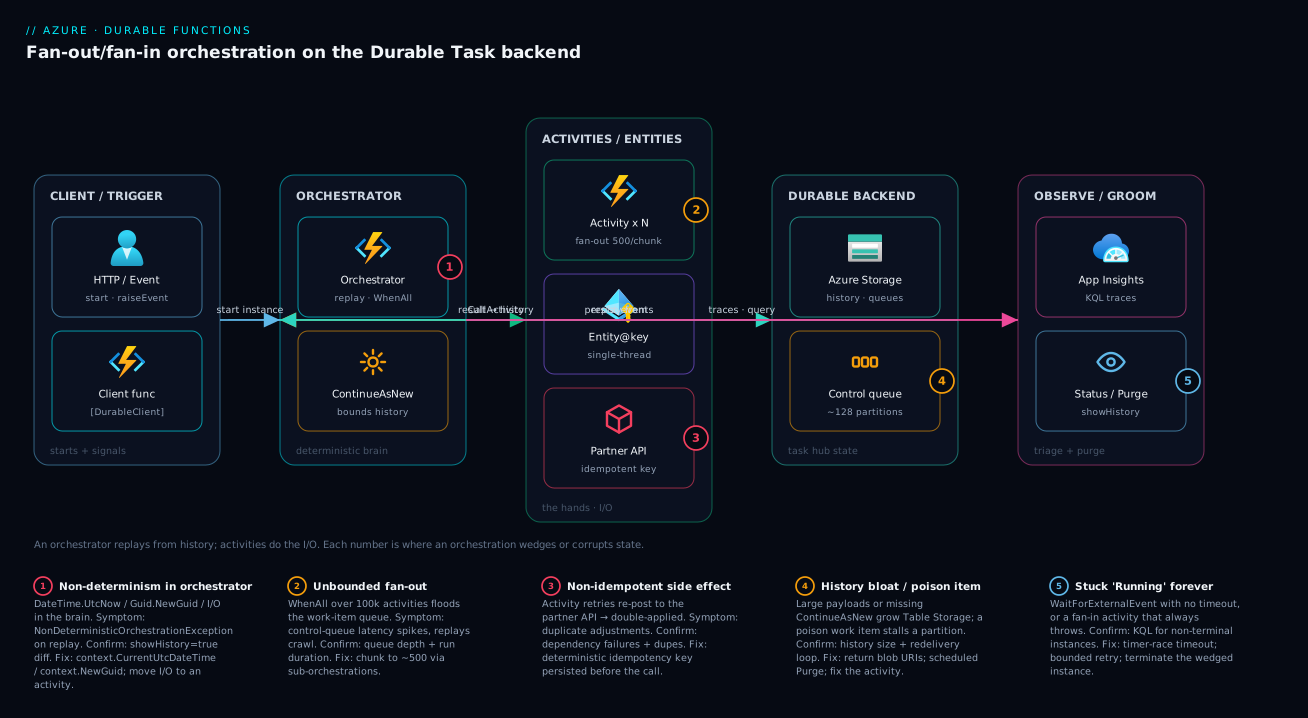
The diagram below is the request-and-state path of a fan-out/fan-in orchestration, left to right. A client/trigger (an HTTP call or an event) starts an orchestration through the [DurableClient] binding and can later raiseEvent to it. The orchestrator — the deterministic brain — schedules activities with Task.WhenAll and uses ContinueAsNew to keep eternal loops’ history flat. The work lands in the activities/entities zone: an activity fanned out (chunked to ~500 per sub-orchestration), a single-threaded entity@key holding shared state, and a partner API that must be hit with an idempotent key. All of that state — history, control queues, work-item queue — lives in the Durable backend (Azure Storage by default, with ~128 control-queue partitions, or Netherite for high throughput). Finally the observe/groom zone is where you live during an incident: App Insights for KQL traces, and the status/purge APIs to inspect history and reclaim space.
Follow the numbered badges to read the failure map onto the path. The brain is where non-determinism (1) bites; the activity zone is where unbounded fan-out (2) saturates the queue and a non-idempotent side effect (3) double-applies; the backend is where history bloat or a poison item (4) stalls a partition; and the whole instance can sit “Running” forever (5) when a WaitForExternalEvent has no timeout. The legend narrates each as symptom → confirm → fix.
Real-world scenario
A payments platform team at a fictional fintech, LedgerLink, ran a nightly settlement orchestration that fanned out one activity per merchant — roughly 40,000 of them — to reconcile transactions against a partner ledger. It worked for months. Then onboarding pushed merchant count past ~95,000 and settlement, which used to finish in 40 minutes, started running for six-plus hours and occasionally wedged in “Running” until someone terminated it manually. Worse, a few runs produced double-applied adjustments, and the partner started raising disputes.
Two root causes surfaced under investigation. First, the fan-out was unbounded: scheduling 95,000 activities in one Task.WhenAll saturated the Azure Storage work-item queue, and control-queue latency spiked so badly that replays slowed to a crawl. Second, the reconcile activity called the partner’s ledger API non-idempotently — when an activity timed out and the retry policy fired, the original call had sometimes already posted, so the adjustment landed twice. The history table had also grown to tens of GB because each activity returned the full reconciliation record instead of a reference, so every replay dragged that payload through Table Storage.
The fix had three parts. They chunked the fan-out into sub-batches of 500 with a durable sub-orchestration per chunk, capping concurrent work items. They made the activity idempotent by deriving a deterministic idempotency key (context.NewGuid() seeded per merchant, persisted before the call) and having the partner API treat a repeated key as a no-op. And because throughput was now the binding constraint, they migrated the task hub to the Netherite backend.
// Sub-orchestration per chunk bounds the fan-out width and isolates failures.
[Function(nameof(SettleChunk))]
public async Task<ChunkResult> SettleChunk(
    [OrchestrationTrigger] TaskOrchestrationContext context)
{
    var merchants = context.GetInput<string[]>()!;   // <= 500 per chunk
    var retry = TaskOptions.FromRetryPolicy(new RetryPolicy(
        maxNumberOfAttempts: 4,
        firstRetryInterval: TimeSpan.FromSeconds(10),
        backoffCoefficient: 2.0));

    var tasks = merchants
        .Select(m => context.CallActivityAsync<bool>(nameof(Reconcile), m, retry))
        .ToList();

    bool[] results = await Task.WhenAll(tasks);
    return new ChunkResult(merchants.Length, results.Count(ok => ok));
}
Settlement dropped back to ~35 minutes and stopped wedging; duplicate adjustments went to zero. The incident timeline and what each step actually changed:
| Time | Status | Action | Result | Verdict |
|---|---|---|---|---|
| Month 0 | Healthy | 40k merchants, single WhenAll |
~40 min nightly | Fine at this scale |
| Month 6, T+0 | Degraded | Merchants hit 95k; same code | 6 h+, occasional wedge | Unbounded fan-out |
| T+1 h | Investigating | Checked control-queue latency | Latency spiked, replays crawling | Queue saturation confirmed |
| T+2 h | Investigating | KQL for non-terminal instances | Found stuck “Running” runs | Wedge confirmed |
| T+1 day | Mitigated | Chunk to 500 via sub-orchestrations | Duration ~70 min | Width fixed; dupes remain |
| T+3 days | Mitigated | Idempotency key persisted pre-call | Dupes → 0 | Side effect fixed |
| T+1 week | Fixed | Migrate task hub to Netherite | ~35 min, stable | Throughput headroom |
The lesson the team wrote into their runbook: fan-out width and activity idempotency are not optional at scale. Durable Functions will happily let you schedule a hundred thousand activities and retry a non-idempotent side effect — and both will bite you in production, not in the demo.
Advantages and disadvantages
The event-sourced, replay-based model both enables code-as-workflow and imposes the determinism constraint. Weigh it honestly:
| Advantages (why this model helps you) | Disadvantages (why it bites) |
|---|---|
| Workflows are plain code — no hand-rolled queues, tables, or state machines | The orchestrator body replays, so non-deterministic code silently corrupts or throws |
| State is durable for free — survives crashes, deploys, scale-in via history | History is a real store you must groom (bloat, purge) and size |
Fan-out/fan-in across the whole scaled-out app with one Task.WhenAll |
Unbounded fan-out starves the control queue — you must chunk |
| Built-in durable timers + external events make human-in-the-loop trivial | No timeout on WaitForExternalEvent → stuck “Running” forever |
| Retries, backoff, and sub-orchestration isolation are first-class | Retries re-fire non-idempotent side effects → double-apply |
| Entities give race-free shared state without locks | Misusing an entity like an orchestration (or vice versa) hurts |
| Pluggable backends (Storage / Netherite / MSSQL) for different scale points | Switching backends is a state migration, not a config flip |
| Strong observability via App Insights traces + status/purge APIs | “Stuck” instances are invisible unless you actively query for them |
The model is right when you have genuine multi-step or long-running workflows that must survive failure and you want to ship code, not operate infrastructure. It bites hardest on very wide fan-outs (unbounded width), side-effecting activities that aren’t idempotent, eternal loops without ContinueAsNew, and teams that don’t internalize replay. Every disadvantage is manageable — but only if you know it exists, which is the point of this article.
Hands-on lab
Deploy a tiny fan-out/fan-in orchestration, watch it run, exercise the status API, then groom it with purge — free-tier-friendly on the Consumption plan; delete at the end. Run in Cloud Shell (Bash). (This lab uses the .NET isolated worker; substitute the JS/Python templates if you prefer.)
Step 1 — Variables and resource group.
RG=rg-durable-lab
LOC=centralindia
STG=stdurable$RANDOM        # 3–24 lowercase alphanumerics, globally unique
APP=func-durable-$RANDOM    # globally-unique function app name
az group create -n $RG -l $LOC -o table
Step 2 — Storage account (the default Durable backend) and the function app.
az storage account create -n $STG -g $RG -l $LOC --sku Standard_LRS -o table
az functionapp create -n $APP -g $RG --storage-account $STG \
  --consumption-plan-location $LOC --runtime dotnet-isolated \
  --functions-version 4 -o table
Expected: a function app on the Consumption plan, runtime dotnet-isolated.
Step 3 — Scaffold a Durable project locally and add a fan-out orchestration.
func init DurableLab --worker-runtime dotnet-isolated
cd DurableLab
func new --name FanOut --template "Durable Functions Orchestrator"
# Edit FanOut.cs to fan out a CallActivityAsync over a small array and Task.WhenAll the results.
Step 4 — Publish and capture the system key for the Durable HTTP APIs.
func azure functionapp publish $APP
SYS_KEY=$(az functionapp keys list -n $APP -g $RG \
  --query "systemKeys.durabletask_extension" -o tsv)
Step 5 — Start an orchestration and capture the instance ID. The HTTP-start trigger returns a status-query payload:
BASE="https://$APP.azurewebsites.net"
RESP=$(curl -s -X POST "$BASE/api/FanOut_HttpStart?code=$SYS_KEY")
echo "$RESP"
INSTANCE_ID=$(echo "$RESP" | python3 -c "import sys,json;print(json.load(sys.stdin)['id'])")
Step 6 — Query status and history.
curl -s "$BASE/runtime/webhooks/durabletask/instances/${INSTANCE_ID}?showHistory=true&code=$SYS_KEY" | head -40
# Expected: runtimeStatus transitions Pending → Running → Completed, with activity events in history.
Step 7 — Groom: purge the completed instance.
curl -s -X DELETE \
  "$BASE/runtime/webhooks/durabletask/instances/${INSTANCE_ID}?code=$SYS_KEY"
# Expected: an instancesDeleted count of 1; the history for that instance is gone.
Validation checklist. You created the Storage-backed task hub, ran a fan-out/fan-in orchestration, watched it reach Completed, inspected its event-sourced history, and purged it. The lab steps mapped to what each proves:
| Step | What you did | What it proves | Real-world analogue |
|---|---|---|---|
| 2 | Storage + function app | The default backend is just a storage account | Every first Durable deploy |
| 3 | Fan-out orchestrator | Task.WhenAll is the canonical fan-in |
Batch/parallel processing |
| 5 | HTTP-start → instance ID | The instance ID is the address for everything | Starting work from an API |
| 6 | showHistory=true |
History is real, inspectable, event-sourced | 02:14 triage of a stuck run |
| 7 | Purge API | History must be groomed or it bloats | Scheduled cleanup |
Cleanup (avoid lingering storage charges).
az group delete -n $RG --yes --no-wait
Cost note. Consumption plan + a small LRS storage account for an hour of this lab is well under ₹20; deleting the resource group stops everything. Durable’s cost on Consumption is dominated by storage transactions (every history write is a transaction), which is why grooming and small payloads matter.
Common mistakes & troubleshooting
This is the playbook — the part you bookmark. First as a scannable table you read mid-incident, then the entries that bite hardest expanded with the exact confirm commands.
| # | Symptom | Root cause | Confirm (exact cmd / path) | Fix |
|---|---|---|---|---|
| 1 | NonDeterministicOrchestrationException on replay |
DateTime.UtcNow/Guid.NewGuid/I/O in orchestrator |
Exception message; diff ?showHistory=true across replays |
Use context.CurrentUtcDateTime/NewGuid; move I/O to an activity |
| 2 | Instance stuck “Running” forever | WaitForExternalEvent with no timeout |
Status API runtimeStatus=Running for hours; KQL non-terminal query |
Add the timer-race timeout; terminate the wedged instance |
| 3 | Duplicate charges/adjustments | Non-idempotent activity + retry fired | dependencies failures + duplicate rows downstream |
Deterministic idempotency key persisted before the call |
| 4 | Settlement went from 40 min to 6 h, occasionally wedges | Unbounded fan-out saturating control queue | Control-queue latency; instance duration trend | Chunk to ~500 via sub-orchestrations; consider Netherite |
| 5 | Queries time out; history in tens of GB | Large payloads returned by value; missing purge | History table size; payload sizes in history | Return blob URIs; scheduled purge of terminal instances |
| 6 | Eternal monitor’s history grows every cycle | while(true) loop instead of ContinueAsNew |
History length grows per iteration | Replace loop with ContinueAsNew |
| 7 | A poison work item stalls a partition | Activity throws deterministically; redelivered forever | Repeating failure in logs; control/work-item queue backlog | Fix the activity; cap attempts; partition the result |
| 8 | “My orchestration ran on the wrong app” | Two apps share a storage account + hub name | Compare host.json hubName across apps |
Give each app a unique hubName |
| 9 | External event “lost” — instance never resumed | Event raised to wrong instance ID / hub, or before await with ContinueAsNew |
raiseEvent 202 but no state change; check ID/hub |
Use exact instance ID + taskHub; await events before ContinueAsNew |
| 10 | Terminating an instance didn’t stop the work | terminate doesn’t cancel in-flight activities |
Activity still logging after terminate | Make activities cancellation-aware; design for at-least-once |
| 11 | Backend latency spikes; HTTP 429 in logs | Storage account throttling under load | Storage metrics 429; backend trace latency | Scale the account / move to Netherite; reduce transactions |
| 12 | Fan-in throws aggregate, whole batch fails on one bad item | Task.WhenAll with no per-item handling |
Aggregate exception naming one activity | Switch to collect-and-partition try/catch per task |
The expanded form for the entries that bite hardest:
1. NonDeterministicOrchestrationException on replay.
Root cause: the orchestrator body did something non-deterministic — read DateTime.UtcNow, called Guid.NewGuid(), did direct I/O, or iterated an unordered collection — so the replay scheduled different work than history records.
Confirm: the exception message names the divergence; pull the instance with ?showHistory=true and compare the scheduled events against the body. Grep the orchestrator for the forbidden constructs in the table above.
Fix: replace with context.CurrentUtcDateTime / context.NewGuid(), move all I/O into activities, and sort collections to a stable order. Never retry this — it’s a code defect.
2. Instance stuck “Running” forever.
Root cause: almost always an unresolved WaitForExternalEvent with no timeout, or a fan-in where one activity throws on every retry and the host keeps redelivering it.
Confirm: the status API shows runtimeStatus: Running for far longer than expected; the fleet-wide KQL below surfaces every non-terminal instance.
Fix: add the timer-race from the human-interaction section; put bounded retry policies on activities; terminate the genuinely wedged instance.
# Inspect a single instance: status, input, output, and execution history
curl "https://myapp.azurewebsites.net/runtime/webhooks/durabletask/instances/${INSTANCE_ID}?showHistory=true&code=${SYSTEM_KEY}"

# Terminate a wedged instance (does NOT cancel in-flight activities)
curl -X POST \
  "https://myapp.azurewebsites.net/runtime/webhooks/durabletask/instances/${INSTANCE_ID}/terminate?reason=stuck&code=${SYSTEM_KEY}"
// Orchestrations that started but never reached a terminal state in 24h
traces
| where timestamp > ago(24h)
| where customDimensions.prop__functionType == "Orchestrator"
| extend instanceId = tostring(customDimensions.prop__instanceId),
         state      = tostring(customDimensions.prop__state)
| summarize states = make_set(state), last = max(timestamp) by instanceId
| where not (states has "Completed" or states has "Failed" or states has "Terminated")
| order by last asc
3. Duplicate charges/adjustments.
Root cause: a side-effecting activity isn’t idempotent, so when an attempt times out and the retry policy fires, the original call may have already succeeded — the effect lands twice.
Confirm: App Insights dependencies shows the call failing/timing out under load, and you see duplicate rows downstream. Correlate the retry timestamps with the duplicates.
Fix: derive a deterministic idempotency key (seed context.NewGuid() per logical unit), persist it before the call, and have the downstream treat a repeated key as a no-op. See Transactional Outbox/Inbox & Exactly-Once Event Publishing for the broader pattern.
5. History bloat — queries time out, history in tens of GB. Root cause: large activity payloads returned by value, and/or no purge of terminal instances. Confirm: the history Table Storage is huge; individual history rows carry large payloads. Fix: return references (blob URIs, row keys) instead of big blobs, and schedule a purge so history is groomed continuously instead of growing until queries time out.
# Purge completed/failed/terminated instances older than a cutoff
curl -X DELETE \
  "https://myapp.azurewebsites.net/runtime/webhooks/durabletask/instances?createdTimeTo=2026-03-01T00:00:00Z&runtimeStatus=Completed,Failed,Terminated&code=${SYSTEM_KEY}"
Schedule that purge (a timer-triggered function calling client.PurgeInstancesAsync) so history is groomed continuously.
The error/exception reference you scan first — every error you realistically see, what it means, and the fix:
| Error / status | Meaning | Likely cause | How to confirm | First fix |
|---|---|---|---|---|
NonDeterministicOrchestrationException |
Replay scheduled different work than history | Clock/GUID/I/O in orchestrator | Exception text; showHistory diff |
Use context APIs; move I/O to activities |
OrchestrationFailureException |
Orchestrator threw and faulted | Unhandled exception in body or activity aggregate | Instance output / failure details |
Fix the throwing path; handle aggregates |
TaskFailedException |
An activity exhausted its retries | Persistent activity failure | Activity logs; dependencies |
Fix the activity; tune retry/idempotency |
runtimeStatus: Running (stuck) |
Never reached terminal state | Unbounded wait / poison retry | Status API; KQL non-terminal | Timer-race; terminate; fix poison item |
runtimeStatus: Failed |
Terminal failure | Faulted orchestrator/activity | Instance output | Read output; fix root cause |
runtimeStatus: Terminated |
Manually stopped | terminate was called |
Status API reason | Was the in-flight work cancelled? |
| HTTP 404 on raiseEvent/status | Instance not found | Wrong instance ID / wrong hub | Verify ID + taskHub query |
Use exact ID and hub name |
| HTTP 429 (backend) | Storage throttling | Heavy transaction volume | Storage account metrics | Scale account / Netherite; cut transactions |
| HTTP 410 Gone (status URL) | Status webhook expired/purged | Instance purged | — | Re-query by ID if still present |
Decision table for the on-call engineer — if you see…:
| If you see… | It’s probably… | Do this |
|---|---|---|
NonDeterministicOrchestrationException |
Clock/GUID/I/O in the orchestrator | Fix the body; never retry |
| One instance “Running” for hours | A wait with no timeout, or poison retry | KQL to confirm; add timeout; terminate |
| Many instances slow at once | Backend saturation / unbounded fan-out | Check control-queue latency; chunk fan-out |
| Duplicate downstream effects | Non-idempotent activity + retry | Add idempotency key |
| Queries timing out, huge history | Bloat | Smaller payloads; scheduled purge |
| Work running on the “wrong app” | Shared task hub | Unique hubName per app |
| Event raised but nothing resumed | Wrong ID/hub, or dropped at ContinueAsNew |
Verify ID/hub; await before ContinueAsNew |
| Terminate didn’t stop the work | terminate ignores in-flight activities |
Make activities cancellation-aware |
| Backend 429s under load | Storage account throttling | Scale account / Netherite; cut transactions |
| Same exception every replay, no retry helps | Code defect in the body | Fix it — never retry a non-determinism error |
Common beginner mistakes
These are not symptom→fix entries (the troubleshooting table above is that). These are the wrong mental models beginners carry in — the belief that quietly generates the incident. Fix the model and the bug never ships.
| The belief (wrong) | The right model |
|---|---|
| “The orchestrator runs once, top to bottom.” | It replays from history many times as it makes progress — which is why clocks, randomness, and I/O are banned in the body. |
“await-ing a 3-day timer blocks a thread for 3 days.” |
The orchestrator unloads from memory while waiting; a pending wait costs nothing. You are not holding a thread (or paying for one) during the wait. |
“A durable timer is just Task.Delay/sleep.” |
It’s a persisted event the framework restores after a restart. Task.Delay is wall-clock and evaporates when the host recycles. |
| “Adding a retry policy makes my activity safe.” | Retries only help idempotent activities. On a non-idempotent side effect, retries re-fire it — that’s how you double-charge. |
| “An entity is a lightweight orchestration.” | Opposite roles: an entity holds state, an orchestration coordinates a workflow with a start and end. Using one for the other’s job hurts. |
| “Fan-out is free — just schedule them all.” | Fan-out width has a real cost; an unbounded Task.WhenAll over tens of thousands of activities starves the backend queues. Chunk it. |
| “My log lines appear once.” | They duplicate on every replay unless guarded by context.IsReplaying or emitted through the replay-safe logger. |
| “I can change the orchestrator whenever I want.” | In-flight instances replay old history; reordering or removing steps throws NonDeterministicOrchestrationException. Version or drain first. |
| “The instance ID is a throwaway value.” | It’s the address for status, raiseEvent, terminate, and purge — and for a singleton you deliberately reuse a fixed ID to prevent duplicate runs. |
Three worth expanding, because they cause the most self-inflicted 2 a.m. pages:
“The orchestrator runs once.” This single misconception generates most Durable bugs. Everything odd about the model — no DateTime.UtcNow, no HttpClient, no Guid.NewGuid(), guarded logging — is a direct consequence of replay. Internalize “it re-runs from the top, feeding finished results from a logbook” and the entire rulebook stops feeling arbitrary.
“await blocks / costs money while waiting.” Beginners avoid long human-approval waits because they picture a server pinned for three days. The orchestrator is dehydrated to storage while it waits and rehydrated when the event or timer fires. Long waits are cheap and normal — that’s the point of the model, not a thing to engineer around.
“Retries = safety.” The most expensive wrong model. Durable will happily retry a non-idempotent POST /charge, and the retry lands after the original quietly succeeded. Safety comes from a deterministic idempotency key the downstream dedups on — the retry policy is just timing. Wire the key first, then turn up the retries.
Best practices
- Keep orchestrators pure. No
DateTime.UtcNow,Guid.NewGuid(), randomness, or direct I/O — usecontext.CurrentUtcDateTime,context.NewGuid(), andIsReplaying-guarded logging. This is the rule that prevents the most production incidents. - All I/O and side effects live in activities or entities, never in orchestrator bodies.
- Keep payloads small and serializable. Pass large data by reference (a blob URI), not by value — it bloats the history table and slows every replay.
- Carry explicit, bounded retry policies on activities, and choose the fan-in failure policy (
WhenAllvs collect-and-partition) deliberately rather than by default. - Bound fan-out width with chunking or sub-orchestrations (~500/chunk) instead of scheduling unlimited activities at once.
- Make side-effecting activities idempotent so retries and redeliveries can’t double-apply — derive and persist a deterministic idempotency key.
- Pair every
WaitForExternalEventwith a durable-timer timeout and cancel the loser, so no instance can hang forever. - Use
ContinueAsNewfor every long-lived orchestration to bound history; neverwhile(true). - Use durable entities for shared mutable state (single-threaded) instead of ad-hoc locking.
- Choose the backend for the workload — Azure Storage default, Netherite for high throughput, MSSQL for portability — and give every app a unique
hubNameon shared storage. - Schedule a purge of terminal instances so the history table doesn’t bloat, and keep App Insights/KQL queries on hand to find non-terminal instances.
- Test determinism deliberately — a temporary
DateTime.UtcNowin an orchestrator should throwNonDeterministicOrchestrationException; confirm the guardrail is active.
The signals worth alerting on before the next incident — leading indicators, not “the orchestration failed”:
| Alert on | Signal / source | Threshold (starting point) | Why it’s leading |
|---|---|---|---|
| Non-terminal instance age | KQL non-terminal query | Any instance Running > expected SLA | Catches stuck “Running” before users notice |
| Control-queue latency | Backend traces / metrics | Rising trend under load | Predicts fan-out saturation |
| Storage throttling | Storage account 429 count | > 0 sustained | Backend is the bottleneck |
| History table size | Storage metrics | Growth without purge | Predicts query timeouts |
| Activity failure rate | dependencies success=false |
> 1% sustained | Poison items / retries firing |
| Orchestration duration | App Insights custom metric | p95 > baseline | Width or backend regression |
Security notes
- Managed identity over secrets. The function app’s connection to its Durable storage account, and any secrets your activities need, should use the app’s managed identity with Key Vault references rather than plaintext connection strings. Grant least privilege —
Storage Blob/Queue/Table Data Contributorscoped to the task-hub account, andKey Vault Secrets Userfor secrets. See Azure Key Vault: Secret Rotation with Managed Identity. - Protect the Durable HTTP management APIs. The
raiseEvent,terminate,purge, and status endpoints are gated by thedurabletask_extensionsystem key — treat it like a credential, never log it, and prefer calling the management APIs from trusted backends or through APIM rather than exposing them. - Validate external-event payloads. An external event is an untrusted input from outside the orchestration; validate and authorize the caller of
raiseEvent(who can approve a purchase?) at the HTTP layer before the signal reaches the instance. - Isolate the network. For sensitive workloads, VNet-integrate the function app and reach storage/SQL/partner APIs over Private Endpoints so task-hub traffic and activity I/O stay off the public internet.
- Don’t leak state in errors. Instance
outputand history can contain business data; keep detailed failure output out of anonymous-facing responses and lock down who can query the status API. - Secure the backend store. Restrict the Durable storage account / Event Hubs / SQL with firewall rules and private access; it holds the full event-sourced history of every workflow.
The security controls that also prevent these incidents — secure and resilient pull the same way:
| Control | Mechanism | Secures against | Also prevents |
|---|---|---|---|
| Managed identity to storage | identity + RBAC on the account |
Connection strings in config | Secret-rotation breaking the backend connection |
| System-key protection on mgmt APIs | durabletask_extension key + APIM |
Anonymous terminate/purge/raiseEvent | Malicious instance manipulation |
Authorize raiseEvent callers |
HTTP auth before the signal | Unauthorized approvals | Spoofed external events corrupting flow |
| Private Endpoints for storage/SQL/API | VNet + private DNS | Data exfiltration over public net | SNAT/egress surprises in activities |
| Vault firewall + trusted services | Key Vault networking | Secret exfiltration | KV-reference boot failures (when allow-listed) |
| Least-privilege RBAC on the account | Scoped data-plane roles | Over-broad access to history | Accidental cross-hub interference |
Cost & sizing
The bill drivers and how they interact with the patterns:
- Storage transactions dominate on Azure Storage. Every history write, every queue operation, every status poll is a billable transaction. A chatty orchestration with large payloads and frequent polling can run a surprising storage bill — which is exactly why small payloads, fewer activities, and scheduled purge are cost levers, not just performance ones.
- Compute follows your hosting plan. On Consumption you pay per-execution + GB-seconds; Premium (EP) and Dedicated trade a floor cost for no cold start and VNet. Fan-out multiplies executions — 95,000 activities is 95,000 executions plus their history writes.
- Netherite adds Event Hubs cost (throughput units) and Page Blob storage — justified only when you’re processing tens of thousands of work items per second and Azure Storage latency is the binding constraint.
- MSSQL adds SQL compute (DTU/vCore) you size and pay for — chosen for portability/single-store rather than cost.
- Polling is a hidden cost. Clients that poll the status URL in a tight loop generate transactions; back off the poll interval.
A rough monthly picture for a moderate workload (a few hundred thousand activity executions/day, small payloads, groomed history) on Consumption: storage transactions plus execution charges typically land in the low thousands of INR; the same workload on Premium EP1 adds a floor of roughly ₹12,000–18,000/month for the always-warm instance. The cost drivers and what each buys you:
| Cost driver | What you pay for | Rough INR / month | What it fixes | Watch-out |
|---|---|---|---|---|
| Storage transactions (history/queues) | Per-transaction on the account | ~₹500–3,000 (workload-dependent) | (it’s the backend itself) | Large payloads + polling inflate it |
| Consumption executions | Per-execution + GB-seconds | Pennies per 10k executions | Cheapest entry; scales to zero | Cold start; fan-out multiplies count |
| Premium plan (EP1+) | Always-warm instance floor | ~₹12,000–18,000+ | Cold start, VNet, predictable latency | Pay even when idle |
| Netherite (Event Hubs TU + blobs) | Throughput units + Page Blobs | ~₹8,000+ | Throughput ceiling under heavy fan-out | Over-provisioned at low scale |
| MSSQL backend | SQL DTU/vCore + storage | depends on SQL tier | Portability, single backed-up store | You operate the SQL |
| App Insights ingestion | Per-GB telemetry | ~₹1,000–3,000 | Triage (KQL, traces) | Sample high-volume apps |
Free-tier note: the Consumption plan includes a monthly grant of free executions and GB-seconds, so small Durable workloads cost mostly the (cheap) storage transactions — keep payloads small and purge terminal instances and the bill stays tiny.
Going deeper
The patterns above are the day-one curriculum. Four things separate a demo that works from a Durable app you can operate for years: versioning code that has instances mid-flight, exposing a long-running workflow to a caller, the newer managed backend Microsoft is steering new apps toward, and the hosting plan you run it on. None of these are in the sections above; all of them show up the first time you run Durable Functions in anger.
Versioning: changing orchestrator code while instances are in flight
Here is the trap the replay model sets that nobody warns you about. An in-flight instance replays its own recorded history against whatever orchestrator code is currently deployed. If you change the shape of the orchestrator — reorder two activities, insert a step, delete one — a three-day approval instance that started on the old code will, on its next replay, schedule different work than its history records and throw NonDeterministicOrchestrationException. The code was fine. The deployment broke it.
So orchestrator changes fall into two buckets, and you must know which one you’re shipping:
| Change you deploy | Effect on in-flight instances | Why | Safe way to ship it |
|---|---|---|---|
| Add a brand-new orchestrator (new function name) | None | Nothing in flight ever scheduled it | Just deploy |
| Append steps reached only on a new input/branch | Usually safe | Old histories never reach the new path | Gate behind an input flag |
| Reorder / insert / delete an activity in the existing path | Breaks replay | Replay schedules different work than history → NonDeterministicOrchestrationException |
Side-by-side or drain first |
| Change an activity’s input/output DTO shape | Risky | Serialized payloads already in history may fail to deserialize on replay | Additive, nullable fields only |
| Rename or remove the orchestrator function | Breaks in-flight | Running instances can’t locate their code | New name; keep the old until drained |
Four mitigation strategies, cheapest first. Additive-only edits — new nullable fields, new branches guarded by input — never break replay and need no ceremony. Drain — stop new starts, let existing instances reach a terminal state, then deploy the breaking change; fine when your instances are short-lived, useless when they run for days. Versioned function names — ship ProcessOrderV2 alongside ProcessOrder, route new starts to V2, and retire V1 once its instances drain; the two versions coexist cleanly because they are different code. Side-by-side deployment — the heaviest hammer: deploy the new build to a new task hub (a new hubName, or a whole new app) and route new starts there, so old instances finish undisturbed on the old hub’s queues and tables. Entities need the same discipline: version their serialized state and tolerate reading an older shape, because an entity outlives every deployment.
The async HTTP API pattern and custom status
The lesson’s five patterns all live inside the orchestrator. The async HTTP API pattern is the missing outside half: how a caller starts a workflow that may run for hours and then finds out how it’s going. The Durable client hands you a ready-made 202 Accepted response carrying the URLs a caller polls.
[Function("StartOrder")]
public async Task<HttpResponseData> StartOrder(
    [HttpTrigger(AuthorizationLevel.Function, "post")] HttpRequestData req,
    [DurableClient] DurableTaskClient client)
{
    string instanceId = await client.ScheduleNewOrchestrationInstanceAsync(
        nameof(ProcessOrder), await req.ReadFromJsonAsync<OrderInput>());

    // 202 Accepted + statusQueryGetUri / sendEventPostUri / terminatePostUri for the caller to poll:
    return await client.CreateCheckStatusResponseAsync(req, instanceId);
}
The caller polls statusQueryGetUri until runtimeStatus is terminal. Two refinements make this production-grade. For a caller that would rather wait a few seconds than poll, await client.WaitForInstanceCompletionAsync(instanceId, getInputsAndOutputs: true, ct) blocks up to a timeout, then you fall back to returning the check-status response. And to show progress rather than a bare “Running”, set a custom status from inside the orchestrator:
context.SetCustomStatus(new { stage = "reconciling", done = i, total = n });
SetCustomStatus is replay-safe — it overwrites a single value rather than appending to history, so it costs nothing and never bloats the history table — and pollers read it straight off the status payload. It is the right way to surface “12,000 of 50,000 done” to a dashboard without turning progress into a history-bloat problem. Pair it with instance-level tracing in Azure Monitor and a stuck instance becomes a glance, not an investigation.
The monitor pattern, named
The eternal-orchestration example earlier (PeriodicMonitor) is actually the canonical monitor pattern: an orchestration that polls a condition on a durable-timer cadence and exits when the condition is met (or a deadline passes), using ContinueAsNew to keep history flat. Two things complete it. Give it a singleton instance ID — a fixed, well-known ID — and check for an existing non-terminal instance before starting, so a timer-triggered starter can’t accidentally run two monitors for the same target. And attach a custom status so the async HTTP API above can report what the monitor last observed. Monitor + async-HTTP + singleton is the standard shape for “watch this thing until it’s ready, and let a client ask how it’s going.”
The Durable Task Scheduler — the newer managed backend
The three backends the lesson covers (Azure Storage, Netherite, MSSQL) share one property: you operate the state store — its throughput, its firewall, its backups. The Durable Task Scheduler (DTS) is a newer, Microsoft-managed backend purpose-built for the Durable Task Framework, and it is the direction Microsoft is steering new, demanding Durable workloads. Treat it as a fourth option beyond the three above.
What it changes:
- A managed state store, not your storage account. Orchestration and entity state live in a dedicated managed resource; you stop sizing queues and grooming Table Storage yourself.
- A built-in monitoring dashboard. Inspect instances, inputs/outputs, and history visually instead of hand-writing KQL against
tracesfor every triage — a real quality-of-life jump over the Azure Storage provider. - Higher, more predictable throughput and latency for orchestration- and entity-heavy apps than the Azure Storage provider, without Netherite’s Event Hubs operational overhead.
- Managed-identity-first connections to the scheduler resource.
Currency and caveats: DTS entered public preview in late 2024 and reached general availability in 2025 — confirm current regional availability and pricing against the docs before you commit, because both are still expanding. It is a distinct billed resource, and moving an existing hub onto it is a state migration (the same “decide before millions of live instances” caveat that applies to switching any provider). Choose it for new high-throughput apps where you want a managed store plus a first-class dashboard and you’d rather not operate Storage, Event Hubs, or SQL yourself; stay on the default Azure Storage provider for ordinary apps that never feel its ceiling.
Hosting: Flex Consumption and the plan choice
The Cost section weighs Consumption vs Premium (EP) vs Dedicated. The newer Flex Consumption plan (now generally available) is the modern serverless SKU and usually the better default than classic Consumption: fast, per-instance-concurrency scaling, optional always-ready instances to blunt cold start, and built-in VNet integration — without paying a full Premium floor. Durable-specific notes:
- Durable Functions runs on Flex Consumption; the default Azure Storage provider is supported. Prefer managed-identity connections for the backend over connection strings.
- Flex scales on concurrency per instance, not a scale-controller counting queue depth — so tune the concurrency knobs rather than reasoning about instance counts, and remember a fan-out’s real limiter is still the backend queues, not the plan.
- Verify the provider support matrix on Flex as it evolves — support for Netherite, MSSQL, and DTS on a given plan changes over time, so check the current docs before pinning a backend to a plan.
Finally, know when not to reach for Durable at all: a single queue trigger with no ordering or long-running state doesn’t need an orchestrator, and if you’re already standardizing on containers, Dapr Workflow on Azure Container Apps solves the same problem with a strikingly similar replay model — see Azure Container Apps: Dapr, KEDA, Revisions & Ingress. Durable Functions wins when you want stateful workflows-as-code and the serverless Functions programming model in one place.
Practice challenges
Work these top to bottom — they escalate from “spot the bug” to “ship a breaking change safely.” Each has a worked solution; try it before you open the toggle. All identifiers are placeholders and the snippets are illustrative (.NET isolated worker), not live-run.
Challenge 1 — Beginner: spot and fix the determinism bugs. This orchestrator throws NonDeterministicOrchestrationException on replay. Name both offending lines and rewrite them replay-safe.
[Function(nameof(MakeBooking))]
public async Task<string> MakeBooking([OrchestrationTrigger] TaskOrchestrationContext context)
{
    var input = context.GetInput<BookingInput>()!;
    var reference = Guid.NewGuid().ToString();          // (?)
    if (DateTime.UtcNow.Hour >= 22) return "Closed";     // (?)
    return await context.CallActivityAsync<string>(nameof(Reserve), (input, reference));
}
<details><summary>Solution</summary>
var reference = context.NewGuid().ToString();      // deterministic per instance + call counter
if (context.CurrentUtcDateTime.Hour >= 22) return "Closed";   // frozen-per-replay clock
Both Guid.NewGuid() and DateTime.UtcNow return a different value on every replay, so the orchestrator would schedule different work than history records and throw. Why it matters: determinism is the one rule the entire replay model depends on — clocks and IDs must come from context.
</details>
Challenge 2 — Beginner: chain three steps without bloating history. Write a download → transcode → publish chain for a 2 GB video. The catch: nothing you pass between steps may bloat the history table.
<details><summary>Solution</summary>
Each activity returns a blob URI (a small string), never the bytes; the orchestrator threads the URI through:
string src  = await context.CallActivityAsync<string>(nameof(Download), input.Url);   // returns a blob URI
string enc  = await context.CallActivityAsync<string>(nameof(Transcode), src);          // reads/writes blobs, returns a URI
string live = await context.CallActivityAsync<string>(nameof(Publish), enc);
return live;
Why it matters: every activity output is serialized into history by value — returning a 2 GB payload drags it through Table Storage on every replay. References keep replay fast and cheap. </details>
Challenge 3 — Intermediate: an approval that can’t hang forever. Implement a step that waits up to 48 hours for an ApprovalResponse external event, and times out cleanly if nobody responds.
<details><summary>Solution</summary>
Race the event against a durable timer and cancel the loser:
using var cts = new CancellationTokenSource();
Task timeout       = context.CreateTimer(context.CurrentUtcDateTime.AddHours(48), cts.Token);
Task<bool> approved = context.WaitForExternalEvent<bool>("ApprovalResponse");

if (await Task.WhenAny(approved, timeout) == approved)
{
    cts.Cancel();                       // tear down the pending timer
    return approved.Result ? "Approved" : "Rejected";
}
return "TimedOut";                        // escalate
Why it matters: a bare WaitForExternalEvent with no timer is the #1 cause of instances stuck “Running” forever — the timer guarantees a terminal state.
</details>
Challenge 4 — Intermediate: tame a 50,000-item fan-out. A single Task.WhenAll over 50,000 activities has started wedging the backend, and one poison item currently fails the whole run. Redesign it.
<details><summary>Solution</summary>
Chunk into sub-orchestrations of ~500, and use a best-effort partition fan-in inside each chunk so one bad item can’t sink 499 good ones:
// Parent: bound the in-flight width
for (int i = 0; i < all.Length; i += 500)
    chunkTasks.Add(context.CallSubOrchestratorAsync<ChunkResult>(
        nameof(ProcessChunk), all.Skip(i).Take(500).ToArray()));

// Inside ProcessChunk: collect successes and failures instead of one throwing WhenAll
foreach (var item in items)
    try   { ok.Add(await context.CallActivityAsync<Result>(nameof(Handle), item)); }
    catch (Exception ex) { failed.Add((item, ex.Message)); }
Why it matters: unbounded WhenAll saturates the work-item/control queues, and all-or-nothing fan-in throws away 49,999 successes because of one poison item. Bounded width fixes the backend; per-item try/catch fixes the failure policy.
</details>
Challenge 5 — Advanced: make a payment activity exactly-once. ChargeCard double-charges when its retry fires after a timed-out attempt already succeeded. Fix it without removing retries.
<details><summary>Solution</summary>
Derive a deterministic idempotency key in the orchestrator (so it is stable across every retry and replay because it lives in history), and have the gateway dedup on it:
// In the orchestrator — computed ONCE, recorded in history, identical on every replay:
string idemKey = context.NewGuid().ToString();     // seeded from instanceId + counter
await context.CallActivityAsync(nameof(ChargeCard), new ChargeRequest(order, amount, idemKey), retry);
// The activity sends idemKey to the gateway; a repeated key returns the ORIGINAL result as a no-op.
Why it matters: retries re-fire side effects by design. A stable key generated outside the activity (never Guid.NewGuid() inside it, which changes per attempt) makes the charge exactly-once at the gateway.
</details>
Challenge 6 — Advanced: ship a breaking change with 3-day approvals in flight. You must reorder two activities in an orchestrator whose approval instances routinely run for three days. Deploy without a single NonDeterministicOrchestrationException.
<details><summary>Solution</summary>
Never edit the running version in place — in-flight instances replay their old history against the deployed code, and reordered activities diverge. Pick one:
- Side-by-side (safest): deploy the new build to a new task hub (
hubName) or a new app, route only new starts there, and let the old hub drain its 3-day instances on the old code. Retire the old hub once it’s empty. - Versioned orchestrator: add
ProcessOrderV2with the new order, start new instances against it, and keepProcessOrderdeployed until its instances drain. - Drain (only if you can pause new work): stop new starts, wait for existing instances to reach a terminal state, then deploy the change to the same hub.
Why it matters: the old code path must stay reachable until every instance that recorded it has finished — that is the whole discipline of orchestrator versioning. </details>
Interview & exam questions
1. Why must an orchestrator function be deterministic, and name three things you can’t do in one? Because the orchestrator replays from history every time it makes progress, it must schedule the same work in the same order given the same history — non-determinism diverges history and corrupts state (the SDK throws NonDeterministicOrchestrationException). You can’t use DateTime.UtcNow, Guid.NewGuid(), or direct I/O (HttpClient, DB) in the body — use context.CurrentUtcDateTime, context.NewGuid(), and activities instead.
2. What is the fan-out/fan-in pattern and what’s the canonical fan-in? Fan-out schedules many independent activities in parallel (build a list of CallActivityAsync tasks without awaiting each); fan-in waits for them all. The canonical fan-in is await Task.WhenAll(tasks) over the Durable tasks — replay-safe and durable, so a crash after 900 of 1,000 completions resumes with only the outstanding 100.
3. How do you bound a very large fan-out and why must you? Scheduling, say, 100,000 activities in one Task.WhenAll saturates the work-item/control queues and starves other orchestrations, spiking latency. Bound it by chunking — a sub-orchestration per ~500 items via CallSubOrchestratorAsync — which caps in-flight work and isolates failures to a chunk.
4. How do you implement a human-approval step that won’t hang forever? Race a WaitForExternalEvent against a durable timer with Task.WhenAny: if the event wins, cancel the timer and return; if the timer wins, escalate/time out. Use context.CreateTimer (persisted, survives restart), never Task.Delay, and always cancel the loser so the instance doesn’t stay open.
5. What does ContinueAsNew do and when do you need it? It restarts the orchestration with a clean history and fresh input, which is how you run an eternal orchestration (monitor, recurring job) without the history table growing unbounded. Drain pending events first, and make the ContinueAsNew call the last statement on the branch — it schedules a restart, it doesn’t return.
6. When do you use a durable entity instead of an orchestration? Use an orchestration for a workflow with a defined start and end; use an entity for long-lived, mutable state that many callers update concurrently (counters, carts, per-tenant budgets, rate limits). Entities guarantee single-threaded access per entityName@key, giving race-free updates without locks.
7. An activity that posts to a partner API double-applied during retries. Why, and how do you fix it? The activity isn’t idempotent: an attempt timed out and the retry fired after the original call had already posted. Fix it by deriving a deterministic idempotency key (seed context.NewGuid() per unit, persist before the call) and having the downstream treat a repeated key as a no-op — so retries and redeliveries can’t double-apply.
8. Compare the three storage backends. Azure Storage (default) is lowest-ops and cheapest at low scale but has a throughput ceiling under heavy fan-out; Netherite (Event Hubs + Page Blobs) gives very high throughput and low latency at the cost of operational complexity; MSSQL gives portability and a single backed-up store for hybrid/on-prem at the cost of running SQL. Switching is a state migration, so choose before millions of instances exist.
9. Two function apps’ orchestrations are interfering. Most likely cause? They share a storage account and the same hubName, so they’re reading each other’s queues and tables (the “ran on the wrong app” incident). Give each app a unique hubName in host.json (or separate storage accounts).
10. How do you find and recover a stuck “Running” instance? Query the status API (?showHistory=true) for the instance, or run a fleet-wide KQL over traces for instances with no terminal state. The usual cause is a WaitForExternalEvent with no timeout or a poison-item retry loop — fix the code (timer-race, bounded retries) and terminate the wedged instance (knowing terminate doesn’t cancel in-flight activities).
11. What causes history-table bloat and how do you control it? Large activity payloads returned by value, and missing purge of terminal instances. Return references (blob URIs/row keys) instead of big blobs, and schedule a purge (PurgeInstancesAsync) of completed/failed/terminated instances so history is groomed continuously instead of growing until queries time out.
12. Does terminating an instance stop its in-flight activities? No — terminate marks the orchestration terminated but does not cancel activities already running. Design activities to be cancellation-aware and assume at-least-once execution so a terminated-but-still-running activity can’t corrupt downstream state.
These map primarily to AZ-204 (Developer Associate) — implement Azure Functions; develop event-based and message-based solutions — and the durable-orchestration patterns appear in solution-architecture scenarios on AZ-305. A compact cert-mapping for revision:
| Question theme | Primary cert | Objective area |
|---|---|---|
| Replay model & determinism | AZ-204 | Implement Azure Functions |
| Fan-out/fan-in, sub-orchestration | AZ-204 | Develop message/event solutions |
| Human-in-the-loop (events/timers) | AZ-204 | Durable Functions patterns |
| Entities vs orchestrations | AZ-204 / AZ-305 | Stateful serverless design |
| Backend choice & scaling | AZ-305 | Design for throughput/cost |
| Idempotency & exactly-once | AZ-204 / AZ-305 | Reliable messaging design |
Quick check
- You add
DateTime.UtcNowto an orchestrator and it throws on replay. What exception, and what’s the deterministic replacement? - An approval orchestration sits in “Running” for three days and never finishes. What’s the most likely cause and the fix?
- A nightly job that fanned out 95,000 activities in one
Task.WhenAllwent from 40 minutes to 6 hours. Name the root cause and the fix. - Your activity posts to a payment API and you see duplicate charges after a deploy. Why, and what makes it safe?
- Two function apps share a storage account and one app’s orchestration “runs on the other app.” What single setting fixes it?
Answers
NonDeterministicOrchestrationException. The orchestrator replays, so an ambient clock produces a different value each replay and diverges history. Replace it withcontext.CurrentUtcDateTime(and usecontext.NewGuid()for IDs); move any I/O into an activity.- A
WaitForExternalEventwith no timeout — nothing ever raised the event, so the instance waits forever. Fix by racing the wait against a durable timer withTask.WhenAny, cancelling the loser;terminatethe already-wedged instance. - Unbounded fan-out saturated the work-item/control queues and starved replays. Fix by chunking into sub-orchestrations (~500/chunk) to bound in-flight width, and consider migrating the task hub to Netherite for throughput headroom.
- The activity isn’t idempotent: a timed-out attempt’s retry posted again after the original had already succeeded. Make it safe with a deterministic idempotency key (seeded
context.NewGuid(), persisted before the call) that the downstream treats as a no-op on repeat. - Give each app a unique
hubNameinhost.json— they were sharing one task hub (the same queues and tables) on the shared storage account.
Glossary
- Orchestrator function — the deterministic “brain” (
[OrchestrationTrigger]) that schedules activities and sub-orchestrations; it replays from history and must be pure. - Activity function — a unit of real work / I/O (
[ActivityTrigger]); runs once per logical call (with retries), inputs/outputs serialized to JSON in history. - Durable entity — an addressable, persistent, single-threaded state object (
entityName@key) for race-free shared state without locks. - Client binding —
[DurableClient]; the way external code starts, queries, signals (raiseEvent), terminates, and purges orchestrations. - Replay — re-executing the orchestrator body from the start, feeding completed results from history; the reason determinism is required.
NonDeterministicOrchestrationException— thrown when a replay schedules different work than history records; a code defect, never a transient error.- History table — the event-sourced record of an instance’s execution; the source of replay and of bloat if payloads are large or purge is missing.
- Task hub — the namespace (
hubNameinhost.json) for all of an app’s Durable queues and tables; must be unique per app on shared storage. - Instance ID — the unique key addressing one orchestration run; used for status,
raiseEvent,terminate, and purge. - Fan-out/fan-in — scheduling many activities in parallel (fan-out) and aggregating their results with
Task.WhenAll(fan-in). - Sub-orchestration — an orchestration called from another (
CallSubOrchestratorAsync); used to bound fan-out width and isolate failures. - External event — a named signal delivered to a running instance via the
raiseEventAPI; paired with a durable timer for human-in-the-loop. - Durable timer — a persisted, replay-safe deadline (
context.CreateTimer) that survives host restarts; neverTask.Delay. ContinueAsNew— restarts an orchestration with fresh state and clean history; bounds the history of eternal orchestrations.- Idempotency key — a deterministic key (seed
context.NewGuid(), persisted before the side effect) that makes an activity safe to retry without double-applying. - Storage provider — the backend that persists state: Azure Storage (default), Netherite (Event Hubs + Page Blobs), or MSSQL.
- Purge — deleting terminal-instance history (
PurgeInstancesAsync/ DELETE API) to reclaim space and keep queries fast. - Determinism — the property that an orchestrator makes the same decisions and schedules the same work on every replay; broken by clocks, randomness, direct I/O, or unordered iteration in the body.
- Control queue / work-item queue — on the Azure Storage backend, the internal queues that carry orchestrator wake-ups (control queues, partitioned ~128-wide) and pending activity executions (the work-item queue); saturating them is exactly what an unbounded fan-out does.
- Async HTTP API pattern — starting an orchestration over HTTP and returning
202 Acceptedwith astatusQueryGetUrithe caller polls (CreateCheckStatusResponseAsync); the standard way to expose a long-running workflow to a client. - Custom status — arbitrary progress data attached to a running instance with
context.SetCustomStatus(...)and read back from the status endpoint; replay-safe (it overwrites rather than appends) and doesn’t bloat history. - Monitor pattern — an eternal orchestration that polls a condition on a durable-timer cadence and exits when it’s met; built with
ContinueAsNewand usually a singleton instance ID. - Durable Task Scheduler (DTS) — a newer Microsoft-managed Durable backend (GA in 2025) that holds orchestration/entity state in a dedicated managed resource and ships a built-in monitoring dashboard, aimed at high-throughput apps; a fourth option beyond Azure Storage / Netherite / MSSQL.
- Orchestrator versioning — managing code changes so in-flight instances (which replay old history) don’t hit
NonDeterministicOrchestrationException; done via additive-only edits, versioned function names, draining, or side-by-side deployment. - Side-by-side deployment — running the new orchestrator version on a new task hub or app while in-flight instances finish on the old one, then retiring the old hub; the standard breaking-change rollout.
- Flex Consumption — the modern serverless Functions hosting plan (per-instance concurrency, always-ready instances, built-in VNet) that Durable Functions runs on; tune concurrency rather than instance count.
- Singleton orchestration — enforcing at most one running instance of a workflow by reusing a fixed instance ID and checking existing status before starting; used for monitors and cron-like schedulers.
Next steps
You can now build the five Durable patterns correctly and triage a stuck orchestration. Build outward:
- Next: Azure Functions: Serverless Patterns & Best Practices — the plain-trigger foundations under Durable, and when not to reach for orchestration.
- Related: Azure Service Bus: Sessions, Dedup & Dead-Letter Patterns — when you outgrow Durable’s built-in queues and need first-class messaging.
- Related: Transactional Outbox/Inbox & Exactly-Once Event Publishing — the idempotency and dedup patterns that keep side-effecting activities safe.
- Related: Azure Monitor & Application Insights for Observability and KQL for Azure Monitor & Log Analytics — the telemetry that turns a stuck-instance mystery into a two-minute query.
- Related: AWS Step Functions: Distributed Orchestration & Error-Handling Patterns — the same orchestration problems solved the AWS way, for contrast.