Azure Container Apps (ACA) sits in the gap between “I just want to run a container” and “I’m operating a Kubernetes cluster.” Under the hood it is Kubernetes plus KEDA (event-driven autoscaling), Dapr (a portable microservices runtime), and Envoy (the ingress proxy) — but you never touch a node, a kubelet, or an ingress controller. You get scale-to-zero, event-driven autoscaling, a service mesh’s worth of Dapr building blocks, and built-in blue-green via immutable revisions — declared in Bicep or set with one az command. The catch is that every one of those gifts has a contract you can violate, and when you do the failure is opaque: a worker that scales but never wakes, a Dapr component silently loaded by every app in the environment, a canary that took 100% of traffic because the weights didn’t sum the way you thought.
This guide builds a small two-service system — an orders-api (HTTP, externally reachable) and an orders-worker (queue-driven, internal) — and wires up Dapr pub/sub and state, KEDA scaling, immutable revisions, and weighted traffic splitting. Everything here is az containerapp and Bicep; no kubectl. Because this is a reference you will return to mid-incident, every moving part — every ingress mode, every scaler, every revision trigger, every error string — is laid out as a scannable table next to the prose and code that explain it. Read the prose once; keep the tables open when a deploy goes sideways at 18:03 on a Friday.
By the end you will stop guessing. You will know whether an app failed because its container never bound 0.0.0.0, because a Dapr component was scoped wrong, because min-replicas 0 met a trigger that cannot wake from zero, or because a revision suffix collided with a deleted one. Knowing which within ninety seconds is what separates a five-minute rollback from a two-hour incident bridge.
Versions. Commands target the
containerappAzure CLI extension and theMicrosoft.Appresource provider (API2024-03-01/2025-01-01). Install once withaz extension add --name containerapp --upgradeand registerMicrosoft.AppplusMicrosoft.OperationalInsights.
In a nutshell
Imagine a food-court kitchen you don’t own or clean. You hand the operator a sealed recipe box (your container image) and a few rules — “serve on counter 8080,” “open one more wok when 50 orders are waiting,” “go dark when the tickets stop.” Staff, ovens, plumbing, and the health inspector are all handled for you; you never see them. Azure Container Apps (ACA) is that kitchen for containers. You bring an image and a little config; Azure runs it on a Kubernetes cluster it manages so completely that you never meet a node, a kubelet, or an ingress controller.
Under the sealed floor sit three well-known open-source engines, pre-wired so you just switch them on. KEDA turns event volume — a queue filling up, HTTP requests arriving — into replica count, including scaling all the way to zero when idle, so an idle app is free. Dapr is an optional helper that rides alongside each app (a “sidecar”) and hands you pub/sub, state, secrets, and service-to-service calls without an SDK. Envoy is the front door that gives every app a free HTTPS address and can split traffic between versions by percentage — which is how you ship a canary (send the new build 5% of traffic, watch, then ramp) with nothing extra installed.
The one idea that makes everything else click: a revision is a frozen, immutable snapshot of your app. Change the image or an env var and ACA mints a new revision; you then decide, by weight, how much traffic each revision gets. That is blue-green and canary for free — and a rollback becomes a one-line weight flip back to a version that is still warm.
Level: Intermediate → Advanced · Time: ~72 min · You’ll need: comfort with containers (image, port, registry), az in Cloud Shell, and the idea of a queue-backed worker. After this you can stand up a Container Apps environment, wire Dapr pub/sub and KEDA scale-to-zero, run a weighted canary with instant rollback, host run-to-completion jobs, and diagnose the dozen opaque ways ACA fails. It builds on containers and registries; the whether-to-use-ACA-at-all decision lives one rung up in App Service vs Container Apps vs AKS.
What problem this solves
You have a handful of microservices. Plain App Service can run them but gives you no event-driven scaling, no scale-to-zero, no sidecar mesh, and no weighted canary. Full AKS gives you all of that and a cluster to patch, upgrade, secure, and staff. ACA is the middle: the Kubernetes capabilities you actually wanted for stateless and event-driven workloads, with the cluster operations deleted. It is the right tool when you want progressive delivery and pub/sub without an Argo/Flagger/Istio stack and without a platform team.
What breaks without it: teams reach for App Service and then bolt on Service Bus triggers, a homegrown blue-green via two slots, and a custom retry library — reinventing KEDA, revisions, and Dapr badly. Or they stand up AKS for three services and spend more engineer-hours on node pools and CNI than on the product. ACA collapses that. But the collapse hides machinery, and hidden machinery has sharp edges: the environment subnet can’t be resized after creation, scale-to-zero needs a wake-capable trigger, Dapr components default to environment-wide scope, and a single-revision-mode deploy tears down the old revision the instant the new one activates — cutting in-flight requests.
Who hits this: teams running stateless HTTP APIs and queue/event workers who want autoscaling and canary without operating Kubernetes; cost-sensitive shops that want scale-to-zero in non-prod; and anyone migrating off AKS for workloads that never needed a full cluster. To frame the field before the deep dive, here is what ACA owns versus what still bites:
| Capability | What ACA gives you | The contract you must honour | What bites if you ignore it |
|---|---|---|---|
| Ingress | Envoy L7, free FQDN + TLS | One container port; bind 0.0.0.0 |
502/connection-refused; app “healthy” but unreachable |
| Autoscaling | KEDA, scale-to-zero | A trigger that can wake from 0 | Worker stuck at 0; messages pile up |
| Microservices runtime | Dapr sidecar per app | Scope components to dapr-app-ids |
Every app loads every component; cross-talk |
| Progressive delivery | Immutable revisions + weights | Multiple-revision mode; unique suffixes | Deploy goes straight to 100%; no rollback |
| Network boundary | Environment = VNet + LA workspace | Subnet /23+, fixed at create |
Can’t grow the subnet; rebuild the environment |
| Secrets/identity | Managed identity + Key Vault refs | UAMI with the right RBAC | Inline passwords in IaC; pull/secret failures |
Learning objectives
By the end of this article you can:
- Choose the right Container Apps environment topology (one per bounded context vs per team), size its subnet correctly, and decide between Consumption-only and workload profiles.
- Configure ingress as external, internal, or disabled, front a private environment with Application Gateway or Front Door, and explain the container-port +
0.0.0.0bind contract that decides reachability. - Enable Dapr per app, register pub/sub, state, and service-invocation components scoped to the right
dapr-app-ids, and choose identity-based auth over connection strings where the broker supports it. - Author KEDA scale rules for HTTP concurrency, Service Bus / Storage Queue depth, CPU/memory, and custom scalers — and tune
messageCountandconcurrentRequestsfrom real per-message processing time. - Operate revisions: distinguish template changes (new revision) from configuration changes (no revision), pick single vs multiple mode, and pin readable suffixes.
- Run weighted traffic splitting for canary and blue-green, attach labels for sticky testing, and roll back with a one-line weight flip to a still-warm revision.
- Diagnose the dozen real ACA failure modes — wrong port, scope leaks, can’t-wake-from-zero, suffix collisions, dropped messages on scale-in — using the exact
az, KQL, and portal paths.
Prerequisites & where this fits
You should be comfortable with containers (an image, a registry, a port, an entrypoint), with az in Cloud Shell reading JSON output, and with the idea of a microservice that talks to a queue and a database. Familiarity with Kubernetes concepts (pods, probes, autoscaling) helps but is not required — that is the point of ACA. You should know what a managed identity is and that Azure Service Bus and Cosmos DB exist as managed brokers/stores.
This sits in the Compute → Containers track, one rung below full Kubernetes. The decision of whether to use ACA at all is upstream: see Azure App Service vs Container Apps vs AKS and Containers vs Serverless vs VMs. The Dapr building blocks here are the managed mirror of Configure Dapr on Kubernetes: service invocation, state, pub/sub; the KEDA scalers mirror KEDA event-driven autoscaling with Kafka and Service Bus. It pairs tightly with Azure Service Bus: sessions, dedup, dead-letter patterns for the broker, Azure Container Registry secure supply chain for the image source, and Azure Monitor & Application Insights for observability for the trace graph.
A quick map of which layer owns which failure, so you call the right person fast:
| Layer | What lives here | Who usually owns it | Failure classes it causes |
|---|---|---|---|
| Client / DNS | TLS, name resolution, the FQDN | Frontend / SRE | 404/timeout if FQDN wrong; mostly red herrings |
| Front Door / App Gateway | WAF, backend probe, timeout | Network team | 502 (origin timeout), 403 (WAF) |
| Environment ingress (Envoy) | L7 routing, revision weights | Platform | Wrong split, 502 if no healthy revision |
| App / revision | Your container, port bind, probes | App / dev team | 502 (wrong port), restart loop, crash |
| Dapr sidecar | mTLS, retries, component load | App + platform | Component not found, scope leak, 500 from sidecar |
| KEDA scaler | min/max replicas, trigger | Platform + app | Stuck at 0, over/under-scaled, drops on scale-in |
| Identity / secrets | UAMI, Key Vault refs, ACR pull | App + platform | ImagePull fail, secret unresolved, crash loop |
Core concepts
Six mental models make every later decision obvious.
The environment is the boundary that matters. A Container Apps environment is the security and network boundary. Apps in the same environment share a virtual network and a Log Analytics workspace, and can call each other by name and over Dapr. Apps in different environments cannot. This is your first architecture decision: one environment per bounded context, or one per team — never one per app (you would pay the per-environment floor and lose intra-app networking for nothing).
Ingress is per-app and the port contract is explicit. Each app declares at most one ingress, and a single --target-port that the container must bind on 0.0.0.0. Envoy fronts it. External ingress gets a public FQDN; internal ingress is reachable only inside the environment; disabled means outbound-only. Bind 127.0.0.1 and the probe from outside the container fails — the app is “running” and unreachable, the ACA twin of the App Service WEBSITES_PORT trap.
Scaling is KEDA, and scale-to-zero needs a waker. Every app has min/max replicas and a scale rule. The default rule is HTTP concurrency. Setting --min-replicas 0 makes an idle app free, but scale-from-zero requires an event source that can wake it — HTTP traffic, or a KEDA scaler polling a queue/topic. A plain TCP app with no trigger cannot wake from zero and sits dead.
Revisions are immutable and triggered by template changes. Every change to an app’s template (image, env vars, scale, resources, probes) mints a new immutable revision. Changes to configuration (ingress, secrets, registries, Dapr on/off) do not. That single distinction is the whole revision model. In single mode the new revision replaces the old; in multiple mode they coexist and you split traffic by weight.
Dapr is a sidecar you opt into per app, with components scoped at the environment. Enable the sidecar on an app and it gets an identity (--dapr-app-id) and a localhost API on port 3500. Components (pub/sub, state, bindings) are registered against the environment and, unless scoped, are loaded by every Dapr-enabled app. Scope is the safety boundary; forget it and every app mounts every broker.
Identity replaces passwords. Registry pull, Key Vault-backed secrets, and identity-based broker auth all run through a user-assigned managed identity (UAMI) with the right RBAC. Inlining a registry password or connection string in the template is the most common ACA mistake and the one a secret-scanner will catch in your IaC.
The vocabulary in one table
Pin down every moving part before the deep sections. The glossary at the end repeats these for lookup; this is the mental model side by side:
| Concept | One-line definition | Where it lives | Why it matters |
|---|---|---|---|
| Environment | Security + network + logging boundary | Resource group | Apps inside can talk; subnet is fixed at create |
| Workload profile | Consumption (serverless) or Dedicated compute | On the environment | Decides CPU/mem ratios, GPU, isolation |
| Container app | One app (1+ containers) on an environment | On the environment | The unit you scale and revision |
| Ingress | Envoy L7 entry: external/internal/disabled | Per app | Reachability + the port contract |
| Target port | The single port your container binds | App ingress config | Wrong/loopback → 502, unreachable |
| Revision | Immutable snapshot of the app template | Under the app | Blue-green/canary unit; template change mints one |
| Revision suffix | Human-readable revision name tail | Set on update |
Needed for traffic/label commands; must be unique |
| Traffic weight | % of ingress to a revision (multi mode) | Ingress config | The canary/rollback lever; weights sum to 100 |
| Label | Stable alias → a revision, own FQDN | On a revision | Sticky smoke-testing without user traffic |
| Scale rule | KEDA trigger deciding replica count | Per app | min/max + trigger; scale-to-zero needs a waker |
| Dapr sidecar | Per-app runtime on localhost:3500 | Injected per app | mTLS, retries, pub/sub, state, invocation |
| Dapr component | A broker/store/binding definition | On the environment | Scope it or every app loads it |
| UAMI | User-assigned managed identity | Standalone resource | ACR pull, Key Vault refs, broker auth |
The environment: the boundary that matters
A Container Apps environment is the security and network boundary. Apps in the same environment share a virtual network and a Log Analytics workspace, and can call each other by name. This is your first architecture decision: one environment per bounded context, or one per team — not one per app.
RG=rg-aca-orders
LOC=eastus
ENV=cae-orders

az group create -n $RG -l $LOC

# Log Analytics workspace for the environment
az monitor log-analytics workspace create \
  -g $RG -n law-aca-orders

LAW_ID=$(az monitor log-analytics workspace show \
  -g $RG -n law-aca-orders --query customerId -o tsv)
LAW_KEY=$(az monitor log-analytics workspace get-shared-keys \
  -g $RG -n law-aca-orders --query primarySharedKey -o tsv)

az containerapp env create \
  -g $RG -n $ENV -l $LOC \
  --logs-workspace-id "$LAW_ID" \
  --logs-workspace-key "$LAW_KEY"
Environment-level settings, end to end
The environment carries a surprising number of one-way doors. Every setting, its default, when to change it, and the gotcha:
| Setting | Default | When to change | Trade-off / gotcha |
|---|---|---|---|
| Workload profiles | Off (Consumption-only) | You need Dedicated/GPU or VNet at scale | Enabling needs a /23+ subnet; profile mix is editable, subnet is not |
--infrastructure-subnet-resource-id |
None (managed network) | Hub-and-spoke / private workloads | Immutable after create — size once |
--internal-only |
false | No public surface allowed | Even external apps get a private VIP; front with App GW/Front Door |
| Logs destination | Log Analytics | Azure Monitor / none | Switching later is disruptive; pick at create |
| Zone redundancy | Off | Prod HA across AZs | Must be set at create; needs a subnet; small cost |
--dapr-instrumentation-key |
Unset | You want Dapr traces in App Insights | Set the App Insights connection string here, not per app |
| Custom domain + cert | Unset | Branded ingress on the environment | Managed cert or bring-your-own; DNS validation |
| Mutual TLS (env) | Off | Enforce mTLS between apps | Adds handshake cost; coordinate with Dapr mTLS |
| Platform-reserved CIDRs | Auto | Avoid overlap with on-prem/hub | Reserve 100.100.0.0/17-class ranges; do not reuse |
Internal vs external ingress, and VNet integration
Ingress is per-app and has three states:
| Setting | Reachable from | Gets a public FQDN? | Use for |
|---|---|---|---|
--ingress external |
Public internet (and the environment) | Yes (unless --internal-only) |
Public APIs, frontends |
--ingress internal |
Only apps in the same environment | No (internal FQDN only) | Backend services, workers exposing HTTP |
| ingress disabled | Nothing — outbound only | No | Pure workers (queue consumers, cron) |
For real workloads you give the environment its own subnet so the whole thing sits inside your hub-and-spoke. Use a workload profiles environment (which supports both the serverless “Consumption” profile and dedicated profiles) and delegate a subnet sized /23 or larger:
# Subnet must be >= /23 for workload-profile environments
SUBNET_ID=$(az network vnet subnet show \
  -g rg-network --vnet-name vnet-spoke-app -n snet-aca \
  --query id -o tsv)

az containerapp env create \
  -g $RG -n $ENV -l $LOC \
  --enable-workload-profiles \
  --infrastructure-subnet-resource-id "$SUBNET_ID" \
  --internal-only true \
  --logs-workspace-id "$LAW_ID" --logs-workspace-key "$LAW_KEY"
--internal-only true means even external apps get a private VIP — the environment’s ingress is reachable only from the VNet, so you front it with Application Gateway or Front Door and keep nothing on the public internet. The subnet cannot be changed after creation, so size it once and correctly.
The subnet sizing rule is the one most teams get wrong, because revisions and scale eat IPs:
| Environment type | Min subnet | Why that size | If you under-size |
|---|---|---|---|
| Consumption-only (managed network) | n/a (no delegated subnet) | Platform-managed | — |
| Consumption-only with custom VNet | /23 |
Platform reserves a large block | Create fails or scale caps early |
| Workload profiles | /23 (larger for big fleets) |
Each revision/replica consumes IPs from the range | Revisions fail to roll out; “no IP” errors |
| Many apps × many revisions | /21–/20 |
Multi-mode keeps old + new live | Silent scale ceiling; canaries can’t allocate |
The networking knobs and their failure modes — the table to keep open when “it deployed but nothing can reach it”:
| Networking control | What it does | Default | Symptom when wrong |
|---|---|---|---|
--target-port |
Port Envoy probes/forwards to | none (must set) | 502; container up but unreachable |
| Bind address | App must listen on 0.0.0.0 |
app’s choice | Probe fails from outside container → 502 |
--transport |
auto/http/http2/tcp |
auto | gRPC needs http2; wrong → broken streams |
--exposed-port (tcp) |
External port for TCP ingress | n/a | TCP apps need it; HTTP apps ignore it |
| IP restrictions | Allow/deny CIDRs on ingress | allow all | Lock down without it; or accidental block |
--internal-only (env) |
Private VIP only | false | Public exposure you didn’t intend |
| Client certificate mode | ignore/accept/require | ignore | mTLS clients rejected, or unauth accepted |
| Sticky sessions (affinity) | Pin client to a replica | none | Uneven warmth; breaks even scaling |
Deploy the first app
Pull-from-registry and identity come later; start with a public image to prove the path.
az containerapp create \
  -g $RG -n orders-api \
  --environment $ENV \
  --image mcr.microsoft.com/k8se/quickstart:latest \
  --target-port 8080 \
  --ingress external \
  --workload-profile-name Consumption \
  --min-replicas 1 --max-replicas 5 \
  --cpu 0.5 --memory 1.0Gi

az containerapp show -g $RG -n orders-api \
  --query properties.configuration.ingress.fqdn -o tsv
--cpu/--memory must follow allowed ratios on the Consumption profile (1 vCPU : 2 GiB), e.g. 0.25/0.5Gi, 0.5/1.0Gi, 1.0/2.0Gi. Dedicated workload profiles relax this. The valid Consumption combinations — copy a row, don’t guess:
| vCPU | Memory | Typical use | Notes |
|---|---|---|---|
| 0.25 | 0.5 Gi | Tiny sidecars, cron | Smallest billable size |
| 0.5 | 1.0 Gi | Light HTTP API | Common default for orders-api |
| 0.75 | 1.5 Gi | Medium API | — |
| 1.0 | 2.0 Gi | Standard service | The 1:2 ceiling per replica on Consumption |
| 1.25–2.0 | 2.5–4.0 Gi | Heavier workers | Still 1:2; total per app ≤ 4 vCPU / 8 Gi on Consumption |
Workload profiles change the math entirely — pick the profile to the workload, not the other way round:
| Profile | vCPU range | Memory | Scale-to-zero | When to use | Cost model |
|---|---|---|---|---|---|
| Consumption | 0.25–4 | 0.5–8 Gi | Yes | Bursty, event-driven, dev | Per vCPU-s + GiB-s; free idle |
| Dedicated D-series | 4–32 | 16–128 Gi | No (min ≥ 1 per profile) | Steady, memory-heavy, isolation | Per-node-hour, you size the pool |
| Dedicated E-series | 4–32 | 32–256 Gi | No | Memory-bound (caches, JVM) | Per-node-hour |
| Consumption GPU | per SKU | per SKU | Yes (where available) | Inference bursts | Per GPU-s; region-limited |
| Dedicated GPU | per SKU | per SKU | No | Steady inference/training | Per-node-hour |
Enable Dapr and wire pub/sub, state, and service invocation
Dapr is enabled per app but its components are scoped at the environment and shared. The critical detail teams miss: an app’s Dapr identity is its --dapr-app-id, and that ID is what other apps use for service invocation and what the sidecar uses for component scoping.
Enable the sidecar on both apps:
az containerapp update -g $RG -n orders-api \
  --enable-dapr true \
  --dapr-app-id orders-api \
  --dapr-app-port 8080 \
  --dapr-app-protocol http

az containerapp update -g $RG -n orders-worker \
  --enable-dapr true \
  --dapr-app-id orders-worker \
  --dapr-app-port 8080
The full Dapr app-level configuration surface — what each flag does and the cost of getting it wrong:
| Flag / setting | What it does | Default | When to change | Gotcha |
|---|---|---|---|---|
--enable-dapr |
Inject the sidecar | false | Any service needing pub/sub, state, invocation | Adds ~a sidecar’s CPU+memory per replica |
--dapr-app-id |
This app’s Dapr identity | none | Always when Dapr on | Must be unique; used for invocation + scoping |
--dapr-app-port |
Port the sidecar calls your app on | target-port | App listens elsewhere | Wrong → sidecar can’t deliver subscriptions |
--dapr-app-protocol |
http or grpc to your app | http | gRPC apps | Mismatch → 500s from sidecar |
--dapr-http-max-request-size |
Max body MB to sidecar | 4 MB | Large messages | Too low → 413 on big publishes |
--dapr-http-read-buffer-size |
Header/buffer KB | 4 KB (×) | Big headers | Streaming/large headers fail |
--dapr-log-level |
Sidecar log verbosity | info | Debugging | debug is noisy + costs LA ingestion |
--dapr-enable-api-logging |
Log every Dapr API call | false | Triage only | Verbose; turn off after |
Dapr building blocks you actually use
Dapr exposes more building blocks than most teams touch. The ones that matter on ACA, with the Azure backing service:
| Building block | What it does | Localhost API path | Azure backing on ACA |
|---|---|---|---|
| Service invocation | Call another app by dapr-app-id, mTLS + retries |
/v1.0/invoke/<app>/method/<m> |
Built-in (no component) |
| Pub/sub | Publish/subscribe to a topic | /v1.0/publish/<comp>/<topic> |
Service Bus topics, Storage Queues, others |
| State | Key/value store, optional ETag/transactions | /v1.0/state/<store> |
Cosmos DB, Redis, Table Storage |
| Bindings | Trigger on / send to external systems | /v1.0/bindings/<name> |
Event Grid, Blob, Cron, SQL |
| Secrets | Read secrets via a store | /v1.0/secrets/<store>/<key> |
Key Vault (or ACA secrets) |
| Configuration | Read/subscribe to config | /v1.0/configuration/<store> |
Redis, Postgres |
| Actors | Virtual actors with turn-based concurrency | /v1.0/actors/... |
Backed by a state store |
A pub/sub component (Azure Service Bus)
Components are declared in YAML and registered against the environment. Scope them to only the apps that need them — an unscoped component is loaded by every Dapr-enabled app in the environment.
# pubsub-servicebus.yaml
componentType: pubsub.azure.servicebus.topics
version: v1
metadata:
  - name: namespaceName
    value: "sb-orders.servicebus.windows.net"
  - name: consumerID
    value: "orders-worker"
# Identity-based auth: the app's managed identity must have
# the Azure Service Bus Data Owner/Sender/Receiver role.
scopes:
  - orders-api
  - orders-worker
az containerapp env dapr-component set \
  -g $RG -n $ENV \
  --dapr-component-name orderpubsub \
  --yaml pubsub-servicebus.yaml
Note there is no apiVersion/kind/metadata.name block here — the ACA YAML schema for dapr-component set is the component spec body only; the component name comes from --dapr-component-name. This trips up everyone copying a raw Dapr component manifest. The difference, spelled out because it costs an hour:
| Field | Raw Dapr (Kubernetes) manifest | ACA dapr-component set YAML |
|---|---|---|
apiVersion |
dapr.io/v1alpha1 |
Omitted |
kind |
Component |
Omitted |
metadata.name |
the component name | Omitted — use --dapr-component-name |
spec.type |
pubsub.azure.servicebus.topics |
componentType: at root |
spec.version |
v1 |
version: at root |
spec.metadata |
list of name/value | metadata: at root |
scopes |
under root | scopes: at root (same) |
The publisher calls its own sidecar; Dapr handles the broker:
# From inside orders-api, the sidecar listens on $DAPR_HTTP_PORT (3500)
curl -X POST "http://localhost:3500/v1.0/publish/orderpubsub/orders.created" \
  -H "Content-Type: application/json" \
  -d '{"orderId":"A-1001","total":42.50}'
The subscriber declares its subscription (programmatically via /dapr/subscribe or a declarative subscription resource) and Dapr POSTs each message to the app’s route. State and service invocation follow the same pattern: a state.azure.cosmosdb component plus GET/POST http://localhost:3500/v1.0/state/<store>, and service-to-service calls via http://localhost:3500/v1.0/invoke/orders-worker/method/health — no DNS, no client-side load balancing, mTLS between sidecars for free.
The component metadata keys you set per backing service — the ones that actually matter:
| Component type | Key metadata | Auth options | Common mistake |
|---|---|---|---|
pubsub.azure.servicebus.topics |
namespaceName, consumerID |
MI or connection string | Sharing one consumerID across apps → competing consumers |
pubsub.azure.servicebus.queues |
namespaceName |
MI or connstring | Queue vs topic mismatch with publisher |
state.azure.cosmosdb |
url, database, collection |
MI or key | Partition key mismatch → 400 on save |
state.azure.blobstorage |
accountName, containerName |
MI or key | No ETag support unless configured |
bindings.azure.storagequeues |
accountName, queue |
MI or key | Direction (input/output) not set |
bindings.azure.eventgrid |
topic endpoint, scopes | MI or key | Webhook validation handshake missed |
secretstores.azure.keyvault |
vaultName |
MI | UAMI lacks Secrets User role |
Why this over plain HTTP between apps? Dapr service invocation gives you mTLS, retries, and consistent telemetry without an SDK. But it adds a sidecar (latency + memory) to every replica. If two services only ever do simple internal HTTP,
internalingress alone may be enough.
The honest trade-off, so you opt in deliberately rather than by reflex:
| Concern | Dapr service invocation | Plain internal HTTP |
|---|---|---|
| mTLS between services | Automatic | You wire it (or skip it) |
| Retries / resiliency policies | Built-in, declarative | Your client library |
| Telemetry / distributed trace | Sidecar emits spans | You instrument |
| Per-replica cost | Sidecar CPU + memory | None |
| Latency | Extra localhost hop | Direct |
| Portability off-Azure | High (Dapr API) | Tied to your code |
| Learning curve | Dapr concepts/components | None |
KEDA scale rules: HTTP, queue depth, and custom
ACA scaling is KEDA. Every app has a scale rule; the default is HTTP concurrency. The numbers that matter are --min-replicas and --max-replicas, plus the rule that decides where between them you sit.
Scale to zero
Setting --min-replicas 0 lets an idle app cost nothing. The catch: scale-to-zero requires an event source that can wake the app. HTTP and the Dapr/queue scalers can; a plain TCP app with no trigger cannot wake from zero. The worker is the perfect candidate — no traffic, no replicas.
Which triggers can wake an app from zero, and which cannot — the single table that prevents the most common “stuck at 0” incident:
| Scale rule type | Wakes from 0? | What it watches | Notes |
|---|---|---|---|
http |
Yes | Concurrent requests | The default; HTTP request itself wakes it |
azure-servicebus |
Yes | Queue/topic message count | KEDA polls the broker even at 0 |
azure-queue |
Yes | Storage Queue length | Polls at 0 |
kafka |
Yes | Consumer lag | Polls at 0 |
redis / redis-streams |
Yes | List/stream length | Polls at 0 |
cron |
Yes | Time window | Wakes on schedule |
cpu |
No | CPU % | Metric only meaningful with ≥1 replica |
memory |
No | Memory % | Same — cannot wake from 0 |
tcp (custom, no trigger) |
No | n/a | Nothing polls; app stays at 0 |
HTTP scaling
az containerapp update -g $RG -n orders-api \
  --min-replicas 1 --max-replicas 20 \
  --scale-rule-name http-rule \
  --scale-rule-type http \
  --scale-rule-http-concurrency 50
Each replica handles ~50 concurrent requests before KEDA adds another. Keep min-replicas at 1+ for latency-sensitive public APIs to dodge cold starts. The replica-count knobs and their effects:
| Knob | What it controls | Default | Raise it when | Lower it when |
|---|---|---|---|---|
--min-replicas |
Floor (warm capacity) | 0 | Latency-sensitive; avoid cold start | Pure cost in non-prod |
--max-replicas |
Ceiling (cost cap + protection) | 10 | Known burst peaks | Protect a fragile downstream |
--scale-rule-http-concurrency |
Requests per replica before adding | 10 (×) | Cheap, fast handlers | Heavy per-request work |
| Cooldown (managed) | Wait before scaling in | platform | — | Not directly tunable on ACA |
| Polling interval (managed) | How often KEDA checks | platform | — | Not directly tunable on ACA |
Queue-depth scaling (the worker)
Scale orders-worker on Service Bus queue length, from zero. Authentication metadata for custom scalers references a secret on the app:
az containerapp update -g $RG -n orders-worker \
  --min-replicas 0 --max-replicas 30 \
  --secrets "sb-conn=<service-bus-connection-string>" \
  --scale-rule-name sb-queue \
  --scale-rule-type azure-servicebus \
  --scale-rule-metadata "queueName=orders" "messageCount=20" \
  --scale-rule-auth "connection=sb-conn"
messageCount=20 is the target backlog per replica: 200 pending messages drives ~10 replicas. This is throughput tuning, not just a threshold — set it from how long one message takes to process.
The same shape covers azure-queue (Storage Queues), kafka, redis, and dozens of other KEDA scalers; --scale-rule-type plus --scale-rule-metadata is the universal lever. Note ACA fixes the KEDA polling/cooldown internally — you tune target metrics, not the controller. The scalers you will actually use on Azure, with their key metadata:
--scale-rule-type |
Metadata that matters | Auth | Target metric meaning |
|---|---|---|---|
http |
concurrentRequests |
none | Requests per replica |
azure-servicebus |
queueName/topicName+subscriptionName, messageCount |
connection or MI | Messages per replica |
azure-queue |
queueName, queueLength |
connection or MI | Queue items per replica |
azure-eventhub |
consumerGroup, unprocessedEventThreshold |
connection or MI | Lag per replica |
kafka |
topic, consumerGroup, lagThreshold |
SASL/MI | Consumer lag per replica |
redis / redis-streams |
listName/stream, listLength |
password | List/stream length per replica |
cron |
start, end, desiredReplicas, timezone |
none | Replicas during the window |
cpu |
type=Utilization, value |
none | CPU % (needs ≥1 replica) |
memory |
type=Utilization, value |
none | Memory % (needs ≥1 replica) |
Tuning messageCount from real numbers, not vibes — a worked table:
| Per-message processing time | Backlog | messageCount choice |
Resulting replicas | Drain time |
|---|---|---|---|---|
| 50 ms | 1,000 | 100 | ~10 | ~0.5 s of work each |
| 500 ms | 1,000 | 20 | ~50 (capped at max) | spread across max-replicas |
| 2 s | 200 | 10 | ~20 | ~20 s if max allows |
| 30 s (heavy) | 60 | 5 | ~12 | long; cap max to protect downstream |
| Variable / spiky | any | start at p50 throughput | autoscale settles | watch and adjust |
Revisions: single vs multiple mode
Every meaningful change to an app’s template (image, env vars, scale, resources) creates a new immutable revision. Changes to configuration (ingress, secrets, registries) do not — that distinction is the whole revision model.
The exhaustive trigger table — memorise the left column or you will be surprised by a revision you didn’t expect (or its absence):
| Change | Lives in | Mints a new revision? | Why |
|---|---|---|---|
| Container image / tag | template | Yes | New code = new immutable snapshot |
| Environment variables | template | Yes | Config baked into the revision |
| CPU / memory | template | Yes | Resource shape is template |
| Scale min/max + rules | template | Yes | Scale is part of the template |
| Probes (startup/live/ready) | template | Yes | Health config is template |
| Command / args | template | Yes | Entry behaviour is template |
| Ingress (external/internal/port) | configuration | No | Shared across revisions |
| Traffic weights | configuration | No | Routing, not a snapshot |
| Secrets (add/update value) | configuration | No* | *but env vars referencing them are template |
| Registry credentials | configuration | No | Pull config is shared |
| Dapr enable/disable + IDs | configuration | No | Dapr config is app-level |
| Labels | configuration | No | Alias to an existing revision |
Two modes:
- Single revision mode (default): activating a new revision deactivates the old one. Clean, but no overlap.
- Multiple revision mode: old and new revisions run side by side, and you control how traffic splits. This is what unlocks blue-green and canary.
| Aspect | Single revision mode | Multiple revision mode |
|---|---|---|
| Old revision on new deploy | Deactivated immediately | Stays active |
| Traffic control | 100% to latest, automatic | You set weights |
| Blue-green / canary | Not possible | The whole point |
| In-flight requests on deploy | Cut unless you handle SIGTERM well | Drained gracefully; old stays warm |
| Rollback | Redeploy old image | One-line weight flip (instant) |
| Cost | One revision’s replicas | Two revisions’ replicas during overlap |
| Default? | Yes | Opt in |
Switch the API to multiple mode and pin a readable revision suffix:
az containerapp revision set-mode -g $RG -n orders-api --mode multiple

az containerapp update -g $RG -n orders-api \
  --image acrorders.azurecr.io/orders-api:1.4.0 \
  --revision-suffix v1-4-0
The suffix makes the revision name orders-api--v1-4-0 instead of a random hash — non-negotiable for traffic-splitting commands and runbooks. Suffixes must be unique per app; you cannot reuse v1-4-0 even after deleting it, so encode the build/semver.
Revision lifecycle states and what each means operationally:
| State | Meaning | Takes traffic? | How you get here |
|---|---|---|---|
| Provisioning | Replicas starting | No | Just created |
| Running / Active | Healthy, in service | If weight > 0 | Normal |
| Activating / Deactivating | Transitioning | Briefly | Mode change, manual toggle |
| Inactive | Kept but scaled to 0 | No | Deactivated; can reactivate (multi mode) |
| Failed | Could not become healthy | No | Bad image/port/probe |
| Scaled-to-zero | Active but min-replicas 0, idle |
On next trigger | Event-driven worker at rest |
Weighted traffic splitting: canary and blue-green
In multiple revision mode, ingress traffic is distributed by weight across revisions. Ship 1.5.0 alongside 1.4.0 but send it nothing yet:
az containerapp update -g $RG -n orders-api \
  --image acrorders.azurecr.io/orders-api:1.5.0 \
  --revision-suffix v1-5-0

# Both revisions exist; keep 100% on the stable one
az containerapp ingress traffic set -g $RG -n orders-api \
  --revision-weight orders-api--v1-4-0=100 orders-api--v1-5-0=0
Canary in steps — weights must sum to 100:
# 10% canary
az containerapp ingress traffic set -g $RG -n orders-api \
  --revision-weight orders-api--v1-4-0=90 orders-api--v1-5-0=10

# Watch metrics, then 50/50, then cut over
az containerapp ingress traffic set -g $RG -n orders-api \
  --revision-weight orders-api--v1-4-0=0 orders-api--v1-5-0=100
Rollback is the same command with the weights reversed — instant, because the old revision is still running. For sticky testing without affecting users, give the new revision a label and hit its stable per-label FQDN directly:
az containerapp revision label add -g $RG -n orders-api \
  --revision orders-api--v1-5-0 --label canary
# -> https://orders-api---canary.<env-hash>.<region>.azurecontainerapps.io
You can also pin by weight and use --revision-weight latest=N so new revisions inherit a canary slice automatically — useful in CI/CD where the suffix is generated per build.
A canary ramp as a runbook table — the gate at each step is the discipline:
| Step | Stable weight | Canary weight | Gate before proceeding | Rollback move |
|---|---|---|---|---|
| 0. Dark deploy | 100 | 0 | Smoke test on --label canary FQDN |
Delete revision |
| 1. Toe in | 95 | 5 | Error rate flat 5 min in App Insights | Set canary=0 |
| 2. Canary | 90 | 10 | p95 latency within budget | Set canary=0 |
| 3. Half | 50 | 50 | No new exception signatures | Flip to stable=100 |
| 4. Majority | 10 | 90 | Dependency failures flat | Flip to stable=100 |
| 5. Cut over | 0 | 100 | Hold; keep old warm 24 h | Flip to old=100 (instant) |
The traffic/label routing methods compared — pick the one that fits the test:
| Method | Who hits the new revision | Use for | Limit |
|---|---|---|---|
--revision-weight <rev>=N |
N% of all ingress users | Progressive rollout | Random users; no targeting |
--revision-weight latest=N |
N% to whatever is newest | CI/CD auto-canary | “latest” moves as you deploy |
--label <name> + per-label FQDN |
Only callers of that FQDN | Smoke tests, internal QA | You must route testers to it |
| Single mode (no split) | Everyone, instantly | Simple non-prod | No overlap, cuts in-flight |
Secrets, managed identity, and a private registry
Hardcoding a registry password or connection string in the template is the most common ACA mistake. Use a user-assigned managed identity for both registry pull and Key Vault-backed secrets.
# Identity + AcrPull on the registry
UAMI_ID=$(az identity create -g $RG -n id-orders --query id -o tsv)
UAMI_CID=$(az identity show -g $RG -n id-orders --query clientId -o tsv)
ACR_ID=$(az acr show -n acrorders --query id -o tsv)

az role assignment create \
  --assignee "$UAMI_CID" --role AcrPull --scope "$ACR_ID"

# Attach identity and configure registry to use it (no password)
az containerapp identity assign -g $RG -n orders-api --user-assigned "$UAMI_ID"

az containerapp registry set -g $RG -n orders-api \
  --server acrorders.azurecr.io \
  --identity "$UAMI_ID"
Reference a Key Vault secret instead of inlining it. The identity needs Key Vault Secrets User on the vault:
az containerapp secret set -g $RG -n orders-api \
  --secrets "sb-conn=keyvaultref:https://kv-orders.vault.azure.net/secrets/sb-conn,identityref:$UAMI_ID"

# Surface the secret to the app as an env var
az containerapp update -g $RG -n orders-api \
  --set-env-vars "SB_CONNECTION=secretref:sb-conn"
keyvaultref:...,identityref:... makes ACA resolve the secret at runtime through the managed identity — the value never lives in your IaC or pipeline. secretref: then projects it to an env var without exposing it in the template.
The RBAC roles each integration needs — grant the minimum, not Contributor:
| Integration | Identity | Role | Scope | If missing |
|---|---|---|---|---|
| ACR image pull | UAMI / system | AcrPull | The registry | ImagePullBackOff / revision Failed |
| Key Vault secret ref | UAMI / system | Key Vault Secrets User | The vault | Secret resolves empty → crash loop |
| Service Bus (Dapr, MI auth) | UAMI / system | Azure Service Bus Data Receiver/Sender | Namespace/entity | Sidecar can’t connect; pub/sub dead |
| Cosmos DB state (MI auth) | UAMI / system | Cosmos data-plane role | Account | State ops 403 |
| Storage Queue scaler (MI) | UAMI / system | Storage Queue Data Reader | Storage account | Scaler can’t read length; no scale |
| Pull logs / manage | operator | Container Apps Contributor | RG/app | Can’t deploy/operate |
Secret sources and how they surface — the three ways a value reaches your container:
| Secret source | Declared as | Reaches the app via | Rotates by |
|---|---|---|---|
| Inline ACA secret | --secrets "k=v" |
secretref:k env var or scaler auth |
secret set (mints nothing) |
| Key Vault reference | --secrets "k=keyvaultref:<uri>,identityref:<id>" |
secretref:k; resolved at runtime |
Rotate in KV; ACA re-reads |
| Dapr secret store | secretstores.azure.keyvault component |
/v1.0/secrets/<store>/<key> |
Rotate in KV |
Health probes, startup ordering, and graceful shutdown
ACA supports the three Kubernetes probe types, declared in the container template. Bicep is the clean way to express them:
// fragment of the container template
probes: [
  {
    type: 'Startup'
    httpGet: { path: '/healthz/startup', port: 8080 }
    periodSeconds: 5
    failureThreshold: 30   // up to 150s to become ready
  }
  {
    type: 'Liveness'
    httpGet: { path: '/healthz/live', port: 8080 }
    periodSeconds: 10
    failureThreshold: 3
  }
  {
    type: 'Readiness'
    httpGet: { path: '/healthz/ready', port: 8080 }
    periodSeconds: 5
    failureThreshold: 3
  }
]
The three probes, what each governs, and the failure each prevents (or causes when misconfigured):
| Probe | Question it answers | On failure | Common misconfig | Result of the misconfig |
|---|---|---|---|---|
| Startup | Has the app finished booting? | Keep waiting (up to threshold) | failureThreshold too low |
Slow boots killed → restart loop |
| Liveness | Is the process wedged? | Restart the container | Checks a dependency | Dependency blip → needless restarts |
| Readiness | Can it serve traffic now? | Pull from rotation (no restart) | Always returns 200 | Cold/half-ready replica takes traffic → 502s |
Probe tuning fields and sane starting values:
| Field | Meaning | Startup default | Liveness | Readiness |
|---|---|---|---|---|
initialDelaySeconds |
Wait before first probe | 0 | 0–5 | 0 |
periodSeconds |
Interval between probes | 5 | 10 | 5 |
timeoutSeconds |
Per-probe timeout | 1–2 | 1–2 | 1–2 |
failureThreshold |
Fails before action | 30 (≈150 s budget) | 3 | 3 |
successThreshold |
Successes to recover | 1 | 1 | 1 |
Startup ordering across services: ACA has no dependsOn between apps at runtime. Don’t assume orders-worker is up when orders-api starts — make readiness probes reflect real dependencies (e.g. /healthz/ready returns 503 until the Service Bus connection is live) and let retries do the rest. Dapr helps here: the sidecar buffers and retries service invocation, so transient unavailability of a callee doesn’t hard-fail the caller.
Graceful shutdown: on scale-in or a new revision, ACA sends SIGTERM, stops routing new requests, and waits out the termination grace period before SIGKILL. Your app must catch SIGTERM, drain in-flight work, and exit. For the queue worker this means: stop pulling new messages, finish the current one, then exit — otherwise scale-in events drop messages mid-process.
The shutdown sequence as a timeline, so you know exactly what you have to handle:
| Phase | What ACA does | Your app must | If you ignore it |
|---|---|---|---|
| 1. Decide to stop | Scale-in or new revision | — | — |
| 2. De-register | Stop routing new requests/messages to this replica | — | — |
3. SIGTERM |
Sends the signal | Catch it; begin drain | Process keeps pulling work |
| 4. Grace period | Waits (terminationGracePeriod) | Finish in-flight; stop consumers | In-flight cut at SIGKILL |
5. SIGKILL |
Force-kills if still alive | (should have exited) | Dropped HTTP responses / lost messages |
Architecture at a glance
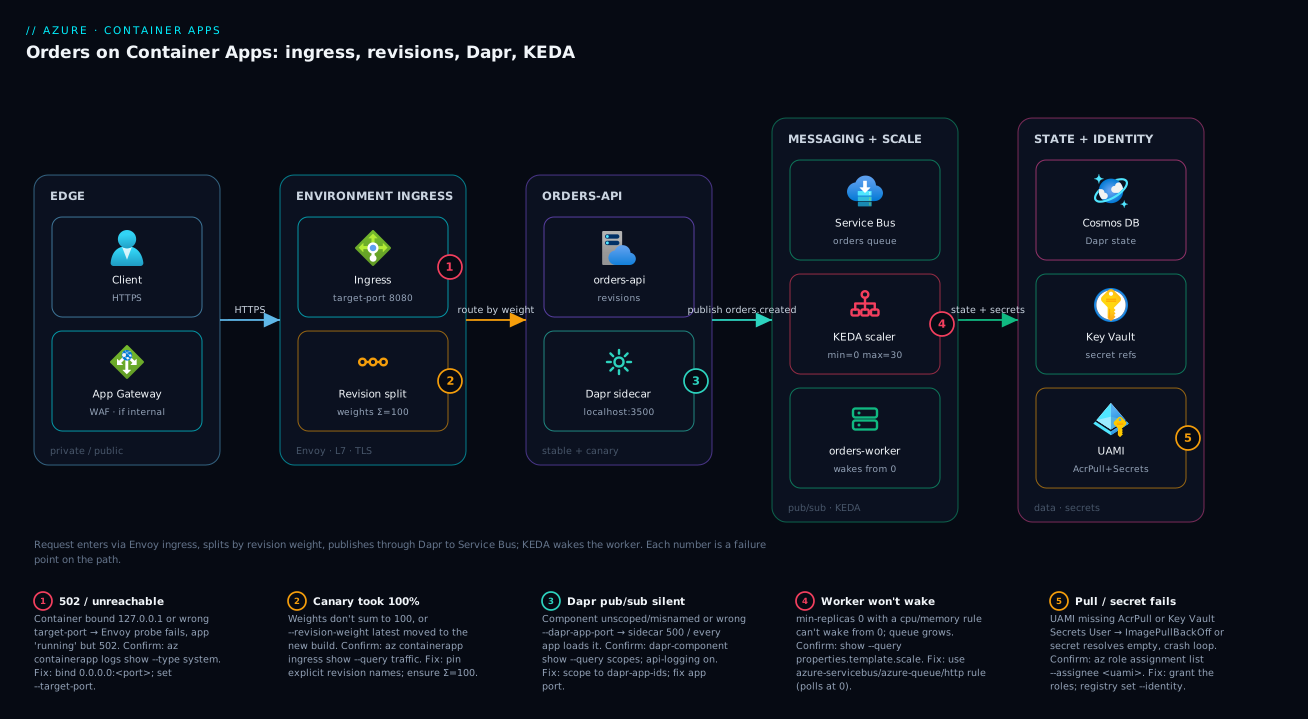
The diagram traces a real request and a real message through the system, left to right, and pins the failure classes onto the exact hop where each bites. A client (or Application Gateway / Front Door when the environment is --internal-only) hits the environment ingress — an Envoy front end that owns the FQDN, terminates TLS, and splits traffic by revision weight. From there the request lands on the orders-api app, which runs as one or more immutable revisions (stable + canary), each replica paired with a Dapr sidecar on localhost:3500. When orders-api publishes orders.created, the Dapr pub/sub component routes it to Azure Service Bus; KEDA watches that queue depth and wakes orders-worker from zero, scaling replicas to the backlog. State and secrets resolve through Cosmos DB, Key Vault, and a user-assigned managed identity — no connection strings in the template.
Read the numbered badges as the failure map. Badge 1 sits on the ingress/port hop: a container bound to 127.0.0.1 or the wrong --target-port returns 502 even while “running”. Badge 2 sits on revision routing: weights that don’t sum to 100 or a latest pin that moved send the canary 100% of traffic. Badge 3 sits on the Dapr sidecar: an unscoped or misnamed component means the sidecar 500s or every app loads every broker. Badge 4 sits on the KEDA edge: min-replicas 0 with a CPU/memory trigger cannot wake, so the worker stays dead and the queue grows. Badge 5 sits on identity: a UAMI missing AcrPull or Secrets User fails the image pull or resolves a secret to empty, crash-looping the revision. The legend narrates each as symptom, the one command that confirms it, and the fix.
Real-world scenario
Lumio Payments runs an orders-api and three downstream workers on ACA, all scale-to-zero to control cost in non-prod. The environment is workload-profiles, --internal-only, fronted by Application Gateway, in Central India. Traffic averages 300 requests/second with a Friday-evening spike to ~1,400 rps at payout time. The platform team is three engineers; the monthly ACA + Service Bus spend is about ₹22,000. The mandate from the platform org: production rollouts must be progressive and instantly reversible without a redeploy — and there is no Kubernetes team and no service-mesh budget.
Two related incidents forced the redesign. First, every Friday-evening deploy caused a brief spike of 502s. The apps ran in single revision mode, so activating a new revision tore down the old one the instant the new one became active, and in-flight payment requests on draining replicas were cut. Second, a bad build once shipped straight to 100% of traffic with no safety net, because single mode has no concept of a weighted canary — the new revision simply took everything.
The breakthrough was realising ACA already shipped the entire progressive-delivery toolkit; they were just not using it. They put orders-api in multiple revision mode with semver revision suffixes, and changed the pipeline to deploy at 0% weight, attach a canary label, and run smoke tests against the per-label FQDN before any user saw the build. Promotion became a weighted ramp (10 → 50 → 100) gated on Application Insights failure-rate, with rollback as a one-line weight flip to the previous revision — which was still warm because multiple mode keeps it active. They also fixed graceful shutdown so SIGTERM drained in-flight orders, killing the deploy-time 502s at the source rather than masking them.
# CI step: ship dark, smoke-test the canary label, then ramp
az containerapp update -g $RG -n orders-api \
  --image acrorders.azurecr.io/orders-api:$SEMVER --revision-suffix ${SEMVER//./-}
az containerapp ingress traffic set -g $RG -n orders-api \
  --revision-weight latest=0
az containerapp revision label add -g $RG -n orders-api \
  --revision "orders-api--${SEMVER//./-}" --label canary
# ... run smoke tests against https://orders-api---canary.<env-hash>... ...
az containerapp ingress traffic set -g $RG -n orders-api \
  --revision-weight orders-api--${SEMVER//./-}=10 \
  --revision-weight "$(az containerapp ingress show -g $RG -n orders-api \
      --query 'traffic[?weight>`0`].revisionName | [0]' -o tsv)=90"
A second, subtler problem surfaced once canary was live: the workers occasionally dropped messages on scale-in. Under bursty load KEDA would scale orders-worker out to 18 replicas, then scale back in as the queue drained — and a replica receiving SIGTERM mid-message exited before completing it, leaving the payment half-processed (the message had been received but not settled, so Service Bus re-delivered it, occasionally double-charging). The fix was a proper shutdown handler: on SIGTERM, stop the Service Bus receiver, finish the in-flight message, settle it, then exit. Combined with idempotency keyed on orderId, double-delivery became harmless.
The outcome: the next Friday payout ran at 1,500 rps with zero deploy-time 502s and zero dropped messages; a bad build during the following week was caught at the canary-label smoke test and never took a single percent of user traffic; and rollback during a separate scare was a one-line weight flip that took effect in under two seconds because the prior revision was still warm. Spend held at ₹22,000 because the only added cost was the brief overlap of two revisions during each ramp. The lesson on the wall: “ACA’s revision + label + weight + SIGTERM primitives are a complete progressive-delivery system — no Argo Rollouts, no Flagger, no mesh, used deliberately.”
The incident as a before/after table, because the order of moves is the lesson:
| Symptom | Root cause | Old behaviour | Fix applied | Result |
|---|---|---|---|---|
| Friday 502 spike on deploy | Single mode tore down old revision | In-flight requests cut | Multiple mode + SIGTERM drain | Zero deploy 502s |
| Bad build to 100% users | No weighted canary | New revision took everything | Deploy at 0% + canary label | Caught at smoke test |
| Double-charged payments | Replica killed mid-message | SIGTERM dropped in-flight | Drain + settle + idempotency | Zero dropped messages |
| Slow rollback | Old revision gone | Redeploy to revert | Weight flip to warm revision | < 2 s rollback |
Advantages and disadvantages
The managed-Kubernetes-with-the-cluster-deleted model both gives you the progressive-delivery and event-driven toolkit and hides the machinery that makes it fail in non-obvious ways. Weigh it honestly:
| Advantages (why ACA helps you) | Disadvantages (why it bites) |
|---|---|
| Scale-to-zero and event-driven autoscaling are built in (KEDA) — no controller to run | Scale-to-zero needs a wake-capable trigger; CPU/memory rules silently never wake from 0 |
| Immutable revisions + weighted traffic = canary/blue-green with no Argo/Flagger | Single mode (the default) tears down the old revision and cuts in-flight requests |
| Dapr gives mTLS, retries, pub/sub, state without an SDK or a mesh | Every Dapr-enabled app loads every unscoped component — easy cross-talk and over-grant |
| No nodes, kubelets, CNI, or upgrades to operate | You lose kubectl-level control; debugging is through az/logs, not the cluster |
| Free FQDN + managed TLS via Envoy ingress | One port, must bind 0.0.0.0; loopback or wrong port = 502 while “running” |
| Managed identity for pull/secrets/broker auth keeps secrets out of IaC | A missing RBAC role fails the pull or resolves a secret to empty → crash loop, no clear error |
| Rollback is an instant weight flip to a still-warm revision | The environment subnet is fixed at create; under-size it and you rebuild the environment |
| Per-second Consumption billing, free idle | Dedicated profiles bill per-node-hour with a floor; mixing models needs care |
ACA is right for stateless HTTP APIs and event-driven workers that want autoscaling and progressive delivery without a cluster. It is wrong when you need DaemonSets, custom controllers/operators, GPU scheduling beyond what profiles offer, sub-millisecond pod-to-pod control, or the full Kubernetes API — there, AKS is the tool. The disadvantages are all manageable — but only if you know they exist, which is the point of the playbook below.
Hands-on lab
Build the two-service system end to end, watch KEDA scale the worker from zero, run a canary, and tear it all down. Free-tier-friendly (Consumption profile, scale-to-zero). Run in Cloud Shell (Bash).
Step 1 — Variables, providers, extension.
RG=rg-aca-lab
LOC=eastus
ENV=cae-lab
az group create -n $RG -l $LOC -o table
az extension add --name containerapp --upgrade
az provider register -n Microsoft.App --wait
az provider register -n Microsoft.OperationalInsights --wait
Step 2 — Create the environment (managed network is fine for the lab).
az containerapp env create -g $RG -n $ENV -l $LOC -o table
Expected: a cae-lab environment, provisioningState: Succeeded.
Step 3 — Deploy orders-api (public quickstart image, external ingress).
az containerapp create -g $RG -n orders-api --environment $ENV \
  --image mcr.microsoft.com/k8se/quickstart:latest \
  --target-port 8080 --ingress external \
  --min-replicas 1 --max-replicas 5 --cpu 0.5 --memory 1.0Gi -o table

FQDN=$(az containerapp show -g $RG -n orders-api \
  --query properties.configuration.ingress.fqdn -o tsv)
curl -s "https://$FQDN" -o /dev/null -w "HTTP %{http_code}\n"   # expect HTTP 200
Step 4 — Deploy orders-worker scaled-to-zero on a Storage Queue. Create a storage account + queue, then scale the worker on its length.
SA=stacalab$RANDOM
az storage account create -g $RG -n $SA -l $LOC --sku Standard_LRS -o none
CONN=$(az storage account show-connection-string -g $RG -n $SA -o tsv)
az storage queue create -n orders --connection-string "$CONN" -o none

az containerapp create -g $RG -n orders-worker --environment $ENV \
  --image mcr.microsoft.com/k8se/quickstart:latest \
  --min-replicas 0 --max-replicas 10 --cpu 0.25 --memory 0.5Gi \
  --secrets "queue-conn=$CONN" \
  --scale-rule-name q --scale-rule-type azure-queue \
  --scale-rule-metadata "queueName=orders" "queueLength=5" \
  --scale-rule-auth "connection=queue-conn" -o table

az containerapp replica list -g $RG -n orders-worker -o table   # expect EMPTY (0 replicas)
Step 5 — Wake it from zero. Push 50 messages; watch replicas appear.
for i in $(seq 1 50); do \
  az storage message put -q orders --content "msg-$i" --connection-string "$CONN" -o none; done
sleep 30
az containerapp replica list -g $RG -n orders-worker -o table   # expect 1+ replicas now
Step 6 — Multiple revision mode + a canary.
az containerapp revision set-mode -g $RG -n orders-api --mode multiple
az containerapp update -g $RG -n orders-api --revision-suffix v2 \
  --set-env-vars "VERSION=2" -o none
az containerapp ingress traffic set -g $RG -n orders-api \
  --revision-weight latest=10 -o table   # 10% to the new revision
az containerapp revision list -g $RG -n orders-api \
  --query "[].{name:name, active:properties.active, weight:properties.trafficWeight}" -o table
Step 7 — Teardown. One command removes everything.
az group delete -n $RG --yes --no-wait
Expected-output checkpoints in one table, so you know each step worked:
| Step | Command | Expected signal |
|---|---|---|
| 3 | curl https://$FQDN |
HTTP 200 |
| 4 | replica list (worker) |
Empty — 0 replicas at rest |
| 5 | replica list after messages |
1+ replicas (woke from zero) |
| 6 | revision list |
Two active revisions, weights 90/10 |
| 7 | group delete |
Returns immediately (--no-wait) |
Common beginner mistakes
These are conceptual traps — wrong mental models, not error strings. The troubleshooting playbook further down fixes symptoms; this fixes the thinking that produced them.
-
“Scale-to-zero means the app always wakes when work arrives.” Only a wake-capable trigger polls while at zero.
min-replicas 0with acpuormemoryrule is a dead app: those metrics only exist once a replica runs, so nothing ever starts one. Right model: the trigger, not the platform, does the waking — use HTTP, or a queue/topic/cron/Kafka scaler, for any app that sleeps. -
“A revision is a deployment I can edit.” A revision is immutable. You never change one; you mint a new revision and shift traffic to it. Right model: revisions are git commits, not a mutable
latestpointer — you roll forward and back by choosing which commit serves traffic. -
“Multiple revision mode is the risky one, so I’ll stay on single.” Backwards. Single mode is the one that cuts in-flight requests — it tears down the old revision the instant the new one activates. Multiple mode is what makes deploys safe (old stays warm, you drain, you ramp). Right model: multiple mode is the production default; single mode is for throwaway and dev.
-
“Enabling Dapr on my app connects it to my broker.” Enabling the sidecar gives you the Dapr API; it connects to nothing until a component is registered — and an unscoped component is loaded by every Dapr app in the environment. Right model: sidecar = the phone, component = the specific number,
scopes:= who’s allowed to dial it. -
“The container listens on a port, so ingress will find it.” Only if it binds
0.0.0.0and you set--target-portto that port. Binding127.0.0.1(a common local-dev default) makes the app reachable from inside the container and invisible to Envoy — “running” and 502 at once. Right model: the probe comes from outside the container; loopback is not outside. -
“Weights are a suggestion; ACA will sort it out.” Weights are literal, must sum to 100, and
--revision-weight latest=Nre-points to whatever you deploy next. Alatestpin plus a deploy silently hands the new build its slice and the old slice. Right model: pin explicit revision names in production runbooks; reservelatestfor CI auto-canary you fully understand. -
“A managed identity with the right role is enough; the app will just work.” The identity must be attached to the app, the registry/secret must be told to use it (
registry set --identity,keyvaultref:...,identityref:...), and a missing Key Vault role resolves the secret to empty, not an error. Right model: identity is three wires — assigned, granted, referenced — and a broken wire fails silently. -
“Any config change redeploys the app.” Ingress, secret values, registry creds, and Dapr on/off are configuration — they do not mint a revision. Only template changes (image, env vars, scale, resources, probes) do. Right model: template = what the container is; configuration = how the environment wraps it — only the former is versioned.
Common mistakes & troubleshooting
This is the differentiator. ACA failures are opaque because the platform hides the machinery — the symptom (502, stuck worker, dropped message) rarely names its cause. Scan the playbook, find your symptom, run the exact confirm command, apply the fix. Most of these have nothing to do with your application code.
| # | Symptom | Root cause | Confirm (exact command / path) | Fix |
|---|---|---|---|---|
| 1 | 502 / connection refused, app “running” | Container binds 127.0.0.1 or wrong --target-port |
az containerapp logs show -g $RG -n <app> --type system; look for probe fail |
Bind 0.0.0.0:<port>; set --target-port to it |
| 2 | Worker never wakes; queue grows | min-replicas 0 with cpu/memory rule (can’t wake) |
az containerapp show ... --query properties.template.scale |
Use a queue/HTTP scaler that polls at 0 |
| 3 | Every app sees every broker | Dapr component left unscoped | az containerapp env dapr-component show ... --query scopes |
Add scopes: with the right dapr-app-ids |
| 4 | dapr-component set rejected / no component |
Pasted raw Dapr manifest (apiVersion/kind/metadata.name) | Diff your YAML vs the body-only schema | Strip to componentType/version/metadata/scopes |
| 5 | Canary took 100% of traffic | latest pin moved, or weights didn’t sum to 100 |
az containerapp ingress show ... --query traffic |
Pin explicit revision names; ensure Σ=100 |
| 6 | Rollback “didn’t work” | Old revision deactivated (single mode) | az containerapp revision list --query "[].properties.active" |
Set --mode multiple; flip weight to old |
| 7 | --revision-suffix rejected |
Suffix reused (even after delete) | az containerapp revision list --query "[].name" |
Encode build/semver; suffixes are unique-forever |
| 8 | ImagePullBackOff / revision Failed |
UAMI lacks AcrPull, or registry not set to identity | az role assignment list --assignee <uami-cid> |
Grant AcrPull; registry set --identity |
| 9 | App crash-loops, secret looks empty | Key Vault ref unresolved (no Secrets User / wrong URI) | az containerapp secret show; check UAMI RBAC |
Grant Key Vault Secrets User; fix URI |
| 10 | Messages double-processed | Replica SIGKILLed mid-message on scale-in |
Console logs show no settle before exit | Handle SIGTERM: drain + settle; add idempotency |
| 11 | Dapr pub/sub silent (no delivery) | --dapr-app-port wrong, or no /dapr/subscribe route |
--dapr-enable-api-logging true, read sidecar logs |
Set app port; expose subscription route |
| 12 | Competing-consumer message loss | Multiple apps share one consumerID |
Compare consumerID across components |
Unique consumerID per subscriber |
| 13 | Can’t grow the environment subnet | Subnet fixed at create, too small | az network vnet subnet show ... --query addressPrefix |
Rebuild env on a /23+ subnet; migrate apps |
| 14 | gRPC streams break | --transport auto chose http/1 |
az containerapp ingress show --query transport |
Set --transport http2 |
| 15 | High Log Analytics bill | --dapr-log-level debug / api logging left on |
ContainerAppConsoleLogs_CL volume by app |
Reset to info; disable api logging |
The deeper detail on the top five
1 — Wrong port / loopback bind (the ACA WEBSITES_PORT). Envoy probes --target-port; your container must answer on 0.0.0.0:<that port>. A container bound to 127.0.0.1 rejects the probe from outside the container even when the port number is right.
# System logs carry the platform's probe/health story
az containerapp logs show -g $RG -n orders-api --type system --tail 50
# Fix: redeploy the image to bind 0.0.0.0, or correct the port
az containerapp ingress update -g $RG -n orders-api --target-port 8080
2 — Can’t wake from zero. cpu and memory are KEDA resource scalers — meaningful only with ≥1 replica running. With min-replicas 0 and only a CPU rule, nothing ever wakes the app. Use an HTTP, Service Bus, Storage Queue, Kafka, or cron rule (all poll at 0), or set min-replicas 1.
3 — Unscoped Dapr component. A component with no scopes: block is mounted by every Dapr-enabled app in the environment — every app connects to that broker, multiplying connections and blast radius.
az containerapp env dapr-component show -g $RG -n $ENV \
  --dapr-component-name orderpubsub --query scopes -o json   # null/empty = unscoped
5 — Canary took everything. Two traps: weights that don’t sum to 100 (ACA normalises, often not how you expect), and --revision-weight latest=N where “latest” moved to the new revision on the next deploy. Pin explicit revision names in production runbooks.
10 — Dropped/duplicated messages on scale-in. KEDA scales workers in as the backlog drains. A replica that gets SIGTERM mid-message and exits without settling leaves the message for re-delivery (Service Bus) — at-least-once becomes visibly duplicate. Always handle SIGTERM: stop the receiver, finish + settle the current message, then exit; make handlers idempotent.
Error / status reference
The codes and strings you actually see, what they mean on ACA, and the first fix:
| Code / string | Where it shows | Likely cause | First fix |
|---|---|---|---|
| 502 Bad Gateway | Client / App GW | Wrong port, 127.0.0.1 bind, no healthy revision |
Fix port/bind; check revision health |
| 404 Not Found | Client | Wrong FQDN, label endpoint, or ingress disabled | Use the right FQDN; enable ingress |
| 403 Forbidden | Client | IP restriction or client-cert require |
Allow the CIDR; present the cert |
ImagePullBackOff |
Revision status | UAMI lacks AcrPull / registry not on identity | Grant AcrPull; registry set --identity |
CreateContainerError |
Revision status | Bad command/args/env or invalid CPU:mem ratio | Fix template; use a valid size row |
Revision Failed |
revision list |
Probe never passes, or crash on boot | Read system + console logs; fix probe/boot |
ERR_PUBSUB_NOT_FOUND |
Dapr sidecar logs | Component name/scoping wrong | Match --dapr-component-name; scope it |
ERR_STATE_STORE_NOT_FOUND |
Dapr sidecar logs | State component missing/misnamed/unscoped | Register + scope the state component |
| 413 Request Entity Too Large | Dapr sidecar | Body > dapr-http-max-request-size |
Raise the max request size |
OOMKilled |
Console / system logs | Replica exceeded its memory | Raise --memory (valid ratio) or fix leak |
Decision table — start here
| If you see… | It’s probably… | Do this first |
|---|---|---|
| 502 but logs say app started | Port/bind contract | Confirm --target-port + 0.0.0.0 bind |
| Worker at 0, queue rising | Non-waking scaler | Switch to queue/HTTP rule; or min-replicas 1 |
| Deploy caused a 502 blip | Single revision mode | Switch to multiple mode; handle SIGTERM |
| Canary slice went to 100% | latest pin or bad weights |
Pin explicit revisions; Σ weights = 100 |
| Secret-backed value empty | Key Vault RBAC/URI | Grant Secrets User; verify the SecretUri |
| Image won’t pull | Identity/AcrPull | Grant AcrPull; set registry to the UAMI |
| Other apps hit your broker | Unscoped component | Add scopes: to the component |
| Duplicate side-effects | At-least-once + no idempotency | Add idempotency; settle before exit |
Verify
Confirm each layer independently rather than trusting that “it deployed.”
# Revisions and their traffic weights
az containerapp revision list -g $RG -n orders-api \
  --query "[].{name:name, active:properties.active, weight:properties.trafficWeight, replicas:properties.replicas}" -o table

# Live replica count (watch it scale)
az containerapp replica list -g $RG -n orders-worker -o table

# Dapr components visible to the environment
az containerapp env dapr-component list -g $RG -n $ENV -o table

# Hit the canary label endpoint directly
curl -s https://orders-api---canary.<env-hash>.<region>.azurecontainerapps.io/healthz/ready -o /dev/null -w "%{http_code}\n"
Then prove KEDA actually scaled from zero. Push messages onto the queue and confirm the worker wakes, processes, and scales back to zero. In Log Analytics, the ContainerAppSystemLogs_CL table records scaling decisions and the ContainerAppConsoleLogs_CL table holds stdout/stderr:
ContainerAppConsoleLogs_CL
| where ContainerAppName_s == "orders-worker"
| where TimeGenerated > ago(15m)
| project TimeGenerated, RevisionName_s, ReplicaName_s, Log_s
| order by TimeGenerated desc
The verification matrix — one check per layer, and what proves it healthy:
| Layer | Command / query | Healthy signal |
|---|---|---|
| Ingress / port | curl https://$FQDN |
200, not 502 |
| Revisions | revision list |
Expected revisions active, weights as intended |
| Scaling (worker) | replica list before/after load |
0 at rest, N under load, back to 0 |
| Dapr components | env dapr-component list |
Only intended components, scoped |
| Pub/sub path | App Insights app map | End-to-end transaction api→SB→worker |
| Secrets/identity | secret show + role assignment list |
Resolved; UAMI has the roles |
Observability: Dapr dashboard, logs, and App Insights
For Dapr-level visibility — components loaded, sidecar config, service invocation — inspect what’s registered and wire traces to Application Insights:
az containerapp env dapr-component list -g $RG -n $ENV -o yaml # what's registered
Wire distributed tracing by attaching an Application Insights connection string to the environment’s Dapr configuration so sidecar-to-sidecar calls produce a real trace graph:
AI_CONN=$(az monitor app-insights component show \
  -g $RG -a appi-orders --query connectionString -o tsv)

az containerapp env update -g $RG -n $ENV \
  --dapr-instrumentation-key "$AI_CONN"
Now a publish from orders-api through Service Bus to orders-worker shows as a connected end-to-end transaction in the Application Insights application map — the single most useful artifact when a message “disappears” between services. Where each kind of signal lives:
| Signal | Source | Where to read it | Best for |
|---|---|---|---|
| App stdout/stderr | Container console | ContainerAppConsoleLogs_CL |
App errors, your logs |
| Platform/scale events | System | ContainerAppSystemLogs_CL |
Probe fails, scaling decisions, restarts |
| Metrics (replicas, CPU, reqs) | Azure Monitor | Metrics Explorer / az monitor metrics |
Trends, alerts |
| Distributed traces | Dapr → App Insights | Application map / transactions | Message flow across services |
| Live tail | az containerapp logs show --follow |
Terminal | Active incident |
Best practices
- One environment per bounded context, never per app; size the subnet
>= /23(larger for big fleets) and accept it is fixed at create. - Front public-facing apps with App Gateway/Front Door and set the environment
--internal-onlywhere policy requires; keep nothing on the public internet by default. - Scope every Dapr component to specific
dapr-app-ids — an unscoped component is loaded by every Dapr-enabled app. - Use identity-based auth for Dapr pub/sub and state where the broker supports it, not connection strings.
min-replicas 0only on apps with a wake-capable trigger (HTTP or a polling KEDA scaler); never with CPU/memory alone.- Tune
messageCount/concurrentRequestsfrom real per-message processing time, not a guess; capmax-replicasto protect fragile downstreams. - Run production apps in multiple revision mode with semver
--revision-suffix; suffixes are unique-forever, so encode the build. - Deploy at 0% weight with a
canarylabel; promote via a gated weight ramp; pin explicit revision names (notlatest) in runbooks. - Verify rollback as a single weight flip to a still-running prior revision before you need it in anger.
- Registry pull and Key Vault secrets via UAMI with least-privilege roles (AcrPull, Key Vault Secrets User); no inline passwords.
- Define startup, liveness, and readiness probes; readiness reflects real dependencies; never fail liveness on an optional downstream.
- Handle
SIGTERM: drain in-flight work and settle messages before exit; make handlers idempotent so re-delivery is harmless. - Wire Application Insights to the environment’s Dapr config for end-to-end traces — the first artifact you’ll want when a message vanishes.
Security notes
ACA’s security posture is mostly about identity, network isolation, and secret handling — the same disciplines as any Azure workload, with a few container-specific edges.
| Control | What to do | Why |
|---|---|---|
| Managed identity over secrets | UAMI for ACR pull, Key Vault refs, broker auth | No long-lived credentials in IaC or pipeline |
| Least-privilege RBAC | AcrPull, Key Vault Secrets User, Service Bus Data Receiver/Sender — scoped tight | Limit blast radius of a compromised app |
| Network isolation | --internal-only env + private VIP; front with App GW/WAF |
No public ingress; inspect at L7 |
| Private endpoints | For ACR, Key Vault, Service Bus, Cosmos | Keep broker/store traffic off the internet |
| Dapr mTLS | On by default between sidecars; enable env mTLS | Encrypt + authenticate service-to-service |
| Component scoping | Scope every component to its apps | Prevent an app reading another’s broker |
| Secret resolution | Key Vault refs (runtime) over inline secrets | Value never persists in the template |
| IP restrictions | Allow-list CIDRs on ingress | Reduce exposed surface even when external |
| Image provenance | Pull from private ACR; scan + sign images | Supply-chain integrity |
| Client certificates | require mode for mTLS clients |
Authenticate callers at ingress |
A few non-obvious ones: a failed Key Vault reference resolves to an empty value, not an error the app can catch — so a missing RBAC role looks like a malformed connection string and crash-loops; confirm with az containerapp secret show and the UAMI’s role assignments. And Dapr component scoping is a security boundary, not just hygiene — an unscoped Service Bus component means every app in the environment can publish and consume on that namespace.
Cost & sizing
ACA Consumption bills per vCPU-second and GiB-second of active replicas plus a small per-request charge, with a monthly free grant — idle (scaled-to-zero) replicas cost nothing. Dedicated workload profiles bill per node-hour for the pool you size, regardless of utilisation. The bill drivers and how to cut each:
| Cost driver | What it is | How to reduce | Watch out |
|---|---|---|---|
| Active vCPU/GiB-seconds | Running replica time × size | Scale-to-zero; right-size CPU:mem; cap max-replicas | Over-large replicas waste the ratio |
| Request count | Per-million requests (Consumption) | Usually negligible | Chatty internal calls add up |
| Dedicated node-hours | The profile pool you provision | Only for steady/memory-heavy; size tight | Pays even when idle (no scale-to-zero) |
| Log Analytics ingestion | Console + system logs volume | info not debug; sample; cap retention |
dapr-enable-api-logging is a silent bill |
| Service Bus / Cosmos | The brokers/stores behind Dapr | Right-tier the broker; batch | Not ACA, but part of the system bill |
| App Gateway / Front Door | The fronting edge | Share across apps; right-SKU | Fixed hourly + per-GB |
| Egress / private endpoints | Outbound + PE hourly | Keep traffic on the backbone | PE per-hour per endpoint |
Rough figures (East US / Central India list, mid-2026, INR≈USD×84): a single 0.5 vCPU / 1 GiB app running 24×7 on Consumption is on the order of ₹1,800–2,400/month; the same app scaled-to-zero and active ~4 hours/day is ₹300–500/month plus requests. A worker that wakes only for bursts can be near-zero at rest. The free grant covers the first slice of vCPU-/GiB-seconds and requests each month, so small dev environments often land inside the free tier. The sizing decision in one table:
| Workload shape | Profile | min/max replicas | Why |
|---|---|---|---|
| Bursty event worker | Consumption | 0 / N | Free at rest; wakes on queue |
| Latency-sensitive public API | Consumption | 1 / N | Avoid cold start; still bursts |
| Steady high-throughput service | Dedicated D-series | ≥1 / N | Predictable cost, no per-second premium |
| Memory-heavy (cache/JVM) | Dedicated E-series | ≥1 / N | RAM ratio Consumption can’t give |
| GPU inference bursts | Consumption GPU | 0 / N | Pay per GPU-second; region-limited |
Going deeper
Everything above is about the always-on app: a container that runs continuously behind ingress. Three things sit just outside that frame and decide whether ACA is the right home at all — jobs, the Functions / App Service / AKS boundary, and the managed Kubernetes engine you never touch — plus the ingress layer has more surface than “one port” suggests. This is where an experienced reader earns the rest of the fee.
Jobs: the run-to-completion sibling of apps
A container app runs forever behind ingress; a container app job runs to completion and stops. Same environment, same image mechanics, same identity and the same KEDA engine — a different lifecycle. Reach for a job whenever the work has an end: a nightly batch, a schema migration, a one-off backfill, or a queue drain where each message is a discrete unit of work rather than a stream feeding a long-lived consumer.
Jobs have three trigger types:
| Trigger type | Starts when | Key flags | Typical use |
|---|---|---|---|
| Manual | You call job start |
--replica-completion-count, --parallelism |
Migrations, backfills, ad-hoc ops |
| Schedule | A cron window fires | --cron-expression "0 2 * * *" |
Nightly ETL, reports, cleanup |
| Event | A KEDA scaler sees work | --min-executions, --max-executions, --scale-rule-* |
Queue-driven batch, per-message jobs |
# Scheduled job: 02:00 UTC nightly, one replica, retry once, 30-min cap
az containerapp job create -g $RG -n orders-nightly --environment $ENV \
  --trigger-type Schedule --cron-expression "0 2 * * *" \
  --image acrorders.azurecr.io/orders-batch:1.2.0 \
  --cpu 0.5 --memory 1.0Gi \
  --replica-completion-count 1 --parallelism 1 \
  --replica-timeout 1800 --replica-retry-limit 1

# Event-driven job: one execution per Service Bus message, scale 0..10
az containerapp job create -g $RG -n orders-eventjob --environment $ENV \
  --trigger-type Event --polling-interval 30 \
  --min-executions 0 --max-executions 10 \
  --image acrorders.azurecr.io/orders-batch:1.2.0 \
  --secrets "sb-conn=<connection-string>" \
  --scale-rule-name sb --scale-rule-type azure-servicebus \
  --scale-rule-metadata "queueName=jobs" "messageCount=1" \
  --scale-rule-auth "connection=sb-conn"

# Manual job: define once, start on demand
az containerapp job start -g $RG -n orders-migrate
The four knobs that trip people up: --replica-completion-count is how many replicas must exit 0 for the execution to be “succeeded”; --parallelism is how many run at once; --replica-timeout caps a single replica’s runtime (it is killed after); and --replica-retry-limit retries a failed replica. An event-driven job creates one execution per unit of scaler work — subtly different from an app, where KEDA sizes a pool of long-lived replicas that share the backlog. Jobs have no ingress, no revisions, and no traffic weights; you version a job by image tag and read its history with az containerapp job execution list.
Where ACA sits: Functions, App Service, and AKS
ACA is not the only serverless-container option, and the boundaries are both an exam favourite and expensive to get wrong in production.
| You want… | Best fit | Why not ACA |
|---|---|---|
| Event-trigger functions, per-execution billing, tiny glue code | Azure Functions (Flex Consumption) | ACA has no trigger/binding programming model — you’d rebuild it |
| A single web app / API with slots, easy custom domains, no containers | App Service | ACA adds concepts a lone monolith doesn’t need |
| DaemonSets, operators/CRDs, privileged pods, fine GPU scheduling, full k8s API | AKS | ACA hides the cluster — those knobs are unreachable |
| Several microservices + event workers + canary, without running a cluster | Container Apps | — this is the sweet spot |
Two nuances the table can’t hold. First, Azure Functions can run on a Container Apps environment: you package the Functions runtime as a container image and host it in ACA, keeping the triggers/bindings programming model while inheriting ACA’s VNet, Dapr, and workload profiles. It is the bridge when a Functions app must live inside your ACA network boundary rather than in its own Flex Consumption plan.
# Azure Functions hosted on an ACA environment (container-image based) — illustrative
az functionapp create -g $RG -n fn-orders \
  --environment $ENV --workload-profile-name Consumption \
  --image acrorders.azurecr.io/fn-orders:1.0.0 \
  --cpu 0.5 --memory 1.0Gi \
  --storage-account stordersfn
Second, the line between ACA and App Service blurs for a plain HTTP app — both give managed TLS and autoscale. Pick ACA when you have several services, event-driven workers, scale-to-zero, or want Dapr and weighted canary; pick App Service for a single app that leans on deployment slots, the App Service programming model, and simpler day-2 operations.
The managed Kubernetes you never touch
ACA runs your containers on a Microsoft-managed AKS cluster that you cannot see, log into, or kubectl against. KEDA, Dapr, and Envoy are the same open-source projects you would otherwise install on AKS yourself — ACA runs, scopes, and upgrades them for you. That is the entire value proposition: OSS microservices machinery with zero cluster operations.
The abstraction is deliberately opaque, and it leaks in predictable places. Knowing where saves the hours you’d otherwise spend looking for a knob that isn’t exposed:
| Kubernetes thing | On ACA you… | Consequence |
|---|---|---|
| Nodes / kubelet / CNI | never see them | no node pools to patch — but no node-level tuning either |
kubectl / the API server |
don’t get them | debug via az containerapp logs / exec + Log Analytics, not kubectl |
| DaemonSets, privileged pods, host mounts | can’t run them | no per-node agents; the only sidecar is Dapr |
| Custom controllers / CRDs / operators | can’t install them | no Argo, Flagger, cert-manager — ACA’s own primitives replace them |
| Arbitrary KEDA scalers | get the supported subset | the common scalers are there; exotic ones may not be |
| Pod-to-pod network policy | get env-scoped name resolution | apps in one environment reach each other by name; cross-env needs real networking |
Because the primitives are OSS, portability is real but not free: your app code using the Dapr API moves to AKS unchanged, but your ACA-specific declarations (environment, ingress, scale rules) do not — you re-express them as KEDA ScaledObjects, Dapr Components, and an ingress controller. The migration is “same engines, new manifests,” which is exactly why the AKS exit hatch stays clean when you outgrow the abstraction.
Ingress internals worth knowing
“One port, bind 0.0.0.0” is the headline, but Envoy does more, and the extra knobs each solve a real problem:
| Capability | What it gives you | How to reach it |
|---|---|---|
| Session affinity | Pin a client to one replica (“sticky”) | ingress sticky-sessions set --affinity sticky (cookie-based) |
| Transport | HTTP/1.1, HTTP/2 (gRPC), or raw TCP | --transport http2 for gRPC streaming |
| Additional TCP ports | Expose more than the single ingress port | additionalPortMappings in the ingress config |
| WebSockets / SSE | Long-lived streams through Envoy | Supported natively; add app-level heartbeats |
| CORS | Browser cross-origin policy at the edge | Ingress CORS policy, not app code |
| Custom domain + free managed cert | Branded HTTPS, auto-renewed | hostname add + a managed certificate (CNAME/TXT validation) |
Two edges to remember. Envoy applies a default idle/response timeout on the order of a few minutes, so a long-poll or slow-streaming response can be cut mid-flight — use SSE or WebSockets with heartbeats (or chunked responses) for anything slow, and push truly long-running work into a container app job rather than an HTTP request. And managed certificates are free and auto-renew, but they validate against DNS, so the CNAME must resolve before issuance — the classic failure is adding the hostname and requesting the cert before DNS has propagated, then blaming ACA for a cert that “won’t issue.”
Practice challenges
Work these in order; each builds on the last. Commands assume the lab variables ($RG, $ENV); all IDs are placeholders. Try each before opening the solution.
1 (Beginner) — Reach an app. Deploy any public image with external ingress on port 8080 and return its HTTPS FQDN. Then say, in one sentence, why the same app would 502 if the container bound 127.0.0.1.
<details> <summary>Solution</summary>
az containerapp create -g $RG -n demo --environment $ENV \
  --image mcr.microsoft.com/k8se/quickstart:latest \
  --target-port 8080 --ingress external \
  --query properties.configuration.ingress.fqdn -o tsv
Envoy probes and forwards from outside the container, so a 127.0.0.1 bind refuses that probe and every request 502s while the app looks “running.” Why: reachability is the port + 0.0.0.0 contract, not just “the process started.”
</details>
2 (Beginner) — Free at rest. Configure a worker to min-replicas 0 on a Storage Queue scaler and prove it sits at zero replicas until a message arrives.
<details> <summary>Solution</summary>
az containerapp update -g $RG -n orders-worker \
  --min-replicas 0 --max-replicas 10 \
  --scale-rule-name q --scale-rule-type azure-queue \
  --scale-rule-metadata "queueName=orders" "queueLength=5" \
  --scale-rule-auth "connection=queue-conn"
az containerapp replica list -g $RG -n orders-worker -o table   # empty at rest
Why: azure-queue polls the queue even at zero replicas, so it can wake the app — a cpu rule here would leave it dead forever.
</details>
3 (Intermediate) — Canary by weight. Ship a second revision at 0% traffic, smoke-test it in isolation, then send it 10% without touching the stable revision’s share.
<details> <summary>Solution</summary>
az containerapp revision set-mode -g $RG -n orders-api --mode multiple
az containerapp update -g $RG -n orders-api \
  --image acrorders.azurecr.io/orders-api:1.5.0 --revision-suffix v1-5-0
az containerapp revision label add -g $RG -n orders-api \
  --revision orders-api--v1-5-0 --label canary          # test the label FQDN
az containerapp ingress traffic set -g $RG -n orders-api \
  --revision-weight orders-api--v1-4-0=90 orders-api--v1-5-0=10
Why: a label gives the new revision its own FQDN for isolated smoke tests before any user traffic, and explicit revision names (not latest) keep the split deterministic.
</details>
4 (Intermediate) — Scope a broker. Register a Service Bus pub/sub component that only orders-api and orders-worker can load, and name the one line that turns it into a security boundary.
<details> <summary>Solution</summary>
# pubsub.yaml — body-only ACA schema (no apiVersion/kind/metadata.name)
componentType: pubsub.azure.servicebus.topics
version: v1
metadata:
  - name: namespaceName
    value: "sb-orders.servicebus.windows.net"
scopes:
  - orders-api
  - orders-worker
az containerapp env dapr-component set -g $RG -n $ENV \
  --dapr-component-name orderpubsub --yaml pubsub.yaml
Why: the scopes: list restricts which dapr-app-ids load the component — without it, every Dapr-enabled app in the environment connects to that namespace.
</details>
5 (Advanced) — Run a nightly job. Instead of a long-running consumer, run a batch as a scheduled job at 02:00 UTC, retry once, and cap a replica at 30 minutes. Explain why a job — not an app — is right here.
<details> <summary>Solution</summary>
az containerapp job create -g $RG -n orders-nightly --environment $ENV \
  --trigger-type Schedule --cron-expression "0 2 * * *" \
  --image acrorders.azurecr.io/orders-batch:1.2.0 \
  --cpu 0.5 --memory 1.0Gi \
  --replica-completion-count 1 --parallelism 1 \
  --replica-timeout 1800 --replica-retry-limit 1
Why: the work has an end — a job runs to completion and stops (no ingress, no revisions, no idle replica billing), whereas an app would sit running 24×7 for a task that lasts minutes. </details>
6 (Advanced) — Safe scale-in. Your queue worker occasionally double-processes messages when KEDA scales in. Describe the platform sequence that causes it, the exact app-side handling that fixes it, and the property that gives your handler enough time.
<details> <summary>Solution</summary>
On scale-in ACA de-registers the replica, sends SIGTERM, waits the termination grace period, then SIGKILLs. A replica killed mid-message that never settled it leaves Service Bus to re-deliver (at-least-once) — visible as a duplicate. The handler must, on SIGTERM: stop the receiver, finish and settle the in-flight message, then exit; and be idempotent (key on orderId) so any surviving re-delivery is harmless. The termination grace period is what buys the drain time.
Why: ACA delivery is at-least-once; correctness on scale-in is your SIGTERM drain plus idempotency, not a platform guarantee.
</details>
Interview & exam questions
Mapped to AZ-204 (Developing Solutions for Azure) and AZ-305 (Designing), plus general microservices design rounds.
-
What is a Container Apps environment and why does it matter? It is the security and network boundary: apps in the same environment share a VNet and Log Analytics workspace and can call each other by name and over Dapr; apps in different environments cannot. You choose one per bounded context, and its subnet is fixed at creation.
-
What distinguishes a revision from a configuration change? A change to the app template (image, env vars, scale, resources, probes) mints a new immutable revision; a change to configuration (ingress, secrets, registries, Dapr on/off, traffic weights, labels) does not. That distinction is the whole revision model.
-
How do you do a canary on ACA with no extra tooling? Put the app in multiple revision mode, deploy the new revision at 0% weight with a
canarylabel, smoke-test the per-label FQDN, then ramp weights (10→50→100) gated on metrics; rollback is a one-line weight flip to the still-warm prior revision. -
Why might an app with
min-replicas 0never wake? Because its scale rule iscpuormemory, which are only meaningful with ≥1 replica and cannot wake from zero. Use a trigger that polls at 0 — HTTP, Service Bus, Storage Queue, Kafka, Redis, or cron. -
What does
messageCountmean on a Service Bus scaler? It is the target backlog per replica: KEDA divides the queue depth by it to choose the replica count, so 200 messages withmessageCount=20drives ~10 replicas. Set it from real per-message processing time, not a guess. -
How are Dapr components scoped, and why does it matter? Components are registered against the environment; a
scopes:list ofdapr-app-ids restricts which apps load them. Without it, every Dapr-enabled app loads the component — a connection-fanout and security problem. -
How do you avoid inline secrets and registry passwords? Use a user-assigned managed identity with AcrPull on the registry (
registry set --identity) and Key Vault Secrets User on the vault, referencing secrets withkeyvaultref:<uri>,identityref:<id>so the value resolves at runtime and never lives in the template. -
Why do messages get duplicated on scale-in, and how do you fix it? KEDA scales workers in as the backlog drains; a replica
SIGTERMed mid-message that exits without settling leaves the message for at-least-once re-delivery. HandleSIGTERM(drain + settle) and make handlers idempotent. -
External vs internal vs disabled ingress? External gets a public FQDN (unless the environment is
--internal-only); internal is reachable only inside the environment; disabled is outbound-only for pure workers. All HTTP ingress requires one--target-portbound on0.0.0.0. -
When ACA over AKS, and when AKS over ACA? ACA when you want autoscaling, scale-to-zero, Dapr, and canary for stateless/event-driven workloads without operating a cluster. AKS when you need DaemonSets, custom operators/controllers, fine-grained scheduling, GPU control beyond profiles, or the full Kubernetes API.
-
What does single revision mode do on deploy, and why can it cause 502s? It deactivates the old revision the instant the new one activates; in-flight requests on draining replicas are cut if the app doesn’t handle
SIGTERM. Multiple mode keeps the old revision warm and lets you drain. -
Why is the environment subnet a one-way door? It is immutable after creation; revisions and replicas consume IPs from it, so an under-sized subnet caps scale and you must rebuild the environment on a larger one (
/23+) and migrate apps.
Quick check
- Your
orders-workerhasmin-replicas 0and acpuscale rule. Messages are piling up and no replica appears. Why? - A deploy to a single-revision-mode app caused a brief 502 spike. What changes prevent it?
- You set
--revision-weight latest=10in CI; after the next deploy the new build is taking 100% of traffic. What happened? - An app’s Key Vault-backed connection string is empty and the app crash-loops, but there’s no “access denied” error. What’s the most likely cause and the confirm command?
- Two subscriber apps share the same
consumerIDon a Service Bus pub/sub component. What goes wrong?
Answers
cpuandmemoryare resource scalers that only mean anything with ≥1 replica — they cannot wake from zero. Switch to theazure-queue/azure-servicebusscaler (which polls at 0) or setmin-replicas 1.- Put the app in multiple revision mode (so the old revision stays warm and drains) and handle
SIGTERMso in-flight requests finish before the replica exits. latestre-pointed to the new revision on the next deploy, so “10% to latest” became 10% to the build that is now also the stable one — effectively everything. Pin explicit revision names in production traffic commands.- The UAMI is missing Key Vault Secrets User (or the SecretUri is wrong); the reference resolves to empty rather than erroring. Confirm with
az containerapp secret showandaz role assignment list --assignee <uami-clientId>against the vault scope. - They become competing consumers on the same logical subscription — messages are split across them instead of each app getting its own copy. Give each subscriber a unique
consumerID.
Glossary
- Container Apps environment — the security/network/logging boundary; apps inside share a VNet and Log Analytics workspace and can talk; the subnet is fixed at create.
- Workload profile — Consumption (serverless, scale-to-zero) or Dedicated (per-node-hour, isolation/GPU) compute that an app runs on.
- Ingress — Envoy-fronted L7 entry to an app: external (public FQDN), internal (env-only), or disabled (outbound-only).
- Target port — the single port a container must bind on
0.0.0.0for ingress to reach it. - Revision — an immutable snapshot of the app template; minted by any template change.
- Revision suffix — the human-readable tail of a revision name; unique-forever per app.
- Traffic weight — the percentage of ingress routed to a revision in multiple mode; weights sum to 100.
- Label — a stable alias to a revision with its own FQDN, for sticky smoke-testing.
- KEDA — the event-driven autoscaler ACA uses; a scale rule’s trigger decides replica count.
- Scale-to-zero — running zero replicas when idle; requires a wake-capable trigger.
- Dapr — a portable microservices runtime injected as a per-app sidecar on localhost:3500.
- Dapr component — a pub/sub, state, binding, or secret-store definition registered on the environment; scope it to specific apps.
dapr-app-id— an app’s Dapr identity, used for service invocation and component scoping.- UAMI — user-assigned managed identity; the credential-less way to pull images and resolve secrets.
- Graceful shutdown — catching
SIGTERMto drain in-flight work and settle messages before exit. - Container Apps job — a run-to-completion workload (Manual, Schedule, or Event trigger) on the same environment as apps; no ingress, no revisions, no traffic weights.
- Envoy — the managed L7 proxy fronting every app: TLS termination, routing, weighted revision splits, session affinity.
- Sidecar — a helper container (here, Dapr) injected next to your app in the same replica and reachable on localhost.
- Service invocation — Dapr’s built-in app-to-app call by
dapr-app-id, with mTLS and retries and no component required. - Binding — a Dapr component that triggers your app from, or sends output to, an external system (Blob, Event Grid, cron, SQL).
- Session affinity (sticky sessions) — pinning a client to one replica via a cookie; convenient, but it trades against even scaling.
- Managed certificate — a free, auto-renewing TLS certificate ACA issues for a custom domain after DNS (CNAME/TXT) validation.
- Workload-profiles environment — an environment offering both Consumption and Dedicated profiles; requires a delegated
/23-or-larger subnet. consumerID— the Service Bus/Dapr subscription identity; sharing one across apps makes them competing consumers on one logical subscription.- Cold start — the latency of waking a scaled-to-zero replica on the first request; avoided by keeping
min-replicasat 1 for latency-sensitive apps. - Replica — a single running instance of a revision; KEDA decides how many run between
min-replicasandmax-replicas.
Next steps
- Configure Dapr on Kubernetes: service invocation, state, pub/sub — the same building blocks on raw Kubernetes, for when you outgrow ACA.
- KEDA event-driven autoscaling with Kafka and Service Bus — go deeper on the scaler that powers ACA scaling.
- Azure Service Bus: sessions, dedup, dead-letter patterns — make the broker behind your pub/sub reliable and exactly-once-ish.
- Azure Container Registry secure supply chain — secure, sign, and zone-redundant the images ACA pulls.
- Azure App Service vs Container Apps vs AKS — re-confirm ACA is still the right tier as the system grows.