A container registry is the single most concentrated point of supply-chain risk in a platform. Every node in every cluster pulls from it, the images it serves run with whatever privileges the workload grants, and a compromised or stale image propagates silently across the fleet. Yet most ACR deployments I inherit are a Standard SKU with the admin user enabled, a long-lived password in a pipeline variable, public network access wide open, and no idea whether the latest tag is the thing that was scanned three months ago. Azure Container Registry (ACR) — the managed, OCI-compliant registry that stores your Docker and Helm artifacts, signatures, and SBOMs — can be the opposite of that: a hardened distribution point that proves what it serves and refuses to serve anything unproven.
This article builds that hardened registry end to end. A Premium registry locked behind private endpoints, with repository-scoped tokens instead of admin creds, automated multi-step ACR Tasks that build inside the security boundary, Notation signatures gated by quarantine-on-push, geo-replicated zone-redundant distribution, Defender for Containers scanning, retention and purge to keep the surface small, and keyless OIDC CI/CD so the last long-lived secret disappears. Each control gets the exact az/Bicep to apply it, the exact command to verify it is in force, and a table that enumerates every option, default, and gotcha so you can pick correctly the first time.
Everything here requires the Premium tier. Private Link, tokens and scope maps, geo-replication, customer-managed keys, content-trust workflows, soft delete, and connected registries are all Premium-only. If you are on Basic or Standard, the first move is az acr update --sku Premium — the rest does not apply until you do. By the end you will be able to stand up a registry that an auditor signs off on and an SRE trusts at 02:00, and you will know precisely which command tells you each guarantee is real rather than merely configured.
RG=rg-platform-acr
ACR=kvacrprod          # globally unique, alphanumeric, 5-50 chars
LOC=australiaeast

az group create -n $RG -l $LOC
az acr create -n $ACR -g $RG --sku Premium \
  --admin-enabled false
What problem this solves
The pain is concrete and it shows up in three forms. The first is credential sprawl: the admin user is enabled, its password is pasted into a Kubernetes imagePullSecret and three pipelines, and it has not rotated in over a year. Anyone with read access to any of those locations has full read/write to every repository in the registry — and there is no way to scope, expire, or attribute that access. The second is provenance blindness: the cluster pulls myapp:latest, but nobody can prove which commit built it, whether it was scanned, or whether the bytes on disk are the bytes the build produced. A tampered or back-doored image is indistinguishable from a legitimate one. The third is availability and locality: a single-region registry with public access means cross-region pulls pay egress and latency on every cold start, and a regional outage takes the registry — and therefore every deployment in every region — down with it.
What breaks without this: a leaked admin password is a full registry compromise with no blast-radius limit; an unsigned image with a critical CVE deploys to production because nothing gated it; a flash-sale scale-out in another region stalls because every pod pulls layers across the ocean; and a zone or region failure that should have been survivable instead halts CI/CD platform-wide. None of these are exotic — they are the default posture of a registry created with the portal “next-next-finish” flow.
Who hits this: every platform team running AKS, Container Apps, or App Service for Containers at any real scale, every team subject to a supply-chain or compliance audit (SLSA, SOC 2, the US EO 14028 SBOM mandate), and every multi-region workload that cannot tolerate a single-region dependency. The fix is not one feature — it is a layered posture, and this article is the layer-by-layer build. To frame the whole field before the deep dive, here is every control class, the risk it removes, and the single command that proves it:
| Control class | Risk it removes | Premium-only? | One-command proof |
|---|---|---|---|
| Private endpoints + firewall | Public exposure of registry & layers | Yes | az acr show --query publicNetworkAccess → Disabled |
| Disable admin user | Single shared full-access credential | No | az acr show --query adminUserEnabled → false |
| Tokens + scope maps | Unscoped, non-expiring creds | Yes | az acr scope-map list shows least-privilege maps |
| Managed-identity pulls | Static imagePullSecret in clusters |
No | az aks check-acr succeeds, no secret in cluster |
| ACR Tasks (build inside) | Source/build on dev laptops | No | az acr task list shows Git-triggered tasks |
| Quarantine-on-push | Unscanned image is pullable | Yes | Push then pull a new image → denied until passed |
| Notation signing | Unprovable image provenance | Yes | notation verify passes; tamper → fails |
| Geo-replication + AZ | Region/zone outage halts pulls | Yes | az acr replication list shows ≥2 Ready replicas |
| Defender for Containers | CVEs ship undetected | No (subscription plan) | az security pricing show -n Containers → Standard |
| Retention + purge + soft delete | Storage bloat, irrecoverable deletes | Yes | az acr config retention show → enabled |
| OIDC federated CI/CD | Long-lived pipeline secret | No | No clientSecret/token password in pipeline vars |
Learning objectives
By the end of this article you can:
- Lock an ACR behind private endpoints with public access disabled, wire private DNS for the registry and every replica data endpoint, and explain why the
registrygroup ID covers both control and data planes. - Replace the admin user with scope-map tokens and Entra-ID managed-identity pulls, choosing the right granularity (
content/read,content/write, wildcards) for each consumer. - Build images inside the registry boundary with multi-step ACR Tasks, wire commit and base-image triggers, and use the build-test-push gate to keep thousands of derived images patched against CVEs.
- Sign images by digest with Notation + Key Vault, enforce a trust policy, and gate the cluster with Ratify so unsigned or wrong-signer images are refused admission.
- Turn on quarantine-on-push so no image is pullable until a scanner promotes it, and wire Defender for Containers to scan on push/pull/continuously.
- Configure geo-replication for region failover and pull locality, confirm zone redundancy, and reason about who triggers each failover (always the platform).
- Keep the registry small and recoverable with untagged-manifest retention, scheduled purge tasks, and soft delete as a safety net.
- Remove the last secret with OIDC federated credentials scoped per repo and branch, and map every control to the relevant exam objective (AZ-500, AZ-204, AZ-104).
Prerequisites & where this fits
You should already understand the basics of OCI registries and Docker: an image is a set of content-addressable layers referenced by a manifest, a tag is a mutable human label pointing at a manifest digest, and a pull authenticates against the registry endpoint then downloads layer blobs from a data endpoint. You should be comfortable running az in Cloud Shell, reading JSON output, and you should know what a managed identity, an Entra-ID role assignment, and a private endpoint are at a conceptual level. Familiarity with AKS or Container Apps as the consumer helps but is not required.
This sits in the Security & Supply Chain track and leans on several adjacent topics. The networking lockdown reuses everything in Azure Private Link and Private DNS for PaaS and the decision in Private Endpoint vs Service Endpoint. The signing and quarantine flow stores its certificate in Azure Key Vault: Secrets, Keys & Certificates. Geo-replication and zone redundancy build directly on Azure Regions and Availability Zones Explained and feed a Multi-Region Active-Active Design. The consuming compute is usually one of the platforms in Azure App Service vs Container Apps vs AKS. A quick map of who owns and confirms each layer during a supply-chain review:
| Layer | What lives here | Who usually owns it | What it gates |
|---|---|---|---|
| Registry endpoint | *.azurecr.io Docker v2 API + auth |
Platform team | Login, manifest read/write |
| Data endpoints | *.<region>.data.azurecr.io layer blobs |
Platform team | Layer pull/push; per-replica |
| Private Link / DNS | Private IPs, privatelink.azurecr.io zone |
Network team | Whether pulls leave the VNet |
| Identity & RBAC | Tokens, scope maps, AcrPull/AcrPush |
Security / IAM | Who can do what, on which repos |
| Tasks compute | ACR-managed build agents | Platform / dev | Where images are built |
| Content trust | Notation certs, trust policy, Ratify | Security | Whether unsigned images admit |
| Scanning | Defender for Containers, quarantine | Security | Whether vulnerable images ship |
Core concepts
Six mental models make every later decision obvious.
The registry has two endpoint classes, and lockdown must cover both. The registry endpoint (<name>.azurecr.io) serves the Docker v2 API and authentication. The data endpoints (<name>.<region>.data.azurecr.io, one per region with geo-replication) serve the actual layer blobs. When you restrict networking, the registry private-endpoint group ID projects both into your VNet — but if your DNS only resolves the control endpoint, pulls succeed on auth and then hang on layer download. This split is the source of most “the firewall half-works” tickets.
Identity is the new perimeter, and there are three credential models. The admin user is one shared username/password with full read/write — disable it always. Tokens bound to scope maps are credentials scoped to named actions on specific repositories, with optional expiry — use them where Entra ID is impossible (a third-party appliance). Entra-ID identities with AcrPull/AcrPush role assignments are the strong default: a managed identity pulls with no stored secret at all. The progression from admin → token → managed identity is a progression from “everyone with the password owns everything” to “this exact workload can pull these exact repos.”
Build provenance starts at the build location. An image built on a developer laptop or a generic CI agent has touched untrusted compute before it reaches the registry. ACR Tasks run the build on ACR-managed compute inside the registry’s boundary, so source never lands on a laptop and the image is born where it will live. A multi-step task (build → cmd → push, gated by when) lets you test the freshly built image before it is pushed — a build-test-push gate in one unit.
Trust is two independent gates: quarantine and signatures. Quarantine-on-push makes every pushed image invisible to normal pulls until a process explicitly marks it good — turning “push” into “push to staging.” Notation signatures attach a cryptographic proof of provenance and integrity that a consumer (Ratify at the AKS admission gate) verifies against a trust policy. Quarantine answers “has this been checked?”; signatures answer “is this the thing we checked, signed by who we trust?” You want both.
Resilience is layered and platform-driven. Zone redundancy (now default) spreads each replica’s storage across availability zones, surviving a zone failure. Geo-replication makes the registry one logical resource with storage in multiple regions behind one login server, surviving a region failure and serving pulls from the nearest replica. Failover is health-aware and automatic — there is no customer failover button. Your job is capacity planning and ensuring each consuming region has a nearby replica.
The surface must be actively shrunk. A CI pipeline tagging every build by run ID accumulates thousands of manifests, bloating storage and scan scope. Untagged-manifest retention auto-deletes orphaned manifests; purge tasks delete tags on a schedule; soft delete keeps deleted artifacts recoverable for a window so a bad filter is not a catastrophe. Cleanup is a security control, not just housekeeping — fewer artifacts means a smaller attack surface and a cheaper, faster scan.
Almost every control in this article is gated on the SKU, so the very first decision is the tier. What each SKU includes — and why this posture is Premium-only:
| Capability | Basic | Standard | Premium |
|---|---|---|---|
| Included storage | ~10 GB | ~100 GB | ~500 GB |
| Private endpoints / Private Link | No | No | Yes |
| Public-access disable + IP firewall | No | No | Yes |
| Tokens + scope maps | No | No | Yes |
| Geo-replication | No | No | Yes |
| Zone redundancy | No | No | Yes (default) |
| Quarantine-on-push | No | No | Yes |
| Customer-managed keys (CMK) | No | No | Yes |
| Soft delete | No | No | Yes |
| ACR Tasks (build/cmd/push) | Yes | Yes | Yes |
AcrPull/AcrPush RBAC + admin-off |
Yes | Yes | Yes |
| Image signing artifacts (Notation) | Yes* | Yes* | Yes |
(*Notation can push signature artifacts to any tier, but quarantine gating and private distribution — the parts that make signing enforceable end to end — are Premium.)
The vocabulary in one table
Before the deep sections, pin every moving part. The glossary repeats these for lookup; this table is the model side by side:
| Concept | One-line definition | Where it lives | Why it matters to the supply chain |
|---|---|---|---|
| Registry endpoint | Docker v2 API + auth (*.azurecr.io) |
Per registry | Login and manifest ops; lock with PE |
| Data endpoint | Layer-blob host (*.<region>.data.*) |
Per replica | Pull/push of bytes; DNS must cover it |
| Admin user | Shared full-access credential | Registry property | Disable — single point of compromise |
| Scope map | Named action-set on repositories | Registry | Least-privilege policy for a token |
| Token | Credential bound to a scope map | Registry | Scoped, expirable non-Entra access |
AcrPull / AcrPush |
Entra-ID RBAC roles | Role assignment | Keyless pull/push via managed identity |
| ACR Task | Build/cmd/push on ACR compute | Registry | Builds inside the boundary; triggers |
| Base-image trigger | Rebuild when FROM digest moves |
Task property | Auto-patch derived images vs CVEs |
| Quarantine | Image invisible until promoted | Policy | Gate before anything is pullable |
| Notation signature | Crypto provenance/integrity proof | Artifact on the manifest | Prove what you pull |
| Trust policy | Which signer is trusted for which repo | Notation config | Enforce signer identity |
| Geo-replica | Live writable copy in another region | Replica resource | Region failover + pull locality |
| Zone redundancy | Storage spread across AZs | Replica property (default) | Survive a zone outage |
| Retention / purge | Auto-delete untagged / old tags | Policy + task | Shrink surface and cost |
| Soft delete | Recoverable deleted artifacts | Policy | Safety net for bad purges |
| OIDC federation | Short-lived token from CI to Entra | Federated credential | Removes stored pipeline secrets |
Premium architecture: private endpoints, firewall, and trusted services
The data plane of ACR has two endpoint classes: the registry endpoint (<name>.azurecr.io, used for the Docker v2 API and auth) and the data endpoints that serve the actual layer blobs. With geo-replication, each region gets its own data endpoint (<name>.<region>.data.azurecr.io). When you lock down networking, you must account for both, or pulls succeed on auth and then hang on layer download.
Start by disabling public access and attaching a private endpoint. The private endpoint projects the registry into your VNet with a private IP, and Private Link automatically wires up the per-region data endpoints behind it.
# Disable public network access entirely
az acr update -n $ACR --public-network-enabled false

PE_SUBNET=/subscriptions/<sub>/resourceGroups/rg-net/providers/Microsoft.Network/virtualNetworks/vnet-hub/subnets/snet-pe
ACR_ID=$(az acr show -n $ACR -g $RG --query id -o tsv)

az network private-endpoint create \
  -g $RG -n pe-$ACR \
  --subnet $PE_SUBNET \
  --private-connection-resource-id $ACR_ID \
  --group-id registry \
  --connection-name pe-$ACR-conn
The registry group ID covers both the control endpoint and all data endpoints — you do not create a separate private endpoint per region. Now wire the private DNS zone so <name>.azurecr.io and <name>.<region>.data.azurecr.io resolve to private IPs inside the VNet:
az network private-dns zone create -g rg-net -n privatelink.azurecr.io
az network private-dns link vnet create \
  -g rg-net -n link-acr \
  -z privatelink.azurecr.io \
  -v vnet-hub --registration-enabled false

az network private-endpoint dns-zone-group create \
  -g $RG --endpoint-name pe-$ACR -n acr-zone-group \
  --private-dns-zone privatelink.azurecr.io --zone-name registry
The DNS zone group auto-populates A records for the registry and every replica data endpoint, so when you add a geo-replica later the record appears without manual intervention. Verify with az network private-dns record-set a list -g rg-net -z privatelink.azurecr.io -o table — you should see one entry per region.
Knowing exactly which A records should exist in the zone is how you spot a half-wired private path before it pages you. The expected records for a two-region registry:
A record (in privatelink.azurecr.io) |
Resolves | Created by | Missing → symptom |
|---|---|---|---|
<name> |
Registry/control endpoint | Zone group (always) | Login itself fails / public IP returned |
<name>.<homeRegion>.data |
Home-region data endpoint | Zone group | Auth ok, home pulls hang on layers |
<name>.<replicaRegion>.data |
Replica data endpoint | Zone group on replica add | Auth ok, replica-region pulls hang |
<name>.<region>.data (new replica) |
Newly added replica | Auto on replication create |
New region pulls hang until record appears |
The network-access surface has more knobs than public-network-enabled, and getting the combination right is what separates “locked down” from “looks locked but a CI agent still reaches it over the internet.” Every networking control, end to end:
| Setting | Values | Default | When to change | Trade-off / gotcha |
|---|---|---|---|---|
publicNetworkAccess |
Enabled / Disabled |
Enabled |
Disable once PE + DNS are live | Disable before PE exists → you lock yourself out |
Private endpoint --group-id |
registry |
n/a | Always (single PE for all endpoints) | Wrong group ID → data endpoints unreachable |
| Private DNS zone | privatelink.azurecr.io |
none | Always with PE | Missing zone → auth works, layer pull hangs |
--default-action (IP rules) |
Allow / Deny |
Allow |
Deny to make the firewall default-deny |
Public still on unless you also disable it |
| IP network rule | CIDR allow-list | none | Allow a specific NAT/egress IP | Premium-only; max ~100 rules |
networkRuleBypassOptions |
AzureServices / None |
AzureServices |
Keep AzureServices for Defender/Tasks |
None blocks trusted-service scanning |
--allow-trusted-services |
true / false |
true |
Keep true with public off |
false breaks Defender, Tasks reach-back |
dataEndpointEnabled |
true / false |
false |
true for dedicated data endpoints |
Needed for tight firewall egress allow-listing |
zoneRedundancy (home) |
Enabled / Disabled |
Enabled* |
Leave on in AZ regions | *Default in supporting regions; free |
Trusted services bypass
With public access disabled, platform services that legitimately need to reach the registry — Defender for Cloud scanning, ACR Tasks, Container Apps, the AKS image-cleaner — cannot traverse your private endpoint. ACR exposes a trusted services bypass for exactly this. It is not a blanket “allow Microsoft”; the trusted service must authenticate with its own managed identity that holds an AcrPull (or finer) role.
az acr update -n $ACR --allow-trusted-services true
A subtle failure mode:
az acr buildandaz acr taskrun on ACR’s own compute, which is a trusted service, so they bypass the firewall. Butaz acr importfrom a network-restricted source, or adocker pushfrom a self-hosted agent, is not trusted — that agent must sit inside the VNet or reach a private endpoint. Most “my firewall blocks ACR Tasks” tickets are actually about the source registry on an import, not the task itself.
Which callers are trusted and which are not is the exact knowledge that resolves those tickets. The reach-back matrix:
| Caller | Trusted-service bypass? | How it must reach a locked registry | Common failure |
|---|---|---|---|
ACR Tasks (az acr build/task) |
Yes | Bypasses firewall on ACR compute | None — but the source registry on import is not trusted |
| Defender for Containers scanner | Yes (with AzureServices) |
Bypass + its managed identity | networkRuleBypassOptions=None blocks it |
| Container Apps environment | Yes (system MI) | Bypass + AcrPull on the env MI |
MI missing AcrPull → image pull error |
| AKS kubelet identity | No (data-plane pull) | Private endpoint / private DNS in the cluster VNet | DNS not linked to cluster VNet → pull hangs |
| App Service for Containers | No | VNet integration + private endpoint | No VNet integration → cannot resolve private IP |
| Self-hosted pipeline agent | No | Agent inside the VNet or via PE | Public off + agent outside VNet → denied |
az acr import (source side) |
No (source registry) | Source reachable; target via trusted reach-back | Network-restricted source → import times out |
| GitHub-hosted Actions runner | No | OIDC + public on, or self-hosted in VNet | Public off + hosted runner → cannot reach registry |
Token and scope-map repository-scoped access without the admin user
The admin user is a single shared credential with full read/write to the entire registry. Disable it (we did, at creation) and use tokens scoped by scope maps instead. A scope map is an IAM policy for the registry: it grants a named set of actions on specific repositories. A token binds credentials to a scope map.
The valid actions are content/read, content/write, content/delete, metadata/read, and metadata/write. A pull-only CI consumer needs content/read plus metadata/read; a build agent that pushes needs content/write added.
# A pull-only scope map for the payments team's repos
az acr scope-map create -r $ACR -n payments-pull \
  --repository payments/api    content/read metadata/read \
  --repository payments/worker content/read metadata/read \
  --description "Pull-only access to payments images"

# Token bound to that scope map
az acr token create -r $ACR -n k8s-payments-puller \
  --scope-map payments-pull
Wildcards make this scale. samples/* matches every repository under that prefix, and wildcard grants are additive with exact-match grants, so a CD service account can be given broad pull and narrow push in one map:
az acr scope-map create -r $ACR -n cd-pipeline \
  --repository 'apps/*'        content/read metadata/read \
  --repository apps/checkout   content/read content/write metadata/read metadata/write
Tokens carry passwords (two for rotation), but the strong pattern is to skip token passwords entirely and let Entra-ID identities pull via AcrPull role assignments with managed identity — covered in the CI/CD section. Use scope-map tokens where you genuinely cannot use Entra ID (a third party, an appliance), and rotate them:
az acr token credential generate -r $ACR -n k8s-payments-puller \
  --password1 --expiration-in-days 90 -o json
The five scope-map actions are the entire vocabulary of token permissions — knowing exactly what each gates (and what it does not) is how you grant the minimum. The action reference:
| Action | Grants | Does NOT grant | Typical consumer |
|---|---|---|---|
content/read |
Pull image layers + manifests | List repos/tags, push, delete | Any puller (AKS, CI consumer) |
content/write |
Push image layers + manifests | Delete, read others’ repos | Build/CD agent |
content/delete |
Delete images/manifests | Push, read | Purge/cleanup automation |
metadata/read |
List tags, read manifest metadata | Pull layer bytes | Catalog/UI, dependency scanners |
metadata/write |
Update tag/manifest attributes | Pull/push content | Promotion tooling (lock tags) |
The registry exposes several credential models at once; choosing the wrong one is how an audit finding is born. The full comparison:
| Credential model | Scope | Expiry | Entra-aware | Best for | Worst for |
|---|---|---|---|---|---|
| Admin user | Whole registry, read+write | Never | No | Nothing in production | Everything — disable it |
| Scope-map token | Named repos + actions | Optional (--expiration-in-days) |
No | 3rd-party appliance, non-Entra consumer | Workloads that can use MI |
| Service principal + secret | RBAC role on registry | Secret expiry | Yes | Legacy automation | New work — secret to rotate |
| System-assigned MI | RBAC role, tied to one resource | n/a (keyless) | Yes | AKS kubelet, Container Apps | Cross-resource reuse |
| User-assigned MI | RBAC role, reusable | n/a (keyless) | Yes | Shared pipeline identity | When you need per-resource isolation |
| OIDC federated cred | RBAC via short-lived token | Minutes (token TTL) | Yes | GitHub/ADO pipelines | Inside-cluster pulls |
The four built-in Entra roles cover almost every case without a custom role; reach for a custom role only when you must scope push to specific repositories. The RBAC role reference:
| Role | Pull | Push | Delete | Manage registry | When to assign |
|---|---|---|---|---|---|
| AcrPull | Yes | No | No | No | AKS kubelet, any read-only consumer |
| AcrPush | Yes | Yes | No | No | CI/CD build-push identity |
| AcrDelete | No | No | Yes | No | Purge/retention automation |
| AcrImageSigner | No | No | No | Sign images | Notation signing identity |
| Owner / Contributor | Yes | Yes | Yes | Yes | Humans (PIM-elevated) — never a workload |
ACR Tasks: multi-step builds, base-image triggers, and cache
ACR Tasks run builds on ACR-managed compute, so source never touches a developer laptop and the resulting image is born inside the security boundary. A multi-step task is defined in acr-task.yaml with three step types — build, cmd, and push — and a when property to express dependencies. Critically, unlike az acr build, a multi-step build step does not auto-push; you only push after validation passes. That gives you a build-test-push gate in a single task.
# acr-task.yaml
version: v1.1.0
steps:
  - id: build
    build: -t $Registry/payments/api:$ID -f Dockerfile .
  # Run the freshly built image through tests before it is pushed
  - id: unit-tests
    cmd: $Registry/payments/api:$ID pytest -q
    when: ["build"]
  # Only push if tests succeeded
  - id: push
    push:
      - $Registry/payments/api:$ID
      - $Registry/payments/api:latest
    when: ["unit-tests"]
$Registry expands at runtime to the executing registry’s login server, and $ID is the unique run ID — using it as the immutable tag means every build is independently addressable. Create the task with a Git trigger so a commit to main builds automatically:
az acr task create -r $ACR -n payments-api-ci \
  --file acr-task.yaml \
  --context https://github.com/org/payments.git#main \
  --git-access-token $GH_PAT \
  --commit-trigger-enabled true \
  --base-image-trigger-enabled true \
  --base-image-trigger-type Runtime
The base-image trigger is the feature that earns ACR Tasks its keep. When the base image your FROM line references is updated — whether that is an upstream mcr.microsoft.com/dotnet/aspnet digest or a hardened internal base you maintain — the task re-runs and rebuilds your application image with the patched layers. This is how you keep thousands of derived images current against CVEs without anyone manually rebuilding. The trigger requires your Dockerfile to pin a specific base tag (not nothing, and ideally not latest); ACR tracks the digest behind that tag and fires when it moves.
For an internal base-image chain, point a task at the base repo and let the derived task’s Runtime trigger cascade:
# Base image task — its push moves the digest behind myorg/base:1.0
az acr task create -r $ACR -n base-image \
  --image myorg/base:1.0 \
  --context https://github.com/org/base.git#main \
  --git-access-token $GH_PAT \
  --commit-trigger-enabled true
ACR Tasks caches layers between runs automatically, and BuildKit can be enabled by setting DOCKER_BUILDKIT=1 in the task env for better cache behavior and secret mounts. The task model has several variants and a handful of trigger types; picking the wrong combination is why some pipelines “don’t rebuild on a CVE.” The task-type and trigger matrix:
| Task type | Defined by | Triggers supported | Auto-push? | Use for |
|---|---|---|---|---|
Quick task (az acr build) |
One-off CLI invocation | None (manual) | Yes | Ad-hoc / CI-driven builds |
Multi-step (--file) |
acr-task.yaml |
Commit, base-image, schedule, manual | No (explicit push) |
Build-test-push gate |
Single-image (--image) |
--image + Dockerfile |
Commit, base-image, schedule, manual | Yes | Simple derived-image rebuilds |
Scheduled (--schedule) |
Cron timer | Timer only | Depends on steps | Nightly purge, periodic rebuild |
| Trigger | Flag | Fires when | Requires | Gotcha |
|---|---|---|---|---|
| Commit | --commit-trigger-enabled true |
Push to the tracked branch | Git context + PAT/OAuth | PAT scope must include repo + webhook |
| Pull request | --pull-request-trigger-enabled true |
PR opened/updated | Git context | Builds untrusted PR code — scope carefully |
| Base image (Runtime) | --base-image-trigger-type Runtime |
FROM digest moves |
Pinned base tag | latest/unpinned base won’t track cleanly |
| Base image (All) | --base-image-trigger-type All |
Buildtime + runtime base changes | Pinned base | Noisier; more rebuilds |
| Schedule | --schedule "0 2 * * *" |
Cron time (UTC) | — | Cron is UTC; mind your TZ |
| Manual | az acr task run |
You invoke it | — | No automation — for testing |
The task YAML exposes more than three step types’ worth of behaviour; the runtime variables and step properties below are what make a task portable across registries:
| Token / property | Expands to / does | Example |
|---|---|---|
$Registry |
Executing registry login server | $Registry/payments/api:$ID |
$ID |
Unique run ID (immutable tag) | payments/api:cf3a1 |
$Date / $Commit |
Run date / source commit SHA | Tag by commit for traceability |
when: ["step-id"] |
Run only after named step(s) succeed | Gate push on unit-tests |
env: |
Per-step environment variables | DOCKER_BUILDKIT=1 |
secret: (Key Vault) |
Mount a KV secret into a step | Inject a registry/login secret |
--platform |
Target OS/arch | linux/arm64 for multi-arch |
--no-push |
Suppress auto-push on a quick task | Validate before publishing |
A task run moves through a small set of statuses; reading them (az acr task list-runs -r $ACR -o table) is how you tell a flaky build from a triggering problem:
| Run status | Meaning | Likely next step | If stuck here |
|---|---|---|---|
Queued |
Waiting for build agent | Starts shortly | Long queue → concurrency/region capacity |
Running |
Build/test/push in progress | Completes or fails | Hang → check the step log live |
Succeeded |
All steps passed; image pushed | Image available (or quarantined) | — |
Failed |
A step returned non-zero | Inspect az acr task logs |
Test step failing → push correctly gated off |
Canceled |
Manually or superseded | Re-run if needed | Superseded by a newer commit |
Error |
Task infra/config problem | Fix YAML/context/credentials | Bad Git PAT or unreachable source |
Image signing with Notation and quarantine-on-push gating
Two independent controls combine here. Notation attaches a cryptographic signature to an image so consumers can prove provenance and integrity. Quarantine holds every pushed image invisible until a process explicitly marks it good — turning “push” into “push to staging” and forcing a gate before anything is pullable.
Quarantine on push
Quarantine is configured through the management policy API. Once enabled, a freshly pushed image is visible only to identities with quarantine-reader permission; normal pulls fail until the image is marked passed. Your scanner subscribes to the quarantine webhook, scans, and promotes.
ID=$(az acr show -n $ACR --query id -o tsv)
az resource update --ids $ID \
  --set properties.policies.quarantinePolicy.status=enabled
Enabling quarantine is a breaking change to existing workflows: any image not explicitly marked good is blocked for pull. Roll it out per registry with the consuming teams aware, and make sure your promotion automation is live before you flip it, or every deployment stalls.
The quarantine lifecycle has a small number of states and transitions; knowing them is how you debug “my CI pushed but AKS can’t pull.” The state machine:
| State | Set by | Pullable by normal identity? | Next transition |
|---|---|---|---|
| Quarantined (on push) | Platform (policy enabled) | No | Scanner reads via quarantine permission |
| Passed | Promotion automation | Yes | Image is generally available |
| Failed | Promotion automation | No | Stays blocked; purge or re-build |
| (policy disabled) | Admin | Yes immediately | No gate — every push is live |
Signing with Notation and Azure Key Vault
Notation signs with a certificate stored in Key Vault via the azure-kv plugin. Install the CLI and plugin (pin versions — these are the current releases):
curl -Lo notation.tar.gz \
  https://github.com/notaryproject/notation/releases/download/v1.3.2/notation_1.3.2_linux_amd64.tar.gz
tar xzf notation.tar.gz && cp ./notation /usr/local/bin

notation plugin install --url \
  https://github.com/Azure/notation-azure-kv/releases/download/v1.2.1/notation-azure-kv_1.2.1_linux_amd64.tar.gz \
  --sha256sum 67c5ccaaf28dd44d2b6572684d84e344a02c2258af1d65ead3910b3156d3eaf5
The signing identity needs Key Vault Certificates Officer and Key Vault Crypto User on the vault (RBAC mode), plus pull/push on the registry. Always sign by digest, never by tag — tags are mutable, and a signature must bind to immutable content:
KEY_ID=$(az keyvault certificate show -n signing-cert \
  --vault-name kv-signing --query 'kid' -o tsv)

DIGEST=$(az acr build -r $ACR -t $ACR.azurecr.io/payments/api:v1 \
  https://github.com/org/payments.git#main \
  --no-logs --query "outputImages[0].digest" -o tsv)
IMAGE=$ACR.azurecr.io/payments/api@$DIGEST

notation sign --signature-format cose \
  --id $KEY_ID --plugin azure-kv \
  --plugin-config self_signed=true \
  $IMAGE
Verification is policy-driven. Add the certificate to a named trust store, then import a trust policy that scopes which signers are trusted for which repositories:
az keyvault certificate download -n signing-cert --vault-name kv-signing -f cert.pem
notation cert add --type ca --store payments-ca cert.pem
{
  "version": "1.0",
  "trustPolicies": [
    {
      "name": "payments-images",
      "registryScopes": [ "kvacrprod.azurecr.io/payments/api" ],
      "signatureVerification": { "level": "strict" },
      "trustStores": [ "ca:payments-ca" ],
      "trustedIdentities": [
        "x509.subject: CN=payments.org,O=Platform,L=Sydney,ST=NSW,C=AU"
      ]
    }
  ]
}
notation policy import ./trustpolicy.json
notation verify $IMAGE
At the cluster, enforcement is done by Ratify plus an Azure Policy / Gatekeeper constraint that admits only images whose Notation signature validates against this trust policy. That closes the loop: ACR signs, AKS refuses anything unsigned or signed by the wrong identity. (Note Notation v1.2+ also supports RFC 3161 timestamping so signatures stay verifiable after the signing cert expires — essential with short-lived certs.)
The trust policy’s signatureVerification.level is the single most consequential knob — it decides what a verification failure actually does. The verification-level matrix:
| Level | Signature required? | Expiry enforced? | Revocation checked? | Use for |
|---|---|---|---|---|
strict |
Yes | Yes (hard fail) | Yes (hard fail) | Production — full enforcement |
permissive |
Yes | Warn only | Warn only | Rollout/grace period |
audit |
No (logs result) | Logged | Logged | Observe before enforcing |
skip |
No | No | No | Explicitly trusted scope (rare) |
Quarantine and signing answer different questions and fail in different ways; conflating them is how teams think they have “supply-chain security” with only half of it. The two gates side by side:
| Dimension | Quarantine-on-push | Notation signing |
|---|---|---|
| Question answered | “Has this image been checked?” | “Is this the checked image, from a trusted signer?” |
| Gate point | Registry (pull blocked until passed) | Admission (Ratify at AKS) + notation verify |
| Protects against | Pulling an unscanned image | Tampering, wrong-signer, provenance forgery |
| Breaking-change risk | High (blocks all pulls until promoted) | Low (audit → permissive → strict ramp) |
| Premium-only | Yes | Signing artifacts work on any tier; enforcement is yours |
| Failure mode if misconfigured | Deployments stall (no promotion) | Images admit unsigned (level too loose) |
Geo-replication, zone redundancy, and regional failover
Geo-replication makes the registry a single logical resource with image storage in multiple regions, served through one login server (<name>.azurecr.io). Pulls from a region are served by the nearest replica’s data endpoint, which cuts egress cost and latency for multi-region clusters, and survives a regional outage because the global endpoint routes around an unhealthy replica.
az acr replication create -r $ACR -l southeastasia
az acr replication create -r $ACR -l westus2
az acr replication list -r $ACR -o table
Zone redundancy is now on by default for every replica (and for the home region in AZ-supporting regions) at no extra cost — ACR spreads each replica’s storage across availability zones automatically. The --zone-redundancy flag still exists for backward compatibility but you no longer need to set it. The practical upshot: a single replica already survives a zone failure; geo-replication is what you add for region failure and pull locality.
Failover is platform-managed and health-aware. ACR continuously checks each replica and reroutes the global endpoint away from a replica that cannot serve reliably. There is no customer-invocable failover button and no DNS change on your side — pushes, pulls, and deletes continue through the surviving replicas. Your job is capacity planning (enough replicas that losing one does not overload the rest) and ensuring each consuming region actually has a nearby replica.
| Concern | Mechanism | Who triggers it | Customer action |
|---|---|---|---|
| Zone outage | Zone-redundant replica storage (default) | Platform, automatic | None — confirm AZ region |
| Region outage | Geo-replication, health-aware routing | Platform, automatic | Add a replica per consuming region |
| Pull latency / egress | Regional data endpoint nearest the client | Routing, automatic | Place a replica near each cluster |
| Disaster recovery copy | Replica acts as a live, writable copy | You, by adding the replica | Decide topology + capacity |
| Replica capacity loss | Surviving replicas absorb load | Platform routing | Size for N-1 (lose one, survive) |
The resilience features overlap in name but protect against different blast radii; this is the table that settles “do we need geo-replication if we already have zone redundancy?” (yes — they cover different failures):
| Feature | Blast radius covered | Default? | Extra cost | Single-replica enough? |
|---|---|---|---|---|
| Zone redundancy | One availability zone | Yes (AZ regions) | None | Yes, for zone failure |
| Geo-replication | An entire region | No (you add replicas) | Per-replica Premium unit | No — need ≥2 regions |
| Health-aware routing | Unhealthy replica | Yes (with replicas) | Included | n/a — needs ≥2 replicas |
| Soft delete | Accidental/malicious delete | No (opt-in) | Storage of deleted items | Independent of replicas |
| Customer-managed key | Key compromise / BYOK control | No (opt-in) | Key Vault + ops overhead | Independent of replicas |
Replica state and the per-region data endpoint are what you actually monitor; the lifecycle of a replica:
| Replica state | Meaning | Serves pulls? | Action |
|---|---|---|---|
Creating |
Initial sync in progress | Partial (syncing) | Wait; don’t depend on it yet |
Ready |
Synced, serving locally | Yes | Normal operation |
Syncing |
Catching up after a write | Yes (may lag briefly) | Normal; eventual consistency |
Unhealthy |
Cannot serve reliably | No (routed around) | Platform reroutes; investigate region |
Deleting |
Removal in progress | No | Ensure no region depends on it |
Vulnerability scanning with Defender for Containers
Microsoft Defender for Containers scans images in ACR on push, on pull, and continuously (re-scanning already-pushed images as new CVE definitions land, for images pulled in the last 30 days). Enable the plan at the subscription level:
az security pricing create -n Containers --tier Standard
Because we disabled public access, Defender’s scanner reaches the registry through the trusted-services bypass — which is precisely why --allow-trusted-services true is not optional once you turn on scanning. Findings surface in Defender for Cloud and can be queried in Azure Resource Graph to drive a fail-the-build or block-the-pull gate:
securityresources
| where type == "microsoft.security/assessments/subassessments"
| where id contains "containerRegistryVulnerability"
| extend sev = properties.status.severity,
         cve = properties.id,
         repo = properties.additionalData.repositoryName,
         digest = properties.additionalData.imageDigest
| where sev in ("High", "Critical")
| project repo, digest, cve, sev, description = properties.description
| order by sev desc
Wire that query into a scheduled check or an Azure Monitor alert so a Critical finding on an in-use image pages the owning team, rather than sitting in a portal blade nobody opens. Defender scans at three distinct triggers, each with its own coverage window and cost model; knowing which trigger catches what tells you whether a gap is a config miss or a feature limit:
| Scan trigger | When it runs | Coverage window | Catches | Limit / note |
|---|---|---|---|---|
| On push | Image pushed to ACR | The new image | New CVEs at publish time | Per-image billing event |
| On pull | Image pulled | The pulled image | Drift if scanned long ago | Only images actually pulled |
| Continuous | New CVE definitions land | Images pulled in last 30 days | Newly disclosed CVEs in running images | Beyond 30 days, not re-scanned |
| Registry baseline | Plan enabled | Existing images | Backlog of known CVEs | One-time sweep on enablement |
Where signing/quarantine/scanning each fit in the supply-chain gate sequence — they are complementary, not interchangeable:
| Gate stage | Control | Blocks what | Fail-closed by default? |
|---|---|---|---|
| Build | ACR Tasks build-test-push | Unverified build output | Yes (push gated on test) |
| Push | Quarantine policy | Unscanned image becoming pullable | Yes (when enabled) |
| Scan | Defender for Containers | Known High/Critical CVEs | No — you wire the gate |
| Sign | Notation + Key Vault | Unsigned artifacts (post-sign) | No — signing is additive |
| Admit | Ratify + Gatekeeper | Unsigned/wrong-signer at AKS | Yes (with strict + deny policy) |
Purge tasks, retention policies, and untagged manifest cleanup
A busy CI pipeline tagging every build by run ID will accumulate thousands of manifests and bloat storage and scan scope. Two complementary tools clean up: a retention policy for untagged manifests, and a purge task for tags.
The retention policy auto-deletes untagged manifests after N days. Untagged manifests are typically the orphans left when a tag is overwritten:
az acr config retention update -r $ACR \
  --status enabled --days 14 --type UntaggedManifests
For tag-level cleanup on a schedule, ACR ships a containerized acr purge command you run as a scheduled task. This deletes tags older than a duration matching a filter, and --untagged then removes the now-unreferenced manifests:
PURGE_CMD="acr purge \
  --filter 'payments/api:.*' \
  --filter 'payments/worker:.*' \
  --ago 30d --untagged"

az acr task create -r $ACR -n nightly-purge \
  --cmd "$PURGE_CMD" \
  --schedule "0 2 * * *" \
  --context /dev/null
Two sharp edges. First,
acr purge --untaggedcan delete manifests that belong to multi-arch images or signatures if you are not careful with filters — anything referenced only by digest (signatures, SBOMs, multi-arch child manifests) looks “untagged.” Test filters with a--dry-run(supported by the purge command) before scheduling. Second, deleted image data is unrecoverable unless soft delete is enabled, which keeps deleted artifacts recoverable for a retention window — turn it on first if you want a safety net.
az acr config soft-delete update -r $ACR --status enabled --days 7
The cleanup tools overlap and interact; running a purge before soft delete is on is the classic “we deleted a signed prod image and couldn’t get it back” incident. The cleanup-mechanism matrix:
| Mechanism | Deletes | Scheduled? | Reversible? | Key flag | Sharp edge |
|---|---|---|---|---|---|
| Untagged retention | Orphaned (untagged) manifests | Auto after N days | Only with soft delete | --type UntaggedManifests --days |
Signatures/SBOMs are “untagged” |
Purge task (acr purge) |
Tags older than --ago + their manifests |
Yes (cron) | Only with soft delete | --filter, --ago, --untagged |
Greedy filters delete multi-arch children |
| Manual delete | A specific tag/manifest | No | Only with soft delete | az acr repository delete |
No undo without soft delete |
| Soft delete | (recovery layer) | n/a | Yes (within window) | --status enabled --days |
Counts toward storage while retained |
acr purge has enough flags that a wrong combination is destructive; the flag reference, with the safe defaults highlighted:
| Flag | Effect | Safe default | Danger if misused |
|---|---|---|---|
--filter 'repo:regex' |
Which repo:tags are in scope | Narrow, per-repo regex | .*:.* matches the whole registry |
--ago 30d |
Only tags older than this | Generous window | 0d deletes everything matched |
--untagged |
Also delete now-orphaned manifests | Off until tested | Removes signatures/multi-arch children |
--keep N |
Retain the N most recent matching tags | --keep 3+ for prod |
Omitting it keeps none beyond --ago |
--dry-run |
Print what would be deleted, delete nothing | Always run first | Skipping it = blind destructive run |
CI/CD wiring with managed identity and OIDC keyless push
The final piece removes the last long-lived secret. Instead of a token password or service-principal secret in the pipeline, use OIDC federated credentials: GitHub Actions (or Azure DevOps) presents a short-lived OIDC token, Entra ID validates it against a federated credential on a user-assigned managed identity, and the pipeline gets a transient access token. Nothing persistent is stored.
# User-assigned identity the pipeline will assume
az identity create -g $RG -n id-payments-cicd
APP_ID=$(az identity show -g $RG -n id-payments-cicd --query clientId -o tsv)
OID=$(az identity show -g $RG -n id-payments-cicd --query principalId -o tsv)

# Push rights to the registry (use a custom role / scope-map for least privilege)
az role assignment create --assignee $OID --role AcrPush --scope $ACR_ID

# Federate to a specific repo + branch — subject must match exactly
az identity federated-credential create \
  -g $RG --identity-name id-payments-cicd \
  -n gh-payments-main \
  --issuer https://token.actions.githubusercontent.com \
  --subject repo:org/payments:ref:refs/heads/main \
  --audiences api://AzureADTokenExchange
The workflow requests id-token: write, logs in with no secret, and pushes:
permissions:
  id-token: write   # required to fetch the OIDC token
  contents: read

jobs:
  build-push:
    runs-on: ubuntu-latest
    steps:
      - uses: actions/checkout@v4
      - uses: azure/login@v2
        with:
          client-id: ${{ vars.AZURE_CLIENT_ID }}
          tenant-id: ${{ vars.AZURE_TENANT_ID }}
          subscription-id: ${{ vars.AZURE_SUBSCRIPTION_ID }}
      - name: Build and push via ACR Tasks
        run: |
          az acr login --name kvacrprod
          az acr build -r kvacrprod -t kvacrprod.azurecr.io/payments/api:${{ github.sha }} .
Granting id-token: write only allows the job to request an OIDC token; it confers no resource access by itself. All authorization flows from the federated-credential subject match and the role assignment, so scope both tightly — federate per repo and branch, and assign push on the narrowest scope (a custom role limited to specific repositories beats AcrPush across the registry).
The federated-credential subject is the security boundary, and an over-broad subject is the difference between “main of this repo can push” and “any branch or fork can push.” The subject-pattern reference:
| Scenario | --subject pattern |
Scope granted | Risk if loosened |
|---|---|---|---|
| Specific branch | repo:org/repo:ref:refs/heads/main |
Only main of that repo |
Any-branch push if you wildcard |
| Specific tag | repo:org/repo:ref:refs/tags/v* |
Release tags only | — |
| Pull request | repo:org/repo:pull_request |
PR-triggered runs | Untrusted fork code can push |
| Environment | repo:org/repo:environment:prod |
Jobs targeting prod env |
Gate the env with reviewers |
| Azure DevOps | sc://org/project/connection |
A specific service connection | Connection reuse across pipelines |
The CI authentication options to a locked-down registry, ranked from worst to best, so a reviewer can say exactly why a PR’s choice is or isn’t acceptable:
| Auth method | Stored secret? | Rotation burden | Reach locked registry? | Verdict |
|---|---|---|---|---|
| Admin user password | Yes (long-lived) | Manual, high | Needs public on or VNet | Reject — never |
| Scope-map token password | Yes (expirable) | Scheduled rotation | Same | Last resort (non-Entra) |
| SP client secret | Yes (expirable) | Scheduled rotation | Yes (Entra) | Legacy only |
| Self-hosted runner + MI | No (keyless) | None | Yes (in VNet) | Good for private-only registries |
| OIDC federated credential | No (keyless) | None | Public on, or self-hosted in VNet | Best for hosted runners |
Architecture at a glance
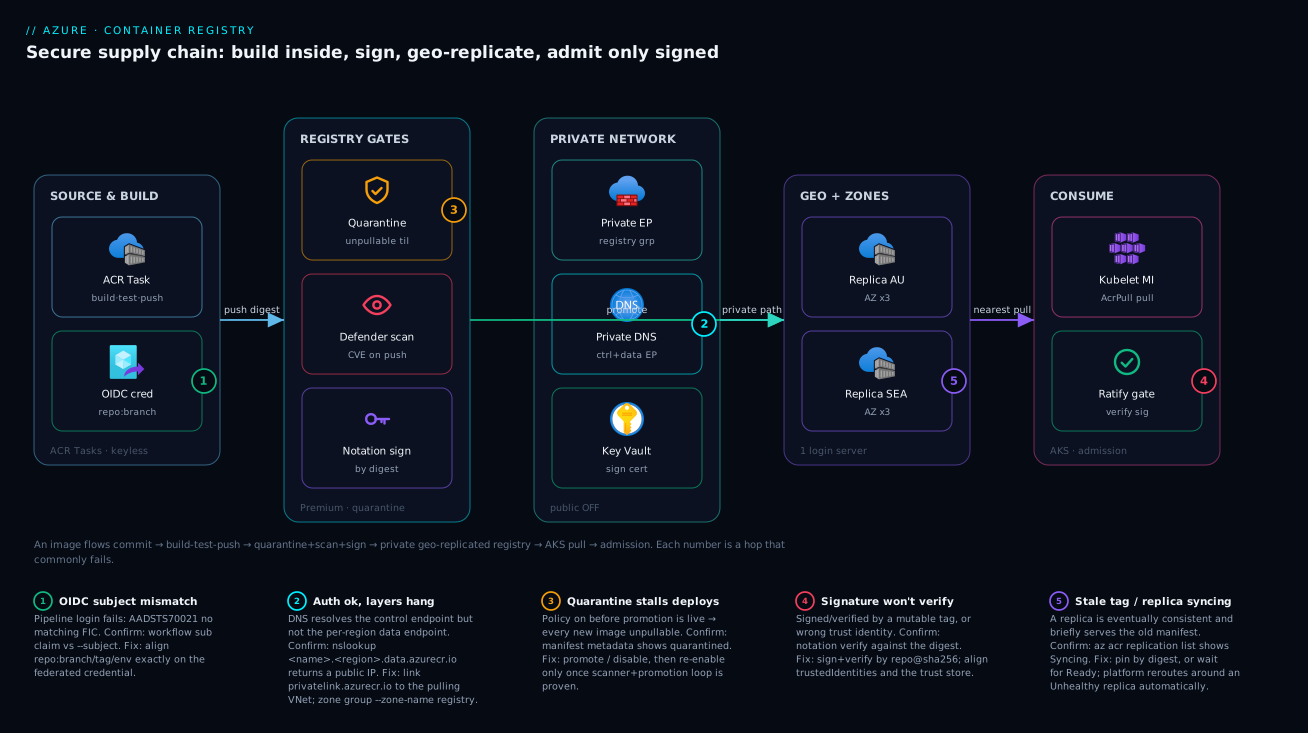
Trace a single image from a developer’s commit to a running pod, and every control in this article lines up on one left-to-right path. On the far left, a commit to main fires the ACR Task — but the build does not run on the developer’s machine or a generic CI agent; it runs on ACR-managed compute inside the registry boundary, authenticated by an OIDC federated credential so no secret is stored anywhere. The task builds, runs unit tests against the freshly built image, and only then pushes by digest. The push lands the image in a quarantined state: invisible to normal pulls. Defender for Containers scans it; a Notation signature is attached using a certificate held in Key Vault; and once the promotion automation marks it passed, the image becomes pullable.
From there the request path inverts. The registry itself sits behind a private endpoint with public access disabled, so its *.azurecr.io control endpoint and every *.<region>.data.azurecr.io data endpoint resolve to private IPs inside the VNet via the privatelink.azurecr.io zone. The registry is geo-replicated and zone-redundant: a copy lives in each consuming region, each spread across availability zones, with health-aware routing in front. When an AKS cluster pulls, its kubelet managed identity authenticates with AcrPull (no imagePullSecret), the global login server routes it to the nearest replica’s data endpoint, and Ratify at the admission gate refuses the image unless its Notation signature validates against the trust policy. The numbered badges below mark the five hops where this most commonly breaks — read the legend as symptom · confirm · fix.
Real-world scenario
A fintech platform team ran a single Standard ACR in Australia East feeding AKS clusters in Australia East and Southeast Asia. Two problems surfaced in the same quarter. First, a security review flagged that the registry’s admin user was enabled and its password lived in a Kubernetes imagePullSecret that had not rotated in 14 months — and the same secret was pasted into three pipelines. Second, the Southeast Asia clusters were pulling every layer cross-region on cold starts, adding seconds to pod startup during scale-out and racking up inter-region egress on every deployment.
They upgraded to Premium and made three coordinated changes. For credentials, they killed the admin user, moved AKS to managed-identity pulls by attaching the registry to each cluster (az aks update --attach-acr), which assigns AcrPull to the kubelet identity — no secret in the cluster at all — and moved pipelines to OIDC federated credentials. For locality, they added a geo-replica in Southeast Asia. Because the global login server is unchanged, no manifests, Helm charts, or pipelines needed editing; the Southeast Asia kubelets simply began resolving to the local data endpoint and pulling within region. For provenance, they enabled quarantine-on-push and Notation signing, ramping enforcement from audit to permissive to strict over three sprints so a missed signature degraded gracefully instead of blocking deploys on day one.
# Replica colocated with the SEA clusters — single command, zero manifest changes
az acr replication create -r kvacrprod -l southeastasia

# Each AKS cluster pulls with its kubelet managed identity, no imagePullSecret
az aks update -g rg-aks-sea -n aks-sea --attach-acr kvacrprod
The measurable outcomes: cold-start pull time in Southeast Asia dropped because layers no longer crossed the region boundary, inter-region egress on deploys went to near zero, and the credential audit finding closed because there were no static registry secrets left to rotate. The replica also gave them an unplanned benefit during a later Australia East zone disruption — the SEA replica kept serving pulls while the home region recovered, with no failover action on their part. The rollout was not free of friction: the first attempt to enable quarantine on day one stalled every deployment because the promotion automation was not yet live, which is exactly why the second attempt sequenced the automation first. The lesson the team took away: geo-replication is sold as DR, but the day-to-day wins are pull locality and the fact that one login server lets you change the topology underneath without touching a single workload manifest — and that any breaking gate (quarantine, strict signing) must have its promotion path live before you flip it. The phased numbers:
| Change | Before | After | Mechanism |
|---|---|---|---|
| Registry credential | Admin password in 3 pipelines + cluster | Zero stored secrets | MI pulls + OIDC |
| Credential audit finding | Open (14-month-old secret) | Closed | No static creds to rotate |
| SEA cold-start pull | Cross-region, seconds added | In-region | Local geo-replica |
| Inter-region egress on deploy | Per-layer, per-deploy | ~Zero | Nearest data endpoint |
| Unsigned image admission | Allowed | Denied (strict) |
Notation + Ratify |
| AZ-East zone disruption | Would halt pulls | SEA replica served through it | Health-aware routing |
Advantages and disadvantages
The hardened posture is not free — it trades operational simplicity for security, resilience, and locality. The explicit two-column view:
| Advantages | Disadvantages |
|---|---|
| No standing secret to leak or rotate (MI + OIDC) | Requires Premium SKU (higher floor cost) |
| Blast radius scoped per repo (scope maps / RBAC) | More moving parts to operate and monitor |
| Provable provenance (signing) blocks tampering | Signing/quarantine add a learning curve + ramp risk |
| Unscanned/unsigned images cannot ship (gates) | Breaking gates stall deploys if promotion isn’t live |
| Survives zone and region failure, automatically | Each replica is a billable Premium unit |
| Pull locality cuts egress + cold-start latency | Eventual consistency: a just-pushed tag may lag a replica briefly |
| Registry never internet-reachable (private endpoint) | DNS/PE misconfig can lock you (or CI) out |
| Smaller, cheaper, faster scans (retention/purge) | Aggressive purge without soft delete is irrecoverable |
Where each advantage actually matters: the keyless story matters most to teams with audit obligations or a history of leaked credentials — it removes an entire class of finding. Geo-replication matters to genuinely multi-region workloads; for a single-region app it is pure cost with no benefit, so do not add replicas you do not pull from. Quarantine and signing matter most where a compromised image is catastrophic (anything handling money or PII) and least where you are iterating on an internal dev tool — there, the strict ramp is overhead you can defer. The private endpoint matters whenever the registry would otherwise be one leaked credential away from full public exposure, which is to say almost always. Read the disadvantages as a sequencing guide, not a deterrent: every one of them is mitigated by rolling the breaking controls out after their safety nets (promotion automation, soft delete, a permissive signing ramp) are live.
Hands-on lab
This builds a hardened Premium registry, proves the admin user is gone, signs an image, and tears it all down. It uses real commands; the Premium registry and a single geo-replica accrue cost while they exist, so do the teardown. Run it in Cloud Shell.
1. Create the resource group and a Premium registry with the admin user disabled.
RG=rg-acr-lab
ACR=kvacrlab$RANDOM          # must be globally unique
LOC=australiaeast
az group create -n $RG -l $LOC
az acr create -n $ACR -g $RG --sku Premium --admin-enabled false
Expected: a registry resource with "adminUserEnabled": false and "sku": { "name": "Premium" }.
2. Confirm the admin user is actually off.
az acr show -n $ACR --query adminUserEnabled -o tsv     # expect: false
az acr credential show -n $ACR 2>&1 | head -1           # expect: an error — admin disabled
3. Build an image inside the registry with a quick task (no Docker daemon needed).
cat > Dockerfile <<'EOF'
FROM mcr.microsoft.com/cbl-mariner/busybox:2.0
CMD ["echo", "hello from a registry-built image"]
EOF
az acr build -r $ACR -t demo/hello:v1 .
Expected: a remote build log ending with the pushed image and its digest.
4. Create a least-privilege scope map and a pull-only token.
az acr scope-map create -r $ACR -n demo-pull \
  --repository demo/hello content/read metadata/read \
  --description "Pull-only for the demo repo"
az acr token create -r $ACR -n demo-puller --scope-map demo-pull -o json \
  --query "{name:name, status:status}"
Expected: a token in enabled status bound to demo-pull.
5. Turn on untagged retention and soft delete (the safety nets).
az acr config retention update -r $ACR --status enabled --days 7 --type UntaggedManifests
az acr config soft-delete update -r $ACR --status enabled --days 7
az acr config retention show -r $ACR -o table
Expected: both policies report enabled.
6. Add a geo-replica and watch it reach Ready.
az acr replication create -r $ACR -l southeastasia
az acr replication list -r $ACR -o table     # status goes Creating -> Ready
7. (Optional) Sign by digest with Notation + Key Vault. If you have a Key Vault with a signing certificate and the azure-kv plugin installed, sign the digest from step 3:
DIGEST=$(az acr repository show -n $ACR -t demo/hello:v1 --query digest -o tsv)
IMAGE=$ACR.azurecr.io/demo/hello@$DIGEST
notation sign --signature-format cose --id $KEY_ID --plugin azure-kv \
  --plugin-config self_signed=true $IMAGE
notation verify $IMAGE     # expect: verification succeeded
8. Tear it all down so nothing accrues cost:
az group delete -n $RG --yes --no-wait
Expected commands at each step and what a healthy result looks like:
| Step | Command (core) | Healthy result | If it fails |
|---|---|---|---|
| 1 | az acr create --sku Premium --admin-enabled false |
Premium registry, admin off | Name not unique → choose another |
| 2 | az acr credential show |
Error (admin disabled) | If it returns creds, admin is still on |
| 3 | az acr build -t demo/hello:v1 . |
Remote build + digest | Quota/region issue → retry, check SKU |
| 4 | az acr token create --scope-map demo-pull |
Token enabled |
Scope map missing → create it first |
| 5 | az acr config retention/soft-delete update |
Both enabled |
Basic/Standard → Premium-only feature |
| 6 | az acr replication create -l southeastasia |
Replica Ready |
Region not AZ-capable → pick another |
| 7 | notation verify |
Verification succeeded | Plugin/cert missing → install/grant KV |
| 8 | az group delete --yes |
RG removed | Locks present → remove resource locks |
Common mistakes & troubleshooting
The failures below are the ones that actually page people. Each is symptom → root cause → confirm (exact command/path) → fix. Scan the playbook table first, then read the detail for the row that matches.
| # | Symptom | Root cause | Confirm | Fix |
|---|---|---|---|---|
| 1 | Login works, layer pull hangs/times out | DNS resolves control endpoint but not data endpoints | nslookup $ACR.<region>.data.azurecr.io returns public IP |
Add private DNS zone group; verify per-region A records |
| 2 | docker login/pull → denied from CI |
Public off + agent outside VNet, not trusted | az acr show --query publicNetworkAccess = Disabled |
Self-hosted runner in VNet, or OIDC + scoped allow |
| 3 | Defender shows no scan results | networkRuleBypassOptions=None or plan off |
az acr show --query networkRuleBypassOptions; az security pricing show -n Containers |
Set bypass AzureServices; enable plan Standard |
| 4 | ACR Task fails on import, not on build |
Source registry is network-restricted (not trusted) | Task log shows timeout pulling source, not pushing | Make source reachable; run import from inside VNet |
| 5 | Base-image trigger never fires on a CVE | Dockerfile FROM unpinned or latest |
az acr task show --query "...baseImageTrigger" |
Pin base to a specific tag; --base-image-trigger-type Runtime |
| 6 | Every deploy stalls after enabling quarantine | Promotion automation not live; images stuck quarantined | az acr manifest list-metadata shows quarantine state |
Promote/disable; bring scanner+promotion live first |
| 7 | notation verify fails for a legit image |
Verified by tag (mutable) or wrong trust identity | Re-run notation verify against the digest |
Sign+verify by digest; fix trustedIdentities/store |
| 8 | AKS won’t pull: unauthorized/forbidden |
Kubelet MI lacks AcrPull, or no --attach-acr |
az aks check-acr -n <aks> --acr $ACR |
az aks update --attach-acr; assign AcrPull |
| 9 | Purge deleted a signed/multi-arch image | --untagged removed digest-only referrers |
Soft-delete blade shows the deleted manifest | Restore from soft delete; narrow filter; --dry-run first |
| 10 | Pull returns a stale tag in one region | Replica still Syncing (eventual consistency) |
az acr replication list shows Syncing |
Wait for Ready; pin by digest for determinism |
| 11 | OIDC login fails: AADSTS70021 no matching FIC |
Federated-credential subject mismatch | Compare workflow sub claim vs --subject |
Align subject exactly (repo:branch/tag/env) |
| 12 | Locked out of the registry after lockdown | Disabled public access before PE/DNS were ready | az acr show --query publicNetworkAccess from outside |
Temporarily re-enable public via an allowed network; fix PE/DNS |
Detail on the highest-frequency failures
#1 — Auth succeeds, layers hang. This is the canonical two-endpoint mistake. Your DNS zone group registered the registry group but the data-endpoint A records never populated (often because the zone wasn’t linked to the pulling VNet, only the hub). Confirm by resolving the data endpoint from inside the consuming VNet — a public IP means the private path isn’t wired. Fix by ensuring the private DNS zone is linked to every VNet that pulls, and that the zone group used --zone-name registry so the data records auto-populate.
#6 — Quarantine stalls everything. Quarantine is a breaking change: with the policy on, nothing new is pullable until promoted. If you flip it before the scanner-and-promotion loop is live, every deployment of a new image stalls. Confirm with the manifest metadata showing images stuck in the quarantined state. The fix in an incident is to promote the stuck images (or disable the policy), then re-enable only after the promotion automation is proven. This is the single most common self-inflicted ACR outage.
#7 — Signatures verify by tag. A signature binds to immutable content (a digest). If you notation sign or verify against a tag, a later overwrite of that tag breaks the binding and verification fails for reasons that look mysterious. Always operate on repo@sha256:.... The second cause is a trustedIdentities/trust-store mismatch — the cert in the store doesn’t match the signer’s x509.subject. Re-download the cert into the named store and confirm the subject string matches exactly.
#8 — AKS can’t pull. The cluster’s kubelet identity needs AcrPull. az aks check-acr is the purpose-built diagnostic — it tells you whether the cluster can authenticate and resolve the registry. If it reports an auth failure, run az aks update --attach-acr; if it reports a DNS/network failure, the private endpoint isn’t reachable from the cluster VNet (see #1).
Best practices
- Premium and admin-off, always. Every control here needs Premium, and the admin user is a single shared full-access credential with no expiry — disable it at creation and verify with
az acr show --query adminUserEnabled. - Public access off, private endpoint on — in that order. Stand up the private endpoint and DNS first, confirm a private pull works, then disable public access, or you lock yourself out.
- One private endpoint,
registrygroup ID. It covers the control endpoint and every replica data endpoint; link theprivatelink.azurecr.iozone to every VNet that pulls. - Keyless by default. AKS pulls via the kubelet managed identity (
--attach-acr); pipelines use OIDC federated credentials scoped per repo and branch. Reach for scope-map tokens only for non-Entra consumers, and give them an expiry. - Least privilege per consumer. Scope maps and
AcrPull/AcrPushon the narrowest scope; a custom role limited to specific repositories beatsAcrPushacross the whole registry. - Build inside the boundary. Use ACR Tasks (not laptop/agent builds) with a build-test-push multi-step gate, commit triggers, and base-image triggers so derived images auto-patch against CVEs.
- Pin base images to a tag. Unpinned or
latestbases mean the base-image trigger can’t track the digest and CVE rebuilds never fire. - Sign by digest, enforce by policy. Notation + Key Vault, trust policy at
strict, Ratify + Gatekeeper at AKS — and ramp fromaudit→permissive→strictso a missed signature degrades gracefully. - Sequence breaking gates after their safety nets. Quarantine only after promotion automation is live;
strictsigning only after the ramp; destructive purge only after soft delete is on. - Geo-replicate to where you actually pull. A replica per consuming region for locality and region failover; don’t pay for replicas you don’t pull from. Rely on default zone redundancy for zone failure.
- Shrink the surface continuously. Untagged-manifest retention plus a scheduled purge task (filters
--dry-run-tested,--keep Nfor prod), with soft delete as the recovery net. - Alert on the supply-chain signals, not just “registry down”: new High/Critical CVEs on in-use digests, quarantine backlog, replica health, and any image admitted unsigned.
Security notes
- Identity over secrets, least privilege over convenience. The endgame is zero standing registry secrets: managed identities for pulls, OIDC for pipelines, scope-map tokens (expirable, repo-scoped) only where Entra is impossible. Never a workload on
Contributor. - Network isolation is non-negotiable for a registry. Public access disabled, private endpoint with the
registrygroup, private DNS, default-deny IP rules, and trusted-services bypass only for the platform services that need it (Defender, Tasks). - Provenance is a security control. Quarantine-on-push prevents an unscanned image from ever being pullable; Notation signing plus Ratify prevents a tampered or wrong-signer image from being admitted. Together they answer “checked?” and “is this the checked thing?”.
- Protect the signing material. The signing certificate lives in Key Vault under RBAC (
Key Vault Crypto User,Certificates Officerfor the signer only); use RFC 3161 timestamping so signatures survive cert expiry, and rotate the cert on a schedule. - Encrypt with your key if you must control it. Customer-managed keys (CMK) wrap registry content with a Key Vault key you own — adds operational burden (key rotation, availability) but satisfies BYOK mandates; the platform-managed default already encrypts at rest.
- Audit the data plane. Send ACR diagnostic logs (
ContainerRegistryRepositoryEvents,ContainerRegistryLoginEvents) to Log Analytics so every pull, push, and delete is attributable to an identity.
The security controls and exactly what each one prevents — secure and resilient pull in the same direction here:
| Control | Setting / mechanism | Prevents | Also helps |
|---|---|---|---|
| Disable admin user | --admin-enabled false |
Shared full-access credential leak | Forces per-consumer identity |
| Private endpoint + DNS | registry group + privatelink.azurecr.io |
Public exposure of registry/layers | Cuts egress (private path) |
| Trusted-services bypass | --allow-trusted-services true + MI |
Over-broad firewall holes | Lets Defender/Tasks reach in safely |
| Scope maps / RBAC | content/* actions, AcrPull/AcrPush |
Unscoped over-privileged access | Per-repo blast-radius limit |
| Quarantine-on-push | quarantinePolicy.status=enabled |
Pulling an unscanned image | Forces a scan gate |
| Notation + Ratify | Sign by digest + strict trust policy |
Tampered/wrong-signer admission | Provable provenance |
| Defender for Containers | Plan Standard |
CVEs shipping undetected | Continuous re-scan of in-use images |
| Soft delete | --status enabled --days |
Irrecoverable accidental/malicious delete | Recovery from a bad purge |
| CMK encryption | Key Vault key + registry encryption | Loss of BYOK key control | Compliance (BYOK) |
| Diagnostic logging | ContainerRegistry*Events → LA |
Unattributable data-plane actions | Forensics, audit |
Cost & sizing
The bill is driven by the Premium SKU daily price, the number of geo-replicas (each a Premium unit), storage beyond the included allowance, outbound data transfer, ACR Tasks compute (per CPU-second, with a free monthly grant), and Defender for Containers (per image scanned). The Premium tier is a fixed daily charge that includes a large storage allowance and the full feature set; the variable costs are replicas, overage storage, egress, and scan volume.
- SKU floor. Premium is roughly ₹40,000–45,000/month (~US$500–550) for the home region at list price, including a generous bundled storage allowance — the price of admission for every feature in this article. Basic/Standard are cheaper but cannot do private endpoints, replicas, tokens, quarantine, or CMK, so they are a non-starter for this posture.
- Each geo-replica is another Premium unit, so a three-region topology is roughly 3× the per-region price. Replicate only to regions you actually pull from — locality savings (egress + cold-start time) must justify the replica’s cost.
- Storage overage and egress. Beyond the included storage you pay per GB-month; cross-region pulls without a local replica pay egress per GB. Retention + purge directly cut both, which is why cleanup is a cost lever, not just hygiene.
- ACR Tasks bill per CPU-second of build time with a free monthly grant; heavy CI on big images can exceed it. Layer caching and smaller images reduce both build time and storage.
- Defender for Containers bills per image scanned (push/pull/continuous); a registry with thousands of churning tags scans a lot — another reason aggressive retention pays for itself.
Right-sizing is mostly about replica placement and surface size. The cost drivers and what each one buys:
| Cost driver | What you pay for | Rough INR / month | What it buys | Watch-out |
|---|---|---|---|---|
| Premium SKU (home) | Fixed daily + bundled storage + all features | ~₹40,000–45,000 | Private endpoints, tokens, signing, replicas | Required floor; no cheaper path to these features |
| Geo-replica (each) | One additional Premium unit | ~₹40,000–45,000 each | Region failover + pull locality | Don’t replicate where you don’t pull |
| Storage overage | Per GB-month beyond allowance | Variable (per GB) | Capacity for many tags/artifacts | Retention/purge to keep it down |
| Outbound data transfer | Per GB egress (cross-region pulls) | Variable (per GB) | Pulls served to far regions | A local replica eliminates most of it |
| ACR Tasks compute | Per CPU-second (after free grant) | Variable (usage) | Builds inside the boundary | Big images/heavy CI exceed the grant |
| Defender for Containers | Per image scanned | Variable (per image) | CVE scanning push/pull/continuous | Many churning tags = more scans |
| Soft delete retention | Storage of deleted items in window | Marginal | Recovery net | Counts toward storage while retained |
A rough monthly picture for a two-region fintech registry: home + one replica (~₹80,000–90,000 in SKU), modest storage overage and egress (now small thanks to the local replica), Tasks within the free grant for a handful of services, and Defender scanning a few hundred images (~low thousands of ₹). The dominant line is always the Premium units; everything else is rounding by comparison, which is why the single biggest cost decision is how many regions you genuinely pull from.
Interview & exam questions
1. Why must a network lockdown of ACR account for two endpoint classes, and what breaks if it doesn’t? ACR has a registry endpoint (*.azurecr.io, Docker v2 API + auth) and per-region data endpoints (*.<region>.data.azurecr.io, layer blobs). The registry private-endpoint group ID projects both into the VNet, but if private DNS only resolves the control endpoint, login succeeds and layer pulls hang/time out. You must link the privatelink.azurecr.io zone to every pulling VNet so the data-endpoint A records resolve privately.
2. The admin user is enabled and its password is in three pipelines. Walk through the remediation. Disable the admin user (--admin-enabled false), then move each consumer to an identity-based model: AKS to managed-identity pulls via az aks update --attach-acr (assigns AcrPull to the kubelet identity, no imagePullSecret), and pipelines to OIDC federated credentials scoped per repo/branch. Where a consumer truly cannot use Entra (a third-party appliance), issue a scope-map token with an expiry and the minimum actions. Net result: zero standing secrets.
3. What does a multi-step ACR Task give you that az acr build does not? A multi-step task’s build step does not auto-push; combined with cmd (run tests against the freshly built image) and a gated push (when: ["unit-tests"]), it is a build-test-push gate inside the registry boundary — the image is only published if it passes. az acr build always pushes. The task also supports commit and base-image triggers.
4. Explain the base-image trigger and what it requires. When the digest behind your Dockerfile’s FROM tag moves (an upstream or internal base is rebuilt), a base-image trigger (--base-image-trigger-type Runtime) re-runs the task and rebuilds your image with the patched layers — auto-patching derived images against CVEs at scale. It requires the base to be pinned to a specific tag (not unpinned, ideally not latest) so ACR can track the digest behind it.
5. Quarantine-on-push vs Notation signing — what does each guarantee, and why have both? Quarantine makes a pushed image invisible to normal pulls until promoted, forcing a scan gate (“has this been checked?”). Notation signing attaches a cryptographic proof verified at admission by Ratify (“is this the checked thing, from a signer we trust?”). They protect different things — quarantine against unscanned images, signing against tampering and wrong-signer — so a complete posture uses both.
6. Why sign by digest rather than tag, and what fails if you sign by tag? A signature binds to immutable content; a tag is a mutable pointer. If you sign or verify by tag and the tag is later overwritten, the signature no longer matches the content the tag points to and verification fails for reasons that look mysterious. Always operate on repo@sha256:....
7. How does ACR survive a zone failure versus a region failure, and who triggers failover? Zone redundancy (default in AZ regions, free) spreads each replica’s storage across availability zones, surviving a zone outage. Geo-replication keeps live writable copies in multiple regions behind one login server, surviving a region outage and serving pulls from the nearest replica. Failover is platform-managed and health-aware — there is no customer failover button; the global endpoint routes around an unhealthy replica automatically.
8. A pull returns a stale tag in one region right after a push. Why, and how do you make it deterministic? Geo-replicas are eventually consistent; a replica may briefly be Syncing after a write, so it can serve the previous manifest for that tag momentarily. Confirm with az acr replication list showing Syncing. For determinism, pin by digest (repo@sha256:...) rather than by a mutable tag, or wait for the replica to reach Ready.
9. After enabling quarantine, every deployment stalls. Root cause and fix? The promotion automation was not live when quarantine was enabled, so every newly pushed image is stuck quarantined and unpullable. Confirm via manifest metadata showing the quarantined state. Fix by promoting (or disabling the policy) and only re-enabling once the scanner-and-promotion loop is proven. The lesson: enable any breaking gate after its promotion path exists.
10. An OIDC pipeline login fails with “no matching federated identity credential.” What’s wrong? The subject claim presented by the workflow doesn’t match the federated credential’s --subject. The credential federates a specific subject (e.g. repo:org/repo:ref:refs/heads/main); if the workflow runs on a different branch, tag, environment, or PR, the subject differs and Entra rejects it. Align the --subject exactly to how the pipeline runs.
11. How do you keep a busy registry small without losing signatures or multi-arch images? Use untagged-manifest retention plus a scheduled purge task, but be careful: signatures, SBOMs, and multi-arch child manifests are referenced only by digest and look “untagged.” Always --dry-run purge filters first, use --keep N for production repos, and enable soft delete so a bad filter is recoverable.
12. Which Azure roles cover pull, push, and signing, and why never put a workload on Contributor? AcrPull (pull), AcrPush (pull+push), AcrImageSigner (sign), AcrDelete (delete) — all scoped to the registry or a custom-role’d subset of repositories. A workload on Contributor/Owner has full management rights (delete the registry, change networking), far beyond pull/push, violating least privilege and widening blast radius catastrophically.
These map primarily to AZ-500 (Security Engineer) — secure compute, storage, and registries; manage identities and access; configure private networking — and AZ-204 (Developer) — create and manage container images; implement CI/CD; manage secrets via managed identity. The networking lockdown touches AZ-700, and the RBAC/identity material overlaps AZ-104. A compact cert mapping:
| Question theme | Primary cert | Objective area |
|---|---|---|
| Private endpoints, DNS, firewall | AZ-500 / AZ-700 | Secure & isolate PaaS networking |
| Tokens, scope maps, RBAC roles | AZ-500 / AZ-104 | Manage access to resources |
| Managed identity & OIDC pulls/push | AZ-204 / AZ-500 | Secure app config; CI/CD |
| ACR Tasks, base-image triggers | AZ-204 | Build & manage container images |
| Quarantine, Notation, Ratify | AZ-500 | Supply-chain & content trust |
| Geo-replication, zone redundancy | AZ-104 / AZ-305 | Resilience & high availability |
| Defender for Containers | AZ-500 | Implement threat protection |
Quick check
- Login to a private-endpoint ACR succeeds but layer pulls hang. What single DNS thing is almost certainly missing, and how do you confirm it?
- You disabled the admin user and need AKS to pull with no stored secret. What one command wires the kubelet identity, and what role does it assign?
- True or false: enabling quarantine-on-push is a safe, non-breaking change you can flip any time.
- Why must you sign and verify images by digest rather than by tag?
- Your registry survives a zone outage automatically but you also need to survive a region outage. What do you add, and who triggers the failover?
Answers
- The private DNS zone group for the data endpoints is missing (or the
privatelink.azurecr.iozone isn’t linked to the pulling VNet). Confirm by resolving$ACR.<region>.data.azurecr.iofrom inside that VNet — a public IP means the data endpoint isn’t projected privately. Fix by linking the zone to every pulling VNet and ensuring the zone group used--zone-name registryso data-endpoint A records auto-populate. az aks update --attach-acr <registry>— it assigns theAcrPullrole to the cluster’s kubelet managed identity, so pods pull with noimagePullSecret.- False. It is a breaking change: every newly pushed image is unpullable until promotion automation marks it passed. Enable it only after the scanner-and-promotion loop is live, or every deployment stalls.
- A signature binds to immutable content, and a tag is mutable. Sign/verify by tag and a later overwrite breaks the binding, so verification fails. Always use
repo@sha256:.... - Add geo-replication (a replica in each consuming region). Failover is platform-managed and health-aware — there is no customer failover button; the global login server routes around an unhealthy replica automatically.
Glossary
- Azure Container Registry (ACR) — managed, OCI-compliant registry for Docker/Helm artifacts, signatures, and SBOMs; Premium tier unlocks the security and resilience features here.
- Registry endpoint —
<name>.azurecr.io; serves the Docker v2 API and authentication. - Data endpoint —
<name>.<region>.data.azurecr.io; serves the layer blobs, one per geo-replica. - Private endpoint (
registrygroup) — a private IP in your VNet projecting both the control and data endpoints behind Private Link. - Admin user — a single shared username/password with full registry read/write and no expiry; disable it always.
- Scope map — a registry IAM policy granting named actions (
content/read,content/write, etc.) on specific repositories. - Token — a credential bound to a scope map; the non-Entra, expirable access path.
- AcrPull / AcrPush / AcrDelete / AcrImageSigner — built-in Entra roles for keyless pull / push / delete / sign via managed identity.
- ACR Task — a build/cmd/push pipeline running on ACR-managed compute inside the registry boundary; supports commit and base-image triggers.
- Base-image trigger — re-runs a task when the digest behind the Dockerfile’s
FROMtag moves, auto-patching derived images. - Quarantine-on-push — a policy that makes a pushed image invisible to normal pulls until a process marks it passed.
- Notation — the Notary Project signing CLI; attaches a COSE signature (here via the Key Vault
azure-kvplugin) proving provenance and integrity. - Trust policy — Notation config scoping which signer identities are trusted for which repositories, at a verification level (
strict/permissive/audit). - Ratify — the AKS-side verifier that, with a Gatekeeper constraint, admits only images whose signature validates against the trust policy.
- Geo-replication — one logical registry with live writable copies in multiple regions behind one login server; region failover + pull locality.
- Zone redundancy — storage spread across availability zones (default in AZ regions, free); survives a zone outage.
- Soft delete — keeps deleted artifacts recoverable for a retention window; the safety net before any destructive purge.
- OIDC federated credential — lets a pipeline exchange a short-lived OIDC token for an Entra access token with no stored secret; scoped by an exact subject.
- Defender for Containers — the subscription plan that scans ACR images on push, pull, and continuously against new CVE definitions.
Next steps
You can now stand up a registry that proves what it serves and refuses what it can’t. Build outward:
- Next: Azure Private Link and Private DNS for PaaS — the network-isolation pattern that underpins the registry lockdown and every other PaaS endpoint.
- Related: Azure Key Vault: Secrets, Keys & Certificates — where the signing certificate and any CMK live; get RBAC and rotation right.
- Related: Azure App Service vs Container Apps vs AKS — the consuming compute that pulls from this registry, and how it authenticates.
- Related: Azure Regions and Availability Zones Explained — the foundation for choosing replica regions and reasoning about zone redundancy.
- Related: Multi-Region Active-Active Design — where geo-replication fits in a fully redundant, multi-region platform.
- Related: Private Endpoint vs Service Endpoint — the decision behind how the registry (and its data endpoints) are reached privately.