In a nutshell
Think of your Azure bill like the electricity bill for a large office building. The invoice at month-end is one big number, but the useful version breaks it down by floor, by team, and by what each meter actually did — and it comes with a smart meter that pages the facilities manager the moment one floor’s usage spikes at 2 a.m. FinOps is that sub-metering-and-alerting discipline for cloud spend. You put a name tag on every “appliance” (resource) so you know whose it is, you read an honest meter (amortized cost) instead of the lumpy invoice, you set a tripwire that warns before the bill blows the budget, and you sign the cloud equivalent of a fixed-rate energy contract (a commitment) for the load you know you’ll always run — while leaving the spiky, optional load on the pay-as-you-go tariff.
The one idea underneath all of it: cloud cost is something engineers create, so engineers can own it — in the same dashboard-and-alert loop they already use for latency and errors. A VM sized “just in case”, a disk left behind when its VM was deleted, a three-year commitment bought for hardware the team has since migrated off — each is a decision that surfaces on an invoice three weeks later, by which time it is hard to trace. FinOps closes that gap: attribute every rupee to an owner, set a target, alert on the leading indicator, and automate the fix so a saving never depends on a human remembering.
If you are brand new, hold onto one loop that repeats forever: Inform (see where the money goes and who owns it) → Optimize (stop paying for waste, commit to your steady load) → Operate (keep it from drifting back, automatically). Most teams buy a dashboard, park in Inform, and call it done. The value is in closing the loop into Optimize and Operate, over and over, with named owners.
Level: Advanced · Time: ~75 min (a reference you return to, not one sitting)
You’ll get the most from this if you already can read the Azure hierarchy (management group → subscription → resource group → resource), run az in Cloud Shell, and hold Cost Management Reader on the scope you’re exploring. By the end you’ll be able to design a tag taxonomy and enforce it with policy, build showback that reconciles to 100%, size commitments to your floor with break-even math, and wire budgets plus anomaly alerts that page the owner before the invoice. The detailed prerequisites and the full learning objectives follow in the next two sections; the deep reference tables start right after.
Cloud cost is an engineering output, not a finance report you receive after the fact. The invoice that lands on the fifth of the month is the lagging indicator of decisions an engineer made three weeks ago — a VM SKU chosen for headroom that never materialised, a Standard public IP left on a deleted load balancer, a 3-year Reservation bought for a family the workload has since migrated off. FinOps is the discipline that gives the people who create spend the data and the levers to own it, in the same loop they already use for latency and error rate. This playbook treats Azure cost exactly that way: instrument it, attribute it to an owner, set a target, alert on the leading indicator, and automate the corrective action so the saving doesn’t depend on a human remembering.
The reason this matters on Azure specifically is that the platform makes every one of those levers a first-class, scriptable resource — and almost none of them are on by default. Cost Management gives you amortized cost, exports, anomaly detection and budgets; Azure Policy enforces the tags that make allocation possible and blocks the SKUs that cause waste before it’s created; Reservations and Savings Plans are the two commitment vehicles whose break-even math decides whether you’re paying retail or a 40–60% discount; Advisor surfaces rightsizing and orphan-resource recommendations you can pull with one az call. The trouble is that each lives in a different blade, speaks a slightly different model (actual vs amortized, shared vs single scope, RI vs SP), and has a gotcha that turns a “saving” into a chargeback that lands on the wrong cost center. This article is the reference that ties them together.
By the end you will stop treating the dashboard as the destination. You’ll have a tag taxonomy that survives reorgs, allocation that reconciles to 100% including shared cost, commitments sized to your floor not your peak, rightsizing validated against real P95 metrics rather than Advisor’s CPU-weighted guess, and waste cleanup encoded as scheduled runbooks and deny policies instead of a quarterly manual sweep. Because this is a reference you return to during the monthly review and mid-incident when a subscription’s spend triples overnight, the settings, the limits, the break-even thresholds and the failure modes are all laid out as scannable tables — read the prose once, then keep the tables open.
What problem this solves
Without FinOps as an engineering practice, cloud cost behaves like an un-instrumented service: it only gets attention when it pages someone, and by then the damage is a month old and untraceable. The specific pains in production terms are concrete. You cannot answer “what does the checkout service cost?” because resources aren’t tagged, so every conversation about efficiency stalls on “we’ll have to dig into that.” A batch job loops on a bug over a weekend and adds a few lakh rupees of compute before anyone notices, because there’s no anomaly alert and the budget only checks actual spend at 80% of a monthly number. A team buys a 3-year Reservation on the family they run today, the workload migrates for memory headroom six months later, and the commitment strands at 61% utilization while its leftover discount silently lands on dev/test boxes that should never absorb it.
What breaks without the discipline is not a system — it’s the feedback loop. Engineers ship a feature and never see its cost; finance sees a number with no owner; the platform team gets a directive to “cut cloud spend 20%” with no map of where the spend even is. The result is the worst of both worlds: real waste that nobody can locate, and panic cuts that hit the wrong things (downsizing a memory-bound SKU into a performance incident because Advisor said CPU was low).
Who hits this: every organisation past a handful of subscriptions. It bites hardest on fast-growing platforms (spend outruns governance), multi-team landing zones (no allocation = no accountability), lift-and-shift estates (on-demand VMs that should be on commitments, oversized to match on-prem), and anyone running steady production on pay-as-you-go — which is the single most expensive way to run a predictable workload. The fix is almost never “buy a cost tool.” It’s “make cost a signal in the same loop as reliability, attributed to the engineer whose budget it is, and act on it automatically.”
To frame the whole field before the deep dive, here is the FinOps lifecycle, the question each phase forces, the Azure tool that answers it, and the failure mode of stopping there:
| Phase | Goal | First question | Primary Azure tool | Failure mode of living here permanently |
|---|---|---|---|---|
| Inform | Visibility, allocation, showback | Where does every rupee land, and who owns it? | Cost Analysis, tags, exports | A pretty dashboard nobody acts on |
| Optimize | Rightsizing, commitments, waste cleanup | What can we stop paying for, and what should we commit? | Advisor, Reservations, Savings Plans, Spot | One-shot cleanups that regrow |
| Operate | Continuous governance, automation | How do we keep it from drifting back? | Azure Policy, Budgets, Automation, action groups | Governance with no measurement loop |
The mistake teams make is buying a dashboard, sitting in Inform forever, and calling it FinOps. The dashboard is table stakes. The value is closing the loop into Optimize and Operate, repeatedly, with named owners.
Learning objectives
By the end of this article you can:
- Design a tag taxonomy of mandatory keys that survives reorgs, and enforce it with Azure Policy
modify(inheritance) plusdeny(enforcement) at management-group scope, then remediate existing resources. - Build cost allocation and showback that reconciles to 100% — including splitting shared cost (hub firewall, Log Analytics) to consumers — using scheduled AmortizedCost exports and the Cost Management Query API.
- Wire budgets with actual and forecasted thresholds routed to the owner via action groups, and turn on cost anomaly detection so a runaway job pages in hours, not at invoice.
- Do the commitment break-even math and choose correctly between Reservations (deepest discount, locked), Savings Plans (flexible, hourly-$ commitment), and Spot (evictable, up to ~90% off) — floor / middle / burst.
- Rightsize with Advisor validated against real P95 CPU and memory metrics, and never downsize a memory-bound SKU into an incident.
- Sweep orphaned resources (unattached disks, unassociated public IPs, idle gateways) and encode the easy fixes as auto-shutdown schedules, start/stop runbooks, and allowed-SKU
denypolicies. - Apply Azure Hybrid Benefit, dev/test pricing, and reservation exchange correctly, and avoid the scope trap that lands a commitment’s discount on the wrong cost center.
- Run a monthly FinOps review on three KPIs — coverage %, utilization %, waste % — and report unit economics (cost per order / tenant / 1k requests) instead of vanity total spend.
Prerequisites & where this fits
You should already understand the Azure resource hierarchy — that a management group contains subscriptions, a subscription contains resource groups, and a resource group contains resources — because scope is the spine of every FinOps control (you assign policy and budgets, and apply commitments, at a scope). You should know how to run az in Cloud Shell, read JSON output, and have Cost Management Reader plus Tag Contributor (or higher) on the scope you’re working at. Familiarity with Azure Policy (definitions, assignments, effects, remediation) and basic billing concepts (pay-as-you-go vs commitment, the difference between a charge and a cost) helps. If those are shaky, read Azure Resource Hierarchy: Management Groups, Subscriptions & Resource Groups and Azure Cloud Economics: Pricing, TCO, SLA & Support first.
This sits in the Governance & Cost track. It assumes the landing-zone foundation from Azure Policy as Code Pipeline (the same deny/modify machinery enforces tags here) and pairs tightly with Azure Reservations, Savings Plans & Hybrid Benefit Strategy for the deep commitment mechanics and Build a FinOps Cost-Optimization Pipeline on Azure for the automation backbone. The rightsizing and orphan-sweep sections lean on the compute fundamentals in Azure VM Deep Dive: Every Setting. Cost is also one of the five pillars of the Azure Well-Architected Framework — FinOps is how you operationalise the Cost Optimization pillar.
A quick map of who owns which lever during a cost review, so you route the action to the right person:
| Layer | What lives here | Who usually owns it | What it controls in the bill |
|---|---|---|---|
| Management group | Org-wide Policy, tag enforcement | Platform / Cloud CoE | Whether allocation is even possible |
| Subscription | Budgets, anomaly alerts, commitment scope | Platform + finance | Spend ceiling signal, commitment landing |
| Resource group | Tags, ownership, lifecycle | App / team | Allocation granularity, cleanup target |
| Resource | SKU, tier, redundancy, schedule | App / dev | The actual run-rate |
| Billing account / EA | Reservations, Savings Plans, Hybrid Benefit | FinOps / procurement | The discount layer over everything |
| Observability | Cost exports, Cost Analysis, KQL | FinOps / data | The measurement loop itself |
Core concepts
Six mental models make every later decision obvious.
Cost is allocated by metadata, and metadata doesn’t exist unless you enforce it. Resources do not inherit tags from their resource group automatically, and nothing stops an engineer creating an untagged resource. Allocation — the ability to say “this rupee belongs to the payments team” — is therefore impossible without a small set of mandatory tag keys enforced by policy. Everything downstream (showback, chargeback, unit economics) is a grouping operation on those tags. No tags, no FinOps.
Actual cost and amortized cost are different numbers, and you almost always want amortized. ActualCost records the charge on the day it hits the invoice — so a 3-year Reservation’s entire upfront fee lands on the purchase day, making a team look like it tripled its spend that month and went to zero after. AmortizedCost spreads commitment charges evenly across their term, so trends are real and showback reconciles. Use AmortizedCost for every recurring report and trend chart; use ActualCost only to reconcile to the literal invoice.
A budget is a tripwire, not a cap. Azure budgets do not stop spending — they fire notifications. Their value is routing the signal to the owner with a forecasted threshold that trips before you overspend, not a central inbox that sees an 80%-of-actual alert after the money is gone. Anomaly detection complements this for spikes a static threshold misses.
A commitment is a bet on utilization, and the break-even is a fraction of the term. Pay-as-you-go is the most expensive way to run steady load. A Reservation locks you to a VM family + region for 1 or 3 years for the deepest discount; a compute Savings Plan commits an hourly dollar amount you can spend across any compute, region, even some services, for a slightly smaller discount but real flexibility. Either pays off only if you use what you bought: if the discounted rate is 0.60× on-demand, you break even once the resource runs more than 60% of the term — above that, every hour is pure savings; below it, you over-bought.
Waste is the spend that maps to zero value, and it regrows. Orphaned disks, unassociated public IPs, idle load balancers, empty App Service Plans, oversized dev/test SKUs, premium snapshots nobody tracks — each is a recurring charge against nothing. A one-time cleanup helps for a quarter; the durable fix is to prevent it (allowed-SKU deny policies, auto-shutdown schedules) and sweep it on a schedule (a runbook, not a human).
Scope is where commitments and discounts land, and the wrong scope mis-attributes savings. A Reservation or Savings Plan bought with shared billing scope auto-applies its leftover discount to any matching resource org-wide; bought with single-subscription scope it stays put. Default to single scope unless you have a deliberate pooling strategy, or your showback will stop reconciling when a commitment’s benefit drifts to a subscription that didn’t pay for it.
The vocabulary in one table
Before the deep sections, pin down every moving part. The glossary at the end repeats these for lookup; this table is the mental model side by side:
| Concept | One-line definition | Where it lives | Why it matters to the bill |
|---|---|---|---|
| Tag | Key/value metadata on a resource | Resource / RG / subscription | The unit of allocation; no tag, no showback |
| AmortizedCost | Commitment charges spread over term | Cost Management dataset | Honest trends; ActualCost distorts them |
| Showback | Reporting cost to a team (no invoice) | Cost Analysis / export | Visibility without billing friction |
| Chargeback | Actually billing a team’s cost code | Finance + tags | Real accountability; needs clean tags |
| Budget | A spend tripwire with thresholds | Cost Management | Routes a signal to the owner; not a cap |
| Anomaly detection | ML on a subscription’s daily pattern | Cost Management | Catches spikes a static budget misses |
| Reservation (RI) | 1/3-yr commitment to a family + region | Billing account | Deepest discount; locked utilization bet |
| Savings Plan (SP) | Hourly-$ commitment across compute | Billing account | Flexible discount; below RI depth |
| Spot | Evictable surplus capacity | VM / VMSS / AKS | Up to ~90% off; no SLA |
| Azure Hybrid Benefit | Bring on-prem Windows/SQL licences | VM / SQL config | Drops the licence portion of compute |
| Coverage % | Eligible compute under a commitment | KPI | Target a band (75–85%), not 100% |
| Utilization % | Of what you committed, how much used | Reservation/SP report | < 95% = over-bought; exchange it |
| Cost allocation rule | Splits shared cost to consumers | Cost Management | Makes showback reconcile to 100% |
| Unit economics | Cost per order / tenant / 1k req | Derived KPI | The number that should trend down |
The Cost Management surface — exports, datasets, and the Query API reference
Before allocation, know exactly what data Cost Management can give you and in what shape, because choosing the wrong dataset or granularity is the most common reason a showback report is subtly wrong. There are two ways to get data out — scheduled exports (push to storage, for anything recurring) and the Query API (az rest / SDK, server-side aggregated, for interactive). Never scrape the portal for recurring reporting.
The datasets, what each is for, and the trap:
| Dataset | What it contains | Use it for | The trap |
|---|---|---|---|
| ActualCost | Charges as invoiced (upfront RI on purchase day) | Reconciling to the literal invoice | Distorts trends; never use in charts |
| AmortizedCost | Commitment charges spread over term | All recurring showback and trends | Slightly different total per-day than actual |
Usage (legacy UsageDetails) |
Per-meter usage records | Deep line-item forensics | Huge volume; aggregate server-side |
| Reservation recommendations | What to buy, by lookback | Commitment planning | Lookback window changes the answer |
| Reservation details / transactions | Per-RI utilization & charges | Utilization tracking | Per reservation-order, not per resource |
Export configuration options and their meaning:
| Setting | Values | Default | When to change | Gotcha |
|---|---|---|---|---|
--type |
ActualCost, AmortizedCost, Usage | none (required) | Amortized for showback | Wrong type = wrong trend |
--dataset-granularity |
Daily, Monthly | Daily | Daily for anomaly-grade detail | Monthly hides intra-month spikes |
--recurrence |
Daily, Weekly, Monthly, Annually | none | Daily for ops dashboards | Daily export = daily storage writes |
| Scope | MG / sub / RG / billing account | per command | MG for org-wide rollup | Needs read at that scope |
| Storage format | CSV, Parquet (column store) | CSV | Parquet for Synapse/Fabric query | Parquet needs a reader |
--storage-directory |
path prefix | root | Partition by type/date | Flat dir = slow listing |
A scheduled AmortizedCost export to storage — the backbone of every honest showback:
az costmanagement export create \
  --name "daily-amortized" \
  --scope "/providers/Microsoft.Management/managementGroups/contoso" \
  --type AmortizedCost \
  --dataset-granularity Daily \
  --storage-account-id "$SA_ID" \
  --storage-container "cost-exports" \
  --storage-directory "amortized" \
  --recurrence Daily \
  --recurrence-period from="2026-06-01T00:00:00Z" to="2027-06-01T00:00:00Z"
For interactive queries, the Query API aggregates server-side so you transfer summaries, not raw line items. Group by tag and resource group in one call:
az rest --method post \
  --url "https://management.azure.com/providers/Microsoft.Management/managementGroups/contoso/providers/Microsoft.CostManagement/query?api-version=2023-11-01" \
  --body '{
    "type": "AmortizedCost",
    "timeframe": "MonthToDate",
    "dataset": {
      "granularity": "None",
      "aggregation": { "totalCost": { "name": "CostUSD", "function": "Sum" } },
      "grouping": [
        { "type": "TagKey", "name": "Application" },
        { "type": "Dimension", "name": "ResourceGroupName" }
      ]
    }
  }'
The Query API body fields you actually tune, and what each controls:
| Field | Values | Effect | Note |
|---|---|---|---|
type |
ActualCost, AmortizedCost | Which dataset | Amortized for showback |
timeframe |
MonthToDate, BillingMonthToDate, Custom, TheLastMonth | The window | Custom needs timePeriod |
granularity |
None, Daily | Roll-up vs per-day | None = single summary row |
aggregation |
Sum on CostUSD/Cost/UsageQuantity | The measure | CostUSD for cross-currency |
grouping[].type |
Dimension, TagKey | Group axis | TagKey = your taxonomy |
grouping[].name |
ResourceGroupName, ServiceName, MeterCategory, ResourceLocation, … | The dimension | Max grouping count applies |
filter |
And/Or of dimensions/tags | Slice before aggregate | Filter server-side, not client |
The dimensions you’ll group and filter by most, and what each answers:
| Dimension | Answers | Typical use |
|---|---|---|
ResourceGroupName |
Cost per app/team boundary | Showback |
ServiceName |
Cost per Azure service | “What’s our biggest service?” |
MeterCategory / MeterSubCategory |
Cost per billing meter | Forensics on a spike |
ResourceLocation |
Cost per region | Egress / region rationalisation |
ChargeType |
Usage vs Purchase vs Refund | Separating commitments |
PricingModel |
OnDemand, Reservation, SavingsPlan, Spot | Coverage analysis |
ResourceId |
Cost of one resource | Root-causing an anomaly |
Use
AmortizedCost, notActualCost, for showback. ActualCost dumps the entire upfront Reservation charge on the purchase day, which makes a team look like it tripled its spend for one month and then went to zero. Amortized spreads it across the term so trends are real and the numbers you show owners are defensible.
Step 1 — A tag taxonomy that survives
Allocation is impossible without consistent metadata. Decide on a small, mandatory set of tag keys and treat everything else as optional. Keys are case-insensitive for lookup but case-preserving in the portal, so pick one canonical casing (CostCenter, not a mix of costcenter/CostCentre) and enforce it — a casing drift fragments your allocation into two buckets that look identical to a human and distinct to the API.
The mandatory keys, what each drives, and the enforcement effect to attach:
| Tag key | Example value | Drives | Enforcement effect | Inherit from RG? |
|---|---|---|---|---|
CostCenter |
CC-4412 |
Chargeback to a finance code | deny create if missing |
Yes (modify) |
Owner |
team-payments |
Alert routing, cleanup contact | deny create if missing |
Yes (modify) |
Environment |
prod / dev / test |
Prod vs non-prod split, schedules | deny (allowed values) |
No (set explicitly) |
Application |
checkout-api |
Unit economics per service | audit then deny |
Yes (modify) |
DataClass |
confidential |
Compliance & egress rules | audit |
No |
AutoStop |
true / false |
Drives the start/stop runbook | optional | No (opt-in) |
Two mechanisms make tags actually stick — inheritance and enforcement — and you need both.
Inheritance (modify effect). Use the built-in tag-inheritance policies to copy a tag from the resource group when it’s missing on the resource. The well-known definition IDs are stable; cd3aa116-8754-49c9-a813-ad46512ece54 is “Inherit a tag from the resource group if missing”:
# Inherit "CostCenter" from the resource group when absent on the resource
az policy assignment create \
  --name "inherit-costcenter" \
  --scope "/providers/Microsoft.Management/managementGroups/landing-zones" \
  --policy "cd3aa116-8754-49c9-a813-ad46512ece54" \
  --params '{"tagName":{"value":"CostCenter"}}' \
  --mi-system-assigned --location eastus \
  --role "Contributor"
The modify effect writes tags, so it needs a managed identity with rights to do so — hence --mi-system-assigned and the role assignment. Then run a remediation task so the policy fixes existing resources, not just new ones:
az policy remediation create \
  --name "remediate-costcenter" \
  --policy-assignment "inherit-costcenter" \
  --resource-group rg-payments
Enforcement (deny effect). For the keys you cannot live without, deny the create outright with built-in 871b6d14-10aa-478d-b590-94f262ecfa99 (“Require a tag on resources”):
# Require the "Owner" tag on every new resource
az policy assignment create \
  --name "require-owner-tag" \
  --scope "/providers/Microsoft.Management/managementGroups/landing-zones" \
  --policy "871b6d14-10aa-478d-b590-94f262ecfa99" \
  --params '{"tagName":{"value":"Owner"}}'
The same enforcement as Bicep, so the taxonomy lives in source control and is reviewed in PRs:
resource requireOwner 'Microsoft.Authorization/policyAssignments@2024-04-01' = {
  name: 'require-owner-tag'
  properties: {
    policyDefinitionId: tenantResourceId('Microsoft.Authorization/policyDefinitions', '871b6d14-10aa-478d-b590-94f262ecfa99')
    parameters: {
      tagName: { value: 'Owner' }
    }
  }
}
The tag-policy effects, what each does, and when to reach for it:
| Effect | What it does on a non-compliant resource | Needs MI? | Fixes existing? | Use for |
|---|---|---|---|---|
audit |
Flags it; allows the deploy | No | Reports only | Rollout phase 1; soft keys |
deny |
Blocks the create/update | No | No (blocks new) | Mandatory keys you can’t lose |
modify (add/inherit) |
Adds/inherits the tag value | Yes | Yes (remediation) | Backfilling + inheritance |
append (legacy) |
Adds a tag at create | No | No | Superseded by modify |
disabled |
Turns the assignment off | No | — | Break-glass / staged rollout |
Common tag-governance failure modes and how each shows up:
| Failure mode | Symptom | Confirm | Fix |
|---|---|---|---|
| Casing drift | Two buckets prod/Prod in Cost Analysis |
Group by tag value, spot near-duplicates | deny allowed-values policy; remediate |
| Tags not inherited | Resource untagged though RG is tagged | az resource show --query tags empty |
modify inherit policy + remediation |
modify MI lacks rights |
Remediation task fails | az policy remediation show shows error |
Grant the assignment MI Contributor |
| Enforced too early | Deploys break; pipelines red | Activity log RequestDisallowedByPolicy |
Start audit, communicate, then deny |
| Reserved-prefix tags | microsoft-/azsecpack- keys appear |
They’re platform-managed | Ignore; don’t allocate on them |
Assign these at the management-group scope so every current and future subscription inherits them on day one — enforcing per-subscription guarantees a new subscription ships ungoverned.
Step 2 — Cost allocation, showback, and the 100% reconciliation problem
With tags flowing, allocation is a grouping operation (covered in the Query API reference above). The hard part is the spend that has no single owner: a hub Azure Firewall, Log Analytics ingestion, an Application Gateway fronting many apps, a shared AKS system node pool. Leave it in an “unallocated” bucket and your showback never reconciles to 100%, so teams dispute their numbers (“that’s not all mine”) and the practice loses credibility.
The categories of cost and how each is allocated:
| Cost category | Example | Allocation method | Reconciles cleanly? |
|---|---|---|---|
| Directly tagged | Team’s own VMs, app DBs | Group by Owner/Application tag |
Yes |
| Resource-group-scoped | Everything in rg-payments |
Group by ResourceGroupName |
Yes |
| Shared, splittable | Hub firewall, Log Analytics | Cost allocation rule (split) | Yes, once a rule exists |
| Shared, unsplittable | Support plan, ER circuit | Even split or a “platform tax” | By policy decision |
| Untagged / orphaned | Resource nobody claims | Surfaces the governance gap | No — fix the tag |
| Marketplace / 3rd-party | SaaS via Azure Marketplace | Separate meter category | Tag the resource if possible |
Shared-cost splitting via a cost allocation rule distributes shared resource groups (or subscriptions) to consumers — by even split, by proportional spend, or by a custom percentage. Configure these under Cost Management > Cost allocation; the split then appears natively in Cost Analysis and the Query API, so showback reconciles to 100% automatically.
The allocation-rule split methods and when to use each:
| Split method | How it distributes | Best for | Watch-out |
|---|---|---|---|
| Proportional (by cost) | In ratio of each target’s own spend | Firewall, Log Analytics ingestion | A tiny team pays almost nothing |
| Even split | Equal share to each target | Fixed shared services (support) | Penalises small teams |
| Custom percentage | Fixed %, you decide | Politically-agreed splits | Goes stale; review quarterly |
| Per-namespace (AKS) | By Kubernetes namespace usage | Shared AKS clusters | Needs container cost add-on |
Showback vs chargeback — the same data, different commitment level:
| Dimension | Showback | Chargeback |
|---|---|---|
| What it does | Reports cost to a team | Bills a team’s cost code |
| Friction | Low — informational | High — real money moves |
| Prerequisite | Clean tags | Clean tags + finance integration |
| Behaviour change | Moderate (awareness) | Strong (it’s their budget) |
| Risk | Ignored if no owner | Disputes if tags are wrong |
| Start with | This one | Graduate to it once trust is built |
The reconciliation check you run monthly — every rupee of invoice must land somewhere:
# Total amortized for the month
TOTAL=$(az rest --method post \
  --url "https://management.azure.com/providers/Microsoft.Management/managementGroups/contoso/providers/Microsoft.CostManagement/query?api-version=2023-11-01" \
  --body '{"type":"AmortizedCost","timeframe":"TheLastMonth",
    "dataset":{"granularity":"None","aggregation":{"t":{"name":"CostUSD","function":"Sum"}}}}' \
  --query "properties.rows[0][0]" -o tsv)
echo "Invoice-month amortized total: $TOTAL"
# Then sum your per-team allocation; the delta is your 'unallocated' gap to close.
If the per-team sum is materially below TOTAL, the gap is your untagged + un-split shared cost — that delta is your allocation backlog.
Step 3 — Budgets, anomaly detection, and alert routing
A budget in Azure is not a hard cap; it is a tripwire. The point is to route the signal to the owner, not a central inbox nobody reads, and to fire a forecasted trigger before you actually overspend.
Wire an action group (email, SMS, webhook, Logic App, or Azure Function) and attach a programmatic budget with multiple thresholds:
AG_ID=$(az monitor action-group create \
  --name "ag-finops-payments" \
  --resource-group rg-finops \
  --short-name "finops" \
  --action email payments-lead lead@contoso.com \
  --query id -o tsv)

az consumption budget create \
  --budget-name "payments-monthly" \
  --amount 25000 \
  --category Cost \
  --time-grain Monthly \
  --start-date 2026-06-01 \
  --end-date 2027-06-01 \
  --resource-group rg-payments \
  --notifications '{
    "actual80":   {"enabled":true,"operator":"GreaterThan","threshold":80,
                   "contactGroups":["'"$AG_ID"'"],"thresholdType":"Actual"},
    "forecast100":{"enabled":true,"operator":"GreaterThan","threshold":100,
                   "contactGroups":["'"$AG_ID"'"],"thresholdType":"Forecasted"}
  }'
The budget knobs and how to set each:
| Setting | Values | Default | When to change | Gotcha |
|---|---|---|---|---|
--category |
Cost, Usage | Cost | Usage for meter-quantity budgets | Cost is what finance cares about |
--time-grain |
Monthly, Quarterly, Annually | Monthly | Annually for capex-style | Resets at grain boundary |
thresholdType |
Actual, Forecasted | Actual | Add Forecasted | Actual-only = alert after the fact |
threshold |
0–1000 (% of amount) | — | 50/80/100/forecast-100 | Can exceed 100 for over-budget |
operator |
GreaterThan, GreaterThanOrEqualTo | GreaterThan | rarely | — |
contactGroups |
action group IDs | — | route to the owner | Central inbox = ignored |
| Scope | MG / sub / RG | per command | RG for per-team budgets | Sub-level hides team detail |
| Filters | tags, resource groups, meters | none | filter to a team’s slice | Unfiltered = whole-sub number |
A budget alone misses spikes within the threshold. Cost anomaly detection models a subscription’s normal daily pattern and flags statistically significant deviations; subscribe an anomaly alert so the owner hears about a runaway batch job in hours, not at month-end.
Budget alert vs anomaly alert — they catch different failures, run both:
| Dimension | Budget alert | Anomaly alert |
|---|---|---|
| Trigger | Crosses a % of a fixed amount | ML deviation from learned pattern |
| Catches | Known, planned overspend | Unexpected spike (loop, leak, attack) |
| Tuning | You set the amount + thresholds | Automatic; you set sensitivity |
| Latency | At threshold crossing | Within ~24–36h of the spike |
| Scope | MG / sub / RG / tag-filtered | Subscription (currently) |
| Best for | “Did we exceed plan?” | “Did something break?” |
The anomaly→action playbook — symptom to root cause to fix:
| Symptom | Likely cause | Confirm | Fix |
|---|---|---|---|
| Sub spend doubles overnight | Runaway batch / loop | Query by ResourceId for the day |
Kill the job; add a budget guard |
| New high meter appears | Someone enabled a premium tier | Group by MeterSubCategory |
Right-tier it; deny policy |
| Egress spike | Cross-region or internet egress | Group by MeterCategory=Bandwidth |
Co-locate; Private Endpoints |
| Storage transactions spike | Chatty app / bad retry loop | Group by ServiceName=Storage |
Cache; fix retry/backoff |
| Steady creep, no event | Untracked growth (logs, snapshots) | Trend by Application tag |
Lifecycle policy; snapshot TTL |
Step 4 — Commitment strategy and the break-even math
Pay-as-you-go is the most expensive way to run a steady workload. Three commitment vehicles, each a different trade-off:
| Vehicle | Flexibility | Commitment unit | Best for | Typical discount | Term |
|---|---|---|---|---|---|
| Reservation (RI) | Locked to a VM family / resource type + region | Quantity of a family | Stable, predictable footprint | Highest (~40–60%) | 1 or 3 yr |
| Savings Plan (compute) | Any compute, any region, hourly $ | Hourly dollars | Mixed, shifting fleets | High, below RI (~30–50%) | 1 or 3 yr |
| Spot | Evictable, no SLA, 30-s eviction notice | Per-instance bid | Fault-tolerant batch | Up to ~90% | None (interruptible) |
The decision rule is utilization risk. A Reservation gives the deepest discount but only pays off if you actually run that family for the whole term. A Savings Plan trades a few points of discount for the freedom to move between VM families, regions, and even services (Functions Premium, Container Instances, App Service) as long as you keep spending the committed hourly rate. The architecture pattern: commit your floor (24/7-certain capacity) on Reservations, cover the variable middle on a Savings Plan, and burst the interruptible top on Spot.
The floor/middle/burst model mapped to vehicle, coverage and risk:
| Layer | What it is | Vehicle | Coverage target | Risk if you over-commit |
|---|---|---|---|---|
| Floor | Capacity certain to run 24/7 | Reservation (3-yr for stable) | 100% of the floor | Stranded RI if workload moves |
| Middle | Variable but recurring load | Savings Plan (1 or 3-yr) | Up to your 75–85% band | Paying for unused hourly commit |
| Burst | Spiky, interruptible top | Spot + on-demand | 0% committed | Eviction (design for it) |
Reservation vs Savings Plan, the full comparison that drives the buy:
| Dimension | Reservation | Savings Plan |
|---|---|---|
| Discount depth | Deepest | A few points less |
| Flexibility | Family + region locked | Any compute, any region |
| Applies to | VMs, SQL, Cosmos, Storage, etc. | Compute (VM, Functions Premium, ACI, App Service) |
| Instance size flexibility | Yes, within a family group | N/A (it’s $-based) |
| Exchange | Yes, no penalty | Limited |
| Cancellation | Limited (was refundable w/ fee) | No |
| Scope options | Shared / single / management group | Shared / single |
| Best when | Footprint is stable & known | Fleet shifts families/regions |
| Auto-applies to | Best-fit matching resource | Highest-discount eligible usage first |
Break-even. A commitment is worth it when the discounted run-rate over the term beats keeping the resource on-demand for the fraction of the term you’ll actually use it:
break-even utilization = RI_price / on-demand_price

If RI price = 0.60 x on-demand, you break even once the resource
runs > 60% of the term. Above that, every extra hour is pure savings.
Below it, you'd have paid less on-demand — you over-bought.
Break-even utilization at common discount levels — read off your threshold:
| Discount vs on-demand | Effective price factor | Break-even utilization | Run < this → you lost money |
|---|---|---|---|
| 20% | 0.80× | 80% of term | Below 80% |
| 30% | 0.70× | 70% of term | Below 70% |
| 40% | 0.60× | 60% of term | Below 60% |
| 50% | 0.50× | 50% of term | Below 50% |
| 60% | 0.40× | 40% of term | Below 40% |
Buy with a coverage target — 75–85% of eligible compute committed — deliberately leaving headroom so you’re never paying for committed capacity you can’t fill. Reservations also support instance size flexibility: a commitment to one size auto-applies across sizes in the same family group at the right ratio (a D4s_v5 reservation covers two D2s_v5 or half a D8s_v5).
Pull reservation recommendations to size the buy, with the lookback that matches your stability:
# Recommendations: shared scope, 30-day lookback (use 60 for steadier workloads)
az consumption reservation recommendation list \
  --scope Shared \
  --query "[?lookBackPeriod=='Last30Days'].{sku:skuName, term:term, save:netSavings, qty:recommendedQuantity}" \
  -o table
The recommendation knobs and how they change the answer:
| Knob | Values | Effect on the recommendation |
|---|---|---|
| Lookback | 7 / 30 / 60 days | Longer = steadier baseline, fewer false buys |
| Term | 1 yr / 3 yr | 3-yr deeper discount, more lock-in |
| Scope | Shared / single / MG | Shared pools across subs; single isolates |
| Look-at | RI vs Savings Plan | Compare both; SP if fleet shifts |
Azure Hybrid Benefit stacks on top of either, dropping the licence portion of Windows Server and SQL Server cost by letting you bring on-prem licences with Software Assurance. Apply it per-VM or per-SQL; it’s free money if you own the licences:
az vm update --resource-group rg-prod --name vm-win-01 \
  --license-type Windows_Server
The discount stack — these layer multiplicatively, not exclusively:
| Layer | Drops | Applies to | Stacks with |
|---|---|---|---|
| Reservation / Savings Plan | Compute rate | VM/SQL/compute | Hybrid Benefit, dev/test |
| Azure Hybrid Benefit | Windows/SQL licence | Windows/SQL VMs, SQL PaaS | RI/SP |
| Dev/Test pricing (EA/sub) | Licence + some rates | Non-prod subscriptions | RI/SP |
| Spot | Up to ~90% of compute | Interruptible VM/VMSS/AKS | Not with RI on same instance |
Step 5 — Rightsizing with Advisor and metrics
Azure Advisor continuously analyses utilization and emits cost recommendations. Pull them programmatically and feed them into the review:
az advisor recommendation list \
  --category Cost \
  --query "[].{resource:impactedValue, problem:shortDescription.problem, savings:extendedProperties.savingsAmount}" \
  -o table
The Advisor cost recommendation types and what each is worth:
| Recommendation | What it finds | Confidence | Validate against | Typical saving |
|---|---|---|---|---|
| Right-size/shutdown VM | Low-utilization VMs | Medium (CPU-weighted) | P95 CPU and memory | 20–50% per VM |
| Buy Reservation | Steady on-demand usage | High | Coverage target | 40–60% on covered |
| Buy Savings Plan | Steady compute spend | High | Floor vs middle | 30–50% |
| Delete idle public IP | Unassociated Standard IPs | High | None — safe | Full IP hourly |
| Delete idle disk | Unattached managed disks | High | Snapshot first | Full provisioned GB |
| Idle load balancer / gateway | No backend / no traffic | High | Confirm truly idle | Full hourly |
| Cosmos/SQL right-tier | Over-provisioned RU/DTU | Medium | P95 RU/DTU | Varies |
Advisor is a starting point, not gospel — its VM downsizing logic is CPU/network-weighted and can miss memory-bound workloads. A box at 15% CPU but 85% RAM will be flagged to downsize and will OOM if you act blind. Validate against actual metrics before resizing. Pull P95 CPU over the last fortnight:
az monitor metrics list \
  --resource "$VM_ID" \
  --metric "Percentage CPU" \
  --interval PT1H \
  --start-time 2026-06-01T00:00:00Z \
  --aggregation Average Maximum \
  -o table
The rightsizing decision table — match the metric profile to the action:
| P95 CPU | P95 memory | Bursts? | Action | Why |
|---|---|---|---|---|
| < 20% | < 40% | No | Downsize one tier | Genuinely over-provisioned |
| < 20% | > 80% | No | Keep size or move to memory-optimised | Memory-bound; downsizing OOMs |
| < 20% | < 40% | Yes (spiky) | Move to burstable (B-series) | Pays for baseline, bursts on credits |
| 40–70% | 40–70% | No | Leave it | Right-sized |
| > 80% | any | No | Upsize or scale out | Saturated; perf risk |
| ~0% sustained | ~0% | No | Deallocate / delete | Idle; candidate for shutdown |
Beyond VM SKUs, the cheap, high-confidence wins are orphaned resources that bill while doing nothing:
# Unattached managed disks (no managedBy) still cost full provisioned GB
az disk list --query "[?managedBy==null].{name:name, rg:resourceGroup, gb:diskSizeGb, sku:sku.name}" -o table

# Public IPs not associated with any NIC, LB, or NAT gateway (Standard SKU bills hourly)
az network public-ip list --query "[?ipConfiguration==null && natGateway==null].{name:name, rg:resourceGroup, sku:sku.name}" -o table
The orphaned-resource catalogue — what to hunt, how it bills, and the confirm query:
| Orphan | Why it bills | Confirm (az) | Safe to delete? |
|---|---|---|---|
| Unattached managed disk | Full provisioned GB/mo | az disk list --query "[?managedBy==null]" |
Snapshot first, then yes |
| Unassociated public IP (Standard) | Hourly per IP | ipConfiguration==null && natGateway==null |
Yes |
| Idle load balancer | Hourly + rules | No backend pool / zero traffic | Yes if truly idle |
| Empty App Service Plan | Per-instance hour, even with 0 apps | az appservice plan list → 0 sites |
Yes |
| Orphaned NIC | Usually free, but clutters | virtualMachine==null |
Yes |
| Old snapshots | GB/mo, accumulate forever | az snapshot list by date |
TTL policy + delete |
| Unattached premium SSD | Premium GB/mo (pricey) | disk sku.name Premium + managedBy==null |
Snapshot, then yes |
| Deallocated VM (disks remain) | Disks + IP still bill | VM powerState=deallocated long-term |
Delete or accept disk cost |
| Stale ER/VPN gateway | Hourly, large | No connections | Decommission |
| Orphaned NAT gateway | Hourly + per-GB | No subnet association | Yes |
Add to the list: ungated dev/test SKUs running production tiers. Each is a recurring charge against zero value.
Step 6 — Automating waste cleanup
Recommendations that require a human to act on them decay. Encode the easy decisions so the saving doesn’t depend on memory.
Auto-shutdown for non-prod. Dev and test VMs rarely need to run nights and weekends. The built-in auto-shutdown schedule is one call and cuts a 24/7 VM bill by roughly 65% on a weekday-business-hours schedule:
az vm auto-shutdown \
  --resource-group rg-dev \
  --name vm-dev-01 \
  --time 1900 \
  --email "team-dev@contoso.com"
For start/stop on a schedule (not just shutdown), drive it from an Automation runbook or a Function on a timer trigger, scoped by tag so it self-discovers new machines:
# Stop every VM tagged Environment=dev, AutoStop=true — runbook on a 7pm schedule
$vms = Get-AzResource -TagName "AutoStop" -TagValue "true" `
  | Where-Object { $_.ResourceType -eq "Microsoft.Compute/virtualMachines" }
foreach ($vm in $vms) {
  Stop-AzVM -ResourceGroupName $vm.ResourceGroupName -Name $vm.Name -Force -NoWait
}
The schedule/automation options and what each saves:
| Mechanism | What it does | Setup | Saving | Best for |
|---|---|---|---|---|
| VM auto-shutdown | Stops at a time daily | One az call |
~65% on weekday schedule | Single dev VMs |
| Start/Stop runbook (tag-scoped) | Start AM, stop PM by tag | Automation account | ~65–75% | Fleets of non-prod |
| Function timer trigger | Same, serverless | Function + identity | ~65–75% | Event-driven teams |
| Dev/Test Labs policies | Auto-shutdown + quotas | Lab resource | High | Sandbox estates |
| AKS cluster stop / node scale-to-0 | Stops control plane / nodes | az aks stop / autoscaler |
Cluster compute | Non-prod clusters |
| Scale-set scale-to-zero | Removes instances off-hours | Autoscale schedule | Per-instance | Stateless fleets |
Policy-driven SKU limits. Stop the waste before it is created. Restrict which VM SKUs a dev/test subscription may deploy with the built-in “Allowed virtual machine size SKUs” policy (cccc23c7-8427-4f53-ad12-b6a63eb452b3), so nobody spins up an M-series box for a build agent:
az policy assignment create \
  --name "limit-dev-skus" \
  --scope "/subscriptions/$DEV_SUB_ID" \
  --policy "cccc23c7-8427-4f53-ad12-b6a63eb452b3" \
  --params '{"listOfAllowedSKUs":{"value":["Standard_B2s","Standard_B2ms","Standard_D2s_v5"]}}'
The preventive deny policies worth assigning, and the waste each blocks:
| Built-in policy | Blocks | Scope | Prevents |
|---|---|---|---|
| Allowed VM size SKUs | Oversized/expensive families | Dev/test subs | M-series build agents |
| Allowed locations | Resources in pricey/wrong regions | All | Accidental egress + sovereignty |
| Not allowed resource types | Banned services (e.g. classic) | All | Legacy/expensive SKUs |
| Allowed storage SKUs | Premium/GRS where not needed | Non-prod | Over-redundant storage |
| Require auto-shutdown tag | Untagged non-prod VMs | Dev/test | VMs that escape the runbook |
| Audit unused resources (custom) | Idle disks/IPs | All | Orphan accumulation |
Storage lifecycle is the other big automated lever — tier cool/archive and delete old blobs and snapshots automatically rather than paying hot-tier rates forever. See Azure Blob Storage: Lifecycle, Immutability & Soft Delete for the full policy schema.
Architecture at a glance
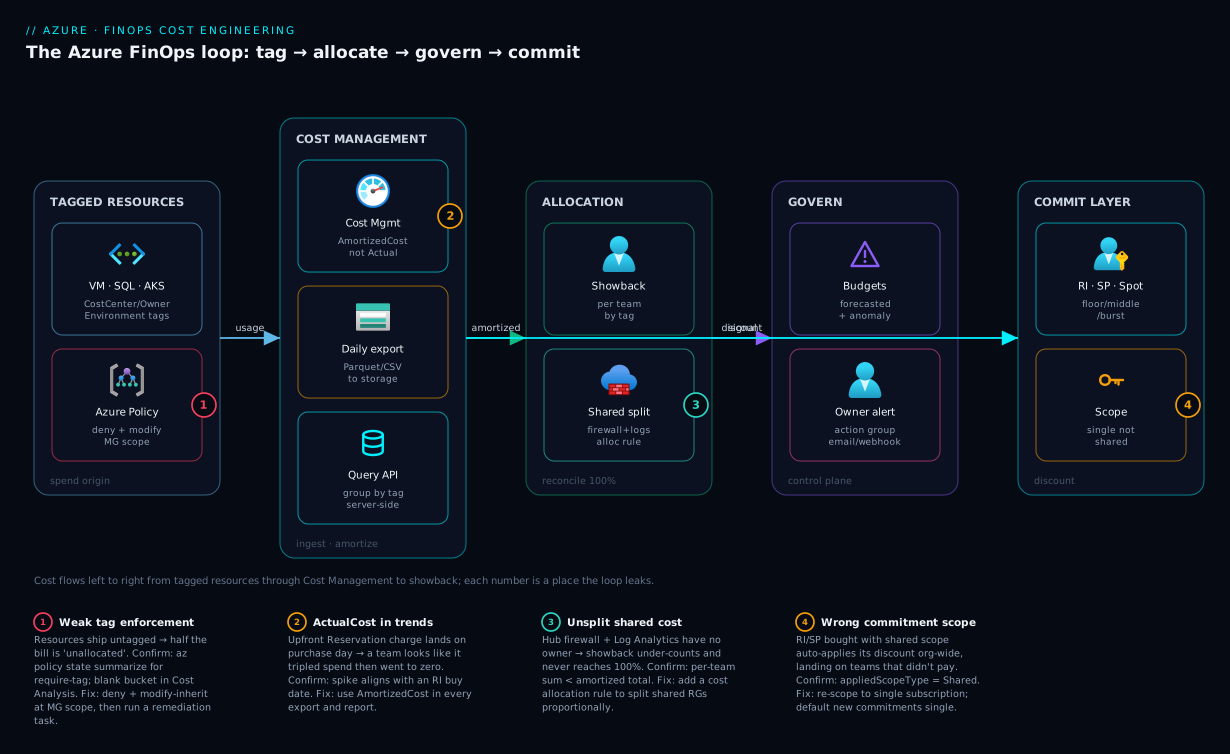
The diagram traces cost as it actually flows through a FinOps loop, left to right, and marks the four points where it most often goes wrong. Start at the resources that generate spend — VMs, SQL, storage — each carrying the mandatory tags (CostCenter, Owner, Environment) that Azure Policy enforces at the management group with deny (block untagged) and modify (inherit + remediate). If that enforcement is weak, allocation breaks at the source, which is badge ①. From there, Cost Management ingests usage and emits a daily AmortizedCost export to a storage account and answers interactive Query API calls; the trap here is using ActualCost in trends (badge ②). Allocation then fans into showback per team, where shared cost (the hub firewall, Log Analytics) must be split by a cost allocation rule to reconcile to 100% — miss it and showback under-counts (badge ③).
The control plane wraps the whole loop: budgets with actual and forecasted thresholds and anomaly detection route a signal to the owner’s action group the moment spend deviates, while the commitment layer (Reservations on the floor, a Savings Plan on the middle, Spot on the burst) sits over the billing account discounting everything underneath — and its scope, if set to shared by accident, lands the discount on the wrong cost center (badge ④). Read the diagram as the method: enforce tags at the source, amortize and allocate, reconcile shared cost, then govern with budgets, anomaly alerts and right-scoped commitments — every arrow is a place the loop either closes or leaks.
Real-world scenario
Northwind Logistics runs a freight-tracking platform on Azure: roughly 900 VMs across 40 subscriptions under one landing-zone management group, plus Azure SQL, AKS, and a hub-and-spoke network with a shared Azure Firewall and Log Analytics workspace. Monthly Azure spend is about ₹2.1 crore (~$250k). The platform team is six engineers; FinOps had been “a Power BI dashboard the finance analyst built,” firmly stuck in Inform. The CFO’s directive after a 30% YoY spend jump: “cut 20% without breaking anything, and tell me who owns what.”
The first audit was sobering. Only 54% of resources carried a CostCenter tag, so nearly half the bill was “unallocated.” A large 3-year Reservation for the Dsv5 family — bought eighteen months earlier when that family dominated — was sitting at 61% utilization, because a tenancy migration had shifted the heavy workloads to Easv5 for memory headroom. Worse, the RIs had been purchased with shared billing scope, so Cost Management was auto-applying the stranded discount to any matching Dsv5 VM org-wide — including dev/test boxes that should never have absorbed a 3-year commitment. The “savings” were real but landing on the wrong cost centers, and showback didn’t reconcile. Meanwhile a nightly route-optimisation batch job had a retry bug that, on failures, spun extra Fsv2 instances and never tore them down; it had been quietly adding ~₹4 lakh/month for a quarter, invisible because the only budget checked actual spend at 80% of a whole-subscription number.
The team worked the lifecycle in order. Inform: they assigned deny on CostCenter/Owner and modify-inherit at the management group, ran remediation tasks (tag coverage went 54% → 98% in a week), switched every export and report to AmortizedCost, and added a cost allocation rule splitting the hub firewall and Log Analytics proportionally — showback finally reconciled to 100%. Operate: per-team budgets with forecasted thresholds routed to each team’s action group, plus anomaly detection per subscription — which immediately flagged the batch job’s pattern. Optimize: the stranded Dsv5 Reservation was the big one. They did not cancel; Reservations support exchange with no penalty, so they swapped the stranded capacity toward a compute Savings Plan that floats across families and regions, and re-scoped the residual RIs to the single subscription that genuinely ran Dsv5 24/7:
az reservations reservation-order calculate-exchange \
  --reservations-to-exchange '[{"reservationId":"'"$RES_ID"'","quantity":40}]' \
  --savings-plans-to-purchase '[{"billingScopeId":"/subscriptions/'"$SUB_ID"'",
      "term":"P3Y","appliedScopeType":"Single","commitment":{"amount":12.5,"currencyCode":"USD","grain":"Hourly"}}]'
They also swept orphans (₹3.2 lakh/month of unattached premium disks and idle public IPs), put non-prod on tag-scoped start/stop runbooks (~₹6 lakh/month), and applied an allowed-SKU deny on dev/test subscriptions. The net: spend fell 23% (₹2.1 crore → ₹1.62 crore) within two billing cycles, with zero workload regressions — most of it from the commitment re-scope, the batch fix, and non-prod scheduling, not from touching production sizing. The lesson the team codified on the wall: “Default new commitments to single-subscription scope, treat utilization < 95% as an exchange trigger reviewed monthly, and never let a budget check only actual spend — the forecast is the alert that matters.”
The remediation as a ranked table, because the order (biggest, safest, automatable first) is the lesson:
| Action | Lever | Monthly saving | Risk | Effort |
|---|---|---|---|---|
| Exchange stranded RI → Savings Plan, re-scope residual | Commitment | ~₹28 lakh | Low (no penalty exchange) | Medium |
| Fix batch retry-bug + anomaly alert | Waste / Operate | ~₹4 lakh | Low | Low |
| Non-prod start/stop runbooks (tag-scoped) | Automation | ~₹6 lakh | Low | Low |
| Sweep orphaned disks/IPs | Waste | ~₹3.2 lakh | Low (snapshot first) | Low |
Allowed-SKU deny on dev/test |
Prevention | (avoids regrowth) | Low | Low |
| Tag remediation → 98% coverage | Inform | (enables the rest) | None | Low |
Advantages and disadvantages
Treating cost as an engineered signal — instrumented, attributed, governed, automated — is powerful, but it has real costs and failure modes. Weigh it honestly:
| Advantages (why FinOps-as-engineering wins) | Disadvantages (why it’s hard) |
|---|---|
| Cost becomes a first-class signal in the same loop as latency/errors — engineers own it | Requires a culture shift; engineers must care about a number finance used to own |
| Tags + policy make allocation automatic and reconcile to 100% | The taxonomy is upfront work and breaks on casing drift / reorgs if not enforced |
| Amortized exports + Query API give defensible, scriptable showback | Two cost models (actual/amortized) confuse newcomers; wrong choice = wrong trend |
| Commitments cut steady-state spend 40–60% with simple break-even math | Over-committing or wrong scope strands discounts and mis-attributes savings |
| Budgets + anomaly detection page the owner before the invoice | Budgets are not caps — they don’t stop spend, only alert; needs an owner who acts |
Automated cleanup (runbooks, deny) keeps waste from regrowing |
Automation needs identities, testing, and guardrails or it stops the wrong VM |
| Advisor surfaces rightsizing for free | Advisor is CPU-weighted; acting blind downsizes memory-bound SKUs into incidents |
| Unit economics show real efficiency as the business grows | Defining the unit (per order/tenant) takes work and cross-team agreement |
FinOps-as-engineering is right for any organisation past a few subscriptions where spend has an owner and growth outpaces manual governance. It bites hardest when treated as a tooling purchase rather than a practice (the dashboard with no owner), when commitments are bought on peak instead of floor, and when automation runs without guardrails. Every disadvantage is manageable — but only if you know it exists, which is the point of the playbook.
Hands-on lab
Stand up the core FinOps loop end to end — a tag policy, a remediation, an amortized export, a budget with a forecasted alert, and an orphan sweep — all free-tier-friendly (the policies, budgets and exports cost nothing; you only pay for the tiny storage you create, which you delete at the end). Run in Cloud Shell (Bash).
Step 1 — Variables and a sandbox resource group.
RG=rg-finops-lab
LOC=centralindia
SA=finopslab$RANDOM     # globally-unique storage account name
SUB_ID=$(az account show --query id -o tsv)
az group create -n $RG -l $LOC -o table
Step 2 — Require an Owner tag (audit first, so nothing breaks). Assign the built-in require-tag policy in audit-friendly fashion at the subscription:
az policy assignment create \
  --name "lab-require-owner" \
  --scope "/subscriptions/$SUB_ID" \
  --policy "871b6d14-10aa-478d-b590-94f262ecfa99" \
  --params '{"tagName":{"value":"Owner"}}' -o table
Expected: an assignment object with displayName and the Owner parameter. (This is deny by definition — for a true audit-first rollout you’d use the audit variant; here it demonstrates enforcement.)
Step 3 — Create a storage account and a daily amortized export.
az storage account create -n $SA -g $RG -l $LOC --sku Standard_LRS -o table
SA_ID=$(az storage account show -n $SA -g $RG --query id -o tsv)

az costmanagement export create \
  --name "lab-amortized" \
  --scope "/subscriptions/$SUB_ID" \
  --type AmortizedCost \
  --dataset-granularity Daily \
  --storage-account-id "$SA_ID" \
  --storage-container "cost-exports" \
  --storage-directory "amortized" \
  --recurrence Daily \
  --recurrence-period from="$(date -u +%Y-%m-01T00:00:00Z)" to="$(date -u -d '+11 months' +%Y-%m-01T00:00:00Z)"
Expected: an export object; the first run populates cost-exports/amortized/ within a few hours.
Step 4 — A budget with a forecasted threshold routed to email.
AG_ID=$(az monitor action-group create -n ag-finops-lab -g $RG \
  --short-name finopslab --action email me you@example.com --query id -o tsv)

az consumption budget create \
  --budget-name "lab-monthly" \
  --amount 100 --category Cost --time-grain Monthly \
  --start-date "$(date -u +%Y-%m-01)" --end-date "$(date -u -d '+11 months' +%Y-%m-01)" \
  --notifications '{
    "forecast100":{"enabled":true,"operator":"GreaterThan","threshold":100,
                   "contactGroups":["'"$AG_ID"'"],"thresholdType":"Forecasted"}}'
Expected: a budget with a single Forecasted notification at 100%.
Step 5 — Sweep for orphans in the subscription (read-only).
echo "== Unattached disks =="
az disk list --query "[?managedBy==null].{name:name, rg:resourceGroup, gb:diskSizeGb}" -o table
echo "== Unassociated public IPs =="
az network public-ip list --query "[?ipConfiguration==null].{name:name, rg:resourceGroup, sku:sku.name}" -o table
echo "== Empty App Service Plans =="
az appservice plan list --query "[?numberOfSites==\`0\`].{name:name, rg:resourceGroup, sku:sku.name}" -o table
Expected: lists (possibly empty) of resources billing for nothing — your real-world cleanup backlog.
Step 6 — Pull Advisor cost recommendations and verify the budget is armed.
az advisor recommendation list --category Cost \
  --query "[].{resource:impactedValue, problem:shortDescription.problem}" -o table
az consumption budget list --query "[].{name:name, amount:amount, alerts:length(notifications)}" -o table
Expected: any cost recommendations Advisor has, and your lab-monthly budget showing alerts: 1.
Validation checklist. You enforced a tag, scheduled an amortized export, armed a forecasted budget routed to an owner, swept orphans, and pulled Advisor — the whole Inform→Operate→Optimize loop in miniature, almost entirely free. The steps mapped to what each proves:
| Step | What you did | What it proves | Real-world analogue |
|---|---|---|---|
| 2 | Require Owner tag |
Enforcement is one assignment | MG-wide tag governance |
| 3 | Daily amortized export | Honest data flows automatically | The showback backbone |
| 4 | Forecasted budget → email | The alert fires before overspend | Per-team tripwires |
| 5 | Orphan sweep | Idle spend is queryable | The quarterly cleanup |
| 6 | Advisor + verify | Recs + budget are armed | The monthly review inputs |
Cleanup (avoid lingering charges).
az policy assignment delete --name "lab-require-owner" --scope "/subscriptions/$SUB_ID"
az consumption budget delete --budget-name "lab-monthly"
az costmanagement export delete --name "lab-amortized" --scope "/subscriptions/$SUB_ID"
az group delete -n $RG --yes --no-wait
Cost note. Policies, budgets and exports are free; the only charge is the LRS storage account (a few rupees), and deleting the resource group stops it. The whole lab runs for well under ₹20.
Common mistakes & troubleshooting
This is the playbook — the part you bookmark. First as a scannable table you can read during the monthly review, then the entries that bite hardest with full confirm-command detail underneath.
| # | Symptom | Root cause | Confirm (exact cmd / portal path) | Fix |
|---|---|---|---|---|
| 1 | Half the bill is “unallocated” / untagged | Tags not enforced or not inherited | az policy state summarize for require-tag; group Cost Analysis by tag → blank bucket |
deny + modify-inherit at MG; run remediation |
| 2 | A team’s spend “tripled” one month then went to zero | ActualCost showing upfront RI charge | The spike aligns with an RI purchase date; switch to amortized | Use AmortizedCost in every report/export |
| 3 | Showback doesn’t reconcile to 100% | Shared cost (firewall, Log Analytics) unsplit | Sum per-team vs total; gap = shared + untagged | Add a cost allocation rule; fix tags |
| 4 | Reservation discount lands on wrong cost center | RI bought with shared scope | az reservations reservation show --query "properties.appliedScopeType" = Shared |
Re-scope to single; default new RIs single |
| 5 | Reservation utilization sitting at 60% | Workload moved off the committed family | az consumption reservation summary list avg < 95% |
Exchange toward a Savings Plan / right family |
| 6 | Budget never fired before the overspend | Only an Actual threshold, no Forecasted | az consumption budget show notifications all thresholdType: Actual |
Add a Forecasted threshold |
| 7 | Downsized a VM and it started OOMing | Acted on Advisor (CPU-weighted), ignored RAM | az monitor metrics list --metric "Available Memory Bytes" was low |
Upsize back / memory-optimised; check P95 mem first |
| 8 | Cost crept up with no obvious cause | Orphans accumulating (disks, IPs, snapshots) | Orphan queries return a long list | Sweep + scheduled runbook + lifecycle TTL |
| 9 | Anomaly alert never came for a runaway job | Anomaly detection not enabled on the sub | Cost Management → no anomaly alert configured | Enable detection + subscribe an alert |
| 10 | modify tag policy isn’t fixing existing resources |
No remediation task run | az policy remediation list empty for the assignment |
az policy remediation create |
| 11 | Non-prod still running 24/7 despite a schedule | Runbook scopes by name, missed new VMs | New VMs lack AutoStop tag / not in scope |
Tag-scope the runbook; deny untagged non-prod |
| 12 | Savings Plan utilization low | Hourly commitment set above steady spend | az billing SP utilization < 95% |
Lower commitment at renewal; cover floor with RI |
| 13 | Hybrid Benefit not reducing the bill | license-type not set on the VM/SQL |
az vm show --query "licenseType" is null |
az vm update --license-type Windows_Server |
| 14 | Two prod/Prod buckets in Cost Analysis |
Tag-value casing drift | Group by tag value → near-duplicates | Allowed-values deny; remediate to canonical |
The expanded form, with the full reasoning for the entries that cost the most:
1. Half the bill shows as untagged / “unallocated.”
Root cause: Mandatory tags aren’t enforced (deny) or inherited (modify), so resources ship without CostCenter/Owner, and resources don’t inherit RG tags automatically.
Confirm: az policy state summarize --management-group contoso --query "policyAssignments[?contains(policyAssignmentId,'require-owner')].results.nonCompliantResources"; in Cost Analysis, group by the tag and see the blank bucket’s size.
Fix: Assign deny for the keys you can’t lose and modify-inherit for backfill at management-group scope, then run a remediation task so existing resources are tagged, not just new ones.
2. A team’s spend appears to triple one month, then drop to zero.
Root cause: You’re reporting ActualCost, which books the entire upfront Reservation charge on the purchase day.
Confirm: The spike aligns exactly with a reservation purchase; re-run the same query as AmortizedCost and the spike spreads evenly across the term.
Fix: Use AmortizedCost for every recurring report, export, and trend chart; reserve ActualCost for literal-invoice reconciliation only.
3. Showback doesn’t add up to the invoice. Root cause: Shared cost with no single owner (hub Azure Firewall, Log Analytics ingestion, shared gateway) sits unallocated, plus any remaining untagged resources. Confirm: Sum per-team allocation and compare to the amortized total for the month; the delta is your shared + untagged gap. Fix: Create a cost allocation rule (Cost Management → Cost allocation) to split shared resource groups proportionally to consumers — it appears natively in Cost Analysis and the Query API — and close the tagging gap.
4. A Reservation’s discount is landing on the wrong cost center.
Root cause: The RI was purchased with shared billing scope, so its leftover/best-fit discount auto-applies to any matching resource org-wide, including teams that didn’t pay for it.
Confirm: az reservations reservation show --reservation-order-id "$RO_ID" --reservation-id "$RES_ID" --query "properties.appliedScopeType" returns Shared.
Fix: Re-scope to single subscription (the one that genuinely runs the family 24/7); default new commitments to single scope unless you have a deliberate pooling strategy.
5. Reservation utilization is stuck well below 95%.
Root cause: The committed family/region no longer matches the workload (a migration to a different SKU for memory/CPU headroom).
Confirm: az consumption reservation summary list --grain monthly --reservation-order-id "$RO_ID" --query "[].{used:avgUtilizationPercentage, min:minUtilizationPercentage}" shows avg < 95%.
Fix: Don’t cancel — exchange with no penalty toward a compute Savings Plan (floats across families/regions) or a Reservation for the family you actually run; treat < 95% as a monthly exchange trigger.
6. The budget didn’t warn you before you blew past it.
Root cause: The budget had only an Actual threshold, which fires after the spend has happened.
Confirm: az consumption budget show --budget-name payments-monthly --query "notifications" — every entry has thresholdType: Actual.
Fix: Add a Forecasted threshold (e.g. forecast > 100%) so the alert trips before month-end overspend; keep an Actual threshold too for the literal crossing.
7. You downsized a VM on Advisor’s advice and it started crashing/OOMing.
Root cause: Advisor’s right-size logic is CPU/network-weighted; a memory-bound box at low CPU but high RAM was flagged and you downsized into an OOM.
Confirm: az monitor metrics list --resource "$VM_ID" --metric "Available Memory Bytes" --aggregation Minimum shows little headroom at the old size.
Fix: Upsize back or move to a memory-optimised family; always validate P95 memory (and bursts) alongside CPU before acting on a downsizing recommendation.
9. A runaway job ran for days before anyone noticed. Root cause: Cost anomaly detection wasn’t enabled on the subscription, and the only budget checked actual spend at 80% of a whole-subscription number — too coarse and too late. Confirm: Cost Management → Cost alerts shows no anomaly alert configured for the subscription. Fix: Enable anomaly detection and subscribe an anomaly alert routed to the owner; add a forecasted budget so the planned-overspend path is also covered.
Best practices
- Enforce mandatory tags at the management group, not per subscription. A new subscription must inherit
deny/modifyon day one, or it ships ungoverned and re-fragments your allocation. - Run a remediation task after every
modifypolicy. Inheritance only fixes new resources until you remediate the existing estate; tag coverage is meaningless without it. - Default every report and export to AmortizedCost. ActualCost is for reconciling to the literal invoice only; it makes every commitment month unreadable in a trend.
- Split shared cost with allocation rules so showback reconciles to 100%. Unallocated buckets destroy the credibility of the whole practice — teams dispute numbers that don’t add up.
- Put a forecasted threshold on every budget. An actual-only budget alerts after the money is gone; the forecast is the alert that actually prevents overspend.
- Enable anomaly detection on every subscription. Static budgets miss spikes within the threshold; the ML alert catches the runaway job in hours.
- Buy commitments on your floor, not your peak. Cover 24/7-certain capacity with Reservations, the variable middle with a Savings Plan, the burst with Spot; target 75–85% coverage and leave headroom.
- Default new commitments to single-subscription scope. Shared scope strands discounts on teams that didn’t pay; only pool deliberately.
- Treat reservation/SP utilization < 95% as a monthly exchange trigger. Not an end-of-term surprise — exchange (no penalty) toward what you actually run.
- Validate rightsizing against P95 CPU and memory before acting. Advisor is CPU-weighted; downsizing a memory-bound SKU is a self-inflicted incident.
- Encode cleanup as runbooks and
denypolicies, not quarterly heroics. Waste regrows; auto-shutdown non-prod, sweep orphans on a schedule, and block oversized SKUs preventively. - Report unit economics, not total spend. Cost per order / tenant / 1k requests is the number that should trend down as the business grows.
The leading indicators worth alerting on before the invoice — not the lagging “spend went up”:
| Alert on | Signal | Threshold (starting point) | Why it’s leading |
|---|---|---|---|
| Forecasted budget breach | Budget forecast % | > 100% forecast | Fires before month-end overspend |
| Cost anomaly | Anomaly detection | Default sensitivity | Catches runaway jobs in hours |
| Reservation utilization | avgUtilizationPercentage |
< 95% sustained | You over-bought; exchange it |
| Savings Plan utilization | SP utilization % | < 95% | Hourly commit set too high |
| Coverage % | Eligible compute committed | outside 75–85% band | Under = retail spend; over = waste |
| Orphan count | Untagged idle resources | any sustained growth | Waste regrowing |
| Untagged % | Non-compliant tag resources | > 5% | Allocation degrading |
Security notes
FinOps controls touch billing, identity, and automation — secure them like any other privileged surface:
- Least privilege on cost roles. Grant Cost Management Reader for visibility and Cost Management Contributor only to those who manage budgets/exports; reserve Billing/Reservation purchaser roles tightly — a commitment is a multi-year financial obligation. See Azure Entra RBAC Governance Deep Dive.
- Managed identity for
modifypolicies and runbooks. The tag-remediation MI and the start/stop runbook need write access; use a user-assigned or system-assigned managed identity with a scoped role (Tag Contributor,Virtual Machine Contributor), never a stored credential. - Guard the cost-export storage account. Amortized exports contain your entire spend profile by resource — sensitive competitive data. Lock the storage account with Private Endpoints or firewall rules and least-privilege RBAC; don’t leave the container public.
- Don’t leak cost data in tags. Tags are visible to anyone with read on the resource; never put secrets, PII, or sensitive financial codes in tag values — use opaque cost-center IDs, not “Project Titan Q3 budget ₹4cr.”
- Scope budgets and alerts to avoid information disclosure. A subscription-wide budget alert may expose another team’s spend; filter budgets to the team’s resource groups/tags.
- Protect automation that can stop production. A mis-scoped start/stop runbook can deallocate prod. Scope it strictly by
Environment=dev/AutoStop=true, test in a sandbox, and require approvals on changes to it. - Audit who buys commitments. Reservation/Savings Plan purchases are high-value actions; log them via Activity Log, alert on them, and require a second approver.
The security controls that also protect the FinOps practice — secure and well-run pull together here:
| Control | Mechanism | Secures against | Also prevents |
|---|---|---|---|
| Cost-role least privilege | Cost Management Reader/Contributor split | Unauthorised budget/commitment changes | Accidental multi-year buys |
| MI for remediation/runbooks | Managed identity + scoped role | Stored credentials in automation | Over-broad write access |
| Private export storage | Private Endpoint + RBAC | Spend-profile exfiltration | Public container leaks |
| Tag-value hygiene | No secrets/PII in tags | Information disclosure via tags | Sensitive data in exports |
| Runbook scope guardrails | Tag-scoped + approvals | Mis-scoped prod shutdown | Outage from automation |
| Commitment purchase audit | Activity Log + alert + approver | Rogue/erroneous purchases | Unbudgeted spend |
Cost & sizing
The meta-point: FinOps controls are themselves almost free — the cost is in the commitments and resources they govern, and the savings dwarf the tooling. What drives the bill and how the levers move it:
- Compute dominates most bills (VMs, AKS, App Service, SQL). The biggest single lever is commitments: 40–60% off steady-state with Reservations, 30–50% with Savings Plans. Sized to floor, this is the largest, lowest-risk saving available.
- Cost Management itself is free for first-party Azure data — exports, Cost Analysis, budgets, anomaly detection cost nothing. (Cost Management for AWS is a paid add-on.) The only charge is the storage exports write to (a few rupees) and any Log Analytics / Synapse you query exports with.
- Non-prod scheduling is the highest-ROI automation: a tag-scoped start/stop runbook cuts a non-prod fleet’s compute ~65–75% for the cost of an Automation account (effectively free at low job volume).
- Orphan cleanup is pure saving against zero risk (snapshot disks first): unattached premium disks and idle Standard public IPs bill hourly for nothing.
- Anomaly detection + forecasted budgets prevent the unbounded failure — a runaway job that adds lakhs before month-end. The control is free; the avoided cost is large and unpredictable.
A rough monthly picture for the levers, with the tooling cost vs the saving it unlocks:
| Lever | Tooling/infra cost (INR/mo) | Saving it unlocks | Risk | ROI |
|---|---|---|---|---|
| Cost Management + exports | ~₹50 (storage) | Enables all allocation/showback | None | Foundational |
| Reservations (floor) | ₹0 (it’s a discount) | 40–60% on covered compute | Low (exchangeable) | Highest |
| Savings Plans (middle) | ₹0 | 30–50% on flexible compute | Low | High |
| Spot (burst) | ₹0 | Up to ~90% on interruptible | Medium (eviction) | High for batch |
| Azure Hybrid Benefit | ₹0 (you own licences) | Drops Windows/SQL licence cost | None | Free money |
| Non-prod start/stop | ~₹0 (Automation) | ~65–75% of non-prod compute | Low | Very high |
| Orphan sweep + lifecycle | ₹0 | Full cost of idle resources | Low (snapshot) | High |
| Anomaly + forecasted budget | ₹0 | Avoids unbounded runaway spend | None | High (tail-risk) |
The three KPIs to size and track monthly, with targets:
| KPI | Definition | Target | What off-target means |
|---|---|---|---|
| Coverage % | Eligible compute under a commitment | 75–85% band | Under = retail spend; over = stranded if workload moves |
| Utilization % | Of committed, how much used | > 95% | Below = over-bought; exchange it |
| Waste % | Idle/orphaned/oversized share of total | Trending → 0 | Cleanup not automated; SKUs not gated |
Anchor the monthly review on these three plus unit economics (cost per order / tenant / 1k requests) — total spend is a vanity metric that rises with growth and tells you nothing about efficiency. Northwind landed at a 23% reduction with most of it from commitment re-scoping and non-prod scheduling — proof the saving is usually in the levers, not in touching production sizing.
Going deeper
The core of this playbook is deliberately hands-on. This section adds the parts a senior FinOps engineer eventually needs but a first pass skips: the open FOCUS cost schema and the redesigned exports, the EA vs MCA billing hierarchy that sits above your subscriptions, the RBAC model that decides who can even see (let alone buy) any of this, Kubernetes cost allocation, and the increasingly-required carbon ledger that shares its waste list with cost.
FinOps as capabilities, not just three phases
Inform / Optimize / Operate are phases; the FinOps Foundation Framework also names the capabilities you actually staff and measure, grouped into four domains: Understand Usage & Cost (data ingestion, allocation, reporting & analytics, anomaly management), Quantify Business Value (forecasting, budgeting, unit economics, planning), Optimize Usage & Cost (rate optimization = commitments, workload optimization = rightsizing/scheduling, cloud sustainability), and Manage the FinOps Practice (policy & governance, education, cadence, tooling). Mapping your work to named capabilities is how you turn “do FinOps” into a backlog with owners — each capability carries a persona (engineering, finance, product, leadership) and a maturity (crawl → walk → run). Everything earlier in this article is one or more of these capabilities made concrete on Azure.
FOCUS and the redesigned exports
The classic az costmanagement export you saw earlier writes ActualCost / AmortizedCost / Usage. Two things have moved on and matter at scale.
FOCUS — the FinOps Open Cost and Usage Specification — is a vendor-neutral schema so an Azure bill, an AWS CUR, and a GCP export share column names and semantics. Instead of learning CostInBillingCurrency here and lineItem/UnblendedCost there, a FOCUS dataset gives you stable columns like BilledCost, EffectiveCost (the amortized figure), ListCost, ContractedCost, ChargeCategory (Usage / Purchase / Tax / Credit / Adjustment), CommitmentDiscountId/Category/Status, ServiceCategory, SkuId, ResourceId, and Tags, with provider-specific extras namespaced under x_. Cost Management can emit a FOCUS-format export (1.0 GA; 1.1 adds capacity-reservation and SKU-price columns) — the format to standardise on the moment you are multi-cloud, feeding a third-party FinOps tool, or landing data in Microsoft Fabric.
The redesigned Exports experience (2024) is not just cost. As separate scheduled datasets it can push price sheet, reservation details, reservation recommendations, reservation transactions, and FOCUS cost/usage, with file partitioning, overwrite-vs-append, Parquet or CSV, and a manifest for pipelines. That turns commitment planning and rate analysis into files a data platform reads, not a portal a human screenshots.
| Export dataset | Answers | Pair it with |
|---|---|---|
| FOCUS cost & usage | “One schema across clouds/tools” | Fabric / third-party FinOps tool |
| Price sheet | “What is my negotiated rate per meter?” | Reservation break-even modelling |
| Reservation recommendations | “What should I buy, by lookback?” | The commitment strategy above |
| Reservation details | “How is each RI-order being used?” | Utilization < 95% exchange trigger |
| Reservation transactions | “Every purchase / refund / exchange” | Audit + chargeback of commitments |
The billing hierarchy above your subscriptions
Every scope in the article so far (MG → sub → RG) is the Azure resource hierarchy. Parallel to it is the billing hierarchy, and commitments, invoices, and the deepest cost roles live there — not in resource RBAC. Which one you have depends on your agreement:
| Agreement | Hierarchy (top → subscription) | “Invoice section” equivalent | Key roles |
|---|---|---|---|
| EA (Enterprise Agreement) | Enrollment → Department → Account → Subscription | Department / Account | Enterprise Admin, Department Admin, Account Owner |
| MCA (Microsoft Customer Agreement) | Billing account → Billing profile → Invoice section → Subscription | Invoice section | Billing account / profile / invoice-section owner · contributor · reader |
| MPA (CSP / Partner) | Partner → Customer → Subscription | Partner-managed | Partner roles |
Two consequences engineers miss. First, a billing profile (MCA) is one invoice with its own currency and payment method, and invoice sections split that invoice by team at the billing layer — a second, coarser allocation axis that complements tags (tags allocate within a subscription; invoice sections allocate across them on the actual PDF). Second, billing scope — not resource scope — is what you target for a billing-scoped export or budget, and what a commitment’s reach is set to: Shared (whole enrollment / billing profile), Single subscription, single resource group, or a management group.
That billing plane is also where the commitment lifecycle lives. Reservation exchanges of compute stay penalty-free (like-for-like, or trading an RI toward a Savings Plan) — which is exactly why the scenario earlier exchanged rather than cancelled. Self-service refunds / cancellations are different: they are capped at an annual limit per billing scope (on the order of $50,000 USD per enrollment / billing profile) and may carry an early-termination fee. Rule of thumb: exchange, don’t refund, and never model a purchase assuming you can hand it back for free. For the deep commitment mechanics behind this, see Azure Reservations, Savings Plans & Hybrid Benefit Strategy.
RBAC for cost — who can see, and who can buy
Cost access spans two planes, and conflating them is the usual reason someone “can’t see the budget” or “somehow has purchase rights.”
| Role | Plane | Can do | Cannot do |
|---|---|---|---|
| Cost Management Reader | Azure RBAC (MG/sub/RG) | View cost analysis, budgets, exports, Advisor recs | Change anything; buy commitments |
| Cost Management Contributor | Azure RBAC | Create/edit budgets, exports, cost allocation rules | Buy reservations / Savings Plans |
| Billing Reader | Billing | See invoices, the billing hierarchy, agreements | Manage resources; purchase |
| EA/MCA billing owner · contributor | Billing | Manage payment, invoice sections, grant billing roles | (Purchase gated separately) |
| Reservation / SP purchaser | Billing gate | Buy commitments | — |
The purchasing gate is the subtle one: buying a reservation or Savings Plan is not an Azure RBAC action. It is allowed only by the billing plane — the EA enrollment’s “Add Reserved Instances” flag, or an MCA billing profile’s reservation-purchaser grant — or by being a subscription Owner where the enrollment permits it. Managing an existing commitment (adding readers, changing scope) uses the reservation order’s own access control. The design principle: hand Cost Management Reader to every engineer (visibility is the cheapest behaviour-change lever there is), grant Contributor to the platform / FinOps team, and lock the purchase gate to a named two or three — a commitment is a multi-year obligation, so treat buying it like a production change with a second approver. See Azure Entra RBAC Governance Deep Dive for the role-assignment mechanics.
Kubernetes cost — the shared-cluster problem
A shared AKS cluster is the “shared, splittable” cost category made harder: one bill for compute that a dozen teams’ namespaces consume, plus system overhead and idle headroom that belong to nobody. Two tools solve the allocation:
- OpenCost (CNCF) — open-source, runs in-cluster, and allocates spend to namespaces, controllers, pods, and labels using cloud on-demand rates; portable across any Kubernetes, and the engine you reach for in multi-cloud or non-AKS clusters.
- AKS cost analysis — the managed add-on built on OpenCost that surfaces namespace / controller / idle / system cost inside Cost Management, so a shared cluster reconciles per team without a separate tool. It needs the cluster on the Standard (or Premium) tier and a recent AKS version; the add-on itself is free:
# Enable Kubernetes cost views in Cost Management (cluster must be Standard/Premium tier)
az aks update -g rg-platform -n aks-shared --tier standard --enable-cost-analysis
Whichever you use, the deliverable is the same as everywhere else in this article: the shared cluster’s cost splits to consumers (here, by namespace) so showback reconciles — and idle cost becomes visible, which is usually the biggest and most surprising line. Cluster right-sizing then pairs with node autoscaling and scale-to-zero on non-prod; see Managed Prometheus & Grafana for AKS for the metrics that justify the pod requests those costs hinge on.
The second ledger: Azure Carbon Optimization
Cost is no longer the only optimization target you may be asked to report. Azure Carbon Optimization surfaces estimated carbon emissions per subscription, resource group, and resource, with a trend and emission-reduction recommendations — and the striking thing is that its recommendation list overlaps almost entirely with the cost-waste list: idle disks, oversized VMs, orphaned gateways, over-redundant storage. Access is via the Carbon Optimization Reader role (or Reader); it is distinct from the org-level Emissions Impact Dashboard (a Power BI report for Scope 1/2/3 sustainability accounting) in that it is resource-level and engineer-facing.
| Waste you already hunt for cost | Cost ledger | Carbon ledger |
|---|---|---|
| Idle / orphaned disk, IP, gateway | Full hourly / GB charge | Embodied + running emissions |
| Oversized / low-utilization VM | Rightsizing saving | Lower running emissions |
| Non-prod running 24/7 | Scheduling saving (~65–75%) | Emissions only when running |
| Over-redundant storage (GRS in dev) | Redundancy premium | Extra replicated capacity |
Practically, treat carbon as a second justification for the same actions: when a cost cut is politically contested (“that VM is fine, leave it”), the emissions number is an independent argument, and a single orphan-sweep runbook now closes two backlogs at once. “Dual-optimize” — one action, two ledgers — is the mature framing.
Practice challenges
Six exercises, escalating from “read the estate” to “re-engineer a commitment and a shared cluster.” Each has a worked solution — try it before you open it. Commands are illustrative (IDs are placeholders); nothing here is a live run.
1. Find the allocation gap (Beginner). In one subscription, list every resource missing the Owner tag — the raw size of your allocation backlog.
<details> <summary>Solution</summary>
az resource list \
  --query "[?tags.Owner==null].{name:name, rg:resourceGroup, type:type}" -o table
# Or across the org with Resource Graph:
az graph query -q "Resources | where isnull(tags['Owner']) | project name, resourceGroup, type" -o table
Why: allocation starts by measuring the untagged bucket — you can’t enforce or remediate what you haven’t counted. </details>
2. Make the trend honest (Beginner). Pull month-to-date cost grouped by resource group as AmortizedCost, and say in one line what would change if you ran it as ActualCost in a month with a reservation purchase.
<details> <summary>Solution</summary>
az rest --method post \
  --url "https://management.azure.com/subscriptions/$SUB_ID/providers/Microsoft.CostManagement/query?api-version=2023-11-01" \
  --body '{"type":"AmortizedCost","timeframe":"MonthToDate",
    "dataset":{"granularity":"None",
      "aggregation":{"totalCost":{"name":"CostUSD","function":"Sum"}},
      "grouping":[{"type":"Dimension","name":"ResourceGroupName"}]}}'
Why: with ActualCost, the whole upfront RI charge would land on the purchase day, spiking one RG for a month; AmortizedCost spreads it across the term so the trend is real.
</details>
3. Backfill tags at scale (Intermediate). Assign the built-in tag-inheritance policy for CostCenter at a management group and fix the resources that already exist.
<details> <summary>Solution</summary>
az policy assignment create \
  --name "inherit-costcenter" \
  --scope "/providers/Microsoft.Management/managementGroups/landing-zones" \
  --policy "cd3aa116-8754-49c9-a813-ad46512ece54" \
  --params '{"tagName":{"value":"CostCenter"}}' \
  --mi-system-assigned --location eastus --role "Contributor"

az policy remediation create \
  --name "remediate-costcenter" \
  --policy-assignment "inherit-costcenter" \
  --resource-group rg-payments
Why: the modify effect writes tags (so it needs a managed identity), and it only touches new resources until a remediation task sweeps the existing estate.
</details>
4. A budget that warns before the money is gone (Intermediate). Put a budget on rg-payments with an Actual 80% and a Forecasted 100% notification, both routed to an action group.
<details> <summary>Solution</summary>
az consumption budget create \
  --budget-name "payments-monthly" --amount 25000 --category Cost \
  --time-grain Monthly --start-date 2026-06-01 --end-date 2027-06-01 \
  --resource-group rg-payments \
  --notifications '{
    "actual80":   {"enabled":true,"operator":"GreaterThan","threshold":80,
                   "contactGroups":["'"$AG_ID"'"],"thresholdType":"Actual"},
    "forecast100":{"enabled":true,"operator":"GreaterThan","threshold":100,
                   "contactGroups":["'"$AG_ID"'"],"thresholdType":"Forecasted"}}'
Why: the Forecasted threshold trips before month-end overspend; the Actual one is your record of the literal crossing. Actual-only budgets alert after the money is spent. </details>
5. Rescue a stranded reservation (Advanced). A 3-year Dsv5 reservation is at 61% utilization after the workload migrated to Easv5. It was bought at a ~40% discount. Was it ever above break-even, and what is the no-penalty fix — with the exchange scoped so showback stays honest?
<details> <summary>Solution</summary>
At a 40% discount the price factor is 0.60×, so break-even is 60% of the term — 61% is barely above it for a family you still run, but the family no longer runs, so every remaining hour is now pure loss. Don’t cancel (refunds are capped and may carry a fee); exchange toward a compute Savings Plan scoped single:
az reservations reservation-order calculate-exchange \
  --reservations-to-exchange '[{"reservationId":"'"$RES_ID"'","quantity":40}]' \
  --savings-plans-to-purchase '[{"billingScopeId":"/subscriptions/'"$SUB_ID"'",
      "term":"P3Y","appliedScopeType":"Single",
      "commitment":{"amount":12.5,"currencyCode":"USD","grain":"Hourly"}}]'
Why: exchange is penalty-free and a Savings Plan floats across families/regions; appliedScopeType: Single stops the discount drifting to subscriptions that didn’t pay for it.
</details>
6. Split a shared cluster and standardise the export (Advanced). Make a shared AKS cluster’s cost reconcile per team, and stand up a schema that a third-party FinOps tool or Fabric can read without Azure-specific column names.
<details> <summary>Solution</summary>
# Namespace / idle / system cost surfaced inside Cost Management (needs Standard tier)
az aks update -g rg-platform -n aks-shared --tier standard --enable-cost-analysis
Then create a FOCUS-format scheduled export (redesigned Exports: dataset “Cost and usage (FOCUS)”, newer export API) landing Parquet in the storage container your pipeline reads.
Why: without namespace allocation the whole cluster lands in one bucket and showback breaks; FOCUS normalises columns (BilledCost, EffectiveCost, ChargeCategory, …) so the same query works across clouds and tools.
</details>
Common beginner mistakes
These are misconceptions, not symptoms — the wrong mental model that sends a beginner down the wrong path. (The symptom → confirm → fix table lives above under Common mistakes & troubleshooting; this is the model that prevents the symptom.)
-
“A budget will cap my spend at 100%.” It won’t. An Azure budget is a tripwire, not a cap — it fires notifications (and can trigger automation) but never stops a resource. The lever that actually prevents overspend is a Forecasted threshold routed to the owner, plus anomaly detection for the spikes a static number misses.
-
“Tags on the resource group flow down to the resources.” They do not. A resource ships with the tags it was created with — an untagged resource in a fully-tagged RG is the norm, not the exception. You need a
modify-inherit policy and a remediation task to backfill; enforcement (deny) only covers what’s created next. -
“ActualCost is the real number, so use it everywhere.” ActualCost books charges the day they hit the invoice, so one upfront reservation makes a team look like it tripled spend then went to zero. Use AmortizedCost for every trend, chart, and showback; reserve ActualCost for reconciling to the literal monthly invoice.
-
“We have a cost dashboard, so we do FinOps.” A dashboard is Inform — table stakes. FinOps is the loop: Inform → Optimize (commit to your floor, cut waste) → Operate (govern and automate so it doesn’t drift back), repeated with named owners. Parking in Inform forever is the single most common failure.
-
“A reservation locks my money; if the workload changes it’s a sunk cost.” Compute exchanges are penalty-free, so a stranded reservation isn’t a loss — it’s a signal. Treat utilization < 95% as a monthly exchange trigger toward the family (or Savings Plan) you actually run; the mistake is doing nothing until the term ends.
-
“Bigger discount is always better — buy 3-year, shared-scope, for everything.” A commitment only pays off on capacity you actually use. Size to your floor (target 75–85% coverage, not 100%), default to single subscription scope, and layer the variable middle on a Savings Plan and the burst on Spot. Over-committing on peak, or on shared scope, strands and mis-attributes the discount.
-
“Advisor said downsize, so downsize.” Advisor’s right-size logic is CPU/network-weighted and blind to memory. A box at 15% CPU but 85% RAM will be flagged — and will OOM the moment you act. Validate P95 memory and burst patterns before resizing; consider burstable (B-series) or memory-optimised instead of a blind step down.
-
“Total cloud spend went up, so we’re getting less efficient.” Total spend rises with the business and tells you nothing on its own. The efficiency signal is unit economics — cost per order / tenant / 1,000 requests — which should trend down even while the total climbs. Reporting the total is a vanity metric; reporting the unit is FinOps.
Interview & exam questions
1. Why use AmortizedCost instead of ActualCost for showback, and when is ActualCost still right? ActualCost books a charge on the day it’s invoiced, so an upfront Reservation purchase lands entirely on that day, making a team look like it tripled spend then went to zero. AmortizedCost spreads commitment charges evenly across the term, so trends are real and showback is defensible. Use ActualCost only to reconcile to the literal monthly invoice.
2. Resources aren’t inheriting their resource group’s tags. Why, and how do you fix it at scale? Azure resources do not inherit RG tags automatically. Fix it with a built-in tag-inheritance policy using the modify effect (which needs a managed identity with Contributor/Tag Contributor to write tags), assigned at the management group, then run a remediation task so existing resources are tagged, not just new ones.
3. A budget exists but didn’t prevent an overspend. What was almost certainly misconfigured? It had only an Actual threshold, which fires after the money is spent. Add a Forecasted threshold (e.g. forecast > 100%) so the alert trips before month-end, and route it to the owner’s action group rather than a central inbox.
4. Explain the difference between a Reservation and a compute Savings Plan, and when you’d choose each. A Reservation locks you to a VM family + region for the deepest discount — best when your footprint is stable and known. A Savings Plan commits an hourly dollar amount you can spend across any compute, region, and some services for a slightly smaller discount but real flexibility — best when fleets shift families/regions. Floor on RIs, variable middle on a Savings Plan.
5. How do you compute commitment break-even? Break-even utilization = (commitment price ÷ on-demand price). If the Reservation is 0.60× on-demand, you break even once the resource runs more than 60% of the term; above that, every hour is pure savings; below it, you’d have paid less on-demand. Commit to your floor and target 75–85% coverage to keep utilization above break-even.
6. A 3-year Reservation is at 61% utilization after a workload migrated families. What do you do — and what do you not do? Don’t cancel. Reservations support exchange with no penalty — swap the stranded capacity toward a compute Savings Plan (floats across families/regions) or a Reservation for the family you now run. Treat utilization < 95% as a monthly exchange trigger, and re-scope residual RIs to single subscription.
7. Advisor says downsize a VM but you’re worried. Why, and what do you check first? Advisor’s right-size logic is CPU/network-weighted and can miss memory-bound workloads — a box at 15% CPU but 85% RAM will be flagged and will OOM if downsized. Check P95 memory (Available Memory Bytes) and burst patterns alongside CPU before acting; consider a memory-optimised or burstable family instead of a blind downsize.
8. Why does a Reservation bought with “shared” scope sometimes break showback? Shared scope auto-applies the commitment’s best-fit/leftover discount to any matching resource org-wide, including teams that didn’t pay for it — so the discount lands on the wrong cost center and per-team showback no longer reconciles. Default new commitments to single subscription scope unless you have a deliberate pooling strategy.
9. What’s the difference between a budget alert and an anomaly alert, and why run both? A budget alert crosses a percentage of a fixed amount — it catches planned overspend you defined a number for. An anomaly alert uses ML on the subscription’s learned daily pattern to flag unexpected spikes (a runaway job, a leak) that stay within the budget number. They catch different failures; run both.
10. Name three high-ROI, low-risk savings you’d do before touching production sizing. (1) Re-scope/exchange under-utilized Reservations toward what you run; (2) schedule non-prod start/stop by tag (~65–75% off non-prod compute); (3) sweep orphaned resources — unattached premium disks, unassociated public IPs, idle gateways — which bill hourly for zero value (snapshot disks first).
11. What is Azure Hybrid Benefit and how does it interact with commitments? It lets you bring on-prem Windows Server / SQL Server licences (with Software Assurance) to drop the licence portion of compute cost. It stacks with Reservations and Savings Plans (which discount the compute rate) and with dev/test pricing — they’re multiplicative layers, not exclusive choices.
12. How do you make showback reconcile to 100% when there’s shared infrastructure? Define a cost allocation rule (Cost Management → Cost allocation) that splits shared resource groups — hub firewall, Log Analytics ingestion, shared gateway — to consumers proportionally (or by even/custom split). The split then appears natively in Cost Analysis and the Query API, closing the unallocated gap; combine with tag remediation to eliminate untagged spend.
These map to AZ-104 (Administrator) — monitor and manage Azure resources, Cost Management, budgets, tags — and AZ-305 (Solutions Architect) — design cost-optimized solutions, commitments, and governance. The Well-Architected Cost Optimization pillar and the FinOps Foundation framework underpin both. A compact cert-mapping for revision:
| Question theme | Primary cert | Objective area |
|---|---|---|
| Amortized vs actual, exports, showback | AZ-104 | Monitor & manage cost |
Tag policy, modify/deny, remediation |
AZ-104 / AZ-500 | Governance & tags |
| Reservations vs Savings Plans, break-even | AZ-305 | Design cost-optimized compute |
| Commitment scope & exchange | AZ-305 | Design governance & commitments |
| Rightsizing & Advisor validation | AZ-104 | Optimize resources |
| Budgets, anomaly detection, alerting | AZ-104 | Configure cost alerts |
Quick check
- A team’s monthly chart shows spend tripling in one month then dropping to zero. What dataset are they almost certainly using, and what should they switch to?
- True or false: an Azure budget will stop your resources from spending once you hit 100%.
- A 3-year Reservation is sitting at 60% utilization because the workload moved to a different VM family. What’s the no-penalty fix, and what should you not do?
- Advisor recommends downsizing a VM that’s at 15% CPU. What single metric must you check before acting, and why?
- Your showback adds up to less than the invoice every month. Name the two most likely causes.
Answers
- They’re using ActualCost, which books the entire upfront Reservation charge on the purchase day. Switch every recurring report and export to AmortizedCost, which spreads commitment charges across the term so trends are real.
- False. An Azure budget is a tripwire, not a cap — it fires notifications (and can trigger automation), but it does not stop spending. Route a forecasted threshold to the owner to prevent overspend.
- Exchange it with no penalty toward a compute Savings Plan (which floats across families/regions) or a Reservation for the family you now run, and re-scope residual RIs to single subscription. Do not cancel — exchange is penalty-free and keeps the discount working.
- P95 memory (
Available Memory Bytes). Advisor’s right-size logic is CPU/network-weighted and misses memory-bound workloads — a box at low CPU but high RAM will OOM if you downsize it. Validate memory (and bursts) before acting. - (a) Untagged resources sitting in an “unallocated” bucket (fix with
deny/modify-inherit tag policies + remediation), and (b) shared cost with no single owner (hub firewall, Log Analytics) that isn’t split — fix with a cost allocation rule.
Glossary
-
FinOps — the practice of managing cloud cost as an engineering signal: instrumented, attributed to an owner, governed by policy, and acted on in the same loop as reliability.
-
Inform / Optimize / Operate — the three iterative FinOps phases: visibility & allocation; rightsizing & commitments; continuous governance & automation.
-
Tag — key/value metadata on a resource; the unit of cost allocation. Resources do not inherit RG tags automatically.
-
ActualCost — the dataset that books charges as invoiced (upfront Reservation lands on purchase day); use only for invoice reconciliation.
-
AmortizedCost — the dataset that spreads commitment charges evenly across their term; use for all recurring showback and trends.
-
Showback — reporting a team its cost without billing it; low friction, awareness-driven.
-
Chargeback — actually billing a team’s cost code; high friction, strong accountability; needs clean tags + finance integration.
-
Budget — a spend tripwire with thresholds (Actual and/or Forecasted) that fires notifications; not a hard cap.
-
Cost anomaly detection — ML on a subscription’s daily pattern that flags statistically significant deviations (runaway jobs, leaks).
-
Reservation (RI) — a 1- or 3-year commitment to a VM family/resource type + region for the deepest discount; supports instance size flexibility and penalty-free exchange.
-
Savings Plan (compute) — a 1- or 3-year hourly-dollar commitment spendable across any compute/region/some services; flexible, discount below RI.
-
Spot — evictable surplus capacity at up to ~90% off with no SLA and a ~30-second eviction notice; for fault-tolerant batch.
-
Azure Hybrid Benefit — bringing on-prem Windows/SQL licences (with Software Assurance) to drop the licence portion of compute; stacks with RI/SP.
-
Coverage % — the share of eligible compute under a commitment; target a 75–85% band, not 100%.
-
Utilization % — of what you committed, how much you actually used; below ~95% means you over-bought.
-
Cost allocation rule — a Cost Management rule that splits shared cost (firewall, Log Analytics) to consumers so showback reconciles to 100%.
-
modify/deny(policy effects) —modifywrites/inherits tags (needs a managed identity + remediation for existing resources);denyblocks non-compliant creates. -
Remediation task — the run that makes a
modifypolicy fix existing resources, not just new ones. -
Billing scope (shared / single) — where a commitment’s discount applies: shared = any matching resource org-wide; single = one subscription. Default new commitments to single.
-
Unit economics — cost per order / tenant / 1,000 requests / active user; the efficiency number that should trend down as the business grows.
-
FOCUS (FinOps Open Cost and Usage Specification) — a vendor-neutral schema (1.0 GA, 1.1 current) so Azure, AWS, and GCP cost data share column names like
BilledCost,EffectiveCost, andChargeCategory; Cost Management can export in FOCUS format. -
Redesigned Exports — the 2024 export experience that schedules not just cost but price sheet, reservation details / recommendations / transactions, and FOCUS datasets, with partitioning and Parquet for data pipelines.
-
EA hierarchy (Enterprise Agreement) — the billing tree Enrollment → Department → Account → Subscription; roles are Enterprise Admin, Department Admin, Account Owner.
-
MCA hierarchy (Microsoft Customer Agreement) — the billing tree Billing account → Billing profile → Invoice section → Subscription; each billing profile is one invoice.
-
Invoice section — an MCA grouping of charges on one invoice; a billing-layer allocation axis that splits spend across subscriptions, complementing tags (which split within one).
-
Billing scope — the billing identifier (billing account / profile / invoice section, or EA enrollment / department) you target for billing-scoped exports, budgets, and a commitment’s reach; distinct from resource scope.
-
Cost Management Reader / Contributor — Azure RBAC roles: Reader views cost, budgets, and exports; Contributor also creates budgets, exports, and cost allocation rules. Neither can buy commitments.
-
Billing Reader — a role that sees invoices and the billing hierarchy but manages no resources and makes no purchases.
-
Reservation purchase gate — buying a reservation / Savings Plan is not an Azure RBAC action; it is allowed by the billing plane (EA “Add Reserved Instances” flag, MCA reservation-purchaser grant) or a subscription Owner where permitted.
-
Reservation refund vs exchange — compute exchanges are penalty-free; self-service refunds are capped annually per billing scope (order of $50,000) and may carry a fee — prefer exchange.
-
OpenCost — CNCF open-source Kubernetes cost allocator that attributes cluster spend to namespaces, workloads, and labels; portable across clouds.
-
AKS cost analysis — the managed add-on (built on OpenCost) that surfaces namespace, idle, and system cost inside Cost Management; requires the cluster on the Standard (or Premium) tier.
-
Azure Carbon Optimization — a resource-level view of estimated emissions plus reduction recommendations that overlap the cost-waste list; accessed via the Carbon Optimization Reader role, distinct from the org-level Emissions Impact Dashboard.
-
FinOps Framework capability — a named unit of FinOps work (allocation, forecasting, rate optimization, anomaly management…) grouped into domains and mapped across Inform / Optimize / Operate with a persona and maturity.
Next steps
You can now instrument, attribute, govern, and automate Azure cost as an engineering signal. Build outward:
- Next: Azure Reservations, Savings Plans & Hybrid Benefit Strategy — the deep commitment mechanics behind the break-even math here.
- Related: Build a FinOps Cost-Optimization Pipeline on Azure — turn this playbook into an automated, scheduled pipeline.
- Related: Azure Policy as Code Pipeline — ship the tag-enforcement and allowed-SKU policies through CI/CD, reviewed in PRs.
- Related: Azure Well-Architected Framework Deep Dive — where Cost Optimization sits among the five pillars and how it trades off against the others.
- Related: Cost Optimization Trade-offs (Well-Architected) — when cheaper conflicts with reliability, performance, and security, and how to decide.
- Related: Azure Specialized Compute: Dedicated Hosts, Spot, Confidential, HPC & Batch — sizing the Spot burst layer for interruptible workloads.