In a nutshell
Think of Azure Policy the way a city thinks of its building code. The code is a book of rules (“every dwelling needs a smoke alarm”); an inspector walks each site and either flags a violation on a report or halts construction until it’s fixed; and when a genuinely special case comes up, the city issues a dated variance rather than quietly ignoring the rule. Policy-as-code is what happens when you stop keeping that rulebook in a filing cabinet only the inspector can open, and instead keep it in Git: every rule change is a pull request someone reviews, every edit carries a recorded why, and rules reach the city through a release pipeline instead of a clerk hand-editing the master copy.
Map that onto Azure and the four objects this lesson keeps carefully apart fall right out: a definition is one rule, an initiative is a chapter of the code book, an assignment says which neighbourhoods the chapter applies to and whether the inspector flags (Audit) or halts (Deny), and an exemption is the dated variance. The pipeline is the printing press and the review board around the book. Everything else here — effects, EPAC, remediation, promotion rings — is detail on how to write good rules and roll them out without accidentally halting every construction site in the city on day one.
Why a beginner should care: the single most expensive governance mistake is shipping a rule straight to “halt” (Deny) across production and discovering it blocks thousands of legitimate deployments. The entire discipline in this lesson exists to make that impossible — measure first (audit), roll out in rings, and keep every exception dated and reviewed. Read the prose once for the mental model, then keep the tables open as a reference while a real pipeline runs.
Level: Advanced · Time: ~70 min read · dip in and out — the tables are built to be scanned mid-rollout.
Before you start you only need the picture above plus a nodding acquaintance with management groups, an Azure Policy assignment, and RBAC; the Prerequisites & where this fits section just below lists exactly what and links the earlier lessons. After this you will be able to author a custom rule, measure its blast radius safely, promote it from audit to deny through rings, remediate an existing fleet without a throttling meltdown, and prove Git and Azure agree — the Learning objectives section spells out the full checklist.
Portal-clicked policy is governance you cannot review, diff, or roll back. A rule assigned by hand in a blade has no pull request, no reviewer, and no recorded why — and the day an auditor asks “who approved exempting this subscription from disk encryption, and when does the waiver expire?”, clicking through blades does not produce an answer. The fix is to treat policy the way you treat infrastructure: definitions, initiatives, and assignments live in Git, get tested in a pipeline, and deploy to management groups through a promotion ring. This guide builds that pipeline end to end with EPAC (Enterprise Policy as Code), and it handles the part the quickstarts skip — remediating thousands of existing resources without melting the ARM control plane.
You will learn the four-object model (definition, initiative, assignment, exemption) and why keeping them separate is the entire discipline; how to choose an effect without either blocking legitimate deploys or auditing forever; how to validate cheaply with lint → What-If → an Audit ring before you ever enforce Deny; and how to run remediation tasks in throttled, per-landing-zone batches so a 429 Too Many Requests storm never leaves you with a half-fixed fleet. Because this is a reference you will return to mid-rollout, the effects, the modes, the EPAC commands, the pipeline gates, the failure modes and the cost drivers are all laid out as scannable tables — read the prose once, then keep the tables open while the pipeline runs.
By the end you will stop governing by mouse. When a control needs to change you will open a PR, read the What-If, watch the Audit blast radius in a sandbox management group, promote the same definition outward by flipping one parameter, and prove Git and Azure are in sync with a clean EPAC plan that reports no changes. That last property — a no-op plan as the definition of “in sync” — is what separates a governed estate from a pile of orphaned assignments nobody can account for.
What problem this solves
Governance that lives only in the portal rots in three predictable ways. It is unreviewable — there is no diff showing that someone widened a deny to an audit, no approver on the change, no commit message explaining the threshold. It is undeployable — you cannot stamp the same baseline across 600 subscriptions by hand without drift creeping in, and you certainly cannot recreate it after a tenant rebuild. It is unaccountable — exemptions become permanent holes because a portal exemption with no expiry and no ticket reference is indistinguishable from “someone turned this off and forgot.”
What breaks without a pipeline: a platform team ships a guardrail straight to Deny in production, discovers it blocks 4,000 legitimate deployments, and rolls it back in a panic — teaching everyone that governance is the enemy. Or a DeployIfNotExists policy with a wrong existenceCondition redeploys its template on every 24-hour scan, quietly burning ARM quota and money for months. Or a remediation task fans out tenant-wide at default concurrency, hits 429, and leaves half the fleet fixed and half not — so the next compliance scan re-flags everything and on-call cannot tell what actually changed.
Who hits this: any platform or cloud-governance team operating at landing-zone scale — the Azure Cloud Adoption Framework landing zones crowd, anyone running an enterprise-scale management-group hierarchy, and every shop that has graduated past “click a built-in initiative and hope.” It pairs with Azure Policy governance at scale (the conceptual ground this pipeline automates) and the Azure DevOps YAML multistage approvals patterns that gate it. The reward is governance you can review, diff, roll back, and prove — the same properties you already demand of your infrastructure code.
To frame the whole field before the deep dive, here is every failure class this pipeline can hit, the question it forces, and the one place to look first:
| Failure class | What you observe | First question to ask | First place to look | Most common single cause |
|---|---|---|---|---|
| Drift / orphaned assignment | EPAC plan wants to delete something live | Did someone change it in the portal? | Build-DeploymentPlans plan output |
A hand-edited assignment not in Git |
| Effect too aggressive | New deploys suddenly blocked | Did we flip to Deny before measuring? |
az policy state summarize audit count |
Skipped the Audit ring |
| DINE/Modify won’t deploy | “required role assignments” error | Does the identity exist and have roles? | Assignment identity + role list |
MSI replication lag or missing role |
| Remediation 429s | Half the fleet fixed, half re-flagged | Was the task throttled and scoped? | Remediation task failure column | Tenant-wide blast, default concurrency |
| Exemption sprawl | Compliance “clean” but holes everywhere | Are exemptions time-bound and in Git? | az policy exemption list expiry column |
Portal exemption with no expiresOn |
| Compliance shows NotStarted | Dashboard empty after deploy | Has a scan run yet? | az policy state summarize |
No on-demand scan triggered |
Learning objectives
By the end of this article you can:
- Separate the four policy object types — definition, initiative, assignment, exemption — and explain which describes capability, which describes enforcement, and which describes the documented exception.
- Author a custom policy definition correctly: distinguish
fieldfromvalue, enumerate aliases before writing a rule, and pickIndexedvsAllmode deliberately. - Choose the right effect for a control —
Audit,Deny,Modify,Append,DeployIfNotExists,AuditIfNotExists,Disabled— and name what each can and cannot fix. - Structure a policy repo by logical identity (never by scope) and wrap every definition in an initiative for a stable assignment surface and one compliance roll-up.
- Drive the EPAC workflow —
Build-DeploymentPlans→Deploy-PolicyPlan→Deploy-RolesPlan— across a plan/deploy pipeline with an approval gate, and configureglobal-settings.jsoncwith apacOwnerIdso drift removal is safe. - Validate before rollout with lint → What-If → an
Auditring, read the audit count as your blast radius, and promote the same definition throughsandbox → nonprod → prodby flipping one parameter. - Remediate existing fleets with DINE/Modify + remediation tasks, control concurrency with
--parallel-deploymentsand--resource-count, and keep429storms from leaving a half-fixed estate. - Write time-bound, ticket-referenced exemptions for break-glass and waivers, and prove Git/Azure parity with a no-op EPAC plan.
Prerequisites & where this fits
You should already understand the building blocks of Azure governance: a management group (MG) is a container above subscriptions that policy and RBAC inherit down through; an Azure Policy assignment binds a rule to a scope (MG, subscription, or resource group) with parameter values; and RBAC (role assignments) is how the policy engine is granted permission to act on your behalf for Modify/DINE. You should be comfortable running az in Cloud Shell, reading JSON output, writing basic Bicep, and reading a YAML pipeline. PowerShell familiarity helps because EPAC is a PowerShell module.
This sits in the Governance & Platform Automation track. It assumes the conceptual ground from Azure Policy governance at scale and the hierarchy design in enterprise-scale management-group hierarchy design. It depends on the identity model in Entra RBAC governance, because the deploying principal’s permissions are the whole security boundary. It is one rung above infrastructure as code 101 with Terraform on Azure in mindset, and it pairs with Bicep deployment stacks, What-If & CI for the validation mechanics and Azure DevOps YAML multistage approvals for the gates.
A quick map of who owns what during a policy change, so you route the right approval fast:
| Layer | What lives here | Who usually owns it | What it can block / cause |
|---|---|---|---|
| Git repo (definitions, initiatives) | The capability — the rules themselves | Platform / governance team | Bad rule logic; broken alias reference |
| Assignment manifests | The enforcement — scope + effect param | Platform team + control owner | Wrong scope; effect too aggressive |
global-settings.jsonc |
PaC env → MG/sub mapping + pacOwnerId |
Platform lead | Drift removal scope; safe-delete boundary |
| Pipeline (plan/deploy stages) | The promotion ring + approval gate | DevOps / platform | Who can merge to prod; gate bypass |
| Deploying service principal | The permission to write policy + roles | Identity team | PrincipalNotFound; missing UAA role |
| Exemptions tree | The documented exceptions | Control owner + approver | Sprawl; un-expiring holes |
Core concepts
Five mental models make every later decision obvious.
The four object types describe four different things, and mixing them is how repos rot. A definition is a single rule — an if/then — authored once and assignable anywhere. An initiative (policy set) bundles definitions and hoists their parameters so an assignment sets values once. An assignment binds a definition or initiative to a scope with concrete parameter values; this is the only object that knows where enforcement happens. An exemption is a time-bound, audited waiver of an assignment, down to the resource. Definitions and initiatives describe capability; assignments describe where it is enforced; exemptions describe the documented exceptions. Baking a subscription ID into a definition collapses two of these into one and you can never reuse or promote that rule again.
Policy intercepts the request, then re-checks on a scan. Most effects evaluate at resource create/update — the request is intercepted before it commits, which is exactly why Deny can block it and Modify/Append can mutate the payload in flight. Separately, a roughly 24-hour background compliance scan re-evaluates existing resources. The two *IfNotExists effects (DINE, AINE) only ever fire on writes and on that scan — never inline — because they must inspect related resources that already exist. Knowing which trigger an effect uses tells you whether it can fix the fleet or only stop new violations.
Aliases are the contract, and field ≠ value. field reads a property of the resource being evaluated and is alias-aware — Microsoft.Storage/storageAccounts/allowBlobPublicAccess is an alias mapping to the resource’s real property path. value evaluates an arbitrary expression (a parameter, [resourceGroup()], a template function) that has nothing to do with the target resource. Use field for “what is this resource’s property”; use value for “what does this expression compute to.” Crucially, a field condition lets deny/modify reach into the request payload before commit; a value condition cannot. If there is no alias for a property, you cannot write policy against it — so you enumerate aliases first.
EPAC reconciles desired state and that is the whole point. You can hand-roll deployment with az policy commands, but reconciling the repo against what is live — including deleting assignments you removed from Git — is what EPAC automates. It reads your repo, builds a plan, and applies it idempotently with full drift detection: anything in Azure stamped with your pacOwnerId that is not in Git gets flagged and (optionally) removed. The pacOwnerId is the safety boundary — EPAC never touches objects it did not stamp, so it cannot delete another team’s assignments or Microsoft’s built-in initiatives.
The effect is the most consequential single decision. Pick wrong and you either block legitimate deployments (Deny too early) or audit forever while nothing improves (Audit with no promotion plan). The parameterized-effect pattern — ship the same definition as Audit in sandbox, Audit/Deny in nonprod, Deny/DINE in prod — is the entire value of keeping the effect a parameter on the assignment rather than baked into the definition.
The vocabulary in one table
Before the deep sections, pin down every moving part. The glossary at the end repeats these for lookup; this table is the mental model side by side:
| Concept | One-line definition | Where it lives | Why it matters to the pipeline |
|---|---|---|---|
| Definition | A single if/then rule |
Git → MG scope | The reusable capability; never scope-bound |
| Initiative | A bundle of definitions + params | Git → MG scope | Stable assignment surface; one roll-up |
| Assignment | Definition/initiative bound to a scope | Git → applied at scope | The only object that says where + effect |
| Exemption | Time-bound waiver of an assignment | Git → down to resource | The documented exception, not a hole |
| Effect | What the rule does when matched | On the definition, param on assignment | Audit/Deny/Modify/DINE… |
| Alias | Map from policy field → resource property | Resource provider | No alias → no policy on that property |
| Mode | Which resource types are evaluated | On the definition | Indexed vs All |
| EPAC | PowerShell module that reconciles repo↔Azure | Pipeline agent | Plan/deploy + drift detection |
pacOwnerId |
The stamp EPAC manages by | global-settings.jsonc |
Safe-delete boundary for drift |
| Remediation task | Bulk fix of existing non-compliant resources | ARM control plane | One deployment per resource; throttled |
| Compliance scan | ~24h re-evaluation of existing resources | Platform-managed | When DINE/AINE/audit data refreshes |
| What-If | Preview of what a deployment would change | ARM API / pipeline | Cheapest pre-merge validation |
The effects reference
The effect is the single most consequential field in a policy. This is the lookup table you scan first — every effect, when it fires, what it can fix, and the non-obvious requirement that bites. The traps are that Deny cannot fix existing resources, that Modify and DINE both need a managed identity with concrete roles, and that DINE’s existenceCondition is what makes it idempotent or a money pit.
| Effect | Fires when | Can fix existing? | Needs identity? | Use it for | Key gotcha |
|---|---|---|---|---|---|
Audit |
On write + on scan; only flags | No (reports only) | No | Measuring a new rule’s blast radius | The audit count is your blast radius |
Deny |
On write, before commit | No — stops new only | No | Hard guardrails (“no public IPs in Corp”) | Existing drift untouched; pair with Modify/DINE |
Modify |
On write; mutates payload | With remediation task | Yes (MSI + roles) | Add/replace tags, enforce properties | Needs location on the assignment |
Append |
On write; adds fields | No (write-time only) | No | Inject a default where none supplied | Cannot change an existing value, only add |
DeployIfNotExists (DINE) |
On write + on scan, if related resource missing | With remediation task | Yes (MSI + roles) | Auto-onboard diagnostics, Defender, backup | Wrong existenceCondition → redeploys every scan |
AuditIfNotExists (AINE) |
On write + on scan | No (reports only) | No | Report on missing companion resources | Same existenceCondition care, no money risk |
Manual |
Sets compliance you attest manually | N/A (attestation) | No | Controls Azure can’t technically check | Compliance is set by a human, not the engine |
Disabled |
Never | No | No | Kill one rule inside an initiative | No audit trail — prefer an exemption |
DenyAction |
On a delete (or specified operation) | N/A | No | Block deletion of protected resources | Newer; scope which operations carefully |
Two reading notes that save the most time:
| Distinction | The trap | How to tell them apart |
|---|---|---|
Deny vs Modify for the same property |
Teams Deny a missing tag, then can’t deploy anything |
Deny blocks the deploy; Modify adds the tag for you — usually what you want for tags |
Disabled vs exemption |
Disabling kills the rule for everyone, silently | Disabled = no scope, no expiry, no trail; an exemption is scoped, expiring, audited |
And the effect-by-mode interaction, because Modify/Append/DINE have extra requirements:
| Effect | Requires roleDefinitionIds in definition? |
Requires details.operations (Modify)? |
Requires existenceCondition (DINE/AINE)? |
Requires deployment template (DINE)? |
|---|---|---|---|---|
Audit / Deny / Append |
No | No | No | No |
Modify |
Yes | Yes (add/replace/remove ops) | No | No |
AuditIfNotExists |
No | No | Yes | No |
DeployIfNotExists |
Yes | No | Yes | Yes (ARM template) |
Manual / Disabled |
No | No | No | No |
Anatomy of a custom policy definition
A definition is JSON with a policyRule (the logic) and parameters (the knobs). The rule’s if block evaluates resource properties; the matched resources get the then.effect.
{
  "properties": {
    "displayName": "Storage accounts must disable public blob access",
    "mode": "Indexed",
    "parameters": {
      "effect": {
        "type": "String",
        "defaultValue": "Deny",
        "allowedValues": ["Audit", "Deny", "Disabled"]
      }
    },
    "policyRule": {
      "if": {
        "allOf": [
          { "field": "type", "equals": "Microsoft.Storage/storageAccounts" },
          {
            "field": "Microsoft.Storage/storageAccounts/allowBlobPublicAccess",
            "notEquals": false
          }
        ]
      },
      "then": { "effect": "[parameters('effect')]" }
    }
  }
}
Before you write the rule, enumerate the aliases — if there is no alias for a property, you cannot target it:
# List aliases for a resource type and confirm they're modifiable (needed for modify/append)
az provider show --namespace Microsoft.Storage \
  --expand "resourceTypes/aliases" \
  --query "resourceTypes[?resourceType=='storageAccounts'].aliases[].{alias:name, modifiable:defaultMetadata.attributes}" \
  -o table
The if block: conditions, operators, and logical structure
The if block is a tree of conditions joined by allOf/anyOf/not. Each leaf compares a field or value against an operator. Knowing the full operator set — and which ones are case-sensitive or accept wildcards — is what lets you write a precise rule instead of an over-broad one that flags half the estate.
| Operator | Compares | Wildcards? | Typical use | Gotcha |
|---|---|---|---|---|
equals / notEquals |
Exact scalar | No | Resource type, a boolean property | Case-sensitive on strings |
like / notLike |
String with * |
Yes (*) |
name like "prod-*" |
Single *; not regex |
match / notMatch |
#=digit ?=letter .=any |
Yes (glyph) | Naming patterns by char class | Case-sensitive |
matchInsensitive |
Same as match, case-insensitive |
Yes | Naming patterns, any case | Slightly slower to reason about |
contains / notContains |
Substring | No | Tag value contains a token | Substring, not membership |
in / notIn |
Membership in an array | No | Allowed locations/SKUs list | Array must be a param or literal |
containsKey / notContainsKey |
Object has a key | No | tags containsKey "cost-center" |
Key presence, not value |
greater / less / greaterOrEquals / lessOrEquals |
Numeric / date | No | Retention days, minTLS version | Type must compare cleanly |
exists |
"true"/"false" |
No | Property present at all | String boolean, not bare bool |
The logical operators and how they nest:
| Logical op | Semantics | When to reach for it | Pitfall |
|---|---|---|---|
allOf |
AND — every child must match | The default; scope a rule to a type + condition | Forgetting it makes a single condition implicit |
anyOf |
OR — at least one child matches | “TLS < 1.2 OR public access on” | Easy to make too broad |
not |
Negate the wrapped condition | “NOT in the allowed-SKU list” | Double negatives get unreadable fast |
count |
Count array elements matching a condition | “≥1 NSG rule allows 0.0.0.0/0” | The most powerful and the easiest to misread |
field (in count) |
Iterate an array alias [*] |
Inspect each subnet/rule/IP config | Needs an [*] alias to exist |
field vs value, and mode
field reads a property of the target resource and is alias-aware; value evaluates an arbitrary expression. Use field to inspect the resource, value to compute something independent of it. The distinction also governs power: a field condition can drive deny/modify into the request payload, a value condition cannot. The mode then decides which resource types are even evaluated.
| Mode | Evaluates | Use it for | Skips | Gotcha |
|---|---|---|---|---|
Indexed |
Resource types that support tags + location | The vast majority of resource policies | RGs, subscriptions, type-less resources | Default-correct; avoids false non-compliance on type-less resources |
All |
Every resource, plus RGs and subscriptions | Policies that must evaluate RGs/subs themselves | Nothing | Use only when you genuinely target containers |
Microsoft.Kubernetes.Data |
AKS in-cluster objects (via Gatekeeper) | Pod-level constraints on AKS | Non-AKS | Pairs with the Gatekeeper/OPA admission model |
Microsoft.KeyVault.Data |
Objects inside Key Vault (certs, keys) | Cert/key policy within a vault | Non-KV-data | Data-plane mode, different alias set |
Microsoft.Network.Data |
Specific network data-plane objects | Niche network controls | Others | Rarely needed |
# field vs value in practice: 'field' reads the resource; 'value' computes from a function
# This audits resources whose location is NOT in the resource group's allowed set.
az policy definition create --name "loc-must-match-rg" \
  --rules '{
    "if": { "allOf": [
      { "field": "location", "notIn": "[parameters(\"allowedLocations\")]" },
      { "value": "[resourceGroup().location]", "notEquals": "global" }
    ]},
    "then": { "effect": "audit" }
  }' \
  --params '{ "allowedLocations": { "type": "Array" } }' \
  --mode Indexed
Evaluation order, restated as a rule: policy runs on resource create/update (request intercepted before commit — why
denyblocks andmodify/appendmutate), and again on the ~24-hour background compliance scan.auditIfNotExists/deployIfNotExistsonly fire on that scan and on writes, never inline, because they inspect related resources that already exist. If your dashboard showsNotStarted, no scan has run yet — trigger one rather than assuming the policy is broken.
Choosing and parameterizing the effect
The effect decides whether a control measures, blocks, or fixes. The reference table above enumerates all of them; the discipline is to make the effect a parameter on the assignment, not a constant in the definition, so the same rule can ship Audit then Deny per ring without a code change.
The non-obvious rules, restated for the decision you actually face:
| You want to… | Wrong effect (and why) | Right effect | Extra requirement |
|---|---|---|---|
| Stop new public storage | Modify (can’t remove a missing property cleanly) |
Deny |
None |
| Tag every new resource with cost-center | Deny (blocks the deploy) |
Modify |
MSI + Tag Contributor; location set |
| Onboard diagnostics to Log Analytics | Deny/Append (can’t create a child) |
DeployIfNotExists |
MSI + roles; correct existenceCondition |
| Report which VMs lack backup | Deny (forward-only) |
AuditIfNotExists |
Correct existenceCondition |
| Measure a brand-new control’s reach | Deny (breaks teams immediately) |
Audit |
None — read the count first |
| Fix existing untagged resources | Deny (never touches them) |
Modify + remediation task |
MSI + roles + throttled remediation |
A worked parameterized definition — one rule, three ring behaviours from a single effect parameter:
{
  "properties": {
    "displayName": "Resources must carry a cost-center tag",
    "mode": "Indexed",
    "parameters": {
      "effect": {
        "type": "String",
        "defaultValue": "Audit",
        "allowedValues": ["Audit", "Modify", "Disabled"]
      },
      "tagName": { "type": "String", "defaultValue": "cost-center" }
    },
    "policyRule": {
      "if": { "field": "[concat('tags[', parameters('tagName'), ']')]", "exists": "false" },
      "then": {
        "effect": "[parameters('effect')]",
        "details": {
          "roleDefinitionIds": [
            "/providers/Microsoft.Authorization/roleDefinitions/4a9ae827-6dc8-4573-8ac7-8239d42aa03f"
          ],
          "operations": [
            { "operation": "add", "field": "[concat('tags[', parameters('tagName'), ']')]", "value": "unassigned" }
          ]
        }
      }
    }
  }
}
Sandbox assigns effect=Audit and reads the count; prod assigns effect=Modify and pairs it with a remediation task. Same Git, same definition.
Structuring the repo
Keep the four object types in separate trees, named by their logical identity, never by scope. Scope-naming (prod-sub-storage.json) is how you end up unable to promote or reuse anything.
policy/
├── policy-definitions/
│   └── deny-storage-public-access.json
├── policy-set-definitions/        # initiatives
│   └── security-baseline.json
├── policy-assignments/
│   ├── platform-mg.json           # one manifest per management group
│   └── landing-zones-mg.json
├── policy-exemptions/
│   └── prod/                      # exemptions, segregated by environment
└── global-settings.jsonc          # PaC env -> MG/subscription mapping
An initiative groups definitions and hoists their parameters so an assignment sets values once:
{
  "properties": {
    "displayName": "Security Baseline",
    "policyType": "Custom",
    "parameters": {
      "storageEffect": { "type": "String", "defaultValue": "Deny" }
    },
    "policyDefinitions": [
      {
        "policyDefinitionReferenceId": "denyStoragePublic",
        "policyDefinitionId": "/providers/Microsoft.Management/managementGroups/contoso/providers/Microsoft.Authorization/policyDefinitions/deny-storage-public-access",
        "parameters": { "effect": { "value": "[parameters('storageEffect')]" } }
      }
    ]
  }
}
Always assign initiatives, not loose definitions — even an initiative of one. It gives you a stable assignment surface (add rules later without re-pointing the assignment) and one compliance roll-up per business control. The repo-layout decisions and what each buys you:
| Directory / file | Holds | Named by | Why it matters |
|---|---|---|---|
policy-definitions/ |
Single rules | The capability (deny-storage-public-access) |
Reusable anywhere; promotion-safe |
policy-set-definitions/ |
Initiatives | The business control (security-baseline) |
One roll-up; stable assignment target |
policy-assignments/ |
One manifest per MG | The scope it targets (platform-mg) |
The only place scope appears |
policy-exemptions/<env>/ |
Exemptions | Ticket + resource | Lifecycle-managed; expires on its own |
global-settings.jsonc |
PaC env → scope + pacOwnerId |
The environment selector | Safe-delete boundary; per-ring mapping |
The object hierarchy as a quick reference for what nests in what:
| Object | Contains | Contained by | Carries parameters? | Carries scope? |
|---|---|---|---|---|
| Definition | policyRule + parameters |
Initiative (by reference) or assigned directly | Declares them | No |
| Initiative | References to definitions | An assignment | Hoists definition params | No |
| Assignment | A definition or initiative ID + param values | Applied at a scope | Sets values | Yes |
| Exemption | A reference to an assignment (+ optional definition refs) | A scope, down to a resource | No | Yes + expiry |
Built-in vs custom definitions — when to author your own vs reference Microsoft’s, and how EPAC treats each:
| Aspect | Built-in definition | Custom definition |
|---|---|---|
| Authored by | Microsoft | You (in Git) |
policyType |
BuiltIn |
Custom |
| Lives at | Tenant root (always available) | The MG scope you deploy it to |
| Versioned / updated by | Microsoft (can change under you) | You — diffable in PRs |
| EPAC manages it? | References only (never deletes) | Yes — owned via pacOwnerId |
| Use when | A standard control already exists (e.g. CIS, Defender) | No built-in matches your exact rule |
| Gotcha | A Microsoft update can shift behaviour | You own maintenance and alias drift |
| Composes in an initiative with custom? | Yes — mix freely under one roll-up | Yes |
The EPAC workflow
You can hand-roll deployment with az policy commands, but reconciling desired state against what is live — including deleting assignments you removed from Git — is exactly what EPAC (Enterprise Policy as Code) solves. It is a maintained PowerShell module that reads your repo, builds a plan, and applies it idempotently, with full drift detection: anything in Azure stamped with your owner ID that is not in Git is flagged and (optionally) removed.
EPAC’s three commands map cleanly onto a pipeline:
Install-Module -Name EnterprisePolicyAsCode -Scope CurrentUser

# 1. PLAN — diff desired (repo) vs. deployed; emit plan artifacts, change nothing
Build-DeploymentPlans `
  -DefinitionsRootFolder ./policy `
  -OutputFolder ./output `
  -PacEnvironmentSelector epac-prod

# 2. DEPLOY definitions, initiatives, and assignments from the plan
Deploy-PolicyPlan `
  -DefinitionsRootFolder ./policy `
  -InputFolder ./output `
  -PacEnvironmentSelector epac-prod

# 3. DEPLOY the role assignments DINE/modify identities need
Deploy-RolesPlan `
  -DefinitionsRootFolder ./policy `
  -InputFolder ./output `
  -PacEnvironmentSelector epac-prod
The three commands, what each does, what it touches, and the artifact it produces or consumes:
| Command | Phase | Reads | Writes | Changes Azure? | Runs in pipeline stage |
|---|---|---|---|---|---|
Build-DeploymentPlans |
Plan | Repo + live Azure state | policy-plan.json, roles-plan.json |
No | Plan (on PR) |
Deploy-PolicyPlan |
Deploy objects | Policy plan artifact | Definitions, initiatives, assignments | Yes | Deploy (on merge) |
Deploy-RolesPlan |
Deploy roles | Roles plan artifact | Role assignments for MSIs | Yes | Deploy-roles (after deploy) |
Why EPAC over hand-rolling — the three ways to ship policy as code, side by side:
| Capability | Raw az policy scripts |
ARM/Bicep templates | EPAC |
|---|---|---|---|
| Create definitions/initiatives/assignments | Yes (imperative) | Yes (declarative) | Yes (declarative) |
| Delete what you removed from Git (drift) | No — you script deletes by hand | No — orphans linger | Yes — automatic, owner-scoped |
Safe-delete boundary (pacOwnerId) |
None | None | Yes |
| Plan/preview before apply | No native diff | What-If | Build-DeploymentPlans diff |
| Manages DINE/Modify role assignments | Manual | Manual | Deploy-RolesPlan |
| Multi-ring promotion by selector | Hand-rolled | Per-env templates | PacEnvironmentSelector |
| Idempotent re-run | Depends on your scripts | Mostly | Yes |
| Best for | One-off / tiny estates | Mid estates without drift needs | Landing-zone scale, audited |
The global-settings.jsonc ties a selector to a real scope and identity:
{
  "pacOwnerId": "f0000000-1111-2222-3333-444444444444",
  "pacEnvironments": [
    {
      "pacSelector": "epac-prod",
      "cloud": "AzureCloud",
      "tenantId": "<tenant-guid>",
      "deploymentRootScope": "/providers/Microsoft.Management/managementGroups/contoso"
    }
  ]
}
pacOwnerId is what makes drift detection safe: EPAC only manages objects it stamped with that owner ID, so it never deletes assignments created by another team or by Microsoft’s built-in policy initiatives. The settings that govern reconciliation behaviour:
global-settings.jsonc key |
Controls | Default / typical | When to change | Risk if wrong |
|---|---|---|---|---|
pacOwnerId |
Which objects EPAC manages/deletes | A unique GUID per repo | Never reuse across repos | Deletes another repo’s objects |
pacSelector |
The environment/ring name | epac-dev/epac-prod |
Per ring | Deploys to the wrong MG |
deploymentRootScope |
The MG the plan targets | Root or intermediate MG | Per ring scope | Over-broad enforcement |
managedIdentityLocation |
Region for MSI-bearing assignments | e.g. eastus |
Match your estate | Identity-bearing deploy fails |
globalNotScopes |
Scopes EPAC never manages | Decommissioned subs | Carve-outs | Manages a scope you meant to exclude |
desiredState.strategy |
full vs ownedOnly deletion |
ownedOnly (safe) |
Rarely → full |
full can delete unowned objects |
In Azure Pipelines, split plan from deploy across stages with an environment approval gate between them — plan on PR, deploy on merge:
stages:
  - stage: Plan
    jobs:
      - job: BuildPlan
        steps:
          - task: AzureCLI@2
            inputs:
              azureSubscription: epac-spn          # workload identity federation
              scriptType: pscore
              scriptLocation: inlineScript
              inlineScript: |
                Build-DeploymentPlans -DefinitionsRootFolder ./policy `
                  -OutputFolder $(Build.ArtifactStagingDirectory) `
                  -PacEnvironmentSelector epac-prod
          - publish: $(Build.ArtifactStagingDirectory)
            artifact: policy-plan

  - stage: Deploy
    dependsOn: Plan
    jobs:
      - deployment: ApplyPolicy
        environment: policy-prod                   # add an approval check here
        strategy:
          runOnce:
            deploy:
              steps:
                - download: current
                  artifact: policy-plan
                - task: AzureCLI@2
                  inputs:
                    azureSubscription: epac-spn
                    scriptType: pscore
                    scriptLocation: inlineScript
                    inlineScript: |
                      Deploy-PolicyPlan -DefinitionsRootFolder ./policy `
                        -InputFolder $(Pipeline.Workspace)/policy-plan `
                        -PacEnvironmentSelector epac-prod
The deploying identity needs Resource Policy Contributor at the root management group for policy objects, plus User Access Administrator (or Owner) to create the role assignments DINE identities require. Grant it to the federated service principal, not a human, and gate it behind PR review. The exact roles the pipeline principal needs and why:
| Role | Scope | Why the pipeline needs it | If missing |
|---|---|---|---|
| Resource Policy Contributor | Root MG (or per-ring MG) | Create/update definitions, initiatives, assignments | Policy objects fail to deploy |
| User Access Administrator | Root MG | Create role assignments for DINE/Modify MSIs | Deploy-RolesPlan fails; DINE can’t act |
| Reader (implied by above) | Root MG | Read live state for the plan diff | Plan can’t compute drift |
| Managed Identity Operator (sometimes) | MG/sub | If using user-assigned identities | UAMI-based DINE can’t bind |
The CI/CD platform choice does not change the model — the same plan/deploy split works in GitHub Actions with GitHub Actions + Terraform OIDC plan/PR automation-style federation, or Azure DevOps with the multistage YAML approvals patterns.
Testing before rollout
Three layers of validation, cheapest first. The discipline is to never let a policy reach Deny in production without passing all three.
| Layer | What it catches | Cost | Speed | Where it runs |
|---|---|---|---|---|
| 1. Lint + What-If | Bad JSON shape; what the merge would create/change | Free | Seconds | On PR |
2. Audit ring + scan |
The real-world blast radius (how many resources non-compliant) | Free | Minutes (on-demand scan) | Sandbox MG |
| 3. MG promotion ring | Whether enforcement breaks real teams | Free | Per ring | sandbox → nonprod → prod |
1. Lint and What-If on PR. Validate JSON shape, then run a What-If of the policy deployment to confirm what objects the merge would create or change — without touching production:
# Structural sanity for every definition/initiative JSON
Get-ChildItem ./policy -Recurse -Include *.json |
  ForEach-Object { $null = Get-Content $_ -Raw | ConvertFrom-Json }
# What-If the policy artifacts at the management-group scope
az deployment mg what-if \
  --management-group-id contoso \
  --location eastus \
  --template-file ./policy-bicep/assignments.bicep
What-If change types and what each tells you about the merge:
| What-If change type | Means | Safe to merge? | Watch for |
|---|---|---|---|
Create |
A new policy object will be added | Usually | An unexpected duplicate of an existing rule |
Modify |
An existing object’s properties change | Review the diff | A scope or effect change you didn’t intend |
Delete |
An object will be removed | Pause | Drift removal of something still in use |
NoChange |
Already matches desired state | Yes | A clean plan should be mostly this |
Ignore |
Out of scope for this deployment | Yes | — |
2. Assign as Audit in a ring, read compliance. Every effect-parameterized policy ships to a non-prod management group as Audit first. Trigger an on-demand scan and read the result instead of waiting ~24 hours:
# Force an evaluation at a scope, then summarize compliance
az policy state trigger-scan --resource-group rg-sandbox

az policy state summarize \
  --management-group mg-sandbox \
  --query "results.policyAssignments[].{name:policyAssignmentId, nonCompliant:results.nonCompliantResources}" \
  -o table
If Audit flags 4,000 resources, flipping straight to Deny would have broken those teams. The audit count is your blast radius. The compliance states you’ll read and what each demands:
| Compliance state | Meaning | Your next move |
|---|---|---|
Compliant |
Resource satisfies the rule | None |
NonCompliant |
Resource violates the rule | This is the blast radius — remediate or accept before Deny |
NotStarted |
No scan has evaluated it yet | Trigger a scan; don’t conclude it’s broken |
Exempt |
An exemption covers it | Verify the exemption is time-bound and ticketed |
Conflicting |
Two assignments disagree on effect | Resolve overlapping assignments |
Unknown (Manual effect) |
Awaiting human attestation | Attest via the compliance API |
What actually triggers a compliance re-evaluation, and how fast each is — so you know whether to wait or force a scan:
| Trigger | What causes it | Latency | Force it manually? |
|---|---|---|---|
| Resource create/update | Any write to a governed resource | Inline (immediate) | N/A — it’s the write itself |
| New/changed assignment | Assigning or editing a policy | Evaluation kicks off within ~30 min | az policy state trigger-scan |
| Background compliance scan | Platform-scheduled sweep | ~24 hours | az policy state trigger-scan |
| On-demand scan | You request it | Minutes (scope-dependent) | Yes — the one you use in CI |
Remediation ReEvaluateCompliance |
A remediation task with re-scan mode | Per task | Via --resource-discovery-mode |
3. Promote through a management-group ring. Use distinct EPAC environment selectors per ring and promote the same definitions outward:
mg-sandbox  ->  mg-nonprod  ->  mg-prod
 (Audit)        (Audit/Deny)     (Deny/DINE)
Same Git, same definitions; only the assignment’s effect parameter and target scope change between selectors. That is the entire value of parameterizing the effect. The ring promotion matrix:
| Ring | EPAC selector | Effect param | Approval gate | What it proves |
|---|---|---|---|---|
| Sandbox | epac-sandbox |
Audit |
None (auto on merge) | The rule is syntactically live; measures reach |
| Nonprod | epac-nonprod |
Audit → Deny |
Team lead | Enforcement doesn’t break realistic workloads |
| Prod | epac-prod |
Deny / DINE |
Change board | The control holds at scale with real traffic |
Remediation at scale
Deny is forward-looking. For existing fleets you need DINE or Modify plus remediation tasks, and at scale the ARM control plane is the bottleneck.
A DINE assignment must declare its identity and the roles it grants. In Bicep:
resource diagAssignment 'Microsoft.Authorization/policyAssignments@2024-04-01' = {
  name: 'deploy-diag-to-law'
  scope: managementGroup()
  location: 'eastus'                  // required when identity is set
  identity: { type: 'SystemAssigned' }
  properties: {
    policyDefinitionId: tenantResourceId(
      'Microsoft.Authorization/policySetDefinitions', 'diagnostics-baseline')
    parameters: {
      logAnalytics: { value: lawResourceId }
    }
  }
}
After the identity exists, grant it the roles its template needs (for diagnostics-to-Log-Analytics that is typically Monitoring Contributor + Log Analytics Contributor), then create the remediation task:
# Remediate one initiative member across the assignment's scope
az policy remediation create \
  --name remediate-diag-2026q2 \
  --management-group contoso \
  --policy-assignment deploy-diag-to-law \
  --definition-reference-id deployDiagnostics \
  --resource-discovery-mode ReEvaluateCompliance
Throttling is the real engineering problem. A remediation task fans out one template deployment per non-compliant resource. Across thousands of resources that hammers ARM, and you will hit
429 Too Many Requests. Control concurrency with--parallel-deployments(how many remediations run at once) and--resource-count(the cap per task), then run multiple smaller, scoped tasks rather than one tenant-wide blast.
az policy remediation create \
  --name remediate-diag-batch-01 \
  --management-group contoso \
  --policy-assignment deploy-diag-to-law \
  --definition-reference-id deployDiagnostics \
  --parallel-deployments 10 \
  --resource-count 500
The remediation knobs, their defaults, and how to reason about each:
| Setting | What it controls | Default | Range / values | When to change |
|---|---|---|---|---|
--parallel-deployments |
Concurrent template deployments | 10 | 1–30 | Lower it the moment you see 429s |
--resource-count |
Max resources fixed per task | 500 | 1–50000 | Cap per landing zone to bound blast |
--resource-discovery-mode |
Whether to re-scan before fixing | ExistingNonCompliant |
ExistingNonCompliant / ReEvaluateCompliance |
ReEvaluate after a definition change |
--location-filters |
Restrict to regions | none | region list | Stage region-by-region |
Scope (--management-group/--resource-group) |
The set of resources targeted | The assignment scope | MG / sub / RG | Narrow to one landing zone per task |
The throttling reality as a sizing table — why one tenant-wide task fails and batches succeed:
| Approach | Deployments issued | ARM pressure | Failure mode | Outcome |
|---|---|---|---|---|
| One tenant-wide task, default concurrency | Thousands at once | Spikes past ARM write limits | 429 mid-run |
Half-fixed fleet, re-flagged next scan |
Per-landing-zone, --resource-count 500 |
≤500 per task | Bounded | Rare; isolated to one LZ | Clean batch; widen next |
Per-LZ + --parallel-deployments 5 after a 429 |
≤500, throttled | Low | Almost none | Slow and steady; fully remediated |
Roll remediation out per landing zone, watch the failure column, and only widen concurrency once a batch lands clean. A remediation task that 429s halfway leaves a half-fixed fleet that the next compliance scan will re-flag — slow and steady wins. The remediation lifecycle states you’ll watch:
| Remediation state | Meaning | Action |
|---|---|---|
Evaluating |
Discovering non-compliant resources | Wait |
InProgress |
Issuing deployments | Watch the failure count |
Succeeded |
All targeted resources remediated | Widen scope / next LZ |
Failed |
One or more deployments failed (often 429) |
Lower concurrency; re-run (idempotent) |
Cancelled |
Manually stopped | Re-create scoped tighter |
Complete (with failures) |
Finished but some resources unfixed | Inspect failures; re-run the remainder |
Exemptions and break-glass
An exemption is the documented exception — and unlike disabling a policy, it is scoped, audited, and can expire on its own. Make every exemption time-bound:
az policy exemption create \
  --name "waiver-legacy-sa-encryption" \
  --policy-assignment "/providers/Microsoft.Management/managementGroups/contoso/providers/Microsoft.Authorization/policyAssignments/security-baseline" \
  --exemption-category Waiver \
  --scope "/subscriptions/<legacy-sub-id>" \
  --policy-definition-reference-ids denyStoragePublic \
  --expires-on "2026-09-30T23:59:59Z" \
  --description "INC-4821: legacy app migrating to managed identity; owner: platform-team"
Two categories exist: Waiver (you accept the risk and are not fixing it now) and Mitigated (the risk is handled by a compensating control outside policy). Putting the ticket number and owner in --description is what turns an exemption from a hole into an auditable decision. Commit exemption JSON to policy/policy-exemptions/<env>/ so EPAC manages their lifecycle and removes them from Azure the instant they leave Git.
The two categories and when each is honest:
| Category | Means | Use when | Audit expectation |
|---|---|---|---|
Waiver |
Risk accepted, not remediating now | A dated migration is underway | A ticket + a real expiry + an owner |
Mitigated |
Risk handled by a control outside policy | A compensating control covers it | A pointer to the compensating control |
The exemption fields that make it auditable vs a silent hole:
| Field | Purpose | Make it… | Smell if… |
|---|---|---|---|
--expires-on |
Auto-revoke date | Always set | Omitted → permanent hole |
--description |
The why + ticket + owner | INC-####: reason; owner: |
Empty or “temp” |
--exemption-category |
Waiver vs Mitigated | Honest about the situation | Always Waiver with no plan |
--policy-definition-reference-ids |
Narrow to specific rules in an initiative | Scope to the one rule | Exempting the whole initiative |
--scope |
The narrowest scope that works | Resource, not subscription | Subscription-wide for one resource |
| Git location | Lifecycle management | In policy-exemptions/<env>/ |
Created in the portal, untracked |
For break-glass, never delete a policy assignment to unblock an incident — that silently removes the guardrail for everyone and leaves no trail. Instead, create a tightly scoped, short-expiresOn exemption through the emergency-change path, and let it self-revoke. The break-glass decision table:
| Incident pressure | Wrong move | Right move | Why |
|---|---|---|---|
| “This deploy is blocked, prod is down” | Delete the assignment | Scoped exemption, expiry hours away | Keeps the guardrail for everyone else; leaves a trail |
| “Disable the whole initiative” | Set effect Disabled |
Exempt the one resource + rule | Disabled removes the control silently |
| “Just give the team Owner” | Broaden RBAC | Time-bound exemption | Exemption is reversible and audited |
| “We’ll clean it up later” | Permanent exemption, no expiry | expiresOn + ticket |
Sprawl is the failure mode |
Going deeper
The core sections gave you the four-object model, the effects, and the EPAC plan/deploy loop. This section adds the mechanics that only surface at real scale: how to narrow an assignment’s reach without forking it, how to stop DINE identities racing a distributed system, how to version rules like code, how overlapping assignments combine, and the two big families of built-ins — regulatory compliance and Kubernetes — that most estates reach for before writing much custom logic.
Narrow the blast radius without new assignments: resourceSelectors, overrides, and notScopes
The naive way to stage a rollout is to duplicate an assignment per region or per team — which immediately reintroduces the drift and scope-naming problems the repo layout exists to prevent. Modern assignments give you three sanctioned ways to narrow reach on the single assignment, plus the exemption you already met.
resourceSelectors implement Microsoft’s Safe Deployment Practices (SDP) for policy: the assignment is created once at the full scope, but only evaluates the resources a selector matches, so you can widen region-by-region by editing one array. This is how you take a fresh Deny live in one region before the estate:
"resourceSelectors": [
  {
    "name": "roll-out-by-region",
    "selectors": [
      { "kind": "resourceLocation", "in": [ "centralindia", "eastus" ] }
    ]
  }
]
overrides change the effect of specific member policies inside an assigned initiative without touching the definition or the initiative — the audited way to mute or downgrade one noisy rule for one assignment:
"overrides": [
  {
    "kind": "policyEffect",
    "value": "Disabled",
    "selectors": [
      { "kind": "policyDefinitionReferenceId", "in": [ "denyStoragePublic" ] }
    ]
  }
]
notScopes carves whole child scopes out of the assignment (a decommissioned subscription, a permanent sandbox). It is coarse and permanent — no expiry, no per-resource granularity — which is exactly why it is the wrong tool for a temporary waiver. Keep these four straight:
| Mechanism | What it changes | Lives on | Expiring? | Reach for it to… |
|---|---|---|---|---|
resourceSelectors |
Which resources the assignment evaluates | The assignment | No | Stage a rollout region-by-region (SDP) |
overrides |
The effect of named member policies | The assignment | No | Mute/downgrade one noisy rule in an initiative |
notScopes |
Whole child scopes the assignment skips | The assignment | No | Permanently exclude a sub/RG (e.g. a sandbox) |
| Exemption | Waives an assignment for specific resources/rules | Its own object | Yes | The audited, dated, per-resource exception |
The rule of thumb: resourceSelectors/overrides are for rollout shaping (same intent, staged), notScopes is for permanent structural carve-outs, and an exemption is for a documented, expiring exception. Reaching for overrides: Disabled where you meant an exemption is the same silent-hole mistake as effect Disabled, just scoped to one assignment.
Make identity-bearing policy reliable at scale (UAMI + evaluationDelay)
The real-world scenario failed because Modify/DINE assignments default to a system-assigned identity — a principal that does not exist until the assignment is created, so at 600 assignments role creation outran Azure AD (Entra ID) replication. There are two deeper levers the scenario’s ordering fix only hinted at.
First, use a pre-created user-assigned managed identity (UAMI). You create one identity, grant it its roles once, and reference it from every identity-bearing assignment. Now there is no per-assignment principal to replicate, so the PrincipalNotFound race largely disappears — at the cost of managing the UAMI’s lifecycle yourself:
"identity": {
  "type": "UserAssigned",
  "userAssignedIdentities": {
    "/subscriptions/<sub>/resourceGroups/<rg>/providers/Microsoft.ManagedIdentity/userAssignedIdentities/uami-policy": {}
  }
}
Second, evaluationDelay controls when a DINE/AINE rule checks whether the companion resource exists, relative to the triggering write. Left default (a short delay, ~10 minutes), a policy can evaluate the existenceCondition before a just-deployed companion has finished provisioning and wrongly conclude it is missing — the same perpetual-redeploy symptom as a bad existenceCondition, but caused by timing, not logic:
"then": {
  "effect": "deployIfNotExists",
  "details": {
    "evaluationDelay": "AfterProvisioningSuccess",
    "existenceCondition": { "field": "...", "equals": "..." },
    "roleDefinitionIds": [ "/providers/Microsoft.Authorization/roleDefinitions/<role-guid>" ],
    "deployment": { "properties": { "mode": "incremental", "template": {} } }
  }
}
AfterProvisioningSuccess waits for the triggering resource to provision cleanly before evaluating; the other accepted values are AfterProvisioning, AfterProvisioningFailure, or an ISO-8601 duration such as PT30M. The identity choice and the timing knob together are what make DINE trustworthy on a busy estate:
| Lever | Default | Change it when | Failure it prevents |
|---|---|---|---|
| Identity type | SystemAssigned |
Deploying many identity-bearing assignments at once | PrincipalNotFound from replication lag |
evaluationDelay |
Short (~10 min) | Companion resources take a while to provision | Redeploy loops on freshly-created resources |
| Roles pre-granted to UAMI | n/a (SA is per-assignment) | You reuse one identity across assignments | Deploy-RolesPlan racing new principals |
Version definitions and pin assignments
Built-in definitions and initiatives are now versioned (GA). An assignment can pin definitionVersion to 1.*.* — take non-breaking updates automatically — or 1.2.0 to freeze exactly, which is what you want for a control an auditor tracks. Custom definitions can likewise carry a version string and expose multiple versions in metadata, so a PR that tightens a rule becomes a visible, revertable version bump rather than a silent overwrite of the live object. Two practical rules: pin regulated controls to an exact version so a Microsoft update can’t shift behaviour under you (the built-in gotcha from the built-in-vs-custom table), and treat a definitionVersion change in a plan diff as a real change to review, not noise.
How effects combine when scopes nest
A single resource is usually in scope of several assignments at once — one on its resource group, one inherited from the subscription, more from every management group above it. Azure evaluates every applicable assignment independently and combines the results: a single Deny from any of them blocks the write (deny always wins), every Audit/AINE contributes to the compliance roll-up, and Append/Modify/DINE each apply their change. This is why layering a broad Audit baseline at the root MG under a stricter Deny at a child scope is safe — the strictest applicable effect governs the write. When two assignments set genuinely contradictory effects on the same resource you get the Conflicting state from the compliance table; the fix is one initiative per business control, not overlapping assignments fighting each other.
The built-in Regulatory Compliance initiatives
Before authoring custom rules, check whether Microsoft already ships the control. Regulatory compliance initiatives are large built-in policy sets whose member policies are mapped to a standard’s controls: the Microsoft Cloud Security Benchmark (MCSB) (assigned by default by Microsoft Defender for Cloud), NIST SP 800-53 Rev 5, PCI-DSS v4, CIS Microsoft Azure Foundations Benchmark, ISO/IEC 27001, and many more. You assign them exactly like any initiative — through the same EPAC repo, rings, and effect parameters — and the Regulatory Compliance dashboard in Defender for Cloud renders the pass/fail roll-up per control, which is what an auditor actually asks to see. Compose them under your own initiatives freely; a common pattern is a custom “org baseline” initiative alongside an assigned regulatory one, both rolling up on the same dashboard. This is the reporting surface that turns the Defender for Cloud secure-score and hardening work into an audit answer.
Azure Policy for Kubernetes (Gatekeeper)
Azure Policy reaches inside clusters through the Azure Policy Add-on for AKS — and, via Azure Arc, any CNCF-conformant cluster — which runs OPA Gatekeeper v3 as an admission controller. These definitions use mode: Microsoft.Kubernetes.Data, wrap a Gatekeeper constraint template, and support a deliberately narrow effect set: audit, deny, and (in preview) mutate, evaluated both at admission (deny a non-conforming pod as it is created) and on a periodic in-cluster scan (audit what already runs). The mental model is identical to the rest of this lesson — a definition is a rule, an initiative bundles them, an assignment scopes them — but the enforcement point is the Kubernetes API server instead of ARM, and the alias set is the Kubernetes object model. Arc-enabled clusters bring the same add-on to on-prem and other-cloud fleets, so one policy repo can govern in-cluster posture everywhere; that fleet pattern is covered in Arc Kubernetes GitOps and policy fleet management.
Architecture at a glance
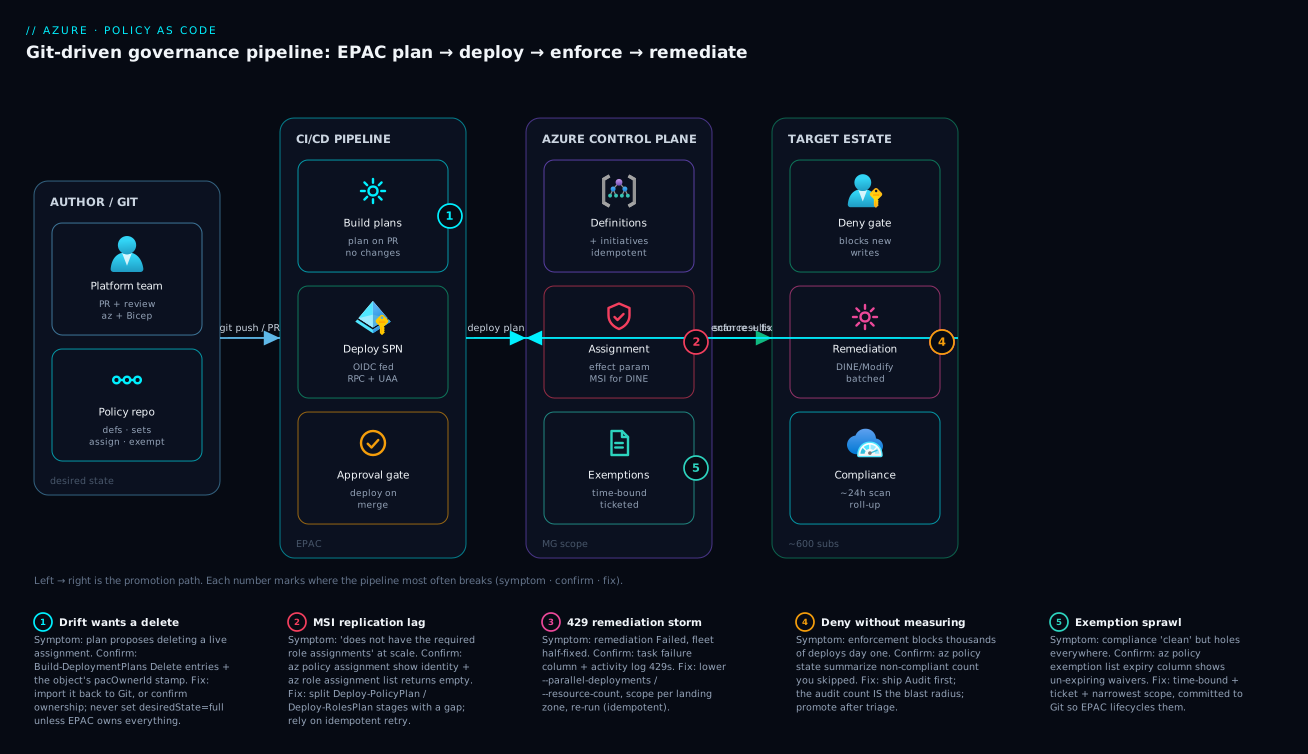
The diagram traces the policy-as-code path the way it actually runs, left to right, and marks the five places it most often breaks. Read it as a pipeline: an author opens a PR in the Git repo (definitions, initiatives, assignments, exemptions). The CI/CD pipeline runs Build-DeploymentPlans to produce a plan artifact on PR, then — behind an approval gate — Deploy-PolicyPlan and Deploy-RolesPlan on merge, authenticating as a federated service principal that holds Resource Policy Contributor + User Access Administrator at the root MG. EPAC writes into the Azure control plane: custom definitions and initiatives at the management-group scope, assignments that carry a system-assigned managed identity for Modify/DINE, and exemptions down to the resource. Finally the target estate — subscriptions and resource groups under the MG hierarchy — is where enforcement bites: Deny intercepts new writes, Modify/DINE plus remediation tasks fix the existing fleet in throttled batches, and the compliance scan feeds results back to the control plane.
Follow the numbered badges to read the failure map. Badge ① on the pipeline marks drift — EPAC’s plan wants to delete a live object because someone changed it in the portal; the pacOwnerId boundary is what keeps that deletion safe. Badge ② on the assignment node marks the MSI replication lag that surfaces as PrincipalNotFound when Deploy-RolesPlan outruns Azure AD. Badge ③ on the DINE/Modify node marks a wrong existenceCondition that redeploys every scan and burns quota. Badge ④ on the remediation path marks the 429 storm from an unthrottled tenant-wide task. Badge ⑤ on the exemptions node marks exemption sprawl — un-expiring, untracked waivers that make compliance lie. Every path converges on the same proof: a clean Build-DeploymentPlans re-run reporting no changes means Git and Azure are in sync.
Real-world scenario
A platform team at Northwind Logistics runs ~600 subscriptions under a single root management group, governed by a small set of custom initiatives. The team is five engineers; the governance estate had grown organically in the portal and nobody could answer audit questions cleanly, so they moved it to EPAC with a plan/deploy pipeline and the standard sandbox → nonprod → prod rings.
The migration itself went smoothly. The trouble started with a new control: a Modify policy to enforce a cost-center tag, parameterized Audit → Deny per ring as usual. Sandbox and non-prod were clean — the Audit ring flagged ~3,100 untagged resources, which the team triaged and accepted as the remediation backlog. Then the production deploy failed every assignment with The policy assignment ... does not have the required role assignments — even though Deploy-RolesPlan had run successfully in the same pipeline.
The breakthrough came from asking what was different about scale. Modify and DINE identities are system-assigned, so the principal does not exist until the assignment is created. EPAC creates assignments in Deploy-PolicyPlan, then grants roles in Deploy-RolesPlan — but Azure AD replication of each new service principal lags by seconds to minutes. At 600 assignments, role creation outran replication: the roleAssignments PUT hit principals that were not yet visible tenant-wide, and Azure surfaced it as PrincipalNotFound wrapped in the generic “required role assignments” policy error. In sandbox with a dozen assignments, replication always finished first, which is why it never reproduced below production scale.
The fix was ordering plus idempotent retry, not more permissions. The team split the two deploys into separate pipeline stages with a deliberate gap, and let EPAC’s own retry reconcile the stragglers:
- stage: DeployRoles
  dependsOn: DeployPolicy
  jobs:
    - deployment: ApplyRoles
      environment: policy-prod
      strategy:
        runOnce:
          deploy:
            steps:
              - download: current
                artifact: policy-plan
              - pwsh: Start-Sleep -Seconds 120   # let AAD replicate new MSIs
              - task: AzureCLI@2
                inputs:
                  azureSubscription: epac-spn
                  scriptType: pscore
                  scriptLocation: inlineScript
                  inlineScript: |
                    Deploy-RolesPlan -DefinitionsRootFolder ./policy `
                      -InputFolder $(Pipeline.Workspace)/policy-plan `
                      -PacEnvironmentSelector epac-prod
A re-run of Deploy-RolesPlan is a no-op for already-granted identities, so the second pass only cleans up what replication missed — without re-deploying a single policy object. With the gap in place, the prod deploy went green, and the team then remediated the ~3,100-resource tag backlog in per-landing-zone batches of 500 at --parallel-deployments 10, widening only after each batch landed clean. The whole estate reached compliant over a week with zero 429-induced half-states. The lesson on the wall: “At scale, the bug is rarely permissions — it’s that you raced a distributed system. Order the stages and let idempotency clean up the lag.”
The incident as a timeline, because the order of moves is the lesson:
| Time | Symptom | Action taken | Effect | What it should have been |
|---|---|---|---|---|
| Day 1 | Sandbox/nonprod clean | Ship Audit, read count |
3,100 flagged — backlog known | Correct |
| Day 2, 10:00 | Prod fails every assignment | Re-run Deploy-RolesPlan |
Same error | Ask: what changed at scale? |
| 10:30 | Still failing | Add more roles to the SPN | No change (already had them) | Not a permissions problem |
| 11:15 | Root cause found | Recognize MSI replication lag at 600 assignments | Two coupled facts: system-assigned MSI + AAD lag | — |
| 12:00 | Mitigated | Split stages + 120s gap + idempotent retry | Prod goes green | Correct fix |
| +1 week | Fully governed | Per-LZ remediation, 500 × 10 concurrency | 0 429 half-states, all compliant |
The actual fix is batching |
Advantages and disadvantages
The git-driven, EPAC-reconciled model both fixes the unreviewability of portal governance and introduces its own operational edges. Weigh it honestly:
| Advantages (why this model helps you) | Disadvantages (why it bites) |
|---|---|
| Every policy change is a PR with a reviewer, a diff, and a recorded why | Standing up the pipeline (EPAC, federation, rings) is real upfront effort |
| EPAC drift detection flags and removes orphaned assignments — the estate stays in sync with Git | Drift removal is dangerous if pacOwnerId/desiredState is misconfigured — it can delete live objects |
One definition promotes Audit → Deny across rings by flipping a parameter — no code change |
Parameterizing everything adds indirection; a junior reader can’t see the effective effect at a glance |
What-If + an Audit ring make the blast radius measurable before enforcement |
The compliance scan lag (~24h) means feedback isn’t instant unless you trigger scans |
| Remediation tasks fix existing fleets at scale | Unthrottled remediation 429s and leaves half-fixed states; throttling is your responsibility |
| Exemptions in Git are time-bound, ticketed, and lifecycle-managed | A portal exemption created out-of-band becomes untracked drift the moment it’s made |
| Built-in initiatives compose with custom ones under one roll-up | Overlapping assignments can produce Conflicting compliance that’s confusing to resolve |
The model is right for any team at landing-zone scale that must prove governance — regulated industries, multi-subscription estates, anyone facing audits. It is overkill for a single subscription with three policies, where the portal is genuinely faster. The disadvantages are all manageable — a correct pacOwnerId, throttled remediation, exemptions-in-Git — but only if you know they exist, which is the point of this article.
Hands-on lab
Stand up a minimal policy-as-code loop without EPAC or a management group, so it runs free in any subscription: author a custom definition, assign it as Audit at a resource-group scope, trigger a scan, read compliance, then flip to Deny and watch it block. Run in Cloud Shell (Bash). Teardown at the end.
Step 1 — Variables and a sandbox resource group.
SUB=$(az account show --query id -o tsv)
RG=rg-policy-lab
LOC=centralindia
az group create -n $RG -l $LOC -o table
Step 2 — Author a custom definition (deny public blob access), parameterized effect.
cat > rule.json <<'JSON'
{
  "if": { "allOf": [
    { "field": "type", "equals": "Microsoft.Storage/storageAccounts" },
    { "field": "Microsoft.Storage/storageAccounts/allowBlobPublicAccess", "notEquals": false }
  ]},
  "then": { "effect": "[parameters('effect')]" }
}
JSON

cat > params.json <<'JSON'
{ "effect": { "type": "String", "defaultValue": "Audit",
  "allowedValues": ["Audit","Deny","Disabled"] } }
JSON

az policy definition create \
  --name "lab-deny-public-blob" \
  --display-name "Lab: deny public blob access" \
  --mode Indexed \
  --rules @rule.json \
  --params @params.json \
  --subscription $SUB -o table
Expected: a definition row with policyType = Custom.
Step 3 — Assign it as Audit at the resource-group scope.
az policy assignment create \
  --name "lab-audit-public-blob" \
  --policy "lab-deny-public-blob" \
  --scope "/subscriptions/$SUB/resourceGroups/$RG" \
  --params '{ "effect": { "value": "Audit" } }' -o table
Step 4 — Create a deliberately non-compliant storage account, then scan.
SA=stpolicylab$RANDOM
az storage account create -n $SA -g $RG -l $LOC --sku Standard_LRS \
  --allow-blob-public-access true -o table   # intentionally non-compliant

az policy state trigger-scan --resource-group $RG   # ~1-2 min
az policy state summarize --resource-group $RG \
  --query "results.policyAssignments[].{name:policyAssignmentId, nonCompliant:results.nonCompliantResources}" \
  -o table
Expected after the scan: nonCompliant: 1 — the storage account is flagged but not blocked, because the effect is Audit. That count is your blast radius.
Step 5 — Flip the assignment to Deny and prove it blocks.
az policy assignment update \
  --name "lab-audit-public-blob" \
  --scope "/subscriptions/$SUB/resourceGroups/$RG" \
  --params '{ "effect": { "value": "Deny" } }' -o table

# Now try to create another public storage account — it should be REJECTED
az storage account create -n stpolicylab$RANDOM -g $RG -l $LOC --sku Standard_LRS \
  --allow-blob-public-access true 2>&1 | grep -i "disallowed\|RequestDisallowedByPolicy" \
  || echo "If you see a policy denial above, Deny is working."
Expected: the create fails with RequestDisallowedByPolicy naming the assignment. Note that the existing public account from Step 4 is still there — Deny is forward-only, which is exactly why a fleet needs Modify/DINE + remediation.
Step 6 — (Optional) Add a time-bound exemption for the legacy account.
az policy exemption create \
  --name "lab-waiver" \
  --policy-assignment "/subscriptions/$SUB/resourceGroups/$RG/providers/Microsoft.Authorization/policyAssignments/lab-audit-public-blob" \
  --exemption-category Waiver \
  --scope "/subscriptions/$SUB/resourceGroups/$RG/providers/Microsoft.Storage/storageAccounts/$SA" \
  --expires-on "2026-12-31T23:59:59Z" \
  --description "LAB-001: demo waiver; owner: you" -o table
Step 7 — Teardown (delete everything so there’s no spend or lingering policy).
az policy exemption delete --name "lab-waiver" \
  --scope "/subscriptions/$SUB/resourceGroups/$RG/providers/Microsoft.Storage/storageAccounts/$SA" 2>/dev/null
az policy assignment delete --name "lab-audit-public-blob" \
  --scope "/subscriptions/$SUB/resourceGroups/$RG"
az policy definition delete --name "lab-deny-public-blob" --subscription $SUB
az group delete -n $RG --yes --no-wait
The lab steps and what each proves:
| Step | What you did | What it proves |
|---|---|---|
| 2 | Authored a parameterized definition | Effect is a knob, not a constant |
| 3 | Assigned as Audit |
Same definition, scope chosen at assignment |
| 4 | Created a bad resource + scanned | Audit measures without blocking |
| 5 | Flipped to Deny |
Enforcement blocks new violations only |
| 6 | Added a time-bound exemption | The documented, expiring exception |
| 7 | Deleted everything | Clean teardown; no lingering guardrails |
Common beginner mistakes
These are mental-model errors, not symptoms — the wrong idea that leads a newcomer to the wrong command. (For the symptom → root-cause → fix table, see Common mistakes & troubleshooting just below.)
-
“Azure Policy is a firewall that changes my existing resources.” It isn’t. Most effects evaluate at write time and either flag (
Audit), block (Deny), or mutate the incoming request (Modify/Append). Nothing already deployed changes until a remediation task (forModify/DINE) touches it. Right model: policy governs the request; the existing fleet is a separate, deliberate remediation job. -
“
Denyis just a strongerAudit, so start there.” Start withAuditspecifically to measure.Denyis forward-only and, shipped blind, blocks every legitimate deploy that trips the rule on day one. Right model: theAuditcount is your blast radius — read it, triage it, then promote. -
“I’ll put the subscription (or scope) in the definition so it applies where I want.” That collapses two objects into one and the rule can never be reused or promoted again. Right model: the assignment is the only object that carries scope; definitions and initiatives are scope-free capability.
-
“Disabling the policy and exempting a resource are basically the same.”
Disabled(as an effect, anoverridesvalue, or an assignment state) removes the control for everyone with no scope, expiry, or trail. Right model: an exemption is scoped to specific resources/rules, carries a category, expiry, and ticket, and self-revokes — the auditable equivalent. -
“
Modifywill automatically tag my thousands of existing resources.”Modifyonly acts on new writes; the existing fleet stays non-compliant until you create a remediation task, and that task needs the identity’s roles first. Right model:Modify/DINE fix new writes inline and old resources only through remediation. -
“No compliance data means the policy is broken.”
NotStartedalmost always means no scan has run yet, not that the rule is wrong. Right model: triggeraz policy state trigger-scan(or wait the ~24h window) before concluding anything. -
“One big remediation task is the fastest way to fix everything.” A tenant-wide task fans out one deployment per resource, spikes past ARM’s write limits, hits
429, and leaves a half-fixed fleet the next scan re-flags. Right model: batch per landing zone with--resource-count/--parallel-deployments, widen only after a batch lands clean. -
“An exemption without an expiry is fine — we’ll clean it up later.” Un-expiring waivers are the sprawl failure mode, and “later” never comes. Right model: every exemption gets an
expiresOn, a ticket, an owner, and the narrowest scope — and lives in Git so EPAC removes it the instant it leaves the repo. -
“A no-op EPAC plan is boring; a busy plan means it’s working.” Backwards. A clean
Build-DeploymentPlansreporting no changes is the proof that Git and Azure agree; a plan that suddenly wants to delete a live object usually means someone edited it in the portal. Right model: the boring no-op plan is the goal, and a nightly one is your drift alarm.
Common mistakes & troubleshooting
The differentiator. Each failure mode below is symptom → root cause → how to confirm (exact command) → fix. First the playbook table you scan mid-rollout, then the detail on the ones that need it.
| # | Symptom | Root cause | Confirm (exact command / path) | Fix |
|---|---|---|---|---|
| 1 | EPAC plan wants to Delete a live assignment |
Drift — object changed/created in the portal, not in Git | Build-DeploymentPlans → read the plan’s deletes |
Re-import to Git, or confirm pacOwnerId ownership before allowing the delete |
| 2 | Deny blocked 4,000 deploys on day one |
Skipped the Audit ring |
az policy state summarize shows the count you never read |
Roll back to Audit; promote after triage |
| 3 | “does not have the required role assignments” | DINE/Modify MSI replication lag (or missing role) | az policy assignment show --query identity; az role assignment list --assignee <principalId> |
Split deploy/roles stages + gap; re-run Deploy-RolesPlan |
| 4 | DINE redeploys its template every scan | Wrong existenceCondition — never matches an already-compliant resource |
az policy state list shows perpetual non-compliance on compliant resources |
Fix the existenceCondition; test against a known-good resource |
| 5 | Remediation Failed halfway, fleet half-fixed |
429 Too Many Requests from an unthrottled tenant-wide task |
Remediation task → failure count; activity log 429s |
Lower --parallel-deployments/--resource-count; scope per LZ; re-run (idempotent) |
| 6 | Identity-bearing assignment fails to deploy | Missing location on a Modify/DINE assignment |
Deploy error names a missing region | Add location: to the assignment |
| 7 | Compliance dashboard empty / NotStarted |
No scan has run since deploy | az policy state summarize shows NotStarted |
az policy state trigger-scan; wait the scan window |
| 8 | Policy “does nothing” on a property | No alias exists, or field typo’d |
az provider show --expand resourceTypes/aliases lacks the alias |
Use an existing alias, or pick a different enforcement point |
| 9 | Two assignments fight; compliance Conflicting |
Overlapping assignments with different effects | az policy assignment list --scope ... shows both |
Consolidate; one initiative per control |
| 10 | Exemption “covers” a resource but it’s still flagged | Wrong policy-definition-reference-ids or scope |
az policy exemption show vs the failing definition ref |
Match the exact reference ID + narrowest scope |
| 11 | Effect changed in Git but Azure still old | Plan not re-run, or wrong selector deployed | Build-DeploymentPlans diff shows the change as pending |
Re-run plan/deploy with the correct PacEnvironmentSelector |
| 12 | Modify doesn’t change existing resources |
Modify is write-time; existing fleet needs remediation |
az policy state list shows them still non-compliant |
Create a remediation task for the Modify assignment |
Drift wants to delete a live object (#1)
EPAC’s whole value is reconciliation, which means its plan will propose deleting anything stamped with your pacOwnerId that isn’t in Git. Confirm: read the Delete entries in the Build-DeploymentPlans output and check whether the object carries your owner stamp. Fix: if it’s a legitimate object someone created in the portal, import it back into the repo so Git becomes the source of truth; if it genuinely should go, let the plan remove it. Never set desiredState.strategy to full unless you have deliberately decided EPAC owns every policy object under the scope — full will delete unowned objects too.
“Required role assignments” at scale (#3)
The production-scale classic from the scenario. Confirm the identity exists and was granted its roles:
PRINCIPAL=$(az policy assignment show --name deploy-diag-to-law \
  --scope /providers/Microsoft.Management/managementGroups/contoso \
  --query identity.principalId -o tsv)
az role assignment list --assignee "$PRINCIPAL" -o table   # empty during replication lag
Fix: split Deploy-PolicyPlan and Deploy-RolesPlan into separate stages with a deliberate gap so Azure AD finishes replicating the new system-assigned principals, then let EPAC’s idempotent retry reconcile any stragglers. A re-run of Deploy-RolesPlan is a no-op for already-granted identities.
A wrong DINE existenceCondition (#4)
DINE evaluates an existenceCondition to decide whether the companion resource already exists. If that condition can never match an already-compliant resource, the engine concludes the resource is missing on every scan and redeploys the template forever — noisy and expensive. Confirm: a resource you know has diagnostics configured still shows NonCompliant. Fix: test the existenceCondition against a known-good resource and confirm it reports compliant before you assign at scale.
# Are resources you believe are compliant still flagged non-compliant? (smell test)
az policy state list --resource-group rg-known-good \
  --query "[?complianceState=='NonCompliant'].{res:resourceId, policy:policyDefinitionName}" -o table
The 429 remediation storm (#5)
A remediation task fans out one deployment per non-compliant resource. Confirm: the task state is Failed/Complete with failures, and the activity log shows 429 Too Many Requests:
az monitor activity-log list --offset 1h \
  --query "[?contains(to_string(httpRequest), '429') || status.value=='Failed'].{op:operationName.value, status:status.value, time:eventTimestamp}" \
  -o table
Fix: lower --parallel-deployments and --resource-count, scope the task to one landing zone, and re-run — remediation is idempotent, so the re-run only fixes what’s still non-compliant. Widen concurrency only after a batch lands clean.
Best practices
Crisp, production-grade rules — most of these are the difference between a governed estate and a pile of orphaned assignments.
- Keep the four object types in separate Git trees, named by capability, never by scope. A scope-named definition can never be promoted or reused.
- Always assign initiatives, not bare definitions — even an initiative of one. Retrofitting an initiative later means re-creating assignments and losing compliance history.
- Parameterize the effect so the same definition ships
AuditthenDenyper ring. The effect should live on the assignment, not in the definition. - Give EPAC a unique
pacOwnerIdper repo and leavedesiredState.strategyat the safeownedOnlyunless you have deliberately decided to own everything. - Split the pipeline into plan (PR) and deploy (merge) with an approval gate, and split
Deploy-PolicyPlanfromDeploy-RolesPlanwith a deliberate gap at scale. - Never enforce
Denywithout first reading theAuditcount in a sandbox MG. The audit count is your blast radius. - Pair every
Denywith a remediation plan (Modify/DINE + remediation task) for anything that already exists —Denyis forward-only. - Throttle remediation and scope it per landing zone. Run small, watch the failure column, widen only on clean batches.
- Make every exemption time-bound, ticket-referenced, and version-controlled. Commit them so EPAC removes them the instant they leave Git.
- Grant policy permissions to a federated service principal, never a human, and gate it behind PR review.
- Test a DINE
existenceConditionagainst a known-good resource before assigning at scale, or it redeploys forever. - Wire compliance roll-up to a dashboard and run a nightly
Build-DeploymentPlansas scheduled drift detection — a no-op plan is your proof of parity.
Security notes
Policy-as-code is a security control, and its own attack surface is the deploying identity and the drift boundary.
- Least privilege for the pipeline principal. It needs exactly Resource Policy Contributor (policy objects) and User Access Administrator (role assignments for DINE/Modify MSIs) at the root MG — nothing broader. UAA is powerful (it can grant any role), so scope it to the policy root MG and gate every change behind PR review. Treat this principal the way you’d treat any high-privilege identity in Entra RBAC governance.
- Federated, not secret-based, auth. Use workload identity federation (OIDC) for the pipeline so there is no client secret to leak — the same secretless pattern as GitHub Actions + Terraform OIDC.
- The
pacOwnerIdis a safety boundary, not a secret. Its job is to stop EPAC deleting objects it doesn’t own; misconfiguring it (or settingdesiredStatetofull) is the most dangerous mistake in the whole pipeline because it can remove live guardrails. - DINE/Modify identities are themselves privileged. A DINE policy that deploys diagnostics gets Monitoring Contributor; one that configures backup gets backup roles. Enumerate exactly what each assignment’s
roleDefinitionIdsgrant and scope them to the assignment’s MG — an over-granted DINE identity is a lateral-movement path. - Exemptions are security exceptions — treat them as such. An un-expiring
Waiveris an open hole. Require a ticket, an owner, an expiry, and the narrowest scope; review the live exemption list as part of every audit. - Don’t leak resource internals in
displayName/description. Policy metadata is broadly readable; keep secrets and sensitive identifiers out of it. - Protect the most destructive resources with
DenyActionon delete where appropriate, and never use a blanketDisabledto silence a control — an exemption is the auditable equivalent.
Cost & sizing
Azure Policy itself is free — there is no charge for definitions, assignments, evaluations, or compliance scans. The bill comes from what your policies cause to be deployed and from how you remediate. Get these wrong and a governance pipeline quietly runs up a Log Analytics and ARM bill.
| Cost driver | What it is | Rough magnitude | How to control it |
|---|---|---|---|
| Azure Policy service | Definitions, assignments, scans | Free | N/A — never the cost |
| DINE-deployed resources | Diagnostics → Log Analytics ingestion | Per-GB ingested; can dominate at fleet scale | Scope diagnostics; sample; tier the workspace |
Wrong existenceCondition redeploys |
Template redeployed every scan | Wasted ARM ops + any resource cost | Fix the condition (mistake #4) |
| Remediation deployments | One deployment per resource | Compute/time, not a per-deploy fee | Batch + throttle; one-time backlog |
| Log Analytics for compliance | Storing compliance/activity logs | Per-GB + retention | Right-size retention; archive tier |
| Pipeline agent minutes | CI/CD running EPAC | Cheap (minutes per run) | Run plan on PR, deploy on merge only |
The DINE-to-Log-Analytics path is where real money hides: a deployIfNotExists that turns on every diagnostic category for every resource across 600 subscriptions can ingest enormous volumes. Size it deliberately — pick the categories you actually query, consider sampling, and route to a workspace tiered for the volume, the same discipline as in Azure Monitor & Application Insights observability. In INR terms, the policy pipeline’s own footprint is negligible (pipeline minutes, a few rupees a run); the variable cost is entirely the ingestion and retention your DINE policies generate, which can run from near-zero on a small estate to lakhs per month if you onboard full diagnostics fleet-wide without sampling.
Sizing the rollout itself — how long and how risky each phase is:
| Phase | Effort / duration | Cost | Risk if rushed |
|---|---|---|---|
| Stand up EPAC + pipeline | Days (one-time) | Negligible | Misconfigured pacOwnerId |
| Author + lint definitions | Hours per control | Free | Bad alias / over-broad rule |
Audit ring + read blast radius |
Minutes per control (+ scan window) | Free | Skipping it → day-one Deny outage |
Promote to Deny/DINE |
Per ring, gated | Free (policy) | Enforcement breaks teams |
| Remediate existing fleet | Days (throttled batches) | ARM time + downstream ingestion | 429 half-states; ingestion blowout |
Practice challenges
Six exercises escalating from beginner to advanced. Each has a worked solution and a one-line why. They build on one another — the same storage/tag/DINE controls from the lesson — so you can run them as one thread in a sandbox subscription. Treat every ID as a placeholder.
1. (Beginner) Read a resource property in a rule. Write the if block that matches only storage accounts whose allowBlobPublicAccess is not already false. Name the two conditions and why both are needed.
<details> <summary>Solution</summary>
"if": { "allOf": [
  { "field": "type", "equals": "Microsoft.Storage/storageAccounts" },
  { "field": "Microsoft.Storage/storageAccounts/allowBlobPublicAccess", "notEquals": false }
]}
The first condition scopes the rule to the resource type; the second reads the alias for the property. Without the type gate the alias is meaningless on other resources.
Why: field + an alias is the only way to read a resource’s own property — and you must scope to the type first or the rule evaluates against resources that don’t have the alias.
</details>
2. (Beginner) Measure before you enforce. You have the definition from #1. Assign it as Audit at a resource group, force an evaluation, and read the non-compliant count. Which three commands, in order?
<details> <summary>Solution</summary>
az policy assignment create --name audit-public-blob \
  --policy lab-deny-public-blob \
  --scope "/subscriptions/$SUB/resourceGroups/$RG" \
  --params '{ "effect": { "value": "Audit" } }'

az policy state trigger-scan --resource-group $RG            # on-demand, minutes not 24h
az policy state summarize --resource-group $RG \
  --query "results.policyAssignments[].results.nonCompliantResources"
Why: the Audit count is your blast radius — trigger a scan instead of waiting ~24h, and read the number before you ever consider Deny.
</details>
3. (Intermediate) Fix an existing fleet, not just new writes. You switch the tag policy to Modify, but yesterday’s untagged resources are still non-compliant. What object do you create, and what two things must its identity have before it will work?
<details> <summary>Solution</summary>
Create a remediation task against the Modify assignment:
az policy remediation create --name remediate-costcenter-01 \
  --resource-group $RG --policy-assignment modify-costcenter \
  --resource-count 500 --parallel-deployments 10
The assignment’s managed identity must (a) exist and (b) hold the roles listed in the definition’s roleDefinitionIds (for a tag Modify, Tag Contributor). Modify only acts at write-time, so existing resources need the task.
Why: Deny/Modify are forward-looking; the existing fleet is fixed by a remediation task, and that task can only act through an identity that already has the right roles.
</details>
4. (Intermediate) Stage a new Deny to one region first. A fresh Deny control is approved but you don’t want it live estate-wide on day one — and you refuse to fork the assignment per region. How do you take it live in centralindia only, editing one thing?
<details> <summary>Solution</summary>
Add a resourceSelectors block to the single assignment and widen the array later:
"resourceSelectors": [
  { "name": "sdp", "selectors": [
    { "kind": "resourceLocation", "in": [ "centralindia" ] }
  ]}
]
Why: resourceSelectors are Safe Deployment Practices for policy — one assignment evaluates only the selected resources, so a rollout widens by editing an array instead of duplicating (and later drifting) assignments.
</details>
5. (Advanced) Silence one noisy member rule — auditably. An assigned initiative has one member policy flooding a subscription with false positives. You must keep the rest enforced, leave an audit trail, and not use effect Disabled or edit the initiative. Give the two legitimate options and when each fits.
<details> <summary>Solution</summary>
overrideson the assignment — downgrade just that member’s effect for this assignment scope:
"overrides": [
  { "kind": "policyEffect", "value": "Audit",
    "selectors": [ { "kind": "policyDefinitionReferenceId", "in": [ "noisyRule" ] } ] }
]
- A scoped, expiring exemption with
--policy-definition-reference-ids noisyRule— when the carve-out is a documented, temporary exception for specific resources rather than a standing rollout choice.
Why: overrides reshapes the rollout on the assignment (standing, no expiry); an exemption is the dated, ticketed, per-resource waiver. Both beat a blanket Disabled, which removes the control for everyone with no trail.
</details>
6. (Advanced) Kill the “required role assignments” failure at scale. At 600 assignments Deploy-RolesPlan fails with PrincipalNotFound even though it ran. Give the ordering fix and the architectural fix that prevents the race entirely.
<details> <summary>Solution</summary>
- Ordering fix: split
Deploy-PolicyPlanandDeploy-RolesPlaninto separate pipeline stages with a deliberate gap (e.g.Start-Sleep -Seconds 120) so Entra ID finishes replicating the new system-assigned principals; EPAC’s idempotent re-run reconciles any stragglers. - Architectural fix: give the identity-bearing assignments a pre-created user-assigned managed identity (UAMI), granted its roles once, so there is no per-assignment principal to replicate.
Why: system-assigned identities don’t exist until the assignment is created, so at scale role creation races Entra replication; ordering tolerates the lag, a shared UAMI removes it.
</details>
Interview & exam questions
Mapped to AZ-104 (governance), AZ-305 (design governance), and the AZ-500/SC-100 security-design angle. Which exam emphasises which slice of this topic:
| Exam | What it tests on policy-as-code | The questions below that map |
|---|---|---|
| AZ-104 | Create/assign policy + initiatives; remediation basics; exemptions | Q1, Q2, Q3, Q11 |
| AZ-305 | Design governance: MG hierarchy, ring promotion, effect choice at scale | Q1, Q7, Q9, Q12 |
| AZ-500 | Security guardrails, least-privilege deploy identity, DenyAction | Q8, Q11 |
| SC-100 | Governance strategy, exemption discipline, audit posture | Q6, Q11, Q12 |
| AZ-400 | The CI/CD pipeline, gates, idempotent deploy, drift detection | Q6, Q9, Q10, Q12 |
Q1. What are the four Azure Policy object types and how do they differ? Definition (a single if/then rule), initiative/policy set (a bundle of definitions with hoisted parameters), assignment (a definition or initiative bound to a scope with parameter values), and exemption (a time-bound, audited waiver). Definitions/initiatives describe capability; assignments describe where it’s enforced; exemptions describe the documented exception.
Q2. When does a policy evaluate, and which effects can’t run inline? On resource create/update (intercepted before commit) and on a ~24-hour background compliance scan. auditIfNotExists and deployIfNotExists only run on writes and on the scan — never inline — because they must inspect related resources that already exist.
Q3. Why can’t Deny fix an existing non-compliant fleet, and what do you use instead? Deny only blocks new non-compliant writes; it never touches resources that already exist. To fix the existing fleet you use Modify or DeployIfNotExists plus a remediation task, which fans out one deployment per non-compliant resource.
Q4. What’s the difference between field and value in a policy rule? field reads an alias-mapped property of the target resource and can drive deny/modify into the request payload; value evaluates an arbitrary expression (a parameter, a template function) independent of the resource and cannot reach into the payload.
Q5. Why must you enumerate aliases before writing a rule? A policy can only target a property that has an alias exposed by the resource provider. If no alias exists for the property, you cannot write a field condition against it — so you list aliases (az provider show --expand resourceTypes/aliases) first and pick a different enforcement point if needed.
Q6. What does pacOwnerId do in EPAC and why is it a safety mechanism? It stamps every object EPAC creates so the tool only manages and deletes objects bearing that ID. This makes drift removal safe — EPAC never deletes another team’s assignments or Microsoft’s built-in initiatives.
Q7. Why parameterize the effect on the assignment instead of hard-coding it in the definition? So the same definition can ship Audit in sandbox and Deny/DINE in prod by changing only the assignment’s parameter and scope — promotion through rings becomes a parameter flip, not a code change.
Q8. What permissions does the policy-deploying principal need, and why two? Resource Policy Contributor at the root MG to create policy objects, plus User Access Administrator (or Owner) to create the role assignments that DINE/Modify managed identities require. Grant both to a federated service principal, never a human.
Q9. Why do Modify/DINE assignments fail with “required role assignments” at large scale, and how do you fix it? Their identities are system-assigned, so the principal doesn’t exist until the assignment is created; at hundreds of assignments, role creation can outrun Azure AD replication and hit PrincipalNotFound. Fix by splitting deploy and role stages with a gap and relying on EPAC’s idempotent retry.
Q10. How do you remediate thousands of resources without a 429 storm? Throttle with --parallel-deployments and --resource-count, scope tasks per landing zone rather than tenant-wide, watch the failure column, and widen concurrency only after a batch lands clean. Remediation is idempotent, so re-runs only fix what’s still non-compliant.
Q11. What’s the difference between disabling a policy and exempting a resource? Disabled (or setting the effect to Disabled) silently removes the control for everyone with no scope, expiry, or trail. An exemption is scoped to specific resources/rules, carries a category, expiry, and description, is audited, and self-revokes — the reviewable equivalent.
Q12. How do you prove that Git and Azure are actually in sync? Re-run Build-DeploymentPlans after a deploy; a plan reporting no changes is the proof of parity. A nightly plan run is your scheduled drift detection.
Quick check
- Which of the four object types is the only one that carries a scope and parameter values?
- You ship a new tag-enforcement control. What effect do you use first, and what does its result number tell you?
- A
DeployIfNotExistspolicy redeploys its template on every compliance scan. What is almost certainly wrong? - Your production policy deploy fails with “does not have the required role assignments” at 600 assignments, even though
Deploy-RolesPlanran. What’s the cause? - A remediation task ends in
Failedwith the fleet half-fixed. What single setting do you change first, and what makes the re-run safe?
Answers
- The assignment — definitions and initiatives describe capability; the assignment binds them to a scope with concrete parameter values.
Audit. The non-compliant count is your blast radius — flipping straight toDenywould have broken exactly that many deployments.- The
existenceConditionis wrong — it never matches an already-compliant resource, so the engine thinks the companion is missing every scan. Test it against a known-good resource. - Managed-identity replication lag: system-assigned identities don’t exist until the assignment is created, and at scale role creation outruns Azure AD replication (
PrincipalNotFound). Split the deploy/roles stages with a gap and let EPAC’s idempotent retry reconcile. - Lower
--parallel-deployments(and/or--resource-count) and scope per landing zone; the re-run is safe because remediation is idempotent — it only fixes what’s still non-compliant.
Glossary
-
Policy definition — A single governance rule (
if/then) authored once and assignable to any scope. -
Initiative (policy set) — A bundle of definitions with hoisted parameters, giving one compliance roll-up per business control.
-
Assignment — A definition or initiative bound to a scope (MG/subscription/RG) with concrete parameter values; the only object that knows where enforcement happens.
-
Exemption — A time-bound, audited waiver of an assignment, scoped down to a resource; either
WaiverorMitigated. -
Effect — What a policy does when its rule matches:
Audit,Deny,Modify,Append,DeployIfNotExists,AuditIfNotExists,Manual,Disabled,DenyAction. -
Alias — A mapping from a policy
fieldto a resource provider’s real property path; without one, you can’t write policy against that property. -
Mode — Which resource types a definition evaluates:
Indexed(taggable/locatable resources) orAll(plus RGs/subscriptions), with data-plane modes for AKS/Key Vault. -
fieldvsvalue—fieldreads the target resource’s (alias-mapped) property and can drive payload mutation;valueevaluates an arbitrary expression independent of the resource. -
EPAC (Enterprise Policy as Code) — A PowerShell module that reads a policy repo, builds a plan, and applies it idempotently with drift detection.
-
pacOwnerId— The GUID EPAC stamps on objects it manages, so drift removal only ever touches objects it owns. -
existenceCondition— The DINE/AINE check for whether a related resource already exists; a wrong one causes perpetual redeploys. -
Remediation task — A bulk operation that fans out one template deployment per non-compliant resource to fix an existing fleet.
-
Compliance scan — The ~24-hour background re-evaluation of existing resources that refreshes audit/DINE/AINE state.
-
What-If — A preview of what a deployment would create, modify, or delete, without changing anything — the cheapest pre-merge validation.
-
Management group (MG) — A container above subscriptions through which policy and RBAC inherit downward; the usual policy deployment root scope.
-
resourceSelectors— Assignment-level selectors (byresourceLocation,resourceType,kind) that make one assignment evaluate only a subset of resources, so a rollout widens by editing an array instead of forking assignments — Safe Deployment Practices for policy. -
overrides— An assignment-level change to the effect (or pinned version) of named member policies via selectors, without editing the definition or initiative; the audited way to mute or downgrade one rule for one assignment. -
notScopes— Child scopes carved out of an assignment entirely; a coarse, permanent exclusion with no expiry or audit trail, distinct from an exemption. -
evaluationDelay— A DINE/AINEdetailssetting for how long after a write to wait before checking the companion resource exists (AfterProvisioningSuccess,AfterProvisioning,AfterProvisioningFailure, or a duration likePT30M); prevents redeploy loops on freshly-provisioned resources. -
User-assigned managed identity (UAMI) — A standalone identity you create once, grant roles once, and reference from many identity-bearing assignments — sidestepping the system-assigned principal replication lag that breaks role deployment at scale.
-
definitionVersion— The version of a built-in definition or initiative an assignment pins:1.*.*takes non-breaking updates automatically,1.2.0freezes exactly (what you want for a regulated control). -
Regulatory Compliance initiative — A large built-in policy set whose members map to a standard’s controls (MCSB, NIST SP 800-53, PCI-DSS, CIS, ISO 27001); its roll-up renders in the Microsoft Defender for Cloud compliance dashboard.
-
Azure Policy Add-on / Gatekeeper — The AKS (and Arc) add-on based on OPA Gatekeeper v3 that enforces
Microsoft.Kubernetes.Datapolicies at the cluster’s admission controller and via periodic in-cluster scans. -
Safe Deployment Practices (SDP) — The staged-rollout discipline (by region/ring, via
resourceSelectors) that keeps a bad rule from hitting the whole estate at once.
Next steps
- Azure Policy governance at scale — the conceptual model this pipeline automates, including initiative design and compliance roll-ups.
- Enterprise-scale management-group hierarchy design — how to shape the MG rings this pipeline promotes through.
- Bicep deployment stacks, What-If & CI — the validation and deployment mechanics that pair with the policy pipeline.
- Azure DevOps YAML multistage environments & approvals — the gate-and-promotion patterns for the plan/deploy split.
- Gatekeeper / OPA policy as code for admission control — the in-cluster equivalent for AKS, which Azure Policy’s
Microsoft.Kubernetes.Datamode integrates with.