Single Server is gone – it retired in March 2025 – and every PostgreSQL workload on Azure that still mattered had to land on Azure Database for PostgreSQL Flexible Server, the managed Postgres service that runs the engine on a dedicated Linux VM inside your own network topology. That migration is the right moment to fix the things teams got wrong the first time: HA that was never failed over, a connection storm that took down a perfectly healthy database, a read replica nobody had promoted, and a major-version upgrade everyone was too scared to run. Flexible Server gives you real building blocks for all four – zone-redundant HA, an in-engine PgBouncer, asynchronous read replicas, and in-place major version upgrades. None of them are safe until you have driven them in anger.
This is the operations guide. We treat HA, pooling, replicas, networking, and upgrades not as feature bullets but as production mechanisms each with a failure mode, a confirm command, and a fix. You will learn to choose the right SKU and storage tier so HA and replicas are even possible, wire the connection path through port 6432 so a serverless front end cannot exhaust the engine, place the server in a delegated subnet or behind a private endpoint and make its FQDN resolve to a private IP, and run a 14 -> 16 major upgrade with a rehearsed runbook that ends in ANALYZE rather than a “slow database” incident. Every operation gets both an az CLI snippet and a Bicep snippet, and because this is a reference you will return to mid-incident, the SKUs, parameters, networking models, replica semantics, error codes, and the symptom playbook are all laid out as scannable tables – read the prose once, then keep the tables open at 02:14.
By the end you will stop guessing. When the pager goes off you will know whether you face a Burstable SKU that can never have HA, a connection storm against max_connections, a private DNS zone that resolves to a public IP, a replica silently hours behind, a static parameter that needs a restart, or a major upgrade that dropped the optimizer statistics. Knowing which within ninety seconds is what separates a five-minute incident from a two-hour one.
In a nutshell
Picture the database as a busy restaurant kitchen. PgBouncer is the expediter at the pass who takes a flood of waiter orders and feeds them to a fixed number of cooks – without one, a lunch rush of 500 waiters storms the line and the kitchen seizes even though the cooks are barely warm. Zone-redundant HA is a fully staffed second kitchen across the street mirroring every dish in real time, ready to take over the instant the first one loses power – but it cooks nothing extra day to day, so it does not help you serve more covers. A read replica is a satellite kitchen in another city that copies the menu with a slight delay: it can serve reads (and become your main kitchen if the first city floods), but its copy is always a few seconds behind. A major version upgrade is renovating the kitchen in place overnight – fast, but if you forget to re-train the staff on where everything now lives (ANALYZE), every order comes out slow the next morning.
Azure Database for PostgreSQL Flexible Server hands you all four of these as built-in switches. The trap is that each one has a sharp edge a beginner cannot see: HA does not cover a connection storm, the network model is chosen once and forever, a replica silently drifts if nobody watches its lag, and the upgrade quietly throws away the query planner’s notes. This lesson is the operator’s map of those switches and their edges – read it once for the model, then keep the tables open when the pager goes off.
Level: Advanced · Time: ~75 min · Format: concept -> reference tables -> incident scenario -> lab -> practice
You need first: comfort with SQL transactions and connections, basic psql, and Azure networking primitives (VNet, subnet, private DNS) – the full prerequisite list and where this sits in the track is in Prerequisites & where this fits just below, so this opener stays light. After this you can: choose a tier that even allows HA, put a transaction-mode pooler in front of a serverless app, drill a failover and a replica promotion, wire virtual endpoints so promotion needs no connection-string change, and run a rehearsed major upgrade that ends in ANALYZE.
What problem this solves
Flexible Server hides a lot of machinery – a managed Linux VM, a separate managed disk, synchronous replication to a standby, an embedded connection pooler – so you can run Postgres without operating a cluster. That abstraction is a gift until it breaks, then the failure modes are subtle: the database refuses connections while CPU sits at 40%, the standby is “healthy” and completely irrelevant, the FQDN resolves but to the wrong address, the replica lag metric is climbing and nobody is alerted, the upgrade “worked” but every query is slow.
What breaks without this knowledge: a team enables HA, never drills a failover, and discovers at the worst possible moment that their application takes four minutes to reconnect; a checkout service on Azure Functions scales to hundreds of instances and exhausts max_connections, and the on-call response is to scale up the SKU (which does nothing, because CPU was never the problem); a region-loss DR plan rests on a read replica nobody has ever promoted, and promotion turns out to be one-way; a major version upgrade runs in a panic with no validation pass and no ANALYZE, and the “engine regression” is really missing statistics.
Who hits this: every team running production PostgreSQL on Azure – migrated off Single Server, or greenfield on Flexible Server. It bites hardest on serverless or high-fan-out front ends (the connection-storm problem is near-universal), customer-facing OLTP that needs zone resilience without paying unacceptable commit latency, regulated workloads that must be private-only with correct DNS, reporting-heavy systems that want read replicas, and anyone running an old major version who has been deferring the upgrade out of fear. The fix is almost never “a bigger SKU” – it’s choosing the right tier, putting a transaction pooler in the path, drilling the failover and the promotion, and rehearsing the upgrade on a PITR clone.
To frame the whole field before the deep dive, here is every production concern this article covers, the question it forces, and the one place to look first:
| Concern | The question it forces | Where to look first | Most common single mistake |
|---|---|---|---|
| High availability | Zone-redundant or same-zone – and have you drilled it? | az postgres flexible-server show -> highAvailability.state |
Never failing over; assuming HA covers connection storms |
| Connection management | Are you pooling, or opening thousands of backends? | SHOW POOLS; on port 6432 |
App connects on 5432; prepared statements break transaction pooling |
| Networking | Private access or private endpoint – and does DNS resolve private? | nslookup <fqdn> returns a private IP? |
DNS resolves to the public name; model can’t be changed later |
| Read replicas / DR | Is the replica current, and have you promoted one? | read_replica_lag_in_seconds; pg_stat_replication |
No lag alert; discovering promotion is one-way at 3am |
| Parameters & extensions | Dynamic or static – did you restart? Is it preloaded? | az postgres flexible-server parameter show |
Setting a static param and expecting it live; skipping preload |
| Storage & IOPS | Auto-grow on (v1) or IOPS provisioned (v2)? | az postgres flexible-server show -> storage block |
Out-of-space outage; over-provisioning a disk to buy IOPS |
| Major upgrade | Validated, rehearsed, and did you ANALYZE? |
--perform-validation-only output |
Skipping ANALYZE; not rehearsing on a clone |
| Backup & restore | Geo enabled at creation, and have you restored? | az postgres flexible-server backup list |
Geo not enabled (can’t add later); never test-restoring |
Learning objectives
By the end of this article you can:
- Choose the right tier and SKU (Burstable vs General Purpose vs Memory Optimized) so that HA and read replicas are even possible, and explain why Burstable disqualifies both.
- Configure zone-redundant or same-zone HA, explain the synchronous-commit latency trade-off, and drill a forced failover to measure real application reconnect time.
- Decide between VNet integration (private access) and Private Link (private endpoint) at creation time – knowing the choice is irreversible – and make the server FQDN resolve to a private IP.
- Stand up the built-in PgBouncer in transaction mode on port 6432, size the pool, and avoid the session-state bugs (prepared statements,
LISTEN/NOTIFY, temp tables) that pooling breaks. - Create asynchronous read replicas in the same or another region, alert on
read_replica_lag_in_seconds, and promote one correctly for DR – understanding thatforcedpromotion is one-way. - Manage server parameters (dynamic vs static), allowlist extensions via
azure.extensionsandshared_preload_libraries, and tune storage/IOPS on Premium SSD v1 versus v2. - Run a tested in-place major version upgrade with a backup, a validation pass, a PITR-clone rehearsal, and
ANALYZEas the final step. - Configure backups, PITR, and geo-redundancy, and run a restore drill that yields your real RTO rather than the one on the SLA slide.
Prerequisites & where this fits
You should already understand core relational concepts (transactions, connections, replication, VACUUM/ANALYZE) and basic PostgreSQL administration. You should be able to run az in Cloud Shell, read JSON output, and connect with psql. Familiarity with Azure networking primitives – VNets, subnets, NSGs, private DNS zones, and private endpoints – is assumed; if those are shaky, read Azure Virtual Network: Subnets, NSGs & Peering and Azure Private Link & Private Endpoints for PaaS first, because the single most common Flexible Server outage is a DNS misconfiguration.
This sits in the Data platform track. It assumes the HA/DR mental model from High Availability vs Disaster Recovery: RTO & RPO and pairs with Azure SQL Database: Hyperscale, Elastic Pools & Ledger as the other managed-relational option. The identity that connects without passwords comes from Entra Managed Identities Deep Dive, the secrets from Azure Key Vault: Secrets, Keys & Certificates, and the lag/restart alerting from Azure Monitor & Application Insights for Observability. For multi-region failover beyond a single replica, see Azure Multi-Region Active-Active & Disaster Recovery.
A quick map of who owns what during an incident, so you call the right person fast:
| Layer | What lives here | Who usually owns it | Failure classes it can cause |
|---|---|---|---|
| Application / driver | Connection pool, prepared statements | App / dev team | Connection storm; “prepared statement does not exist” in transaction pooling |
| PgBouncer (on the VM) | Transaction pooling on 6432 | Platform + DBA | Pool exhaustion; session-state breakage |
| Postgres engine (primary) | Queries, max_connections, WAL |
DBA | too many clients; bloat; bad plans post-upgrade |
| HA standby | Synchronous replica, hot standby | Platform (Azure) | Failover behaviour; commit latency from cross-zone sync |
| Read replica(s) | Async physical replicas, DR target | DBA + platform | Lag; promotion semantics |
| Storage (managed disk) | Premium SSD v1/v2, IOPS | Platform | Out-of-space; IOPS throttling |
| Networking / DNS | Delegated subnet or PE, private DNS | Network team | FQDN resolves public; “worked in dev” outage |
| Backup vault | Automated backups, geo, PITR | DBA | Can’t geo-restore (not enabled); untested RTO |
Core concepts
Six mental models make every later decision obvious.
The engine runs on a VM in your topology. Single Server was a gateway-fronted PaaS where you never saw the compute. Flexible Server runs the Postgres engine on a dedicated Linux VM that lives in your topology – you choose the zone, you choose whether it sits in a delegated subnet, and storage is a separate managed disk underneath. That single architectural change is why HA, replicas, and PgBouncer all behave the way they do: the standby is a second VM, PgBouncer runs on the VM, and the network model is a property of your VNet, not a hidden gateway.
Compute and storage scale independently. Compute is a Burstable, General Purpose, or Memory Optimized SKU you resize with a restart. Storage is a Premium SSD (v1) or Premium SSD v2 disk where IOPS and throughput are either a function of disk size (v1) or provisioned independently (v2). This separation is why you can buy IOPS without buying a 4 TB disk on v2, and why Burstable – a shared-core SKU – cannot carry HA or replicas.
HA is a hot standby, not a read replica. Flexible Server HA is a second VM running the same engine, kept in sync by synchronous streaming replication, with its own data on separate storage. You cannot read from the standby. Because replication is synchronous, every committed write is on both nodes before the client is acknowledged – so failover is zero data loss (RPO = 0). The cost is commit latency: it now includes a cross-zone round trip.
Read replicas are asynchronous and serve reads. A read replica is a separate physical replica, fed asynchronously, that serves read-only traffic and doubles as a DR target in another region. Asynchronous means non-zero RPO (replication lag), so a replica is a DR option, not an HA substitute. Promotion makes it an independent read-write server – and forced promotion is one-way.
Connections are expensive; pool them. PostgreSQL forks a backend process per connection, each consuming a few MB and a slot against max_connections. Serverless and high-fan-out front ends open thousands of short-lived connections and exhaust the engine long before CPU. The fix is a transaction-mode pooler; Flexible Server ships PgBouncer built in on port 6432. In transaction mode a connection returns to the pool at the end of every transaction, which is why session-scoped state (prepared statements, LISTEN/NOTIFY, temp tables) is unsafe.
The network model is chosen once, at creation. VNet integration (private access) injects the server into a delegated subnet; Private Link (private endpoint) projects it into your VNet via a NIC. They are mutually exclusive and cannot be converted later. Either way, name resolution must point the FQDN at the private IP via a private DNS zone, or clients fall back to the public name and fail when public access is off.
The vocabulary in one table
Before the deep sections, pin down every moving part. The glossary at the end repeats these for lookup; this table is the mental model side by side:
| Term | One-line definition | Where it lives | Why it matters |
|---|---|---|---|
| Flexible Server | Postgres engine on a dedicated Linux VM | Your VNet (or PE) | The whole unit you operate |
| Tier / SKU | Burstable / General Purpose / Memory Optimized | Compute | Gates HA and replicas |
| Zone-redundant HA | Sync standby in a different zone | Same region, other AZ | Zone outage survival, RPO 0 |
| Same-zone HA | Sync standby in the same zone | Same AZ, other fault domain | Node failure only; lower latency |
| Standby | The synchronous hot-standby VM | Paired with primary | Promoted on failover; not readable |
| Read replica | Async physical replica | Same/other region | Reads + DR; non-zero RPO |
| Promotion | Make a replica an independent server | Replica | DR action; forced is one-way |
| PgBouncer | Built-in transaction pooler | On the server VM, port 6432 | Defeats connection storms |
max_connections |
Backend slot ceiling | Server parameter (static) | Exhaustion -> too many clients |
| Delegated subnet | Subnet delegated to the PG provider | Your VNet | VNet-integration home; nothing else lives here |
| Private endpoint | NIC projecting the server into a VNet | Your VNet | Hub-spoke-friendly private model |
| Private DNS zone | Resolves FQDN to private IP | Linked to VNet | Wrong -> “worked in dev” outage |
azure.extensions |
Allowlist for CREATE EXTENSION |
Server parameter | Extensions off until listed |
shared_preload_libraries |
Libraries loaded at startup | Server parameter (static) | Needed for pg_cron, pg_stat_statements |
| PITR | Point-in-time restore to a new server | Backup feature | Clone for drills; recover from mistakes |
| Geo-redundant backup | Backups replicated to paired region | Enabled at creation only | Geo-restore on region loss |
1. Flexible Server architecture versus retired Single Server, and choosing a SKU
The mental model is different and it matters. Single Server was a gateway-fronted PaaS where you never saw the compute. Flexible Server runs the Postgres engine on a dedicated Linux VM that lives in your topology – you choose the zone, you choose whether it sits in a delegated subnet, and storage is a separate managed disk underneath. That single architectural change is why HA, replicas, and PgBouncer all behave the way they do.
Storage and compute scale independently. Provision a baseline so you are not surprised at scale-out:
az postgres flexible-server create \
  --resource-group rg-data-eastus2 \
  --name pg-prod-eastus2 \
  --location eastus2 \
  --tier MemoryOptimized --sku-name Standard_E4ds_v5 \
  --version 16 \
  --storage-size 256 \
  --high-availability ZoneRedundant \
  --vnet vnet-data-eastus2 --subnet snet-postgres \
  --private-dns-zone pg-prod.private.postgres.database.azure.com \
  --admin-user pgadmin --admin-password "<from-key-vault>"
resource pg 'Microsoft.DBforPostgreSQL/flexibleServers@2024-08-01' = {
  name: 'pg-prod-eastus2'
  location: 'eastus2'
  sku: { name: 'Standard_E4ds_v5', tier: 'MemoryOptimized' }
  properties: {
    version: '16'
    storage: { storageSizeGB: 256, autoGrow: 'Enabled' }
    highAvailability: { mode: 'ZoneRedundant' }
    network: {
      delegatedSubnetResourceId: snet.id
      privateDnsZoneArmResourceId: dnsZone.id
    }
    administratorLogin: 'pgadmin'
    administratorLoginPassword: kvSecret  // never literal
  }
}
The first decision – before HA, before replicas – is the tier. Get it wrong and HA is simply unavailable. Here is the full tier comparison:
| Tier | Series | Cores | Use case | HA supported | Read replicas | Notes |
|---|---|---|---|---|---|---|
| Burstable | B1ms–B20ms | Shared, 1–20 vCPU | Dev/test, tiny workloads | No | No | Banks CPU credits; cannot retrofit HA without a tier change |
| General Purpose | D2ds_v5–D96ds_v5 | 2–96 vCPU, 4 GB/vCPU | Most OLTP | Yes | Yes | The production default for balanced workloads |
| Memory Optimized | E2ds_v5–E96ds_v5 | 2–96 vCPU, 8 GB/vCPU | Memory-hungry, large caches | Yes | Yes | More RAM per core; for big working sets |
The SKU resize and storage choices, option by option:
| Operation | How | Requires restart | Online? | Gotcha |
|---|---|---|---|---|
| Scale compute up/down | az ... update --sku-name |
Yes | Brief downtime | Plan a window; HA shortens it (failover absorbs) |
| Scale tier (e.g. B -> D) | az ... update --tier --sku-name |
Yes | Brief downtime | Required before you can enable HA on a Burstable |
| Grow storage (v1) | az ... update --storage-size |
No | Yes (online) | One-way – you cannot shrink a disk |
| Enable storage auto-grow (v1) | --storage-auto-grow Enabled |
No | Yes | Prevents out-of-space; bumps disk near full |
| Switch storage type | At creation only | n/a | n/a | v1 <-> v2 is not an in-place change |
| Provision IOPS (v2) | --iops / --throughput |
No | Yes | Decouples performance from disk size |
Burstable (B-series) SKUs do not support high availability and are not eligible for read replicas in production-grade configurations. If a workload needs HA or replicas, start on General Purpose (Ds_v5) or Memory Optimized (Es_v5). You cannot retrofit HA onto a Burstable instance without a tier change – which is itself a sized, restart-bearing operation.
A short capability grid, because the tier choice cascades into everything downstream:
| Capability | Burstable | General Purpose | Memory Optimized |
|---|---|---|---|
| Zone-redundant / same-zone HA | No | Yes | Yes |
| Read replicas | No | Yes | Yes |
| Built-in PgBouncer | Yes | Yes | Yes |
| Premium SSD v2 | Yes | Yes | Yes |
| Geo-redundant backup | Yes | Yes | Yes |
| In-place major upgrade | Yes | Yes | Yes |
| RAM per vCPU | ~2–4 GB | 4 GB | 8 GB |
2. Zone-redundant and same-zone HA failover behavior
Flexible Server HA is a hot standby: a second VM running the same engine, kept in sync by synchronous streaming replication, with its own copy of the data on separate storage. This is not a read replica – you cannot read from the standby, and you do not pay for it as a separate server; you pay for the doubled compute and storage. There are two flavors:
- Zone-redundant HA places primary and standby in different availability zones in the same region. It survives a zone outage. This is the default you want for anything customer-facing.
- Same-zone HA places the standby in the same zone (different fault domain). It protects against a node failure but not a zone outage. Use it only where the region has no zones, or where cross-zone latency on synchronous commit is unacceptable for the workload.
Because replication is synchronous, every committed write is on both nodes before the client gets its acknowledgement – so a failover is zero data loss (RPO = 0). Failover is automatic on primary failure and typically completes in tens of seconds; the client sees a dropped connection and the same FQDN now points at the promoted standby.
The two HA modes side by side, with everything that differs:
| Attribute | Zone-redundant HA | Same-zone HA | No HA (single) |
|---|---|---|---|
| Standby placement | Different availability zone | Same zone, other fault domain | None |
| Survives a node failure | Yes | Yes | No |
| Survives a zone outage | Yes | No | No |
| Replication | Synchronous | Synchronous | n/a |
| RPO | 0 | 0 | up to last backup/WAL |
| Commit latency impact | Cross-zone round trip | Intra-zone (lower) | None |
| Cost | ~2x compute + storage | ~2x compute + storage | 1x |
| Requires zones in region | Yes | No | No |
| Typical RTO (failover) | Tens of seconds | Tens of seconds | Restart/restore time |
You can and should rehearse it. A planned (forced) failover is a single command and is the only honest way to measure your application’s reconnect behavior:
# Drill the failover. Measure how long your app takes to recover.
az postgres flexible-server restart \
  --resource-group rg-data-eastus2 \
  --name pg-prod-eastus2 \
  --failover Forced
The failover types and when each fires:
| Failover type | Trigger | Data loss | Use when |
|---|---|---|---|
| Automatic (unplanned) | Primary node/zone failure detected | 0 (synchronous) | The platform does this for you |
| Forced (planned drill) | --failover Forced |
0 | Rehearsing reconnect; testing client retry |
| Planned (maintenance) | Patch/maintenance window | 0 | Azure-initiated; standby takes over first |
Synchronous HA has a cost: commit latency now includes the cross-zone round trip. For chatty, small-transaction OLTP this is real. Measure
commitlatency before and after enabling zone-redundant HA; if it hurts, same-zone HA trades zone resilience for lower latency, and a cross-region read replica (Section 5) can carry the DR requirement instead.
Enable or change HA on an existing server without recreating it:
az postgres flexible-server update \
  --resource-group rg-data-eastus2 \
  --name pg-prod-eastus2 \
  --high-availability ZoneRedundant \
  --standby-zone 3
properties: {
  highAvailability: {
    mode: 'ZoneRedundant'
    standbyAvailabilityZone: '3'
  }
}
What HA does and does not protect against – the distinction that the enterprise scenario below is built on:
| Failure | HA protects? | What actually saves you |
|---|---|---|
| Standby/primary node crash | Yes | Automatic failover |
| Single availability-zone outage | Zone-redundant: yes | Zone-redundant HA |
| Whole-region outage | No | Cross-region read replica + promotion; geo-restore |
Connection storm (too many clients) |
No | PgBouncer in transaction mode |
Accidental DELETE / bad migration |
No | PITR to a new server |
| Storage full | No | Storage auto-grow (v1) / right-sized IOPS (v2) |
| Bad query plans after upgrade | No | ANALYZE post-upgrade |
3. VNet integration versus private endpoint connectivity
Flexible Server offers two mutually exclusive networking models, and you choose at creation time – you cannot convert one to the other later. Get this decision right up front.
VNet integration (private access) injects the server into a delegated subnet. The subnet must be delegated to Microsoft.DBforPostgreSQL/flexibleServers and used by nothing else. The server has no public endpoint at all; it is reachable only from peered or connected networks, and name resolution flows through a linked private DNS zone.
# The delegated subnet -- nothing else may live here.
az network vnet subnet create \
  --resource-group rg-net-eastus2 \
  --vnet-name vnet-data-eastus2 \
  --name snet-postgres \
  --address-prefixes 10.40.2.0/27 \
  --delegations Microsoft.DBforPostgreSQL/flexibleServers
Private Link (private endpoint) keeps the server logically separate and projects it into your VNet through a NIC with a private IP. This is the model that composes cleanly with hub-and-spoke, centralized private DNS, and resources that already standardize on private endpoints. Public network access can be disabled entirely so the only path in is the endpoint.
The three networking models, every property that differs:
| Property | Public access | VNet integration (private access) | Private endpoint (Private Link) |
|---|---|---|---|
| Public IP | Yes (firewall-gated) | None | None (PE only) |
| Where the server lives | Azure-managed | Your delegated subnet | NIC in your subnet |
| Subnet requirement | n/a | Delegated, dedicated | Any subnet with PE |
| Private DNS zone | n/a | <name>.private.postgres... |
privatelink.postgres.database.azure.com |
| Hub-spoke friendly | n/a | Workable | Best fit |
| Reach from on-prem | Over public + firewall | Via peering/VPN/ER | Via peering/VPN/ER |
| Change to another model later | No | No | No |
| Disable public access | --public-access Disabled |
Already none | Already none |
The practical decision rule:
| Need | Choose |
|---|---|
| Simplest private model, dedicated subnet acceptable | VNet integration |
| Hub-and-spoke with centralized private DNS / endpoint policy | Private endpoint |
| Connect from many spokes / on-prem over a standard PE pattern | Private endpoint |
| Public access acceptable behind a strict firewall (dev) | Public access |
| Convert later between any of the above | Not possible – pick deliberately |
The firewall and access controls when public access is in play:
| Control | What it does | CLI |
|---|---|---|
| Allow an IP range | Opens a CIDR to the public endpoint | az postgres flexible-server firewall-rule create --start-ip-address --end-ip-address |
| Allow Azure services | Lets Azure-internal traffic in | A 0.0.0.0 rule (use sparingly) |
| Disable public access | Closes the public endpoint entirely | az postgres flexible-server update --public-access Disabled |
| Require SSL | Enforces TLS on connections | require_secure_transport parameter (on by default) |
| Minimum TLS version | Floors the TLS version | ssl_min_protocol_version parameter |
Either way, your private DNS zone (privatelink.postgres.database.azure.com for PE, or the linked zone for VNet integration) must resolve the server FQDN to the private IP, or clients fall back to the public name and fail when public access is off. This is the single most common “it worked in dev” outage. If your DNS is centralized in a hub, route Flexible Server through it the same way you do every other private endpoint – see Private Endpoints & Private DNS at Scale.
4. Built-in PgBouncer and connection management
PostgreSQL forks a backend process per connection. Every idle connection from an over-eager application pool consumes a few MB of server RAM and a slot against max_connections. Serverless front ends and high-fan-out microservices routinely open thousands of short-lived connections and exhaust the server long before they exhaust CPU. The fix is a transaction-mode pooler, and Flexible Server ships PgBouncer built in – no sidecar, no separate VM to patch.
Turn it on with server parameters and connect through port 6432 instead of 5432:
az postgres flexible-server parameter set \
  --resource-group rg-data-eastus2 --server-name pg-prod-eastus2 \
  --name pgbouncer.enabled --value true

az postgres flexible-server parameter set \
  --resource-group rg-data-eastus2 --server-name pg-prod-eastus2 \
  --name pgbouncer.default_pool_size --value 50

az postgres flexible-server parameter set \
  --resource-group rg-data-eastus2 --server-name pg-prod-eastus2 \
  --name pgbouncer.pool_mode --value transaction
The connection string just changes the port:
psql "host=pg-prod-eastus2.postgres.database.azure.com port=6432 \
  dbname=appdb user=app_svc sslmode=require"
The PgBouncer parameters you actually tune, end to end:
| Parameter | What it controls | Default | When to change | Gotcha |
|---|---|---|---|---|
pgbouncer.enabled |
Turns the pooler on | false |
Always, for serverless/high-fan-out | App must connect on 6432 |
pgbouncer.pool_mode |
session / transaction / statement |
transaction |
Keep transaction for pooling wins | session defeats the purpose |
pgbouncer.default_pool_size |
Server-side conns per user/db pair | 50 | Size to backends you can afford | Too high re-creates the storm |
pgbouncer.min_pool_size |
Warm connections kept open | 0 | Raise to cut cold-connect latency | Holds backends even when idle |
pgbouncer.max_client_conn |
Client conns PgBouncer accepts | high | Cap to protect memory | Hitting it rejects clients |
pgbouncer.server_idle_timeout |
Close idle server conns after N s | 600 | Lower to free backends faster | Too low churns connections |
pgbouncer.query_wait_timeout |
Max wait for a pooled conn | 120 | Lower to fail fast under saturation | Too low errors legit queries |
pgbouncer.stats_users |
Users allowed to query pgbouncer admin db |
— | Add a monitoring user | Needed for SHOW POOLS |
The three pool modes, and what each one breaks:
| Pool mode | Connection returned to pool… | Pooling benefit | Safe for session state | Use when |
|---|---|---|---|---|
session |
When the client disconnects | Minimal | Yes (all features) | Legacy apps needing full session semantics |
transaction |
At the end of each transaction | High | No (no cross-txn state) | Serverless / high-fan-out (the default) |
statement |
After each statement | Highest | No (no multi-statement txns) | Rare; autocommit-only workloads |
Two engineering caveats that cause real bugs in transaction mode, because a connection is handed back to the pool at the end of every transaction:
- Session-scoped state does not survive. Prepared statements,
SEToutside a transaction, advisory session locks,LISTEN/NOTIFY, and temp tables are unsafe. Many drivers default to server-side prepared statements – disable them (e.g. JDBCprepareThreshold=0, or libpq-level handling) or you will get cryptic “prepared statement does not exist” errors. - PgBouncer survives failover with the FQDN. Because it runs on the server VM, the same hostname:6432 works after an HA failover. Good. But the pool is local to the primary – it is not a separate tier you scale independently.
The session features transaction pooling breaks, and the driver-level fix:
| Feature | Why it breaks in transaction mode | Driver / app fix |
|---|---|---|
| Server-side prepared statements | Statement prepared on a connection you won’t get back | JDBC prepareThreshold=0; Npgsql Max Auto Prepare=0; PgBouncer max_prepared_statements>0 (newer) |
SET / SET LOCAL outside a txn |
GUC change lost when connection is recycled | Use SET LOCAL inside the transaction |
LISTEN / NOTIFY |
Listener bound to a connection you lose | Use a dedicated session-mode connection or a different mechanism |
| Advisory session locks | Lock tied to the session, not the txn | Use transaction-level advisory locks |
| Temp tables across statements | Temp table dropped when connection recycles | Keep temp-table usage within one transaction |
WITH HOLD cursors |
Cursor needs the session after commit | Avoid; materialize results |
One more subtlety on a server with HA: PgBouncer runs on the primary. After a failover the promoted standby starts its own PgBouncer, so the parameter values must already be set (they are server-wide). Do not bake PgBouncer config into application start-up assuming it is external – it is part of the server.
Confirm pooling is live – connect to the special pgbouncer database on 6432 and read the pools:
psql "host=pg-prod-eastus2.postgres.database.azure.com port=6432 \
  dbname=pgbouncer user=app_svc sslmode=require" -c "SHOW POOLS;"
5. Read replicas, promotion, and cross-region DR
Read replicas are asynchronous physical replicas. They serve read-only traffic and double as a disaster-recovery target in another region. Asynchronous means non-zero RPO – replication lag – so a replica is a DR option, not an HA substitute. Create one in the same or a different region:
az postgres flexible-server replica create \
  --resource-group rg-data-westus2 \
  --replica-name pg-prod-westus2-ro \
  --source-server "/subscriptions/<sub>/resourceGroups/rg-data-eastus2/providers/Microsoft.DBforPostgreSQL/flexibleServers/pg-prod-eastus2" \
  --location westus2
HA standby versus read replica – the distinction people conflate, every property laid out:
| Attribute | HA standby | Read replica |
|---|---|---|
| Replication | Synchronous | Asynchronous |
| RPO | 0 | Non-zero (lag) |
| Readable | No | Yes (read-only) |
| Primary purpose | Availability (zone/node) | Read scale-out + DR |
| Cross-region | No (same region) | Yes |
| Count | One standby | Multiple replicas |
| Billed as | Doubled compute/storage | A separate server |
| Promotion | Automatic on failover | Manual (DR action) |
| Survives region loss | No | Yes (in another region) |
Point reporting and read-heavy queries at the replica’s own FQDN. Watch lag and alert on it – a replica silently falling hours behind is a DR target that will lose hours of data:
| Signal | Where | Healthy | Alert when | What it means |
|---|---|---|---|---|
read_replica_lag_in_seconds |
Azure Monitor metric | Near 0–few s | > 60 s sustained | Replica falling behind primary |
pg_stat_replication.replay_lag |
Query on the primary | Low | Growing | WAL applied slower than produced |
write_lag / flush_lag |
pg_stat_replication |
Low | Growing | Network/standby write pressure |
pg_stat_wal_receiver |
Query on the replica | streaming |
Not streaming | Replication link interrupted |
| Storage on replica | Metric | Below cap | Near full | Replica can stall replication |
Promotion is the DR action. Flexible Server gives you two promote semantics, and choosing the wrong one is a classic mistake:
- Promote to independent server (standalone): the replica becomes a full read-write server and detaches from the primary. This is the real DR failover.
- Planned switchover: under controlled conditions Azure can sync the last changes before promoting, minimizing data loss for a planned event.
# DR: promote the replica to a standalone read-write server.
az postgres flexible-server replica promote \
  --resource-group rg-data-westus2 \
  --name pg-prod-westus2-ro \
  --promote-mode standalone \
  --promote-option forced
The promotion matrix – mode, option, data-loss, and reversibility:
| Promote mode | Promote option | Syncs last changes? | Data loss | Reversible? | Use for |
|---|---|---|---|---|---|
standalone |
forced |
No | Up to current lag | No (relationship gone) | Real DR; primary/region is down |
standalone |
planned |
Yes (waits to catch up) | Minimal/none | No | Planned cutover with primary reachable |
switchover |
planned |
Yes | Minimal/none | Role swap | Planned region switch (where supported) |
A replica is only a credible DR target if you have promoted one in a drill and repointed an app at it. The most expensive surprise is discovering at 3am that promotion is one-way: once you promote
forced, that replica is now an independent primary and the original replication relationship is gone. Rehearse on a disposable copy first.
Constraints to plan around – replicas are not free of rules:
| Constraint | Implication |
|---|---|
| Replica inherits the primary’s major version | You cannot upgrade a replica independently (Section 7) |
| Replica is read-only until promoted | No writes until DR/promotion |
| HA on a replica | Configure after promotion, not before |
| Compute can differ from primary | Size the replica for its read load, but watch lag |
| Promotion is per replica | Promote the right one; others still chase the old primary |
6. Server parameters, extensions, and storage/IOPS tuning
Parameters. Flexible Server exposes Postgres GUCs as server parameters. Some apply dynamically; others are flagged static and require a restart. Treat them as code – set them through CLI/Bicep/Terraform, never click-ops:
# Static -> requires a restart. Set then restart in a maintenance window.
az postgres flexible-server parameter set \
  --resource-group rg-data-eastus2 --server-name pg-prod-eastus2 \
  --name max_connections --value 600
The parameters you will actually touch, with type and restart requirement:
| Parameter | What it controls | Type | Restart? | Typical setting | Gotcha |
|---|---|---|---|---|---|
max_connections |
Backend slot ceiling | Static | Yes | Sized to RAM, lower if pooling | Pooling lets you keep this modest |
shared_buffers |
Engine cache (managed) | Static | Yes | Platform-tuned to SKU | Mostly leave to the platform |
work_mem |
Per-sort/hash memory | Dynamic | No | 4–64 MB | Multiplies by concurrent ops -> OOM risk |
maintenance_work_mem |
VACUUM/index build memory |
Dynamic | No | 256 MB–1 GB | Speeds maintenance; per operation |
effective_cache_size |
Planner’s cache estimate | Dynamic | No | ~70% of RAM | Wrong value -> bad plans |
azure.extensions |
Allowlist for CREATE EXTENSION |
Dynamic | No | Your needed list | Extension load fails if not listed |
shared_preload_libraries |
Libraries loaded at startup | Static | Yes | pg_stat_statements,pg_cron |
Required before those extensions work |
log_min_duration_statement |
Log slow queries over N ms | Dynamic | No | 1000 | Too low floods logs |
idle_in_transaction_session_timeout |
Kill idle-in-txn sessions | Dynamic | No | 60000 | Frees locks held by stuck txns |
require_secure_transport |
Enforce TLS | Dynamic | No | on |
Off only for legacy clients |
The dynamic-versus-static rule, made operational:
| Parameter class | When it applies | What you must do | How to tell |
|---|---|---|---|
| Dynamic | Immediately on set | Nothing extra | az ... parameter show -> isConfigPendingRestart: false |
| Static | After a restart | Set, then restart in a window | isConfigPendingRestart: true after set |
Extensions are not on until you allowlist them. Add the extension to azure.extensions (the server parameter that gates what CREATE EXTENSION is allowed to load), then create it in the database:
az postgres flexible-server parameter set \
  --resource-group rg-data-eastus2 --server-name pg-prod-eastus2 \
  --name azure.extensions --value "pg_stat_statements,pgcrypto,uuid-ossp"
CREATE EXTENSION IF NOT EXISTS pg_stat_statements;
Common extensions and how to enable each – note which need a preload-and-restart:
| Extension | Purpose | In azure.extensions? |
Needs shared_preload_libraries? |
Restart? |
|---|---|---|---|---|
pg_stat_statements |
Query performance stats | Yes | Yes | Yes |
pg_cron |
In-database cron jobs | Yes | Yes | Yes |
pgaudit |
Audit logging | Yes | Yes | Yes |
auto_explain |
Auto-log slow plans | Yes (config) | Yes | Yes |
pgcrypto |
Cryptographic functions | Yes | No | No |
uuid-ossp |
UUID generation | Yes | No | No |
postgis |
Geospatial types | Yes | No | No |
pgvector |
Vector similarity (AI) | Yes | No | No |
hypopg |
Hypothetical indexes | Yes | No | No |
Some extensions –
pg_cron,pg_stat_statements,pg_prewarm,auto_explain– also need to be inshared_preload_libraries, which is a static parameter. Set the preload list, restart once, then runCREATE EXTENSION. Skipping the preload step is whypg_cron“isn’t there” after enabling it.
Storage and IOPS. On Premium SSD (v1), IOPS scale with disk size and storage auto-grow bumps the disk when it nears full – enable it so you never take an out-of-space outage. On Premium SSD v2, you provision capacity, IOPS, and throughput independently, which decouples performance from size and avoids over-provisioning a 4 TB disk just to buy IOPS:
az postgres flexible-server update \
  --resource-group rg-data-eastus2 --server-name pg-prod-eastus2 \
  --storage-auto-grow Enabled
Premium SSD v1 versus v2, the properties that drive the decision:
| Property | Premium SSD v1 | Premium SSD v2 |
|---|---|---|
| IOPS model | Scales with disk size | Provisioned independently |
| Throughput model | Tied to size | Provisioned independently |
| Auto-grow | Supported (enable it) | Manage capacity directly |
| Buy IOPS without size | No (must grow disk) | Yes |
| Best for | Predictable, size-correlated I/O | High-I/O on a small footprint |
| Resize | Grow only, online | Adjust capacity/IOPS/throughput online |
| Shrink | No | No |
7. In-place major version upgrades and pre-upgrade validation
Flexible Server supports in-place major version upgrades – e.g. 14 -> 16 – without dump/restore or a new server. It is offline (a downtime window while pg_upgrade runs), one-way, and irreversible, so the order of operations is non-negotiable:
- Take a known-good backup or on-demand snapshot first. PITR is your only way back.
- Validate compatibility. Run the upgrade in validate-only mode so the platform performs the pre-upgrade checks (
pg_upgrade --check) without committing. - Rehearse on a PITR-restored clone of production to time the window and catch extension/deprecation issues.
- Execute in a window, then verify and re-
ANALYZE.
# 1. On-demand backup before anything.
az postgres flexible-server backup create \
  --resource-group rg-data-eastus2 --name pg-prod-eastus2 \
  --backup-name pre-upgrade-v16

# 2. Dry run: validate compatibility WITHOUT upgrading.
az postgres flexible-server upgrade \
  --resource-group rg-data-eastus2 --name pg-prod-eastus2 \
  --version 16 --perform-validation-only

# 3. Execute (offline) once validation passes.
az postgres flexible-server upgrade \
  --resource-group rg-data-eastus2 --name pg-prod-eastus2 \
  --version 16
The upgrade runbook as a table – step, purpose, command/path, and the failure it prevents:
| # | Step | Purpose | Command / path | Prevents |
|---|---|---|---|---|
| 1 | On-demand backup | A guaranteed restore point | az ... backup create |
No way back from a bad upgrade |
| 2 | Validate-only | Catch incompatibilities pre-flight | ... upgrade --perform-validation-only |
Failed upgrade mid-window |
| 3 | PITR clone + rehearse | Time the window; catch extension issues | az ... restore then upgrade the clone |
Surprise duration; extension breakage |
| 4 | Check extensions | Deprecated/incompatible ones removed | Review on the clone | Upgrade abort on bad extension |
| 5 | Quiesce traffic | Clean, predictable cutover | App maintenance mode | Mid-flight writes |
| 6 | Execute upgrade | The actual pg_upgrade |
az ... upgrade --version 16 |
— |
| 7 | ANALYZE everything |
Rebuild optimizer statistics | vacuumdb --all --analyze-in-stages |
“Slow database” from missing stats |
| 8 | Smoke test + reopen | Confirm before traffic | App health checks | Reopening onto a broken state |
Pre-upgrade gotchas, ranked by how often they bite:
| Issue | Why it matters | How to confirm | Fix before upgrade |
|---|---|---|---|
Missing ANALYZE after upgrade |
pg_upgrade drops optimizer stats -> bad plans |
last_analyze is NULL post-upgrade |
Run ANALYZE as the final step |
| Deprecated/incompatible extension | Upgrade may refuse or break | Validate-only output; test on clone | Drop/replace the extension first |
| Replica present | Replica cannot be upgraded independently | You have a replica attached | Plan replicas around the upgrade |
| Long-running transactions | Block the offline switch | pg_stat_activity |
Quiesce/kill before the window |
| Untested window length | Surprise downtime | Time it on the PITR clone | Rehearse; size the maintenance window |
| No fresh backup | No rollback path | az ... backup list |
Take an on-demand backup first |
pg_upgradedoes not carry over optimizer statistics. The database is up but query plans are bad until you runANALYZE(orvacuumdb --all --analyze-in-stages) post-upgrade. Teams that skip this report a “slow database after the upgrade” – it is missing stats, not the engine. MakeANALYZEthe last step of the runbook, before you reopen traffic. Also note: a read replica cannot be major-upgraded independently of its primary – plan replicas around the upgrade.
8. Backup, PITR, geo-redundancy, and restore drills
Backups are automatic and free up to your storage size, with a configurable retention of 7 to 35 days. The choices that matter are redundancy and proving restore:
- Locally/zone-redundant backup keeps copies in-region. Geo-redundant backup must be enabled at creation time and replicates backups to the paired region, enabling geo-restore if the whole region is lost. You cannot turn geo-redundancy on after the fact.
- PITR restores to a new server at any second within the retention window. That is the muscle you exercise to clone production for upgrade rehearsals and to recover from a bad migration or accidental
DELETE.
# Point-in-time restore to a NEW server (clone for drills, or recover).
az postgres flexible-server restore \
  --resource-group rg-data-eastus2 \
  --name pg-prod-eastus2-pitr \
  --source-server pg-prod-eastus2 \
  --restore-time "2026-06-08T02:15:00Z"
The backup-redundancy options, every property that differs:
| Redundancy | Copies kept | Survives zone loss | Survives region loss | Set at creation? | Cost |
|---|---|---|---|---|---|
| Locally redundant (LRS) | In one zone | No | No | Yes (changeable within limits) | Lowest |
| Zone redundant (ZRS) | Across zones in region | Yes | No | Yes | Medium |
| Geo redundant | Replicated to paired region | Yes | Yes | Yes – only at creation | Highest |
The restore types and when each applies:
| Restore type | Restores to | Use for | Constraint |
|---|---|---|---|
| PITR (earliest) | New server, oldest point | Recover from long-undetected corruption | Within retention |
| PITR (custom time) | New server, any second in window | Bad migration / accidental DELETE; clone for drills |
Within retention |
| Fast restore (latest) | New server, most recent | Quick clone of current state | Within retention |
| Geo-restore | New server in paired region | Region loss | Requires geo-redundant backup |
A backup you have never restored is a hypothesis. Schedule a quarterly PITR drill: restore to a new server, connect, run a row-count and checksum sanity check, time it, then delete the clone. The number you get is your real RTO – not the one in the SLA deck.
Going deeper
The eight sections above are the mechanisms you operate on day one. This section is the layer underneath and the newer capabilities a principal reaches for once the basics are drilled: stable endpoints that survive promotion, scaling that no longer means minutes of downtime, passwordless connections, streaming your tables into analytics, and retention measured in years. Everything here is additive to the model you already have.
Virtual endpoints: promotion without touching a connection string
Section 5 promoted a replica but glossed over the operational scar: after a standalone promotion the new primary has a different FQDN, so every application config must change at the worst possible moment. Virtual endpoints fix this. A virtual endpoint is a stable CNAME pair you attach to the primary:
# Two stable hostnames that follow the primary/replica roles.
az postgres flexible-server virtual-endpoint create \
  --resource-group rg-data-eastus2 \
  --server-name pg-prod-eastus2 \
  --name pg-prod-ve \
  --endpoint-type ReadWrite \
  --members pg-prod-westus2-ro
That creates pg-prod-ve.writer.postgres.database.azure.com (always the current primary) and pg-prod-ve.reader.postgres.database.azure.com (the replica you named, or the primary if none). Point writes at the writer name and reporting at the reader name, and a promote-to-primary switchover repoints both aliases automatically – the app never learns a new hostname. The two promote paths interact with virtual endpoints differently:
| Promote path | CLI (replica promote) |
Virtual endpoints | Roles after | Constraint |
|---|---|---|---|---|
| Switchover (promote to primary) | --promote-mode switchover --promote-option planned |
Writer + reader repoint automatically | Old primary becomes a replica (roles swap) | Server symmetry: replica must match primary tier + storage |
| Standalone (independent) | --promote-mode standalone --promote-option forced |
Promoted server leaves the endpoints | Two independent read-write servers | One-way; forced skips checks, for region-down |
The trap: a switchover requires server symmetry – identical tier and storage on both sides – and the reader endpoint must already target the replica you intend to promote, or the switchover is refused. forced standalone promotion is the only path that skips those checks, and it exists for a region that is genuinely down. Virtual endpoints also give you a stable hostname across a PITR restore: move the endpoint from the old server to the restored one and the app follows without an edit.
Near-zero-downtime scaling: what a resize actually does now
The SKU-resize table in Section 1 said “brief downtime”. Here is the mechanism. Flexible Server scaling is near-zero-downtime (NZD) by default: when you change vCores or tier, the platform builds a new VM with the target configuration, synchronizes it with the running server, and cuts over with a short connection break – typically 10-30 seconds, versus the 2-10 minutes of the old in-place restart. Add the ~30-second DNS TTL and the app-perceived interruption is roughly 40-60 seconds. It works for both HA and non-HA servers, and you do nothing to opt in.
The nuance a principal must hold: NZD is best-effort. When a precondition is not met the platform silently falls back to regular scaling with the longer downtime, so never promise “30 seconds” to the business for a specific window – promise “under a couple of minutes” and measure. And for a primary with read replicas, scaling must follow a defined order (scale the replicas first, then the primary) to keep them consistent.
| Scaling reality | Old model | NZD (current default) |
|---|---|---|
| What happens | In-place VM restart | New VM built, synced, cut over |
| Typical downtime | 2-10 min | 10-30 s (40-60 s with DNS TTL) |
| Opt-in | n/a | Automatic |
| HA + non-HA | n/a | Both supported |
| Fallback | n/a | Reverts to regular scaling if preconditions fail |
Passwordless connections: the Entra token is the password
The Security notes below say “authenticate as a managed identity.” The mechanic underneath is that the access token is the password. You acquire a short-lived Entra token scoped to the OSS-RDBMS resource and hand it to psql (or any driver) in place of a password:
# The token IS the password. Valid 5-60 minutes -- fetch it just before connecting.
export PGPASSWORD=$(az account get-access-token \
  --resource-type oss-rdbms --query "[accessToken]" -o tsv)

psql "host=pg-prod-eastus2.postgres.database.azure.com \
  user=app@contoso.onmicrosoft.com dbname=appdb sslmode=require"
Three facts that trip people up: the token expires in 5-60 minutes, so a connection pool must refresh it, not cache it forever; the PostgreSQL role name must exactly match the Entra user or group display name (case-sensitive, spaces escaped); and for a workload’s managed identity the same flow runs with the identity’s token instead of a signed-in user’s. Group-based roles let you grant database access to an Entra group and manage membership in Entra rather than in SQL.
Fabric mirroring: streaming your tables into analytics, zero-ETL
The newest direction is analytical, not operational. Microsoft Fabric mirroring (now GA) continuously replicates selected tables from Flexible Server into Fabric OneLake as Delta tables – no pipeline, no nightly export. It is built on Postgres logical replication and the change-data-capture (CDC) pattern: a background process ships an initial snapshot in Parquet, then streams subsequent inserts/updates/deletes in batches. The result is a near-real-time analytical copy you query with Power BI, Spark, or SQL without touching the OLTP primary’s transactional path.
The operational caveats matter because mirroring reaches into the WAL:
- It needs logical replication – set
wal_leveltological(a static parameter, so a restart) before enabling. - Source must be General Purpose or Memory Optimized – Burstable is not supported, the same tier gate as HA and replicas.
- You cannot mirror a read replica, nor a primary that already has a read replica – plan which server is the analytics source.
- A long-running transaction holds WAL until it commits and the mirror catches up, so watch storage: an abandoned transaction plus mirroring can fill the disk. This is the same failure family as logical-replication slot bloat.
Think of mirroring as the analytics-plane sibling of a read replica: a replica gives the app a transactional read copy, mirroring gives the lakehouse an analytical copy, and CDC is the shared engine underneath.
Long-term retention: backups measured in years
Section 8’s 7-35 day window is the operational tier – physical backups for “restore to last Tuesday”. For compliance (“keep monthly backups for seven years”) you add long-term retention (LTR) through an Azure Backup vault, which stores logical backups (native pg_dump) for up to 10 years in an isolated vault outside your subscription – so a compromised server or subscription cannot reach them. The trade-offs are real and worth knowing before you promise an auditor:
| Property | Operational backup (built-in) | Long-term retention (Azure Backup vault) |
|---|---|---|
| Max retention | 35 days | 10 years |
| Backup type | Physical (snapshot + WAL) | Logical (pg_dump) |
| Granularity | Point-in-time, to the second | Scheduled weekly / monthly / yearly (no daily) |
| Restore target | New server (PITR) | Restore as files to a storage account (restore-as-server planned) |
| On replicas | n/a | Not supported (primary only) |
| Isolation | Same tenant | Separate security + fault domain; immutability + soft delete |
| Size ceiling | Your storage size | 1 TiB per database |
LTR complements, not replaces, PITR: keep the 35-day operational window for fast recovery, layer LTR on top for the multi-year compliance copies.
One extension worth calling out for AI: pgvector
The extension table listed pgvector. It earns its own mention because it is why teams keep OLTP rows and their embeddings in one Postgres instead of bolting on a separate vector database. Once vector is allow-listed in azure.extensions, CREATE EXTENSION vector; adds a vector column type and similarity operators, and Flexible Server supports approximate-nearest-neighbour indexes (HNSW / IVFFlat, plus DiskANN via the pg_diskann extension on Azure) so a similarity search over millions of embeddings stays fast. For a RAG system already storing documents in Postgres, this collapses two datastores into one – with the same HA, PITR, and Entra auth you just learned.
Architecture at a glance
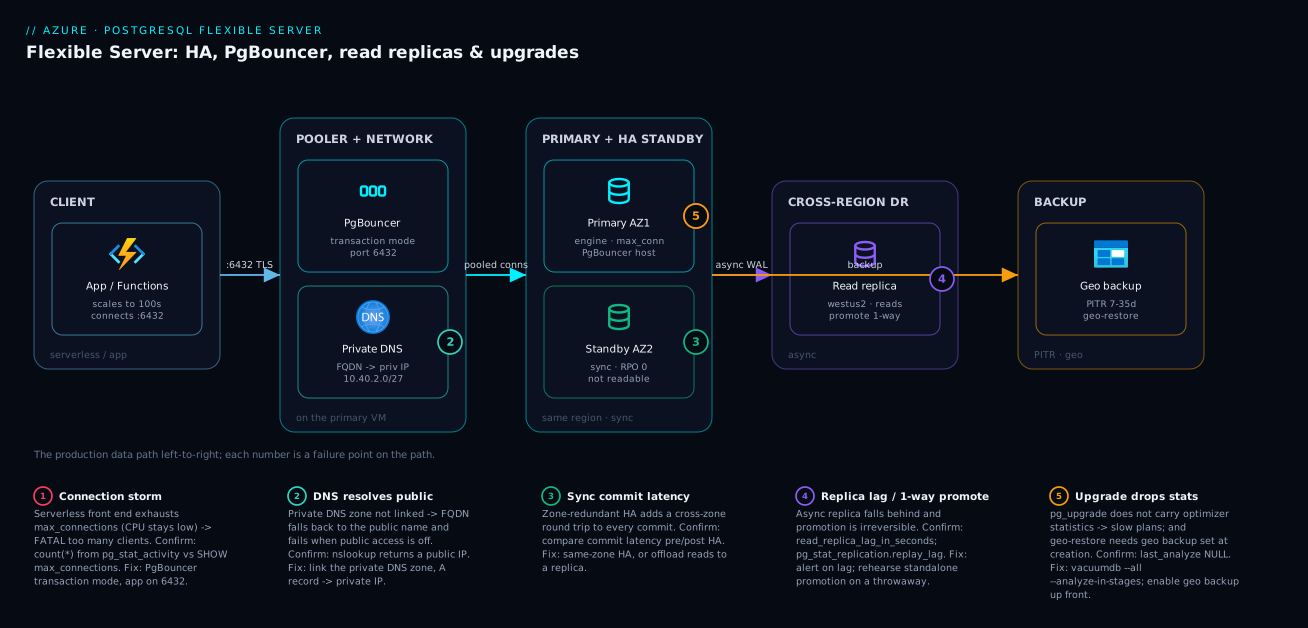
The diagram traces the data path as it actually flows in a production Flexible Server deployment, then maps each failure class onto the exact hop where it bites. Read it left to right. An application – often Azure Functions scaling to hundreds of instances – connects not on 5432 but on port 6432, the built-in PgBouncer that multiplexes thousands of short-lived client connections onto a few dozen real backends. PgBouncer runs on the primary VM, which sits in a delegated subnet (Microsoft.DBforPostgreSQL/flexibleServers, e.g. 10.40.2.0/27) and resolves through a private DNS zone to a private IP – get that DNS wrong and the client falls back to the public name and fails. The primary engine in availability zone 1 commits synchronously to a hot standby in zone 2: every write is on both nodes before the client is acknowledged, giving RPO 0 and a tens-of-seconds automatic failover that keeps the same FQDN.
Off to the right, an asynchronous read replica in a second region (westus2) serves reporting reads and stands ready as the DR target – promotion (standalone --forced) makes it an independent primary, but that is one-way. Underneath, geo-redundant backups (enabled only at creation) feed PITR and geo-restore. The numbered badges call out the five failures that actually page you: a connection storm hitting max_connections on the engine (1), a private DNS zone resolving to the public IP (2), commit latency from the cross-zone synchronous round trip (3), replica lag turning the DR target stale (4), and a major upgrade that dropped optimizer statistics so every plan is bad (5). The legend narrates each as symptom, how to confirm it, and the fix – the whole method in one picture: localise the symptom to a hop, confirm with the named command, apply the fix.
Real-world scenario
Aarav Retail – a fictional but realistic mid-market e-commerce platform – ran its order-processing database on the retiring Single Server and migrated to Flexible Server with zone-redundant HA in Central India. The cutover went clean: a Memory Optimized Standard_E4ds_v5, 256 GB Premium SSD v1, HA across zones 1 and 2, monthly spend about ₹46,000 for the HA pair. The platform team was five engineers. For two weeks everything was fine.
Then a flash sale. At 18:04 the checkout service started throwing FATAL: sorry, too many clients already. The on-call engineer’s reflex was to check CPU – which sat at 40%. The HA standby was perfectly healthy and completely irrelevant; failing over to an identically configured node would have hit the same wall in seconds. The checkout service ran on Azure Functions on the Flex Consumption plan, and under flash-sale load it had scaled to several hundred instances, each opening its own connection pool. Thousands of connections hit a max_connections of 200 and the engine refused new ones. The second reflex – scale the SKU up to E8ds_v5 – bought ninety seconds (more RAM raised the realistic connection ceiling slightly) and then the storm caught up. Revenue was visibly dropping; the incident bridge filled.
The breakthrough came from asking the right first question: is this CPU, or is this connections? It was connections. The fix was not a bigger SKU. They enabled the built-in PgBouncer in transaction mode, repointed the function app at port 6432, and let a default_pool_size of 50 multiplex thousands of short-lived client connections onto a few dozen real backends:
# The fix that held: pool in transaction mode, app connects on 6432.
az postgres flexible-server parameter set \
  --resource-group rg-data-centralindia --server-name pg-aarav-prod \
  --name pgbouncer.enabled --value true
az postgres flexible-server parameter set \
  --resource-group rg-data-centralindia --server-name pg-aarav-prod \
  --name pgbouncer.pool_mode --value transaction
az postgres flexible-server parameter set \
  --resource-group rg-data-centralindia --server-name pg-aarav-prod \
  --name pgbouncer.default_pool_size --value 50
The one code change that mattered: their Npgsql driver was using server-side prepared statements, which break in transaction pooling, so they set Max Auto Prepare=0 at the driver. After repointing to 6432 the too many clients errors stopped immediately – SHOW POOLS; on 6432 showed a few dozen active server connections serving thousands of clients.
The incident review produced two more changes. First, a cross-region read replica in southindia with an alert on read_replica_lag_in_seconds > 60 – because the HA standby protected against a zone outage but not a region one, and the business had a regional-DR requirement nobody had implemented. They drilled a standalone --forced promotion on a throwaway replica to confirm it was one-way and to time the repoint. Second, they scaled the production SKU back down to E4ds_v5 (the storm, not the size, had been the problem) and lowered max_connections to 300 now that PgBouncer fronted the engine, landing at ₹44,000/month – lower than during the incident.
The next flash sale ran at the same peak load with zero connection errors, checkout p95 held at 180 ms, and the standby and replica sat ready and unused, exactly as intended. The lesson on the wall: “HA protects against a node or zone dying, not against your own application’s connection behavior. A serverless front end in front of PostgreSQL is a connection-management problem first and a database-sizing problem a distant second. Put a transaction-mode pooler in the path before the launch, not after the incident review.”
The incident as a timeline, because the order of moves is the lesson:
| Time | Symptom | Action taken | Effect | What it should have been |
|---|---|---|---|---|
| 18:04 | too many clients, climbing |
(alert fires) | — | Ask: CPU or connections? |
| 18:07 | Errors at 20% | Check CPU (40%) | Rules out compute | Correct diagnostic move |
| 18:11 | Errors at 35% | Scale up E4 -> E8 | +90 s relief, then recurs | Don’t scale up to mask |
| 18:22 | Still failing | Realise it’s max_connections |
Root cause found | This was the breakthrough |
| 18:30 | Mitigated | Enable PgBouncer transaction; app -> 6432 | Errors clear | Correct night-of fix |
| 18:34 | Stable | Max Auto Prepare=0 on Npgsql |
Prepared-stmt errors gone | The required code change |
| +1 week | Hardened | Cross-region replica + lag alert; scale back to E4 | DR exists; cost down | The actual long-term fix |
Advantages and disadvantages
The managed-VM-with-built-in-mechanisms model both enables production-grade Postgres and hides sharp edges. Weigh it honestly:
| Advantages (why this model helps you) | Disadvantages (why it bites) |
|---|---|
| HA, replicas, PgBouncer, PITR, and upgrades are all built in – no sidecars or self-managed clusters | The mechanisms have subtle rules (one-way promotion, irreversible network model) you must know cold |
| Zone-redundant HA gives RPO 0 with automatic failover and a stable FQDN | Synchronous commit adds cross-zone latency that real OLTP feels |
| Built-in PgBouncer defeats connection storms without a separate tier to patch | Transaction pooling silently breaks prepared statements, LISTEN/NOTIFY, temp tables |
| Cross-region read replicas give read scale-out and a DR target | Async replicas have non-zero RPO; promotion is irreversible and easy to misuse |
| In-place major upgrades avoid dump/restore | Upgrade is offline, one-way, and drops optimizer stats -> “slow DB” if you skip ANALYZE |
| Compute and storage scale independently (esp. SSD v2) | Storage grows only (never shrinks); Burstable can’t do HA/replicas at all |
| Geo-redundant backup + PITR make recovery and cloning routine | Geo-redundancy is creation-time only; a never-tested backup is a hypothesis |
| Networking lives in your VNet (delegated subnet or PE) | The model is irreversible, and a wrong private DNS zone is the most common outage |
The model is right for almost every production PostgreSQL workload on Azure where you want managed HA/DR/pooling without operating a cluster. It bites hardest on serverless/high-fan-out front ends that skip pooling, latency-sensitive OLTP that hasn’t measured the synchronous-commit cost, DR plans resting on an un-drilled replica, and teams that run the major upgrade in a panic. Every disadvantage is manageable – but only if you know it exists before the incident, which is the point of this article.
Hands-on lab
Stand up a small Flexible Server, prove PgBouncer fixes a connection storm, drill an HA failover, and tear it down – all on modest SKUs (delete at the end). Run in Cloud Shell (Bash).
Step 1 – Variables and resource group.
RG=rg-pgflex-lab
LOC=centralindia
PG=pgflex-lab-$RANDOM   # globally-unique
ADMIN=pgadmin
PWD=$(openssl rand -base64 18)   # ephemeral; not for prod
az group create -n $RG -l $LOC -o table
Step 2 – Create a General Purpose server with zone-redundant HA. (HA needs GP/MO – Burstable cannot.)
az postgres flexible-server create -g $RG -n $PG -l $LOC \
  --tier GeneralPurpose --sku-name Standard_D2ds_v5 --version 16 \
  --storage-size 32 --high-availability ZoneRedundant \
  --admin-user $ADMIN --admin-password "$PWD" \
  --public-access 0.0.0.0 -o table   # lab only: open then we'll add our IP
Expected: a server resource; highAvailability.state will reach Healthy after a few minutes.
Step 3 – Confirm HA placement (primary and standby in different zones).
az postgres flexible-server show -g $RG -n $PG \
  --query "{ha:highAvailability.state, mode:highAvailability.mode, \
            primaryZone:availabilityZone, standbyZone:highAvailability.standbyAvailabilityZone}" -o jsonc
Expected: state: Healthy, mode: ZoneRedundant, and two different zone numbers.
Step 4 – Enable PgBouncer in transaction mode.
az postgres flexible-server parameter set -g $RG -s $PG --name pgbouncer.enabled --value true
az postgres flexible-server parameter set -g $RG -s $PG --name pgbouncer.pool_mode --value transaction
az postgres flexible-server parameter set -g $RG -s $PG --name pgbouncer.default_pool_size --value 25
Step 5 – Add your client IP and connect through 6432.
MYIP=$(curl -s ifconfig.me)
az postgres flexible-server firewall-rule create -g $RG -n $PG \
  --rule-name myip --start-ip-address $MYIP --end-ip-address $MYIP
FQDN=$(az postgres flexible-server show -g $RG -n $PG --query fullyQualifiedDomainName -o tsv)

# Pooler is on 6432; the special 'pgbouncer' db exposes pool stats
psql "host=$FQDN port=6432 dbname=pgbouncer user=$ADMIN password=$PWD sslmode=require" -c "SHOW POOLS;"
Expected: SHOW POOLS; returns rows – proof the pooler is live on 6432.
Step 6 – Drill a forced failover and time reconnect.
time az postgres flexible-server restart -g $RG -n $PG --failover Forced
# Then reconnect on 5432 and confirm the server is serving again:
psql "host=$FQDN port=5432 dbname=postgres user=$ADMIN password=$PWD sslmode=require" -c "SELECT now();"
Expected: the failover completes in tens of seconds; the same FQDN now points at the promoted standby and SELECT now() succeeds.
Validation checklist. You created a server where HA is possible (GP, not Burstable), confirmed the standby is in a different zone, turned on transaction pooling and proved it with SHOW POOLS; on 6432, and drilled a forced failover with a measured reconnect. That measured number – not the SLA – is your real failover RTO. The lab steps mapped to what each proves:
| Step | What you did | What it proves | Real-world analogue |
|---|---|---|---|
| 2 | Create GP server with HA | HA requires GP/MO, not Burstable | Tier choice gates everything |
| 3 | Check zone placement | Standby is genuinely cross-zone | Verifying zone-redundant HA |
| 4–5 | PgBouncer + SHOW POOLS; |
Pooling is live on 6432 | The connection-storm fix |
| 6 | Forced failover, timed | Real reconnect time, not assumed | The failover drill you owe production |
Cleanup (avoid lingering charges – an HA pair on D2ds is not free).
az group delete -n $RG --yes --no-wait
Cost note. A Standard_D2ds_v5 HA pair with 32 GB runs roughly ₹120–160/hour; an hour of this lab is well under ₹200, and deleting the resource group stops everything. There is no free tier for Flexible Server, but D2ds is among the cheapest SKUs on which HA is supported.
Practice challenges
Six exercises that escalate from “read one value” to “design the cutover.” Each runs on the lab server from the Hands-on lab section (or is a paper exercise where noted). Try each before opening the solution; the one-line why is the point, not the command.
1. (Beginner) Prove whether a server can even have HA. You inherit a server and must say, in one command, whether HA is possible on it. Which field decides it, and what value blocks HA?
<details> <summary>Solution</summary>
az postgres flexible-server show -g rg-data-eastus2 -n pg-prod-eastus2 \
  --query "{tier:sku.tier, name:sku.name}" -o jsonc
If tier is Burstable, HA (and read replicas) are impossible until you scale to GeneralPurpose or MemoryOptimized. Why: the tier is the gate for every availability feature – check it before promising anything to anyone.
</details>
2. (Beginner) Distinguish a connection storm from CPU pressure. The database is refusing connections. Write the two checks that tell you whether this is a max_connections problem or genuine compute saturation.
<details> <summary>Solution</summary>
SELECT count(*) AS backends, current_setting('max_connections') AS ceiling
FROM pg_stat_activity;
Compare backends to ceiling; if they are close while the cpu_percent metric sits low, it is a connection storm, not compute. Why: the fix diverges completely – pooling for a storm, a bigger SKU only for real CPU load – so you must tell them apart first.
</details>
3. (Intermediate) Turn on pooling and prove it is live. Enable transaction-mode PgBouncer and produce evidence that clients are being multiplexed onto fewer backends.
<details> <summary>Solution</summary>
az postgres flexible-server parameter set -g rg-data-eastus2 -s pg-prod-eastus2 --name pgbouncer.enabled --value true
az postgres flexible-server parameter set -g rg-data-eastus2 -s pg-prod-eastus2 --name pgbouncer.pool_mode --value transaction
psql "host=pg-prod-eastus2.postgres.database.azure.com port=6432 dbname=pgbouncer user=app_svc sslmode=require" -c "SHOW POOLS;"
SHOW POOLS; on port 6432 returns rows showing many cl_active clients against few sv_active server connections. Why: pooling only helps if the app actually connects on 6432 – the pool stats are the proof it is in the path, not just enabled.
</details>
4. (Intermediate) Set a static parameter and explain why it “did nothing.” Raise max_connections to 600 and describe exactly what a teammate observes if they skip the restart.
<details> <summary>Solution</summary>
az postgres flexible-server parameter set -g rg-data-eastus2 -s pg-prod-eastus2 --name max_connections --value 600
az postgres flexible-server parameter show -g rg-data-eastus2 -s pg-prod-eastus2 \
  --name max_connections --query "{value:value, pending:isConfigPendingRestart}" -o jsonc
isConfigPendingRestart is true; the running value is unchanged until a restart. Why: static parameters are staged, not live – SHOW max_connections still reports the old number until you restart in a window.
</details>
5. (Advanced) Wire promotion so the application never changes its connection string. You have a primary in eastus2 and a replica in westus2. Design the endpoint setup so a DR switchover needs zero app-config change, and name the constraint that can block the switchover.
<details> <summary>Solution</summary>
az postgres flexible-server virtual-endpoint create \
  --resource-group rg-data-eastus2 --server-name pg-prod-eastus2 \
  --name pg-prod-ve --endpoint-type ReadWrite --members pg-prod-westus2-ro
# App uses pg-prod-ve.writer.postgres.database.azure.com for writes,
#           pg-prod-ve.reader.postgres.database.azure.com for reads.
Point the app at the .writer and .reader virtual-endpoint hostnames; a switchover promotion repoints both automatically. The blocker is server symmetry – switchover needs the replica to match the primary’s tier and storage, and the reader endpoint must already target that replica. Why: virtual endpoints move the “repoint the app” work out of the incident and into calm setup – but only if symmetry is satisfied ahead of time.
</details>
6. (Advanced) Sequence a major upgrade so a slow-database aftermath is impossible. Write the ordered runbook for a 14 -> 16 upgrade on a server that has a cross-region replica, and identify the single step whose omission produces “the upgrade made everything slow.”
<details> <summary>Solution</summary>
az postgres flexible-server backup create -g rg-data-eastus2 -n pg-prod-eastus2 --backup-name pre-v16
az postgres flexible-server upgrade -g rg-data-eastus2 -n pg-prod-eastus2 --version 16 --perform-validation-only
# rehearse on a PITR clone, quiesce traffic, then execute:
az postgres flexible-server upgrade -g rg-data-eastus2 -n pg-prod-eastus2 --version 16
vacuumdb --all --analyze-in-stages -h pg-prod-eastus2.postgres.database.azure.com -U pgadmin
Plan the replica around the window – it follows the primary’s version, so you cannot upgrade it independently. The load-bearing step is the final ANALYZE: pg_upgrade drops optimizer statistics, so skipping it leaves every plan bad. Why: the “engine regression” after an upgrade is almost always missing stats – rebuilding them is the last, non-optional step before you reopen traffic.
</details>
Common beginner mistakes
These are conceptual traps – wrong mental models, not runtime symptoms (those live in Common mistakes & troubleshooting below). Each pairs the belief with the model that replaces it.
-
“HA will handle the traffic spike.” HA is a standby, not a scale-out. The standby serves nothing until the primary fails; a connection storm or CPU spike hits the promoted node exactly the same way. Right model: HA is insurance against a node or zone dying, never against load. Load is solved by pooling (connections) and replicas or a bigger SKU (reads and compute).
-
“The HA standby is my backup, or my read replica.” It is neither. The standby is not readable, and it is not a point in time you can restore from – it faithfully mirrors the primary, including a bad
DELETEa second later. Right model: three different tools – standby for availability, read replica for read scale and cross-region DR, PITR/backup for recovering from mistakes. -
“A read replica means zero data loss if the region dies.” Replicas are asynchronous: they lag. Promote one after a region loss and you lose whatever had not yet replicated. Right model: replica RPO is non-zero and equals current lag – which is exactly why you alert on
read_replica_lag_in_seconds, and why HA (synchronous, RPO 0) is a fundamentally different guarantee. -
“I’ll pick the network model now and change it if we need to.” Public access, VNet integration, and private endpoint are chosen at creation and are irreversible. There is no toggle later – switching means building a new server and migrating. Right model: the networking decision is a one-way door; make it deliberately up front.
-
“I’ll enable geo-redundant backup when we’re ready for DR.” Geo-redundant backup is creation-time only. If you did not enable it when the server was born, you cannot add it – you recreate and migrate. Right model: decide region-loss DR before you click create, not after the region is already down.
-
“More CPU will fix
too many clients.” A bigger SKU raises the connection ceiling only marginally and costs far more; the storm returns in seconds. Right model:too many clientsis a connection-count problem, and the free, built-in fix is PgBouncer in transaction mode on port 6432 – which often lets you scale down. -
“The upgrade finished, so we’re done.”
pg_upgradebrings the database up but throws away the optimizer’s statistics, so plans are bad until you rebuild them. Right model: the upgrade is not complete untilANALYZE(orvacuumdb --all --analyze-in-stages) has run – that, not a reboot, is the final step before reopening traffic.
Common mistakes & troubleshooting
This is the playbook – the part you bookmark. First as a scannable table you read at 02:14, then the same entries with full confirm-command detail underneath.
| # | Symptom | Root cause | Confirm (exact cmd / portal path) | Fix |
|---|---|---|---|---|
| 1 | FATAL: too many clients already, CPU low |
Connection storm vs max_connections; no pooling |
SELECT count(*) FROM pg_stat_activity; vs SHOW max_connections; |
Enable PgBouncer transaction mode; app -> 6432 |
| 2 | “prepared statement does not exist” after pooling | Server-side prepared statements in transaction pooling | App logs; driver config | prepareThreshold=0 (JDBC) / Max Auto Prepare=0 (Npgsql) |
| 3 | Connects in dev, fails after going private | Private DNS zone resolves FQDN to public IP | nslookup <fqdn> returns a public address |
Link private DNS zone to the VNet; A record -> private IP |
| 4 | Cannot enable HA on the server | Server is on a Burstable SKU | az ... show --query sku shows Burstable |
Scale tier to GP/MO, then enable HA |
| 5 | Commit latency jumped after enabling HA | Cross-zone synchronous commit round trip | Compare commit latency pre/post; pg_stat_statements |
Same-zone HA, or accept and offload reads to a replica |
| 6 | DR replica is hours behind | No lag alert; replica under-provisioned or link broken | read_replica_lag_in_seconds; pg_stat_replication.replay_lag |
Alert on lag; size replica; check pg_stat_wal_receiver |
| 7 | Promoted the wrong way; can’t go back | forced promotion is one-way |
You ran --promote-option forced |
Rebuild replication from the new primary; rehearse next time |
| 8 | pg_cron/pg_stat_statements “not there” |
Not in shared_preload_libraries (static) |
SHOW shared_preload_libraries; |
Add to preload, restart, then CREATE EXTENSION |
| 9 | CREATE EXTENSION fails (not allow-listed) |
Extension missing from azure.extensions |
az ... parameter show --name azure.extensions |
Add it to the allowlist, then create |
| 10 | Static parameter change “did nothing” | Static param needs a restart | az ... parameter show -> isConfigPendingRestart |
Restart in a window |
| 11 | Out-of-space outage on Premium SSD v1 | Auto-grow off; disk filled | Storage % metric; --storage-auto-grow state |
Enable auto-grow (v1) or right-size IOPS (v2) |
| 12 | Slow database right after a major upgrade | pg_upgrade dropped optimizer statistics |
last_analyze NULL in pg_stat_user_tables |
vacuumdb --all --analyze-in-stages |
| 13 | Cannot geo-restore after region loss | Geo-redundant backup not enabled at creation | Backup redundancy in server properties | Recreate with geo-redundant backup; you can’t add it later |
| 14 | App holds locks; others block | Idle-in-transaction sessions | pg_stat_activity state='idle in transaction' |
Set idle_in_transaction_session_timeout |
| 15 | Connections rejected at the pooler | pgbouncer.max_client_conn reached |
SHOW POOLS; / SHOW CLIENTS; |
Raise pool sizing carefully; cap client fan-out |
The expanded form, with full reasoning for the entries that bite hardest:
1. FATAL: sorry, too many clients already while CPU sits low.
Root cause: a connection storm – a serverless or high-fan-out front end opening thousands of short-lived backends – exhausts max_connections long before CPU.
Confirm: SELECT count(*) FROM pg_stat_activity; approaches SHOW max_connections;; CPU metric is modest.
Fix: enable PgBouncer (pgbouncer.enabled=true, pool_mode=transaction) and repoint the app to 6432. Do not just raise the SKU.
2. “prepared statement does not exist” right after enabling transaction pooling.
Root cause: the driver uses server-side prepared statements, which are bound to a connection that transaction pooling hands back after each transaction.
Confirm: errors appear only after switching to 6432/transaction mode; driver defaults to prepared statements.
Fix: disable them – JDBC prepareThreshold=0, Npgsql Max Auto Prepare=0 – or use a PgBouncer build/setting that supports prepared statements in transaction mode.
3. Works in dev, fails the moment you disable public access / go private.
Root cause: the private DNS zone isn’t resolving the FQDN to the private IP, so clients fall back to the public name and fail when public access is off.
Confirm: nslookup <fqdn> returns a public address (or the wrong IP) from inside the VNet.
Fix: link the private DNS zone (*.private.postgres... for VNet integration, privatelink.postgres.database.azure.com for PE) to the client VNet and ensure the A record points at the private IP. This is the single most common Flexible Server outage.
4. You cannot enable HA at all.
Root cause: the server is on a Burstable SKU, which does not support HA or replicas.
Confirm: az postgres flexible-server show --query sku shows tier Burstable.
Fix: scale the tier to General Purpose or Memory Optimized (a sized, restart-bearing change), then enable HA.
5. Commit latency jumped after turning on zone-redundant HA.
Root cause: synchronous replication now includes a cross-zone round trip on every commit.
Confirm: compare commit latency (or pg_stat_statements for write-heavy statements) before and after; it tracks cross-zone RTT.
Fix: if unacceptable, switch to same-zone HA (lower latency, no zone-outage protection) and carry the DR requirement with a cross-region read replica instead.
6. The DR replica is hours behind.
Root cause: no lag alert, an under-provisioned replica, or a broken replication link.
Confirm: read_replica_lag_in_seconds is high; pg_stat_replication.replay_lag (on the primary) is growing; pg_stat_wal_receiver (on the replica) isn’t streaming.
Fix: alert on lag (> 60 s), size the replica for its read load, and investigate the link. A silent replica is a DR target that loses data.
8. pg_cron or pg_stat_statements “isn’t there” after you enabled it.
Root cause: the extension needs to be in shared_preload_libraries, a static parameter, and you skipped the restart.
Confirm: SHOW shared_preload_libraries; doesn’t list it.
Fix: add it to the preload list, restart once, then run CREATE EXTENSION.
12. The database is slow immediately after a major upgrade.
Root cause: pg_upgrade does not carry over optimizer statistics, so plans are bad until you rebuild them.
Confirm: SELECT relname, last_analyze FROM pg_stat_user_tables ORDER BY last_analyze NULLS FIRST; shows NULLs.
Fix: run vacuumdb --all --analyze-in-stages (or ANALYZE) as the last runbook step before reopening traffic.
13. You cannot geo-restore after a region outage. Root cause: geo-redundant backup must be enabled at creation and wasn’t. Confirm: the server’s backup redundancy isn’t geo-redundant. Fix: there is no retrofit – recreate the server with geo-redundant backup (and migrate). Decide this up front for anything with a region-loss requirement.
Verify
Prove each layer independently, from the outside in:
# 1. HA is healthy and the standby is in the expected (different) zone.
az postgres flexible-server show \
  --resource-group rg-data-eastus2 --name pg-prod-eastus2 \
  --query "{ha:highAvailability.state, mode:highAvailability.mode, \
            primaryZone:availabilityZone, standbyZone:highAvailability.standbyAvailabilityZone}"
# 2. Private DNS resolves the FQDN to a PRIVATE IP (not a public address).
nslookup pg-prod-eastus2.postgres.database.azure.com
# 3. PgBouncer is actually listening on 6432 and pooling.
psql "host=pg-prod-eastus2.postgres.database.azure.com port=6432 \
  dbname=pgbouncer user=app_svc sslmode=require" -c "SHOW POOLS;"
-- 4. Replica lag is bounded (run on the PRIMARY).
SELECT client_addr, state,
       write_lag, flush_lag, replay_lag
FROM   pg_stat_replication;
-- 5. After a major upgrade, confirm version and that stats exist.
SHOW server_version;
SELECT relname, last_analyze
FROM   pg_stat_user_tables
ORDER  BY last_analyze NULLS FIRST
LIMIT  10;  -- NULLs here mean ANALYZE has not run yet
Expected: HA state is Healthy with primary and standby in different zones, the FQDN resolves to a private IP, SHOW POOLS returns rows on 6432, pg_stat_replication shows a connected replica with low replay_lag, and post-upgrade every hot table has a recent last_analyze.
Best practices
- Pick the tier before anything else. HA and replicas require General Purpose or Memory Optimized – never Burstable for production. Choosing Burstable first forces a sized tier-change later.
- Put a transaction-mode pooler in the path before launch. Enable PgBouncer, set
pool_mode=transaction, connect on 6432, and disable server-side prepared statements at the driver. This single discipline prevents the most common production outage. - Choose the network model deliberately at creation. VNet integration vs private endpoint cannot be changed later. Make the private DNS zone resolve the FQDN to the private IP, and disable public access where policy requires.
- Default to zone-redundant HA for customer-facing workloads. Use same-zone only where the region lacks zones or synchronous-commit latency is unacceptable – and measure that latency before and after.
- Drill the failover. Run a forced failover in a window and measure real application reconnect time. An HA pair you have never failed over is an untested claim.
- Create a cross-region read replica and alert on lag.
read_replica_lag_in_seconds > 60 sis a starting threshold. A replica nobody monitors is a DR target that silently loses data. - Rehearse promotion on a disposable replica.
forcedpromotion is one-way; know exactly what it does and how long the repoint takes before you need it at 3am. - Treat parameters and extensions as code. Set them via CLI/Bicep/Terraform; remember static parameters and preload-requiring extensions need a restart.
- Enable storage auto-grow (v1) or right-size IOPS (v2). An out-of-space outage is entirely preventable; over-provisioning a huge disk just to buy IOPS is wasteful when SSD v2 decouples them.
- Validate, rehearse, and
ANALYZEevery major upgrade. Back up first, run--perform-validation-only, rehearse on a PITR clone, and makeANALYZEthe final step before reopening traffic. - Enable geo-redundant backup at creation for anything with a region-loss requirement – it cannot be added later.
- Run a quarterly PITR restore drill. Restore, connect, checksum, time it, delete. The measured time is your real RTO.
The alerts worth wiring before the next incident – leading indicators, not the lagging “database down”:
| Alert on | Signal | Threshold (starting point) | Why it’s leading |
|---|---|---|---|
| Connection pressure | active_connections / max_connections |
> 80% | Predicts too many clients before it fires |
| Replica lag | read_replica_lag_in_seconds |
> 60 s sustained | DR target going stale |
| Storage usage | storage_percent |
> 85% | Predicts out-of-space outage |
| CPU saturation | cpu_percent |
> 80% for 10 min | Real compute pressure (vs connection storm) |
| Memory | memory_percent |
> 90% | Predicts OOM / cache thrash |
| HA health | is_db_alive / HA state |
Not Healthy | Standby unavailable -> no failover safety |
| IOPS throttling | read_iops/write_iops vs limit |
Near provisioned cap | I/O bound; resize storage/IOPS |
| Deadlocks | deadlocks |
Rising | Application locking problem |
Security notes
- Connect with managed identity, not passwords where possible. Flexible Server supports Microsoft Entra authentication; have the application authenticate as its managed identity and grant database roles to that identity, so no password sits in config. See Entra Managed Identities Deep Dive.
- Keep the admin password in Key Vault. If you must use password auth, store it in Key Vault and inject via reference or pipeline – never literal in Bicep/Terraform. See Azure Key Vault: Secrets, Keys & Certificates.
- Make it private. Use VNet integration or a private endpoint, disable public network access, and ensure the private DNS zone resolves to the private IP. A public endpoint behind a firewall is a weaker posture than no public endpoint at all.
- Enforce TLS. Keep
require_secure_transport=onand floorssl_min_protocol_versionto TLS 1.2+. A troubleshooting session is no excuse to disable TLS “temporarily.” - Least-privilege database roles. Grant the application role only the rights it needs; keep the admin login for administration, not the app. Use separate roles for read replicas’ reporting consumers.
- Encrypt at rest with CMK where required. Default encryption uses platform-managed keys; for regulated data use a customer-managed key in Key Vault, with the identity that has wrap/unwrap rights.
- Audit with
pgaudit. Allowlist and preloadpgauditto log privileged operations; ship logs to Log Analytics for retention and alerting.
The security controls that also prevent incidents – secure and resilient pull the same direction:
| Control | Setting / mechanism | Secures against | Also prevents |
|---|---|---|---|
| Entra authentication | Managed identity + DB role | Passwords in config | Password-rotation breakage |
| Private access / PE | Delegated subnet or private endpoint | Public exposure | “Worked in dev” DNS outages (when wired right) |
| Disable public access | --public-access Disabled |
Internet-reachable database | Firewall-rule sprawl |
| Enforce TLS | require_secure_transport, ssl_min_protocol_version |
Cleartext / downgrade | “Temporary” TLS-off mistakes |
| CMK encryption | Key Vault key + identity | Unmanaged key custody | — |
pgaudit |
Preload + allowlist | Untracked privileged ops | Blind incident forensics |
| Least-privilege roles | Per-app DB roles | Over-broad access | One compromised app touching all data |
Cost & sizing
The bill drivers and how they interact with the fixes:
- Compute SKU dominates, billed per vCPU-hour by tier. HA roughly doubles compute and storage (you pay for the standby). A read replica is a separate server you pay for in full. Storage (and, on SSD v2, provisioned IOPS/throughput) is the second driver; backups are free up to your storage size, with geo-redundant backup adding cross-region storage cost.
- HA is insurance, not performance. It doesn’t make the database faster – it doubles spend to survive a zone/node failure. Enable it where availability requires it; for pure read scale-out, a replica is the right spend.
- Don’t scale up to mask a connection storm. A bigger SKU buys a marginally higher connection ceiling and a much higher bill. PgBouncer fixes the storm for free (it’s built in) and often lets you scale down.
- SSD v2 can cut storage cost by letting you provision IOPS independently instead of over-buying disk size to reach an IOPS target.
- Geo-redundant backup and a cross-region replica are the cost of DR. Both are real line items; size them to the recovery requirement rather than reflexively enabling everything.
A rough monthly picture for a small production OLTP database in Central India: a single Standard_D2ds_v5 (~₹22,000) versus the same with zone-redundant HA (~₹44,000 for the pair), plus storage and – if DR is required – a cross-region read replica (another full server). Aarav Retail landed at ₹44,000 after fixing the storm and scaling back down, proving the fix is usually pooling, not a bigger SKU. The cost drivers and what each buys:
| Cost driver | What you pay for | Rough INR / month | What it buys | Watch-out |
|---|---|---|---|---|
| 1× D2ds_v5 (GP, no HA) | One General Purpose server | ~₹22,000 | Baseline OLTP | No zone resilience |
| Zone-redundant HA | The standby (≈2× compute+storage) | +~₹22,000 | Zone-outage survival, RPO 0 | Pure cost; not faster |
| 1× E4ds_v5 (Memory Optimized) | More RAM per core | ~₹40,000 | Large working sets | Right-size; don’t over-buy RAM |
| Cross-region read replica | A separate full server | Full server cost | Read scale-out + DR | Watch lag; another bill |
| Premium SSD v1 storage | Disk size (IOPS scale with it) | Per-GB | Capacity + correlated IOPS | Over-buy size to get IOPS |
| Premium SSD v2 storage | Capacity + IOPS + throughput separately | Per-unit | IOPS without buying disk | Tune all three |
| Geo-redundant backup | Cross-region backup storage | Small per-GB | Geo-restore on region loss | Creation-time only |
| PgBouncer | Built in – free | ₹0 | Defeats connection storms | The cheapest fix on this list |
There is no free tier for Flexible Server; the honest floor for production is a General Purpose SKU. The single most cost-effective move on this entire list is enabling the built-in PgBouncer – it costs nothing and frequently lets you run a smaller SKU.
Interview & exam questions
1. A PostgreSQL Flexible Server throws too many clients already while CPU is at 40%. What’s happening and how do you fix it? A connection storm: a serverless or high-fan-out front end opened thousands of backends and exhausted max_connections, which has nothing to do with CPU. Confirm with pg_stat_activity count against max_connections. Fix by enabling the built-in PgBouncer in transaction mode and repointing the app to port 6432, not by scaling the SKU. HA doesn’t help – the standby would hit the same wall.
2. Difference between Flexible Server HA and a read replica? HA is a synchronous hot standby in the same region (RPO 0, not readable, automatic failover) for availability against node/zone failure. A read replica is an asynchronous physical replica (non-zero RPO, readable, manual promotion) for read scale-out and cross-region DR. HA is “stay up”; a replica is “scale reads and survive a region.”
3. Why does enabling zone-redundant HA sometimes increase commit latency, and what are your options? Synchronous replication means every commit waits for the write to reach the standby in another zone – a cross-zone round trip added to commit. For chatty small-transaction OLTP this is measurable. Options: accept it, switch to same-zone HA (lower latency, no zone-outage protection), and/or offload reads to a replica to reduce primary load.
4. You enabled PgBouncer in transaction mode and now get “prepared statement does not exist.” Why? The driver uses server-side prepared statements, which are bound to a specific backend connection. In transaction pooling the connection returns to the pool after each transaction, so the prepared statement is gone on the next one. Fix by disabling prepared statements at the driver (prepareThreshold=0 / Max Auto Prepare=0).
5. An app works in dev but fails to connect once you disable public access. Most likely cause? The private DNS zone isn’t resolving the server FQDN to its private IP, so the client falls back to the public name and fails with public access off. Confirm with nslookup from inside the VNet. Fix by linking the correct private DNS zone to the client VNet with an A record to the private IP – the most common Flexible Server outage.
6. Can you change a Flexible Server from VNet integration to a private endpoint later? No. The networking model (public access, VNet integration, or private endpoint) is chosen at creation and is irreversible. Migrating models means creating a new server and moving the data. Decide deliberately up front based on whether you need a dedicated delegated subnet or a hub-and-spoke private-endpoint pattern.
7. What’s the correct procedure for a major version upgrade, and the single most-skipped step? Take an on-demand backup, run --perform-validation-only, rehearse on a PITR-restored clone, then execute in a window. The most-skipped step is ANALYZE – pg_upgrade drops optimizer statistics, so the database comes up with bad query plans until you run vacuumdb --all --analyze-in-stages. The “slow database after upgrade” is missing stats, not the engine.
8. Your DR plan rests on a cross-region read replica. What two things must be true for it to actually work? First, lag must be bounded and alerted (read_replica_lag_in_seconds) – an unmonitored replica silently falls behind and loses data on promotion. Second, you must have rehearsed promotion (standalone --forced) on a disposable copy, knowing it’s one-way and how long the application repoint takes. An un-drilled replica is a hope, not a plan.
9. You set shared_preload_libraries to include pg_cron but CREATE EXTENSION pg_cron says it isn’t available. Why? shared_preload_libraries is a static parameter – it only takes effect after a restart. You set it but didn’t restart, so the library isn’t loaded yet. Restart the server, then run CREATE EXTENSION. (The extension must also be allow-listed in azure.extensions.)
10. Why can’t you upgrade a read replica’s major version on its own? A read replica is a physical replica that inherits the primary’s major version via streaming replication; the WAL stream is version-specific. You upgrade the primary, which the replica follows, and you plan replicas around the upgrade window – you cannot independently upgrade a replica while it’s attached.
11. How do you make Flexible Server private and passwordless? Use VNet integration or a private endpoint with public access disabled and a private DNS zone resolving to the private IP, and authenticate the application via Microsoft Entra as its managed identity with database roles granted to that identity – so there’s no public endpoint and no password in config.
12. Geo-redundant backup – when must you enable it, and what does it give you? It must be enabled at server creation (it cannot be added later) and replicates backups to the paired region, enabling geo-restore to recover the database if the entire primary region is lost. It’s the backup-side complement to a cross-region replica for region-loss DR.
These map primarily to AZ-305 (Designing Azure Infrastructure Solutions) – design for high availability, business continuity, and data platforms – and DP-300 (Azure Database Administrator Associate) – deploy, configure, and optimize Azure database offerings, HA/DR, and security. The networking angle (delegated subnets, private endpoints, private DNS) touches AZ-700. A compact cert-mapping for revision:
| Question theme | Primary cert | Exam objective area |
|---|---|---|
| HA vs replica, zone-redundant design | AZ-305 / DP-300 | Design HA/BC; configure HA |
| PgBouncer, connection management | DP-300 | Optimize and troubleshoot databases |
| Private access / PE / DNS | AZ-700 / AZ-305 | Network connectivity; private access |
| Major upgrades, parameters, extensions | DP-300 | Configure and maintain database offerings |
| Backup, PITR, geo-restore | AZ-305 / DP-300 | Business continuity; recovery |
| Entra auth, CMK, least privilege | AZ-500 / DP-300 | Secure data platforms |
Quick check
- Your database refuses new connections with
too many clients alreadybut CPU sits at 40%. What is the cause, and is scaling the SKU the right fix? - True or false: a zone-redundant HA standby can serve read-only reporting queries to take load off the primary.
- You connect fine in dev, but after disabling public network access the app can’t reach the database. Name the single most likely cause and how you confirm it.
- After a
14 -> 16major upgrade the database is up but every query is slow. What did the upgrade not carry over, and what’s the one command that fixes it? - You want to change a server from VNet integration to a private endpoint. Can you, and if not, what must you do?
Answers
- A connection storm exhausting
max_connections– a serverless/high-fan-out front end opening thousands of backends, which is unrelated to CPU. Scaling the SKU is not the right fix (it buys only a marginally higher ceiling at much higher cost). The fix is the built-in PgBouncer in transaction mode, with the app connecting on port 6432. - False. The HA standby is a synchronous hot standby that is not readable. To offload reads you need an asynchronous read replica, which is a separate readable server (with non-zero RPO).
- The private DNS zone isn’t resolving the server FQDN to its private IP, so the client falls back to the public name and fails with public access off. Confirm with
nslookup <fqdn>from inside the VNet – it returns a public/wrong address. Fix by linking the correct private DNS zone with an A record to the private IP. pg_upgradedoes not carry over optimizer statistics, so query plans are bad until rebuilt. Fix by runningvacuumdb --all --analyze-in-stages(orANALYZE) as the last step before reopening traffic.- No – the networking model is fixed at creation and is irreversible. You must create a new server with the desired model (private endpoint) and migrate the data to it.
Glossary
-
Flexible Server – Azure Database for PostgreSQL deployment running the engine on a dedicated Linux VM inside your network topology; successor to the retired Single Server.
-
Tier (Burstable / General Purpose / Memory Optimized) – the compute family; Burstable is shared-core and cannot do HA or replicas, GP and MO can.
-
Zone-redundant HA – a synchronous hot standby placed in a different availability zone; survives a zone outage with RPO 0.
-
Same-zone HA – a synchronous hot standby in the same zone (different fault domain); survives node failure only, with lower commit latency.
-
Standby – the synchronous hot-standby VM in an HA configuration; not readable, promoted automatically on failover.
-
Read replica – an asynchronous physical replica that serves read-only traffic and acts as a cross-region DR target (non-zero RPO).
-
Promotion – making a replica an independent read-write server;
forcedpromotion is one-way and severs the replication relationship. -
PgBouncer – the connection pooler built into Flexible Server, listening on port 6432; transaction mode multiplexes many client connections onto few backends.
-
max_connections– the static server parameter capping concurrent backend processes; exhaustion yieldstoo many clients already. -
Delegated subnet – a subnet delegated to
Microsoft.DBforPostgreSQL/flexibleServers, used exclusively by VNet-integrated servers. -
Private endpoint – a NIC that projects the server into your VNet with a private IP, composing cleanly with hub-and-spoke.
-
Private DNS zone – the zone that resolves the server FQDN to its private IP; a misconfiguration here is the most common “worked in dev” outage.
-
azure.extensions– the server parameter that allow-lists which extensionsCREATE EXTENSIONmay load. -
shared_preload_libraries– a static parameter listing libraries loaded at startup; required (with a restart) forpg_cron,pg_stat_statements,pgaudit, and others. -
Static vs dynamic parameter – dynamic parameters apply immediately; static ones require a server restart.
-
Premium SSD v1 / v2 – managed-disk storage; v1 ties IOPS to disk size with auto-grow, v2 provisions capacity, IOPS, and throughput independently.
-
PITR (point-in-time restore) – restoring to a new server at any second within the retention window; used to clone for drills and recover from mistakes.
-
Geo-redundant backup – backups replicated to the paired region, enabling geo-restore; can only be enabled at server creation.
-
pg_upgrade– the in-place major-version upgrade mechanism; offline, one-way, and does not carry over optimizer statistics. -
Virtual endpoint – a stable writer/reader CNAME pair (
<name>.writer.../<name>.reader...) attached to the primary; the writer always follows the current primary, so a switchover needs no connection-string change. -
Switchover (promote to primary) – a promotion that swaps the primary and replica roles; requires server symmetry and configured virtual endpoints. Distinct from
standalonepromotion, which detaches the replica one-way. -
Server symmetry – the requirement that a switchover’s replica match the primary’s tier and storage;
forcedstandalone promotion skips it, for region-down scenarios only. -
Near-zero-downtime (NZD) scaling – the default resize path: a new VM is built, synced, and cut over in ~10-30 s instead of a 2-10 min in-place restart; falls back to regular scaling when preconditions are not met.
-
Entra token authentication – passwordless connection in which a short-lived (5-60 min) Microsoft Entra access token, scoped to the OSS-RDBMS resource, is supplied in place of the password.
-
Fabric mirroring – GA zero-ETL replication of selected tables into Microsoft Fabric OneLake as Delta tables, built on logical replication and CDC; requires GP/MO and
wal_level=logical, and is not supported on replicas. -
Change data capture (CDC) – the pattern of streaming a table’s inserts, updates, and deletes as a change feed; the engine underneath both logical replication and Fabric mirroring.
-
Long-term retention (LTR) – logical (
pg_dump) backups kept in an Azure Backup vault for up to 10 years on a weekly/monthly/yearly schedule; complements, and does not replace, the 7-35 day operational backups. -
pgvector – the
vectorextension adding vector column types and similarity search (HNSW / IVFFlat, DiskANN on Azure) so embeddings and OLTP data live in one Postgres.
Next steps
You can now run Flexible Server in production – HA drilled, pooling in the path, replicas monitored, upgrades rehearsed. Build outward:
- Next: High Availability vs Disaster Recovery: RTO & RPO – the framework behind every HA/replica/backup decision in this article.
- Related: Azure SQL Database: Hyperscale, Elastic Pools, Ledger & Always Encrypted – the other managed-relational option, with a different HA model.
- Related: Azure Private Link & Private Endpoints for PaaS and Private Endpoints & Private DNS at Scale – get the networking and DNS right so the database is private and resolvable.
- Related: Entra Managed Identities Deep Dive – connect the application to Postgres without a password.
- Related: Azure Multi-Region Active-Active & Disaster Recovery – when one read replica isn’t enough and you need full regional failover.