In a nutshell
Level: Advanced → Expert (beginner on-ramp included) · Time: ~78 min read
Picture a company ledger kept as three identical notebooks, one in each of three city offices — New York, London, Singapore. In the simple setup only the New York notebook is the “real” one; the other offices phone in every change and wait for New York to write it down. Fast for New York, slow for everyone else — a Singapore clerk waits for a trans-Pacific phone call on every entry. Multi-region writes is the decision to let each office write in its own notebook immediately and reconcile later. Singapore is now instant. The catch is the reconciliation: two offices can write on the same line for the same customer at the same moment, and when the notebooks sync overnight someone must decide whose entry stands. That decision is conflict resolution, and the tempting default rule — “keep whichever entry has the later timestamp” — quietly throws away real money the day two clerks write in the same minute.
In Azure terms: Azure Cosmos DB is a globally distributed database, and multi-region writes lets every region you switch on accept writes for the same data instead of funnelling them all to one primary. You gain local write speed and near-instant recovery when a region fails; you take on conflicts (two regions editing the same item) and weaker consistency (readers may see slightly stale data). Neither is a dealbreaker — they are settings you tune. The entire lesson is choosing the consistency level and the conflict-resolution policy on purpose, and proving they still behave when a region drops.
Two sentences to anchor everything below. First: Strong consistency and multi-region writes cannot coexist — the instant two regions write independently there is no single global order to be “strongly” consistent about, so you pick among Bounded Staleness, Session, Consistent Prefix and Eventual. Second: multi-region writes buy you near-zero recovery time (RTO) and charge you a non-zero data-loss window (RPO) — the only lever that caps that window is Bounded Staleness.
New here? Read the analogy again, then work through What problem this solves, Learning objectives and Prerequisites & where this fits below before the deep tables — they set up every later decision. Experienced? Skim to Going deeper for the replica-set / quorum / LSN internals, and to Practice challenges to pressure-test yourself. Everything assumes the Cosmos DB for NoSQL API.
Multi-region writes are the feature that makes Azure Cosmos DB look like magic in a demo and like a distributed-systems trap in production. Azure Cosmos DB is Microsoft’s globally distributed, multi-model database with single-digit-millisecond reads and a turnkey 99.999% SLA; multi-region writes (formerly “multi-master”) let every region you add accept writes for the same logical data, instead of one primary write region and a fleet of read replicas. The moment two regions can both accept writes for the same logical partition, you have surrendered the comfortable single-writer world and signed up for conflict resolution, weaker consistency, and a much harder mental model. None of that is a reason to avoid it: for globally distributed, write-heavy, low-latency workloads it is the right tool. But you have to configure it deliberately.
This guide walks the full path: enabling multi-region writes, picking a consistency level you can actually defend in an SLA review, and building both last-writer-wins (LWW) and custom conflict resolution that behaves correctly when a region drops. Because this is a reference you will return to at 02:00 during a regional incident — or three weeks later when reconciliation flags a ledger that disagrees with the payment processor — the option matrices, the consistency comparison, the conflict-type reference, the limits and the symptom→cause→confirm→fix playbook are all laid out as scannable tables. Read the prose once, then keep the tables open.
Everything here assumes the Cosmos DB for NoSQL API. The consistency model is API-agnostic, but conflict-resolution policies and the conflicts feed are specific to the NoSQL API; Cassandra, MongoDB and Gremlin handle conflicts differently (typically LWW only, with no pluggable resolver). By the end you will stop guessing: you will know which consistency level buys you which RPO, why Strong is off the table the instant you enable multi-write, why default LWW on _ts quietly loses money in an ordered domain, and exactly which az command confirms each of those facts.
What problem this solves
A single-write-region Cosmos DB account is simple to reason about: one region orders every write, the rest catch up, and a failover promotes a replica. That simplicity costs you write latency for users far from the primary. An order placed in Singapore against a primary in East US 2 pays a cross-Pacific round trip on every write — 180–250 ms when the local read was 5 ms. For a write-heavy, latency-sensitive workload (carts, sessions, telemetry ingest, IoT device state, collaborative editing) that is the difference between a snappy app and a sluggish one, and no amount of read-replica scaling fixes it because the write still crosses the ocean.
Multi-region writes fix the latency by letting the nearest region accept the write and acknowledge locally. What breaks without understanding the trade is correctness. Teams flip enableMultipleWriteLocations because a blog said it improves availability, leave the container on its default LWW-on-_ts policy, and ship. Months later a partial network partition lets two regions edit the same document in the same second; _ts ties at one-second granularity; Cosmos deterministically (but arbitrarily) keeps one and silently discards the other. The loser never appears in the conflicts feed. In a stateful, ordered domain — a payment that went authorized in one region and captured in another — that is real money moving with the ledger disagreeing, found only by an out-of-band reconciliation days later.
Who hits this: anyone running a globally distributed, write-active workload on Cosmos DB. It bites hardest on ordered state machines (payments, inventory, bookings) where LWW-on-_ts is almost never correct; on teams who chose Strong consistency for safety and then can’t enable multi-write at all; and on anyone who set Custom (no sproc) resolution and never built a drainer for the conflicts feed, so divergence accumulates invisibly. The fix is never “turn multi-write off” — it’s “make the consistency level and the conflict-resolution policy deliberate parts of your data model, and prove they behave under a region loss.” Here is the whole field in one frame before the deep dive:
| Decision | The trap | What “right” looks like | Where it’s set |
|---|---|---|---|
| Multi-write on/off | “More regions = always better” — 3× write RU cost | On only where you need write locality; read replicas elsewhere | Account (enableMultipleWriteLocations) |
| Consistency level | Picking Strong, then can’t enable multi-write | Bounded Staleness / Session for most; relax per-request | Account default + per-request override |
| Conflict policy | Default LWW on _ts in an ordered domain |
LWW on a monotonic /version, or a deterministic sproc |
Container (set at creation, immutable) |
| Conflicts feed owner | Custom-no-sproc with nobody draining it | A continuous drainer + a depth alert | Application + Azure Monitor |
| Failover behaviour | Assuming a promotion step on the write path | RTO≈0 for writes; client PreferredRegions retries locally |
Account + CosmosClientOptions |
| RPO awareness | “Multi-region = no data loss” | RPO is non-zero except at Strong (unavailable here) | Consistency level governs it |
Learning objectives
By the end of this article you can:
- Enable multi-region writes safely on an existing account, in the right order, with
azand Bicep — and explain why it roughly multiplies provisioned write RU/s by the number of write regions. - Place every workload on the correct point of the five-level consistency spectrum, justify the choice in latency/availability/RPO terms, and relax (never tighten) consistency per request.
- State precisely why Strong consistency is incompatible with multi-region writes, and what Bounded Staleness gives you instead (including its enforced minimums).
- Identify the three conflict types (insert, replace, delete) and predict how each surfaces under LWW, Custom-sproc, and Custom-manual policies.
- Configure LWW on a custom numeric path correctly — keeping the path present, numeric and monotonic — and explain how client-clock skew turns into silent data loss.
- Write a deterministic, idempotent resolver stored procedure, bind it to a container, and drain the conflicts feed in application code when manual resolution is required.
- Rehearse a regional outage with a controlled failover (or endpoint block), configure
ApplicationPreferredRegions, and quote the RPO/RTO for each consistency level. - Monitor replication latency and conflict activity in Azure Monitor so silent divergence can never hide.
Prerequisites & where this fits
You should already understand the Cosmos DB basics: an account is the top-level resource that owns regions and the consistency policy; a database is a namespace; a container holds items and owns the partition key, indexing policy, throughput, and the conflict-resolution policy. You should know that throughput is measured in Request Units per second (RU/s) (provisioned or autoscale), that every item lives in a logical partition keyed by your partition-key path, and that the .NET/Java/JS SDKs talk to Cosmos in Direct or Gateway mode. Comfort with az cosmosdb, reading JSON output in Cloud Shell, and basic distributed-systems vocabulary (quorum, linearizability, RPO/RTO) will make this land faster.
This sits in the Data & Global Distribution track. It assumes the modeling fundamentals from Cosmos DB Partition Key Design & RU Optimization — a bad partition key amplifies every problem here, because hot partitions and cross-partition fan-out get worse, not better, with more write regions. It is the database-layer companion to Azure Multi-Region Active-Active Architecture and pairs with global front-ends from Azure Front Door & Traffic Manager: Global Failover. The RPO/RTO framing comes from High Availability vs Disaster Recovery: RTO & RPO, and the consistency theory generalizes in Multi-Region Data Replication & Consistency Strategies. A quick map of who owns which decision during a design or an incident:
| Layer | What lives here | Who usually owns it | What it can cause |
|---|---|---|---|
| Account regions & failover | locations, failoverPriority, automatic failover |
Platform / SRE | Wrong write topology; surprise RU cost |
| Consistency policy | Default level + min staleness window | Architect + app lead | Too-weak RPO, or Strong blocking multi-write |
| Container conflict policy | LWW path / sproc / manual feed | App / data team | Silent data loss; divergence |
| Conflicts feed | Drainer job + depth alert | App + ops | Accumulating, invisible divergence |
| Client SDK | PreferredRegions, session token, consistency override |
App / dev team | No local failover; lost read-your-writes |
| Observability | ReplicationLatency, conflict metrics, alerts |
Ops / SRE | Blind to lag and conflicts |
Core concepts
Five mental models make every later decision obvious.
Multi-region writes means every region is a write region. Once you flip enableMultipleWriteLocations, failoverPriority no longer decides who can write (everyone can) — it only orders how regions are reprioritized during automatic failover. A write lands in the region nearest the client, commits and acknowledges locally, and replicates asynchronously to the others. That local ACK is the whole point — and the source of every conflict, because two regions can both ACK a write to the same document before they have heard from each other.
Consistency is a tunable, linear spectrum, and multi-write removes the strongest option. Cosmos exposes five levels from strongest to weakest. Stronger means reads see more recent, more ordered data at higher latency and lower availability; weaker means lower latency and higher availability at the cost of recency and ordering. The hard rule: Strong is incompatible with multi-region writes because linearizability requires one global order of writes, which independent write regions cannot provide. So a multi-write account chooses among Bounded Staleness, Session, Consistent Prefix, Eventual.
A conflict is two live versions of one document that meet during replication. With multiple writers, two clients can mutate the same id + partition key concurrently in different regions. When async replication brings those versions together, Cosmos detects a conflict. It does not panic and it does not block the write path — the regions already ACK’d locally. What happens next is governed entirely by the container’s conflict-resolution policy, chosen at container creation and effectively immutable.
The resolution policy is part of your data model, not an afterthought. Three policies exist. LWW auto-resolves on a numeric path (default _ts) — highest value wins, losers vanish silently. Custom (stored procedure) runs your JavaScript resolver on every conflict so you can merge or apply business rules. Custom (manual) writes every conflicting version to a per-container conflicts feed and stops, leaving your app to drain and reconcile. Choosing the wrong one for your domain — LWW-on-_ts for an ordered state machine — is a correctness bug, not a tuning miss.
RTO is near-zero; RPO is non-zero. Because every region already writes, losing a region does not require a promotion step on the write path — the SDK simply stops routing there, so RTO for writes is effectively zero. But whatever had not yet replicated when the region died is lost: that is your RPO, and it is non-zero for every multi-write consistency level. Bounded Staleness caps it to your configured window; Session/Consistent Prefix/Eventual leave it unbounded in the worst case. You buy RTO with multi-region writes and pay for it in RPO — internalize that sentence.
The vocabulary in one table
Pin down every moving part before the deep sections; the glossary repeats these for lookup, this is the mental model side by side:
| Term | One-line definition | Where it lives | Why it matters here |
|---|---|---|---|
| Multi-region writes | Every region accepts writes for the same data | Account toggle | Enables conflicts; ~N× write RU |
| Write region | A region that locally commits + ACKs writes | Account locations |
Under multi-write, all of them |
failoverPriority |
Order regions are reprioritized on failover | Per location | Only orders failover, not who writes |
| Consistency level | The read recency/ordering guarantee | Account default + per request | Governs latency and RPO |
| Bounded Staleness | Lag capped by K versions OR T seconds | Consistency policy | The only bounded RPO under multi-write |
| Session token | x-ms-session-token scoping read-your-writes |
SDK / response header | Must be flowed across tiers |
| Conflict | Two live versions of one id+PK meeting |
Replication path | The thing the policy resolves |
| LWW | Highest numeric path value wins, silently | Container policy | Default; wrong for ordered state |
| Conflict-resolution path | The numeric property LWW compares | Container policy | _ts by default; prefer /version |
| Resolver sproc | JS that resolves each conflict your way | Registered on container | Must be deterministic + idempotent |
| Conflicts feed | Where unresolved versions land | Per container | Needs an owner + a depth alert |
| RPO | Data lost on a region failure | Consequence of level | Non-zero except at Strong (unavailable) |
| RTO | Time to recover write capability | Consequence of multi-write | ≈0 for writes |
1. Add regions and enable multi-region writes
Multi-region writes is an account-level toggle. You first need at least two regions associated with the account, then you flip enableMultipleWriteLocations. Adding regions is an online operation; enabling multi-write is not always online and can briefly affect availability, so do it in a maintenance window the first time.
With Azure CLI, add the read regions first, then enable multi-write:
# Add a second (and third) read region first
az cosmosdb update \
  --name kv-cosmos-prod \
  --resource-group rg-data-prod \
  --locations regionName="East US 2" failoverPriority=0 isZoneRedundant=true \
  --locations regionName="West Europe" failoverPriority=1 isZoneRedundant=true \
  --locations regionName="Southeast Asia" failoverPriority=2 isZoneRedundant=true

# Then enable multi-region writes
az cosmosdb update \
  --name kv-cosmos-prod \
  --resource-group rg-data-prod \
  --enable-multiple-write-locations true
A few things that bite people:
failoverPriority=0is the write region under single-write, and the target of automatic failover. Priorities must be contiguous starting at 0 and unique.- Once multi-region writes are on, every region is a write region;
failoverPrioritythen only governs the order regions are reprioritized during automatic failover, not who can write. - Zone redundancy (
isZoneRedundant) is per region and can only be set when the region is added. You cannot toggle it in place later without removing and re-adding the region — and removing the last replica of data is not something you do casually.
Declaratively in Bicep, which is how this should live in your repo:
resource account 'Microsoft.DocumentDB/databaseAccounts@2024-11-15' = {
  name: 'kv-cosmos-prod'
  location: 'East US 2'
  kind: 'GlobalDocumentDB'
  properties: {
    databaseAccountOfferType: 'Standard'
    enableMultipleWriteLocations: true
    enableAutomaticFailover: true
    consistencyPolicy: {
      defaultConsistencyLevel: 'BoundedStaleness'
      maxStalenessPrefix: 100000
      maxIntervalInSeconds: 300
    }
    locations: [
      { locationName: 'East US 2',     failoverPriority: 0, isZoneRedundant: true }
      { locationName: 'West Europe',    failoverPriority: 1, isZoneRedundant: true }
      { locationName: 'Southeast Asia', failoverPriority: 2, isZoneRedundant: true }
    ]
  }
}
Each account-level knob, what it does, and the gotcha — read your row before you toggle anything:
| Setting | Values | Default | When to change | Trade-off / gotcha |
|---|---|---|---|---|
enableMultipleWriteLocations |
true / false | false | You need write locality in >1 region | ~N× write RU; introduces conflicts; not always online to enable |
enableAutomaticFailover |
true / false | false | Always, in prod | Harmless under multi-write; essential under single-write |
defaultConsistencyLevel |
Strong / BoundedStaleness / Session / ConsistentPrefix / Eventual | Session | Match your RPO/latency budget | Strong forbidden with multi-write |
maxStalenessPrefix |
≥100000 (multi-region) | — | Bounded Staleness only | Below the floor is rejected on a multi-region account |
maxIntervalInSeconds |
≥300 (multi-region) | — | Bounded Staleness only | Tighter (smaller) window costs latency/availability |
locations[].failoverPriority |
0…N-1, contiguous, unique | — | Reorder failover preference | Under multi-write, ordering only — not who writes |
locations[].isZoneRedundant |
true / false | false | Want AZ resilience in-region | Set at add-time only; not toggleable in place |
locations[].locationName |
any Azure region | — | Add/remove a region | Removing the last region of data deletes that copy |
The flags that look similar but mean very different things — the distinctions that waste the most time:
| Distinction | The trap | How to tell them apart |
|---|---|---|
| Add region vs enable multi-write | “I added a region, so it can write” — no, it’s a read replica until you flip the toggle | writeLocations lists every region only after enableMultipleWriteLocations: true |
failoverPriority under single vs multi write |
Assuming priority gates writes under multi-write | Under multi-write, priority only orders automatic failover; all regions write |
| Automatic failover vs multi-region writes | Thinking automatic failover gives you active-active writes | Automatic failover promotes a single write region; multi-write makes them all write |
| Zone redundant vs multi-region | Conflating in-region AZ HA with cross-region | isZoneRedundant is AZ-level inside one region; regions are the geo-level |
Cost note: enabling multi-region writes roughly multiplies your provisioned RU/s cost for writes by the number of write regions, because writes replicate everywhere. Three write regions is three times the write throughput cost. Decide whether you genuinely need write locality in all three or whether one or two write regions plus read replicas is enough — read replicas cost RU too, but you control them independently and they never accept a conflicting write.
The hard limits and real numbers you should know before designing the topology — these are the boundaries that turn a clean design into a 429 storm or a rejected operation:
| Limit / quota | Real value | Applies to | What hitting it looks like | Note |
|---|---|---|---|---|
maxStalenessPrefix floor (multi-region) |
100,000 operations | Bounded Staleness, ≥2 regions | Operation rejected with a min-value error | Single-region floor is 10 |
maxIntervalInSeconds floor (multi-region) |
300 seconds | Bounded Staleness, ≥2 regions | Operation rejected with a min-value error | Single-region floor is 5 |
| Strong + multi-write | Not allowed | Account | --enable-multiple-write-locations rejected |
Drop to a weaker level first |
| Per-physical-partition throughput | 10,000 RU/s | Container | One partition 429s while container idle | Re-key, not more RU/s |
| Per-logical-partition storage | 20 GB | Container | Writes to that PK fail at the cap | Choose a higher-cardinality PK |
_ts granularity |
1 second | LWW default path | Same-second writes tie → silent loss | Use a monotonic /version |
| Write RU multiplier | ~N× (N write regions) | Account billing | Costs and 429s scale with region count | Use read replicas where write locality isn’t needed |
| Default item size | 2 MB | Item | Write rejected above the cap | Split large docs |
2. The five consistency levels and their trade-offs
Cosmos DB exposes a tunable, linear consistency spectrum. Stronger is to the left, more available and lower latency to the right:
Strong > Bounded Staleness > Session > Consistent Prefix > Eventual
The full comparison — the table you scan first when placing a workload:
| Level | What it guarantees | Read latency | Write availability on partition | Multi-region writes? | RPO under region loss |
|---|---|---|---|---|---|
| Strong | Linearizable; reads see the latest committed write | Highest (cross-region quorum) | Lowest | Not allowed | 0 |
| Bounded Staleness | Lag bounded by K versions or T seconds; consistent-prefix within the bound | Higher | High | Allowed | Bounded by the staleness window |
| Session | Read-your-writes, monotonic reads/writes within a session token | Low | High | Allowed | Non-zero (unbounded worst case) |
| Consistent Prefix | Never see out-of-order writes; no recency bound | Low | High | Allowed | Non-zero (unbounded worst case) |
| Eventual | Replicas converge eventually; reads may be out of order | Lowest | Highest | Allowed | Non-zero (unbounded worst case) |
The hard constraint, stated plainly: Strong consistency is incompatible with multi-region writes. Linearizability requires a single global ordering of writes, which you cannot have when multiple regions accept writes independently. If you try to enable multi-region writes on a Strong account, the operation is rejected. So the real choice for multi-write accounts is among Bounded Staleness, Session, Consistent Prefix and Eventual.
The default consistency level is set on the account, but a client can relax (never tighten) it per request. A Session-default account can issue an Eventual read for a cheap, fast lookup; it cannot request Strong. The relax-only rule and what each combination yields:
| Account default | Per-request override allowed | Per-request override rejected | Typical use of the override |
|---|---|---|---|
| Strong (single-write only) | Bounded, Session, Prefix, Eventual | (none — already strongest) | Cheap reads on tolerant data |
| Bounded Staleness | Session, Consistent Prefix, Eventual | Strong | Lower-latency reads on cold paths |
| Session | Consistent Prefix, Eventual | Strong, Bounded | Fire-and-forget lookups |
| Consistent Prefix | Eventual | Strong, Bounded, Session | Telemetry / feed reads |
| Eventual | (none weaker) | everything stronger | n/a |
// Relax to Eventual for a non-critical read (lower RU, lower latency)
var options = new ItemRequestOptions { ConsistencyLevel = ConsistencyLevel.Eventual };
var resp = await container.ReadItemAsync<Product>(
    id, new PartitionKey(tenantId), options);
The concrete read anomalies each level does and does not permit — this is the table that turns abstract guarantees into “can my code see X?”:
| Anomaly a reader could observe | Strong | Bounded Staleness | Session | Consistent Prefix | Eventual |
|---|---|---|---|---|---|
| Stale read (misses latest write) | Never | Up to the window | Never in-session; possible cross-session | Possible | Possible |
| Out-of-order writes (see B before A) | Never | Never | Never in-session | Never | Possible |
| Non-monotonic reads (go backward in time) | Never | Never | Never in-session | Never | Possible |
| Read-your-own-writes fails | Never | Never (in-region strong) | Only without the token | Possible cross-session | Possible |
| Lag quantified / bounded | N/A (0) | Yes (K / T) | No | No | No |
What each level costs and fixes, so the choice is an engineering decision not a vibe:
| Level | RU cost relative | Latency profile | Availability | Fixes / good for | Risk it carries |
|---|---|---|---|---|---|
| Strong | Highest (reads ~2× RU) | Cross-region quorum on read | Lowest (no multi-write) | Single-region linearizable reads | Cannot do multi-write at all |
| Bounded Staleness | High | In-region = strong; cross-region bounded | High | Contractual freshness SLA | Min window forced (100000/300) |
| Session | Low (default) | Local, fast | High | Per-user apps with token flow | Cross-session reads can miss |
| Consistent Prefix | Low | Local, fast | High | Ordered feeds, no recency need | No recency bound at all |
| Eventual | Lowest | Local, fastest | Highest | Counters, telemetry, idempotent | Out-of-order reads |
3. Bounded staleness vs session: choosing per workload
For multi-region writes, the two levels worth most of your attention are Bounded Staleness and Session, because they cover the majority of real requirements without paying full latency cost.
Bounded Staleness gives you a quantified staleness budget. You configure a maximum lag as both a version count (maxStalenessPrefix) and a time window (maxIntervalInSeconds); reads in any region are guaranteed to be no more stale than the tighter of the two. This is the level you want when you need a contractual freshness bound you can put in an SLA: “replicas are never more than 5 minutes behind.” For a multi-region-write account spanning two-plus regions, the minimums are maxStalenessPrefix >= 100000 and maxIntervalInSeconds >= 300. Inside a single region it still behaves like strong consistency, which is a useful property: clients pinned to one region get read-your-writes for free.
# Set Bounded Staleness with the multi-region minimums
az cosmosdb update --name kv-cosmos-prod --resource-group rg-data-prod \
  --default-consistency-level BoundedStaleness \
  --max-staleness-prefix 100000 \
  --max-interval 300
Session is the pragmatic default for most applications, and it is the actual Cosmos DB default. It guarantees consistency within a session — typically one user’s connection — via a session token (x-ms-session-token). The same client that wrote a document will read it back; it gets monotonic reads and writes. The catch is that the guarantee is scoped to the session token. If request A writes in East US 2 and request B (a different client, different token) reads in West Europe a few milliseconds later, B can miss the write. To preserve read-your-writes across tiers, you must flow the session token between services.
// Write returns a session token; capture and propagate it
var write = await container.CreateItemAsync(order, new PartitionKey(order.TenantId));
string sessionToken = write.Headers.Session; // pass to downstream via header/cookie

// A later read in another tier honors that token -> read-your-writes preserved
var read = await container.ReadItemAsync<Order>(
    order.Id, new PartitionKey(order.TenantId),
    new ItemRequestOptions { SessionToken = sessionToken });
The two levels head-to-head on the properties you actually choose between:
| Property | Bounded Staleness | Session |
|---|---|---|
| Scope of guarantee | Global, every reader | Per session token only |
| Read-your-writes | Yes, globally within the window; strong in-region | Yes, only if the token is carried |
| Freshness bound | Quantified (K versions / T seconds) | None across sessions |
| Minimums (multi-write) | prefix>=100000, interval>=300 |
none |
| RU cost | Higher | Lowest (default) |
| Best for | Multiple independent readers; SLA freshness | Per-user app you control end to end |
| Failure mode | Reads up to the window stale | Cross-session reader misses recent write |
| Token plumbing required | No | Yes (header/cookie across tiers) |
The Bounded Staleness window parameters in detail — both bounds apply, the tighter one wins:
| Parameter | Meaning | Multi-region minimum | Effect of decreasing it | Effect of increasing it |
|---|---|---|---|---|
maxStalenessPrefix |
Max number of versions a read can lag | 100000 ops | Tighter freshness, more cross-region coordination | Looser freshness, cheaper, larger RPO |
maxIntervalInSeconds |
Max wall-clock lag | 300 s | Tighter freshness, higher latency/availability cost | Looser freshness, larger RPO window |
| (single-region account) | Same params, smaller floors | 10 ops / 5 s | n/a | n/a |
Rule of thumb I apply, as a decision table:
| If the workload is… | And readers… | Pick | Because |
|---|---|---|---|
| Per-user (cart, profile, session) | are the same user, token flows | Session | Cheapest correct read-your-writes |
| Multi-reader (dashboards, cache warmers) | cannot carry a session token | Bounded Staleness | Global bounded freshness without tokens |
| Needs a freshness SLA | external consumers read it | Bounded Staleness | You can promise “≤5 min stale” |
| Tolerant (counters, telemetry, feeds) | reconcile out of band | Consistent Prefix / Eventual | Lowest latency, highest availability |
| Must be linearizable | single region only | Strong | Only if you give up multi-write |
4. Conflict types under multi-region writes
With multiple write regions, two clients can mutate the same document (same id + partition key) concurrently in different regions. When replication brings those versions together, Cosmos DB detects a conflict. There are three kinds, and how each surfaces depends entirely on the conflict-resolution policy you set on the container.
The three conflict types and how each behaves under each policy:
| Conflict type | What happened | Under LWW | Under Custom (sproc) | Under Custom (manual) |
|---|---|---|---|---|
| Insert | Two regions create a doc with the same id+PK |
Higher path value committed; loser discarded silently | Sproc receives both; decides winner/merge | Both land in the conflicts feed |
| Replace / update | Two regions update the same existing doc concurrently | Higher path value wins; loser discarded silently | Sproc receives incoming + existing + feed | Losers land in the conflicts feed |
| Delete | One region deletes a doc another region updates | Resolved by path; delete may win or lose | Sproc gets isTombstone=true to decide |
Both versions surface in the feed |
How a conflict surfaces depends entirely on the policy:
- Last-Writer-Wins (LWW) — the default. Cosmos resolves conflicts automatically and silently using a numeric path (default
_ts). The winner is committed; losers are discarded and never appear in the conflicts feed. - Custom (stored procedure) — your registered sproc resolves each conflict.
- Custom (manual / no sproc) — Cosmos does not auto-resolve. Conflicting versions are written to a conflicts feed and your application must read it and resolve them.
The three policies compared on the properties that decide which one your domain needs:
| Property | LWW (default) | Custom — stored procedure | Custom — manual feed |
|---|---|---|---|
| Who resolves | Cosmos, automatically | Your JS sproc, automatically | Your app, on its own schedule |
| Losers visible? | No (silently dropped) | Only if sproc routes them | Yes (in the conflicts feed) |
| Can it merge versions? | No (winner-takes-all) | Yes | Yes |
| Business rules possible? | No | Yes | Yes |
| Operational burden | Lowest | Medium (write + monitor sproc) | Highest (build + run a drainer) |
| Failure safety net | None | Sproc failure → routed to feed | Feed is the mechanism |
| Right for | Tolerant, last-write-truly-wins data | Ordered state, mergeable docs | Maximum control, audit-heavy domains |
| Latency on resolution | Inline, invisible | Inline, invisible | Deferred until drained |
You set the policy at container creation. It cannot be changed after creation through most SDKs/portal, so choose deliberately — switching strategy generally means a new container and a migration. The immutability is the single most important fact in this article: the conflict-resolution policy is a data-model decision you make once.
5. Last-writer-wins with a custom path property
The default LWW policy resolves on the system property _ts (last-modified timestamp, second granularity). Second granularity is coarse: two writes in the same second tie, and Cosmos picks deterministically but not in a way you control. For correctness you often want LWW over a property you own — a monotonic version number, an epoch-millis timestamp, or a sequence assigned by your write path.
# Create a container with LWW resolving on a custom numeric path
az cosmosdb sql container create \
  --account-name kv-cosmos-prod \
  --resource-group rg-data-prod \
  --database-name shop \
  --name orders \
  --partition-key-path "/tenantId" \
  --conflict-resolution-policy-mode "LastWriterWins" \
  --conflict-resolution-policy-path "/version"
The path must point to a numeric field; the document with the higher value wins. Keep these invariants or LWW will silently lose data:
- The path is always present and numeric on every write. A missing path is treated as 0.
- The value is monotonically increasing per logical document. If you use client clocks, skew between regions becomes data loss — prefer a value you can guarantee increases (a version counter incremented on read-modify-write, or a hybrid logical clock).
- Ties resolve deterministically but arbitrarily. Make the value unique enough to avoid ties on writes you care about.
The LWW path options ranked from worst to best for correctness:
| Path choice | Granularity | Monotonic across regions? | Data-loss risk | Verdict |
|---|---|---|---|---|
_ts (default) |
1 second | Server-set, but ties in a second | High in ordered domains | Avoid for stateful/ordered data |
| Client wall-clock millis | 1 ms | No — clock skew between regions | High (skew = lost writes) | Never; skew silently loses writes |
| Epoch millis from a single clock | 1 ms | Only if one clock issues them | Medium | OK if you truly have one clock source |
| Per-doc version counter (RMW) | Per write | Yes, if increment is correct | Low | Good — the common correct choice |
| Hybrid logical clock (HLC) | Logical+physical | Yes, by construction | Lowest | Best for true causal ordering |
What “treated as 0” and “higher wins” mean for real edge cases:
| Scenario | /version values |
LWW outcome | Is it what you want? |
|---|---|---|---|
| Normal update | existing 7, incoming 8 | incoming (8) wins | Yes |
| Missing path on one write | existing 7, incoming absent (=0) | existing (7) wins | Usually yes — but a real write with no version is a bug |
| Both absent | 0 vs 0 | deterministic-but-arbitrary | Dangerous — make version mandatory |
| Stale retry | existing 9, incoming 5 | existing (9) wins | Yes — old retry correctly loses |
| Tie | 8 vs 8 | one wins arbitrarily | Only safe if 8==8 truly means “same” |
Equivalent in Bicep, which is where this belongs for reproducibility:
resource ordersContainer 'Microsoft.DocumentDB/databaseAccounts/sqlDatabases/containers@2024-11-15' = {
  parent: shopDatabase
  name: 'orders'
  properties: {
    resource: {
      id: 'orders'
      partitionKey: { paths: [ '/tenantId' ], kind: 'Hash' }
      conflictResolutionPolicy: {
        mode: 'LastWriterWins'
        conflictResolutionPath: '/version'
      }
    }
  }
}
6. Custom conflict resolution via stored procedure and the conflicts feed
When LWW is too blunt — you need to merge concurrent edits, or apply business rules about which write wins — switch to custom resolution. There are two flavors.
6a. Stored-procedure resolution
You register a JavaScript sproc as the resolver. On every conflict Cosmos invokes it with the incoming document, the existing committed document, a tombstone flag, and any documents already in the conflicts feed. Your sproc decides the final state and writes it. The sproc signature is fixed:
// resolver sproc: merges line items, keeps the max status rank
function resolver(incomingItem, existingItem, isTombstone, conflictingItems) {
  var collection = getContext().getCollection();
  var response = getContext().getResponse();

  // isTombstone === true means the incoming op was a delete
  var resolved = existingItem || {};
  if (incomingItem) {
    resolved.lineItems = mergeById(
      (existingItem && existingItem.lineItems) || [],
      incomingItem.lineItems || []);
    resolved.status = Math.max(
      (existingItem && existingItem.status) || 0,
      incomingItem.status || 0);
    resolved.id = incomingItem.id;
  }

  // Conflicting versions sitting in the feed must be folded in too
  (conflictingItems || []).forEach(function (c) {
    resolved.lineItems = mergeById(resolved.lineItems, c.lineItems || []);
    resolved.status = Math.max(resolved.status, c.status || 0);
  });

  var docLink = collection.getSelfLink() + 'docs/' + resolved.id;
  if (isTombstone && (!incomingItem)) {
    collection.deleteDocument(docLink, {}, function (e) { if (e) throw e; });
  } else {
    collection.upsertDocument(collection.getSelfLink(), resolved,
      function (e) { if (e) throw e; });
  }
  response.setBody(resolved);

  function mergeById(a, b) { /* union by line id, prefer higher qty */
    var m = {};
    a.concat(b).forEach(function (x) {
      if (!m[x.id] || x.qty > m[x.id].qty) m[x.id] = x;
    });
    return Object.keys(m).map(function (k) { return m[k]; });
  }
}
The four arguments Cosmos passes the resolver, and what each is for:
| Argument | Type | What it carries | Watch-out |
|---|---|---|---|
incomingItem |
object / null | The newly replicated version causing the conflict | Null when the incoming op was a delete |
existingItem |
object / null | The currently committed version in this region | Null on an insert-insert conflict |
isTombstone |
boolean | True if the incoming operation was a delete | Decide delete-wins vs update-wins explicitly |
conflictingItems |
array | Versions already sitting in the feed for this doc | Must fold these in or you lose them |
Register it and bind it to the container’s policy:
# 1) Register the sproc in the container
az cosmosdb sql stored-procedure create \
  --account-name kv-cosmos-prod \
  --resource-group rg-data-prod \
  --database-name shop \
  --container-name orders \
  --name resolver \
  --body @resolver.js

# 2) Create the container pointing its policy at that sproc
az cosmosdb sql container create \
  --account-name kv-cosmos-prod --resource-group rg-data-prod \
  --database-name shop --name orders \
  --partition-key-path "/tenantId" \
  --conflict-resolution-policy-mode "Custom" \
  --conflict-resolution-procedure "dbs/shop/colls/orders/sprocs/resolver"
Key constraints on the resolver sproc, each with the consequence of getting it wrong:
| Constraint | Why it exists | Consequence if violated | How to satisfy it |
|---|---|---|---|
| Scoped to one partition key per invocation | Sprocs run within a single logical partition | Cannot resolve cross-partition conflicts | Keep conflicts within a partition by design |
| Must be deterministic | Cosmos may invoke it more than once | Divergent regional state | Same inputs → same output, always |
| Must be idempotent | Re-invocation must be safe | Double-applied merges, drift | Resolve to an absolute state, not a delta |
| Failure → routed to conflicts feed | Safety net, not a happy path | Silent divergence if you don’t monitor | Alert on feed depth; treat throws as incidents |
| Bound at container creation | Policy is immutable | Can’t swap strategy in place | New container + migration to change |
6b. Manual resolution via the conflicts feed
Set the policy to Custom with no resolver procedure. Now Cosmos writes every conflicting version to the per-container conflicts feed and stops. Your application drains it and resolves on its own terms.
# Custom policy with NO sproc => manual feed resolution
az cosmosdb sql container create \
  --account-name kv-cosmos-prod --resource-group rg-data-prod \
  --database-name shop --name ledger \
  --partition-key-path "/accountId" \
  --conflict-resolution-policy-mode "Custom"
// Drain the conflicts feed and resolve in application code
using var iterator = container.Conflicts.GetConflictQueryIterator<ConflictProperties>();
while (iterator.HasMoreResults)
{
    foreach (var conflict in await iterator.ReadNextAsync())
    {
        // The losing version that landed in the feed
        Order conflicting = container.Conflicts.ReadConflictContent<Order>(conflict);
        // The currently committed version
        Order committed = await container.ReadItemAsync<Order>(
            conflicting.Id, new PartitionKey(conflicting.TenantId));

        Order winner = Merge(committed, conflicting); // your business rule
        await container.ReplaceItemAsync(winner, winner.Id, new PartitionKey(winner.TenantId));

        // Delete the entry from the feed once handled
        await container.Conflicts.DeleteAsync(conflict, new PartitionKey(conflicting.TenantId));
    }
}
Manual mode is the most flexible and the most operationally demanding: if nobody drains the feed, conflicts accumulate and your data quietly diverges from what users expect. Run the drainer as a continuously scheduled job and alert if the feed depth grows. The operational obligations of manual mode, in order of how often they are missed:
| Obligation | Why it matters | If skipped | How to meet it |
|---|---|---|---|
| A running drainer | Feed doesn’t drain itself | Divergence accumulates forever | Continuous Function / worker on a timer |
| Idempotent merge logic | Drainer may reprocess entries | Double-applied resolutions | Resolve to absolute state; delete after handling |
| Delete after resolving | Entries persist until removed | Feed grows unbounded | Conflicts.DeleteAsync per handled entry |
| Depth alerting | Silent backlog is invisible | Stale data, no signal | Alert on conflict activity / feed depth |
| Per-partition scoping | Feed is per container/partition | Missed conflicts in other partitions | Iterate all partitions or use feed ranges |
How to host the drainer, with the trade-offs of each option:
| Host | Trigger | Scaling | Cost | When to choose |
|---|---|---|---|---|
| Azure Function (timer) | Cron (e.g. every 1 min) | Consumption/Flex auto | Lowest; pay per run | Default for most teams |
| Azure Function (Cosmos trigger) | Change feed | Lease-based parallelism | Low | When you already process the change feed |
| Container App job | Scheduled / KEDA | KEDA queue/cron | Low–medium | Already on Container Apps |
| AKS CronJob | Kubernetes cron | Pod replicas | Medium | Already on AKS |
| Always-on worker (App Service) | Continuous loop | Manual instances | Medium | Need sub-second drain latency |
7. Automatic vs manual failover and testing outages
Two independent settings govern regional failover:
enableAutomaticFailover— if the write region (under single-write) becomes unavailable, Cosmos promotes the next region byfailoverPriority. With multi-region writes on, this is largely moot for writes because every region already writes; the SDK simply stops routing to the down region. Keep it on regardless.- Service-managed vs manual failover for reads/priority — you can trigger a manual failover to validate behavior or to drain a region for maintenance.
How the two failover modes differ in practice:
| Aspect | Automatic (service-managed) failover | Manual failover |
|---|---|---|
| Trigger | Cosmos detects region unavailability | You run failover-priority-change |
| Use case | Real outages, unattended | Rehearsals, planned maintenance drains |
| Write impact (single-write) | Promotes next priority region | You choose the new priority 0 |
| Write impact (multi-write) | None — all regions already write | Reorders priority only |
| Risk | None to enable; recommended | Re-prioritizes for real — use a window |
| Data loss | Up to RPO of the consistency level | Same; rehearse to measure it |
Trigger a controlled failover to rehearse an outage. This actually reprioritizes regions; run it in a test account or a planned window:
# Promote West Europe to priority 0 (simulate losing East US 2 as primary)
az cosmosdb failover-priority-change \
  --name kv-cosmos-prod \
  --resource-group rg-data-prod \
  --failover-policies "West Europe=0" "East US 2=1" "Southeast Asia=2"
On the client side, your CosmosClient should be configured with an explicit preferred-regions list so it fails over locally without a config change:
var client = new CosmosClient(connectionString, new CosmosClientOptions
{
    ApplicationPreferredRegions = new List<string>
    {
        "East US 2", "West Europe", "Southeast Asia"  // ordered preference
    },
    ConnectionMode = ConnectionMode.Direct
});
With ApplicationPreferredRegions set, the SDK automatically retries the next region on a regional failure — you do not redeploy to fail over. The client-side knobs that make failover transparent:
| Client option | What it does | Default | Set it to | Why |
|---|---|---|---|---|
ApplicationPreferredRegions |
Ordered region preference for routing/retry | account default order | Your latency-ordered region list | Local failover with no redeploy |
ApplicationRegion |
Single preferred region (older API) | none | Prefer PreferredRegions instead |
List allows ordered fallback |
ConnectionMode |
Direct (TCP) vs Gateway (HTTPS) | Direct (SDK v3) | Direct for lowest latency | Fewer hops; honors region routing |
ConsistencyLevel (client) |
Relax account default per client | account default | Only to relax | Cheaper reads where tolerable |
MaxRetryAttemptsOnRateLimited... |
Throttle retry behavior | SDK default | Tune for 429 storms | Smooths transient throttling |
Test this for real: block egress to the primary region’s Cosmos endpoint (NSG rule or local firewall) and confirm your service keeps serving from the next region within the SDK’s retry window.
The three regional topologies side by side — pick the cheapest one that meets your write locality need, not your read need:
| Property | Single-write + replicas | Multi-write (2 regions) | Multi-write (3+ regions) |
|---|---|---|---|
| Who accepts writes | One primary only | Both regions | All regions |
| Write latency (far users) | Cross-region round trip | Local in either region | Local everywhere |
| Conflicts possible | No | Yes | Yes (more likely) |
| Strong consistency | Allowed | No | No |
| Write RU cost | 1× write + read RU | ~2× write RU | ~N× write RU |
| RTO (writes) | Promotion time | ≈0 | ≈0 |
| Best for | Global reads, single writer | Two-continent writes | True global active-active |
| Operational complexity | Lowest | Medium (conflicts) | Highest (conflicts + cost) |
8. Validating RPO/RTO and monitoring replication latency
Numbers you should be able to quote for a multi-region-write account:
- RTO is effectively near-zero for writes under multi-region writes, because every region is already a write region; there is no promotion step on the write path.
- RPO depends on consistency level. Under Strong RPO is 0 — but Strong is unavailable with multi-region writes. Under Bounded Staleness, RPO is bounded by your configured staleness window. Under Session/Consistent Prefix/Eventual, RPO is non-zero and unbounded in the worst case. This is the core trade-off: multi-region writes buy you RTO at the cost of a non-zero RPO.
RPO/RTO by configuration, the table you put in the DR runbook:
| Configuration | RTO (writes) | RTO (reads) | RPO | Notes |
|---|---|---|---|---|
| Single-write, Strong | Failover promotion time | ~0 (other replicas) | 0 | Linearizable; no multi-write |
| Single-write, Bounded Staleness | Failover promotion time | ~0 | ≤ staleness window | Common single-write DR posture |
| Multi-write, Bounded Staleness | ≈0 (all write) | ~0 | ≤ staleness window | Best bounded-RPO active-active |
| Multi-write, Session | ≈0 | ~0 | Non-zero, unbounded worst case | Cheapest; per-user correctness only |
| Multi-write, Consistent Prefix | ≈0 | ~0 | Non-zero, unbounded | Ordered feeds |
| Multi-write, Eventual | ≈0 | ~0 | Non-zero, unbounded | Most available, least fresh |
Monitor replication latency continuously. The relevant metric is Replication Latency (P50/P99 by source/target region) in Azure Monitor:
// P99 cross-region replication latency, by region pair, last 6h
AzureMetrics
| where ResourceProvider == "MICROSOFT.DOCUMENTDB"
| where MetricName == "ReplicationLatency"
| where TimeGenerated > ago(6h)
| summarize p99 = percentile(Average, 99) by bin(TimeGenerated, 5m), Resource
| order by TimeGenerated desc
Also alert on the conflict path so silent divergence cannot hide:
// Surfacing custom/manual conflict activity
AzureDiagnostics
| where ResourceProvider == "MICROSOFT.DOCUMENTDB"
| where Category == "DataPlaneRequests"
| where OperationName has "Conflict"
| summarize count() by bin(TimeGenerated, 15m), requestResourceType_s
The signals worth wiring as alerts — leading indicators, not lagging “users complained”:
| Signal | Metric / source | Starting threshold | Why it’s leading |
|---|---|---|---|
| Replication lag | ReplicationLatency P99 by region |
> your RPO budget | Predicts data-at-risk before a region loss |
| Conflict activity | DataPlaneRequests conflict ops |
any sustained > 0 in manual mode | Divergence is happening now |
| Conflicts-feed depth | App-emitted gauge from the drainer | > 0 for 5 min | Nobody is reconciling |
| Throttling (429) | TotalRequestUnits / 429 rate |
> 1% throttled | Multi-write amplifies write RU |
| Region availability | Service Health / ServiceAvailability |
any region degraded | Triggers the RPO clock |
| Provisioned vs used RU | ProvisionedThroughput vs TotalRequestUnits |
sustained > 80% | Multi-write writes cost N× |
Going deeper: replica sets, quorum, and how the guarantees are actually built
Everything above treated a region as an atomic “write here, replicate there” box. Underneath, each region is itself a small distributed system, and the five consistency levels are not marketing tiers — they are different quorum recipes over the same machinery. Knowing the machinery is what lets you reason about an incident instead of guessing at it.
Inside one region: the replica set and the local quorum
A container’s data is sharded into physical partitions (backend nodes). Your logical partition (the partition-key value) is hashed onto one physical partition; many logical partitions share a physical partition until Cosmos splits it — automatically — past roughly 50 GB or its 10,000 RU/s ceiling (the same ceiling in the limits table earlier; now you know why it’s per physical partition). Each physical partition is backed by a replica set of four replicas within each region — one leader that sequences writes, three followers.
A write does not acknowledge when one replica has it. It acknowledges when a majority write quorum — 3 of the 4 replicas — has durably persisted it (majority = ⌊4/2⌋+1 = 3). That local majority is precisely what “committed and ACK’d locally” meant in the earlier sections, and it is why a single replica or node blip inside a region never loses your write. Every committed write is stamped with a Logical Sequence Number (LSN): a per-partition, monotonically increasing counter that is the order of writes within that partition in that region. Hold onto the LSN — almost everything else is measured in it.
| Quantity | Value (default) | What it means |
|---|---|---|
| N — replica-set size | 4 per partition per region | The local durability domain |
| W — write quorum | 3 (majority) | Replicas that must persist before the local ACK |
| R — read quorum (Strong, in-region) | 2 | R + W > N ⇒ a read always overlaps the latest write |
| R — read quorum (Bounded/Session/Prefix/Eventual) | 1 + an LSN check | Cheaper reads; freshness enforced by LSN, not by quorum overlap |
| LSN | monotonic per partition | The write order, and the unit staleness is counted in |
The five levels are quorum recipes over the LSN
Now the levels stop being abstract:
- Strong — a write is not acknowledged until a global majority quorum of regions has durably committed it, so every (locally served) read is guaranteed to see the latest globally committed write. That cross-region write quorum is the “highest latency” in the earlier table, and it requires one global LSN order — which independent regional write leaders cannot mint, so multi-region writes structurally cannot offer Strong. This is the mechanism behind the rule you’ve already been told to obey.
- Bounded Staleness — reads are served locally but only from a replica whose LSN is within K versions or T seconds of the frontier. That K is
maxStalenessPrefix— which is exactly why it is a count of operations (LSNs), not bytes or documents, and why the multi-region floor is 100,000: it bounds how far a region’s LSN may trail before reads must wait. - Consistent Prefix — a reader only ever sees a contiguous prefix of the LSN sequence: writes applied in order, never a gap or a reorder, but with no bound on how far behind.
- Session — the session token (
x-ms-session-token) is really a per-partition-key-range LSN map of what this client last saw. A read compares the token’s LSN to the replica’s LSN and, if the replica hasn’t caught up, transparently routes to one that has. That comparison is read-your-writes. - Eventual — drop the LSN check entirely: read any replica at any LSN.
So “relaxing consistency per request” (from the earlier override table) is literally choosing a cheaper LSN check at read time. You can relax because a weaker check is always satisfiable against the same committed data; you cannot tighten because the extra replicas or regions a stronger check needs may never be contacted on that path.
How a conflict is actually detected
Cross-region replication ships each committed write with its originating region, its LSN, and the item’s ETag/version lineage. When region B receives a replicated write for an item it also mutated since the two regions last agreed, the two versions carry divergent lineages for the same id+partition key — and that, not any wall-clock coincidence, is the definition of a conflict. It is detected deterministically. Only then does the container’s policy run: LWW compares the numeric path, the resolver sproc is invoked, or the versions are parked in the conflicts feed. This is why a conflict is a precise event and not a race you can lock away — it is two committed lineages meeting.
The change feed under multi-region writes (a subtle trap)
The change feed is a per-partition, LSN-ordered log of committed versions — the backbone of migrations, materialized views and event pipelines. Two facts bite under multi-region writes:
- It reflects the post-resolution, winning versions in the region you read it from, in that region’s apply order. Two regions can therefore emit a slightly different interleaving; a downstream that assumes a single global order will be wrong.
- It never shows LWW losers. A write that LWW silently dropped was never a surviving committed version, so it does not appear in the change feed — the change feed cannot recover it. The conflicts feed is the only place losers can appear, and LWW never populates that. That closed loop is exactly why LWW loss is invisible: neither feed will ever show you the write you lost.
- Change-feed latest-version mode shows only current state per item; all-versions-and-deletes mode (formerly “full-fidelity”) surfaces intermediate versions and deletes for audit — still not conflict losers.
| Change-feed question | Answer under multi-region writes |
|---|---|
| Ordering | Per region, per partition, in that region’s LSN apply order |
| Shows conflict losers? | No — only winning committed versions |
| Recover an LWW-dropped write from it? | No — choose a correct policy so nothing drops |
| A single global total order across regions? | No — never assume one |
Availability zones, regions, and where the SLA numbers come from
Two orthogonal axes of redundancy, and the SLA reflects both. isZoneRedundant=true places the region-local four-replica set across three availability zones, so the majority quorum survives a full AZ loss with zero data loss — that is intra-region HA. Regions are the geo axis: an independent copy of every partition, asynchronously replicated. They compose; they do not substitute for each other.
| Topology | Read availability SLA | Write availability SLA |
|---|---|---|
| Single region, no AZ | 99.99% | 99.99% |
| Single region, zone-redundant | 99.995% | 99.995% |
| Multi-region (2+), single write region | 99.999% | 99.99% |
| Multi-region writes (2+) | 99.999% | 99.999% |
(SLA figures are the documented Cosmos DB numbers; confirm the current values in your account’s SLA before quoting them contractually.) The headline 99.999% in every Cosmos deck is the multi-region figure — with multi-region writes it applies to writes too — and it is emphatically not what a single-region account gets. This is the concrete availability half of “you buy RTO with multi-region writes.”
Global routing and the “single-digit-millisecond” fine print
The account exposes one global endpoint; the SDK, seeded with ApplicationPreferredRegions, reads the account’s readableLocations / writableLocations and — in Direct mode — connects straight to the replica sets in the nearest region, bypassing the gateway on the hot path. The famous P99 < 10 ms read/write latency is a local, per-region guarantee at ≤ 1 KB item size; it says nothing about cross-region replication, which is a separate ReplicationLatency metric and is exactly the window your RPO lives in. Confusing the local-latency SLA with the replication lag is one of the most common design errors on this service — the first is what your users feel, the second is what you lose in an outage.
Architecture at a glance
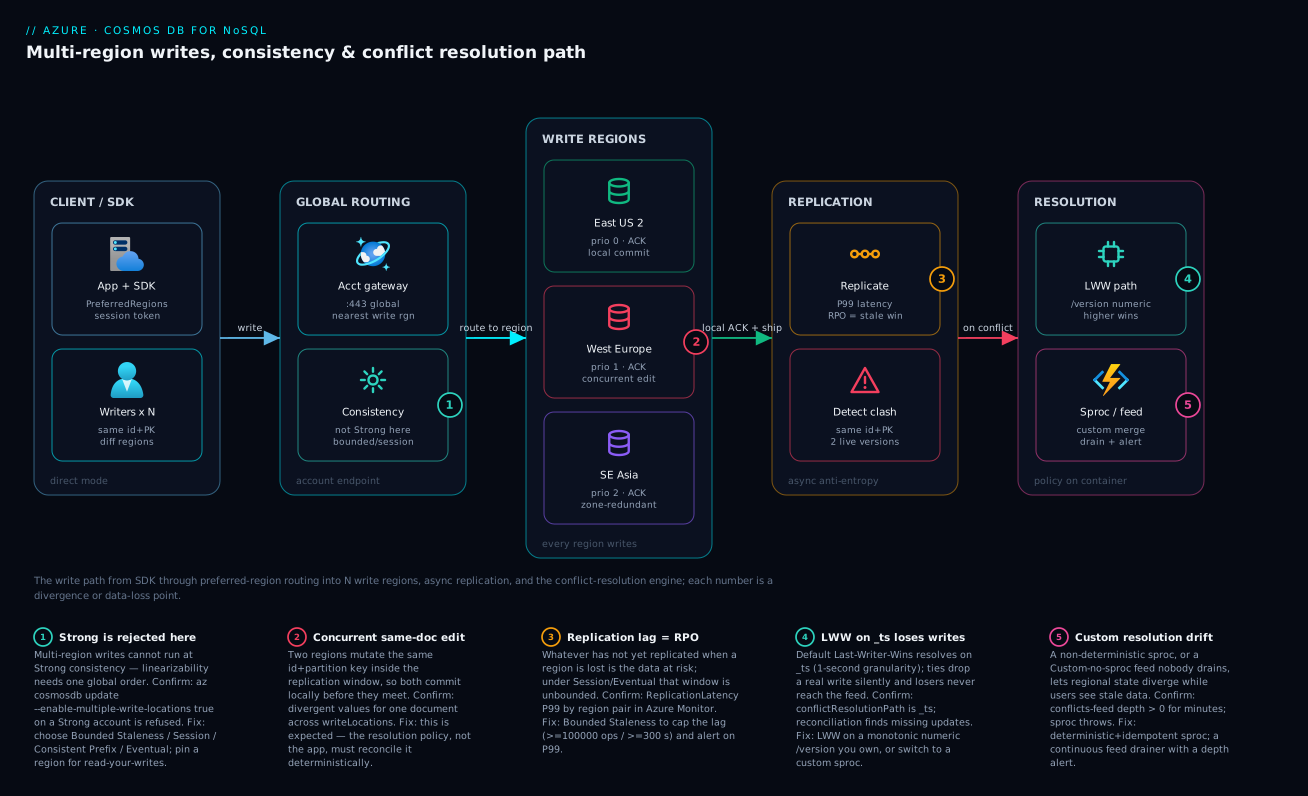
The diagram traces a write as it actually flows through a multi-region-write account, then maps each place data can diverge or be lost as a numbered badge. Read it left to right. On the far left, the App + SDK issues a write with an ordered ApplicationPreferredRegions list and (under Session) a session token; multiple writers can target the same id + partition key from different regions. The write hits the account gateway on :443, which routes it to the nearest write region — and the consistency knob here is where badge 1 lives: you cannot select Strong on this path, only Bounded Staleness, Session, Consistent Prefix or Eventual. The middle zone is the heart of multi-write: East US 2, West Europe and Southeast Asia each commit and ACK locally (badge 2 marks West Europe accepting a concurrent edit to a document East US 2 just changed). From there the replication zone ships those local commits asynchronously; badge 3 sits on the replication hop because whatever has not yet replicated when a region is lost is exactly your RPO. When two live versions of one document meet, the detect-clash node fires, and the flow turns into the resolution zone.
The resolution zone is the design decision the whole article is about. The LWW path node (badge 4) resolves on a numeric property — and the warning is that the default /version choice of _ts ties at one-second granularity and drops a real write silently. The sproc / feed node (badge 5) is the deterministic alternative: a custom resolver that merges or applies business rules, or a manual conflicts feed your app must drain and alert on. The legend narrates each number as symptom · how to confirm · fix — read the badge, run the named az/Azure Monitor confirm step, apply the fix. The single sentence to carry away from the picture: the request path buys you write locality and near-zero RTO, and every badge is a place you pay for it in consistency, RPO, or conflict-resolution correctness.
Real-world scenario
Aurelia Pay, a fictional global payments platform, ran a payments-ledger container with three write regions (East US 2, West Europe, Southeast Asia) at Session consistency to meet a sub-50 ms write SLO across the Americas, EU and APAC. Their idempotency layer keyed on a client-supplied paymentId, and the write path did a read-modify-write to advance a status field (0=pending, 1=authorized, 2=captured, 3=refunded). The container used the default LWW on _ts. The platform team was six engineers; the Cosmos spend was about ₹240,000/month (three write regions multiply the write RU).
The incident began during a partial network partition between East US 2 and West Europe — a real BGP event lasting about nine minutes. A retrying client authorized a payment in West Europe while a parallel capture landed in East US 2 for the same paymentId. Both committed locally and ACK’d; the partition kept them apart. When replication healed, the two versions met and Cosmos resolved the conflict on _ts. Because both writes fell in the same second, _ts tied, Cosmos kept the authorize as the winner, and the capture was silently discarded — money had moved, the ledger said “authorized.” Nothing surfaced in any feed (LWW never populates it). They found it 31 hours later when the daily reconciliation against the processor disagreed by a five-figure sum.
The breakthrough was framing the bug correctly. This was not a Cosmos defect and not an application race they could lock away — under multi-region writes, concurrent same-document edits across regions are expected. The defect was the resolution policy: resolving an ordered state machine on a timestamp. The constraint made it harder: they could not tolerate any state regression, and they could not drop to single-region writes (the APAC latency SLO would break). The fix was a custom resolver sproc that resolves on the business state machine instead of a timestamp — the higher status rank always wins, and a refund (3) is terminal (absorbing):
function resolveLedger(incoming, existing, isTombstone, conflicts) {
  var ctx = getContext(), coll = ctx.getCollection(), res = ctx.getResponse();
  var all = [existing, incoming].concat(conflicts || []).filter(Boolean);
  // Terminal states win; otherwise the highest status rank wins.
  var winner = all.reduce(function (best, c) {
    if (best === null) return c;
    if (c.status === 3) return c;            // refund is absorbing
    return (c.status > best.status) ? c : best;
  }, null);
  coll.upsertDocument(coll.getSelfLink(), winner, function (e) { if (e) throw e; });
  res.setBody(winner);
}
They also moved the LWW-style fields they could safely auto-merge (audit tags, lastTouchedBy) into the same sproc so nothing fell back to _ts, and they switched the policy to Custom so a sproc failure would route to the conflicts feed rather than silently dropping a write. Post-change, a six-month reconciliation run showed zero ledger regressions. The conflicts-feed alert (depth > 0 for more than five minutes) plus a ReplicationLatency P99 alert gave them the early-warning signals they had been missing entirely. The before/after, because the contrast is the lesson:
| Dimension | Before (default LWW on _ts) |
After (custom resolver sproc) |
|---|---|---|
| Resolution basis | Last-modified timestamp, 1 s granularity | Business status rank, refund absorbing |
| Same-second conflict | Tie → arbitrary winner, capture lost | Higher status wins deterministically |
| Loser visibility | None (LWW never populates feed) | Sproc folds all versions; failures → feed |
| Reconciliation result | Five-figure mismatch after 31 h | Zero regressions over six months |
| Detection signal | Out-of-band daily reconciliation | Feed-depth + replication-latency alerts |
| Write SLO (APAC) | Met (Session, multi-write) | Still met — no topology change |
| Cost | ₹240,000/mo (3 write regions) | Unchanged; the fix was the policy |
The line the team wrote into their design guide: on a multi-region-write account, the conflict-resolution policy is part of your data model, not an afterthought — and default LWW on _ts is almost never correct for stateful, ordered domains.
Advantages and disadvantages
Multi-region writes both unlock global low-latency write workloads and introduce the distributed-systems tax. Weigh it honestly:
| Advantages (why you reach for it) | Disadvantages (why it bites) |
|---|---|
| Local write latency everywhere — nearest region ACKs, no cross-ocean write round trip | Concurrent same-doc edits across regions are now possible; you must resolve conflicts |
| RTO for writes ≈ 0 — every region already writes, no promotion step on a region loss | RPO is non-zero for every multi-write level; only Bounded Staleness caps it |
| Higher write availability — a region loss doesn’t zero out write capability | Strong consistency is off the table entirely; you lose linearizability |
| Pluggable resolution (LWW path, sproc, manual feed) fits ordered or mergeable domains | The policy is set at container creation and effectively immutable — a wrong choice means a migration |
| Built-in conflicts feed is a safety net for custom/sproc failures | Manual mode silently diverges if nobody drains the feed |
| Session consistency keeps per-user read-your-writes cheap | Cross-session reads can miss recent writes unless you flow the token |
| Bounded Staleness gives a contractual freshness SLA you can promise | Enforced minimums (100000 ops / 300 s) may be looser than you’d like |
| Scales globally without app-level sharding of the write path | Provisioned write RU cost ≈ N× the number of write regions |
The model is right for globally distributed, write-active, latency-sensitive workloads where the data is either tolerant (telemetry, counters, sessions) or has a resolvable conflict story (an ordered state machine you can rank, or documents you can merge). It is wrong when you need true linearizability (use single-write Strong), when the data has no sane merge and any loss is unacceptable without heavy custom work, or when only one region actually writes (then you want read replicas, not the N× write-RU bill). The disadvantages are all manageable — but only if you treat consistency and conflict resolution as first-class design, which is the entire point of this article.
Hands-on lab
Reproduce a conflict deterministically, watch LWW-on-_ts drop a write, then switch to LWW-on-/version and confirm the correct version wins — all on a single account (we add a second region briefly; delete at the end to stop the RU/region cost). Run in Cloud Shell (Bash) unless noted.
Step 1 — Variables and resource group.
RG=rg-cosmos-lab
ACC=kvcosmoslab$RANDOM        # globally-unique account name
LOC1=eastus2
LOC2=westeurope
az group create -n $RG -l $LOC1 -o table
Step 2 — Create a single-region account at Session consistency.
az cosmosdb create -n $ACC -g $RG \
  --locations regionName=$LOC1 failoverPriority=0 isZoneRedundant=false \
  --default-consistency-level Session -o table
Expected: an account row; enableMultipleWriteLocations defaults to false.
Step 3 — Add a second region and enable multi-region writes.
az cosmosdb update -n $ACC -g $RG \
  --locations regionName=$LOC1 failoverPriority=0 isZoneRedundant=false \
  --locations regionName=$LOC2 failoverPriority=1 isZoneRedundant=false
az cosmosdb update -n $ACC -g $RG --enable-multiple-write-locations true
az cosmosdb show -n $ACC -g $RG --query "enableMultipleWriteLocations" -o tsv
Expected: the final command prints true, and writeLocations now lists both regions.
Step 4 — Create a DB and two containers: one default-LWW, one LWW-on-/version.
az cosmosdb sql database create -a $ACC -g $RG -n shop -o table

# Container A: default LWW (resolves on _ts)
az cosmosdb sql container create -a $ACC -g $RG -d shop -n orders_ts \
  --partition-key-path "/tenantId" --throughput 400 -o table

# Container B: LWW on a numeric /version you own
az cosmosdb sql container create -a $ACC -g $RG -d shop -n orders_ver \
  --partition-key-path "/tenantId" \
  --conflict-resolution-policy-mode LastWriterWins \
  --conflict-resolution-policy-path "/version" --throughput 400 -o table
Step 5 — Inspect the bound policy on each container (this is the verification that matters).
az cosmosdb sql container show -a $ACC -g $RG -d shop -n orders_ts \
  --query "resource.conflictResolutionPolicy" -o json
az cosmosdb sql container show -a $ACC -g $RG -d shop -n orders_ver \
  --query "resource.conflictResolutionPolicy" -o json
Expected: orders_ts shows "conflictResolutionPath": "/_ts" (the default); orders_ver shows "conflictResolutionPath": "/version". This single difference is the whole lesson — the ordered-domain container must not resolve on _ts.
Step 6 — Confirm consistency and write topology, the production gate.
az cosmosdb show -n $ACC -g $RG \
  --query "{multiWrite:enableMultipleWriteLocations, consistency:consistencyPolicy.defaultConsistencyLevel, writeRegions:writeLocations[].locationName}" -o json
Expected: multiWrite: true, consistency: Session, and both regions under writeRegions. (To observe a real cross-region conflict resolve you would write the same id+tenantId to each region during a simulated partition — the Cosmos emulator’s multi-region mode or a brief endpoint block lets you do this; on a single live account the policy inspection in Step 5 is the deterministic check.)
The lab steps mapped to what each proves:
| Step | What you did | What it proves | Real-world analogue |
|---|---|---|---|
| 3 | Enable multi-write on a 2-region account | Every region becomes a write region | The decision that introduces conflicts |
| 4 | Two containers, two LWW paths | The policy is per-container and set at creation | Choosing the policy as a data-model decision |
| 5 | Inspect conflictResolutionPolicy |
_ts default vs /version is visible and real |
The 90-second “is this safe?” check |
| 6 | Confirm multi-write + consistency | The production gate before go-live | Pre-prod sign-off |
Cleanup (stop the per-region RU cost):
az group delete -n $RG --yes --no-wait
Cost note. Two 400-RU/s containers across two write regions for under an hour is a few rupees; the multi-region multiplier is what you are watching, and deleting the resource group stops all of it. Always delete lab accounts — an idle multi-region account still bills provisioned RU in every region.
Practice challenges
Work these against a throwaway lab account (see the Hands-on lab for setup and teardown) or reason them on paper. They escalate from a 60-second inspection to a full zero-downtime migration. Solutions are collapsed — decide your answer first, then expand. All names are placeholders.
Challenge 1 — Beginner: will this account even accept multi-region writes? You inherit kv-cosmos-legacy. Before you propose multi-region writes in a design review, prove whether the current consistency level even allows it, with one command.
<details> <summary>Solution</summary>
az cosmosdb show -n kv-cosmos-legacy -g rg-data \
  --query "consistencyPolicy.defaultConsistencyLevel" -o tsv
If it returns Strong, enabling multi-region writes will be rejected — lower the account to BoundedStaleness or Session first. Any other value can proceed.
Why: Strong needs one global write order, which independent write regions cannot provide. </details>
Challenge 2 — Beginner: spot the dangerous default. Given container orders, decide in one command whether it is on the conflict policy that silently drops writes.
<details> <summary>Solution</summary>
az cosmosdb sql container show -a kv-cosmos-prod -g rg-data-prod \
  -d shop -n orders --query "resource.conflictResolutionPolicy" -o json
If mode is LastWriterWins and conflictResolutionPath is /_ts, it’s the raw default: a same-second tie discards a real write with no error trail.
Why: _ts has one-second granularity; ordered domains must resolve on a monotonic /version or a resolver sproc.
</details>
Challenge 3 — Intermediate: set a defensible freshness bound. The business wants “replicas are never more than ~5 minutes stale” on a 3-region multi-write account. Configure it, and state the minimums you cannot go below.
<details> <summary>Solution</summary>
az cosmosdb update -n kv-cosmos-prod -g rg-data-prod \
  --default-consistency-level BoundedStaleness \
  --max-staleness-prefix 100000 \
  --max-interval 300
--max-interval 300 (seconds) is your ~5-minute bound; you may go higher, never lower. The multi-region floors are maxStalenessPrefix >= 100000 and maxIntervalInSeconds >= 300; smaller values are rejected with a min-value error.
Why: Bounded Staleness is the only level that gives a global, quantified RPO you can put in an SLA. </details>
Challenge 4 — Intermediate: predict the LWW winner. A container is LWW on /version. For the same item, three writes replicate together: the existing doc at version=9, a stale retry at version=5, and a fresh write at version=12. Which survives — and what happens if a fourth write arrives carrying no version field at all?
<details> <summary>Solution</summary>
version=12 wins (highest value at the path). The stale retry (5) correctly loses. A write with no /version is treated as 0, so it loses to anything real — but a genuine write arriving with no version is a bug in your write path, and if two writes both lack it (0 vs 0) the winner is deterministic-but-arbitrary.
Why: LWW is “highest numeric value at the path wins”; a missing path counts as 0, so make /version mandatory and monotonic.
</details>
Challenge 5 — Advanced: make delete win. Write a deterministic resolver sproc so that, for the same item, a delete always beats a concurrent update — and outline how you bind it.
<details> <summary>Solution</summary>
function resolveDeleteWins(incoming, existing, isTombstone, conflicts) {
  var ctx = getContext(), coll = ctx.getCollection(), res = ctx.getResponse();
  if (isTombstone) {                         // incoming op was a delete -> delete wins
    if (existing) {
      var link = coll.getSelfLink() + 'docs/' + existing.id;
      coll.deleteDocument(link, {}, function (e) { if (e) throw e; });
    }
    res.setBody({ deleted: true });
  } else {                                   // no delete involved -> highest version wins
    var all = [existing, incoming].concat(conflicts || []).filter(Boolean);
    var w = all.reduce(function (b, c) {
      return (!b || c.version > b.version) ? c : b; }, null);
    coll.upsertDocument(coll.getSelfLink(), w, function (e) { if (e) throw e; });
    res.setBody(w);
  }
}
Register it (az cosmosdb sql stored-procedure create ... --name resolveDeleteWins --body @resolveDeleteWins.js), then create the container with --conflict-resolution-policy-mode Custom --conflict-resolution-procedure "dbs/shop/colls/orders/sprocs/resolveDeleteWins".
Why: isTombstone is how you make delete absorbing; the resolver must be deterministic because Cosmos may invoke it more than once and in more than one region.
</details>
Challenge 6 — Advanced: switch an immutable policy with zero downtime. A live payments container is on the default LWW-on-_ts. You must move it to the custom resolver pattern from Challenge 5 without losing writes or taking downtime. Outline the migration.
<details> <summary>Solution</summary>
The conflict policy is immutable, so you cannot change it in place. Instead: (1) create a new container payments_v2 with the custom-sproc policy; (2) run an Azure Function on the change feed of payments that upserts every change into payments_v2 (live, LSN-ordered backfill); (3) once the feed has caught up, dual-write or feature-flag the app onto payments_v2; (4) cut over, keep the old container read-only as a fallback, then retire it.
Why: Conflict policy (like the partition key) can’t be altered after creation; the change feed is the standard live-migration tool — the exact pattern the troubleshooting table points to. </details>
Common mistakes & troubleshooting
This is the playbook — the part you bookmark. First as a scannable table you can read mid-incident, then the entries that bite hardest expanded with the full confirm detail.
| # | Symptom | Root cause | Confirm (exact cmd / portal path) | Fix |
|---|---|---|---|---|
| 1 | Reconciliation finds missing updates; no errors anywhere | Default LWW on _ts dropped a write on a same-second tie |
az cosmosdb sql container show --query resource.conflictResolutionPolicy shows /_ts |
New container with LWW on /version, or a custom sproc |
| 2 | enable-multiple-write-locations true is rejected |
Account is at Strong consistency | az cosmosdb show --query consistencyPolicy.defaultConsistencyLevel = Strong |
Set Bounded Staleness/Session first, then enable multi-write |
| 3 | Setting Bounded Staleness fails on a multi-region account | Window below the multi-region floor | Error cites maxStalenessPrefix/maxIntervalInSeconds |
--max-staleness-prefix 100000 --max-interval 300 (or larger) |
| 4 | Data quietly diverges between regions over days | Custom (no sproc) feed nobody drains | Conflicts.GetConflictQueryIterator returns entries; depth alert never built |
Build a continuous drainer + a feed-depth alert |
| 5 | Cross-session reader in region B misses a write from region A | Session consistency, token not flowed | App tiers don’t pass x-ms-session-token |
Propagate the session token, or use Bounded Staleness |
| 6 | LWW “loses” the newer write under clock skew | LWW path is client wall-clock time | Path is a client timestamp; regions’ clocks differ | Use a monotonic per-doc version (RMW) or HLC |
| 7 | Sproc resolver produces different state in different regions | Non-deterministic / non-idempotent resolver | Resolver reads Date.now()/random; outputs differ |
Make it deterministic + idempotent (absolute state) |
| 8 | Can’t change the conflict policy on a live container | Policy is immutable after creation | az cosmosdb sql container show policy is fixed |
New container + change-feed migration, cut over behind a flag |
| 9 | Writes throttle (429) after enabling multi-write | Write RU is now N× across regions | TotalRequestUnits high; 429 rate up |
Raise provisioned/autoscale RU, or reduce write regions |
| 10 | Client keeps hitting a down region after failover | No ApplicationPreferredRegions set |
SDK options lack the ordered region list | Set ApplicationPreferredRegions; Direct mode |
| 11 | “Multi-write is on” but one region won’t accept writes | A region is still a read replica (toggle not applied) | writeLocations lacks that region |
Re-run --enable-multiple-write-locations true; verify |
| 12 | RPO bigger than expected after a region loss | Consistency is Session/Eventual (unbounded RPO) | consistencyPolicy not Bounded Staleness |
Move to Bounded Staleness to cap the lag window |
| 13 | Deletes “come back” after replication | Delete lost the conflict to a concurrent update | Doc reappears; LWW path favored the update | Decide delete-wins in a sproc (isTombstone) |
| 14 | Cassandra/Mongo API: no custom resolver available | Custom sproc/feed is NoSQL-API only | Wrong API for pluggable resolution | Use NoSQL API, or accept LWW on those APIs |
The expanded form for the entries that bite hardest:
1. Reconciliation finds missing updates; nothing errored.
Root cause: Default LWW on _ts resolved a conflict on a one-second timestamp tie and silently discarded a real write; LWW never populates the conflicts feed, so there is no error trail.
Confirm: az cosmosdb sql container show --account-name <acc> -g <rg> -d <db> -n <container> --query "resource.conflictResolutionPolicy" shows mode: LastWriterWins and conflictResolutionPath: /_ts.
Fix: For ordered/stateful data, create a new container with LWW on a monotonic /version you own, or a custom resolver sproc that ranks on business state. Migrate via the change feed; the policy can’t be changed in place.
2. Enabling multi-region writes is rejected.
Root cause: The account is at Strong consistency, which is incompatible with multi-region writes (linearizability needs one global order).
Confirm: az cosmosdb show -n <acc> -g <rg> --query "consistencyPolicy.defaultConsistencyLevel" returns Strong.
Fix: Lower to Bounded Staleness (or Session) first — az cosmosdb update --default-consistency-level BoundedStaleness --max-staleness-prefix 100000 --max-interval 300 — then --enable-multiple-write-locations true.
3. Setting Bounded Staleness fails on a multi-region account.
Root cause: The window is below the multi-region floor (maxStalenessPrefix >= 100000, maxIntervalInSeconds >= 300).
Confirm: The CLI error names the parameter that is too small.
Fix: Pass values at or above the floor: --max-staleness-prefix 100000 --max-interval 300. Tighter windows are only allowed on single-region accounts.
4. Data quietly diverges between regions over days.
Root cause: Custom (no sproc) policy writes conflicting versions to the conflicts feed, and nobody drains it — so divergence accumulates invisibly.
Confirm: container.Conflicts.GetConflictQueryIterator<ConflictProperties>() returns entries; you have no alert on feed depth or conflict activity.
Fix: Run a continuous drainer (Function/worker) that resolves each entry, deletes it after handling, and emits a depth gauge; alert on depth > 0 sustained.
5. A cross-session reader misses a recent write.
Root cause: Session consistency scopes read-your-writes to the session token; a different client/tier reading in another region without the token can miss a just-written value.
Confirm: The write tier captures response.Headers.Session but downstream readers don’t pass it back as SessionToken.
Fix: Flow the session token across tiers (header/cookie), or move readers that can’t carry it to Bounded Staleness for a global bounded guarantee.
6. LWW loses the newer write under clock skew.
Root cause: The LWW path is a client wall-clock timestamp; regional clock skew means the “later” write can carry the smaller number and lose.
Confirm: The conflictResolutionPath points at a client-set time field; regions’ clocks differ by more than the conflict window.
Fix: Resolve on a monotonic per-document version advanced by read-modify-write, or a hybrid logical clock — never raw client time.
8. Can’t change the conflict policy on a live container.
Root cause: The conflict-resolution policy is set at container creation and effectively immutable.
Confirm: az cosmosdb sql container show ... --query "resource.conflictResolutionPolicy" shows the old policy and no SDK/portal path changes it.
Fix: Create a new container with the right policy, drain the change feed into it with a Function (live backfill), and cut over behind a feature flag — the same pattern as a partition-key change.
9. Writes throttle (429) right after enabling multi-write.
Root cause: Write RU is now multiplied across write regions; the provisioned/autoscale ceiling that was fine for one write region is now insufficient.
Confirm: TotalRequestUnits climbs and the 429 rate rises; the account shows N write regions.
Fix: Raise provisioned or autoscale max RU/s to cover N× write cost, or reduce the number of write regions (keep some as read replicas).
Common beginner mistakes
These are wrong mental models — the beliefs that produce the incidents in the troubleshooting table above. Fixing the belief prevents the symptom, so this section is about how to think, not what command to run.
“More regions is always safer, so make them all write regions.” Write regions multiply your provisioned write RU by N and multiply the chance of conflicts — they do not add durability the way local replicas do. Right model: add a write region only where users actually write and need local latency; everywhere else a read replica gives you local reads without the N× write bill or the conflict surface.
“Multi-region writes means we can’t lose data.” It means RTO ≈ 0 (every region already writes, so there’s no promotion step on a region loss), not RPO = 0. Whatever hadn’t replicated when a region died is gone. Right model: only Bounded Staleness caps that loss, to the staleness window; Session / Consistent Prefix / Eventual leave it unbounded in the worst case. You buy fast recovery and pay in a non-zero data-loss window.
“If LWW drops a write, I’ll find it in the change feed — or the conflicts feed.” You will find it in neither. LWW’s loser was never a surviving committed version, so the change feed never emits it; and LWW never populates the conflicts feed. Right model: with LWW there is no safety net, so LWW-on-_ts for ordered data isn’t merely “risky,” it’s silently lossy — use a policy that keeps every write you care about.
“Session consistency means everyone sees my write.” Session guarantees read-your-writes only within the session token. A different service reading in another region without that token can miss your just-written value. Right model: flow the x-ms-session-token across tiers, or move token-less readers to Bounded Staleness for a global bounded guarantee.
“We’ll start on Strong to be safe and enable multi-region writes later.” You can’t — Strong is incompatible with multi-region writes and the enable call is rejected; you’d have to downgrade consistency first, a behavior change you should have designed for up front. Right model: pick a multi-write-compatible level (Bounded Staleness or Session) as part of the initial design, not as a later retrofit.
“We can change the conflict-resolution policy if we pick the wrong one.” It is set at container creation and effectively immutable. Right model: choosing LWW-vs-sproc-vs-manual is a data-model decision made once; getting it wrong means a new container and a change-feed migration.
“_ts is a real timestamp, so last-writer-wins is fine.” _ts is server-assigned at one-second granularity; two writes in the same second tie, and the winner is deterministic-but-arbitrary. Right model: for anything ordered or stateful, resolve on a monotonic /version you control, never on a coarse timestamp.
The same traps in one glance — belief, what actually happens, and the model to replace it with:
| Belief | What actually happens | Right mental model |
|---|---|---|
| “All regions should write” | N× write RU + more conflicts | Write regions for write locality only; read replicas elsewhere |
| “Multi-write = no data loss” | RTO ≈ 0 but RPO > 0 | Only Bounded Staleness caps RPO |
| “A feed will save a dropped write” | LWW losers hit no feed | Use a correct policy so nothing drops |
| “Session = global read-your-writes” | Cross-session / cross-region can miss | Flow the token, or use Bounded Staleness |
| “Change the policy later” | It’s immutable at creation | Decide once; migrate via change feed if wrong |
“_ts is precise enough” |
Same-second writes tie and one is lost | Monotonic /version for ordered data |
Best practices
- Treat consistency and conflict resolution as data-model decisions, reviewed in design, not toggles flipped at deploy. They determine correctness and RPO, not just performance.
- Never select Strong if you intend multi-region writes — it is rejected. Default to Bounded Staleness when you need a freshness SLA, Session when the workload is per-user and you control the token.
- Never leave an ordered/stateful container on LWW-on-
_ts. Use LWW on a monotonic numeric/versionyou own, or a custom resolver sproc that ranks on business state. - Make LWW paths guaranteed-monotonic — a version counter advanced by read-modify-write, or a hybrid logical clock. Client wall-clock time turns skew into silent data loss.
- Write resolver sprocs deterministic and idempotent, resolving to an absolute state (not a delta). Cosmos may invoke them more than once; non-determinism diverges regional state.
- Give the conflicts feed an owner in manual mode: a continuously running drainer that deletes entries after handling, plus an alert on feed depth. An undrained feed is invisible divergence.
- Flow the session token across tiers wherever read-your-writes matters at Session level — header or cookie — or step up to Bounded Staleness for readers that can’t carry it.
- Set the conflict policy at container creation, knowing it’s immutable; budget a change-feed migration if you ever need to change it.
- Configure
ApplicationPreferredRegions(ordered) on everyCosmosClientso a region loss fails over locally with no redeploy; use Direct connection mode. - Keep
enableAutomaticFailoveron regardless — it’s harmless under multi-write and essential under single-write. - Right-size RU for N× writes before enabling multi-write; autoscale absorbs aggregate spikes but the baseline write cost multiplies per write region.
- Rehearse a regional outage (manual failover or endpoint block) and document RPO/RTO per consistency level in the DR runbook; monitor
ReplicationLatencyP99 and conflict activity with alerts.
Security notes
- Use managed identity, not keys, for the data plane. Cosmos supports Microsoft Entra ID RBAC for data operations; assign the Cosmos DB Built-in Data Contributor (or a scoped custom role) to the app’s managed identity instead of distributing account keys. Keys are account-wide and hard to rotate without downtime.
- Disable key-based auth where possible.
az cosmosdb update --disable-key-based-metadata-write-access trueand prefer Entra RBAC for data; if you must keep keys, store them only as Key Vault references and rotate on a schedule (see Azure Key Vault Secret Rotation with Managed Identity). - Lock the network with Private Endpoints. Put a private endpoint in each region’s VNet and set
publicNetworkAccess: Disabledso the account isn’t reachable from the internet; multi-region means one private endpoint per region plus private DNS. See Private Endpoint vs Service Endpoint. - Resolver sprocs run server-side with collection access — treat them as privileged code. Review them in PRs, keep them deterministic, and never embed secrets or external calls (sprocs can’t make outbound calls, but don’t try to smuggle business secrets into them).
- Scope RBAC per database/container where the SDK supports it, so a compromised app identity can’t read or mutate unrelated containers — least privilege on the data plane, not just the control plane.
- Encrypt with customer-managed keys (CMK) if compliance requires it; data is encrypted at rest by default with Microsoft-managed keys, and CMK lets you hold the key in Key Vault and revoke access.
- Audit conflict and data-plane activity to Log Analytics (
DataPlaneRequests) so unexpected writes or conflict storms are visible and attributable.
The security controls that also prevent operational incidents — secure and resilient pull the same way here:
| Control | Setting / mechanism | Secures against | Also prevents |
|---|---|---|---|
| Entra RBAC data plane | Built-in Data Contributor + managed identity | Account-key sprawl and leakage | Rotation breakage from hard-coded keys |
| Disable public access | publicNetworkAccess: Disabled + private endpoints |
Internet-reachable data | Exfiltration over public endpoints |
| Per-region private endpoint | PE + private DNS per region | Cross-region traffic on the public internet | DNS misresolution sending writes off-region |
| Scoped RBAC roles | Custom data roles per container | Lateral movement across containers | A bad app touching unrelated data |
| CMK encryption | Key Vault-held key | Provider-side data exposure | Loss of crypto-shred / revoke capability |
| Data-plane diagnostics | DataPlaneRequests to Log Analytics |
Undetected anomalous writes | Silent conflict divergence going unseen |
Cost & sizing
The bill drivers and how they interact with multi-region writes:
- Provisioned/autoscale RU/s is the dominant cost, and writes multiply by the number of write regions. One write region at 10,000 RU/s costs roughly one unit; three write regions cost roughly three for the write portion, because every write replicates and is billed in each region. This is the single biggest reason to ask “do I need write locality here, or just read locality?”
- Read replicas cost RU too, but independently. A region you add as a read replica (not a write region) bills its own RU for reads; you scale it on its own. Two write regions plus a read replica is often cheaper and simpler than three write regions.
- Storage is billed per GB per region — every region holds a full copy, so storage also multiplies by region count (read or write).
- Autoscale vs manual: autoscale bills 1.5× the equivalent manual rate per RU but scales 10–100% automatically; for spiky multi-region writes it prevents 429 storms but the baseline still multiplies per write region.
- Egress / replication traffic between regions is part of the service; the cost you control is RU and storage, plus any cross-region traffic your app generates.
A rough monthly picture (INR, indicative — verify with the Azure pricing calculator for your regions):
| Configuration | Write RU model | Storage | Rough INR / month | When it’s the right shape |
|---|---|---|---|---|
| 1 write region, 10k RU/s | 1× write RU | 1× per GB | ~₹85,000 | Single-region write, global reads not needed |
| 1 write + 2 read replicas | 1× write + read RU | 3× per GB | ~₹160,000 | Global low-latency reads, single writer |
| 2 write regions, 10k RU/s each | ~2× write RU | 2× per GB | ~₹170,000 | Two-continent write locality |
| 3 write regions, 10k RU/s each | ~3× write RU | 3× per GB | ~₹255,000 | True global active-active writes |
| Autoscale 10k max, 3 write regions | ~3× at 1.5× rate | 3× per GB | ~₹290,000 peak | Spiky global writes; avoids 429 |
Right-sizing rules:
| If you observe… | It usually means… | Do this |
|---|---|---|
| One region writes >> others | You’re paying N× for 1× benefit | Make the quiet regions read replicas |
| Sustained 429 after multi-write | Write RU ceiling too low for N× | Raise RU or autoscale max |
| RU far below provisioned but 429s | A hot partition, not a region issue | Fix the partition key (see partition-key article) |
| Bill dominated by storage | Many regions, large dataset | Trim regions or archive cold data |
| Bounded Staleness window very tight | Higher coordination latency/cost | Loosen toward the floor (100000/300) |
Interview & exam questions
1. Why is Strong consistency incompatible with multi-region writes? Strong guarantees linearizability, which requires a single global ordering of all writes. With multiple regions independently accepting and ACKing writes locally, no single global order exists, so the guarantee cannot hold. Cosmos therefore rejects enabling multi-region writes on a Strong account; you must drop to Bounded Staleness, Session, Consistent Prefix or Eventual first.
2. What does multi-region writes do to your provisioned RU cost, and why? It roughly multiplies the write RU cost by the number of write regions, because every write is committed and replicated in each write region and billed there. The mitigation is to make only the regions that truly need write locality into write regions and keep the rest as read replicas, which scale independently.
3. Default LWW resolves on _ts. Why is that dangerous for an ordered domain? _ts is a last-modified timestamp at one-second granularity; two concurrent writes in the same second tie, and Cosmos keeps one deterministically but arbitrarily, silently discarding the other (LWW never populates the conflicts feed). For a state machine (e.g. payments), this can drop a capture in favor of an authorize. Resolve on a monotonic /version you own or a custom sproc that ranks on business state.
4. Compare Bounded Staleness and Session for a multi-region-write account. Bounded Staleness gives a global, quantified freshness bound (no more than K versions or T seconds stale; minimums 100000 ops / 300 s on multi-region) and behaves like Strong within a region — good for multi-reader and SLA freshness. Session gives read-your-writes only within a session token, is the cheapest level, and is right for per-user workloads where you control token propagation; a different session in another region can miss a recent write.
5. What are the three conflict types, and how does each surface under LWW vs Custom? Insert (two regions create the same id+PK), replace/update (concurrent edits), delete (delete vs concurrent update). Under LWW all three resolve on the numeric path, winner committed, loser discarded silently. Under Custom-sproc your resolver receives the versions (with isTombstone for deletes) and decides. Under Custom-manual the conflicting versions land in the conflicts feed for your app to reconcile.
6. Walk through configuring LWW on a custom path and the invariants you must hold. Create the container with conflictResolutionPolicy.mode = LastWriterWins and conflictResolutionPath = /version. Invariants: the path is always present and numeric (missing = 0), monotonically increasing per document (so a stale retry loses), and unique enough to avoid ties on writes you care about. Prefer a version counter advanced by read-modify-write or a hybrid logical clock over client wall-clock time, which turns clock skew into data loss.
7. What’s the RTO and RPO of a multi-region-write account, and what governs each? RTO for writes is ≈0 because every region already writes — there’s no promotion step on a region loss; the SDK just stops routing to the down region. RPO is non-zero and is governed by the consistency level: Bounded Staleness caps it to the staleness window; Session/Consistent Prefix/Eventual leave it unbounded in the worst case; Strong (RPO 0) is unavailable here. You buy RTO and pay in RPO.
8. A resolver sproc produces different results in different regions. What’s wrong and how do you fix it? The sproc is non-deterministic or non-idempotent — likely reading Date.now(), a random value, or applying a delta rather than computing an absolute state. Cosmos may invoke the resolver more than once and in each region, so identical inputs must yield identical outputs. Fix by making it deterministic and idempotent, resolving to a fully-specified final document, and folding in conflictingItems.
9. You set Custom (no sproc) and data is quietly diverging. What did you forget? The conflicts feed has no owner. In manual mode Cosmos writes conflicting versions to the feed and stops; your application must drain it (read, resolve with a business rule, replace the committed doc, delete the feed entry) on a continuous schedule, and alert on feed depth. Without a drainer, divergence accumulates invisibly.
10. How do you make client failover transparent during a regional outage? Configure CosmosClientOptions.ApplicationPreferredRegions with an ordered region list and use Direct connection mode. On a regional failure the SDK automatically retries the next preferred region without a redeploy. Rehearse it by blocking egress to the primary region’s endpoint or running az cosmosdb failover-priority-change, and confirm the service keeps serving.
11. Can you change a container’s conflict-resolution policy after creation? What’s the migration if not? No — the policy is set at container creation and effectively immutable. To change it you create a new container with the desired policy, backfill via the change feed (an Azure Function draining the old container into the new one live), and cut over behind a feature flag — the same pattern as changing a partition key.
12. Which APIs support custom (sproc/feed) conflict resolution? Only the Cosmos DB for NoSQL API supports pluggable resolution (LWW path, stored-procedure resolver, and the manual conflicts feed). Cassandra, MongoDB and Gremlin APIs typically support LWW only, with no custom resolver — a key reason to choose the NoSQL API when you need ordered/mergeable conflict semantics.
These map to DP-420 (Designing and Implementing Native Applications Using Microsoft Azure Cosmos DB) — consistency, global distribution, conflict resolution, change feed — and touch AZ-305 (Solutions Architect Expert) for the multi-region HA/DR and RPO/RTO design. A compact cert-mapping for revision:
| Question theme | Primary cert | Objective area |
|---|---|---|
| Consistency levels & trade-offs | DP-420 | Design and implement data distribution |
| Conflict types & resolution policies | DP-420 | Implement conflict resolution |
| LWW path / resolver sprocs / change feed | DP-420 | Integrate and optimize; server-side programming |
| Multi-region HA/DR, RPO/RTO | AZ-305 | Design business continuity solutions |
| RU cost of multi-write, sizing | DP-420 / AZ-305 | Optimize cost; design data platform |
| Entra RBAC, private endpoints, CMK | AZ-305 / AZ-500 | Secure the data platform |
Quick check
- You try to enable multi-region writes and the operation is rejected. What is the single most likely cause, and the one command that confirms it?
- A reconciliation job finds a missing update but every log is clean and nothing is in the conflicts feed. What policy is almost certainly in play, and why is the feed empty?
- True or false: scaling provisioned RU/s higher is the right fix when writes throttle (429) immediately after you enable multi-region writes.
- Your app uses Session consistency. A user’s write in East US 2 isn’t visible to a different service reading in West Europe. Name two valid fixes.
- You need to change a container’s conflict-resolution policy from LWW to a custom sproc. Can you do it in place? If not, what’s the migration?
Answers
- The account is at Strong consistency, which is incompatible with multi-region writes (linearizability needs one global order). Confirm with
az cosmosdb show -n <acc> -g <rg> --query "consistencyPolicy.defaultConsistencyLevel"returningStrong; lower it to Bounded Staleness/Session, then enable multi-write. - Default LWW on
_ts. LWW resolves conflicts automatically and discards losers silently — they never appear in the conflicts feed — so a same-second_tstie can drop a real write with no error trail. Fix with LWW on a monotonic/versionor a custom resolver. - Partly true but usually the wrong framing. If the 429s come from the N× write multiplier of multi-region writes, raising provisioned/autoscale RU (or reducing write regions) is correct. But if RU is far below provisioned while one partition 429s, it’s a hot partition — fix the partition key, not the RU.
- (a) Flow the session token (
x-ms-session-token) from the writing tier to the reading service via header/cookie so read-your-writes is preserved across tiers; or (b) move the cross-region reader to Bounded Staleness for a global, bounded freshness guarantee that doesn’t need a token. - No — the policy is set at container creation and is effectively immutable. Migrate by creating a new container with the custom sproc policy, draining the change feed from the old container into it with a Function (live backfill), and cutting over behind a feature flag.
Glossary
- Multi-region writes (multi-master) — an account-level mode where every associated region accepts writes for the same data and ACKs locally; replication is asynchronous.
- Write region — a region that locally commits and acknowledges writes; under multi-write, every region is one.
failoverPriority— the contiguous, unique 0…N-1 ordering of regions; decides automatic-failover order, and (only under single-write) which region writes.- Consistency level — the read recency/ordering guarantee on the linear spectrum Strong → Bounded Staleness → Session → Consistent Prefix → Eventual.
- Strong consistency — linearizable reads; requires a single global write order and is therefore incompatible with multi-region writes.
- Bounded Staleness — reads lag by at most K versions or T seconds (multi-region minimums 100000 / 300); behaves like Strong within a single region.
- Session consistency — read-your-writes and monotonic reads/writes within a session token; the Cosmos default and cheapest level.
- Session token —
x-ms-session-token, the value that scopes Session guarantees; must be flowed across tiers for cross-tier read-your-writes. - Consistent Prefix — reads never see writes out of order, with no recency bound.
- Eventual — replicas converge eventually; reads may be out of order; lowest latency, highest availability.
- Conflict — two live versions of the same
id+ partition key meeting during replication; one of insert, replace/update, or delete. - Conflict-resolution policy — the per-container, creation-time, effectively-immutable rule: LWW, Custom-sproc, or Custom-manual.
- Last-Writer-Wins (LWW) — auto-resolution where the document with the higher value at a numeric path wins; losers are discarded silently. Default path is
_ts. - Conflict-resolution path — the numeric property LWW compares; prefer a monotonic
/versionover_ts. - Resolver stored procedure — a JavaScript sproc invoked on each conflict with
(incomingItem, existingItem, isTombstone, conflictingItems); must be deterministic and idempotent. - Conflicts feed — the per-container queue where unresolved conflicting versions land (Custom-manual, or on sproc failure); your app must drain it.
- RPO (Recovery Point Objective) — the data lost on a region failure; non-zero for every multi-write level, bounded only by Bounded Staleness.
- RTO (Recovery Time Objective) — time to recover capability; ≈0 for writes under multi-region writes (no promotion step).
ApplicationPreferredRegions— the ordered client-side region list that makes the SDK fail over locally on a regional failure without a redeploy.- Change feed — the ordered log of changes per container; the standard mechanism for migrating to a new container when an immutable property (partition key or conflict policy) must change.
- Physical partition — the backend replica-set shard that stores one or more logical partitions; Cosmos splits it automatically past roughly 50 GB or its 10,000 RU/s ceiling. Distinct from the logical partition (your partition-key value).
- Replica set — the group of four replicas that stores a physical partition within a single region; a majority (three) must durably persist a write before it is acknowledged locally.
- Quorum — the majority of replicas (or regions) required for an operation to commit or a read to be guaranteed fresh; Cosmos uses write quorum W = 3 and, for in-region Strong reads, read quorum R = 2 (R + W > N).
- LSN (Logical Sequence Number) — the per-partition, monotonically increasing number stamped on every committed write; it defines write order within a region and is the unit
maxStalenessPrefixcounts. - Availability zone (AZ) — a physically separate datacenter within a region;
isZoneRedundant=truespreads a replica set across three AZs for zero-data-loss intra-region HA, orthogonal to cross-region replication. - Hybrid logical clock (HLC) — a timestamping scheme combining a physical clock with a logical counter so values stay monotonic and causally ordered across regions despite clock skew; the safest source for an LWW path.
- Direct vs Gateway mode — SDK connectivity: Direct connects over TCP straight to the replica sets in the target region (lowest latency, the data-plane default); Gateway proxies over HTTPS through the account gateway.
- ETag / optimistic concurrency — the per-item version token;
If-Match: <etag>makes a write fail if the item changed, and divergent ETag/LSN lineages for one item are how a cross-region conflict is detected.
Next steps
You can now configure multi-region writes deliberately, pick a defensible consistency level, and build conflict resolution that survives a region loss. Build outward:
- Next: Cosmos DB Partition Key Design & RU Optimization — the modeling decision upstream of everything here; a bad key amplifies every multi-write problem.
- Related: Azure Multi-Region Active-Active Architecture — the application-tier patterns that sit above this data layer.
- Related: Azure Front Door & Traffic Manager: Global Failover — route users to the nearest healthy region in front of multi-region Cosmos.
- Related: High Availability vs Disaster Recovery: RTO & RPO — the RPO/RTO framing that governs your consistency choice.
- Related: Multi-Region Data Replication & Consistency Strategies — the general theory of replication and consistency beyond Cosmos.
- Related: Azure Monitor & Application Insights for Observability — wire the
ReplicationLatencyand conflict alerts that keep divergence from hiding.