In a nutshell
Picture a busy restaurant kitchen. Orders arrive as paper tickets on a rail, and a few rules are non-negotiable: one table’s courses must go out in the order they were ordered (no dessert before the main), the same ticket must never be cooked twice even if the waiter clips it up twice by mistake, and a ticket the kitchen genuinely cannot make — an ingredient you do not stock — has to go on a “spike” for the manager to sort out, not sit on the rail jamming every other order behind it. Azure Service Bus is that ticket rail, run by the broker instead of by shouting. Sessions are the “keep one table’s courses in order” rule, duplicate detection is “do not cook the same ticket twice”, PeekLock is “a cook takes the ticket off the rail but it is not thrown away until the dish is plated”, and the dead-letter queue is the manager’s spike for tickets nobody can cook.
A plain queue — a message pipe with none of this — is a rail where any cook grabs any ticket, the same ticket can be cooked twice, and one impossible order can wedge the whole line. Service Bus gives you those four kitchen rules as built-in primitives so you do not hand-roll them (and get them subtly wrong) in every service you write. This lesson is the deep, production version of the four rules plus the plumbing around them: topics for fan-out, filters for routing, and the operational loop that drains the spike.
Level: Advanced · Time: ~55 min read + a short hands-on lab
Before you start, be comfortable with asynchronous services (a producer hands off work; a consumer processes it on its own clock), basic .NET or any one SDK language, and the fact that networks retry — so “send once” really means “send at least once”. The fuller prerequisites and where this sits in the integration track are in the two sections just below.
After this you can provision a sessioned, duplicate-detected queue or topic with the immutable flags set correctly at creation; guarantee per-key ordering without serialising everything; make the enqueue idempotent and pair it with an idempotent handler; run PeekLock with lock renewal so a slow-but-healthy consumer never double-processes; and operate a dead-letter re-drive loop that never loses a message. If you remember one sentence: ordering lives inside a session, dedup makes the enqueue idempotent (not delivery), and the DLQ never empties itself.
Azure Service Bus is the broker you reach for when “fire a message and hope” is no longer acceptable — when you need ordering per customer, no duplicate side effects, and a place for poison messages to land instead of taking down a consumer in a tight retry loop. The primitives that deliver this (sessions, duplicate detection, PeekLock, dead-letter queues) are individually simple and collectively easy to misuse. Get the lock model wrong and you double-process under load; get session affinity wrong and your “ordered” queue silently interleaves; forget the DLQ and a single malformed message stalls a partition for hours while the delivery count climbs.
This guide builds the patterns the way they survive production. Examples use the Azure.Messaging.ServiceBus .NET SDK (the supported successor to Microsoft.Azure.ServiceBus and WindowsAzure.ServiceBus) plus az servicebus CLI and Bicep for provisioning. The concepts map directly to the Java, Python, and JavaScript SDKs — the broker semantics are identical; only the method names change. By the end you will be able to stand up a sessioned, duplicate-detected work queue, drive it from a session processor that holds order without double-processing, and operate a dead-letter re-drive loop that never loses a message — and you will know the exact az query and metric that confirms each guarantee.
Tiers matter. Sessions, duplicate detection, and topics all require the Standard or Premium tier — the Basic tier gives you queues only, with no sessions, no dedup, and no topics. Anything throughput- or latency-sensitive belongs on Premium, which gives dedicated capacity (messaging units), predictable latency, no noisy-neighbour effect, and a hard 100 MB max message size. This guide assumes Standard at minimum and calls out where Premium changes a limit.
What problem this solves
Without a broker that enforces ordering, dedup, and poison-message isolation, the failures are specific and expensive. Two debits on the same wallet processed concurrently both read the same starting balance and both succeed — an overdraft your ledger can’t explain. A gateway times out, the upstream resends, and you charge a card twice. A consumer crashes mid-process and the message is gone (ReceiveAndDelete) or redelivered forever (a handler slower than its lock). One malformed payload — a schema your deserializer can’t parse — gets abandoned, redelivered, abandoned again, and pins a consumer in a retry loop instead of stepping aside.
These are not theoretical. They are the four incidents every team running async messaging eventually hits, and the reason Service Bus exists rather than a plain queue. The cost of getting it wrong is measured in reconciliation hours, chargebacks, and a 2 a.m. page when the DLQ — which fills silently because nothing alerts on it by default — finally backs up the source entity. Who hits this: any team moving from synchronous request/response to event-driven processing, anyone with a per-key ordering requirement (wallets, devices, aggregates), and anyone whose producers retry (which is all of them, because at-least-once is the default delivery contract). The fix is never “add more consumers” — it is choosing the right primitive for each guarantee and wiring the safety net before the incident, not during it.
To frame the whole field before the deep dive, here is each guarantee this article delivers, the primitive that provides it, and the single most common way teams break it:
| Guarantee you need | Primitive that provides it | Required tier | Most common way it breaks |
|---|---|---|---|
| Per-key ordering | Sessions (SessionId) |
Standard+ | SessionId is a constant (serializes all) or unique-per-message (no ordering) |
| Idempotent enqueue | Duplicate detection (MessageId) |
Standard+ | Fresh GUID per send instead of a deterministic business key |
| No message loss on crash | PeekLock receive mode | Basic+ | Used ReceiveAndDelete; or lock expired mid-handler |
| Poison-message isolation | Dead-letter queue + re-drive | Basic+ | DLQ never alerted on; no re-drive processor exists |
| Content-based routing | Topic + subscription filters | Standard+ | Default $Default rule left in place alongside a custom rule |
| Delayed / chained delivery | Scheduled / auto-forward / defer | Standard+ | Deferred message’s SequenceNumber not persisted → leaked |
Learning objectives
By the end of this article you can:
- Choose between a queue and a topic/subscription by counting independent readers, and provision either with
azand Bicep including the immutable flags you must set at creation. - Guarantee per-key ordering with sessions, pick the correct
SessionId, and tuneMaxConcurrentSessions/MaxConcurrentCallsPerSessionso different keys still run in parallel. - Make the enqueue idempotent with duplicate detection and a deterministic
MessageId, size the dedup window to your retry envelope, and pair it with an idempotent handler for true end-to-end safety. - Operate PeekLock correctly:
Complete/Abandon/DeadLetter/Defer, keep a short baseLockDuration, and use auto lock renewal so a slow-but-healthy consumer never loses its lock and double-processes. - Run a dead-letter re-drive processor that resubmits a fresh copy and completes the dead-lettered message only after the resend is accepted — losing nothing on a crash.
- Route on a topic with SQL and correlation filters, delete the default rule when adding a custom one, and chain entities server-side with auto-forwarding.
- Scale consumers with prefetch and concurrency without the buffered-lock trap, and scale Premium messaging units on sustained throttling rather than transient spikes.
Prerequisites & where this fits
You should be comfortable with the idea of asynchronous, decoupled services — a producer that hands off work and a consumer that processes it on its own clock — and with basic .NET (or your SDK’s language). You need an Azure subscription, the az CLI in Cloud Shell or locally, and the ability to grant a managed identity an RBAC role. Familiarity with at-least-once vs exactly-once delivery semantics helps, as does a passing knowledge of AMQP (the protocol Service Bus speaks over TCP 5671).
This sits in the integration & event-driven track. It is downstream of Message Queues vs Pub/Sub: Choosing an Async Pattern (which frames when to use a queue at all) and pairs tightly with Designing Idempotent APIs and Deduplication for Reliable Distributed Systems — because dedup at the broker is only half of exactly-once; the handler must be idempotent too. If your ordering need is really a long-running workflow, Durable Functions in Production: Orchestrations, Fan-out/Fan-in, and Entity State may be the better tool. For autoscaling consumers by queue depth, see Deploy KEDA for Event-Driven Autoscaling on Kafka and Azure Service Bus Workloads.
A quick map of who owns what when a messaging incident lands, so you escalate to the right person:
| Layer | What lives here | Who usually owns it | Failure classes it causes |
|---|---|---|---|
| Producer service | MessageId, SessionId, payload, retries |
App / dev team | Duplicate enqueue, wrong ordering key, oversized message |
| Namespace (broker) | Tier, messaging units, entities, quotas | Platform team | Throttling (429), entity-full, dedup/session disabled |
| Entity (queue/topic) | Lock duration, max delivery, TTL, filters | App + platform | DLQ growth, redelivery, filter mismatch |
| Consumer service | PeekLock, concurrency, prefetch, idempotency | App / dev team | Double-process, lock loss, poison loops |
| Operations | DLQ alerts, re-drive, metrics, dashboards | SRE / platform | Silent DLQ backup, missed throttling |
| Identity / network | Managed identity, RBAC, Private Endpoint | Security + platform | Unauthorized (401), egress blocked |
Core concepts
Six mental models make every later decision obvious.
A queue is point-to-point; a topic is publish/subscribe. A queue delivers each message to exactly one competing consumer. A topic delivers a copy to every subscription, and each subscription has its own cursor, DLQ, and filters — a subscription is just a queue with a filter in front. The decision is not “which is better”; it is how many independent readers does this message need. One consumer group → queue. Multiple teams reacting independently → topic.
Ordering exists only within a session. Service Bus does not guarantee global FIFO on a plain queue — competing consumers and redelivery break it. A session is a logical group identified by the SessionId on each message; all messages sharing a SessionId are delivered in order, to one consumer at a time, holding an exclusive session lock. Ordering is per-session, and concurrency scales with the number of active sessions, not the message count.
At-least-once is the floor, and dedup raises the enqueue to exactly-once-inside-a-window. A producer that times out and retries can enqueue the same logical message twice. Duplicate detection drops any message whose MessageId the entity has already seen within the configured window. That makes the enqueue idempotent; it does nothing for the consumer side, which can still see redelivery via PeekLock. “Exactly-once-ish” is the honest framing: exactly-once enqueue, at-least-once delivery, so the handler must also be idempotent.
PeekLock is a lease, not a removal. ReceiveAndDelete removes a message the instant it is delivered — fastest, zero redelivery, total loss on a crash. PeekLock (the default) leases the message with a time-bound lock; you then Complete, Abandon, DeadLetter, or Defer. If the lock expires before you act, the message is redelivered and its delivery count increments. Lock duration maxes at 5 minutes — long handlers must renew.
The dead-letter queue is a real sub-queue, and it does not empty itself. Every entity has a system sub-queue at <entity>/$DeadLetterQueue. Messages land there for exceeding max delivery count, expiring (if configured), failing a subscription filter, or by your handler’s explicit DeadLetter call. The DLQ has its own depth and does not auto-expire by default — a silently filling DLQ is one of the most common Service Bus incidents.
Several immutable choices are made at creation. requiresSession, requiresDuplicateDetection, and enablePartitioning cannot be toggled on an existing entity — you create a new one and migrate. Decide them up front, in code, reviewed.
The vocabulary in one table
Before the deep sections, pin down every moving part. The glossary at the end repeats these for lookup; this table is the mental model side by side:
| Concept | One-line definition | Where it lives | Why it matters |
|---|---|---|---|
| Namespace | The container + capacity unit (a tier, a name, MUs) | Resource group | Tier decides what features exist at all |
| Queue | Point-to-point entity, one consumer per message | In the namespace | The default work-distribution primitive |
| Topic / subscription | Pub/sub: one publish, N independent subscriber copies | In the namespace | Fan-out to many readers |
| Session | Ordered message group keyed by SessionId |
Property on a message | The only ordering guarantee |
SessionId |
The ordering boundary (e.g. CustomerId) |
Set by the producer | Wrong value = no order or no parallelism |
MessageId |
Identity used by duplicate detection | Set by the producer | Must be deterministic, not a GUID |
| PeekLock | Lease-then-settle receive mode | Receiver option | Safe delivery; the lock can expire |
| Lock duration | How long the lease lasts (max 5 min) | Entity setting | Too long = slow crash recovery |
| Delivery count | Times a message was delivered | Per message, server-side | Hits MaxDeliveryCount → DLQ |
| Dead-letter queue | $DeadLetterQueue sub-queue for poison/expired |
Per entity | Fills silently if not alerted |
| Messaging unit (MU) | Premium’s isolated capacity slice (1–16) | Namespace (Premium) | Exceed it → throttling, not failure |
| Auto-forward | Server-side chaining of one entity to another | Entity setting | Build pipelines with no consumer code |
Queues vs topics/subscriptions: choose the fan-out first
A queue is point-to-point: many senders, many competing consumers, each message delivered to exactly one consumer. A topic is publish/subscribe: senders publish once, and every subscription gets its own independent copy with its own cursor, DLQ, and filters.
The decision is not “which is better” — it is how many independent readers does this message need.
| Need | Use |
|---|---|
| One logical consumer group competing on work | Queue |
| Multiple teams/services react to the same event independently | Topic + subscriptions |
| Routing the same event differently by content | Topic with SQL/correlation filters per subscription |
| Per-key ordering | Either — enable sessions on the queue or subscription |
| A single ingestion endpoint that fans out server-side | Topic with auto-forward to per-team queues |
The two models compared on the axes that actually decide an architecture:
| Dimension | Queue | Topic + subscriptions |
|---|---|---|
| Delivery fan-out | Exactly one consumer per message | One copy per subscription |
| Independent cursors | No (one shared cursor) | Yes (per subscription) |
| Per-subscription DLQ | One DLQ | One DLQ each |
| Filtering | None (take everything) | SQL / correlation rules per subscription |
| Sessions supported | Yes | Yes (per subscription) |
| Typical use | Work distribution / load levelling | Event broadcast / content routing |
| Cost shape | One entity | Topic + N subscriptions (storage per copy) |
A subscription behaves like a queue with a filter in front. Everything below about PeekLock, sessions, lock renewal, and dead-lettering applies identically to a subscription’s receiver. Provision a namespace, a sessioned queue, and a topic:
RG=rg-sb-orders
NS=sb-orders-prod          # must be globally unique
LOC=eastus

az group create -n $RG -l $LOC
az servicebus namespace create -g $RG -n $NS -l $LOC --sku Premium --capacity 1

# Sessioned, duplicate-detected work queue
az servicebus queue create -g $RG --namespace-name $NS -n orders \
  --enable-session true \
  --enable-duplicate-detection true \
  --duplicate-detection-history-time-window PT10M \
  --max-delivery-count 10 \
  --lock-duration PT1M \
  --default-message-time-to-live P14D

# Topic with two subscriptions
az servicebus topic create -g $RG --namespace-name $NS -n order-events \
  --enable-duplicate-detection true
az servicebus topic subscription create -g $RG --namespace-name $NS \
  --topic-name order-events -n billing --max-delivery-count 10
az servicebus topic subscription create -g $RG --namespace-name $NS \
  --topic-name order-events -n analytics --max-delivery-count 10
The same entity as Bicep, so the immutable flags are reviewed in a PR rather than typed at 2 a.m.:
resource ns 'Microsoft.ServiceBus/namespaces@2022-10-01-preview' = {
  name: nsName
  location: location
  sku: { name: 'Premium', tier: 'Premium', capacity: 1 }   // 1 messaging unit
}

resource orders 'Microsoft.ServiceBus/namespaces/queues@2022-10-01-preview' = {
  parent: ns
  name: 'orders'
  properties: {
    requiresSession: true                 // IMMUTABLE
    requiresDuplicateDetection: true      // IMMUTABLE
    duplicateDetectionHistoryTimeWindow: 'PT10M'
    maxDeliveryCount: 10
    lockDuration: 'PT1M'
    defaultMessageTimeToLive: 'P14D'
    deadLetteringOnMessageExpiration: true
  }
}
--enable-session,--enable-duplicate-detection, and partitioning are immutable after creation. You cannot toggle them on an existing entity — you create a new one and migrate. Decide up front.
The settings that are locked at creation versus the ones you can change live — knowing the difference saves a painful migration:
| Setting | CLI / Bicep key | Mutable after create? | If you got it wrong |
|---|---|---|---|
| Sessions required | requiresSession |
No | Create a new sessioned entity, migrate traffic |
| Duplicate detection | requiresDuplicateDetection |
No | New entity with dedup on; drain old one |
| Partitioning | enablePartitioning |
No | New entity; re-point producers/consumers |
| Dedup window | duplicateDetectionHistoryTimeWindow |
Yes | Update in place |
| Lock duration | lockDuration |
Yes | Update in place |
| Max delivery count | maxDeliveryCount |
Yes | Update in place |
| Default TTL | defaultMessageTimeToLive |
Yes | Update in place |
| DLQ on expiration | deadLetteringOnMessageExpiration |
Yes | Update in place |
| Max size | maxSizeInMegabytes |
Yes (Premium dynamic) | Resize |
Ordered processing with sessions
Service Bus does not guarantee global FIFO on a plain queue — competing consumers and redelivery break ordering. Ordering is guaranteed only within a session. A session is a logical group identified by the SessionId you set on each message. All messages sharing a SessionId are delivered in order, to a single consumer at a time, who holds an exclusive lock on that session.
The right session key is your ordering boundary: CustomerId, AggregateId, DeviceId — never a constant (that serializes everything) and never unique-per-message (that defeats the point).
await using var client = new ServiceBusClient(fullyQualifiedNamespace,
    new DefaultAzureCredential());
var sender = client.CreateSender("orders");

var msg = new ServiceBusMessage(BinaryData.FromObjectAsJson(order))
{
    SessionId = order.CustomerId,           // ordering boundary
    MessageId = order.OrderId,              // drives dedup (next section)
    ContentType = "application/json",
    Subject = "OrderPlaced",
};
await sender.SendMessageAsync(msg);
On the consumer side, use a session processor. It locks one session, drains it in order, then moves to the next free session — concurrency scales by number of active sessions, not message count:
var processor = client.CreateSessionProcessor("orders", new ServiceBusSessionProcessorOptions
{
    MaxConcurrentSessions = 8,              // 8 sessions in parallel
    MaxConcurrentCallsPerSession = 1,       // keep order within a session
    AutoCompleteMessages = false,           // complete explicitly on success
    SessionIdleTimeout = TimeSpan.FromSeconds(30),
});

processor.ProcessMessageAsync += async args =>
{
    var order = args.Message.Body.ToObjectFromJson<Order>();
    await HandleAsync(order, args.CancellationToken);
    await args.CompleteMessageAsync(args.Message);   // advance the session cursor
};
processor.ProcessErrorAsync += args =>
{
    log.LogError(args.Exception, "Session error on {Entity}", args.EntityPath);
    return Task.CompletedTask;
};
await processor.StartProcessingAsync();
Choosing the session key
The SessionId choice is the single most consequential decision in a sessioned design — it sets both your ordering boundary and your parallelism ceiling. The table makes the trade-off concrete:
Candidate SessionId |
Ordering you get | Parallelism you get | Verdict |
|---|---|---|---|
A constant (e.g. "all") |
Total global order | 1 (everything serialized) | Almost never right — a throughput cliff |
CustomerId / WalletId |
Per-customer order | = active customers (high) | The usual correct choice |
AggregateId (DDD) |
Per-aggregate order | = active aggregates | Right for event-sourced systems |
DeviceId / TenantId |
Per-device / per-tenant | = active devices/tenants | Right for IoT / multi-tenant |
OrderId (unique per msg) |
None (one msg per session) | Maximal | Defeats the purpose — no ordering |
Region (low cardinality) |
Per-region order | = number of regions (low) | A hidden throughput ceiling |
Session processor options that matter
Every knob on the session processor and how to reason about it:
| Option | What it controls | Default | When to change | Trade-off / gotcha |
|---|---|---|---|---|
MaxConcurrentSessions |
Sessions locked in parallel by one instance | 8 | Raise for high session cardinality | Each holds a session lock + resources |
MaxConcurrentCallsPerSession |
Parallel handlers within one session | 1 | Keep at 1 for ordering | >1 breaks per-session order |
SessionIdleTimeout |
Idle time before releasing a session | ~1 min | Lower to rotate to new sessions faster | Too low = thrash re-acquiring sessions |
MaxAutoLockRenewalDuration |
How long to auto-renew the session lock | 5 min | Set to worst-case handler time | Renewal stops past this — message redelivers |
PrefetchCount |
Messages buffered locally | 0 | Short, high-rate handlers only | Buffered locks expire if handlers are slow |
AutoCompleteMessages |
Auto-complete on handler return | true | Set false for explicit control | Auto-complete hides partial failures |
Session state
Each session carries a small session state blob — server-side scratch space keyed to the SessionId, surviving across consumers and redeliveries. Use it as a checkpoint or saga cursor so a consumer that picks up an existing session knows where it left off:
processor.ProcessMessageAsync += async args =>
{
    var stateBytes = await args.GetSessionStateAsync();
    var cursor = stateBytes is null
        ? new SagaCursor()
        : stateBytes.ToObjectFromJson<SagaCursor>();

    cursor = await AdvanceAsync(cursor, args.Message);

    await args.SetSessionStateAsync(BinaryData.FromObjectAsJson(cursor));
    await args.CompleteMessageAsync(args.Message);
};
Session state counts against the entity’s storage quota, so keep it to a cursor or a few IDs — not the whole aggregate. What session state is and is not for:
| Use session state for | Do NOT use session state for |
|---|---|
| A saga / workflow cursor (which step am I on) | The full aggregate or domain object |
A persisted SequenceNumber for a deferred message |
Large payloads (counts against quota) |
| A small set of processed-IDs for in-session idempotency | A substitute for a real database |
| A checkpoint that must survive a consumer swap | Anything you need to query across sessions |
Duplicate detection for idempotent producers
At-least-once delivery means a sender that times out and retries can enqueue the same logical message twice. Duplicate detection makes the enqueue idempotent: within the configured history window, Service Bus drops any message whose MessageId it has already seen on that entity, silently and server-side.
# 10-minute dedup window set at creation:
#   --enable-duplicate-detection true
#   --duplicate-detection-history-time-window PT10M
The contract is simple and strict:
- You must set a deterministic
MessageIdderived from the business event (OrderId, a hash of the payload) — not a fresh GUID per send. - The window is a trade-off: longer windows catch slower retries but cost more throughput and storage. PT10M handles SDK retries and brief outages; PT1H covers a consumer-driven replay. The maximum is 7 days on Premium (1 day on Standard).
- Dedup is per-entity and covers only the enqueue. It does not make your handler idempotent.
How to size the dedup window against what you are actually defending against:
| Window | CLI duration | Catches | Costs | When to pick |
|---|---|---|---|---|
| 30 seconds | PT30S |
Fast SDK retries only | Minimal | Tight, high-throughput, low-risk |
| 10 minutes | PT10M |
SDK retries + brief broker blips | Low | The sensible default |
| 1 hour | PT1H |
Gateway-driven re-sends, short replays | Moderate | Upstream that retries for minutes |
| 1 day | P1D |
Consumer-driven replay (Standard max) | Higher storage/throughput | Replay tooling on Standard |
| 7 days | P7D |
Long replays (Premium only) | Highest | Audit/replay windows on Premium |
What makes a good MessageId versus a bad one — the difference between dedup working and silently doing nothing:
MessageId source |
Deterministic? | Dedup works? | Notes |
|---|---|---|---|
Guid.NewGuid() per send |
No | No | Every retry has a new Id — the classic bug |
Business key (OrderId, TxId) |
Yes | Yes | The right answer |
| Hash of the canonical payload | Yes | Yes | Use when no natural key exists |
CustomerId alone |
Yes but not unique | Drops legit messages | Too coarse — collapses distinct events |
| Timestamp | No | No | Changes every send |
“Exactly-once-ish” is the honest framing. Dedup gives you exactly-once enqueue inside the window. End-to-end you still get at-least-once delivery (PeekLock can redeliver), so the consumer side must also be idempotent — typically an upsert keyed by
MessageIdor a processed-IDs table. Dedup and an idempotent handler are complementary, not redundant. The deduplication mechanics here are the broker-side half of the pattern in Designing Idempotent APIs and Deduplication for Reliable Distributed Systems.
PeekLock vs ReceiveAndDelete, and lock renewal
There are two receive modes, and the choice is a data-safety decision.
- ReceiveAndDelete removes the message the instant it is delivered. One network hop, fastest throughput, zero redelivery. If your consumer crashes mid-process, the message is gone. Use only for telemetry where loss is acceptable.
- PeekLock (the default, and what you almost always want) delivers the message and places a time-bound lock on it. You then explicitly
Complete(success — remove it),Abandon(release immediately for redelivery),DeadLetter(route to the DLQ), orDefer. If the lock expires before you act, the message is redelivered and its delivery count increments.
The two modes head to head:
| Aspect | ReceiveAndDelete | PeekLock |
|---|---|---|
| Network round-trips | 1 (delivered = gone) | 2+ (deliver, then settle) |
| Redelivery on crash | None — message lost | Yes — lock expires, redelivered |
| Throughput | Highest | High, slightly lower |
| Safe for critical work | No | Yes |
| Delivery-count tracking | N/A | Yes (drives DLQ) |
| Typical use | Best-effort telemetry | Everything you can’t lose |
Once you hold a lock, you must settle it. The four settlement verbs and what each does:
| Settlement | SDK call | Effect | Delivery count | When to use |
|---|---|---|---|---|
| Complete | CompleteMessageAsync |
Removes the message | — (done) | Handler succeeded |
| Abandon | AbandonMessageAsync |
Releases lock immediately | +1 | Transient failure, retry now |
| Dead-letter | DeadLetterMessageAsync |
Moves to $DeadLetterQueue |
— (out) | Unprocessable / poison payload |
| Defer | DeferMessageAsync |
Sets aside; fetch by SequenceNumber |
unchanged | Can’t process yet (out-of-order step) |
The trap is the lock duration. LockDuration maxes out at 5 minutes. A handler that runs longer than the lock loses it mid-flight, the message is redelivered, and now two consumers process it — the classic double-processing bug. Do not crank the lock to 5 minutes and hope; renew the lock for genuinely long handlers.
The processor renews automatically up to MaxAutoLockRenewalDuration — set it to your realistic worst-case handler time:
var processor = client.CreateProcessor("orders", new ServiceBusProcessorOptions
{
    ReceiveMode = ServiceBusReceiveMode.PeekLock,
    MaxConcurrentCalls = 16,
    PrefetchCount = 0,                                     // see the scaling section
    AutoCompleteMessages = false,
    MaxAutoLockRenewalDuration = TimeSpan.FromMinutes(10), // renew past LockDuration
});
If you receive messages manually instead of via the processor, renew explicitly before the lock window closes:
var receiver = client.CreateReceiver("orders");
var message = await receiver.ReceiveMessageAsync();
try
{
    using var cts = new CancellationTokenSource(TimeSpan.FromMinutes(8));
    await receiver.RenewMessageLockAsync(message);   // call again as needed for very long work
    await DoLongWorkAsync(message, cts.Token);
    await receiver.CompleteMessageAsync(message);
}
catch (Exception ex)
{
    // Surface the reason on the DLQ so the re-drive processor can triage it.
    await receiver.DeadLetterMessageAsync(message,
        deadLetterReason: "ProcessingFailed",
        deadLetterErrorDescription: ex.Message);
}
How to set LockDuration against handler duration — the matrix that prevents both double-processing and slow crash recovery:
| Handler duration | Base LockDuration |
MaxAutoLockRenewalDuration |
Why |
|---|---|---|---|
| < 30 s, reliable | PT1M |
leave default | Lock comfortably covers the work |
| 30 s – 5 min | PT1M |
set to ~10 min | Short base = fast crash recovery; renewal covers slow runs |
| 5 – 30 min (e.g. long DB tx) | PT1M |
set to worst case | Never raise the base past 5 min — renewal is the tool |
| Highly variable | PT1M |
generous (e.g. 15 min) + PrefetchCount=0 |
No buffered locks; renew while healthy |
| Best-effort, loss OK | n/a | n/a | Consider ReceiveAndDelete instead |
Rule of thumb: keep
LockDurationat 1 minute and let renewal extend it. A short base lock means a crashed consumer’s messages free up fast; renewal keeps a healthy slow consumer from losing its lock. Setting a 5-minute base lock gets you the worst of both — slow recovery from crashes with no protection past 5 minutes.
Dead-letter queues and a re-drive processor
Every queue and subscription has a system-managed dead-letter sub-queue at the address <entity>/$DeadLetterQueue. Messages land there for a handful of reasons:
- MaxDeliveryCountExceeded — abandoned/lock-expired more than
MaxDeliveryCounttimes. Pick this number deliberately (a typical 10) rather than inheriting the default by accident. - TTLExpiredException — the message outlived its time-to-live. Enable
DeadLetteringOnMessageExpirationto capture these instead of silently dropping them. - HeaderSizeExceeded, or a subscription with dead-lettering on filter evaluation errors enabled.
- Application dead-lettering — your handler called
DeadLetterMessageAsyncbecause the payload is unprocessable (bad schema, references a deleted entity).
The DLQ is a real queue: it does not auto-expire by default and it does not auto-empty. A DLQ filling up silently is one of the most common Service Bus incidents. Alert on its depth and build a re-drive processor to inspect, fix, and replay.
Every reason a message dead-letters, the DeadLetterReason you’ll read, and how to prevent it:
| Dead-letter reason | What triggered it | Where set / source | Prevent / handle by |
|---|---|---|---|
MaxDeliveryCountExceeded |
Abandoned/lock-expired > MaxDeliveryCount |
Entity maxDeliveryCount |
Fix the handler bug; re-drive once fixed |
TTLExpiredException |
Message outlived its TTL | defaultMessageTimeToLive + DLQ-on-expiry |
Faster consumers; longer TTL; alert |
HeaderSizeExceeded |
Too many/large app properties | Producer | Trim properties; move data to body |
Session... / lock errors |
Session handling failure | Consumer | Fix session settlement logic |
| Filter evaluation error | Subscription rule threw | Subscription rule | Fix the SQL filter; enable DLQ-on-filter-error |
| Application (custom) | Handler called DeadLetter... |
Your code | Validate schema upstream; re-drive after fix |
// Read the DLQ, log the reason, and either re-drive or discard.
var dlqReceiver = client.CreateReceiver("orders", new ServiceBusReceiverOptions
{
    SubQueue = SubQueue.DeadLetter,        // resolves to orders/$DeadLetterQueue
});
var resender = client.CreateSender("orders");

await foreach (var dead in dlqReceiver.ReceiveMessagesAsync())
{
    var reason = dead.DeadLetterReason;
    var desc   = dead.DeadLetterErrorDescription;
    log.LogWarning("DLQ {MessageId}: {Reason} / {Desc}", dead.MessageId, reason, desc);

    if (IsTransient(reason))
    {
        // Copy a NEW message from the dead one and resubmit to the main queue.
        var replay = new ServiceBusMessage(dead)        // copies body + app properties
        {
            MessageId = dead.MessageId,                 // preserve dedup identity
            SessionId = dead.SessionId,                 // preserve ordering boundary
        };
        await resender.SendMessageAsync(replay);
        await dlqReceiver.CompleteMessageAsync(dead);   // remove from DLQ only after re-send
    }
    else
    {
        await ArchiveForManualReviewAsync(dead);
        await dlqReceiver.CompleteMessageAsync(dead);
    }
}
You cannot move a message out of the DLQ in place — there is no “resubmit” verb. The pattern is always receive from
$DeadLetterQueue, send a fresh copy to the source, then complete the dead-lettered one. Usenew ServiceBusMessage(deadMessage)so the body and application properties carry over, and re-send after the new message is accepted so a crash mid-redrive never loses the message.
The re-drive decision itself, as a table you can encode directly into IsTransient:
| DLQ reason / signal | Classification | Re-drive action |
|---|---|---|
MaxDeliveryCountExceeded after a deploy that fixed the bug |
Transient (now) | Resubmit fresh copy, preserve MessageId/SessionId |
TTLExpiredException due to a consumer outage |
Transient | Resubmit if still relevant; else archive |
| Bad schema / deleted referenced entity | Non-transient | Archive for manual review; complete |
Repeated dead-letter of the same MessageId |
Poison | Quarantine; do not loop re-drive |
| Filter evaluation error | Config bug | Fix the rule first, then re-drive |
Subscription filters: SQL and correlation rules
On topics, each subscription decides which published messages it keeps via rules. A subscription created without an explicit rule gets a default 1=1 (match-all). For routing, attach filters:
- CorrelationFilter — matches on system properties (
Subject/Label,CorrelationId,MessageId,To,ReplyTo) and named application properties by exact equality. It is indexed and the cheapest filter — prefer it. - SQLFilter — a SQL-92-like boolean over system and application properties (
<,>,LIKE,IN,AND/OR). More expressive, more expensive to evaluate.
The three filter types side by side:
| Filter type | Matches on | Operators | Cost | Use when |
|---|---|---|---|---|
| CorrelationFilter | System props + named app props, exact equality | = only (implicit AND) |
Cheapest (indexed) | Routing by a known property value |
| SQLFilter | System + app props | =, <>, <, >, LIKE, IN, AND, OR |
Higher | Ranges, partial matches, compound logic |
| TrueFilter / FalseFilter | Everything / nothing | n/a | Trivial | $Default (match-all) or temporarily mute |
# billing only wants high-value OrderPlaced events -> SQL filter
az servicebus topic subscription rule create -g $RG --namespace-name $NS \
  --topic-name order-events --subscription-name billing -n high-value \
  --filter-sql-expression "Subject = 'OrderPlaced' AND amount > 1000"

# analytics wants everything with region = 'emea' -> cheap correlation filter
az servicebus topic subscription rule create -g $RG --namespace-name $NS \
  --topic-name order-events --subscription-name analytics -n emea \
  --correlation-filter '{"properties": {"region": "emea"}}'
The sender sets those properties so filters have something to match:
var evt = new ServiceBusMessage(BinaryData.FromObjectAsJson(order))
{
    Subject = "OrderPlaced",
    CorrelationId = order.CorrelationId,
};
evt.ApplicationProperties["amount"] = order.Total;   // visible to SQL filters
evt.ApplicationProperties["region"] = order.Region;  // visible to correlation filters
await topicSender.SendMessageAsync(evt);
Which message properties a filter can actually see — the ones producers must set for routing to work:
| Property | Type | Set by | Visible to filters |
|---|---|---|---|
Subject (Label) |
System | Producer | Correlation + SQL |
CorrelationId |
System | Producer | Correlation + SQL |
MessageId |
System | Producer | Correlation + SQL |
To / ReplyTo |
System | Producer | Correlation + SQL |
ApplicationProperties[...] |
Custom | Producer | Correlation (equality) + SQL (any op) |
| Message body | Payload | Producer | Not visible — filters never read the body |
If you add a custom rule, delete the default
$Defaultrule — otherwise the subscription matches everything and your filter, and you wonder why analytics is getting low-value orders. New custom rule, drop the default. This same content-routing model, applied to Event Grid’s push delivery, appears in Event-Driven Architectures with Azure Event Grid: MQTT, Routing, and Reliable Delivery.
Auto-forwarding, scheduled messages, and deferral
Three features cover most “I need to delay or chain this” requirements without external infrastructure. At a glance:
| Feature | What it does | Server-side? | Persist anything? | Typical use |
|---|---|---|---|---|
| Auto-forward | Chains an entity to another in the namespace | Yes | No | Fan a topic into per-team queues |
| Scheduled message | Enqueues now, visible at a future time | Yes | The returned sequence number (to cancel) | Reminders, delayed retries |
| Deferral | Sets a received message aside for later | Yes | The SequenceNumber (mandatory) |
Out-of-order saga steps |
Auto-forwarding chains an entity to another in the same namespace — a subscription forwards to a queue, or a queue to a topic — fully server-side. Use it to fan a topic’s matched messages into per-team work queues, or to build a single ingestion endpoint:
az servicebus topic subscription update -g $RG --namespace-name $NS \
  --topic-name order-events -n billing \
  --forward-to billing-work        # matched messages flow straight to the billing queue
Scheduled messages are enqueued now but become visible only at a future time — native delayed delivery, no Quartz or cron loop:
var seq = await sender.ScheduleMessageAsync(
    reminderMessage,
    DateTimeOffset.UtcNow.AddHours(24));   // visible in 24h
// Cancel before it fires if the situation changes:
await sender.CancelScheduledMessageAsync(seq);
Deferral is for “I received this, but I cannot process it yet” — an out-of-order step in a saga, or a dependency not ready. The message is set aside (kept off the active stream) and can only be retrieved later by its sequence number, which you must persist:
if (!ReadyToProcess(message))
{
    await receiver.DeferMessageAsync(message);
    await SaveForLaterAsync(message.SessionId, message.SequenceNumber); // you own this
    return;
}
// Later, once the dependency arrives:
var deferred = await receiver.ReceiveDeferredMessageAsync(savedSequenceNumber);
await Process(deferred);
await receiver.CompleteMessageAsync(deferred);
Deferral’s catch: a deferred message is invisible to normal receive. If you lose the sequence number you have effectively leaked the message until its TTL expires. Persist
SequenceNumberdurably (the session state from the sessions section is a natural home) before you defer.
Scaling consumers, prefetch, and Premium throttling
Throughput on Service Bus is a function of consumer concurrency, prefetch, and — on Premium — provisioned capacity.
- Concurrency.
MaxConcurrentCalls(orMaxConcurrentSessions) sets how many messages a single processor handles in parallel. Scale out by running more consumer instances; competing consumers split the load automatically. Sessions cap effective parallelism at the number of active sessions, so a low session cardinality is itself a throughput ceiling. - Prefetch.
PrefetchCountpulls N extra messages into a local buffer to hide round-trip latency. It is a throughput win and a correctness trap: prefetched messages hold their locks while sitting in the buffer. IfPrefetchCountis large and handlers are slow, buffered locks expire before you touch them, the messages redeliver, and delivery counts climb toward the DLQ. Start at0, raise to roughlyMaxConcurrentCalls * (1 to 3)only for short, high-rate handlers, and never combine large prefetch with long processing. - Premium capacity. Premium is sold in messaging units (MU) — 1, 2, 4, 8, 16. Each MU is isolated, predictable capacity. When you exceed it you get throttling (a 429-equivalent
ServerBusyException), not failure; the SDK backs off and retries. Watch theThrottledRequests,ServerErrors, andActiveMessagesmetrics and scale MUs when throttling becomes sustained rather than spiky.
How to set PrefetchCount against handler shape — the buffered-lock trap in table form:
| Handler profile | Suggested PrefetchCount |
Rationale |
|---|---|---|
| Long / variable (DB tx, external calls) | 0 |
No buffered locks to expire mid-wait |
| Short, high-rate, idempotent | MaxConcurrentCalls × 1–3 |
Hides round-trip latency, locks settle fast |
| Sessioned, ordered | 0 (or very small) |
Buffering across sessions risks lock loss |
| Unknown / new workload | 0 |
Start safe; raise only with metrics |
Premium messaging-unit sizing — a starting map, not a guarantee (always validate with load):
| Messaging units | Relative capacity | Indicative scale | When to step up |
|---|---|---|---|
| 1 MU | Baseline isolated capacity | Small/steady workloads | ThrottledRequests sustained > 0 |
| 2 MU | ~2× | Moderate, spiky | Throttling during normal peaks |
| 4 MU | ~4× | Busy multi-entity namespace | Throttling outside flash events |
| 8–16 MU | ~8–16× | High-throughput backbones | Sustained throttling at 4 MU under real load |
# Scale Premium capacity up to 4 messaging units under sustained load
az servicebus namespace update -g $RG -n $NS --capacity 4
The default SDK retry policy already handles transient ServerBusyException with exponential backoff; tune it only with evidence:
var client = new ServiceBusClient(fullyQualifiedNamespace, new DefaultAzureCredential(),
    new ServiceBusClientOptions
    {
        RetryOptions = new ServiceBusRetryOptions
        {
            Mode = ServiceBusRetryMode.Exponential,
            MaxRetries = 5,
            MaxDelay = TimeSpan.FromSeconds(30),
        },
    });
The retry-policy knobs and sane starting values:
| Retry option | What it controls | Default | Tune when |
|---|---|---|---|
Mode |
Fixed vs exponential backoff | Exponential | Almost never change from exponential |
MaxRetries |
Attempts before surfacing the error | 3 | Raise for flaky networks; lower for fail-fast |
Delay |
Base back-off delay | 0.8 s | Increase under sustained throttling |
MaxDelay |
Cap on back-off | 60 s | Lower if you need bounded latency |
TryTimeout |
Per-attempt timeout | 60 s | Lower for short ops, raise for large messages |
For depth on scaling consumers automatically by queue depth (rather than a fixed instance count), see Deploy KEDA for Event-Driven Autoscaling on Kafka and Azure Service Bus Workloads.
Tiers, limits, and the error reference
Pick the tier before you write a line of code — it decides which features even exist. The three tiers on the axes that matter:
| Capability | Basic | Standard | Premium |
|---|---|---|---|
| Queues | Yes | Yes | Yes |
| Topics / subscriptions | No | Yes | Yes |
| Sessions | No | Yes | Yes |
| Duplicate detection | No | Yes | Yes |
| Max message size | 256 KB | 256 KB | 100 MB |
| Dedup window max | n/a | 1 day | 7 days |
| Capacity model | Shared | Shared | Dedicated (MUs) |
| Predictable latency | No | No | Yes |
| Private Endpoint / VNet | No | No | Yes |
| Geo-disaster recovery | No | No | Yes (pairing) |
The concrete limits you will actually bump into:
| Limit | Standard | Premium | Notes |
|---|---|---|---|
| Max message size | 256 KB | 100 MB | Body + properties count |
Max LockDuration |
5 min | 5 min | Renew for longer work |
| Dedup history window | ≤ 1 day | ≤ 7 days | Storage/throughput trade-off |
| Max delivery count | 1–2000 | 1–2000 | Typical setting 5–10 |
| Default TTL max | 14 days (configurable) | longer | defaultMessageTimeToLive |
| Sessions per entity | very high | very high | Cardinality = parallelism |
| Throughput | best-effort shared | per-MU, predictable | Scale MUs on throttling |
The errors and statuses you’ll see, what they mean on Service Bus, and the fix:
| Error / exception | Meaning | Likely cause | How to confirm | Fix |
|---|---|---|---|---|
ServerBusyException (429-equiv) |
Throttled | Exceeded MU/throughput | ThrottledRequests metric > 0 |
SDK retries; scale MUs |
MessageLockLostException |
Lock expired before settle | Handler > lock; large prefetch | deliveryCount rising; redelivery |
Renew lock; PrefetchCount=0 |
SessionLockLostException |
Session lock expired | Slow session handler | Session redelivered | Raise MaxAutoLockRenewalDuration |
MessageSizeExceededException |
Message too big | > 256 KB (Std) / 100 MB (Prem) | Send fails immediately | Trim payload; claim-check to Blob; Premium |
MessagingEntityNotFoundException |
Entity missing | Typo, wrong namespace, not created | az servicebus queue show |
Create entity; fix name |
UnauthorizedAccessException (401) |
Auth failed | Missing RBAC / wrong identity | az role assignment list |
Grant Service Bus Data * role |
QuotaExceededException |
Entity full | Backlog hit maxSizeInMegabytes |
activeMessageCount near cap |
Drain backlog; raise size; add consumers |
MessageNotFoundException |
Deferred msg not found | Wrong/stale SequenceNumber |
Persisted seq mismatch | Persist seq correctly; check TTL |
Going deeper
The sections above are enough to run a sessioned, deduplicated, dead-letter-safe queue. This section is for when the requirement gets harder: atomic multi-step handoffs, surviving a region loss without dropping messages, and bringing a Java estate onto Service Bus without rewriting it. None of it replaces the primitives you already learned — it composes them.
Transactions, send-via, and why the outbox still exists
Everything so far settled one message at a time. Real handlers often need two broker operations as a unit: complete the order message I just received and send a shipment message — with a guarantee that either both happen or neither does. Service Bus supports local transactions for exactly this. You group the operations in a TransactionScope; the broker commits them atomically when the scope completes:
// Cross-entity transactions must be opted into on the client.
var client = new ServiceBusClient(fqns, new DefaultAzureCredential(),
    new ServiceBusClientOptions { EnableCrossEntityTransactions = true });

var receiver = client.CreateReceiver("orders");
var shipmentSender = client.CreateSender("shipments");

ServiceBusReceivedMessage order = await receiver.ReceiveMessageAsync();
using (var ts = new TransactionScope(TransactionScopeAsyncFlowOption.Enabled))
{
    await shipmentSender.SendMessageAsync(new ServiceBusMessage(/* shipment */));
    await receiver.CompleteMessageAsync(order);   // both commit, or neither does
    ts.Complete();
}
The mechanism is send-via (also called transfer). When EnableCrossEntityTransactions is true, the first entity you touch in the transaction becomes the transfer entity, and every other operation is routed through it so the broker can commit them as one unit. Two hard limits fall straight out of that design:
- One namespace only. A transaction cannot span two namespaces — there is no transfer entity common to both. Cross-namespace atomicity is simply not on offer.
- The broker, not your database. A Service Bus transaction covers Service Bus operations. It does not enrol your SQL or Cosmos write. There is no distributed two-phase commit between your database and the broker.
That second limit is the entire reason the transactional outbox pattern exists. You cannot atomically “write the order row and publish the OrderPlaced message” across two systems, so you write the message into an outbox table in the same database transaction as the business row, and a separate relay reads the outbox and publishes to Service Bus — made safe to retry by the very duplicate detection from earlier (the relay re-publishes with a deterministic MessageId, so a crash between publish and outbox-delete is harmless). Broker transactions and the outbox solve different seams: transactions make broker-to-broker steps atomic; the outbox bridges database-to-broker. The full build is in Building the Transactional Outbox and Inbox Pattern for Exactly-Once Event Publishing.
| Boundary you need atomic | Right tool | Why not the other |
|---|---|---|
| Complete one message + send another (same namespace) | Service Bus transaction (EnableCrossEntityTransactions) |
The outbox is overkill for a pure broker-to-broker step |
| Database write + message publish | Transactional outbox | No 2PC between DB and broker; a transaction can’t enrol the DB |
| Two namespaces / cross-region | Neither — redesign the flow | Transactions don’t span namespaces |
Geo-DR (alias) vs the newer Geo-Replication
Premium offers two very different region-failure stories, and confusing them is how teams think they have DR and do not.
Geo-Disaster Recovery (the alias model) pairs a primary and a secondary Premium namespace and gives you a stable alias hostname that clients connect to. What it replicates is metadata only — entities, their properties, rules, and filters — not messages. Failover is a deliberate action (yours, or automated on your signal): the alias flips to the secondary, the pairing breaks, and you re-establish it afterward. Because messages are never copied, anything in flight or backlogged at the moment of failover is lost. Geo-DR protects your topology, not your data.
Geo-Replication (the newer model) continuously replicates both metadata and the message data to a secondary region behind a single stable hostname, with a configurable consistency mode and a replication-lag metric you can watch. Failover — customer-initiated or Microsoft-initiated — promotes the replica with the messages intact, so the recovery-point objective is near-zero rather than “everything unacknowledged is gone”. It is Premium-only and newer than Geo-DR; confirm regional availability for your regions before you design around it.
| Aspect | Geo-DR (alias) | Geo-Replication |
|---|---|---|
| What replicates | Metadata only (entities, rules, filters) | Metadata and message data |
| Messages survive failover | No — in-flight/backlog lost | Yes — replicated to the secondary |
| Endpoint after failover | Alias re-points; pairing breaks | Same single hostname; keeps replicating |
| Failover trigger | Manual / your automation | Customer- or Microsoft-initiated |
| Effective RPO | High (message loss) | Near-zero (async replication lag) |
| Tier | Premium | Premium |
The practical rule: if the requirement is “no messages lost across a region loss”, metadata-only Geo-DR does not meet it — you need Geo-Replication (or an application-level active/active design as in Design a Multi-Region Active-Active Azure Architecture for Disaster Recovery). If “recreate the topology quickly and replay from source” is acceptable, Geo-DR is cheaper and simpler.
JMS 2.0 for Java estates — Premium only
If you are migrating a Java or Spring application off ActiveMQ, Qpid, or another broker, Service Bus speaks JMS 2.0 over AMQP — but only on the Premium tier. Standard exposes only a limited subset and is not a JMS target. On Premium you get the JMS 2.0 API surface (queues, topics, shared and durable subscriptions, message selectors that map onto Service Bus filters), so a Spring JmsTemplate application can point at Service Bus by configuration rather than a rewrite. The broker semantics you learned still apply underneath: a JMS message group maps to a session, a JMS message selector is evaluated as a subscription filter, and delivery is still at-least-once — so the idempotent-handler rule does not disappear just because the API is JMS. Treat JMS 2.0 as a migration on-ramp, not a reason to skip Premium.
Under the hood: AMQP credit, lock tokens, and settlement
A few internals explain behaviour that otherwise looks like magic:
- Prefetch is AMQP link credit. The receiver issues credit on the AMQP link and the broker streams up to that many messages ahead. That is why prefetched messages already hold their locks — the broker considers them delivered. Large credit plus slow handlers means expired buffered locks, exactly the trap in the scaling section.
- The lock is a server-side lease keyed by a lock token.
Complete/Abandon/DeadLetter/Defersend that token back to settle.RenewMessageLockpushes the lease’s expiry forward server-side; it does not re-deliver. If the token’s lease has already expired, settlement fails withMessageLockLostException— the broker has already handed the message to someone else. - Sessions are an exclusive lease on the whole group. Only one receiver holds a session at a time, and that is the mechanism behind single-active-consumer ordering.
SessionIdleTimeoutreleases the session so another instance can pick it up — which is also why session state (not local memory) is the only safe place to keep a per-session cursor. - Premium partitioning spreads an entity across partitions for throughput and is set at creation (immutable, like sessions and dedup). Premium’s partitioning is the modern form; the older Standard “partitioned entities” behave differently and interact awkwardly with sessions and transactions — on Premium, decide partitioning deliberately in IaC and load-test it.
Architecture at a glance
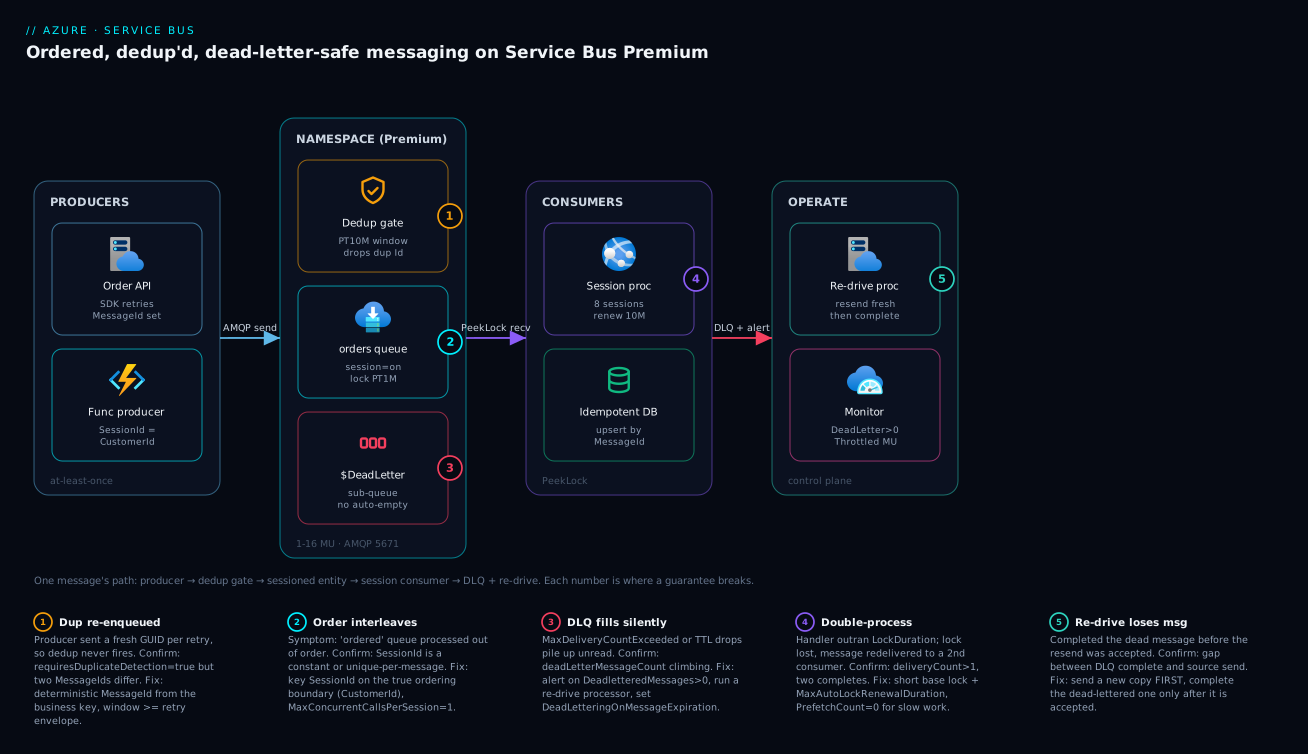
The diagram traces a single message through the system left to right, and pins each guarantee to the exact hop where it can break. On the left, two producers — an App Service Order API and a Function — send over AMQP (TCP 5671) with a deterministic MessageId and a SessionId set to the ordering boundary. They hit the Premium namespace (1–16 messaging units), where the first stop is the conceptual dedup gate: inside the configured window, any repeat MessageId is dropped server-side (badge 1 — the place a fresh-GUID-per-retry bug silently defeats dedup). Surviving messages land in the sessioned orders queue with a one-minute base lock (badge 2 — where a constant or unique SessionId turns “ordered” into “interleaved”). Anything that exceeds max delivery count, expires, or is explicitly rejected falls into the $DeadLetter sub-queue (badge 3 — which fills silently if nothing alerts on its depth).
On the consumer side, a session processor drains one session at a time under PeekLock, renewing its lock for up to ten minutes and writing through an idempotent database keyed on MessageId (badge 4 — where a handler slower than its lock loses it and a second consumer double-processes). The operate zone closes the loop: a re-drive processor reads the DLQ, sends a fresh copy to the source, and completes the dead-lettered message only after the resend is accepted (badge 5 — the ordering that prevents losing a message mid-redrive), while Azure Monitor watches DeadletteredMessages and ThrottledRequests. Read the five legend entries as a diagnostic map: each is a symptom, the exact property or metric that confirms it, and the fix.
Real-world scenario
A payments platform — call it WalletForge — processed wallet transactions through a single Standard-tier queue with competing consumers. Each transaction was independent — until the product team shipped running balances. Now two debits on the same wallet, processed concurrently, could read the same starting balance and both succeed, overdrawing the account. They also hit duplicate charges: a gateway timeout made the upstream service resend, and both copies were processed.
The constraint was hard: strict per-wallet ordering and no duplicate debit, without serializing the entire queue (millions of wallets, thousands of transactions per second) and with a 6-week audit retention requirement on anything that failed.
They fixed it with three changes and no new infrastructure:
- Sessions keyed on
WalletId. Per-wallet ordering became absolute — a wallet’s transactions process one at a time, in order — while different wallets still ran fully parallel. Effective concurrency stayed high because session cardinality (number of active wallets) was enormous. - Duplicate detection with a deterministic
MessageIdset to the upstream transaction ID, on a PT1H window sized to the gateway’s retry envelope, backed by an idempotentUPSERTkeyed on the same ID so a redelivery past the window still could not double-debit. - A DLQ re-drive processor moved to Premium for predictable latency, alerting on
DeadletteredMessages > 0and archiving non-transient failures to a Storage account for the 6-week audit trail before completing them.
The session consumer that closed the overdraw race:
var processor = client.CreateSessionProcessor("wallet-tx", new ServiceBusSessionProcessorOptions
{
    MaxConcurrentSessions = 32,            // 32 wallets in flight
    MaxConcurrentCallsPerSession = 1,      // strict order per wallet
    PrefetchCount = 0,                     // long DB transaction -> no buffered lock loss
    MaxAutoLockRenewalDuration = TimeSpan.FromMinutes(5),
    AutoCompleteMessages = false,
});

processor.ProcessMessageAsync += async args =>
{
    var tx = args.Message.Body.ToObjectFromJson<WalletTx>();
    // Idempotent debit: succeeds once per TxId even on redelivery.
    await ApplyDebitIfNewAsync(tx, idempotencyKey: args.Message.MessageId);
    await args.CompleteMessageAsync(args.Message);
};
The before/after, with the specific change that moved each number:
| Symptom (before) | Root cause | Change made | Result (after) |
|---|---|---|---|
| Occasional overdrafts | Concurrent debits on one wallet | Sessions keyed on WalletId |
Zero overdrafts in the quarter |
| Duplicate charges | Gateway re-send, both processed | Dedup + deterministic MessageId + idempotent upsert |
Zero duplicate debits |
| Failed messages lost / untraceable | No DLQ strategy | Premium + DLQ alert + archive-before-complete | 6-week audit trail intact |
| Latency spikes under load | Shared Standard capacity | Move to Premium messaging units | Predictable p95 |
Result: zero overdrafts and zero duplicate debits in the following quarter, with no message-level locking in their own code and no external coordination service — the ordering came from sessions, the dedup from MessageId plus an idempotent write, and the safety net from the DLQ.
Advantages and disadvantages
The broker-enforced model both gives you ordering/dedup/poison-isolation for free and introduces sharp edges if you misuse the primitives. Weigh it honestly:
| Advantages | Disadvantages |
|---|---|
| Per-session ordering with no coordination service of your own | Ordering only within a session — global FIFO is not on offer |
| Server-side dedup makes the enqueue idempotent inside a window | Dedup does not cover the consumer side — handler must still be idempotent |
| DLQ isolates poison messages automatically | DLQ fills silently — nothing alerts by default |
| PeekLock gives at-least-once delivery with no message loss on crash | A handler slower than its lock double-processes — a subtle, load-only bug |
| Topics + filters route content with zero consumer plumbing | A stray $Default rule silently breaks routing |
| Premium gives dedicated, predictable capacity and 100 MB messages | Premium costs more, and MU sizing needs load testing |
| Immutable flags force a deliberate design | Getting requiresSession/dedup wrong means a full migration |
| Scheduled/auto-forward/defer cover delay & chaining natively | Deferral leaks messages if you lose the SequenceNumber |
The model is right when you have a real per-key ordering or exactly-once-enqueue need, multiple independent readers, or poison-message risk — i.e. most transactional async workloads. It is overkill for fire-and-forget telemetry (use a cheaper path) and the wrong tool for high-throughput streaming with replay (that is Azure Event Hubs at Scale: Partitioning, Capture, Kafka Endpoint, and Stream Analytics Processing territory). When the requirement is really a stateful, long-running workflow, Durable Functions in Production: Orchestrations, Fan-out/Fan-in, and Entity State models it more directly than hand-rolled session-state sagas.
Hands-on lab
Stand up a sessioned, duplicate-detected queue, prove ordering and dedup, force a message into the DLQ, and tear it all down. Premium has no free tier; this lab uses Premium briefly (or substitute Standard to avoid the MU cost — sessions and dedup work on Standard too). Run in Cloud Shell (Bash).
Step 1 — Variables and resource group.
RG=rg-sb-lab
LOC=centralindia
NS=sb-lab-$RANDOM          # globally unique
az group create -n $RG -l $LOC -o table
Step 2 — Create the namespace (Standard keeps the lab nearly free).
az servicebus namespace create -g $RG -n $NS -l $LOC --sku Standard -o table
Expected: a namespace row with sku.name = Standard, status = Active.
Step 3 — Create the sessioned, dedup’d queue with the immutable flags.
az servicebus queue create -g $RG --namespace-name $NS -n orders \
  --enable-session true \
  --enable-duplicate-detection true \
  --duplicate-detection-history-time-window PT10M \
  --max-delivery-count 5 \
  --lock-duration PT1M -o table
Step 4 — Confirm the entity is configured the way you think.
az servicebus queue show -g $RG --namespace-name $NS -n orders \
  --query "{session:requiresSession, dup:requiresDuplicateDetection, maxDelivery:maxDeliveryCount, lock:lockDuration}" -o json
Expected: "session": true, "dup": true, "maxDelivery": 5.
Step 5 — Grant your identity the data-plane role (RBAC, not keys).
ME=$(az ad signed-in-user show --query id -o tsv)
SCOPE=$(az servicebus namespace show -g $RG -n $NS --query id -o tsv)
az role assignment create --assignee $ME --role "Azure Service Bus Data Owner" --scope $SCOPE -o table
Step 6 — Prove dedup and ordering with a tiny script. Send the same MessageId twice (dedup should drop one) and three ordered messages in one session, then read them back. (Use the SDK snippets from this article in a small console app, or az servicebus-adjacent tooling.) Assert: exactly one copy of the duplicated MessageId arrives, and the three same-SessionId messages arrive in send order.
Step 7 — Force a dead-letter and read the reason. Send one message and abandon it six times (max delivery is 5), then peek the DLQ:
# After the redelivery loop, inspect DLQ depth + the dead-letter reason
az servicebus queue show -g $RG --namespace-name $NS -n orders \
  --query "{active:countDetails.activeMessageCount, dead:countDetails.deadLetterMessageCount}" -o json
Expected: dead ≥ 1, and reading the dead message shows DeadLetterReason = MaxDeliveryCountExceeded.
Validation checklist. You created a sessioned, dedup’d entity with deliberate immutable flags, confirmed them via az ... show, used RBAC instead of connection-string keys, proved exactly-once enqueue and per-session ordering, and drove one message to the DLQ with the expected reason. What each step proved:
| Step | What you did | What it proves |
|---|---|---|
| 3 | Created with --enable-session/--enable-duplicate-detection |
The flags are set at creation and are immutable |
| 4 | az ... show the flags |
The entity matches your intent (no silent default) |
| 5 | Assigned a Data role | Data-plane auth is RBAC, not shared keys |
| 6 | Sent dup MessageId + ordered session |
Dedup drops the repeat; session preserves order |
| 7 | Abandoned past max delivery | Poison messages dead-letter with a readable reason |
Cleanup (avoid lingering charges).
az group delete -n $RG --yes --no-wait
Cost note. A Standard namespace is billed primarily per operation and is effectively a few rupees for this lab; deleting the resource group stops everything. If you used Premium, delete promptly — a messaging unit bills hourly whether or not traffic flows.
Common beginner mistakes
These are mental-model errors — the things a beginner believes that quietly shape a wrong design. They are distinct from the symptom-driven playbook in “Common mistakes & troubleshooting” above: here the fix is a corrected model, not a command.
-
“Sessions give my queue global ordering.” They do not. A session is one ordered lane; the queue is many lanes processed in parallel, one consumer per lane. Right model: ordering is a per-
SessionIdpromise, and you get parallelism because different sessions run independently — global FIFO is never on offer. -
“Duplicate detection makes my pipeline exactly-once.” It makes the enqueue idempotent inside a time window. Delivery is still at-least-once — PeekLock can redeliver, and a retry after the window slips through. Right model: exactly-once-ish = dedup at the broker plus an idempotent handler (an upsert keyed on
MessageId). Two halves, both required. -
“PeekLock removes the message when I receive it.” That is ReceiveAndDelete. PeekLock hands you a time-bound lease; the message stays on the queue until you
Completeit. Right model: receive → process → settle. If you forget to settle, the lock expires and the message comes back — that is a feature, not a bug; it is how crashes recover. -
“The dead-letter queue is a log I can ignore.” The DLQ is a real sub-queue that fills and stays full — it does not auto-empty, and nothing alerts on it by default. Right model: the DLQ is an inbox that needs an owner: an alert on its depth and a re-drive processor. A non-empty DLQ is an incident, not a curiosity.
-
“A longer lock is safer for a slow handler.” The base lock maxes at 5 minutes, and a long base lock means a crashed consumer’s message is stuck for that full duration before anyone else can retry it. Right model: keep the base lock short (~1 min) for fast crash recovery, and renew the lock while the handler is healthy. Renewal, not a bigger base, is the lever.
-
“More prefetch and more consumers always means more throughput.” Prefetched messages hold their locks while they wait, so large prefetch plus slow handlers means expired locks and redelivery. And with sessions, parallelism is capped by the number of active sessions, not the number of consumers. Right model: start
PrefetchCount = 0, raise it only for short handlers; scale sessioned throughput by choosing a higher-cardinality key. -
“I’ll enable sessions (or dedup) later when I need them.”
requiresSession,requiresDuplicateDetection, and partitioning are immutable — you cannot toggle them on a live entity. Right model: these are creation-time, IaC-reviewed decisions; getting one wrong means building a new entity and migrating traffic.
Common mistakes & troubleshooting
The playbook — the part you bookmark. First the scannable table, then expanded reasoning for the entries that bite hardest.
| # | Symptom | Root cause | Confirm (exact cmd / property) | Fix |
|---|---|---|---|---|
| 1 | “Ordered” queue processes out of order | SessionId is a constant, unique-per-message, or sessions never enabled |
az servicebus queue show --query requiresSession; inspect SessionId values |
Recreate with sessions on; key SessionId on the ordering boundary; MaxConcurrentCallsPerSession=1 |
| 2 | Duplicate side effects despite “dedup on” | Fresh GUID MessageId per send, or window shorter than retry envelope |
Compare MessageId across retries; --query requiresDuplicateDetection |
Deterministic business MessageId; widen duplicateDetectionHistoryTimeWindow |
| 3 | Same message processed twice under load | Handler outran LockDuration; lock lost & redelivered |
deliveryCount > 1; MessageLockLostException in logs |
Short base lock + MaxAutoLockRenewalDuration; PrefetchCount=0 for slow handlers |
| 4 | Messages vanish on consumer crash | ReceiveAndDelete used for critical work | Receiver ReceiveMode is ReceiveAndDelete |
Switch to PeekLock; settle explicitly |
| 5 | DLQ growing unnoticed; source backs up | No alert on DeadletteredMessages; no re-drive processor |
--query countDetails.deadLetterMessageCount climbing |
Alert on the metric; build a re-drive processor |
| 6 | One bad message stalls a partition | Poison payload abandoned/redelivered in a loop | Same MessageId redelivering; deliveryCount climbing |
Dead-letter unprocessable payloads explicitly; re-drive after fix |
| 7 | Re-driven messages occasionally lost | DLQ message completed before the resend was accepted | Code completes before sending the fresh copy | Send fresh copy first; complete the dead message only after |
| 8 | Analytics subscription gets messages it shouldn’t | Default $Default rule left alongside a custom rule |
az servicebus topic subscription rule list shows $Default + yours |
Delete $Default when adding a custom rule |
| 9 | Throughput plateaus; can’t add parallelism | Low session cardinality caps active sessions | Few distinct SessionId values |
Choose a higher-cardinality key; or don’t session this entity |
| 10 | Intermittent ServerBusyException under peak |
Exceeded messaging-unit capacity | ThrottledRequests metric > 0 sustained |
Let SDK retry; scale MUs (--capacity) |
| 11 | Deferred message never comes back | SequenceNumber not persisted / lost |
No stored seq for the deferred message | Persist SequenceNumber (session state) before deferring |
| 12 | Producer fails with 401 / Unauthorized | Missing data-plane RBAC on the identity | az role assignment list --assignee <id> empty |
Grant Azure Service Bus Data Sender/Receiver/Owner |
| 13 | Send fails: message too large | Body+properties exceed 256 KB (Standard) | MessageSizeExceededException |
Claim-check (store blob, send pointer); move to Premium (100 MB) |
| 14 | TTL’d messages disappear silently | DeadLetteringOnMessageExpiration off |
Active count drops with no DLQ growth | Enable deadLetteringOnMessageExpiration to capture them |
The expanded form for the entries that cause the most 2 a.m. confusion:
1. The “ordered” queue interleaves. Root cause: sessions are off, or the SessionId is wrong — a constant serializes everything (and hides the bug until you ask why throughput is terrible), unique-per-message means each message is its own session (no ordering at all). Confirm: az servicebus queue show --query requiresSession and inspect the SessionId values your producer sets. Fix: sessions are immutable — recreate the entity with --enable-session true, key SessionId on the true ordering boundary, and set MaxConcurrentCallsPerSession = 1.
2. Duplicates despite dedup. Root cause: the producer sets a fresh Guid.NewGuid() per send, so each retry has a new MessageId and dedup never matches; or the window is shorter than how long the upstream keeps retrying. Confirm: log the MessageId across a retried send — if it changes, that’s the bug. Fix: derive MessageId deterministically from the business event; size duplicateDetectionHistoryTimeWindow to the retry envelope; and make the handler idempotent so a redelivery past the window still can’t double-apply.
3. Double-processing under load. Root cause: a handler that runs longer than LockDuration (max 5 min) loses its lock; the message is redelivered and a second consumer processes it concurrently. Large PrefetchCount makes it worse — buffered messages hold locks while they wait. Confirm: deliveryCount > 1 on processed messages, MessageLockLostException in logs. Fix: keep a short base LockDuration and set MaxAutoLockRenewalDuration to your worst-case handler time; set PrefetchCount = 0 for long handlers.
5. The silent DLQ. Root cause: nothing alerts on dead-letter depth by default, and the DLQ never empties itself, so failures pile up until the source entity backs up and throughput drops. Confirm: countDetails.deadLetterMessageCount climbing while nobody noticed. Fix: wire a metric alert on DeadletteredMessages > 0 and run a re-drive processor; treat a non-empty DLQ as an incident, not a curiosity.
7. The lossy re-drive. Root cause: the re-drive code completes the dead-lettered message before (or without confirming) the fresh copy was accepted by the source; a crash in that gap loses the message. Confirm: read the ordering of operations in the re-drive loop. Fix: always SendMessageAsync the new copy first and only CompleteMessageAsync the dead one after the send returns successfully.
Best practices
- Decide the immutable flags in code.
requiresSession,requiresDuplicateDetection, and partitioning are set at creation and reviewed in a Bicep PR — never discovered to be wrong in production. - Key sessions on the true ordering boundary. Not a constant (serializes everything), not unique-per-message (no ordering).
CustomerId/AggregateId/DeviceIdwithMaxConcurrentCallsPerSession = 1. - Use a deterministic
MessageIdfor dedup, sized window to the retry envelope — and pair it with an idempotent handler (upsert keyed onMessageId). Dedup alone does not cover redelivery. - PeekLock, not ReceiveAndDelete, for anything you cannot afford to lose. Settle explicitly; turn off
AutoCompleteMessagesso partial failures surface. - Keep
LockDurationshort (~1 min) and renew. A short base lock frees a crashed consumer’s messages fast;MaxAutoLockRenewalDurationkeeps a healthy slow consumer from losing its lock. - Choose
MaxDeliveryCountdeliberately and enableDeadLetteringOnMessageExpirationif TTL drops matter — don’t let messages vanish silently. - Alert on DLQ depth and run a re-drive processor that resubmits a fresh copy and completes only after the resend is accepted.
- Prefer CorrelationFilter over SQLFilter where exact-equality routing suffices, and delete the
$Defaultrule whenever you add a custom one. - Start
PrefetchCountat 0; raise it only for short, high-rate handlers — never pair large prefetch with long processing. - Scale Premium messaging units on sustained throttling, not transient spikes; validate MU sizing with load tests rather than guessing.
- Use managed identity + RBAC (
Service Bus Data Sender/Receiver/Owner) instead of connection-string keys. - Persist a deferred message’s
SequenceNumberdurably before deferring, or the message leaks until TTL.
The metric alerts worth wiring before the next incident — leading indicators, not “consumer is down”:
| Alert on | Metric | Threshold (starting point) | Why it’s leading |
|---|---|---|---|
| Dead-letter growth | DeadletteredMessages |
> 0 sustained 5 min | Catches poison/expiry before the source backs up |
| Backlog building | ActiveMessages |
Above your normal band | Consumers falling behind producers |
| Throttling | ThrottledRequests |
> 0 sustained | MU capacity exceeded — scale before failures cascade |
| Server errors | ServerErrors |
> 0 | Broker-side trouble worth paging on |
| Incoming vs outgoing | IncomingMessages / OutgoingMessages |
Divergence | Producers outpacing consumers |
| Entity size | Size (% of max) |
> 80% | Approaching QuotaExceededException |
The KQL for the dead-letter rate, wired to an alert:
AzureMetrics
| where ResourceProvider == "MICROSOFT.SERVICEBUS"
| where MetricName == "DeadletteredMessages"
| summarize Dead = sum(Total) by Resource, bin(TimeGenerated, 5m)
| where Dead > 0
For the full observability stack behind these alerts — workbooks, action groups, and KQL at scale — see Azure Monitor and Application Insights: Full-Stack Observability.
Security notes
- Managed identity over connection strings. Use a system- or user-assigned managed identity with
DefaultAzureCredentialand grant it a data-plane RBAC role —Azure Service Bus Data Senderfor producers,Data Receiverfor consumers,Data Owneronly for operate tooling. Connection strings with SAS keys are a credential you have to rotate and can leak; identity removes the secret entirely. - Least privilege per role. A producer that only sends does not need receive. Split roles so a compromised consumer can’t publish forged events and vice versa.
- Network isolation on Premium. Put the namespace behind a Private Endpoint and disable public network access so the broker is reachable only from your VNet — see Private Endpoints and Private DNS at Scale: A Hub-and-Spoke Resolution Architecture. Basic/Standard cannot do this; it is a Premium-only control.
- Encryption. Data is encrypted at rest by default; on Premium you can bring customer-managed keys (CMK) in Key Vault for regulatory requirements. In transit, AMQP runs over TLS on port 5671 — never disable it.
- Don’t put secrets in messages. A payload is not a vault. If a message must reference sensitive data, store it in Azure Key Vault: Secrets, Keys and Certificates Done Right (or a claim-check blob) and send a reference, not the secret.
- Scope SAS narrowly if you must use it. Where a legacy client needs a shared-access key, scope the authorization rule to a single entity with only the rights it needs, set an expiry, and rotate.
- Audit the DLQ archive. If you archive dead-lettered messages for audit (as WalletForge did), protect that store with the same rigour as the live data — it contains the same payloads.
The security controls mapped to what they defend against:
| Control | Mechanism | Defends against | Tier |
|---|---|---|---|
| Managed identity + RBAC | DefaultAzureCredential + Data roles |
Leaked/rotated SAS keys | All |
| Least-privilege roles | Sender vs Receiver vs Owner | Lateral abuse of one credential | All |
| Private Endpoint | Private link + no public access | Internet-exposed broker | Premium |
| TLS in transit | AMQP over 5671 | Eavesdropping / MITM | All |
| CMK at rest | Key Vault-managed keys | Regulatory / key-control needs | Premium |
| Claim-check for secrets | Reference, not payload | Secret sprawl in messages | All |
| Scoped SAS + expiry | Narrow authorization rule | Broad, long-lived keys | All |
Cost & sizing
What drives the Service Bus bill, and how to keep it sane:
- Tier is the first lever. Basic bills purely per million operations (cheapest, but no sessions/topics/dedup). Standard bills per operation plus a small base — the right home for most moderate workloads using sessions and topics. Premium bills per messaging unit per hour regardless of traffic — you pay for dedicated capacity, predictable latency, 100 MB messages, and network isolation.
- Operations add up on Standard. Every send, receive, lock renewal, and peek is a billable operation. A chatty consumer with large prefetch and aggressive renewal can rack up operations; right-size
PrefetchCountand renewal to what the workload needs. - Premium is sized in MUs, not requests. 1–16 MUs, each an hourly charge. Start at 1, scale on sustained
ThrottledRequests, and scale back down when the peak passes — an idle Premium namespace still bills for its MUs. - Storage and DLQ depth. A large backlog or a neglected DLQ consumes entity storage against
maxSizeInMegabytes; a silently filling DLQ is a cost as well as a reliability problem.
A rough monthly picture (INR, indicative — confirm against the pricing calculator for your region):
| Scenario | Tier / size | Rough INR / month | What you get | Watch-out |
|---|---|---|---|---|
| Dev / low volume | Basic, ~1M ops | ~₹50–300 | Queues only, no sessions | No topics/dedup/sessions |
| Moderate prod | Standard, ~20–50M ops | ~₹2,000–6,000 | Sessions, topics, dedup | Per-op cost grows with chattiness |
| High-throughput / isolated | Premium, 1 MU | ~₹55,000+ | Dedicated capacity, 100 MB, PE | Bills hourly even when idle |
| High-throughput scaled | Premium, 4 MU | ~₹220,000+ | ~4× capacity | Scale back after peaks |
| Add-on | DLQ/backlog storage | small, usage-based | Buffer headroom | Neglected DLQ = creeping cost |
Premium pricing is substantial — only move to it for a real need (predictable latency, 100 MB messages, VNet isolation, or geo-DR). Most teams run Standard happily and reserve Premium for the transactional backbone. WalletForge moved its wallet-transaction entity to Premium for predictable latency and audit isolation, but kept lower-criticality topics on Standard — tier per workload, not per company.
Interview & exam questions
1. Why doesn’t a plain Service Bus queue guarantee global FIFO, and how do you get ordering? Competing consumers and redelivery (a lock expires, the message goes to another consumer) break global order. Ordering is guaranteed only within a session: all messages sharing a SessionId are delivered in order to one consumer holding the session lock. You enable sessions at creation and key SessionId on the ordering boundary.
2. What does duplicate detection actually guarantee, and what does it not? It guarantees the enqueue is idempotent within the configured window — a repeat MessageId is dropped server-side. It does not make delivery exactly-once (PeekLock can still redeliver) and does not make your handler idempotent. End-to-end exactly-once needs dedup plus an idempotent write keyed on MessageId.
3. Difference between PeekLock and ReceiveAndDelete? ReceiveAndDelete removes the message on delivery — one hop, fastest, but a crash loses it. PeekLock leases the message with a time-bound lock and requires explicit settlement (Complete/Abandon/DeadLetter/Defer); if the lock expires the message is redelivered and the delivery count increments. Use PeekLock for anything you can’t lose.
4. A handler sometimes runs longer than the lock and the message double-processes. Fix? Keep LockDuration short (~1 min) so a crashed consumer recovers fast, and set MaxAutoLockRenewalDuration to your worst-case handler time so a healthy slow consumer renews the lock instead of losing it. Set PrefetchCount = 0 for long handlers so buffered messages don’t hold (and lose) locks.
5. How does a message end up in the dead-letter queue, and how do you get it out? Via exceeding MaxDeliveryCount, TTL expiry (if DLQ-on-expiration is on), header-size/filter errors, or an explicit DeadLetter call. There is no in-place “resubmit” — you receive from $DeadLetterQueue, send a fresh copy to the source (preserving MessageId/SessionId), and complete the dead-lettered message only after the resend is accepted.
6. When do you choose a topic over a queue? When more than one independent reader needs the same message. A queue delivers each message to exactly one competing consumer; a topic gives every subscription its own copy, cursor, DLQ, and filters. Count independent reader groups: one → queue, many → topic.
7. CorrelationFilter vs SQLFilter — which and when? CorrelationFilter matches system and named app properties by exact equality, is indexed, and is the cheapest — prefer it for known-value routing. SQLFilter is a SQL-92-like boolean (ranges, LIKE, IN, compound logic) that is more expressive but more expensive. Neither can read the message body — only properties.
8. What’s immutable on a Service Bus entity, and why does it matter? requiresSession, requiresDuplicateDetection, and partitioning are fixed at creation. Getting them wrong means creating a new entity and migrating traffic — so decide them deliberately in IaC up front rather than discovering the need in production.
9. You see intermittent ServerBusyException on Premium under peak. What is it and what do you do? You’ve exceeded the namespace’s messaging-unit capacity; Service Bus throttles (a 429-equivalent) rather than failing, and the SDK retries with backoff. If ThrottledRequests is sustained (not spiky), scale messaging units with az servicebus namespace update --capacity; if spiky, the default retry already absorbs it.
10. How do you pick a SessionId, and what are the two failure modes? Key it on the true ordering boundary (e.g. CustomerId). A constant serializes all traffic to one consumer (a throughput cliff); a unique-per-message value gives every message its own session (no ordering at all). The right key gives per-key order while keeping high parallelism via high session cardinality.
11. How do you secure a Service Bus namespace in a regulated environment? Use managed identity with least-privilege data-plane RBAC (Sender/Receiver/Owner split), put a Premium namespace behind a Private Endpoint with public access disabled, enforce TLS (AMQP 5671), optionally bring customer-managed keys for at-rest encryption, and keep secrets out of payloads (claim-check to Key Vault/Blob).
12. A deferred message never comes back — why? Deferral sets a message aside, retrievable only by its SequenceNumber. If you didn’t persist that number durably, the message is invisible to normal receive and effectively leaked until its TTL expires. Always persist SequenceNumber (session state is a natural home) before calling DeferMessageAsync.
These map to AZ-204 (Developer Associate) — develop message-based solutions (Service Bus queues/topics, sessions, dead-letter) — and AZ-305 (Solutions Architect) — design message and event-driven solutions (choosing queue vs topic, Service Bus vs Event Grid vs Event Hubs). The security/network angle touches AZ-500. A compact cert map for revision:
| Question theme | Primary cert | Objective area |
|---|---|---|
| Sessions, dedup, PeekLock, DLQ | AZ-204 | Develop message-based solutions |
| Queue vs topic vs Event Grid/Hubs | AZ-305 | Design messaging & eventing |
| Filters, auto-forward, scheduled/defer | AZ-204 | Service Bus advanced features |
| Managed identity + RBAC, Private Endpoint | AZ-500 | Secure messaging; network isolation |
| MU sizing, throttling, scaling | AZ-305 | Design for scale & cost |
Practice challenges
Work these in order — they escalate from “provision and verify” to “atomic, DR-safe handoff”. Each maps to a section above; try it before opening the solution.
1. Provision and verify (beginner). Create a queue named orders that requires sessions and duplicate detection with a 10-minute window, then prove the immutable flags actually took — do not trust that they did.
<details> <summary>Solution</summary>
az servicebus queue create -g $RG --namespace-name $NS -n orders \
  --enable-session true --enable-duplicate-detection true \
  --duplicate-detection-history-time-window PT10M -o table

az servicebus queue show -g $RG --namespace-name $NS -n orders \
  --query "{session:requiresSession, dup:requiresDuplicateDetection}" -o json
Expect {"session": true, "dup": true}.
Why: requiresSession and requiresDuplicateDetection are immutable — creation is the only cheap moment to catch a wrong flag before traffic and a migration.
</details>
2. Pick the ordering key (beginner). A wallet service needs strict per-wallet ordering across millions of wallets and thousands of messages/second. What do you set SessionId to, and why is "all" wrong even though it “orders everything”?
<details> <summary>Solution</summary>
Set SessionId = WalletId. A constant like "all" creates one global session, so every message serialises through one consumer — perfect ordering, catastrophic throughput. WalletId gives per-wallet order while different wallets run fully in parallel.
Why: the session key is simultaneously your ordering boundary and your parallelism ceiling — cardinality is throughput. </details>
3. Dedup that isn’t dedup’ing (intermediate). Duplicate detection is enabled, yet a gateway timeout that makes the upstream resend still double-charges. The producer sets MessageId = Guid.NewGuid(). Fix the enqueue and close the end-to-end gap.
<details> <summary>Solution</summary>
Set a deterministic MessageId from the business event, size the window to the retry envelope, and make the handler idempotent:
var msg = new ServiceBusMessage(body) { MessageId = tx.TransactionId };  // not NewGuid()
// window >= how long the upstream keeps retrying, e.g. PT1H
// handler: UPSERT keyed on MessageId, so a redelivery past the window still can't double-apply
Why: dedup keys on MessageId; a fresh GUID per send is a new identity every time, so the broker never sees a “duplicate”.
</details>
4. The lock that won’t hold (intermediate). A handler does an ~8-minute database transaction and, under load, some messages are processed twice. LockDuration is already at its 5-minute maximum. Configure the processor so this stops.
<details> <summary>Solution</summary>
new ServiceBusProcessorOptions
{
    PrefetchCount = 0,                                     // no buffered locks to expire
    MaxAutoLockRenewalDuration = TimeSpan.FromMinutes(12), // renew past the 5-min ceiling
    AutoCompleteMessages = false,
}
// the entity's base LockDuration stays at PT1M
Why: you cannot raise the base lock past 5 minutes — renewal, not a longer base, is the tool for long handlers; prefetch off stops buffered locks expiring while the handler runs. </details>
5. A re-drive that never loses a message (advanced). Write the ordering of operations for a DLQ re-drive loop and explain why the order matters.
<details> <summary>Solution</summary>
- Receive from
orders/$DeadLetterQueue. - Build a fresh message:
new ServiceBusMessage(dead), preservingMessageIdandSessionId. SendMessageAsyncthe fresh copy to the source first.- Only after the send returns,
CompleteMessageAsyncthe dead-lettered message.
If you complete before the send is accepted, a crash in the gap loses the message forever — there is no in-place “resubmit” verb.
Why: send-before-complete makes the worst case a duplicate (which dedup and idempotency absorb) instead of a loss. </details>
6. Atomic, DR-safe handoff (advanced). An order handler must, as one unit, complete the incoming order and emit a shipment message, and the business also demands no message loss if the region fails. It writes an order row to SQL too. Sketch the design, name what each piece does, and say why Geo-DR is not enough.
<details> <summary>Solution</summary>
- Broker-to-broker atomicity: one namespace,
EnableCrossEntityTransactions = true, wrapSendMessageAsync(shipment)+CompleteMessageAsync(order)in aTransactionScope(send-via commits both or neither). - Database-to-broker atomicity: you cannot 2PC SQL and the broker, so use the transactional outbox — write the shipment intent to an outbox table in the same SQL transaction as the order row; a relay publishes it with a deterministic
MessageId. - Region loss with no message loss: Premium Geo-Replication (replicates message data), not Geo-DR (alias/metadata-only — in-flight messages are lost on failover).
Why: three different seams — broker↔broker, DB↔broker, region↔region — each need their own guarantee; no single feature covers all three. </details>
Quick check
- Your “ordered” queue is processing a customer’s events out of order. Name the two most likely
SessionIdmistakes and the one setting that keeps order within a session. - Duplicate detection is enabled but you still see duplicate side effects. What is the most common producer bug, and what else must be idempotent for end-to-end safety?
- A handler occasionally runs longer than its lock and the message is processed twice. Which two settings fix this, and what value should
PrefetchCountbe for long handlers? - How do you correctly re-drive a message out of the dead-letter queue without ever losing it on a crash?
- You add a SQL filter to a subscription but it still receives messages it shouldn’t. What did you forget to delete?
Answers
- The two mistakes: a constant
SessionId(serializes everything to one consumer) and a unique-per-messageSessionId(no ordering — each message is its own session). Key it on the true ordering boundary (e.g.CustomerId) and setMaxConcurrentCallsPerSession = 1to keep order within a session. - The common bug is a fresh
Guid.NewGuid()MessageIdper send, so each retry looks new and dedup never fires — use a deterministic businessMessageId. End-to-end, the consumer’s write must also be idempotent (an upsert keyed onMessageId), because PeekLock can still redeliver past the dedup window. - Keep
LockDurationshort (~1 min) and setMaxAutoLockRenewalDurationto the worst-case handler time so a healthy slow consumer renews rather than loses the lock. For long handlers setPrefetchCount = 0so buffered messages don’t hold and lose locks. - Receive from
$DeadLetterQueue, send a fresh copy to the source first (preservingMessageIdandSessionId), and complete the dead-lettered message only after the resend is accepted — so a crash in between never loses the message (worst case it’s re-sent, and dedup/idempotency absorb the repeat). - The default
$Default(match-all) rule — a subscription created without an explicit rule gets it, and it stays alongside your custom filter, so the subscription matches everything and your filter. Delete$Defaultwhen you add a custom rule.
Glossary
- Namespace — the top-level Service Bus container that holds entities and (on Premium) provides dedicated capacity via messaging units; it carries the tier.
- Queue — a point-to-point entity; each message is delivered to exactly one competing consumer.
- Topic / subscription — publish/subscribe: a message published to a topic is copied to every subscription, each with its own cursor, DLQ, and filters.
- Session — an ordered group of messages sharing a
SessionId, delivered in order to one consumer holding an exclusive session lock. SessionId— the property that defines the ordering boundary; choose a high-cardinality business key (not a constant, not unique-per-message).MessageId— the identity used by duplicate detection; must be deterministic (a business key or payload hash), never a fresh GUID per send.- Duplicate detection — server-side dropping of any message whose
MessageIdwas already seen on the entity within the configured history window. - PeekLock — the default receive mode: lease the message with a time-bound lock, then settle it (
Complete/Abandon/DeadLetter/Defer). - ReceiveAndDelete — receive mode that removes the message on delivery; fastest but loses the message on a consumer crash.
- Lock duration — how long a PeekLock lease lasts (max 5 minutes); longer handlers must renew via auto or manual lock renewal.
- Delivery count — server-side count of how many times a message has been delivered; reaching
MaxDeliveryCountdead-letters it. - Dead-letter queue (DLQ) — the
<entity>/$DeadLetterQueuesub-queue where poison, expired, or explicitly rejected messages land; it does not auto-empty. - Re-drive processor — tooling that reads the DLQ and resubmits a fresh copy to the source, completing the dead message only after the resend is accepted.
- CorrelationFilter / SQLFilter — subscription rules: exact-equality on properties (cheap, indexed) vs a SQL-92-like boolean (expressive, costlier); neither reads the body.
- Auto-forwarding — server-side chaining of one entity’s messages to another in the same namespace, with no consumer code.
- Scheduled message / deferral — native delayed delivery (visible at a future time) and setting a received message aside for later retrieval by
SequenceNumber. - Messaging unit (MU) — Premium’s unit of dedicated, isolated capacity (1–16); exceeding it throttles (
ServerBusyException) rather than failing. - Session state — a small server-side scratch blob keyed to a
SessionId, surviving consumer swaps; ideal for a saga cursor, not for large data. - Send-via (transfer entity) — the mechanism behind cross-entity transactions: operations are routed through the first entity touched, so the broker can commit a send and a settle atomically within one namespace.
- Cross-entity transaction — a Service Bus local transaction (opt-in via
EnableCrossEntityTransactions) that groups broker operations — e.g. complete one message and send another — into an all-or-nothing unit; it never spans namespaces or your database. - Transactional outbox — a pattern that writes an outgoing message to a table in the same database transaction as the business row, then relays it to the broker; it bridges the database-to-broker seam a broker transaction cannot cover.
- Geo-DR (alias) — Premium disaster recovery that pairs two namespaces behind a stable alias and replicates metadata only; messages in flight or backlogged at failover are lost.
- Geo-Replication — the newer Premium model that continuously replicates metadata and message data to a secondary region behind one hostname, giving a near-zero RPO across a region failure.
- JMS 2.0 — the Java messaging API Service Bus supports over AMQP on the Premium tier only, letting Java/Spring apps migrate onto Service Bus by configuration rather than a rewrite.
- Prefetch (link credit) — the count of messages the receiver lets the broker stream ahead over the AMQP link; prefetched messages already hold their locks, so large prefetch with slow handlers loses locks.
- Lock token — the server-side handle a receiver uses to settle (
Complete/Abandon/DeadLetter/Defer) or renew a PeekLock; settling with an expired token throwsMessageLockLostException. - Partitioned entity — an entity spread across multiple partitions for throughput; like sessions and dedup it is set at creation (immutable), and Premium partitioning is the modern form.
Next steps
You can now build ordered, deduplicated, dead-letter-safe messaging on Service Bus and operate it without losing messages. Build outward:
- Next: Designing Idempotent APIs and Deduplication for Reliable Distributed Systems — the consumer-side half of exactly-once that broker dedup cannot give you.
- Related: Message Queues vs Pub/Sub: Choosing an Async Pattern — the upstream decision of whether a queue or pub/sub fits the problem at all.
- Related: Durable Functions in Production: Orchestrations, Fan-out/Fan-in, and Entity State — when your “ordering” is really a stateful, long-running workflow.
- Related: Deploy KEDA for Event-Driven Autoscaling on Kafka and Azure Service Bus Workloads — scale consumers by queue depth instead of a fixed instance count.
- Related: Building the Transactional Outbox and Inbox Pattern for Exactly-Once Event Publishing — guarantee a message is published exactly once with the database write that produced it.
- Related: Azure Event Hubs at Scale: Partitioning, Capture, Kafka Endpoint, and Stream Analytics Processing — when the workload is high-throughput streaming with replay, not transactional messaging.