In a nutshell
Level: Expert · Time: ~70 min
Picture a classic database as a single filing cabinet bolted to one clerk’s desk. The papers, the clerk who reads them, and the lock on the drawer all live in one place. Need a bigger cabinet? You unbolt the whole thing and copy every sheet into a new one while the office waits. That is roughly how General Purpose and Business Critical feel: storage is tied to the compute, so growing or resizing means physically moving data.
The four patterns in this lesson each cut one of those bolts:
- Hyperscale moves the papers into a warehouse (page servers) that the clerk fetches from on demand, with a running dictation log as the source of truth. The desk never fills up, copies are instant snapshots, and you can add read-only clerks (replicas) without duplicating the warehouse.
- Elastic pools put hundreds of tenants’ cabinets on one shared electricity bill, so an idle tenant’s unused power flows to a busy one instead of you paying every peak separately.
- Ledger adds a tamper-proof logbook: every page gets a cryptographic fingerprint chained to the previous one, so anyone — even an admin — who alters a sheet is caught.
- Always Encrypted with secure enclaves seals the sensitive papers in envelopes only the client can open, then gives the clerk a locked booth (the enclave) where it can search inside the envelopes without ever seeing the contents.
If you are new to Azure SQL, do not try to hold all four in your head at once. Read this opener, skim the Core concepts table, then treat the rest as a reference you return to — one pattern at a time. Everything here assumes you have met a relational database before (tables, SELECT, a connection string); if that is still fresh, start with relational data on Azure and come back.
By the end you will be able to pick Hyperscale for the right reason, size an elastic pool from telemetry, hand an auditor a cryptographic verification procedure, and let analysts search encrypted columns no DBA can read. The full objectives and prerequisites are spelled out in the two sections just below — this nutshell is only the map.
Most teams treat Azure SQL Database as “SQL Server, but someone else patches it.” That mental model leaves enormous capability on the table. The parts that change how you architect have no on-prem equivalent: a storage engine that decouples compute from a distributed log and a page-server tier, read replicas you can size independently of the primary, tamper-evident ledger tables backed by a Merkle tree, and Always Encrypted enclaves that run WHERE name LIKE over data the engine itself cannot decrypt. This is a tour of those four patterns — Hyperscale, elastic pools, ledger, and Always Encrypted with secure enclaves — wired correctly, with the gotchas I have hit in production and the exact az/T-SQL to confirm each one is actually doing what you think.
Because this is a reference you will return to while designing a real data platform, every moving part is enumerated: the four Hyperscale tiers and what each costs you, the replica types side by side, every elastic-pool guardrail, the two ledger flavours and their verification surface, the encryption modes and what each can and cannot query, and a symptom→cause→confirm→fix playbook for the failure modes that actually page you at 2 a.m. Read the prose once, then keep the tables open. Everything below assumes a logical server (Microsoft.Sql/servers) already exists; I use sql-prod-eastus2 as the logical server and rg-data-eastus2 as the resource group throughout.
By the end you will be able to choose Hyperscale over Business Critical for the right reason (not “it’s newer”), size an elastic pool from telemetry instead of a guess, hand an auditor a cryptographic verification procedure instead of a promise, and let analysts run rich predicates over columns that no DBA — yours or Microsoft’s — can read in plaintext. These are the patterns that separate “we host a database” from “we engineered a data platform.”
What problem this solves
Four distinct production pains converge here, and each one is the kind that gets worse the longer you ignore it.
Storage and scale on a monolith hurt. On General Purpose or Business Critical, the database is (conceptually) a data file on a managed disk. Growth means pre-provisioning storage; a vCore resize on Business Critical reseeds a full local copy and can take hours; backing up a 50 TB database is a 50 TB problem. Teams hit a ceiling and start sharding their application by hand — months of work to dodge an engine limitation. Hyperscale removes the ceiling: storage grows transparently to 128 TB, resize is minutes not hours, and backups are snapshot-based and effectively size-independent.
Per-tenant isolation collides with per-tenant cost. SaaS teams want one database per tenant for hard data isolation and a clean blast radius, then balk at paying a dedicated SKU per tenant when most tenants are idle most of the time. Without a pooling model you either over-pay massively or compromise isolation by cramming tenants into shared tables with a TenantId column and pray your WHERE clauses are perfect. Elastic pools let hundreds of databases share one budget of vCores, so you provision for aggregate peak, not the sum of peaks.
“Trust us, the data wasn’t tampered with” is not a control. Regulated workloads (finance, health, supply chain) increasingly need to prove an audit record was not altered — even by a sysadmin, even by the cloud operator. Application-level hashing is brittle and bypassable. Ledger bakes cryptographic tamper-evidence into the engine: every change is hashed into a Merkle tree whose root you publish to immutable storage, and verification recomputes the tree.
Encryption that breaks search is encryption you can’t use. Classic Always Encrypted protects column data end-to-end — the service never sees plaintext — but the engine, seeing only ciphertext, can do equality at best and nothing else. So teams “solve” the search requirement by not encrypting the sensitive column, defeating the point. Secure enclaves let the engine decrypt inside a sealed, attested memory region and run LIKE/range predicates there, so you get confidentiality and rich queries.
Who hits these: platform and data teams running OLTP at scale, multi-tenant SaaS, compliance-bound audit trails, and any system holding regulated identifiers. The cost of getting it wrong ranges from a surprise tenfold bill to an un-passable audit to a sharding project you never needed.
Learning objectives
By the end of this article you can:
- Explain the four Hyperscale tiers (compute, page servers, log service, long-term storage) and why backups and restores are size-independent.
- Choose between HA replicas and named replicas for read-scale, and size each independently of the primary’s compute.
- Provision a Hyperscale database with zone redundancy and HA replicas, then scale vCores with no data movement.
- Design an elastic pool with per-database min/max guardrails sized from Azure Monitor telemetry, and move databases in and out with zero downtime.
- Implement append-only and updatable ledger tables, generate and verify a database digest, and configure automatic digest upload to immutable storage.
- Encrypt a column with randomized Always Encrypted and still run
LIKE/range predicates through a secure enclave with Azure Attestation. - Lock the perimeter and identity: Private Endpoint, public-access-off, Entra-only authentication, and least-privilege database roles.
- Diagnose the failure modes that actually bite — attestation drift, replica lag, connection storms, quota throttling — with the exact command that confirms each.
Prerequisites & where this fits
You should already understand the Azure SQL Database fundamentals — the difference between a logical server and a database, the DTU vs vCore purchasing models, and how to connect with a connection string. You should be comfortable running az in Cloud Shell, reading JSON output, and writing basic T-SQL DDL. Familiarity with TLS, managed identities, and private networking helps; the security section leans on the Azure Key Vault and Private Endpoint mechanics.
This sits at the top of the Data platform track. It assumes the service-tier basics and goes past them into the patterns that have no on-prem analogue. It pairs with Azure SQL connectivity troubleshooting (the playbook for when connections fail), encryption at rest with CMK (the layer beneath Always Encrypted), and Entra ID and RBAC (who is allowed to touch the data). For the managed-instance cousin of failover groups, see Azure SQL Managed Instance failover groups.
Where each capability sits in the bigger picture, and who usually owns it:
| Layer | What lives here | Pattern in this article | Who usually owns it |
|---|---|---|---|
| Compute / engine | Relational engine, RBPEX cache | Hyperscale compute + named replicas | Data / platform team |
| Storage | Page servers, log service, backups | Hyperscale disaggregated storage | Microsoft (platform) |
| Density / cost | Shared vCore budget | Elastic pools | Platform + FinOps |
| Integrity | Merkle tree, digests | Ledger tables | App + compliance |
| Confidentiality | Client-held keys, VBS enclave | Always Encrypted + enclaves | Security + app |
| Perimeter / identity | Private Endpoint, Entra auth | Network + identity lockdown | Network + identity team |
| Resilience | Zones, geo-replication, failover groups | HA/DR layering | SRE / DR owner |
Core concepts
Five mental models make every later decision obvious.
Hyperscale disaggregates storage from compute. General Purpose and Business Critical bind data to the compute node (or a managed disk). Hyperscale splits the database into four cooperating tiers — compute nodes, page servers, a log service, and long-term Azure Storage — connected by a log-is-the-database design. Compute becomes stateless-ish: it caches pages locally but the durable truth is the log. That single architectural choice is why resize, backup, restore, and read-scale all behave differently (and better) than on any other tier.
A replica is either coupled or independent. An HA replica is a hot standby sized exactly like the primary, sharing its page servers and log; it exists for failover and generic read traffic. A named replica is a separate database resource with its own name, its own compute SKU, and its own logins, but reading the same page servers — so it scales reads without copying storage and can be isolated per consumer. Knowing which you want is the difference between “fast failover” and “true read-scale-out.”
An elastic pool is a shared budget, not a shared database. Databases in a pool stay fully separate (separate schemas, separate logins, separate blast radius) but draw vCores/DTUs and storage from one pool budget. A tenant idle at 2 a.m. lends capacity to a tenant under load. Two guardrails — per-database min (a reserved floor) and max (a usage ceiling) — keep one noisy tenant from starving the rest. You size the pool to the aggregate peak.
Ledger is tamper-evidence, not tamper-prevention. It does not stop a privileged user from changing data; it guarantees you can detect it. Rows are hashed into a Merkle tree, the tree root is periodically sealed into a database digest, and you publish that digest to storage even Azure operators cannot rewrite. Verification recomputes the tree and compares. The value is that you can hand an auditor a procedure (sp_verify_database_ledger) instead of an assurance.
Always Encrypted keeps keys with the client; enclaves restore rich queries. The column encryption keys live with the client (wrapped by a column master key in a store the client controls); the SQL service never sees plaintext. Classic mode therefore allows only equality (deterministic) or nothing (randomized). A secure enclave — a VBS-protected memory region on the SQL node, gated by attestation — lets the engine briefly decrypt inside that sealed region and run LIKE/range predicates and in-place re-encryption, with the DBA still locked out.
The vocabulary in one table
Pin down every moving part before the deep sections. The glossary repeats these for lookup; this is the mental model side by side:
| Concept | One-line definition | Where it lives | Why it matters |
|---|---|---|---|
| Hyperscale | Disaggregated-storage SQL service tier | Service tier on a database | Removes scale/backup/restore ceilings |
| Compute node | Engine + local RBPEX SSD cache | Hyperscale compute tier | Where queries run; resize swaps it |
| Page server | Owns ≤1 TB slice, serves 8 KB pages | Hyperscale storage tier | Scales storage transparently to 128 TB |
| Log service | Fans log records to pages/replicas/backup | Hyperscale storage tier | Durability + the source of read replicas |
| HA replica | Hot standby, same SKU as primary | Same page servers/log | Fast failover; generic reads |
| Named replica | Independent DB, own SKU, same page servers | Separate resource | True read-scale-out, isolated |
| Elastic pool | Shared vCore/DTU budget for many DBs | On a logical server | Density for multi-tenant |
| Ledger table | Hash-chained, tamper-evident table | Inside a database | Cryptographic audit proof |
| Database digest | Sealed Merkle root you store off-box | Generated by the engine | The value verification trusts |
| Always Encrypted | Client-side column encryption | Column + client driver | Service never sees plaintext |
| Secure enclave | Attested protected-memory region | On the SQL node | Rich queries over encrypted data |
| Attestation | Proof the enclave is genuine | Azure Attestation (AAS) | Gate before keys enter the enclave |
| Failover group | Managed listener over geo-replication | Across two regions | Stable FQDN through failover |
A quick orientation across the four service tiers, so the rest of the article has a baseline — what each tier is for and where it caps out:
| Service tier | Storage model | Max size | Resize behaviour | Best for |
|---|---|---|---|---|
| General Purpose | Remote managed disk | 4 TB | Online, minutes | Most workloads; cost-balanced |
| Business Critical | Local SSD + AlwaysOn AG | 4 TB | Reseeds local copy (slow) | Low-latency OLTP, in-memory OLTP |
| Hyperscale | Disaggregated page servers + log | 128 TB | Minutes, no data move | Large/VLDB, fast restore, read-scale |
| Hyperscale (serverless) | Same, auto-pause-less compute | 128 TB | Auto-scale compute | Bursty/intermittent large DBs |
Hyperscale architecture: page servers, the log service, and named replicas
Hyperscale is a fundamentally different engine. Instead of a monolithic data file, it splits the database into four cooperating tiers:
- Compute nodes run the relational engine and a local SSD cache (the RBPEX — resilient buffer pool extension). The primary compute serves writes and reads; secondary computes serve reads.
- Page servers each own a slice of the database (covering up to ~1 TB of data) and serve 8 KB pages on demand to compute nodes that miss their local cache. Adding data adds page servers transparently — this is why Hyperscale scales to 128 TB without you ever pre-provisioning storage.
- The log service is the heart of the design. The primary writes log records to a durable landing zone (Azure Premium Storage), and the log service fans those records out to page servers and secondary replicas, and offloads them to long-term storage for backups. There is no checkpoint-and-flush of data pages from compute; durability is the log.
- Azure Storage holds the long-term log and the snapshot-based backups.
The consequence that matters: backups are snapshot-based and effectively size-independent, so a 50 TB database backs up in roughly the same wall-clock time as a 500 GB one, and a restore is fast because it rehydrates page-server snapshots rather than replaying a full backup chain.
The four tiers, what each owns, and the failure/scaling behaviour you inherit from each:
| Tier | Owns | Scales by | Durability role | What fails if it’s slow |
|---|---|---|---|---|
| Compute node | Engine + RBPEX cache | vCore resize (minutes) | None (cache only) | Query latency, cold cache after resize |
| Page server | ≤1 TB data slice, 8 KB pages | Auto, per TB of data | Holds materialized pages | Page-miss latency on cold reads |
| Log service | Durable log landing + fan-out | Throughput-bound (~100 MB/s) | The durability boundary | Write throughput ceiling, replica lag |
| Long-term storage | Snapshots + log for PITR | Auto, per retention | Backups / restore source | Restore time (still fast) |
Provision a Hyperscale database with secondary replicas in one shot:
az sql db create \
  --resource-group rg-data-eastus2 \
  --server sql-prod-eastus2 \
  --name appdb \
  --edition Hyperscale \
  --family Gen5 \
  --capacity 8 \
  --ha-replicas 2 \
  --zone-redundant true \
  --backup-storage-redundancy Zone
resource appdb 'Microsoft.Sql/servers/databases@2023-08-01' = {
  parent: sqlServer
  name: 'appdb'
  location: location
  sku: { name: 'HS_Gen5_8', tier: 'Hyperscale', family: 'Gen5', capacity: 8 }
  properties: {
    highAvailabilityReplicaCount: 2
    zoneRedundant: true
    requestedBackupStorageRedundancy: 'Zone'
  }
}
--ha-replicas (0–4) provisions HA secondary replicas. They share the same page servers and log as the primary, give you fast failover targets, and serve read-only traffic via ApplicationIntent=ReadOnly. Zone redundancy spreads the primary and HA replicas across availability zones; do not skip it for production.
The provisioning knobs that actually shape cost and resilience — what each does, its default, and the trade-off:
| Flag / property | What it controls | Default | Range / values | Trade-off if wrong |
|---|---|---|---|---|
--edition |
Service tier | (required) | Hyperscale |
Wrong tier = wrong scaling model |
--family |
Hardware generation | Gen5 |
Gen5, Gen8, etc. |
Newer = better perf/vCore, check region |
--capacity |
vCore count | (required) | 2–128 (Gen5) | Under-size → throttle; over-size → bill |
--ha-replicas |
HA standby count | 0 | 0–4 | 0 = slow failover; each adds compute cost |
--zone-redundant |
Spread across AZs | false | true/false | false → single-AZ outage = downtime |
--backup-storage-redundancy |
Backup geo-spread | Geo | Local/Zone/Geo/GeoZone |
Local = no cross-region restore |
--read-scale |
Route RO intent to replicas | Enabled (HS) | Enabled/Disabled | Disabled wastes HA replica read capacity |
--compute-model |
Provisioned vs serverless | Provisioned | Provisioned/Serverless |
Serverless saves on bursty, costs on steady |
Named replicas: the feature that changes read-scale architecture
HA replicas are coupled to the primary’s compute size and serve generic read traffic. Named replicas are different and far more powerful: each is a separate database resource with its own name, its own compute SKU, and its own access control, but reads from the same page servers as the primary (so it costs compute, not a second copy of storage). You can attach up to 30 of them.
This is how you build true read-scale-out: a small primary sized for OLTP writes, and named replicas individually sized — a big one for the BI/Power BI workload, a small one for an ad-hoc reporting team, each isolated so a runaway report cannot starve the OLTP primary.
# A large named replica dedicated to the analytics workload,
# pointed at the SAME primary database (--partner-database).
az sql db replica create \
  --resource-group rg-data-eastus2 \
  --server sql-prod-eastus2 \
  --name appdb \
  --partner-server sql-prod-eastus2 \
  --partner-database appdb-bi-replica \
  --secondary-type Named \
  --family Gen5 \
  --capacity 16
Named replicas are read-only and lag the primary by milliseconds (they consume the same log stream). Because each has its own logins and
DENY-able surface, you can hand a reporting team a connection toappdb-bi-replicawith zero write capability and zero blast radius onto production — something you cannot cleanly do with a plain HA replica.
The two replica types side by side — this table is the whole decision:
| Dimension | HA replica | Named replica |
|---|---|---|
| Resource identity | Hidden, part of primary | Separate database resource |
| Compute SKU | Same as primary | Independent (own vCore count) |
| Max count | 4 | 30 |
| Storage | Shared page servers | Shared page servers |
| Logins / access control | Inherited from primary | Own logins, own grants |
| Primary use | Failover + generic reads | Read-scale-out, isolation |
| Routing | ApplicationIntent=ReadOnly |
Connect to its own FQDN |
| Failover target? | Yes | No |
| Lag | Milliseconds | Milliseconds |
| Cost | Compute (primary SKU) | Compute (its own SKU) |
When to reach for which read path, as a decision table:
| If you need… | Use | Why |
|---|---|---|
| A failover target with read offload | HA replica | It can be promoted; reads are a bonus |
| A dedicated, independently sized analytics endpoint | Named replica | Own SKU, own logins, isolated |
| To stop a BI query starving OLTP | Named replica | Separate compute can’t steal the primary’s |
| Read-only access for a third party with no write risk | Named replica | Grant on its own surface only |
| Cross-region readable copy | Geo-replica / failover group | Replicas above are same-region |
| The cheapest possible read offload | ApplicationIntent=ReadOnly on an HA replica |
Reuses a replica you already pay for |
Rapid scale, fast restore, and read-scale-out in practice
Because storage is disaggregated, scaling compute up or down does not move data — it reattaches a new compute node to the existing page servers and warms the cache. A vCore resize that would take hours on Business Critical (it has to seed a new local copy) completes in minutes on Hyperscale.
# Vertical scale: 8 -> 16 vCores. No data movement; cache warm-up is the only cost.
az sql db update \
  --resource-group rg-data-eastus2 \
  --server sql-prod-eastus2 \
  --name appdb \
  --capacity 16
Point-in-time restore (PITR) leans on the snapshot architecture and is the cheap insurance you should rehearse:
az sql db restore \
  --resource-group rg-data-eastus2 \
  --server sql-prod-eastus2 \
  --name appdb \
  --dest-name appdb-restored \
  --time "2026-06-08T03:30:00Z" \
  --edition Hyperscale --family Gen5 --capacity 8
For read-scale, point reporting connections at a named replica’s FQDN, or use ApplicationIntent=ReadOnly against the primary’s server to be routed to an HA replica:
Server=tcp:sql-prod-eastus2.database.windows.net,1433;
Database=appdb;Authentication=Active Directory Default;
ApplicationIntent=ReadOnly;Encrypt=True;
Why each operation is fast on Hyperscale (and slow elsewhere) — the mechanism, not the marketing:
| Operation | Hyperscale behaviour | Why it’s fast | What still costs time |
|---|---|---|---|
| Vertical resize | Reattach new compute to page servers | No local data reseed | RBPEX cache warm-up |
| Backup | Snapshot of page servers | Size-independent, no full copy | Effectively none |
| PITR restore | Rehydrate page-server snapshots + log replay | No full restore chain replay | Log replay from snapshot to target time |
| Add HA replica | Attach compute to existing storage | No storage copy | Cache warm-up |
| Add named replica | New compute on same page servers | No storage copy | Minutes to provision compute |
| Storage growth | Add page servers transparently | No pre-provisioning | None (automatic) |
The restore options compared — pick the right one for the incident:
| Restore type | Source | Granularity | Cross-region? | Typical use |
|---|---|---|---|---|
| PITR | Continuous backup | Any second in retention | No | Oops-delete, bad deploy |
| Long-term retention (LTR) | Weekly/monthly/yearly copies | Per stored backup | Yes (if geo) | Compliance, “restore last June” |
| Geo-restore | Geo-replicated backup | Last available backup | Yes | Region loss, no failover group |
| Failover group failover | Live geo-secondary | Near-zero RPO | Yes | Region outage, fast RTO |
Copy (az sql db copy) |
Live source | Point of copy | Yes | Clone for test/staging |
Elastic pools, vCore density, and tenant-per-database design
If you run a SaaS product with hundreds or thousands of tenants, the cleanest isolation model is one database per tenant. The cost objection — “I cannot pay for a dedicated database SKU per tenant” — is exactly what elastic pools solve. A pool is a shared budget of vCores (or DTUs) and storage that all databases in the pool draw from. A tenant idle at 2 a.m. lends its capacity to a tenant under load; you provision for the aggregate peak, not the sum of individual peaks.
# A vCore elastic pool with per-database min/max guardrails so no single
# noisy tenant can monopolise the whole pool.
az sql elastic-pool create \
  --resource-group rg-data-eastus2 \
  --server sql-prod-eastus2 \
  --name pool-tenants-01 \
  --edition GeneralPurpose --family Gen5 \
  --capacity 16 \
  --db-min-capacity 0.5 \
  --db-max-capacity 4 \
  --zone-redundant true
resource pool 'Microsoft.Sql/servers/elasticPools@2023-08-01' = {
  parent: sqlServer
  name: 'pool-tenants-01'
  location: location
  sku: { name: 'GP_Gen5', tier: 'GeneralPurpose', family: 'Gen5', capacity: 16 }
  properties: {
    perDatabaseSettings: { minCapacity: json('0.5'), maxCapacity: json('4') }
    zoneRedundant: true
  }
}
The knobs that make or break density — set every one of these deliberately:
| Setting | Purpose | Default | Failure mode if wrong |
|---|---|---|---|
--capacity (pool) |
Total shared vCores | (required) | Under-size → everyone throttles at peak |
--db-max-capacity |
Cap one database’s vCore usage | = pool capacity | One tenant starves the rest |
--db-min-capacity |
Reserve a floor per database | 0 | Over-reserve → you lose density benefit |
--storage / --max-size |
Pool storage budget | tier default | Hit it → all DBs read-only |
--zone-redundant |
Spread pool across AZs | false | Single-AZ outage takes the pool down |
| Max DBs per pool | Density ceiling | tier-dependent | Exceed → can’t add tenants |
--edition/family |
Pool service tier | (required) | Must match DBs you add |
Move databases in and out of the pool without downtime — this is a metadata operation:
az sql db update \
  --resource-group rg-data-eastus2 \
  --server sql-prod-eastus2 \
  --name tenant-0457 \
  --elastic-pool pool-tenants-01
Watch out: a database can only join a pool of the same logical server and edition family, and Hyperscale has its own pool type. Mixing service tiers in one pool is not allowed. Size the pool from real telemetry — the pool’s vCore and storage percentage metrics in Azure Monitor are your sizing evidence, not a guess. (Pair this with the KQL/Log Analytics skills to turn that telemetry into a sizing decision.)
The compatibility rules for joining a pool, stated exactly so you stop fighting the API:
| Constraint | Rule | What happens if violated |
|---|---|---|
| Logical server | DB and pool on the same server | Move rejected |
| Edition family | Must match (GP↔GP, BC↔BC) | Move rejected |
| Hardware gen | Same Gen family | Move rejected |
| Hyperscale | Separate Hyperscale pool type | Cannot mix with GP/BC |
| Geo-replica | Secondary must match primary’s pool eligibility | Replication errors |
| Per-DB max ≤ pool capacity | db-max-capacity ≤ pool vCores |
Setting rejected |
Single database vs elastic pool vs sharding — when each is the right multi-tenant model:
| Approach | Isolation | Cost at 1,000 tenants | Operational load | When to choose |
|---|---|---|---|---|
| DB per tenant, single SKUs | Hard | Highest (sum of peaks) | Per-DB ops | Few, large tenants |
| DB per tenant, elastic pool | Hard | Aggregate peak only | Pool-level ops | Many tenants, classic SaaS |
| Shared DB, TenantId column | Soft (query-enforced) | Lowest | Schema/query discipline | Thousands of tiny tenants |
| Sharded shared DBs | Soft, partitioned | Low-medium | Shard map maintenance | Extreme scale, uniform tenants |
Ledger tables for tamper-evidence and cryptographic verification
Ledger gives you blockchain-style integrity inside a relational database: every change is recorded such that any tampering — even by a sysadmin with full rights, even by Microsoft — is cryptographically detectable. It works by hashing rows into a Merkle tree, periodically sealing the tree root into a database digest, and letting you publish that digest to immutable storage you control. Verification recomputes the tree and compares it to the digest you trusted.
Two flavours:
- Updatable ledger tables allow
UPDATE/DELETE, but the engine keeps the full history in a paired history table and surfaces it through a_Ledgerview. Nothing is ever truly destroyed. - Append-only ledger tables reject
UPDATEandDELETEentirely — ideal for an audit log.
-- Append-only ledger: an immutable audit trail. UPDATE/DELETE will fail.
CREATE TABLE dbo.PaymentAudit
(
    AuditId     BIGINT IDENTITY(1,1) PRIMARY KEY,
    AccountId   INT          NOT NULL,
    Action      NVARCHAR(50) NOT NULL,
    Amount      DECIMAL(19,4) NOT NULL,
    OccurredAt  DATETIME2     NOT NULL DEFAULT SYSUTCDATETIME()
)
WITH (LEDGER = ON (APPEND_ONLY = ON));
-- Updatable ledger: full history is retained automatically and queryable.
CREATE TABLE dbo.AccountBalance
(
    AccountId INT PRIMARY KEY,
    Balance   DECIMAL(19,4) NOT NULL
)
WITH (LEDGER = ON);  -- creates AccountBalance_Ledger view + history table
The two ledger flavours compared — choose by whether the data must be mutable:
| Dimension | Append-only ledger | Updatable ledger |
|---|---|---|
UPDATE / DELETE |
Rejected (error) | Allowed |
| History table | Not needed (no mutation) | Auto-created, full history |
_Ledger view |
Surfaces inserts | Surfaces current + history |
| Storage overhead | Low | Higher (keeps every version) |
| Best for | Audit logs, event streams | Master data needing traceable edits |
| Tamper-evidence | Yes | Yes |
| Can be dropped? | Only if not protected by digest policy | Same |
The hidden columns ledger adds — know these so your SELECT * and ETL don’t break:
| Column / object | Purpose | Where it appears |
|---|---|---|
ledger_start_transaction_id |
Tx that created the row version | Generated, on the table |
ledger_end_transaction_id |
Tx that ended it (updatable) | Generated |
ledger_start_sequence_number |
Order within the transaction | Generated |
ledger_end_sequence_number |
End order (updatable) | Generated |
<table>_History |
Prior row versions | Paired history table (updatable) |
<table>_Ledger view |
Unified current + history | View |
sys.database_ledger_blocks |
The sealed block chain | System view |
sys.database_ledger_transactions |
Per-transaction hashes | System view |
Generate and verify a digest. In production you configure automatic digest storage to an immutable Azure Storage container or Confidential Ledger, so digests are written to a location even Azure operators cannot rewrite:
-- Generate the current database digest (the value you persist off-box).
EXEC sys.sp_generate_database_ledger_digest;
-- Verify the entire database against the digests you trust.
-- @digests is the JSON array of previously stored digest blocks.
EXEC sys.sp_verify_database_ledger @digests;
If a single byte of any ledger row was altered outside the normal transaction path, sp_verify_database_ledger raises an error instead of returning cleanly. That is the whole value proposition: you can hand an auditor a verification procedure rather than a promise.
The verification surface — what each procedure/object is for during an audit:
| Object | Type | What it does | When you call it |
|---|---|---|---|
sp_generate_database_ledger_digest |
Proc | Emits current sealed digest | On schedule, store off-box |
sp_verify_database_ledger |
Proc | Recompute + compare to digests | Audit, incident, periodic |
sp_verify_database_ledger_from_digest_storage |
Proc | Verify using auto-stored digests | When digests live in immutable storage |
| Automatic digest storage | Config | Auto-upload digests to immutable container | Set once at design time |
sys.database_ledger_blocks |
View | Inspect the block hash chain | Forensics |
| Confidential Ledger | Service | Tamper-proof digest sink | Highest assurance |
Ledger is tamper-evidence, not tamper-prevention. It does not stop a privileged user from changing data; it guarantees you will find out. Pair it with
Encrypt=True, RBAC, and auditing — and configure automatic digest upload, because a digest you never stored off-box proves nothing.
Always Encrypted with secure enclaves and rich computations
Always Encrypted keeps column data encrypted all the way through the database engine — the keys live with the client (or in a key store the client controls), and the SQL service literally never sees plaintext. Classic Always Encrypted has a brutal limitation: because the engine sees only ciphertext, it can do equality comparisons (with deterministic encryption) and nothing else. No LIKE, no range queries, no in-place re-encryption.
Secure enclaves lift that limitation. A VBS (Virtualization-Based Security) enclave is a protected memory region on the SQL node that the host OS and DBAs cannot inspect. The client establishes attestation (via Microsoft Azure Attestation), then delegates the plaintext keys into the enclave. Inside the enclave — and only there — the engine can decrypt, run LIKE and range predicates, and even re-encrypt columns in place. The DBA still never sees plaintext; the enclave is a sealed black box.
The encryption modes and exactly what each can do — this table is why enclaves exist:
| Mode | Same plaintext → same ciphertext? | Equality (=) |
LIKE / range |
In-place re-encrypt | Use when |
|---|---|---|---|---|---|
| Deterministic (no enclave) | Yes | Yes | No | No | Join/group-by on the column needed |
| Randomized (no enclave) | No | No | No | No | Maximum secrecy, no server-side query |
| Deterministic + enclave | Yes | Yes | Yes | Yes | Equality + occasional rich query |
| Randomized + enclave | No | Yes (in enclave) | Yes | Yes | Strongest secrecy AND rich queries |
Determinism leaks information (equal plaintexts produce equal ciphertexts, so an attacker can correlate). With an enclave you can use randomized — the strongest mode — and still query richly, because the comparison happens on decrypted data inside the sealed enclave. That combination is the whole reason to adopt enclaves.
Enable the enclave on the database and create an enclave-enabled key:
-- Column Master Key must allow enclave computations.
CREATE COLUMN MASTER KEY CMK_Enclave
WITH (
    KEY_STORE_PROVIDER_NAME = 'AZURE_KEY_VAULT',
    KEY_PATH = 'https://kv-data-eastus2.vault.azure.net/keys/cmk-ae/abc123',
    ENCLAVE_COMPUTATIONS (SIGNATURE = 0x...)  -- signature emitted by the tooling
);
CREATE COLUMN ENCRYPTION KEY CEK_Enclave
WITH VALUES (
    COLUMN_MASTER_KEY = CMK_Enclave,
    ALGORITHM = 'RSA_OAEP',
    ENCRYPTED_VALUE = 0x...
);
Encrypt a column with randomized encryption (the strongest mode) and still query it with rich predicates — impossible without the enclave:
ALTER TABLE dbo.Customer
ALTER COLUMN [SSN] NVARCHAR(11)
    ENCRYPTED WITH (
        COLUMN_ENCRYPTION_KEY = CEK_Enclave,
        ENCRYPTION_TYPE = RANDOMIZED,
        ALGORITHM = 'AEAD_AES_256_CBC_HMAC_SHA_256'
    )
WITH (ONLINE = ON);
The client connection must opt into attestation. With the sqlcmd/ODBC stack and Azure Attestation:
Server=tcp:sql-prod-eastus2.database.windows.net,1433;Database=appdb;
Authentication=Active Directory Default;Encrypt=True;
ColumnEncryptionSetting=Enabled;
AttestationProtocol=AAS;
EnclaveAttestationUrl=https://attest-eastus2.eus.attest.azure.net/attest/SgxEnclave;
The key hierarchy — three layers, who holds each, and the blast radius if it leaks:
| Key | What it does | Where it lives | Who can access | Blast radius if compromised |
|---|---|---|---|---|
| Column Master Key (CMK) | Wraps the CEK | Key Vault (you control) | Client + KV RBAC | Can unwrap CEKs → all encrypted columns |
| Column Encryption Key (CEK) | Encrypts the column data | Stored encrypted in the DB | Decrypted only client-side | The columns it protects |
| Data (column value) | The secret itself | In the table, as ciphertext | Plaintext only client/enclave | One value |
| Attestation policy | Proves enclave genuineness | Azure Attestation | AAS RBAC | Mis-set → keys won’t enter enclave |
The connection-string parameters that make or break enclave queries — every one matters:
| Parameter | Purpose | Value | If missing/wrong |
|---|---|---|---|
ColumnEncryptionSetting |
Enable Always Encrypted on the driver | Enabled |
Reads return ciphertext, writes fail |
AttestationProtocol |
Attestation provider type | AAS (or None for SGX-less) |
Enclave queries rejected |
EnclaveAttestationUrl |
The AAS attestation endpoint | region-specific URL | #1 cause of CI failures |
Authentication |
Identity to the server | Active Directory Default |
Auth fails |
Encrypt |
TLS to the server | True |
Connection refused (TLS enforced) |
The enclave processes plaintext in protected memory only. To benefit, your column master key must be marked
ENCLAVE_COMPUTATIONSand the client must successfully attest — otherwise the engine falls back to ciphertext-only behaviour and yourLIKEquery fails. Test the attestation path in a lower environment first; misconfigured attestation URLs are the number-one cause of “it works on my machine but not in CI.”
Private connectivity, Entra-only auth, and least-privilege RBAC
None of the above matters if the database is reachable from the public internet with SQL logins. Lock the perimeter and the identity layer:
# Kill public network access; the database is reachable only via Private Endpoint.
az sql server update \
  --resource-group rg-data-eastus2 \
  --name sql-prod-eastus2 \
  --enable-public-network false
# Private Endpoint into your data subnet, plus the privatelink DNS zone.
az network private-endpoint create \
  --resource-group rg-data-eastus2 \
  --name pe-sql-prod \
  --vnet-name vnet-data-eastus2 --subnet snet-data \
  --private-connection-resource-id "/subscriptions/<sub>/resourceGroups/rg-data-eastus2/providers/Microsoft.Sql/servers/sql-prod-eastus2" \
  --group-id sqlServer \
  --connection-name pe-sql-prod-conn
Enforce Microsoft Entra-only authentication so SQL logins and passwords cannot be used at all — this single setting eliminates an entire class of credential-leak incidents:
az sql server ad-only-auth enable \
  --resource-group rg-data-eastus2 \
  --server sql-prod-eastus2
Then grant database access to managed identities and Entra groups, with the least role that works — prefer the granular fixed database roles over db_owner:
-- App's user-assigned managed identity gets reader/writer, NOT db_owner.
CREATE USER [mi-appdb-writer] FROM EXTERNAL PROVIDER;
ALTER ROLE db_datareader ADD MEMBER [mi-appdb-writer];
ALTER ROLE db_datawriter ADD MEMBER [mi-appdb-writer];

-- Reporting Entra group gets read-only, scoped to the named replica.
CREATE USER [grp-bi-readers] FROM EXTERNAL PROVIDER;
ALTER ROLE db_datareader ADD MEMBER [grp-bi-readers];
The connectivity options compared — pick the most locked-down one your topology allows:
| Option | Reachability | Data path | DNS requirement | Use when |
|---|---|---|---|---|
| Public + firewall rules | Internet, IP-allowlisted | Public IP | Default public FQDN | Quick dev only |
| Public + Azure-services toggle | Azure ranges | Public IP | Default | Legacy PaaS callers |
| Service endpoint | VNet subnet | Optimized public route | Default FQDN | Subnet-scoped, no PE budget |
| Private Endpoint | VNet, private IP | Microsoft backbone | privatelink zone A record | Production default |
| PE + public-access-off | VNet only | Backbone | privatelink zone | Hard isolation / compliance |
The fixed database roles, ordered by privilege — grant the lowest that works:
| Role | Grants | Use for | Never use for |
|---|---|---|---|
db_datareader |
SELECT on all tables | Reporting, read APIs | Anything writing |
db_datawriter |
INSERT/UPDATE/DELETE | Write APIs (with reader) | Schema changes |
db_ddladmin |
CREATE/ALTER/DROP objects | Migration runners | App runtime identity |
db_securityadmin |
Manage roles/permissions | Rare, controlled | App runtime |
db_owner |
Everything in the DB | Almost never | Routine app access |
| Custom role | Exactly the grants you define | Least-privilege ideal | — |
The identity controls that close credential-leak classes — set all of these:
| Control | What it stops | Command / setting |
|---|---|---|
| Entra-only auth | SQL login/password use entirely | az sql server ad-only-auth enable |
| Managed identity | Secrets in connection strings | Authentication=Active Directory Default |
| Public access off | Internet reachability | --enable-public-network false |
| Private Endpoint | Data over public IP | az network private-endpoint create |
| Least-privilege roles | Over-broad db_owner access |
Fixed/custom DB roles |
| Auditing | Undetected access | az sql server audit-policy update |
| TDE / CMK | At-rest exposure | CMK encryption |
Performance: automatic tuning and Query Store baselines
Hyperscale and elastic pools do not absolve you of query hygiene — they amplify the cost of a bad plan because more workloads share the resource. Query Store is on by default and is your flight recorder: it captures query text, plans, and runtime stats so you can see which plan regressed and when. Enforce sensible retention and read-write mode:
ALTER DATABASE appdb SET QUERY_STORE = ON
    (OPERATION_MODE = READ_WRITE,
     QUERY_CAPTURE_MODE = AUTO,
     MAX_STORAGE_SIZE_MB = 1024,
     STALE_QUERY_THRESHOLD_DAYS = 30);
Turn on automatic tuning so the platform forces the last good plan when a regression is detected and creates/drops indexes from its recommendations:
-- Enable plan regression correction and index automation at the DB level.
ALTER DATABASE appdb SET AUTOMATIC_TUNING
    (FORCE_LAST_GOOD_PLAN = ON, CREATE_INDEX = ON, DROP_INDEX = ON);
Find the regressions Query Store is hiding for you:
-- Top 10 queries by total duration over the last 24h, with their plan count.
SELECT TOP 10
    qsq.query_id,
    qst.query_sql_text,
    COUNT(DISTINCT p.plan_id)        AS plan_count,
    SUM(rs.avg_duration * rs.count_executions) AS total_duration_us
FROM sys.query_store_query qsq
JOIN sys.query_store_query_text qst ON qst.query_text_id = qsq.query_text_id
JOIN sys.query_store_plan p         ON p.query_id = qsq.query_id
JOIN sys.query_store_runtime_stats rs ON rs.plan_id = p.plan_id
JOIN sys.query_store_runtime_stats_interval rsi ON rsi.runtime_stats_interval_id = rs.runtime_stats_interval_id
WHERE rsi.start_time > DATEADD(HOUR, -24, SYSUTCDATETIME())
GROUP BY qsq.query_id, qst.query_sql_text
ORDER BY total_duration_us DESC;
A plan_count greater than 1 on a hot query is your signal to investigate parameter-sensitivity and consider forcing a plan.
The automatic-tuning options and what each automates — enable deliberately:
| Option | What it does | Default (Azure SQL) | When to disable |
|---|---|---|---|
FORCE_LAST_GOOD_PLAN |
Reverts a regressed plan automatically | On (inherited) | Almost never — keep on |
CREATE_INDEX |
Adds indexes from recommendations | Off by default | Tight write-heavy OLTP |
DROP_INDEX |
Removes unused/duplicate indexes | Off by default | If you manage indexes by hand |
| Query Store mode | Capture level | AUTO |
ALL for forensics, NONE never in prod |
MAX_STORAGE_SIZE_MB |
Query Store size cap | tier-dependent | Raise for long retention |
HA/DR with zone redundancy, geo-replication, and failover groups
Layer your resilience; do not pick one and call it done.
- Zone redundancy (set at provisioning) survives a single-AZ outage with no data loss and no action.
- Active geo-replication creates a readable secondary in another region you manage explicitly.
- Failover groups wrap geo-replication with a managed listener endpoint, so applications use a stable FQDN that survives failover, and add an automatic-failover policy.
# A failover group across regions with automatic failover after a grace period.
az sql failover-group create \
  --resource-group rg-data-eastus2 \
  --server sql-prod-eastus2 \
  --partner-server sql-dr-westus2 \
  --name fog-appdb \
  --add-db appdb \
  --failover-policy Automatic \
  --grace-period 1
Applications then connect to the failover-group listener — never a regional server name:
Server=tcp:fog-appdb.database.windows.net,1433;Database=appdb;
Authentication=Active Directory Default;Encrypt=True;
A read-write listener (
fog-appdb.database.windows.net) and a read-only listener (fog-appdb.secondary.database.windows.net) are created for you. Route reporting at the read-only listener so a region failover transparently follows the secondary. Rehearse a real failover quarterly — an untested DR plan is a hypothesis, not a control. For the broader regional-failover pattern, see Azure Front Door + Traffic Manager global failover and Azure backup & site recovery.
The resilience layers compared — what each protects against and its RPO/RTO:
| Mechanism | Protects against | RPO | RTO | Readable secondary? | Cost |
|---|---|---|---|---|---|
| Zone redundancy | Single-AZ failure | 0 | Seconds (automatic) | No | Small premium |
| HA replica | Node failure | 0 | Seconds | Yes (RO intent) | Compute per replica |
| Active geo-replication | Region failure | Seconds (async) | Manual failover | Yes | 2nd region DB |
| Failover group | Region failure | Seconds | Managed, stable FQDN | Yes (RO listener) | 2nd region DB |
| Geo-restore | Region loss, no replica | Last backup | Minutes–hours | After restore | Backup storage only |
The failover-group policy knobs that decide your DR behaviour:
| Setting | What it controls | Values | Recommendation |
|---|---|---|---|
--failover-policy |
Auto vs manual failover | Automatic/Manual |
Automatic for prod with grace period |
--grace-period |
Hours before auto-failover fires | ≥1 | 1 (balances false-trigger vs RTO) |
| Read-write listener | Stable primary FQDN | auto-created | Apps always use this, never regional |
| Read-only listener | Stable RO FQDN | auto-created | Route reporting here |
| Secondary type | DB / elastic pool | matches source | Pool FOG for multi-tenant |
Going deeper
The body above is the architecture; this section is the purchasing and runtime machinery underneath it — the parts that decide the bill and the failure surface. None of it is required to stand up a database, but every one of these has cost money or paged an on-call engineer who assumed the on-prem model still applied.
Purchasing models: vCore vs DTU (and why Hyperscale forces the choice)
Before you ever pick a service tier you pick a purchasing model, and that choice quietly constrains everything after it.
The DTU model bundles compute, storage, and I/O into one blended unit — a Database Transaction Unit — sold in fixed packages: Basic (5 DTU), Standard (S0–S12, 10–3000 DTU), and Premium (P1–P15, 125–4000 DTU). Its virtue is simplicity: one dial, one price. Its cost is rigidity — you cannot buy more IO without also buying more compute, storage caps are fixed per tier (2 GB Basic, up to 1 TB Standard, up to 4 TB Premium), and it supports neither Azure Hybrid Benefit nor reserved capacity.
The vCore model unbundles those dials: you size compute (vCores) and storage independently, and it is the only model that unlocks the tiers this lesson is about. Hyperscale is vCore-only. Serverless is vCore-only. Azure Hybrid Benefit and reserved capacity are vCore-only. That is the practical reason almost every new production database should start on vCore: DTU is a one-way street that locks you out of Hyperscale, out of independently sized read replicas, and out of the licensing discounts.
| Dimension | DTU model | vCore model |
|---|---|---|
| What you buy | Blended compute+storage+IO unit | Independent vCores + storage |
| Tiers | Basic / Standard / Premium | General Purpose / Business Critical / Hyperscale |
| Max storage | 2 GB / 1 TB / 4 TB | Up to 128 TB (Hyperscale) |
| Hyperscale? | No | Yes |
| Serverless? | No | Yes (GP, and Hyperscale) |
| Azure Hybrid Benefit | No | Yes |
| Reserved capacity | No | Yes (1- or 3-year) |
| Best for | Small, steady, simple pricing | Everything else; anything that scales |
A rough conversion when you inherit a DTU database and must re-plan it on vCore: about 100 Standard DTU ≈ 1 General Purpose vCore, and 125 Premium DTU ≈ 1 Business Critical vCore. Treat that as a starting hypothesis to validate against Query Store, never a guarantee — the blend ratios differ by workload shape.
Serverless: auto-pause, auto-resume, and the per-second meter
Provisioned compute bills for vCores you reserve whether or not a query runs. Serverless (a compute tier under General Purpose, and now GA on Hyperscale) instead autoscales compute between a min and max vCore band and bills per second for what you actually consume plus the memory held. For a database busy nine-to-five and idle overnight, that alone can halve the compute line.
The feature that makes serverless dramatic — and dangerous if misread — is auto-pause, a General Purpose single-database capability. After a configured idle window with no active connection, the compute is fully deprovisioned and you pay storage only. The next connection triggers auto-resume, which takes a few seconds to about a minute — during which that first connection may time out and must retry.
az sql db create -g rg-data-eastus2 -s sql-prod-eastus2 -n appdb-dev \
  --edition GeneralPurpose --family Gen5 --compute-model Serverless \
  --min-capacity 0.5 --capacity 4 --auto-pause-delay 60
--min-capacity/--capacityare the vCore floor and ceiling the autoscaler moves between (memory scales with the floor).--auto-pause-delay 60pauses after 60 minutes idle; 60 minutes is the minimum, and-1disables auto-pause entirely.- Storage is billed while paused; only compute stops.
| Setting | What it does | Value / range | Watch-out |
|---|---|---|---|
--compute-model |
Provisioned vs serverless | Serverless |
Costs more than provisioned on steady load |
--min-capacity |
vCore floor (memory tracks it) | e.g. 0.5 |
Too low → sluggish on a cold burst |
--capacity |
vCore ceiling | e.g. 4 |
This is the max, not a fixed size |
--auto-pause-delay |
Idle minutes before pause | ≥60, -1 = never |
Storage still billed while paused |
| Any live connection | Blocks auto-pause | — | A health-probe keeps it awake → no savings |
Hyperscale serverless is GA but does not auto-pause — it autoscales compute for bursty large databases, which is why the tier table earlier calls it “auto-pause-less.” And auto-pause is defeated by anything holding a persistent connection open; a chatty connection-pool health probe is the usual reason “my serverless bill never dropped.”
Inside the log-rate governor and RBPEX
Two internals explain most Hyperscale performance surprises.
The log is the throughput boundary. Because durability is the log (compute never checkpoints data pages to durable storage itself), Hyperscale governs the log generation rate — on the order of 100 MB/s regardless of how many vCores you buy. A bulk load or index rebuild that would saturate local SSD on Business Critical instead surfaces as LOG_RATE_GOVERNOR waits here. The fix is not more vCores; it is batching, minimal logging where available, and spreading heavy writes — the ceiling is architectural, not a compute shortage.
RBPEX is two caches, not one. The Resilient Buffer Pool Extension is a local-SSD cache, but it exists at two tiers: a covering RBPEX on each page server (holding that server’s full ~1 TB slice) and a non-covering RBPEX on each compute node (a partial working set). A vCore resize reattaches a fresh compute node with a cold compute-side RBPEX, which is exactly why queries are briefly slow right after a scale operation — you are watching the cache re-warm from page servers, not a stuck resize. Pre-warm with representative queries if a resize precedes a traffic spike.
The attestation handshake, precisely
The enclave story hinges on a step the connection string hides. Azure SQL Database uses VBS (Virtualization-Based Security) enclaves — a software-isolated memory region needing no special CPU (the older Intel SGX hardware enclaves were the SQL Server 2019 / on-prem story). Before any key enters the enclave, the client driver runs an attestation handshake: it asks Microsoft Azure Attestation (AAS) to prove the enclave is genuine and un-tampered, AAS returns a signed token, and only then does the driver release the plaintext column keys into the sealed region.
Two consequences bite in production:
- Attestation is region-bound. The
EnclaveAttestationUrlnames a regional AAS endpoint; point a database in East US 2 at a West US attestation URL and every enclave query fails. This is the single most common CI break — the environment templated the wrong URL. - VBS attestation is optional but recommended. For VBS enclaves you can set
AttestationProtocol=Noneand skip AAS, which removes the region-binding footgun — but you also drop the guarantee that the enclave is the genuine Microsoft one. Keep attestation on for regulated data; the correct fix for the CI break is a per-environment URL, not turning attestation off.
One more edge case worth knowing: reverse migration off Hyperscale is only supported within 45 days of the original migration to it. After that window, leaving Hyperscale means a database copy or export/import, not an in-place tier change. Choose Hyperscale deliberately, because it is close to a one-way door.
Architecture at a glance
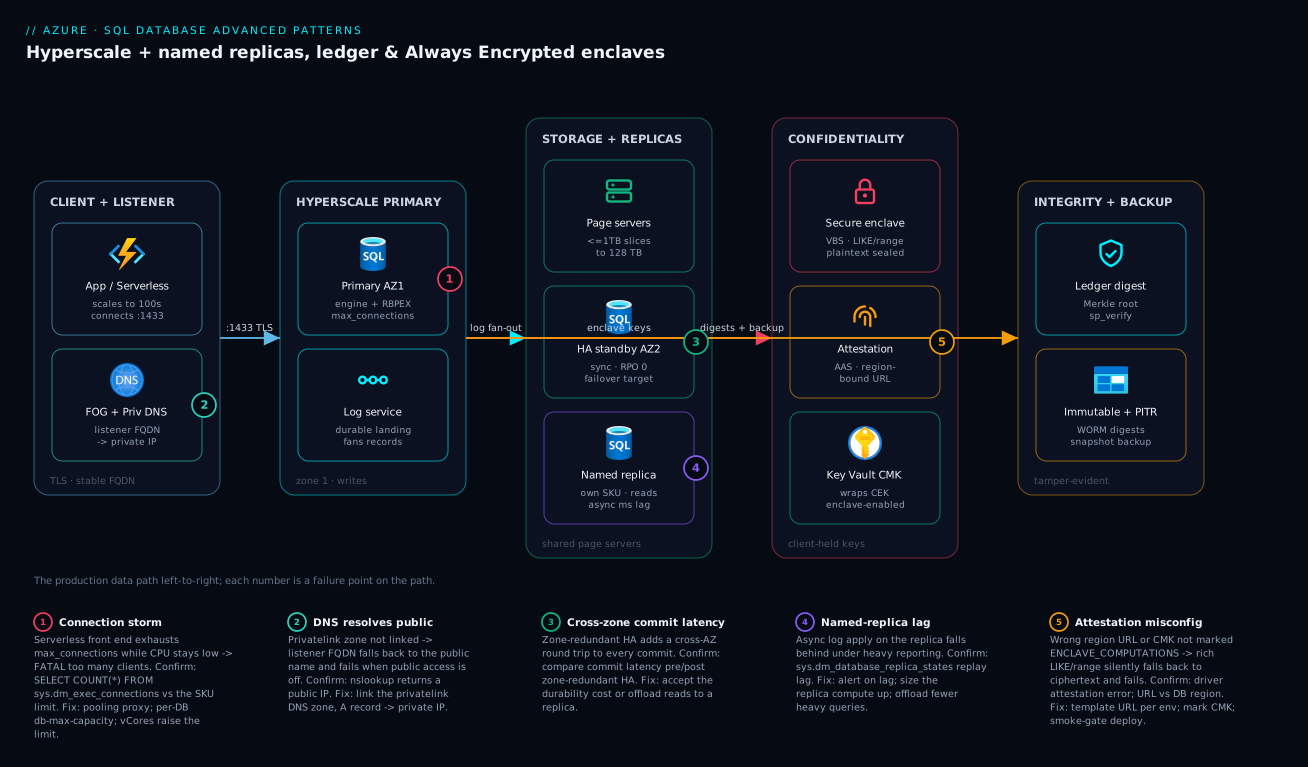
The diagram traces the production data path left to right and maps the failure that bites at each hop. An application or serverless front end connects over TLS on 1433 to the failover-group listener — never a regional server name — which resolves through a private DNS zone to a private IP (badge 2: if the privatelink zone isn’t linked, the FQDN falls back to the public name and dies when public access is off). The request lands on the Hyperscale primary in zone 1, whose compute caches pages locally (RBPEX) but whose durability lives in the log service. The log service fans records to page servers (the transparent-growth storage tier), to the HA standby in zone 2 (badge 3: zone-redundant HA adds a cross-zone commit round trip), to named replicas sized independently for analytics (badge 4: a runaway report on its own compute can’t starve the OLTP primary, but async lag is real), and offloads snapshots to long-term storage for size-independent backups.
Two control planes sit alongside the data path. Always Encrypted routes the sensitive columns through a secure enclave gated by Azure Attestation and a Key Vault-held column master key (badge 5: if attestation is mis-wired or the CMK isn’t marked for enclave computations, rich LIKE queries silently fall back to ciphertext and fail). And ledger seals row hashes into digests pushed to immutable storage (badge 1: a connection storm from a serverless front end exhausts max_connections long before CPU climbs). Read the badges as the diagnostic map: each number is the exact hop where a named failure class bites, and the legend narrates symptom · confirm · fix for each.
Real-world scenario
MedLedger Health runs a multi-tenant clinical-records SaaS: ~1,400 clinic tenants, one database per tenant for hard data isolation, on a logical server in East US 2. Two constraints collided. A compliance mandate required patient national IDs (SSN-equivalents) to be encrypted such that no operator — theirs or the cloud’s — could read them, while clinicians still needed to search patients by partial name and ID. And finance flagged that running 1,400 standalone database SKUs would multiply the bill roughly tenfold over actual aggregate load. The team had four data engineers and an audit deadline.
They solved it as a stack. Tenants went into elastic pools — a few pools of ~200 databases each, sized from real Azure Monitor vCore-percentage telemetry rather than per-tenant peaks — which let them provision for aggregate peak and cut the dedicated-SKU cost projection by about 80%. The national-ID columns moved to Always Encrypted with secure enclaves, RANDOMIZED encryption with a VBS enclave and Azure Attestation, so clinicians’ partial-match queries ran inside the enclave on plaintext that never left protected memory, while DBAs querying the same column saw only ciphertext. The patient-record audit trail became an append-only ledger table with automatic digest upload to immutable storage, giving auditors a sp_verify_database_ledger procedure instead of a trust-us assertion. The busiest tenants’ reporting was offloaded to a named replica per pool so a heavy analytics query could never starve a clinic’s live OLTP.
The trap they hit was the attestation policy, not the crypto. Their enclave worked perfectly in dev but every CI integration test failed with attestation errors — because the CI runners’ connection string pointed at the dev region’s attestation URL while talking to a test region’s database, and attestation is region-bound. The fix was to template the attestation URL per environment and gate deployment on a smoke test that actually issues an enclave query:
-- CI smoke gate: must succeed THROUGH the enclave or the deploy fails.
-- A range/LIKE predicate on a RANDOMIZED column only works if attestation succeeded.
IF NOT EXISTS (
    SELECT 1 FROM dbo.Customer WHERE [SSN] LIKE N'%0000'  -- enclave-evaluated
)
    THROW 50010, 'Enclave query returned nothing -- attestation likely misconfigured.', 1;
The second surprise was a connection storm. The app tier was serverless and scaled to hundreds of instances at clinic-opening time (8 a.m. local), and each instance opened its own pool of connections. CPU on the pool stayed under 30%, yet clinicians got FATAL: too many clients — they had hit max_connections, a connection ceiling not a compute one. The fix was a connection-pooling proxy in front and per-tenant db-max-capacity guardrails so one busy clinic could not also monopolise vCores. Outcome: the aggregate bill came in ~80% below the naive projection, partial-name search worked through the enclave with DBAs locked out, auditors got a cryptographic verification procedure, and the 8 a.m. storm flattened. The lesson on the wall: “With enclaves the encryption rarely breaks — the attestation wiring does; and a database has two ceilings, compute and connections, and the cheap one to hit is connections.”
The incident timeline, because the order of discovery is the lesson:
| Time | Symptom | What they checked | Finding | Fix |
|---|---|---|---|---|
| Week 1 | CI tests fail, dev works | Attestation URL per env | Region-bound URL mismatch | Template URL; smoke-gate deploy |
| Week 2 | too many clients at 8 a.m. |
Pool CPU (low) vs pg_stat-equivalent |
Connection ceiling, not CPU | Pooling proxy + per-DB max |
| Week 2 | One clinic slow during BI run | DTU/vCore per database | BI starving OLTP | Named replica for reporting |
| Week 3 | Audit readiness | Ledger digest storage | Digests not pushed off-box | Automatic digest upload to immutable container |
| Week 4 | Cost review | Pool vCore % telemetry | Over-provisioned floors | Lowered db-min-capacity |
Advantages and disadvantages
These patterns are powerful precisely because they break the on-prem mental model — which is also why they surprise teams. Weigh them honestly:
| Advantages (why these patterns help you) | Disadvantages (why they bite) |
|---|---|
| Hyperscale scales storage to 128 TB with no pre-provisioning and backs up size-independently | Hyperscale has its own pool type and some features (e.g. certain in-memory OLTP) differ from Business Critical |
| Named replicas give true read-scale-out with independent SKUs and isolated logins | Each named replica is its own compute bill; lag is async (milliseconds, but non-zero) |
| Elastic pools cut multi-tenant cost dramatically by sharing an aggregate budget | A missing db-max-capacity lets one tenant starve the pool; sizing needs real telemetry |
| Ledger hands auditors cryptographic proof instead of a promise | It’s tamper-evidence, not prevention; a digest you never stored off-box proves nothing |
| Always Encrypted means the service never sees plaintext — strongest confidentiality | Classic mode breaks rich queries; enclaves add attestation wiring that is fiddly and region-bound |
Enclaves restore LIKE/range over randomized-encrypted columns |
Mis-set attestation silently falls back to ciphertext; CI is where it bites |
| Entra-only auth + Private Endpoint eliminate whole credential/exposure classes | Public-access-off requires correct private DNS or every connection fails |
| Failover groups give a stable FQDN through region failover | Auto-failover needs a grace period tuned against false triggers; DR must be rehearsed |
The patterns are right for large OLTP, multi-tenant SaaS, compliance-bound audit trails, and regulated-identifier workloads. They bite hardest on teams who adopt them with on-prem assumptions — expecting a Business-Critical-style reseed, forgetting the connection ceiling, or assuming attestation “just works” across environments. Every disadvantage above is manageable once you know it exists, which is the point of this article.
Hands-on lab
Provision a Hyperscale database, add a named replica, create an append-only ledger table, and verify a digest — then tear it all down. Run in Cloud Shell (Bash). This uses small SKUs; delete at the end to avoid charges.
Step 1 — Variables and a logical server.
RG=rg-hslab
LOC=eastus2
SRV=sql-hslab-$RANDOM
ADMIN=sqladmin
PWD=$(openssl rand -base64 18)Aa1!
az group create -n $RG -l $LOC -o table
az sql server create -n $SRV -g $RG -l $LOC \
  --admin-user $ADMIN --admin-password "$PWD" -o table
Expected: a resource group and a logical server. (We use a SQL admin only for the lab; in production enable Entra-only auth.)
Step 2 — Create a Hyperscale database with one HA replica.
az sql db create -g $RG -s $SRV -n appdb \
  --edition Hyperscale --family Gen5 --capacity 2 --ha-replicas 1 -o table
Expected: a database row with edition = Hyperscale. Provisioning takes a few minutes.
Step 3 — Add a named replica sized independently.
az sql db replica create -g $RG -s $SRV -n appdb \
  --partner-server $SRV --partner-database appdb-bi \
  --secondary-type Named --family Gen5 --capacity 2 -o table
Expected: a second database appdb-bi on the same server, reading the same page servers.
Step 4 — Allow your client and create an append-only ledger table. Open the firewall to your IP for the lab, then connect with sqlcmd (or the portal query editor) and run:
CREATE TABLE dbo.PaymentAudit
(
    AuditId    BIGINT IDENTITY(1,1) PRIMARY KEY,
    AccountId  INT NOT NULL,
    Action     NVARCHAR(50) NOT NULL,
    Amount     DECIMAL(19,4) NOT NULL,
    OccurredAt DATETIME2 NOT NULL DEFAULT SYSUTCDATETIME()
)
WITH (LEDGER = ON (APPEND_ONLY = ON));

INSERT dbo.PaymentAudit (AccountId, Action, Amount) VALUES (1001, 'DEBIT', 250.00);
Step 5 — Prove append-only and generate a digest. Confirm a mutation is rejected, then seal a digest:
-- This MUST fail with a ledger error (append-only forbids UPDATE):
UPDATE dbo.PaymentAudit SET Amount = 0 WHERE AuditId = 1;

-- Generate the digest you would persist off-box:
EXEC sys.sp_generate_database_ledger_digest;
Expected: the UPDATE errors out (proving immutability); the digest proc returns a JSON block with a sealed hash.
Step 6 — Teardown. One command removes everything:
az group delete -n $RG --yes --no-wait
The lab cost is a few rupees of Hyperscale compute for the minutes it runs; deleting the resource group stops all billing.
Practice challenges
Six exercises escalating from a warm-up decision to an enclave wiring drill. Try each before opening its solution. All identifiers (rg-data-eastus2, sql-prod-eastus2, key paths) are placeholders — swap your own; nothing here is run live for you.
1. Warm-up — pick the purchasing model. A new production OLTP database needs Azure Hybrid Benefit for licensing savings today and the option to grow past 4 TB onto Hyperscale next year. DTU or vCore?
<details> <summary>Show solution</summary>
vCore. DTU supports neither Azure Hybrid Benefit nor Hyperscale, so it would fail both requirements on day one.
Why: Hyperscale, serverless, Hybrid Benefit, and reserved capacity are all vCore-only — DTU is a one-way street. </details>
2. Beginner — provision Hyperscale, resilient by default. Write the az sql db create that stands up an 8-vCore Gen5 Hyperscale database appdb with one HA replica, zone redundancy, and zone-redundant backups.
<details> <summary>Show solution</summary>
az sql db create -g rg-data-eastus2 -s sql-prod-eastus2 -n appdb \
  --edition Hyperscale --family Gen5 --capacity 8 \
  --ha-replicas 1 --zone-redundant true --backup-storage-redundancy Zone
Why: --zone-redundant true survives a single-AZ outage with zero data loss; omitting it makes one datacentre a single point of failure.
</details>
3. Intermediate — a serverless dev database that sleeps. Create a General Purpose serverless database appdb-dev that scales between 0.5 and 2 vCores and auto-pauses after one idle hour.
<details> <summary>Show solution</summary>
az sql db create -g rg-data-eastus2 -s sql-prod-eastus2 -n appdb-dev \
  --edition GeneralPurpose --family Gen5 --compute-model Serverless \
  --min-capacity 0.5 --capacity 2 --auto-pause-delay 60
Why: --auto-pause-delay 60 (the minimum) drops compute billing to zero while idle — but storage is still billed, and the first connection after a pause pays a resume latency.
</details>
4. Intermediate — isolate a BI endpoint. A reporting team needs an independently sized, read-only endpoint that cannot starve the OLTP primary and carries no write capability. HA replica or named replica? Give the command.
<details> <summary>Show solution</summary>
Named replica — its own SKU, its own logins, the same page servers.
az sql db replica create -g rg-data-eastus2 -s sql-prod-eastus2 -n appdb \
  --partner-server sql-prod-eastus2 --partner-database appdb-bi \
  --secondary-type Named --family Gen5 --capacity 16
Why: a named replica has separate compute, so a runaway report cannot steal the primary’s vCores; an HA replica shares the primary’s SKU and is really a failover target. </details>
5. Advanced — an audit trail an auditor can verify. Create an append-only ledger table, prove a mutation is rejected, and emit the value an auditor later verifies against.
<details> <summary>Show solution</summary>
CREATE TABLE dbo.PaymentAudit (
    AuditId    BIGINT IDENTITY(1,1) PRIMARY KEY,
    AccountId  INT NOT NULL,
    Amount     DECIMAL(19,4) NOT NULL,
    OccurredAt DATETIME2 NOT NULL DEFAULT SYSUTCDATETIME()
) WITH (LEDGER = ON (APPEND_ONLY = ON));

UPDATE dbo.PaymentAudit SET Amount = 0;        -- MUST fail: append-only
EXEC sys.sp_generate_database_ledger_digest;   -- store the result OFF-BOX
Why: the digest is the trusted value; if you never persist it to immutable storage, sp_verify_database_ledger has nothing trustworthy to compare against and the tamper-evidence proves nothing.
</details>
6. Advanced — searchable secrets. Analysts must run WHERE SSN LIKE '%1234' while no DBA can ever see plaintext. Which encryption mode + feature, and which two connection-string parameters most often break it?
<details> <summary>Show solution</summary>
Randomized Always Encrypted with a secure enclave, the CMK marked ENCLAVE_COMPUTATIONS, and the client attesting via AAS.
ColumnEncryptionSetting=Enabled;
AttestationProtocol=AAS;
EnclaveAttestationUrl=https://<region>.attest.azure.net/attest/SgxEnclave;
Why: ColumnEncryptionSetting=Enabled turns Always Encrypted on at the driver, and a region-matched EnclaveAttestationUrl is the #1 CI break — a mismatched region silently fails every enclave query.
</details>
Common mistakes & troubleshooting
The failure modes that actually page you — symptom, the root cause, the exact way to confirm it, and the fix. Scan for your symptom:
| # | Symptom | Root cause | Confirm (exact command / path) | Fix |
|---|---|---|---|---|
| 1 | FATAL: too many clients / login failures, CPU low |
Hit max_connections, not compute |
SELECT COUNT(*) FROM sys.dm_exec_connections; vs the SKU’s connection limit |
Connection pooling proxy; raise vCore (limit scales with it); fix per-request connections |
| 2 | Enclave LIKE/range query returns nothing or errors |
Attestation failed → ciphertext fallback | Driver throws attestation error; check EnclaveAttestationUrl matches the DB’s region |
Fix per-environment URL; mark CMK ENCLAVE_COMPUTATIONS; smoke-gate deploy |
| 3 | Named replica far behind primary | Async log apply under write pressure | SELECT replica_lag... / sys.dm_database_replica_states |
Alert on lag; size replica compute up; offload fewer heavy queries |
| 4 | Connection to FQDN fails after public-access-off | privatelink DNS zone not linked → resolves public | nslookup sql-prod-eastus2.database.windows.net returns a public IP |
Link the privatelink DNS zone; A record → private IP |
| 5 | Dev/test database 503s or throttles unexpectedly | Hit pool vCore/storage ceiling | Pool vcore_percent/storage_percent in Azure Monitor near 100% |
Raise pool capacity; add db-max-capacity guardrails |
| 6 | sp_verify_database_ledger fails |
Data altered out-of-band, or wrong digests passed | The proc raises an error naming the block | If digests are right, you have real tampering — investigate; else pass correct digest JSON |
| 7 | vCore resize “stuck” / queries slow right after | Cache (RBPEX) cold post-reattach | Latency high but settling; sys.dm_io_virtual_file_stats shows page-server reads |
Wait for cache warm-up; pre-warm with representative queries |
| 8 | Move DB into pool rejected | Edition/family/server mismatch | Error names the constraint | Match logical server + edition family; Hyperscale needs HS pool |
| 9 | ALTER COLUMN ... ENCRYPTED blocks/locks |
ONLINE = OFF re-encrypt holds locks |
Long-running schema lock in sys.dm_tran_locks |
Use WITH (ONLINE = ON); run off-peak |
| 10 | Geo-restore unavailable for a region loss | Backup redundancy was Local |
az sql db show --query requestedBackupStorageRedundancy = Local |
Set Geo/GeoZone at creation; can’t retro-fix the lost data |
| 11 | App can’t connect after Entra-only enabled | Still using SQL login | az sql server ad-only-auth get = Enabled, app uses user/pass |
Switch to Authentication=Active Directory Default + grant the MI |
| 12 | Ledger table can’t be dropped | Protected by digest policy | DROP errors referencing ledger | Expected — that’s the protection; archive instead |
The most important confirm commands, collected for incident use:
# Tier, replica count, zone redundancy, backup redundancy in one view
az sql db show -g rg-data-eastus2 -s sql-prod-eastus2 -n appdb \
  --query "{edition:currentServiceObjectiveName, replicas:highAvailabilityReplicaCount, zone:zoneRedundant, backup:requestedBackupStorageRedundancy}" -o table

# Pool utilisation (your sizing + throttle evidence)
PID=$(az sql elastic-pool show -g rg-data-eastus2 -s sql-prod-eastus2 -n pool-tenants-01 --query id -o tsv)
az monitor metrics list --resource "$PID" --metric eDTU_used storage_used --interval PT5M -o table
-- Which physical role am I on? Primary = READ_WRITE; replicas READ_ONLY.
SELECT DATABASEPROPERTYEX(DB_NAME(), 'Updateability') AS rw_or_ro;

-- Are enclave columns RANDOMIZED (not ciphertext-only)?
SELECT c.name, ek.name AS cek, c.encryption_type_desc
FROM sys.columns c
JOIN sys.column_encryption_keys ek ON ek.column_encryption_key_id = c.column_encryption_key_id
WHERE c.encryption_type IS NOT NULL;
A quick decision table for the “is it compute or connections?” fork that wastes the most time:
| If you see… | It’s probably… | Do this |
|---|---|---|
| Login failures, CPU/vCore low | Connection ceiling | Pool connections; the limit scales with vCores |
| Slow queries, CPU/vCore high | Compute ceiling | Scale vCores up; find the heavy query in Query Store |
| Slow only during reports | BI starving OLTP | Move reporting to a named replica |
| Slow only right after a resize | Cold RBPEX cache | Wait/pre-warm; it’s transient |
| Throttle on a pooled DB | Pool or per-DB cap | Raise pool capacity / db-max-capacity |
Common beginner mistakes
These are misconceptions, not symptoms — the wrong mental model that sends you down the wrong path before anything even errors. (For live failure symptoms and their fixes, see the troubleshooting table further down.)
-
“Hyperscale is just a bigger General Purpose.” It is a different engine. GP binds data to a managed disk; Hyperscale disaggregates storage into page servers with the log as the durability boundary. Right model: you adopt Hyperscale for the architecture — size-independent backups, minute-scale resize, read-scale-out — not merely for more gigabytes.
-
“A named replica is my DR copy.” A named replica is same-region read-scale-out and is not a failover target. Right model: for region loss you need active geo-replication or a failover group; named replicas exist to isolate and independently size read workloads, nothing more.
-
“An elastic pool means the tenants share a database.” They share a budget, not a schema. Each database in a pool stays fully separate — its own logins, its own blast radius. Right model: a pool is one shared pot of vCores/storage that many isolated databases draw from; per-tenant isolation is intact.
-
“Ledger prevents tampering.” It does not stop a privileged user from changing data — it makes the change detectable. Right model: ledger is tamper-evidence, and only if you push digests to immutable storage off-box; a digest that never left the database proves nothing.
-
“Always Encrypted is just TDE with extra steps.” TDE encrypts at rest and is transparent to queries — the engine still sees plaintext. Always Encrypted keeps the engine itself from ever seeing plaintext; the keys live with the client. Right model: they defend different threats (a stolen disk vs. a curious DBA or operator), and you often run both at once.
-
“Deterministic encryption is fine for secrets.” Deterministic produces identical ciphertext for identical plaintext, so an attacker can correlate equal values — every row with the same SSN looks identical. Right model: use randomized, and add an enclave when you also need
LIKE/range, so equal plaintexts are indistinguishable. -
“Serverless is always cheaper.” For a steadily busy database, per-second serverless billing at a higher rate costs more than provisioned, and a lingering health-check connection means it never auto-pauses at all. Right model: serverless wins on intermittent workloads that genuinely go idle; steady load belongs on provisioned, ideally reserved.
-
“DTU and vCore are two names for the same thing.” They are different purchasing models with different capabilities — Hyperscale, serverless, Hybrid Benefit, and reserved capacity exist only under vCore. Right model: choose vCore for anything you expect to scale or optimize licensing on; DTU is the simple-pricing legacy path.
Best practices
- Choose Hyperscale for the right reason — large size, fast restore, read-scale, or fast resize — not because it’s the newest tier. For sub-4 TB low-latency OLTP, Business Critical’s local SSD may still win.
- Always set
--zone-redundant truein production and pickGeo/GeoZonebackup redundancy at creation; you cannot retro-fit a cross-region restore for data already lost. - Isolate read-scale onto named replicas with their own SKU and least-privilege logins; never let a BI query share the OLTP primary’s compute.
- Size elastic pools from telemetry, not guesses — use the pool’s vCore/storage percentage metrics — and always set
db-max-capacityso one tenant cannot starve the rest. - Use append-only ledger for audit logs, updatable ledger for traceable master data, and always configure automatic digest upload to immutable storage; an unstored digest proves nothing.
- Prefer randomized + enclave over deterministic where you need both secrecy and rich queries — determinism leaks equality.
- Template the attestation URL per environment and gate every deploy on a smoke test that issues a real enclave query.
- Disable public network access and enable Entra-only authentication; this single pair eliminates an entire class of credential-leak incidents.
- Grant the least role that works —
db_datareader/db_datawriteror a custom role, neverdb_ownerfor app runtime identities. - Keep Query Store
READ_WRITEwithFORCE_LAST_GOOD_PLANon; it auto-reverts plan regressions before they page you. - Connect apps to the failover-group listener, never a regional server name, and route reporting at the read-only listener.
- Rehearse a real failover quarterly and a PITR restore at least as often — an untested DR plan is a hypothesis.
Security notes
The security model here is defence in depth across four planes. At rest, Transparent Data Encryption is on by default; for key sovereignty, layer customer-managed keys (CMK) so Microsoft holds the data but you hold the key. In the engine, Always Encrypted (especially randomized + enclave) keeps the most sensitive columns invisible even to a DBA with sysadmin — the keys live in Key Vault under your control, and the enclave decrypts only in attested protected memory. For integrity, ledger makes any out-of-band change detectable and gives auditors a verification procedure. At the perimeter and identity layer, Private Endpoint over the Microsoft backbone plus public-access-off plus Entra-only authentication removes both internet reachability and password-based logins; least-privilege roles cap blast radius; and SQL auditing records who touched what.
The layered controls, what each defends, and the residual risk each leaves:
| Plane | Control | Defends against | Residual risk |
|---|---|---|---|
| At rest | TDE (default) | Stolen disk/backup | Cloud operator could (in theory) hold the key |
| At rest | CMK in Key Vault | Operator key access | KV access policy/RBAC must be tight |
| In engine | Always Encrypted + enclave | DBA/operator reading plaintext | Client key store compromise |
| Integrity | Ledger + immutable digests | Silent data tampering | Detection, not prevention |
| Perimeter | Private Endpoint + public-off | Internet reachability | Private DNS must be correct |
| Identity | Entra-only auth | Password/credential leaks | Entra account/MI compromise |
| Identity | Least-privilege roles | Over-broad access | Privilege creep over time |
| Detection | SQL auditing | Undetected access | Logs must be reviewed/alerted |
The least-privilege grant pattern for the three identities that touch a typical app:
| Identity | Should get | Should NOT get | Scope |
|---|---|---|---|
| App runtime MI | db_datareader + db_datawriter |
db_owner, DDL |
The app database |
| Migration runner | db_ddladmin (+ data roles) |
db_owner |
The app database, CI only |
| Reporting group | db_datareader |
Any write | Named replica only |
| Break-glass admin | db_owner |
Day-to-day use | Logged, PIM-elevated |
Cost & sizing
Cost on these patterns is driven by compute (vCores), replica count, storage, and backup redundancy. Hyperscale bills compute per vCore-hour and storage separately; each HA or named replica is additional compute; backups beyond the included amount and geo-redundant backup storage add to the bill. Serverless compute can cut cost for bursty/intermittent databases by scaling compute with load. Elastic pools cut multi-tenant cost by letting you pay for aggregate peak instead of the sum of per-tenant peaks — often a 60–85% reduction at scale.
What drives the bill and how to control each lever:
| Cost driver | What it bills | How to reduce | Watch-out |
|---|---|---|---|
| Primary compute | vCore-hours | Right-size; serverless for bursty | Under-size → throttle |
| HA replicas | Per-replica compute | Use only as many as failover needs | Each is full primary-SKU cost |
| Named replicas | Per-replica compute (own SKU) | Size small for light reporting | Easy to over-provision |
| Storage | Per-GB of data + log | Archive/retention hygiene | Grows automatically |
| Backup storage | Beyond included; geo costs more | Local/Zone for non-DR |
Don’t cripple DR to save pennies |
| Elastic pool | Pool vCores (shared) | Lower db-min-capacity floors |
Over-reserved floors waste density |
| Enclave/attestation | AAS is low-cost | Minimal | Mostly negligible |
Rough indicative figures (East US 2, list, subject to change — always price with the calculator and apply reservations/savings plans):
| Item | Approx scale | Indicative USD/mo | Indicative INR/mo |
|---|---|---|---|
| Hyperscale 2 vCore primary | Small prod | ~$300–400 | ~₹25k–33k |
| + 1 HA replica (2 vCore) | Failover target | ~$300–400 | ~₹25k–33k |
| Named replica (2 vCore) | Light reporting | ~$300–400 | ~₹25k–33k |
| Elastic pool, GP 16 vCore | ~200 tenants | ~$2,000–2,600 | ~₹165k–215k |
| Same 200 tenants, single SKUs | naive | ~$10,000+ | ~₹830k+ |
| Geo-redundant backup uplift | per-GB | small % of compute | small % |
The headline sizing rule: pool size is the aggregate peak of all tenants, not the sum of their peaks — measure it from vcore_percent telemetry over a representative week. For the primary, size to the steady-state write workload and offload reads to replicas; scaling vCores up is fast and reversible on Hyperscale, so start conservative and grow from evidence. There is no free tier for Hyperscale; for genuinely free experimentation use the serverless General Purpose free offer on a separate database.
Interview & exam questions
1. Why are Hyperscale backups and restores effectively size-independent? Because storage is disaggregated into page servers and backups are snapshot-based against those page servers, not a full copy of a monolithic file. A 50 TB database snapshots in roughly the same wall-clock time as a 500 GB one, and a restore rehydrates page-server snapshots plus log replay rather than replaying a full backup chain. (Maps to DP-300.)
2. Differentiate HA replicas from named replicas. HA replicas are hidden hot standbys sized identically to the primary, sharing its page servers and log, usable for failover and generic reads. Named replicas are separate database resources with their own SKU, name, and logins, reading the same page servers — built for isolated, independently sized read-scale-out. Only HA replicas are failover targets; you can have up to 30 named replicas.
3. A vCore resize on Business Critical takes hours but minutes on Hyperscale. Why? Business Critical keeps data on local SSD with an AlwaysOn availability group, so a resize must seed a full local copy onto the new node. Hyperscale’s compute is decoupled from storage, so a resize just reattaches a new compute node to the existing page servers; the only cost is warming the RBPEX cache.
4. What problem do elastic pools solve, and what two guardrails prevent a noisy tenant?
They solve multi-tenant cost: many databases share one vCore/storage budget, so you provision for aggregate peak. db-max-capacity caps any single database’s vCore usage (stops one tenant starving the rest) and db-min-capacity reserves a floor (guarantees responsiveness, but over-reserving erodes density).
5. Append-only vs updatable ledger — when each?
Append-only rejects UPDATE/DELETE and suits immutable audit logs and event streams. Updatable allows mutation but retains full history in a paired history table surfaced via a _Ledger view, suiting master data that must change but remain fully traceable. Both are tamper-evident.
6. Is ledger tamper-prevention? No — it is tamper-evidence. It does not stop a privileged user from altering data; it guarantees the alteration is cryptographically detectable via the Merkle-tree digest. You must store digests off-box in immutable storage, or there is nothing trustworthy to verify against.
7. Why can classic Always Encrypted not run LIKE, and how do enclaves fix it?
The engine sees only ciphertext, so it can do at most equality with deterministic encryption (equal plaintext → equal ciphertext). A secure enclave is an attested protected-memory region where the engine can briefly decrypt and evaluate LIKE/range predicates on plaintext, including over randomized-encrypted columns, with the DBA still locked out.
8. Deterministic vs randomized encryption — the trade-off? Deterministic produces identical ciphertext for identical plaintext, enabling equality/joins server-side but leaking which values are equal. Randomized produces different ciphertext each time (no leakage) but allows no server-side operations — unless an enclave is present, in which case randomized + enclave gives both maximum secrecy and rich queries.
9. What single setting eliminates an entire class of credential-leak incidents on Azure SQL?
Enabling Microsoft Entra-only authentication (az sql server ad-only-auth enable). It disables SQL logins and passwords entirely, so leaked connection-string credentials cannot authenticate at all; apps use managed identities instead.
10. After disabling public network access, connections to the FQDN fail. Why and how do you confirm?
The privatelink DNS zone is not linked, so the FQDN still resolves to the public IP, which is now unreachable. Confirm with nslookup <server>.database.windows.net — a public IP means the zone isn’t wired. Fix by linking the privatelink DNS zone with an A record to the private endpoint’s IP. (Maps to AZ-305/DP-300.)
11. Why connect apps to a failover-group listener instead of a regional server name? The listener FQDN is stable and follows the primary through a region failover, so applications need no reconfiguration during DR. A regional server name pins the app to one region and breaks on failover. Reporting should use the read-only listener so it transparently follows the secondary.
12. A serverless app tier reports too many clients while CPU stays low — diagnosis?
It hit the max_connections ceiling, which is a connection limit, not a compute limit (and it scales with vCores). Fix with a connection-pooling proxy and, in a pool, per-database db-max-capacity guardrails; raising vCores raises the connection limit as a side effect but pooling is the real fix.
Quick check
- Which Hyperscale tier is the durability boundary — compute, page servers, the log service, or long-term storage?
- You need an independently sized, isolated read endpoint for a BI team. HA replica or named replica?
- Which two elastic-pool settings stop one tenant from starving the others?
- You must let analysts run
WHERE ssn LIKE '%1234'while the DBA can never see plaintext. Which encryption mode + feature? - After enabling Entra-only auth and public-access-off, a working app suddenly can’t connect at all. Name the two most likely causes.
Answers
- The log service — the primary writes to its durable landing zone and it fans records out; durability is the log, not the cached pages on compute.
- A named replica — its own SKU and logins, reading the same page servers, isolated from the OLTP primary’s compute.
db-max-capacity(caps one DB’s usage) anddb-min-capacity(reserves a floor) — the max is the one that actually prevents starvation.- Randomized encryption with a secure enclave (Always Encrypted), with the CMK marked
ENCLAVE_COMPUTATIONSand the client attesting via Azure Attestation. - (a) The app is still using a SQL login/password (must switch to a managed identity), and/or (b) the privatelink DNS zone isn’t linked so the FQDN resolves to the now-unreachable public IP.
Glossary
- Hyperscale — Azure SQL service tier with disaggregated storage (page servers + log service), scaling to 128 TB with fast resize/restore.
- Page server — A storage node owning up to ~1 TB of the database and serving 8 KB pages to compute on cache miss.
- Log service — The component that writes the durable log and fans records to page servers, replicas, and backups; the durability boundary.
- RBPEX — Resilient Buffer Pool Extension; the local SSD cache on a Hyperscale compute node.
- HA replica — A hot standby sized like the primary, sharing its storage/log; a failover target and generic read endpoint.
- Named replica — A separate database resource with its own SKU and logins reading the primary’s page servers; built for isolated read-scale-out (up to 30).
- Elastic pool — A shared vCore/DTU and storage budget for many databases on one logical server; the multi-tenant density model.
- db-max-capacity / db-min-capacity — Per-database ceiling and floor inside an elastic pool that bound each database’s resource use.
- Ledger table — A tamper-evident table whose row hashes form a Merkle tree sealed into database digests.
- Database digest — The sealed Merkle-tree root you store off-box; verification recomputes the tree and compares to it.
- Append-only / updatable ledger — Ledger flavours that forbid mutation (audit logs) or allow it with full retained history (traceable master data).
- Always Encrypted — Client-side column encryption where the SQL service never sees plaintext; keys live with the client.
- Column Master Key / Column Encryption Key — The two-tier key hierarchy: the CMK (in Key Vault) wraps the CEK that encrypts column data.
- Secure enclave — A VBS-protected, attested memory region on the SQL node where the engine can decrypt and run rich predicates.
- Attestation — Cryptographic proof (via Azure Attestation) that the enclave is genuine, required before keys enter it.
- Failover group — A managed listener over geo-replication giving a stable FQDN (read-write and read-only) that survives region failover.
- Purchasing model — The top-level pricing choice (vCore or DTU) made before the service tier; it constrains which tiers and discounts are available.
- vCore — A virtual core of compute; the purchasing model that sizes compute and storage independently and unlocks Hyperscale, serverless, and licensing discounts.
- DTU — Database Transaction Unit; a blended compute+storage+I/O bundle (Basic/Standard/Premium) — simple but rigid, with no Hyperscale or serverless.
- Service tier — The engine/SLA tier chosen within a purchasing model: General Purpose, Business Critical, or Hyperscale (vCore); Basic/Standard/Premium (DTU).
- General Purpose — The cost-balanced vCore tier: compute plus remote managed-disk storage, up to 4 TB.
- Business Critical — The low-latency vCore tier: local SSD with an AlwaysOn availability group and a built-in readable replica.
- Serverless — A compute tier that autoscales vCores within a band and bills per second, with optional auto-pause on General Purpose.
- Auto-pause / auto-resume — Serverless behaviour that deprovisions compute after an idle delay (≥60 min) and re-provisions on the next connection, billing storage only while paused.
- Zone redundancy — Spreading a database’s replicas across availability zones so a single-zone outage causes no data loss and no downtime.
- Azure Hybrid Benefit — Licensing discount that applies existing SQL Server licences to vCore databases; unavailable on DTU.
- TDE (Transparent Data Encryption) — At-rest encryption of data and backups, on by default and invisible to queries; distinct from Always Encrypted.
- Deterministic vs randomized encryption — Always Encrypted modes: deterministic yields repeatable ciphertext (enables equality but leaks equal values); randomized yields unrepeatable ciphertext (no server-side ops without an enclave).
- Merkle tree — The hash tree ledger uses to chain row hashes so any change alters the root sealed into the digest.
- Query Store — The always-on flight recorder capturing query text, plans, and runtime stats, used to spot and force plans through regressions.
- PITR (point-in-time restore) — Restoring a database to any second within its backup-retention window from continuous backups.
- Geo-restore — Restoring from geo-replicated backups into another region after a regional loss, to the last available backup.
Next steps
- Azure SQL connectivity troubleshooting: timeouts, throttling, blocking — the incident playbook for when connections to this database fail.
- Encryption at rest with customer-managed keys and double encryption — the at-rest layer beneath Always Encrypted.
- Azure Key Vault: secrets, keys, and certificates — where your column master keys and connection secrets should live.
- Private Endpoints and Private DNS at scale — get the privatelink DNS wiring right so public-access-off never breaks connectivity.
- Azure SQL Managed Instance failover groups and link — the managed-instance cousin when you need near-full SQL Server surface area.