In a nutshell
Picture a data centre with one master power switch. Flip it and every rack boots in the right order — storage first, then databases, then the apps that depend on them — with nobody walking the floor pressing buttons. App-of-apps is that master switch for a Kubernetes platform. Instead of applying fifty things by hand, you apply one root Application that points at a folder full of child Applications in Git. Argo CD reads the folder and brings every child up for you. One kubectl apply bootstraps the whole cluster.
Argo CD is a GitOps controller: Git holds the desired state, and Argo CD continuously makes the cluster match it — like a thermostat that reads the room and runs the heater until it hits the setpoint you wrote down. You never kubectl edit production to “fix” it; you change Git, and the controller closes the gap. An Application is Argo CD’s one core object. It binds three things: where the manifests are (a Git repo and path), where they should run (a cluster and namespace), and how to keep them equal (a sync policy). Read one Application and you can read the whole system.
Multi-cluster is the same idea stretched across a fleet. One Argo CD hub manages many spoke clusters — think of an air-traffic control tower directing dozens of runways from a single room. Each spoke is registered with the hub as a small credential (a “cluster Secret”) and given labels like region: eu. An ApplicationSet with a cluster generator then says “run this app on every cluster labeled prod,” and Argo CD stamps out one Application per matching cluster automatically. Add a cluster, the apps appear; you never hand-write the manifests.
Put the two together and a single root Application in Git can bootstrap a whole fleet: the root brings up the children, and the children include ApplicationSets that fan every app across every cluster. That is the power — and, as you will see, the blast radius — of the pattern.
Level: Expert · Time: ~27 min · Builds on the Kubernetes fundamentals (Deployments, Services, namespaces) and a basic Git/PR workflow. If GitOps itself is new, the companion lesson GitOps at scale with Argo CD walks the fundamentals more slowly; this one focuses on the topology and fleet mechanics.
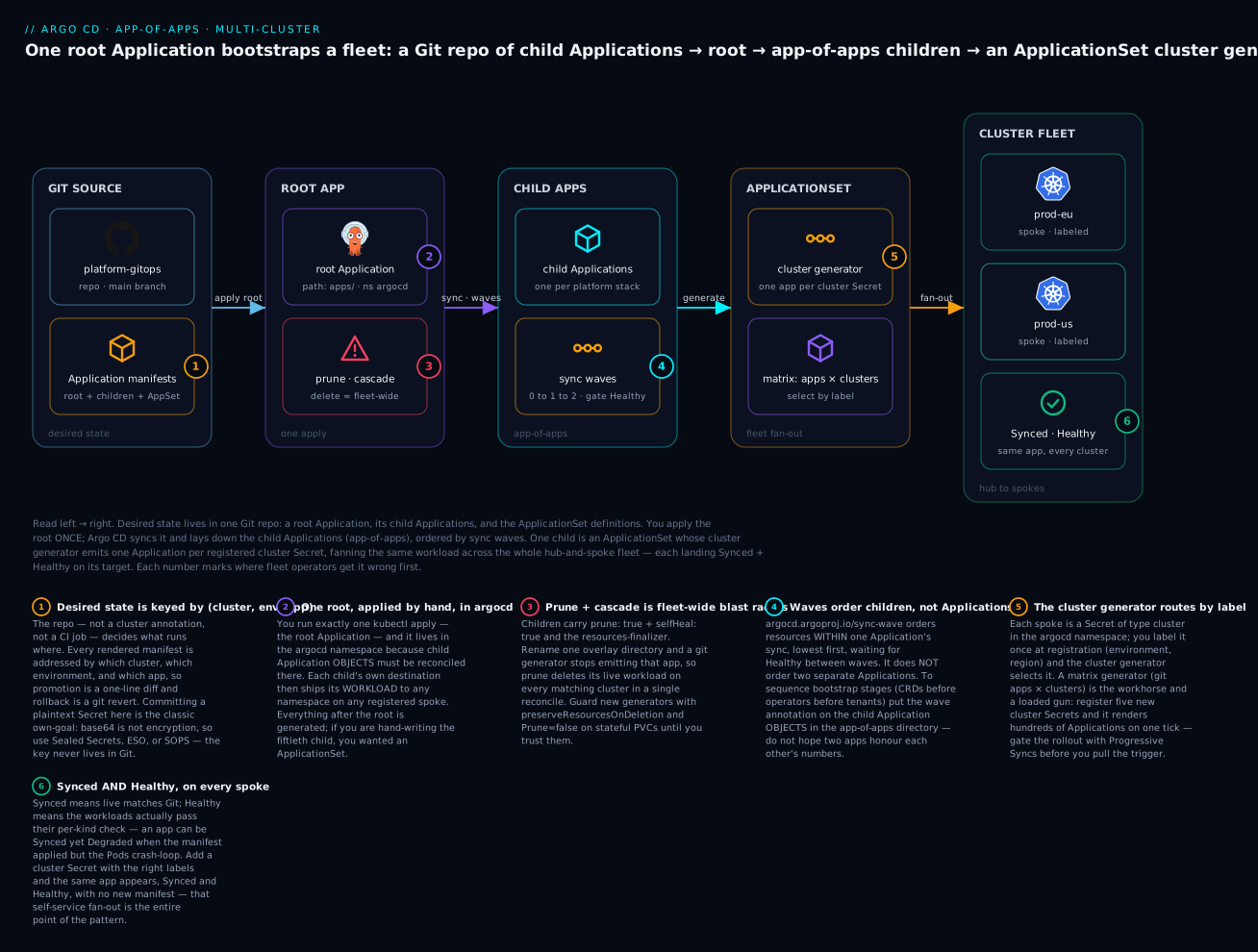
The diagram is the whole lesson in one picture. Desired state — a root Application, its children, and the ApplicationSet definitions — lives in Git (left). You apply the root Application once; Argo CD syncs it and lays down the child Applications (app-of-apps), ordered by sync waves. One child is an ApplicationSet whose cluster generator emits one Application per registered cluster Secret, fanning the same workload across the cluster fleet — each landing Synced and Healthy. The numbered badges mark the six places fleet operators trip first; the legend gives the symptom and the fix for each.
Argo CD scales fine to a handful of apps. The trouble starts at the third cluster and the fiftieth app, when hand-authored Application manifests become the thing you spend your weekends reconciling. This is the topology, generator strategy, and guardrail set I reach for when a platform has to fan a few hundred workloads across many clusters without turning into a drift factory.
The Application object, and how a cluster gets registered
Every pattern below is built from one custom resource: the Application. Argo CD installs it as a CRD, and every Application object lives in the argocd namespace. A beginner who can read one Application can read the entire platform, so start here before the topology.
An Application answers four questions:
- Where is the desired state? — the
sourceblock (a Git repo, a revision, and a path — or a Helm chart). - Where should it run? — the
destinationblock (which cluster, which namespace). - How should Argo CD keep them equal? — the
syncPolicyblock (manual or automated, withpruneandselfHeal). - Who is allowed to do this? — the
project(anAppProjectthat whitelists which repos and clusters this app may touch).
Here is a single annotated Application — one app, not the whole platform — so each block has a face:
apiVersion: argoproj.io/v1alpha1
kind: Application
metadata:
  name: checkout
  namespace: argocd                 # Application OBJECTS always live here
spec:
  project: tenants                  # WHO: an AppProject that whitelists repos + destinations
  source:                           # WHERE the desired state is
    repoURL: https://github.com/acme/app-config.git
    targetRevision: main            # a branch, a tag, or a pinned commit SHA
    path: apps/checkout/overlays/prod-eu   # a Kustomize / Helm / plain-manifest dir
  destination:                      # WHERE it should run
    name: prod-eu                   # a REGISTERED cluster by name (or server: <api-url>)
    namespace: checkout             # the app's OWN namespace (not argocd)
  syncPolicy:                       # HOW Argo CD keeps live == Git
    automated:
      prune: true                   # delete resources removed from Git
      selfHeal: true                # revert any manual change back to Git
    syncOptions:
      - CreateNamespace=true        # make the target namespace if missing
The two namespaces trip everyone up: the Application object lives in argocd (metadata.namespace), but the workload it deploys goes wherever spec.destination.namespace says — almost never the same place.
| Field | What it answers | Typical value |
|---|---|---|
spec.source.repoURL |
Which repo holds the manifests | A Git HTTPS/SSH URL |
spec.source.targetRevision |
Which version of it | main, a tag, or a commit SHA |
spec.source.path |
Which directory in the repo | apps/checkout/overlays/prod-eu |
spec.destination.server / .name |
Which cluster | An API URL, or a registered name |
spec.destination.namespace |
Which namespace | The app’s own namespace |
spec.syncPolicy.automated |
Auto-sync + prune/selfHeal |
Present = automated |
spec.project |
Which AppProject bounds it | default or a scoped project |
Argo CD reports two independent statuses for every app, and confusing them wastes hours. Sync status answers “does live match Git?” (Synced, OutOfSync, Unknown). Health status answers “are the workloads actually working?” (Healthy, Progressing, Degraded, Suspended, Missing). An app can be Synced and Degraded at once: the manifest applied cleanly, but the Pods it created are crash-looping. When something is wrong, ask which of the two is red — a red sync is a Git/apply problem, a red health is a workload problem.
Registering a cluster and targeting it
The Application above names destination.name: prod-eu, but Argo CD only knows a cluster after you register it. Registration writes a Kubernetes Secret in the argocd namespace holding the cluster’s API URL and credentials; Argo CD labels it argocd.argoproj.io/secret-type: cluster. This one Secret is what makes multi-cluster possible — the hub reaches every spoke through it.
# Register a spoke from a kubeconfig context (creates the cluster Secret)
argocd cluster add prod-eu-context --name prod-eu

# Label the generated Secret so ApplicationSet generators can select it later
kubectl label secret <cluster-secret-name> -n argocd \
  environment=prod region=eu

# See what Argo CD knows about
argocd cluster list
The in-cluster server (where Argo CD itself runs) is always available as https://kubernetes.default.svc and needs no registration. Every other cluster is a Secret you add once and label. From then on an Application targets it by destination.name (or destination.server), and — the payoff — an ApplicationSet’s cluster generator can select all clusters carrying a label and stamp out one Application each. That labeled-Secret-plus-generator loop is the whole multi-cluster story; the sections below are how you wield it without hurting yourself.
1. Repo topology: where environment config actually lives
The first decision dominates everything downstream. You are choosing between a monorepo and a polyrepo, and separately deciding where per-environment values live.
My default for a platform team is a small number of repos with clear ownership:
platform-gitops— Argo CD bootstrap,AppProjectdefinitions, and the ApplicationSets that generate everything else. Owned by the platform team.app-config— per-app, per-environment overlays (Kustomize) or values files (Helm). Owned by app teams, gated by CODEOWNERS.- Application source repos — the actual app code and its Helm chart or base Kustomize. Owned by the service team.
The non-negotiable rule: rendered desired state is keyed by (cluster, environment, app) and lives in Git, never in cluster annotations. A common layout in app-config:
app-config/
  apps/
    checkout/
      base/                 # kustomization.yaml + manifests, or a Helm chart ref
      overlays/
        dev/
        staging/
        prod-eu/
        prod-us/
    inventory/
      base/
      overlays/
        ...
Monorepo vs polyrepo is less about scale and more about blast radius and review ownership. A monorepo gives you atomic cross-cutting changes and one place to grep; a polyrepo gives you hard RBAC and per-team CI. Pick monorepo unless your org chart forces isolation, and use directory-scoped CODEOWNERS to recover most of the isolation benefit.
2. The app-of-apps pattern, and exactly where it breaks
App-of-apps is one parent Application whose source is a directory of child Application manifests. Argo CD syncs the parent, the children appear, and they sync their own targets.
# platform-gitops/bootstrap/root-app.yaml
apiVersion: argoproj.io/v1alpha1
kind: Application
metadata:
  name: root
  namespace: argocd
spec:
  project: platform
  source:
    repoURL: https://github.com/acme/platform-gitops.git
    targetRevision: main
    path: apps            # a directory full of child Application manifests
  destination:
    server: https://kubernetes.default.svc
    namespace: argocd
  syncPolicy:
    automated:
      prune: true
      selfHeal: true
This is great until you are copy-pasting child manifests. The pattern breaks down when:
- You add a cluster and have to hand-write N new child apps.
- The only difference between children is a cluster name and a values file — pure boilerplate.
- You want a child app to appear only on clusters with a given label.
That boilerplate is precisely what ApplicationSet exists to eliminate. Treat app-of-apps as the bootstrap mechanism (one root app, committed once) and let ApplicationSets generate the leaves.
3. ApplicationSet generators in depth
An ApplicationSet is a controller-managed template plus one or more generators that produce parameters. The controller renders one Application per generated parameter set. Here are the four I use most.
Git generator (directories)
Generate one app per directory found in a repo. Add a directory under apps/, get an app for free.
apiVersion: argoproj.io/v1alpha1
kind: ApplicationSet
metadata:
  name: tenant-apps
  namespace: argocd
spec:
  goTemplate: true
  goTemplateOptions: ["missingkey=error"]
  generators:
    - git:
        repoURL: https://github.com/acme/app-config.git
        revision: main
        directories:
          - path: apps/*
  template:
    metadata:
      name: '{{.path.basename}}'
    spec:
      project: tenants
      source:
        repoURL: https://github.com/acme/app-config.git
        targetRevision: main
        path: '{{.path.path}}'
      destination:
        server: https://kubernetes.default.svc
        namespace: '{{.path.basename}}'
      syncPolicy:
        automated:
          prune: true
          selfHeal: true
Enable
goTemplate: trueon every new ApplicationSet. The legacy fasttemplate syntax cannot do conditionals or safe nested lookups, andmissingkey=errorturns a typo into a render failure instead of a silently empty field.
Cluster generator
Generate one app per registered cluster, optionally filtered by label. This is the heart of multi-cluster fan-out. Argo CD stores each cluster as a Secret labeled argocd.argoproj.io/secret-type: cluster; you add your own labels there.
generators:
  - clusters:
      selector:
        matchLabels:
          environment: prod
          region: eu
Inside the template you reference {{.name}}, {{.server}}, and any label as {{index .metadata.labels "region"}} (with goTemplate). Label your clusters once at registration and the selector does the routing.
Matrix generator
The workhorse for “every app on every matching cluster.” A matrix takes the Cartesian product of two child generators — typically git (apps) crossed with clusters.
generators:
  - matrix:
      generators:
        - git:
            repoURL: https://github.com/acme/app-config.git
            revision: main
            directories:
              - path: apps/*
        - clusters:
            selector:
              matchLabels:
                environment: prod
  template:
    metadata:
      name: '{{.path.basename}}-{{.name}}'
    spec:
      project: tenants
      source:
        repoURL: https://github.com/acme/app-config.git
        targetRevision: main
        path: '{{.path.path}}/overlays/{{index .metadata.labels "environment"}}'
      destination:
        server: '{{.server}}'
        namespace: '{{.path.basename}}'
One ApplicationSet, every prod cluster, every app, each pointed at its environment overlay. Add a cluster: apps appear. Add an app directory: it lands on all matching clusters. That is the whole point.
Pull-request generator
Spin up ephemeral preview environments per open PR, and let them be garbage-collected when the PR closes. Combine with a requeueAfterSeconds poll or a webhook.
generators:
  - pullRequest:
      github:
        owner: acme
        repo: checkout
        tokenRef:
          secretName: github-token
          key: token
        labels:
          - preview
      requeueAfterSeconds: 120
  template:
    metadata:
      name: 'checkout-pr-{{.number}}'
    spec:
      source:
        targetRevision: '{{.head_sha}}'
      # ...
Pair this with spec.syncPolicy.preserveResourcesOnDeletion: false so closing the PR tears the namespace down.
4. Templating overlays without duplication
The fastest way to ruin a GitOps repo is to copy a 200-line values file four times. Two clean approaches:
Helm value layering. Keep one base values.yaml plus thin per-environment files, and let Argo CD apply them in order (later wins).
source:
  repoURL: https://github.com/acme/checkout.git
  targetRevision: main
  path: charts/checkout
  helm:
    valueFiles:
      - values.yaml
      - ../../app-config/apps/checkout/overlays/{{.env}}/values.yaml
    parameters:
      - name: image.tag
        value: '{{.image_tag}}'
Kustomize overlays. A base/ with shared manifests and overlays that only express the delta — replica counts, resource limits, ingress hosts — via patches and images: tags. The overlay should be tens of lines, not hundreds. If an overlay starts to look like a full copy of the base, your base is under-parameterized.
Do not mix both engines for the same app. Pick Helm or Kustomize per app and keep the override surface as small as possible. The override file is the diff a reviewer reads to approve a prod change; keep it readable.
5. Sync waves and hooks for ordered, stateful workloads
Argo CD applies resources in waves. Lower wave numbers go first, and Argo CD waits for each wave to become healthy before starting the next. This is how you sequence a database ahead of the app that depends on it.
metadata:
  annotations:
    argocd.argoproj.io/sync-wave: "-1"   # CRDs, namespaces, operators first
A pragmatic ordering:
| Wave | Resources |
|---|---|
| -2 | CRDs, namespaces |
| -1 | Operators, secrets/config, PersistentVolumeClaims |
| 0 | StatefulSets (databases, brokers) |
| 1 | Schema migration Job (PreSync hook) |
| 2 | Deployments, Services |
| 3 | Ingress, smoke-test Job (PostSync hook) |
Hooks run scripts at defined points in the sync:
apiVersion: batch/v1
kind: Job
metadata:
  name: db-migrate
  annotations:
    argocd.argoproj.io/hook: PreSync
    argocd.argoproj.io/hook-delete-policy: HookSucceeded
Waves order resources within a single sync of one Application. They do not order separate Applications. For cross-app ordering (operator app must be healthy before tenant apps sync), use sync waves on the child Application objects themselves in the app-of-apps directory, or split into stacked ApplicationSets and gate on health. Do not assume two Applications honor each other’s wave numbers — they do not.
6. Detecting and remediating drift
Drift is any divergence between Git and the live cluster. Three controls govern how Argo CD responds.
- selfHeal — when the live state drifts from Git (someone ran
kubectl edit), Argo CD reverts it. Turn this on for prod. - prune — when a resource is deleted from Git, Argo CD deletes it from the cluster. Without prune you accumulate orphans.
- ignoreDifferences — tells Argo CD to stop fighting controllers that legitimately mutate the spec (HPA editing replicas, a webhook injecting a sidecar, a CA injecting a bundle).
spec:
  syncPolicy:
    automated:
      prune: true
      selfHeal: true
    syncOptions:
      - PruneLast=true            # prune after everything else applies
      - ServerSideApply=true      # cleaner field ownership on large CRDs
  ignoreDifferences:
    - group: apps
      kind: Deployment
      jsonPointers:
        - /spec/replicas          # let the HPA own replica count
    - group: ""
      kind: Secret
      jqPathExpressions:
        - '.data["ca.crt"]'       # ignore a CA-injected field
selfHealwithout scopedignoreDifferenceswill war with your HPA and flap forever — Argo CD reverts the replica count, the HPA re-scales, repeat. TuneignoreDifferencesfirst, then enable self-heal.PruneLast=trueis cheap insurance against an ordering bug deleting a still-referenced resource mid-sync.
7. Securing the control plane: projects and RBAC
Argo CD’s AppProject is the multi-tenancy boundary. A project restricts which repos, destination clusters/namespaces, and resource kinds its Applications may touch — and to which namespaces it can deploy.
apiVersion: argoproj.io/v1alpha1
kind: AppProject
metadata:
  name: team-payments
  namespace: argocd
spec:
  sourceRepos:
    - https://github.com/acme/app-config.git
    - https://github.com/acme/checkout.git
  destinations:
    - server: https://prod-eu.example.com
      namespace: 'payments-*'
  clusterResourceWhitelist: []          # deny all cluster-scoped resources
  namespaceResourceBlacklist:
    - group: ""
      kind: ResourceQuota
  roles:
    - name: deployer
      policies:
        - p, proj:team-payments:deployer, applications, sync, team-payments/*, allow
      groups:
        - acme:payments-engineers
Layer RBAC on top via argocd-rbac-cm, mapping your SSO groups to actions. A workable model:
- Platform team:
role:admin. - App teams: project-scoped sync/get on their project only; no
create/deleteon Applications (those come from ApplicationSets the platform owns). - Everyone else:
role:readonly.
The single most effective guardrail is an empty
clusterResourceWhitelistplus a namespace-scopeddestinationsglob per team. It means a compromised or fat-fingered app repo cannot create aClusterRole, escape its namespace, or deploy to another team’s cluster — the project rejects the sync before anything is applied.
8. Promotion across clusters: config repos vs rendered manifests
Two schools of thought for moving a known-good version from staging to prod.
Config repo (templated). Promotion is a one-line change — bump image_tag in the prod overlay — and Argo CD renders Helm/Kustomize at sync time. Simple, but the cluster runs whatever the templating engine produces now, which can differ from what you reviewed if a chart dependency moved.
Rendered-manifests pattern. CI renders the chart to plain YAML and commits the fully-expanded manifests to an environment branch or directory. Argo CD points at raw YAML, so what you see in Git is byte-for-byte what runs. Promotion becomes a Git diff/merge between environment branches — auditable and reproducible, at the cost of a noisier repo and a rendering step in CI.
For regulated or large fleets I lean rendered-manifests: the diff a reviewer approves is the exact thing that hits prod, and rollbacks are a revert. For smaller teams, a config repo with pinned chart versions and targetRevision set to a tag (never a moving branch) is enough.
Enterprise scenario
A fintech platform team I worked with ran one matrix ApplicationSet (git apps × environment: prod clusters) fanning ~180 apps across 14 EKS clusters in two regions. They added a third region by registering five new cluster Secrets at once. The controller dutifully rendered ~900 new Applications, every one flipped to OutOfSync, and the controller hammered every source repo on the same reconcile tick. GitHub returned 403 secondary rate limit, the argocd-repo-server cache thrashed, and sync latency for the existing fleet blew past 20 minutes. The root cause was unbounded fan-out with no rollout gating: ApplicationSet’s default behavior applies all generated changes simultaneously.
The fix was Progressive Syncs plus concurrency limits. We enabled the rollout strategy so new clusters drained in controlled steps instead of all at once, and capped repo-server parallelism.
spec:
  strategy:
    type: RollingSync
    rollingSync:
      steps:
        - matchExpressions:
            - key: region
              operator: In
              values: [ap-south-1]   # one new region at a time
        - matchExpressions:
            - key: region
              operator: In
              values: [eu-west-1, us-east-1]
We also set --repo-server-parallelism-limit 8 and a webhook instead of polling so reconciles spread out. Bringing a region online went from a 900-app thundering herd to a gated, observable rollout. The lesson: at fleet scale a matrix generator is a loaded gun — gate the rollout before you pull the trigger on a new cluster label.
Going deeper
You have the patterns. This section is for the reader who has to operate a fleet, and it maps onto the numbered badges in the diagram.
App-of-apps vs ApplicationSet: the decision
They solve different problems, and confusing the two is the most common design error.
| app-of-apps | ApplicationSet | |
|---|---|---|
| Shape | A hand-curated tree of child Applications | A template + a generator that emits Applications |
| Best for | A fixed, named set of unlike platform add-ons | Fan-out: the same app across many clusters/tenants |
| Adding one | Write and commit a new child manifest | Nothing — it appears from the generator |
| Failure mode | Copy-paste sprawl of near-identical children | An over-broad selector deletes live apps |
Rule of thumb: if you are copy-pasting a twentieth near-identical child, you wanted an ApplicationSet; if you are writing a generator for three fixed, genuinely different apps, that is over-engineering that wanted app-of-apps. In practice the two compose — the root app-of-apps bootstraps the platform, and one of its children is an ApplicationSet that owns the fleet fan-out. That is exactly the diagram.
Bootstrap ordering: waves that cross Applications
Section 5 showed sync-wave ordering resources inside one Application. Bootstrapping a cluster needs ordering across Applications — the ingress controller and its CRDs must be Healthy before the app that consumes them. Put the wave annotation on the child Application objects in the app-of-apps directory:
# apps/00-ingress-nginx.yaml
metadata:
  annotations:
    argocd.argoproj.io/sync-wave: "0"    # controllers + CRDs first
---
# apps/20-tenant-checkout.yaml
metadata:
  annotations:
    argocd.argoproj.io/sync-wave: "20"   # workloads that depend on them
The root treats each child as a resource in its sync and honours the waves, waiting for each child to report Healthy — Argo CD ships a built-in health check for the Application kind — before starting the next. Children need automated sync, or a wave stalls forever waiting on a health that never arrives.
Hub-and-spoke topology and per-cluster identity
The standard shape is one Argo CD hub managing many spoke clusters. The hub needs network reach and credentials to every spoke, stored as the labeled cluster Secret. Two identity models:
- Static credentials — a bearer token or client cert baked into the Secret. Simple, but a long-lived secret that must be rotated.
- Federated identity — the Secret carries config that lets the hub assume a role per cluster (IRSA / EKS Pod Identity on AWS, Workload Identity on GKE, Managed Identity on AKS). No long-lived key on the hub; each spoke trusts the hub’s identity. Prefer this for prod fleets.
Bound every team with an AppProject (section 7) so a tenant cannot target another team’s cluster even by editing their own manifest — the least-privilege design is covered in depth in Kubernetes RBAC least-privilege design. At scale, shard the application-controller across replicas so each owns a subset of clusters — the knob that keeps reconcile latency flat as the fleet grows.
The generator zoo, past the four you met
Section 3 covered git, cluster, matrix, and pull-request. Two more matter at fleet scale:
| Generator | Emits one Application per… | Use it for |
|---|---|---|
list |
Hard-coded element in a literal list | A small, explicit fixed set |
merge |
Element merged across generators (override by key) | A base cluster list with per-cluster overrides |
merge is how you say “every prod cluster gets the app, but prod-ap overrides the replica count” without writing a second ApplicationSet. Combined with goTemplate: true and missingkey=error, generators become a small, safe templating language rather than a copy-paste machine.
Self-management: Argo CD deploying Argo CD
The elegant end state is Argo CD managing its own install — the Argo CD Helm chart becomes a child Application in the app-of-apps tree. Upgrades turn into a PR that bumps the chart version, reviewed and reconciled like any other change. The one bootstrap subtlety: something has to apply the very first Argo CD (a helm install or a Terraform module), after which Argo CD adopts its own manifests and manages itself thereafter. Keep that bootstrap script in the platform repo so a from-scratch rebuild is one command.
Finalizers, cascade, and fleet blast radius
The resources-finalizer.argocd.argoproj.io finalizer must be present at every level for a clean teardown. With it, argocd app delete root cascades: children and all their workloads are removed. Without it, deleting the root orphans the children. That same machinery is the danger. Because children carry prune: true, a child whose file leaves Git is deleted — and an ApplicationSet whose generator stops emitting a parameter set deletes every Application it produced, across every matching cluster, on one reconcile. A one-character label typo on the hub can decommission an app fleet-wide in seconds. Guardrails: preserveResourcesOnDeletion: true on new ApplicationSets, Prune=false on stateful resources, Delete=confirm on destructive syncs, and Progressive Syncs so a rollout drains cluster-group by cluster-group instead of all at once. The same gating discipline underpins progressive delivery with Argo Rollouts, one layer down at the workload level.
Common beginner mistakes
- Confusing app-of-apps with ApplicationSet. App-of-apps is a hand-curated tree you bootstrap once; ApplicationSet is templated fan-out from a generator. Copy-pasting twenty near-identical children is the signal you wanted an ApplicationSet; hand-writing a generator for three fixed, unlike apps is over-engineering that wanted app-of-apps. Decide by asking “are these instances of one thing, or a set of different things?”
- Expecting sync waves to order separate Applications.
sync-waveorders resources within one Application’s sync. Two Applications do not honour each other’s wave numbers. Bootstrap ordering (operators before tenants) comes from putting the wave annotation on the child Application objects in the app-of-apps directory — not from hoping the numbers compose across apps. - Letting prune nuke the fleet. A refactor renames an overlay directory; a git or cluster generator stops emitting that parameter set;
prune: truedeletes the live workload on every matching cluster at once. Guard new generators withpreserveResourcesOnDeletion: true, protect stateful resources withPrune=false, and stage rollouts with Progressive Syncs before you trust a generator against prod. - Treating cluster credentials as fire-and-forget. A registered cluster is a
Secretwith real credentials to a real API server, and a hub that can reach every spoke is a high-value target. A static token that never rotates is a standing risk. Prefer federated identity (IRSA / Pod Identity, Workload Identity, Managed Identity) over baked-in tokens, and scope each team with anAppProjectso a compromised app repo cannot deploy to another cluster. - Committing plaintext Secrets to Git. A Kubernetes
Secretis base64, not encryption — anyone who clones the repo reads it. “It is a private repo” is not a control. Use Sealed Secrets, the External Secrets Operator, or SOPS so only ciphertext or a reference lives in Git; the decryption key never does. - Pointing prod
targetRevisionat a moving branch. SettingtargetRevision: mainmeans any merge anywhere rolls out unreviewed across the fleet. Pin prod to a tag or commit SHA and promote by changing the pin — a reviewable one-line diff.
Practice challenges
Work these top to bottom; each builds on the last. Try before opening the solution.
1 — Beginner: read the two statuses. argocd app get checkout-prod-eu shows Sync Status: Synced and Health Status: Degraded. Is the problem in Git or in the workload, and where do you look next?
<details> <summary>Solution</summary>
The workload. Synced means the live manifests match Git, so the apply was fine — Git is not the issue. Degraded means the resources failed their health check, so look at the Pods: kubectl get pods -n checkout --context prod-eu, then kubectl describe/logs on the failing one. Typical causes are an image that will not pull, a crash-loop, or a failing readiness probe. Why: sync status and health status are independent — a red health with a green sync always points at the app, not the manifest.
</details>
2 — Beginner: an Application targeting a registered spoke. Write an Application named inventory-prod-eu that deploys apps/inventory/overlays/prod-eu from https://github.com/acme/app-config.git (branch main) into namespace inventory on the registered cluster named prod-eu, with automated sync, self-heal, prune, and auto-created namespace.
<details> <summary>Solution</summary>
apiVersion: argoproj.io/v1alpha1
kind: Application
metadata:
  name: inventory-prod-eu
  namespace: argocd
spec:
  project: tenants
  source:
    repoURL: https://github.com/acme/app-config.git
    targetRevision: main
    path: apps/inventory/overlays/prod-eu
  destination:
    name: prod-eu
    namespace: inventory
  syncPolicy:
    automated:
      prune: true
      selfHeal: true
    syncOptions:
      - CreateNamespace=true
Why: destination.name: prod-eu targets a cluster you registered with argocd cluster add ... --name prod-eu, not an API URL. The object still lives in argocd; only the workload lands on the spoke.
</details>
3 — Intermediate: a root app-of-apps with clean teardown. Author a root Application whose source.path is apps/, holding child Applications, so a single kubectl apply brings up the whole platform and a delete cascades. How would you make the ingress controller sync before the tenant apps?
<details> <summary>Solution</summary>
apiVersion: argoproj.io/v1alpha1
kind: Application
metadata:
  name: root
  namespace: argocd
  finalizers:
    - resources-finalizer.argocd.argoproj.io
spec:
  project: platform
  source:
    repoURL: https://github.com/acme/platform-gitops.git
    targetRevision: main
    path: apps
  destination:
    server: https://kubernetes.default.svc
    namespace: argocd
  syncPolicy:
    automated:
      prune: true
      selfHeal: true
    syncOptions:
      - CreateNamespace=true
Order the children with sync waves on the child Application objects — argocd.argoproj.io/sync-wave: "0" on the ingress child, a higher number on the tenants. Why the finalizer: resources-finalizer.argocd.argoproj.io makes argocd app delete root cascade to every child instead of orphaning them.
</details>
4 — Intermediate: cluster generator fan-out with safe deletion. Replace three hand-copied frontend Applications (on prod-eu, prod-us, prod-ap) with one ApplicationSet using a cluster generator, and make it safe against a label typo silently deleting live apps.
<details> <summary>Solution</summary>
apiVersion: argoproj.io/v1alpha1
kind: ApplicationSet
metadata:
  name: frontend
  namespace: argocd
spec:
  goTemplate: true
  goTemplateOptions: ["missingkey=error"]
  syncPolicy:
    preserveResourcesOnDeletion: true   # a vanished cluster != delete the app
  generators:
    - clusters:
        selector:
          matchLabels:
            environment: prod
  template:
    metadata:
      name: 'frontend-{{.name}}'
    spec:
      project: tenants
      source:
        repoURL: https://github.com/acme/app-config.git
        targetRevision: main
        path: apps/frontend/overlays/prod
      destination:
        server: '{{.server}}'
        namespace: frontend
      syncPolicy:
        automated:
          prune: true
          selfHeal: true
        syncOptions:
          - CreateNamespace=true
Why: the cluster generator emits one Application per labeled prod cluster, so adding a fourth is a label, not a copy-paste. preserveResourcesOnDeletion: true means if a cluster drops out of the selector (or someone fat-fingers a label), the generated Application is orphaned for review instead of deleted.
</details>
5 — Advanced: a matrix that selects per-region overlays. Fan every app under apps/* across every environment: prod cluster, with each Application pointed at the overlay matching that cluster’s region (so prod-eu gets overlays/prod-eu). Assume clusters are labeled region: eu|us.
<details> <summary>Solution</summary>
apiVersion: argoproj.io/v1alpha1
kind: ApplicationSet
metadata:
  name: all-apps-prod
  namespace: argocd
spec:
  goTemplate: true
  goTemplateOptions: ["missingkey=error"]
  generators:
    - matrix:
        generators:
          - git:
              repoURL: https://github.com/acme/app-config.git
              revision: main
              directories:
                - path: apps/*
          - clusters:
              selector:
                matchLabels:
                  environment: prod
  template:
    metadata:
      name: '{{.path.basename}}-{{.name}}'
    spec:
      project: tenants
      source:
        repoURL: https://github.com/acme/app-config.git
        targetRevision: main
        path: '{{.path.path}}/overlays/prod-{{index .metadata.labels "region"}}'
      destination:
        server: '{{.server}}'
        namespace: '{{.path.basename}}'
      syncPolicy:
        automated:
          prune: true
          selfHeal: true
        syncOptions:
          - CreateNamespace=true
Why: the matrix crosses git-apps with prod clusters; prod-{{index .metadata.labels "region"}} interpolates the cluster’s region label to select overlays/prod-eu or overlays/prod-us. missingkey=error fails the render loudly if a cluster is missing the region label rather than pointing at an empty overlay path.
</details>
6 — Advanced: gate a new region rollout. Adding a region to the challenge-5 ApplicationSet renders hundreds of Applications on one reconcile (the enterprise scenario). Make the set roll out one region at a time instead of all at once.
<details> <summary>Solution</summary>
spec:
  strategy:
    type: RollingSync
    rollingSync:
      steps:
        - matchExpressions:
            - key: region
              operator: In
              values: [ap]     # the new region drains first, alone
        - matchExpressions:
            - key: region
              operator: In
              values: [eu, us]  # the established regions follow
Why: RollingSync (Progressive Syncs) updates generated Applications in labelled steps, waiting for each step to be Healthy before the next, so a new cluster label is a gated wave instead of a 900-app thundering herd. Pair it with --repo-server-parallelism-limit and a webhook to keep reconciles from hammering the source repos.
</details>
Verify
Confirm the system behaves as designed before trusting it.
# ApplicationSets generated the expected Applications
kubectl get applicationset -n argocd
kubectl get applications -n argocd -o wide

# A specific app is Synced and Healthy on the right cluster
argocd app get checkout-prod-eu

# Diff live state against Git without syncing
argocd app diff checkout-prod-eu

# Confirm clusters are registered and labeled
argocd cluster list
kubectl get secrets -n argocd -l argocd.argoproj.io/secret-type=cluster \
  -o custom-columns=NAME:.metadata.name,LABELS:.metadata.labels

# Prove self-heal works: mutate live state, watch it revert
kubectl scale deploy/checkout -n payments --replicas=99
argocd app wait checkout-prod-eu --health
A correctly configured platform shows every Application Synced/Healthy, the manual scale reverts within the reconciliation window (unless replicas is in ignoreDifferences), and adding a cluster Secret with the right labels makes apps appear with no manual manifest edits.
Checklist
Glossary
- GitOps — an operating model where Git holds the desired state and a controller continuously reconciles the cluster to match it; all changes go through Git.
- Argo CD — the GitOps controller for Kubernetes: it reads manifests from Git and makes the cluster match them.
- Application (CRD) — Argo CD’s core object; binds a
source(where the manifests are), adestination(which cluster/namespace), asyncPolicy(how to keep them equal), and aproject(what it may touch). - app-of-apps — a pattern where one hand-applied root Application points at a directory of child Applications, bootstrapping a whole platform from a single apply.
- child Application — an Application created by syncing the root; each has its own source, destination, and project and deploys its own workload.
- ApplicationSet — a controller that generates Applications from a template plus one or more generators, for fan-out across clusters or tenants.
- generator — the input side of an ApplicationSet (
list,cluster,git,matrix,merge,scmProvider,pullRequest) that decides how many Applications to emit and with what values. - cluster generator — the generator that emits one Application per registered cluster matching a label selector; the heart of multi-cluster fan-out.
- matrix generator — a generator that takes the Cartesian product of two child generators, typically git-apps × clusters, for “every app on every matching cluster.”
- cluster Secret — a Kubernetes
Secretin theargocdnamespace, labeledargocd.argoproj.io/secret-type: cluster, holding a spoke’s API URL, credentials, and your routing labels. - destination — the Application block naming the target cluster (
serverAPI URL or registeredname) and namespace where the workload runs — not theargocdnamespace where the object lives. - hub-and-spoke — one Argo CD control plane (hub) managing many workload clusters (spokes) registered as labeled cluster Secrets.
- AppProject — a boundary object that whitelists which repos, clusters, namespaces, and resource kinds an Application may target; how you sandbox teams.
- sync status — whether the live cluster matches Git:
Synced,OutOfSync, orUnknown. - health status — whether the workloads actually work:
Healthy,Progressing,Degraded,Suspended,Missing, orUnknown. - reconcile loop — Argo CD’s continuous cycle of diffing desired (Git) against live and syncing the difference; the default interval is 180s, plus webhook triggers.
- drift — any divergence of the live cluster from Git (a hand-edit, a manual scale);
selfHealreverts it. - selfHeal — auto-revert manual changes back to what Git says.
- prune — delete cluster resources removed from Git; the destructive half of auto-sync, guarded by
Prune=false,PruneLast=true, andDelete=confirm. - sync wave — an integer annotation ordering resources within one sync (lower first); Argo CD waits for each wave to be Healthy before the next. Put it on child Application objects to order bootstrap stages.
- resource hook — logic (usually a Job) run at a named sync phase:
PreSync,Sync,PostSync, orSyncFail. - finalizer —
resources-finalizer.argocd.argoproj.io; makes deleting an Application cascade to the resources it created instead of orphaning them. - Progressive Syncs (RollingSync) — an ApplicationSet rollout strategy that updates its generated Applications cluster-group by cluster-group instead of all at once.
- goTemplate / missingkey=error — the modern ApplicationSet templating engine and the option that turns a misspelled parameter into a render failure instead of a silent empty string.
- rendered-manifests pattern — committing CI-expanded plain YAML to Git so what a reviewer approves is byte-for-byte what runs; the alternative to templating at sync time.
- ignoreDifferences — a per-Application rule telling Argo CD to stop diffing fields other controllers legitimately mutate (HPA replicas, an injected sidecar or CA bundle).
Pitfalls
- Self-heal flapping. Enabling
selfHealbefore scopingignoreDifferencesmakes Argo CD fight your HPA and admission webhooks indefinitely. Tune ignores first. - Waves do not cross Applications.
sync-waveorders resources inside one Application’s sync only. Sequence Applications via the app-of-apps layer, not by hoping wave numbers compose. - Moving
targetRevisionin prod. Pointing prod atmainmeans a merge anywhere can roll out unreviewed. Pin to a tag or SHA and promote by changing the pin. - Generator typos fail silently. Without
missingkey=error, a misspelled parameter renders an empty string and produces a broken-but-accepted Application. Always set it. - Orphaned resources. Skipping
pruneleaves deleted-from-Git resources running in the cluster forever; Git stops being the source of truth.
Next steps
Wire ApplicationSet and webhook events into notifications (argocd-notifications) so generation failures page someone, add Argo CD’s Prometheus metrics to your dashboards to watch sync latency as the fleet grows, and adopt Progressive Syncs on critical ApplicationSets to roll changes cluster-by-cluster instead of all at once.