Flux is deceptively simple to bootstrap and deceptively easy to turn into a tangle of cross-referencing Kustomizations that nobody can reason about. The hard part is never flux bootstrap; it is the repo topology, the overlay strategy, and the isolation model that keep ten teams shipping into shared clusters without stepping on each other. This is the structure I reach for when a platform has to run real multi-tenancy on Flux v2 and survive an audit.
In a nutshell
GitOps with Flux is one idea: Git holds the desired state of your clusters, and a set of controllers running inside the cluster continuously make reality match Git. You never kubectl apply to production; you open a pull request, and Flux reconciles the change in. This lesson is about doing that for many teams and many clusters out of a single repository without the teams colliding.
Think of a large office building run from one master plan room (the monorepo):
- One master blueprint set covers every floor — the shared
base/. You do not redraw the whole building to change one floor. - Per-floor change sheets record only what differs on floor 3 versus floor 10 — those are Kustomize overlays (
staging,prod). Thin deltas layered onto the common base. - A works schedule says the lobby, power, and elevators must be finished and inspected before any tenant fit-out begins — that is
dependsOnordering: infrastructure lands and goes healthy before tenant apps. - Each tenant gets keys to their own floor only — that is multi-tenancy: the electrician wiring floor 3 physically cannot touch floor 10.
Flux is the on-site crew that reads the plan room continuously. It pulls the latest approved plans (the source-controller fetches the repo), builds each floor to its change sheet (the kustomize-controller applies overlays), follows the works schedule (dependsOn), and if a tenant quietly knocks down a wall the plans do not show, the crew rebuilds it on the next pass (drift correction). Delete a floor from the plans and the crew clears it out (prune).
By the end you will be able to lay out a monorepo that separates cluster entrypoints from what they reference, express environment differences as Kustomize overlays instead of copy-paste, order rollouts with dependsOn and health gates, and enforce tenant isolation so a team literally cannot apply outside its own namespace.
Level: Advanced (with a beginner on-ramp) · Time: ~35 min
Prerequisites — you should know what a Kubernetes Namespace, Deployment, and ServiceAccount are, understand RBAC at the level of “a RoleBinding grants a role in one namespace,” and have seen kubectl apply before. Prior Kustomize or Flux experience is not assumed — every CRD and flag is defined as it appears and again in the Glossary at the end. If you have used Argo CD, the mental model transfers; the mechanics differ.
After this lesson you can:
- Explain the GitOps Toolkit: which controller owns which CRD, and why source and apply are split.
- Design a monorepo where cluster directories hold only pointers, never workloads.
- Write Kustomize overlays and Flux
Kustomizationobjects, and tell the two “Kustomizations” apart. - Order reconciliation with
dependsOn+wait, and health-gate custom resources. - Enforce multi-tenancy with per-tenant sources and ServiceAccount impersonation — secure by default, not by convention.
- Encrypt secrets in Git with SOPS and parameterize per-cluster values with
postBuild.substituteFrom.
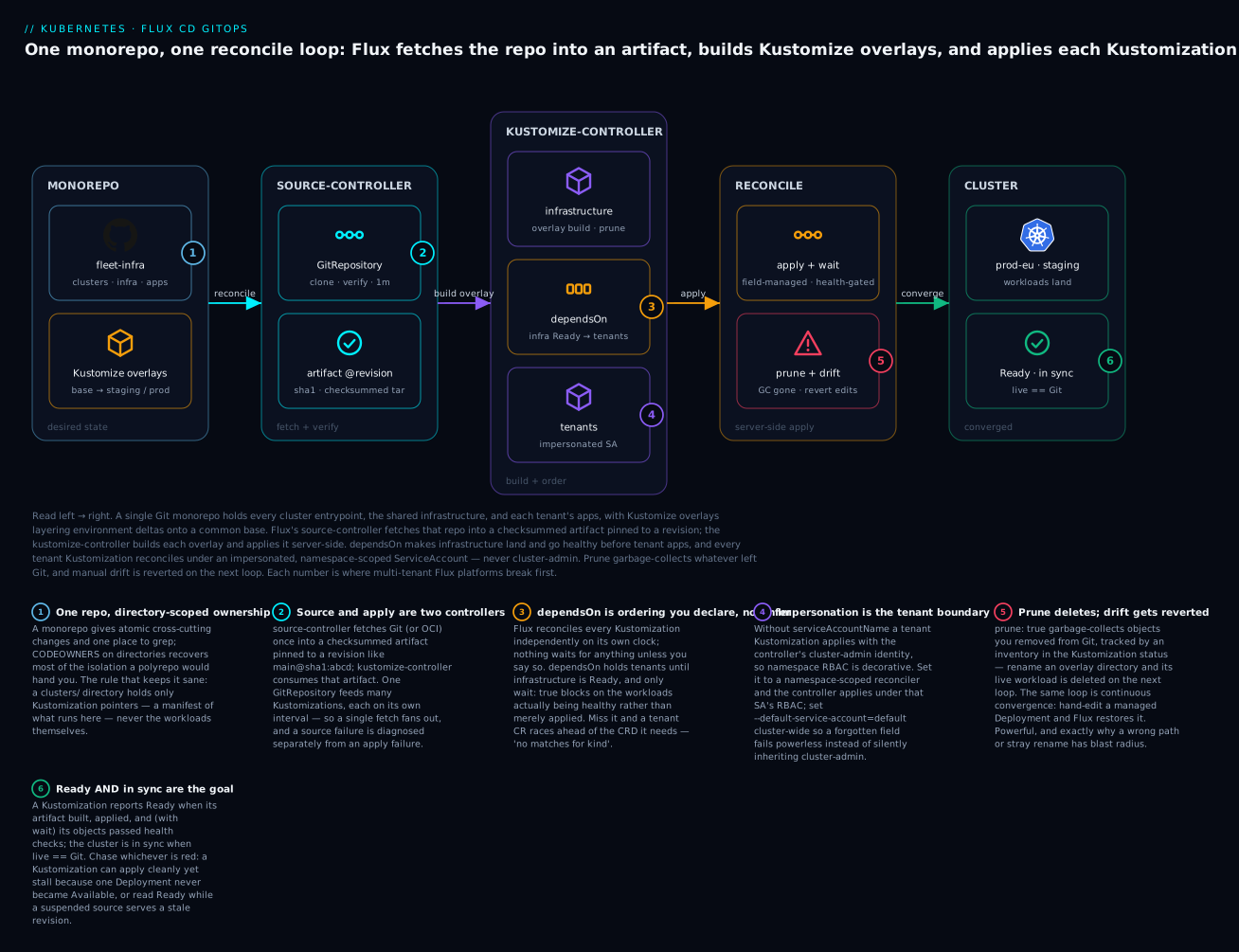
Read the diagram left to right. A single monorepo (badge 1) holds every cluster entrypoint, the shared infrastructure, and each tenant’s apps, with Kustomize overlays layering environment deltas onto a common base. Flux’s source-controller fetches that repo once into a checksummed artifact pinned to a revision (badge 2) — source and apply are two different controllers. The kustomize-controller then builds each overlay and applies its Kustomization, holding tenants until infrastructure is Ready via dependsOn (badge 3) and applying each tenant under an impersonated, namespace-scoped ServiceAccount rather than cluster-admin (badge 4). The reconcile loop prunes what left Git and reverts drift (badge 5), and the cluster converges to Ready and in sync (badge 6). Each numbered badge is a place multi-tenant Flux platforms break first — the rest of the lesson is those six lessons in full.
1. The controller architecture you are actually operating
Flux is not one binary. It is the GitOps Toolkit: a set of single-responsibility controllers that watch CRDs and reconcile. You operate all of them, so know what each owns.
- source-controller — fetches and verifies artifacts. Owns
GitRepository,OCIRepository,HelmRepository,Bucket. It produces a checksummed tarball that everything downstream consumes. - kustomize-controller — reconciles
Kustomizationobjects: builds the overlay, applies it server-side, prunes, and runs health checks. - helm-controller — reconciles
HelmReleaseobjects by driving the Helm SDK against a chart sourced by source-controller. - notification-controller — handles both inbound webhooks (
Receiver) and outbound events/alerts (Provider,Alert). - image-reflector-controller and image-automation-controller — scan registries (
ImageRepository,ImagePolicy) and write image bumps back to Git (ImageUpdateAutomation).
The mental model: source-controller answers “what is the desired state in Git/OCI,” kustomize- and helm-controllers answer “make the cluster match it,” and the rest is plumbing. Every CRD reconciles on its own interval, independently. There is no central scheduler.
# See the controllers and their toolkit version
flux check
kubectl -n flux-system get deploy -l app.kubernetes.io/part-of=flux
If you keep one table from this section, keep this — which object you edit to make which thing happen:
| CRD | Controller | What it answers |
|---|---|---|
GitRepository / OCIRepository |
source-controller | “What is the desired state, and at which revision?” |
Kustomization |
kustomize-controller | “Build this overlay, then apply, prune, and health-check it.” |
HelmRelease |
helm-controller | “Install/upgrade this chart with these values.” |
Receiver / Alert / Provider |
notification-controller | “React to a webhook; announce what happened.” |
ImageRepository / ImagePolicy / ImageUpdateAutomation |
image-*-controller | “Which new tag exists — and write it back to Git.” |
2. Designing the monorepo: clusters, infrastructure, tenants
A monorepo wins for a platform team: atomic cross-cutting changes, one place to grep, and directory-scoped CODEOWNERS to recover most of the isolation a polyrepo would give you. The layout that has held up for me separates cluster entrypoints from what they reference:
fleet-infra/
  clusters/
    prod-eu/
      flux-system/            # bootstrap output: gotk-components + gotk-sync
      infrastructure.yaml     # Kustomization -> ../../infrastructure/prod
      tenants.yaml            # Kustomization -> ../../tenants (prod overlay)
    staging/
      flux-system/
      infrastructure.yaml
      tenants.yaml
  infrastructure/
    base/                     # ingress-nginx, cert-manager, kyverno, ...
    prod/                     # overlay of base
    staging/
  tenants/
    base/                     # per-tenant namespace, RBAC, GitRepository, Kustomization
      team-payments/
      team-search/
    prod/                     # overlay: prod GitRepository revisions, quotas
    staging/
The rule that keeps this sane: a cluster directory only ever contains Kustomization objects that point elsewhere in the repo. It is a manifest of “what runs here,” never the workloads themselves. infrastructure/ is platform-owned and applied with cluster-admin authority. tenants/ is where isolation gets enforced, covered in step 5.
Keep
dependsOnedges flowing one direction: tenants depend on infrastructure, never the reverse. If a tenant Kustomization waits on a controller a tenant could delete, you have built a cross-tenant denial-of-service into your reconciliation graph.
3. Bootstrapping: CLI vs. Terraform, and pinning the toolkit
flux bootstrap is idempotent. It commits gotk-components.yaml (the controller manifests) and gotk-sync.yaml (the GitRepository + Kustomization that makes Flux manage itself) into the cluster path, installs them, and configures deploy-key or token access.
export GITHUB_TOKEN=ghp_xxx
flux bootstrap github \
  --owner=acme \
  --repository=fleet-infra \
  --branch=main \
  --path=clusters/prod-eu \
  --components-extra=image-reflector-controller,image-automation-controller \
  --version=v2.7.4
Two things matter here. Pin --version to an exact toolkit release; never let bootstrap float to latest, or a controller CRD will change shape under you on the next run. And add the image controllers at bootstrap via --components-extra if you intend to use image automation; they are not installed by default.
For fleets, drive bootstrap through the official Terraform provider so cluster onboarding is reviewable infrastructure, not a laptop command:
provider "flux" {
  kubernetes = {
    host                   = var.cluster_endpoint
    cluster_ca_certificate = base64decode(var.cluster_ca)
    token                  = var.cluster_token
  }
  git = {
    url    = "ssh://git@github.com/acme/fleet-infra.git"
    branch = "main"
    ssh    = { username = "git", private_key = var.deploy_key }
  }
}

resource "flux_bootstrap_git" "this" {
  version             = "v2.7.4"
  path                = "clusters/prod-eu"
  components_extra    = ["image-reflector-controller", "image-automation-controller"]
  cluster_domain      = "cluster.local"
  network_policy      = true
}
network_policy = true makes bootstrap drop deny-by-default NetworkPolicies into flux-system, isolating the controllers. Pair the Terraform version with a Renovate or Dependabot rule so toolkit upgrades arrive as PRs.
4. Kustomize overlays for dev/staging/prod
Flux runs the same Kustomize engine as kubectl kustomize; if it builds locally, it builds in-cluster. Keep a thin base/ and put environment deltas in overlays via strategic-merge and JSON6902 patches.
Two different things are both called “Kustomization.” The lowercase
kustomization.yamlfile (apiVersion: kustomize.config.k8s.io/v1beta1) is plain Kustomize — the recipe listingresources,patches, andcomponents. The capital-K FluxKustomizationCRD (apiVersion: kustomize.toolkit.fluxcd.io/v1) is a controller instruction: “build the Kustomize directory atspec.path, then apply, prune, and health-check it on an interval.” Flux runs the file; the CRD tells Flux which file to run and how. Conflating the two is the single most common source of confusion in this whole model — when a manifest below sayskind: Kustomization, check theapiVersionto know which one you are looking at.
# tenants/base/team-payments/kustomization.yaml
apiVersion: kustomize.config.k8s.io/v1beta1
kind: Kustomization
resources:
  - namespace.yaml
  - rbac.yaml
  - sync.yaml          # the tenant's own GitRepository + Kustomization
# tenants/prod/kustomization.yaml
apiVersion: kustomize.config.k8s.io/v1beta1
kind: Kustomization
resources:
  - ../base/team-payments
  - ../base/team-search
patches:
  - target:
      kind: Kustomization
      group: kustomize.toolkit.fluxcd.io
    patch: |
      - op: replace
        path: /spec/interval
        value: 5m
components:
  - ../components/prod-quotas
Two overlay features earn their keep at scale:
- Components (
kind: Component) are reusable, composable overlay fragments. Aprod-quotascomponent that adds aResourceQuotaandLimitRangecan be pulled into every prod tenant without copy-paste. (For the full Kustomize overlay toolkit — strategic-merge vs. JSON6902 patches, generators, and components — see Kustomize overlays, components, and generators.) - Variable substitution is a Flux feature, not Kustomize. The
Kustomization.spec.postBuild.substituteFromblock injects values from a ConfigMap or Secret after the build, so you keep one base and vary region, domain, or replica count per cluster:
# clusters/prod-eu/infrastructure.yaml
apiVersion: kustomize.toolkit.fluxcd.io/v1
kind: Kustomization
metadata:
  name: infrastructure
  namespace: flux-system
spec:
  interval: 10m
  path: ./infrastructure/prod
  prune: true
  sourceRef:
    kind: GitRepository
    name: flux-system
  postBuild:
    substituteFrom:
      - kind: ConfigMap
        name: cluster-vars        # contains region=eu-west-1, domain=eu.acme.io
In manifests you reference ${region} and ${domain:=default}. Use substituteFrom over inline substitute so values live in versioned ConfigMaps, not in the Kustomization spec. Be deliberate: any literal ${...} in your YAML is now a substitution target, which can bite you in shell scripts embedded in manifests.
5. Enforcing multi-tenancy: source boundaries + impersonation
This is the part most teams get wrong. Multi-tenancy in Flux is not RBAC alone; it is the combination of per-tenant sources and Kustomization impersonation. Without impersonation, every tenant Kustomization applies with the kustomize-controller’s service account, which is cluster-admin. That means any tenant can write any manifest anywhere.
The fix is spec.serviceAccountName on the tenant Kustomization. The controller then impersonates that ServiceAccount and applies under its RBAC. Bind it narrowly to the tenant namespace.
# tenants/base/team-payments/rbac.yaml
apiVersion: v1
kind: ServiceAccount
metadata:
  name: reconciler
  namespace: team-payments
---
apiVersion: rbac.authorization.k8s.io/v1
kind: RoleBinding
metadata:
  name: reconciler
  namespace: team-payments
roleRef:
  apiGroup: rbac.authorization.k8s.io
  kind: ClusterRole
  name: admin                 # namespace-admin, NOT cluster-admin
subjects:
  - kind: ServiceAccount
    name: reconciler
    namespace: team-payments
# tenants/base/team-payments/sync.yaml
apiVersion: source.toolkit.fluxcd.io/v1
kind: GitRepository
metadata:
  name: team-payments
  namespace: team-payments
spec:
  interval: 1m
  url: https://github.com/acme/team-payments-config
  ref:
    branch: main
  secretRef:
    name: git-auth
---
apiVersion: kustomize.toolkit.fluxcd.io/v1
kind: Kustomization
metadata:
  name: team-payments
  namespace: team-payments
spec:
  interval: 5m
  path: ./deploy
  prune: true
  serviceAccountName: reconciler        # <-- impersonation: the isolation boundary
  sourceRef:
    kind: GitRepository
    name: team-payments
  targetNamespace: team-payments
Three boundaries are now closed at once:
- Source isolation — the tenant’s
GitRepositorylives in their namespace and points at their repo. They cannot reference the platform repo or another tenant’s source across namespaces (Flux disallows cross-namespacesourceRefby default; enforce it with--no-cross-namespace-refs=trueon the controllers). - Apply isolation —
serviceAccountName: reconcilermeans even if a tenant commits aClusterRoleBinding, the apply fails because their SA cannot create cluster-scoped objects. - Namespace pinning —
targetNamespaceforces everything into their namespace regardless of what their manifests claim.
Set
--default-service-account=defaulton the kustomize- and helm-controllers cluster-wide. Then any Kustomization that forgetsserviceAccountNamefalls back to the (powerless)defaultSA rather than silently inheriting cluster-admin. This single flag turns “secure by configuration” into “secure by default” and is the most important hardening switch in a Flux multi-tenant install.
Flux’s model is a reconciliation boundary — a team cannot apply outside its namespace. If you also need a control-plane boundary (separate API servers, distinct CRD versions per team, or nodes a tenant can never schedule onto), that is a heavier isolation model: see Kubernetes multi-tenancy with vcluster, hierarchical namespaces, and quotas for where namespace-plus-RBAC stops being enough.
6. Dependency ordering, health checks, and wait semantics
Order is explicit, not inferred. dependsOn makes a Kustomization wait until its dependency is Ready.
# clusters/prod-eu/tenants.yaml
apiVersion: kustomize.toolkit.fluxcd.io/v1
kind: Kustomization
metadata:
  name: tenants
  namespace: flux-system
spec:
  interval: 10m
  path: ./tenants/prod
  prune: true
  dependsOn:
    - name: infrastructure            # CRDs + controllers land first
  sourceRef:
    kind: GitRepository
    name: flux-system
  wait: true                          # block until all applied objects are healthy
  timeout: 5m
The semantics that trip people up:
wait: trueblocks the Kustomization’s own readiness on all its objects passing health checks. Combined with a downstreamdependsOn, this gives you ordered rollout. Withoutwait,dependsOnonly waits for the Kustomization to report Ready (i.e. applied), not for the workloads to be healthy.- For object-specific gates, list
healthCheckswith explicit GVK + name. Flux ships built-in health evaluation for Deployments, StatefulSets, DaemonSets, and any Kustomization/HelmRelease; for custom resources, usehealthCheckExprs(CEL) to define readiness. timeoutbounds both the apply and the wait. Set it generously above your slowest rollout, or a slow image pull will mark the Kustomization failed and stall everything that depends on it.
  healthChecks:
    - apiVersion: apps/v1
      kind: Deployment
      name: payments-api
      namespace: team-payments
7. Automated image updates with write-back commits
Image automation is three objects working together. ImageRepository scans tags, ImagePolicy selects the one you want, and ImageUpdateAutomation writes the chosen tag back to Git.
apiVersion: image.toolkit.fluxcd.io/v1beta2
kind: ImageRepository
metadata:
  name: payments-api
  namespace: flux-system
spec:
  image: ghcr.io/acme/payments-api
  interval: 5m
---
apiVersion: image.toolkit.fluxcd.io/v1beta2
kind: ImagePolicy
metadata:
  name: payments-api
  namespace: flux-system
spec:
  imageRepositoryRef:
    name: payments-api
  policy:
    semver:
      range: ">=1.4.0 <2.0.0"        # never auto-cross a major
apiVersion: image.toolkit.fluxcd.io/v1beta1
kind: ImageUpdateAutomation
metadata:
  name: payments-api
  namespace: flux-system
spec:
  interval: 10m
  sourceRef:
    kind: GitRepository
    name: flux-system
  git:
    checkout:
      ref:
        branch: main
    commit:
      author:
        name: fluxcdbot
        email: fluxcdbot@acme.io
      messageTemplate: "chore: bump {{range .Changed.Changes}}{{.NewValue}}{{end}}"
    push:
      branch: flux-image-updates     # PR target, not main
  update:
    path: ./tenants/prod
    strategy: Setters
The controller edits only lines you mark with a setter comment, so it can never rewrite arbitrary YAML:
image: ghcr.io/acme/payments-api:1.4.2 # {"$imagepolicy": "flux-system:payments-api"}
Push to a dedicated branch (push.branch) and gate it with a PR + required checks rather than committing straight to main. That keeps a human (or a policy bot) in the loop for production while the bump itself is fully automated. Constrain the semver.range so automation never crosses a major version on its own. Image automation deepens considerably when your source is an OCI artifact rather than Git and when bumps must respect tenant boundaries — the companion lesson on Flux image automation, OCI artifacts, and multi-tenancy takes that the rest of the way.
8. Drift detection, pruning, and recovering a stuck reconciliation
Flux applies server-side and continuously corrects drift: edit a managed Deployment by hand and the next reconcile reverts it. prune: true garbage-collects objects you deleted from Git, tracked by an inventory the controller maintains. Turning prune off is how orphaned resources accumulate; leave it on everywhere except during a deliberate migration.
Operational moves you will reach for:
# Force an immediate reconcile, pulling the latest from Git first
flux reconcile kustomization tenants --with-source

# Suspend during an incident so Flux stops fighting your manual changes
flux suspend kustomization team-payments -n team-payments
flux resume  kustomization team-payments -n team-payments

# See why something is stuck
flux get kustomizations -A --status-selector ready=false
kubectl -n team-payments describe kustomization team-payments
For a Kustomization wedged on a single bad object (a finalizer hang, or an immutable-field conflict on an apply), suspend, fix or delete the offending object directly, then resume. If the inventory itself is diverged after a botched cutover, deleting and recreating the Kustomization rebuilds the inventory from Git cleanly. When a server-side apply conflicts because something else owns a field, spec.force: true makes Flux take ownership on the next apply rather than erroring forever.
Going deeper
Everything above is the operating manual. This section is the machinery underneath — the reconcile internals, the ordering guarantees, and the two capabilities (encrypted secrets and remote clusters) that turn a single-cluster demo into a fleet platform. Read it once you have a bootstrap working; it is what you reach for when something behaves in a way the happy path did not predict.
The reconcile loop, artifact by artifact
The word “reconcile” hides a specific pipeline. Trace one change from commit to convergence:
- source-controller fires on the
GitRepositoryinterval (or a webhook). It fetches the ref, optionally verifies a commit signature, packages the working tree into a gzipped tar artifact, computes a checksum, and advertises a revision string likemain@sha1:5f3c.... The artifact is served over cluster-internal HTTP. Nothing downstream ever talks to Git again. - kustomize-controller notices its source has a new revision (or its own interval fires). It pulls the artifact, runs
kustomize buildonspec.path, applies the result server-side with the field managerkustomize-controller, and records an inventory — the exactGVK + namespace + nameof every object it applied — in.status.inventory. - On the next reconcile, the controller diffs the freshly built inventory against the stored one. Anything present before but absent now is pruned (when
prune: true). This is precisely why prune is safe only when Git is the whole truth: delete a manifest, and it is deleted from the cluster.
There are exactly three ways a reconcile is triggered: the object’s interval; an on-demand flux reconcile (which stamps the reconcile.fluxcd.io/requestedAt annotation the controller watches); or a push event delivered to a notification-controller Receiver. There is no central scheduler — every object is its own independent loop.
Why the source/apply split matters. One GitRepository can back a dozen Kustomizations, each with a different path and interval. The repo is fetched once and cached, so a hundred Kustomizations do not hammer your Git host. A Git outage degrades fetching (Flux keeps applying the last good artifact) without touching applying. And you can flux reconcile kustomization X --with-source to force a fresh pull for one path without disturbing the others. Diagnosing failures splits the same way: flux get sources git -A tells you whether fetching is healthy, flux get kustomizations -A whether applying is — two questions, two commands.
dependsOn, wait, and health — the ordering contract in full
Section 6 showed the fields; here is the contract they actually make.
- The dependency set is a DAG. The controller walks it; a cycle deadlocks both Kustomizations in
DependencyNotReadyforever. Keep edges one-directional — tenants → infrastructure, never back.dependsOntargets are same-namespace by default; to depend across namespaces you must give{name, namespace}. dependsOnalone waits for applied, not healthy. A baredependsOn: infrastructureproceeds the moment the infrastructure Kustomization reports Ready — which, withoutwait, means “the manifests were applied,” not “the CRDs are established and the controllers are running.” The ordering you almost always want iswait: trueon the dependency anddependsOnon the dependent. Then “Ready” on infrastructure means its objects passed health checks, and only then do tenants start.- Built-in health uses kstatus. Flux evaluates readiness for
Deployment,StatefulSet,DaemonSet,ReplicaSet, and any Flux CRD via the kstatus library. For a resource from some operator, a plainhealthChecksentry only confirms the object exists. To gate on its real status, usehealthCheckExprs(CEL expressions, kustomize-controller v2.3+) that read the resource’s own status fields:
  wait: false                     # required when using per-object healthCheckExprs
  healthCheckExprs:
    - apiVersion: cert-manager.io/v1
      kind: Certificate
      current: "status.conditions.filter(e, e.type == 'Ready').all(e, e.status == 'True')"
retryIntervalandtimeoutare separate knobs.retryIntervalcontrols how quickly a failed apply is retried (defaults tointerval);timeoutbounds a single apply-plus-wait. Settimeoutabove your slowest cold start, or a lagging image pull marks the whole Kustomization failed and stalls everything that depends on it.
Monorepo structure patterns — and when not to use one
The monorepo in section 2 is one of three topologies. Choose by how autonomous your teams are and how much blast radius you can tolerate:
| Pattern | Cross-cutting change | Blast radius of a bad PR | Isolation mechanism | Best for |
|---|---|---|---|---|
| Monorepo (one repo, all clusters + tenants) | Easy — one PR | Whole fleet if prune or a generator misfires | CODEOWNERS + RBAC |
Platform teams, small-to-mid fleets |
| Repo-per-team (polyrepo) | Hard — N PRs to coordinate | One team | The repo boundary is a hard wall | Many fully autonomous teams |
| Hybrid (platform monorepo + per-tenant app repos) | Platform easy; apps per-team | Contained per repo | A per-tenant GitRepository source |
Multi-tenant platforms — what this lesson builds |
Whichever you pick, the directory invariant is the same: a cluster directory names what runs there (only Kustomization pointers), a base/ names how a component is configured by default, and an overlay names what differs here (thin patches). A shared components/ directory of reusable kind: Component fragments — quotas, standard labels, a default NetworkPolicy — keeps the overlays from drifting into copy-paste. The moment a cluster directory contains an actual Deployment, the topology has started to rot.
Variable substitution, precisely
postBuild.substituteFrom is powerful and quietly surprising, because it runs after kustomize build — it is Flux’s own envsubst pass over the already-rendered YAML, not a Kustomize feature.
substitutevssubstituteFrom.substituteis an inline map in the Kustomization spec;substituteFromis a list ofConfigMap/Secretreferences. PrefersubstituteFromso values are versioned in Git-managed ConfigMaps rather than baked into the Kustomization. Mark a referenceoptional: trueif it may legitimately be absent, or the reconcile fails when it is missing.- Syntax and precedence.
${var}substitutes;${var:=default}supplies a fallback. LatersubstituteFromentries override earlier ones; an inlinesubstituteoverrides them all. - The escape gotcha. With
postBuildactive, every${...}in the rendered output is a substitution target. An embedded shell script’s${HOME}, a Prometheus relabel’s${1}, or an NGINX$request_uriwritten as${request_uri}will be blanked to empty. Escape a literal by doubling the dollar sign —$${HOME}renders as${HOME}and is left alone. This is the number-one cause of “my ConfigMap script broke after I added substitution.”
Encrypting secrets in Git with SOPS
GitOps forces an awkward question: a Secret is desired state, so it must live in Git — but committing plaintext credentials is a breach. SOPS (Secrets OPerationS) resolves it by encrypting only the values, leaving keys and structure as readable, diff-able YAML. It encrypts with age (a small modern keypair) or a cloud KMS (AWS KMS, GCP KMS, Azure Key Vault, HashiCorp Vault).
A repo-root .sops.yaml declares the rule — encrypt only the data/stringData values, to this recipient:
# .sops.yaml
creation_rules:
  - path_regex: .*\.sops\.yaml$
    encrypted_regex: ^(data|stringData)$
    age: age1qz...recipient_public_key
Developers encrypt with the public recipient and commit the result — sops --encrypt --in-place db-creds.sops.yaml. They never hold the cluster’s private key. The kustomize-controller decrypts in-cluster during reconcile, via spec.decryption:
# clusters/prod-eu/tenants.yaml
spec:
  decryption:
    provider: sops
    secretRef:
      name: sops-age        # holds the age private key; a KMS uses controller IAM instead
The age private key is delivered to Flux once, out of band:
kubectl create secret generic sops-age \
  --namespace=flux-system \
  --from-file=age.agekey=age.agekey
With a cloud KMS the story is even cleaner: bind the controller’s ServiceAccount to a KMS key via IRSA / Workload Identity, and there is no private key in a Secret at all — decryption is an IAM-gated API call. Either way, the only component that can read plaintext is the controller, and the only thing in Git is ciphertext.
Multi-cluster: remote apply vs. per-cluster Flux
Two fleet models, and the choice shapes your whole platform:
- Per-cluster Flux (default).
flux bootstrapruns on every cluster; each reconciles its ownclusters/<name>path. There is no central control plane, so no single point of failure — a management-cluster outage cannot stop a spoke from self-healing. This is the resilient default; drive onboarding through the Terraform provider so adding a cluster is a reviewable PR. - Hub-and-spoke remote apply. One management cluster’s kustomize-controller applies to remote clusters, each addressed by a stored kubeconfig:
spec:
  kubeConfig:
    secretRef:
      name: prod-eu-kubeconfig   # the Secret's 'value' key holds a kubeconfig
Remote apply centralizes control — fewer Flux installs, one console for the whole fleet — but it makes the hub both a blast radius and a single point of failure, and the hub must hold credentials to every spoke. Prefer short-lived, IRSA/Workload-Identity-backed kubeconfigs over static tokens so a leaked hub secret is not a standing key to production. As a rule: reach for remote apply when you have many small, ephemeral clusters that should not each run a controller; keep per-cluster Flux when resilience and isolation matter more than a single pane of glass.
The tenant primitive: flux create tenant
Section 5 built impersonation by hand to show every moving part. In practice, flux create tenant scaffolds the same pieces:
flux create tenant dev-team \
  --with-namespace=dev-team \
  --cluster-role=cluster-admin \
  --export > tenants/base/dev-team/rbac.yaml
It emits a Namespace, a reconciler ServiceAccount, and a namespaced RoleBinding to the named ClusterRole. The subtlety worth internalizing: --cluster-role=cluster-admin grants cluster-admin inside that namespace only, because it is bound with a RoleBinding, not a ClusterRoleBinding — full power over the tenant’s own objects, zero reach outside. You then set serviceAccountName: reconciler on the tenant Kustomization. Combined with the controller-wide --default-service-account=default and --no-cross-namespace-refs=true from section 5, that is the entire tenancy contract, expressed in three commands and two flags.
Verify
Confirm the platform is healthy and the isolation actually holds:
# 1. Toolkit healthy and version-pinned
flux check
flux version

# 2. Everything Ready across all namespaces
flux get all -A

# 3. Sources reconciling and revisions current
flux get sources git -A

# 4. Prove impersonation: a tenant SA CANNOT touch cluster scope
kubectl auth can-i create clusterrolebindings \
  --as=system:serviceaccount:team-payments:reconciler
# expected: no

# 5. Prove namespace isolation: tenant SA cannot read another namespace
kubectl auth can-i get secrets -n team-search \
  --as=system:serviceaccount:team-payments:reconciler
# expected: no

# 6. Image automation is selecting the tag you expect
flux get image policy -A
If step 4 returns yes, your serviceAccountName is missing or bound to cluster-admin. Stop and fix it before onboarding tenants; nothing downstream is isolated until that returns no.
Enterprise scenario
A payments platform team ran a single shared “prod” cluster for eight product squads on Flux v2. They had namespaces and RBAC, and assumed they had multi-tenancy. During a routine review, a security engineer committed a ClusterRoleBinding granting cluster-admin to a test ServiceAccount into one squad’s application repo, expecting Flux to reject it. Flux applied it successfully. The root cause: every tenant Kustomization omitted serviceAccountName, so all of them reconciled with the kustomize-controller’s cluster-admin identity. Namespace RBAC was decorative; the reconciler ignored it entirely.
The constraint was that they could not stop deployments while fixing this, and could not trust eight teams to add the right field to every Kustomization. So they made the platform secure-by-default instead of per-object. They set the controller-wide fallback to a powerless account, then patched each tenant Kustomization to impersonate a namespace-scoped reconciler:
# Patched onto the kustomize-controller Deployment via the bootstrap kustomization
spec:
  template:
    spec:
      containers:
        - name: manager
          args:
            - --default-service-account=default
            - --no-cross-namespace-refs=true
            - --watch-all-namespaces=true
With --default-service-account=default, the next reconcile of any Kustomization that lacked serviceAccountName immediately lost cluster-admin and failed loudly on cluster-scoped objects, surfacing every place isolation had been missing. They worked the resulting failure list namespace by namespace, adding a reconciler SA bound to the namespaced admin ClusterRole and setting serviceAccountName on each Kustomization. No outage, because workloads themselves never stopped reconciling, only the privilege they reconciled with changed. The rogue ClusterRoleBinding was pruned on the first reconcile after its tenant gained a scoped SA. The lasting fix was the one flag: isolation became the default state of the platform, not a property each team had to remember to opt into.
Practice challenges
Work these in order; each builds on the last. Try before opening the solution — the point is to write the manifest, not recognize it.
1. (Beginner) Read the bootstrap. After flux bootstrap github --owner=acme --repository=fleet-infra --path=clusters/prod-eu --version=v2.7.4, two files appear in clusters/prod-eu/flux-system/. Name them and say what each one is for.
<details> <summary>Solution</summary>
gotk-components.yaml — the GitOps Toolkit itself: the controller Deployments and all the CRDs. gotk-sync.yaml — a GitRepository pointing at fleet-infra plus a Kustomization pointing at clusters/prod-eu, which is what makes Flux reconcile itself from Git. Why it matters: after bootstrap, Flux updates its own components on the next commit — upgrading the toolkit is a PR that bumps gotk-components.yaml, not a re-run from a laptop.
</details>
2. (Beginner → Intermediate) Write a Kustomization. Author a Flux Kustomization named apps in flux-system that builds ./apps/staging, reconciles every 10 minutes, prunes deleted objects, sources from the flux-system GitRepository, and does not start until infrastructure is healthy.
<details> <summary>Solution</summary>
apiVersion: kustomize.toolkit.fluxcd.io/v1
kind: Kustomization
metadata:
  name: apps
  namespace: flux-system
spec:
  interval: 10m
  path: ./apps/staging
  prune: true
  sourceRef:
    kind: GitRepository
    name: flux-system
  dependsOn:
    - name: infrastructure
  wait: true          # so "infrastructure healthy" means healthy, not just applied
Why: dependsOn orders the start; wait: true (on infrastructure) is what makes “healthy” true rather than merely “applied.”
</details>
3. (Intermediate) Close the tenant boundary. A tenant Kustomization in namespace team-search currently applies with cluster-admin. Add exactly what is needed to scope it to its namespace, and give the one command that proves it worked.
<details> <summary>Solution</summary>
Create a reconciler ServiceAccount in team-search and a RoleBinding to the built-in admin ClusterRole (namespaced, not a ClusterRoleBinding); set serviceAccountName: reconciler on the Kustomization; and set --default-service-account=default on the controller so any other Kustomization that forgets the field also fails powerless. Prove it:
kubectl auth can-i create clusterrolebindings \
  --as=system:serviceaccount:team-search:reconciler   # expected: no
Why: impersonation moves the apply identity from the controller’s cluster-admin SA to a namespace-scoped one; RBAC is only enforced once the reconciler stops being cluster-admin. </details>
4. (Intermediate → Advanced) Fix the CRD race. A tenant’s HelmRelease intermittently fails with no matches for kind "HelmRelease" right after a fresh cluster build. Infrastructure installs the Flux CRDs. Wire the ordering so this cannot happen, and explain why adding dependsOn without anything else would not fully fix it.
<details> <summary>Solution</summary>
Set wait: true on the infrastructure Kustomization and dependsOn: [{ name: infrastructure }] on the tenant Kustomization. Why dependsOn alone is not enough: without wait, dependsOn proceeds as soon as infrastructure reports Ready = applied, which can be before the CRD is established in the API server. wait: true blocks infrastructure’s own readiness on its objects passing health checks, so tenants genuinely start after the CRDs exist.
</details>
5. (Advanced) Ship a secret through Git. Encrypt a Secret with SOPS + age and make the kustomize-controller decrypt it during reconcile. List the four steps in order.
<details> <summary>Solution</summary>
age-keygen -o age.agekey— generate the keypair; note the public recipient.- Add
.sops.yamlwithencrypted_regex: ^(data|stringData)$and theage:recipient public key. sops --encrypt --in-place db-creds.sops.yamland commit the ciphertext.kubectl create secret generic sops-age -n flux-system --from-file=age.agekey=age.agekey, then addspec.decryption: { provider: sops, secretRef: { name: sops-age } }to the Kustomization.
Why: developers encrypt with the public key and never hold the cluster’s private key; only the controller can decrypt, in-cluster, at reconcile time. With a cloud KMS you skip step 4’s secret entirely and bind the controller’s SA to the key via IRSA/Workload Identity. </details>
6. (Advanced) Parameterize per cluster without breaking a script. One base serves clusters eu and us, differing only in region and domain. The base also ships a ConfigMap whose script references ${HOME}. Make region/domain vary per cluster and stop Flux from blanking ${HOME}.
<details> <summary>Solution</summary>
Put region and domain in a per-cluster cluster-vars ConfigMap and reference it from each cluster’s Kustomization via postBuild.substituteFrom; use ${region} / ${domain} in the manifests. In the script, escape the literal as $${HOME} so Flux’s envsubst leaves it untouched. Why: postBuild substitutes every ${...} in the rendered YAML; doubling the dollar sign is the escape.
</details>
Common beginner mistakes
These are misconceptions, not typos — each one looks correct until it fails in a specific way.
- “
dependsOnguarantees my CRD exists before the CR applies.” It does not, on its own. Withoutwait: trueon the dependency,dependsOnonly waits for applied, not established and healthy, so a Custom Resource can still race ahead of its CRD and fail withno matches for kind. Right model:wait: trueon the Kustomization that installs the CRD. - “Turning
pruneoff is the safe choice.” Backwards.prune: falseorphans resources and lets drift accumulate silently;prune: truewith Git as the whole truth is the safe state. The real hazard is renaming or moving a directory — to the inventory that looks like a deletion, so the old live objects are pruned. Right model: keep prune on, and treat a directory rename as a deliberate delete-and-recreate you stage carefully. - “
spec.pathshould point at mybase/.” Almost never. Point the FluxKustomizationat the overlay (./apps/prod), whosekustomization.yamlreferences the base and layers the environment patches. Point it atbase/and you ship un-patched defaults; point it at a directory with nokustomization.yamland the build fails outright. - “The Flux
Kustomizationand mykustomization.yamlare the same object.” They are two different things that share a name (see the callout in section 4). The CRD (kustomize.toolkit.fluxcd.io) is a controller instruction; the file (kustomize.config.k8s.io) is the Kustomize recipe. Right model: the CRD’sspec.pathnames the directory that contains the file. - “Namespaces plus RBAC give me multi-tenancy on Flux.” Not by themselves. Without
serviceAccountName, the controller applies as cluster-admin and ignores tenant RBAC entirely — the exact failure in the enterprise scenario. Right model: impersonation viaserviceAccountNameplus--default-service-account=defaultas the cluster-wide fallback. - “A tenant can point its
GitRepositoryat any repo it likes.” Only if you allow it. A tenant Kustomization can reference a source in another namespace unless you set--no-cross-namespace-refs=true. Right model: enforce that flag and keep each tenant’sGitRepositoryin the tenant’s own namespace. - “Any
${...}in my manifests is literal text.” Not oncepostBuildsubstitution is active — every${...}becomes a substitution target and unmatched ones blank out. Right model: escape literals as$${...}.
Checklist
Glossary
- GitOps — an operating model where Git is the single source of truth for cluster state, and an in-cluster agent continuously reconciles the cluster to match it. You change the cluster by changing Git.
- GitOps Toolkit — the set of Flux controllers (source, kustomize, helm, notification, image) that implement GitOps as composable, single-responsibility pieces.
- source-controller — the controller that fetches and verifies Git/OCI/Helm/Bucket sources and produces a checksummed artifact.
- kustomize-controller — the controller that builds a Kustomize overlay and applies, prunes, and health-checks it.
GitRepository— a CRD naming a Git repo + ref; its status advertises the current revision as an artifact.Kustomization(Flux CRD) —kustomize.toolkit.fluxcd.io; a controller instruction to buildspec.pathand apply it on an interval. Not the same as the file below.kustomization.yaml(Kustomize file) —kustomize.config.k8s.io; the Kustomize recipe listingresources,patches, andcomponents.- base — a directory of common manifests plus its
kustomization.yaml, meant to be referenced by overlays. - overlay — a directory that references a base and layers environment-specific patches (
staging,prod). - Component (
kind: Component) — a reusable, composable Kustomize fragment pulled into multiple overlays without copy-paste. - artifact — the gzipped tarball of a source at a specific revision, produced by source-controller and consumed by downstream controllers.
- revision — the identifier of a source’s current content, e.g.
main@sha1:5f3c.... - inventory — the list of objects a Kustomization applied, stored in its status and used to compute what to prune.
- reconcile — one pass of “fetch desired state, apply it, prune what left, report health.”
interval— how often an object reconciles on its own; every object has its own clock.- prune — garbage-collecting objects removed from Git, driven by diffing the inventory.
- drift — a live object diverging from Git (a manual edit); the next reconcile reverts it.
dependsOn— an ordering edge that holds a Kustomization until its dependency is Ready.wait— whentrue, blocks a Kustomization’s readiness on all its objects passing health checks, so downstreamdependsOnwaits for healthy, not just applied.- health check / kstatus — Flux’s built-in readiness evaluation for core workload kinds and Flux CRDs;
healthCheckExprs(CEL) extends it to arbitrary custom resources. - impersonation — the controller applying a Kustomization under the RBAC of
spec.serviceAccountNameinstead of its own cluster-admin identity; the core tenant boundary. --default-service-account— a controller flag setting the fallback identity for Kustomizations that omitserviceAccountName; set it to a powerless account for secure-by-default tenancy.--no-cross-namespace-refs— a controller flag forbidding a Kustomization from referencing a source in another namespace.- tenant — an isolated team boundary: a namespace, a scoped ServiceAccount, and a per-tenant source; scaffolded by
flux create tenant. postBuild.substituteFrom— Flux’s envsubst pass afterkustomize build, injecting${var}values from versioned ConfigMaps/Secrets.- SOPS — a tool that encrypts only the values in a YAML/JSON secret (via age or a KMS), so secrets can live in Git as ciphertext; the controller decrypts at reconcile via
spec.decryption. - age — a small modern encryption keypair format, the simplest SOPS backend; a KMS (AWS/GCP/Azure/Vault) is the keyless alternative.
kubeConfig(remote apply) — a Kustomization field pointing at a stored kubeconfig so one cluster’s controller applies to a remote cluster (hub-and-spoke).- bootstrap —
flux bootstrap: the idempotent command that commitsgotk-components.yaml+gotk-sync.yaml, installs the toolkit, and makes Flux self-managing.