In a nutshell
Flux is not one program — it is a small team of controllers, each with one job. Think of a pit crew rather than a single mechanic: one member fetches parts (the source-controller pulls your manifests), one bolts them on (the kustomize- and helm-controllers apply them to the cluster), and two more watch the tyre supplier for a newer compound and radio in the change (the image-reflector- and image-automation-controllers). No member does everything, and if one is busy the others keep working. That composability is the whole reason Flux scales — and the whole reason you have to learn the pieces.
Image automation is a librarian for your registry. When your CI pipeline pushes a new container image, the librarian notices the new “edition” on the shelf (your registry), decides whether it is really newer than what you have (a policy — by version number, not by alphabet), and then updates the catalogue card (a commit to Git) so the reading room (your cluster) gets the new copy. You never restock the shelf by hand; you change the card and let the system restock.
OCI artifacts let you ship manifests the same way you ship images. Normally Flux clones your Git repo on every reconcile. An OCI artifact is a sealed, tamper-evident packet of your YAML pushed to the same container registry your images already live in — like couriering a stamped, wax-sealed envelope instead of asking everyone to re-photocopy the master binder. It is faster at scale, it does not lean on your Git host being up, and — because you can sign it — the cluster can refuse to open an envelope whose seal is broken.
Multi-tenancy is an apartment building, not a row of houses. Many teams share one cluster (the building’s plumbing, wiring, and structure) but each gets a locked unit — a namespace plus RBAC — and cannot walk into anyone else’s. “Hard” multi-tenancy means the locks actually hold even when a tenant writes their own manifests: Flux applies each tenant’s changes as that tenant’s restricted identity, refuses cross-unit references, and pins where they may fetch from.
Put the four together and you get a platform where a registry push flows, untouched by human hands, into a reviewed Git commit and a health-gated rollout — across dozens of teams, with the blast radius of any one team boxed in.
Level: Advanced · Time: ~30 min · Builds on GitOps fundamentals and a Flux monorepo layout (Flux CD GitOps with Kustomize monorepo and multi-tenancy), plus Kubernetes RBAC and container registries.
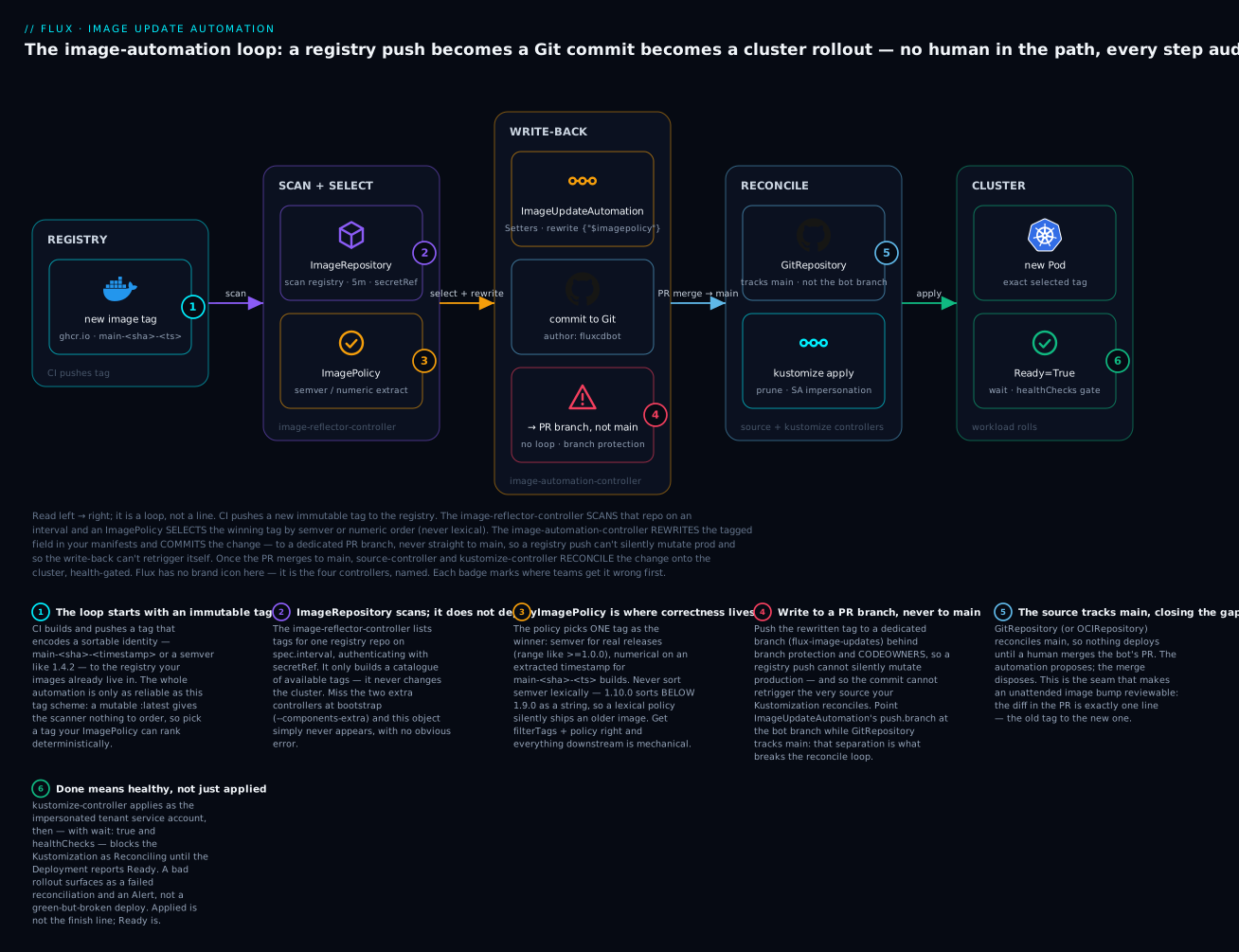
The diagram is section 3 of this lesson in one picture, and it is the mechanism most people get wrong. CI pushes an immutable tag to the registry. The image-reflector-controller scans that repo and an ImagePolicy selects the winning tag — by semver or numeric order, never alphabetically. The image-automation-controller rewrites the tag in your manifests and commits the change — to a dedicated PR branch, never straight to main, which is what stops a registry push from silently mutating production and stops the write-back from re-triggering itself. Only after a human merges does the source- and kustomize-controller reconcile the change onto the cluster, gated on real health. Each numbered badge marks a place teams trip; the legend gives the fix.
Argo CD gets the conference talks, but Flux quietly runs a lot of the largest GitOps platforms because its controllers compose. Each one does a narrow job and reconciles a single CRD, which means you can wire image scanning to commit automation to OCI distribution without a monolith in the middle. The cost is that you have to understand the pieces. This is a platform-engineer’s tour: image automation that writes tags back to Git, manifests shipped as OCI artifacts instead of cloned repos, and the RBAC plumbing that makes hard multi-tenancy actually hold.
I’m assuming Flux v2 (the GitOps Toolkit, apiVersion group *.toolkit.fluxcd.io), the flux CLI v2.x, and a cluster you have admin on.
1. The controllers and what each reconciles
Flux is five controllers, each owning a set of CRDs:
| Controller | Reconciles | Job |
|---|---|---|
| source-controller | GitRepository, OCIRepository, HelmRepository, Bucket |
Fetch and expose artifacts |
| kustomize-controller | Kustomization |
Build kustomize overlays and apply |
| helm-controller | HelmRelease |
Render charts and manage releases |
| image-reflector-controller | ImageRepository, ImagePolicy |
Scan registries, select tags |
| image-automation-controller | ImageUpdateAutomation |
Write selected tags back to Git |
The mental model: source-controller produces artifacts, kustomize/helm controllers consume them and apply to the cluster, and the two image controllers form a separate loop that scans registries and pushes commits. They communicate through the Kubernetes API, not direct calls, so a controller can be down and the rest degrade gracefully rather than cascade.
That last property is worth dwelling on, because it is the difference between Flux and a pipeline. There is no orchestrator issuing steps. Each controller runs its own reconcile loop, watches its own CRDs, and writes status back to the API server; the “hand-off” between them is just one controller’s output object becoming another’s input. source-controller fetches a GitRepository and stores the built artifact as a tarball behind an in-cluster URL; kustomize-controller sees a Kustomization whose sourceRef points at that GitRepository, pulls the tarball, builds the overlay, and applies it. Neither calls the other. If image-reflector-controller crashes, your apps keep reconciling from the last known manifests — you simply stop getting new image tags until it recovers. Compare that with a CI pipeline, where one failed stage blocks everything after it.
A practical consequence for beginners: you install only the controllers you use. A flux bootstrap with no extras gives you source, kustomize, helm, and notification controllers — enough for pull-based GitOps. The two image controllers are opt-in (section 2), because plenty of teams commit image tags from CI and never want Flux writing to Git at all. Knowing which loop you are in — “Flux applies what Git says” versus “Flux also decides what Git should say about images” — tells you which controllers you need running, and it is the first fork every platform design takes.
2. Bootstrap declaratively and structure for tenants
flux bootstrap is imperative-feeling but its job is to make Flux manage its own installation from Git. Bootstrap against GitHub:
export GITHUB_TOKEN=ghp_...
flux bootstrap github \
  --owner=acme-platform \
  --repository=fleet-infra \
  --branch=main \
  --path=clusters/prod \
  --components-extra=image-reflector-controller,image-automation-controller \
  --personal=false
--components-extra is the part people miss: the two image controllers are not installed by default. Without them, your ImageUpdateAutomation objects sit there doing nothing with no obvious error.
It helps to know what that one command actually does, because it feels like magic the first time. flux bootstrap github (1) creates the repository if it does not exist, (2) generates a deploy key (or uses your token) and adds it to the repo, (3) commits the Flux controller manifests under --path (here clusters/prod/flux-system/), and (4) applies them to the cluster and creates a GitRepository + Kustomization pointing back at that path. From that moment Flux is self-managed: you upgrade Flux by bumping the version in Git and letting Flux apply the change to itself. The command is idempotent — re-run it to reconfigure — which is why it is safe to keep in a bootstrap script and re-run after adding, say, --components-extra.
For many tenants, separate the cluster’s own config from tenant config. A structure that scales:
fleet-infra/
  clusters/prod/
    flux-system/            # bootstrap-managed
    tenants.yaml            # one Kustomization per tenant, applied by Flux
  tenants/
    base/
      team-a/
        rbac.yaml           # ServiceAccount + RoleBinding
        sync.yaml           # GitRepository + Kustomization (impersonated)
      team-b/
    production/
      team-a/
        kustomization.yaml  # patches base for prod
The platform team owns clusters/ and tenants/base/*/rbac.yaml. Tenants own their own application repos, which the per-tenant GitRepository points at. flux create tenant scaffolds the namespace, service account, and a RoleBinding to a role you provide:
flux create tenant team-a \
  --with-namespace=team-a \
  --cluster-role=tenant-app-admin \
  --export > tenants/base/team-a/rbac.yaml
The split matters for blast radius and for review. Because the platform team owns the rbac.yaml for every tenant, a tenant cannot grant themselves more permission by editing their own repo — the RoleBinding lives in a file only the platform team can merge. And because each tenant’s app config sits in its own repository behind its own GitRepository, a broken manifest from team-b never lands in team-a’s reconcile. flux create tenant is a convenience that emits exactly this scaffolding; the --export flag prints the YAML instead of applying it, so it lands in Git as a reviewable file rather than as an imperative change to the live cluster — the GitOps way to do even the setup.
3. Image automation: scan, select, commit
Three objects drive automated image updates. First, scan the registry:
apiVersion: image.toolkit.fluxcd.io/v1beta2
kind: ImageRepository
metadata:
  name: podinfo
  namespace: team-a
spec:
  image: ghcr.io/acme-platform/podinfo
  interval: 5m
  secretRef:
    name: ghcr-auth
ImageRepository is the scanner. It authenticates to spec.image’s registry with secretRef, lists the available tags every spec.interval, and stores that catalogue in its status — nothing more. It does not pick a tag and it never touches the cluster. Two beginner snags live here: the secretRef must hold a docker-registry pull secret (kubectl create secret docker-registry ghcr-auth ...) with read access, and on cloud registries (ECR, ACR, GAR) you usually want contextual auth (spec.provider: aws|azure|gcp) instead of a static secret so credentials rotate automatically. If tags never appear, it is almost always auth or a wrong image path — not the policy.
Then declare which tag wins. The policy is where correctness lives – get the ordering wrong and you ship the wrong image:
apiVersion: image.toolkit.fluxcd.io/v1beta2
kind: ImagePolicy
metadata:
  name: podinfo
  namespace: team-a
spec:
  imageRepositoryRef:
    name: podinfo
  filterTags:
    pattern: '^main-[a-f0-9]+-(?P<ts>[0-9]+)$'
    extract: '$ts'
  policy:
    numerical:
      order: asc
This filters to main-<sha>-<timestamp> tags, extracts the timestamp, and picks the numerically highest. For real semver releases, use policy.semver with a range like >=1.0.0 instead – never sort semver lexically. Mark the deployment field Flux should rewrite with a setter marker:
    spec:
      containers:
        - name: podinfo
          image: ghcr.io/acme-platform/podinfo:main-abc123-1718000000 # {"$imagepolicy": "team-a:podinfo"}
Walk that policy line by line, because it is the single most error-prone object in Flux. filterTags.pattern is a regex that both filters (tags that do not match are ignored entirely) and captures a named group; extract pulls that group out as the value to sort on. So ^main-[a-f0-9]+-(?P<ts>[0-9]+)$ keeps only main-<sha>-<timestamp> tags and sorts on the timestamp, numerical: order: asc meaning “highest number is newest.” The # {"$imagepolicy": "team-a:podinfo"} comment is a setter marker — a literal YAML comment the image-automation-controller finds and whose preceding value it overwrites with the tag this policy selected. The reference is <namespace>:<policy-name>. Miss the marker and automation runs but changes nothing; put it on the wrong line and it rewrites the wrong field. You can also target only the tag or only the digest with :tag and :digest suffixes on the marker, e.g. {"$imagepolicy": "team-a:podinfo:tag"}.
Finally, the automation that commits the change back:
apiVersion: image.toolkit.fluxcd.io/v1beta1
kind: ImageUpdateAutomation
metadata:
  name: team-a-images
  namespace: team-a
spec:
  interval: 30m
  sourceRef:
    kind: GitRepository
    name: team-a
  git:
    checkout:
      ref:
        branch: main
    commit:
      author:
        name: fluxcdbot
        email: fluxcdbot@acme.example
      messageTemplate: |
        Automated image update
        {{ range .Changed.Changes }}{{ .OldValue }} -> {{ .NewValue }}
        {{ end }}
    push:
      branch: flux-image-updates
  update:
    path: ./apps/team-a
    strategy: Setters
Pushing to a dedicated flux-image-updates branch instead of main is the pattern I push teams toward: it forces image bumps through a PR with branch protection and CODEOWNERS, so a registry push can’t silently mutate production. The GitRepository your Kustomization reconciles still tracks main, so nothing deploys until the PR merges.
Read the three objects as a pipeline: ImageRepository scans, ImagePolicy selects, ImageUpdateAutomation writes. The automation object’s update.strategy: Setters tells it to walk the files under update.path, find every setter marker, and replace the marked value with its policy’s current selection; git.commit shapes the commit; git.push.branch decides where it lands. The messageTemplate ranges over .Changed.Changes, so each commit message lists exactly which tags moved — a readable audit trail in the Git log itself. This is the loop the diagram draws, and the one subtlety that trips everyone is avoiding a reconcile loop: if push.branch were main and your GitRepository also tracked main, every automated commit would trigger a reconcile that could trigger another scan and another commit. Keep the write-back on its own branch, and accept direct-to-main only when the source and the automation demonstrably cannot feed each other.
4. Manifests as OCI artifacts
Cloning Git on every reconcile across hundreds of tenants is load you don’t need, and it couples deploys to your Git host’s availability. Flux can treat any OCI registry as a source. Push your built manifests as an artifact in CI:
flux push artifact \
  oci://ghcr.io/acme-platform/manifests/team-a:$(git rev-parse --short HEAD) \
  --path=./deploy \
  --source="$(git config --get remote.origin.url)" \
  --revision="$(git rev-parse HEAD)"

flux tag artifact \
  oci://ghcr.io/acme-platform/manifests/team-a:$(git rev-parse --short HEAD) \
  --tag=latest
Consume it with OCIRepository instead of GitRepository:
apiVersion: source.toolkit.fluxcd.io/v1beta2
kind: OCIRepository
metadata:
  name: team-a
  namespace: team-a
spec:
  interval: 10m
  url: oci://ghcr.io/acme-platform/manifests/team-a
  ref:
    semver: ">=1.0.0"
  secretRef:
    name: ghcr-auth
  verify:
    provider: cosign
    secretRef:
      name: cosign-pub
The verify block is the reason to bother with OCI even if you keep Git: Flux refuses to reconcile an artifact whose cosign signature doesn’t validate. Combined with keyless signing in CI, you get a supply-chain gate where an unsigned or tampered artifact never reaches the cluster – something plain Git sources can’t give you without extra tooling.
“OCI artifact” sounds exotic; it is not. The OCI (Open Container Initiative) image spec lets a registry store any content-addressable blob with a manifest, not only container filesystems. flux push artifact tars your ./deploy directory, wraps it in an OCI manifest with a config media type that marks it as Flux content, and pushes it to ghcr.io/.../manifests/team-a right next to your images. It is versioned by digest and, because you passed --source and --revision, it carries provenance annotations recording which Git commit produced it. flux tag artifact adds a moving tag (latest) on top of the immutable digest, exactly like image tags. Consuming it, OCIRepository replaces GitRepository in a Kustomization’s sourceRef with no other change — the rest of your pipeline does not know or care that the manifests arrived over the registry protocol instead of Git.
Signing is what turns this from an optimisation into a control, and it is worth its own read in the container image supply chain lesson. With verify.provider: cosign, source-controller checks the artifact’s cosign signature against the public key (or, for keyless, the certificate identity and OIDC issuer) before it will build the Kustomization. Wire that to keyless signing in CI and the trust chain is: CI signs with its short-lived workload identity, the signature is logged in a public transparency log, and the cluster admits only artifacts whose signature matches the identity you named. An attacker who pushes a tampered artifact to your registry cannot forge that signature, so source-controller rejects it and the Kustomization goes NotReady instead of deploying poison.
5. Hard multi-tenancy with impersonation
Soft multi-tenancy (namespaces, NetworkPolicy) is not enough when tenants can author Kustomizations. By default kustomize-controller applies with its own powerful service account, so a tenant manifest could create a ClusterRoleBinding and escalate. Hard multi-tenancy closes this by making Flux impersonate a per-tenant service account that only has namespace-scoped rights:
apiVersion: kustomize.toolkit.fluxcd.io/v1
kind: Kustomization
metadata:
  name: team-a
  namespace: team-a
spec:
  serviceAccountName: team-a   # impersonate this SA
  sourceRef:
    kind: OCIRepository
    name: team-a
  path: ./
  prune: true
  interval: 10m
  targetNamespace: team-a
spec.serviceAccountName is the linchpin. kustomize-controller applies the manifests as team-a, so anything the tenant tries that exceeds that SA’s RBAC fails at apply time. Enforce that this field is never omitted by setting --default-service-account on the controller, so a missing serviceAccountName falls back to a powerless SA rather than the controller’s own identity:
flux bootstrap github ... \
  --kustomization-controller-extra-args=--default-service-account=fluxcd-noop
The tenant’s RoleBinding must stay namespace-scoped:
apiVersion: rbac.authorization.k8s.io/v1
kind: RoleBinding
metadata:
  name: team-a-reconciler
  namespace: team-a
roleRef:
  apiGroup: rbac.authorization.k8s.io
  kind: ClusterRole
  name: tenant-app-admin   # a role WITHOUT rbac/clusterrole verbs
subjects:
  - kind: ServiceAccount
    name: team-a
    namespace: team-a
The threat this closes is concrete, so make it concrete. kustomize-controller’s own service account (kustomize-controller in flux-system) is powerful — it has to be, to apply arbitrary resources into any namespace. Without impersonation, a tenant who can commit a Kustomization can commit any manifest alongside it, including a ClusterRoleBinding that grants their own SA cluster-admin. Flux applies it with its powerful identity, the binding is created, and the tenant has escalated out of their namespace — all through the normal GitOps flow, no exploit required. spec.serviceAccountName: team-a changes the identity kustomize-controller applies as: now the controller impersonates team-a, whose RBAC (the namespace-scoped RoleBinding above) has no clusterrolebindings verbs, so the malicious apply is denied by the API server. The --default-service-account flag is the belt-and-braces: it makes omitting serviceAccountName fall back to a chosen powerless SA rather than the controller’s own identity, closing the gap for Kustomizations that simply forgot to set it. Design the tenant ClusterRole (tenant-app-admin) to grant everything a team needs inside their namespace — Deployments, Services, ConfigMaps, HPAs — and nothing that touches rbac.authorization.k8s.io, namespaces, or cluster-scoped kinds. Least privilege here is the same discipline as any Kubernetes RBAC design (Kubernetes RBAC least-privilege design); Flux just applies it through impersonation.
6. Block cross-namespace references and lock sources
Impersonation stops privilege escalation but not data exfiltration. A tenant could point a Kustomization in their namespace at another tenant’s GitRepository via a cross-namespace sourceRef. Two controller flags shut both doors. Disable cross-namespace source references entirely:
--kustomization-controller-extra-args=--no-cross-namespace-refs=true
--helm-controller-extra-args=--no-cross-namespace-refs=true
--notification-controller-extra-args=--no-cross-namespace-refs=true
--image-automation-controller-extra-args=--no-cross-namespace-refs=true
With this set, a sourceRef may only target objects in the same namespace – a tenant physically cannot reference another tenant’s source. Then lock down which URLs sources may use with Kyverno, so a tenant can’t repoint their own OCIRepository at an arbitrary registry:
apiVersion: kyverno.io/v1
kind: ClusterPolicy
metadata:
  name: restrict-flux-source-urls
spec:
  validationFailureAction: Enforce
  rules:
    - name: oci-url-allowlist
      match:
        any:
          - resources:
              kinds: ["OCIRepository"]
      validate:
        message: "OCIRepository url must be under the platform registry"
        pattern:
          spec:
            url: "oci://ghcr.io/acme-platform/manifests/*"
Together these three controls – impersonation, no cross-namespace refs, and a source-URL allowlist – are what I mean by hard multi-tenancy. Any one alone leaves a gap.
The two exfiltration paths are easy to miss because neither is an “attack” in the usual sense — both are ordinary Flux features used across a boundary. Cross-namespace sourceRef exists for good reasons in single-tenant clusters (a shared GitRepository that many Kustomizations reconcile from), but in a multi-tenant cluster it means team-a’s Kustomization can name team-b’s GitRepository and pull whatever it exposes. --no-cross-namespace-refs=true on each controller that resolves a sourceRef (kustomize, helm, image-automation, notification) collapses the allowed scope to the object’s own namespace. The URL allowlist closes the other half: even confined to their own namespace, a tenant could point their OCIRepository at oci://evil.example/backdoor and pull an attacker’s manifests. The Kyverno ClusterPolicy with validationFailureAction: Enforce rejects any OCIRepository whose url is not under the platform registry path at admission time — before Flux ever sees it. Note where each control acts: impersonation is enforced by the API server at apply time, cross-namespace refs by the controller at resolve time, and the URL allowlist by the admission webhook at write time. Three different chokepoints, which is exactly why removing any one reopens a specific door.
7. Progressive delivery with Flagger
Flux applies the desired state; it does not do canaries. Flagger fills that gap and reads the same Deployment Flux reconciles, so the GitOps loop stays the source of truth while Flagger owns the rollout:
apiVersion: flagger.app/v1beta1
kind: Canary
metadata:
  name: podinfo
  namespace: team-a
spec:
  targetRef:
    apiVersion: apps/v1
    kind: Deployment
    name: podinfo
  service:
    port: 9898
  analysis:
    interval: 1m
    threshold: 5
    maxWeight: 50
    stepWeight: 10
    metrics:
      - name: request-success-rate
        thresholdRange:
          min: 99
        interval: 1m
When Flux’s image automation merges a new tag and the Deployment spec changes, Flagger detects the change, shifts traffic in 10% steps, watches the success-rate metric, and rolls back automatically if it drops below 99%. The whole chain – registry push to Git commit to apply to canary – runs without a human in the path, but every step is observable and reversible.
The division of labour is the point: Flux owns what should run (the desired state in Git), Flagger owns how it rolls out (the traffic shift and the metric gate). They meet at the Deployment. Because Flagger reads the same object Flux reconciles rather than replacing it, you keep GitOps as the source of truth and add progressive delivery on top — no Rollout CRD swap required, unlike the Argo Rollouts approach. If the canary analysis fails, Flagger scales the canary back to zero and leaves the stable version serving; Flux, seeing the Deployment unchanged in Git, does not fight it. The one thing to watch is that image automation and Flagger both react to the same tag change, so the interval on your Canary analysis should be short enough to conclude before the next reconcile window reopens the question.
8. Drift detection, health, and alerts
Flux corrects drift by default: Kustomization and HelmRelease re-apply on every interval, reverting manual kubectl edit. Gate “done” on real health, not just “applied,” with health checks:
spec:
  wait: true
  timeout: 5m
  healthChecks:
    - apiVersion: apps/v1
      kind: Deployment
      name: podinfo
      namespace: team-a
wait: true blocks the Kustomization as Reconciling until every listed object reports healthy, so a bad rollout surfaces as a failed reconciliation instead of a green-but-broken deploy. Route those failures to Slack with Provider and Alert:
apiVersion: notification.toolkit.fluxcd.io/v1beta3
kind: Provider
metadata:
  name: slack
  namespace: flux-system
spec:
  type: slack
  channel: platform-alerts
  secretRef:
    name: slack-url
---
apiVersion: notification.toolkit.fluxcd.io/v1beta3
kind: Alert
metadata:
  name: tenant-failures
  namespace: flux-system
spec:
  providerRef:
    name: slack
  eventSeverity: error
  eventSources:
    - kind: Kustomization
      name: '*'
    - kind: HelmRelease
      name: '*'
The notification-controller runs in two directions, and it is worth seeing both. Outbound — the Provider + Alert pair above — turns Flux events into messages: Provider is the destination (Slack, Teams, a generic webhook, or a git commit-status provider that writes checks back onto your PRs), and Alert is the filter (eventSeverity, eventSources) deciding which events go there. The wildcard eventSources (name: '*') catches every tenant Kustomization, so one Alert in flux-system covers the fleet. Inbound — a Receiver — is the other half: it exposes a webhook endpoint so a registry or Git push can trigger an immediate reconcile instead of waiting for the interval, turning Flux from polling to event-driven:
apiVersion: notification.toolkit.fluxcd.io/v1
kind: Receiver
metadata:
  name: ghcr-receiver
  namespace: flux-system
spec:
  type: github
  events:
    - ping
    - push
  secretRef:
    name: receiver-token
  resources:
    - kind: GitRepository
      name: team-a
      namespace: team-a
That closes the latency gap: without it, a merged PR waits up to spec.interval before Flux notices; with it, GitHub’s push webhook pokes the Receiver and reconciliation starts in seconds. For drift specifically, remember Flux’s default is correction, not just detection — a hand-edited replica count is reverted on the next interval, which is a feature right up until someone “fixes” prod by hand and cannot understand why it keeps changing back (see Common beginner mistakes).
Going deeper
You now have the core objects. This section is for the reader who has to operate them at scale, and it maps directly onto the numbered badges in the diagram.
The image-automation loop, end to end
Badge by badge, here is the loop the diagram draws, with the timing that makes it safe. (1) CI pushes podinfo:main-abc123-1718000000. (2) On its interval, ImageRepository lists tags and updates status — this is a pull, so a registry with thousands of tags means a heavier scan; scope spec.image tightly and lengthen interval on noisy repos. (3) ImagePolicy re-evaluates and sets status.latestImage. (4) On its interval, ImageUpdateAutomation clones the source branch, applies setters, and if anything changed, commits and pushes to push.branch. (5) The PR merges (a human, or an auto-merge bot for low-risk bumps). (6) GitRepository on main reconciles, Kustomization applies, health gates.
Notice there are two independent intervals in play — the scan interval on ImageRepository and the automation interval on ImageUpdateAutomation — so the worst-case latency from registry push to open PR is roughly ImageRepository.interval + policy re-eval + ImageUpdateAutomation.interval. Shorten them for responsiveness, lengthen them to cut registry load; a Receiver (section 8) can trigger the scan on a registry webhook instead of polling. The reconcile-loop-avoidance is not optional hygiene — it is what keeps this from becoming a commit storm. If the write-back branch and the reconciled branch are the same, and the reconcile can change a file the automation also owns, you have built a feedback oscillator that commits every interval forever.
Choosing a policy: semver vs numerical vs alphabetical
The ImagePolicy supports three ordering strategies; picking the wrong one is the most common way to ship the wrong image.
| Strategy | Sorts by | Use it when | The trap |
|---|---|---|---|
semver |
Semantic version, within a range |
You tag real releases (1.4.2, 2.0.0) |
Forgetting the range; >=1.0.0 excludes pre-releases unless you add -0 |
numerical |
A number you extract |
Tags embed a build number or Unix timestamp | Sorting the whole tag as text instead of extracting the number |
alphabetical |
ASCII string order | Tags are designed to sort as text (2026-07-...) |
Assuming it means “newest”; main-9 sorts above main-10 |
Semver, for released images:
apiVersion: image.toolkit.fluxcd.io/v1beta2
kind: ImagePolicy
metadata:
  name: podinfo-semver
  namespace: team-a
spec:
  imageRepositoryRef:
    name: podinfo
  policy:
    semver:
      range: '>=1.0.0 <2.0.0'
Alphabetical, only safe when your tag scheme sorts correctly as text:
apiVersion: image.toolkit.fluxcd.io/v1beta2
kind: ImagePolicy
metadata:
  name: podinfo-alpha
  namespace: team-a
spec:
  imageRepositoryRef:
    name: podinfo
  filterTags:
    pattern: '^(?P<branch>main)-(?P<sha>[a-f0-9]+)$'
    extract: '$branch-$sha'
  policy:
    alphabetical:
      order: asc
The reason “never sort semver lexically” is drilled so hard: as plain strings, 1.10.0 sorts below 1.9.0 (because 1 < 9 at the third character), so a lexical policy on semver tags will happily “upgrade” you from 1.9 to… 1.10, then treat 1.10 as older and roll back. semver understands that 1.10.0 > 1.9.0. Reach for numerical only when you have extracted a genuine number (a timestamp or build counter) via filterTags.extract, and alphabetical only for tag schemes that sort as text (zero-padded dates work; bare integers do not).
OCI artifacts as a Git alternative — and signing
The imperative twin of the OCIRepository manifest is flux create source oci, handy for a quick spike before you commit the YAML:
flux create source oci team-a \
  --url=oci://ghcr.io/acme-platform/manifests/team-a \
  --tag-semver=">=1.0.0" \
  --interval=10m \
  --secret-ref=ghcr-auth \
  --namespace=team-a
# representative output
✚ generating OCIRepository source
► applying OCIRepository source
✔ OCIRepository source reconciliation completed
✔ fetched revision: latest@sha256:9f2e0c...
But the declarative OCIRepository (section 4) is what belongs in Git — the command above is just a fast way to generate it. The real upgrade over Git sources is verify. Keyless cosign in CI signs the artifact against the CI job’s OIDC identity (no key to leak), records the signature in a public transparency log, and source-controller’s verify.provider: cosign checks it before building the Kustomization. The important nuance is to pin who signed, not merely that it is signed — otherwise any valid signature from anyone is accepted:
  verify:
    provider: cosign
    matchOIDCIdentity:
      - issuer: "^https://token.actions.githubusercontent.com$"
        subject: "^https://github.com/acme-platform/.*$"
Now source-controller admits an artifact only if its cosign signature was produced by a GitHub Actions workflow in your org. An attacker who compromises your registry and pushes a tampered artifact cannot forge that identity, so the source fails verification and the Kustomization stops rather than deploys. That is the supply-chain gate a plain GitRepository cannot give you.
Multi-tenancy: the four chokepoints and how they compose
| Control | Enforced by | At what moment | Stops |
|---|---|---|---|
spec.serviceAccountName impersonation |
API server RBAC | apply time | Privilege escalation (tenant creating cluster-scoped RBAC) |
--default-service-account fallback |
kustomize-controller | apply time | Escalation via an omitted serviceAccountName |
--no-cross-namespace-refs=true |
each Flux controller | sourceRef resolve time | Referencing another tenant’s source |
| Source-URL allowlist (Kyverno) | admission webhook | write time | Repointing a source at an untrusted registry |
Compose all four and a tenant is boxed in: they may deploy only into their namespace, only as their restricted SA, only from sources in their namespace, and only from the platform registry. Remove any one and a specific door reopens — the table’s last column is your threat model. This reaches the same isolation goal as vcluster or hierarchical namespaces, but with RBAC and controller flags instead of nested control planes, so it costs no extra API servers.
The notification-controller: alerts, commit statuses, and receivers
Beyond Slack, the highest-leverage Provider type for platform teams is the github/gitlab commit status: Flux writes the reconcile result back onto the very commit that triggered it, so a red reconcile shows up as a failed check on the PR that caused it — the feedback lands where the change was made, not in a chat channel someone has muted. Pair that with a Receiver for push-triggered reconciles and the loop is tight in both directions: a merge triggers an immediate reconcile, and its outcome posts straight back onto the merge. That is the difference between a platform that tells you within seconds that a change failed and one where you first hear about it from a customer. At fleet scale, keep the Alert objects few and wildcarded in flux-system rather than one per tenant — a single error-severity Alert over Kustomization and HelmRelease with name: '*' covers every team and is one object to maintain.
Common beginner mistakes
- Fighting the reconcile loop by hand. You
kubectl scaleorkubectl editto hotfix production, it holds for one interval, then Flux reverts it and you conclude Flux is “broken.” It is doing its job: live drifted from Git, so it corrected. The right model is to change Git (a PR), or, for a genuine emergency, suspend the object first (flux suspend kustomization team-a -n team-a), fix, then reconcile the fix back into Git and resume. Never argue with the reconcile loop by hand. - Sorting semver tags lexically, or forgetting
extract.alphabeticalon1.9.0and1.10.0picks1.9.0as newer, silently pinning you a version back. Usesemverfor version tags; usenumericalwith afilterTags.extractthat pulls out the actual number for build-number or timestamp tags. If yourImagePolicy“picks the wrong image,” this is almost always why. - A cross-namespace
sourceRefthat quietly leaks across tenants. Referencing aGitRepositoryin another namespace feels convenient and works in a demo, but in a shared cluster it is a tenant reading another tenant’s source. Set--no-cross-namespace-refs=trueon kustomize, helm, image-automation, and notification controllers so asourceRefcan only name objects in its own namespace — then the “convenient” shortcut fails loudly instead of leaking. - Thinking OCI artifacts are different content from Git. An OCI artifact holds the same manifests — it is a different transport, not a different format. Swapping
GitRepositoryforOCIRepositoryin asourceRefchanges where the bytes come from and nothing else downstream. Beginners over-think this and expect a new packaging step; there is none beyondflux push artifact. - Enabling
verifybut never proving it fails closed. Averifyblock that has never rejected anything might be misconfigured (wrong key, unpinned identity) and silently passing everything. Push an unsigned artifact once and confirm theOCIRepositorygoesNotReadywith a signature error. A gate you have not seen slam shut is not a gate. - Forgetting
--components-extra, then debugging silence. Without the two image controllers installed, yourImageRepository,ImagePolicy, andImageUpdateAutomationobjects apply cleanly and do absolutely nothing — no scan, no commit, no error.flux checkshows the missing controllers. If image automation “isn’t working” and there are no events at all, check this first.
Practice challenges
Work these top to bottom; each builds on the last. Try before opening the solution.
1 — Beginner: diagnose a silent ImageRepository. You applied an ImageRepository for ghcr.io/acme-platform/podinfo, but flux get image repository podinfo -n team-a shows no tags after ten minutes and the ImagePolicy has no LATEST IMAGE. Everything else in the cluster is healthy. Where do you look, and what are the two usual causes?
<details> <summary>Solution</summary>
Look at the ImageRepository status/events: flux get image repository podinfo -n team-a and kubectl describe imagerepository podinfo -n team-a. The two usual causes are (a) auth — the secretRef is missing, wrong, or lacks read scope on the registry (fix with a valid kubectl create secret docker-registry, or switch to contextual auth via spec.provider on ECR/ACR/GAR), and (b) a wrong image path in spec.image. A distant third is that the two image controllers were never installed — confirm with flux check. Why: ImageRepository only scans; if it cannot authenticate or the repo path is wrong, it lists zero tags and the whole loop downstream has nothing to select from.
</details>
2 — Beginner: write a numerical policy and setter marker. Your CI tags images main-<sha>-<unixtimestamp> (e.g. main-abc123-1718000000). Write an ImagePolicy that always selects the newest build, and show the exact deployment line so the automation rewrites the tag.
<details> <summary>Solution</summary>
apiVersion: image.toolkit.fluxcd.io/v1beta2
kind: ImagePolicy
metadata:
  name: web-numeric
  namespace: team-a
spec:
  imageRepositoryRef:
    name: web
  filterTags:
    pattern: '^main-[a-f0-9]+-(?P<ts>[0-9]+)$'
    extract: '$ts'
  policy:
    numerical:
      order: asc
image: ghcr.io/acme-platform/web:main-abc123-1718000000 # {"$imagepolicy": "team-a:web-numeric"}
Why: filterTags keeps only main-<sha>-<ts> tags and extract: '$ts' sorts on the timestamp; numerical order: asc treats the highest number as newest. The setter marker {"$imagepolicy": "team-a:web-numeric"} tells ImageUpdateAutomation which value on the preceding line to overwrite, referenced as <namespace>:<policy>.
</details>
3 — Intermediate: stop a reconcile loop. A teammate set ImageUpdateAutomation.spec.git.push.branch: main, and the GitRepository also tracks main. Now Flux commits an image bump every 30 minutes even though the image has not changed. Explain the loop and fix it so bumps still land safely.
<details> <summary>Solution</summary>
Set push.branch to a dedicated branch and open a PR:
spec:
  git:
    push:
      branch: flux-image-updates
Why: when the write-back branch equals the reconciled branch, each automated commit to main triggers a GitRepository reconcile, which re-runs the pipeline and can re-commit — a feedback oscillator. Pushing to flux-image-updates (behind branch protection + CODEOWNERS) means the automation proposes a PR; a human or auto-merge bot merges it to main, and only then does the source reconcile. The automation can no longer feed itself.
</details>
4 — Intermediate: source manifests from a signed OCI artifact. Convert team-a from a GitRepository to an OCIRepository that pulls oci://ghcr.io/acme-platform/manifests/team-a, selects >=1.0.0, and refuses any artifact not signed by your GitHub Actions org via keyless cosign. Write the manifest.
<details> <summary>Solution</summary>
apiVersion: source.toolkit.fluxcd.io/v1beta2
kind: OCIRepository
metadata:
  name: team-a
  namespace: team-a
spec:
  interval: 10m
  url: oci://ghcr.io/acme-platform/manifests/team-a
  ref:
    semver: ">=1.0.0"
  secretRef:
    name: ghcr-auth
  verify:
    provider: cosign
    matchOIDCIdentity:
      - issuer: "^https://token.actions.githubusercontent.com$"
        subject: "^https://github.com/acme-platform/.*$"
Why: ref.semver picks the newest matching artifact tag; verify.provider: cosign with matchOIDCIdentity pins both the OIDC issuer (GitHub Actions) and the certificate subject (a workflow under your org), so source-controller admits the artifact only if it was signed by your CI identity. An unsigned or foreign-signed artifact fails verification and the source goes NotReady instead of deploying. Point the Kustomization’s sourceRef at this OCIRepository.
</details>
5 — Advanced: harden one tenant against escalation. Write the Kustomization for team-a that applies as a restricted per-tenant identity, and explain in one sentence the escalation it blocks. Then name the controller flag that protects against forgetting this field.
<details> <summary>Solution</summary>
apiVersion: kustomize.toolkit.fluxcd.io/v1
kind: Kustomization
metadata:
  name: team-a
  namespace: team-a
spec:
  interval: 10m
  serviceAccountName: team-a
  sourceRef:
    kind: OCIRepository
    name: team-a
  path: ./
  prune: true
  targetNamespace: team-a
It blocks a tenant from committing a ClusterRoleBinding (or any cluster-scoped RBAC) alongside their app and having Flux apply it with the controller’s powerful identity — with impersonation, the apply runs as team-a, whose namespace-scoped RBAC lacks those verbs, so the API server denies it. The flag that protects a missing serviceAccountName is --default-service-account=<powerless-sa> on kustomize-controller, so an omitted field falls back to a no-op identity rather than the controller’s own. Why: impersonation moves the authorization decision to the API server against the tenant’s own RBAC, and the default-SA fallback removes the “forgot to set it” gap.
</details>
6 — Advanced: lock down the fleet. List every control you would enable so that, on a shared cluster, a tenant can deploy only into their own namespace, only as their own restricted SA, only from sources in their namespace, and only from the platform registry. Give the mechanism for each.
<details> <summary>Solution</summary>
Four controls, at four different chokepoints:
- Impersonation —
spec.serviceAccountNameon every tenantKustomization(+ the tenantClusterRolewithoutrbac/cluster-scoped verbs). Enforced by API-server RBAC at apply time. - Default powerless SA —
--default-service-account=fluxcd-restrictedon kustomize-controller. Closes the omitted-field gap at apply time. - No cross-namespace refs —
--no-cross-namespace-refs=trueon kustomize, helm, image-automation, and notification controllers. Confines everysourceRefto its own namespace at resolve time. - Source-URL allowlist — a Kyverno
ClusterPolicy(validationFailureAction: Enforce) pinningOCIRepository/GitRepositoryurlto the platform registry path. Enforced by the admission webhook at write time.
Why: each control acts at a different moment (write, resolve, apply), so they compose into defence in depth — remove any one and exactly one door reopens. This is the “hard multi-tenancy” the Enterprise scenario below hardened a real cluster with.
</details>
Verify
Confirm the pipeline end to end:
# Controllers and CRDs healthy
flux check

# Sources are pulling artifacts
flux get sources oci --all-namespaces
flux get sources git --all-namespaces

# Image scan picked the expected tag
flux get image policy podinfo -n team-a
# LATEST IMAGE should show ghcr.io/.../podinfo:main-...

# Automation committed back to Git
flux get image update team-a-images -n team-a

# Impersonation is in effect (should be the tenant SA, not flux-system)
kubectl get kustomization team-a -n team-a -o jsonpath='{.spec.serviceAccountName}'

# Cross-namespace refs are blocked
kubectl get deploy kustomize-controller -n flux-system \
  -o jsonpath='{.spec.template.spec.containers[0].args}' | tr ',' '\n' | grep cross-namespace

# Force a reconcile and watch health gating
flux reconcile kustomization team-a -n team-a --with-source
A correctly wired tenant shows Ready=True with a recent Applied revision, the ImagePolicy reports a LATEST IMAGE, and an out-of-policy sourceRef is rejected by the API server before reconciliation.
Enterprise scenario
A fintech platform team ran 80+ product squads on shared clusters under PCI scope. The audit finding that triggered the work: a squad’s Kustomization had created a ClusterRoleBinding granting cluster-admin, because kustomize-controller applied with its own identity and nothing stopped it. Worse, two squads were reconciling from each other’s Git repos via cross-namespace sourceRef, so one team’s broken manifest had taken down another’s service.
They couldn’t move squads to separate clusters – the per-cluster control-plane and node overhead was rejected on cost. So they hardened the shared model: impersonation on every Kustomization via --default-service-account=fluxcd-restricted, --no-cross-namespace-refs=true on the kustomize, helm, image-automation, and notification controllers, and a Kyverno policy pinning each OCIRepository URL to that squad’s own path. The single highest-leverage change was the default service account, because it closed the escalation path even for Kustomizations that omitted serviceAccountName:
flux bootstrap github \
  --owner=acme-platform --repository=fleet-infra \
  --path=clusters/prod \
  --kustomization-controller-extra-args=--default-service-account=fluxcd-restricted,--no-cross-namespace-refs=true
fluxcd-restricted was a ServiceAccount with no RoleBindings at all, so any Kustomization that forgot to impersonate a real tenant SA could create exactly nothing. Re-running the pen test, the escalation path was closed and the cross-tenant blast radius was gone – and the cluster bill didn’t move.
Checklist
Glossary
- Flux (GitOps Toolkit) — a set of Kubernetes controllers (the GitOps Toolkit) that reconcile cluster state to Git; there is no single “Flux binary,” only the controllers.
- source-controller — fetches and exposes artifacts from
GitRepository,OCIRepository,HelmRepository, andBucketsources. - kustomize-controller — builds a
Kustomization’s overlay from a source and applies it to the cluster (with impersonation, pruning, health checks). - helm-controller — renders charts and manages releases from a
HelmRelease. - image-reflector-controller — scans registries (
ImageRepository) and selects tags (ImagePolicy); part of the opt-in image loop. - image-automation-controller — writes the selected tag back into Git (
ImageUpdateAutomation); the other half of the image loop. - GitRepository / OCIRepository — source objects pointing at a Git repo or an OCI registry artifact; interchangeable in a
Kustomization’ssourceRef. - Kustomization (Flux) — a Flux object that builds and applies manifests from a source; distinct from a
kustomization.yamlfile. - ImageRepository — scans one registry repo on an interval and lists its tags; does not deploy anything.
- ImagePolicy — selects the single winning tag from an
ImageRepositorybysemver,numerical, oralphabeticalordering. - ImageUpdateAutomation — commits the tag selected by an
ImagePolicyback into Git, using setter markers and a push branch. - setter marker — the
# {"$imagepolicy": "<ns>:<policy>"}comment marking which manifest value the automation rewrites; optional:tag/:digestsuffix narrows the target. - filterTags / extract — the
ImagePolicyregex that filters which tags count and captures the substring to sort on. - semver / numerical / alphabetical policy — the three tag-ordering strategies; use semver for versions, numerical for extracted numbers, alphabetical only for text-sortable schemes.
- OCI artifact — arbitrary content (here, Kubernetes manifests) stored in an OCI registry with a manifest and digest, alongside your images.
flux push artifact— packages a directory of manifests into an OCI artifact and pushes it to a registry, with source/revision provenance.- cosign / keyless / verify — cosign signs artifacts; keyless signing binds the signature to a CI OIDC identity;
verifymakes source-controller admit only signatures it can validate. - hard vs soft multi-tenancy — soft relies on namespaces and NetworkPolicy; hard adds impersonation, cross-namespace lockdown, and source pinning so isolation holds against tenant-authored manifests.
- impersonation /
serviceAccountName— kustomize-controller applies as a per-tenant service account, so tenant RBAC bounds what aKustomizationcan create. --default-service-account— controller flag making an omittedserviceAccountNamefall back to a chosen (powerless) SA instead of the controller’s own identity.--no-cross-namespace-refs— controller flag confining everysourceRefto the object’s own namespace, blocking cross-tenant source reads.- sourceRef — the field by which a
Kustomization/HelmRelease/automation names its source object. - Provider / Alert — notification-controller objects:
Provideris the outbound destination (Slack, webhook, git commit status),Alertfilters which events go there. - Receiver — an inbound webhook endpoint that triggers an immediate reconcile on a Git/registry push, making Flux event-driven instead of poll-only.
- Flagger / Canary — a progressive-delivery controller that reads the
DeploymentFlux reconciles and shifts traffic with metric gates and auto-rollback. - drift / selfHeal — divergence of live cluster from Git; Flux corrects drift by re-applying on each interval by default.
flux bootstrap— the command that installs Flux, commits its manifests to Git, and makes Flux self-managed from that repo path.--components-extra— bootstrap flag that installs the two opt-in image controllers; without it the image objects apply but do nothing.- reconcile loop — a controller’s continuous diff-and-apply cycle; the image-automation write-back must avoid feeding its own reconcile (use a separate push branch).